#helpdesk-twitch
1 messages · Page 816 of 1
 tall cipher
 zenith widget
We are looking into that.
 restive saffron
Is there a bug in the Bot Modules? I can't change the Chat alerts. I change the message, on the right side it says "Saved" but after that, the message is still the same
try to remove the PogChamp from my messages
zenith widget
Refresh after changing
restive saffron
Oh 😅 Thx
zenith widget
after each change you do
 wind mica
Hello, I am creating a special alert for each donation, but for example, I have set a special music for 1 dollar and a special music for 10 dollars. When I send 10 dollars, the two work together. How can this be solved?
zenith widget
What do you mean the two work together?
 bleak flare
can someone tell me why streamelements isnt showing the right followeramount? startet streamelements yesterday and it didnt show alerts and doesnt show any followers
 short helm
Hi, I have a problem with the scene transition. Is it possible to load my own file in the scene transition? From obs streamlabs it goes, but from obs streamelements I'm not managing to find a way, I don't understand why.
wind mica
zenith widget
What do you mean the two work together?
When someone donates 10 dollars, the 10 dollar and 1 dollar alert works
zenith widget
I don't see any variations set in your tip alert
@short helm OBS.Live does not manage transitions, so its best to ask in the OBS Discord
 viscid pebbleBOT
@short helm Obs.live is a plugin for OBS Studio for the best OBS support, please join their Official Discord @ discord.gg/obsproject
@bleak flare Please provide your account ID found at the top of this page: https://streamelements.com/dashboard/account/channels This ID is public info and safe to share here.
short helm
zenith widget
<@!352016707809705986> OBS.Live does not manage transitions, so its best to ask ...
Ok, thank you!
bleak flare
viscid pebble
<@!135954493144694784> Please provide your account ID found at the top of this p...
5ff72faea57a4d6d42d84e78
zenith widget
I've fixed the issue and you should receive follower events now again
bleak flare
yes it worked! thank you for that very fast help! didnt expect it so be that fast 😄
wind mica
zenith widget
I've fixed the issue and you should receive follower events now again
Waht About Me 
zenith widget
This means, that if someone even tips you 10000$, its going to trigger the same alert
wind mica
zenith widget
This means, that if someone even tips you 10000$, its going to trigger the same ...
Can I send a video clip explaining what I want?
 prisma relic
you have 3 different widgets? on 3 layers?
zenith widget
You need to setup variations in 1 widget
if you have 3 alert widgets in 1 overlay, ofcource you will get multiple alerts at the same time
wind mica
zenith widget
You need to setup variations in 1 widget
okay i will try
prisma relic
 tame walrus
hello anyone who can help me to put a command that says how many wins and how many losses is the streamer?
 gleaming gulch
Hi , anyone who can help ? my dashboard actualy not updating with new folower or anithing since today it work well on streamlabs.obs
 lament blade
Hello guys,
My problem is that followers don't show up in the activity feed and I get no alert for followers because of that.
Maybe someone can help me? 
 ionic kelp
Is followers enabled under filter?
lament blade
yes it is.
prisma relic
lament blade
tame walrus
prisma relic
https://streamelements.com/dashboard/bot-commands/variables <@!42275279965965516...
thnx
lament blade
Everything is enabled but it does not show followers :/
gleaming gulch
same problem
prisma relic
gleaming gulch
Hi , anyone who can help ? my dashboard actualy not updating with new folower or...
not sure about streamlabsobs
gleaming gulch
i mean it didn't work on streamelements dashboard and it work on streamlabs
lament blade
same
 trail garnet
Hi is this the channel to learn how to setup twitch live notifications on my discord server?
ionic kelp
No.
trail garnet
Ow
ionic kelp
That would be something for #general-chat and even then you'd need to use something else.
prisma relic
give me a little to look into the follower thing
gleaming gulch
sure
lament blade
prisma relic
give me a little to look into the follower thing
that would be nice
zenith widget
@lament blade should be good now
gleaming gulch
hope you can do the same for me ^^
 viscid pebbleBOT
@gleaming gulch Please provide your account ID found at the top of this page: https://streamelements.com/dashboard/account/channels This ID is public info and safe to share here.
lament blade
@zenith widget Is it possible to rate your service somewhere?
zenith widget
no
lament blade

zenith widget
we don't do this around these parts
lament blade
Thank you tho 
zenith widget
👍
gleaming gulch
@zenith widget what should i do to get some help too ?
zenith widget
gleaming gulch
@zenith widget where i'm suppose to provide it ?
zenith widget
Here
gleaming gulch
5ff6fd0e3d2bf1abc4b54240
gleaming gulch
@zenith widget thanks you so much ! you fix that so fast !
lament blade
does anyone know how to reset the !roulette and !slots back to default? i have made a mess of it trying to customize for something other than points.
 dull shoal
How to create donation link?
viscid pebbleBOT
@dull shoal New to StreamElements?
Check out our YouTube channel https://www.youtube.com/c/streamelements/videos
with tutorial videos from setting up the basics, to in-depth details on how to use our product.
New to OBS? Here is a 4 step quick start guide
https://obsproject.com/wiki/OBS-Studio-Quickstart
Want to learn even more? Here is an in-depth overview
https://obsproject.com/wiki/OBS-Studio-Overview
@wanton bane Read and follow our server rules:
- We do not tolerate toxicity! Treat the community team, staff and all members with respect.
- No advertisement or channel promotion, anywhere on the server.
- No NSFW/NSFL
- No unsolicited DMs or friend requests to server members
Make sure to read the #welcome in any server you join.
 jaunty stream
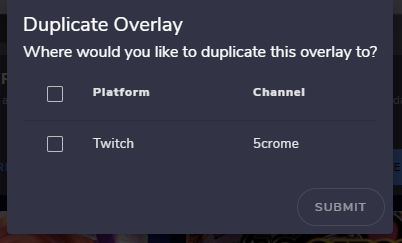
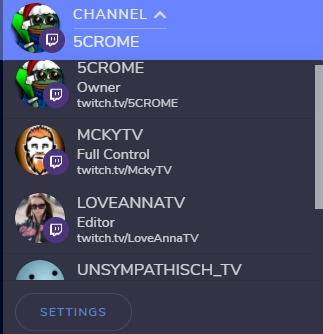
Hi, why am I not able to duplicate this widget into mckytv channel? https://i.imgur.com/IN4jJ5k.png
https://i.imgur.com/4O5v0yB.png
 lament blade
zenith widget
This is the slot one
lament blade
zenith widget
This is the slot one
thank you so much 🙂
ionic kelp
@jaunty stream are you able to switch to their channel from that list by chance or does it redirect you?
Just thinking of something.
prisma relic
It's an import/export thing @jaunty stream ; if you switch to the account you want to get it from you can import it.
jaunty stream
ionic kelp
<@282871543787159552> are you able to switch to their channel from that list by ...
was not possible
jaunty stream
prisma relic
It's an import/export thing <@!282871543787159552> ; if you switch to the accou...
that worked for me, thanks a lot
#widget-share message
if you have contact to him, you can tell him his new version of this widget is bugged so i had to export the older version which still was in my account
prisma relic
it's being looked into @jaunty stream ... @untold crest ^^ thank you for finding &* reverting to the working version
jaunty stream
zenith widget
Define bugged
https://clips.twitch.tv/SincereBigMooseChocolateRain i think it's easier if you watch this clip ^^
 untold crest
I had this widget planned for tests and fixes today, because there were new features requested and then it broke somehow 😉
And yes - it is all me in that case.
jaunty stream
thanks for your support and effort you are putting into this widget ❤️ is there a way to get a push notification when i can enable it again, or should i just wait and test
untold crest
I think I found the issue in those glitches
prisma relic
unfortunately no... we can't do push notifications when they are updated. i'll send post a message for the dev and lx to ping ya
untold crest
This was trying to update value too often 😉
widget-share version should be updated now, please check @jaunty stream
jaunty stream
that means i have to add this widget again and have to send the streamer a new link
prisma relic
are you an editor on their account?
jaunty stream
full control
prisma relic
you can grab the link and update just the JS tab (assuming that was the issue? )
untold crest
Yes. Just JS is updated now.
You can also just switch to their account and click widget-share link
jaunty stream
i know but then it just creats a new overlay with a new link right?
prisma relic
ya; i wasn't sure about settings; it's either copy pasta over the old fields data or copy pasta the new JS
untold crest
Yes, but then you can copy widgets between overlays in same account
 simple trout
Hi ! I have the same problem as Frank Castle, my followers don't update. Any clue ? Thanks
prisma relic
the followers thing @simple trout ?
simple trout
yep... It doesn't update, and obviously I don't get any follower alert
(the channel concerned is under the user name novacyb)
 zealous cliff
hello! just wanted to ask if it's possible to use my own channel emoji's on twitch for the streamelements bots reply on custom commands? if yes.. how?
prisma relic
are you using custom bot @zealous cliff
zenith widget
@simple trout your channel or someone else?
@zealous cliff if referring to subscriber emotes, the bot needs to be gifted a sub
simple trout
it is my other channel @zenith widget
viscid pebbleBOT
@simple trout Please provide your account ID found at the top of this page: https://streamelements.com/dashboard/account/channels This ID is public info and safe to share here.
simple trout
5ff70385be772bc37fed073a
zenith widget
fixed
zealous cliff
yes im using custom bot.. so do i need to gift the custombot or streamelements itself?
zenith widget
the custom bot
jaunty stream
untold crest
Yes, but then you can copy widgets between overlays in same account
lol, this would have saved me so much time if i knew this earlier thanks so much
untold crest
You are very welcome!
LMK if that widget works now as it should. There should be no glitches now
zealous cliff
thank you so much
 sturdy drift
how do I add my alert box in obs live i cant figure it out yet 😅
viscid pebbleBOT
@sturdy drift To add your overlays to OBS, add a new browser source in your scene. Paste your overlay URL in the browser source properties, set the dimensions to 1920x1080 (unless you changed them on the website) and check Shutdown source when not visible. https://youtu.be/KDvLynUqXI4
 hot copper
Why dosent streamelements get my new followers and the alerts dosent work...
 slender prism
Where do I go to modify the response given by the streamelements bot when a command is entered? Like if I enter !bingo and start an emote bingo, the bot responds with something saying bingo has started. I want to change the response text.
ionic kelp
Not possible.
slender prism
So since Twitch removed the PogChamp emote, now I am stuck with just the words showing up?
ionic kelp
For now yes but we are in the process of removing it from responses.
slender prism
will the !pepes command stop that or is it for some other thing?
ionic kelp
Something else.
viscid pebbleBOT
@hot copper Please provide your account ID found at the top of this page: https://streamelements.com/dashboard/account/channels This ID is public info and safe to share here.
 half lotus
I have a question about my stream overlay in combination with twitch I will show my subpoints not my sub total can do that?
ionic kelp
Subpoints is not possible since that information isn't available any more.
half lotus
ok thanks
 terse bronze
How can I edit the standard commands responses? Is it possible?
ionic kelp
No.
 red sapphire
Hi, my rewards page in the partner program doesn't render in the browser.
 indigo shale
I'm trying to create a new alertbox but the previews aren't showing on SE.Live, and some of them do not even play on the website so I'm not sure they'll work. Any other way to verify that?
I'm being extra cautious about it as some alerts on my previous box didn't play occasionally so I think something might be wrong... would love to get some help on this!
zenith widget
@red sapphire reported the issue to the devs. I managed to reproduce it
@indigo shale I'm not sure I fully understand here. You are adding a fresh alert widget to your overlay, but neither the old alerts or the new one are showing up in OBS?
Also there is no such thing as SE.Live
indigo shale
I meant the OBS, sorry @zenith widget
what's currently happening is that in my old alert box, sometimes the alerts won't play
So I'm creating a fresh one, in a new layout (as the old one is imported from SL)
I talked to your support before and there's been speculations that this is why I experience interference with my alerts sometimes
Certain donations didn't show, merch alert didn't show, and sometimes even follow alerts didn't play
zenith widget
in the new alert widget?
indigo shale
So I was unaware of those events myself
In the old one.
I'm creating a new one but the preview doesn't seem to work and I want to make sure they will show when these events occur
viscid pebbleBOT
You can test alerts via the Emulate bell on the lower left side of the Overlay Editor. Simply go to your Dashboard > My Overlays > pencil/edit button on the overlay. Make sure the Preview LIVE on stream option is on to see the alert in OBS/XSplit** https://streamable.com/vtulg9
 indigo shale
viscid pebble
You can test alerts via the Emulate bell on the lower left side of the Overlay E...
indigo shale
viscid pebble
You can test alerts via the Emulate bell on the lower left side of the Overlay E...
This is exactly how I tried to emulate. it didn't show on the website nor in OBS
indigo shale
I saw that one, but when trying to emulate the merch one it never works @zenith widget
indigo shale
When I'm emulating
zenith widget
or the merch alert?
indigo shale
All alerts
zenith widget
Do you hear sounds?
zenith widget
Can you screenshot me this?
I just want to make sure the top option is ticked
jesus that scared me 
yea its on
ok, if you don't hear or see the alerts try this:
viscid pebbleBOT
OBS > Settings > Advanced > Scroll down > Enable or disable Browser Source Hardware Acceleration, depending on its current state > Restart OBS (This does not apply for OBS on Mac)
https://i.imgur.com/ggMe9ZE.png
 indigo shale
Ok, I'll check this one ^
sec
It is ticked already
I managed to get the resub showing! but fade in/out effects won't work lol
lament blade
i have a question can i use stream elements on my mobile phone?
zenith widget
@indigo shale make sure to have a time set on the fade in/out effect
@lament blade depending how you intend to use it.
indigo shale
will do! @zenith widget
zenith widget
But generally yes
lament blade
i will be streaming on twitch like cod mobile
 delicate ember
Hi support, I connected Twitch and Youtube to Streamelements, but not within one account. Now I want to add Twitch to the Youtube account (in Streamelements -> Settings > Add Twitch Channel), but the message " Channel is already claimed" appears. Can you merge my two accounts? I need the overlays from the Youtube Account in the Twitch Account or a merged one.
viscid pebbleBOT
@delicate ember Account Merging - Please note:
- Merging accounts only allows faster ways to switch between accounts
- Merging accounts does not allow data sharing between accounts - different streaming platforms, different type of events
- Merging accounts allows duplicating/sharing overlays between the accounts
If you understand the limitations of merging and want to proceed, please find the JWT tokens (!jwt) from both accounts you want to merge and you will be directed to DM them to a staff member
zenith widget
@lament blade we don't have an app that allows game streaming from mobile
 rugged lake
Hello, I set up a stock overlay with alerts yesterday, the alerts work fine when using the emulate feature. They show up in OBS and I can hear them fine. However, they do not work when I'm actually streaming. It seems like StreamElements isn't receiving the notifications to trigger the alerts. I have dug around a bit but I am not sure what else to check
viscid pebbleBOT
@rugged lake Please provide your account ID found at the top of this page: https://streamelements.com/dashboard/account/channels This ID is public info and safe to share here.
You can find your JWT token on your account channels page (Show Secrets to reveal the token): https://streamelements.com/dashboard/account/channels
READ ME: This is a private security token. Do NOT share this token here or other public places, only with a StreamElements staff member in private.
delicate ember
Is there a staff member online that I can provide both JWT tokens in a DM?
rugged lake
Great, thanks! Was it something I did? I am going to be helping a friend set theirs up tonight and just want to know if I need to do something different.
rugged lake
Ok, thanks
 worthy stirrup
does the bot reset back to the streamelements account if you log into it normally
 patent maple
Mine streamelements bot is broken . Bot is writing wrong watchtime on twich
zenith widget
@worthy stirrup Im not sure I understand what you mean there
viscid pebbleBOT
@patent maple 10 minutes of watch time is given to those in chat when the loyalty points are handed out (every 10 minutes). Therefore, loyalty must be enabled to watch time to work properly.
There is no direct link between watch time and all-time points.
It can’t be calculated from the number of all-time points a user has because subs may earn points at a faster rate and !bonus all command increases all-time points for users in the chat at that time.
Giving points to a single user do not affect all-time, only when giving to all in chat.
 nova bough
Hey, if the users in my chat type !watchtime theres is coming the hole time only "0secs". And if I am typing it, it says 0secs again. How can I fix it, because I want to know what person is active etc.
viscid pebbleBOT
@nova bough 10 minutes of watch time is given to those in chat when the loyalty points are handed out (every 10 minutes). Therefore, loyalty must be enabled to watch time to work properly.
There is no direct link between watch time and all-time points.
It can’t be calculated from the number of all-time points a user has because subs may earn points at a faster rate and !bonus all command increases all-time points for users in the chat at that time.
Giving points to a single user do not affect all-time, only when giving to all in chat.
patent maple
yea i have some problem 0secs
zenith widget
The enable the loyalty system
 daring cairn
Morning, I’m still having issues with the bot. Yesterday in the morning I had fixed the bot (detached from channel& re attached) and it seemed to work fine on the offline chat and then in the afternoon when I went to stream the bot went MIA.
viscid pebbleBOT
@daring cairn If your commands recently stopped working and you're using OBS.Live and a custom bot name do the following:
- In OBS.Live, click on the hamburger menu (three stripes) at the top left of your activity feed
- Click on Stream Settings > Custom bot name
- In the Custom bot name field select Set custom bot name, not your already existing username (with capital letters). Note: If you already connected an account that way, the third entry will show as the account name (see image https://i.imgur.com/sO7fWOX.png).
- Scroll a bit down and click on the purple Connect Custom Bot Account button
- Log in as usual and Authorize the custom bot name
- Back in the Activity feed, click on the Send Test Message button and check if your custom bot name starts working again
 worthy stirrup
zenith widget
<@!205740775244431360> Im not sure I understand what you mean there
worthy stirrup
zenith widget
<@!205740775244431360> Im not sure I understand what you mean there
so i linked the bot to use a custom name but then i logged on to it to change some of the channel settings and after that i tried a command and it used the streamelements account instead of that so does that just happen when you log onto your account normally?
daring cairn
@viscid pebble I will try that when I get home. I just tested my offline chat and the bot is working?! No custom name whatsoever on the bot either. The issue only seems to be when I am live?!
 spring oar
Yo, How to download the stream overlays from streamlabs to my pc?
untold crest
You can use import menu in OBS.Live
spring oar
Beacause I don't see any save as button
untold crest
So with that you can import your overlays from SLOBS to SE cloud
 untold crest
Unfortunately I am not available for voice
untold crest
Please state your question here, so others can profit from it as well in future w/ search function 😉
spring oar
see you
 cursive onyx
Everyone german?
untold crest
@cursive onyx #🇩🇪︱deutsch
cursive onyx
Perfekt privat schreiben?
untold crest
@cursive onyx for German language support, please join the channel mentioned above.
cursive onyx
Ty
 wise grail
Hi, so I was live streaming today and someone typed in the alerts apetite and the bot rudely asterisked and blocked the word. I have gone to spam filters and the word is not listed anywhere there. How do I make the bot not block this word?
ionic kelp
@wise grail tipping settings tab and moderation at bottom https://streamelements.com/dashboard/tipping-settings
 wary echo
Hello, my activity feed hasn't been showing any new follows, nor does my alert get triggered. Can anyone assist?
 wary depot
when changing the emote at the end of the bot modules - chat alerts from pogchamp it says itsa saved and then changes it back
viscid pebbleBOT
@wary echo StreamElements menu, on top of OBS > Logout > Login
 dry hare
wary depot
when changing the emote at the end of the bot modules - chat alerts from pogcham...
dry hare
wary depot
when changing the emote at the end of the bot modules - chat alerts from pogcham...
I believe work is being done to resolve the pogchamp emote issues. no eta
wary depot
yeh why does it not save when personalising the messages?
like all the messages in the bot modules > chat module dont save
wary echo
viscid pebble
<@!477953025625817108> **StreamElements** menu, on top of OBS **> Logout > Login...
Thanks for the suggestion, but relogging hasn't solved the issue. I seem to have the same problem that @lament blade shared earlier.
dry hare
wary echo
Thanks for the suggestion, but relogging hasn't solved the issue. I seem to have...
lemme see if I can ping someone
wary echo
Thank you @dry hare That'd be really helpful ^^
 surreal estuary
Greetings, my user complain about that they need a Twitch or social media account to donate. How can i deactivate the login with..
dry hare
surreal estuary
Greetings, my user complain about that they need a Twitch or social media accoun...
They need to authenticate to streamelements with their twitch account in order to process the alert information, otherwise they might as well just send money directly to you via PayPal
surreal estuary
So it is not possible to deactivate ?
dry hare
do you want alerts on your stream?
surreal estuary
yes but they do not understand why they need a account on mixer or twitch to proceed the payment
dry hare
In order for the alert information to display who sent the tip, they have to authenticate via twitch (Mixer is ded) so that the alert can display who tipped.
Again, if they don't want to authenticate or can't because they're not of legal age to use the platform, they may as well just send money via PayPal directly
surreal estuary
okay thank you
 eager forge
Is it possible to change "How should the bot send the message?" for standard commands?
 ionic elbow
Hey  I didn't find the right channel for my problem but i hope you can help me here. My tipping alert isn't working properly for no reason. I talked with the bynogame.com and they said it is about streamelements. I don't understand why it is like that. Thanks for helping ♥️
 rain frost
how can i blok some people that are following me on twitch ?
viscid pebbleBOT
@spiral crystal You can add, remove and make changes to custom commands in chat with !commands/!cmds flags:
!commands add (commandname) (commandresponse) - allows you **to add **a new custom command
!commands remove (commandname) - allows you to delete a custom command
!commands edit (commandname) (commandresponse) - allows you to edit an existing custom command
!commands show (commandname) - allows you to see the raw response of a command before variables are used
!commands options (commandname) -(flag) - allows you to change settings for an existing custom command
!command alias basecommand - Shows the alias commands for !basecommand
!command alias add basecommand aliascommand1 aliascommand2 - Adds alias commands !aliascommand1 and !aliascommand2 for command !basecommand
!command alias remove basecommand aliascommand1 - Removes alias command !aliascommand1 from command !basecommand
Valid flags for !cmds options include: -enable -disable -cd (number in seconds) -usercd (number in seconds) -cost (number) -level (number) -type (say, whisper or reply) -count (number)
Syntax example: !cmds options twitter -usercd 60 -type reply -level 250
 amber basalt
What's wrong with this command? All results appear as gmt-3
!cmd add hora /me Brasil: $(time.gmt-3) | Portugal: $(time.gmt) | Mississipi: $(time.gmt-6)
ionic kelp
Gimme a sec
wise grail
ionic kelp
<@336375487989284866> tipping settings tab and moderation at bottom <https://str...
Thank you 🙂
 grim zodiac
hi
 upbeat bloom
Hi, i have the sam prboem that @wary echo and @lament blade shared earlier, i've used StreamElements to create a simple overlay with chat and countdown (it's work fine) and an alert box (i've used both a premade one and a custom one) but neither work, i've noticed the activity feed of OBS receive the new follower alert, but the streamelement activity feed doesn't show anything. I've already tryed to logoff and login into the streamelements menu of OBS, nothing change, can someone help me?
ionic kelp
@amber basalt !cmd add hora /me Brasil: ${time.America/Parana} | Portugal: ${time.Europe/Lisbon} | Mississipi: ${time.America/Biloxi}
amber basalt
Ty
 deft pond
how do i apply the themes and overlays to my stream?
viscid pebbleBOT
@deft pond To add your overlays to OBS, add a new browser source in your scene. Paste your overlay URL in the browser source properties, set the dimensions to 1920x1080 (unless you changed them on the website) and check Shutdown source when not visible. https://youtu.be/KDvLynUqXI4
amber basalt
@ionic kelp
 lavish compass
Hi, stream elements has only paypal as pay option, to get my tips?
 granite leaf
Hi, this button (Bots) don't work. i try disable bots but no save changes
viscid pebbleBOT
@lavish compass SE.PAY is available for streamers who are at least 18 years old, with bank account under their name in one of the following countries and have at least 101 follower (Twitch) / 101 subscribers (YouTube):
Austria, Belgium, Czech Republic, Denmark, Finland, France, Germany, Ireland , Italy, Netherlands, Poland, Portugal, Slovakia, Spain, Sweden, Switzerland, United Kingdom, United States.
If you meet these criteria and don’t see SE.Pay, let us know.
For information on SE.Pay payment methods, their fees and settlement times see https://streamelements.com/dashboard/tipping/fees
lavish compass
My country is not there..
ionic kelp
Then it's not available for you.
 lyric flame
How do I change the givepoints command response to not use PogChamp? I was able to change all the rest of the alerts
 astral knot
please help i cannot get the chat bot to do anything in my chat non of my commands are working and it does not say when people follow me in the chat
ionic kelp
@lyric flame You cant. It is being removed soon.
granite leaf
granite leaf
Hi, this button (Bots) don't work. i try disable bots but no save changes
@ionic kelp any idea for this? :c
 wispy jay
granite leaf
<@!66043140208857088> any idea for this? :c
wispy jay
granite leaf
<@!66043140208857088> any idea for this? :c
Top tip, don't ping the staff, champion or hero roled people here unless they've pinged you first. They respond as they have time, even if they have responded to someone who messaged after you
viscid pebbleBOT
@astral knot Go to the Dashboard > Right side > Part channel > Join channel(https://streamelements.com/dashboard)
 wispy jay
astral knot
please help i cannot get the chat bot to do anything in my chat non of my comman...
wispy jay
astral knot
please help i cannot get the chat bot to do anything in my chat non of my comman...
Also ensure to /mod streamelements after doing the above
granite leaf
how to report a bug?
astral knot
viscid pebble
<@!500393560080908288> Go to the Dashboard > Right side > **Part channel** > **J...
can i set up automated messages to pop up in chat thats on a regular timer like to post in chat every 20min
 nimble dune
timers
wispy jay
@astral knot under timers in the se dashboard, on the left panel
nimble dune
@astral knot https://streamelements.com/dashboard/bot-timers
astral knot
wispy jay
<@500393560080908288> under timers in the se dashboard, on the left panel
cheers
 distant jetty
I verified myself for rizzo channel but it still doesn’t let me in
astral knot
i was using streamlabs but its not as good as obs i think
 junior jolt
I am trying to set up obs for my league team, and noticed the widget for latest follower isn't updating
deft pond
so I added my overlays from streamelements but when I start streaming its not showing anything its just black
where do i select what im recording
 haughty bough
hey my overlays work in obs studio but not the follower alert can some one help me?
 naive quail
hey guys, i'm doing a subgoal bar, i found a piece of code working with the followers-total, i would like to do the same with something like "subscribers-total" but i can't find documentation about the proper name to write in code, any ideas ?
junior jolt
haughty bough
hey my overlays work in obs studio but not the follower alert can some one help ...
same
haughty bough
@bold ice yea idk what its the problem..;(
 bold ice
also the feed doesn't update
haughty bough
exactly
bold ice
i did the passage from streamlabs and imported the stuff with the tool
but still, nothing is working, only subscription and tip
haughty bough
ijust make the alert in streamelments but nothing works;P
lament blade
guys i have a question for obs studios.
Anyone know what to set the bitrate for 936p 60
Why does Twitch have a different number of followers on my account to what Stream elements follower counter/goal count is saying?
viscid pebbleBOT
To reset goals:
- from the Overlay Editor > Session data on top right (monitor symbol) > Goals tab > reset progress of desired goal
- from the Dashboard > Activity feed on the left > Widget data on the right > Goals tab -> reset progress of desired goal
Note: Goal widgets (progress) only counts up and doesn't go down automatically, if you lose followers/subs.
ionic kelp
Note that last line.
ionic elbow
ionic elbow
Hey <:cnedHey:738745463552868391> I didn't find the right channel for my problem...
:(
amber basalt
amber basalt
<@66043140208857088>
@ionic kelp doesnt work
amber basalt
If I put only 2 times it works, but when I change to 3 it happens
ionic kelp

wary depot
no need for them to fix it a new emote has been released
 wary halo
It will be a different emote every day
 kindred patio
My follower alerts just arent working at all
And a staff said t hey fixed it but they didnt, or at least it changed back
wary depot
is that what they have said?
wary halo
wary depot
is that what they have said?
yes, on twitter
 median geyser
Hi how do I delete my streamelements it keeps saying username invalid need help please
 main fog
Question - I am in creator program for a video game. I have been a member since Feb 2020 with 50+ rewards saved up.
When I logged in yesterday, it shows no rewards. The most recent challenge completed was yesterday. Is this a known bug? Will it be fixed? Is there a way to get reward codes in the mean time?
Thanks....
 weak whale
I was watching my Vods and noticed my alerts are mirrored/backwards. When reviewing them in stream elements and previewing in OBS, they show up correctly. Can anyone help me figure this out?
 placid stratus
hi, i'm trying to upload my own photo for my tipping link but anytime i press "download", it downloads a zip file, and adding the image to my zip converter does nothing. how do i download my image?
it downloads the photos streamelements lets you use through a zip file, i mean
 deep quiver
am I the only one who does not have the activity feed up to date? It seems that streamelements didn't update my activity feed for about.... 1-2 weeks now and my alerts don't work because of that....
bold ice
@deep quiver No man, i have your exact same problem, feed updates for subs/tip but not for the hosting and follows, i switched from streamlabs to streamelements and this is my first experience, i kinda like the idea of haveall my overlay and stuff on internet, but if the feed doesn't work we got a big problem
viscid pebbleBOT
@simple sun To add your overlays to OBS, add a new browser source in your scene. Paste your overlay URL in the browser source properties, set the dimensions to 1920x1080 (unless you changed them on the website) and check Shutdown source when not visible. https://youtu.be/KDvLynUqXI4
 simple sun
ty
kindred patio
Hey I need help, I am not receiving any information to followers
like follower alerts dont work
and in stream elements it has said I havent gotten any followers
 sharp apex
Halla! Does anyone know if you get points from StreamElements if you change the username on twitch, or will they disappear?
 late orbit
Is there any way to check what my actual username on Stream Elements is...my merch store link is my name work done numbers at the end...it's there a way to change it so it doesn't have the numbers?
lament blade
What bitrate is 930p 60??
ionic kelp
late orbit
Is there any way to check what my actual username on Stream Elements is...my mer...
Do you have another platform connected with the username ndev2kgaming?
lament blade
every time I get an alert, my ingame FPS locks to like 30
late orbit
ionic kelp
Do you have another platform connected with the username `ndev2kgaming`?
I don't think so but I may have done. I've never used SE before but was on Facebook Gaming before moving to twitch so maybe I signed in to check it out from my Facebook account
lament blade
ionic kelp
Do you have another platform connected with the username `ndev2kgaming`?
why is your name a linux reference if obs live isn't available on linux lol
I got a question, I have a Cheer Goal and I want to reset it and it only, how do I do that?
viscid pebbleBOT
To reset goals:
- from the Overlay Editor > Session data on top right (monitor symbol) > Goals tab > reset progress of desired goal
- from the Dashboard > Activity feed on the left > Widget data on the right > Goals tab -> reset progress of desired goal
Note: Goal widgets (progress) only counts up and doesn't go down automatically, if you lose followers/subs.
 jolly grail
Hi can someone help me?
late orbit
A little more information may be needed before anyone can answer that question 😉
lament blade
I see that by only setting the cheer goal to 0 does not work
Is this a bug or on purpose?
 analog hawk
Stream Elements down atm? I seem to experience a huge delay in the alerts or not alert popping up at all?
ionic kelp
late orbit
A little more information may be needed before anyone can answer that question �...
Before I start typing a bit of stuff do you care about your FB if I were to have your profile/tipping/merch link swapped to twitch?
late orbit
No. I don't stream to fb any more so it doesn't matter and I never used SE to stream to FB anyway
ionic kelp
You're in luck then. Since you own both accounts I can have staff swap one link for another and have the plain name for twitch. Gimme a sec to double check something and then I'll have you DM someone something.
kindred patio
Sudo can you possibly help me. im mid stream and my follower alerts just arent working
in the stream elements dashboard it also says that I have received 0 followers for this month when I have gotten at least 30
ionic kelp
We might be having some slight issues and are taking a look at stuff.
kindred patio
Ah, thanks!
lament blade
events are slowly starting to trickle through again, from the looks of it. bit alert from 6 minutes ago just went through on a friend's channel
ionic kelp
late orbit
No. I don't stream to fb any more so it doesn't matter and I never used SE to st...
Just out of curiosity do you see both accounts when you click your name in the top left of the dashboard?
late orbit
ionic kelp
Just out of curiosity do you see both accounts when you click your name in the t...
I'll have to check.. Just eating at the moment so give me 10 minutes
late orbit
ionic kelp
Just out of curiosity do you see both accounts when you click your name in the t...
No I don't and if I try to add my FB page it says it is already claimed
 woeful juniper
I'm also experiencing 5-6 minute delay on alerts.
ionic kelp
It's being fixed atm.
woeful juniper

kindred patio
Sudo do you know when like the follower issue will be fixed?
ionic kelp
@late orbit Grab this for both accounts and DM @tight harness with this as well.
viscid pebbleBOT
You can find your JWT token on your account channels page (Show Secrets to reveal the token): https://streamelements.com/dashboard/account/channels
READ ME: This is a private security token. Do NOT share this token here or other public places, only with a StreamElements staff member in private.
ionic kelp
I want to switch my name/links from my Facebook ndev2kgaming to my twitch ndev2kgaming-2594.
token 1 (facebook)
token 2 (twitch)
 topaz sedge
anyone having a problem with their alerts not popping up and the activity feed not updating?
 orchid nova
ionic kelp
orchid nova
ionic kelp
Alert machine broke and got smacked a few times to get it working again. Hopefully should be returning soon.
deep quiver
so any idea about how to solve the activity feed?
 hollow trench
Sorry I didn't answer back a few hours ago. So when the subcount command is used it shows there are 0 subscribers and the streamelements bot is delayed like 5 mins. The sub count command worked a few days ago and then stopped working. After someone subs, 5 minutes later streamelements posts it in chat.
late orbit
ionic kelp
I want to switch my name/links from my Facebook `ndev2kgaming` to my twitch `nde...
Done
ionic kelp
Can't tell when but it'll be handled by the devs from here pretty much.
 ocean gate
makes an offering to the devs, and trusts in their abilities
ionic kelp
Yours or someone you're added onto?
 narrow meteor
woeful juniper
I'm also experiencing 5-6 minute delay on alerts.
narrow meteor
woeful juniper
I'm also experiencing 5-6 minute delay on alerts.
i have no alerts
 radiant snow
i click on "my dashboard" it starts loading then it takes me back to the home page
 livid blade
Can some one help me?
narrow meteor
NO
 idle lodge
Is there any way to let your moderators filter Text-to-speech donations?
 forest lake
how can i switch account on OBS.Live?
viscid pebbleBOT
@forest lake StreamElements menu, on top of OBS > Logout > Login
lament blade
My goal did not refresh
 simple creek
Hi I was wondering how can I set a command that automatically chats on my stream without me having to put type out the command? I’m trying to write something thanking all my followers without me having to type it?
 eternal relic
Is there a document or tutorial on how to embed emotes into Nightbot commands?
lament blade
every time I get an alert, my ingame fps, no matter what game I'm playing decreases to 30 for the duration of the alert
 gritty hazel
is there a way in streamelements to make a 1080x1920 (vertical) scene?
 dark willow
Is there a problem with alerts? i dont get anyone but my test alerts are working
 blissful steeple
I'm having issues with follow alerts... hmm, I can see it pop in the Twitch activity feed but not Streamelements' feed / no widget activation. Subs activate fine, oddly enough. Anyone got any advice? Subs also show up in both feeds. Only followers is not showing up in Streamelements. If I do a test activation it works fine though
lament blade
lament blade
every time I get an alert, my ingame fps, no matter what game I'm playing decrea...
This ^
still
eager forge
Hey, watchtime isnt working. It always says 0 seconds
lament blade
I've asked it earlier today too lol
viscid pebbleBOT
@eager forge 10 minutes of watch time is given to those in chat when the loyalty points are handed out (every 10 minutes). Therefore, loyalty must be enabled to watch time to work properly.
There is no direct link between watch time and all-time points.
It can’t be calculated from the number of all-time points a user has because subs may earn points at a faster rate and !bonus all command increases all-time points for users in the chat at that time.
Giving points to a single user do not affect all-time, only when giving to all in chat.
dark willow
blissful steeple
I'm having issues with follow alerts... hmm, I can see it pop in the Twitch acti...
Same for me with follower. Did not have Subs or Doni
eternal relic
nimble dune
Ask nightbot
Nightbot for Twitch is configured through StreamElements.
lament blade
lament blade
every time I get an alert, my ingame fps, no matter what game I'm playing decrea...
^ anyone
nimble dune
eternal relic
Nightbot for Twitch is configured through StreamElements.
No
Ask nightbot https://nightbot.tv/
nimble dune
That's streamelements and bot, and you asked before about nightbot
eternal relic
How do you embed emotes?
eternal relic
Yes yes and then how do you embed the emote?
This needs to be part of the custom command.
wary halo
by just typing the full name of the emote in the response
for example: 
ow it did the emote automatically 
rubens10Cool
eternal relic
That did it! Thanks for helping!
narrow meteor
can someone @ me when alerts have been fixed?
 golden birch
my bot does not work...why?
 upbeat sonnet
How can i get the shoutout widget?
 brisk meteor
have a new friend starting to stream, hes got streamelements connected to twitch, but his activity feed is completely empty. following/refollowing is not adding it to the activity feed. Is there an additional step required to allow SE to capture the alerts from twitch?
 wanton stag
Please can someone tell me why SE is auto timing out chatters? How do I disable this? Thanks
 exotic hill
Please could someone tell me y my streamelements bot is not tracking viewers watchtime?
viscid pebbleBOT
@exotic hill 10 minutes of watch time is given to those in chat when the loyalty points are handed out (every 10 minutes). Therefore, loyalty must be enabled to watch time to work properly.
There is no direct link between watch time and all-time points.
It can’t be calculated from the number of all-time points a user has because subs may earn points at a faster rate and !bonus all command increases all-time points for users in the chat at that time.
Giving points to a single user do not affect all-time, only when giving to all in chat.
 lunar hazel
I need help because streamelements is not saving the regular chat commands someone please help?
 quiet obsidian
hi
ive been streaming for 2 years no and i nrver getting viewer
do you hav tips
wary halo
social media promotion
but youtube is full of tips and tricks, so might want to look there for advice
 tranquil jacinth
chat message commands.... help
 tranquil furnace
Hello
How can i get help here 😅
Doesss stream elements acceptt donation method other than paypal like for me, sadly we dont have paypal in my country.... is there a way to put a credit card on file instead or bank account
Mention me plz if ya guys have answer for this thanks in advance.
ionic kelp
@tranquil furnace You don't meet the requirements.
viscid pebbleBOT
SE.PAY is available for streamers who are at least 18 years old, with bank account under their name in one of the following countries and have at least 101 follower (Twitch) / 101 subscribers (YouTube):
Austria, Belgium, Czech Republic, Denmark, Finland, France, Germany, Ireland , Italy, Netherlands, Poland, Portugal, Slovakia, Spain, Sweden, Switzerland, United Kingdom, United States.
If you meet these criteria and don’t see SE.Pay, let us know.
For information on SE.Pay payment methods, their fees and settlement times see https://streamelements.com/dashboard/tipping/fees
 acoustic lake
could someone help me with changing fonts in the editor? it doesnt seems to be working when changed
 sonic harbor
Ola alguem pode me ajudar? Desde que mudei o apelido do Twitch todos os comandos e o temporizador pararam de funcionar. Eu até apaguei todos os comandos e fiz tudo de novo mas não funcionou.
viscid pebbleBOT
@sonic harbor Welcome to the helpdesk! The regular helpdesk channels are in English but we do provide multi-language support in the following channels: #🇩🇪︱deutsch | #🇫🇷︱français | #🇪🇸︱español | #🇵🇹︱português | #🇳🇱︱nederlands | #🇮🇹︱italiano | #🇵🇱︱polski | #🇨🇳︱中文語言服務區-chinese | #🇯🇵︱日本語-japanese | #🇭🇺︱magyar | #🇰🇷︱한국어-korean | #🇹🇭︱ไทย-thai | #🇷🇺︱русский | #🇺🇦︱українська | #🇨🇿︱czech
tranquil furnace
ionic kelp
<@!432648728374149131> You don't meet the requirements.
Do ya guys support lebanon ?
ionic kelp
If it's not there then no.
tranquil furnace
Thx
lament blade
i cant see my gameplay on my tablet
 lavish verge
Streamelements leaderboard doesn't update new cheers and subscribers
 karmic sentinel
Hello, I've tried to cancel my subscription and tried to contact someone to help with that, and it has been unsuccessful. Is there a link you could provide to assist me?
wary halo
we don't have subscriptions
everything is free here, you are probably talking about streamlabs
 wheat light
I keep getting a failed to connect error I've tried plenty of things still can't fix it any suggestions?
 shy cairn
How come my none of my commands are working on my twitch
 cedar thicket
Heya!
Been wondering how the custom chat commands works..
For example how i have it is that whenever you write GG without exclamation mark, the bot replies with a message..
But the bot reacts to the GG in discord.gg/878965457689 links, how can i make it react to a specific chat line and not have it react to when someone says Grogg? 😄
 blazing helm
My streamelements is acting up so I wanna disabled it but idk how?
 glacial cloak
Hello, I am having issues setting up my Alert Box using StreamElements. None of the Alerts are displaying on OBS, and I have ran a test stream in which I had a friend Follow my channel. When I click on "Emulate Follower Event" it works as expected, but when I paste the link into OBS (as per the Instruction videos), nothing happens. I have tried uninstalling OBS and reinstalling, the same issue is happening.
Any help/support would be greatly appreciated!
 obtuse cypress
Where do I find the KappaGen widget if im on a mobile device
 upper steeple
is there a way to remove the leaderboard from our public profile page?
 wind flume
Is there anywhere I could self advertise at or no?
upper steeple
wind flume
Is there anywhere I could self advertise at or no?
the #welcome channel at the very top says a big nope
wind flume
Interesting. Just wondering since the whole point of the discord is about streaming xD
upper steeple
it is about tech support for SE and obs.live
 mystic helm
Heya I had a question about my connection between twitch and SE
It says my account is all connected but it isnt grabbing any of my data like followers. And my live notification overlays didn't update when someone new followed
lament blade
Same @mystic helm
glacial cloak
@mystic helm same
 abstract hemlock
@glacial cloak on test do you see the alert on OBS?
@cedar thicket create a custom command and then go to advance and add a keyword
abstract hemlock
blazing helm
My streamelements is acting up so I wanna disabled it but idk how?
wdym?
viscid pebbleBOT
@mystic helm Please provide your account ID found at the top of this page: https://streamelements.com/dashboard/account/channels This ID is public info and safe to share here.
viscid pebbleBOT
@lament blade Please provide your account ID found at the top of this page: https://streamelements.com/dashboard/account/channels This ID is public info and safe to share here.
@glacial cloak Please provide your account ID found at the top of this page: https://streamelements.com/dashboard/account/channels This ID is public info and safe to share here.
glacial cloak
viscid pebble
<@!315918855400718336> Please provide your account ID found at the top of this p...
5ff787e552e7be52fb0e36af
mystic helm
viscid pebble
<@!153658673267343360> Please provide your account ID found at the top of this p...
5ff770d7dc4aef33a17ce16e
abstract hemlock
@glacial cloak ok everything should be fine now
abstract hemlock
@mystic helm everything should be working fine for now on
mystic helm
Sounds great thank you
blazing helm
abstract hemlock
wdym?
I’m streaming rn and my streamelements won’t work in the chat like when I get a new follower it doesn’t say in the chat
viscid pebbleBOT
@blazing helm Please provide your account ID found at the top of this page: https://streamelements.com/dashboard/account/channels This ID is public info and safe to share here.
 ember beacon
This is kind of a dumb question but how would one get an average of 3 viewers
 fossil berry
yo. new streamer here. I can't get the song request/media share to display. any fix for this?
nvm
 boreal plover
Hi everyone! I can't for the life of me figure out why TTS doesn't work for resubscribe! I have it enabled and when I play the variation it plays it out with tts as a test, but if I play it from the emulator by clicking subcriber event it plays resubscribed without tts. And in live streams resubscribers don't get tts either. I have tts enabled in every single subscriber event and variation including the main menu, but still no dice :/ Any idea?
TTS = Text to Speech
 charred kite
Having a weird problem with Followers not showing up in my Activity Feed even though I have them selected. I just moved from Streamlabs to Streamelements, the follows show up on streamlabs and not streamelements
viscid pebbleBOT
@charred kite Please provide your account ID found at the top of this page: https://streamelements.com/dashboard/account/channels This ID is public info and safe to share here.
boreal plover
I can't for the life of me figure out why Text to Speech doesn't work for resubscribe! I have it enabled and when I play the variation it plays it out with Text To Speech enabled as a test, but if I play it from the emulator by clicking subcriber event which triggers a resubscribed alert, it is without Text to Speech. And in live streams resubscribers don't get Text To Speech either. I have it enabled in every single subscriber event and variation including the main menu, but still no dice :/ Any idea?
 fringe marlin
Hi , all the commands in my chat don't work . I have done the reset ( Part Channel ) but nothing work. The Overlay are okay but no commands work.
charred kite
viscid pebble
<@!164289768530640896> Please provide your account ID found at the top of this p...
5ff88b837ca1577d9198b15b
abstract hemlock
@charred kite everything should be good for now on
viscid pebbleBOT
@fringe marlin StreamElements menu, on top of OBS > Logout > Login
fringe marlin
abstract hemlock
@fringe marlin StreamElements menu, on top of OBS > Logout > Login
charred kite
abstract hemlock
<@!164289768530640896> everything should be good for now on
thank you
fringe marlin
abstract hemlock
<@!275435943069220876> StreamElements menu, on top of OBS > Logout > Login
You are awesome ! Thank you so mutch!
 solar geyser
Hello, my Bot is fully installed but it doesnt write in the chat... did anyone have a solution
viscid pebbleBOT
@solar geyser StreamElements menu, on top of OBS > Logout > Login
abstract hemlock
it won't affect your stream @solar geyser
 opaque trench
viscid pebbleBOT
opaque trench
viscid pebbleBOT
@opaque trench Go to the Dashboard > Right side > Part channel > Join channel(https://streamelements.com/dashboard)
viscid pebbleBOT
@opaque trench StreamElements menu, on top of OBS > Logout > Login
 jolly fulcrum
hello how do i import a overlay i did the widgets and stuff but it doesent show up on my stream and btw i stream on ps4
viscid pebbleBOT
@jolly fulcrum Consoles do not have native support for overlays. You would need a capture card, PS4 remote play or Xbox companion app and a PC with OBS in order to have overlays over your console gameplay.
We have a blog post about how to set up console streaming with our essential tools: https://blog.streamelements.com/how-to-stream-on-console-7b620b1c46c3
jolly fulcrum
is that with web cams?
 glossy charm
hi, does streamelements have to run in the background of my stream for my widgets?
jolly fulcrum
im confused
 twin sentinel
@glossy charm You would have to add the widgets as overlays (overlay urls) as a browser source to your OBS and nothing more.
glossy charm
thank you
 late vector
Hey everyone, I've got a problem and I could really use some help. My streamelements bot is not triggering commands even though it is modded and activated. I have disconnected and reconnected it the the channel to no avail. The weird part is that commands worked for the longest time and then suddenly stopped working a few weeks back and I have been unable to get them to trigger with Streamelements bot ever since.
viscid pebbleBOT
@late vector Please connect your streaming account (Twitch, YouTube, or Facebook) with Discord by going to Settings and then Connections here in Discord. https://streamable.com/eg92w
 twin sentinel
@late vector Do you use a custom bot name (your channel name or a custom name) via OBS.Live?
late vector
@twin sentinel just the standard streamelements name...yeah via obs.live plugin
twin sentinel
Make sure it is set to StreamElements in the settings in the activity feed in OBS.Live and you should be ready with the streamelements bot.
late vector
@twin sentinel omg thank you...that was it, apparently I had changed the name to my channel
@twin sentinel much appreciated!!🙏
brisk meteor
have a new friend starting to stream, hes got streamelements connected to twitch, but his activity feed is completely empty. following/refollowing is not adding it to the activity feed. Is there an additional step required to allow SE to capture the alerts from twitch?
twin sentinel
Noting additionally should be needed. What is the accountID of your friends SteamElements account please?
viscid pebbleBOT
Please provide your account ID found at the top of this page: https://streamelements.com/dashboard/account/channels This ID is public info and safe to share here.
brisk meteor
@twin sentinel 5ff8deed5013016fbaba4046
twin sentinel
@brisk meteor Do they (begawkology) see a follow of benno12581 in their activity feed in streamelements?
brisk meteor
he doesn't see anything right now
twin sentinel
I have asked internally to reset their webhooks to register new followers after reset.
brisk meteor
ok, so what should we do in this case?
twin sentinel
We have reset their webhooks internally. NEW follow should show up from now on. If they do not, please report back here.
brisk meteor
ok asking a friend to follow right now
nice 😄 looks like that worked. thank you @twin sentinel
 main comet
HELLPPPP
the stream elements overlay isnt showing up on the prfiew
when i make it a browser source
viscid pebbleBOT
@main comet The default resolution for StreamElements overlays (theme and custom) is 1920x1080. Please add them in OBS at their full resolution and use CTRL+F to fit to screen if necessary. You can then downscale your stream in OBS settings > Video if you'd like https://i.imgur.com/6bWXxjR.png
 lament blade
hey im getting an error when I try to emulate alerts but dont know how to fix it. the error message i am getting is ‘emulation sent but alerts are muted’
twin sentinel
Unmute them via the bell icon in your StreamElements Activity feed: https://streamelements.com/dashboard/activity
 still badge
I'm trying to use media share for Xbox One, but I can only find the Media Request widget, but Streamelements will still say I don't have an active Media Share widget. How do I fix this?
twin sentinel
You would need to add a media request widget to your active overlay.
still badge
I've done that, but it still isn't working
Is there a way to make an overlay active?
twin sentinel
Active is an overlay when is it added to your active scenesd collection as browser source to your OBS.
still badge
But I'm using Xbox, so I can't put it in OBS
viscid pebbleBOT
@still badge Consoles do not have native support for overlays. You would need a capture card, PS4 remote play or Xbox companion app and a PC with OBS in order to have overlays over your console gameplay.
We have a blog post about how to set up console streaming with our essential tools: https://blog.streamelements.com/how-to-stream-on-console-7b620b1c46c3
median geyser
Everytime I try to delete my acc it says invalid username
lament blade
I have a question ever time I try to copy the link to my donation page and it doesn’t work @viscid pebble
 rancid pond
where do i change my title of the stream or use tags? it showed the first time i started now i only have the start stream and stop stream option
 short vortex
Im having a problem with the donations
 spark epoch
hey you guys, i have an issue where my follows don't go through on stream, if i use the web editor's emulate function all my alerts work as intended, but for some reason my Follow doesn't work when a real person does it, also it does not pop up in my activity feed that he followed me, can anyone help me?
abstract hemlock
@rancid pond view > docks > Stream Information
@short vortex that's on twitch, try again later
viscid pebbleBOT
@spark epoch Please provide your account ID found at the top of this page: https://streamelements.com/dashboard/account/channels This ID is public info and safe to share here.
spark epoch
5ff675aa29f6f44f9bca671f
abstract hemlock
@spark epoch everything should be good for now on
spark epoch
thank you!
 weary crane
HELP, keep getting failed to connect
 arctic iron
Hello, I have been streaming to twitch without issue for a few months, but suddenly today I am unable to stream, or even view videos on twitch, all other websites still work fine
lament blade
arctic iron
Hello, I have been streaming to twitch without issue for a few months, but sudde...
Same!!!
I’ve been having this issue
I thought it was me or my wifi
It was telling me this 😐
arctic iron
Yep, same exact error, I also can't view any twitch videos, on any device attached to my router, but works fine on cellular data, so I figured must be my ISP
I get error 2000, but I can see and talk in the live chat
 limber burrow
im getting the failed to connect to server problem
 untold lodge
Hello, I am having the issue with alerts not going through to twitch.
account number: 5ff8ec3dab474f0f5dcaba1a
arctic iron
Jenny, if that is your stream key, I would delete that immediately
untold lodge
its my account id
arctic iron
ok just making sure
 south finch
Hi! Where would I post a question about Ground Control? It's in response to setting up this function: https://support.streamelements.com/hc/en-us/articles/360017413239-Creating-a-Custom-Bot-name-with-OBS-Live-#:~:text=Currently%2C renaming your StreamElements bot,Ground Control%2C or with OBS.&text=If you are using Ground,out to us via Discord.

StreamElements
Currently, renaming your StreamElements bot to display a custom name\the broadcaster's name,
Can be achieved either with Ground Control, or with OBS.Live.
If you are not currently using the Groun...
cedar thicket
abstract hemlock
<@!228943590884245507> create a custom command and then go to advance and add a ...
I have done that, but it still reacts to every word that has GG in it.
The only keyword thst is added is in fact GG
prisma relic
do you have the 'regex' checkmark enabled @cedar thicket ? I forgot the commands are different; i was thinking of the filters. try this in the regEx box ^GG this will require the chat message to start with GG. so "!GG "will not trigger but "GGame!" would
 iron geode
Im getting this message in SLOBS and Streamelements OBS internet is fine tho can do anything on internet but stream
zenith widget
Go to Settings -> Stream -> recheck that you have twitch checked and see if you can pick a server manually
 brisk silo
am i able to enable a chat while im playing a game like i only have one monitor and its rough having to pause the game and go to ons or twitch to see chat so is there a way i can see chat while playing game still?
zenith widget
south finch
Hi! Where would I post a question about Ground Control? It's in response to sett...
enabled
@brisk silo From your phone, you can open the twitch app and look at your chat for example.
brisk silo
so thats the only way pretty much?
like theres no overlay i culd use to have it where i can see chat while still playing the game
zenith widget
There is a program/software that does that, but I forgot what its called
I can tag someone who might remember its name, but he may not answer today
brisk silo
i know streamlabs does it but just was wonder if stream elements does it but thanks
 brazen sage
Trying to figure out a command for “!time”
So it says the current time for the specific time zone
Like
“9:43 PM”
Or even the day
 lavish otter
my alerts weren't showing up during stream
narrow meteor
yea
lavish otter
but the emulated ones would show up in obs
lavish otter
how did you fix
narrow meteor
i got banned
zenith widget
brazen sage
Trying to figure out a command for “!time”
Check pinned messages here for the current time variable.
brazen sage
Will that help with the whole command, lemme check
south finch
zenith widget
enabled
Thank you!
zenith widget
lavish otter
my alerts weren't showing up during stream
fixed
 dark falcon
so i used to have stream elements bot on my channel and then removed its moderator status a few months back and im trying to read it but it says its already activated and i cant give it moderator through my twitch channel
untold lodge
@zenith widget it may have gotten lost above, but i am having trouble with alerts not showing up in twitch but working when emulated. You fixed this earlier for me on another account.
viscid pebbleBOT
@untold lodge Please provide your account ID found at the top of this page: https://streamelements.com/dashboard/account/channels This ID is public info and safe to share here.
untold lodge
5ff8ec3dab474f0f5dcaba1a
lavish otter
how did you do that?
zenith widget
resubbed your webhooks
zenith widget
untold lodge
5ff8ec3dab474f0f5dcaba1a
done
untold lodge
ty!
zenith widget
@dark falcon try /unban streamelements and then /mod streamelements
zenith widget
!cmd add time ${time.EST}
 inland furnace
Hey everyone got an issue I cannot figure out. I have one person who, when cheering bits, doesnt have my alert overlay activate. Their cheer shows up in the activity feed, but my alert overlay doesnt do its sound/aniimation/etc. Even if I replay the alert nothing happens. Every other person that cheers, the alert activates. Any ideas?
prisma relic
do you have any filters in the tipping settings? https://streamelements.com/dashboard/tipping-settings
inland furnace
does that effect bits? I dont have any filters
and my account id 5f1a754f256bfc225f4313ac incase it is needed
weary crane
Getting a failed to connect error trying to stream on obs studio... And I can't view others feeds... Wt
prisma relic
yes. last I recall the default alerts are filtered with the settings there. if you turn off the filtering does it work @inland furnace ?
inland furnace
its disabled, replaying his cheers nothing happens, replaying other peoples they all work
prisma relic
are you using OBS Studio or OBS.Live @weary crane ? .... for OBS Studio I would suggest asking in the main OBS Discord; for OBS.Live someone in #helpdesk-selive might be able to help.
that is odd? what is there username? if you do a custom emulate event on the website editor with that username will it trigger?
inland furnace
glasscolatv is his username. Emulating the cheer with his username it works
weary crane
Obs live... I think it's a dns thing, I can't view a stream or start streaming, super strange...
Thought about it after I posted.. Sorry didn't mean to interrupt
prisma relic
ya ya. no worries. try over in the OBS.live channel; someone might know a quick answer. I don't use OBS often so i'm not much help 🤣
zenith widget
@inland furnace This guy?
inland furnace
yeah him
zenith widget
its showing up normally on the overlay
i don't see anything in the console that shows they are prevented from showing as an alert
inland furnace
the cheer animation on the left is the wrong overlay though, maybe i have multiple overlays conflicting :/
inland furnace
Boo - Boo! Animated IN GAME SCENE --- is the overlay i use
inland furnace
Its not working for me, I tried it again.
i show it works for another user at the end
iron geode
zenith widget
Go to Settings -> Stream -> recheck that you have twitch checked and see if you ...
@lament blade no luck internet running fine even called provider and playing games rn but unable to stream to twitch
 severe ridge
streamelements bot isnt working, no responding to commands or sending out timers
i disconnected and reconnected the bot and nothing
prisma relic
Have you changed your name on Twitch recently? Or trying to use a custom bot name?
zenith widget
iron geode
<@456226577798135808> no luck internet running fine even called provider and pl...
just FYI, replying in this manner also tags me, so no need to attempt to place the tag 🙂
That out of the way, do you have a "Disconnect" button in the settings page in OBS?
iron geode
zenith widget
just FYI, replying in this manner also tags me, so no need to attempt to place t...
Im not necessarily seeing a disconnect section
zenith widget
If you click on "Stream"
 proven shard
My screen is still full black
viscid pebbleBOT
@proven shard Obs.live is a plugin for OBS Studio for the best OBS support, please join their Official Discord @ discord.gg/obsproject
iron geode
zenith widget
If you click on "Stream"
under stream I am not seeing a disconnect button
zenith widget
@iron geode so if you click on the "stream" section where you select which server you stream on, as in twitch, YT, FB, etc, do you have a disconnect button there?
show me
iron geode
zenith widget
Right, so either get your streamkey from Twitch or try and connect your twitch account directly
lament blade
iron geode
<@456226577798135808> no luck internet running fine even called provider and pl...
Wrong tag
iron geode
zenith widget
Right, so either get your streamkey from Twitch or try and connect your twitch a...
attempted both ive even reset streamkey and try to login directly through OBS
oh lol my bad
lament blade
You looking for my brother @zenith widget
inland furnace
@zenith widget It just started working
lament blade
Beautiful new avatar logo @zenith widget
zenith widget
ty, its a fanart of my cat 
lament blade
😂 its amazing
inland furnace
zenith widget
because i'm replying it right now
Not sure what you did but thank you for fixing it
 strange halo
Streamelements is not capturing my stream activity feed. Can anyone help?
zenith widget
inland furnace
Not sure what you did but thank you for fixing it
i tried to add the overlay to my OBS to see if i can replicate the issue
viscid pebbleBOT
@strange halo Please provide your account ID found at the top of this page: https://streamelements.com/dashboard/account/channels This ID is public info and safe to share here.
strange halo
5ff8bf45f884c45ce1dfde79
iron geode
Any other suggestion or SOL currently appeciate the help regardless
viscid pebbleBOT
Use the Twitch Bandwidth Test to find the best Twitch server to stream to. Set Duration to Medium. You can uncheck any regions you're not near.
After the test completes, click the Share Result button to upload a screenshot, which can then be copied and pasted here.
Get Twitch Test from https://r1ch.net/projects/twitchtest.
zenith widget
strange halo
5ff8bf45f884c45ce1dfde79
should be good now
strange halo
@zenith widget Thanks! Much appreciated!
 kind leaf
Ever since i changed my twitch user name, my stream elements is not connecting to my twitch stream chat. ive tried logging out and logging back in a couple of times, but it is still not working
zenith widget
Wait, what? Can you show a screenshot?
kind leaf
im streaming from Playstation
viscid pebbleBOT
@kind leaf Consoles do not have native support for overlays. You would need a capture card, PS4 remote play or Xbox companion app and a PC with OBS in order to have overlays over your console gameplay.
We have a blog post about how to set up console streaming with our essential tools: https://blog.streamelements.com/how-to-stream-on-console-7b620b1c46c3
 ebon depot
guys i have problem i connect my overlay with obs.live when i test alerts it's working, but when im live streaming it doesn't pop up new followerss donation or whatever can you tell me why?
kind leaf
im not using a capture card or overlays. ive never had issues using commands before.
i use stream elements for chat bot commands
viscid pebbleBOT
@ebon depot Please provide your account ID found at the top of this page: https://streamelements.com/dashboard/account/channels This ID is public info and safe to share here.
kind leaf
it has worked perfectly fine until i changed my twitch name
prisma relic
it's just the "Streamelements" bot not working in your Twitch channel @kind leaf
kind leaf
@prisma relic correct
viscid pebbleBOT
@kind leaf Go to the Dashboard > Right side > Part channel > Join channel(https://streamelements.com/dashboard)
kind leaf
I fixed the issue. thank you!
zenith widget
fixed
 digital veldt
Hello, I'm new in using streamelements and I couldn't figure out how to setup alerts for donations and how to upload video files for it
viscid pebbleBOT
@digital veldt New to StreamElements?
Check out our YouTube channel https://www.youtube.com/c/streamelements/videos
with tutorial videos from setting up the basics, to in-depth details on how to use our product.
New to OBS? Here is a 4 step quick start guide
https://obsproject.com/wiki/OBS-Studio-Quickstart
Want to learn even more? Here is an in-depth overview
https://obsproject.com/wiki/OBS-Studio-Overview
 alpine sundial
so in my stream elements. my loyalty settings are missing some bonuses. people can only get points by following, hosting, watching, or donating. how do i fix this?
prisma relic
which bonus are you expecting? that seems to be correct?
 devout nest
Hi guys!
Could you please tell me how to add my own widgets for IRL stream from the phone?
ebon depot
zenith widget
fixed
thanks a lot man ❤️
zenith widget
@devout nest #helpdesk-mobile message
alpine sundial
prisma relic
which bonus are you expecting? that seems to be correct?
theres supposed to be a sub bonus, cheer bonus, and i think a gifted sub bonus
prisma relic
I am not sure. I'm not a partnered streamer so don't know if those exist or not
devout nest
zenith widget
<@!793933664609108009> https://discord.com/channels/141203863863558144/534740418...
I have links for widgets. Example (Alert, chatbox etc)
But in the mobile app i cant see these settings
zenith widget
If you are using our mobile app
click the link i provided
and read what it says there about the overlays and app
alpine sundial
prisma relic
I am not sure. I'm not a partnered streamer so don't know if those exist or not
they do for affiliates. but for some reason they aree not there
zenith widget
Are you an affiliate?
alpine sundial
yes i am
zenith widget
Then simply logout from our dashboard and login again
devout nest
zenith widget
click the link i provided
i've read it. And i cleared cache and data. I logged in, but i dont see any settings for editing.
devout nest
this is another application
zenith widget
then to tell you where to edit our overlays
devout nest
the have this function. Do you have a similar one?
zenith widget
What function?
devout nest
just to add my own designed widgets (alerts, chatbox, donate)
viscid pebbleBOT
@devout nest New to StreamElements?
Check out our YouTube channel https://www.youtube.com/c/streamelements/videos
with tutorial videos from setting up the basics, to in-depth details on how to use our product.
New to OBS? Here is a 4 step quick start guide
https://obsproject.com/wiki/OBS-Studio-Quickstart
Want to learn even more? Here is an in-depth overview
https://obsproject.com/wiki/OBS-Studio-Overview
devout nest
zenith widget
What function?
because i see only Alert box in the app
viscid pebbleBOT
@devout nest New to StreamElements?
Check out our YouTube channel https://www.youtube.com/c/streamelements/videos
with tutorial videos from setting up the basics, to in-depth details on how to use our product.
New to OBS? Here is a 4 step quick start guide
https://obsproject.com/wiki/OBS-Studio-Quickstart
Want to learn even more? Here is an in-depth overview
https://obsproject.com/wiki/OBS-Studio-Overview
 green flame
Anyway have issue were you add tip messages - It says saved. You go to another page or tab and come back and the custom messages are gone?
zenith widget
Not sure what you are referring to here
zenith widget
are you using chrome?
green flame
Chromium Edge
zenith widget
Right, well after you update the text field
refresh the page
rather then going to a different page
alpine sundial
zenith widget
Then simply logout from our dashboard and login again
thankk you
 trim sequoia
Hey i cant seem to get the alert widgets to show up on stream
viscid pebbleBOT
@trim sequoia The default resolution for StreamElements overlays (theme and custom) is 1920x1080. Please add them in OBS at their full resolution and use CTRL+F to fit to screen if necessary. You can then downscale your stream in OBS settings > Video if you'd like https://i.imgur.com/6bWXxjR.png
trim sequoia
thank you that was confusing me
also while using the overlay creator i added one of stream elements free alertbox it showed it had different colors but all i see is red. do you know how to change that?
zenith widget
Everything is free with us. Also red? Can you show a screenshot?
trim sequoia
i dont know how to screenshot i just found that you cant switch the colors around it automatically puts different colors on the different type of alerts
viscid pebbleBOT
@trim sequoia Please provide a proper screenshot with the issue visible. If not sure how to take a screenshot, you can check here: https://www.take-a-screenshot.org
 ripe sinew
Hi! Can someone please help me in turning this on for Ground Control like it shows here: https://support.streamelements.com/hc/en-us/articles/360017413239-Creating-a-Custom-Bot-name-with-OBS-Live-#:~:text=Currently%2C renaming your StreamElements bot,Ground Control%2C or with OBS.&text=If you are using Ground,out to us via Discord.
StreamElements
Currently, renaming your StreamElements bot to display a custom name\the broadcaster's name,
Can be achieved either with Ground Control, or with OBS.Live.
If you are not currently using the Groun...
lament blade
@zenith widget hey morning bro any news about my account?can i get a mail or something when its fixed? thanks.
zenith widget
No news. No ETA on a fix yet. Devs are still looking into it. Considering they don't work on Friday and Saturday, there won't by any changes today as well.
@ripe sinew done
 flint briar
Hello! Do anyone else have the issue, that if I edit an item in overlay editor it is still shown in the editor, but just disappear in preview or in live-stream-setup? It would be really great, if I could fix that somehow...
zenith widget
Which widget are you editing?
flint briar
I am editing the overlay
flint briar
Well, I created an Text-Item with just some static text in it. Then I resized it a few times and then it just disappeared in my preview. Then I created an image-item resized and moved it around and it disappeared, too.
The same thing happened to an existing text-item in the overlay, which was was not created by myself.
zenith widget
I see you've moved the widgets around. Are the ones in the middle the things that disappear?
zenith widget
flint briar
This is how it looks like in the preview/live setup.
flint briar
The are shown in the editor no matter, what I edit, but they are not visible in the preview/live-stream.
zenith widget
When you say preview, you are making me think of the editor it self not when the overlay is actually loaded into OBS
I saw that the labels are not shown when the overlay is loaded in a browser.
Give me a few minutes to finish up with something else first
flint briar
No, by preview I am talking about a new preview tab if you click the "Preview" button at top right in the editor. ^^
zenith widget
The width of the widget was too small, so that prevented the text from showing
I've fixed the width and the widgets are now showing in the preview
flint briar
That's really interesting. Because I've tried the width at 400 and it still was hidden...
zenith widget
i've added an extra height to it as well for safety
flint briar
Ok, thanks for your help! 🙂
 fringe blaze
Hello, this is probably something I've over-looked, but none of my actual stream data is being updated and this is causing my widgets to obviously not work for alerts as it isn't tracking follows and such
 balmy yacht
greetings everyone, i have a problem with chat bot. It doesn't work on my chat since yesterday. I've already tried parting and re-joining the chat.
Can anyone help?
why did you delete the message?
ionic kelp
@balmy yacht Mod the bot.
balmy yacht
Wait... that fixed it, i didn't remove any privileges from the bot that's weird
Thank you for reminding!
 sage bloom
Hey so i set 1920x1080 in the streamelements for my overlay but in Streamlabs it's like zoomed in and it's bigger how can i fix it ?
viscid pebbleBOT
@sage bloom We're not able to troubleshoot issues with using our overlays in StreamLabs OBS (SLOBS) as we don't have the tools to support their software. We recommend using OBS Studio or OBS Studio with our plugin OBS.Live.
cedar thicket
prisma relic
~~do you have the 'regex' checkmark enabled <@!228943590884245507> ?~~ I forgot ...
Yeah i tried that but still same results
Actually
prisma relic
cedar thicket
Yeah i tried that but still same results
can you post screenshot of it?
cedar thicket
i tried resetting the command and it worked
Had to restore it to default and re-enter the ^GG part
prisma relic
🤣 was about to say. i actually tested that one and it worked
dark willow
Hey, i have a problem with my alerts. If someone is following me live i dont get a alert for it. When im using the test it will show up live. i need your help 😦 ID: 5ff6c5d86c80f552e54fc485
viscid pebbleBOT
@dark willow Please provide your account ID found at the top of this page: https://streamelements.com/dashboard/account/channels This ID is public info and safe to share here.
cedar thicket
This has been bugging me for quiet a while! Thank you pjonp 😛
On my way to transition from SLOBS to OBS + Streamlabs, just that remaking all the alerts and stuff takes time
prisma relic
welcome to SE! there are a ton of options; i forgot most myself 🤣 ... but almost anything is possible with this system
wispy jay
okay, so setting "current bot name" to match my own has stopped the commands working. i have tried part/join channel and session reset
viscid pebbleBOT
@wispy jay If your commands recently stopped working and you're using OBS.Live and a custom bot name do the following:
- In OBS.Live, click on the hamburger menu (three stripes) at the top left of your activity feed
- Click on Stream Settings > Custom bot name
- In the Custom bot name field select Set custom bot name, not your already existing username (with capital letters). Note: If you already connected an account that way, the third entry will show as the account name (see image https://i.imgur.com/sO7fWOX.png).
- Scroll a bit down and click on the purple Connect Custom Bot Account button
- Log in as usual and Authorize the custom bot name
- Back in the Activity feed, click on the Send Test Message button and check if your custom bot name starts working again
cedar thicket
hey btw pjonp, do you know how to add another line of command in the RegEX?
prisma relic
i hate regEx to be honest; but maybe?
 feral bobcat
So like I am having the same problem as @fringe blaze where my data is not updating on stream elements and on my streamelements obs that my recent data isn't showing up whatsoever... help please 🙂
prisma relic
like you want it to be GG.... or well played ?
feral bobcat
cedar thicket
It doesnt matter what it says, because i need to do this for multiple commands, i just want it to react on GG, gg, gG, Gg
Since i noticed it is case sensitive in the regex
wary halo
looks more like the cooldown is still in effect to me 😛
zenith widget
feral bobcat
So like I am having the same problem as <@!627081835230265344> where my data is ...
fixed
untold crest
@cedar thicket ^(?i:gg)$
zenith widget
@feral bobcat I've fixed your webhooks so now you will receive events again. Anything missed will not be retroactively shown.
feral bobcat
gotcha, thanks a lot
zenith widget
fixed
cedar thicket
untold crest
<@!228943590884245507> `^(?i:gg)$`
My stupid ass tried to add several lines of that code and didnt realize that the line of command made the code not case sensitive..
Thanks! 
prisma relic
cedar thicket
My stupid ass tried to add several lines of that code and didnt realize that the...
ya i set it to a* fixed case. thank you LX
... i should note that the $ is looking for the end if i recall correctly. so gg man would not trigger
dark willow
@zenith widget if the webhook in the dashboard is not working could it be my problem with no alerts for follower? 5ff6c5d86c80f552e54fc485
zenith widget
fixed
prisma relic
A+
dark willow
zenith widget
fixed
i hear the sound of the follow in obs. Thank you so much!
lament blade
Hello , I signed up for your site and approved the right one for Twitch. Unfortunately, you still don't see any follower subscriptions, and so on. Why?
prisma relic
did you just sign up? The site can't pull 'old' data
viscid pebbleBOT
@lament blade Please provide your account ID found at the top of this page: https://streamelements.com/dashboard/account/channels This ID is public info and safe to share here.
lament blade
5ff9875cd275104bb7a63c27
lament blade
prisma relic
did you just sign up? The site can't pull 'old' data
Yes I have just signed up.
zenith widget
fixed
lament blade
Oh ok, I didn't know that it doesn't show old stuff.
 feral vortex
hello, i have used streamelements for quite a while now, recently my commands have stopped working in twitch chat, i have done the part channel and join channel reset but that has not worked, any suggestions?
 worthy pawn
Hey there, is anybody here can tell me why my activities dont be updated in OBS and my alerts don´t work?
viscid pebbleBOT
@worthy pawn Please provide your account ID found at the top of this page: https://streamelements.com/dashboard/account/channels This ID is public info and safe to share here.
prisma relic
are you using OBS.Live @feral vortex
feral vortex
@prisma relic yes i am
prisma relic
@worthy pawn if you post your ID a staff member can fix it for ya
worthy pawn
viscid pebble
<@!389757734633078784> Please provide your account ID found at the top of this p...
you mean on top right the name? "happyepilepi"
viscid pebbleBOT
@feral vortex If your commands recently stopped working and you're using OBS.Live and a custom bot name do the following:
- In OBS.Live, click on the hamburger menu (three stripes) at the top left of your activity feed
- Click on Stream Settings > Custom bot name
- In the Custom bot name field select Set custom bot name, not your already existing username (with capital letters). Note: If you already connected an account that way, the third entry will show as the account name (see image https://i.imgur.com/sO7fWOX.png).
- Scroll a bit down and click on the purple Connect Custom Bot Account button
- Log in as usual and Authorize the custom bot name
- Back in the Activity feed, click on the Send Test Message button and check if your custom bot name starts working again
feral vortex
eyyyy thank you guys!!!
worthy pawn
viscid pebble
<@!389757734633078784> Please provide your account ID found at the top of this p...
5ff8a3d5ff7a697931b70a0b
feral vortex
appreciate you so much, keep on smashing it
prisma relic
thanks @worthy pawn. i'll have a staff member take a look
worthy pawn
thx
worthy pawn
zenith widget
fixed
ok, i see it worked. Thanks guys... i never get support so quickly and comfortable
Thumbs up! i def stay here for future
 ivory palm
 eternal hamlet
does any on know what the deminson are for images for products are
ivory palm
i have a question. i would like to start streaming on twitch and i have made an overlay but how do i connect it to twich on my xbox?
twitch
wary halo
for merch? check the FAQ in the channel description of #helpdesk-merch @eternal hamlet
eternal hamlet
thanks
viscid pebbleBOT
@ivory palm Consoles do not have native support for overlays. You would need a capture card, PS4 remote play or Xbox companion app and a PC with OBS in order to have overlays over your console gameplay.
We have a blog post about how to set up console streaming with our essential tools: https://blog.streamelements.com/how-to-stream-on-console-7b620b1c46c3
viscid pebbleBOT
@ivory palm Consoles do not have native support for overlays. You would need a capture card, PS4 remote play or Xbox companion app and a PC with OBS in order to have overlays over your console gameplay.
We have a blog post about how to set up console streaming with our essential tools: https://blog.streamelements.com/how-to-stream-on-console-7b620b1c46c3
 raven trout
hey, why wont the points from the leaderboard on twitch from current add to alltime? the points from subs, bits etc. will automatically add to current but not to alltime??
 burnt yacht
Is there a way to give an overlay that I made to another streamer? So it uses his alerts and stuff?
viscid pebbleBOT
@burnt yacht "Follow these steps to grant managers/moderators access to your dashboard:
- Click on your channel name at the top of the dashboard
- Create a new invite at one of three access levels (Bot Supervisor, Editor, Full Control)
- Send this invite to a mod/manager to give them access to your dashboard. The link is one-time-use and expires after 72 hours if not accepted
Video tutorial: https://youtu.be/zl_h-ttZDF0"
flint briar
Hello again! I have a little bug in the settings window for sub-variations within the overlay-editor. I'm using Firefox, maybe it works with an another browser, but I didn't tested yet...
Not able to scroll lower to access those settings...
zenith widget
Yes its a firefox thing
flint briar
Hmm... That's too bad 😦
 sand stone
hello i have a question but my english is very bad haha i only can germany
viscid pebbleBOT
@sand stone Welcome to the helpdesk! The regular helpdesk channels are in English but we do provide multi-language support in the following channels: #🇩🇪︱deutsch | #🇫🇷︱français | #🇪🇸︱español | #🇵🇹︱português | #🇳🇱︱nederlands | #🇮🇹︱italiano | #🇵🇱︱polski | #🇨🇳︱中文語言服務區-chinese | #🇯🇵︱日本語-japanese | #🇭🇺︱magyar | #🇰🇷︱한국어-korean | #🇹🇭︱ไทย-thai | #🇷🇺︱русский | #🇺🇦︱українська | #🇨🇿︱czech
blissful steeple
worthy pawn
Hey there, is anybody here can tell me why my activities dont be updated in OBS ...
Hi there i'm having the same issue but with just followers- my follower count is not updated on Streamelements but is on my Twitch activity feed. Can anyone please help? This means widgets aren't triggering. Followers are checked on the filter. I've tried relogging into everything (streamelements & twitch). Any support would be much appreciated!
Even on my dashboard on Streamelements.com the followers are not registered, even though I can see them in twitch alerts... odd!
Account ID: 5faaf22331afb42e78196680
wary echo
Hi all, I also have the same problem as @blissful steeple . ID: 5fc3c49ed0517f3cb8267116
lament blade
Anyone know how I can fix this issue
viscid pebbleBOT
@lament blade Please provide a proper screenshot with the issue visible. If not sure how to take a screenshot, you can check here: https://www.take-a-screenshot.org
sage bloom
Hello I am back and I need help. So I uploaded the overlay to the stream elements and in there I set it to 1920x1080 but in OBS its zoomed in and like I see just a corner from the overlay and I did the CTRL+F but still not working
How do I fix it ?
lament blade
hey does anyone know why my timers arent going off? I have one set to go off every 30 mins but it isnt. I have streamelements as a mod, but idk :(
sage bloom
Apparently if you use SLOBS they cant help you... so I had to switch to obs.
 wise shoal
Hi everyone, my followercount doesnt work and the alerts dont work as well... had tipeestream before now switched everything and disconnected tipee from twitch... and its still not going..
 twilit arch
I am not getting any speech to text with my alert box even though I have enabled TTS don't know what I should try to do,
raven trout
hey, why wont the points from the leaderboard on twitch from current add to alltime? the points from subs, bits etc. will automatically add to current but not to alltime??
 dusty oriole
Having some issues with my loyalty points not adding for anything. Earned for watching but that is it. These are my current settings. i am having to manually add points for people .https://gyazo.com/c91a5fa13396b8602f33f87f82233fa3

 hushed patio
Hi All, is there an overlay command that will display a list of users in chat per chance? im looking to have it as scrolling text
 strange vale
 tawny plover
I’m new to twitch and I’m trying to make my streams better, can anybody help me
I play on Xbox one
 zenith glade
 winter sphinx
Hey guys, for a weird reason I'm not getting any Hosts notifications in my OBS , I've tried re-creating the notifications on the website and also tried re-installing the OBS software. Tried running on admin and it hasn't been fixed. Any help?
viscid pebbleBOT
@winter sphinx "Due to changes to Twitch API, we have filtered out hosts and will only show these ones on your activity feed:
- All hosts coming from an online channel with at least 1+ viewer
- Auto host events with at least 1 viewer - only from a channel that just went offline
Note: If you see X channel has hosted you with no viewers on the back, that is considered an offline host or a host with 0 viewers, we do not show these."
winter sphinx
viscid pebble
<@!298718227029164052> "Due to changes to Twitch API, we have filtered out hosts...
It doesn't even show in the app itself!
indigo shale
I'm still having issues with my alerts not showing upon preview 😦 these are the same ones that do not work during livestreams.
I'm pretty sure I set them correctly. they always worked on Streamlabs but I can't get them to function on SE for some reason
sage bloom
sage bloom
Hello I am back and I need help. So I uploaded the overlay to the stream element...
Can I get help on this ? ⬆️
viscid pebbleBOT
@sage bloom The default resolution for StreamElements overlays (theme and custom) is 1920x1080. Please add them in OBS at their full resolution and use CTRL+F to fit to screen if necessary. You can then downscale your stream in OBS settings > Video if you'd like https://i.imgur.com/6bWXxjR.png
kindred patio
I am having issues with follower alerts not going through
On twitch and stream elements I do not get alerts for any followers
 minor locust
how can I change resolution size of imported overlays from NerdorDie? when I copy my link to obs from the website the image for the overlay is not 1920x1080 I can't see the whole overlay.
viscid pebbleBOT
@minor locust The default resolution for StreamElements overlays (theme and custom) is 1920x1080. Please add them in OBS at their full resolution and use CTRL+F to fit to screen if necessary. You can then downscale your stream in OBS settings > Video if you'd like https://i.imgur.com/6bWXxjR.png
minor locust
ha noob here LMFAO didntt even see that option, was trying to fly through it! thank you!
viscid pebbleBOT
@lament blade New to StreamElements?
Check out our YouTube channel https://www.youtube.com/c/streamelements/videos
with tutorial videos from setting up the basics, to in-depth details on how to use our product.
New to OBS? Here is a 4 step quick start guide
https://obsproject.com/wiki/OBS-Studio-Quickstart
Want to learn even more? Here is an in-depth overview
https://obsproject.com/wiki/OBS-Studio-Overview
dusty oriole
Having some issues with my loyalty points not adding for anything. Earned for watching but that is it. These are my current settings. i am having to manually add points for people .https://gyazo.com/c91a5fa13396b8602f33f87f82233fa3
 ancient matrix
i have problem when i tried to stream a game from steam or xbox store the stream start to have some frame drop but when i play call of duty warzone there are no problem so can you help me with this problem.
viscid pebbleBOT
Obs.live is a plugin for OBS Studio for the best OBS support, please join their Official Discord @ discord.gg/obsproject
cedar thicket
So i used a command that makes the bot type "gg my friend" and i wanted it to be whenever someones writes GG in the chat.
Is it possible to add it so you can keep writing and not having to finish writing just GG in the chat, so you can for example write gg well played and it will still respond with the message?
This is the command used for it ^(?i:gg)$
 sonic juniper
@cedar thicket In the advanced settings of your custom command you can set a "command keyword" being GG and then it will trigger, no matter which position
minor locust
how do I add a tttip or bits amount to a users name with alerts that show latest bits highest Dono and such?
i.e [name]
{name}
 fast dawn
Hey, I have a Question My Streamelements dont show my Activitys no Follow no Tip nothing What can i do?
 hot niche
I added my overlay with an Alert Box to my obs.live but when someone follows me the alert box never shows up
The follow also doesnt appear in my activity feed.
 topaz thunder
Hello, I have a question. Is there an OBS for an older Mac computer?
hot niche
You may be able to download an older version that is compatible
topaz thunder
hot niche
You may be able to download an older version that is compatible
Thanks so much. I found a resource.@hot niche
 past hemlock
Hey wheres the alert for when someone joins your twitch chat?
 sour river
Anyone else have an issue where the Activity Feed is not showing any followers? Shows I gained no followers last stream and it never popped up on my alerts. But when I go to Twitch's stream manager it says I did have followers last stream
lament blade
hello by me in streamelements are not schowing um my stats and not the folower vor the owerlay
 calm basalt
Hi, how do I set my overlay to obs?
viscid pebbleBOT
@calm basalt To add your overlays to OBS, add a new browser source in your scene. Paste your overlay URL in the browser source properties, set the dimensions to 1920x1080 (unless you changed them on the website) and check Shutdown source when not visible. https://youtu.be/KDvLynUqXI4
fast dawn
sour river
Anyone else have an issue where the Activity Feed is not showing any followers? ...
i have the same problem
 winter bison
how do i set the store redemption alert to show the store item icon?
raven trout
dusty oriole
Having some issues with my loyalty points not adding for anything. Earned for wa...
Jeah and why wont the points from the leaderboard on twitch from current add to alltime? the points from subs, bits etc. will automatically add to current but not to alltime?? But i think you wont get an answer here....
 opaque lark
any suggestions as to why streamelements keeps randomly saying response message, checked all commands and timers and nothing is set to have an empty response or anything
 mint heart
how do i reduce the volume of my follower alerts? had some mentions that they were really loud
dry hare
@mint heart alert box settings > Gear for alert type > adjust alert volume
dry hare
opaque lark
any suggestions as to why streamelements keeps randomly saying response message,...
what command triggers that response?
opaque lark
it does it without a command being sent
 undone dove
Why doesnt stream elements show my last activities on twitch?
dry hare
opaque lark
it does it without a command being sent
so it appears that it would be a timer. what timers do you have set?
fast dawn
My Alerts Dont Trigger wen Someone Follows :/ What can i do?
dry hare
fast dawn
My Alerts Dont Trigger wen Someone Follows :/ What can i do?
did the follow appear in the activity feed?
viscid pebbleBOT
@opaque lark Go to the Dashboard > Right side > Part channel > Join channel(https://streamelements.com/dashboard)
dry hare
try this ^^^
opaque lark
ok, lemme wait a while and see if it still does it
 dense jolt
My follows dont appear in the activity feed or alerts :/ what do i do?
dry hare
is your follower count on Twitch going up?
dense jolt
dry hare
is your follower count on Twitch going up?
Yes my follower count is going up on twitch.
 forest storm
Remember check the stats for the month you got followers
dry hare
make sure the bot is listed as a moderator in your channel
dense jolt
Streamelemts is a bot in the channel
dry hare
is it listed as a moderator?
dense jolt
yes
viscid pebbleBOT
@dense jolt Go to the Dashboard > Right side > Part channel > Join channel(https://streamelements.com/dashboard)
dense jolt
I have done that
viscid pebbleBOT
@dense jolt StreamElements menu, on top of OBS > Logout > Login
undone dove
also tried it with new bot, new log in, new mod bot and so on. still dont shows the follower
fast dawn
dry hare
did the follow appear in the activity feed?
i did This all But my Followers on the Dashboard is not Working :/ Nothing is Working in the Activity Feed
undone dove
same probleme here
fast dawn
I Dont know what the Problem is 😦
In Obs The alert Shows when i Trigger him and in the Stream Too. But wen someone Real Follows Nothing Works and there is nothing in my activity Feed That Someone Follow me 😦
forest storm
have you tried to test alerts?
fast dawn
Yeah these Are Working
undone dove
same
fast dawn
my Mate Has the Same Problem :/
forest storm
I have being raided one time i 2020. That time raid- and follow-alert didn't working
winter bison
Why i'm missing options on the Loyalty settings?
 ember spoke
Hi all, sorry I have a problem with the bot on Twitch. It seems offline, Is there someone that can help me? Thank you in advance
 noble lava
fast dawn
i did This all But my Followers on the Dashboard is not Working :/ Nothing is Wo...
noble lava
fast dawn
i did This all But my Followers on the Dashboard is not Working :/ Nothing is Wo...
I have exactly the same problem
viscid pebbleBOT
@ember spoke Go to the Dashboard > Right side > Part channel > Join channel(https://streamelements.com/dashboard)
ember spoke
viscid pebble
<@!343747847801405450> Go to the Dashboard > Right side > **Part channel** > **J...
It's already in the channel. Have I to leave and then relog? It worked two days ago
nimble dune
ember spoke
It's already in the channel. Have I to leave and then relog? It worked two days ...
Click part channel logout from dashboard, then login back and click join channel
Also make sure the bot is modded
ember spoke
nimble dune
Also make sure the bot is modded
Yes. It is, thanks!
nimble dune
You're welcome!
 tidal gust
I'm not sure where this would go so I'll try here. I keep getting this message when trying to adjust my profile settings - removing facebook, instagram, discord and changing the website


 deep hull
I changed my twitch nickname and suddenly streamelements does not enter stream and does not respond to commands
viscid pebbleBOT
@deep hull If you changed your name on Twitch, please follow these steps:
- Visit https://streamelements.com/logout and then log in again by connecting with Twitch.
- On the right side of the dashboard page that opens, select Join under bot settings. If it says Part select that and then select Join to send the bot to the chat. Don't forget to mod the bot by typing /mod streamelements in your channel if you have not already.
- Post your old and your new name here so that we can update your channel's chatstats tracking (must be done by staff).
winter bison
ember spoke
Hi all, sorry I have a problem with the bot on Twitch. It seems offline, Is ther...
did u change ur nickname? if yes, just remove and add again
viscid pebbleBOT
@tidal gust Please logout of StreamElements at https://streamelements.com/logout and then login again to your account (Twitch/YouTube/Facebook).
nimble dune
^ Try this
tidal gust
still getting the same pop up
nimble dune
Are the links added good?
dense jolt
My probles is that raids show in activity so do tips but follows dont show on alerts or activity
nimble dune
tidal gust
still getting the same pop up
Links are starting with https:// ?