#helpdesk-twitch
1 messages · Page 795 of 1
 quartz nacelle
Yes I got my pc yesterday so I've restarted it a couple of times! Not steamed from this before! Only on my laptop!
 dry hare
There's something else going on with your computer that is outside the scope of what we can do. It's related to your computer and your home network.
If you have Anti-Virus on your computer, I'd recommend reading the documentation on it and whitelisting the network ports required for streaming
quartz nacelle
Right ill have to get my other half to look cause I have no idea haha! What all that means!
dry hare
You just have something on your computer blocking the traffic most likely. Probably pre-installed Antivirus or Firewall. Once you have someone look at it, most likely everything will work
quartz nacelle
hopefully thanks you for trying to help though 🙂
dry hare
not a problem.
 lament blade
Hi I'm streaming and enter !kappagen 500 (emote) and only one goes up.
 olive frost
Hello! My streamelements chat stats have error 404, can someone help me with this? My twitch username is ‘yiba’  👍
👍
 solar vault
hey how can i add command for teamfight tactics rank ?
olive frost
olive frost
Hello! My streamelements chat stats have error 404, can someone help me with thi...
my previous username was yibaLIVE if you need that!^ (:
lament blade
Can someone please help? What happen to live support
 final lodge
so i had an issue with the stream elements bot not recognizing hosts and distributing the points out to viewers who did so, can someone help me with this?
 viscid pebbleBOT
@final lodge "Due to changes to Twitch API, we have filtered out hosts and will only show these ones on your activity feed:
- All hosts coming from an online channel with at least 1+ viewer
- Auto host events with at least 1 viewer - only from a channel that just went offline
Note: If you see X channel has hosted you with no viewers on the back, that is considered an offline host or a host with 0 viewers, we do not show these."
lament blade
Ok, im on mobile to control my stream on ps4. Is it possible to switch scenes while on mobile? I can't find anything for it. Or does it just not work on ps4 streams?
final lodge
ok, but wouldnt the bot still give the points associated with hosting or no?
viscid pebbleBOT
@lament blade Consoles do not have native support for overlays. You would need a capture card, PS4 remote play or Xbox companion app and a PC with OBS in order to have overlays over your console gameplay.
We have a blog post about how to set up console streaming with our essential tools: https://blog.streamelements.com/how-to-stream-on-console-7b620b1c46c3
 strong kernel
@final lodge It would not.
final lodge
ok thx for the info
strong kernel
You will need to contact Twitch regarding their forms, not us.
 dapper yew
okay
viscid pebbleBOT
@lament blade Please provide your account ID found at the top of this page: https://streamelements.com/dashboard/account/channels This ID is public info and safe to share here.
lament blade
Thank you it's: 5e7cbbd5ef36557ffe50f60a
strong kernel
@lament blade What, uh, happened here? 🤔
lament blade
Oh I tried to all a separate name and didn't put a space. Thank uuuu
@strong kernel can I have 2commands in that line?
strong kernel
No. You make an alias.
lament blade
Thank you @strong kernel have happy holidays bro
 tiny sandal
I got affiliate today and has done the setup. When will I be able to use channel points?🤔
tiny sandal
Ok, so just wait around then? 😊
 wary halo
yup
tiny sandal
Cheers🍻
olive frost
https://stats.streamelements.com/c/yiba is it an easy fix to correct the 404 error?

StreamElements
Description Chat Stats tracks emote usage on Twitch in real time. See which emotes are the most popular on every Twitch channel
 coarse night
hey guys, so im pretty sure this is an issue with streamelements OBS since it's only happened with the specific program but, for some reason everytime i close streamelements OBS it blue screens my PC? its happened 3 times now and I cant stream or even record with it. any help would be appreciated
strong kernel
Hi @coarse night don't forget you have the #dreamteam channel for support.
coarse night
Oh my bad, I’ll go there instead!
 lavish talon
hey, I have edited a overlay on the website, how do i add it to my stream now?
viscid pebbleBOT
@lavish talon To add your overlays to OBS, add a new browser source in your scene. Paste your overlay URL in the browser source properties, set the dimensions to 1920x1080 (unless you changed them on the website) and check Shutdown source when not visible. https://youtu.be/KDvLynUqXI4
 surreal shadow
Can anyone help with this?
 stark sparrow
Hi guys, new here!
I was wondering if you could help me out with a question regarding my live streaming on twitch..
Last week I bought a new pc (ryzen 5950x, rtx 3080 ventus, 32gbs ram), i followed a couple of optimization guides. But the quality while streaming still looks sort of blocky, is there anyway i can somehow fix this?
 sharp grove
Is there any page online with a clear outline on how to use the Stream Elements raffle module? https://support.streamelements.com/hc/en-us/articles/115003195432-Giveaways is offline and there seems to be a total confusion between Raffle/Giveaways everywhere I google
viscid pebbleBOT
@stark sparrow There are no "best settings".
Please understand that every setup will be very different.
Any guides or videos that claim otherwise are misinforming. Your best option is to start with a base and adjust as necessary.
You can run the OBS auto-configuration tool. To use the auto-config, click on the Tools menu in OBS, select Auto-Configuration Wizard, and then just follow the on-screen directions.
You can use this tool to get baseline settings for your hardware and adjust as necessary from there.
Test, test, and test again. We are happy to offer suggestions for any issues you may be having afterward, but not a list of settings.
Thank you
strong kernel
@sharp grove Raffle is a bot module for the purpose of rewarding loyalty points to viewers. Giveaway is a function that allows viewers to buy tickets with loyalty points (or obtain a ticket for free) to enter a drawing.
 candid vortex
Hi is anyone else having issues accessing streamelements? it keeps bringing me to the main page everytime i press dashboard
viscid pebbleBOT
@candid vortex Please logout of StreamElements at https://streamelements.com/logout and then login again to your account (Twitch/YouTube/Facebook).
sharp grove
strong kernel
<@!337117995925110797> Raffle is a bot module for the purpose of rewarding loyal...
I want to use the raffle module to basically pick a winner from people who use !enter and that seems to work, but there's no clarity on how I can see who has entered... or potentially display them
candid vortex
its still acting up. it also will not let me change profiles to edit on another profile
 thorny copper
stark sparrow
Hi guys, new here!
I was wondering if you could help me out with a question rega...
thorny copper
stark sparrow
Hi guys, new here!
I was wondering if you could help me out with a question rega...
You have a powerful CPU, so you can use it to stream, try using these settings
strong kernel
@sharp grove The raffle module does not allow you to pick a winner. The raffle module runs on its own. The Giveaway function allows you to draw a winner, but not manually; it's a random drawing.
stark sparrow
thorny copper
You have a powerful CPU, so you can use it to stream, try using these settings
Ah that's a great tip!
I haven't tried the software encode, i just used nvenc because that is what i used before..
I will give this a try!
Thanks!!
thorny copper
NVENC works good if you want performance + quality, but x264 always have a better quality
stark sparrow
(also, NVENC is used when i hit the auto-optimize in streamlabs obs)
sharp grove
strong kernel
<@!337117995925110797> The raffle module does not allow you to pick a winner. Th...
I want the winner pulled randomly, so that makes sense. But when people do "!enter" there's no confirmation on their end or on mine that they've entered. Is there any way to see the list that the module is pulling from? Or even better to display that list on stream?
strong kernel
@sharp grove Confirmation does not appear unless you've checked the box when starting the Giveaway.
thorny copper
stark sparrow
Ah that's a great tip!
I haven't tried the software encode, i just used nvenc b...
make sure to disable: Enforce streaming service encoder settings if you're twitch, never use +8000 kbps
And test other CPU presets
sharp grove
strong kernel
<@!337117995925110797> Confirmation does not appear unless you've checked the bo...
OK so I want to to handle this via Giveaway then? Where is this check box? Where is even a list of Giveaway commands or options?
 low arrow
Hihi. I'm trying to help my sister get into streaming but we've run into an issue setting up her tip page with StreamElements. She put in the email she uses for Paypal and hit connect but it didn't do anything.
stark sparrow
thorny copper
make sure to disable: Enforce streaming service encoder settings if you're twitc...
Enforce streaming encoder settings is turned off, what about this one?
stark sparrow
thorny copper
And test other CPU presets
I just did a test run in escape from tarkov, it seems to look a lot better already i think, i can probably put it on medium or slow, as maybe only 6 cores were used
strong kernel
@sharp grove Giveaways are done in the dashboard. Not by commands.
sharp grove
strong kernel
<@337117995925110797> Giveaways are done in the dashboard. Not by commands.
Thank you, got it!
 open minnow
Is there a way to simulate bits being donated?
viscid pebbleBOT
@open minnow You can test alerts via the Emulate bell on the lower left side of the Overlay Editor. Simply go to your Dashboard > My Overlays > pencil/edit button on the overlay. Make sure the Preview LIVE on stream option is on to see the alert in OBS/XSplit** https://streamable.com/vtulg9

 lyric flame
is there a way to make SE always use /me when responding?
strong kernel
For custom commands, yes; type /me at the start of the response.
lyric flame
okay so no way to have it do it by default without typing it in every command
strong kernel
Correct.
lyric flame
ty!
 silent ingot
Hello I want to disable !donate but I can't find it in commands
 fathom zodiac
Hey everyone! I have a question! I created a stringer transition that plays for 1 second and switches between sources with no issues. I have my Start, talk and gameplay screen all within the resources and it worked beautifully! I decided use the Scenes have my Start, Talk and Gameplay scenes separate. The issue I'm running into is that when I do the stringer transition from Scene to scene, the Sources are delayed. I am using Media Sources but I'm not sure if theres a way to speed up the loading time?
@silent ingot is that a custom command?
silent ingot
fathom zodiac
<@!380135706376273920> is that a custom command?
no
fathom zodiac
StreamElements Website > Bot - Chat Commands > Custom commands > Search Commands : !donate
silent ingot
fathom zodiac
StreamElements Website > Bot - Chat Commands > Custom commands > Search Commands...
it was what I thought, but he doesn't show up there friend
silent ingot
I solved the problem the command was named !tip
fathom zodiac
nice!
silent ingot
thx
dry hare
fathom zodiac
Hey everyone! I have a question! I created a stringer transition that plays for ...
You’ll need to adjust your stinger to match the delay. I personally have a 1.5 second stinger to account for overlay load times
fathom zodiac
@dry hare Thanks mate! I think mines running about 1 second?
 flat jasper
ive tried to withdraw a tip but it failed
fathom zodiac
Ill adjust it! Thanks!
 woeful oriole
Hello. I want to make a countdown chat command. but wanted to know how to set it up if it is multiple days/weeks out. how will i utilize the ${time.until <utc time>} variable for this purpose if its possible?
 copper quartz
Hey guys 👋! I was trying to set up a watchtime command using streamelements when I realized that it already had it added on by default... the problem is, whenever I type “!watchtime” it says something like this “$username has $watchtime”. Any of y’all know a fix to this?
lyric flame
I'm trying to use regex for a command trigger. The regex is functioning and working in our old bot. however, streamelements isn't letting me save the regex string. I've noticed that the regex is savable at 100 characters, but as soon as we exceed 100 it removes the save option. I believe this to be a bug since the field is designed to be 500 characters.
 ionic kelp
@copper quartz delete your custom and enable the default. Do note you need to have loyalty enabled as well.
@lyric flame it's a bug and 100 is actually the correct number to my understanding.
lyric flame
oh, interesting, thanks for the info!
is it possible to run ads on a timer? could we just do /commercial in the timer section or would SE need to manually be made an editor first?
viscid pebbleBOT
To have StreamElements run ads for you, do the following:
- The bot StreamElements is added as an Editor to your Twitch channel here: https://dashboard.twitch.tv/community/roles
2.a) To create a Timer, go here: https://streamelements.com/dashboard/bot-timers - add a timer with a response /commercial <30|60|90|120|150|180> to indicate the ad duration and also select the time interval that the response will be sent while you are online. Example: /commercial 30 and timer every 10 minutes (online interval).
2.b) To create a Custom command, go here: https://streamelements.com/dashboard/bot-commands/custom-commands and add command with the response /commercial <30|60|90|120|150|180> to indicate the ad duration. Example: !ads command with response /commercial 30
lyric flame
ty, sorry for all the questions these past few days. transitioning to a new bot can be a lot of work
 torpid summit
i was wondering if you could help me out i have a really blurry stream and i cant figure out why
 wise creek
Hallo. I can't open the screen to edit overlays, it loads forever. And my alerts only play the sounds, the gif/image doesn't appear
copper quartz
ionic kelp
<@533760759260250112> delete your custom and enable the default. Do note you nee...
Didn’t work...
 runic topaz
hi i was wondering can you setup a way to raid a streamer through OBS instead of opening up twitch stream manager?
 humble hatch
Hi, I changed my twitch name and now my alerts and commands aren't working. I logged into streamelements with the new twitch name but don't know what the issue is. Thanks!
viscid pebbleBOT
@copper quartz 10 minutes of watch time is given to those in chat when the loyalty points are handed out (every 10 minutes). Therefore, loyalty must be enabled to watch time to work properly.
There is no direct link between watch time and all-time points.
It can’t be calculated from the number of all-time points a user has because subs may earn points at a faster rate and !bonus all command increases all-time points for users in the chat at that time.
Giving points to a single user do not affect all-time, only when giving to all in chat.
ionic kelp
It's only earned when live. So if you're offline nothing happens.
copper quartz
Yeah
Is there a legitimate command on stream chat for watchtime? I thought it was “!watchtime”
copper quartz
Nothing shows up for me when I type it in though...
ionic kelp
copper quartz
Yep... it’s checked on for me
ionic kelp
Then once you're live and at least 10 minutes (Say 15 to be sure) have passed then the number should change.
copper quartz
Yeah... but when I type in, no message with the name of streamelements comes into chat
ionic kelp
What's your channel name. No links.
ionic kelp
Could you disable follower mode.
viscid pebbleBOT
Go to the Dashboard > Right side > Part channel > Join channel(https://streamelements.com/dashboard)
 ionic kelp
Try this
ionic kelp
Do you use OBS.Live by chance?
copper quartz
no... i use streamlabs obs
ionic kelp

copper quartz
do you see what my issue is?
ionic kelp
Unfortunately no. This is gonna require someone else's brain by the looks of it.
copper quartz
alright... thanks for the help anyways!
 weak kindle
If I'm streaming on Twitch from Xbox and using no capture card, how can I put the overlay?
viscid pebbleBOT
Consoles do not have native support for overlays. You would need a capture card, PS4 remote play or Xbox companion app and a PC with OBS in order to have overlays over your console gameplay.
We have a blog post about how to set up console streaming with our essential tools: https://blog.streamelements.com/how-to-stream-on-console-7b620b1c46c3
humble hatch
Hi, I changed my twitch name and now my alerts and commands aren't working. I logged into streamelements with the new twitch name but don't know what the issue is. Thanks!
viscid pebbleBOT
@humble hatch If you changed your name on Twitch, please follow these steps:
- Visit https://streamelements.com/logout and then log in again by connecting with Twitch.
- On the right side of the dashboard page that opens, select Join under bot settings. If it says Part select that and then select Join to send the bot to the chat. Don't forget to mod the bot by typing /mod streamelements in your channel if you have not already.
- Post your old and your new name here so that we can update your channel's chatstats tracking (must be done by staff).
weak kindle
So that means there's no possibilities to stream with overlays without having a capture card, damn
ionic kelp
Not necessarily but you either need a PC or use lightstream. That unfortunately isn't free.
@copper quartz what's your automod level here and do you have any phrases added by chance to blacklist? https://dashboard.twitch.tv/settings/moderation
 prime estuary
I’m on mobile and I just added the bot how do I make a command like for examples !discord and it shows my discord on chat
viscid pebbleBOT
@prime estuary You can add, remove and make changes to custom commands in chat with !commands/!cmds flags:
!commands add (commandname) (commandresponse) - allows you **to add **a new custom command
!commands remove (commandname) - allows you to delete a custom command
!commands edit (commandname) (commandresponse) - allows you to edit an existing custom command
!commands show (commandname) - allows you to see the raw response of a command before variables are used
!commands options (commandname) -(flag) - allows you to change settings for an existing custom command
Valid flags for !cmds options include: -enable -disable -cd (number in seconds) -usercd (number in seconds) -cost (number) -level (number) -type (say, whisper or reply) -count (number)
Syntax example: !cmds options twitter -usercd 60 -type reply -level 250
weak kindle
@ionic kelp yeah lightstream was free when there was Mixer
 clever bramble
i have a question about a donation that i had and i don't see it pop up in my tipping history?
ionic kelp
@weak kindle Was being the word unfortunately. It's now subscription based.
weak kindle
yeah, well now the good thing is that you have more options than before since it's a subscription, 720p at 60fps then 1080p at 30fps
and in your opinion, I have a 4K TV, should I use the 720p 60fps or the 1080p 30fps?
ionic kelp
720p as unless you know you'll get transcoding you'll screw the mobile viewers.
weak kindle
so 1080p right?
ionic kelp
....
weak kindle
nvm
so apparently I can't use overlays even with Lightstream
it's saying "These settings will be ignored when streaming from theTwitchconsole integration."
 north void
so im trying to get my overlays onto my twitch stream, but i dont know how to connect my stream key
viscid pebbleBOT
@north void To add your overlays to OBS, add a new browser source in your scene. Paste your overlay URL in the browser source properties, set the dimensions to 1920x1080 (unless you changed them on the website) and check Shutdown source when not visible. https://youtu.be/KDvLynUqXI4
north void
ive done that already. im still not getting any overlays
obs doesnt even show my stream video, but my chat is live
viscid pebbleBOT
@north void New to StreamElements?
Check out our YouTube channel https://www.youtube.com/c/streamelements/videos
with tutorial videos from setting up the basics, to in-depth details on how to use our product.
New to OBS? Here is a 4 step quick start guide
https://obsproject.com/wiki/OBS-Studio-Quickstart
Want to learn even more? Here is an in-depth overview
https://obsproject.com/wiki/OBS-Studio-Overview
 wintry wyvern
hey there! is there a limit to the USD amount a viewer can tip a streamer at one time?
I posted an amount for some friends of mine, and my CC said it was charged, but it wasn't received on their stream
 crisp warren
Hi, how can i export my overlays from streamlabs OBS to Streamelements OBS
 past nebula
viscid pebbleBOT
past nebula
viscid pebbleBOT
@past nebula OBS > Settings > Advanced > Scroll down > Enable or disable Browser Source Hardware Acceleration, depending on its current state > Restart OBS (This does not apply for OBS on Mac)
https://i.imgur.com/ggMe9ZE.png
 viscid pebbleBOT
@past nebula The default resolution for StreamElements overlays (theme and custom) is 1920x1080. Please add them in OBS at their full resolution and use CTRL+F to fit to screen if necessary. You can then downscale your stream in OBS settings > Video if you'd like https://i.imgur.com/6bWXxjR.png

 haughty prism
i'm trying to make a new overlay and i got a doubt. what is the difference from latest subscriber and recent subscriber?
 somber forge
I've got a YouTube account and a Twitch account and I'm trying to setup ownership of the twitch channel here along with my YT, but I'm getting a message saying that channel is already claimed.
ionic kelp
@somber forge Read this and the following message after it. If you would like to continue let me know #helpdesk-twitch message
 oak creek
Is this just a Youtube thing or is there a way for the shuffle backup playlist option in Media Request to actually shuffle more than just 10 out of the 1000+ tracks in it?
 tawdry pelican
how do i get my overlay to work
viscid pebbleBOT
@tawdry pelican To add your overlays to OBS, add a new browser source in your scene. Paste your overlay URL in the browser source properties, set the dimensions to 1920x1080 (unless you changed them on the website) and check Shutdown source when not visible. https://youtu.be/KDvLynUqXI4
 tidal bear
Hello I tried to log to streamelememts obs with my Twitch but i need a verify code but it doesn't coming in my email
olive frost
checked spam?^
Hi, can a staff please help me with fixing the 404 error on streamelements chat statistics? https://stats.streamelements.com/c/yiba
StreamElements
Description Chat Stats tracks emote usage on Twitch in real time. See which emotes are the most popular on every Twitch channel
 tiny carbon
Hi there, I've just my stream name and now I get a message saying Error: Check the bot command set up. I have done all of the things that I am aware that I needed to do. Please could you look into it. Cause my alerts weren't working the other night and I'm not sure if they are working properly yet.
viscid pebbleBOT
@olive frost If you changed your name on Twitch, please follow these steps:
- Visit https://streamelements.com/logout and then log in again by connecting with Twitch.
- On the right side of the dashboard page that opens, select Join under bot settings. If it says Part select that and then select Join to send the bot to the chat. Don't forget to mod the bot by typing /mod streamelements in your channel if you have not already.
- Post your old and your new name here so that we can update your channel's chatstats tracking (must be done by staff).
 zenith widget
@tiny carbon i'm not sure i understand the issue here. You are referring to 2 different things here.
olive frost
Old Username: yibaLIVE
New Username: yiba
Can a staff update my name change please 👍
tiny carbon
Yeah so the other night when I was live alerts weren't working and I was getting that message. Tonight I am streaming and I'm getting the error message again. And assuming alerts aren't working but they may be.... either way what is message as I have already done the both thing that you have suggested 🙂
zenith widget
@olive frost done
olive frost
 👍thanks dude
zenith widget
@tiny carbon what suggestions? I'm confused here.
Can you show a screenshot of the error and where you are seeing it?
tiny carbon
So this is the error message I'm getting. Not sure why, not even sure even sure what its telling me.
Also my alerts did just work....but not sure of this message?
zenith widget
do you have a command that triggers when someone says your name?
lament blade
hi i have a question how do i enable overlays i have already seen the video but it was outdated please help
viscid pebbleBOT
@lament blade To add your overlays to OBS, add a new browser source in your scene. Paste your overlay URL in the browser source properties, set the dimensions to 1920x1080 (unless you changed them on the website) and check Shutdown source when not visible. https://youtu.be/KDvLynUqXI4
tiny carbon
No not that I'm aware of.
Its just popped up again. Maybe it is something on a timer...I'll check my timer commands.
zenith widget
I see you have one for streamraiders
variables such as ${customapi} do not work in a timer
lament blade
uhh please help
viscid pebbleBOT
@lament blade To add your overlays to OBS, add a new browser source in your scene. Paste your overlay URL in the browser source properties, set the dimensions to 1920x1080 (unless you changed them on the website) and check Shutdown source when not visible. https://youtu.be/KDvLynUqXI4
zenith widget
Nothing is outdated with that video
lament blade
ok then
 tardy gale
How do I connect obs to twitch
tiny carbon
stream raiders one wasn't turned on at the time, but all are under my old name, I can fix that after my stream. Thank you 🙂
 nimble dune
tardy gale
How do I connect obs to twitch
nimble dune
tardy gale
How do I connect obs to twitch
OBS settings->stream and connect your account and if you have installed OBS.Live plugin then also StreamElements menu->Login
tardy gale
Ok also how do I get the live chat to go on my screen
nimble dune
chatbox widget or in OBS chat? @tardy gale
tardy gale
Obs
nimble dune
StreamElements menu->Chat
tardy gale
Ok I found it
 digital granite
Anybody know how I can reduce delay while streaming? I did my first stream yesterday & it was very delayed so found it hard to talk to viewers I use OBS.live
zenith widget
Delay is caused by:
- a setting in OBS -> Settings -> advanced settings
- dependent on your uploadspeed and connection to the twitch server
digital granite
Thank you! I’ll try it out
 shell furnace
Is the command cool down is milliseconds or seconds
lament blade
Lets say I get raided and im bombarded with alerts. Is there a way to mute all the alerts comming in? I use TTS as I make VR content
shell furnace
Seconds are you sure @zenith widget
zenith widget
@shell furnace i'm 1000% sure its in seconds, yes
shell furnace
Because I am trying to make a very important command I really don't want people to spam it
Ok for the help @zenith widget
lament blade
Anyone know if there's a way to see who has gotten the most loyalty points within a stream (or a day) without resetting the all time stats? I'm trying to do a giveaway/little competition every stream in December..
digital granite
zenith widget
Delay is caused by:
- a setting in OBS -> Settings -> advanced settings
- depend...
after im in advanced settings what do i do ?
zenith widget
@lament blade we don't have a daily count unfortunately
@digital granite untick the delay option
zenith widget
I am 1000% sure its in seconds
shell furnace
I put 3600 in the cool down and manually put a timer and found it in milliseconds
For example
I started the command at 3.12pm
digital granite
is there anything else i can do to reduce delay after unticking delay
shell furnace
And tried putting the command again at 3.30 it worked but technically it should work at 4.12pm
zenith widget
Being a broadcaster can make you exempt from cooldowns
 lethal cove
Hello I try it 1 more time and hope the stream element finally tries to help me, because you earn money with me. Now for the problem, I am no longer getting any Streamelements points on my subscriptions, why? I have not changed anything or changed Twich names (Balloo2006)! Please check why I don't get points on Vaneo and Emma and Eddy ?! the streamers also asked you to do so
 dense burrow
is it possible to edit the duration of the !raffle command? Its only 30 secs
 placid raptor
https://streamelements.com/dashboard/bot-modules -> raffles module -> duration @dense burrow
dense burrow
placid raptor
https://streamelements.com/dashboard/bot-modules -> raffles module -> duration <...
thanks! only the broadcaster can do it for their channel right? Can a mod do it on behalf of the broadcaster?
placid raptor
if granted the appropriate user level @dense burrow
you can check the pinned msgs here
zenith widget
@lethal cove have you tried logging into our dashboard?
wise creek
Hey i'm using SE alert box on obs and I can only hear the alerts, i've tried to disable browser hardware acceleration, but it didn't work
dense burrow
placid raptor
you can check the pinned msgs here
Got it! Thanks so much
viscid pebbleBOT
@wise creek The default resolution for StreamElements overlays (theme and custom) is 1920x1080. Please add them in OBS at their full resolution and use CTRL+F to fit to screen if necessary. You can then downscale your stream in OBS settings > Video if you'd like https://i.imgur.com/6bWXxjR.png
 delicate pecan
hey, I need small help, what should I do ? I sent it 2 weeks ago but there is still this ?
like they ask for something extra, befor eit works...
wise creek
viscid pebble
<@!395002637981974528> The default resolution for StreamElements overlays (theme...
It still doesn't work, I think it has something to do with my overlay editor not loading
lament blade
How long does it usually take for new emotes to appear in Overlay editor?
lethal cove
@zenith widget I've logged into the dashboard, why what should I do?
zenith widget
See if you start getting points afterwards
viscid pebbleBOT
@delicate pecan Please contact us via email for support with SE.Pay. You can use our contact form here: https://streamelements.com/contact Thank you.
zenith widget
@lament blade make sure you have !emotes default command on, use it as !emotes update in chat and then reload the overlay in like 5 to 10 minutes and the new emotes should sho wup
lament blade
ok thx
lethal cove
also there are no points from the streamer's collection adds
 lost cobalt
Hii i need link once again of stream elements because i have to add it as moderater
viscid pebbleBOT
@lost cobalt To set up the bot for your YouTube stream, please follow these steps:
- Make sure your stream is public. The bot cannot join a private/unlisted stream.
- Your stream must be live for the bot to join the chat.
- Go to https://studio.youtube.com/, click on Settings > Community and add https://youtube.com/c/streamelements as a Moderator.
- When live, be sure to look at Live chat instead of Top chat, as Top chat will hide the bot messages.
zenith widget
@lethal cove what is 'collection adds'?
 iron herald
hi changed username, would like help with chat stats
new name is itsruckie
if anyone can help id be greatful
lethal cove
the streamer gives 10 points to all viewers if he has 100 times in a game these points are awarded to everyone but not to me
zenith widget
@iron herald and old name?
iron herald
@zenith widget ruckie_raids
zenith widget
@lethal cove how are you viewing the streamer? via twitch mobile app? console app?
zenith widget
@iron herald https://stats.streamelements.com/c/itsruckie i see there are chatstats already
StreamElements
Description Chat Stats tracks emote usage on Twitch in real time. See which emotes are the most popular on every Twitch channel
so it got fixed automagically
 unreal idol
i have a question?
viscid pebbleBOT
@unreal idol Welcome to the helpdesk! Please let us know how we can assist you today and a support volunteer or staff member will assist you as soon as they are available. Thank you for your patience.
 twin fern
Hi I am having trouble with the emote widget on stream elements, I have chat emotes on and certain emotes aren’t popping on the screen from the chat
 frozen jackal
I still can't access my chat statistics. https://prnt.sc/vstmkj @here
 wise creek
The edit overlay tab doesn't load, and because that it only play sounds on my alerts
zenith widget
@twin fern make sure you have !emotes default command on, use it as !emotes update in chat and then reload the overlay in like 5 to 10 minutes and the new emotes should show up
@frozen jackal poked devs again
frozen jackal
somehow my problem is not solved, i've been waiting for 5 days 😦 i hope it will be solved soon @zenith widget
twin fern
Where would I find the default command for it?
zenith widget
twin fern
Where would I find the default command for it?
in your default commands list
zenith widget
with us of course
twin fern
Oh ok... sorry
lost cobalt
How to remove streamelements
viscid pebbleBOT
@lost cobalt Please ask your question in one helpdesk channel only. A support volunteer or StreamElements staff member will assist you as soon as they are available. Asking in multiple places will only result in confusion, not faster answers. Thank you for your patience.
unreal idol
can someone help me?
nimble dune
lost cobalt
How to remove streamelements
Bot you mean?
lost cobalt
Yes
viscid pebbleBOT
@lost cobalt Go to the Dashboard > Right side > Part channel > Join channel(https://streamelements.com/dashboard)
nimble dune
Click only part channel
viscid pebbleBOT
@unreal idol Welcome to the helpdesk! Please let us know how we can assist you today and a support volunteer or staff member will assist you as soon as they are available. Thank you for your patience.
lost cobalt
@nimble dune from where i have to for this page
nimble dune
? See screenshot
lost cobalt
In my streamelements dashbord not showing this
nimble dune
Send a screenshot what you see
nimble dune
@lost cobalt and i see you are on youtube, you are in wrong channel #helpdesk-youtube
lost cobalt
Now bot will do nothing in my chat right
nimble dune
You said you want remove it, you don't have enabled
lost cobalt
Okk thanks @nimble dune for help
unreal idol
its my time now?
nimble dune
You can ask anytime 🙂
unreal idol
i want to change color in chat how can i do that?
nimble dune
For chatbox widget?
unreal idol
yeah
 cosmic thorn
Hola, tengo un problema, no puedo iniciar sesión en la pagina de streamelement.
viscid pebbleBOT
@cosmic thorn Welcome to the helpdesk! The regular helpdesk channels are in English but we do provide multi-language support in the following channels: #🇩🇪︱deutsch | #🇫🇷︱français | #🇪🇸︱español | #🇵🇹︱português | #🇳🇱︱nederlands | #🇮🇹︱italiano | #🇵🇱︱polski | #🇨🇳︱中文語言服務區-chinese | #🇯🇵︱日本語-japanese | #🇭🇺︱magyar | #🇰🇷︱한국어-korean | #🇹🇭︱ไทย-thai | #🇷🇺︱русский | #🇺🇦︱українська | #🇨🇿︱czech
nimble dune
unreal idol
yeah
I think you can do it in overlay editor
unreal idol
how to get in there btw?
nimble dune
unreal idol
how to get in there btw?
Edit your overlay here https://streamelements.com/dashboard/overlays where you have added your chat box
StreamElements
The Ultimate All in One Platform for Streamers
 calm rivet
Why bot don't respond to me? He has a moderator role
viscid pebbleBOT
@calm rivet Go to the Dashboard > Right side > Part channel > Join channel(https://streamelements.com/dashboard)
nimble dune
@calm rivet i see you are using custom bot name
viscid pebbleBOT
@calm rivet If your commands recently stopped working and you're using OBS.Live and a custom bot name do the following:
- In OBS.Live, click on the hamburger menu (three stripes) at the top left of your activity feed
- Click on Stream Settings > Custom bot name
- In the Custom bot name field select Set custom bot name, not your already existing username (with capital letters). Note: If you already connected an account that way, the third entry will show as the account name (see image https://i.imgur.com/sO7fWOX.png).
- Scroll a bit down and click on the purple Connect Custom Bot Account button
- Log in as usual and Authorize the custom bot name
- Back in the Activity feed, click on the Send Test Message button and check if your custom bot name starts working again
 calm rivet
@nimble dune i did what is written above but it didn't help
ionic kelp
Did you choose the 3rd option?
calm rivet
ionic kelp
Did you choose the 3rd option?
Yes
viscid pebbleBOT
"1) Right click on your OBS desktop shortcut and open the Properties
2) In the Target field, add the following to the very end: --remote-debugging-port=40404
3) Open OBS (or restart if it was open)
4) Open your web browser and type in: localhost:40404
5) Click on StreamElements - Activity feed
6) Navigate to the Console tab
7) Type the following into the console and hit enter: store.customBot.removeCustomBotIntegration()
8) Try setting the custom bot name
9) Remove the additional flag in step 2 from your shortcut properties."
 red robin
hey anyone able to help with my alerts all my alerts seem to be working apart from my host alert
and it doesnt pop up on my activity feed
 pine bobcat
is there a way to show a subscriber goal that is live? Meaning I know I could do it by setting up a subscriber goal text box but that doesn't go down if someone unsubscribes to you or their gifted sub runs out. If it does do that, what is the setting?
 scarlet tiger
@red robin Did you checked how filters are set?
 versed lance
Hello! Could someone from member of staff help me please? I did everything @SE.Support recommended to do in order to fix Chatstats not showing for my renamed Twitch profile. I suppose only one last step left, which requires a member of staff. My old username is mozok_on_ukrainiantwitch, the new one is mozok_ua
Please help 🙏
 thin turret
Hi, I hope all is well!
I was wondering if you could help me out with an issue in regards of the !watchtime command.
I've enabled loyalty settings etc. and the message also shows up for my audience, but its always 0 secs.
Is there any known issue or something that I do have to enable next to loyalty settings?
 ember sorrel
helllo, is there a way to auction the points on the channel?
 sly crypt
how can i make overlays and how can i make sure that they will work on stream?
 proper marlin
anyone elese getting super delayed alerts on stream? been happening for a while now, not sure why 😒
 knotty bluff
i cant get mmy capture carddto work
 lucid dagger
im streaming on ps4 how can i put on a chat bot
somber forge
ionic kelp
<@465317558556557312> Read this and the following message after it. If you would...
Let's do it.
viscid pebbleBOT
@somber forge You can find your JWT token on your account channels page (Show Secrets to reveal the token): https://streamelements.com/dashboard/account/channels
READ ME: This is a private security token. Do NOT share this token here or other public places, only with a StreamElements staff member in private.
ionic kelp
Send both of those for your 2 accounts in a DM to @tight harness
somber forge
Can do. Thanks very much.
 worldly flame
hi. i do everything correctly but the overlays dont get loaded and its black screen. help pls🙏
viscid pebbleBOT
@worldly flame OBS > Settings > Advanced > Scroll down > Enable or disable Browser Source Hardware Acceleration, depending on its current state > Restart OBS (This does not apply for OBS on Mac)
https://i.imgur.com/ggMe9ZE.png
worldly flame
and do everything again?
yea it worked
awesome, thx for the help😍
but its half screen loaded now 😦
viscid pebbleBOT
The default resolution for StreamElements overlays (theme and custom) is 1920x1080. Please add them in OBS at their full resolution and use CTRL+F to fit to screen if necessary. You can then downscale your stream in OBS settings > Video if you'd like https://i.imgur.com/6bWXxjR.png
worldly flame
lemme check
 ocean pike
Hello
I'm live right now. This has been happening for the last few streams. Bits notifications and tips take 2-3 minutes to actually appear on stream.
HUGE delays for something that usually is almost instant.
Seems like it is on your end and not Twitch's since other channels I've watched don't experience this kind of a delay.
 oblique steeple
@ocean pike It's a known issue on devs are on it. Not ETA on when it will be fixed
 silent geyser
Hello. Does anyone know how to delete previously used audio sources rather than just hiding them?
I have quite a few different audio sources in the audio mixer window and I'd like to delete them.
woeful oriole
Sorry for the repost but no one answered yesterday so i hope it's ok to post twice. I want to make a countdown chat command. but wanted to know how to set it up if it is multiple days/weeks out. how will i utilize the ${time.until <utc time>} variable for this purpose if its possible?
 manic sluice
Hello good afternoon everyone, I was wondering if you could help me with the exact measurement of the store's cover, as you can see I'm in trouble and I can't make it look right
 reef lagoon
I need some help. When a person tips me on StreamElements, the Tip doesn't show up as a Alert.
viscid pebbleBOT
@reef lagoon if a viewer tipped through PayPal but no information appears in your StreamElements account, this generally means PayPal has held the tip for verification. Until PayPal clears the tip and sends back a confirmation to your StreamElements account, no information will appear there and no alert will play, as that confirmation is the only way for us to be aware of a successful transaction. If you believe there may be an issue with the transaction, you'll need to contact PayPal support as StreamElements is only a passthrough service and never actually gets involved with the transaction or touches the money
 vapid sundial
Hey!
I can't seem to download the christmas bundle panel for my Twitch. Could I pls get some help ❤️
manic sluice
manic sluice
Hello good afternoon everyone, I was wondering if you could help me with the exa...
plis?
manic sluice
test you know ?, so as not to get the black edges to the redentor
 ruby shadow
Hey guys 🙂 Who do i have to contact, if there is a problem with the payment? 🙂
nimble dune
SE.Pay?
ruby shadow
Yes 🙂
viscid pebbleBOT
@ruby shadow Please contact us via email for support with SE.Pay. You can use our contact form here: https://streamelements.com/contact Thank you.
ruby shadow
Thank you! 🙂
 maiden wing
if i "Close my account" will all of the channels linked with that account (my twitch / youtube and channels i manage) also be unlinked from the account so that i can start a new account with stream elements and re-link all of them...
ionic kelp
Any connected ones are nuked as well.
 warm laurel
Is there a way to get the bot to ban users based on banned phrases? I can only get it to timeout.
maiden wing
@ionic kelp do you mean the channels I manage account is nuked also?
 past wing
please help 😦 , i have been streaming awhile now, starting broadcast from my xbox ,while play and having mod view twitch on laptop..ive added streamelements and have looked at layout esp purple void animated which i like ,but have no idea how to add it to twitch ,its all blah blah to me and very frustrating ,if anyone could help with step by step coaching ,would be lovely ,,,dm me pls thank you
ionic kelp
@maiden wing only yours that are connected.
maiden wing
ty
viscid pebbleBOT
@past wing Consoles do not have native support for overlays. You would need a capture card, PS4 remote play or Xbox companion app and a PC with OBS in order to have overlays over your console gameplay.
We have a blog post about how to set up console streaming with our essential tools: https://blog.streamelements.com/how-to-stream-on-console-7b620b1c46c3
lament blade
is there a way to edit activy feed for bits because it wont detect as subs and follow
past wing
ty il check it out
 sage quiver
Hi guys
I can't seem to get my social media to show up on the premade overlays
any reason why ?
 ripe plover
How do I delete one account
I accidentally made one account for twitch and youtube, I want them to be on the same one
Jesus christ, it is not a feature. I am out of here :D
https://streamelements.helprace.com/i1821-manage-linked-channels
 past shoal
How do I set up stream elements alerts to my twich stream I use OBS
viscid pebbleBOT
@past shoal New to StreamElements?
Check out our YouTube channel https://www.youtube.com/c/streamelements/videos
with tutorial videos from setting up the basics, to in-depth details on how to use our product.
New to OBS? Here is a 4 step quick start guide
https://obsproject.com/wiki/OBS-Studio-Quickstart
Want to learn even more? Here is an in-depth overview
https://obsproject.com/wiki/OBS-Studio-Overview
past shoal
Ok thx
ripe plover
I accidentally made one account for twitch and youtube, I want them to be on the same one
ionic kelp
You can merge them but they won't be 1 single account.
worldly flame
how can i change social media IDs?
ripe plover
how do I merge?
ionic kelp
Before I tell that I'll give you this warning to be fair #helpdesk-twitch message
Read both that and the one following it.
ripe plover
thanks for the warning, but I don't see the downside hence the need for a warning
so I have one twitch channel, and one youtube channel. I want them to be on the same streamelements account. No-brainer to me. Anyways I am ready for dming the tokens
worldly flame
would you pls answer me?
viscid pebbleBOT
You can find your JWT token on your account channels page (Show Secrets to reveal the token): https://streamelements.com/dashboard/account/channels
READ ME: This is a private security token. Do NOT share this token here or other public places, only with a StreamElements staff member in private.
ripe plover
ionic kelp
Just wanted to be sure before you complained about it happening.
Why do people complain?
ionic kelp
The idea that you linked but come to find out they lose EVERYTHING.
So rather let you know what will happen rather than find out the hard way.
ripe plover
I see, I didn't see any mentioning of losing anything unless you want to revert the merge
ionic kelp
@worldly flame #helpdesk-twitch message
 unborn flare
i havent been able to get the stream elements bot to work while im live, it worked while i was offline no issues but once i went live nothing worked and i had to resort to nightbot
ionic kelp
Could you rejoin the bot please?
viscid pebbleBOT
Go to the Dashboard > Right side > Part channel > Join channel(https://streamelements.com/dashboard)
ripe plover
@ionic kelp also I want to connect the youtube channel to the account which has twitch
is that something you can do?
ionic kelp
That's what the staff does with those tokens. That's beyond my access.
 spare glacier
HELP? my custom bot commands have just suddenly stopped working … these custom commands still show in SE, however they are not working in chat.
any idea how to resolve this issue?
I have already tried using part channel, but this did not work.
thanks in advance.
ionic kelp
I assume you're using the custom name in OBS.Live?
spare glacier
I am … it is set to my Twitch name
viscid pebbleBOT
If your commands recently stopped working and you're using OBS.Live and a custom bot name do the following:
- In OBS.Live, click on the hamburger menu (three stripes) at the top left of your activity feed
- Click on Stream Settings > Custom bot name
- In the Custom bot name field select Set custom bot name, not your already existing username (with capital letters). Note: If you already connected an account that way, the third entry will show as the account name (see image https://i.imgur.com/sO7fWOX.png).
- Scroll a bit down and click on the purple Connect Custom Bot Account button
- Log in as usual and Authorize the custom bot name
- Back in the Activity feed, click on the Send Test Message button and check if your custom bot name starts working again
spare glacier
OK ... will try this now … thx @ionic kelp
 slender zephyr
Help. I connected my facebook account, inside I want to add my twitch, but it gives a warning in red and I can't add
ionic kelp
@slender zephyr https://streamelements.com/dashboard/account/channels
StreamElements
The Ultimate All in One Platform for Streamers
spare glacier
out of curiosity — I tried to quickly setup NightBot as a quick band-aid while Live, but for some reason even NightBot didn’t respond to the commands in chat … any idea why NightBot wouldn’t have worked?
(I had already given it Mod)
@ionic kelp
ionic kelp
That's something to ask their support.
slender zephyr
ionic kelp
<@!449002978158837760> https://streamelements.com/dashboard/account/channels
I can't add an account with the owner
 worldly flame
@ionic kelp solved thx alot
haughty prism
i'm editing my overlay, can someone explain the difference from latest sub/bits and recent sub/bits?
unborn flare
ionic kelp
Could you rejoin the bot please?
Rejoined bot
slender zephyr
ionic kelp
This is the link I wanted https://discord.com/channels/141203863863558144/199460...
when you give the message: CHANNEL IS ALREADY CLAIMED. have any alternative?
ionic kelp
Read both that message and the one under it. If you have no issue I can have you send the needed info for a staff to merge it.
slender zephyr
ionic kelp
Read both that message and the one under it. If you have no issue I can have you...
I read the message, if you can help me I will be very happy and very grateful for the support.
viscid pebbleBOT
@slender zephyr You can find your JWT token on your account channels page (Show Secrets to reveal the token): https://streamelements.com/dashboard/account/channels
READ ME: This is a private security token. Do NOT share this token here or other public places, only with a StreamElements staff member in private.
ionic kelp
DM both of the tokens for your accounts to @lament blade
slender zephyr
viscid pebble
<@!449002978158837760> You can find your JWT token on your account channels page...
the problem is that i can't access JWT because i can't add my twitch account to get it. the message appears: CHANNEL IS ALREADY CLAIMED
it's very difficult to accept things here
ionic kelp
You don't do that. You login to both separately and grab the token and send them to the person I mentioned in DM.
 tropic sapphire
for some reason my obs only gets my discord sounds and call and nothing else, help
slender zephyr
ionic kelp
You don't do that. You login to both separately and grab the token and send them...
where do I have to activate the support to send?
 cursive sonnet
Hello, I was hoping to create a custom alert when someone redeems one of my in-store alerts. I would love to throw it in as a custom widget because I have this alert where Santa will show the user if they are naughty or nice, so I wanted to do have a random chance of it showing either the naughty video or nice video. I have the widget ready for follow-alerts and sub-alerts but I'd like to have it available for people who buy it through my Stream Store.
lament blade
i resetted my account to defualt but i am trying to solve this problem https://cdn.discordapp.com/attachments/199460642975907840/782652189163388978/unknown.png to edit cheers and subs because it wont show up on activy feed

 honest lark
I have already searched for a solution and this question has been already asked a few months ago but I didn't find an answer: How can I change the starting message for the !duel command? I could do it for !raffle without any problems in the settings but for !duel there's no option to change the start message.
 vocal goblet
Hi all, hope everyone is well :D. Ok so I am rather new to streaming and currently building on a overlay template I got from stream labs OBS website. I managed to get the camera hidden within the layer so that it hides the border behind the overlay layer. However I cant seem to do this with my chat window. I have currently used browser source for the chat directly from twitch but when I try to hide this behind the layer this time, the chat window vanishes completely behind the overlay. I have tried to adjust the opacity of the chat box template layer but it doesn't help. Can anyone please provide a solution if they have experienced this before. Im using twitch for my streams and OBS for broadcasting. Thanks 😄
 slender mulch
why doesnt /timeout ${user} 100 work as a response?
@vocal goblet you using SLOBS?
stream labs obs*
vocal goblet
hi Styxo, nope im using OBS for broadcasting and streamlabs website for the overlays
slender mulch
so normal obs?
vocal goblet
yes
 cedar charm
Hey Streamelements. Ive just done the most idiot thing. Ive deleted my panel for all my custom made CSS alerts and i have no idea how to get it back to how it was. Can anyone here help?
slender mulch
@vocal goblet on the stream labs website, on the left hand side go to "all widgets" > "chat box" , the settings are pretty easy to setup
https://slurptech.com/add-twitch-chat-box-obs/ heres the tut
slender mulch
@cedar charm yikes, hope you can get them back
cedar charm
I have all the CSS code i just found it
but when im inputting it all i get is a dancing shark
😦
haughty prism
i'm editing my overlay, can someone explain the difference from latest sub/bits and recent sub/bits?
vocal goblet
hi again Styxo, sorry - I had a look down the list on the left but there is not a section for widgets. The only one I can see on their site is inside themes gallery and it has a lot of widgets in there but not one for chat. I suppose I'm possibly looking in the wrong place but any advice you can give?
slender mulch
let me have a look
vocal goblet
nope, i will share what i am in at the moment
dry hare
that is not streamelements....
wary halo
you can discuss that in the streamlabs server then
dry hare
I would suggest going to the streamlabs discord and asking them for assistance?
cedar charm
Anyone around to assist with CSS problems?
 carmine jungle
I am having some issues with cloudbot timers and twitch..... is this the right spot?
vocal goblet
im not using streamlabs
slender mulch
no1 out here helping, one mention of slobs and 2 people show up 
wary halo
cedar charm
Anyone around to assist with CSS problems?
#dev-chat << check there 😉
dry hare
I apologize that I'm taking time as a volunteer out of my workday to assist, but that's how volunteers work. We aren't available 24/7 like McDonalds
slender mulch
vocal goblet
im using stream elements
rip you mistyped stream labs in your original message
wary halo
carmine jungle
I am having some issues with cloudbot timers and twitch..... is this the right s...
if it's the StreamElements bot then yes
carmine jungle
wary halo
if it's the StreamElements bot then yes
I think this is where I am getting so confused. I was using SLOBS prime. But stopped and now using stream elements. Cloudbot is a bot under OBS I think and I am lost lol
wary halo
cloudbot is from streamlabs afaik
our bot is also cloud based but we don't call it cloudbot
carmine jungle
I thought slobs OBS and SEobs were all tied together but just different interfaces
vocal goblet
So do I need to ask somewhere else for help with stream elements?
slender mulch
@vocal goblet i got it
vocal goblet
oh ok, cool. thanks bud
slender mulch
@vocal goblet in your overlays, click plus in bottom left, then stream tools, then your streams chat
while editing an overlay
vocal goblet
ok, will have a look now. brb 😄
slender mulch
can the bot not respons with chat commands such as /timeout?
vocal goblet
ok, I found it but I didn't find anywhere to place the link to my chat feed. does this automatically happen or something when I stream?
vocal goblet
it gave me a small box that appeared on top of the overlay. I then moved this inside the pre templated box and resized it making the opacity 0 so that the small border vanishes. Does this sound about right?
ok cool. the chat come up so thats awesome. but due to the opactiy at 0 its very faint
slender mulch
i havent set it up, just mess with the settings and type in the chat you should see it update live
vocal goblet
can i adjust it so there is no border or is this a kind of restriction or even change the colour of the border etc
slender mulch
again idk i have never set it up before
vocal goblet
ok, Well its there and working so thanks so much for your help. I really appreciate it 🙂
slender mulch
if you set the theme at the top to custom the background becomes invisible
vocal goblet
do u mean the theme of the chat box
slender mulch
yeah
vocal goblet
Listen, you have helped a lot, i will have a play around with it and see what else this thing can do 😄 looks kind of cool. this is what I have so far
I will go have some messing around with it since I know about the plus button. cheers buddy 🙂
 silk iris
Hi, I was streaming today, and a message was stopped by automod. One of my moderators deleted the message before we could see who wrote it. Is there a way to see who wrote a denied message?
 royal mauve
My Media Request widget doesnt show up
 quartz stump
my commands dont work anymore after switching names
viscid pebbleBOT
@quartz stump If you changed your name on Twitch, please follow these steps:
- Visit https://streamelements.com/logout and then log in again by connecting with Twitch.
- On the right side of the dashboard page that opens, select Join under bot settings. If it says Part select that and then select Join to send the bot to the chat. Don't forget to mod the bot by typing /mod streamelements in your channel if you have not already.
- Post your old and your new name here so that we can update your channel's chatstats tracking (must be done by staff).
lament blade
Hello, I wish to clean my whole Activity Feed and do a fresh new session without all this being on there, how can I do so?
I got attacked by a follow bot so I wish to reset this
wary halo
nope
lament blade
Oh so no way to reset this?
wary halo
not afaik
lament blade
k can someone here help im trying to set up an overlay on obs
no one there is helping so maybe here?
cuz i might cri
viscid pebbleBOT
@lament blade To add your overlays to OBS, add a new browser source in your scene. Paste your overlay URL in the browser source properties, set the dimensions to 1920x1080 (unless you changed them on the website) and check Shutdown source when not visible. https://youtu.be/KDvLynUqXI4
lament blade
THANK YOU
 unreal tree
viscid pebbleBOT
unreal tree
viscid pebbleBOT
@lament blade Read and follow our server rules:
- We do not tolerate toxicity! Treat the community team, staff and all members with respect.
- No advertisement or channel promotion, anywhere on the server.
- No NSFW/NSFL
- No unsolicited DMs or friend requests to server members
Make sure to read the #rules in any server you join.
 pine spear
hi, so; i hope someone can help me with this issue i am currently having- creating a custom command...
i'm trying to make a counter command so it adds a number argument provided when the command is used, but i cant figure out how to get it to actually work...
this is what i have for the command's success/update response:
Successfully updated! New Total Subathon Subs: ${count subathonSubs +${1}}
and this is what the bot outputs in chat when the command is run:
Successfully updated! New Total Subathon Subs: ${count subathonSubs +${1}}
Hi, I was streaming today, and a message was stopped by automod. One of my moderators deleted the message before we could see who wrote it. Is there a way to see who wrote a denied message?
wary halo
silk iris
Hi, I was streaming today, and a message was stopped by automod. One of my moder...
not possible afaik
silk iris
wary halo
not possible afaik
ok, thank you
 zenith osprey
Hi
lament blade
hi
zenith osprey
I need some help setting up a !record command for a fifa twitch stream
 soft mica
i am having issues with my HypeCup filling improperly...can someone help with this?
 real ingot
Is Twitch Soundtrack supported?
haughty prism
i'm editing my overlay, can someone explain the difference from latest sub/bits and recent sub/bits?
wary halo
latest only shows one, the latest. recent can cycle between the last x amount
 sinful pendant
real ingot
Is Twitch Soundtrack supported?
sinful pendant
real ingot
Is Twitch Soundtrack supported?
honestly, i dont think it is, it worked once for me, but is broken now
 analog hawk
Streamelements down?
Can't seem to connect to the website and Alerts are not working
Ok works now
 hasty patio
Delays again?
 deft skiff
hi, someone know how can i launch sound track by twitch do obs?
unreal idol
guys i did a stupid thing
by accident i delete alert box from 1 overlay and i dont know to put it again back
can someone help me do it?
 thorny vortex
So, quick question. I have set up a donation possibility through Streamelements and a donation bar to show progress.
However, I received my first donation today, and the bar didn't update. Any idea why that might be?
dry hare
If you have the alert box on another overlay you can duplicate the widget to whatever overlay you deleted it from @unreal idol
@deft skiff soundtrack has a bad history of not working at all.....for anyone
@heavy sundial you need to reset it entirely or put it into obs?
viscid pebbleBOT
@thorny vortex if a viewer tipped through PayPal but no information appears in your StreamElements account, this generally means PayPal has held the tip for verification. Until PayPal clears the tip and sends back a confirmation to your StreamElements account, no information will appear there and no alert will play, as that confirmation is the only way for us to be aware of a successful transaction. If you believe there may be an issue with the transaction, you'll need to contact PayPal support as StreamElements is only a passthrough service and never actually gets involved with the transaction or touches the money
 heavy sundial
i think i need to do it entirely
dry hare
That is done via twitch website
 woeful juniper
Alerts are a lot delayed, some alerts are coming in out of order. Is there anything going on with the backend?
dry hare
You can reset your stream key from there. Once you reset it, inside obs settings I recommend connecting directly to twitch and not pasting your stream key
heavy sundial
ok thank you
dry hare
@woeful juniper it was an issue over the weekend but not sure. I will ping staff to look.
woeful juniper
Okay, yeah the last few days alerts have been off and on delayed.
 elder patrol
hey is anyone else's activity feed not working properly like before for obslive
viscid pebbleBOT
@elder patrol StreamElements menu, on top of OBS > Logout > Login
elder patrol
Thanks!
 twilit nacelle
hey , how can i reset my tip goal?
viscid pebbleBOT
@twilit nacelle To reset goals:
- from the Overlay Editor > Session data on top right (monitor symbol) > Goals tab > reset progress of desired goal
- from the Dashboard > Activity feed on the left > Widget data on the right > Goals tab -> reset progress of desired goal
Note: Goal widgets (progress) only counts up and doesn't go down automatically, if you lose followers/subs.
twilit nacelle
thank you very much 🙂
 open pendant
I love all of the fonts available for the alerts overlays. However, most of them don't show up appropriately in OBS. There are quite a few that I would love to use, and in the StreamElements webpage, they look great, but in my OBS Studio, they translate as Times New Roman, unless it is a very generic text (arial, comic sans, verdana, etc.). How can I make the pretty texts set up on my OBS Studio?
 lapis cove
Hello good afternoon, I would like a command that when someone makes a donation appears in the chat how many points you won. My friend uses this command {user} donated {currency} {amount} and won $ {customapi.https: //twitch.center/customapi/math? Expr =% 7Bamount% 7D% 2A100% 7D SulfurPoints PogChamp and works on his channel , but on mine when someone donates this error Parsing error at position 39: Mismatched input list, missing end of inputs. Can someone help me?
viscid pebbleBOT
@open pendant Google Fonts
More than 900 google fonts are supported at this time. You can preview them here: https://fonts.google.com/
Custom Fonts
Steps:
- Install the font on the streaming PC or choose a pre-installed windows font.
- In the overlay widget settings, select Text Settings
- Click on Enable Custom Font
- Type the name of the font as it appears in the windows font directory (This is usually
C:\Windows\Fonts)
Note: After installing fonts, the browser and OBS must be restarted for the font to appear.
unreal idol
@dry hare how i duplicate the widget?
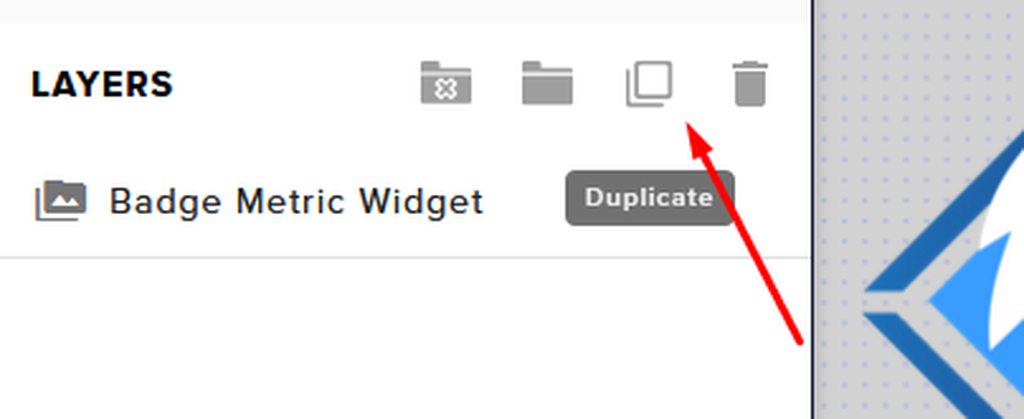
viscid pebbleBOT
@unreal idol To duplicate or copy your widget to a new or existing overlay, select the widget and use the Duplicate button. https://imgur.com/a/Ng4uhRU
 whole onyx
hello i cant get my overlay to show up on obs and im very new to this
slender mulch
why doesnt /timeout ${user} 100 work as a response?
viscid pebbleBOT
@whole onyx New to StreamElements?
Check out our YouTube channel https://www.youtube.com/c/streamelements/videos
with tutorial videos from setting up the basics, to in-depth details on how to use our product.
New to OBS? Here is a 4 step quick start guide
https://obsproject.com/wiki/OBS-Studio-Quickstart
Want to learn even more? Here is an in-depth overview
https://obsproject.com/wiki/OBS-Studio-Overview
unreal idol
@viscid pebble thank you
 dusk sequoia
I am updating my chat alert messages in the Bot Modules and whenever I finished typing what I want and it will show Saved up to the top right its not actually saving. Cause when I flip between them all what I typed isnt there, anyone having this problem?
whole onyx
viscid pebble
<@!295572899958358027> New to StreamElements?
Check out our YouTube channel <htt...
sooo none of that helped me. i did what it said to get the overlay on there (and i tried a few different ones) but the preview screen is still just black
 lusty niche
Does anyone know how to fix stream elements chat widget in OBS? It works with chat preview or when i type in my chat, but only on the stream elements website. doesnt show in OBS
even with proper broswer source and having it as the only scene
 jagged belfry
help setting up watchtime command
 maiden idol
i keep trying to import my overlay as the browesr and it only shows about half of the art
 spark stone
Hello. I am partnering with ActBlue to raise money for the Georgia Senate Runoff Races throughout all of December. I have been given an official ActBlue page and am being asked for a URL Endpoint through which I can receive safe data (username, money amount donated) to facilitate the creation of a notification that could be part of my stream.
I've never made a custom notification before and I'm not sure how to do it. Can I please get some assistance?
 low goblet
When I try to get my channel stats it says page not found
 abstract hemlock
Did you change your username recently? @low goblet
prime estuary
THANKYOU I ASKED FOR HELP YESERDAY AND WENT TO BED AND DID WHAT YOU TOLD AND IT WOKRED
THANKS GUYS
viscid pebbleBOT
@lusty niche The default resolution for StreamElements overlays (theme and custom) is 1920x1080. Please add them in OBS at their full resolution and use CTRL+F to fit to screen if necessary. You can then downscale your stream in OBS settings > Video if you'd like https://i.imgur.com/6bWXxjR.png
dusk sequoia
@viscid pebble did you see my question?
abstract hemlock
@dusk sequoia after changing the messge, make sure that the "Saved" toast appear and then reload the page (f5)
dusk sequoia
@abstract hemlock yea the save messaged appeared but I will try to reload the page after it saves to make sure, thank you.
that worked @abstract hemlock didnt know you had to reload the page, thank you and sorry about that
viscid pebbleBOT
@lament blade Read and follow our server rules:
- We do not tolerate toxicity! Treat the community team, staff and all members with respect.
- No advertisement or channel promotion, anywhere on the server.
- No NSFW/NSFL
- No unsolicited DMs or friend requests to server members
Make sure to read the #rules in any server you join.
 daring echo
hey there! I seem to be having issues with the stream elements bot, non of his commands are working in my chat. I have tried parting and rejoining my channel, as well as muting and unmuting it, it still won't work though
viscid pebbleBOT
@daring echo StreamElements menu, on top of OBS > Logout > Login
daring echo
thank you! That seemed to do the trick for some basic commands
 lavish canopy
I was looking on how to make a giveaway using StreamElements but cant seem to find it
dusk sequoia
Sorry to be a bother again but how do you test your chat alerts and your follower alerts for your stream?
viscid pebbleBOT
@dusk sequoia You can test alerts via the Emulate bell on the lower left side of the Overlay Editor. Simply go to your Dashboard > My Overlays > pencil/edit button on the overlay. Make sure the Preview LIVE on stream option is on to see the alert in OBS/XSplit** https://streamable.com/vtulg9
 dusk sequoia
thank you @viscid pebble sorry for the bother
 heady summit
kind of a noob question but how does somebody get super moderator powers?
 fallen valve
Hello Can anyone tell me why my transition is muted in my Obs live an where can i change it?
abstract hemlock
@heady summit as streamer you can type !level @USERNAME 1000 (replace Username with the username of the user that you want to set as SuperMod)
heady summit
gotcha thanks 🙂
 somber shore
Hello there. I've recently started using SE which was working fine for my overlays and in chat alerts but now they are not working but when I test the overlay and bot it works fine. I've checked all my settings on SE and everything seems to be in order and enabled.
 oblique inlet
Hello! I got a donation today while streaming, but it never popped up as an alert nor is it registering in my history. Yet it is in my paypal account so i know if went through
viscid pebbleBOT
@oblique inlet if a viewer tipped through PayPal but no information appears in your StreamElements account, this generally means PayPal has held the tip for verification. Until PayPal clears the tip and sends back a confirmation to your StreamElements account, no information will appear there and no alert will play, as that confirmation is the only way for us to be aware of a successful transaction. If you believe there may be an issue with the transaction, you'll need to contact PayPal support as StreamElements is only a passthrough service and never actually gets involved with the transaction or touches the money
oblique inlet
Oh okay.
somber shore
All of my alerts are not working. Both overalys and bot
oblique inlet
So will I never get tip notifications then if it always needs to be approved by paypal? Or does it work for some people but not others
somber forge
I'm having some issues importing overlays from other channels. I've got some setup for YouTube that I want to move over to Twitch and I can't click the link to do that.
I can, however, go the other way. From Twitch to YouTube. Which doesn't do me any good at all. Any ideas?
low goblet
@abstract hemlock about 6 months ago
 torn bison
when i open my app i get message that says failed to authenticate with twitch the status erros says invalid refresh token (HTTP 400), any advice/help?
abstract hemlock
@low goblet post here old and new username
heady summit
one more thing, do streamlabs alerts automatically work with SE donations? do i need to set anything up?
low goblet
@abstract hemlock Old: pookieanela New:Pookbaby
 halcyon falcon
Is it possible to put a webm file in OBS on a loop timer?
viscid pebbleBOT
@sacred cove Read and follow our server rules:
- We do not tolerate toxicity! Treat the community team, staff and all members with respect.
- No advertisement or channel promotion, anywhere on the server.
- No NSFW/NSFL
- No unsolicited DMs or friend requests to server members
Make sure to read the #rules in any server you join.
@sacred cove Read and follow our server rules:
- We do not tolerate toxicity! Treat the community team, staff and all members with respect.
- No advertisement or channel promotion, anywhere on the server.
- No NSFW/NSFL
- No unsolicited DMs or friend requests to server members
Make sure to read the #rules in any server you join.
halcyon falcon
No one wants to see it dude
 vale yacht
hi, how do i get my jwt token to close my account?
viscid pebbleBOT
@vale yacht You can find your JWT token on your account channels page (Show Secrets to reveal the token): https://streamelements.com/dashboard/account/channels
READ ME: This is a private security token. Do NOT share this token here or other public places, only with a StreamElements staff member in private.
vale yacht
thanks
lapis cove
lapis cove
Hello good afternoon, I would like a command that when someone makes a donation ...
can someone help me?
lament blade
I need some help please
 main bluff
anybody know why my startup overlay wont fit my obs screen? i have the resolution at 1080
 magic geyser
hello i would like some help over my sepay and i would to discus the issue in private
viscid pebbleBOT
The default resolution for StreamElements overlays (theme and custom) is 1920x1080. Please add them in OBS at their full resolution and use CTRL+F to fit to screen if necessary. You can then downscale your stream in OBS settings > Video if you'd like https://i.imgur.com/6bWXxjR.png
@magic geyser Please contact us via email for support with SE.Pay. You can use our contact form here: https://streamelements.com/contact Thank you.
 iron steppe
how do i get my chatstats back if i changed my name on twitch?
 lucid wasp
hi, i need some help
viscid pebbleBOT
Welcome to the helpdesk! Please let us know how we can assist you today and a support volunteer or staff member will assist you as soon as they are available. Thank you for your patience.
heady summit
do streamlabs alerts automatically work with SE donations? do i need to set anything up?
ionic kelp
No. You have to use our alerts.
 gray zealot
Greetings everyone! I'm a new twitch affiliate that has been attempting to migrate my stream over to Stream Elements from Streamlabs. I was able to get the import wizard to work but for some reason my donation history isn't syncing up yet. It looks like I have OBS connected as I was able to go live as a test but my subs and bit donations from users on twitch do not show up in the dashboard history. Is there an import option I'm missing?
Also, is there a place in OBS.Live to snag my URL for the imported page back into StreamElements so I can migrate to your alertbox and other widgets?
 grand mica
Is there a way I can enlarge the picture itself for a tip alert? The gif comes up super tiny, I want to adjust that without having to make an entire other browser page for it
 flint geyser
does anyone know how to change stream name before going live when using the streamelements OBS i cant figure it out lol
gray zealot
I know this much, if you go to your "My Overlays" and edit your Overlay, you should have an alert box in there that you can stretch by clicking and dragging to make it larger @grand mica
lament blade
Twitch does not know what game I am playing.. how do i tell twitch to do that?
gray zealot
@flint geyser in OBS.live I found that under system information. Click 'view' at the top, then click 'Docks' then 'System Information' The Stream Information and Go Live Notification is what you're looking for... also @lament blade that's where you can tell it what game you are playing under 'Category'.
anyone from SE looking yet? I could use some help on a really weird one. 🙂
grand mica
gray zealot
I know this much, if you go to your "My Overlays" and edit your Overlay, you sh...
Well I don't want to stretch the words with it, and it's also an alertbox as well so it'd probably stretch other things too
I'll probably have to make a second browser
lament blade
still cant find it... im on OBS rn, I clicked View, clicked docks, and that did not pop up
gray zealot
good luck Slam, I'm just an end user too and I'm new to this.
 near iris
Can someone send me a link or screen shot of how viewers enter/submit tickets for giveaways
gray zealot
Cliqzy: in the docks menu you don't see an option for System Information?
grand mica
Thanks, you too!
 sharp lava
quick question, I stream to 3 platforms Y,T,F all of which the stream elements support. Can I use the chat bot on all 3 at the same time? I asked in obslive no answer
 stiff thicket
Hi, I got a new card so i am trying to change my tipping settings and everytime i try to disconnect from SE pay it doesnt let me could anyone help with this?
lament blade
@gray zealot nope
grand mica

Having Problems with streamlabs alert box GIF image size?!! Have no fear i've got the fix.
Is this widget menu still around?
Swear I can't find it
viscid pebbleBOT
@lone scaffold StreamElements menu, on top of OBS > Logout > Login
lament blade
I have a question
 lone scaffold
thank you I realized why that worked i changed my username so it was on my old one
lament blade
@viscid pebble
I have a Question I have 47 Followers on Twitch an on StreamElements it's saying I have 2?
This is stream elements not stream labs, right?
lone scaffold
yes
lament blade
Ok just making sure
viscid pebbleBOT
@lament blade Please logout of StreamElements at https://streamelements.com/logout and then login again to your account (Twitch/YouTube/Facebook).
lament blade
Ok I will try that
@viscid pebble It didn't work
Can someone explain this for me on why I have 47 Followers on Twitch an on StreamElements it's saying I have 2?
viscid pebbleBOT
@lament blade Please provide your account ID found at the top of this page: https://streamelements.com/dashboard/account/channels This ID is public info and safe to share here.
lament blade
@viscid pebble 5fc4831ae8bd5638af4dbf13
lament blade
abstract hemlock
the dashboard will populate for the moment that you linked your account with us onward
lament blade
Ok it has been over 24 hours. How long do think it is going to take for it to show the correct number?
abstract hemlock
wdym? the dashboard will get the data from now on.. is not retroactive
lament blade
?
lament blade
abstract hemlock
<@456226577798135808>
How can I pull this up again?
lament blade
lament blade
How can I pull this up again?
Neven mind I found it
abstract hemlock
I having a hard time understanding what you're trying to do, The screenshot that i took is from your "total" https://streamelements.com/dashboard/session , you can use this on your overlays (adding a label)
lament blade
OK I got the screen shot
 lament blade
But what I don't understand is it's not showing the correct Followers on my Dashboard at all an with this being pointed out when it is clearly show's in Widget data that i have 49 on Twitch but on the Dashboard it say's 2 an this makes me wonder if it is broke
abstract hemlock
the dashboard work as a counter for the moment that you link your account with SE, isn't broken that's how the dashboard works
 lilac ridge
my bot not working anymore, i changed my name and now it aint working ;-;\
viscid pebbleBOT
@lilac ridge StreamElements menu, on top of OBS > Logout > Login
abstract hemlock
Try this ⤴️
lament blade
Un no It need's to say the correct info an not the wrong info😩
sharp lava
? need to pull my youtube in with my Twitch and fb access but I keep getting already claimed how can I fix. I tried to log out of the youtube access keep getting the same thing
viscid pebbleBOT
@lament blade 10 minutes of watch time is given to those in chat when the loyalty points are handed out (every 10 minutes). Therefore, loyalty must be enabled to watch time to work properly.
There is no direct link between watch time and all-time points.
It can’t be calculated from the number of all-time points a user has because subs may earn points at a faster rate and !bonus all command increases all-time points for users in the chat at that time.
Giving points to a single user do not affect all-time, only when giving to all in chat.
@sharp lava Account Merging - Please note:
- Merging accounts only allows faster ways to switch between accounts
- Merging accounts does not allow data sharing between accounts - different streaming platforms, different type of events
- Merging accounts allows duplicating/sharing overlays between the accounts
If you understand the limitations of merging and want to proceed, please find the JWT tokens (!jwt) from both accounts you want to merge and you will be directed to DM them to a staff member
You can find your JWT token on your account channels page (Show Secrets to reveal the token): https://streamelements.com/dashboard/account/channels
READ ME: This is a private security token. Do NOT share this token here or other public places, only with a StreamElements staff member in private.
abstract hemlock
Once you have those you can DM me
sinful pendant
will SE be announcing work on support for soundtrack? or what's going on with that
dry hare
@sinful pendant that’s a twitch product. If it doesn’t work with obs it’s something that twitch has to fix
sinful pendant
it works fine with obs, it doesnt seem to work with obslive
i would hope streamelements would strive to be compatible with official twitch associated stream tools since a vast many users use SE with twitch, that's why i thought i would bring it up
🙂
SE supporting soundtrack would help differentiate issues with obs.live and issues with the soundtrack beta. but because there's no official word on official support it's impossible for consumers to know what the issue is.
viscid pebbleBOT
@sinful pendant Check out the StreamElements ideas board: https://strms.net/ideas. You'll be able to add ideas, upvote ideas you agree with and track their progress with email notifications. Adding and upvoting ideas also helps the staff know which ideas should be prioritized so please take some time to upvote.
dry hare
I’ve heard users report issues using soundtrack with slobs, obs studio and obs with obs.live
lament blade
hey. I was just streaming and I was talking how I usually talk for my streams. A person was commenting on how I was a bit blocked out by the game audio. And we ruled that it was my mic. But there is also the chance it could be my ps4. First of, what are really good mics that I could use while streaming on my ps4 and second, how do I lower the volume of the game heard on the stream?
dry hare
I have a friend who stopped using it because it pretty much broke their computer
viscid pebbleBOT
@lament blade Obs.live is a plugin for OBS Studio for the best OBS support, please join their Official Discord @ discord.gg/obsproject
sinful pendant
dry hare
I’ve heard users report issues using soundtrack with slobs, obs studio and obs w...
well it's in beta so yes people would report issues, but i would hope we would be able to differentiate between plugin/addon issues and obs issues for soundtrack
dry hare
If the software is buggy it’s still a twitch issue
Unless they’re explicitly writing a direct obs studio plugin that somehow conflicts with the obs.live plugin, it’s up to twitch to figure it out
Even then if it’s a plugin conflicting with another plugin, it’s twitch’s software
 oak idol
Hey i tried switching back over onto twitch from youtube and i realised that it said for server it had "live youtube etc" and i thought i had to copy and paste my channel link into there. im still new to the app and i need help
 neon iris
Can anyone tell me if StreamElements has the same command as PriestBot? That you give a certain command and the bot sends x times in the chat what you type
 dusty oracle
I still don't know how to stream a game... 😩
 civic marlin
how do i remove streamelements from my obs
been trying to figure this out for hours...
 errant hare
Hi! I haven't been using streamelements for alerts, but I wanted to use it for a recent events widget. I linked my account and for some reason my activity feed is only up to date with recent followers. It shows a follow as recent as two hours ago, but shows that I have 0 subs, 0 tips, 0 bits, 0 hosts, and 0 raids, which is all inaccurate. I've tried looking around through all the settings, refreshing everything, logging out and back in, and I'm not sure what is causing this problem. I changed my twitch name over a month ago, which I thought might be the issue? But even then I don't understand how it is able to pull some information and not all of it.
lapis cove
Hello good afternoon, I would like a command that when someone makes a donation appears in the chat how many points you won. My friend uses this command {user} donated {currency} {amount} and won $ {customapi.https: //twitch.center/customapi/math? Expr =% 7Bamount% 7D% 2A100% 7D SulfurPoints PogChamp and works on his channel , but on mine when someone donates this error Parsing error at position 39: Mismatched input list, missing end of inputs. Can someone help me?
 drifting tusk
I am missing donos because my tipping is not going thru!! Please help!
 chilly latch
I think I ask this here idk, I can't get the alert with text over image to work properly, the image shows up but not the text.
viscid pebbleBOT
@chilly latch Text not showing up over your alerts? Go to the Advanced Text Settings and set the top margin to 50, you can work your way to the right position from there.
dusk sequoia
We are trying to resize the font on our Phoenix overlay that we got free from Streamelements and it will not resize
grand mica
For some reason my secondary text on anything isn't working, but I can still hear TTS. Anyone else having this issue or is it just me?
I've tried like... every option in my face lol
 eternal zodiac
None of my goals are updatting on OBS. Even going into session data and manually updating doesnt show up on OBS. Last night was fine, tonight not working after adding new alert box. What can I do?
 static temple
hi i have a problem im trying to set up the donations but is only showing de paypal and trying to set it up with my debit card please helpppp
 grand swan
Hi can i get my chat stats back? my new name is saudaderl and my old name was Domsvn tysm!!
viscid pebbleBOT
@grand swan If you changed your name on Twitch, please follow these steps:
- Visit https://streamelements.com/logout and then log in again by connecting with Twitch.
- On the right side of the dashboard page that opens, select Join under bot settings. If it says Part select that and then select Join to send the bot to the chat. Don't forget to mod the bot by typing /mod streamelements in your channel if you have not already.
- Post your old and your new name here so that we can update your channel's chatstats tracking (must be done by staff).
@static temple SE.PAY is available for streamers who are at least 18 years old, with bank account under their name in one of the following countries and have at least 101 follower (Twitch) / 101 subscribers (YouTube):
Austria, Belgium, Czech Republic, Denmark, Finland, France, Germany, Ireland , Italy, Netherlands, Poland, Portugal, Slovakia, Spain, Sweden, Switzerland, United Kingdom, United States.
If you meet these criteria and don’t see SE.Pay, let us know.
For information on SE.Pay payment methods, their fees and settlement times see https://streamelements.com/dashboard/tipping/fees
 wide ice
Hey, I also have the problem that my chat stats are not displayed. My last name that was tracked in the chat stats was norwin77niwron7cfo. Now my channel is called GovernorWIN, I only streamed with this name. Can this be fixed please? Thank you very much!
dusk sequoia
We are trying to resize the font on our Phoenix overlay that we got free from Streamelements and it will not resize even with us lowering or increasing the font size ,What should we do? @viscid pebble
 hasty slate
 glacial sonnet
After creating the Custom name Bot, It keeps posting twice in the chat, double of everything it says.
This happens each time I open OBS. To combat this I need to remove the Custom Bot Account, and then relink it back up. Any fix/solution?
viscid pebbleBOT
@glacial sonnet StreamElements menu, on top of OBS > Logout > Login
placid raptor
@fluid geyser stop tagging groups please
post your message without tagging anybody
in one, relevant channel
 fluid geyser
Sorry
placid raptor
have you changed usernames @hasty slate ?
fluid geyser
I'm just sorry Vittorio told me to ask here.
placid raptor
it's fine just ask the question 
 crimson nacelle
I'm having problems with my Chatstats, I can hardly remember my last usernames but I remember two of them
Current Name: MichaelTheAvali
Last Names: "Michaelcoad2" and "MichaelTheKitten"
 calm shard
can anyone tell me if there is a compatibility problem with the Logitech 922 webcan and StreamElements OBS....I am having problems with the cam freezing up...but only with OBS
 sly bough
Hi! I'm trying to change the messages in the "Bot Modules" section, but it doesn't save my changes... >_<" even when it says "saving" "saved" etc... it doesn't. Anyone knows anything about this? I've been adding custom messages for a while and then I lost them all... 😢 Thx!
lament blade
Hey guys, im trying to set up my costum alerts but when i choose the "text over image" layout and emulate, the name doesn't show up, only the "border". In the other layouts this problem doesnt occur, what can i do? Thanks!
 sudden compass
hello! I was wondering why tiltify alerts arent going through on stream. They work when i emulate the event, but not when there is an actual donations.
viscid pebbleBOT
@calm shard Obs.live is a plugin for OBS Studio for the best OBS support, please join their Official Discord @ discord.gg/obsproject
placid raptor
press F5 after each change, see if it helps. it's a bit buggy, we're working on it @sly bough
viscid pebbleBOT
@lament blade Text not showing up over your alerts? Go to the Advanced Text Settings and set the top margin to 50, you can work your way to the right position from there.
lament blade
thank you!
 shell marlin
Hello, someone knows what is the command for show how many mouths an sub is resubing? like {name} x{count}?
fluid geyser
How do I create a queue in my twitch chat where my viewers join and enter How do I queue in my twitch chat where my viewers join and queue with. A command?
lament blade
Did some already received his sponsorship payout (Raid/Vikings) been over 30 days for me. I did got an email from Tipalpi to setup payment method
placid raptor
sign up to it then and your future payouts will be sent to whatever you setup
payouts should be complete in up to 30 business days since campaign completion @lament blade
unreal idol
guys hello how can i fix the overlays?
lament blade
placid raptor
sign up to it then and your future payouts will be sent to whatever you setup
pa...
I did the setup. But did over read business days. Didn’t think they used the whole 30 days. Merch is usually done in less then 5. But thanks for the reply
placid raptor
i was talking about campaigns
merch was less than 5 till we got too many of them to be able to keep up
the new payment system should and is meant to make the process easier and unified all across the board for users
lament blade
placid raptor
i was talking about campaigns
merch was less than 5 till we got too many of them...
Just being patient then 😉!
thin turret
Hi, I hope all is well!
I was wondering if you could help me out with an issue in regards of the !watchtime command.
I've enabled loyalty settings etc. and the message also shows up for my audience, but its always 0 secs.
Is there any known issue or something that I have to enable next to loyalty settings?
viscid pebbleBOT
@thin turret 10 minutes of watch time is given to those in chat when the loyalty points are handed out (every 10 minutes). Therefore, loyalty must be enabled to watch time to work properly.
There is no direct link between watch time and all-time points.
It can’t be calculated from the number of all-time points a user has because subs may earn points at a faster rate and !bonus all command increases all-time points for users in the chat at that time.
Giving points to a single user do not affect all-time, only when giving to all in chat.
surreal shadow
Hi I asked about this a couple of days ago but received no help. Please can someone help with this?: Hi a follower has changed their name and used the command to change their name to get their points; but when they try to redeem from the store, it won't allow them to, yet they can use their points to gamble? Any help with this would be appreciated. Using Twitch with stream elements live
 craggy phoenix
hello how to get on streamelements tip more pay options i seen streamers have direct card or paysafe card option for tips i have only paypal ( im not affilate ) thank you
ionic kelp
@craggy phoenix you'd have to contact them.
craggy phoenix
how where
ionic kelp
They should have a discord link on their website.
craggy phoenix
ou sorry i posted wrong i mean stream elements xD
viscid pebbleBOT
SE.PAY is available for streamers who are at least 18 years old, with bank account under their name in one of the following countries and have at least 101 follower (Twitch) / 101 subscribers (YouTube):
Austria, Belgium, Czech Republic, Denmark, Finland, France, Germany, Ireland , Italy, Netherlands, Poland, Portugal, Slovakia, Spain, Sweden, Switzerland, United Kingdom, United States.
If you meet these criteria and don’t see SE.Pay, let us know.
For information on SE.Pay payment methods, their fees and settlement times see https://streamelements.com/dashboard/tipping/fees
craggy phoenix
and it will be automatic after reaching followers
?
and you need both twitch and youtube or only one of it
placid raptor
it should be automatic on Twitch @craggy phoenix
other platform requires manually enabling it
only one of it, the one you want SE.Pay for
 tall trench
Hey I've started earning does anyone when the pay out is? Or if you have to get so much before you can cash out?
unreal idol
hey guys do you know how i upload some music in the donation alert?
 indigo torrent
Hey, question about alerts. Is there a variation setting for peeps who have been gifted a sub and click the continue sub button? it is possible to do before the gifted runs out so it doesnt come say "subbed with x number of months" etc
 robust parcel
@tall trench you need to reach a minimum of 100$ on twitch before getting paid. payouts are from the first day of the month to the last day, but you only get paid the 15th (or close) the next month ! So lets say you made 150$ in november, you should get the payout around december 15th
@unreal idol you got your music saved already?
 royal root
hey guys i multi stream but it turns out i have my FB on one account and my Youtube and Twitch on another is ther anyway to link them as it just tells me they are already claimed
@crude pecan
thin turret
viscid pebble
<@!394093965118275586> 10 minutes of watch time is given to those in chat when t...
Thanks for the reply! So that means if I just enable loyalty settings but there is no points attached to the respective options, it will not show the respective watchtime? Because I was not planning to use the points system. I was just planning to allow viewers to check their watchtime stats 🙂
ionic kelp
@thin turret unfortunately watchtime = loyalty.
thin turret
I see. Thanks a lot for the help!
 umbral merlin
might be wrong channel, but do you know where i find the mask feature?
ionic kelp
There is none.
umbral merlin
I've seen streamers putting on masks...
ionic kelp
that's not something we have.
 zinc seal
hey i have a problem i dont get any streamer "points" anymore can someone help maybe 😦
 uneven lodge
Good morning everyone! So I have a "bot user" as a super moderator set up, it worked just fine until a couple of days ago. Anyone has an idea what might have happened?
It used to work perfectly for all the alerts and commands and all, but now is just StreamElements showing and not the bot.
Should I delete the bot and re-log in?
Thanks!
chilly latch
How do I make words wrap in an alert since the sentence is too long for the image?
 random basin
Hi so I cant enter my SE merch store for some reason HELP??DASHBOARD
 brazen jolt
anyone here that streams on ps4?
 scenic dust
Alright guys im an editor for streamelements for a twitch channel.
fyi the streamer uses streamlabs
All i want to know is how to work with media request.
on its settings i can add a backup yt playlist that will play when there are no sr atm.
and if someone adds a !sr on the twitch chat it will play that.
and i dont want a song overlay or anything related to overlays
all i want to do is use the !play command and the backup playlist starts playing.
BUT idk it just doesnt work, i type !play and streamelements says the music started playing but i dont hear any music and if i type !song it will say that theres no song playing atm
if someone could help me, pls @ me or dm me so ik someone answered me
ty very much
dry hare
Without the media request widget added to an overlay you won’t hear anything
dry hare
@scenic dust https://youtu.be/17eUkoZ6eIs

StreamElements Media request enables playing songs and videos in your stream. It's an upgrade of StreamElements Song request and Media share features.
Join our discord for live support: discord.gg/SE
Ground Control: https://strms.net/groundcontrolyt
Channel Management guide: https://youtu.be/zl_h-ttZDF0
Tipping system: https://youtu.be/e...
 signal basin
I'm a mod for someone on twitch and I have dashboard access to their streamelements to edit their overlays. However I'm not able to access their dashboard at all, it keeps redirecting back to the main area of the website where you login in for first time. even though im actually logged in. I also tried clearing cache and using 3 different browsers to login, I also tested giving someone access to my dashboard but it fails to generate the link.
dry hare
signal basin
I'm a mod for someone on twitch and I have dashboard access to their streameleme...
Log out, then try logging in using incognito mode
signal basin
@dry hare incognito didnt work either, as soon as i try to roleplay as them it boots me back to the main screen of website
 uneven lodge
Hello, can anyone tell me where the streamelememts custom html/css/javascript widget documentation is located. I need to be able to access the total new subs per stream, all time sub count, top tips & top bits.
dry hare
signal basin
<@!128166843360739328> incognito didnt work either, as soon as i try to roleplay...
When you log in, if you click on your profile picture and click Settings, is the channel listed under Channels I manage?
uneven lodge
I tried looking at the labels to take a look at the css/html/javascript they use but it doesn't allow me to open up the code for those.
signal basin
yeah it is @dry hare
dry hare
signal basin
yeah it is <@!128166843360739328>
You might try removing it by clicking the X and having them send you a new invite link
dry hare
uneven lodge
I tried looking at the labels to take a look at the css/html/javascript they use...
Try #dev-chat
signal basin
dry hare
You might try removing it by clicking the X and having them send you a new invit...
okay will do that and get them to add again once they around, thanks
uneven lodge
Thanks
heady summit
So I'm trying to set up a tipping page on streamelements to use in my stream (I use streamlabs obs.) What I did for the alert was import my alert from SLOBS and then export it from the overlay editor by putting the link in a browser source. Is this the right thing to do to get tip alerts to work? just wanna make sure.
shell marlin
Hello, how i get updated emojis in Kappagen? i changed some bttv emotes in my channel, but i can't upload to show up 😦
scenic dust
dry hare
Without the media request widget added to an overlay you won’t hear anything
when im editing the media request widget, is there an option to NOT show the video and only show the media title?
dry hare
No clue. I don’t use it enough to know about it
scenic dust
its urgent 😦
random basin
@dry hare Is there a was to reset my se merch store
 tropic idol


 scenic dust
dry hare
No clue. I don’t use it enough to know about it
scenic dust
dry hare
No clue. I don’t use it enough to know about it
i think my overlay links do not work, cuz when i clikc on them, it shows a blank screen, any thoughts?
lapis cove
@viscid pebble Hello good afternoon, I would like a command that when someone makes a donation appears in the chat how many points you won. My friend uses this command {user} donated {currency} {amount} and won $ {customapi.https: //twitch.center/customapi/math? Expr =% 7Bamount% 7D% 2A100% 7D SulfurPoints PogChamp and works on his channel , but on mine when someone donates this error Parsing error at position 39: Mismatched input list, missing end of inputs. Can someone help me?
scenic dust
I want a command that adds 256 to the number in front of the command, like this:
!number 10
Streamelements: 266
anyone knows how?
 primal crow
anyone help with a comand for a gamble game in the chat? im new to streaming
heady summit
heady summit
So I'm trying to set up a tipping page on streamelements to use in my stream (I ...
anyone?
scenic dust
Alright guys im an editor for streamelements for a twitch channel.
fyi the streamer uses streamlabs
the media request overlay link i created is just showing blank, any1 knows the problem?
ty very much
craggy phoenix
please how can i delete at streamelements dashboard fake numbers i was testing donation
and also from activity feed
thank you
 dark plinth
so.. when i start streaming i play some music while my "starting soon" screen is displayed. Once the music is done, I want to be able to have an "intro" transition that shows my channel logo. Anybody know how I can make that?
craggy phoenix
just change scene manualy
or try obs scene timer plugin but i dont tryed any of theese
dark plinth
right, I am aware i can do that. I don't want to do that. That was my whole point in asking.
wary halo
dark plinth
so.. when i start streaming i play some music while my "starting soon" screen is...
set up a stinger transition in OBS
craggy phoenix
Learn how to use your logo and brand colors to make an AWESOME stinger transition to use when changing scenes in OBS, SLOBS, or OBS.Live for your Twitch stream! 👇🏻Timestamps & Links👇🏻
🔸 Buy Stream Deck XL: https://geni.us/streamdeckXL
🔹 Learn More: https://e.lga.to/GamingCareers
⏩ Timestamps, click to skip ahead!
0. Introduction 0:00
- What w...
lament blade
my stream runs perfect on OBS, however it is so laggy and choppy when I watch it on my twitch channel, how can I make it run smooth? I have ethernet already, i get 300 mbps.. however my pc is very outdated, I stream from my xbox through an elgato... so surely my gpu is not being maximized.. or is it??
dark plinth
thanks. :)
viscid pebbleBOT
@lament blade Please provide a log from your last stream. To do this, in OBS go to Help > Log Files > Upload Last Log File and paste the link to the log file here.
lament blade
 visual eagle
My elgato's audio is constantly popping, anyone know a fix?
viscid pebbleBOT
@visual eagle If you are having issues with Elgato hardware or software, we recommend reaching out to their support here: https://e.lga.to/help
lament blade
@wary halo can you check out my log and tell me if my pc is the reason my stream is so laggy, or my internet
wary halo
it is, check the link i send you 😛
lament blade
dang thats awesome
what do you suggest i do then?
switch to my NVENC instead?
yo what's goin on
I got a dono and it didn't notify for like 5 minutes
wary halo
lament blade
switch to my NVENC instead?
no, your GPU is terrible outdated
lament blade
even in the activity dashboard
can i update it, or do I need to buy a new on? 🙂 @wary halo
one*
wary halo
You would have to buy a newer card, doesn't have to be the latest model of course
RTX 20xx and RTX 30xx have a dedicated Nvenc chip
lament blade
@wary halo any reason my donos are slow?
happened again
second dono
taking 5 minutes
lament blade
also resub
umbral merlin
can you help me with how to use masks on my twitch stream?
wary halo
we don't have masks
as was told earlier today
exactly, look at the thumbnail
this is StreamElements
dark plinth
i cant use after effects, I don't have the money for it.
guess i can't have a stinger transition then, lol
dark plinth
ooh i'll think about both of those
dry hare
DaVinci resolve is pretty free
wary halo

dark plinth
pretty free? LOL that sounds misleading
wary halo
There is a free version that is super nice
they also have a paid pro version of course
but you won't need that
dark plinth
now that sounds more sensible
dry hare
I said “pretty free”
 runic latch
Hi there, everyone. Does anyone know how to add GIFs to the commands on streamelements? I've seen some some channels have certain commands make gifs show up over their stream. For example a command might be "!shots" then the streamelements bot might say something like "(user) just took a shot with (broadcaster)" and a gif of someone taking shots will pop up over the stream. Thanks in advance!
umbral merlin
is there anything on streamlabs that allows you to hide your face/stream anonymously?
dry hare
@umbral merlin you’d have to ask streamlabs
scenic dust
can some1 help me pls....
 formal plover
@viscid pebble I just started putting together my first alerts. When I upload a webm file the site (streamelements.com) doesn't take it.
Anyone know why?
stiff thicket
hey so i asked this last night and got no answer but i got a new card so i wanted to change my info for SE pay and it wont let me can anyone help with this
viscid pebbleBOT
@stiff thicket Please contact us via email for support with SE.Pay. You can use our contact form here: https://streamelements.com/contact Thank you.
lament blade
so question, i downloaded stream elements/obs how do i get follower notifications to appear on my stream
viscid pebbleBOT
@lament blade New to StreamElements?
Check out our YouTube channel https://www.youtube.com/c/streamelements/videos
with tutorial videos from setting up the basics, to in-depth details on how to use our product.
New to OBS? Here is a 4 step quick start guide
https://obsproject.com/wiki/OBS-Studio-Quickstart
Want to learn even more? Here is an in-depth overview
https://obsproject.com/wiki/OBS-Studio-Overview
dark plinth
is there a way for me to get a vtube facecam type thing? like i dont wanna show my face but i want a character to be in place of it, if that makes sense
runic latch
@lament blade check out this video https://www.youtube.com/watch?v=X9BNyM0YEj8
wary halo
You know I just linked the complete StreamElements tutorial channel? 😛
 jade cave
hola buenas, unas pregunta, como pueden ver mis viewers la cantidad de coins que llevan en mi canal
viscid pebbleBOT
@jade cave Welcome to the helpdesk! The regular helpdesk channels are in English but we do provide multi-language support in the following channels: #🇩🇪︱deutsch | #🇫🇷︱français | #🇪🇸︱español | #🇵🇹︱português | #🇳🇱︱nederlands | #🇮🇹︱italiano | #🇵🇱︱polski | #🇨🇳︱中文語言服務區-chinese | #🇯🇵︱日本語-japanese | #🇭🇺︱magyar | #🇰🇷︱한국어-korean | #🇹🇭︱ไทย-thai | #🇷🇺︱русский | #🇺🇦︱українська | #🇨🇿︱czech
jade cave
ok thx
how do i activate bot coins for my twitch channel? and how can my viewers see it
 flint pond
For some reason my starting soon screen is playing up within obs.live, I have a simple 2 min countdown timer, but it sits at 0 even though on streamelements it's clearly counting down. it worked fine yesterday but now it just refuses to work, any suggestions?
jade cave
wary halo
https://streamelements.com/dashboard/loyalty
and how can my viewers see it
wary halo
by typing !points
 pine rivet
if im having issues on awesome shoutouts is this where i ask?
 ember marten
Has anyone had any issues with activity feed not updating properly? And if so any solutions?
 lilac sorrel
hello guys i have a problem with twitch's vods
nimble dune
scenic dust
how do i give points
!givepoints username 111222
lilac sorrel
i have all audio muted but the discord voice is up
and on stream it works
do you know something
?
scenic dust
nimble dune
`!givepoints username 111222`
doesnt work
nimble dune
scenic dust
doesnt work
Then !addpoints username 3333 make sure you have enabled that command
scenic dust
nimble dune
Then !addpoints username 3333 make sure you have enabled that command
no i dont want to add points to a user, i want to give my points to a user
wary halo
same thing but with !give
scenic dust
doesnt work either
lament blade
when i installed a theme how can i reset alert to defualt because its theme alert now
lament blade
what software do you suggest i download if trying to edit my gaming videos and upload them to my social media?
@wary halo
wary halo
Davinci Resolve
 cinder vale
Hey guys
help please configure my stream for my computer
I am from Russia and downloaded obs for the first time
I don't know how to set it up so that everything is fine
I'll be very thankful
viscid pebbleBOT
@cinder vale New to StreamElements?
Check out our YouTube channel https://www.youtube.com/c/streamelements/videos
with tutorial videos from setting up the basics, to in-depth details on how to use our product.
New to OBS? Here is a 4 step quick start guide
https://obsproject.com/wiki/OBS-Studio-Quickstart
Want to learn even more? Here is an in-depth overview
https://obsproject.com/wiki/OBS-Studio-Overview
scenic dust
If no one answers my streamelement questions , should i start dm ing staff?
wary halo
nope, just wait
scenic dust
Huh..
wary halo
try !givepoints user amount
scenic dust
Doesnt work
Neither !give
Alright guys im an editor for streamelements for a twitch channel.
fyi the streamer uses streamlabs
the media request overlay link i created is just showing blank, any1 knows the problem?
ty very much
viscid pebbleBOT
@scenic dust We're not able to troubleshoot issues with using our overlays in StreamLabs OBS (SLOBS) as we don't have the tools to support their software. We recommend using OBS Studio or OBS Studio with our plugin OBS.Live.
scenic dust
No its not about streamlabs its the streamelements media request overlay link just shows blank if i open it on a broswer tab
😢
 thorny falcon
how do i import an overlay from streamelements to streamlabs obs?
 dreamy rain
Anyone know how to fix issues with obs.live panels for activity feed and chat not working?
viscid pebbleBOT
@thorny falcon To add your overlays to OBS, add a new browser source in your scene. Paste your overlay URL in the browser source properties, set the dimensions to 1920x1080 (unless you changed them on the website) and check Shutdown source when not visible. https://youtu.be/KDvLynUqXI4
@dreamy rain StreamElements menu, on top of OBS > Logout > Login
errant hare
My streamelements activity feed shows all my recent follows accurately and up to date, but shows 0 subs, 0 bits, 0 raids, etc. which is all incorrect. I've tried refreshing things, looking through settings, and logging out and back in multiple times and am not sure what else to do to fix this.
 fast canyon
Hello there. I wanted to add destinations in my Overlay Follower. However, only the followers that I have received since I started using SE were included in the calculation. Not the ones I actually have in total on Twitch, which is of course the number I am really interested in.
 crisp vine
hello i need some help
dreamy rain
Thanks to everyone who responded, i was just logging into the wrong twitch account lol
 prisma monolith
Hello,
Is there a way to merge 2 accounts? I created another account using twitch and forgot I already created onw with Facebook. Now my user is "hreljin-7207" and my original account is only "hreljin" when I used Facebook. Is there a way to merge all to the "hreljin-7207" account created using twitch? Thanks
 urban granite
$time.until only does hours, is there any countdown command available that will do days? want a christmas countdown
 alpine lintel
hey there, so I want to add an overlay that I worked on in streamelements to my streamlabs and I copy URL and paste it in the browser source and everything but when I want to add other layers of the overlay, like be right back or start up soon or actually anything, I don't have that option and I lose that layer that I worked on. It's like I have 1 URL for 5 pictures of an overlay and when I want to add them (to a new source of course) the previous source gets replaced by the new one that I just copied, and I actually checked and the all have one URL, don't know how to implement them all in one session
 young surge
Hi there, what would the variable be to show the total bits cheered by a user in the cheer alert message? I can't see it on the variable list but I've seen quite a lot of streamers that have done it
 lofty robin
Hey, I have a question, can I add a payment method other than paypal?
 rustic kettle
So, I've got a giveaway going right now, but I noticed that I have 16 entrants and only 2 people actually typed !enter to buy a ticket. The rest were people that followed my stream. What's up with that?
unreal idol
@lofty robin i dont think so i only know about paypal
viscid pebbleBOT
@lofty robin SE.PAY is available for streamers who are at least 18 years old, with bank account under their name in one of the following countries and have at least 101 follower (Twitch) / 101 subscribers (YouTube):
Austria, Belgium, Czech Republic, Denmark, Finland, France, Germany, Ireland , Italy, Netherlands, Poland, Portugal, Slovakia, Spain, Sweden, Switzerland, United Kingdom, United States.
If you meet these criteria and don’t see SE.Pay, let us know.
For information on SE.Pay payment methods, their fees and settlement times see https://streamelements.com/dashboard/tipping/fees
 winged basin
Does anyone know how I can set an alert to "default.ogg" sound after replacing it originally? I want to go back to that sound but don't want to reset the whole alert box (too much work!)
 split pawn
hello,i cant login so my browser stuff is not working like my alerts and stuff
thats what i get when i press login
 neon grove
I have an overlay i bought from Own3d and i wanted to know how can I use the animated overlay like one stream labs
 ashen wind
Hello, my follower alerts have not been working through the chatbot or my activity feed. How do I fix this?
strong kernel
@winged basin There's no revert to default button for alerts, unfortunately.
@split pawn Check your firewall, white screens mean something is blocking it from loading.
viscid pebbleBOT
@neon grove We've released our new Overlay Editor revamp. You can check out the changes and how to work with it here: https://youtu.be/X5VzXjqAsjk
Check out our blog post as well: https://blog.streamelements.com/streamelements-overlay-editor-just-got-even-better-c22cb5b4853e
split pawn
ok then i think i know what the problem is i instald today bulguard thx
strong kernel
@ashen wind I've resubscribed your webhooks. You should see follower events moving forward.
ashen wind
Thank you so much!
lament blade
Hey, I hope I catch the right section for my question, if not I am VERY sorry. Is there any way to show the Twitch subscriber points (not the overall of subscribers) as a widget via SE? I only found a subscriber goal widget, which wasn't really working for me. Thank you in advance for your help 🙂
 tawdry kettle
does SE have custom tip pages?
strong kernel
@tawdry kettle Yes, you can configure yours in the Tipping settings section of your account.
@lament blade Twitch does not share sub points through their API any more.
tawdry kettle
I can show my stream on a custom tip page? Like embedded?
lament blade
strong kernel
<@456226577798135808> Twitch does not share sub points through their API any mor...
Big oof. Well, then I might need to look for a other solution to this, since I know a streamer who has it set up like this (but with own Backend etc.). Thank you anyways 🙂
strong kernel
@tawdry kettle No, your stream is not embedded on your tipping page.
tawdry kettle
And there is no way I can set that up similar to your competitor's custom tip pages? @strong kernel
strong kernel
No.
lament blade
@strong kernel my stream elements alerts our delayed