#helpdesk-twitch
1 messages · Page 765 of 1
 strong kernel
 clear wigeon
 round brambleBOT
@north cove To add your overlays to OBS, add a new browser source in your scene. Paste your overlay URL in the browser source properties, set the dimensions to 1920x1080 (unless you changed them on the website) and check Shutdown source when not visible. https://youtu.be/KDvLynUqXI4
 north cove
it was the resolution. thank you!!!
 low ice
round brambleBOT
low ice
round brambleBOT
@low ice For the best OBS support, please join their Official Discord @ discord.gg/obsproject
 copper lion
when I try to look at my chatstats it says 404- page not found
round brambleBOT
@copper lion If you changed your name on Twitch, please follow these steps:
- Visit https://streamelements.com/logout and then log in again by connecting with Twitch.
- On the right side of the dashboard page that opens, select Join under bot settings. If it says Part select that and then select Join to send the bot to the chat. Don't forget to mod the bot by typing
/mod streamelementsin your channel if you have not already. - Post your old and your new name here so that we can update your channel's chatstats tracking (must be done by staff).
copper lion
old names: xdeadlysn1pzx, xdeadlysnipzx, snipzistaken
new name: snipztrain
 burnt perch
yo
 lament blade
I have a problem with someones point leaderboard, it says their old username on the leaderboard instead of the new one
thats what it shows but it shows their current name on the link
 oblique steeple
You can change the name and links at https://streamelements.com/dashboard/profile
lament blade
is there anyway one of you guys can do it
I mod for him and It's hard to get a hold of him a lot of times offstream
oblique steeple
Staff could do it, but I doubt they will if the streamer doesn't ask for it themselves.
lament blade
I got someone in here to make a new chatstats for him because he didnt have one a few weeks ago because of the fact he changed his name but it somehow changed his profile name to his old name
oblique steeple
Chat stats is a different thing. Anyway. I asked internally because I'm a support volunteer, not staff.
lament blade
ok thats fine, just let me know what they say
oblique steeple
Aaaand I got an answer: The streamer themselves have to request that change.
 mortal dove
strong kernel
mortal dove
strong kernel
Ask Twitch.
 wicked forge
my overlay doesn't seem to work properly when streaming
it works when i'm not streaming.
specifically the text I have scrolls vertically from top to bottom, but when i stream. it is frozen and disappears.
no scrolling at all no looped text in motion appears
round brambleBOT
@wicked forge OBS > Settings > Advanced > Scroll down > Enable or disable Browser Source Hardware Acceleration, depending on its current state > Restart OBS (This does not apply for OBS on Mac)
https://i.imgur.com/ggMe9ZE.png
 round brambleBOT
@wicked forge We're not able to troubleshoot issues with using our overlays in StreamLabs OBS (SLOBS) as we don't have the tools to support their software. We recommend using OBS Studio or OBS Studio with our plugin OBS.Live.
wicked forge
it doesn't work still. the weird thing is i have a near identical browser source just that the text goes horizontal and that works fine. I simply duplicated teh overlay
the hardware acceleration on or off doesn't help.
 lunar parcel
where do i fix an issue with my stream key
 opaque gale
Hi.. have a problem adding a facebook channel. returns with an error message "channel is already claimed". any help?
round brambleBOT
@opaque gale Account Merging - Please note:
- Merging accounts only allows faster ways to switch between accounts
- Merging accounts does not allow data sharing between accounts - different streaming platforms, different type of events
- Merging accounts allows duplicating/sharing overlays between the accounts
If you understand the limitations of merging and want to proceed, please find the JWT tokens (!jwt) from both accounts you want to merge and you will be directed to DM them to a staff member.
 scarlet tiger
^ same for you @wicked forge
opaque gale
!jwt
round brambleBOT
You can find your JWT token on your account channels page (Show Secrets to reveal the token): https://streamelements.com/dashboard/account/channels
READ ME: This is a private security token. Do NOT share this token here or other public places, only with a StreamElements staff member in private.
scarlet tiger
Yes, i will forward it to any avavaible staff.
wicked forge
thank you
opaque gale
or am i supposed to wait for a DM?
 surreal plume
Hello people, I need a little help with Songrequest, anyone?
scarlet tiger
@surreal plume hm?
surreal plume
I think I don't have a songrequest module
scarlet tiger
Where?
surreal plume
It's only showing these options
surreal plume
this?
surreal plume
Yeah, but the bot isn't getting the data from my chat
scarlet tiger
Is enabled default command !songrequest?
surreal plume
it's working on my OBS, but when someone put a music in the chat, it doesn't work
Is enabled default command !songrequest?
@scarlet tiger Yeah, I enabled it, but when i jump off the page, it disables automatically
scarlet tiger
On chrome?
surreal plume
Firefox
I click in enable, but when i go back there, it disables
And when I click in View module, it's like a crash, and the page don't change
round brambleBOT
Our Dashboard and Overlay Editor are Chromium Optimized. We strongly recommend using Chrome. Opera GX and the new Microsoft Edge Chromium might work closest to Chrome as its also Chromium built. Firefox also works, but some things might look a bit different or not work. We do not recommend using Internet Explorer with our Dashboard as it does not support functions.
If the website doesn’t work on chrome, be sure none of your plugins are blocking our website or clear your cookies. You can try if the website works in a incognito tab.
surreal plume
when I click on view module it happens
scarlet tiger
Please use chrome.
surreal plume
Our Dashboard and Overlay Editor are Chromium Optimized. We strongly recommend using Chrome. Opera GX and the new Microsoft Edge Chromium might work closest to Chrome as its also Chromium built. Firefox also works, but some things might look a bit different or not work. We do not recommend using Internet Explorer with our Dashboard as it does not support functions.
If the website doesn’t work on chrome, be sure none of your plugins are blocking our website or clear your cookies. You can try if the website works in a incognito tab.
@round bramble Understood, so I have to download chrome to work?
Ok
Thanks
scarlet tiger
If it will not work let us know.
 fathom tendon
Does toggling this button keep the session from ever clearing?
scarlet tiger
It this is enabled, it will reset session things 15 mins after stream.
fathom tendon
If it is disabled?
 tranquil holly
Hello
tranquil holly
Looking for a quick fix. I have the overlay I want in streamelements. How do I transfer that to obs?
scarlet tiger
@fathom tendon vice versa but i am not sure
round brambleBOT
@tranquil holly To add your overlays to OBS, add a new browser source in your scene. Paste your overlay URL in the browser source properties, set the dimensions to 1920x1080 (unless you changed them on the website) and check Shutdown source when not visible. https://youtu.be/KDvLynUqXI4
fathom tendon
Oof. I have someone trying to build a subscriber list that does not ever clear.
Where would be the right place to ask?
tranquil holly
nice
scarlet tiger
You want list of subscribers or what? @fathom tendon
fathom tendon
The entire current list, not just the active session.
I figure by never letting session clear that will eventually become an accurate list.
I checked the api and Subscriber-session will grab the recents, but that is all I saw.
fathom tendon
If that makes sense @scarlet tiger ?
 dusty star
im trying to switch
surreal plume
I'm having the same issue in the chrome as in the firefox
 boreal kraken
Hey Guy's can somebody help me please because for the past few days I'm getting a Response message in Chat by streamelements. How can I get rid of it?
 ionic kelp
@boreal kraken check timers. If you do not see it there at all remove them all and readd them.
boreal kraken
Okay thanks for your fast response, will definitely try that!! 👍 @ionic kelp
 winter berry
My stream elements is saying I have 0 subs, any idea how to fix it?
 pastel trout
Hey guys I need your help ok my stream elements is connected to my twitch but it not pop up on my stream it just started doing this two days ago
pastel trout
Hey guys I need your help ok my stream elements is connected to my twitch but it not pop up on my stream it just started doing this two days ago
 daring escarp
Guys I need your help, my chat stats doesn't work after I change my name :'(
 steep quiver
@daring escarp your old and new nickname?
 left fossil
I recently changed my name on twitch and now my modules arent working, like the ones that thank people for raiding and following
round brambleBOT
@left fossil If you changed your name on Twitch, please follow these steps:
- Visit https://streamelements.com/logout and then log in again by connecting with Twitch.
- On the right side of the dashboard page that opens, select Join under bot settings. If it says Part select that and then select Join to send the bot to the chat. Don't forget to mod the bot by typing
/mod streamelementsin your channel if you have not already. - Post your old and your new name here so that we can update your channel's chatstats tracking (must be done by staff).
lament blade
I have a weird problem with my streamelements bot on twitch... for some reason if I do !donate it post 2 different types of commands... yet I cant see Ive set up any donate command yet..
ionic kelp
I see what you mean 
That deffo doesn't make sense as it's not coming up as a command on your list
round brambleBOT
@lament blade Go to the Dashboard > Right side > Part channel > Join channel (https://streamelements.com/dashboard)
 ionic kelp
It's a alias for tip
lament blade
I part the bot, brought it back and it kept this aha
ionic kelp
You can remove that in the options for it.
lament blade
oh really? 😮
ionic kelp
Yup.
 quiet temple
Hi Team! Have a weird issue that's cropped up on a channel I help manage. The owner reset the Twitch account password and since then we cannot change the game or stream title via the bot commands in channel. We get the screenshot error when we try.
We've parted the bot from the channel, rejoined it, remodded it. Reconnected to Streamelements with the new Twitch password. Reset the permissions to individuals who had permissions to manage the SE account for this channel. Even tried using the !settitle and !setgame commands from the channel account itself and it receives the same error. Is there something else to try or are we proper broken?
round brambleBOT
@quiet temple Please logout of StreamElements at https://streamelements.com/logout and then login again to your account (Twitch/YouTube/Facebook).
ionic kelp
Both of you do that.
quiet temple
Yup, already done that. No dice
I've logged out of both my Twitch & StreamElements accounts, the channel in question (WasderLive) has logged out of both Twitch & StreamElements accounts, logged back in and tried the command from that account itself -
 calm geode
Hey Guys, i cant load my ChatStats https://stats.streamelements.com/c/debaba_tv

StreamElements
Description Chat Stats tracks emote usage on Twitch in real time. See which emotes are the most popular on every Twitch channel
round brambleBOT
@calm geode If you changed your name on Twitch, please follow these steps:
- Visit https://streamelements.com/logout and then log in again by connecting with Twitch.
- On the right side of the dashboard page that opens, select Join under bot settings. If it says Part select that and then select Join to send the bot to the chat. Don't forget to mod the bot by typing
/mod streamelementsin your channel if you have not already. - Post your old and your new name here so that we can update your channel's chatstats tracking (must be done by staff).
 zenith widget
On hold in your paypal account?
If yes, then you need to most likely accept the tip
or verify your account
or check in with paypal support to see why its on hold
 final turret
i marked as vitual item delivery
i had that option

so its paypal issue then thanks 
 north roost
Hi guys, I have a small problem. I've created a small widget from scratch "Followers Goal". Everything seems fine, but the data (followers count is inaccurate). The widget shows 68 instead of 80.
round brambleBOT
@north roost To reset goals:
- from the Overlay Editor > Session data on top right (monitor symbol) > Goals tab > reset progress of desired goal
- from the Dashboard > Activity feed on the left > Widget data on the right > Goals tab -> reset progress of desired goal
Note: Goal widgets (progress) only counts up and doesn't go down automatically, if you lose followers/subs.
north roost
🙂
calm geode
@calm geode If you changed your name on Twitch, please follow these steps:
- Visit https://streamelements.com/logout and then log in again by connecting with Twitch.
- On the right side of the dashboard page that opens, select Join under bot settings. If it says Part select that and then select Join to send the bot to the chat. Don't forget to mod the bot by typing
/mod streamelementsin your channel if you have not already.- Post your old and your new name here so that we can update your channel's chatstats tracking (must be done by staff).
@round bramble I dont Change my Name...
Profile Name is - debaba_tv
zenith widget
should be good now
 stable rapids
How to put to show the average music player in the program? He disappeared
 placid raptor
do you mean Media Request @stable rapids ?
stable rapids
yes
calm geode
TY Guys!
should be good now
@zenith widget
placid raptor
what do you want to know @stable rapids ? how to add the widget to your overlay?
stable rapids
@placid raptor yes yes
placid raptor
in the Editor > the big + icon bottom left > Engagement > Media request
make sure to save the overlay.
then you can use your dashboard or OBS.Live MR dock to set it up and test
you have some settings in the widget itself too
winter berry
My stream elements is saying I have 0 subs, any idea how to fix it?
round brambleBOT
@winter berry Please provide your account ID found at the top of this page: https://streamelements.com/dashboard/account/channels This ID is public info and safe to share here.
 uneven patio
Hello. I need some help. I have enabled Alert Box but nothing shows up on it while I am streaming. Is this a bug?!
round brambleBOT
@uneven patio OBS > Settings > Advanced > Scroll down > Enable or disable Browser Source Hardware Acceleration, depending on its current state > Restart OBS (This does not apply for OBS on Mac)
https://i.imgur.com/ggMe9ZE.png
 vestal void
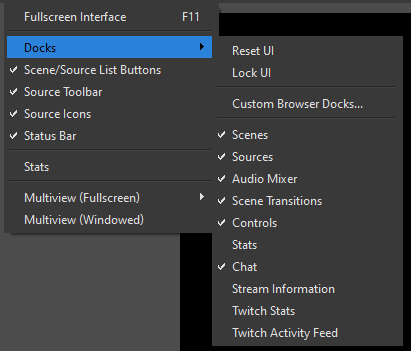
How do I make my Obs look like the Pic above
zenith widget
its a custom theme for obs
OBS Studio has the ability to load different themes based on your needs. The option is available in Settings -> General. Default themes includes: Acri - designed by Warchamp7…
vestal void
OK thanks
 sweet sail
Hello, can I please you again for fix chatstats data? Again mine are empty:( channel: Proste_Davca
zenith widget
should be good
sweet sail
Thank you
 glass locust
should be good now
@zenith widget hello, i did the same thing! can u also update my channel chatstats tracking? mi twitch nick is NIRichard
its a common problem i see, sorry for the troubles!
 vale anvil
is obs.live similar to streamlabs obs in the sense that if you log in to another device with your twitch account, all your scenes and sources will be brought over to the new device or would you have to manually set them up again?
 round brambleBOT
@vale anvil OBS.Live is a Plugin for OBS created by StreamElements. You can download OBS.Live here: https://streamelements.com/obslive
Please make sure you have the latest version of OBS installed, Current Version: 25.0.8. You can install OBS here: https://obsproject.com/
 lapis pond
because as of now it doesnt work
zenith widget
@lapis pond you use "!emotes update" to update the enabled BTTV/FFZ emotes on your account
vale anvil
if you sign in to obs live on another device with the same twitch account, will your scenes carry over or would you have to set it up again
glass locust
did you rename your channel?
@zenith widget no i never renamed my channel but i have the same issue, i parted the bot and them let it rejoing the channel and reset it as a mod
glass locust
THANKSS
vale anvil
@zenith widget no as in it won't carry over right? just want to make sure I understand your response
zenith widget
No, it will not carry the scenes automatically, if you login to another device
you will need to use the backup option in teh streamelements menu
 west bay
Hello, how can I fix my chatstats? I cant see them
It gives me the error 404-Page Not Found
zenith widget
did you name change your channel?
winter berry
My stream elements is saying I have 0 subs when I actually have over 60 , any idea how to fix it?
 fallow turtle
hey ppl, so i have been trying to scale things in the streamelements overlay editor for a while, but I cant seem to do it, it only crops. can someone help as to how to scale things in the streamelements overlay editor?
zenith widget
@winter berry where are you seeing the 0 subs?
round brambleBOT
@fallow turtle The default resolution for StreamElements overlays (theme and custom) is 1920x1080. Please add them in OBS at their full resolution and use CTRL+F to fit to screen if necessary. You can then downscale your stream in OBS settings > Video if you'd like https://i.imgur.com/6bWXxjR.png

 long lantern
hi, I have a Problem with my Paypal donations, i got last month 40$, but the money is not in my Paypal account. Whats wrong?
fallow turtle
well Im not trying to change the dimensions of the overlay itself, just an element in the overlay editor
hi, I have a Problem with my Paypal donations, i got last month 40$, but the money is not in my Paypal account. Whats wrong?
@long lantern check the info again or make sure your paypal is verified
zenith widget
@long lantern Contact PayPal about that. Nothing we can do or anyway to check that for you.
@fallow turtle can you show me a screenshot of what you are trying to change adn what you actually see?
long lantern
can i disconnect and reconnect my account at the dashboard, or ist the money then gone?
 untold crest
Money should go directly between tipper and you. StreamElements is just pinged by PayPal, that you received money.
fallow turtle
@fallow turtle can you show me a screenshot of what you are trying to change adn what you actually see?
@zenith widget sure
untold crest
@long lantern If you see money in revenue history on SE, have an email confirming that you received money, but not in PayPal account, check if:
- you have selected the correct currency wallet (you can have independent different wallets for each currency)
- Check if that amount is not reverted (charged back or other)
- Check if your account is fully verified, so you can withdraw that amount
zenith widget
@fallow turtle Ok, so I see a bar there. I see it looks fine.
what exactly is the issue?
long lantern
thx guys, I have to contact paypal
 solid wing
fallow turtle
solid wing
fallow turtle
what exactly is the issue?
@zenith widget i just want to scale it so it is smaller. I don't want to crop it, but thats what it does
scarlet tiger
@solid wing !emotes update ?
solid wing
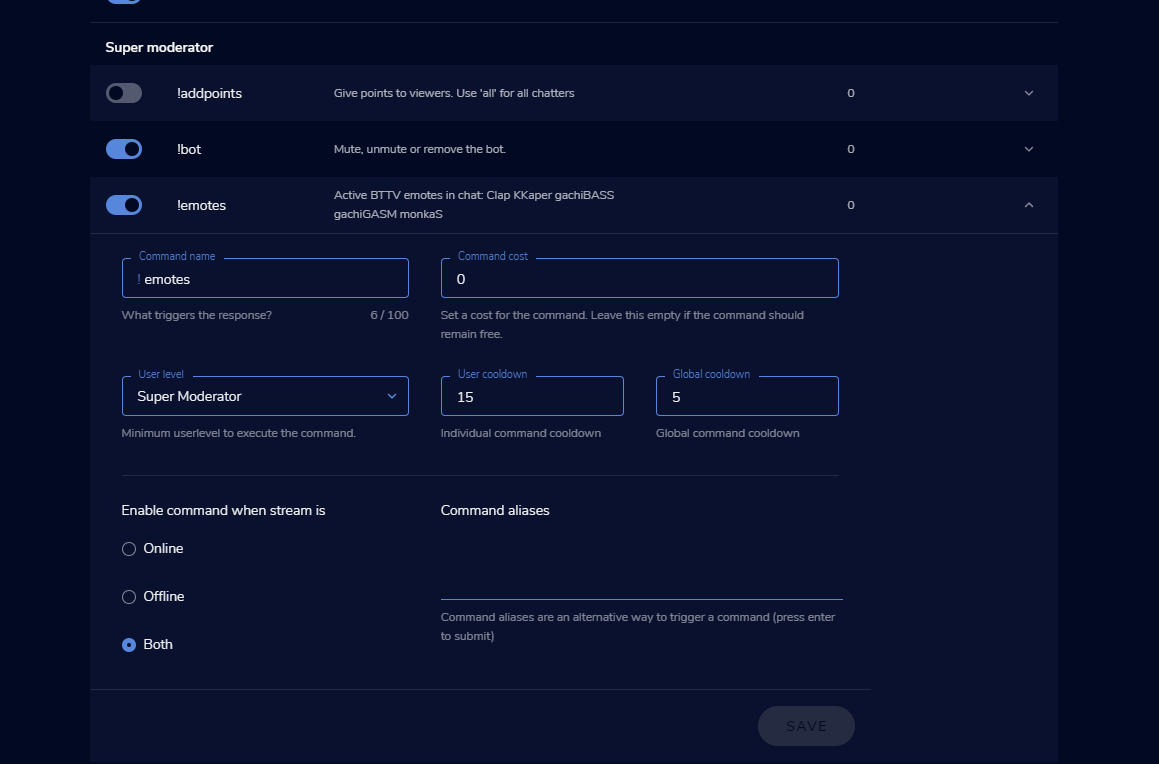
the issue is the user level
winter berry
@zenith widget when I do my !sub command it just comes up as 0
solid wing
so, its set to mod but everyone can use it
west bay
did you name change your channel?
@zenith widget once probably 2 years a go
scarlet tiger
enable it now, please @solid wing
scarlet tiger
what channel?
zenith widget
@fallow turtle not sure what cropping issue you are referring to.
fallow turtle
@fallow turtle not sure what cropping issue you are referring to.
@zenith widget how did you do that? for me, it just automatically crops it, not fit it to the dimensions
solid wing
copy pasting the text here
hey i'm having an issue with a default command (emotes)
i set the user level to supermod and anyone yet everyone can trigger the command
It isn't my channel but i have the ID - 596f61c0a22c967d21de5ecf fruity
i've disabled the command for now
!emotes bttv/ffz
scarlet tiger
are you mod there?
solid wing
yeah im super mod
scarlet tiger
please disable follow only
winter berry
@winter berry where are you seeing the 0 subs?
@zenith widget When I do my sub command it just shows as 0 subs
zenith widget
@fallow turtle i only clicked on it
solid wing
mb
round brambleBOT
@winter berry Go to the Dashboard > Right side > Part channel > Join channel (https://streamelements.com/dashboard)
fallow turtle
@fallow turtle i only clicked on it
@zenith widget hmm
solid wing
 round brambleBOT
@solid wing Go to the Dashboard > Right side > Part channel > Join channel (https://streamelements.com/dashboard)
scarlet tiger
try this
winter berry
YESSSSSSS THANKYOU❤️❤️❤️
zenith widget
winter berry
Have a lovely night 🙏🏼👑
scarlet tiger
give me few moments 🙂
solid wing

scarlet tiger
done, but still as before 😦
solid wing
yeah it's weird right?
i have no idea what do do about it
anyone have any idea on what can be done
if it wasn't a default command i'd just remake the command
solid wing
i'd rather have the command enabled as it allows users to see what emotes are available
it's mod only so it isn't abused
i havent even checked if there are other commands which are affected
 nova tartan
Where i can send request to get se.pay?
round brambleBOT
@nova tartan SE.PAY is available for streamers who are at least 18 years old, with bank account under their name in one of the following countries and have at least 101 follower (Twitch) / 101 subscribers (YouTube):
Austria, Belgium, Czech Republic, Denmark, Finland, France, Germany, Ireland , Italy, Netherlands, Poland, Portugal, Slovakia, Spain, Sweden, Switzerland, United Kingdom, United States.
If you meet these criteria and don’t see SE.Pay, let us know.
For information on SE.Pay payment methods, their fees and settlement times see https://streamelements.com/dashboard/tipping/fees.
solid wing
that's not always the case though
it wasn't like that before, and if it is why does it let me choose the user level?
 echo nova
Hello!
Is there a way for the "Item Redemption Alert" stay on the screen while the sound is still playing?
Long history short: I have long and short sound alerts, and I would like for the gif images that shows up stay on the screen while the sound is playing, and not have to set a fixed duration for all of the alerts.
Thanks in advance! 
 rigid summit
right this seems relatively simple yet i can't find it; how exactly do i set a tip goal
zenith widget
@echo nova you can set the duration of the alert to be X amount of seconds in the widget settings
@rigid summit My overalys -> edit on the overlay you want -> (+) -> goal in the search bar -> add the goal you want
 pallid terrace
any help aprreciated. i setup twitch in SE- obs live, was perfect working order, then set it up to youtube (obs.live SE) i just changed the stream key etc went live and it was all good , now when ive gone back to stream to ttwitch the stats dont load and it always points to youtibe even though key is twitch and the server is twitch , ive updated , everything
round brambleBOT
@pallid terrace StreamElements menu, on top of OBS > Logout > Login
pallid terrace
this is why i use SE, so fast to reply and help💯
echo nova
@echo nova you can set the duration of the alert to be X amount of seconds in the widget settings
@zenith widget thank you for trying to help, but that wasn't what I really questioned. :/
I want the item redemption alerts to stay at screen while the sounds play. I have items at the store with sounds of 5 seconds, 15 seconds, I also have sounds of 20+ seconds and at the widget settings I can only set a max of 20 seconds alert duration on screen.
So, basically I don't want to set a fixed amout of time for the item redemption alerts, but it would get the sound time to be the alert duration. I don't know if that is possible, but if it isn't, I would like this to be a suggestion for the team! c:
lament blade
hey, quick question... I Have a revolt Junior account if I set up donations with that will it go to my Junior account or to the parents account?
daring escarp
@steep quiver (old) Alexand21 (new) Wizzuki
zenith widget
Well the way you originally worded the question, sounded like you have longer sounds playing rather then 5/10/15 second ones in varying lengths.
In that case, unfortunately, no, there is no way to have a dynamic lenght of the alert based on teh sound that is being redeemed currently.
Sorry @echo nova
@lament blade you mean Revolut?
zenith widget
I don't know how Revolut will handle the tips
but we do require the account holder to be 18+ of age
and also we do have some issues with Revolut account verifications, so its a use at your own risk
lament blade
yeah
echo nova
Well the way you originally worded the question, sounded like you have longer sounds playing rather then 5/10/15 second ones in varying lengths.
In that case, unfortunately, no, there is no way to have a dynamic lenght of the alert based on teh sound that is being redeemed currently.
Sorry @echo nova
@zenith widget Ok, thanks for the help anyways!
lament blade
i might just leave it until i am older
 left axle
hi guys... how many time needed to approve bank account on se.pay... there are just 13 days and i don't see my money on mastercard...
SE says 7 days... im 13 days... no way to get my money lol
pallid terrace
have you made enough, i had that issue lol
round brambleBOT
@left axle Please contact us via email for support with SE.Pay. You can use our contact form here: https://streamelements.com/contact Thank you.
left axle
@pallid terrace i made enough of what? lol
daring escarp
Guys can u help me pls, my chat stats on SE doesn't work :C (old account) Alexand21 (new account) Wizzuki
pallid terrace
have you made enough cash, i thought there was a minimum amount to withddraw@left axle
im high and probabaly wrong lmao
zenith widget
(old) Alexand21 (new) Wizzuki
@daring escarp fixed
@pallid terrace you are not wrong, but probably not the right question to ask 🙂
daring escarp
Omg thank you!!!
left axle
@zenith widget i already wrote to support link... can u help me? or i wait answer by contact?
zenith widget
I emailed you back
left axle
oh i see thank you now write on email
pallid terrace
my bad with the wrong question
fathom tendon
Does toggling this button keep the session from ever clearing?
zenith widget
Yes
fathom tendon
@zenith widget so if I turn that off, my session subscriber list will just continue to grow?
zenith widget
yes
fathom tendon
Much appreciated @zenith widget Thanks!
 wispy acorn
how do i stop streamelements from timing people out of my chat
its actually really frustrating
round brambleBOT
@crude delta Read and follow our server rules:
- We do not tolerate toxicity! Treat the community team, staff and all members with respect.
- No advertisement or channel promotion, anywhere on the server.
- No NSFW/NSFL
- No unsolicited DMs or friend requests to server members
Make sure to read the #welcome in any server you join.
zenith widget
@wispy acorn check the spam filters page
wispy acorn
spam filters are turned off
ionic kelp
What exactly is triggering the timeout?
wispy acorn
Inactivity is what mod panel says but it's being done by streamelements
ionic kelp
o.0 Mind screenshotting it?
wispy acorn
So anyone lurking or just not chatting is getting bumped. And sure give me a bit I'm at work but I'll get to it asap
In a meeting right now
When I get back to my laptop I'll take one
ionic kelp
 There's no reason way that's even possible.
zenith widget
It seems its the same person
round brambleBOT
@wispy acorn Go to the Dashboard > Right side > Part channel > Join channel (https://streamelements.com/dashboard)
wispy acorn
So the only way to dump that timeout is to dump the bot
wispy acorn
I'll try that tonight then
ionic kelp
If it was during your last stream I saw no notifications of timeout for them.
 mystic narwhal
Short Question! Didn't Ground Control from Stream Elements had an option to output the latest follower in a text file?
mystic narwhal
@ionic kelp oh ok thx
ionic kelp
You're most likely thinking of streamlabs chatbot.
mystic narwhal
probably
wispy acorn
It wasn't popping into the chat but its in the mod tools
On twitchs site
So I'll try parting the bot and using night or exclusively
Night not*
Omg
Night BOT
 nimble owl
is sr down?
I cant get my sr to "show on stream" for some reason
it sais "NO ACTIVE WIDGETS WERE DETECTED FOR MEDIA REQUES"
however I have a widget for it
round brambleBOT
@nimble owl Please logout of StreamElements at https://streamelements.com/logout and then login again to your account (Twitch/YouTube/Facebook).
nimble owl
ok il try
still doesent work.
Do I have to do something in obs or something?
the thing is creating a new widget, it still has the same link
is that normal?
zenith widget
Each overlay
has its own unique link
make sure you have the overlay loaded in your OBS
before using the "show on stream"
nimble owl
it is 🤔 let me delete it again and crreate a new one. il pay more attantion towards if its the same link or a diffrent one
ok the link is a diffrent new one. however it still wont work
wait I think I have to log out in obs of streamelements and back in
let me try that
 real orbit
in streaelemnts i can change all other alerts but sub alert the sound or video wont change any idea why ?
 @nimble owl
oblique steeple
@nimble owl
oblique steeple
You're too fast for my slow fingers KeiZar 
real orbit
they are all on should i turn them off?
nimble owl
ok that did it @zenith widget
loggin out of the stream elements obs extention and back in worked 😄
oblique steeple
No you should edit them. Variations are for things like resub, sub gift etc. @real orbit
nimble owl
ups xD thanks keizar ❤️
 gusty sleet
does anybody know why my obs doesn't have the "force scaling" option?
i want to stretch my cs to fill the screen
oblique steeple
Highlight the source and press "Ctrl+F"
That should make it fullscreen.
real orbit
ok well that was easy thank you guys very nice support 🙂
gusty sleet
it is fullscreen, but not the way i want
Highlight the source and press "Ctrl+F"
That should make it fullscreen.
@oblique steeple
i need to stretch it
my old obs had the option
oblique steeple
yeah one sec opening OBS
gusty sleet
i just clean install windows and now it doesn't have the option that's why i'm confused
oblique steeple
Try this
oblique steeple


round brambleBOT
@raven jackal OBS > Settings > Advanced > Scroll down > Enable or disable Browser Source Hardware Acceleration, depending on its current state > Restart OBS (This does not apply for OBS on Mac)
https://i.imgur.com/ggMe9ZE.png
nimble owl
Guys is there an Indikator like a text where it sais "Sr is activ" or "Sr is not active"
is there such a widget?
 raven jackal
didnt worked
zenith widget
@nimble owl no
well yes, the viewer request toggle
unless you mean the overlay widget
then the "show on stream" button becomes "hide from stream"
@raven jackal don't show screenshots with your overlay link visible🙂
which overlay is it?
raven jackal
Oh 😅 sry forgot it appears on the second screen again
zenith widget
@nimble owl not really
nimble owl
ok ^^
Thanks for the help KeiZar btw ❤️
raven jackal
its when i klick the link in #widget-share too.
but HYPE GOAL BAR BY KESHAV REDDY in my gallerytoo. didnt renamed it
zenith widget
So how did you add the overlay?
can you DM me the screenshot again?
I have this strange feeling you've added the overlay on a lower resolution then the widget it self
widget is 1182x240 in size
while in the screenshit it seemed like you added the browser source at a way smaller resolution
or something
oh wait
i did open the screenshot before deleting

so yea, right click the browser source and properties
raven jackal
its added as 1182 x 240 biut transformed in obs to be smaller :D
zenith widget
ok add it as 1920x1080 
raven jackal
raven jackal
its a bigger box now :D
raven jackal
clicked the utton pretty often already
zenith widget
did the bar fill up?
raven jackal
nope
zenith widget
but did you get a tip alert just now?
raven jackal
yes tip alert was there twice now
pallid terrace
if i wanted to replay alrets on my stream i used to hit the refresh button near the said alert. now it doesnt do it, follower for instance,
zenith widget
@raven jackal im lost. I feel like the widget wasn't tested in an OBS enviroment or something
round brambleBOT
@pallid terrace Right click on the BrowserSource > Properties > Scroll down a bit > Refresh cache of current page
raven jackal
@magic jungle sry for ping :D have you made tested it with obs studio? or made it in slobs or obs.live?
pallid terrace
it will reload the overlays, but not individual alerts,
zenith widget
@pallid terrace which overlay are you using?
 turbid belfry
hey all i have a problem with my overlay id like some help with. i can redeem 1 of my redeemable sounds and get the visual pop up but i cant get it to pop up for the others, sound still plays for all tho. Any advice??
zenith widget
Make sure you've placed the store items asre stream perks
pallid terrace
i created my own, in stream elements , with the alerts all on and has been working , now when i try to reply any alert it wont
zenith widget
and not sound only
pallid terrace
only think i changed was to stream to youtube, then switche dback and issues
zenith widget
or one of the themed ones?
turbid belfry
was set as audio only
pallid terrace
i figured it out, i had to put the url in again in obs, why would that have changed?
it was for any overlay actauly, during the switch to youtube something must have happened
 hallow yew
Hello guys, I'm new to this and wondering how to setup alerts:
- I want them to have a custom gif, for that, I can just upload it on the "Set Video" thing, right?
- I want to test TTS but I'm not hearing anyting, also, is it possible to set it up so the alert duration is the same as the TTS?
- If I wanted to make different alerts depending on the amount they tip, I would have to add a variation, right? But do I have to make it "At least" the amount I want and 100% chance? And that "at least" to what currency referes? USD? Or how do I setup that?
- How do I link my alerts to my SE Pay thing?
 barren shuttle
Hey, my friend just changed names few weeks ago and chatstats are dead, could someone help out? <3 (old name was littlespook - > new name charchar)
 ty
zenith widget
ty
zenith widget
@hallow yew
- yes
- check the variation has TTS enabled, and no..in a way...the next alert will not play until the TTS of the current alert has finished talking
- yes and yes you need to use at least with 100% chance. Currency is what ever is set in the tipping settings
- Alerts are linked to SE.pay automagically - meaing the tip alerts handles se.pay and paypal
hallow yew
Thank you so so much ✨
Can I actually test the TTS on the StreamElements Overlay Editor? It is enabled but I don't hear anything haha, also, can I configure the TTS language or is it only in English?
zenith widget
!alerts
round brambleBOT
You can test alerts via the Emulate bell on the lower left side of the Overlay Editor. Simply go to your Dashboard > My Overlays > pencil/edit button on the overlay. Make sure the Preview LIVE on stream option is on to see the alert in OBS/XSplit** https://streamable.com/vtulg9
 zenith widget
this is how you test the TTS
 astral kraken
I'm seeing an option for custom text when creating overlays, but I'm not aware of how to install a font to be use. Can anyone help me?
round brambleBOT
@astral kraken Google Fonts
More than 900 google fonts are supported at this time. You can preview them here: https://fonts.google.com/
Custom Fonts
Steps:
- Install the font on the streaming PC or choose a pre-installed windows font.
- In the overlay widget settings, select Text Settings
- Click on Enable Custom Font
- Type the name of the font as it appears in the windows font directory (This is usually
C:\Windows\Fonts)
Note: After installing fonts, the browser and OBS must be restarted for the font to appear.
astral kraken
thank you
 drifting vessel
My SE account has full access to the twitch account "Qucee", but when i try to impersonate. It reroutes me to the frontpage. Tried 4 different browsers etc.
 valid folio
K my follows and subs arent popping up in OBS anymore. any ideas. they show up on twitch itself. but not obs so i dont get my custom alerts.
round brambleBOT
@drifting vessel Please logout of StreamElements at https://streamelements.com/logout and then login again to your account (Twitch/YouTube/Facebook).
ionic kelp
Both you and Qucee need to do that.
 kind epoch
Streamelements website just keeps looping , anyone facing this issue?
 blazing stirrup
I'm having a hard time finding the HypeCup is it depreciated or renamed?
 nimble grail
My obs studio is crashing after update today
round brambleBOT
@kind epoch Please logout of StreamElements at https://streamelements.com/logout and then login again to your account (Twitch/YouTube/Facebook).
barren shuttle
could someone help out with chatstats, it died for the channel after name change?:)
 regal thunder
Hi so some of my alerts are not popping(bits and store redemptions) they are well set up ( they've been working for months already
kind epoch
Okay , that worked , thanks
nimble grail
any have issues with the new update crashing obs?
round brambleBOT
@barren shuttle If you changed your name on Twitch, please follow these steps:
- Visit https://streamelements.com/logout and then log in again by connecting with Twitch.
- On the right side of the dashboard page that opens, select Join under bot settings. If it says Part select that and then select Join to send the bot to the chat. Don't forget to mod the bot by typing
/mod streamelementsin your channel if you have not already. - Post your old and your new name here so that we can update your channel's chatstats tracking (must be done by staff).
barren shuttle
old name : littlespook
new name : charchar
lament blade
how do I reset my donation goal again
round brambleBOT
@lament blade To reset goals:
- from the Overlay Editor > Session data on top right (monitor symbol) > Goals tab > reset progress of desired goal
- from the Dashboard > Activity feed on the left > Widget data on the right > Goals tab -> reset progress of desired goal
Note: Goal widgets (progress) only counts up and doesn't go down automatically, if you lose followers/subs.
raven jackal
@zenith widget also checked with some other guys.
2 with obs studio had the same grey box
1 with slobs just had an empty box :D
https://images-ext-1.discordapp.net/external/_f0JQSjYYD672CGxpm_EZNUZ7nR4PAk2YuwKK3qYp1c/https/image.prntscr.com/image/8Aq2_joZQVmr9vZXPtU57A.png
so dont know whats wrong

Getting this error in the obs log when clearing the cache of the site
19:49:00.181: obs-browser: Uncaught SyntaxError: Unexpected token . (source: about:srcdoc:162)
Kappagen on Streamdeck won't work , this is with the S.E. plugin on streamdeck , any ideas? Fresh install of windows and new hardware. Please advise.
 quasi crystal
Where are StreamElements alerts word filters set? I have a user whose name is - I believe - triggering a swear word filter. But his name is NOWHERE near provocative or offensive when read out loud.
 crimson bough
Hello dear Friends, i can't to fix that problem, mb somebody can help
 near reef
Is there proper documentation for the StreamElements bot that details everything it can and can't do? I went to StreamElements docs page but it was specifically geared towards developers and not end users. I'm looking for end user documentation for the bot.
round brambleBOT
@crimson bough Please provide your account ID found at the top of this page: https://streamelements.com/dashboard/account/channels This ID is public info and safe to share here.
 abstract hemlock
@near reef There isn't a doc page but you can check this one: https://streamelements.com/dashboard/bot-commands/variables
StreamElements
The Ultimate All in One Platform for Streamers
near reef
Yeah, I've looked through the variables, I was hoping for a full doc. I'll just hammer my way through it.
abstract hemlock
if you want to implement any specific command you can always ask here we'll help you 🙂
near reef
Well, for the moment I was attempting to set up chat ranks based on the loyalty system but it doesn't seem like that's a feature.
 tame gate
Is there anyway to alter/add messages for the 8ball on the stream labs site?
abstract hemlock
unfortunately that isn't a feature but you can always check our ideas board
round brambleBOT
@near reef Check out the StreamElements ideas board: https://strms.net/ideas. You'll be able to add ideas, upvote ideas you agree with and track their progress with email notifications. Adding and upvoting ideas also helps the staff know which ideas should be prioritized so please take some time to upvote.
tame gate
Ok, thank you very much!
kind epoch
Any help with a Streamelements Streamdeck plugin? Kappagen? It's not working.
abstract hemlock
@tame gate for StreamLabs you need to ask to their support team
For StreamElements you can check the module here: https://streamelements.com/dashboard/bot-modules
crimson bough
ID: 5f6ba12e7316346b8dd629d1
abstract hemlock
@kind epoch I saw something about that before, let me see if i can find any solution for it
kind epoch
I had the same issue before on the old system build but looks like the problem is persistent. Thanks
tame gate
I meant stream elements my bad 😅 @abstract hemlock
abstract hemlock
@kind epoch have you tried this:
- Open %appdata%\Elgato\StreamDeck\Plugins
- Delete the com.streamelements.obslive.sd plugin folder
kind epoch
That's what i was looking for , no i'll try it now
abstract hemlock

kind epoch
Deleted and reinstalled still not working
abstract hemlock
i don't have a streamdeck myself, but let me ask internally
kind epoch
Thanks.
 torn harness
Can you add discord chat to streamelements or twitch?
 twin siren
hello! how can i reapply for the magic creator program now i have affility!
thanks
Uwe
crimson bough
@round bramble ID: 5f6ba12e7316346b8dd629d1
abstract hemlock
@crimson bough we are looking into this 🙂
crimson bough
Sorry, Thank you!
abstract hemlock
@kind epoch in the meantime make sure to have the latest version of obs.live
kind epoch
I do have it
round brambleBOT
@kind epoch StreamElements menu, on top of OBS > Logout > Login
kind epoch
Yes it's working ! Thanks
crimson bough
Ow, its work now, incredible) How i can delete nightbot and me)))?
What was the problem?
 kind epoch
@abstract hemlock Would you happen to know about the Tuna plugin for obs? i've installed it but it doesn't show under Tools
 round brambleBOT
@kind epoch For the best OBS support, please join their Official Discord @ discord.gg/obsproject
 wet haven
Hello can i get help leaving/disconnecting stream elements from my twitch ?
round brambleBOT
@wet haven Go to the Dashboard > Right side > Part channel > Join channel (https://streamelements.com/dashboard)
wet haven
and thats all ?
 tiny whale
Hello everyone! I would have a problem that I've changed my name on Twitch and StreamElements f.-ed up. Chat alerts and stuff doesn't work. My custom commands, nothing. What should I do?
round brambleBOT
@tiny whale If you changed your name on Twitch, please follow these steps:
- Visit https://streamelements.com/logout and then log in again by connecting with Twitch.
- On the right side of the dashboard page that opens, select Join under bot settings. If it says Part select that and then select Join to send the bot to the chat. Don't forget to mod the bot by typing
/mod streamelementsin your channel if you have not already. - Post your old and your new name here so that we can update your channel's chatstats tracking (must be done by staff).
tiny whale
Thank your very much AI! Everything's awesome now. I just messed up with the things and didn't understand them, so was standing there like a silly little boy 😄
 tribal fractal
Hey there I'm wondering if there is a way to get StreamElements to announce a Tiltify Donation in chat?
 slate elm
Hello everyone : ) I really need help is there anyone?
round brambleBOT
@slate elm Welcome to the helpdesk! Please let us know how we can assist you today and a support volunteer or staff member will assist you as soon as they are available. Thank you for your patience.
slate elm
Thanks : ) I just saw on top the instructions for people who changed name on twitch. I'm trying to follow them but i don't see any Join or Part on the streamelements site
Nevermind i did it! Thanks xD
 uneven storm
Just looking into stream elements now how do I find the alerts
round brambleBOT
@uneven storm New to StreamElements?
Check out our YouTube channel https://www.youtube.com/c/streamelements/videos
with tutorial videos from setting up the basics, to in depth details on how to use our product.
New to OBS? Here is a 4 step quickstart guide
https://obsproject.com/wiki/OBS-Studio-Quickstart
Want to learn even more? Here is an in-depth overview
https://obsproject.com/wiki/OBS-Studio-Overview
@uneven storm We've released our new Overlay Editor revamp. You can check out the changes and how to work with it here: https://youtu.be/X5VzXjqAsjk
Check out our blog post as well: https://blog.streamelements.com/streamelements-overlay-editor-just-got-even-better-c22cb5b4853e
 rugged verge
Good afternoon! @round bramble i have installed kappagen as an overlay, however, I can not get it functional for subscribers. here are my settings
hallow yew
Heyy, I am testing host alerts, but the text is getting cut from the alert, how can I fix this?
 lilac quail
how do i change my alert decals, like the one above
hallow yew
On your alert settings click "Change Image" and upload it ❤️
lilac quail
where do i find it? Is it in streamelements "overlay" settings?
hallow yew
Yeah, go to the Overlay Editor, on the Layers click your Alert Box, and then you can customize each individually, donations, cheers, subs, etc
round brambleBOT
@hallow yew Please provide your account ID found at the top of this page: https://streamelements.com/dashboard/account/channels This ID is public info and safe to share here.
strong kernel
I can't find your account without it.
lament blade
Hello how the hell i can select the resolution on a theme from "themes Gallery"? i few days ago i had the option to select the size before saving.
strong kernel
You cannot. All themes are at 1920x1080.
Changing the resolution doesn't change anything in the theme, it only changes the canvas.
hallow yew
I can't find your account without it.
@strong kernel 5f7d2c910e6a9d105a757ebf
lament blade
Thank you @strong kernel
hallow yew
My question is how to make it so the whole text fits the alert box, without reducing text size, just making it go to the next line
strong kernel
Can you click save in the top right first please?
 modern glacier
(Sorry for interrupting!) Hey, just looking for some quick help on re-setting the login info on my Stream Elements bot. It says the bot is connected, but none of the commands are working.
strong kernel
@hallow yew I'm not seeing it cut out on my end.
round brambleBOT
@modern glacier If you changed your name on Twitch, please follow these steps:
- Visit https://streamelements.com/logout and then log in again by connecting with Twitch.
- On the right side of the dashboard page that opens, select Join under bot settings. If it says Part select that and then select Join to send the bot to the chat. Don't forget to mod the bot by typing
/mod streamelementsin your channel if you have not already. - Post your old and your new name here so that we can update your channel's chatstats tracking (must be done by staff).
hallow yew
@hallow yew I'm not seeing it cut out on my end.
@strong kernel Try it multiple times haha, sometimes it shows it full, sometimes it doesn't, I don't know why, maybe the name of the one who Hosts has to do with it
 broken grotto
Hi Ive tried changing all mod settings but streamelements keeps deleteign some messages for no reason? how can i stop this please. thx
modern glacier
Old name is CommonGroundsGaming new name is HeyGMKenny
Slam dunk, thanks guys! (even the bot 😆 )
wispy acorn
can someone help me out here. im seeing conflicting things regarding streaming on twitch while playing music from spotify
yes no...ceertain songs? thrs a extension on twitch for spotify but ive just seen to many things
round brambleBOT
@broken grotto Please provide a proper screenshot with the issue visible. If not sure how to take a screenshot, you can check here: https://www.take-a-screenshot.org/
broken grotto
round brambleBOT
@broken grotto Please provide your account ID found at the top of this page: https://streamelements.com/dashboard/account/channels This ID is public info and safe to share here.
wispy acorn
Any one have a spotify playlist of edm that's safe?
broken grotto
5ed75e591705dfc0720d49b8
hallow yew
@hallow yew Fixed.
@strong kernel Wow, thank you so much!! 🥰 Is it possible I have the same problem with other alerts or should that fix it for all?
strong kernel
It was just a matter of playing with the Margins in the advanced settings and removing the line height.
@broken grotto Turn this off and rely on your own settings.
broken grotto
Ok thank you
hallow yew
Ohhh, I see, how could I move the text to bottom of the image? I suppose has to do with margins
I see, Top Margin haha
Thanks!
wispy acorn
@wary halo so that's a safe playlist to run?
 golden shale
notifications have been coming in duplicated
even when there's only one source
I can't seem to find the issue
 wary halo
@wary halo so that's a safe playlist to run?
@wispy acorn everything from StreamBeats is safe yes
he made it especially for content creators
 jagged kernel
my custom bot name has stopped working again... i've tried removing the bot, joining the bot, debugging the port, uninstalling and reinstalling... everything. it hasn't been 2 weeks since it stopped working the last time and i fixed with the port debugging, but not even that is working now.
strong kernel
Did you set your bot as a moderator?
wispy acorn
Sweet
jagged kernel
yup
strong kernel
What is its name?
jagged kernel
moony13
strong kernel
You're using your own username?
Screenshot your custom bot settings with the dropdown open, please.
strong kernel
You don't want to use the second option, it doesn't work.
jagged kernel
i know
the first time it stopped working, i uninstalled obs elements, logged off everything, removed mod, parted bot. then redid the whole thing. it worked but in the second option. then it stopped working again. i came here, people told me to do the steps using the debugging port and stuff. worked but in the same way, the second option works. and then this week it stopped working again. ]
nothing i do works.
i have like 20 emails from twitch saying that i've logged succesfully, but it just doesn't show up
hallow yew
Can I change the language of the TTS?
 surreal rain
Hey so I'm getting an issue where I'm using the media request feature on my obs studio, but everytime I hit the "Show on stream" button, It plays two audio tracks. This normally wouldn't be a huge problem but the second audio track is causing crazy echo and delay problems. Would anybody be able to help?
 white furnace
So my !sr command doesn’t save when I turn it on. Anyone know a fix???
strong kernel
You should enable the Viewer requests option in the Media request section of your account on the site.
glass locust
there is any way to trigger a sound effect when contest starts/ends/gets payed?
strong kernel
There is not.
round brambleBOT
@surreal rain Make sure to ☑️ “Shutdown source when not visible” for all browser sources (all OBS scenes). If using studio mode, uncheck “Swap Preview/Output Scenes After Transitioning.” Also keep in mind that sound can play from any overlay loaded in the browser (editor or launched). https://i.imgur.com/6bWXxjR.png https://i.imgur.com/yY0wcFl.png
 modern glacier
@modern glacier You sure the old name isn't l3lack_rider?
@strong kernel That was definitely my name at some point lol
 spring bane
How do you get a sponsor to display on the stream overlay
white furnace
I already have the viewer requests enabled in the media share tab. It’s just that whenever I turn on the !sr command in the chat command tab it doesn’t save when I refresh and it just goes back to disabled. How do I fix this?
strong kernel
@white furnace Start here.
white furnace
How do I get there?
wary halo
white furnace
I’m on the streamelements website and logged in
wary halo
then it should be right there on the dashboard
hallow yew
Can I change TTS language? And can I make the Highlight text of an alert chroma colors? Thanks!
wary halo
on the right side
 sonic grotto
Hey all, just wondering, can StreamElements still show the amount of raiders, including less than five raiders??
wary halo
no, if twitch doesn't send the information then we can't know
sonic grotto
Ok, thank you 🙂 I'm just confused cos some people are saying they are and others say saying raids are now hosts instead
pastel trout
Can someone help me figure out why stream elements is not pop up on my twitch channel I had no one contact me yesterday when I ask this it started 3 days ago
 worldly condor
so i still haven't had some one to reply about how i could put my chat on my overlays with out having to copy my hole overlay is there a way to do this and if so please let me know thanks
uneven patio
well...with 4.55MBPS Upload Speed how much bitrate i should put ?
for 480p30fps or 720p30fps
round brambleBOT
@uneven patio There are no "best settings".
Please understand that every setup will be very different.
Any guides or videos that claim otherwise are misinforming. Your best option is to start with a base and adjust as necessary.
You can run the OBS auto-configuration tool. To use the auto-config, click on the Tools menu in OBS, select Auto-Configuration Wizard and then just follow the on-screen directions.
You can use this tool to get baseline settings for your hardware and adjust as necessary from there.
Test, test, and test again. We are happy to offer suggestions for any issues you may be having afterwards, but not a list of settings.
Thank you
strong kernel
@worldly condor What do you mean "without having to copy your overlay?"
worldly condor
well some of the videos show that you put the chat box and then copy the overlay and do it that way im just trying to get my chat on my brb scene and my just chatting scene
strong kernel
Widgets are not standalone objects. Widgets are added to overlays, and overlays are added to OBS.
worldly condor
is there a chat Widget that im not seeing ?
 civic pecan
The "my overlays" section has been stuck on loading for me all day. All other tabs are fine. Any ideas?
round brambleBOT
@civic pecan Our Dashboard and Overlay Editor are Chromium Optimized. We strongly recommend using Chrome. Opera GX and the new Microsoft Edge Chromium might work closest to Chrome as its also Chromium built. Firefox also works, but some things might look a bit different or not work. We do not recommend using Internet Explorer with our Dashboard as it does not support functions.
If the website doesn’t work on chrome, be sure none of your plugins are blocking our website or clear your cookies. You can try if the website works in a incognito tab.
 lapis vault
Hi, i've renamed my channel from Enkkfull to Enkk
round brambleBOT
@lapis vault If you changed your name on Twitch, please follow these steps:
- Visit https://streamelements.com/logout and then log in again by connecting with Twitch.
- On the right side of the dashboard page that opens, select Join under bot settings. If it says Part select that and then select Join to send the bot to the chat. Don't forget to mod the bot by typing
/mod streamelementsin your channel if you have not already. - Post your old and your new name here so that we can update your channel's chatstats tracking (must be done by staff).
lapis vault
i've relogged and all of that, do I need to do anything else?
yep, done all that
subs are now working, great, so I guess i'm just missing the last bit
 dusk escarp
the page is all white when I go into editing
 latent grail
Question, For Giveaways the !ticket is that only an online command or can viewers also use it offline ?
 cunning pelican
Hello
 indigo mica
I'm not seeing channel point redemptions in the activity feed anymore. I have enabled all the marks under filter. Did something change?
daring escarp
[old] Erza_94 [new] Erza_Skarlett
My chat stats doesn't work :C pls help me
strong kernel
@indigo mica We've never had a connection to Twitch channel points.
indigo mica
really? I must have previously used the regular OBS activity feed then... thanks for the info!
worldly condor
ok so how do i put my chat on my overlays plz i would like to know i had it there but i dont remember how to do it
 small harness
i can not for the life of me get obs to recognize my webcam. idk what im doing wrong
its a ac700 action camera
round brambleBOT
@small harness For the best OBS support, please join their Official Discord @ discord.gg/obsproject
 alpine basin
my cs go is running at 300 fps and my live feels like it’s not hitting the 60fps I put
ionic kelp
@alpine basin you want the server above.
 junior wharf
how to move overlays from stream elements online to obs?
round brambleBOT
@junior wharf To add your overlays to OBS, add a new browser source in your scene. Paste your overlay URL in the browser source properties, set the dimensions to 1920x1080 (unless you changed them on the website) and check Shutdown source when not visible. https://youtu.be/KDvLynUqXI4
junior wharf
thank you
 desert seal
Question how do you import a custome overlay ??
round brambleBOT
@desert seal To add your overlays to OBS, add a new browser source in your scene. Paste your overlay URL in the browser source properties, set the dimensions to 1920x1080 (unless you changed them on the website) and check Shutdown source when not visible. https://youtu.be/KDvLynUqXI4
desert seal
i made a custom overlay on a different web page replaceit.com I am trying to get it into stream elements so I can add the chat widget to the overlay for obs
round brambleBOT
@desert seal New to StreamElements?
Check out our YouTube channel https://www.youtube.com/c/streamelements/videos
with tutorial videos from setting up the basics, to in depth details on how to use our product.
New to OBS? Here is a 4 step quickstart guide
https://obsproject.com/wiki/OBS-Studio-Quickstart
Want to learn even more? Here is an in-depth overview
https://obsproject.com/wiki/OBS-Studio-Overview
 subtle geyser
Hello when i used to use the chat pop out on streamelements obs it used to work really well but now all of a sudden it says error and wont load anything
round brambleBOT
@subtle geyser Please provide a proper screenshot with the issue visible. If not sure how to take a screenshot, you can check here: https://www.take-a-screenshot.org/
subtle geyser
lament blade
How do i test alerts
round brambleBOT
@lament blade You can test alerts via the Emulate bell on the lower left side of the Overlay Editor. Simply go to your Dashboard > My Overlays > pencil/edit button on the overlay. Make sure the Preview LIVE on stream option is on to see the alert in OBS/XSplit** https://streamable.com/vtulg9
 lament blade
Where is that page?
subtle geyser
hello'
round brambleBOT
@lament blade We've released our new Overlay Editor revamp. You can check out the changes and how to work with it here: https://youtu.be/X5VzXjqAsjk
Check out our blog post as well: https://blog.streamelements.com/streamelements-overlay-editor-just-got-even-better-c22cb5b4853e
@subtle geyser Welcome to the helpdesk! Please let us know how we can assist you today and a support volunteer or staff member will assist you as soon as they are available. Thank you for your patience.
subtle geyser
round brambleBOT
@subtle geyser StreamElements menu, on top of OBS > Logout > Login
 edgy merlin
Hello, does stream elements have a game queue?
scarlet tiger
Not StreamElements itself, but you can check https://thefyrewire.com/kappa/queue/setup
edgy merlin
@scarlet tiger thank you, super helpful!!
lament blade
what size do i set it to?
round brambleBOT
@lament blade To add your overlays to OBS, add a new browser source in your scene. Paste your overlay URL in the browser source properties, set the dimensions to 1920x1080 (unless you changed them on the website) and check Shutdown source when not visible. https://youtu.be/KDvLynUqXI4
scarlet tiger
You mean this?
lament blade
It worked
 swift nymph
Hello. I’ve had an ongoing issue where some donations I received through SEPay haven’t cleared and it’s been 4 weeks of it “verifying my bank details”. I already cleared my bank details on my SEPay account months ago, why is this occurring now and hasn’t resolved itself?
round brambleBOT
@swift nymph Please contact us via email for support with SE.Pay. You can use our contact form here: https://streamelements.com/contact Thank you.
placid raptor
https://streamelements.com/contact @swift nymph we'll work there
StreamElements
StreamElements is the leading platform for live streamers on Twitch and Youtube. StreamElements includes Overlay management, ChatBot, Tipping, Alerts & Loyalty
 naive pelican
Hey everyone, I'm going to ask a silly question but I'm unsure - do you have to be affiliated first before being able to add the tipping stream element?
naive pelican
Second question, I don't know how to add the tipping link and visual element..
 little oak
the tipping link and visual is done via chat and via twitch panels after you can set that up via site https://streamelements.com/dashboard/tipping-settings
 dry hare
Any image works for your twitch panels
little oak
^^
dry hare
The alerts should show up as long as you have an alert box on your overlay
 past hull
Hello, im trying to add text over image in my alerts and it's not showing the text anywhere, it does on the other 2 options though.
 magic jungle
I can help you if you wanna achieve that using custom css
past hull
OKay, thank you
round brambleBOT
@past hull Text not showing up over your alerts? Go to the Advanced Text Settings and set the top margin to 50, you can work your way to the right position from there.
little oak
Stream Reports are currently down for some accounts and Devs are looking into this
 analog burrow
is there a way to manuallly pull it up?
little oak
you can see the graph via dashboard but it wont be like the ones in email
analog burrow
darn, is there a way to see the revenue from the last stream?
little oak
we have this revenue here, it traccs all your donations/tips/income etc... https://streamelements.com/dashboard/tipping/list
and also you have a insights via twitch settings as well
in the creator section
analog burrow
Thanks.
 rose yew
anyone available to help me out?
round brambleBOT
@rose yew Please ask your question in one helpdesk channel only. A support volunteer or StreamElements staff member will assist you as soon as they are available. Asking in multiple places will only result in confusion, not faster answers. Thank you for your patience.
rose yew
only sent my message here
I'm having an issue loading in to my dashboard since I tried to log in to a friends dashboard
his account is linked to my account
round brambleBOT
@rose yew Please logout of StreamElements at https://streamelements.com/logout and then login again to your account (Twitch/YouTube/Facebook).
ionic kelp
Both you and them need to do that.
rose yew
ok perfect, I am back in
will tell me friend to do the same with his account.... as he couldn't login last night
but that is me back in again thank you
 robust bridge
hola necesito ayuda
no salen mis alertas de twitch
y estoy demasiado estresado
alguien me puede decir porque no?
onda, cuando me tiran autohost, no salen las alertas
y en streamlabs, si ssalen las alertas
alguien me dice por que? estoy desesperado
little oak
#🇪🇸︱español
 vagrant laurel
is there a way to change your name say on my tip page it says something totally different
placid raptor
Your tipping link is generated by your username on the platform you linked to your profile @vagrant laurel
We can change it in certain cases.
round brambleBOT
@vagrant laurel Please provide your account ID found at the top of this page: https://streamelements.com/dashboard/account/channels This ID is public info and safe to share here.
placid raptor
feel free to explain further
vagrant laurel
5c901b2d5a9e2166568ade06
when going to my donate page it shows my name from a while ago that i no longer have used and im not really sure how to update it
 quaint ruin
How do I unlink a Twitch account to add my primary account? I added an old test account a long time ago on my StreamElements profile and would like to remove it to be able to add my actual main account that I created.
round brambleBOT
@quaint ruin There is no easy way to unlink 2 owner-type accounts from each other. The only way is to make a closure request from here: https://streamelements.com/dashboard/account/security
WARNING: In submitting a closure request, all linked channels within the account will be deleted and you will lose all associated data. This includes overlays, custom commands, timers and past data (tips, subs, etc). You can still reconnect with the deleted account, but you are essentially starting fresh.
little oak
or
round brambleBOT
Account Merging - Please note:
- Merging accounts only allows faster ways to switch between accounts
- Merging accounts does not allow data sharing between accounts - different streaming platforms, different type of events
- Merging accounts allows duplicating/sharing overlays between the accounts
If you understand the limitations of merging and want to proceed, please find the JWT tokens (!jwt) from both accounts you want to merge and you will be directed to DM them to a staff member.
quaint ruin
So, let me make sure I'm understanding this correctly. I can't just remove my test account to add my main account? I have been streaming on Facebook for awhile but wanted to give Twitch a shot, but I'd like to be able to keep all of my overlays and everything. I have tried logging in with my main Twitch account and not the test one, but it always just brings the test account back up, even if I sign out so I'm unable to do anything in that regard. I have my test account and my Facebook account on the same StreamElements "My Channels" page.
little oak
it explains pretty much what your options are with in the post
unlink is where it deletes it but still there but empty and a merge brings them together and still have everything for faster switching
unless you like to talk to a staff member to get a better understanding
analog burrow
Is there a way to make my store redemption animation play longer than 20 seconds?
little oak
20s is maximum defualt
you would have to ask a coder if its possible to make it longer
but se default alerts are maximum of 20s via se site
#dev-chat would be the place to ask a coder 🙂
placid raptor
@vagrant laurel I don't see what you mean, I see the tip page being the same username
analog burrow
@little oak The strange thing is when i first made the alert, It worked for its full 24 second duration, However after I adjusted some settings, it now adheres to the maximum alotted
any ideas on why that might be?
little oak
hmm not quite sure, its been 20s default afaik
i know before SE revamped the whole overlay site, i know some things were longer than it was suppose to may be a play in that
sweet sail
Hello, can u again fix my chatstats data? They are again empty.. I dont know why, but this is every single day problem 😦 😦 :((((((((((((((
Channel: Proste_Davca
little oak
noted and sent to staff
 frank crypt
the shoutout command template is not linking the persons twitch at the end for people to click testing the command like you should and shouting some that are on even though i ave it to shout if online or off but at the end just get *** at the end and not the link do i have a setting needed somewhere ?
little oak
is the bot modded?
usually when you see links with *** its cause the bot is not modded and the twitch setting is bloccing the hyper link
frank crypt
iam only using stream elements and it is set to moderator lvl yes
frank crypt
ahhh so by not allowing hyperlinks it blocks the twitch link as well ok ty
little oak
yes
frank crypt
tyvm have a nice day
frank crypt
figured there was a settign soemwher eblockign it haha
 silver ridge
I have a question!
frank crypt
ask away and wait for a response
silver ridge
I am trying to make a goal bar that shows total number of followers but I can't seem to do it - I can only make a goal for followers from a certain point in time aggregating? is there one that I can build with just the total follower count?
frank crypt
iam not a moderator but form oen content crator to another using stream elements if you go to themes gallery and go to widgets it may be pointing you in right direction
little oak
@silver ridge would something like this work? https://discordapp.com/channels/141203863863558144/457957557470887947/639045826815066122
magic jungle
I am trying to make a goal bar that shows total number of followers but I can't seem to do it - I can only make a goal for followers from a certain point in time aggregating? is there one that I can build with just the total follower count?
@silver ridge Quite easy to do
magic jungle
like a follower bar
little oak
yes
magic jungle
But dosent start from 0
little oak
i gave her a goal traccer lol
magic jungle
starts from current no of followers
little oak
you are the coder so ill let you taker over 
magic jungle
mate @silver ridge I'll modify my money bar to make it work as a follower goal for you
silver ridge
thanks!!
little oak
sorry about that Naomi, i thought of something else when i read it lol
silver ridge
is stuff easy to build/modify? I'd love to be able to do stuff myself, but just have been going off the overlay options so far
little oak
once you get a groove going on coding, its a breeze
silver ridge
yeah I used to be a developer
little oak
should be cake for you
you can actually play around via se site we have a custom section for you
and api stuff on pinned messages in #dev-chat
magic jungle
Here's the docs @silver ridge https://github.com/StreamElements/widgets/blob/master/CustomCode.md
silver ridge
oh sweet thank you! but still happy to steal your money thing or whatever haha
magic jungle
haha
round brambleBOT
@dapper elbow Read and follow our server rules:
- We do not tolerate toxicity! Treat the community team, staff and all members with respect.
- No advertisement or channel promotion, anywhere on the server.
- No NSFW/NSFL
- No unsolicited DMs or friend requests to server members
Make sure to read the #welcome in any server you join.
 wise creek
Hey guys, someone subbed today. No alert, no notification in activity feed. The only way it was realised is that a mod saw they had a sub badge all of the sudden. What happened 😦
Also, when someone raids under say 5 viewers it is not counting as a raid, it says it a host, no alert, no activity feed notification.
round brambleBOT
@wise creek Prime Gaming (new and resub) and paid subscriptions (resub only) must be shared in chat manually by the person subscribing in order for the subscription information to be sent to StreamElements. For Prime Gaming, the user needs to have sharing enabled on https://www.twitch.tv/settings/prime. For paid subs, if the share box doesn't show up immediately it will when they refresh the page. https://i.imgur.com/VNJN0Uv.gif https://i.imgur.com/2297EA7.png

 wise creek
It seems they do have "prime gaming". I will send this information over to the sub. So how will i know they sub? Unless they tell me. I felt so unprofessional.
Oh, they told me it was paid though.
little oak
you wont know they subbed till they share it , thats just how prime works
it succs but thats just how they do it
wise creek
They said it was real. Well if it happens again, I will say that they have to manually share it.
little oak
but you should see it in your activity
wise creek
It is not in the activity.
little oak
hmm guess stuff changed
wise creek
Not on streamelements, twitch dashboard, it's just not there. I don't want it to happen again.
little oak
well it all comes down to them to share it
with prime it will always happen
they got to share it
a lot forget too
wise creek
Mmm. The next thing is that when someone raids me with say 3 viewers, it's showing as a host. Now is it possible I have a setting where raids under x viewers will not show? If so, how do I remove it? If not, how do I make a raid a raid (it says it's a host). When this happens there is no raid alert, sound effect, etc.
round brambleBOT
@limber violet Text not showing up over your alerts? Go to the Advanced Text Settings and set the top margin to 50, you can work your way to the right position from there.
wise creek
So is twitch bugged?
little oak
no
wise creek
Streamelements says thanks for the host with 3 viewers or something like that, but it was a raid!
little oak
twitch made it to where no one who raids/host will not show up unless a curtain number shows
wise creek
is it 5?
little oak
more than that i had the tweet but forgot where i put it
wise creek
I just remember a setting back in the day where you can make it so an alert will not play for raids unless it exceeds a certain number. I just don't know where i can find it.
little oak
its in your alert setting via overlay on se site
wise creek
I feel so bad when someone decides to raid me and the sound effects dont play or my alerts. It doesn't matter if 2 or 2000 viewer raids they should all work. The people raiding are still both equals to me.
wise creek
How do i find it.
little oak
there twitter
wise creek
So there is no setting to hide raid if under a certain threshold? I swear i saw it as an option once.
OH, how far should I scroll down Twitchs' twitter. Ha.
wise creek
Oh nice they used the word equally like i did. 🙂 Thank you.
little oak
indeed
wise creek
One more thing, when someone hosts me, it does not show in the activity feed. I can not know who raided me unless i put it in the actually text (thanks for the follow, (name))
round brambleBOT
Due to changes to Twitch API, we have filtered out hosts and will only show these ones on your activity feed:
- All hosts coming from an online channel with at least 1+ viewer
- Auto host events with at least 1 viewer - only from a channel that just went offline
Note: If you see X channel has hosted you with no viewers on the back, that is considered an offline host or a host with 0 viewers, we do not show these.
round brambleBOT
Please logout of StreamElements at https://streamelements.com/logout and then login again to your account (Twitch/YouTube/Facebook).
wise creek
Did you make the bot say that @little oak? you want me to try that?
little oak
yes and yes lol
if nothing else shows up after that then staff will have to resub your webhooks
just wait till next event plays to se if it shows in activity feed when you go live again
and yes we control the bot lol
round brambleBOT
I am just a simple bot, doing what the amazing support team tells me to do! They are the real MVP's here!
 runic jacinth
Is there any way to limit how many emotes the Kappa Gen can use?
For example. !kappagen 10000?
It's too much for the stream
little oak
via se overlay yes, via cmd no for the moment
runic jacinth
Do you know if this will be implemented at some point?
little oak
no TEA for the time being
round brambleBOT
@runic jacinth Check out the StreamElements ideas board: https://strms.net/ideas. You'll be able to add ideas, upvote ideas you agree with and track their progress with email notifications. Adding and upvoting ideas also helps the staff know which ideas should be prioritized so please take some time to upvote.
little oak
i needs to learn how to spell lol
runic jacinth
Haha! Thanks so much for the speedy reply! 
wise creek
But i'm looking at the activity feed in the twitch manager although to be fair hosts don't show for neither (streamelements) Is it possible someone can look at my specific case @little oak ?
little oak
yes when ever you go live and you dont see any alerts within activity then a staff will have to resub your webhooks
thats if nothing shows up
wise creek
can we do that now it's happened for many streams.
round brambleBOT
Please provide your account ID found at the top of this page: https://streamelements.com/dashboard/account/channels This ID is public info and safe to share here.
little oak
if you hand that over to me ill have staff resub webhooks for you
wise creek
Okay, will this also change the twitch version. I use the activity feed from the twitch video manager to see my feed. It does not show there either.
little oak
this will resub all activity feed action for streamelements to read twitch API
Thank you! will ping you when staff resubs the webhooks @wise creek
 rocky elk
Hello ! I came to ask for help because I did some stupid things xD I have been using this bot for several months, at the time the Drangrybot went down. So I kept the points system (loyalty). I couldn't export my old data so I started from scratch. All that was missing was the donations that were not autonomous, since I am using Streamlabs. Today I wanted to link the 2, except that it mattered and everything added the points anyhow ... is there a way to go back, to untie? or to just bind, without taking into account donations? because there I don't even know if there were just the gifts, or donations + sub + gift etc. Thanks in advance 🙂
little oak
you will have to ask streamlabs that
rocky elk
no because these are the points on Streamelements I'm talking about. I just linked the 2 accounts 😦
little oak
we have an importer via website or obs.live
and whatever you got during streamlabs like subs/tips. streamelements only traccs from the time you started using SE
silver ridge
@magic jungle will you tag me when you have the money bar I can use? Happy to just grab that and modify it myself if that's easier 🙂
silver ridge
oh! thank you!
magic jungle
np 😄
little oak
@wise creek your webhooks have been resubbed 🙂
rocky elk
@little oak I just want to withdraw the bonus that was given when I linked streamelements with streamlabs 😦 a priori there are only the donations that have been counted, but I clicked the button twice and I believe that it is doubled the sum of the blow 😦
round brambleBOT
To reset goals:
- from the Overlay Editor > Session data on top right (monitor symbol) > Goals tab > reset progress of desired goal
- from the Dashboard > Activity feed on the left > Widget data on the right > Goals tab -> reset progress of desired goal
Note: Goal widgets (progress) only counts up and doesn't go down automatically, if you lose followers/subs.
little oak
should be able to delte your duplicates
but i am not fimiliar with imports for i never had to do them
ill grab someone who knows it
delete dups here
wise creek
Thank you, so i should see raids in the future? I will see if it works in future days.
little oak
you should be able to see everything in actvity feed via SE
 vocal quest
Does someone know which is the correct size of the preview image on the streamelements stream store?
rocky elk
@little oak yes I can delete them, but it does not remove the points in the ranking 😦
little oak
do you see the ponts here https://streamelements.com/dashboard/leaderboard/current
rocky elk
yes
little oak
is that the points youre talking about?
rocky elk
yes ^^
little oak
sweet, we are on the right tracc lol
rocky elk
I have set up a donation = points system. Except that until yesterday I did it manually, and suddenly with the connection of the 2 bots, it doubled the points of donors who had already received 😦
ionic kelp
@vocal quest 235x186 I believe.
 lean flare
Hi
I connected my twitch channel to streamelements yesterday..but there is nothing showing in the activity feed? What do i do?
little oak
nothing shows at all?
lean flare
No
little oak
where are you seeing the activity feed?
vocal quest
@ionic kelp yes thank you. And do you know why the extension on twitch does not update the store image? I only see a white square
little oak
site or obs or gc?
lean flare
On the website.
little oak
what activities are missing?
lean flare
There is this message "You have no stream activity
Stream activity will be shown here in real-time"
little oak
since using streamelements have you gotten anything like subs/followers/tips etc...
lean flare
And i cant se my followers nether...should i stream 1 time after i have connected to streamelements before it works?.
No i have gotten donation after i connected.
little oak
have you streamed at all after connecting to streamelements via site?
lean flare
No. But before i have.
little oak
ok i wil do a test follower with my test account
is your twitch correct thats linked to profile?
lean flare
Yup
lean flare
Yeah! Now it works 😄
lean flare
Nice! Thanks for the help! 😄
little oak
if at any time they dont show, please come bacc and let us know 🙂
You;re Welcome 
@lean flare are you still here?
lean flare
Yeah? 🙂
little oak
i noticed you said you was new to se right
make sure you go here to set up your chat module is you havent yet to annouce it via chat https://streamelements.com/dashboard/bot-modules
lean flare
Yeah 😄
 shell flower
Is there anyone of the helpdesk?
 all to sleep


 round brambleBOT
@shell flower Please ask your question in one helpdesk channel only. A support volunteer or StreamElements staff member will assist you as soon as they are available. Asking in multiple places will only result in confusion, not faster answers. Thank you for your patience.
shell flower
I'm in the section of helpdesk Twitch but there is no section of helpdesk streamelements
little oak
every channel envolves streamelements 🙂
just depends which channel you need help in
This is for twitch streamelements here
shell flower
Ok I was streaming and somebody subbed but there was no alert and nothing showed up in the event list
little oak
one sec
round brambleBOT
@shell flower Prime Gaming (new and resub) and paid subscriptions (resub only) must be shared in chat manually by the person subscribing in order for the subscription information to be sent to StreamElements. For Prime Gaming, the user needs to have sharing enabled on https://www.twitch.tv/settings/prime. For paid subs, if the share box doesn't show up immediately it will when they refresh the page. https://i.imgur.com/VNJN0Uv.gif https://i.imgur.com/2297EA7.png
shell flower
Ok so if it's a resub it must be shared manually
shell flower
And if it's a new sub this is not necessary?
little oak
shouldnt be, it should pop right up
shell flower
ok got it
little oak
🙂
shell flower
Thanks!
little oak
Welcome
stable rapids
Hello, good morning, I would like to know how do I make this player appear in the OBS program?
little oak
you will need add the overlay via SE site in my overlays then hit show on stream
add the music request overlay widget
stable rapids
@little oak I want it to appear here, but not in the stream
stable rapids
But before it showed
 violet plinth
Hello, I've got a question regarding KappaGen - I just want to use the Custom Emotes option (chat text translates to emote on screen) I don't want to have this happening with the emojis and emotes. How can I disable that? Like Emotesplosion is easy to disable. - I disabled 'Emojis' but still I can see the emojis from chat floating on screen..
stable rapids
I just want to open the media request in the obs program, I want to control it
little oak
you can do all of that via obs.live you can control and everything
stable rapids
@little oak Yes, but how do I open the media request in obs?
little oak
i cant not read yur language but do you have obs.live?
ionic kelp
It'san option from the Streamelements menu.
round brambleBOT
@stable rapids OBS.Live is a Plugin for OBS created by StreamElements. You can download OBS.Live here: https://streamelements.com/obslive
Please make sure you have the latest version of OBS installed, Current Version: 25.0.8. You can install OBS here: https://obsproject.com/
little oak
do you have that?
stable rapids
ionic kelp
No. That's OBS docks. You need OBS.Live
 steady belfry
Why cant I edit/add Commands?
little oak
is the twitch profile the correct account?
steady belfry
yes
stable rapids
@ionic kelp i have
little oak
@steady belfry wait lol is via chat or site?
steady belfry
Chat
ionic kelp
@stable rapids you do not have obs.live installed. It would say streamelements on the menu at the top.
stable rapids
@ionic kelp ok
round brambleBOT
@steady belfry Please logout of StreamElements at https://streamelements.com/logout and then login again to your account (Twitch/YouTube/Facebook).
@steady belfry Go to the Dashboard > Right side > Part channel > Join channel (https://streamelements.com/dashboard)
ionic kelp
You can not.
round brambleBOT
@steady belfry Please provide your account ID found at the top of this page: https://streamelements.com/dashboard/account/channels This ID is public info and safe to share here.
silver ridge
@magic jungle I am working on my issue now - I'm using the variable data["follower-total"]["count"] to get my follower count, I have 997 followers so just got 2 friends to unfollow and refollow me to test and now it's 999, do you have any idea why?
silver ridge
oh nice what is it?
magic jungle
   //use data["follower-total"]["count"] here
});```thanks!!!
 leaden cliff
hey it seems to be a problem with a channel i watch on twitch , out of nowhere i get 404 on chatstats
little oak
ok did the streamer change their name?
leaden cliff
no i dont think so
little oak
ok ill need just streamers name only
leaden cliff
Unboxholics