#helpdesk-twitch
1 messages · Page 739 of 1
 abstract hemlock
some big assets could cause troubles
 azure wing
Perhaps someone can help us. I am a mod in a Twitch channel which uses the StreamElements bot. We use the !points system to give points etc. A user in our chat has changed his name. For some reason StreamElements still sees him as his Old Username. So when we give his new Username points and he tries to redeem something, It doesn't work. When we give his Old Username points and he redeems it then it does work.
abstract hemlock
@azure wing he could try this command !rename OLDNAME replace OLDNAMe with his old username
azure wing
Thanks, I'll ask him to try it
 dusky turtle
hi how can i get over lays if im stremaing from an xbox
 round brambleBOT
@dusky turtle Consoles do not have native support for overlays. You would need a capture card, PS4 remote play or Xbox companion app and a PC with OBS in order to have overlays over your console gameplay.
We have an blog post about how to setup console streaming with our essential tools: https://blog.streamelements.com/how-to-stream-on-console-7b620b1c46c3
 errant wasp
Does someone have another regex pattern to filter out twitch links that are not yours? This one is not working:
twitch.tv\/(?!(yourname))
because StreamElements Regex supports no lookahead or lookbehind.
azure wing
@abstract hemlock The !rename command did say it transfered the watch time etc, but still can't redeem the points.
 lament blade
Hi
i have problem with my stream on twitch, everythime i start my stream i start without title on twitch
 feral granite
Any reason why Alert text will not appear? I have the image and sound set as well as the text over image but when i test it i just get the image and sound and no text
lament blade
title only change when i make new but when i start i always start without
 vital fern
hi, kappagen setup worked fine for me the other day when I set it up (besides the issue of it only working when it has a more than 10 viewer host); but when I go to select emotes now, my own personal emotes do not show up at all to select. I have tried multiple browsers, and different computers in my house. what should I do? thanks in advance!
 uncut ibex
hello, i'm having a problem where i lost all my points in streams when changing nick on twitch
abstract hemlock
@uncut ibex try this command !rename OLDNAME replace OLDNAMe with his old username
round brambleBOT
@vital fern Please logout of StreamElements at https://streamelements.com/logout and then login again to your account (Twitch/YouTube/Facebook).
lament blade
I found a bug in the website, apparently, it tries to direct me to a welcome back screen but it thinks it does not exist
Does StreamElements even have a welcome back page?
If so, why would it redirect me to the home page?
 sharp turtle
The bot isn't responding to the commands on chat
I.e the !sr works, but it doesn't display that it does anywhere in the chat
 fading jungle
Hi
vital fern
@vital fern Please logout of StreamElements at https://streamelements.com/logout and then login again to your account (Twitch/YouTube/Facebook).
@round bramble I have already done this and on several different browsers and computers in the house. it is not seeing or recognizing my emotes
round brambleBOT
@sharp turtle If your commands recently stopped working and you're using OBS.Live and a custom bot name do the following:
- In OBS.Live, click on the hamburger menu (three stripes) at the top left of your activity feed
- Click on Stream Settings > Custom bot name
- In the Custom bot name field select Set custom bot name, not your already existing username (with capital letters). Note: If you already connected an account that way, the third entry will show as the account name (see image https://i.imgur.com/sO7fWOX.png).
- Scroll a bit down and click on the purple Connect Custom Bot Account button
- Log in as usual and Authorize the custom bot name
- Back in the Activity feed, click on the Send Test Message button and check if your custom bot name starts working again

 native cosmos
Today i got raided, but my alert didn't play. It should trigger an alert on any raid, no matter the size. The event showed up in my activity feed, but just not on stream. The raid was a group of 5 so it should have shown.
round brambleBOT
@native cosmos Due to changes to Twitch API, we have filtered out hosts and will only show these ones on your activity feed:
- All hosts coming from an online channel with at least 1+ viewer
- Auto host events with at least 1 viewer - only from a channel that just went offline
Note: If you see X channel has hosted you with no viewers on the back, that is considered an offline host or a host with 0 viewers, we do not show these.
 fleet quail
When I stream I have my main gaming 144hz monitor then my 60hz side monitor for streamlabs
And basically When I play my game on windowed fullscreen and I have my streamlabs open on my second monitor it makes my game 60 FPS Even tho it pumps out 150+
Constantly also I am using game capture Also my game works fine on 144 ha when I turn on performance mode on streamlabs performance mode basically turns off the stream preview on it
im not sure if this is nesaccarly a stream elements matter cause I dont use it that often for streaming but just a question if u can help
round brambleBOT
@fleet quail For the best OBS support, please join their Official Discord @ discord.gg/obsproject
 sand hemlock
#QUESTION
#HELP
Where would I find my SE Store Merch URL or Link
For posting in my descriptions for YT
 muted solar
I am using OBS Studio and currently attempting to transfer my overlays from streamelements and I am struggling to figure it out, if I could get some help that would be much appreciated
 frosty cobalt
Hello i have a question
I have my own overlay on obs streamlabs and my own alerts and build everything allready.
Can i make a switch to elements and keep my overlays and scenes and my alerts?
 left cliff
I don't think you can transfer overlays from streamlabs to streamelements
I am trying to change my AlertBox sounds, but the default sound effect keeps playing alongside my new sound effect. Does anyone know why this is happening?
 ionic kelp
@frosty cobalt the alerts can be done with our chrome extension. Everything else can actually be done via OBS.
left cliff
I cleared the sound, but every time I emulate an event, the default sound effect plays.
frosty cobalt
Okjj thanks
ionic kelp

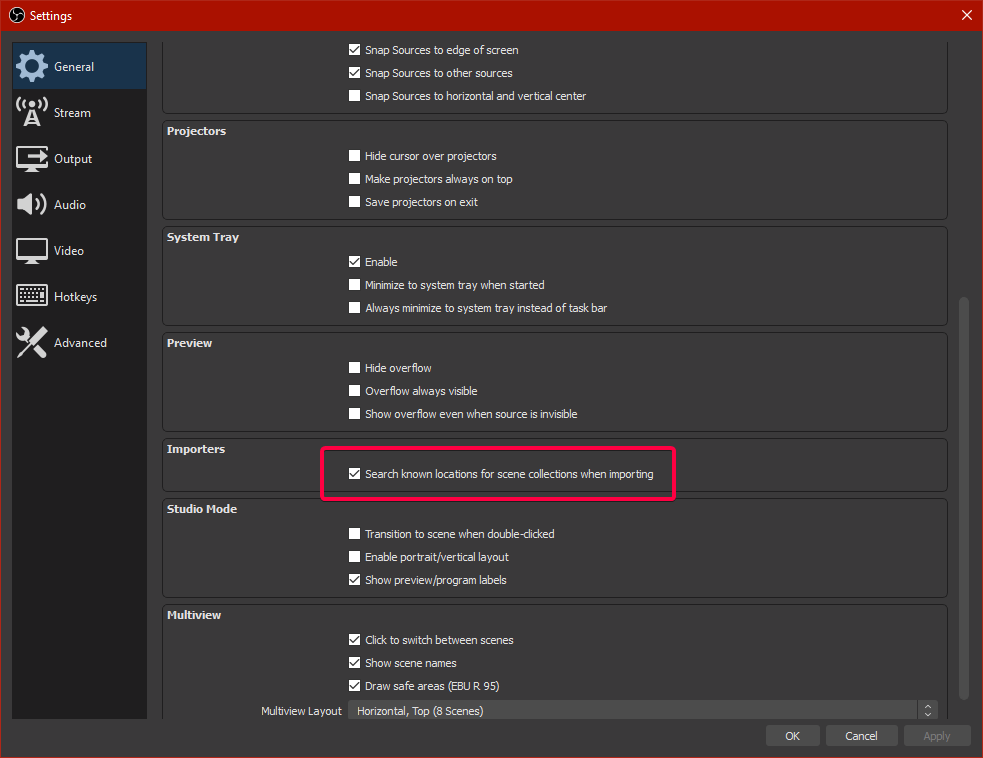


The alerts can be done with clicking import in the top right of the dashboard and choosing streamlabs. Both dashboards have to be open during this and tip history will be grabbed as well. That we can remove if you want.
frosty cobalt
Okjj i was just worried about the overlay bc there is soo much work on it haha
ionic kelp
Assuming it has none of streamlabs library stuff that's all you need to do.
frosty cobalt
All animated same as the alerts annimated and custom sounds
left cliff
I cleared the sound, but every time I emulate an event, the default sound effect plays.
never mind, now it's not playing the sound anymore.. I guess there's a delay in adjusting the effects
 slim flax
i added a sub goal and copied the link and added it to streamlabs as a browser sours but it's invisible
sourse*
round brambleBOT
@slim flax To add your overlays to OBS, add a new browser source in your scene. Paste your overlay URL in the browser source properties, set the dimensions to 1920x1080 (unless you changed them on the website) and check Shutdown source when not visible. https://youtu.be/KDvLynUqXI4
@slim flax We're not able to troubleshoot issues with using our overlays in StreamLabs OBS (SLOBS) as we don't have the tools to support their software. We recommend using OBS Studio or OBS Studio with our plugin OBS.Live.
slim flax
i already did all that but it's invisible
round brambleBOT
@hot zenith
Read and follow our server rules:
- We do not tolerate toxicity! Treat the community team, staff and all members with respect.
- No advertisement or channel promotion, anywhere on the server.
- No NSFW/NSFL
- No unsolicited DMs to server members
Make sure to read #welcome in any server you join.
 north bobcat
Heyo, I am having issues with my stream having a large black square and the video is super small. How do I fix? Everything in the obs is normal
round brambleBOT
@north bobcat The default resolution for StreamElements overlays (theme and custom) is 1920x1080. Please add them in OBS at their full resolution and use CTRL+F to fit to screen if necessary. You can then downscale your stream in OBS settings > Video if you'd like https://i.imgur.com/6bWXxjR.png
 slim flax
all of my other overlays from streamElements work just fine on streamlabs
ionic kelp
Read the bot response above.
 dim wyvern
good evening!! how do i stop the !points command from saying the username twice? " @dim wyvern, izzywizzymc has 0 wizbucks and is rank 12/16 on the leaderboard."
im a noob 
ionic kelp
Oooh. 1 sec.
round brambleBOT
@ionic kelp mass deleted 2 messages.
ionic kelp
Do that again without showing the link for it.
what
That was fine.
Oh
Wrong one 
north bobcat
still shows up as the pic above
ionic kelp
@dim wyvern unfortunately a quick look doesn't appear to have this doable.
@north bobcat do it for the other overlay.
 balmy berry
Hey just wondering, is the Streamelements bot down for everyone atm or just me?
balmy berry
Yeah it shows connected on my side but wont run commands in chat
round brambleBOT
@balmy berry If your commands recently stopped working and you're using OBS.Live and a custom bot name do the following:
- In OBS.Live, click on the hamburger menu (three stripes) at the top left of your activity feed
- Click on Stream Settings > Custom bot name
- In the Custom bot name field select Set custom bot name, not your already existing username (with capital letters). Note: If you already connected an account that way, the third entry will show as the account name (see image https://i.imgur.com/sO7fWOX.png).
- Scroll a bit down and click on the purple Connect Custom Bot Account button
- Log in as usual and Authorize the custom bot name
- Back in the Activity feed, click on the Send Test Message button and check if your custom bot name starts working again
 gaunt vine
Anyone know why my game will never change?

But when I look at twitch its the right game
abstract hemlock
@gaunt vine its a known issue
 woeful girder
I need help setting up the death counter
 lilac lion
my top tip inffo on my owerlay says no data how can i fix it
 jolly tiger
is there a way my viewers can suggest videos with media share without putting a link in chat?
ionic kelp
Other than that or the tipping page option no.
Well
Technically you can use the video ID (the characters at the end of the link) though.
jolly tiger
ah ok
 upbeat osprey
My Streamelements crashes 30 minutes into a stream every time. Any fixes?
 stoic geyser
Question about the Betting Feature: When it doesn't work, as in register bet submissions but everything else works fine, could this be an issue coming from another Bot in chat for some reason?
 ionic mason
Steam elements alerts isnt working when someone follows me.
round brambleBOT
@upbeat osprey Please provide a log from your last stream. To do this, in OBS go to Help > Log Files > Upload Last Log File and paste the link to the log file here.
 zenith widget
@stoic geyser No - need more info on the issue
@ionic mason are they working when you test them?
lilac lion
my top tip inffo on my owerlay says no data how can i fix it
 haughty oracle
My sub count is off by a lot. How do I fix that?
 woven field
hey i was trying youtube to stream then i switched to twitch in the settings but when i click start stream it starts to stream on youtube
round brambleBOT
@woven field StreamElements on top of OBS > Logout > Login
 fair nymph
hello! my chat alerts don't seem to be working, could anyone please help!
woven field
where is logout lol
round brambleBOT
@fair nymph Go to the Dashboard > Right side > Part channel > Join channel (https://streamelements.com/dashboard)
zenith widget
@woven field
@haughty oracle Go to the dashboard -> activity feed -> widget data on the right -> totals -> reset button
fair nymph
Still doesn't work 😦
zenith widget
@lilac lion make sure you've chosen the right session
woven field
ok it worked thanks so much sorry for the trouble
lilac lion
ty @zenith widget
fair nymph
Is there anything else I can try?
round brambleBOT
@fair nymph Please provide your account ID found at the top of this page: https://streamelements.com/dashboard/account/channels This ID is public info and safe to share here.
fair nymph
My ID is: 5f349501463501f677a82912
zenith widget
seems to be working now
fair nymph
That's so odd, when i test it, it doesn't seem to show anything TT^TT
zenith widget
Because that account that just showed up after me, has already followed and the bot won't trigger again on the same account trying to unfollow and follow back
even SL is not triggering for me refollowing
fair nymph
Oh I see
zenith widget
I find it odd SL triggered on Jaymeal when the follower event from that account is 8 hours old

fair nymph
Okay, no worries. Thank you so much!
zenith widget
@ionic kelp 
ionic kelp

 deep yew
Having trouble with adding custom bot in OBS.Live. When clicking the connect custom bot button, we're prompted for credentials and authenticate to Twitch successfully. The "Connect custom bot" button does not change to Remove custom bot. The bot account does not appear in the drop down where StreamElements and the streamer's channel account shows up. We've parted and rejoined the bot on the Stream ELements website as well with no success. It seems like the web page is cached or just not operating normally. Using OBS 25.0.8 on the latest available OBS.Live update (as of 8/21/2020). Any help is appreciated!
round brambleBOT
- Right click on your OBS desktop shortcut and open the Properties
- In the Target field, add the following to the very end:
--remote-debugging-port=40404 - Open OBS (or restart if it was open)
- Open your web browser and type in:
localhost:40404 - Click on StreamElements - Activity feed
- Navigate to the Console tab
- Type the following into the console and hit enter:
store.customBot.removeCustomBotIntegration() - Try setting the custom bot name
- Remove the additional flag in step 2 from your shortcut properties.
zenith widget
 damn typo
deep yew
🙂 np @zenith widget we'll check that
 obtuse viper
keep getting "invalid authorization token when trying to edit overlays
keep getting "invalid authorization token" when trying to edit overlays from within the source properties box using the edit with "Open in StreamElements Overlay Editor
obtuse viper
yes
round brambleBOT
@obtuse viper StreamElements on top of OBS > Logout > Login
deep yew
the botdebug worked, thanks! We're having another issue for the last couple of months where the !setgame command is not actually updating the game/category on Twitch. I have super mod perms, we also added the bot with super mod (it was mod, and it worked with this set before). I also have mod/editor perms on the Twitch channel. It does not work for the streamer either. The first setgame/game commands were with the bot account having mod permissions, the second set is with supermod and the same result.
zenith widget
part the bot, turn off obs.live, logout from our dashboard, login to the dashboard, join the bot -> try the command again
 spiral jetty
Hey there. Where is the right channel for me to ask about bot recommendations?
ionic kelp
We wouldn't be able to ssuggest anything besides our own bot.
spiral jetty
Thank you. There are a lot of bots to choose from and I'm just wondering which one might be best for me.
Where do you think I should ask?
Should I go on reddit?
ionic kelp
Wouldn't hurt.
 unreal tiger
How do I change the bot name? I'm using a Mac, and all the videos say it needs to be done on the windows download
deep yew
By Turn of obs.live, you mean close the app correct?
zenith widget
@deep yew yes, turn of OBS
deep yew
👍
zenith widget
@unreal tiger Custom bot name doesn't work on Mac, sorry
unreal tiger
No worries
spiral jetty
Do I need to keep StreamElements as a mod if I already have a custom mod bot?
zenith widget
in a way yes, because the bot does some things via its own bot privileges
spiral jetty
Got it, thank you.
I will be trying out StreamElements for the very first time. Switching over from a competitor to see how things go. The other competitor's client crashes on me too often and I don't have a potato computer.
Trying to migrate everything over here and see how it goes for my next stream.
How do I get the chat tab to dark mode?
Oops. Found it. Had to switch to non-mod settings.
deep yew
Unfortunately parting the bot and following your logout/login/join instructions did not resolve the issue 100%. The Twitch game category is updated when we execute the setgame command. When executing the !game command, it is not updating correctly. Deleted and recreated the game command as well just to test.
New game command: ${touser} ${channel} is playing ${game}!
spiral jetty
Do I need to reach a certain level on Stream Elements or pay a premium fee to sell merch?
zenith widget
Thats a question for Streamlabs
This is streamelements
@deep yew I will take a look in a bit

 elder falcon
How do i insert a custom fiver ovrlay into stream elements
zenith widget
@spiral jetty SE.Merch is 100% free
spiral jetty
There is nothing I need to pay premium for in SE?
zenith widget
@elder falcon Ask the person who provided you with the overlay or assets on how to install it.
@spiral jetty Premium stores, which is something we setup for streamers, is reserved for Dreamteam members.
elder falcon
It was from a youtubers discord server and the guy linked the files which i downloaded
spiral jetty
What is "Premium Stores"?
zenith widget
Premium stores in our sense is something we manually setup for Dreamteam members - they have access to a bit more items, because of the different system the stores use.
Whilist SE.Merch usually a self-serve built system.
spiral jetty
Ah, I see.
round brambleBOT
@elder falcon We've released our new Overlay Editor revamp. You can check out the changes and how to work with it here: https://youtu.be/X5VzXjqAsjk
Check out our blog post as well: https://blog.streamelements.com/streamelements-overlay-editor-just-got-even-better-c22cb5b4853e
spiral jetty
Do you have some sort of leveling up or system where if you have x amount of ccv, you get loyalty points? ||Something like Streamlabs All-Stars||
zenith widget
No
spiral jetty
Ok
 onyx pagoda
Hi. Thanks for the invitation
 twin sentinel
zenith widget
twin sentinel
zenith widget
@deep yew which is the streamer?
lament blade
Hello, I have problem with sub notifications not being able to reach dashboard and get alerted about, Stream Elements absolutely cannot see them, what can I do about that, will Reset Session help to solve that issue? What does Reset Session exactly do?
round brambleBOT
@lament blade Please provide your account ID found at the top of this page: https://streamelements.com/dashboard/account/channels This ID is public info and safe to share here.
 arctic jungle
i've tried adding my mod too streamelements too help me edit my channel with commands tips etc and it won't allow them its sending an error code
zenith widget
How are you inviting them?
arctic jungle
through stream elements too edit all my stream element commands
sending them the link
 untold crest
If the error code on website states "roleplay missing scope:invitation" it is most likely they are moderating other account while clicking link. They have to be on their main account when they click it.
spiral jetty
How do I export currencies from Streamlabs Chatbot (Ankhbot) to a CSV file?
I imported the commands from Streamlabs Chatbot (Ankhbot) but I don't see it in my Chat commands panel.
 nimble dune

StreamElements
The Ultimate All in One Platform for Streamers
spiral jetty
How do I get the currency CSV?
arctic jungle
thank you that helped everything 😄
spiral jetty
I imported the commands from Streamlabs Chatbot (Ankhbot) but I don't see it in my Chat commands panel.
I imported the files but I see none of my custom commands.
 fervent mist
hey folks, is there a easy way to give loyalty points only people to type a specific command in chat for a period of time?
I see a bunch of people do it but I can't seem to find the script
 livid elm
how do i add panels on the new twitch?
round brambleBOT
@livid elm Twitch's official help guide for Panels: https://help.twitch.tv/customer/portal/articles/2416760-how-to-edit-info-panels
livid elm
there is no edit panels switch anymore though
 oblique steeple
livid elm
oblique steeple
livid elm
thanks!
 dark thorn
Hi,
For the timer, still no. I still have this same problem, the bot it spam full of messages or it does not send any more messages for more than 2H (the lines are respected with the 5 mins delay)
Could you please tell me how to make sure that a message is sent within the time limit (example 10 mins with 20 lines) and that the messages are not spam. I would just like to have a message from time to time from X line.
https://i.gyazo.com/eef67c20a921f952136b9838adebfd82.png
For example I have a 14 minute and a 16 minute announcement and then from 14 minutes it will take 2 minutes for the 16 minute announcement to be sent and not 16 minutes.
Thanks

 eager willow
Hi, just a quick question about StreamElements Bot Modules: I have the !watchtime command active, but when anyone uses it in my chat, it says they have watched for zero hours? Do I need to change anything in the Text area of the Bot command to make it work or is this a bug you already know about? Thanks Davie
round brambleBOT
@eager willow 10 minutes of watchtime are given to those in chat when the loyalty points are handed out (every 10 minutes). Therefore, loyalty must be enabled for watchtime to work properly.
There is no direct link between watchtime and all-time points.
It can’t be calculated from the amount of all-time points a user has because subs may earn points at a faster rate and !bonus all command increases all-time points for users in chat at that time.
Giving points to a single user does not affect all-time, only when giving to all in chat.
eager willow
cheers for the quick response, ah I thought it actually took the watch time stats from twitch and not by loyalty points earned from Elements
 potent ibex
Hi, I mod for a streamer that has accidentally banned a user from requesting songs. He came here to get them unbanned, and after being told that they've been unbanned, he's still banned
zenith widget
Streamer name and username of the banned person
potent ibex
Streamer name: fabzeef
Banned person: duardo1
potent ibex
works now, thanks 👍
fervent mist
So no command for adding loyalty points to someone or a group of people who talk in chat or type a specific text
zenith widget
!addpoints username amount -> !addpoints keizar 1000
fervent mist
well right that's for an individual user, but if I wanted to say in chat hey everyone who says !points in the next 10 minutes will get points
I have too many bots in channel right now
they don't talk, don't show up on twitch stats but then pop in at the last minute to try to steal it from the active participants
zenith widget
No - you can do instead of username -> all but this will give points to everyone currently in chat
fervent mist
ok
huh I wonder how the streamers I've seen do this make it work
any chance you guys could take that as a feature request? I suspect most of the code is already there with the !raffle scripts
just instead of picking a winner at the end you add points
can you do !addpoints username1, username2?
round brambleBOT
@fervent mist Check out the StreamElements ideas board: https://strms.net/ideas. You'll be able to add ideas, upvote ideas you agree with and track their progress with email notifications. Adding and upvoting ideas also helps the staff know which ideas should be prioritized so please take some time to upvote.
 polar ruin
Hi i need some help
So, i'm a mod for a streamer and i've been doing quotes because it's fun, but some of the quotes have the wrong date format because i typed them wrong. Reason: i'm from a region that uses uk format and they are from the u.s and they get confused. So i would like to go back into those quotes and edit them, is it possible to find where they are and edit them all?
 hollow frost
Hiya I dont no if I'm in right place but I'm trying to make a shout out command for my stream I use streamelements for my command s but can't find away to get a shout out command
polar ruin
Hiya I dont no if I'm in right place but I'm trying to make a shout out command for my stream I use streamelements for my command s but can't find away to get a shout out command
@hollow frost I believe streamelements already has a shoutout command built in, try using !so name here without the @
polar ruin
Do other commands work?
hollow frost
Every command work even my custom just not shout out
zenith widget
@polar ruin Unfortunately no. There isn't an easy way to edit the quotes, besides deleting them and adding them again
polar ruin
@polar ruin Unfortunately no. There isn't an easy way to edit the quotes, besides deleting them and adding them again
@zenith widget Just as i suspected, thanks for confirming
zenith widget
@hollow frost There is a template you can use when making a custom command
hollow frost
Have you got a link
zenith widget
hollow frost
Thanks
 vast hearth
I applied for the Creator Program EU, and was denied: "We have reviewed your content and are unable to accept your application at this time. We are currently accepting applications from content creators who create Magic: The Gathering content on a regular basis. (Declined by askfelli, 5 days ago)" - but I stream MTG Arena nearly every day and have about 50 viewers in each stream - so what is the problem?
zenith widget
We do not look at applications - this is directly from WotC
vast hearth
oh I see
zenith widget
If you want to appeal you can email them here: creators@wizards.com
vast hearth
thanks 🙂
 shell kayak
My activity feed is missing some alerts every now and then. It's mostly follows for now. I can see the missing alerts in the twitch activity feed and also in the streamlabs events. Is that a known problem?
round brambleBOT
@shell kayak Please provide your account ID found at the top of this page: https://streamelements.com/dashboard/account/channels This ID is public info and safe to share here.
@chilly rampart For the best OBS support, please join their Official Discord @ discord.gg/obsproject
shell kayak
@round bramble the account ID is 5f2b2a502e7098d4aaca5a1e
zenith widget
I resubbed your webhooks so now follower events should show up normally again
any missed events won't be recorved
shell kayak
@zenith widget thanks for helping me out! I will check it out next stream
dark thorn
Well, I'll have to use something else for the timer.
 wooden ledge
Hey is any staff in here who can change my Chatstats tracking from "paulesketit" to "pepegepaul" would really appreciate it. 👍 Greetings Paul
 indigo torrent
is it possible to add loyalty points within a custom command? (are there add point variables? i know about !addpoints)
zenith widget
there are no chatstats on paulesketit @wooden ledge
@dark thorn The timers most likely are not set properly for your channel, as explained in the timers guide that is pinned in this channel.
@indigo torrent unfortunately, no
indigo torrent
@zenith widget ty for response. sadface but cookies for replying 😋
wooden ledge
there are no chatstats on
paulesketit@wooden ledge
@zenith widget oh i meant to change the tracking on the channel "bastighg" from the user "paulesketit" to "pepegepaul"
dark thorn
I sent a picture, and I was just reading your pinned message. I don't see what's blocking it. What do I have to do to get a message sent in X minutes with X lines and then another message in X minutes with X lines without the spam bot? Please @zenith widget
 round ermine
Seems there's an Issue With SE Watching a content creator and None of the commands are working. Can't gamble Any currency Or anything If you need the link i can whisper So you can see the issue for your self
 vast venture
what to do when SE shows 0 total subs
round brambleBOT
@vast venture Please logout of StreamElements at https://streamelements.com/logout and then login again to your account (Twitch/YouTube/Facebook).
zenith widget
@round ermine bot is back online
@dark thorn set the lines to 0 and see if that works
dark thorn
Already done, and it's like I said before, if one message is set to 5 and the other to 7 and then the one on 7 will not be sent in 7 minutes but 2 minutes (5 mins + 2 mins). :/
round ermine
@round ermine bot is back online
@zenith widget Thanks so much
lament blade
hello guys how can i get good settings for my streamlabs stream
zenith widget
@dark thorn wait are you expecting Timer 1 to run after 5 minutes of meeting the chat lines and then timer 2 to run 7 minutes AFTER timer 1? Thats not gonna happen. They don't have a queue, all timers can trigger at the same time.
@lament blade If you are asking about settings for SLOBS, its best to ask SL' support.
lament blade
sorry bur@zenith widget where is sl support
zenith widget
dark thorn
Oh...ok. But then the BOT spams random messages. If I want a 30 minutes message to appear, it won't appear after 30 minutes.
So from what I understand, I have to add X number of minutes between each timer?
Example: First timer of 5 minutes and the second one of 7 minutes, so I do 5 + 7 and so the timer of 7 minutes, I change it to 12?
And for the lines, it sends not one message but several ?
lament blade
thx
 turbid cobalt
Hey its me again
Just wanted to ask real quick how long should i wait until my Streamlabs Account to get deleted 
 chilly rampart
Hellos again, was wondering if we could add a fade effect to an overlay and loop every x seconds
zenith widget
@dark thorn If you read the writen guide you will see that the "lines" part is how many chat lines are required to be said in chat in order to trigger the timer.
not how many times the timer will be repeated
@turbid cobalt Ask Streamlabs, we don't delete accounts from their system.
turbid cobalt
 k
k
lament blade
Good day. I just finished a long stream on my mobile phone thinking everything was set up correctly. When I finished the stream I saw that I had received donations and a bunch of followers. None of this showed up in the activity feed of my app, neither was any alerts played.
zenith widget
@chilly rampart Some widgets support animation settings, which you can see from the left side in the overlay editor when you click on a widget.
dark thorn
The timer for all messages with the same number of lines?
What if I put 10 lines on one message and 30 lines on another message, does that take into account the 10 lines of the first message or does it really take 30 lines? @zenith widget
zenith widget
!account @lament blade
lament blade
!account
round brambleBOT
@lament blade Please provide your account ID found at the top of this page: https://streamelements.com/dashboard/account/channels This ID is public info and safe to share here.
lament blade
5b1ac452e8ce20ab4f453bc9
zenith widget
Logout from the mobile app, go to your phone settings -> apps -> find the mobile app -> clear its cache and data -> login again
Also please note this: https://discordapp.com/channels/141203863863558144/534740418336915486/696994012833382420
lament blade
Yes, the problem is that the feed is empty and it seems as if the app is not properly connected to the streamelements activity.
I'll try. Thanks
chilly rampart
and if there isn't a animation settings i have to create a widget around it ? @zenith widget
lament blade
When simulating alerts on the phone, they do not show on the stream
zenith widget
@dark thorn You have 2 timers.
Timer A is set to trigger on 5 minuts with 10 chat lines.
Timer b is set to trigger on 10 minutse with 50 chat lines.
Chat lines means, how many people are talking in your chat currently in your channel!
There is an internal timer goes down from 5 minutes and COUNTS for CHAT LINES from viewers.
When 10 chat lines are counted, TImer A will trigger and will show up within 5 minutse.
For Timer B, the internal timer is still going down from 5 minutes and it needs to count 40 MORE CHAT LINES.
I cant make it more simpler then this
Either re-read the written guide AGAIN
or read the above
@lament blade
- #helpdesk-mobile - this is the channel for hte mobile app
- did you read EVERYTHING from here: https://discordapp.com/channels/141203863863558144/534740418336915486/696994012833382420
@chilly rampart I don't know what you mean by that
chilly rampart
what you meant is i had to import a widget that allow animation settings ? cause i don't have an animation setting on that overlay
zenith widget
Widgets that have animation settings:
- Alert widget
- Redemption widget
- Asset rotator widget
Labels and the image/video widget do not support the animation setings in the overlay editor.
chilly rampart
why does this has to be so insanely hard to understand for me lol ^^
zenith widget
I'm not even sure what you are trying to achieve here.
chilly rampart
Oh i simply want to add a fade in and out to an overlay
zenith widget
That doesn't tell me much of what you want to achieve
To the entire overlay?
If its an effect via OBS then I guess you can make a custom transition or apply a similar effect to the browser source
chilly rampart
well the overlay is an horizontal bar that isn't too biggy
i'm not too sure if it's on streamelements or via OBS straight
zenith widget
Show me where you are trying to add this fade effect
dark thorn
Okay, thanks for help. I'll run some more tests of my own. @zenith widget 👍
zenith widget
That can't be faded out in the overlay editor.
as in, you can't add transparency to it
unless its a video file and you render it with fade
 lament tangle
Points systems use's twitch usernames and not user ids?
^ major flaw if you ask me
I got no clue where to report this problem
 jade remnant
what problem?
chilly rampart
@zenith widget can it be processed in any way via OBS then ?
lament tangle
So basically, i had 53,000 points with the stream elements points, and i just changed my twitch username and now it's registering me as a new person
So now i have 0 points
zenith widget
Use !rename oldusername in the channel you have 53k points
@chilly rampart i'm not sure.
chilly rampart
i'll go there and ask then thank you vfor your kind answer 🙂
lament tangle
@zenith widget ayy ty
 bitter rivet
help me pls
I logged into the obs under a YouTube account, and I'm trying to get the stream to twitch and I can't start the stream now ..
round brambleBOT
@bitter rivet StreamElements on top of OBS > Logout > Login
bitter rivet
@round bramble ty ❤️
 odd remnant
Hi everyone, I dont have link in commands list, when everyone text !commands in my chat dont appear the link for my list command, just appear **
zenith widget
mod the bot
odd remnant
the mod its mod
round brambleBOT
@odd remnant If links in chat are appearing as ***** either mod the bot or disable block hyperlinks in your twitch channel settings: https://dashboard.twitch.tv/settings/moderation
odd remnant
 grave plank
Hi there can anyone help with overlay editor? The media files keep turning off randomly and require a browser source cache reset?!?! Loop is on, and works normally 90% of the time, but just randomly itll do this and get rid of the overlay!
odd remnant
thanks a lot !!!
 devout sorrel
Is anyone willing to do a reset on my leaderboards from total from chat stats > Top Chatter and Emotes that are used? I wanna go for a fresh start on that since the emotes are reworked.
ionic kelp
@devout sorrel it would be everything. Not just chatter/emotes.
 left cliff
@north bobcat not sure if anyone helped you out but I sent you a DM with some tips
ionic kelp
@devout sorrel For Rias_GremoryVR?
 raw beacon
Hi can anyone pls help me
 normal bane
I know there is a way to help the camera delay in obs, how do I do it?
round brambleBOT
@normal bane For the best OBS support, please join their Official Discord @ discord.gg/obsproject
 knotty fiber
Chat statistic no work i no change my nick. Pls fix.
stoic geyser
I am not sure if this question goes here, but basically my betting set up isn't working. I think perhaps because I have Streamlabs set up to do it as well, perhaps canceling it out?Any advice for why everything works for the betting (set up/cancel/end) but not the actual ability to submit a gamble?
 pearl hollow
Is it only for me or Chat Stats is bugged for everyone? when i open my chat stats it says 404 - page not found.
I changed my username, but it was a long ago (like almost 2 years)
back then my username was: fritzenxd. Now it's ualbs.
devout sorrel
Thank you @ionic kelp 

ionic kelp
@pearl hollow should be working now.
 plucky roost
i need help
 viscid pebbleBOT
Hi @plucky roost, Please ask your question(s) or describe the problem you're looking to solve so staff or a support volunteer can assist you as soon as they are available.
 signal vessel
Is there no option to create a keywordraffle as giveaway?? Or am I just being dumb
plucky roost
i am on the wedsite for the stream overlay and nothing will come up it's keep reloading the page everytime i click on anything to 'my desktop'
rude ^^^
keep taking me back to the same page. where it's say my desktop
soo many people on and not one person can type?
stoic geyser
They have real lives too. I'm sure someone will be about soon.
plucky roost
https://prnt.sc/u3if8n everytime i click on something. i get back to this page
it's almost 12 am here.
stoic geyser
Why not get some rest? Chances are someone will have answer you by the time you wake. And you will feel better!
signal vessel
Im looking for a way to ask trivia questions where users enter their answer in chat as keyword or !keyword and only the correct answers will get a chance to win something. Is there any way this could be done? Please @ me in the answer so I see it, ty.
 ruby shell
Running into some lag when my overlay is loaded. I am using 3 overlays, 1 for each scene. Only a single one lags, the other ones are working as expected. Any ideas why this can happen?
 tawny nimbus
Hey guys, I'm having a problem with overlays in streamelements. The thing is that, when i put the "total subs" label it glitched every time someone subscribes. For example let's say i have 10 subs, if sombody subs it'll change to 71 instead of 11 (number is not random, it changes to the amount of months the person has resubscribed)
if anyone knows how to fix it please tell me ^^
 craggy wadi
Hmmmmmmmm
 stable fox
can i use a SE overlay as a twitch offline screen? if so how?
ionic kelp
No.
stable fox
:(
 broken sun
So i have an issue, I stream on Twitch, I use StreamElements for my streams. The issue is that as of yesterday, the chatbot has stopped working, I assigned the chatbot to give out prompts when certain commands are used under MY Twitch name, and I tried parting the bot from my channel and logging out, logging back in and joining the bot back in my channel, still nothing. Can someone help me?
round brambleBOT
@broken sun If your commands recently stopped working and you're using OBS.Live and a custom bot name do the following:
- In OBS.Live, click on the hamburger menu (three stripes) at the top left of your activity feed
- Click on Stream Settings > Custom bot name
- In the Custom bot name field select Set custom bot name, not your already existing username (with capital letters). Note: If you already connected an account that way, the third entry will show as the account name (see image https://i.imgur.com/sO7fWOX.png).
- Scroll a bit down and click on the purple Connect Custom Bot Account button
- Log in as usual and Authorize the custom bot name
- Back in the Activity feed, click on the Send Test Message button and check if your custom bot name starts working again
broken sun
Things are fixed, thanks!
 mild garden
I have had many issues using the Stream Element overlays as I copy the URL to put into the Stream Labs scene section it only shows one corner of the screen rather than the whole active thing! Please help.
round brambleBOT
@mild garden We're not able to troubleshoot issues with using our overlays in StreamLabs OBS (SLOBS) as we don't have the tools to support their software. We recommend using OBS Studio or OBS Studio with our plugin OBS.Live.
 wary halo
that ^and make sure to set it at 1920x1080
 snow scaffold
Just recently moved over to SE. Is there suck thing as a donation goal here and if so i cant i get it
nvm found it
 jaunty dragon
Hey guys ive asked like 4 or 5 times. When I go live my bot always says Football Manager even though the game is set differently and this is effecting my channel as it keeps putting me in the wrong section and when people shoutout me out it just says FM
The only fix I havetn tried is not using the stream elements bot so if someone can help that would be cool
 wide forge
 royal arrow
Hey guys, so ... I set up my Sub overlay with my own image and sound. But when I click on simulate it just uses the right sound. Both the message and the image aren't the ones I configured. >.>
deep yew
For our !game command issue, KittyKosmos is the streamer. KeiZar was working with my earlier on this, but I see DnD and didn't wanna tag him 🙂
 silk oriole
does anyone know how to setup an Own3d animated overlays for obs.live
 steel pond
Hi everyone, i have a problem. My cheers text-to-speech isn't working if i test it. I tried to switching it to another language, using another voice nothing works. I also tried making a new overlay from scratch but that also didn't work.
 ripe merlin
just having a little issues with commands, seems like all the commands have all of a sudden just stopped working mid stream. not my stream but im a bot editor. any troubleshooting ideas as to why they would all just stop working?
steel pond
Also my text-to-speech for donations is working without any issues
ripe merlin
quick question, what are the capabilities of the !bot command line
 ashen sparrow
Is it possible to have following sub alert variation?
Tier 2 Subs and Resubs with Special Sound
But when there is a 12 month Sub, it should only trigger the 1 year variation.
Can't get it done. It always triggers the normal Tier 2 variation
ripe merlin
nvm, i fixed the problems
 cedar agate
hi friends can you tell me how i can put on twitch more quality? (ex. 1080p 720p etc.) thanks in advance (OBS)
 fluid bridge
How do i change currency in stream elements?
 pallid gale
someone that knows how i can delay the alert sound in css? i need to delay the music by 1-2 seconds
steel pond
@cedar agate I think you need to be a affiliate or partner to get that feature
round brambleBOT
@normal zephyr Please ask your question in one helpdesk channel only. A support volunteer or StreamElements staff member will assist you as soon as they are available. Asking in multiple places will only result in confusion, not faster answers. Thank you for your patience.
chilly rampart
Can we make a label fade for x seconds desired ? with a loop ?
or possibly add an effect to act like such ?
 woven void
Hi! i need Help: The bot is not working on my twitch channel
 scarlet thorn
Hey! Is there any support for the SE.Sponsorships in this Discord? If you can point me in the right direction, I would be appreciative 
woven void
i don't know... this is my first time too
steel pond
@woven void did you make the bot a moderator ?
woven void
no. the bot has never been a moderator, but all the commands was working anyway. now commands are not working anymore
scarlet thorn
I would mod the bot
steel pond
Yes that might fix it
wary halo
no. the bot has never been a moderator, but all the commands was working anyway. now commands are not working anymore
@woven void did you change your twitch name?
woven void
yesterday i tryed but it wasnt working even with the mod bot. and the bot started banning messages in the chat randomly
no
wary halo
do you use a custom bot name?
round brambleBOT
@woven void If your commands recently stopped working and you're using OBS.Live and a custom bot name do the following:
- In OBS.Live, click on the hamburger menu (three stripes) at the top left of your activity feed
- Click on Stream Settings > Custom bot name
- In the Custom bot name field select Set custom bot name, not your already existing username (with capital letters). Note: If you already connected an account that way, the third entry will show as the account name (see image https://i.imgur.com/sO7fWOX.png).
- Scroll a bit down and click on the purple Connect Custom Bot Account button
- Log in as usual and Authorize the custom bot name
- Back in the Activity feed, click on the Send Test Message button and check if your custom bot name starts working again
steel pond
@wary halo are you from the support team ?
wary halo

chilly rampart
Anyone has clues about if it is possible to add an effect or fade a label for x seconds ?
steel pond
I have a problem too but not with the bot
wary halo
i see your problem and will ask around for you
steel pond
Thank you very much!
wary halo
Are you sure you changed it on all variations of the cheer alerts?
round brambleBOT
@lament blade StreamElements on top of OBS > Logout > Login
 supple pollen
I have a question about using the media request/media share in obs.live. I successfully made an overlay and finally got the media share to show up in my stream. However, let's say there's a seperate place my stream I would like the song title to appear. What is the best way I can get that added as a Text (GDI+) source?
ionic kelp
@supple pollen Labels > Other > Now Playing in overlay editor.
supple pollen
Is there any way I can add that directly as a source within OBS.Live or would it be necessary to edit the overlay on streamelements then add as a full browser source?
ionic kelp
You can either add that to an existing overlay or have it as its own. You'd just need to mess around with sizes.
steel pond
@wary halo Hi man i didn't do that, that might actually fix it!
Thanks for the help! I will try it and let you know if it works.
It worked, thanks for the help!
 vestal nymph
hey i dont have a problem i just want to know how to put a url link in to a alert
steel pond
Hold on a sec. you want a url in your alert for example if someone follows you. Is that correct ?
 acoustic rain
GRITO PRIMAL?
 brittle lynx
vestal nymph
brittle lynx
vestal nymph
@steel pond yes
wary halo
You can't put URL's inside the overlays
But if you mean how to add the overlay URL to OBS...
round brambleBOT
To add your overlays to OBS, add a new browser source in your scene. Paste your overlay URL in the browser source properties, set the dimensions to 1920x1080 (unless you changed them on the website) and check Shutdown source when not visible. https://youtu.be/KDvLynUqXI4
 rapid rune
the chat is not appearing in the overlay
 distant swan
Hello. Are media requests no longer available in OBS Live? I do not see the tab any longer.
round brambleBOT
@distant swan StreamElements on top of OBS > Logout > Login
 night gust
Hey everybody, I want Streamelements to allow all links to the Steam Workshop (https://steamcommunity.com/), but unless I enter the exact link in the whitelist it will be blocked. Can I just whitelist all of https://steamcommunity.com (/ doesn't work)
 white cargo
hey 🙂 how do i fix sub goal issues? ive reset them in stream elements but they do still show the wrong count in the sub goal widget in the overlay.
round brambleBOT
@white cargo Right click on the BrowserSource > Properties > Scroll down a bit > Refresh cache of current page
distant swan
@distant swan StreamElements on top of OBS > Logout > Login
@round bramble No change
wary halo
StreamElements menu > Media Request
white cargo
@round bramble didnt work
distant swan
Thank you @wary halo Nailed it!
 pearl vigil
Hey! I'm trying to get transparent chat to work, I've looked at several videos all saying the same thing, copy and replaced the code in the browser and chat still shows up just the same. Any fixes?
@wary halo any suggestions?
round brambleBOT
@patent shuttle Welcome to the helpdesk! Please let us know how we can assist you today and a support volunteer or staff member will assist you as soon as they are available. Thank you for your patience.
 mortal walrus
I would like help with consolidating my Twitch and YouTube accounts under one StreamElements account please. Much appreciated 😊
round brambleBOT
@mortal walrus Account Merging - Please note:
- Merging accounts only allows faster ways to switch between accounts
- Merging accounts does not allow data sharing between accounts - different streaming platforms, different type of events
- Merging accounts allows duplicating/sharing overlays between the accounts
If you understand the limitations of merging and want to proceed, please find the JWT tokens (!jwt) from both accounts you want to merge and you will be directed to DM them to a staff member.
@mortal walrus You can find your JWT token on your account channels page (Show Secrets to reveal the token): https://streamelements.com/dashboard/account/channels
READ ME: This is a private security token. Do NOT share this token here or other public places, only with a StreamElements staff member in private.
mortal walrus
Noted on Account Merging. I'd like to clarify before going forward:
Will I be able to have an alert box for Twitch and an alert box for YouTube on a single overlay? Or would it be more practical to keep those alert boxes on separate SE accounts (and add to OBS Studio as separate browser sources)?
wary halo
Not possible to put them on one overlay since they are separated per platform
mortal walrus
Not possible to put them on one overlay since they are separated per platform
@wary halo Alright, got it. I won't be going forward with merging then. Thank you for your time 😊
 steep whale
hi, quick question. is there a way to remove a black background on a video in streamelements?
like a color key or chroma key
 modest saffron
wary halo
modest saffron
wary halo
like a color key or chroma key
@steep whale that has to be done in the video itself with a video editing program
steep whale
ah ok thanks
 rocky linden
the !addpoints command is not working here, is anyone else having this problem?
 worn mesa
I'm getting errors adding currency as well, yeah
 floral moth
how do i have a pop up for when someone follows me and also on the overlay im using it says i have no data on subscribers recent followers etc
round brambleBOT
@floral moth We've released our new Overlay Editor revamp. You can check out the changes and how to work with it here: https://youtu.be/X5VzXjqAsjk
Check out our blog post as well: https://blog.streamelements.com/streamelements-overlay-editor-just-got-even-better-c22cb5b4853e
wary halo
@rocky linden @worn mesa you both have the loyalty system enabled?
wary halo
StreamElements
The Ultimate All in One Platform for Streamers
without that you can't give any points 😛
rocky linden
I have this problem and 3 more friends here have this problem
wary halo
yes, and if you don't have the loyalty system on then you won't get points or can give points using the !addpoints command
rocky linden
the problem started a few minutes ago, with the message that there was an error getting the list of viewers
I have the loyalty system activated for months
 quasi kiln
Hi, u mean this error?
an error occurred while fetching the chatters list, please try again later 4Head
quasi kiln
i am a mod in a stream and this started happening for for a few minutes ago
okay, thanks @wary halo
rocky linden
@quasi kiln the same error here, only written in Portuguese
quasi kiln
Yeah i figured @rocky linden
i just figured i mentioned it in english as well
@worn mesa they are looking on it internaly as we speak
so we shall just wait and see
worn mesa
We have our subathon happening so thanks 😄
quasi kiln
ah, hope that the subathon goes well for ya @worn mesa :)
and iam sure the rubensaurus will let us know when he has more information to give us regarding this issue, or someone else from the Streamelements Team
wary halo
We will once we figure it out 😄
worn mesa
Appreciate the work you're doing @wary halo o7
 keen shard
does anyone know why links sent by stream.elements bot are greyed out and not clickable
quasi kiln
is streamelements a moderator in your channel @keen shard ?
keen shard
ye
quasi kiln
right, and you have checked the block hyperlinks thing in twitch settings?
or do you stream on Youtube?
quasi kiln
i think there are a setting for it, but i don't remember what the default value is
keen shard
i just saw the setting to automatically delte links
wait wot
it works now
2 days ago they were greyed out
nvm then....
quasi kiln
ooh, well then maybe it was some kind of temporary issue
quasi kiln
No Worries 🙂
 regal ruin
i can't get stream store alerts to show in obs at all
round brambleBOT
@regal ruin OBS > Settings > Advanced > Scroll down > Enable or disable Enable Browser Source Hardware Acceleration, depending on its current state. (This does not apply for OBS on Mac)
https://i.imgur.com/ggMe9ZE.png
 regal ruin
its already on 
wary halo
turn it off 😉
 vast shard
my chat commands are not working
regal ruin
did nothing, this stream store is so confusing 😔
wary halo
my chat commands are not working
@vast shard our bot is not in your channel
so that might be an issue 😛
vast shard
It was how Do I Make it so?
vast shard
I did... Raffle is not Working... or any custom command
wary halo
are you using the custom bot name option?
vast shard
the Modules on the left side...with the other things...Boss Works but Raffle and all my custom commands do Not..
round brambleBOT
@vast shard Go to the Dashboard > Right side > Part channel > Join channel (https://streamelements.com/dashboard)
 vast shard
Doing that now..
 icy helm
Having trouble with a shoutout command: Go show this awesome streamer some love ${1}, they are playing ${game ${1}} at https ://twitch .tv/${channel ${1}}
None of the variables are being filled in
vast shard
Re joinned
wary halo
still don't see any message from the bot rejoining your channel
vast shard
Well on my end it showed I Could Join...
I will part again..
See the lil Feeelsbad..
 dusky junco
me too @icy helm
vast shard
And Back on...
icy helm
@dusky junco and its taking almost a minute for the bot to respond to the command, is it serverside?
vast shard
still nothing...
dusky junco
${channel ${1}} didnt work
any ideas why the command isnt working anymore?
 hearty cave
I started out streaming on YouTube then switched to Twitch. For some reason, the activity feed is still YouTube. How do I get this to look at Twitch now?
round brambleBOT
@hearty cave StreamElements on top of OBS > Logout > Login
 modest cove
ive got issue with media request, every custom command, alerts etc works, but !sr command is not responding, it is on other account, tried reenable module, turn on off commands, part/join, it just stopped working like 15 mins ago 🤷♂️
hearty cave
Thank you Mr. Support AI 😉
lament blade
hello i need some help guys
 deft beacon
So I have a quick question, When I added the Stream Elements bot to my channel on twitch, I wanted to use it for the "!watchtime" command does it take overall time watched or just since after the bot was added?
round brambleBOT
@deft beacon 10 minutes of watchtime are given to those in chat when the loyalty points are handed out (every 10 minutes). Therefore, loyalty must be enabled for watchtime to work properly.
There is no direct link between watchtime and all-time points.
It can’t be calculated from the amount of all-time points a user has because subs may earn points at a faster rate and !bonus all command increases all-time points for users in chat at that time.
Giving points to a single user does not affect all-time, only when giving to all in chat.
 hazy lily
How long did it take for u guys to get ur custom emotes approved on Twitch?
Google says it takes abt 24 - 48 hours but 4 days have already passed :(
wary halo
back in the day, a week or two
hazy lily
Oof
wary halo
but now it's instant since the new rules
wary halo
Ah okay, that explains it then
 tawdry pilot
i cant login too web
round brambleBOT
@tawdry pilot Please logout of StreamElements at https://streamelements.com/logout and then login again to your account (Twitch/YouTube/Facebook).
deft beacon
@hazy lily Yea it really depends on the person my first emote took about a week or so but once you get more into your affiliation then you will get access to instant approval
hazy lily
Nice
shell kayak
My activity feed is missing some alerts every now and then. It's mostly follows for now. I can see the missing alerts in the twitch activity feed and also in the streamlabs events.
The problem still remains, even after resubbing the webhooks through a support member this morning. The account ID is 5f2b2a502e7098d4aaca5a1e
wary halo
and i cant do it
@tawdry pilot which browser are you using?
tawdry pilot
chrome
wary halo
try incognito mode
abstract hemlock
@shell kayak i will reload your account
shell kayak
@abstract hemlock okay, thanks for helping me out
 split totem
So My power went out midstream and came back since it did none of my streamelements commands that have a variable in them are working. I tried loggin gout of the bot and back in but nothing is working. Any ideas?
tawdry pilot
@wary halo didnt work
 frosty jackal
My Streamelements stopped counting viewers' points, and I also can't add points by command
 somber lily
Hi, I'm facing some problems since a week. I can't access a channel that I have full control. When I click to change the channel, it redirects me to the homepage and then i can't even access my own dashboard.
I'm loged in with twitch account and tried with Brave, Firefox, Chrome, Edge with no success.
Thanks
 robust herald
Hi, is there any way to show who won bets on chat/App?
frosty jackal
My Streamelements stopped counting viewers' points, and I also can't add points by command, can someone help me
?
stream = dougsilva3d
round brambleBOT
@somber lily Please logout of StreamElements at https://streamelements.com/logout and then login again to your account (Twitch/YouTube/Facebook).
wary halo
My Streamelements stopped counting viewers' points, and I also can't add points by command, can someone help me
@frosty jackal This is currently under investigation as we had a few more reports about this issue
frosty jackal
Perfect, thanks! Any prediction of when this error will be fixed?
wary halo
Not yet 😦
frosty jackal
All right!
modest cove
Why did my streamer's media request broke suddently?
!songqueue respond:
and it should give ...com/streamer/songrequest
tried part/join, did not fix it
reenable commands and module also didnt fix it
somber lily
@somber lily Please logout of StreamElements at https://streamelements.com/logout and then login again to your account (Twitch/YouTube/Facebook).
@round bramble No success of course
abstract hemlock
@modest cove we are looking into this
pallid gale
Anyone knows how i can delay the alert music by 1-2 seconds in CSS?
 little carbon
Having issues with !addpoints command on today's stream
"an error occurred while fetching the chatters list, please try again later"
Can not add points to any users. I can !givepoints but not add
 upper ether
idk if this has been asked before but I uploaded my alerts to OBS and whenever I test them through streamelements it doesnt show up in OBS. Anyone know a way to fix this?
abstract hemlock
@little carbon We are aware of some issues with the bot atm
round brambleBOT
@upper ether OBS > Settings > Advanced > Scroll down > Enable or disable Enable Browser Source Hardware Acceleration, depending on its current state. (This does not apply for OBS on Mac)
https://i.imgur.com/ggMe9ZE.png
little carbon
@abstract hemlock TY!
 deft briar
Are you guys experiencing issues with your betting system? It doesn;t seem t work today and I've already disabled and enabled and relinked my account but for some reson It's not identifying when someone does the !bet command
abstract hemlock
we are experiencing some issues with the bot atm, working on it
deft briar
ok thank you
somber lily
I can't access a channel that I have full control. When I click to change the channel, it redirects me to the homepage and then i can't even access my own dashboard (always redirect to the homepage)
I'm logged in with twitch account and tried with Brave, Firefox, Chrome, Edge with no success, already logged out and in .
abstract hemlock
@somber lily the streamer needs to logout and log back in
round brambleBOT
@somber lily Please logout of StreamElements at https://streamelements.com/logout and then login again to your account (Twitch/YouTube/Facebook).
 rain moss
i think followage is not working
rain moss
bruh
 potent bear
The emote explosion does not having any emotes to choose from anymore aswell
frosty jackal
Any updates on stream elements not counting the points? I'm still having trouble with that.
?
 stark loom
My streamelemnts isnt working properly and my chat bot is being very stupid i really hope streamelemts will fix this or someone in here may have an explanation
rocky linden
@frosty jackal nop
stark loom
as well as i changed my name on twitch a few days ago and i had quality options for viewers but now i dont
idk if this is becaus eof the name change or what but i wnat my quality optins back
 sturdy field
So I'm ill be streaming with obs.live and then all of a sudden on twitch it will say I'm online but in obs I'm not streaming its been happening for a couple of weeks now
 odd coyote
hi, streamelements isnt tracking any of my recent events/activity? followers, cheers, subs, nothing
what could cause this
stark loom
Stream elements is bugged i just spent an hour pulling my hair out trying to fix my stream to find out something is wrong on their end dont trip
@odd coyote
 dry lion
hello there, My commands for entering giveaway in chat are not working along with the enter via the link. It does however work if i personally enter the giveaway via the dashboard for myself, but nobody in chat can enter.
odd coyote
geez yea same, got so mad i started making a pb&j sandwich at 1 am lol, thanks tho & good luck @stark loom
abstract hemlock
@dry lion your viewers need to log in
 open rose
My bot's not responding to some of my custom commands, but it responds to others. It's really odd.
dry lion
@abstract hemlock Logged into twitch? I believe most are. Someone that raided me tried entering the giveaway and the command to enter didn't work for them
 inner valve
hello, is there any way to backup all stream info (top donos, subbies, watchtime, and most importantly channel points) manually? following the incident in november?
lament blade
im signed into my twitch on streamlabs and im supposedly live but when im on the twitch site, im not actually live
 final flint
I'm having a problem with my !watchtime command where the time for viewers isn't being recorded and the bot talking a long time to reply
lament blade
stream elements i mean
 spare haven
no chat commands are working for me and i cant figure out why
round brambleBOT
@final flint 10 minutes of watchtime are given to those in chat when the loyalty points are handed out (every 10 minutes). Therefore, loyalty must be enabled for watchtime to work properly.
There is no direct link between watchtime and all-time points.
It can’t be calculated from the amount of all-time points a user has because subs may earn points at a faster rate and !bonus all command increases all-time points for users in chat at that time.
Giving points to a single user does not affect all-time, only when giving to all in chat.
lament blade
its working
 runic kiln
!addpoints command isn't working still?
 shy marsh
so I have a question when i open obs it says "failed to authenticate with Twitch: Failed to get token from remote:"
what does that mean
runic kiln
Anyone know how to fix this inability to interact with streamelements today?
 gritty hazel
My camera keeps being deactivated everytime I launch streamelements and I have to unplug and replug the camera and eventually it reconfigures. Anyone know why?
rocky linden
as a security I am using a bot to save the name and live time of each viewer, so I can run the bot to deliver the points when the streamelements return to normal
 livid stream
anyone else having troubles with their bot variables? they arent returning a response for my channel.
i've tried having the bot part the channel and join
retyped the command
checked the spelling on the variable
abstract hemlock
We are aware of some issues with the variables, our dev team is working on it
livid stream
for me its channel follows and channel subs
round brambleBOT
@swift kernel Please logout of StreamElements at https://streamelements.com/logout and then login again to your account (Twitch/YouTube/Facebook).
 swift kernel
My link is https://streamelements.com/golskilaplay, but i want to change
i dont want "golskilaplay" anymore
abstract hemlock
@swift kernel the url is generated with your current twitch username
swift kernel
this is my twitch username 2 years ago
I already changed the username but did not update the url
abstract hemlock
Please logout of StreamElements at https://streamelements.com/logout and then login again to your account
StreamElements
The Ultimate All in One Platform for Streamers
swift kernel
I did, but still with the old link
round brambleBOT
Please provide your account ID found at the top of this page: https://streamelements.com/dashboard/account/channels This ID is public info and safe to share here.
swift kernel
5a1b51464acc11000177e596
abstract hemlock
try again (logout and log back in)
swift kernel
didn't update my URL
In my dashboard is Paxtel
But in https://streamelements.com/ still "golskilaplay"
 sour trout
the bot is working again 🙂 good job dev team
abstract hemlock
1 sec @swift kernel
swift kernel
1 sec @swift kernel
@abstract hemlock Ok
abstract hemlock
@swift kernel i'll pass this to our dev team so they can take a look into this
livid stream
Thanks @abstract hemlock and thanks dev team for the quick bot fix!
swift kernel
@swift kernel i'll pass this to our dev team so they can take a look into this
Ok, tnks
 smoky current
Hi! the bot of the streamer I'm moderating suddenly stops working for a few minutes and commands as /commercial or ${channel.subs} don't work properly, what can we do?
livid stream
@smoky current theyre currently working on an issue affecting variables in certain streamers channels
round brambleBOT
@smoky current Go to the Dashboard > Right side > Part channel > Join channel (https://streamelements.com/dashboard)
abstract hemlock
Everything should be solved now
smoky current
okay okay cool! thanks
lament blade
Does streamelements have anything for a charity stream?
 real yarrow
 stone needle
abstract hemlock
stone needle
abstract hemlock
@real yarrow check again please
 frank ice
i'm having trouble setting up an alert box for gifted subs whenever it's a normal sub the alert pops up with the custom image but when i hit emulate for gift sub it doesn't show the custom image
 calm salmon
anyone having any issues with overlays none of mine are working
 tame star
When I try to login to the website I’m getting the white overlay with help button in bottom right. I’ve tried refreshing and it’s the same thing
 dull orbit
how do I set up a chat box in stream elements
round brambleBOT
@dull orbit We've released our new Overlay Editor revamp. You can check out the changes and how to work with it here: https://youtu.be/X5VzXjqAsjk
Check out our blog post as well: https://blog.streamelements.com/streamelements-overlay-editor-just-got-even-better-c22cb5b4853e
@tame star Please logout of StreamElements at https://streamelements.com/logout and then login again to your account (Twitch/YouTube/Facebook).
 stable pier
Streamed all evening today and the StreamElements bot was a bit glitchy on Twitch. Roulette wasn't working and my scheduled messages were not sending. Anything I can try to be more successful with this next time? Thanks
tame star
So the only way it will even let me into the site now is through a backdoor such as /help etc. I can’t even load up the website
 bold crane
Hello I need help
 haughty lodge
I am having issue with discord on my stream
round brambleBOT
@tame star Please logout of StreamElements at https://streamelements.com/logout and then login again to your account (Twitch/YouTube/Facebook).
@bold crane Welcome to the helpdesk! Please let us know how we can assist you today and a support volunteer or staff member will assist you as soon as they are available. Thank you for your patience.
haughty lodge
Tried restarting and cant get it to work
bold crane
I watch some people stream and they have stream elements say stuff automatically how do I do that
abstract hemlock
@bold crane here: https://streamelements.com/dashboard/bot-timers
You can add a timer and the bot will "say" it.
bold crane
Ok thank you Renziito
tame star
Yeah I tried logging out. I can’t even pull up the website to login. Is my PC blocking it?
Ok I used my phone and signed out.
 random rock
Anyone know how to set the redeemable categories for loyalty? I seem to be having a tough time getting that set up
 patent sparrow
everytime i open up obs studio it crashes. can you help me
round brambleBOT
@patent sparrow A crash log is required to investigate the cause of your issue. Please upload the last crash log.
- In OBS, click the Help menu
- Select Crash Reports and then Upload Last Crash Report
- Copy the URL and paste it to the chat here.
Note: If you are not able to follow the above steps, open your file explorer and go here: %appdata%\obs-studio\crashes and provide the last listed file.
patent sparrow
abstract hemlock
HOW TO: OBS.Live crashes at startup

1. Uninstall OBS.Live and OBS Studio completely, but leave this UNchecked https://i.imgur.com/LBaHgM1.png
2. Download and install OBS Studio from https://obsproject.com/
3. If it doesn't crash, install OBS.Live too.
- It's fixed? Nice!

- It crashes again?
4. Repeat steps 1 and 2
5. Duplicate the current "Scene Collection" at the very top of OBS, call it something like "Backup" and remove all browser sources in that backup
6. Install OBS.Live and see if it still crashes
- If yes, repeat steps 1 and 2, leave OBS.Live uninstalled, tell us that it didn't work and use your old default scene collection agai
 upbeat chasm
how do i show the chat on my xbox twitch stream
round brambleBOT
@upbeat chasm Consoles do not have native support for overlays. You would need a capture card, PS4 remote play or Xbox companion app and a PC with OBS in order to have overlays over your console gameplay.
We have an blog post about how to setup console streaming with our essential tools: https://blog.streamelements.com/how-to-stream-on-console-7b620b1c46c3
patent sparrow
when i uninstalled my obs and reinstalled it and opened it all of my stuff was gone like chat, and notifications and when i try to tab out onto something else it doesnt let me
tame star
Support, why am I unable to open the website on my PC? I’m only getting white overlay and Help button. I’ve logged out and tried hard refreshing
abstract hemlock
@patent sparrow Did you leave this UNchecked https://i.imgur.com/LBaHgM1.png
 patent sparrow
yes i did
abstract hemlock
@tame star try incognito mode, maybe some extension is causing troubles.
patent sparrow
when every i try to tab out to something else it doesnt let me, can i have some help pls
abstract hemlock
@patent sparrow im not sure what you mean can you provide a screenshot?
patent sparrow
its when i try to open chrome or anything else it just staying in obs and i cant get out unless i minimise
can i call u in discord and i can show you
round brambleBOT
@patent sparrow Please provide a proper screenshot with the issue visible. If not sure how to take a screenshot, you can check here: https://www.take-a-screenshot.org/
patent sparrow
i cant show it in a screenshot it wont work
it just doent let me tab out of obs onto something else
i can join a discord call to show you
abstract hemlock
we don't do 1:1 calls, please send us some screenshots
round brambleBOT
@patent sparrow Please provide a proper screenshot with the issue visible. If not sure how to take a screenshot, you can check here: https://www.take-a-screenshot.org/
tame star
This is all I’m getting when I type the website in?
 tawdry olive
Hi all. I need a support person. Is he here?
round brambleBOT
@tame star Our Dashboard and Overlay Editor are Chromium Optimized. We strongly recommend using Chrome. Opera GX and the new Microsoft Edge Chromium might work closest to Chrome as its also Chromium built. Firefox also works, but some things might look a bit different or not work. We do not recommend using Internet Explorer with our Dashboard as it does not support functions.
If the website doesn’t work on chrome, be sure none of your plugins are blocking our website or clear your cookies. You can try if the website works in a incognito tab.
@tawdry olive Welcome to the helpdesk! Please let us know how we can assist you today and a support volunteer or staff member will assist you as soon as they are available. Thank you for your patience.
tame star
Trying that now thank you
patent sparrow
@abstract hemlock i physically can show you in a screen shot
abstract hemlock
afaik the Now playing widget is working with the media request bult-in, plug.dj and dubtrack.fm
patent sparrow
this support was not very helpful
tawdry olive
I know. But on other bots i can create command $(lastfm name {{artist}} - {{title}}) and this working. I thought maybe streamelements can prescribe something similar.
And i dont need widget. Only command for bot.
patent sparrow
i need my obs to look like this again
 hushed thistle
so - for timezone variables I keep getting well uh not my timezone or any timezone i put in for doing a !time command. Could I just be big dumb?
!command add !testtime3 ${time.PST}
!command add !testtime3 ${time.VLAT}
!command add !testtime3 ${time.UTC+10}```

all gave me the same time@teal wyvern SE.PAY is available for streamers who are at least 18 years old, with bank account under their name in one of the following countries and have at least 101 follower (Twitch) / 101 subscribers (YouTube):
Austria, Belgium, Czech Republic, Denmark, Finland, France, Germany, Ireland , Italy, Netherlands, Poland, Portugal, Slovakia, Spain, Sweden, Switzerland, United Kingdom, United States.
If you meet these criteria and don’t see SE.Pay, let us know.
For information on SE.Pay payment methods, their fees and settlement times see https://streamelements.com/dashboard/tipping/fees.
abstract hemlock
@hushed thistle Hey there!
example of accurate times
$(time.PST8PDT)
${time.Asia/Seoul}
You can specify time zones using locations so LA would be ${time.America/Los_Angeles}
https://en.wikipedia.org/wiki/List_of_tz_database_time_zones
hushed thistle
@abstract hemlock haiii renz 
 thank you
 spiral furnace
didnt see anything in the pinned posts for this. I've got multiple accounts, and even if I completely close the browser, SE site keeps logging me into the wrong account. Click logout, login with twitch. Same incorrect account. Is there a way to get prompted for which account to log into?
 steel blaze
@spiral furnace Having a similar issue, I can't find a way to log out of the ground control app, seems impossible. I hope your issue gets resolved
I'm unable to "clear video" on alerts, I'm trying to setup a text-only alert. The video just won't clear. Ok I was emulating variants without realizing it, "fixed" lol thank you everyone for doing what you do 🙂
spiral furnace
steel blaze
@spiral furnace Thank you
spiral furnace
That did it, thanks Ren!
Having an issue with a widget pulling total subs, wondering if anyone might know why it's not pulling in the number.
 cold sleet
the watchtime command doesnt work, how do i fix it
round brambleBOT
@cold sleet 10 minutes of watchtime are given to those in chat when the loyalty points are handed out (every 10 minutes). Therefore, loyalty must be enabled for watchtime to work properly.
There is no direct link between watchtime and all-time points.
It can’t be calculated from the amount of all-time points a user has because subs may earn points at a faster rate and !bonus all command increases all-time points for users in chat at that time.
Giving points to a single user does not affect all-time, only when giving to all in chat.
cold sleet
ok i just enabled the loyalty, ty
 fluid flicker
Hey a streamer I moderate for can’t get his Kappagen to work with BTTV emotes only standard twitch emotes @kibble42
Kibble42’s stream elements has been twitchy with BTTV most of his stream
 rugged sinew
Heya. Is there a way to change the text colors in the chat widget?
 scenic pond
how do i fix my main scene because when i want to stream nothing shows up
fluid flicker
As in His Dance command isn’t showing the BTTV emotes on his screen
zenith widget
@scenic pond wdym main scene?
@fluid flicker make sure the default command "!emotes" is enabled and use it like this im the chat "!emotes update"
This should refresh the system with new emotes.
 random jacinth
how do you get to your donation panel
zenith widget
@random jacinth https://streamelements.com/dashboard/tipping-settings -> tipping settings tab -> panel setup tab
 uncut scaffold
Hey I'm on Xbox and how do I set up the bot commands
round brambleBOT
@uncut scaffold Consoles do not have native support for overlays. You would need a capture card, PS4 remote play or Xbox companion app and a PC with OBS in order to have overlays over your console gameplay.
We have an blog post about how to setup console streaming with our essential tools: https://blog.streamelements.com/how-to-stream-on-console-7b620b1c46c3
uncut scaffold
Thanks for letting me know to get a PC for that stuff
rugged sinew
Heya. Is there a way to change the text colors in the chat widget? (just reposting because I think it got lost and wasnt answered)
 amber trail
why is the text over image for alerts not working. I added a new image and the text is not showing up.
round brambleBOT
@amber trail Text not showing up over your alerts? Go to the Advanced Text Settings and set the top margin to 50, you can work your way to the right position from there.
amber trail
thank you ❤️
zenith widget
@rugged sinew I forgot to answer you earlier - click on the chat widget -> text settings on the left -> adjust the color by clicking on the circles
rugged sinew
I dont know how I didnt see that circle, thank you so much!
amber trail
can the alert messages be more than one and if it can be more than one, how?
zenith widget
And what exactly are you trying to edit in the sub alert? @lusty bison
@amber trail which alert message?
 lusty bison
Color and position @zenith widget , i did all the other alerts, saved, they all work, the sub does not modify at all
zenith widget
Did you check the variations?
lusty bison
awesome, that means im wrong and the problem is different
i just realized you pressed "1" and it worked
when i do it, it works but all my Variations are ticked
zenith widget
When you press on the main emulation, its going to emulate a resub
if you press on the 1, its gonna emulate a new sub
lusty bison
got it , i think i figured it out with your help
zenith widget
the resubscriber variation(which you said you did check, but it still has the default ping sound + the default color) was not changed
lusty bison
All good, i delete the missleading messages, it was my mistake.
1 . I didnt know the simulation of pressing the event / pressing 1
2. I tought the variation works exactly opposite as it does
All good thank you 😗
 green flame
Hey Team, When creating command from chat does -level 500 mean only mods can run it?
zenith widget
!levels
round brambleBOT
Chat/Bot Levels
100 - Viewer
250 - Subscriber (Twitch subscribers automatically placed at this level)
300 - Regular
400 - VIP (Twitch VIP automatically placed at this level)
500 - Moderator (Twitch chat moderators automatically placed at this level)
1000 - Super Moderator
1500 - Broadcaster
Dashboard Manager Levels
Bot Supervisor
Editor
Full Access
Owner
https://i.imgur.com/s61Liry.png
 green flame
Legend thank yuou
 hushed bay
hi all, in my alertbox the "text over image" layout does not work. the picture is showing, but the text is missing.
how do I get the text in front of an picture? any ideas? didn't change any settings except an enter and exit animation
but it also doesn't work if I don't change the animation
round brambleBOT
@hushed bay Text not showing up over your alerts? Go to the Advanced Text Settings and set the top margin to 50, you can work your way to the right position from there.
 clever bridge
So I use lightstream as my software for my twitch stream. I have the media request widget in my lighstream. How do I change the volume on my stream? Cause it's very quiet and I can't figure out how to make it louder
ionic kelp
@clever bridge The immediate option is the !volume command. Otherwise you'd need to do it from OBS.Live, Ground Control, or the MR page of the dashboard.
hearty cave
Hello. I received a donation direct to my PayPal link on my Twitch page but, there was no alert played on stream. My bot is active in chat. Is there something else I need to do?
ionic kelp
Is it showing in your account at all?
hearty cave
I setup everything on the web site. When I click on the link, it brings me to the donation page.
ionic kelp
I mean the tip. Is it showing in your paypal?
 wispy kiln
hey , I am a new streamer , I want to ask how to make my viewer list displayed on my screan while streaming ?
hearty cave
yes it did. But I didn't get an alert on stream for it.
ionic kelp
If a viewer tipped through PayPal but no information appears in your StreamElements account, this generally means PayPal has held the tip for verification. Until PayPal clears the tip and sends back a confirmation to your StreamElements account, no information will appear there and no alert will play, as that confirmation is the only way for us to be aware of a successful transaction. If you believe there may be an issue with the transaction, you'll need to contact PayPal support as StreamElements is only a passthrough service and never actually gets involved with the transaction or touches the money.
@wispy kiln If you mean the actual list that's not something we have available.
wispy kiln
oh I am new , and i want to greet my viewers , you know its only 2 to 5 cos i am new
so i think a proper way to greet the viewers to increase my viewer base
 teal rapids
I have had a few instances lately where someone will follow my stream but no alert plays nor do I get a notification through the widget. Is this a common issue in the Twitch API right now or is there something wrong on my end?
hearty cave
@wispy kiln Are you talking about lurkers in chat? I usually wait till people talk before engaging. Many viewers want to lurk before saying anything.
wispy kiln
@hearty cave Thank u
hearty cave
No prob.
wispy kiln
I am not getting good views number , and thinking about a way to increase the number 😦
ionic kelp
@teal rapids By default we don't detect refollows but there is an off chance that the connection has fallen asleep. I poke someone to "resync" it and hopefully it should work from here onwards.
@wispy kiln #general-chat
hearty cave
It takes a long time and depends on the games you play.
ionic kelp
I assume it's for justmonotone?
teal rapids
It's been the last few days and they're new peeps so was just wondering if there was an issue going on. Similar issues have happened recently where chat messages do not appear either.
lament blade
how do you get the overlays to streamlabs??? dm me pls
teal rapids
Yes @ionic kelp
clever bridge
@ionic kelp so I did the volume command and it's set to 100 but it's still really quiet on stream. Is there a way to change the volume on the stream elements website?
ionic kelp
Does it appear quiet if you preview the overlay in chrome?
@lament blade We don't recommend using our overlays in streamlabs as they are known to block our stuff.
Also this
round brambleBOT
We're not able to troubleshoot issues with using our overlays in StreamLabs OBS (SLOBS) as we don't have the tools to support their software. We recommend using OBS Studio or OBS Studio with our plugin OBS.Live.
@teal rapids Please provide your account ID found at the top of this page: https://streamelements.com/dashboard/account/channels This ID is public info and safe to share here.
teal rapids
58d9a36a2d9f8974110334e6
 pallid cedar
heyo! What happened with SEobs? every overlay just bugged or not showing 😦
lament blade
but i stream around 2 to 3 viewers and done that for like a year how am i gonna start to blow up???
clever bridge
@ionic kelp chrome is the browser I use. Could that have something to do with it?
teal rapids
Thanks @ionic kelp 🙂
ionic kelp
@clever bridge No. Does it still appear quiet if you have the overlay open in chrome by itself with MR playing?
clever bridge
Yes
ionic kelp
Could you grab the account ID mentioned by the bot above?
And which overlay are you using it in?
clever bridge
Lightstream
clever bridge
Yes
Lightstream Studios
ionic kelp
Is that what you named the overlay?
pallid cedar
my overlays not working.. only sound effect, but no alerts no overlays no nothing.. refreshed, trying new overlays log in6out.. still nothing.. any idea? SE OBS and SE overlays used.. loooong time
round brambleBOT
@pallid cedar OBS > Settings > Advanced > Scroll down > Enable or disable Enable Browser Source Hardware Acceleration, depending on its current state. (This does not apply for OBS on Mac)
https://i.imgur.com/ggMe9ZE.png
clever bridge
@ionic kelp I got off cause it's late. I'll see if the volume is quiet to tomorrow and let u know if it is
pallid cedar
ohh .. this thing changed by update maybe.. thanks mr BOT 😄
 long rover
why aren't my widgets showing in my obs.live I've saved it and refresh the cache doesn't work
ionic kelp
Follow the instructions from the image above.
 stray swift
Hello, on my last stream, streamelements bot banned a viewer from the chat for two minutes and deleted all of the messages they had sent up until that point. The only spam filter with two minutes is the link filter and I didn't see any link and they say they didn't post one, the did mash some words together with a full stop. Is this enough for the link filter to kick in? Also, I would like to turn off the deletion part so I can at least review it.
ionic kelp
@stray swift Anything said by someone that "violates" filters gets deleted. No way around that without twitch changing it.
As far as the timeout that's unfortunately on the user to watch how they type stuff. It's simply "working as intended" as what they typed was a "link" whether or not they intended to do that or if the site actually exists.
stray swift
@ionic kelp thanks, I have the twitch filter off so it's only the streamelements bit doing anything. They were chatted for well over an hour before the supposed infringement. Will it always delete every previous message?
ionic kelp
Yup.
 dusk quartz
can o get a helping hand then
stray swift
OK great, thank you. I'm only a small streamer so might turn it off and manage it myself
round brambleBOT
@dusk quartz Please ask your question in one helpdesk channel only. A support volunteer or StreamElements staff member will assist you as soon as they are available. Asking in multiple places will only result in confusion, not faster answers. Thank you for your patience.
 simple mauve
hello, how to fix a chatstat from showing 404 page not found
round brambleBOT
If you changed your name on Twitch, please follow these steps:
- Visit https://streamelements.com/logout and then log in again by connecting with Twitch.
- On the right side of the dashboard page that opens, select Join under bot settings. If it says Part select that and then select Join to send the bot to the chat. Don't forget to mod the bot by typing
/mod streamelementsin your channel if you have not already. - Post your old and your new name here so that we can update your channel's chatstats tracking (must be done by staff).
round brambleBOT
@warm prairie The default resolution for StreamElements overlays (theme and custom) is 1920x1080. Please add them in OBS at their full resolution and use CTRL+F to fit to screen if necessary. You can then downscale your stream in OBS settings > Video if you'd like https://i.imgur.com/6bWXxjR.png
wary halo
click the source and hit ctrl+f
steel pond
Weird
 warm prairie
yes
steel pond
Did you try using alt and making it bigger
warm prairie
Dün hiç problem yaşamadım
round brambleBOT
@warm prairie Welcome to the helpdesk! The regular helpdesk channels are in English but we do provide multi-language support in the following channels: #🇩🇪︱deutsch | #🇫🇷︱français | #🇪🇸︱español | #🇵🇹︱português | #🇳🇱︱nederlands | #🇮🇹︱italiano | #🇵🇱︱polski | #🇨🇳︱中文語言服務區-chinese | #🇯🇵︱日本語-japanese | #🇭🇺︱magyar | #🇰🇷︱한국어-korean | #🇹🇭︱ไทย-thai | #🇷🇺︱русский | #🇺🇦︱українська | #🇨🇿︱czech
steel pond
It looks like something cut off
lament blade
Hallo
round brambleBOT
@lament blade Welcome to the helpdesk! Please let us know how we can assist you today and a support volunteer or staff member will assist you as soon as they are available. Thank you for your patience.
zenith widget
Give it a few minutes and then go here: https://streamelements.com/dashboard/session -> totals tab -> reset session
round brambleBOT
@silk zealot
Read and follow our server rules:
- We do not tolerate toxicity! Treat the community team, staff and all members with respect.
- No advertisement or channel promotion, anywhere on the server.
- No NSFW/NSFL
- No unsolicited DMs to server members
Make sure to read #welcome in any server you join.
@silk zealot
Read and follow our server rules:
- We do not tolerate toxicity! Treat the community team, staff and all members with respect.
- No advertisement or channel promotion, anywhere on the server.
- No NSFW/NSFL
- No unsolicited DMs to server members
Make sure to read #welcome in any server you join.
lament blade
Hiya I am having a problem with chat stats
my name on twitch is TomUK and I can't accesschat stats
my old name was tomthestrangeweeb which could be why it's not working?
but I dunno if I added streamelements when I had that name

zenith widget
fixed

 karmic bear
im havin problems gettin my overlay for follower alerts n stuff to appear on the stream
i followed all the steps, added it as a browser in obs and copied the link but when ppl follow on stream nothing comes up still
when i try open the preview link of the overlay it just opens a blank white screen
any help?
round brambleBOT
@karmic bear OBS > Settings > Advanced > Scroll down > Enable or disable Enable Browser Source Hardware Acceleration, depending on its current state. (This does not apply for OBS on Mac)
https://i.imgur.com/ggMe9ZE.png
karmic bear
how can i check if this fixed it without going live and getting someone to follow me
round brambleBOT
@karmic bear You can test alerts via the Emulate bell on the lower left side of the Overlay Editor. Simply go to your Dashboard > My Overlays > pencil/edit button on the overlay. Make sure the Preview LIVE on stream option is on to see the alert in OBS/XSplit** https://streamable.com/vtulg9


 patent sparrow
doesnt let me download obs.live, pls help me
 north nest
my overlays arent showing up
round brambleBOT
@north nest OBS > Settings > Advanced > Scroll down > Enable or disable Enable Browser Source Hardware Acceleration, depending on its current state. (This does not apply for OBS on Mac)
https://i.imgur.com/ggMe9ZE.png
patent sparrow
doesnt let me download obs.live, pls help me
long rover
why aren't my widgets showing in my obs.live I've saved it and refresh the cache doesn't work, I also already have my browser source hardware acceleration turned on
robust herald
Hi, can I see who won bets on StreamElements and how much someone bet?
 still bloom
i have the same problem
 mighty field
if i am using stramlabs and I whant to import an overlay from streamelements how can i do it ??
 tawdry frigate
Hey, im thinking of making the switch over from streamlabs to Se, currently building my overlay but stuck on my alert as i cannot get the text over image to work? anyone else having this issue
round brambleBOT
@tawdry frigate Text not showing up over your alerts? Go to the Advanced Text Settings and set the top margin to 50, you can work your way to the right position from there.
 slender prism
Curious about something on a theme. On the theme manager the text scrolls, but on the stream itself, it doesn't? Suggestions? I tried refreshing the cache, but no help.
round brambleBOT
@slender prism OBS > Settings > Advanced > Scroll down > Enable or disable Enable Browser Source Hardware Acceleration, depending on its current state. (This does not apply for OBS on Mac)
https://i.imgur.com/ggMe9ZE.png
 rose nexus
need help to unblock a tipster, i click on wrong button
any staff can unblock me the user?
ionic kelp
1 sec while I ask someone something.
rose nexus
thanks
ionic kelp
DM your stream name, tipper's name and their email to @tight harness
rose nexus
sended
 lament rover
Can anyone tell me why the leaderboard panel extension never works? I use firefox and I'm logged into streamelements so it should work but it doesn't
 sand vessel
Hey hows it going, SO having a issue with seems like two of my scenes since the update. I can not get my starting and brb scenes to show when streaming now, i have gone back and readded the url link with no luck and I have right out made a new scene in obs with no luck just a black screen and with the brb its all black beside the display capture any ideas on how to fix this issue?
round brambleBOT
@sand vessel OBS > Settings > Advanced > Scroll down > Enable or disable Enable Browser Source Hardware Acceleration, depending on its current state. (This does not apply for OBS on Mac)
https://i.imgur.com/ggMe9ZE.png
lament rover
any idea how to fix it @wary halo
wary halo
try refreshing your browser cache, maybe that does the trick
lament rover
that likely won't work since I've tried it on chrome which I only use when I have to do google drive stuff and the extension doesn't work on that either
 wintry lynx
Heyo! Does anyone know how to put FrankerFaces and BTTV emotes on on my onscreen chat overlay
It seems as if only Weirdchamp works
round brambleBOT
@wintry lynx Please ask your question in one helpdesk channel only. A support volunteer or StreamElements staff member will assist you as soon as they are available. Asking in multiple places will only result in confusion, not faster answers. Thank you for your patience.
 dull granite
I've been provided a super moderator permission on a channel I mod for.
Should I be able to change my view in Dashboard? Because it only shows me my channel info.
wary halo
Only if the streamer has sent you an invite to gain access
round brambleBOT
@dull granite Follow these steps to grant managers/moderators access to your dashboard:
- Click on your channel name at the top of the dashboard
- Create a new invite at one of three access levels (Bot Supervisor, Editor, Full Control)
- Send this invite to a mod/manager to give them access to your dashboard. The link is one-time-use and expires after 72 hours if not accepted
Video tutorial: https://youtu.be/zl_h-ttZDF0
 whole nova
None of my overlays are working. I have refreshed all sources and everything
dull granite
@wary halo thank you for clarifying. they said they gave me the permission, but never sent me an invite.
 timber epoch
hi all i am currently using obs studio and i am using a streamelements overlay url everything works for about 20minutes and then the overlay creates a black screen for 3/4 of the screen
please help
round brambleBOT
@timber epoch The default resolution for StreamElements overlays (theme and custom) is 1920x1080. Please add them in OBS at their full resolution and use CTRL+F to fit to screen if necessary. You can then downscale your stream in OBS settings > Video if you'd like https://i.imgur.com/6bWXxjR.png
@whole nova OBS > Settings > Advanced > Scroll down > Enable or disable Enable Browser Source Hardware Acceleration, depending on its current state. (This does not apply for OBS on Mac)
https://i.imgur.com/ggMe9ZE.png
timber epoch
the stream elements AI has responded with something i already have done
lament rover
Nope. Tried a browser cache refresh and it still doesn't work.
devout sorrel
I asked 2 day's ago for a reset on the stream elements leaderboard and it should be done what they said last time but i still see the same standing's. Can it be still done that reset on the leaderboard?
lament rover
@wary halo
 hexed heath
Hello everyone, I have updated my OBS and suddenly Streamelements URL does not work on my obs, i do not know why, any solution? My chat, alerts, scenes are not working
 urban monolith
Same Problem here too!
 olive saffron
how do I make a substreak countdown?
ionic kelp
@devout sorrel 1 sec. It should've been done but defo doesn't look like it did.
 candid oak
Overlay not showing up and "Browser Source Hardware Acceleration" is already enabled. (also tried it disabled to check)
timber epoch
mine works @candid oak for about 20 minutes then seems to just shutdown and leave a black screen over my screen capture and camera
devout sorrel
Alright
candid oak
I'm not even getting it for a few mins, just straight up black screen without any overlays XD
timber epoch
you have tried waiting for the url to load sometimes it can take a while @candid oak
ionic kelp
@devout sorrel Can confirm  has worked. Only thing that doesn't appear to have gone missing is your total messages.
candid oak
had obs open for almost 15 mins now and nothing.
timber epoch
dayum bro
jade remnant
OVERLAY ISSUE
all the people with overlays not working, are you using obs.live or just obs?
timber epoch
studio obs
devout sorrel
Let me check xD
 sonic rock
Is the StreamElements leaderboard panel dead rn?
tried to configure it with different browser but it just dont want to save
urban monolith
okey, i deactivate Browser Source Hardware Acceleration and now my overlays shows up 😄
candid oak
my anti-virus is what screwed me up. so no more issues.
I went and downloaded live again, it came up as a virus once I opened OBS I restored and added an expeption for it now my overlays are working.
jade remnant
what av do you have jack?
candid oak
AVG
jade remnant
hmm, ok
candid oak
ya I'm not an avast user too many issues with that AV
jade remnant
yeh i dont use it, but have heard many things about it. glad its working now tho
timber epoch
mine isnt
tame star
Hey guys how do I get my not to reply and mention followers when the follow?
jade remnant
can you dm me 1 overlay url that isnt working for you @timber epoch
tame star
Bot*
timber epoch
yes 2 seconds mate
devout sorrel
@ionic kelp It worked thank you
cedar agate
hello guys use OBS I wanted to know how to give the possibility to those who watch me on Twitch to change the resolution of my streaming (eg. 1080p 720p etc.)
candid oak
partner I believe so....
but it's the gear at the bottom of your stream on their end. it's nothing on your end. purely on twitch
cedar agate
yes I know but Twitch gives them the opportunity to watch my streaming only with my resolution (source)
probably the reason is that I am not yet affiliated
candid oak
probably.
cedar agate
Ok thanks for the reply