#helpdesk-twitch
1 messages · Page 713 of 1
 wary halo
 native parcel
hi is it possible to add up my old and new name chat states  because rn i own 2 spots in m0xyy's chat leaderboard (current name is mvnkey, old name is monkey0w)
 keen vault
Is it worth to enable both of them? Or is it useless?
wary halo
hi is it possible to add up my old and new name chat states :thinkhappy: because rn i own 2 spots in m0xyy's chat leaderboard (current name is mvnkey, old name is monkey0w)
@native parcel i'll pass it along to staff
native parcel
@wary halo thank you 
wary halo
Is it worth to enable both of them? Or is it useless?
@keen vault that is totally up to you, i have both
keen vault
Thanks, and last question: is there a bot command to enable gambling for a match in different games? Or do I have to use another bot?
wary halo
@native parcel i'll pass it along to staff
@wary halo also when you are in moxyy's chat type the following: !rename youroldname
that will transfer watchtime and such
native parcel
@wary halo what about my new stats, am i going to lose them if i do that?
wary halo
Thanks, and last question: is there a bot command to enable gambling for a match in different games? Or do I have to use another bot?
@keen vault enable the roulette module here: https://streamelements.com/dashboard/bot-modules

StreamElements
The Ultimate All in One Platform for Streamers
it's !gamble amount
@wary halo what about my new stats, am i going to lose them if i do that?
@native parcel no, it combines them
native parcel
oh so i should type !rename monkey0w
wary halo
yes
keen vault
it's !gamble amount
@wary halo thanks
 manic grail
i just deleted an overlay is there anyway to get it back? i spent like 3 hourss on an alert box and just deleted it
 zenith widget
Unfortunately, no.
manic grail
feelsbadman there goes too much work for nothing
zenith widget
Yes
 hardy wagon
hi i recently switched from mixer to twitch and separately connected both accounts to streamelements by signing into them separately is there any way to merge them?
i dont want my new twitch account to have its merch website and tip website to have numbers because of my old mixers tip and merch websites.
they dont link together
 round brambleBOT
@hardy wagon Account Merging - Please note:
- Merging accounts only allows faster ways to switch between accounts
- Merging accounts does not allow data sharing between accounts - different streaming platforms, different type of events
- Merging accounts allows duplicating/sharing overlays between the accounts
If you understand the limitations of merging and want to proceed, please find the JWT tokens (!jwt) from both accounts you want to merge and you will be directed to DM them to a staff member.
@hardy wagon You can find your JWT token on your account channels page ("Show Secrets" to reveal the token): https://streamelements.com/dashboard/account/channels
READ ME:
This is a private security token. Do NOT share this token here or other public places, only with a StreamElements staff member in private.
wary halo
you can DM both tokens to @zenith widget specifying which token is for which account
hardy wagon
okay thank you @wary halo
 long rover
so the streamelements bot isn't working for some reason can someone help?
round brambleBOT
@long rover Go to the dashboard -> right side -> part channel -> join channel (https://streamelements.com/dashboard)

 wild flare
i keep trying to add an overlay, but it only adds the top part. What am i doing wrong
hardy wagon
so the accounts are linked but the websites remain the same, so im assuming my twitch websites will always have those numbers? bummer
round brambleBOT
@wild flare The default resolution for StreamElements overlays (theme and custom) is 1920x1080. Please add them in OBS at their full resolution and use CTRL+F to fit to screen if necessary. You can then downscale your stream in OBS settings > Video if you'd like https://i.imgur.com/6bWXxjR.png

 jolly kraken
Hey! My chatstats are not working again, my username is yeiicob
wild flare
@round bramble are you really AI lol
round brambleBOT
@jolly kraken Currently renaming the bot fully works with OBS.Live.
You can follow this video guide to set it up: https://discordapp.com/channels/141203863863558144/494513233416421386/561516184718278676
If you don't want to use OBS.Live and want to stick with Ground Control, please let us know your Twitch username.
jolly kraken
Chatstats not working
Twitch username: yeiicob
long rover
its still not working
@long rover Go to the dashboard -> right side -> part channel -> join channel (https://streamelements.com/dashboard)
https://i.imgur.com/uYVb8OK.png
@round bramble
round brambleBOT
@long rover If your commands recently stopped working and you're using OBS.Live and a custom bot name do the following:
1.) In OBS.Live, click on the hamburger menu (three stripes) at the top left of your activity feed
2.) Click on Stream Settings -> Custom bot name
3.) In the "Custom bot name" field select "Set custom bot name", not your already existing username (with capital letters)
Note: If you already connected an account that way, the third entry will show as the account name (see image https://i.imgur.com/sO7fWOX.png)
4.) Scroll a bit down and click on the purple "CONNECT CUSTOM BOT ACCOUNT" button
5.) Log in as usual and "Authorize" the custom bot name
6.) Back in the Activity feed, click on the "SEND TEST MESSAGE" button and check if your custom bot name starts working again
 zenith widget
@jolly kraken Right, so do you want a fresh page, or attempt to retrieve the chatstats page from your previous name?
If the later, provide your old name as well
jolly kraken
I would prefer my previous stats, but I haven't changed my name
My name has been yeiicob since I started streaming
jolly kraken
Thanks!
 prime horizon
Hello! I accidentally imported my streamlabs tipping history twice into the streamelements. I can't seem to find a way to restart my tipping goal meter on the overlay. Is there a way for me to redo the import or fix the number?
prime horizon
Yes. The username is OrchkeystraMusic
zenith widget
Your revenue history doesn't have any duplicates
prime horizon
Oh sorry. I deleted the revenue history hoping that it will change the meter
zenith widget
I can only delete imported tips, but not adjust the agregates
 carmine orchid
Good day. I seem to be having an issue with alerts. I upload an image to use for my alerts, sett my fonts and such, and set the text to be displayed over the image. However, when I test, I only get the image and no text. I am wondering if I'm missing someting
zenith widget
I would suggest to add the same name and email with a negative value and then go to the sessions page and reset it, in hopes it will adjust the aggregates.
I cannot guarantee this method will work @prime horizon
@carmine orchid Text settings -> advanced -> adjust top margin
prime horizon
@zenith widget it works. Thank you.
 somber seal
Hello, is there a way to organize your overlays into different categories on the Overlays page in your StreamElements dashboard?
 ionic kelp
There is not unfortunately.
carmine orchid
Thank you so much @zenith widget!
 lavish widget
I don't know if this is the right channel to type in but how do i log out of ground control because it is connected to my mixer
zenith widget
Pinned message in this channel
ionic kelp
@lavish widget Delete the token in the settings.
lavish widget
ok thanks
thank you so much
Hi I just encountered another problem how do I change my bot name now its not showing up for me. Thanks
ionic kelp
For n3phric?
lavish widget
yes
lavish widget
ok thanks i see it now
 ionic warren
Hi all, is there any reason why ${channel.subs} would be returning a 0 when the channel does have subs?
zenith widget
logout from our dashboard and log back in
ionic warren
thanks I will ask the streamer to do that
lavish widget
I'm becoming quite the nuisance and im sorry but here is another problem i type a command in and it dupliucates itself multiple times im sorry
ionic kelp
Close Ground Control and make sure it's closed entirely in task manager.
Do you use OBS.Live by chance?
lavish widget
Yes I use obs.live
 lavish widget
Ok
ionic kelp
Got a second to hop in chit-chat?
ionic kelp
@lavish widget Everything is fine then. Good to go.
lavish widget
ok thank you
 mystic sable
Help
round brambleBOT
@mystic sable Welcome to the helpdesk! Please let us know how we can assist you today and a support volunteer or staff member will assist you as soon as they are available. Thank you for your patience.
mystic sable
Help
round brambleBOT
@mystic sable Welcome to the helpdesk! Please let us know how we can assist you today and a support volunteer or staff member will assist you as soon as they are available. Thank you for your patience.
 lament blade
Hi. for IRL/cooking stream, should I have a chat box overlay or is this not needed? I understand that chat box overlay is just useful when a viewer is on desktop fullscreen or I'm missing something?
 untold crest
A lot of people are using overlay with fullscreen camera and added widgets there (not boxed cam).
round brambleBOT
@slow rose If your commands recently stopped working and you're using OBS.Live and a custom bot name do the following:
1.) In OBS.Live, click on the hamburger menu (three stripes) at the top left of your activity feed
2.) Click on Stream Settings -> Custom bot name
3.) In the "Custom bot name" field select "Set custom bot name", not your already existing username (with capital letters)
Note: If you already connected an account that way, the third entry will show as the account name (see image https://i.imgur.com/sO7fWOX.png)
4.) Scroll a bit down and click on the purple "CONNECT CUSTOM BOT ACCOUNT" button
5.) Log in as usual and "Authorize" the custom bot name
6.) Back in the Activity feed, click on the "SEND TEST MESSAGE" button and check if your custom bot name starts working again
 azure kite
Hi. I changed my twitch username, logged out of SE then back in but the merch store still has my old link. how do i fix that?
zenith widget
Go to the se.merch dashboard page -> settings -> reset store
azure kite
that will delete everything, right?
zenith widget
yes, but after recreating the store, the link will be with the new name
ionic kelp
That's tied to whatever you have on twitch.
azure kite
oh. right. 😅 i will change it there then. thanks!
 hard sierra
how to see my amount of viewers with streamelements?
 keen pelican
hey, can i rename my currency without problems ? or they all gone then ?
ionic kelp
@keen pelican For tipping or loyalty?
zenith widget
@hard sierra In the activity feed in OBS.Live -> menu button -> toggle for viewer count
hard sierra
thanks
ionic kelp
@keen pelican https://streamelements.com/dashboard/loyalty
keen pelican
@ionic kelp ja i know where i find it ^^ but when i rename it now, then i still have all points ? or theyre lost then ?
ionic kelp
That simply changes the name. Nothing else is effected.
keen pelican
okai thanks
 mild imp
Yes there is a error when I try to conecy at count twitch
 twin sentinel
What error are you getting? Do you have a screenshot of that error by chance?
keen vault
Hi guys, I need help: why StreamElements says I'm offline while I'm streaming with OBS?
twin sentinel
Is the !uptime command giving your uptime in chat, when you are live?
twin sentinel
Then you are LIVE and this is only a visuel bug in the dashboard.
keen vault
thanks
another thing, if I don't bother
I created an item with a sound effect, but when I reedem it nothing happens. Could you help me?
twin sentinel
Have you added the store redemptions widget to your overlay?
twin sentinel
store redemptions in alerts section.
keen vault
I tried to use the 'Blue Metropolis Animated Alerts', but it doesn't work 😦
twin sentinel
Have you added the store redemptions widget to your active overlay in OBS?
keen vault
yes, via the browser source
twin sentinel
So when you redeem the item, do you hear the sound?
keen vault
No, I can't hearit
twin sentinel
Are you redeeming via chat or via the store page or extension?
round brambleBOT
@keen vault Please connect your streaming account (Twitch, YouTube, or Facebook) with Discord by going to ⚙ Settings and then Connections here in Discord. https://streamable.com/eg92w
 keen vault
Via chat
twin sentinel
Is there a confimration message in chat?
keen vault
It just shows me that I redeemed the item
twin sentinel
Do you hear the sound when you have your overlay launched in a browser or you are in the overlay editor?
keen vault
I can't hear it in both
I can hear it when I go to my store in the dashboard and 'press play' to try the sound
zenith widget
I just played a test alert and it played on your stream
with sound
!audiomonitoring
round brambleBOT
If you are not hearing your Alerts and/or Media request, you are most likely using the "Control Audio via OBS" option in your browser source properties.
To make sure you hear the alerts and the stream also hears them, follow along the screenshot bellow.
https://cdn.discordapp.com/attachments/199460642975907840/685371800456134686/unknown.png
 keen vault
It worked, thanks ❤️
somber seal
Hello, I am updating my alerts right now. And even when I upload the video I want to play when someone cheers/subscribes, it continues to display the default Stream Elements cheer/subscriber video and the default sound, even though I have saved time and time again the sound and video I want to display. All other alerts work except for these two and I have it set up as one alert widget, so there are not multiples. This has been an ongoing issue every time I try to update my alerts too :[ Thank you kind ppl!
twin sentinel
Check your variations.
somber seal
Checking that now :]
 wanton sluice
Thats odd. I am not able to change my stream title or game category through obs the last few days.
round brambleBOT
@wanton sluice There is a bug with setting the stream title in OBS and the Dev team is investigating.
In the meantime you can set the title using the !settitle command in chat (if enabled in your bot command settings)
Or with the Twitch dashboard: https://dashboard.twitch.tv/stream-manager
wanton sluice
OKies. Long as it was me just going crazy
somber seal
@twin sentinel Thanks man! That helped 😄
 regal surge
I have 2 issues, firstly there's never an alert popup on stream on in chat whenever someone hosts my stream. But, that only seems to be the issue when said person hosting me hasn't got someone who's already lurking on their channel, I would like an alert no matter the view amount from the hoster however.
Secondly I've been trying to set up a subgoal via an overlay but it doesn't show the current amount of subs from after it was created, nor does it seem to be able to be reset. Now, I've never tested the goal live but whenever I go onto the overlay on the website it shows that it's able to update the amount of subscriptions that been given, but it for some reason only shows the number that I've gotten in total over my entire time as an affiliate rather than over the course of a single month.
round brambleBOT
@regal surge Due to changes to Twitch API, we have filtered out hosts and will only show these ones on your activity feed:
- All hosts coming from an online channel with at least 1+ viewer
- Auto host events with at least 1 viewer - only from a channel that just went offline
Note: If you see "X channel has hosted you" with no viewers on the back, that is considered an offline host or a host with 0 viewers, we do not show these.
@regal surge To reset goals:
- from the overlay editor -> session data on top right (monitor symbol) -> goals tab -> reset progress of desired goal
- from the dashboard -> activity feed on the left -> widget data on the right -> goals tab -> reset progress of desired goal
Note: Goal widgets(progress) only counts up and doesn't go down automatically, if you loose followers/subs
@naive stag Currently renaming the bot fully works with OBS.Live.
You can follow this video guide to set it up: https://discordapp.com/channels/141203863863558144/494513233416421386/561516184718278676
If you don't want to use OBS.Live and want to stick with Ground Control, please let us know your Twitch username.
 naive stag
thx for the info 😄
well ... I prefer to continue without obs.live ... my username on twitch is Misuku_DD
Misukun_D
Misukun_DD
sry
is the last haha
twin sentinel
Asked internally to activate that for your account.
naive stag
i go check
twin sentinel
Restart GroundControl. The feature should be available.
naive stag
Where can I find the OAuth that you ask me?
sorry for so many questions ... i am very new to streamelements ....
lament blade
how i put url on steamlabs for the overlays.?
round brambleBOT
@lament blade To add your overlays to OBS, add a new browser source in your scene. Paste your overlay URL in the browser source properties, set the dimensions to 1920x1080 (unless you changed them on the website), and ☑ “Shutdown source when not visible” https://youtu.be/KDvLynUqXI4
twin sentinel
@naive stag https://twitchapps.com/tmi/
naive stag
Well, it is already configured and working correctly. Thank you very much for the technical support. 10/10👍
 fresh ivy
Hello! I have problem with !watchtime command and !gamble how to fix it? or I have to set it somehow? (it's ON)
ionic kelp
@fresh ivy Channel name? No links.
fresh ivy
szumislaw
ionic kelp
@fresh ivy You need to enable loyalty.
fresh ivy
where can I find this?
ionic kelp
fresh ivy
Thank you! It will fix both commands?
naive stag
@ionic kelp hahha y love ur name
ionic kelp
@fresh ivy Yes.
fresh ivy
Thank you! have a nice day 🙂
 wary isle
So I accidently banned the stream elements BOT in chat, how do i un ban it?
ionic kelp
/unban streamelements in chat
wary isle
Thank you. Now how do i set up shout outs in chat. I was having issues with it last night
 faint flax
Hey. So i have a problem with media request that it keeps on saying that there is an internal error?
wary isle
And also it's blocking out my links that I have on quick commands(***), how do i fix that?
ionic kelp
/mod streamelements
wary isle
Will that fix the shout outs as well?
ionic kelp
How were they being done?
wary isle
!so with their name and nothing was coming up
ionic kelp
I'm not seeing a command for it on your list.
wary isle
Ok, how do i go about fixing that? lol
ionic kelp
Create a new one with this response. I'd make sure to use the proper permission to use it though. Follow ${1} at https://twitch.tv/${channel ${1}}. They were last streaming ${game ${1}}.
lament blade
The bot doesn't work. no commands work. not my custom once and not even the default once, and even the timers. Nothing. Is. Working
ionic kelp
Same twitch name as here?
lament blade
I got it working somehow, removed it and readded it.
 limber jewel
Hey Team!
My session data always shows an additional subscriber, and makes goals a bit challenging. Any way to reset the "Total Subscribers" count so it's accurate? It's greyed out, and resetting didn't change this.
wary isle
How do i create the new response?
round brambleBOT
@limber jewel Due to a recent change from Twitch API, these features are affected by the change:
- Ground Control does not have Custom Bot Name
- Subscriber count will count the Channel and any other permanent sub you may have (+1 or +2 or +3 on top).
We are working on fixing both issues, but there is no ETA.
OBS.Live still has Custom Bot name working fine in it.
ionic kelp
wary isle
Sweet! Thank you! It's working now!
long rover
so I'm thinking of starting a charity stream but idk howw to set it up can I get a tutorial
twin sentinel
round brambleBOT
@naive stag Google Fonts
More than 900 google fonts are supported at this time. You can preview them here: https://fonts.google.com/
Custom Fonts
Steps:
- Install the font on the streaming PC or choose a pre-installed windows font.
- In the overlay widget settings, select Text Settings
- Enable Custom Font
- Type the name of the font as it appears in the windows font directory (This is usually
C:\Windows\Fonts)
Note: After installing fonts, the browser and OBS must be restarted for the font to appear.
naive stag
ok thx
lament blade
can anyone help me with something with the website stream elements
ionic kelp
What exactly is the issue?
native parcel
hi is it possible to add up my old and new name chat states
@native parcelany updates on this, or if even its possible?
wary halo
was already done 5 minutes after that post
ionic kelp

lament blade
@ionic kelp i can sign out off stream elements
 young elk
How do I add my own stuff thats like the offline stream starting soon that I have already got
round brambleBOT
@lament blade Please logout of StreamElements at https://streamelements.com/logout and then login again to your account (Twitch/Youtube/Facebook/Mixer)
 prisma relic
check your Twitch settings @young elk https://dashboard.twitch.tv/settings/channel
young elk
Where do I go on there?
prisma relic
Profile Banner i believe is what you want
young elk
What section tho?
native parcel
i think it still hasnt updated for me then @wary halo
cuase i am reloading
but its not updating

 jade remnant
@young elk please click on the link and you will see it
prisma relic
click that link @young elk then;
wary halo
did you do the rename thing in m0xyy's chat? @native parcel
wild flare
I checked my variations settings and it says that i have none, and i just cannot find a way to get rid of the custom alert sound
ionic kelp
Do you have custom CSS enabled?
native parcel
i just did it again 
wild flare
its just a bunch of code and trash
young elk
Can I post a picture in here so I can 100% know u know what I mean?
ionic kelp
@wild flare If it's enabled disable it.
wary halo
Can I post a picture in here so I can 100% know u know what I mean?
@young elk yes
young elk
wild flare
@ionic kelp it was arleady off tho
young elk
So I'm trying find how to add these?
ionic kelp

wary halo
as an ending scene or on your twitch page when you are not streaming?
there is a big difference in that
round brambleBOT
@young elk To add your overlays to OBS, add a new browser source in your scene. Paste your overlay URL in the browser source properties, set the dimensions to 1920x1080 (unless you changed them on the website), and ☑ “Shutdown source when not visible” https://youtu.be/KDvLynUqXI4
young elk
So I start stream and I wanna add this
jade remnant
so you want these in obs for when you stream
young elk
Hmm k
jade remnant
?
wild flare
It says "When you use variations the default option will not be used" But it is just playing both sounds at the same time
young elk
Dw
wild flare
it even shows that i only have one variation
wtf now its adding a dancing shark @round bramble i need help
prisma relic
🤣 ... you clicked the custom CSS button 🙂
prisma relic
do you have 2 alert boxes? or 2 open tabs with overlay editors?
wild flare
I have one alert box, and 1 tab open
young elk
Is it stream elements that says when someone follows?
prisma relic
can you post a screen shot?
lament blade
Hi everyone
prisma relic
something like this @wild flare ... the editor; with a variation shown for the settings
lament blade
I do not know if it is the right place, but when I try to configure the bot to thank donations, it is not saved and the option is deactivated, could it be because I am not yet a Twitch affiliate?
prisma relic
🤔
prisma relic
you get sound with that? do any of your other elements (boxes) in that overlay have a sound option?
wild flare
can i just stream my screen to you in chit chat
prisma relic
wanna keep it pubic to reference back to for future questions.
what i did is press f12; that brings up the console. you can see on the lower right it says 'no audio' (playing null)
wild flare
i really dont know anymore im just going to give up
 lofty moth
@lofty moth Alright we'll look into it :SeemsGood:
@tawny pivot hey! Any news? It's about your API we talked yesterday https://api.streamelements.com/kappa/v2/speech my guy tells me you installed protection against bots or something and it messes it all up ;p
prisma relic
how far into the alertbox are you with the editing. have you changed much? basically it's to either remove it from the overlay and test if you get sound still @wild flare or move the alertbox to it's own empty overlay and test there
best channel for that is #dev-chat @lofty moth; but i don't know the official statement regarding the TTS.
ionic kelp
@lofty moth This is what I was told. Basically that. https://discordapp.com/channels/141203863863558144/259680142459142144/733814716488744970
 agile prism
Am I going crazy or is there a way to have the chat response show up as if it's from me, the streamer? Is there a prefix for this?
round brambleBOT
Currently renaming the bot fully works with OBS.Live.
You can follow this video guide to set it up: https://discordapp.com/channels/141203863863558144/494513233416421386/561516184718278676
If you don't want to use OBS.Live and want to stick with Ground Control, please let us know your Twitch username.
ionic kelp
You can do that.
agile prism
So I'm using SLOBS and I don't want to just change the name but have the responses come from me, so the sub-only emotes would work
Username is Gtgdgaming
Thank you
round brambleBOT
You can download our Desktop App Ground Control here: https://streamelements.com/groundcontrol
ionic kelp
If you don't have it already.
agile prism
I do not 🙂 What is it exactly?
ionic kelp
It's our desktop app that provides a few features for our services.
agile prism
Ah ok great, All installed 🙂 How would I go about changing these commands then?
agile prism
Right so I don't need ground control after all?
ionic kelp
For commands no. To have the bot respond as you yes.
agile prism
Is there a prefix to show responses as the streamer instead of the bot? This way the sub only emotes would show up
agile prism
Okay so what do I need to do to have the bot repsond as me?
ionic kelp
Or any other that you have authorized.
agile prism
I see
ionic kelp
Once you install and run GC you'll see an option in settings for it. Put the account name and the oauth token you can generate from the link under it.
agile prism
Eyyy!!! I got it!!! Thank you so much 😄
I wish there was a simple slider option in SE to say "respond as host" or something. I don't how the permissions work on that sort of thing though.
So happy with that though thank you!!
ionic kelp
Because it's not that simple.
Granted I can't explain it either but my general knowledge is this is a "this or that" with no in between.
agile prism
I get that 😄 haha no worries. Thank you so much. Looks great to see the responses come from me directly to my viewers now 😄
 raven kraken
i recently faced the problem that i couldnt stream and game at the same time because ndi was eating my network now that i have bought my self a gigabit ethernet switch everything runs smoothly but my stream is stuttering hellla bad my upload speed is 300 mb up diown
 dark prism
any ideas how i can play alerts while an irl stream. loud on my phone
lament blade
hey guys, just need abit of help if that is okay?
How does this loyalty settings work on the stream? does it auto show on the stream? or is there something i need to do in OBS to make it work? im still very new to this streaming stuff sorry if it is a silly question haha
 muted zephyr
new streamer here attempting to figure all of this out. this may be a dumb question but I cannot for the life of me figure out how to get my video (streaming from my laptop) to overlay with the game im streaming (on xbox). I have downloaded stream elements and set that all up and I also have OBS downloaded. I can get my video up om obs and stream from there but how to I get the 2 (twitch on xbox and OBS) to overlay?
ionic kelp
@dark prism #helpdesk-mobile
@lament blade Loyalty have nothing visible outside of connection via the stream store widget/redemptions.
@muted zephyr You add the overlay to obs and have the xbox source added underneath it.
muted zephyr
would that source option be game capture?
ionic kelp
No. Either window capture with the xbox app or video device with a capture card.
muted zephyr
also, im streaming through the twitch app(in case that hadn't been known already) didn't know if that mattered
ionic kelp
Same idea would still apply.
muted zephyr
so I already linked my twitch account into obs but I don't have the overlay for the video. I did get the chat overlay
 echo scarab
I have now managed that the bot plays a sound on command (via the store) But does anyone know if and if so how to change the answer ?!
or delete it 😄 ?
ionic kelp
@echo scarab If you mean the "user redeemed X" then no. You can only disable it by disabling chat redemption method.
echo scarab
How else can I play sounds via chat command?
ionic kelp
You can't without the response.
 small topaz
Hello. How do I get a chat command to trigger a short video clip on stream?
echo scarab
You can't without the response.
@ionic kelp sad! Why it is so?
ionic kelp
By design atm. I do believe there is plans to disable/allow custom response to the message.
echo scarab
What is design atm
ionic kelp
Intended to happen a certain way.
 hybrid drum
so guys how do i unbot streamlements from my twitch
 nimble dune
Unmod?
hybrid drum
like i want to disconnect streamelements to my twitch..
round brambleBOT
There is no easy way to unlink 2 owner type accounts from each other. The only way is to make a closure request from here: https://streamelements.com/dashboard/account/security
WARNING: In submitting a closure request you will delete both linked accounts and loose all data from both accounts. This includes overlays, custom commands, timers and past data(tips, subs, etc). You can still relogin with the deleted account, but you are essentially starting fresh.
ionic kelp
If you mean your entire account follow that above.
 analog berry
💯
hybrid drum
yea however u wanna say it lol reason is im trying different bots and im not sure if multiple bots would work on my twitch or theyre conflicting each other..
round brambleBOT
@hybrid drum Go to the dashboard -> right side -> part channel -> join channel (https://streamelements.com/dashboard)
hybrid drum
ok thanks. i just deleted my entire account well see
small topaz
Hi. How do I get video clips to show up from viewers redeeming points? I can only get sound clips
 shrewd path
Hi, so I just imported my overlays from streamlabs into StreamElements (OBS LIVE) and im missing all of my audio sources within my audio mixer, how would I add them back (I am currently missing microphone audio as well as desktop audio
nimble dune
@shrewd path Go to settings -> audio and make sure you not use default
Or check if you have added.
nimble dune
No problem 😄
wild flare
I have my current game running, but the overlay is underneath the game, and it is not visible. How do i fix this?
nevermind, you have to right click it and go to the '"order" section and bring it to top
im a dum dum
jade remnant
you can also left click and drag
wild flare
i have another question tho lol
how do I make it so chat stays up, but only I can see it
jade remnant
view > docks > chat
make sure your account is connected in
settings > stream
wild flare
I only have one moniter, so having chat up while I am gaming is pretty important. Thanks
round brambleBOT
@wild flare If you have 1 monitor and/or would like the chat overlay on screen, please look at the link below.
Please note this is not a plugin for OBS and not maintained by SE.
https://github.com/baffler/Transparent-Twitch-Chat-Overlay
wild flare
ok thank you
jade remnant
why tho???
nimble dune

wild flare
i really dont know
wary halo
don't act like a 3 year old kid
wild flare
im just immature XD
jade remnant
then take this as a warning
wild flare
ok sorry
jade remnant
immature? how old are you?
wild flare
...
16
wont happen again 👍
i downloaded the github thing, now how do i put chat up with it
jade remnant
there is a readme file in the link, it says how to install and use
wild flare
is it the big green button that says "read the guide" because it doesnt say anything about a chat
jade remnant
wild flare
once again, im stupid
is it all linked to streamlabs?
every link i click takes me to streamlabs
imma just go look at a youtube video
 bitter pilot
Anyone think they can help me? I have my alertbox set up, when I emulate the alerts and such its been working just fine but whenever I'm actually streaming, although the alert animation plays, neither text-to-speech nor the alert sound will play :(( I haven't been able to find anyone online with this problem and I haven't been able to find any way to fix it either!
wild flare
I cant get text to speech to work as as well, and what are you using for the sounds
 swift oar
hi, i turned on some default chat commands but they wont work, my custom ones do
nimble dune
@swift oar Go to the dashboard -> right side -> part channel -> join channel (https://streamelements.com/dashboard)
bitter pilot
@wild flare wdym?
 dreamy void
Hey i really need help i have been fighting with streamelements bot for a while now it simply does not work
He is listening in chat and will let people buy tickets but no matter what i do, he does not want to respond or do any timers
I have uninvited him to the channel, reinvited him back and still doesnt work
I even banned him from the channel, unbanned him, remodded him etc and still nothing
nimble dune
@dreamy void Go to the dashboard -> right side -> part channel, log out from dashboard then login and join channel.
dreamy void
Done and still no response
wary halo
is it a custom bot name?
dreamy void
Not that i know of? where do i check
wary halo
what is the name of the bot in your channel? 😛
wary halo
ah okay, so no custom name then 😄
dreamy void
i think he is a broken bot.....
 lethal adder
could just be a fake xd
nimble dune
@dreamy void Can you type your chat !sedebug and paste here the respond.
dreamy void
streamelements ID: 3/5, build 7de3d5c56102b4af23f4b1cebf8e2e33af196b0f has been running for 18 hours 37 mins. Custom Bot Name enabled: true; Muted: false; Ratelimited: false; Modded: false
round brambleBOT
@dreamy void If your commands recently stopped working and you're using OBS.Live and a custom bot name do the following:
1.) In OBS.Live, click on the hamburger menu (three stripes) at the top left of your activity feed
2.) Click on Stream Settings -> Custom bot name
3.) In the "Custom bot name" field select "Set custom bot name", not your already existing username (with capital letters)
Note: If you already connected an account that way, the third entry will show as the account name (see image https://i.imgur.com/sO7fWOX.png)
4.) Scroll a bit down and click on the purple "CONNECT CUSTOM BOT ACCOUNT" button
5.) Log in as usual and "Authorize" the custom bot name
6.) Back in the Activity feed, click on the "SEND TEST MESSAGE" button and check if your custom bot name starts working again
nimble dune
@wary halo 
wary halo
it's also not a mod
wary halo
dreamy void
This bot is a looney
wary halo
following the instructions should fix that 😛
dreamy void
i don't even use obs live but i have it as a plugin for my OBS studios that's where i think the issue is
would uninstalling obs live solve all these issues
nimble dune
No
dreamy void
Okay he is back alive, however it is tempting to punish him for his behaviour
 finite knot
the fonts ive downloaded (Montserrat Black) is not showing on my obs live, why?
round brambleBOT
Google Fonts
More than 900 google fonts are supported at this time. You can preview them here: https://fonts.google.com/
Custom Fonts
Steps:
- Install the font on the streaming PC or choose a pre-installed windows font.
- In the overlay widget settings, select Text Settings
- Enable Custom Font
- Type the name of the font as it appears in the windows font directory (This is usually
C:\Windows\Fonts)
Note: After installing fonts, the browser and OBS must be restarted for the font to appear.
dreamy void
also is there a way to change a name for a giveaway i was on like 2 hours sleep and ended up doing the wrong name for the giveaway
nimble dune
@dreamy void You have crated giveaway? If you close giveaway and then you can edit the giveaway name and you can reopen.
finite knot
thats not what i meant
 rustic anvil
I like to remove my streamelements account
finite knot
my fonts ive downloaded from google have not been appearing when i type text in obs live, why?
 cursive void
Hi everyone, i have a question about the creator program...with who can i talk privatly?
rustic anvil
I use streamlabs all the time and I signed up once for streamelements and I keep getting the pop up on my chat when i go live but I don't use streamelements and when i try to get rid of my account it says wrong username and its not
round brambleBOT
@finite knot For the best OBS support, please join their Official Discord @ discord.gg/obsproject
finite knot
its OBS Live, dimwit
wary halo
better talk normal to me
rustic anvil
its the same thing man
wary halo
and this is an OBS thing you are trying to use
OBS.Live is just the StreamElements docks plugin
rustic anvil
can someone please help me
 tender juniper
Hi
rustic anvil
hey'
tender juniper
I need help asswell
wary halo
can someone please help me
@rustic anvil in DM's
tender juniper
Bye
round brambleBOT
@tender juniper Welcome to the helpdesk! Please let us know how we can assist you today and a support volunteer or staff member will assist you as soon as they are available. Thank you for your patience.
dreamy void
so i reset my authentication like explained earlier my sub count has gone to 0 and my alerts are not working either but a test alert is working
its seriously broken and not working at all
 worldly stirrup
hello
 chrome folio
@dreamy void try this procedure:
- log out (https://streamelements.com/logout)
- log in with your Twitch account (https://streamelements.com/dashboard)
Note: The streamer (account owner) need to do the procedure.
If the data still doesn't appear immediately, please wait 20 minutes.
worldly stirrup
how long does it take to apply for partmer prograrms
nimble dune
@worldly stirrup From partnerships?
worldly stirrup
streamelements
wary halo
@worldly stirrup send an email to creators@wizards.com because they are the ones deciding who gets in and when
worldly stirrup
i applied for Magic: The Gathering Creator Program - EU
wary halo
yes, but StreamElements only brings the streamers and the game devs together
and the creators of the game decide who gets in and when after applying
worldly stirrup
so creators@wizards.com is who
wary halo
the creators of MTGA
 dry hare
They will process your application in time. It isn’t an immediate approval
wary halo
no problem 😄
worldly stirrup
Partner with twitch take so long 🥺
 sullen hearth
my stream is laggin alot any tips on how to lower cpu usage?
 urban sigil
how do you fix your stream activity
round brambleBOT
@sullen hearth For the best OBS support, please join their Official Discord @ discord.gg/obsproject
@urban sigil Streamelements on top of OBS -> Logout -> login
 little fractal
I'm building my first overly. I'm using kappagen to get emote to bubble up.
using the emulate button, I can see the emotsplosions in obs, but not the emote event > kappa.
should I be seeing the emote that bubbles up on the streamelements screen in obs, like i see the emotesplosions in obs?
round brambleBOT
@little fractal OBS -> settings -> advanced -> scroll down -> enable/disable hardware accel. (This does not apply for OBS on Mac)
https://i.imgur.com/ggMe9ZE.png
 little fractal
i'm using obs for mac.
round brambleBOT
@little fractal For the best OBS support, please join their Official Discord @ discord.gg/obsproject
 grim lotus
round brambleBOT
grim lotus
round brambleBOT
@grim lotus Currently renaming the bot fully works with OBS.Live.
You can follow this video guide to set it up: https://discordapp.com/channels/141203863863558144/494513233416421386/561516184718278676
If you don't want to use OBS.Live and want to stick with Ground Control, please let us know your Twitch username.
 cosmic vine
Hi guys, i have a question
If I have my overlay open in the overlay editor in google, will my donation tts play out loud on google
I want to have my donation tts play out loud, anyone know how to do that ?
I have it all set up, but where will it play out, because i stream on my ps4 so i dont have obs open on my laptop
so i just want my tts to play out loud from my laptop, is there a way to do that without having obs (so maybe through google)
wary halo
no
cosmic vine
ok, so i need to have obs open ?
round brambleBOT
@cosmic vine Consoles do not have native support for overlays. You would need a capture card and a PC with OBS in order to have Overlays over your console gameplay.
We have an blog post about how to setup console streaming with our essential tools: https://blog.streamelements.com/how-to-stream-on-console-7b620b1c46c3
cosmic vine
I know i just want my tts to play out loud on my laptop
wary halo
it won't get on your stream unless you stream from OBS
cosmic vine
alright
wary halo
including your gameplay, because you can't stream from PS4 and OBS to the same channel at the same time
 buoyant belfry
Hello, I am doing alerts through StreamElements overlays and I feel like my TTS are a little quiet. The sounds of the alert (the SFX) seems to be a normal level, but the TTS feels quiet. I know that TTS has it's own volume slide and I have set that to the maximum but it is still pretty quiet. Is there anything else that I can do about this? Thanks
cosmic vine
including your gameplay, because you can't stream from PS4 and OBS to the same channel at the same time
@wary halo what if im not streaming from obs, but it is running on my laptop, will the tts work then
wary halo
no, it won't get send to your channel
@buoyant belfry you could try to lower to volume of the SFX and then up the volume of the overlay in OBS
wary halo
no problem 🙂
cosmic vine

 odd tartan
can see any sources when adding something into the obs?
buoyant belfry
@buoyant belfry you could try to lower to volume of the SFX and then up the volume of the overlay in OBS
@wary halo If I set tick the "Control audio from OBS" option for the browser source, I can't hear the alerts myself anymore. Is there a way for me to work around that?
wary halo
click on the cogwheel of the soundbar that belongs to the overlay and click on advanced audio settings
set the overlay to monitor and output
buoyant belfry
Thank you!
cosmic vine
hey, i have another question
does streamelements have a chat feed?
like activity feed?
wary halo
yes, on the website dashboard and in OBS.Live
StreamElements
The Ultimate All in One Platform for Streamers
wary halo
no, you can see that on Twitch or in OBS
cosmic vine
i see, how do some streamers get their chat as a whole tab
so its only chat
sorry if im being dumb lmao
buoyant belfry
i see, how do some streamers get their chat as a whole tab
@cosmic vine I think this is what you're looking for.
On Twitch, just go to the stream that you want the chat popped out of, go to chat settings and you will find that option.
lament blade
I need help
 viscid pebbleBOT
Hi @lament blade, Please ask your question(s) or describe the problem you're looking to solve so staff or a support volunteer can assist you as soon as they are available.
lament blade
When I click log into twitch it comes up with the dashboard not the login and I need to get to the login how do I solve that?
round brambleBOT
@lament blade Please logout of StreamElements at https://streamelements.com/logout and then login again to your account (Twitch/Youtube/Facebook/Mixer)
lament blade
Doesn’t work
wary halo
try incognito mode
 manic cradle
Does anyone know how to add commands on mobile while not streaming
 frail wharf
Hey, I want to make a "custom css" label in streamelements and I want it to have Montserrant Font and have some kind of shadow around it, and it should show the output of this website http://api.satont.ru/faceit?nick=0ZARU&view={elo}
can somebody help me?
round brambleBOT
@manic cradle You can make changes to custom commands in chat with !command add/remove/edit/options/show Valid flags for !cmd options are: -enable -disable -cd (number) -usercd (number) -cost (number) -level (number) -type (say, whisper or reply) -count (number). --- Example: !cmd options twitter -usercd 60 -type reply -level 250
@frail wharf Google Fonts
More than 900 google fonts are supported at this time. You can preview them here: https://fonts.google.com/
Custom Fonts
Steps:
- Install the font on the streaming PC or choose a pre-installed windows font.
- In the overlay widget settings, select Text Settings
- Enable Custom Font
- Type the name of the font as it appears in the windows font directory (This is usually
C:\Windows\Fonts)
Note: After installing fonts, the browser and OBS must be restarted for the font to appear.
odd tartan
in hosts will it also show raids?
 white matrix
my stream buton will not show up how do i get it back
round brambleBOT
@white matrix Please provide a proper screenshot with the issue visible. If not sure how to take a screenshot, you can check here: https://www.take-a-screenshot.org/
 abstract hemlock
@odd tartan every raid is a host, but not every host is a raid ... this make sense?
on the preview ?
odd tartan
so it will still show?
abstract hemlock
@white matrix it looks like you need to shrink your source
lament blade
Actually, he is missing his Start Streaming button
He can get it back by going to View>Docks and then clicking Reset UI
abstract hemlock
so this?
lament blade
Nope, Reset UI
abstract hemlock
So this one!
lament blade
Yes
white matrix
omg ty so much been like this for a month
lament blade
No problem
odd tartan
ok thanks 🙂
abstract hemlock
Thank you @lament blade 
lament blade
No problem
 white matrix
also how come when i watch my twitch my game gets cut off and it looks rlly weird is my res like messed up or something i can also send pic of my settings for stream elements if needed
 lilac dagger
How I import the downloaded overlays will not let me
 shadow snow
hi i tried to rename my bot and it wont work
its only giving me the option to give it my name
 forest shale
@shadow snow You will need a Twitch account to be used for your bot name. In most cases, people create a separate account specifically for this. Here is some more info:
https://www.reddit.com/r/streamelements/comments/7y9l5y/how_to_change_the_chatbot_name/
 lament blade
Hello, I need help. W
I am trying to setup my stream and the picture is cutting off
round brambleBOT
@lament blade To add your overlays to OBS, add a new browser source in your scene. Paste your overlay URL in the browser source properties, set the dimensions to 1920x1080 (unless you changed them on the website), and ☑ “Shutdown source when not visible” https://youtu.be/KDvLynUqXI4
wary halo
1280x720
lament blade
I am getting the top only instead of the soical accounts
I want to edit the things in the overlay but it is not working
white matrix
same thing with denny but my whole game is cutting off
u can see vallorant is not showing all that its supposed to
 formal kindle
Hey guys! How’s going? You probably heard about it several times but I have an issue with host
white matrix
formal kindle
Why it isn’t people to see any alert when it comes to host?
round brambleBOT
@formal kindle Due to changes to Twitch API, we have filtered out hosts and will only show these ones on your activity feed:
- All hosts coming from an online channel with at least 1+ viewer
- Auto host events with at least 1 viewer - only from a channel that just went offline
Note: If you see "X channel has hosted you" with no viewers on the back, that is considered an offline host or a host with 0 viewers, we do not show these.
formal kindle
Ohhh, so no more host then?
That’s too bad. Even a streamer with 1500 followers hosted me but couldn’t see any alert.
I think that’s too bad though.
lament blade
Hola
abstract hemlock
@formal kindle i think you have to read again
formal kindle
What do you mean?
white matrix
anyway i can change my res so i doesnt look so small?
abstract hemlock
@white matrix try pressing Ctrl + F
abstract hemlock
you said "so no more host then" the bot didn't say that
 quiet ermine
Hey there. I just finished my stream and had some issues.
-
i was hosted by 3 People, but the host didn't showed up in my acitivity feed. i'm very sad, that hosts with 0 viewers aren't anounced anymore (i migrated from streamlabs, where they are still anounced), since its some kind of support and should be mentioned!
-
i was raided, but the raid wasn't recognized as raid, only as a host (with 13 viewers). Why ist that this way? since it was a raid and not a host, the wrong alert was triggered.
formal kindle
@abstract hemlock what should I do then?
Because i changed the minimum by 0, doesn’t do anything
Hey there. I just finished my stream and had some issues.
i was hosted by 3 People, but the host didn't showed up in my acitivity feed. i'm very sad, that hosts with 0 viewers aren't anounced anymore (i migrated from streamlabs, where they are still anounced), since its some kind of support and should be mentioned!
i was raided, but the raid wasn't recognized as raid, only as a host (with 13 viewers). Why ist that this way? since it was a raid and not a host, the wrong alert was triggered.
@quiet ermine sometimes people don’t raid but host, are you sure it was a raid?
 smoky hemlock
I'm trying to work out a custom command for a friend where it shows the last game played for a user. For example I type in !kitnli and it shows what I played without having to type in !kitnli kitnli
But everyone I try it just shows the game the streamer played
abstract hemlock
@quiet ermine about your first question, this is due changes on the new Twitch API, we can't talk about why or how StreamLabs does things. And Solivan give you a good point you can check https://streamelements.com/dashboard/activity (filter > Raid + Hosts)
formal kindle
Apart from that @abstract hemlock, is there a way to show any host alert then?
Or we can’t do a thing about it?
abstract hemlock
@smoky hemlock How would you want the answer be?
formal kindle
I only need to know that haha
quiet ermine
You are right 😮 they hosted me instead of raiding... strange ^^ thanks for that.
@abstract hemlock thats OK. But good to know, thanks 🙂
abstract hemlock
All hosts coming from an online channel with at least 1+ viewer will be shown @formal kindle
 smoky hemlock
@abstract hemlock I basically want it to go !kitnli hey go check out kitnli. She was last playing (game)
Without needing to go !kitnli kitnli
abstract hemlock
Test this : hey go check out kitnli. She was last playing ${game kitnli}
quiet ermine
Alright, he hosted me 😄 so everything worked as intended 😄 thanks!
smoky hemlock
It worked! Thank you!
 late quartz
hey guys, I tried to create a simple alert (using a gif) and have it shown in obs as well
all good on the website
but when I emulate it actually does not show anything in obs
tried to save and also relogged in both the website and obs
round brambleBOT
@late quartz You can test Alerts via the Emulate bell on the lower left side of the Overlay Editor. Simply go to your Dashboard -> My Overlays -> Pencil/edit button on the overlay. Make sure the "Preview LIVE on stream" option is on to see the alert in OBS/Xsplit https://streamable.com/vtulg9
 round brambleBOT
@late quartz OBS -> settings -> advanced -> scroll down -> enable/disable hardware accel. (This does not apply for OBS on Mac)
https://i.imgur.com/ggMe9ZE.png
late quartz
disabled it and still nothing 😦
round brambleBOT
@late quartz Please connect your streaming account (Twitch, YouTube, or Facebook) with Discord by going to ⚙ Settings and then Connections here in Discord. https://streamable.com/eg92w
 late quartz
connected twitch - done
 tropic yew
How i can unlock the Se.pay? >.<
late quartz
in obs live
abstract hemlock
Delete the one that you have and add it again, Your alerts are working fine 🙂
round brambleBOT
@tropic yew SE.PAY is available for streamers who are atleast 18 years old, with bank account under their name in one of the following countries and have at least 101 Follower (Twitch) / 101 Subscribers (Youtube):
Austria, Belgium, Czech Republic, Denmark, Finland, France, Germany, Ireland , Italy, Netherlands, Poland, Portugal, Slovakia, Spain, Sweden, Switzerland, United Kingdom, United States.
If you meet these criteria and don’t see SE.Pay, let us know.
For information on SE.Pay payment methods, their fees, and settlement times see https://streamelements.com/dashboard/tipping/fees.
tropic yew
Ah thanks I didn't know about the 101 followers! 😄
late quartz
Delete the one that you have and add it again, Your alerts are working fine 🙂
@abstract hemlock "Make source visible" should be ticked, right?
round brambleBOT
@late quartz To add your overlays to OBS, add a new browser source in your scene. Paste your overlay URL in the browser source properties, set the dimensions to 1920x1080 (unless you changed them on the website), and ☑ “Shutdown source when not visible” https://youtu.be/KDvLynUqXI4
late quartz
oh damn, the dimension should be of the overlay
not just the widget
i think I maybe failed there
lament blade
my friend just became affiliate, and is trying to get streamelements working. He even connected it and modded it
still wont work tho?
round brambleBOT
@lament blade Go to the dashboard -> right side -> part channel -> join channel (https://streamelements.com/dashboard)
late quartz
I set it before to the widget size
how dumb was that....
anyhow
thansk a lot @abstract hemlock
abstract hemlock

tender juniper
How do I get my chat on screen for xbox
tender juniper
Kk
 mystic path
i am having a black screen issue when i use game capture and have done everything your site has recommended and i am still having the same issue
tender juniper
Is it the dashbord
Nobody uses chat I had 8 views noone said anything is that a issue or just them being awkward 😅
lament blade
when someone's here to help solve my issue plz ping me
and send someone who can actually solve the issue, not a bot that gives answers that dont help plz
 reef depot
hi when i plug in mic its makes a tickin soundd
 gleaming meadow
e
 grave lance
is the steam elements bot working, because I need a way to prevent people from circumventing the profanity filter in the stream chat, replacing the word with "*****" instead
tender juniper
Hi boo I need help
grave lance
@reef depot check your USB cables they can induce noise into your audio, it can be as simple as a loose connection. If that is not it then you could have a bad ground in the headset going open causing the tick.
Back to my issue - people are using '3' and and '$' to circumvent the filers
 abstract fern
been dropping a lot of frames in obs for 3 days now just out of the blue. my bitrate just drops down super low and my upload is 35 mbps or higher
round brambleBOT
@sweet hound Please follow our community rules:
- No advertisement or stream promotion
- Respect ALL server members
- No NSFW/NSFL
Thank you
@abstract fern Please provide a log from your last stream. To do this, in OBS go to Help > Log Files > Upload Last Log File and paste the link to the log file here.
 sweet hound
ok
grave lance
@sweet hound this is a support channel
sweet hound
k
abstract hemlock
@grave lance https://streamelements.com/dashboard/bot-spam-filters and enable the banned words
grave lance
will this remove the word as well
abstract hemlock
if you give timeout to anyone on your chat that will delete all his messages
grave lance
ok so the bot can time them out and remove the word then, if so thank you
 twilit grove
i need help my game capter wnt pick up val but it will every other game
round brambleBOT
@twilit grove For the best OBS support, please join their Official Discord @ discord.gg/obsproject
grave lance
@abstract hemlock ok so the bot is up and running then and will stop the words correct, because I don't need another episode like this morning. I am currently adding the Urban slangs in to my bad words list now.
abstract hemlock
grave lance
This is to stay in compliance of the twitch June 7 2020 policies
abstract hemlock
If you like i can jump into your twich chat to test it 😉
abstract hemlock
hahaha it works
grave lance
thank you
I have people asking age and all kinds of things, from race to religion, preference
tender juniper
Hi
 spice lotus
idk why but my streamelement bots are not working if i right a comment in my chat wich is aktive
round brambleBOT
@spice lotus Go to the dashboard -> right side -> part channel -> join channel (https://streamelements.com/dashboard)
spice lotus
@round bramble Thank u ❤️
 fringe crown
Do I have to link my streamelemts live to my website dashboard because I can't get the theme I picked to the obs thing?
dry hare
@fringe crown add a browser source to your obs scene. In your se overlay list, click the “...” and you should see a “copy URL”. Click that and paste it into the address bar for the browser source. Make sure you set the width to 1920 and the height to 1080.
fringe crown
Thank you!!!!!!
 livid vector
Hey, new streamer here (42 followers, pre-affiliate, PhNahm.tv). I'm LOVING the customization streamelements provides but am having an issue getting follower alerts to work. After creating an overlay and seeing the default alert correctly display on stream w/ the SE emulator, the moment I make an edit the emulator stops displaying the alert...only the default audio queue sends through (using OBS web browser w/ the SE overlay URL linked). I've tried new overlays, linking in new web browsers in OBS, still no alert visuals, only the default alert sound. Also tried clearing browser cash and repeating this process but still the same result. Seems like a bug. Any ideas?
dry hare
Are you trying to replace the default gif?
livid vector
Eventually, yes. It broke from just changing the default layout to display the image above test, then image beside text.
I just toggled between those couple options and kept clicking emulate to checkout the results, and eventually only the default sound came through; no image.
or text
dry hare
So if you delete your alert box, add a brand new one, select it in the layers list, click on settings, click the gear next to followers, click change image and select the GIF you want and then click save and emulate what happens?
livid vector
^ checking now.
K. Works as expected in SE.
Shows the updated image.
I'll link it to a new browser source in OBS now and check the results. Might be an issue on OBS studio's end, eh?
dry hare
Probably not
Probably that save button
My guess
But unknown for sure. If it works, repeat for other alert types and if it breaks, then make sure to report the issue again with the steps you were doing and what file type it didn’t like so devs can take a look and see if there’s an issue
livid vector
^^ I think it was the SAVE button...and me needing to click it between adjustments. Perhaps a UI/UX improvement opportunity?
So far so good. Two days into it. I could almost cry. THANK YOU @dry hare!
FYI...just figured out my issue @dry hare. I dragged the widget across the overlay which then moved it out of view on my OBS Web browser. Thanks again for the troubleshooting help!
The save note will save future headaches
 lethal grove
hola buenas noches
 worthy ermine
im trying to copy a link in to brower in obs live frome stream elements and for some reason when i copy it over nothing appears? does anyone maybe know what would cause this?
more specific a webcam overlay that is a video file cause it moves. i put it in to obs via link and then nothing appears
chrome folio
@lethal grove > #🇪🇸︱español
 jolly osprey
i feel like im here day in and day out but it will work for a day solid and then the next day go straight to the pooper , why do my frames drop on some days and other days i can stream 6+ hours zero dropped frames
dry hare
@livid vector make sure your browser source resolution for your overlays is 1920 x 1080 in obs
That will make sure that what you see in obs matches the editor
livid vector
Thanks. Good call. I sync'd it up at 2560x1440, same setting in SE and OBS...downscaling to 1920x1080. Got a perfect sync now, with web browser set to correct matching canvas dimension. Thanks again!
dry hare
Groovy
livid vector
Super ****in' groovy 
 dull valve
does anyone know how to remove the streamelemts bot?
jolly osprey
Can someone please help i literally cant figure it out anymore ready to just give up, why do frame drops occur ? even with good connection to twitch servers
abstract fern
https://obsproject.com/logs/KrpiXH-MfpcMrsVk here is my log file from last stream
 digital storm
I don't know why, but my bot unlinked in OBS a while ago, and now whenever I try adding it back I go through login and authorise but it doesn't connect after authorising
I've been trying to add it back for weeks, no idea why it won't work
livid vector
@dull valve type in your chat "!bot part" to disable bot. Can also Activate/Disable bot from your SE Dashboard page
round brambleBOT
@dull valve Go to the dashboard -> right side -> part channel -> join channel (https://streamelements.com/dashboard)
digital storm
 round brambleBOT
@digital storm 1) Right click on your OBS desktop shortcut and open the Properties 2) In the "Target" field, add the following to the very end: --remote-debugging-port=40404 3) Open OBS (or restart if it was open) 4) Open your web browser and type in: localhost:40404 5) Click on "StreamElements - Activity feed" 6) Navigate to the Console tab 7) Type the following into the console and hit enter: store.customBot.removeCustomBotIntegration() 8) Try setting the custom bot name 9) Remove the additional flag in step 2 from your shortcut properties.
jolly osprey
it says dropped frames i know thats the problem i just cant find which setting it is exactly to tweak
digital storm
Thanks I will try this later when I'm done streaming
jolly osprey
I'd literally pay someone to fix this for me like I dont get what Im doing and only making it worse please lmao
digital storm
Probably your encoding settings or a CPU bottleneck
Try changing your output settings to the same as one in a youtube guide showing how to setup stream for the first time
 quiet haven

jolly osprey
Can someone please help i am getting so frustrated trying to fix this
I tried following the steps on the page with the dropped frames thing but nothing is improving
as well as a bandwidth connection to the twitch servers
round brambleBOT
@jolly osprey For the best OBS support, please join their Official Discord @ discord.gg/obsproject
 faint compass
I wanted to see how to connect Pretzel.Rock with my twitch. I use StreamElements
 jolly bloom
Trying to figure out how to activate the !watchtime command so that the watchtime registers for viewers, it stays at 0 seconds now
round brambleBOT
@jolly bloom 10 minutes of watchtime are given to those in chat when the loyalty points are handed out (every 10 minutes). Therefore, loyalty must be enabled for watchtime to work properly.
There is no direct link between watchtime and all-time points.
It can’t be calculated from the amount of all-time points a user has because subs may earn points at a faster rate and !bonus all command increases all-time points for users in chat at that time.
Giving points to a single user does NOT affect all-time, only when giving to all in chat.
ionic kelp
@faint compass Outside of creating a now playing command there's nothing to connect.
 north salmon
Hello y'all. In need of some help. I'm a manager for a StreamElements page and the merch page refuses to load. Anyone else experiencing this?
ionic kelp
@north salmon Does it not load period or does it redirect to the main page?
 plucky ingot
Can anyone tell me how to stream via mobile with the app streamelemets
ionic kelp
north salmon
it's stopped in place @ionic kelp
 kindred yacht
Hello, does anyone know if you can multistream using OBS? I used Streamlabs and there you could, but I don't seem to find that feature in OBS.
north salmon
Damn well that sucks. Thanks for the insight.
ionic kelp
You can use restream but it won't work with our services as every platform operates separate of another. @kindred yacht
kindred yacht
Thank you.
dry hare
For obs.live?
 past dragon
so i stream on twitch and i'm currently getting a constant loop / echo of my voice every couple of seconds and i need help lol . i've been trying to fix this for 3 hours on my own and nothing i do fixes it
dry hare
Are you watching your stream on the same computer you’re streaming from? Are you monitoring your audio in obs?
past dragon
yes but i have that browser muted and yes i have my usb mic as the only source of audio and it's still looping could my webcam be causing it to loop ? and if so how do i fix that
i have 2 monitors one actually has my game play on it and the other has my stream and obs on it
 outer vine
im having trouble with the game capture and chat extension
my game capture doesnt work and my chat doesn't update
dry hare
@past dragon you’re listening to your mic somewhere and it’s playing in obs. Check to make sure you’re not monitoring your mic
 cosmic helm
How can I fix the audio input/output capture. My mic works fine and I can hear my background through my head phones but it does not work when I am streaming or just doing a check up. Thank you!
dry hare
Can you elaborate a little more?
cosmic helm
The first two doesn’t glow up or anything when I’m talking
 surreal seal
Hi I'm very new
Who do I ask questions to?
nimble dune
You can post your question here.
round brambleBOT
@surreal seal Please ask your question in one helpdesk channel only. A support volunteer or StreamElements staff member will assist you as soon as they are available. Asking in multiple places will only result in confusion, not faster answers. Thank you for your patience.
surreal seal
I'm a mod and my streamer increased my privileges by sending me a link. But when I click the link I am taken to my own channel. How can I accept the new privileges?
nimble dune
!invite
round brambleBOT
Follow these steps to grant managers/moderators access to your dashboard:
- Click on your Channel Name at the top of the dashboard and select Settings
- Create a new invite at one of three access levels (Bot Supervisor, Editor, Full Control)
- Send this invite to a mod/manager to give them access to your dashboard. The link is one-time-use and expires after 72 hours if not accepted
Video tutorial: https://youtu.be/zl_h-ttZDF0
nimble dune
Here -> https://prnt.sc/tkim48 you see the streamer name?
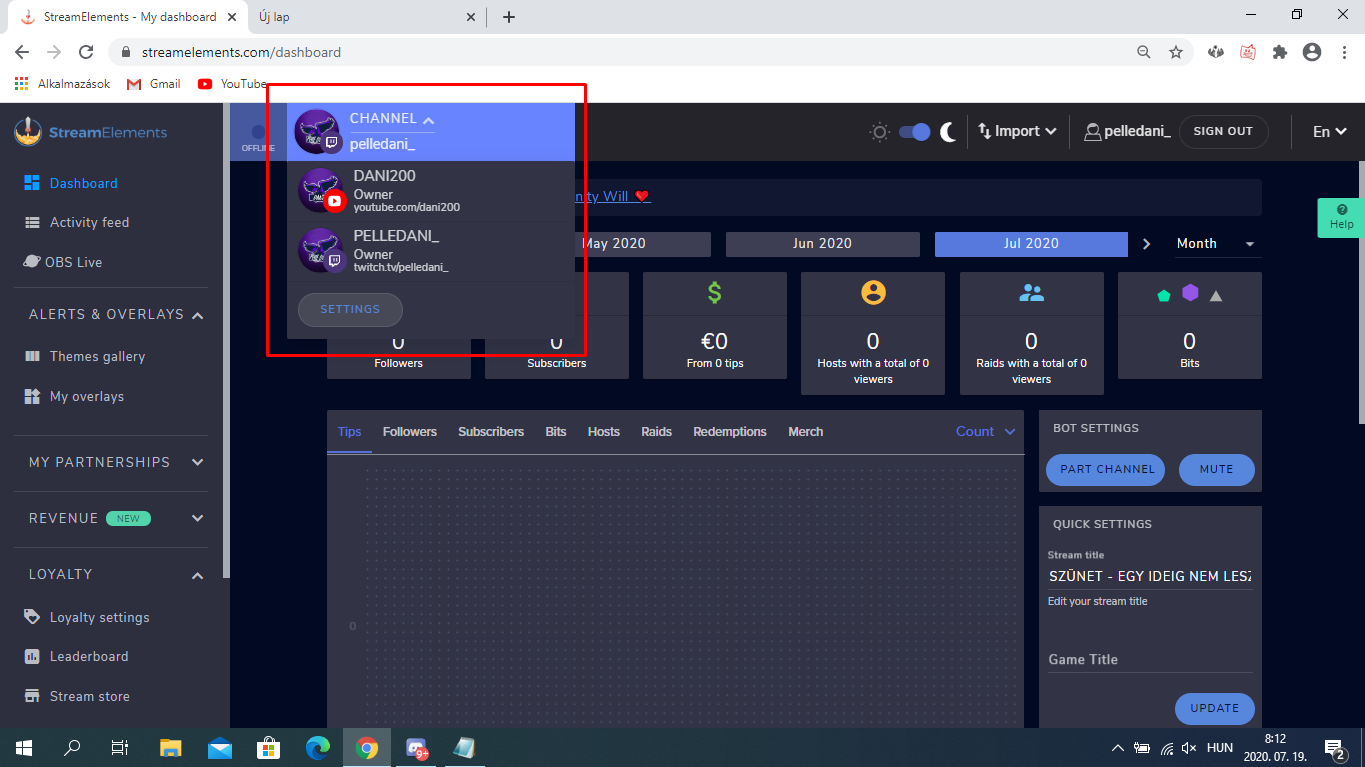
@surreal seal If not the streamer need again you send a link.
surreal seal
I'm on mobile. Do I need a pc?
nimble dune
Would be best do that on pc
surreal seal
Damn. Alright I gotta do this at work or something on the sly 😂
nimble dune
👍
surreal seal
Thanks for your help
nimble dune
Welcome
lament blade
i need help
viscid pebbleBOT
Hi @lament blade, Please ask your question(s) or describe the problem you're looking to solve so staff or a support volunteer can assist you as soon as they are available.
nimble dune
Make the bot part your channel, log out of the dashboard, log back in and make the bot join your channel. As the !uptime command is giving a response, you are seen as online in our system. The offline in your dashboard is a visual bug.
nimble dune
As i edited do that and ,go live when the !uptime command working then good.
nimble dune
As the !uptime command is giving a response, you are seen as online in our system. The offline in your dashboard is a visual bug.
 elder dome
I need help with sound I've uploaded to streamelements but will not play on my twitch stream
lament blade
ok
nimble dune
@lament blade Also wait a 3-5 minute then refresh the dashboard.
nimble dune
What commands?
outer vine
I have a question about game capture and the little chat function inside OBS Live
- My game capture just straight up doesn't work, its just black even if I assign the game capture to a certain application, what can I do to fix this
- The chat function that I can pull up my going Streamelements-->Chat doesn't work, it just says error connecting to the chat
Any suggestions?
nimble dune
For first issue best support join to their Official Discord @ discord.gg/obsproject
2, Streamelements on top of OBS -> Logout -> login
elder dome
I have a question about sounds that should be playing during and event on Twitch, but only plays on StreamElements and no sound comes through on Twitch
an event*
nimble dune
Screenshot your browser source properties. But the overlay url not.
And what sound you have added in website editor? format?
elder dome
Well, I uploaded the sounds into the streamelements iverlay editor
overlay*
They are in mp3 format
nimble dune
Okay can you the first screenshot?
elder dome
They play fine when I emulate an event, such as follower. But I'm live testing the sounds and nothing is coming through.
nimble dune
In OBS?
elder dome
It comes through OBS
not on twitch
I'm live now and when I emulate an event live
the notifications come through, but only OBS has sound. Not Twitch
nimble dune
Can you screenshot the advanced audio properties? -> https://prnt.sc/tkiubw
 elder dome
Perhaps I'm not explaining this well enough
nimble dune
No problem 😄
elder dome
nimble dune
Screenshot your browser source properties. But the overlay url not show. for the alertbox
lament blade
is there away to capture just audio from stream elements and not discord
like a youtube monster video only
to stream
no voices from discord or games
nimble dune
@elder dome ?
lament blade
?
elder dome
Sorry. I think I'm missing something. I'm still kind of new to merging OBS with streamelements
round brambleBOT
@lament blade How to exclude audio sources for a stream or recording: https://obsproject.com/forum/resources/8/
Voicemeeter Banana guide: https://obsproject.com/forum/resources/397/
nimble dune
@elder dome Have you added the alertbox to OBS?
elder dome
Your screenshot example does not look like mine for the activity feed
That's probably my problem right there
I must have missed that I need to add an alertbox to OBS
lament blade
i want only the source of audio on monster not from discord or game
nimble dune
@elder dome The default resolution for StreamElements overlays (theme and custom) is 1920x1080. Please add them in OBS at their full resolution and use CTRL+F to fit to screen if necessary.
You can then downscale your stream in OBS settings > Video if you'd like https://i.imgur.com/6bWXxjR.png
lament blade
or what ever i am playing
nimble dune
@elder dome Also have you downloaded the OBS.Live?
elder dome
Yes
nimble dune
Ok just what on my screenshot not look like your?
nimble dune
Can you screenshot your OBS?
elder dome
Do I need to have the Streamlabs OBS instead?
nimble dune
No.
elder dome
nimble dune
Oh you have added the basic twitch.
nimble dune
You don't have installed the OBS.live
 elder sorrel
No
nimble dune
No
elder dome
oh thank goodness
elder sorrel
Obs.live is a plugin for Obs.studio
nimble dune
👍
elder dome
Ok so I've got it up and running
Although, the wizard seems to acting odd
just so I don't get lost in what you need from me, is there any way to do this through voice and me screen sharing with you @nimble dune ?
nimble dune
Sorry but i can't now that. But here we can as chat
nimble dune
Sot still no sound? Have you added the alert box?
elder dome
now the main windows look the same as your screen shot.
nimble dune
Yes but not show the overlay url.
elder dome
I have my themes made on your website and I have copied and pasted the links to my browser source
nimble dune
Okay also screenshot not need.
elder dome
nimble dune
Go to advanced audio properties and for just chatting set the audio monitoring to monitor and output.
@elder dome Activate the control audio via obs
And then should be good.
 mossy stag
For alerts - it seems like Text appearance delay and Text disappearance offset make the text appear semi-transparent before drawing in and after drawing out. Shouldn't they be fully unopaque and then fade in fully opaque and then reverse for fading out?
 weak delta
You're seeing that in OBS or the overlay editor @mossy stag ?
mossy stag
overlay editor
weak delta
Test it in OBS.
Click preview live on stream then test it and watch it on OBS.
Sometimes in the overlay editor, it might look stuck and as-if it is still there but it isn't.
mossy stag
Ah thanks, you are correct, seems like a bug in only the editor.
weak delta

lament blade
ok one last question how do i get the Heist to work in chat
weak delta
jolly kraken
My chatstats are not working... For the 4th time
Username: yeiicob
Is there something I can do for this not to happen?
 rustic spade
Hey there.. Been meaning to ask for a while. In my elements activity feed Im not receiving alerts for hosts if there is only 1 viewer as well as it not showing channel point redemptions. Is there a way I can set this up so it shows and alerts for both?
round brambleBOT
@rustic spade Due to changes to Twitch API, we have filtered out hosts and will only show these ones on your activity feed:
- All hosts coming from an online channel with at least 1+ viewer
- Auto host events with at least 1 viewer - only from a channel that just went offline
Note: If you see "X channel has hosted you" with no viewers on the back, that is considered an offline host or a host with 0 viewers, we do not show these.
ionic kelp
And by channel points do you mean Twitch ones or SE loyalty?
rustic spade
twitch channel points. wasnt sure if there would be away for it all to come up in 1 activity feed
ionic kelp
That would be intentional. No way to acknowledge them atm.
rustic spade
no worries thanks for the help
 atomic belfry
ik this ist twitch related but who knows how to build a gaming pc
ionic kelp
#general-chat @atomic belfry
 glass cape
Me
jolly kraken
My chatstats are not working... For the 4th time
Username: yeiicob
@jolly kraken
lament blade
ok so ive some how managed to get it to work lord knows how but this happens
2 in a row
weak delta
@lament blade you made it a seperate overlay and new browser source?
 normal fog
Im trying to make a command for the bot that adds a text at the end of my title. is that possible?
ionic kelp
@normal fog Not possible without changing the entire title.
ionic kelp
lament blade
ok so i am back at square 1 where do i take the api key i am lost again it was smi working then well its me so i jacked it up
ive watched the video in the link u sent earlier
but i am confused
as to how i can get this
dose anyone want to just team view and show me?
im at a bubbleing point
Hello
I need help
viscid pebbleBOT
Hi @lament blade, Please ask your question(s) or describe the problem you're looking to solve so staff or a support volunteer can assist you as soon as they are available.
lament blade
dont we all
When someone types hey, hello, hi I set the variable to reply by saying hello ${user} thanks for stopping by
It doesn’t show they’re channel name
It says the whole variable
I stream on yourube
youtube*
oh i been trying to get the Heist Minigame to work
.....
untold crest
@lament blade remove that token and generate a new one, so nobody will be able to play with your data on your channel. Also remove a space which has been pasted by your browser somehow on the end of token in field.
untold crest
@lament blade Unfortunately I cannot teamviewer you, If you update your token, ensure that it doesn't have additional spaces and it still doesn't work I will be able to screenshare call you to take a look there
 shrewd harbor
Hi, i would like to change the right box to recent subsriber and for it to read that file instead. is there a simple way to do this? TIA!
untold crest
Seems like the "Recent donation" text is part of an image, so you need to use image manipulation software to replace it with other text, then you may use other label widget placed there
 weak lodge
Anyone know how to put a overlay on when I’m streaming Xbox
round brambleBOT
@weak lodge Consoles do not have native support for overlays. You would need a capture card and a PC with OBS in order to have Overlays over your console gameplay.
We have an blog post about how to setup console streaming with our essential tools: https://blog.streamelements.com/how-to-stream-on-console-7b620b1c46c3
 river plank
I'm starting to move things over from streamlabs OBS to streamelements, and I'm having two problems, this first is when I try to move over stuff from streamlabs to elements, it says install chrome extension, I then install but the menu doesn't change and keeps saying install the chrome extension. The second is that when I try using one of the pre-made alerts for my alert, and I test it out on OBS studio it cuts off for some reason, does anyone know a fix for either of these things?
untold crest
@river plank the cutting is most likely because your browser source is not 1920x1080
And if chrome extension fails for you, you can use import tool from OBS.Live
untold crest
This is another way of import, so if you want to use it - then you need to install that plugin. But.... I reread your message and I see what should you do - just click on that installed chrome extension and while logged in into SE and SL click "import" from extension
river plank
But, I can't click on it... And when I do in the "Extensions" tab, it takes me to the settings for it.
I figured it out
lol
There we go, it worked @untold crest thanks for the help! 
untold crest
Glad to have you onboard!
 quasi fox
I got 40mbps upload speed but my twitch got frames drops
started a week ago
output 720p 3500 bit rate
untold crest
@quasi fox Check those resources:
- https://inspector.twitch.tv/
- https://obsproject.com/tools/analyzer - paste URL of log from your latest stream
- https://r1ch.net/projects/twitchtest - check which Twitch server is the best for you
quasi fox
@untold crest thanks m8 will give it a shot I believe my ISP throttling me but they said no
untold crest
Also with that upload you should be able to use much higher bitrate (even for 720p) as it should result in better quality in dynamic games
wary halo
doesn't matter if you are partner, i stream on 720p and have the bitrate set to 5000
it's just smoother
untold crest
So it seems that it is a connection issue, use twitchtest to check if you are using the best server for your location
quasi fox
will do it now
untold crest
The quality seems to be terrible
Are you using wired or wireless connection?
Or maybe it is something broken in that tool itself? I remember that quality went up to 100
Your test with 0s only surprised me. From the screenshot you pasted we can see that you are using wired connection to your router (I wonder what happens next)
Does speedtest result with the same speeds @quasi fox ?


 untold crest
All of your speed tests you did with twitch bandwidth test are showing that your upload is somehow limited to ~2Mbit
Can you check via any VPN service (a lot of them offer free test). If you have better upload in twitch test it is most likely your ISP is throttling you either directly or on some of traffic exchange points.
jade remnant
having 0 across the board means a connection issue between you and the twitch servers.
the next step will be to check you havent blocked any routing on your pc/network. then get your ISP to look into it.
i would also say to untick those 2 options in obs if you are struggling this much
untold crest
That can be true too. You can throttle yourself with weird QoS rules you set on your router.
lament blade
should work just fine now
quasi fox
@untold crest I dint touch anythink on router
lament blade
give it a shot
That should work, yeah
Just a sec
I'll need you to close GC, hold your windows key and R, and in the window that opens, paste this line: del %homepath%.se-gc\config.json
then try to run it again
untold crest
@quasi fox is it over VPN?
untold crest
Speeds are higher, but still not even close to your 40mbit
quasi fox
what can I do... :/
untold crest
Can you tell me on dm, what VPN service you tried now?
quasi fox
nord
untold crest
Oh. OK 😉
untold crest
Try to pick another server from their app, something close to twitch servers
quasi fox
others 2k
lament blade
You'll need to keep it up, yes
untold crest
OK. And one last thing - can you run a speedtest but select a longer distance server?