#helpdesk-twitch
1 messages · Page 652 of 1
 wary halo
 devout glacier
can I make a custom command then that will show the follow age?
 neat widget
@wary halo I don't think that delay has anything to do with the hardware
rather the connection to SE server itself
wary halo
you can always uncheck the option to shutdown when not visible
neat widget
I have a 400Mbit cable with great ping times, but the overlays are delayed
wary halo
800/800 4 ping, but shitty pc here 😛
 sleek torrent
rather the connection to SE server itself
@neat widget it exactly feels like the connection to SE...I have 200mbit download speed
 fringe mauve
question is anyone S.E live notification working or is it still broking?
neat widget
I think somehow the SE server is always fully loaded
It would be nice to be able to download all those overlays locally on the PC
such as StreamLabs are doing...this is one of the biggest disadvantages of SE at the same time of being an "advantage"
wary halo
question is anyone S.E live notification working or is it still broking?
@fringe mauve works fine here, you can try to part and rejoin the bot from the channel
neat widget
The other day for example, there wasn't any connection to the overlay SE server, for many minutes...what would happen in this case, your stream would look terrible 😄
sleek torrent
It just looks really poorly when you see the webcam already without the overlay for 1 second when switching scenes 😦
wary halo
well, you have been given multiple options to improve that now 😛
sleek torrent
But will give studio mode a try
neat widget
It does...and it has never been fast enough when switching, there's always this delay
fringe mauve
@wary halo I have tryed that and still dose not work
 wraith frost
Hi i am using restrem.io youtube and twitch same time . I did alerts screen for youtube and twitch and i am using this 2 at same time but yesterday someone send me tip . He said i sended in twitch but my twitch dashboard empty . now i find to tip feed in youtube dashboard
can i see tips feed my all dashboards?
wary halo
for every separate account yes, not combined
wary halo
tip link for YT account and Twitch account is never the same
so if they tip through YT link it will not show up on Twitch feed
remove the link please
 lament blade
can SE have like a recent list of followers donation ect on stream like streamlabs?
wraith frost
i am using this web site
wary halo
remove the link
lament blade
yeah dude
 weak delta
Labels > Other
I accidentally cut out the most important part of that image, ha but yeah, it is under labels.
lament blade
cheers dude
 round brambleBOT
@wraith frost Please follow our community rules:
- No advertisement or stream promotion
- Respect ALL server members
- No NSFW/NSFL
Thank you
lament blade
anyway also I CAN get my name changed on here lol ?
this is my old twitch name its showing xD
wary halo
doesn't matter, you can't post links like that
events will always only show up on one account
lament blade
yeah got it now for events
wraith frost
thanks for nothinh
 marsh geode
Does anyone know why on streamelements if I log out and log back in, fire up a twitch stream, my old title, despite entering a new one, always shows up?
wary halo
did you hit the save button?
devout glacier
is there a variable for follow age
wary halo

StreamElements
The Ultimate All in One Platform for Streamers
if it's not in there, then no
devout glacier
damn...
marsh geode
If I delete the old title under stream information after logging back in, and I launch a new stream a title I have from a previous stream remains there.
and this is after Iog out and log back in...
fringe mauve
one last question about live notification in bot|Modules|live Announcements is the going live message supposes to look like this: ${channel.display_name} is now live! Streaming {game}: {title} just asking
weak delta
Yes, that's the default. It'll replace all the information in the brackets with the relevant information when it posts to chat.
 vale saffron
hello 🙂
weak delta
Hi.
vale saffron
iv'e got a question about the streamelements chatbot, is this te right place?
vale saffron
yeah it is 🙂 i disconnected the bot (part channel, unmod and removd the connection in twitch) and still the bot is reacting at some of the commands in de chat
wary halo
bot is not responding to me at all
vale saffron
i dont want it to respond but it does xD
it's conflicting with the new bot i want to use so it's very annoying...
so, could u guys help me with that?
vale saffron
is it possible to remove my account fdrom streamelements to be sure there are no connections left
i tried is via the website but it keeps saying "invalid username"...
vale saffron
already did
part channel, unmod and removd the connection in twitch
because, i was setting up a bet in the new bot, and streamelements was reacting to the "!bet" function
so i removed it
bit still, the new bot doesn't accept the !bet command
while it it configured
so i think there is something of a conflict
wary halo
vale saffron
yeah
wary halo
no response
vale saffron
because i removed it
that's the problem 🙂
the new bot doesn't repsond
while i did setup the !bet function
weak delta
That would be a problem with the new bot. If the same command was present on multiple bots, they would all respond.
vale saffron
yeah because i blocked it
wary halo
the StreamElements bot didn't respond to anything i posted in there
vale saffron
still.. can i remove my account from streamelements then ?
i want to get rid of it 🙂
vale saffron
did 🙂
marsh geode
If I delete the old title under stream information after logging back in, and I launch a new stream a title I have from a previous stream remains there.
and this is after Iog out and log back in...
so does anyone know how to get rid of your previous title in elements and not have it show up on the next stream?
let me reword it, how do you not save your settings in streamelements, so if I create a new stream, I am not stuck with my last video's title under, "Stream information." I do save my recordings on twitch.
weak delta
Update the title before you start the stream? I'm a bit confused on what you're explaining/asking. Your VOD on Twitch in the Video Producer section of your creator dashboard will by default be saved as whatever the title is when you click "Start Stream" regardless of changes you make throughout the stream. You can edit the title of the VOD afterwards and you can also create a highlight and have a custom title there as well.
If you stream today with the title "Hey, it's my title" then today's VOD will be saved as that. If you start a stream tomorrow and then update the title after you've gone live, it'll still be "Hey, it's my title" on the next day's VOD.
marsh geode
So, on streamelements on the back end, when creating a new stream, my old stream title is still in the title section. If I erase it and enter a new title, when I do a new stream, it doesn't take my new stream title, it takes itfrom my last video....I mean for streaming, you can edit a title for VOD. This is for streaming.
under stream information...then title
I enter a new title, but an old title will from my last video will show up in new stream. It's like it is saved despite changing the title under Stream information-then title
when I mean old title, the old title of my last stream will appear on a new stream despite me changing the title of the last stream. For instance say my last stream was..."Bodybuilding for Gains".....then a new stream, I put in title," Video gameplay." If I start the stream for Video gameplay, the title of the last video will show up, "Bodynuilding for gains.".....I made up this titles for this example.
weak delta
Hmm, well there are four places you can modify your title from. The Twitch Stream Manager on your creator dashboard, mod-view of your channel, chat with a command and the StreamElements Dashboard. I just tested it across all four ways and each time I made an update it was reflected across the board. Do you see the changes you make in the activity section of your creator Dashboard?
For example, let's say you changed it to Video gameplay. Do you see that in your activity on Twitch?
marsh geode
So when I log out and log back in, my old stream title will be there under stream information. I will then erase the title and put a new one in, then hit live, but the old title will show up on the stream, not the new one.
weak delta
Which browser are you using?
weak delta
When I was referencing activity feed, I mean the one on Twitch.
Every title change you make regardless of where you do it from should appear in that feed.
And not your event feed but the activity feed in your creator dashboard. Community > Activity Feed
marsh geode
oh i am talking about my account connected to twitch onto streamelements, in streamelements
weak delta
I know but I'm trying to see if your title changes are actually being saved.
You say you see that it has changed but when you start stream, it's the title from your previous stream. I'm curious to know if your title changes are actually being recorded and accepted.
Whether you change your title from Twitch, chat or StreamElements, it should appear on that activity feed.
marsh geode
the old title will be in the new livestream even after a change it on the backend of streamelements...it will pop in twitch as such.
in my dashboard in twitch, it just shows challenges etc and my last video.
Where do find the activity feed?
weak delta
Creator Dashboard > Community > Activity Feed
lament blade
I have a question: I seem to have some trouble with assigning different sounds to different alerts in the overlay editor. Whenever I change the sound effect of an alert, let's say a follow, it changes the sound effects for all alerts. Any way to fix that? Or am I doing something wrong (probably)?
marsh geode
Ok, so no it's not showing in my activity feed me switching the titles before I launch a stream....only after I edit the title of the stream, after it goes live- I have to do that bc the problem
Should I hit reset session on the streamelements?
weak delta
@lament blade Save the overlay, refresh the editor and then try.
marsh geode
I have no overlay lol. Just the video capture device, cam, and mic. I record a window scream in the game I work in...unless by default that is an overlay
not scream...screen*
 onyx knoll
i cany see my overlay when in game it hides it any help would be great
weak delta
@onyx knoll Is your browser source at the top of your source list?
marsh geode
how do you save the overlay..well what I have. I obviously see the refresh button?
onyx knoll
omg im dumb thanks so much
lament blade
That worked @weak delta tysm 
marsh geode
Think i got it, I hit update info at the bottom and refresh, ...I couldn't see the update info button because it was blocked by something else......is that what you meant by saving?
weak delta
Yes this button.
Very important to click.
That will save the title change for you, is that the button you just clicked?
marsh geode
So update information in streamelements? The button said, "Update information"
under stream information in streamelements at the bottom of stream information ( where you type in tages and title etc
weak delta
Can you do me a favor and screenshot where you are right now?
marsh geode
so under stream information I would erase the old title, out in new and it would upload the old title....
weak delta
Ohhh.
Yes, that update information button is important. If you couldn't see it earlier then it probably wasn't saving.
marsh geode
At the time, i couldn't see the update information button....because it was covered up by a pop up.
weak delta
Yes, always click that button and then you should be fine.
 feral gazelle
Yo guys, i have a problem. I have X total subs and Y total followers, but when i use widgets with ''total subs/followers'' it appears ''0''. How can i solve this problem?
weak delta
You're using Labels > Subscriber/Followers > Total & All-Time > Total Followers/Subscribers?
weak delta
In the settings of the follower widget then does it look something like this:
However you want the information to be labeled is fine, as long as it has {count} to actually display the number.
And in your session data here in the Overlay editor:
For totals, does it say 0?
feral gazelle
y
''your total amount of subscribers'' → ''0''
OH WAIT, I REFRESHED AND NOW IT WORKS D:
no sense but ok e.e ty anyway @weak delta and sorry
weak delta
Well, uh, there it is! No problem. 
feral gazelle

 feral inlet
While streaming last night Follow alerts seemed to work OK but I had 3 hosts that the alert never went off for. Any Idea why?
 quasi fog
probably didn't reach the limit of viewers, I think offline hosts don't trigger the alert for SE
round brambleBOT
@feral inlet Due to changes to Twitch API, we have filtered out hosts and will only show these ones on your activity feed:
- All hosts coming from an online channel with at least 1+ viewer
- Auto host events with at least 1 viewer - only from a channel that just went offline
Note: If you see "X channel has hosted you" with no viewers on the back, that is considered an offline host or a host with 0 viewers, we do not show these.
Note for Mixer streamers: The above 2 filters currently apply for Mixer and we are aware its actually not how Mixer hosts work. We do plan on changing it, but no ETA on when.
feral inlet
Good to know, thanks.
 novel olive
guys i have a problem, when i try to use some layout, it allways seem bad, im using twitch studio and i try all i can
its seem like have other resolution, but i configure custome resolution and nothing change
for example: https://prnt.sc/se70i2
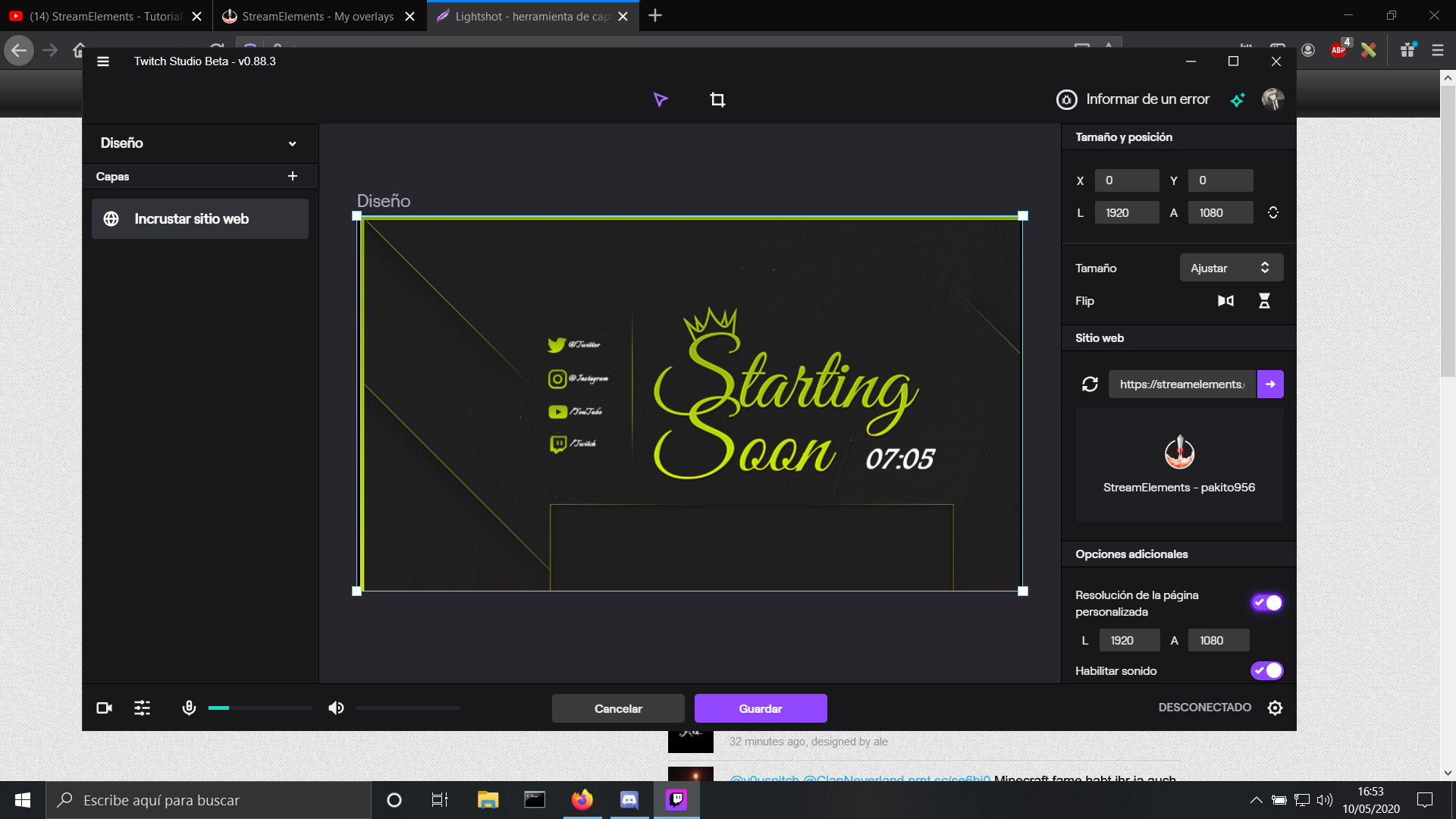
can somebody help me? :/
 cursive heart
hello is its possible to turn on your notifactions when you get donated in your stream en you see it in your stream at the moment i get mail but i dont see anything on stream?
weak delta
Add the alert box widget to your overlays.
cursive heart
thx
weak delta
That will display a graphic and play a sound of your choosing whenever a donation hits your activity feed.
cursive heart
thx!
 tired widget
I don't know if this is the right section to put this in, but for some reason my ground control doesn't seem to be loading at all. It will open and then it will just be stuck on the updating screen for ages, I've tried it 2 times and left it for a good 15 minutes each time then I uninstalled it and reinstalled it then tried again and the exact same thing happened, is there any fixes for this? Or is it a known issue? If anyone could help that would be great, thanks in advance
 lyric latch
Good afternoon guys, how are you? Could someone help me with a question I believe is '' simple ''? I am confirming my alerts to return to make my lives, however I came across a problem that I cannot solve. In the subscriber alert I put a song of my choice, but when the person renews the sub the famous resub or even a gift for a viewer, the song is totally different from the one I put in, you know how to put the same song for both the person who is signing up for 1 month and the person who is renewing the subscriber?
feral gazelle
If i import tips to streamelements from streamlabs through the proper Chrome's extension once, do it update automatically or i have to do it manually everytime??
weak delta
Check your variations and also I would probably delete that image @lyric latch
You probably have a variation when people have subscribed for 2+ months that is enabled with a different graphic/audio so whenever somebody renews, it'll play that one instead.
In fact, that's 100% what's happening:
 snow flame
How do I edit my 'name' cant find the box to edit or change the text anywhere to state my channel name
lyric latch
@weak delta I checked the variations now and that's exactly what is happening, thank you for the excellent help.
 white herald
I have a problem with mediashare. Alle the settings are correct, but my stream watchers get the message "song is to long" even if it is far within de 15 min max that I set. Are there any other rules to add media? Like that it has to be from a vevo channel or smth?
weak delta
@snow flame Is that a static text box? You should look under settings for this:
white herald
snow flame
@weak delta
weak delta
OK so where you put your name is just the name of the layer not what is output on stream. When you have that selected, look at the bottom and you should see "Settings" - click on that.
snow flame
@weak delta Found it bro, thank you so much - Felt so stupid asking but spent 10mins looking for it... Much appreciated Kew
white herald
BTW my chat fixed the problem. Youtbe URLS don't work in the twitch chat only the song name. Testing it live with my chat
 ionic kelp
@white herald You can still use urls. Just disable block hyperlinks here https://dashboard.twitch.tv/settings/moderation
 rough badger
ionic kelp
rough badger
ionic kelp
No. It's a user posting the link. Not the bot
 tawdry blaze
I've been streaming for 4 years and still haven't gotten a payout. Where do I go check to where I want the payout to go to?
 raven jackal
Does someone knows designers that do overlays / alerts / transitions like this? didnt found another designer besides the one that mades those two
https://fiverr-res.cloudinary.com/video/upload/t_fiverr_hd/fqkeqperq1uyaec0lrcy
https://fiverr-res.cloudinary.com/video/upload/t_fiverr_hd/ipjzfsnihhg7vonngm7p
lament blade
hy everyone i have a problem with the allerts. When someone follow me the allerts don't go
wary halo
I've been streaming for 4 years and still haven't gotten a payout. Where do I go check to where I want the payout to go to?
@tawdry blaze you would have to shoot in a ticket with Twitch Support, best bet is on Twitter i guess
lament blade
Hi, I am a moderator for my brother, we were testing the chat notifications when someone follows, subs, etc however the HOST alert does not seem to work, I figured it may be I have to set the minimum viewers to 0, but is still not working, would you have any ideas what I could do please? Thanks
round brambleBOT
@lament blade Due to changes to Twitch API, we have filtered out hosts and will only show these ones on your activity feed:
- All hosts coming from an online channel with at least 1+ viewer
- Auto host events with at least 1 viewer - only from a channel that just went offline
Note: If you see "X channel has hosted you" with no viewers on the back, that is considered an offline host or a host with 0 viewers, we do not show these.
Note for Mixer streamers: The above 2 filters currently apply for Mixer and we are aware its actually not how Mixer hosts work. We do plan on changing it, but no ETA on when.
 novel thunder
Is there any way to set up custom subscriber commands?
Such as I set a command that a specific sub can use as long as they retain being a subscriber and it pulls up a gif on stream?
lament blade
@novel thunder yes there is as I have seen it done before but im not entirely sure how
wary halo
you can't make a command user specific, at least not with our bot
lament blade
oh i thought you could
novel thunder
Is it possible to just make it say a “subscriber” only command?
lament blade
yea subscriber only is very much possible
wary halo
yup
lament blade
How can I set the banned words to permanently ban someone?
just in who can use check subscriber
novel thunder
And it can trigger a gif?
lament blade
@novel thunder yes you just have to type the gif as you would type it in a normal twitch chat
@lament blade what i did was make a command called !ban and copy the banned words into that in the keywords advanced section so it which does this - /ban ${user}
or /ban ${user} (reason)
 chrome folio
And it can trigger a gif?
@novel thunder #widget-share > https://discordapp.com/channels/141203863863558144/457957557470887947/684387773121036329 ... maybe this widget can help you
novel thunder
thanks I'll check it out!
 torpid path
I put my email for PayPal in but it don’t work
 vivid radish
hello so i have my twitch and mixer account connected but wish to delete them when i go to delete one it says invalid username what im i doing wrong ?
 copper oriole
Hi, I'm using https://docs.streamelements.com/reference/activities#activitiestopbychannelget to get the top list for cheers and bits. It there an api request to get such a list for sub gifters?
 dense yew
Can anyone direct me to the rotating sub count and follower count?
weak delta
Mean something like this? https://discordapp.com/channels/141203863863558144/457957557470887947/561214310123044865
copper oriole
Oh thanks!
dense yew
Where?
 empty trout
Hey, what is the website that i can try my stream there without going live on twitch
wary halo
twitchinspector
 winter rune
Hi I’m new to streaming and I could really use some help on my alerts
round brambleBOT
@winter rune New to Stream Elements?
Check out our YouTube channel https://www.youtube.com/c/streamelements/videos
with tutorial videos from setting up the basics, to in depth details on how to use our product.
New to OBS? Here is a 4 step quickstart guide
https://obsproject.com/wiki/OBS-Studio-Quickstart
Want to learn even more? Here is an in-depth overview
https://obsproject.com/wiki/OBS-Studio-Overview
@winter rune We've released our new Overlay Editor revamp. You can check out the changes and how to work with it here: https://youtu.be/X5VzXjqAsjk
Check out our blog post as well: https://blog.streamelements.com/streamelements-overlay-editor-just-got-even-better-c22cb5b4853e

We are thrilled to announce the launch of the remastered StreamElements Overlay editor!
https://p.strms.net/newoverlayyt
Why StreamElements Overlays are better?
😎 Simple: Load your entier setup using only 1 link
⚡ Fast: Cloud-powered Overlays arrive in real-time, say goodb...
winter rune
Can someone dumb it down for me
empty trout
@wary halo Hey, what is the website that i can try my stream there without going live on twitch
empty trout
it is an app i should download or what ?
wary halo
no it's a website
 jade remnant
empty trout
jade remnant
empty trout
alright ty
vivid radish
why im i getting a invalid username message when trying to delete my streamelemets account ?
empty trout
i dont know how i can start it
jade remnant
follow the instructions
empty trout
i followed but i dont know where i should put these things
dense yew
@wary halo i can't find it?
chrome folio
i followed but i dont know where i should put these things
@empty trout you will edit manually your stream key and add that information to test your broadcast, on the OBS > Settings > Streaming
wary halo
@wary halo i can't find it?
@dense yew you have to ask them, as i couldn't find it either 😛
jade remnant
now thats an old obs 
empty trout
i didnt found the step 3
jade remnant
have you streamed before?
empty trout
yeah i press start streaming normally
jade remnant
there you go
vivid radish
i connected mixer and twitch both on my streamelements account how do i remove mixer i have tired to delete it and it wont work
empty trout
please look at my drop frames , i have resolution 720 and video bitrate 3500 , although my upload is 8 , i already followed all the steps in the helpful website


is any problem with my settings ?
jade remnant
turn off dynamic bitrate and psycho visual tuning
round brambleBOT
@empty trout Dropped frames / disconnecting? Follow the troubleshooting steps at: https://obsproject.com/wiki/Dropped-Frames-and-General-Connection-Issues
 keen cloak
is there currently a way to reset "Current Points" to match "All Time"? I'm constantly finding myself wanting to give people points back after chat gets crazy one night but I don't want to just drop 10k on everyone, nor do I want to go through them one by one.
Any suggestions?
Currently it seems my options are "Reset to Zero" or "Deal with it" lol
 verbal steppe
does anyone know how to get more than 2 viewers
wary halo
does anyone know how to get more than 2 viewers
@verbal steppe stream more and use your social media
jade remnant
more of a question for #general-chat
winter rune
Can someone just tell me how to get that little box on screen when somebody follows?
empty trout
https://gyazo.com/2498c4a458b2e75069217ad0f806bc66 it became like 20 now
 wary halo
@winter rune you have to set-up an alertbox widget on your overlay
winter rune
How
feral gazelle
If i import tips to streamelements from streamlabs through the proper Chrome's extension once, do it update automatically or i have to do it manually everytime??
wary halo
How
@winter rune https://www.youtube.com/watch?v=8LVRd2X4HvU&list=PLCDDKlFdScbEwdx5AntcQIS1InkFJwHtv&index=5&t=9s

Learn how to customize your alerts and setup different alerts variations with StreamElements Alertbox
Overlay Manager guide: https://youtu.be/X7XrDdRE7Fk
Add HypeCup to your Stream: https://www.youtube.com/watch?v=8LVRd2X4HvU
Got any questions, or just want to say "Hey"...
ionic kelp
It only grabs stuff from the latest over there.
And at that point.
The general expectation is that you plan on switching to us from them as we don't monitor stuff they actively get.
empty trout
@jade remnant
wary halo
@jade remnant
jade remnant
what?
wary halo
no idea
empty trout
https://gyazo.com/2498c4a458b2e75069217ad0f806bc66 it became like 20 now
round brambleBOT
@empty trout Please provide a log from your last stream. To do this, in OBS go to Help > Log Files > Upload Last Log File and paste the link to the log file here.
jade remnant
dropped frames is always connection related, i have give you the options to turn off along with a guide to check
 marsh terrace
My chatstats are not working in my channel
weak delta
@marsh terrace Have you changed your name on Twitch?
weak delta
Provide your old and your new name.
marsh terrace
ItsZoil and now its Zoil
weak delta
OK, it's been sent. A staff will see it shortly and it'll be taken care of.
empty trout
https://obsproject.com/logs/JaxbxyHhQ2KMq3B4 @weak delta
 twin sphinx
Hi streamelements chat bot stopped watching the channel, and thus stopped working, on streamelements website it says its activated
wary halo
the log is empty @empty trout
twin sphinx
soo no idea on how to make it work
round brambleBOT
@empty trout 1) Restart OBS
2) Start your stream/recording for about 30 seconds. Make sure you replicate any issues as best you can, which means having any games/apps open and captured, etc.
3) Stop your stream/recording.
4) Select Help > Log Files > Upload Current Log File. Copy the URL and paste the link here.
(Note: If you do not see an obsproject.com URL, you will need to update OBS Studio to version 22+)
wary halo
@twin sphinx did you change your name recently?
round brambleBOT
@twin sphinx If you changed your name on Twitch please follow these steps:
🔹 Visit https://streamelements.com/logout and then log in again with by connecting with Twitch.
🔹 On the right side of the dashboard page that opens, select "Join" under bot settings. If it says "Part" select that and then select "Join" to send the bot to the chat. Don't forget to mod the bot by typing /mod streamelements in your channel if you have not already.
🔹 Post your new name here so that we can update your channel's chatstats tracking (must be done by staff).
wary halo
post your old and new name here to pls
wary halo

twin sphinx
not a big change but significant
wary halo
make sure you do all the other steps from the bot response 😉
vivid radish
is there a way to removed a connected account to streamelements ?
wary halo
may i ask why you want to remove it?
wary halo
finish the setup first 😛
empty trout
vivid radish
@wary halo i merged my twitch and mixer and wish to remove the mixer one
wary halo
@wary halo i merged my twitch and mixer and wish to remove the mixer one
@vivid radish if they are merged you can't delete one of two
you would have to nuke everything
twin sphinx
thanks a lot
empty trout
so is it good ?
vivid radish
@wary halo if i nuke everything then can i just log into my twitch and start over ?
wary halo
yes, but everything that is now there will be gone.
so i don't know if you have a lot setup already
but why not just keep it?
wary halo
i have YT / Mixer and 2 Twitch accounts linked, only use 1 Twitch 😛
tired widget
I don’t know which area to put this in but my ground control won’t load, I’ve tried 3 times now. Twice where I’ve opened it and then it just keeps saying updating with no change for around 15-20 minutes, then the 3rd time I uninstalled it and reinstalled and I’m still having the same issue, is there anything I can do?
wary halo
@vivid radish accept my friend request 😉
 agile pivot
i just got a subscriber... no alert... nothing showed up on my activity feed... but the subscriber got the subscriber badge.... whats going on?
round brambleBOT
@agile pivot Twitch prime (new and resub) and paid subscriptions (resub only) must be shared in chat manually by the person subscribing in order for the subscription information to be sent to StreamElements. For twitch prime, the user needs to have sharing enabled on https://www.twitch.tv/settings/prime. For paid subs, if the share box doesn't show up immediately it will when they refresh the page. https://i.imgur.com/VNJN0Uv.gif https://i.imgur.com/2297EA7.png


 tiny karma
Hi all!!! first of all, BIG THANKS , the plug-in is just awesome, sooooo easy to use! I am from Argentina, so, excuse any lack of languaje fluidity. I have a question about <media requests>. I have them working properly, but i dont want to listen the audio from media requests, I just want the audio and video to show on the stream itself, not my machine
round brambleBOT
@tiny karma How to exclude audio sources for a stream or recording: https://obsproject.com/forum/resources/8/
Voicemeeter Banana guide: https://obsproject.com/forum/resources/397/
tiny karma
to clarify, I want the video and its audio to be audible only on the stream
ohhh thx , will take a look at that now
marsh terrace
@weak delta Thank you very much <3
weak delta
@marsh terrace 
 limpid wind
hey, I have a video capture device and I want to send audio to the streaming pc in 2 different channels (game audio and Mic) but I can't split them. I have tried sending the audio channel through a NDI source but it doesn't seem to work
 spark cloak
Guys I need help
Big time
It won't work when I test my alerts and no sound, but before it was working
wary halo
does it show in the overlay editor?
spark cloak
It shows for a sec and nothing and it happened after I saved
wary halo
but is that in the editor or in OBS?
round brambleBOT
@spark cloak OBS -> settings -> advanced -> scroll down -> enable/disable hardware accel.
https://i.imgur.com/ggMe9ZE.png
 lament blade
so im just wonmdering. how do i change what im streaming? like if i go live for overwatch how do i change the game to R6 later in the day?
 pearl yarrow
Im trying to sream valorant through obs but it is just a black screen when i put the game capture on
stream*
jade remnant
use the stream info dock to change game and title
spark cloak
Nope
wary halo
@lament blade there are multiple options:
- Hamburger menu in activity feed inside OBS.Live
- Twitch Dashboard
- Channel Page
- Command in chat
spark cloak
I click the follow emulate and show for a sec
Only on the overlay editor
Not in OBS
round brambleBOT
@spark cloak Right click on the BrowserSource > Properties > Scroll down a bit > Refresh Cache of current page
spark cloak
Nothing fellas
 tacit mica
Support request please. I am having a problem with my social media tweeting out an old tweet (not current game I am playing) even when I update and change the notification. My quick settings (Dashboard) also does not match the tweet.
wary halo
Nothing fellas
@spark cloak which browser do you use?
Support request please. I am having a problem with my social media tweeting out an old tweet (not current game I am playing) even when I update and change the notification. My quick settings (Dashboard) also does not match the tweet.
@tacit mica that is because Twitter is lazy with updating it
i have that shit all the time
even when i use this
Welcome back to Twitter. Sign in now to check your notifications, join the conversation and catch up on Tweets from the people you follow.
spark cloak
I use Google Chrome
tacit mica
Really? It has been days and still incorrect tweet. Dang Twitter.
round brambleBOT
@pearl yarrow Welcome to the helpdesk! Please let us know how we can assist you today and a support volunteer or staff member will assist you as soon as they are available. Thank you for your patience.
pearl yarrow
Could anyone tell me why my obs live wont show valorant when its setup but works with every other game i try
spark cloak
May I get a ticket too
pearl yarrow
thats not how it works ❤️
spark cloak
Ah
wary halo
i will ask around internally for you @spark cloak
spark cloak
Thank you
pearl yarrow
You have to watch streams lol i got it in a day luckily
spark cloak
I'm new to Stream Elements
wary halo
Could anyone tell me why my obs live wont show valorant when its setup but works with every other game i try
@pearl yarrow can you try window capture? sometimes gamecapture craps out
pearl yarrow
lemme try rq brb
wary halo
@pearl yarrow he is not talking about beta access 😛
he is talking about support ticket
wary halo
then display capture is what remains, or you could ask the guys in the OBS discord
round brambleBOT
For the best OBS support, please join their Official Discord @ discord.gg/obsproject
pearl yarrow
I will check ty
limpid wind
@pearl yarrow try opening the window of valorant after adding it as a source, when you tab out of the game it doesn't show anything (probably that is your blackscreen)
pearl yarrow
@limpid wind Ahh leme check
 abstract hemlock
@spark cloak try to delete the overlay and add it again
 steep dome
When using Streamelents Live, i don't see Media dock anywhere. It's not even available in View > Docks. Is it removed or something?
jade remnant
its under the streamelements menu
jade remnant
👍
spark cloak
Doing it now
steep dome
and, btw any quick fix if Streamelement not showing video from capture card? it just says One moment connecting.... device works fine with Game capture default app
 opal cliff
I'm trying to stream Skullgirls (or literally any game for that matter) and it says it can find the host name but not the data and goes on to stuff about Ipv6 and IPV4.
I'm big confuzzled
jade remnant
if obs is showing "one moment" that means its getting signal from the capture card, if it doesnt detect your card, it would be a black screen.
spark cloak
It's working again, but my custom sound it's working
jade remnant
i would say to check the resolution and inputs of the game and capture device, making sure they all match and are connected
spark cloak
I submitted it. Does it take long to get approved
jade remnant
@opal cliff can you screenshot the error message
opal cliff
The screen is showing it, but when I click "start streaming" it refuses to work
 abstract steeple
Hi can short Question, on my StreamElements site, i cant see the SE.Pay button.
spark cloak
LOL the moment I save it. It stops working
opal cliff
Here it is
jade remnant
settings > advanced
set network to default
round brambleBOT
@abstract steeple SE.PAY is available for streamers who are atleast 18 years old, with bank account under their name in one of the following countries and have at least 101 Follower (Twitch) / 101 Subscribers (Youtube):
Austria, Belgium, Czech Republic, Denmark, Finland, France, Germany, Ireland , Italy, Netherlands, Poland, Portugal, Slovakia, Spain, Sweden, Switzerland, United Kingdom, United States.
If you meet these criteria and don’t see SE.Pay, let us know.
For information on SE.Pay payment methods, their fees, and settlement times see https://streamelements.com/dashboard/tipping/fees.
opal cliff
Thank you so much @jade remnant
jade remnant
np
abstract hemlock
@spark cloak maybe its something with your audio file, delete the audio file for the library and upload it again i just test the same alerts with a bunch of sounds with no problems
abstract steeple
@round bramble Thx mate i dont has 101 follower 😄
 merry stream
Looking for a way to get my Top Tip and Top Tipper to be correctly displayed. Since I converted my Donations from Streamlabs to Streamelements the Top Tiper and Top Tip are desplayed 3 times higher than supposed to.
 wanton pendant
hey there 🙂 I would like to log my twitch-chat. is there a function in SE to do so? or any external software, to have my channels chat searchable?
10 hrs stream a day - going back in twitchts stream history is only for 1 hr rndbt
- provides SE a function to have all followers, subs, donaters and cheers in a list?
 burnt basin
i am trying to upload a 4 second .mov(with alpha) to the library and its failing to upload can anyone help?
steep dome
Video is lagging while streaming? Any helpful tips.
abstract hemlock
@merry stream check this 2 links:
https://streamelements.com/dashboard/session
https://streamelements.com/dashboard/tipping/list
@wanton pendant there is no a built-in function to log your chat or make it searchable, you could check your chats stats for info on your chats message.
you need a list for a command in your chat or as a widget on your overlay?
@burnt basin try webm 😉
round brambleBOT
@steep dome Please provide a log from your last stream. To do this, in OBS go to Help > Log Files > Upload Last Log File and paste the link to the log file here.
burnt basin
ive also tried that but filesize is over the 30mb limit @abstract hemlock
abstract hemlock
@burnt basin 👀 have such a big file on you overlay will take more time to get if you really really need that asset to be that big, and there isn't a way to reduce that size maybe you could think on having it on your OBS directly
burnt basin
the asset is only 4 seconds long which is what i dont understand. its literally a few electrical sparks
 odd temple
so i asked yesterday asked something but no one replid. I wanted to put the command "${channel.subs}"
but all i get is a 0 as reply
doesnt this command work or whats up?
wanton pendant
thank you so much and have an nice one 🙂 @abstract hemlock
jade remnant
${channel.subs}
that works, are you using the " joined to the string?
that might stop it from working
abstract hemlock
@burnt basin im not an artist myself so i can't help you with that 😔
steep dome
Okay, will do now.
@round bramble Here is the log file: https://obsproject.com/logs/0jlYVG9Q-qQyNVNp
abstract hemlock
@steep dome check this link https://obsproject.com/analyzer/?url=https://obsproject.com/logs/0jlYVG9Q-qQyNVNp
 vast coral
Could you fix the stats page for ttv/zoil ?  he changed his name from itszoil few months ago but it never got updated.
steep dome
It was working months ago fine....just withlatest update finding too much lag in stream
abstract hemlock
@vast coral done 😉
vast coral
thanks renziito ❤️
 prisma parcel
Where can I change the bot to reply to a private message? After !gamble command?
abstract hemlock
@prisma parcel You can't change it since its a default command (gamble is an alias for roulette)
prisma parcel
So bot cant reply in a whisper? @abstract hemlock
burnt basin
so ive now got a working webm file with transparency, 10 seconds long but when i upload to SE, it is reduced to 2 seconds and nothing shows up when tested
burnt basin
@abstract hemlock just tried a troubleshooting method i got from another server and it worked
abstract hemlock
@burnt basin don't be shy, you can share 😉
 faint jasper
Dashboard seems to not work for me.. any tips? this is the same on firefox and epiphany browser
round brambleBOT
Our Dashboard and Overlay editor are Chromium Optimized. We strongly recommend using Chrome. Opera GX and the new Microsoft Edge Chromium might work closest to Chrome as its also Chromium built. FireFox also works, but some things might look a bit different or not work. We do not recommend using Internet Explorer with our Dashboard as it does not support functions.
If the website doesn’t work on chrome, be sure none of your plugins are blocking our website or clear your cookies. You can try if the website works in a incognito tab.
 ripe scarab
Is there a feature request form somewhere for the Android SE app?
round brambleBOT
@ripe scarab Check out the StreamElements ideas board: https://strms.net/ideas. You'll be able to add ideas, upvote ideas you agree with, and track their progress with email notifications. Adding and upvoting ideas also helps the staff know which ideas should be prioritized so please take some time to upvote.
 ocean kraken
hey im having trouble producing sound for my stream like nothing is getting put out
ripe scarab
OBS, Android...?
ocean kraken
Obs windows
ripe scarab
Desktop audio is usually there as a default, but sometimes it picks the wrong audio output... Do you see the little VU meters lighting up?
ocean kraken
yes they light up but its not broadcasting the sound
ripe scarab
"vanilla OBS" or OBS with the SE addon?
ocean kraken
with the add on
wary halo
click on the little cogwheel > advanced audio properties > make sure that after the source the box with #1 is ticked
#1 is the stream output
ocean kraken
okay ill check that real quick
yeah it was ticked
but like when i was taking recordings to test it out still nothing
ripe scarab
Is there currently a way to mirror the camera video when using the SE android app?
wary halo
recordings are box #2 😛 just for your information 😉
ocean kraken
oh okay but yeah that was also ticked
wary halo
@ripe scarab there is a #helpdesk-mobile channel for the app 😉
 shy wraith
I can't import my created overlay from facebook to twitch. Anyone having the same trouble? how do we fix this?
abstract hemlock
@shy wraith any error on screen?
@ocean kraken the monitoring options are set to "monitor off" monitor and output? you can hear the sound?
shy wraith
@abstract hemlock Non, it just keeps loading forever.
@abstract hemlock heres the sample
round brambleBOT
@trail lichen Please provide your account ID found at the top of this page: https://streamelements.com/dashboard/account/channels This ID is public info and safe to share here.
abstract hemlock
@shy wraith i will try to do it myself, give me a moment
ocean kraken
is there a way i can just reset everything back to default
on OBS with the SE add on
 trail lichen
Resending with my account ID.
Hey- sorry to interrupt. But I'm having a problem with SE when it comes to my following alerts. It stopped working entirely like a week ago. I thought it was the alert notification itself but SE doesn't seem to be collecting the data at all. On my dashboard it says I've only gotten 17 followers during the past week but I know it's been more than a hundred. I tried parting the bot from the channel but it seems to come from the bot itself. (Is it bc I've changed my username?)
Is anyone else having this issue? How do I resolve it? Thanks in advance!
Account ID: 593003018ca1f77e5aadd179
abstract hemlock
trail lichen
Its working now? Did it get disabled somehow? D:
abstract hemlock
I resub your webhooks it should work for now on
 celest pond
Hello, I would like to know if some moderator or staff member can help me with changing my name on stream elements website ^^
Anyone alive? 😄
round brambleBOT
@celest pond Please logout of StreamElements at https://streamelements.com/logout and then login again to your account (Twitch/Youtube/Facebook/Mixer)
celest pond
That doesn't help ^^
 fiery girder
Hi! I recently started a giveaway on my channel, but people can't buy tickets from chat or from page, that just keep loading, I don't know how to fix it. Thanks! And sorry for my english. https://streamelements.com/insomniiac/giveaway/5eb86f423ac8645b8dccae21
StreamElements
The Ultimate All in One Platform for Streamers
ocean kraken
okay ill just go to the back of the line
abstract hemlock
@celest pond what is your twitch username?
@fiery girder i just answer you on #🇪🇸︱español
 shadow glacier
Hey there, Is there any benefits or drawbacks to using Twitch's built in stream manger over having multiple docks on OBS?
abstract hemlock
@ocean kraken maybe a fresh install?
ocean kraken
i tried that just need to know if i can reset everything like a fresh install
just make everything default
jade remnant
if you want default obs, then delete the settings folder
OBS Studio's settings can be found in the following OS specific locations:
WinKey+R > %APPDATA%\obs-studio
ocean kraken
thank you
shy wraith
@ocean kraken Remember to do a disk clean up after you uninstall an app to delete these old app data
@abstract hemlock how was the import?
abstract hemlock
@shy wraith works with no problems
 merry laurel
i keep changing tts minimum but it doesnt change
abstract hemlock
just to test create a blank overlay (maybe add 1 or 2 widgets there) and try to import that one
to see if its some widgets on the overlay that may be causing the troubles
merry laurel
me? 
abstract hemlock
no that was for Jav
shy wraith
@abstract hemlock I tried making a blank overlay and added alert and follower counts but it did not import the overlay to the other channel.
abstract hemlock
@shy wraith are you on google chrome? maybe try incognito mode some extension could cause troubles sometimes
shy wraith
i'm using chrome
merry laurel
do you know about my problem ?
shy wraith
@abstract hemlock incognito still did not do the job...
@abstract hemlock maybe facebook to twitch overlays are not allowed...
abstract hemlock
@merry laurel give me one moment please 🙏
@shy wraith 😮 i tried twitch to facebook ... i missread
more test needed, brb
merry laurel
ok 🙂
 spiral sleet
I have a quick question about Timers, that I hope someone can help with: what is the most efficient way to set up multiple timers to have the same interval from each other? Thanks
(for instance, I have 4 different messages that I want to to rotate at 12 lines/ 20 minutes)
 timber bolt
Hey there I don't know if this is the right channel to share this. I hope i am on the right one. Does anyone know whay this is showing i copy pasted the shoutout command from the command channel on stream elements discord but instead of the link of a channel *** apear. can anyone help out on this one?
merry laurel
mod the bot
timber bolt
ok ok gotch ya thank for that fast reply
abstract hemlock
@spiral sleet create a timer and add some response
@merry laurel Did you save the overlay once you change the tts ?
raven jackal
what do you guys do to use if you want to show clips in the stream and also see them good yourself?
abstract hemlock
@merry laurel after you edit the overlay the streamer would need to refresh it
round brambleBOT
@merry laurel Right click on the BrowserSource > Properties > Scroll down a bit > Refresh Cache of current page
merry laurel
ok ill try this
spiral sleet
AH!! @abstract hemlock so that is how that works, right. Thank you! ❤️
 glacial kiln
I cant add/edit/delete commands from chat (the bot is already modded)
round brambleBOT
@glacial kiln You can make changes to custom commands in chat with !command add/remove/edit/options/show Valid flags for !cmd options are: -enable -disable -cd (number) -usercd (number) -cost (number) -level (number) -type (say, whisper or reply) -count (number). --- Example: !cmd options twitter -usercd 60 -type reply -level 250
abstract hemlock
The command "command" is enable on your end?
 red lantern
Hello , my media request on obs stopped to work "this video is not avaible in your country" on website works everything but on obs stopped.
glacial kiln
it wasnt, now it is. Thank you
 crimson flicker
Hello , can someone help me with enabling g2a payment method for streamelements donations ?
 worn aurora
how do i find my selling tools?
 twin sentinel
@worn aurora Here: https://streamelements.com/dashboard/tipping-settings
@crimson flicker Due to regulations issues, is G2A pay not available at this time.
@red lantern
- Right click on your OBS desktop shortcut -> properties - in the "Target" field add this -> --remote-debugging-port=40404
- Open OBS(or restart if it was open)
- Open your browser and type in "localhost:40404"
- Click StreamElements - Media request link
- Point the (in browser) URL to https://youtube.com/
- Use the OBS dock to search for a song and play it after ads
- Restart OBS and preform media request via chat
- Remove --remote-debugging-port=40404 from shortcut
 graceful coyote
i currently have the problem where if i receive a donation, it doesn't appear as an alert on my stream
crimson flicker
@Benno are there any other payment ways that allows tipping internationally? I live in Turkey and PayPal is currently out of service here.
 worldly fern
I am looking for a way to automatically switch to the previous scene once a media source in another scene is done playing. Is this possible? I have a channel redeem which auto switches to a silly video, and I want it to auto-switch back to the previous scene, whatever that scene may have been. Any ideas?
abstract hemlock
@graceful coyote Do you see the tip on your activity feed=
@crimson flicker iirc you could use bynogame
graceful coyote
no it doesnt show there either
abstract hemlock
@graceful coyote Some thing to check :
- is the tipper receiving an error?
- Is the tipper being deducted the amount they are tipping? If yes, ask them to provide you with the transaction ID and then contact Paypal and see what the issue is
graceful coyote
they said there wasn't an error but that the transaction was still pending
in their paypal transactions ^
abstract hemlock
@graceful coyote Until PayPal clears the tip and sends back a confirmation to your StreamElements account, no information will appear there and no alert will play
graceful coyote
ah okay, so it will just be a matter of waiting for the transaction to process?
abstract hemlock
You got it 😉
graceful coyote
cheers tysm for clearing that up :)
merry stream
@merry stream check this 2 links:
https://streamelements.com/dashboard/session
https://streamelements.com/dashboard/tipping/list
@abstract hemlock hey yes in the first link the total sums of tips and tippers is incorrect in the second list all the sums and the top tipper are correct (after deleting the extra ones). I think I imported the Streamlabs Donationlist into Streamelemnts more than once. In my Overlay the Top Tip and Top Tipper are shown as a the correct number multiplied by 3. Somewhere i have to delete the extra Donations.
crimson flicker
i could use bynogame ?? didnt know that. Can you please help me enabling bynogame as payment method then ?
i did it on bynogame.com if that's all it is but iwant to use streamelements own page to be directed
abstract hemlock
@crimson flicker follow the instructions provided by bynogame
To integrate, open https://bynogame.com/ben/bngpay and click on the StreamElements Kurulumu button (if you can't see it, open the link again).
You will be asked to authorize the connection on our site. Once authorized, all the tips you receive through ByNoGame will generate alerts on StreamElements, and show up in your activity feed, revenue history, labels, dashboard, etc.
@merry stream Please provide your account ID found at the top of this page: https://streamelements.com/dashboard/account/channels This ID is public info and safe to share here.
merry stream
@merry stream Please provide your account ID found at the top of this page: https://streamelements.com/dashboard/account/channels This ID is public info and safe to share here.
@round bramble 5e9826f962795378972c41af
crimson flicker
@abstract hemlock thats okay, i did all of that but there is an issue with bynogame that the link they generated for me is actually directing supporters to a turkish page where they will probably have no idea about what to do. So can i use streamelements own payment page as default and linked with BGN ?
BNG*
or is it only for Paypal ?
i have already linked my account with BNG and it seems tipping page is still inactive. the alerts are on though
if i use my direct link to bynogame's page
abstract hemlock
@crimson flicker This workaround will let you have the alerts on screen when you receive some donations via bynogame
 chilly wing
how do you set up an overlay successfully?
round brambleBOT
@chilly wing To add your overlays to OBS, add a new browser source in your scene. Paste your overlay URL in the browser source properties, set the dimensions to 1920x1080 (unless you changed them on the website), and ☑ “Shutdown source when not visible” https://youtu.be/KDvLynUqXI4
 tulip cloak
Any idea as to why Stream Elements has an incorrect sub count for my channel?
round brambleBOT
@tulip cloak Due to a recent change from Twitch API, these features are affected by the change:
- Ground Control does not have Custom Bot Name
- Subscriber count will count the Channel and any other permanent sub you may have (+1 or +2 or +3 on top).
We are working on fixing both issues, but there is no ETA.
OBS.Live still has Custom Bot name working fine in it.
 hasty crescent
anyway to get this to use restream server and use it's integrated chat? It keeps autosetting my stream to youtube only
 elder sorrel
StreamElements does not support multistreaming & does not have restream support. @hasty crescent
shy wraith
How to I remove one account without removing the others?
round brambleBOT
@shy wraith There is no easy way to unlink 2 owner type accounts from each other. The only way is to make a closure request from here: https://streamelements.com/dashboard/account/security
WARNING: In submitting a closure request you will delete both linked accounts and loose all data from both accounts. This includes overlays, custom commands, timers and past data(tips, subs, etc). You can still relogin with the deleted account, but you are essentially starting fresh.
round brambleBOT
@odd temple Please logout of StreamElements at https://streamelements.com/logout and then login again to your account (Twitch/Youtube/Facebook/Mixer)
@odd temple Go to the dashboard -> right side -> part channel -> join channel (https://streamelements.com/dashboard)

 sleek nimbus
My resolution isn't HD whenever I stream and I've messed with the quality all day but nothing... how can I fix it? On streamlabs live
odd temple
I know its a bot. But im not the actual streamer. Im just a mod who has some privileges to enter his streamelement. I have managed to put some other bots but this specific i cant
jade remnant
best to get the stream to follow those steps then
odd temple
but we do have the streamelement, that part is to give the streamelement bot MOD
or am I wrong?
jade remnant
the instructions are asking to part then join the bot
 near plaza
türk varmı şuan burda
 nocturne crow
Song requests arent playing
odd temple
but the bot is running already.. im kinda confused now 😖
jade remnant
the instructions are asking to part then join the bot
part the bot
then join it back
odd temple
ok, i dont wanna sound stupid. But i still dont get what you mean by saying "to part then JOIN the bot"
says only, succesfully parted to your channel
abstract hemlock
Part Channel = Remove the bot we say "part the bot" cause is what the button will do, if the bot isn't on your channel the button will say "Join Channel"
 limpid halo
hi, i tried streaming again on Twitch today, but it suddenly gave me a Failed to Connect error message
I've already allowed it through firewall
and plugged back my stream key and reconnected to Twitch
not sure what else to do
odd temple
but the bot is already in channel
jade remnant
what error did it give?
odd temple
im confused now 🤦
i'll ask the streamer to give me editor or full controll so i can part the bot then
jade remnant
we know the bot is in the channel. you are being asked to make it leave the channel and then join it back
odd temple
cuase right now im just bot supervisor
limpid halo
Failed to connect to server
The connection timed out. Make sure you've configured a valid streaming service and no firewall is blocking the connection.
jade remnant
hmmm, first, if you are trying to stream to twitch, connect your account in stream > settings
(do not use a stream key)
press start streaming, if it doesnt work then go to help > log files > upload current
then paste the url here
limpid halo
 quasi sleet
Hello. Can anyone tell me how I set up like an overlay, alerts etc using only stream elements that will show on my twitch stream? I can't use OBS because my PS4 remote play isn't working. Any help much appreciated 😊
limpid halo
yea i tried both using stream key and connecting back to my account
jade remnant
is your twitch nanifa_ ?
limpid halo
yup
 daring dust
hello i have streamelements bot in my channel but he is not responding to commands
any help?
abstract hemlock
@quasi sleet you need a PC with a streaming software installed (we recommed OBS Studio) in order to use our overlays
round brambleBOT
@daring dust Go to the dashboard -> right side -> part channel -> join channel (https://streamelements.com/dashboard)
jade remnant
@limpid halo in obs select the streamelements menu at the top then log out and log back in, then try again
limpid halo
hmm i've done that before, okay i'll try it again
oohh u mean disconnect from streamelements okay, lemme try that
quasi sleet
@abstract hemlock hello. I've done that but when I stream (clicking start streaming button in OBS) it's coming up my overlay etc but my "in game" screen is black. If I start broadcast via my PS4 then my "in game" screen shows but there's no overlays etc showing?
 jade remnant
REEEE
 jade remnant
ok, so we have 2 options left to try
the first is to go back to that streamelements menu and log out (do not log back in), restart obs then try to stream again
limpid halo
do i reconnect after restarting?
or just hit start streaming and see where that takes me
 jade remnant
ok, now this last attempt is going to be a bit of a faf, do you use a custom SE bot name or media request in obs?
limpid halo
no media request, but yes to bot
jade remnant
custom bot name or just the standard SE bot?
abstract hemlock
@quasi sleet there is no console support atm
jade remnant
awesome.. so, trust me here... we are going to need to remove the SE plugin for obs
first, go to the streamelements menu and select the "report" function,
state that you are getting a "going live error"
and please paste this there also Connection to rtmp://live-sin.twitch.tv/app failed: -2
then submit the ticket.
in obs go to:
profile > export
scene collection > export
this will back up everything you have in obs
close obs and go to your windows control panel and uninstall obs.live (stream elements)
then uninstall obs
once its uninstalled, you can redownload obs from the website
https://obsproject.com/download
once its installed, you can then import your settings and scenes/sources
profile > import
scene collection > import
double check in settings > stream that your account is connected and try again
@limpid halo
abstract hemlock
@daring dust could you remove the followers only to test it please
daring dust
ok
limpid halo
oof, gloves off time eh? will do
jade remnant
yep, lets get it 
limpid halo
wait, so... dont install SE?
jade remnant
correct
 jade remnant

jade remnant
k
 woeful plinth
Hi. I redeemed my merch revenue on the 1st and I still haven’t seen the money in my PayPal. Is there something I need to do? Or just wait?
abstract hemlock
@woeful plinth SE.Merch withdrawals are handled manually by our staff and can take several days depending on workload.
 covert siren
Hiya lads, whenever I try to access the streamelements dashboard online, it just forces me back to the homepage
abstract hemlock
@covert siren Visit https://streamelements.com/logout and then log in again
StreamElements
The Ultimate All in One Platform for Streamers
woeful plinth
@abstract hemlock thank you buddy (: i did not know how that worked.
still kinda new to this
 jade remnant

limpid halo
guess im not streaming
jade remnant
in settings > stream
try changing the server to something other than auto
limpid halo
nerp
jade remnant
the error in the log was OBS_OUTPUT_CONNECT_FAILED -2
can you do another log quickly
help > log files > upload current
paste it here
limpid halo
jade remnant
did you change it to Singapore?
 worthy stirrup
how do i sync alert box throughout my scenes when i edited it in the ingame one?
lament blade
Hey so how do i make a command !slap and itll slap a random person?
abstract hemlock
@lament blade you could use this on the response ${random.chatter}
limpid halo
yea tadpole, it was on Auto before
jade remnant
sorry, my bad, i meant anything other than singapore, for you it was auto, but it was connecting to singapore....
so something else thats close by
abstract hemlock
@worthy stirrup What do you mean?
limpid halo
ooo okay
abstract hemlock
@worn aurora You need to edit your panels on twitch?
worn aurora
@abstract hemlock yea it says to find "my selling tools" but i have no clue where they are
jade remnant
(╯°□°)╯︵ ┻━┻
worthy stirrup
so i use an overlay from streamelements and i have customised the alertbox on the ingame but when i switch to the brb or any of the other ones they are the default so is there a way to like apply to all?
worn aurora
now when i select a stream overlay how do i make sure im using it?
abstract hemlock
@worthy stirrup you could have 1 overlay with just the alertbox so you can reuse it on every scene
round brambleBOT
@worn aurora To add your overlays to OBS, add a new browser source in your scene. Paste your overlay URL in the browser source properties, set the dimensions to 1920x1080 (unless you changed them on the website), and ☑ “Shutdown source when not visible” https://youtu.be/KDvLynUqXI4
 viscid pebbleBOT
Hi @quartz girder, Please ask your question(s) or describe the problem you're looking to solve so staff or a support volunteer can assist you as soon as they are available.
 quartz girder
say if someone follow me and how do i make it say thank you for the follow
 royal mauve
alerts
quartz girder
?
jade remnant
@limpid halo so from what i see in the log and from what the guys over at obs say, its a server connection issue.
double and triple check to make sure obs is fully allowed through any and all firewalls you have.
then try connecting to a few other Asia servers
you can use the twitch test for the server, i would be very surprised if you cant connect to any of them
Go to https://r1ch.net/projects/twitchtest```

i have to go off now as its almost 3am 😁How can I make it so anyone can comment on my stream because I accidentally made it so only people with verified emails can comment
 worthy stirrup
@lament blade go to https://dashboard.twitch.tv/u/replacewithyourchanelname/settings/moderation then scroll down to chat options
 abstract hemlock
@lament blade ⤴️ be sure to "replacewithyourchanelname" on the URL
abstract hemlock
@royal mauve by default you could change it https://streamelements.com/dashboard/tipping-settings
Tippings Settings > Page Settings
lament blade
I cannot find chat options anywhere
abstract hemlock
Channel Privileges @lament blade
royal mauve
that doesnt change for my overlays though
abstract hemlock
@royal mauve its on your account?
lament blade
Where is channel privileges
abstract hemlock
Could you share a full screenshot of your overlay=
royal mauve
wtf it just changed
ive been cheated
im so confused lol
i guess i just had to refresh? lol
thank you
abstract hemlock
 lament blade
When I click on the link it just says access denied
worthy stirrup
change the bit where in the link where it says replacewithyouyrname
lament blade
I don’t understand
worthy stirrup
whats your twitch name
lament blade
MrCrAbS420__ttv with 2 underscores
ionic kelp
You know you don't need /u/blah in the link.
ionic kelp
Works with out it.
lament blade
O god thank you so much ☺️
 analog pawn
im having an issue while streaming. one my main monitor will be my game, and on the other is OBS live. i can see alerts pop up on the screen in OBS during stream, but i dont hear the notifications.
worthy stirrup
make sure that obs isnt muted because the sound comes from there @analog pawn
 grim light
Hi there, I'm having trouble getting StreamElements notifications (follows, subs, donations) notifications communicating with Twitch Studio.
analog pawn
im pretty sure its not, because media request plays music just fine during stream. im lost
abstract hemlock
@analog pawn Streamelements menu on the top of OBS and then Activity Feed
analog pawn
@abstract hemlock thanks. i've got it pulled up and its not muted
so here's what i did
i used a theme from streamelements, copied and pasted url's into browser inputs for my scenes
when i stream, ppl say it looks fine, they can hear my mic, all is good
but the notifications make no sound on the obs end (i dont pull my stream up on twitch while im streaming to avoid feedback)
so i went and checked twitch when i would do a "live" notification emulation and on the viewer end it makes a sound, just not on the broadcaster end
i dont want to miss out on those, the sound is what im relying on to let me know somebody follows etc
 coral relic
For the apply for a program what should i expect on for a response
abstract hemlock
@analog pawn Did you enable this on your overlay?
 azure zodiac
When I try to access my dashboard, all I get is a white screen. any suggestions?
analog pawn
yeah im checking them now but im sure all is set to monitor off
abstract hemlock
@azure zodiac try google chrome
@analog pawn that's why you don't ear them
enable monitor and output
abstract hemlock
@analog pawn and check your monitoring device
azure zodiac
Oh perfect, worked on chrome. ty
analog pawn
desktop audio, mic/aux , and monitoring device all set to default
even though i dont monitor
im just making sure im not missing something here
all i need when i stream is obs on one screen and my game on the other right? i dont use a webcam btw
 cobalt turtle
Why is my total sub count on streamelements 6 off
abstract hemlock
@analog pawn You can disable the "control audio via OBS" or if you want you can keep it enable and check the audio source is set to "Monitor and Output"
round brambleBOT
@cobalt turtle Due to a recent change from Twitch API, these features are affected by the change:
- Ground Control does not have Custom Bot Name
- Subscriber count will count the Channel and any other permanent sub you may have (+1 or +2 or +3 on top).
We are working on fixing both issues, but there is no ETA.
OBS.Live still has Custom Bot name working fine in it.
abstract hemlock
remove it for the audio mixer on your OBS
analog pawn
if i set it to monitor and output wont it feedback into my headphones?
 maiden ledge
I can't get past the splash screen on the website, I cleared my cache to try to fix it but it keeps just refreshing the splash screen
abstract hemlock
@analog pawn thats why i have my alerts on another overlay and my music request widget on other 😉
@maiden ledge Visit https://streamelements.com/logout and then log in again
StreamElements
The Ultimate All in One Platform for Streamers
analog pawn
so i could essentially create a blank overlay consisting of only my alert box, chat etc (things that require no graphics) and place it into the same scene as my main in-game?
abstract hemlock
well.. close enought i have just the alert on another overlay so i re use that overlay on each scene
analog pawn
i see
abstract hemlock
and i enable the "monitor and output" option on that
analog pawn
^makes sense
abstract hemlock
so i won't listen the music (on the widget) but i hear the alerts 😛
quartz girder
how do i get Obs on ps4
analog pawn
@abstract hemlock i'll try that and post results, thanks for the help.
ionic kelp
Unfortunately that's the only way to use it.
maiden ledge
@abstract hemlock thank you, I'll keep that in mind. 
abstract hemlock
@quartz girder Install obs on your PC
 bleak olive
Is it possible to easily update the time in time.until or would the command need to be re-written? Is it possible to variable the time so I can update the time via chat with a simple command?
 golden kelp
Guys, I'm trying to display the watch time command to my followers but it won't work properly. It only displays 0 secs for everything. What do I do?
abstract hemlock
@golden kelp you need to enable the loyalty system here :
https://streamelements.com/dashboard/loyalty
@bleak olive if you have a command with the time.until variable on it, you will need to edit the command in order the change the new time
golden kelp
I just opened the link and it didn't work still
abstract hemlock
@golden kelp the watchtime will refresh evey 10 minutes once you enable the loyalty points system
fringe mauve
question how do I delete a stream elements account
abstract hemlock
@fringe mauve You can click the Close my account button at https://streamelements.com/dashboard/account/security. Please note that the deletion process is not automatic, but instead submits a request to the developers to delete the account on your behalf. Therefore, it can take a few days before your account is deleted.
abstract hemlock
https://streamelements.com/dashboard/tipping-settings Here is one place
 autumn basin
Hello there massive staff list.
Just wanted to ask if when you have changed the fonts, and the sizes in a lable, f.ex currently why it doesn't update on the stream after update, but rather uses a stock font?
round brambleBOT
@autumn basin Google Fonts
More than 900 google fonts are supported at this time. You can preview them here: https://fonts.google.com/
Custom Fonts
Steps:
- Install the font on the streaming PC or choose a pre-installed windows font.
- In the overlay widget settings, select Text Settings
- Enable Custom Font
- Type the name of the font as it appears in the windows font directory (This is usually
C:\Windows\Fonts)
Note: After installing fonts, the browser and OBS must be restarted for the font to appear.
 tough raft
so im trying to get my gifted sub alert to look like this. can anyone help me? i want it where it says the "" (name of the person) has given (number of gifted subs) to the cause""
also the gifted sub looks like its just 1 sub so would that spam alerts for each one or is there a mass varient?
autumn basin
@autumn basin Google Fonts
More than 900 google fonts are supported at this time. You can preview them here: https://fonts.google.com/Custom Fonts
Steps:
- Install the font on the streaming PC or choose a pre-installed windows font.
- In the overlay widget settings, select Text Settings
- Enable Custom Font
- Type the name of the font as it appears in the windows font directory (This is usually
C:\Windows\Fonts)Note: After installing fonts, the browser and OBS must be restarted for the font to appear.
@round bramble Perfect thanks for the reply! Just what I needed to know! Cheers
abstract hemlock
@tough raft like this?
tough raft
yes
and all i can find is this format. from what i can tell it doesnt allow text after then number of subs given. not even sure if it will show multiple subs or if it will just spam alerts
@abstract hemlock
abstract hemlock
@tough raft you can also use the {amount} variable on the message iirc
tough raft
the only available varients are {name, {sender}. at least thats what it says under the text
abstract hemlock
@tough raft cause that is the gift variation, you will need to choose the community gift variation
tough raft
oh ok thank you thats very confusing
@abstract hemlock is there a way to do this with followers? i had a person join my stream the other day and got mass followed causeing my alerts to be spammed and i didnt know what to do
abstract hemlock
@tough raft You can pause your alerts and make them all as read (this is a SS of the acitivity feed dock on obs.live)
tough raft
ah ok thank you
 tender yoke
I need help, for overlays it says to grab your scene link to your obs. I am confused on what that means
round brambleBOT
@tender yoke To add your overlays to OBS, add a new browser source in your scene. Paste your overlay URL in the browser source properties, set the dimensions to 1920x1080 (unless you changed them on the website), and ☑ “Shutdown source when not visible” https://youtu.be/KDvLynUqXI4
 narrow wharf
Hello! Is there any way to show gifted subs on the Event List?
ex: {user.name} gifted x10
right now it just shows the names of the 10 users who were gifted the subs, one after the other.
ah - just searched the chat and saw an idea was submitted for this in April.
 bold bolt
any staff available?
 tardy hamlet
how do i transfer my new overlay i made on StreamElements?
 gleaming creek
Can I still have alerts even if I stream off of console and I have no capture card?
ionic kelp
Visual no. You need a PC to have that.
You can have chat notifications but nothing beyond that.
gleaming creek
Okay thank you
bold bolt
@ionic kelp any news on how I can update text colour on alerts that wont change?
ionic kelp
Not something I can help with atm unfortunately.
 vagrant halo
I stream off my ps4 how would bring up my be right back screen
round brambleBOT
@vagrant halo Consoles do not have native support for overlays. You would need a capture card and a PC with OBS in order to have Overlays over your console gameplay.
We have an blog post about how to setup console streaming with our essential tools: https://blog.streamelements.com/how-to-stream-on-console-7b620b1c46c3
 zenith widget
@bold bolt can you elaborate?
analog pawn
i give up on the alerts, im not getting alert notification sounds through obs during my stream, i've even tried making a seperate source for the alertbox alone and still no sound
zenith widget
!audiomonitoring
round brambleBOT
If you are not hearing your Alerts and/or Media request, you are most likely using the "Control Audio via OBS" option in your browser source properties.
To make sure you hear the alerts and the stream also hears them, follow along the screenshot bellow.
https://cdn.discordapp.com/attachments/199460642975907840/685371800456134686/unknown.png

 ashen relic
Is this where I ask about overlays?
analog pawn
media request works fine, alerts is a bust. i went through this earlier and nothing worked
analog pawn
how do i clip a certain box like in the screenshot above?
ashen relic
My latest subscriber is connected to my alerts box? How do i make it lower?
round brambleBOT
@analog pawn Please provide a proper screenshot with the issue visible. If not sure how to take a screenshot, you can check here: https://www.take-a-screenshot.org/
ashen relic
It just vanishes when i move it to the bottom right
zenith widget
@ashen relic I don't understand the question. Make what lower?
analog pawn
its set exactly the same
ashen relic
I am But why is my latest sub stuck to my alerts I like my alerts at the top
analog pawn
ashen relic
Im moving stuff around buts its not showing up?
round brambleBOT
@ashen relic The default resolution for StreamElements overlays (theme and custom) is 1920x1080. Please add them in OBS at their full resolution and use CTRL+F to fit to screen if necessary. You can then downscale your stream in OBS settings > Video if you'd like https://i.imgur.com/6bWXxjR.png



 zenith widget
@analog pawn to avoid doing the same things, can you list really quick what you've done besides moving the alert widget on its own?
and what is your username
 honest kayak
Hello, I don't know if this is the right place. I'm wondering how to properly resize elements using the Overlay Editor. Wherever I try to resize it, it actually cuts it.
analog pawn
theelliphino @ twitch, and literally nothing other than making it its own source
zenith widget
@honest kayak where is it being cut off?
analog pawn
i cant tell if its gonna work until i go live and get another follower again
honest kayak
@honest kayak where is it being cut off?
@zenith widget
look at the alert, I'm trying to resize it, so I can put under my webcam, but it actually cuts it instead of resizing.
analog pawn
wtf just happened?
zenith widget
EXPLOSIONS!
that was me if you heard the alert
Did you hear the alert?
@honest kayak which overlay?
analog pawn
so why cant i hear it in game? its bugging me
zenith widget
only while in-game?
analog pawn
yeah, and if i tab out like to check stream stats, chat, etc... the game source halfway kinda stops displaying
depending on the game
honest kayak
@honest kayak which overlay?
@zenith widget Plasma Alerts. I see if I resize the default custom widgets, it actually works. But any other element on my overlay does not resize.
zenith widget
@analog pawn thats really odd. I've not heard of this issue before. 1 monitor setup or 2 pc setup?
@honest kayak is it suppose to have custom css enabled?
if yes, who made the alerts?
analog pawn
dual monitor @zenith widget and i made the alerts using the streamelements layout editor
honest kayak
@honest kayak is it suppose to have custom css enabled?
@zenith widget not sure. I got from Visuals by Impulse.
analog pawn
like in OBS right now, im tabbed out of rocket league, and the background, car, graphics are all gone. but the start menu selection, news pane on the right, steam username and display pic in the corner are all still showing in obs
every scene i make with a game or screen capture in it I automatically set to 1920x1080, then fit to screen if necessary
so i figured i'd rule out a resolution issue
ionic kelp
Disable game transparency.
zenith widget
@honest kayak Right, so it being a custom widget is gonna be a problem, as the CSS in the alert it self controls the position of everything based on the size of the alert widget it self, as its basically its own window box.
If usually all assets(animations, etc) are the same size, you can like size up the alert wigdet without cutting the assets and then move it under your webcame like so
 amber juniper
For some reason my media request overlay is not on my overlays. How do you add it again?
zenith widget
you actually want to resize the asset it self to not be so big, then it might be better to talk to VBI if they can help you adjust it if you don't know CSS
@analog pawn can you show a screenshot actually? Maybe having the game in windowed fullscreen might help in both that issue and the alert widget sound issue 
round brambleBOT
@amber juniper To add your overlays to OBS, add a new browser source in your scene. Paste your overlay URL in the browser source properties, set the dimensions to 1920x1080 (unless you changed them on the website), and ☑ “Shutdown source when not visible” https://youtu.be/KDvLynUqXI4
analog pawn
@zenith widget one sec lemme get back to my pc
amber juniper
can somone help me add the media share overlay?
wait I think im in the wrong chat for this I appologize.
honest kayak
you actually want to resize the asset it self to not be so big, then it might be better to talk to VBI if they can help you adjust it if you don't know CSS
@zenith widget Thanks, I was trying to keep everything on the same overlay. But I guess it's easier to have a specific alert browser on OBS and resize it over there
analog pawn
zenith widget
@honest kayak or that
analog pawn
im gonna try windowed and see if it fixes it
 hollow pasture
Ooh it’s a whole new world
zenith widget
@analog pawn that is odd - i guess when tabbing out this is the last screen the game flickers to before tabbing out and that is the last frame/screen is shown on OBS - usually happens when the game is fullscreen like LoL and the streamer tabs out, the entire game goes frame freeze
In this case rocket league is being a derp or something and showing these parts when minimized
Did it work for the alerts?
analog pawn
one sec, gonna go live so i can make sure its not just tests im hearing
gimme a bit and lemme see if i get a new follower and ill get back at ya
 pure bluff
when you do quotes where are they stored
tough raft
@tender yoke not sure if anyone helped you yet or not but when editing your overlay in stream elements theres a button in the top right next to the preview button. youll want to click that and it will copy your overlay url. go into obs make a browser source, just paste that link, and make sure to set the resolution to your screen resolution. thats all there is to it for adding your overlay
zenith widget
@pure bluff Internally. I assume you want to see an actual list of them right? We are working on it, but no ETA
pure bluff
@zenith widget ya havent done it just was wondering and what about a queue system
zenith widget
we don't have a queue system, but there is a widget in #widget-share
pure bluff
I see thanks
amber juniper
for some reason my !command command is not working along with others on my twitch
this is what it shows... I setup the donation thing and everything
zenith widget
Mod the bot
 lean field
Im trying to make a new alert and the text over image seems to not be working, is there a fix to this issue ?
analog pawn
ok @zenith widget so no new followers yet, but i noticed by placing my game into windowed mode that it doesnt make the game disappear when tabbing out, but takes a MASSIVE fps hit. literally dropped the game from 144hz to less than 20
zenith widget
disable vsync?
analog pawn
its disabled by default for all games bc i have a gsync monitor
ionic kelp
@analog pawn are both the monitors 144hz or is one 60hz?
analog pawn
my second is 60
my main is 144
and when in fullscreen mode, the main maintains 144, but in windowed it takes that dip
^during stream
zenith widget
disable the OBS preview
analog pawn
and even during stream, in windowed mode, if i minimize obs, the frames pick back up. its that second graphic that my gpu is generating thats doing it
zenith widget
its the preview of the OBS - disable it
analog pawn
how do i do that? i tried to be slick and hide the game capture, but then i checked twitch and realized i hid it from stream too lol
zenith widget
analog pawn
ok so although the preview is disabled, ill still be able to hear alerts, IF my alert issue is fixed. correct?
zenith widget
yes
analog pawn
@zenith widget dude, thank you. You've been more help to me tonight than any video i've come across in the past 3-4 days since i've started this.
zenith widget
Its just troubleshooting and trying different methods of solving
analog pawn
my next step is to figure out the best setup for hotkeys lol
merry stream
Yesterday noone was able to help me so I will try again today. I transferred my Donations from Streamlabs to Streamelemnts. While doing so I noticed that every Donation was listed 3 times so I deleted all extra donations in https://streamelements.com/dashboard/tipping/list. But when I want to show the Top Tipper in my overlay the wrong numbers are still in the system meaning all numbers are 3 times as high. the Top Tipper in https://streamelements.com/dashboard/tipping/list is correct. How to fix?
zenith widget
The aggregates are calculated differently then the revenue history top lists unfortunately.
What I might suggest is, make a manual negative tip, reset your session and then delete the negative tip from the revenue history.
Do this one by one and slowly, else you might remove more then you want and I can't guarantee this will work.
merry stream
@zenith widget thank you that might work i ll give it a go
@zenith widget I tried to do so in the Data Visualization settings but the Tip field cant be less than 0
zenith widget
where?
merry stream
I went to overlay into my overlay and pressed "Session Data" than in "Session Data" I tried to add Top tip name and amount but amount cant be less than 09
or should i do it in https://streamelements.com/dashboard/tipping/list
StreamElements
The Ultimate All in One Platform for Streamers
zenith widget
You use the session data page to reset the session only
the revenue page is where you add the negative tip
merry stream
okay thy
zenith widget
so add negative tip manually - make sure to match the name and email of the tipper
then reset session - should let the aggregates update
If they don't, then this won't work
delete the negative tip
lament blade
i need help. recently i got raided by 50 people and for like half an hour the badge metric was popping off from follows to emote events
pls help
any fixes?
zenith widget
Can you elaborate? What was not working?
lament blade
nothing wasnt working
just that there were too many noises from the alerts
is there a way to make an alert last for less time
zenith widget
There is an alert duration option in the alerts settings.
But saying "nothing wasn't working" doesn't explain anything to me or help me be able to understand what was not working.
lament blade
Everything was working perfectly
Just need help to reduce alert time.
Sorry for the confusing choice of words.
Thanks for the help!
zenith widget