#helpdesk-twitch
1 messages · Page 647 of 1
 crystal olive
 sweet socket
@stone void be sure to have no copyrighted slobs elements in there and that the files arent bigger than 30mb
@crystal olive you're one of the few, however StreamElements doesn't provide any Mac support
 fiery phoenix
Sorry i'm a complete noob but is there an if variable? example if <50 respond 'bad' if >50 respond 'good' am i just blind 
 acoustic finch
What's good, bit of a dumb question but just making sure. Will Twitch Prime Subs come up under the default sub alert on my overlay?
crystal olive
@sweet socket Building PC exactly because of that fact... Their UI is just so clean but useless if I can't well, use it!
 strong kernel
@fiery phoenix There is no if statement for commands.
fiery phoenix
 any other way to achieve such effect? or custom API only? :/
strong kernel
If it can only be good or bad, then just ${random.pick 'good' 'bad'}, it's a 50/50 chance.
 stone void
@stone void be sure to have no copyrighted slobs elements in there and that the files arent bigger than 30mb
@sweet socket how can i know is there any slobs
sweet socket
well, do you use StreamLabs themes?
stone void
i did all scenes by myself
sweet socket
or do you have custom art for your theme?
stone void
no
sweet socket
if there is anything incorporated in your scene that is made by slobs, we cant import it
stone void
how can i make it again on stream elements in obs or on streamlabs
 round brambleBOT
@stone void New to Stream Elements?
Check out our YouTube channel https://www.youtube.com/c/streamelements/videos
with tutorial videos from setting up the basics, to in depth details on how to use our product.
New to OBS? Here is a 4 step quickstart guide
https://obsproject.com/wiki/OBS-Studio-Quickstart
Want to learn even more? Here is an in-depth overview
https://obsproject.com/wiki/OBS-Studio-Overview
We've released our new Overlay Editor revamp. You can check out the changes and how to work with it here: https://youtu.be/X5VzXjqAsjk
Check out our blog post as well: https://blog.streamelements.com/streamelements-overlay-editor-just-got-even-better-c22cb5b4853e

We are thrilled to announce the launch of the remastered StreamElements Overlay editor!
https://p.strms.net/newoverlayyt
Why StreamElements Overlays are better?
😎 Simple: Load your entier setup using only 1 link
⚡ Fast: Cloud-powered Overlays arrive in real-time, say goodb...
fiery phoenix
nah that won't cut it i want to expand the !hot command the one i asked about earlier and with certain answer i want a certain answer but i guess i'll go around it by adding more Randoms with the specific answer 
stone void
if there is anything incorporated in your scene that is made by slobs, we cant import it
@sweet socket thanks for your helps 😄
sweet socket
No worries, let us know if you need help with anything else!
fiery phoenix
i think i'm gonna go do a full flow chart breaking it down... before i have a breakdown 
 amber obsidian
Soo umm any SE Staff able to look at my issue with the duel stuff? Trying to be patient but feeling a bit ignored o.0
stone void
do i need stream labs for anything ? can i delete it
strong kernel
@amber obsidian Why did you rename !pause to !duel?
amber obsidian
i didn't, read higher up.
strong kernel
A custom command and a default command cannot have the same trigger. The custom command will always be considered first.
amber obsidian
that's all well and good, it was my second attempt. The way it WAS working was !duel would !pause my music. This used to work. Now it doesn't
strong kernel
When you type in !duel, it sees you have a default command named !duel disabled, and does not run it.
amber obsidian
I have both your Module and Your !duel command disabled. I'm not using your !duel trigger at all
 wraith eagle
someone pleas e help me wioth getting stream store from stream elements to obs
amber obsidian
okay, rename did the trick. easy. Thanks
round brambleBOT
@wraith eagle To add your overlays to OBS, add a new browser source in your scene. Paste your overlay URL in the browser source properties, set the dimensions to 1920x1080 (unless you changed them on the website), and ☑ “Shutdown source when not visible” https://youtu.be/KDvLynUqXI4
wraith eagle
where do i find my overlay url im sorry im dumb
round brambleBOT
@wraith eagle To add your overlays to OBS, add a new browser source in your scene. Paste your overlay URL in the browser source properties, set the dimensions to 1920x1080 (unless you changed them on the website), and ☑ “Shutdown source when not visible” https://youtu.be/KDvLynUqXI4
sweet socket
check the vid, you will know exactly what to do! 😄
strong kernel
Store redemptions play through a store redemption widget in your overlay.
So yes, it is related to overlays.
wraith eagle
to clarify i have all the things in my stream store i want those !redeems to go to obs but i cant find the link for it
its just audio no overlay
 glass atlas
Greetings, all. I'm having an issue with an notification that seems to not want to time out. Can anyone help me with this?
strong kernel
@wraith eagle Again: All stream store redemptions, including sound effects, only play through a store redemption widget in an overlay.
wraith eagle
aghhh i cant do thhis
im so lost
when i gpo to my overlays to preview them they are just a blank whitte page now
 weak delta
Click the three dots, mang.
strong kernel
@wraith eagle https://www.youtube.com/watch?v=hoNYfLw1Gg4

Stream store is where your viewers can spend their points on cool perks. Watch the video and learn how to set your own store.
Join our discord for live support http://bit.ly/DiscordStreamElements
Loyalty system guide: https://youtu.be/hM7D0HJDRHg
Join our discord for l...
 elfin hamlet
Hey Everyone, Im a new streamer from PS4 and downloaded OBS and set up my layers etc all went great but now when i click stream in my OBS my PS4 Gameplay & camera isnt visual to my twitch viewers and the stream only shows my layer. Would someone have experience in this area? Thank you so much !!!
strong kernel
How are you getting your PS4 gameplay to your PC?
 olive fable
How do you get the Hype Cup to show subs and hosts/raids and other stuff. Right now it only picks up my Followers events...
elfin hamlet
I broadcast directly off the PS4
strong kernel
@elfin hamlet You added the overlays to OBS on your PC. And then you went live on PS4. Which isn't connected to your PC or OBS.
 balmy viper
Hi, I am having a authentication problem using you service through twitch login
I am getting 401 on the api call to authenticate my user
balmy viper
that makes the twitch module not load and I don't get the streamer points awarded by watching the channel
wraith eagle
any ideas ??? may it be due to voicemeeter
strong kernel
@wraith eagle We can't assist with audio mixer setups.
balmy viper
my user is vitormd31
strong kernel
@balmy viper This is a local issue, not related to us. Either look what could be preventing the connection or watch directly on Twitch's site.
 red prairie
Our custom SE chat bot is having problems discerning between subscribers and non-subscribers. Commands like !subcount suddenly stopped working as well. Any info or guidance?
balmy viper
@strong kernel I also cant claim my twitch channel and keep getting "this channel is already claimed"
strong kernel
You're trying to claim... the channel you're already logged in with...
balmy viper
cuz it shows to be possible
How can i've l caimed it and be seeing the "add twitch channel"?
strong kernel
That's for adding other Twitch channels to your existing account.
strong kernel
@elfin hamlet Please keep all correspondence in the public channels. Thank you.
elfin hamlet
@strong kernel apologies i thought I was replying to this chat. New to the discord didnt know how to @ your name.
@strong kernel How do i go about have the OBS and PS4 Linked barbecue i've seen other streamers do it but i cant quite figure it out? I've downloaded remote play for PS4 to try add that window in but it didnt work correctly and kept cutting out
strong kernel
Remote play or a capture card. No other methods.
And you will be streaming from your PC, not your PS4.
So your PC must be capable of supporting the stream.
@red prairie Log out and log back in to the site.
elfin hamlet
@strong kernel Okay thank you for your help you've helped alot 🙂
red prairie
@strong kernel what site? streamelements?
strong kernel
@red prairie Yes.
 hoary turret
hi there! can anyone please help me with a probably dumb as fuck issue that I'm having a hard time to find out googling it...?
how do you add blank spaces between words or phrases from within Streamelements text widgets??
 cursive sinew
URL overlays not working. Using Elgato. Also, stream elements says I’m offline. Tried resetting my twitch key and re Authorizing the account. No luck
round brambleBOT
@cursive sinew If you are having issues with Streamdeck or Elgato capture cards, its best to ask in their Discord here: https://discord.gg/elgato
 turbid storm
Hey so I accidentally claimed my twitch channel on streamelements and not my main page. Do I just close the account so I can connect it or will that delete my regular account? I don’t have any overlays or anything on the page it says, but my main I do
round brambleBOT
@turbid storm Account Merging - Please note:
- Merging accounts only allows faster ways to switch between accounts
- Merging accounts does not allow data sharing between accounts - different streaming platforms, different type of events
- Merging accounts allows duplicating/sharing overlays between the accounts
If you understand the limitations of merging and want to proceed, please find the JWT tokens (!jwt) from both accounts you want to merge and you will be directed to DM them to a staff member.
 lament blade
how do I move the overlay I just made on streamelements on to streamlabs obs
round brambleBOT
@lament blade To add your overlays to OBS, add a new browser source in your scene. Paste your overlay URL in the browser source properties, set the dimensions to 1920x1080 (unless you changed them on the website), and ☑ “Shutdown source when not visible” https://youtu.be/KDvLynUqXI4
turbid storm
Yeah I want to add it to my main account that is linked with YouTube and mixer. Since I logged in with twitch it says my channel is claimed when I try to merge it with my regular use one
round brambleBOT
@lament blade We're not able to troubleshoot issues with using our overlays in StreamLabs OBS (SLOBS) as we don't have the tools to support their software. We recommend using OBS Studio or OBS Studio with our plugin OBS.Live.
turbid storm
@lament blade you need to copy the overlay link and add it as a browser source
To your slobs
Set it to 1920x1080
lament blade
alright, do I check the local file box or no
turbid storm
I didn’t
turbid storm
I just added it as 1920x1080 and it does the rest. You may have to play with it to get things set right but that’s it
lament blade
ahh, but when I get a follow, donation, etc, will it pop up on the overlay?
turbid storm
Didn’t check off any extra settings
lament blade
okay
turbid storm
Yeah as long as it’s linked with your stream software it will
You can go to your stream software after adding it, have streamelements up and running and you can “test” follow donation etc to see if all works well
lament blade
alright
cursive sinew
Again, my stream elements says I’m offline and my overlays aren’t loading, any ideas?
lament blade
alright i added the overlay, how do I test the follow notification, etc?
round brambleBOT
@lament blade You can test Alerts via the bell on the lower right corner of the Overlay Editor. Simply go to your Dashboard -> My Overlays -> Pencil/edit button on the overlay. Make sure the "Preview LIVE on stream" option is on to see the alert in OBS/Xsplit https://streamable.com/vtulg9
 turbid storm
Just like that above my friend
turbid storm
So yeah I have my JWT token if I could get those merged so I don’t delete and account and it somehow deletes my main. Just want my accounts merged if I can
Yeah man it’s easy
And works well. Takes stress off your cpu too since it’s cloud based
lament blade
so if it pops up on my streamlabs that means when someone follows itll pop up?
turbid storm
Yes sir
As long as you are seeing it through your streaming software you are good to go
lament blade
Jo does anyone know how i can make alerts in my twitch stream without an Pc .. just with my Phone
turbid storm
That would be tough I would imagine
You have to add your alerts through streamelements and on your streaming software
 old quest
How would i go about Resetting a Counter command I have on my Channel?
 brave axle
hi guys. i a adding new messages for alert box but everytime i save it it resets the message to default. anybody knows why?
strong kernel
@turbid storm Please DM me the JWT tokens, clearly labeling which is which.
turbid storm
@old quest usually there is a option to restart counter from your commands. If not then I don’t know. Usually says reset upon starting or something like that
strong kernel
@old quest !editcounter countername 0
turbid storm
Ok @strong kernel I’ll do that. You need both
round brambleBOT
@sacred walrus To add your overlays to OBS, add a new browser source in your scene. Paste your overlay URL in the browser source properties, set the dimensions to 1920x1080 (unless you changed them on the website), and ☑ “Shutdown source when not visible” https://youtu.be/KDvLynUqXI4
strong kernel
@brave axle Make sure you are editing your variations, not just the main alerts.
 sacred walrus
Thanks, man!
brave axle
@strong kernel but it accepted my new follower message but not the rest..
strong kernel
@brave axle Because follower alerts don't have variations by default. Edit your variations.
brave axle
like the amount and curreny ETC?
i am not so sure if i understand what you mean by variations
@strong kernel
strong kernel
@brave axle Every type of alert has a Variations settings menu to open up.
old quest
Joogle has ${count l } Losses This stream D: | This is what My command looks like and for whatever reason when I add a letter or Integer after the count inside the parenthesis it resets the command.
brave axle
@old quest same
cursive sinew
Stream elements is failing to acknowledge that I am online. I have tried resetting the stream, clearing my history, signing in and out, resetting my stream key, re authorizing my account, and I’m thinking of closing my account and making a new one. Before I do that, is there an ongoing issue I should be aware of?
strong kernel
@cursive sinew The online indicator in your dashboard is not indicative of anything, and nothing relies on it.
brave axle
{user} just tipped {currency}{amount} PogChamp this is default one. can anyone show me how to edit this by not making it default again?
cursive sinew
Well I’m only curious if it because I’ve only noticed this after my overlays weren’t working. I’m sure the overlay issue falls on Elgato.
brave axle
@strong kernel can you please help? 🙂
strong kernel
@brave axle You have already been told. Edit the variations in the Variations settings menu for the type of alert you are editing. Stop editing the main alert.
lament blade
okay another question, how do i change the chat color to white because it comes up as black and i cant see the words if i was streaming for instances
instance*
round brambleBOT
@old quest Please provide your account ID found at the top of this page: https://streamelements.com/dashboard/account/channels This ID is public info and safe to share here.
lament blade
does anyone know how to fix that?
its odd because on streamelements it comes up as white but on slobs the chat text color is white
black on slobs*
its odd bc when i view it on streamelements its white and looks good
but when I view it on streamlabs obs the chat comes up as black
round brambleBOT
@lament blade We're not able to troubleshoot issues with using our overlays in StreamLabs OBS (SLOBS) as we don't have the tools to support their software. We recommend using OBS Studio or OBS Studio with our plugin OBS.Live.
lament blade
ah
@turbid storm whenever you see this can you tell me why the chat comes up as black on slobs but on streamelements the chat text is white...
turbid storm
That I wouldn’t know unfortunately. I use OBS since it’s integrated with streamelements. Maybe refresh cache of browser inside properties on slobs
lament blade
well i can fix it easy but idk how to delete the chatbox inside of stream elements
i can just use the chatbox from obs
actually nevermind u fixed it
lol thanks
turbid storm
You refreshed and it fixed it?
lament blade
it wokred on one of them
but i refreshed anotherr scene but its still balck
black
nevermind brotha i figured it out
turbid storm
Maybe see if the color is right in streamelements? If so you can always delete it with the little trash can over on the left in your streamelements page and try adding again
Ok cool sweet deal!!!
turbid storm
Lol
Yeah it takes getting used to but I’ll tell ya man it’s the best alert software and chat bot I have used. Easy once you get used to it
lament blade
honestly
thanks for the help bro
other then overlays, what else do you suggest i get setup
obs live?
turbid storm
Yeah man of course. I would do chat bot stuff whenever you can to make it easier for people to find your socials and all that. But dude I spent hours making chat commands and timers. That takes time and patience unless you know variables and some basic coding stuff.
Yeah I would do OBS since they are part of streamelements. You can import your overlays over from slobs
lament blade
hmm well im not gonna stress over it because i can stream from pc fine but im a console player so i gotta figure out how to stream on obs from xbox
ive been researching all day and night cant figure it out i think i need another monitor
 dawn fern
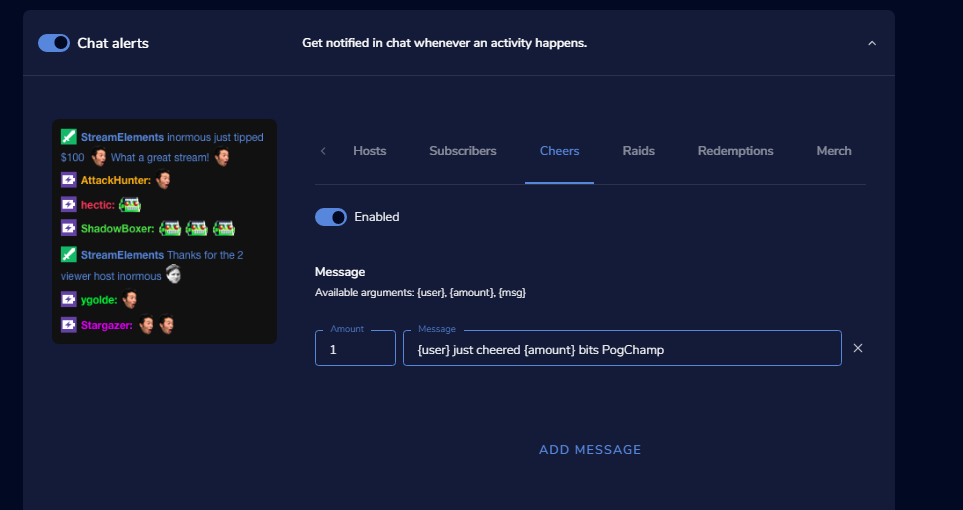
is there a way to share the total amount the person has cheered/tipped in the channel with chat alerts ? https://i.imgur.com/LyKDAtU.png
 abstract hemlock
@dawn fern not atm
dawn fern
oki 🙂 ty
abstract hemlock
@frail moss are you on google chrome?
 frail moss
yes
abstract hemlock
Visit https://streamelements.com/logout and then log in again

StreamElements
The Ultimate All in One Platform for Streamers
strong kernel
Well, yes, you obviously don't have "viewers" when you're not live.
abstract hemlock
StreamElements
The Ultimate All in One Platform for Streamers
strong kernel
You can adjust your Loyalty points settings in the Loyalty settings section of your account, linked above.
 safe agate
strong kernel
safe agate
strong kernel
This is the Twitch helpdesk. Loyalty is not available for YouTube.
strong kernel
Loyalty is not available for YouTube.
lament blade
can someone help me, i stopped receiving the statistics of elements in my email, where can i activate them or see what happened?
round brambleBOT
@lament blade Please provide your account ID found at the top of this page: https://streamelements.com/dashboard/account/channels This ID is public info and safe to share here.
 keen willow
Hello.
I'm having problems with my OBS Live. It's VERY choppy, and no matter what I do, it either stays the same or gets worse.
round brambleBOT
@keen willow Please provide a log from your last stream. To do this, in OBS go to Help > Log Files > Upload Last Log File and paste the link to the log file here.
 opaque lion
how do i do the kappagen command thing?
keen willow
I haven't streamed in a few days because it's been choppy since at least Friday.
 hollow cliff
I can't set up the channel points and the emotes, should I have any specific requirement?
strong kernel
@opaque lion Do you have a Kappagen widget in your overlay?
opaque lion
nope lol how do i get that?
strong kernel
@hollow cliff Channel points, as in the ones that appear under the chat input box, are Twitch specific, we don't manage those.
@opaque lion Edit your overlay and add the widget in.
opaque lion
thank you!
hollow cliff
Thanks sorry for asked for here that, but normally appears since the beginning or appear after some time ?
Sorry I'm new 😩
strong kernel
You need to be a Twitch affiliate to have them.
keen willow
In order to get help with my choppy video issue, would I have to stream? I haven't streamed in a few days because of the choppiness
round brambleBOT
@keen willow 1) Restart OBS
2) Start your stream/recording for about 30 seconds. Make sure you replicate any issues as best you can, which means having any games/apps open and captured, etc.
3) Stop your stream/recording.
4) Select Help > Log Files > Upload Current Log File. Copy the URL and paste the link here.
(Note: If you do not see an obsproject.com URL, you will need to update OBS Studio to version 22+)
 spice grove
How do I add points
strong kernel
The !addpoints command allows you to add points to viewers.
spice grove
Oh ok I'll try that thanks
Do you know how I add over lay I found one I dont know how to do it
round brambleBOT
@spice grove To add your overlays to OBS, add a new browser source in your scene. Paste your overlay URL in the browser source properties, set the dimensions to 1920x1080 (unless you changed them on the website), and ☑ “Shutdown source when not visible” https://youtu.be/KDvLynUqXI4
 wide marsh
How i Stream full screen
round brambleBOT
@wide marsh Please ask your question in one helpdesk channel only. A support volunteer or StreamElements staff member will assist you as soon as they are available. Asking in multiple places will only result in confusion, not faster answers. Thank you for your patience.
@wide marsh New to Stream Elements?
Check out our YouTube channel https://www.youtube.com/c/streamelements/videos
with tutorial videos from setting up the basics, to in depth details on how to use our product.
New to OBS? Here is a 4 step quickstart guide
https://obsproject.com/wiki/OBS-Studio-Quickstart
Want to learn even more? Here is an in-depth overview
https://obsproject.com/wiki/OBS-Studio-Overview
 light imp
We setup a follower goal widget on our overlay but its not representing the actual followers we have. Is there a way to manually offset the followers or otherwise get it in sync with Twitch?
its not registering 2 of our followers for some reason
abstract hemlock
@light imp https://streamelements.com/dashboard/session Check the goal tab
StreamElements
The Ultimate All in One Platform for Streamers
 distant flame
can any one tell me why my bot is not working in my chat or showing up as a mod
round brambleBOT
@distant flame Go to the dashboard -> right side -> part channel -> join channel (https://streamelements.com/dashboard)

 ionic kelp
Yes to both.
 karmic owl
@ionic kelp where can they be found? The SE Widget section is looking pretty sparse
ionic kelp
Overlay editor.
 late terrace
Hi, I'm trying to create a simple tip goal, but I can't see where to edit the current/starting amount, only the goal amount. It's only showing my total lifetime tip amount
in the overlay editor
karmic owl
Oh wow, thanks. I didnt notice it there
late terrace
oh nvm just found it. Small icon in top right, hard to figure out >.<
 merry laurel
hey i have access to someone's groundcontrol by getting his jwt token and i want to customize the bot name but i dont see the option even if he has done all the task for it
 chrome folio
@late terrace if you already have a tip goal in progress, you can edit this information here: https://streamelements.com/dashboard/session
round brambleBOT
@merry laurel Currently renaming the bot fully works with OBS.Live.
You can follow this video guide to set it up: https://discordapp.com/channels/141203863863558144/494513233416421386/561516184718278676
If you don't want to use OBS.Live and want to stick with Ground Control, please let us know your Twitch username.
merry laurel
yeah but i cant do it on ground control
and i conned it all on obs
but the bot response are still with stream elements not with the bots so i was you need to be connected for the bot to work
chrome folio
@merry laurel if the streamer want to use Ground Control: please let us know your Twitch username 🙂
merry laurel
konzn_
 zenith widget
First I want to point out something
sharing a JWT token around
is a security risk
2nd - its best for the streamer to have ground control at the bare minimum
merry laurel
yeah but i still have the same power as the owner
zenith widget
So you want to tell me, you have access to the Twitch account's 2FA?
merry laurel
no
zenith widget
Then you don't have full control as the owner - at least the wording implied it.
That being said
if the streamer is trusting you to share the JWT token
even though they can get their account stolen that way
Restart GC now
merry laurel
what's gc
 thx guys
zenith widget
thx guys
zenith widget
And just to be clear - If they are sharing the JWT token, its on their head - if something happens to their account, they are at fault.
merry laurel
yeah i understand
 white fjord
Dear Streamelements Team, For 3 days now, I ve got a Problem: follows are not registering through SE. People Follow, I can see that in the TWITCH activity feed, but not in the SE feed and so no alert is displayed. could you pls explain this to me?
zenith widget
they should start showing up now
ionic kelp
@tranquil ravine the coins you speak of from the 2nd screenshot only would appear if you are affiliate or partner.
And that's a twitch thing. Not streamelements.
 tranquil ravine
white fjord
tranquil ravine
white fjord
ok, even hosts and othe stuff isnt showing up in se and isnt displayed aswell... subs are working...
round brambleBOT
@white fjord Due to changes to Twitch API, we have filtered out hosts and will only show these ones on your activity feed:
- All hosts coming from an online channel with at least 1+ viewer
- Auto host events with at least 1 viewer - only from a channel that just went offline
Note: If you see "X channel has hosted you" with no viewers on the back, that is considered an offline host or a host with 0 viewers, we do not show these.
Note for Mixer streamers: The above 2 filters currently apply for Mixer and we are aware its actually not how Mixer hosts work. We do plan on changing it, but no ETA on when.
 tough carbon
Is there a way to back track 2 OBS versions somewhere?
zenith widget
You mean downgrade?
tough carbon
Yes
zenith widget
There is, but for what reason?
tough carbon
Ever since I have upgraded the the last 2 versions of OBS, I have dropped frames consistantly
Never had that problem before hand
zenith widget
!droppedframes
round brambleBOT
Dropped Frames usually means that you have a bad connection with the streaming service(Twitch/Youtube/Mixer/Facebook) and most likely something related to your ISP not handling the connection properly.
Speed tests usually cannot help solve this problem and its best to use this guide: https://obsproject.com/wiki/Dropped-Frames-and-General-Connection-Issues
tough carbon
Ive tried everything In that guide and every other one Ive seen online short of just buying new hardware
Internet is fine everything is okay when frames are dropped, just not OBS
zenith widget
including contacting your ISP?
tough carbon
Yup
zenith widget

GitHub
OBS Studio - Free and open source software for live streaming and screen recording - obsproject/obs-studio
tough carbon
Thanks a ton, I apprecaite it!
 rigid charm
i'm trying to add my twitch channel and this keeps showing up, i have already disconnected twitch from streamelements but it still shows up, help?
round brambleBOT
Account Merging - Please note:
- Merging accounts only allows faster ways to switch between accounts
- Merging accounts does not allow data sharing between accounts - different streaming platforms, different type of events
- Merging accounts allows duplicating/sharing overlays between the accounts
If you understand the limitations of merging and want to proceed, please find the JWT tokens (!jwt) from both accounts you want to merge and you will be directed to DM them to a staff member.
zenith widget
DM me those tokens
rigid charm
how do i find these tokens?
zenith widget
!jwt
round brambleBOT
You can find your JWT token on your account channels page ("Show Secrets" to reveal the token): https://streamelements.com/dashboard/account/channels
READ ME:
This is a private security token. Do NOT share this token here or other public places, only with a StreamElements staff member in private.
rigid charm
oh yes i know that however when i click add channel and select my twitch channel it shows the error
zenith widget
Get the token from the current account
click on "sign out" and then login to the other platform/account
if both accounts are from Twitch
rigid charm
kk
zenith widget
make sure you logout from twitch as well
and login with the other account then login to our dashboard
as we log you into our dashboard based on the logged in account in Twitch
 cyan swift
Hello, I stream straight from El Gato’s game capture software on my macbook but for overlays I use Stream Elements by linking it to your website.
Tonight has been the first night where the overlays just won’t load. When I link other websites they all seem to work and properly display on screen.
zenith widget
!elgato
round brambleBOT
If you are having issues with Elgato hardware or software, we recommend reaching out to their support here: https://e.lga.to/help
zenith widget
We suspect that one of their newest updates have stopped liking our overlays or are just blocking them somehow
zenith widget
!elgato
round brambleBOT
If you are having issues with Elgato hardware or software, we recommend reaching out to their support here: https://e.lga.to/help
cyan swift
👍
 indigo shale
Is there any way a viewer can look at a list of the top gifters/cheerers/tippers? I'm wanting to link to each leaderboard with panels
 lyric flame
Is there a way to have TTS tied to highlighted messages via channel points? Or maybe a custom TTS reward?
zenith widget
tippers no, but our extension shows gifters and cheeres
@lyric flame there is a widget for those channel points in #widget-share but LX confirmed that he is not able to implement TTS to it
lyric flame
hmm, ty. I saw someone with TTS tied to highlighted messages but wasnt sure how to do it.
zenith widget
Its most likely not via us
lyric flame
makes sense, is that an idea I can submit? or is it some limitation of twitch/apis?
zenith widget
we don't have an implementation of the channel points due to lack of proper API
what people might be using is custom solutions
just like the custom widget in #widget-share
 toxic pumice
The Extra Life donation alert is supposed to (and always has previously) disappear after 10 seconds. It not just stays on all the time. Please assist ❤️
lyric flame
ahh, so theoretically if/when twitch releases api endpoints something could happen in the future.
thanks!
zenith widget
@toxic pumice I'm not sure I understand. They are going away too fast or staying on the screen for too long?
toxic pumice
Staying on the screen and never going away even though my settings are at 10 seconds. Its supposed to disappear after 10 seconds but as soon as my overlay is displayed on OBS the alert is already showing and never goes away (even though I had not gotten a donation)
round brambleBOT
@toxic pumice Right click on the BrowserSource > Properties > Scroll down a bit > Refresh Cache of current page
zenith widget
try this
toxic pumice
Will do but it does the same thing in the preview window directly in Chrome from my overlay page.
lyric flame
I looked at the PubSub system and it looks like there is something in place for custom rewards. but obv that gets more complicated.
toxic pumice
Refreshed cache...no change
toxic pumice
No worries...that made it finally disappear 😛
zenith widget
ah your not live
i mean yea
but
if i refresh the editor
i see its back 
is the charity ID a valid one?
lyric flame
So follow-up question, I have streamelements bot posting sub messages in chat. But when someone gifts a sub the message is that the person subscribed and it doesnt mention that someone gifted. Is it possible to get a message that says x gifted y a sub?
zenith widget
@lyric flame we are aware of the pubsub but its not what we are looking for
toxic pumice
ah indeed. Weird. I got a donation last week and it worked fine so assuming yes. Will check real quick though...brb
Yup...ID is correct.
zenith widget
ok it seems to be bugged
zenith widget
I'll report it to the devs, but i can't guarantee an ETA
toxic pumice
It happens...had to let someone know at least ❤️
zenith widget
i might have also had to remove the widget and add it again, so the TTS is no longer set
there fixed to courtney again
toxic pumice
LOL you're the best ty. Thanks for reporting to the devs as well. ty ty
 plucky nest
@zenith widget how long is a streamelements store season, and can I change it?
ionic kelp
@plucky nest what do you mean season?
plucky nest
do the point not reset at some point? (pun not intended lol)
ionic kelp
Can you screenshot what you're talking about?not quite following you.
plucky nest
There are some streamers stores that reset points after some time, is this not a streamelements feature?
zenith widget
no
plucky nest
ok thx :p
 sterile plover
Hey guys,i have an issue with SE leaderboard, it shows no data and on the dashboard dosent show the subs, started streaming on feb and changed my twitch name before, any help?ty
have tried uninstalling,loggin in/out etc
 stoic bloom
i have the same problem, the se leaderboard and the bot stop working when i change my name
zenith widget
@sterile plover which leaderboard?
round brambleBOT
@stoic bloom Go to the dashboard -> right side -> part channel -> join channel (https://streamelements.com/dashboard)
sterile plover
@zenith widget extension and website, both
zenith widget
From what I see your points leaderboard is empty
 tame palm
I have a question: For alerts, I'm setting up variations and i saw a parameter for 'Paid Upgrade'. What is that for?
zenith widget
i fixed the chatstats page @sterile plover
@tame palm if someone upgrades from a gifted sub
to normal sub
zenith widget
@sterile plover For cheer data - you need to enable the chat leaderboard so that the extension can grab data
subs will populate on their own - not sure why they are missing
sterile plover
@zenith widget ok,ty subs still dosnt show up,have 4
zenith widget
usually when they share their resubs they will show up again
sterile plover
kk ty again bb
tame palm
@zenith widget how do i emulate a continued gift sub
round brambleBOT
@tame palm You can test Alerts via the Emulate bell on the lower left side of the Overlay Editor. Simply go to your Dashboard -> My Overlays -> Pencil/edit button on the overlay. Make sure the "Preview LIVE on stream" option is on to see the alert in OBS/Xsplit https://streamable.com/vtulg9
 tame palm
that doesnt answer the question :[
zenith widget
If you checked the sub alert emulation you'd see that, unfortunately, no
its a rare thing anything
tame palm
i mean theres the play button next to the variation setting
but no emulation option to say 'someone who continues a gift sub'

 raw horizon
So uhm, I tried configuring some alerts this morning before stream and every alert is just some dude in a shark suit dancing. Is that supposed to be that way?
All of my alerts worked yesterday and now they don't, it seems.
sweet socket
That is the default animation
zenith widget
@raw horizon i only see the shark dancing on the host alerts
sweet socket
have you changed all the variations?
raw horizon
I have changed nothing.
And the videos are showing in the preview.
As in my actual videos.
zenith widget
sweet socket
like said, the shark is the default animation
zenith widget
Ok 2 things:
- Which overlay?
- Which specific alert are you testing?
because i see this as the sub alert
raw horizon
I was hosting the basic alert for hosting (0 viewer hosts) and my at least 10 viewer host. And it was only showing the shark man.
It's the "Basic Overlay Yoonz Twitch" Overlay
Yeah, the tip alert works for example.
It's specifically the host alerts, it seems. All of them show the shark man.
The raid alert also works. But I usually have that turned off because I dont want 2 alerts going off for one thing.
zenith widget
ok it took me a moment to see this my self
disable the custom css
as the custom css default code inside uses the shark default image
 zenith widget
sweet socket

raw horizon
Hope you guys have a wonderful day ahead! 
 hasty lagoon
just trying to figure out this overlay thing
i have on in mind but i dont have a camera yet. and the overlay takes up a large portion of the screen itself and doesnt show everything fully
 proven compass
in OBS/XSplit? or on the website?
hasty lagoon
im on the website for stream elements doing a pre done overaly and editing it to my channel
overlay*
proven compass
what's your desktop resolution
if you can't see everything on the website use this
round brambleBOT
@hasty lagoon The default resolution for StreamElements overlays (theme and custom) is 1920x1080. Please add them in OBS at their full resolution and use CTRL+F to fit to screen if necessary. You can then downscale your stream in OBS settings > Video if you'd like https://i.imgur.com/6bWXxjR.png
 proven compass
and if you can't see everything in OBS, use that ^
 stoic orchid
My screen stays white and only help button appears and I did a hard refresh but nothing happend
zenith widget
user chrome to open our website
 knotty copper
anyone else having issues with follower alerts not showing in chat or activity feed?
hasty lagoon
only other question i can think of is do you know where or have any recommendations as to where i can find different sounds to use in place of donations, follows, subs etc.
knotty copper
Youtube @hasty lagoon
zenith widget
knotty copper
@zenith widget , any reported issues with followers?
knotty copper
wasn't for my channel, it's for one I moderate or does it do with all of them.
 obsidian tulip
Hey! My currency command is being really weird it wont work sometimes ive set the command to be !power but ive also got a sfx setup under the command !power as i want the sfx to play sometimes could this be clashing and breaking the point command?
knotty copper
@zenith widget works fine in my own just his chat doesn't do it. but his !followers count continues to go up.
zenith widget
Name
knotty copper
Wxltzy
zenith widget
resubbed
knotty copper
thanks, will keep an eye on it 🙂
 ebon sand
Guys. I've literally not changed or touched anything. Now none of my overlays show. Even on the website when i click to edit my overlays i doesn't show them graphically.
ionic kelp
If you open it in the editor or hit the preview button it's blank even though there's graphics?
ionic kelp
Try in incognito
 harsh sluice
Umm my browser source in blank? when i go to my brb and talk overlays on the website its like its deleted?
ebon sand
Yeah same @harsh sluice
 robust herald
Yes, no overlays.
zenith widget
 harsh sluice
wtf lol hope it fixed by 4pm gmt time
ebon sand
Aha, I should've checked earlier. My stream was supposed to go live 8 minutes ago.
zenith widget
it just happened
zenith widget
if you see the panic in #helpdesk-selive
so something borked just now
refresh the overlay editors and loaded overlays - its back to normal @harsh sluice @ebon sand
 tribal chasm
ah, it's not just only me!
zenith widget
refresh
harsh sluice
how do you refresh the overlay editor?
zenith widget
F5
harsh sluice
yeah its fixed i also restarted obs and now my overlays are showing again
cool cool
obsidian tulip
No seems my rules command wont update after saving :/
 half iris
Hi! I have a question about SE Pay. I registered it with one bank account but I would like to change it to another bank account. Can someone please help me with this? 🙂 thank you in advance!!!
 median stirrup
@round bramble My old name was : FleD_official , my new name is fled_tv , i think thats why my chat stats doesnt work.
round brambleBOT
@half iris Please contact us via email for support with SE.Pay. You can use our contact form here: https://streamelements.com/contact Thank you
half iris
And I’m also having a problem getting my donations to show up in my widgets. I use Streamlabs OBS when I stream but also have SE Pay/PayPal set up through stream elements. Every other widget except donations works and I want to make sure to acknowledge the people who donate 😦
ionic kelp
@half iris you're using our overlay in slobs?
half iris
I currently use SLOBS to stream but have donations set up in stream elements. I tried to import the settings but donations still don’t pop up. When I test the widgets it is fine
round brambleBOT
We're not able to troubleshoot issues with using our overlays in StreamLabs OBS (SLOBS) as we don't have the tools to support their software. We recommend using OBS Studio or OBS Studio with our plugin OBS.Live.
half iris
okay! Thank you 🙂
ionic kelp
@toxic pumice Should be good now.
obsidian tulip
My command wont update after saving please help
Even adding new command for it didnt work/update
got new command working weird
i deleted old command and its still showing wtf?
round brambleBOT
@obsidian tulip Go to the dashboard -> right side -> part channel -> join channel (https://streamelements.com/dashboard)
obsidian tulip
Still have the problem after doing the above.
zenith widget
which command?
obsidian tulip
ive setup !rules
deleted it as it wouldnt update when saved. so i setup new command as deleted the old rules command and the bot still shows the old command i deleted
zenith widget
Custom Rules: NO STREAM SNIPING, NO ANON MODE, NO HELICOPTERS OR LIGHT-SABERS TwitchLit this should be the updated version?
obsidian tulip
Thats right 🙂
zenith widget
👍
zenith widget
obsidian tulip
 kind wagon
Hello all, can I get some overlay help here or wrong room? 😐
obsidian tulip
ye #f5 😄
zenith widget
What is the issue you are facing? @kind wagon
kind wagon
@zenith widget minor things tbh For example coutdown widget not showing the numbers... Sub list not scrolling...
playing around with the overlays basically, and not being able to find anything about these online 😐
kind wagon
This one:
zenith widget
scrolling text is working for me, although its rather going sonic style
kind wagon
nevermind
I can't read for the countdown
and the scrolling text, apparently it's refresh issues with saving
so I'm gonna blame it on the interface between the chair and the keyboard and mouse 😉 ahahah
zenith widget
im not sure why the countdown is not showing up though
kind wagon
I forgot to fill up the message with the format 😦
zenith widget

ok this is new to me as well
i didn't knew that the message part actually had to have the variables and i thought it should default to the countdown if there is nothing there
kind wagon
The message there... It was empty and I forgot about it
I thought the exact samething, I mostly assume defaults
zenith widget
welp, you learn something new everyday i guess
 ivory karma
everytime i try going to my dashbord om streamelements my browser crashes :/
 gilded kettle
need a bit of help if anyone could, i hit affiliate yesterday and was wondering how i can get a sub count on my stream, would appreciate the help 
 twin sentinel
Labels > Subscribers > Total &All Time > Total Subscribers
@ivory karma What browser are you using?
 nova gust
Using the CSS Editor, how do I get my alerts to display the username of the person that Gifted a Subscription, and not the person that received the Gift?
Please @ me if you know how to do this
 toxic rapids
Does anyone know if there is a way to only allow a chat command to be used a specific number of times, based on how many times another command has been used? (I want a command to be available only after someone uses my !lurk command, and the new command is available the number of times someone has lurked) Thanks in advance for the help!
ivory karma
@twin sentinel chrome i can go to the dashbord when i use the complete link, but if i pus the "go to dashbord" button it fails
round brambleBOT
@toxic rapids Check out the StreamElements ideas board: https://strms.net/ideas. You'll be able to add ideas, upvote ideas you agree with, and track their progress with email notifications. Adding and upvoting ideas also helps the staff know which ideas should be prioritized so please take some time to upvote.
zenith widget
@ivory karma clear your browser's cache and cookies and try again
@nova gust check #dev-chat channel description for the custom widget documenation
 mighty thicket
but why when I put a command with a link, the link does not show it to me?
 mental narwhal
Is it only possible to make one of my mods an Editor on streamelements?
round brambleBOT
@mental narwhal Follow these steps to grant managers/moderators access to your dashboard:
- Click on your Channel Name at the top of the dashboard and select Settings
- Create a new invite at one of three access levels (Bot Supervisor, Editor, Full Control)
- Send this invite to a mod/manager to give them access to your dashboard. The link is one-time-use and expires after 72 hours if not accepted
Video tutorial: https://youtu.be/zl_h-ttZDF0
zenith widget
@mighty thicket What link and where?
mental narwhal
I've already got that @round bramble I just want to know how to add more than one
if possible
mental narwhal
It doesn't let me generate a new link
zenith widget
mighty thicket
I put the command! instagram and put a link on it but the link doesn't show it
zenith widget
@mighty thicket mod the bot
mental narwhal
Keizar what did you use to record that? o:
zenith widget
ShareX

ShareX is a free and open source program that lets you capture or record any area of your screen and share it with a single press of a key. It also allows uploading images, text or other types of files to many supported destinations you can choose from.
mighty thicket
@mighty thicket mod the bot
@zenith widget thanks
mental narwhal
ty man 😄
 gleaming echo
Is it Possible to Transmute Points in to another Form of Chat Currency?
zenith widget
What?
gleaming echo
Like, say you wanted to Turn Points into Gold Bars & Gamble on the Slots With Gold bars
Say through the Stream Store
zenith widget
For another game?
No we don't have integrations with other games for point conversion
gleaming echo
And in that Sense you can Buy items with the bars like an item that stats kinda like the text Based game Mafia Wars
 cursive otter
Hello, How do I make it so the message doesnt come up at a specified amount and comes up if someone donates any amount?
 craggy wedge
Where are the settings to be able to redeem sound effects using the twitch channel points?
 slow bramble
I've been looking for this too
zenith widget
@cursive otter i see its setup correctly
We don't have integration for the Twitch Channel Points.
We do have plans, but we are waiting for a proper API endpoint to be released.
zenith widget
zenith widget
We don't have integration for the Twitch Channel Points.
We do have plans, but w...
lament blade
when i get donations they dont show up on screen what is the problem?
cursive otter
Ok thanks
lament blade
the donations dont show up in the alert box
gleaming echo
Thanks for your Time
zenith widget
I don't see any tips in the revenue page since April @lament blade
How are you sure you are receiving tips currently?
lament blade
its in my tipping history
but it doesnt show as an alert on streamlabs obs
i wanted it to show on screen
zenith widget
If you are using Streamlabs alerts - tips via our link will not trigger an alert on the SL alert widget.
lament blade
so if anyone tips though streamele,emts it wont show on screen
 maiden spear
hi i am play a video through a stream elements browser source which is started with a chat command. It runs video fine except it wont disappear once finished and is unable to be replayed. Thanks in advance
zenith widget
@lament blade no
@maiden spear I'm not sure I understand. streamelements browser source?
lament blade
then how do i make the donation show on screen ):
zenith widget
https://streamelements.com/dashboard/overlays @lament blade Add the overlay named "alert box"
StreamElements
The Ultimate All in One Platform for Streamers
maiden spear
@zenith widget sorry the streamelements overlay has been added as a browser source in obs i mean
the video is on the overlay
lament blade
ok thank you
zenith widget
@maiden spear ooh triggerfyre? @wanton mango can help on that
maiden spear
yeh exactly
zenith widget
seeing as its marked as beta, its best to give him the feedback
maiden spear
in this discord?
zenith widget
i believe he has his own discord...or DM him or ask him in #dev-chat
not sure how he gathers feedback on it
maiden spear
is there a way to make a widget refresh itself then? @zenith widget
zenith widget
reload the overlay
robust herald
Hi guys, subscriber recently continued to subscribe and I didn't get any info on twitch.tv and StreamElements neither, what can be the problem? I still have his sub, but his first sub was ending yesterday and it didn't give me any info
round brambleBOT
@robust herald Twitch prime (new and resub) and paid subscriptions (resub only) must be shared in chat manually by the person subscribing in order for the subscription information to be sent to StreamElements. For twitch prime, the user needs to have sharing enabled on https://www.twitch.tv/settings/prime. For paid subs, if the share box doesn't show up immediately it will when they refresh the page. https://i.imgur.com/VNJN0Uv.gif https://i.imgur.com/2297EA7.png


 zealous tulip
question - is there a way to get the "clip that" button to work in my "Twitch quick actions" url dock?
round brambleBOT
@zealous tulip For the best OBS support, please join their Official Discord @ discord.gg/obsproject
 tranquil needle
Hey i use streamlabs for most of my alerts but i use streamelements for my tips, is there a way to get streamelements to have an alert just for tips where it will work in streamlabs obs?
 worldly dragon
will my overlay also have mixer alerts
tranquil needle
@worldly dragon wrong helpdesk
worldly dragon
nobody speaks in the others
 misty pike
can anyone help me adjust my stream settings
i still lag in game and stream looks choppy and i dont know what is the wrong settings
worldly dragon
whats your specs
worldly dragon
obs?
worldly dragon
try changing to nvenc that helped me
worldly dragon
i thought new was for the 20 series
misty pike
cpu is trash LOL
worldly dragon
only if u have a bad cpu
misty pike
i got i5 6600k
worldly dragon
yeah thats not a bad cpu
misty pike
hmm okay ill try
worldly dragon
alright
lament blade
there are issue in chat commands > default commands > command keywords
any word can't be saved
misty pike
stream still laggy 😦 dont kn ow what to do lel
upgraded my gpu and it dosent seem to fix it
 small pagoda
Hey, i got a overlay where it shows the last sub, and the highest donation but i dont know how to add a source with the names there, can anyone help me
ionic kelp
@tranquil needle you can add our overlay into SLOBS but it's not guaranteed to work and any issues are on you.
 robust gyro
Heyhey! Ok so I just worked out how to set up my webcam through the canon app but the YT tutorial says to use window capture but the only alternative I can see is Display Capture, can I set a specific window to be captured while I have the window minimised?
misty pike
it only gives me 2 options 1 for the nvanc new and then the other is x264
 nimble owl
Hello =)
I dont know why store items wont show up on my stream anymore.
Should I create a new link ore something?
misty pike
any help on how to get the older nvanc one?
ionic kelp
@robust gyro not possible.
robust gyro
@ionic kelp so it's just display capture?
weak delta
I got a basic question for ya... but what does this button actually reset?
robust gyro
Right ok
weak delta
I have never clicked it, ever.
 weak delta
Activity Feed.
nimble owl
Should I reset the allert link or something like that?
ionic kelp
the actual activity feed tab?
weak delta
Is for that email y'all send at the end of every stream? That stats and the like?
Yeah, the actual activity feed tab.
ionic kelp
1 sec
 split cypress
hey sorry if im in the wrong section but i cant link SE bot to my fb page, there is no option or i think im just using se wrong. is SE bot compatible in fb live?
weak delta
I see the session data tab now so it's gotta be toward that. I only really realized there was this widget data section on the activity feed like 3 days ago. I been going in the overlays to reset goals.
ionic kelp
@split cypress wrong desk and to my understanding no.
weak delta
Is there a scenario where I would actually want to press this button?
split cypress
ok thank you and sorry for spam
 ionic kelp
You have redemption widget added?
nimble owl
yea
it used to work. I have no idea what I changed
o.o
the follow sounds work. but the store perks wont work anymore
misty pike
anyone avilable to help me fine tune my settings to fir my rig
i honestly cant find the right settings to stream without lag
pls
round brambleBOT
@misty pike For the best OBS support, please join their Official Discord @ discord.gg/obsproject
nimble owl
Ok i think I know why it dident work
under Redemptoins at the page you can aprove the redeemed sound/perks
This new aproving update drives me nuts 
ionic kelp

nimble owl
there probably is a setting to dissable that aswell right?
I dissabled it in sr already
ionic kelp
I'm not sure. Lemme ask someone.
 severe bramble
I have an overlay question. I've looked everywhere and can't find it
Would i ask that question here?
 clever whale
I have a question about setting a timer command for the bot?
nimble owl
go ahed ask my dude
clever whale
I want the SE bot to blast out my uptime. I have the time increments set where I want them, but how do I set up the command to show the actual uptime?
 rough glacier
I also have a problem with the overlays
nimble owl
uptime should be a default command
let me check real quick
I have it enabled myself

you can edit it there
just ask guys
maby I can help somehow xP
severe bramble
I want to reset a timer on my overlay in the stream elements obs. how do i do that?
 polar shell
Can anyone help me my se merch wont load
clever whale
I have that enabled but that requires someone to ask doesn't it? I was looking for SE Bot to automatically blast it out every 45 mins
nimble owl
You can edit the scene and toogle it of when youre not using the scene
then it should reset i think
rough glacier
Basically for my follower alert, when I put Text over image, the name of said follower doesn't appear anywhere in the AlertBox
nimble owl
oooh you mean like a timer
rough glacier
When I go in Row or Column it's perfeclty fine
nimble owl
yea I dont think you can make a timer out fo that 🤔
rough glacier
Ok nvm Column is broke as well now
polar shell
Dose anyone know why mt merch wont load up it gose half way then stop
nimble owl
@clever whale
clever whale
@nimble owl Word. I see other bots doing this, I was just curious. Thanks for the help.
rough glacier
I tried cleaning deleting the custom video, using another one, doesn't work
Ok nvm I think I found, the Advanced Text Top Margin was set to -50 for a reason
nimble owl
@clever whale yea it doesent work xD but you can add it as an idea if you want #💭︱feedback-and-ideas 
ionic kelp
@polar shell mind screenshoting what's happening with the page?
 vivid ocean
Hey guys, will you be able to turn on the created overlay by chatting? (which one will write who used the command and the video) If so, what variables?
nimble owl
sudo can you dm me when you get a response from them ?
lament blade
how can i get defualt alert theme?
ionic kelp
Will do.
 alpine atlas
hey, looking for help on setting up the widget to automatically show most recent tipper, subscriber, etc.
lament blade
?
ionic kelp
What do you mean default alert theme?
lament blade
like streamlabs got the defualt theme
ionic kelp
Still no idea what you're talking about.
lament blade
nevermind i move on to streamlabs
 remote salmon
clever whale
remote salmon
clever whale
@nimble owl actually i found it, you need to add the ${uptime} to the timer message
 fallow maple
hey, my chat stats page has started throwing 404 error from some point in the past few days. any idea what's up? I can still click onto it from the dashboard hamburger menu
ionic kelp
@fallow maple is shoutplenty your current username?
clever whale
Can someone help me with Media share?
fallow maple
@ionic kelp yes 
ionic kelp
Have you changed your name before?
fallow maple
never
 junior star
Hello, how can i leave the bot on my stream ?
 unborn wedge
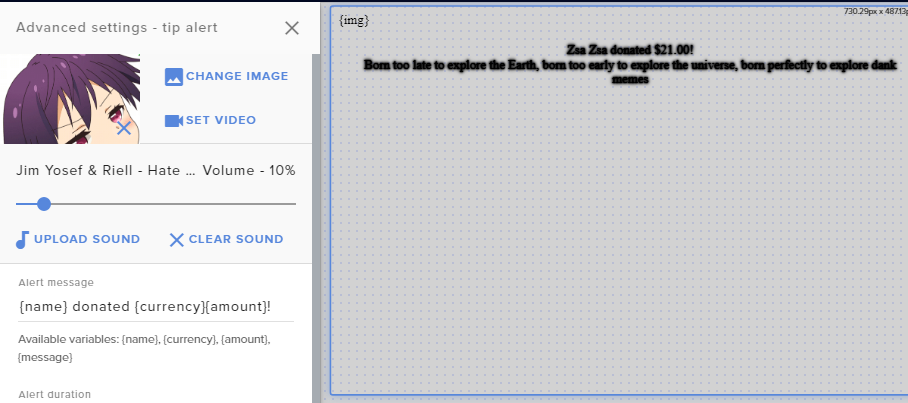
Hello! i have just moved to Streamelemnts and i am having trouble with my alerts. I setup my follower and Sub alerts, but my donation alerts dont seem to be working.

 round brambleBOT
@junior star Go to the dashboard -> right side -> part channel -> join channel (https://streamelements.com/dashboard)
unborn wedge
alright i will try that
junior star
Oh ok thank you
unborn wedge
oh lol
Google chrome
like idk why, but follower and sub worked just fine, did the same exact thing with donos but they dont seem to be working
ionic kelp
Could you try in incognito?
unborn wedge
sure
nope, still just shows the black message instead of gif and normal dono message
lament blade
Hey i need help with !raffle
round brambleBOT
@unborn wedge On the page that gives an error, press F12 to open Developer Tools. Navigate to “Network” at the top and then Select “XHR” in the filter section. Try the action again that gave the error and note in the network tab any red text. Please copy and paste the error information that is given when clicking on this red text.
ionic kelp
Don't copy/paste it. Screenshots will suffice.
robust gyro
What would give me the capture card source please?
unborn wedge
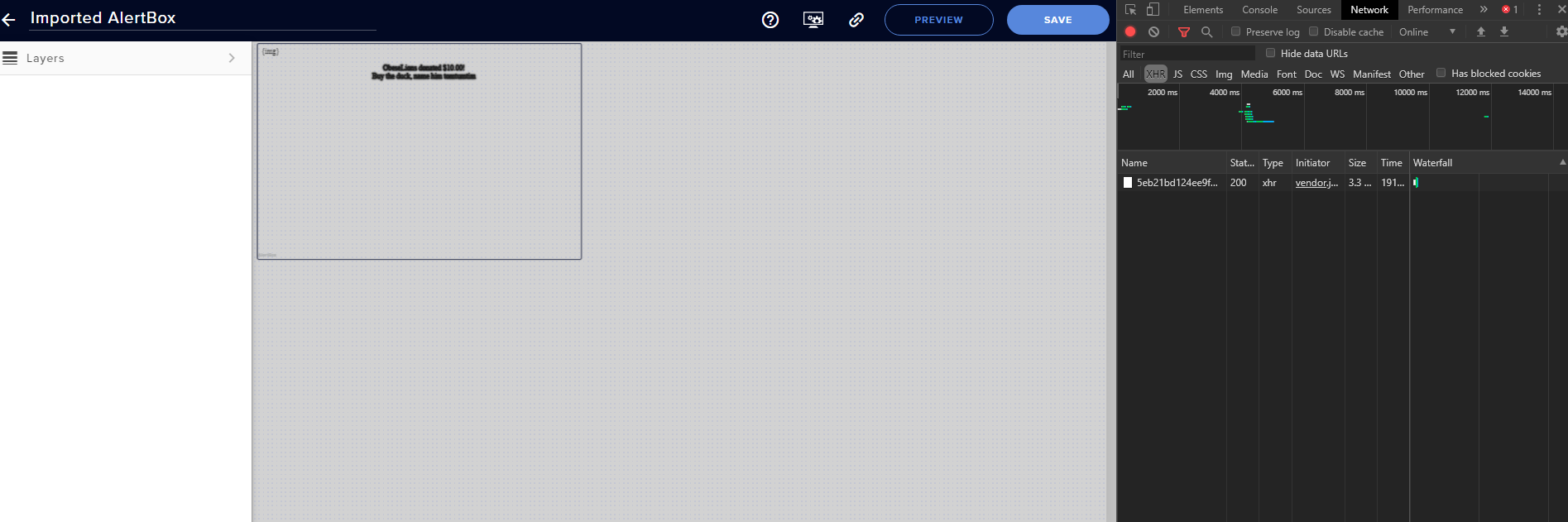 ionic kelp
Video capture device.
unborn wedge
no red text :/
ionic kelp
Go to console tab and look there.
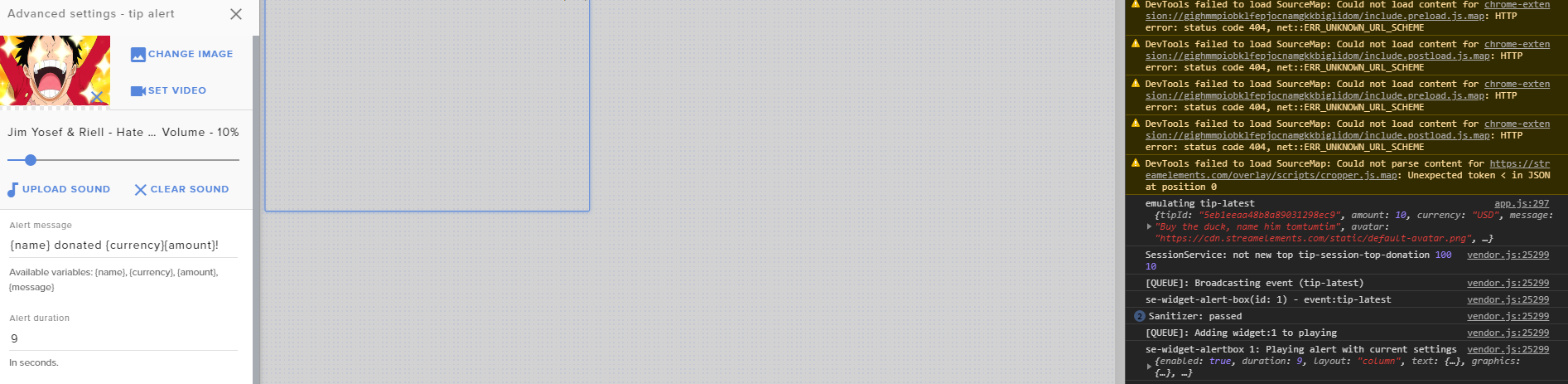
 ionic kelp
Yes. Gimme a sec as I'm on mobile and a tad hard too see
unborn wedge
lol sry ye i sent one a bit bigger 😛
 wraith frost
hi
i am using restream.io but my streamlabs obs shows youtube activity feed and chat how can i change to twitch activty and chat
lament blade
Is there a way to make a custom command for 1 person? That only that user can use that command? Not talking about VIPS or Mods, really talking about specific users.
wraith frost
in my streamlabs obs studio
lament blade
@ionic kelp Hey do you know hot to eddit comand !raffle ? so i can set how many point win will be the raffle
wraith frost
i cant change in obs studio
wraith frost
ok i am using streamelements already sryy
unborn wedge
oh
wraith frost
for wrong writing 🙂
unborn wedge
all good, happens 😄 ^^
wraith frost
i want to change my activity feed and chat to twitch
lament blade
@ionic kelp any plans?

 ionic kelp
Gimme sec. On bike nearly home
unborn wedge
oh alright man, ty for helping
robust gyro
I'd like help getting my PS4 to appear on SE please, I can get the audio to appear in the Desktop Audio but the visual isn't there.
ionic kelp
Choose video capture device and select the capture card as the source device.
robust gyro
I have, there seems to be 2 sources available but it doesn't appear on either of them but I have 1 card connected?
round brambleBOT
@robust gyro For the best OBS support, please join their Official Discord @ discord.gg/obsproject
ionic kelp
That's something to ask them.
robust gyro
Right ok will do
ionic kelp
@unborn wedge that's most likely from adblock if you use one.
But is kiritzu_plays your current name?
unborn wedge
OH OK
sry caps
and no
currently it is kiritzu_livew
kiritzu_live
will change it in 2 days though
ionic kelp
Hit save for the overlay and I'll see if a staff can poke at that it.
I'd recommend closing it unless you'd want surprises.
unborn wedge
yes it is saved, i really dont know what the issue is, like follows & subs worked perfectly but donos dont
its weird
i will try bits,raids and hosts now 😕 hope those work
surprises?
in that case i will work on bits and such later
surprises? @ionic kelp also so they will work on it or what will happen?
also should i close all my streamelemnt tabs?
lament blade
How to change !raffle settings can you help me guys ?
ionic kelp
They'd simulate the alert which would be unexpected for most.
unborn wedge
oh lol
lament blade
Nvm found out
unborn wedge
@ionic kelp ty for trying to help me i appreciate it i really do! also no pressure but when will they work on it? want to know if i stream tonight or not ^^
ionic kelp
I asked them to take a look at what might be misbehaving but gonna have to wait to see if he gives me a response.
unborn wedge
alright
ionic kelp
Where was it imported from btw?
unborn wedge
uhm.. tbh idk some stuff it imported from streamlabs and some it didnt
ionic kelp
Can @unborn wedge can you open the alertbox again disable custom CSS save, reload and try again?
Ffs mobile
Make sure it's disabled.
 twilit mountain
Hi everyone, i stream directly from my ps4 on twitch, i have streamelements set up and it alerts me when i get followers and stuff but i got a donation yesterday and nothing popped up on my stream, and theres no information on my stream elements page about it , but i did get the money on my paypal, how do i fix this so it pops up on stream
 brittle terrace
#helpdesk-twitch Hey I’m new to streaming and was told stream elements is the way to go! Could anyone give me some insight into actually what to do? 🙈🙈
unborn wedge
@ionic kelp uhm custom ccs?
ionic kelp
Click the alertbox in the editor and then the ⚙️ for tip settings. There should be a switch for custom CSS there. It needs to be disabled.
twilit mountain
Hi everyone, i stream directly from my ps4 on twitch, i have streamelements set up and it alerts me when i get followers and stuff but i got a donation yesterday and nothing popped up on my stream, and theres no information on my stream elements page about it , but i did get the money on my paypal, how do i fix this so it pops up on stream
unborn wedge
@ionic kelp THANK YOU! i appreciate the help
 whole mango
Any easy way to get the sub goal widget to exclude resubs?
 radiant bolt
Working to set up Stream elements to record the amount of subscribers I get for a sub-a-thon I am hosting next week - anyone have any information on how to test the counters to make sure I set them up correctly. After googling the only information that I am finding is "stream elements is better than streamlabs" and not the information I am looking for. Any assistance would be greatly appreciated.
radiant bolt
I clicked the emulate and nothing happens
whole mango
Hmm
radiant bolt
Like i used their basic item and nothing happened.
whole mango
Is the "preview live on stream" box checked?
radiant bolt
Yup
radiant bolt
I am using Labels -> Subscribers ->Total & All-Time -> Subscriber Count and then in the Settings Editing Subscribers from All Subscribers to New Subscribers/Gifted Subs/Resubcribers as my three items
whole mango
Ok. I'm willing to help test things out, but I have to brb for a few.
radiant bolt
No worries - thanks for the assistance.
whole mango
👍
radiant bolt
Fellow GameDad fan i see ❤️
radiant bolt
My heart and soul
whole mango
I'm a mod XD
radiant bolt
Bless you
whole mango
huge pp
whole mango
Small world
 stray ermine
hello, just wondering if anyone has encountered any recent store issues. I am part of a community that uses the store as part of an interactive stream. The notifications are not showing all the time on the widget and transferring to stream. Anyone know anything?
 tiny portal
If I'm using HypeBoss, is there a way to test my alerts without it affecting the health of the HypeBoss? I created new alerts and was testing them and noticed that the HypeBoss was damaged enough that it changed to a random/generic name instead.
 gray grail
I keep getting "REsponse message" in my stream
like a timer.
is this a known error
 shy sonnet
hi
twin sentinel
Most likely a timer message, which was not set up to the end. @gray grail
twin sentinel
Check the messages on each timer.
 gentle kite
Hello! I have been having an issue with my overlays not working in Elgato Game Capture. Any ideas how to fix that? Ive contacted Elgato and they dont know exactly whats going on. The overlays were working and then a few days ago they just stopped.
 torn perch
round brambleBOT
torn perch
round brambleBOT
@torn perch To add your overlays to OBS, add a new browser source in your scene. Paste your overlay URL in the browser source properties, set the dimensions to 1920x1080 (unless you changed them on the website), and ☑ “Shutdown source when not visible” https://youtu.be/KDvLynUqXI4
If you are having issues with Elgato hardware or software, we recommend reaching out to their support here: https://e.lga.to/help
clever whale
Have you all had any issues having the mediashare widget active, but when online it says the widget isn't active?
 dawn geyser
Howdy, peeps. The built-in Stream Elements Timer widget has text-alignment settings (Left, Right, Center, etc.) but does not honor them; its text is always centered. Is there a fix for this or a workaround?
stray ermine
sorry to ask again, but is anyone aware of any issues with the streamelements store widget not displaying all the alerts on stream?
gray grail
I did @twin sentinel
I said "no", because I confirmed it.
I have 2 timers with 2 messages
twin sentinel
Do you have a screenshot of your timer section and the two screenshots of the two timer settings please.
amber obsidian
Any way to delete a viewer from the 'Latest Cheer' or 'Latest Subscriber' ect so their inappropriate name doesn't appear on my Overlay/Stream?
gray grail
Got it fixed I think noow lol
 crimson moat
Hey yall, I was wondering should I use studio or obs
what is the difference
Ive been using OBS for a while and it seems more intuitive then studio
all I want to do is add the chat bot you all have to my chats to occassionally notify viewers of stream events and do a introduction message
The system basically rerouted me to studios
 jade remnant
whats studio?
jade remnant
so you use slobs but want to use obs?
crimson moat
I just want to be able to use the chat box
notification bot
it said basically I needed to download obs
Im not sure which is better for streaming intuitive
twin sentinel
@amber obsidian Change the label data https://streamelements.com/dashboard/session and save the changes.
crimson moat
seemed SLOBs was more basic but Studios is more at my fingertips
I cant find how to add the chatbox now to the layout tho on obs
and still cant get the bot rolling
jade remnant
yes, streamlabs is its own software, nothing us or obs can control
if you want to use stream elements overlays then you can, however we cant provide much support as is not a software we support.
as for the bot you can still use it, just join it from the dashboard
crimson moat
what do I do from here?
could i send you a call to make this easier?
with screen share on my end?
amber obsidian
thanks @twin sentinel - One more question, can I set a minimum on Bits for it to even show up?
viewers come in and donate 1 bit 99% of the time it's to be a jerk ;/
twin sentinel
Set a minimum in the alert box settings.
crimson moat
@jade remnant
amber obsidian
I don't see how?
twin sentinel
Oh, in that widget, there is not option to do so. I thougth you were referring to the alert box.
You would need a custom coded solution for this.
amber obsidian
alright, not the end of the world I'll just rename people for now. Thanks.
jade remnant
@crimson moat looks like you have the bot already connected to your twitch, do you need the chat in an overlay or just a dock in obs?
crimson moat
Im trying to fit it in the premade overlay
not entirely sure what a dock is
Im still new to this and use to just do it all manually
😆


 jade remnant
if you want it on your overlay, click the + then stream tools > stream chat
when you are editing your overlay
round brambleBOT
@crimson moat New to Stream Elements?
Check out our YouTube channel https://www.youtube.com/c/streamelements/videos
with tutorial videos from setting up the basics, to in depth details on how to use our product.
New to OBS? Here is a 4 step quickstart guide
https://obsproject.com/wiki/OBS-Studio-Quickstart
Want to learn even more? Here is an in-depth overview
https://obsproject.com/wiki/OBS-Studio-Overview
@crimson moat We've released our new Overlay Editor revamp. You can check out the changes and how to work with it here: https://youtu.be/X5VzXjqAsjk
Check out our blog post as well: https://blog.streamelements.com/streamelements-overlay-editor-just-got-even-better-c22cb5b4853e
We are thrilled to announce the launch of the remastered StreamElements Overlay editor!
https://p.strms.net/newoverlayyt
Why StreamElements Overlays are better?
😎 Simple: Load your entier setup using only 1 link
⚡ Fast: Cloud-powered Overlays arrive in real-time, say goodb...
 wary halo
no, only if you want donations
crimson moat
@wary halo alright, and my page looks nothing like the one BBXH is showing in the video
wary halo
then what does it look like?
unborn wedge
how do i get the activity feed and chat to become popout windows? and also how do i make chat dark mode?
 crimson moat
wary halo
crimson moat
wary halo
@crimson moat listen and watch very carefully, she is in the overlay tab
you have that collapsed as i saw on your previous screenshot
@unborn wedge check the pinned messages in the >> #helpdesk-selive << channel 😉
crimson moat
no idea how to non-collapse
 oblique steeple
This will open the sidebar again
unborn wedge
@wary halo made it dark mode now ty
 rare timber
Howdy! i just updated stream elements obs and i see both preview and program screens how do i get rid of the program screen
wary halo
exit studio mode
unborn wedge
https://prnt.sc/sc28qm on sources there is the option for popup window i dont see it on chat or activity feed though, i can "manualy" make them popup but i cant size them once they popout
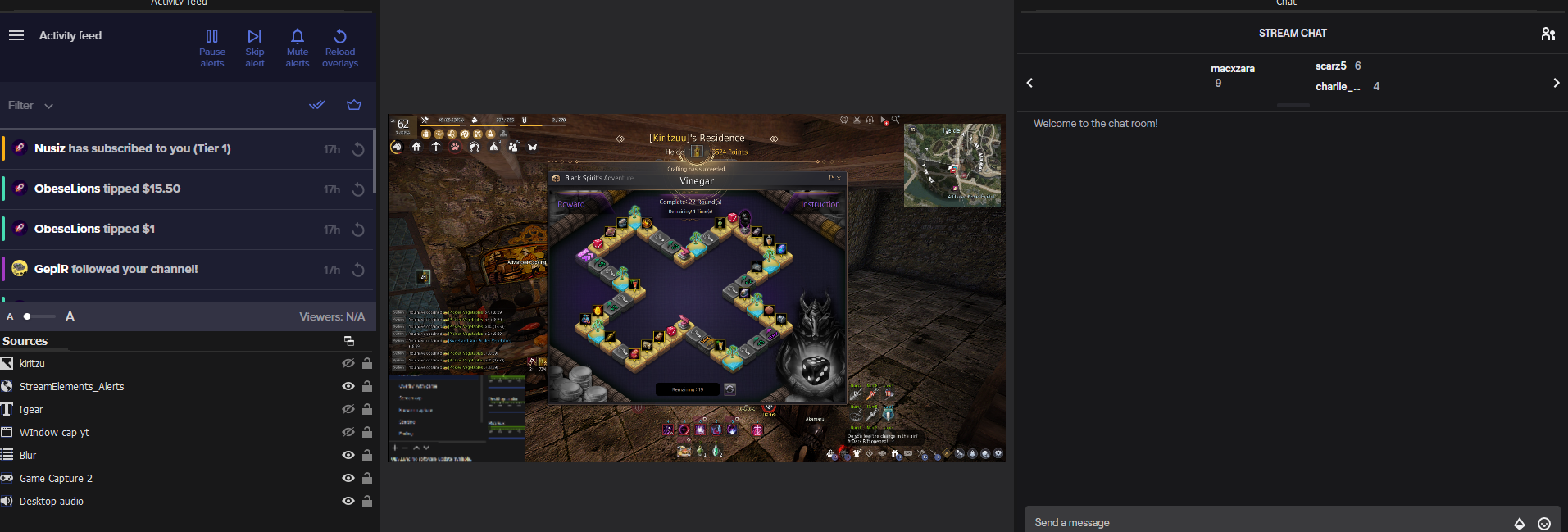 rare timber
how do it exit studio mode
wary halo
crimson moat
alright I think im slowly figuring this out ill be back once ive become lost again cheers guys
rare timber
thank you
unborn wedge
https://prnt.sc/sc28qm on sources there is the option for popup window i dont see it on chat or activity feed though, i can "manualy" make them popup but i cant size them once they popout
 heavy panther
My chatbot is not working at all, I have it joined in my channel, it's a mod and all my commands are active, but it's not triggering. What do I do?
stray ermine
Still have issue with the store widget not displaying back to back store redemptions on stream. Anyone have any idea why?
crimson moat
Is there any way to set a different charity option then those available.
We do alot of charity drives for organizations such as the Wounded Warrior Project and we would like to see if it was possible to make a custom add on image we can modify like in slobs
here is the example
 wintry vine
My alerts in stream elements are scrolling but on obs they are still. Any help on this? Never had this issue before. Everything else is working fine. Thanks.
 midnight perch
Hello, I have a question regarding the overlays. I have an overlay and I want to add a hyperlink to a text (I have the discord logo and the text "DISCORD" and I want to add the invite link to the text), but I could not remove the blue color of the text after I add the hyperlink. Does anyone have an idea?
gentle kite
Hello sorry to ask again but I have been having an issue with my overlays not working in Elgato Game Capture. Any ideas how to fix that? Ive contacted Elgato and they dont know exactly whats going on. The overlays were working and then a few days ago they just stopped.
 wicked raven
@gentle kite same thing happened to me also. Been trying to find a way to fix it but I got no answers. I'm on mac so yeah.
weak delta
@wintry vine refresh the cache in the source on OBS.
Right click > properties > scroll down > refresh cache
Any time you make a change to your overlays, you'll need to do that.
The scrolling gets locked up whenever you save the overlay.
crimson moat
Silly question but how do I make a custom alert for follower on my stream. I had one for SLOBS but have not been able to figure out how to do it on stream elements
Would anyone have a possible solution
 wintry grail
I changed my name on twitch now my bot doesn’t work? Stream elements is all connected updating as normal. It isn’t banned or muted?!?
 whole ermine
Hey, I have a problem with my alerts they just stopped working today on stream for no reason worked perfectly fine other days. When i emulate them they showup on the editor and on the url page but do not show up in my obs any idea what's the problem?
amber obsidian
is their a way to have audio redeemed as well us other variables packaged neatly into one command? ${user} panicBasket Just Lost ${user.points} panicBasket ${pointsname} - LUL HAH! J/K LUL ${redeem rigged}
 cobalt sonnet
I'm having the same problem Tomaszeek, my browsersource overlays worked perfectly 2 days ago, but since then they've just been appearing as a black screen. And like your issue, they work on the url page and emulator, just not on OBS.
 rustic quiver
How do you add custom font in SE??
(Trying to get a brushed metal look)