#helpdesk-twitch
1 messages · Page 619 of 1
 untold crest
Ohh. One more thing
Have you tried opening Browser source URL in web browser?
Not editor, the overlay
 stuck pine
@little oak sorry i think i am blind, is it in text settings / position style etc or the main tab?
 lament blade
@ix the videos are .mp4 with aac 2 channel 48k sample rate varible bitrate targeting 384k. I'm try just opening the browser source in a new tab now. thanks for helping.
 little oak
yes it should be within the layer setting clicc on the layer then hit the dropbox down and you should see the text font/color/size and everything
@stuck pine
stuck pine
thanks
little oak
YOure welcome
lament blade
@ix even just a new tab no audio from videos. I think I might re-export my videos with mp3 audio.
untold crest
I hope it fixes the issue.
 opaque oxide
hey... how do i insert the overlay I've added on the website of streamelements to my slobs? i can copy the url but i dont know where to place it :S thanks
 round brambleBOT
@opaque oxide We're not able to troubleshoot issues with using our overlays in StreamLabs OBS (SLOBS) as we don't have the tools to support their software. We recommend using OBS Studio or OBS Studio with our plugin OBS.Live.
little oak
just letting you know before adding it to SLOBS if it crashes
 restive heath
Hi, any streamers that stream with a PS4 via capture card? Cant seem to wotk out how I'm able to hear my ps4 game sound while streaming... Only possible way was plugging my headphones into 3.5mm audio jack of my monitor but then I can't adjust the volume and it will be very loud. Please let me know if you know more bout this
restive heath
OBS with the OBS.live plugin and using the Elgato hd60
lament blade
I don't have a TV just switch my main PC monitor to a 2nd input that takes the output of the Elgato. So I have to listen to the console through my PC. Here's how I do that in OBS.
 grand mason
@restive heath You can also try going in OBS goto EDIT > Advanced Audio Properties and next to your Elgato Audio Source under Audio Monitoring set it to Monitor Only (mute output) and see if that works.
little oak
if none work then you ma have to join elgato's discord
 orchid trench
Hello, I seem to have broken one of my overlays. I moved most of the items on the overlay into groups, so as to enable / disable them as a group, but then I decided I wanted to remove two of the items from the group. After removing the first, it appeared outside of the group, and the group disappeared. I attempted to undo the change, and to relaunch the overlay editor, but the group has not come back. Is there anything I can do, or will I have to completely remake that overlay?
little oak
once removed from obs its gone unless you did some sort of bacc up
orchid trench
I'm just talking about the Overlay Editor, not changing anything in OBS.
little oak
but you should be able to re add it if it is already made
stuck pine
@little oak sorry, but i said thanks went on a wild search but tbh i still haven't found the damn color text option for chat box widget
Only option i found about any kind of color's is for background, i'am using custom theme
little oak
give me one second
restive heath
Thank you, I will check it out! @lament blade @grand mason
stuck pine
@little oak sweet jesus i'am blind, no ideia the circle actually was meant for color since its white and my chat is black
stuck pine
Thanks!
 brazen cape
Hi i just started with stream elements and the bots not in my chat
little oak
you can rename the bot via obs.live
brazen cape
No it was in my chat last stream but its not now
little oak
you can do it by going to activity feed then select the hamburger menu then go to custom bot name
ah ok
i read it wrong sorry
stuck pine
Any tips on how to control a timer in overlay or do i need to go manually into the overlay on streamelements to control it?
little oak
go here https://streamelements.com/dashboard then clicc on join chat it will be on the right side on the dashboard @brazen cape
Sorry about that 
which timer you speak of? @stuck pine
bot timer or a stream counter or?
brazen cape
its not there @little oak
stuck pine
Ok thanks!
little oak
@brazen cape you dont see a banner that says ** Join channel** or Part Channel on the dashboard?
on the right side?
brazen cape
it says part
little oak
ok what we need to do is part it then have it rejoin?
make sure you also mod him as well /mod streamelements
after it should respond to you via chat
little oak
well i tried to join your channel but it shows you did a rename
please dm your twitch account
brazen cape
fnbluey
brazen cape
yh
little oak
so what we need to do is part your bot via dashboard then logout and log bacc in and then join the bot again? all done via SE site
we need to reset it it could be going to the old name
there he is 
brazen cape
thanks it worrked
little oak
You're Welcome 
 solid bear
hey folks. Looking for a little help when you're not busy? 🙂
round brambleBOT
@solid bear If you would like help from the StreamElements support volunteers/staff please post your question in one of the helpdesk channels and someone will assist you as soon as they are available
#helpdesk-twitch | #helpdesk-youtube | #helpdesk-facebook | #helpdesk-mobile | #helpdesk-selive | #651453660810838026 | #helpdesk-merch
Thank you for being patient.
solid bear
Thanks!
restive heath
@grand mason it does work, but I need to put it too 0 decibels to hear it good and then the game sound will be very loud on my stream. any way to work this around as well?
 frosty heron
hello guys , since yesterday anything i try to capture with obs , (windows, my screen , games ) is just a black screen , anysuggetsions?
little oak
try running it admin mode
frosty heron
i have already
 south shadow
Hello everyone. I’m having a lot of trouble..
little oak
have you tried this?
south shadow
I got suspended on twitch for one day
little oak
AI speak
south shadow
My whole account
round brambleBOT
@frosty heron OBS -> settings -> advanced -> scroll down -> enable/disable hardware accel.
https://i.imgur.com/ggMe9ZE.png
 south shadow
Will I lose everything.. I’ve been on twitch streaming for over 4 years
little oak
you are safe
from a ban
when you get unbanned it will all be normal as if nothing happened
south shadow
Ok
lament blade
i need help for my obs because everytime i open it i have a big input delay of my mouse and i have pretty good internet and a very good pc pls can someone help
little oak
only thing you lose from a 1 day ban is revenue and thats about it @south shadow if partnered or affiliate
little oak
no just revenue from new sub and all the good stuff you get when streaming it just stops the income thats all an will regain when youre off ofthe ban
Nothing to be afraid of 🙂
south shadow
So when I come back, all previous money I’ve made I’ll still be getting
little oak
everything will be there 🙂
south shadow
Ok, I didn’t have any subs on that day so I guess that’s a good thing
south shadow
Ok
Oh basically stops any offline revenue I can make
Not revenue I’ve made before hand
little oak
moreless a call in off work cant make it type thing
south shadow
Ok
I have a large amount of revenue sitting waiting for pay out
So that’s why I’m so worried
little oak
it's fine you will see it when it goes bacc to normal
little oak
You're Welcome
lament blade
@little oak can you help me with my problem?
little oak
ask away 🙂 if it is within my skills, id be happy to help 🙂
lament blade
i need help for my obs because everytime i open it i have a big input delay of my mouse and i have pretty good internet and a very good pc
round brambleBOT
@lament blade For the best OBS support, please join their Official Discord @ discord.gg/obsproject
lament blade
k
 unreal halo
Hi everyone! I have multiple questions regarding streamelements custom chat commands. Can a custom counter be incremented by variating user input amounts? If I want a bot to use subemotes, does it need to be gifted a sub? Is it possible to have a redemption of a custom reward of twitch channel points trigger a streamelements bot command?
little oak
@lament blade try this if not go to (obs discord) Right-click the preview image in OBS and uncheck "Enable View". If this fixes the problem you will have to do this while you stream to prevent mouse lag. I've had the same issue in the past and this is how I fixed it.
@unreal halo we do have a counter variable right on our site https://streamelements.com/dashboard/bot-commands/variables Ctrl+F (counter) and see if that is what youre looking for 🙂
i read that worng
@unreal halo your bot needs to be gifted or be a partner and give it to it for free or you can use your own account for subs emotes 🙂
but if you wanna get a variable or see if a custom API can do what you want we have code gurus in #dev-chat 🙂
and Yes we got something for your channel points too 
lemme get it
@unreal halo checc out this bad boy 🙂 For the channel points https://twitter.com/MikeyHay/status/1231367042344923136


I levelled up today! 🎂
To celebrate, Triggerfyre is finally out in open beta!! This is not a drill! Head over to https://t.co/r0QaYtuev9 and check the #updates channel for more info!
If you haven't heard of TF yet, it's a centralised dashboard for managing chat triggers! ht...
 Twitter
but it can not be triggered by a cmd
but you can add perks and sfx and access codes by cmd via redeemption store
unreal halo
Ok this helps, thank you very much! I appreciate the help 🥰
little oak
You're Welcome
lament blade
@little oak thank you for the help i fixed it🙂
lament blade
it definetly helped but then i realised that i had 2 game captures activated so i just deactivated one of them which completely fixed it
little oak
i figured it was that but wasnt sure. Thank you for the info 🙂
@deft badger cant really go off of that 
lament blade
How Do i import the overlay that i want in to my twitch stream?????
round brambleBOT
@lament blade To add your overlays to OBS, add a new browser source in your scene. Paste your overlay URL in the browser source properties, set the dimensions to 1920x1080 (unless you changed them on the website), and ☑ “Shutdown source when not visible” https://youtu.be/KDvLynUqXI4
little oak
have you tuned on the bingo Module here https://streamelements.com/dashboard/bot-modules
little oak
have you also enabled the default bingo command here https://streamelements.com/dashboard/bot-commands/default-commands
 burnt sky
the error is "no emotes found
RasserGG: !bingo all 100
StreamElements: PogChamp A Bingo has begun for 100 GGs PogChamp you need to guess one of 81 emotes PogChamp
81 emotes with all ?
something is wrong
 past iron
how do u get the chat up on OBS live
 dusty mortar
Hello! I no longer get a stream summary email after my stream ever since I switched to twitch from fb gg. Please help :(
restive heath
Hello! I was streaming yesterday and i got a host from someone, but I didnt get a alert for it and it didnt pop up in my activity feed on OBS. please let me know whats wrong
round brambleBOT
@restive heath Due to changes to Twitch API, we have filtered out hosts and will only show these ones on your activity feed:
- All hosts coming from an online channel with at least 1+ viewer
- Auto host events with at least 1 viewer - only from a channel that just went offline
Note: If you see "X channel has hosted you" with no viewers on the back, that is considered an offline host or a host with 0 viewers, we do not show these.
Note for Mixer streamers: The above 2 filters currently apply for Mixer and we are aware its actually not how Mixer hosts work. We do plan on changing it, but no ETA on when.
little oak
@dusty mortar please go here and fill this out and give the details Please https://streamelements.com/contact
dusty mortar
@little oak I've sent it thank you
little oak
You're Welcome
dusty mortar
Also is nvec supported on streamelements obs? 😅
I only have quicksync and x264 as options despite having updated Nvidia drivers
little oak
@past iron at the top of obs you will see Streamelements clicc that then select chat
Yes i have streamelements obs.live with NVEC
 ionic kelp
@dusty mortar what card do you have?
little oak
you will have to change it within the setting if you have a nvidia card
sudo will get you 🙂
little oak
if you like to change x264 to NVEC go to left side up top File then settings then go to output you will see streaming then find Encoder and change it
ionic kelp
Unfortunately from what I believe your laptop doesn't support it.
little oak
ah nvm
disregard what i said
you change it an your stream will be well not very good
ionic kelp
@dusty mortar that would be something to ask on the OBS server https://discord.gg/obsproject
dusty mortar
Okay thank you!!
@little oak may i just ask if how and when will streamelements contact me regarding my issue with the stream summary email?
ionic kelp
That's beyond our paygrade.
dusty mortar
Okay thank you
little oak
You're Welcome
ionic kelp
No they're not. They're Jac.
dusty mortar

 flint light
can someone help me out with setting up stream elements
 sonic juniper
Hello everyone. I was wondering that the Top Emotes on my Chatstats page and in my Twitch Leaderboard-Widget do not match. Is this a bug or is there a fix for that? Thank you.
round brambleBOT
@flint light New to Stream Elements?
Check out our YouTube channel https://www.youtube.com/c/streamelements/videos
with tutorial videos from setting up the basics, to in depth details on how to use our product.
New to OBS? Here is a 4 step quickstart guide
https://obsproject.com/wiki/OBS-Studio-Quickstart
Want to learn even more? Here is an in-depth overview
https://obsproject.com/wiki/OBS-Studio-Overview
little oak
@sonic juniper not quite sure. a staff may have to look at it, since it involves chat stat site
 mental basin
I need help please
round brambleBOT
@mental basin If you would like help from the StreamElements support volunteers/staff please post your question in one of the helpdesk channels and someone will assist you as soon as they are available
#helpdesk-twitch | #helpdesk-youtube | #helpdesk-facebook | #helpdesk-mobile | #helpdesk-selive | #651453660810838026 | #helpdesk-merch
Thank you for being patient.
burnt sky
@little oak is bingo just broken ?
mental basin
Stream elements bot isn’t in my chat
little oak
go here https://streamelements.com/dashboard part the bot then logout and log bac cin and have the bot join 🙂
@burnt sky it shouldnt be???
sonic juniper
@little oak should i try again later when staff is around or do you/i contact them?
little oak
@sonic juniper i have ask staff but no answer yet but in the mean time you can go here and please enter the details https://streamelements.com/contact if you like
mental basin
How do I part the bot
little oak
via dashbord https://streamelements.com/dashboard right side
mental basin
Ok ty
sonic juniper
Thx @little oak . Will wait a bit and try the contact when i'm not hearing anything.
little oak
YOu're Welcome
 feral sable
Hello everyone when i updated my obs studio to the latest version and tried to stream it said I had to check if my drivers were up to date and i don't know how to check can someone help me?
 sweet socket
@feral sable what GPU brand do you have?
 topaz yoke
I have spent half my day trying to set up an instant replay feature but it's not working out for me. I have followed this tutorial https://www.obs.live/articles/2019/10/4/b6zieupip1h45bgewyvp6gamwube7g But pressing Ctrl+shift+R only works when the Media Source is set to Loop...
 clever delta
Hiya, is there any way to adjust the name of my user name on SE? for example streamelements.com/xxx ?
Its for my wifes account who has random numbers ont the end. cheers
 sturdy jay
Afternoon guys, any reason the SE Stats email doesn't seem to work for Twitch any more please?
ionic kelp
@clever delta Does she have another platform connected beyond that one?
sweet socket
@delicate sphinx has it worked before for you?
@sturdy jay if they arent in your spam folder, please be sure to contact me with your twitch username and your email adress, which I'll pass along to a staff member
sweet socket
Are they just not showing?
Have you tried reloading the overlay?
 delicate sphinx
it shows nothing and i have copy the url and put it in again, but no luck
sweet socket
are your dimensions as 1920x1080?
delicate sphinx
yes, and my own commands does not comes in and kappagen either
sweet socket
okay your commands are another things though, you are using the OBS.Studios with OBS.Live plugin correct?
clever delta
@ionic kelp Yes she does. She's got Facebook and Mixer connected aswell across 2 accounts. Just want to start again fresh using only Twitch as it's all a bit of a mess :3
delicate sphinx
obs studio
ionic kelp
So all 3 of those connected?
clever delta
Yes, i think the mixer account is on its own SE account but face book and twicth are connected on the other and i cant seem to find out how to unlink them
round brambleBOT
@clever delta There is no easy way to unlink 2 owner type accounts from each other. The only way is to make a closure request from here: https://streamelements.com/dashboard/account/security
WARNING: In submitting a closure request you will delete both linked accounts and loose all data from both accounts. This includes overlays, custom commands, timers and past data(tips, subs, etc). You can still relogin with the deleted account, but you are essentially starting fresh.
clever delta
how long does it take to close the account down?
ionic kelp
That I don't know as that's a staff only answer.
clever delta
Okay thank you 😄
@ionic kelp looks to be instant, so you know if it ever comes up again!
sweet socket
@delicate sphinx do you have the streamelements bot in your viewerlist and modded in your channel?
 obtuse ruin
hi! got a little problem trying to enable song request for my twtitch channel. I followed every step, but when I try the command in my chat to add a requested song to my queue, it doesn't work, it's just not showing. anyone would know why and what I'm doing wrong? And yes Streamelemetns is in my chat and modded . thanks
sweet socket
Hey @obtuse ruin before getting into that questions, we are StreamElements, are you having issues with our bot or the StreamLabs bot?
obtuse ruin
oh i meant stream elements my bad XD
clever delta
cancel that actually, i can't seem to delete the account with Twitch and FB Linked
obtuse ruin
I've been going back and forth between 3 mods/bots thing this morning
sweet socket
No worries,do you have the media request widget in your overlay?
obtuse ruin
the media share ?
sweet socket
no, this one
 viscid pebbleBOT
Hi @iron smelt, Please ask your question(s) or describe the problem you're looking to solve so staff or a support volunteer can assist you as soon as they are available.
obtuse ruin
I jsut though it was linked when linking your twitch
sweet socket
Also be sure, to check the settings over at this page https://streamelements.com/dashboard/mediarequest/general

StreamElements
The Ultimate All in One Platform for Streamers
 iron smelt
how i can connect streamelements with channel
i mean i connect but i have generate code
and what i need to do with that code
generate invite link
sweet socket
@iron smelt are you talking for Twitch here or are you meaning another platform?
iron smelt
twitch, youtube and mixer
sweet socket
its different for the platforms
for twitch and mixer log in with your accounts to https://streamelements.com/dashboard and click on join channel
StreamElements
The Ultimate All in One Platform for Streamers
sweet socket
You can always ask your questions here, im not the only one monitoring the chat here! 😄
 pseudo comet
oh okie
obtuse ruin
and, do I have to add the overlay URL anyway in OBS for the request to work or that's it?
round brambleBOT
@obtuse ruin To add your overlays to OBS, add a new browser source in your scene. Paste your overlay URL in the browser source properties, set the dimensions to 1920x1080 (unless you changed them on the website), and ☑ “Shutdown source when not visible” https://youtu.be/KDvLynUqXI4
pseudo comet
for the points leaderboard, does it gather data when you start using it or before you start using it as well?
sweet socket
then when you use show on stream over at the website or in the obs.studios application with obs.live, it will show on the overlay
iron smelt
@sweet socket i have one more question, can i use bot command when my stream is offline or not?
sweet socket
Yes you can, just be sure to have the bot joined and modded with /mod streamelements
 slate current
Anyone know if there's a file size limit for upload into the StreamElements web page while creating an overlay? (sorry if this is the wrong place to ask...)
sweet socket
Thought it was 30mb
slate current
I've got 2 files smaller than that (although not by much) that I keep getting an error on when trying to upload them.
They just say error uploading.
ionic kelp
Can you press F12 and look in the console tab for red text when trying to upload them?
slate current
Sure can, give me one moment
sweet socket
for the points leaderboard, does it gather data when you start using it or before you start using it as well?
@pseudo comet for points when loyalty is enabled, then it starts to gather data, we can't watch in the past
iron smelt
How i can add streamelements to moderators on youtube?
do i need to wait until i start stream and then add or what?
sweet socket
#helpdesk-youtube pelase ^
slate current
No red text in the HTML @ionic kelp
 drowsy moss
Hello, I just made a huge mistake setting up my store that could cost me a lot of money (1/3rd of my paypal money right now)
Anyone from support?
ionic kelp
I mean the console tab at the top tabs
pseudo comet
thank you @sweet socket you are the best ❤️
ionic kelp
@drowsy moss What do you mean by that?
slate current
Gotcha, let me double check.
ionic kelp
Merch doesn't cost anything.
drowsy moss
So I just set up my merch store
sweet socket
no worries! You can always add some points for people to start out with the !addpoints command @pseudo comet
ionic kelp
Outside of paying to buy it.
drowsy moss
And I ordered my own shirt to test it at cost
But I didn't see the option to specify the size
pseudo comet
awesome ❤️
ionic kelp
Ah.
sweet socket
@drowsy moss please use #helpdesk-merch
obtuse ruin
hmm ok I've added the overlay in streamlab OBS, as this is the one I'm using, but still it doesn'T seem to be working @sweet socket
slate current
Yes, possible unhandled rejection. I copied the text if you would like it. @ionic kelp
ionic kelp
Just a screenshot.
sweet socket
@obtuse ruin Streamlabs tend to block our overlays
obtuse ruin
f***
pseudo comet
LUL ^
sweet socket
our overlays work best with the OBS.Studios application with the OBS.Live plugin
the OBS.Live Plugin has a integrated Media request console in the application as well, still would need the media request
slate current
Where do you want the screenshot? @ionic kelp
ionic kelp
Here
slate current
ionic kelp
what's the filetype you used?
slate current
.mov
 slate current
... now I feel dumb lol
I can't believe I didn't catch that...
Thanks for the help
ionic kelp
Not that the unsupported media type text was enough I'm very familiar with the 415 http error.
delicate sphinx
how do i update stream elemts in obs chat
obtuse ruin
ok thanks, I'll see if I switch or not then since I've already got everything set up in one app. thanks for the help!
sweet socket
No worries, if you need any help in the future @obtuse ruin be sure to ask anyone of us here, we have a SLOBS import tool as well, to make it easy for people switching 
obtuse ruin
noted 🙂
 desert hatch
Hello, I just recently changed my name on twitch and originally my bot was not working in chat after I did so but i got it working again I just had to reable it, but I just got a few gifted subs and new subscriptions and my activity feed on obslive does not show I recieved such notification. My twitch dashboard said I got it and updated by my activity feed never did.
desert hatch
@sweet socket yessir comepletely unistalled and reinstalled logged out and in multiple times
it shows when people follow but thats it
 tulip pecan
Hiya, just curious, can we still have custom bot names or not?
sweet socket
@tulip pecan yes, only not with Ground Control at the moment
sweet socket
@desert hatch have you enabled all the chat modules? Or are you meaning all the activities in the activity feed?
ill be with you in a second djnoise
round brambleBOT
@tulip pecan Currently renaming the bot fully works with OBS.Live.
You can follow this video guide to set it up: https://discordapp.com/channels/141203863863558144/494513233416421386/561516184718278676
If you don't want to use OBS.Live and want to stick with Ground Control, please let us know your Twitch username.
delicate sphinx
ok
tulip pecan
Thanks @sweet socket is there a tutorial that tells me how toset it up without GC please?
Thanks FAM!
desert hatch
@sweet socket yes everything is still enabled nothing changed I believe
sweet socket
@delicate sphinx what do you mean with update? You dont need to update our chatbot
delicate sphinx
someone told me somrtimes i should update SE in chat
sweet socket
For what exactly are you updating it?
sweet socket
@sweet socket yes everything is still enabled nothing changed I believe
@desert hatch ill ask around for you
delicate sphinx
muy !k dosent work and it is enable i commands
desert hatch
@sweet socket thank you, I asked in this chat last night but whoever the mod was tried something and said it would work and it didn't. All did in all this was change my twitch name, not sure what I would have to change after this
 sonic linden
Hey guys can someone tell me how to enable the spotify integration on streamelements obs? Thanks in advance 🙂
 wary halo
there is no spotify integration
sweet socket
@sweet socket thank you, I asked in this chat last night but whoever the mod was tried something and said it would work and it didn't. All did in all this was change my twitch name, not sure what I would have to change after this
@desert hatch Alright, maybe it seemed to work yesterday, but I'm gonna see if we can get someone to look into this!
 brisk owl
Hey I'm struggling to get streamelements chatbot to trigger a command from a timer, is that possible?
sweet socket
no, a timer cant be triggered by a command
brisk owl
Other way around
sweet socket
it will be triggered with the chatlines and minutes you gave up
oh the bot cant respond to itself
brisk owl
Ok, so the work around is to have a streamlabs timer trigger SE commands
desert hatch
@sweet socket for a visual of what Im talking about nothing comes up in the activity feed for any event but a follow
sweet socket
however, why dont you add the response from the command? @brisk owl
instead of it triggering the command, it just post the response after x minutes and x chatlines?
 main token
How i get the donation bot in the chat ??’
sweet socket
Oh this is something that is twitch related @desert hatch
round brambleBOT
@desert hatch Twitch prime (new and resub) and paid subscriptions (resub only) must be shared in chat manually by the person subscribing in order for the subscription information to be sent to StreamElements. For twitch prime, the user needs to have sharing enabled on https://www.twitch.tv/settings/prime. For paid subs, if the share box doesn't show up immediately it will when they refresh the page. https://i.imgur.com/VNJN0Uv.gif https://i.imgur.com/2297EA7.png

 sweet socket
people need to share their subs before StreamElements can see it
How i get the donation bot in the chat ??’
@main token what donation bot are you talking about?
Do you mean to have a chat message when someone donates?
main token
Yes
sweet socket
But the bot won't trigger itself
@brisk owl correct, having another bot trigger that might work, but im not 100% sure
Yes
@main token https://streamelements.com/dashboard/bot-modules < go over here, then chat alerts, then tip
StreamElements
The Ultimate All in One Platform for Streamers
brisk owl
I've done it by using a command to trigger the bot to trigger the other bot, just need to test the timer
Thanks for your help I was going mad wondering why it wouldn't trigger itself!
sweet socket
desert hatch
@sweet socket no not the message or anything, it is gifted sub, new sub, resub, all that, nothing shows at all. It shows me that I got a sub or gifted on my twitch dashboard but streamelements doesn't regitster anything happened
sweet socket
Thanks for your help I was going mad wondering why it wouldn't trigger itself!
@brisk owl no worries! Have a good day 😄
@sweet socket no not the message or anything, it is gifted sub, new sub, resub, all that, nothing shows at all. It shows me that I got a sub or gifted on my twitch dashboard but streamelements doesn't regitster anything happened
@desert hatch like i said with the bot response, they need to share it in the chat, or StreamElements doesnt see it
iron smelt
@sweet socket how i can reset !levels to all users?
desert hatch
@sweet socket then why has it worked perfectly fine before but now all this sudden I don't get an alert? How could we fix this
I changed nothing but my twitch username, I also had to go in and reenable my chat bot after this happened. I had a guy gift me 5 subs and I didn't even know it
sweet socket
Well i have asked for someone to look into this
desert hatch
thank you
sweet socket
@sweet socket how i can reset !levels to all users?
@iron smelt you mean the points?
iron smelt
@sweet socket i add custom command and there is ${user.level} and my friend type from new account !level and he is 400 lvl
main token
Okk thanks you but i found only followers bot and not donations bot
Io can create a donation bot
sweet socket
its one bot @main token
@sweet socket i add custom command and there is ${user.level} and my friend type from new account !level and he is 400 lvl
@iron smelt ah alright, if its a custom one I dont know for sure, you could ask this in #dev-chat, thats where the code gurus hang!
iron smelt
ok
main token
Because I see an Italian streamer with this bot and he use streamelements
brisk owl
So I can trigger the SLOBS bot which triggers the SE bot bingo command, but the SE bot timer doesn't trigger the SLOBS bot to trigger the SE bingo command
tulip pecan
Is it not possible for a custom bot to use chat commands please?
brisk owl
That's prety much what I'm trying to do @tulip pecan , although I don't have a custom bot
I'm sure I've seen custom bots do it
tulip pecan
I just set up a custom bot, I would like to be logged in to my chat as the bot and use it to give points to users. Ive made it a super moderator, but it still cant trigger actions.
 hollow kettle
How can i diseactivate streamelements
brisk owl
I was told bots won't respond to themselves, so if your points commands are setup through the custom bot I don't think it will trigger itself
I've found that SLOBS bot will trigger SE bot, but not the other way around
tulip pecan
Intersting.
desert hatch
@sweet socket any update?
sweet socket
Staff is currently in a meeting
@tulip pecan both SE and custom bot need to be moderaters in your chat
like over at twitch
with the /mod command in chat
tulip pecan
They are both moderators...
sweet socket
@brisk owl custom bot is another thing
 ornate sundial
Hey there. I am trying to add "Recent Subscriber" as a widget to my stream. However, when I add it, I am trying to make it show {name} · {months} meaning "fogo · 15x" meaning fogo subbed for 15 months. Is this possible?
sweet socket
its basically a twitch account, that he is logged into, however, you dont have to be logged into it
brisk owl
Yeah I'm thinking that now, although I just finally got setup with SE bot
tulip pecan
Both the custom bot and SE are moderators in my chat and both are supermoderators in E - but the bot cant trigger itself.
 limpid plover
Hello I've just setup bot and have no idea as to whether it's linked to discord? All I want to use it for at the moment is to simply send notifications to the discord groups I'm in when I go live instead of me having to do it manually. If I could get some assistance on this, would be much appreciated. 👍
 spare knoll
hey can anyone tell me how to move 2 layers in overlay editor
 scenic nexus
@spare knoll Do you mean two layers at the same time?
spare knoll
yeah
wary halo
Did you know you can create groups on the StreamElements Overlay editor and move them as one?
Use:
1️⃣Shift+G to group layers
2️⃣Shift+U to ungroup
3️⃣Shift+D to duplicate
You can also find the commands on "Object" in the top menu
spare knoll
i did make a group but when i try to move it it move one by one
sweet socket
Hello I've just setup bot and have no idea as to whether it's linked to discord? All I want to use it for at the moment is to simply send notifications to the discord groups I'm in when I go live instead of me having to do it manually. If I could get some assistance on this, would be much appreciated. 👍
@limpid plover We dont have a Discord integration/link
limpid plover
Ok that explains it lol
tulip pecan
UPDATE: When I use my own name linked to the BOT it can trigger itself BUT the new bot name I made will not. Is it possible it needs time to register?
sweet socket
Im asking around for you still
UPDATE: When I use my own name linked to the BOT it can trigger itself BUT the new bot name I made will not. Is it possible it needs time to register?
@tulip pecan
ornate sundial
@sweet socket Hey, is there any way I can add the amount of months someone subbed to me for? - trying to add it here : https://gyazo.com/afea9122b5a7f4ea37c3fc871c32c593
 scenic nexus
@spare knoll Make sure both layers are selected. You can do that by holding shift and selecting each layer
ornate sundial
Basically, I am trying to make it so its like their name and then 15x for 15 months.
spare knoll
@scenic nexus ty
sweet socket
@ornate sundial be sure to ask around in #dev-chat, there are the code gurus with most knowledge with customizing Widgets etc
because i dont think we have it as a standard
scenic nexus
No problem! @spare knoll
sweet socket
No worries, otherwise be sure to click on the widget and check the possibilites
desert hatch
@sweet socket now none of my overlays are working, like I took the recent events URL and put it into my stream and now it doesnt work at all, none of my overlays work
scenic nexus
I am kind of running into the opposite issue that I had previously. I streamed on Friday with about 8 different timers, all set for 10 minute online intervals and 5 chat lines. 10 minutes into the stream, all of them went off at once. I reached out on here and someone had said to make one timer and put each message in and that it would cycle through the messages (at least, that was how I understood it). So, I did just that, with the same 10 minute online interval and 5 chat lines, but only on one timer that had 8 messages in it. It wouldn't activate at all for me during the last two streams I had. Any suggestions or solutions?
desert hatch
@sweet socket i figured it out thank you tho, apparently I have to go in and create brand new browser overlays with the same link, the old ones didnt work
sweet socket
Ah alright, that is good to hear
 sacred narwhal
this command only work in live stream ? can i test this timer in offline modus ? Thanks to all the users currently hosting: $(customapi.https://api.crunchprank.net/twitch/hosts/${channel}?implode).
tulip pecan
It looks like the custom bot account I created is not registering as a new user in SE, which is probably why it isnt able to use chat commands. One of my mods as able too, is there a delay with new users being able to use the SE functionality?
 tulip flume
I used to be able to change the chat font size when using OBS.Live. Now I get the regular Twitch chat in my pop out. Doing something wrong or is it gone? Thanks.
obtuse ruin
@sweet socket hi again, I think I'm gona do the switch haha you mention a way to import my stuff from streamlab obs to OBS studio?
 autumn wing
Hi! I currently have an issue. My alerts seem to be echoing when I play a test alert through streamelements. I have all of browser sources to shutdown source when not visible yet it still echos. What should I do?
 coral flume
Hi, I have a question: there's been two streams where I host a local tournament in which I don't get the reports of those streams. I do disable the alerts to play on the screen, but they still there, and the feed does get updated. There's any reason to not get these numbers? It could mean reaching a sponsorship or not. Could you help me out?
 worn pewter
Hello! Joined just to ask this - I moderate for a fairly large channel with some occasional....enthusiastic trolls. I've been updating a list of streamer quotes through Nightbot, but the streamer just swapped over to StreamElements and so command architecture has changed.
In the Nightbot API, the commands to add/remove/edit quotes and to call a random quote were separate, so I could remove viewer ability to edit or update the quote list while allowing them to still call quotes whenever they liked. However, in StreamElements, these appear to be the same command, nested under !quote, so it seems like I either have to entirely remove the ability for anyone but moderators to call random quotes, or risk users vandalizing the quote list.
Is there some way to assign separate permissions to !quote and !quote add/remove so that users can continue to call quotes without the risk of someone flooding the quote list with random crap? I'm willing to add new commands or widgets if necessary.
_ _
Follow-up questions:
-I don't see a way to call a full list of all quotes from within StreamElements, but it was possible in Nightbot and I assume it has to be stored somewhere. Is there some way to access this?
 night anchor
Any knowledge of when SE website will allow streamers to view their dashboard? It's been freezing my browser for quite some time now and very frustrating. Other streamers are also having the same issues, so I know it's not just on my end.
Thanks.
sweet socket
I'll have someone look into that sensei!
Any knowledge of when SE website will allow streamers to view their dashboard? It's been freezing my browser for quite some time now and very frustrating. Other streamers are also having the same issues, so I know it's not just on my end.
Thanks.
@night anchor are you using the Chrome browser? If so and this is happening, try a incognito tab
night anchor
@sweet socket , I do, yes.. but other streamers I talk to that have same issue, use Firefox
sweet socket
Yes, so StreamElements is build on Chromium
 velvet spoke
Use Edge Chromium 😏
sweet socket
so sometimes other browsers dont work with it
 pure ledge
Hiya Peeps - a question on Text to Speech donations and bits - is there a way to allow TTS with approval or review only?
night anchor
Got it. Thank you 🙂
 wooden jungle
Question. I streamed on facebook a few days ago, I swapped over to twitch yesterday and now my activity feed is stuck on facebook. How do i switch it back?
round brambleBOT
@wooden jungle Streamelements on top of OBS -> Logout -> login
wooden jungle
The ol' turn it off, turn it back on. Rip tytytyty
 finite rain
hello need some help with my bits they stopped working thru streamelements and im unable to customize them
people are unable to do cheers
 plush belfry
Hey so when I select "Text over image" in the alert editor as my text layout it doesn't show for some reason but the other two do, any help?
sweet socket
@finite rain bits are through Twitch, not through StreamElements, are you sure you are referring to the right service?
plush belfry
Never mind, I fixed it by going into the advanced tab in Text settings and making my top margin the number 50 instead of -50. Thanks anyway!
 terse oracle
is there a way to create a chatbox with streamelements for twitch streams ?
tulip pecan
UPDATE - created a twitch account for a custom bot name.
- Successfully linked account to bot name.
- the bots User account however is unable o use commands in my channel.
- The bot IS able to use commands in other channels.
What are the odds that making the account the bot name BEFORE using it in stream has created some kind of logic loop (im no expert) that has it stuck in my channels streamelents system?
According to the user managment tab, permab0t has never been active in chat, despite being active in chat...
 dreamy flicker
I have made a alert widget for my friends stream, and it for some reason is not showing up on her stream, it makes the noises, but doesn't show the alert on screen
she has it at the top and showing as visible
pure ledge
Are all questions answered here or just some?
wary halo
usually all
but it's very busy
@terse oracle with the 'your chat widget' in the overlay editor
finite rain
its both ends really i cant customize the bits tab to a custom picture anymore and the other issue is with twitch lol
wary halo
@pure ledge i think you need to set that in the tipping settings menu
pure ledge
I don't see that in the menu
Is that in the overlay or somewhere else?
nvm - FOUND IT
ty
feel like a genius, NOT
 gloomy cave
Neither my activity feed nor my chat has been working for days now
round brambleBOT
@gloomy cave Streamelements on top of OBS -> Logout -> login
tulip pecan
UPDATE - went through theprocess of creating a new account - suggestion, before linking a new twitch account to being you custom chatbots name, use it in stream first and have it engage with SE chat commands, then set it as the chatbot custom name, this worked for me.
 stray jasper
how do i deactivate the streamelements bot?
 dry hare
@stray jasper in the streamelements dashboard click the “Part bot” button
stray jasper
excellent! Thank you very much!
finite rain
so when trying to set a pick for the emotes it just stays the baby shark
sorry pic for the cheers section it stays the baby shark
 robust gyro
Can I set something up where if I have duplicate values on different screens, I can set the font on one and it'll change them all, but confine it to one value? So if I had an alerts font and a plain text font, I'd like to set those individually but have the fonts the same for each value across all my scenes.
lament blade
Why is TTS so quiet in OBS but its 100% on streamelements.com?
 dreamy bobcat
whenever i try stream on twitch it keeps telling me that im about to stream on youtube even tho Im logged in to twitch
round brambleBOT
@dreamy bobcat Streamelements on top of OBS -> Logout -> login
 lean otter
Hi, can you tell me how to set up streamelement so that every tot of minutes a bot writes in chat for example to remember to subscribe to a subscription? without anyone typing a command
lean otter
Oh, ok
 last cave
Hi! Sorry to pester about this, but I asked about this over the weekend, and was told it'd be passed on. I havent gotten a SE stream summary email for the past 4 streams or more, and I'm not unsubscribed. I was wondering if the emails were discontinued, as I've checked my spam folder as well, and they arent there.
lean otter
i found it
last cave
I was told to ask again during a weekday
sweet socket
@last cave can you DM me your twitch username and email adress, or did you already sent those in?
last cave
I can dm you those now
sweet socket
@lean otter alright, so basically you can set the timer there, with the offline and online x minutes
and then you have chatlines, which basically are messages in your chat
so if you have it on 5 chatlines, there are 5 messages needed within the x minutes to trigger it
lean otter
ok, now i try
And can you tell me if I can give away any type of object (a DVD, without specifying which) in a giveaway in which after 20 subscriptions, by drawing lots, you win that DVD? is it legal?
i talk about cinema, so is connected with the channel
Anyway, thank you
 tulip delta
Someone mentioned today that when donating directly through the Streamelements tipping page, your full name can be seen. Can anyone confirm this?
last cave
There should be an option for them to put in a name on the page, is there not for you?
sweet socket
you cant trigger it after an x amount, our giveaway work with points that can be earned by following chatting etc @lean otter
you can find a lot of videos on how to set our stuff up over at
round brambleBOT
@lean otter New to Stream Elements?
Check out our YouTube channel https://www.youtube.com/c/streamelements/videos
with tutorial videos from setting up the basics, to in depth details on how to use our product.
New to OBS? Here is a 4 step quickstart guide
https://obsproject.com/wiki/OBS-Studio-Quickstart
Want to learn even more? Here is an in-depth overview
https://obsproject.com/wiki/OBS-Studio-Overview
wary halo
Someone mentioned today that when donating directly through the Streamelements tipping page, your full name can be seen. Can anyone confirm this?
@tulip delta email afaik, not full name, unless that is in your email address
lean otter
ok, fine, it's the same for me,I just wanted to know if it was legal to give away a DVD
sweet socket
uhmm possibly, i dont see anything wrong with it as long as you bought it
sweet socket
you as well! 🚀
 turbid haven
Question: anybody know a brain dead easy way to set up steam labs tipping page. Maybe a YouTube vid 🙂
 jade remnant
ask streamlabs
obtuse ruin
hi, still having some technical difficulties it would seem with my song request for twitch. So, I installed the overlay for song request in OBS studio. And they are connected I think as I can decide to show the songs on stream. But when I try to request with a commend, it doesn't add the music in queue...
obtuse ruin
yes it was tuened on
 amber swallow
how can i move my text in my alert box ?
 strong kernel
@obtuse ruin That screenshot was from your account. It was disabled.
@amber swallow Text settings>Advanced, play with the margins.
 white harbor
@amber swallow what did you add?
amber swallow
just my alert box but i want to get my follower's name in my follower image
white harbor
You can’t see the text?
amber swallow
no and my image
white harbor
Well you can add the image from the website it self it would be easier
amber swallow
huh
white harbor
Then you can always remove it and just have it on OBS
Widgets
Then choose the image one
amber swallow
give me a sec
i got my image
want it like this
like this shows up when someone follows
white harbor
It says “NAME”
amber swallow
yes
white harbor
Is that from the image
amber swallow
no
white harbor
Or stream elements?
amber swallow
oki
amber swallow
nice
amber swallow
dit it
white harbor
Make sure that the text is over the image and exactly what you want it to be
And I can help you test it
amber swallow
huh i dont get what you are saying rn
wary halo
you don't need to put a text widget over it
amber swallow
this is what i got now
white harbor
Yikes SOME PROFESSIONAL
wary halo
the text for the follower will appear from the alertbox widget itself
wary halo
set the top margin to 150 in the advanced text settings and work from there
amber swallow
wary halo
okay, so the top margin needs to be way less than 150 😛
 white harbor
Yikes
 wary halo

white harbor
🙂😌
white harbor
It’s the thought that counts
amber swallow
Yay it works that you guys so much
wary halo
you were here to support him
amber swallow
you fricking helped me al the way
 white harbor
Hey thanks for making me feel better 👀
amber swallow
np have a great night
white harbor
You too mate
amber swallow
does anyone know like any good sound for alerts btw 😛
what do you guys prefer a alert with an drop or something like rap muisc
wary halo
rap music won't even make it to my shortlist
just something funny
or something from a clip from the streams
 jovial briar
are any staff available? i have a question regarding my donation link
 slender sapphire
Hello, I need help with something. I activate the TTS in the alerts of cheers, but when somebody donate me cheers, the voice of the message is not heard. However the TTS of the TIPS alert is working and it is heard
I need help please
 swift parrot
obs isnt capturing anything and is a black screen can i someone help me? thanks
round brambleBOT
@swift parrot For the best OBS support, please join their Official Discord @ discord.gg/obsproject
@jovial briar Welcome to the helpdesk! Please let us know how we can assist you today and a support volunteer or staff member will assist you as soon as they are available. Thank you for your patience.
strong kernel
@slender sapphire TTS settings are per variation. Edit the variations, not just the main cheer alert.
 dusty parrot
hey y'all! I primarily stream over on Mixer, but I've done one stream and will probably be doing 1 a week on Twitch. I'm wondering if StreamElements will allow me to build overlays and alerts that easily transfer back and forth without too much work. Streamlabs doesn't work so well in that regard.
strong kernel
You can copy overlay designs between connected channels in an account, but it will still require some customization.
dusty parrot
oh i think i can work with that
as long as once it's set up, i can just go live on the other platform and it doesn't break
 paper ferry
Question: If I decide to change my Twitch name will it mess up anything on my account? Would I just need to update my name and that's all or will it fully mess up alerts or loyalty points?
round brambleBOT
@loud atlas Welcome to the helpdesk! Please let us know how we can assist you today and a support volunteer or staff member will assist you as soon as they are available. Thank you for your patience.
@paper ferry If you changed your name on Twitch please follow these steps:
🔹 Visit https://streamelements.com/logout and then log in again with by connecting with Twitch.
🔹 On the right side of the dashboard page that opens, select "Join" under bot settings. If it says "Part" select that and then select "Join" to send the bot to the chat. Don't forget to mod the bot by typing /mod streamelements in your channel if you have not already.
🔹 Post your new name here so that we can update your channel's chatstats tracking (must be done by staff).
 loud atlas
so, when i enter in the StreamElements website and click to go to the Dashboard, basically it doesn't go
round brambleBOT
@loud atlas Please logout of StreamElements at https://streamelements.com/logout and then login again to your account (Twitch/Youtube/Facebook/Mixer)
loud atlas
Thanks, that worked out! 😄
 sacred maple
hi, i use stream elements obs live and i launched it today and everything was gone, all my scenes, sources, audio settings, everything, is there any way that i can get it back?
 robust herald
Is there any way to double points that someone bet on contest automatically?
I mean for the winner
strong kernel
@robust herald No. Contest payouts are based on the losers' bets, not on the winner's bet.
obtuse ruin
@strong kernel right now it is because I switched to another bot for tonight cuz I didn'T have time to trouble shoot. I'll recheck later on with you guys. But whn I tried, yes it was on, adn I even tried to close and reopen my browser
 open olive
Hi, how do I add entrance cues for some chat members?
strong kernel
@open olive Not something we offer.
open olive
Thanks 🙂
robust herald
@strong kernel Thank you. Is there any option to make these bets like I wrote or not?
strong kernel
@robust herald There is not.
 rocky hamlet
hey
ı just want to start my tippings but in my country paypal not working
how can I change it?
 fallen verge
Hiya, just a question about my Alert Box widget. Recently I imported my Alert Box from Streamlabs to SE, but I'm having one issue in regards to the TTS portion of various alerts. Whenever an alert that allows a TTS message goes off, it seems like the TTS doesn't start until a second after the alert disappears of screen. For example, my cheer alert is set to last 5 seconds on screen, and then TTS starts reading the message 1 second after it ends, even though I have Text to speech activation delay set to 0.
What I'm hoping to achieve is to have the TTS start in the middle of the alert, basically right after the actual sound alert stops, but before the visual alert leaves the screen. Is this possible to do?
Thanks in advance!
 abstract hemlock
@rocky hamlet which country are you from?
rocky hamlet
Turkey @abstract hemlock
 acoustic trout
Hello everyone.
Well... i need help...
Im already using streamelements bot, and then, when i changed my name on twitch, all bots stop to work...i already re joing bots in channel, logged out and in, and it still dont work.
Anyone can help me?
Im from Brazil o/
round brambleBOT
@acoustic trout If you changed your name on Twitch please follow these steps:
🔹 Visit https://streamelements.com/logout and then log in again with by connecting with Twitch.
🔹 On the right side of the dashboard page that opens, select "Join" under bot settings. If it says "Part" select that and then select "Join" to send the bot to the chat. Don't forget to mod the bot by typing /mod streamelements in your channel if you have not already.
🔹 Post your new name here so that we can update your channel's chatstats tracking (must be done by staff).
abstract hemlock
@rocky hamlet for Turkey there is no way to change it
rocky hamlet
so ım not able to use tips @abstract hemlock but in my country there is other streamers which uses tipping how it can be possible?
abstract hemlock
Maybe you can connect Bynogame with us.
acoustic trout
Well i already did everything that @round bramble said, and its still not working. I will need help of any staff.
My new Name in channel is wolfsupp
abstract hemlock
@acoustic trout sure your part the bot and joini back in?
round brambleBOT
@acoustic trout Go to the dashboard -> right side -> part channel -> join channel (https://streamelements.com/dashboard)
 acoustic trout
Yes, i already...i will do it again now
Done
I part bot, refresh page and then join again
abstract hemlock
@tender dock on the Activity Feed you can see a viewer counter
acoustic trout
In chat appear "StreamElements: StreamElements bot running 🤖"
and still not working
 rotund trout
When a new variation of the hype cup cheers are created, I never actually see them listed on the left side of the screen. Am I missing something or is that intended? Thank you all!
abstract hemlock
@acoustic trout looks now its working
acoustic trout
Ok, thanks bro ❤️
fallen verge
@abstract hemlock Do you by chance have an answer to my question I asked? If not I'll wait to see if someone else comes along with some help!
 analog forge
Hello, How do i logout of a twitch account on the website and login into a new one. When I press sign out then press twitch again it will take me back to the same twitch account.
strong kernel
@analog forge Log out of Twitch's site itself first.
strong kernel
@fallen verge TTS will always wait for the alert to finish. That's the 0 point in the delay.
fallen verge
Alright, I figured. Just wanted to make sure I wasn't missing anything about making it activate earlier. Thanks for the answer! 🙂
acoustic trout
I have another question, guys and girls...
How can i add ELO comand to league of legends with streamelements bot?
I dont want to use more than one bot in my channel, but i dont know how to set this command in it...
strong kernel
@acoustic trout See #command-share
lament blade
Hi
round brambleBOT
@lament blade Welcome to the helpdesk! Please let us know how we can assist you today and a support volunteer or staff member will assist you as soon as they are available. Thank you for your patience.
 scarlet mortar
when i attempt to load up stream elements on my browser it just shows a blank screen ive tried to refresh and hard refresh but nothing changes. Please can someone help me with this?
 whole cove
The media request widget was working fine two days ago. I have not changed any settings. But it will not show the video on stream.
lament blade
How do I start the chat bot? Whic was the command to put in my chat?
whole cove
@lament blade have you /mod streamelements ?
lament blade
Thanks, let me try
round brambleBOT
@lament blade Go to the dashboard -> right side -> part channel -> join channel (https://streamelements.com/dashboard)
abstract hemlock
@scarlet mortar You see the overlay working fine on the web editor?
@whole cove Any error message?
 lucid gull
I'm in the process of setting up streamelements. I'm interested in getting the !tip command working. All it says is "You can tip using this link ***" but does not show my tipping link. I how do I fix this? Thanks!
strong kernel
@lucid gull This is a Twitch moderation setting in your Twitch dashboard. Either disable the setting or make the bot a moderator, which we recommend doing anyway.
 trim nest
When I go to my StreamElements store it says "Sorry! We couldn't find what you're looking for...". Tried to fix it on my end, but not sure what I'm doing wrong. I have recently changed my name so maybe that has something to do with it?
round brambleBOT
@trim nest If you changed your name on Twitch please follow these steps:
🔹 Visit https://streamelements.com/logout and then log in again with by connecting with Twitch.
🔹 On the right side of the dashboard page that opens, select "Join" under bot settings. If it says "Part" select that and then select "Join" to send the bot to the chat. Don't forget to mod the bot by typing /mod streamelements in your channel if you have not already.
🔹 Post your new name here so that we can update your channel's chatstats tracking (must be done by staff).
strong kernel
@lucid gull Please keep all communication in the public channels. Thank you.
lucid gull
@strong kernel Sorry, first time user
trim nest
Thank you! My new name is my old name was bandedbrothers and my new name is michaelcmartino_
lucid gull
@strong kernel Where would those settings be to make the bot a moderator?
strong kernel
@lucid gull Type /mod StreamElements in your Twitch chat.
 copper relic
How do you rename the SE bot?
I've been following a few guides on SE university video's and i'm still very new to SE and OBS
whole cove
@scarlet mortar no i do not see anything on the web editor. i set up the overlay and the kappagen and other widgets are working but no errors
copper relic
@whole cove can you help me set up my overlay, i don't know where to start or how to plan it
 dawn fern
is there a way to make labels grow to the left instead of the right ?
copper relic
@abstract hemlock i want to use the main OBS i don't like the features of obs.live
coral flume
Hi, I have a question: there's been two streams where I host a local tournament in which I don't get the reports of those streams. I do disable the alerts to play on the screen, but they still there, and the feed does get updated. There's any reason to not get these numbers? It could mean reaching a sponsorship or not. Could you help me out?
dawn fern
So typically on labels when a name changes the label grows out to the left. now because i wanna anchor it to the right side of my screen i want it to grow out to the right. but i cant seem to find such an option @abstract hemlock
fek i got my lefts and rights mixed up 
other way around but ya get what i mean ? i'd like to just switch that
coral flume
@abstract hemlock precisely. Just these two streams seems to not trigger or there's another reason behind to not sending the summary
abstract hemlock
@dawn fern arrows in each side (left and right) so you can't mixed up 😛
play with those options ⤴️
 white wadi
Hello, I am thinking about switching from slobs to streamelements, but I was wondering if streamelements supports restream.io so I can stream to Twitch and Mixer.
dawn fern
Yeah those options dont do anything for me @abstract hemlock
lament blade
No, we do not support restreaming @white wadi
white wadi
Okay thank you!
abstract hemlock
@white wadi StreamElements is a platform for streamers, a powerhouse of interconnected tools made to enhance your stream. We recomend using OBS Studio to start your streams and you can add to it OBS.Live an add-on developed for us to integrate Twitch Chat and activity feed directly into OBS, making stream management effortless. So you can use any feature available in OBS Studio, but we don't support restreaming, in any website.
 cobalt geyser
i copy a video for my alert but when i put it into stream elements it has a black background and i don't know how to get rid if it can someone help
download
abstract hemlock
@cobalt geyser on your PC (before upload it) you see it without the black background?
 frigid abyss
So ive gotten my stream key and obs is ready. what do i do now to get my overlay onto my stream
 lime goblet
Do I have one bot stopped chatting?
round brambleBOT
@frigid abyss To add your overlays to OBS, add a new browser source in your scene. Paste your overlay URL in the browser source properties, set the dimensions to 1920x1080 (unless you changed them on the website), and ☑ “Shutdown source when not visible” https://youtu.be/KDvLynUqXI4
 lethal hawk
I'm also having trouble with Media Request. It worked fine on Friday, then I updated both OBS and OBS.Live and now the Media Request window is blank. It works fine in the browser though and I'm logged in.
round brambleBOT
@lethal hawk Streamelements on top of OBS -> Logout -> login
lime goblet
Huh? Will someone answer me? My one bot stopped responding to commands?
round brambleBOT
@lime goblet Go to the dashboard -> right side -> part channel -> join channel (https://streamelements.com/dashboard)
lethal hawk
That worked, thank you!
lime goblet
I already did it 10 times
It does not help
Everything worked fine and during the stream it just disappeared
abstract hemlock
@lime goblet Hi, did you change your username?
lime goblet
Yes
round brambleBOT
@lime goblet If you changed your name on Twitch please follow these steps:
🔹 Visit https://streamelements.com/logout and then log in again with by connecting with Twitch.
🔹 On the right side of the dashboard page that opens, select "Join" under bot settings. If it says "Part" select that and then select "Join" to send the bot to the chat. Don't forget to mod the bot by typing /mod streamelements in your channel if you have not already.
🔹 Post your new name here so that we can update your channel's chatstats tracking (must be done by staff).
lime goblet
Oh stop
I misunderstood
I changed the nickname of the bot to custom
but not yours on Twitch
round brambleBOT
@lime goblet Streamelements on top of OBS -> Logout -> login
lime goblet
And I need to do this during the broadcast, seriously?
 tender dagger
when i stream my ping goes from 26 to 204
ionic kelp
@lime goblet what are you using to change it in?
lime goblet
OBS.Live
ionic kelp
 waxen hawk
Hey, so StreamElements bot keep whispering ppl in my stream random clips from my stream.. It's annoying anyway to turn it off?
waxen hawk
3 clip msgs
and it happens to everyone else in stream
These 3 were the same clips other people got different clips.
ionic kelp
Can you go to the dashboard and hit part on the side then wait about 30 seconds before hitting join again?
strong kernel
@waxen hawk Well, you seem to have disabled it at the moment. But so you're aware, the bot doesn't do anything it isn't told to do. This was just a command that was set to trigger whenever someone used the word "the" in your chat.
ionic kelp
Oh... 
 ember kraken
Is there any way using SE that I could make an overlay that automatically cycles between "sub"-overlays?
ex: https://i.imgur.com/rxKvAoz.png
Instead of having them all on screen at once, I would want to have them appear one after the other, with the high scores flipping between various games before switching back to specials.
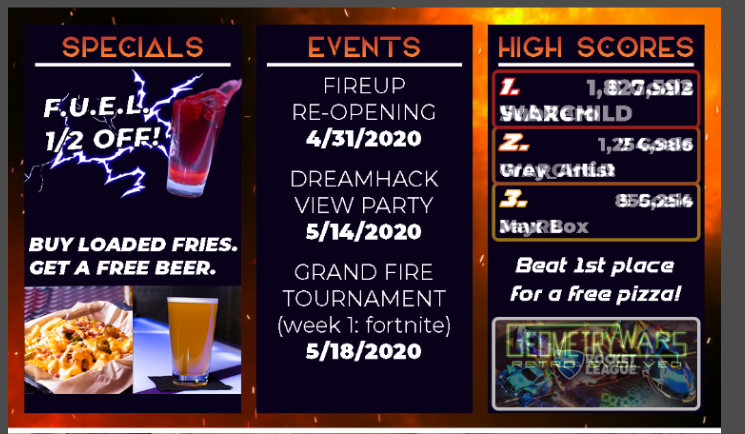
Could this be done in SE, or would it require custom CSS work?
 bronze condor
Hi I need help
round brambleBOT
@bronze condor Welcome to the helpdesk! Please let us know how we can assist you today and a support volunteer or staff member will assist you as soon as they are available. Thank you for your patience.
strong kernel
@ember kraken Asset rotator might be what you're looking for.
But that's specifically for cycling between image files.
ember kraken
With no sub-cycling, persay?
 thick girder
i need help putting my overlays on my stream
round brambleBOT
@thick girder To add your overlays to OBS, add a new browser source in your scene. Paste your overlay URL in the browser source properties, set the dimensions to 1920x1080 (unless you changed them on the website), and ☑ “Shutdown source when not visible” https://youtu.be/KDvLynUqXI4
 thorn lark
 bleak pewter
How do I set up my discord with my stream ?
strong kernel
StreamElements does not have a Discord integration at this time.
ember kraken
That's a chat bot command.
bleak pewter
How do I set all that up
ember kraken
StreamElements
The Ultimate All in One Platform for Streamers
That fancy add new command button will get you where you need to go
abstract hemlock
@bleak pewter in the response, i recommend you so watch this playlist ⤵️
round brambleBOT
@bleak pewter New to Stream Elements?
Check out our YouTube channel https://www.youtube.com/c/streamelements/videos
with tutorial videos from setting up the basics, to in depth details on how to use our product.
New to OBS? Here is a 4 step quickstart guide
https://obsproject.com/wiki/OBS-Studio-Quickstart
Want to learn even more? Here is an in-depth overview
https://obsproject.com/wiki/OBS-Studio-Overview
 lunar tiger
Hi there, my chat stats aren’t showing in the dashboard of my stream elements account. I heard it could be because I changed my name on twitch? Would this also be the reason that my stream elements bot isn’t working in chat whilst I stream too? 😌 any help would be great thank you!
round brambleBOT
@lunar tiger If you changed your name on Twitch please follow these steps:
🔹 Visit https://streamelements.com/logout and then log in again with by connecting with Twitch.
🔹 On the right side of the dashboard page that opens, select "Join" under bot settings. If it says "Part" select that and then select "Join" to send the bot to the chat. Don't forget to mod the bot by typing /mod streamelements in your channel if you have not already.
🔹 Post your new name here so that we can update your channel's chatstats tracking (must be done by staff).
 past jasper
Hi there, my donations alerts are not showing up on a stream. Tests work fine, my follows work fine, and I have tip moderation settings disabled so that shouldn't be the problem. I see the tip in the activity feed and when I try to run it, the emote-explosion works but I do not see the alert I have set up. It won't show up in my event list either. Any help would be greatly appreciated. Thanks!
abstract hemlock
@past jasper if you see the tip on your activty feed probably is something with "Variations"
strong kernel
@past jasper Replaying your alerts appears to be showing them in your alertbox as expected.
past jasper
I have no variations set and when I replay the alerts, nothing shows up in the event box. Even when I try to rerun older tips that worked in the past, nothing happens.
round brambleBOT
@past jasper The default resolution for StreamElements overlays (theme and custom) is 1920x1080. Please add them in OBS at their full resolution and use CTRL+F to fit to screen if necessary. You can then downscale your stream in OBS settings > Video if you'd like https://i.imgur.com/6bWXxjR.png
 desert hatch
Hey I am streaming and my !subs command doesnt work and niether does my change title anymore. I changed my name yesterday and havent had a problem with this before, also my tipping domain does not work either, any help?
 slender raft
There is no channel for me to ask this, so what is the command for dyno?
round brambleBOT
Go to the dashboard -> right side -> part channel -> join channel (https://streamelements.com/dashboard)
slender raft
@viscid pebble It's the discord bot, I'm not sure what channel i have to ask in for someone to respond
desert hatch
@zenith widget I did that already my commands work but not ones that are custom
slender raft
I want to know the prefix for it
 zenith widget
We don't have a discord bot if that is what you are asking about @slender raft
desert hatch
@zenith widget like come type !subs in my chat
like all other commands work but the not custom ones
slender raft
I'm asking for the prefix for the bot "@viscid pebble"
It's Dyno But nicknamed "StreamElements"
zenith widget
Ok, so its Dyno - i don't understand the question here about it
zenith widget
you mean for commands?
slender raft
Indeed
zenith widget
@desert hatch i parted the bot and joined it again. seems to be working now for the sub number
@slender raft From what I know the Dyno bot is used to help us moderate the server in case someone starts mass spamming or something like that. Its set not to respond to any command currently, as we have other discord bots
so i can't tell you the prefix for the dyno bot commands
slender raft
Okay, In that case would i be able to have this servers template for discord role colors
It doesn't effect this server ^
zenith widget
and a tip - when asking "whats the prefix" at least add "prefix for the commands", because it sounds like you are asking about the prefix of the bot name or something else. 
desert hatch
@zenith widget what about my donation link it is still my old name in the link
zenith widget
@desert hatch go into your tipping settings and get the new link.
 queen tree
I can't link my twitch account to stream elements can anyone help
zenith widget
@slender raft idk if we will be willing to give out the template, but DM @winter cradle our community manager
@queen tree Can you provide more details please?
queen tree
I go to sign in with twitch and it says my channel doesn't exist
zenith widget
Can you show a screenshot of where it says that?
lunar tiger
Hi, could you please update my channel’s chatstats tracker as I changed my name on twitch. My new name is - NotMara
Thanks
slender raft
would you be able to send me the role color ids then? it's easier and cannot effect what goes on here
in just need the colors for 3 roles
round brambleBOT
@lunar tiger Please provide your account ID found at the top of this page: https://streamelements.com/dashboard/account/channels This ID is public info and safe to share here.
queen tree
queen tree
@zenith widget ^^^
zenith widget
@slender raft I would still DM our community manager
lunar tiger
My account ID is 5e52daca415aa16b4e03c9d0
zenith widget
@queen tree If you are trying to login via mobile, then try and make sure you are logged into the BROWSER of the phone into twitch first.
slender raft
There is a 99% change of him not responding, but i did
zenith widget
Lets say that he might be sleeping atm because its 7:25AM for him.
slender raft
I know, but im talking about when he is awake
zenith widget
@lunar tiger https://stats.streamelements.com/c/notmara your chatstats are working fine
queen tree
I try to login but it just opens up the app
lunar tiger
@zenith widget thank you! Whatever you did, stream elements is working in my chat again. Thank you 🙏🏼
zenith widget
wait i thought you wanted a chatstats page fix 
cuz i didn't do anything
@queen tree ok, so i would recommend to restart you phone, start the twitch app then try and login to our dashboard.
queen tree
@zenith widget I open the app and click dashboard and it opens without a problem
But it still says my channel doesn't exist when I try to connect them
zenith widget
Where are you trying to connect?
Im not sure I understand the issue at the moment - are you able to login to our dashboard or not?
queen tree
No because when I click login it says with which one I click twitch and it says it doesn't exist
Sorry I misread your 1st message thought u ment twitch dashboard
@zenith widget any idea on what I could do
 dense sequoia
Hi there, I just created a shoutout command, and for some reason everything works except the twitch link. It blocks it out with stars, EVEN THOUGH I have no filters on. Pls help 🙏
queen tree
Yeah and it say my channel doesn't exist as it wants me to login via twitch
 wintry gale
Hi guys, upon opening StreamElementsOBS live, It gives me a "Whoops, OBS has crashed! Would you like to copy the crash log to the clipboard?" message. How do I fix this?
round brambleBOT
@wintry gale A crash log is required to investigate the cause of your issue. Please upload the last crash log.
- In OBS, click the Help menu
- Select Crash Reports, and then Upload Last Crash Report
- Copy the URL, and paste it to the chat here.
--
If you are not able to follow the above steps, open your file explorer and go here:%appdata%\obs-studio\crashesand provide the last listed file.
zenith widget
@queen tree clear the twitch app's cache and data and also your browser's cache and data from the phone settings
queen tree
How?
 formal monolith
I have a friend that is trying to donate to me through streamelements and he doesnt have a twitch, but when he goes to donate, it wont let him. Any idea what could be stopping him? Does he need to have a twitch account?
lunar tiger
@zenith widget oh? I’m not sure what happened then if you didn’t reset anything but stream elements is working perfectly fine at the moment in my chat 😊😊
queen tree
@zenith widget still says that my channel doesn't exist
ionic kelp
@formal monolith does it redirect to a login screen for twitch?
wintry gale
Here is my crash log:
formal monolith
@ionic kelp yes
ionic kelp
Ah. You have a setting enabled for that. Outside of disabling that they'd have to make an account.
round brambleBOT
@wintry gale For the best OBS support, please join their Official Discord @ discord.gg/obsproject
formal monolith
@ionic kelp can I turn that setting off?
zenith widget
@wintry gale to elaborate, the crash log shows specific things crashing and we can't help with that.
wintry gale
For some reason OBS works but when I have streamelementsobs.live it stops workin
ionic kelp
Tipping settings tab then page settings https://streamelements.com/dashboard/tipping-settings
But as you can see it's not available with SE.Pay/Credit Card enabled.
lament blade
my follow goal says I have 272 followers but I only have 242 how do I fix it
ionic kelp
@formal monolith Yes. You'd be limited to PayPal only.
As far as disabling SE.Pay I think a staff would need to do that.
queen tree
@zenith widget any idea
formal monolith
So I guess I am kind of confused on why people cannot just donate without making an account. He has a paypal and still has to make a twitch account?
zenith widget
no idea @queen tree
ionic kelp
@formal monolith do you have SE.Pay enabled for your account?
zenith widget
its something with your twitch app i believe as i was ableto login
ionic kelp
If you do it's because this is a "requirement" for it.
dense sequoia
@zenith widget are you referring to me?
ionic kelp
For the funky links above yes.
zenith widget
@dense sequoia for the *** issue - mod the bot, yes
queen tree
@zenith widget what should I do then as I dont have access to a computer to try
zenith widget
Try and get access to a PC.
I think I understand the issue here - you've never logged into our dashboard before, correct?
formal monolith
@ionic kelp yes I do
queen tree
No I haven't
ionic kelp
@formal monolithYeah. That would be the only fix in that case. Limit to only PayPal.
ionic kelp
@formal monolith So do you want it disabled?
sweet socket
@fickle copper you can go ahead and ask your question and someone will be answering your questions
 fickle copper
What is a good way to get viewers ?
sweet socket
@fickle copper this is a question that differs for everyone else and is not something we can answer, there are a lot of tips and tricks online on youtube and google
sweet socket
That depends what the question is 😄
 muted fox
My stream is very choppy and I dont know why
round brambleBOT
@muted fox 1) Restart OBS
2) Start your stream/recording for about 30 seconds. Make sure you replicate any issues as best you can, which means having any games/apps open and captured, etc.
3) Stop your stream/recording.
4) Select Help > Log Files > Upload Current Log File. Copy the URL and paste the link here.
(Note: If you do not see an obsproject.com URL, you will need to update OBS Studio to version 22+)
sweet socket
can you get me one of these?
muted fox
will rn
it is only when I play a game though
but will get it normal
starting my game 1 sec
sweet socket
It could take a lot of your CPU or GPU when you have a game running and streaming, with the log we can find out whats causing it
and no worries
sweet socket
so this is what comes out of it https://obsproject.com/analyzer/?url=https%3A%2F%2Fobsproject.com%2Flogs%2FcnyM0YsZUN62vdVz
basically the choppy conection can be your internet, what are your bitrate and upload speed? WiFi streaming is not recommended at all since its unstable
Also if you have a display AND a game capture, delete one of the two, since you'll only need one per scene
sweet socket
download doesnt really matter for streaming
but wifi and a 11 upload isnt that much
muted fox
Hopefully gonna move my router to my room soon
Hard when it is very far away
should I try moving my setup to my router to test it?
hopefully that is last case
scenario
sweet socket
there is not really any testing in switching to Ethernet from WiFi, Ethernet is more stabler than Wifi.
muted fox
ok
sweet socket
also you should check your bitrate with your stream
sweet socket
You can check this oin OBS
muted fox
in my settings?
sweet socket
yes, I was checking where exactly
sweet socket
yes under output, how much is your video bitrate?


 sweet socket
okay you have it around 5000, i would set it to 4500
muted fox
ok
sweet socket
its a bit better for 11 upload, but still not the best
lament blade
any 2 pc setup master here? I need to get my audio on the streaming PC while using an USB headset on the gaming pc
Hi there. My last few streams are not showing my accurate revenue. I received a bunch of gifted subs that are not showing, and tips that aren’t either. My revenue from today’s stream should’ve been upwards of $100 but in the email it says I only made $10. Please help.
I’m hoping it’s a glitch with the emailing system but I’m worried.
muted fox
@sweet socket
OMG
It isnt choppy at all now
I will still try to get my wired connection tmmr
Thank you so much though man
delicate sphinx
@sweet socket i have still prob with obs and stream elements
sweet socket
No worries!
If you ever have any more questions be sure to ask them here @muted fox 🚀
@delicate sphinx still have the same problem, or could you be a bit more precise?
 dim marten
Q about giveaways, can they be run on the spot on-stream and last just a couple mins? Or is that not how that one works? For giving away StreamLoots chests, for example.
delicate sphinx
i cant get the user in chat. nightbor- commndorRoot aand my !k dosent work
nightbot
sweet socket
@dim marten you can not run a specific time giveaway, you'll have to stop the giveaway and choose winners
muted fox
@sweet socket Whenever you get the chance are you able to get into a call and make sure my stream is setup properly?
sweet socket
but this can be after a couple of minutes
dim marten
Hmm, was hoping for a more automated option, might be stuck with streamlabs chatbot for my bot, but SE for alerts/overlays
round brambleBOT
@muted fox There are no "best settings".
Please understand that every setup will be very different.
Any guides or videos that claim otherwise are misinforming. Your best option is to start with a base and adjust as necessary.
You can run the OBS auto-configuration tool. To use the auto-config, click on the Tools menu in OBS, select Auto-Configuration Wizard, and then just follow the on-screen directions.
You can use this tool to get baseline settings for your hardware and adjust as necessary from there.
Test, test, and test again. We are happy to offer suggestions for any issues you may be having afterwards, but not a list of settings.
Thank you
sweet socket
im afraid I can't help you more than of the technical knowledge I already gave you
sweet socket
@delicate sphinx have you joined the bot to your channel already?
we have a youtube explaining all that stuff! @muted fox
Check out our YouTube channel https://www.youtube.com/c/streamelements/videos
with tutorial videos from setting up the basics, to in depth details on how to use our product.

YouTube
Official youtube channel for StreamElements tutorials https://StreamElements.com
muted fox
ok thank you
round brambleBOT
@dim marten Check out the StreamElements ideas board: https://strms.net/ideas. You'll be able to add ideas, upvote ideas you agree with, and track their progress with email notifications. Adding and upvoting ideas also helps the staff know which ideas should be prioritized so please take some time to upvote.
delicate sphinx
@sweet socket yes- i have streamelemnts in chat
sweet socket
you can however post an idea for it
dim marten
Yea . . . that never works for me haha. I've submitted ideas and 1 year later, no votes. lol
sweet socket
@sweet socket yes- i have streamelemnts in chat
@delicate sphinx but youre saying that you cant get the user in chat?
@dim marten yhea be sure to share the ideas with people
sweet socket
ah that is too bad
dim marten
one example is for a bot I have no use for anymore (since I don't like the idea of multistreaming even if I was allowed too haha)
How would I import commands from streamlabs chatbot to se bot though?
I don't see an 'export' button in the commands section
delicate sphinx
@sweet socket only streamelemts are in chat
sweet socket
Well that is good, can you use /mod streamelements in your chat now @delicate sphinx
if you havent already
that's for the cloudbot though I thought?
@dim marten I would have to ask that tbh
dim marten
I have soooo many commands that it woudl take hours to copy/paste them all haha