#helpdesk-twitch
1 messages · Page 568 of 1
 ashen sparrow
 opaque elbow
I have a question about the donation ticket widget. Is it possible to set the start amount manually for that widget?
I only see an option to set the end goal amount and end date
 round brambleBOT
@opaque elbow To reset goals:
- from the overlay editor -> data on top -> goal tab -> reset progress of desired goal
- from the dashboard -> activity feed on the left -> widget data on the right -> goals tab -> reset progress of desired goal
Note: Goal widgets(progress) only counts up and doesn't go down automatically, if you loose followers/subs
 vague egret
Hello, I tried add the "copy your tipping page link and paste it in the donation panel in twitch" and I followed the show me how.. but when I click check nothing happens and it will not register that I have added the link to the panels
 ionic kelp
@vague egret #270206314561404928
 thorny night
Hello, after changing my twitch channel name, the channel's leadership scores have been reset and I cannot use some features. Such as Top Chatters, Top Emote, Locations. What is the solution?
ionic kelp
@thorny night old and new name?
thorny night
@ionic kelp old name is s_inceman new name is eversoeasy
ionic kelp
@winter cradle ☝️
vague egret
Not sure how the tipping check is related to those three things with the api, possible to explain ?
 twin sentinel
To check if you added the tipping link to your twitch page we check via the twitch api if you have it added. This is not possible at this time.
thorny night
it just shows the cheers correctly. My subscriptions are gone. Currently there is only one. Normally he should show them all. Yes I added.
vague egret
Ahhh, never knew it was a api thing and thought the api issue was only related to the three things you wrote, sorry for not realising 🙂
thorny night
So is there a solution? Otherwise, it will not work for me.
 grave plank
hey guys.. ok so how come as soon as I added the link into obs for my alerts, do all the alerts I test now lag? all are webm, and we're perfect until i brought it into obs
now when i turn off obs, it laggs as well
ionic kelp
@twin sentinel any chance you could poke a staff for eversoeasy's chatstats? Though icel might be able to grab it but he's probably busy elsewhere.
 fair warren
how to remove stream elements bot ?
ionic kelp
From?
fair warren
my channel
ionic kelp
Dashboard and depart on right side.
 unborn cove
Hello, I would like to delete my account but each time I fill the form, it's saying that my username is wrong, but it isn't. I registered with my twitch account.
fair warren
dude i cant remove the bot from my chat
 wary lark
do you have access to your dashboard?
 wary halo
Go to your dashboard on the StreamElements website and click PART Channel on the top right side of the page
 winter cradle
@thorny night your chatstat page now works with the new name:
https://stats.streamelements.com/c/eversoeasy
 coral rover
hey, need some help with "bot activation"
ionic kelp
@thorny night that happens with anyone using SE. That's how the URL is.
wary halo
Which part @coral rover ?
coral rover
@wary halo I had it fine earlier but for now it doesn't check tipping link at my twitch panel and i can't press "test" by hands
so bot can't get activation for 100% and can't get custom name
twin sentinel
@unborn cove May I ask why you want to close your accout? Anything we can help you with?
unborn cove
@twin sentinel I just want to delete my account because from now I won't be using services like StreamElements, I haven't had any problems with it particularly.
thorny night
locations, subs, gifts and points. These are still not clear. You have saved the emotes and chat section. I would be glad if you reach them all.
fair warren
@jade remnant ty love you
coral rover
@wary halo uh, that's sad, thx for help
twin sentinel
@unborn cove Please send an email to reem@streamelements.com with the same data you would enter in the account removal form.
coral rover
had that problem yesterday also so wished to solve it somehow..
unborn cove
@twin sentinel Ok, I'm doing that right now. Thanks.
 copper gyro
I have put the tipping panel on my twitch channel but streamelements refuses to see it
coral rover
hopefully you'll solve it with co-op twitch
wary halo
#270206314561404928 @copper gyro
copper gyro
?
 wicked turtle
Guys any idea why stream elements ground control no longer sees custom bot? Has this been addressed?
wary halo
It's broken because Twitch changed the API without telling anyone @copper gyro
 jade remnant
issue with twitch API, please check #270206314561404928
copper gyro
ok so I guess I go back to streamlabs ? they don't seem to have any issues
wicked turtle
Thanks guys.
twin sentinel
@copper gyro Our devs are aware of the issue and looking into it. We cannot provide any ETA on a fix unfortunately.
copper gyro
great so I can't even setup this piece of junk, I'll stick with streamlabs thankyou anyhow for nothing
wary halo
And SL had issues with the API as well
jade remnant
ok, thanks for stopping by, if you ever need any help let us know
 serene granite
@copper gyro you can continue using the bot with the name StreamElements until we get this issue fixed.
wary halo

serene granite
just after that ping 😦
twin sentinel
still love you hectic  keep it up!
 unborn cove
@twin sentinel I sent the mail to the email address you gave, thank you for your help !
thorny night
Guys, can you bring them back too points, top subs, top gifters and locations???
only emotes and chat stats came
ionic kelp
Might be another issue related to the API change.
jade remnant
???
wary lark
??
ionic kelp
Apparently the chatstats page foe them is returning "incomplete" info.
thorny night
no problem chatting and emote only others don't
jade remnant
until the AIP updates have been fixed this is likely to happen
as updating your name simply syncs the data
thorny night
So when I open the broadcast, will everything be improved? So will they become visible again?
jade remnant
until the API updates have been fixed this is likely to happen
thorny night
when fix it API updates?
twin sentinel
Twitch made unannounced changes to their API that created issues with some of the information we're able to gather about your channel.
thorny night
So I will wait for the twitch to update?
wary lark
yes
thorny night
anyway thank you for your help. I hope it gets better. Because it's very frustrating.
 elder sorrel
Yep
wary lark
absolutely, it's annoying for everyone when twitch makes announced changes and breaks stuff
thorny night
yea
 twin olive
hello, could you help me link my ground control to my bot?
i had it set up but the link got broken for some reason
jade remnant
 mint yacht
changes business email adress. Does Streamelements update the new email adress automatically when I change my email adress on twitch?
changed*
on my streamelements dashboard, it still says my old mail address
twin sentinel
As we pull the email adress from twitch, you should be able to update it in your StreamElements account with logging out and logging back in via the StreamElements dashboard (https://streamelements.com/dashboard).
mint yacht
You are a god ❤️ THanks 🙂
 mystic jacinth
for some reason my mic has gone really quiet in OBS Live, anyone know what to do?
 vital badger
twitch sub emotes on kappagen were updated but... twitch global emotes are not showing there and not working on Bingo game
wary lark
@mystic jacinth have you tried increasing your output volume?
otherwise check that the input is the mic and not something else
mystic jacinth
i have the correct mic
i dont want to raise it because i didnt decrease it for the problem to occur
wary lark
does your mic have the right sound levels on discord?
mystic jacinth
nope
mystic jacinth
ok, know any fixes?
wary lark
raise the volume of the mic?
wary lark


mystic jacinth
it makes the quality sound very bad>?
 abstract nexus
ok i'm back for more help my broadcaster is telling me i dropped 4475 frames can anyone help with this?
wary lark
 lament blade
Guys i have problem with a se.pay.. I think i have already account, but i cant connect my iban, can you tell me how can i remove my account and create new? thanks
wary lark

How to boost obs mic. In this video I will show you how to raise your mic volume in OBS.
abstract nexus
Hi there help pls
round brambleBOT
@abstract nexus Dropped frames / disconnecting? Follow the troubleshooting steps at: https://obsproject.com/wiki/Dropped-Frames-and-General-Connection-Issues
abstract nexus
ty
 quasi barn
https://gyazo.com/60d010127dd1cb9bf69f8e973fe6bb92 I have added the panel to my twitch page but says that I don't have it on my page, any ideas?
 round brambleBOT
@quasi barn Due to a sudden and unforeseen Twitch API change Custom bot name feature through OBS.Live / Ground Control not working temporarily. We are looking into it. No ETA on a fix yet.
lament blade
Hi, can you help me someone?
round brambleBOT
@lament blade Welcome to the helpdesk! Please let us know how we can assist you today and a support volunteer or staff member will assist you as soon as they are available. Thank you for your patience.
lament blade
i have problem with a se.pay.. I think i have already account, but i cant connect my iban, can you tell me how can i remove my account and create new? thanks
round brambleBOT
@lament blade Please contact us via email for support with SE.Pay. You can use our contact form here: https://streamelements.com/contact Thank you
 wicked plank
can someone help me? Streamelements says that i have to: "Copy your tipping page link and paste it in the donation panel in Twitch."
I have done that but it says that i have not done it
round brambleBOT
@wicked plank Due to a sudden and unforeseen Twitch API change Custom bot name feature through OBS.Live / Ground Control not working temporarily. We are looking into it. No ETA on a fix yet.
wicked plank
so is there an other way to do it or do i just have to wait?
twin sentinel
You can still use the bot as StreamElements.
wicked plank
what do you mean?
twin sentinel
The check for the tipping link is at this time not working and so is the custom bot name not working via OBS.Live or Ground Control.
Just the check of the tipping link being entered is not functional at this time, but the donations are still possible and are detected.
For the custom bot name, you cannot use this atm, but you can use the Bot via the name StreamElements in your channel.
wicked plank
ok
 pseudo crescent
Sub count has now been fixed btw, It's now working again for me
round brambleBOT
@lament blade Please follow our community rules:
- No advertisement or stream promotion
- Respect ALL server members
- No NSFW/NSFL
Thank you
 fair mortar
how do i make commands
round brambleBOT
@fair mortar New to Stream Elements?
Check out our YouTube channel https://www.youtube.com/c/streamelements/videos
with tutorial videos from setting up the basics, to in depth details on how to use our product.
 inland needle
I have added the Credit Roll Widget to my Stream Ended overlay but for the life of me I can't find a place to edit the data to show like a week ore 30 days of information. Am I missing something or is it not available???
twin sentinel
It is session based. So it is everything from the beginning of your stream to when the widget is activated.
inland needle
thanks, would be better if it had some additional settings but it is what it is, thanks again!
 torpid siren
I need to speak to someone on Staff about their tip system and I'd rather not put my financials in public chat. Is there a staff member who can help me?
round brambleBOT
@torpid siren Please contact us via email for support with SE.Pay. You can use our contact form here: https://streamelements.com/contact Thank you
 upper reef
Why can't I change my stream tags in the stream settings menu of the event list?
 scarlet tiger
Screenshot?
upper reef
http://leonardvdj.com/sharex/obs64_x2Way3QPDR.png well just this, the activity feed

When you press the hamburger menu, then stream settings, you can change the title etc
but not the tags
scarlet tiger
Only on twitch afaik
upper reef
I am using it on twitch.
scarlet tiger
On twitch website
upper reef
Ah, well yes, why can't you change it outside of that
round brambleBOT
@upper reef Check out the StreamElements ideas board: https://strms.net/ideas. You'll be able to add ideas, upvote ideas you agree with, and track their progress with email notifications. Adding and upvoting ideas also helps the staff know which ideas should be prioritized so please take some time to upvote.
jade remnant
view > docks > stream information
upper reef
From what I've seen, that gets hidden when you have obs.live installed
For whatever reason
ionic kelp
You using streamkey or account connection?
upper reef
account connection
ionic kelp
🤔 should work if you're doing that.
 ionic kelp
Disconnect and reconnect.
upper reef
Thank you 🙂
ionic kelp
Worked?
upper reef
yeah
ionic kelp

upper reef
Would still love to be able to change tags in the stream settings thing tho
It's exposed in the API so I don't see why it shouldn't be possible. Guess I'll submit it on that link
It's said to already be added? lol
jade remnant
upvotes are better than individual posts
upper reef
yea that's why I searched
But here a person from SE said 7 days ago it was added, when it's at least not in my client
 dry hare
@upper reef Click View >> Docks >> Stream Information i think
upper reef
That's not obs.live though

Am I crazy to think this means it'd be in obs.live's actual own native dock?
dry hare
Whether the panel is from SE or the native OBS panel, it still provides the same functionality. At some point you have to take into consideration whether resources need to be devoted to replicating a feature that already exists, or providing additional functionality via new features/improving existing features
Does it make sense to duplicate a panel that already exists within OBS?
upper reef
It's just nicer usability.
dry hare
If you open the Stream Information Panel and leave it docked, it should open back up when you launch OBS
upper reef
I'm not saying it'd be super high on the priority list, but when that person says it's possible, then it should be possible
And yes but the issue is that I don't constantly change my tags, hence why it just being accessible through the event list is useful
dry hare
Again, if the functionality already exists via a native obs panel, is it really a priority to implement the exact same panel a second time?
upper reef
No it is not, read my first reply
I agree it's not a priority, but then said person also shouldn't say that it's possible through obs live panels
 patent wave
how do i get song request to play on my channel?
 umbral hill
I have a question about the Merch... I know that I can change the Images on the items when ever I want to. I also know that that could take a few minutes to update to my shoppers. Now what if I had a shopper that wants to purchase lets say a coffee mug, but wants to purchase 5 with each having a different image on it, could I, after each purchase they make, change the image for them and when it updates to the new image, they purchase it again?
wary lark
your question would probably be more suited in #beta_merch
post it in there and you'll get a quicker response tbh
 cinder olive
He already has 👀
wary lark
sweet
wary halo
yup 😉
wicked plank
can someone help me? Streamelements says that i have to: "Copy your tipping page link and paste it in the donation panel in Twitch."
I have done that but it says that i have not done it
round brambleBOT
@wicked plank Due to a sudden and unforeseen Twitch API change Custom bot name feature through OBS.Live / Ground Control not working temporarily. We are looking into it. No ETA on a fix yet.
wary halo
the issue you have, also is affected by that
 willow eagle
anyone know why my alerts make my obs freak out?
drops down to 20fps and i skip a whole load of frames through rendering
round brambleBOT
@willow eagle Please provide a log from your last stream. To do this, in OBS go to Help > Log Files > Upload Last Log File and paste the link to the log file here.
round brambleBOT
@willow eagle 1) Restart OBS
2) Start your stream/recording for about 30 seconds. Make sure you replicate any issues as best you can, which means having any games/apps open and captured, etc.
3) Stop your stream/recording.
4) Select Help > Log Files > Upload Current Log File. Copy the URL and paste the link here.
(Note: If you do not see an obsproject.com URL, you will need to update OBS Studio to version 22+)
willow eagle
ran raid alert , follower alert x2 and sub alert x2
all had massive impacts on my rendering. ive literally just upgraded from a 1050ti to a 1660ti for streaming. i had issues with encoding lag when using the nvenc (new) encoder, thats now gone but now having difficulty with rendering lag
jade remnant
question, have you removed the se plugin?
willow eagle
yes. i tried to see what itd be like with OBS.live same issues. so i uninstalled it and rebooted the pc
jade remnant
cool, after uninstalling, did you reinstall obs?
that is recommended upon uninstall, then restart
willow eagle
i didnt. ive never had to. i will try now though
jade remnant
👍
 molten shale
can someone help me .... my Stream elements bot isnt working
like im trying to test to make sure the commands work, but they arents
ionic kelp
@molten shale go to the dashboard on the website. Part and join channel again.
willow eagle
that didnt fix it @jade remnant
molten shale
@ionic kelp will i have to restart my stream in order for it to work again? cause im currently streaming
ionic kelp
Nope. This only tells the bot to leave your channel and return. Nothing effecting your stream.
ionic kelp
 midnight surge
can someone help me out pls im sorta confused. i finished pasting my URL in the donation panel in twitch and everything else i wanted to configure is done but the "tipping setup" still shows 50% and the "done button" isnt clickable. any help would be greatly appreciated thank you.
umbral hill
From what I've seen today so far on others having the same issue, this is caused by a twitch API change. They are I'm sure hard at work trying to figure out the issue and what API changes they are going to have to update in their code
@midnight surge ^
midnight surge
@umbral hill ooh ok, thank you for the reply. at least now i dont have to continue breaking my head trying to figure out the problem lol thanx mate.
umbral hill
NP
lament blade
is the !subs command fixed yet?
midnight surge
@lament blade now that you mention that how do i unlock the sub button?
lament blade
@midnight surge when you become an affiliate
 wispy rune
You have to be affiliate
midnight surge
hhmmm im alook into that
 abstract hemlock
i thinks is WIP @lament blade
@cthulhu to became affiliate you have to get :
50 followers
3 avg viewers on your streams
7 days at least of stream in the past 30 days
500 minutes of stream at least in the past 30 days
midnight surge
oh ok i got 73 in 2 days. there is there a way to check the hours ive played? im check my page rn too
well last 2 streams i mean not 2 days i get like 20 to 25 viewers and i stream
abstract hemlock
in the new dashboard there is a menu "affiliate" if you dont see it is because you are not elegibity yet..
You can see all of this numbers on the channel stadistic page, also on the dsshbard
midnight surge
oooh ok ty so much
abstract hemlock
On your dashboard > insight > Channel Analitycs
Sorry if i dont give you the exact name mine is in spanish haha
midnight surge
all good man i appreciate the help
abstract hemlock
edit, i change the language .. thats the correct path of the data of your channel 
500 minutes of a little more than 8 hours
midnight surge
i found it ty so much i just need to stream 2 more times and one more hour to get it yay
 mental jackal
Guys im having issuses setting up the tipping page would anybody be able to help?
round brambleBOT
@mental jackal Welcome to the helpdesk! Please let us know how we can assist you today and a support volunteer or staff member will assist you as soon as they are available. Thank you for your patience.
 humble birch
hy, i'm new where i can test my follower, sub, tip, host, raid allert?
round brambleBOT
@humble birch To test/emulate alerts, hover over the blue bell at the bottom of the overlay editor. From here you can select the type of event and the amount to test.
@mental jackal Welcome to the helpdesk! Please let us know how we can assist you today and a support volunteer or staff member will assist you as soon as they are available. Thank you for your patience.
cinder olive
If you have a question, ask it here. We cant do things for you but we can assist you by answering any questions you have.
mental jackal
ok thx
i have put the tipping link in one of my panels but it doesnt let me continue the process
round brambleBOT
@mental jackal Due to a sudden and unforeseen Twitch API change Custom bot name feature through OBS.Live / Ground Control not working temporarily. We are looking into it. No ETA on a fix yet.
willow eagle
update on my last issue.. stripped my obs to just 1 scene with my alerts in... still hates it. can ANYONE help me?
 sharp spindle
I'm trying to stream with a new twitch account but I can't seem to find where to set up my account in OBS. It's going to the wrong account. Anyone know where to set that?
Nevermind. I think I've figured it out. I have to disconnect the account and put in a new stream key.
scarlet tiger
@fleet dagger using ground control?
 fleet dagger
No
scarlet tiger
Obs.live?
 old lintel
I have problems with getting the overlay from the site to the obs streamelements... I use the Browser on the obs but still nothing
round brambleBOT
@old lintel To add your overlays to OBS, add a new browser source in your scene. Paste your overlay URL in the browser source properties, set the dimensions to 1920x1080 (unless you changed them on the website), and ☑ “Shutdown source when not visible” https://youtu.be/KDvLynUqXI4
old lintel
I tried watching that video but still nothing
round brambleBOT
@old lintel Right click on the BrowserSource > Properties > Scroll down a bit > Refresh Cache of current page
round brambleBOT
@old lintel OBS -> settings -> advanced -> scroll down -> enable/disable hardware accel.
https://i.imgur.com/ggMe9ZE.png
 old lintel
It works now 🙂
 sharp tendon
Hi there! Streaming right now and streamelements bot is not coming up in my chat
cinder olive
Part the bot and rejoin
 visual cloud
Hi, I'm having issues checking off the tip panel check mark. I'm well aware of how to set up a twitch panel. Stream elements doesn't seem to see it though. Any ideas? Any help would be greatly appreciated.
 gaunt pier
my custom bot doesnt work
round brambleBOT
@gaunt pier Due to a sudden and unforeseen Twitch API change Custom bot name feature through OBS.Live / Ground Control not working temporarily. We are looking into it. No ETA on a fix yet.
@visual cloud Due to a sudden and unforeseen Twitch API change Custom bot name feature through OBS.Live / Ground Control not working temporarily. We are looking into it. No ETA on a fix yet.
gaunt pier
👍
visual cloud
This would affect my situation?
twin sentinel
yes.
visual cloud
Thank you.
 strange summit
Hmm, is the issue with incorrect sub totals on overlay supposed to be fixed? Specifically, sub points total on overlay is still off by over 200 when compared to Twitch dashboard analytics. 
Is there a way to force-sync the data?
 worthy garnet
Is there a way to write a description on my custom commands? to show on the bot commands webpage? and not show the command itself
 slow orbit
Hey guys, how can i import bot on my twitch chat? I changed some commands, but idknw how to turn on this bot?
 strong kernel
To join the bot to your channel, click the "Join Channel" button in your StreamElements dashboard.
slow orbit
@strong kernel where is this button? i cant find it enywhere 😄
@strong kernel i found it, thanks ❤️
wary lark
sweet
 still scroll
Hello. I am having an issue with the chatbot. It won’t let me customize the name because it says I don’t have a tipping link in my twitch panels but I do. I have removed it and reassess it and still won’t work
strong kernel
Please see #270206314561404928
 harsh wren
So we just gotta wait until it's sorted out? Okaly dokaly
 rain crypt
Well shit... I thought it was me because I reinstalled OBS lol
wary halo

lament blade
@strong kernel hey you. My ground control deleted my twitch bot auth and I no longer have the option for a custom twitch bot? Supposed to be starting stream in 25 minutes oof.
strong kernel
Oh hey, it's a known issue because of a sudden Twitch API change.
lament blade
ugh
strong kernel
I'll DM you when I get word it's fixed.
lament blade
so no one has it yet, just to clarify?
strong kernel
Yeah, it's down for everyone.
lament blade
big oof. Thanks twitch. 🙃
Hope you're doing well. Thanks for the heads up. Keep being great 😄
strong kernel
No problem, and don't forget you've got the #dreamteam for these situations. 🙂
lament blade

 signal siren
hello, why my Ground Control dont open?
i have reinstalled but ground control dont open
strong kernel
Do you have an icon for it in your taskbar?
round brambleBOT
@signal siren Streamelements on top of OBS -> Logout -> login
 pliant cypress
hey im trying to do giveaway and !enter and !ticket commands not working anyone know why?
strong kernel
@pliant cypress Usually helps to enable them.
signal siren
you know why my ground control dont open?
already unnistal and installed again
not work
strong kernel
First, does logging out and back in fix the Media request dock in OBS.Live?
strong kernel
There is nothing in Ground Control that OBS.Live cannot do. I'd recommend just doing it in OBS.Live.
 acoustic edge
so my chat window on OBS for some reason show the twitch home web site?????
round brambleBOT
@acoustic edge Streamelements on top of OBS -> Logout -> login
strong kernel
Screenshot it please.
strong kernel
And you're logging out completely and logging back in with the StreamElements menu right above that dock?
Not just disabling and enabling the chat.
You need to log out completely.
acoustic edge
in the top left tabs right?
strong kernel
acoustic edge
yup
strong kernel
You are specifically selecting this option?
acoustic edge
yup
round brambleBOT
@acoustic edge If you are not seeing the OBS Twitch integrations and have OBS.Live installed, please follow these steps:
- Make sure you are on the latest and greatest version of OBS.Live
- exit OBS (make sure OBS is not running)
- delete %appdata%\obs-studio\plugin_config\obs-browser\obs_profile_cookies
- start OBS.Live
- Settings -> Stream -> disconnect -> connect
 timid cape
Having an issue with the custom bot. It's saying I dont have The stream elements tipping link on my panels but I do. when I click "recheck" it doesn't update. Any idea how to fix it?
strong kernel
Please see #270206314561404928
timid cape
Gotcha, didn't see that. Thanks
strong kernel
None of them.
acoustic edge
so go to next step?
strong kernel
Yes. If it doesn't resolve the issue, try completely uninstalling and reinstalling OBS.Live.
acoustic edge
thank you it working ❤️
strange summit
@wary halo Reset Session had no effect, sub points total still missing ~200 vs Dashboard.
strong kernel
Sub points is going to return sub count for now while we look into how to handle Twitch's sudden API changes.
strange summit
Ah, I see. I thought it was considered fixed since it was edited out of the post in #270206314561404928.
 lime cradle
how do i use SE pay
round brambleBOT
@lime cradle Please connect your streaming account (Twitch, YouTube, or Facebook) with Discord by going to ⚙ Settings and then Connections here in Discord. https://streamable.com/eg92w

 terse forge
can i setup a keyword without ! for a command via chat?
strong kernel
Not via chat, only via the site.
terse forge
ok, ty
 unkempt rivet
Hi there, im tryin to set up the tipping section (again) and i have made the panel and all but its not registering on my stremelements page. no check is appearing and i have copied the link and put it in the panel as well but that is not checking off either. i have pressed the "check" button and nothing is happening. i have made the custom bot name and i have had it all set up before but now its not working or showing in ground control either. so idk what i did to mess it up but im now lost on what to do. thank you for any advice
strong kernel
Please see #270206314561404928
unkempt rivet
thx
i can still try to stream without the tipping being "set up" in stream elements? sorry im all new to this.
strong kernel
You don't need tipping set up to stream, and having the link in your panel is fine. What isn't checking off?
unkempt rivet
the "add a donation panel.." and "copy your tipping.." arent checking off
and ok thank you 🙂
strong kernel
Click the link. Don't highlight it.
 midnight plaza
I cant get passed the "recheck" button on obs.live I have had the tip link there.
I am just trying desperately to get my custom bot name to work again
round brambleBOT
@midnight plaza Due to a sudden and unforeseen Twitch API change Custom bot name feature through OBS.Live / Ground Control not working temporarily. We are looking into it. No ETA on a fix yet.
strong kernel
Please see #270206314561404928
round brambleBOT
@midnight plaza Due to a sudden and unforeseen Twitch API change Custom bot name feature through OBS.Live / Ground Control not working temporarily. We are looking into it. No ETA on a fix yet.
 brisk furnace
I change my Twitch name
wellysson_va to MiseravelMauGamer
ChatStats not work
@round bramble can you help me?
round brambleBOT
@brisk furnace I'm a bot, only here to send helpful messages because the helpers are lazy.
cinder olive
@brisk furnace A staff member will update your stats when they get the chance.
 gaunt vine
Does anyone know how to change the colour of Chat on the screen? Its black and I can't see it with my overlay I've clicked white but it don't seem to change.
cinder olive
The background or the font color?
gaunt vine
font
cinder olive
Change the font color then 👀
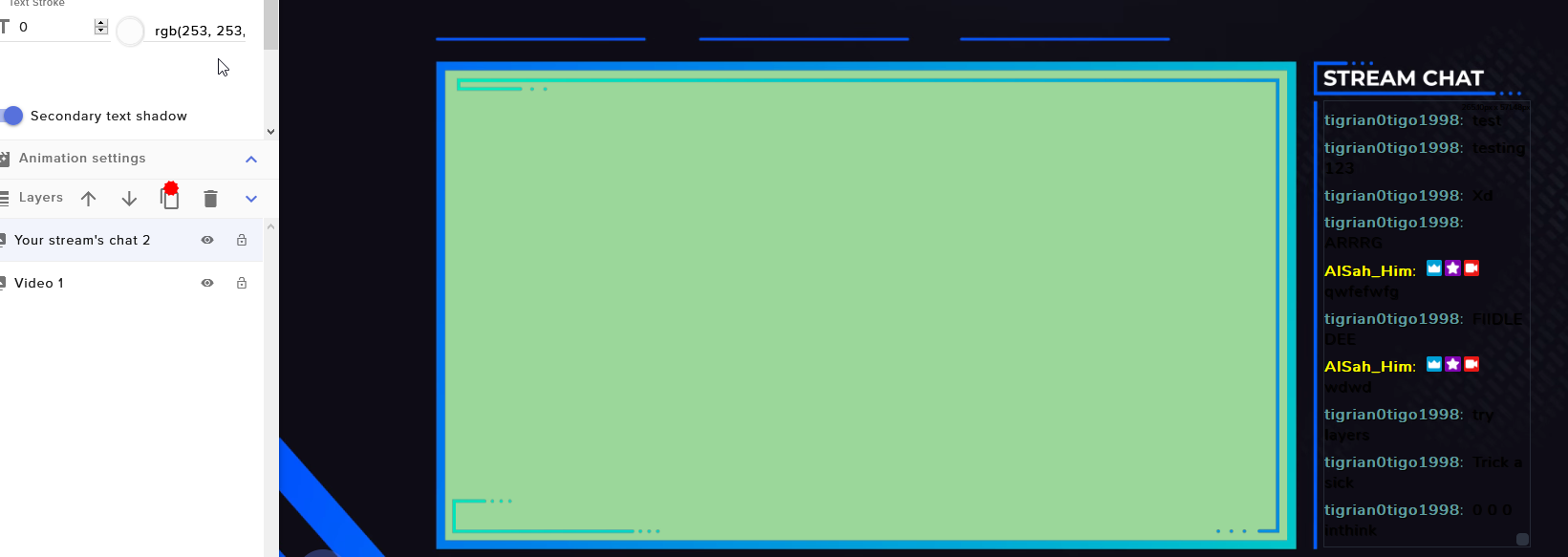 gaunt vine
I don;t have the same as you... Like I cna't even change the font
cinder olive
You have your "layers" expanded.
un-expand it? De-collapse it? Make it small.
Fuck, thats that word...
Condense? No..
It'll come to me later.
 pallid osprey
consolidate ?
 mighty nexus
strong kernel
mighty nexus
strong kernel
You mean the thing in #270206314561404928 ?
pallid osprey
i got you boo
cinder olive
rain crypt
quick question, is there any alternatives to streamlabs spin the wheel widget?
strong kernel
Look in #widget-share
 round finch
hi im a streamers mod with full control of her streamelements and recently when a store sound item has been redeemed it repeats the it and plays a different item above and we cant figure out why, any ideas?
cinder olive
Are they redeeming via commands or the store?
round finch
does it on both
cinder olive
So you redeem <item1> and both <item1> and <item2> show on stream?
round finch
yep
cinder olive
👀 Above my knowledge, sorry. have never seen that happen in my time on SE
round finch
ive disabled all items and re enabled them to refresh but it still happens
strong kernel
@round finch Can you provide a clip of the behavior?
round finch
ill do my best

redeemed rip but get rip and rekt
cinder olive
Mind redeeming RIP agian real fast?
Am in the stream so I can watch the interaction.
However convenient that timing was, it only showed the one alert.
If youre talking the sound, is the orginal sound file that way?
round finch
the sound is the issue for her
cinder olive
Try & reupload the sound.
First assumption would bet he audio file you uploaded is that way.
round finch
ok ill give it a shot
cinder olive
Certain lurker that has a pink/red name might say differently, but that would be my guess.
strong kernel
It's playing just the one in the editor.
Which means something else is getting triggered.
I noticed she has multiple bots.
cinder olive
That would be the lurker I was speaking of 
strong kernel
Could something be getting triggered in another system?
round finch
re uploaded sounds and disabled the other item that keeps getting triggered but still happened so ill look into the bot idea
 lament kettle
elgato hd60s constant sound through obs live and stream is there a way to mute obs only
round brambleBOT
@lament kettle For the best OBS support, please join their Official Discord @ discord.gg/obsproject
cinder olive
lament blade
streamelements isn't recognizing that I have my donation page set up and I need it to so that I can change the bot's name
strong kernel
Please see #270206314561404928
lament blade
Good to know, thanks!
round finch
ok i fixed the issue
i removed the item from store and from the cloud storage bit and asked the streamer to refresh from her side of things and it worked
 rugged fern
when someone redeem point is a alert suppose to pop up?
ionic kelp
@rugged fern what do you mean?
 zenith widget
@rugged fern there is a redemption widget for the overlays if you want an alert wgen someone redeems
 errant wasp
is it possible to disable that StreamElements automatically adds new Bot Users like the Twitch mods? I'd like to manually add them.
 mild warren
Can someone help me with donation setup
Im doing all the steps on setting it up, but when I click "check" for me adding it to my twitch profile it doesnt do anything and doesnt show its complete when it def is...
errant wasp
Have you set up the panel properly with the exact link?
errant wasp
Is there not even a message showing up when you hit check?
If so, you should try another browser.
mild warren
nope
round brambleBOT
@mild warren Due to a sudden and unforeseen Twitch API change Custom bot name feature through OBS.Live / Ground Control not working temporarily. We are looking into it. No ETA on a fix yet.
mild warren
What?
errant wasp
just hit the trash can
cinder olive
?
Why hit the trash can?
Twitch API changed
they didn't tell us what to update with
therefore it broke a few things
such as the API to read your panels
errant wasp
aight, understandable but the bot messages shouldn't only point the bot name feature being broken out.
thanks for the answer
errant wasp
Do you have an answer for my question too?
is it possible to disable that StreamElements automatically adds new Bot Users like the Twitch mods? I'd like to manually add them.
@errant wasp
mild warren
Any Admins able to help
mild warren
? it talks about custom bot not donation
errant wasp
It breaks the panel detection too so you can't set it up right now
mild warren
okay, well will I still get dono even if that part isnt complate?
errant wasp
I don't know. I've seen people here also saying that they don't get the money that was tipped. To be sure, just disable it for now or use something different in the meantime.
cinder olive
yes... yes you will.
errant wasp
mitchilada  I really don't want to annoy you but do you know whether it's possible to disable that?
 crisp jacinth
my obs keeps crashing my computer i have uninstalled it several times with the same thing happening anyone know whats causeing it?
 proud brook
Hi there! Quick question, is it possible to create a chat command with an automatic response which would in example... ban a user? The bot to be able to start a string with / and be recognised in the chat and apply whatever command typed?
errant wasp
Don't really understand your question. You want your bot to perform a command?
proud brook
@errant wasp yes, that's exactly it. But if I make the response to start with the symbol "/" it doesn't even make it to the chat
errant wasp
How do you know it isn't sending to the chat? You can't see commands when someone enters them
also make sure that the bot is set to "say", not "reply" and of course that the bot is modded
proud brook
I tried to ban myself and I was expecting the "you cannot ban the broadcaster" message but nothing comes up
errant wasp
That's only shown to the bot, you can't see it
errant wasp
You won't get a reply from that. However, in order to test that, you can just ban a random user
proud brook
Ill try with my other account and Ill check
errant wasp
If you are the broadcaster it should say that someone got banned
proud brook
Ill be back in a minute 🙂
HAHAH
It worked flawlessly... I am retarded.
Thanks!!
Oh my... i am going to have so much fun!
errant wasp
no worries, glad it's working
zenith widget
is it possible to disable that StreamElements automatically adds new Bot Users like the Twitch mods? I'd like to manually add them.
@errant wasp I don't understand the question here
 proper canyon
Any designers in this server?
zenith widget
 nova gust
Having an issue with the overlay editor.
I don't seem to have an option to make text last longer than 10 seconds. I have a custom 15 second alert, but the text is disappearing before I want it to. Where do I find the option to extend the length text is on screen?
nova gust
I've unfortunately already done both those things.
Alert is set to 14.2 seconds.
Text appearance 1.8s
Text disappearance 0.5s.
Text disappears before it's supposed to.
And to be clear, the animation continues to play. The text just leaves before it's supposed to.
Increasing the Text Disappearance to 5s makes it end sooner, but setting it to 0.1s or 0s does nothing to extend the length to the end of the animation.
zenith widget
Which alert?
nova gust
It's a follower alert.
I doesn't seem like I can extend the time of any of the alerts beyond 10-12 seconds. Is there a limit to how long text can display on an alert?
errant wasp
@errant wasp I don't understand the question here
@zenith widget Well I realized that Moderators from Twitch are automatically added as permitted Bot Users to Stream Elements. Is there a way to disable that so you always have to add bot users manually?
zenith widget
Only mods, subs and VIPs are added automatically.
Well subs not really, as we get their account type from twitch
nova gust
This isn't the only bug I've experienced with Streamelements, I can't adjust my subscriber alert as well, I've never been able to. Is there a customer rep I can DM?
I need to head to bed, it's 6:20am and I've been working on this animation all night.
If you could @ me with any info that'd be great.
errant wasp
yea, can i disable that?
zenith widget
@nova gust If you mean support - I am that person.
I'm trying to figure out atm why the text goes away so soon in your follower alert
As for the sub alert - have you checked the variations tabs?
@errant wasp No
errant wasp
alright, thanks for the answer
 charred vortex
Hello guys, i'm unable to "check" my tipping link even if i put it on my panels, and in this way i cannot finish my tipping setup, someone had the same problem?
 pastel wadi
so how do you make a custom bot name as mod
round brambleBOT
@pastel wadi Due to a sudden and unforeseen Twitch API change Custom bot name feature through OBS.Live / Ground Control not working temporarily - this means that we cannot get the tipping link from your panels in order to activate the Custom bot name(This includes the tipping settings check).
We are looking into it. No ETA on a fix yet.
zenith widget
@charred vortex read the above from the bot.
pastel wadi
so @round bramble what do i type
charred vortex
😦
zenith widget
@pastel wadi /mod whatevernameyouareusing
pastel wadi
@zenith widget so slash mod and what happens after that i don't get also I'm trying to do it as mod or does streamer do it
zenith widget
only the broadcaster can mod people in their channel
pastel wadi
@zenith widget i'm a Modder im trying to change the bot name for the boadcaster is there a way
charred vortex
but there isnt way to change bot name right now till they solve the problem?
zenith widget
Correct
pastel wadi
oooh okay thanks guys when do you think it will be solved
lament blade
anyone know why the !emotes default command isn't working
charred vortex
i'm really lucky, i just switched today to streamelements wtf 😄
lament blade
@serene granite ?
zenith widget
Is the command enabled?
 zenith widget
Sorted ⤴️
 gilded sparrow
<@&631810494554177536> does anyone have issues with their store, mine isnt loading
also is there a way to get the merch beta role?
 oblique steeple
@gilded sparrow Please do not ping any roles if it isn't really urgent.
gilded sparrow
it is
oblique steeple
You got invited?
gilded sparrow
i have people wanting to buy stuff and yes i did
lament blade
Wtf man
oblique steeple
People with this role are users just like you, no support.
 ornate lichen
.....
zenith widget
What have you done 
ornate lichen
Yeah we're users too.
 torpid otter
AAAAAAAAAAAA
lament blade
its okay @oblique steeple I don't mind giving some info
gilded sparrow
i was asking if anyone else had an issue which is reaching out to the other users?
ornate lichen
or in another chat channel rather LUL
 worldly ingot
You pinged hundreds of users @gilded sparrow
oblique steeple
Aaaaand hell broke loose.
gilded sparrow
SORRY, i honestly didnt know
 sweet socket
@lament blade it's not about you don't minding giving some haha
lament blade
Make this Role Pingable by Mods only
Wtf man. You messed up
@gilded sparrow looks like someone gave you the role. you should get access to the panel in your dashboard soon. but yeah. Don't ping everyone homie
oblique steeple
@lament blade Not possible.
gilded sparrow
i wont
sweet socket
@lament blade please respect other users
ornate lichen
Discord doesn't have that enabled unfortunately
torpid otter
all good, we all make mistakes.
ornate lichen
^^^^
gilded sparrow
i do have access to the panel but i updated an image and now it isnt loading
ornate lichen
Just don't do it again LUL
 upper steeple
@gilded sparrow you should be in the merch beta channel then if you are apart of the beta
torpid otter
yeah or ill fight you 
 limpid badge
LOL
ornate lichen
LOL HI @torpid otter BTW
torpid otter
hi leland!!!! ❤️
ornate lichen
❤️
lament blade
Look on the bright side... ENGAGEMENT!!!
limpid badge
@upper steeple he wasnt when he pinged
torpid otter
look at all these new friends :^)
zenith widget
limpid badge
Hi friends!
lament blade
Calm down peeps
limpid badge
Also, my store loaded just fine
 storm delta
Why don't yoy just write beta_merch ? WTH
gilded sparrow
im honestly so sorry
zenith widget
Please lets keep this channel clean from chit chatting ok?
sweet socket
Okay guys let's keep this channel for support questions, cheers
 somber hill
I think I made a rookie mistake, instead of adding channels to one stream elements accounts I just signed into each service with them. Is there anyway to fix this besides deleting all the accounts by emailing: privacy@streamelements.com?
zenith widget
I can link the accounts for you, but I will need the JWT token from both accounts.
You can find your JWT token on your account channels page ("Show Secrets" to reveal the token): https://streamelements.com/dashboard/account/channels

StreamElements
The Ultimate All in One Platform for Streamers
 pearl flint
zenith widget
pearl flint
zenith widget
Make sure you DM me those tokens
somber hill
Will do right now
 paper nebula
Just because I just read a little above. How is it possible to apply for the merch Beta Role in here, As I also got invited about 2 weeks ago. 🙂
sweet socket
wow @zenith widget
zenith widget

sweet socket
you got the role and have access to the beta merch channel ph0enX 😄
paper nebula
Oh wow. That was fast. Thanks 😄
 winter zodiac
Hi, I think I have everything set up correctly in the "banned words" menu but when someone writes the banned word in chat nothing happens. Can somebody please help me with setting it up? (I have images if it'll help)
zenith widget
is the bot modded?
winter zodiac
I feel dumb now @zenith widget ... But hey, thanks 😄
zenith widget
Support 101: start and check the simplest thing 
 tough zephyr
that time when you wake up midle of the night with a discord ping, go back to sleep and still wake up pissed about it....
 dry cedar
I can relate
sweet socket
shhh its all going to be okay, lets keep this channel to support questions friends
tough zephyr
ok, how do i make pings in all channles but one be ignored?
zenith widget
roles pings can't turned off unfortunately
sweet socket
Support questions that are Twitch related ofcourse
zenith widget
if you are talking about the sound effect, in the notificatitons settings of the server you can change it to none and only when mentioned
that is an individual settings
sweet socket
we made the role unpingable, so you shouldnt receive any more unwanted pings
 limpid venture
hi guys
sweet socket
Hey PG, how are you? Anything we can help with? 😄
sweet socket
Are you getting any sort of error?
also, what service are you going to use for donating?
limpid venture
paypal
sweet socket
and what makes it that you can't finish it?
limpid venture
Copy your tipping page link and paste it in the donation panel in Twitch
i finsh this tip and streamelements dont see that
sweet socket
There is a ongoing issue with that function at the moment indeed, we are looking into the problem
 cedar lynx
can you connect your Twitch to your Discord account so we can check your channel? @limpid venture
sweet socket
no ETA for a fix at the moment
A link wouldnt be necessary, since its a known issue
limpid venture
sorry i dont know
sweet socket
no worries, be sure to stay up to date until we can get the fix in
limpid venture
So now donations can be received
sweet socket
you can still receive donations via paypal, however the custom bot option will not be available at the moment for you
the tipping link should be fine! 😄
 burnt basin
@gilded sparrow did you click the go live at the top of your merch store dashboard
round brambleBOT
@limpid venture Please connect your streaming account (Twitch, YouTube, or Facebook) with Discord by going to ⚙ Settings and then Connections here in Discord. https://streamable.com/eg92w
 cedar lynx
@limpid venture if you follow these instructions it will help us provide better support both now and in the future ^
sweet socket
@burnt basin please don't use this channel for merch support, we got a merch channel for that, also, devs are looking into the matter!
@limpid venture its not a custom bot, but a custom bot name, at the moment you have StreamElements as the name of your bot, when there is a fix you can name the bot whatever you like
So say, instead of StreamElements, I want to name the bot PrimeBot
limpid venture
@limpid venture if you follow these instructions it will help us provide better support both now and in the future ^
@cedar lynx i follow these instructions and finsh it
cedar lynx
awesome, thanks! that'll just help us check everything is in order so we can tell what's still broken on our side or not 🙂
limpid venture
Thank you all for your attention
sweet socket
No worries really PG! 😄
cedar lynx
there's no set time it takes to start earning that much money, it really depends on you, your content, your marketing, and the community you build around your stream 🙂
limpid venture
Is there a feature to display ads and profit in return
sweet socket
Not with StreamElements at the moment, however there are some services
cedar lynx
Twitch now gives you revenue from ads. but I've made like $1 in ad revenue streaming 25+ hours per month at the moment
- as an affiliate / partner
limpid venture
$ 1 is better than nothing if I don't have followers😂
cedar lynx
but as Bordeaux said, there's other services as well. but until you have 50-75+ viewers you'll find that you don't qualify for a whole lot of ad revenue anywhere. streaming is not a "fast" source of income by any means!
if you already have a large following from another platform, it could be quick. however, if you're starting from scratch, it will likely take months or years. generally speaking, it takes a lot of effort to build up to a big enough audience to make any consistent income from.
limpid venture
Beautiful and realistic advice thank you 😍
cedar lynx
it's a great journey though, so if it's something you're passionate about, keep at it 😄
limpid venture
I have a great passion
When using Overlay when someone follows me, it changes automatically in the last follower or I change it
sweet socket
if you have a Theme overlay or if you have added the Follower count widget, it should update automatically yes 😄
limpid venture
omg This is very cool
sweet socket
I will link you our youtube channel as well, so you can see what you can do with StreamElements
round brambleBOT
@limpid venture New to Stream Elements?
Check out our YouTube channel https://www.youtube.com/c/streamelements/videos
with tutorial videos from setting up the basics, to in depth details on how to use our product.
limpid venture
I definitely follow you, I just need to end the donation problem to start working
sweet socket
there is no problem with the donations
like i explained earlier, you can receive donations via your tipping link
only due to Twitch, the option for Custom bot name is not available since it doesnt recognize twitch panels due to a change in Twitch's API
limpid venture
Well I understand now, which one is better mixer or a twitch
sweet socket
That is purely personal
both platforms have their pro's and con's
I would recommend testing both Twitch and Mixer out with a popular game and see what works best for you 😄
limpid venture
Well, what does Bits mean in Twitch
twin sentinel
sweet socket
^
limpid venture
Well the last thing is the lowest Net speed to make broadcasts without problems
twin sentinel
limpid venture
When someone sends donations, it appears in Overlay that he has sent donations
sweet socket
please do check the youtube channel of StreamElements and check some of the videos, since these are all questions that get answered in them 😄
But yes, if you have set up correctly, you should receive alerts that will appear on your overlay
limpid venture
Well, I will start work now. Thank you all. When I'm famous, I will remember that you helped me and you are great❤️
 frank dove
Hey! Does anyone else have the problem where the sub count displays as 0? Both in commands and overlay.
zenith widget
i poked it with a stick
and it should be fine now
as for the bot, part it from your channel and join it again
ornate lichen
Hmm, tried resetting session, logging in and out of SE, even parted and rejoined the bot, but the sub count is incorrect (SE reporting 3 more subs than Twitch). Any idea what I can do? 
zenith widget
There might be an incorrect totals count +/- 1-2-3 subs, depending if you've used your free lifetime subs
frank dove
thank you! mine shows 2 more subs than twitch but I only used 1 lifetime sub
ornate lichen
Weird, this hasn't happened previously and I only used two (1 for a bot, 1 for my friend).. unless it counts me as well? 
frank dove
if it counts me as well then it would make sense having the 2 extras ^
but they didn't use to show up before though
ornate lichen
Thanks. Just wanted to make sure it wasn't just me heh.
frank dove
and also, the number of subs seems to be the same with the number of subpoints - which is not the case for me, I have more sub points
any idea how to fix that? >.<
 floral mason
Hey, I'm not really sure who to go to if I need to fix my chat stats? My name just gives a 404 error.
sweet socket
Have you changed your username recently?
floral mason
a couple months back, is that what's going on?
sweet socket
also there is a special DreamTeam channel where you can ask all your support questions 😄
yes, if you could give me the old and new username
zenith widget
I'll fix it 😉
sweet socket
no need to say sorry! It's okay in here as well, just that you know in the future! 😄
floral mason
Thank you so much ❤️
zenith widget
Done
floral mason
It works! Thank you again ❤️
 green osprey
hey, following from https://twitter.com/buggleplays/status/1219217567010709504

@StreamElements 👋 duplicating overlays is broken at the moment - gets stuck loading - is it just me? :)
 Twitter
sweet socket
Twitter
sweet socket
Welcome BuggleBean! Could you answer the question from the tweet? 😄
What browser are you currently using to go to your overlay editor?
green osprey
in Brave browser
was working fine yesterday btw
just duplicating a Twitch overlay
green osprey
yeah, that's right
 obtuse nacelle
how i put de donation tip in extencion
round brambleBOT
@obtuse nacelle Twitch's official help guide for Panels: https://help.twitch.tv/customer/portal/articles/2416760-how-to-edit-info-panels
green osprey
same issue @zenith widget, Chrome and Firefox too
zenith widget
Which button are you using?
green osprey
this appears in the console, in case it's helpful:
Possibly unhandled rejection: {"data":{"statusCode":500,"error":"Internal Server Error","message":"An internal server error occurred"},"status":500, ...
the one that says "Duplicate overlay" on /dashboard/overlays
zenith widget
and which overlay?
zenith widget
logout from our dashboard and login again
green osprey
same issue, did both relog and also clear site data
zenith widget
Im poking the devs
 stray terrace
Hello i search admin fór verifacation my bank account
round brambleBOT
@stray terrace Please contact us via email for support with SE.Pay. You can use our contact form here: https://streamelements.com/contact Thank you
zenith widget
Hey. I will reply to the ticket/email in a bit after I check the details. I may have questions for you, but lets keep this over the ticket/email and not Discord.
 hallow sparrow
${channel.subpoints} & ${channel.subs} not work Please help me ! Twitch id 風哥丶丶 (lyf38069397)
zenith widget
@hallow sparrow Logout from our dashboard, login again then go here: https://streamelements.com/dashboard/session -> totals tab -> reset session - this should refresh the totals.
hallow sparrow
@zenith widget still zero
zenith widget
Did you or the streaming logged out?
hallow sparrow
@zenith widget Ok I try it next time. Thanks a lot.
 plucky flower
Hi guys, can anyone tell me how I can test widgets in streamelements?
lament blade
hello i need help
how to get the bot auth
@plucky flower what widgets do you want to test?
plucky flower
Follow alerts
plucky flower
Ohhhh, thank you. I feel so stupid..
lament blade
@lament blade what bot auth? I'm not sure I understand
its for krunker
its need bot auth for custom commands
to edit them or what
for the link of the game
you can just visit RimmyD in twitch
everytime we use use command for the game he will give us invite of the libk and its changes everytime
well, ok boomer
Ha. Good one
So what you're telling me is you redeemed a code for krunker and didn't get it?
 gray trellis
how do I add chat commands?
scarlet tiger
 snow stone
ground controll still dosnt see the link 
 icy raft
Hi, I have a problem with Ground control, I cant see the custom bot name option and anything related to it. I had no issue with it for the last couples of month and yesterday it just disappeared. Can anybody help plz.
lament blade
@lament blade no.
@icy raft it's a known issue and we're working on a fix atm
@lament blade then please explain the issue so I can help.
icy raft
perfect I was worry. Thank you
 rare cairn
quick question, how does the new timer options work?
abstract hemlock
looks like "variation settigs"
 scenic radish
Is there a way for the confirmation message that appears after someone requests a song to be sent to them alone as a Whisper?
scenic radish
yeah thats what i mean
It hasn't been implemented yet then, i take it? thank you regardless i hope it becomes a feature soon. 
 scenic radish
id appreciate that  ty for the prompt & helpful response
 cinder crest
@zenith widget DM me
cinder crest
hm.. he told me to contact him here. my merch does not work.
wary halo
😉
cinder crest
he did send me this on his last mail "Please join our Discord here: https://discord.gg/se and DM me( KeiZar#2253 ) so that we can do a screenshare of the process you are doing.
This way we can troubleshoot and see what is the issue and we will use a debug method to check the process."
wary halo
ah i see
let me ask around if we can arrange something now, or that you have to wait for KeiZar
cinder crest
okey, ask and see
 tender girder
Hi I'm wondering if anyone can help me - I've had new notifications made by a designer and I'm just implementing them now, however when I run a test with the new notification, it lags/stutters - wondered if there was any fix or where I can ask this? I'm hoping I'm in the right place? Thanks
wary halo
does it lag in the overlay editor or in OBS?
tender girder
overlay editor
wary halo
which browser do you use?
tender girder
I'm using chrome
wary halo
and @fallow karma i see you 
tender girder
(I've also tried FF)
 fallow karma
Heya! I'm currently experiencing a problem, and I'm hoping someone is able to help out with this.
I use the Ground Control application for my custom bot on Twitch. I was always able to set up my custom bot with it, but since a few days I noticed that my custom bot is not connected anymore, and that the option to connect it again is gone.
However, I am aware that this option only shows up if you have certain requirements, but as far as I know, I have already met those requirements.
Thanks in advance!
@wary halo Hehehehe
wary halo
@fallow karma yeah Twitch F-ed up their API so there were a few issues, let me check if it's fixed yet
fallow karma
Ooooh, okay! I already thought it might've been an issue with Twitch's API, but weren't completely sure.
tender girder
Oh I think I might've spotted an issue. When I look on my "uploads" part, it looks like its lagging there as well. I'm wondering if it didn't upload correctly.
wary halo
i am asking around, i'll ping you if i know more @fallow karma
@tender girder easiest way to make sure is to delete the file and just re-upload it
fallow karma
Sounds great @wary halo, thanks for looking into it!
tender girder
I'll give it a go, thank you @wary halo 🙂
cinder crest
okey, i think i got it now are much problems and many weeks. But my alert on OBS says "i only did buy 4 items" but its 5
oh, i dont have the roll now for beta merch 🤔
wary halo
i thought you had trouble creating a store, but i was told there was a different issue so they removed the role 😛
 tight harness
We needed to check that you are in the beta testers list first, as your issue wasn't related to creating a store but more making a purchase
cinder crest
no, problem was to order. but i got my order now. i cant use my own phone number. so my number 123456789 now
tight harness
So using the different number worked?
cinder crest
yes, i try alot of number. but didnt work. so now i just try to out 1-9 number and that work. but i cant use "express checkout" then its say something about my phone number
 rose sable
Hello Got a question i am trying to utilize streamelements in combo with obs.live. Is there a way to import my current overlay into the streamelements overlay editor?
ionic kelp
@rose sable where are you wanting to import it from?
 urban prairie
Hello I would like to recover the music of my alerts. How to recover them.
rose sable
@ionic kelp i am looking to import the current overolay that i have setup in obs studio
 novel shoal
hi everyone
i have a problem since 3 days, the bot working only the follower alert doesnt work the bot doesnt post anything in the chat like welcome or thanks for the follower
wary halo
do the followers show up in the activity feed?
urban prairie
dont miss my question
novel shoal
of course @wary halo
I dont change anything since months but i try do turn off/on the function
I changed the Follower alert message thats it what i tried
wary halo
you can try this too:
go to your dashboard on the website, Part the bot from the channel, log out on the website, log back in, Join Channel again and type / mod streamelements to mod the bot again
@urban prairie you don't have the files on your pc anymore?
novel shoal
okay thanks i will do it now and will stream in 2 hours i hope it will work again ^^
 spiral bay
I have a small issue hoping someone can help. Ground Control 1.7.2 now seems to no longer have the custom bot name and I used to have this option I cant find anywhere in change logs or anything about this being removed or anything. Am I missing something here?
wary halo
did you try to restart GC?
wary halo
because this got affected by the twitch API changes from this weekend but it should be fixed now
spiral bay
Put in token again
wary halo
can you see if it works in OBS.Live?
urban prairie
@wary halo No i dont files because i have changing pc and i want take the files in StreamElements
wary halo
okay, let me ask around for you @urban prairie
spiral bay
I use stream labs obs I dont even have the obs.live option
When I go to stream settings that is not even there so not sure how to get around that lol
urban prairie
ok
wary halo
@spiral bay ah i see 😛
ionic kelp
@rose sable Sorry for the delay. You wanna follow this (Do note the sources you backup are limited to 10 items per upload and 100MB total) https://redbot.is-serious.business/3tRzP3V.gif
 urban prairie
When will i have my answer @wary halo
wary halo
when i ping you
wary lark
team deathmatch?
 swift stone
Hey everyone. I saw naming a bot had been fixed but I have reloaded everything and still dont have the option to name a bot in ground control. Is there still an issue?
wary halo
it seems so yes, i am still asking around about it @swift stone
 spark hearth
Got a quick question
swift stone
@wary halo hey sounds good just wanted to check.
spark hearth
is there a way to find top "sub gifters" on streamelements
I can see top tippers and cheers
wary lark
yeah there should be a streamelements extension that shows top gifters
lemme see if i can dig it up

Twitch
The ultimate all in one tools platform leaderboard extension. Keep your viewers updated on Points, Schedule, Bits, Subs and Chat stats.
that should be it @spark hearth
wary halo
@spark hearth there is a widget in the overlay editor called: Top Gifters List
it's in the Stream Subscribers section
spark hearth
ohh thank you
 oblique topaz
Hi! I recently received tips into SEPay and after putting in all the necessary information, I'm just waiting for my personal info to be reviewed. It's been about a day since then. How long does the process usually take?
Thanks in advance!
 strong flicker
 ivory schooner
Hi guys, anyone knows why i can't custom the chabot in groundcontrol ?
ionic kelp
@ivory schooner There was a recent issue with this that seems to be staying around for some reason. We're trying to figure out what's the problem.
rose sable
@ionic kelp Can this be imported into streamelements overlay editor? And if so what is the process, I have done the cloudbackup now.
urban prairie
Hey you have a news @wary halo
wary halo
nope 😦
spiral bay
Is there something I should be trying @wary halo? I tried installing on another rig same result NO option for custom bot from ground control
 slim mantle
where do I find the settings to change bot name ?
spiral bay
Ok at least I am not the only one now lol
wary halo
@spiral bay no, we keep seeing reports that it's still not working properly
so it's not on you
spiral bay
Ok cool
Thanks man
I'll check back later then I just wanted to make sure it was not my set up
 mighty mountain
hi all, i have some lags with my alerts or overlays is there any workaournd for this 🙂
"Oh, BTW i use OBS Studio*
wary halo
@slim mantle it's still not back up after the whole twitch api change thing from this weekend
slim mantle
well the tips check now works at least
but just can't find where you set the bot name
wary halo
in Ground Control or OBS.Live?
slim mantle
obs
wary halo
click on the hamburger menu in the activity feed
then on stream settings
and it should be there
slim mantle
awesome thankyou
 scarlet brook
is there a way to run an Alexa routine (change the color of the lights) with a Twitch Chat command?
ivory schooner
Thx for answers !
Then When i try to custom the botname i cant, just 3 choices :/
 honest kayak
Hello, does anyone know anything about custom bots name not working?
ivory schooner
Do u Know how i can changevthat ?
rose sable
Can cloudbackups be imported into streamelements overlay editor? And if so what is the process, I have done the cloudbackup
ivory schooner
@honest kayak use obslive and go to activity feed and settings
honest kayak
@ivory schooner I can't connect either, guess it's not working. I'm trying that.
lament blade
how do i know if the bot is working
Hi fellas, there's currently an issue with custom bot names which are working on
It will be solved asap
ok thanks for the answer 🙂
novel shoal
@wary halo im now on my stream and the follower alert still not work :/
urban prairie
Hey you have news guys
ivory schooner
Anuone know information about donations ? Receibed m’y first but i dont see it on the dashboard and i dunno when i received the amount on m’y bank account
(😘😘)
lament blade
if you got the donation through a StreamElements link then it should appear in your revenue history
ionic kelp
@ivory schooner Did you see something in chat like this but whatever color the username was? https://redbot.is-serious.business/5LUMVqF.jpg
 urban prairie
Hello I would like to recover the music of my alerts. How to recover them.
ivory schooner
@ionic kelp yep i saw somerthing Like that 🙂
ionic kelp
Yup. Someone trying to be funny and give a fake "donation". If your alert doesn't go off or you don't see anything in the activity feed then it's 💩
wary halo
or this:
If a viewer tipped through PayPal but no information appears in your StreamElements account, this generally means PayPal has held the tip for verification. Until PayPal clears the tip and sends back a confirmation to your StreamElements account, no information will appear there and no alert will play, as that confirmation is the only way for us to be aware of a successful transaction. If you believe there may be an issue with the transaction, you'll need to contact PayPal support as StreamElements is only a passthrough service and never actually gets involved with the transaction or touches the money.
ivory schooner
@ionic kelp ok thx ! Donation is considered like a tip for the alert ?
ionic kelp
If you have donations setup with SE you'll have something on your dashboard. Only exception is what Ruben mentioned.
 agile nebula
i have the regular obs on mac how do i set up alert boxes
ivory schooner
@wary halo @ionic kelp thx for your help 🙂
wary halo

Learn how to customize your alerts and setup different alerts variations with StreamElements Alertbox
Overlay Manager guide: https://youtu.be/X7XrDdRE7Fk
Add HypeCup to your Stream: https://www.youtube.com/watch?v=8LVRd2X4HvU
Got any questions, or just want to say "Hey...
@agile nebula
wait.. you just asked that in #general-chat too a couple of minutes ago
😛
agile nebula
ive seen this but i dont know how to put them in i have macos
wary halo
@lament blade on twitch or OBS?
agile nebula
i have only obs
 spark plover
My window size is 1920 X 1080, the themes aren't filling the size of my window, even though it says it's the size. . Is there a reason why?
agile nebula
not streamlabs obs
wary halo
@lament blade Settings > Stream
@agile nebula make an overlay for them on the website
StreamElements
The Ultimate All in One Platform for Streamers
@lament blade on twitch
agile nebula
i did that already but how do i put it in obs?
wary halo
Settings > Channel @lament blade
round brambleBOT
@agile nebula To add your overlays to OBS, add a new browser source in your scene. Paste your overlay URL in the browser source properties, set the dimensions to 1920x1080 (unless you changed them on the website), and ☑ “Shutdown source when not visible” https://youtu.be/KDvLynUqXI4
spark plover
Thank you
spark plover
800x600
wary halo
set that to 1920x1080
spark plover
also output?
wary halo
output whatever you want to stream in
OBS will convert that
but the base canvas is important
wary halo

 plucky oriole
How do i get one of my downloaded sounds as follow/sub sond
wary halo
add them as a sound to the alert in the alertbox widget in the overlay editor
nova gust
How do I force caps for alert fonts?
Just figured it out lol
 kind palm
hey guys I had my bot all set up and changed somet things with my donation page ...now apparently my bot no longer has its personal name how do i fix this
wary halo
know issue because of the changed Twitch API, it's being looked at
kind palm
ty so much
lament blade
why cant I get notified when I get a new subscriber?
round brambleBOT
@lament blade Twitch prime (new and resub) and paid subscriptions (resub only) must be shared in chat manually by the person subscribing in order for the subscription information to be sent to StreamElements. For twitch prime, the user needs to have sharing enabled on https://www.twitch.tv/settings/prime. For paid subs, if the share box doesn't show up immediately it will when they refresh the page. https://i.imgur.com/VNJN0Uv.gif https://i.imgur.com/2297EA7.png




 lament blade
for yt not ttv
twin sentinel
nova gust
With an alert, is it possible to change the font size of different words?
For example, having "Follower" at 32 and "USERNAME" at 50?
 pulsar gulch
Hello, is there a possibility for the tts to start after my alert sound ?
round brambleBOT
@lament blade Please provide a log from your last stream. To do this, in OBS go to Help > Log Files > Upload Last Log File and paste the link to the log file here.
 dusk escarp
How do u get follower or sub notification?
abstract hemlock
@pulsar gulch i think this is what you are lookin for