#helpdesk-twitch
1 messages · Page 557 of 1
 ancient gyro
 round brambleBOT
OBS.Live is a Plugin for OBS created by StreamElements. You can download OBS.Live here: https://streamelements.com/obslive
Please make sure you have the latest version of OBS installed, Current Version: 24.0.3. You can install OBS here: https://obsproject.com/
 fast breach
is there any point of ground control if you already have the activity feed
 strong kernel
No, OBS.Live provides everything that Ground Control offers.
 cinder olive
tmyk
fast breach
ok thanks
ancient gyro
Does HypeBoss not have a way to carry on stacking across multiple lives?
EG: last boss was 1200, with overkill it was 300 overkill, new boss is 1500.
Is that not possible?
(also i dont see where to set how much increasing goes up by, unless it just doubles itself each round or something?)
 tribal pivot
Sorry for just now replying Nethyr but this is what I mean by fade,
yet items with longer descriptions than that have no fade.
 desert sapphire
Question, when using a stinger transition, how come my game that I am capturing with game capture, takes a good 1-2 seconds to show up AFTER that transition has ended?
tribal pivot
I wanna say there is a time settings you can change
yours might be too long compared to the transition
How long is your stinger and your transition time in OBS?
desert sapphire
The stinger is like 5 seconds, and the time i set in my OBS for transition time is 3000 miliseconds
ancient gyro
Boss seems to have broken when I tried to adjust its size and position manually...
tried turning visual on/off, tried resetting boss.
Its also not saving where I put the cup (even when I lock it in that spot) and keeps resetting it to top left
 limpid marten
Anyone able to tell me why i cant resize this or how to make it smaller without cutting it off. It is the rotating feed widget https://gyazo.com/6e0ec65aa0fdcc7f4b9f8ec599e6968c

@winter cradle Any chance you have time to check this out^
 winter cradle
Looks like a custom widget?
limpid marten
Yeah its the one from the widget page on the stream elements site, Do you know if there is a way i can resize it?
limpid marten
Thankyou
ancient gyro
@winter cradle any ideas on my issues?
Cup keeps resetting position and wont save where i put it, and HypeBoss seems broken?
 zenith widget
The hypecup position is a known issue. Unfortunately, no ETA on the fix.
winter cradle
It's the "event rotator" by CO6STUDIO? @limpid marten
limpid marten
Yessir
ancient gyro
@zenith widget thats a bit frustrating. was working fine until just now T_T. And hypeboss?
winter cradle
Yeah this widget's design config is set in CSS @limpid marten
zenith widget
@ancient gyro Something broke, but I can't reproduce by changing the text size.
I would suggest to recreate it.
ancient gyro
yeah it happened when i adjusted its size manually
then i tried setting it back to prior amount, and cant seem to fix it
limpid marten
i know it might be a pain, But i dont know any coding stuff at all. i have a box that is 227px x 55px. How could i make the widget fit that box? @winter cradle
ancient gyro
@zenith widget am i gonna have to delete it n redo boss?
zenith widget
yes - thats what i suggested
zenith widget
no worries
ancient gyro
Yeah
just tested
it seems if i increase the "height"
it breaks

the original increase was a total accident, decided to test it with new one
winter cradle
@limpid marten post to #dev-chat, see if someone will be available to help your rewrite the widgets to your needs.
zenith widget
limpid marten
Okay Thanks
zenith widget
I can't reproduce @ancient gyro
zenith widget
I see
ancient gyro
dragging fixes it at least lol
so i guess just carefully drag until its near my size
zenith widget
zenith widget
I do, but as you can see the moment i move it 1 pixel manually via the dragable icon, it goes back to normal.
ancient gyro
yeah
zenith widget
I will be reporting this as a bug to the devs, but you have the fix right now.
ancient gyro
YEah
I have it at 500 x 89 for the size
close enough
thanks 🙂
Oh
does StreamElements have a way to set up a goal to combine Tips + Cheers for goals?
 harsh moat
I recently changed my name on Twitch and can’t figure out how to have my chat bot work on my Twitch channel.
zenith widget
@ancient gyro No
@harsh moat Go to the dashboard -> part channel on the right and then join channel
harsh moat
@zenith widget thank you!!
ancient gyro
@zenith widget how does one covnert labs variable to elements variable for a shout out command?
If you folks haven't met {target.name} before, they're super awesome! Please check them out sometime over at https://twitch.tv/{target.name} They were last seen playing {readapi.https://decapi.me/twitch/game/{target.name}}
this is my SL variable, having trouble figuring out what the SE equivalent would be
zenith widget
We have our own template for shoutout
ancient gyro
I didnt see it, am I blind?
zenith widget
ancient gyro
Cool
thanks
@zenith widget do you guys have the variable for last played game?
oh wait
${game ${1}}
im blind
zenith widget
its in the template

 lyric fiber
Is there a way to add a counter for sub points, not just subs?
lyric fiber
Oh! Sweet, I didn't think to check there lol. Thanks!
 wheat cedar
Hello, any guidance on hosting alerts and activities not carrying over to SE?
round brambleBOT
@wheat cedar Due to changes to Twitch API, we have filtered out hosts and will only show these ones on your activity feed:
- All hosts coming from an online channel with at least 1+ viewer
- Auto host events with at least 1 viewer - only from a channel that just went offline
Note: If you see "X channel has hosted you" with no viewers on the back, that is considered an offline host or a host with 0 viewers, we do not show these.
wheat cedar
Cheers
 sweet socket

 prime robin
Hey, I emailed StreamElements about a custom widget I want for my stream and they said it isn't available in the current build. Can one of the dev's please contact me and we can sort out something to be custom made privately ? Thank you 🙂
zenith widget
What sort of widget?
 lapis vault
@zenith widget hello Mate, do you have any followup on the issue we talked about
zenith widget
There was some talks before NYE, will poke again and see where we at.
 tiny jetty
Trivial question :
Was making a simple love command like this :
There's ${random.1-100}% love between ${sender} and ${1}
Then tried to do ${1} ${2} ${3} for more words just to make it more exciting but then it works only if someone actually writes that specific number of words so for example if I made ${1} ${2} ${3} - it worked only if someone wrote !love and then 3 words (didn't work for 1 word etc) Was thinking if that possible to make somehow? 😅 ${1-10} doesn't work at all
 sullen hamlet
got a question , i want it to play one alert instead of 5 when someone gifts subs to the community. Which alert variation do i need to do this and get rid of which one
atm it plays each randomly and im not sure which variation makes it is
 wary halo
i know there is the sub gift alert box
zenith widget
@tiny jetty use ${1:}
tiny jetty
@zenith widget Thank you ^^
 warm mortar
Is there a way to get your just giving donations to show in chat with your chat bot
wary halo
in the chat alerts module

StreamElements
The Ultimate All in One Platform for Streamers
 last cipher
Hey I need those 3 viewers any suggestions on what should I do ?
round brambleBOT
@last cipher Please follow our community rules:
- No advertisement or stream promotion
- Respect ALL server members
- No NSFW/NSFL
Thank you
 untold crest
However, we can help you with making your stream better for both of your 3 viewers and make that number grow.
Check our YouTube channel and blog for a lot of helpful information on how to grow your community!
 left kite
link of youtube channel
round brambleBOT
@left kite New to Stream Elements?
Check out our YouTube channel https://www.youtube.com/c/streamelements/videos
with tutorial videos from setting up the basics, to in depth details on how to use our product.

left kite
ok thanks
 floral spoke
how do you stop the audio repeating itself in a loop?
 jade remnant
close or mute your stream
floral spoke
ok thank you
 plush fog
it won't let me go live with streamelements via twich its taken me live to my youtube and i selected twitch
 cedar lynx
are you streaming through OBS?
plush fog
yes
cedar lynx
be sure to go under your settings in OBS and change the stream key to your YouTube channel or connect your Twitch account depending on where you want to stream
plush fog
im trying to stream twitch and for some reason its sending me to youtube
cedar lynx
you need to change your OBS settings to your Twitch account
instead of the YouTube stream key
plush fog
i have thats why im so confused
plush fog
thanks guys 🙂
 radiant burrow
Hey guys! So for a while now I noticed my streamelements alerts are not catching ANY new followers and when I was live and went to my streamelements dashboard it would show I was offline. Any insight on this?
cedar lynx
I would part/re-join the bot and then log out and re-log back into StreamElements to see if that kicks it back into sync
radiant burrow
still doesnt seem to be catching any new follows, even the dashboard is empty for new follows.
 stone wedge
I need some help, does anyone know somewhere where I can get something to display Goals, for example I am getting money together to build a better stream computer and i want to show the progress of how how much has been collected and how much is needed?
sweet socket
Add a Goal widget to your overlay over at the website
https://streamelements.com/dashboard/overlays
Click the pencil on your overlay, then in the top left there is a widget button, where you can find all our widgets 😄
StreamElements
The Ultimate All in One Platform for Streamers
 broken gale
Hello what are some best ways to remove background noise (keyboard, mouse, pc fan)
jade remnant
add noise gate and noise suppressor filters to your mic
broken gale
from obs?
jade remnant
yes
broken gale
thank you! 🙂
jade remnant
np 👍
broken gale
how can i find out what are the best settings for me?
 rare cairn
^^^^
 limpid wind
Hey, somehow my command !watchtime doesn't work in my chat, it always says: has spent 0 secs watching xplash. How can I fix it?
wary halo
part the bot from the channel on your SE dashboard, log out of SE, log back in and rejoin the bot. then type /mod streamelements in your chat
 delicate cairn
Hey, does anyone know how to fix blurry text
delicate cairn
indeed
wary halo
is it only on the activity feed
delicate cairn
its also my chat
round brambleBOT
@delicate cairn Please follow these steps:
close OBS,
open the Nvidia Control Panel,
in the left menu select "manage 3D settings" and then under the list of options (right panel) press "restore default settings",
Start OBS again.
delicate cairn
it fixed it thank you
limpid wind
Every other command works just fine, I Remoded Streamelements but still says 0 seconds. I feel like the command is not right or something. !watchtime (${user} has spent ${user.time_online|'0 seconds'} watching ${channel}) It says 0 seconds
wary halo
did you do what i told you to do?
limpid wind
Yeah
wary halo
and it is still not working?
are you testing it on yourself?
and btw, the twitch connected to your discord account is old
did you change your name?
because that would screw up the watchtime stuff as well
limpid wind
yeah I changed my time last month
wary halo
old and new name please
limpid wind
xPlashx - old xPlash - new
wary halo
okay, i will tell staff to fix your chatstats
after that, the command should work again as well
limpid wind
okay, thank you 🙂
wary halo
should be done @limpid wind
if it doesn't work, just try the part bot thing one more time to make sure
limpid wind
right
 lean sapphire
is there a way to hide streamelements msg when someone reedem an item from the store? because y want to troll the streamer with audios (i am mod)
 twin sentinel
No.
lean sapphire
F
twin sentinel
You can redeem the item via the store page and disable the notifications for redemptions which are not made via chat.
 rose osprey
hey 🙂 is there a way to import sound effect (via a !command in chat) from stream labs chat bot to stream elements?
sorry if its obvious im new to SE
 brave lily
can i get into a call w someone to help me w this problem????
lean sapphire
@brave lily what problem?
wary halo
please keep your questions in one channel @brave lily
 analog inlet
Hey i need help im streamig rn so i need a quick fix if possible
sweet socket
What is your question?
analog inlet
my question?
 dry hare
You’ll need to elaborate @analog inlet so we can determine whether the issue you’re having can be indeed resolved with a “quick fix”
analog inlet
Well when im streaming, if im out of the game but the game is still showing om stream it runs smooth 60 fps but as soon as i open it, it goes down to like 17
i have an RTX 2070
I7 9700k
16 GB 3000 MHz ram
analog inlet
in the game?
sweet socket
yes
analog inlet
thats not an option is dead by daylight
dry hare
When you set up OBS did you change any settings?
analog inlet
i did yes
sweet socket
every game as a borderless windowed mode if im correct
pretty standard, assuming you're on PC that is
analog inlet
should i be able to have a stable 60 fps stream with those specs?
sweet socket
Depends what game, what overlays you are running etc
analog inlet
windowd borderless dont help
sweet socket
but you tabbing out of the game and going back into it, it has to reload
dry hare
Since you’re live right now, a quick-fix probably won’t help you. Most likely you need to fix your encoder settings
dry hare
Uncheck psycho-visual tuning. It’s worthless
analog inlet
will it help?
dry hare
Always
analog inlet
but i will need to restart stream for it to take effect right?
dry hare
If you can uncheck the box and click apply while live then you should be okay
analog inlet
i did
and it didnt help
can i dm you so i can link my stream without it being advertisement
sweet socket
do you have this with every game?
sweet socket
so not, every game?
dry hare
Does dbd do RTX?
dry hare
I haven’t played it in forever
analog inlet
atm the problem is i cant seem to get it to 60 fps while i have the game open on my screen but stream runs the game smooth of im alt +tabbed
games i play that does this
Rainbow 6 Siege
PUBG
DbD
can i dm one of you i dont wanna advertise my stream
then you can check it on my stream
dry hare
You can link your twitch to your discord
analog inlet
i think i did already tbh
round brambleBOT
Please connect your streaming account (Twitch, YouTube, or Facebook) with Discord by going to ⚙ Settings and then Connections here in Discord. https://streamable.com/eg92w
 sweet socket
you didnt
analog inlet
i did now xD
sweet socket
also a tip, mod StreamElements
analog inlet
i already did
analog inlet
StreamElements er allerede moderator for dette rum.
it says in danish it already is mod for this room
sweet socket
im asking around for the problem by the way
analog inlet
did you watch it?
dry hare
That’s the strangest thing I have ever seen. It would appear that when you’re in-game OBS is having encoder issues for some reason
analog inlet
what am i suposed to do then
sorry if im hard to figure out
i have only streamed for 10 days
never had anything to do with streaming before that
i had the same problems with streamlabs obs
sweet socket
we'll need a log for more information
round brambleBOT
- Restart OBS
- Start your stream/recording for about 30 seconds. Make sure you replicate any issues as best you can, which means having any games/apps open and captured, etc.
- Stop your stream/recording.
- Select Help > Log Files > Upload Current Log File. Copy the URL and paste the link here.
(Note: If you do not see an obsproject.com URL, you will need to update OBS Studio to version 22+)
sweet socket
you could try to upload that one firstly, but sometimes it shows that it cant find the capture source
 wanton shoal
How does one reset all points on SE? I told my viewers I'd be resetting everyones points on the 1st and couldn't figure out how to do it
sweet socket
StreamElements
The Ultimate All in One Platform for Streamers
click the red reset button top right
wanton shoal
Will it reset EVERYTHING? Or just those?
analog inlet
what do you mean by select help
sweet socket
all the points
or click the little wastebin under actions
if you wanna reset only from 1 or a couple users
@analog inlet
wanton shoal
Okay cool thank you so much
sweet socket
No worries!
wary halo

analog inlet
sweet socket
nope need a clean log like i said
 white solstice
sweet socket
white solstice
sweet socket
as you can see @analog inlet https://h4ndy.eu/obslog?url=https%3A%2F%2Fobsproject.com%2Flogs%2FZyyotr4BwomKCNIJ no output session
analog inlet
so i need to stream for 30 mins?
round brambleBOT
@analog inlet 1) Restart OBS
2) Start your stream/recording for about 30 seconds. Make sure you replicate any issues as best you can, which means having any games/apps open and captured, etc.
3) Stop your stream/recording.
4) Select Help > Log Files > Upload Current Log File. Copy the URL and paste the link here.
(Note: If you do not see an obsproject.com URL, you will need to update OBS Studio to version 22+)
analog inlet
sweet socket
I dont think that was 30 seconds, still gives a no output session
 frigid wharf
Hi, just been working on some custom command ideas for someone i mod for, and i was wondering if its possible to have commands make a pick based on a previous random pick in the same command? Wasn't able to find any specifics either way from searching.
frigid wharf
ok thanks,
sweet socket
yes
analog inlet
😦
im terrible at stuff like this
as i said ive only been streaming for 0 days
10*
wary halo
well, no one said streaming was easy 😛
analog inlet
but my dead by daylight is already capped at 120 fps
sweet socket
please read the green links
analog inlet
i am
sweet socket
https://www.speedtest.net/ < could you also tell me your upload from your internet?

Speedtest.net
Test your Internet connection bandwidth to locations around the world with this interactive broadband speed test from Ookla
analog inlet
125/25
sweet socket
just follow the link and press the GO button
what graphics settings is the game on?
wary halo
i have no idea if this is good bordeaux, but can i stream with my upload speed? it was 938 in the test
sweet socket
try lowering that
analog inlet
in HKEY_CURRENT_USER\Software\Microsoft\GameBar theres no file called AllowAutoGameMode
well my game runs at 200+fps if i dont cap it so shouldnt it be fine?
nvm i made the key
dry hare
Are you recording at the same time you are streaming?
dry hare
Ok
dry hare
Do me a favor: click Tools >> Auto-configuration
In obs
Click through that, canvas will be 1920x1080
Once you’ve done that, disable psycho-visual tuning again because it probably re-enabled it, but also make sure your bitrate is set right
Then try again
rose osprey
hey 🙂 is there a way to import sound effect (via a !command in chat) from stream labs chat bot to stream elements?
sorry if its obvious im new to SE
wary halo
keep the encoding on Nvenc New
 wide frigate
I hope this is the right place to post this in. So i’m doing a giveaway on my channel, and I’m using the giveaway widget. I have it enabled. But my viewers aren’t getting their points. Idk why.
wary halo
so you set the giveway up here?
StreamElements
The Ultimate All in One Platform for Streamers
analog inlet
@dry hare This is what it gave me
wide frigate
Yes, I enabled it on my dashboard, I set up my points. Added the widget no one is getting points
dry hare
Yep that’s about normal.
analog inlet
are you talking to me?
it didnt enable psycho tuning
but i didnt set the settings either
wary halo
@wide frigate so people need 20 points to buy a ticket, they don't get a ticket or they have no points to buy them?
wide frigate
They have no points, no matter what they do.
wary halo
can you do something for me to test? go in your chat and type: !addpoints rubensaurus 100
dry hare
@analog inlet run obs as administrator
analog inlet
Yes sir
wary halo
hmm okay so the point system still works
wary halo
okay, try this: go to your dashboard on the website > PART BOT > log out of SE > log back in > JOIN BOT > type /mod streamelements in your chat
maybe that will reset the point counter
analog inlet
@dry hare as soon as i chose advanced outputmode it will chose my old settings then i go back to simple and its new settings
dry hare
Leave it at simple and test it
wide frigate
@wary halo part channel?
round brambleBOT
@white solstice 1) Restart OBS
2) Start your stream/recording for about 30 seconds. Make sure you replicate any issues as best you can, which means having any games/apps open and captured, etc.
3) Stop your stream/recording.
4) Select Help > Log Files > Upload Current Log File. Copy the URL and paste the link here.
(Note: If you do not see an obsproject.com URL, you will need to update OBS Studio to version 22+)
white solstice
i recorded for 35 seconds and followed those steps
wary halo
stream, not record
white solstice
ok
wary halo
ok
analog inlet
wtf i actualy think it worked thank you so much bruda @dry hare and dont worry if it dosnt work ill be back 😠
dry hare
Woot
wary halo
@wide frigate i am getting points now from being there
because you gave me 100, and now i have 110
wary halo
no problem 🙂
white solstice
white solstice
that is a stream session
wary halo
and the link is the report for you 😉
white solstice
no offense i dont know what im supposed to do
wary halo
there are 2 green links in there, start by clicking those and follow the instructions 😉
also change your recording output to MKV or FLV like the log says
and ALWAYS run OBS as admin
it will give OBS priority for rescources
white solstice
ok
lean sapphire
how can i edit a counter? i tried with !editcount name number, but it dont change, it shows 0
strong kernel
@lean sapphire Did you use the name of the counter and not the name of the command?
lean sapphire
nevermind, i didnt delete < > in the command name xd
if that isnt deleted then the name will be <f> and not f
is there a way to ignore users with the random chatter variable? i dont want to pick mods or bots
am sorry if i do too many questions
strong kernel
There is not.
lean sapphire
ok
 lament blade
when I try and take my overlay from the website it doesnt scale to the size I have it in obs even after I changed the base canvas to make them the same
round brambleBOT
@lament blade To add your overlays to OBS, add a new browser source in your scene. Paste your overlay URL in the browser source properties, set the dimensions to 1920x1080 (unless you changed them on the website), and ☑ “Shutdown source when not visible” https://youtu.be/KDvLynUqXI4
lament blade
when I add it to my obs its a fraction fo the size it should be
strong kernel
Follow all the steps, particularly the one about the browser source dimensions.
 narrow iron
@lament blade 1920x1080 is what I've seen the overlays are usually are
 distant shore
I just started using the stream elements overlay, is there any place to game the game and title like in slobs
strong kernel
Yes, you can do it in OBS.Live, on the site, via the bot, plenty of ways.
lament blade
@strong kernel so it has to be 1920*1080?
round brambleBOT
@lament blade To add your overlays to OBS, add a new browser source in your scene. Paste your overlay URL in the browser source properties, set the dimensions to 1920x1080 (unless you changed them on the website), and ☑ “Shutdown source when not visible” https://youtu.be/KDvLynUqXI4
dry hare
The browser source dimensions should be set as 1920 x 1080 as stated above
lament blade
Is thhere a way to set a text to scroll?
Even if I change the base canvas before I launch the overlay
strong kernel
@lament blade
strong kernel
@lament blade Changing the overlay width and height does not change the position or size of the widgets in the overlay.
lament blade
Yeo my bad
@strong kernel doesn't seem my text wants to scroll even though enabled?
wary halo
did you hit save?
lament blade
yup
wary halo
MITCH!
strong kernel
Looks fine to me.
 lament blade
I wish i stuck to the apex overlay package now lol
doing this on my own gets confusing
lament blade
thankyou
 fair hound
What’s up with the merch been waiting for like 5 months
 tropic shadow
Heya, I'm having trouble with my alerts. I was updating my sub alerts to have variations and now it looks like all my other alerts are messing up 
strong kernel
@tropic shadow Messing up how? Editing one kind of alert doesn't affect any other kind of alert.
tropic shadow
My follower animation is missing and every time I try to test any of my alerts they only show up for a second or two and get cut off.
Literally all my alerts worked fine before and now they're broken. But at least my sub alerts are all working 
tropic shadow
Just switched from Safari to Chrome and it seems okay?
Not sure what happened on the Safari side of things but it seems like the alerts are fine now? 
Still not activating on Safari anymore though
wary halo
The SE site is optimized for Chrome
tropic shadow
Yeah, it was just weird that it was working fine on Safari and then all of a sudden 
lament blade
after an hour of messing about.. I finally sorted my starting screen and Live screen
 cobalt kindle
I'm only seeing "Subscriber Credit Roll" - Not just "Credit Roll" - The tweet mentions it will list more than just subs on the session. How do I get that? https://twitter.com/StreamElements/status/1212841106779578376


Wrap up your stream just like a movie!
The 'Credit Roll' widget takes all of the events (subs, tips, cheers) and displays them like rolling credits!
Available in StreamElements Widget Gallery. 🎬
Likes
150
 Twitter
cinder olive
Twitter
cinder olive
StreamElements
The Ultimate All in One Platform for Streamers
Go to "Widgets NEW"
Search for Credit ROll there
@lament blade if you ever need help, feel free to ask, were a bunch of nerds here 
lament blade
I wish I could get someone to do it for me hahhaa
cinder olive
I heard Ruben does work for sandwhichs 
lament blade
xD
cinder olive
Or was that Reuben 
cinder olive
Its a play on your name 😢
 foggy drift
Hi everyone, what's the best method to contact the "Help Desk" to activate G2A and SE.Pay?
foggy drift
Ive read and seen a video that said I needed to reach out to activate G2A and SE.Pay if they weren't appearing in the panel for tipping. Thanks
 lapis spindle
I got a donation but where should I check?
lapis spindle
ooooo I see a troll
wary halo
@foggy drift i see, what country are you from?
foggy drift
US
wary halo
how many followers on Twitch?
wary halo
ah i see, SEpay is only available when you go over 100 followers
foggy drift
ahh ty I didnt see that anywhere just US and bank accout is what was reported
wary halo
ah okay, now you know about that
foggy drift
thx. How about G2A?
wary halo
for the G2A, that has it's own issues at the moment, so i will ask if it's still possible to connect that. one moment pls
foggy drift
ok
While I'm here, since I need to wait till reaching 100 followers. If someone uses the tipping link provided to me by SE, what happens?
wary halo
they can use paypal
foggy drift
Before I get to 100 I mean of course.
wary halo
if you have connected that
foggy drift
Without Paypal
wary halo
then nothing happens
foggy drift
Does money go into a SE "account"
wary halo
nope
foggy drift
it tells them they cant?
strong kernel
If you don't have any tipping option connected, the page will be inactive and unusable.
wary halo
they just can't make a payment if nothing is set up
foggy drift
ok ty
wary halo
You need to grow your stream a bit to unlock the other options, the only option that is available now is paypal
foggy drift
Is there probably a minimum follower requirement for G2A also?
I figured I wanted to check first before starting though
wary halo
no problem 🙂
lean sapphire
hello again
can someone explain me how !watchtime works?
i think i saw a lot more hours the stream than the SE bot says
cinder olive
Only works if you are there & the bot is there & loyalty settings are enabled.
lean sapphire
ohhh ok
cinder olive
If you watched the stream before the bot was there & loyalty settings were enabled it does not count
lean sapphire
SE wasnt enable, but there it was streamlabs
i enable loyalty on SE
and it seems to share info
another question, if i set another amount of points gained by 5 min, it changes the watchtime?
cinder olive
Nope
Watchtime is logged every 10 minutes - unless you have the power to speed up time, its locked at that
You, uh, dont ahve that power do you 👀
cinder olive
No, that wont work lol
cinder olive
!ideas
round brambleBOT
Check out the StreamElements ideas board: https://strms.net/ideas. You'll be able to add ideas, upvote ideas you agree with, and track their progress with email notifications. Adding and upvoting ideas also helps the staff know which ideas should be prioritized so please take some time to upvote.
lean sapphire
thanks
cobalt kindle
That Credit Roll thing on their Twitter... any way to get it to STOP once it finishes? Seems like it just repeats over and over
cinder olive
Mmm surely there is, lemme figure it out (if I can)
lean sapphire
is possible to save data from twitch chat to a variable on a custom api host?
cinder olive
what data do you want to save
lean sapphire
a number, or a word
i want the viewers have the ability to save their own "data" (my english is bad)
twin sentinel
You can call an API with this variable: ${customapi.XYZ} with XYZ being the url
 marsh axle
is there a way that when u stream with one monitor the chat can just be on ur screen instead of pressing windows and clicking on the program?
 ember kraken
Can you download files from your library?
ember kraken
Even if you uploaded them yourself? I'm just on a different machine and need to grab a file, and it seems like this would have been the fastest way
twin sentinel
As StreamElements is cloud based, everything should already be in your account in the cloud and you do not need to download anything.
ember kraken
i don't agree with that lol, but if that's policy
the idea is that I'm grabbing a sub alert to post on twitter lol.
Can you see logs of chat bot bans?
twin sentinel
Not that I am aware of.
ember kraken
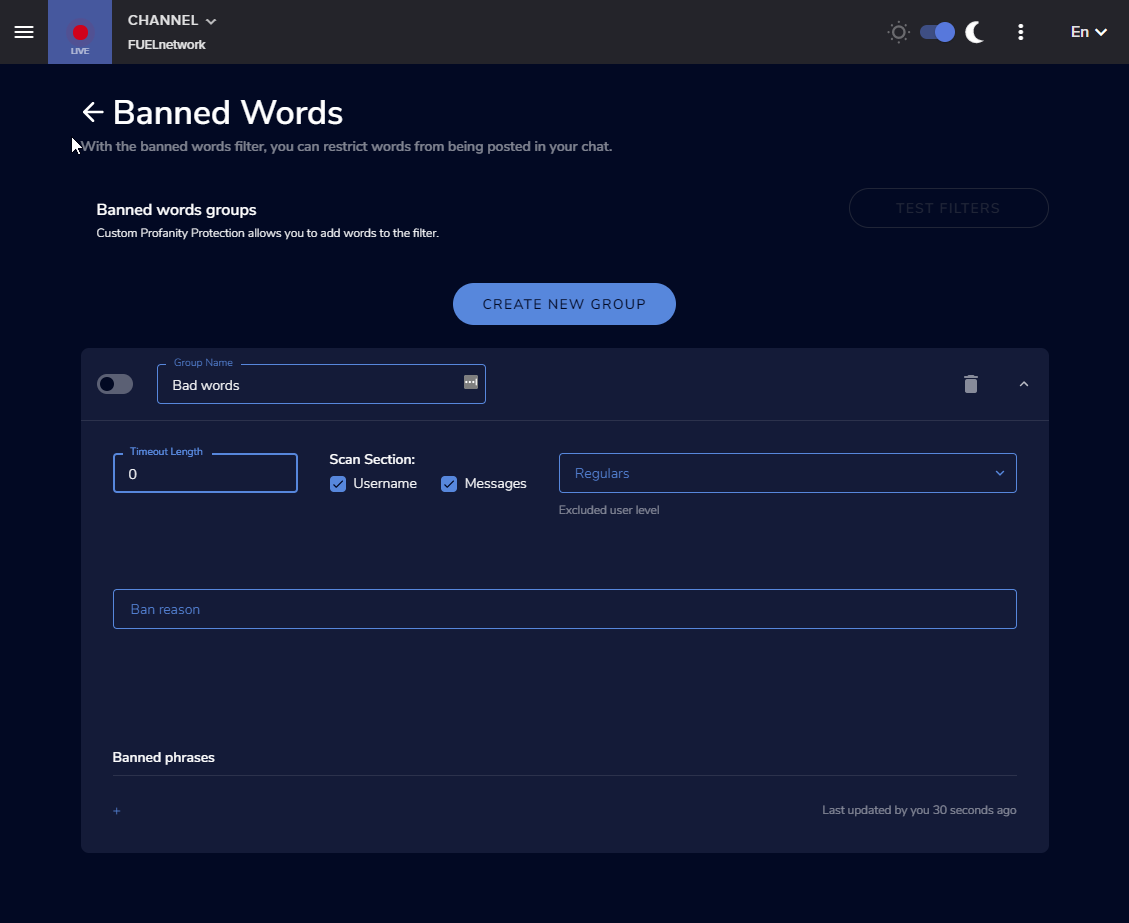
Fair enough. Is there a default list of banned words, or do I need to enter everything?
 hushed stag
my chatbot isnt working what so ever
wary halo
try typing /mod streamelements in your chat
ember kraken
Timeout length of 0 is a ban, yes?
cinder olive
Timeout length of 0 is a timeout of 0
Deletes all their messages
to ban them /ban
 hushed stag
i have @wary halo none of the commands or anything are working
wary halo
the bot is not a mod yet
hushed stag
in my stream?
ember kraken
getting some pretty bad raiding going on right now and the bot doesn't seem to be hitting them
I have it set to medium protection. Is there a global list of bad words that it uses, or do I need to enter all words manually?
Also, how can I clear names from an event list?
wary halo
@hushed stag just type /unban streamelements
and when it's back: /mod streamelements
😛
ember kraken
@wary halo i apologise for the ping but both of my questions are semi time important lol
wary halo
StreamElements
The Ultimate All in One Platform for Streamers
@hushed stag
for the points system:
StreamElements
The Ultimate All in One Platform for Streamers
@hushed stag
 obsidian notch
Hello, I have 2 problems.
1 problem: Could it be that the Twitter function is still not working? I've done several tests now, but you can't see anything in my Twitch Chat.
2 Problem: I would like to move the icons a little more to the right. Had "margin-right: 5px;" tries. But it doesn't work. See image.
ember kraken
getting some pretty bad raiding going on right now and the bot doesn't seem to be hitting them
I have it set to medium protection. Is there a global list of bad words that it uses, or do I need to enter all words manually?
Also, how can I clear names from an event list?
strong kernel
@obsidian notch Write Twitter handles in all lowercase. For coding assistance, please ask in #dev-chat
@ember kraken Names cannot be cleared from an event list. There is no default chat filter.
 eternal lodge
Hello!
I have a question about song requests being shown on stream via media share. I am a broadcasting drummer and I want to have a widget for my viewers’ song requests to be displayed on my stream. I have song requests set up and it works perfectly, just the part about displaying it on stream doesn’t seem to be working. I cannot seem to find the widget to enable media sharing.
Plz help and thank you 
ember kraken
With the chat filter, how do I ban a user for certain words instead of just timing them out?
cinder olive
@hushed stag in OBS.Live click the buttons in the top left
click stream settings
Custom bot settings
Also best to not ping people, someone will answer when available
strong kernel
@ember kraken -1 will ban them.
ember kraken
Perfect, thank you
@cinder olive i appreciate you too, buuuuuut i prefer the more accurate info ;P
 deft owl

 eternal lodge
@cinder olive thank you so much I will try this
lean sapphire
is there a way to manually pick something from a list with a command? for example !command (sendr) pick ('1' '2' '3') and $(1) pick (random.pick '4' '5' '6')
strong kernel
Pardon?
lean sapphire
i want a command that i can pick for exaple paper, then the other user get rock randomly
and the command needs to say "x user won"
strong kernel
You're going to need a custom API if you want to make an actual functional rock paper scissors command.
lean sapphire
depending which user won the papers rock or sscissors
 kind epoch
My overlays (Browser Sources) Have dissapeared off the website. Yet in obs i still have the links and shows the scenes up correctly. What do you think could be happening? Furthermore when I click "open in StreamElements Editor" The scene just hangs and spins around in circles. WTF is going on?
lean sapphire
yes i saw the api in command share, but is in english :/
strong kernel
@kind epoch Your overlays haven't gone anywhere.
kind epoch
They are not the same man , the content is different.
Can i post one of the url's in here?
kind epoch
The content of the overlays on the website are incomplete or missing.
Or they don't show properly
And besides why would the editor sit and spin when i ask it to open it in the StreamElements Editor?
strong kernel
The button in browser source properties currently has an issue and should not be used.
 wary flume
Hi i have an issue with my chat stats on my streamelements dashboard i a getting 404 error, I changed my name to peanut_ez my old name was peanutgodx
kind epoch
Besides that button not working , the contents of my browser source DOES NOT match the output of my scene in OBS , missing details in Overlay Editor on website...
strong kernel
Please provide an example of something that is missing in the editor but appearing in OBS. Do not paste links.
kind epoch
okay nvm, tried it in chrome it's fine there.
kind epoch
No, Brave
lean sapphire
nethyr can you check elmiillor stream? (am not spaming, he is already famous) i want to know if his rewars (twitch points) are legal
viewers can timeout someone with that rewards, is automated.
cinder olive
He can timeout whoever he would please in chat.
lean sapphire
i mean the way he custom his rewards
is automated
i never seen something like that
i search on google, and some ppl said that is illegal
kind epoch
Didn't you just release a Credit Roll widget?
cinder olive
Yes SE added the credit roll to their widgets list.
kind epoch
What's it called?
cinder olive
Credit Roll
StreamElements
The Ultimate All in One Platform for Streamers
Go there and click "Widgets"
 haughty oracle
@jade remnant i cant find the social media dock we talked about
rememeber i was trying to link my twitter with OBS to tweet when i go live?
 chilly narwhal
it shows audio on streamelement obs but twitch is only playing my voice. Help!?
 wise cliff
The message part of my Store Redemption box is still visible at all times, is there nothing I can do to fix this? It's been weeks since it started
strong kernel
This is a known issue that is still being addressed.
chilly narwhal
any tech support on?
wise cliff
Last time I asked someone said they had no idea what I was talking about
 upper steeple
is there any update on amex card users not being able to tip through SE.pay?
round brambleBOT
@chilly narwhal For the best OBS support, please join their Official Discord @ discord.gg/obsproject
strong kernel
@upper steeple We're still working with our payment processor on the issue. Thank you for your patience while we address it.
 zinc shale
hi, we're currently experiencing issues with loading overlays in obs.live or obs. it's just turning out black where the test url in the browser works perfectly..
strong kernel
Try disabling Browser Source Hardware Acceleration in Settings>Advanced.
zinc shale
that worked.. but the chat source and video source is not loading
Now only the video source
zinc shale
No, the Media Request widget
strong kernel
You need to click the "Show on Stream" button to display the video.
There in the bottom right.
 cyan cove
my chat commands have seemed to stop working anybody can help?
round brambleBOT
@cyan cove If you changed your name on Twitch please follow these steps:
🔹 Visit https://streamelements.com/logout and then log in again with by connecting with Twitch.
🔹 On the right side of the dashboard page that opens, select "Join" under bot settings. If it says "Part" select that and then select "Join" to send the bot to the chat. Don't forget to mod the bot by typing /mod streamelements in your channel if you have not already.
🔹 Post your new name here so that we can update your channel's chatstats tracking (must be done by staff).
cyan cove
it been changed to NadeJSTFragz
eternal lodge
@cinder olive anyway I can get the whole video from media request to play on stream. I want to be able to click on “show on stream” and the video show on my stream☺️
 placid escarp
hello
im trying to implement this stream elements widget into slobs and im having a bit of trouble does anybody here have any experience with that?
strong kernel
We're not Streamlabs.
placid escarp
edited my message
round brambleBOT
@placid escarp To add your overlays to OBS, add a new browser source in your scene. Paste your overlay URL in the browser source properties, set the dimensions to 1920x1080 (unless you changed them on the website), and ☑ “Shutdown source when not visible” https://youtu.be/KDvLynUqXI4
radiant burrow
Heya, so earlier I was trying to get insight into an issue I have been having lately.
My streamelements hasn't been tracking any new followers for a while now, they dont show up for alerts or even in the activity feed, both is OBSlive and on the website dashboard but my twitch dashboard has been able to catch them. also, when I am live, the website dashboard doesnt show it. Anyone know how to fix this?
placid escarp
Still having trouble
strong kernel
@placid escarp If the overlay looks fine in the editor and when launched in the browser, but not in SLOBS, we cannot assist, as we don't have the tools to troubleshoot issues with SLOBS.
lean sapphire
is there a way to see SE avaible sub emotes? or some emotes i can use
strong kernel
You can use the global Twitch emotes.
 winged canyon
Okay, I've been struggling with this for a while.
When I stream using OBSLive, certain games seem to randomly crash after 5-15 minutes, and I can't figure out why. Is there anyway to fix this, or at least reduce it's occurrence?
strong kernel
We can't really assist with troubleshooting games crashing. If it was OBS crashing, we could look over that, but we can't really help specific games.
radiant burrow
Nethyr, whatever you did it worked! thank you!
ancient gyro
Question: Found Benno's rotating socialmedia widget, and it says its customizable but uh...I dont see a way to remove social media options from the list? Is that not actually possible? :X
cinder olive
Which one are you trying to delete?
ancient gyro
Youtube. Also debated replacing it with a Discord image and having my server URL
havent really tinkered with CSS/HTML in years so wasnt sure what to edit with it, nor if it was the best/only way to do so
cinder olive
I think FB is element 3 on that, one sec
cinder olive
Ye YT
sorry, not FB 😢
Click the widget
Click Open Editor
Click "JS"
Delete { name: "{{el3Name}}", icon: "{{el3Icon}}", link: "{{el3IconLink}}", color: "{{el3Color}}", showImage: "{{el3IconShow}}", order: "{{icon3SocialOrder}}" },
ancient gyro
Ah
cinder olive
removes it from the rotation.
Im sure Benno will roast me for telling you to remove it that way, but it does remove it
ancient gyro
Lol
well if Benno had it built into the UI/editor on the left side
we wouldnt need to do it that way

cinder olive
Sayig theres probably a better way to do it
ancient gyro
@cinder olive Any suggestion for how to get a URL to show?
ancient gyro
Replaced the youtube icon with discord icon, adjusted the fontawesome color and stuff to Discord, but the minute i put my servers URl, text disappears and its just the discord icon.
Not sure if its something the script or what
cinder olive
resize the font
ancient gyro
if i remove the . between discord and gg, then "discord" shows in text, but rest is poof
cinder olive
make it Abit smaller and try that
cinder olive
😉
ancient gyro
A secondary question about something else
cinder olive
hmm
ancient gyro
The selected one means text is supposed to expand towards the left, right?
Context:
Its for my newest follower variable, i went into editor today to adjust some more stuff, and find the name suddenly a fair bit off to the right side, had to pull it back to the left 150 units.
wasnt sure if i broke something or what.
cinder olive
that would bring it to the far right side of the box
resizimg the box would fix that
ancient gyro
you mean this box?
ancient gyro
Yeah
I want the spot where the 000012 is to be static
and for longer name sto grow towards the left
where the empty space is
Context.
Had trouble getting it to work with StreamLabs systems, which left me often with a really short name having a bunch of empty space between those dots and thename
looked weird lol
cinder olive
ok this is what you have now
whatcha guna do is take the thelongfollowername
and make it big
then margin it to the right
that way it has space to grow
ancient gyro
Oh
so i have the right icon
i just need empty space
on the left of the box
?
I understand that right?
cinder olive
ancient gyro
This is anchor setting, right?
ancient gyro
So leave it on that one, just give it extra space
cinder olive
so just resize it then redrag it
cinder olive
have you seen the overlay editor tut SE has?
lots of nifty little info in there if you havent
ancient gyro
I may. Im usually good at learning this stuff on my own. I learn through hands on and questions when/where.
I suck with video learning.
I learn a lot better with hands on n tinkering
cinder olive
😉 So do I but I learned most of what I know from their YT channel
ancient gyro
Fair enough.
cinder olive
surprisingly easy to follow/learn off of
ancient gyro
You've been a big help last few days btw, so thanks again 🙂
 polar wasp
One who can answer me what this is What is {name} having extended their subscription through {month}!
Someone who can give me an answer on when merch is ready for you to use it or are there other websites in the know where to make cool clothes that work properly when you add your logo etc on them
cinder olive
yikes
dry hare
yeah let's not do that
lament blade
^
lament blade
can annyone say me the best settings for streaming?
dry hare
no
cinder olive
@polar wasp Unsolicited pinging of Staff Members will result in your removal from the server.
dry hare
there are no best settings
cinder olive
!bestsettings
round brambleBOT
There are no "best settings".
Please understand that every setup, will be very different.
Any guides or videos that claim otherwise are misinforming. Your best option is to start with a base and adjust as necessary.
Test, test, and test again. We are happy to offer suggestions for any issues you may be having, but not a list of settings.
dry hare
Best advice is to run the auto-config tool and tweak from there
lament blade
when im streaming my stream has 20 fps
cinder olive
Read the above
Run your auto-config tool, try it again, if you still have questions after doing so we can do our best to assist you
lament blade
where is the auto config
dry hare
Tools >> Auto-Configuration
lament blade
thanks
cinder olive
@polar wasp Are you in the merch beta? If you have been invited a staff member will give you your role. If not, Merch release date is not announced yet.
As for your first question I dont understand it 🤔
What is {name} having extended their subscription through {month}! If this is in your overlay editor, it would link their twitch name(the one that subbed), and the amount of months they have subbed for (sub streak)
ancient gyro
Damn....
polar wasp
I did not get an inv but want one because will be able to make clothes etc.
cinder olive
Then you can apply. It is not a garunteed acceptance.
ancient gyro
@cinder olive Think its possible for me to tinker with the JS of the widget to manually offset one of the socials locations within the widget box? 
dry hare
You can adjust the text padding
cinder olive
^ hes smarter than me with that 
ancient gyro
I'll doube check but i didnt see it in the JS
dry hare
it should be available in the text settings of the widget somewhere
ancient gyro
Nah its not
dry hare
click the widget layer >> Click "TEXT SETTINGS"
you should be able to align right from there
ancient gyro
doesnt have it.
dry hare
is that one of the custom widgets?
ancient gyro
Yeh
dry hare
ooooohhhhh
ancient gyro
By Benno
cinder olive
Its the social rotator that was just released not too long ago
ancient gyro
has HTML, CSS, JS
cinder olive
Be real weird if it had C++ 👀
ancient gyro
Gotcha.
dry hare
color, appearance, spacing, alignment, etc
ancient gyro
@cinder olive LUL
@dry hare is it reasonable/feasible to have one part of the element be offset from the rest then or no?
👀
Im not well versed in CSS editing
dry hare
if they're all different, then yes. If they're all the same element within the widget, then no
ancient gyro
ive only ever really dabbled with HTML, Python, and JS over the last 15 years
ancient gyro
How does one identify if same element?
ancient gyro
😮
ancient gyro
MITCH YOU LIED
dry hare
Post your question in there and someone will most likely reply with a good answer
They're smart in there
lament blade
How do I get rid of delay
lament blade
Thank you
 verbal cliff
Hi there. So. Having trouble getting the Enable Custom Font option to work. Font is installed on the pc. Custom Font Family is set to the font name. I feel like I'm clearly missing something.
zenith widget
Save overlay, refresh the editor
if you have OBS open, restart it after you save the overlay.
verbal cliff
okey dokes, I'll give that a try thank you
So looks like some fonts work while others give a default font. Figured it out though. Thank you. 🙂
 drifting latch
should be able to set any fonts in the custom css
 quasi rain
So I just switched over SE. and have ran multiple test streams to configure my settings. I believe I have my settings good to go in regards to OBS. All of my stats are holding steady with no issues, but when I try to go LIVE on Twitch, the stats on my twitch dashboard are giving conflicting results compared to my OBS stats. Is there any additional settings, recommendations, etc...to hopefully resolve this issue? Also, just for additional info, I did not have this same issue with SLOBS, so I am only guessing that its an error on my part regarding settings or a conflict between Twitch and OBS.
zenith widget
What stats on twitch and obs?
quasi rain
The stats such as bitrate, FPS, CPU usage, rendering, encoding etc...
zenith widget
Since when does the Twitch dashboard show CPU usage? 
quasi rain
it was a general statement in reference to both obs and twitch dashboard
the primary issue i am trying to resolve is the bitrate, i dont know why it would show unstable on twitch and excellent on obs
zenith widget
Are viewers saying that its laggy or low quality/pixelated by chance?
quasi rain
yes, i noticed it as well...i was watching it on a separate device once i noticed the conflicting bitrate results.
round brambleBOT
@quasi rain Please provide a log from your last stream. To do this, in OBS go to Help > Log Files > Upload Last Log File and paste the link to the log file here.
 wide oriole
How do you change your settings for Se.Pay?
I would like to change my currency. And I can't find any settings page to change my info filled to Se.pay
zenith widget
@wide oriole I'll DM you
delicate cairn
Hey this is gonna sound like a dumb question but does anyone know why my hosts arent showing up as alerts when i have an overlay which works
round brambleBOT
@delicate cairn Due to changes to Twitch API, we have filtered out hosts and will only show these ones on your activity feed:
- All hosts coming from an online channel with at least 1+ viewer
- Auto host events with at least 1 viewer - only from a channel that just went offline
Note: If you see "X channel has hosted you" with no viewers on the back, that is considered an offline host or a host with 0 viewers, we do not show these.
lament blade
@delicate cairn I thought it was something wrong before also.. it's just a change they made
delicate cairn
yeah thats fair enough
lament blade

 umbral plover
So question...in my Stream Elements overlay, I got a follower goal, but it is showing the wrong number of current followers
round brambleBOT
@umbral plover To reset goals:
- from the overlay editor -> data on top -> goal tab -> reset progress of desired goal
- from the dashboard -> activity feed on the left -> widget data on the right -> goals tab -> reset progress of desired goal
Note: Goal widgets(progress) only counts up and doesn't go down automatically, if you loose followers/subs
umbral plover
Ah okay, thank you!
 stone saddle
Not sure this is the place, but I have OBS.Live and am using a NerdOrDie overlay. It has labels for tips, cheer, etc. but not for most recent follower. I was hoping to re-purpose one of the labels. Is there a variable that I need to use to get Twitch to give me the correct value?
zenith widget
I don't remember if NoD provides label widgets in their packages
but the short answer is - you can enter the overlay editor -> widget son top -> recent follower
other answer is, if you want recents followers after the overlay theme from NoD, it might be best to contact them
stone saddle
Thanks..
umbral plover
The recent follower widget in the overlay I’m using was hidden
So I just had to unhide it in the layers
 plain wyvern
Hello, I am having some difficulty finding the place to put the donation link into my twitch. Can I get some advice or a tutorial on how to put it in? They seemed to have changed the layout in the twitch setup.
round brambleBOT
@plain wyvern Twitch's official help guide for Panels: https://help.twitch.tv/customer/portal/articles/2416760-how-to-edit-info-panels
plain wyvern
ty
stone saddle
I'm using the Uplink overlay and it doesn't seem to have a follower widget, but KeiZar's suggestion works..
 grizzled siren
I have this command " A ${1|random.chatter} S ". So if I do " !test asd " it should give me " A asd S ". And if I do " !test " it should give me " A streamelements S " or " A bajlada S " or "A any_random_user_in_chat S " right? 
zenith widget
it might give you back just a blank space
as ${1} is basically the first first symbol/word after the command
grizzled siren
right now it just doesn't register "random.chatter" as a variable for some reason so I get "A random.chatter S " if I do !test with no arguments
 obtuse pivot
Having an issue with the new Credit roll widget in overlay editor, namely that adjusting the username font size has no effect.
zenith widget
@grizzled siren yes
zenith widget
Onbe moment
 weak delta
Channel ppim, we moved from 1080p to 720p overlay and everything is super blown out even when I manually resize it... is there a setting somewhere that I can change to make it fit?
zenith widget
Manually resize - the overlay or the widgets in side?
Usually when you change the overlay sizes, the widgets in side keep thier sizes
weak delta
is hooge.
zenith widget
Adjust font?
@obtuse pivot I can't find the actual setting in the code that needs to be changed for the username
I'll take a 2nd look in a bit
zenith widget
as long as you have a question to ask
zenith widget
To go live?
 stark trellis
yes
zenith widget
you need OBS in order to stream
zenith widget
bottom right side
stark trellis
kk thanks
zenith widget
zenith widget
um. ok?
weak delta
oh my god, hahahaha.
Thank you. I hate when the answer to a question is "change the font size."
zenith widget
@obtuse pivot Found the issue line and fixed it.
weak delta
Yeah, that was it. Thanks again @zenith widget
zenith widget
@weak delta Wait really? 
weak delta
hahaha, yes.
zenith widget
ok so noted for my self that font size is needed to be changed not only widget sizes after resizing the overlay
@obtuse pivot So I saved the overlay, if you are in the editor, get out of it
or refresh it to take my changes
weak delta
yeah with all things the same, they're a little different but they definitely fit better now
obtuse pivot
@zenith widget Thank you, will do that now
Aye, all working correctly now, thank you.
zenith widget
👍
obtuse pivot

analog inlet
okay
great i got the problems agian
i got low fps on stream when im in the game
but when im alt tabbed
its 60 fps gameplay on stream
i had the same problems yesterday
and got them fixed but now they are here agian
Specs:
RTX 2070
I7 9700k
16 GB 3000 mhz ram
cedar lynx
it looks like your CPU and GPU are overloaded https://h4ndy.eu/obslog?url=https%3A%2F%2Fobsproject.com%2Flogs%2FsCWfEs7ehy61k5tj
analog inlet
well
it was fine after the fix yesterday
i already use automatic setup
and i followed those steps
@dry hare said its the wierdest thing he have ever seen. its like it changes encoder settings when im ingame
 oblique steeple
@cedar lynx only GPU as they're using the NVENC Encoder 😄
The analyzer isn't always correct ^^
analog inlet
and my cpu is at like 5%
cedar lynx
ahhh okay, my misunderstanding!
analog inlet
no worries
oblique steeple
Do you limit your FPS in DBD Daxter?
analog inlet
yes
oblique steeple
to what? 60?
analog inlet
yes
oblique steeple

analog inlet
even though its painful on my 144hz monitor
oblique steeple
Do you have any other things plugged into your PCIe slots like an Elgato, a network adapter, a sound card etc?
 brave elbow
I am not able to find the KappaGen widget when I search for new widgets in StreamElements. Was it removed? Anyone have an idea why I don't see it? Thanks!
analog inlet
nope nothing els
oblique steeple
@brave elbow Press Ctrl+F > Search for KappaGen
@analog inlet
Please download GPU-Z and post a screenshot of the General tab. Click the 📷 button in the upper right and select Upload to Free Image Hosting, then post the link here.
Download link: https://www.techpowerup.com/download/techpowerup-gpu-z/
analog inlet
oblique steeple
Looking good... Damn
analog inlet
yup its very nice
when its suposed to work
and it dosnt
really makes you feel like it was worth the money
brave elbow
Thank you @oblique steeple
brave elbow
@oblique steeple I have everything set up and looking good for a subscriber event, however when I Emulate emote event nothing happens.
Is there a way for me to select certain emotes for 'general' Chat Emotes
weak delta
Channel ppim, all alerts sound are working except Donations and Bits, only the visual alerts play.
The only thing that was recently change has stream went from Mobile app to OBS cloud server.
All other alerts work as expect with the right sounds.
analog inlet
i feel forgotten
sweet socket
@analog inlet I am asking around for you however, its a bit hard to find the problem if you really followed all those steps of the log etc
weak delta
Sounds play in the overlay editor though, this is weird.
If one is broken, shouldn't they all be broken since they're all the same browser source?
sweet socket
I'm going to ask around for you Kew!
wary halo
and make sure to check all variations