#helpdesk-twitch
1 messages · Page 555 of 1
 lament blade
 winter cradle
Do you mean the last sub that happened right now did not trigger an alert, or that the last sub you does not appear in your labels?
 devout abyss
hello, need some audio setup help
 wary halo
please explain the problem 🙂
devout abyss
I need to somehow, separate my browser sounds from my stream, while Im pretty new to streaming and having 0 viewers usually, I love to watch some tw show while playing, but I do not want random people hearing it
any idea how to do that ?
 round brambleBOT
@devout abyss How to exclude audio sources for a stream or recording: https://obsproject.com/forum/resources/8/
Voicemeeter Banana guide: https://obsproject.com/forum/resources/397/
devout abyss
Music(no Audio options), Game(no Audio options), Browser(no Audio options) and Application(no Audio options) sounds CANNOT be split (or excluded) from each other, they will always use your default playback device.
says browser cannot be split
round brambleBOT
@devout abyss For the best OBS support, please join their Official Discord @ discord.gg/obsproject
 autumn talon
Hi guys, today I booted up streamlabs obslive and it seems my chat and activity feed windows are not the same as they used to be
In fact, it seems like they're just the normal obs windows
How do i reactivate them?
nevermind, i've figured it out. Thanks everyone!
 stable shale
Hey, what is special about the Fullscreen Alerts?
wary halo
they are just bigger 😛
people use those often when someone makes a big donation
so that it's a little more special then a small alert
devout abyss
how do I add chat on the screen >
 jade remnant
add the twitch chat widget to your overlay
devout abyss
oh yeah foudn it xD
it actually was added, but chat is empty so I tough its not working 😄
thanks
jade remnant
np 👍
 distant kiln
i've made a custom follow alert using the alertbox widget, the animation isnt showing up on stream even though the sound is
round brambleBOT
@distant kiln OBS -> settings -> advanced -> scroll down -> enable/disable hardware accel.
https://i.imgur.com/ggMe9ZE.png
 distant kiln
still not working 😦
 ripe moth
hey, so i been working on getting some new alert sounds for my stream, and realized that there's an ecco in the alert, it sounds normal for me when i test it in obs, but when i listen back to it on recorded videos or in the streamelements setup page, i hear this ecco. help?
round brambleBOT
@ripe moth Make sure to ☑ “Shutdown source when not visible” for all browser sources (all OBS scenes). If using studio mode, uncheck “Swap Preview/Output scenes After Transitioning.” Also keep in mind that sound can play from any overlay loaded in the browser (editor or launched). https://i.imgur.com/FegZJQS.png https://i.imgur.com/yY0wcFl.png

 ripe moth
great, all my source in obs are browser sources...
nope, didn't work, i have now uncheck every browser sources that i have
i hear the ecco when i listen back to my recorded videos, which means my stream will also hear this ecco for the alerts, but on my end it sounded like normal
i can send you a video clip of my example if you need?
 fair hound
Is playing music during streams safe?
And also is there any other way to exclude discord audio to be played on stream?
 ionic kelp
@fair hound for your 2nd question https://discordapp.com/channels/141203863863558144/199460642975907840/660813299541082145
 spark drift
God please, someone tell me how to use NDI
ionic kelp
As far as your first unless the artist has explicitly said it's safe to stream with then you will always have a risk of getting your channel DMCA'd and closed down.
fair hound
@ionic kelp so why is there a media request page to use music from YouTube ? Like is it ok to use?
ionic kelp
Still applies to that.
If anything it's something for the streamer to use and let the viewers choose the music instead of them making a list.
 sweet socket
@fair hound Twitch will mute your VOD if you will use copyrighted music
safest way is to use NCS and Monstercat for your music
ionic kelp
Or OCRemix.
fair hound
Just seems confusing maybe just going to steer away from it
lament blade
@winter cradle I was messaged by a viewer to say I had a sub today. The alert didn't play on my overlay or on my OBS live Activity Feed. Also I am not getting any follow alerts/activities.
 cinder olive
log out and back in.
lament blade
on OBS?
cinder olive
Also please dont ping the staff members they are very busy and will provide help when they get the chance 👀
lament blade
I've tried that
The staff messaged me and it was a little while ago so replying directly to him.
cinder olive
if you do a test alert in your overlay editor, does it show there?
lament blade
yes
cinder olive
when doing that test alert, did it show in ObS?
lament blade
yes
but my activity feed shows my last follower 2 days ago and hasn't shown anything since.
cinder olive
part the bot on your dashboard & have it rejoin
lament blade
Did you just follow?
cinder olive
youre alerts are working as far as i can tell
try sending a test sub from your overlay editor.
lament blade
I see an activity feed item for your follow
cinder olive
the alerts seem to be working, the user that said they subb'd, did they really sub? or was it a renew sub that they have to refresh then send to chat?
lament blade
I t was a renew. I know them personally so I'll check when they are around again.
winter cradle
Like Mitch said, they have to send the sub message to chat in order for it to appear on your activity.
lament blade
I remember this now
cinder olive
how dare your bot not pick up my subs without this! 
lament blade
😛
 ripe aspen
Hey all, anyone know how I get twitch follows to trigger the alert for my mixer overlay?
lament blade
ok thanks Mitch and Icel (no pinging) Ill have to keep an eye on this.,
ripe aspen
do I need to add a source for each platform into obs so the alerts work?
winter cradle
@ripe aspen
Yes. You need an alerts overlay for each channel
ripe aspen
been rackin my brain on that till just now =.= lol
Thanks @winter cradle
is there a variable i can use in the alert to show platform?
or do I just edit the text to say it plainly
winter cradle
Ask in #dev-chat for custom alerts variable and such, I'm not familiar.
But yes, you can just edit the texts for each alert widget.
ripe aspen
cool, yea that makes sense hehe
lament blade
how to make a recent follower scroll and when it fits in the boundaries that its static?
 tribal pivot
My chat stats aren't working and the Stream store shows wrong name
ionic kelp
@tribal pivot name change?
wary halo
i'll send it to staff to manually reset your chatstats
tribal pivot
Thank you
 grand whale
I'm trying to create a custom animated Hype Cup. I have it in WEBM format but it's not allowing me to select the file when setting up custom images for the Hype Cup. What format is animated file is needed to create a custom animated Hype Cup?
 glossy flax
hey guys
cinder olive
@grand whale WEBM Would be a video.
grand whale
@cinder oliveI'm trying to figure out what format is needed for an animated hype cup. I've tried several formats, uploaded them, and Stream Elements doesn't allow me to submit any of the file formats I've tried.
 scarlet tiger
@gusty wagon any problem?
cinder olive
👋 Jaro
 native juniper
?help faq
When I update my alerts they don't save(like changing the sound effect)
grand whale
@cinder olive It's now showing the option to use the video when I edit the Hype Cup images.
wary halo
@native juniper there should be a SAVED popup in the right corner when you save items, does that not popup?
native juniper
lemme see
wary halo
because if it's there but you get a different alert when testing, you should check your variations of that alert 😉
grand whale
I figure out the animated Hype Cup Issue. I opened an animated one and it's using Sprite sheet
wary halo
@native juniper bottom right
native juniper
yeah it says it saved but it didn't
i mainly care about bit TTS and this started acting up all of a sudden
wary halo
check your variations
 Thank
wary halo
Thank
wary halo

native juniper
i never bothered to look at the variation settings, thanks for letting me know
wary halo
no problem
 errant kayak
I changed my name on twitch and now my bot isnt working
couuld I get some assistance
cinder olive
Staff will move your stats over when they get the chance
Part the bot on the dashb oard

StreamElements
The Ultimate All in One Platform for Streamers
"part Channel"
errant kayak
ah thanks
wary halo
i've send the names for the chatstats fix
 torn geode
Is anyone having any issues with !setgame?
cinder olive
whats your issue?
torn geode
I'm getting "something went wrong while trying to update the game."
I tried parting the bot and still have the issue
torn geode
It is modded
cinder olive
What channel are you trying in?
cinder olive
Part the bot > rejoin > try the command once more
torn geode
Tried that again still having the issue
cinder olive
Unsure why !settitle does not work
Try !setgame IRL to change the game
Ok ye nop its botched atm
torn geode
Same thing
cinder olive
StreamElements
The Ultimate All in One Platform for Streamers
Go ahead and make sure the command looks like that
cinder olive
lets try this
!command add !testtitle ${setgame "IRL"}
See if that changes it
even though thatll change the game 🤔 proof of concept
Thinking something is wrong beyond my fixing capabilities, youre gunna have to wait until someone smarter shows up 😢
& streamelements: @torn geode, something went wrong while trying to update the title.
torn geode
Okay thanks for the help @cinder olive the games right now
cinder olive
temp fix if you have editor access is to go to her dashboard and change it there, atleast in the meantime
 strong kernel
Try !setgame Undertale for me.
torn geode
I don't have editor access yet but she might want that we haven't talked about it, she has been modding for years and just started streaming a week ago LUL
Okay
Same thing @strong kernel
strong kernel
Please don't ping, it's not necessary.
torn geode
Okay
strong kernel
Can I have you go to streamelements.com and log in with Twitch? If you're already logged in, log out and back in.
torn geode
She is streaming right now i can have her do it after her stream
strong kernel
Great. Try the command again.
Yeah, she needs to set the bot as an editor for the channel.
torn geode
Okay really? it it works on mine and I don't have se as an editor
But ill have her try that
Thanks
Well i guess i have do my bot account as an editor
 scenic dagger
hey all im new to streaming, for the most part i think i am all set up, but when i click Start Streaming, its just a blank page with my widgets added. Any help would be appreciated
strong kernel
Did you add a game capture source?
scenic dagger
Yes, i added a display capture
strong kernel
Laptop?
scenic dagger
Gaming pc
strong kernel
And display capture isn't capturing your display?
Have you checked its properties?
scenic dagger
nope whenever i click on display capture and start streaming, it only shows my widgets i added over a black screen
strong kernel
Screenshot your OBS setup.
scenic dagger
strong kernel
It looks like you just named a scene "display capture" rather than add an actual display capture source.
scenic dagger
oh sorry, how do i do that?
strong kernel
Same way you add any other source.
scenic dagger
Oh so add it as a source and not a scene?
scenic dagger
Gotcha. Still very new to this
cinder olive
Should checkout some of their tutorial videos then

YouTube
Official youtube channel for StreamElements tutorials https://StreamElements.com
Tons and tons and tons of super useful information straight from the source.
 last sparrow
@wary halo doesnt work.
scenic dagger
FINALLY got my stream to work, thank you guys
 brazen moon
Hi i asked like a week ago about why a streamers data dident show up, and u told me because of namechange, and we needed to tel u guys, i did tell 1 of u and u promised to let staff know, well its been 1 week and data still not working :S any help ?
strong kernel
Page looks fine.
brazen moon
hi nethyr, im not talking about my stream, im editor for a streamer, that name changed, and a supporter said it was because of that he dident receive any data, he then promised me to let a staff know to transfer data to new name :S
strong kernel
That is MarineZomby's page.
strong kernel
Clear your cache and cookies.
brazen moon
that dident help
Nethyr, i will ask marine to see if he can see data again.
so he can change his title and see followers, but total followers doesnt seem correct, and i still dont get any data.
strong kernel
Changing things and seeing totals has nothing to do with chatstats.
strong kernel
Total followers is correct, he has 82.
brazen moon
also do he need to readd me as editor ?
strong kernel
For what?
 tight cobalt
Hellooo all
I have a Question. Since Yesterday i can setup my sepay, but when i filled in evertything. I cant press the save button
https://gyazo.com/ac54ec12538549a46e58ce1040b04d95

 potent coral
Does anyone know of a link or guide to setting up tipping/donations to a non-profit? I would like my tips/donations to just go to a non-profit. Thanks!
brazen moon
nethyr, because i dont see data.
strong kernel
@brazen moon Being an editor has nothing to do with seeing data in the chatstats page. Are you typing the URL incorrectly?
@tight cobalt Make sure you're using Chrome and do not let autofill fill in any field.
tight cobalt
@strong kernel , im using Chrome, and i filled everything in by myself
brazen moon
alright maybe im just misundestanding, i just remember i could see ther followers etc when editor, and he says data doesnt seem right but maybe we are wrong. thank u so much nethyr! good day!
grand whale
I was able to get a custom Hype Cup using still images (png). Still trying to figure out how to get it to accept/use an animated image. I've tried sprite sheets and WEBM videos. The animated Santa Hype Cup uses a WEBM file and the 'Force field' cup uses a sprite sheet. Does anyone know of any tutorial or how to get it to accept/use either file format?
strong kernel
Animated tokens are currently an issue being looked at.
grand whale
Here's what happens when I use a sprite sheet
strong kernel
Oh, an animated cup?
grand whale
@strong kernel I haven't started in on the tokens. Yes, animating the cup
It would be great if you could load a sprite sheet into your library with settings like when you load one for an alert. Otherwise, the system seems to just load it as a giant png.
strong kernel
@grand whale I don't believe custom cups support animation at this time.
grand whale
@strong kernel It would be nice to have that noted somewhere. I spent a bit of time generating the files and trying to figure it out. I would have just moved on to creating custom tokens instead. Is it on the roadmap?
strong kernel
We generally do not comment on our roadmap, but you can add it to the ideas board, or upvote it if it's already there..
round brambleBOT
@grand whale Check out the StreamElements ideas board: https://strms.net/ideas. You'll be able to add ideas, upvote ideas you agree with, and track their progress with email notifications. Adding and upvoting ideas also helps the staff know which ideas should be prioritized so please take some time to upvote.
tight cobalt
@strong kernel , im using Chrome, and i filled everything in by myself, but still cantt hit the save button
strong kernel
@tight cobalt Please DM me a screenshot of how you've filled out the form.
tight cobalt
ok, give me a sec @strong kernel
 true bolt
Hello, guys!
I'm really new to Streamelements.
Can anyone tell me which are the tipping methods Streamelements accepts? I can't find that anywhere, it only appears PayPal on my account 😦
strong kernel
SE.Pay is only available for channels with 100+ followers.
last sparrow
Nethyr Maybe You try to fix My problem :/
true bolt
Followers where? On Twitch?
strong kernel
If you're logged in with Twitch, yes, on Twitch.
last sparrow
i have problem with donate allert. All allert works ( follow, sub) but if i have donate allert dont show on stream.
strong kernel
@true bolt And where are you located? It's also not available in all regions.
true bolt
@true bolt Romania.
strong kernel
Not available in Romania at this time.
true bolt
That means that, at this time, there's literally 0 website that accepts Romania (and other east-european countries) for Credit Card donations.
Last one was Tipeee (sorry for #ad), but they have just announced their removal of Romania from the list. What great news for streaming...
The bad part is that I'm streaming fulltime and now, there are 0 websites that accepts Romania :))
last sparrow
@strong kernel Can You tell me somone about My problem ? 🙂
strong kernel
@last sparrow You don't have any overlay set up, which means you're not doing alerts through us.
last sparrow
but follow and subs works good.
strong kernel
You're not doing it through us.
last sparrow
so can You tell me?
strong kernel
If you want to handle alerts through us, you must make an overlay and add an alertbox widget to it.
 rocky lion
Hi, at a streamers channel on the 20th of December I had almost 20000 points, but today I looked again an I only have around 1000 points. Could it have been happened because I changed my Twitch name?
cinder olive
Thats exactly why.
strong kernel
Use !rename oldusername in the streamer's chat.
(Making sure you're actually typing in your old username)
rocky lion
Does that mean I have my old name again there?
strong kernel
No. It means the system doesn't get informed when you change your name, but can look it up if you tell it. So you're telling it what your old username was so it can transfer your points.
rocky lion
ok thanks for the fast help👍
 balmy cliff
Hello, I've been having a frustrating issue where my top tippers widget won't show accurate to my to tippers page
if anyone can help that'd be amazing I'm goin nuts here lol
strong kernel
Widget and page aggregate differently. Widget is by case sensitive username, page is by email address.
This is going to be changed soon so their aggregation matches, but for now this is the behavior.
balmy cliff
Is there a way to manually change it then? trolls have put stupid names in and it looks bad, haha
strong kernel
You can edit tips in the revenue history.
balmy cliff
I did that but it still shows the old names in the widget
strong kernel
Can you provide screenshots of the discrepancy?
 wraith tangle
StreamElements chat bot is activated but is not running in my Twitch chat channel. Timers will not run. The bot does not respond to ! commands. The bot has mod privileges and is not banned in the channel.
round brambleBOT
@wraith tangle If you changed your name on Twitch please follow these steps:
🔹 Visit https://streamelements.com/logout and then log in again with by connecting with Twitch.
🔹 On the right side of the dashboard page that opens, select "Join" under bot settings. If it says "Part" select that and then select "Join" to send the bot to the chat. Don't forget to mod the bot by typing /mod streamelements in your channel if you have not already.
🔹 Post your new name here so that we can update your channel's chatstats tracking (must be done by staff).
 wicked adder
i stream on facebook. Im wanting to switch to twitch. so , i tried copying all my overlays on the SE site to my twitch SE page. it wont import my alerts overlay?
 random granite
Subs doesn't show up on SE dashboard and no text and sound on stream. It worked at start of the stream and doesn't work now, stream still continue
round brambleBOT
@random granite Twitch prime (new and resub) and paid subscriptions (resub only) must be shared in chat manually by the person subscribing in order for the subscription information to be sent to StreamElements. For twitch prime, the user needs to have sharing enabled on https://www.twitch.tv/settings/prime. For paid subs, if the share box doesn't show up immediately it will when they refresh the page. https://i.imgur.com/VNJN0Uv.gif https://i.imgur.com/2297EA7.png

 strong kernel
@wicked adder What is your Twitch username?
wicked adder
teammarble
random granite
It was shared, so it doesn't work
strong kernel
@random granite Can you screenshot the chat notice for the sub please?
balmy cliff
any ideas on if/how I could update my top tippers widget @strong kernel ?
strong kernel
@wicked adder Not sure what the issue is.
 lament viper
I was wondering if there is a way to change/adjust who the actual boss is in the hypeboss widget? I was trying to adjust the settings of tips/cheers in my overlay and it overwrote who the current actual hypeboss is into one of the random "sample" names on my overlay and I can't figure out how to manually set who the hypeboss is to return it to the rightful name
strong kernel
I don't suppose I can get a translation? 😂
strong kernel
Pinging over and over is not necessary.
random granite
ok
strong kernel
Okay, I now see what's going on and it's weird.
Nothing can be done immediately but it will be addressed.
random granite
It's not first time, and it's not good...
strong kernel
It's nobody's fault.
Someone else used to be named Starval. Half of your alerts have been going to their old account.
random granite
How it possible?
strong kernel
Because they never logged in after changing their name, our system was never informed of it.
It's an extremely rare occurrence.
random granite
And can it be fix in near future?
wicked adder
overlay import still spinning
strong kernel
@random granite Yes.
@wicked adder What browser are you using?
wicked adder
firefox
strong kernel
Try Chrome.
wicked adder
trying chrome now
lol
maybe it wont transfer because twitch and facebook have differnt types of alerts?
balmy cliff
any ideas on my issue @strong kernel sorry to keep asking
strong kernel
@wicked adder No, it should be fine.
@balmy cliff Nothing can be done immediately.
balmy cliff
dang, okay gotcha. I managed to fix this problem once before and it reflected in the widget within a day but this time it's been almost a month for a couple of these
strong kernel
If you're feeling daring, delete the tips and manually re-add them.
balmy cliff
I may try that lol thanks for the help
wicked adder
still spinning on chrome
strong kernel
Starting to think you've got something affecting your browser.
Never mind.
I saw an adorable little error.
I'll bring it up with the devs.
wicked adder
😦
as I mentioned before, Im switching from fb to twitch. As i understand it, i need to logout of FB for SE on OBS, then log in to twitch on SE/OBS. but then all my sources (alerts, donations, chat) are all tied into the browser source and URL's for FB. So I would have to switch all the URL's everytime I want to go back and forth from FB to twitch? or is there a "light switch " i can make so everytime I log into twitch on OBS , those source URL's are only tied into twitch. I tried to just copy the FB scene and renamed it to a twich scene. and then I tried to change the URL's for the sources. That didnt work, because a source is a source and it wouldnt allow me to just have twitch URL browser source. I hope im making sense.
 gleaming saffron
hi my ndi source will freeze on my stream pc mid stream. I have a dual pc stream using obs/stream elements ndi plug in to avoid using a capture card. Any advice?
strong kernel
@wicked adder There is nothing to be done right now.
But yes, for setup, you need to log out of OBS.Live whenever switching channels, but as for source setup, just make a new scene collection.
Probably a new profile too so you don't have to go through the settings and change the stream settings to Facebook every time.
wicked adder
Ok..thx
 loud glacier
Hello All, I use the Alpha rotating feed widget..Does anyone know if there is a way to Right or left align the text? Seems its center aligned by default
strong kernel
The what?
loud glacier
Rotating feed of recent events
strong kernel
We cannot provide support for custom widgets. You can ask in #dev-chat but they are ultimately your responsibility to edit and maintain.
loud glacier
ah ok sorry
wary halo
@loud glacier best is to ask in the Alpha Gaming Discord, since they made it
loud glacier
oh damn, ok thanks
 idle solar
Bttv emotes still not working properly?
strong kernel
For Kappagen? Static BTTV emotes work fine. Animated ones will not yet.
round brambleBOT
@lucid jacinth Welcome to the helpdesk! Please let us know how we can assist you today and a support volunteer or staff member will assist you as soon as they are available. Thank you for your patience.
 lucid jacinth
When you activate the bot, does it show you when someone followes you by default?
strong kernel
You need to have the Chat alerts module enabled.
balmy cliff
Hello again lol, I'm having trouble getting my top gifters list to text scroll for some reason
strong kernel
There's a known issue with the Top Gifters List widget.
balmy cliff
got it
lucid jacinth
How i display overlays during my brodcast? (i stream on ps4)
round brambleBOT
@lucid jacinth Here is a guide on how to setup the most essential tools for streaming from your console, while using StreamElements tools without involving a Capture Card! It's easy to do, take 4 minutes to read and 10 to 15 minutes to setup!
Read all about it here: https://blog.streamelements.com/how-to-stream-on-console-7b620b1c46c3
lucid jacinth
thank you
 teal hound
i keep trying to change the video for my bit alert, and for some reason it is staying at the default
strong kernel
Edit the variations.
teal hound
thanks
 wise dagger
Widget to show Viewers... All i could find googling was this and I have no clue how to input this into the "editor" for the custom widget....

GitHub
Contribute to StreamElements/widgets development by creating an account on GitHub.
i tried to ask in the #widget, but I Am not allowed to type in there for some reason.
 zenith widget
@wise dagger well you cant post there because you ate not meant to ask questions there.
cinder olive
Budddy 👋
zenith widget
To add a widget from github, add a custom widget to the overlay, click on the widget, click on the editor and then start replacing the html tab with the code from the html file. Same for css and js. Json goes into fields. @wise dagger
wise dagger
thanks. I think i figured it out!
 sick flicker
Is there any way to customize how my chatbox is formatted in streamelements? I want it to have tiered boxes like this:
zenith widget
@sick flicker https://discordapp.com/channels/141203863863558144/457957557470887947/656092139817664523 see if the custom chat has a setting for that. If not, then we don't have an available design for it.
sick flicker
thanks @zenith widget how do i check different settings? it seems to have to same stock options as the regular chat box, just designed a bit differently
zenith widget
If its not in the options on the left, when you click on the widget, then theres no option.
glossy flax
Hey guys I went to have a different scene of obs when I play a different game but the same overlays are on them all?
zenith widget
The answer to that question can only be given by you.
And Im saying that based on how you've worded the question.
 peak sentinel
Question... I have a Shoutout command for when I get Raided/hosted on my Twitch. When I do my command it’s something like this: “!so @ <Username” followed by “Go and check out <Username> here ‘twitch.tv/@<Username” how do I configure my command to allow myself and others to use the @ sign for the usernames but remove it from the Twitch Link?
zenith widget
${user}
but the best way is to leave it with a ${1} and don't use the @ sign.
If you have bttv/ffz(or your mods) you can use Tab finisher for the names.
meaning as long as the raider/hoster has said something in chat, just type in 2-3 letters of their name, hit Tab on the keyboard and the name should be auto filled.
peak sentinel
This is what it looks like from my end
peak sentinel
Thx
 late badger
Hi, am I at the right spot to find a fix for OBS crashing after new update?
 pearl flint
!obshelp
round brambleBOT
For the best OBS support, please join their Official Discord @ discord.gg/obsproject
pearl flint
@late badger ^
 paper python
Hi...Idk if this is the right place to ask but i need help closing an account
zenith widget
You can use the closure form here: https://streamelements.com/dashboard/account/security
paper python
or if u could help me emrge the mixer one with my twitch one thats all set up too
And Thank You!
merge*
round brambleBOT
@paper python You can find your JWT token on your account channels page ("Show Secrets" to reveal the token): https://streamelements.com/dashboard/account/channels
READ ME:
This is a private security token. Do NOT share this token here or other public places, only with a StreamElements staff member in private.
paper python
Thank you!
teal hound
how do u get stream information from obs live
zenith widget
View -> Docks -> Stream Info
 low ridge
@cinder olive Can you dm me the panel photos?
scarlet tiger
@low ridge what is your problem?
low ridge
I would like to know how to make panels delete them etc
round brambleBOT
@low ridge Twitch's official help guide for Panels: https://help.twitch.tv/customer/portal/articles/2416760-how-to-edit-info-panels
zenith widget
Go to your channel
low ridge
then
zenith widget
scroll down a bit and you will see the "edit panel" button
low ridge
i dont see it
scarlet tiger
Under the stream title
zenith widget
sweet socket
oh oops
 sweet socket
yhea no one gonna go to those streams just because of a screenshot 
zenith widget
ya thonk? 
sweet socket
I forgot to cut out the stream part when I was underlining the edit panels in snipping tool 
glossy flax
Question, I don’t want want the same overlay on ever scene? 🙂
sweet socket
You dont have to
just make a new scene and add the other overlay link to the browser source
glossy flax
Oh ok thanks
Have you guys got any tips on how to place things as it’s annoying to try and do it streamlabs and not being g able to see where it’s actually going lol
glossy flax
Sorry streamelements
jade remnant
how do you mean place things?
if you want to update as you go to see it on games/desktop in obs then add the url to obs and click save when adding items
low ridge
Why when i try to add a panel then save it it says something went wrong please try again
?
sweet socket
That is something Twitch related, I think maybe youre trying to upload too big of a picture or something?
 lament pulsar
How do you see the bitrate / frame drop on your OBS/Stream elements? I've seemed to remove it by accident. Used to be on the bottom right of my OBS
low ridge
How do i make it so i can have sub badges like make them so when someone subs they get an emote/badge?
zenith widget
@lament pulsar Are you referring to this?
lament pulsar
yes
zenith widget
Show me what you see
 zenith widget
@low ridge You need a designer to make you some badges
low ridge
I got the badges
zenith widget
@lament pulsar Have you tried maximizing OBS?
@low ridge Then go to your affilaite page and upload them
lament pulsar
yes I have
zenith widget
@lament pulsar Views -> reset UI
low ridge
@zenith widget Idek where to find that if im honest
zenith widget
https://dashboard.twitch.tv/u/YOURNAMEHERE/settings/revenue
lament pulsar
done that and it's still missing
zenith widget
I have no idea then.
round brambleBOT
@lament pulsar For the best OBS support, please join their Official Discord @ discord.gg/obsproject
low ridge
@zenith widget How do i get to it from twitch?
lament pulsar
alright
zenith widget
Get 3 avg. viewers and 50 followers.
low ridge
done
 amber hound
Hello @everyone just curious how you allow a moderator to run raffles on streamelements on a twitch stream?
wary halo
Do not tag everyone on discord
Even though it is disabled on this server, it's just a dumb thing to do in general
amber hound
K
 little oak
@amber hound within your dashboard (modules) you have variables that you can edit and set the amount and everything depending how much points you want give when one wins or multiple wins. it is set as default userlevel for a mod (but can change user leverl to supermod) if wanted but only thing a mod has to to is trigger the cmd !sraffle for single winner and !raffle for multi winners
amber hound
@little oak So just changing a moderator's level to supermoderator will allow them to start raffles if I'm understanding correctly?
lament blade
i need help wen i tray to og live on twitch then its sey i'm going live on youtube bot i want to og live on twitch kan some vone elp Please
help*
little oak
@amber hound as default you are automatically signed to a moderator unless changed upon userleverl but if you have activated the !raffle then youre all set just have a mod type !sraffle for single or !raffle for multi
it will tell the chat how to join etc...
amber hound
@little oak The settings right now are not allowing moderators to start raffles, is there a setting that allows moderators to do that or do you have to promote them to supermoderators?
round brambleBOT
@lament blade Streamelements on top of OBS -> Logout -> login
zenith widget
@lament blade then make sure you go to "settings" -> "stream" and check you are on the right server and streamkey
little oak
@amber hound do you have it turned on in the modules and also in chat default cmds on dashbpard
lament blade
Thx
amber hound
@little oak I'm sorry, I'm misunderstanding. Having what turned on in the modules? The raffles and points and all that are setup correctly but only the streamer is allowed to start raffles as it is setup now. The commands all work to run raffles just only the streamer is able to do the !sraffle or !raffle commands. Moderators are currently not able to do so.
little oak
ill screenshot for you one sec
amber hound
@little oak awesome thank you!! 🙂
 amber hound
@little oak OH! How did I miss that looking at the chat commands?! Sorry! That is super simple, thank you very much for your help!!!!
little oak
@amber hound  You're Welcome! Let the games begin HYPERS
lament blade
sooo all my alets work apart from my host? is this a bug with stream elements? Seems to be the only alert i have problems with
round brambleBOT
@lament blade Due to changes to Twitch API, we have filtered out hosts and will only show these ones on your activity feed:
- All hosts coming from an online channel with at least 1+ viewer
- Auto host events with at least 1 viewer - only from a channel that just went offline
Note: If you see "X channel has hosted you" with no viewers on the back, that is considered an offline host or a host with 0 viewers, we do not show these.
lament blade
ahh makes sense
 cedar lynx
I can't help you with a call but if you explain what steps you've taken and where you're stuck, I might be able to help here 🙂
 magic cedar
umm ok its hard to explain tho
can i just call someone
plz its so hard to do without it
 near temple
hi habe ne frage
 oblique steeple
@near temple -> #🇩🇪︱deutsch 😄
magic cedar
ummm
its like it is not the reselotion that i have like it wont fit the 1280 by 720
it looks dume
cedar lynx
are you talking about your overlays?
magic cedar
yes
cedar lynx
what is your canvas size in OBS?
magic cedar
umm thats what i need to know
wary halo
Settings > video
cedar lynx

GitHub
OBS Studio - Free and open source software for live streaming and screen recording - obsproject/obs-studio
You can also find all the different settings and explanations of each at this link!
magic cedar
also its not 1 layer its like they are behine each other
behind
also when i loaded up my stream on twitch my camera did not load in
and it looks dume
wary halo
that is how overlays work, they are on top of your gameplay or whatever screen
magic cedar
ok
wary halo
camera not loading is probably a logitech software issue (i am just assuming you have a logitech since that is most common) 😛
wary halo
set it up properly in the logitech software that comes with the cam, then exit that software and add the camera as a video capture device to your sources
oblique steeple
And do not add it multiple times.
magic cedar
why not
oblique steeple
If you need it in other scenes, use "Add existing"
magic cedar
ok
wary halo
because if you set it up multiple times it gets all screwed up
but using it as 'add existing' it is only 1 setup that is used again
 floral badge
Can I download my own media for different alerts
jade remnant
you mean upload your own files to use?
if so then yes
best to use chrome or firefox
wary halo
and max file size is 30mb
jade remnant
and ruben take a 10% cut of all cookies you buy
wary halo

 tranquil mauve
Can someone help me?
wary halo
you're in #helpdesk-youtube right, let's keep it there
 half torrent
Hey gang! I've been using StreamElements for a year or so now! Loving it obviously.
Just noticed Twitch has rolled out Channel Points more recently, I'm wondering whether you all prefer using the StreamElements points, or Twitch Channel Points, or a mix? Any pros/cons?
jade remnant
welcome to the helpdesk, what issues are you experiencing?
wary halo
SE points
i don't like the channel points, i only have the option for highlighted messages on my channel
jade remnant
 jade remnant
next time you get the belt....
 torn geode
Hey, I has in yesterday and was having a issue with the bot changing game and title in a channel I mod. We are still having the issue. I was thinking maybe it has to do with her changing her name?
*was
The SE account is set as a mod and a editor
 elder sorrel
If she did change her username recently: Will have to go to the StreamElements dashboard in SE's Website -> Part Bot -> Sign out -> Sign back in -> Join the bot again.
torn geode
She changed it before we added the bot but she said the se is still going by her old name
tribal pivot
Why do Store Redemption notifications seems to just play for random times compared to the time ( seconds ) i have set for it
elder sorrel
@torn geode She can try signing out of Twitch first then log back in Twitch then Sign out of Streamelements website to sign back in to see if that refreshes to the new name.
@tribal pivot I think that's a known issue but no too sure as I've been away for a bit. Double checking to be sure.
tribal pivot
Like sometimes it obeys my 5 second timer, then other times it has looped for upwards of 12 seconds.
 twilit wind
I dont know if thats the right channel for it.
I want to display the current level of my character in the streamtitle
I thought maybe I use the counting function of Snaz with a hotkey and the file is synced on a cloud storage like google drive or something and the bot is reading it out every X seconds and change the stream title
but no idea how to exactly I should do that
or does anybody else got a better idea? :/
twilit wind
ok thanks
torn geode
@elder sorrel that did work thanks
elder sorrel

 hollow jewel
Hey are you able to use a variable of "Total Followers" in the follower goal?
 primal drift
hi, got a generall problem, I am trying to connect a paypal acount to the streamelements acount. when I press connect all it says is saving, and nothing more any ideas?
nevermind got it to work in a different browser
 wispy zodiac
Hey, is it just me or is the chat window on obs not working for others
 dry hare
Click streamelements >> log out >> log back in
 turbid cedar
i have an automatic 20 second delay on my stream and i dont know how to get rid of it
here are my settings
cinder olive
Could be your internet
turbid cedar
i have gig up and down
cinder olive
I would change your bitrate to 4k, any higher and its a waste
turbid cedar
why is that?
my goal is to get my stream as crisp as possible. hence why my dedicated stream pc is also a 3950x
cinder olive
Go to advanced > check your stream delay there
6k is the max bitrate for twitch, you can go higher if partner. For awhile now theyve been capping non-artpners at 4k
turbid cedar
stream delay is not checked
round brambleBOT
@turbid cedar Please provide a log from your last stream. To do this, in OBS go to Help > Log Files > Upload Last Log File and paste the link to the log file here.
 dawn fern
Is there a way to change the direction of the growth of text boxes ? my labels keep growing to the right but i'd like to center it or align it to the left
 cold pawn
Anyone help with the stream commands and stuff like that, I have no idea
 hoary pasture
How do I edit my twitch stream displays I'm a new streamer
cold pawn
If you can help me dm me thx
 clever echo
Hiii! Quick question - I would like to test the HypeBoss. For the Increasing HP mode (Each new boss will have more HP than the last), how much more will they get? It is not mentioned anywhere
 lean sapphire
reddysh i think 1000
wary halo
@hoary pasture do you mean your overlays?
cinder olive
https://streamelements.com/dashboard/leaderboard/current @lean sapphire
StreamElements
The Ultimate All in One Platform for Streamers
hoary pasture
Yh
cinder olive
Go there and click "give points" type their name and give a negative value to remove
lean sapphire
i want to do a command that substract points automatically
wary halo
@hoary pasture you can make an overlay here and add widgets to it
StreamElements
The Ultimate All in One Platform for Streamers
hoary pasture
Thanks
clever echo
@lean sapphire 1000 no matter what my base hp is? do you know? thank you!
dawn fern
Is there a way to change the direction of the growth of text boxes ? my labels keep growing to the right but i'd like to center it or align it to the left
cold pawn
@wary halo if I make you mod, can you do the chat commands and bot stuff
wary halo
yes, but i'm not going to do that. i'm a volunteer here and i am doing other stuff while helping people out here. so i am too busy at the moment.
did you watch the tutorials?

Make the most of StreamElements, learn how to use Chat Commands.
Got any questions, or just want to say "Hey"? Join our Discord server: http://bit.ly/DiscordStreamElements
Loyalty system guide: https://youtu.be/hM7D0HJDRHg
Modules, Spam Filters and Timers guide: https...
dry hare
@dawn fern have you looked at the text settings for the label itself?
dawn fern
yeah it doesnt seem to impact the labels
 pliant burrow
Looking for someone to help with a follow up on SE Pay. Was sent here by KeiZar to see if someone could help me
As he is not on shift at the moment
wary halo
@tight harness ^
 tight harness
Do you already have an open ticket with us regarding the issue?
Nevermind, found the ticket. Replying to it now
 void flame
there's a problem with my friend's store of stream elements, it doesn't playt the sounds
wary halo
does he have the store redemption widget set up on his overlay?
void flame
My overlay?
wary halo
if you can manage his overlays, yes
void flame
ty
lean sapphire
it is possible to make a keyword for !addpoints?
strong kernel
It is not.
lean sapphire
neither an alias?
strong kernel
It can have an alias, but not a keyword.
lean sapphire
thanks
void flame
i did what it said Ruben but still, doesn't hear nothing
void flame
he uses streamlabs
wary halo
round brambleBOT
@void flame We're not able to troubleshoot issues with using our overlays in StreamLabs OBS (SLOBS) as we don't have the tools to support their software. We recommend using OBS Studio or OBS Studio with our plugin OBS.Live.
void flame
whats funny dude?
wary halo
read what the bot said 😉
void flame
damnit
wary halo
sorry
cinder olive
OBS/OBS.Live is better anyways 
lean sapphire
where i can find a list of custom api`s?
 lapis spindle
I'm doing something wrong and I don't know why
My overlay is words are going to the right side of the box instead of center
round brambleBOT
@lapis spindle To add your overlays to OBS, add a new browser source in your scene. Paste your overlay URL in the browser source properties, set the dimensions to 1920x1080 (unless you changed them on the website), and ☑ “Shutdown source when not visible” https://youtu.be/KDvLynUqXI4
lament blade
Hello, I created two accounts by accident. One under my Twitch, and one under Mixer. Twitch is the account that I would like to use as my primary, but I wanted to know if I can somehow use the Donation URL associated with the Mixer one as it has no numbers after it? Thanks!
strong kernel
Tipping page links remain completely separate between channels.
lament blade
Thanks @strong kernel. I understand that, but is there anyway to delete the Mixer one so I have have the Tipping URL associated with it? Thanks!
wary halo
you cannot 'only' delete the mixer one, then you would have to terminate the whole account and you would lose all the Twitch stuff too
lament blade
@wary halo thanks for your response. They are two separate accounts. If I terminated the Mixer one, would the URL become available to use for Twitch?
wary halo
that's something Nethyr can answer, as i'm not sure about that one
lament blade
Ok, thank you @wary halo.
 wind lynx
my kappagen chat emotes don't work.. explosions work but the emotes don't work, what settings do I need?
wary halo
all emotes? or animated emotes?
 dense quiver
All
wary halo
seperate case? or are you two together? 😛
dense quiver
Same issue separate case
dense quiver
Chat emotes, bit donation, don't work with kappagen
Every other feature works
But i stoped the explosion with follower events
wary halo
yup i see the bits not working (i set it up real quick on my account)
dense quiver
The chat emotes work fine if your host or testing but when other users use chat emotes, its not appearing
round brambleBOT
@dense quiver Right click on the BrowserSource > Properties > Scroll down a bit > Refresh Cache of current page
 grave tangle
Hello! Chat stats are not working for my account since I changed my twitch acc name. The account name was TomoakiSensei and now it is AraideSensei. Thank you 😘
wary halo
i'll let staff know to fix the chatstats
grave tangle
Thank you!
 tranquil radish
Hey my stream is lagging
round brambleBOT
@tranquil radish Please provide a log from your last stream. To do this, in OBS go to Help > Log Files > Upload Last Log File and paste the link to the log file here.
tranquil radish
This what I see
wary halo
do you not use the OBS program to stream?
tranquil radish
No
wary halo
OBS.Live?
tranquil radish
No how I would I use that the
wary halo
you say you are streaming and that it's laggy, where are you streaming and how?
jade remnant
please take a screenshot of your streaming software
round brambleBOT
@tranquil radish https://www.take-a-screenshot.org
 vague crypt
I’m not sure if this is the correct spot to ask about a widget. But is there a way to do a goal widget that’s a countdown? Like a weight loss goal?
tranquil radish
Louisiana and twitch
tranquil radish
Xbox
cinder olive
And are you streaming directly off of your xbox?
AKA Do you have an elgato or another capture card?
tranquil radish
Off xbox
tranquil radish
Now it's telling me this
round brambleBOT
@tranquil radish https://www.take-a-screenshot.org
cinder olive
Once you run that test by clicking 'go' take a screenshot of it & post it here
jade remnant
@vague crypt you can take a look in #widget-share
if its something extra then you can ask in #dev-chat the nerds there might be able to help
vague crypt
Awesome, thanks
tranquil radish
Were would it say test
tranquil radish
Would that be In obs live
 normal igloo
 cinder olive
Your bitrate fluctuates quite abit, anywhere from 250 to 2k (assuming your max is 2k)
For how much its fluctuating are you on wifi?
tranquil radish
Yes
cinder olive
Thats probably why
Try to hard wire your xbox and see if you get a difference
also I would delete that image you posted
tranquil radish
It doesn't
cinder olive
Your issue is with your frame rate drops and poor quality on twitch correct?
tranquil radish
Yes
cinder olive
You did not end live stream which means you did not swap over to hard wired (this would require you to end your stream for a few moments)
Try disabling wifi on your xbox, restart it with the hardwire in, then go live agian.
cinder olive
absolutely no problem
jade remnant
gonna step in quickly here,
if you are streaming on your xbox there isnt anything anyone here can do to help.
your issue is your connection. as already stated, wifi is not the best option as its no where near stable enough for constant bitrate such as streaming.
use a fixed connection,
if that doesnt help then you will need to contact your ISP or look for stability guides on google.
this is a helpdesk for stream elements, not xbox
 fickle veldt
hey there, i posted a few min ago a message in the #🇫🇷︱français concerning an issue with my webcam settings on StreamElements OBS, when I add what is supposed to be the webcam source, I have no video return ( The webcam is seen by OBS, but no image on the preview ) and I see no other options to add my cam to the overlay, how can I fix this please ? ( I hope it was clear enough )
strong kernel
There is no StreamElements OBS. OBS.Live is a plugin for OBS Studio, not its own software, and it does not affect how webcams behave.
round brambleBOT
@fickle veldt For the best OBS support, please join their Official Discord @ discord.gg/obsproject
fickle veldt
Oh ok ^^ thank you for the redirection link, I'll go ask them then. 🙂
 swift stone
Hello everyone. I need some help and I know this could be common. I try and check my chatstats page and get a 404 error. I think it could be looking at the wrong name but unsure how to correct this
strong kernel
@swift stone Do not ask in multiple channels. And look again.
swift stone
Will do and sorry
 wispy kettle
How do I get a command to activate for different words with the regex box? I thought it was CSV, but then it got mad after 100 characters. I want it to pickup things related to Discord; so "your discord" and "do you have discord" phrases. 🤔
strong kernel
RegEx is a type of script that tells the system what to search for. It's a specific language on its own.
If you want it to activate for different words, just add multiple aliases or keywords.
 stable gate
still not answered zzz
wispy kettle
So I don't need to use the regex thing to get it to trigger based on just words? So no need for a ! thingie?
strong kernel
@stable gate You were answered in #general-chat , do not ask in multiple channels.
@wispy kettle That would be keywords.
wispy kettle
I take it those are comma separated? Would I need to put separate ones with punctuation? The label doesn't seem to say…
wispy kettle
Got it, thanks.
Oh and am I missing what unit the cooldowns are??? I am guessing minutes, but maybe it's seconds…
strong kernel
Seconds.
wispy kettle
Thank you, @strong kernel . 
wispy kettle
Is kappagen supposed to show the streamelements logo as well as the emote from chat? 🧐
 flat jasper
payments refused on twitch
strong kernel
What do you mean by "payments refused?"
flat jasper
when people try to donate on SE Pay
round brambleBOT
@flat jasper Please contact us via email for support with SE.Pay. You can use our contact form here: https://streamelements.com/contact Thank you
 uncut turret
Hello everyone and happy holidays, quick question... I am trying to find a widget where I want a daily goal of 5 subs so it will updated and reset itself but it doesn't seem I can find anything like that in widgets. Any solution?
strong kernel
You would need a custom widget to have it reset itself, in the case of a goal bar. Otherwise, a Subscriber count widget can display session subscribers, and you can format it like {count}/5
uncut turret
yes @cinder olive
cinder olive
Its not a custom widget but you would need to reset it on your end every day. (with one click)
As nethyr said, for it to reset itself youd need a custom widget to do so
uncut turret
well if that's the case, it wouldn't mind to reset itself, I just want every time someone subs, to update the current daily subs @strong kernel
strong kernel
In that case, it's just a line of text, but the Subscriber count widget will do what you want, as above.
cinder olive
When you configure the goal, set the end date to something atrocious, like Dec 1st of 2020 (that way it doesnt dissapear on you) and simply reset it before you go live.
wary halo
Until it's december 1st 2020 👀
uncut turret
the thing is that it shows me I have 433 which I dont btw lol
uncut turret
hmmm I am blind, I dont see data or reset session, I searched for that like 20 times already that's why I came here 😄
wary halo
In the blue bar in the overlay editor
uncut turret
omg that's awesome
uncut turret
LOL for real, I knew I could do it but I didn't know how
like I mean I knew it was somewhere
thanks so much omg

wary halo

uncut turret
ok now I feel dump, thanks guys 😄
wispy kettle
Is there a progressive timeout option for things like link moderation?
strong kernel
No, it's always the set duration.
wispy kettle
Am I missing something on why the Chat alerts toggle keeps turning itself off automatically?
 ornate vine
In stream deck, click more actions and search "stream elements" and add the feature @wispy kettle
wispy kettle
Oh, must be operating system limited.
ornate vine
yeah I'm currently on windows 10 with stream deck application. not on mobile
strong kernel
@wispy kettle Your chat alerts module looks on to me.
wispy kettle
Yeah, looks like it's just glitching out, but it is sending the alerts. The website itself though was showing the toggle turning off… 🤔
strong kernel
What browser?
wispy kettle
Chrome on Mac
strong kernel
Any extension that might be altering the site's appearance?
potent coral
Does anyone know how to set up your tip/donations to go to a non-profit instead of yourself? thanks!
wispy kettle
Actually, I hope not since streamelements.com is in the global dark list for Dark Reader.
strong kernel
@potent coral Unless you know the nonprofit's paypal email, no, but you could use a tiltify or extralife widget and accept donations through one of those.
potent coral
TY!
strong kernel
There's a community-made one in #widget-share
wispy kettle
Found it! It's called Three Clocks and it's copied by using the duplicate option!
 twin bolt
am i tripping or is half of my chat bots or what, im trying to get affiliate but i have a hard time understanding how viewers even work now lmao.
strong kernel
Yes, several of those are bots.
wary halo
i see at least 4 bots in the users yes
 golden shell
Can someone help me
cinder olive
Whatcha need help with mate
cinder olive
Log out and back in and try again
golden shell
Ok thx I’ll try that
round brambleBOT
@golden shell If you changed your name on Twitch please follow these steps:
🔹 Visit https://streamelements.com/logout and then log in again with by connecting with Twitch.
🔹 On the right side of the dashboard page that opens, select "Join" under bot settings. If it says "Part" select that and then select "Join" to send the bot to the chat. Don't forget to mod the bot by typing /mod streamelements in your channel if you have not already.
🔹 Post your new name here so that we can update your channel's chatstats tracking (must be done by staff).
cinder olive
👀 Whats that command
strong kernel
This is a user created hangman game. All words have been set by an anonymous user.
cinder olive
NETYHR
strong kernel

cinder olive
Also can you deathninja1112 > d3athninja
He did name chagne
wait
did you really hangman me
cinder olive
fuck.
round brambleBOT
@cinder olive If you changed your name on Twitch please follow these steps:
🔹 Visit https://streamelements.com/logout and then log in again with by connecting with Twitch.
🔹 On the right side of the dashboard page that opens, select "Join" under bot settings. If it says "Part" select that and then select "Join" to send the bot to the chat. Don't forget to mod the bot by typing /mod streamelements in your channel if you have not already.
🔹 Post your new name here so that we can update your channel's chatstats tracking (must be done by staff).
 dusky cipher
None of my sound commands or music I added to my alerts are working and I have No idea how to fix it.
cinder olive
Do you have them added to your OBS?
dusky cipher
yea
its physically when some one follows or types !soundcommand just doesnt play anything
if I go back in the alert histroy and play one from 2 weeks ago music plays with it
cinder olive
How are you having the commands play the sounds?
dusky cipher
redeems from store
cinder olive
Does it subtract their points when they redeem it?
golden shell
@round bramble my new name is D3athNinja
golden shell
Thank you
cinder olive
deathninja1112 > D3athNinja Incase it wasnt seen
 cobalt tapir
does the streamelement's bot spam filters work on highlighted messages? saw someone post a link in a highlighted message with no response from the bot. then they posted the same link not highlighted and the bot instantly hit them. (I am a mod so I see who did the timeout and it was definitely the bot)
strong kernel
Not at this time. It's a known issue.
cinder olive
Nethyr > is it possible to even fix that at this time? Currently a highlight message only sometimes can be deleted by a mod.
cinder olive
Did you confirm "Storm Redemptions" on the overlay?
dusky cipher
im sure i did i can check again
cinder olive
dusky cipher
so im checking my sub alert and the sound is uploaded but it doesnt play for subs only followers?
boom fixed how do I make it so it doesnt show an alert on screen tho
cinder olive
fixed
dusky cipher

cinder olive

 final rock
So i have linked my twitch and added streamelements as a mod and non of the commands are working.... send help lol
cinder olive
Part the bot > make it rejoin
final rock
will try. could that be why something like !8ball isnt working either?
like it wont save
cinder olive
!8ball is a default command & only needs to be enabled to work
final rock
I pleb'd and got it working lol didnt have it activated in chat LUL
thanks @cinder olive
 icy shuttle
i need help. im downloading visualsbyImpulses stream overlay pack and I dont know how to transfer it to streamlabs obs.
<@&382267076632379392>
round brambleBOT
@icy shuttle We're not able to troubleshoot issues with using our overlays in StreamLabs OBS (SLOBS) as we don't have the tools to support their software. We recommend using OBS Studio or OBS Studio with our plugin OBS.Live.
low ridge
For a sub count i need a widget right?
zenith widget
Do you want to display it on stream?
low ridge
Yeah
zenith widget
There is a default widget that can show total subs
zenith widget
low ridge
Where do i find trhat
zenith widget
My overlays -> edit button on the overlay -> widgets on top
 proper cypress
Hey does anyone know how to delay a stream label from updating in stream elements? I have an alert that plays ontop of it and i dont want it to update until the alert has finished
zenith widget
Only with a custom widget most likely.
proper cypress
Can I make one or can I find one somewhere
zenith widget
Do you know how to code?
proper cypress
Alittle bit lol
zenith widget
GitHub
Contribute to StreamElements/widgets development by creating an account on GitHub.
HTML holds your text, CSS is to style it, JS is where you handle the code
for some code examples, you can check the #widget-share channel some of the widgets
proper cypress
Ok thanks
 sudden estuary
Hey hey, is there any way to change the colours on the HypeBoss. Like changing the HP bar from green to something else? I can't find the option if it's there
zenith widget
Well the health bar is meant to go from green to yellow to red.
sudden estuary
Ah, okay. Is it possible to change the HP text then?
sudden estuary
That doesn't show up for me
zenith widget
What doesn't show up?
sudden estuary
That part of the text options. Only color I can change is for text stroke
zenith widget
Scroll up
sudden estuary
Only has size and line height at the top
zenith widget
Show me a screnshot of what you see
sudden estuary
zenith widget
collapse the layers tab
sudden estuary
Thank You!
My bad 🤦♂️
 steel talon
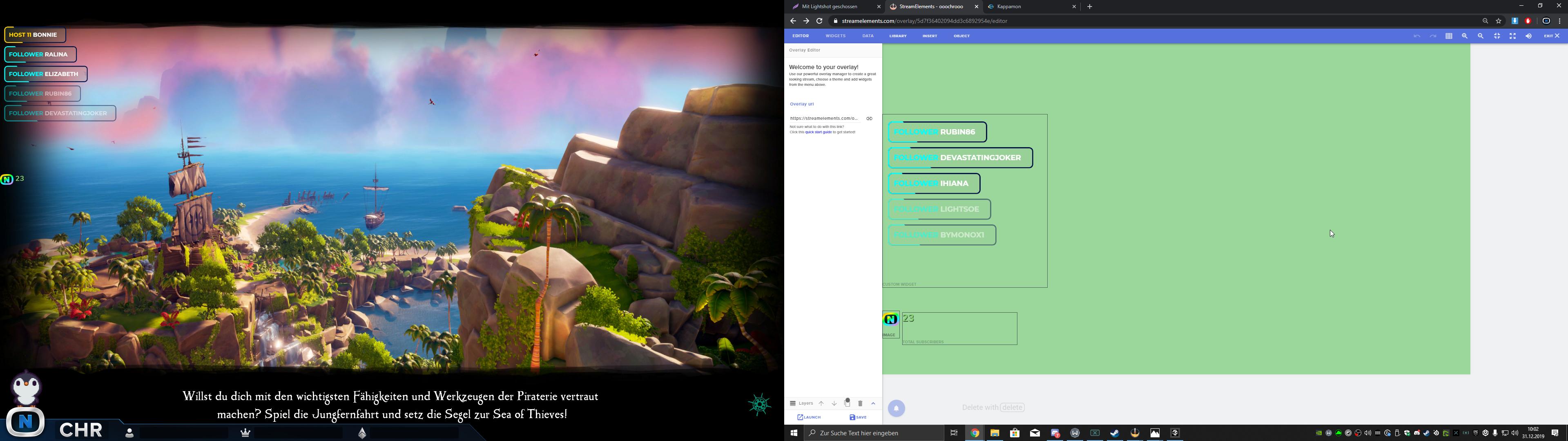
Hey, what is the reason that this isnt same size? I want to add a panel to the button left like u see in the left window (made as picture source in obs), wanted to add it into the browsersource.
 wary halo
the native resolution of the overlay is 1080p and i am guessing the res on your pc is higher
you can change the resolution here
steel talon
i got it on 1080
i also stream on 1080 useing google chrome could this be the issue?
wary halo
what is the base canvas in OBS?
 steel talon
Already checked that one, when i do that i just have white empty space. Also dragged a picture there, it wasnt printed into obs
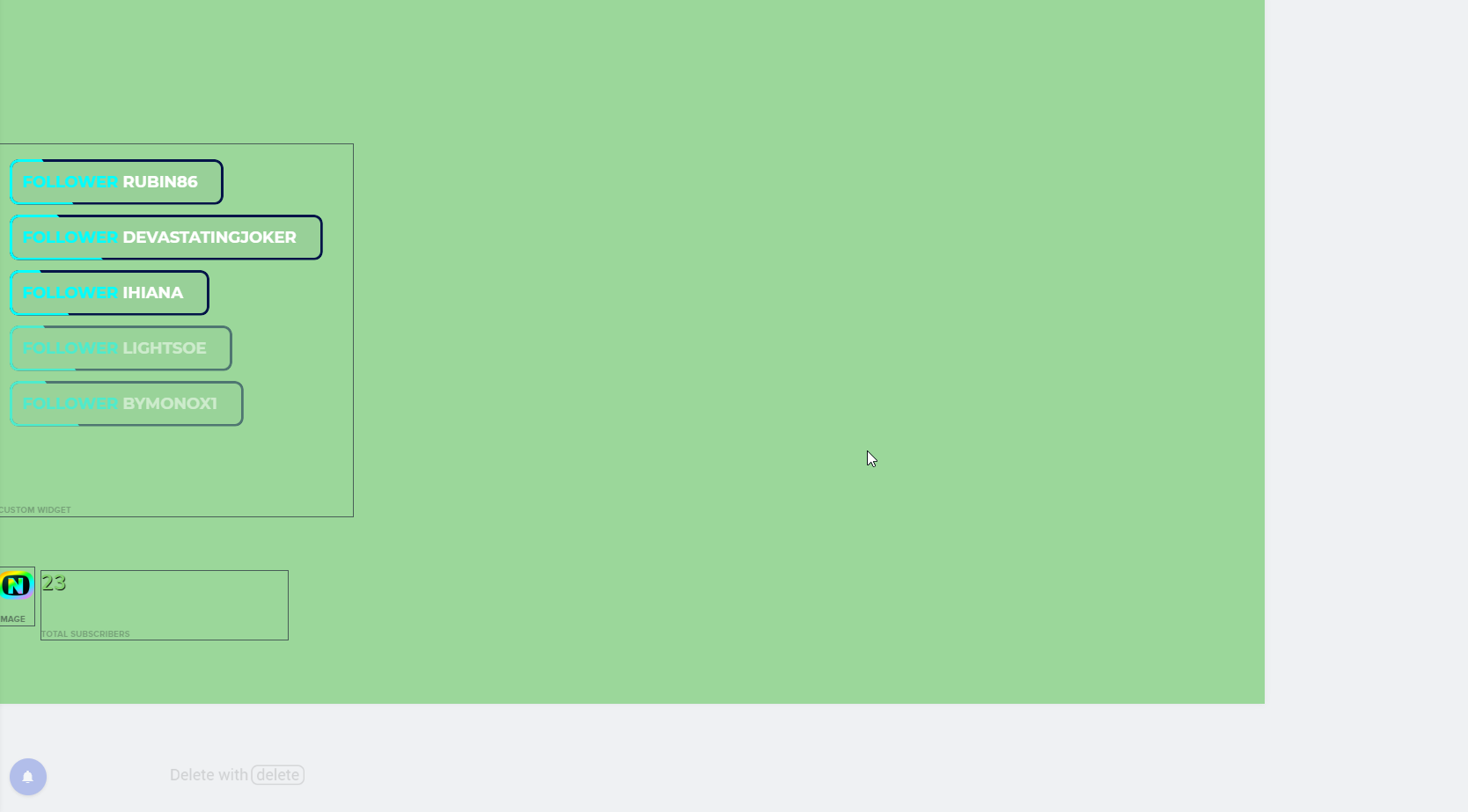
Thank you for your time btw.
wary halo
yeah the white space is not important, it's just that when you are zoomed in without knowing, then the placement of the items is in the wrong place 😉
steel talon
Hehe yeah well thats not the issue so.
wary halo
but we can rule that out now
zenith widget
So the event list is lifted higher in OBS then in the overlay it self?
Click on the browser source
and make a screenshot
steel talon
Browsersource is marked
https://i.imgur.com/n60WI5C.png
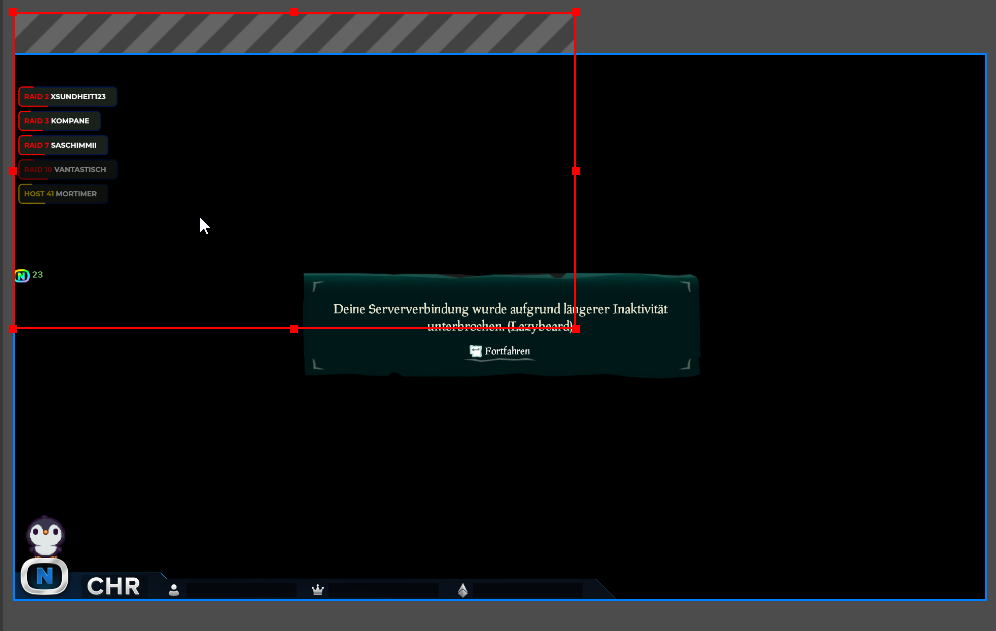 zenith widget
And you want the stuff to be lower?
steel talon
I want to ad this CHR panel into the browser source, currently it is just added as picture in obs.
but i cant reach that position with the editor in SE
zenith widget
ah
wary halo
make the red box as big as the canvas 😉
zenith widget
so back to what ruben said - overlays are 1080p sized by default.
meaning that you can position the event list on the top left of the overlay
and then add the image to the bottom
as you wanted
zenith widget
the green background is your play area basically in the editor
steel talon
Sorry
wary halo
yeah no problem 🙂 we are here to help 😉
steel talon
Works... im so silly.
https://i.imgur.com/VS1CgHh.png
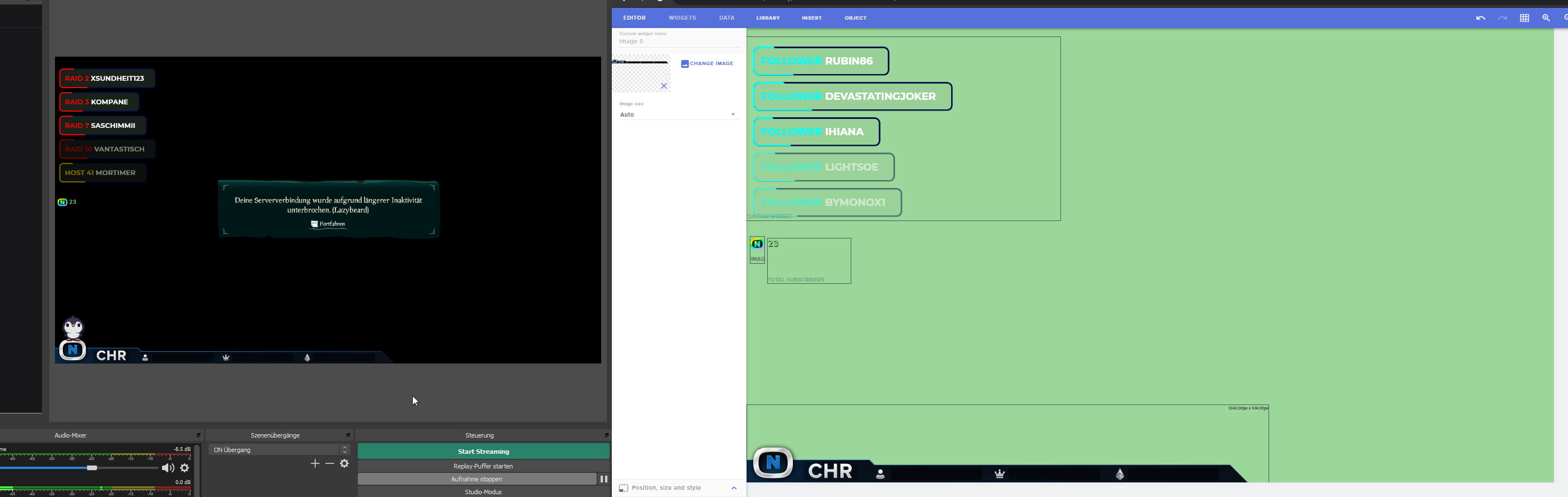 zenith widget

wary halo

 wary halo
it can be a little overwhelming at first, to learn everything, but when you know how it works... it's amazing
steel talon
Sometimes i just think wrong... i just had to use the complete canvas and then scale it down.
So silly xD
Support here is topnotch..
wary halo

steel talon
Mh why i dont have any data in this?
https://i.imgur.com/SxSWYwT.png


nvm i found the option
steel talon
I made current session but current session dosnt work when you are offline
cedar lynx
right 🙂 glad you found it!
steel talon
Is there something like top amount instead of top tip?
steel talon
yes
zenith widget
steel talon
ty
 haughty shoal
hey all i need help how do i reset my goals amount
round brambleBOT
@haughty shoal To reset goals:
- from the overlay editor -> data on top -> goal tab -> reset progress of desired goal
- from the dashboard -> activity feed on the left -> widget data on the right -> goals tab -> reset progress of desired goal
Note: Goal widgets(progress) only counts up and doesn't go down automatically, if you loose followers/subs
haughty shoal
ty
 potent linden
Is this where I ask for help with doing a giveaway? 😁
wary halo
you can ask yes
potent linden
I'd like to do a giveaway for my current subscribers
potent linden
Right, I understand the concept of using streamelements to do it, but how does the program work, how would I go about doing it? YouTube?
wary halo
youtube? as in you want a tutorial?
potent linden
Yea
wary halo
let me take a look real quick 😉
potent linden
Don't worry about it, I can do that.
wary halo

Use Contests & Giveaways to increase user engagement and reward your viewers, it's a whole lot of fun for everyone!
Loyalty system guide: https://youtu.be/hM7D0HJDRHg
Overlay Manager video guide: https://youtu.be/X7XrDdRE7Fk
Contests in the StreamElements blog:
https...
potent linden
Alright. Thanks.
 neon gorge
can goals be updated via chat command? (eg. !addfollow 5, adds 5 to the follower goal)
wary halo
maybe it can be done through custom widgets, but not on the default ones afaik
 spiral sleet
Is there any way to export the history from the media player? I was hoping to do a review of what's been requested over the year.
 fringe quiver
hello i want to go from stream labs to obs live and i want to import my alert box and scene how can i export them from streamlabs and import them in obs thanks .
 fossil terrace
Hello
ionic kelp
@fringe quiver do any of them have streamlabs themes?
wary halo
@fringe quiver
but yeah, as @ionic kelp mentioned, SL owned assets (copyrighted stuff) can't be used on StreamElements ofcourse
jade remnant
@haughty oracle you can go here https://streamelements.com/dashboard/social-media and set up the tweet
 haughty oracle
Yeah dang. Doesn’t look like I can change the tweet when I go live. May be better off just pulling up my twitter and tweeting it myself.
jade remnant
you can add it as a dock in obs and change it there, click save, then when you go live it will send that tweet
haughty oracle
Ooooh true that!
jade remnant
just a warning, it will be in light mode when you first add it 😁
haughty oracle
Yeah, how do I save it to dark mode??
I’ve had to change my chat to dark every time I open it lol
@jade remnant
jade remnant
click the menu icon top right
haughty oracle
Ah gotcha. All on SE?
jade remnant
that was on the dock for twitter
what chat are you using
view > docks > chat
or
streamelements > chat
haughty oracle
The one that was there at the beginning. I haven’t changed it at all