#helpdesk-twitch
1 messages · Page 547 of 1

 shut wigeon
I posted earlier about how i wanted to lift a block on someone for their ability to donate. I was told by someone that they would let staff know, but not heard back since. Someone able to look at it for me? 🙂
 zenith widget
DM me their email.
shut wigeon
Done and done
 signal sparrow
StreamElements chat bot has just stopped reporting follow age correctly in a stream I'm modding. It says "<person> is not following <streamer>" for all followage requests. Anyone else seen this? Is there an outage?
signal sparrow
OK, thanks
 ionic kelp
@zenith widget is it with internal variables or does it occur with API endpoints as well?
zenith widget
What are you referring to?
ionic kelp
The previous question.
zenith widget
I don't know how the default command is setup.
I just see that its not working and have confirmed its not working with my own testing.
ionic kelp
Any chance you could try with this?
${customapi.https://twitch.api.scorpstuff.com/followed.php?caster=${channel}&follower=${user.name}}
zenith widget
You can test it your self, based on how the API and parameters are passed on.
ionic kelp
Don't use the bot and cba on mobile 
 radiant nest
how do i get followage to work, its started saying that everyone is not following me
 pearl flint
I believe this is a current known issue, but I will double check for you @radiant nest
radiant nest
thankyou
zenith widget
3-4 lines above, i've confirmed it is and the devs have been notified.
pearl flint
Yeah ^
radiant nest
thanks
 granite garden
hai i use streamelements chatbot but my !followage doesnt seems to work when one of my follower use it, it says that they arent following when they are
zenith widget
Read above 🙂
granite garden
oh sry
 twin sentinel
@graceful tree Then your donation alert should just play fine.
pearl flint
What is the reasoning behind the fact that 0 viewer hosts dont go through on Elements, but do on other platforms?
twin sentinel
We use a different API endpoint as other platforms that results in faster alerts, but sacrifices receiving data for 0-viewer hosts.
pearl flint
ah ok
 steady cairn
this could be a dumb question, but I've just got a new pc, installed OBS.live and my connection to twitch, etc is all their SE works great for editing, but my scenes, etc. are not there - do I need to manually migrate them from the old PC? TIA
 gentle imp
no
you just need to re-add the overlays to OBS
if you had saved OBS settings that would be auto
steady cairn
okay, thanks I'll check that out
 lost rampart
Hey does anyone know how to set the custom bot name to something other than my twitch name?
 round brambleBOT
@lost rampart Custom bot name requirements
- StreamElements bot modded and in chat
- Active overlay with alerts
- StreamElements tipping page in the panels below the stream (!panels)
- OBS.Live or Ground Control open
- Create a twitch account for the name you want to use or run the bot under your own name
- Custom bot name doesn't work on Mac
zenith widget
In ground control there is a link to get an oauth token - make sure you are logged into the custom name
lost rampart
oh right! Custom twitch account!
zenith widget
yes - thats means making a 2nd twitcha ccount
lost rampart
TY! big help!
 gaunt yacht
Question: two questions/issues. 1. I have set up my chat timers on SE but they do not show up in my twitch chat for online or offline. 2. I reached affiliate about 24 hours ago and my overlays still say that i need to be an affiliate to allow subscribers on my "Show Recent Subscriber" widget. Tried Logging off and back on and didnt work.
zenith widget
What is your username?
zenith widget
No twitch account name has space in the name.
gaunt yacht
BuraKaii_Gaming
zenith widget
The dashboard is showing this
then the widget should work properly.
As for timers read this guide: https://discordapp.com/channels/141203863863558144/199460642975907840/508911738528333849
gaunt yacht
ahh ok. So i have to get my first subscriber before it will acknowledge affiliate? makes sense
thanks for you help
 weak crater
YO, i just swapped to using streamements and some people can hear my mic and others cant.......but they can all hear music?
 jade remnant
some people? as in viewers?
weak crater
YEah
Its strange
some on pc some on phone
its not devise spacific
sometimes plugging in a headset/headphones works sometimes it makes it stop
round brambleBOT
@weak crater For the best OBS support, please join their Official Discord @ discord.gg/obsproject
jade remnant
there really isnt anything that would cause this,
all obs does is send out the audio to the platform.
the only thing i can think of is if your audio settings are for surround sound and some people dont have the capability of listening on all the channels
jade remnant
is it set to 44.1 khz?
jade remnant
hmmm, are you streaming now?
weak crater
Yeah sure, can I do that whie live?
jade remnant
yeh thats fine
weak crater
How do I dind it
 wary halo
nothing weird
jade remnant
you might want to check the audio settings on your voice meter
make sure theres no audio channels above 2 (stereo) and 44.1khz
i knows theres stuff for VAIO in obs,
but not sure if work arounds are needed for it
weak crater
Yeah I tried to bypass voicemeeter alltogether
and its still the same
People can clip it and I and other can hear the mic
but the person clipping cant
 wary halo
seriously, your audio is being send out to your stream, so if they can't hear it then it must be on their end
jade remnant
obs is going to be the place to ask then,
if everything on your side is fine then its either a weird setting which the devs/support might know or it will be down to the users
weak crater
Thats what other people have said. BUT they can swap to a different stream and hear them
Thanks for trying man
wary halo
maybe it's a Twitch issue then
jade remnant
no worries, good luck 
weak crater
Cheers, going to need it.
I really like this compared to streamlabs so its a little crappy lol
weak crater
Hey @jade remnant - Its doing it on streamlabs now also. I cant think of what could be doing it. Audio drivers maybe?
This is after a fresh format and windows install......was fine before that
have installed newest Audio/motherboard drivers
 lapis vault
hello, I have a bug to report (or something I cannot figure out how to set up): in the channel paoloidolo on twitch, the contests do not appear in their public page while they are running
jade remnant
hmmm, you can try turning off the gaming DVR (not the full gaming feature)
restart your pc after and try again.
if that doesnt work do a full uninstall of obs and restart your pc
(you can back up your settings and scenes
scene collection > export
profile > export)
@weak crater
 carmine knot
--
I'm trying to get a list of everyone/anyone who's ever gifted subs in my channel
from 1 gifted sub to 1000+
Can I get this data easily (or at all) from StreamElements?
 lean spruce
Hey everyone, I'm a beginner with OBS and Twitch. That said, is it possible to run a 'test' stream to twitch without notifying all of my subscribers? I just want to see how it looks and make possible adjustments. Any kind of advice/help would be greatly appreciated 🙂
 glacial lion
hi, i have a problem with my store redemption, the alerts never vanish, i have to refresh the overlay after every single redemption and the word "redeemed" stays on screen no matter what
 tight harness
@carmine knot Sounds best to ask in #dev-chat - I know that by default this isn't listed anywhere
@lean spruce You see a preview within OBS itself, you don't need to go live to see the preview
@glacial lion We'll look into this, thanks
 cedar atlas
good morning my alert sounds wont work when i stream but work when i test it on the stream elements website
what am i doing wrong
wary halo
@lean spruce you can also run a teststream when checking the box here
tight harness
@cedar atlas Perhaps don't have the correct sound device selected in your OBS sound settings?
carmine knot
My all-time total cheers amount (how many bits I've ever gotten in the channel) is wrong
It's supposed to be 363447
But there's no place/way for me to change it that I can see. Can someone here... do that for me? IDK
Note: I'm sure of the exact amount, that's how I'm sure the one StreamElements is giving is lower than it should be
tight harness
You are seeing the amount you've received since signing up on StreamElements
carmine knot
Yup, I know
cedar atlas
@tight harness i will try
carmine knot
Is there a way (IDK) that a dev here could just change the number in my account to the one given above
aka 363447
Twitch username: ZaneKyber
tight harness
No, we are only able to show the amount you've received since being signed up to us
carmine knot
Gotcha
wary halo
what is your question?
 chilly carbon
Well I want to donate to my friend through stream elements and no matter what kind of currency I want to donate, it always tries to make me donate in USD
Like for example if I say donate 1 gbp in streamelements it will redirect me to paypal and then it will ask me to pay in USD
wary halo
what currency is the streamer using?
wary halo
who is the streamer? (no link just name of channel)
wary halo
it's probably because his default tip currency is set to USD
chilly carbon
Alright.
wary halo
he can change that in his tipping settings
chilly carbon
Crap, alright, it's a christmas present for him and I don't know how I am gonna tell him thaT
wary halo
gotcha 😉
carmine knot
Widgets for top sub gifter of the session/week/month
Are those not a thing?
wary halo
you can already see that in Twitch chat itself
carmine knot
I suppose. But I'm making an overlay with stuff like
top cheerer of the session
top donator of the session
so I guess for now I'll be manually adding top sub gifter
wary halo
yeah sorry, i only see the top gifters widget but you can't set it to session/week/month 😦
carmine knot
I'll be doing it manually. I would hate if it someone gifts a ton of subs and they don't even get a spot on the overlay.. but someone who donates or gives bits does
chilly carbon
@wary halo my solution is gonna be donating $13.69 cents for the currency exchange fee back to GBP and of course, it's just a NICE joke
wary halo
you can always submit the idea to the ideas list
round brambleBOT
@carmine knot Check out the StreamElements ideas board: https://strms.net/ideas. You'll be able to add ideas, upvote ideas you agree with, and track their progress with email notifications. Adding and upvoting ideas also helps the staff know which ideas should be prioritized so please take some time to upvote.
lean spruce
@tight harness @wary halo Thank you very much, guys!!
 gentle glade
Does anyone know how to setup event based text? Like for example, someone subs to my channel and then the text of "Recent Sub" changes to their name which will change to someone else eventually, and so on? I know that for a certain other company, I believe they give text files that you have to import that will change the text. I'm using OBS for Mac.
 fathom zodiac
question! If I had a display capture on one scene but I click the little eye thing to disable it can I have a video capture in another scene and have it running, would that still cause any issues?
this is OBS im talking about
 minor storm
Hi, I am trying to add myself Full Control permission to control my bot-account using only my main account, but when I try to use the invite link on my main account, I always get error "roleplay.missing scope invitations:manage". I have already tried all levels of permission and none of them works.
tight harness
@gentle glade This is available in Widgets via the overlay editor, we don't use text files, everything is done over the cloud
@fathom zodiac I can't see why this would cause issues personally
fathom zodiac
You dont think theres any CPU issues?
tight harness
@minor storm Make sure you're not roleplaying as anyone when you use the link and make sure you're logged into the account you want to give access to on Twitch when you use it
@fathom zodiac If you shut down the source, not at all
fathom zodiac
How would I shut down a video capture display or the display capture?
browsers I know how to shut those down because I ran into that yesterday haha
tight harness
In the options for the source you'll have something saying shutdown when not visible, it means that when you click the "eye" and it hides it's shut down
minor storm
@tight harness I started roleplaying another channel few minutes after sending my message about the problem. I stopped roleplaying the channel and I was able to add myself now. So maybe start and then stop roleplaying helped? Thank you 
fathom zodiac
you dont get that for display capture though or video capture
those options are there for the browsers sources
tight harness
Because you're capturing it locally, you don't need to worry about it when it's hidden
fathom zodiac
ohhh really?
tight harness
Yes
 hazy fulcrum
hello just joined lol seem to be having problems with (cheer alerts) on my actual stream elements , the image i upload doesnt seem to go threw , everything else seems A ok , if anyone can help thanks in advance and sorry i didnt know which channel to post this on
tight harness
Hey, just replied to your tweet too, you need to go into Variation Settings and update the variations for the cheer alerts too
There's a variation for each bit type: 1, 100, 1000, 5000, 10000
tight harness
No problem
 scarlet tiger
@tight harness @minor storm When I had this problem, it always helped me clear my cache. 😉
 rugged sorrel
Hey, im trying to import my overlays directly to twitch without OBS is that possible or i need OBS? because im streaming directly on twitch without OBS
hazy fulcrum
omg its working thank you 🙂 💯
tight harness
No problem 👍
scarlet tiger
@rugged sorrel Streaming without OBS or other streaming program is not possible, as far know.
rugged sorrel
@scarlet tiger but twitch has an option to stream, i've tried and works fine
but idk how to import my streamelements overlay
scarlet tiger
@rugged sorrel Twitch studio?
rugged sorrel
just in profile, start streaming
wary halo
that is probably using twitch studio then
scarlet tiger
Ah
rugged sorrel
The "Empezar directo" button
scarlet tiger
You can stream from a twitch app, but without overlays, alerts, etc.
wary halo
no
wary halo

 broken sky
hello any1 can help me ?
scarlet tiger
@broken sky what is your problem?
broken sky
when i want to stream modern warfare the game crashes when i start fullscreen
scarlet tiger
@broken sky Use Streamlabs OBS or OBS.Live?
broken sky
obs live
round brambleBOT
@broken sky Please provide a log from your last stream. To do this, in OBS go to Help > Log Files > Upload Last Log File and paste the link to the log file here.
scarlet tiger
@broken sky
"Two instances of OBS are running. If you are not intentionally running two instances, they will likely interfere with each other and consume excessive resources. Stop one of them. Check Task Manager for stray OBS processes if you can't find the other one."
carmine knot
Some people used to tell me that I could NDI a source from one installation of OBS to another on my same PC and it "should be able to handle it"
I learned that was a bunch of BS, and I build a cheap 2nd PC with a Ryzen 5 
wary halo

broken sky
still not working my game crashes when i start fullscreen and have obs live
scarlet tiger
@broken sky crashes obs or game?
broken sky
game
scarlet tiger
We could troubleshoot if it was OBS crashing, but we can't really help with a game crashing.
broken sky
weird it only crashes when i have obs on
scarlet tiger
@broken sky pls screenshot your Task Manager.
broken sky
scarlet tiger
@broken sky Click the arrow before to OBS
 tiny jetty
So I set up spam link protection to timeout for 10s but people can't type after 10s and they said it was for 600s (even tho I see a message it was 10s only)
Anyone an idea what can it be?
 dry hare
Check your Twitch auto-mod settings
scarlet tiger
@tiny jetty which channel?
tiny jetty
Salvyyy
tiny jetty
Weird then, I dunno, maybe it just had lag and took longer, thanks for checking out
 brave aspen
So I'm having an issue bringing my custom font into stream elements. I can use it for text pieces, but I am trying to apply it to a timer and it just won't take. Any ideas?
round brambleBOT
@brave aspen Google Fonts
More than 900 google fonts are supported at this time. You can preview them here: https://fonts.google.com/
Custom Fonts
Steps:
- Install the font on the streaming PC or choose a pre-installed windows font.
- In the overlay widget settings, select Text Settings
- Enable Custom Font
- Type the name of the font as it appears in the windows font directory (This is usually
C:\Windows\Fonts)
Note: After installing fonts, the browser and OBS must be restarted for the font to appear.
scarlet tiger
@brave aspen which timer?
brave aspen
does it matter if it's open type font or true type font?
scarlet tiger
@brave aspen Which timer do you mean?
brave aspen
Just the Stream Engagement "countdown" Widget
scarlet tiger
@brave aspen which font?
brave aspen
Arquitecta Office Bold
scarlet tiger
One moment
 stark furnace
Is there a problem with command and/or redemptions atm please ? On a stream that I mod, 1/2 the commands that redeem a pic and audio are not working
It says "internal server error"
 strong kernel
We're looking into the issue.
stark furnace
@strong kernel ty 🙂
brave aspen
@scarlet tiger did you happen to figure that font issue out?
strong kernel
@brave aspen Did you install the font while OBS was still open?
brave aspen
No it was installed way before obs was (months ago) both obs and the computer itself have been restarted many times since. The issue I am having is not with OBS it is with the stream elements dashboard
On the dashboard I can get the font to work for other widgets but not for the countdown timer.
strong kernel
Don't worry about what it looks like in the dashboard, go by how it appears in OBS when added as a browser source.
brave aspen
It looks the same as it does in the browser
when added to obs
It may have just switched over actually which is weird because I did nothing😅
Let me refresh and I'll follow up
nope never mind didn't work
strong kernel
@stark furnace Try again, see if it's all good now.
stark furnace
@strong kernel Will do 🙂
brave aspen
it doesn't appear at all in OBS
stark furnace
@strong kernel Still the same - Some work - Others don't
Still getting server errors
strong kernel
@brave aspen Please screenshot the font as it appears in C:\Windows\Fonts
brave aspen
strong kernel
That does not appear to be the C:\Windows\Fonts folder.
brave aspen
Oh right one moment
With other widgets all i've had to do was type the title "Arquitecta Office Bold" and it worked just fine
strong kernel
Double click the font and screenshot the preview window please.
brave aspen
 lament blade
i cant add my credit card only paypal but i want that people can donate with paysafecard
 onyx anvil
Hello! I'm having a hard time setting up my NDI dual pc setup, I'm to the point where I can send my video footage, but I can't seem to recieve audio from my gaming computer to my streaming computer. Also, when I go to select an audio source via. scan converter, scan converter crashes. I read online that I should upgrade my sound drivers, but they are all up to date, and i have no other mixers running.
strong kernel
@brave aspen I've created a Font Test overlay in your account. Please add it to OBS and take a screenshot of how it looks.
round brambleBOT
@onyx anvil For the best OBS support, please join their Official Discord @ discord.gg/obsproject
onyx anvil
thankyou!
strong kernel
@lament blade SE.Pay is only available for channels with 100+ followers.
lament blade
thx
brave aspen
strong kernel
Has this particular font worked for any widget you've added?
brave aspen
yes
strong kernel
Please provide a screenshot example.
Please also provide regular screenshots and not pictures from your phone.
round brambleBOT
@brave aspen https://www.take-a-screenshot.org
strong kernel
@stark furnace Try again, we believe it should be resolved now.
brave aspen
Interesting... it now doesn't seem to be working
stark furnace
@strong kernel YUP Seems to be working now. Thanks very much 🙂
brave aspen
It was working on the browser and on streamlabs previously but is now defaulting to another font
strong kernel
We're not Streamlabs.
brave aspen
yea I know
strong kernel
And we cannot assist with testing in Streamlabs OBS, as we cannot troubleshoot their software.
strong kernel
Please test it with another font to see if it changes when you finish typing the name.
If it does, there may be an issue with that particular font and how it wants to behave.
The change should be immediate. If not, it either isn't installed or hasn't been typed in a way that CSS accepts.
brave aspen
It is definently installed.
Change was immediate
I can create text sources natively in OBS with this font.
strong kernel
Text sources are different as they reference the file rather than require you to type out the font. They're not relevant to this issue.
At this point you need to determine what needs to be typed to have the text change immediately to that font in the editor, save the overlay, and then restart OBS.
 daring creek
I could really use some help pls
round brambleBOT
@daring creek Welcome to the helpdesk! Please let us know how we can assist you today and a support volunteer or staff member will assist you as soon as they are available. Thank you for your patience.
 midnight plaza
I am trying to revoke someones editor access but it wont go away?
Like I click revoke access but they still have access
brave aspen
It looks like there is an emoji or something in the window.
strong kernel
@midnight plaza Who are you revoking access for?
midnight plaza
annedorko I gave them access a while back to trouble shoot something, but i cant revoke it anymore
its gone now
strong kernel
🙂
midnight plaza
@strong kernel thank you
daring creek
How do I get mind broadcast online
strong kernel
Pardon?
brave aspen
Any recommendations as to how I determine what needs to be typed?
so I tried adding this finger point text piece, it changed but not to the right font and still is not visible in OBS.
☞ Any idea what the CSS format is for this? ☞☞☞
strong kernel
Unfortunately not.
 spare knoll
does any one knows how can i make the bot send a message every hour on the stream as a reminder
strong kernel
Timer.
strong kernel
Read the note below it.
 lucid bridge
Hey! I have a question about how "Chances" work at Alerts. So, if I have an event, and I have some variations for that event with specific chances. So does the system go through them linearly (so starting with the first, moving to the second, etc), check if a rand() number is in the chance, if it is, trigger the alert, if it's not, move on to the next one, until it finishes?
strong kernel
@lucid bridge The specific coding logic for the function isn't shared.
lucid bridge
@strong kernel I'm just interested in it, I want to define events with exact chances, and I need to know which logic it uses
Sorry for bad illustration, I have limited space for my hands rn
 ember kraken
https://gfycat.com/MarriedGrossErne
Timer occasionally skips
 lucid bridge
The first one would be easy, because I don't have to do any calculations, but harder to code. The second one would require some calculations, but would be way easy to code. I assume you use the second one
strong kernel
@lucid bridge The specific coding logic for the function isn't shared.
@ember kraken We're aware.
lucid bridge
Okay, another question with these random events.. what happens if it goes through all variations, and it sill doesn't trigger/the total chance isn't 100%.. What would it do? Would it trigger the default alert or would it just skip it altogether?
 lilac vessel
is there a way to use a command (or store redemption) to give people points when they use the command? and if so, can you limit the use of the command? --- The example is !first would reward the first 3 people 100 points
strong kernel
@lilac vessel Only !addpoints can give points. No custom command can do so.
lucid bridge
@lilac vessel With NodeJS, you could make a bot easily that detects if someone says "!first" and reacts with "!addpoints user 100", but you would need to run it everytime without forgetting it
(or on a different server)
lilac vessel
hmm, alright, i'll look into it. I tried using !givepoints ${user.name} 100 as the !first command response and even though it outputs the right command, it doesn't transfer points
strong kernel
Commands cannot trigger other commands.
 iron valley
Gentleman, I can not see Chat Stats from my channel did something wrong?
 winged marten
Got told to ask this here, is there a way to hide moderator commands on the stream elements website we get provided to us?
shut wigeon
For the new step in the beta merch store by SE, we can now upload our own image for products. But where is the option to un-do that and use another image? I had no logo premade so used a completely random image to see how it would look.. but now my store is stuck using a random picture on the products.. solution? 😄
strong kernel
@winged marten Only available for custom commands, not defaults.
winged marten
awsome thank you so much @strong kernel
 lucid marsh
hello I have created a giveaway. How can I test it offline?
strong kernel
Same way you'd test it while live.
Though you might want to enable the command used to enter the giveaway.
lucid marsh
ok it works !
 graceful karma
Hello i have a problem with my channel, im a new streamer and i would like to solve my problems and do something to became more beautiful.. sorry ofr my english but i'm italian. Thanks for support
round brambleBOT
@graceful karma Welcome to the helpdesk! Please let us know how we can assist you today and a support volunteer or staff member will assist you as soon as they are available. Thank you for your patience.
graceful karma
I need support with my channel and i would like to apply my overlay done on streamelements, i use streamlabs and i dont know how can do it.. please help me
ionic kelp
@graceful karma Not that I can answer there but #🇮🇹︱italiano might be useful.
round brambleBOT
@graceful karma To add your overlays to OBS, add a new browser source in your scene. Paste your overlay URL in the browser source properties, set the dimensions to 1920x1080 (unless you changed them on the website), and ☑ “Shutdown source when not visible” https://youtu.be/KDvLynUqXI4
 simple chasm
Is there an easy way to copy a widget from one overlay to another? I want to duplicate certain things that I've set up but I don't want to have to set up everything all over again
strong kernel
Yes. Select the widget and click the duplicate button.
simple chasm
oh. duh. haha thanks
 slender anvil
hey is there a reason why store redemption alerts are staying on the screen?
 hearty mica
can any one help me with emote questions please
how do i get stream elements to use my emote when a chat command it triggered
ionic kelp
 misty raft
can i get assitance with an issue with media request in here?
zenith widget
What is the issue?
pearl flint
Hey @misty raft you can just message me if u want lol. Happy to help a friend out 🙂
!studiomode
round brambleBOT
Check out this tutorial for OBS’ studio mode which allows you to preload scenes before transitioning. https://www.youtube.com/watch?v=W8iWsD2Lq3U
misty raft
i have double audio on stream and in my headset when i clock show on stream using obs live
round brambleBOT
@misty raft Make sure to ☑ “Shutdown source when not visible” for all browser sources (all OBS scenes). If using studio mode, uncheck “Swap Preview/Output scenes After Transitioning.” Also keep in mind that sound can play from any overlay loaded in the browser (editor or launched). https://i.imgur.com/FegZJQS.png https://i.imgur.com/yY0wcFl.png


 torn wren
I need some help. I want to add a death counter command to my chat, and have an easy way to just add a death when I die, without having to type the whole thing, as I primarily use my phone, and typing isn't the easiest. Is there a way to do that?
zenith widget
 open river
I'm having trouble finding the kappagen widget, is there something I'm missing?
zenith widget
Are you on twitch and in the overlay editor?
open river
i'm on streamelements.com, but yes i'm streaming to twitch
torn wren
Thank you @zenith widget
zenith widget
@open river
zenith widget
Hence why i asked "Are you in the overlay editor" and the answer should have been no, so that I could know what to show first 🙂
No worries
open river
Nice! I did not know that was there. Thanks!!
zenith widget
👍
open river

 neon gorge
Is there a way to get Last Raider or Last Host as a chat command variable
zenith widget
There is no variable for that unfortunately.
round brambleBOT
@neon gorge Check out the StreamElements ideas board: https://strms.net/ideas. You'll be able to add ideas, upvote ideas you agree with, and track their progress with email notifications. Adding and upvoting ideas also helps the staff know which ideas should be prioritized so please take some time to upvote.
 frank violet
I'm trying to set up sound alerts and keep hearing the stream store is how its supposed to be done. Ex... when someone types in a command they can hear an alert. But when I redeem the sound effect to test I don't hear the sound effect at all? I'm setting it up as !redeem "whatever the sound clip is called". Am I doing this the correct way or is there a better way for sound alerts on command?
 upper magnet
@neon gorge you can filter your activity feed to see who raided you last
zenith widget
@frank violet Have you added the redemption widget to the overlay?
frank violet
Ooooh tell me more! So no
zenith widget
Tell you more? here:
Steps to make a command trigger sound on stream:
- Go to Stream Store page here: https://streamelements.com/dashboard/store/items
- Add an item that has these settings on it:
- Stream Perk / Sound Effect
- Loyalty settings to your desire
- (Next step) Add contents (image and/or sound you want to play)
- "Redeeming this item shows an alert
- Redemable via chat
- Skip Requirements
- Get the item name/command from the 2nd creation page
- Go to commands page here: https://streamelements.com/dashboard/bot/commands/custom
- Add command with desired name and have response for command as:
${redeem item_name_here} - Go to your overlays and edit the overlay you use.
- Click on "widgets" and add "Store redemptions" widget. Click save and you should be golden.
- Test your own command in chat and have OBS or editor open to hear sound
- ???
- Profit in viewer interaction and that dosh

neon gorge
@upper magnet was looking to add to a chat command so i could do shoutouts in chat
zenith widget
If you want to do a shoutout for the person who just raided/hosted you
frank violet
Thanks! Trying it now!
zenith widget
there is a template for a custom command for shoutouts
upper magnet
Theres also the Chat Alerts Bot Module you can customize for raids
frank violet
You guys are amazing! @zenith widget
zenith widget
lament blade
Um I need help with my overlayouts
wary halo
What do you need help with?
 left jetty
hello is anyone available to help? im testing my giveaway and telling it to give everyone a ticket. since im the only one there, im using me to test. it does not seem to be giving me a free ticket. is that because its me?
 sweet socket
are you testing it in the chat from your stream or from the website?
left jetty
im looking in my streamelements page
sweet socket
^helping over at channel
lament blade
hello, what is the streamelements HypeCup and the streamelements KappaGen?
lament blade
thx
left jetty
thanks @sweet socket from my pillow! lol ❤️
sweet socket
No worries, have a good nights rest!
lapis vault
hello boys, i'm managing a channel (paoloidolo) and I've discovered a bug
or something that I cannot set up properly. Contest do no appear in the public page of the streamer
i've tried with both contests opened manually and opened via API
A friend of mine contacted you and told me that you need to investigate with the streamer: I have his credential and I can help if you need.
zenith widget
I don't remember on top of my head if contests should show up in the profile page.
zenith widget
Interesting 
Via the API when you start it, do you get a normal response that it started?
and via the API do you get a response you try to get all active contests?
lapis vault
I would guess so, the contest works properly
I never try to get all active contests so I would not know about that
when i was testing a lot of months ago tho it did work
I guess the question is related to the fact that it's exactly what you do in that page, right?
zenith widget
What I'm doing on paoloidolo's account right now is
entering the contest page on the dashboard, starting one just like that
i can see that nothing shows up
but i did manage to start a contest on my account and it did show up
zenith widget
at this point, since i can't find anything easy to find currently on why its not showing up, I will have to poke our QA to take a look.
lapis vault
only difference i can guess it's the huuuuge amount of contests on the account
zenith widget
both for his account and for mine - the default settings
lapis vault
yep
zenith widget
HOLY MOLY 
zenith widget
Ok, will point this out to the QA as well
lapis vault
and by we i mean my software does lol
zenith widget
if this is the cause for it to behave like it is currently for him
then it will happen to a lot of people
lapis vault
it's the only difference I can think about
zenith widget
so QA will have to investigate and i will poke them real hard on this, cuz its a DT member
lapis vault
DT?
zenith widget
Dreamteam member
zenith widget
We do care about everyone, especially our DTs 🙂
lapis vault
Well thank you then. I really don't have anything more to help the investigation atm
99% of the contests are opened and closed via API, and that's kind of it.
Will you pm me/ping me here?
zenith widget
I'll ping you
lapis vault
thank you very much, super efficient and gentle as usual 🙂
radiant nest
I've made my friend an overlay on my stream elements, how do I CREATE a link to share this with him
zenith widget
The share option is not available. Another way to give your friend the overlay is to become his editor and duplicate the overlay to his account.
round brambleBOT
@radiant nest Follow these steps to grant managers/moderators access to your dashboard:
- Click on your Channel Name at the top of the dashboard and select Settings
- Create a new invite at one of three access levels (Bot Supervisor, Editor, Full Control)
- Send this invite to a mod/manager to give them access to your dashboard. The link is one-time-use and expires after 72 hours if not accepted
Video tutorial: https://youtu.be/zl_h-ttZDF0
radiant nest
Hmmm. I've seen people do it before. Is it a feature that has been trialled with creators
zenith widget
Internal Tools
radiant nest
Ahhh okay. This really should become a thing though
zenith widget
We know.
 elder garden
hi, I recently changed my twitch username and seems like the StreamElements bot has left my channel. I can't find how to re-invite the bot anywhere in the SE webpage, what am I missing? Thanks a lot.
zenith widget
Go to the dashboard -> part channel -> join channel
on the right side of the dashboard
zenith widget
👍
 rare cairn
is there a reason why a custom command that i have a keyword set for, doesnt work with just the keyword?
rare cairn
nope still didnt work, i have special shoutout commands for people setup for example !bigantlive i have the keyword to be the same but without the exclamation point. I was under the impression that the keyword worked so that it would pick up the keyword if it was in a sentence
zenith widget
maybe you are trying to test too fast
as you can see i might have hit the cooldown
rare cairn
maybe so.
so i assume that the keyword wouldnt work if i typed !so bigantlive? I was trying to set it up as if typing !so bigantlive would trigger the awesome shoutout overlay as well as the command in chat
 pale meteor
Hi!
I guess this is something that was already asked... I use ground control and suddenly my bot ignored the customized name
And now I realize that Ground Control has not that option anymore (or I can't find it)
Is there a way to have custom bot name without Streamlabs OBS? I use OBS for work as well and I don't feel comfortable using the SL version.
wary halo
the bot option isn't in SLOBS 😛
it is in the OBS.Live plugin
it just regular OBS with a StreamElements plugin
but the bot option should still be in GC, so it's weird you don't see it
can you try to delete and reinstal GroundControl?
pale meteor
if i can still use ground control that would be perfect
I just installed it in a new SSD
wary halo
ah okay, and you are logged in?
pale meteor
I put the JWT token if that is what you ask
wary halo
can you screenshot your GC in the menu where it should be?
wary halo
if you click back and then the hamburger menu, are you seeing your twitch channel there?
and i see you are on version 1.4.3 and i am on 1.7.2
wary halo
you need to update GC
pale meteor
oki
pale meteor
im on it 😉
ffs... so beautiful XD XD
ok.. i can see the feed now
good
now i see the option
I just put the oauth and the bot name and that's it?
wary halo
yup
pale meteor
Ok.. that was silly solution. I should have thought by myself.
Thank you very much Ruben!
Gracias, chaval 🙂
 pale meteor
jejeje
 winged wolf
wary halo
winged wolf
wary halo
sounds like a problem with paypal
 oblique raft
Can't start my stream?
oblique raft
I should be as I can see all my scenes and stuff
it said something above drivers being up to date and to check log, but dont know what im looking for in log
oblique raft
hmm ill play around with it i guess
twin sentinel
14:29:32.187: obs-browser: streaming start requested by UI control
14:29:32.199: Stream output type 'rtmp_output' failed to start!
This are the two last lines of your log file.
If you say that there was some sort of warning with your drivers, best to check for any updates on these.
oblique raft
here's the pop up i get when i try stream, just closed OBS and tried it again to see it
@twin sentinel thanks
 brazen moon
Hi support im trying to add a current song command with spotify, i did find that command in command share section, but it keeps saying "failed to get the current song." anybody help ?
twin sentinel
This is an external API you are using, which is failing.
brazen moon
Benno what does that mean exacly ?
its the correct command but his server that fails ?
twin sentinel
This has nothing to do with StreamElements. Best to ask the creator of the API.
round brambleBOT
@forest wraith There are no "best settings".
Please understand that every setup, will be very different.
Any guides or videos that claim otherwise are misinforming. Your best option is to start with a base and adjust as necessary.
Test, test, and test again. We are happy to offer suggestions for any issues you may be having, but not a list of settings.
lament blade
the website is not working
twin sentinel
Please read what the bot posted above @forest wraith
lament blade
i only get a white screen
 forest wraith
@twin sentinel There must be the "Best settings" for diffrents types of setups
twin sentinel
Normally a whitescreen is caused by a local issue. Please try to load the website in a private browser and clear all cached data @lament blade
 storm delta
Failed to delete tip ?
lament blade
how do i clear cached data
forest wraith
@twin sentinel There must be the "Best settings" for diffrents types of setups
lament blade
nevermind
twin sentinel
Back working?
forest wraith
?
twin sentinel
@forest wraith Please read again what the bot posted above.
lament blade
website still doesnt work :/
twin sentinel
@forest wraith What are you trying to say then please?
@lament blade 1. Clear your cache
2. Go to chrome://settings/content/cookies and add streamelements-yoink.netlify.com to your allow list, allow cookies in general
3. Press Ctrl + Shift + R while looking at the white screen
@storm delta Do you see an error in the console (F12 in chrome) when you try to delete the tip?
lament blade
i think my google is broken
twin sentinel
Can you elaborate please?
storm delta
can i change top tipper ?
forest wraith
@twin sentinel so theres not a page where i can find the best settings or what`?
twin sentinel
No.
twin sentinel
Cause every setup is different.
wary halo
because everyone's setup is different
twin sentinel
@storm delta You sould be able to do so with editing the revenue history, but I am not 100% sure on this.
forest wraith
But a page where u can see if u have i7 8700k and a gtx 1070 then watch the best setting
twin sentinel
@forest wraith I do not know any page that can give you the data you are searching for. I am sorry.
forest wraith
k
twin sentinel
@storm delta Try to edit the top tipper here: https://streamelements.com/dashboard/session > Session Data and reload the overlay.
storm delta
still can't change top tip
twin sentinel
In the session data I can enter the top tippers name and amount.
wary halo
did you save it and reloaded the overlay?
 heavy pine
Hello guys, anybody knows how correctly hear alerts from SE on android? That needs me for IRL backpack
 devout plover
'D
twin sentinel
@storm delta I am sorry, as I have no idea how to solve your issue. I am sorry.
I'll ask internally on this.
 small coral
Hello, i have a question to ask. Why is it that the streamelements send me emails about the unique chatters and there are some great numbers shown, but there wasnt anyone chatting on my stream? What is the meaning of this?
twin sentinel
Unique chatter is a viewer who has joined your stream for the first time and has stayed enough for us to see him in the viewer list. They dont need to hve typed in chat.
@storm delta I got the info that editing the revenue history, should also edit the displaying of the top tipper after maybe a reload of the overlay.
small coral
@twin sentinel thanks man really appreciate it
 worthy quartz
I'm trying to view my chat stats but it says error 404. I did change my twitch name since I started using streamelements, but I made sure it changed in streamelements as well some time ago
scarlet tiger
@worthy quartz one moment
i asked staff to fix your chatstats after rename
@worthy quartz fixed
worthy quartz
Thanks
 karmic fossil
In OBS, is it more efficient to get all my Streamelements stuff into a single browser source, or is running multiple browser sources (which have one element in them) the same difference? I ask because I prefer using one browser source per element, that way I can move things individually in OBS. I don't particularly like the SE interface for laying everything out, otherwise I probably would have done that a long time ago.
pearl flint
@karmic fossil So the way OBS works is it makes a new task for every browser source, meaning it will be more resource intensive to run them all individually. I recommend doing as one source.
 white burrow
Module options not saving? want to change the message when people host and it's not saving even though it says "saving" and "saved" when you move to another tab and come back it reverts. Also the bot is not announcing when people are hosting.
pearl flint
im not sure about the saving issue, but for the bot not announcing the hosts, are they greater than 0 viewers
because SE doesnt announce 0 viewer hosts
white burrow
ah ok that makes sense.
karmic fossil
@pearl flint thank you! I have so many browser sources from SE now that Its probably best to combine them. If it was one or two it probably wasn't a big deal, but its getting a little out of hand now lol. Thanks again!
round brambleBOT
@white burrow Due to changes to Twitch API, we have filtered out hosts and will only show these ones on your activity feed:
- All hosts coming from an online channel with at least 1+ viewer
- Auto host events with at least 1 viewer - only from a channel that just went offline
Note: If you see "X channel has hosted you" with no viewers on the back, that is considered an offline host or a host with 0 viewers, we do not show these.
pearl flint
@white burrow is it literally reverting your settings back to original, or is it by chance just showing the same alert even though the settings are changed
white burrow
reverting @pearl flint
pearl flint
Is it with any change or this one specifically
can you try adding a different widget to test?
white burrow
pearl flint
I am running into the same issue on my end. Please give me a second @white burrow
white burrow
I think it worked, I had to go off the page and come back to it for it to save before I switched tabs to subscriber or whatever
pearl flint
Yes, that seems to solve the issue. Glad you figured it out @white burrow 🙂
white burrow
Thank you for your help 🙂
pearl flint
no problem 🙂
lament blade
i need help
 viscid pebbleBOT
Hi @lament blade, Please ask your question(s) or describe the problem you're looking to solve so staff or a support volunteer can assist you as soon as they are available.
pearl flint
Whats the issue?
lament blade
my screen stays blank and if i do reload it still stays blank only the help button is visable
pearl flint
the website? @lament blade
lament blade
yes
 verbal thunder
I'm trying to figure out why the timers are not following the setup parameters as they are meeting neither the time nor the chat line requirements
pearl flint
Do you have any adblockers or content blockers on your browser?
scarlet tiger
@lament blade which browser are using?
lament blade
im using chrome
scarlet tiger
@verbal thunder please screenshot this timer settings
lament blade
and all the adblockers are off
verbal thunder
Here are the timers
lament blade
the only thing that is on is youtuber adblokker but i dont think thats importent
pearl flint
Have you tried clearing your browsers cookies @lament blade
scarlet tiger
@verbal thunder Each timer in the chat is different.
verbal thunder
so i should offset the intervals
pearl flint
yes
verbal thunder
is it also a best practice to offset the chat line requirements
twin sentinel
lament blade
@pearl flint i cleared my cookies and then i got a auth error and then if i pressed twitch again it leads me back to dashbord but the page is still blank only the help button is visable
pearl flint
Do you have any other browsers you can test this on @lament blade ?
lament blade
yes still blank
pearl flint
hm, this could possibly be your firewall preventing you from connecting to the website. Have you ever been able to connect to the website?
scarlet tiger
@lament blade blank after Launch overlay or in overlay editor?
lament blade
blank in dashbord
verbal thunder
thanks for the help ya'll
scarlet tiger
@lament blade screenshot?
lament blade
scarlet tiger
Ctrl+Shift+R?
scarlet tiger
@lament blade try incognito mode
lament blade
blank also
 pearl flint
@lament blade check dms
 brazen burrow
Hi all - chatstats page is giving me a 404 again (this happened last week for at least 24hrs and then started working again). No, I haven't changed my username. Any ideas? https://stats.streamelements.com/c/eeeniebean

StreamElements
Description Chat Stats tracks emote usage on Twitch in real time. See which emotes are the most popular on every Twitch channel
pearl flint
@scarlet tiger are you able to support @lament blade further? He is still having the blank screen issue. I believe its either bad cookies or Firewall blocking. Thanks 
lament blade
i still need help anyone?
 hasty glacier
I am using Ground Control with a backup playlist set, however when a song ends it does not move to the next one it requires me to press play, any fix for that?
Ah found it, autoplayer media wasnt ticked. My bad
lament blade
do u know how to fix the blank screen on dashbord website
<@&382267076632379392> can one of you help me momoMiles is gona and MrJaroslavik is not reacting and no one else
tight harness
Tried in Incognito Mode?
lament blade
yes
tight harness
Are you using Chrome?
lament blade
yes
tight harness
Clear your browser cache in the settings, go to chrome://settings/content/cookies and add streamelements-yoink.netlify.com to your allow list, check cookies are not blocked in your settings, press Ctrl + Shift + R on your keyboard when looking at the tipping page. If this fails, then follow the instructions shown in this GIF: https://cdn.discordapp.com/attachments/494513233416421386/498259570972426240/Chrome_Javascript.gif
 lament blade
wel i did the javascript did nothing and the browser cache cleared did also nothing
wait
wel nothing worked
if i inspect the page i do see this
@tight harness ⬆️
tight harness
I'm asking the other support people to help look into it, unfortunate timing but my food just finished cooking. Wanted to see if it was that before it was ready
lament blade
okay
wary halo
did you try another browser?
 lament blade
rlly
wary halo
i read the whole conversation, nothing i can think of to do now
lament blade
welp
 deft sinew
twin sentinel
deft sinew
twin sentinel
#🇪🇸︱español
lament blade
@scarlet tiger can u help me with the blank page problem
storm delta
Is there a widget for Song Request what song its playing now ?
twin sentinel
It is called MediaRequest.
storm delta
I mean overlay widget that show what song its playing
twin sentinel
Yes. That is it. Just hide the video or use the widget Now playing.
scarlet tiger
@lament blade Try a different browser, although this is not recommended.
 dusky silo
Can you help me with the command? I was told that I can help here 😄 I want to make a command: !roulette (continue counting down in the chat, then the person either gets banned or not) ^_^
scarlet tiger
@dusky silo Do you use roulette for points?
storm delta
How do i add timer that reset on active scene ?
lament blade
@scarlet tiger edge gives me blank page if i use internet explorer streamelements gives me already a blank page
dusky silo
@scarlet tiger Nope 😄
twin sentinel
Reset after the timer is gone, on an active scene, or reactivate it, when the scene has become active? @storm delta
scarlet tiger
@dusky silo okay, one moment
dusky silo
@scarlet tiger ty! 😄
 timid hound
hey guys. When I try the media request item to play the video on stream, it's always echoing. Is there a setting that I am missing? I did not see any within the streamelements dashboard. And it's not exactly a layer on OBS itself. Thanks
round brambleBOT
@timid hound Make sure to ☑ “Shutdown source when not visible” for all browser sources (all OBS scenes). If using studio mode, uncheck “Swap Preview/Output scenes After Transitioning.” Also keep in mind that sound can play from any overlay loaded in the browser (editor or launched). https://i.imgur.com/FegZJQS.png https://i.imgur.com/yY0wcFl.png
timid hound
ok thanks. will try now
scarlet tiger
${random.pick '/timeout ${sender} <reason>' 'WITHOUT_TIMEOUT_MESSAGE_HERE'}
@dusky silo try this ^
dusky silo
@scarlet tiger Ok!
frank violet
is there a way to copy the same image slider from one stream elements overlay and paste it on another overlay? Without recreating the same image slider?
twin sentinel
Select it and in the layers tab on teh lower left, select the two white papers with the red dot.
wary halo
 exotic vapor
I have my PayPal information setup in StreamElements but was not receiving any alerts when I received a donation. Could I be missing something?
twin sentinel
Is the tip in your activity feed?
exotic vapor
It is not
twin sentinel
When you got an email about the tip, then make sure the they tipped using the streamelements-tipping link and make sure your paypal account is set up correctly and no information is missing.
exotic vapor
Is there something in the email that says they tipped using that link?
twin sentinel
No afaik.
exotic vapor
I have the checkmark next to my PayPal information in the tipping settings
As well as the correct tip link in my panels
twin sentinel
Check your PayPal account, because something is likely missing you need to setup.
frank violet
Thanks guys. Anyone use the streamlabels like subscriber goal, daily sub goal etc? Im having difficulty making the labels say the right numbers?
exotic vapor
@twin sentinel Turns out I never actually confirmed the email address for that PayPal account. Wonder if that has something to do with it. Thanks!
frank violet
im moving my whole setup to streamelements 🙂
twin sentinel
Reset the labels here: https://streamelements.com/dashboard/session -> goals tab
frank violet
and it will it auto update when i get new subs if i just hit reset on that page? I just need to pick the starting number correct?
twin sentinel
yes, note it will not go down when you lose one.
lament blade
Is it just me that gets fps drop when streaming? I play overwatch consistently 250+ fps no stress and then when i stream it goes to 150
and it bothers me
my CPU is ryzen 7 2700x
round brambleBOT
@lament blade Please provide a log from your last stream. To do this, in OBS go to Help > Log Files > Upload Last Log File and paste the link to the log file here.
lament blade
ever since i got my 2nd monitor its been doing this
i dont know if its because my gpu cant handle it but its pretty strong
frank violet
can we make text background a different color ?
 rotund jay
Just curious if anyone else is having problems with the redemption store and sounds - I had a problem yesterday but it slowly worked itself out but today - it's back and just keeps giving me Internal Server Error for many of my sounds.
twin sentinel
Not that I am aware of. You can add a picture to your overlay behind it, or you would need to code the bahaviour yourself @frank violet
@rotund jay Are you redeeming the item via chat or store page? Where is the error displayed?
 tulip depot
So Hi y'all - I got a quick question - Im going back to reedit my overlay via teh website - and for some reason, one of my text layers is litterally ignoring the order I put it in. anyone else had this at all ?
 eternal jay
I still can't seem to get KappaGen to work -- right now, it doesn't work when I'm live on Twitch. I use OBS.Live and tried some of the usual fixes. Any ideas?
 tall niche
I know this is a basic question but I can NOT for the life of me figure this out. Encoding overloaded. Tried simple and advanced settings. Lowere quality to actual poop quality and it still lags a few frames every 30 seconds or so. Is this common?
round brambleBOT
@tall niche Please provide a log from your last stream. To do this, in OBS go to Help > Log Files > Upload Last Log File and paste the link to the log file here.
twin sentinel
@tulip depot What order are you referring to? Can you share a screenshot please?
eternal jay
@wary halo correct I have that unchecked. I can see it in my browser working, but it only works sometimes in OBS.Live, and never when I'm actually live on Twitch. hmm
wary halo
do your viewers spam enough emotes?
eternal jay
Is there a minimum? I have a friend that uses KappaGen but it works with only 1 or many emotes
wary halo
yeah it should work with one, don't know how you set it up though
eternal jay
Pretty much everything is default, but I can try to set up a new overlay
wary halo
yeah maybe just re-add the overlay to make sure
eternal jay
Ok, I found a problem --- I want the animation to be "Bounce" - not random - not anything else. The other options work, but Bounce does not
Is there an additional setting I need to tweak to get Bounce to work
Bounce and Zoom don't work, but Bubble works and Blur sometimes works. Very weird. I'd like to get Bounce to work though
 quiet sphinx
my chatstats broke, cant see them on my channel
wary halo
did you change your name?
quiet sphinx
nope
wary halo
ok
quiet sphinx
my name is "SplashMachine33"
wary halo
i will report it to staff
tall niche
I'm not impatient, just wondering what's going on with my log file 🙂
 elder sorrel
 wary halo

 torn geode
We're getting a "internal server error" with sfx it chat, is anyone else getting it
wary halo
i've seen someone with that issue before, i think it was yesterday
don't know what and if there was a fix for it
wary halo
maybe try to re-upload the item in the store
 smoky turtle
So the bot started tagging one of my viewers periodically for some reason. I have not changed anything so idk whats going on. Anyone else experiencing this?
torn geode
Yeah one of the channel i mod is having that issue
smoky turtle
hmm. nope. she isnt doing anything at all
wary halo
weird that it is giving the same error then
smoky turtle
i dont have any timed commands tied to users or anything either. its super strange. out of all the viewers today its tagging her multiple times
torn geode
For this channel its only popping up on sfx's
wary halo
you can try to let the bot leave your channel and add it again
smoky turtle
ya ill try that
torn geode
I haven't tested any other chat commands yet
wary halo
you know where to do that @smoky turtle ?
smoky turtle
yup
if it does it again ill report again. i also logged out after parting the bot too
wary halo
smart 😉
torn geode
@smoky turtle let us know I don't want the streamer to stop playing to test that if its only sfx's right now
smoky turtle
no worries @torn geode ill let you know. its looking like every 10 minutes or so its tagging her.
torn geode
Or can i do it in the dashboard i have full control @wary halo
wary halo
what? part the bot and all?
the standard procedure for that is: part bot, log out of SE, log in again, join bot (so the streamer needs to log out of SE themself 😛 )
smoky turtle
correction. the tag was 1 hour on the dot apart. so at 4:33 my time if it happens again... ill let yall know
torn geode
let the bot leave the channel and add it again, that on the streamer side right?
 torn locust
What is BetterTTV? It appears on my OBS.Live chat
wary halo
yeah they need to do that in their account on the dashboard @torn geode
torn geode
Okay they're stream i'll let them know and they might do it at the end of the stream
wary halo
BTTV is a chrome extention that lets you show more emotes and adjust a lot of things in twitch
@torn locust
torn geode
*streaming
torn locust
oh ok
torn locust
i realized i had it when i tried to clear my chat but it said betterTTV blocked that function
wary halo
same as FrankerFaze
torn geode
I use it on chrome never knew it was on obs
torn locust
i have those emotes aswell, just found to be weird since i didnt add them
but thank you once more ^^
@torn geode apparently it's on OBS.Live plugin
torn geode
so @wary halo media request still work just having the issue with store redeems
 winter lagoon
Top gifters, top chatters and top emotes are not loading for me again. Channel: "Sunowi" prev name "Snowwy24" < If thats still relevant. As last time probably need SE staff to take care of it 
wary halo
i will send the info to them
smoky turtle
ok that was a little sooner than i expected based on the last two times it did it
wary halo
😩
yeah i think it needs a little attention from the devs, but it's past midnight here
and weekend 😛
smoky turtle
i was hoping... well you know, that it was a thing that was happening on a schedule. now its just random
torn geode
@wary halo the error seems to be gone now
smoky turtle
no worries. its not breaking anything for me
torn geode
Okay I'll let you know if i see it again, but i haven't seen it in awhile @wary halo
wary halo
okay 🙂
torn geode
Thanks for the help
 daring slate
for some reason my timed commands are not showing in my chat and ive deleted them and re done them and still not working any ideas
pearl flint
@daring slate your timers?
daring slate
yes my timed commands @pearl flint
pearl flint
Is there a line limit on them?
daring slate
ive got them so there on a 30 min time intervals and 10 lines but ive turned off the offline timer
pearl flint
it wont send unless 10 messages are sent between it
daring slate
more than 10 did it yesterday as well
wary halo
daring slate
do sr requests also count as a message or does it over ride them
pearl flint
Wow ruben with his fancy links 😝
wary halo
that's what i'm here for 😛
pearl flint
@daring slate I wanna say that when someone sends the SR it counts, but the bots response doesnt. I could be wrong tho
 warm seal
Any help how to fix high refresh rate monitor not being high refreshrate as soon as i start streaming and have SE on the secondary screen?
pearl flint
@warm seal whats the refreshrate of the secondary monitor
daring slate
no worries @pearl flint and that links answered my question i think @wary halo thanks
wary halo
that has nothing to do with SE @warm seal but with the fact that windows like to set your 144 monitor to the same refreshrate as your secondairy 60 one
warm seal
My main screen is 144 Hz, the secondary is 60Hz, obviously i keep the SE on the second so i can see the stream activity, but if I do so, my main screen seems to go 60 Hz. If u move SE on the main screen, so i don't see it, the refresh rate is fine
how do i fix that?
round brambleBOT
For the best OBS support, please join their Official Discord @ discord.gg/obsproject
wary halo
i don't have the money for 144hz monitors 😛
warm seal
okay, will try it there, cheerz
pearl flint
I feel like you have to run ur game as admin or something silly but tbh I dont really remember
Good luck finding help 🙂
lament blade
I just got my first Twitch payout today, but since I'll have to pay taxes for this, how much of it should I save off to the side? I was thinking 30%, but I was wondering if there were other suggestions.
torn geode
@lament blade i would ask a cpa
twin sentinel
@lament blade This is a helpdesk for StreamElements issues. Best to ask your tax office.
pearl flint
@lament blade I can't really help with this situation as I am a minor so I dont pay taxes yet, but youtube or your tax office is very helpful in situations like these 🙂
lament blade
Much obliged in the meantime.
 median schooner
hi i was wondering if anyone could help me with the audio issue i am having with obs for when i stream it does a audio loop
round brambleBOT
@median schooner For the best OBS support, please join their Official Discord @ discord.gg/obsproject
midnight plaza
my ground control app is posting my timers twice, how do I fix that?
 cinder olive
Does !settitle not work currently?
pearl flint
hey is anyone able to help out @lament blade . theyve been unable to open the streamelements website all day. Ive been trying to help but I cant seem to find the issue. Ive had them disable antivirus, try different browser, try incognito mode, and nothing works
Im all out of ideas
it works on their moms pc
cinder olive
what browser?
pearl flint
Chrome, and Microsoft Edge
cinder olive
does it simply not load? or does it keep loading? any error?
lament blade
i do see errors if i inspect
cinder olive
what errors?
 orchid holly
anyone good with network stuff? I am dropping tons of frames. PM me if you have some time to lend a hand and I'll give you the run down
lament blade
can we call and i can share screen its easier
lament blade
?
cinder olive
screenshots
cinder olive
try and disable the web security
open command prompt and navigate to your chrome i.e. cd C:\Program Files\Google\Application
or whatever the location is
after navigating to that path/whatever your path is type in chrome.exe --user-data-dir="C://Chrome dev session" --disable-web-security into it and it will open a new clean version of chrome with essentially no security clean slate and try and load streamelements and see what happens then
orchid holly
let me know if i need to run another, longer test.
cinder olive
Go to Help > Log Files > Upload last log file and send me that URL @orchid holly
lament blade
mitch still blank
cinder olive
same errors in console?
orchid holly
nothing happened when I selected upload last log file. it didnt give me a url
nvm i got it
cinder olive
@lament blade are you using a VPN? Im able to replicate your issue exactly with a VPN open
lament blade
dont have vpn on
cinder olive
Try going to google and clicking the arrow next to the link then clicking Cached @lament blade
If that doesnt work the last Idea I would have would be to change your DNS over to google's but I dont believe that would do anything
lament blade
mitch if i do login then i go to dashbord but still blank
cinder olive
Make sure your date & time are correctly set on your PC too.. could try restarting your router/modem aswell since theres a chance that your router could be tripped up and blocking it for some odd reason
 mystic wolf
is song requests down? people on twitch using !sr but the songs aren't getting added.
cinder olive
Using it in my mates stream right now and is working fine @mystic wolf
pearl flint
Nope its fine @mystic wolf
cinder olive
!settitle on the other hand 🤷♂️
mystic wolf
alright was just a weird glitch. pressed F5 again just to try and now it works. before it kept going back to my default songs
cinder olive
Shhhh he had it disabled & ive been drinking, missed that part
@lament blade i apologize but youve stumped me, something is blocking JS from loading whether its your side or the host side youll need a stronger staff member to troubleshoot I assume
lament blade
hhm ok
cinder olive
Only other thing I could suggest is try to boot into safemode with networking and try it there/aswell as trying it on safari/firefox
orchid holly
also i am using the correct drivers for my network card
im assuming its my network at this point. I have a new router, as of today. and im still having issues
cinder olive

Speedtest.net
Test your Internet connection bandwidth to locations around the world with this interactive broadband speed test from Ookla
fuk
run that & post your results
orchid holly
up 37 1. down 17
cinder olive
@orchid holly https://inspector.twitch.tv/#/ run on this (its essentially you really streaming but not broadcasting to anything) then repost your logs after a 3-5minute test run
cinder olive
what state are you in?
orchid holly
i failed one of them, running the second one now
how do i use winmtr? i want something that i can show my ISP if need be, but i have no idea how to use it
cinder olive
shouldnt be something you needa use
orchid holly
okay
cinder olive
im having you set chicago as your server because I believe that to be your closest twitch server
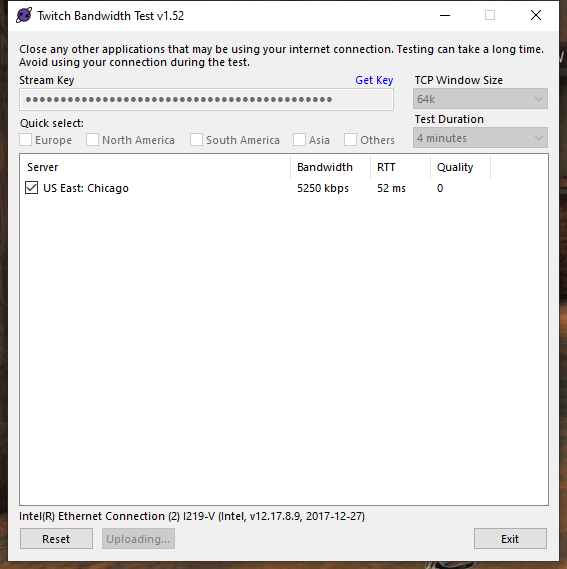


 cinder olive
then its more than likely software you have on your PC currently
clean your startup programs/run ccleaner & adwclear & malwarebytes / remove killer nic / then try again
cinder olive
Do you have loyalty wsettings enabled @faint niche
 fresh bison
Good evening/morning!!
 gray pecan
How do I set up a !code for my stream?
 faint niche
mhh good night
fresh bison
if some items in store are stuck loading when redeeming from store or return an error in chat using a command, do i need to delete items and readd?
 vague apex
Hi
 muted plover
Hy!
is there a way to back up my overlays?
I spent a lot of hours customising alerts and the like, and I don't want all of that effort to be lost, in case something goes wrong...
 vast coral
eh bunch of channels lost their chat stats page today, found a few name really quick but there might be more
greekgodx, erobb221, trainwreckstv, dareon, mizkif, marcfryd, paldouble, shroud, itssliker, demenishki, poopernoodle, jumboflex_, sordiway, koaster_music, epicdonutdude_, omnee_, mayahiga, anomaly
is it because of a new algorithm ?
 plush raft
Hey guys, is there a plan to add a widget for "Top Gifted of X" X being a duration such as year, month, week, day?
 dusty echo
My KappaGen is no longer displaying BTTV animated emotes. Is this a known thing, or are there steps to take to fix this?
dry hare
@dusty echo double check the Kappagen widget settings and make sure the emotes are still selected. If they are, post the screenshot and we can forward that on to the Devs
@vast coral shroud won’t have chat stats for twitch
He’s on Mixer now
@muted plover they’re in the cloud. They’re backed up. Do you mean back up your obs scenes?
@plush raft I believe you can specify in widget data based on the time. Click on a top subs widget and check the session data setting inside the widget
vast coral
@dry hare what about the other channels?
muted plover
I meant the overlays.
If something happens to my account, or StreamElements as a whole (yes, something can happen, no matter how big the org/company...) they're all gone...
So is there a way to get like a local copy of them that I can store on my NAS?
I could get locked out from my account... I could accidentally delete them... or someone else who uses my pc could also mess things up, and data loss can happen on the server-side for a thousand different reasons...
so it's essential to have redundancy.
dusty echo
@dry hare - Multiple animated emotes are selected in the emote explosion options. No animated bttv emotes show at all when used in chat. No animated emotes show in the emote explosions either.
 quaint siren
How long does it usually take for a donated clip to be played ?
 viral acorn
@wanton mango Thanks for the advice last time! (see below)
How much of a CSS-wizard are you? I have my CSS setup to turn my StreamElements chat into a second space station 13 general chat (picture and code below), but I want to know --
Does OBS Browser source CSS have subpixel rendering? I mean the little red/blue discolorations around the edges of text.
dry hare
@vast coral no clue. Could be channel renames.
viral acorn
div.chat-line {
    line-height: 1.2;
    padding: 0px;
    letter-spacing: 0px;
}
span.message:before {
    content: ' says, "';
}
span.message:after {
    content: '"';
}
span.colon {
    display:none;
}```

` -webkit-font-smoothing:subpixel-antialiased;` unfortunately (SEEMS?) nonfunctional ????
????
viral acorn
screenshot:
dry hare
@muted plover I wouldn’t worry about your overlays. Currently there is no method to duplicate the overlays locally afaik.
@dusty echo I’ll pass this along
@vast coral if channels are renamed the chat stats don’t show up. If these are channels that have not been renamed then idk. I’ll pass it along to have someone look at it just in case.
Better to be safe than sorry 😉
 foggy oxide
How long does it take for a donation to come on screen? I donated and it never came up
dry hare
If the alert box is active in the overlay it will show up once the tip goes through
foggy oxide
Would there be any reason on why it didnt show up?
dry hare
Do you have any variations or restrictions on when alerts sound for tips?
ionic kelp
Might not have met the threshold for it to trigger.
dry hare
That would be a question for them. We don’t get to just peek into other peoples overlays.
 prime pulsar
I’ve been trying to launch a stream on my twitch but everything I start the stream it wants to go to my YouTube
How do I make it go to my twitch? I’ve already connected my twitch account to Stream elements