#helpdesk-twitch
1 messages · Page 546 of 1
 zenith widget
 dense kelp
Cheers m8, much appreciated
 lament blade
hey when it try to make my own Overlay and but an Alert box in it, i made my own Follower Picture in but the Text Layout wont go over the picture or is idk where
zenith widget
After choosing "Text over image" click on "Text settings" --> advanced and play around with the margins
lament blade
How can i turn off at the Sub Alert the Text what they write?
lament blade
ah found it np but thx for trying help c:
Is it normal that replaying redemtion alerts dont work? when i push the replay button nothing happens
dense kelp
When I reload UI the sound still works but gifs doesn't appear at all
 modest haven
Is there a way to have commands play sounds as well as output text in chat?
lament blade
@zenith widget At the First Text layout it worked with the margins but at that one im not seeing it what ever i look
 finite wyvern
Hey, i make the tutorial for the instant replay, many time, but nothing happen
does anyone can help me ?
(or maybe i need to restart my stream ?)
 tight harness
@lament blade Did it alert the first time, from the actual redemption occurring?
@modest haven Not by default, if you have someone use the store redemption to play a sound via chat then the bot replies with a pre-made message saying the item was successfully redeemed. You could ask in #dev-chat if there's a custom way to do it
lament blade
At the First Text layout it worked with the margins but at that one im not seeing it what ever i look
finite wyvern
help..
modest haven
@tight harness unfortunately I can’t even get the sound effect store redemption to work. But I’ll post in api asking about the custom way.
tight harness
@modest haven You'll need to add the Store Redemption widget to your overlay first
 rustic berry
How can I disable only reaction bot to command !Play in chat? He think that is song reqest
 wary halo
you don't want the bot to react or you don't want the command available
modest haven
@tight harness I’ve done that. The notification pops up, but the sound doesn’t play.
rustic berry
don't want the bot ot react
wary halo
@rustic berry i think that is not possible, because the bot will always react to a command given. there might be a way to make it whisper and not do it in chat though, best is to ask that in #dev-chat since i don't know the correct way to make that happen
@modest haven i don't see the bot responding to the store at all in your chat
Maybe you don't see it because you're not live?
i can hear all the sounds in the store
but when i buy one it doesn't say anything in chat
modest haven
Right, I can hear everything in store, but on stream, I only get the redemption alert but no sound. I believe it’s set to only while live.
wary halo
ah okay 😛
modest haven
I’ve had viewers test it while live, it says they redeemed it, but the sound doesn’t play.
wary halo
yeah that's weird
maybe you can turn this off:
see if that helps next time
it sometimes messes with overlays and widgets
modest haven
I’ll have to check, but I believe it is off.
And I want to set the overlay source to play sound through obs correct?
wary halo
yes
 gentle elbow
hey guys for the reason my donation aleft isn't working but it comes up in the chat? anyone know what issue im having?
 scarlet tiger
@gentle elbow Do you have a widget for tips / Alert Box added in your overlay?
lament blade
@tight harness yes i get the alert the first time but i cant replay it
tight harness
@lament blade Interesting, I replayed one of mine and it seemed to play just fine. I'll try and replicate it
gentle elbow
@scarlet tiger not quite sure
lament blade
i also installed se groud control hoping it will work but it didnt
tight harness
Could you elaborate on what about it didn't work?
scarlet tiger
@gentle elbow Do you use streamelements overlays for your stream?
gentle elbow
yes
 round brambleBOT
@gentle elbow Follow these steps to grant managers/moderators access to your dashboard:
- Click on your Channel Name at the top of the dashboard and select Settings
- Create a new invite at one of three access levels (Bot Supervisor, Editor, Full Control)
- Send this invite to a mod/manager to give them access to your dashboard. The link is one-time-use and expires after 72 hours if not accepted
Video tutorial: https://youtu.be/zl_h-ttZDF0
scarlet tiger
@gentle elbow DM me invite link, please
Editor access
lament blade
i get an alert when someone redeems an item. when i try to replay the alert i klick on the replay button which should replay any alert but it does nothing at all.
this button it turns when i click on it but nothing happens
it works when i replay a follower alert but redemtion alerts dont work
 pearl flint
hm, lemme take a look real quick @lament blade
I seem to be running into the same issue. May be a current bug. I'll ask a staff member when available
 distant swan
Hello. Is there a way to make the Hype Cup smaller?
scarlet tiger
Yes, with the Cup Scale option
distant swan
WHere can I find that please?
lament blade
hey can somebody help me i cant start my stream elements anymore getting the error that my gpu drivers may need to be updated even though i allready checked if they are updated even for the mainboard gpu
pearl flint
Do you have an Nvidia or AMD GPU?
lament blade
Nvidia
pearl flint
Okay, do the following:
Hit Windows Key+R
Enter in the text box that appears dxdiag and hit enter
Hit yes on the prompt that appears
the software may take some time to open
Go to the display tab
Screenshot the information and send it here
pearl flint
yes gimme a sec
lament blade
k thx
pearl flint
You should be on the Nvidia driver version 441.66. Can you confirm you are on that version @lament blade ?
pearl flint
okay. Have you attempted running OBS as admin?
lament blade
yes doesnt work aswell
pearl flint
Are you getting the error upon opening OBS or attempting to go live?
lament blade
opening
pearl flint
Can you send a screenshot of the exact error you get?
lament blade
round brambleBOT
@lament blade Please provide a log from your last stream. To do this, in OBS go to Help > Log Files > Upload Last Log File and paste the link to the log file here.
pearl flint
Are you able to get that far or no?
lament blade
cant open obs
pearl flint
Okay, please hold on
 dry hare
Do a clean install of your graphics drivers
 jade remnant
- Open GeForce Experience if it's installed on your PC. Login, click on DRIVERS, then select Download. Install it fully, then reboot. OR
- Manually download your drivers using this link: https://www.geforce.com/drivers
dry hare
Look at that teamwork
jade remnant
update or clean install?
lament blade
first i tried to update
and it still didnt work so i clean installed all nvidia drivers
pearl flint
Can you go here and get the latest log file you have available? C:\Users\<username>\AppData\Roaming\OBS\logs
replace username with your username
scarlet tiger
@lament blade
jade remnant
youre a few versions behind
lament blade
but i cant even update
pearl flint
^
lament blade
hmm ok x'D
lets see
big thanks to u all guys but was a bit dumb of me not clean install obs atleast xD
works now

jade remnant

pearl flint
oof lol. At least its fixed now
 storm delta
Why do i get lag (loading) for like 5-10 secs ?
round brambleBOT
@storm delta 1) Restart OBS
2) Start your stream/recording for about 30 seconds. Make sure you replicate any issues as best you can, which means having any games/apps open and captured, etc.
3) Stop your stream/recording.
4) Select Help > Log Files > Upload Current Log File. Copy the URL and paste the link here.
(Note: If you do not see an obsproject.com URL, you will need to update OBS Studio to version 22+)
storm delta
ok after steam
storm delta
{amount}
 vale sandal
ty
storm delta
@round bramble like this ?
 knotty plover
it just loads it in the streamelements obs live when i should stream
scarlet tiger
@storm delta pls link
 lime goblet
How do I export settings from streamelements to CSV
round brambleBOT
@storm delta Please provide a log from your last stream. To do this, in OBS go to Help > Log Files > Upload Last Log File and paste the link to the log file here.
storm delta
k
jade remnant
@storm delta turn off psycho_visual tuning
also the log you posted has no stream stop
storm delta
@round bramble
jade remnant
please dont upload it to dropbox, just follow the instructions
storm delta
Then where to unpload it ?
jade remnant
 ornate lagoon
Hello!! Looking for some assistance, my store redemption alerts are triggering twice per single redemption, and posting two different bot responses in chat. It's doubling and sometimes tripling the audio files of the redemptions, sometimes the audio that plays doesn't even match the redemption? I've tried everything I can think of to fix, please help 🙂
scarlet tiger
@ornate lagoon try disable redemption message in https://streamelements.com/dashboard/bot-modules
Under chat alerts
@storm delta try restart Chrome
 civic nova
Is there anyway to merge accounts I have a 2 SE accounts. One for my twitch and one for my youtube. Can I combine them both?
Or remove one and then link twitch to my youtube one?
wary halo
yes, you can merge accounts, but staff needs to do it
round brambleBOT
@civic nova Account Merging - Please note:
- Merging accounts only allows faster ways to switch between accounts
- Merging accounts does not allow data sharing between accounts - different streaming platforms, different type of events
- Merging accounts allows duplicating/sharing overlays between the accounts
civic nova
Doing this, will I be able to have notification from youtube and from twitch at the same time in my activity feed?
wary halo
you are not going to stream to 2 platforms at the same time right?
civic nova
No just want to see offline youtube sub notifications while im streaming on twitch
wary halo
i'll ask to be sure, but i think you will
civic nova
No problem, LMK
wary halo
The activity feeds will be seperate from eachother
@civic nova
Let me know what you want, merge or not
 timid cape
Hey so I am trying to get the custom bot going for twitch chat and can't connect the account to OBS.live. I can sign in and gets to the Authorize to use as a bot and then once I click confirm it goes away as if I didn't do anything and doesnt actually connect. I have tried multiple accounts and they are all modded in my chat.
wary halo
are you on mac or pc?
civic nova
No its okay.
timid cape
pc
civic nova
Thank you @wary halo for checking for me.
wary halo
no problem
timid cape
also tried to uninstall and reinstall it
wary halo
can you try if it works in GroundControl?
timid cape
I dont use ground control but will try
wary halo
you did meet all the requirements for using a custom name?
round brambleBOT
@timid cape Custom bot name requirements
- StreamElements bot modded and in chat
- Active overlay with alerts
- StreamElements tipping page in the panels below the stream (!panels)
- OBS.Live or Ground Control open
- Create a twitch account for the name you want to use or run the bot under your own name
- Custom bot name doesn't work on Mac
timid cape
yep! it used to work but now just stopped
wary halo
ah okay
timid cape
Okay so it does work with ground control
wary halo
at least it's no issue with twitch then 😛
timid cape
I just want it to work with OBS.live 
wary halo
yeah i get that, i'll ask around if staff knows what could be the issue
timid cape
okay, thanks for the help though. Really hope it's just a fixable bug
 celest fractal
For some reason the "/" is not working anymore It just shows "me" instead
Yesterday it was working
scarlet tiger
@celest fractal screenshot command settings, please
celest fractal
scarlet tiger
@celest fractal try copy message text, delete and paste again
celest fractal
Done, is there a way to simulate a follow?
scarlet tiger
Yes
scarlet tiger
/me Thank you for following {user} :)
Exactly?
@celest fractal try copy this ^ and paste to the message
scarlet tiger

@celest fractal Let's try something else
Go to the dashboard -> right side -> part channel -> join channel (https://streamelements.com/dashboard)
 celest fractal
Done
scarlet tiger
Still no 
celest fractal
Yeah just gonna remove the /me for now
Don't know if people are having problems with it tho
scarlet tiger
@celest fractal I'm sorry I didn't help.
 severe hollow
Hey guys, I have a quick question about overlays
scarlet tiger
@severe hollow what is your problem?
 chrome trellis
friends, i have a question thats probably really stupid, but is there a way to view all your quotes? 😕
severe hollow
Go ahead and answer his question first, I have time
severe hollow
😂alrighty
How can I make the overlays 720p? Every time I try it cuts like half of it
round brambleBOT
@severe hollow To add your overlays to OBS, add a new browser source in your scene. Paste your overlay URL in the browser source properties, set the dimensions to 1920x1080 (unless you changed them on the website), and ☑ “Shutdown source when not visible” https://youtu.be/KDvLynUqXI4
severe hollow
I use twitch studio, would it still be the same?
wary halo

severe hollow
😂😅would it?
severe hollow
Ye you can but the problem is always in the streamelements website
 winter cradle
let me check that on my system for a sec
severe hollow
They always get cut like this
winter cradle
this seem to be an issue of wrong resolution
severe hollow
I wanna lower my stream to 720 to get less lag but when I do the overlay gets a stroke lmao
1080p
wary halo
well for OBS it doesn't matter because it will scale automatically for your output
severe hollow
720
wary halo
he isn't using OBS
jade remnant
yep, just realised that
wary halo

winter cradle
Yeah you can do "browser source" in twitch studio, but you need to make sure that the resolution of your stream matches the resolution of the overlay.
severe hollow
Yeah, I tried to match em, but when I edit them on the site they get cut up :(
wary halo
is your overlay set to 720 as well in the editor?
click there and see if it's 720 and not 1080
severe hollow
Yeah that's how I do it
winter cradle
You need to resize your assets after lowering resolution.
winter cradle
click on the other pencil icon to get into the overlay editor
 lethal tide
Hello. I have a Logitech C922 webcam. When I double click on it and go to the option to configure video, I make all the settings I need, but when turning off / restarting the computer, OBS does not save the settings that were made. Does anyone know how I do to keep the settings?
lament blade
Well, here I am again 😅
So, apparently the subscriber hook or whatever isn't working AGAIN
For the 7th time in a row
No chat message, no alert, no signal in the dashboard statistics, no updated widget in the overlay, no nothing
I need help here because this is just bs at this point. I got banned for 7 days due to my Twitch Account get hacked and the hacker decided to stream porn now my account gets banned for 30 days due to the fact they claim I said a hateful slur. This is bs! Since when have I ever said a hateful slur such as the N word? @wary halo
wary halo
what is the problem
 sacred bloom
Hey everyone !
I'm using the bot module for chat alerts, and I updated a bit of the message (actually I added some emotes of mine in the messages). Before that I could use a "/me" alert so the bot could color the message, but now every alert seem to ignore the "/me" command and only put "me" in front of all alerts. Any idea why ? I triple checked, there's no space before the /me command.
wary halo
we had this problem about an hour ago, we couldn't find a fix yet
but i will report it to staff
because this can't be a coincidense
sacred bloom
ohhh ok so it's not my side ? That would be a hell of an odd, I had the same alerts for like over a year now 
jade remnant
thats a majestic beard 
sacred bloom
it's only on this alert module tho, the custom commands I made with /me , even the Timers are working just as fine
@jade remnant well, thanks 
wary halo
@sacred bloom @celest fractal the issue should be fixed
sacred bloom
is there a way to trigger alerrts to try it out ?
sacred bloom
yup !
jade remnant
is that correct?
sacred bloom
oh god YES ! thanks  !
!
 glossy plover
could anyone tell me why my alerts followed gets duplicated? I do some tests and everything is normal, I shake it and out of nowhere is duplicated, I have only 1 overlay.
sacred bloom
sooo it was'nt my mistake in the end ? that's a crazy timing to edit my alerts
jade remnant
lol
@glossy plover are you testing with the overlay editor AND obs open at the same time?
mute, your browser page and emulate it again, see if you get double sound
sacred bloom
and thanks for the discord/twitch link reminder, totally forgot to edit that link  . Have a wonderful night !
glossy plover
I'm in the editor on the site and obs open, but in the editor looks the image only once, in obs it appears duplicate.
jade remnant
you too
wary halo
glossy plover
yes, it's mutated.
jade remnant
can you screenshot your obs
round brambleBOT
@glossy plover https://www.take-a-screenshot.org
glossy plover
in obs he left duplicate the gif / read
wary halo
he wants a screenshot of your whole obs 😉
glossy plover
my obs is pt-br
round brambleBOT
@glossy plover We're not able to troubleshoot issues with using our overlays in StreamLabs OBS (SLOBS) as we don't have the tools to support their software. We recommend using OBS Studio or OBS Studio with our plugin OBS.Live.
glossy plover
haha, only for nightly lives, with 2 monitors don't need light on
do you have any incompatibility with slobs? Because apparently on your site and obs everything is correct and it is only after a few tests that begins to double.
wary halo
use OBS.Live 😉
glossy plover
I'll see, the other time I used it I found it very polluted visually and mechanically. I will test again.
wary halo
you can always delete or add docks
glossy plover
haha, i'm going to test if you could "copy" the slobs, in a matter of configurations, it would be much superior, not just do an obs extension but do just like them, make software
dry hare
If you read the announcement by the SLOBS devs, they actually admitted that their software was inferior to OBS Studio
They're planning on re-skinning OBS Studio going forward and implementing a system similar to StreamElements because well.... it's better
glossy plover
well I didn't say your system is bad, but visually speaking of configuration the way slobs modified OBS Studio is better, but like it, I will download your obs.live again and try to adapt, since I find your system (especially loyalty) much higher and I want to work on loyalty on my channel.
dry hare
You will be much happier
glossy plover
🙂
wary halo
and you will have actual support
 lilac vessel
How do I update the bot response here? I want to remove the elementsOkay since my bot doesn't have access to that emote. I'm using ${redeem bruh} as my command to redeem a store item as a sfx
 midnight plume
Quick simple question can you modify the alerts on the SE app on mobile?
 strong kernel
It's not edited on the app itself, it's edited on the site.
midnight plume
Thx @strong kernel
New to SE been a SLOBS guy and just adapting to new software before install on new PC the Father Christmas is bringing wish his piggin slege would hurry up xbox and note 9 not the best to control a stream
wary halo

 cold flume
If anyone can give me some quick help would be greatly appreciated?
wary halo
what is your question?
cold flume
People are joing my chat saying my stream is freezing and I don't know if I accidentally messed with my settings and changed something I wasn't supposed too. but it freezes and lags bad
round brambleBOT
@cold flume Please provide a log from your last stream. To do this, in OBS go to Help > Log Files > Upload Last Log File and paste the link to the log file here.
cold flume
so do I need to start a 30 second stream then send the report again?
wary halo
yes for more detailed info
lilac vessel
is there a chat command to give all viewers currency? like !give +everyone 200
 lime slate
assuming the same point system i just use !bonus all 200
or if you want to take away, negatives work as well. like !bonus "name" -200
lilac vessel
i'll try that, ty!
celest fractal
@wary halo  Nice
Nice
wary halo
seems fine
pro tip: always run OBS in admin mode
maybe your connection was just lagging?
cold flume
hmmm okay thank you for the help, it was probably just that
If I run into any more instances I'll be sure to ask you guys again thanks for the input 🙂
wary halo

 nocturne bane
2 people have followed my Twitch channel but my alerts did not appear or register in my activity feed on OBS, does anyone have a ideal why plz ?
is this a common issue ?
i was ending stream when this happen.
strong kernel
We reset your webhooks. Future follows should be fine.
nocturne bane
ahhhh so thats why. thank you @strong kernel for the update , i really appreciated 😇 🙏 👍
modest haven
I just turned off Hardware acceleration in OBS Live, and my redeemed Sound effects from my stream store still do not make sound. I can see in obs that they were redeemed, but there is no sound.
I think I may have found the issue. I just put my ingame overlay to monitor and output sound, and I can now hear when things are redeemed.
lament blade
So I just join the discord and I didnt feel like searching not because i am lazy but because I am lazy. Can someone tell me if there is a way to update the social media post from the Streamelements app rather than going to the online website and changing it there first?
strong kernel
The app is only for monitoring and streaming, not for editing.
lament blade
You can change the name of your stream from within the app, I dont see why it cant also change the social media post as well
View > Docks > Stream Information
 sudden flax
Hello all looking for a little quick help, I hope this is the right spot to post this! I am new to stream elements and I am setting up a social media widget. The default has twitch, youtube, twitter and instagram, I am looking to get rid of the instagram one and cant seem to figure out how.
lament blade
As far as I knew the only option that works is the Twitter one
strong kernel
Yes, the system will only post to Twitter for you, and the message can only be edited from the site.
@sudden flax Community made widgets are largely provided as is. It looks like you can edit it to change the Instagram part to some other social media reference, but as for completely removing that and having it only cycle through three, that's up to you to sort, likely with editing the code.
sudden flax
Awe I see, ill continue to play with it i guess. Thanks @strong kernel
lament blade
hey, although we use streamelements in chat we cant reach chatstats page in streamelements. it says "404 - Page Not Found" why?
i think its about nick change
 tropic plinth
@lament blade what's your old and new nickname?
lament blade
old is wtcnn. new is wtcn @tropic plinth
tropic plinth
okay, I'll pass it on to the staff. it won't happen immediately, but they'll get around to it 🙂
lament blade
thanks man
 gilded moat
these are my settings. when someone follows me, i never hear a sound =/.. does anyone see anything obviously wrong or idk what to do. i used to hear a sound though.....hasnt been a sound for awhile.. I didn't care because no one ever followed. but now thats changing and so its a bit annoying not hearing the sound
strong kernel
You haven't added your overlays to OBS.
round brambleBOT
@gilded moat To add your overlays to OBS, add a new browser source in your scene. Paste your overlay URL in the browser source properties, set the dimensions to 1920x1080 (unless you changed them on the website), and ☑ “Shutdown source when not visible” https://youtu.be/KDvLynUqXI4
gilded moat
ok i see thanks
lament blade
Whelp.
So, have to report a bunch of issues on stream tonight again 😅
Was lke 4-5, but let's just stay at 2 for now
First one, what I was mentioning up there:
So, apparently the subscriber hook or whatever isn't working AGAIN
For the 7th time in a row
No chat message, no alert, no signal in the dashboard statistics, no updated widget in the overlay, no nothing
7th time in a row, and after 6 "fixed" obviously, I mean
Also, problem again where if I get hosted twice by the same channel in the same stream, the second one isn't picked up by SE. No mod chat message, no alert, no dashboard statistic... nothing
strong kernel
That last one is not a problem, that's spam protection.
lament blade
No timer?
Like, if it's 2 hosts within 3 minutes, I get it
But within 3 hours?
I mean, there HAS to be a timer, right?
What about a 24h stream. A friend hosts me, then HE streams, and after he's done he hosts me AGAIN. One stream for me.
But no alert cause "spam protection"? It's not spam...
strong kernel
I couldn't tell you the exact time limit on it.
lament blade
Seems to be at least above 2 hours. Which I'd say is already enough to NOT be spam... but sure, whatever the devs decide. Not much for me to say there
What about the sub thing? It's been "fixed" 6 times already
And my subs are still not getting alerts or anything popping up, 7 times now
round brambleBOT
@lament blade Twitch prime (new and resub) and paid subscriptions (resub only) must be shared in chat manually by the person subscribing in order for the subscription information to be sent to StreamElements. For twitch prime, the user needs to have sharing enabled on https://www.twitch.tv/settings/prime. For paid subs, if the share box doesn't show up immediately it will when they refresh the page. https://i.imgur.com/VNJN0Uv.gif https://i.imgur.com/2297EA7.png

 lament blade
Yes, they have the "share publicly" thing enabled
The previous 6 times I was told it was apparently an issue on your side, but "hooks have been reset" or something, and that should fix it
Well... it still hasn't
strong kernel
Can you provide a clip of the most recent example?
lament blade
Well, the last 2 were when I was offline, so I don't have example for those
I'd need to go all the way back to october, and since SE didn't track it, I've no idea when they happened
I can try to catch the next one, but... what exactly do you want me to clip? A twitch clip doesn't show the chat, does it?
So you'd see a clip of... nothing. Cause no alert pops up on game screen, only the Twitch alert on chat
strong kernel
They often do.
lament blade
I was checking my recent clips to doublecheck, and I don't see it...
https://clips.twitch.tv/BraveOptimisticPigTooSpicy

Twitch
Clip of CaveZubat Playing Final Fantasy X/X-2 HD Remaster - Clipped by NoobsGame2
That's a clip I captured of a friend's Stream. Nothing to do with this, just to show
We WERE talking at that time, but there's nothing. The chat window's not there
strong kernel
The chat usually appears here. But it appears the VOD was deleted.
lament blade

Well, this one's more recent, of my own stream. The VOD is very much still up
And no chat that I can see, again
strong kernel
Nobody was chatting at the time.
It won't show the full history, just the messages sent during the clip.
lament blade
Oh. Okay, fair enough. Well, when I get the next sub, I'll clip it
strong kernel
👍
lament blade
Though it's a bit disappointing knowing that the next sub ALSO won't get the shiny alert and stuff for their money. Really, 7 in a row is a bit much. Not to mention at this point it's completely wrecked my statistics
Can't really track much of anything if SE keeps missing it
Well, regardless. As mention, will clip next LIVE subscription.
What about offline subs tho?
strong kernel
Can't really confirm if they were properly shared while you were offline.
lament blade
hello i have my twitch and YouTube account both connected and i switch between both of them and i have my twitch account chosen but when i click start steam it says to start streaming on YouTube any way to fix
strong kernel
Log out using the StreamElements menu at the top of OBS and log in using your Twitch account.
 gusty ice
Someway to disable message alerts of someone using redemptions from the store page?
I want to use the module that lets me customize the message, but i also have commands
that trigger them and thus will trigger both the store and custom message
lament blade
Can't really confirm if they were properly shared while you were offline.
Sorry, you lost me there. What do you mean?
I mean, for one of the subs they happen to be a family member. I KNOW for a fact the Share publicly option is enabled. Hell, I did it myself, and triple-checked the FIRST time it failed, and again the next 3. It is very much enabled
strong kernel
They have to specifically be shared in chat using the prompt that appears.
And there's no way to go back and confirm if that was done except via a vod.
And there's no vod for an offline sub, of course.
lament blade
Wait. So it's not enough to activate that option, they need to MANUALLY click on the prompt too?
With all due respect, but you devs/staff need to get your story straight. Cause I've already been told at least two times that that wasn't needed
And I actually wonder. That family member I was mentioning knows NOTHING about Twitch. I just told him "click here on Sub" and then "Free Prime sub". The first time, and iirc the second, it worked. It just stopped working the next 3
And I DOUBT he clicked the prompt the first 2 times and then didn't the following 3...
I mean, I could ask, but...
Okay, does it need to add a text too? Or an empty share works?
 kind iron
@lament blade the manual prime/sub prompt is done on twitch's side there for SE cant do munch about it if they dont manually allow the message to be sent
 sonic ravine
Looks like a whole lotta fun in here
I've got a hopefully simple issue though.
Just trying to make it so the image/animation from my alerts are on the right side of my text, instead of the left. Tried padding, but it's not seeming to work properly because the scaling of the window starts in the top left.
kind iron
you using the default alert profile?
sonic ravine
Uhh
I have like 4 at this point, but the basic idea is, my camera for this specific one is on the right side of the screen (instead of the left), so my alerts switch the right side, and I wanted the animations to stay consistent with being on the edge of the screen and sliding in.
I'm not really sure if there is some sort of CSS I have to do, or if i'm just missing a simple padding window with the animation/image itself.
dry hare
I believe you can set animation settings in the alert box settings somewhere
I’m on my phone atm or I’d go find it
kind iron
you can enable custom css which lets you to use a custom css file for the alert
sonic ravine
Is that how I would have to go about it?
Not particularly sure how to CSS my way into switching the two position wise
Also, would I CSS edit the text, or the animation itself? I assume the animation because that seems to be the issue
kind iron
you would need to css edit the alert itself by doing this you would have to manually supply the gif/img url in the html area
sadly this is the only way "I" know of doing it but hopefully a support member can guide you through a easier route
sonic ravine
Dumb question
but does WebM (had to convert everything over) provide a URL I can use?
kind iron
webm works just fine
 IDK what i'm doing and it's sad
strong kernel
IDK what i'm doing and it's sad
strong kernel
There's no option for putting the image/video to the right. You can either bake the spacing into the image/video itself, and use margins to position things, or you can custom code it.
sonic ravine
How would I go about spacing the image so that the text, when padded doesn't go out of the window?
strong kernel
Example: If your alertbox is 800x600, you make the alert video/image 800x600, with the stuff happening on the right side, and then you use the text over image option.
sonic ravine
Right okay
Do you know of anyone I could get in contact for the CSS?
It would be a bit difficult to recreate the resolution with the added space of the animation. I could theoretically do it in Adobe Premiere or After Effects, but that might take a couple hours of trial and error for each individual one.
strong kernel
You're on your own for custom coded alerts, unfortunately. You can try to ask mercy in #dev-chat but it'll only come from volunteers.
sonic ravine
Okay, no worries. Appreciate everyones help. I'll try and get in contact with someone ❤️
 wide mauve
Hey how would i get donation from paypal to come up as a notification on stream?
strong kernel
If it goes through your StreamElements tipping page, and you have an alertbox in your overlay, then it should show up.
 fathom zodiac
silly question but everything I've done is using the console and nothing PC related. Can StreamElements work with OBS?
strong kernel
We have a plugin for OBS Studio called OBS.Live.
fathom zodiac
and does it work with the Elgato HD60s software thats provided?
is that different than the one that OBS provides?
strong kernel
It's a plugin. It's not its own software.
 eternal tide
so i recently switched from streamlabs to streamelements because i heard good things, i let obslive autoconfigure and when i went live my audio was choppy and mic had static. i copied my settings from streamlabs and that fixed my choppy audio but the static on my mic was still really bad
round brambleBOT
@eternal tide For the best OBS support, please join their Official Discord @ discord.gg/obsproject
 astral hill
i broke my dashboard is anyone around to help
round brambleBOT
@astral hill Welcome to the helpdesk! Please let us know how we can assist you today and a support volunteer or staff member will assist you as soon as they are available. Thank you for your patience.
astral hill
i logged in with yt then with twitch so i cant get them both on the same dashboard
how do i merge them
round brambleBOT
@astral hill Account Merging - Please note:
- Merging accounts only allows faster ways to switch between accounts
- Merging accounts does not allow data sharing between accounts - different streaming platforms, different type of events
- Merging accounts allows duplicating/sharing overlays between the accounts
 slow smelt
my username on streamelemets still hasnt changed and i changed it on twitch over a year ago
strong kernel
Where are you looking?
slow smelt
my store shop links to old username
when i put in link to my new channel it doesnt work
strong kernel
Go to your dashboard on the site, log out, and log back in.
strong kernel
I've opened a ticket to have it addressed manually.
slow smelt
thank u!
fathom zodiac
hey question about OBS overlay. If im trying to use one of the theme overlays. The size doesnt seem to fit my resolution even when I change it
Anyone know why that would be happening?
strong kernel
What is your canvas size set to?
fathom zodiac
canvas size I dont think I have one
strong kernel
Settings>Video
fathom zodiac
19210X1080
strong kernel
And are you adding the browser source at 1920x1080 too?
fathom zodiac
can i add animations to an already existing animation?
is theres a video that plays. Can I add another .gif to play with it at the same time?
strong kernel
One video or one image per alert.
fathom zodiac
okay thanks
is there a way to test if the chat widget works without streaming live?
also cant i take animations from one scene and import into another? for the overlays?
zenith widget
No only with a 2bd account and no
 tall patio
Hello! Please tell me how can I give points to all stream viewers using the chat command, ignoring me and the bot?
I used the command
"!addpoints all (amount)"
but points begin not only to the viewers, but also to me and the bot.
Tnx.
zenith widget
the ignore list in the loyalty system is only for the passive gain.
People can still use "!givepoints" command to give you points, but will be deducting points from their own.
@tall patio ⤴️
tall patio
On one of the channels, I watched a streamer enter a commands into the chat to give points to all viewers. But he and his bot did not appear on the leaderboard. How can I achieve the same result?
tall patio
Only to manually remove points for yourself and the bot? Can’t this be done automatically?
Hmm I am pretty sure that that streamer just gave points in the chat, and did not delete anything from itself and the bot. At least I never saw them on a leaderboard. He simply entered commands and immediately continued to play. I'll try to write to him, maybe he will tell. If there is no way to give points to all viewers except themselves and the bot, then this is very sad ((
round brambleBOT
@tall patio Check out the StreamElements ideas board: https://strms.net/ideas. You'll be able to add ideas, upvote ideas you agree with, and track their progress with email notifications. Adding and upvoting ideas also helps the staff know which ideas should be prioritized so please take some time to upvote.
lament blade
Hey is it normal for my fonts to not show up properly when i pop out the overlay in a browser. Sometime I have to click on the text for the right font to appear. I'm using the font 'Permanent Marker'.
zenith widget
is it a custom font?
lament blade
no its from google fonts
zenith widget
which overlay?
lament blade
all my streamelements overlay that have the word Enby in it.
zenith widget
Interesting
Im not able to reproduce this same issue on my own overlays, but i saw the issue on your overlay.
There might be 2 things:
Too many things trying to load the font (which in my own overlay is not the case)
Maybe the BRB text is too big, stopping the font load
lament blade
oooh hmmm
zenith widget
I'll poke the devs on this and see what we can make of this
lament blade
cool i look forward to seeing whats up with it.
 brazen moon
Hi i just added this awesome widget event rotator, but i cant seem to move the spacing between them, its like half of it all gets cut out. 🙂 can any help this thanks
for i only see i can change the size of the texts but not the spacing/size of the box/animation itself
zenith widget
event rotator? one of the custom widgets?
brazen moon
its called widgets in themes gallery
brazen moon
ya
zenith widget
widgets is the gallery name, not the actual widget it self.
which one did you get?
brazen moon
its number 2 event rotator
lament blade
@kind iron the manual prime/sub prompt is done on twitch's side there for SE cant do munch about it if they dont manually allow the message to be sent
I get that. However, I fear you didn't really get my point. I wasn't really "complaining" about "you guys need to make it so you don't have to manually click". If it's Twitch side, it's Twitch side.
I was mentioning that 2 other devs/staffers had told me that you did NOT need to manually click. But now I've got one saying that you do. That's most definitely not "on twitch side".
Also, again, iirc, my family member who knows nothing about twitch never once used the manual click thing, and the first 2 times it was registered. It started failing later. That MAY be twitch side, or may not.
Bur regardless, even worse case scenario, the part with contradicting information isn't on twitch.
So yeah, to get all the intel. Aside from clicking "share", do you need to add an actual message and send it too, or just click "share" and that's enough?
brazen moon
i like the text size etc my problem is how do i make the box weight smaller
without cutting out the animation
round brambleBOT
@lament blade Twitch prime (new and resub) and paid subscriptions (resub only) must be shared in chat manually by the person subscribing in order for the subscription information to be sent to StreamElements. For twitch prime, the user needs to have sharing enabled on https://www.twitch.tv/settings/prime. For paid subs, if the share box doesn't show up immediately it will when they refresh the page. https://i.imgur.com/VNJN0Uv.gif https://i.imgur.com/2297EA7.png
zenith widget
Just sharing and sending the share without no message is fine for us to see the resub.
lament blade
Okay. I'll pass that along, see if the next subs get picked up. Thanks
So then, accordng to the animation up there, you need to click Share twice, yes?
Even if there's an empty message box
lament blade
Okay, so the second one
First one to "create" that message window, and second to actually send it, even if it's empty.
Thanks
zenith widget
@brazen moon Tbh i'm not sure what spacing you are referring to
brazen moon
can i show u somehow ?
brazen moon
screenshare or something

see animation on right is gone
because i made the box smaller
brazen moon
yes
zenith widget
I would suggest to ask @buoyant hull on how to make that smaller if possible, if the option is not present in the widget options.
as his the creator of the widget.
brazen moon
Okay, not somewhere in open editor it can be changed? im not so good with coding.
zenith widget
If there is code to be changed, he should be able to tell you were and what.
brazen moon
gotcha
lament blade
So, one more thing while I'm here, regarding the chat widget
So, SLOBS has this thing, right?
Chat appears, and after X seconds it fades
This is the chat widget in SE:
zenith widget
Didn't we go through this?  there is a fade mechanic for messages.
 buoyant hull
@brazen moon Hi, the widget is a little complicated when it comes to edit the width of it.
A lot of animation is based on it. So there are a few tweaks to modify in the CSS.
I haven't a simple answer for now but i will look what i can do.
I'm working on a new version. Hopefully i can take that point into account also.
lament blade
I assumed that, even if we set the background to "transparent", there would be SOMETHING when the messages do show up.
I just thought it was gone when no messages were there
Cause otherwise, well... You can't see the messages xD
I could change the font color to white, I guess? But then same issue whent here's a whitish background
Is there a way around it?
Like, maybe it's as simple as using the "secondary text shadow" (I THINK that gives the letters a border?) So maybe white text with black border would work?)
Btw, I haven't found a way to change font color, but maybe I just don't find it cause I iz stupid
lament blade
How do you make the text "test"? Writing in OBS, or whatever streaming software you use?
lament blade
Atm... I assume that's not at the moment.
Waht's that, sorry?
zenith widget
atm = at the moment
i'm literally in your channel typing in your chat
for the text to show
lament blade
Oh oh, oh. On the twitch channel chat, okay
lament blade
Well.. in fact I'd removed it cause it wasn't working, but I added it again now for testing. Well, whatever. Let's see...
Yeah, okay, wrong combination 😅
Let's see... it won't let me change that second one to 295 manually
zenith widget
what is "295"?
lament blade
No idea what the third number is, either. Or fourth
zenith widget
RGBA
lament blade
In your pic it says 255, 295 (last 2 are hidden)
lament blade
I was trying to get the same color combination you used for the test
zenith widget
thats up to you
lament blade
Okay, changing text stroke.... prolly not the solution. Let's see text shadow
Well, that's... very much what it promises: a shadow
So then, there's no way to actually edit the BORDERS of the letters?
zenith widget
the stroke is the border
you can set 0.1 as stroke size
but shadows look bertter
lament blade
Stroke is the border? Hm...
Well, I'd need to see that shadow in action to make sure, but it seems too thin to work...
That seems much more obvious, if you get what I mean? The shadow in the overlay... well, I'll try
See?
zenith widget
well it depends on how big the text is
lament blade
Definitely better than what I originally had, but... definitely not "standard good".
You said the stroke is the border, then? Let's try that
lament blade
Well, but here's the thing. For subtitles in movies and tv shows and stuff there IS a best setting. The standard, basically xD
Which is standard, and the best, because it's clear no matter the background
zenith widget
What is "the standard" then?
font size 24 + shadow right?
if you want "the standard" - then you have the settings in front and can just make it 🙂
lament blade
Been a while since I left college, but Idon't think it was the shadow, no. And there was a measure, not just "add it". Which is why the shadow didn't look good enough from the beginning.Too thin. But sure, I'll keep tinkering, see what happens, I guess
zenith widget
there is no "best" or "standard" settings for a stream - there is settings you like to show to your community.
lament blade
But this isn't settings "for a stream". t's settings for "subtitles" (to all effects) so that they can be clearly read regardless of background
And I can't quite figure out with the way they're configured here, is all
zenith widget
Experiment - set one settings, test it out
see what fits your eye best then
and then adjust if you don't like it.
lament blade
Yeah, 0.1 does nothing. and 1.0 looked weird, as shown above
zenith widget
@lament blade devs fixed the issue - reload the overlay and the font should load 🙂
lament blade
Well, anyway, thanks ^^
zenith widget
@lament blade If you increase the font size then 1.0 should look better
everything is related and most important, its up to you to find the sweet spot for you and your community 🙂
i've seen streamers use pink text, red text, blue text
thats up to the streamer to choose
lament blade
Yeah... 😅
Well, as mentioned. Thanks anyway
Maybe I'll try to download the chat widget from github if I figure out how
zenith widget
To use the custom widget from github:
- Open Overlay editr
- Click on "Widgets" on top
- Find "Custom widget" and hit add
- Click on the custom widget and then click on "Open Editor"
- Copy and paste code from HTML file to HTML tab
- repeat for CSS -> CSS // JS -> javascript // JSON file -> fields
- click "Done"
 carmine knot
I'm trying to get a list of everyone/anyone who's ever gifted subs in my channel
from 1 gifted sub to 1000+
Can I get this data easily (or at all) from StreamElements?
^^ excluding anonymous sub gifters for obvious reasons
zenith widget
brazen moon
Hey again support, i tried a new event widget in themes gallery, and now i have new issue with this 1 😄 how do i make it not spam the event so much? i only see animation duration, not a duration on each follower it displays.
forgot to mention the widget is called "advanced recent events"
wary halo
it's under: Hold Duration Option
brazen moon
Hi ruben, ya thats what i thogu too, but when i do that it only makes it display the current follower longer, u want the time between each event to be longer, how i do that ? :S
i want *
brazen moon
also ruben now that i talk to you i have to ask u another question, if i want this event widget to display recent hosts aswell in same how i do that ? :S
RubenSaurus do i whisper him ?
wary halo
i don't see an option to add another type of events
brazen moon
ya exacly :S
wary halo
he's probably at work
brazen moon
its the second event widget with a missing option thats pretty importen imo. i hope fyre can help me 🙂 cuz i really like these widgets 🙂
thank u for help ruben
wary halo
he should be able to, he made it 😛 but maybe the awnser is that it's not possible or that he needs to change the widget, but we will await his reaction
brazen moon
RubenSaurus i know this abit off, but do u have any suggestion on a event widgets like these that work ? and is avaiable on streamelements or something ? 🙂
wary halo
i think this one can
brazen moon
ya i liked that 1 too, that was my first event widget i tried but i couldt get to work with same kinda issue :S
keizer couldt help me with that
wary halo
😩
brazen moon
wait, is it possible to make the widget a new scene for itself then scale it really down till it fits then dublicate to my current overlay ?
wary halo
yup
brazen moon
like canvas wise
wary halo
i've done that with one
brazen moon
ok i will try that, if i dont know how, can u maybe help me out ?
wary halo
i had one widget that wouldn't scale with the rest, so i made that one in a seperate overlay and added is as an extra source to my scene in OBS, and there i made it smaller
brazen moon
hmmmm
sounds simple
but not sure how 😄 i try atm
can u go in and check my overlays ruben ?
maybe u got an idea which resolution i need to use etc
wary halo
i can only check what you stream 😛 i am not staff and do not have access to your account 😛
brazen moon
ah gotcha
wary halo
only the red names can do that 😉
brazen moon
can i screenshare with u on discord then ? 🙂
wary halo
i was told (because i forgot) that you can give me editor access to your overlays
brazen moon
ya but i need to sent u a link etc, might aswell just call u quick and share u my screen idk.
round brambleBOT
@brazen moon Follow these steps to grant managers/moderators access to your dashboard:
- Click on your Channel Name at the top of the dashboard and select Settings
- Create a new invite at one of three access levels (Bot Supervisor, Editor, Full Control)
- Send this invite to a mod/manager to give them access to your dashboard. The link is one-time-use and expires after 72 hours if not accepted
Video tutorial: https://youtu.be/zl_h-ttZDF0
wary halo
i can not call at this moment
if you want this, then DM me the link (not post it here ofcourse)
wary halo
accept my friend request 😛
jade remnant
just turn off privacy settings...
 rare cairn
Would "${random.pick}" Be the best option for a custom command to report out a random item within the list? similar to what the magic 8ball would do?
 blazing compass
Can we promote our channels in here? Or anywhere in this discord
scarlet tiger
@rare cairn yes, or https://thefyrewire.com/docs/api/twitch/pastebin/#return-random-line-from-paste
rare cairn
👍
round brambleBOT
@blazing compass https://tenor.com/view/no-u-keanu-reeves-got-it-gif-14479787
 scarlet tiger
@rare cairn Do you understand?
 tacit oyster
How do i get Music requests
tight harness
That would be the Media Request feature, located on the left navigation menu of our website
rare cairn
umm yea hence the 👍
 upper magnet
My Twitch name changed from KnightCaptain42 to KnightCaptain and my alerts stopped working. I reconnected the bot and my sound commands work, but alerts and my dashboard are not getting new info.
round brambleBOT
@upper magnet If you changed your name on Twitch please follow these steps:
🔹 Visit https://streamelements.com/logout and then log in again with by connecting with Twitch.
🔹 On the right side of the dashboard page that opens, select "Join" under bot settings. If it says "Part" select that and then select "Join" to send the bot to the chat. Don't forget to mod the bot by typing /mod streamelements in your channel if you have not already.
🔹 Post your new name here so that we can update your channel's chatstats tracking (must be done by staff).
upper magnet
KnightCaptain and I did that already. It's still not up to date.
round brambleBOT
@upper magnet Please connect your streaming account (Twitch, YouTube, or Facebook) with Discord by going to ⚙ Settings and then Connections here in Discord. https://streamable.com/eg92w

 twin sentinel
Do you see my follow in your activity feed?
upper magnet
Yes
twin sentinel
Then an alert should have popped up also.
upper magnet
Ok, should be good now. Thanks.
twin sentinel
I also recommend to update your twitch link in your twitter profile.
upper magnet
lol thanks for reminding me
cold flume
Hey I got another question is there a way for you to be able to change like what song is currently playing?
while in stream or do you have to tab out to change it?
twin sentinel
In OBS.Live you can set up hotkeys for the MediaRequest.
cold flume
And what does that exactly do sorry im new to the whole streaming on pc thing
twin sentinel
You can set hotkeys for Play/Pause, skip and show/hide video.
cold flume
oh okay yea but then in my like overlay im using it has like the current song being played how do I change that on screen you know?
twin sentinel
Should change as you change the song.
twin sentinel
Then obviosuly not. It only has a connection ot your MediaRequest or other services listed.
cold flume
okay thats what I thought thank you for the help brother man!
 wanton pendant
hey helpdesk-guys 🙂 please tell me, how to rename my streamelements-bot, thank you!
round brambleBOT
@wanton pendant Custom bot name requirements
- StreamElements bot modded and in chat
- Active overlay with alerts
- StreamElements tipping page in the panels below the stream (!panels)
- OBS.Live or Ground Control open
- Create a twitch account for the name you want to use or run the bot under your own name
- Custom bot name doesn't work on Mac
wanton pendant
understood, thx bot 😉
 harsh vessel
hello! i got a question with timers! how i can add link in timer and make it clickable? any tags or its impossible?
scarlet tiger
@harsh vessel just use links
harsh vessel
@scarlet tiger i need link in timer with some text.. like bla bla bla MyLink
scarlet tiger
@harsh vessel this is not possible, sorry
harsh vessel
okay thx
jade remnant
what do you mean timers? the bot timers?
scarlet tiger
@harsh vessel ^
 junior patrol
Hi all,
I'd like to change the bot's response when chatters redeem items from the stream's store.
At this moment I found a place https://streamelements.com/dashboard/bot-modules => chat alerts => redemptions
where I can, but when I activate the "redemptions" tab, the bot replies with TWO responses instead of one - the one I set in the box above, plus another one which I didn't happen to find WHERE it can be edited.
My point is: WHERE can I edit/disable the second response?
I have been searching everywhere in the site... 😭

StreamElements
The Ultimate All in One Platform for Streamers
scarlet tiger
@junior patrol currently is not possible change default redemption response
round brambleBOT
Check out the StreamElements ideas board: https://strms.net/ideas. You'll be able to add ideas, upvote ideas you agree with, and track their progress with email notifications. Adding and upvoting ideas also helps the staff know which ideas should be prioritized so please take some time to upvote.
scarlet tiger
junior patrol
@scarlet tiger thank you, I am going to add my vote to that ❤️
 distant pumice
for banned phrases under the spam filters tab
what does regular expression mean
the question mark doesnt tell me what it means when i hover over it
scarlet tiger
@distant pumice https://github.com/google/re2/wiki/Syntax or https://en.wikipedia.org/wiki/Regular_expression
Tester at: https://regex101.com/
lament blade
How do I delete my SE twitch account?
 humble mason
my alerts for Store redemption is playing twice. How do i disable this from occuring?
scarlet tiger
@humble mason Do you have a store redemption widget in multiple overlays?
humble mason
yes @scarlet tiger
round brambleBOT
@humble mason Make sure to ☑ “Shutdown source when not visible” for all browser sources (all OBS scenes). If using studio mode, uncheck “Swap Preview/Output scenes After Transitioning.” Also keep in mind that sound can play from any overlay loaded in the browser (editor or launched). https://i.imgur.com/FegZJQS.png https://i.imgur.com/yY0wcFl.png


 shell vortex
hello wanted to find out I have BetterTTV emotes on my stream and I use the emote overlay to allow them to pop up but they don't all pop up so was wondering why?
I feel it's either the emote overlay orr I will need to ask BetterTTV
wary halo
do the normal emotes work?
humble mason
The information up top is all correct but alerts are still playing twice.
twin sentinel
@humble mason Take a look what the bot posted above.
shell vortex
I did @wary halo
shell vortex
hopefully 🙂 shall check it
humble mason
@twin sentinel i did and all those are done. its still playing the alert sound twice but the clip plays only once.
 graceful tree
for some reason when people donate I don't have any alert popup anymore? It says something in chat but no alert
do I need to change something
twin sentinel
@humble mason Make sure you do not havew any active overlay elsewhere, not in any active scene in OBS, not in your browser, launched or in the Editor.
@graceful tree When you emulate an alert, does this come up in your OBS when you have the checkbox next to the emulation bell checked? Is the donation in your activity feed?
Do you have any filters set in your moderation settings for donations?
lament blade
Is here somone Voice actor??
twin sentinel
Not that I am aware of.
wary halo
#art-marketplace maybe
lament blade
ok c:
Hey i have an issue where donation TTS spam is protected and only says parts of the donation message right before the spam even though i have all the Anti spam protection off.
And when i try to use store redemption TTS i get an never ending " user Redeemed" popup with no message no nothing
twin sentinel
@lament blade The redeemed popup is a known issue for store redemptions. Reload the overlay and it should go away.
For the TSS spam filters, have you also disabled/edited the automatic tip message filtering?
lament blade
this? It's been off for as long as i can remember, I tried enabling and disabling it but it still doesn't work.
Example TTS: "@@@@"
What the TTS says: "@"
twin sentinel
Same for me. Not sure how to get the multiple @ to be read by TTS.
lament blade
maybe It's just the @'s then?
twin sentinel
No, seems to be for other symbols, too.
lament blade
oh, but also the loyalty redemption store. It should come as TTS but only shows "user redeemed " and doesn't disappear, i understand the whole how to remove the alert but the alert itself does nothing.
Did i do something wrong that i should look into more or is that also just a issue going on atm?
twin sentinel
The store redemption message should be read by the redemptions widget.
lament blade
Alright I'll look into what i did wrong, Thanks for the info!
fathom zodiac
does anyone CPU runs high when using the streamelements browser page?
Im like 100% CPU usage and its using the apex overlay
im wondering if thats causing some issues?
round brambleBOT
@fathom zodiac Please provide a log from your last stream. To do this, in OBS go to Help > Log Files > Upload Last Log File and paste the link to the log file here.
twin sentinel
As there is no streaming session, the analyzer only shows this: Display and Game Capture Sources interfere with each other. Never put them in the same scene
fathom zodiac
what do you mean by that?
i have a display for the game
and then im using broswer for the overlay
or at least that was the goal
twin sentinel
Check your scenes again. Maybe this will help.
Otherwise please hand in a log with a streaming session.
fathom zodiac
okay will do
 onyx nexus
Hello, I´m having issues with the upload, are there any specific ports to forward?
twin sentinel
What issue exactly?
onyx nexus
idk been streaming for a while but since yesterday i´ve been dropping frames like crazy
can´t even stream anymore
onyx nexus
its bound to be something related to my isp and my shitty country but i´m trying to sort it out from here
fathom zodiac
is there a way to disable one scene
onyx nexus
yes i did most things that are in the list
and the bandwidth control gives me good results
its just related to streaming that i´m having issues with
twin sentinel
Any error message?
round brambleBOT
@onyx nexus Please provide a log from your last stream. To do this, in OBS go to Help > Log Files > Upload Last Log File and paste the link to the log file here.
twin sentinel
@fathom zodiac The elements should be set to shutdown on all sources. So only the elements in the active scene should be active.
twin sentinel
The eye only sets a css option to not show the element afaik.
twin sentinel
For the browser sources, set them to shutdown when not visible.
twin sentinel
Please hand in a log file link.
round brambleBOT
- Restart OBS
- Start your stream/recording for about 30 seconds. Make sure you replicate any issues as best you can, which means having any games/apps open and captured, etc.
- Stop your stream/recording.
- Select Help > Log Files > Upload Current Log File. Copy the URL and paste the link here.
(Note: If you do not see an obsproject.com URL, you will need to update OBS Studio to version 22+)
 rugged pike
hi, i dont know why, but my game/stream lags whenever i have obs open or something. it goes below 60fps. i have a pretty beefy computer and i've got 150/150 network. any solutions to fix this problem? 🙂
i've tried to use both gamecapture and displaycapture, and set my game to fullscreen and windowed
twin sentinel
Still no output session in this log file. Please upload exactly that logfile the bot told you to do.
round brambleBOT
@rugged pike Please provide a log from your last stream. To do this, in OBS go to Help > Log Files > Upload Last Log File and paste the link to the log file here.
twin sentinel
Same. No output session in this log file.
fathom zodiac
sorry i think it was the one above i did by mistake haha
twin sentinel
Still no output session @fathom zodiac Please follow what the bot posted above.
fathom zodiac
i mean thats literally what im doing
i can screen shot and show what im pressing
Help > Log Files > Upload Last Log File
round brambleBOT
@fathom zodiac 1) Restart OBS
2) Start your stream/recording for about 30 seconds. Make sure you replicate any issues as best you can, which means having any games/apps open and captured, etc.
3) Stop your stream/recording.
4) Select Help > Log Files > Upload Current Log File. Copy the URL and paste the link here.
(Note: If you do not see an obsproject.com URL, you will need to update OBS Studio to version 22+)
rugged pike
so its basically my gpu then if i understans it correctly
twin sentinel
Take a look at the log file. This sould give you hints on how to improve.
rugged pike
ok, thanks for the help 🙂
 hollow jewel
hey guys, How do you reset the "counter" variable, trying to set it up as a death counter at the minute?
strong kernel
Each counter has its own name. Or should. So !editcounter death 0 would set the counter named "death" to 0.
Note that the counter name does not mean the command name. Those two things are completely unrelated.
hollow jewel
ah, editcounter was disabled, thats why it wasn't working for me!
okay great thanks!
fathom zodiac
I hope this one gives the info thats required now haha
what should OBS CPU usage usually be at?
can you have more than one scene
or does that also slow down everything?
like if you only want to use 1 scene and not the other?
wary halo
it shouldn't slow stuff down, as long as you have that shut down option enabled on your browser sources
fathom zodiac
yea i have that
in terms of performance everything was great
just my CPU was at 100% so i thought something wasnt right with that
but I think Benno helped with that telling me to check off the shut down options and I think it did for the most part
but whats the normal CPU usuage would you say with OBS and a game like apex?
twin sentinel
I said to check that box, not to off check it.
round brambleBOT
Since Apex Legends doesn't have optimized GPU drivers yet, it tends to take up all your GPU resources, leaving nothing for OBS. If you're having OBS performance issues, you'll likely need to limit the game somehow. The easiest way to do this is to enable Vsync in the game, or use a frame limiter. You can limit the game to 60fps by adding `+fps_max 60` to the game's launch properties in Origin.
https://twitter.com/OBSProject/status/1093974215877951493

If you stream @PlayApex and are having FPS issues with OBS due to a maxed-out GPU, you'll need to reduce GPU usage so that OBS can run as well. The quickest way to do this is to enable Vsync with triple buffering and disable Windows 10 Game Mode. https://t.co/FOPmDyJMNx
Retweets
463
Likes
1330
 Twitter
fathom zodiac
Twitter
fathom zodiac
yea sorry i did check that box
so I have Shutdown source when not visible to check
and I did the same with the Refresh browser when scene becomes active
but having multiple scenes is fine then like i dont need to disable the scenes so much just the browsers within the scene correct?
 real junco
excuse me, but I have problems on my Alert on OBS when i'm Live. everytime i'm live on twitch if someone follows me or hosts me, my alert do show. I want to know how can I fix it
wary halo
i will notify staff to update the stats, will ping you when done
fathom zodiac
thanks for the help guys! 😄
wary halo
@real junco did it work before today?
real junco
it works when i did a test on the alerts, but when i'm live the alerts don't show
like Follow Host (ect)
wary halo
do the alerts show up in your activity feed?
real junco
my Activity Feed Tells me that someone follows me or hosts me, but i want to know why my alerts don't show
wary halo
yeah that is what we are trying to figure out by asking all these questions 😉
it shouldn't be acting different when you are live or when you are testing the alerts
it should always show up in OBS
do you have obs open right now?
real junco
Streamlabs OBS
round brambleBOT
@real junco We're not able to troubleshoot issues with using our overlays in StreamLabs OBS (SLOBS) as we don't have the tools to support their software. We recommend using OBS Studio or OBS Studio with our plugin OBS.Live.
real junco
ok let me try a new account and see if it works
i'm on OBS i got a follow & it still didn't work?
real junco
i'm not sure do i need to Uninstall & install again?
wary halo
did you do this:
round brambleBOT
@real junco To add your overlays to OBS, add a new browser source in your scene. Paste your overlay URL in the browser source properties, set the dimensions to 1920x1080 (unless you changed them on the website), and ☑ “Shutdown source when not visible” https://youtu.be/KDvLynUqXI4
real junco
will that help me with my Alertbox problem?
wary halo
if you don't have the overlay as a browser source in your scene, the alerts will never show up on stream
so yes, it will help 😛
real junco
oh ok got it
wary halo
Enjoy the videos and music you love, upload original content, and share it all with friends, family, and the world on YouTube.
 shut wigeon
I need help asap if possible with unblocking someone from being able to donate to me. Where do I go for this? As it just says contact support.
wary halo
i contacted staff, one moment please
 ember kraken
Can you make text from stream labels scale to a bounding box? Like, if a name is too long, instead of it just disappearing, the font gets smaller? I've tried Dynamic font size, but that just defaults the font size to 42, resulting in this monstrosity
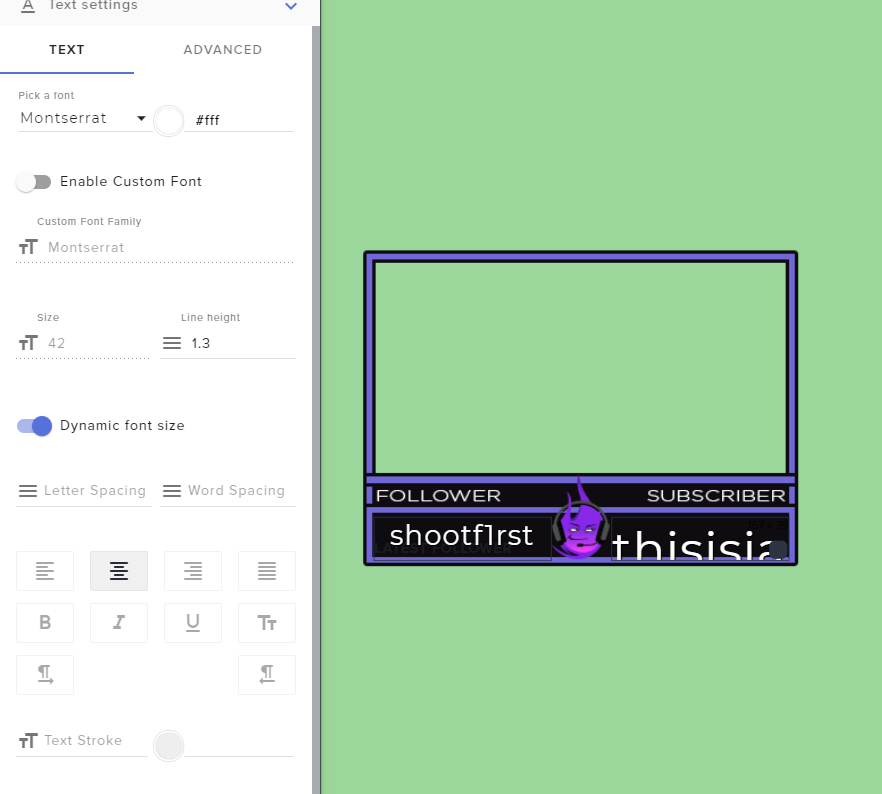 wary halo
if a name is too long you could also go for the scrolling text option
ember kraken
Subjectively, scrolling text looks absolutely terrible. You can see that it starts the font way too high, and gets cut off

It seems to only be scaling horizontally. If I can manually set the initial font size, it should work fine, but once you enable dynamic font size, it locks the option off.
wary halo
try to see if it help to go to text settings > advanced and add some margin so it starts at a different hight
i know a lot of people are dealing with this dynamic font thing to get it just right
ember kraken
That wouldn't work, it doesn't scale vertically. The starting font is simply set way too high with no way of changing it https://i.imgur.com/mrf5tQL.png
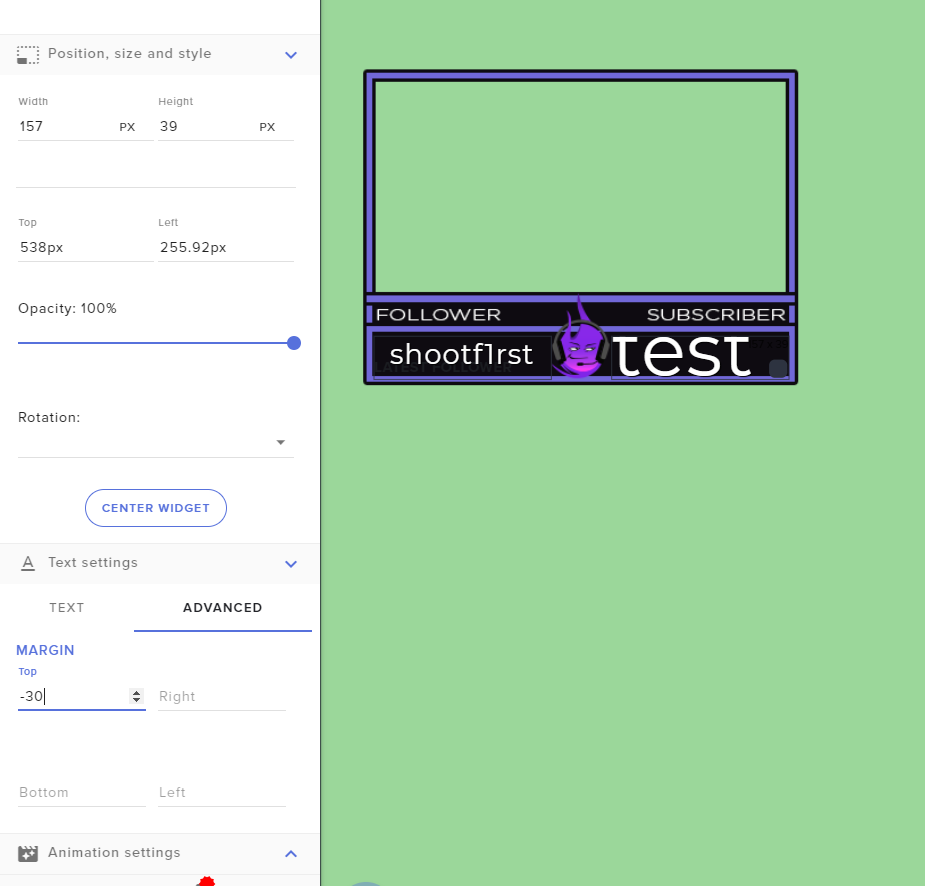 wary halo
well, if i click it it sets it automatically to 23
not the 42 you are talking about
🤔
ember kraken
Do you have existing text in the box it's trying to scale?
wary halo
yes
ember kraken
i imagine it's 23 because it's set to scale. Try removing all text from the box and turning the setting on
Theoretically this shouldn't be a huge issue unless someone has a very short name
ember kraken
screenshot of settings?
wary halo
stock settings, only dynamic font turned on
ember kraken
Hm. I'll look into it more and poke around
Here's another weird'n
Text isn't scaling as it is in the preview
https://gfycat.com/TeemingBigElephant
The green background is from the overlay editor, the black background is from an actual browser source


(you might need to open the gif to be able to see what I'm pointing out)
On the editor, the text is aligned on the same horizontal plane. In a browser source, it's off by a few pixels.
 compact crest
is it normal for 1-3$ donations to not have TTS? see here https://www.loom.com/share/a15acd7247564cb39630f2a4bfe15e69

$4 work though
wary halo
then check your variations on your tip alerts
fathom zodiac
Does anyone know if you have multiple scenes in OBS are they all active?
wary halo
not if you check #3 on this screenshot for your browser sources
the overlays will then reload when you switch to that scene
fathom zodiac
that makes sense because its in the Sources right
but I was wondering if the Scenes themselves are all active
if you had multiple scenes would that interfere with performance?
The sources stuff I get
wary halo
a little, but not as much as you think
OBS is usually around 14% cpu with me and i have 7 scenes with multiple sources
wary halo
some of them are just the same, for example the alert overlay is in every scene ofcourse
but yeah, i use a couple 😛
fathom zodiac
nice man! you stream alot?
I was thinking if I had a different scene for a different game. Then only have that scene play when Im streaming a specific game. But I wasn't sure if all the scenes would be active even if i just wanted to play one haha
wary halo
4 times a week (if everything works out irl ) 😛
fathom zodiac
i gotta tune in haha
wary halo
it shouldn't be a problem to have mutliple scenes no
fathom zodiac
awesome! then its just to make sure anything browser related should be shutdown when not visible
I wanted to use a bunch of the layouts for various games
just set them all up in different scenes haha
Thanks mate1
wary halo
fathom zodiac
you're awesome! haha
round brambleBOT
@fathom zodiac https://tenor.com/view/no-u-keanu-reeves-got-it-gif-14479787
fathom zodiac
LOL
 quartz igloo
Hi! I was wondering why !followage was saying long time followers weren't following?
 cold wadi
hey my bit alerts arent twitches defualt images and sounds can somone help
cold wadi
an you help me get the default twitch bit alerts????
 blissful bay
Mda
strong kernel
@cold wadi There are no "default Twitch alerts" because Twitch doesn't provide alerts. Our defaults are our defaults.
 hoary swift
Is there a limit to the number of Overlays one can have? I want to capture 24 different cheer amounts and have each display a different image and message. Previously, when I did something similar with tips, I put all the variations in one overlay; however, it never worked reliably. SE support advised me to break each tip variation out into their own overlay to capture the different amounts. So, I am assuming I need to do that with this case as well.
 cedar grove
Hello I need help I'm trying to stream broadcast and it not working
 stone saddle
I downloaded and modified one of the StreamElements overlays, but failed to save the original. How can I download or refresh the one I have?
graceful tree
@twin sentinel no filters in mod settings, when i emulate the alert thru streamelements site it shows up in obs and donation shows up in activity feed
strong kernel
@hoary swift You shouldn't need to separate each and every variation to its own overlay. That'd be 24 different overlays. Extremely excessive.
@cedar grove Are you getting an error message?
@stone saddle You can always get fresh copies from the Themes gallery.
stone saddle
Thanks..
hoary swift
@strong kernel OK. I was inspecting the variation options for cheers and it seems like there have been updates/improvements since I started working with SE (1 yr ago). Thanks. I'll give it a go.
ember kraken
Can I copy text settings from a widget to another? Setting the font, size, shadow, and centering each time gets pretty repetitive
cedar grove
@strong kernel every time I try to broadcast is keep saying preparing and the on air light is gray
ember kraken
Also, where things are set in the overlay editor isn't where they end up in the browser source.
Everything's about 5 pixels higher than they're set in the editor.
strong kernel
@ember kraken You can copy the whole widget, not the settings from a specific section of one.
ember kraken
Doesn't really work when they're different widgets. Oh well, it's not a huge deal
 gusty fern
hey my follow age isnt working in the chat, how do i fix this?
stone saddle
Don't understand options in "duplicate overlay" dialog; Platform, Twitch, Channel and the up/down arrows. Can you point me to a FAQ?
I've been selecting Twitch, which seem to work, but ..
strong kernel
Well, you've got me a bit confused about up and down arrows. Don't see those. But it's giving you the option of which channel to duplicate the overlay to. It allows you to share designs between the channels in your account.
stone saddle
Arrows appear when you click to the right of Platform and Channel
strong kernel
Mine, for example, lets me duplicate the overlay to any of these. So if I want to take an overlay I made for Twitch into my Mixer channel, I can duplicate it over by selecting Mixer here.
stone saddle
Okay, I only have Twitch, so not all the options you have.. Makes sense now..
strong kernel
The checkbox next to Platform simply lets you select them all.
So if you only have one platform, either checkbox makes no difference.
real junco
so again, if i put overlays will it help showing my Streamlabs alerts?
strong kernel
We're not Streamlabs.
Using anything of ours will have no effect on anything of theirs and vice versa.
 brittle narwhal
I'm trying to make a timer for a currency raffle ex. 30 coins up for grabs type ! coins to enter. But when the bot enters the raffle or sraffle command it doesn't display the message only the command
brittle narwhal
So i can't start a raffle unless I enter it in chat?
strong kernel
You or a moderator, correct.
brittle narwhal
Ok thank you
cold flume
Hey I asked yesterday about people my stream is freezing and I downed my bitrate and that kind of worked but is there any way to know for sure which games will and won’t work the same?
 whole tartan
Why does OBS-Stremelements constantly start to drop frames randomly. Not even using 20% of my cpu (in total) OBS is using 2-3% or and memory total is not even 35%....
Happens like every other day when streaming
dry hare
You'd have to examine a log to find out more information about why you're dropping frames
whole tartan
Want it here?
cold flume
Yea I drop mad frames out of nowhere and don't know quite how to fix that
whole tartan
Same legit have to end the stream and restart it to get it fixed....
round brambleBOT
@whole tartan Please provide a log from your last stream. To do this, in OBS go to Help > Log Files > Upload Last Log File and paste the link to the log file here.
@cold flume Please provide a log from your last stream. To do this, in OBS go to Help > Log Files > Upload Last Log File and paste the link to the log file here.
strong kernel
@whole tartan Update OBS. The fact that it's returning a pastebin shows it's out of date.
^ That's the kind of link it should return.
strong kernel
Follow the instructions and provide a clean log.
cold flume
Nethyr do I have to make streamelements an administrator and how to do that?
strong kernel
Running OBS as an administrator only helps if you're not seeing your game appear in a Game Capture source.
whole tartan
@strong kernel i provided it
strong kernel
@whole tartan Look one message below yours.
cold flume
Thank you for the help nethyr I'll try streaming in 100% better weather tomorrow to make sure its actually my obs first
 frigid juniper
Any news about the followage command?
strong kernel
What about it?
frigid juniper
When someone sends the command it says the user is not following D:
But the user actually is a follower
fathom zodiac
hey is obs.live compatiable with the Elgato?
 spark hearth
Question for twitch chat is there a way to have the chat messages fly in from the left or right
 ionic kelp
@spark hearth you mean with the overlay and not OBS.live right?
spark hearth
yeah with the overlay editor I have twitch chat
ionic kelp
I know what you mean. I don't know the exact CSS you'd need to toss at it but fairly certain it's reasonably "simple" to do.
spark hearth
okay I would like to know if someone has the CSS to enable that
dry hare
Umm
I don’t know it off the top of my head but that’s a good reference for HTML + CSS in the event you wanna learn it
You can also ask in #dev-chat as there are some really smurt folks there
 stuck crane
Hey I changed my username from "TheJustOP" to "JustVinny_". Could a staff update my ChatStats page? 