#helpdesk-twitch
1 messages · Page 542 of 1
 lament blade
thank you. i felt kinda bad my last 3 or 4 follows didnt show up and i dont like people to feel unappreciated thanks for your help
love how helpful you all are and how quick everyone is to respond. yall make it so worth it to use Stream Elements
 knotty barn
 real escarp
@lime goblet hi
 lime goblet
hi
real escarp
give me a few minutes and we can screen share
lime goblet
ok
 toxic snow
streamelements doesn't work in my chat, i'm on streaming right now
no commands won't work
toxic snow
yes
real escarp
activity feed | hamburger menu | settings custom bot switch to streamelements
toxic snow
ok ty
 wind lynx
can I get help with the twitch extension. It only shows countdown as the default page even when I change it
 scarlet tiger
@wind lynx try CTRL+Shift+R
wind lynx
reload doesn't work
wind lynx
yes I pressed save and it gave a confirmation
the only time it works is if I get rid of the countdown completely, then I can choose what page is default
but then there is no access to the countdown 😦
scarlet tiger
@wind lynx What do you want it to change?
scarlet tiger
@wind lynx
Because you are not streaming and the extension's behavior is to show the countdown widget for your upcoming stream.When you are live, it should default back to the store items.
see description this function
"Select the first panel your viewers will see when visiting your live channel"
 kind vector
What happens when I duplicate the Overlays and make some changes, Will the primary change at all or no?
scarlet tiger
No
kind vector
Perfect. Thank you very much!
 blissful drum
Hello can i get help for setting a custom overlay ^^
 wary halo
what do you want to know?
scarlet tiger
@blissful drum ^
 terse fog
So since updating, my stream elements deleted all of my preset alert information like the gifs and sounds for my alert boxes
Any reccomendations on what to do? Otherwise it will take hours to rebuild and restore my settings
 twin sentinel
What exactly did you update? Are the alert boxes still in the overlay section on the website?
 limber vine
how can i get tts to work ? i have it enabled on my subs but it dosnt read out the message
twin sentinel
Have you checked the variations, too?
twin sentinel
the TTS will be read after the alert finished.
limber vine
alright cool thank you
 worn thicket
Does some one know if there is a spin wheel widget for streamelements?
 sharp slate
i dont think there is
worn thicket
Or does some know a site for custom wheels ?
sharp slate
look it up, google is a good friend
worn thicket
Everything I search its a temporary wheel
Thats not what I need :(
All the other wheels I can find is streamlabs ugh
 rare cairn
i use wheeldecide
you can build a custom wheel and save it.
i made a wheel, and build it into a single page local html
I am trying to make a random joke command that pulls a random joke from a website and i am having some trouble getting it to work. The way that i did it, which is how i thought it should be, works but it shows the text of the whole site instead of just the joke
twin sentinel
what is the website you are getting the jokes from?
rare cairn
i am trying to do a few different ones. one of which is in the Se examples, chucknorris.io
twin sentinel
What SE example?
twin sentinel
The command always gives back what they get when shooting a GET against the API. If the API is returning a whole JSON document, then the whole document will be printed by the bot.
rare cairn
i guess thats the wrong way to do it. I am trying to learn how to do all that type of stuff to someday make some useful commands and widgets
rare cairn
ok another question, i added the store redemption alert to my overlays and the word "Redeemed shows up in my overlay when the alert is not active.
twin sentinel
This is a known issue and the devs are aware of it. No ETA on a fix unfortunately. You can hide and show the source in OBS, to reload the overlay. That should make the redeem to reset.
rare cairn
gotcha. Thanks for the help.
 knotty token
hello again, Ive managed to figure some stuff out and im setting up alert boxes. I went to test them in OBS live from the stream elements overlay editor and it doesnt seem to be working, am i doing something wrong or missing a step
ive imported it as a browser source and it is the top layer
 round brambleBOT
@knotty token You can test Alerts via the bell on the lower right corner of the Overlay Editor. Simply go to your Dashboard -> My Overlays -> Pencil/edit button on the overlay. Make sure the "Show Emulated events on stream" option is on to see the alert in OBS/Xsplit https://streamable.com/h6qgy
 knotty token
i tried that and the option is clicked but it aint showin in actual obs live
the alerts work in stream elements and i can hear them playing in obs but i dont actually see them
twin sentinel
Try to disable browser hardware acceleration in the advanced settings in OBS.
 kind iron
Also do you have the alerts positioned correctly in obs?
knotty token
obs live saying i need to update but i just got it 20 mins ago
this is how i have ot
heres my stream elements page
kind iron
Have you tried refreshing the browser source or trying it on a new browser source?
 worn river
Hello! I'm having trouble redeeming an item from the store by an specific viewer. When he tries to redeem it the bot says he doesn't have enough points but the message is different from the standard message we have set up. He has more than enough points to buy the items but when he enters the store it says he has zero points. Can you help me with this, please? Thanks a lot! 🙂
 tepid wadi
question
ive set up the alert for my coins for people to redeem in for store tiems
items
i think two have redeemed and all it would show would be "redeemed" in the middle of my stream
i had to turn it off. any reason why it's showing up like this?
 sacred nacelle
Hello everyone! I'm an editor in @last escarp 's Twitch channel - the_matloc. We have timers set up with the chatbot, and they seem to go off more frequently than we have them set to go off. For example, we have one set at 6 minute online interval with 2 chat lines required. Does this mean that it will go off every 6 minutes provided there are two posts in chat? Also, will the chatbot's post lines trigger the post line requirements of other timers? We want to adjust the frequency, but we feel we've done something wrong with the setup. Any help is appreciated.
 limber orchid
howdy im trying to reset my death counter that i put in with SE bot and it wont reset
i even deleted it and re did and it just kept counting up
 lavish sail
Hello, I am attempting to delete a channel from my StreamElements but I cannot find the option anywhere to delete one. Help!
 wanton mango
@limber orchid !editcounter <counter_name> 0
limber orchid
i did that then when i type death again its still counting from the original even tho it says changed to 0
thats where i am confused
:/ so confusing
wanton mango
@sacred nacelle the chat lines are the number of lines required in a five minute time period, which if met, will start the interval that you defined. the timers are all independent of each other, so if all your timers share the same settings, they'll all trigger together at the same time - also see https://discordapp.com/channels/141203863863558144/199460642975907840/508911738528333849 for more info. a customapi can also be used to reduce everything to only one timer that can walk across multiple responses over time too
@limber orchid I think you've set up your commands incorrectly
!death - should be Ricey died! That's ${count deaths} times now. RIP.
!deaths - should be Ricey has died a total of ${getcount deaths} times so far.
Then you can reset it with !editcounter deaths 0 or you can do !resetdeaths - Reset deaths to ${count deaths 0}
limber orchid
i will try that @wanton mango thanks for the quick response
figured it out i was using !death instead of !deaths in the Edit command 😄 im a dummy thanks for your help
 small coral
hello
asking for helo here
asking help about the "Bullet Train Overlay"
Bullet Rain*
 echo cypress
Uh, any good simple layouts to use for a new streamer?
 red acorn
Hi I could use some help with my ChatStats section, I recently changed my username on Twitch and need the new username updated to start tracking new data
echo cypress
Something that won't be eating too much CPU until I get like... a better comp?
scarlet tiger
@red acorn username?
red acorn
Was TNGMarvel now just Marvoi
scarlet tiger
@small coral
 dry hare
We will get you taken care of @red acorn
red acorn
Thank you 
dry hare
@echo cypress try the static overlays
You can also disable overlay elements like animated borders etc
 proper swan
Can anyone help me to put my stream overlay that’s saying stream will start soon but on phone on twitch
echo cypress
I'm going for that, thanks!
Also, I might wanna add a chatbox so I can read the jokes if they arrive. xD
dry hare
@proper swan #helpdesk-mobile
echo cypress
I'll be testing things and if it doesn't work well, I'll be finding another way
 wintry sparrow
hi how to activate this
chatbot says
userXX welcome to the stream
userXX thank you for the follow
userXX thank you for donation
userXX thank you for sub
in the twitch chat
 hazy pulsar
Hi all is it possible to remove BOT's from the streamelements leader boards and if so how?
wintry sparrow
thanks
i dont see this one (userXX welcome to the stream) got everything else
scarlet tiger
@hazy pulsar points leaderboard on web or extension?
hazy pulsar
ah I presume its the web extension as im reffering to the one on my twitch profile page
nissanmiklii is my twitch btw not fubsy08
Its not a huge issue just an annoyance 😄
scarlet tiger
@hazy pulsar reset points
scarlet tiger
hazy pulsar
Doh lol
scarlet tiger
And add streamelements to ignored users
https://streamelements.com/dashboard/loyalty
 carmine knot
I'm trying to reset the data related to everyones !watchtime in my stream to 0
Where should I look or go to do that
scarlet tiger
@carmine knot You do have enabled loyalty points?
carmine knot
yeah, I don't use them but they're enabled
scarlet tiger
@carmine knot Do you want to reset watchtime and points?
carmine knot
Both, sure. Yup.
I saw you testing it in my chat, yeah I have some conflicting commands (well those two specifically) because I use a program called Deepbot and StreamElements on the same oauth key/account
scarlet tiger
I am not aware of any way to reset watchtime.
carmine knot
Is there a simple way to reset points then
scarlet tiger
But you can disable command !watchtime
carmine knot
Yeah I understand, I'll be doing that
 amber tartan
Hello i have a problem with my stream elements linking with my elgato stream deck can someone help?
scarlet tiger
@amber tartan What problem?
amber tartan
its not connecting with my eleemtns for some reason i trieed uninstalling and everything
restarted etcetc
dry hare
What did you uninstall/reinstall?
amber tartan
Stream Deck
and tried difference versions
any ideas?
the elgato remote control plugin is missing. Please reinstrall stream deck and try again
thats what it says
dry hare
So when you reinstall the streamdeck software it isn’t installing the obs plug-in?
 knotty rain
There are any way to increase 500 max symbols in custom command? If i want to create Random pick from few long messages.
Someone?
 wicked wagon
Hi, I have an issue where my Alert Box is Centered, and it is showing as offset to the right and down, and is cutting out approx 75% of the alert. I'm doing this through the Editor provided in OBSlive.
And of course, now that I've brought it up, it won't do it.
It did it several times throughout my stream tonight.
Know what...Screw it. I'm going back to StreamLabs.
wary halo
make the alertbox bigger, if you are still here 😛
and make shure the resolution of the overlay is set right
lament blade
So, question about being hosted, to see if I'm missing something
round brambleBOT
@lament blade Due to changes to Twitch API, we have filtered out hosts and will only show these ones on your activity feed:
- All hosts coming from an online channel with at least 1+ viewer
- Auto host events with at least 1 viewer - only from a channel that just went offline
Note: If you see "X channel has hosted you" with no viewers on the back, that is considered an offline host or a host with 0 viewers, we do not show these.
lament blade
Huh. Good to know. Doesn't apply though
Well... depends. The "activity feed" is the dashboard, right?
wary halo

StreamElements
The Ultimate All in One Platform for Streamers
lament blade
Right, the website dashboard, yes
wary halo
yes, but the dashboard is just everything
lament blade
Hm.. Fair
wary halo
yeah or the one in OBS.Live
lament blade
Sorry, still struggling with names. I meant, like, not the chat or whatever
So yeah, doesn't apply. Here's the issue. I get hosted by one of those autohost raffles, yes? 25+ viewers
 steep sorrel
hey all ❤️ have a nice sunday...I dont know why but my all !commands doesnt work. I tried to enable/disable stuff, but my !sound or any !command doesnt work..what should i do ?
lament blade
Alert pops up, twitch sends the default "you're being hosted" in chat , then SE bot sends the personalized mesage in chat too
Then, 2hours later (or whatver), I get hosted again by the same channel, 25+ viewers again
Twitch DOES send the default "you're being hosted", but the alert does NOT pop out
Nor does the bot customized message
wary halo
@steep sorrel you need to add the bot to your channel and type /mod streamelements in your chat
steep sorrel
hmmm okiiies i will check now @wary halo
streamelements is already a moderator of this channel. 😦 @wary halo
lament blade
Damn, I need to leave for a bit. I'll check for possible replies later
steep sorrel
it was working actually till yesterday
twin sentinel
Part the bot from your channel, log out of the dashboard, log back in and make the bot join your channel again.
Are you using a costum bot name? if yes, via GroundControl, or OBS.Live?
steep sorrel
I actually tried to use different bot name but couldnt work it tho. so I gave up last tme. I was using directly stream elements bot
I coudlnt log off from ground control app so I didnt care about bot name becus obivously Im a noob
wary halo
@lament blade did the second host alert appear in the activity feed? or only the twitch notification in chat?
twin sentinel
@steep sorrel Delete the JWT token in the settings of groundcontrol please.
Also please follow what I posted above with part, log out, log back in and join it again.
knotty rain
Maybe i didnt see it, but There are any way to increase 500 max symbols in custom command? If i want to create Random pick from few long messages. Sorry for repeating
 lament blade
Sorry, had to leave for a bit @wary halo
Again, the activy feed... let me check the dashboard
I know that, in the chat, only twitch. SE bot did not announce it
Nope. The stats shows only one host
It's happened at least 5 times now, but I always forgot to come to ask 😅
 copper valley
Can I see the top 10 watchtime?
twin sentinel
You can see the top 5 using this command: !top online
copper valley
I know, but when I enter this command, I have all 5 people, these are bots and I
twin sentinel
@lament blade If the event is not in your activity feed (https://streamelements.com/dashboard/activity) then it was most likely an offline host and we do not make an entry in the activity feed for that, so we also do not show an alert.
@copper valley No other way, that I am aware of.
lament blade
Hm... I'm re-reading the bot message you sent me, for offline hosts
copper valley
Well thank you
lament blade
And I'm having trouble understanding it, but here's the thing. It's a raffle host channel. They hosted me twice. SE catches the first one, not the second one
It's happened, as mentioned, like 5 times already. I very much doubt it's an "offline host" ONLY the second time I get hosted every single time
wary halo
maybe it's like a follow, unfollow, follow thing.. the second time does not get picked up there either
lament blade
But it used to be picked up until... idk, few weeks ago?
twin sentinel
Let me see if I can get hold of a staff, so that they can reset the webhooks for these events. As it is the weekend, this can take some time.
lament blade
Sure, I'm in no hurry.
As with many things, I just come here to see if I'm doing something wrong or whether it's been reported already. I'm surprised to find that many times I'm the first one reporting these things 😅
 toxic pumice
Heya! Trying to add a cheer goal but can't figure out how to reset it. When I add it the default goal is 100 but it says I've already collected over 10000. The 10000+ number is my overall total since becoming an affiliate. How do I reset it so it starts from 0 to make the cheer goal make sense. Please and thank you!
round brambleBOT
@toxic pumice To reset goals:
- from the overlay editor -> data on top -> goal tab -> reset progress of desired goal
- from the dashboard -> activity feed on the left -> widget data on the right -> goals tab -> reset progress of desired goal
Note: Goal widgets(progress) only counts up and doesn't go down automatically, if you loose followers/subs
toxic pumice
ooo perfect ty ty!!! ❤️
lament blade
Hey guys, Have a question... I for the life of me cannot figure out where to find and set up !Snow for #LetItSnow... Any ideas guys?
I see it in the command list, but cannot find it anywhere to set up :(((
twin sentinel
Can you elaborate on what you are trying to achieve with !snow please? What should the bot do on that command? Where do you see it in the commands list?
@lament blade Your webhooks have been reset. The hosts should show back up in your activity feed. If not, it is then most lilely due to them being an offline host.
lament blade
Okay, then, again, explain please how the "offline host" thing works. Cause it's the same host every time, only the first host shows, the second doesn't.
...did that come off rude? Sorry, didn't mean to
Didn't know how else to phrase it
twin sentinel
If the channel is offline and it hosts you, we do not show these.
lament blade
Okay. Then it should NEVER show, right?
And not "show first host, don't show second"?
twin sentinel
If it was online and hosts you, then it shows the host. Maybe the host raffle thing channel was online while hosting you the first time, but offline the second time.
lament blade
I mean, considering the mechanics of the channel, it's possible that it d/c on accident... once. Twice. Let's say three times for the sake of it.
Not five.
It's a channel that does that "for a living": host other channels. I'm not sure how the internal mechanics work, but I'd say they have to be consistent. Either they work around an "offline method", or an "online method", I'd say...
Well, whatever, I'll keep an eye out the next time I get hosted twice. Thanks
@twin sentinel - I would like to set it up so if someone Cheers 100bits it will snow on stream 🙂
twin sentinel
This widgets adds a snow layer to your stream. This is not connected to cheers or any other events.
lament blade
Oh, I've seen other streams do it. Wonder how they do that then. Crap Thank you @twin sentinel
twin sentinel
Maybe they changed their alertbox and added a snow video there.
lament blade
I'm new to this whole thing, So I'll google how to do that. Thank you @twin sentinel !
 lapis epoch
hey ho, does anyone know if its possible to import a alert box from one layout to another?
lament blade
Yes
wary halo
lament blade
Dammit Saurus!
lapis epoch
haha thx :D
lament blade
For ONE time I can help, and you beat me to it >_<
wary halo

lament blade
When you click there, it will ask you where to import, current overlay or other
 nova turtle
Does anyone know how to connect go pro 8 black to stream elements?
wary halo
you need to set it as a video capture source in OBS
nova turtle
Ok, I'm gonna try that, thanks
 tepid cosmos
So having an issue with my girlfriends SE. Her tips/donations are not showing in her activity feed
And I cannot find out why! Everything seems to be fine
twin sentinel
What is her twitch name please? Was it made via PayPal or SE.Pay?
tepid cosmos
Made through paypal. Its all her tips. Twitch name is Nos_Love
twin sentinel
If there is no entry in the activity feed, most likely the setup in the paypal account is not 100% complete, or it is pending and you would best to contact paypal on why.
tepid cosmos
okay. She still receives the donations. I will have a look into it. Thanks! 🙂
twin sentinel
If you having trouble finding a solution, please come back here and I will try to get a staff to look at this issue.
 uncut vector
Has anyone have obs crash lately I can't change anything
It crashed after I added overlays and now I can't get it to work so I had to switch to slobs and don't want to use slobs
twin sentinel
Do you have a crash log for us?
uncut vector
It would let me do anything
I tried coping it and it wouldn't save it
I had to force close it
 red egret
does it crash again when you reopen obs?
uncut vector
Yeah do I need to uninstall and reinstall
wary halo
did you open it in admin mode?
uncut vector
Yeah and same thing
red egret
could delete what's in %appdata%\obs-studio\basic\scenes and grab the crash logs
if it IS indeed the browser sources that are causing the crash
uncut vector
Ok thank you
 vagrant breach
i cant show my screen it just shows a white square
twin sentinel
Can you screenshot your OBS please? We recommend to use game capture and window capture.
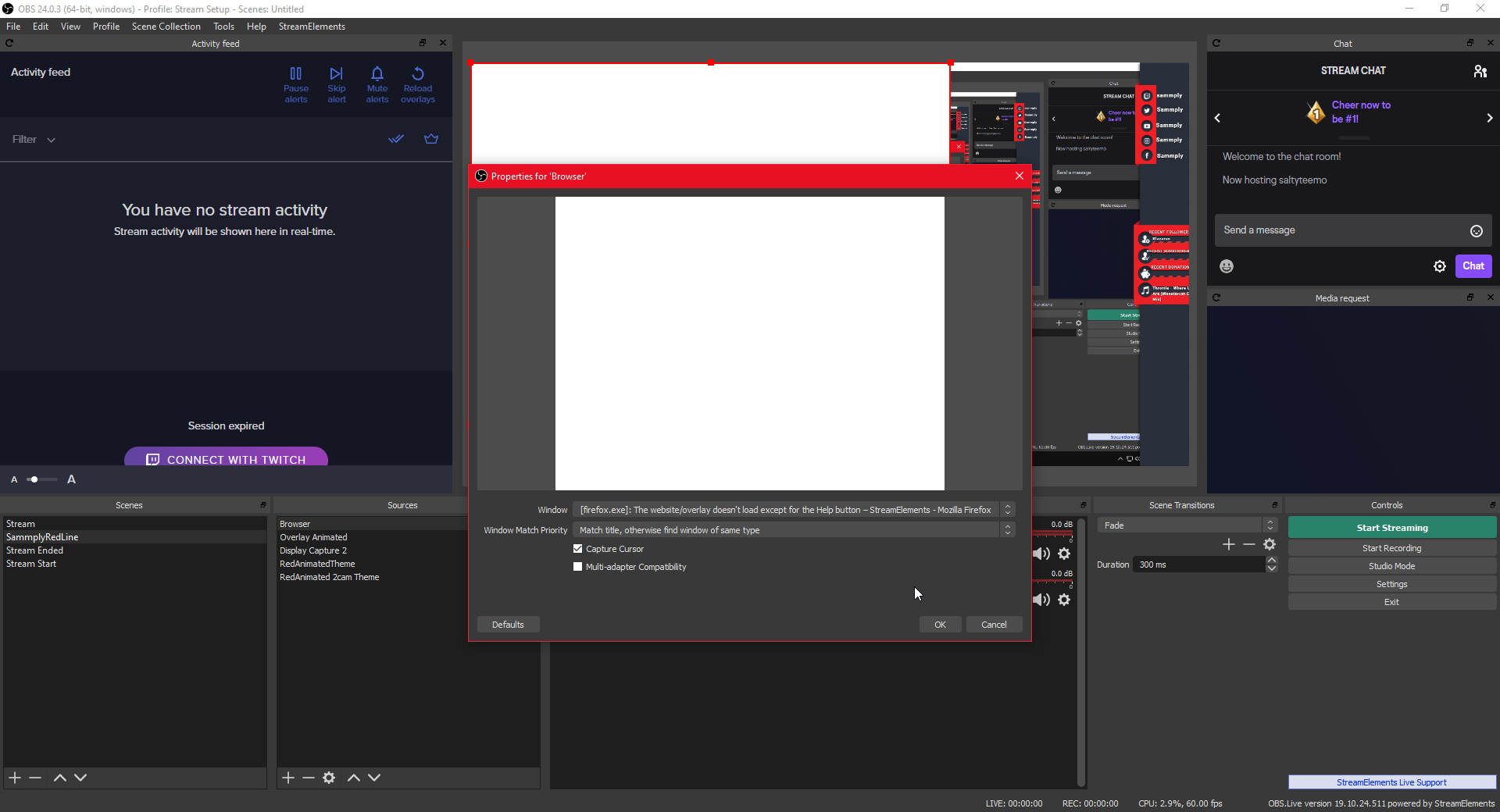 red egret
what are you trying to add? just alerts?
twin sentinel
Disable Hardware acceleration in your Browser
Firefox
Settings --> Performance
vagrant breach
my firefox isnt showing on display capture
im just trying to set up different sources for future reference
twin sentinel
Are you on a laptop?
vagrant breach
no
twin sentinel
In the screenshot above you are trying to capture firefox with a window capture if I am not wong.
How does your OBS look like when you are now using a display capture?
Also have you tried to disable the browser hardware acceleration of firefox?
vagrant breach
i have got it to work but unsure with something else
twin sentinel
Maybe we can assist you with this, too.
uncut vector
@twin sentinel what do u need for the crash report i was able to get it
twin sentinel
just put the file in here please.
vagrant breach
im just going to go back to streamlabs
uncut vector
 jolly berry
HI, I recently Joined stream elements, im using obs studio, I just bought a retrowave overlay package to start my twitch stream, and im struggling to find out how to install into using stream elements, any ideas?
twin sentinel
@uncut vector Please start with reinstalling OBS.
uncut vector
ok
twin sentinel
@jolly berry Where did you buy it from? NerdOrDie?
jolly berry
I bought from nerd or die that is correct, i took advantage of there black Friday deal 🙂
twin sentinel
Then with the purchase there sould have also been a one click install link for the overlays to add them to your StreamElements overlay section.
From there you can grab the overlay link and add it as a 1920x1080 browser source to your OBS.
jolly berry
im new to the whole twitch streaming lol
round brambleBOT
@jolly berry Welcome to the helpdesk! Please let us know how we can assist you today and a support volunteer or staff member will assist you as soon as they are available. Thank you for your patience.
jolly berry
there is a file for stream elements but i have no clue how to install it lol
twin sentinel
Best to contact NerdOrDie here.
jolly berry
ok thanks
 ionic kelp
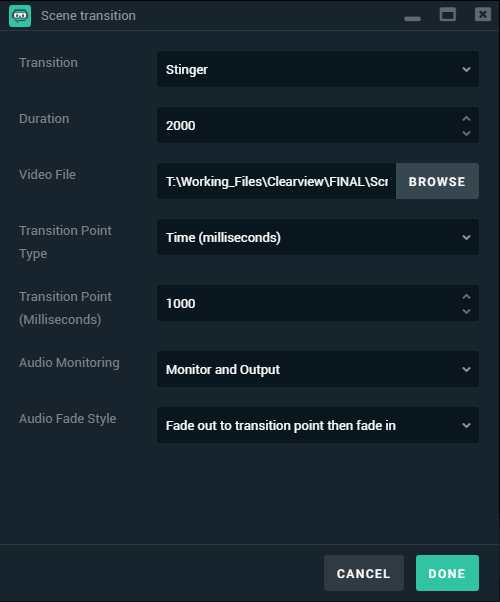 jolly berry
so do i need to download stream labs to install it @ionic kelp
ionic kelp
No. Just stupid thumbnail with it >.<
jolly berry
ha ok
ionic kelp
Scroll down a tad and the instructions are sorted on the left.
jolly berry
ok thanks @ionic kelp
That video only shows you how to install overlay using stream labs, stream elements is diffrent! I cant find the insert overlay button
Unless I'm using the free overlays available on stream elements
twin sentinel
Have you found the streamelements folder in the files you downloaded from NerdOrDie?
jolly berry
Yes
twin sentinel
In there is a file with a one time install link correct?
jolly berry
Yes
twin sentinel
In your downloaded files, open up the Streamelements alert folder.
1. Head over to Streamelements.com and ensure you’re logged in.
2. Double click the Streamelements Alert set up link from your downloads
3. This link will automatically open up the Streamelements website and begin the import.
4. You should get a notification at the top of the Streamelements website stating the import was successful
5. Head over to “My Overlays”
6. You should now find the imported alerts named after the pack they are from.
7. Click on the “Launch Overlay” to get the URL for your alerts
8. Paste this URL as a “Browser Source” in your streaming software.
To add your overlays to OBS, add a new browser source in your scene. Paste your overlay URL in the browser source properties, set the dimensions to 1920x1080 (unless you changed them on the website), and ☑ “Shutdown source when not visible” https://youtu.be/KDvLynUqXI4
jolly berry
That worked cheers @twin sentinel
 wanton shoal
Would anyone be able to help me setup OBS? I'm not sure if my laptop can handle it but I've configured it using my stream key and I just need to knowhow to put overlays and stuff on
round brambleBOT
@wanton shoal Checkout StreamElements Youtube channel, several guides for you!! https://www.youtube.com/channel/UCjerlCIbLPQwSnYlClkjDXg or a list with all the guides https://www.youtube.com/playlist?list=PLCDDKlFdScbEwdx5AntcQIS1InkFJwHtv
 rigid shoal
can you add commands to the se bot without the !
wanton shoal
Also, one more, kinda more techincal question. I have an HP Pavillion G6, will I be able to run ANY sort of overlays? It's got an AMD A4 or some crap lol The laptop is from 2012. I don't want anything fancy, just to add an org logo and maybe alerts or somethin when people follow/subscribe/dono/etc.
twin sentinel
Yes, that would be keywords in the advanced settings for custom commands. @rigid shoal
@wanton shoal Best you just try that out. We canot give you any advice on best settings.
wanton shoal
Ah I gotcha. Welp, I shall watch some vids and see what I can do
 crisp stream
had someone donate to me through my paypal and didnt pop up in stream
wonderinf if their is a fix
twin sentinel
If there is no entry in the activity feed, most likely the setup in the paypal account is not 100% complete, or it is pending and you would best to contact paypal on why.
twin sentinel
Yes, still. If you did not set up the account to 100%, then we do not get the notification. All on PayPal side.
rigid shoal
@twin sentinel om still a bit lost where do i enter the command and where do i enter the response ?
im*
twin sentinel
The command and response is in the settings on the top left of your screenshot.
@crisp stream When it comes to PayPal tips, things are very cut and dry. Either they sent a confirmation or they didn't.
Most likely you need to configure something in your PayPal account, or contact PayPal if something is missing.
crisp stream
I dont think you understand
before when I was tipped on paypal Stream elements use to post in my chat how much they donated
so I could thank them
now i just had a donation and it dosent pop up like it use to
twin sentinel
Yes. if there is no entry in the activity feed, contact PayPal.
crisp stream
BUT IM GETTING THE DONATION! im looking at it!
twin sentinel
Is the donation in your activity feed on StreamElements?
wanton shoal
So I watched the videos on how to setup overlays but it's not showing up on OBS. Is it because my laptop can't handle it?
It says at the bottom "Encoding overloaded, try lowering video settings" But when I go into my settings it doesn't alloww me to change anything
twin sentinel
Stop the stream and change the settings.
Also try to disable the browser hardware acceleration in the advacned settings in OBS.
@crisp stream Sorry, I did not know it was already in your activity feed.
When you replay it, does it come up? If it does not come up then, most likely take a look at the profanity filters.
rigid shoal
ok so i kinda got it to work
but why does it @ the person that used the command
i dont want that is there a way to not have that happen ?
twin sentinel
Set it to say and not reply.
wanton shoal
It's not showing up at all on OBS. I've removed all scenes, copy and pasted the browser link from Streamelements, and renamed it, but it's not showing anything on the OBS at all
twin sentinel
Have you tried to disable the browser hardware acceleration in OBS?
wanton shoal
yep
twin sentinel
When you select the browser source, does the red boarder fit to your canvas?
wanton shoal
Oh, 1 second. I "turned it off and turned it back on" lmao Gimme a few and Ill see if itll work
Um, no it doesn't though lol
I have no idea what I'm doing now D:
twin sentinel
Can you share a screenshot of your OBS please?
wanton shoal
Uhhhhh idk how to do that on my laptop lmfao My laptop doesn't seem to like the print screen button
Ik it's a lot to ask but can I just share screen through discord?
round brambleBOT
wanton shoal
oh
I didn't know it worked cuz I thought it would normally prompt me that it screenshotted successfully haha
round brambleBOT
@wanton shoal To add your overlays to OBS, add a new browser source in your scene. Paste your overlay URL in the browser source properties, set the dimensions to 1920x1080 (unless you changed them on the website), and ☑ “Shutdown source when not visible” https://youtu.be/KDvLynUqXI4
wanton shoal
This is what happened when I readded the slide with those dimensions
twin sentinel
What is your canvas resolution?
wanton shoal
Where do I see that?
 glad badger
hello, for some reason after changing my twitch name my streamelements disappeared from my chat. How can i fix it?
twin sentinel
Log out of the dashboard and log back in.
glad badger
i tried
twin sentinel
Part the bot, log out, log back in of the dashboard and make the bot join your channel again.
twin sentinel
At the top of your dashboard, there is a log out button. On the dashboard when you are logged in, there is also the part/join bot button.
glad badger
ok got it thank you it back now 
glad badger
poggywoggy my brothers 
twin sentinel
In OBS: Settings > Video @wanton shoal
wanton shoal
Yay!! 😄 Now, I hope you'll be available later on becaaauuusseee I have no idea what else to do D:
How do I remove the facecam section since I do not have a camera?
twin sentinel
Hide or delete the layer in the overlay editor.
wanton shoal
uuuhhhhh
ionic kelp
Is it a an overlay in SE?
wanton shoal
Yea
It's the blue flare overlay from SE that I'm tryna put on SE OBS
Is the overlay editor on OBS or through the library on SE?
twin sentinel
https://streamelements.com/dashboard/overlays Select the big pencil at the overlay.
wary halo
you can hide it by clicking the eye in the editor
wanton shoal
OH THATS CHAT! I'm a dunce. haha I thought it was face camera but since Ill be streaming from PS4 and watching my laptop I wont need chat anyway huh?
wanton shoal
Okay, now my name isn't centered and I can't get it to stay inside the image border thingy lol
oops
my bad
twin sentinel
Use the arrow keys to move the text widget with your name around.
wanton shoal
Is the overlay automatically setup to track subs, followers, etc.? Or do I have to edit my own stuff?
twin sentinel
After you signed up with us, the data should be tracked.
wanton shoal
Okay cool! Annndd do I need to connect my pc to my ps4 at all? Ooorrr do I just activate my stream and have it connected to OBS?
twin sentinel
You would need a capture card to get your gameplay onto your PC and use overlays.
wanton shoal
Oh.. So I'm wasting my time D:
Cuz I can only stream from my PS4 rn and can't afford a capture card 😦
round brambleBOT
@wanton shoal Here is a guide on how to setup the most essential tools for streaming from your console, while using StreamElements tools without involving a Capture Card! It's easy to do, take 4 minutes to read and 10 to 15 minutes to setup!
Read all about it here: https://blog.streamelements.com/how-to-stream-on-console-7b620b1c46c3
wanton shoal
I'm not sure what I'm missing. As far as I know I have everything setup properly. I guess the only way to know is to start astream from my PS4 and look at my twitch channel?
twin sentinel
The overlays will not work if you are not streaming from your PC.
wary halo
you have to capture your ps4 output and send it to OBS
ionic kelp
wary halo
yup
wanton shoal
My laptop can't run remote play
wary halo
that is the cheapest option
wanton shoal
I forgot that's why I couldn't setup overlays before..
wanton shoal
Yeah. It sucks :/ I'm tryin really hard to break out and make this work but it's hard
dry hare
I have a friend who started on her Xbox with a Kinect
Then she used a webcam and a 13 year old laptop to do cooking streams
Now she’s rocking an Alienware
You’ll get there. Make friends, tweet you are going live, and be engaging
wanton shoal
I should rephrase. I wouldn't say Ive BROKEN OUT but I'm also not entirely unknown. I'm an affiliate and all that but I have one friend who's donated to my channel cuz a bet I made with him lmao It's just tough when there are so many people and I don't have anything that makes me stand out
 lament blade
Facecam is a default option, but not necessary, imo
If your cam doesn't PROVIDE anything, don't use it
Anyway, prolly not a chat for this channel anymore. We can continue over at #general-chat
 fathom zodiac
Does anyone know if I can make the stream elements point system work with my own SPI?
API**
twin sentinel
There is an API documentation: https://docs.streamelements.com/reference/points
wanton mango
@valid pagoda there's a counter widget in the overlay editor that updates in real-time with a chat counter
 lilac vessel
is there a way to add a random group of sfx to the store as a stream perk redemption? for instance, someone redeems 'hello' and it pulls a random 'hello' sfx from a group
 strong kernel
No, each item can only have one sound effect.
 valid pagoda
just need to show a variable
 kindred bear
Ive noticed that my alert box can simulate hosts just fine but when a real host comes in, it never procs the animation/sound nor does it show up on my ground control, is there somewhere I have to do extra linking of my twitch account to SE?
round brambleBOT
@kindred bear Due to changes to Twitch API, we have filtered out hosts and will only show these ones on your activity feed:
- All hosts coming from an online channel with at least 1+ viewer
- Auto host events with at least 1 viewer - only from a channel that just went offline
Note: If you see "X channel has hosted you" with no viewers on the back, that is considered an offline host or a host with 0 viewers, we do not show these.
kindred bear
ah thx!
lament blade
guys
from news, how you can "duplicate whole groups and move them between overlays!" ???
kindred bear
@lament blade go into the overlay cluster, hold shift and click everything you want to group, once its all highlighted right click one of them and click group.
Then hit ctrl + c, go to the new scene, press ctrl + v
and viola
lament blade
thanks a lot @kindred bear , was unclear how you can do this, i was expecting a window to ask me in what overlay to copy the group, awesome!
strong kernel
It does, that's not the right instruction. Right clicking does nothing in the overlay editor.
strong kernel
He's talking about the overlay editor, not in OBS.
kindred bear
oh snap, youre right
strong kernel
@lament blade Select all the objects, press Shift-G or the Group selection option in the Object menu at the top, then in the layers, select the group itself and click the duplicate button.
 wintry delta
is there a pdf on the targeted commands ie .... $[sender] and others t
strong kernel
Variables can be found at https://streamelements.com/dashboard/bot-commands/variables
StreamElements
The Ultimate All in One Platform for Streamers
wintry delta
ty
 tardy mulch
can i have some assistance, one of my viewers changed their name, and they cant use the streamelements currency, i gave their points from their old username, but they cant still use the points
(ping me since i dont have notifications atm)
strong kernel
What was their old and current usernames?
tardy mulch
its cyberneticlaugh and now its cyberneticlaughss
strong kernel
Tell them to log into StreamElements and it should be fine after that.
 earnest fern
so can anyone tell me if theres a way of having the alert working for 0 viewer user hosting?
round brambleBOT
@earnest fern Due to changes to Twitch API, we have filtered out hosts and will only show these ones on your activity feed:
- All hosts coming from an online channel with at least 1+ viewer
- Auto host events with at least 1 viewer - only from a channel that just went offline
Note: If you see "X channel has hosted you" with no viewers on the back, that is considered an offline host or a host with 0 viewers, we do not show these.
strong kernel
It's working as intended. We use a different API endpoint as them that results in faster alerts, but sacrifices receiving data for 0-viewer hosts.
earnest fern
and raids?
strong kernel
Same thing.
earnest fern
ok thanks heaps ill stop trying to fix my streams lol
 simple crane
Hi. When I check custom css on for an alert box and tab out, the fields go crazy. Plus, the option to edit the code is also no longer present afterwards for me. Apologies if this is in the wrong channel, or if it's already known.
knotty token
Is there a way to make custom alerts with sound and a gif by using a command? Or can I just use streamlabs chat bot cause I know it has something similar to that
strong kernel
You create a stream store item, and then you have people redeem the item.
 jaunty aurora
Hello. I need some help with my alerts. The Follower alert sound is way too loud and doesn't change at all when i put sound to 0%. All of my other alerts I adjusted the sound and it works just fine. I tried deleting the sound for my follower alert and that doesnt even get rid of it. Any ideas?
round brambleBOT
@jaunty aurora Please connect your streaming account (Twitch, YouTube, or Facebook) with Discord by going to ⚙ Settings and then Connections here in Discord. https://streamable.com/eg92w

 tawny ledge
Hi I would like to know if there is a way so when someone gifts 5,10, etc subs , that only one alert comes up that says “gifted x amount of subs” instead of 5 alerts for every single sub that was gifted
Gets very overwhelming when people gift multiple, and we have to hear the alert for each one
strong kernel
Yes, create a community gift variation in your alertbox.
jaunty aurora
Hello. I need some help with my alerts. The Follower alert sound is way too loud and doesn't change at all when i put sound to 0%. All of my other alerts I adjusted the sound and it works just fine. I tried deleting the sound for my follower alert and that doesnt even get rid of it. Any ideas?
round brambleBOT
@jaunty aurora Please connect your streaming account (Twitch, YouTube, or Facebook) with Discord by going to ⚙ Settings and then Connections here in Discord. https://streamable.com/eg92w
lament blade
when i start my stream it makes this like fan sound and does not show my game display
strong kernel
@jaunty aurora You will need to manually change the file's volume itself in an audio editor like Audacity.
round brambleBOT
@lament blade For the best OBS support, please join their Official Discord @ discord.gg/obsproject
jaunty aurora
@strong kernel i tried what you said...and was able to make a new audio file and lower the sound...but didnt change anything in stream elements...I cant even change the sound in stream elements if i wanted to...nor will the sound go away if i delete it. is this a stream elements bug or something?
@strong kernel its only a problem with follower alert...subscriber, raid, donation, ect are all fine and able to adjust and change sounds
strong kernel
Please stop testing and exit the overlay editor.
The lack of change is because you have a variation that is taking over all the work instead of the main alert.
Delete the variation and the main alert will be in charge again.
valid pagoda
is there any way to repeat the twitch game every few minutes
repeat the command that is
strong kernel
That'd be a timer.
 azure iris
dumb question, maybe im not seeing it... is there an ability to hide the event list when not active on overlay? like have it pop up during trigger events?
strong kernel
Not the default event list, no. You'd need a custom one for that.
 brazen burrow
banned words question - I'm in stream elements / spam filters. I configure a banned words list. I have "banned words" enabled. I've created a groupname and activated it. I've tried it with "none" as the excluded user level and with "VIP" as the excluded user level. I run the banned words test there and it confirms that "phrase matches." I've confirmed that the Stream Elements Chatbot is active (I ran a "test bot" from Ground control and it showed up as usual in chat as a "hello, is this thing on." BUT then when try to validate the banned word filter - either in Twitch or via OBS.Live, the words still go through. I also had a friend try it and the word was still allowed through. What am I missing? (FYI, I do have a custom bot name activated through ground control if that makes a difference.)
strong kernel
Well, we're not Streamlabs, so having that active does nothing.
You need to mod StreamElements.
brazen burrow
dammmmmit
everytime i type the wrong thing. Elements. Stream ELEMENTS
you guys have ground control
strong kernel
Mod the bot so it can actually do something about what you say is wrong.
brazen burrow
the screenshot is from my https://streamelements.com/dashboard/bot-spam-filters
StreamElements
The Ultimate All in One Platform for Streamers
strong kernel
Let me repeat: The bot cannot do anything about the banned words if it's not a moderator.
Mod the bot.
brazen burrow
oh you mean MAKE the bot the moderator. Not MODIFY the bot. Sorry I did not understand
ok, i have made the bot the moderator. Still no luck
strong kernel
Both the custom name AND StreamElements?
brazen burrow
both StreamElements and eeeniebean (my custombot name) are moderators
strong kernel
Make sure when you're setting up your custom bot name in Ground Control that you generate the OAuth token while logged into Twitch's site as the bot account
If you're logged into your own account, it will use your own account, not the bot account.
brazen burrow
my bot account is the same as my own account
I didn't do the "separate" account thing. I'm happy to disable the custom bot name if that will make banned words work
strong kernel
Using a custom name doesn't disable banned words.
brazen burrow
i wouldn't think so.
 thorny vector
speak spanish??'
strong kernel
@thorny vector #🇪🇸︱español
thorny vector
como puedo altenar entre cuenta
strong kernel
@thorny vector 🖱️ ➡️ #🇪🇸︱español
@brazen burrow How have you been testing the banned words in your chat?
brazen burrow
by typing them in, and by having a friend go in and typing them in
brazen burrow
right, thus why I had a friend try too
strong kernel
Have them try again now that the bot is modded.
brazen burrow
yup, now it is working. thank you so much. sorry for the confusion and typos with the freaking streamlabs/stream elements thing. If it redeems me at all, I had streamlabs obs installed and THEN switched to obs.live with streamelements. Thus my continual typos. Appreciate the help!
lament blade
i fixed every thing about my stream and even made improvements the only thing is my audio sounds like there is a fan on and i don't have a fan in my room the only one is my pc fan
plz help
round brambleBOT
@lament blade For the best OBS support, please join their Official Discord @ discord.gg/obsproject
lament blade
jno one is active in obs cord can anyone is here help me
strong kernel
Audio issues are more in the realm of OBS than us, it could be your settings, drivers, the mic itself, but it's not something we can really help with much here.
lament blade
would u know if sound suppresion could help
 sour laurel
Is there a way to get ChatStats to continue tracking of a channel that has changed it's name? https://stats.streamelements.com/c/itswill_rs has changed his channel name to just "itswill"
He's having difficulty having anything show for https://stats.streamelements.com/c/itswill
TY it's fixed!!
brazen burrow
try the noise gate setting.
(sorry I'm not tech support here but I just worked on a similar issue with my audio setting)
round brambleBOT
@steady ocean Please follow our community rules:
- No advertisement or stream promotion
- Respect ALL server members
- No NSFW/NSFL
Thank you
azure iris
with what?
 buoyant haven
I was trying to do the "media request" in my stream
And I just can't do it properly
I have made the settings like the youtube tutorial
I've created the overlay and put the link on the scene
 unkempt rose
I am using the Purple Wave overlay and I LOVE it - but my only issue is the transparency of the boxes on the bottom of the screen (where latest donations/followers/subs etc are listed) I'm finding that its difficult for people to read it because of how transparent it is. Is there an easy way to fix that?
 zenith widget
@buoyant haven skip the tutorial video and you shoule be fine afterwards
@unkempt rose change the widget text setting perhaps
 steady cairn
My stats emails have stopped coming through after a stream - I've searched the dashboard, settings, etc. but cannot see anywhere that will switch it back on - How do I get these back or am I just missing something obvious?
zenith widget
It seems you are not unsubbed from the reports, but I will ask the devs, as I don't find it pure coincidence when i see 2 of the same thing reported.
steady cairn
Thanks @zenith widget I can't recall changing anything that could affect this
and the streamelements emails I've found quicker and better than the Twitch emails
 sand mauve
Hello, I am trying to setup the current !time command. However I am uncertain which Time zone to use. I am Central Standard Time. I live in Austin, TX. What is the correct format for this? ${time.cst} is not listing the correct time. Thanks 🙂
zenith widget
Example timezones to use:
$(time.PST8PDT)
${time.Asia/Seoul}
You can specify time zones using locations so LA would be ${time.America/Los_Angeles}
https://en.wikipedia.org/wiki/List_of_tz_database_time_zones

This is a list of time zones from release 2017c of the tz database.
 short hound
heylo, I have set up a song playlist on Youtube is it possible to have it set to shuffle through media request?
 jade remnant
add the url as the back up playlist in media request settings
the playlist must be public
short hound
I've sorted the set up of the playlist just wondered if there was a way to shuffle the song?
zenith widget
there is a shuffle option where you placce the playlist link
short hound
I have that turned on but keeps playing in the same order
okay it's working now thank you 🙂
 foggy jetty
Hi, I have opened my OBS today and my media request has vanished
I cant seem to reopen it either
zenith widget
Streamelements on top -> Media Request
foggy jetty
yup tried that and it doesnt sho9w
it shows a tick that I have selected it
but it is not showing
zenith widget
Show me a screenshot of your entire OBS
foggy jetty
zenith widget
2 monitors?
Move the OBS window somewhere else, you might have undocked the MR widget and it moved behind OBS for some reason.
zenith widget
click the swirly on the top left of the dock
round brambleBOT
Streamelements on top of OBS -> Logout -> login
zenith widget
foggy jetty
Fixed ty so much 🙂
zenith widget

 open olive
Hi, how do I prevent bots from getting points on channel? Thanks.
zenith widget
You can add them to the loyalty ignore list on the bottom of the loyalty settings.
open olive
Thanks, I think I found what I need now, yeah
 sturdy field
hey is there any staff that can help me with a giveaway problem im having?
zenith widget
What is the problem you are facing?
sturdy field
i need to refund points that people spent because my viewers want a different prize but i dont have the option to
zenith widget
you need to close the giveaway and the refund button will show up
sturdy field
ok cool lol i needed to refund this points so i was scared to close it thank you
knotty rain
Can i disable every message about Skipsong? Just first maybe
 grave python
 who is allowed to use savethechildren tip link?
wary halo
who is allowed to use savethechildren tip link?
wary halo
go here:
StreamElements
The Ultimate All in One Platform for Streamers
and turn the skip command off
@knotty rain
knotty rain
But i want to leave Skip song enabled, just dont let bot to write message about every skipsong
wary halo
not possible as far as i know
knotty rain
Ok, then anyway to make standart command to sent it Whisper, not in the chat?
wary halo
Only custom commands can be set to whisper
round brambleBOT
@sour plover Streamelements on top of OBS -> Logout -> login
 storm delta
Can i move multiple elements at once ?
twin sentinel
storm delta
thx ❤️
storm delta
umm.. ?
twin sentinel
Reenter your streamkey and make sure you have two factor authentication in twtich activated.
 autumn nova
hello, does someone know how to add a bot in my discord server? i mean when i go live the bot will post it in my discord?
twin sentinel
This is nothing StreamElements can provide at this time. There is an idea on the ideas board for a discord bot, you should consider upvoting.
autumn nova
Okey thank you, i will do that. but do you know how i can do it with another bot?
wary halo
google for MEE6
 elder sorrel
Mee6 is the most used.
wary halo
it's super easy
 wary halo
 woeful juniper
If I can explain this properly. Is there a way for a resub alert for a length of time, say 9 months to play no matter what tier sub it is?
woeful juniper
Yeah I added a variation, but I can only choose one or the other. Is there a way to have both?
wary halo
both what?
tiers? months?
you can set very specific alerts, it's all in the settings
minimum amount of months, or at least x amount of months
same with tier
worn thicket
does someone know how to spin the wheel on a streamelements obs? Can't find any widget for it
wary halo
maybe check #widget-share if someone made it already (there is no standard widget for it at the moment) or ask someone in #dev-chat to make one for you
look there
elder sorrel
worn thicket
If i see in the CSS its linked to prize amount
storm delta
help ? Its loading like this for 5 mins ?
scarlet tiger
@storm delta your connection?
storm delta
round brambleBOT
@storm delta Please provide a log from your last stream. To do this, in OBS go to Help > Log Files > Upload Last Log File and paste the link to the log file here.
 tall fern
How can I set Alert Boxes and Chat Box?
twin sentinel
In the overlay editor, add an alertbox widget and a chat (your channels twitch chat) widget to your overlay.
tall fern
Where can I find overlay editor?
twin sentinel
storm delta
Why someone got muted for link whit !sr ?
scarlet tiger
@storm delta You have the link protection turned on
https://streamelements.com/dashboard/bot/filters -> link protection -> white list tab -> add https://youtube.com
 leaden dagger
im unsure which channel to put this in, im trying to log into my twitch after installing obslive exept when i use the sms code all that shows up is that something went wrong, i tried it once more and the same thing.
storm delta
yea
 gusty ice
for the level-up custom widget, is there a way for it to only read subs and not tips?
 storm crag
Hi, my stream elements isn’t working in my twitch I’m not sure how to fix it because it was working the other day
leaden dagger
okay so when it let me put in the sms code when im trying to log into twitch from obs all it shows is:
 molten hill
round brambleBOT
molten hill
round brambleBOT
@molten hill To add your overlays to OBS, add a new browser source in your scene. Paste your overlay URL in the browser source properties, set the dimensions to 1920x1080 (unless you changed them on the website), and ☑ “Shutdown source when not visible” https://youtu.be/KDvLynUqXI4
thorny vector
hello
halo overlays of stream elements but they are too big and they come out as I can solve that
valid pagoda
is there a way to force the game command every 5 minutes or so?
 vital ocean
question, my chat in the app uses my bttv emotes correctly, but the overlay doesnt. how do i fix that?
 tight harness
@thorny vector What resolution did you create the overlay at and what resolution are you adding it to your streaming software?
thorny vector
@tight harness do not ask me for resolution only give me the link to add referring to the program I use the assistant I am new
tight harness
You need to put in the correct resolution, so if you don't know what resolution you're putting this will most likely be the issue with the overlay size
@valid pagoda Which command are you referring to?
@vital ocean You should try the following command in your Twitch chat: !emotes update
thorny vector
@tight harness
sorry for my ignorance but how to know what the correct resolution is
tight harness
Typically 1920 width by 1080 height
thorny vector
@tight harness sorry but my broadband does not give for that resolution as I can work with it I barely have a speed of two megabytes
tight harness
I see, that will be problematic
thorny vector
there is no way to resize the overlay
tight harness
You decide the resolution of the overlay when you create it, it is one of the things it asked you to choose. If you choose a pre-made overlay of ours, those are typically designed to be 1920 x 1080. You can downscale it within OBS' video settings
You can also drag things within the overlay editor to shrink down to a smaller resolution, but they may not work as well as intended if you do
vital ocean
that fixed it thank you!
 swift latch
Is there any way to share an overlay that I created to another user?
scarlet tiger
@swift latch
Overlays can only be copied to accounts you have manager access to.
swift latch
Damn, thanks
tight harness
@obsidian grove Please don't beg for subs
 slender mulch
can i make the bot say something on lines? like this
scarlet tiger
@slender mulch twitch doesnt support line break
slender mulch
that a bummer
scarlet tiger
@slender mulch You'd need 3 separate commands
Or you can use the separator using the twitch emote
slender mulch
what do you mean by the seperator
 astral kraken
I've seen people with a bot that asks riddles and the first person to get the right answer gets loyalty points. Is there a way to do that with SE?
scarlet tiger
@astral kraken what riddles?
@slender mulch Try to put the emote Kappa between the links and see.
astral kraken
@scarlet tiger Pretty much anything you can come up with. The guy I was watching found a bunch of them on google, I think
scarlet tiger
I think this is not possible
round brambleBOT
@astral kraken Check out the StreamElements ideas board: https://strms.net/ideas. You'll be able to add ideas, upvote ideas you agree with, and track their progress with email notifications. Adding and upvoting ideas also helps the staff know which ideas should be prioritized so please take some time to upvote.
astral kraken
Okay. Thank you.
How about giving points to chatters without having to break the leaderboard by giving myself a bunch of points to give away. Example: I post on social media "if you are from insert web site here use this command for x number of free points!
scarlet tiger
Yes @slender mulch
astral kraken
Yes what to whom?
scarlet tiger
@astral kraken Can you use command !addpoints <username|all> <points>
astral kraken
@slender mulch I have an idea for you. Why not use your command to list your first social, then use the links as a a command keyword for the next social in the advanced settings? So !Socials would trigger your twitter link, but listing your link triggers another command that lists your YouTube, and so on?
 hallow vault
Is there a new issue with the bot not responding to some commands happening today? from maybe around 1130am eastern to present?
scarlet tiger
@hallow vault which channel?
hallow vault
Can typically send this command from regular twitch channel @ Stonegrasp. Bot responds by whisper with a list of songs. At around 1130am today it stopped responding, however, if I run it myself manually behind the scenes (on my server) it works fine.
Maybe there's a usage limitation on a command being sent in chat? Cooldowns are set to 0.
scarlet tiger
@hallow vault
known issues with the bot.
Your custom bot name is probably not working right.
Disable the rename and redo it.
hallow vault
yeah... I haven't renamed my bot at all.
 timber crystal
Hello there, I have host alerts enabled and etc I have got the link in on browser and my alerts is set to 0 so all alerts can be seen in default but none of them are popping up even though people are hosting? why is this?
round brambleBOT
@timber crystal Due to changes to Twitch API, we have filtered out hosts and will only show these ones on your activity feed:
- All hosts coming from an online channel with at least 1+ viewer
- Auto host events with at least 1 viewer - only from a channel that just went offline
Note: If you see "X channel has hosted you" with no viewers on the back, that is considered an offline host or a host with 0 viewers, we do not show these.
 exotic kestrel
Hey can someone please help me
round brambleBOT
@exotic kestrel Welcome to the helpdesk! Please let us know how we can assist you today and a support volunteer or staff member will assist you as soon as they are available. Thank you for your patience.
exotic kestrel
My random number variable isn’t working and it won’t show an number when people type the command
strong kernel
Please type out the response you put for the command.
exotic kestrel
The user name is working so the response is username is a 1-100 years old
strong kernel
No, not an example.
As is, exactly as it shows in your account.
Variables and all.
exotic kestrel
Oh
Give me a sec
The command is !age Variable is ${user} is ${random.1-100} years old
Is that what you mean
The user I working but the number isn’t
strong kernel
Are you working on a channel other than your own?
exotic kestrel
It’s for a friend not for me
strong kernel
What is their username?
exotic kestrel
Oh it is working Dw thanks everyone
 distant swan
Hello. When I use the !raffle command and viewers use the !join command the Bot always says nobody joined the giveaway. Any advice?
scarlet tiger
You're enabled command !join?
strong kernel
Because you made it a moderator command.
distant swan
How do I find !join?
strong kernel
It's in the Default commands section.
distant swan
I found it thanks a lot!
 prisma grove
How do I blacklist certain usernames from follow notifications?
 grave lance
is there a list of premade commands ie !retweet and so on for streamelements so I can create them with out a head ache
 twin sentinel
Take a look at this and see if it fits your needs: https://discordapp.com/channels/141203863863558144/424943321794871296/586383363133276181
 Amazing stuff.
 knotty token
soooo if you make sound alerts in the stream store is there a way to stop it after a certain amount of time? I had an alert thats a song and it played the whole song
strong kernel
Sound effect items will always play to their full duration regardless of the setting inside the store redemption widget. If you'd like to only play a portion of the audio, you'll need to clip it out into its own file.
 potent snow
not sure where to post this but I guess here is right as it relates to twitch via OBS.live
I cant use any of my waves plugins without OBS.live crashing.
after spending quite a bit on plugins for them not to work is a real bummer.
It can see the waves shell but not the individual plugins.
they work in my DAWs
dry hare
Are they 32-but plug-ins?
potent snow
they are x64 my other free x64 plugins work
but waves dont
@dry hare
sorry for ating you
 formal sinew
can someone help please
round brambleBOT
@formal sinew Welcome to the helpdesk! Please let us know how we can assist you today and a support volunteer or staff member will assist you as soon as they are available. Thank you for your patience.
formal sinew
i play on ps4 and i stream on ps4 but i want to put overlays when i'm stream on twitch
round brambleBOT
@formal sinew Here is a guide on how to setup the most essential tools for streaming from your console, while using StreamElements tools without involving a Capture Card! It's easy to do, take 4 minutes to read and 10 to 15 minutes to setup!
Read all about it here: https://blog.streamelements.com/how-to-stream-on-console-7b620b1c46c3
formal sinew
thank you AI
 ember pebble
I started OBS Live and set up my scene and overlays and everything and I was streaming okay.. I left then went to start the stream again and everything I set up is gone. I'm at the beginning all over again.. What happened??
 jade jetty
Anyone have an idea on why my cheer alert through streamelements plays at like 100% volume when I have it set to 1%?
its painful
zenith widget
@jade jetty TTS is an option within the Alert widget for each specific alert you want to use.
oooh oops wrong query
Have you checked the variations of the cheer alert?
jade jetty
tysm lmao
 topaz umbra
Hey anyone able to help me my chat stats never work on elements is there something i need to enable?
zenith widget
Did you rename your channel?
topaz umbra
ages ago
zenith widget
Added a chatstats page for you.
topaz umbra
thankyou
zenith widget
I reset your totals and the difference was by just 1 number.
 livid burrow
nvm
zenith widget
Where is it broken?
zenith widget
where?
round brambleBOT
To reset goals:
- from the overlay editor -> data on top -> goal tab -> reset progress of desired goal
- from the dashboard -> activity feed on the left -> widget data on the right -> goals tab -> reset progress of desired goal
Note: Goal widgets(progress) only counts up and doesn't go down automatically, if you loose followers/subs
 muted crest
Hello. I am a supermod for a friend's twitch stream. I used to be able to change the title with the !settitle command. As of late Saturday/very early Sunday I am no longer able to do this. The streamer can however. Can you please help me?
livid burrow
thanks
zenith widget
@muted crest whats the streamer's name? don't link their channel, just the name
muted crest
OldIronNuts
zenith widget
and your name?
muted crest
Nethescurial
zenith widget
It should be fixed now
muted crest
Great, thank you very much!
potent snow
Good morning. to bring up my question from last night, My expensive waves VST's wont work within OBS.live but the free ones will.
the waves are x64 and the free ones are also x64 any idea on on why?
zenith widget
VST?
potent snow
yup all VST's
zenith widget
What is a VST?
potent snow
Audio effect plugin
zenith widget
I'm not sure hot to troubleshoot this, but have you tried reinstalling?
do they work without obs.live installed?
wary halo
did you see this?
In OBS Studio we have the ability to add filters to our Sources, Scenes and even our Audio Devices. The following filters are available in OBS Studio 23.0.0: Scene and Source…
potent snow
yes I have seen that guide
and its the same in all versions of obs as far as i can tell
potent snow
that they are not working. thats the same in all. OBS, slOBS, OBS.live none of them will load the waves professional VST plugins
the free VST's any one can grab work
zenith widget
so just to point ou OBS.Live is a plugin for OBS Studio
if the VST plugin is not working even without OBS.Live installed
potent snow
I know with a more pro active community thats why im asking here
zenith widget
then its an OBS studio related issue and there might a high chance we can't help troubleshoot this.
potent snow
just thought that this issue may have happened before and that I cant be the only one who cant get $300 plugins to work
the net seems to be lacking in any info on this topic
well at least I asked. thx for the input
zenith widget
The only thing I can give is this as info from looking at past help given
The plugins have to be in one of the paths OBS is looking for: https://obsproject.com/wiki/Filters-Guide#vst-plugin
Windows (*.dll)
C:/Program Files/Steinberg/VstPlugins/
C:/Program Files/Common Files/Steinberg/Shared Components/
C:/Program Files/Common Files/VST2
C:/Program Files/Common Files/VSTPlugins/
C:/Program Files/VSTPlugins/```yeah no probs. like I said I must me the only one who want to use pro grade audio plugins in OBS xD
yeah I have all that sorted. :/ much thanks
ill have to submit a ticket to OBS
thanks again. have a good one!
zenith widget
we tried 
potent snow
more than I got elsewhere! cheers
 lethal tide
I am trying to create a custom command for one user to send channel currencies to another. I don't want to use the default command because I need to add some more information. Are there variables available to do this? For example: $ transferpoints () etc?
zenith widget
Unfortunately, no.
lethal tide
😦
In the list of variables available on the site, the example of the ${random.pick} variable has a syntax error. Missing ' to close 2 -> $ {random.pick' 1 '' 2 'rare pepe'}
zenith widget
known thing
storm delta
When someone follow me again (unfollow and follow) there's notification and alert. Can i fix it ?
wary halo
no notifcation or is there one and you don't want one?
storm delta
When someone followed me before , unfollow and follow again there alert + notification
wary halo
yes, does it go off or not?
storm delta
What do u mean ?
wary halo
when someone follows, unfollows and follows again, is the alert going off or not
storm delta
Its going off
wary halo
that shouldn't be happening i thought
storm delta
Its weird
wary halo
is it only with one person?
because this seems to happen sometimes
but it's not normal no
 dawn axle
hey
i need help to disable the tipping system for streamelements <@&364840891023622144>
 winter zenith
@dawn axle How come and what exactly do you need disabled?
dawn axle
Just the tipping system or the command when I type "!donate"
winter zenith
You can do that in the Bot Settings of the StreamElements Bot !
but did something happen why you dont want to use our system?
We take feedback very seriously and would love to know your reasoning :)
You of course dont have to tell me if you dont want to!
dawn axle
I want to use the steamlabs one cause im to lazy to setup the other one 
wary halo

dawn axle
i just want to stop it from sending this command
it's not that I dislike the system
just lazy
winter zenith
in the bot settings under "default commands"
winter zenith
its very easy to set up though and would be more eficiant to only use one system with Bot, Overlay and donations in one place.
if you need help setting that up in the future dont hesitate to ask us about it @dawn axle 
it under "tip" @dawn axle

 finite raven
so it said in my dashboard 2 subs added, but in the feed it says the same person. how? 
winter zenith
@finite raven you mean in your Twitch Dashboard it said 2 people subbed
and in your SE dashboard it shows the same person twice?
finite raven
both in se dashboard
winter zenith
can you maybe share a screenshot?
finite raven
winter zenith
hmmm seems to be a hiccup in the twitch api
winter zenith
thanks for letting us know
 sage pier
hey, I am having issues with my sub count and other things, somebody can help me?
winter zenith
@sage pier sure so the points are too high or too low? what is the sub point widget set to? (weekly, monthly, all time)
 rustic quiver
So at "?value1=$msg"
How do I get that to be the colour the person chose?? (Converting this from SL)
My command is to change the colour of my light.
Command:
!colour
e.g !color blue
or
!colour
e.g !colour green
$readapi(https://maker.ifttt.com/trigger/lifx_color/with/key/blah,blah,blah-my_key?value1=$msg)
 idle vector
Hey, is there any way to get my chatbot to ignore itself or any given user in chat? Often it picks up on a keyboard in a quote or something it has posted itself which ends up in a chain reaction of replying to itself 😂
round brambleBOT
@hallow pendant Welcome to the helpdesk! Please let us know how we can assist you today and a support volunteer or staff member will assist you as soon as they are available. Thank you for your patience.
 hallow pendant
Danish ?
can i call ?
Got 403 from Twitch, user probably does not have two-factor authentication enabled on their account
two-factor authentication have fon thad
 neon escarp
hello
i have blackscreen on obs
and i cant get image from forza horizon 4, when i set game capture obs and game shut down
can anyone help me
elder sorrel
What version of OBS.Studio (Top left) are you using? Are you also using a Laptop?
elder sorrel
I'm at my day job currently.
elder sorrel
However you can try these things since it's a Laptop
OBS Forums
TLDR for nvidia laptops
Go to the nvidia control panel in windows control panel, and go to 3D settings on the left. Then, on the right pane, add the obs64.exe path to the drop-down list, and select it to use the NVIDIA ("High performance") adapter.
Or alternatively, here's ...
neon escarp
i cant fix with this way
storm delta
How to ungroup something ?
neon escarp
like what?
storm delta
Yeah i find it
 round brambleBOT
@neon escarp For the best OBS support, please join their Official Discord @ discord.gg/obsproject
 graceful spindle
@idle vector Sounds like you have a "command keyword" in one of your commands that will trigger a command to occur. Have you determined what word is written in chat that then it starts triggering this?
scarlet tiger
Is it possible to merge twitch and youtube accounts for better switching between them? Will the accounts I manage remain above?
round brambleBOT
@scarlet tiger Account Merging - Please note:
- Merging accounts only allows faster ways to switch between accounts
- Merging accounts does not allow data sharing between accounts - different streaming platforms, different type of events
- Merging accounts allows duplicating/sharing overlays between the accounts
 hollow cedar
Hi, I added sub goal, but current subs is wrong. Any ideas?
storm delta
Why there is no host alert ?
round brambleBOT
@storm delta Due to changes to Twitch API, we have filtered out hosts and will only show these ones on your activity feed:
- All hosts coming from an online channel with at least 1+ viewer
- Auto host events with at least 1 viewer - only from a channel that just went offline
Note: If you see "X channel has hosted you" with no viewers on the back, that is considered an offline host or a host with 0 viewers, we do not show these.
@hollow cedar To reset goals:
- from the overlay editor -> data on top -> goal tab -> reset progress of desired goal
- from the dashboard -> activity feed on the left -> widget data on the right -> goals tab -> reset progress of desired goal
Note: Goal widgets(progress) only counts up and doesn't go down automatically, if you loose followers/subs
 wicked dust
my stream keep disconnecting why is this
round brambleBOT
@wicked dust Please provide a log from your last stream. To do this, in OBS go to Help > Log Files > Upload Last Log File and paste the link to the log file here.
wicked dust
how do i do that
elder sorrel
 echo needle
Im just wanted to use the streamelements bot, but i cant open anything from the "bot" section like modules,user management, chat commands, ...
is it a bug?
zenith widget
refresh the page
echo needle
i tried
wicked dust
it will stream for about 20 sec then disconnects dont understand why
yes just got the live version to
@zenith widget what is that link for
zenith widget
Your log analyzed
wicked dust
ok @zenith widget what do i do now
zenith widget
Open it and follow the instructions there.
wicked dust
@zenith widget thanks
echo needle
i activated song request, but how can it get played when someone would type in !sr ... ?
lament blade
Hey, I have a random question.
Not sure if it's just me or if it's twitch or if anyone may know what the issue is.
On my obs my chat keeps wanting to refresh itself that I miss messages during my stream and have to read chat via my phone so I don't miss messages.
Even when I'm not streaming right now and got the program up it's refreshing the chat a few times within 5 mins.
But I also get this issue watching streams on twitch 🤔
jade remnant
add the media request widget in your overlay(s)
@lament blade silly question, are you watching streams on a browser outside of obs? (like chrome)
lament blade
When I watch streams on chrome I have this issue.
But the screenshot I've shown
that's on OBS
like it just keeps refreshing my chats everywhere
not sure if anyone knows the issue or come across it that may help me haha
jade remnant
sounds like a twitch issue then, if its on the website also then it cant really be related to obs
maybe see if twitch knows about it and/or report it to them
lament blade
anyone else had this issue and know how they sorted it if they did. Everyone else I've spoken to doens't seem to have it
 grand gorge
Hiya, can s.o. help me?
I'm searching for good settings if i'll record while streaming - I want to edit some highlightvideos but the quality is GREASY 😦
Now i followed a video on youtube but obs says that i dont have enough disk space to record..
echo needle
i can now hear the music, when i activate it, but i hear it twice, a little delayed, one time i hear it from the website and one time from obs, can i turn it off somehow from website?
round brambleBOT
@echo needle Make sure to ☑ “Shutdown source when not visible” for all browser sources (all OBS scenes). If using studio mode, uncheck “Swap Preview/Output scenes After Transitioning.” Also keep in mind that sound can play from any overlay loaded in the browser (editor or launched). https://i.imgur.com/FegZJQS.png https://i.imgur.com/yY0wcFl.png




@grand gorge For the best OBS support, please join their Official Discord @ discord.gg/obsproject
zenith widget
@lament blade I've seen it sometimes - can be caused to internet issue and/or twitch issue - it will pass if its a twitch issue
 rare whale
Just having issues making new commands. I was able to make 1 but I need to make 3 more and it keeps telling me its unable to.
wary halo
what is the error?
rare whale
I totally figured it out. I think one of my mods made a command with the same name
echo needle
i hear the music, when i activate it, but i hear it twice, a little delayed, one time i hear it from the website where i activate it from and one time from obs, can i turn it off somehow from website?
round brambleBOT
@storm delta Due to changes to Twitch API, we have filtered out hosts and will only show these ones on your activity feed:
- All hosts coming from an online channel with at least 1+ viewer
- Auto host events with at least 1 viewer - only from a channel that just went offline
Note: If you see "X channel has hosted you" with no viewers on the back, that is considered an offline host or a host with 0 viewers, we do not show these.
@echo needle Make sure to ☑ “Shutdown source when not visible” for all browser sources (all OBS scenes). If using studio mode, uncheck “Swap Preview/Output scenes After Transitioning.” Also keep in mind that sound can play from any overlay loaded in the browser (editor or launched). https://i.imgur.com/FegZJQS.png https://i.imgur.com/yY0wcFl.png
wicked dust
livestream keep dropping did everything to lower cpu and still nothing
echo needle
well it wont work
wary halo
@wicked dust you can always send a new log to see what it says now
echo needle
i hear it trough the website, so if i close it the request ends
but if i dont close it, i hear it trough the website and obs
wicked dust
log
i trird this before dont really know how to do this
tried
the highest cpu was marked at 30
jade remnant
@wicked dust does it always just stop after a certain amount of time
wicked dust
yes like 20 sec in
jade remnant
tools > output timer
set to 0 seconds
jade remnant
wicked dust
why would this turn on i never used it and thank you so very much
echo needle
lmao sorry for wasting your time. i was such a bob, i had the 2 media requests on my overlay. lol

 unborn canyon
Is there any way of manually reseting the stats for chat such as top chatter?
twin sentinel
Not that I am aware of.
 pearl flint
I have asked this before. Not at the moment @unborn canyon
 limpid trout
this keeps happening in my overlays... any solution to fix?
wary halo
yeah it is a bug with custom CSS
you have to remove the widget and install it again
they are working on a fix
hopefully before the end of the week
limpid trout
ok great. i just switched from streamlabs to SE and this keeps happening its frustrating. i'll wait to migrate everything over then