#helpdesk-twitch
1 messages · Page 541 of 1
 devout spire
 zenith widget
Did you try calling your ISP and explaining the issue and telling that you stream?
devout spire
Yes i did that, they came by and changed my router cause it was probably outdated ( also found out the incoming cable wasn't installed properly and fixed that also)
zenith widget
Did you check the written guide linked above?
devout spire
Yes i just checked all the steps being written there, and nothing seems to work
zenith widget
Then its most likely the ISP connection to the twitch servers.
And they haven't checked everything
devout spire
But after 1.5 year streaming without any issues of drops, it randomly starts dropping frames, and even with a new router the connection from the ISP to the twitch servers isn't correct
 jade remnant
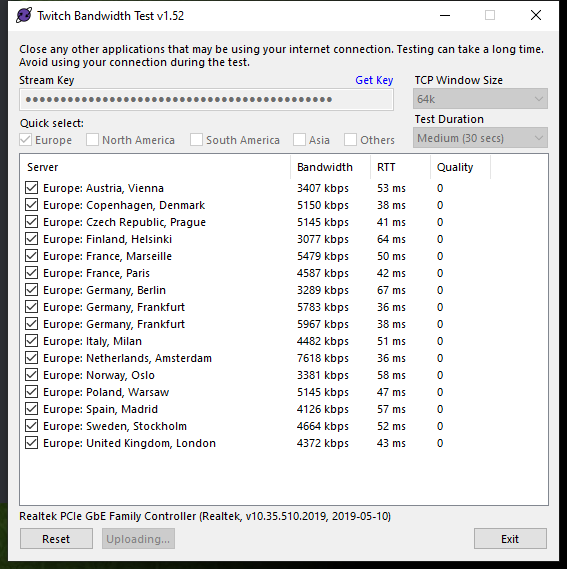
you can test your connection to the twitch servers, in case its a point in between that giving issues
Use the Twitch Bandwidth Test to find the best Twitch server to stream to. Set Duration to Medium. You can uncheck any regions you're not near. After the test completes, click the Share Result button to upload a screenshot, which can then be copied and pasted here. Get TwitchTest from https://r1ch.net/projects/twitchtest
 zenith widget
if non of the servers have even any remove quality on the test
then its a connection issue between you and the twitch servers
meaning ISP
devout spire
I don't get that last sentence tbh
zenith widget
A connection between your PC and a server(in this case the Twitch ingest servesr) can bounce between 5-6 other mini servers, basically DNS servers.
If any of them are failing its a route issue.
devout spire
And in which way i am able to get any fixed in that path?
zenith widget
What maybe I can suggest is to talk againwith your ISP and ask them to run a trace-route connection towards the twitch servers
Thats up to the ISP to fix
and figure out why
You know, you have done everything we have suggested that might be related to your PC and OBS
and the only hope is the ISP
devout spire
Its also weird they suggest me trough there to go for italy milan
since im from the netherlands
zenith widget
In short - if yoy've done everything technically possible on your end and even they changed your router and fixed the main network cable
devout spire
this issue is making me lose my mind, did so much last days 😦
zenith widget
there is still a problem in the middle of the connection between you and the twitch servers.
devout spire
Now i am running a broadband tester on italy milan, but it seems even more unstable than amsterdam for me
zenith widget
There is nothing we can do to help in this situation, besides giving you additional info and going over the same things you say you've done so far 
devout spire
Ima go get a chat popped up with ziggo and make em work
Atleast thanks for ur time Keizar and ima ring em up
zenith widget
Good luck
devout spire
Thank u
devout spire
@zenith widget sorry i was to the hairdresser... i ran a routetrace and it seems to fail at 2nd host and at the last ones 😮
Now is this a thing for twitch? or for my internet provider?
 zenith widget
@devout spire your isp
devout spire
Contacted them:
Shared the results from the Trace with Switch and With a direct cable into the router (ofcourse same effects, and they think its my hardware)
Now it can take up to 5 working days before i get a call / mail if they found anything or what to fix.
Thanks for ur time again
 wary halo
if you just want to hang out or want support in your own language you can always hop in to #🇳🇱︱nederlands @devout spire
devout spire
im alright with english bro, most things running on the pc are in english anyway and mostly easier to search further in google
wary halo
yeah i have the same, but i just wanted you to know. geen probleem verder 😉
wary halo
hope so too for you
devout spire
With 5k bitrate it seems a bit less drops, but still there is a routing issue going on
been able to stream for over 1.5 year without any drops however
wary halo
yeah it sucks when things like that suddenly change
devout spire
and always used 6k bitrate cause output is 1600 x 900 and my internet connection is more than stable / fast enough
wary halo
i am at 5k and 720p60fps, better for mobile viewers too 😛
devout spire
im just going to play some games, thanks guys if i find anything out ill let u know
wary halo
no problem, good luck with your isp
devout spire
nah, on twitch 🙂
wary halo
ah cool
devout spire
i barely use discord, just when i need some information mostly or share some information
voice im stuck to ts3 😛
wary halo
it always good to:
 round brambleBOT
Please connect your streaming account (Twitch, YouTube, or Facebook) with Discord by going to ⚙ Settings and then Connections here in Discord. https://streamable.com/eg92w

 lament blade
how can i turn down the desktop audio without turning down the teamspeak audio in OBS for Twitch? Can someone help me please?
devout spire
uhm put ur desktop audio up? and than lower the ones that have to be lower (windows sounds as example)
lament blade
okay
devout spire
as far as i know on audio you can't put a programs sound louder than ur main output
round brambleBOT
@lament blade How to exclude audio sources for a stream or recording: https://obsproject.com/forum/resources/8/
Voicemeeter Banana guide: https://obsproject.com/forum/resources/397/
 lilac sage
any support here ???
when finaly merch is rdy ???
since like half year is there comming soon
wary halo
it's still in closed beta and does not have a final ETA yet
wary halo
it's better to release a feature that is properly tested than to release something that is broken 😉
ETA = estimated time of arrival
lilac sage
can u say it in german
wary halo
but the beta is looking very good and a lot of cool stuff is coming, just can't say a date
there is no date set yet
 normal igloo
@lilac sage Es befindet sich noch in der Closed Beta und hat noch keine endgültige ETA
as you requested don't know how accurately translated but yeah... 
wary halo
yeah he doesn't understand the only part you didn't translate 😛
ETA

kein definitives Datum
normal igloo
ruben I'm using goddamn google translator It's not my fault if I speak broken German
wary halo
i know 😛
 crimson token
hello, is there any way to delete streamelements messages sent in my twitch chat?
 gentle imp
crimson token
gentle imp
crimson token
I was referring to something like restarting the bot, leaving it clean
normal igloo
unfortunately it cleans chat for everyone but only way I know of cleaning a twitch chat by using twitch's own command https://i.gyazo.com/557131a83363d5c636c6c6829cb066d1.png

🤔
jade remnant
ban and unban the bot will remove all messages just from the bot
 crimson token
@jade remnant oh I will try that, thanks!
jade remnant
np, the first time you try it double check that the bot is still modded when you unban it @crimson token
crimson token
It didn't work out :(
 cobalt kindle
I've been putting off the work/launch of a merch store, hoping SE would be ready soon. Has there been any updates at all on that?
 vapid storm
i accidently deleted an overlay. Is there a possible recovery process?
 earnest stirrup
 twin sentinel
@vapid storm Afaik there is no way to restore an overlay if it was deleted.
vapid storm
dang sad
twin sentinel
@cobalt kindle No updates on the merch, as it is still on closed beta. Kepp an eye on the #270206314561404928 and #announcements channels.
 viscid adder
round brambleBOT
viscid adder
round brambleBOT
@viscid adder Welcome to the helpdesk! Please let us know how we can assist you today and a support volunteer or staff member will assist you as soon as they are available. Thank you for your patience.
@viscid adder Please follow our community rules:
- No advertisement or stream promotion
- Respect ALL server members
- No NSFW/NSFL
Thank you
 steep linden
i changed my hyper cup i.e the bit cup and now even after saving it its stuck in the middle of the screen i have even changed over lays and still the same problem happens.
i have even removed it from the stream elements OBS but yet is still stuck in the same place
even when i go to down size it it cuts off half of the sack this is the same as every other hyper cup i try to down size
 real escarp
refresh cache | right click browser source in obs>properties>refresh cache
steep linden
just did that and still the same out come
 dry hare
Delete the hype cup widget and re-add it
real escarp
open your overlay in a regular web browser
steep linden
ok removed the cup then readded it opened up browser copyed the link use the link in obs refreshed and this is what i stillget
dry hare
Add the hype cup to a brand new blank overlay (only the hype cup) and add that to obs
I want to see if it’s the overlay or the hype cup
Also try a default cup image too
steep linden
ok i did that and that worked ok
it even happend when i witched to the shark and back to the other cups
steep linden
tthe up it one from you and it works on a blank overlay
dry hare
Ok wasn’t sure. I don’t play with hype cups often 😉
Ok
Copy your layers from your current overlay that’s having issues one at a time to your blank testing overlay and see which layer causes the shift
If they all copy and everything just works then I got nothing
steep linden
i just leave them on sperate overlays will be easy the next time i change the overlay
 steady ingot
Does anyone know what chatbot module the "!gamble all" command comes under? I need to disable it but it's not it my modules list.
dry hare
@steady ingot check your chat commands
steady ingot
@dry hare It's not in there either
wary halo
i think it's the slot machine one
wary halo
nope
steady ingot
@wary halo That's done it, many thanks. I couldn't find the command anywhere. @dry hare it replies to the user as my chat bot so I'd ruled Nightbot out. I'm not actually sure why I still have Nightbot turned on!
wary halo
type /mod streamelements in your chat to do that
dry hare
gotta rule out all the variables 😉
lament blade
hi,,,i keep getting a failed to aunthenticate to twitch message when i log into obs,,,any help why please,,ty
steady ingot
@dry hare oops! I didn't I needed to because my bot was modded but I've sorted that now, thanks!
dry hare
@lament blade OBS Settings >> Stream >> Sign out of twitch >> Sign into Twitch
👍 good to know!
lament blade
works,,ty
wary halo
what issue do you have?
real escarp
no current way to speed it up
 scarlet tiger
Hi, pls fix chat stats page (lost_ventrax -> Ventrax__). #🇩🇪︱deutsch
Thx
real escarp
done
scarlet tiger
Thx
 copper valley
Hello, I changed the nickname on the tweak and after that the chat bot stopped working for me, how to fix it?
jade remnant
go to the se dashboard, click part bot, log out of the dashboard, log back in with your new name, join bot to your channel
copper valley
Does not help
scarlet tiger
@copper valley your twitch name?
copper valley
KonarEar
scarlet tiger
konar_ear-> KonarEar
?
copper valley
Yes
 kind iron
So I have two twitch accounts linked to my account, one being my bot and the other my main account. Is there anyway to remove the account that is my bot so it’s not attached to my account and so I can’t manage it from my main account?
 vocal vale
Twitch app on xbox keeps stopping the stream for absolutely no reason
There's no available update or anything, internet is fine...
scarlet tiger
@vocal vale How does it relate to streamelements?
 regal thunder
I'm having issues loading my overlays on OBS.. Cache has been refreshed, app restarted.
kind iron
Did you try a new overlay link?
regal thunder
yes
scarlet tiger
@regal thunder In OBS: Settings > Advanced > Sources Card: Uncheck Enable Browser Hardware Acceleration
 trail condor
Media Request in the obs.live extension of OBS is a blank gray screen with no UI. Known issue or should I try fancy uninstall/reinstall techniques? Tried restarting machine, OBS, etc
 lofty river
Can the SE staff help me with my chat stats on my twitch channel ?
it's not showing up for me
scarlet tiger
@lofty river twitch name?
real escarp
try logout and log in first @trail condor | obs>streamelements>logout
lofty river
@scarlet tiger shadowxcel
trail condor
will do @real escarp ❤️
scarlet tiger
@regal thunder screenshot?
regal thunder
@scarlet tiger
real escarp
mod it please
scarlet tiger
@regal thunder
 regal thunder
i've been using these overlays since the beginning of the bot. it's not how they are displayed. 100 % sure they are well configured ^^
kind iron
Nobruc have you tried opening the overlay in a different window or going in and edit it to test if it’s working/showing up?
regal thunder
Yes I did and it's working on browser. Not on OBS
kind iron
🤔 does obs have any open updates available?
regal thunder
Not really
kind iron
Also sometimes I find using a new browser source can fix the problem
regal thunder
i tried.. didn't helped
lofty river
@real escarp thank you for your help ❤️
kind iron
Sorry I couldn’t be more help
real escarp
im in your chat @regal thunder
regal thunder
no worries ^^ thank you for trying
kind iron
Is there a reason why I get this when trying to get to chat stats?
real escarp
^ name change?
kind iron
Working now, thanks
wary halo
i told you 😛
 dry hawk
hey, i have been an issue with extension panels, i cant seem to see any of them on twitch, it's fine that i cant see them, but i need to configure the streamelemts extension panel to change the schedule, but i cant even see the configiration, is there anyway i can edit the extension panel on the streamelements website or anywhere else ?
dry hawk
no. i tried uninstalling it and reinstalling, hoping it would get rid of the old schedule, so the viewers wont get confused
jade remnant
make sure you dont have a plugin or cookies blocking them,
try using chrome in incognito mode
wary halo

dry hawk
i just tried it, in incognito, it still doesnt show any extension panels
😕
i tried both, edge and explorer, to make sure that no plugins or cookies are interferring
jade remnant
ew, have you tried chrome or firefox
jade remnant
might want to try using the console in chrome (F12) to see if there are any errors that come up
dry hawk
idk what this means but it looks scary
 cosmic cypress
Possible to move hours from 1 account to another with the bot?
 rough ibex
How do i get my money on my g2a pay account to available balance?
wary halo
that is a question only g2a can awnser, or at least it has nothing to do with streamelements
rough ibex
In a tutorial on the channel of streamelements they said that u can ask questions on the discord server
wary halo
yes, about streamelements 😛
dry hare
We aren’t G2A. You’d have to ask G2A
 raven jackal
Just wondered what is the reason for se.pay beeing 100 followers and More amd not 50 for example?
jade remnant
to make it harder for people ban avoiding and such
 strong kernel
Plus costs, if I recall. Most of those accounts wouldn't see tips so would just increase the cost to maintain the system for no reason.
And there's a lot of <100 follower accounts.
raven jackal
Hm okay that actually and unfortunatly makes sense 
 gritty dock
now that the stream is live, can i simulate a donation on the livestream to see if it works? @wary halo
dry hare
You also can do it without going live as long as you have obs studio open
And the little box by the bell is checked
wary halo
and that too yes
gritty dock
Yeah i saw it when i tried it there, but i want to try when the stream is actually live
hmm little box by the bell.. 😄
gritty dock
oh ok then 😄
wary halo

 ebon atlas
is there a way to delay a responce from the bot
strong kernel
There is not.
 proven agate
Messed up My twitch Name lol anyway to correct it says 2 month wait?
strong kernel
That'd be something to ask Twitch.
proven agate
UGGGH!
 rancid jay
Hello, is there a sort of in game chat ? (or at least a chat overlay that stay on top of the screen for people with one monitor only) like restream chat and streamlabs have ?
strong kernel
There is not, no.
rancid jay
alright, thanks for the reply
 jagged escarp
Is it possible to make a tip goal bar without any text or numbers on it
condensed mode and a blank goal title leaves only the numbers
cant get rid of them though
strong kernel
You can do it without text, but numbers will always be shown in the default goal bar. Otherwise, you'll need to custom code a widget yourself.
jagged escarp
yea, alright thanks. what about scrolling text for recent tippers widget is that still a thing?
strong kernel
Yes, you should still be able to make the recent tippers widget scroll.
 wanton mango
@jagged escarp add this custom css in OBS to the overlay that contains your tip goal and it'll remove the amounts:
se-widget-tip-goal .goal-current, se-widget-tip-goal .goal-amount {
  display: none !important;
}
 winter lagoon
Can an admin update my chat stats?
Old name: Snowwy24
New name: Sunowi
Ty 
 halcyon plover
Hi there,
my chat stats arent working even though i havent changed my name since I started using streamelements
Thanks for ur help in advance 🙂
Name: HECTIIKbtw
strong kernel
Except you did. 🙂
halcyon plover
Oh, sorry I didnt realise if i had changed my name before using streamelements that it would effect it
strong kernel
No, you changed it after.
You connected to StreamElements a month before you changed your username.
 chrome fox
Any idea why an activity feed widget would show only raids even after ensuring all event types are selected?
strong kernel
Looks fine on my end.
chrome fox
I does that once I push some through
It always starts up with only raids showing though which is odd.
Instead of pulling the last group of alerts?
strong kernel
Please stop emulating events.
Looks to be due to how Nerd or Die scriped the widget to get info on startup.
Our normal event list in comparison.
chrome fox
Interesting, thanks
 limber jewel
No issues, just wanted to give a GREAT BIG THANKS to everyone here who helps out. Just fixed an issue by searching, and applying a fix.
If your Media Request panel is a grey blank screen, logging out and back in, helped me wonders.
You are all champs here!
gritty dock
ok fellas im back
i have set up the alert
i hear the sound
but i dont see the popup
😄
round brambleBOT
@gritty dock To add your overlays to OBS, add a new browser source in your scene. Paste your overlay URL in the browser source properties, set the dimensions to 1920x1080 (unless you changed them on the website), and ☑ “Shutdown source when not visible” https://youtu.be/KDvLynUqXI4
 nocturne bane
i am trying to to put my bot timer to 0 chat lines and for some reason it dosen't work , all my other bot timers are all 0 chat lines but i don't remember how i do it, can someone help me plz.
strong kernel
This is a known issue.
nocturne bane
oh really ? is it been a while ?
once i click save it dosen't allow me for some reason.
i fear if i put i even put 1 chat line for now it won't activate.
strong kernel
Yes, that's the issue. It currently cannot be set to 0.
nocturne bane
thats weird because i have 4 timer set to 0 chat lines.
strong kernel
Note the word "currently."
nocturne bane
ok done, now what ?
strong kernel
Nothing to be done right now.
We're aware of the issue and a fix will be implemented.
nocturne bane
is it gonna set my timer to zero or something ?
strong kernel
The timer cannot be set to 0 currently.
nocturne bane
ah ok , i understand
i cannot set my timer to zero because it needs to be fix right ?
strong kernel
Correct.
nocturne bane
its a active issue right ?
its all clear to me now. lol
thank you @strong kernel for the update 😄
 dense beacon
The session data and etc. Lets say I wanna do a follower goal, do I have to input my followers manually? Let's say I lose 10 on a day? That number would not go down before I update it, right?
strong kernel
Correct. Goal bar progress only goes up, never down. If you'd like to have something based on your current total, use the total followers widget and set it to display {count}/100 (or whatever goal you want to set).
dense beacon
Alright, cool 😛 Thanks @strong kernel
 shell wind
Hello? I am having a few issues here I would like to understand.
What does "Unique hatters for this stream" refer to?
- "Unique chatters for this stream"
zenith widget
@shell wind unique viewer for the sewsion
As in if they joined for thw frist time during current session
shell wind
I am finding those numbers in the Stream Report do not match the total numbers I see in the dashboard
And I am also noticing those numbers are not accurate to the activity I am observing on the Twitch dashboard
not always, that is. I cannot confirm or deny the accuracy of the latter statement, but I have received reports with 0 unique chatters when I have observed changes in the numbers on Twitch dashboard
zenith widget
Unique chatter is a viewer who has joined your stream for the first time and has stayed enough for us to see him in the viewer list. They dont need to hve typed in chat.
Which other thing from the stream report you want more info on?
shell wind
So when I see the viewer number change in the twitch dashboard, does it reflect any numbers in the Twitch report?
- StreamElements report
zenith widget
The viewer count is the graph we show when you have peaked. It wont be as accurate as the twitch dashboard due to how long that counter takes to update via the api
But we try our best
shell wind
So how do these numbers relate to the Views Twitch has counted?
Oh... this is more of an FYI than anything.There have been some streams where the single viewer has remained for a fair amount of time and is not reflected in the Stream Report.
But also... the numbers in your reports are not always reflected in the Twitch view count
So... yea. Good day Kei
 split wedge
Hey is there a way I can check previous records of things like tips? I want to check for earlier in the year but I'm having trouble doing that.
zenith widget
https://streamelements.com/dashboard/tipping/list you can check all the previous tips received here
Up until the point you registered with us, if you haven't imported tips previously.
 timid whale
Hi team, I am having problems with my loyalty program. none of the commands are working on my stream and I am not sure why this is the case. If someone could please help me out, I'd really appreciate it
zenith widget
What is your twitch username and how is the loyalty system related to non-working commands?
timid whale
Hi mate
Its_casinoguy is my twitch
and I'm having problems with the modules
EG the points system
people are accruing points however they cannot do the functions to play with them
zenith widget
Checking
timid whale
how do I change this
zenith widget
I already did
zenith widget
!raffle and !sraffle should be a moderator commands
You don't want viewers to freely start those
timid whale
okay no problem
however when I test it now
(stream is not live, not sure if this matters)
it does not respond with anything
zenith widget
Well one of the main things I just now noticed is, the bot is not joined in your channel
zenith widget
ooh looking at the bingo, it needs to be a moderator level
zenith widget
yes
round brambleBOT
@rustic thicket Please follow our community rules:
- No advertisement or stream promotion
- Respect ALL server members
- No NSFW/NSFL
Thank you
 rustic thicket
Не работает Chatters leaderboard,поможете с проблемой?"i_kes_su_i"
zenith widget
@rustic thicket This is an english support channel, we do have russian here: #🇷🇺︱русский
that being said - one moment
What is your username? Only the name, not the link
@rustic thicket fixed
rustic thicket
thx
zenith widget
refresh the twitch channel page and the stats will load
lament blade
good morning and happy holidays! my "media player" on obs live echos double sound when i view the music video on screen
how do i fix that?
round brambleBOT
@lament blade Make sure to ☑ “Shutdown source when not visible” for all browser sources (all OBS scenes). If using studio mode, uncheck “Swap Preview/Output scenes After Transitioning.” Also keep in mind that sound can play from any overlay loaded in the browser (editor or launched). https://i.imgur.com/FegZJQS.png https://i.imgur.com/yY0wcFl.png
 lament blade
i did that but now i hear the double sound on obs live but the viewers dont hear the double sound
but when i check "control audio via OBS" i dont hear the double sound but my viewers do...
 cerulean cradle
Is there a way to hide the "@cerulean cradle, you have successfully redeemed x for 100 currency" confirmation message when redeeming something from the stream store?
twin sentinel
Not at this time. It is planned, but no ETA.
lament blade
@twin sentinel help?
 winter zenith
@lament blade do you show the media request on stream?
lament blade
yes media player in overlay edit
i added it n placed it in the bottom right of live scene
i hear double
winter zenith
okay do you have this overlay in another scene placed?
and did you close the overlay editor?
winter zenith
good , is the lobby and the other scene set as the bot above told you?
Make sure to ☑️ “Shutdown source when not visible” for all browser sources (all OBS scenes). If using studio mode, uncheck “Swap Preview/Output scenes After Transitioning.” Also keep in mind that sound can play from any overlay loaded in the browser (editor or launched). https://i.imgur.com/FegZJQS.png https://i.imgur.com/yY0wcFl.png
lament blade
J҉a҉s҉m҉i҉n҉e҉Today at 8:01 AM
i did that but now i hear the double sound on obs live but the viewers dont hear the double sound
J҉a҉s҉m҉i҉n҉e҉Today at 8:10 AM
but when i check "control audio via OBS" i dont hear the double sound but my viewers do...
winter zenith
I dont really get why you would hear it double if you have the editor closed and the scenes set to "shut down if not visible" and after scene transitioning turning off studio mode
did you turn off studio mode after switching the scene? @lament blade
 cerulean escarp
and are you running any form of audio routing program like Voicemeeter that could screw up the audio?
and are you watching your own stream and forgot to mute your audio out there?
probably not anything related to my suggestions - But it never hurts to ask 🙂
twin sentinel
@lament blade Nevertheless, please control that you have every overlay on shutdown and studio mode is off and you do not have any overlay open in a browser (editor or launched).
This should fix your issue with double sound.
lament blade
how do u turn studio mode off
so for 2 of the scenes, starting soon and lobby...i uploaded the overlays on obs itself not streamelements editor...then i added the browser sources for both so i can use the media player
the reason i did that for those 2 scenes is because the overlays were "too large" to upload to streamelements editor..
could that be the source of the problem?
cerulean escarp
@lament blade you press "Studio Mode" again.
cerulean escarp
Studio mode is located at the same place
cerulean escarp
aha
lament blade
mind if i share screens with u n ull see the problem first hand
cerulean escarp
sure thing
 blissful drum
Hello can someone give me the discord of the se.staff his name is kaizer
i cant find him :/
jade remnant
i will let him know you are after him
blissful drum
@jade remnant ok will he come soon ^^ we chatted in the morning about 1 spesific problem
if hes not comming soon i just myght get help in helpdesk also idk 😄
 white bramble
Hey
I have problem that Streamelements chat commands doesn't work
real escarp
which command
real escarp
no name change?
type !sedebug
in your chat
turn off follower only @white bramble
this is your issue Custom Bot Name enabled: true;
do you use a custom bot name
or just streamelements
standby
can you sign out of streamelements.com and sign back in
white bramble
Did it
white bramble
okay
real escarp
!sedebug one more time
type !sedebug
@white bramble
@white bramble you will need to close obs live and restart pc
for now use ur name as bot name
but when you restart pc switch it back to stream elements here
 stark current
so I updated my video file in overlays, activated, refreshed browser source in OBS, I'm testing my Alerts, but it doesn't show up in my obs, even though I have the browser source visible
real escarp
@white bramble obs > activity feed
@stark current screen shot
screen shot of your obs and the overlay on it
stark current
real escarp
you have added merch alert
stark current
they have to be seperate?
round brambleBOT
@stark current To add your overlays to OBS, add a new browser source in your scene. Paste your overlay URL in the browser source properties, set the dimensions to 1920x1080 (unless you changed them on the website), and ☑ “Shutdown source when not visible” https://youtu.be/KDvLynUqXI4
real escarp
properties 1920 x 1080
 white burrow
Emotes not working for some reason? (renamed bot)
real escarp
which emote?
white burrow
revolvergn is the chat with the issue
real escarp
white burrow
odd they're not showing on mine. maybe i need to refresh
or maybe I don't have access to those emotes?
real escarp
the images and javascript is loaded from other servers...
normal igloo
maybe a simple case of needed use !emotes Friendly? 
real escarp
if your computer is having issues getting those from the servers they are on
normal igloo
oh never mind
real escarp
@normal igloo twitch chat... not obs
white burrow
alright
 worthy musk
hey guys is there a way to export a twtich follower list i want to creata ty video
dry hare
Don’t think so?
worthy musk
i kniw i can copy paste from se dashboard all my followers
 rigid shoal
my song requests are not working it keeps trying to play the backup playlist
and i removed the backup playlist
and its still trying to play from the backup one
 tight harness
Does it help if you use the >| button to skip to the next song?
rigid shoal
nope it just goes to the back up play list
is there a setting or command that im maybe missing
 grizzled peak
@frail creek.staff is there any way to let open the TTS filter for it to go @@@@@@@@@@@@@@@@@@@@@@@@@@?
real escarp

StreamElements
The Ultimate All in One Platform for Streamers
if thats off already nothing more you can do
grizzled peak
well shit
rigid shoal
so what must i do?
real escarp
bot is not in chat
lament blade
can someone help me plz
real escarp
screen shot the issue
real escarp
describe what our overlay is doing
real escarp
you have media request widget in multiple scenes
lament blade
yes i check "shutdown source when not visible"
i do
i have it in live scene and lobby scene
both checked
real escarp
better way to do it
create MR scene
make one overlay with that widget
from there you can remove the widget from all other cloud overlays
in obs you can add a scene to other scenes
real escarp
thus obs will only have mr open once
in screen shots
watch
alerts have they're own scene
that scene is added to my other scenes
lament blade
i have a source added for starting soon and lobby both named "streamelements" with URL from streamelements of media player
ur probably describing the same thing i have
real escarp
screen shot obs for me
lament blade
but its confusing from screenshots only
i would like to actually show u the problem live to save us both time
can i?
real escarp
show me the screen shot of obs full window
lament blade
hows a screenshot gonna solve my SOUND issue
thats like a mechanic asking for a pic of a sound issue in a vehicle over the phone
makes no sense
there
real escarp
so off all those scenes on the left all of them have been turned off when not visible in settings?
lament blade
what?
real escarp
!add
round brambleBOT
To add your overlays to OBS, add a new browser source in your scene. Paste your overlay URL in the browser source properties, set the dimensions to 1920x1080 (unless you changed them on the website), and ☑ “Shutdown source when not visible” https://youtu.be/KDvLynUqXI4
real escarp
all of them are set to shutdown source when not visible
lament blade
ok r u asking
real escarp
asking
lament blade
that for each scene that has a "browser SOURCE" its set to shutdown source when not visible?
real escarp
correct?
lament blade
i did mention earlier that i have 2 of them "starting soon and lobby" and theyre both set to shutdown source when not visible
real escarp
you have more scenes then that in overlay manager
lament blade
live scene*
real escarp
6
real escarp
4 of the scenes in the cloud had media request
lobby main
starting soon
live scene
lobby
lament blade
thank u i fixed it
i figured out the issue
i had old browsers from my old overlays
i locked and unviewed them
on obs
real escarp
im not ordinary mechanic
 alpine drift
i have an issue with starting my stream on twitch
round brambleBOT
@alpine drift Welcome to the helpdesk! Please let us know how we can assist you today and a support volunteer or staff member will assist you as soon as they are available. Thank you for your patience.
 lethal tide
Hello. All right? Is it possible to translate the messages from the !redeem command? When someone redeems an item from the store, the bot sends a message in English. I have how to translate these messages?
 elder sorrel
Don't think that's possible at this time.
 cinder shoal
is there a promote command for a viewer to bump their song to the top of the list? if so, how do i enable it?
real escarp
paid get bumped only
 viscid steppe
Does anyone know if Santa hats are coming back for our emotes this year?
elder sorrel
I thought they never left? As I thought it was in the Overlay Editor to enable / disable Santa hats.
I haven't used Kappagen in forever so I have no idea.
elder sorrel
Ah.
So it prob more than likely will be available in December for Santa hats again.

 candid leaf
Hello guys, is there any way to make clips from a command like '!clip' or something? Thanks.
real escarp
 lament blade
hi for some reason I moved from SLOBS to StreamElement and it won't display my latest subscriber nor follower just my lates donator any reason/fixes or what to do?
viscid steppe
Alerts have stopped showing up on stream. They show up in the SE Editor but not on stream.
I have:
-Launched my overlay and re-copied/pasted the link
-Made a whole new overlay and added to OBS
-refreshed browser scene
-set up in OBS to shut down when not visible
-made sure the Alert Box is at the top of the Layers section
-turned everything off/on again
Have alerts stopped for everyone?
elder sorrel
Are you using OBS.Live & have alerts muted?
elder sorrel
I'm not home so I can't check. Alerts are working as I see other SE streamers alerts go off.
viscid steppe
How weird. I don’t know how to fix this. 🔥
elder sorrel
Gonna ask if Staff is available. As I'm ready to leave work to head home.
elder sorrel
Quick question as I can't see it on the bottom left
viscid steppe
I hope to have a quick answer
elder sorrel
Is this checked?
viscid steppe
OHMYGOSHYOUFIXEDIT!!!
elder sorrel
LMAO
viscid steppe
throws self at you in SOBS
YOU 👏 ARE 👏 A 👏 GOD 👏
I must have clicked it on accident!
You’re AMAZING
 lament blade
my recent sub still doesn't show up any ideas? It doesn't even show up in the feed either and i just switched over from slobs. If i custom set the name in the data portion will the name auto update the next the event occurs?
wanton mango
@lament blade if you only just created your SE account then that data won't be available yet, but it'll be tracked from now on, so yes, you can manually set the name for now and it'll be automatically updated later
lament blade
awesome sounds good just making sure it will automatically update thank you!
 karmic fossil
Lately my streamelements has been missing subscribers. I think it is only happening when I'm offline. Streamlabs, however, is catching those subs that SE misses while offline. What's the deal with that?
round brambleBOT
@karmic fossil Twitch prime (new and resub) and paid subscriptions (resub only) must be shared in chat manually by the person subscribing in order for the subscription information to be sent to StreamElements. For twitch prime, the user needs to have sharing enabled on https://www.twitch.tv/settings/prime. For paid subs, if the share box doesn't show up immediately it will when they refresh the page. https://i.imgur.com/VNJN0Uv.gif https://i.imgur.com/2297EA7.png


 twilit kayak




 lament blade
<@&382267076632379392> Hello! I was wondering if there is a way to make gifted subs have the same alerts as your normal recurring subscribers in an overlay? I already have a pool of alerts for normal subs and resubs, but i'd like for gifted subs to just pick from those same alerts and just modify the message to x gifted y under instead without having to make MORE variations, is that possible?
Simply choose the same assets you use respectively
so I have to make duplicates, correct?
You can but it’s not necessary
the thing is I can only assign one trigger to each alert, or one condition rather, like months subscribed is at least 0 and that's it, I'm a bit confused
In that case, I would duplicate it
So no way of having multiple possible variation parameters for a single variation? 
Essentially I have like 15 different alerts, they're mostly memes and such, they currently display if someone subs or resubs, but not if they're gifted because of the variation parameter, do I need to duplicate each of them and make the parameter gift then?
Not quite. Though I can’t pull up any screenshots due to my mobile limitations, I’ll send another Support Hero to show you how it's done
 patent trout
I am currently having a problem with a custom widget, which shows the latest events that happened (follows, subs etc.). It plays normally on my main pc, but as i put its link into obs studio (latest version) on my streaming pc the widget is not rotating with the animation as it is supposed to, in fact it just cuts to the next event.
lament blade
@lament blade Thank you for that! When should I expect the help?
 olive rock
Hello, is streamelements media request bugged or is it just for my friend? Everytime he tries to keep media requests open from browser, to use it as song request platform, everytime someone request youtube video, it skips a current song and starts playing the new media, no matter if current song is not ended, it skips it like backup playlist should skip when new media request comes but on every video, but if he uses media requests layout on obs, and browser is closed, it works fine, problem is only when the brwoser is open.
 carmine pebble
My stream keeps glitching a lot and tell me my decoder is overloading... how can I fix this?
lament blade
@lament blade Whenever the next available Support Hero can respond
lament blade
 Heyo, currently in a small predicament.
I've got a charity stream underway where multiple streamers will be streaming onto 1 account in 2 hour slots over a 24 hour period. We need an overlay that is manually editable by people with 'editor' permissions within the bot, this is because we are donating to a gofundme page which cannot be linked to an automatic overlay like normal donations. We need an overlay that stays conistent on stream instead of getting each streamer to add 1 to their overlays. Someone mentioned SE could do this? If so how?
 small talon
my game doesnt ven show up on stream when i use game capture. onl;y when i use screen capture it shows my game
timid whale
Hi guys
any way to make Loyalty give points for subs and cheers?
my stream want to get points from tipping and subbing
and they aren't getting points
round brambleBOT
@carmine pebble Please provide a log from your last stream. To do this, in OBS go to Help > Log Files > Upload Last Log File and paste the link to the log file here.
dry hare
@timid whale did you enable loyalty points in your SE dashboard?
@lament blade which charity?
dry hare
I believe points are acquired as long as you’re live
 mighty warren
why when im connected to twitch when i try to stream it says start streaming to youtube?
dry hare
Obs settings >> stream >> disconnect YouTube and switch to twitch @mighty warren
If that setting is right click streamelements >> log out >> log in with the twitch
 oblique karma
what do I need to start streaming to twitch if I just want to do podcasts?
dry hare
Obs and a microphone
oblique karma
Can I download a Mac OS version of OBS?
lament blade
@dry hare Its the salvation army's fires appeal for australia, however, we doing donations through a gofundme page so we can track amount 🙂
 viral acorn
... Howdy! Two questions.
-
Can I move layers between overlays without making a full copy of an overlay?
-
With the Stream Engagement >> Chat overlay widget -- I am using the Verdana font (a pretty standard typeface) but the Line Height control doesn't alter anything when changed. Is that expected behavior?

timid whale
@dry hare My viewers are not receiving points for tips and subs and gifted subs
dry hare
@viral acorn
- yes
- don’t know
@timid whale have you set the values for subs/gifted subs? I’m not sure how to fix that if they’re not receiving the loyalty points. Have you tried parting the bot from your channel and re-joining it?
wanton mango
@viral acorn duplicate layers to other overlays with the icon above the save button that looks like two pieces of paper with a red dot. also I think the line-height property doesn't affect the chat box for some reason, but you can use this custom css snippet in OBS (apply it to the browser source that contains your twitch chat)
twitch-chat span.message {
  line-height: 30px;
}
@dry hare yes I just got twitch affil
have been streaming 7 days and we hit it on day 7
maybe it hasn't updated on elements yet?
relogged
there we go!
thanks
dry hare
👍
 fathom zodiac
hey when you send too many sms that you cant get a new one to be sent. how long do you need to wait for it to refresh on mobile?
 low fractal
Hello, Having weird output drop it's at 800 kb/s -- it does this out of no where and I've no idea how to fix it, restarting obs doesn't help either...
dry hare
no clue
probably someone watching netflix?
what is your upload speed and what is your bitrate set at?
fathom zodiac
can someone explain how the ${1} variable works?
wanton mango
It returns the first argument after the command
So for !testing hello, ${1} would be hello
and if you only use the command with no parameter, and the response is expecting one, the command doesn't run
fathom zodiac
ohhh so it needs some sort of parameters
wanton mango
Likewise ${2}, ${3} etc etc return the second, third, etc, word
If you want to capture the entire phrase used after the command, use ${1:}
Looks good to me!
wanton mango
${1|${random.chatter} would mean, prioritise the first argument if provided, otherwise pick a random chatter
So you can do !fight thefyrewire to specifically direct the command at them, or just !fight by itself to pick a random person
wanton mango
You could add the colon after the 1 like ${1:|${random.chatter} so that the full phrase is used
fathom zodiac
i thought it meant it took the first parameter meaning its looking at the ${sender}
what happens when you do that?
wanton mango
ah no the parameter follows the command
fathom zodiac
teach me your ways senpai haha
wanton mango
so with the colon you can use the command like:
!fight that weird guy outside the window
and the response would be
Thanksgiving food fight! thefyrewire shoots gravy at that weird guy outside the window!
whereas without the colon it would only use the first word
wanton mango
Yup!
fathom zodiac
wicked!
wanton mango
So people can get creative and do !fight everyone in chat or something and it'll use the whole phrase
fathom zodiac
aww! this is amazing
thanks so much for teaching me this
i would have never knew about this beforehand
😄
this is really cool!
anything else you can teach me that you think would be interesting as such?
wanton mango
hmm not off the top of my head, but then again, it's 5am for me lol. you can always get creative with the counter names and make some interesting user-specific counter commands or something. there's also my pastebin customapi that you can use if you want something a little more advanced
wanton mango
fathom zodiac
and this is what I been wanting!
what got you into all this?
man you're stuff is next level im not even kidding
wanton mango
originally making stuff for a friend and it sort of snowballed lol 😄
fathom zodiac
do you have anything on here that is similar to the heist game?
omg omg omg! You dooo <#
❤️
patent trout
Sorry for reposting, but I am currently having a problem with a custom widget, which shows the latest events that happened (follows, subs etc.). It plays normally on my main pc, but as i put its link into obs studio (latest version) on my streaming pc the widget is not rotating with the animation as it is supposed to, in fact it just cuts to the next event.
fathom zodiac
would all this seriously work?
like I want to take all this and implement it!
I really really do
dude you are a god!
or lady! Not judging! jaja
haha
wanton mango
It does work haha, but no, there's no variable to actually add points or anything, so you can really only make games for fun (for now  )
)
@patent trout Browser and OS?
fathom zodiac
can i please add you as a friend? haha
wanton mango

fathom zodiac
awww really it doesnt take points into consideration? is that something I can add using the variables in stream elements?
patent trout
i am currentyl on the latest english version of windows 10 and its in chrome and obs studio when its not working correctly on my main pc i am using brave
wanton mango
SE doesn't currently have a variable for points, otherwise it'll probably be a thing already aha
@patent trout Can you go to This PC > right click > Properties > Advanced System Settings > Performance > Settings > what option is currently selected?
patent trout
i have custom settings there, but its the same on both of my computers
 ocean lava
why is my OBS always a black screen?
wanton mango
Can you set it to the top option (let Windows choose), okay out of everything, refresh the overlay and try again?
patent trout
well this just made me realize that i am a dumbass
fathom zodiac
The Cards Against Humanity and I guess for the rest of them: Do i just copy that line into a custom command and save and its good to go?
$(customapi.https://api.thefyrewire.com/twitch/pastebin/z8HGB50q)
patent trout
@wanton mango thank you very much that worked but i just dont get it with the same settings on my other comp it worked as it should in obs and in chrome as well but thank you very much again
wanton mango
@fathom zodiac yup! well, that variable only returns the line itself, you can add extra stuff behind it like in the example: ${sender} picked a black card... ${customapi...}
patent trout
bye the way its the top setting (animate controls and elements inside windows) in there thats fucked it up i tested it around a bit right now
wanton mango
@patent trout no problem! yeah it's weird, but as long as it works now 😄
@fathom zodiac yep, add that in the response itself
@ocean lava are you on a laptop?
wanton mango
same thing, a new command
ocean lava
yes i am
wanton mango
what GPU?
fathom zodiac
omgggggg you are the best! 😭
ocean lava
fathom zodiac
Does anyone know if I select user level to be VIP does that mean that subs and mods can also access the same command?
or if set the user level to sub would mods and VIP be able to access?
wanton mango
@ocean lava Looks like you'll need to enable compatibility mode with window/monitor capture - https://obsproject.com/forum/threads/laptop-black-screen-when-capturing-read-here-first.5965/
OBS Forums
TLDR for nvidia laptops
Go to the nvidia control panel in windows control panel, and go to 3D settings on the left. Then, on the right pane, add the obs64.exe path to the drop-down list, and select it to use the NVIDIA ("High performance") adapter.
Or alternatively, here's ...
 gray parcel
hello guys. Im having an issue with my store redemptions during stream. i have tried clearing the sound and making a new item and it still wont play on stream.
fathom zodiac
@wanton mango can i modify the answers at all? or is that not possible?
like the questions and answers?
wanton mango
@fathom zodiac with the ranks, that level and above can access. It goes -> Subscriber -> Regular -> VIP -> Mod -> Super mod -> Broadcaster - and yes, you can fork the paste and edit the questions/answers
You'll probably need to make a free pastebin account so you can re-edit the paste later. In the paste library docs I've linked the pastes used, so you can duplicate that
wanton mango
You'll probably need to make a free pastebin account
😛
wanton mango
I think the free account lets you have up to 10 unlisted pastes at a time
fathom zodiac
but none of this would translate to the point system correct?
wanton mango
and no. you can make the command cost points by adding the cost to the custom command, but you can't make it give points
fathom zodiac
Regular -> Subscriber -> VIP -> Mod -> Super mod -> Broadcaster is this the correct order you mean?
yea giving the points I was trying to figure out haha
kk no worries
its awesome none the less
and I loveeee it!
wanton mango
Possibly, not sure if the order in the dropdown is correct or not
But I'm fairly sure VIPs can use the sub commands
fathom zodiac
thats awesome
man how do you know so much!
whats the next thing you're creating?
also the random twitch clips
are those set clips that you selected?
wanton mango
whats the next thing you're creating?
something
are those set clips that you selected?
yes - https://pastebin.com/WLTGApNx

Pastebin
fathom zodiac
do the gift commands interfere with the ones that stream elements already has up?
wanton mango
which ones? but no, it's only a variable. you can name the command whatever you like
fathom zodiac
but would that command play by itself when someone gifts a sub?
or would it be like !gift and then it says one of those things
wanton mango
no haha, it's only a command. it only runs if someone uses the command yeah
fathom zodiac
haha got it
also how does the D and D work
its just call the command and a statement gets made?
or is there actual health and attack dmg... like a full on fight that can happen
wanton mango
nothing that complicated. a random number is picked between 1 - 20 (as in on a die 🎲 ) and depending on how high the number is, a good/bad outcome happens. the idea is that you can fork the paste and add your own outcomes, but I prepped 60 outcomes in advance - https://pastebin.com/PyNWF0Yk
Pastebin
fathom zodiac
haha yea im looking at that
ocean lava
still have issues after making them both run on the same graphics card
fathom zodiac
would you make something thats more like a jrpg? or you think thats too complicated?
wanton mango
@gray parcel did you add the redemption widget to your overlay?
that's up to you to create, I exhausted myself with that list lol
wanton mango
@ocean lava which capture are you using?
ocean lava
wym?
ocean lava
i tried both
wanton mango
I'm on a laptop atm too, and in my experience, display capture is the only one that works reliably. Did you restart OBS? Run as admin too?
wanton mango
Yes
wanton mango
out of ideas for now, but try the official OBS discord, they probably know better
!obs
!obsdiscord
idk the command
gray parcel
@wanton mango yes i did
kind iron
Your supposed to know all aren’t you fyre 😛
gray parcel
they were working before and then today they just stopped working
wanton mango
ocean lava
is there a way we could call and i could share my screen? maybe im doing something wrong?
wanton mango
I'm using nvidia so my process was slightly different to yours I'm afraid
ocean lava
i have nvidea drivers
wanton mango
rip bot
ocean lava
and i literally updated them 4 hours ago
round brambleBOT
@ocean lava Laptops need extra setup to use Display Capture.
Due to the way laptops are designed, OBS must run on the Integrated GPU to use Display Capture. This process effectively disables Game Capture and Window Capture. If you would still like to use it, please read this guide and follow the directions for Display Capture: https://obsproject.com/wiki/Laptop-Troubleshooting#configure-your-system-for-display-capture
Please note: we recommend using Game Capture and Window Capture wherever possible. These capture methods get better performance in almost all cases.
 shut timber
i cant set up tips on twitch
dry hare
Wdym you can’t set up tips?
kind iron
^
ocean lava
im so lost..
kind iron
Follow the guide that was linked by the bot
 brazen moon
Hi support, was just wondering, if i want to link and tell ppl what i stream with below my stream with a nice streamelements picture, can i just take 1 on google ? or do u guys on streamelements has some special picture and link we can use ? 🙂 thanks alot
ocean lava
thank you, ill do this in the morning
shut timber
Ok so i go to set up tips i have the link to paste there and therws nowhere to paste the link???
kind iron
Is there a direct way of removing the link between my main account and my bot account?
shut timber
Ok so i go to set up tips i have the link to paste there and therws nowhere to paste the link??? Somone plz help
kind iron
Link to paste there?
shut timber
To paste in the panel thing i just need help settung up tips
kind iron
Have you completed the tipping settings?
shut timber
No it says copy yiur tippinh page link and i xant find were to paste it at
dry hare
kind iron
^ assuming you’re using twitch
dry hare
@brazen moon not sure. Someone will be in touch as soon as they’re available
I escalated your question and a staff member will respond as soon as they’re available
brazen moon
Orsuna, gotcha, for now i just took a picture on google and made it link to streamelements.com when u click on picture. just not sure how copyright works with streamelements, maybe u guys are very chill with that and it doesnt matter, but just making sure 🙂
dry hare
Yeah I’m not sure about it so I made sure to ask 🙂
shut timber
How do i get to the edit panels on and off switch
kind iron
I’m assuming something like that should be fine but once again I’m only assuming
shut timber
Ya but it isnt going to that page when i click tge frick
dry hare
Go to twitch
Log in
Click your picture in top left
Click channel
Scroll down
Click edit info
shut timber
Bro what
dry hare
Follow the instructions I just typed
brazen moon
lol
brazen moon
thanks orsuna 🙂 i stay watch see something happens about the copyright
dry hare
Make sure you are logged in
dry hare
You’re more than welcome to enjoy the show that is support
Twitch
TWITCH
Copy your tipping link
shut timber
Ya i did
dry hare
Then click this: https://twitch.tv
 kind iron
Dragon what platform are you trying to set this up for?
dry hare
Then click your profile picture
Then click channel
Then scroll down and edit your twitch panels
shut timber
Now where do i paste link
dry hare
Follow the instructions in the first link I pasted
kind iron
Scroll down until you see add panel
Click on that and put in desired info (paste link in url section)
shut timber
Ok wich one text and image or exnentison panel for tips
shut timber
Ok
zenith widget
@brazen moon https://strms.net/assets
kind iron
Keizar do you know if it’s possible to remove the connection between my bot’s twitch account and my main account?
zenith widget
I was looking for your question if it was answered or not but couldn't find it
The only way to "separate" them is to delete the accounts. Placing a closure request from one of the 2 accounts will notify the devs to delete the account, but this also deletes the connected account.
This means, loosing all assets, overlays, data stores so far, etc.
dry hare
Does that mean he can’t use the bot name?
kind iron
Oh ok, I guess it’s not that a big deal
zenith widget
meaning?
zenith widget
thats the custom bot name?
dry hare
Asking for posterity
zenith widget
idk why its even connected like that - you don't need it like that in order to have it as a custom bot name
kind iron
So basically that’s the account I use for my custom bot name
Yeah it was connected by accident while I was trying to get it to work awhile back
Nothing is actually setup on that streamelements account that’s why I was trying to get it unlinked to my main account that has all the overlays and stuff setup
But if it means I lose all data on my “hotshot0w” account I’ll just have to live with it
zenith widget
 knotty token
Hello, so I’m new to stream elements. I started on stream labs (literally yesterday) but a lot of my friends use stream elements. I’m a tad confused though. Is there an actual desktop app that I download? Like streamlabs?
zenith widget
I would suggest to start here: https://www.youtube.com/playlist?list=PLCDDKlFdScbEwdx5AntcQIS1InkFJwHtv
kind iron
It depends on the what you need personally I only use obs live
zenith widget
but the "desktop app" you can get is OBS.Live, which is an addon for OBS Studio
 vivid olive
i need help
 viscid pebbleBOT
Hi @vivid olive, Please ask your question(s) or describe the problem you're looking to solve so staff or a support volunteer can assist you as soon as they are available.
vivid olive
for some reason it is not allowing me to brodcast it is saying failed to connect to server or make sure you have a valid streaming service i have tried everything and it isnt working
dry hare
Obs settings >> stream >> disconnect from twitch and sign back in
 lean mesa
I can't launch my overlay
round brambleBOT
@lean mesa To add your overlays to OBS, add a new browser source in your scene. Paste your overlay URL in the browser source properties, set the dimensions to 1920x1080 (unless you changed them on the website), and ☑ “Shutdown source when not visible” https://youtu.be/KDvLynUqXI4
lean mesa
It's showing me a preview of my overlay and not putting it over my stream
zenith widget
Well..thats what an overlay is
especially if added via a browser source.
Don't post the overlay links in public places.
lean mesa
Alright
zenith widget
Of course when you add a browser source and add the link you will see a preview like this.
lean mesa
No so it showed on my twitch while I was playing
zenith widget
Then add the overlay as a browser source to OBS
lean mesa
Now it works, thank you for your patience
 knotty rain
Hi, a question about contests. People bet on one of the options, And after graduation, the entire bank is distributed among the winners, right?
zenith widget
No. Winners win what they bet + almostt the same amount they bet on top.
Example:
I bet 100 and you bet 1000. We both win, so I win 190 points back and you win 1900 points back
knotty rain
Ok, thanks
 limpid violet
This may have been asked before, but I can't seem to find an answer online. If I want the chatbot to use my emotes for certain events, do I need to gift a sub to streamelements? I also want to use the custom chatbot name, so do I also give a sub to the custom chatbot name or just streamlabs or both?
limpid violet
Ah okay, thanks!
 small coral
how can i fit the customed overlay in my OBS?
round brambleBOT
@small coral To add your overlays to OBS, add a new browser source in your scene. Paste your overlay URL in the browser source properties, set the dimensions to 1920x1080 (unless you changed them on the website), and ☑ “Shutdown source when not visible” https://youtu.be/KDvLynUqXI4
small coral
i set the dimension to 1280x720 and i already changed the dimension on the website and still the overlay is cutoff to 1980x720
zenith widget
Which overlay?
zenith widget
If you've changed the resolution in the browser source, but it still fits the entire preview of the screen, right click the browser source -> transform -> reset transform
small coral
all good i just made my own overlay too complicated to fix
round brambleBOT
@small coral Please follow our community rules:
- No advertisement or stream promotion
- Respect ALL server members
- No NSFW/NSFL
Thank you
 dry olive
hi guys 🙂 does anyone know how to write (or if one already exists!) a custom widget that plays random clips, chosen from all the clips on my channel, one after another? i'm looking to make a brb/afk screen that randomly plays these clips
just in case it wasn't clear, looking to have them play in an overlay, not like a chatbot command etc.
dry olive
nice, I shall take a look 🙂
 foggy tundra
Is there a way to setup a donation goal but have it starting off at 0?
Im about to do 24 hour charity stream but whenever I make donation goal it already counts all the previous donations ive gotten in the past
real escarp
reset using data tab in editor
StreamElements
The Ultimate All in One Platform for Streamers
foggy tundra
Thank you!
rigid shoal
is there a way to remove the community chest tab on the top of the chat it covers like half the god damn thing
jade remnant
rigid shoal
oh shit thanks @jade remnant ❤️
jade remnant
np 👍
rigid shoal
wait but would this work for everyone or just me
because i want to remove it from my stream
and i cant find a way to make to go away
jade remnant
not sure, you might want to see if there is a twitch discord or help service you can ask.
but as it says just the banner, i would imagine it would only stop showing it for you, 50/50 on it being global 🤷♀️
rigid shoal
ill give that a shot thanks man ❤️
oh and is there a way to set a command on the bot without the !
 empty oyster
Whats the best overlay for 2 camera/// for an artist.
 little palm
If you have a decent computer, is it more beneficial to have all the alerts/animations/overlays etc on your pc (ssd) or move all of it in browser sources ?
oblique karma
Where can I get an OBS style software for Mac OS? And what microphones do y’all recommend for twitch?
dry hare
little palm
understood thank you
dry hare
The recommended microphone would be an XLR with an audio interface. Budgets being what they are getting started, the rode usb mics are pretty solid
@empty oyster your best bet for a 2-cam artist overlay would be to commission one specifically for that or design your own. You could also use a pre-built overlay design and use the “gaming area” as your overhead/art cam
oblique karma
@dry hare what is the price for each of those mics and where can I get them?
 rocky zealot
Not sure if in the right spot, but I am getting a Form Submission Failed error when trying to finalize my SE.Pay
tight harness
Fixed in live chat ⤴️ 😃
 smoky turtle
is there a way to turn off spam protection for cheers? or is that not possible?
smoky turtle
ah thank you! also i am having to approve all my tips. will this fix that too?
real escarp
if you un check manual tip approval
smoky turtle
gotcha. thanks man
 tropic plinth
can I add a playlist to the media request?
 stable tree
Hi SE Team. Is the StreamElement's Bot down?
real escarp
which chat?
stable tree
Nvm streamer forgot to add command