#helpdesk-twitch
1 messages · Page 539 of 1
 twin sentinel
At this time yes.
 timber lichen
Thank you 😄
twin sentinel
@sudden compass What is the issue?
 lament blade
Anyone know good settings for an Blue yeti mic?
 sudden compass
well my stream has been dropping frames real bad but my settings havent changed and my speeds are good. i've tried a lot of things and i recently tried to run a bandwidth test but it says failed for all the servers.
twin sentinel
@lament blade You are better asking in #general-chat , as this is the support channel for streamelements realted issues.
lament blade
ok sorry
twin sentinel
@sudden compass Take a look at this. Maybe this can hep you: https://obsproject.com/wiki/Dropped-Frames-and-General-Connection-Issues
twin sentinel
Seems like it. I am not familiar with how to troubleshoot this.
What happens when you set your StreamServer to Auto? Can you even establish a connection to a twitch server to stream then?
sudden compass
yes but i drop frames almost immediately, but it does allow me to stream
twin sentinel
For dropped frames take a look at the page I linked you above. This is only about the connection between you and twitch via your provider. Nothing to do with OBS or StreamElements.
sudden compass
ive tried most of that :/
well i should mention i brought my computer to my frirends house and it wasnt dropping frames so I do believe it has something to do with my internet
twin sentinel
Yes, it definetly has to do with your internet connection.
sudden compass
but speeds are better than my friends and i cant connect to the servers properly for a test
maybe ill look up how to troubleshoot that are
area
 lusty mango
im trying to set up video request. video plays and all but i can hear 2 sounds playing is there a way to fix it?
 round brambleBOT
@lusty mango Make sure to ☑ “Shutdown source when not visible” for all browser sources (all OBS scenes). If using studio mode, uncheck “Swap Preview/Output scenes After Transitioning.” Also keep in mind that sound can play from any overlay loaded in the browser (editor or launched). https://i.imgur.com/FegZJQS.png https://i.imgur.com/yY0wcFl.png


 blissful prawn
What would be the cause of Alerts going off over and over, then when I switch sources it stops. Also to note it is a Host alert and I have those unchecked.
twin sentinel
You hearing multiple sounds slightly after each other without an alert being doubled?
blissful prawn
it keeps repeating yes.
The audio for the host goes off but not the alert animation when its unchecked as well
round brambleBOT
@blissful prawn Make sure to ☑ “Shutdown source when not visible” for all browser sources (all OBS scenes). If using studio mode, uncheck “Swap Preview/Output scenes After Transitioning.” Also keep in mind that sound can play from any overlay loaded in the browser (editor or launched). https://i.imgur.com/FegZJQS.png https://i.imgur.com/yY0wcFl.png
twin sentinel
Also make sure the host alert is disabled in every overlay alertbox.
 carmine knot
whats the best way to re-set the $count in a command
 zenith widget
!editcounter <counter-name> 0
 primal ice
hi guys, how do i change game without closing and restarting stream?
zenith widget
3 ways(if you are using OBS.Live or Ground Control)
- From the twitch dashboard https://www.twitch.tv/dashboard/live
- using our bot's default commands called
!settitle <text>and!setgame <game name>
3a) In OBS.Live -> activity feed -> 3 lines button -> stream settings -> change title/game -> save
3b) In Ground Control -> 3 lined button -> stream settings -> change title/game -> save
primal ice
@zenith widget ok i will try that, thankyou
 torn tusk
Hi, is there any way for me to import my scenes from Streamlabs OBS over to OBS Live?
 wary halo
there is an import button on the dashboard

StreamElements
The Ultimate All in One Platform for Streamers
top right
or there is one in obs.live right here:
zenith widget
The dashboard import can't import SLOBS scenes into overlays 
torn tusk
It's more the sources I've got, like my alert box and such that I'm trying to carry over but can't
I've done the import from other services and imported the scene I want but it won't show up in OBS Live
zenith widget
if its just alert box - the dashboard import should do the job
torn tusk
should it import the sources from streamlabs obs to obs live?
cos it didn't
or if it did, i can't get them to show under sources in obs live
zenith widget
Dashboard import will import the alert box from the SL dashboard.
OBS.Live's import, imports each scene from SLOBS as an overlay here: https://streamelements.com/dashboard/overlays
which overlay, then you add as a single browser source to obs
round brambleBOT
@torn tusk To add your overlays to OBS, add a new browser source in your scene. Paste your overlay URL in the browser source properties, set the dimensions to 1920x1080 (unless you changed them on the website), and ☑ “Shutdown source when not visible” https://youtu.be/KDvLynUqXI4
torn tusk
One more thing: I'm creating an overlay for latest subs and so on and the fonts I'm using online aren't showing on my OBS Live. Where can I download the fonts from that're used on there?
 devout crystal
Hey guys, weird question maybe. I'm about to do a 12hr stream and I want to do a second 12hr stream, if my viewers sub/follow etc like a subathon. However, since I'm only generating the subathon for an upcoming stream, I don't want the timer to go down. Is there a widget or a tool for something like that? Any help is appreciated! Have a nice weekend!
zenith widget
Im not sure I understand the structure of your question.
Are you looking for a subathon widget or?
devout crystal
I am basically looking for a subathon widget, yes. However: I am planning to do a SECOND stream and the subs/follows/whatever should count towards the second stream, not the current one.
So I want a timer that starts at 0, doesn't count down and increases until it hits 12hrs.
I hope you understand it now, sorry for the confusion!
zenith widget
Most subathon timers only go up on a new event and down when there is no event.
devout crystal
Yeah, thats my issue right now. I don't want it to count down....
zenith widget
devout crystal
Since I want to generate seconds for a second stream
devout crystal
I tried it. Unfortunately I'm not good at JS so I can't edit it myself
zenith widget
well you can always use the label widgets and set them to "session based" and see how many follows/subs/etc you have gotten by that 12 hour stream
and then do some manual math
devout crystal
I guess that's what I have to do. It's something at least. Thank you anyway! 🙂
devout crystal
The Subathon Widget doesn't have the ability to "pause" the countdown, does it?
zenith widget
no
 steel talon
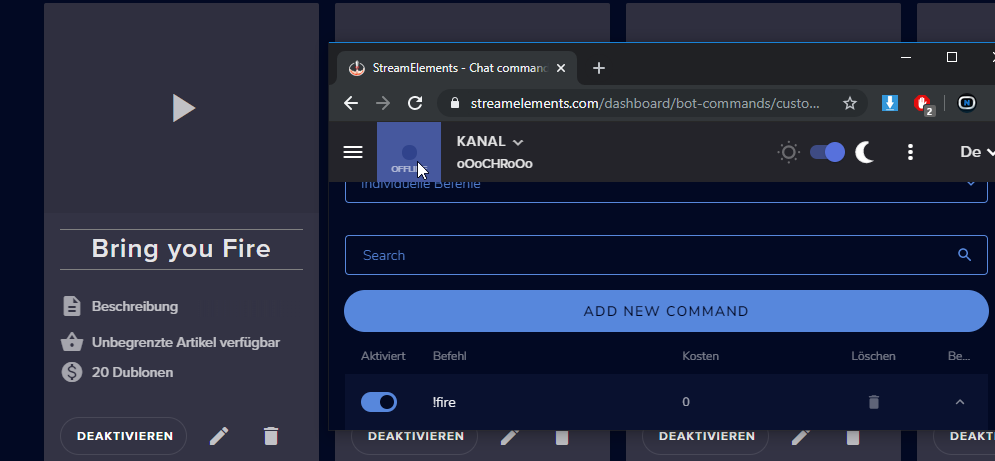
Hey i got this item in my Streamshop for 20points, and it can be redeemd in caht with a custom made command called !fire for 0points.... i guess i have to do it like that otherwise it will charge the doubled amount?
I setted my Items in the store with cooldowns, do the commands overwrite those cooldowns? Should i put them all down to 0 so the Itemcooldowns from shop are taken?
https://i.imgur.com/obL3aIE.png
 zenith widget
Commands and store items don't share the same cooldown.
Also if you set points on the command andon the store item - yes you will double charge
steel talon
Okay so setting cd in commands to 0 wont take the cd from the items?
They could spam !fire over and over.
zenith widget
if the item is redeemed via the store or the command, its cooldown will trigger.
usage can be spammed, but if the item is on cooldown it won't be triggered
steel talon
Ah okay, so i set all to 0 because i already made a setup in the Store.
Can i disable the redeem msg in chat? Because it would say redeemt for 0 Points but they actually paid 20.
zenith widget
Its something planned
zenith widget
There is no solution for the default redeem message.
steel talon
damn...
And is it possible to deactivate the message completely?
Ah yeah i see it. So i deactivate it
zenith widget
No - that is the thing that is planned.
steel talon
Mh
zenith widget
The ${redeem} variable and !redeem command share the same default response when used.
that cannot be edited and disabled at the current moment but it is something that is planned.
steel talon
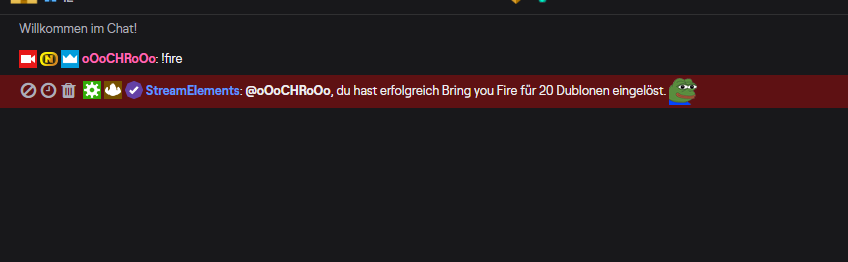
Hey wait maybe we are both wrong, i just tested it and it worked as it should.
Command is on 0 / Shopitem is on 20. And this was printed.
https://i.imgur.com/M5uiMny.png
 zenith widget
I don't see anything wrong.
steel talon
Thats what i mean it works
zenith widget
The bot responds correctly - the item was redeemed for X points
zenith widget
yes
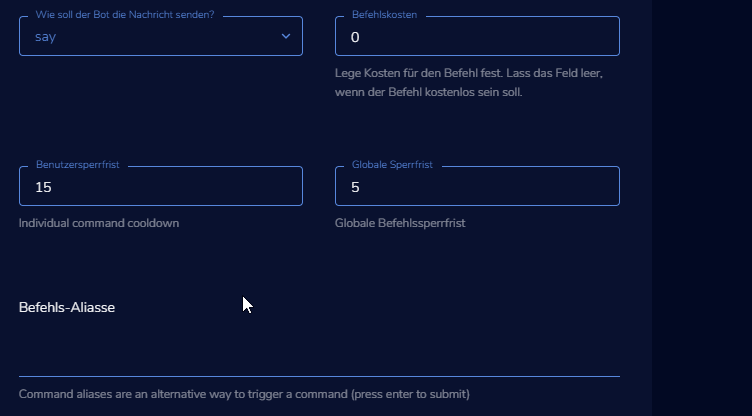 zenith widget
seconds
steel talon
Can i create my own template that i dont have to manually put in 30 commands?
zenith widget
Unfortunately, no
round brambleBOT
@steel talon Check out the StreamElements ideas board: https://strms.net/ideas. You'll be able to add ideas, upvote ideas you agree with, and track their progress with email notifications. Adding and upvoting ideas also helps the staff know which ideas should be prioritized so please take some time to upvote.
steel talon
 inland sparrow
HI :)
I have Question: How can I have some Robots that Read the messages from Tipps and Donations. Is that possible on Streamelements? I Know that it works on Streamlabs but I#d love to have my Donations and stuff on Stream Elements 🙂 Thanks for helping and Greetings from Germany 🙂
 astral bay
🤔
 elder sorrel
@inland sparrow You're referring to Text to Speech alerts?
inland sparrow
Yeah that's what I mean - When Some Donates me Some Money or Bits there should be a Voice that reads it loud in the stream 🙂 (sorry for my bad english -.-)
elder sorrel
If so: Enable the TTS option in the Alertbox settings in the StreamElements Overlay Editor. Also make sure to Check the Variations for the alerts you'd like to have TTS Enabled.
No worries. 
elder sorrel
No problem 
 hexed violet
i can't withdraw my tips so i submitted bank info etc and still haven't heard anything for a few days?
 tight harness
@hexed violet Hey, I've just replied to your ticket about this 😃
lament blade
hello i have a problem on the StreamElements Leaderboards Extension , it doesnt show info at all , it says NO DATA , and on the upper left corner it says OFFLINE , can anyone help thanks.
 real escarp
online only when you stream
you have no cheers or subs for the month
your donate link is streamlabs so any alerts for donations will not show up
once you make affiliate you can get subs
same for cheers
hexed violet
@tight harness it's stutck at this 😦
tight harness
@hexed violet Make sure your image is at least 100 KB
real escarp
well looks like you had a name change and it only tracks from the time you signed up with streamelements and had the bot join your channel it only starts tracking at 100 followers. I will rename your chat stat from your old name
lament blade
@real escarp thank you i appreciate the help
tight harness
It has a minimum file size to ensure quality is high enable so it's readable
real escarp
shukran @lament blade
lament blade
@real escarp  habibi
hexed violet
@tight harness it's big enough but still not going thru
hexed violet
weird, still says its not done uploading on my end
tight harness
Try refreshing the page
hexed violet
sick it's back to normal, thanks
tight harness
No problem 😃
 wispy trench
Hi, So I have gifted a sub to streamelements and Im trying to add my emotes to commands , but cant seem to find the emotes to put in the commands! a little help?
wispy trench
@real escarp I just gifted a sub to streamelements, but how do you access the emotes when inputting the chat response? I cannot find that.
real escarp
twitch name
 wanton mango
You just type the emote name out (case-sensitive) as you usually would when writing a message, like Kappa or PogChamp
wispy trench
@wanton mango I tried that but it just comes out as the text, very strange.
wanton mango
Try !emotes update then try again
wispy trench
Where would I type that ? in my twitch channel?
Okay I typed that in my twitch, it then said succcesssful, then it still does not want to work.
wispy trench
Ok I have solved it. PHEW thanks for your help!
wanton mango
Cool! What was it?
The emotes command probably needed a second or two to process I guess
wispy trench
I needed to put a space between emote names, but now I cant get the other two emotes to work. SMH....
OH I know why, It is only subscribed to tier 1 so can only have one emote!!
 dim idol
Hello! Thanks in advance for the help. I hope this makes sense: On twitch If I have a command (${count word} that increases by 1 every time chat does the command. I want to make an additional command that will -1 from the original counter. Is this possible?
For example: !eddie Message: Eddie has been awesome on stream (+1) 7 times. then !oheddie Message: Eddie let stream down (-1 from the !eddie count)

 visual coral
What i have to do? It says, that there is an error with the encoding
round brambleBOT
@visual coral Please provide a log from your last stream. To do this, in OBS go to Help > Log Files > Upload Last Log File and paste the link to the log file here.
wanton mango
I think @dim idol was after a command and not the widget 
That'd be ${count word -1} which subtracts 1 from the counter and returns the new count
visual coral
wary halo
@visual coral can you send the link obs gives you and not the file 😉 😛
- Always open OBS in admin mode
- Check if all your hardware drivers are up to date
- Wifi streaming is always a risk because it's more unstable then wired
wary halo
there are multiple green links in the report that can give you extra information on those problems
visual coral
i just scaled my fps down to 30, it worked.
 trim radish
so is there a place where I can set the required number of people in a host to make the alert to go off? I have people hosting with no alert going off. The alert is setup, i cant test it and see it....
round brambleBOT
@trim radish Due to changes to Twitch API, we have filtered out hosts and will only show these ones on your activity feed:
- All hosts coming from an online channel with at least 1+ viewer
- Auto host events with at least 1 viewer - only from a channel that just went offline
Note: If you see "X channel has hosted you" with no viewers on the back, that is considered an offline host or a host with 0 viewers, we do not show these.
wary halo
and you can always test the alert in your overlay editor
trim radish
I have tested. It works with 1 viewer in the overlay editor.... during stream....nothing.
wary halo
in the test it will always work, because it's a test (simulated, not actually activated by a real event)
in the actual stream it won't unless there are at least 2 or more people joining that raid/host because of the new API and it not triggering the activity feed and alerts if it's less
 austere stump
whats the px amount at top and left for the down mid
so its at the bottom in the middle
wary halo
depends on the resolution you are using ofcourse
austere stump
1080p
wary halo
and how big the alertbox is
austere stump
its a png
i wanna use as a icon
o i found a way
i would just wish there were prefixed lines to use
wary halo
like in slobs? 
austere stump
im talking in general i guess
round brambleBOT
@austere stump Check out the StreamElements ideas board: https://strms.net/ideas. You'll be able to add ideas, upvote ideas you agree with, and track their progress with email notifications. Adding and upvoting ideas also helps the staff know which ideas should be prioritized so please take some time to upvote.
 rigid verge
hello, the streamelements bot is not working in twitch chat, how do i fix it?
rigid verge
its already modded
real escarp
rigid verge
the !setgame and !settitle doesnt work
in a different channel
@real escarp thank you mate 
real escarp
only visible to the stream, cant see in app
real escarp
what is your twitch name
 weak delta
You get it?
real escarp
yeah
 regal bough
i cant seem to find a way to actually install/add the custom font i want?
 tidal kayak
Could anyone help me? My kappagen isn't working
tidal kayak
Well, I have made my Kappagen and then put the link in Streamlabs obs
But the Explosion isn't appearing on screen
round brambleBOT
@tidal kayak We're not able to troubleshoot issues with using our overlays in StreamLabs OBS (SLOBS) as we don't have the tools to support their software. We recommend using OBS Studio or OBS Studio with our plugin OBS.Live.
tidal kayak
On what Platform is it supposed to work?
tidal kayak
ok
weak delta
Oh sorry @real escarp didn't see those tags.
Yeah, the first time we tried Elements, the overlay definitely worked from the same app.
real escarp
would need a screen shot to confirm its streamelements app shes using and not something else, as you can see from my screen shots they work...
weak delta
Yeah, I'm getting one in a second.
If that's the problem, I honestly might just go jump off a cliff or something. Haha.
real escarp
it could be some weird compatible issue with her phone
wary halo
pro tip: don't jump off a cliff
weak delta
I wish I hadn't deleted that original mobile overlay.
I was able to modify things live.
But this new one, just nothing appears.
real escarp
did you clone that overlay to her?
weak delta
I built it in a non-mobile overlay
Then cloned everything to the mobile overlay.
All root access.
real escarp
but where did the 2nd mobile overlay come from if you deleted the first one
weak delta
It came after she opened the app for the first time.
Well, not the first time but after she opened the app.
real escarp
yep thats the app
weak delta
Yeah she ust sent me picture, definitely Elements.
real escarp
I would have her stop stream log out of app>then delete the mobile overlay
have her log back into app that should create new overlay
and do a quick test of follow alert from editor
with the show on live button checked
round brambleBOT
@weak delta You can test Alerts via the bell on the lower right corner of the Overlay Editor. Simply go to your Dashboard -> My Overlays -> Pencil/edit button on the overlay. Make sure the "Show Emulated events on stream" option is on to see the alert in OBS/Xsplit https://streamable.com/h6qgy
 weak delta
OK, will do.
Thank you.
Logging out now, mobile overlay deleted.
I'll rebuild it live, I suppose.
I hope anyways.
Thanks for the help.
 summer sigil
Hi. I am using a supertheme with OBS / OBS.live. Is there a way to automatically "set" the game and webcam? The webcam shows in different spots on different scenes. Hoping to find a way around having to manually move my video capture feed.
 jade remnant
the themes are set, just reposition it in the scenes and you dont have to do it again
 minor kindle
Anyone else using the level-up bar figured out how to make it track subs?
 twilit ether
How to set up Followage and Watchtime on twitch?
 strong lotus
How do I change my language on chat in OBS.Live?
torn tusk
Hi, how can I get rid of the expiry date for a tip goal? I don't really need a date for it
 wild compass
 round brambleBOT
@wild compass Please follow our community rules:
- No advertisement or stream promotion
- Respect ALL server members
- No NSFW/NSFL
Thank you
twin sentinel
@strong lotus Have you tried to change the language of your twtich in browser and see if it also changes the OBS.Live chat language?
@KnightsLuke#3399 The followage should be a default command you maybe have to enable
and for the watchtime to work, you need to enable the loyalty system with StreamElements.
@torn tusk You cannot disable the date by default, you can try to use the condesed or simple mode for the goal.
 weary gorge
Is there a way to have SE bot auto run ads on a partner or affiliate channel?
round brambleBOT
@weary gorge To have Streamelements run ads for you, make sure:
- Streamelements is added as an Editor to your Twitch Channel here: https://www.twitch.tv/dashboard/roles
2.A) To make a timer, go here: https://streamelements.com/dashboard/bot-timers - add a timer with a response "/commercial" and 5/10/30/60 for the duration of the ad - example:/commercial 30
2.B) To make a command trigger an add go here: https://streamelements.com/dashboard/bot-commands/custom-commands and add a command with response "/commercial" and 5/10/30/60 for the duration of the ad - example:/commercial 30
weary gorge
awesome response bot 😄 i'm gonna do it
 sudden elbow
i'm having an issue where host notifications aren't working, I've got the activity feed up in the stream elements application and it shows up in chat but it doesn't show up in the activity feed or show the alert on screen or play the sound, additionally im using one of the sites overlays and default alerts that come with it
round brambleBOT
@sudden elbow Due to changes to Twitch API, we have filtered out hosts and will only show these ones on your activity feed:
- All hosts coming from an online channel with at least 1+ viewer
- Auto host events with at least 1 viewer - only from a channel that just went offline
Note: If you see "X channel has hosted you" with no viewers on the back, that is considered an offline host or a host with 0 viewers, we do not show these.
sudden elbow
so they have to have more then 1 viewer and of been streaming when they do it?
for the alert to show up i mean
twin sentinel
yes.
sudden elbow
ok thanks, it's been driving me nuts not knowing why im not getting the alert
 keen pagoda
Can someone help me out with the overlay editor, I'm having trouble using my purchased Nerd or Die themes with SE
The scenes seem to be loading fine, but the widgets aren't themed. Alertbox, Donation Goal, Chat Box etc
twin sentinel
Have you used the import link provided by NerdOrDie?
 narrow umbra
Hi, i've just a question... :), when I set an animation on an image, it doesn't work ..... I tried to input and output the image, but there are no animations, it remains static, am I doing something wrong? Thanks
twin sentinel
Have you set a duration for the animation?
keen pagoda
I have used it @twin sentinel
The rest of the theming is working, just not theming for widgets.
It's also putting a black box behind the camera overlay, completely blocking out my camera in OBS when I put my camera under the overlay
twin sentinel
Best to contact NerdOrDie here.
keen pagoda
Alright, thanks
narrow umbra
@twin sentinel there are only 2 time settings I can do .... ENTER ANIMATION -> Duration and EXIT ANIMATION-> Duration
but the image is always static.... 😢
twin sentinel
Have you set a duration other than 0 in teh duration fields?
narrow umbra
twin sentinel
Have you checked the variations, too?
narrow umbra
I don't have the variants check, I only uploaded one image
twin sentinel
For what event? Does the event you are emulating also fit to this specific event alert you are editing and not an existing variation?
narrow umbra
It is not an event, I would like a simple image that appears and then disappears every 60 seconds ..... is it possible?
elder sorrel
Like an image rotator? I believe there's one in #widget-share
narrow umbra
now i look .... 🙂
twin sentinel
Or use the deafult widget Asset rotation/slideshow
elder sorrel
 Prob the best option.
narrow umbra
okok, ty guys ❤️
@twin sentinel where i can find widget asset rotation/slideshow? 😄 I can not find it ... 😦
twin sentinel
It is in the static section of the widget section in the overlay editor.
 ebon stag
does anyone know if there is a spotify now playing widget?
round brambleBOT
@ebon stag Spotify has kindly asked us to disable our integration with them, so we complied. This means that the Spotify integration has been removed and the "Now Playing" widget no longer has it as an option.
 quaint rover
Is there a way to have the alert box widget in my overlay editor to automatically resize every follower alert variation I have just like streamlabs does automatically? (I really want to complete my switch over to stream elemenets =[)
 reef citrus
Eai
twin sentinel
Not that I am aware of unfortunately @quaint rover
quaint rover
aww dang, so essentially, in order to get the same experience I would have to have uniform sizes for my uploaded media files?
@twin sentinel
Did i explain my question well enough btw?
twin sentinel
yes, or make the alertbox fir for the greatest alert and the other ones can be positioned with margins.
round brambleBOT
@reef citrus Welcome to the helpdesk! Please let us know how we can assist you today and a support volunteer or staff member will assist you as soon as they are available. Thank you for your patience.
quaint rover
ah okay, but the margins would only be used only to move the media file into a better position, not to actually change its size, correct?
twin sentinel
yeah.
quaint rover
=[[[[
damn, well thats okay then. I appreciate the quick response. hopefully that gets worked on, if you guys had that one feature I'd be using you guys for everything. thanks for the help @twin sentinel
round brambleBOT
@quaint rover Check out the StreamElements ideas board: https://strms.net/ideas. You'll be able to add ideas, upvote ideas you agree with, and track their progress with email notifications. Adding and upvoting ideas also helps the staff know which ideas should be prioritized so please take some time to upvote.
 muted glade
my overlays aren't working anymore
twin sentinel
Enable|disable browser hardware acceleration in the advanced settings in OBS.
 fringe rock
can someone point me to a guide on how to make a custom timer that will pull a random response form a list? I want a random roman history fact to drop in my chat every 15 minutes or so. ive been collecting them but I'm having difficulties trying to figure out how to do this. could be im just too tired idk. lol
twin sentinel
Create a pastebin and use this customAPI to call a random line of it in the timer: https://thefyrewire.com/docs/api/twitch/pastebin/
fringe rock
hmm okay ive never used this service before. thank you i will check it out.
 lime meteor
I have a suggestion about alerts for merch, would it be possible to have it integrated in to the standard alert box widget? I have a Nerd or Die alerts pack which includes merch alerts.
 zenith oracle
 scarlet tiger
 scarlet tiger
@zenith oracle Ban song from sr can moderator with access to dashboard.
 grim vine
my stream chat just randomly disappeared and wont come back D:
twin sentinel
In OBS.Live?
 limber orchid
hey stream elements fam i am having issues when people host me its not popping up in my activity feed or im not getting an alert im using the default alerts on stream elements and using streamelements obs.live can someone please help when i do tests on the editor it works fine and other alerts seem to be fine but not hosts inless its part of a raid ??
round brambleBOT
@limber orchid Due to changes to Twitch API, we have filtered out hosts and will only show these ones on your activity feed:
- All hosts coming from an online channel with at least 1+ viewer
- Auto host events with at least 1 viewer - only from a channel that just went offline
Note: If you see "X channel has hosted you" with no viewers on the back, that is considered an offline host or a host with 0 viewers, we do not show these.
scarlet tiger
Hello staffs, please fix chat stats
honorfox_tv to lenivaya_kosatka. Thank you 
twin sentinel
I'll try to get hold of a staff, to fix your chat stats. But as it is weekend, this can take some time.
lament blade
hi guys , first of all i wanna start by saying the help ive gotten here compared to on OBS , or streamlabs servers is like chalk and cheese , you guys are phenomenal and helped me quickly with every single thing , i need help with 1 more thing please cause im quite noobish with some of this stuff , ok ive put in a new just chatting overlay into my obs stream elements , but i havent got my drdisrespect alert into there , i have it for everything , doc pops up and says PowerHouseG , im not sure how to get my alert into my new just chatting overlay , i not sure how to do it , i had to switch back to old overlay to acknowledge stuff , im keeping both overlays and all scenes etc i just want my drdisrespect alert to work in my new just chatting overlay , is there a champion here like kaizer i think hes called that helped me last couple times ? thanks guys ! 



twin sentinel
You can copy widgets between overlays by selecting them in the layers tab in the overlay editor and then clicking the two papers with the red dot next to the layers tab.
wary halo
 normal igloo
^^^
lament blade
nice 1 , ill try but im scared i mess something up 😂 i appreciate it , your help is swift , some guy on obs was getting cheeky af with me when im always polite LOL
THANKS GUYS
i asked for help and hes like read the instructions ,read up on it , are u stupid and all this LOL
normal igloo
Wait was this person a random or?
lament blade
no he was like a mod for obs server
this was other day
and i waited ages as well lol
twin sentinel
I am sorry to hear that, but this is nothing which has to be discussed or mentioned on this public server. Thank you.
wary halo
lament blade
i didnt mean it like that lol was just complimenting u guys
twin sentinel
We appreciate that. Thank you.
lament blade
my pleasure , ive said it several times before , you guys are on point with your assitance and are polite , thanks again , i may be back if i have any trouble lol
wary halo
we'll be waiting here for you when you do 😛
lament blade
 echo cypress
Oh hi, I'm new to StreamElements, may I have a little walkthrough on the layout bit?
twin sentinel
echo cypress
Thank you
 rough grail
My Alerts in obs are fd upp
Idk why its not working can some1 tell me? I recently switched from Streamlabs to Elements so im tryna get new alerts but when i test them they wont show fully on my screen
twin sentinel
Can you share a screenshot of the alerts in OBS when replay an event?
rough grail
Sure give me like 5 minutes
 jovial gate
So there is a problem where the chatbot won’t recognise one of the mods as a mod and won’t let him edit commands
twin sentinel
Does the user have the correct user level, to use the command !command?
jovial gate
I’ll check he can time out
round brambleBOT
@jovial gate Please connect your streaming account (Twitch, YouTube, or Facebook) with Discord by going to ⚙ Settings and then Connections here in Discord. https://streamable.com/eg92w
 rough grail
round brambleBOT
rough grail
round brambleBOT
@rough grail To add your overlays to OBS, add a new browser source in your scene. Paste your overlay URL in the browser source properties, set the dimensions to 1920x1080 (unless you changed them on the website), and ☑ “Shutdown source when not visible” https://youtu.be/KDvLynUqXI4
jade remnant
@rough grail set your alert overlay to 1920x1080
or click on the source and press ctrl+f
jovial gate
@twin sentinel trying to help out a friend it’s not on my twitch
twin sentinel
What is their twitch name? Have you made sure the user level of the command matches the person trying to use it?
rough grail
Alright ill try @jade remnant Thx
jovial gate
It’s alanzq
Alanzqtft and the mod is Perry
He has mod and can time out and do normal mod things just can’t interact with the bot
It seems as tho the bot dosnt recognise him as a mod
rough grail
Its fixed thx
twin sentinel
What happens when they try to edit a command?
jovial gate
Bot ignores
twin sentinel
Do you have access to the bot dashboard of the streamers account?
jovial gate
No he dosnt
twin sentinel
The users level is set to regular in the bot user management:
twin sentinel
The streamer or someone with bot dashboard access has to edit the user level of the user in the StreamElements dashboard to moderator: https://streamelements.com/dashboard/bot-commands/user-management
wary halo

lament blade
@jovial gate thank you for doing my job xD
@twin sentinel and thank you for your help!
wary halo
no problem 🙂
twin sentinel
What widget is that?
austere stump
last donation
twin sentinel
Try out that widget:
https://discordapp.com/channels/141203863863558144/457957557470887947/579282168900091907 and disable the displaying of cheers.
wary halo
austere stump
oh i duplicated it the wrong way before ,t y
lament blade
So, wondering if I could get some support cause I feel like my alerts aren't working properly.
Though I feel like a screenshare would be WAY faster, cause it seems super specific...
I was trying to add variations, and changing the sound alert
But even after REMOVING the original sound (no sound), when I do a "test alert" it still sounds
So I start getting overlaps
twin sentinel
Have you saved the overlay after editing the variations?
Make sure the variations are set up correctly and the default alert also has the sound it should have.
lament blade
Saving the overlay should only affect the "real" stream. For testing purposes (INSIDE the editor) it has no effect
But yes, I had saved
And I THINK the variations are set up correctly, but since they're malfunctioning, I must be doing something wrong. Hence me coming for support xD
twin sentinel
You removed the sound of a variation and when you hit the play button next to the variation, there is sound still then?
lament blade
Yes
I also tried removing the original sound
Hm... Well, scracth that
Yeah, the variation.
Point is, even after REMOVING the sound, it plays the sound I just removed
twin sentinel
Do you have the overlay open somewhere else by chance or do you have maybe two alertboxes in the one overlay?
lament blade
I have several alertboxes, yes, but only THAT ONE plays "cheers" (in this case)
The other ones should not activate
twin sentinel
Only have one alertbox per overlay.
lament blade
(And if they do, that's still an issue of the alerts malfunctioning, so)
What? Why? :S
twin sentinel
Cause both alertboxes or all the ones you have get triggered when the event comes in. I recommend to only have one alertbox per overlay.
lament blade
Yeah, but no
I have several (as of now, 2), and they're working fine
There's no overlap between them
It's when I tried adding the third that it's not working
If you say "I recommend having only 1", sure, nothing for me to discuss there. But if you say "all get triggered at once", I fear you're wrong
If you're willing to screenshare, I'm glad to show. Maybe it'd also help me show what I'm trying to explain
twin sentinel
I do not have the possibility to screenshare right now.
Feel free to hand in some screenshots.
Or a video clip.
lament blade
Well, a screenshot hardly helps with sounds, no? xd
twin sentinel
Maybe we can already see at the setup of the alertboxes, that something is wrong configured.
lament blade
Oh, I could do that. Record a clip with obs
Any default settings(or max size) to share it here?
jade remnant
standard discord limit
lament blade
Never shared a clip. I've no idea xD
Well, will try
twin sentinel
And make sure the sound is only played in this one browser window with the one overlay editor and not somewhere else, like launched overlay, or other OBS programs.
 wise moth
hello, the bot seems to ignore all commands. anything i can do to remedy that?
twin sentinel
How have you set up your custom bot name?
wise moth
no custom name
twin sentinel
Bot just answered to !commands in the channel you linked with discord.
What command do you have trouble with?
wise moth
its not in my channel, its in twitch/fuzzyjcats
twin sentinel
what command is not working?
wise moth
none of them
 dry hare
tell them to make the bot a moderator and then if it still isn't working, part the bot from the channel via the StreamElements dashboard and re-join it to the channel
wise moth
it is mod and i tried that
twin sentinel
they have a custom bot name enabled.
 crisp stream
round brambleBOT
crisp stream
round brambleBOT
@crisp stream Please connect your streaming account (Twitch, YouTube, or Facebook) with Discord by going to ⚙ Settings and then Connections here in Discord. https://streamable.com/eg92w
 twin sentinel
Please part the bot from your StreamElements dashboard, log out from the dashboard, log back in and make the bot join your channel again.
lament blade
Recording this clip ain't working. I go back and forth way too much 😅
I'm not made for technical videos D
twin sentinel
When you replay a follow, does it show that one as alert on screen? @crisp stream
wary halo
lament blade
Whelp, 4 minutes -.-'
Cheers problem
I'm definitely not made for tech tutorials 😅
....and it's muted... why is it muted?
Why is there no audio, are you kidding me?
...so much for recording a clip then
Also, I just noticed that the alerts are appearing twice because it's showing the ones in the actual "stream". Forgot to disable the overlay in OBS -.-'
Tsk. I'll wait till someone is availaible for screenshare then, I suppose -.-'
round brambleBOT
@lament blade Make sure to ☑ “Shutdown source when not visible” for all browser sources (all OBS scenes). If using studio mode, uncheck “Swap Preview/Output scenes After Transitioning.” Also keep in mind that sound can play from any overlay loaded in the browser (editor or launched). https://i.imgur.com/FegZJQS.png https://i.imgur.com/yY0wcFl.png
lament blade
Yeah, shutdown thingie is done
normal igloo
Also you have too alert boxs
lament blade
"Too"? 2 or "too many"?
normal igloo
2 as in 2
twin sentinel
@tight terrace This is the support channel for StreamElements related issues. Please keep such questions in #general-chat . Thank you.
lament blade
I have 3 in that video.
normal igloo
oh that's even worse then 
twin sentinel
Also keep in mind that sound can play from any overlay loaded in the browser (editor or launched)
lament blade
Why?
Okay, I'mma need an explanation on that Benno. Too idiot to understand, I fear
normal igloo
Having more than one alert box will trigger multiple alerts
lament blade
"From any overlay"?
twin sentinel
You have the OBS overlay and the editor giving back sound at the same time. This could be why it is doubling.
lament blade
@normal igloo Well... That's kinda what I want, since I haven't found a better solution. And so far it was working
normal igloo
oh and this ^^^
lament blade
Nah.
I had OBS open NOW to record
But when testing, OBS is closed
So only the editor is open
twin sentinel
if you're willing you can DM me an editor invite link so I can have a look. click "generate invite link" from this page and send it to me privately https://streamelements.com/dashboard/account/channels
lament blade
I find text duplication, somehow
Hm... that one may be too small to noice
FINALLY! Had to test like 19 times to get one that's big enough to be noticeable
So, here's the thing about "you can't have multiple alert boxes cause they all go up at once".
That's kinda the thing.
See, that "blue box" is a picture that comes up with the alert. And SE doesn't allow for multiple images/videos
If I upload the rings dropping, I need to delete the image. Then, the text is just floating
Looks ugly (and depending on the game, might fade with the background). Better to KEEP the box thing
twin sentinel
Delete the message in the ring alertbox.
jade remnant
ok, if you are 100% sure that you have gone through everything mentioned above then please read what benno sent you a few messages above
lament blade
You mean this one...
And that one? XD
Yeah, I deleted the messages
ONLY the MAIN alert box has text for Cheers. And yet they're duplicated somehow
@jade remnant What he sent about... the editor invite?
jade remnant
yes
lament blade
I mean, I can't guarantee I 100% looked through EVERYTHING. I'm stupid when it comes to tech stuff.
That's why I wanted a screenshare, if possible, so someone could say "no, you need to change that"
But sure, let's do the editor thing.
twin sentinel
Also please name the overlay you have the trouble with.
lament blade
Link sent. Do we continue conversation here or in DM?
twin sentinel
We'll continue the conversation here. I'll need a few minutes to look into it.
lament blade
Afk 2 mins while you look
 lament blade
It'd be easier if we could sort them, tbh xD
normal igloo
#💭︱feedback-and-ideas just saying 
twin sentinel
@lament blade
We analysed your alert setup.
When we emulate a cheer event, there is no other sond playing, than the ring dropping sound without any doubling of this one. There is no default alert sound playing, only one Ring_Drop_Dono_Audio.mp3.
For the two cheer messages: Uncheck the Show cheer message checkbox in the variation (Bits default) of the cheer event in the AlertBox Cheer Rings.
 hot shale
Hello, I'm hoping to get some help with media request.. Is this the right channel for that?
round brambleBOT
@hot shale Welcome to the helpdesk! Please let us know how we can assist you today and a support volunteer or staff member will assist you as soon as they are available. Thank you for your patience.
hot shale
So, went through the set up for media request, added the widget to my overlay and there is no sound in my stream. Also, I hear two instances of songs playing.
round brambleBOT
@hot shale Make sure to ☑ “Shutdown source when not visible” for all browser sources (all OBS scenes). If using studio mode, uncheck “Swap Preview/Output scenes After Transitioning.” Also keep in mind that sound can play from any overlay loaded in the browser (editor or launched). https://i.imgur.com/FegZJQS.png https://i.imgur.com/yY0wcFl.png
hot shale
The shutdown source when not visible is checked and everything in the image is done on my end
I havent used studio mode at all. I just clicked start streaming and i hear the songs in my headset but when I watch my stream there is no song. I start off with clicking Show on Stream and then Start Streaming
twin sentinel
Do you hear gameplay sound on stream?
hot shale
Yes
 red path
Quick question. I have a pvr 2 gaming edition and I'm trying to figure out why my Xbox live party chat won't push audio through my OBS. When I record for testing I get no chat sound.
normal igloo
I'm guessing USB headset right Pinocchiho? 🤔
red path
No, I use the stealth 600 turtle beach.
normal igloo
wireless still connecting through USB signal that's your problem
red path
When I use the twitch stream function from Xbox it works, I figured since everything that goes through the PVR is captured my party would also be captured. Unless I don't have something set up correctly.
jade remnant
@red path the output settings for live party chat would need to be set on your console
it needs to go through your minijack connection you normally listen through and whatever method you use (capture card/remote play)
normal igloo
^^^^
red path
Okay, thanks everyone.
normal igloo
np
lament blade
@twin sentinel Hm... That fixed the duplicated message, yes.
The extra audio... Well, it fixed itself somehow, apparently -.-'
Thanks 🙂
hot shale
Am I in the right chat group for help with media request?
hot shale
Okay awesome. So I have set everything up for media request but its not playing on my stream, but plays in mys headset. But in my headset I hear two instances of the songs
normal igloo
Is OBS [ or whatever you using ] showing any movement in the desktop audio metre?
hot shale
Yes it picks up my gameplay just fine and me talking but not my media request songs
normal igloo
mmm Benno If you would please ^^^
twin sentinel
How many audio lines do you have in OBS? Can you share a screenshot of your audio mixer in OBS please.

 hot shale
@twin sentinel
weak delta
Still working the mobile overlay StreamElements piece but has anyone had issue with reflection when using Elements app? It isn't present in Labs with same phone and everything.
twin sentinel
What reflection are you referring to? Can you elaborate please?
@hot shale So when you launch the MediaRequest and add a song to it and show that on stream, does it come up on the preview in OBS?
hot shale
@twin sentinel Yes it shows on my preview in OBS and it shows in stream
weak delta
Just this weird kind of reflection, graphical thing on the camera but only when using StreamElements app.
Lemme get a picture.
twin sentinel
@hot shale In the windows audio mixer, when you hit show on stream for the MediaRequest playing, do you see the OBS line having audio on it?
hot shale
@twin sentinel I dont see an OBS line but none of my other audio lines show any audio coming through
@twin sentinel i think i just figured it out
@twin sentinel yup I fixed it. thanks
twin sentinel
What was the issue?
hot shale
@twin sentinel I had desktop audio set my tv instead of my headset
 faint prawn
How does one get rid of this Gift chest blocking chat windows? thnaks!
twin sentinel
With a tool like FFZ you can disable these banners:
Check Disable the Community Gift Chest banner
faint prawn
Well, look at that! Thanks @twin sentinel
wary halo
or disable it in your dashboard if it's your channel
faint prawn
Oh, there we go! Just click stop collecting gifts. 🙂 Thank you so much peeps!
 charred summit
Hey folks, I'm tweaking my chat box and I'm trying to use a font that I have installed on my computer. When I type it in it apparently doesn't recognise it, is there a particular syntax or thing I have to do to get a font loaded in?
round brambleBOT
@charred summit Google Fonts
More than 900 google fonts are supported at this time. You can preview them here: https://fonts.google.com/
Custom Fonts
Steps:
- Install the font on the streaming PC or choose a pre-installed windows font.
- In the overlay widget settings, select Text Settings
- Enable Custom Font
- Type the name of the font as it appears in the windows font directory (This is usually
C:\Windows\Fonts)
Note: After installing fonts, the browser and OBS must be restarted for the font to appear.
charred summit
Gotcha will try that, cheers!
 wind lynx
hi, my followers aren't getting reward points like they should
they don't get any when they follow
wary halo
have you set the points right on this page?
StreamElements
The Ultimate All in One Platform for Streamers
twin sentinel
Also are the follows in your activity feed?
 rugged portal
how do i take an alertbox from stream elements overlay and add it to another theme
 floral badge
Hello
wary halo
Hello
floral badge
I am having problems getting my overlays copied to my sources in stream elements obs live
can someone help me please
floral badge
my stream elements dashboarad
round brambleBOT
@floral badge To add your overlays to OBS, add a new browser source in your scene. Paste your overlay URL in the browser source properties, set the dimensions to 1920x1080 (unless you changed them on the website), and ☑ “Shutdown source when not visible” https://youtu.be/KDvLynUqXI4
floral badge
ok i will try that
thank you
ok it won't let me stop it
it's the only thing on my stream
sorry screen
wary halo
you can move layers with the arrow up and down buttons in obs
floral badge
yes it duplicated for some reason
wary halo
can you screenshot it? 😛
floral badge
OK
NOW I HAVE CUT AND PASTED MY SECOND BROWSER SCENE AND EVEN THOUGH IT HAS A DIFFERENT URL
it has come up as be right back instead of stream starting
wary halo
just add the same source to the stream starting scene and delete this one
floral badge
so that means obs is registering only one broswer source
it still does not differentiate it
wary halo
that sounds like you copy pasted the link from the same overlay
lament blade
can you set a command to work as a keyword?
wary halo
commands can not trigger other commands, if that's what you mean
floral badge
WELL EACH OF YOUR DIFFERENT OVERLAYS HAVE THE SAME URL ADDRESS
floral badge
well it is
so how do i fix it
I am starting to think that streamelements is not all that it's made out to be
wary halo
click on of those, make a browser source in obs and paste the link and add it to obs, then go to the other overlay on your dash and do the same
 strong kernel
Between your overlay URLs, the middle section changes, not the end.
lament blade
When i upload a custom image for my alert box, it changes for some of them (followers/donations) but for subs or cheers it will use default img/vid
even though i've changed and saved
strong kernel
@lament blade Edit the variations.
wind lynx
@twin sentinel I think, I've figured out what's going on...
wary halo
tell us
lament blade
@wary halo I mean, if someone types a word without the "!", so it triggers a command on a keyword
wind lynx
@twin sentinel I've got a chat alert which has the code {user} has ${user.points} FaveCoins.
wary halo
@lament blade
StreamElements
The Ultimate All in One Platform for Streamers
you can make your own commands there
click on custom commands
ow i now see, without the !
wind lynx
@twin sentinel so basically my follow alert tries to tell the follower that they have received points, but it always tells them they have zero when in fact they have received points.
lament blade
I mean, I basically know how creating custom commands work, but with nighbot you can make your commands trigger on a keyword. For example: "Hey there, I love you", the word "love" will trigger a respond from nightbot, and it will see, love you too or something
wary halo
you can make a command and add 'trigger' words for it too in the settings
strong kernel
@lament blade
wary halo
^^
floral badge
ok so i deleted the overlays that i had
I have clicked on themes gallery
There are 4 headings
Super themes , themes , alerts , gallery
wary halo
yes
floral badge
ok so i click on super themes or themes?
wary halo
whatever you want, that is just to pick a theme you like or you can just create your own here:
StreamElements
The Ultimate All in One Platform for Streamers
from scratch with your own assets
floral badge
ok i am not that tech savvy
wind lynx
@wary halo I've set the loyalty up correctly and it is working, its my follow alert that is not working. It's supposed to tell the user how many points they have but it always comes up as zero. I'm using the variable $user.points
strong kernel
Command variables aren't made to work in chat alerts. It shows what variables are available for each type of chat alert.
wary halo
@floral badge i get that, it can be a bit overwhelming sometimes
then you can just pick the theme or supertheme that you like most and work from there
wind lynx
@strong kernel ah I get it, thanks!
floral badge
ok thank you very much for your help everyone
lament blade
thx @strong kernel for letting me know about the keywords
floral badge
so do the super themes also provide me with alerts or do i have to add them in
lament blade
why cant customize live events ?
wary halo
@floral badge i see an alertbox widget within the theme in the editor so i guess it's the complete package
it is, i tested it
everything is integrated
floral badge
OK
wary halo
@lament blade what do you mean with live events?
floral badge
sorry about the caps
wary halo
no problem
floral badge
how many widgets am i allowed to run at one time?
wary halo
i don't think there is a limit on it 😛
floral badge
There seems to be lot's of really interesting widgets that will enhance the stream
wary halo
true yes
floral badge
oh really that sounds dangerous
wary halo
i try to make as much widgets into 1 overlay so it's better for your cpu usage while streaming because it's just one source and not 3 or 4
but you need to play around with that and see if it fits nicely on the screen
floral badge
Wow I think I am actually getting it
that's the one thing I have noticed about stream elements it does not use anywhere nearly as much cpu memory as obs does it was shocking
wary halo
yes, just stack up in one overlay and you save cpu 🙂 and it's all in the 'cloud' so if you are somewhere else, just download obs and put your stuff in it and you're good to go without losing your setup
floral badge
With these wonderful widgets i can actually run them instead of an overlay with the streaming that i do
lament blade
I'm using a custom image for alerts, and when I test it on site it looks fine but in obs it only shows the top left of the image
round brambleBOT
@lament blade To add your overlays to OBS, add a new browser source in your scene. Paste your overlay URL in the browser source properties, set the dimensions to 1920x1080 (unless you changed them on the website), and ☑ “Shutdown source when not visible” https://youtu.be/KDvLynUqXI4
lament blade
thought i did that, i'll double check
lament blade
ah that was it , thanks
floral badge
I am a bit worried that everyone that pops into the stream will think that I actually know what I am doing
we can't have that lol
wary halo
lament blade
@wary halo i can use layout on live event cant add css
floral badge
I just uploaded this awesome shoutout widget
is there an existing command that triggers this off?
floral badge
Oh aren't you clever 🙂
wary halo
@lament blade what kind of live event are you talking about exactly?
can you provide a bit more info?
floral badge
so !so is the stream elements command for shoutout
wary halo
let me take a look at the widget one moment
floral badge
Thank you
wary halo
did you watch the YT vid? 😛
wary halo
it says in the overlay editor that the command is just !so
floral badge
thank you very much
wary halo
so after the !so you type the name of the channel 😉
!so australisfishing for example and it should trigger it for that channel
floral badge
great
With reference to the the stream elements bot in my twitch chat
does it automatically link or do i have to type in a special command
wary halo
it should link automatically
you can always test it when offline 😉
and don't forget to mod the bot
or else it can't place links
/mod streamelements
do that in chat
floral badge
thank you
lament blade
can you create a custom command using a command?
round brambleBOT
@lament blade You can make changes to custom commands in chat with!command add/remove/edit/options/show Valid flags for !cmd options are: -cd (number) -usercd (number) -cost (number) -level (number) -type (say, whisper or reply) -count (number). --- Example: !cmd options twitter -usercd 60 -type reply -level 250
wary halo
maybe here

Make the most of StreamElements, learn how to use Chat Commands. ----- Got any questions, or just want to say "Hey"? Join our Discord server: http://bit.ly/D...
 edgy fiber
how do I log out from obs.live to connect with my twitch?
round brambleBOT
@edgy fiber Streamelements on top of OBS -> Logout -> login
edgy fiber
that's so helpfull, thx
floral badge
Hi everyone
edgy fiber
Hey
floral badge
does anyone know the name of the stream elements extension on twitch that showers your stream with emotes?
edgy fiber
kappagen
strong kernel
You add it to your overlay.
floral badge
ok great i don;t want to use it unless it is a stream elemtns widget
oh ok
Does anyone have a link please?
I cannot seem to find it
strong kernel
floral badge
This is where I make myself look outdated
@strong kernel can I please have the url of where i can find that as for the life of me i cannot seem to locate it
strong kernel
That's up to you.
floral badge
Thank You very much
 ashen verge
Hello. I install and uninstall many times and clean the cache and cookies still its not working. Please, can someone help me
round brambleBOT
@edgy fiber To add your overlays to OBS, add a new browser source in your scene. Paste your overlay URL in the browser source properties, set the dimensions to 1920x1080 (unless you changed them on the website), and ☑ “Shutdown source when not visible” https://youtu.be/KDvLynUqXI4
edgy fiber
It is not working
round brambleBOT
@edgy fiber Please connect your streaming account (Twitch, YouTube, or Facebook) with Discord by going to ⚙ Settings and then Connections here in Discord. https://streamable.com/eg92w
 ashen verge
Seen 😦
edgy fiber
when I add a new browser source it just goes invisible for some reason
strong kernel
@ashen verge You may have better luck reaching out to Twitch about why the settings aren't showing, but it's a local issue on your end. Something is blocking it from appearing.
ashen verge
Noted. Thank you so much
strong kernel
Disable Browser Source Hardware Acceleration in Settings>Advanced.
floral badge
Thank you very much for your help everyone
It amazes me how much more vibrant and alive the stream is going to become and it is all free
 dire slate
I was wondering how I could reset my states for my top emotes
someone was spamming while I was afk, tag me if you could help, thanks!
floral badge
Hello
if I set my time out to 1 does that automatically ban someone that uses a banned phrase or word from my spam filter
strong kernel
No. That times them out for 1 second.
-1 will ban.
@dire slate We can completely nuke everything in your stats, emotes and chat both, but that's about it.
dire slate
@strong kernel would this get rid of cheers, and subs too? Or just chat states
strong kernel
Just chat stats.
dire slate
May you clear then?
strong kernel
Nuked.
dire slate
thanks!
floral badge
Thank you very much you are all awesome
 vivid hound
I have set a command !discord and I have it already mod to my twitch but no commands are showing
round brambleBOT
@vivid hound Please connect your streaming account (Twitch, YouTube, or Facebook) with Discord by going to ⚙ Settings and then Connections here in Discord. https://streamable.com/eg92w
 vivid hound
Already done
strong kernel
vivid hound
?
strong kernel
StreamElements
The Ultimate All in One Platform for Streamers
vivid hound
😮
Thank you so much
Also, for my tip page, I put in a clear 1920X1080 picture and its blurry, How do I change that
strong kernel
What you put in is most definitely not a 1920x1080 picture.
It's a tad... smaller.
 kind vector
I found out what happened to my Streamelements Leaderboards. It was the badger Privacy that's been blocking it. Now I have that Problem fixed 🙂
kind vector
LOL
No this Privacy Badger :)
https://chrome.google.com/webstore/detail/privacy-badger/pkehgijcmpdhfbdbbnkijodmdjhbjlgp

Privacy Badger automatically learns to block invisible trackers.
strong kernel
Mine's cuter.
kind vector
heehehe
 frozen nexus
<@&382267076632379392> how do i get rid of "ends in 24 days" from the donation goal bar ... i had it removed but i accidentally deleted the widget and now i dont remember how
strong kernel
@frozen nexus Don't forget you have the #dreamteam channel for support.
strong kernel
Just select and erase the end date in the widget's settings. 🙂
strong kernel
Yes.
vivid hound
Like you logging on and see my p.w and such?
strong kernel
I cannot see your password, no. You don't use a password to log in, anyway.
lament blade
does streamelements take a percentage of tips?
strong kernel
No.
lament blade
i donated $1 to myself and received .67
vivid hound
rip
strong kernel
That's PayPal.
vivid hound
^
strong kernel
Nope.
vivid hound
I thought it was .90
lament blade
ah unlucky
strong kernel
2.9% + $0.30
vivid hound
okay
strong kernel
Well, you're using their service and they need to keep it running, so of course they need to make money somehow.
vivid hound
^
strong kernel
@vivid hound I'm a staff member.
lament blade
ye iknow haha
strong kernel
Hence the lovely colored name.
If needed. We access accounts for troubleshooting purposes.
 tropic wasp
round brambleBOT
tropic wasp
round brambleBOT
@tropic wasp Streamelements on top of OBS -> Logout -> login
strong kernel
Are you not using OBS.Live?
Or did you rename with Ground Control?
Your custom bot name got stuck, basically.
 slate mulch
How do you send videos when you donate
strong kernel
The streamer must have it enabled as an option.
slate mulch
How do I do send it to CallmeCarson
strong kernel
If you don't see the option on the tipping page, it's not enabled.
slate mulch
I guess he removed it
 onyx pond
I changed my name on Twitch and now none of my commands, or bots will work :P. Ive disconnected streamelements twice from Twitch settings and still my commands do not pop up in chat when I type them someone please help lol
round brambleBOT
@onyx pond If you changed your name on Twitch please follow these steps:
🔹 Visit https://streamelements.com/logout and then log in again with by connecting with Twitch.
🔹 On the right side of the dashboard page that opens, select "Join" under bot settings. If it says "Part" select that and then select "Join" to send the bot to the chat. Don't forget to mod the bot by typing /mod streamelements in your channel if you have not already.
🔹 Post your new name here so that we can update your channel's chatstats tracking (must be done by staff).
onyx pond
Where is bot settings?
strong kernel
On the right side of your dashboard.
onyx pond
oooookkkkay sorry im blind
 neon gorge
Had an issue on my stream today where NONE of my bot commands or timers worked.
strong kernel
Mod the bot.
 desert atlas
I need help @strong kernel
green colors look problematic when I broadcast @strong kernel
zenith widget
Can you elaborate? @desert atlas
 devout nest
Hello there, past 48hrs ive noticed unusual drop in bitrates and my stream is laggy/unstable. can anybody assist me with this
 gentle imp
probably is the twitch server, tried using other?
devout nest
I havent yet, pardon my lack of knowledge, but how can i check without Starting my Stream
I switched to Montreal, Canada
gentle imp
I normally run that on auto, so it picks best server at the moment for you
devout nest
oh okay. I have set it to Auto
gentle imp
also from your log have a look at this, there's a small gpu overload https://obsproject.com/wiki/GPU-overload-issues
you can also test settings without going live, sec
live_0000000_xxxxxxxxxxxx?bandwidthtest=true```then you can start stream, no one will know you are online so you can try settings
after all is done, remove that ?bandwidthtest=true from stream key
devout nest
great! okay ill have a look at the GPU overload I have 970(SLI enabled)
gentle imp
ahh just try the other stuff first, tbh 0.1% Rendering Lag ain't that much
but could be due to server, so check that
devout nest
thank you again for your time, I highly appreciate it
gentle imp
you're welcome, hope you get it sorted
devout nest
hmm, 274bitrate on Auto server
gentle imp
😮
no errors
if bitrate is low, try choosing another server manually then
you can also use this tool to check best server https://r1ch.net/projects/twitchtest
 limpid spire
I just wanna confirm, for the song requests module, the free songs part, when does the free songs reset? Is it after someone else queues a song, is it after a day, or how does it work exactly?
zenith widget
free songs is the amount of free song a viewer has
for example, i can queue up 3 songs and hit the limit
until 1 of my 3 songs play, i can't queue another one
floral badge
Hi everyone
I am having problems adding my twitter account name to my overlay
and also my instagram
zenith widget
What exactly is the problem?
The widget is a text widget, meaning that when you click on it, you can edit the text on the left side
 knotty rain
Hello, question about Slots Machine. My English so bad and I cant understand this: "How rigged should the system be? (lower than 100% means people will lose points over time)."
I need set 0 to get minimum chances to win and set 100 to maximum chances. Right?
round brambleBOT
@knotty rain
The slider increases the payout if you manage to win
Less than 100 on the slider means people will not win money over time using the slot machine. 80-100 is a good range
less emotes = higher win chance
It's like 5 emotes = 3%, 4 emotes = 7%, 3 = 12%
actual formula : n / n^3
n = number of emotes
floral badge
hello @zenith widget I thought I had done that but it did not save
floral badge
yes
every time i tried it
can anyone please shed some light on what I am doing wrong
zenith widget
The instagram text widget seems to be locked
i moved the kappagen widget to the bottom most layer
and unlocked your instaram widget
and as you can see i can just edit them
Also if you have the editor open, refresh it now
and don't save any changes you've made
floral badge
wow you just changed it on my screen
 floral badge
lol
Thank you very much you're a scholar
Is there any way I can make the text larger and bolder so it is easily visible on my background
real escarp
stay in obs live
 slender yoke
Is it possible we can change the kappagen emote 'hats' back to the santa hats? Enabling 'seasonal hats' is still putting on the witch hats from halloween.
Christmas season is officially upon us! lol


 harsh vessel
Hi again)
Got new trouble - followers alert not working (again)
@wary halo btw problem with accesing streamelements was solved (its a global problem with ukraine users - we added google DNS and its working now)
wary halo
do they work in the editor?
harsh vessel
yep @wary halo
but i asked my moder to refollow - no alert and no new info at daashboard
elder sorrel
@harsh vessel Unfollowing & refollowing doesn't trigger it again.
What's your Twitch Name?
harsh vessel
@elder sorrelAlmazova6009
elder sorrel
Maybe in #dev-chat @grave lance 
Otherwise best to post in the ideas board.
Get the notification?
elder sorrel
harsh vessel
thank u 😍 @elder sorrel
lament blade
I was about to tag someone and then my brain said "WAIT! Check the Pins!" Question answered
elder sorrel
📌
 fleet prism
Is there any way i can refresh a follower goal widget? it keepd siaplying the wrong number of followers when i activate it ;_;
displaying*
elder sorrel
@fleet prism https://streamelements.com/dashboard/session
StreamElements
The Ultimate All in One Platform for Streamers
Go to Goals -> Change Follow Goal -> POG
 languid portal
Can a only donate wid paypal
elder sorrel
Depends on your area. Afaik Paypal is the most common @languid portal https://streamelements.com/dashboard/tipping/fees
StreamElements
The Ultimate All in One Platform for Streamers
 grave lance
well I wore out my welcome here, I will have to keep looking
elder sorrel
Best of luck. 
gentle imp
afaik = as far as I know
 fair ruin
Hello, can someone help me with Chat Stats, It says " 404 - Page Not Found " . I dont know what to do with that.
My name on twitch is MissElishka .
jade remnant
what was your name before this?
fair ruin
I didnt change it
real escarp
74 followers
need 100 before it starts tracking, this is by design to save on resources
 quick solar
Why won’t my follower goal widget not update? My displayed follower count has stayed the same since I first added the widget to my overlays.
 tulip eagle
Using the item store alert overlay and occasionally it’ll have a “redeemed” text there on stream. It won’t go away
 tacit granite
is there a way to check which bank is connected to my SE Pay.. Or change it? Just want to check
real escarp
@tulip eagle known bug devs are aware
tulip eagle
Ah, good to know thank you @real escarp
knotty rain
Is there any way to set an auto-raffles in chat? (through custom commands maybe)
 kindred bear
@real escarp Viewers wont donate to me, I want moneys. StreamElements halp! (jk, had to add some comedy in here to lighten up the mood)
knotty rain
Yeap
knotty rain
I tried to set !raffle XXXX in timers, but bot just write it and nothing happens
wanton mango
The bot can't trigger itself, it's to prevent endless loops
knotty rain
Ok. Then there any ways to get passive points payout to users who sitting in offline chat?
languid portal
How to seup bits help
dry hare
@languid portal you set up bits on your Twitch dashboard
languid portal
wer
elder sorrel
^ You'll see that if you're a Twitch Affiliate. Are you a Twitch Affiliate?
elder sorrel
Will be in the Twitch Dashboard -> https://www.twitch.tv/dashboard
If you're a Twitch Affiliate: You'll see the side menu on the left side to click "Affiliate"
knotty rain
Guuuys, please.
 stray crag
How can i add !followage when i am a Moderator?
real escarp
its a default command the streamer may have it turned off. You would need a editor invite link to turn it on for them
elder sorrel
What's up @knotty rain
 fallen finch
Hi, where I can find list of quotations stored by !quote command?
elder sorrel
Then there any ways to get passive points payout to users who sitting in offline chat?
If you have loyalty points enabled -> People watching you stream will get points every 10 minutes
real escarp
@fallen finch no UI for quotes make sure you upvote it here https://strms.net/ideas
knotty rain
@elder sorrel im interesting only in Offline chat users. Is it possible to create it for them?
elder sorrel
Nah not possible at this time.