#helpdesk-twitch
1 messages · Page 517 of 1
 strong kernel
 worthy kraken
It is showing that
Didn't do it with nightbot. Only started after I switched to StreamElements
strong kernel
Mod the bot.
worthy kraken
I feel silly now.
 granite leaf
hi guys, on streamelements leaderboard for points, what is the difference between current and all time?
I'd assume all time means since the beginning, but some of my viewers have less all time points than they do "current", thanks!
strong kernel
All-time is naturally accrued points that are not related to points gained or lost by modules or other methods aside from watching.
granite leaf
Ah, so if I add points to someone - this will only show in "current"? All time is only accrued from watching the stream?
strong kernel
Adding points to a single person will only appear in current. But adding to all will appear in all-time.
 wild bough
Is there a widget anywhere or does anyone know where I can get one that displays your sub count/sub goal...like this, say 125/150
strong kernel
You can use the Total subscribers widget to do that.
wild bough
where can I find that?
strong kernel
In the Widgets tab in the overlay editor.
wild bough
ok so you have to have a SE overlay to be able to use it?
strong kernel
Anything and everything you want to show on stream, audio or visual, is added as a widget to an overlay in your StreamElements account.
wild bough
ok currently I do not have a SE overlay. I am planning on putting one into use next month. So I guess I will have to wait until then to be able to do that
thanks
 raw marsh
Hi new to stream elements and OBS. When i try to setup a Browser source with a theme from the stream elements website I can't seem to get it to fit to the screen. Send help plz
strong kernel
Ctrl+F will fit a source to the canvas.
 round brambleBOT
@raw marsh To add your overlays to OBS, add a new browser source in your scene. Paste your overlay URL in the browser source properties, set the dimensions to 1920x1080 (unless you changed them on the website), and ☑ “Shutdown source when not visible” https://youtu.be/KDvLynUqXI4
 still plover
Hey guys I've started trying to stream a bit of classic wow for friends recently and cant get OBS to use all my upload? I have 10-12 upload and when I start my stream it uses the amount of bitrate I desire (5k) for about 10s then starts plummeting to around 1k kb/s I've tried plenty of things like swapping to every different server checking firewalls and every different in obs setting I can think of just trying to reach out here as a last hope I can't really find any info similar online. I've streamed on worse pcs in the past limited by fps but now my fps is great and kb/s is bad
 zenith widget
Did you try:
- turning off your router for 5 minutes?
- actually using the Twitch server tester? ( https://www.teamliquid.net/forum/tech-support/478845-twitchtest-twitch-bandwidth-tester )
 lament blade
hey guys, is possible for spam bot to select other punishment that timeout?
zenith widget
you want perma ban?
lament blade
just purge
zenith widget
0 for purge
lament blade
oh, thanks a lot
 lean fulcrum
hi! my OBS isnt picking up my el gato audio when my headset is plugged into my ps4 controller. When i disconnect the controller it goes back to picking up desktop and game audio
lament blade
and perma ban is?
zenith widget
-1
lament blade
ok, thanks a lot
round brambleBOT
@lean fulcrum For the best OBS support, please join their Official Discord @ discord.gg/obsproject
lament blade
looks like i cant just put 0 here. any idea?
still plover
Tried the server tester tool and I'll try hard resetting my router tomorrow but I noticed it only drops when I actually open WoW I'm guessing its a hardware issue
zenith widget
There are a bunch of stuff you can try, it just depends if we want to go via the log check way
and providing you with a general guide on the issue(that is more detailed then I will ever be)
 shy sphinx
I found a weird bug with the streamelements chatbot. It only works up to around 333 unicode brail characters. It can handle 500 regular ascii characters, but not the non-standard unicode stuff. So, my ascii art blocking filter doesn't work since people are posting over said limit. I've been using the full 8 dot character for testing: ⣿
shy sphinx
Ok thanks
I can post the actual regex I'm using and the ascii art that got through if you want.
zenith widget
I guess?
shy sphinx
ASCII Art Blocking Filter:
.*[⡀-⣿].*
.*[░▒▓█▄▌▐▀■∙].*
.*[│┤┐└┴┬├─┼┘┌╣║╗╝╚╔╩╦╠═╬].*
.*[╡╕╛╞╧╤╘╒╪╢╖╜╟╨╥╙╓╫].*``` shy sphinx
oh discord removed the astrisks
zenith widget
yea use trippe ` to enclose the thing
in front triple and in the back `
thats the tilde one, but the non-shift ~
shy sphinx
The first two are just the range of brail characters
the other ones are groups of ascii drawing characters
Here's the block of text you can use for testing:
⣿⣿⣿⣿⣿⣿⣿⣿⣿⣿⣿⣿⣿⣿⣿⣿⣿⣿⣿⣿⣿⣿⣿⣿⣿⣿⣿⣿⣿⣿⣿⣿⣿⣿⣿⣿⣿⣿⣿⣿⣿⣿⣿⣿⣿⣿⣿⣿⣿⣿⣿⣿⣿⣿⣿⣿⣿⣿⣿⣿⣿⣿⣿⣿⣿⣿⣿⣿⣿⣿⣿⣿⣿⣿⣿⣿⣿⣿⣿⣿⣿⣿⣿⣿⣿⣿⣿⣿⣿⣿⣿⣿⣿⣿⣿⣿⣿⣿⣿⣿⣿⣿⣿⣿⣿⣿⣿⣿⣿⣿⣿⣿⣿⣿⣿⣿⣿⣿⣿⣿⣿⣿⣿⣿⣿⣿⣿⣿⣿⣿⣿⣿⣿⣿⣿⣿⣿⣿⣿⣿⣿⣿⣿⣿⣿⣿⣿⣿⣿⣿⣿⣿⣿⣿⣿⣿⣿⣿⣿⣿⣿⣿⣿⣿⣿⣿⣿⣿⣿⣿⣿⣿⣿⣿⣿⣿⣿⣿⣿⣿⣿⣿⣿⣿⣿⣿⣿⣿⣿⣿⣿⣿⣿⣿⣿⣿⣿⣿⣿⣿⣿⣿⣿⣿⣿⣿⣿⣿⣿⣿⣿⣿⣿⣿⣿⣿⣿⣿⣿⣿⣿⣿⣿⣿⣿⣿⣿⣿⣿⣿⣿⣿⣿⣿⣿⣿⣿⣿⣿⣿⣿⣿⣿⣿⣿⣿⣿⣿⣿⣿⣿⣿⣿⣿⣿⣿⣿⣿⣿⣿⣿⣿⣿⣿⣿⣿⣿⣿⣿⣿⣿⣿⣿⣿⣿⣿⣿⣿⣿⣿⣿⣿⣿⣿⣿⣿⣿⣿⣿⣿⣿⣿⣿⣿⣿⣿⣿⣿⣿⣿⣿⣿⣿⣿⣿⣿⣿⣿⣿⣿⣿⣿⣿⣿⣿⣿⣿⣿⣿⣿⣿⣿⣿⣿⣿⣿⣿⣿⣿⣿⣿⣿⣿⣿⣿⣿⣿⣿⣿⣿⣿⣿⣿⣿⣿⣿⣿⣿⣿⣿⣿⣿⣿⣿⣿⣿⣿⣿⣿⣿⣿⣿⣿⣿⣿⣿⣿⣿⣿⣿⣿⣿⣿⣿⣿⣿⣿⣿⣿⣿⣿⣿⣿⣿⣿⣿⣿⣿⣿⣿⣿⣿⣿⣿⣿⣿⣿⣿⣿⣿⣿⣿⣿⣿⣿⣿⣿⣿⣿⣿⣿⣿⣿⣿⣿⣿⣿⣿⣿⣿⣿⣿⣿⣿⣿⣿⣿⣿⣿⣿⣿⣿⣿⣿⣿⣿⣿⣿⣿⣿⣿⣿⣿⣿⣿⣿⣿⣿⣿⣿⣿⣿⣿⣿⣿⣿⣿⣿⣿⣿⣿⣿⣿⣿⣿⣿⣿⣿⣿⣿⣿⣿⣿⣿⣿⣿⣿⣿⣿⣿⣿⣿⣿⣿⣿⣿⣿⣿⣿⣿⣿⣿⣿⣿⣿⣿⣿⣿⣿⣿
Just get it down to 333 characters and it will work. At 500 like it is now, it doesn't get caught by the filter.
zenith widget
👍
 restive lynx
Hey All - Random question: with the Contest Mod - Is there a way to pay out straight bets and not community pot or is this not a feature yet? I used SL Chatbot for a while and the betting on there is better suited for my stream but I love SE too much to go back for this one thing.... any suggestions?
zenith widget
Well its not exactly a community pot as well.
Winners get they win back + a % on top based on their bet
restive lynx
really? So for example, I have a Red Bet and A Blue Bet - If stream size is 100 ppl for example and 50 bet red and 50 bet blue - result is blue. The people on blue side can still get even money?
or if 100% bet blue and blue wins, everyone can get paid out?
zenith widget
if i bet 1000 on A
you bet 100 on A
Kappa bests 10000 on B
If A wins
I win 1000+ 900 on top
you win 100+ 90 on top
Kappa looses 10000
regardless
restive lynx
Ok, so there is no way to give points back + % as if they were betting against the dealer only no other viewers are factored in?
zenith widget
what dealer?
zenith widget
the winners get their bet back + a % based on their original bet
restive lynx
all betting against the dealer
zenith widget
doesn't matter how many enter
i gave an example of more or less exactly how it works
restive lynx
yes, but that is only if Kappy Bets 100,000
restive lynx
Kappa isn't in the picture and only YOu and I are betting... we only push our bet and get even money
zenith widget
on B and looses
the winners will get theri bets back + % on top based on their own bet
Ok lets say
restive lynx
ok, Maybe I need to look at the settings again.
zenith widget
you bet on A - 100
I bet on B - 1 point
I loose
you win 100(your origianal bel) + 90 point on top
doesn't matter that i bet 1 point and lost
you win a PERCENTAGE on top of your original bet
restive lynx
ok, can you change the percent to 100% pay back so the bet doubles for each person that bets A?
restive lynx
oof.
restive lynx
I understand that.
I am just trying to figure out how to pay a stream when I want everyones bet to double based upon what is wagered. They get their bet back and win the same amount as a bonus.
not split the 'double' based upon what everyone else bets...
anyway this could be an added feature in the future?
round brambleBOT
@restive lynx Check out the StreamElements ideas board: https://strms.net/ideas. You'll be able to add ideas, upvote ideas you agree with, and track their progress with email notifications. Adding and upvoting ideas also helps the staff know which ideas should be prioritized so please take some time to upvote.
restive lynx
Thx @zenith widget
 west cypress
Anyone here who can help me with a channel claim issue?
zenith widget
Claimed means the account is already created in our system. I can merge the accounts for you, but I will need the JWT tokens from both accounts.
round brambleBOT
@west cypress You can find your JWT token on your account channels page ("Show Secrets" to reveal the token): https://streamelements.com/dashboard/account/channels
READ ME:
This is a private security token. Do NOT share this token here or other public places, only with a StreamElements staff member in private.
@west cypress Account Merging - Please note:
- Merging accounts only allows faster ways to switch between accounts
- Merging accounts does not allow data sharing between accounts - different streaming platforms, different type of events
- Merging accounts allows duplicating/sharing overlays between the accounts
 frail nest
Hi @zenith widget, pinging
frail nest
heyo 👋
zenith widget
closing live chat
 tight harness
I see you also sent an email, lets keep discussions about payments via the email
 regal abyss
cool its just ur site redirected me here so my b.
tight harness
I've replied just now with the solution
 burnt basin
so just imported my alerts from streamlabs to SE. does item redemption mean for channel points?
so this is my message for gift but when i test it after saving. it comes up the following
lament blade
Have you checked the other variations?
there is a Subscriber gifts but also Community gifts under there
burnt basin
yea the community gifts one works fine. but this is if a sub is gifted to a single user.
lament blade
I'll ask around for you
burnt basin
heres the community gift one. working
 stuck storm
can anyone help me real quick on a giveawy
its not taking the points and letting them buy more the 1 ticket
and the contest is live
 real escarp
@stuck storm is it okay if I DM you
stuck storm
yes please !
lament blade
@burnt basin can you see if the normal one is also good? Because i dont see a [name] over at that gifted sub to
burnt basin
@lament blade
lament blade
@burnt basin do you use any sort of pack with custom css?
lament blade
@burnt basin if its not necessary i would suggest removing it and retry, i dont know anything about css but this could maybe cause the issue
burnt basin
tried {{giftee}} got a gift {{gifter}} no luck
fixed
{{name}} got a gift {{gifter}}
burnt basin
ok so new question. doe item redemption include twitchs new channel points feature?
lament blade
@burnt basin no
There is no ETA on that out yet, but if you want to share your idea about that
round brambleBOT
Check out the StreamElements ideas board: https://strms.net/ideas. You'll be able to add ideas, upvote ideas you agree with, and track their progress with email notifications. Adding and upvoting ideas also helps the staff know which ideas should be prioritized so please take some time to upvote.
 topaz whale
so i need help with getting rid of streamlabs commands and what not
since i have done everything i can think off and still not working
 jade remnant
you would need to speak to streamlabs about their commands/bots
topaz whale
ok
 gentle imp
you want to convert commands from streamlabs to StreamElements? @topaz whale
if so, let us know which ones are you having problems with and we'll see if it's possible
 twilit kayak
Is there anyway I could ask a pc build related question??
gentle imp
#general-chat would be the best I think
twilit kayak
K
 lyric trellis
I am currently switching from streamlabs to SE. is there a read api type variable to setting up custom commands? i know is streamlabs it was $readapi(insertwebsite). does SE have anything like this i can use?
real escarp

StreamElements
The Ultimate All in One Platform for Streamers
lyric trellis
thank you
 modern pelican
Hey guys. does anyone know if it is possible to get Capitalized Display Names for all time-User-Data (Cheers, Tips)?
 twilit wind
how can I make an open ended follower goal
it should not dispaly the "ends in X days"
I dont want to make it "condensed"
real escarp
delete the date
 tiny lion
So I've followed these requirements:
- StreamElements bot modded and in chat
- Active overlay with alerts
- StreamElements tipping page in the panels below the stream (!panels)
- OBS.Live or Ground Control open
- Create a twitch account for the name you want to use or run the bot under your own name
I also set up my SE.Pay account (no bank account info added yet).
I set my custom bot's name as a moderator in Chat Commands > User Management
I can see StreamElements as a user in my chat but it won't respond to any commands anymore and when it did, maybe 5 minutes ago, it was still titled "StreamElements". Any thoughts?
lament blade
mod streamelements if its still under users
with /mod streamelements in your twitchchat
 fringe radish
I just learned we as affiliates get advertising controls now right? Any plan on setting up bot commands or integration with obslive to make it easier as well (or has it already been done?) o:
real escarp
you can add streamelements bot as an editor then you can make custom command or timer /commercial
fringe radish
Okay I'll look into that thanks 
lament blade
@tiny lion saw it was mod, what is a command you have for example? Then I can try it out
lament blade
I see, that is weird, I'll ask around for you
tiny lion
Thank you!
I feel like I must be missing something. I'm a convert from StreamLabs and everything else seems to be working swimmingly so far
lament blade
Yhea, I woulnd't know 1,2,3 because, the old bot is not responding
 simple canopy
Hey there - My Alerts from streamelements arent playing on my OBS anymore. I've re added the browse scene but still wont display.
lament blade
@tiny lion can you try to part the bot and let it rejoin? You can do this via the streamelements site
tiny lion
Part the bot...ok
lament blade
if you go to https://streamelements.com/dashboard
StreamElements
The Ultimate All in One Platform for Streamers
tiny lion
Yup, just did. Parted and had it rejoin
 grim iris
Ok I have a question regarding sound effects! I watched the tutorial posted online and made my store item sound effects. I also put the widget on my overlay. When I use the command everyone can see “etc redeemed “bih” for 0 points” BUT only I can hear the sound effect! My chat cannot!! Does anyone know why???? I’ve been looking on YouTube and I keep getting the same setup video lol. Thank you in advance to whoever can assist me !!!
tiny lion
Done and done
lament blade
yhea im in your chat watching, see that it doesn't work yet
anyone know why my alerts graphics wont show up in obs but i hear them
Are they under another source?
no just using default
maybe it will work, idk, but i tried to emulate a follower and usually it shows that simulation in obs previeew
 rapid robin
Hey, not sure where to post this, but does anyone know how to revert to the other theme on the Site? (Not this one) If I refresh enough times it'll change back, but idk how to do it manually.
simple canopy
Hey there - My Alerts from streamelements arent playing on my OBS anymore. I've re added the browse scene but still wont display. It does play on the streamelements site when i test the button on obs live but wont play on my preview at all
lament blade
lol thats what im here for also @simple canopy
lament blade
naw 😦 did your just start? maybe its a bug atm
simple canopy
i just came here to ask. i started about a week or so ago and it started happening yesterday
lament blade
my grapohics overlay shows up but nothing else, except for widigets that i have for latest follower etc
yeah mine is fresh too
created 5 minz ago
i bet its a bug
tiny lion
lament blade
the test button also doesn't work on that right?
can you please try in obs.live for me and tick the groundcontrol one off?
lament blade
no worries!! Enjoy your bot
tiny lion
Thank you 😉
rapid robin
Anyone have a clue on my question above? :\
lament blade
Sorry I'm scrolling up!
What other theme do you mean?
@simple canopy figured it out, why graphics are not showing lol
 deep yew
Bumping up my question regarding bot responses. If anyone is able to provide some info, its appreciated. Trying to setup automated response to gifted subs and sub bombs with chat command using specific keywords from the Default Twitch message stating "SoAndSo is gifting X Tier X subs to Streamers Community! They've gifted a total of X in the channel!" (Appears in chat with the purple bar on the left). Will SE be able to pick up on these messages? Also, is there a way to get more specific and have a digit wildcard in the Command Aliases to be sure we catch the right message?
lament blade
@lament blade what was the solution for you?
checkmark show emulated events on stream lol
in stream elemtents overlay editor
rapid robin
@lament blade The one thats greyed out, this blue one has been showing up randomly
lament blade
I would have to ask the staff about that, since if they changed the theme of the website I don't think its supposed to go back to the other theme
rapid robin
Odd, Ive been used to the other theme for ages. This Blue one just seems clunky?
lament blade
@simple canopy can you try if thats the problem for you as well?
simple canopy
aah yes. mine is and was ticked
lament blade
@rapid robin I'll ask around for you, can't say anything on picking other themes and if it is a bug you're experiencing that it's going back to the old theme after refreshing
rapid robin
Alright, thanks!
simple canopy
@lament blade @lament blade thanks. I've made sure its ticked but still wont play in preview.
lament blade
under your layers, do you have a alertbox?
simple canopy
on OBS live? Yes ive added a Alerts browser
lament blade
@deep yew the bot only gives a response to a command, however maybe its possible with some API magic, but sadly I am not the one that knows much about that subject, you can always ask the question in #dev-chat
simple canopy
lament blade
no over at the overlay editor
lament blade
can you check if all the alerts are checked if you double click on the alertbox?
should look like this
simple canopy
lament blade
I'll DM you kaotic
deep yew
Thanks @lament blade . I will give it a shot there. The idea was to use the Command Keywords under the advanced settings in the command edit settings
lament blade
No worries!
 mellow siren
Is there any custom browser dock that will allow me to test my stream alerts?
real escarp
if your offline with obs and have added a browser source to a scene with the Alerts URL from cloud overlay you can test alerts with blue bell in editor or replay actions with activity feed
mellow siren
where do i get that alert url
 oblique steeple
He mean your normal overlay link
mellow siren
Btw I havn't used OBS Live since 24.0 got released. Does the program offer anything we can't do with custom browser docks?
 lone loom
This is going to sound off, but is there a reason why I cant have an alert be actual size, I have a webm for my alert that is 1920x1080 and want that alert size, by default it shrinks it to about half or so.
real escarp
you will notice docking your own url will not provide you with custom bot name option
@simple canopy hey there having issues showing browser source
 serene atlas
Hey, if I use streamlabs as a default service for tips, will the streamelements detect tips when it gives points to a certain user?
real escarp
no
lament blade
@simple canopy are u at the stream elements website
simple canopy
@lament blade yeah
lament blade
then overlay editor, then open your overlay and there should be a blue bell to emulator a follow, click the bell, and at bottom in red says enable preview on stream
checkmark that little bo
x
simple canopy
box is ticked and when playing the emulator on streamelements it plays fine
but it doesnt play on my obs preview like it did till 2 days ago and also doesnt display on my twitch stream when live
the sound happens but no visual
real escarp
can you remove the browser source in obs and add it again
lament blade
thats how mine got fixed, weird, running obs in admin
yeah u can if u right click the source in obs and settings then it will pop up to change the url
simple canopy
@real escarp did that also before coming here. I actually redid all my obs scenes
real escarp
can you screen share with me in DM???
lament blade
who or what
me friendly?
kaotic do u have the obs and overlay set to proper resolution @simple canopy
oblique steeple
@lament blade Friendly was asking KaoticZA about his overlay URL. I'd step back for now because Friendly is a staff member and already looking into it with a few more supporters discussing in the background.
simple canopy
YAY! @real escarp helped me and its sorted out! Thanks so much
needed to untick hardware acceleration
lament blade
That's great to hear!!
 daring blaze
hello! since yesterday some parts of my overlay just dont show up in obs as well as in the stream... like out of nowhere? whats the problem https://gyazo.com/08490acb5ea9e2c55cccf9ac6bd4ef08

like there should be a facecam box as well but it is just missing
real escarp
hero check hardware acceleration | obs>settings>advanced>scroll down | uncheck it or check it
 open pendant
Hello again! How do I link Spotify with the streamelements bot?
round brambleBOT
@open pendant Spotify has kindly asked us to disable our integration with them, so we complied. This means that the Spotify integration has been removed and the "Now Playing" widget no longer has it as an option.
open pendant
Awwww sadness. Not your guys's fault though!
lament blade
you can still use media request with youtube tho!
open pendant
I might, I am just a weirdo who mostly uses Spotify for music.
lament blade
yhea its pretty easy imo, but the media request is easily managed as well
open pendant
Why are they like this when it comes to integrating? they did the same thing with phantombot like three years ago.
This is something I know little about but I am curious 😄
Thanks for your time all!
lament blade
That I do not know the answer of, but no worries!
jade remnant
you can use something like this @open pendant
https://obsproject.com/forum/resources/obscurrentsong-spotify.658/
very easy and very reliable
 clear oriole
Hello there, recently started using SE from SL, and its been great. But Kappagen doesnt always show emotes on the screen, its pretty selective even though i put the cooldown on 20 emotes per second per user. Also when i add the store redemption widget it keeps displaying "Redeemed" on the overlay.
real escarp
Redeem is a known bug being worked by devs. Kappagen is very resource heavy
would also take emotesplosions animation from random to explosion
clear oriole
thank you ^^
 dawn condor
hi, i am setting up my stream, select 2560x1440 as my base resolution and 1920x1080 as my output and the screen goes like this, will it still stream or have i done something wrong? thx
jade remnant
you need to set the resolution in the overlay on the se website
dawn condor
ok i will look thx
jade remnant
dawn condor
ok, as my base res is 1440p do i set it to that?
dawn condor
where in obs is that please?
jade remnant
right click on your browser source and select properties
dawn condor
ah yes ok tyvm
jade remnant
np 👍
grim iris
This section is flooded and i can’t tell if anyone dropped advice for the sound alert issue I’m having 👀👀👀👀👀
I’ll repost it just in case someone wants to help me but can’t find my message
Ok I have a question regarding sound effects! I watched the tutorial posted online and made my store item sound effects. I also put the widget on my overlay. When I use the command everyone can see “etc redeemed “bih” for 0 points” in chat BUT only I can hear the sound effect! My chat cannot!! Does anyone know why???? I’ve been looking on YouTube and I keep getting the same setup video lol. Thank you in advance to whoever can assist me !!!
real escarp
can you screen shot obs with that alert window?
grim iris
Yes I’ll @ you @real escarp
 rustic quiver
I'm starting to transfer ALL of my commands to SE; I've been meaning to for a while now......
What would be the command line for reading a random line from a .txt file??
This is what I have from my Streamlabs Chatbot......
$readrandline(E:\TWITCH STUFF\Command Stuff!fight.txt)
Also, target a random user.....
In SL it's $randuser
real escarp
 rustic quiver
Thank you!
 wanton mango
And $(random.chatter) for a random username in chat
rustic quiver
Found it, cheers
 dry hare
Pretty sure $(random.chatter) is heard around here sometimes too
wanton mango
It's mostly $(random.memes)
dry hare
Aren’t those encompassed by chatter?
 harsh epoch
@dry hare Sorry for the mega late reply.
https://i.gyazo.com/723cf5d91f9a1ed1dd84ac3022ea264e.mp4
Everyone is seeing the Empty boxes now. Correct. It just all of a sudden one day just stopped working. I will try with a still image. But I would prefer using my gifs. It is the reason I use this extension at all. 😉
 cursive otter
Hello, I'm new to StreamElements and I was wondering, how do I make the follower alert box background a grey color and not transparent?
 crude wren
Hi, Can someone please tell me how to disable @plucky estuarysupport tweets from my stream chat? I don't know what I did to enable it
real escarp
the alerts are meant to not be static | if you want static background you will need the alert (gif/webm) to have its own background when you upload it
@crude wren https://streamelements.com/dashboard/bot-modules
StreamElements
The Ultimate All in One Platform for Streamers
crude wren
Thank you kindly
real escarp
@harsh epoch what
crude wren
I am looking for a way to play sound effects without the !redeem command. I found this solution online but do not understand how it works or what to do.
You can use our brand new $redeem variable
If the item name is 'sfx2' , create a command called !sfx2 that returns $(redeem sfx2)
real escarp
2) make a custom command named [!mysound1]
3) make that custom command response [$(redeem sfx2)]
Thanks again
cursive otter
Hello again Im trying to make it so the text carries down and doesn't end on the border, how can I make that happen?
real escarp
cursive otter
Thanks again
 flint saddle
HI all! I'm not home to mess with this at the moment, but I'm researching how I can make a stream shoutout widget. Basically I want to do a shout out command in twitch chat that causes a widget in a streamelements overlay pop up with the streamer's name and profile picture. Does something like that exist?
real escarp
you will need to check in #dev-chat and look through some of the custom widgets in #widget-share @flint saddle
flint saddle
gotcha. Might be a little tricky then. I'll see what I can find. Thanks @real escarp !
harsh epoch
It works now. What changed @real escarp? I logged out of StreamElements then logged back in. Maybe the fix?
real escarp
so i think i fixed it by turning them {disable} all of them refreshed your twitch page which showed "no store items yet" then turn them back on {enable} very slowly allowing the page to save each time
 bleak dust
Im getting an error "Extract: error writing to file C:Users\colin\AppData\Local\Temp\nsk146B.tmp\NSISConfig.dll" while trying to update
 celest fractal
Hi, I reaplaced some emotes on FFZ for halloween themed ones, but Kappagen is not updating them
Is there a way to force an update
bleak dust
now i get a different error: "Extract: error writing to file C:Users\colin\AppData\Local\Temp\nsxB80.tmp\NSISConfig.dll"
oof
round brambleBOT
@bleak dust For the best OBS support, please join their Official Discord @ discord.gg/obsproject
real escarp
what are you trying to update?
bleak dust
im just trying to open up StreamElements
and it wants to update
and i get that error
real escarp
can you uninstall obs live?
bleak dust
i have uninstalled all obs related content and reinstalled
bleak dust
will do
real escarp
then update your setup to obs 24
then when you know obs 24 is working
go here and grab obs live again https://streamelements.com/obslive

StreamElements
Download StreamElements OBS.Live to makes live streaming on Twitch/YouTube/Facebook easy.Live Stream your broadcast from anywhere, save on CPU with StreamElements Open Broadcast Software (OBS) plugin.
real escarp
you might want to stay with obs 23 for now with the plugin then
 real escarp
ahhhh
bleak dust
Webroot
blocks the saches
*caches
if
if you guys have a database of troubleshooting all i had to do was turn off my protection and install and i was good
real escarp
usually with the install /update we get virus protection errors (false positives) and we tell people to turn off or ignore
 lavish estuary
 normal igloo
for the Sound effects in the store if i do o user cooldown but global say 10 I'm guessing the bot would work based off the global?
@lavish estuary https://www.youtube.com/watch?v=17eUkoZ6eIs&t=407s

StreamElements Media request enables playing songs and videos in your stream. It's an upgrade of StreamElements Song request and Media share features. ----- ...
 fierce kindle
hey idk if i'm doing something wrong but for some reason my overlays aren't displaying when i get subs? they don't even show in my activity feed
round brambleBOT
@fierce kindle Twitch prime (new and resub) and paid subscriptions (resub only) must be shared in chat manually by the person subscribing in order for the subscription information to be sent to StreamElements. For twitch prime, the user needs to have sharing enabled on https://www.twitch.tv/settings/prime. For paid subs, if the share box doesn't show up immediately it will when they refresh the page. https://i.imgur.com/VNJN0Uv.gif https://i.imgur.com/2297EA7.png

 fierce kindle
oh so it won't show in my activity feed thing if they don't send it through?
 twin sentinel
yes.
fierce kindle
okie thank u!
frail nest
Hello, I was just wondering if I could check up on a ticket status from yesterday - my chatbot stopped working (my channel is TheMitchingHour)
lament blade
hey is there anyways i can get free overlay please use your streamElements as useing streamlabs i need twitch nice look ones
twin sentinel
Take a look at our themes galery: https://streamelements.com/dashboard/themes
 bright bough
How do I import the overlay from the website?
round brambleBOT
@bright bough To add your overlays to OBS, add a new browser source in your scene. Paste your overlay URL in the browser source properties, set the dimensions to 1920x1080 (unless you changed them on the website), and ☑ “Shutdown source when not visible” https://youtu.be/KDvLynUqXI4
lament blade
thanks but how do i add them in obs please
twin sentinel
take a look what the bot said just above you please.
lament blade
ok thanks did see that
i dont what the cam farm as i use green screen can you help me as not let me just del the cam overlay
 worthy vessel
Anyone else's bot commands not working?
twin sentinel
@lament blade Just hide or delete the layer with the cam frame in the overlay editor and save the overlay.
@worthy vessel Do you use a custom bot name? If so via GroundControl or OBS.Live?
Make the bot part your channel in the SE dashboard, log out of the dashboard, log back in and make the bot join your channel again please.
worthy vessel
I do use a custom bot name via OBS.Live
Tried the above method but it didn't seem to work.
twin sentinel
1) Right click on your OBS desktop shortcut -> properties - in the "Target" field add this -> --remote-debugging-port=40404
2) Open OBS(or restart if it was open)
3) Open your browser and type in "localhost:40404"
4) Click on "StreamElements - Activity feed"
5) navigate to the Console tab
6) type in the console this: store.customBot.removeCustomBotIntegration() and hit enter
7) Try setting the custom bot name
Make sure to add the bit at the end of 1 at the end of the existing target instead of replacing what's already there.
worthy vessel
Setting the custom bot name back in the SE Dashboard?
normal igloo
for the Sound effects in the store if i do o user cooldown but global say 10 I'm guessing the bot would work based off the global? 
twin sentinel
@worthy vessel Set it via the burger menu in the activity feed in OBS.Live.
@normal igloo Sorry what? The global and user cooldown both are checked when a user wants to redeem a store item and if one is a false one, the user cannot redeem the item.
normal igloo
@twin sentinel So what's the point of having global and user cooldown If the bot works by both then?
twin sentinel
user cooldown is just for this one or these special users, global is for all at the same time.
Set the user cooldown higher than the user cooldown to get the "right" effect.
normal igloo
oh so the global needs to be higher than the user cooldown for the bot to work based off the global ?
twin sentinel
Example global 1 min; user 2 min;
userX redeems itemZ.
userX and user Y cannot redeem the item for 1 min.
userY can redeem the item then, while user X has to wait one more minute cause of the user cooldown.
worthy vessel
Fixed, thank you Benno!
 upper pendant
Can the chatbot timeout based on username?
twin sentinel
create a banned words filter and activate the username timeout option.
normal igloo
I still don't get it [ me right now >  ]
] 
upper pendant
ok. i got to break out the regex thinking cap 🙂
lament blade
i can not find my made URL links when i have made my overlays
wanton mango
The global cooldown is to prevent multiple people from each spamming something together in a short period period of time, otherwise Person A, B, C, D and E can all use the command together one after the other
twin sentinel
@lament blade At the lower left in the overlay editor where it says LAUNCH.
lament blade
thanks sorry new to this guys i get use it lol
twin sentinel
setting the user cooldown lower than the global cooldown is possible but does not make much sense afaik. cause only the global is affective then.
normal igloo
@wanton mango Yeah that I'm get but from what I can understand from Benno the bot takes in account of the user cooldown too?
wanton mango
Yes, it takes into account user cooldown too, because Person A might have used it recently and you don't want them to use it again yet, but you want to let Person B use it (once the global cooldown has worn off)
normal igloo
I'm probably going answer my own question now 
but
so Person A use = global cooldown on / user cooldown for Person A = cooldown done = Person b can use but not Person A
Be honest I just answered my own question haven't i thefyrewire
wanton mango
Yes lol
round brambleBOT
 wanton mango
as long as user cooldown is a larger value than global cooldown you're all set


 vale brook
How do I fix my Display Capture or Game Capture? It is not displaying.
 torn geode
Can you change a command in chat to mod only, or is it only in the dashboard?
 woeful juniper
My alerts seem to not be working anymore. I got a raid 7 minutes ago which worked, but then a gift sub came in and nothing. Now when replaying alerts, nothing happens.
Actually, even my overlay is not working.
Just kidding. Got it fixed 🤣
 thorny wren
can someone can help with that 404 error on my Chat Stats?
 kind palm
I have some ?'s about the bot....can the bot be used at the same time...for example if I am using the bot in twitch ...caan it be used in discord at the same time for things like points being earned?
and games etc
dry hare
It isn’t available in discord currently
kind palm
aha ok
dry hare
Someday that may be a thing, but not currently available 😦
kind palm
gotcha ok
no prob just wondering I currently use botisimo because they are the only ones
streamlabs chat bot doesn't work when live workig elsewhere
dry hare
I would expect SL bot to change drastically soon
frail nest
@worthy vessel My bot commands stopped working yesterday. Support are looking into it but still to get back. Have you had any luck since?
lament blade
@zenith widget gotcha. thanks for pointing me in the right direction
zenith widget
Which was the font you used?
I lost the tweet as I'm doing other tickets as well atm
lament blade
So I've been using the overlay editor with a premade layout called "Force Field Animate". When I changed the font from Anoynomous Pro to Helvectia, most of the text went back to a standard font....
Here's my original tweet: https://twitter.com/KenjiUyehara/status/1181795858238656513
zenith widget
Helvectia is a copyrighted font - as in, you have to have it installed on your PC
right?
I found the font in google fonts, but it pointed out that the font can be grabbed from another location, which I assume is a paid font
lament blade
Well I was attempting to use a font that was the same as or similar to Twitch that wouldn't be a copyright breaker.
When I bring the "Pick a font" box down, Helvectia Neue is one of the options I can choose. So I chose that since I thought it was an option I could switch to?
zenith widget
Have you bought the font and installed on your PC?
you mean to tell me you see this font in our font choice? 
every helvetica font i see in google is paid
lament blade
Well I have default fonts with Windows 10.... when I just searched for it, it doesn't show up on my PC...
zenith widget
wait hold up - most default windows 10 fonts are free and are already in Google Fonts
where we get our fonts from
lament blade
hmm... let me see if I can explain with 2 screens...
so this is what I have when I open the layout editor initially...
so then I'll click on a widget and it brings it up...
then I click on one of the gears and watch what happens to the fonts. they go back to the fonts they initially were.
(sorry 3 screenshots)
zenith widget
I see
thats actually an issue on your side or your browser specifically
i entered the overlay on your account and don't see the issue with the countdown widget being the first 2 screenshots
And to change a font its best to use this:
lament blade
oh weird.
zenith widget
Custom font is for those copyrighted fonts that you need to buy and install on your PC
lament blade
gotcha. still new to this kinda of thing when it comes to fonts.
zenith widget
yea you have a weird issue on your side specifically with fonts it seems where the browser doesn't load the proper font
you said in the twitter that everything was fine in OBS right?
lament blade
when I test out the alert, it also shows the same thing via OBS... let me see if I can get a dual screenshot
so on this, I am using a Jupiter Pro font for the music request widget. there are actually two of them (one for the song, one for the user who requests). when I push the follower alert out, it shows the supposed "Alderich (sp?)" font incorrectly... and in my OBS window, it also shows the layout has the incorrect font...
but when I click on the gear wheel, and test the alert again, the font displays correctly on the overlay, but not in OBS... (OBS still shows the incorrect font)
lament blade
for that, I do.
zenith widget
ok, so the font is spelled Jupiter Pro
you have it on all lower case
that means it won't work until you match the name 1:1 ratio
lament blade
ah
zenith widget
ok i managed to somehow reproduce the issue with the font
let me check on another overlay
and now i can't reproduce it after being able for 2-3 times
hope the recording i did helps the devs figure this out
lament blade
cool. Thanks for the help! I'm currently trying to find a workaround for now...
still plover
hey guys just wondering how I can go about testing my hardware/connection for loss of kb/s while streaming every test I do says I have 10mb+ Upload even when while streaming and obs only uses 1k kb/s
zenith widget
https://www.teamliquid.net/forum/tech-support/478845-twitchtest-twitch-bandwidth-tester - Twitch Server Tester
this is for your connection towards the twitch servers testing
still plover
I've done that one I have 10k+ connections to all the ones I would be using
round brambleBOT
@still plover Please provide a log from your last stream. To do this, in OBS go to Help > Log Files > Upload Last Log File and paste the link to the log file here.
still plover
I followed all those tips with similar results possibly even worse I got down to 600 kb/s
zenith widget
then your ISP is throttling you most likely
unless you lowered your bitrate even more
still plover
No I put up to 6k from 4k
round brambleBOT
@still plover For the best OBS support, please join their Official Discord @ discord.gg/obsproject
 astral bluff
is this where i ask big brain questions
because i duno how to reset my dono goal
and sub goal while were at it
round brambleBOT
@astral bluff To reset goals:
- from the overlay editor -> data on top -> goal tab -> reset progress of desired goal
- from the dashboard -> activity feed on the left -> widget data on the right -> goals tab -> reset progress of desired goal
Note: Goal widgets(progress) only counts up and doesn't go down automatically, if you loose followers/subs
 zenith widget

lament blade
my webcam suddenly got to bright, how to fix that? 🙂
zenith widget
Right click the source of the webcam and then click on properies
you should see some video control options in the window
else just unplug and plug it back in
lament blade
fix it 🙂 thx
 twilit knot
Hi guys,
I am working on my overlays in SE, and I want to know, is there a way to have the text align to the right instead of the left?
IE: I want to make a mirror image for cheers and donations from the Sub and Follow.
https://cdn.discordapp.com/attachments/473309543858962433/631458032391290881/unknown.png
 wanton mango
@twilit knot
twilit knot
I can't believe I missed that. Thanks.
 untold willow
Yo does anyone have an idea why I cant load twitch in my browser ? I am using Mozilla
lament blade
@untold willow does an error pop up?
untold willow
I just have a black screen with logo in the top left and a loading thingy in the middle
doesnt load
lament blade
@untold willow do you have any addons installed that block scripts?
untold willow
only using adblock but I have it disabled for twitch
thats the only extension/addon I use for my browser
lament blade
@untold willow try clearing your browser cache of the twitch website
lament blade
@untold willow could you try using a different browser? maybe the problem is browser related
 spiral sable
Good morning all
round brambleBOT
@spiral sable Welcome to the helpdesk! Please let us know how we can assist you today and a support volunteer or staff member will assist you as soon as they are available. Thank you for your patience.
untold willow
it is not, @lament blade somaybe firewall trouble ?
lament blade
@untold willow do you use any custom firewalls?
untold willow
no
lament blade
@untold willow do you have an antivirus with a firewall integrated?
normal igloo
mmmm
untold willow
i use avast and I have theirs firewall disabled
normal igloo
@untold willow the video player is black have you tried using a 3rd party such as multitwitch?
untold willow
multitwitch does work
normal igloo
then it's definitely a browser issue
lament blade
@untold willow have you tried using twitch in incognito mode? does that work
untold willow
just did and its not working @lament blade
normal igloo
@lament blade God damn you're too fast for me I was just about to ask that
untold willow
I tried running it on microsoft edge @normal igloo
lament blade
@untold willow and you have flash player and java script up to date?
@normal igloo haha 😄
@untold willow microsoft edge doesnt load twitch, edge is broken as hell
normal igloo
This is why Google Chrome is always recommended
or you could just be like me and use vivaldi what is pretty much a better and more customised version of Google Chrome
lament blade
@untold willow have you tried using chrome?
lament blade
@normal igloo could that be a dns issue?
normal igloo
are you getting any errors?
untold willow
I mean overall I have been having BIG latency issue for like the past week, I dont know whats causing that either
mybe it could be connected ?
no
its literally just loading @normal igloo
normal igloo
@lament blade could be a number of things video players working fine for me 🤔
lament blade
@normal igloo I only had issues when i had my ublock and umatrix on which blocks scripts
 lament blade
@untold willow at the moment all twitch servers are up and working
normal igloo
@untold willow maybe I would recommend trying to email twitch or tweet they no harm in simply asking 
 left oracle
Hey guys, when you have done a stream and if it says muted audio on the thumbnail inside of video producer, thats because of copyright, right?
normal igloo
yep
lament blade
@left oracle yes
left oracle
Thanks
 marble trail
lament blade
marble trail
lament blade
@marble trail can you explain your problem a bit more? Do you get an error?
 fair cypress
i keep getting this? xD but in the settings it wont let me change any of the ip stuff?
real escarp
close obs restart pc then turn of ip bind
fair cypress
Thankyou!
untold willow
waiting for their response
+I cant even run the desktop app, same thing as with the browser version
real escarp
windows?
untold willow
Ok so
I downloaded free VPN right
everything works now
fucking internet provider
tight harness
👍
untold willow
Imma go yell at em tomorrow
cause they arent picking up on the tech support
so I disconnected the VPN and its suddenly working without it
I am so confused
 gusty geyser
I try to make scrolling overlay in StreamElements, but when I change template layout to vertical from horizontal or vice versa it stops working
Ideas how come?
real escarp
close the overlay and open back up after change
gusty geyser
Weird shizzle
 silk moat
i heard groundcontrol works for mac but cant find it?
tight harness
Where did you hear this? It is currently only for Windows
lament blade
Anyone here good with the bot?
tight harness
What do you need help with?
lament blade
DM?
tight harness
Best to just say what you need help with, so we can figure out who the best person to help you is
lament blade
How do i get the bot the say Thank u fro following or something like that? :3
I just started to use the bot now.
tight harness
Go to Modules in the left navigation menu, the module called Chat Alerts does this
lament blade
Thank u man! U are so kind! 
I spent so much time, try to find out my slef :3
Youre always welcome to ask here, we're glad to help!
Yess sir!
Can anyone change my name to Reniq / ᴺᴼᴿᵂᴱᴳᴵᴬᴺ ? xP
 sly crow
ermm
so its not really twitch.. but its importing from StreamLabs Chatbot..
Where do i find these files?
tight harness
sly crow
thank you
 lethal mauve
how can you make others see the media request que?
real escarp
no one can see the full que except you and mods that can log into your StreamElements
lethal mauve
rip
 pale elk
anyone know how to use a custom font for a custom CSS enabled alert?
Is there like a place I can upload the font and link it into the CSS field or something?
lament blade
how do i do giveway with you bot please
real escarp
@lethal mauve try this
StreamElements
The Ultimate All in One Platform for Streamers
@lament blade https://streamelements.com/dashboard/giveaways
StreamElements
The Ultimate All in One Platform for Streamers
pale elk
All I know is that I need a place to upload my custom font so that I can replace the following line: @import url('https://fonts.googleapis.com/css?family=Permanent+Marker');
or something like that
wanton mango
@pale elk if you DM me the font I can host it for you
lament blade
if i'm not an affiliate yet should i stick to 720p/30fps?
real escarp
whats your upload speed
pale elk
@wanton mango Thanks. Sent.
round brambleBOT
@sly crow Custom bot name requirements
- StreamElements bot modded and in chat
- Active overlay with alerts
- StreamElements tipping page in the panels below the stream (!panels)
- OBS.Live or Ground Control open
- Create a twitch account for the name you want to use or run the bot under your own name
- Custom bot name doesn't work on Mac
 boreal frost
@lament blade non- or affilitate isnt the reason to stream in 720p30FPS. your upload and cpu (x264) or gpu (nvenc) decide in which resolution you can stream
lament blade
Twitch doesn't support encoding for non partners or affiliates im pretty sure
so sometimes the stream can go a bit fuzzy
I have never seen that requirement
 swift parcel
you get transcoding if there's left overs from all the active partners on at the time (affilites get priority then everyone else) but I've seen a lot of my nonpartner streamer friends have transcoding have yet to see no one without it yet
 remote jackal
Hello, my viewers donated me so I can order some food but I didn't receive anything on paypal. How long I have to wait? :V
swift parcel
did it come from the bot or did it come from their username in chat
remote jackal
It was everything by paypal
so it should be in seconds
from bot, I see this in my dashboard, so not a fake :V
remote jackal
dat I got nothing new 
real escarp
you should have an email from paypal... its up to paypal to clear the payment
 wind cobalt
Hey! My stream is running pretty good on 720p 60fps. But when I enable camlink 4k (sony a7r II) I get a heavy fps drop. Stable 6k bitrate. i7 6700k 4Ghz. Geforce gtx 1080. What is happening ?? 😦
round brambleBOT
@wind cobalt For the best OBS support, please join their Official Discord @ discord.gg/obsproject
 vapid needle
hey, so I'm trying to make my own custom alerts on the SE editor and im just wondering.. is there a way to make the alert just stay put while i edit it or nah?
strong kernel
You could set the duration to the max of 60 seconds while you make changes.
vapid needle
alright, thank you :D
 leaden phoenix
hey there was just wondering if there is a way to condense the labels for followers/subs/hosts/bits/donos into a one line slideshow that updates
real escarp
custom widget #widget-share
leaden phoenix
cheers ill have a look through now
real escarp
latest event rotator is really nice
leaden phoenix
yup im looking at that now trying to just everything condensed and clean looking 😄 thnx for the help 😄
been scratching my head on this for a little while ahahah
 icy cypress
How do i get stream info on obs.live i used to have it now its gone
round brambleBOT
@icy cypress If you are not seeing the OBS Twitch integrations and have OBS.Live installed, please follow these steps:
- Make sure you are on the latest and greatest version of OBS.Live
- exit OBS (make sure OBS is not running)
- delete %appdata%\obs-studio\plugin_config\obs-browser\obs_profile_cookies
- start OBS.Live
- Settings -> Stream -> disconnect -> connect
 fallow glen
Hello, I had the StreamElements bot removed and rejoin the channel and I am still unable to get chat store redemptions to work.
strong kernel
Can you explain the behavior in more detail?
fallow glen
when I enter !redeem the sound effects are not playing
strong kernel
Well, the command is disabled.
fallow glen

Thank you!
One last question if you don't mind. How to I shorten the command form !redeem pickle to !pickle?
real escarp
2) make a custom command named [!mysound1]
3) make that custom command response [$(redeem sfx2)]```Thank you!
 snow fox
How i make my mod to a super mod
strong kernel
StreamElements
The Ultimate All in One Platform for Streamers
Super Moderator is not a Twitch setting, it's only in StreamElements.
snow fox
Oops wrong department sorry
 fleet mist
strong kernel
fleet mist
strong kernel
Some games don't agree with game capture. Make sure you're running as an admin, but if that doesn't help, you'll have to use window capture or display capture for that game instead.
 verbal warren
Hi, does someone know if I can use alerts anime themed?
I’m worried if it’s wrong or if I can get banned if I use some clip from an anime
To make a follow alert or something like that
jade remnant
as long as they dont break twitch tos then you should be fine
pale elk
Okay, so the custom font is in now, but I need to fix it so the message reads "So and so subscribed!"
I have three variations for this. 1 plays for month 1 and 2, the second plays for at least 3 months, the last is 6 months onwards.
I need to know what to change in the HTML codeline so that it does that, but keeps the custom font and color.
pale elk
gotcha. moving this over
 sweet zenith
any of the staff know if theres a way to make the hypeboss widget take damage from messages sent in chat
like 1 message causes one damage?
strong kernel
There is not.
sweet zenith
can we add that 🙂
round brambleBOT
@sweet zenith Check out the StreamElements ideas board: https://strms.net/ideas. You'll be able to add ideas, upvote ideas you agree with, and track their progress with email notifications. Adding and upvoting ideas also helps the staff know which ideas should be prioritized so please take some time to upvote.
sweet zenith

 fossil current
My mic is repeating my audio seconds after I talk. monitoring is turned off and I don't have my stream open for it to echo
 wary halo
@pale elk that charmander alert seems familiar 
pale elk
Indeed it does. Better than just using sprites.
Anyway, problem is almost solved. I just need to figure out how to make a break in the text without using the custom CSS
So that it breaks after the subbed bit and moves for 3 months underneath.
 dusty pagoda
Any idea why the custom overlays are cut into quarters like this? assuming its browser source related.
strong kernel
Because you didn't add it at 1920x1080.
oblique steeple
Right click your source > Properties > Change the resolution to 1920x1080
pale elk
also, nevermind to my break in text issue, I found a workaround
dusty pagoda
thank you
oblique steeple
@pale elk Shift+Enter should to the trick
pale elk
I'm gonna go smash my head into a wall now...
oblique steeple
🚓
strong kernel
@pale elk You know you can just press enter to add a new line in the alert text right?
oblique steeple
Just enter works too? I thought it was Shift+Enter
The more you know
pale elk
yah... I just noticed that and I feel stupid for not trying that sooner. I have brought shame to myself...
strong kernel
You use Shift+Enter in situations where enter also counts as a submission.
Like a chat.
pale elk
I think the workaround may work better tho, tbh. For my animations I plan on using anyway
 wind vapor
i need the command variables to do !quote and it quotes the words after
does anyone know the comman variables?
strong kernel
Variables are in the Variables tab when you're in the Chat commands section: https://streamelements.com/dashboard/bot-commands/variables
StreamElements
The Ultimate All in One Platform for Streamers
 zenith drum
My chat on obs is getting an error
pale elk
What does the error say exactly?
zenith drum
error loading date and a ghost next to it
its chat window
the
I already close and started agagin
pale elk
I personally am not familiar with a date function, but try checking to make sure your OBSLive is updated. A staff member may know more than I do.
zenith drum
ok
pale elk
StreamElements tab > Check for updates (in case you can't find it)
 crimson copper
How long does it take to get an email about the merch store beta? 
pale elk
They haven't been sent out and have no ETA, as far as I am aware.
strong kernel
The merch beta is rolling out gradually and more people will be brought in over time.
 meager oyster
So I have been having difficulty with the merch store of late. I'm trying to place a design for a shirt but I have not gotten an email. Is it because the stream elements merch store is not ready at the moment?
strong kernel
Look one message above yours.
meager oyster
thank you. I guess for now I will have to play the waiting game. At least it give me an idea for merchandize I can create while I wait for this to update.
 swift mist
any one who can come up with a use for the chat variable ${user.lastmessage} ? I've tried to use it, but since i can't pass another viewers username so it will show the last message of that user I don't really see a point for this variable?
wind vapor
ok i need help my !watchtime command is not working every time i use it it says so an so has sent 0 seconds watching so and so
strong kernel
Loyalty must be enabled for watchtime to count up from 0.
Enabling loyalty will not retroactively apply watchtime. Everyone is starting from 0.
wind vapor
k thnx
strong kernel
@swift mist
wind vapor
no the chanel im on is definitly live
strong kernel
Enabling loyalty in your account doesn't affect someone else's channel.
wind vapor
no im a stream element mod for his chanel
swift mist
I'll try again Nethyr but the last few tries it didn't work. Does it work with any time frame or does the last message have to be within some time frame?
strong kernel
The bot had to have witnessed the message.
swift mist
alright, let me try again then 🙂
still not working :/

i know the bot have seen the message, so i wonder if it has something to do with the fact i'm using custom bot? (i know the SE bot is in the chat but that is my only suggestion)
strong kernel
Doesn't matter.
swift mist
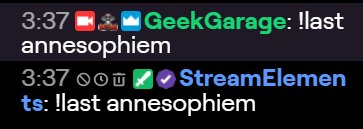
any ${user.XYZ} command i'm only able to run on my self, it completely ignores any name given to the command
strong kernel
Might help if you spell the name correctly. It's ann, not anne.
 fresh bison
Hello! have a question about fonts in overlays
I've changed a font on the overlay, but after saving, it still isn't updating on stream
Does the font need to be installed on the pc in order for it to change on stream?
strong kernel
If you're using the custom font option, yes, that's attempting to reference a font on your PC.
fresh bison
No, not using custom font option. Left that unchecked. It is one of the google font choices
strong kernel
Then no, that doesn't matter, as it's referencing Google.
Is this for your account or someone else's?
fresh bison
Someone else
strong kernel
Name?
fresh bison
unknownbark
strong kernel
Which overlay?
fresh bison
the game one
strong kernel
And what are you changing?
fresh bison
game overlay. I just updated the font of all of the labels
to the julius sans one
but on his stream
it hasn't updated
strong kernel
It was just stuck.
fresh bison
OMG thank you! I just saw it updated!!
strong kernel
Probably had to clear cache in the browser source properties.
fresh bison
OH!
ok. Thank you so much, I will try to remember that for next time 🙂
so awesome thank you for helping me so quickly @strong kernel 
strong kernel
Oh lord, you even have Nezuko emotes.
 fresh bison
i really love demon slayer. I can't wait to see how the series portrays the upcoming battles 
thank you again! 
 fresh bison

 exotic scarab
can anybody help with obs-streamelements real quick?
lament blade
What do you need help with exactly?
 lucid olive
Hi
zenith widget
Please ask your question and don't ask in multiple channels! @lucid olive
 steep meteor
Greetings! Is there a way to view chat while streaming and not see all the bot messages.
 chrome stump
how do I add a follower bar and a tip jar in OBS
zenith widget
You can add those via the overlay editor.
chrome stump
thx
zenith widget
steep meteor
@zenith widget I use stream elements OBS
zenith widget
So in the obs.live chat dock
steep meteor
Sorry for the delay, its almost bed time for me and I just really looked at this discord and it has sooo much stuff I want to use for my stream.
@zenith widget yes
zenith widget
So you click on the cogwheel in chat, switch to non-moderator chat settings, FFZCC, type in filter in the top search bar, Filter -> blocked users -> add the bot name
 steep meteor
yeah it did the same thing
zenith widget
its removing it as intended
steep meteor
Can the chat still see it?
zenith widget
FFZ and BTTV are personalized addons
meaning any settings and block of people is for you only
steep meteor
I want the chat to be able to see the commands from Streamelements but not me so I dont miss a comment in the chat
zenith widget
I understand what you want.
Its just that it seems you either didn't do it right or some settings is not completely filtering the bot for you
steep meteor
Ok let me rewatch the video ❤
steep meteor
its working now and I could not be more happier , you dont understand how much this will help me on a daily basis.
@zenith widget I hope you have a great day! its 1AM here and I am heading to bed! Thank you again kind sir!
zenith widget

lament blade
Ayeee Keizar deserves his coffee now 
steep meteor
Ok I have another question, How do I set my command !time for Texas time?
zenith widget
steep meteor

 rancid nova
If I get a follow, sub, etc. the alert sound will be played again after about 10 seconds. I have only one scene in OBS. And in my browser I don't have open the editor.
rancid nova
yes
rancid nova
yes I deletet my overlay and recreate a new one but the same problem
rancid nova
yes
zenith widget
And how do you have alerts now when there is no overlay on your account?
rancid nova
Im waiting for my new alrts from fiverr
zenith widget
Right - so I can't try and reproduce the issue
without having an overlay on your account currently.
rancid nova
wait i create my old overlay
zenith widget
Everything setup again?
 sick cloak
my bot don't send the link... show like this the space '' *** ''
zenith widget
👍
zenith widget
scene builder?
 untold crest
@crimson basin create a custom widget and paste code from here: https://github.com/StreamElements/widgets/tree/master/ViewerCount (html to html tab, css to css, js to js and json to fields of custom code editor)

GitHub
Contribute to StreamElements/widgets development by creating an account on GitHub.
 slender zephyr
Sorry if this is the wrong place - is there anyway to get a StreamElements alert (new follower or subscriber) to act like a Stream Deck keypress? I have Nanoleaf lights that my SD has native support for, but there's no hotkey support in Nanoleaf's app so I'm trying to find a way to automate an alert triggering a key. There is an third-party thing called Lumia which can connect SE alerts to the lights but it doesn't do something else I need
zenith widget
untold crest
@slender zephyr we have a widget that can directly connect with Nanoleaf
Can't race against KeiZar. He has macro for everything. Literally everything 😉
zenith widget
I just clicked the github link, went back 1 level, CTRL + F nanoleaf and got the link 
slender zephyr
Woah that was QUICK
zenith widget
g2g fast 
slender zephyr
Ah, "Nanoleaf Rhytm Music & Sound module acts as master controller of Nanoleaf so if you want to use effects on alerts, please unplug it (also check Rhythm > api > settings)" might be the cause of all this going down the drain, as the rhythm module is the thing I want the panels to default to
 sonic dock
im trying too stream but my gamecapture aint working
 sonic dock
to specefik
lament blade
If you click with your right mouse button on the Game Capture source, what settings do you have there?
lament blade
can you try another option under mode?
by example change it to capture a specific window
then at window select escape from tarkov
lament blade
are you running obs as an admin?
lament blade
oh no worries
slender zephyr
Sorry @zenith widget - what does your Nanoleaf plugin do? Can't see any info about what it does, just how to set it up
zenith widget
Its not mine, its @untold crest , but it triggers different nanoleaf colors based on the alerts
let me see if I can find someone using it

 untold crest
So basically it sends an event to nanoleaf device for x seconds then sends another event (idle state) to go back.
slender zephyr
Ah, @untold crest can it be a scene that's already been saved to the Nanoleaf, or a specific colour? I see on the link that it mentions "effects names"
What I'm trying to do is trigger a Stream Deck multiaction so it shows a series of scenes as an animation
So if there is another way to simulate a Stream Deck keypress as a workaround, that would also be good to know for other things
untold crest
Huh. Unfortunately it triggers one effect from your nanoleaf config
slender zephyr
That's still useful, thank you
lament blade
hello there, was just wondering if it was possible to hide the ! commands from the on-screen chatbox?
zenith widget
Unfortunately, no.
lament blade
alright, no worries ty
 crimson basin
@untold crest cheers for your help big man!
 dark tinsel
i need help, my stream is a black screen whilst trying to load it in obs or streamlabs etc. it used to work now its gone, can anyone help? .
lament blade
@dark tinsel what capture do you use?
lament blade
I'll ask around, since I am not familiar with the Elgato hardware
dark tinsel
thank you, i appreciate it. Used to work totally fine now wont show my video capture is just black. i know my elgato works because ive used it round a friends
lament blade
I think the people over at Elgato can provide you the best support with their products
https://discordapp.com/invite/elgato
dark tinsel
cheers bro
 patent pivot
Anyone know if you need a pc for song requests to work?
 celest glen
Hey guys, I was wondering if there was any Discord integration, sorta like how Nightbot can assign roles to subs & stuff.
I couldn't find anything on my dashboard so I thought I'd ask here
gentle imp
not atm
it's planned but not here yet, you can upvote it though https://streamelements.helprace.com/i180-add-a-discord-bot
celest glen
Damn. ANy recommendations on bots other than Nightbot with the same functionality?
lament blade
@celest glen you can however assign roles to subs with discord integrations
server settings -> integrations -> twitch
celest glen
I had done that a long time ago @lament blade , but it was finicky. I'll give it another go though, lots has changed recently. And I'll look into mee6 as well. Thanks for the help @lament blade & @gentle imp !
lament blade
No worries, it works perfectly for me atm!
celest glen
Actually, while I'm here, any thoughts on what might cause certain sfx to echo while others don't?
 proud cypress
Hi! I've been trying to use an emoticon created by me in some streamelements command but I can't find the way, I would like to know if there is any way to do it ... Thanks!
To give you an idea, the emoticon refers to the loyalty points and I would like to replace it with the name of these points. Thank you!
lament blade
@proud cypress you would need to gift a sub to the streamelements or custom bot you have to your stream if you want your own emotes to work in commands
gentle imp
there's at least 2 things you need to check @celest glen if all browser sources have ticked "shutdown source when not visible" and also check variations on alertbox in the overlays
untold crest
@proud cypress call your points like that emote name and upload it to FFZ/BTTV and it should be OK.
Also if you don't want to purchase sub for your bot, you can message Twitch to assign sub for your bot: https://help.twitch.tv/s/article/lifetime-subscriber-guide-for-partners?language=en_US
lament blade
^however that is for partners only
proud cypress
Should I be giving away the sub every month to streamelements?
The option that @untold crest lx offers me is cheaper!
celest glen
Hmmm... I'll look into it. Part of what makes it weird is that some commands echo sometimes, but not all the time.
lament blade
@proud cypress i dont use that option, but it works, I just asked around myself because i was gifting subs haha, which is not needed
gentle imp
or if you have overlays open on website or in transition/preview mode on OBS @celest glen
so that has effectively 2 overlays open
celest glen
Only people with FFZ/BTTV extensions installed on their browsers can see those emotes if you go with the FFZ/BTTV thing fyi
untold crest
People and on screen chat widget
Maybe create BTTV emote called "points"?
It should be easiest and valid for both parties
proud cypress
it's more complex than I imagined then ..
untold crest
People without BTTV/FFZ will see "points" text, people with BTTV/FFZ will see image
celest glen
Okay. I'll see what I've got set.
proud cypress
I will try both solutions! thank you
celest glen
One more thing.... Would there be a reason why my emotes display differently in chat vs on screen? Specifically, my old emotes show on screen while my new ones appear in chat. Any thoughts there?
See, none of these are huge problems so I forget to ask about them until I'm here lol
This happens with kappagen and with the on screen chat widget, btw



 celest glen

thorny wren
@dry hare yes, I recently change my name.
dry hare
@thorny wren what was the original issue you were having?
thorny wren
@dry hare this one: Can someone can help with that 404 error on my Chat Stats?
https://media.discordapp.net/attachments/199460642975907840/631326759391854593/Error_404.PNG?width=959&height=456

Yes, I recently change my name on Twitch.

 radiant nacelle
I have bot timers set up with links in them the links never post to stream chat how do i fix it
swift parcel
@thorny wren dashboard part bot, sign out of page, resign in, rejoin bot then put in a support ticket (help button on the bottom right) with your old twitch name and your new twitch name asking for the chat stats to get imported
thorny wren
@swift parcel thanks
swift parcel
@radiant nacelle make sure the StreamElements bot is modded in your channel (either StreamElements or if you changed its name whatever name youve used). If you already did that -go to your TWITCH (note Twitch) dash board go to moderation at the bottom and make sure block hyperlinks is NOT activated.
radiant nacelle
tyvm Lady Matrix
 torn locust
Hello! Recently swapped from StreamLabs to StreamElements. Didn't like the new "Prime" features they have etc, and to be honest I didn't knew about StreamElements. Anyways, the platform is great, many awesome features, gotta say you guys did an amazing job! Here's the catch (might be my fault tho, almost sure it is), I'm using OBS.Live with Overlays created on StreamElements and implemented via Browser Source. My CPU goes nuts sometimes, having OBS using about 60-70% of it and loading about 11 "obs-browser-page" instances when I only have around 6 scenes, 1 source per scene. Is this normal or am I doing something wrong?
Keep up with the amazing work and Thank You!
round brambleBOT
@torn locust Please provide a log from your last stream. To do this, in OBS go to Help > Log Files > Upload Last Log File and paste the link to the log file here.
torn locust
yes sure, was just working on it!
lament blade
alright!
torn locust
I haven't streamed yet, just poking around with the settings, I'm a bit scared to go live and having the software pushing my CPU to the roof :/
@lament blade https://obsproject.com/logs/mx1oI1RLCiwO02T0
lament blade
yhea if there is no output session aka a stream than I can't check that, but what you can do