#helpdesk-twitch
1 messages · Page 508 of 1
 drifting aurora
 viral valve
trying to stream on my laptop but when i put the url in the browser it don't work
@crisp jackal can you please help
can anyone help set up obs, I'm a lost puppy
 dry hare
@chrome scroll can you screenshot your command in the dashboard? So I can see the syntax of it?
 chrome scroll
@orsuan
 round brambleBOT
@viral valve Checkout StreamElements Youtube channel, several guides for you!! https://www.youtube.com/channel/UCjerlCIbLPQwSnYlClkjDXg or a list with all the guides https://www.youtube.com/playlist?list=PLCDDKlFdScbEwdx5AntcQIS1InkFJwHtv
dry hare
Do you have links filtered somewhere?
Make sure in your Twitch Channel moderation settings that you don't have hyperlinks blocked
@chrome scroll
StreamElements Spam Filters
Twitch Channel Moderation Settings
chrome scroll
@dry hare okay, thanks.
dry hare
woot
chrome scroll
what s mean woot ?
 modest pasture
Anyone else having issues with points being refunded not actually refunding? :/
dry hare
how are you refunding the points?
chrome scroll
@dry hare I understand hahaha thank you very much
modest pasture
@dry hare From the redemption page
@dry hare For the last week all refunds aren't actually refunding, they're taking the points
dry hare
So instead of refunding it's deducting?
dry hare
Can you screenshot it?
modest pasture
Sure
Okay here we go
Also whenever we refund it says "there was an error" so we have to refresh the page and then it lets us click the refund button
@dry hare So that shows the whole process of checking points, redeeming something, refunding it and still having less points
dry hare
Okay. I am passing it along to someone who can better investigate. They should be along soon since it's almost morning where they are
modest pasture
@dry hare Okay thank you so much, really appreciate it 🙂
dry hare
Not a problem. That's what we are here for. I'm sorry I am unable to fix it, but it's beyond my level of knowledge 😄
modest pasture
@dry hare Completely understandable 🙂
 lament blade
i need help setting up my tipping for twitch
dry hare
Also Song Requests appear to have taken a nosedive tonight too so don't feel too bad
lament blade
i do have voice
modest pasture
@dry hare Should I keep checking this thread or will they dm? 🙂
dry hare
They will probably come directly here and ping you
modest pasture
@dry hare Sounds good thanks =]
lament blade
i dont have a tipping panel on twitch for me to past the tipping link
dry hare
@lament blade Watch this video https://www.youtube.com/watch?v=eLzxRkq7tJo
dry hare
Then you missed the part about adding the link to your panels
lament blade
i dont have a panel for tipping
dry hare
You have to create one
lament blade
wats the name of it
dry hare
np
 upbeat jasper
So im trying to get my twitch panels to appear on my obs
it had updated and the only thing that shows is chat
lament blade
@upbeat jasper why would you need your twitch panales in your obs? or do you mean the widgets from obs.live?
upbeat jasper
The one to update my streaming information
lament blade
@upbeat jasper does it not show up or is it black?
upbeat jasper
Black
lament blade
@upbeat jasper in obs settings -> output -> disconnect and reconnect your twitch account
lament blade
@upbeat jasper perfect, have fun with it 😄
upbeat jasper
One more question
I had streamlabs before OBS live and I had all the settings and scene set up exactly how I'd need it. Is there a way to import whose sources
lament blade
@upbeat jasper did you have installed your obs live apart from streamlabs or is it the same dirctory?
@upbeat jasper you had slobs right?
lament blade
@upbeat jasper go to your appdata -> slobs folder -> overlays ;;; copy the .webm files and create a new scene in your new obs with media source -> select the right .webm file and oyu have your overlay back
upbeat jasper
Would if import all the sources?
lament blade
@upbeat jasper you have to do it manually, sadly i dont know a way how to import everything once. I dont think thats possible yet.
lament blade
@upbeat jasper no problem 😄
lament blade
I have a problem with streaming. Whenever I have screen capture and I open a game the screen becomes black so no one can see the game. Pls help thanks.
@lament blade for streaming a game i would recommend using game instead of screen capture, this could solve your problem
Ok thanks
I will try
 steep dirge
So question.
lament blade
@steep dirge what is your issue ?
steep dirge
My stream elements is capturing 2 of the same scenes. and turning them green, purple, blue and black. Idk how to fix this.
@lament blade
so you can see
lament blade
@steep dirge ahh i see, let me check something
@steep dirge do you have any filters on your overlay?
lament blade
@steep dirge do you have the colorformat set to nv12 with the color space 709 and color range partial ?
steep dirge
idek how to di that lol
lament blade
@steep dirge please click in your obs on the bottom "Settings" and go in "Advanced"
steep dirge
nv12 is there color spacing is 601 and it is partial
lament blade
@steep dirge try changing the color space to 709 and retry
steep dirge
it wont let me change it
lament blade
@steep dirge because you are live, you have to stop the livestream and change it
lament blade
@steep dirge does it show this weird bug in obs also or just when you are live?
steep dirge
no in obs i have no problems, but when i look on my 2nd monitor and what viewers see is that weird bug. and stationed in germany. been streaming since korea that was over a year ago and i have never had this problem
lament blade
@steep dirge after changing your color space to 709, is the bug still there?
steep dirge
let me go live real quick to check
lament blade
it worked thanks
lament blade
@steep dirge on which obs version are you on? do you have the obs.live plugin installed?
lament blade
@steep dirge have you installed the obs.live plugin also?
lament blade
@steep dirge please click on the layer that bugging and go to properties, scroll down until you see a button called "Refresh cache of current page", click on it (if you use an overlay of streamelements)
steep dirge
its all my layers lol well all my scenes
lament blade
@steep dirge so basically everything, also games etc?
lament blade
@steep dirge have you tried the twitch inspection tool?
steep dirge
All i did was load obs update it and boom there it is
idk how to do that or what that is.
lament blade
@steep dirge on your twitch dashboard on the "live" page you see at the bottom an inspection tool, if you want to use that you have to activate bandwidth test in obs
steep dirge
So go live? where would this be located
 fallen nimbus
I've been having an issue where only my raid alert stays on the screen after it's triggered and never goes away. Is there a fix for this?
lament blade
@steep dirge on obs on the output page
@fallen nimbus do you use an overlay of streamelements?
fallen nimbus
yes
lament blade
@fallen nimbus have you set up your alert box correctly in your overlay?
fallen nimbus
ya I believe so. This only happens on the raid alert
lament blade
@fallen nimbus let me check something real quick
@fallen nimbus if you go in your overlay editor and choose your alert box, in the raid settings -> how long is your alert duration?
steep dirge
@lament blade all i see under tools is DeckLink output and output timer
fallen nimbus
8 seconds
lament blade
@steep dirge not under tools, on your dashboard -> left side -> LIVE -> go in it and scroll down
@fallen nimbus have you any animation settings with a very long duration?
steep dirge
SO not on m streamelements dashboard?
lament blade
@steep dirge no on your twitch dashboard
fallen nimbus
@lament blade they are all between 5-10 seconds
lament blade
@fallen nimbus and your raid alert stays permanent after once triggered?
fallen nimbus
ya
steep dirge
okay so now what
lament blade
@fallen nimbus have you tried deleting your widget and replacing it with a new one?
fallen nimbus
I have not. I'll do that now
lament blade
@steep dirge on your twitsh dashboard you scroll down -> twitch insepction tool
lament blade
@steep dirge yes
lament blade
@steep dirge go in your obs -> output -> activate bandwidth test
steep dirge
Yeah,not seeing it:( Sorry for being a pain.
lament blade
@steep dirge in obs or in your twitch dashboard?
steep dirge
on neither i dont seeit
lament blade
@steep dirge oh my bad, i see on my twitch panel that it got moved somewhere else
steep dirge
lol all good
lament blade
@steep dirge then please go to this official page of twitch -> https://inspector.twitch.tv/ ;;;; and in your obs -> settings -> stream -> Enalble bandwidth test mode
lament blade
@steep dirge if you enabled the bandwidth test modei n your obs, it will automatically show you your problems with video / audio / bitrate in there
steep dirge
idk how to do that :.(
lament blade
@steep dirge when you started streaming, in bandwidth test mode no one can see your stream
@steep dirge just start a stream in bandwidth test mode and wait a few sec. everything will be shown on this website then
lament blade
@steep dirge if you connected your twitch account in your obs, you just have to enable it and not pasting something in your streamkey
steep dirge
it is connected. hwo would i enable it
lament blade
@steep dirge go to settings in your obs -> stream -> enable bandwidth test
steep dirge
it only shows stream key, server and service
lament blade
@steep dirge then just paste the text shown in twitch inspector at the end of your streamkey
lament blade
@steep dirge start streaming, but this stream will no one see, its just for the inspector
lament blade
@steep dirge yes
steep dirge
says it is stable
lament blade
@steep dirge on which obs version are you on?
steep dirge
24.0.1
lament blade
@steep dirge 24.0.1 is just not the best obs version out there, many bugs etc. i would, for the easiest problem solving, just downgrade to 23.2.1, in this version you can also use obs.live plugin 🙂
lament blade
@steep dirge if you go on the official streamelements website, you will see on the top -> OBS.Live -> click on it -> download the installer -> it will install obs 23.2.1 with obs.live plugin -> just put the obs.live in a different folder than your current obs
fallen nimbus
alright Deleted and made new scenes the .gif works but if I use an mp4 or a webm it just freezes
steep dirge
Okay it is installed and i skipped the version i was using. now golive and check it out
lament blade
@fallen nimbus streamelements has it problems with mp4 and webm files, expiernced it myself, but you can easily convert it to gif
@steep dirge good luck, maybe its working now
 median mesa
Hi, I have an issue about the Tip Goal widget in StreamElements overlay editor, everytime I try to change the text size of the Tip Goal widget after saving changes to my current overlay it keeps resetting back to it's original size, even after refreshing or launching my current overlay. I even create a blank overlay for the Tip Goal widget and it's still the same issue. Can anyone tell me how to solve this?
steep dirge
@lament blade ty it is all good now! (:
lament blade
@median mesa As I heard thats an issue which must be fixed, but no eta yet
lament blade
@steep dirge no problem, have fun streaming in good quallity now! ❤
steep dirge
lmao thanks man or woman
median mesa
@lament blade I see, thank you for the response! Currently I'll keep the Tip Goal widget on my overlays and improvise to ensure it doesn't distract the viewers ;D
lament blade
@median mesa also generally editing text sizes has problems as i know
median mesa
@lament blade So far other widgets I use have no issue from their text size and I didn't mess with them till now
lament blade
@median mesa let me check it real quick, you mean the tip goal?
median mesa
@lament blade Yes, the Tip Goal widget that I tried to mess around with.
lament blade
@median mesa have you any addons installed to your browser thats maybe blocking it?
median mesa
@lament blade Just only Google Docs & Docs Offline, Sheets, Slides and Mega addons in my Chrome
And it's in the latest version too for Chrome browser
lament blade
@median mesa and you are trying to change the text size and not the postion thing?
median mesa
@lament blade Yes, I was trying to change the text size for the Tip Goal widget
Even after saving changes to my current overlay, launching it will reset back to it's original size, like eg: original size = 24, changed size = 14
lament blade
@median mesa yeah i see that, thats a problem with streamelements and not an user issue, you just have to wait, i think its getting fixed soon
median mesa
@lament blade Alright, thanks for letting me know, and no problem
 spring shard
Is there some way I can use the /marker command with StreamElements bot?
It can use the /me thing, but when I'm trying with /marker, it just outputs the /marker in chat
lament blade
@spring shard i dont know any marker command but does the me command the same as marker?
spring shard
It's for Editors of a twitch channel
They can use the /marker command in chat to make a maker in the VOD
For highlight purposes etc
lament blade
@spring shard there is no official marker command in streamelements yet
spring shard
I know. But the bot is editor, and I just want it to use the /marker command in chat. But instead it of it 'using' it in chat, it just outputs /marker
It used to work
lament blade
@spring shard because there exists no marker command so the bot cant respond, you could create a custom command (also supports RegEx)
round brambleBOT
You can make changes to custom commands in chat with!command add/remove/edit/options/show Valid flags for !cmd options are: -cd (number) -usercd (number) -cost (number) -level (number) -type (say, whisper or reply) -count (number). --- Example: !cmd options twitter -usercd 60 -type reply -level 250
lament blade
@spring shard ahh you made a command yourself okay
spring shard
Yes
modest pasture
Still need help with our redemptions. It doesn't refund, it takes away points even when we refund :/
lament blade
@spring shard the bot cant execute commands that he wrote himself
lament blade
@spring shard if you write !marker in chat the bot is responding with /marker right?
spring shard
Yes. It SAYS it in chat, instead of USING the /marker
lament blade
@spring shard because the bot cant execute a command in a command thats the problem
 lament blade
@spring shard huh thats weird, maybe its only for another streamelements command
and what exacly is the problem?
spring shard
I'll start over.
As a twitch editor, you have the option to use a TWITCH COMMAND /marker
When you use it in chat AS AN EDITOR OF THAT CHANNEL. You'll make a marker on the VOD for easier finding in the VOD.
But when I try to use StreamElements bot to use the /marker twitch command in chat, it doesn't work. It doesn't USE the command. It just outputs it as raw into chat.
lament blade
@spring shard ah now I understand, sadly I’m not into the bot so I can’t help out with that problem, but you could ask a staff or support hero, maybe they know more
spring shard
I'm not sure if I'm allowed to tag them. But I hope they answer.
lament blade
You can tag support hero’s but don’t tag moderators
 normal igloo
mmm @lament blade I wouldn't recommend tag any of the support as that would be annoying you If you did @ se.staff se.champion etc that notification will go to all of them regardless of being online or not 
 jade remnant
as far as i know, the bot itself cant send /commands without additional IRC work, best to ask in #dev-chat
out of curiosity, in your picture you use !maker why not use /marker
its exactly the same, if not easier. the only benefit would be doing a quick hand of !m
spring shard
@jade remnant I don't want to have 1289373 people as Editor.
Better to use the bot for it
Weird part is
That "/me" works.
And I'm 100% sure the /marker command worked as well back in March
 ionic kelp
@spring shard Have the bot whisper you an uptime instead 
spring shard
Yeah, that's smart.
 steel talon
Isnt there something like when i post something in my Twitter account it gets printed in my Streamoverlays and when people engage with it it gets printed as well?
lament blade
What do you mean with printed?
that the tweet appears on your stream as an alert?
you can get the tweet in your chat
steel talon
I think i saw in a stream a popup (like a widget) who showed the tweet.
Mh i think it dosnt make sense to alert your own tweet.
ionic kelp
Display tweets on your stream. Like TwitchAlerts but for Tweets. Easily Customize your Overlay. Follow hashtags, manually like and display tweets.
lament blade
If its widget wise i think its the best to ask in #dev-chat
there are ofcourse other 3rd parties that do it
steel talon
Ahhhh maybe its this tweetalerts
I take a look and thank you, 🎣#2105 tehbasshunter are you useing it, can u recommend?
ionic kelp
I am not but very certain it's what someone else I know was/is using.
steel talon
SE dosnt have patron or something to support?
lament blade
do you mean Patreon?
steel talon
yeah something like this
It says channel was not found
https://streamelements.com/Patreon

StreamElements
The Ultimate All in One Platform for Streamers
lament blade
I dont think we are running a patreon atm
steel talon
Understandable... lo of paper work.
However looking forward to support SE when you deliver an option for it.

lament blade
You' re already supporting by using our application! 😄
lament blade
@steel talon at the moment OBS.Live plugin doesnt support 24.0.1, it could lead to issues and problems with updating
steel talon
Ok, no benefits for me anyways.
lament blade
we are hoping to get the update as soon as possible 
 south idol
Hello, So i have this problem that when i set a !command with a link (they are whitelisted) it only comes the text and instead of the link its *** Please help
 elder sorrel
You have to go to your Twitch Settings to disable hyperlinks being blocked. @south idol
south idol
aha! thank you @elder sorrel
elder sorrel
No problem 
lament blade
@daring totem hello, what is your issue 🙂 ?
lament blade
We dont offer streamlabs support
lament blade
@daring totem streamelements -> chat -> click on it in your obs
 daring totem
yes
lament blade
@daring totem have you tried reloading your chat box ( chat box, top left corner)
lament blade
@daring totem are you able to log in into twitch in the chat box?
lament blade
@daring totem so you are logged in into your chat box via twitch?
daring totem
yes?
lament blade
@daring totem have you tried loggin out and logging in again of streamelements via obs?
daring totem
what
lament blade
@daring totem if you click in your obs live at the top of "streamelements" is there a button called "logout", logout and then log in again, this could solve your issue
lament blade
@daring totem no problem 🙂 have fun with it 😄
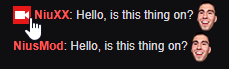
Custom bot:
If i try to " Test bot " let a message in chat appear in the name of the Broadcaster (me) " Hello, is this thing on ? "
did i sth wrong ?
@lament blade did you paste the oauth token of you own account in there?
that could be possible
@lament blade you have to create a seperate twitch account for your own bot. the name of the twitch account you will create will be the name of the bot. you also have to paste the oauth token of the bot in there, not yours
ohh, damn.. gonna try it
round brambleBOT
@lament blade Custom bot name requirements
- StreamElements bot modded and in chat
- Active overlay with alerts
- StreamElements tipping page in the panels below the stream (!panels)
- OBS.Live or Ground Control open
- Create a twitch account for the name you want to use or run the bot under your own name
- Custom bot name doesn't work on Mac
 inland knoll
is the streamelements leaderboard extension working ok? just keeps saying its loading on my stream
lament blade
@lament blade now the same message is shown with new bot's name ( "Hello, is this thing on? " )
Glad to hear its working 😄
@lament blade thats perfect, hope you have fun with your own, custom bot 😄
wait another problem, i refreshed the chat and now this message appears in both names @lament blade
@lament blade you have to blackliste your bots name in your widget chat box
i mean the stream chat, not the widget
@lament blade you mean that streamelements and your bots name write the same message?
no, my broadcaster and custom bot
both write " Hello, is this thing on? "
when i press " test bot "
@lament blade can you maybe send a screenshot of this issue?
sure
 edgy pilot
yo
lament blade
 edgy pilot
does chat stats work for anyone else? https://stats.streamelements.com/c/global
StreamElements
Description Chat Stats tracks emote usage on Twitch in real time. See which emotes are the most popular on every Twitch channel
lament blade
@edgy pilot is your chat stats broken? have you changed your name in the past?
 cedar lynx
That one is just the global page 
lament blade
@lament blade have you tried closing and reopening your ground control?
inland knoll
chat stats not working and extension not working
edgy pilot
@lament blade its every channel
lament blade
are you not meaning: https://stats.streamelements.com/ ?
StreamElements
Description Chat Stats tracks emote usage on Twitch in real time. See which emotes are the most popular on every Twitch channel
lament blade
yes because we recently could change mine, so if yours not working i need your old twitch username and your new one
and we can reset it for you
@lament blade restarted now, and that fixed it.
its normal, that the message doesnt appear again if i press " test bot " twice ?
inland knoll
ok, nothing is working I'll go and stream and see what happens
lament blade
@lament blade yes
edgy pilot
 lament blade
what do you mean exactly with nothing is working?
oh like that, now i see
@lament blade so last step /mod custom bot right ?
and unmod streamelements ofc
@lament blade i think their servers are down, for me the page doesnt work either
@edgy pilot im gonna give the admins a shout
edgy pilot
ok ty
lament blade
@lament blade i have done this step, just to be sure its 100% working
inland knoll
that was a lot harder than it should have been
lament blade
@lament blade no streamelements bot has to be mod also
both SE and the custom bot have to be modded
normal igloo
^^^^
lament blade
Devs have been notified on the chat stats issue
edgy pilot
ok and just incase this helps, im getting the 404 message now instead of what i had earlier
lament blade
@edgy pilot of the chat or generally opening streamelements?
Seems to work, thanks alot @lament blade
edgy pilot
of the chat
lament blade
@lament blade no problem 🙂
@edgy pilot as @lament blade said the chat has to be fixed by the devs, please be patiently and wait
edgy pilot
ye ik,
lament blade
yhea he was just giving some more info what he got now on the page, that' s alright
edgy pilot
works
 lament blade
the custom bot doesnt show the gamble messages.
@lament blade are both the custom bot and the streamelements bot mod?
nope
@lament blade both have to be mod
normal igloo
god damn it Carisus always beat me to it today  👍
👍
lament blade
@normal igloo haha 😄 you want to battle again 😛

 crimson heart
Hi everyone. So i tried to import my streamlabs alerts to streamelements but my follower alert isn't going through. My raid alert works fine though, Just not sure why my follower alert won't work. for some context the follower alert is just a simple gif with a "thanks for following" text.
lament blade
@crimson heart are you able to manually add them? if you still have the img/gif and sound?
@crimson heart also streamelements have some issues using mp4/webm files for me
crimson heart
Haven't tried that yet. Would I still need to implement them as a browser source??
lament blade
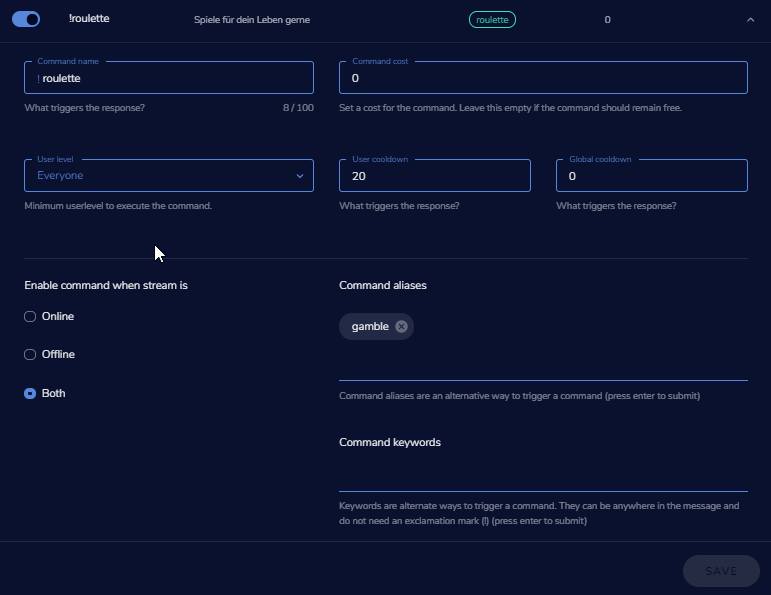
it works, but the roulette alias "gamble" get ignored
@crimson heart no you can add everything in your overlay editor as widgets
@lament blade have you enabled the roulette game?
yes
crimson heart
@lament blade okay I'll try that and see if it works
lament blade
@lament blade also that everyone can use that command?
@crimson heart if it doesnt work, just write me again
if i type " !roulette" it works
but if i use "!gamble" it doesnt work
and in setting " gamble " is as alias
@lament blade stupid question but gamble is also activateD?
 half tulip
Hey hey all, is it possible to make streamelements whisper a user when they win/lose on the roulette module? (i've tried changing the win/lose message for it to be both "/w and /whisper {user} xxxxxxx"
But it still just says then in chat "/w User blablba"
lament blade
@lament blade is gamble a custom command? i cant find it in the offical ones?
nah
@half tulip only if its a custom command you can set up how they respond (wisper/chat)
its on roulette module as alias
 half tulip
hm, the messages are built in the module, so i guess you cant then?
lament blade
@half tulip i dont think so
@lament blade hm, if you just added the alias yet, i would wait a few minutes
the alias is standard, but i got it
cedar lynx
I don't think that's StreamElements. that looks like a Streamlabs setup.
lament blade
huh?
have to activate " slots " too
still wondering, cuz yesterday it worked fine without slot module ^^
nightmode?
cedar lynx
this is the StreamElements roulette
lament blade
@cedar lynx its nightmode
crimson heart
@lament blade Appreciate the help!:) We are rolling now
lament blade
i think hes chaning the settings of the command and not the actual game
half tulip
@cedar lynx that is the module page, what @lament blade is in, is the actual command
lament blade
@crimson heart perfect!
thanks again btw @lament blade
@lament blade is it working now? after you waited a few minutes?
 lament blade
" have to activate " slots " too
still wondering, cuz yesterday it worked fine without slot module ^^ "
but ye it works now for me @lament blade
@lament blade perfect, have fun with your games! 🙂 ❤
I will, thanks :)
 floral badger
hey guys i'm looking for help with the widget chare for the instant replay i can't get it to work
lament blade
@floral badger which instant replay, do you mean the bot?
is that a custom widget? Since I' m not seeing it at the SE Widgets
 opaque badger
Hi, is anyone else having issues with OBS.Live and CPU overload with some games?
This is only happening when OBS and some games are both running, even if the stream hasn't started. CPU overload means the game runs smoothly on my main monitor but it's super lagged through OBS.
This is both happening at full resolution 1080 or scaling down the output in OBS to 720.
I'm trying to determine if the issue is caused by the ("heavy") games or my OBS version in conjunctions with some games, hence I need to update OBS.
OBS version: 23.2.1 64bit
CPU: i7 6800K
RAM: 64GB
Video card: 1080 Gaming X 8GB
OBS only 10% CPU
Insurgency only 40% cpu
Insurgency + OBS 70% cpu
COD Black ops only 50%
COD Black + OBS 70-80%
COD MW only (I know it's a beta) 47%
COD MW + OBS 75-85%
Any help with this would be much appreciated!
Cheers
lament blade
@opaque badger do you use x264 or nvenc encoder?
round brambleBOT
@opaque badger Please provide a log from your last stream. To do this, in OBS go to Help > Log Files > Upload Last Log File and paste the link to the log file here.
lament blade
have you run a stream with it yet? Then we can see in the log what might be causing it
opaque badger
@lament blade I'm on the Nvidia Nvenc H.264 (new)
lament blade
@opaque badger in your obs settings in the advanced tab, which process priority did you selected?
opaque badger
@lament blade I'm using "Normal"
I've found the log, can I send it to you privately here on Discord?
 clever plume
MY twitch stats and stream information are not showing up on OBS after the updates?
lament blade
@clever plume did you update to 24.0.1?
clever plume
@lament blade Yes i did
lament blade
we are working on a update for obs.live at the moment, its the best to go back to v23
@clever plume the obs.lvie plugin isnt really compatible with 24.0.1
@clever plume but you could also try reconnection your twitch account in obs this sometimes help
round brambleBOT
@clever plume If you are not seeing the OBS Twitch integrations and have OBS.Live installed, please follow these steps:
- Make sure you are on the latest and greatest version of OBS.Live
- exit OBS (make sure OBS is not running)
- delete %appdata%\obs-studio\plugin_config\obs-browser\obs_profile_cookies
- start OBS.Live
- Settings -> Stream -> disconnect -> connect
opaque badger
@lament blade @lament blade can I send you the log via message? I can't upload it as it's not the latest log - it's dated 2019-09-19
lament blade
@opaque badger sure
opaque badger
thx
lament blade
just send it to me that' s fine
it should be a link by the way, don' t know why it doesnt want to upload
 buoyant temple
Is there issues w/ the bot today working w/ the 'stream store' currently or is there any work being done causing issues where redeems aren't working right away?
lament blade
not that we know of at the moment, is it having a delay?
buoyant temple
redeeming is giving errors of 'internal server error'
lament blade
I'll ask someone about it
buoyant temple
thanks if there is work or a server lag spike thats fine, thanks in advanced ❤
lament blade
no worries, I'll let you know
clever plume
thank you @round bramble it works now
 thick tusk
I just got a donation and a sub yet it didnt come through on my activity feed, is there anyway to recover this?
lament blade
@thick tusk not to recover, but have you set up everything correctly? maybe try and refresh your activity feed
thick tusk
Yes, I was receiving alerts just before that.
lament blade
@thick tusk have you changed anything ? (in your dashboard or updated obs)?
lament blade
Have they shared their sub in your chat?
thick tusk
Yes, I can see the sub in the chat.
lament blade
@thick tusk have you tried refreshing the browser cache of you overlay?
thick tusk
As well as the donation was missing, I can see it in the transactions.
buoyant temple
update: store redeems worked for a little then went down again w/ the same error. just updating that all
lament blade
@buoyant temple yhea i gave it through, just waiting on an answer
thick tusk
Yeah just got another sub and it came through.
lament blade
will update you when i got an answer back
buoyant temple
that's fine just wanted to let you know there was a change
lament blade
Alright!
 astral edge
Is there a limit to how many custom commands you can have?
lament blade
@astral edge are you facing any issues adding a new custom command?
astral edge
No, just wanted to know if there was a limit to how many you can create and add so i dont end up going back and deleting other ones.
lament blade
@astral edge im on my dashboard right now and i dont see any limits on custom commands, so probably not
astral edge
Okay, thank you.
lament blade
Hello, I'm having issues getting my Overlay to fit right O.o
I've tried putting it as my Monitor 1440 x 900 but didn't seem to work, tried 720p I this (in picture) and i'm issues sense.
@lament blade do you want to stream in 1080 or 720p?
I'm currently limited on my settings on my Laptop. Yes, I do stream 720p
make it 1920x1080
Ok.
 solemn scarab
Good morning. I am trying to setup loyalty points on my stream, and I'm stuck. I'm on step 3(Import settings from streamelents) and I can't make it connect. I am on the Loyalty settings on Streamlabs, and it's asking me to import from Streamelements.
lament blade
StreamElements only support some features to be imported, if you have trouble in streamlabs, i'd ask the streamlabs support
@lament blade if you stream on 720p, just set up obs with a 720p resolution and your overlay. You will automatically stream on 720p even if you monitor has a different resolution
Ok, it worked! Thank you very much.
when i openm stream information dock it's just black
why?
@lament blade try reconnecting your twitch account in the output settings of your obs, this should fix your problem
will that affect my live stream?
@lament blade for that you have to stop your livestream, reconnect and then restart your stream if you are streaming currently
 rare whale
anybody else getting internal server errors? lol
lament blade
@rare whale where do you get internal server errors? on twitch / streamelements? or somewhere else
rare whale
Twitch chat for redeeming things from my store
lament blade
@rare whale this error is known and will be fixed as soon as possible
@rare whale I' ve already let staff know about the problem!
rare whale
Awesome! Thanks guys!
 placid escarp
How come my notifications on activity feed is not updating at all???? Getting irritated
lament blade
@placid escarp have you tried reloading it?
placid escarp
yes i have still not updating
normal igloo
@placid escarp have you changed your name recently?
placid escarp
Nope
lament blade
@placid escarp try logging out of obs live and back in, this solves many problems
normal igloo
^^
placid escarp
have not tried that ill give it a shot thanks guys
normal igloo
np 👍
 white stump
Hi I am having issues with my !redeem I have created my store but when someone redeems one of my gifs it doesn't work, can anyone give me a guide for live redeems or has an idea on how to set it up the right way? Thank you
I want my followers to be able to redeem gifs on my stream vs some points and I am having a hard time making it work, when they type the command, the points are being taken but nothing happens on my stream
normal igloo
@white stump Do you have the alerts setup for the store 
lament blade
We are having some issues with the redeem at the moment
normal igloo
oh
lament blade
staff has been contacted about that
jade remnant
https://www.youtube.com/watch?v=BXGMjHqwVFE&t=179s tutorial here
white stump
@rich dragon yes I have created it and left it as default, this one works when I do a test
normal igloo
thanks for the heads up Bordeaux
white stump
@lament blade I guess it explains it, I've been hitting my head in the wall for hours , thanks!
lament blade
Do they receive an error?
white stump
@lament blade no it redeems the points but does nothing
lament blade
because the other people were receiving ' internal server error', so not entirely sure if your problem is the same as they are having
white stump
Oh, it is not the same then, there wasn't any message displayed on their side
lament blade
Here is a tutorial how to set things up https://www.youtube.com/watch?v=BXGMjHqwVFE

The StreamElements Stream store lets your viewers redeem Loyalty points (collected by watching your stream) to get special perks, fun sounds, and even game k...
white stump
When I had the item to my stream store, should I add it as stream perks or sound effect?
Thanks, I've checked that video already and followed the steps 😦
lament blade
can you show me a screenshot of that store item settings?
because if that is set up right, might have to do with the other problem that is going on
white stump
sorry it's in French
lament blade
Does the sound play?
white stump
it doesn't
lament blade
okay so both gif and sound dont work
white stump
correct
 strange pagoda
Is it possible to set the donation goal's progress to 0, or set a start date for it to count from?
lament blade
im gonna make one myself to test if it works Pedro
round brambleBOT
@strange pagoda To reset goals:
- from the overlay editor -> data on top -> goal tab -> reset progress of desired goal
- from the dashboard -> activity feed on the left -> widget data on the right -> goals tab -> reset progress of desired goal
Note: Goal widgets(progress) only counts up and doesn't go down automatically, if you loose followers/subs
strange pagoda
O ty
white stump
ok thanks, if it works then I should only need to add a redeem widget to my overlay and it would play the specific gif?
white stump
right, would they receive an error message if a simple follower tries to redeem?
white stump
correct
lament blade
I can' t seem to get it working as well, but like said, i have contacted staff about it
white stump
Ok, do you get the error message on your side or nothing happens?
lament blade
nothing happens as well, gonna see if points are gone from my account
oh wait didnt open the store
do they in chat get a message saying " user redeemed item" ?
white stump
From what you see on my settings, do you think I missed something or it should work?
yes
lament blade
Just have to wait on a message and I' ll update everyone that has had problems with it
white stump
Thank you
 thorn elk
i still cant get stream information to work..
its just black
without any form
stream information dock
dry hare
@thorn elk did you go into OBS settings > stream > disconnect from twitch and then log back in?
thorn elk
@dry hare yes i did
lament blade
Might be because v24?
thorn elk
v24 caused this?
dry hare
It’s an OBS issue. That portion is directly implemented within OBS Studio
It also is because you’re connecting directly to twitch instead of using a stream key
I only link my mixer account in OBS. Twitch I always use a stream key
round brambleBOT
@thorn elk If you are not seeing the OBS Twitch integrations and have OBS.Live installed, please follow these steps:
- Make sure you are on the latest and greatest version of OBS.Live
- exit OBS (make sure OBS is not running)
- delete %appdata%\obs-studio\plugin_config\obs-browser\obs_profile_cookies
- start OBS.Live
- Settings -> Stream -> disconnect -> connect
thorn elk
100% will try this
if its not working, i will try @dry hare solution, using stream key
above step from support Ai works, thanks alot
round brambleBOT
@thorn elk I'm a bot, only here to send helpful messages because the helpers are lazy.
normal igloo
👍
lament blade
lmao
thorn elk
LMAO
 static cargo
hi everyone
lament blade
@static cargo hey, are you facing any issues?
normal igloo
Carisus 
static cargo
im traying to stream and i click on connect asking 2 factor and i did that and stil the same
@lament blade
lament blade
@static cargo have you checked the box, that this pc is known for 30 days?
static cargo
i did\
normal igloo
Sounds more of a twitch Issue
static cargo
i think i did
lament blade
@static cargo does it pop up when you are trying to start a stream or when you are trying to connect twitch in your obs?
lament blade
@static cargo you cant answer that question with a yes !? 😄
normal igloo
😂
round brambleBOT
 normal igloo
lament blade
ok, me 😦
I also don' t understand your question there carisus 😅
@static cargo if connecting your twitch account with obs isnt successful, try using a stream key instead
 lament blade
@lament blade i meant if this 2 factor thing pops up when you hit start streaming or when you connect your twitch account with obs
static cargo
this is the message obs was unable to connect to your twitch account please make sure two factor authentication is set up your twitch security setting and i go there i set that and got the message to my phon and put and still same erorr @lament blade carisus
lament blade
@static cargo have you tried using a streamkey instead?
static cargo
and now i cant request any mor its taling me i have reach it the limit
round brambleBOT
@static cargo If you are having issues streaming to Twitch recently, please make sure two-factor authentication is set up in your Twitch security settings (https://www.twitch.tv/settings/security) as this is now required to stream.
static cargo
so go to setting on bs i put my stream key and coccect that the masseage im geting
 frank briar
Hey, i have problems with my streamelements overlay, when i press "Test donation" i get the image on the greenscreen overlay editor page, but not on my overlay link that im suppose to past into obs. Any idea how to fix it?
lament blade
@frank briar have you saved your overlay?
frank briar
Yes
lament blade
@frank briar have you tried refreshing the cache of the overlay in your obs?
frank briar
Yeah
static cargo
@unique sigilort al idid and now im You've reached the limit for two-factor activations for the day. Please try again tomorrow.
lament blade
@static cargo you have to wait because of the cooldown
frank briar
The problem doesnt seem to be in obs, but the link i've been given. It doesnt work
lament blade
@static cargo there is nothing you can do because you reached the limit
@frank briar if you paste the link you got in your browser, does your overlay show up?
lament blade
@frank briar then your link is broken, copy paste the link you get from the overlay editor again
frank briar
I've done that. Ive tried a random overlay from the premade ones. Those doesnt work either
Any new links i get given doesnt work
lament blade
@frank briar on which obs version are you? because slobs obs is blocking se links as for my knowledge
frank briar
Im in the newest streamelements obs version
normal igloo
yep slobs blocks se links @lament blade
frank briar
What is slobs :?
lament blade
@frank briar streamlabs obs version
frank briar
But again man, the problem isnt in the app. Its the link
lament blade
@frank briar is your obs version 24.0.1 or 23.2.1?
lament blade
@frank briar you click on "start overlay", a new tab opens and there you should see your overlay? if this happens paste the link in your obs as browser source
frank briar
it doesnt, thats the problem
lament blade
@frank briar have you any addons installed to your browser which blocks scripts etc?
static cargo
@round bramble now even tomorrow its now going to work and im so confus when i stream i have my streamelements in my chatt i tippe and no answer why
its jut auto im means its not areal person?
frank briar
no, @lament blade i have no addons that block scripts
lament blade
@frank briar and in your overlay editor everything is fine, right?
frank briar
Yeah, its just the link that i get given that doesnt work
My older overlays have worked in the past
static cargo
Sami_canadiToday at 1:14 PM
@quartz sapphire AI now even tomorrow its now going to work and im so confus when i stream i have my streamelements in my chatt i tippe and no answer why
its jut auto im means its not areal person? can sameone answer please
lament blade
@static cargo the support ai is a bot, not a real person, i dont think it can manage to respond to your specific questions
round brambleBOT
@static cargo I'm a bot, only here to send helpful messages because the helpers are lazy.
normal igloo
👍
static cargo
@round bramble can you help me with my issues
frank briar
I have no idea how to fix it, and my overlay is kind of crucial to a more inviting twitch stream
lament blade
@frank briar hm, thats kinda weird, never had this issue before
@frank briar have you changed your name in the past?
lament blade
@frank briar if you create a new clean overlay does it work or are all you overlays broken?
frank briar
all of them
lament blade
@frank briar but they have worked in the past?
lament blade
@frank briar I'm sorry to say that, but I think I'm the wrong guy for fixing this, could be a streamelements issue, I think a Staff with the right permissions could check and fix this easily
lament blade
@frank briar you just have to wait, someone will read about this issue and contact you
 worn forge
how do you make the media share fookin work
lament blade
@worn forge what do you mean?
worn forge
i enable the widget on the overlay, but when someone in chat uses !sr it gets queued but never plays, I'm the editor in a friends channel btw
lament blade
@worn forge does your friend has a backup playlist or does he manually add songs to the queue?
worn forge
well there's the default one
 flat forge
is there a way to do a giveaway whit a keyword and not whit tickets?
lament blade
@flat forge as for my knowledge, no
@worn forge try clearing the queue and try it again
 cinder cobalt
Hi I was adding a follower goal to my StreamElements overlay and it doesn't display the correct amount of followers I currently have. I checked on Widget data and the number there is correct, does anyone know how I can fix the widget so it displays the correct number?
lament blade
@cinder cobalt does it only show the wrong number in your obs or also in your overlay editor?
cinder cobalt
Both places is wrong
lament blade
@cinder cobalt have you tried updating the right number manually in the overlay editor? (resaving the current, right one)
cinder cobalt
I don't see an option for the current number of followers in the overlay editor
Just an option for the goal
lament blade
@cinder cobalt thats what i meant, follower goal is also an goal and the number can be manually edited
cinder cobalt
But that doesn't change the base number, the goal is displayed correctly
worn forge
mhm nope, nothing happens
i guess only the streamer can choose to show something on the stream
 craggy bear
So.. for gif alerts.. is there a way to scale it to the size of the bounding box?
Like.. 100%w 100%h if it's 1x1?
dry hare
Hey @craggy bear
craggy bear
HELLLOO @dry hare
dry hare
So I loaded a blank alert box widget and the default size of the box is 733 x 617
you can do custom CSS on the alert
 bright rose
Hi Iam a Youtuber
lament blade
Then you are in the wrong helpdesk if you need support
normal igloo
lament blade
lmao
normal igloo
@lament blade Hi I am a mixer 
lament blade
@normal igloo how the duck are you coming up with this 😄 !? where is this coming from 😛
round brambleBOT
@normal igloo Our goal is to be everywhere our community is so we are regularly in discussions with other platforms. Although we can't comment on our roadmap, your feedback is appreciated.
normal igloo
oh hah Bordeaux
@lament blade well I was going say blender but that doesn't sound as good
lament blade
@normal igloo this doesnt make it any better haha 😄
 upbeat viper
@lament blade @lament blade
round brambleBOT
@upbeat viper Welcome to the helpdesk! Please let us know how we can assist you today and a support volunteer or staff member will assist you as soon as they are available. Thank you for your patience.
lament blade
no and this is not the place to ask friend
you could always show your work off over at #creative-chat
@upbeat viper I join in @lament blade
Do the Twitch Themes (Scenes/Overlay) update even when you're offline? Cause if they do, I'm here to report another bug. They're not updating my subscribers
(In my last report, the Follower Goal widget was not updatting AND it was blocking ALL my scenes for getting updated too).
@lament blade have you tried refreshing the cache of the overlay?
In this case, it's just Subscribers not being updated all around
did your subscribers share them subscribing in the chat?
The cache in OBS? I haven't, true, but SE dashboard didn't get the last one either
"Subscribing in the chat"... sorry, how do you mean?
1 didn't, cause I was offline (the one that's not updated, basically)
normal igloo
@lament blade did they sub when you were offline
lament blade
The other 2... subscribed while being in the chat, sure, but not sure if that's what you mean
if they subscribe, twitch has it now so that they have to click the share button for their sub to be announced, james do you remember that command?
The one that did not update subbed while I was offline
round brambleBOT
@lament blade Twitch prime (new and resub) and paid subscriptions (resub only) must be shared in chat manually by the person subscribing in order for the subscription information to be sent to StreamElements. For twitch prime, the user needs to have sharing enabled on https://www.twitch.tv/settings/prime. For paid subs, if the share box doesn't show up immediately it will when they refresh the page. https://i.imgur.com/VNJN0Uv.gif https://i.imgur.com/2297EA7.png

 lament blade
I've been asking around and I've been told that even then, Se should update
There you go
Huh. So apparently everyone got that information wrong. Interesting
So the Followers CAN update while offline, but the subs can't. Let me re-read that
elder sorrel
Yes follows will update when you're online/offline.
 elder sorrel
Good to see you from the Alpha Discord, Tatherwood 
normal igloo
wow @elder sorrel your in the Alpha Discord too
lament blade
So then when people sub offline, SE won't keep track of them. Fantastic XD
I need to update their names manually...
But first, I need to find where IN TWITCH to find their names 😅
elder sorrel
I mean that is one option if the person subscribing / resubbing doesn't manually share it.
lament blade
Hm?
elder sorrel
Referring to what the bot said for subs.
worn forge
is there any way to show the current viewer count trough the overlay?
lament blade
Sorry American, I must be sleepy already. I fear I don't follow.
The bot says that Twitch Primes need to enable that option, and paid need to use the box. And you say "that is one option if the person doesn't share it"?
But... the whole point of those options IS to share it, no?
elder sorrel
Some people don't share it when subscribing.  Can't tell you why if people forget or don't like the notification.
Are you using OBS.Live @worn forge ?
worn forge
asking for a friend, he uses normal obs
normal igloo
Thank you for answering that American wither I'm going blind or we don't have something for that in widgets 😂
elder sorrel
Ah. Currently there's no Viewer Count Widget.
It's in the Ideas board which you and your friend can upvote for more exposure https://streamelements.helprace.com/i208-viewers-count-in-overlay
normal igloo
mmm we don't why did I always think we did 😂
elder sorrel
Cause OBS.Live 
worn forge
convincing him to use the non-vanilla stuff is so hard, 
lament blade
@worn forge just send him the offical link of obs.live (https://streamelements.com/obslive) there you see all tools that obs.live comes with
StreamElements
The Ultimate All in One Platform for Streamers
@opaque badger please send me your OBS log from earlier today so i can analyze it
elder sorrel
@worn forge To be honest. OBS.Live is just a Plugin for OBS.Studio.
So it's still Vanilla OBS.Studio just with a plugin 😛
lament blade
Okay, so last thing, then.
I know how to manually change that "last subscriber" (I did)
But can I change the "recent subscribers" part?
To add it there as well?
normal igloo
As far as I'm aware you can't manually add recent subscribers
lament blade
@opaque badger so what have you tried from the link to do?
Hm... So then there will be a permanent de-sync between my real amount of subs and the amount that SE tells me?
@lament blade SE only fetches the one who share their sub, not the one who doenst share their sub
normal igloo
^^^
lament blade
Right. I got that
normal igloo
thx Carisus ❤
lament blade
So I'm trying to FORCE IT to do so
opaque badger
@lament blade
I uninstalled OBS.Live and installed OBS Studio 24.0.1 with exactly the same settings and scenes I had before.
CPU at 60% with just OBS Studio open.
I removed all the scenes containing the browser sources with the SE overlay links, CPU went down to 5% immediately.
I've wiped all my scenes from OBS and added some again.
Monitor Display
Starting - browser source with link to SE overlay
In game - browser source with link to SE overlay
Talk - browser source with link to SE overlay
Ending - browser source with link to SE overlay
CPU went from 4% to 25%.
My GPU is sitting at 2%.
normal igloo
its not
lament blade
Well that's annoying.
Ok, ty
 languid vortex
My chat didn’t show any chatters is there a chance it wasn’t pulling any of it?
lament blade
@lament blade you could try telling your subs that they should share their sub, but i dont think that everyone is going to do that 😄
I will do so for NEXT month, but so far I already have a de-sync -.-'
@opaque badger we currently have no update out yet for v24, thats coming soon, did you have 60% CPU with only obs open without scenes?
Well, anyway, thanks for replies
or if i do the math like 55% right?
I'll drop by later or tomorrow again prolly to report a few more issues. Or maybe ask
elder sorrel
Sorry for late reply, Tatherwood. At my day job.
lament blade
Cause I fear my Timer wasn't working properly yesterday either
elder sorrel
Correct though about the Recent Subs.
normal igloo
and this is why when I used to be on twitch I told sub to sub / resub only when I'm live
lament blade
because, just by reading this " CPU at 60% with just OBS Studio open." i would say, its something from OBS
@languid vortex have you changed your name in the past?
opaque badger
@lament blade OBS Studio with no scenes containing link to SE was sitting at 5%
lament blade
It was set to send something every 60 seconds (5 chat lines), and it took it like 4 hours to send THE FIRST message (and yes, I had chat lines)
languid vortex
Changed on twitch?
lament blade
@languid vortex yes
languid vortex
No I haven’t
opaque badger
@lament blade sorry, OBS open with all my scenes from SE as I've always had for the last two months.
normal igloo
I think he's trying to say he has everything fine for the last two months but now not
lament blade
yhea but thats just tech, it can always stop, doesnt matter that it worked before
I mean, theoretically speaking things don't stop working for no reason...
..........forget that
 strong kernel
@opaque badger Have you disabled browser source hardware acceleration in Settings>Advanced?
opaque badger
@lament blade
Two days ago
OBS.Live with all my SE scenes = no issues at all, never had a problem with the CPU
Then today and yesterday I started getting CPU spikes and overload.
OBS.Live with the same scenes I've been using in the last two months + CPU at 60%
Now
OBS Studio with no scenes pulling SE links = 5%
OBS Studio with 4 scenes with 1 browser source each (pulling the links from SE) +20-25%
20% more CPU usage doesn't look normal to recall 4 SE links with basic ovrlays
 lament blade
🥁
 opaque badger
ahahaha
 opaque badger
Nooooooooooooooooooooooooooooooooooooooo
lament blade
 opaque badger
still sitting at 22-25%
😕
damn
some odd stuff - even just chancing scene from a SE browser source to the Monitor display, brings the CPU down from 25% to 15%
lament blade
can you get us a new log with the scenes how you have them now?
that way we can lay them next to each other and maybe dig into it a bit deeper
opaque badger
Sure thing, do I need to go live to get the log or is there another way?
opaque badger
kk
strong kernel
Also maybe consider going back to OBS 23.2.1: https://github.com/obsproject/obs-studio/releases/tag/23.2.1
opaque badger
@strong kernel I can try that for sure, I just moved to OBS Studio hoping it would solve the CPU issue 🙂
opaque badger
I've recorded 1.26" and uploaded the latest log - recording done cycling through the different scenes.
Do I need to be running a game and record?
strong kernel
 ripe frigate
I've been having issues trying to run a stream, the OBS layout is fine, the main issue is on twitch. It goes green and splits the screen diagonally, bottom left to top right.
lament blade
do you have any filters on your source? @ripe frigate
ripe frigate
No sir.
lament blade
@ripe frigate do you have NV12 enabled with 709 and particular? in your advanced tab in your obs?
lament blade
@ripe frigate are you at the moment live or are you recording?
ripe frigate
I had just stopped.
lament blade
@ripe frigate if you stopped just close settings and reopen them, now you should be able to edit them
ripe frigate
So I change it to 709?
lament blade
@ripe frigate yes, this could solve your issue
ripe frigate
ripe frigate
Game capture
dry hare
Does it look like that if you watch your stream on your phone?
ripe frigate
Yes.
strong kernel
Try Settings > Advanced > Video section > Color format = i420
 near sonnet
Is there a mobile app where I can edit things from my phone? Or is it Best to do it all from a pc?
ripe frigate
lament blade
@near sonnet for the best experince I would choose the PC
strong kernel
@near sonnet Editing is PC only.
lament blade
@ripe frigate are your drivers up to date?
near sonnet
👍🏻
strong kernel
Well, I mean, you could try with a phone browser but good god everything'd be tiny. 
 lament blade
i always edit mine on my smartwatch
normal igloo
smartwatch😂
round brambleBOT
normal igloo
lament blade
@lament blade lmao you dont use your airpods for editing your overlays?
no its not voice based duh!
ugh
 dry hare
I edit my videos on my Nokia 1280
lament blade
@dry hare let me guess with unregistered bandicam ^^?
no its totally registered and licensed
dry hare
Probably not......
ripe frigate
Thanks for not helping
normal igloo
🤔
dry hare
It’s probably your GPU
elder sorrel
He left.
dry hare
Oh
normal igloo
lol
dry hare
Can’t make everyone happy
 keen flare
Hiya . Would anyone be able to help me add a !clip command?🤔
elder sorrel
Currently there is a custom API for this.

 wild bough
How do you edit the Talk Show overlay to make it look like you're sitting BEHIND the desk and that the props on the desk are in front of you not that you're covering them?
lament blade
@wild bough just cut everything away thats not needed. press alt and then every side you change will get cut away, this could help making it more realistic
 dark idol
guys if i'm streaming at twitch and youtube at the same time is it possible to add streamelemnts to both of them ?
jade remnant
the bot? yes
both can be done from the SE dashboard
you will need to sign in with your accounts
lament blade
@jade remnant i think he means alerts and stuff like that
jade remnant
then yes
dark idol
alright thank you ♥
jade remnant
@leaden tendon what is that?
dark idol
@jade remnant i can't find where to add it tho
jade remnant
@dark idol what are you looking to add?
 leaden tendon
Sorry...was trying to save the channel on the app but it doesn't seem to want to work for me. It is showing up on the webpage of discord but the app it isnt
wild bough
@lament blade I dont want to remove everything, I want it to stay there on the desk I just want to look like it's in front of me and not that I'm covering it
dark idol
bot and alerts to both my youtube and twitch stream
jade remnant
@wild bough give me a sec
wild bough
@lament blade it shows up that way in the promo video though
lament blade
@wild bough which template are you using?
wild bough
@lament blade Talk show
lament blade
@wild bough static or animated?
wild bough
animated
jade remnant
@dark idol the overlays and alerts are platform based so cant be combined (twitch and youtube), you can layer them so they fall on top but they will be different sources.
the bot can be found here https://streamelements.com/dashboard (right hand side)
please go here and add your second account if you havent done so already https://streamelements.com/dashboard/account/channels
lament blade
@wild bough I think (if its greenscreen) you just have to put your webcam source behind the overlay, this would look real
jade remnant
@dark idol my youtube and twitch overlays in obs
separate sources but can be made to look like 1
wild bough
@lament blade that's what I'm trying to do. How do I do that?
dark idol
@jade remnant alright ty so much i'm new to these things but i think i get it
lament blade
@wild bough you have to remove the background of the overlay in your overlay editor
jade remnant
no worries, when you are ready, have a look through the yt channel for the other features that SE offeres
round brambleBOT
@dark idol New to Stream Elements?
Check out our YouTube channel https://www.youtube.com/c/streamelements/videos
with tutorial videos from setting up the basics, to in depth details on how to use our product.
wild bough
@lament blade I will try this but I dont think I'm going to get the result I want. BRB
lament blade
@wild bough You have to delete the original background of the Overlay and work with chroma key in obs, this should work as you want it to work i think
wild bough
@lament blade The background cant be removed. There is a "no" circle when I mouse over the background
lament blade
@wild bough as i configured the theme i could remove the background at the layers by just deleting it
jade remnant
make a blank overlay and duplicate the background from the talk show to that overlay.
then add both overlays to obs
the layering should be background, your cam, the talk show overlay
wild bough
ok let me try
 coral helm
@lament blade i did that now my tips wont work
I have the tip goal on the screen and it not showing up on stream
wild bough
@jade remnant I removed the background, that seems to get me "behind" the desk, so now how to I put it back as a bottom layer?
jade remnant
add the background to a blank overlay using the duplicate button as above
then add that overlay to obs and put it below your camera source
lament blade
@coral helm could you maybe explain your issue again? I just already forgot what it was
coral helm
I fixed it it wouldn't update it properly
lament blade
@coral helm so its already solved?
wild bough
@jade remnant how do I make a blank layer?
coral helm
Yeah
lament blade
@wild bough create new clear overlay
jade remnant
https://streamelements.com/dashboard/overlays button on the top right
lament blade
@coral helm alright, have fun with it 🙂
coral helm
danke
wild bough
I lost the background. It's gone
jade remnant
you can always create it again then duplicate it
https://streamelements.com/dashboard/themes
wild bough
yeah I figured that's what I had to do, lol. But now I have a guideline to get the result I want, thanks
jade remnant
np 👍
 opal flame


 viscid pebbleBOT
Hi @opal flame, Please ask your question(s) or describe the problem you're looking to solve so staff or a support volunteer can assist you as soon as they are available.
 long frost
Heyo! Sorry to bother you all. I'm having an issue in my overlay where TTS for Cheers are delayed by about 10 seconds, no delay is set in the TTS Settings (its 0). The Alert Duration is 10 but I tried decreasing it and it still stayed about 10 seconds delayed, and I also tried removing the audio in case that was causing the issue. I'm not sure what else to check? Thanks for your help in advance!
 fast sparrow
i lost my chat box for stream elements obs please help
strong kernel
@fast sparrow StreamElements menu at the top.
opaque badger
@strong kernel sorry I had to go live on Twitch - this is the latest log: https://obsproject.com/logs/dDttuOowA-7aPohc
fast sparrow
i know but when i had the box open i clicked something and now im stuck on the twitch menu for my chat box
strong kernel
Log out and log back in with the StreamElements menu at the top.
fast sparrow
awesome thank you 🙂
opaque badger
@strong kernel cheers for that, great news there are no issues - The scenes with the SE sources are still high on the CPU though, not sure there is a solution to this?
strong kernel
Depends on what you've put into those overlays.
strong kernel
Right. It depends on what you put into the overlay.
For your account's protection, please don't link your overlays.
opaque badger
of course, apologies
 gloomy siren
hi guys, im new to this. is there a way to add the kappagen widget to an already made overlay? struggling
strong kernel
@opaque badger The 9 MB image at 7680x7202 might have something to do with it.
Thought about scaling it down a bit?
@gloomy siren Edit overlay
Widgets tab at the top
Find Kappagen, click Add
gloomy siren
yeah ive done that but do i have to create a new overlay?
strong kernel
No.
strong kernel
I'm guessing you bought from Nerd or Die?
They'll have installation instructions for StreamElements, perhaps a one click link to add it to your StreamElements account. Check with them.
gloomy siren
its actually from streamlabels
strong kernel
Pardon?
elder sorrel
Isn't Streamlabels from StreamLabs
strong kernel
Doesn't matter.
round brambleBOT
@gloomy siren New to Stream Elements?
Check out our YouTube channel https://www.youtube.com/c/streamelements/videos
with tutorial videos from setting up the basics, to in depth details on how to use our product.
gloomy siren
arghh so many videos lol ill just leave it
strong kernel
StreamElements widgets work through the StreamElements cloud-based overlay system. You don't just "add Kappagen" straight into OBS. You arrange an overlay in your account with all the widgets you want, and then you add that overlay to OBS as a browser source.
gloomy siren
i get you would be cool if you could just add it tho
modest pasture
I have a huge issue! The last week our viewers aren't getting their refunded store redemption back! I'm going to have to manually give them their points back which is going to take hours. But I need this fixed asap please. The screenshot shows the example
Also when we refund it says "there was an error"