#helpdesk-twitch
1 messages · Page 505 of 1
 real escarp
 viscid steppe
Hi! Looks like things have changed around on the site. I'd like to make a new Donation Goal Bar but how do I clear out the amount on the Donation Goal Bar I had from a year ago?
 strong kernel
Goal progress is controlled at https://streamelements.com/dashboard/session

StreamElements
The Ultimate All in One Platform for Streamers
viscid steppe
Gasp! That's the spot! Bow how do I get there without this link?
So I can get back in the future if I need to?
 white lintel
@real escarp Yeah it's all working together with the alerts now, thanks again
strong kernel
Two ways:
In the overlay editor, the Data tab at the top
In the Activity feed section of the site, the Widget data button on the right.
 shut oriole
@real escarp it was DustinArmstrong as the old, then LazerBeing as the new.
 hexed steeple
Hi, I want to know about Chat alerts.
When my stream got hosting, Chat alerts doesn't send message.
How can I resolve this problem.
Sorry my English.
 round brambleBOT
@hexed steeple Due to changes to Twitch API, we have filtered out hosts and will only show these ones on your activity feed:
- All hosts coming from an online channel with at least 1+ viewer
- Auto host events with at least 1 viewer - only from a channel that just went offline
Note: If you see "X channel has hosted you" with no viewers on the back, that is considered an offline host or a host with 0 viewers, we do not show these.
hexed steeple
@round bramble
Oh, I see.
Thanks for your support 🙂
real escarp
@shut oriole log out of stream elements and log back in
shut oriole
@real escarp Thank you 
 main badge
For some reason it seems like my sub goal bar isn't filling up as it should, even though I changed nothing and it's been working fine for over a week now
I've tried resetting my goal, and even remaking the widget itself, and it doesn't fill up anymore
real escarp
Torje is the goal in compact mode
real escarp
Yes it is a known issue and being tracked
main badge
Ah, no worries on my end then, thank you! :>
 hearty gazelle
I'm getting a weird visual bug with my goal progress bar. It's supposed to look like the first picture (and it was just the other night), but now it looks like the second. I haven't changed any settings.
 cedar lynx
Oh this is a known issue, the devs are working on it
main badge
I made a custom widget that's purely the bar, made it the same size as the condensed sub goal bar, and just made the background color of the sub bar transparent so that the condensed goal is transparent and on top of the custom bar widget! For anyone who wants a temporary workaround lol
hearty gazelle
@cedar lynx any eta on when it may be patched? It's no trouble, just that I'm going live soon and wanted to know if I should keep it displayed or not
cedar lynx
Unfortunately no, but you could chat with @main badge above you for a fill in or check #widget-share for some alternatives to use in the meantime 🙂
hearty gazelle
Alrighty, thank you!
 dawn geyser
Hey peeps. I'm trying to make a ending scene for my stream, and I'd love to list the long-time subscribers. We already have lists for all-time top cheers, top tips and top gifters, but no list (as far as I could find) for number of months subbed. Is there a widget for this?
cedar lynx
 heya awnr!
dawn geyser
 Anne ^_^
cedar lynx
so basically you're looking for a leaderboard widget for months subbed?
dawn geyser
Exactly 🙂
cedar lynx
I don't think we have anything like that currently, give me a sec to see if it's easy to whip something together
dawn geyser
(For the sake of ease; it matters less to me if it's only a "currently active longest subscribers" or includes all subs ever. It's just a way to celebrate and thank people. Whatever is easiest to code / implement -- or even just available through the API, really.)
hearty gazelle
out of curiosity, is there a way to change the thumbnails on these overlays? Would be nice to have a quick and easy preview of what I'm looking at
dawn geyser
I've been wondering that too, @hearty gazelle 😅
cedar lynx
when you edit it you can assign a game to it, but that's the only way I know how
 swift mist
is there a reason why the sub goal and follower goal isn't updating from twitch data but is a simple counter? Why I ask is that when i set a goal to hit 25 subs to unlock the next emote, and my goal on they overlay says 16 subs, the real subcount, the one that actual matters is 14 due to subs running out. so i have to update it manually to reflect the data on twitch :/ before every stream, in my case every day more or less
or is there another widget i should use?
cedar lynx
@dawn geyser do you have loyalty settings enabled on your channel? I'm not sure if top resubbers is possible but it looks like ranking by loyalty points might be 
still investigating though
dawn geyser
@cedar lynx I do have those enabled! 🙂
swift mist
never mind i'm using the wrong widget
cedar lynx
this part of the API isn't super detailed about what info comes back so checking into it 
dawn geyser
Alternatively, is there a way to list resubscribers? 🤔
cedar lynx
trying to find out
okay so I've confirmed I can list users by loyalty points (and likely watch time), just trying to see if I can dig out resubscribers now
dawn geyser
You’re amazing!
cedar lynx
well, unfortunately I'm getting stuck on a 403 forbidden error on the API for channel stats and channel details which are the two areas I was hoping to find the resub info – do you want me to whip you up a loyalty point (or try watch time) leaderboard for now or skip it? not sure if/when I can figure out the other 🙂
dawn geyser
The loyalty points sound awesome ❤
cedar lynx
awesome 😄 will just model it after the top gifters list widget
cedar lynx
@dawn geyser if I give you all the pieces to paste into a custom widget do you think you can manage that? 🙂
dawn geyser
That would be awesome, thank you ^_^
cedar lynx
okay here are the HTML, JS, and CSS https://jsfiddle.net/annedorko/Lxagh0wr/
here are the fields JSON https://pastebin.com/M6qUbYKh
it's bedtime for me so if you need further help I'll have to catch you later 
if you want to get rid of the shadow just drop its opacity in the color picker down to zero
dawn geyser
Thank you again! This is awesome 🙂 Have a great night ^_^
cedar lynx
enjoy!!! I might be able to sort out the sub stuff later but it was not a quick thing to do for now 😛 ❤
 jade remnant
ooooh code from anne, enjoy 
cedar lynx
will probably submit it for widget share later 
 ornate crane
can you guys help me
jade remnant
whats up
ornate crane
when I press stream it just turns black
jade remnant
what turns black? obs or your stream?
 warped scaffold
Hi to everyone.
i m a streamer on twitch and i have a problem. Can you please help me?
I have 2 pc s 1 for gaming and 1 for streaming
as you know streamelements is open on stream pc
the alerts notifications is coming to there but i wanna hear them from gaming pc but i couldnt get
i tried aux cable from one and another but the sound wuality is terrible and so much bad noises
what can i do for it? Thanks a lot.
@all i m waiting for your help please
real escarp
all you need to do to hear alerts from gaming computer is open your alert overlay in a browser
but that means your stream will hear it twice
 dry lagoon
real escarp
dry lagoon
real escarp
we have added it for those looking to source artist to create assets
 mild ridge
Does anyone know if missing minigames like boss battle, free for all and heist are gonna be added or can be done through a custom command?
strong kernel
While I can't comment on our roadmap, I can say we're not in the business of flat-out copying our competitor.
 brave elbow
Hi! I have converted most of my streaming platform over to StreamElements but would like a little help with the !quote command. I have built about 88 quotes so far that pulls from this location
$(urlfetch https://twitch.center/customapi/quote?token=*********&data=$(querystring))
Is it possible to pull quotes from that same location using a custom !quote command? This is what I currently get when I use my old Nightbot command "89. $(querystring)"
<@&364840891023622144> ^^ Thanks!
strong kernel
Please don't ping the Moderator role unless it's an emergency.
 olive lintel
what's the emergency?
brave elbow
Oh, sorry! @strong kernel
 twin sentinel
brave elbow
twin sentinel
brave elbow
No no emergency. I did not know who I should be pinging. Sorry!
 little palm
strong kernel
little palm
strong kernel
Not at this time.
 prime current
my tip goal size height was automatically reduced to this size, and now i can no longer extend the height of it (only the width)
been trying all the different options in the overlay editor and i can't get anything to work at all
 tepid marsh
@prime current It's apparently a known bug. several of us with the same problem.
 short comet
Anyone know how long it takes after withdrawing money from S.E pay into your bank account to appear in your balance?
strong kernel
It's a bank transfer and subject to the same delays as any other bank transfer. Withdrawing before a weekend will have the most delay because banks don't operate on weekends.
short comet
Oh, what bank is it being transferred from?
as in, does a certain bank handle S.E transfers?
 fresh mural
For some reason my twitch videos can only e viewed as source '720p60', also there's lag for the viewer. Is there a way to make sure that it can viewed at lower resolutions?? (help appreciated)
 dry hare
Transcoding is only available for partners. If you need a lower resolution than 720p I would recommend 540p
strong kernel
To further clarify:
Transcoding is only guaranteed for Partners.
All others are granted it as resources allow, with Affilitates getting priority.
fresh mural
I had just assumed that everyones streams could be viewed in different resolutions. So your recommendation would be to set a lower output resolution?
fresh mural
Thanks @dry hare , what do you recommend setting the output resolution to exactly?
 lament blade
I have chosen a horror theme and edited my profile to look how I want it, I have my twitch account linked, but do I need to now do anything more - next time I set up a stream with my xboxone and stream to my Twitch account, will it now look like I presented it with the new theme as chosen at StreamElements?
strong kernel
Consoles cannot use overlays on their own. You must be streaming from a PC and get your console gameplay via capture card or remote play.
lament blade
ah thanks I thought not using a PC would be an issue, so as I am using a console there are no features from StreamElements that I can use?
round brambleBOT
@lament blade Here is a guide on how to setup the most essential tools for streaming from your console, while using StreamElements tools without involving a Capture Card! It's easy to do, take 4 minutes to read and 10 to 15 minutes to setup!
Read all about it here: https://blog.streamelements.com/how-to-stream-on-console-7b620b1c46c3
 analog sandal
im trying to use media request but its not on my scene and i cant figureout how to add it back, I think I may have deleted it on accident
strong kernel
Edit your overlay on the site and add the widget back in from the widget tab at the top of the overlay editor.
analog sandal
im talking about in the obs.live
dry hare
@fresh mural 720p60 is standard for majority of streamers. If your viewers can’t handle 720p60 make sure your bitrate settings are correct and match what twitch recommends in their KB for specific resolutions.
analog sandal
where the chat, and scene is, theres supposed to be the thing that says media request so i can set it up
dry hare
Click streamelements in the menu >> media request
analog sandal
wheres the menu
dry hare
At the top of the window
analog sandal
in obs.live?
fresh mural
@dry hare I've noticed that with that resolution (720P) the games literally turn into a slide show and are unwatchable. The way I see it my options are either to drop the frames to 30FPS or lower the resolution. Which option is better in your opinion?
dry hare
If you’re having issues at 720p then your upload is the issue
 wary halo
@fresh mural what is the bitrate you stream with? that can make a huge difference
 tame tulip
Currently have two alert boxes running in one scene (intentionally) However, if I disable audio on one, it ignores the setting and plays audio anyway. Any ideas?
 winter bloom
Is the twitter model thing broken? I have it enabled, put the twitter handle in the box for it, tried doing a tweet but it never posts the tweet in chat, the bot is in chat and works because it still responds to commands in chat, as well as does the timers
strong kernel
Did you write the twitter handle in all lowercase?
winter bloom
no
strong kernel
Try that. 🙂
winter bloom
Nope still didnt seem to respond
strong kernel
@tame tulip Trying to figure out what you're doing. 🤔
winter bloom
all lower case, tried with a new tweet, turned on the check boxes for replies and retweets and tried those but still didnt trigger it made sure the module is on
round brambleBOT
@winter bloom Please connect your streaming account (Twitch, YouTube, or Facebook) with Discord by going to ⚙ Settings and then Connections here in Discord. https://streamable.com/eg92w
 fresh mural
@dry hare I've had to use a dongle for the time being, maybe the upload rate is inconsistent? @wary halo generally I have it around 6000bps
tame tulip
@strong kernel Effects fire off on my camera overlay whenever an alert goes off :3 But I also have the main alerts as well.
dry hare
Yeah you don’t need 6000kbps for 720p
Who told you to put 6000?
3000-3500 is sufficient for 720p60
tame tulip
@dry hare You sure? I've had problems with pixelation on fast motion games like Siege at bitrate lower than 4500 for 720p60
Curious about your experience cause I wanna find ways to lower bitrate ❤
dry hare
If you’re having issues with pixelation it’s because your encoder can’t encode the quality. Tbh a 2-PC setup is best capturing over NDI
But most people can’t afford that
So a 720p60 stream with a bitrate of 3000-3500 will reach the widest audience because they can actually view it
Even with the pixelation you’d rather have people see you. Most people don’t have good quality internet. There are streamers on mixer who set their bitrate at 10000 because that’s the limit. Not because they know how streaming works, or that their viewers need pretty much fiber to watch it, but because that’s what the max is. Streaming isn’t set it to max and go. It has to be fine-tuned to your hardware and internet connection
And accommodate your viewers connections as well
So on average, a 3-3.5Mbps stream is sufficient for the majority of viewers to watch
 vapid rose
how do i remove custom bot names?
i did my main on accident and it sends commands 20 times in arow
like if i do !commands it says it 1000 times
'help
strong kernel
End all instances of bot.exe in your task manager and restart Ground Control and it'll be fine.
vapid rose
thanks
 misty kestrel
quick question, probably a dumb question, but when i have studio mode on getting ready to swap scenes, if someone triggers an alert it goes off twice almost like an echo and makes the stream sound horrible. is there a way to fix that?
its like its triggering it in the main scene AND the scnee thats queed up for the transition
strong kernel
Yes, that'll happen while both are loaded. You want to transition as soon as possible.
misty kestrel
man, theres got to be a fix or something for that, thats just bad......i try to do it quickly but its like very stream someone manages to time it perfectly.
legit makes it seem very poor stream quality when that kind of stuff happens
and it happens frequently
strong kernel
Then remove your alertboxes from the separate overlays, put an alertbox on its own overlay, and add that to your scenes with use existing.
strong kernel
That'd be a permanent fix, actually.
misty kestrel
is there a place for suggestions?
round brambleBOT
@misty kestrel Check out the StreamElements ideas board: https://strms.net/ideas. You'll be able to add ideas, upvote ideas you agree with, and track their progress with email notifications. Adding and upvoting ideas also helps the staff know which ideas should be prioritized so please take some time to upvote.
misty kestrel
nah that needs fixed i nthe software
shouldnt have to do all these sources
thats the entire point of streamelemnets
strong kernel
This is how it's designed. Each overlay is essentially its own webpage. There's no way for the system to know which overlay is currently active and just mute other overlays, especially with Studio Mode involved.
tame tulip
@strong kernel You just answered my question from earlier with that too.
misty kestrel
at least with transtions
strong kernel
The two ways to prevent multiple audio are "shutdown source when not visible" or put the alertbox on its own overlay and add it separately from your graphics.
misty kestrel
so if its queued up in studio mode to transition is it still going to see it as an active source thereby negating the "shutdown source when not visible" ? (just making sure before i change it)
strong kernel
Yes, "shutdown source when not visible" doesn't help when it's loaded in Studio Mode, as it's visible.
misty kestrel
okay, so other question, cause honestly i hate using studio mode and miss being able to link what transition i wanted for what scene i was selecting ahead of time. is there a way to not have to use studio mode?
that would entirely fix my issue
as i never used it on streamlabs either
strong kernel
Yes. Like I said, add the alertbox to its own overlay, with nothing else on it, and add that overlay in OBS to each of your scenes using the "use existing" option for each other scene after the first. In that case, OBS still considers it a single source, despite it being added to multiple scenes.
misty kestrel
that doesnt fix the having to use studio mode though
lol
the new issue
lol
like with streamlabs
strong kernel
Using that method, you can stop using "shutdown source when not visible" as you won't have each of your overlays playing audio.
misty kestrel
i could say if i switch from this scene, to this scene.....use THIS transition always.
now that im using streamelements i can't seem to find a work around to accomplish the same task
strong kernel
I've just told you.
misty kestrel
that doesnt link transtions
i still have to use studio mode
which is clunky
and time consuming on stream
even if its a few seconds
strong kernel
What do you mean "doesn't link transitions?"
misty kestrel
its a few seconds im messing around with crap i shouldnt have to be messing around with
so on stream labs i could tell it to play my intro as a transition when switching from starting screen to chatting screen without even having to bother with studio mode
i just clikc and it does it
on here i have to turn on studio mode, switch quickly, and shut of studio mode
yes i can keybind it to shave a few seconds off
strong kernel
Why do you think you need Studio Mode for it?
misty kestrel
but was curious if thees anything like that for SE
idk that was what was in the videos on youtube i saw 🤷
 dawn patio
I'm primarily using Streamlabs OBS, but I want to use the stream elements loyalty system. How do I get the store redemption notifications to make a noise and also show up on my stream?
strong kernel
@dawn patio You need to be using a store redemption widget in an overlay using our overlay system.
dawn patio
is there a way to import that into streamlabs obs?
round brambleBOT
@dawn patio To add your overlays to OBS, add a new browser source in your scene. Paste your overlay URL in the browser source properties, set the dimensions to 1920x1080 (unless you changed them on the website), and ☑ “Shutdown source when not visible” https://youtu.be/KDvLynUqXI4
misty kestrel
👋
strong kernel
You can choose whatever transition you want and have it play between your scenes.
That's what this is for.
Whatever is selected there is what'll be used.
If you want something specific for switching to a certain scene, different from what you've got in that dropdown above, that's what the transition override is for.
misty kestrel
i think i get what you're saying....maybe....its still clunky, but works......
so when going from starting to chatting if i wanna pkay my intro stinger
i just choose that from the drop down instead of using studio mode
and when it finishes transitioning switch it back to the normal transition screen?
strong kernel
Yup, that'll work fine.
misty kestrel
okay I'll give that a try, one other question......
so if i did the transition override......i notice that lets say i set my starting screen to use the intro stinger......if i switch TO that scene.....it plays the stinger.....but switching from that scene to whichever scene i want it doesnt play it, only when i switch to it.
dawn patio
awesome, i was able to get the widget in thank you for the help! Now is there any way to test the widget within stream elements to make sure it is placed correctly?
strong kernel
Right, transition override is for to the scene, not from the scene.
misty kestrel
hmm
round brambleBOT
@dawn patio You can test Alerts via the bell on the lower right corner of the Overlay Editor. Simply go to your Dashboard -> My Overlays -> Pencil/edit button on the overlay. Make sure the "Show Emulated events on stream" option is on to see the alert in OBS/Xsplit https://streamable.com/h6qgy
 misty kestrel
Thats tough cause that presents a new issue lol. i always start with the just chatting scene, but sometimes switch BACK to the chatting scene depending whats going on in stream.....
dawn patio
Much appreciated, thank you with the help!
strong kernel
@misty kestrel Oh look a plugin from the OBS Project site https://obsproject.com/forum/resources/obs-transition-matrix.751/
OBS Forums
Expands the basic custom transition support to a scene to scene basis.
strong kernel
In Rabbi Dr. Google we trust. 🙂
misty kestrel
I think i've annoyed you enough for tonight 🙂 lol, thanks for your help oh sarcastic one 😄
strong kernel
Only mildly, and always with love ❤
misty kestrel
❤
dry hare
Now I’m gonna have to look at that.....
misty kestrel
🙂
strong kernel
Oh, it doesn't making it glaringly obvious, so when you're working with that table, left side is origin scene, top side is destination scene.
misty kestrel
yup
so far so good
thats what i was looking for lol just a way to click and go, it works pretty well
 rose drum
Hello all.
I had a question. I bought the original Glitch package (the entire thing) last year. I went to the site and see there's a new and improved v.2. Is there a discount for anyone that bought the original one to get this new one, or is there a free upgrade to people that have already bought the version 1?
 upper steeple
I just realized there was no fill color showing up on my tip goal widget.
So I changed my goal amount and even changed the fill color and still the tip goal widget doesn't fill up the bar like it should.
This is with the condensed tip goal widget.
I just did a test with a new widget and the bar fills as long as condensed isn't selected.
Did I find a bug?
 elder sorrel
Known issue @upper steeple
upper steeple
@elder sorrel okie ^_^ thank you
elder sorrel
@rose drum You're gonna have to ask NerdOrDie about that.
misty kestrel
another question....so im uploading sounds to the stream store......no matter how much i adjust the volume levels, when i preview them they are loud as fuccckkkkkkkkkk.......like really bad. is it supposed to be like that? like how do we test the actual volume that will play on stream if you cant preview the volume you set?
dry hare
you can't set the volume once it's uploaded until you set the volume on the redemption widget
misty kestrel
so i set it when i added it to the store, is that what you mean?
like hwats the point of hte volume slider?
dry hare
So you can hear it
misty kestrel
omg i cant type tonight
dry hare
When you select the Store Redemption widget in the editor you can adjust the volume for the redemption widget, but it applies globally
And before you ask, I know that's silly
dry hare
it's so when you preview the sound you can ensure that it is the right one
misty kestrel
im goin nuts over here adjusting hte individual sounds liek why the fuck is this not changing? lol
even when i preview it its not adjusting hte volume
its still full blast even at 1%
dry hare
not in the redemption widget
adjust the volume in the redemption widget of your overlay
misty kestrel
hmm
dry hare
so when you test the store redemption is it blowing your eardrums?
misty kestrel
so....okay.....i've adjusted the stoe redemption widget on the overlay. thats fine and dandy. but when im adding sounds to the store it has me adjust a slider for volume and it doesnt seem to do anything. what is that for?
how do i test it on the overlay?
dry hare
click the bell
misty kestrel
gonna have to bust out the crayons and kindergarten this for me lol
round brambleBOT
@misty kestrel You can test Alerts via the bell on the lower right corner of the Overlay Editor. Simply go to your Dashboard -> My Overlays -> Pencil/edit button on the overlay. Make sure the "Show Emulated events on stream" option is on to see the alert in OBS/Xsplit https://streamable.com/h6qgy
 dry hare
should be a item redemption
dry hare
that is the store redemption
misty kestrel
and it keeps showing a tshirt and not hte sound effects
which is what i really need to test
/sigh
dry hare
type !redeem (item) in your chat and it should redeem it for you as the streamer
misty kestrel
ahhhh there ya go, round aabout way of doing it lolol
so....not to burst any bubbles here but wouldnt it make more logical sense to adjust the individual sounds via the sliders and also let you preview that same volume when you click on the sound?
or am i thinking to big lol
lament blade
I need help setting up my chat and stream
Thing is I don’t have a computer just a ps4 and iPhone
round brambleBOT
@lament blade Here is a guide on how to setup the most essential tools for streaming from your console, while using StreamElements tools without involving a Capture Card! It's easy to do, take 4 minutes to read and 10 to 15 minutes to setup!
Read all about it here: https://blog.streamelements.com/how-to-stream-on-console-7b620b1c46c3
 plain isle
My stream looks like a slide show when i play a game but if it's just what's on my screen it's smooth, is it my connection?
round brambleBOT
@plain isle Please provide a log from your last stream. To do this, in OBS go to Help > Log Files > Upload Last Log File and paste the link to the log file here.
plain isle
 pastel geyser
Hey
 keen pollen
 tired sand
Hello ! I need some help : I have my follower goal and recent followers widget that do not display correct values (they stay at 0, but I have 7 followers)... Thanks 🙂
 zenith widget
Are you in the overlay editor currently?
tired sand
Wow ! That was fast 🙂 yes i am
zenith widget
Click on "Data" -> "Goals" and adjust teh current number for the goal widget. Then go to "Totals" and hit the "reset totals" button and then save.
tired sand
Oh great ! Thanks 😉 fixed ! That was efficient !
 unique minnow
i still haven't goten a email back from the se email and the contact form doesnt work
zenith widget
Email about what?
unique minnow
i withdrew to my bank and it never went to my bank
tired sand
Oh, something happend... I enter manually my recent followers, but the recent followers field (under the DATA tab) only shows empty boxes with a cross to delete it... and it doesn't update in the editor.
zenith widget
I don't see any past ticket in our system from your username or email address. @unique minnow
But I'll take a look at the withdraw
unique minnow
the contact thing wouldn't work
zenith widget
I will ask you about that in more details, but first let me check the status of the withdraw
The withdraw request was set on Saturday - weekends are not business days, so it takes up to 3 business days to receive a withdraw request towards your bank balance
The withdraw is estimated to arrive tomorrow on the 18th.
@tired sand I'm not sure which part you are editing in the Data page.
unique minnow
thank you very much
zenith widget
@unique minnow Now when you click on "Contact us" - where exactly are you clicking?
From the dashboard?
tired sand
I'm on the Data > Labels
unique minnow
the link then it gives me a error saying some went wrong
unique minnow
zenith widget
@tired sand these? you can't add anything here.
zenith widget
@unique minnow 
tired sand
even if I enter each one of them manually
zenith widget
I see my own created ticket
unique minnow
it was this morning so idk
zenith widget
Try and use the form again
let me know if it still doesn't allow you.
@tired sand That screenshot is from your recent labels and as mentioned, those can't be edited.
unique minnow
zenith widget
what browser are you using?
unique minnow
chrome
zenith widget
any extensions on your chrome?
unique minnow
is adblock plus doing it
zenith widget
try and disable it and try the forma gain
tired sand
Oh... didn't see that, sorry... I'm looking but nothing is written... but OK, if I cannot edit those... well the next followers will be display here I suppose...
unique minnow
still no
zenith widget
disable the extension entrely from chrome://extensions
unique minnow
i restart my pc since then
zenith widget
So you disabled the extension and restarted your PC in 5 seconds?
I'm asking just to disable the extensiona nd restart Chrome
not your PC
unique minnow
this morning 😛
zenith widget
Ok, next thing to check -> open dev console of chrome with F12
zenith widget
Click on this tab in the dev console
and refresh the page
then try and the form again
the error should show up in red on the buttom
screenshot it and show me what it says
unique minnow
idk how to get to that sorry
 zenith widget
I will have to poke the devs on this
unique minnow
yay i reported a bug 
tired sand
Something about those labels doesn't make any sense... If I cannot edit anything, why these are all editable fields and why is there a "Save changes" button on the top of the page ? I think that could be misunderstood by somme (like me)
zenith widget
Because you can edit the above ones
but not the bellow ones
latest labels are editable, recents isnt
because recents are couple of lists
 neon gorge
is there a reason that the followers list doesn't remove followers when they unfollow?
zenith widget
Yes - we don't track when someone unfollows
neon gorge
is there a reason for that?
zenith widget
Afaik, Twitch doesn't provide unfollow events
but also asking the twitch API every few seconds if someone unfollowed is not a good idea
- too many resources
- twitch will dislike us
neon gorge
couldn't it be done with a list compare once a day?
round brambleBOT
@neon gorge Check out the StreamElements ideas board: https://strms.net/ideas. You'll be able to add ideas, upvote ideas you agree with, and track their progress with email notifications. Adding and upvoting ideas also helps the staff know which ideas should be prioritized so please take some time to upvote.
zenith widget
Or you can remove them from the recent follower labels
StreamElements
The Ultimate All in One Platform for Streamers
from here
neon gorge
i'm trying to automate as much as possible for my stream
 novel kiln
o7 im kinda new to the stream and twich i need to make 1 overlay for Eve Online Unfortunetly im rly bad at doing stufs and even if i watch some tutorials i dont have the proper stufs to make a complete overlay for Eve Online is any one here that could help me Please.
 steel talon
Howdi @zenith widget 🙂 could you explain me how i get the obs live views on again?
steel talon
ty
Another Question, for some reason Hosts with 0 Viewers dont get announced in my alerts
round brambleBOT
@steel talon Due to changes to Twitch API, we have filtered out hosts and will only show these ones on your activity feed:
- All hosts coming from an online channel with at least 1+ viewer
- Auto host events with at least 1 viewer - only from a channel that just went offline
Note: If you see "X channel has hosted you" with no viewers on the back, that is considered an offline host or a host with 0 viewers, we do not show these.
steel talon
Ah so it dosnt work.
Worked on streamlabs
But okay.
When someone is gifting a Sub will this count in the Loyaltysystem like he did sub on its own?
Or dosnt it change anything
zenith widget
the gifter will get the points
steel talon
ok
zenith widget
not the gifted
steel talon
Is there a tipping jar for your support? ^^
zenith widget
no
steel talon
 i feel dirty
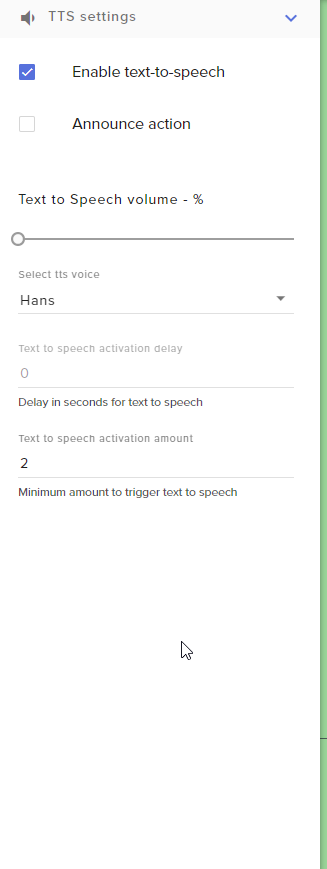
I got a Tip Variation for Highest Dono and this one will be TTS
I enabled for all Tips TTS but it only works for top dono. Reason for this?
Thats the setting i use as default.
https://i.imgur.com/ZRiP8KQ.png
 lavish aspen
is it not possible to show current amount of subscribers as a number? havent found a setting for that yet only that shows ex amount of days but not current
zenith widget
@lavish aspen There is a total sub count widget you can use
@steel talon Then go into the variations and enable TTS as well.
lavish aspen
that shows total like all i had. i want to show current amount
zenith widget
total is your current amount
lavish aspen
i dont think i have 32 😄
zenith widget
lavish aspen
shows 1 on twitch
zenith widget
does it match the same number here?
lavish aspen
zenith widget
then click on "Data" then "Totals" and hit that reset button
lavish aspen
thanks works now 😄
steel talon
Remember that i told you that i had no Alltime Data in the LEaderboard? Now i have it but its off to the current rankings. I cant fix this?
zenith widget
No I don't remember unfortunately, as I help a lot of people.
Which all-time leaderboard?
aah the points all-time
where is it off?
is it different in the extension and the website/dashboard?
zenith widget
where is it off?
is it different in the extension and the website/dashboard?
steel talon
It is
As said started 2 days ago
and forgot to reset alltime
so i made this yesterday
had hopes it would take the points
zenith widget
Its the same
Current points is the active points
people can use to play the mini-games
from the modules
steel talon
It is of to current
zenith widget
all-time points are more static ones
steel talon
Alltime 1 is higher than current 1
zenith widget
and cannot be used for anything specific.
steel talon
nobody used minigames or whatever
zenith widget
the "Current" points are the ACTIVE points that viewers can use
to play mnini-games
that means
they can be more then the all-time points
lavish aspen
is it not possible to use a gradient for text on my total subscribers? can only use 1 color but i want it to look like the one i created before with streamlabs
steel talon
Yeah but they should be the same, the reason why it isnt is because i resetted it a day after i resetted current points
zenith widget
What you showed me the other day
as now I remember
is you had your all-time leaderboard
reset
but not the current points
well thats your "issue" here
steel talon
mhhhh
zenith widget
@lavish aspen We don't have gradient color options
lavish aspen
why not?
round brambleBOT
@lavish aspen Check out the StreamElements ideas board: https://strms.net/ideas. You'll be able to add ideas, upvote ideas you agree with, and track their progress with email notifications. Adding and upvoting ideas also helps the staff know which ideas should be prioritized so please take some time to upvote.
steel talon
I kinda fixed it i manually added the points to current.
Added a new Tip Variation but the TTS dosnt work...
Weird
Pretty sure its because i use NoD again...
Its not perfect for SE yet. Hopefully they get this done soon.
NVM im just retarded i found it haha
 grave lance
I would like the moderator commands being used, not to be shown is there a way to do this with in the command line, and only show the result of the command
zenith widget
Unfortunately - no.
 pale pier
Hey guys, just wanted to check if anyone else has this issue with commands like !addpoints:
As you can see !points works with "@"
pale pier
Why is it that it works for points but not addpoints? any reason this is intentional?
zenith widget
Its how the default commands are built
pale pier
ok, well have you got any tips on how to autofill a persons name if I cant use "@"?
zenith widget
Yes - if you have BTTV and FFZ, it can auto fill the name
lament blade
do @ username then remove the @
twin sentinel
Afaik normal twitch chat can do auto fill with TAB, too.
pale pier
Does OBS support bttv?
zenith widget
I don't think the auto complete with tab is a twitch chat thing unless its new to the
but the tab completion from BTTV/FFZ has been a thing since the extensions exist
OBS.Live does support BTTV/FFZ
pale pier
ok thanks, I had to ask as I just recently switched from Slobs and was use 2 using "@"
 raven jackal
hey, i "importet" my streamlabs loyality points into streamalerts by giving everyone the points manually. But the only got them in the current board. how do i add them to the historic one too?
zenith widget
You can't really, besides using "!addpoints username points" in chat
Any reason you are doing it manually?
and torturing your self?
raven jackal
dont know 🤔 i used the import from streamlabs thing at the beginning before i adjusted all the settings and stuff in streamelements but the loyality stuff wasnt there
zenith widget
loyalty points are imported via the ankhbot import
raven jackal
ahhhhhhh
ne stupid
thanks will try that :D
hmm i think i cant export it from the cloudbot
zenith widget
There should be an option
https://www.youtube.com/watch?v=qO-CycrL2O0 - closest explanation i can find via google
raven jackal
yeah thats kinda the other way around. they got the chatbot and the cloudbot. And the cloudbot seems to only provide import and not export
 mossy stag
Hello, I'm trying to import from Streamlabs chatbot to StreamElements and keep getting an import fail even though I follow the instructions.
zenith widget
the file needs to be an .csv format
if its for points
and the format inside needs to follow
mossy stag
it's not for points really
zenith widget
name,points,watchtime-in-minutes
zenith widget
zenith widget
can you DM me the file?
mossy stag
"Commands/Quotes (Data.xlsx)"
 carmine warren
hi is there any way to unban a user that as been banned from requesting media i can't seem to find anywehere
carmine warren
there name is takecare on twitch
mossy stag
I dmed you @zenith widget
zenith widget
Some of the commands are blank and believe that is why its failing @mossy stag
raven jackal
oh i checked it on their discord KeiZar. .. Cloudbot doesnt have a export feature.
mossy stag
they're sound files
so there's no reason to have a reply
but ok, shouldn't that be accounted for?
zenith widget
@carmine warren They should be good to go
@mossy stag Well, we use another way to trigger sound files on stream.
@raven jackal Then i'm sorry 
mossy stag
ok thanks, i guess i'll look into it then? lol
zenith widget
@mossy stag Steps to make a command trigger sound on stream:
- Go to Stream Store page here: https://streamelements.com/dashboard/store/items
- Add an item that has these settings on it:
- Stream Perk
- Loyalty settings to your desire
- (Next step) Add contents (image and/or sound you want to play)
- "Redeeming this item shows an alert
- Redemable via chat
- Skip Requirements
- Get the item name/command from the 2nd creation page
- Go to commands page here: https://streamelements.com/dashboard/bot/commands/custom
- Add command with desired name and have response for command as:
${redeem item_name_here} - Go to your overlays and edit the overlay you use.
- Click on "widgets" and add "Store redemptions" widget. Click save and you should be golden.
- Test your own command in chat and have OBS or editor open to hear sound
 faint musk
is ground control working again ? notifications i mean
carmine warren
Thank you very much @zenith widget appreciate it
faint musk
last week @zenith widget
raven jackal
its okay :D guess they have to live with that then 😅
faint musk
not getting notifications
mossy stag
Thanks I'll look into this @zenith widget
faint musk
unless i restart ground control
or i click on filters and it refreshes
i tried install/reinstall
and filters are all check
zenith widget
Any specific events or just plain saying "no activity feed"
faint musk
and notifications are not paused
it shows past activity just not new one
unless i refresh it
zenith widget
open a cmd prompt and run this
del %homepath%\.se-gc\config.json
restar GC
and see how it behaves
faint musk
can you help ? if possible
i need you to follow then unfollow
see if it shows
twitch in disc profile
zenith widget
did you do the above?
faint musk
yes
zenith widget
👍
 fallen finch
 hi, quick question, your tip bars is broken too? (i mean the fillup color not showing at all)
faint musk
any idea what was the cause ?
faint musk
ok, thank you very much for the help
fallen finch
cool @zenith widget , i was sure that's my fault in custom CSS in OBS
since i entered layout editor on SE website
zenith widget
condensed goal progress bar is bugged and we are aware of it
fallen finch
ok thx for help
then i gonna use non-condensed version and condense it myself through custom css
raven jackal
is the "give points" thing something else then giving it though the chat?
zenith widget
What do you mean?
raven jackal
You said i can use the command to give points. would that fill in the historic leaderboard too?
cause doing it through the dashboard didnt
zenith widget
!addpoints <username> <points>
this is what you will need to use
to give people points
as that is the only command that will give all-time points as well
raven jackal
okay strange that the backend button doesnt do it but okay then :D guess will readd them all then :D

that doesnt adds to the all-time points ._.
sooo.. have to do it again :D
pastel geyser
Hey hows it going. Im really new at streaming does anyone have any tips on how to get more views follows?? Without possibly doing follow for follows
jade remnant
follow for follow is never a good idea, but social media is the best way
use hashtags and @'s
lament blade
but don't tag people without their permission, because they can get annoyed by it, but think this would be more general talk right? 😄
jade remnant
yes more for general,
for the @'s i meant like games: going #live playing @rocketleague grind for #grandchamp
something like that
steel talon
I got a issue with my redeem video. After the video is finished it disappears and flashes again back in when it disappears. I have all animations disabled.
Its somekind like it wants to start again.
Alerttime is 10 seconds, Videofile is 5seconds, at the end of the file it pauses the file, so its 5 second video + 5 Second pause, video fades out complete, video flashes in again and vanishes. Maybe this is a better explanation of the issue.
Changing times dosnt help because at the end is always somekind of fade...
Its an Item redeem through the Store.
 tight harness
What's the item name?
steel talon
Test
The file is clean.
I dont know where this fade comes from.
Its a greenscreen vid, i chromakey it out in the stream, but i doubt this has something to do with it. Any help by you would be apreciated.
tight harness
I'm just going to do some testing
steel talon
Yeah i create a second test2 maybe i fucked something up.
You guys are great in support guys. Really appreciate your time.
tight harness
The fade to greyscale is just to show that it isn't in view anymore on the stream
But I believe I see what you mean by it popping back up again for a second or two after it is meant to fade
steel talon
Yeah.
I tried a new Overlay with default settings. Same happens.
It is not biggest issue but you always strife for the best.
Stuff like this let you look like you are to lazy to setup something propably. (i mean me as streamer)
tight harness
Could you open OBS and put your overlay in there, then redeem the item and see if it happens in there too?
steel talon
It does happen in OBS
tight harness
Interesting, okay
steel talon
I always try it out in obs.
tight harness
I'll ask our QA team, happens on my stream perk item as well but haven't seen it before now
tight harness
You can DM me about this going forward
steel talon
Alright thank you
 winged estuary
Me and my GF run a couples stream and I was curious if there is a way to have a command to switch our screens? Is this possible?
round brambleBOT
@winged estuary For the best OBS support, please join their Official Discord @ discord.gg/obsproject
cedar lynx
StreamElements provides overlays for your streams, the OBS Discord will be able to help you better to set things up like that!
winged estuary
okay thought there might of been something in obslive thanks!
cedar lynx
OBS.Live is an OBS plugin to provide StreamElements functionality for easy access while you stream 🙂 but definitely easy to mix up!
 deep ferry
hello, will a giveaway output a list of users somewhere on the dashboard?
cedar lynx
what do you mean?
raven jackal
Can i exlude viewers from the chatstats?
deep ferry
@cedar lynx if I start a contest, can I choose the winner by looking at a list of people who entered?
cedar lynx
contests and giveaways are two different things in StreamElements
deep ferry
my bad. a giveaway.
cedar lynx
if you start a giveaway, the winner is chosen at random from the list of entrants based on the luck settings you set when you created it
you can set up a test giveaway to see how it works and then just delete it
you'll click a "choose winner" button to make that happen
deep ferry
will it reveal the winner on the stream?
cedar lynx
you can use a giveaway widget if that's what you mean
it also announces the winner in chat
deep ferry
trying to avoid it being public and manually select one
cedar lynx
it's not a random giveaway if you can select the winner
deep ferry
touche. Is there an extension that you know of that can collect usernames in the way I'm describing?
cedar lynx
I think any extension you use to run a giveaway is going to offer similar functionality, tbh. if you want to just pick the winner privately, I'm not sure why you're running it like a raffle giveaway
I guess you could just use a queue feature
 lament blade
The whole fun about a giveaway is that no-one knows who the winner is going to be, if you want to pick someone, you could just give the thing straight away without giveaway 😅
cedar lynx
^
deep ferry
looking into this.
true. but just want to make sure it goes into the right hands by vetting people. There are a bunch of contest junkies
 distant ledge
Hello! Can anyone help me? It appears that my event list and alerts dont work and went i sent a test follower event it dropped my follower count to 5 out of nowhere
cedar lynx
you can limit to subscribers only @deep ferry
or just make subscribers way extra lucky with entries
if you refresh the overlay, the numbers should still be correct @distant ledge
lament blade
Or only give the giveaway link to people you want to
cedar lynx
^
lament blade
Or make ticket price high in points so only regulars can buy tickets
There is all sort of ways to do it
distant ledge
i refreshed @cedar lynx and it reloaded the numbers this time but my event list is blank and this is a recurring issue
cedar lynx
excellent points @lament blade
deep ferry
true
lament blade
😁
cedar lynx
@distant ledge can you share a screenshot of the error
 light zealot
How can I upload a custom animation for sub alerts?
deep ferry
where can i get the link to share to the giveaway?
real escarp
@light zealot in the alert box widget you can select change video
cedar lynx
it's available on the giveaway page @deep ferry
light zealot
Does the video have to be a gif? or certain dimensions?
cedar lynx
from the dashboard area
real escarp
gif or webm preferred
distant ledge
No event list
distant ledge
nerdordie
cedar lynx
which theme is it
 fallen lava
is there a way to auto reset a command at like midnight or something?
cedar lynx
I don't have access to help with it @distant ledge but I am asking internally about the right steps to take
@fallen lava can you give an example of what you mean
distant ledge
thank you
fallen lava
@cedar lynx most definitely.... so right now i have a !win command using the [getcount] and [count] variables. This is set up for daily wins and was wondering if i can set up an automation to have it reset each day at midnight instead of me manually having to do so
cedar lynx
@fallen lava ah I see.
short answer: no, not directly through StreamElements.
longer answer: it's possible you could find a workaround. not the same but you could set up a keybind/shortcut to make it easier? I also know it's possible to set up macros to send certain text in chat on a timer from your browser but I don't personally mess around with those things so I can't help with that.
fallen lava
@cedar lynx okay awesome I appreciate the response!
real escarp
@distant ledge you may need to ask in the #dev-chat or ask Nerd or Die directly as when api change from twitch or StreamElements the custom widgets are not updated automatically
 carmine knot
I was told a feature being worked on is special alerts for specific people
if PotatoLord91 subscribes, you can set a specific alert to go off just for them
If TomatoKing81 donates, you can set a specific alert to go off just for them
Is that correct
fallen lava
@cedar lynx if you happen to know anyone that has done this let me know!
real escarp
@carmine knot if there is a new standard widget in development it will be announced with a feature star in the overlay editor once its out of development
fallen lava
@cedar lynx setting a command in the timers section wouldnt happen to do this would it.....? such as !resetwins in the message portion of the timers ?
cedar lynx
unfortunately no since the bot cannot trigger its own commands
fallen lava
😦 ahhhhhhhhh shucks
cedar lynx
to avoid endless loops
fallen lava
@cedar lynx understandable i guess ill do some diving on macros 😂
cedar lynx
good luck!! sorry I can't help more on that angle
I used to have viewers who set up macros to spam their favorite commands as soon as the cooldown was over but I'm trying to remember who they were to ask 😛
 trim summit
is there anyway to get the Streamelements Chatbot to work in Discord like Nightbot does?
 gritty vault
how would i setup randomized answers when someone would write a command?
real escarp
@trim summit no current Discord integration but check over here https://strms.net/ideas and upvote the idea
@gritty vault look at the 8-ball module
StreamElements
The Ultimate All in One Platform for Streamers
fallen lava
@cedar lynx no need to be sorry! i appreciate any help!
 chilly sequoia
How can I get more viewers I broadcast all the time and dont get any
 oblique marsh
Anyone else having loading problems in SE Website? Some of the things seem to load fine, but SE pay, Chat Commands, Timers, etc, just continue to show me a spinning circle and never load. I even restarted mycomputer but its still doing it.
 analog hawk
Is the End Of Date time still not fixed on the Sub-Goal Widget 😦 ?
real escarp
@chilly sequoia they're are many methods but sometimes we forget to just chat with our viewers instead of playing the game also a face cam doesnt hurt
tight harness
@oblique marsh Couldn't seem to replicate any slow loading at the time and no new reports since you mentioned it. Everything okay on your end now?
oblique marsh
Nope, Been trying to update one of my timers to be accurate but I cant get that page to load at all. Only some of the SE pages will load for me
@tight harness
distant ledge
still cant get events list to show up, my follower goal is randomly changing to odd numbers and was wondering if there are any backend issues i should be aware of?
tight harness
@oblique marsh Aware of anything you could have changed since it last worked? This would appear to be entirely on your end
oblique marsh
🤷 Its been weeks since I changed a timer. Ive tried restarting my computer completely and it continues, so I wouldnt know what to try to get it to work?
I have to stream soon and dont have much time left, is there anyway temporarily someone on staff could go in and alter the timer for me, and I can try to figure out how to fix it later when I have more time?
tight harness
It won't be something to do with the timers, it'll be something to do with your browser such as cookies, browser extension etc
DM me the change you want made
oblique marsh
Thanks
raven jackal
Are there any things a affiliate can do on streamelements a user cant do before? like when hitting 100 followers the se.pay?
tight harness
Only the obvious things that require subscribers and cheers enabled to exist like loyalty point bonuses for subs and cheers, sub luck etc
raven jackal
how often does se updates this?
tight harness
Update what exactly?
tight harness
You just need to log out and log back in, then it is instant 😃
raven jackal
oh 😅 thank you
 queen condor
i need help with my soundbytes not working on stream
is there anybody on right now???
cedar lynx
hey @queen condor if you explain the specific issue someone will be able to help you faster 🙂
queen condor
i believe i figured it out i just couldnt hear the redeemed soundbytes on stream
 kind epoch
Have the dev fixed the issue with the widgets behaving funky?
 daring magnet
I have lost the "BOT" side menu on my dashboard. I can't access my command editor or anything. Please help!
tight harness
@daring magnet Which account are you controlling currently?
daring magnet
my own
tight harness
Which platform?
daring magnet
PC
tight harness
I mean Twitch, YouTube, Facebook?
tight harness
Facebook doesn't have a bot side of things, that's why I asked which platform, as if you are currently controlling your Facebook channel through your account then you won't see the Bot section
tight harness
You don't need to, if you've added them all to the same account just click on the Channel dropdown at the top left
 naive root
is there a way to enable tts for bits on twitch?
real escarp
under cheer settings in the alert box you should be able to see a settings row "TTS settings"
 torn lintel
I notice several streamers that I follow allow only subscribers to place music in the media request cue ... what settings would I use to this on my own stream?
real escarp
StreamElements
The Ultimate All in One Platform for Streamers
scroll down to bot and loyalty
 floral badger
hey i have 2 questions. Lately when people host me and they have no viewers my host allert doesn't show up?? while it used to do. 2: is it possible for my moderators to ban the current playing song via chat? with a command
round brambleBOT
Due to changes to Twitch API, we have filtered out hosts and will only show these ones on your activity feed:
- All hosts coming from an online channel with at least 1+ viewer
- Auto host events with at least 1 viewer - only from a channel that just went offline
Note: If you see "X channel has hosted you" with no viewers on the back, that is considered an offline host or a host with 0 viewers, we do not show these.
real escarp
@floral badger you can turn on queue moderation so songs have to be approved
floral badger
but is there also a way with a command so my mods can ban the song thats playing at that moment
 final moat
hello guys, my activity feed is not updating... i cant see new follows... pls help
real escarp
try logging out of stream elements and log back in | OBS>stream elements> log out
final moat
@real escarp ok now i did it but how can isee that it works?
because the activity feed still dont shows me the new follows form today @real escarp
cedar lynx
you don't have to tag them twice 🙂
final moat
@real escarp okay i see it works... thanks a lot but can u tell me what the problem was
real escarp
🙂
activity feed is just like a web page if the socket lost connection you just refreshed it if that was the case
final moat
thanks a lot ♥
 scenic cargo
hello
 tough granite
Hello i lve been having a issur latelty where I have sever frame drops on my channel up to 60% . It just started out of blue. Ive read i could be my Isp? Ive reset router , done direct connection lowered stream to 720 and lowerred bitrate to under 3000 not sure what else to do.
 tender harness
Hello, is this where you go to ask for help with streaming?
real escarp
this is the channel for help with Stream Elements twitch platform issues
@tough granite hey there
tender harness
Because I have a serious problem with connecting to my Twitch account
but it keeps connecting to my YouTube account even when I change the channel and stream key
tough granite
@real escarp hello
jade remnant
Settings 》 stream log out, then log back in
Streamelements 》 log out, then log back in @tender harness
tough granite
Any suggestions @real escarp
tender harness
For the first part, settings in what, OBS?
real escarp
can i DM you
jade remnant
Yes for both
real escarp
@tough granite my I DM you
tough granite
Yea for it @real escarp
tender harness
@jade remnant I can't find the option to log out
jade remnant
Where?
tender harness
in OBS and Streamlements, its not showing me where
jade remnant
The menu at the top in obs, streamelements then log out
tender harness
Okay, thanks, I'm really dumb when it comes to programs
 final ice
quick question where would i be able to test the alerts to ensure they are working on OBS? on the streamelements dashboard?
round brambleBOT
@final ice You can test Alerts via the bell on the lower right corner of the Overlay Editor. Simply go to your Dashboard -> My Overlays -> Pencil/edit button on the overlay. Make sure the "Show Emulated events on stream" option is on to see the alert in OBS/Xsplit https://streamable.com/h6qgy
 tender harness
@jade remnant Alright, that definitely fixed the problem, thanks
jade remnant
Np :+1:
lament blade
how do i add a win/loss counter on my stream?
like 0-0
and then be able to change it while live?
real escarp
a label with counter?
lament blade
uhhhhh
real escarp
lament blade
like how people who stream overwatch have a live counter
for loss and wins
where do i find bot counter?
real escarp
thats if you want people to be able to send the command for you
if you only want you to be able to edit it then change user level to Broadcaster
lament blade
ok so
will this command only be shown in chat or on stream?
or am i talking about widget's
 wanton mango
Set up your regular counter commands like !addwin and !wins etc, which will let you/your mods update your wins in chat, and use the widget to see a live update of the counter
lament blade
i dont see any !addwin or !wins
wanton mango
You have to make them. Refer to this: https://discordapp.com/channels/141203863863558144/199460642975907840/572671650655502346
lament blade
that only shows wins though, is there any way i can add a loss too?
wanton mango
Sure, make a separate counter for losses and uses {losses} in the counter widget. It can handle more than one counter variable at the same time
That should be an L. I'm tired 
 lyric tangle
I would like to set an event, that when certain veiwers chat in my channel.. a song I have assigned to them plays, just on the initial chat.. I have seen it done with the other.. but can we do this with Stream Elements? if so.. How?
lament blade
@wanton mango ok i've done that now when i win a game how do i change the numbers from 0-0 to 1-0 or 0-1
wanton mango
Make !addwin trigger the win counter and !addloss trigger the loss counter
lament blade
@wanton mango how do i do that? Sorry im very new to Streamelements
wanton mango
For !addwin - Game was won. Current standings: ${count wins} - ${getcount losses}
For !addloss - Game was lost. Current standings: ${getcount wins} - ${count losses}
lament blade
Is it a custom command @wanton mango ?
wanton mango
Yes
lament blade
so do i type both of those for the "response" section
Does anyone have a link where I can find info on bots for my stream that control responses to followers subs, tips etc
so the command i type addwin then in the response what you typed afterwards?
wanton mango
Yes. Two separate commands
@lament blade Chat alerts - https://streamelements.com/dashboard/bot-modules
StreamElements
The Ultimate All in One Platform for Streamers
@twin sentinel 
 rapid robin
Hey, I recently transfered by Visuals by impulse alerts using the one click option, but alerts are not displaying text properly. Alerts only show the names, and no messages attached to it, or the variables that are written out.
lament blade
oh wait it works
can you give me a command to reset the score too or will it reset after ending the stream?
wanton mango
Do you want to reset both at the same time? To 0 - 0?
lament blade
Well does it reset anyway after ending stream?
wanton mango
No
lament blade
well in that case i'd love a command that will allow me to reset the score
before ending the stream for the next day
wanton mango
!resetscore - Score reset to ${count wins 0} - ${count losses 0}
If you need to edit individually, just use the inbuilt !editcounter command.
!editcounter wins 3
!editcounter losses 5
wanton mango
Yes, type them out as you would normally in chat. It's case-sensitive, and if you're using your own channel's emotes, the SE bot needs to be subbed to your channel
lament blade
ahh well in this case im just using global emotes since i aint a twitch affiliate yet
but tyvm
round brambleBOT
@glacial mauve Please follow our community rules:
- No advertisement or stream promotion
- Respect ALL server members
- No NSFW/NSFL
Thank you
twin sentinel
@rapid robin Best to ask Visuals by impulse on this.
 glacial mauve
 vague igloo
Hi! Is there a way for StreamElements Bot to write one of my emotes in a command? Let's say I want to put one of my emotes in a custom command, I put the code in "response" box, but in my chat, the bot says the code of my emote, it doesn't show my emote, is there a possible way to fix that?
twin sentinel
You need to gift the bot a subscription to your channel to use your emotes, or rename the bot to your own channel name via GroundControl or OBS.Live to be able to use your emotes.
mild ridge
Does anyone know if the back up playlist music or song requested music from stream elements has a issue of buffering like stream labs obs's music?
twin sentinel
Best to try it out yourself on your setup.
mild ridge
Also do you use a command to start the playlist?
twin sentinel
The back up playlist should start automatically when there are no more songs requested. You can use a command to play and pause the media request or use the dashboard to control the media request or a dock in OBS.Live.
mild ridge
So if your live it will begin for you and you can play and pause your playlist whenever you want.
twin sentinel
I recommend to take a look at this helppage: https://support.streamelements.com/hc/en-us/articles/115000366131-Media-Request
 young quiver
Hi guys i have a problem with completing money. I am waiting three weeks and my money not nd not to complete and go ready to withdraw what i must do to complete my money ? They say 1 - 3 work days and i am waiting 3 weeks
twin sentinel
Depending on the payment provider the settlement time can vary: https://streamelements.com/dashboard/tipping/fees
young quiver
oh oky thanks man 🙂
vague igloo
Thank you! 😄 ❤
 long frost
Hello! Is there any way to manually add cheers to the Cheer List to update the Top Cheerers for data prior to when SE was brought to a channel?
 rocky elk
My stream wont reconnect to chat, and I cant refresh it to try and fix it
"Error Loading Data"
real escarp
@long frost check here under session data https://streamelements.com/dashboard/session
StreamElements
The Ultimate All in One Platform for Streamers
@rocky elk on obs.live logout of stream elements OBS>stream elements>log out
then log back in
 feral hare
where the heck is Text To Speech? This UI is so bad and needs a complete overhaul
trim summit
hey anyones goal bars gotten super thin over the last few days?
all mine are screwed up on my web overlays
 vale nymph
can I post a screenshot in here? I got a question
real escarp
TTS is turned on per alert in the alert box widget click on followers and cog next to it > there you will find TTS
@trim summit goals issue is known bug currently
Ask the question first @vale nymph
trim summit
hey @real escarp whats TTS? or is that not for me?
vale nymph
well okay so I tried adding a quote and it apparently added the same word 4 times after another to that quote
the screenshot will make it easier to understand
real escarp
Type in here how your adding quote
vale nymph
with the actual quote?
real escarp
DM me
 neon flame
 jovial barn
i need help streaming on playstation 4 using the obs live
 shy idol
Is someone from staff available for a call? I can't think about how to word what what i'm trying to ask
zenith widget
@neon flame enable default commands !emotes and use it like this - !emotes update
@jovial barn do you have a capture card?
@shy idol you can always start with the specific feature you are having an issue
shy idol
it's not really an issue, I'm need to send my stream overlays as they appear on my pc, to someone for them to set it up on a different pc. They are asking for the cloud link, but i can't find any kind of link to send them @zenith widget
zenith widget
!add
round brambleBOT
To add your overlays to OBS, add a new browser source in your scene. Paste your overlay URL in the browser source properties, set the dimensions to 1920x1080 (unless you changed them on the website), and ☑ “Shutdown source when not visible” https://youtu.be/KDvLynUqXI4
zenith widget
I would not recommend doing thus btw
If they want to build their overlay based on yours
shy idol
This has to be done for something at TC @zenith widget
no, they are just setting up the pc's for everyone, so that when everyone gets there, it's all done
zenith widget
Then the above instructions
shy idol
okay i will give it a try thank you. will this work even if everything was set up in the actual software, and not online? @zenith widget and if alerts are still being done through streamlabs?
zenith widget
Im not sure i understamd what you are asking
If you use obs
And the will setup obs
Then its super easy to add our ovwrlays
Via the above instructions
Even you can do it
And bcs if you send the overlay link to someone you are exposing the overlay id like that
As for SL alerts - cant say anything there
As we have our own alert widget and they work regardless of where the overlay is loaded
shy idol
okay thank you
So i'm changing alerts over @zenith widget, but how do I set up the custom animated alerts? the person that made them set them up as a webm file. so how would i upload those onto streamelments?
zenith widget
@shy idol we do have an import tool for chrome that can import the alert widget
rose drum
How is everyone doing this evening?
Have a question.
My son and I both will be streaming on 1 pc (different times obviously)
How difficult is it to set up two different accounts that use the same computer within streamelements so that we have our own seperate channels etc
zenith widget
@rose drum On OBS there is a Profile and Scene Collection - that means both of you can have your own settings and scene collections
 unique ore
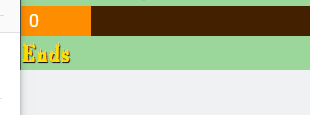
On my dashboard>>Overlays, my goal widgets aren't showing the "ends in x" and instead just say "Ends" How do I go about fixing?
 zenith widget
Yes its a known issue that has been reported to the devs.
no ETA on when its going to be fixed
unique ore
Oh ok....thanks then! 🙂
rose drum
Keizar, thank you. I found that option within stream elements obs live. I am wondering, if you switch profiles, how do you tie your twich account or youtube account to it so if I switch profiles I don't wind up streaming on my son's stream on acciddent?
zenith widget
OBS.Live supports only 1 account per session - meaning that it can't be switched between accounts with the obs profiles.
but one way to find out if you are on your son's account is
via the chat dock
it will say something along the lines of "Start a stream to activate chat"
i believe
rose drum
So each time I open streamelements what do I need to do to switch from my account to his or vice versa?
I mean the Streamelements program on the computer
not the website
zenith widget
Streamelements on top -> logout -> login
rose drum
ah
ok
so we have to log out and log in with our account which will be tied to our individual twitch/youtube etc channels
Thank you.
zenith widget
yes
rose drum
sorry for all the questions, we've bveen aweay from using the program for about a year
I see the connect with twitch, youtube, facebook page after logging out. Are you able to stream to both twitch and youtube at the same time? or would you have to stream to twitch and then send the videos to youtube?
 real fern
Is there a "hours" option on the SE Bot or loyalty system that counts the viewers hours in chat like streamlabs does? i am really thinking to switch to SE but if it doesnt have the "hours" thing where i can setup the ranks like i did with Slabs then i dont think i will move to SE, because viewers love the Rank system and some of them have many hours already? 🙂 if there isnt an option for that, will it ever be coming to SE? thats really the only thing that`s holding me off to switch to SE :/
shy idol
I'm seeing the video file in my files page, it just won't allow my to use it @zenith widget
zenith widget
@rose drum You will need Restream for both streaming platforms.
@shy idol Are you clicking on "set image" or "set video"?
@real fern If you are asking for "rank" for the loyalty system - no we don't have that for our loyalty system
round brambleBOT
@real fern Check out the StreamElements ideas board: https://strms.net/ideas. You'll be able to add ideas, upvote ideas you agree with, and track their progress with email notifications. Adding and upvoting ideas also helps the staff know which ideas should be prioritized so please take some time to upvote.
real fern
@zenith widget you know when or if this will come to SE? i see many people that already made a post in the "idea board" and many of them are already 1 year ago and nothing happened, why? so many people would love a rank sytsem based on how many hours a viewer watched the stream (just like streamlabs does) and like i said, i like everything that i saw on the SE page but as long as it doesnt have the ranks with hours, i cant switch...
@zenith widget i don`t really know if it makes sense to make another post on this in the idea thing, becuase like i said, there are a lot of them already
real fern
yes, i think that will make the most sense, but hte posts i see are 12 months old, you think if i upvote these posts that this will make a difference? (no offense)
zenith widget
What is there to be offended by? Yes it makes a difference
real fern
ok, then i wll upvote some of these posts 🙂
@zenith widget sorry to bother you, but if it says "planned" on the idea, that means it will come to SE right? it makes no sense to upvote the post?
shy idol
So i got the other issues figured out, but i don't see "Raid" in the Alert settings, if i set up the host alert, will it work the same? @zenith widget
shy idol
is there a way for me to test the alerts so i can see them on screen?
round brambleBOT
@shy idol You can test Alerts via the bell on the lower right corner of the Overlay Editor. Simply go to your Dashboard -> My Overlays -> Pencil/edit button on the overlay. Make sure the "Show Emulated events on stream" option is on to see the alert in OBS/Xsplit https://streamable.com/h6qgy


 shy idol
so when i tested the raid, it didn't do the custom one that i set up under the host tab?
and i'm not seeing any of custom animated alerts for follows or subs, just a dancing shark
 oblique steeple
Did you save your stuff in the lower left corner? Only then will the changes be applied.
shy idol
yes
oblique steeple
Save it again and reload your overlay in OBS.
shy idol
still doing the same thing
oblique steeple
supporting sucks when you don't have direct access to certain things
@zenith widget 
 hot dagger
hello how i use the merch option ? there is no guide i can find how to
lament blade
@hot dagger the merch option has not been released yet, you can sign up for the BETA though
hot dagger
how to sigh up to it ?
lament blade
I'm asking our merch guy if you can still sign up
I'll get back to you when I get an answer from him, he is probably still sleeping, pretty early for us 
hot dagger
oki , thanks 😄
lament blade
Nw!
 whole sluice
Hi, I’m pretty new to Twitch and I’ve been wonder about this, is StreamElements OBS required for SE overlays? Or just recommended?
whole sluice
tyvm
I’m also thinking of buying an overlay and notification bundle (off-platform website) how would you use those on standard OBS?
feral hare
@real escarp thanks for the help with TTS. Does TTS work with subscriber messages? I tried to add it but when i test it, i see no text and doesnt say the text i provided
whole sluice
And how do you get the links for your overlays, notifications etc?
round brambleBOT
@whole sluice New to Stream Elements?
Check out our YouTube channel https://www.youtube.com/c/streamelements/videos
with tutorial videos from setting up the basics, to in depth details on how to use our product.
floral badger
@zenith widget hi i have a special question for you 😉. I want my mods to be able to ban the currently playing song from my song request by a command in chat like !bansong is this possible? Or is this possible with an api of some sort really would help me out. Otherwise i would like to resuest this command because i think its prety neat
steel talon
Is here a somekind of blog so i see when something got updated on SE? Im waiting for a bug to be fixed. Afaik it is already fixed but just not pushed to the current SE:
zenith widget
Via command? No
Dont think its possible via api
I will take a look when i get back home
@floral badger 
@steel talon we dont usually post stuff when a bug is fixed. Only when we have something big to announce
steel talon
mh and there is nowhere something like a version number i guess? So i just can test it out if its fixed?
zenith widget
Version number for what?
 deep widget
Anyway to check loyalty points changelog?
steel talon
I thought maybe somewhere there is a Versionumber of SE, so i would see it was updated when the number changes.
zenith widget
Only version number that we have shown is OBS.Live
steel talon
ok