#helpdesk-twitch
1 messages · Page 500 of 1
 twin sentinel
 wise dagger
@twin sentinel ok I will see If I can make these adjustments.
 urban ice
Suppose XYZ is the name of the Channel (twitch.tv/xyz)
I want to use xyz as the bot name.
twin sentinel
Only through ground control or OBS.Live.
 round brambleBOT
Custom bot name requirements
- StreamElements bot modded and in chat
- Active overlay with alerts
- StreamElements tipping page in the panels below the stream (!panels)
- OBS.Live or Ground Control open
- Create a twitch account for the name you want to use or run the bot under your own name
- Custom bot name doesn't work on Mac
urban ice
We can use our broadcasting account for the bot?
twin sentinel
yes.
 safe cosmos
For some reason when i go live, a few seconds after going live it says "Disconnected, reconnecting in 9 8 7 Ect."in the bottom left corner where it say dropping frames and i am not showing up on my twitch as online or live. 😦
urban ice
I actually want to use "My Name" only when someone says Hi / Hey.
For rest of the work, I want to use StreamElements. How to do so?
twin sentinel
@urban ice Afaik this is not possible at this time. You can only rename the bot as a whole to a twitch account name, or your twitch channel name.
You can try to code a solution for your use case, but I cannot support you much with this.
round brambleBOT
@safe cosmos Please provide a log from your last stream. To do this, in OBS go to Help > Log Files > Upload Last Log File and paste the link to the log file here.
twin sentinel
This is an analysis of your log file. Not sure why your stream is not showing up. Best to ask for this on the OBS Studio discord. https://h4ndy.eu/obslog?url=https%3A%2F%2Fobsproject.com%2Flogs%2FQ2QKvov8tDheiHsa
round brambleBOT
@safe cosmos For the best OBS support, please join their Official Discord @ discord.gg/obsproject
wise dagger
@twin sentinel lmk if there is a more detailed faq on the question i asked, about how to make the command a command instead of !redeem "command
"
thanks. I tried what you suggested and I can't seem to get it to work.
 lament blade
can a support help me in my twitch channel now?
twin sentinel
make it ${redeem rasta}
lament blade
it keeps playing the sub gifted message and bits emote names in my channel even tho i turned off the read actions...
lament blade
yeah alert box overlay
wise dagger
@twin sentinel you are the best, that worked swimmingly! thanks so much!!!🙂
 lyric orchid
Hey guys i was hoping to start streaming soon but i dont know exactly what to do to live stream game play
 real escarp

YouTube
Need help? Check out our video guides, covering every feature in StreamElements.
 marble vortex
Did enybody Know how too creat a donation goal because i want to buy my friend a new PC
 jade remnant
edit your overlay, then go to widgets
twin sentinel
I highly recommend watching this tutorial video: StreamElements Overlay Editor full guide https://www.youtube.com/watch?v=LwAfMIR3Cj0
marble vortex
Bro Thx very much
 ripe pulsar
hi guys i'm haveing a problem with obs, streamlabs i'm trying to fix this while a week but nothing...if i use x264 for stream, the live goes between 5-7 fps and i don't know why (i have ryzen 5 2600) i want use nvenc becouse with it i have several delay and buffer problem like 5 minute of delay
round brambleBOT
@ripe pulsar Please provide a log from your last stream. To do this, in OBS go to Help > Log Files > Upload Last Log File and paste the link to the log file here.
jade remnant
NVENC is for nvidia gtx 1030 and up
lament blade
How do you connect an overly to your channel
jade remnant
please dont spam multiple channels
ripe pulsar
@jade remnant can u take a photo becouse i have the app in italian and can't see this options
jade remnant
ripe pulsar
oh ok but this is with nvenc new...i was trying to use x264 becouse with nvenv i have buffer problem and 5 minute delay...x264 i haven't only proble are the 5-7 fps...in live not in game😓
jade remnant
go through the report i linked, it shows the errors and has how-to links inside to work through
ripe pulsar
it show me this but i don't understand why i can stream with no drops in nvenc and with x264 not, why is this a connection problem?? how with x264 it's and with nvenc not?
jade remnant
thats only from 1 log, and the report only captures the first setting, if you want to work through all of them its best to ask in the obs discord and they can help out
round brambleBOT
@ripe pulsar For the best OBS support, please join their Official Discord @ discord.gg/obsproject
ripe pulsar
@empty flare mine too XD
 empty flare
god this is ridiculous
ripe pulsar
@jade remnant ok thx btw
 upper steeple
is there by chance any special sub alert variation for continued gifted subs for subtember?
jade remnant
not that im aware of
 mortal stratus
does anyone know how to fix obs live media request playing in stream and on the app at the same time
 lament widget
I know that the Widget Data Settings is in Beta, but it looks like it doesnt reset for the Monthly Calendar Timing (and possibly Relative Timing? Cant tell) for the Top Bits widget however it looks like it works for the Top Donations widget
upper steeple
can you set who the hypeboss is?
real escarp
^ not currently
 flat valve
!panels
round brambleBOT
Twitch's official help guide for Panels: https://help.twitch.tv/customer/portal/articles/2416760-how-to-edit-info-panels
 mystic moth
ay - wondering why the overlay editor's emulated subs aren't showing the correct video/images in the editor
dunno if someone can help, I tried looking everywhere online
 wanton mango
@mystic moth is it showing the default dancing shark?
Make sure you've set video/image on the variation itself. There's a tab called Variation Settings that expands.
 drowsy sequoia
My watchtime command in my chat stopped working. I didn't change anything, now when i type !watchtime it responds "Parsing error at position 49: Mismatched input list, missing end of inputs"
real escarp
undead have you parted the bot from your channel then log out of stream elements then login then join bot
drowsy sequoia
@real escarp should i try deleting the command before i do that, then re adding it afterwards>
lament blade
How do I use slobs alerts in elements
real escarp
watchtime no i wouldnt delete it
@lament blade there is an import tool if you want to switch your donations and alerts over to StreamElements here a video to get you started (https://www.youtube.com/playlist?list=PLCDDKlFdScbEwdx5AntcQIS1InkFJwHtv)
Enjoy the videos and music you love, upload original content, and share it all with friends, family, and the world on YouTube.
real escarp
YouTube
Need help? Check out our video guides, covering every feature in StreamElements.
 dense violet
Hello, Im trying to get SE Media Requests to play in a browser source in StreamLabs Obs
round brambleBOT
@dense violet We're not able to troubleshoot issues with using our overlays in StreamLabs OBS (SLOBS) as we don't have the tools to support their software. We recommend using OBS Studio or OBS Studio with our plugin OBS.Live.
 grave lance
can you tell me if bleedPurple would be considered and insult as I am editing my SE bot alerts
 alpine basalt
is there a way I can have loyalty leaderboard work by hours viewed and not points accumulated?
 meager turtle
I use OBSLive. Its up to date. I have kappagen enabled on an overlay made on the website and emotes will normally rain on the screen that appear in chat. Lately I've noticed that it only reacts to about 1/6 chat messages and the rest will be bypassed. For troubleshooting, I opened the overlay in a browser and ALL tested emotes fall on screen in browser but NOT the OBS window. Anyone have any suggestions?
 covert silo
I added my overlay from Streamelements to the OBS app on my Mac but all it displayed was an image that said "You've just added a browser source!" With the OBS logo. Where did I go wrong?
round brambleBOT
@covert silo To add your overlays to OBS, add a new browser source in your scene. Paste your overlay URL in the browser source properties, set the dimensions to 1920x1080 (unless you changed them on the website), and ☑ “Shutdown source when not visible” https://youtu.be/KDvLynUqXI4
 languid vortex
I don’t hear media share in my stream. Is there dining in obs I need to do?
 steep chasm
Hello, so I'm moving from Streamlabs OBS to OBS.live and I'm trying to import my scenes into OBS.live from Streamlabs OBS but it isn't working. It keeps giving me the message how it successfully imported but there's really no scenes being added...
scenes arent being added after its complete...
 bitter silo
Hey guys, I'm still having issues with loyalty program not giving my sub's bonus points.
lament blade
for some reason i lost my left and right panels my chat and media request have disappeared
 dry hare
Streamelements in the menu >> chat / media request
lament blade
That did work but I did fix it thank u
 static cargo
 tiny carbon
Okay so I have a question regarding the reward points game where viewers can gamble their currency earned from being loyal. Now I'm not sure if I've understood correctly but I have mine set to 100 for increased chance to win. However only one person has ever won and the rest lose all. Have I misunderstood the balance as its worded weird ie, something along the lines of 'Anything below 100 loses over time'. Suggestions? I have the world's unluckiest slots game. 😂
 severe chasm
Okay sooo I’m using a stream element and for some reason the alert box doesn’t want to show up
tiny carbon
@zenith widget i don't know specifically what it's called but it basically where the viewer gambles their currency on their own. I think it's possibly called slots lol... Atleast that's the command...
 zenith widget
roulette
severe chasm
Slobs
zenith widget
SLOBS tends to block our overlays.
And if you are trying to emulate alerts via SLOBS, that won't work as well
as SLOBS is from another company
@tiny carbon Well first I don't see the module turned on.
Its like its default settings are also set on it
severe chasm
Damnnn
tiny carbon
Wdym not turned on? I have it 'on' on my stream elements and default commands up and working @zenith widget??
zenith widget
tiny carbon
No not roulette.... @zenith widget
 tiny carbon
Slot machine...
zenith widget
need coffee, sorry
round brambleBOT
@tiny carbon
The slider increases the payout if you manage to win
Less than 100 on the slider means people will not win money over time using the slot machine. 80-100 is a good range
less emotes = higher win chance
It's like 5 emotes = 3%, 4 emotes = 7%, 3 = 12%
actual formula : n / n^3
n = number of emotes
tiny carbon
Lol
zenith widget
⤴ this is what you need
tiny carbon
Okay, so I currently have 5 emotes.... I'll change it to three. Perfect 👌. Thank you @zenith widget
 manic quail
Is there a way to have a timer that randomly sends a message from a list? I set a couple at long intervals but they tend to send right after each other, I would rather just have a random message every hour or so
zenith widget
Either read up on this: https://discordapp.com/channels/141203863863558144/199460642975907840/508911738528333849
Or use this: https://thefyrewire.com/docs/api/twitch/pastebin/ - this way you can have random text being called from pastebin
 quiet creek
Is there anyone from the staff awake that I can talk about a VERY important issue? It MUST be in private chat so I dont panic others
zenith widget
There is always someone awake
 quick oracle
Any staff are available to help a streamer I am coaching? We're trying to get the sound alerts to properly work with stream elements app in his IRL stream.
 lucid marsh
Hello,
l have some problems with obs. The program seems to work well but it is slow as soon as i receive a notification or as soon as an animation starts.
I'm using linux (opensuse tumbleweed) on an external USB 3.0 hard drive. I checked if my USB ports were not saturated with usbtop but it seems that everything is fine on this side.
do you think my problems are due to my linux external installation? is it possible to move Obs or its configuration files to my internal hard drive?
Can this solve my problem?
Thanks
zenith widget
@quick oracle What is the issue exactly?
@lucid marsh Uumm is the main linux install on the USB hard drive?
lucid marsh
@zenith widget yes !
zenith widget
This is a very specific setup you have here.
I'm not sure if hardware accel. works under linxu
but try disabling it
in the advanced settings of obs
quick oracle
I was working with FriendlyNeighborhoodGeeks on the issue where SE do not currently support input on browser source into the app itself. He gave me a work around to simply open the browser source URL into the mobile phone's browser like chrome. I and him did some testing, and it worked fine on my phone (samsung galaxy 9+) but the streamer I coach for has a Huawei I3, both are android, but I doubt its the same OS versions. I tried to troubleshoot, rebooted the phone, app, and sounds are working fine with Text-to-Speech from SE app. @zenith widget
zenith widget
Can't they just download our app?
lucid marsh
@zenith widget i think it IS not available but i Can try to enable it with nvenc or vaapi
zenith widget
@lucid marsh I don't know linux tbh and the only thing that comes to mind is maybe the .webm's you are using a bit too big for rendering purposes and the overlay can lag out a bit when they are for example 1920x1080, even if scaled down.
quick oracle
@zenith widget not sure if you meant that comment for me, downlaod the app, I have the app and my streamer I am coaching has the app. The app does not support custom browser source input, right now.
zenith widget
We are talking here about this one right? https://play.google.com/store/apps/details?id=com.streamelements.firestream
quick oracle
yes
zenith widget
Then the app automatically loads its special overlay.
I don't know why you want to load another overlay.
quick oracle
Twitch extension called Sound Alerts. This allows viewers on twitch channels with this extension enabled to have viewers hit buttons like a sound board on the panel. We used this perfectly fine on labs because it has a native browser source you can input. But the streamer I am coaching is very anti-labs.
zenith widget
Then let me ask the devs if loading external browser sources is planned, as I don't remember.
quick oracle
Thanks @zenith widget
lucid marsh
@zenith widget witch size or webm do you recommand ?
 livid stirrup
Good Day, I am wondering if you can help. I Imported my Tips and cheers info from slobs to elements but the data displaying is inaccurate. Is there a way to edit the data (Specifically for My Top Donators, cheerers etc)
I Did Reset and import again but it seems to have just doubled the amounts so I am also wondering if I can undo that?
zenith widget
@lucid marsh less then 720p for example. Depending on the graphic, don't let it have empty transparent spaces beyond its animation reach...if you get what i mmean
i've cleared all your imported tips and this should clear out any doubling down @livid stirrup
livid stirrup
Thank you @zenith widget I was actually helping a friend set up can I give you his username as it doubled up his stuff
his username on twicth is Scop3s_
Let me know if I should drop his link
zenith widget
Done
livid stirrup
Thank you so much you are a legend!
But now even with the single transfer some info was wrong, can one edit this?
zenith widget
What info?
livid stirrup
For EG Top Donater Tip amount total was incorrect. We looked at top 10 donaters and most seemed a bit out
Same with Cheers
zenith widget
cheer data, cannot be imported
we track cheer data, from the moment people sign up with us
From what I see everything cleared out perfectly for your friend
livid stirrup
Ok Cool. Thank you so so much, Really appreciate it
So now I need to import again just once? or leave it from now on?
zenith widget
just once
livid stirrup
Perfect 
 nova quest
How would I do a sound alert for my chat.... something like !redeem knock
zenith widget
Steps to make a command trigger sound on stream:
- Go to Stream Store page here: https://streamelements.com/dashboard/store/items
- Add an item that has these settings on it:
- Stream Perk
- Loyalty settings to your desire
- (Next step) Add contents (image and/or sound you want to play)
- "Redeeming this item shows an alert
- Redemable via chat
- Skip Requirements
- Get the item name/command from the 2nd creation page
- Go to commands page here: https://streamelements.com/dashboard/bot/commands/custom
- Add command with desired name and have response for command as:
${redeem item_name_here} - Go to your overlays and edit the overlay you use.
- Click on "widgets" and add "Store redemptions" widget. Click save and you should be golden.
- Test your own command in chat and have OBS or editor open to hear sound
- ???
- Profit in viewer interaction and that dosh

nova quest
thank you so much
zenith widget

livid stirrup
I Have one more question sorry. Can one share their overlay with other streamers? So that they can use it on their side with their respective info?
zenith widget
Yes - being invited as an editor to their channel
then use the 2 paper icon on the overlay to duplicate it over to their account
livid stirrup
So the streamer has to invite me to be an editor on their channel? Then I can duplicate to their S.E? YASS! Thank you, life saver you are!
round brambleBOT
@livid stirrup Follow these steps to grant managers/moderators access to your dashboard:
- Click on your Channel Name at the top of the dashboard and select Settings
- Create a new invite at one of three access levels (Bot Supervisor, Editor, Full Control)
- Send this invite to a mod/manager to give them access to your dashboard. The link is one-time-use and expires after 72 hours if not accepted
Video tutorial: https://youtu.be/zl_h-ttZDF0
livid stirrup
Thank you endlessly! Saved my life Right now
zenith widget

livid stirrup
and once it is duplicated on their side they can remove me as editor?
zenith widget
yes, but one thing to note
if you remove the assets(images or sounds) from your account
they will loose them as well
from any widget that uses them
thats one down side
livid stirrup
Noted. Thank you 😄
quick oracle
rayinthecity @zenith widget
 smoky gazelle
Is it possible to add other fonds? I would like to use "Whimsy"
zenith widget
From what I can see, Whimsy is a paid/copyrighted font.
You will have to buy it, install it on your PC and use the custom font option
smoky gazelle
ok thank you .... Whimsy hat the additional letters "TT", why he didnt find it
"Whimsy TT"
quick oracle
Yes he's on twitch right now @zenith widget
lament blade
Hey, can a staff member please merge my chat stats from my old twitch name. Official_V3n0 is my old and my new is OfficialV3n0
 tight harness
Sure, I'll do it
Your chatstats were still on an account called v3n0mouzz, so I merged those to officialv3n0
 pale belfry
Is therwe a way to stop the !sr confirmation popping up in the stream chat ?
instead in dms ?
tight harness
No, but you can submit your idea: https://strms.net/ideas
pale belfry
Thank oyu
smoky gazelle
It is possible to change the "Tip messages"?
lament blade
I recently bought a camera, and whenever I use my camera my gameplay is lagging, do I have to change the 1080p to 720p because maybe my streaming pc has to encode to much?
real escarp
@smoky gazelle are you talking about how it shows up on alerts
@lament blade you shouldnt have to downscale resolution try this. Settings -> Advanced -> Disable hardware accel.
smoky gazelle
yes, exactly ... on alerts if someone tip
real escarp
@smoky gazelle this is where you change the msg after clicking on your alert box then settings for tips
 slim dock
I've been setting up audio clips for people to trigger with store, when i set a gif with the sound no alert pops up when someone redeems it. I have an audio clip and gif uploaded, are sound clips unable to show gifs?
Also i really have been trouble with kappgen, it's not working with all emotes, just seems laggy]
I'm only able to get audio and gif if i set it to stream perk
 wise oxide
Need some assistance ... channel I mod for is having issues with their OBS. When she attempts to load any overlay it just displays an all white screen ... already cleared the cache (browser) and cache in the OBS broswer source edit
smoky gazelle
not formating ... i wanna change the content of the text.
for example, instead "Howdy, my name is bill" something else
 sick ocean
Orrrr kyaa haal hai sabke
 onyx lichen
@slim dock Dmed you
 trail mist
wondering why my timed messages are not going through
real escarp
@smoky gazelle that message is from the tipper and can not be changed
smoky gazelle
ah ok, I understand ... thank you
 trim summit
hey looks like there was an update to Streamlabs OBS, and now all my Stream Element Browser Sources are white, can anyone help me?
 swift mist
is there any updates on the issue regarding access to the tiltify widgets? only channel owner can change the links and settings on it, and i have full control to this owners channel from my account
wise oxide
@trim summit a channel I mod for is having the EXACT same problem ... streamlabs OBS but using streamelements overlay editor
trim summit
i tried restarting, refreshing the cache in Streamlabs OBS, i've updated my stream elements overlay and even duplicated it so ill get another new link to add back in as another source and i still get this freaking all white screen. i've never had an issue till now.
trail mist
how to i update my stream key??
swift mist
is there a way to make SE chat bot react to subs and drop a message in chat? been looking all over and i can't figure it out 🙂
EDIT: Never mind found it under modules 😄
 rare turtle
dear streamelements, i try to do my bot timer for auto online and offline messages, but its not working, trying it for a week already
real escarp
try parting the bot and join the bot after you adjust timers
rare turtle
where to part the bot?
real escarp
yes enable them
real escarp
in your chat
 silent flicker
Is it possible to create your own loyalty point games?
I've seen so many different types but I have no idea how to do them! I've seen a !steal which has a probability of taking points from other viewers. I've seen bosses.. etc.
 violet gate
is there a place to set it up so redeems can be used for multiple tickets in one line? (like !redeem ticket 10 or !redeem 15, etc.) -- looking to not have the viewers trigger the alert 15 times for 15 tickets to a giveaway (if there's a better place to ask, happy to move this somewhere else too)
swift mist
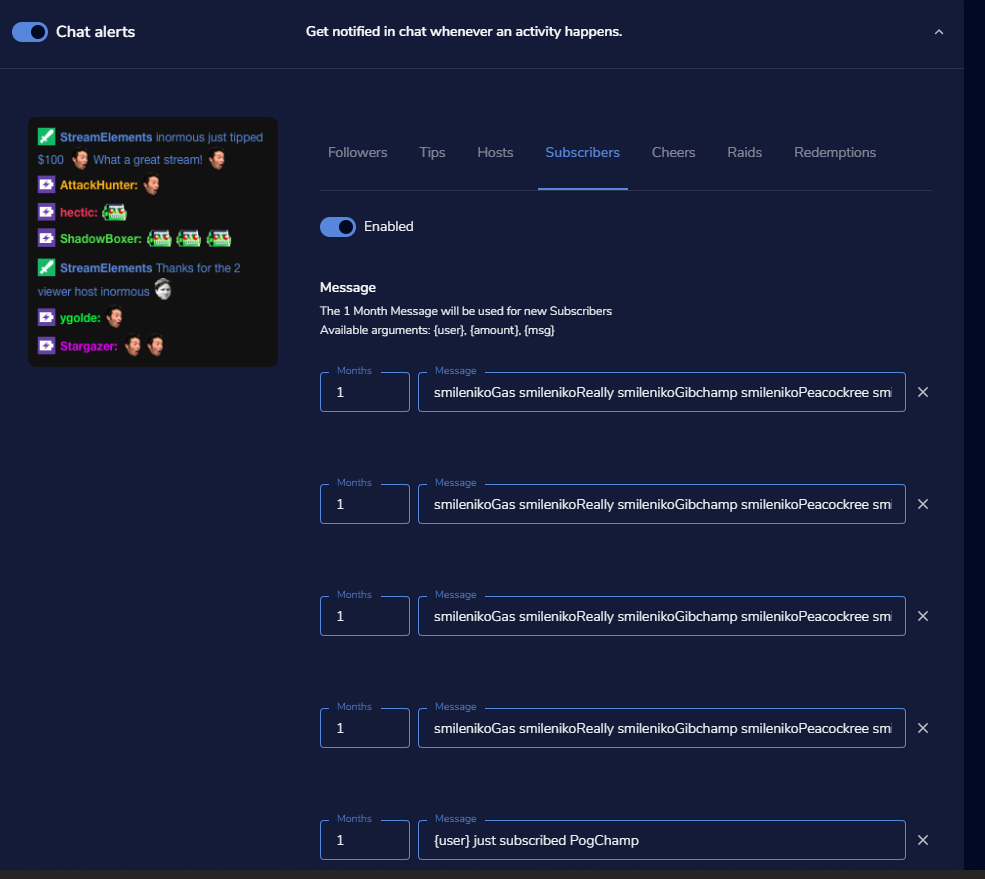
so i tried to setup chat alert module to hype the chat when we get subs, guess this isn't possible? https://i.imgur.com/kYZ2BYl.png
 real escarp
@silent flicker you may want to pop into command-share channel and ask around
silent flicker
@real escarp I do not have permission in that channel. 😅
real escarp
@violet gate redeem triggered event is currently setup to track one ticket at a time, not sure if its a thing everyone wants implemented but you could check in ideas
violet gate
gotcha -- thanks!
real escarp
@silent flicker I'm sorry I meant search in there
smoky gazelle
How can i remove a BOT which is in the Chatter Leaderbord (Streamelements extension)?
tight harness
Go to your Twitch extensions page, configure the extension, add the names to the filter section
smoky gazelle
i already did ... it only works for the loyality points, but not for the Chatters Leaderbord
tight harness
There is a "filter username from chatstats leaderboard" where I mentioned
smoky gazelle
thanks, found it!
swift mist
i have a pastebin link for i list I created with 80+ bots Don't know if I'm allowed to post it here, but if I am i'll give it out
else drop me a PM
 halcyon citrus
Just added my first tip goal widget, and for some reason it's showing this absurd amount in the goal progress. I must be blind or stupid, but I can't seem to find a way to reset it to zero.
real escarp
^ check data at the top of that overlay
 glacial igloo
Hellooo i have a question. My chat in obs is now a browser, how can i turn it back to being a simple little chat?
twin sentinel
At the top in OBS: StreamElements > Log out and log back in.
glacial igloo
Thank you ❤
lament blade
Help me! I can't sign up to streamelements
 tribal raven
is there something like ${user-target}? I need it for !love
real escarp
@lament blade have you tried a private browser or different browser without all the plugins
wanton mango
@tribal raven ${1} returns the first word after the command. The command will only work if a word is given so !love won't work on its own, but !love pizza will
Use ${1:} for the entire phrase after the command. !love pizza with pineapple
tribal raven
Thank you!
wanton mango
@lament blade can you try going to https://streamelements.com/ instead? that link from your video might be cached and judging from the redirect it's causing you to get stuck in a loop

StreamElements
StreamElements is the leading platform for live streaming on Twitch and Youtube. StreamElements features include Overlays, Tipping, Chat Bot, Alerts, Loyalty, all fully integrated and cloud-based.
lament blade
@wanton mango BIG THANKS!
real escarp
@lament blade go to twitch and disconnect stream elements https://www.twitch.tv/settings/connections
 tribal raven
Where can i set timer to comand?
tight harness
In the Timers page: https://streamelements.com/dashboard/bot-timers
lament blade
@real escarp where to find the Settings -> Advanced -> Disable hardware acceleration
you told me to go there for my cam, where to find it
real escarp
@lament blade you can attempt to disable it in OBS see if it helps. OBS>file>settings>advance scroll down
lament blade
alright hopefully it works, what if it doesnt? got a seccond solution?
tribal raven
How can i connect stream store with my obs?
lament blade
Is it possible to clear chat stats?
 placid yarrow
can someone teach me how to enable song request?
real escarp
@lament blade at that point you may need to reach out to OBS discord
 rigid shoal
i would like to know if there is a way to get the screen the would show your title and what game you are streaming before you go live back because i ticked the box and cant find a way to get it back
lament blade
Is it possible to clear chat stats? @real escarp
real escarp
we can merge chat stats if you have a name change
 round brambleBOT
@rigid shoal If you are not seeing the OBS Twitch integrations and have OBS.Live installed, please follow these steps:
- Make sure you are on the latest and greatest version of OBS.Live
- exit OBS (make sure OBS is not running)
- delete %appdata%\obs-studio\plugin_config\obs-browser\obs_profile_cookies
- start OBS.Live
- Settings -> Stream -> disconnect -> connect
real escarp
@lament blade are the chats stats yours in question?
lament blade
yes @real escarp
rigid shoal
i ticked the box that said dont show this message again or something like that, but it was a miss click
real escarp
@lament blade what is your twitch username
 short hound
Is it possible to do a follower giveaway?
 strong kernel
It is not. Only sub giveaways or public giveaways.
real escarp
@rigid shoal is it not listed under View>Docks
real escarp
okay
strong kernel
!lazy
round brambleBOT
I'm a bot, only here to send helpful messages because the helpers are lazy.
strong kernel
You're welcome 😉
rigid shoal
but i dont have a disconnect option
strong kernel
Then just connect.
rigid shoal

 cyan arrow
my song name from media request stopped scrolling randomly, any reason this would have changed out of nowhere?
strong kernel
Hey @cyan arrow don't forget you have the #dreamteam channel for support 
cyan arrow
ah right ty
quiet creek
now that you said it @strong kernel
I'm not in DreamTeam Role
I was invited by Escudero
strong kernel
@quiet creek Check in with him, he should be able to add it for you. ❤
 austere stone
Hello, I have two users who have changed their username on Twitch and Streamelements currency no longer registers them as valid point holders. When they try to utilize a command using their points it gives them the error "Username does not have enough points to redeem this command."
Despite each of them having 20,000 points to use on both their new username and old username.
I completely reset all 4 usernames points, parted the bot from the channel, reinvited it, and then redistributed points between the 4 usernames. For that day only they were able to use commands in chat. Now we're back to square one on a different day where they get the error "Username does not have enough points to redeem this command"
Does anyone know how to overcome this for good?
strong kernel
@austere stone The old name is irrelevant. You should remove points from the old name and add them to the new name. The bot can't recognize name changes and considers them entirely different accounts.
austere stone
This has been done @strong kernel the error still exists after purging the old username of their points and giving them to the new username. I've even given the new account 100,000 points and the same error pops up.
The single day we got the points to work when the new user input !boo their old username popped up on the alerts as having redeemed the command.
 solid atlas
Hey i do have the problem that if i want to use a command in my chat it doesnt wortk can you guys help me i allready checked the Bans and Streamelements is nto banned and does have the Mod role
real escarp
from where
strong kernel
There's no sub import function.
real escarp
StreamElements dashboard only shows subs from when you had the bot join the channel and made it mod
@lament blade chats stats reset
lament blade
Thanks men! @real escarp
if i connected my twitch with my facebook how do i connect streamelements and twitch?
real escarp
you can use a private browser and visit Streamelements.com and connect with twitch and it will ask you for username and password for twitch
lament blade
But if it's connected with my facebook so i can't connect streamelements and twitch because ther's no option?
real escarp
so it auto logs you into streamelements

StreamElements
The Ultimate All in One Platform for Streamers
this should have a button at the bottom to connect twitch
lament blade
i did, what now
short hound
Thank you @strong kernel and @rigid shoal
real escarp
at the top where it says channel and has your logo you can now switch between SE/facebook profile and SE/twitch profile
strong kernel
You cannot import cheers.
lament blade
oh ok 😦
strong kernel
Twitch doesn't send a history through their API so we only get what is sent from the moment you've connected to StreamElements and onward.
lament blade
I changed my profile picture and not changed can you help me?
real escarp
give it some time i saw the same thing yesterday with one person it took a little bit to update profile and background
strong kernel
Change it manually at streamelements.com/yourusername
 cyan path
Hi, Iam totally new here but a twitch affiliate. Iam having troubles at making my StreamElements overlay go from URL to OBS23.2.1. Could someone help me?
round brambleBOT
@cyan path To add your overlays to OBS, add a new browser source in your scene. Paste your overlay URL in the browser source properties, set the dimensions to 1920x1080 (unless you changed them on the website), and ☑ “Shutdown source when not visible” https://youtu.be/KDvLynUqXI4
lament blade
https://prnt.sc/p1wn0j - I get Nightbot from here, but he comes back because I don't have him as a MOD anymore.
 jade remnant
mod the bot in your twitch chat, if that doesnt work you need to ask the nightbot team
 rapid robin
Hello, not sure where to ask this, but im trying to remove an account from my StreamElements Channel tab, and I'm having difficulty doing so
strong kernel
Once merged, you can't unmerge channels.
strong kernel
Completely deleting your account, and all channels merged into it.
rapid robin
Hmm, should probably clarify that on the option then, I attempted to do it on a secondary acc and nothing happened. But alright, thank you.
strong kernel
It's not an automatic process. Rather, it sends a request to the devs to delete on your behalf.
rapid robin
Gotcha!
real escarp
@austere stone have you parted the bot from the channel and had it rejoin since redoing the points for that user
lament blade
Hello! I am just wondering if i can change the fonts for all my widgets. It seems the Resubscriber one does not have that option.
Thanks
lament blade
Correct, but it doesn't seem to have that option for me. Only size, letter spacing, text shadow/scroll. But no font options
strong kernel
Can you take a screenshot? And what browser are you using?
lament blade
Im currently using googlechrome. let me take a photo
I apologize for the phone photos.
strong kernel
Can you save, exit the editor, and go back in, and see if it shows up?
strong kernel
@lament blade What do you mean?
real escarp
@lament blade instead of display capture you can do window capture and add the window by title
strong kernel
So use a game or window capture instead of a display capture.
real escarp
run csgo in window fullscreen borderless
lament blade
i M
strong kernel
I highly recommend you check out some basic OBS tutorials. You can find some at https://obs.live/articles

OBS.Live | Open Broadcaster Software Streaming Knowledge Base
OBS (Open Broadcaster Software) knowledge base for live streaming. OBS.Live is optimized for live streaming, Integrating Twitch with OBS Studio, making your stream management flawless
real escarp
this will allow you to hit the windows key to move to other windows
lament blade
am
um
im trying
Unfortunately that did not seem to work. I opened another widget, the "Currently playing" and it has an option to change the secondary font, not the first however
i got it
strong kernel
@lament blade That one likewise looks fine on my end. Is it possible you've got an extension installed that's affecting what you're seeing?
lament blade
how do i fix the FPS
round brambleBOT
@lament blade For the best OBS support, please join their Official Discord @ discord.gg/obsproject
lament blade
Perhaps, but im unsure as to which would be causing a problem. Should i attempt a new browser?
strong kernel
No, the system works best in Chrome. But perhaps try an incognito window.
lament blade
Wonderful okay, thank you very much!
 royal quarry
Having a strange issue, I haven't edited or made any changes to my overlays. I launched OBS and all of my scrolling text is frozen. Will not work in any scene through multiple overlays.
Never happened before
strong kernel
@royal quarry Known issue, we're looking into it.
royal quarry
Ok thanks
 unique ore
any reason a sub goal widget wouldn't show the proper text for when it ends? Mine for a sub and cheer widget are showing just "Ends "
Date is set correctly.
 bold horizon
Hey i'm sure this is just me being stupid but i've added kappagen to my OBS and some of the emotes will go off the side of the source and not be visible because of it, is there a way i can center them so that they all show up?
 thorny atlas
Hi, so last night I decided to stream on Youtube. So, I changed my stream key and it worked fine. Now today when I wanna change back to twitch, I go to change The key. I do change the key and log into my account and it streams on Youtube. If I could get any help it would be very appreciated!
strong kernel
Log out of the StreamElements menu at the top and log back in.
thorny atlas
At the website?
strong kernel
In OBS.
thorny atlas
OHHHHHH. There it goes now I feel dumb. Thank You!
 restive frost
@twin sentinel Sent it the report as it happened again today https://gyazo.com/a4521863e9d484bfa24f1e107ca7cb3a
 lament blade
why does fortnite in game frames drop so much whilst im streaming in obs elements
round brambleBOT
@lament blade Please provide a log from your last stream. To do this, in OBS go to Help > Log Files > Upload Last Log File and paste the link to the log file here.
strong kernel
Sounds like your computer can't handle both running the game and streaming at the settings you've got them both at currently.
Reduce one or the other.
lament blade
i have had same settings for a long time..its only just having this problem recently
i think i have a more then capable pc to run both along with other tasks at the same time/
 scenic depot
Anyone have a working Multi command?? like the ones where the bot can edit itself with !multiset? the one in #command-share the site is not working.
strong kernel
Never assume that. Both streaming and gaming can overwork even the highest end computers if you've set the settings too high.
lament blade
how do i lower the stream ?
strong kernel
@scenic depot The bot can't edit its own commands. Command share tells you how to edit it yourself.
scenic depot
😭 its 2019 it should have that ability by now xD
wanton mango
@scenic depot should be working now, try again
 slate raven
anyone else having issues with scrolling text? the support twitter mentioned they're aware of some issues. basically my scrolling texts in overlays don't scroll anymore
strong kernel
We're aware of the issue.
 tiny sierra
how do i get the chatbot custom name to work?
strong kernel
Via OBS.Live or Ground Control?
tiny sierra
obs live preferably but i have them both downloaded
strong kernel
Check pinned messages in #helpdesk-selive
scenic depot
@wanton mango working now thanks!! ❤ possible to add text to that or no? like: "Click here to watch the Multistream:link"
tiny sierra
so i have to make a new twitch account to change the name?
strong kernel
Yes, of course. Anything that sends a message in chat needs a Twitch account to do so.
tiny sierra
thanks
wanton mango
@scenic depot you can add that text before the customapi variable
Click here to watch the multistream: ${customapi...}
scenic depot
@wanton mango yoo i love you! thanks ❤
strong kernel
@lament blade Don't ask in multiple channels.
lament blade
k
 undone hornet
Help i changed my username not it isnt working or in my channel. But my streamelements page shows my new name
round brambleBOT
@undone hornet If you changed your name on Twitch please follow these steps:
🔹 Visit https://streamelements.com/logout and then log in again with by connecting with Twitch.
🔹 On the right side of the dashboard page that opens, select "Join" under bot settings. If it says "Part" select that and then select "Join" to send the bot to the chat. Don't forget to mod the bot by typing /mod streamelements in your channel if you have not already.
🔹 Post your new name here so that we can update your channel's chatstats tracking (must be done by staff).
alpine basalt
Is there a way I can have the loyalty ranking system sort by time viewed and not points?
strong kernel
All-time points are basically points only earned through watching and the !addpoints all command
alpine basalt
ok I'll take a look at it and see if I understand how to make that reflect to the viewer
@strong kernel can I make it so that when people do the !points command it won't show their rank, and then when they do !rank it will show based off all-time points?
strong kernel
You'd have to make a custom command to replace the default one, but it should be possible.
alpine basalt
ok ty
@strong kernel sorry one last question, am I able to edit the default commands?
strong kernel
Nope. Disable 'em and make custom ones instead.
alpine basalt
k ty
anyone know how to get the all time rankings to show up? I see the current is setup as $(user.points_rank) on the leaderboard.
strong kernel
${user.points_alltime_rank}
alpine basalt
Is the all-time leaderboard influenced by anything other than the base point rate per 10 minutes? for instance I currently have it at 3 points per 10 minutes for anyone, and 6 points per 10 minutes for subs. Looking at my alltime leaderboard it makes me think the points are purely at the base level.
Which is what I'm hoping for
strong kernel
It is affected by the sub bonus, as well as any use of !addpoints all
alpine basalt
ok so if they gain points through tips it won't do that, but subs will gain points 2x the others and if I never !addpoints that's the only way it would accumulate?
thanks for the clarity
strong kernel
As far as I'm aware.
 lethal comet
Hello
I'm trying to find a way to get text to speech from my android phone. not jsut alerts but all of twitch chat
Do you guys know any method to do that? the speechchat site only works in windows, no mobile
lethal comet
thank you
it's strange that's its impossible tog et twitch chat text to speech on android
round brambleBOT
@lethal comet Check out the StreamElements ideas board: https://strms.net/ideas. You'll be able to add ideas, upvote ideas you agree with, and track their progress with email notifications. Adding and upvoting ideas also helps the staff know which ideas should be prioritized so please take some time to upvote.
lethal comet
the phone's built in or google text to speech won't work either, they only read what you click on
I'll do that, thank you
 unreal whale
I tried to start my stream with the obs but then it tells me it was error that either my stream key was wrong or i cant connect to a server how do ifix this problem
strong kernel
Have you logged in in Settings>Stream?
unreal whale
yes im logged in and everything i can see the chat and people commenting to me but i cant display my gameplay
strong kernel
That's the OBS.Live login, not the OBS Studio login.
They're different and separate.
Check in Settings>Stream.
unreal whale
okay ill try that thank you
yea my account is connected and everything with that as well
strong kernel
Can you screenshot that window, as well as the error message you get when you try to go live?
strong kernel
Please also screenshot Settings>Stream.
Preferably an actual screenshot rather than a phone camera picture.
strong kernel
Try disconnecting and manually entering your stream key instead.
unreal whale
nope that didnt work either still got the same message
strong kernel
Then try manually selecting your server.
 tough anvil
strong kernel
tough anvil
strong kernel
@tough anvil #🇪🇸︱español ⬅ 🖱
 chilly scarab
why windowss to obs not see hd60 pro in thing isnt hd60pro like always supposed to work what why make work
zenith widget
Either you have no setup the capture card properly, or judging by the last message you left in #general-chat - you are not setup on the administrative windows user.
lethal comet
Hello, I figured out how to use text to speech on mobile. By using stream elements, but using chrome remote desktop on my android phone
its an awesome set up
 lean cipher
I have a question about the StreamElements Stats email I get after every stream - why is the unique chatters always wrong? It shows a way higher number than what the actual amount of unique chatters there were
zenith widget
Unique chatters is basically our metric for unique people who have visited your live stream and stayed long enough for us to detect them and count them
that doesn't mean actual people talking in chat
royal quarry
I came in earlier and mentioned all my scrolling text has stopped scrolling, still wasn't working when I ended. Will this be fixed tomorrow?
 gentle imp
afaik they are working on it @royal quarry
there's a small trick you can do, dunno if you know about it
when you switch to that overlay on obs, go to editor on website, edit the scroll speed, save, then put back same value you had and save, should work at least until you change to another
I know it's a bit of work but solves it temporarily
lean cipher
@zenith widget Ah, I see :) Wouldn't it make more sense to call it "Unique viewers" instead of "Unique chatters" then?
zenith widget
Sure, but they still the potential to become chatty 😉
 cold garnet
Hey, how to test my alerts on stream?
round brambleBOT
@cold garnet You can test Alerts via the bell on the lower right corner of the Overlay Editor. Simply go to your Dashboard -> My Overlays -> Pencil/edit button on the overlay. Make sure the "Show Emulated events on stream" option is on to see the alert in OBS/Xsplit https://streamable.com/h6qgy

 gray tundra
zenith widget
gray tundra
zenith widget
!relog @Pain#1039
round brambleBOT
Streamelements on top of OBS -> Logout -> login
cold garnet
@zenith widget same issue
 worthy sable
what the best setting for 1060 3gb 15 8400 to steam fortnite
round brambleBOT
@worthy sable There are no "best settings".
Please understand that every setup, will be very different.
Any guides or videos that claim otherwise are misinforming. Your best option is to start with a base and adjust as necessary.
Test, test, and test again. We are happy to offer suggestions for any issues you may be having, but not a list of settings.
 graceful heart
Thanks it awork
 hexed violet
is there any way to stretch/distort images in overlay editor?
lament blade
Hi, I am installing the gamble-modules .... how do the ''rigged system settings'' work?
(for roulette and slotmachine)....
What percentage should I set to make it ''fair''?
tight harness
For slots the win % is determined entirely by how many emotes you add, the rigged bar is only determining the amount of points you win
onyx lichen
@hexed violet You can change the size of the image but it keep its original proportions. You can also change its opacity
tight harness
For roulette I'd suggest about 45 - 50
lament blade
So roulette would be 50-50 by 50% rigged? For stolt the bar means the number of points?
Slots should be at 100% to make it fair? or will they always win that way?
tight harness
Slots percentage win chance is determined by how many emotes you add
So the only way to make them always win would be to have only 1 emote added 😛
lament blade
Thank you, but at what level should the rigger meter be?
(for slots)
Sorry: I think I get it... you can only win the amount of points you gamble... up to 100%
lament blade
Also: Is there an easy way to change the Name of the Streamelements Bot in chat?
real escarp
there's only two way to rename the StreamElements bot to a custom name using our Ground Control (https://streamelements.com/groundcontrol) or OBS.Live (https://streamelements.com/obslive) (WINDOWS ONLY) both give you the option to log the bot in with a different name
StreamElements
The Ultimate All in One Platform for Streamers
StreamElements
The Ultimate All in One Platform for Streamers
lament blade
OK, thnak you: I will give it a try ...
 buoyant comet
Hi boys,
Trying to submit a ticket for help on website but it wont work. Any1 here who can have a chat?
 viscid valve
Does anyone know how I can have the sub icon on my widget that shows total number of subs? Do I need to create a custom widget?
 scarlet tiger
 lean shard
@buoyant comet you're on the right section. you can also check "non english" section ora just writhe there the problem 😉
buoyant comet
My donation transactions wont show here or on paypal nor the money. I get my email from paypal about the donation but nothing more happens.
My alert doesnt seem to show on streem like my follower and sub alert.
lean shard
so you recieve money but alerts doeasn't start, right? did you check if is enabled alert box on your overlay?
buoyant comet
no alerts and cant see any money on the paypal account
no transaction history there either
more than the email i get every time i get my donation
so people donate money that disappaer in cyberspace or something
buoyant comet
never ^^
lean shard
hmmmm, did you check your paypal email? is linked correctly?
buoyant comet
yep, prolly a hundered times and well
i get an email about it from paypal to the same email 😛
so it should be correct 😛
 tame radish
So I have no idea if this is where I should post this, but eh. I'm using a streamelements overlay in OBS. I've set them up correctly, as they've worked in several streams before this. Right now it's a blank screen. I've refreshed the cache, which has worked in the past, and it's still just blank. How do I fix this?
lean shard
@tame radish ask in #helpdesk-selive
tame radish
I asked there as well, though this is an issue I'm having with SL OBS, not OBSlive.
lean shard
streamlabs obs?
tame radish
Yes, the OBS I've been using for over a yeaer with no problems until now.
round brambleBOT
@tame radish We're not able to troubleshoot issues with using our overlays in StreamLabs OBS (SLOBS) as we don't have the tools to support their software. We recommend using OBS Studio or OBS Studio with our plugin OBS.Live.
tame radish
Thanks for nothing.
dry hare
It’s not nothing. It’s pointing you to support for the application you are using. We can’t support someone else’s application.
livid stirrup
Hi There, Please can you assist. I added a top gifters list in my overlay and i made the count 15 but when someone subs or a sub alert goes off the list disappears completely and does not return until I refresh the source. Is there a fix for this?
 dark forge
Anyone know the correct command for a multi raffle as mine only gives out to one winner?
real escarp
@livid stirrup that issue is being looked into globally.
@dark forge should be !sraffle for single and !raffle for multi https://gyazo.com/ebd89f089eed2c0108ac0e20810a2217

 warm phoenix
Hi, When switching scenes the game capture disappears also when doing this parts of the overlay disappear as well ? any ideas
real escarp
@warm phoenix may I DM you
warm phoenix
of course
round brambleBOT
@pulsar swallow Please follow our community rules:
- No advertisement or stream promotion
- Respect ALL server members
- No NSFW/NSFL
Thank you
dark forge
@real escarp but for some weird reason it only rewards 1 person with !raffle.
I doesn't let me choose how many viewers win
lament blade
how do I duplicate my alert box to other overlays?
twin sentinel
In the overlay editor, select the layer in the lower left and click the two papers with the red dot above it to duplicate.
livid stirrup
Sorry more questions. I downloaded 2 rotating event widgets and my top donator amount is wrong but if I just add label for session top donator it is correct. is there something I can do to make it work on the widget? coding or something
real escarp
@dark forge try parting the bot from your channel then rejoin from stream elements dashboard
dark forge
do you have the command of the correct end message command @real escarp??
real escarp
you mean to end the raffle???
dark forge
no no the message that shows at the end haha
real escarp
The Multi-Raffle has ended and {winner} won {points} ${pointsname} each FeelsGoodMan
rigid shoal
can someone pls help me get the best obs settings for my stream?
dark forge
It's the same! I'll try it next time I stream then!
Thanks. And is there a minimum of people to enter multi raffles?
And also can you command how many people the maximum amount is split with? @real escarp
round brambleBOT
@rigid shoal There are no "best settings".
Please understand that every setup, will be very different.
Any guides or videos that claim otherwise are misinforming. Your best option is to start with a base and adjust as necessary.
Test, test, and test again. We are happy to offer suggestions for any issues you may be having, but not a list of settings.
real escarp
only duration and maximum amount of points can be adjusted
 elder sorrel
Overall what's your current CPU, MOBO, RAM, GPU & upload speed @rigid shoal
rigid shoal
Motherboard: Asus ROG Strix Z390-E
CPU: I7 8700K
GPU: RTX 2080
RAM: Corsair Vengeance RGB Pro 16gb White
and i have a 300mbps line
elder sorrel
You shouldn't have an issue then at all with 720p/60FPS. Even 1080/60FPS (not recommended unless we the viewers can change the quality.
livid stirrup
didn't work unfortunalty @dark forge any other suggestions?
elder sorrel
@rigid shoal I forget Twitch's recommendations you can try but here is the https://stream.twitch.tv/encoding/
My work computer blocks me from seeing what's in this webpage 
dark forge
@livid stirrup Sorry??
buoyant comet
Still none who looks into my problem?
 tiny oracle
Is there a way to get the thumbnail of my overlays to update? I have copied one a number of times and changed it substantially but it still looks like the original overlay. Its a bit confusing...
buoyant comet
$help
 dense forge
Hello StreamElements, I was curious on how you handled distribution with regards to merchandise? Is it handled by the streamers themselves or do you handle it in house?
strong kernel
🤔
Are you asking if we... ship it to the streamer and have them ship it to the viewer? Is that a thing somewhere?
royal quarry
Hi there, has the scrolling combat text bug been fixed?
dense forge
@strong kernel sadly yes it is bahaha
strong kernel

dense forge
That answers my question thank you.
strong kernel
Where?
dense forge
Less well organized companies, prefer not to name and shame.
royal quarry
@strong kernel Are you aware if the scrolling combat text bug has been fixed? All scrolling jjust stopped 24 hours ago for no reason
scrolling text* not combat text heh
strong kernel
You gave me a lovely image of scrolling text wearing a combat helmet and a rifle, so thanks for that.
It looks like it's still being investigated.
rigid shoal
my overlay and all my scenes are very lag on my obs preview window but not on the stream what is wrong?
royal quarry
😦
real escarp
@rigid shoal most people minimize obs after starting their stream to save on gpu resources.
rigid shoal
ok but then how do you see your chat and the activity feed?
strong kernel
That's the plugin part of things. The core functionality, like all of the main settings, sources, going live, that's all OBS Studio.
rigid shoal
ok i am still lost though
strong kernel
Have you tried disabling hardware acceleration?
rigid shoal
no where would i find that?
strong kernel
Settings>Advanced
 faint copper
Is there a way to connect the cloud bot to a twitch channel through the dashboard? For a custom name
strong kernel
No. Custom names are only possible through OBS.Live or Ground Control.
faint copper
ah, thanks!
 carmine umbra
Thx.
 last escarp
Is there a way to manage my uploaded sounds / images / videos other than in the overlay editor? For some reason, 3+ pages of my uploaded items appear blank.
strong kernel
Only really in the overlay editor. I'm not able to replicate your issue; all the pages seem fine.
strong kernel
That's normal behavior. 131 is your total items, not just images.
That Matloc logo is the last image you have.
last escarp
Ok, so that inludes sounds and video and whatnot. Got it.
While I'm here - I was getting an odd error any time I would "show video" for a media request on-stream. It would double-up on sounds, with a slight delay.
round brambleBOT
@last escarp Make sure to ☑ “Shutdown source when not visible” for all browser sources (all OBS scenes). If using studio mode, uncheck “Swap Preview/Output scenes After Transitioning.” Also keep in mind that sound can play from any overlay loaded in the browser (editor or launched). https://i.imgur.com/FegZJQS.png https://i.imgur.com/yY0wcFl.png

 last escarp
That was fast.
livid stirrup
My Host and raid alerts are not appearing on stream but when I test alert on the overlay editor it works fine. Please help as I am not sure what I am doing wrong?
round brambleBOT
@livid stirrup Due to changes to Twitch API, we have filtered out hosts and will only show these ones on your activity feed:
- All hosts coming from an online channel with at least 1+ viewer
- Auto host events with at least 1 viewer - only from a channel that just went offline
Note: If you see "X channel has hosted you" with no viewers on the back, that is considered an offline host or a host with 0 viewers, we do not show these.
livid stirrup
Thank you so much
last escarp
Thanks, @strong kernel
 honest kayak
hello guys, I'm having trouble with my giveaways, no one can enter no matter what I do, changing the default command, making it free to get it, whatever I do no one can enter the giveaway 😦
strong kernel
@honest kayak It was set to only work while you're live. I've changed the command to work at all times.
honest kayak
Thank you very much! @strong kernel ❤
Another question, is there a command to add points to everyone watching the stream (!addallpoints)?
strong kernel
!addpoints all ###
honest kayak
Thank you again.
 dark dome
@strong kernel would it be possible to ask you something in direct messaging ?
strong kernel
Please keep all communication in the public channels or use the Contact Us page on our site.
dark dome
That is fine, i am trying to close my account but it has been about 2 weeks and it has not been closed yet, just wondering how long it usually takes. I am going to be coming back, but after its all said and done
strong kernel
Did you use the delete account button in your account?
strong kernel
Then you just need to wait for the devs to get to deleting it, there's a lot on their plate. You can use the button again if you're worried it might not have gone through, but other than that, nothing else to do but wait.
dark dome
Thank you, i will do it again and then wait and hopefully it can be done soon! Thank you for answering me
covert silo
So, I have put the Streamelements Overlays into OBS. Now, when I start a stream from my PS4 how do I get the overlays to appear on Twitch?
strong kernel
You need to be streaming from OBS, not your PS4.
Consoles don't have the functionality to do much anything fancy on their own. You need to use a capture card or remote play to get your gameplay into OBS, and stream from OBS.
 rare wasp
For SE.PAY what does the # part right by street name mean?
strong kernel
Street number.
Example:
The White House is on 1600 Pennsylvania Avenue NW
For the number field, you'd enter 1600
 hot hollow
So I have been using an adjusted HOTS template from StreamElements. I just tried to do an Overlay by myself using different sources. What happanend is that my stream and my game started to stutter. Why is that the case?
They stuttered with the new overlay but not the premade one by StreamElements
strong kernel
Try disabling browser source hardware acceleration?
 ripe scarab
My store redemption GIF alerts are doing a weird thing...
rare wasp
I dun goofed a bit on my application for se.pay on my bank, is there any way for me to revise it?
ripe scarab
They play through, loop a bit, then stop, and shortly after start back up for a second, then go away again
strong kernel
@ripe scarab Can you provide a clip?
ripe scarab
I'm streaming now, you can watch it happen...
strong kernel
No links.
strong kernel
I have a clip. I'd like you to do one more redemption, though.
ripe scarab
I cleared the cache of the page via the OBS browser page properties, and via the reload overlays button
strong kernel
This is not a cache issue.
ripe scarab
Still happens with every GIF
I just wanted to do my due diligence, to try to make sure it wasn't my end before I asked here
strong kernel
Going to need to bring it to the team to look into. Unfortunately, I can't provide you with an immediate solution.
ripe scarab
At least someone is aware and working on it. 🙂
 trail fable
An unspecified error occurred while recording , having the replay buffer going when I'm streaming this happens, and it fully crashes obs https://obsproject.com/logs/LP2B3rexdppcV5Z_ @strong kernel
royal quarry
Hey looks like the scrolling text is scrolling again 😄
rare wasp
Is there anyway to review the se.pay info that was put in, I put one of my key details in improperly.
 faint schooner
Hi StreamElements!
I had a question. Is it possible for me to edit someone else's Stream Store without being given their login details? I am a mod for their stream, but was wondering if that gives me access to their streamelements dashboard?
strong kernel
No. You specifically need to be given a manager link to the streamer's account to gain access.
faint schooner
@strong kernel thank you, where would I find said link on my dash so I can let my friend know to share his?
strong kernel
The streamer can generate a manager link at https://streamelements.com/dashboard/account/channels
StreamElements
The Ultimate All in One Platform for Streamers
faint schooner
@strong kernel beautiful! thank you
grave lance
is dead a variable that I can change to spilled $(getcount death) or is the a predefined global variable that can not be changed
strong kernel
In the variable ${getcount death} the word "death" is your own named counter.
If you wanted to get the count for a different counter, say, your kill count, it'd be something like ${getcount kills}
grave lance
I wanted to set up a user interaction for viscera cleanup detail
a kill count and spill count
strong kernel
I'm not familiar.
grave lance
it is a game were you are a clean up crew who comes in after every one is dead and make it look like nothing took place
how would I reset the count on that var for the next stream
strong kernel
!editcounter countername 0
mystic moth
ay - gotta question. I am running OBS and have the browser source set up
I can see the overlay
but the emulated events dont show
round brambleBOT
@mystic moth You can test Alerts via the bell on the lower right corner of the Overlay Editor. Simply go to your Dashboard -> My Overlays -> Pencil/edit button on the overlay. Make sure the "Show Emulated events on stream" option is on to see the alert in OBS/Xsplit https://streamable.com/h6qgy
 honest kayak
Hey guys, apparently Song Request is not working, when I check in the commands page, it shows as disabled, when I try do enable the command, it says its module controlled. So I've installed OBS.Live and even when I click the button to turn on viewer request on, it does not work.
strong kernel
Did you try from the site?
 modern quiver
is there a way to use subscriber emotes as chat commands? example: <subscriberEmote> HYPE <subscriberEmote>
so lets say I have a command !hype2 - it would output that above
zenith widget
@modern quiver Gift our bot a sub and just use the emote in the custom command as you normally would in chat
 obsidian condor
Is there staff who can moderate my overlay (no sound now) ?
zenith widget
What do you mean moderate your overlay?
obsidian condor
I wanna fix the sound cuz no sound on mobile app.
But I can’t fix it cuz I’m not home now
modern quiver
@zenith widget thank you!
zenith widget
@obsidian condor Lets go DMs on this.
 raven salmon
zenith widget
raven salmon
zenith widget
 copper ice
Hey, can anyone help me out with my OBS ? when I add a overlay, its way too big in my "preview window", i set it to 1920x1080 and its way to huge
like the preview window in my Obs is scaled wrong
zenith widget
What is your monitor's resolution and obs canvas size?
copper ice
oh man
i think i see the issue now, i thought it imported all my settings from streamlabs obs, but the canvas size is 640x480
Is the Subcount in the Overlay working also when im not live atm ? because mine isnt or do I have to be live at least once with streamelements
zenith widget
Depending on which sub counter you are using.
Total subs counter gets updates dynamically
sub goal - it goes up when new sub comes in, while it can't go down so you will have to lower it manually.
copper ice
ah I see, thank you very much for the fast answers btw !
 untold crest
You can also use custom widget for sub goal, which allows you to track sub points or subs per month. Just create Custom widget and paste contents of each file from this directory to corresponding tabs of Code editor (JSON goes to FIELDS tab) https://github.com/StreamElements/widgets/tree/master/GoalsOverPeriod After you submit your custom code you will be able to adjust settings in left panel

GitHub
Contribute to StreamElements/widgets development by creating an account on GitHub.
 glossy root
Wondering who I can speak with about donations? I tried "Contact Us" on the site but it wouldn't send my message.
zenith widget
What do you want to know?
glossy root
I guess, timing? Does PayPal donations take a few dys to go into SEpay?
zenith widget
You can't connect or even tip via PayPal towards SE.Pay
SE.Pay tips are via credit/debit cards only.
glossy root
Got it. Thank you
 limpid badge
I have a unique problem. One of my viewers is being told he has insufficient points to purchase anything. Anyone know a fix for this?
zenith widget
tell them to go here: streamelements.com -> login with twitch
then refresh your channel and try again
limpid badge
okie dokie thanks @zenith widget, I'll have him try that
 oblique citrus
Helllo i am haveing a problems syncing up the themes
jade remnant
can you elaborate
oblique citrus
well iu went to the themem over lay page and made/selected a theme and all then when i went to use it on the stream they where not there
jade remnant
did you add them to obs?
oblique citrus
how to
round brambleBOT
@oblique citrus To add your overlays to OBS, add a new browser source in your scene. Paste your overlay URL in the browser source properties, set the dimensions to 1920x1080 (unless you changed them on the website), and ☑ “Shutdown source when not visible” https://youtu.be/KDvLynUqXI4
oblique citrus
ive beeen at it for 6 hours
oblique citrus
do they automatically up date as you p[lay or ect...
zenith widget
Yes
oblique citrus
and is there a way to make hot yeys or is that automatic too?
zenith widget
hotkeys for what?
oblique citrus
so its fully auto matic im just making sure
 ivory summit
hi, i just have a question, i have the bot activated for my twitch stream – now i want to put an individual command – everything works. but now i want that the bot gives the message including a link. how can the bot make the link clickable? cant find any help in variables. thanks!
lament blade
have you done the whole link @ivory summit?
i.e. https:// www.link.com < without the space ofcourse
like same as in Discord, only typing www.link.com doesnt work
hot hollow
Hi guys, I stream on 720p but my really looks blurry. What could be causing this?
round brambleBOT
@hot hollow Please provide a log from your last stream. To do this, in OBS go to Help > Log Files > Upload Last Log File and paste the link to the log file here.
hot hollow
lament blade
I would say bitrate and maybe that your source output is set to 1280x720
what is your bitrate set on currently?
hot hollow
@twin sentinel is the link for me?
twin sentinel
yes.
hot hollow
@lament blade it is set to 3500
@twin sentinel what do I have took out fore on this page? sry noob here
twin sentinel
there are tips on how to imporove on the page.
 narrow coyote
You should never blindly recommend bitrates without knowing the upload speeds of your internet
hot hollow
@narrow coyote Can I try a higher Bitrate and see if their is any issue>
?
I mean I can go back...
narrow coyote
That's not really how all this works. Best thing to do is a speed test and see what your upload is
lament blade
8Mbps should be enough for 4500
narrow coyote
Yes, 5k for 720/60 should help with blocking a bit
hot hollow
okok
The Log Analzer gave me this warning
Monitor and Game Capture Sources interfere with each other. Never put them in the same scene
Does this apply for me?
I am not using any monitor capturing scene
narrow coyote
Yes, disable the sources not in use if you are going to have them on the same scene
hot hollow
Image = Cam Frame
lament blade
btw kite, i was just going based off this, so next time ill ask for the upload, thanks for notifying! 
hot hollow
I need Image for Frame, Video Capture Device (Cam), Browser for alerts and then my games. So if I have more games as sources I need to turn them of one the little eye symbol yeah?
narrow coyote
Multiple active captures like that will take GPU resources it really does not need to use if the sources are not displaying anything
Only use one source for games
hot hollow
that is possibe?
lament blade
isn't he already doing that in that scene?
cam frame, camera, browser and game source
narrow coyote
They asked if they have more games as sources, and the recommended way of doing this is with one source. Example, game capture and you switch the game as needed or set up hotkeys. If you have a game that won't work with game capture you can add a display or window capture source, but disable it when it's not in use
lament blade
just weird that benno's link said he had monitor capturing and game capturing in it, that's why i asked
narrow coyote
Because that's what was in the log
lament blade
ahhhh okay
hot hollow
Ok I will have to see how to set up one source for several games. Did not know that you could actually do that.
lament blade
just trying to learn it a bit, thanks for notifying again 😄
narrow coyote
hot hollow
@lament blade same. I have no monitor capture on. Not quite sure what to do about tthat
so I set the bitrate to 5000.. unfortunately it is still blurry...
narrow coyote
Unfortunately, with the nvenc on the GPU you have, not much more you can do outside of upping the bitrates. Depending on the game, there will always be blocking. Only way to really improve quality would be better hardware
hot hollow
not even if I try streaming on 1080p?
narrow coyote
That will be worse, as your hardware can't keep up at that resolution
hot hollow
mhmm too bad...really thought my hardware was good enough to stream at 720p
how do I set up one source for several games then? I could not find any tutortial online
Maybe that really helps
real escarp
one overlay > one display capture > one cam source @hot hollow
real escarp
you can use game capture and target any full screen app but I always use display capture instead (no loading between switching screens or waiting for app to load)
real escarp
"streaming is like going to work anyway....best be prepared before clocking in"
hot hollow
haha love it
Thank for your help guys
you*
too bad that there is nothing that I can, apperently
that I can do*
waait a minute... I just tried using 1080p and it is much better. Not quite sure why but it really seems to be better 😅
real escarp
interesting
 lunar scroll
hey guys
can you please test for me if the bot segment on streamelements page works ?
I just click anything under the bot and it doesnt pop up, it just loads and loads forever
hot hollow
just when things start moving everything becomes a bit strange
but not as much as it was before
elder sorrel
Works fine for me @lunar scroll
lunar scroll
 real escarp
^ try different browser and try shift + refresh
elder sorrel
Yep. Website prefers Chrome more than Edge.
 radiant anchor
Ok, so i was using streamlabs for a while, and ive made the swap over to elements, program is amazing and very friendly.
The only issue i am having is my base canvas not being an appropriate size and being much bigger than what i can adjust anything of my overlay to fit on twitch, any way i can fix this?
tight harness
You can set the resolution of your overlay when you create it, you can edit it in My Overlays when you click on the smaller pencil icon by the overlay's name and you can set your base canvas in OBS' settings
You can also use Ctrl + F in OBS to set your browser source to your canvas
radiant anchor
Ok ty for that info
 pine flame
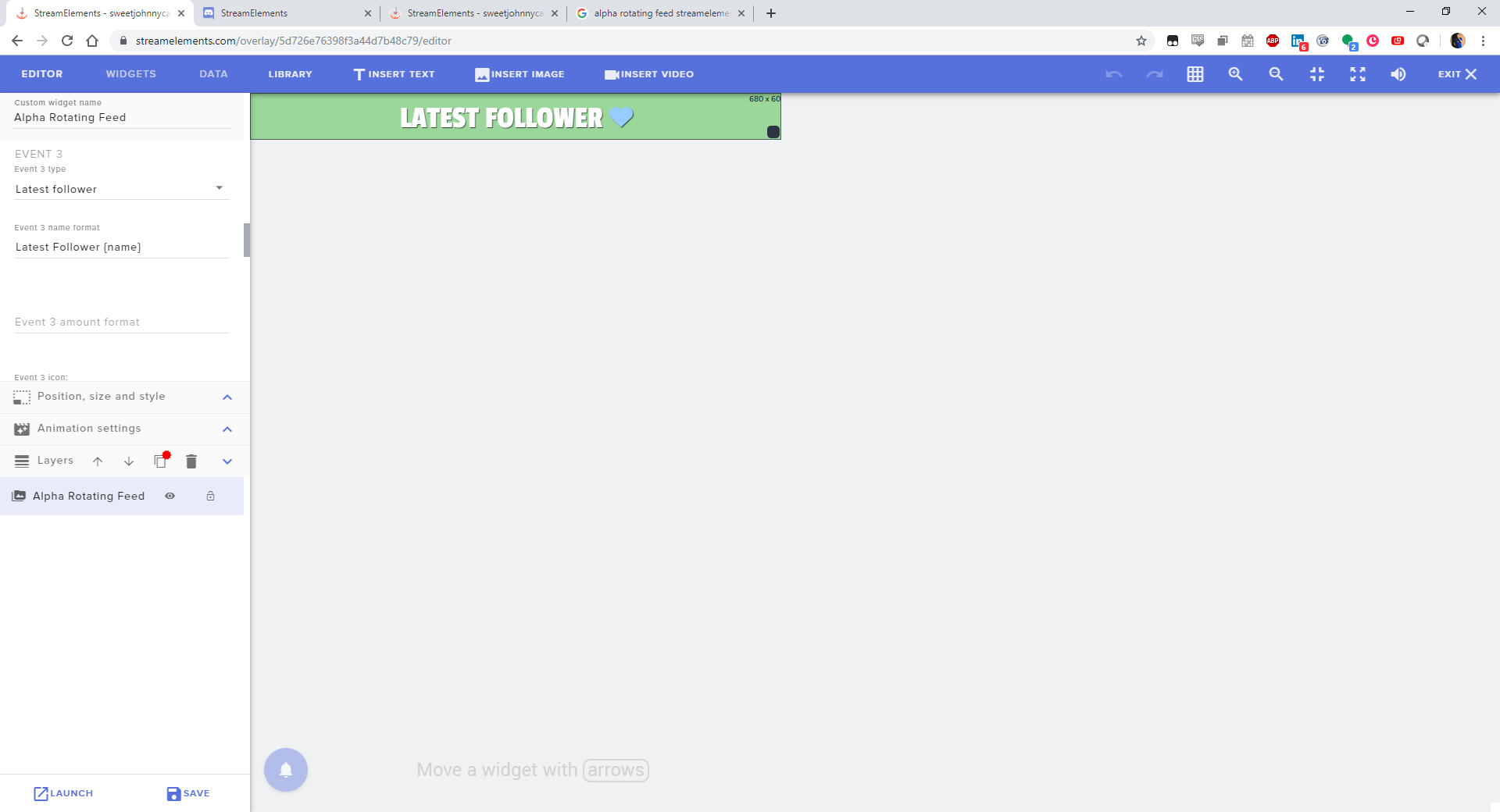
Hey folks. Is there anything special I need to do to get sub and follower names to appear in my overlay? The counts are working fine, but the names don't appear.


 wanton mango
@pine flame double check that you have data here: https://streamelements.com/dashboard/session
StreamElements
The Ultimate All in One Platform for Streamers
pine flame
ahhh its by session? is there any way to do it overall?
wanton mango
'sessions' can refer to all time too. If you don't see any names, you can manually add them for now (i.e. if you've only very recently moved to SE and it hasn't tracked any data yet). Data will track from here on out
pine flame
ahhhh gotcha ok. weird that it works that way, since the counts are right.
wanton mango
How long ago did you sign up with SE?
pine flame
hmmmmmm
23 minutes ago
so if i type in a name for them manually now, will it automatically change to the newest, once i get a new sub?
wanton mango
That might be why lol. I think SE can check counts through the API, but things like the actual names of the people, it can't see
And yep! It'll automatically add
wanton mango
This is also useful in reverse when someone with a trolly name follows you, you can X it out here so that it won't show up in any widgets
pine flame
hhahah thats very very true
for manual cheer entries, is there any way to input the amount of bits?
wanton mango
Doesn't seem like it unfortunately, I don't see the option on my side either
Maybe try the other tabs
pine flame
thanks for looking.
final question for you for today. is there any way to change the icons? like the ❤ for follows, the crown for subs, etc.
real escarp
^ if its a custom widget you will need to change it in "Open Editor"
 open rose
Question: When I go to duplicate a widget to another overlay, why are only some of my other overlays showing and not others? Do I need to set something special?
twin sentinel
you maybe have to scroll down and switch the pages for the overlays to get visible?
open rose
I've scrolled down, there's no pagination.
I can't see 4 of my saved overlays. Even though the count at the bottom is saying 22 in total, I only have 18 showing.
And as luck would have it, those are the overlays I need to duplicate to.
real escarp
@open rose can i DM you
real escarp
i was just about to say that
open rose
I looked in KB and there's nothing about having more than 20 and causing a problem?
Seems the magic number is 20, though.
lament blade
Why do you need to have X amount of followers to enable certain payment options
real escarp
in order to save on resources we scale back some services so not everyone who creates multiple accounts can just avoid system wide bans and start new accounts
lament blade
Ah
I'm new to streaming so getting followers is kinda hard
So there are no exceptions to this?
tight harness
The payment processors we work with ask us to enforce these requirements, sadly we wouldn't be able to make an exception
 dense reef
Hey guys!
Is there a way to display media request only as a title of the video?
tight harness
Yeah, click on Hide Video
 manic leaf
hello i want to ask you how to get out of this account on twitch and get on youtube http://prntscr.com/p2rhw3

 pine raptor
can i gift someone loyalty points. I only set it up after a few people had already followed me...so i want to give it to them now
sorry only been using SE ofr 3 days now
jade remnant
either do it here https://streamelements.com/dashboard/leaderboard/current
or use !givepoints command in twitch chat
pine raptor
so would it be !givepoints username amount?
jade remnant
yep
pine raptor
ty tadpole, one more thing if i may
how do i setup the command for someone to automatically receive a discord invite
well receive it when they use a certain command
jade remnant
you can set up a timer in the bot section to post it every X minutes in chat https://streamelements.com/dashboard/bot-timers
or you can set up a !command that posts a responce with the discord link https://streamelements.com/dashboard/bot-commands/custom-commands
pine raptor
so for the Timer i just add the link to Response Message?
real escarp
yes
jade remnant
yep, something link this
jade remnant
if you want it to go off every X minutes, set the chat lines to 0
 heavy forge
Can i somehow refresh my subcount? Using it as a browser source but it wont update
jade remnant
command name !discord
response join my discord with this link you scrub <link here> (or something like that)
jade remnant
i meeeeeeean 🤷
pine raptor
lol i gotcha
 lusty creek
hey, can someone help me? I have a really weird meda req. sound bug
pine raptor
@jade remnant much appreciate Sir
real escarp
@heavy forge make sure the bot has joined your channel
jade remnant
@lusty creek whats the issue?
 graceful dock
Вечер добрый, Русски ехэлперы есть в сети?
lusty creek
@jade remnant when I show the video onstream ( with the button) I hear the sound twice but onstream you only hear it once and when Istop showing it onstream I have normal sound again
lament blade
hi guys , i mentioned this problem other day buts its still the same , on my twitch channel whether im using IE or chrome , my stream elements leaderboard is constantly loading , for the last 5 days
but other people can see it
and says offline at the top of it
but i can get into my S.E stuff fine
lament blade
oh ! im not entirely 100% on how to do that ................i know i know lol
real escarp
can i DM you
trail fable
Hi everyone, does anyone have the link to where I can test my crash logs for obs
real escarp
@trail fable https://h4ndy.eu/obslog
trail fable
ty
trail fable
so far so good it's funny how vertical sync so simple but will ruin a stream
 proper path
does anyone know how to create a cheer alert that will also run a web-request when triggered? I hoping to trigger something on my game server when a specific amount of bits are donated.
real escarp
that would be something a custom widget and custom code look at widget-share channel @proper path
proper path
Cool Thank you!!
trail fable
Hello everyone, I'm having some issues with obs.live, I get an error occurred while streaming and it crashes obs, but it's weird it only happens when the game is completely loaded and I join a server, I guess it's happening because it's putting too much strain on my PC 7700k 5ghz 1080 TI vsync is on, with replay buffer on or off it happens with shadowplay replay buffer it happens if it's on or off, this all started with the new update to OBS.live or obs 23.2.1https://obsproject.com/logs/7p85xTM01yFjLNM- I have v
round brambleBOT
For the best OBS support, please join their Official Discord @ discord.gg/obsproject
real escarp
You can always ask over here to ^ @trail fable
trail fable
ok ty 😄
 civic cobalt
Hello i recently changed twitch names and now my stream elements bot is gone and i cant figure out how to get it back. None of my commands and timers are working
 deft vapor
I'm sure you get asked this a ton however what is the point of the stars next to some of the widgets?
real escarp
no problem just have the bot PART and JOIN
Hey, please do the following: Click on Part Channel on the dashboard, click on Sign Out, sign back in and then click on Join Channel on the dashboard
civic cobalt
Perfect thank you xD
real escarp
@deft vapor featured widgets
deft vapor
Thank you kindly @real escarp I just am moving over from streamlabs who are getting majorly greedy and am just a hair gun shy thanks to said greed.
real escarp
NP
 spiral furnace
Howdy gang, tinkering with 21:9 on an ultrawide. Set an existing overlay from 1080p to 2560x1080 and the editor looks great, but when I move my webcam frame to the bottom right, it seems to get cut off on the OBS browser source. Am I missing something silly?
real escarp
@spiral furnace can i dm you
spiral furnace
sure thing
 ivory pivot
disregard it decided to after i re added it
 junior pebble
How do I custom add a !subcount command - what's the code to show the !subcount for my channel?