#helpdesk-twitch
1 messages · Page 487 of 1
 tight harness
 elder sorrel
@dawn lily Click the Burger Menu on the Activity Feed -> Stream Settings -> Click the slider for Viewer Count
 dawn lily
cheers
 tardy vault
Hello! I have 2 questions about mobile streaming. How do you make external mic work with the app? And how do I transfer alerts from streamlabs to streamelements if I have only a phone device available ? Thank you!

 rare whale
Halp stream elements chat bot is not working at all in my chat
 surreal rover
has anyone had the issue where SE doesn't recognize hosts under 3 viewers? Ive been trying to troubleshoot this for months now and can never seem to get it work.
elder sorrel
@rare whale Have you tried parting the bot -> Sign out of Streamelements in Streamelements.com -> Sign back in & join the bot back?
elder sorrel
@rare whale Do you have Live Announcements enabled & did it show in chat when you went live?
rare whale
@elder sorrel Yes I have it enabled and no it did not wokr
tight harness
Do you have custom bot name enabled?
rare whale
No I do not @tight harness
tight harness
When you click on Unmute it'll resume 😃
rare whale
Ok 2nd question. How do you change the bot name?
tight harness
!rename
 nocturne pelicanBOT
Custom bot name requirements
- StreamElements bot modded and in chat
- Active overlay with alerts
- StreamElements tipping page in the panels below the stream (!panels)
- OBS.Live or Ground Control open
- Create a twitch account for the name you want to use or run the bot under your own name
- Custom bot name doesn't work on Mac
surreal rover
So if we want SE on the new bot to have use of emotes it must be re subbed? under the new name?
tight harness
Any account must be subbed to use a channel's sub emotes, this includes bot accounts
If you rename the bot, then you must make sure the account that is being used for the bot is subbed
surreal rover
I just was wondering if it would transfer over
tight harness
Not automatically
 fading imp
@charred star then it seems to be a problem with dependencies or something best to ask in the obs discord. They should be able to help also I checked and I don't get the Linux-browser related error in my obs
 surreal stump
media request no sound coming through on stream what to do?
nocturne pelicanBOT
@surreal rover Due to changes to Twitch API, we have filtered out hosts and will only show these ones on your activity feed:
- All manual host events (0 hosts included and if filter set to 0)
- All hosts coming from an online channel. If the hosting channel has been offline, we do not show it
- All auto host events with at least 1 viewer
Note: An offline host is when you see "X channel has just hosted you" - with no viewer numbers on the back
 autumn estuary
Hey everyone, with the Import Tool, does it import my theme? because the overlay it gives me after importing is just blank
rare whale
Another question, how to get the loyalty rewards notifcation to show up on stream
autumn estuary
I can't wrap my head around the editor, and I don't want to rebuild my theme again
surreal stump
what's wrong with media request? there is no sound coming through my steam
surreal rover
So even if I have enabled everything at 0 if my viewer is not streaming then It will not show that they hosted me?
because I used to get the "Username" has hosted your channel with 0 viewers. And that no longer shows up.
 brazen iris
@twin sentinel Have you got a response from the staff team again about my issue?
tight harness
@autumn estuary If you're using OBS.Live there is a built in importer inside the StreamElements menu at the top, this imports the alert box, tips and overlays
@surreal rover Yeah, if they're not live it won't show
@rare whale If you mean from the stream store that requires you to add the Store Redemption widget from the Widgets page
@surreal stump Do you hear the sound yourself?
surreal stump
yes got it to work now
tight harness
👍 awesome
surreal stump
😃
 lament blade
Hiya'll! I would like to report a !command bug on the bot!
rare whale
So I did @tight harness and the item redemptions work but the notification redemptions don't work. Like the sound works but not the gifs
 gentle kindle
hey i have a question. when i'm on obs and hit the "start streaming" button i'm just able to stream on yt and i dont even have the option to use twitch can someone help?
gentle kindle
i already have . i chose there twitch but when i hit start streaming it doesnt work
I'M also connected to my twitch
 jade remnant
can you send a clean log file
- Restart OBS
- Start your stream/recording for about 30 seconds. Make sure you replicate any issues as best you can, which means having any games/apps open and captured, etc.
- Stop your stream/recording.
- Select Help > Log Files > Upload Current Log File. Copy the URL and paste it here.
 analog hawk
Hello ya'll! 😄 I have a quick question: How can i make it that Bit donations or normal donations which have messages like: "@@@@@" included being read out loud on stream, i got Text To Speach enabled but it never ready the "@@@@@@" part or a lot of the smae letters for example: "FFFFFF" in a row, i think its funny so i want that to be read out loud on Text To Speech, i know there is a spam filter but i already disabled that, help me pls 😄
jade remnant
can you send a log with a stream session and not a recording one please kev
gentle kindle
oh ofcourse
well sorry i cant. the problem is that i cant stream. only on yt and when i changed in the game settings to twitch and hit start streaming, i see a window popping up where i can choose the video title etc but for yt and not for twitch
so i dont know how to send a stream session without streaming
jade remnant
hmmm, log out of stream elements menu at the top and disconnect from settings > stream
then log back into both with your twitch account, then restart obs
analog hawk
@jade remnant can u help me as well 😮 ?
jade remnant
have you turned off the symbol protection on the se dashboard?
tight harness
I see that you don't have TTS Anti Spam enabled or any of the Spam Filters
So it shouldn't be filtering out such things
autumn estuary
@tight harness I have just found the built in importer, it keeps failing to import and telling me to try again later
tight harness
@autumn estuary Lets take this to DMs if that's alright
 hollow badger
Hey SE fam. I have my host alerts set to show even if they are hosting with 0 viewers. But I consistently get no alerts. Is this correct? Or is there a way to fix it?
autumn estuary
@tight harness have DM'd you
nocturne pelicanBOT
@hollow badger Due to changes to Twitch API, we have filtered out hosts and will only show these ones on your activity feed:
- All manual host events (0 hosts included and if filter set to 0)
- All hosts coming from an online channel. If the hosting channel has been offline, we do not show it
- All auto host events with at least 1 viewer
Note: An offline host is when you see "X channel has just hosted you" - with no viewer numbers on the back
 grand basalt
bttv emotes aren't showing up in my OBS.Live twitch chat. I tried doing !emotes update but they still don't show up
 random quail
is it possible to have streamelements auto answer to a message sent by streamelements?
for example
StreamElements: The poll has been created .....
and then it recognizes that in a separate command and makes another chat command
I tried doing that with Command keywords but it doesn't react
 dry hare
Commands can’t trigger commands afaik
 austere berry
Wrong place to ask perhaps, but anyone else experience problems with notifications not showing up (subs). Doesn't seem to appear on dashboard either 😦
nocturne pelicanBOT
@austere berry Please provide your account ID found at the top of this page: https://streamelements.com/dashboard/account/channels This ID is public info and safe to share here.
austere berry
account ID 598984906ae1f60a0b6aa7bd
jade remnant
thanks, i will pass this on to get your webhooks reset.
in the mean time can you part the se bot from your twitch and join it back in the se dashboard.
austere berry
@jade remnant as I'm in progress on switching to streamelements, I also checked on Streamlabs (which i used before).... nothing there either
jade remnant
oh really? thats interesting.
i will pass it onto the admin to have a look at,
we will try and get it sorted for you
austere berry
thanks
 peak portal
Hi. I'm trying to add my own alert. Could anyone help me
 tough oriole
I'm confused as to why the subs have to share the sub to have the alert popup
Makes me wanna not use this software anymore lmao
 bright oak
My alerts (only host) stopped working for some reason. All other alerts seem to be fine, they use to work no problem, I thought I had it set to 1 host alert. Any suggestions on what to check?
Think I solved, set to '0' to show all alerts.
 mint crane
can someone tell me why the hell does my stream is available only in 720 while i'm streaming in 1080?
it happens since last update
and there is absolutly nothing i can do about it, just restart and pray for miracle to happen
vod are in 1080 but you can't set 1080 while watching stream
 swift parcel

nocturne pelicanBOT
@static latch Please follow our community rules:
- No advertisement or stream promotion
- Respect ALL server members
- No NSFW/NSFL
Thank you
 cerulean temple
Hi everyone! Ha anyone recently run into any issues (Nintendo Switch streamers) where their game will freeze? I've deleted the source and re-added the source and it will still do the same thing after about 5 minutes... 😦
 static latch
@swift parcel not self promo or anything else harmful wdym
swift parcel
lol don't look to me about that
@cerulean temple have you gotten in touch with your capture cards support area or OBS discord?
cerulean temple
I will definitely do that, thanks @swift parcel !
swift parcel
Yeah this is more for SE itself than that stuff hope you get it fixed!
 foggy nebula
Hey! I can't use my Supermoderator commands anymore? Even though I'm the broadcaster. The only way around it was to make myself a super moderator as well. is this supposed to be like this
swift parcel
@foggy nebula have you made any changes (name?) twitch might be having a hiccup that is lagging on marking you as a broadcaster? there could be a number of odd things
 misty kestrel
streaming right now but hte bot refuses to respond to commands. its mod, but still not replying
swift parcel
I have a feeling twitch is having an issue with chat at the moment I would poke it myself but your channel is followers only 😛
 turbid rampart
Hello is there some moderator/admin from twitch online maybe? we got some girl that should be banned
swift parcel
Nope this is just for stream elements things. Report them and pray
swift parcel
Nothing we nor anyone here can do for you. This is a support channel for the SE bot not twitch issues. Which we all know are plenty. Even if there was anyone from twitch here they can only do what their job details on the site itself.
misty kestrel
sorry about that, i turned follower off
swift parcel
FYI fixed Forsale's issue : he muted the bot
 civic gulch
Hey anyone possibly know what’s going on here, I have a dual pc setup and my main scene is completely fine but when I copy and paste my elgato(video capture device) my audio is distorted and supper glitchy. It used to never do this and the audio is perfectly fine on my main screen, I’m using the lastest version of obs live
lament blade
do you need to have obs to stream on twitch?
swift parcel
@civic gulch in obs is your audio at 48khz if its the pro card
lament blade
im on ps4 btw
swift parcel
@lament blade if its from a console no the twitch app does it for ya
swift parcel
but to use overlays you do need obs and a capture card/ps4 remote play
lament blade
nah i dont need overlays
swift parcel
I assume you made an account?
civic gulch
Actually I posted this in the wrong area
 gentle hamlet
does stream elements only work with twitch
lament blade
nah with yt to
gentle hamlet
i see yt and facebook but does it work with dlive or mixr
swift parcel
Twitch , YT and FB . No eta on mixer and I do not know if there any ideas on dlive
 stark basin
So i've encountered a problem
How can i import my scenes from OBS to OBS.Live
When i try to export out of SLOBS it makes a .overlay file
when OBS.Live wants JSON
lament blade
i can stream on twitch
 light bison
hmm there's a weird thing going on, for some reason ${channel.subs} says i got 0 subs
even though the streamelements dashboard says 75 subs just today
lament blade
I commanded it to play a song and it didn’t
rare whale
So I was also having issues with my host notification not working. All my other notifications work except hosts.
 twilit knoll
hello guys! Does media request automatically play if someone request and even tho you dont have the streamelements tab open?
 swift mist
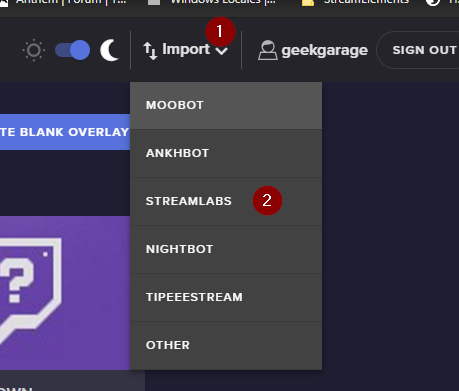
@stark basin https://i.imgur.com/cAONEhC.png This is how you import scenes, but as you don't specify what exactly you are trying to import it is kind of hard to help
 twilit knoll
my media request wouldnt play automatically I have to manually open the site and play the song any help
 quiet hare
Yes it should @twilit knoll
twilit knoll
it doesnt for me :c
quiet hare
Have you linked your Spotify or SoundCloud?
twilit knoll
uhmm nope
quiet hare
And you stream on twitch right
twilit knoll
u mean the widget?
since the wisget itself is on the streamelements site not directly on my obs
quiet hare
Yea the extension
Ohhhh
Well on console you just link your extension to your Spotify
twilit knoll
oh what
quiet hare
That's what I did and it works just fine
twilit knoll
aw
swift mist
SE Media request is based on youtube, not spotify or soundcloud. @twilit knoll do you use OBS.Live ?
swift mist
give me a sec i'll start my encoder PC to take some screenshots
twilit knoll
hmm ok
stark basin
@swift mist i want to import my scenes from Streamlabs OBS to OBS.Live, although the SLOBS only exports in .overlay files, OBS.Live wants only JSON
swift mist
@twilit knoll wait what, you use Streamlabs OBS?
twilit knoll
oh wait
streamelements obs oops i just made a switcg
@swift mist
i just switched to obs.live since theres lesser issues
swift mist
@stark basin can't help you then, back when i used SLOBS you were able to do it. Hopefully one of the SE staffmembers can guide you
@twilit knoll alright, just had to be sure
stark basin
Im thinking an easy way would be to downgrade the Streamlabs OBS and export the JSON
swift mist
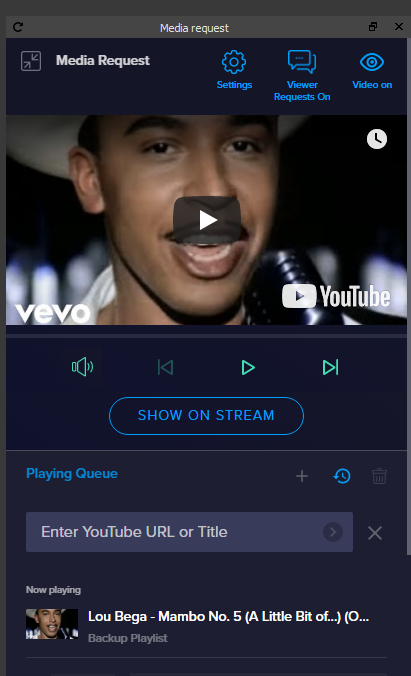
@twilit knoll https://i.imgur.com/KCtxPpe.png does your media request in OBS.Live look somewhat like this
 twilit knoll
i dont have that on my obs.live
i have to go to the website
and manually press next
swift mist
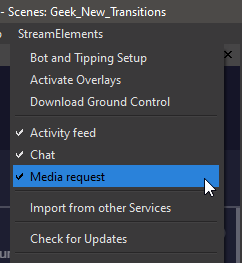 swift mist
@twilit knoll tick that and you will have media reques in OBS.Live
twilit knoll
oooooh
swift mist
not quite
twilit knoll
thanks ima check it out in awhile
swift mist
you can either go into settings through the media request in OBS.Live or on the website
twilit knoll
hmm ok
swift mist
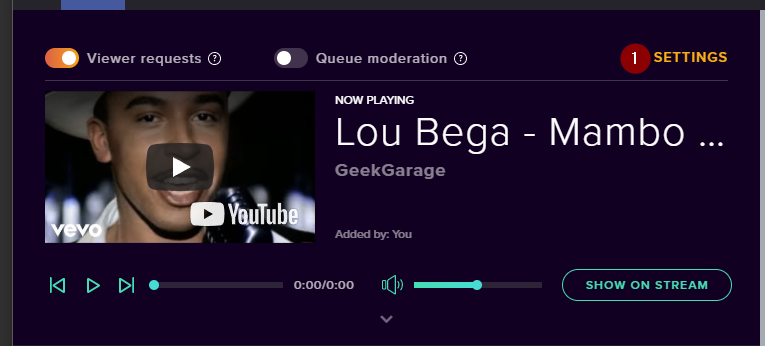
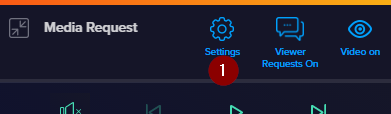
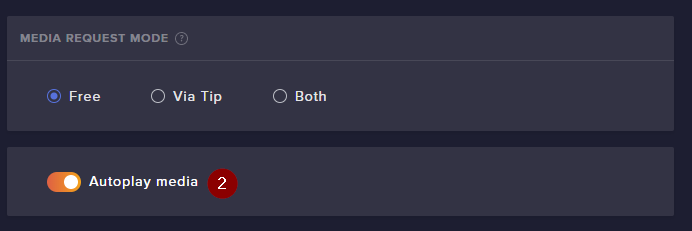
now your music should play when requested
@twilit knoll Be aware if you see this at the top you need to click it if that is where you want the audio to be played from, so if you don't see it in the browser but in OBS.Live then the audio source will be the browser, else if you see t in the browser and not OBS.Live then the music audio source will be OBS https://i.imgur.com/Tld9c6k.png

did you get it to work?
 flint vessel
Hi, I'm really new at streaming and would appreciate some help, there is any way I can control my team with the phone and not a pc, I don't have one at the moment, I do it from my Xbox
 violet cedar
I'm in Vegas for the weekend doing a lot of IRL streaming. I get disconnected here and there. I've seen some streamers setup a video that plays while they are disconnected until their connection returns. How do I set that up? I tried researching that right now and couldn't find anything on it.
swift parcel
settings > channel > disconnect protection on twitch but it gives an image from twitch
but I do know what you're meaning on video but its through those live pack things i believe i could be wrong
swift mist
@violet cedar well some do it by using an RTMP server where they write a script to detect Kbps off the nginx stat site and if below threshold using websocket to change scene (i'm currently building this myself), but you can use a service for a fast solution, it's not too expensive norip.io endpoint solution, I have no affiliation to it i just know of a few streamers who use it 😃 so don't complain to me if it's not working out as planned 😄
twilit knoll
@swift mist Hey sorry for the late reply since I had some things to do
DO i click show on stream?
swift mist
only if you want to show the music video on stream AND you have added it to the overlay @twilit knoll
 burnt juniper
 strange sky
I just realized that this is an issue, prolly more for streamlabs issue than yalls. Nevermind my inquiry
foggy nebula
@swift parcel i haven't changed anything
twilit knoll
Does anyone know how to view chat through phone?
streamelements or something
because the twitch dashboard on mobile is so glitchy
Chat doesnt show up sometimes
 hollow horizon
so i just started playing with song requests.. is there any way to have the song requests happen in the room with the browswer window closed?
cause everytime i close or minimize the window the songs stop playing
 upper pendant
Is there any way to clear the "newest follower" if it is something inappropriate or does it just need to be hidden until someone else follows?
 weary sparrow
Can someone tell me what's wrong here https://gyazo.com/e291b26829aa6d47e0fd4a709c99a555
 hollow horizon
ok i figured i had to put the media request in the obslive. but is there a way to not have it post that a song was added to chat.. or have it not double
weary sparrow
Ok so I made it work, but how do I make "addwin" edit "win", I dont want anyone adding wins so I want "addwin" to be mod only and "win" to be display only for everyone https://gyazo.com/906ea0c667710041f93c012f2431b50b

 cinder hinge
Is this upload speed good enough? I was getting like 100/100 with my other company now im just rethinking everything
https://i.imgur.com/I6SDBpp.png

 hushed kindle
Is anyone else having browser source issues?
 proven spire
I wish I was Affiliate
 zenith widget
@cinder hinge Its a bit on the low side, but you can use 3k-4k bitrate and leave some room
@weary sparrow There is a user level choice when you edit the commands.
@upper pendant Activity Feed on the left of the dashboard -> widget data on the right -> in the labels tab remove the name from Recent followers
zenith widget
@keen ledge Please do not post in multiple channels.
zenith widget
That I cannot answer.
 keen ledge
than why answer let someone else answer 😋
zenith widget
Ok heres an answer - google it.
zenith widget
Interesting. I wonder what you searched for to get to our platform, where we don't have Mixer support, yet.
keen ledge
i just come here for all my streaming questions
 rustic matrix
any ideas to this one so my friend has backup playlist added but when a viewer requests a song it's not playing it and skipping to the next back up song in playlist any idea how to fix so viewers songs are played
zenith widget
What is your friend's account name?
 quiet ibex
its Muffiniy
rustic matrix
^^
zenith widget
Sorted in stream ⤴ found a 🐛
rustic matrix
thank you so much for you help @zenith widget 🙂
zenith widget

 arctic timber
extremely new to streaming trying to get song requests working if someone is willing to help out
zenith widget
I would suggest to start here: https://www.youtube.com/watch?v=17eUkoZ6eIs&list=PLCDDKlFdScbEwdx5AntcQIS1InkFJwHtv&index=9
analog hawk
Hello ya'll! 😄 I have a quick question: How can i make it that Bit donations or normal donations which have messages like: "@@@@@" included being read out loud on stream, i got Text To Speach enabled but it never ready the "@@@@@@" part or a lot of the smae letters for example: "FFFFFF" in a row, i think its funny so i want that to be read out loud on Text To Speech, i know there is a spam filter but i already disabled that, help me pls 😄
Keizar pls help, ur always helping me lol 😄
zenith widget
Tipping settings -> Tip moderation -> TTS anti-spam if its turned on -> turn it off
analog hawk
it is turned off, thats my issue
if ppl write in the donation "FFFF" for example
it read 1 time "F"
reads*
and thats it, i dont know how to fix that, i want it to read out all the "FFFFFF's" for example
https://gyazo.com/b9e791c434ec42a3f4706c9d6cbd027d @zenith widget
 zenith widget
I see the settings
analog hawk
literally off
zenith widget
Cheers or tips?
analog hawk
so far i noticed it on bits only
zenith widget
and i noticed i was looking at the wrong overlay
analog hawk
dont think i've received a donation yet when some1 wrote FFFFF or @@@@@ i.e.
zenith widget
i don't see anyone actually spamming you with FFFFFFFFFFs or @@@@@@@@@@@s via bits

zenith widget
yea i saw it
analog hawk
ok
analog hawk
are u looking on the one on july 31 2:19:25?
zenith widget
analog hawk
ok i just played it and it worked
there was 1 donation which didnt work doe
let me check
yes
i got it
the helicopter 1
with the @@@@'s
also 3 days ago
same person
 strong flicker
good morning
analog hawk
it skips the @@@@@@'s
strong flicker
i can't seem to get my chat stats to work, do i need to apply some settings?
analog hawk
Morning @strong flicker
zenith widget
I think thats intentional for the [at]s
analog hawk
how can u remove that, that the @'s are getting read?
zenith widget
@strong flicker fixed
strong flicker
can I remove the bot from there?
zenith widget
@analog hawk Its either the voice is programmed to not read that many [at]s or we've disabled it on the back end
@strong flicker Wdym?
strong flicker
streamelements is my top 2 chatter
i want it to not show
is it just add on ignore on loyalty settings?
analog hawk
u want me to try a different voice? @zenith widget
zenith widget
@strong flicker Unfortunately, theres no way to ignore specific people for chatstats.
@analog hawk sure i guess
analog hawk
If u disabled it on the back end, can u enable it for me haha XD?
where u change the voice again?
analog hawk
a global setting? What does that mean? i can't have my @'s read 😦 ?
zenith widget
It means everyone that uses TTS is affected by this setting.
zenith widget
Yes in the overlay editor -> click on the alert widget -> alert type -> tts
don't forget the variations
zenith widget
yes
 median yarrow
okay thanks
zenith widget
Check the variations
analog hawk
i clicked on save and it still reads with justin voice -_-
even doe i selected another voice
i deleted all variations
it doesnt let me change the voice D:
zenith widget
Thats what your page showed on your old name.
 zenith widget
@analog hawk You still have 1 variation in the cheer alert
 narrow birch
if I untick "Pick an alert randomly when more than one matches", what protocol will be used for selecting the alerts?
narrow birch
okay
zenith widget
As in if you have 2 variations that are looking for "Resub tier 1 , amount 5 months"
it will grey out one of them
and pick just 1
If conditions match and you untick the option one of them will be grayed out
thats what I wanted to say
narrow birch
is there any way to manipulate the order through script? I'm trying to come up with a way to make a string of sub alerts
analog hawk
ok it worked on another voice!!!! @zenith widget
why doesnt it work for justin voice 😦 ?
zenith widget
So Justin doesn't allow spam of [at]S
analog hawk
im so sad
zenith widget
No.
analog hawk
rip in pepperoni man
rip justin
forever remembered T_T
thx again keizar ❤
also i quick question u may know
is there a way to make donation unrefundable over StreamElements?
donations*
zenith widget
Well you can always refuse to refund
that doesn't mean chargebacks can't happen, right?
narrow birch
chargebacks are something that banks/credit card companies do
analog hawk
ye but it costs a fee if u want to refuse the refund and since ppl dont get something while donating they can always "troll" donate
narrow birch
SE.Pay protects you from chargeback fees, doesn't it?
analog hawk
@narrow birch exactly so u can never do anything about that i guess rather than remove the donation button?
narrow birch
that's how business works
narrow birch
unless the only donations you want to accept are mail-in dollar bills
you can't really avoid the possibility of chargebacks
analog hawk
cos im assuming there isnt since when ppl donate they can always be like: "Ye refund" and always win cos they didnt get anything in return right?
ye, but why do some streamers have under their donation panel Donations are Non-refundable?
narrow birch
to protect themselves if they have to dispute it
analog hawk
when there is no such thing as "non-refundable"
well they gonna loose the dispute anyway right?
zenith widget
Best way to help dispute the tip is to provide screenshots of the activity feed of the tip from the user
and a clip of your alert
This is something we help with when it comes to SE.Pay chargebacks
and there are no fees with SE.Pay if you get a chargeback
You can always dispute the chargeback with PayPal
analog hawk
yes but u always loose, cos person "x" can always argue "i didn't get something in return" i missclicked and then paypal always is gonna refund it and u get stuck with a fee which on paypal right?
zenith widget
And here comes the little argument between "donation" and "tip".
You are not a charity to receive a donation, you are an entertainer and received a tip.
analog hawk
sry for that horrible grammar on my last post lol
analog hawk
u ever were in such a situation?
zenith widget
you can say "Im an entertainer and received this tip, with proof of message from the tipper"
and provide a screenshot of the message of the tipper.
No, but i've helped some people with it and the result was in favor of the streamer.
analog hawk
what if the tipper doesnt include a message and just troll donates? without any message, just to get me stuck with a "percentage fee" i gotta pay paypal for using their service?
zenith widget
Providing argument that you are an entertainer that receives tips with no signs of begging for tips, providing a screenshot from the activity feed and a clip of the alert happening
can win you 95% of the disputes
thats the 5%
troll donations
analog hawk
ok
zenith widget
Its up to you, to know your regulars and to figure out which is a troll donation and which is not.
And have that one tiny thought in the back of your head.
At this point this has become a discussion and its best talked in #general-chat
analog hawk
so basically if some1 troll donates without a name, donating me lets say 1000$ and refunds i get stuck with a huge fee cos i am using paypal's service?
narrow birch
chargebacks, yes
zenith widget
If you think that 1000$ is a troll donation - better refund it before it becomes a chargeback
narrow birch
I think you can refund in advance
that's why they often advise you to keep the money in your paypal for 180 days
narrow birch
I think that's the amount of time paypal payments can be refunded, yes
analog hawk
okj
ok*
so pretty much ur saying that if im getting a 1000$ donation from an annonymous tipper i shoudl immediately refund it?
should*
narrow birch
if you receive a $1000 dollars from someone without a name and who doesn't comment anything while you're streaming for small viewer numbers, then the odds are likely for that
but honestly, I haven't really seen any troll donations in anyone's stream in ages
analog hawk
so if the 1000$ stay in my paypal for 160 days i still dont have to pay a paypal fee for using their service if he chargebacks lets say in 30 days?
narrow birch
it's not really beneficial for the trolls, especially since 95% of the chargebacks get successfully disputed
zenith widget
the 95% rate is the amount i've helped
which is likr 4 out of 5 people something like that
narrow birch
yeah, I'm just using it as a reference
zenith widget
Pleae take this to #general-chat
 lament token
Can someone help me on how to get started on obs live overlays?
zenith widget
Here is how to get started with the overlay edtor: https://www.youtube.com/watch?v=LwAfMIR3Cj0&list=PLCDDKlFdScbEwdx5AntcQIS1InkFJwHtv&index=5

StreamElements Overlays are loaded from a single browser source in your streaming software, making streaming easy. https://streamelements.com/ StreamElements...
Then you follow this:
!add
nocturne pelicanBOT
To add your overlays to OBS, add a new browser source in your scene. Paste your overlay URL in the browser source properties, set the dimensions to 1920x1080 (unless you changed them on the website), and ☑ “Shutdown source when not visible” https://youtu.be/KDvLynUqXI4
analog hawk
i message u @narrow birch
zenith widget
@lament token ⤴
lament token
thanks i appretiate it
narrow birch
but anyway, what I meant to ask was that is it possible to use different alert variations through custom CSS?
as in, create new, specific events for alert variations
zenith widget
Each variation can still track the condition
you can just simply add html and css
don't need to handle the JS part as that is handled by the condition of the variation
narrow birch
let me reword this: am I able to create new conditions?
zenith widget
You can make your own conditions via the JS, but at what cost? Huge chunk of code to maintain.
zenith widget
Well you can and each variation can have its own CSS
I tried your route to make the variation condition in the main sub alert, but then was told that the variations can do that and I can have different CSS code for different things.
narrow birch
yeah, but the current variation possibilities don't really cut it for me right now
zenith widget
What condition are you looking for?
narrow birch
I have two different things in mind right now: one that is based on the subbing time (for example, a "witching hour" on midnight), and one that is based on how many subs there have been that day (first sub uses alert 1, second sub uses alert 2, third sub uses alert 3)
I know there's the random percentage, but it's important that they happen in the specific order
zenith widget
You can add the time check in any of the variations
as additiona JS code
and I think the same thing can be done with JS again in each variations to check the amount of subs
and still control everything in the CSS to show or not

GitHub
Contribute to StreamElements/widgets development by creating an account on GitHub.
if sub.session >= 5 for example
ShowThisElement() and so on
narrow birch
okay, that's useful
zenith widget
but if you have 5 variations with the same condition
and you pick at random
that won't work
so you will have to have the check for amount of subs
be in 1 variation
for lets say
6 months resub
narrow birch
yeah
zenith widget
and have all the different CSS smacked into that 1 variation
so I hope you are using an external IDE for this 
 sterile ingot
hello, uhh for some reason my song request is broken in the way that it cant take more than one song and my backup playlist isnt playing. Twitter guy said just skip the tutorial video that just shows up and i do but it does nothing.
rustic matrix
hi how do you change the bot name on stream elements
nocturne pelicanBOT
@rustic matrix Custom bot name requirements
- StreamElements bot modded and in chat
- Active overlay with alerts
- StreamElements tipping page in the panels below the stream (!panels)
- OBS.Live or Ground Control open
- Create a twitch account for the name you want to use or run the bot under your own name
- Custom bot name doesn't work on Mac
analog hawk
wow i just wanted to edit something i wrote before and now accidently deleted it lol
Anyway @zenith widget thanks for the help again my dude!
literally always there when i need you! ❤
zenith widget
I won't be around in ~12 minutse 
analog hawk
Also figured out that on the voice "Madison" u can't write something like: Where.Are.You. i.e. the TTS doesnt read it
analog hawk
yes ik
i just wanted to let u know that
in the case it might be helpful to know that
idk 😄
Do u know any voice which allows anything to be read out loud?
zenith widget
Unfortunately - no.
 past ginkgo
Is chat stats bugged? I have loyalty enabled but my page says 404
zenith widget
fixed
past ginkgo
Why thank you, any chance you can merge DonnySorrow_ as well? Was my second name
zenith widget
There wasn't a chatstats page on that name
I found your chatstats page on donnysorrow_yt
past ginkgo
Got ya thanks a million
 half viper
hello ive been having an issue for a long while now and idk how to fix it at all. my streamelements has been disconnecting me from twitch randomly. sometimes it doesent happen at all. other times it disconnects me as soon as i 5-10 minutes in the stream
nocturne pelicanBOT
@half viper Please provide a log from your last stream. To do this, in OBS go to Help > Log Files > Upload Last Log File and paste the link to the log file here.
half viper
i counted how many times it disconnected, within an hour or so it disconnected 14 times
zenith widget
This log only has 1 stopping stream line
[rtmp stream: 'simple_stream'] User stopped the stream
Here is a full analysis
Usually when a stream stops, this means you have low upload or non
or Internet issue.
 proud moss
after opening OBS live and connected to twitch , I stop receiving sounds on my headset but others can hear me, whats the solution to it ?
nocturne pelicanBOT
@proud moss For the best OBS support, please join their Official Discord @ discord.gg/obsproject
half viper
hmmm. i definitly didn't manually stop the stream manually i checked my internet right afterwards after it continually kept happening. stable at 18mbps upload. but my download was oddly very very low
download speed wouldn't affect it woud it?
zenith widget
I would strongly suggest to look at the link I provided(not the obs dicord one) and follow the guidse inside it
download can also affect a stream
Just to be sure, im referring to this link: https://h4ndy.eu/obslog?url=https%3A%2F%2Fobsproject.com%2Flogs%2FRsB69aSC4i-wSM3B
half viper
okay ill check it out, thakns
 vestal roost
Good morning, i have a little problem whenever i stream apex (all low settings) the loading screen lags but in game its crystal not sure whats the issue but its always the loading or the normal prompt screen then after about an hour or so of streaming it all just lags bad till the stream stays frozen
zenith widget
!apex
nocturne pelicanBOT
Since Apex Legends doesn't have optimized GPU drivers yet, it tends to take up all your GPU resources, leaving nothing for OBS. If you're having OBS performance issues, you'll likely need to limit the game somehow. The easiest way to do this is to enable Vsync in the game, or use a frame limiter. You can limit the game to 60fps by adding `+fps_max 60` to the game's launch properties in Origin.
https://twitter.com/OBSProject/status/1093974215877951493

If you stream @PlayApex and are having FPS issues with OBS due to a maxed-out GPU, you'll need to reduce GPU usage so that OBS can run as well. The quickest way to do this is to enable Vsync with triple buffering and disable Windows 10 Game Mode. https://t.co/FOPmDyJMNx
Retweets
471
Likes
1345
 Twitter
zenith widget
Twitter
zenith widget
Tbh I'm not sure how true this still holds for Apex
vestal roost
aghhh
half viper
okay i didn't have any critical errors, had a few warnings but i fixed all of those, and now i have 2 in the info section left to take care of... it still says i have a low stream bitrate...even if i set the bitrate to 20000 just to test if it would go away, does that mean that its just a bug? or am i missing something?
zenith widget
woah 20k bitrate?
twitch allows up to 6k
you are pretty much trying to bottleneck your upload
lower it to 3-4k
and lower your output resolution from 1080p to 720p
maybe thats the lowbitrate info thing - for 1080p - 3k bitrate isn't really enough
half viper
yeah i noticed that. thats what i set it to. 3k is what i always have had it to. is there a reason why i shouldn't use 1080p to 1080p?
zenith widget
not everyone can watch a 1080p stream
unless you have encoding enabled on your channel, which is reserved for partners
and first come first serve for affiliates
half viper
ah. thank you that actually might be the problem iv'e been facing. i have 2 monitors so encoding is definitely a factor. my gpu and cpu can accommodate for the extra definition. but it definitly will help to lower it
half viper
if your curious, i think it did fix it. i'm taking an educated guess at this, i noticed before while streaming OBS was taking up around 20%CPU usage but i think deleting everything under the warning section have now relieved a lot of stress off of my CPU. now it hovers around 3% it might have been a CPU overload due to me being stupid and not knowing what adding extra game captures would do.
zenith widget
Tbh you should use your 2700x to stream instead of your GPU
Source? A person i trust, who suggested me to use a specific Mobo with the new 3700x 
half viper
under encoder use x264 right? thats what i have it set to
3700x would be awesome to have
zenith widget
Flexing when I dont have to
half viper
thats almost exactly where i sit while idle as well 😄 the biggest difference between them is the clockspeed ive noticed
zenith widget
I think the increase in power between 2700x and 3700x is...minor at best - like 10-15% more
anywho
half viper
oh yeah thats right
zenith widget
both CPUs are better for streaming then your GPU - i have yet to test streaming with my CPU
but gaming wise - i have yet to see my CPU go over 20% total usage
As for the cutting off on your stream
if it continues
then most likely something with your ISP
and you may have to call them
and tell them what you are trying to do and what happens
explain what streaming is, if you have to
more details to the ISP, the better they can help you find out the issue
BUT
you can try this little program
to see how you connect to the twitch servers
half viper
while streaming. the total load for my task manager is 8% without games. with rocket league and having 5 tabs open im sitting at 18% while streaming. oh hell yeah i was actually looking for a bandwidth tester.
zenith widget
this is not a bandwidth tester per say
but it can determine your connection to the twitch servers
if all the servers are bellow 100 quality
ISP issue
zenith widget
 👉 ISP
👉 ISP
heres is something they will first suggest
turn off your router for 5-10 minutes from the power
half viper
yeah. ive done all of that. and not only that i had a tech come to my house and change out the modem and the router. and he changed cables as well
urg this is so annoying
zenith widget
USA ISPs 
half viper
should i change my server to mexico? 17ms with 96% quality? i currently use chicago
zenith widget
 yes
yes
try it if its the best - sometimes OBS can choose the best quality server for you, but I would not trust it
as it may just choose the closest
half viper
mexico city is the only option....is it that one by chance?
zenith widget
Probably
 pliant tree
hey guys
i have issue that i cant seem to fix
my web cam is always out of sync and when i do test run on facebook live chat it works perfectly
nocturne pelicanBOT
@pliant tree For the best OBS support, please join their Official Discord @ discord.gg/obsproject
 calm mesa
does streamElements have this - This will display a mention, but only if a mentioned user is provided when the chat command is used, e.g. with !Command @username or !Command username. Otherwise the mention will be omitted.
zenith widget
${user| "nobody" }
this will work only if used as !command [at]user
without the [at] is should return "nobody"
calm mesa
thanks
@zenith widget i did that but when i try the command the bot [at] me then the command. Is there away the commands works without mentioning someone unless i use !command [at]user
zenith widget
Give me a moment and I'll test it out
So you want to have a command that if used like this:
!command @kerizar
the bot will respond with
@keizar hey buddy
but if the command is used like so:
!command keizar
the bot response with
hey buddy
calm mesa
yeh
zenith widget
Ok thats an interesting query
I'll have to ask the devs on this as Im not finding a solution
calm mesa
ok thanks
 neat zephyr
Kurze Frage Welche Einstellungen Muss ich eisntellen Wenn ich Alle Alerts /host/ Raids usw alles angezeigt wird auch enn einer auf sein Channe /host XY Eingibt ?
nocturne pelicanBOT
@neat zephyr Due to changes to Twitch API, we have filtered out hosts and will only show these ones on your activity feed:
- All manual host events (0 hosts included and if filter set to 0)
- All hosts coming from an online channel. If the hosting channel has been offline, we do not show it
- All auto host events with at least 1 viewer
Note: An offline host is when you see "X channel has just hosted you" - with no viewer numbers on the back
neat zephyr
möchte gerne alle Host und Riads angezeigt werden auch Autohost !
zenith widget
We also have #🇩🇪︱deutsch support channel.
austere berry
I know for a fact I had a new sub last night, since I payed for my bot :D
It still haven't showed up on SE dashboard (it's been like 13-14hrs now.
Account-ID: 598984906ae1f60a0b6aa7bd
I just recently switched from Streamlabs to Streamelements, and Streamlabs was slow to update too, but it showed up after a couple of hours there. Can you please check??
zenith widget
I resubbed your webhooks so sub events should show up from onwards
But we won't be able to get anything that was missed until this moment.
Let me know if the issue continues
austere berry
Alright, thank you. 😃
@zenith widget seems to work for now, i tried gifting a sub right now and it shows in recent
zenith widget
👍
 tardy fern
I have a question for streamelements
It's hard to understand but i hope u understand it tho. So i use obs studio as my streaming software, and i use streamelements for my bot chat commands, timers and donations. But the problem is, i use streamlabs alerts (recent follower, recent donator alerts.). I'm just so curious on if I'm using STREAMELEMENTS DONATION LINK. Does the ALERT FOR DONATION IN STREAMLABS pop up in my stream alert? sorry for the confusing question
Cuz i use streamelements link and not the streamlabs link
So if somebody were to donate to me any amount. Would that pop out even if i'm using streamlabs alerts in obs studio?
jade remnant
no, if you use the SE dono link then sl wont receive the info for activating the alert
it goes through the service provider so their alert can activate
tardy fern
If i use obs.live from streamelements. Does all the alerts from my twitch like follower, host, raid etc. Automatically enters without putting >browser>url link like in streamlabs?
@jade remnant thank you!!!
 stark robin
Is it possible to put mp4 into Shop items to redeem?
or make GIF start from beginning every time? As I have set 7second animations, and they are looping 2 times everytime
zenith widget
video files are not supported for stream store items
and GIFs once loaded loop indefinitely in the overlay, until overlay is refreshed.
austere berry
Are there a widget to show local time on screen?
 severe carbon
Guys i need help.
I am using Streamlements's chat alert service. when someone follow my channel it greetings them in chat and after 15sec i get alert sound and animation from Streamlabs. thing is most of the time i don't get the animation but every time i get sound. before i setup streamelemtns all of it was worked flawlessly.
thank you!
tardy fern
Can i put my own gif in the donation or recent follower alert in obs.live using streamelements?
jade remnant
you need to speak to streamlabs about their alerts, but se is faster at responding to alerts than sl
yes wolf, you can
tardy fern
Thank you!
 strange summit
In the Credit Roll widget by Grot, is there any way to show more than 25 entries per section? I can't find a variable for this in its editor settings... is it restricted by SE's session data?
tight harness
@empty fjord would be the best person to answer this one 😃
 empty fjord
Oh sorry I havent touched that in ages - @untold crest is maintaining the widget afaik, maybe hell be able to help
tight harness
Good to know, thanks Grot, hopefully Lx can give some advice when he gets a moment
 twin sentinel
The variable recents just gives back the last 25 events of each type.
source: https://github.com/StreamElements/widgets/blob/master/CustomCode.md#on-widget-load
brazen iris
Hey @twin sentinel have you got an answer from any staff members about my issue?
 formal leaf
i want to set up overlays for my stream
elder sorrel
@formal leaf Are you using a PC or a Capture Card to stream?
strange summit
@twin sentinel @untold crest Any suggestions how to modify it to not have this 25 events per type limitation? I tried a few things, such as replacing recents with data and onWidgetLoad with onSessionUpdate but it's not pulling the expected data. I'm not really versed in JS and SE's variables, though... 
twin sentinel
Then we have to wait for lx, as I am sorry, but I don't know how to request more events from the API.
 split wedge
Hey so is it possible to make a sound command for ONE specific person only?
jade remnant
nope
split wedge
Hmmm maybe that could be a thing for Stream Elements?
 tight harness
You must make sure that you are logged into both our website and theirs and that they are both open at the time of the import
 scenic radish
thank you so much!
 subtle ridge
Hi I am streaming for the first time and when I start the stream, it shows a black box on twitch. I can't get my gameplay on the live broadcast. Is there something I'm doing wrong?
hollow horizon
for song requersts, i figured out how to do it without having the browser open by placing the media replay within obs live.. but when i do a SR it shows double in the chat? also is there a way to not have it show that someone requested?
nocturne pelicanBOT
@subtle ridge Please provide a log from your last stream. To do this, in OBS go to Help > Log Files > Upload Last Log File and paste the link to the log file here.
hollow horizon
is this the correct room to ask that? i asked last night and don't believe i received a response either?
tight harness
Does nothing else show 2 responses? @hollow horizon
@subtle ridge How does it look on OBS? Do you see what you are meant to be capturing?
hollow horizon
no just SR
tight harness
🤔
Do you have the bot renamed?
Also, do you have the Twitch setting on to block hyperlinks?
hollow horizon
ok @tight harness it is only showing 1 today.. maybe just a restart .. also is there a way to only have that available when i'm online.? i just had someone come in and request something that isn't a sub and it put in the quene while i am offline
tight harness
That was me, I'm staff
tight harness
I saw that my link got changed to ***
Only Twitch's block hyperlinks setting can do that
So you'll need to turn that off
hollow horizon
well i would prefer it doesn't even show up in chat so it doesn't flood my chat
is there a way to turn that off
i am not going to allow links only because i have some trolls here and there
but how were you even able to when i turned only subs on in the website ?
is the media request within obs live different?
tight harness
If they request in chat there is a response in chat, that's just how the bot works to show that the command was accepted
hollow horizon
ok but if you are not subbed it still let you .. is that going to be the case for regular people?
because my subs can post links
and want it sub only
also is there a way i can only have that available while i am online?
tight harness
It is because i'm staff, I have bot admin which allows me to request songs for debugging
hollow horizon
ah gotcha.. but you had to pick that song LOL
tight harness
I like that song 
hollow horizon
so does it only work when i am online by default
also is there a way to remove the link and actuall put the name of the song or is it how it is inputted?
tight harness
The !sr command currently is set to Both in it's settings which means it works when you're online or offline, you can change it to online if you want
People can already use the song name and artist instead, there's no need to put a link
hollow horizon
if i change something within the website is that the same as the media request dock ? or do i have to change it in both places?
tight harness
The same
hollow horizon
right so .. if someone said !sr old town road... it wouldn't show the link it would show the name? but if someone put a direct link it would show the link?
tight harness
If someone puts a link currently your Twitch setting removes the link
But what it does is it changes the link to ***
And so the part of the bot which accepts song names plays something with *** in the title instead..
This is why the block hyperlinks doesn't work so well
hollow horizon
no what i am asking is when i say !sr under your scars .. it says add to quene and has a long link.. is there way for it to report it as Godsmack - under your scars has been added
well it won't do that for subs though
i allow subs to post links
tight harness
The response it gives currently is the only response it can give, there's no editing that
hollow horizon
ok i figured it out.. if you put !SR Godsmack - under your scars it will show godsmack under your scars then the link.. if you only put - under your scars it only shows the link
lament blade
@hollow horizon
tight harness
🤔
jade remnant
the only post they made lol
 ornate lichen
Question: is there no session sub points counter? I see there’s a sub counter but it’s not sub points. Total sub points is available but I just want to show the number of points obtained in one session instead of the total I have so far.
 drowsy sable
Guys i've setted up everything but the donation allert wont appear, someone can know why?
hollow horizon
@tight harness i might be just having a brain fart.. but where do i do the online/offline switch? when i see songrequest in commands it says to edit that in modules.. but when i go to modules i don't see media request.. but also i don't see !sr i only see !songrequest
twin sentinel
Songrequest is controlled here https://streamelements.com/dashboard/mediarequest/general with the viewer requests being enabled.
!sr is an alias in the !songrequest default command.
@drowsy sable When you emulate it is it coming up in the overlay editor?
 woeful juniper
Is there a way to repeat the media request playlist when it's done going through?
hollow horizon
I know where the settings are @twin sentinel but i am not seeing where i can have it only available online
twin sentinel
When the viewerrequest is enabled, the command is also enabled. Cause the "module" for the MediaRequest is the viewer request switch.
You should be able to set the command only being available when Online, in the !songrequest commands settings.
hollow horizon
but it is grayed out and says only available in modules
twin sentinel
Can you select the pencil next to the command?
twin sentinel
Does the alert also play in OBS? Is the tip you recieved in your activity feed?
drowsy sable
in my activity feed doasent appear
but i recive the email of thedonation
and the account is well linked
twin sentinel
Was it made via PayPal?
hollow horizon
omg .. @twin sentinel thanks.. it's been a long day at work lol.. the pencil of course
drowsy sable
@twin sentinel yes
hollow horizon
one other question @twin sentinel is there a way to hide commands for a moderator from the public page? when someone types !commands it shows everything including moderator commands
twin sentinel
Most likely you need to contact paypal or look at your paypal account if there is something to confirm, cause if we do not get the notifiaction from paypal, we cannot show it in the activity feed and there is no alert.
@hollow horizon This is only an option for custom commands.
drowsy sable
@twin sentinel ok ty
@twin sentinel it seems i'd to verify the account
now the allert is appeared on stream elements ty
twin sentinel
@ornate lichen I only know of the total subscriber points widget. Everything else requires custom coding. You can ask for assistance of volunteers in #dev-chat
hollow horizon
is there a way to have songrequests only play clean versions?
twin sentinel
These are the only filters we provide. You can also enable the queue moderation. Everything else is up to you.
lament blade
@twin sentinel My problem is now happening again, I got a follow but it is not showing up on the activity feed 
 tiny relic
having an issue with with the item store, when someone redeems an item, streamelements does not post in chat.
any ideas why this is not showing up?
twin sentinel
When the item is redeemed via the website, only the chat alerts module will give a message when enabled and configured.
tiny relic
it is enabled
lament blade
wtf. Your follow showed up, but yesterday someone donated a few bits, and nothing showed up
tiny relic
but doesnt post to chat since i added a sound alert in
lament blade
I have everything on the activity feed checked
tiny relic
twin sentinel
@lament blade You said earlier, that a follow did not show up? Now you are talking about bits. Is the bit donation missing in the activity feed?
lament blade
Yes!
twin sentinel
Part the bot from your channel, log out of your dashboard, log back in and invite the bot back to your channel. This should refresh the connecton between StreamElements and Twitch and the alerts should be workig properly. There is an issue with some followers not showing from time to time, twitch is working on it.
lament blade
Alright, done! Hopefully this works, thank you so much!
tiny relic
does anyone know how to get the media request to fit the whole screen?
twin sentinel
Make the media request widget fit the whole screen in the overlay editor.
@brazen iris I was told that when the overlay only has one alertbox and only this overlay is active on OBS, then there is normally no way to show the host alert and the raid alert in the same alertbox in the same overlay. I would suggest to create a new overlay with the alertbox and try this one.
 pulsar spear
Hey, I am having trouble finding where I can change the name of the Bot in my channel anyone know where I can find it?
nocturne pelicanBOT
@pulsar spear Custom bot name requirements
- StreamElements bot modded and in chat
- Active overlay with alerts
- StreamElements tipping page in the panels below the stream (!panels)
- OBS.Live or Ground Control open
- Create a twitch account for the name you want to use or run the bot under your own name
- Custom bot name doesn't work on Mac
tiny relic
@twin sentinel cant seem to get it to fit properly
twin sentinel
In the position, size and style tab you can control the position and the size.
tiny relic
have you got recommended settings for full screen?
twin sentinel
when your overlay is 1080p:
width: 1920, height: 1080
top: 0, left: 0
pulsar spear
So I have done all of those requirements done what next?
twin sentinel
do you use OBS.Live or groundcontrol?
pulsar spear
OBS.Live
twin sentinel
pulsar spear
Thank you for the help @twin sentinel
tiny relic
jade remnant
you have to ask slobs
tiny relic
@twin sentinel shows well on the stream elements overlay but comes out wrong on SLOBS
 dawn axle
how can i enable the alertbox to show youtube and twitch alerts at the same time?
jade remnant
you need to create 2 different overlays, one for your yt account and 1 for twitch
dawn axle
but can i use only 1 browser source?
elder sorrel
@dawn axle No
brazen iris
@twin sentinel Okay; thanks
weary sparrow
Not sure where to ask this but my friend is inviting me to bot supervisor and I get this error: roleplay.missing scope invitations:manage
 civic kettle
I need help
 viscid pebbleBOT
Hi @civic kettle, Please ask your question(s) or describe the problem you're looking to solve so staff or a support volunteer can assist you as soon as they are available.
civic kettle
My stream elements won’t set up I need help
jade remnant
what do you mean by wont set up??
civic kettle
The raffle program
jade remnant
please describe what you are trying to do and what the issue is
civic kettle
Can I call you
jade remnant
i cant have calls
civic kettle
Ok well do you know the point raffle program
I stream on Xbox and i set it up but it is not working
jade remnant
do you have the loyalty points enabled
civic kettle
Yes
jade remnant
and what happens if someone types !join
civic kettle
Well I do the !raffle 5k and nothing pops up then I do !join and nothing happens it just pops up as a normal mesage
Any idea on what else
jade remnant
how did you start the raffle?
jade remnant
if nothing is coming up for !raffle 5k and !join you need to double check you have everything turned on in modules and chat commands on the se dashboard
civic kettle
On chat commands it says turn on in modules and it is on in modules
nocturne pelicanBOT
@civic kettle Follow these steps to grant managers/moderators access to your dashboard:
- Click on your Channel Name at the top of the dashboard and select Settings
- Create a new invite at one of three access levels (Bot Supervisor, Editor, Full Control)
- Send this invite to a mod/manager to give them access to your dashboard. The link is one-time-use and expires after 72 hours if not accepted
Video tutorial: https://youtu.be/zl_h-ttZDF0
civic kettle
What link and my twitch name is hockeyman8872
jade remnant
@civic kettle before you do that, please add the se bot to your twitch and mod it...
that is most likely why its not working
jade remnant
in the dashboard
lament blade
@civic kettle To add the StreamElements bot as a moderator to your channel, simply type in your chat /mod StreamElements
jade remnant
right side
lament blade
To add it to your channel, go to the main StreamElements website and Click connect with Twitch. From there, you need to click the Join Channel button
civic kettle
I moded stream elements
lament blade
You should be looking for a button like this (shown in the red square)
jade remnant
try the command again
civic kettle
What command
lament blade
Try typing !raffle 5k
jade remnant
perfect
civic kettle
Holly crap thx
lament blade
You should be all set now! 😃
jade remnant
you too
weary sparrow
Not sure where to ask this but my friend is inviting me to bot supervisor and I get this error: roleplay.missing scope invitations:manage
 orchid venture
I am having problems connecting to my twitch stream, I have tried a new key several times. Help!
jade remnant
@weary sparrow get him to send a new link as bot manager, the link has a time and user limit.
you can copy this message to send to him
nocturne pelicanBOT
@weary sparrow Follow these steps to grant managers/moderators access to your dashboard:
- Click on your Channel Name at the top of the dashboard and select Settings
- Create a new invite at one of three access levels (Bot Supervisor, Editor, Full Control)
- Send this invite to a mod/manager to give them access to your dashboard. The link is one-time-use and expires after 72 hours if not accepted
Video tutorial: https://youtu.be/zl_h-ttZDF0
jade remnant
@orchid venture keys are not needed anymore, you can log into obs with your twitch account in settings > stream
make sure you have 2 factor authentication on in your twitch settings
orchid venture
ok working on these guys I will get back at you, thanks!
2 step authentication done
no joy, still getting message "Could not access the specified channel or stream key etc....
@jade remnant I'm still having problems after the 2 step authentication code on twitch error message "Could not access the specified channel or stream key etc....
lament blade
@weary sparrow Go over into the chat commands section, click the little pencil, and then change the user level to however you'd like
I will provide a gif in one second if needed :)
lament blade
So you mean when doing something along the lines of !addcom ?
 abstract cosmos
I got a problem - my StreamElements Bot isnt counting the watchtime correctly
I didnt change anything but it stopped for some people to count
jade remnant
@orchid venture log out of obs.live
streamelements > logout
disconnect in settings > stream
restart obs then log back into both options
lament blade
@weary sparrow I'm not quite sure if you can, though your best bet would be through the dashboard
jade remnant
oh no, big boss incoming 👇
 wanton mango

lament blade
o shit waddup
wanton mango
@weary sparrow
!cmd options <command> -cd <amount>
!cmd options <command> -level <permissionlevel>
@jade remnant I haven't forgotten about that thing btw lol, I'm still working on it 😛
weary sparrow
mm ok thanks
ioll tryu
So would it be -level mod or -level moderator
where can I find the documentation for that
wanton mango
!levels
nocturne pelicanBOT
Chat/Bot Levels
100 - Viewer
250 - Subscriber (Twitch subscribers automatically placed at this level)
300 - Regular
400 - VIP (Twitch VIP automatically placed at this level)
500 - Moderator (Twitch chat moderators automatically placed at this level)
1000 - Super Moderator
1500 - Broadcaster
Dashboard Manager Levels
Bot Supervisor
Editor
Full Access
Owner
https://i.imgur.com/s61Liry.png
 wanton mango
so -level 500 for mod
nocturne pelicanBOT
You can make changes to custom commands in chat with!command add/remove/edit/options/show Valid flags for !cmd options are: -cd (number) -usercd (number) -cost (number) -level (number) -type (say, whisper or reply) -count (number). --- Example: !cmd options twitter -usercd 60 -type reply -level 250
jade remnant

lament blade
It's not too uncommon. Some other bots use this same format
 forest shale
In the Roulette Module, is it possible to set a maximum amount of points a user can bet?
lament blade
Hmmm, I'm not sure. Though, I think another Support Hero or may be able to help you out on this one. 👍
forest shale
Ok. Thanks Kirby.
orchid venture
@jade remnant still no joy....
jade remnant
hmmm it might be worth asking in the obs discord then
nocturne pelicanBOT
@orchid venture For the best OBS support, please join their Official Discord @ discord.gg/obsproject
 tiny carbon
Hi there, I've just added loyalty points to my channel through stream elements. Is there a way to make a command so viewers can see their points total in chat other then adding the leader board in your channel info section, or making a command that takes you to the store?
forest shale
@tiny carbon there should be a command enabled by default. Try !points
tiny carbon
Yeah my viewers have tried this but it's not working for them. Is there a setting I may not have done correctly?
forest shale
On the StreamElements Dashboard, go to "Chat Commands" then check "Default Commands".
tiny carbon
Sweet awesome. Thank you @forest shale ☺
forest shale
@tiny carbon no worries. 😋
 sharp bane
Hey all! I am trying to setup Titlify. I can get the bar to update the donno amount. However the alertbox is not showing up when someone donates any suggestions on how to fix it?
 narrow glen
hi, is there a way to automatically hide messages like, that are too long it hogs the whole chat screen? pls @ me
 oak cradle
Hey i have a counter, and i wanted to add a !reset command to the counter. Is this possible?
instead of using !editcounter
lament blade
How do I remove streamelements from my twitch? It won’t let my streamlabs work
dry hare
@oak cradle you should be able to create a !reset command that passes ${count “counter name” 0} and replace counter name with the name of your counter
@round pecan you mean add the link to your twitch panels?
If you have a graphic, you can add a panel with the image and then add the tip URL to the image in the panel
@lament blade are you asking about the bot?
dry hare
Did you add the overlay to OBS?
lament blade
@twilit pulsar It won't appear for you when streaming on your PS4 unless you're using a capture card for it
You need to use a capture card to use the overlay as well in OBS
 twilit pulsar
That sucks
lament blade
That's just how the Twitch PS4 app functions. NOthing we can do about that
twilit pulsar
I wach a youtune vid and i check in and was not letting me go to were i can pic a overlay
And he sed its for ps4 and its free
lament blade
Because again, you need a capture card
twilit pulsar
Well he facke
 scenic lintel
if i stream on Twitch, Mixer and Youtube, can i display all chat in one widget?
 silk creek
Will there be a version I can get on PS4
dry hare
@scenic lintel if you use something like restream.io yes
@silk creek no. You have to have a capture card
scenic lintel
@dry hare - how?
i still do the SE overlay
but i can't find "multi chat" or something like that
dry hare
I haven’t used restream in a few years so I’m unsure. They used to have a chat client that let you see all your chats at once
scenic lintel
yes, restream is offering me that
so i have to use that one, rather than streamlabs? awww 😦
i mean i can add that as an overlay, but kinda like no configurations / styles. at least i can't find it
jade remnant
If you log into obs with your restream details then you can have the multi chat window. But there is no way to have it as an overlay unless you capture the chat program itself
quiet hare
Will the app automatically detect I'm streaming if I start on my console?
jade remnant
what app?
quiet hare
The stream elements app
jade remnant
if you want to use obs then you need to stream from that
 spare knoll
hey any body knows how can i make the tts voice only read the alert it self not the chat message with it
jade remnant
you would need to remove the message from the alert
tts reads whatever is here
spare knoll
yeah but i need it to read this but like they can type a message with the sub or the host do you know what i mean
quiet hare
No I want to stream from my console sorry for the confusion
spare knoll
{message} is being read despite it is not on the alert message
jade remnant
whatever is in the alert message will be read, thats how the tts works, you can ask in #dev-chat to see if its possible to build a custom alert box for that
spare knoll
ty
jade remnant
@quiet hare of course obs wont know youre streaming from console, if you want to use overlays/alerts etc then you need to stream from obs
quiet hare
Ok thx
 obtuse adder
the 'sources' part at the bottom of my stream elements next to scenes is no longer there for some reason. Any advice on how to get it back?
jade remnant
view > docks > sources
obtuse adder
ok thank you very much
also is it possible to set up a hotkey so that i can change the scene
jade remnant
settings > hotkeys
obtuse adder
ok thank you
one more thing the souces and scene bar arnt giving me the option to add any for some reason as the plus symbol is no longer there
jade remnant
maybe try view > docks > reset ui
obtuse adder
its not worked for some reason
obtuse adder
don't suppose you have any other suggestions do you
 drowsy torrent
Hello! i am new in Twitch. Trying to start a live stream for testing. I need your help after the following message:
 lofty badger
Opa
elder sorrel
@drowsy torrent
Whoops lol
Did you connect your Twitch Account in OBS.Studio?
Will have to go to the File -> Settings -> Stream -> Connect
drowsy torrent
plz can you guide me from home page cause i have to figure out in my language that is Greek.Thank you!
but i think i done that
still same message
elder sorrel
Do you have Two-factor authentication (2FA) enabled?
elder sorrel
Hm  What version of OBS.Studio are you using? Top left.
elder sorrel
Okay. That's the current. The other option you can try would be using your Stream Key by getting it from Twitch if not already entered in OBS.
drowsy torrent
i have already done that
i just havent tried the =tru factor to check
=true*
i mean the = true after key
i have entered it in obs...still the same
elder sorrel
What about the Server in Stream Settings? Is it set to default / auto?
Forget what it's called cause I'm currently at my day job 
drowsy torrent
i am missing something here...should i w8?
oh my god...it was on u yube i just change it...i go check
elder sorrel
That would do it 
elder sorrel
What's happening?
drowsy torrent
this is my current settings in advanced
lament blade
and i was trying to stream today
and the twitch chat overlay wouldn't show up on the stream
usually i have it up on stream to cover the in-game chat window
and show twitch chat over that
nocturne pelicanBOT
@lament blade Please follow our community rules:
- No advertisement or stream promotion
- Respect ALL server members
- No NSFW/NSFL
Thank you
lament blade
so i tried deleting and making a new twitch chat overlay on streamelements and adding that as a browser source on obs.llive
elder sorrel
With that would best to ask the Pros in OBS Discord about iPv4 & iPv6
nocturne pelicanBOT
@drowsy torrent For the best OBS support, please join their Official Discord @ discord.gg/obsproject
 oblique steeple
@drowsy torrent Set this to default.
elder sorrel
LIke him
lament blade
it didn't work i only see empty rectangle with borders that i can click on
oblique steeple
@elder sorrel that's an easy one 🤷
lament blade
oh okok thanks
elder sorrel
@oblique steeple I've never touched that before
Typical Murican 
Also @lament blade Hold on we're not done 😛
Does it show on preview on OBS.Studio by chance? A screenshot may help as well to figure it out of your OBS.
rare whale
Hi! I still need help with my host notifications. Its the only notification that isn't working for my alerts. Thanks
lament blade
the overlay/browser source didn't work
only vacant rectangle with borders
@elder sorrel n
this is the vacant area i'm talking about
getting error 5000
 limpid badge
Anyone know why the streamelements bot would be ignoring me as the streamer? I can still use commands in chat, but nothing moderator or above
a temporary fix: I set myself to a super moderator
 shut island
My all-time leaderboard has less points than my current leader-board.. I don't remember that I've ever cleared my all-time leaderboard.

StreamElements
The Ultimate All in One Platform for Streamers
 languid dagger
So i think there is something wrong with the store redemtions. someone is redeeming an item and its instantly getting approved and removing their points. any work around?
 glad field


 oblique marsh
So i changed my tiltify to show the correct campaign days ago. And I just had Salik go donate a dollar twice, and both times alerts didnt work. Help please. My charity stream is today and tomorrow and alerts still arent working!
@zenith widget
oblique marsh
Anyone that can help me?
Alerts not working correctly is really gonna impact the charity stream in a negative way T.T
swift parcel
@oblique marsh do you have the tiltify donation alert box up on your overlay?
oblique marsh
How do you mean?
When I send a Test Alert, directly from SE it works, but when someone donates on Tiltify, it doesnt
I changed the campaign in both alert box and goal, to be the right campaign, but still not working from tiltify
swift parcel
Theres a tiltify donation alert box widget that's seperate from the general alert box that you need to ad
 woeful abyss
How do I add a super theme to my OBS?