#helpdesk-twitch
1 messages · Page 483 of 1
 violet junco
 strong kernel
Scene collections can help with that, one for streaming and one for recording.
Or profiles.
violet junco
I'd still rather keep them seperate. I have had issues with collections in the past.
namely back in OBS Classic.
and early studio
strong kernel
Things have come a long way since then.
 brittle cove
tbh
SLOBS is not very good
I do not know what they did to OBS, but it is far buggier and more unstable overall
Even if people want to use Streamlabs I always suggest to use normal OBS
violet junco
Yea. I gathered that now. I used it because i used to be wired into Streamlabs
brittle cove
but OBS.live is significantly better
especially since it rids the need for you to have your preview on to see what the alerts are for
because I don't know about others but I like my games as smooth as possible when streaming and rendering OBS preview on the side is not useful to that
 tender venture
@brittle cove i wasnt being throttled, my modem is too old and couldnt handle my current speeds so it would reboot
so our isp provided a state of the art modem and such
brittle cove
Did it work, though
violet junco
Right Moved over to OBS.Live
 supple dome
I need help
 viscid pebbleBOT
Hi @supple dome, Please ask your question(s) or describe the problem you're looking to solve so staff or a support volunteer can assist you as soon as they are available.
supple dome
I want to add a loyalty store item and download the shortcut but I'm on mobile
strong kernel
@supple dome Are you streaming from mobile or console?
supple dome
I stream on console but I have the bots like stream elements nightbot and streamlabs
 nocturne pelicanBOT
@supple dome Here is a guide on how to setup the most essential tools for streaming from your console, while using StreamElements tools without involving a Capture Card! It's easy to do, take 4 minutes to read and 10 to 15 minutes to setup!
Read all about it here: https://blog.streamelements.com/how-to-stream-on-console-7b620b1c46c3
strong kernel
Since we’re just streaming straight from the console, you won’t be able to have any fancy alerts or overlays while you’re streaming.
supple dome
I don't want overlays
strong kernel
Loyalty store items work via overlays.
supple dome
Oh
strong kernel
Anything you want with image or sound is overlays.
strong kernel
Anything you want with image or sound is overlays.
supple dome
I'm trying to do it without image or sound
strong kernel
Or tldr: console is 🥔
supple dome
I like console
strong kernel
Can't do anything remotely interesting in your stream.
Consoles just don't have the functionality.
supple dome
Rip u be dissing me for being poor
strong kernel
No, I'm dissing consoles for not having the functionality.
strong kernel
They can still be used for in-chat purposes like the gambling modules.
Giveaways.
Contests.
But not for store items that are meant to play something on stream.
You can still make store items, of course. Have them represent some sort of perk. Like making you do something silly.
But no audio, no gif.
supple dome
Can I have help setting those up please
strong kernel
Setting what up?
supple dome
Gambling models giveaways and contests
strong kernel
Modules: https://www.youtube.com/watch?v=ua4_vvYQ0tQ
Contests & Giveaways: https://www.youtube.com/watch?v=3BFP05997Ro
 knotty arrow
how can I fix audio feedback on my stream?
nocturne pelicanBOT
@knotty arrow For the best OBS support, please join their Official Discord @ discord.gg/obsproject
 swift mist
a few day ago i asked about total after deleting donations, it seems like it did the trick clicking save in the settings thing, thx 😃
 ebon elk
How do I have my chat bot join my channel so I can moderate him?
I created a moderator bot in my account
 silent stream
i am having issues getting music requests to work. no matter what I do in settings the feature doesn't seem to enable
nocturne pelicanBOT
@silent stream Please connect your streaming account (Twitch, YouTube, or Facebook) with Discord by going to ⚙ Settings and then Connections here in Discord. https://streamable.com/eg92w

 twin sentinel
@ebon elk You can make the bot join your channel on your dashboard. If you want you can use a custom bot name via OBS.Live and GroundControl.
silent stream
okay connected
strong kernel
@silent stream
silent stream
i do this and it doesn't work. None of my settings ever save
strong kernel
Fix the errors in your settings.
ebon elk
I did "Activate Chat Bot" in dashboard, but how do I mod it? does it have a certain name?
twin sentinel
use /mod streamelements in your twitch chat.
ebon elk
@twin sentinel oooh, I can't rename it?
twin sentinel
First mod the default StreamElements bot, then fulfill the other needed settings for a custom bot name, mod the bot account in your twitch chat and connect the bot name via OBS.Live or GroundControl.
silent stream
okay, so I adjusted the settings to fix the errors, but there isn't an option to save settings. When I click back it's like the page refreshes and none of settings saved
ebon elk
Oh so I have to use OBS live or ground control... gotcha
I thought I could just change it in there
strong kernel
No, it saves automatically.
I fixed the errors for you. Feel free to adjust the settings further to your preference.
silent stream
thank you. I really appreciate it
 grand basalt
Does the sub goal use your current amount of subs or all the subs you've ever gotten?
twin sentinel
It counts up when you get a sub, but does not lose a count when you loose the sub. You can control the progress here: https://streamelements.com/dashboard/session -> goals tab
 tawny bay
new update broke a lot of things on OBS live so far it seems
strong kernel
Not from what I've seen. What do you believe is broken?
grand basalt
How do I make it auto update? @twin sentinel
strong kernel
@grand basalt Goals are counters. They will never auto-update based on your actual totals. For that, use a Total widget (i.e. Total subscribers)
 sweet yacht
Where do I put stream keys?
I have been invited to stream on another channel, but I don't know where to put the key at.
twin sentinel
You can enter their stream key in the stream setting in OBS.
sweet yacht
I'm not seeing the option there. I only have Service and Server.
grand basalt
Also, I've tried fixing this a few times but I don't understand why it's so quiet. Katerino's TTS and notification sounds are SUPER quiet even though they're turned up and her Google Chrome volume is at 100%. Is there any other reason they'd be super quiet
sweet yacht
Do I have to disconnect the account?
Shutting up.
If I would just click on crap I'd figure it out. Lol.
tender venture
TWITCHTEST has my local server, Denver CO at 0 quality, would this be why I keep dropping to 0 bitrate on stream? Should I switch back to somewhere like Dallas or Houston with 92 qual>
nocturne pelicanBOT
@supple dome Welcome to the helpdesk! Please let us know how we can assist you today and a support volunteer or staff member will assist you as soon as they are available. Thank you for your patience.
supple dome
Can I have help creating a timer
strong kernel
@supple dome https://www.youtube.com/watch?v=ua4_vvYQ0tQ

In this video we explain how to create chat engagement with Modules, keep your chat clean with Spam Filters and update your viewers with Timers, we have it a...
 woeful juniper
Stream store alerts still break my regular alerts. Please someone help. I am live now and alerts are now not working after someone redeemed an SFX from the store.
This has not been fixed and I'm getting rather impatient.
strong kernel
@woeful juniper Aside from the fact that those two systems are completely separate and don't affect one another, I also noticed you don't have a store redemption widget active in any of your overlays. Regarding your normal alerts, I opened your overlay and haven't seen any issue with their playback.
woeful juniper
@strong kernel I removed the widget because it WAS affecting my alerts. I also removed and re-added the overlay to my broadcast software.
strong kernel
That aside, I do recall testing your redemptions a few days back and they played back to back without issue as well.
woeful juniper
Well it's still not working. I'd like for it to be working and last time someone tried to help they were not able to figure out why. They disabled the store so that the regular alerts would work.
strong kernel
If you can provide some clip or something of the issue, that'd go a long way toward identifying what's going on.
woeful juniper
What do you need a clip of?
strong kernel
From my own testing of everything in your account, nothing seems to be interfering with anything else, and your alerts and redemptions are working as expected. I can't replicate your issue myself, so having an example of what's going on would be helpful.
 velvet stirrup
Hello, I know that Streamelements has a place you can condense sources, is there any way to copy/paste scenes into the condenser?
woeful juniper
@strong kernel Here's a clip of a SFX from the stream store playing and right after getting a raid and no alert going off.
https://clips.twitch.tv/ElatedBraveHawkPlanking

Twitch
Clip of Breezyonic Playing The Legend of Zelda: Twilight Princess HD - Clipped by schmegtastic
strong kernel
I'd like to replay some past alerts in your account. This will cause them to appear on stream. Is that okay?
woeful juniper
Sure.
strong kernel
@woeful juniper Can I have you add the store redemption widget back to your overlay in its usual position?
woeful juniper
@strong kernel Okay, done.
strong kernel
@woeful juniper I'd like to replicate the chain of events, so I'll start by redeeming the same item before replaying the alerts once more. Is that okay?
woeful juniper
Okay.
strong kernel
@woeful juniper What program do you use to stream?
woeful juniper
I use Game Capture HD with Elgato since I stream using Mac.
strong kernel
That may be the issue. I'm not having it happen on my end using OBS Studio.
woeful juniper
Yeah I cannot use OBS Studio with Elgato on my Mac.
strong kernel
It may be its method of browser source isn't playing nice with how our system works. We optimize for Chromium because that's what's used in OBS Studio.
woeful juniper
I use to have it as a separate Overlay that I added separate from my overlay and it worked for a while until it stopped working.
strong kernel
I'll create a bug ticket on the topic now that we've narrowed down the cause. I can't provide an ETA on a fix, but having pinpointed everything is a big help.
woeful juniper
@strong kernel Okay
 jovial holly
I got a question about the chat stats, is the right place to ask? 😃
How do I get the chat stats page to track the FFZ emotes that's being used in my channel? Currently its only tracking the PogU emote
 zenith widget
@jovial holly make sure !emotes command is enabled ans use "!emotes update" - this should update the system with any missing emotes
 weary sparrow
@strong kernel "Yes, commands can be restricted based on role, and there are roles above moderator." Where do I find this?
nocturne pelicanBOT
Chat/Bot Levels
100 - Viewer
250 - Subscriber (Twitch subscribers automatically placed at this level)
300 - Regular
400 - VIP (Twitch VIP automatically placed at this level)
500 - Moderator (Twitch chat moderators automatically placed at this level)
1000 - Super Moderator
1500 - Broadcaster
Dashboard Manager Levels
Bot Supervisor
Editor
Full Access
Owner
https://i.imgur.com/s61Liry.png
 weary sparrow
@zenith widget im bot supervisor, still can't add commands from chat
and on other channels im not bot supervisor and I can
weary sparrow
ok sec
Where would that be so I dont sewarch for 10min
Found it
WAit no that's !commands
ok nvm got it
thanks
zenith widget
What is your twitch name? @proven narwhal
zenith widget
fixed
 proven narwhal
thank you very much
 faint nebula
Is someone available?
zenith widget
Depends 
faint nebula
my watchtime command suddenly stopped working.. well the command works but it stopped updating?
nocturne pelicanBOT
@faint nebula 10 minutes of watchtime are given to those in chat when the loyalty points are handed out (every 10 minutes). Therefore, loyalty must be enabled for watchtime to work properly. There is no direct link between watchtime and all-time points. It can’t be calculated from the amount of all-time points a user has because subs may earn points at a faster rate and !bonus all command increases all-time points for users in chat at that time. Giving points to a single user does NOT affect all-time, only when giving to all in chat.
 edgy grove
How exactly do I take a theme from the website and put it into my Scene?
 cinder hinge
I'mma take a guess and say this is the right place to ask. I bought alerts through nerdordie and used them on streamlabs prior to switching to stream elements. When I got a host today my friend in call told me the sound of the host was not synced up with the actual alert. When I went and checked after stream it was true. Also ran a few tests with other alerts and they were all like 2 seconds or so off
nocturne pelicanBOT
@edgy grove To add your overlays to OBS, add a new browser source in your scene. Paste your overlay URL in the browser source properties, set the dimensions to 1920x1080 (unless you changed them on the website), and ☑ “Shutdown source when not visible” https://youtu.be/KDvLynUqXI4
zenith widget
@cinder hinge If its a package from NoD and you are able to reproduce it with a simple test alert and the desync is constant, I would probably suggest to contact NoD about it.
Unless you mean in the overlay editor its fine, but in OBS its not fine.
cinder hinge
Well what's weird is the follower alerts were fine. Host, subscribers and raids were not
Idk is hard for me to describe audio issues.
zenith widget
are you able to reproduce the out-of-sync issue in the overlay editor
or in OBS only when loaded the overlay?
cinder hinge
Let me check
Yeah its happening in editor

See how like the audio comes a little before
zenith widget
Im really not sure. I would suggest to contact them on the matter and provide them the video
unless this god @untold crest knows whats up
 undone shoal
I'm in trouble whenever I close the OBS, he loses the statistics of twitch and live information, can anyone solve?
 untold crest
This might be because of video file not being cached I think that once you play all of alerts then it won't be off (OBS will cache video files).
@cinder hinge ⤴
The first play of each alert can be delayed, but every next should be fine.
cinder hinge
I sent them a ticket just incase its not on my end
 lament blade
Hi there, for some reason I'm not receiving any tip alerts from the module on stream elements. Any clues why this might be the case?
zenith widget
module? as in chat alert module for the bot?
lament blade
@zenith widget Sorry I meant emulator, when I click 'test tip' it's not showing as an alert in the stream
nocturne pelicanBOT
@lament blade You can test Alerts via the bell on the lower right corner of the Overlay Editor. Simply go to your Dashboard -> My Overlays -> Pencil/edit button on the overlay. Make sure the "Show Emulated events on stream" option is on to see the alert in OBS/Xsplit https://streamable.com/h6qgy
 lament blade
yeah I know that lol 😂
zenith widget
So only tips don't show in OBS?
lament blade
yes
lament blade
yes sure
zenith widget
nope still seems to be 100
zenith widget
Go into the overlay editor
lament blade
ok brb
zenith widget
lament blade
thanks a lot I think it's gucci now 😃 have a nice day
zenith widget
👍
 jade remnant
@tardy phoenix please delete your message in #590584291604561930 and use the helpdesk channels for support,
can you post a screenshot of your obs settings here settings > stream
 cinder olive
Anytime I try to change the max amount of !raffle this error pops up
Happens regardless of the amount I try to change it to
zenith widget
Do you have chat alerts module on?
cinder olive
I do indeed
zenith widget
Go into it and see if you are missing a number for the variations of any of the alert types
cinder olive
Nope
zenith widget
your account or someone else?
cinder olive
Someone else but she cant do it either PepeHands
zenith widget
gib name
cinder olive
larissa
zenith widget
whats the new amount of the raffle you are trying to place?
cinder olive
🤷 100k
zenith widget
5001 gives me the same error
4999 doesnt
so i assume its hard capped at 5000
will have to talk with the devs if this is intentional or a bug
zenith widget
where are you seeing that? 
zenith widget

cinder olive

zenith widget
waduhek
cinder olive
Atleast I finally came here with something that I cant fix 👀
zenith widget
cinder olive
 me irl
zenith widget
ok so if it actually says that but doesn't want to save above 5000 from what i tested
then this is a bug
will try and confirm on my account
zenith widget

 gentle imp
😂
jade remnant
i mean, hes ok....
 potent coral
Can someone point me to how to add a donation panel? Do I need an extension?
 surreal pulsar
Hey Guys, is there a way I can 'delete' a recent follower from my feed? He got a really offensive name lol
A donation panel on your page? @potent coral ?
potent coral
yes, I'm just a dumb country boy, and I'm just not understanding it
surreal pulsar
Like this u mean right?
Just click on change panels ( I think thats it called in english not sure) It says panelen bewerken on my screen
zenith widget
@surreal pulsar Our dashboard -> activity feed on the left -> widget data on the right -> in the labels tab just remove their name
nocturne pelicanBOT
@potent coral Twitch's official help guide for Panels: https://help.twitch.tv/customer/portal/articles/2416760-how-to-edit-info-panels
potent coral
Thanks all
surreal pulsar
Just fill there the donation link @potent coral
potent coral
TY much @surreal pulsar
surreal pulsar
@zenith widget thanksss
Is there also I way to like fit in follower names in the latest follower tab? Like if its a long name, the name will show with another letter size, so it will fit in the text panel (sorry english isnt my native language, I hope u understand what I mean lol)
Like I want that all the names fit in the squares on the right top
untold crest
Hi! This feature is in works, unfortunately there's no ETA on that but I think once our amazing devs jump on that it will be pretty fast. Until then, you can use "Custom widget" feature (widgets => Custom widget) and then paste code from each file here: https://github.com/StreamElements/widgets/tree/master/CustomLabels to corresponding tabs of custom widget

GitHub
Contribute to StreamElements/widgets development by creating an account on GitHub.
widget.json file should go to the FIELDS tab
Then you can set "dynamic font size" and you should be ready to go
If you have any troubles with that just tag me and I will do my best to help you @surreal pulsar
 bitter frigate
Streamelements currently isn't working for me and I'm live. None of the alerts are popping up in chat for new follows etc.
zenith widget
@bitter frigate It seems that you are affected by the follower issue.
We are working with Twitch on fixing it, but no ETA on when.
As for any other alerts that come through, I didn't see a previous alert i replayed and noticed you are playing on a console.
 celest nebula
Hey anyone know how to change the cost per second for donations that wanna do videos?
I can't find it
celest nebula
Ahhh
bitter frigate
So I had someone start hosting me and the alert never went through.
And yes I'm playing on console.
nocturne pelicanBOT
@bitter frigate Due to changes to Twitch API, we have filtered out hosts and will only show these ones on your activity feed:
- All manual host events (0 hosts included and if filter set to 0)
- All hosts coming from an online channel. If the hosting channel has been offline, we do not show it
- All auto host events with at least 1 viewer
Note: An offline host is when you see "X channel has just hosted you" - with no viewer numbers on the back
zenith widget
Also you need a capture card and a PC with OBS to have overlays
bitter frigate
I didn't meant for it to pop up on stream. I have the alerts to set to pop up in the chat.
It was working fine last night/yesterday but now it's not.
zenith widget
Check the bot text for the hosts
We are working with Twitch on fixing it, but no ETA on when.```and this is for the followers
 real zenith
how to shuffle backup playlist for song request?
gentle imp
it's an option I think, sec
right below where you insert backup playlist there's a toggle button, shuffle playlist
real zenith
ok thx
 agile flame
I'd like to make a user command that returns one specific users points Ex: !200k returns "@specificuserisetinthecommand has 150,000 points of 200k!"
i changed $(username.points) to $(specificuser.points) and it returns that as plain text.
zenith widget
I don't see the command listed in your account.
gentle imp
so @teal orchid did you just accept them on PayPal?
 teal orchid
Yes, I've accepted the payment
But StreamElements didn't register it at all, it's no where not even on the revenue history page
gentle imp
right now or was it another day?
teal orchid
I streamed yesterday, accepted the payment today
gentle imp
also: Paypal to auto accept payments 1.Click on the profile icon in the top right and select "Profile and settings" 2.On the left sidebar click "My selling tools". 3.Next find the "Block payments" setting and press "update" on the right side. 4.Look for "Allow payments sent to me in a currency I do not hold" and set it to Yes, accept and convert them to U.S Dollars. (Or whatever default currency your PayPal account uses)
ahh so might take a while to get it populated
teal orchid
Ah, ok, I guess I'll just wait
Sorry for being a bit annoying, just thought it'd work like before with Streamlabs but ye
gentle imp
it should work fast, don't really know why yours isn't
perhaps after setting all that above it starts working properly, and that tipping is correctly configured too here https://streamelements.com/dashboard/tipping-settings also tick on design part to show leaderboard and total amount
also disable tip moderation if you have it on
if you do have moderation on, check if the tips are stuck there
teal orchid
I can't seem to fine "my setting tools" option anywhere
even googled it and apparently it's not available in some countries? im from the uk
i've set everything correct in streamelements, disabled moderation and everything so not sure what's up still
gentle imp
yeah those are my notes and paypal probably changed since I did it on mine
agile flame
I'd like to set up a command that returns one specific users points. We want to get the user to 200k points so when we type !200k we would like it to return "@specificuser has 150,000 of 200k points". I do not want to have to have the users name after the chat command. I've tried changing $(user.points) to $(specificuser.points) but it just returns that in plain text.
any help would be appreciated
 tight harness
@agile flame I'm not personally aware of any way to do this, but I'd suggest maybe asking in #dev-chat too
jovial holly
@zenith widget Okay, I did the !emotes update thing, but it doesnt seem to help. It still only tracks the PogU emote on the FFZ list same and only a few emotes in the BTTV list. Have I missed something, or cant I do anything about this?
agile flame
@tight harness Huh. Well, thanks for the response. Kinda disappointing that I haven't been able to do the last 3 things I've attempted that seem like it should be pretty simple.
tight harness
It is a pretty unique request, I've never heard it being requested before
surreal pulsar
Thanks @untold crest will do, will look into it after stream
agile flame
I understand it's probably not a normal thing to do, but in terms of programming it's not really a far out request. Not hating, just expressing frustration. Thanks for your time.
could I do something that subtracts a current point value from a goal? something like 200000 - $(user.userpoints)?
agile flame
@untold crest thank you!
 latent hemlock
Hello helpers, would anyone be able to link instructions on changing the chatbox name?
untold crest
@agile flame I found a way to do that command, but external resource is limiting me
You can take a look on what I was trying to do:
agile flame
hmmm
I guess I can't really see what you're doing there bud but I appreciate the effor
t
untold crest
This is not the result you were trying to have
The response is correct, but exponential notation is not human readable
 wanton mango
Did you try this? https://mathjs.org/docs/reference/functions/string.html (the only downside is it wrap it in quotes)
Math.js is an extensive math library for JavaScript and Node.js. It features big numbers, complex numbers, matrices, units, and a flexible expression parser.
untold crest
I am using rest api they serve for that (and I see that decapi uses the same one for that, as result is the same there) https://api.mathjs.org
So I can provide expresion and precision
wanton mango

untold crest
(And knowing you makes me feel like I gonna read "i will have that on my REST api in 10 minutes, hold on" XD)
wanton mango
Woooooooow I feel attacked 😂
untold crest
And I forgot to close bracket in my previous sentence
lament blade
What are the minimum requirements for video alerts to show up properly in an overlay?
I was trying to set them up last night, but the overlay (within the linux browser source) wasn't triggering the video, while the editor had no issue with it.
nocturne pelicanBOT
@lament blade You can test Alerts via the bell on the lower right corner of the Overlay Editor. Simply go to your Dashboard -> My Overlays -> Pencil/edit button on the overlay. Make sure the "Show Emulated events on stream" option is on to see the alert in OBS/Xsplit https://streamable.com/h6qgy
 lament blade
Yes. I know that. That is how I know it works in the editor, but not in the OBS browser source.
 elder sorrel
Hmmm.
This Checkmark down here. Is there a checkmark on your end?
If there is: Try removing it & testing it again. If it doesn't work: Apply it back & try again.
lament blade
Already tried that last night too. same thing... It plays the default alert no problem. Just when I go to trigger the bit alert specifically nothing shows at all.
On the obs layer, I mean. Within the editor it works fine... more or less
Which is why I'm wondering about specific requirements.
elder sorrel
Default alert. Did you make changes to the Variations?
lament blade
Yes.
I tried 2 different videos as well on different alerts. And neither video triggered in the OBS overlay in the scenario.
And since I'm on linux, the OBS Browser Source plugin isn't the exact same as what's on Windows or Mac... So again.
What are the specific requirements for a video alert in a Stream Elements overlay?
Atm it's my only clue as to what is going wrong between one scenario and the other.
latent hemlock
how to change chatbox name?
lament blade
Also... sorry if I'm coming off as antagonistic. I don't mean to be.
elder sorrel
Oh right. Linux. I'm not sure if that takes into play as I've only used Windows all my life
Don't be sorry. I wish I wasn't at work cause my day job blocks Streamelements.
So I'm limited on trying to replicate on my end 
nocturne pelicanBOT
@latent hemlock Custom bot name requirements
- StreamElements bot modded and in chat
- Active overlay with alerts
- StreamElements tipping page in the panels below the stream (!panels)
- OBS.Live or Ground Control open
- Create a twitch account for the name you want to use or run the bot under your own name
- Custom bot name doesn't work on Mac
lament blade
@elder sorrel Right now my thinking is because the Linux Browser Source is a seperate plugin that was created as a stopgap, since for whatever reason the developer(s) was unable to get the original source working on linux.
I don't have many options to change it without attempting to modify source. But if video alerts require flash in some fashion, then I can try that setting before doing anything more drastic.
... or even trying different JREs.
 lavish kite
Can you repair my chatstats? My old nickname was: konowal_ My new is: Hefajstos
 plush mural
hello. im having trouble putting my media request into my sources so my viewers can hear my music on stream. please help
twin sentinel
@plush mural Please don't ask your question in multiple channel please. Thank you.
tight harness
@lavish kite I'll do this now
Hmm, slight problem
There's no log of your rename 🤔
 fallen lava
curious....is there a way stream elements bot will automatically send something in chat when a specific person sends something in chat?
For example: If we have a specific person come in chat that we want an automatic bot message to send in chat whenever they say hello. I have seen people do this before but dont know what bot they were using and was curious if streamelements did something like this
gentle imp
not yet but it's requested, not sure if it's planned
elder sorrel
The most you could is make a custom command & have the keyword: hello added & can always add more keywords for the command to trigger.
gentle imp
elder sorrel

gentle imp
that command is a good idea 
 hoary mirage
You've probably had this asked a lot, but the updater for OBS.Live isn't working and all it says is "Failed downloading software update package." Not only this, but if there's an actual update, the old version is making my bitrate wild and I can't stream without intense stream-lag.
I've tried a fresh re-install of the latest version of OBS.Live 2 times and it still pops up saying it needs an update and then can't download.
How can I fix this?
elder sorrel
What version of OBS.Studio are you using? Top left @hoary mirage
elder sorrel
You're fine.
 First time I've seen this with 23.2.1 as I downloaded the update yesterday with no issue.
hoary mirage
Sometimes it pops up the bar like it's trying to download, but then it just cant and it fails.
Could it possibly have something to do with a 64bit system or that I'm using windows 7?
That's all I can really think of that might be causing this
elder sorrel
Ah. Could be Windows 7 but not sure. Asking a Staff member when they're available for what may be causing that.

 lethal sand
when I try to enable song request in default commands it says go to module settings and I dont even know where to go
twin sentinel
Enable the viewer requests in the media request section: https://streamelements.com/dashboard/mediarequest/general
lethal sand
and now they should be able to play songs?
twin sentinel
You then either need to have the media request page open in a browser in the background to be able to get the music on stream or you need to add the media request widget to your overlay and hit "show on screen".
twin sentinel
yes, then you can disable the video on stream, to only hear the sound.
 hidden nest
Hey my streamelements Bot is spaming my channel... everytime i use a command it gets written down 8-9 times... al already tried to part and rejoin. Can somebopdy help me`? 😄
twin sentinel
using ground control?
hidden nest
yes
 coral sinew
i need help i dont see my settings for my voice or to setup a scene or any of that
twin sentinel
Kill all bot.exe in the task manager and also kill ground control. Then restart ground control. @hidden nest
jade remnant
@coral sinew view > docks > reset ui
coral sinew
thank you
hoary mirage
Did you ever find a staff member to help? Sorry for pestering, but I'd really like to be able to stream and I can't without this working. @elder sorrel
tight harness
The relevant developers have been asked, just bear in mind that their weekend is Friday -> Saturday so answers aren't as immediate on these days
 fallen lava
@gentle imp @elder sorrel i thought about that command as well but wouldnt it count for everyone that uses that keyword and not a specific person?
in my head i was thinking oh i can have the keyword as their twitch name that way when they first time something boom streamelements sends an automated special message in chat for that individual but then everytime they would send something that automated message would still be triggered 😂
wanton mango
Sadly the username wouldn't work as a keyword as only the message portion is checked, but maybe something like this might help -> https://discordapp.com/channels/141203863863558144/259680142459142144/598593962424664087
Now that I think about it, the regex could be super greedy and just pick up on literally anything, then as long as you set the cooldown to be ridiculously long (I don't know what the max cooldown possible is), then the greeting would appear once per stream, on the specific user's first message.
 coral sinew
i need help i click start streaming and it says hostname found but no data of the requested type
can someone help me
jade remnant
can post a screenshot of settings > stream and the error message
coral sinew
that did not work here ima say the whole thing it says
 vague monolith
hello is there can helf me
nocturne pelicanBOT
@vague monolith Welcome to the helpdesk! Please let us know how we can assist you today and a support volunteer or staff member will assist you as soon as they are available. Thank you for your patience.
coral sinew
it says hostname found but no data of the requested type. this can occur if you have bound to and ipv6 address and your streaming service only has ipv4 addresses see settings advanced
jade remnant
settings > advanced > network > bind ip - default
coral sinew
ok so i did not see default so i did radmin vpn and it said starting stream for a min and then this came up the connection timed out make sure youve configured a valid streaming service and no firewall is blocking the connection
jade remnant
are you using a vpn
coral sinew
well no but i have it for minecraft to join my friends
so i dont know if that is why
but i did not see default
jade remnant
a vpn would affect the whole pc, not just an app
jade remnant
try without it, if it only has errors when using the vpn then best to ask in obs discord
nocturne pelicanBOT
@coral sinew For the best OBS support, please join their Official Discord @ discord.gg/obsproject
 rustic karma
Do we have an update on avatars in the leaderboards?
 distant linden
Hey is anyone able to help me set up a donation bar on stream elements?
Plz dm ty. I tried it won't 0 out and let me set a limit.
tight harness
Go to Activity Feed > Widget Data > Goals. You can change the current progress of goals here
@rustic karma I see we have a bug report and ongoing task for fixing this, I'll poke the relevant people to see what's going on with it
rustic karma
Ahh cool, good to know it's in the system. Thanks @tight harness
distant linden
I just deleted a scene on accident and can't control undo
 steel shadow
heys guys
i bought a Blue Yeti Nano microphone for when i stream, but i having trouble trying to remove echo and background noise, i've watched multiple youtube videos but they aren't working for me. any ideas?
distant linden
Noise gate might help. Also I really inted my stream elements, I had someone help me set it up with a discord call and now I have no idea how to put it back
 unkempt sable
Are you planning on creating a merch store soon? So that we can have viewers be able to buy merch straight from our Twitch panels?
steel shadow
@distant linden i've tried for about 3 hrs all different settings nothing works
 hollow magnet
Hello, i hope someone can help me quickly, i wanna add to my stream a kind of Donation Goal for my new Microphone, can someone tell me how to add something like this?
I added a "Tip Goal", but it displays me 76€ and i wanna start bei 0€ ?
lament blade
Is it possible to do a combined goal bar that shows a total amount of $$ I want and include cheers/tips/subs/
hollow magnet
Found it, i set the Tip Goal Progress to 0€ 😃 -> Overlay Editor > Data > Goals
 glad field
I'm having a rough time trying to import Streamlabs Chatbot commands over to StreamElements bot. The Streamlabs Chatbot saves backups as .abbv2 now instead of .xlsx and when I try to import the commands, it fails. Anyone import recently and have some advice?
elder sorrel
@hollow magnet Go to Activity Feed > Widget Data > Goals. You can change the current progress of goals here
@lament blade I don't think so + if I remember it's against Twitch TOS to allow that. Could be wrong as I haven't looked at that bit in awhile.
For The Tips/Cheers part at least.
@glad field Do you have your StreamElements Dashboard & StreamLabs Dashboard open?
tight harness
This page should help with importing: https://support.streamelements.com/hc/en-us/articles/115000405371-Import-other-platforms-into-StreamElements (might be partially outdated as it was created a year ago)
 humble cedar
boa tarde
glad field
@tight harness yeah it's a bit outdated. The StreamElements transfer tool isn't compatible with the Streamlabs Chatbot backup file
boa @humble cedar como vai?
se no sabia, tem um canal em #🇵🇹︱português @humble cedar
humble cedar
good afternoon, I have a very annoying and persistent problem, when startingar live opens a direct tab "start streaming to facebook" and the streamelements site is logged in with twitch ... twitch account is logged in obs and still persists directing to facebook, I already uninstalled and installed the same and ...
@glad field thanks
este bendito
 desert sapphire
can ANYONE please help me with this issue that I cant seem to fix? Every time I try to run a game on stream through streamelements OBS, my FPS is set to 30, the graphics on the game are all the lowest setting, my frames dont drop more than 1% max from the total time of streaming and my game runs super smoothly on my computer YET when im streaming, the stream begins to lag and jump constantly as if the screen is freezing and unfreezing randomly even tho no frames are dropping. Anyone know how to fix this problem? do I have my settings set up incorrectly somewhere that is causing that?
nocturne pelicanBOT
@desert sapphire Please provide a log from your last stream. To do this, in OBS go to Help > Log Files > Upload Last Log File and paste the link to the log file here.
desert sapphire
tight harness
The results of your log: https://h4ndy.eu/obslog?url=https%3A%2F%2Fobsproject.com%2Flogs%2F2h7l9yjcDwKZTJne
 grave lance
is it possible you could convert thsi command to SE as I want to get away from SL $dummy Be sure to check out and follow $targetname at $url They were last playing $game
desert sapphire
here is a example of the lag im talking about @tight harness https://clips.twitch.tv/HedonisticTalentedHawkStrawBeary
 twin sentinel
There is a !shoutout template when you create a custom command @grave lance
desert sapphire
what exactly is the fix to my problem?
grave lance
I wanted this to be in the chat area not on the stream it self
elder sorrel
Update OBS.Studio to start @desert sapphire
As the log shows you're using an older version.
You can exclude the bot from being seen in the Twitch Chat widget Overlay
@grave lance
twin sentinel
@grave lance The bot will answer the command in chat. Set up a new custom command with the template here: https://streamelements.com/dashboard/bot/commands/custom
desert sapphire
How do i update it exactly @elder sorrel ? im REALLY bad with technology haha
elder sorrel
Update through OBS Studio's website: https://obsproject.com/
OBS (Open Broadcaster Software) is free and open source software for video recording and live streaming. Stream to Twitch, YouTube and many other providers or record your own videos with high quality H264 / AAC encoding.
desert sapphire
what does the no output session mean? how does it have no previous recordings even tho I just submitted one from last night
elder sorrel
The output session is for your current stream / recording to get a log when active only.
Recommended for logs each time to provide us to be streaming / recording for at least 30 seconds.
desert sapphire
so what does that mean exactly?
do i need to run the game, run a test stream for 30 seconds and then make another log?
because the problem is that, for some parts of the stream the game ran smoothly and then periodically there would be MASSIVE lag spikes
jade remnant
session data is based on when obs is open. every time you close and reopen it creates a new log. if you ever have a stream with issues its best to upload the log as soon as you finish streaming
 fierce kindle
Is there a way to make the StreamElements goal custom?
I feel like I definitely didn't say that right
grave lance
I will google the exact command thank you for your help at least I know now were to enter the custom commands. thank you
fierce kindle
Like.... Can I use the StreamElements editor thingy, but put in outside code?? I think that's what I mean 😂
elder sorrel
Ah like custom CSS, HTML Custom hackermanz shish
Absolutely 
Don't ask me how though. That's more of a #dev-chat kind of questions though.
My Hackerman level is -100 
twin sentinel
@grave lance There is a template exactly Wehre you create the command, so an example for your command with !shoutout with the exact command to use.
fierce kindle
@elder sorrel thank you for pointing me in the right direction 
 polar ingot
Hello! New here! I just set up my store but the alerts don't pop up when something is purchased? am I missing a browser source or anything?
twin sentinel
Add the store redemptions widget to your overlay.
 coral shell
Hello! I currently have a custom widget in an overlay that I want to import to another overlay. Is there any possible way to import it to an already existent overlay?
twin sentinel
Select the layer of the widget you want to duplicate in the layers tab in the lower left of the overlay editor and hit the two papers with the red dot above it.
coral shell
@twin sentinel thanks a lot
 tight smelt
Hey, I am having an issue trying to upload pictures to use for tipping background, am I doing something wrong? The save button doesnt work for me.
twin sentinel
What browser are you using?
tight smelt
Microsoft Edge
twin sentinel
Try it in chrome please.
desert sapphire
Alright I have now ran a current test stream running a game that I couldnt ever run before
mind telling me if the new settings worked?
twin sentinel
Is this your current log or your last log?
desert sapphire
i did last log
should i do current log to get the one from the stream i jstu ran?
just*
this is current log file
tight smelt
@twin sentinel Thanks it works
desert sapphire
mind explaining what that means to me @twin sentinel ?
does that log mean that im gonna have frame lags when streaming?
twin sentinel
There is Rendering Lag and Encoder Overload in your log file. This can cause your stream to lag. There are also useful tips on how to improve in the link of the analysis.
desert sapphire
thats weird because my base resolution is set to 1080 but my output is 720 with downscale filter of bicubic so its already pretty low
with common fps set to 30 value
and its set to encode at ultrafast
 strong cairn
Hey !
I activated the "banned words" modules on the BOT, but nobody gets banned when saying something from the banned words.
twin sentinel
@desert sapphire Have you limited your game framerate?
@strong cairn The banned words module does not ban someone, the StreamElements bot can only timeout users.
strong cairn
Nobody gets timeout either.
Before you ask, yes, the module is activated, and yes I created a list, and yes the list is activated, and yes, it works fine when I test the list from the panel
twin sentinel
Do you use a custom bot name?
desert sapphire
I think so, how do i do that exactly @twin sentinel ?
strong cairn
Yes, and that is the problem ahah, I just realised that StreamElements tries to timeout via the StreamElements account who is not a mod of the channel, thanks )
twin sentinel
@desert sapphire Set an fps limit in the game settings. Set it to the refresh rate of your monitor.
desert sapphire
how do i find the refresh rate of my monitor exactly?
twin sentinel
yes.
desert sapphire
so in game i should cap the frame rate to 60 fps
even tho my streamelements is set to 30 fps
lament blade
not always, depends on if you are having issues with your gpu maxing out on load..
higher refresh rates can still provide benefit even if your monitor can only display 60fps, so long as you arent experiencing screen tearing because of it.
your streamelements is what it is broadcasting at, so while you are seeing 60fp+ your encoder is only having to work to display 30 fps for thee stream making it take less of your pc's resources.
have you opened task manager while you are experiencing lag and looked at your pc's usage levels? anything that nears 100?
desert sapphire
when i load the game while streaming my cpu shows 48% which is weird because ON streamelements OBS my CPU never goes above 10%
here is a new log with the settings downgraded in the game and encoder as well
did this change anything?
im hoping that fixed something?
desert sapphire
wait what? now im dropping frames from internet?
grave lance
am I correct in saying that ${1} would be an external var for use in !example val passed to ${1}
twin sentinel
${1} is the first element after the command.
desert sapphire
Also @copper wolf did what i changed fixed it? or is it still dropping too many frames to where its gonna lag on stream?
grave lance
so that would be a yes then correct
twin sentinel
The CPU and GPU issues seem to be fixed in this log file. Now your internet is causing you to drop frames n this log file.
@grave lance Are you trying to figure out how to make the !shoutout command?
desert sapphire
but that doesnt make sense @twin sentinel because my upload speed from a speed test is showing 22 mb
mbps*
twin sentinel
The upload speed can be something different than your connection to the twitch servers.
grave lance
I am looking to convert all my SL commands to SE commands
desert sapphire
how do i fix that issue @twin sentinel ?
grave lance
so the if I were to pass !so bozo bozo woudl be = to ${1}
twin sentinel
yes.
grave lance
thank you
desert sapphire
is it weird tho that its showing 4% dropped frames yet in my OBS it showed 0%?
twin sentinel
Have you restarted OBS in the meantime?
desert sapphire
I have
So @copper wolf with these results, it should be going through the Los Angeles Server correct?
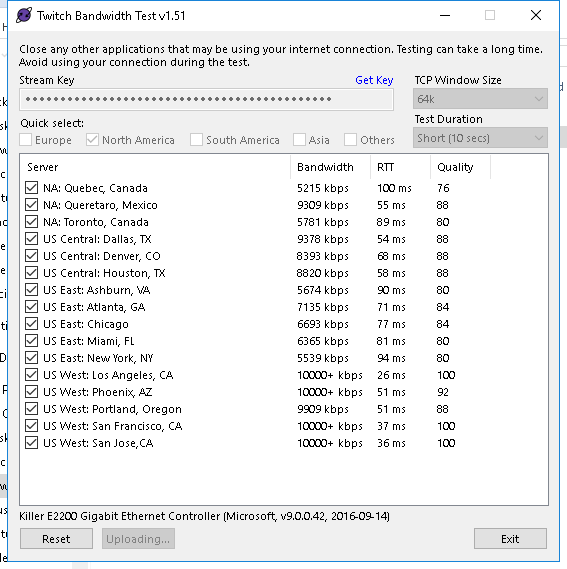 twin sentinel
yes.
desert sapphire
but how do i check what server im even on?
twin sentinel
You can set a specific server in the OBS Settings in the stream section. Normally the auto configuration is the best there.
desert sapphire
so should i just make sure its on los angeles, and then try another test stream?
twin sentinel
yeah, you can try that.
desert sapphire
how long should the test stream be exactly?
twin sentinel
Start your stream/recording for about 30 seconds. Make sure you replicate any issues as best you can, which means having any games/apps open and captured, etc.
desert sapphire
oh ok only 30 seconds
How is this now? @twin sentinel https://obsproject.com/logs/ezDowHwpvOB_7DeD
twin sentinel
Just the Killer Nic is marked as an info issue.
desert sapphire
i dont even know what that is lol
twin sentinel
Not sure on my own. But seems to be a firewall with poor performance.
desert sapphire
is that gonna affect anything?
twin sentinel
Could be.
twin sentinel
But with this you would get better support at the OBS Studio support discord.
nocturne pelicanBOT
For the best OBS support, please join their Official Discord @ discord.gg/obsproject
desert sapphire
So @twin sentinel Do you think running the game in fullscreen will make more frames drop?
twin sentinel
From what I experienced using Game capture and running the game in fullscreen is the best way to stream gameplay.
 upper steeple
just had someone follow 42 mins ago(email told me) but nothing went off for an alert and nothing activity feed. The person claims they have never followed before
twin sentinel
Is the follow in the twitch feed on your twitch dashboard?
upper steeple
it is
nocturne pelicanBOT
@upper steeple Please provide your account ID found at the top of this page: https://streamelements.com/dashboard/account/channels This ID is public info and safe to share here.
upper steeple
5929ab8d93c5ab2404110b4c
twin sentinel
There is an issue that we don't get the info from Twitch about follows from time to time. We are working with twitch to resolve the issue.
upper steeple
okie thank you, probably explains why it happens from time to time and not constantly
twin sentinel
We are sorry for any inconvenience. We are working with twitch to resolve the issue.
upper steeple
its all good, as long as i know it wasn't anything i did
 digital marlin
hello can anyone give me an example of how can i set a command for mods only ?
nvm already found out
but it would be nice to know how to create a supermoderator in twitch xDDD
twin sentinel
Super Moderators are a role just in your StreamElements bot. The normal twitch moderators are haviong automatically the moderator level in your bot. You can make a user Super Moderator or Moderator here: https://streamelements.com/dashboard/bot/users/moderators
digital marlin
Thank you
I found out that i can change commands privileges via dashboard. Is there any other way of creating commands for mods only?
I read online something like this but didint work !cmd add test This command is just a test -level 1000
nocturne pelicanBOT
@digital marlin You can make changes to custom commands in chat with!command add/remove/edit/options/show Valid flags for !cmd options are: -cd (number) -usercd (number) -cost (number) -level (number) -type (say, whisper or reply) -count (number). --- Example: !cmd options twitter -usercd 60 -type reply -level 250
digital marlin
it would be nice to have all that in a website but thank you 😄
lament blade
Hello, i don't know why, but my host alert won't work, the other one does work.. is there anyway to fix thisp problem?
(it doesn't even pop up in the activity feed tab)
nocturne pelicanBOT
@lament blade Due to changes to Twitch API, we have filtered out hosts and will only show these ones on your activity feed:
- All manual host events (0 hosts included and if filter set to 0)
- All hosts coming from an online channel. If the hosting channel has been offline, we do not show it
- All auto host events with at least 1 viewer
Note: An offline host is when you see "X channel has just hosted you" - with no viewer numbers on the back
lament blade
I got a host from a live stream with 18 peoples, still no alert, sry if im unable to understand properly, i don't speak english.
 gentle finch
My fiance used my computer to sign into stream elements, and now it won't sign them out so I can update my overlays. Any idea how to fix this? I've restarted my computer, cleared my caches- I'm not sure what more to do.
Kiiiinda time sensitive as I go live at 9 pm PDT
wanton mango
What error do you get when you try to sign out of SE?
gentle finch
I didn't get an error. It signs out, and then when I click connect to twitch or sign in, it directly signs them in instead of giving any chance to sign someone else in.
 radiant venture
Hey there my dudes, I am trying to add some chat commands let my viewers play some little sound bytes, but I am running into a bit of an issue
I have the sound added to the store and the command should be fine.
But apparently I need to add some extension to my panels, can't find that...
then i think i have to add that browser source to my OBS, right?
wanton mango
@gentle finch when you go to the twitch website itself, whose account is currently signed in?
@radiant venture you need to add the store redemptions widget to your overlay
radiant venture
SmokeMcCloud is signed it, and I can't find this store redemptions widget
when i search for "store redemptions" on the twitch exentions website that widget doesn't come up, can anyone give me a link?
wanton mango
When you go to edit your overlay, in the editor at the top there's a tab called "widgets", it's in there. It's not a Twitch extension
radiant venture
which editor exactly? I'm using OBS
wanton mango
streamelements overlay
If you don't have any overlays, just make a blank one and only add that widget, then add that as a browsersource to OBS
radiant venture
ok so I'm on the streamelements website
then i went into my overlays, am I on the right track?

 radiant venture
huh
these overlays, are they similar to the ones found in streamlabs?
the guy i'm yakin' with now says they are a bit better and easier?
twin sentinel
gentle finch
@wanton mango I am
wanton mango
So you're signed in on Twitch but when you go to SE it shows their account?
gentle finch
Yes
And when I click sign out and then try signing in, it signs them in automatically.
wanton mango
On the dashboard when you click their name at the top does it maybe show your name in the dropdown too? Maybe they got linked to the same SE account?
gentle finch
I tried restarting my computer again and it seems to be working fine. No, it doesn't show any second accounts from the drop down. Is this a common issue?
wanton mango
I've not seen that happen before. Maybe something just got stuck in a persistent cache. In any case glad to hear it's working again. Next time tell them to use a private window 😂
gentle finch
Lol. Will do!
celest nebula
Hey I need help asap
I have a widget that is not starting on stream
Like when I go into the widget it doesn't start
@wanton mango can you help
Like when I click launch it shows a blank page
 atomic wraith
my stream has been fine for the past like 4 days, and now whenever i try to go live in obs it says im dropping over 60% of my frames to the point where i can stream for an hour and only the first 10 mins will show up, super slowly. i need this fixed. what do i do??
i need help asap seriously
 eternal drift
did u try speedtest? did you try another server? did u check ur bitrate? did u check if system is overloadet? o: @atomic wraith
atomic wraith
again everything has been working amazingly and i havent touched anything and all of a sudden it's not working today
wanton mango
@celest nebula what's the widget?
atomic wraith
tried changing servers, changed bitrates
my internet is amazing
my comp is handling it fine
i dont know wtf is happening it's really annoying
celest nebula
It is an event rotator but it shuts off like half way through
twin sentinel
@celest nebula Please don't share your overlay urls in public channels for security reasons. Thank you.
atomic wraith
really what do i do
nocturne pelicanBOT
@atomic wraith Please provide a log from your last stream. To do this, in OBS go to Help > Log Files > Upload Last Log File and paste the link to the log file here.
twin sentinel
@celest nebula You need to collect data with StreamElements to show these. As soon as you have gained the data from Live events and the rotation widget is sill not working, please come back here. We do not get retroperspective data from StreamLabs, so you will need to collect data with StreamElements after your switch.
celest nebula
It has the data @twin sentinel
 slow smelt
juj
celest nebula
It was working yesterday
twin sentinel
There is no stream session in this log file. Please provide a log with a stream session. @atomic wraith
atomic wraith
how do i upload a previous log that isnt the most recent
 upper pendant
Is there any way I can run a command that isn't in general chat? Will mod chat work or a whisper?
twin sentinel
nocturne pelicanBOT
@celest nebula Due to changes to Twitch API, we have filtered out hosts and will only show these ones on your activity feed:
- All manual host events (0 hosts included and if filter set to 0)
- All hosts coming from an online channel. If the hosting channel has been offline, we do not show it
- All auto host events with at least 1 viewer
Note: An offline host is when you see "X channel has just hosted you" - with no viewer numbers on the back
twin sentinel
Follow the tips on how to improve in the log analysis. @atomic wraith
eternal drift
"Your log contains streaming sessions with dropped frames. This can only be caused by a failure in your internet connection" i wonder why i asked if you checked ur connection speed 

atomic wraith
you want to know why?

Speedtest.net
Test your Internet connection bandwidth to locations around the world with this interactive broadband speed test from Ookla
celest nebula
Wait I still don't understand why my widget is not working?
I have data and it worked yesterday
But if I launch it nothing shows
eternal drift
whats ur bitrate? @atomic wraith
 hushed nimbus
hey is help in the room?
atomic wraith
ive been running 12k the past few days with zero problem
tried today and it went to shit
tried changing it to 6k, still not working
eternal drift
there is your problem 12k on 6k upload
twin sentinel
@celest nebula As it is a custom widget best to contact the owner of it or ask in #dev-chat for assistance, as there is where the code gurus reside.
nocturne pelicanBOT
@hushed nimbus Welcome to the helpdesk! Please let us know how we can assist you today and a support volunteer or staff member will assist you as soon as they are available. Thank you for your patience.
hushed nimbus
i hjave a clan memebr and im designing overlays for my cxlan...is there a way to give the overlays to my cllan?
or give them permissions on my asccount
eternal drift
try 3.5k bitrate @atomic wraith dont use all ur upload, leave some buffer for games and stuff
nocturne pelicanBOT
@hushed nimbus Follow these steps to grant managers/moderators access to your dashboard:
- Click on your Channel Name at the top of the dashboard and select Settings
- Create a new invite at one of three access levels (Bot Supervisor, Editor, Full Control)
- Send this invite to a mod/manager to give them access to your dashboard. The link is one-time-use and expires after 72 hours if not accepted
Video tutorial: https://youtu.be/zl_h-ttZDF0
atomic wraith
again, this has been working with no problem, so i dont see why im needing to change this all now
nope, 3k doesnt even work
dropping all frames
just tried
atomic wraith
i even just tried switching from ethernet to mobile tethering, still doing same thing
this makes literally zero sense
twin sentinel
nocturne pelicanBOT
@atomic wraith For the best OBS support, please join their Official Discord @ discord.gg/obsproject
 hallow nebula
how can i make streamelements bot award points through the !addpoints command?
i added the bot as a supermod but it can not add points 😦
twin sentinel
Is the default !addpoints command enabled?
 plush raptor
how do i get the chat box to show back up? i clicked off chat and now it's just the twitch page
zenith widget
Streamelements on to -> logout then login
 last berry
Hello I need help Se.pay didn't seem to put any money into my account?
zenith widget
Please DM me with more details on the issue.
lament blade
Is there a way to see the top chatter of the day on stream elemnts?
zenith widget
I don't think we track that per day/session.
lament blade
Ok, thanks
 mystic crater
Good evening all :), how would I be able to show my viewers which commands i have available?
zenith widget
with !commands
mystic crater
ahhaha, i just typed !command so adding the S would do that
great!
thank you, i just switched from Streamlabs and I am loving this!
how would i sync streamelments and twitch to show my recent followers. I have the recent follower widget added to my overlay but it does not show anyone?
or is it a daily follower?
zenith widget
There is an issue with new follower events - we are working with Twitch on fixing it, but no ETA.
What this means is that not all new followers will show up.
mystic crater
ok, that makes since. I thought i had to bring over csv file from streamlabs, been working on that for amin
same with subs?
mystic crater
ok thank you
 mystic frigate
when i hit the Start Streaming button on OBS Live it keeps sending me to a screen to start streaming on youtube, despite having it set to twitch in obs settings
How can I actually stream with twitch?
zenith widget
Streamelements on top -> logout -> login with your twitch
mystic frigate
Thank you 😃
lavish kite
Hello, can you help me? My chatstats doesn't work. https://stats.streamelements.com/c/hefajstos My old nickname was: konowal_
 zenith widget
fixed
 dreamy palm
Hey guys! a little question, how do I make my gifted sub alerts only show once instead of going through all the names?
 burnt sky
Hey Guys.. i need help with the stream boss - i am trying to make it with 10000 health - but i does not work 😦 when i reset the boss it only have 1000 health
zenith widget
@dreamy palm There is a variation in the sub alert for community gift
@burnt sky Have you set the HP to be 10,000 before hitting reset?
burnt sky
Yes @zenith widget
burnt sky
Yes you are the man ! 😄
zenith widget
👍
 old estuary
Need help with Overlay question and setting up Music Share
zenith widget
What are the questions?
old estuary
So Im setting up the media share with text
Is there ANYWAY to use custom text extents
I dont want the size to change with every new song
old estuary
I have tried that
zenith widget
Just click on the widget -> text settings
Maybe im not understand what you mean by "text extents"
old estuary
Extents makes it so no matter the length of the words, it wont increase the size of the box. For instance
lament blade
Hello, i don't know why, but my host alert won't work, the other one does work.. is there anyway to fix this problem?
nocturne pelicanBOT
@lament blade Due to changes to Twitch API, we have filtered out hosts and will only show these ones on your activity feed:
- All manual host events (0 hosts included and if filter set to 0)
- All hosts coming from an online channel. If the hosting channel has been offline, we do not show it
- All auto host events with at least 1 viewer
Note: An offline host is when you see "X channel has just hosted you" - with no viewer numbers on the back
old estuary
zenith widget
@old estuary Maybe Im not seeing the problem here, but i see that you've placed the text on the left side now in the widget.
nocturne pelicanBOT
@old estuary The default resolution for StreamElements overlays (theme and custom) is 1920x1080. Please add them in OBS at their full resolution and use CTRL+F to fit to screen if necessary. You can then downscale your stream in OBS settings > Video if you'd like https://i.imgur.com/6bWXxjR.png



 old estuary
SAme size and even if I increase it, cuts it off
I want it to stay in the same area of space no matter the length of text
lament blade
that's not the point, i don't get the host alert even if i get hosted from a channel with 18 viewers
zenith widget
From what I see, you have it zoomed in SLOBS
I would suggest not to use SLOBS, because it can block our overlays, but also we can't help you much when using SLOBS
old estuary
What do you mean? Nothing is zoomed.
zenith widget
As it acts differently then normal OBS
old estuary
Really?
I can do everything the same on both sites. Lame you guys dont support SLOBS...
zenith widget
that means you haven't added the overlay as proper size in the browser source
old estuary
No matter the size of the picture.
lament blade
in my opinion se obs is much better, slobs randomly freezes my pc
old estuary
Dont have problems with slobs, 1 year in with TONS of effects
old estuary
no...
zenith widget
@lament blade Wdym thats not the point? Do you see in your twitch chat "X channel has hosted you" without viewer numbers?
old estuary
How is this so hard... lol. I want it to resize the text, everytime. I want the size of the picture to change based on the name and still fit the same border lengths
Example. Setting up texts, you can use Text Extents, so it doens't cut anything off when a longer word comes in or changes the size
Look on the bottom text scrolls
No matter the size of the name, they ALWAYS fit inside that box
Thats what I mean
lament blade
@zenith widget i don't get the "has hosted you" in the activity feed, but that's not the point, yesterday i got hosted by a 18 viewers channel, still the host alert won't pop up
zenith widget
What we have is an AUTO adjustment for the widget.
zenith widget
@lament blade DId you see "X channel has hosted you with 18 viewers" in your twitch chat as a system message?
lament blade
but it did pop up in my activity feed @zenith widget
lament blade
Oh nono, i disabled chat alerts
zenith widget
Im not talking about the chat alert modul
Im talking about the SYSTEM MESSAGE
from TWITCH
old estuary
zenith widget
same affect you can do if you placed it at 1920 width
lament blade
@zenith widget No.. i got only the raid message
old estuary
zenith widget
Why do you think our overlays will work dynamically with SLOBS?
zenith widget
maybe you are not understanding how our overlays postion works
our overlays is an entire screen
of 1920x1080
that means
you need to place it in the browser source as 1920x1080
and you can place the widget where ever you want
so place the now playing widget in the bottom right corner
and 1:1 match it with the screen
don't move the overlay in the OBS canvas
old estuary
You are not understanding my problem maybe. Everything is set correctly. But depedning on the legnth of the title, it will change the size of the image.
zenith widget
What image?
old estuary
The song request
Look at the pictures
the size is the same in the last two
but title size is WAY different
zenith widget
Do you want the font size to resize it self to be LOWER so that it matches the cut off in the canvas?
old estuary
EXACTLY.
zenith widget
@lament blade If there is a message in your twitch chat(system message) saying "X channel just raided you" without any viewer numbers - thats an offline host/raid and we don't show it, because we don't see the event
zenith widget
@old estuary I will say this again. Our overlays relay for them to be 1:1 positioned with the canvas. That means if the overlay is 1920x1080 sized, as your canvas, then the overlay needs to be that sized or Fit there.
On the other hands, our widgets, cannot detect when they are cut off from the canvas window.
And we don't have that function to squish or resize font dynamically.
and to be honest this is first time i've heard of 'text extens'
old estuary
Perfect. Thats the answer I was wanting. You dont have text extents, which OBS has too. It just is through streamelements
Thats a HUGE thing man.
lament blade
@zenith widget Nope, "14 raiders from streamers name have joined" Then "streamers name has hosted you with 18 viewers" But the alert didn't start. (The raid alert worked)
old estuary
e
zenith widget
old estuary
example 1 last time. the bottom text highled is "text extented" Meaning if the name 1940109481294812394i12394819418 subbed, it would still fit in that small box no matter the size of the name
zenith widget
Does this answer your 'text extent' or w/e its meaning
old estuary
Not the same thing unfortunately
Best way to explain is last image.
It resizes text to fit inside your crop
no matter the difference in length
zenith widget
@lament blade that " "streamers name has hosted you with 18 viewers"" is the system message from twitch
so the issue it, it played a raid alert but not the host alert after it?
lament blade
Yup
zenith widget
We have removed the ability to play both host and raid alerts, when a raid event comes in.
If a raid comes in, we play the raid alert
if a host event comes in, we play the host alert
if you disable raid alerts
but a raid comes in, the host event will play
lament blade
Is there any way to display even a 1 follower offline host?
lament blade
Sorry i don't speak english, im talking about a offline host
zenith widget
Offline hosts come in as "X channel has hosted you" with no viewer count
the event comes in with no viewer count or we just outright don't see it from twitch
afaik theres nothing we can do about those
old estuary
Figured out my own way with scrolling
grave lance
I would like to set up audio alerts for specific cheer levels, is there a way to do this using SteamElements?
zenith widget
Variations in the cheer alert options for the alert widget.
grave lance
so if some one cheers 100 they will here some thing different then some one that cheers 10 or 1 I would like to set up a few of these
zenith widget
lament blade
Can I have some help
 hexed carbon
Donatepay does not connect. What to do?
zenith widget
@lament blade Ask your question or query.
@hexed carbon Do you see the donatepay button?
to connect your account?
lament blade
Struggling to sort out tips, received a tip through the streamelements link and it didnt show it. Does it have the ability to say in chat when a donation is received too?
zenith widget
How are you sure you received a tip?
hexed carbon
The problem not in it ,at connection writes
YOUR ACCOUNT IS NOT AVAILABLE FOR DONATEPAY. PLEASE CONTACT SUPPORT FOR ADDITIONAL DETAILS
zenith widget
You need 100+ followers in order to use DonatePay
hexed carbon
Thanks
grave lance
thank you for the how to video, I dont need my bank account linked to use this do I
zenith widget
what? no
grave lance
ok thank you
hexed carbon
will the followers go 100 too?
lament blade
I received a tip, it went through my paypal. The link I'm using is my streamelements one and thats the only way to tip, so I'm confused why it didn't show..
zenith widget
@lament blade Did you receive an email saying "You've received money" or its pending?
lament blade
I got the money that isn't what I mean
grave lance
also I need a vertical side scrolling credits to scroll up on the left side, I was not able to fully modify the other one to make it do what i need it to do.
lament blade
I mean that it doesnt show on my streamelements dashboard.. D:
zenith widget
@hexed carbon Your channel needs to have 100+ followers in order to have DonatePay fully available to you.
@grave lance If you want to leave a feature request or feedback for the custom widgets its best to DM the person who made the widget.
@lament blade If you click on the transaction in paypal, does it show "Thanks for the tip" anywhere?
hexed carbon
I understood
grave lance
ok, I tried and Clyde told me I could not do so. will it be ok to send this person a friend request so I can send them a DM
zenith widget
I'm not sure who Clyde is
grave lance
it is a bot in discord that responds to refused DM's
zenith widget
well try and poke them in #general-chat or in #dev-chat
before sending a friend reuqest then
grave lance
ok will do
wanton mango
Clyde: Thou shalt not DM
grave lance
that is him
grave lance
ok so this is the template and creator "cinematic ending - by lx"
zenith widget
@untold crest ⤴ also I need a vertical side scrolling credits to scroll up on the left side, I was not able to fully modify the other one to make it do what i need it to do.
grave lance
Thank You very much KelZar 😀
zenith widget
@lament blade if this circled thing is not in the tip transaction in paypal then it didn't go through our link
zenith widget
Is the transaction missing what I have circled?
zenith widget
if its missing its not via our link then.
Either they've tipped you before
and sent you a direct payment
or they used an old link
lament blade
no. neither of them they are a new viewer
zenith widget
Then I have no idea how they tipped you by bypassing our link.
with that additional info in the transaction, we use to show that it was via our link
if its missing then they used some other way to tip you
and no, im 100% sure they didn't hack our system to get your paypal email.
most likely got to the paypal page and then saw your paypal email there
backed out because needing to login or something
and sent you a direct tip
grave lance
that happened to me once and I got a -1.00 from twitch in my paypal account I am think it was a fraudulent transaction and twitch took it back, I could not see were I even received the 1.00 in my payment history
zenith widget
Twitch has nothing to do with our tipping link or the transactions.
All of Twitch's transactions are marked as "Twitch Interactive"
 amber moth
Hi I’m kind of new to streaming on twitch and I’m in need of some help to set up OBS can anyone help
nocturne pelicanBOT
@amber moth For the best OBS support, please join their Official Discord @ discord.gg/obsproject
amber moth
I’m trying to sort my stream out through streamelements but I haven’t got a clue what I’m doing can anyone help?
grave lance
Thank You for clearing that up for me about the transaction. It is a recurring twitch subscription.
untold crest
@grave lance Hi. I read your question and I wonder what exactly is needed there. What do you want to change there?
grave lance
I just need it to scroll up the left side like I have it but the begining is to large LX is there a fee involved for you making a change to the template for me if there is let me know. I will arrange for payment
untold crest
Huh. I think you misunderstood StreamElements way of work. Everything here is for free. I am more than happy to provice help 😉
I think if you take a look into CSS part, there are few font-size places, you can replace them to fit your needs.
 north glacier
lex i need you pretty immediately in DMs 
grave lance
ok I did not know that, I set the template back to the way I had it
untold crest
@grave lance So the first text style is under:
p#start
{
    position: relative;
    width: 16em;
    font-size: 200%; /* <- HERE */
    font-weight: 400;
    margin: 20% auto;
    color: #4ee;
    opacity: 0;
    z-index: 1;
    -webkit-animation: intro 2s ease-out;
    -moz-animation: intro 2s ease-out;
    -ms-animation: intro 2s ease-out;
    -o-animation: intro 2s ease-out;
    animation: intro 2s ease-out;
}
And second one is here
h1
{
    position: absolute;
    width: 2.6em;
    top: 25%;
    font-size: 3em; /* <- HERE */
    text-align: center;
    margin: -10% auto;
    line-height: 0.8em;
    letter-spacing: -0.05em;
    color: #000;
    text-shadow: -2px -2px 0 #ff6, 2px -2px 0 #ff6, -2px 2px 0 #ff6, 2px 2px 0 #ff6;
    opacity: 0;
    z-index: 1;
    -webkit-animation: logo 5s ease-out 2.5s;
    -moz-animation: logo 5s ease-out 2.5s;
    -ms-animation: logo 5s ease-out 2.5s;
    -o-animation: logo 5s ease-out 2.5s;
    animation: logo 5s ease-out 2.5s;
}
it has a circuit board on the left side the text is to scroll up the the left side
untold crest
Can I have editor access to that account over DM?
So I can take a look directly there?
grave lance
at the very begining, the header is large and fades to a smaller size as it scrolls up
it is centered rather then left justified and is to big
yes
how do I do that
I sign in with my twitch account
untold crest
Replace H1 part with that one
h1
{
    position: absolute;
    width: 100%;
    top: 25%;
    font-size: 1em;
    text-align: center;
    margin: 10% auto;
    line-height: 0.8em;
    letter-spacing: -0.05em;
    color: #000;
    text-shadow: -2px -2px 0 #ff6, 2px -2px 0 #ff6, -2px 2px 0 #ff6, 2px 2px 0 #ff6;
    opacity: 0;
    z-index: 1;
    -webkit-animation: logo 5s ease-out 2.5s;
    -moz-animation: logo 5s ease-out 2.5s;
    -ms-animation: logo 5s ease-out 2.5s;
    -o-animation: logo 5s ease-out 2.5s;
    animation: logo 5s ease-out 2.5s;
}
Can I have some help I’m trying to do overlays but not sure how to do it from here
grave lance
can i set a username and password to that account while I am signed in with my twitch account
or do you want to dm me and view the screen
is that what you mean
elder sorrel
@amber moth Are you using a PC to stream?
amber moth
Yes
untold crest
Try to replace this CSS part with the one I pasted above and let me know if it worked for you
I think it should 😉
amber moth
I’m on streamelements trying to figure out what I’m supposed to do but I’m struggling to work it out
grave lance
@untold crest do you want to dm with a call and view the screen is that what you mean
amber moth
I wish I had someone who could help me out with this I have picked a theme but not sure what to do next
 dark forge
Hello, while adding custom videos to the alert box in the overlay editor, can you make any video as an alert on loop?
elder sorrel
We have a guide for full setup on YouTube @amber moth

StreamElements Overlays are loaded from a single browser source in your streaming software, making streaming easy. https://streamelements.com/ StreamElements...
amber moth
Ok will have a look
grave lance
that should fix the issue if you accept the fr
elder sorrel
@dark forge I believe there is a way but I think that requires custom coding if I'm remember correctly for custom video alerts to loop.
dark forge
Ain't on the role to mess with custom encoding, I'll just edit it in an editor and make multiple copies of it then
Thanks ❤
 red trellis
Is there a way to dissable the Stream Store Website as a Website but have items redeemable?
I have sound snippets that are redeemed via chat commands only
and would like to avoid people going on the website to redeem them because some sound snippers are Mod only
amber moth
i think i have done one thing but some reason its only half the image i did
tight harness
If you mean when you added your overlay to OBS then you added it in at the wrong resolution
!add
nocturne pelicanBOT
To add your overlays to OBS, add a new browser source in your scene. Paste your overlay URL in the browser source properties, set the dimensions to 1920x1080 (unless you changed them on the website), and ☑ “Shutdown source when not visible” https://youtu.be/KDvLynUqXI4
amber moth
ahh ok
 teal gyro
hello! I was wondering if someone had a moment to help me out with an issue I'm having? I just added streamelements to my twitch channel for chat moderation and loyalty raffles. However, it is not displaying links on my whitelist. Whenever I input a command, or use a timer, it only displays *** instead of the link. I have tried everything I can think of including removing everything from the whitelist and turning link protection off but no change.
Also is there any way to automatically have the bot execute raffles? I'm a small streamer and don't have mods so if there's a way to have the bot do the raffles for me at a specific intervals that would be awesome!
Thanks!
 narrow coyote
Bot is not a mod, and you have twitch set to delete hyperlinks
 sleek stone
Does the streamelements chat widget not support bttv emotes? Or am I missing a setting? sorry for this kinda dumb question. I just wanna make sure
elder sorrel
Afaik it does work for BTTV & FFZ.
sleek stone
It just shows up as text for me in the widget ;-;
It does work in the normal twitch chat though just not the one that displays on stream
Ohh I see now standard bttv emotes work but not one's you add yourself
 trim rain
Asking for a friend: League, Minecraft and other games run fine (talking stream wise). But for some reason Overwatch lags. (again, talking about when you watch it on stream). Any ideas what could cause this?
twin sentinel
@sleek stone Make sure the default command !emotesis activated and use the command !emotes update in your chat. Then reload your overlays at the top of your activity feed here: https://streamelements.com/dashboard/activity and close and reopen the overlay with the chat box. See if this fixes the issue.