#helpdesk-twitch
1 messages · Page 434 of 1
 mild lake
I still want to ask
Media request Can the music of the song list be played randomly?
Because the same Youtube song list will hear the same order every day.
 zenith widget
Unfortunately, no - that is a requested feature that is part of our Ideas board.
mild lake
Ok, I hope I can have this feature!!
 rocky oracle
So I have been using the "auto-tweet when I go live" feature from the StreamElements dashboard and was wondering whether it would be possible to include the name of the game I was playing and possibly the stream title in the tweet. I'm assuming just using the Bot variables would not apply here?
 zinc bridge
need help linking my obs software to stream for my twitch. Doing it on my laptop and playing on xbox.
zenith widget
@rocky oracle At the current moment, afaik, there is to ${game} variable for the auto-twett.
@zinc bridge Do you have a capture card?
 swift mist
A few weeks ago i was asking for help to fix a bug in my interface where when i press the "Open my stats" in the Chatstatus page it would open the page but with a dash and some random numbers added to my name. Can't remember what staff was trying to help me, but anyway, it's still an issue 😃 It should open https://stats.streamelements.com/c/geekgarage but instead it opens https://stats.streamelements.com/c/geekgarage-1716
 zinc bridge
No i do not know what that is. im on just an old laptop. got my obs up and running and webcam is working. just dont know how to get it to my twitch and on xbox? if that makes sense
my obs when i click start streaming says somthing about a stream key.. cant figure thiss out lol
 cedar lynx
You might want to do some research on how to set up streaming and what gear you will need! There are tons of great tutorials on YouTube if you search there. @zinc bridge
You can find your stream key on Twitch. https://www.twitch.tv/broadcast/dashboard/streamkey
zenith widget
@swift mist Do you have YT and twitch accounts with the same name?
zinc bridge
streaming twitch now trying to figure it out. ttvapexslime
i figured out stream key and still wont work
zenith widget
You need a capture card in order to capture the gameplay from your XBOX
zinc bridge
says could not access the specified channel or stream key there may be a problem connecter to your server
okay how do i do that
can i do that on a laptop?
zenith widget
swift mist
@zenith widget yes i do?
zenith widget
And you want the links to be swapped?
swift mist
Swapped?
swift mist
alright
zenith widget
Yeah I see the issue
your twitch profile page ends with numbers
I'm talking about this: https://streamelements.com/geekgarage
This is basically your twitch profile page with us: https://streamelements.com/geekgarage-1716
the first link is your youtube.
@swift mist Do you want them switched?
swift mist
yes please switch them, but where does it get the numbers from, because it's not a part of my twitch name
zenith widget
Its because your twitch and youtube are the same name
what ever registered 2nd, got added numbers on the back
swift mist
oh so your system apply the numbers
swift mist
yes please switch them as i don't use SE for YT
zenith widget
I'm settings up a task for the devs - it depends on when they do it unfortunately.
swift mist
it's okay, I'm not in a hurry, just glad it can be fixed 😃
thx for the help @zenith widget
I can't really complain about a free service, with free and fast support. If I did, I would be a giant ****head 😃
swift mist
another question is it possible to add a command that can play an audio file on stream? Like i can give a viewer their own command they can use when they arrive in chat and it will show some text in chat and play an audio clip on stream. I think some one asked about it a few weeks ago but never saw an answer 😃
zenith widget
Steps to make a command trigger sound on stream:
- Go to Stream Store page here: https://streamelements.com/dashboard/store/items
- Add an item that has these settings on it:
- Stream Perk
- Loyalty settings to your desire
- (Next step) Add contents (image and/or sound you want to play)
- "Redeeming this item shows an alert
- Redemable via chat
- Skip Requirements
- Get the item name/command from the 2nd creation page
- Go to commands page here: https://streamelements.com/dashboard/bot/commands/custom
- Add command with desired name and have response for command as:
${redeem item_name_here} - Go to your overlays and edit the overlay you use.
- Click on "widgets" and add "Store redemptions" widget. Click save and you should be golden.
- Test your own command in chat and have OBS or editor open to hear sound
- ???
- Profit in viewer interaction and that dosh

swift mist
@zenith widget you are on a roll today, thx again 
 wanton laurel
I have a question
When it says mobile on my overlay does that mean when i stream on mobile?
 twin sentinel
This overlay will apply, when you stream via the IRL streaming app from StreamElements.
twin sentinel
When you stream using the IRL App it will use this overlay, your overlays on your PC will not change.
wanton laurel
How do i get one that will go onto my PC?
twin sentinel
You can just create a blank one or choose one of the overlay galery and apply this one to your OBS.Live.
wanton laurel
When you are saying overlay gallery does that mean themes gallery?
twin sentinel
yes.
wanton laurel
Thankyou.
swift mist
is there a way to whitelist a command? so only specific viewers can run it without them being mod, regular, VIP or sub. so a name filter instead of group? Or is this one for the idea board
 nocturne pelicanBOT
@swift mist Here is the StreamElements Ideas Board: https://strms.net/ideas
swift mist
guessing that was an auto response
zenith widget
it was me
swift mist
alright, thx for the answer
 wanton mango
Maybe try this and let me know if it works for your needs? https://discordapp.com/channels/141203863863558144/259680142459142144/558715162685734948
swift mist
thx @wanton mango already have my own api that can do it, was looking for an integrated solution 😃 But thx anyway
will drop it at the idea board
 astral onyx
Hey guys, when I clic on a link in my chat it open a new Streamelements window, is there a way to open link with my default browser ?
 winter zenith
deppends what ty of link it is
if its clips or twitch sites I think they always open in the new window. If its something else it usually opens in your default browser
winter zenith
hmmm
 ancient gyro
Query: is it possible, for a mod or the owner, to add to link filter/whitelist via a chat command? or nah?
 solemn arch
What's a good gauge for timers? Curious to know what other people have set
cedar lynx
I think it depends on how active your chat is and how often you want certain things to appear, how many timers you have running, and how long you stream for. I'd stick within 20-80 minute range, get a feel for it and test it out, then adjust once you get an idea of how it feels. @solemn arch
 worthy musk
Good Morning Everyone, I love this social media alerts and having Twitter up and running is great is there a road map when the others will have go live alerts to social media
worthy musk
lol
cedar lynx
but yeah, as there are a lot of variables there are not usually given dates for new releases 😃
worthy musk
i have followers on twtich but they don't show up in stream elements dashboard
cedar lynx
is the StreamElements bot joined to your channel?
worthy musk
when i go live it states in the chat window im going live
cedar lynx
also check your filters for the activity feed in SE 😃
it's possible to hide followers from view
cedar lynx
if you haven't had any followers since you started StreamElements, past followers won't show and so your follower feed would be empty
cedar lynx
nope
worthy musk
ok i was concerned for a moment
when it comes to music what is a good legit source to stream music from
i dont' understand how the big twitch partners can get away with streaming direct from spotify
cedar lynx
whats important is the licensing for your music. you will need to find copyright free music, pay for licensing, or work out arrangement with license holders themselves. sometimes it's available on spotify, sometimes not.
there is a big music community on Twitch with lots of artists with original music, you might consider reaching out to them to work on collaborations for music you can stream for free
 carmine meadow
i got an alert made from fiverr, the guy gave me a share link to streamlabs, but i use streamelements, i imported using the chrome extension and it doesn't come up correctly, i think the code is different... what do i need to provide for further help?
twin sentinel
@worthy musk What do you need the files for? You can just copy them to the overlay you want.
worthy musk
i love the effects but would love to add some different text
like where is says stream starting soon
would like to change that
but it looks like that part is locked down
twin sentinel
@carmine meadow It is the best way to ask in #dev-chat what you already did. The people in there might have an idea on how to transform it to StreamElements. Or you might have to ask your creator to redoit for StreamElements.
carmine meadow
oof
twin sentinel
what Overlay are we talking about exactly. Some Overlays have the option to chagen the text.
 short hound
Is it possible to add a custom command response to stream elements reply? eg explaining how the points system works?
 primal lichen
So i have no idea how or what happened when doing this but it's gonna be a long explanation.
I was editing my BRB overlay. Was to lazy to copy over all my alerts from my main bdo overlay so i got some default ones from the new alerts section. Upon adding it, the overlay became unresponsive. Couldnt even load into it the page would say "Streamelements is not responding." but that isnt all that i broke. I decided "Hey if i type in here someones gonna probably have to go through my account let me clean up the overlays." so i did. Deleted ALL of my out of use overlays i don't use. Decided to try one last time at getting into the overlay. Well. All the overlays sources that i deleted were now in my BRB overlay and honestly im confused. (But hey its responsive now JUST ALOT OF SOURCES!)
TL:DR i broke alot of shit idk what i did from adding alerts from the new alerts section
Actually update it auto deleted all those extra sources. Page went back to unresponsive. I broke alot of shit and i do not know how.
 molten flare
Anyone know if there's a bug with the subcount-variabel? ${channel.subs} says 0 subs, but it worked a few days ago ? (Streamer has 200-300+ subs)
twin sentinel
@short hound The bot will just answer with the preset answers. In some answers are already explanation, like in yours it says that the user has not enough points to request a song.
@molten flare It says you have got 4 subs.
@primal lichen What Browser are you using?
primal lichen
It fixed it itself
I got like 2-3 seconds before it was going unresponsive so deleted the new alerts that i added from the alerts section and it fixed itself
worthy musk
@twin sentinel do you know if there is a feature roadmap for streamelements
twin sentinel
Afaik there is not. Keep your eyes open for announcements in the news are on this discord.
molten flare
@twin sentinel Ah yeah, it's not me - it's Minnamumi
twin sentinel
@molten flare Can you ask her to log out of the streamelement website https://streamelements.com/dashboard/ Sign out in the top right and log back in please?
solemn arch
@twin sentinel Sorry to ping you, but wondered if you could help?
twin sentinel
@solemn arch !level <username> 1000
molten flare
@twin sentinel Yes, I will ask her 😃
@twin sentinel She did now, but it didn't change anything
twin sentinel
@molten flare Tell her to part the bot please on the dashboard, log out, log back in and join the bot please.
If this doesn't help she can try to reset the data by going to https://streamelements.com/dashboard/session -> Totals Tab -> Refresh Settings.
molten flare
@twin sentinel Thank you, we will try it
Thank you, it worked to part the bot and rejoin it @twin sentinel ! 😃
solemn arch
@twin sentinel Would someone be able to enable the !command edit/add/show from chat if they're a super mod? A streamer I watch has turned it off and is busy to turn it back on
twin sentinel
It is not possible I think, because to enable a command, you need the !command-command to be anebled.
 steady iris
Hi there, I did a name change and was able to get all parts of the leaderboard extention working except for the chat stats.
My old twitch username was "thelaw12722", current is "TheLaw_ow" (twitch.tv/thelaw_ow). How can I get the chatters section working agian?
 elder sorrel
@steady iris Staff member will have to update your chatstats info. Asking internally then will report back when all set 
steady iris
thank you
 radiant wagon
Hey, i'm really struggling with Media Requests atm. It seems to be exceptionally laggy for registering requests accepting/declining/deleting songs and also randomly keeps pausing. Also, my backup playlists won't play. any idea what might be going on? Thank you! 😄
elder sorrel
All done! @steady iris 
steady iris
Thank you 😄
 kind hollow
Hey, I recently made the switch to StreamElements and I'm loving it so far. I chose an overlay and already set it up in OBS. Was just wondering if there is anything I can do to speed up the transition when I switch scenes.
nocturne pelicanBOT
@kind hollow Check out this tutorial for OBS’ studio mode which allows you to preload scenes before transitioning. https://www.youtube.com/watch?v=W8iWsD2Lq3U
radiant wagon
Hey, i'm really struggling with Media Requests atm. It seems to be exceptionally laggy for registering requests accepting/declining/deleting songs and also randomly keeps pausing. Also, my backup playlists won't play. any idea what might be going on? Thank you! 😄
elder sorrel
Are you using OBS.Live, Ground Control or Streamelement's Website for Media Request?
 elfin plover
How do i change !points into !coins 😃 ?
twin sentinel
You can set up an alias to the command !points.
elfin plover
how/where?
twin sentinel
Edit the default command. There is a field for command aliases. Don't forget to submit them with enter.
elfin plover
done thanks 😃
 deep grail
hello i need some help my timers dont work on my stream
elder sorrel
@deep grail Do you have Chat lines enabled for the timers?
elder sorrel
Yeah if you want it to automatically trigger every 30 minutes for example: leave it at 0.
deep grail
alright that wil fix it then makes sense ty
 twin shoal
why does the session top tip never work properly? Pepehands
 grim locust
hi, i wanted to install the ground control app, but the authentification fails and i cant enter the code anywhere, any solutions for it?
 strong kernel
This is a known issue related to antivirus software. If you can't get your antivirus software to play nice, unfortunately the only option is to wait while we determine a fix.
 kind epoch
Hey the hype cup isn't updating with tokens . The preset amount to show up an amount doesn't fill the cup up with tokens. Help
 sand oriole
is there a way to add a list of banned words instead of adding them one by one?
strong kernel
@sand oriole RegEx allows you to cover multiple iterations of a word in a single line, but otherwise, no, there's no "import banned word list" function.
 hoary pebble
I want only subscribers in my channel to request music, using the media request, and the list is confusing
sand oriole
dang, looks like im adding a list of 100 banned words manually FeelsBadMan
thanks @strong kernel
strong kernel
@hoary pebble
hoary pebble
it says minimum to request is subscriber but the list is in a bad order
strong kernel
The order is fine.
hoary pebble
everyone, subscriber, Regular, VIP, Mod, Super Mod
strong kernel
That's correct.
kind epoch
Guys, any word about the hype cup not showing up with a preset amount to fill up?
hoary pebble
so if I select subscribers can mods and vip request music
strong kernel
Yes.
strong kernel
Not possible to make it only for a single level.
It's the selected level and everything above.
hoary pebble
thats not true
if I select supermod thats the highest
so nothing under that can use it
strong kernel
Actually, not true, there's one higher level.
hoary pebble
can you not change the order
strong kernel
No, you cannot.
hoary pebble
so this isn't gonna work for me
strong kernel
Why would you want to prevent your mods from requesting songs, anyway?
hoary pebble
because I have a mod that doesn't like supporting me and some people including VIPS like to just leech
strong kernel
...then why'd you set them as VIP in the first place?
strong kernel
Anyway, it's not possible to allow subs and disallow mods and VIPs.
hoary pebble
ok thanks
kind epoch
Any joy about the hype cup?
 ember kraken
Any idea how to make this disappear? I've already got a full array of alerts, overlays, and I've already imported everything over from the other tools. https://gyazo.com/0aae75cfd0865bd9ee013b9265ad62e9

 dim eagle
Can I key bind my scenes to my keyboard? Having to tab out of a game can get tedious when I'm doing a bit.
dim eagle
Sorry I thought you guys owned that
strong kernel
No, we make OBS.Live, which is a plugin for OBS Studio.
 slender mulch
how can i make a command to check how long people have subbed?
like a subage command
strong kernel
Available variables are found at https://streamelements.com/dashboard/bot/commands/variables
StreamElements
The Ultimate All in One Platform for Streamers
slender mulch
@strong kernel there is no variable for this
strong kernel
Then you can't do it.
slender mulch
there are püeople that have it though
strong kernel
Not through our default systems.
slender mulch
and there are variables not on that list that display other things
kind epoch
Is the hype cup not working a 100%?
 frail harness
I'm trying to figure out why my alerts are going under my camera. Anyone can help me with this?
kind epoch
@frail harness If you are using the default layouts then the alert box can be moved and this is done so by editing the layout you want.
 humble leaf
How do I make a command be displayed in chat every few minutes?
Like, I have a giveaway
strong kernel
That would not be a command. That would be a timer.
humble leaf
yes, I have everything explained on a chat command
is there a way to set a timer to fire this command every few minutes?
strong kernel
The Timers section. A completely separate section of your account.
 limpid badge
is there a way for users to type a command like "FIRST" to gain loyalty points?
strong kernel
No, you can't make a custom command that alters points.
limpid badge
kk ty
 knotty bridge
hi guys! i love the service and it makes everything so easy to setup. was just wondering if there was a way to have a banner that shows your current spotify song playing?
strong kernel
There is not. It's against Spotify TOS to use for anything except personal use.
 grave gate
!command add !RandomGod ${random.pick 'Achilles' 'Agni' 'Ah Muzen Cab' 'Ah Puch' 'Amaterasu' 'Anhur' 'Anubis' 'Ao Kuang' 'Aphrodite' 'Apollo' 'Arachne' 'Ares' 'Artemis' 'Artio' 'Athena' 'Awilix' 'Bacchus' 'Bakasura' 'Baron Samedi' 'Bastet' 'Bellona' 'Cabrakan' 'Camazotz' 'Cerberus' 'Cernunnos' 'Chaac' 'Chang'e' 'Chernobog' 'Chiron' 'Chronos' 'Cu Chulainn' 'Cupid' 'Da Ji' 'Discordia' 'Erlang Shen' 'Fafnir' 'Fenrir' 'Freya' 'Ganesha' 'Geb' 'Guan Yu' 'Hachiman' 'Hades' 'He Bo' 'Hel' 'Hera' 'Hercules' 'Hou Yi' 'Hun Batz' 'Isis' 'Izanami' 'Janus' 'Jing Wei' 'Kali' 'Khepri' 'King Arthur' 'Kukulkan' 'Kumbhakarna' 'Kuzenbo' 'Loki' 'Medusa' 'Mercury' 'Merlin' 'Ne Zha' 'Neith' 'Nemesis' 'Nike' 'Nox' 'Nu Wa' 'Odin' 'Osiris' 'Pele' 'Poseidon' 'Ra' 'Raijin' 'Rama' 'Ratatoskr' 'Ravana' 'Scylla' 'Serqet' 'Skadi' 'Sobek' 'Sol' 'Sun Wukong' 'Susano' 'Sylvanus' 'Terra' 'Thanatos' 'The Morrigan' 'Thor' 'Thoth' 'Tyr' 'Ullr' 'Vamana' 'Vulcan' 'Xbalanque' 'Xing Tian' 'Ymir' 'Zeus' 'Zhong Kui'}
So im trying to make this a command for my SMITE streams but it doesn't seem to be working
strong kernel
That'd be because it's too long.
grave gate
Is it just too long?
strong kernel
Also Chang'e screws it up.
grave gate
Yeah i though that might be another issue
Is there a custom api command that i can use for a random pick?
 cobalt kindle
Hey there folks! -- I've got the !time command in my chat to tell local time, which was set to EST
Problem is, daylight savings time messes that up, so the timer is behind now
How do I set it properly to EDT?
Simply changing EST to EDT in the command made it even more off
strong kernel
${time.America/Detroit}
cobalt kindle
THANKS!
 abstract forge
New streamer here, trying to get a overlay on OBS and im confused on how to do it. help anyone?
nocturne pelicanBOT
@abstract forge To add your overlays to OBS, add a new browser source in your scene. Paste your overlay URL in the browser source properties, set the dimensions to 1920x1080 (unless you changed them on the website), and :ballot_box_with_check: “Shutdown source when not visible” https://youtu.be/KDvLynUqXI4
 lament blade
Still no fix for ground control? Definitely nothing I can fix in my firewall
grave gate
Is there a way to make a command that randomly picks other commands?
Like
${random.pick '!test1' '!test2' '!test3'}
strong kernel
@lament blade It's antivirus related, and if you can't get yours to play nice, you'll need to wait for the devs to investigate further.
@grave gate A command cannot trigger another command.
lament blade
Only Antivirus I use is Windows Defender 🤷
grave gate
Ah alright well ive figured out a compromise for the random pick selector for all the characters in the game. So my problems semi fixed thanks @strong kernel i can deal with it. I understand the text limit on commands is there for a reason👍
wanton mango
@grave gate if you need to extend your random pick, I made a customapi that lets you store your responses in a paste on pastebin and return a random line from there. There's a bunch of other options depending on what you want to do  https://thefyrewire.com/docs/api

Reference for Fyre's API
grave gate
@wanton mango oh thank you😄 i made 5 seperate commands for the playable god in the game based on type (warrior, mage, etc.) to compromise but thank you so much!
knotty bridge
this is just a streaming question in general, not necessarily directed at streamlabs but i was hoping to get some help anyway
i have a pretty high end PC, i78700k, 1080ti 16gb ram, and streaming affects my gameplay a littlebit. is it mostly network related or hardware related?
is there a way to possibly change the output of the stream to minimally affect gameplay or is it a network thing and I need to purchase a better adapter/router?
 rustic parrot
difference between static alerts and animated alerts?
strong kernel
Static doesn't move. Animated does.
rustic parrot
i used a animated one a while ago and never worked properly
im going to get a new one
which do you recommend?
strong kernel
That's entirely based on your personal taste.
rustic parrot
alright, thanks
 honest bough
how do you get points? My leaderboard shows "NO DATA"
grave gate
@wanton mango thank you man, the site worked wonders and I now have the random pick for all 100 characters!
honest bough
@dense jackal
strong kernel
@honest bough Do not ping random staff members, especially at this hour. If someone is available, they will answer.
honest bough
okay sorry
strong kernel
What is your Twitch username?
honest bough
getmny_media
strong kernel
You haven't activated the loyalty system.
honest bough
ah thanks!
 warm haven
why does OBS randomly start showing a black screen for Display capture
zenith widget
@warm haven no need to post in multiple channels. Restart OBS as admin
 sweet sequoia
Hi. Could someone please help@me with changing the StreamElements bot name to my twitch account name?
nocturne pelicanBOT
@sweet sequoia Custom bot name requirements
- StreamElements bot modded and in chat
- Active overlay with alerts
- StreamElements tipping page in the panels below the stream (!panels)
- Create a twitch account for the name you want to use
- Ground Control app must be running
Steps to enable custom name
- Sign in to https://twitch.tv with the bot account
- Install and run Ground Control (!gc for download)
- Visit https://twitchapps.com/tmi/ and generate an oAUTH token
- Copy/paste everything in the box to Ground Control oAuth settings and enter the name for the bot account
- Restart Ground Control (custom name may take a few minutes to take effect)
Mac does not currently support renaming the bot.
sweet sequoia
Do I have to create ANOTHER twitch account for the bot? I would like it to have the same name as my own Twitch account
zenith widget
Do you use OBS.Live?
 hollow token
Hey, I got a problem with the media request. If some non-moderator types in !sr link, in my OBS Live chat it deletes the link and puts some weird movie trailer instead as the media request. I tried to do it with another twitch account on my main accounts profile and i saw that the bot doesnt even delete the link or give me any warning
zenith widget
Go here: https://www.twitch.tv/dashboard/settings/moderation and toggle off "Block Hyperlinks
zenith widget
Since couple of years on twitch
and its a default toggle on for every new account.

 stiff tapir
So I've been planning on changing my Twitch channel name, but I wanted to know what will happen with Stream Elements. Will all my settings stay the same? Will I have to reset everything? What about SE.Pay?
zenith widget
Everything will be fine. Only things you will need to do is, when you change your name, just logout from our Dashboard and log back in
then on the main page part the bot and join it to your channel
as it will be stuck on your old name
and update the tipping link under your channel with the new name.
If you want to, you can poke back here when you change your name and logout and log back in
stiff tapir
Okay, thank you! I've got a bit more things to prepare, but I wanted to know for when it's time. I appreciate your help~!
rocky oracle
Hi again and thanks for all the help so far. My top subscriber has changed his nickname from lower case to capital letters and now appears twice in the StreamElements leaderbord as 1st an 2nd. Is there a way to remove the old spelling from the leaderbord? Thank you so much! 🙂
zenith widget
Unfortunately, no, until the aggregate thinks the old name has not resubbed for the past 45 days.
Meaning its waiting until the sub fallout happens which is between 30 to 45 days
rocky oracle
Ok, well. That really is no trouble at all. I was just curious whether there was a way to remove him directly. Thank you!
And in the case of the disappearing widget. Your "delete this folder" approach worked like a charm, so thank you for that as well!
zenith widget

kind epoch
Hi @zenith widget The hypecup in my layouts don't seem to show with a preset amount of tokens in it , is there a way to fix this? I think i have it set at 80% right now to show them but the jar shows nothing in it. Are you aware of this?
zenith widget
have you by chance cleared your cup?
lament blade
Hello
I am working on somebody his stream.. Found a weird bug and I can't find why...
Check out ${1}, they are playing ${game ${1}} at https://twitch.tv/${1} is the SO and Shoutout command as always.. right?
 zenith widget
Thats the template
lament blade
the feedback I get is: Check out test, they are playing <no game> at ***
*** should be URL but also when I do !commands I get this?
@lament blade, You can find a list of all Commands here ***
wtf?
zenith widget
Mod the bot
zenith widget
the stars you see -> ***
is because the channel has blocked hyperlinks
and because the bot is not modded in the channel.
mods are exempt from blocked hyperlinks
this is not a bug.
kind epoch
Look in the cam window
kind epoch
hehe
zenith widget
reloaded your overlays
lets see if the cup will fill up
huh 
what resolution is the browser source with the cup? @kind epoch
lament blade
That fixed it @zenith widget ❤ thanks dude
kind epoch
1080p mate
zenith widget
No probs my Twin Brother
kind epoch
1920x1080
zenith widget
Interesting
the cup is filling up on my side with tokens
I might suggest to remove the browser source of it
and re-add it again
or clear its cache
right click -> properties -> scroll bellow -> clear cache
kind epoch
On the dashboard it shows but not in obs or the output
How do i clear the hype cup cache? Sorry i don't follow
nocturne pelicanBOT
@kind epoch Right click on the BrowserSource > Properties > Scroll down a bit > Refresh Cache of current page
kind epoch
Still nothing i'll readd the source
Re added the source and still nothing @zenith widget
zenith widget
Checking with the devs on this
kind epoch
Thanks matey
zenith widget
So it seems when you last cleared your cup, OBS sort of remembered when it was and it kept your cup empty until you started using it again.
Unless you've used it extensively every day since you cleared it.
But new events show pop up in the cup as they come.
kind epoch
I've only cleared the cup out once and it's been awhile since emptying it last
As it never shows up full or part way full to begin with now. So idk.
zenith widget
So to maybe give a bit more details - the last events info is stored locally on OBS. It might be possible for OBS to have cleared that information after and X period of time.
The dev of the hypecup is not sure when it happens but that is main cause you can't see tokens anymore.
In the end - new tokens will show up
and as recent events/tokens
kind epoch
But the last event that counts was 2 subs in a row and the tokens have not shown for that in the current state that it is
Is there some cookie system that i could clear from obs that might refresh the data shown?
zenith widget
I'll run some past events but not now - give me like 10-15 minutes
local storage of the browser source is separate then the cookies
%appdata%\obs-studio\plugin_config\obs-browser\obs_profile_cookies
but here is the cookies section
do note that if you want to delete anything here - you need to exit out of obs
kind epoch
Noted
Deleted the cookie from the folder and it's still showing up empty on the preview
kind epoch
Web browser?
zenith widget
of the browser in OBS.
kind epoch
How do i clear that then?
zenith widget
Thats what I'm trying to tell you - OBS most likely cleared it self
unless you've reinstalled OBS recently
kind epoch
Things were working fine till just days ago and i took no notice of it. What i don't get is why the data from the dashboard doesn't corollate with that of the obs browser is intriguing to say the least
zenith widget
Chrome is a browser - OBS' browser plugin is a separate browser as well
so they don't share the same local storage
Hypecup is dependent on the browser its opened from - the local storage
so both browser will have a different local storage and how they handle it
OBS might have cleared the local storage it uses.
kind epoch
Here is something i tried, i replayed the activities that took place in the past few events and the hype cup filled with bits
But when i reloaded the cache, the jar is still empty.
zenith widget
It will keep track of only new events
kind epoch
As of when? This happened days ago.
zenith widget
Your last event was 2 days ago.
If OBS was set to clear its local storage between now and 2 days ago then its empty and the cup only shows recent new events
even if you run old events it will not keep them properly as they are not marked as "new"
kind epoch
Okay so starting as of afresh the new events will begin to fill the mug.
zenith widget
yes
 exotic forge
Hi ;)
I may ask a stupid question, but is it possible to enable song requests when streaming on mobile (iOS / Android) ?
 hazy blaze
Hello 😃 I was wondering, is it possible to change the BOT name of Streamelements? tried searching.. thank you
nocturne pelicanBOT
@hazy blaze Custom bot name requirements
- StreamElements bot modded and in chat
- Active overlay with alerts
- StreamElements tipping page in the panels below the stream (!panels)
- Create a twitch account for the name you want to use
- Ground Control app must be running
Steps to enable custom name
- Sign in to https://twitch.tv with the bot account
- Install and run Ground Control (!gc for download)
- Visit https://twitchapps.com/tmi/ and generate an oAUTH token
- Copy/paste everything in the box to Ground Control oAuth settings and enter the name for the bot account
- Restart Ground Control (custom name may take a few minutes to take effect)
Mac does not currently support renaming the bot.
 velvet cradle
Hey guys, I have a question about the custom bot, we got it up and running but it's reacting to its messages https://prnt.sc/n3nlky so every time someone uses a weird emote its says that it was used xx number of times and then it reacts to that message, is there a way to prevent it?
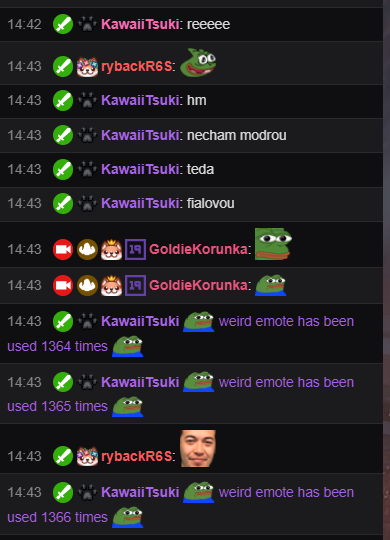
can we somehow tell streamelements that the account (kawaiitsuki) is a bot? so that it won't react to them?
zenith widget
If the command has keyword triggers on it - that is causing the self-response
this has been tested and has been raised as a bug to the devs
velvet cradle
nice, do you know when it's goin to be fixed?
zenith widget
No ETA
 valid radish
Hello! Is there a way to make a train that counts subs and cheers combined? Thank you 😃
velvet cradle
thank you 
 modest moth
Are there any issues with alerts atm, the streamer I mod for isn't isn't getting them.
winter zenith
are they in the activity feed?
@modest moth
@valid radish I dont think so but maybe with custom code better ask in #dev-chat
 hoary kindle
I see a few people having problems with alerts right now
modest moth
It's in the feed, but not popping up in stream.
valid radish
Thanks @winter zenith
zenith widget
@modest moth Whats your twitch?
modest moth
Pokket
zenith widget
What if Pokket paused her alerts? 
modest moth
She just missed a large donation, she's tried everything so far to make sure they are working.
And it's not just donations, bits and subs aren't going through.
zenith widget
I see my cheer in the activity feed.
modest moth
in chat it works, it's not popping on the stream
zenith widget
I see in the activity feed the big dono as well
modest moth
Thanks for the assist..
hoary pebble
I want to bring up a question I asked yesterday about the media request
So I asked if it was possible to allow only subscribers to access the media request and I was told it wasn't possible, After looking at the role list and I was told it is in the correct order
What I am confused about is the Role order list, Everyone, SubScriber, Regular, VIP, Moderator, Super Moderator, Broadcaster
winter zenith
okay?
hoary pebble
So if I select the minimum user level to subscriber everyone under that gets the benefits
now if I select regular everyone below this gets the benefits, Correct
but subscriber is higher in the list and correct me if I am wrong but a subscriber are the only ones that pays a broadcaster
so if I select regular or lower a subscriber can't use any of the features unless I select them
hoary pebble
so someone that pays a broadcaster should be further down the list
my issue is I want to allow the media request to only subscribers
winter zenith
well it doesnt matter doese it?
a VIP roll is a huge honer and shouldnt bethrown around like its for free
it normaly goes out to people that support the channel in many other meaningfull ways or are very dear mutual friends
so even if a VIP doesnt pay you monthly you make some one a vip for other reasons
regular is a system from Se that exsited ong befor there wa a VIP roll
it was to give people more benefits so even if they couldnt sub because they have money issues or other reasons you could give them a user level to make them benefit by commands specific for them for exsample or to whitelist regulars from posting links since you trust them more
so if you want Sr only for subscribers make the command only available for subs to use and you will be fine
hoary pebble
My main goal is to only allow subscribers to use the media request and thats not possible because the list of roles is in the wrong order
winter zenith
if you have VIP's or regulars you made them that userlevel for a reason so why rstrict them from not being able to use the sub command?
well why are they VIP's or regulars anyway then?
if you put them bellow subs anyway
hoary pebble
in my haste I didn't think a VIP was an issue, just a badge
winter zenith
if you treat them like normal viewers because they dont ay yu take away these user levels frm them
well its not VIP's are also limited. you can only have so many VIP'S in your channel. only if you have more subs you unlock more vip slots
thats there for a reason
I gave a viewer a VIP roll because he gave me a 100€ donation.
he isnt subed to me but I want to honor his support
so yes he is allowed to get special benefits just like subscribers even if he doesnt sub to me becase he isnt in all of my streams
so just un VIP the people and your problem will be gone
 oblique steeple
I VIP'd someone because he's watching my stream pretty much since day one. He doesn't have the money to sub me so I gave him the VIP rank.
winter zenith
I VIP my dad he doesnt know how twitch works but he likes to song request stuff for me so I gave him VIP. my own dad doesnt need to sub to me for that 
hoary pebble
The person I have VIP'ed is a very active member and although he never subs or gives me tips/donations he is always there in stream
winter zenith
then he should be allowed to songrequest just like a sub or am I wrong?
winter zenith
I feel you
but you seem to like this one person
so maybe you let him be VIP and take it away from those "leeches"
hoary pebble
I also had an issue with trolls and my main mod wasn't here so I had another member who was seem to be very helpful so I modded him and he is in the same boat, never subs or tips/dono
he is also always around when I need him
hoary pebble
but he is a leecher also and I want to stop these
hoary pebble
but having another mod around helps
winter zenith

This seems like stuff yu need to sort out with yourself. there isnt much Streamelements can do to help you with this
oblique steeple
You mod him but he's a leecher. You don't like leechers but you don't want to unmod him? Doesn't make sense.
winter zenith
its clear that a mod has more accss then a regular viewer or a sub
since a mod need to mderate the stream so if a subs comes in there and spams links or swear words he needs to be times out or banned. thats why mods are higher ranked then subs
hoary pebble
I see your point @oblique steeple
winter zenith
VIP is a insentive that is a spechial honor not just a "badge"
and regular was a wy for streamelements to treat viewers that dont have mone to support but help in other ways to insentivise it
oblique steeple
VIP is pretty much like sub, just not paid and done from your side.
hoary pebble
So if I set the sr command to subscribers in the default commands will that fix my issue
winter zenith
Subsriber - Regulars - VIP's - Mods - Super mods will be able to request
normal viewers wont
hoary pebble
damn it, I will have to bite the bullet and sort out my roles
winter zenith
yes
hoary pebble
my issue could have been fixed if SE would let me move the roles around
winter zenith
thats not how the system works
hoary pebble
or let me ban certain people from requesting music
winter zenith
just unmod the eople you dont like anyway
 rigid snow
The animation for the enter and exit of the chat box widget is not working
winter zenith
and un vip the people that you are calling leeches @hoary pebble
rigid snow
These are the settings I put but the text still just appears instead of having that animation
Obviously I've clicked save
winter zenith
in obs or in the editor the animations doesnt play?
winter zenith
if you choose anything else? or add the chatbox again and change the animation?
rigid snow
Still doesn't work if I choose a different animation. I'll try removing the chatbox and adding it again.
Ugh, still just appears
The text fades out though for some reason
Like it has an exit animation of a fade
Even though I don't have the exit animation set to fade, I have it set to "Slide Out Right"
But the enter animation is nonexistent and just appears
Should I send a video?
rigid snow
Google Chrome, but the animation doesn't work when I add the browser source to OBS as well.
winter zenith
I am asking internally if it ever worked or if you found a bug
rigid snow
I just now started using streamelements
Made the switch from StreamLabs
So for me, this is a first time bug so I've never technically seen the chat animation work before
winter zenith
@rigid snow I got informed that this never worked with our regular chat widget but you can try a custom CSS chat widget :
https://github.com/StreamElements/widgets/tree/master/CustomChat
best is to ask in #dev-chat
winter zenith
n problem thats what we do ❤
lament blade
help please?
nocturne pelicanBOT
@lament blade Welcome to the support channel! Please let us know how we can assist you today and a member of the support staff will be with you as soon as possible.
lament blade
help?
winter zenith
just state your issue
winter zenith
Many support heros and Champions do multible things at the same time
Voice Chat is only active if needed to trouble shoot
most issues can be solved by text chat in less then 5 minutes
lament blade
ok i have my over lay but idk how to get my game in the back ground
bcose i try then it dispers
winter zenith
but the Overlay URL in your obs
lament blade
the over lay is url
winter zenith
add the game source in your obs and put it underneith the overlay layer in OBS
lament blade
what i mean is i try to move it so i can see the game but then its gon like i never put it there
lament blade
nio i need to move the game screedn bcose its in the corner
winter zenith
screenshot ?
winter zenith
your game doesnt seem to be detected
everything that is black is transparent in the overlay
winter zenith
the twitch session expired so please log in again via the button at the bottom @obtuse prawn
 obtuse prawn
@winter zenith when I click on it it stays the same
winter zenith
on top right there is a "streamelements " log out there and log back in
obtuse prawn
@winter zenith it works thank you
oblique steeple
@lament blade Try to press Ctrl+F
winter zenith
@lament blade I see nothing off screen I see a red dot on the top left indicating that OBS doesnt have a source
oblique steeple
This little red dot in the upper left corner is your Game Capture.
 jade remnant
go into your game and click around in the menu for about 10 seconds
see if obs picks it up
lament blade
it dident
jade remnant
remove the game capture and add a new one, see if that works
lament blade
dut that over 30 times
jade remnant
and has the game capture always been at the bottom of the list?
try it at the top
to make sure that the overlay is 100% transparent
jade remnant
please update to the recent obs version
jade remnant
you are on 21 new version is 23
jade remnant
help - update
oblique steeple
Fix what?
obtuse prawn
This is on OBS
lament blade
@jade remnant nofing about updating
jade remnant
check for updates
lament blade
nvm im blined
oblique steeple
@obtuse prawn I'm not sure what you mean.
Seems like you added a browser source with the streamelements website. Nothing wrong with it.
jade remnant
👍
jade remnant
edit it in the overlay editor
@obtuse prawn please double check the url link you set in the browser source
lament blade
okey thx
obtuse prawn
@jade remnant i can't find the overlay i did yesterday "you don't have any overlays"
i legit have to do all from scratch again
w.e
humble leaf
I have set two timers on my stream
They are on a 10 minutes interval
It's been about 1 hour, and they are yet to be triggered
What am I doing wrong?
jade remnant
what do you have the chat lines set to and are they being met?
humble leaf
That information I think is in the image I posted, it's 5 lines
So, they only appear after 5 messages are sent on the chat? hmm
ok, I get it now
jade remnant
the timer starts when 5 lines of chat are met
if you want them to be sent every 10 minutes, set the lines to 0
 hollow oxide
is there a way to reset or refresh the data for the twitch extension that you can add to a panel? There's a streamer who recently switched to StreamElements and her "All-Time Top Cheers" data doesn't show the actual top cheerers of all time.
solemn arch
Hey - having an issue with one of my alerts not sitting right with a text delay
It keeps snapping to a different position when the text fades in
I am streaming right now so if someone can help and see what I mean i'd appreciate it
 cerulean fulcrum
Hello so i created a command that makes a multi stream link
how can i create a link that will display it if viewers want see the link on a constant bases?
 amber totem
Im trying to change over to elements from labs my cpu and everything show low use set my output and all the setting same as labs but when I go live my bitrate go from 6k to 0. Then the bitrate go up and down it is all lag, Freezes , runs 100% frame drop has no sound and even dc from twitch any ideas? labs and studio stream fine at 6k
lament blade
Is there anyway to stream a game without going actually live with it. So I can see if the laptop is capable?
twin sentinel
@lament blade You can create a second twtich account and stream to this one.
lament blade
Ok
 vague elm
Is anybody else having issues on their mobile app where they cannot see the chat at all I have to use my other phone to read chat
This issue just started happening 2 days ago
twin sentinel
@hollow oxide You can try to set the data in this tab: https://streamelements.com/dashboard/session
@vague elm Better ask this question in #helpdesk-mobile
nocturne pelicanBOT
@amber totem Can you please provide a log from your last stream. In OBS go to Help > Log Files > Upload Last Log File. Once this is complete, please provide the link to the log file.
twin sentinel
@cerulean fulcrum
Multi-Link:
example Multi-Link: @${user} https://multistre.am/${channel}/<partnername>/layout3/
!command edit multi <new cmmand text> -> changes the text of the mulöti command
!multi -> show multi link
!command options multi -disable -> deactivate the command
!command options multi -enable -> activate command
short hound
Is it possible to give subscribers a discount in my stream store?
amber totem
where do i post the upload link to the lof file
amber totem
yeah but why is it like this for element and but its fine on labs or studio
 patent orbit
how do i get my stream to show when im streaming
twin sentinel
@amber totem There are some ideas hwo to improve the quality. Please go through them and try to fix the issues. If it does not work after this, come back here please.
@patent orbit I recommend watching these video guides: https://strms.net/welcome
amber totem
where are they posted?
twin sentinel
In the link I just sent you.
cedar lynx
I was having a lot of issues with alerts not quite triggering right or not triggering at all today. Have the servers been having any known issues?
 arctic hornet
Is there a reason that Hosting doesn't post in the chat from the bot?
strong kernel
What do you mean?
arctic hornet
When someone hosts, streamelements doesn't post like it used to in the chatroom
 normal igloo
@arctic hornet Due to recent changes to Twitch API, we have filtered out hosts and will only show these ones on your activity feed:
- All manual host events (0 hosts included and if filter set to 0)
- All auto host events with at least 1 viewer
strong kernel
Also your module is set to a minimum of 1 viewer in the host for it to be broadcasted in chat.
So that's also a thing.
arctic hornet
Well, I've been trying to help a friend set his stuff up
 hushed snow
I'm looking to get bigger and grow any reccomdations
strong kernel

StreamElements - Legendary Live Streaming
Happy holidays, dear streamers! We hope that the holiday break is treating you well and that you’re enjoying a hot cup of cocoa while…
 steady monolith
where would i get someone to have a check at my recent obs log? been having some output frame drops
twin sentinel
best to post your log here and we'll have a look.
twin sentinel
yes they do.
steady monolith
oh damn, so i have a game capture device that is linking my consoles to the pc. this is down as a capture source, this is hidden. would it be best to add it to a separate scene or add it to the source when needeD?
twin sentinel
I would create a separate scene for that.
steady monolith
im looking through the guide from the analysis. so put it in a different scene collection
is there a way to hotkey switching scene collections?
strong kernel
Scene COLLECTIONS or scenes?
steady monolith
@strong kernel hotkeys to other scene collections or an idea of moving my console capture to a new scene collection
strong kernel
No way to do so in OBS, no.
steady monolith
ahhh okay
so i have 3 capture sources : Game Capture, display capture and console capture. 1 is on and 2 are hidden. As stated by Benno the 2 hidden still take affect, would it be better to move console capture to a new scene?
nocturne pelicanBOT
@feral python Welcome to the support channel! Please let us know how we can assist you today and a member of the support staff will be with you as soon as possible.
 feral python
For example someone follows, how can i make it so something pops up?
twin sentinel
@feral python I recommend watching these videos first: https://strms.net/welcome
@steady monolith Create one scene for every capture source.
lament blade
hey guys

is there any way to make it so the scrolling texts stays in the box
and doesnt change width
Been havingt a lot of issues with taht
having to change the position of the text every tiem someone donates/follows/cheers/subscribes
strong kernel
If the widget doesn't have width/height settings then it will resize to accommodate. If it does, then everything will stay within the bounding box.
solemn arch
Managed to sort the alert out from earlier
I've renamed the !givepoints command to just !give, however, when trying to use it it will say 'You need to use !givepoints'
lament blade
How do i fix it @strong kernel
strong kernel
@lament blade As I said, give the widget a width and height.
lament blade
AHH HA
I SEE
!!:!!?!%:!^&!"$7
12

Youre actually amazing

Ive struggled with this for almost 4 months lmao, thankyou so much man
solemn arch
Actually it seems to work now
Here's a question, is it possible to get a "current song" command for a song on my itunes?
strong kernel
Not in our system. You would need a custom API for that.
steady monolith
@twin sentinel @strong kernel hoping what you guys helped me with makes my streams better 😛
solemn arch
@strong kernel - I have another question, I have a little command game that I use called "!cake" and it prints a random response out of a list, and if you find the cake you get 100 points. There's only one winning result, and i'd love to be able to automate the reward you get by having the command give them the points when it's found
Is there a way to do it or is it a manual job>
strong kernel
No.
 warm marsh
Hello fellas, I'm planning to move all my alerts and stuff from muxy to Streamelements, Is there an import feature for muxy?
Like i can add my videos and stuff but whenever i copy paste the CSS it just breaks and only the sound comes without the video
strong kernel
If the custom code wasn't made for StreamElements then you need to edit it to be compatible with our system.
warm marsh
Hmm I see thanks, I'll try working on it then thanks
 turbid kestrel
could i get some help
warm marsh
What seems to be the problem?
turbid kestrel
dropping insane frames
over 2k-7k sometimes
havent been able to stream for weeks
had my ISP and upgraded internet
everyything fine there
900 down, about 20-40 up
just cant seem to find the issue
warm marsh
Have you tried reducing bitrate?
normal igloo
What's the recommended dimensions for the store items Image?
elder sorrel
235 x 186 I believe @normal igloo
normal igloo
thx American 
kind epoch
Just had a sub 5 mins ago and no alert came through for it. Any ideas? They shared the announcement
 candid vortex
Hi guys. I am trying to use a Time variable to display the current time if chatters use the command !time. But the variable womt show my time Zone when I put AEST as the timezone. Any thoughts?
 torpid pewter
Yo guys my chat bar disapeared in my ops Stream elements
Anyone know how to get it back?
strong kernel
@candid vortex Name your nearest major city.
torpid pewter
OBS*
strong kernel
@torpid pewter StreamElements menu at the top.
 slate mulch
Hey everyone. I was wondering if I could get some help with modding a stream. I'm new to it and my streamer asked me to make an "!join" system so people can wait in a queue to join in a game she's playing. Any ideas or tips?
strong kernel
There's no queue system built into StreamElements. You can check our github for a potential custom coding option but it's up to you to set that up.
slate mulch
Alright. Thanks
 spark ore
I'm having a problem with obs live
not exactly a problem with it itself
But something I'm not sure if i'm doing wrong
strong kernel
Well, we can't help if you don't ask the question. 😃
spark ore
Trying to get the correct wording
so basically
I want mixxer chat next to my twitch chat
in the obs live
strong kernel
StreamElements does not support Mixer.
spark ore
i can do so if i'm signed into mixxer
oh
that makes sense then
i mean the chat is able to go into the obs live but it goes away when i sign back into twitch
which i don't want it to do
 leaden sluice
keep getting an invalid path or connection url please check settings to confirm they are valid
 woven wing
question
how do i add a stream label for donations, subs, followers, and bits?
trying to switch from streamlabs obs
strong kernel
All visible elements are added as widgets to an overlay.
obtuse prawn
in need
of someone very competent
who can fix my stream
urgently
can do voice chat
People saying "stream lagging/bad performance/stuttering" etc.
24/7
strong kernel
@leaden sluice OBS settings, either check your stream key or log in with Twitch. Has nothing to do with StreamElements.
nocturne pelicanBOT
@obtuse prawn For the best OBS support, please join their Official Discord @ discord.gg/obsproject
obtuse prawn
I am using StreamElements.OBSLIVE
strong kernel
OBS.Live is a plugin for OBS Studio. It's still OBS Studio.
woven wing
how do i add the widget for it?
obtuse prawn
there's none who has knowledge and can legit do a voice chat with me I do share the screen
np
strong kernel
@woven wing Edit your overlay and the widgets tab is at the top.
woven wing
is there no url that it can pull from?
strong kernel
What do you mean?
woven wing
like how other widgets have a url that can be copied and put into the streaming software such as obs studio
and read from that url to display it
woven wing
correct, is there a way i can get the url to pull my recent followers from a url and put it into obs studio?
or do i have to set everything up through the obs live scene browser?
strong kernel
Widgets do not themselves have a link. Widgets are added to an overlay, and it's the overlay that has a link.
You can have multiple widgets in a single overlay.
woven wing
correct
strong kernel
So add the widgets you want to show to an overlay, and copy the overlay's link and add it to OBS.
candid vortex
@strong kernel Brisbane
strong kernel
${time.Australia/Brisbane}
candid vortex
Thank you so much @strong kernel . Another question, is there away if someone types in the chat !points and it sends them a whisper with what their points are?
strong kernel
You'd have to disable the default command and make a custom command for it.
candid vortex
Oh ok. Is there somewhere I can find that information already @strong kernel
strong kernel
https://streamelements.com/dashboard/bot/commands/variables for the available command variables. And then just make it say what you want when creating your custom command, and there's a dropdown in there for how the message is delivered.
candid vortex
Thank you so much at @strong kernel worked a treat!
solemn arch
Is there a way to make new commands be defaulted to "Online" instead of "Both"
strong kernel
No, just gotta remember when you're making it.
 upper pendant
Is there any logging on who changes what in the bot settings? I need to add mods for media share, but I want to make sure no one changes other settings.
zenith widget
Unfirtunately no
 hardy yew
Any way to make an events source that rotates through all your recent subs/donos?
zenith widget
What do you mean through all recent subs/donos?
hardy yew

At the top of his screen he has it fading through his recent subs and donations
hardy yew
Okay cool thank you! Will I be able to edit it so it's not just plain text?
hardy yew
Sorry I'm new to this stuff, trying to move everything away from slobs
zenith widget
There is a new event rotator planned to be released today or tomorrow, so keep your eyes open
zenith widget
No. It will be added to #widget-share
hardy yew
Also, should I download both the stream elements desktop app AND obs live? Or should I just need one of them
And okay good to know
hardy yew
And just use the web browser for the overlay and alert creation part of it, right?
zenith widget
Well add the overlay to OBS
zenith widget
@thorny shard So we have template for the shoutout command.
 thorny shard
yeah I'm trying to set a command up in the streamer that i mod for on twitch in her chat
seems like nothing i'm coming across is working
its the Shoutout command.
thorny shard
i've done that but that only goes to my stream and now hers.
nocturne pelicanBOT
@thorny shard To invite managers to your dashboard, Click on your Channel Name at the top of the dashboard and scroll down to Settings. Click the drop down arrow to expand your channel managers and then create a new invite at one of three access levels (Bot Supervisor, Editor, Full Control) Check this video out for more help: https://youtu.be/zl_h-ttZDF0
thorny shard
oh ok! thank you!
zenith widget
@thorny shard So 1 hour and minutes ago I was helping you here.
I don't see a point for you to tweet and post comments when I'm right here and can help you directly with anything, especially since I gave you a way to get editor access to your Streamer
so that you can add that shoutout command.
 late citrus
Hi, how can I fix no chat stats data in SE Leaderboards Extension after nickname change on twitch? Other things got fixed when i parted channel and joined again, but not this :/
zenith widget
What is your current username and what was your old one?
late citrus
old one is zdzichuPL5, and a new one is zdzichuTV
zenith widget
Fixed
late citrus
oh, thanks! It's properly now ;) Why this one isn't automated like other data? xd
zenith widget
Chatstats page grabs a channel and tracks its stats - its never designed to change automatically as it just keeps tracks of things
so we have to manually fix it
late citrus
it makes you a lot of additional effort I think :P But I understand, If i have more issues, I'll be back ;) Thanks!
 sweet hornet
Hi, I setup StreamElements/OBS the other day but have been having issues with voice (Mic/Aux). First I sounded like I was in a tunnel, now it just cuts out. I have tested pre opening SE/OBS and sound/voice is fine. It seems to only been when I open that one app. Also talking in TS or Discord works fine. Also tried 2 other headsets, same issue but they work fine on other PCs. Is this the right place to get this kind of help or is this an OBS thing?
nocturne pelicanBOT
@sweet hornet For the best OBS support, please join their Official Discord @ discord.gg/obsproject
sweet hornet
OK thanks, I am already in that discord, just thought I would ask.
 main badge
Hey! Is there a way to have the "Condensed" donation goal widget to show a fill color like the normal one? It doesn't seem to fill up whenever I set it to condensed, not sure if that's intended or not
Basically this is what I'm talking about https://gyazo.com/f099749d58091b8c6e29c067a25b645d

 zenith widget
what you are most likely looking for is a custom built goal bar.
Maybe one these 2 widgets might help: https://github.com/StreamElements/widgets/tree/master/CumulativeGoal || https://github.com/StreamElements/widgets/tree/master/GoalsOverPeriod
To add them, click on "Widgets" and then add "Custom Widget" -> afterwards click on the "Open CSS editor" and replace each tab with the corresponding files @main badge
 unreal nexus
Hey, could someone help me. I'm trying to modify one of your overlays to suit my purposes as there isn't one specifically for my game. Is there a way to create a dark background rather than just a full screen display capture ? Also, it would be useful if I could create one or two extra boxes in the same style as my chosen overlay so that I can display the correct info. Ideally, I would like an overlay that is a cross between In Game scene and Talk Scene but neither do quite what I want.
zenith widget
You can add an image widget and upload a dark image and stretch it across the overlay.
As for the other things - i'm not really sure what mean, but if you are looking for custom designs of buttons/labels, well you will have to ask an artist for that. I would suggest to take a look at #art-marketplace
unreal nexus
Yes might just have to. Thanks for your help @zenith widget
main badge
Is there a way to access the CSS of the normal donation goal bar and put it into a custom widget to edit it, or would I have to build one from scratch?
 cobalt moat
hello KeiZar
 burnt yarrow
hello chat panel does not appear, what can i do
zenith widget
Chat panel in OBS?
 sly igloo
How Do You Set Up a tipping section with streamelements?
zenith widget
@sly igloo I would suggest to take a look at this video: https://www.youtube.com/watch?v=eLzxRkq7tJo&index=3&t=0s&list=PLCDDKlFdScbEwdx5AntcQIS1InkFJwHtv
sly igloo
Thx
burnt yarrow
@zenith widget yes i cant see chat panel
zenith widget
Settings -> Stream -> connect and if you are using OBS.Live -> streamelements on top -> chat
burnt yarrow
logout and re log its now working ok thanks
 onyx thistle
Hy there, my ground control its not working its sayz that my JWT Token is invalid, what should I do?
zenith widget
Deactivate your Anti-virus and try the process again( restart GC)
 serene summit
Hi, can someone help me? I still cant see my chat stats :C
I`ve changed my twitch account name from bec__ to bectv
solemn arch
Where can I send in feature requests? I'd love to be able to have Ground Control boot up on start up. I know I can do it through Windows but it's been unreliable for me in the past
nocturne pelicanBOT
@solemn arch Here is the StreamElements Ideas Board: https://strms.net/ideas
twin sentinel
@serene summit I have asked the staff to update the settings. I'll ping you when it has been done.
@serene summit Your stats have been updated. You should be able to see your stats page now.
serene summit
works now, tnx ❤
 acoustic patio
Is there a really sow step by step video that can show you how to set up an overlay it is extremely confusing to a new person
Slow*
hardy yew
any way i can take my exported scene collection from slobs and import it into obs live?
winter zenith
@acoustic patio check out ou youtube channel we have a bunch of tutorials there how to use the site and the tools
@hardy yew i dont know how SLOBS works in that sence if it is a normal file OBS can utelise then that shouldnt be a issue
 analog swan
If I'm in the wrong section, feel free to yell at me. I cannot get a giveaway to work. Going to the public page works to buy tickets, but typing !ticket 10 in chat is not. Any ideas?
 gentle imp
did you allow it when you created the giveaway?
if you did, then go here https://streamelements.com/dashboard/bot/commands/default search for command !enter and enable if it's not enabled @analog swan
analog swan
I think I did @gentle imp but I'll check that link, thank you
 hollow hatch
How do i change the name of the bot? i can send a test message or remove the bot account
nocturne pelicanBOT
@hollow hatch Custom bot name requirements
- StreamElements bot modded and in chat
- Active overlay with alerts
- StreamElements tipping page in the panels below the stream (!panels)
- Create a twitch account for the name you want to use
- Ground Control app must be running
Steps to enable custom name
- Sign in to https://twitch.tv with the bot account
- Install and run Ground Control (!gc for download)
- Visit https://twitchapps.com/tmi/ and generate an oAUTH token
- Copy/paste everything in the box to Ground Control oAuth settings and enter the name for the bot account
- Restart Ground Control (custom name may take a few minutes to take effect)
Mac does not currently support renaming the bot.
cedar lynx
you can connect your bot account through OBS.live, but you still need to have met the requirements @hollow hatch
just click "Save". there's a known bug you may need to reconnect whenever you open OBS again but while the program is open it should stay connected after logging in to your bot
lament blade
Hy my stream elements leadboard bot not working...
someone can help me:
?
You do not accept incoming messages and does not count
jade remnant
did you change your twitch name?
lament blade
yes 3 months ago
jade remnant
what was it as it need to be changed, thats why your top chatters shows no data
lament blade
You ask me why I changed my name?
jade remnant
no, what was your previous name
oblique steeple
Nothing. We have to change it on our side.
lament blade
And how much time?
jade remnant
whenever someone is free to change it
lament blade
do I change it?
jade remnant
lament blade
Yes, but what do I do with them now? Because I don't have to change my name
jade remnant
do with what? the admins need to change it on their end, there is nothing for you to do now but wait
lament blade
And when will they be changed?
jade remnant
lament blade
Sorry my english not to good I can't really understand it...
jade remnant
@lament blade what is your current twitch name? lacizz or tsm_lacizz
lament blade
Lacizz
jade remnant
@lament blade this has been updated, everything should work on your next stream
lament blade
ty
lament blade
anyone know how to make the black behind the text thicker or more apparent
the contrast is barely there on white backgrounds
jade remnant
@lament blade if you go to text settings then scroll down to text shadow, you can play around so it suits what you need
short hound
Is it possible to give subscribers a discount in my stream store?
twin sentinel
@short hound Afaik, it is not possible.
 cinder mulch
Help please 😄
 tight harness
Its possible your mobile browser app has built-in adblocker, you'll have to check for it in your browser settings
tight harness
No problem at all
 vital prairie
2 things;
-
Sub notifications weren't showing up in my activity feed or playing an alert last night. I had heard similar happenings from other streamers. Any idea why?
-
Alerts are causing my frame rate to drop when they play. Not sure why this would happen... any insight is appreciated.
 gentle socket
Hi. I have setup my alerts box in my overlay but whenever someone raids I get one alert for the host and one for the raid. I'd like the host alert not to be triggered in case of a raid. How to do it?
cedar lynx
Unfortunately since Twitch is the one sending those events it isn’t possible to get ride of the double raid then host, unless you just disable either raid or host alerts all together. @gentle socket
gentle socket
well technically it would be possible but I understand that streamelements can't do it.. thanks for the response @cedar lynx
 vast thorn
Does anyone know how to get a chrome window to show up while streaming
 stoic coral
Hey, everyone!
vast thorn
do you know how
 last tangle
How do I change the name of my stream elements bot?
hardy yew
im beyond confused. ive added this event rotator and i cant figure out how to change the font or text color or really anything
 warped turtle
How do I set a gain value to the points in my stream
hardy yew
can someone help me?
nocturne pelicanBOT
@hardy yew Welcome to the support channel! Please let us know how we can assist you today and a member of the support staff will be with you as soon as possible.
hardy yew
how do i change font
strong kernel
The text settings section on the left while you have a widget selected.
hardy yew
can you see the picture i posted above? the widget has no text option
strong kernel
That's a custom widget. You need to actually code in the font you want to use.
Along with everything else that makes that widget work.
That's what a custom widget is.
Custom coding.
hardy yew
oh okay i figured it would still have the basic customization. welp, this is gonna be interesting
wanton mango
Some/most of the older widgets haven't been updated to use the (relatively) new custom fields yet, should be able to change the CSS in the editor though
feral python
Hello, I set all my hot keys up for my 5 scenes and all of them work except for one scene??? Can i get help
strong kernel
Scene hotkeys are an OBS setting, you'll want to ask them why it's not working.
nocturne pelicanBOT
@feral python For the best OBS support, please join their Official Discord @ discord.gg/obsproject
feral python
ok thank you
 haughty wind
Hello ! We have a problem on https://www.twitch.tv/bubul_ow , his chatstat bot is still on her ancient username : bobolgaming ( https://stats.streamelements.com/c/bobolgaming ) and https://stats.streamelements.com/c/bubul_ow is an error404 , can you fix this ?
 strong kernel
But it looks fine to me 
haughty wind
@strong kernel you're so fast, thanks you ❤ ❤ ❤
 native warren
hi
i need a bit of help
the bot is putting out 4 messages for when i do !points
or any other command i made
strong kernel
You renamed the bot with Ground Control?
native warren
yea
strong kernel
Restart Ground Control.
native warren
still doing it
strong kernel
Close from Task manager making sure all instances of bot.exe are shut down.
 viscid osprey
my tests aren't working for my widgets, like follow etc. this is using streamlabs import
only one worked, tip, and its set a little differently though id like them all to be the same
native warren
thanks @strong kernel
 frank cave
So im running regular OBs and my sub notifications do not work when someone subs. But when i test them they do
viscid osprey
they worked fine yesterday on stream just the volume was low, so i changed video volume to 100% (these are video alerts) now a test wont work. i put in the new URL into OBS
strong kernel
@frank cave Log out and log back in to StreamElements.
frank cave
@strong kernel Still said i have 0 subs
strong kernel
Since you just became an affiliate, you needed to log out and back in to have the system start recognizing them. And it doesn't retroactively get the information from Twitch; Twitch doesn't send a history.
frank cave
So basically what you're saying is i wont see them until someone else subs?
strong kernel
Correct.
viscid osprey
so my alerts work now but they arent my custom videos i made
the video is loaded, i just turned the volume up on it from 50% to 100% since it was quiet onstream
and the resolution is off
strong kernel
Looks fine to me.
viscid osprey
are you able to see my setup? im adjusting now, will report
strong kernel
Yes. It's using your videos and messages, and you set the widget size to 1024x768. Which is a resolution I haven't seen in years 
strong kernel
Your alertbox.
viscid osprey
for the whole thing? hmm
strong kernel
Not the overlay itself, just your alertbox widget.
viscid osprey
in obs its 1280x720, so i need to adjust in SE
how could i change the alertbox as a whole?
strong kernel
Edit your overlay and click the alertbox widget.
viscid osprey
These settings apply to new subscribers that aren't gifted.
Click Variation settings below for re-subs and gifted subs.
will gifted subs not get the alert btw?
i see it says 1080, i switched to 720, dont see 1024x768
strong kernel
Edit the overlay, don't just go into its name/resolution menu.
 graceful condor
Hi, is there a widget where I can show the current song palying from my Spotify?
strong kernel
No. It's against Spotify TOS to use on stream and they've removed the ability from their API.
strong kernel
Edit the variations.
viscid osprey
i just have the one i want, my main video
delete all variations or uncheck this box?
strong kernel
Cheer alerts by default are controlled by the variations rather than the main alert. Either edit the variations or delete them.
viscid osprey
thats weird
took em all out, i have OBS up as well as the test window, the video proper was in the test window, and default in obs window
strong kernel
Click save.