#helpdesk-twitch
1 messages · Page 421 of 1
 meager owl
Yes
 winter zenith

winter zenith
Give it 1-2 days
@meager owl
@prisma grove not to disable a command no
You can edit it
 prisma grove
oooooh
winter zenith
But mit disable it
prisma grove
what's the edit?
 nocturne pelicanBOT
edit You can make changes to custom commands in chat with!command add/remove/edit/options/show Valid flags for !cmd options are: -cd (number) -usercd (number) -cost (number) -level (number) -type (say, whisper or reply) -count (number). --- Example: !cmd options twitter -usercd 60 -type reply -level 250
meager owl
May I PM you? @winter zenith
 meager owl
Just more about the situation
winter zenith
Sure I guess
 valid pagoda
@winter zenith figued out the !pepes command 😃
winter zenith
@shell garden no self promotion on this server this is your warning.
@valid pagoda that's what I thought :)
valid pagoda
Thanks to all the support people on the Discord, always there when we have a question!!!
prisma grove
"@prisma grove, no command with trigger tip found :/"
😦
I did !command edit !tip
then the new one
 spiral agate
@winter zenith i fixed it thank you
 spiral osprey
hey guys
how can i set up at the widgets on tip goal to start from 0. Because as soon as i open the widget it shows me the total amount that was tipped since the beginnning
 formal monolith
Does anyone know how to get stream elements to have a command of !subs and show the number of subs you have on twitch?
 primal notch
Buenas, actualmente uso el chatbot de streamlabs en local el cual permite añadir un bonus de puntos por actividad del chat, por lo cual solo beneficio a mis viewers que estén activos, entonces luego lo paso a streamelements, el problema es que se solapa entonces si por ejemplo pepito tiene 100 puntos en stream elements y vengo yo y le importo otros 400 se queda con 400 Me gustaría poder hacer o bien que no se solapara, sino que se combinara o bien poder exportar lo de streamelements e importarlo al chatbot y volverlo a exportar. Hay alguna manera?
Good, I currently use the chatbot streamlabs in local which allows adding a bonus of points per chat activity, so only benefit my viewers that are active, then then I pass it to streamelements, the problem is that it overlaps then if for example pepito has 100 points in stream elements and I come and I care about another 400 is left with 400 I would like to either do not overlap, but combine or export the streamelements and import it into the chatbot and return it to to export. Is there any way?
 torpid estuary
@primal notch #🇪🇸︱español
primal notch
@torpid estuary I put in 2 lenguajes
torpid estuary
@formal monolith you would need to make a new custom command, with the variable ${channel.subs} in it. That displays the number of subs in your channel.
formal monolith
@torpid estuary so do I update the sub count or will it keep it updated. Sorry I am still trying to learn all this. I appreciate your help tho
torpid estuary
@primal notch I noticed, I didn't really understand what you were saying, thus I thought it might be easier for you to talk to someone speaking your native language.
@formal monolith the variable automatically gets the sub count from twitch, so it will always be automatically updated, without you needing to do that manually.
primal notch
@torpid estuary Only i need add bonus points to a active people in chat, how i can do this with streamelements
?
torpid estuary
@spiral osprey you can reset the goal data in your widget data. https://streamelements.com/dashboard/session go here and click on widget data - goals, and reset it to 0
@primal notch streamelements gives out loyalty points to any viewer that views your channel. I am not aware of any way to only award active people.
formal monolith
@modern mauve ok, so I just put my twitch name on channels and leave sub how it is and then itll be all good?
torpid estuary
@formal monolith wrong ping dude, and what do you mean? You need to make a custom command with the variable I told you earlier, no reason to put your twitch name anywhere. Or did I misunderstand something?
formal monolith
Oh I just put that in the custom command. I thought I had to fill that out specific to my channel. Thank you. Your help is greatly appreciated
torpid estuary

primal notch
@torpid estuary Streamlabs chatbot have it, but when i import the points remplace the others, how i can do that not remplace only add like streamlabs
torpid estuary
Did you manage to do the custom command? You could also just add it via a command in your chat. Paste this code into your chat if you are confused with the dashboard: !cmd add subcount Current subs of this channel: ${channel.subs}
After that you can trigger the command via typing !subcount into your chat @formal monolith
@primal notch as soon as you import the SL points you are going to replace the points of the viewer. I don't think there is a way to just add them.
 stark pond
is there any working keyboard widgets that show inputs live on stream?
 humble vortex
hello is there any way for me to download older versions of stream elements obs?
torpid estuary
@humble vortex why would you want older versions? The newer versions have bugs fixed.
humble vortex
since the recent update I've been getting encoding overloaded alot and I want to test if it had anything to that update,just testing,I know it could simply be something wrong with my pc tho @torpid estuary
torpid estuary
Sounds like some settings are not working correctly. Did you change anything else?
humble vortex
I don't remember changing anything....the only thing that changed was malware bytes gave me the option for the premium trial and iam use that for now.
using*
winter zenith
You could provide a log and we could feed it to the obs bot to see what causes the encoding issue
Obs.live isn't really. Touching your obs settings
humble vortex
do I just put the log here?
 buoyant oxide
Hi hows it going i have ryzen 7 2700x and 1070ti.. im looking into streamin random stuff with friends. Im pretty sure i have settings mostly right. Resolutionn 864p <mid 1080 720> 5.5bitrate. My question is when tryin diff encoder presets <fast, veryfasy, etc> what temps are consideref hot. I think i saw cpu 94c is top and gpu is like 85.. ir i may have these numbers switched actual. But ya what is too hot ? And if it is prob jus speed up encoder. Thanks in advance
I think they ran around 72 ish most of test stream with high spike of like 81 i think using hwmonitor
 lament blade
is there a way for me to add a automatic message when someone says a specific phrase?
 jade remnant
make a new command, go to advanced options and scroll down for keywords or aliases
https://streamelements.com/dashboard/bot/commands/custom
 sterile lava
Never mind.. i got it.
 wise talon
@normal igloo hi where do I edit the labels like you had mentioned before?
oh nevermind, i believe i found it!
 kind epoch
Hi, mr won't go to the next page of song reaquests, please help.
The next page button is there but it won't let me press on it.
 clever scaffold
Are there any plans to allow us to modify stream tags through the StreamElements dashboard?
kind epoch
A;so it says 10 songs page 1 of 1 but there are more then 10 songs requested rn.
Ok , now it's appeared on page one and i can deal with the song.
But it was on page 2 and there was no page 2 shown.
 wispy kraken
Hello! For the Events List and other similar widgets, is it possible to use custom CSS? I'm looking at moving from Streamlabs where I have customized all my widgets.
wispy kraken
Custom CSS doesn't have to do with the API
Unless the answer is "custom CSS isn't supported so you need to use the API to make your own widgets", in which case ugh
 twin sentinel
custom css can be used vai a custom widget or the alert box has a custom css option in it, too.
Nevertheless, I would suggest you to ask for further details if needed, in #dev-chat as there are all the code gurus in.
wispy kraken
So the answer is the alert box supports it and the others do not?
twin sentinel
I am not 100% sure on this. Please feel free to ask this in #dev-chat I can really just support you to ask in there. As you will get professional help with your question there.
@clever scaffold I think there will be an option in OBS version 23. I think this version has the whole dashboard of Twitch integrated.
twin sentinel
@kind epoch You are talking about OBS.Live right? Could you please add more than 15 songs to your queue and try to head to the next page?
 lean night
Heyo is there a reason i cant send my stuff in for the sepay-thing?
twin sentinel
@lean night Can you send me a screenshot of your data you put into the form please?
Zudem darfst du, falls es für dich einfacher ist mit mir auf Deutsch in #🇩🇪︱deutsch schreiben.
 abstract meadow
nocturne pelicanBOT
abstract meadow
nocturne pelicanBOT
@abstract meadow For the best OBS support, please join their Official Discord @ discord.gg/obsproject
 loud monolith
I know this doesn't have anything to do with stream-elements, but i have no idea what 2 do... So i loaded up twitch after some homework, and i can't see any panels.. I've tried restarting and closing programs
twin sentinel
@loud monolith Let's go to #general-chat if this is a non StreamElements related topic.
stark pond
https://gyazo.com/1bd8808b93a7cea1f387919291bb1d83 Does this mean there is an error, or just default colour?
 loud monolith
@twin sentinel Okay 😃
 twin spoke
I'd like to use the $redeem command variable so that my SFX can be activated by chat, without it being !redeem one - so it'd just be !one
twin sentinel
@stark pond This is StreamElements support, not Nightbot. For Nightbot questions is best to ask them.
twin spoke
Does anyone know the process for implementing it?
stark pond
oh lol my bad
twin sentinel
@twin spoke Every item in your shop has some sort of name. You can create a custom command and putting in the answer the follwoing: ${redeem lata} and set the command name to !lala for example.
twin spoke
@twin sentinel Perfect, answered that really well Benno thank you
 desert kettle
!hekp
nocturne pelicanBOT
@desert kettle Welcome to the support channel! Please let us know how we can assist you today and a member of the support staff will be with you as soon as possible.
twin spoke
@twin sentinel Any idea why the end of the redemption ends up with this? Started after I put in the variable, not sure the cause. Going to set the Bot to whisper the response for now
Wow that came out messed up
The bot responds with "@Tewn, you successfully redeemed I Love Cheesecake for 100 Tooney's. elementsOkay"
twin sentinel
This response can't be changed I think. You can't set it to whisper or get it "out" of your chat.
twin spoke
So the elementsOkay has to stay at the end of it?
If it has to stay in chat I can deal with it lol
twin sentinel
give me a second. Testing.
lament blade
Anyone have a list of suggested banned songs for media request?
twin sentinel
@elfin crown You can try to use !pepes disable to disable the elementsOkay. But I am not 100% sure if this removes it at the end of the message.
Make sure you have the default command !pepes enabled in your command settings https://streamelements.com/dashboard/bot/commands/default before trying to disabling them.
lament blade
I have a video on one of my videos w/ sound and when Im not using that overlay the sound plays. Fix?
jade remnant
make sure the overlay properties are set to this
 radiant grove
HI THERE! fast question: i'd like to pute the widget of ''subscriber goal''.
now i have just 2 and my goal is 15. but Streamelements looks like count all the previos subs so my start ISTEAD of 2 is 30!
How cna i fix ti???? thank you so much
twin sentinel
On the SE website, go to Activity Feed on the left side > Widget Data > Goals and edit your goal or reset them and save your changes.
 edgy hemlock
Hi, how do i play songs with streamelements, i've started the bot but the songs arent playing
twin spoke
@twin sentinel disabling pepe worked! Thanks a bunch brotha
 coral marten
How do you set up alert boxes for console
twin sentinel
what console?
coral marten
Ps4
twin sentinel
You need a capture card to use Overlays.
coral marten
Thanks
lament blade
@jade remnant yup
jade remnant
turn off studio mode
lament blade
well, not studio mode, just the preview in general.
twin sentinel
You can just disable the preview when not in studio mode. Selelect the preview with right mouse button and select "disable preview"
 void python
Hello! Is there anyway to test out the alert box to see if it works?
jade remnant
in the overlay editor there is a blue bell in the bottom left, press it and select what alert you want to test
void python
Oh, thank you 😃
jade remnant
np 👍
void python
Is there anyway to test it in obs to see how it looks like?
jade remnant
yep, just have obs open and on the same overlay when you press the bell : )
void python
OOhh nice! Thank you so much! 😄
jade remnant
np 👍
 hollow fable
I'm having a problem where I'm trying to update my Backup Playlist for Media Request on the StreamElements website. I copy the code to my playlist and when I exit it does not save and goes back to the default playlist provided by StreamElements. I do not see a save button to click. What am I missing?
 weary mist
are you copying the whole link? @hollow fable
the site should auto save, you will see a popup that says saved
 timid zodiac
is there also a donation goal? you can put in obs/twitch
hollow fable
Here's a quick video demonstrating what I'm doing.
jade remnant
@timid zodiac in the widget section of the overlay editor
timid zodiac
thx
jade remnant
np 👍
 lyric fjord
How do you add when people follow you in chat
 elder sorrel
Enable the Chat Alert module. 
lyric fjord
Ok
elder sorrel
Can be find in the Streamelements dashboard on the bottom left -> modules
lyric fjord
Thank you
elder sorrel
No problem 
lyric fjord
Thank you I dIt
Is there a way where I can show my keyboard display on stream
Like where it’s shows what I’m pressing
twin sentinel
https://obsproject.com/forum/resources/input-overlay.552/ for example this one
elder sorrel
There is but not through us I believe. That's some Third Party program
meager owl
It’s not letting me withdraw my SE pay. It says failed
 winter sparrow
Hey guys! I'm back again to* complain about the 100% volume blast with the Media Request. I have a wonderful clip if you'd like to see it
 urban mulch
My chatbot is not working properly and I have found the problem but the button to fix it wont work. I changed my password to my bot account so streamelements cant connect to it but I cant remvoe the account to start over and relog the account
Found how to generate a new oauth token but it requires me to have ground control open 24/7 otherwise the bot wont work unless I leave it as my normal twitch account or as streamelements
winter sparrow
I have to keep Ground Control open to use the custom bot as well. Guess its a feature
twin sentinel
There is no other way than having Ground control running or having OBS.Live running to get the custom bot name.
winter sparrow
It's a shame that OBS always drops frames for me. I'd love to use it, but I have to use slobs 😦
nocturne pelicanBOT
@winter sparrow Can you please provide a log from your last stream. In OBS go to Help > Log Files > Upload Last Log File. Once this is complete, please provide the link to the log file.
urban mulch
I am aware but I use obs.live not ground control and I do not wish to have ground control open just for it to connect to my bots account it should do it through obs.live but I cant remove and relog the account to do that because the remove custom bot button doesnt work
twin sentinel
There is an issue with OBS.Live renaming atm. The devs are working on it.
urban mulch
ok well ill leave it as streamelements right now then thank you
unfortunately I picked a bad time to change my password
lament blade
Hello 😄
meager owl
Can anybody help me regarding a withdraw I’m trying to do.
 candid frigate
Really quick (going live in 20 mins), is there a way to easily toggle off all alert sounds with one button in my overlay/Ground Control?
jade remnant
im not sure for sounds themselves but there is a way to turn the alerts fully on/off (audio and video)
jade remnant
what part do you need help with?
 abstract dome
why is the sub counter not accurate?its on 30 days
candid frigate
I'm doing a stream where I still want alerts, but no audio.
lament blade
Oh ok thanks 😄
jade remnant
ah im not too sure for just the audio, let me ask internally quickly
candid frigate
Super, thanks!
lament blade
um having a issue i could use some help please, i switched from streamlabs to stream elements because i was having same issue so i guess it something major but probably easy to fix ------------ issue is new followers or recent events are not coming thru to stream elements or obs or anything other then finding out by getting a email from twitch lol 15 mins later
jade remnant
@candid frigate in the activity feed is a button... kind of ashamed i didnt know this 😂
candid frigate
Do I just have an old version?
jade remnant
ah, no its in obs.live
candid frigate
I thought thatI had heard of a Mute button, but could never find it.
Oh. I just use OBS right now.
meager owl
I’m having a problem with the SE withdraw. It keeps saying problem contact support
jade remnant
try updating ground control, it should be there also
jade remnant
if sub counter is wrong from a command from your bot, part the bot and join it
candid frigate
Tadpole - I updated GroundControl, and I think it is working! Thanks. 😃
jade remnant
awesome 😁
lament blade
is anyone available to help with my issue please and thank you
jade remnant
a bit of a check list here:
is the streamelement bot in your channel and is it a mod
do you have an alert widget in your overlay
have you enabled the "chat alerts" module on the se dashboard
lament blade
yes and yes and it doesnt even show the new follow on the activity on the stream elements site
had same issue with streamlabs this was the whole reason i spent 9 hours switching to element but same issue
all though found out i like elements better
lament blade
just wish i could get this fixed i dont like new followers not getting a mention then unfollow because i dont mention them
no
 narrow coyote
only thing we can do is see if someone can resub your account to the webhooks we use for follower events, but if you are not getting it in other services as well, something could be scuffed with your account on the Twitch side of things
jade remnant
👆
lament blade
twitch is showing the new follows right away tho
it shows up in the followers list on twitch
and they send a email right away
jade remnant
it might be worth asking twitch as your account details arent sending any info on
lament blade
its the only reason i know im having the issue
narrow coyote
does not really mean much if there is a problem with your account related to the API/webhooks
jade remnant
as its 2 independent services its safe to say its nothing that we can control if we dont get the information
lament blade
how do i contact twitch
jade remnant
either twitter or they should have a discord (helpdesk) server
lament blade
ok ill check thanks
jade remnant
stress that you have used 2 different services and still nothing comes through
lament blade
ok stuff does come thru just not 100%
so they only use twitter so looks like ill be having this issue for a long time then 😦
jade remnant
oof, we have asked the admin if they can reset your webhooks to see if that will help, but probably wont get seen to until tomorrow (ish)
lament blade
ok because i just got two new follows in last 20 mins and still not one of them have came thru so i had to explain to them in chat and prvt im not trying to ignore them and being rude 😦
thanks
candid frigate
@jade remnant I guess it is not working... I'm live now, but I'm not sure if there is much to be done.
lament blade
Is this on desktop obs?
Currently, I have to skip songs in browser.
It's not a pain I was jst wondering if desktop has this feature
oh nvm 
winter sparrow
OBS Live and Ground Control both allow you to control the Media Requests
lament blade
Yeah I was in 'tour' mode
jade remnant
@candid frigate sorry to hear. the only thing that might be causing it not to work is that youre using obs actual, not obs.live. i have just tested the mute and it works for me
narrow coyote
@lament blade someone resubbed the webhooks to your account. if you still dont get follower events, there has to be something on Twitchs side of things
lament blade
what does that mean @narrow coyote
elder sorrel
It means if you don't get a follow notification again: contact Twitch
lament blade
Is there a way to make text ripple? or other animations besides scrolling? Also, is there a way to make the video for media request shown on stream not only tippers?
twin sentinel
To show the MediaRequest video there is a widget called Media Request you can add to your Overlay.
 turbid helm
Hello yesterday i done a giveaway using your system and it was faulty. In the past when people get tickets it then sends an automated message via Twitch chat to confirm. Last night it was not. As a result i had to confirm myself by looking at telling people. As you could imagine this was annoying and drops entertaining quality of my streams as i can't simply focus on the game. What is the cause and solution?
twin sentinel
@lament blade I think for nomal text there is no option to get other effects , than programming it yourself.
twin sentinel
@turbid helm I think you have to make sure the marked section is checked.
nocturne pelicanBOT
@lament blade Welcome to the support channel! Please let us know how we can assist you today and a member of the support staff will be with you as soon as possible.
twin sentinel
What was the command exactly you entered to edit the command? Can you post it in here please.
lament blade
I just enable it
twin sentinel
What command are you trying to edit? What are you trying to enter to edit the command?
Sorry, but I dont' understand what you mean with you just enabled it. What did you enable exactly?
twin sentinel
There is no addcom. At StreamElements there is just this command:
valid pagoda
@lament blade you are using nightbot commands
lament blade
That image Benno send
How do I use it?
Is to add, remove and edit commands right?
twin sentinel
!command add !test This is the text of a test command.
!command edit !test This is the new text of the test command.
!command remove !test
 storm timber
alert box not working properly??? not all like hosts and donos are working. help please
twin sentinel
are the events in your activity feed?
storm timber
only one
i had two hosts only one showed up on the activity feed
but they both showed up in twitch chat
but not showed up on the alert box
i dit the test alert thing on the overlays page and it worked fine
but i could not reload the alert
??
nocturne pelicanBOT
@storm timber Due to recent changes to Twitch API, we have filtered out hosts and will only show these ones on your activity feed:
- All manual host events (0 hosts included and if filter set to 0)
- All auto host events with at least 1 viewer
storm timber
are those the filter out ones??
because they were both manual hosts
ok i set to 0 it now works
twin sentinel
theroetically when you set your host minimum viewers to 0.
storm timber
but why did one host not show up in the activty
twin sentinel
Maybe a Twitch thing, when twitch does not send us the data or you have filtered the hosts with lower viewers in your activity feed settings.
 quaint bear
Hi, i was here just a day or so ago regarding massive frame drops as soon as i press "start streaming". I was told it was my bandwidth, so i had a tech from my ISP come today and he changed everything, cable line from the pole to the house, cable lines under the house and a brand new modem. However, i am still getting massive frame drops after all of this. I would really like to zero in on the actual issues
nocturne pelicanBOT
@quaint bear Can you please provide a log from your last stream. In OBS go to Help > Log Files > Upload Last Log File. Once this is complete, please provide the link to the log file.
quaint bear
narrow coyote
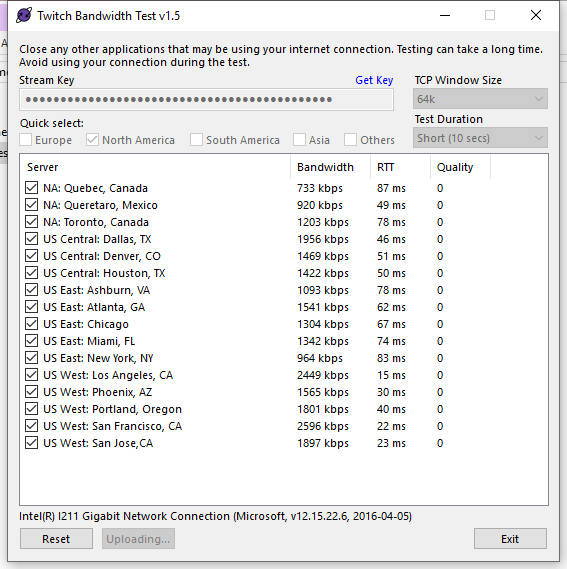
Run a twitch test, there is clearly a connection issue between you and twitch, and that is going to be something we will be extremely limited in helping with https://r1ch.net/projects/twitchtest
 stiff spire
how can i import top donations and top cheers from streamlabs to streamelements for updating my widgets in overlay?
 native beacon
Um i h ad a small question , i've been granted super modship in one of the channels to help via song requests but everytime a song ends i need to write !play !skip in order to play another song from the queue
 twin sentinel
@stiff spire I think there is a too to import the donations from StreamLabs into StreamElements. Although I don't know, if this will import your top tipper and the top cheer. These data will fill over time using StreamElements I think.
@native beacon Theoretically the streamer should press play one time and the either the queue should play the songs after each other, or it should swith to your backup playlist and should play the songs in there, till a new song is requested. So when no one hits pause, it should go on, till the end of the Backup playlist.
native beacon
@twin sentinel the thing is the streamer pressed play but for some unholy reason the list wont play 😦
twin sentinel
the backup playlist or the queue?
twin sentinel
where does the streamer use the queue, in OBS.Live or GroundControl or on the website?
native beacon
@twin sentinel the website
@twin sentinel because before i was super moded it worked perfectly now me and the guy are confussed 😦
kind epoch
So, i just got my Elgato streamdeck, i've heard that there is a way to configure it... any help please?
twin sentinel
@kind epoch Watch this tutorial please: https://www.youtube.com/watch?v=PiGrHXTk9zw
narrow coyote
@quaint bear bandwidth is extremely low and quality showing 0 for all would explain your problem. There is a problem with your connection to twitch and we wont really be able to help with that. It could be a software problem, hardware problem, or a problem with your isp
quaint bear
@narrow coyote i don't understand how this went to crap. Everything was working fine just last week. ISP came and did everything, but thanx for the help anyway, i appreciate it.
twin sentinel
@native beacon I am sorry, but I have no idea how to solve this issue. Maybe another supporter has any idea on your problem.
native beacon
@twin sentinel thank you , unfortunately it seems you're the only one active
lament blade
hey friends..all my alerts are working but the text to speech with sub alerts isnt.all boxes are clicked..any idea the fix?
kind epoch
Is there a way to configure my scenes into the Elgato streamdeck i.e. so that i can press the buttons and it will switch between scenes.
narrow coyote
Elgato Systems
Elgato Stream Deck is easy to setup and use.
This article goes over the proper installation to use Elgato Stream Deck w...
 stoic parcel
Hi guys! How do you make a test donation ? wanna make sure my stuff works
nocturne pelicanBOT
@stoic parcel To test/emulate alerts, hover over the blue bell at the bottom of the overlay editor. From here you can select the type of event and the amount to test.
twin sentinel
@lament blade You have to check the TTS for the defaut alert as well as for the variations of the alert.
 median saddle
Any Stream elements staff here?
nocturne pelicanBOT
@median saddle Welcome to the support channel! Please let us know how we can assist you today and a member of the support staff will be with you as soon as possible.
median saddle
My stream store now has game codes on it and through out my stream today non of my subs could buy any game codes because it kept saying they need to be a sub not sure if this is an issue with the Stream Store or with Twitch any of the same issue popped up at all?
nocturne pelicanBOT
@lament blade Can you please provide a log from your last stream. In OBS go to Help > Log Files > Upload Last Log File. Once this is complete, please provide the link to the log file.
twin sentinel
Work through these tipps here please: https://glorp.ninja/obslog?url=https%3A%2F%2Fobsproject.com%2Flogs%2FoS0VymOuHCDeucFK
@median saddle I can replicate the issue. I'll forward this internally. A solution can take some time as it is weekend still now.
median saddle
@twin sentinel thank ok
twin sentinel
What is the issue? Can you elaborate please?
twin sentinel
Can you send me a picture of your OBS with your scenes please? So can get a bit of insight into your scene collection.
 peak citrus
How? Lol
twin sentinel
You are on Windows?
twin sentinel
Search for the tool Snippong Tool in the start menu. With this you can make screenshots and copy them into this channel.
peak citrus
k
twin sentinel
When you emulate an event in the Ovleray editor of SE. Does the alert come up in the Overlay Editor?
twin sentinel
can you send me the screenshot please?
peak citrus
ok of editor or scenes
twin sentinel
of OBS please.
twin sentinel
Select the Source with the overlay please and press crtl + F. The red border has to fit the canvas.
meager owl
My problem with the SE pay withdraw is still occurring
nocturne pelicanBOT
@peak citrus To add your overlays to OBS, add a new browser source in your scene. Paste your overlay URL in the browser source properties, set the dimensions to 1920x1080 (unless you changed them on the website), and :ballot_box_with_check: “Shutdown source when not visible” https://youtu.be/KDvLynUqXI4
 wicked wing
How do I get my Xbox microphone and party chat to come through my stream via OBS? I've been able to get Game Capture and it plays the game audio on stream, but can't hear my voice or anyone else. I don't have an el gato ... I'm using the xbox app on my PC. Can anyone help?
wicked wing
hmm, no I didn't do that yet.
elder sorrel
No biggie. It's in the Settings in the Xbox App under General 
wicked wing
well, it's set to the default, which is Intel(R) Display Audio for Speaker and Stereo Mix Realtek Audio for Microphone.
Can I start the party on my xbox or do I have to start it in the xbox app?
elder sorrel
You'll have to start it in the Xbox App
wicked wing
ok - but then how do I get my headset, which is connected to my xbox, to actually show up and play in the party? Can I invite myself? lol
such a newbie!
hmm, do I have to create a new xbox profile for the app and then invite my actual gamertag to join the party? backdoor hack lol
elder sorrel
Won't work that way. You'll need your headset connected to your PC to be able to listen to gameplay & hear the Party chat.
As you can stream Connect your Xbox to your PC to stream your display which will capture the gameplay audio & the Xbox Party through the app so you + your viewers can hear your friends.
wicked wing
dang, i only have a wireless turtle beach stealth
dunno how to connect that to my PC
elder sorrel
Which Stealth model?
Doesn't it come with the little USB connector?
wicked wing
i don't think so, I don't recall having it ... just straight up bluetooth
unless I just tossed it accidentally
elder sorrel
Your PC using Windows 10?
 urban geode
How can i setup welcome message for my viewers ? I can't find an option in my Stream Elements dashboard. Can someone help.
 viscid osprey
I imported my donation alert from streamlabs, how can i test if itll work? only the donation is what i need, i checked off the other boxes
native beacon
update on the i've been granted super modship in one of the channels to help via song requests but everytime a song ends i need to write !play !skip in order to play another song from the queue , we tested with removing the super moderator and they started working ... so any ideas?
 zenith widget
@urban geode We don't have that function and don't plan on adding one.
@viscid osprey In the overlay editor -> lower left -> bell icon
viscid osprey
not seeing it yet
zenith widget
@native beacon being a super mod and having access to the dashboard are 2 separate things. What you describe doesn't make sense 
@viscid osprey
viscid osprey
thank you, fixing it now. it cuts offscreen even with 1024x768 so hmm
urban geode
How can i setup welcome message for my viewers ? I can't find an option in my Stream Elements dashboard. Can someone help.
narrow coyote
@urban geode
viscid osprey
thank you
urban geode
Other streamers are using it.
narrow coyote
we dont have anything that welcomes people 
urban geode
I just saw it on another streamers channel. Whenever someone enter the channel. It says Welcome (username) . Enjoy your stay! 😃
It was StreamElements bot that said it automatically
narrow coyote
Unless they found an api to call, we 100% do not have anything like that in our system, and dont plan on it
urban geode
Wait a second. I will send a screenshot of chat.
narrow coyote
That is not going to change the fact we dont have anything like that available
urban geode
@narrow coyote See screenshot. Just to be clear if we both are on same thing or not.
 narrow coyote
We do not have anything that greets viewers
urban geode
I don't know how he did it but thanks for your answers!
zenith widget
That is a new follower message - i'm 100% of it.
native beacon
@zenith widget well, im not sure how on earth does it funcion but the guy gave me a super mod funcion and asked me to adjust the volume using the !volume command and afterwards he pressed the play button on the queue a song ends and it stops and if he presses play again its the same song but once he takes down super modship from me it goes back to normal... thats why we got realy confussed...
zenith widget
How does the streamer have the MR open?
native beacon
@zenith widget if you mean does he have the website open , yes 😮
zenith widget
Do you see the message in MR on top of type "Take control"?
native beacon
@zenith widget well i dont have the dasboard opened cause its my first time being a super mod and i didnt know that im sup , the thing we were going for was to simply allow me adjust the volume on songs using the chat commands so he doesnt have to alt tab all the time ...
zenith widget
No need to tag me on every message, btw.
So my next question is, are you an editor for the streamer? Have they sent you an invite link?
native beacon
no they havent , and yes he added me as a editor
zenith widget
I just checked, you are not an editor for them.
native beacon
yeah cause the guy took me down from it so the sr whould work for him..
what steps should be taken for it to work?
zenith widget
Ok, so what you described means that the streamer didn't had MR open before you.
And you had MR open before them and they didn't take control of MR.
Other factor is - depending on what browsers both of you are using.
native beacon
I havent opened the streamelements tab i had the stream open and all ive done was use the "!volume" command
if it whouldnt bother you too much could explain how should i acess the MR tab ?
as in he puts me as an editor and what should i do
zenith widget
Via the commands is OK, unless the streamer has a long pending queue that needs approving
and they can't look at it all the time.
But if you are going to look at the MR webpage as an editor -> make sure he has MR open before you.
native beacon
alright.
zenith widget
and you see a yellow message on top saying "Module is controlled somewhere else (Take Control) "
and you don't take control
native beacon
could i get a ss how should it look ?
zenith widget
I don't have one on hand at the moment.
native beacon
where should i aprox look for it?
 main abyss
@winter zenith about streamelements timers going off in less time than is set - yes it really is less than 25 minutes.. they were one after the other, not even 5 minutes
I'll try to get another example with timestamps today
native beacon
Um .. right , how should i accees it as editor once i get the privelege?
native beacon
Thanks a lot !
main abyss
this
first timer is set to every 20 minutes and 20 lines and the second is every 25 minutes and 20 lines but they showed up in less time/lines
zenith widget
Would be nice to have timestamps  you cna enable those for your chat.
Anyway, is this the first time the timers trigger?
Or at some point in the stream?
 frigid terrace
hey guys Was Wondering hoW can I get my custom emote to Work With stream elements?
StreamElements: Welcome to the horror house end_nikolas iturniPika < iturniPika doesn't shoW up
narrow coyote
You need to gift the bot a sub
narrow coyote
Only if you are a partner
nocturne pelicanBOT
@frigid terrace Custom bot name requirements
- StreamElements bot modded and in chat
- Active overlay with alerts
- StreamElements tipping page in the panels below the stream (!panels)
- Create a twitch account for the name you want to use
- Ground Control app must be running
Steps to enable custom name
- Sign in to https://twitch.tv with the bot account
- Install and run Ground Control (!gc for download)
- Visit https://twitchapps.com/tmi/ and generate an oAUTH token
- Copy/paste everything in the box to Ground Control oAuth settings and enter the name for the bot account
- Restart Ground Control (custom name may take a few minutes to take effect)
Mac does not currently support renaming the bot.
narrow coyote
If you rename using your account, you dont have to gift it subs. Anyother name would require gifting subs to the account used for rename
 dusky cipher
Hello everyone, so Ive had it with StreamLabs, and want to make a full on switch to StreamElements, could someone help me out 
zenith widget
https://www.youtube.com/playlist?list=PLCDDKlFdScbEwdx5AntcQIS1InkFJwHtv <-- video guides for our tools and features
dusky cipher
awesome thank you 
 wanton mirage
Heyy, I have a problem with the twitch goal, it shows me 10 more followers than they actually are on my channel(I have 181 and the widget shows 191), there's anything I can do about that?
zenith widget
There is: https://streamelements.com/dashboard/session -> goals tab
don't forget to click save.
wanton mirage
Thank you
 raw canyon
Currently having an issue with the StreamElements Leaderboard extension on twitch. It hasn't been updating with bits/donations or subs. Everything is showing up properly from the website when I go through the appropriate tabs (revenue history) but nothing is updating on the extension. Any ideas?
zenith widget
Have you tried reinstalling the extension?
raw canyon
I have, yet no change.
zenith widget
How many subs does it show you on the extension vs on the dashboard?
raw canyon
Show's zero subs on the extension, and the dashboard doesn't show any subscription notifications either.
zenith widget
What is your username?
raw canyon
Typeaux.
zenith widget
When did you gain affiliate status?
raw canyon
I gained it on 2/24/2019
zenith widget
Ok, so our system still thinks your account is a non-affiliate
What gave it away for me is this:
No subscriber multiplier in the loyalty settings
So what to do to fix this -> logout and then login again in the dashboard.
raw canyon
Okay. I'm seeing the new info being populated.
raw canyon
well.. it's showing in the dashboard of the site, but not in the extension.
zenith widget
Ok, so reinstall the extension again and it should populate with the bits data
raw canyon
Will do.
zenith widget
not sure if it will populate with missed sub info
raw canyon
Okay. reinstalled, and now it's all showing. 😃
zenith widget

raw canyon
I feel bad that all I needed to do was log in to refresh my account status. lol. but thank you so much for the help!!
zenith widget
Sure 😃
raw canyon
Best. Support. Ever.
 normal igloo
^^^ this guy 

zenith widget
You can always like...tweet about it...#402919550066229250 
 gusty fable
Is anyone else getting doubled sub notifications? Idk if it's twitch or streamelements but this month i got 2 sub notifications in my gf's channel. I checked the logs and there were 3 othere people who got the same thing.
nocturne pelicanBOT
@gusty fable To add your overlays to OBS, add a new browser source in your scene. Paste your overlay URL in the browser source properties, set the dimensions to 1920x1080 (unless you changed them on the website), and :ballot_box_with_check: “Shutdown source when not visible” https://youtu.be/KDvLynUqXI4
 low fractal

 gusty fable
are they aware of the issue? will it be fixed soon? it's messing with the sub counters.
gusty fable
what does that mean?
 grave python
Twitch
This article shows changes we have made to Subscription Badges and Resub Messages and answers some frequently asked ques...
here
gusty fable
hmm, does this mean it will only happen once per user then it will go back to once a month?
zenith widget
Yes
gusty fable
Boy do they like to complicate things for no reason 
 gusty fable
Thanks @grave python and @zenith widget for the help, i didn't even know where to look for info on this thing.
 fresh wraith
Hi. I’m a brand new streamer. Saturday and yesterday were my first two days of streaming. I can’t seem to find where I can have my bot do random messages in the chat to promote my social media, tips, etc.
zenith widget
Right here: https://streamelements.com/dashboard/bot/timers
fresh wraith
Thank you.
grave python
@zenith widget any eta on oauth + polished media request
after changing backup playlist, it wont play until I skip it 
it wont autoplay*
zenith widget
I don't understand the issue you are describing
i mean, the more updated version of MR is on OBS.Live
zenith widget
On it 
grave python
changing playlist in ground control is scuffed cuz it doesnt save on website aswell
zenith widget
as for the oAuth, we did some improved login, if that is what you are asking about
 zenith widget
well, website can't get a synced up with GC if you have both open at the same time.
you need to refresh website to get the changes made via GC
 forest girder
I'm trying to connect by bot account to obs.live and it doesnt seem to be doing anything. I click "Connect custom bot account" and after logging it it redirects me to the website and doesnt save anything in OBS.
twin sentinel
This is a known issue and our devs are in it to fix this. No ETA. You can use Ground Control in the meantime to get the custom bot name I think.
forest girder
No probs, I can roll with the default name for now, cheers
 fiery depot
How to add a bot on xbox one twitch
winter zenith
you can add the bot easily from the StreamElements Dashbord
just log into
and on the right side it sayes "join bot"
then you need to go into your stream and mod the bot by typing in
/mod streamelements
 rapid latch
@untold crest Using your custom Uptime widget. Is there any way to match the font, etc for both my text and your widget.
fiery depot
Thank you
 untold crest
@rapid latch of course. Click "Open Editor" when you have selected uptime and then Just change font-name:'' in CSS tab to one matching your needs:
rapid latch
I have the font set to "Lato" for both which is working. What about the shadowing, etc? thanks for your help @untold crest
Nevermind @untold crest "text-shadow: 1.5px 1.5px #000000;"
 mortal path
Anyone have any ideas why a kappagen widget would be showing emotes during a cheer event? Only happens on cheer, only happens in one (of 2) widgets and emotesplosions are off.
winter zenith
thats just a normal thing since bits are basicly animated emots
its not a emote splosion
but like the emotes would pop up when others post other emotes/emojis
mortal path
Hadn't thought of that. Thanks.
Totally disconnected "event" of bits from the fact that they're actually just a chat line.
winter zenith
no problem 
untold crest
@rapid latch well done mate 😉
rapid latch
google was my friend. Thanks again @untold crest
 slender yoke
Is there a reason why overlay editor takes forever to load when I am working on multiple overlays? Sometimes all I can do is close down the browser and reopen.
lament blade
Is there a way to copy ENTIRE widgets over to other overlays?
twin sentinel
You can duplicate an overlay, or just copy widget by widget.
lament blade
How do I copy widget by widget.?
twin sentinel
Select the element in the Overlay editor at the bottom left and then select the two white papers with the red ball: https://cdn.discordapp.com/attachments/485869222572982282/549566613201092638/unknown.png
slender yoke
Is it because I use Chrome?
lament blade
Thankyou @twin sentinel! you are the best!
twin sentinel
We definetly recommend using chrome. as our system is optimised and tested in chrome.
But I am sorry, as I have no idea how to solve your problem with the closing browser. You could try to test it in an incognito window, see if any extension is causing the problem, as the extensions are deactivated in there. But maybe anorther supporter has another idea.
slender yoke
Ok thanks. It's been doing it ever since I started using streamelements last year but never really asked.
 hardy horizon
hello. i added to a store a new item, but I don`t understand how I can make it like alert in OBS
twin sentinel
You have to add an overlay with the widget "Store redemptions" to your OBS.
twin sentinel
it depends on what software, but sure.
wise talon
Oh I meant streaming in general on Twitch
elder sorrel
#general-chat Would be the best option if it's not related to Streamelements.
hardy horizon
sorry? but i need a link to add to OBS. Where i can find it&
 frosty hollow
I feel like I'm being a pain about this now but my hosts still aren't being shown in the activity feed. I had the one when Nethyr hosted and done something but any since haven't worked :/
nocturne pelicanBOT
@hardy horizon To add your overlays to OBS, add a new browser source in your scene. Paste your overlay URL in the browser source properties, set the dimensions to 1920x1080 (unless you changed them on the website), and :ballot_box_with_check: “Shutdown source when not visible” https://youtu.be/KDvLynUqXI4
hardy horizon
What if i dont want to have any overlays?
 twin sentinel
This is not a StreamElements issue, you are asking about. Please keep these questions in #general-chat
lament blade
sorry
 jagged tree
I had a problem with my overlay, a mod told me he would help me, got a access code to my account but now he blocked me and i cant contact him
winter zenith
@jagged tree you can delete his permission where you gave him the access link
 ionic willow
I have a stream elements subscription gif alert that includes audio, the gif shows up just fine and the audio plays through my local computer speakers but does not come through on stream. I run OBS through mac, and have used Soundflower (2ch) to play audio through OBS (music etc) but it still doesn't seem to want to pick up the audio alert que when it comes through. Was hoping someone would have some ideas to test out.
 lilac yew
boys, how to make streamelements auto play requested songs when a song ended from the queue without next button be clicked?
lilac yew
delay isnt working so... it need to play next music by clicking in the next button
lament blade
How do I get to the data tab from overlay editor?
zenith widget
Data on top in the overlay editor
out side the overlay editor -> activity feed on the left -> widget data
lament blade
I swear there was a way to edit the amount because it is show an incorrect amount of followers on my overlay
but it displays correctly in totals
zenith widget
have you emulated alerts?
lament blade
it was in the golas tab
zenith widget

ionic willow
Keizar is that for me?
zenith widget
Huh?
I haven't linked you anything.
I think you have just a general audio routing issue 
ionic willow
my bad*
zenith widget
I'd suggest to maybe ask in the obs discord: discord.gg/obsproject
ionic willow
thanks
lament blade
I still need help for this
https://cdn.discordapp.com/attachments/199460642975907840/549627020846563352/2.PNG
https://cdn.discordapp.com/attachments/199460642975907840/549627024600203275/1.PNG


I swear im an idiot
zenith widget
if you've added the media widget, click save o nthe overlay
refresh the overlay, refresh the MR website or the MR widget in OBS.Live
and try again.
lament blade
okay, I deleted it and put it on again and that worked
ionic willow
In case any of the staff are curious, OBS support recommended a different Mac based audio capture method https://obsproject.com/forum/resources/os-x-capture-audio-with-ishowu-audio-capture.505/ This one worked flawlessly and captures the audio coming from the browswer source.
Open Broadcaster Software
Hello!
If you prefer graphics, watch this helpful video by Chupacabra Tutorials:
So most of you know, to capture audio from a Mac you need an extension like Soundflower. But what most of you don't know is that you can use another extension to...
@zenith widget thanks for the suggestion.
 rancid coral
hey, trying to get Goals to work (follow goal, sub goal) but when i turn on the widget it just sets a random number in the middle. i have 300ish followers but it says 251
can someone help me with this.?
zenith widget
https://streamelements.com/dashboard/session -> goals tab
we show the number in the goal progress since the moment you sign up with us.
rancid coral
so if i want my goal to be 500, should i set to what i have minus 500 or set to zero?
 gentle imp
set goal to 500 and current progress at 300
unless you want to do something different
rancid coral
aha gotchya, thanks!
gentle imp
no prob, anything just come back 😄
rancid coral
10/10 service. ive been trying to get as many people to switch to using you guys as possible. keep up the good work
gentle imp
thank you 
 pulsar gulch
Hello can someone please help me with setting my transition ?
nocturne pelicanBOT
@pulsar gulch For the best OBS support, please join their Official Discord @ discord.gg/obsproject
 ocean yacht
i have been having issues with the media share. it doesnt autoplay anymore
winter zenith
Where you use it? GC, obs live, Browser tab?

 bright salmon
I need help
nocturne pelicanBOT
@bright salmon Welcome to the support channel! Please let us know how we can assist you today and a member of the support staff will be with you as soon as possible.
bright salmon
Is there any 32 bit version of obs.live. obs live is right what I need , but my camera only supports obs 32 bit.
elder sorrel
I don't think so as the installer is 64 bit 
twin sentinel
what is the issue? I am sorry, as I don't have time to do voice now.
 harsh radish
I did setup my stream with everything with all the donations and everything and then my friends tried it to see if it worked and i didnt, I didnt come up on the screen or in the paypal or in the dashboard this was about 20m ago
twin sentinel
Are the donations in your activity feed?
harsh radish
nope
elder sorrel
Do you have manual approval enabled for tips?
elder sorrel
https://streamelements.com/dashboard/tipping-settings Tip Moderation > Disable manual tip approval
should look like this when disabled

StreamElements
The Ultimate All in One Platform for Streamers
Aka what Benno sent lol
Well
twin sentinel
well.
elder sorrel
Was there 
twin sentinel
harsh radish
nope it wasnt on
narrow coyote
The real question would be if you got an email from PayPal saying the transaction was successful, or if it is pending
harsh radish
 dusk grove
Hello there i have a very weird issue with tip goal widget, starting amount is not 0 and is totally crazy + i cannot set my starting amount...
narrow coyote
If you did not get an email from PayPal that a transaction took place, then no transaction took place
 ebon hearth
Hello 😃 how many points do user who gift subs get? I can't see anything to say how much they get, is it just they get the same as if they subscribed?
twin sentinel
I think the person who gifted the sub, does not get any points, but the person whe gets the sub recieves the normal points of a sub. But I am not 100% sure.
narrow coyote
 mystic fiber
Hey, I'm looking to create a current rank command for a League streamer. I'm using the $customapi variable to return the summoner information from the Riot API. It returns a full JSON, of which I want to display only 2 sections, the "tier" and the "league points". Is it possible using stream-elements to grab only specific parts of the returned value, or am I going about this the wrong way? I'd rather avoid making a micro-api to query instead if possible.
 strong kernel
The ${customapi} variable is pretty straightforward, it'll just pull everything.
mystic fiber
Can you remove info with the regex option in the advanced options for commands? Or can I run a JS script as a variable to remove the additional data I don't want displayed?
 last jungle
Hey
strong kernel
@mystic fiber RegEx is for triggering the command, not for changing the response. There is no way to alter the output.
mystic fiber
K. figured but hoped otherwise, thank you very much ❤
nocturne pelicanBOT
@last jungle Welcome to the support channel! Please let us know how we can assist you today and a member of the support staff will be with you as soon as possible.
meager owl
I am still having problems trying to withdraw from my SE pay. I need help. When I press help takes me to discord
strong kernel
You added your bank details 5 days ago. It can take up to 7.
strong kernel
Okay. And when you click it?
meager owl
Brings up the option to ask how much I want. When I do so, it says withdraw failed. If it continues to happen contact support
strong kernel
Can you DM me your email address please?
meager owl
Done
strong kernel
You'll hear from us soon.
meager owl
Ty
ocean yacht
my streamelements is playing on autoplay now and i use the browser
also, i tried to work on my stream store for redemptions, but the image i have set for my redemptions dont pop up when item is redeemed
elder sorrel
Do you have the Store item set as a Stream perk?
ocean yacht
yes
elder sorrel
Did you add the Store Redemption Widget to your Overlay?
ocean yacht
yes and saved it but when i go back to it, nothings there except a blank overlay
i tried saving it 4 x yesterday and it doesnt save
elder sorrel
Are you using Chrome? Have you tried Incognito mode if you're using Chrome?
ocean yacht
so im in incognito mode. i go to overlays, stream store overlay, then insert image?
im so confused lol
elder sorrel
No. You would have to enter your image in https://streamelements.com/dashboard/store/items
StreamElements
The Ultimate All in One Platform for Streamers
As adding the image for each of your items should show up each time they're redeemed.
ocean yacht
okay i did that already
and thats the issue im having b/c the images arent showing up
its just blank
it has the text just no images
elder sorrel
Can you show a screenshot of your store please? 
elder sorrel
Hm. That is weird. Going to ask internally if there is a reason for the store item image not showing up. As with all listed as Stream Perk should play the image & audio.
@ocean yacht Got word that you have the store redemption on a separate overlay?
Did you Copy/paste the URL for your Overlay with the store remdeption widget to your streaming software like OBS.Studio?
ocean yacht
im confused as to what you mean by a seperate overlay
and yes and still it only gave me the text
 twilit mortar
when i try to use the xbox app on my computer in as a window capture why is it now a black box?
twin sentinel
Try to use it as screen capure.
 faint orbit
hey fellas i need help with something 
why does it do this i tried every fix and nothing works
strong kernel
You're going to have to be more specific about what the issue is.
twilit mortar
@twin sentinel as a window capture it doesnt work as a game capture it doesnt work and as a display i dont want my entire screen of my computer displayed
faint orbit
it doesnt let me redeem my points the streamer doesn’t know how to fix it and i’m the only one with the problem @strong kernel
twin sentinel
@twilit mortar You can make it full screen and make it as sreen capture. I think there is no other solution.
nocturne pelicanBOT
@twilit mortar For the best OBS support, please join their Official Discord @ discord.gg/obsproject
twilit mortar
@twin sentinel and if i did that then how am i do edit the scene or manage my stream? -facepalm-
jade remnant
do you only have 1 monitor?
twilit mortar
yes im on a laptop
jade remnant
then you would need to ask obs discord as this isnt an option for you
narrow coyote
Thats probably why its black, OBS is not running on the same GPU as what you are trying to capture
twilit mortar
it was showing earlier and idk why it just randomly decided why its not going to.
narrow coyote
does not matter, read that link I just posted, or ask in the OBS discord
elder sorrel
Do you have Chat lines enabled?
elder sorrel
That's your reason why. If you want them to automatically trigger. Set them to 0.
As having 1 chat line means someone has to post once in your Twitch Chat during the timer's interval to trigger.
 untold mantle
i did but nothing is happening
 clear prism
Hello,I try to load overlays from streamelements,but didnt have option Browser source,only browser,after laoding my overlay it's very big and I don't know how to solve this problem. Sorry for my english.
elder sorrel
@untold mantle Post a screenshot of how you have the timers set up
strong kernel
@clear prism Set the browser source properties to 1920x1080, and then press Ctrl+F to fit to canvas.
elder sorrel
Have you tried parting the bot & have it join in your channel? Also I'm not sure if having them all at the same time works. As that'll be an overload of spam
Could be wrong though as I never set them all in the same time before.
clear prism
@strong kernel omg,thank you so much!
untold mantle
thank you @elder sorrel
Does anyone else know if we can have one timer
more than one timer?
jade remnant
if you put all of the text into one bot dose it allow to continue past the max characters?
untold mantle
i dont know let me try that
jade remnant
i had it on my yt bot that even though i was past the max characters i could still type and the post would separate the messages but in one timer
untold mantle
thats interesting i could try that
jade remnant
i would say, try and cut the message down if possible. having a big message like that may spaz the bot out and a message might get missed
jade remnant
haha, have a look at social media pop up by nerd or die. i use it on my stream and it could save some text for you 😁
the banner on the right
 elfin laurel
ground control not opening. anyone know why?
pulsar gulch
omg finally new obs ❤
I got a few questions
I have an i7-6800k and 1070ti I could use both nvenc or x264 right ?
 civic needle
Not sure if anyone has run into this or if it's even an OBS issue. Whenever I stream CSGO it's like my 144hz monitor just goes down to 60hz and it's annoying. I've got a 1600x 32GB of RAM and a 1080ti
pulsar gulch
Wait so how do we add the chat on the new obs 😮 ?
nocturne pelicanBOT
@pulsar gulch For the best OBS support, please join their Official Discord @ discord.gg/obsproject
 snow needle
Hey everyone, good night. So, I'm trying to get the Store Redemption alert to show image and sound on stream, but only managed to get sound, what might I be doing wrong?
 little harness
hello
strong kernel
@snow needle What kind of item is it in your stream store?
nocturne pelicanBOT
@little harness Welcome to the support channel! Please let us know how we can assist you today and a member of the support staff will be with you as soon as possible.
strong kernel
@little harness Just ask your question here. Don't go into multiple channels please.
little harness
well i didint understand much of what gose where o-0
snow needle
@strong kernel Thanks, but I solved it ❤
little harness
but im trying to capture the game play on stream eliments but it seems that it is not working when i use game capture
nocturne pelicanBOT
@little harness For the best OBS support, please join their Official Discord @ discord.gg/obsproject
lament blade
can someone help me please 😃
nocturne pelicanBOT
@lament blade Welcome to the support channel! Please let us know how we can assist you today and a member of the support staff will be with you as soon as possible.
lament blade
hi , someone justr tipped my channell $100 by credit card , so how do i accept it , ? please , as its not on my paypal , your supposed to do something first right ? as all my tips so far have been through paypal and i could accept it right away , but it says with g2a , how do i accept and get these 2 tips by credit card people have tipped me please ? thankyou
strong kernel
How were you made aware of the tip?
lament blade
i see it in my twitch channel and in my obs
and they told me
and i saw the alerts on stream earlier
strong kernel
Does it appear in your revenue history?
lament blade
but this other one is off stream
but i cant accept either of them as im not sure how to
cause it wasnt paypal this time
strong kernel
Again: Does the tip appear in your revenue history?
lament blade
yes
strong kernel
To learn how to withdraw your tips from G2A, you can watch this video: https://www.youtube.com/watch?v=CXAndapQCK8&t=88s
 sturdy cedar
Hey Nethyr ! You helped me earlier with the onsite support
I'm still trying to figure out the overlay thing for my sounds . Which widget should I be using in overlay editor for Store Sound Redemptions
strong kernel
"Store redemptions"

 proven nimbus
Hi
I was wondering how / where do you make notifications to work like for those who just followed etc
Thnkz 😃
twin sentinel
There is a module for that if you mean a chat notification.
proven nimbus
like pop up on stream and all etc sorry I'm new to this
twin sentinel
You can create an overlay here https://streamelements.com/dashboard/overlays and add an alert Box and edit it properly to your needs.
 sage vigil
i did the update for OBS.live and now my chat commands are not working please help!!!
 compact rampart
can someone help me? im looking for the widget for stream store but i cannot find it
proven nimbus
yeah thats not going so great either / yes my sister & I followed the vid its from 1 of the pre made 1's we tried bothe the suggested 800w by 600H and our screen resoultion 1920 by 1080 and neither are fitting on the screen
suggested
https://gyazo.com/00ab2a1f5cc7addd0f16b34b779fb21b
1920 by 1080 our screen res
https://gyazo.com/9901e613516be67d0c9f94ff4adfcd6d

 strong kernel
@compact rampart It's called "Store redemptions"
@proven nimbus Our themes default to 1920x1080. The browser sources should have their properties set to that. After setting, you can press Ctrl+F to fit to canvas. If it doesn't fit perfectly then your canvas is not set to a 16:9 resolution.
sage vigil
@strong kernel i did the update for OBS.live and now my chat commands are not working please help!!!
proven nimbus
@strong kernel that that worked the ctrl F ❤ 😄
strong kernel
@sage vigil
- Don't ping.
- OBS.Live doesn't control your chat commands. Had you renamed the bot previously?
lament blade
@strong kernel can u remove the credit card g2a option from my streamelements please my man , i only want paypal now cause im on g2as site and its a joke , thers no live 24 hour help and i cant withdraw the money and its incredibly infuriating lol
ive money in there i cant access
strong kernel
@lament blade You can disable it from your tipping settings in your account.
lament blade
thanks
g2a is a joke by the way
im not able to get my moeny out of there
nobody to help me Lol
i love u guys cause your always here 😃
sage vigil
nope bot is still the same and worked last stream,... updated today and now they dont work
compact rampart
didnt help at all nethyr
strong kernel
@sage vigil Part and rejoin the bot from your channel.
@compact rampart Did you find and add the store redemption widget to your overlay?
compact rampart
i did not.
twin sentinel
compact rampart
what is that ? when i use the site streamelements it doesnt show up like that
twin sentinel
You have to create an overlay and then select the widgets tab on top while editing this overlay in the Overlay Editor.
sage vigil
how do i part and reload the streamelements chat bot?
strong kernel
The Part Channel button on the right side of your StreamElements dashboard.
And then the Join Channel button that replaces it.
twin sentinel
sage vigil
ugh you guy are the best!!! have no clue how that got reset but thank you so much!
 lethal belfry
i need help my display on twitch is showing green but on my obs its fine
what do i do
twin sentinel
If you are referring to the Overlay Editor, it is supposed to have a green background.
lethal belfry
no
nocturne pelicanBOT
@lethal belfry For the best OBS support, please join their Official Discord @ discord.gg/obsproject
lethal belfry
thx
 loud rover
Is it possible to have a custom command that both redeems an item as well as does other things such as add to a counter, etc.?
strong kernel
No.
loud rover
If I put the Item redemption at the end of the command it seems to add to the counter, but it doesn't output the message, only the item redemption information.
strong kernel
Only the redemption confirmation will output.
loud rover
Gee dangit. Aight, well that does save me time! Thanks!
 unkempt wagon
is there a way to make streamelements show donations alerts made by other donation sites?
strong kernel
No.
last jungle
I dont now i only have 14 subs
 keen linden
hello.. i'm trying to get my custom alerts with CSS working, but i cannot seem to get it right. i've added the video (webm) to the alert, enabled custom css, but the video file doesn't show and it only shows the default blue fish alert 😃 any ideas?
strong kernel
Variations.
strong kernel
Did you click save?
keen linden
yes
if i untick custom css, it shows my alert video.. problem is that i need custom css to position the text into the frame
hm i just saw, i can possibly use text advanced and do margin to get it down
problem is here in the custom css (html) code:
https://cdn.streamelements.com/static/alertbox/default.gif
i dont know the url to my alert.. do i need to upload it to ex dropbox and use the link from there?
i mean, what's the url to my uploaded alerts on SE?
strong kernel
Alerts can be on multiple overlays. Make sure you're editing the correct one.
Use {{image}} or {{video}} to reference what you're using.
 tepid frigate
Question, why do i have to manually have to select next on the stream elements music list, as well as the backlist not properly working
Im using chrome
zenith widget
@tepid frigate is this with the backup list?
winter sparrow
Anyone know if it’s possible to sync your loyalty points in Discord?
zenith widget
We don't have a direct link/integration with Discord.
So you will need to do some coding with our API endpoint.
winter sparrow
Oof. Not a coder. Thanks for your reply though.
tepid frigate
No @zenith widget in general, and sometimes it wont work at all till i unmute and mute the sound through the site
zenith widget
I would suggest to try using Ground Control or preferably OBS.Live(Don't update to 23.0.0)
winter sparrow
Speaking of the Media player, I have a great twitch clip of it stopping for 20 seconds after a song ends and then playing the next song at max volume and deafening everyone.
This has happened many times and I've stopped using it.
winter sparrow
Website
zenith widget
Have you also tried Ground control or OBS.Live MR?
winter sparrow
I use ground control for the bot, but I can't use OBS Live because OBS drops frames hella bad for me and SLOBS doesn't.
I really want to use it. But.. dropping frames.
 mystic spindle
okay so i have no alerts when someone hosts, i've made sure the minimum viewer is 0, i've made sure the alerts are on. Haven't had it working the last week or so. Yesterday a cheer alert didn't work either, even though i've edited every variant
normal igloo
@mystic spindle I can't say much about cheer alerts but host alerts are known for having issues
nocturne pelicanBOT
@mystic spindle Due to recent changes to Twitch API, we have filtered out hosts and will only show these ones on your activity feed:
- All manual host events (0 hosts included and if filter set to 0)
- All auto host events with at least 1 viewer
mystic spindle
but i've had manual hosts while i am stream and my filter is 0
and i still havent gotten it
zenith widget
Then at this point it depends if twitch sends us the 0 viewer host event.
mystic spindle
and the cheer alert?
zenith widget
Do you have a clip or video of it not showing?
zenith widget
well the chat showing the person who cheered
mystic spindle
oh right yeah let me get that then
zenith widget
Not sure if the VOD or a clip will capture that event btw
mystic spindle
well i asked and viewers said it didnt go off
and it didnt go off for me on OBS. Live either
mystic spindle
nope not on it
 heavy pecan
when i try to use the new connect twitch account to obs feature obs.live crashes when saving the options, is this a known bug or is this something on my side I need to fix
zenith widget
Uninstall the plugin, uninstall obs, install a lower version.
normal igloo

Heads up https://t.co/7oBZtkAlC2 users. We'll push an update to obs studio 23 soon. Do not update your obs meanwhile, it might result in a crash.
 Twitter
^^^ 
heavy pecan
thank you
zenith widget
The plugin won't work with a fresh out of the oven version from OBS.
heavy pecan
i don't follow the streamelements twitter, i should probably do that haha
thanks James and KeiZar
normal igloo
np
 serene viper
Can I pop a question?
normal igloo
@serene viper sup 
serene viper
Just wanted to make sure I wasn’t interrupting
hopeful someone can help me.
I play games (Apex legends now) @1440p and stream @720 60fps using the NVENC encoder. I bought an RTX 2080 Ti 2 weeks ago, since then I have had issues with encoding lag / overload. This doesn’t make sense to me as my GTX 780 could do it (although game frame rates were lower, stream was smooth) I didn’t change any settings and even the v23 update with the new NVENC didn’t fix it either...I’ve turned down video settings In game all the way and even tested different bitrates...
Any ideas how to fix this?
Head scratcher for me...
normal igloo
Using obs?
mystic spindle
can i link the clip here @zenith widget ?
zenith widget
isn't it a screenshot?
serene viper
Yeah obs live
nocturne pelicanBOT
@serene viper Since Apex Legends doesn't have optimized GPU drivers yet, it tends to take up all your GPU resources, leaving nothing for OBS. If you're having OBS performance issues, you'll likely need to limit the game somehow. The easiest way to do this is to enable Vsync in the game, or use a frame limiter. You can limit the game to 60fps by adding +fps_max 60 to the game's launch properties in Origin.
https://twitter.com/OBSProject/status/1093974215877951493


If you stream @PlayApex and are having FPS issues with OBS due to a maxed-out GPU, you'll need to reduce GPU usage so that OBS can run as well. The quickest way to do this is to enable Vsync with triple buffering and disable Windows 10 Game Mode. https://t.co/FOPmDyJMNx
Retweets
472
Likes
1345
Twitter
mystic spindle
yeah i can show a screenshot of the chat and then show you the activity feed if that helps?
normal igloo
ok didn't even know that was a command thx KeiZar 
zenith widget
i need the name of the person who cheered
serene viper
Oh check that out, so limit the FPS should fix it?
normal igloo
KeiZar by any chance is there a command which lists all the support commands as it's very clear that I need to update my list 
serene viper
I hadn’t thought of that. I have it unlimited
mystic spindle
the name was TwiztedShotzTV
normal igloo
@serene viper It should do yes
serene viper
Thank you @zenith widget @normal igloo
normal igloo
np
serene viper
Appreciate it guys, second time you guys have been quick to fix my issues. Impressive!
zenith widget
Can I see a screenshot of the person cheering? @mystic spindle
 midnight hamlet
I click "here" and it just takes me to a blank page
zenith widget
Yes
mystic spindle
winter sparrow
rip
mystic spindle
Ohhhh lol
mystic spindle
Lol yeah XD my bad then
zenith widget
i've told people about the /me way to say the streamer got tips
but this is just funny 
mystic spindle
so the host thing tho is a known issue right? not just something i gotta fix at my end?
hahaha right? XD
zenith widget
Just so you know - cheer emotes are short looped gifs of common twitch global emotes
the ffz/bttv animated gifs are not part of the cheer emotes, unless you uploaded your own custom ones (which partners can do)
and there is nothing we can do when twitch sends thousands of 0 viewer host events every day/hour and we miss or don't get some.
mystic spindle
so its not something that can be fixed either then huh?
zenith widget
Nope
mystic spindle
Okay, is it a case of hit and miss? Like sometimes it will work and sometimes it won't?
zenith widget
Yes
mystic spindle
ah good, cheers for the help!
 mental ginkgo
Chat/Activity feed wasn't there when I launched stream elements obs after the update, how do I bring it back?
the windows of chat/activity feed in obs, rather
normal igloo
@mental ginkgo when you say updates you mean obs Itself?
zenith widget
You don't have the plugin installed.
normal igloo
- its obs 23.0.0 ^^^
mental ginkgo
Tried re-launching stream elements obs tho D: is there a fix?
zenith widget
Do not install our plugin at this moment - it may crash OBS
You can try and use the OBS' integration in the mean time
 dry quest
hi whenever i open OBS i always have "movement camera sensitivity like 500% " and it only happens with obs not other streaming programs
nocturne pelicanBOT
@dry quest For the best OBS support, please join their Official Discord @ discord.gg/obsproject
dry quest
ty alot 😃
lament blade
Hello guys I’m having trouble adding a image into stream elements after I add the image and click upload nothing happens :/
zenith widget
Use chrome
lament blade
I am using Chrome
lament blade
Ok I’ll try that
wanton mirage
Heyy, is there a way to set all the custom command cooldowns to 0?
Globally and user cooldowns
zenith widget
All at once? No.
wanton mirage
I have like 30 lazy redeem commands and I forgot about the cooldowns, the redeem has a cooldown already and those commands are just using them lazy, like instead of redeem sfx it's just sfx
Oh well, I'll do them manually XD
 hexed hound
@zenith widget Hi, sorry. I'm having issues with SE.Pay again. I submitted my info over 7 business days, with no result. Then, I emailed the StreamElements support email. I got back a message that I would be helped, but never recieved any news after that. I tried emailing again about 5 days ago, but still no response.
zenith widget
Your bank details have been cleared from your account as per your request.
 glad sparrow
How can i add a response variable to say sub only? for a sub only command?
the variable system here is new to me
glad sparrow
how do i make it trigger so they know to sub for it
glad sparrow
oh ok 🤔
say if if i make two commands the same one sub only and the other non sub for the variable would the command trigger both or cancel each other out?
zenith widget
it will trigger most likely both
glad sparrow
🤔 i will do some testing i guess
nocturne pelicanBOT
@fierce yoke Welcome to the support channel! Please let us know how we can assist you today and a member of the support staff will be with you as soon as possible.
glad sparrow
ok so it does not allow 2 of the same commands 😣
 fierce yoke
Hello? Anyone 😄
nocturne pelicanBOT
@fierce yoke Welcome to the support channel! Please let us know how we can assist you today and a member of the support staff will be with you as soon as possible.
 forest peak
my follow goal is off, its saying I have more followers then i do, any way to fix it?
zenith widget
https://streamelements.com/dashboard/session -> goals tab
forest peak
so I just remove until its to right number?
forest peak
ok thanks
 serene granite
you can also use the "Total followers" widget instead, just change the text field and add something like /200 at the end @forest peak
 untold spindle
hey there, is there any way for me to sort permissions and who's more important between regulars, vips and subs?
id like to put subs over vips as they pay, and vips dont... 😄
twin sentinel
No, I think there is not. The order of permissions is fixed.
untold spindle
oh... ehm, well thats kinda dumb. well off to #💭︱feedback-and-ideas i go
oh nvm how does that work actually
nocturne pelicanBOT
@untold spindle Here is the StreamElements Ideas Board: https://strms.net/ideas
 ripe moth
My streamelements extension on twitch says that some chrome extensions are blocking my streamelements, but even when i disable all of them, streamelements still wont work on my pc?? anyone that know why and how to fix this?
twin sentinel
@ripe moth Can you try it in an incognito chrome browser?