#helpdesk-twitch
1 messages · Page 401 of 1
 ebon forum
so you would have to listen to this on your PC xDDD
with some awkward and backwards tricks like "listen to this device" settings
 craggy nymph
yeah i can listen to it on pc but there is a delay D;
ebon forum
well this is why i recommend analog
craggy nymph
How do i get that . haha ( sorry im complicated
ebon forum
this means: Toslink to RCA adapter on the console > cables > mixer > cables > streaming pc.
at the same time: microphone > mixer > streaming pc
headphones into the mixer
done
this will give you a good streaming setup, but NO mic on the console
i'm not super familiar with the console
 oblique steeple
That's why many people use a proper mic on the PC and their crappy headset mic on the console.
ebon forum
so youtube guides how to get XYZ to run on ZYX is your best bet
i know how the ps4 looks so i do not grab one by accident, this is enough 😄
 normal igloo
@ebon forum You just explained in 3 seconds what a 10 minutes Outdated video can't gg i Try see what I can find on YouTube for him But most of the videos are extremely outdated 
ebon forum
i can actually make a quick and dirty video how to connect that crap. maybe not a dirty one with actual graphics
but too lazy and need to get work done
so scratch that 😄
normal igloo
oblique steeple
Would it work with a dedicated USB soundcard or onboard line in and Voicemeeter? 
ebon forum
nope
all soundcards introduce delay
professional ones with proper drivers - 5-7ms. consumer crap - 50-150ms
craggy nymph
i still don't know all of the technical language so i think ill just buy an elgato haha
ebon forum
@craggy nymph the elgato would not change anything, you would just swap the capture card
craggy nymph
it allows me to listen to the aprty chat through my ps4
ebon forum
not crap, just overpriced 😄
oblique steeple
was about to say 😄
ebon forum
you do not need the elgato, this is at least 100$ on sale and not needed. a small mixer with proper cables will get you further
oblique steeple
HD 60S and that PCIe one are decent. The rest it meh for OBS
ebon forum
but anyway, i suggest looking at videoguides before throwing 150$ at this issue
you get a way better idea when you actually see how that stuff is connected
this is no rocket science, just weird
craggy nymph
Its just ive looked up so many youtube videos on it and they are all confusing and don't help
 muted dagger
Unrelated to current conversion, sorry! I added the loyalty points system to my channel today and tested out some of the chat games and such. I had an issue with !raffle command choosing only 1 winner, despite up to 4 people !join within the correct time limit. It happened when I did it with default settings as well as with the arguments manually added; !raffle 200 30. Any thoughts on what might be happening?
craggy nymph
I want to for sure hear my audio through my ps4 headset and for it to pick up sound through my stream.
ebon forum
@craggy nymph look at the videos that have your exact hardware - including the mixamp from astro
then you will get an idea
craggy nymph
ok i will try
 hushed snow
I filled out the form
 pine hemlock
ok
 rigid ocean
I have StreamLabs OBS, and I have a Red X on my icons. I have logged out of both programs, and it is still there. Is this known, or did i miss something.
normal igloo
@rigid ocean We are not StreamLabs 
ebon forum
We do not support Streamlabs OBS. I suggest looking for help over there or try our OBS.Live 😃
rigid ocean
Where do i look for the OBS.live issues?
thats what I'm having issues integrating with my Stream Deck and SLOBS
 narrow coyote
OBS.Live and SLOBS are completely different things
ebon forum
OBS.Live /= SLOBS. SLOBS is a product from Streamlabs, no support for it here
https://streamelements.com/obslive
This is OBS.Live and we have Streamdeck integration (under more actions in the streamdeck software)

StreamElements
StreamElements OBS.Live makes live streaming on Twitch easy. Live Stream and record your broadcast from anywhere, save on system resources with the ultimate streaming software.
rigid ocean
I will look there, but according to this, they told me here:
https://youtu.be/PiGrHXTk9zw?t=342

StreamElements OBS.Live add-on makes stream management easy, integrating Twitch Chat, activity feed and Media request into OBS studio. Download it here: http...
ebon forum
Yeah, this is Kiwa in the video 😃
And you are right here, but you have to understand that SLOBS is not from us and we are not fully compatible
rigid ocean
Ok, that was my basically my question, that i was wanting to know. thanks!
muted dagger
Disregard my above message. I found some other comments where people said the multi raffle rewards more than 1, based on how many join. I had at most 4 in my test which is probably why it only rewarded 1. At what point does it split into multiple winners?
ebon forum
@muted dagger we have !sraffle for a single winner and !raffle for multiple winners. but sadly i have no idea how many people have to join etc.
muted dagger
No worries. Was just curious why !raffle was only rewarding 1 participant. I think i'm good now though! Thanks!
ebon forum

 scenic furnace
does anyone know how to change your phone number being used for twitch 2 factor authentication? My phone was broken recently and i cant sign in to OBS without it for 2FA
ebon forum
ask twitch support, we have no way to do it
ebon forum
there should be a help article about 2FA
 strange yacht
i have to format my pc
how can i save all my stuff
im using the streamelements obs
so that when i get my pc done i have everything saved
pine hemlock
Streamelements overlays are saved in the cloud, on the website.
 untold cliff
How do I get a code for the streamelements android app?
 nocturne pelicanBOT
@untold cliff The StreamElements Mobile IRL streaming app is currently in closed beta.
If you'd like to assist with testing when public beta testing becomes available, please fill out this form: https://goo.gl/forms/3DaiLckKDjeMAeVt2
This does not guarantee you to receive a Code.
untold cliff
Thanks!
normal igloo
np 
 noble locust
Hello, everyone. I have a question regarding the bot.
ebon forum
Hello. Just ask it 😃
noble locust
I made a bunch of timers, and made sure they were enabled, but they don't seem to be triggering.
Is there anything I might have done incorrect?
ebon forum
can you screenshot the settings and upload the picture here? there is a different interval for offline timers tho, might be that
ebon forum
So it will go off every 5 minutes if online and every 30 min. if offline WHEN 15 chat lines have passed.
noble locust
Keep in mind, I've been streaming for about an hour so far tonight and it hasn't even spit it out once. When I turned them on much earlier this morning, I noticed it hasn't spit it out at all when I was offline, either (I was still in chat, just not streaming).
ebon forum
You have set that to 15 chat lines and 10 chat lines
So those have to pass and then the timer kicks in
Disable the chat lines limitation and try again.
noble locust
by setting it to 0?
noble locust
Okay, I set it.
ebon forum
so you can see them
noble locust
Okay, I set those. Let's see what happens.
looks like the timers are working now. if I set them back up, do they stop working again or should they just take the new interval into consideration?
ebon forum
They will not stop, they will behave as you set them
noble locust
Okay, thanks!
ebon forum
So if you set them to 5 lines and 5min, they will wait out 5 chat lines and then timer goes off.
noble locust
So I probably should leave the chat lines off until there is more traffic.
so that they will at least go every 5 minutes.
ebon forum
Sounds like a plan
noble locust
Okay. thanks for your help!
 flat veldt
is it possible to remove the default !giveaway command? I'm running a giveaway adjacent to streamelements so having !giveaway say that I'm not running one is confusing.
narrow coyote
You can disable the default command
flat veldt
d'ya happen to know where? :3
got it xD thanks!
never even noticed the tabs. saved!
narrow coyote

 lament blade
Hello I need Help
normal igloo
It's best you tell your issued instead of just asking for help
lament blade
How can i get The Shop items to actualy Work For example a make it rain when some one buys That How do I make it that they can use a make it rain command
normal igloo
and what exactly is a rain command 
lament blade
Where You give People Points from Your own Points
But Now your Giving everyone points cause your making it rain
normal igloo
I don't think that would even be possible as the bot can't replied to itself with commands unless someone tells you different 
normal igloo
go on
lament blade
Its about the shop again
So i made this new item when You purchase it you sgould be able to Request a Song to be played Next on Que
how can i make that to work?
 weary mist
Use the media share system, its built to do exactly that
weary mist

StreamElements
The Ultimate All in One Platform for Streamers
ohhh,
there is no way to automagically promote a song (other than through tipping)
weary mist
but you can have either youself or a mod move the song upwards in the queue
lament blade
Lmao
Yeah that works
And i wanted to make a make it rain command but i dont know how by any chance you know how
?
weary mist
same way
you or a mod use the !bonus all # command to give everyone in chat points, and the store redemtion takes the points from the one person
lament blade
for example !bonus all 100
weary mist
yes
lament blade
Is that it?
Ok Thanks al0t
btw i need some shop ideas by any Chance You can give me one?
@weary mist
weary mist
pined in general
narrow coyote
#general-chat pinned messages
 wraith hemlock
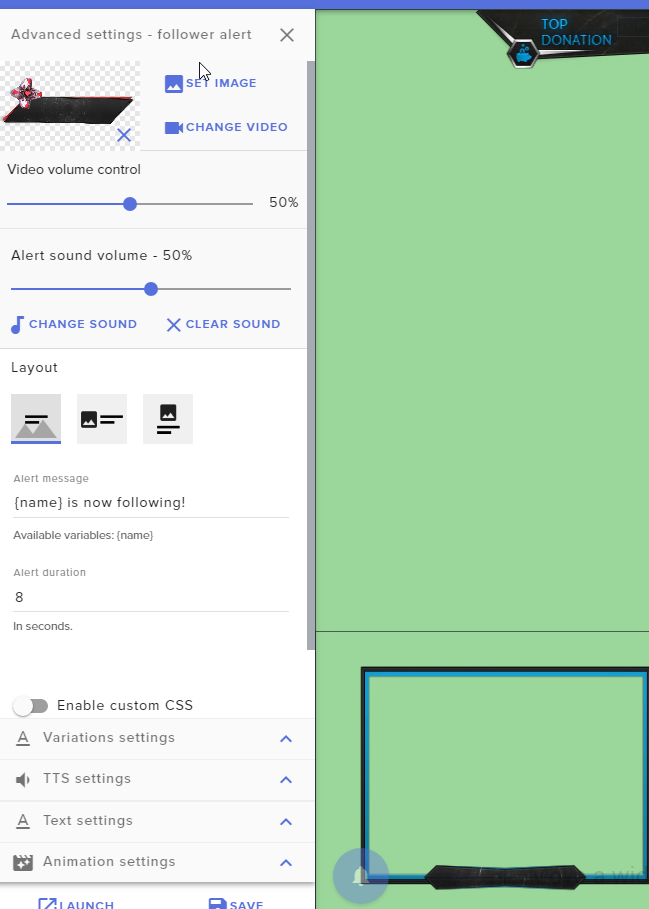
How do i make multiple donation settings? Lets say i want to have a donation with $6.66 that would make a loud scare?
 copper bobcat
Is there anyway I could have one of the robot Text-to-Speech voices read a really long message? Michael's voice has become a sort of meme around my channel and I'd like to have him say something kinda long.
Is there a site that these voices are from?
 pure zenith
!code
nocturne pelicanBOT
The StreamElements Mobile IRL streaming app is currently in closed beta.
If you'd like to assist with testing when public beta testing becomes available, please fill out this form: https://goo.gl/forms/3DaiLckKDjeMAeVt2
This does not guarantee you to receive a Code.
 spice karma
Hello I want to output something like "$(touser)" to configure a nightbot command but SE prints it as "${touser}" what can I do?
I need SE to print out () not make it into {}
 torpid estuary
⤴ answered in #🇩🇪︱deutsch
 median knoll
I have a couple questions and issues that I need some help with.
-
I can't seem to get the Song Request feature to work properly. I have followed all the steps, followed YouTube guide videos, but when I try to use the !sr command in chat it will say that a song was put on the list but it doesn't play. What am I doing wrong?
-
I want to add the Text-to-Speech option for both Bits and Tips, but I can't seem to find it anywhere on the menu. How do I go about doing this?
-
Are there any draw backs from turning on the Tips / Donation feature? I heard that if a viewer were to drop a Tip and then refund it, it will cost me money in the end. Is there a safe way to handle this and have it set up without fear of consequence?
 winter zenith
@median knoll
-
do you have the media request page open while streaming?
-
go to your alertbox and add the tts for the events you want them to happen. Be carefull to also change all cheer&tipping variations.
-
StreamElements is the only streaming service that has chargeback protection. Meaning that if someone would try that you are safe from it and the user gets blocked from tipping anyone ever again through a StreamElements tipping page.
median knoll
@winter zenith I have to keep the StreamElements page open while streaming? Ok... I missed that memo
Awesome about the tipping thing... gonna set that up right now
torpid estuary
The SE media request page is the page where the YouTube videos will actually be played from. So as soon as you close it you can't hear it anymore. @median knoll
median knoll
When the answer is TOO obvious, lol
 karmic glacier
i have installed ground control so now what do i do to change the name of the twitch bot?
nocturne pelicanBOT
@karmic glacier Custom bot name requirements
- StreamElements bot modded and in chat
- Active overlay with alerts
- StreamElements tipping page in the panels below the stream (!panels)
- Create a twitch account for the name you want to use
- Ground Control app must be running
Steps to enable custom name
- Sign in to https://twitch.tv with the bot account
- Install and run Ground Control (!gc for download)
- Visit https://twitchapps.com/tmi/ and generate an oAUTH token
- Copy/paste everything in the box to Ground Control oAuth settings and enter the name for the bot account
- Restart Ground Control (custom name may take a few minutes to take effect)
Mac does not currently support renaming the bot.
karmic glacier
where do i copy the oath token in ground control?
torpid estuary
In the settings in ground control
karmic glacier
i cant see anything about oAUTH in the settings
torpid estuary
its the JWT token

@karmic glacier
@storm bay if you want your bot to use emotes in a response, they need to be global emotes, usable by every chatter, or gift your bot a sub to your channel if you want it to output subemotes.
a command like that would look something like
Command: !cmd add !KappaEmote Kappa Kappa Kappa
typing !kappaemote in chat would make the bot output  for example
 storm bay
is there a way for the bot to be able to do this without a gift sub?
torpid estuary
no
torpid estuary
only for partnered streamer. once you are partner you get some lifetime free subs
you can use the bot rename function to use your own account as bot so to say, then it would be possible, correct.
but it would be with your name
storm bay
So how would I use the rename function to do this and make it possible
torpid estuary
are you using ground controls or obs.live?
storm bay
obs.live
torpid estuary
click on the burger menu in the activity feed in your OBS.live. http://voidsmind.com/s/obs64_2019-01-13_13-08-21.png

stream setting - custom bot name
storm bay
not in stream elements but in the obs settings?
torpid estuary
click on the 3 stripes i posted a screenshot of
its in the upper left corner of the activity feed in OBS.live
 short hound
Helloooo again, my tippers have written messages with donations they’ve given me and the messages haven’t come up on stream just that they have donated and how much for? Is there a way I can change this?
torpid estuary
open your alertbox in the overlay editor, go to tip settings and make sure that "show tip messages" is enabled. @short hound
torpid estuary
very happy to help! awesome that everythings working now @storm bay
storm bay

torpid estuary

short hound
@torpid estuary genius ❤️
torpid estuary
karmic glacier
I've just realised i can't use the custom bot name as i use xbox to stream and you need overlays which are not a thing on xbox yet
torpid estuary
Just create an overlay on SE. Any of the standard scenes will do. You don't have to use them on stream @karmic glacier
 twin sentinel
Is there a way to manually add donations to be shown on stream (add them to Widget data)?
So when someone is donating in an other tip system, I can manually add their tip in SE and it will be shown in the widget data?
torpid estuary
no. the widget data will only update if they use the SE tipping link @twin sentinel
torpid estuary
check out the stores pinned in #general-chat
lament blade
Thanks alot VoidMind ❤ ❤
twin sentinel
thx.
torpid estuary
 tall fog
Hello
lament blade
Hello I need Help
How can i make The items To List Them Selves Up Instead Of Sending The Link Must i make It On My OWn Or Is There an easy way?
torpid estuary
what items are you talking about?
torpid estuary
the items in your stream store?
lament blade
Yeah
 lament blade
But will it Send a link or show Them all
torpid estuary
see above
lament blade
Oooooooh Lemme see Thanks
Noice it worked
I did not notice it at First cause i had like one item and the link looks part of it
 median linden
Hello everyone i have a few questions. 1st. if i get hosted my host notification plays twice and streamelements also says that im getting hosted twice in chat, how can i fix this ? 2nd. i set up a variation for 1 viewer hosts and it works when i emulate it on the editor but not when people actually do 1 viewer hosts. any ideas ? thanks in advance
normal igloo
@median linden 1st question make sure you haven't got more then 1 alert widget in your overlay 2st question the host alert sometimes don't work due to twitch as the host alert can only play If SE has the data from twitch
nocturne pelicanBOT
@median linden Due to recent changes to Twitch API, we have filtered out hosts and will only show these ones on your activity feed:
- All manual host events (0 hosts included and if filter set to 0)
- All auto host events with at least 1 viewer
normal igloo
Or that ^^^ thx cuda
 feral hamlet
Hello, so last night all of my commands had a cool down of 500 seconds per user. Is there a way to lower this? Ive never noticed it before. I may have set it and not realized it.
 elder sorrel
Yee. You can go to https://streamelements.com/dashboard/bot/commands/custom and click the pencil icon for each command -> advanced settings @feral hamlet
StreamElements
The Ultimate All in One Platform for Streamers
Check both user and global cooldowns
lament blade
Is it possible to put LOYALTY only for those who follow?
elder sorrel
Yes in the Loyalty Settings @lament blade
Follower bonus that is.
😉
If you're talking specifically for people that only follow you. No
Anyone that is watching your stream will get points every 10 minutes
lament blade
Hello I need another help, my chat stats is still in the old link: https://stats.streamelements.com/c/souoviitor
And I would like it to move to the new link ie: https://stats.streamelements.com/c/souoviktor
After that if it is possible to reset chat stats help me thanks: D
weary mist
@lament blade done
lament blade
is it possible to reset chat stats?
 lavish kite
i have again problem with chatstats
i've changed my nickname "silvus13" to "radziuzin" i think that is the issue
elder sorrel
Right now, there is no way to exclude or reset chat stats @lament blade
weary mist
@lavish kite it has been fixed
lavish kite
thanks
lament blade
Hello?
I just had a quick question, my OBS keeps crashing mid stream, and I'm not sure why. I've been streaming just fine for the past week and a half, and this is the first time it's doing this.
nocturne pelicanBOT
@lament blade Can you please provide a log from your last stream. You can find this log in " %appdata%/obs-studio/logs " OR Help > Log Files > Show Log Files. You can simply drag and drop the log file into Discord.
oblique steeple
Do you get the message "Oops, OBS just crashed" or something similar?
lament blade
on stream it says "twitch machine unplugged"
copper bobcat
Would it be possible to have the chat alert for cheering also add up a count? Such as $(editcount +{cheeramount}) or something like that?
oblique steeple
A pop up on OBS?
oblique steeple
Well "twitch machine unplugged" is a twitch error, not much we can do about. OBS is just closing?
copper bobcat
${count {user}cheer +{amount}} - anyone with command experience, would that work?
lament blade
Do the logs say anything significant?
oblique steeple
Not really. I'm a OBS supporter too but I don't have much experience with that behavior. I just asked internally to let someone else having a look at this.
lament blade
Alright so someone else is gonna try and help then?
oblique steeple
@lament blade Could you please submit a report via the "StreamElements" menu at the top bar of OBS?
 placid oak
Does anyone here know how to setup a webcam overlay? So that the webcam fits inside the borders
copper bobcat
@lament blade Have you asked in the OBS Discord? Sorry, just poppin' in - you may have already said.
copper bobcat
😄 Diggity bippity!
lament blade
I went ahead and submitted the report.
Thanks for the help either way !
how are they going to get into contact with me?
 jade remnant
@placid oak you need to make sure the overlay is the correct aspect ratio for the camera. then, depending if youre using an image in obs or a browser overlay, you would need to put the camera underneath the overlay in the source list in obs
you can also drag and resize the camera to match the size of the boarder
copper bobcat
Would it be possible to have the chat alert for cheering also add up a count? Such as $(editcount +{cheeramount}) or something like that? ${count {user}cheer +{amount}} - anyone with command experience, would that work?
In addition to that - is it possible to trigger a chat alert to test the command? I know I can test with overlays but can you do the same with chat?
nocturne pelicanBOT
Please refrain from using [at]everyone or [at]here
 slim rampart
You probably meant to post in Sellout
elder sorrel
@lament blade
nocturne pelicanBOT
@lament blade Are you a StreamElements all-in-one streamer and interested in stream promotion when you go live? Please fill out this application https://strms.net/sellout and if you meet the 3 requirements posted in the :pushpin: pinned message in #welcome you will be added to the stream announcements.
lament blade
How do i get a code for stream elemants mobile
elder sorrel
@lament blade It's going to public beta soon, so once the app updates: You won't need to enter a code.
 rough hemlock
hey guys, so I'm really stuck with a problem regarding my alerts. I've been using streamelements alerts for 2 stream sessions now, in the first stream I had 2 issues, one was overlapping alert sounds - which I know can be fixed with shutting down the browser source, when not visible.
I did that for todays stream and was hoping to have it fixed. the other issue was playing the follow alert sound 3x without any follow and delayed after one follow was displayed properly. I'm using 2 layers for each alert, only one is set up with the sound alert - checked it at least 5 times now.
So today I had a follow alert playing properly and right afterwards again without displaying anything. Any help is much appreciated.
I'm using obs live btw, sorry for the wall of text
 bitter pawn
how do i link paypal
rough hemlock
@bitter pawn https://streamelements.com/dashboard/tipping-settings > go to the tipping settings
StreamElements
The Ultimate All in One Platform for Streamers
elder sorrel
I'm trying to understand the 2nd part of your issue, Icko but having a hard time  So you're saying you have two alert boxes?
rough hemlock
I'm using 2 layers to have 2 different animations for one alert
may I link to my vod, so you can visually see what's happening?
elder sorrel
Sure. DM me it.
lament blade
Is there a way to get my web cam to be in the webcam box in each scene. the box is in a different place in each overlay.
elder sorrel
It's possible. Are they all the same image of the box on each overlay?
elder sorrel
You have the option to duplicate the Box you have in the Overlay to other overlays & it'll stay in the same spot 
nocturne pelicanBOT
@lament blade To duplicate a layer on an overlay select the layer that you want to duplicate in the layers drawer (bottom left of the editor) and then select the duplicate button with the red asterisk right above the layers panel. You can duplicate a layer to the same overlay or to other overlays.
lament blade
SO I have to duplicate all my layers? or is there a way to do it like how stream chat is in the chat boxes in all the layers automatically?
elder sorrel
You don't have to duplicate all of the layers. You can just duplicate the Webcam box layer to your other overlays if you like. So it's in the same spot everytime you switch scenes.
lament blade
the problem is i have to move web cam depending on the game
i'd like it to just be in the right boxes through stream elements with the overlays. That's what i'm wondering. Is there a way to have it just load in those boxes through the site like the chat dose
elder sorrel
Ah. That don't believe would be possible through the overlay editor. On the Webcam Box We offer to put around your Webcam. With your actually webcam that shows you would have to be adjusted in OBS.Studio.
 amber granite
I have one question
How m gonna strean my screen games through it??? Can anyone tell me
elder sorrel
Well that depends. What are you using to stream? PC? Console?
amber granite
Only phone
elder sorrel
With our Mobile App is for IRL streaming at the moment.
amber granite
IRL whats this
lament blade
ok, how do i get it to stay in the right spot from scene to scene?
amber granite
M totally new in this field
 fresh zinc
I was trying to find how big is the fee if i donate to someone (streamer from the same country) but i didnt find it anywhere can someone help me? :C
elder sorrel
IRL is "In real life streaming". It does not screen capture to show your gameplay @amber granite
lament blade
AYYYYYY Sup Bois and wamen
elder sorrel
@lament blade In OBS.Studio you can use the same Video Capture Device for each scene. As you be able to apply the same source to each seen & should be in the same spot.
amber granite
So tell me something
I have just downloaded this app name stream elements and it made me download another app bcos i clicked on help i think
this app called discord
So at this time
Are they useful for me
I was going through how to make money playing game this app in no.1 stream elements
elder sorrel
You're currently in discord chatting with us.
The Streamelements Mobile app is for IRL Streaming only. Does not work for game capture currently.
amber granite
Currently so later
Ok ok i m understanding something
So i need to download IRL
M i right
elder sorrel
There is no ETA if Game capture would be available.
amber granite
eta!!!
elder sorrel
if they plan on even doing that  I can't guarantee cause I'm no dev.
amber granite
@elder sorrel so u r the admin here
 dapper osprey
How can I make you read donations and subscriptions a bot
elder sorrel
No problem! 
@dapper osprey Enable TTS in the Overlay Editor for the Sub alert & Tip alerts.
short hound
Hello, my stream elements bot doesn’t seem to be picking up banned words in my chat? Any help I’d really appreciate
lament blade
@elder sorrel thanks man, i'll have look up how to do it. but hopefully i can put it in a different spot per scene.
amber granite
@short hound he will help you just stay @elder sorrel
elder sorrel
@short hound Do you have the "Banned Words" Spam Filter enabled?
short hound
Yeah I have it enabled ://
 versed mural
Hi, is possible hide chat command in live chat?
 solemn gust
Hi, I'm currently using the media share on my stream and even though it's turned up and all some videos are super quiet
Any explanation?
 unreal ether
 nocturne pelicanBOT
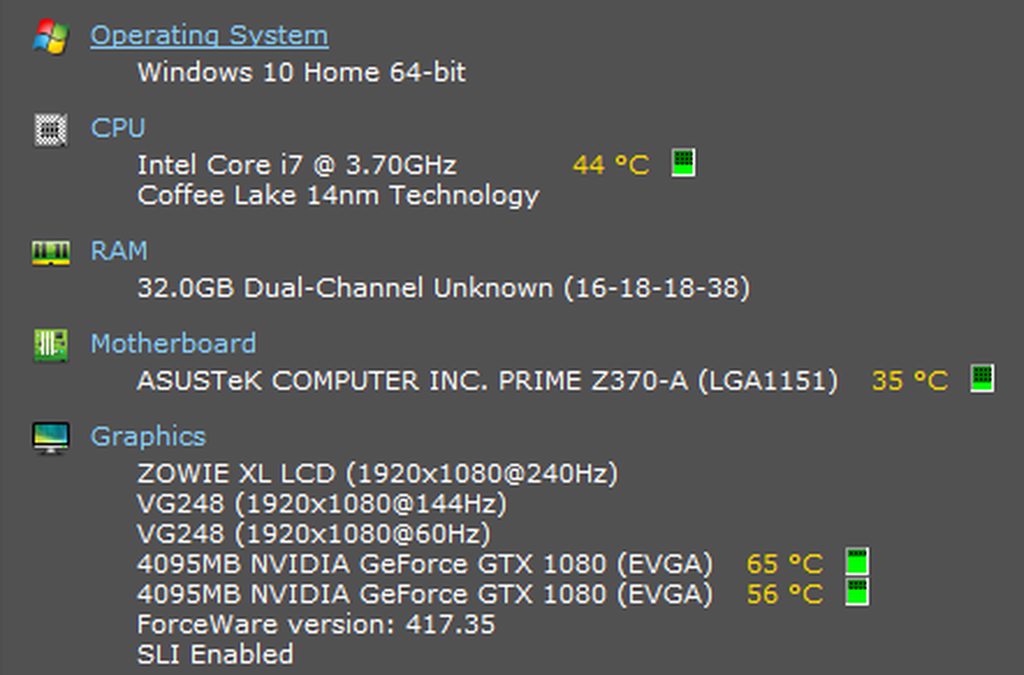
@unreal ether For the best OBS support, please join their Official Discord @ discord.gg/obsproject
solemn gust
Can someone explain to me why ground control is super loud even though I've set it to 1 in the sound mixer on windows...
It's extremly loud at like 20
 teal elm
hey guys so I have been having some stuttering issues with my stream on obs and I run my xbox and laptop wirelessly, would it help if I plugged an Ethernet cable into the WiFi range booster or do you think I should go back to running everything plugged into the router itself?
pine hemlock
Wireless isn't meant for streaming and its likely a bad signal.
teal elm
so do u think an Ethernet cable in the WiFi booster won't help?
 bronze palm
Hey. Just a quick question. I'm sure I haven't missed anything but the !watchtime command is returning 0 seconds for everyone who uses it on my channel
pine hemlock
I cant speak for your home internet setup

@bronze palm Watchtime doesnt function unless the loyalty system is enabled
teal elm
but generally speaking would an Ethernet cable help this or should I just wire everything back into the router do you think
pine hemlock
i would wire everything to the router.
teal elm
ok thank you cuda :)
 rose elk
Can someone explain to me why my Ground control settings menu crashes when i past my JWT Token in.
pine hemlock
Close Ground Control
Go to C:\Users\YOURPCACCOUNTNAME\AppData\Local\
and delete 'ground_control' and reinstall it.
pine hemlock
then you dont have ground control installed.
oblique steeple
Delete the whole "ground_control" folder
 twin compass
Hi there! Have a question. When adding images to the stream element store for redemption the pic always seems to get cut off IE ( top or bottom ) Is there a size requirement or pixel size I need to stay within?
 hushed void
how do i pull up live chat and followers in obs live
twin compass
@hushed void do you mean the side box with alert activity and chat?
hushed void
yes
twin compass
on obs live stream elements plug in/
pine hemlock
@twin compass are you asking the size of the image in the store itself or on the overlay in the redemption widget
hushed void
yes
oblique steeple
hushed void
ty m8
rose elk
@oblique steeple it didn't work
twin compass
go to the stream elements tab at the top of OBS and click on it you should see a tab for chat and alerts there @hushed void
you got it lol
oblique steeple
@rose elk and you deleted the whole folder before installing Ground Control again?
rose elk
yep
oblique steeple
@pine hemlock ⤴ 
twin compass
in the store itself @pine hemlock
pine hemlock
The images for the previews are like.. 235x186 if it hasnt changed but i dont regularly check that
@rose elk How are you trying to enter the jwt token?
rose elk
ctrl+c from streamelements ctrl+v into the JWT token bit in the ground control settings
twin compass
@pine hemlock
I'm guessing whatever in the blue line bow will display on stream correct?
*box
twin compass
ok got it thanks @pine hemlock
twin sentinel
Anyone can tell me how the fox was created and implemented in the stream of jaycgee?
How can I get something like this?
pine hemlock
@rose elk Dont know what to suggest. Is your windows up to date? Do you have Microsoft Visual C++ Redis. up to date?
rose elk
ill take a look man
pine hemlock
@twin sentinel
 still gust
how do I get alerts and stuff and themes etc into OBS.live?
nocturne pelicanBOT
@still gust To add your overlays to OBS, add a new browser source in your scene. Paste your overlay URL in the browser source properties, set the dimensions to 1920x1080 (unless you changed them on the website), and :ballot_box_with_check: “Shutdown source when not visible” https://youtu.be/KDvLynUqXI4
still gust
where can I find the overlay URL
 strong kernel
https://streamelements.com/dashboard/overlays
Launch the overlay, copy the URL.
still gust
excellent! Thank you!
lament blade
@elder sorrel I tried your suggetsion but I can not add a camera to each scene indivisually. it stays in the same spot always. I've seen other streamers have the camera in different spots per scene. Anyone know how to do this?
 spark glen
hello is anyone able to help me please
strong kernel
Just ask your question.
spark glen
okay so im trying to set up my stream elements and ive done everything now and trying to test it when i press start stream it keeps saying invalid path or connection and im not sure what to do now
strong kernel
Put in your stream key in your OBS settings.
spark glen
and how do i find my stream key sorry?
strong kernel
It's in your Twitch account.
spark glen
okay ill give that a go now thank you
 dry lynx
Does streamelements have something like streamlabs labels? Moving away from labs
strong kernel
Widgets in your overlay. Everything you could possibly want to show is added to an overlay, so you stuff almost everything into a single browser source.
 humble rune
Any idea on why !watchtime is just saying 0 seconds in my chat?
strong kernel
It's reliant on the loyalty system. If you don't have it enabled, it won't start counting.
humble rune
Ahh, ty
 obtuse blade
My announcements in chat won't pop when someone follows, donates, cheers ect. Even though I have the module turned on. It was working before but out of nowhere it quit working. Any help would be appreciated.
strong kernel
@obtuse blade Works fine.
 jaunty blaze
Is there a way to add points just to the people watching the stream?
pine hemlock
!bonus all amount
jaunty blaze
It says it's giving it to more people than there are in the stream tho. Just a small bug?
strong kernel
It goes by chatter list, not viewer list.
jaunty blaze
Ooo
spark glen
how do i get my follower count correct?
ive put a follower goal to 100 and started a stream to test it unfollowed myself and followed back and its now sayin 1/100
strong kernel
Goal progress is controlled by your widget data, not by your totals from Twitch, and it doesn't account for unfollows. You can manually change the progress at https://streamelements.com/dashboard/session
StreamElements
The Ultimate All in One Platform for Streamers
 frigid flare
so i cant seem to get my media requests to work smoothly
im always having to jump into the site and manually play it and then put it on stream
am i doing something wrong
strong kernel
You should not be leaving the media request page.
frigid flare
oh so it has to be up for it to function smoothly
strong kernel
Right.
frigid flare
having obs live event list doesnt count for that page
strong kernel
No.
frigid flare
ah okay
strong kernel
Next update for OBS.Live will be able to control it.
frigid flare
sweet
pine hemlock

strong kernel
OBS.Live does not affect the core functionality of OBS Studio. It's a plugin.
nocturne pelicanBOT
@low fractal For the best OBS support, please join their Official Discord @ discord.gg/obsproject
 low fractal
thx btw
 spice whale
so i recently did a giveaway and was wondering how to fulfill the giveaway. do i just send it out ?
strong kernel
Fulfilling the giveaway is up to you, we just provide the mechanism to get entrants and pick a winner.
spice whale
thanks @strong kernel
 glass sluice
Hey guys. What would you say is a good interval for timers? I've changed them as they were beginning to spam the channel but now they almost never appear. Anyone got a good number that works in most cases?
I usually have about 8 active chatters in channel at any given time if this helps.
 zenith widget
Check the pinned message in this channel about timers
glass sluice
Gotcha. The maths helps, cheers chap.
zenith widget
👍
 molten brook
Is there a way to have a command say something different based on either who uses it or who is @-ed with it? Like some kind of index
For example, if I were to @ the user "X" I get one response but if I @ "Y" I get another.
zenith widget
1 command, but 2 different responses based on predefined usernames?
Not possible, so its best to have individual commands.
Or you can use a russian roulette style response with ${random.pick 'some text' 'here' 'and' 'here for randomness'}
molten brook
Yeah I figured I'd have to go down the multiple commands route. I just prefer not having the list of custom commands be too large (and I also love overcomplicated things).
zenith widget
If you do not want to show custom commands on the public command list, you can hide them
molten brook
It's not the public list, just in general. It's not a big problem though 
zenith widget

 rigid spade
как сделать что бы смайлики из чата прыгали по экрану на twith?
zenith widget
#🇷🇺︱русский @rigid spade
rigid spade
how to make chat smilies jump around the screen on in twitch ?
torpid estuary
that widget is called kappagen @rigid spade
zenith widget
rigid spade
thank you
 hollow beacon
hello with the twitch chat window that is available is there something like it within system or a setting to change to make it a transparent overlay to have at top of my game screen so i can read chat and not look away from game a same time?? thankyou
zenith widget
If you are referring to the chat widget for the overlay, click on it, then change the theme from Dark to "Custom". This will set the background to a transparent one.
hollow beacon
ok thankyou ill try that
i bring up the chat window with obs.live and clicked the settings icon at bottom of panel . but when i unselect dark mode it just turns into white not transparent
zenith widget
Just to clarify - which chat are you referring to? Overlay chat widget or obs.live chat window?
hollow beacon
the only one iv seen is the one that came with obs.live
zenith widget
So you are talking about OBS.Live. Wrong channel to ask, but nonetheless, that chat window can't become transparent and afaik, you can't have it on top of your game.
hollow beacon
ok so do u know something that i can use to have my twitch chat as a overlay to my game. iv seen other streamers do it so they can read chat
zenith widget
What you've seen is, a widget that displays the chat on top of the stream it self - added to the overlay, which also has alerts and other goodies.
What other streamers have is a 2nd monitor, where they have the twitch chat popped out from their twitch dashboard or use OBS.Live to look at their chat.
hollow beacon
naa not part of the twitch stream they say they are reading from an overlay over top of game. thankyou i will continue googline to find what i need
zenith widget
That afaik is not possible with any of our tools or at least I've not heard of a streamer having such setup.
hollow beacon
slushpuppy for one that i know of but thankyou. please consider this idea for future implementation would be helpful
zenith widget
Having a chat over gameplay (like steam overlay or discord in-game overlay) involves serious programming and the short explanation is, injection into the game, which some games don't like and may consider it as a hack.
Most likely either there is a program already that does that or slushpuppy is using a specific setup of his game and chat to look at it like the way you describe.
Your best action is to ask him @hollow beacon
hollow beacon
no worries thankyou was just seeing if this could do it for simplisity
 amber granite
Hey guys, im just moving over to SE from SLabs... I'm really struggling with timers! how do I get them to have say a 10 minute gap BETWEEN them so their not just spamming chat...
zenith widget
@amber granite Check the pinned message here on how timers work with us.
amber granite
k thanks
lament blade
Hey, if I have a question, do I ask it here?
zenith widget
If its our tools and features related for twitch here, for youtube in #helpdesk-youtube , for OBS.Live ask in #helpdesk-selive
lament blade
Its about making a chat command on twitch
 gentle imp
if it's possible we'll assist
lament blade
thank you, its complicated for me to explain, i'll post my reddit post, sorry if it doesnt make much sense
gentle imp
make sure to put it with < url >
zenith widget
This is what I wanted to show you on reddit @lament blade
But reddit didn't like me pasting images 
lament blade
ah ok
 stark obsidian
Question about stream elements chat stats, i mod a channel and was trying to find the stats but can't find the channel. He changed his name a year back. I can see the old stats from that but nothing after the namechange. What should he do to get the stats from new name? Or is it just temporarily?
zenith widget
Is the chatstats with the newer name 404 page not found? @stark obsidian
If yes, give new name.
lament blade
I understand the alternate trigger words, however, it says "they can be anywhere in the message and do not need exclamation mark", is there anyway to restrict those trigger words to just the first word in a message?
zenith widget
Maybe, with some regex trickery
but I think its going to be complex one to build, just to check for the first word in the sentence.
stark obsidian
Yes, i think it was. Not at my computer now. Twitch name is miko
lament blade
hmmm ok, I haven't taught myself regex yet :/ this should be interesting
zenith widget
I'd like to summon @untold crest to help with that, as regex scares me 
gentle imp
you can also make the command trigger with !hey and the other triggers suggested on KeiZar's images
 untold crest
Lex is summoned
lament blade
fair enough, im in the middle of teaching myself basic javascript for Nightbot, but regex is next level
untold crest
Catching up
gentle imp
but I'm guessing you want to trigger it without the exclamation mark
lament blade
yep
zenith widget
@stark obsidian Fixed.
untold crest
And should be a trigger word anywhere or just at beginning of message?
gentle imp
he wants just beginning
lament blade
I would like it to be the first word in the message
untold crest
For example:
command: !hello
trigger word: hello
will make work:
!hello
hello
hello there
Oh, hello
lament blade
yep
untold crest
OK. In that case RegExp for that should be: ^keyword.*
stark obsidian
now it works! @zenith widget Thank you so much!
zenith widget
lament blade
I'm gonna be really really annoying here, and say that I dont know anything about regex sorry, its been mentioned to me, I just havent got round to learning it, how would I incorporate that keyword thing into the command itself? sorry
lament blade
and that would restrict it to being triggered by just the first word in the message?
zenith widget
If I'm reading the regex right, yes.
lament blade
ok, thank you, i'll try it out and get back to you, sorry for being a pain in the ass
 untold crest
😉
 lapis vault
Hello boys
It's a while that i'm experiencing an issue, it's not super bad so for now i've just ignored
but i'm curious if it happened to somebody else
also i'm not really sure on how to google it, so i'm just gonna ask here
When I open OBS, my overlays do not load
if I change scene and then I come back, it does.
it's happening with an overlay in particular
zenith widget
Run obs as admin and clear the cache of all browser sources.
nocturne pelicanBOT
@lapis vault Right click on the BrowserSource > Properties > Scroll down a bit > Refresh Cache of current page
lapis vault
i think i've performed this a number of times, not with obs as admin tho
i will try anyway
thx
strange yacht
Why does my alert sound go off twice? Using Streamlabels for them, also will the donations go off in streamlabels?
gentle imp
!multi
lament blade
omg, thank you so much @untold crest and @zenith widget for the help, it works perfectly, your legends ❤
nocturne pelicanBOT
Make sure to :ballot_box_with_check: “Shutdown source when not visible” for all browser sources (all OBS scenes). If using studio mode, uncheck “Swap Preview/Output scenes After Transitioning.” Also keep in mind that sound can play from any overlay loaded in the browser (editor or launched). https://i.imgur.com/FegZJQS.png https://i.imgur.com/yY0wcFl.png

 gentle imp
check that
strange yacht
@gentle imp is that for me?
strange yacht
haha okay thank you
also because i switched from streamlabs recently
i put my dono link
when someone donates through the SE link
the alert will still go off through stream labels right
gentle imp
nah, why do you need streamlabels?
strange yacht
for alerts?
because im using a custom overlay
im using streamlabels for goals and alerts
gentle imp
you can setup alerts on Streamelements https://streamelements.com/dashboard/overlays
strange yacht
Is there a way top copy everything from the obs into that?
gentle imp
if you have the images/animation/sounds yeah
strange yacht
like i have everything set up in there yeah
i just did it manually
not through the dashboard lol
gentle imp
that's one of the best things in SE, just 1 browser source with the streaming stuff, instead of multiple layers on obs
all in the cloud, always safe
but I don't know streamlabels at all
strange yacht
any chance at all i can join you in a private call you can walk me through that with screenshare? I genuinely am clueless in these types of things, I had a friend do this all for me lol
gentle imp
sadly I'm at work can't be on voice and it's also lunch time, but we do have a lot of videos and tutorials here https://support.streamelements.com/hc/en-us
strange yacht
Im trying to export the scenes but all i see is a jso file is that it?
gentle imp
that won't work, you'll need to add stuff one by one back to StreamElements
streamlabs doesn't make life easy for anyone trying to go another place
 bold axle
i use streamelements for my twitch on xbox and i need a overlay
elder sorrel
You have a PC and/or Capture Card @bold axle ?
elder sorrel
Without a capture card you can connect your Xbox to your PC with the Xbox Smartglass app
Then use OBS.Studio to Display capture and add the browser source for the Overlay
 versed gull
how can you automatically timeout user who lost the duel?
gentle imp
I don't know if it works but take a look at #command-share and try using the roulette code for the timeout, but I think you can't edit duel responses, not sure
oh u can, so u can try adding /timeout {loser}
would be fun if it works @versed gull
gentle imp
hmm
should've worked
unless the loser was the streamer that the bot can't timeout, or a mod
but you removed the points message
'{winner} won the Duel vs {loser} PogChamp {winner} won {points} points FeelsGoodMan' '/timeout {loser} '
see if like that it works
just a longshot, I have no idea if it does work
if u tell me your twitch username we can test that command
versed gull
it doesn't work and the loser was a regular user(tested it with my friend), so idk
gentle imp
damn, was a long shot but oh well
gentle imp
with streamelements bot?
gentle imp
I'm asking, if I get a solution I'll let you know
versed gull
ok thank you
 deep epoch
User management question: How to make followers, regulars in Streamelements. I do it manually bu is there an easier way?
gentle imp
nope, has to be like that afaik
deep epoch
Is there any plan for easier user management?
gentle imp
you can upvote it here, the more we are the faster it gets done https://streamelements.helprace.com/i181-automatic-regular-status-for-viewers
lament blade
How can I stream my gameplay on mobile? There is no option to do so (at least I haven't found it)..can someone help, I'm trying to get my pubg mobile on xD
torpid estuary
@lament blade the SE mobile app is for IRL streams only at this moment. screen recording is planned but not available at this point in time.
torpid estuary
there is not
lament blade
Do you have any idea when it will be out? Sorry for all the questions, I'm just curious xD
torpid estuary
no ETA at this point
lament blade
OK l, thank you for your help
torpid estuary
 proven shell
Can I get Voice support
elder sorrel
A lot of us can't join voice support. Like myself cause I'm at work. Best to post your question here 🙂
Then I or another Support member can help.
proven shell
Okay
I have a game capture and a screen capture my game capture doesnt show anything and my screen capture is lagging when I am inside a game while the game is not lagging. I've already tried many things such as changing the default graphics card for OpenGL or changing the bitrate but all this stuuf didnt help. It would be great if you guys could help me... Thanks
nocturne pelicanBOT
@proven shell For the best OBS support, please join their Official Discord @ discord.gg/obsproject
gentle imp
you must run OBS as admin for the game capture to work
for the rest it's better to ask on OBS Discord 😃
proven shell
okay thank you
 acoustic raven
 lapis vault
@zenith widget i've tried to refresh with admin-launched obs
still not working
its super weird because if i selected another scene and go back to it, it's instantly there
nocturne pelicanBOT
@lapis vault Can you please provide a log from your last stream. You can find this log in " %appdata%/obs-studio/logs " OR Help > Log Files > Show Log Files. You can simply drag and drop the log file into Discord.
lapis vault
i'm lookin at it too
[MOR] IN 1Cam Overlay
this is the scene with the issue (but it's not the only one)
lapis vault
removed too
lapis vault
yeye, it's in both scenes
zenith widget
I don't see our plugin in the log as well 
zenith widget
Lets at least move to #helpdesk-selive

 upper steeple
is the SE bot super lagged for anyone else or just me?
narrow coyote
I think there might be a Twitch issue right now
zenith widget
Twitch is having a hiccup
elder sorrel
😬
 atomic silo
hey, how do i reset my sub session again? to update it from a wrong number?
 midnight egret
Hello, I am trying to change the name of my bot. I found online that this requires 3 steps (adding donation, create overlay and download Ground Control), I have done these steps but the option to change the name of the bot does not show up Ground Control
elder sorrel
Activity Feed -> Widget Data ->Goals @atomic silo
Are you using OBS.Studio, @midnight egret ?
nocturne pelicanBOT
Custom bot name requirements
- StreamElements bot modded and in chat
- Active overlay with alerts
- StreamElements tipping page in the panels below the stream (!panels)
- Create a twitch account for the name you want to use
- Ground Control app must be running
Steps to enable custom name
- Sign in to https://twitch.tv with the bot account
- Install and run Ground Control (!gc for download)
- Visit https://twitchapps.com/tmi/ and generate an oAUTH token
- Copy/paste everything in the box to Ground Control oAuth settings and enter the name for the bot account
- Restart Ground Control (custom name may take a few minutes to take effect)
Mac does not currently support renaming the bot.
narrow coyote
You dont have any panels on your Twitch page
 dapper acorn
my chat keeps saying the session is timed out. can anyone help with this ?
dapper acorn
Cheers buddy
 clever mango

🔎 We are looking into the issues preventing users from accessing chat, hang tight!
 Twitter
dapper acorn
Twitter
dapper acorn
legend
 quasi briar
My streamelements OBS isn't outputting audio to the stream, however, the mixer looks like OBS is recognizing the audio. Anyone know how to fix so the stream can hear my game
midnight egret
Thanks Kite :3
glass sluice
Is SE or Twitch having issues right now?
My chat has gone offline and people can't see each other talking and I can't see them either.
jade remnant
twitch
oblique steeple
Check #270206314561404928 
jade remnant
or 4 messages above
 quick egret
before i installed obs live obs game capture would pickup the xbox app, but not after i installed
 winged sundial
Good afternoon guys. Is there a Font sheet where I can see all the fonts without having to scroll through each one of them?
oblique steeple
There ya go 
 https://fonts.google.com/
winged sundial
Thank you so much
 heavy scarab
Trying to figure out if there is a way for a specific user to have a custom sound effect, I thought the Stream Store was my solution, but it didn't seem to work right. Does anyone have any suggestions that might solve this and let me implement it?
 kind epoch
Hi OBS.Live Chat portion keeps timing out, is it a known issue?
jade remnant
issue with twitch
kind epoch
Oh i see
 marble token
using a overlay and there is 2 webcam overlay options but one is almost faded out and this is the one i am wanting to use, anyone know how to enable it?
elder sorrel
Click the Eyeball on the layer

Layer is on the bottom left corner of the overlay editor.
marble token
you da man @elder sorrel
heavy scarab
Is there a way to make a loyalty store item user specific ?
elder sorrel
No problem, reeceC!
Afraid not, Janx.
Only can be set up for Everyone or Subs only.
heavy scarab
bleh .. trying to figure out a way to make user specific sound effect with no luck it seems, hopefully something down the road, seem a few other's request for it
elder sorrel
I believe it's in the #💭︱feedback-and-ideas board.  Let me see.
heavy scarab
it's on teh community boards for sure
heavy scarab
thanks, upvoted a few, will hit that one too 😄
 stark helm
Hi! I have a question
nocturne pelicanBOT
@stark helm Welcome to the support channel! Please let us know how we can assist you today and a member of the support staff will be with you as soon as possible.
stark helm
when i use the !addpoints command.. is it possible to use the @?
i mean. it gets the " !addpoints relokien 1
elder sorrel
No. Just !addpoints (insert username here)
stark helm
but it doesnt get "!addpoints @stark helmkien 1"
i said that bc its easier to find a name
when you type @ on twitch
:c
jade remnant
twitch chat is back up now
 earnest idol
Heya, its seems like my streamelements its not working propperly. In obs its says reconnect to chat all the time and my bot msgs are not coming up
jade remnant
it was an issue with twitch
this should be back up now
maybe either reconnect chat or restart obs
earnest idol
Hm oke Will try thanks
 coarse heath
Is there a way to add custom transitions (for showing between scene changes) to SE??? Plz tag me in your reply, awesome SE support
oblique steeple
Sure. They're called "Stinger Transitions".
oblique steeple
Fast as fuqq boiii 🔥
jade remnant
oof
coarse heath
Awesome... where do I find the place to upload mine @oblique steeple
oblique steeple
It's done in OBS itself. You have to have the file on your PC
narrow coyote
you dont upload them, they are added directly to OBS
coarse heath
Lololol fast af fuck boi LUL
jade remnant
its in obs, go to transitions and click the + then stinger
narrow coyote
jade remnant
hehe
coarse heath
And @narrow coyote I appreciate the pic
narrow coyote
Ye, once you have the transition added, you can pick it from the dropdown, then the gear will get you back into the settings
coarse heath
Suhweet
 oblique steeple
Just get a template and edit it like I did boi @elder sorrel https://streamable.com/g90b4
 oblique steeple
Nice loading animation 
elder sorrel
I'll try someday, Krieger 
 craggy bear
Alright! So, I almost have my Custom CSS working for a subscriber alert. But if I change the text-delay for the animation of the alert, it doesn't work
(the slide-in/slide out does though)
Is there a way to make the slide delay work? Or do I have to custom code it?
(slide delay for text)
narrow coyote
@stark helm I dont see the bot in your channel
 narrow coyote

jade remnant
twitch chat looks like its still having issues
elder sorrel
It's still slow status yee
stark helm
looks like :l
narrow coyote
bot is also not a mod in that channel you provided
elder sorrel
Yep.
narrow coyote
that has nothing to do with the speed, that is twitch right now
but if you expect the bot to do certain things, it wont
elder sorrel
Yes.
stark helm
sorru for that
elder sorrel
You gave us the name already
narrow coyote
elder sorrel
She needs to have the bot join the channel in the Dashboard.
stark helm
the bot must be a moderator?
narrow coyote
you can just do /mod streamelements
like I said before, there are certain things it wont be able to do when not a mod
narrow coyote
being mod wont have an impact on the Twitch issues currently
Twitch chatter servers have been on fire today, for hours now
narrow coyote
Hope Twitch fixes their server issues
stark helm
hope they do :l
elder sorrel
Go to the StreamElements Dashboard -> Left side bar click "Contest".
 vivid wedge
Yes
elder sorrel
Don't think you'd can do so directly from chat.
 mint rampart
i cant get my bot to pay out, or deduct points after a !bet
narrow coyote
Twitch chatter servers are slow, and we rely on them for payouts
Twitch needs to resolve these server problems for this to function properly
mint rampart
are you talking to me ? 😛
narrow coyote
yes
mint rampart
alright. any other !commands that wont work ? was gonna do a give away sat/sun where ppl buy tickets with the pointsystem ive set up. and let the bot do the draw. is it gonna function ?
elder sorrel
Best way to keep up would be Twitch Support on Twitter or https://twitchstatus.com/ @mint rampart
 left palm
How can I submit an ideal?
nocturne pelicanBOT
@left palm Here is the StreamElements Ideas Board: https://strms.net/ideas
 tulip pecan
Hi there team. Has anyone here had success creating WEBM video files that preserve the alpha for use with SE's overlay? Im trying to export from Premiere Pro using webm, but i get a black BG instead of a transparent one oof.
jade remnant
yes @tulip pecan you need to save the file with colour depth RGBA
tulip pecan
Hey @jade remnant thanks for responding. im using a webm encoder in premiere pro, While I have the option to include the alpha channel, there is no place to set colour depth.
jade remnant
hmmm, im not sure about premiere pro, but you can save it as .avi then convert it somehow
tulip pecan
Yeah man I think my codec is borked. Gotta love chasing your tail on these things.
 zealous condor
So my OBS ain't fully using all of my bandwidth
I ain't fully sure what's wrong, but my Speedtests are doing fine, while my OBS is just dropping frames every 5 seconds
narrow coyote
You need to test your connection the the Twitch servers themselves https://r1ch.net/projects/twitchtest
Also, OBS wont just use all your bandwidth. It will use whatever you have specified as the bitrate +/- some, and will also depend on if you have it set to enforce streaming service encoder settings
jade remnant
@tulip pecan try hitfilm express 4, its free and can output with alpha colours, just need to convert it (maybe online)
zealous condor
It's just been lately that OBS has been having hiccups, I haven't changed any encoding settings or anything, and my Bitrate =/= my Upload speed
narrow coyote
You never want to set it to use 100% of your upload
jade remnant
it shouldnt really match your upload speed, should be around 80%
zealous condor
Ye I made sure it was under 75%
narrow coyote
ok, well did you test your connection to the Twitch servers? Because that will be more telling than anything right now
narrow coyote
If the Twitch test shows low bandwidth and/or a poor connection, then its going to either be something with your network hardware causing the issue, or more likely, something between your ISP and Twitch
zealous condor
Been willing to call my ISP for a while, but they never answered me; guess I'll try again tomorrow
Oddly enough, the Server closest to me was performing the worst for a while
 last tangle
Why is SR not working when people type !sr <link> its worked perfectly now doesnt work at all
vivid wedge
Can we see who and how much bet?
 silent zinc
hello, is it possible limit the song request number for each follower? exemple: only 2 song at time for person
 sudden pendant
Ok so i have a question
nocturne pelicanBOT
@sudden pendant Welcome to the support channel! Please let us know how we can assist you today and a member of the support staff will be with you as soon as possible.
sudden pendant
ok thanks so much
 mossy bramble
hello! just wondering if it's normal for follow alerts to be 30 seconds delayed when showing up in chat. The alerts itself pops up right away, but in my twitch dashboard it doesnt show up for about 30 seconds
elder sorrel
That will depend on your Twitch Latency setting while streaming.
strong kernel
@mossy bramble Twitch chat was having some issues today. That said, you don't even have the chat alerts module enabled.
mossy bramble
ok thats what i was thinking
elder sorrel
The dang Twitch Chat buggery 
mossy bramble
thanks for your help, much appreciated
 obsidian tree
is there any way to start a tip goal from 0$ without resetting tips?
strong kernel
Goals are controlled by widget data, not by totals or revenue history or anything like that. Progress is manually editable. https://streamelements.com/dashboard/session
StreamElements
The Ultimate All in One Platform for Streamers
obsidian tree
thanks!
 errant frigate
how do I add a overlay
nocturne pelicanBOT
@errant frigate To add your overlays to OBS, add a new browser source in your scene. Paste your overlay URL in the browser source properties, set the dimensions to 1920x1080 (unless you changed them on the website), and :ballot_box_with_check: “Shutdown source when not visible” https://youtu.be/KDvLynUqXI4
 nova flume
Hey for some reason none of my alerts are making it to the overlay wondering how i might fix it?
strong kernel
You've added an alertbox widget to your overlay?
And your overlay to your streaming software?
strong kernel
@nova flume Please refrain from asking questions in private messages, as not everyone is available all the time. You can benefit from the full staff by asking here, in public.
nova flume
Sorry
strong kernel
@nova flume Log out and back in to StreamElements.
 prisma grove
Is there a site or way to find out what specific date a twitch VOD was recorded? I'm watching somone elses VOD that says "2 days ago" but I'd like to know what date and time it was recorded - is that possible?
 whole stump
Any info on getting a humble bundle alert in streamelements?
strong kernel
According to history, we've contacted Humble Bundle in the past to set that up, but they never replied.
whole stump
Do you know of a good contact for that, or should the request just go through Humble Partner support?
strong kernel
¯_(ツ)_/¯
whole stump
k :D
 full cove
Can I get bot to post a custom message in chat when someone tips?
strong kernel
@full cove Yes, with the Chat alerts module: https://streamelements.com/dashboard/bot/modules
And don't forget you have support in #dreamteam
full cove
Ah, thanks 😃
If I want a number divided by 10, can I do something similar to {amount/10}?
in a command
prisma grove
@strong kernel Is there a site or way to find out what specific date a twitch VOD was recorded? I'm watching somone elses VOD that says "2 days ago" but I'd like to know what date and time it was recorded - is that possible? Thank you in advance!
strong kernel
@prisma grove No need to ping people as not everyone is always available all of the time. Just post your message and when someone has the answer, they'll reply. In this case, I genuinely don't know, but I've never seen anything that'll give you that information.
 gaunt gull
My host alerts are only working during raids currently, any idea why? tried fixing this.
i have it set to 0, and test event works fine.
strong kernel
0 viewer autohosts are ignored by the system regardless of settings.
gaunt gull
I mean triggering the OBS alert
strong kernel
gaunt gull
weird, hasnt worked in a while for me
strong kernel
Because they were probably autohosts.
gaunt gull
I've had people test it several times.
strong kernel
¯_(ツ)_/¯
gaunt gull
Alright, thank you Nethyr
coarse heath
I’m literally... meaning literally pulling out my hair because I can not hear alerts in my OBS. I hear emulator sounds and NOT THE DANG REAL ALERTS! I thought I’d solved the problem before but had not. Please for the love of all that is holy someone plz tell me how to hear my alerts
Wait! I think I may have it
narrow coyote
That is not how OBS works, you dont just "change gpu"
lament blade
My screen is black
i think it captures the nvdia and i would like it to capture the intel
i think the screen would not be black then
thx for the help @narrow coyote
narrow coyote
If you are on a laptop. you need to override the GPU in the Nvidia control panel
lament blade
in advance if you want to help me 😃

like this?
then restart obs?
thx for the help @narrow coyote
yay it works
thx @narrow coyote
do you stream?
can i donate to you?
i hope nvidia now will work
fingers crossed
fuck xfire has a cam but obs doesn't
!rank
and audio keeps repeating?
nvm i was watching my own stream
how do you add cam
thx
 vague elm
anyone know how we can add our own graphics and stuff into mobile streams?
 winter sparrow
I'm trying to get my StreamElements chatbot to use my name/account to post in chat. How do?
narrow coyote
@lament blade I would suggest looking at some guides https://www.obs.live/articles/
@vague elm If you are using our mobile app, it will add an overlay to your overlays on the site, you can modify this
@winter sparrow If you are using Ground Control, use your Twitch accounts OAuth, if using OBS.Live, we have a name change tutorial pinned in #helpdesk-selive
coarse heath
OMG! Windows 10 does not see SE alerts as coming from your browser so the output can not be whatever you have your browser sounds going to! WINDOWS 10 SEES ALERTS as going to OBS so choose SPEAKERS from whatever sound card you have for your OB (found in Lower Right of your PC> RIGHT CLICK the speaker icon>Open Sound Settings (not Sounds)> scroll down below Output device & Input > click Advanced Sound Options > list of opened apps i.e system, Chrome, Spotify, elgato, and OBS. THERE YOU’ll see Output which will be your sound card Soeakers!!!! Not elgato or any other output. Offs- this has been months of hell. Glad it’s over.
lament blade
Thank you @narrow coyote
winter sparrow
I mean, is there even a way to get the chatbot to use my name instead?
strong kernel
Yes, and you were given instructions on where to find how to do so.
narrow coyote
!rename
nocturne pelicanBOT
Custom bot name requirements
- StreamElements bot modded and in chat
- Active overlay with alerts
- StreamElements tipping page in the panels below the stream (!panels)
- Create a twitch account for the name you want to use
- Ground Control app must be running
Steps to enable custom name
- Sign in to https://twitch.tv with the bot account
- Install and run Ground Control (!gc for download)
- Visit https://twitchapps.com/tmi/ and generate an oAUTH token
- Copy/paste everything in the box to Ground Control oAuth settings and enter the name for the bot account
- Restart Ground Control (custom name may take a few minutes to take effect)
Mac does not currently support renaming the bot.
narrow coyote
⤴ thats for Ground Control, you just use your main Twitch OAuth, and if you use OBS.Live, you can refer to the guide I mentioned in my first comment
 trail condor
Has any testing been done on Pixel 3? Got a list of issues XD
Sry- for the mobile app
strong kernel
What issues?
trail condor
Lemme link ya
Audio is choppy, can't rotate to landscape, video cuts occasionally. http://www.twitch.tv/elliface/v/364155873?sr=a&t=276s

I'm so hyped to be testing this tho, you have no idea 😂💜
strong kernel
What do you have your bitrate set to?
And rotation isn't automatic, it's toggled in the Features button in the Camera section. https://support.streamelements.com/hc/en-us/articles/360021805851

StreamElements
Camera Section
The camera section is the first section you see when first opening the app. The section includes the following options:
Switch: Switch between front and back cameras
Mute Audio: Mu...
 pulsar pumice
trail condor
pulsar pumice
trail condor
@strong kernel 3mb rn, lower to 2?
strong kernel
Give it a shot.
trail condor
Thanks for the tip on rotation
 bright fable
I created this command !/me steals a cookie from $userid" however the twitch id is not being shown, rather the string "$userid" is being shown, any ideas?
strong kernel
${user} or ${sender}
narrow coyote
bright fable
oh, aight
strong kernel
We're not Streamlabs.
narrow coyote

trail condor
@strong kernel set it to 2, still choppy
 compact portal
Hello every time I add my webcam video capture device my OBS crashes please can someone assist me
nocturne pelicanBOT
@compact portal For the best OBS support, please join their Official Discord @ discord.gg/obsproject
trail condor
@strong kernel bitrate is all over the place, sometimes it's 1000 sometimes it jumps up to 3000, set to 2000 rn
appears as though chat doesn't update either @strong kernel
strong kernel
Streaming on data or wi-fi?
trail condor
just tried both, switched to data mid stream and it took a poop. moreover, I'm connected to 5ghz wifi
vague elm
@narrow coyote i did but the overlay is not showing on stream just blank
bright fable
Can we control the cooldown between commands within the chat, or only the streamer may do it inside the dashboard?
nocturne pelicanBOT
@bright fable You can make changes to custom commands in chat with!command add/remove/edit/options/show Valid flags for !cmd options are: -cd (number) -usercd (number) -cost (number) -level (number) -type (say, whisper or reply) -count (number). --- Example: !cmd options twitter -usercd 60 -type reply -level 250
trail condor
@strong kernel yeah bitrate keeps jumping around, but audio never clears up
 queen sorrel
Hello again, i have another question but i don't know if it can be resolved here or somewhere else
Where can i change the follower image and sound, i've been looking for it but no clue about it
 jagged kayak
<@&382267076632379392> I activated StreamElements Leaderboard on my stream but it says "No Data :("
narrow coyote

ebon forum
normal igloo

ebon forum
You just pinged pretty much everyone
narrow coyote
The ping 
narrow coyote
If it says no data, sounds like you dont have any data in the system 
ebon forum
@ role is not always a good idea 😄
jagged kayak
I tried @se.staff but it didnt show up
narrow coyote
jagged kayak
Kite people donated bits but it didn't show on the leaderboard
narrow coyote
Was this before you linked your account to StreamElements? We only track data from the time you sign up with StreamElements
jagged kayak
I installed the leaderboard after I signed up
narrow coyote
That in no way answers the question.
jagged kayak
Uhm... well no it was after I linked my account.
nocturne pelicanBOT
@jagged kayak Please connect your Twitch and/or YouTube channel with Discord by going to ⚙ Settings and then Connections here in Discord. https://streamable.com/eg92w


 weary mist
one other thing to keep in mind is that Twitch had some major issues today
especially with chat
strong kernel
@queen sorrel All alerts are controlled by an alertbox in your overlay. Head on over to https://streamelements.com/dashboard/overlays to start editing.
StreamElements
The Ultimate All in One Platform for Streamers
 opaque patrol
So folks, what is the difference between this new encoder preset? It used to be slow to very fast(and easy to understand), now I can only see high quality to low latency high quality and it really doesn't tell me much. 😦
weary mist
are you talking about the twitch setting?
opaque patrol
what would be equilevant to very fast these days