#helpdesk-twitch
1 messages · Page 368 of 1
 proud oak
 cobalt kindle
For HYPEBOSS... How does it treat gifted subs? Does the GIFTER do damage/become the boss, or is it the person that's gifted?
I'm hoping the former.
 stark swallow
@proud oak The chatbot can normally handle that.
 foggy nebula
is there a way to set it so that timed commands don't go off in unison?
stark swallow
Not really.
If the timings occur at the same time, it's likely to happen. Best you could do is stagger them at "odd" numbers that won't align often.
Like 5, 6, and 7 minutes apart. The goal being that you don't won't them to appear or land on the same parts of 5 or 10.
stark swallow
Yeah So like at best you'll end up with two or three at the same time but not ALL of them.
 floral crag
I haven't a invite code
 nocturne pelicanBOT
@floral crag The StreamElements Mobile IRL streaming app is currently in closed beta.
If you'd like to assist with testing when public beta testing becomes available, please fill out this form: https://goo.gl/forms/3DaiLckKDjeMAeVt2
 strong kernel
Filling out the form does not guarantee you a code.
floral crag
Ok thanks
foggy nebula
I'm trying to set up song requests but it isn't showing up in modules any ideas?
strong kernel
Media request has its own page; it's not in modules. https://streamelements.com/dashboard/mediarequest/general

StreamElements
The Ultimate All in One Platform for Streamers
foggy nebula
perfect thanks!
 sudden karma
Hello, what is the best version of OBS that is the most optimized and works with stream elements?
Going to transfer my stuff from SLOBS
strong kernel
We keep up to make sure it works with the most recent version.
We also package OBS with our plugin for it, OBS.Live.
sudden karma
Thanks! Is there an easy way to transfer my scenes from SLOBS?
strong kernel
Unfortunately not; SL made their own custom extension for their exports.
sudden karma
so how can I get the files for subs etc. on stream elements side so I can use my own custome text?
strong kernel
Those files aren't needed; we get that information directly from your connected Twitch account.
In the overlay editor, click the widgets tab at the top to see all the information and tools you can add to your overlay.
sudden karma
Thanks @strong kernel How about this? Any reason it is currently failing?
strong kernel
No clue, haven't had any other reports of that, and it works fine here.
sudden karma
Alright, I linked it and fully updated it and lost the stream elements at the top right now haha rip.
is it needed?
 late wave
Hi, I'm using OBS.LIVE and it's telling me the session has expired with twitch but it's not giving me an options anywwhere to connect. I click the buttons but nothing happens. Can someone please guide me? Thanks from a simple minded king
strong kernel
Interesting. You may need to reinstall OBS.Live.
@sudden karma
@late wave Can you screenshot what you're seeing?
late wave
like I said, click those buttons does nothing
strong kernel
Click the StreamElements menu at the top and click Logout.
late wave
thanks @strong kernel - for some reason I had to re link my overlays as well but I'm all set, appreciate your help.
strong kernel
@faint musk Start by logging out of and back into StreamElements.
 faint musk
tried that
same thing
logged in with browser
chrome
every other emulate works except tips
overlay editor i mean
 wise bloom
Hi I am using the Stream boss overlay and there seem to be a bug. The new stream boss name is updated by the thumbnail picture is still the previous stream boss
 summer summit
for the chatbot, is there any way to run eval() ?
 harsh wyvern
where in teh SE dashboard does one flip the switch to allow adding commands right from chat?
strong kernel
@harsh wyvern You should already be able to, with !command add commandname response
@summer summit All the possibilities can be found in the Variables section.
harsh wyvern
yeah its telling me now. let me refresh since he made me mod
summer summit
so no way to run eval() =/
sudden karma
@strong kernel why isn't my alerts that i set up in streamelements.com /overlay not popping up in OBS when I put in the browser URL?
strong kernel
Please refrain from using @, the chat isn't that active.
sudden karma
Alright. This is the settings as well, not sure if it matters
harsh wyvern
thanks for the help Nethyr, im an idiot and had an S on the !command
strong kernel
Set width to 1920, height to 1080, fps to 60, remove custom css, check shutdown source when not visible.
You also appear to have two alertboxes in the overlay. That breaks things.
Remove the one you don't need.
sudden karma
Done, still isn't appearing.. hmm
strong kernel
Save, and refresh the launched tab.
Or refresh the cache in OBS rather.
Using that button in your screenshot.
sudden karma
Still nothing, I see it on the website overlay whenever I test it, but doesn't appear in OBS
strong kernel
DM me with a screenshot of the full browser source properties including the URL.
@sudden karma I can confirm that it's working fine in OBS, after setting it up in my own:
Check your settings.
sudden karma
What settings? I made it fully black and only the notification, all that appears is the text but no Logo/Picture
sudden karma
hmm.. still nothing
strong kernel
Delete and recreate the browser source.
sudden karma
Did that, now text doesn't even show up lmao
text appears again, yet still no image
after deleting and recreating browser source and even remade the scene
 topaz moat
Guys is it possible to change MediaShares' Youtube player video quality some steps down? I am facing huge CPU usage from this player while it stays at HD 😦
 iron valley
Hello dear support, how do I block messages from a user without timeout or ban? It is possible?
strong kernel
Not possible. Anyone you block still has their messages appear in any chat you have moderator powers in so you can still moderate them.
If there's specific words or phrases they're saying that you want to stop, you can set up your Twitch account to prevent messages with that content from being sent at all.
iron valley
@strong kernel Thank you, set the phrase you always send to prevent it.
 velvet mica
my overlay randomly stopped working last night and i have no idea why
 chrome tangle
Does anyone know if I can export my profile, scenes, and sources from Streamlabs OBS into OBS Live
strong kernel
@velvet mica What exactly happened?
@chrome tangle Please do not spam multiple channels.
strong kernel
@chrome tangle You cannot export them as Streamlabs OBS uses its own custom extension for its export files.
chrome tangle
so i have to just redo the setup correct?
velvet mica
it wont show up i have used it for awhile now like 9 months with no issue then all of a sudden it stopped showing up mid stream
strong kernel
@chrome tangle Correct.
velvet mica
i have tried deleting it and putting a new link in but it didnt fix it
strong kernel
@velvet mica Please DM me a screenshot of your browser source properties.
velvet mica
alright
 tired zealot
Hey guys, so I created some different overlays and they are all linked up correctly to SLOBS, but alerts aren't working. I set the overlays as browser sources and such. Just no alerts pop up, and the sound doesnt trigger. Any insight?
strong kernel
SLOBS has a bad habit of blocking some of our widgets, so we can't recommend using it. We've created a plugin for OBS Studio to make life easier: https://obs.live
tired zealot
Fair enough, I just started out by using slobs since it was the easiest to set up initially but it does definitely seem to have limitations. Thank you!
 burnt marten
Hello, I was hoping to get a early access code for your Android app 😊
nocturne pelicanBOT
@burnt marten The StreamElements Mobile IRL streaming app is currently in closed beta.
If you'd like to assist with testing when public beta testing becomes available, please fill out this form: https://goo.gl/forms/3DaiLckKDjeMAeVt2
strong kernel
Filling out the form does not guarantee you a code.
burnt marten
@strong kernel Thanks for the help! 
 late crane
Hey so i set up a se.pay account how do i connect that to the my channel?
late crane
got it thanks
tired zealot
One last simple question: To test a follow and such with my SE Overlays on OBS Live, can I only do it through the streamelements overlay editor or is there a way to through OBS Live?
strong kernel
Only through the editor.
tired zealot
Okay, thank you!
 full fable
Hey- so im normally my tier 2 and 3 resubs show up with the tier 2 or 3 alert, but today they showed up with the tier 1 alert. Do you know why this would happen?!
strong kernel
It's a known bug and we're looking into it.
full fable
Oh ok. Is there an anticipated date that it will be fixed?
strong kernel
It's still being looked into.
full fable
👍🏼
 gray laurel
hey im streaming off obs and hit the X on the top of the chat thing, now i cant get it back how do i get it back
 pine hemlock
Streamelements at the top of obs -> Chat
 torpid orchid
I'm looking for an invite code for the app..
 vapid falcon
Sup im looking for an invite code for the app too?
nocturne pelicanBOT
@torpid orchid The StreamElements Mobile IRL streaming app is currently in closed beta.
If you'd like to assist with testing when public beta testing becomes available, please fill out this form: https://goo.gl/forms/3DaiLckKDjeMAeVt2
 torpid estuary
@vapid falcon ⤴
 rough kindle
Is there a way to turn off the return message in the store? (X, you have successfully redeemed Y for points.)
 lament blade
cod invite pls
 worthy epoch
Stea1e, unless something has changed in the last few days, it is not possible to turn that response message off.
I had asked the same thing a few days ago and got that answer
rough kindle
@worthy epoch thanks for the heads up
worthy epoch
np
There are a couple of threads about that on the ideas page however, and i would highly suggest upvoting them as i find those message unnecessary for most store items.
worthy epoch
3 chats down from here, there is the ideas chat, and it should have several links to it
yup
rough kindle
Cool, will do
gray laurel
thanks'
 zenith widget
@worthy epoch @rough kindle If you use the chat alert module for the bot, have you tried turning that off for redemptions?
 fair terrace
Is it possible for SE to check for blacklisted words before checking for commands?
we have a !vanish command that time outs someone for 1s
and we have a blacklist with blacklisted word which is suppose to time out for 10m
if someone types !vanish blacklisted word they'll get timed out for 1s instead of 10m
fair terrace
its set to 10 minutes
when i type the word without prepending the command i get timed out for 10 minutes
zenith widget
I maybe confused on this. So you have a !vanish command that times out people for 10 minutes because its an inner joke. But if people use !vanish u want sum heck they get timed our for 1 second, due to the blacklisted word, correct?
So now if you use !vanish u want sum heck again instead of the 1 second timeout, it should be the same as the command, right?
Other thing is, bot prioritizes filter over commands, just in case someone wants to spam/abuse/curse/etc the system.
fair terrace


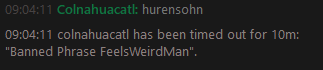

i want someone to get timed out for 10m when they write hurensohn regardless of any command
zenith widget
so whats the response to the vanish command?
Do you also have another set of phrase group setup?
fair terrace
https://i.imgur.com/d1kRgDf.png
yes
the test works https://i.imgur.com/dENTd7F.png

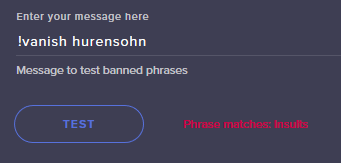 vapid falcon
@torpid estuary tnx
zenith widget
You can add a response to !vanish as /timeout ${sender} 600
fair terrace
vanish is not part of the filter
i want vanish to timeout for 1s
and that works
and i want any insult to timeout for 10m
that works too
zenith widget
oooh i get it now - you want if someone puts a banned word to get timed out for 10 minutes
fair terrace
yes
zenith widget
well same thing applies as the filter just as I said - change it from 1 second to 10 minutes.
Then I guess the priority is commands over filter 
Ok I re-read your original questions and I did not notice that you specified the timeout duration in it...I need either to sleep more or start drinking coffee again
fair terrace
Other thing is, bot prioritizes filter over commands, just in case someone wants to spam/abuse/curse/etc the system. thats how it should be.
But it's not
 viral moon
hi! i need help with media request!
I want to have it, but i don't now how set it up!
 gentle imp
quite easy
@viral moon go here https://streamelements.com/dashboard/mediarequest/settings setup all you want/need
if you have a playlist you wanna use so it plays songs while none requests music, you can add it there too in the backup list
 serene granite
also be sure to check out the tutorial @ https://www.youtube.com/watch?v=17eUkoZ6eIs

StreamElements Media request enables playing songs and videos in your stream. It's an upgrade of StreamElements Song request and Media share features. ----- ...
gentle imp
then https://streamelements.com/dashboard/mediarequest/general enable requests on top left above video
have this page open during stream so you can hear it and you are done
 pulsar gulch
Hello everyone ❤ got a quick question .. I'm about to start my first charity stream and I was wondering how are the donation alert working ? Are they working when someone donates using the extra life website ?
zenith widget
If you've added the extra life donation alert box and setup your ID with it from their site, everytime you get a dono via the website it should popup in the overlay.
pulsar gulch
How do I do that exactly ? I'm using all extra life overlays atm
I found the alert box from the " game play " overlay
how do I set up my id ? 🤔
pulsar gulch
I have only alert box 22 and after clicking on tip alert I don't have extra life id
am I missing something ?
zenith widget
Thats the standard alert box tip
Check my screenshot - "Extralife Donation alertbox"
zenith widget
to add another word - its a separate widget
Also the blogpost i linked also says how to add the widget/alertbox.
pulsar gulch
I'm reading it rn ~ thank you so much 
 winter ember
On https://streamelements.com/dashboard/tipping-settings I just see a blank white page, even after whitelisting all relevant java scripts, what could be the issue?
StreamElements
The Ultimate All in One Platform for Streamers
 upbeat tree
Probably not super appropriate for this channel, but if any streamers that have multi camera setups, or anyone know of good practices and ways to do this have any feedback, then here is my problem:
I have an event that I am organizing that uses multiple HD cannon cameras for extra angles.
We also have multiple microphones.
How do I keep the cameras and audios in Sync, while be able to change camera angles by changing OBS scenes.
If you have any ideas please let me know.
winter ember
zendesk send me here Kappa
 cedar fulcrum
@winter ember Please make sure you Chrome is allowing 3rd party cookies
pulsar gulch
@zenith widget Can I replay a donation becasue I was on the wrong overlay and someone donated
zenith widget
@pulsar gulch Afaik - no
winter ember
not using chroms but will check on this, thnx
zenith widget
@cedar fulcrum How, if its a yes?
cedar fulcrum
zenith widget
an ExtraLife donation?
cedar fulcrum
If it is not in the activity feed, sadly no 
 queen edge
Hi! I cant find a JWT token. Can you help?
nocturne pelicanBOT
@queen edge You can find your JWT token on your account channels page: https://streamelements.com/dashboard/account/channels
(Don't forget to click on "Show Secrets")
worthy epoch
KeiZar, (responding to the conversation earlier about chat redemptions) I actually have disabled the redemptions in the chat module, but there is still a generic message that pops up on each redemption. The only thing i have found disabling the redemptions in chat modules to do is eliminate one of the messages. (as there are 2 with it turn on)
zenith widget
@worthy epoch Did you try disabling the default command?
worthy epoch
the redeem cmd?
gentle imp
afaik there's already an idea so that we can customize that auto response, at least I know I upvoted one
worthy epoch
^this
zenith widget
The redemption from the store page is shown via the chat alert module - redeptions from commands always show. Thats what I'm trying to help with.
queen edge
Can I see a chat on the streamelements app?
zenith widget
in the mobile app? Yes it should be part of the UI of the app.
But the app is in closed beta atm.
queen edge
on pc app
zenith widget
You mean OBS.Live plugin? Sure you can have chat open on it - its what the plugin is for.
queen edge
I mean on Ground Control app from streamelements
queen edge
Because I am using streamlabs obs and I want to have chat on other monitor, but when I oppen chat on streamlabs obs or chrome it starts to a lag.. When I was using streamlabs chatbot it was not lagging but I have a problem with it so I am looking for another solution
zenith widget
Well if the problem is related when you use SL stuff, then ask their support.
Only thing I can suggest is to use OBS.Live plugin but you will need OBS Studio.
queen edge
okay
 outer basin
Hey, im new here and im not sure where I should write with my problem (also sorry if there is already a topic like this) I want to stream via my android and wondering if I can use app Streamelements mobile streams, after isnall they are asking me for invite code, where i can find it?
nocturne pelicanBOT
@outer basin The StreamElements Mobile IRL streaming app is currently in closed beta.
If you'd like to assist with testing when public beta testing becomes available, please fill out this form: https://goo.gl/forms/3DaiLckKDjeMAeVt2
 upper steeple
I am trying to change the color of some words in my alerts and when i hit save it says it saved it, but I go right to the same alert settings and it never saved.
What is going on?
I just want to update some things on my overlays, but certain things aren't saving and its not even coming up "saved" when I hit the save button.
It says "updated variation" but it doesn't.
upper steeple
i figured out why it wasn't saving.
If you use a hex code for color you have to put the code in, then click off to the side.
After that you click back where you just put the code so it changes it to rgb and then click save variation.
You can then click Save for the entire overlay and it says "Save" when it used not to.
In case anyone has the same problem there is the fix for hex code color changes not saving.
lament blade
Hi, I did not understand how the contest rewards system works. For example: there are 3 people betting, the first bets 10 on win, the second bets 20 on win and the third bets 40 on lost. How much the third earns if he wins or loses? I thought it worked like this: if the first winner wins his bet + the total bet of losers / number of losers then 40 his + (20 + 10) / 2. Quite right? If not, could you explain me better?
Sorry for my english
 old ice
so coming back to the hosts not showing again on my channel
i just got hosted and the host showed up regularly on my twitch chat as you can see in the screenshot
however it did not show up in my streamelements ddashboard or the alerts
and it was not an auto-host and not for 0 viewers
lament blade
kann da mir einer mal Helfen
zenith widget
@lament blade So you have 2 people betting a total of 30 for "win" but you have 1 person betting "loose" and his the winner of the betting contest? that 1 person gets his 40 back + 30.
But in your math equation 40+(20+10)/2 is wrong, as the 30 from the brackets will get divided by 2 due to math rules before being added to the 40. In the end it should be (winner pot + looser pot) / contest winner amount so it should be (40 + (20+10) ) / 1
If its the other way around and the 2 people won, instead of the 1 person with 40, its going to be like so: ((20+10) + 40) / 2)
so they each would win 40
Hope this helps.
@lament blade #🇩🇪︱deutsch
@old ice I'll ask internally about yours as I'm not sure why that host message even looks weird in the normal chat window.
lament blade
englisch kann ich nicht bitte auf Deutsch
zenith widget
Wir haben hier einen speziellen deutschsprachigen Support-Kanal: #🇩🇪︱deutsch @lament blade
lament blade
sorry bin neu hier
zenith widget
kein problem  👍
👍
old ice
@zenith widget i just had another 0 viewer host that actually did show up on alerts and everything
it's really weird
zenith widget
how did it look in the twitch chat?
old ice
same as the other
zenith widget
did it show viewer count?
 copper bobcat
Is there a way to make a new contest from chat?
 smoky saddle
Does Streamelements have any tiltify integrations?
smoky saddle
thankyou, found it
 inland vault
hi 😃 can someone help me?
I'm making an overlay with the Grea Area Super Theme, and can i transfer the settings of my alerts somehow?
 rough locust
Hey guys just a quick question: Looking to convert from Streamlabs, however my import from my Streamlabs Chatbot just keeps saying "An error occurred" any idea why this is happening?
 weary mist
@inland vault click the alert box, then in the layers section, click duplicate. then you can send it to other overlays to use, all with the same settings
@rough locust what are you trying to import
inland vault
@weary mist thank you 😃
rough locust
@weary mist Alerts mainly, could it be that they're already there and is there a way to test that?
weary mist
@rough locust you can check if your alerts are there by going to My Overlays. If they are not, then follow these steps:
- Make sure the chrome extension is installed.
- Open StreamLabs dashboard and StreamElements dashboard in a chrome tab.
- Run the extension, making sure to select what you want to import.
- ???
- Profit
rough locust
Thank you! I'll try that
 gusty quartz
@nocturne pelican just a heads up that the web of trust network/browser extension is flagging your SE.Pay links as untrusted:
 prisma grove
I have a question about Stream Elements Cheer Alert notifications. I have custom pics / sounds for all my other notifications like new follower / sub / host / raid / etc. I editted the cheer notification, but it is the only one that not working. All of my other notifications work perfectly fine, what am I doing wrong with cheer?
weary mist
@prisma grove Make sure you check/change all the variations. The default cheer alert has several variations
prisma grove
ahhhhhh
indeed it does
I never knew
hahaha I'm so new to this stuff! Only been streaming 4 weeks 😛
weary mist
xD we all had to learn one way or another xD
prisma grove
yayyy
 muted pilot
If my OBS canvas resolution is 3840x2160, does the base resolution of a custom overlay need to also bee that resolution for everything to be positioned properly when using a SE widget via the browser source plugin?
weary mist
that is a huge canvas xD
I would make sure to set my overlay to match, as you would be scalling it up, which can cause fluzzing
so when you create the overlay, do custom, and change the dimensions to match
muted pilot
Cool, that's what I figured. Trying to spruce up streams for work and figured I'd give SE a try!
Thanks for the help!
full fable
Is there a way to make the bits in the cup look bigger?
 tight harness
Yes, that's what the 'Token size' slider is for
topaz moat
Guys is it possible to change MediaShares' Youtube player video quality some steps down? I am facing huge CPU usage from this player while it stays at HD 😦
lament blade
@zenith widget oh ok thank you ^^
 tropic tendon
hello, guys. can somebody help me with overlaing twitch chat to my stream?
i tryed to google it, but find nothing
 signal vessel
Is there an api for league elo now? if yes what the variable?
 elder sorrel
@tropic tendon You mean adding the Twitch Chat to your Overlay? If so you can add that in the Overlay Editor
No idea about League 🤔
 low beacon
I can’t remember if this is a thing or not, but is it possible for a command to have the specific time like show est cst and pst all at once
weary mist
@topaz moat it should retain what you set on youtube itself, so if you set lowest quality on youtube, then reload the page, it should play the videos on lowest quality
 stoic grove
Can I have the Invite code For Stream elements mobile?
It should have rerleased till now
nocturne pelicanBOT
@stoic grove The StreamElements Mobile IRL streaming app is currently in closed beta.
If you'd like to assist with testing when public beta testing becomes available, please fill out this form: https://goo.gl/forms/3DaiLckKDjeMAeVt2
topaz moat
@weary mist oh thank you mate
 vagrant basalt
Hi guys, how do I change my bot name?
nocturne pelicanBOT
@vagrant basalt Custom bot name requirements
- StreamElements bot modded and in chat
- Active overlay with alerts
- StreamElements tipping page in the panels below the stream (!panels)
- Create a twitch account for the name you want to use
- Ground Control app must be running
Steps to enable custom name
- Sign in to https://twitch.tv with the bot account
- Install and run Ground Control (!gc for download)
- Visit https://twitchapps.com/tmi/ and generate an oAUTH token
- Copy/paste everything in the box to Ground Control oAuth settings and enter the name for the bot account
- Restart Ground Control (custom name may take a few minutes to take effect)
Mac does not currently support renaming the bot.
 serene wharf
Anybody else having issues with the Gift Sub variation not activating on the overlay? I set one up and click to test but nothing happens....normal subs pop up just fine
 native falcon
Hello, is there a way to set a max amount per roulette use? I'm trying to keep people from betting it all or winning to much 😃
tropic tendon
@elder sorrel ye, i mean add chat to my overlay and to my own screen too
@elder sorrel o! i find it 😃
zenith widget
@native falcon You can set a minimum but not a maximum unfortunately.
@serene wharf Make sure the condition ofr the variation is set to "Minimum amount" and "gift" type.
native falcon
ah ok @zenith widget fix that please lol! Thanks 😃
zenith widget
Its not something its done in a minute or two, or am I the person to "fix" it
I think there is already an idea posted in the ideas board for the maximum amount
nocturne pelicanBOT
Here is the StreamElements Ideas Board: https://strms.net/ideas
zenith widget
@native falcon Find it, upvote it for more visibility if its not marked as planned or post the idea your self 😉
serene wharf
Well there's two types of variations...a gift sub and a community gift sub....the gift sub variation does not specify an amount so I assumed it is what would be used for a single gift some directly to a person, whereas the community gift would have the "At least #" variation option, which it does
zenith widget
So both of them are not working?
serene wharf
correct
zenith widget
Do you have any other variations?
serene wharf
none other than the "When variation is Gift" which is the one not working
zenith widget
can you screenshot the settings you've placed on the variation?
 clever mango
@native falcon upvote this idea https://streamelements.helprace.com/i194-limit-points-used-for-gambling-games
 lilac spade
does anyone know how to reset the sub goal overlay widget?
zenith widget
@lilac spade https://streamelements.com/dashboard/session -> goals tab - reset any of the goal progress you want to any number you'd like.
@serene wharf I'm waiting on a 2nd screenshot of the other variable settings

serene wharf
I only have that one variation
I had one for mass subs and it didn't work either, so i deleted it
zenith widget
Well community gifting(20x gifted subs) won't trigger anyway if you don't have the variation for it, but it should trigger 1 by 1 as a normal gift
But as per this variation you showed, it looks OK and it should work 
serene wharf
yeah i assumed that, which is why I don't understand why even the single gift variation isn't working
serene wharf
ok
 broken coral
hello ppl :3
zenith widget

broken coral
anyone wanna help a scrub streamer? X3 i finally threw out my potato net for a decent net.
welp if somone would be free to help XD message me
zenith widget
so whats your issue?
broken coral
being new XD
all i got done was a twitch acc made and obs downloaded with auto config used
zenith widget
Then continue off here: https://www.youtube.com/playlist?list=PLCDDKlFdScbEwdx5AntcQIS1InkFJwHtv
broken coral
thats a lodda vids o3o
 trim elk
i got the tipping jar "donation" overlay on my stream and linked the link to twitch panel
but when someone donates to me , it dont show in my notification
zenith widget
Did you add an alert box to the overlay?
serene wharf
BTW I'm rocking my SE socks and T-Shirt right now that I got from TC 😄
trim elk
is checked
zenith widget
if you play a test tip alert, does it show up in the alert box?
trim elk
how do i 'test alert"
zenith widget
Bell icon on the lower left corner
trim elk
in the editor ?
zenith widget
Yes
The screenshot contained your overlay link and account id in it
so I had to remove it
zenith widget
So did an emulated alert work?
trim elk
sure
zenith widget
@trim elk Sorted in DMs
serene wharf
@zenith widget on the ball today 😄
strong kernel

trim elk
5 star review
serene wharf
A+++
zenith widget
This is nothing really - look at me sometimes shuffle 5 people in this channel alone, when I'm suppose to be on a lunch break at my own work 
trim elk
employee of the month
serene wharf
and other ebay A+ memes
zenith widget
@serene wharf I've got an idea for you so I'll DM you
serene wharf

trim elk
thank you for the help
tropic tendon
guys, do you know how to show overlay from streamelements on my monitor
nocturne pelicanBOT
@tropic tendon To add your overlays to OBS, add a new browser source in your scene. Paste your overlay URL in the browser source properties, set the dimensions to 1920x1080 (unless you changed them on the website), and :ballot_box_with_check: “Shutdown source when not visible” https://youtu.be/KDvLynUqXI4
tropic tendon
i make an overlay with steam chat, but i have only 1 monitor
and want to see it when i playing game
zenith widget
Ah you want to actually see the chat? Well best way for 1 monitor setup is, to use your phone as chat
 untold crest
@tropic tendon just use one screen and check chat on phone app
zenith widget
Open the twitch app and watch your chat from there
serene wharf
Thanks for the help @zenith widget and Devs
zenith widget
@serene wharf 
tropic tendon
@zenith widget on the phone? or exists programm for PC and it can make overlay on my monitor?
zenith widget
There is nothing like that really, afaik
tropic tendon
@untold crest i think it available without using my phone, heh
untold crest
It would cause "inception" as you capture your screen
zenith widget
Well if you find an augmented reality device that shows you the overlay on your monitor while you play games, do let us know
tropic tendon
@untold crest @zenith widget what about another programs?
zenith widget
Ok, to explain in a detailed manner - to have the overlay even show on your monitor, you will have to find a program that emulates a BROWSER, as the overlay is essentially a browser page/tab.
untold crest
But resolution for viewers would be not so good
zenith widget
You can do that per say with pressing F11 on your browser, but that doesn't remove the white screen when you open your overlay in a normal browser tab
tropic tendon
@zenith widget thx for explain
zenith widget
here is a fullscreen of my overlay - so you may need to chroma key that white space or find a program that emulates what OBS is emulating really as a browser source.
without having any of those adress bars visible and what not
tropic tendon
i supposed that is is possible throw obs projection (Full screen)
but i tryed
and it is only black screen with chat
untold crest
I think about something else
Maybe it is somehow possible to capture game screen but have "twitch chat popout" always on top
 foggy ether
Is there away to see a complete list of the quotes added?
tight harness
It's 'started' but not complete yet: https://streamelements.helprace.com/i242-upgrades-to-the-quotes-system
foggy ether
Ty for the reply I'll have a look at it
weary mist
@untold crest @tropic tendon It is a VERY difficult thing to manage, lol. You would need a program that will show you the game plus the overlay (like obs) but pass controls through to the game (because projecting OBS to full screen, then trying to play the game doesn't work. Tried it myself a while ago)
untold crest
I think one of this would work @tropic tendon https://www.thewindowsclub.com/make-a-window-stay-always-on-top-windows - popout twitch chat and then set it as always on top

You can make any window stay Always On Top of other windows by using the tools discussed in this post. Keep any window in the foreground on top of the others.
weary mist
ooooo
this could be fun xD
Imagine, setting up your overlay, setting everythign up, and forcing the OBS projection as always on top
untold crest
This also might work with full screen OBS
untold crest
Or alert appearing when you are aiming. Sounds like fun 😉
weary mist
exactly xD
had a guy do that with media share. I requested a video of the game he was playing, messed him up good xD Worth the money
untold crest
"Bomb has been planted" -Whoa. I am playing hostage scenario map!
weary mist
lmao, or mario-cart. wrong map xD
 serene moss
Hey I am having an issue with chat alerts not work I've tried to part the bot and re added but nothing seems to work
weary mist
@serene moss Do the events show on your activity feed, but not showing in chat?
serene moss
yup
muted pilot
Stupid question - Is there a way to trigger alert box test events outside of the Overlay Editor?
strong kernel
@muted pilot No.
muted pilot
Thanks for the quick reply
copper bobcat
Recently I've had an issue where only a few sound effects have an echo when redeemed, any reason why?
Not in Studio Mode, which has caused it before...
nocturne pelicanBOT
@copper bobcat Make sure to :ballot_box_with_check: “Shutdown source when not visible” for all browser sources (all OBS scenes). If using studio mode, uncheck “Swap Preview/Output scenes After Transitioning.” Also keep in mind that sound can play from any overlay loaded in the browser (editor or launched). https://i.imgur.com/FegZJQS.png https://i.imgur.com/yY0wcFl.png


 winged sundial
can someone please check what is going on with my sr. People try to req music and it puts this " The end of the F**** world in req " All the time
strong kernel
@winged sundial Your Twitch is set to remove direct links, resulting in ***. This then ends up being used in a search and comes up with that video. You can disable "Block Hyperlinks" at https://www.twitch.tv/settings/channel
 winged sundial
Ok thank you so much for your help 😃
copper bobcat
my sound effects keep cutting out real bad >_<
strong kernel
@copper bobcat Do not post your Twitch link.
copper bobcat
whoops, sorry - any reason it'd be super choppy?
it's making my new sound effects unusable
strong kernel
Depending on the size of the file, it may be having trouble with preloading the sound effect. Playing it more than once should have it properly cached. Try playing one that previously stuttered and see if it's fine the second time around.
copper bobcat
these are old effects we've use before and it's happening every time
strong kernel
Go ahead and redeem something again. I have your overlay loaded and would like to compare it with your experience, see if it's a connection problem.
copper bobcat
Redeeming now
strong kernel
Played smoothly on my end. Looks like it may be a local problem for you.
copper bobcat
Should I restart OBS?
strong kernel
Start by trying to refresh the browser source's cache.
copper bobcat
I did that earlier and it did nothing, hmmm
copper bobcat
I made it so a lot of the browser sources were off when not on screen or something?
Cause sounds were echoing
strong kernel
That's fine.
copper bobcat
Yeah they are still being glitchy >_< don't know what to do
IT'S ALL THESE HALLOWEEN DECORATIONS! 😮
strong kernel
Oh. Oh good god. I just opened your main overlay. How many Trick or Treat widgets did you put in?
You should see an improvement once you remove all of those; they're not needed once you pull whatever images or animations you want.
trim elk
one quick question
i have two different over lays for two type of games, how can I change overlay ?
strong kernel
You put them both in different scenes in OBS and you switch there.
gray laurel
hey guys its letting me stream to twitch but keeps coming up with errors saying stream machine shut down but keeps streaming and says im offline/ online? help?
 tired zinc
Is there anyway to get a mod to edit a giveaway? When he does !command show giveaway it works just fine but when viewers do !giveaway it doesnt show the text
trim elk
what is the width and length for the source ? 1920 1080?
pine hemlock
@trim elk Thats the default size for our sources.
nocturne pelicanBOT
@trim elk To add your overlays to OBS, add a new browser source in your scene. Paste your overlay URL in the browser source properties, set the dimensions to 1920x1080 (unless you changed them on the website), and :ballot_box_with_check: “Shutdown source when not visible” https://youtu.be/KDvLynUqXI4
pine hemlock
@gray laurel Sounds like a connection error from twitch or your connection is dropping, if its not you - change twitch servers in obs.
 ember kraken
Hey there - who should I talk to directly about the DreamTeam?
pine hemlock
I would send a dm to Hectic (in the staff on the right) He's probably asleep currently though
 crimson yew
In timers, what are "Chat lines"? trying to figure these timers out, but it's too confusing to me.
 viral pine
Hi guys! i sent an email and was directed to the discord. I am struggling with text to speech tips and bits (the only things i want text to speech for) everything is checked that needs to be. I have it set (for now) to go off for at least 1 bit and 1 dollar (i have a small stream so for now its not a worry) and i have zero variations on both settings for righ tnow. and was usually happens is the text to speech doesn't go off and something the bit or tip doesn't even sound off on the stream. any tips for a noob.
strong kernel
@viral pine You're using two alertboxes in your overlay, which will cause the system to break.
viral pine
oh so i either can use tts on tips or bits?
pine hemlock
@crimson yew The amount of messages needed to be posted in chat before the timer is sent
lament blade
hey quick question is there a limit on how long an alert can be?
For some reason im trying to set up an alert thats over a minute and it wont take
viral pine
No i just have one alert box but ill try to turn off tts on one or the other see if that worls
Works
 elder escarp
Hello
ember kraken
Does the StreamElements bot have the ability to "hook" a steam profile? For instance, Nightbot has the ability to read the game and server IP of a profile, which is super useful for the game I play
elder escarp
I recently switched to Streamelements because it looks to be a better choice in my opinion.
Just need a little assistance with it. I imported most of my commands from night bot and most of em work fine. Few just need a little tweak
strong kernel
@ember kraken Not out of the box. You'd have to do something with some custom API magic.
@elder escarp Just ask your full question and someone will be happy to assist.
ember kraken
Yeeeeahhh.... how would one go about doing that with zero custom API knowledge?
strong kernel
Ummmmmmm....
elder escarp
@strong kernel thank u
strong kernel
@ember kraken 
ember kraken
that's how i'm feeling
pine hemlock
@lament blade 60 seconds.
elder escarp
I know streamelements has a custom command built in to let people know how long you have been streaming.
My 1st questions is how do I create my own? Get it to say something like:
The Temple has been open for 1hour 00mins 00seconds
pine hemlock
The Temple has been open for ${uptime}
https://streamelements.com/dashboard/bot/commands/custom
New Command button
ember kraken
So for setting up the tipping page, the "Message to your tippers" - is that before or after they tip?
 strong kernel
Before.
pine hemlock
It shows on the page below the tip button.
ember kraken
👍
elder escarp
Question 2:
A Twitch streamer I know has a ranking system for his viewers eg user is at level 2 with 300 points and is rank cool dude. How can I apply this to mine? Also how can I get a level up bit in place??
strong kernel
Our loyalty points system doesn't currently support custom ranks.
 upper patrol
Hi, I have a few questions for you guys. To give some context I have the editor status on the channel we're talking about
Question(s) 1: As editor I seem to be having problems executing commands allowed only to "supermods", is that normal? if so, will adding a super mod with my twitch username be enough to fix it? and if I do will it have any compromise by having the same username as editor and as super mod?
Question 2: How can I make the streamelements bot in chat execute certain commands? context: I added a command that when executes outputs "!editcounter <variable> 0" but it only displays the text instead of executing it.
Question 3: Finally, can I, as editor, see which other users have access to the streamers streamelemnts dashboard? For now I'm the only one but I'm curious to see if there's some sort of tab where you can see "user x editor, user y full, user z owner, ..."
Thank you for your time 🙏
copper bobcat
Is there a way to give contest winners bonus points if they all get the answer right?
ember kraken
So I'm super new with streamelemts, with the alerts and such, I assume there's a way to have different browser sources for different needs? I can't figure it out, I can onlky find the overlay editor, which I don't think is exactly what I want?
pine hemlock
@upper patrol you would need to be set as a super mod to use supremod commands.
The bot cannot execute commands from itself.
I believe the account owner is the only one who can see who has access to their dashboard via our site.
strong kernel
^
pine hemlock
@copper bobcat easily, no I don't believe so
@ember kraken the overlay editor is meant to be a place for widgets to be added and the main goal is one overlay can have everything in one browser source. If you want you can create multiple overlays with only one widget or whatever suits your style
upper patrol
@pine hemlock Thanks for your help. Will there not be any problem the same username being supermod and editor?
strong kernel
No issue. Those are completely different systems.
upper patrol
Ooh ok, so basically I add myself as supermod and I'm all ready to go. I was having certain issues like changing the title through chat but I could do it through the dashboard. Adding me as supermod should fix this, correct? @strong kernel Just to confirm ahahah
strong kernel
Correct. Doing things via commands requires the appropriate bot level.
upper patrol
Ok thank you so much for your help @strong kernel and @pine hemlock all good to you guys 🙏
lament blade
Can anyone in here help me make an alert box/alerts
 tacit comet
I like to find out some information about the SteamElements beta for mobile for an early access invite code?
nocturne pelicanBOT
@tacit comet The StreamElements Mobile IRL streaming app is currently in closed beta.
If you'd like to assist with testing when public beta testing becomes available, please fill out this form: https://goo.gl/forms/3DaiLckKDjeMAeVt2
strong kernel
Filling out the form does not guarantee you a code.
tacit comet
Ok
 outer vine
How do you link the SE pay to your twitch account for people to click on it? Is there a certain link provided or
strong kernel
It's the same link as your usual tipping page link.
So when you go to https://streamelements.com/dashboard/tipping-settings and set up your tipping page, it's the same link that's provided there.
StreamElements
The Ultimate All in One Platform for Streamers
And it becomes an option in the page.
outer vine
ooooh okay, so i would change this to the link from streamelements instead after i checkmark the SE pay option
strong kernel
Correct.
outer vine
Yay ty <3
ember kraken
Can you have alert variations? It's really just vanity stuff (like 1 in 10 chance of showing a different message)
strong kernel
Yes, there are variations. When you select your alertbox and edit a type of alert, you'll see the variations menu toward the bottom.
ember kraken
Ah jeez, literally right there. My bad, should have looked around for an extra like 5 seconds before asking, cheers ❤
strong kernel
I have to admit, watching you ask questions and quickly delete them when you realize it's right there is far too amusing for me. Thanks for that.
ember kraken
pfffft
I deal with it a lot in my server, and i'm just kicking myself like
"oh now I see what that's like"
strong kernel

ember kraken

ahah, an actual question

The text seems to be deleting before the animation is done
any ideas why?
I'm also not immediately seeing how to define the rarity of variations
strong kernel
You don't define rarity. There's an equal chance if multiple have their conditions met.
ember kraken
 strong kernel
Set the exit animation to something.
ember kraken
On the text animation?
strong kernel
Yes.
ember kraken
Interesting. Any reason I don't need to do it for the enter animation?
strong kernel
Because it "appears" before the alertbox has slid into view.
ember kraken
Mmm, gotcha. Alright, so there's some bits that I'm gonna need to learn.
To confirm from earlier, there's no way to set the rarity for variations?
ember kraken
I assume just duplicate some a few times
yeee
well I might do that, but is there an area to suggest things? because

really lead me to believe that there was a way to
strong kernel
That's holdover text for things like subs when "amount" is months resubbed.
ember kraken
Mmm gotcha. Alright, good to know. So yeah, any place to recommend something like that?
strong kernel
ember kraken
Sweet. Also, any way to duplicate the variations, or do I have to do it manually?
strong kernel
Manually.
ember kraken
Gotchu. Thanks for all the answers so far
 deep widget
Is there a variable for custom commands that will print out current viewer count?
strong kernel
${channel.viewers}
Look in https://streamelements.com/dashboard/bot/commands/variables for all variables.
StreamElements
The Ultimate All in One Platform for Streamers
deep widget
Thanks, is there a way Streamelements can print in chat the message that is sent in with Tips?
strong kernel
deep widget
Cheers
ember kraken
With new subscribers, can I just use "subscription tier exactly tier 1" and it'll work for tier 2, 3, and prime? I understand how that sounds, but I'm curious if it'll work that way if I don't set ones for the others
strong kernel
If none of the variations match the situation, it uses the default alert that's not in the variations menu.
 ember kraken
 strong kernel
Let me double check.
ember kraken
I think you might be right on the first one
ember kraken

Soooo it defaulted to 1000... not quite sure what to make of that
Can you not use .webms in the alert box?
strong kernel
You should be able to.
ember kraken

Does this look right? I assume if someone's been subbed for say, 7 months, it will use the higher variation rather than the first resub?
strong kernel
That's correct.
 umbral pecan
whats preventing people from charging back with SE.Pay?
I've searched for articles or information about this, but other than "Advanced method" nothing else is spoken of.
Can SE.Pay prevent chargeback that can usually be performed by Paypal Users? (aka, claiming fraud by calling their bank/credit card)
 granite burrow
how do i test a donation event for Extra Life widget only ?
pine hemlock
@umbral pecan send a dm to @serene granite
@granite burrow there's no function to test extra life alerts sadly
umbral pecan
pmed @serene granite
 vast hawk
Hello. Is there anyway to download the pictures from a preset theme so i can customize the images to my liking?
edit : Figured it out
 harsh frigate
hey, a count command was recently added into a chat, is there a way to reset the counter?
broken coral
can somone help me with some fine tuneing? XD i got a set up but got a problem with resolutions
untold crest
@harsh frigate There is. Type in chat !editcounter NAME 0
@broken coral What is your issue? You can check this out, to adjust your values https://stream.twitch.tv/encoding/
broken coral
idk whats set on obs i just did auto configure
untold crest
Autoconfigure checks your CPU/GPU speed and picks the most efficient transcoding (so you don't have huge fps drops), however some of the things you should do manually
What is your PC spec and internet speed (upload)?
broken coral
 plain grail
Hello, Can I please have a Early Access code for the mobile Stream Elements app.
nocturne pelicanBOT
@plain grail The StreamElements Mobile IRL streaming app is currently in closed beta.
If you'd like to assist with testing when public beta testing becomes available, please fill out this form: https://goo.gl/forms/3DaiLckKDjeMAeVt2
broken coral
but idk what to set it on obs cuz my overlay is just all over tha place XD
 austere bear
How am i able to edit my timers for my twitch chat
elder sorrel
In the Dashboard bottom left "Timers" @austere bear
austere bear
thanks
harsh frigate
@untold crest i did that and the counter is still saying the number
it hasnt reset
 mild night
Hey guys, is there someone i can speak to about product integrations?
lament blade
Is there a way to disable or remove commands through chat?
like !command remove !oof
Or add, or edit
nocturne pelicanBOT
@lament blade You can make changes to custom commands in chat with!command add/remove/edit/options/show Valid flags for !cmd options are: -cd (number) -usercd (number) -cost (number) -level (number) -type (say, whisper or reply) -count (number). --- Example: !cmd options twitter -usercd 60 -type reply -level 250
pine hemlock
@mild night dm @proud pumice
 harsh ruin
Hey ! Where i get the beta code for streamelements app ? Anyone know ?
nocturne pelicanBOT
@harsh ruin The StreamElements Mobile IRL streaming app is currently in closed beta.
If you'd like to assist with testing when public beta testing becomes available, please fill out this form: https://goo.gl/forms/3DaiLckKDjeMAeVt2
harsh ruin
Thx @cuda
pine hemlock
Yw
harsh frigate
i want to reset a counter to zero but using !editcounter doesnt do it, what else could possibly be done to reset ccounter?
pine hemlock
!editcounter name 0
It's the only way to reset a counter.
Unless you're talking about something that isn't a counter
mild night
@pine hemlock thanks mate
pine hemlock
Anyone in the viewer list gains points unless you set them as an ignored user in the loyalty settings @supple silo
harsh frigate
i have a command that counts then one that gets the count but doing editcounter doesnt reset it
pine hemlock
Then you aren't putting the correct capitalisation when using the command or you disabled the editcounter command in your default command list.
 supple silo
But like opening the pannel everytime to block a user is time consuming, they should not gain points if banned
Stupid twitch bots that leach on to your channel
nocturne pelicanBOT
@ashen lantern The StreamElements Mobile IRL streaming app is currently in closed beta.
If you'd like to assist with testing when public beta testing becomes available, please fill out this form: https://goo.gl/forms/3DaiLckKDjeMAeVt2
 ashen lantern
Oh ok tnx
I was about to stream an try the app out but now need to look for other app while i wait
gray laurel
Do you have to be vertified to host a stream?
zenith widget
No.
 patent forge
hi cxan anyone help me, my chat overlay wont display the chat
it shows the box corrctly but words wont show up
 pale elk
You have the chatbox widget added in your overlay, correct?
patent forge
yes i have a new overl;ay just for that
the text comes up in the stream elements preview of the overlay but not on obs
pale elk
Have you tried re-adding the overlay into OBS?
Also, make sure that the resolution of the browser source is set to your canvas resolution (likely being 1920x1080).
pale elk
Also, check to make sure that the chatbox isn't being covered by another widget in the panels.
patent forge
the dark mode box comes up but no text in obs, i onlt set it to dark to sewe if it was working
ive got it in its own overlay theres no other widgets in this
pale elk

The chatbox has its own overlay separate from everything else?
I'd probably understand a little better if you could send me a picture of how your sources are lined up.
patent forge
yeah i want it in my loading screen and it has an overlay in streamelemtns only containing the chat
then i add that as browser source to obs and nothing comers up with text just the box colour
pale elk
That may be a problem. It could be that the two browser sources are conflicting with each other
pale elk
Hmm... (I wish I were at my PC to see this better).
If I'm unable to help, you may have to wait for a staff member who knows what's going on. I'll try to help in the meantime.
Have you tried setting the widget a bit differently? Maybe try changing it to clear instead of dark mode? Also try changing the font or font colors if necessary.
patent forge
yeah tryed everything lol thatys why im here, ill have to try stremalabs or something just for the chat box for now lol
even though ive used streamelemtns for way over 18 moinths haha
cedar fulcrum
@patent forge Hey, make sure the words are in the color that you can see them
And not in the Screen color
cedar fulcrum
One moment please I will check
patent forge
okay thanks
patent forge
yeah it comes up in the window on streamelements but not obs
refreshed the cache added it back in and deleted old ones, tryed everything, all colours font sizes etc
patent forge
yeah tryed that too
FINALLY GOT IT TOO WORRRRRRKKKKKK
i added a stream labs version, then it showed text in that one, closed obs opened again ad now the stream elemtns chat list works too now :/
must have been an obs bug lol
thankyou for your help anyway bud

cedar fulcrum

patent forge
however i believe it may have something to do with resizing the box in obs, the box was visible, like the background, but wouldnt work unless it was full res 1920x 1080 etc
cedar fulcrum
Yes as I mentioned it should be 1920X1080 otherwise it wont work
 wicked dune
How would I go about getting this?
zenith widget
 keen maple
Hey, is there a way to have the "timer" option go one after another? So basically i have a couple timers set up, and i want to have them go X minutes after each other, lets take 10. So in 10 minutes it sends one message, the after 10 minutes another one, and have them basically like 10 min apart
weary mist
Not at the moment, but I believe that is something we want to eventually build. If you know programming, you could set it up on your own using the API system
 chrome turret
mine game is not coming up in the stream
weary mist
@chrome turret How are you streaming to Twitch
chrome turret
obs live
weary mist
ok, did you add the game as a source? And what game?
keen maple
Thanks for the help @weary mist 😃
weary mist
Then try window capture
chrome turret
k
 mortal peak
Hey
weary mist

 verbal robin
nocturne pelicanBOT
verbal robin
nocturne pelicanBOT
@verbal robin The StreamElements Mobile IRL streaming app is currently in closed beta.
If you'd like to assist with testing when public beta testing becomes available, please fill out this form: https://goo.gl/forms/3DaiLckKDjeMAeVt2
lament blade
For some reason I can't upload images to the overlayeditor to change the follower image alert
tight harness
@lament blade Which browser are you using?
lament blade
Edge, may that be the problem?
tight harness
Yeah most likely, Chrome works best 😃
lament blade
Ah ok ty, will try
tight harness
No problem
lament blade
It worked! ty so much
tight harness
lament blade
Euhm I Need Some Help
I am just a beginner as twitch Streamer but I need to earn some money so I can do giveaways... How?
@tight harness
tight harness
How do you do giveaways on our website? On the left navigation menu there's an option called 'Giveaways'
tight harness
You can ask that in #general-chat because it's not really an issue with StreamElements that you need help with (which is what this channel is for)
 drowsy basin
Any idea how to properly enable SE.Pay?
lament blade
What is SE.Pay?
tight harness
@drowsy basin It's currently only for US streamers, I see you live in the UK so it won't show for you yet
 tight harness
It's coming, soon ™
drowsy basin
should probably mention that in the email 😃
tight harness
Don't shoot the messenger 
tight harness
I'm also from the UK, we're in the same boat 
drowsy basin

tight harness
Also deal
drowsy basin

tight harness

drowsy basin

 thick plover
how can i activate the songrequest
tight harness
Tick on Viewer Requests on the Media Request page
lament blade
Heya! I'm wondering how to resize the message text from the tip alerts. Nothing seems to work and It's pretty confusing 😦
tight harness
@lament blade That would be in Text Settings, you've got Secondary Text down at the bottom of the settings for changing the text size of their message
lament blade
Thanks, I already tried that but it stays locked in the same position no matter what I do
 drifting shale
How do I access the sounds for the alerts?
tight harness
@lament blade have you added any variations that you need to update as well in Variation Settings?
@drifting shale when you're editing the alert box you've got a button in the settings which says 'Change Sound'
 cerulean shadow
@tight harness hi sorrty to tag you but did you see my question in general ?
tight harness
I did see your question in general but I wasn't there so it wasn't me
cerulean shadow
damn alright i will continue my quest
 knotty warren
Is there any reason why the CHEERS LIST under revenue history would only show me Oct 2nd through Oct 30th?
^ regardless of what I set the date range to
clever mango
@knotty warren It's a bug that we'll be addressing as soon as possible
knotty warren
Ok thank you @clever mango
 foggy nimbus
Can i ask overlay related questions in here?
strong kernel
Depends on what the question is but we'll do what we can to assist. 😃
foggy nimbus
its about the elements themself. Like, i want to know how i can create custom overlays and alerts to my stream, i know all the design aspects, and animation aspects, but i dont know how to import them the right way, like what file format, etc..
strong kernel
When you go to the upload menu it'll show you the supported file formats.
foggy nimbus
where might the upload menu be? Im looking at the dashboard and OBS atm
viral pine
Thanks everyone for the tips. Was able to get everything fixed 😃
strong kernel
@viral pine Yay. I remember your name but not the issue but yay.
weary mist
xD
strong kernel
Oh yeah, double alertbox.
viral pine
Just got done streaming and poof all better 😛
foggy nimbus
okay its still abit tricky. so i figured i can add alerts (widgets), videos, images etc. and can after that edit size and position on the overlay, but how do i add a custom animation to say a widget, or make a video into an alert/widget
weary mist
for the alerts, you click the alertbox, then the settings gear next to the alert type, then change the video/image.
as for the custom animations, how custom? There is an animation box. If you want to be more custom than that, you can use the Custom Widget to build what ever you want
foggy nimbus
i see. well, im talking drdisrespect custom, where is the custom widget? is that the enable CSS or?
weary mist
yes, that widget is full custom CSS/HTML/JS. you can also activate full HTML/CSS/JS for the alert box widget
you can find the custom widget easiest by doing CTRL+F, and searching for Custom
foggy nimbus
just so i understand the overlay editor. So each overlay i make can have its own sub/follow etc. animation
strong kernel
Correct.
weary mist
you can also add in unlimited variations to these animations
foggy nimbus
Thanks for the help form now. Im gonna sit and tweak test and try 😄
 buoyant onyx
Is there a way to limit the store redemptions by a single user to one every x seconds?
or global store redemptions?
strong kernel
You can set the user cooldown for the !redeem command but it won't stop people from redeeming from the store page.
 wanton finch
The follower alert isn't working on my overlay, I've had two followers and nothing showed up on my stream. Channel name letsplayhombre
strong kernel
Which overlay?
strong kernel
@wanton finch You're currently live. Is it okay if I emulate follower events? They will show up on your stream, assuming they end up working.
wanton finch
go for it, and thanks 😃
strong kernel
@wanton finch The alerts seem to be working fine on my end, when I replay past ones with your overlay open. I'd suggest refreshing your browser source's cache.
 north nexus
Can I use my phone for stream elements
strong kernel
@north nexus You can use our overlays in any system that can work with browser sources.
 whole bear
is anyone able to be a tutor to me. I am getting so lost with everything
strong kernel
Just ask questions here and the the support staff and champions will be happy to answer.
strong kernel
You can start with our video playlist: https://strms.net/welcome

Setting up StreamElements is easy, learn how to in this video, hosted by Twitch Partner GIRLvsDUMB - Got any questions, or just want to say "Hey"? Join our D...
whole bear
ok will try it
 iron ether
So I need an invite code to get the app it brought my here?
nocturne pelicanBOT
@iron ether The StreamElements Mobile IRL streaming app is currently in closed beta.
If you'd like to assist with testing when public beta testing becomes available, please fill out this form: https://goo.gl/forms/3DaiLckKDjeMAeVt2
strong kernel
Filling out the form does not guarantee you a code.
iron ether
Okay thank you!
 tepid condor
Hello Everyone, So, My SEPAY says I have 29.00 in my balance available for withdrawal, but I cant withdraw it, and ive already set up my bank account and everything. Any help would be appreciated
strong kernel
@tepid condor I've answered you in the live chat.
ember kraken
Can I have a name be in a bounding box? For my latest subscriber, I want it to sit in a box and expand to the dimensions (while still holding the aspect ratio)
strong kernel
Pretty sure that'd take some custom CSS/JS using the custom widget.
ember kraken

 harsh ember
!jtw
ember kraken
Basically my worry is that no matter where I try to put it, a long name will spill out of the box and look terrible
 bleak aspen
How do we get invite code
nocturne pelicanBOT
@bleak aspen The StreamElements Mobile IRL streaming app is currently in closed beta.
If you'd like to assist with testing when public beta testing becomes available, please fill out this form: https://goo.gl/forms/3DaiLckKDjeMAeVt2
strong kernel
Filling out the form does not guarantee you a code.
bleak aspen
If its public will it give code?
pine hemlock
If its public you wont need a code.

 wide vine
Hello
 lethal violet
hay guys and dolls, hope all is well. probably a stupid question but is there a way to get the same alert box in all my overlays? currently I am having to change the alert box in every overlay whenever I make a change
ember kraken
 nocturne pelicanBOT
@lethal violet To duplicate a layer on an overlay select the layer that you want to duplicate in the layers drawer (bottom left of the editor) and then select the duplicate button with the red asterisk right above the layers panel. You can duplicate a layer to the same overlay or to other overlays.
ember kraken
With the duplication though, does that just make a copy or are they actually linked?
pine hemlock
Copy
You have two !uptime commands, one is the default which is showing correctly, and one is a custom one that doesnt function with our variables @ember kraken
ember kraken
Gotcha.
 bitter cedar
How to obtain the code for the mobile application? thank you.
nocturne pelicanBOT
@bitter cedar The StreamElements Mobile IRL streaming app is currently in closed beta.
If you'd like to assist with testing when public beta testing becomes available, please fill out this form: https://goo.gl/forms/3DaiLckKDjeMAeVt2
 shadow schooner
When I go to edit my overlays, it doesn't load the entire overlay. (it used to) which makes it difficult to position things correctly. any solutions?
 late gulch
where can i reset my donation goal?
gentle imp
@late gulch https://streamelements.com/dashboard/session
late gulch
thx!
 plush iris
Hi! I'm having an issue with the latest host name and amount widgets. Ever since yesterday, it shows "Latest host: no data" whenever the latest host has 0 viewers: https://imgur.com/kqbhYvq
This was not the case two days ago, when it displayed just fine. My latest host with 0 viewers from the previous day hadn't changed when I started streaming yesterday and noticed the issue. I emulated hosts with different amounts of viewers, and it works perfectly for any amount except 0, for which it turns back to this "no data" thing. It looks very ugly (not to mention that it is disheartening to the people hosting to not have their name show up) and I'd like to know what to do to make it work properly again. Many thanks in advance!
 tight harness
@plush iris Hey, this is due to a recent change where people asked us to give them a custom option of what to display when their Latest Host, Latest Tip and Latest Cheer widgets had been reset back to 0, if your latest host was for 0 viewers then that's going to display the same as it would after being reset back to 0. You can put a custom message in there when it's 0 but it won't show the same as if it was for at least 1 viewer
You could write a nice custom message in there enticing people to host to show their support for example
plush iris
@tight harness Thank you for your reply. While I do support the desire for custom messages, having 0 mean reset (or no data) works only for cheers and tips, when a legitimate one cannot possibly be 0. However, legitimate hosts can have 0 viewers and I would like to at least display the name of the person who hosted me. It does not feel ok to me to have every 0-viewer host interpreted as having reset the host information and, in a way, seems awkward and punishing for the person hosting. They see their name in the alert, true, but then the latest host text changes into some message encouraging people to host, when they already did exactly that? That doesn't sound like a good experience to me.
In any case, this is simply my view on the situation. I accept that this was your design choice for implementing this feature and will try to find other solutions to actually display what I need. Thanks again for your help.
 knotty lichen
@plush iris
stoic grove
!repeat
 rancid sonnet
I have serious problems with my paypal payments and donations alerts. I have reconfigured all the settings of the tips panel, but I cannot understand why my donating users are telling to me that the payment is suspended. Could you pls help me to fix it?
Thank you in advance for your availability
tight harness
@rancid sonnet hey, PayPal payments go directly through PayPal, so if they're suspended that's something you'd have to take up with PayPal
 proud pumice
@rancid sonnet we need a more specific error message, snapshot? something?
rancid sonnet
@tight harness
Could you pls help me to configure the settings of PayPal? I ever had problems with PayPal payments except through stream elements....Thank you in advance
tight harness
If it's a case of you needing to verify your account or clear something up with PayPal about your account which it sounds like then you'd need to do that yourself. As Perry said we can look into it if it's an error on our website but if you're saying the payments on PayPal are suspended then like I said that's something you'd have to speak to PayPal about directly
 sudden pewter
Hai, When requesting a song with the songlist on the SE bot ive set a song request duration but for some reason songs over that can still be requested?
Ive had it at 6 mins as the longest a song can go for but 1-2 hr songs get through and start playing. Any way to fix this?
tight harness
@sudden pewter hey, check in your media request settings what you set the exempt user level to, anything that level or higher can bypass the limit
sudden pewter
So theres no way to make it so subscribers can only request a 6 min song as the longest?
tight harness
Sure that's easy, set it to a higher user level than subscribers like moderators or super moderators
rancid sonnet
@tight harness all Kind of payments in private are working properly, but when the users use the direct link of my paypal, the payment arrives instantaneously, while through link of streamelements it is suspended
tight harness
Alright, but if that's something that's happening on PayPal's website then we have no way of looking into that, it's not happening for everyone, only you are having this; what that tells me is that the issue is on your PayPal. So only their support would be able to tell you what the issue is
sudden pewter
Thx @tight harness
tight harness
No problem
rancid sonnet
@tight harness problem solved ty so much
tight harness
@rancid sonnet what was it?
rancid sonnet
@tight harness a writing error😩
 reef estuary
How do I reset counters in my commands? I want to be able to count deaths and other stuff during that stream session, not overall.
pine hemlock
!editcounter countname 0
reef estuary
It didn't work. ;v;
upper steeple
does donations heal the hype boss when the donator is the boss?
pine hemlock
Enable the !editcounter command in your commands @reef estuary
reef estuary
Thank you! It works now! :3
pine hemlock
Screenshot your settings for the module
 carmine warren
Tipping settings page is showing blank and adblock is disabled on SE site any ideas please ??
nocturne pelicanBOT
@carmine warren If your tipping settings page is white, that would mean a specific cookie is being blocked on the page. Make sure that streamelements-yoink.netlify.com is allowed and not being blocked. In Google Chrome you can check by clicking Secure on the address bar, and going into cookies. You can also access these settings from chrome://settings/content/cookies
carmine warren
Thank you 😃
 rose thicket
Is there a way to list recent extra life donors?
 slate pasture
hey guys... i have problem with text animation... when i set both text appearance delay and text dissapearance delay, it does not work properly... the text stays till the end of the animation, eventhough it should not... some help in here?
 stark furnace
Heya 😃 Is there a way to get a full list of who is currently hosting you with SE plz ?
nocturne pelicanBOT
Please refrain from using [at]everyone or [at]here
copper bobcat
Is there a way to make it so GIFs or other images fill the whole item redemption box?
A smaller gif isn't filling the whole scale of the frame.
And GIFs seem stuck at the top of the frame.
Or do I just have to make the GIF bigger?
Seems like there would be a scale to fit option...
However even larger gifs seem to be smaller...
Aha, used a GIF resize site and made it proper dimensions - that worked!
 heady creek
Pretty sure I'm being dumb as balls but I can't seem to find the TTS stuff for donations
 raw heron
Hey, I need some help. So here's the deal, I have a game and a streaming pc. I use ground control on my gaming PC but it doesn't play alert audio. Is there any way I can get alert audio from my gaming PC?
 fleet elbow
Hi guys iam new here
 smoky tide
you could have the browser source opened in a tab on the gaming pc. that should allow you to hear it @raw heron
the same url that you use in OBS or what have you.
 next glen
when i get an alert it plays twice on my desktop, is there a way to fix this?
ember kraken
Is there a way to set a delay on alerts?
Also, is there no way to have mod icons in the OBS addon?


 brazen tulip
Is there an invite code for the streamelement mobile?
nocturne pelicanBOT
@brazen tulip The StreamElements Mobile IRL streaming app is currently in closed beta.
If you'd like to assist with testing when public beta testing becomes available, please fill out this form: https://goo.gl/forms/3DaiLckKDjeMAeVt2
lament blade
I've added timers into my twitch but they don't seem to be working in my stream chat. Does anyone know how to fix this problem
weary mist
@lament blade Check on the "Chat Lines" section. Best thing to start with is zero. The chat lines HAVE to be met in the 5 minutes leading up to the triggering of the timer, or else it doesn't fire off
 nimble zinc
does the cooldown timer, user/global cooldown on the !roulette, does it affect mods or supermods
lament blade
@weary mist thanks, that would make sense why it isnt working
weary mist
@nimble zinc I believe those levels have a reduced cool-down
smoky tide
@next glen most likely you have two spots where the source is playing
nocturne pelicanBOT
@next glen Make sure to :ballot_box_with_check: “Shutdown source when not visible” for all browser sources (all OBS scenes). If using studio mode, uncheck “Swap Preview/Output scenes After Transitioning.” Also keep in mind that sound can play from any overlay loaded in the browser (editor or launched). https://i.imgur.com/FegZJQS.png https://i.imgur.com/yY0wcFl.png
weary mist
@smoky tide thanks, I totally missed them
smoky tide
you're welcome! Nice command! 😉
weary mist

prisma grove
OK! Super quick and easy question hopefully - how do you replay the last tip or replay the last notification or whatever?
weary mist
@smoky tide beats typing it out all the time
@prisma grove in your activity feed, there should be something that looks like a reload button next to the event. If you click that, it should replay
prisma grove
@weary mist wow I never knew about activity feed! so much new stuff I am learning
this stuff is so cool!
nocturne pelicanBOT
@prisma grove OBS.Live is a Plugin for OBS created by StreamElements. You can download OBS.Live here: https://streamelements.com/obslive
Please make sure you have the latest version of OBS installed, Current Version: 22.0.2. You can install OBS here: https://obsproject.com/
weary mist
just in case you need something else cool xD
nocturne pelicanBOT
@trail pendant The StreamElements Mobile IRL streaming app is currently in closed beta.
If you'd like to assist with testing when public beta testing becomes available, please fill out this form: https://goo.gl/forms/3DaiLckKDjeMAeVt2
 trail pendant
And i can't use app
ember kraken
Is there a way to set a delay on alerts?
Also, is there no way to have mod icons in the OBS addon?
https://gyazo.com/8ab791d06afc11f865618393a1f12d22
smoky tide
@ember kraken there is delay settings for text on alerts. when to show and when not: https://puu.sh/BVjfH/8ecd1e84eb.png

 ember kraken
Not really what I'm looking for. I mean like a moderation period
smoky tide
I believe ground control actually has a pending moderation queue in it for alerts.
but it might only be for tips
i.e. to be able to moderate messages. There's also auto moderation settings for that as well.
are you wanting to be able to moderate ALL alerts, @ember kraken ?
ember kraken
I'd like to, yes. I'm making the move from SL to SE, but I've really grown used to having a 5 or 10 second delay on all alerts (just so I can read anything the filters might miss)
smoky tide
Might want to submit that as an idea here: https://streamelements.helprace.com/
I could see that being useful
lament blade
@weary mist those are my settings, do I need to change anything?
cause it still isnt working
smoky tide
did you add the bot to your channel?
lament blade
yea
weary mist
Give me 10
lament blade
I did that as soon as I got stream elements
weary mist
Minutes
lament blade
aight
@smoky tide it tells me if someone has followed me but it doesnt work for the timers
smoky tide
yeah, think you'll have to wait for Scalper. Might be something more than just settings wise.
 dry lagoon
does anyone happen to know which SE Theme has a good generic bits alert? Some have generic alerts around 1000 bits so i'm hoping to copy one of the existing alerts with all the default bit tiers
copper bobcat
Is there a way for viewers to add their name to a queue?
like !list or !play
If I'm playing a game with subs?
lament blade
So I fixed it up and it was working but it wasn't working in the order I wanted it to be in, I cant get the timing right because they keep going at the same time and I want them atleast 10 min apart
pine hemlock
@copper bobcat 90% sure its on the ideas board
 neat hinge
Can Someone give me a hand I have an extra life stream tomorrow so I was sitting at my alerts when I test it my extra life alert goes off but so does my regular donation alert how do I fix or do I have to disable my regular donation Aleert ?
 frigid bluff
The OBS.Live extension chat lags really bad sometimes. Is there anyway to fix this?
 robust ferry
How do I create a chat currency?
elder sorrel
@frigid bluff What are your computer Specs? Also are you using an Animated Overlay?
frigid bluff
@elder sorrel my comp specs are top notch.. its a 3K gaming computer. And no Im not.
elder sorrel
@robust ferry You can enable the Loyalty points & name the points how you want it.
robust ferry
Thanks
elder sorrel
Loyalty settings would be on the left side menu in the dashboard
robust ferry
Yah I found it, was the only tab I didn't open
elder sorrel
No worries 🤘🏻
@frigid bluff Trying to see if I can replicate it. By lag you mean a lot of people chatting then it stops abruptly then a burst of chats?
lament blade
@elder sorrel I deleted mytimers but they are still going in my twitch stream, anyway I can fix this
elder sorrel
@lament blade You can try parting the bot, sign out of the dashboard, log back in & have the bot join your channel.
muted pilot
Good evening, folks. I had a quick question about the Extra Life donation alert widget. Is the widget supposed to trigger for team donations or must it be assigned to an individual account?
I tried it out and made some donations with the widget using our team ID, but never got a pop up.
 drowsy field
so i`m coming across a problem with a counter i used to be able to reset it with the command !editcounter !yawn 0 and it would reset it this is the line of code ive been using Oh no ${user} Aungie has yawned again! ResidentSleeper That's ${count <yawn>} already! FailFish Quick get the Mt Dew any help would greatly appreciated
pine hemlock
Its probably because your variable is ${count <yawn>} and it should be ${count yawn}
and then !editcounter yawn 0 will reset it
drowsy field
ah i didnt know about that i`ll try it real quick
that helped and i found that i was putting !editcounter !yawn not !editcounter yawn
pine hemlock
@muted pilot We support extra life teams as of Nov. 4th 2017 according to discord.
drowsy field
@pine hemlock thank you very much for the help
pine hemlock
Make sure the module is enabled.
 warped wolf
ye, it is
pine hemlock
Part bot -> Log out of SE -> Log back in -> Join bot
warped wolf
still not working..
everything else is working..
i mean !gamble and other commands
pine hemlock
Disable the module and enable it again
prisma grove
Okay, so I set up a Tip / Donate Goal today that ends in a month, but I hit it and went over by 191% - how do I reset the tip goal back to $0 so I can rename it for something else?
pine hemlock
Activity Feed -> Widget Data -> Goals @prisma grove
prisma grove
ty!! 😃
pine hemlock
@warped wolf Someone with access will have to look into it for you. Theres nothing else I can think of