#helpdesk-twitch
1 messages · Page 364 of 1
 dusk badger
 strong kernel
@dusk badger No problem. Your other question is in regard to the sub count widget?
dusk badger
yeah!
 lament blade
i didn;t fill it out yet but when i do it does not save it goes back to default
i am getting fed up keep filling the thing out
strong kernel
Put in something other than 0 minutes 0 seconds. Like, 10 minutes.
Then leave and come back, and see if it stays.
@dusk badger Session is considered to be 15 minutes after the end of your previous stream, through your current stream. So setting it to session will work like that.
lament blade
the skip is that for mods or for anyone ?
strong kernel
Skip is for everyone. Look at the tooltip next to that dropdown and it explains what it exempts.
Well, kinda everyone. It's a default command.
If you want to edit the default command to be only available for mods, you can do so.,
lament blade
i wish the Skip was for mods
strong kernel
Except there's already a !skip command for mods.
dusk badger
so I go for "session sub count" in period?
strong kernel
@dusk badger Yes
lament blade
oh
strong kernel
@lament blade !skip lets a mod skip the current song. !voteskip is what lets viewers say screw this song and go to the next one.
dusk badger
ah alright ty :3
another question. can i import my streamlabs bot commands/points to streamelements?
lament blade
u can just copy and past them can;t you?
strong kernel
You can import commands. Points can be imported if you can get yourself a points.csv file exported.
 urban scarab
I'm using obs to stream Adobe illustrator and it works fine but when i try to use it for photoshop it wont capture my art. It shows the program but not the art im working on.
strong kernel
@lament blade 
lament blade
what lmao
strong kernel
@urban scarab That may be a question better for OBS support.
lament blade
Not my fault I love both bots
 nocturne pelicanBOT
@urban scarab For the best OBS support, please join their discord where OBS devs and support volunteers are available all the time discord.gg/obsproject
lament blade
i only use the streamLabs bot for Heist 😛
urban scarab
well it does the same thing on streamlabs
lament blade
what does?
dusk badger
I got excel files from cloud in streamlabs but i don't know how to import it
urban scarab
i cant get either of them to work
strong kernel
@dusk badger Import menu's in the top right of your account.
lament blade
is it a bad thing to use both bots?
strong kernel
@dusk badger Ankhbot is Streamlabs Bot, choose that to import the csv file.
lament blade
When Rvelo bot closed I was so sad but when StreamElements came into my life I was so happy ❤
strong kernel
@lament blade Streamlabs is our main competitor. 
strong kernel
Well, it is when you try to use our overlays in their version of OBS 
 formal night
Helooo
strong kernel
They're different.
lament blade
I use the App one
strong kernel
OBS Studio is the official build. Streamlabs took that source code and modified it into their own version.
lament blade
I am ok to use your both though right aswell has StreamLabs Been using both for years when Revlo bot closed down
strong kernel
I mean yeah we can't tell you what to do 😛
But we can still playfully be about it.
(Except not really playful?)

Anyway, enough talk about that, did you have any other questions mister birthday boy?
@lament blade
 strong kernel
You're most welcome 
lament blade
hahaha ❤ Nope i dont think so I think I need to test to see if it works
OK I have done that it works but how do I let my mods mange requests
strong kernel
@lament blade Go to https://streamelements.com/dashboard/account/channels and generate bot supervisor links for them.

StreamElements
The Ultimate All in One Platform for Streamers
That'll let them log in and have limited access to your stuff, including media share.
 dry hare
Are stats down? I didn’t get the usual email after my stream
 prisma hatch
 solar herald
What the code?
nocturne pelicanBOT
The StreamElements Mobile IRL streaming app is currently in closed beta.
If you'd like to assist with testing when public beta testing becomes available, please fill out this form: https://goo.gl/forms/3DaiLckKDjeMAeVt2
 jolly steppe
Then i have fill the forms how long is Where Going to the code will came
 zinc lake
Hello! I have switched to this bot due to another bot being incompetent to fix an issue lmao. I have a few questions.
Is there any way to have the songrequest and chat on the same page so i don't need multiple tabs open.
is there a way to shuffle the backup playlist? this is very important cause my stream relies on songrequest!!
and is there a way to export the currently playing song into a txt file for obs to use?
 forest stag
Is there a way i can make a chat command that only mods can use that make a sound?
 zenith widget
@zinc lake 1) We are working on OBS.Live to have Media Share integrated in the UI. So far the activity feed and chat and custom bot name are implemented. As for the actual dashboard - no.
- The shuffle has been requested multiple times and is in our ideas board - not sure if its planned, but its not being worked on at this current moment afaik.
3)We have a widget for the overlay that directly displays currently played song from the Media Share feature.
zinc lake
Good to hear that #2 is being worked on!
zenith widget
@forest stag In a way yes. Its a long process - you will need a stream store item, make it available as a chat command, have its points set to really high, have your mods exempt from loyalty system usage, make the stream store item in a custom command. Have said custom command only available to mods.
@zinc lake Please reread what I said about number 2
zinc lake
oh
:(
I do not want to use a widget for current song
as I have one already built into my own overlay
that reads a txt file
zenith widget
Then the current song can't be extracted.
Our platform is built for cloud usage and is all-in-one. New features are requested daily and we try and work as fast as possible, but at the current moment our Mobile app and OBS.Live plugin are our priority
zinc lake
crap, looks like i need to find yet another bot to use then.
zenith widget
You can also take your overlay from us, and stream from any event, for example TwichCon if they provide free streaming rigs.
zinc lake
songrequest is my #1 feature and I have yet to find another bot that has everything i need for that
zenith widget
Maybe at a later date we will have the shuffle feature
zinc lake
at least it's better than what i was using, where their songrequest feature completely broke and they don't even care about about fixing it :I
songrequest is the only bot feature i use lmao
 upper steeple
@narrow coyote ty
lament blade
Anyone know why my host me notification isnt working ive got all notifications enabled
jolly steppe
It not working for me ether
 heady knot
If I change my profile pic to an animated spinning logo, would it show on the hype boss?
This one
 tight harness
@lament blade @jolly steppe I've just resubscribed the connection between your account and the Twitch webhooks where we get this data from
@heady knot Twitch doesn't allow for animated logos does it? 🤔
lament blade
@tight harness thanks legendary  hopefully this will work now ?
tight harness
Hopefully 😃
lament blade
Thank you very much
tight harness
No problem
heady knot
@tight harness it does
I have it as an image as part of an alert
But I want to know if it works in the hype boss, I don't want to wipe my hype boss just to test it and it doesn't work
tight harness
I'll give it a try, but when I just uploaded a GIF avatar on Twitch it just made my avatar blank
heady knot
I made it my profile pic on stream elements not twitch
tight harness
Testing
heady knot
Thank you
tight harness
@heady knot Yes animated avatars work
heady knot
In the hype boss?
tight harness
Yes
heady knot
So how do I refresh the logo without resetting? Will it just do it on a page refresh?
heady knot
Oh okay, maybe I can redo all my alerts from last night so it's the same.
Like bits etc
tight harness
Yeah you can
heady knot
Okay I'll do that, thanks sir
tight harness
No problem
 worthy epoch
so is there currently anyway to allow users to enter a chat command and have a picture / audio clip play on stream? I thought it would work with putting it in the store, however i am not seeing them on my stream when the command is used.
tight harness
Did you add the Store Redemption widget to your overlay yet?
worthy epoch
....
im an idiot
i looked there twice (as well as scoured the alerts box) because i thought that made sense and couldn't find it...
Thank you.
tight harness
No problem 😃
 leaden python
How many days do i informed if i got a key ?
 glass gulch
I want an invite code
nocturne pelicanBOT
@glass gulch The StreamElements Mobile IRL streaming app is currently in closed beta.
If you'd like to assist with testing when public beta testing becomes available, please fill out this form: https://goo.gl/forms/3DaiLckKDjeMAeVt2
worthy epoch
@tight harness Is it possible to turn off the notification for a specific store redemption in chat? What my goal is to allow subs to do a !(thiername) and a small audio or video clip play. I have solved the other portion (with your help from above) but i don't really want it cluttering the chat...
This is probably another simple thing i am overlooking but its frustrating the heck outta me
 torpid estuary
@leaden python no ETA yet! Please be patient
worthy epoch
and by turn off the notification i mean to turn off the bot responding with 2 lines in chat. I would prefer it to not put any response in chat just to play the alert.
tight harness
If they don't want the chat redemption message they can simply redeem it from the store instead of the chat
leaden python
@torpid estuary ok But i hope its really close im excited to use the app
worthy epoch
outside of that, i assume there is no other way to stop the chat notification?
tight harness
Correct
leaden python
@torpid estuary ok But i hope its really close im excited to use the app
worthy epoch
well crap, just have to deal with it then. Thanks again!
tight harness
No problem
torpid estuary
@leaden python we are all excited for the app! 
leaden python
Yeah
worthy epoch
is there a way to mark a specific redemption with an alias? Such as !(Name) complete the same function as !Redeem (Name)
 queen bloom
can you actualy stream of stream elements
with out a capture card
...
😛
:}
anyone
worthy epoch
not 100% on what you are asking @queen bloom
are you asking if you have to have a capture card to use stream elements? If so, no
the need for a capture card depends greatly on what you are trying to stream and the hardware you are trying to stream on.
zenith widget
@queen bloom We provide a tracker, not a streaming platform per say.
@worthy epoch Yes, you can do that - you will have to set it up as a stream perk item and have it redeemable via chat. You will see its name pop up in a field bellow the options and you can use that to do this example command:
Name: !testitem
response ${redeem testitem}
testitem being the name of your item
worthy epoch
magnificent, Thank you.
is there somewhere i can go and learn more about the variables outside of the chat commands section. I see there is alot more options that i don't understand and would like to understand them further
zenith widget
this is the list of all variables available for custom command usage.
For any ideas as to who to use some of them you can look at #command-share
worthy epoch
thank you again!
zenith widget

 rose kiln
Can I have invite code plz.
 atomic silo
guys how do i set a starting time for the marathon timer
nocturne pelicanBOT
@rose kiln The StreamElements Mobile IRL streaming app is currently in closed beta.
If you'd like to assist with testing when public beta testing becomes available, please fill out this form: https://goo.gl/forms/3DaiLckKDjeMAeVt2
zenith widget
@atomic silo Are you asking for this?
@atomic silo Change the marked line's number from 0 to whay ever you want in seconds. Not sure if the timer will reset it self when you go live, as this checks if you are online or not.
worthy epoch
there seems to be some weird text at the end of the redemption response text. Is this a known issue or something i caused?
example - you successfully redeemed (Store Item Name) for 0 (point name removed) . elementsOkay <---- that last portion after the period is what i am referring to.
zenith widget
@worthy epoch type !pepes off
 livid ingot
Who do i gotta bribe to get the Host annoucements back on? Is there a way an option can be toggeled cause i could use some Host annoucements
torpid estuary
Are no hosts announced whatsoever? Or only hosts with 0 viewers? @livid ingot
 pine hemlock
Auto hosts below 1 viewer are ignored. Hosts with 0 viewers are ignored. Unless you changed the minimum amount yourself
tight harness
All bot responses to events like follows, hosts, subs etc are changed in Modules > Chat Alerts
atomic silo
@zenith widget i can't seem to find what you just sent
zenith widget
Your question was "how to set a starting time to a marathon widget". Is that the widget you are referring to? @atomic silo
 visual belfry
Hello! My followers stopped being monitored on 16th october, subs, hosts, everything else is fine
Followers also not showing in chat using chat alerts
atomic silo
yea, i meant this one @zenith widget
zenith widget
Ooh right. That one.
@atomic silo
I have an upgraded code for the marathon widget, so it may differ slightly
atomic silo
oh ok ty
visual belfry
Is there any way to sync back my followers to streamelements?
 regal kite
i cnat find the JWT token can someone help me!?
nocturne pelicanBOT
@regal kite You can find your JWT token on your account channels page: https://streamelements.com/dashboard/account/channels
(Don't forget to click on "Show Secrets")
regal kite
my alertbox isnt working can someone help me?
 narrow coyote
what exactly do you mean its not working
regal kite
no alerts show up on my stream...
narrow coyote
Did you make an overlay with an alert widget, and properly add it to your broadcasting software?
regal kite
yes
narrow coyote
Does it work if you emulate an alert?
visual belfry
Emulating alerts works for me but it doesn't show the new followers in the chat or the dashboard
regal kite
when i emulate
narrow coyote
@visual belfry someone with access will need to resub your follower webhook, I have already asked internally for someone to do it
visual belfry
Thank you! I¿ll wait then
narrow coyote
@regal kite Then you did not properly add the overlay to your broadcasting software
nocturne pelicanBOT
@regal kite To add your overlays to OBS, add a new browser source in your scene. Paste your overlay URL in the browser source properties, set the dimensions to 1920x1080 (unless you changed them on the website), and :ballot_box_with_check: “Shutdown source when not visible” https://youtu.be/KDvLynUqXI4
narrow coyote
If it works in the browser, it will work in OBS, unless you have something blocking the overlay, like a Killer network card, or some other software that will drop/block the packets sent for the overlay
 west crag
@nocturne pelican how can i join into my Follower notice popup setup page?
i cant find it
regal kite
kite can i screenshare and show??
narrow coyote
I am not able to screen share
regal kite
nono i screenshare
narrow coyote

west crag
@narrow coyote i cant remember where i found the page to set my follower pop up notice
 neon sparrow
Hey, if you set up the sound/text for the store is there any reason why it wouldn't be going off?
narrow coyote
I am not in the position to do a screen sharing session
west crag
can you link it?
narrow coyote
If you are talking about alerts that is setup in an alert widget in an overlay
you need to open an overlay in the overlay editor for that
narrow coyote
@neon sparrow You need a store redemption widget in your overlay
neon sparrow
okay thank you
 primal shard
I think I'm a bit too stupid to do this on my own and I'm finding it difficult to do on my sketchy laptop. So how do I find mods?
narrow coyote
This channel is for support with our services themselves. if you need mods for your stream, you will want to network with people, or ask some friends
primal shard
Okay, thank you
primal shard
So I don't have a camera and I'm a ps4 streamer and I can't seem to figure out how to launch my obs overlays
tight harness
@primal shard are your PS4 and PC connected via a capture card?
 viscid crystal
the !setgame command will change the game but after 20min still not listed in the selected category. have to change it via dashboard.
heady knot
is there a way to make twitch auto tweet when i go live?
 wanton jetty
@misty wagon Fancy cleaning that pls bud ^
narrow coyote
Latte is busy streaming for his 50th birthday 
 low beacon
Hey kite, you still there
 lime wraith
Can you connect a credit/debit card to stream elements?
 ebon forum
Depends on where you live and what you want to do with it.
lime wraith
oh ok
 plain hatch
How do I edit a command. I don't see an option to do so
tight harness
There's a pencil icon to the right of every command in the dashboard
 errant plank
Is there a way to purge old names from the point leaderboard? I have many names of people, who have not been back to my stream.
tight harness
You can reset someone's points with the trash can icon
errant plank
I've done that, but the name still remains.
tight harness
Yeah, but they lose their points
And if they're not back in your stream they'll stay at 0 points
low beacon
Sean, is there a point limit on SE lol
errant plank
So other than resetting their points, there isn't a way to delete the old names?
plain hatch
I don't see the pencil
tight harness
Zoom out of your browser or fullscreen your browser window
narrow coyote
there is a scroll bar on the commands list
plain hatch
Thanks
tight harness
No problem
nocturne pelicanBOT
Please refrain from using [at]everyone or [at]here
@lament blade The StreamElements Mobile IRL streaming app is currently in closed beta.
If you'd like to assist with testing when public beta testing becomes available, please fill out this form: https://goo.gl/forms/3DaiLckKDjeMAeVt2
lament blade
And how long might that take
narrow coyote
no ETA
lament blade
Oh...
narrow coyote
and as the bot said, its IRL only right now
 deft shard
is there a functionality in streamelements which can trigger a sound through a command "!name " in chat?
narrow coyote
yes, you make a store item, and make a command using the ${redeem} variable
deft shard
stream store?
narrow coyote
yes
deft shard
what to add at command?
lament blade
Hello!
I'm trying to figure out how to layout text so that it doesn't go over certain boundries?
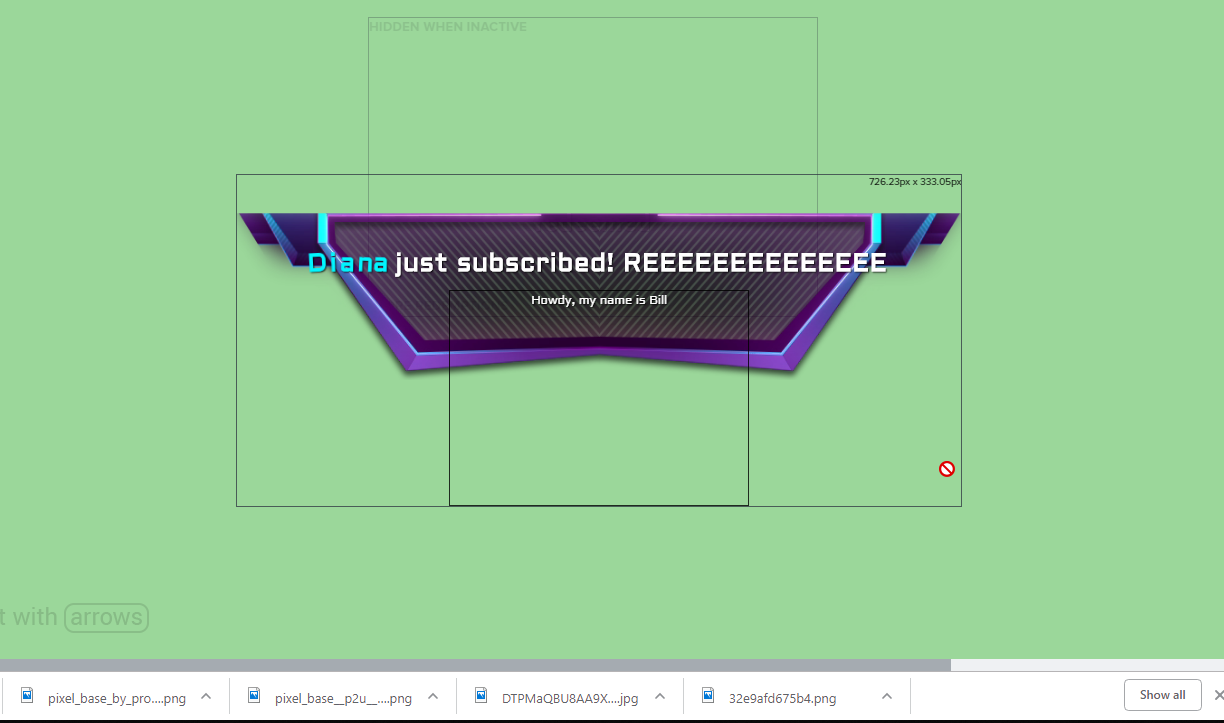
I can with the msg, but not with the notification
message
narrow coyote
@deft shard just letters, no symbols
once you make the item, you can make a custom command that would have a response using the ${redeem} variable
lament blade
I just wish to better position things
narrow coyote
If you are using long text in the alert, its not going to easy to do that
lament blade
I'm willing to put the work in. :>
nocturne pelicanBOT
add You can make changes to custom commands in chat with!command add/remove/edit/options/show Valid flags for !cmd options are: -cd (number) -usercd (number) -cost (number) -level (number) -type (say, whisper or reply) -count (number). --- Example: !cmd options twitter -usercd 60 -type reply -level 250
narrow coyote
that is why its pretty standard to see things like, sub and not subscribed in the alert
i dont think you really understand what I am saying. If you use long text, it is not really going to be possible to make it fit nicely in the alert. The best way to ensure it fits would be to use shorter text. The alternative would be to use smaller font (making it harder to read) or a different alert entirely to match what you want.
lament blade
So I can't position it like I can with the custom messages?
narrow coyote
You can position it in the text settings, but like I said, with a long message you are going to have a hard time getting it to fit
deft shard
does the bot be in the chat?
narrow coyote
you cant use commands without having the bot in chat
and you need a store redemption widget in your overlay to have the sounds play
deft shard
22:01StreamElements: @deft shard, you successfully redeemed REEE for 0 points.
how can i disable taht
narrow coyote
you cant
narrow coyote
there might be an idea submitted to control that in the idea page, I would check but I cant right now
narrow coyote
You can, I am doing stuff that requires me to use a VPN and cant access the page, and wont be able to for some time 
wanton jetty
How can i get a command to work with a username and if no usename use the senders username ?
narrow coyote
OBS.Live is more than a single .dll
wanton jetty
$(customapi https://api.chrisis.live/followed/?user=CruxedKat&follower=$(user|sender)&time=true&timezone=utc)
narrow coyote
$(1|$(sender)) is your best option
wanton jetty
thanks
lament blade
Yo, kinda new here, how would one obtain an early access code to the Stream Elements app?
deft shard
soon get released i heard
nocturne pelicanBOT
@lament blade The StreamElements Mobile IRL streaming app is currently in closed beta.
If you'd like to assist with testing when public beta testing becomes available, please fill out this form: https://goo.gl/forms/3DaiLckKDjeMAeVt2
lament blade
I just downloaded the app. I kinda can't wait, Streamlabs app sucks ass.
primal shard
@tight harness No, I don't think so. How do I do that?
tight harness
@primal shard Well first you'd need the capture card 😄 the rest you research online
primal shard
@tight harness alright, thanks man
tight harness
No problem
zenith widget

narrow coyote
pinging people will not help you get a code
 exotic shadow
Ahh ok
nocturne pelicanBOT
@exotic shadow The StreamElements Mobile IRL streaming app is currently in closed beta.
If you'd like to assist with testing when public beta testing becomes available, please fill out this form: https://goo.gl/forms/3DaiLckKDjeMAeVt2
forest stag
@zenith widget Thanks for getting back to me! Will do that!
livid ingot
@torpid estuary / @pine hemlock Id love the option to know whos hosting me, Despite having the bot to annouce said hosts at 0 as a default, but nothing reallyy triggers it
 deft sun
hello everyone!! Im currently setting up my stream overlays etc and idk how to import overlays/alert box and my jar onto my stream. I know this is a noob question but i normally used streamlabs
 sweet zenith
is there any way to add ppints to all members of the loyalty system?
nocturne pelicanBOT
@deft sun To add your overlays to OBS, add a new browser source in your scene. Paste your overlay URL in the browser source properties, set the dimensions to 1920x1080 (unless you changed them on the website), and :ballot_box_with_check: “Shutdown source when not visible” https://youtu.be/KDvLynUqXI4
lament blade
Hi I’m having a problem where on my stream when I do !watchtime it says they’ve watched for 0 seconds on everyone
narrow coyote
Do you have the loyalty system enabled?
lament blade
No
 misty wagon
You see, told ya they are the smart ones in here! 
narrow coyote
watch time is tracked by the loyalty system, you would need to enable that for it to be tracked, and it will only track from the time its enabled
lament blade
Oh ok thank you @narrow coyote
narrow coyote

lament blade
@misty wagon No need to be like that
misty wagon
I'm sorry if that came over wrong but continuing from our whisper convo, this is where I say They are the smart ones, I'm the pleb 
 mellow lodge
Hi all. So I'm having an issue where i cant hear my stream alerts. I should be able to hear them through my OBS, right?
livid ingot
Coffeee Friend! @misty wagon
narrow coyote
Yes, they should play through your default audio source in windows, which is usually the Desktop Audio source in OBS
mellow lodge
That's what i thought, however i still cant hear any of my alerts
narrow coyote
If you open an overlay in a browser, do you hear that? If so, it would seem it would be a problem with your audio setup
mellow lodge
Yes i do hear them when i have it open in my browser. Do you maybe know what issue i would have in my setup?
narrow coyote
Check your audio sources, make sure OBS itself is not muted or turned down in the volume mixer
mellow lodge
Will do, Thank you!
 light lance
anyone know why that when i stream i experience lag only while streaming, although my FPS and network values have changed minimally
it feels like my frames drop to 30 but they are well above 150
ebon forum
@light lance encoding of the video is only done when streaming, if you overload the hardware, your FPS will drop.
light lance
my FPS doesn't drop though
ebon forum
it does not drop where? in OBS or ingame?
light lance
its like mouse lag. everything is very jittery but my frame counters say i am playing at over 150
in game
ebon forum
try a few things. first: drop the CPU preset if you stream via x264 (faster means lower hardware usage and lower quality) and try to lock the FPS
unless you run a 144Hz monitor, there is no reason to run 150FPS. leave some power for the stream
light lance
i run a dual PC setup. i use NVENC to stream over ethernet to my second PC
ebon forum
ok. then lock the FPS ingame
light lance
recourse wise everything is fine, but i still get this weird "lag"
ebon forum
just try it, lock the max FPS ingame and drop some graphic settings and you will see.
this is a clear sign of overloaded hardware here
light lance
yes my FPS is locked to 240. i get over 150 but the lag still ocurs
light lance
i have 240 hz monitor. when i dont stream i lock my frames to 150 to see any noticeable difference and i can notice when playing at 150 FPS when streaming and not streaming
ebon forum
just try it and you will see. start streaming to the second PC and lock the FPS
light lance
my friend who has the same problem says that it is a problem with my CPU being fully used, which makes sense because i have 100% CPU use already when i play RB6, however the NVENC should fix this problem mostly, right?
light lance
not to mention my gaming PC doesnt do any processing, that just goes to the streaming PC
i have i7 4790K at 4 Ghz
ebon forum
NVENC encoding IS processing
light lance
and 1080
ebon forum
if you truly want to remove any additional load from the gaming PC, use a capture card and passthrough
and those do not support 240Hz at all now
light lance
what settings do you recommend for me if i want to send as much unprocessed packets from my gaming PC to my streaming PC over ethernet?
ebon forum
i can't tell you settings, i just can tell you to make sure you lock the FPS and lower settings till the point where you no longer hit 100% on GPU and CPU
This is really simple, let MSI Afterburner run in the background
go into the game, start streaming to the second PC
and tinker around until the graphs in MSI afterburner do not show 100% usage on both GPU and CPU at any given time
light lance
ok i will try this
for the NVENC encoding on my gaming PC, should i change the preset from high quality to something else?
ebon forum
not really
just make sure you do not hit 100% usage on your hardware no matter what
you can do that only with a capture card
light lance
do you have any links i can read to understand better how capture cards work?
ebon forum
those are simple, no documentation needed. you install that, plug your monitor and GPU in, the signal just goes through and will be captures.
light lance
so it does the processing by itself?
ebon forum
no
it just grabs the signal
this is how you get rid of the encoding on the gaming PC so you can push max FPS
light lance
ok. i will look into capture cards
in the meantime other than changing in game settings do you have any other suggestions for me to reduce the CPU and GPU ussage?
also does increasing the bitrate on the gaming PC = faster packet transfer over my ethernet to my streaming PC?
ebon forum
remove anything that is producing load
and NO, bitrate just has an impact on the quality of the video, not on hardware usage
this is dead simple - reduce the hardware usage on the gaming PC until you always have some room on the GPU and CPU, we good
forget about unlimited FPS for now
 light lance
ok
ebon forum
bitrate is your network
 carmine prairie
Hello, i mentioned earlier that when someone subscribes to me with twitch prime it shows in the twitch chat as an undefined sub; it was requested for me to have a photo of it and I have it now. Anyone able to help me by chance?
ebon forum
@carmine prairie post the screenshot here
carmine prairie
light lance
thank you for your help @ebon forum
ebon forum
@light lance just test things until you reach stability between stream + ingame and get rid of the lags.
light lance
ok 😃
ebon forum
@carmine prairie we look into that, thanks. No idea so far what it is, so can take some time.
carmine prairie
@ebon forum not a problem; whats the best way to get in touch with you or anyone who may have it resolved
ebon forum
@carmine prairie ask here, this is the right place
carmine prairie
Sounds good
ebon forum
@carmine prairie or even better - in the obslive helpdesk channel below, it is less crowded and this looks like it is just the client.
carmine prairie
alright
 kind epoch
 rigid kettle
hey se peeps. a channel i moderate is having an issue with follower alerts. all other alerts are working, but followers are not hitting streamelements. we have tried clearing the cache in the browser source but that did not fix it. we have tested with real follows and nothing works. muxybot discord bot is picking up the new follows, but the api is not hitting stream elements. we're at the end of our troubleshooting and figured we'd ask here. thanks.
rigid kettle
w0otah
yes that's a zero.
just posted on the community board because it was recommended by another friend that saw the same issue there.
pine hemlock
I'll get someone to look into it
 brisk comet
Hello everyone! I have a question! Is there any way to have multiple sounds that rotate in follower notifications? I play GTA RP, and I'd really like to have a bunch of different characters thanking people for following/subscribing. I have several sound clips recorded, is there any way to have a different sound clip play each time someone follows?
rigid kettle
@pine hemlock thank you. someone responded on the community board, 'legendary/sean' so if that's the person it's done. thanks so much!
narrow coyote
@brisk comet You can setup variations, and if they have the same condition, there is a setting that it will pick a random alert when the same condition is met
brisk comet
Sick! Any possibility of a quick tutorial? 😃
narrow coyote
one sec
In the overlay editor, select the alert widget, then click on the gear to go into the follow alert. Once in there you will see this
Then just add a new variation, and make sure the select random option is selected
Since its a follower, there are no conditions to worry about, but you can do variations for different donation levels, subs, bits, etc
 thorn loom
Can i have a invite code? Thanks!
nocturne pelicanBOT
@thorn loom The StreamElements Mobile IRL streaming app is currently in closed beta.
If you'd like to assist with testing when public beta testing becomes available, please fill out this form: https://goo.gl/forms/3DaiLckKDjeMAeVt2
 lean nexus
I can't seem to get the import streamlabs to work. I have the extension installed but it won't import my tips, cheers, etc from streamlabs
 elder sorrel
@lean nexus Do you have both Streamelements & Streamlabs open?
lean nexus
I have the tabs open yes, and when I hover over where the "Import" should be it still says install
narrow coyote
you do the import from the extension
lean nexus
That was it! Thank you so much!
I was trying to do it from the actual site like a dum dum
narrow coyote

lean nexus
Can I ask one more question? I'm sorry. Am I supposed to use regular OBS with this or is StreamLabs ok
narrow coyote
We recommend OBS Studio, or OBS Studio + OBS.Live (our OBS plugin). You can use SLOBS but we cannot guarantee reliability, as they have been known to block our services in their apps
lean nexus
Yeah I can see the implementation of it is very......difficult. Thank you I will switch to OBS Studio. Thank you for your help!
narrow coyote
If you go with OBS Studio, checkout our plugin OBS.Live, it adds Twitch chat, our activity feed, bot rename option, can set stream title, and more features to come 
 plush valley
How do i get an invite
nocturne pelicanBOT
@plush valley The StreamElements Mobile IRL streaming app is currently in closed beta.
If you'd like to assist with testing when public beta testing becomes available, please fill out this form: https://goo.gl/forms/3DaiLckKDjeMAeVt2
pine hemlock
You wait and you'll be emailed when invited to the beta.
lean nexus
Ok so I asked in OBS discord why the transition between scenes is delayed/not smooth and they say its because of obs.live
 plush peak
Cual es el codigo de invitacion??
lean nexus
I guess my question would be, if it is because of OBS.live is there a way to make the scene transitions smooth and not like "cut out to black, then next scene appear" and I have the transition set to fade
narrow coyote
its not because of OBS.Live, its because the browser source takes time to load, you can use studio mode to preload scenes
!studiomode
nocturne pelicanBOT
Check out this tutorial for OBS’ studio mode which allows you to preload scenes before transitioning. https://www.youtube.com/watch?v=W8iWsD2Lq3U
 next glen
is my chatbot not supposed to appear in my chat widget, if so how do i make it visible?
narrow coyote
next glen
👌
narrow coyote
lament blade
🐶 🐶
lean nexus
@narrow coyote I feel like I owe you a million dollars for how helpful you are. Is there by chance you can help me once more? In my theme I can't get the "Top Donation" to reflect my imported values from Streamlabs. How would I go about correcting this?
narrow coyote
Try going here https://streamelements.com/dashboard/activity and clicking on the reset session button
lean nexus
Would you mind if I posted a screenshot for you to see?
narrow coyote
screenshots are welcome
narrow coyote
What is the widget set to?
lean nexus
omg I literally just found that as you posted it. I'm a terrible human being. Can I buy you a coffee?
narrow coyote

lean nexus
For real though. Can I buy you a coffee somehow? That will automatically update itself right?
narrow coyote
Its all good, I just like to help, and it will all be automagical 
lean nexus
Lol I like that word. Please if you ever are hungry or thirsty, find me. Next one is on me and thank you again
narrow coyote


nocturne pelicanBOT
Available commands: connect - multi - totals - code - classic - browser - cmd - add - load - obshelp - obslog - discount - levels - slots - cmdpage - watchtime - pointscsv - jwt - invite - affiliate - duplicate - ideas - emulate - studiomode - error - res - fonts - cache - sellout - welcome - share - extension - gc - panels - ideas - sellout - rename - privacy - console - obslive
 viscid ivy
@dense jackal can you help or tell me who to talk too?
 dense jackal
Just post your question here, we have people waiting to answer no need to ask
viscid ivy
well i dont know whats goin on with the OBS live but it wont log in and when it does it wont put mu overlay
dense jackal
I'm not really sure how to answer that 🤔 can you be more specific?
 worn cypress
Invite code? 🤔
regal kite
is it right to give up streaming if you have streamed for 4 years and has only gotten a max of 3 viewers
???
 covert maple
Hi, I'm a new affiliate over on Twitch, and I have a leaderboards up on my channel by you guys and for some reason whenever I or viewers click on Cheer or subs it doesn't load or anything? The points loyalty display fine tho. Thanks for the help in advance. ❤
lament blade
Hello, please tell me why the “slot machine” for 2.30 hours did not give a single win even at 200%?
 tired quartz
Where can i get information about the SE mobile app?
nocturne pelicanBOT
The StreamElements Mobile IRL streaming app is currently in closed beta.
If you'd like to assist with testing when public beta testing becomes available, please fill out this form: https://goo.gl/forms/3DaiLckKDjeMAeVt2
 warm sail
i'd like 2 get acess 2 mobile app
covert maple
@cedar fulcrum Thank you so much!
nocturne pelicanBOT
The StreamElements Mobile IRL streaming app is currently in closed beta.
If you'd like to assist with testing when public beta testing becomes available, please fill out this form: https://goo.gl/forms/3DaiLckKDjeMAeVt2
 tropic flicker
Can someone please help me fix this issue "The Channel you tried to add is linked to a different account."
warm sail
@cedar fulcrum thanku
 leaden frost
Hello, I have made an account with my email and I am trying to connect my twitch account, it says it is already linked to another account when it is not, help please
 lunar owl
im using my stream elements tipping page thing for tips but it wont let someone do it? its says cant process this transaction at this time
 cedar fulcrum
Hello @leaden frost It will connect with the Twitch user you are using automatically
leaden frost
You're right, I think i read it wrong @cedar fulcrum Thanks for the quick reply and help 😃

 stray elbow
Are timers effectively in a queue? Like will they go in order or randomly but not simultaneously? Just want to know how it works specifically so I can set it up better.
 compact tapir
I know it's here somewhere but I cant find it. Where can I report a problem/bug for something? I have a command that users can use to give viewers cookies that is supposed to be linked to a SFX but it says "invalid user input"
elder sorrel
@stray elbow It goes in order. So if you set up a Timer to show up every 10 minutes with no chat lines: It'll show up in your chat every 10 minutes.
@compact tapir https://strms.net/problems
compact tapir
@elder sorrel ah thank you! 😁
elder sorrel
No problem 🤘🏼
stray elbow
Thanks @elder sorrel
 slate pasture
Heya guys... i just have a quick question... in the settings of alert box, i am unable to set the time of text disappearing before the end of the animation... when i set only the disappearance offset or only the appearance delay, it works, but not when both of it is set to some value... is it bug or i just dont know how to use it? 😄
torpid estuary
@slate pasture i am not sure what you mean. Normally you would set the alert duration and be done with it.
slate pasture
yeah, i have set the duration, but i want the text (name) to appear 4,5 secs after the start and disappear 2 secs before the end of animation ... it just won't do both even though it should
torpid estuary
Oh in custom CSS?
slate pasture
it is in the text animation setting... i dont want to do it in css if i dont have to 😄
torpid estuary
Sorry, I didnt have my coffee yet.
Ok, so what exactly does your Text do when you set both?
Is it ignoring both or is it doing one of them?
slate pasture
it's okay 😄 ... it is doing just the appearance, the text stays than till the end
compact tapir
So I'm adding some GIF's to my store and for the life of me I cant find the video that shows you how to set it up so they show on your stream.... I currently have the store redeem widget on there as well
 lucid void
Beta app android? Need code
nocturne pelicanBOT
@lucid void The StreamElements Mobile IRL streaming app is currently in closed beta.
If you'd like to assist with testing when public beta testing becomes available, please fill out this form: https://goo.gl/forms/3DaiLckKDjeMAeVt2
elder sorrel
That's all you would need in your overlay is the Store redemption widget, @compact tapir 🤔
Otherwise the video is this: https://www.youtube.com/watch?v=hoNYfLw1Gg4

Stream store is where your viewers can spend their points on cool perks. Watch the video and learn how to set your own store. ----- Join our discord for live...
torpid estuary
@slate pasture i am asking internally about this, since im on mobile atm and cant test it
compact tapir
@elder sorrel Ah ok! So we should be good! lol Thank you again!
 pure crystal
hey,
wanted to ask if it is possible to use bot commands for the viewers to activate a sfx, for example I was thinking of !beastmode then the bear would roar and the chat bot would respond with "the beast mode was activated X times". please @me with a response, thank you in advance ❤
lucid void
Early accescode?
nocturne pelicanBOT
@lucid void The StreamElements Mobile IRL streaming app is currently in closed beta.
If you'd like to assist with testing when public beta testing becomes available, please fill out this form: https://goo.gl/forms/3DaiLckKDjeMAeVt2
torpid estuary
@pure crystal yes it is possible! Just make a sound effect item in your stream store and set it to "redeemable via chat"
elder sorrel
@compact tapir No problem. Have you tried Emulating the Store redemption alert in the Overlay Editor? As it should be showing up. Even if you try redeeming it in your Twitch Chat with the Editor open
pure crystal
@torpid estuary any tutorials on that? ❤
compact tapir
@elder sorrel oh no no! I haven't tested it yet. Just wanted to get everything lined up to make sure it works
 dry pecan
Hey! Can somebody help me? I want to rename my Bot) I made new account on Twitch for it, got token and downloaded Ground Control! But I really don't undestand what to do next((((
torpid estuary
@pure crystal https://youtu.be/mBDY4RdoZ4A
nocturne pelicanBOT
@dry pecan Custom bot name requirements
- StreamElements bot modded and in chat
- Active overlay with alerts
- StreamElements tipping page in the panels below the stream (!panels)
- Create a twitch account for the name you want to use
- Ground Control app must be running
Steps to enable custom name
- Sign in to https://twitch.tv with the bot account
- Install and run Ground Control (!gc for download)
- Visit https://twitchapps.com/tmi/ and generate an oAUTH token
- Copy/paste everything in the box to Ground Control oAuth settings and enter the name for the bot account
- Restart Ground Control (custom name may take a few minutes to take effect)
Mac does not currently support renaming the bot.
dry pecan
Copy/paste everything in the box to Ground Control oAuth settings and enter the name for the bot account - I don't have such place in GC((((
narrow coyote
If you don't see the rename options, then you don't meet the requirements, or you are on Mac
narrow coyote
It's one of 2 things, you don't meet the requirements above, or you are using a Mac
dry pecan
So I need to use OBS Studio?
narrow coyote
 that has nothing to do with this
The requirements, as shown above, are having the bot modded in chat, an active overlay with an alert widget, and a SE tipping panel in your Twitch panels
dry pecan
I did it(((
 granite plume
was curious if stream elements buffers inbetween Twitch and the end user
elder sorrel
As well renaming is not supported renaming the bot.
granite plume
i was watching a stream, think it was stream elements, and seen a "be right back" thing when data connection cut
nocturne pelicanBOT
@dry pecan Please connect your Twitch and/or YouTube channel with Discord by going to ⚙ Settings and then Connections here in Discord. https://streamable.com/eg92w
 narrow coyote
@granite plume that is a feature of our mobile app, that is in closed beta
granite plume
@narrow coyote well that feature i've sort of built myself but it's incredibly unscaleable lol.
so it's closed beta meaning it exists and may come out to us normies soon?
nocturne pelicanBOT
@granite plume The StreamElements Mobile IRL streaming app is currently in closed beta.
If you'd like to assist with testing when public beta testing becomes available, please fill out this form: https://goo.gl/forms/3DaiLckKDjeMAeVt2
narrow coyote
dry pecan
I've already connected Discoed with my twitch
elder sorrel
Don't see it @dry pecan 🤔
dry pecan
Hm.......
compact tapir
So trying to make a command that when used shows " username commands everyone to come the darkside!" I've set up like this command: !dark
response: ${sender} commands everyone to come to the darkside! ${redeem dark} It keeps saying "item not found" but the item is in the store
 copper bobcat
Is there a place to see the list of curse words and slurs included in the Tip filtration system? Just to double check and make sure I custom add any that may be missing from what I'd want.
elder sorrel
Still not seeing it @dry pecan You should check your connections in the Discord setting if you can try connecting it again.
@copper bobcat https://streamelements.com/dashboard/tipping-settings
StreamElements
The Ultimate All in One Platform for Streamers
That would be in the on the Dashboard on the left side under Revenue if you need to find it again in the future.
dry pecan
Discord says I did it!
elder sorrel
Thank you. See it now 👌🏼
@dry pecan You have a Streamlabs donation panel & not a Streamelements one.
Looks like you're using a Non SE Overlay as well? Can't tell using mobile.
elder sorrel
It would have to be in your Twitch Panel with the Tip Link instead of the Streamlabs one.
elder sorrel
Oh I thought you were talking about the custom if you made any Let me check internally as I thought it would be in the Knowledge base.
@dry pecan I believe if you're using your own overlay but using our alerts should be okay. Gonna ask to be sure on that.
narrow coyote
We do not have a list of the standard words included in the profanity filter
elder sorrel
@dry pecan Confirmed you can use your own overlay as long as you're using Streamelement's Alerts Widget 
lament blade
hey there peeps ... need a little help. When ive changed my image to the one i want and the sound. how do i get rid of the sound from the original overlay?
because ive aded my own but still get the original
elder sorrel
Are you referring to the Alerts? You may have to check the variations.
lament blade
ah ok so the original sound is only coming from OBS when I have it open. How do i stop that?
@elder sorrel yes
elder sorrel
As well make sure you have the ☑ “Shutdown source when not visible” for the Browser Source in OBS.
lament blade
@elder sorrel boom .... i didnt refresh the browser in OBS!
elder sorrel
Sweetness. Yeah I've had to do that myself if that's the last thing needs to be done 😃
 mint rampart
hello, i have some questions 😛
do i use streamlabs and stream elements togheter ?
or is stream elements i need
all i need
elder sorrel
Recommended going with StreamElements only. You won't be disappointed 😉
lament blade
@mint rampart , @elder sorrel is right. its all you need!
mint rampart
okay, do you know if i can save all my scene's/overlays from streamlabs as a theme and import it ?
is stream elements a browser program, or is there an app ?
elder sorrel
You would be able to export your donations & alerts from SL to SE. is cloud based. All in one Overlay Editor & offer a Low-resource usage plugin to use with OBS.Studio.
That is called OBS.Live for the plugin 😄
mint rampart
hmm
well i have to try back and fort here. ill get back to you when im stuck the next time. thanks
elder sorrel
No problem! Always glad to help https://cdn.discordapp.com/emojis/474262009668435988.gif?v=1

 buoyant onyx
Is there an ability for moderators to add/remove tags using a chat command?
like "!settags" or so?
narrow coyote
Not at this time
buoyant onyx
but SE is working on it?
narrow coyote
Twitch has not exposed a way to set tags externally, like an API
narrow coyote
Once they do, we would be able to do something like that
mint rampart
the "import from other channels" is greyed out in my overlays
is overlays where i launch the stream ? 😛
narrow coyote
 Import from other channels, would be for importing overlays from other channels you manage
and what do you mean, by launch the stream
You need to add your overlay to your broadcasting software as a browser source
mint rampart
well i have scenes for SL. can i transfer them to SE ?
narrow coyote
No, you can only import your alert box as an alert widget for our system
mint rampart
ok. do i have to make overlays for every game, or can i make a "starting soon" "brb" "cam+game" "game" ect ?
narrow coyote
Its really up to you. We have themes you could use, you can import your own elements to make your own overlays, or you can duplicate widgets from one overlay to another. I personally have overlays for brb, starting, end, game, etc, that are made from my own custom stuff and stuff from themes that I liked
mint rampart
kk, i installed the SLExport thingy. but it still says install , not import
 dawn venture
Hi when I make and changes to the alert settings like font color and image they don't take affect please help
narrow coyote
You do the import through the extension itself
@dawn venture If it was for subs or cheers, check your variations
mint rampart
kk, thanks for the help 😃
narrow coyote
 frail bison
Hey, I need help please, yesterday I received a donation the donation is visible in my dashboard and in the revenue history but i can't find it on G2A PAY. I did a donation myself to test it and that money appeared in the g2A pay site. the question is where is the money from the donator yesterday.. can someone please help me
narrow coyote
Are you sure they did not donate through PayPal?
frail bison
yes because it's not on my paypal
atomic silo
hey, in the twitch marathon extension am i working with seconds or minutes? it says seconds, but at donos it states it's minutes so i'm confused
frail bison
i checked that
next glen
I wanted to have both my twitch an YouTube accounts together, but i accidently add my YouTube account in without my twitch so there's two separate accounts, is there a way to fix this?
 grizzled holly
What is invite Code?
nocturne pelicanBOT
@grizzled holly The StreamElements Mobile IRL streaming app is currently in closed beta.
If you'd like to assist with testing when public beta testing becomes available, please fill out this form: https://goo.gl/forms/3DaiLckKDjeMAeVt2
compact tapir
Is there a way to hide the message in chat when someone redeems an item?
narrow coyote
@frail bison Unfortunately I do not use G2A, so I am not familiar with their site, but it was my understanding that there is a period of time before the funds will show as available, but I am not sure how long this is
@compact tapir Unfortunately, no, you cannot hide that
@next glen If you DM me the JWT token from each account, I can poke someone from the staff to merge them
!jwt
nocturne pelicanBOT
You can find your JWT token on your account channels page: https://streamelements.com/dashboard/account/channels
(Don't forget to click on "Show Secrets")
compact tapir
@narrow coyote Ah ok! I was hoping making a command like !hug response: ${redeem hug} would but it didn't.... Thank you for the help!
frail bison
Okay, i will wait a few days. If it still doesn't show up, then who can help me further?
compact tapir
@narrow coyote can we customize the response? I see one in the chat modules but then it posts double
narrow coyote
Unfortunately, the response cannot be edited
compact tapir
Ah ok...well maybe in the future! lol
next glen
@narrow coyote it says unable to Direct Message
narrow coyote
Do you have your discord set to not accept DM's from people in a shared server?
 narrow coyote
Sometimes you need to be patient and wait for a response
elder sorrel
@mint rampart Yes. You can assign your mods with SE to be able to make changes.
!levels
nocturne pelicanBOT
Chat/Bot Levels
100 - viewer
250 - subscriber
300 - __regular __
500 - moderator (twitch mods automatically placed at this level)
1000 - super moderator
1500 - broadcaster
Dashboard Manager Levels (least to most access)
Bot Supervisor (can add super moderators from dashboard)
Editor
Full Access
https://i.imgur.com/s61Liry.png
 mint rampart
ok. looks good for now, ieven got in my own language an errything:)
elder sorrel
Awesome! 😃
 hearty phoenix
Hi. I want to change default giveaway text in streamelements but i don't see opportunity. When i start giveaway bot send a message to the chat with the giveaway name and the !ticket command but i disable this command because have 400 viewer. Do you know anything about that?
 hidden phoenix
hello people where do I find my JWT token I can't seem to find it so that I can connect the desktop app to my account?
mint rampart
where do i change my alerts? i imported from streamlabs. but did the widget/.gif thingy get over ?
nocturne pelicanBOT
@hidden phoenix You can find your JWT token on your account channels page: https://streamelements.com/dashboard/account/channels
(Don't forget to click on "Show Secrets")
hidden phoenix
oooooooooooo Thank you who ever put that in
 fallow basalt
How do I get notifications to appear when I’m in a game when someone has just followed me
mint rampart
halp ?
fallow basalt
??
elder sorrel
@mint rampart That I am not sure. Can ask internally real quick unless someone else knows the answer.
mint rampart
can i add alerts in the plugin/app ?
elder sorrel
@fallow basalt That would be with the Overlay + Alert Widget. Are you streaming using a PC?
elder sorrel
Ah. Through console does not support Browser Source for Overlays but can still have it in your chat alert.
nocturne pelicanBOT
@fallow basalt Here is a guide on how to setup the most essential tools for streaming from your console, while using StreamElements tools without involving a Capture Card! It's easy to do, take 4 minutes to read and 10 to 15 minutes to setup!
Read all about it here: https://blog.streamelements.com/how-to-stream-on-console-7b620b1c46c3
elder sorrel
@mint rampart Can go to "My overlays" section in the Dashboard on the left side. It gets named "Streamlabs imported alertbox"
mint rampart
in the browser ?`
elder sorrel
StreamElements
The Ultimate All in One Platform for Streamers
mint rampart
oh i importet it alright. 7 or 8 times.
but the alert gif. and recent subs, reccent follower ect. is that something i can add on the app/plugin ? or do i use browser for this, and plugin for that ?
 cedar lynx
Quick question! I had someone gift-sub 20 at once today and it didn't affect the Hypeboss at all. Is this by design or a bug?
fallow basalt
How to get notifications to appear that someone has just followed me on screen
How do I gift subs
What are subs
mint rampart
what do you mean what are subs ?
elder sorrel
You would have to use the Web Browser (we prefer Chrome).
@fallow basalt That's not possible since you're streaming directly from a PS4.
You would only be able to enable chat alerts to receive when some one follows/subs/tips/cheers/hosts in chat.
compact tapir
So quick question. I have like 6 scenes in one profile (2 separate themes) could that be what is making my CPU run high?
mint rampart
chrome for the alert ? what about the recent sub, recent follower and so on also in chrome ?
elder sorrel
Correct. Using Google Chrome to use our Overlay Editor to manage that.
mint rampart
but the overlay itself i can add in the plugin? or will that mess it all up ?
elder sorrel
@cedar lynx That's a good question. I can ask internally to see what's up.
fallow basalt
Okay thanks @elder sorrel
nocturne pelicanBOT
@mint rampart To add your overlays to OBS, add a new browser source in your scene. Paste your overlay URL in the browser source properties, set the dimensions to 1920x1080 (unless you changed them on the website), and :ballot_box_with_check: “Shutdown source when not visible” https://youtu.be/KDvLynUqXI4
elder sorrel
You would be able to receive the Overlay's URL through the Overlay Editor.
lament blade
What is my invite code
nocturne pelicanBOT
@lament blade The StreamElements Mobile IRL streaming app is currently in closed beta.
If you'd like to assist with testing when public beta testing becomes available, please fill out this form: https://goo.gl/forms/3DaiLckKDjeMAeVt2
 naive dirge
Hey guys 😃 I have been trying to creat commands via my twitch chat but i seems when type "!command add !test testing" nothing happens  the bot is in my channel but is not taking my input via the chat
elder sorrel
I don't think you need to add the ! in "!test testing. As the command should automatically add that if I'm correct 🤔
cedar lynx
@elder sorrel thanks!
elder sorrel
No problem. Still waiting on a reply.
naive dirge
So the command show look like this? "!command add test testing"
Its ok  o forgot to enable the command..... sorry im new to StreamElements
slate pasture
i asked he question a few hours ago, but no one could help back than... under the text animation settings of alert box, i am unable to set the time of text disappearing before the end of the animation... when i set only the disappearance offset or only the appearance delay, it works, but not when both of it is set to some value, in that case just the appearance works, but the text will not disappear before the end of the animation
elder sorrel
@cedar lynx Being told that Community Gifts are not supported.
 hearty mica
it is bad i have scrooled up 7 day to find a link and cant find it
i want to write my own waether ap but blah and then i want to add the C and sunrise and sunset to widget and it just wont go
it is currently in F i want bpth to be fair to those that us C
i been at this 7 am now almost 9 pm
why cant i write this weather widget thingy ?
no i am trying to write my own HTML , CSS, JS code for it
 summer barn
How can I get me hands on a invite code for the stream elements app on google play? Looks like streamlabs does not like overlays from stream elements
nocturne pelicanBOT
@summer barn The StreamElements Mobile IRL streaming app is currently in closed beta.
If you'd like to assist with testing when public beta testing becomes available, please fill out this form: https://goo.gl/forms/3DaiLckKDjeMAeVt2
cedar lynx
@elder sorrel okay good to know!!  thank you for checking that out
pine hemlock
@hearty mica Did you ask for help in #dev-chat
We also have our own weather command in #command-share
mint rampart
wth. what is the Stream Elements Ground control ??
pine hemlock
!gc
nocturne pelicanBOT
Our Desktop App Ground Control: https://streamelements.com/groundcontrol
narrow coyote
@ruby kayak Promotion/advertisement is not allowed in this Discord, please do not do that again
hearty mica
!cuda i did and np responce there either
narrow coyote
What do you mean exactly? What type of problem?
upper steeple
Is there something new with the way that songrequests react to mods?
It usually would say "This song blah blah is added to the queue playing at blah blah place"
Now it is saying @username "added to the queue 'link'"
It has never done this till now a couple minutes ago, is it a bug or something new?
 fickle willow
How would I play songs if people request them??
pine hemlock
@upper steeple Dont have an answer
upper steeple
@pine hemlock okie dokie thank you
narrow coyote
If someone violated Twitch ToS, you can report them through Twitch, if you have other grievances with someone, you might have better luck if you at least hint to what the problem is, or you can DM me and I can look into it depending on the situation
probably because you have your Discord set to not allow DM's with someone in a shared server
 thick saddle
Hey guys!
Sorry for silly question but I cannot find any amount settings in alert variations. I found the video about it but I have no options where they should be.
Is it a bug?
Thanks.
torpid estuary
scroll down
torpid estuary
what kind of alert is that?
@thick saddle because you are also missing the field with the text it should say for the alert. what alert are you trying to set up?
thick saddle
Follower alert
torpid estuary
there are no variations for different amounts. you can not follow more than 1 time per person
torpid estuary
np
thick saddle
Multitasking is not my strong side LOL
mint rampart
i added my overlays/overheads in sceens on SE.obs now all i need is that alert .gif with sweet sound. + i want my recent sub and follower to show. i am told i have to fix it on Chrome. but my head don't understand how to make all this come togheter.ive seen the tutorial you sent me. but that only works for the theme gallery/my overlays ?
and the static/automated overlays just throw me off ...
torpid estuary
you need to create your overlays in your webbrowser by going here https://streamelements.com/dashboard/overlays and create new scenes. or you can choose an already designed theme from here https://streamelements.com/dashboard/themes. after that you would need to put the URL of your scene into your OBS via browser source.
to change the gifs and sounds of alerts, you would need to go into the scene where your Alert Box widget is situated and change the different alerts in there.
our video tutorials really cover all of the basics and are made to guide you thru all these steps in the best way possible.
mint rampart
i importet my alert from SL but its just an empty box. i think those videos have min. required brain function. but yeah thanks
torpid estuary
mint rampart
i stream on 720p. do i make the overlays in 720p ? and when i add dem via browser still 1920p or ?
ebon forum
@mint rampart no need, your streaming software will scale down 1080p overlays.
strong kernel
You can keep them at 1920x1080 and fit them to your OBS canvas.
mint rampart
does it matter if the frame of the overlay is outside of the canvas ?
 night lion
How do I setup the water thing
torpid estuary
well @mint rampart the overlay will be cut off, other than that no problem
what water thing do you mean @night lion
 rancid copper
Hypemind
mint rampart
i dont have a frame overlay. just bits and pieces ?
torpid estuary
mint rampart
my overlays does not cover the entire screen. i just have a header for non cam. and a overlay for the web cam
mint rampart
can i resize the overlay fram as i see fit on Obs ? its ok that the overlay frame is outside of the canvas ?
torpid estuary
put the overlay into OBS as 1920x1080, how you scale the window after that is fully up to you
mint rampart
kk, im actually making progress here. thanks somuch for all the help
torpid estuary
mint rampart
well then. how do i get the recentsub/follow on the overlay ?
pine hemlock
Add the widget to your overlay.
mint rampart
haha, that button + data was greyed out. didnt think they worked .........
mint rampart
is there a way to setup my alert/gif and then just add them, to all the scenes, or do i have to fix it for every scene ?
torpid estuary
you can setup your alert box and then copy it to other overlays
 charred garnet
going to need help in voice chat from someone me and my artist cant figure this out
torpid estuary
@mint rampart https://i.imgur.com/rEzvmSn.png
 charred garnet
let me know if there is someone available
torpid estuary
@charred garnet its sunday evening, there is no guarantee someone is free to do voice support. if you could state your problem we could try to help you solve it.
torpid estuary
alright, glad you found the solution!
mint rampart
any way to test if this works, or do i have to start up a stream ?
torpid estuary
you can click on the little bell icon on the lower left of your overlay editor and test different alerts
they will also show up in your OBS if you have added the browser source into your scene in OBS
no need to go online on twitch
mint rampart
if i edit the overlays, do i have to change the url or is that automatic ?
pine hemlock
you dont need to chagne the url
mint rampart
ok i got to cchange alot of them. but for subscriber its only the new sound, and the silly shark dansing ..
pine hemlock
check the variation settings.
 wintry fog
for twitch raid and host alerts which do i use? arent they both the same?
 visual nymph
Can I get invite code for streamelements test for Android?
nocturne pelicanBOT
@visual nymph The StreamElements Mobile IRL streaming app is currently in closed beta.
If you'd like to assist with testing when public beta testing becomes available, please fill out this form: https://goo.gl/forms/3DaiLckKDjeMAeVt2
wintry fog
can anyone reccomend me wether i should use my host button for being raided or raid button alert for being raided?
lament blade
Okay, it looks like my Host Alert is fixed, but I now have another weird issue. I am setting up Cheer and Subscription alerts, and the overlay editor will NOT use the image and sounds I am submitting whenever I preview them. Any idea why? Twitch ID is GamerMan_X if that is needed.
wintry fog
@lament blade do u use host or raid button when someone raids u
lament blade
I'm not sure I understand the question. If you're asking which alert I have enabled, I have both.
wintry fog
ahh ok ya thats the question
i have my host and raid button enabled
but wasant sure if i needed 1 or the other
mint rampart
last ting on the meny here and i think im good to go. how to get the names of the last sub/follow on here ?
narrow coyote
cheers and subs have variations, check your variations
lament blade
Are variations enabled by default or something? I'm only asking because I never set them myself.
narrow coyote
yes, subs have 2 by default, and cheers are completely controlled by variations
lament blade
Oooooh, okay, that makes sense. Give me a minute.
mint rampart
halp ?
narrow coyote
if you have the latest follower and latest sub widget, they will populate as the events come in
 crisp needle
for some days i cant get alerts from new followers, subs go fine but dont show the followers, im checked the option to show.. for example, jairo do a follow and sub but just show the sub.
mint rampart
should i have both widgets in the same overlay or ?
nvm, think i got it. thanks for all halp!
lament blade
Changing my variation settings is not working; it still will not allow the specific changes I am making. I've even DELETED the extra variations, and it's still using them.
 civic knoll
Hello, just wondering if there is a way to stream from phone? my direct ethernet connection has gone to hell and mobile streams are the only thing i can do now.
lament blade
I think I'm getting it figured out...
strong kernel
@crisp needle Refreshed the connection, keep an eye on it.
@lament blade Has this been sorted? Can you go into more detail about what you're doing?
@civic knoll We are working on an IRL streaming app for phones but it's not available yet. Stay tuned.
 misty aspen
Any ideas if the event list could be... Horizontal? 🤔
strong kernel
That'd require some custom CSS/JS coding.
lament blade
Okay, this is actually making me mad now. I am trying to keep the default variation settings for Cheer Alerts EXCEPT for the sound. I have just manually gone into every single one of them and changed the sound effect, but it will not use it on ANY of them.
crisp needle
@strong kernel Hi, how can refresh de connection? im log out and in but dont see where can reset that (in the log out and in still the problem)
strong kernel
@crisp needle That's a staff thing. It's already done.
@lament blade What sound are you trying to use?
lament blade
Just one that I had uploaded; it's an energy fill-up sound.
strong kernel
I just added it in your Stream Opening overlay and it works fine.
lament blade
I wonder why it won't do it when I change it?
strong kernel
Are you using a browser other than Chrome?
lament blade
Yes, Firefox, thought that has not been an issue with any other edits I've made.
strong kernel
The site is optimized for Chromium since OBS's browser source uses it.
When in doubt, use Chrome.
lament blade
I do not use Chrome. I don't trust Google, LOL. But now that you were able to fix it, I'll try copying the Alert Box to other overlays and see if it carries over.
 smoky hemlock
Is it possible to manually trigger an emotesplosion without an event actually happen without having to go to the overlay edit page?
strong kernel
!kappagen command
smoky hemlock
is that a default command?
strong kernel
Yes.
crisp needle
well... i see now working, thanks @strong kernel
smoky hemlock
Awesome thank you 
nocturne pelicanBOT
@north bane The StreamElements Mobile IRL streaming app is currently in closed beta.
If you'd like to assist with testing when public beta testing becomes available, please fill out this form: https://goo.gl/forms/3DaiLckKDjeMAeVt2
 north bane
@strong kernel. Do I havr code or how do I know that I get perms for being a beta tester
strong kernel
Fill out the form. If you are selected, you will be notified. Filling out the form does not guarantee a code.
 weary robin
i don't have a paypal email...do i have to make one? i have a normal email that's connected to my paypal
north bane
@@strong kernel. How long will it take so ill no if I get varified or not
@weary robin no
strong kernel
As I said, if you are selected, you will be notified.
north bane
Ok ty
@strong kernel. Is it okay if o delete disocrd from phone and use pc version instead
 rigid ocean
I am fairly new to the affiliate life on Twitch, so sorry if this is a question that has been answered a few too many times, but I am attempting to put my Custom Emotes into a custom command when someone Subs, and or follows. As of now, they aren;t showing correctly, it is only showing the name of the emote, not the design, how would I go about getting mine to show correctly?
narrow coyote
You would need to gift the bot a sub, or if you rename the bot, the account used for the rename would need the sub
 wanton finch
Are there are OBS remote options with Stream Elements? Like having a chat command to mute my mic?
narrow coyote
Nothing from us
rigid ocean
Thanks @narrow coyote !!
narrow coyote
 blissful bear
Hello
mint rampart
how do i get the donation to go through SE ?
narrow coyote
setup your SE tipping page, and direct your viewers to that
mint rampart
aight, thanks
 mint moat
why are all my videos from my media request playlist n ot av ailable
 tawny socket
Trying to use the Red Line animated Overlay and I set it to 720p and half the overlay disappears
 ebon rune
Im having issues with chat alerts not showing redeemed store items. Is there something im missing?
pine hemlock
@tawny socket Thats because its designed for 1080p. if you set it to 720p you have to manually move items inside the overlay editor.
ebon rune
Any thoughts on my question?


 tawny socket
@pine hemlock Are all of them designed for 1080p? I didn't see that specified anywhere. Are there 720p options?
pine hemlock
They're all designed for 1080p. Generally you'll leave it at 1080p and scale it to fit in obs and let obs do the automatic downscaling.
tawny socket
Ok I'll try that
 digital yacht
hello 😃 i have an question...when some ppl will send me some amount of money via f.e. CC where i will receive it? i didnt fill any bank account number, i didnt create G2A pay acc, i have only paypal but i didnt even log into the acc during verifying 😃
strong kernel
You don't need to log into PayPal to use your PayPal email with the tipping page.
It does look like you've connected G2A as well. Check this video for how to withdraw tips from G2A when you get them: https://www.youtube.com/watch?v=CXAndapQCK8&t=88s
north bane
@strong kernel can u explain qbs live pls
nocturne pelicanBOT
@north bane OBS.Live is a Plugin for OBS created by StreamElements. You can download OBS.Live here: https://streamelements.com/obslive
Please make sure you have the latest version of OBS installed, Current Version: 22.0.2. You can install OBS here: https://obsproject.com/
 dim nexus
is there a way to change the image for the hypeboss
torpid estuary
it should change when someone new is boss
tawny socket
Trying to change the sub alert sound but it keeps using the default one
tawny socket
Should it still be doing that if variations are off?
lament blade
when I tweet something why does it not show in chat, I do have it enabled 
elder sorrel
@lament blade Did you add your Twitter name to the module for tweets/retweets?
lament blade
Yea
 stuck hamlet
you have a capital letter in your @, it's always best to have it all lower case 😃
i mean this btw: https://www.onslaught.ca/s/0cemxf93.png


just have it as axiaim
pure crystal
ok, I've made a sfx in the store, but is there a possibility to make it redeemed with only usage of commands like !beastmode ? and also I'd like to have a response by bot -> user has activated beast mode for the x time, instead of : you successfully redeemed Beastmode for 0 karma. elementsOkay
Can anyone help me out with this?
also an animation would be cool too
but it seems that I can only do a simple sfx trigger
please @ me if somoeone has the way to make it happen, or if I need to explain it a bit more in detail
zenith widget
@pure crystal To make it trigger via chat command you will have to change it to stream perk item instead of sound sfx item.
You can place a gif as animated on the item.
The response is a default one which cant be edites unfortunately.
pure crystal
hm, ok, will give it a shot, thank you
zenith widget
@pure crystal when you set it to stream perk item yoy have the option to nakenit redeemable via chat - this will give you the name od the item in a field bellow the option so you can se an example command:
Cmd name: !testitem
Place response: ${redeem testitem}
Testitem being the name of the item.
pure crystal
ohh, gotcha! much appreciated, tho it's a bit wonky rn
zenith widget
@pure crystal last but not least - dont forget the redemption store widget foe your overlay ;)
pure crystal
❤ I won't thx
@zenith widget tho it doesn't give me the option u told me -
it's stream perk
zenith widget
You have it ticked already
lament blade
Okay, I had mentioned issues with my host alerts the other night. I THOUGHT I had them fixed, but it turns out that it still will not go off most of the time. At this point, I have tried disabling and re-enabling the alert, parting and rejoining the bot, and re-entering the alert information. I also confirmed 100% that manual hosts are not being alerted (though they appear in chat correctly). What happened is that I had a raid at the start of my stream, and both the raid and host alerts played; I had two or three other manual hosts come in afterward, and none of those triggered correctly. I'm at a loss at this point.
Also, there seems to be a huge problem with HypeBoss. I noticed that it was using fake stats tonight, and I think what's happening is that whenever I test my alerts and everything, the widget is actually keeping and using the fake information that the test alerts generate as it did not reset back to my user name and HP, nor have I had enough interaction yet to actually drain my HP and replace me as the boss. Any advice is greatly appreciated. Twitch ID: GamerMan_X
pure crystal
bulky af imo, geez
zenith widget
@pure crystal Disable the redemeption chat alert from the chat alert module
pure crystal
gotcha ❤
zenith widget
@lament blade Did you contact us about the host issue previously? If yes, I assume your webhooks should have been resubscribed. Let me know if this is not the case.
As for the HypeBoss, it picks up even simulated alerts, so there is a button to reset it and this will place the original starting HP and name of it. Then you can reply legit alerts from the activity feed while having the editor open to lower its HP to the point it was before.
 exotic bane
Hey there. I'm a mod in a stream that uses stream elements, and I was trying to add commands for the streamer. However, I wanted to add some commands that only other mods could use but I was finding trouble being able to make the commands mod only. Is there anyway to make the command mod only using the "!command add" command?
nocturne pelicanBOT
@exotic bane You can make changes to custom commands in chat with!command add/remove/edit/options/show Valid flags for !cmd options are: -cd (number) -usercd (number) -cost (number) -level (number) -type (say, whisper or reply) -count (number). --- Example: !cmd options twitter -usercd 60 -type reply -level 250
zenith widget
There we go
nocturne pelicanBOT
@exotic bane
Chat/Bot Levels
100 - viewer
250 - subscriber
300 - __regular __
500 - moderator (twitch mods automatically placed at this level)
1000 - super moderator
1500 - broadcaster
Dashboard Manager Levels (least to most access)
Bot Supervisor (can add super moderators from dashboard)
Editor
Full Access
https://i.imgur.com/s61Liry.png
zenith widget
So in combination with the !command add when you set a level, follow the level numbers above.
exotic bane
thank you so much 
zenith widget
 👍
👍
lament blade
@zenith widget I don't believe the web hooks have been reset. Basically, they had me part and rejoin the chat bot to my channel. When it went off earlier, I thought it had been fixed, so I didn't pursue it further until now.
zenith widget
I'll ask internally for someone to resub your webhooks. This should fix your hosts alerts
lament blade
Okay, awesome. One last question, though: I did figure out how to reset HypeBoss, but I don't know how to apply the legitimate alerts from the Activity Feed as you suggested. Can you give me some steps on this?
zenith widget
Have the editor open and go to this page: https://streamelements.com/dashboard/activity and click on the circle-arrow on the right side of the alert to replay it.
lament blade
Ooooo, nice, I did not even know that was a thing. I found the link from my actual Dashboard. I will keep this in mind. You taught me a thing!! 😄
zenith widget

zenith widget
@lament blade your webhooks have been resubbed - this should fix the host/raid not showing up. Let us know if this problem happens again, but also mention that last time the webhooks were resubbed 😃
lament blade
Hey anyone willing to have a look at my twitch channel and give me a bit of feedback and support? Happy to host and follow if you can 😃
Thanks 👍
zenith widget
Not the right place to ask about. This channel is used if you have problems with our tools @lament blade
@lucid void Just stream, don't self-plug like that! If you see any issues with alerts or are not sure how to use our features, then come back here and ask!
self-promoting is not allows on this discord server.
lucid void
Ok thanks
 harsh rivet
Is it possible to have overlays and alerts if you stream from your PS4?
tropic flicker
Hello i am having an issue with stream elements where its not picking up my total followers. can someone please help.
nocturne pelicanBOT
@harsh rivet Here is a guide on how to setup the most essential tools for streaming from your console, while using StreamElements tools without involving a Capture Card! It's easy to do, take 4 minutes to read and 10 to 15 minutes to setup!
Read all about it here: https://blog.streamelements.com/how-to-stream-on-console-7b620b1c46c3
zenith widget
@harsh rivet If you want to stream console gameplay and have overlays, its best you get a capture card and a PC. Hook that capture card to the PC and console to the capture card, get OBS, add the video from the capture card and add the overlays 😃
@tropic flicker Where exactly does it show wrong numbers? Only place I could think of is the follower goal widget.
tropic flicker
it hasnt picked up any of my twitch info
zenith widget
When did you link your twitch account with us?
tropic flicker
i had an issue yesterday where it was saying my account was alreay linked to another account
yeaterday
zenith widget
And still, where exactly do you want to see the total followers count be?
tropic flicker
when i first linked it everything was working but not sure what happened but everything stopped working
zenith widget
Usually the moment you 1st click "Connect with Twitch" your account gets linked and you use that button to login.
tropic flicker
on the overlay
zenith widget
No need to go to your account settings and try to link the account again.
Can you provide a screenshot of the overlay where the count is different?
tropic flicker
zenith widget
Ok, so like I first assumed, you were speaking about the follower goal widget 😃
Go here: https://streamelements.com/dashboard/session -> Goals tab -> Follower goal progress adjust to your current follower progress.
To get to this page again, click on "Activity feed" on the left of the dashboard then "Widget data" on the right side, or DATA tab in the overlay editor
tropic flicker
does that have the bar?
zenith widget
Adjust this to 19 and then save changes
The follower goal progress bar should fill up properly afterwards.
tropic flicker
ohhh dope. this was doing my head in yesterday
since i am manually setting it to 19 will that number auto update every session?
zenith widget
It will stay the number it is set to until reset or lowered. When you get a new follower, the number will increase automagically 
But if you loose followers, it will not decrease, as Twitch doesn't alert us that someone has unfollowed you.
When you reach your goal of 50, you can reset the number manually to w/e you want
zenith widget
No problem 😃
 vague roost
Does anyone know how to integrate Stream Avatars into Stream Elements? I am relatively new to streaming but it seems really cool
 woeful idol
Greetings! I've been using stream elements for my twitch channel for about 2 months now and there have been no issues however for the past few days I haven't been receiving my recent follower notifications/alerts in my obs or even on my streamelements page. How do I fix this?
cedar fulcrum
Hello @vague roost You need to purchase it on their Site or Steam and after that you integrate it through OBS studio
Hello @woeful idol I will have a look
woeful idol
Thankyou @cedar fulcrum , do you need my twitch channel or something?
cedar fulcrum
Yap
vague roost
so stream elements doesn't effect it at all?
woeful idol
 river hornet
is this the right command for watchtime ??
${user} has spent ${user.time_online|'0 seconds'} watching ${channel}
zenith widget
@vague roost You will need to add Stream Avatars as a source. They should have a read-me or how-to guide.
cedar fulcrum
Do you mean the activity feed? @woeful idol you had Follow disabled
woeful idol
oh where can i enable it?
zenith widget
@river hornet Yes. Seems like you copied the default command response.
river hornet
@zenith widget well that command dosent work for me XD
zenith widget
@river hornet
river hornet
yeah i know 😦
woeful idol
@cedar fulcrum i just checked and all of them are ticked boxes :/
cedar fulcrum
Yeah I fixed it lol
river hornet
@zenith widget but some one can watch 5/h but it just say has spent 0 seconds watching XD 😦
river hornet
yeaaaa now it works thank @cedar fulcrum
zenith widget
I think he was referring to the other person 
river hornet
i started useing it yesterday befor my stream and it never worked yeasterday
nocturne pelicanBOT
@river hornet 10 minutes of watchtime are given to those in chat when the loyalty points are handed out (every 10 minutes). Therefore, loyalty must be enabled for watchtime to work properly. There is no direct link between watchtime and all-time points. It can’t be calculated from the amount of all-time points a user has because subs may earn points at a faster rate and !bonus all command increases all-time points for users in chat at that time. Giving points to a single user does NOT affect all-time, only when giving to all in chat.
woeful idol
thanks @cedar fulcrum , ill update here if it works or not
cedar fulcrum
Sure
 cosmic musk
Is setting up stream elements like using streamlabs obs because before I would use it to stream console
zenith widget
We provide an overlay and activity feed and chat in the OBS Client. I'm not sure what procedure you mean for StreamLabs, but a standard way is, PC+Capture Card+OBS = Gameplay in OBS + overlay in OBS
cosmic musk
Is there a way to connect through obs without capture card through Xbox
zenith widget
I heard that there is a way to capture the gameplay from Xbox via your PC via the Windows account or game store or something.
tight harness
Remote Play, but it's not as good as using a capture card
cosmic musk
Alright thanks
tight harness
No problem