#helpdesk-twitch
1 messages · Page 347 of 1
 pine hemlock
@lament blade The app isnt supported for mac, so theres no way to rename it without the app running unfortunately
 lament blade
Boo. Ok. Thanks anyhow then
pine hemlock
Sorry
pine hemlock
I added a missing {user} tag in one message and tried altering something with the host alert. We'll see how it goes :)
 wild stone
thanks!
wild stone
host alert works as well thank you so much @pine hemlock
pine hemlock
np
 safe carbon
Chat alerts aren't working for follows anymore 
 sharp dawn
where can i report a bug?
 tacit steeple
Where can I get invite code
 tall wyvern
Where can I get invite code
 nocturne pelicanBOT
@tall wyvern The app is currently in closed beta, keys were given away at the Gamescom in Cologne, Germany.
Please wait and stay tuned for the open beta.
pine hemlock
@tacit steeple ^
@sharp dawn You're welcome to describe the bug here
@safe carbon Whats your twitch channel
 molten ruin
how do you use the media share on streamlabs
pine hemlock
We're streamelements. But here is a video tutorial @molten ruin https://youtu.be/17eUkoZ6eIs
sharp dawn
custom api url is exposed in commands page if you have two ${customapi} flags in one command
pine hemlock
Can you send me the commands page where it shows that so i can share it internally
@sharp dawn
sharp dawn
i have dm you
 distant gazelle
How can I get a code
 clever mango
We're aware @sharp dawn and will get this fixed as soon as possible
sharp dawn
ah ok, good to know. thanks
clever mango
Thanks
nocturne pelicanBOT
@distant gazelle The app is currently in closed beta, keys were given away at the Gamescom in Cologne, Germany.
Please wait and stay tuned for the open beta.
molten ruin
So you cant use media sharing with streamlabs obs?
pine hemlock
You can. but we're not streamlabs.
 wind leaf
He still doesnt know 
pine hemlock
You watch the video I linked and it shows you how to use media share.
molten ruin
Yeah but it seems like its only for stream elements
wind leaf

 mild osprey
do you have obs?
pine hemlock
Thats because its on our platform. But technically its just a browser source you can add to whatever software you use.
If you want to show the video to your stream.
molten ruin
Yeah i added a browser source but it didnt show you
is there something i am doing wrong
pine hemlock
Add the media share widget to your overlay on our site. save it. add the url to your obs
molten ruin
like i put the captian marvel movie trailer in the que and hit show on stream nothing came up
where is the widget at
wind leaf
In the overlay editor :)
mild osprey
on the media share tab, is it selected to show on screen?
molten ruin
media request
mild osprey
yes my bad
molten ruin
mmmmm i dont see a widget
it keep saying a widget is not detected
wheni hit show on screen
molten ruin
ok how do i add it to my stram as a window source or browser
pine hemlock
Add the widget, save, launch, copy the URL . Add it to obs as a browser source
!add
nocturne pelicanBOT
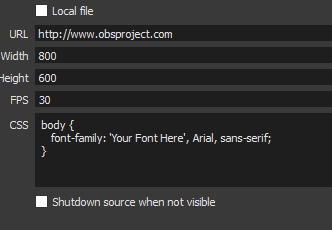
To add your overlays to OBS, add a new browser source in your scene. Paste your overlay URL in the browser source properties, set the dimensions to 1920x1080 (unless you changed them on the website), and :ballot_box_with_check: “Shutdown source when not visible” https://youtu.be/KDvLynUqXI4
safe carbon
@pine hemlock it's zeldaskitten
pine hemlock
Can you send me an invite link to your dashboard
nocturne pelicanBOT
@safe carbon To invite managers to your dashboard, Click on your Channel Name at the top of the dashboard and scroll down to Settings. Click the drop down arrow to expand your channel managers and then create a new invite at one of three access levels (Bot Supervisor, Editor, Full Control) Check this video out for more help: https://youtu.be/zl_h-ttZDF0
pine hemlock
fixed in dms
 dreamy fox
Kappa gen isn’t working with my cheer on obs. Is it not compatible with obs? Or can I fix it?
 zenith widget
@dreamy fox Have you made sure this is ticked?
zenith widget
Which OBS are you using?
dreamy fox
Obs 17.02
64 bit windows
pine hemlock
That's really outdated
Try updating obs via a download from their site, should work after that
lament blade
Hey all, in the twitch settings what does show twitch chat and show messages do? How does it display ?
In the SE settings sorry
dreamy fox
One more question, how can I get “selected emotes” to show up for cheers? I have chosen the selected emotes and they’ll show up for tips but it’ll show random emotes for cheers
zenith widget
@lament blade Where exactly are you seeting those settings? I may need more coffee
lament blade
Sorry it’s on chatstats
zenith widget
@dreamy fox
Selected emotes, will only show for when an explostion is triggered via a sub or tip or cheer.
dreamy fox
I see them there^
zenith widget
if some emotes don't work, I'd suggest to click save, refresh the editor, opne up again, turn off/on the emotes and save again.
dreamy fox
Ok got it! Thanks!
lament blade
zenith widget
@lament blade I'm not really sure about the "show twitch chat" option but show total messages should be this:
There is a blank bar on top, which usually shows the emotes being used at the current moment.
 potent ibex
I can't see any timezones on my twitch extension 
zenith widget
@potent ibex Did you try reinstalling the extension?
And as far as I see you are not using currently the countdown function 
 zenith widget

potent ibex

Do you guys provide support for g2a pay stuff failing to connect?
Says the connection failed
zenith widget
If you are trying to connect a normal G2A account it won't work.
zenith widget
If its something in G2A Pay's platform - we can't help with that.
If its the email connecting on our site/platform then we can check for something
potent ibex
idk it says to contact support (your discord)

 glass tusk
Can I steam on ps4
potent ibex
@glass tusk Yes, providing you use a capture card or remote play
zenith widget
@potent ibex You are a bit wrong there 😉
potent ibex

nocturne pelicanBOT
@glass tusk Here is a guide on how to setup the most essential tools for streaming from your console, while using StreamElements tools without involving a Capture Card! It's easy to do, take 4 minutes to read and 10 to 15 minutes to setup!
Read all about it here: https://blog.streamelements.com/how-to-stream-on-console-7b620b1c46c3
zenith widget
Consoles can stream directly to Twitch, but can't have overlays
potent ibex
Well yeah of course
glass tusk
Thanks guy
potent ibex

glass tusk
Guys
zenith widget
You are welcome
potent ibex
5:20pm 
zenith widget
Anytime I'm awake
glass tusk
Lol
potent ibex
What's the time period for the loyalty point handout?
zenith widget
Please keep this channel clean from this type of conversation. Take it up in #general-chat
10 minutes
potent ibex
How do you change the name of the bot?
nocturne pelicanBOT
@potent ibex Custom bot name requirements
- StreamElements bot modded and in chat
- Active overlay with alerts
- StreamElements tipping page in the panels below the stream (!panels)
- Create a twitch account for the name you want to use
- Ground Control app must be running
Steps to enable custom name
- Sign in to https://twitch.tv with the bot account
- Install and run Ground Control (!gc for download)
- Visit https://twitchapps.com/tmi/ and generate an oAUTH token
- Copy/paste everything in the box to Ground Control oAuth settings and enter the name for the bot account
- Restart Ground Control (custom name may take a few minutes to take effect)
Mac does not currently support renaming the bot.
 flat pebble
good morning guys and girls. A very quick question. Is there a way to get a full list of the !watchtime hours that people have on our channel? or do we have to manually go through and check each one with the !watchtime @so-and-so command?
Thanks in advance
zenith widget
You answered your question at the end, unfortunately
I think its been suggested in the ideas board to have it show in the actual leaderboard
 knotty mountain
How do I get an early access code for the stream elements live mobile app?
 gentle imp
!code
nocturne pelicanBOT
The app is currently in closed beta, keys were given away at the Gamescom in Cologne, Germany.
Please wait and stay tuned for the open beta.
gentle imp
you'll have to patiently wait like the rest of us 😃
knotty mountain
All I needed to know😁. Any projected timeline for open beta?
gentle imp
nope
 torpid estuary
@frosty pine hosts with 0 viewers will not reward any points. You can not activate that.
 ripe scarab
Why does the android app link to here if it's just gonna be answered with a generic command?
zenith widget
Well, its faster for us to give the generic command which give a short and simple explanation that currently there are no codes available
due to them being fully given away at Gamescom
and that the event(gamescom) is over.
and to stay tuned for more info as to when Open Beta will comense.
ripe scarab
I guess it's one way of doing it. But it comes off as very misleading.
"Oh, you're interested in this shiny new toy? Ask for a key here..."
"The key is a lie" :)
 daring pecan
I was wondering if someone can offer some good advice for my question please...
Its regarding overlays and screen resolutions.
I have a superwide monitor 2560x1080 and my stream output is 720p - In OBS my base resolution is set to 2560x1080 so I was just curious whether I should set my base resolution to 1920x1080 or can I get my overlays to match my base resolution.
I hope that made sense!
zenith widget
@ripe scarab The was is not a lie - we just don't have any. Its another thing that the app can't be updated at the moment to have the correct info. 🤷
@daring pecan Overlays can't be "stretched" to base resolution greater/wider then 1920x1080
You will have to set OBS to base resolution of 1920x1080 and maybe play games at that resolution
ripe scarab
@zenith widget Sorry, was meant as a reference to Portal 2's "The cake is a lie."
 torpid estuary
Not if I find it first 
 vital wyvern
🍰
vital wyvern
You would have to have a Overlay and add the Alertbox widget so you will get the donation alerts 😃 @cloud matrix
 cloud matrix
But I don't have a pc tho
vital wyvern
I am guessing you are on a console?
cloud matrix
Yep
vital wyvern
then not unless the console's livestreaming system can add a browser source
So am sorry fam 😦 😢
cloud matrix
I'm so stupid I just remembered i can make it so chat bot says all recent donations
vital wyvern

 pure brook
hello, question.
can i add my own variable for unique ideas, or is that not possible?
zenith widget
own variable for unique ideas? You mean quotes?
zenith widget
Not possible to make custom variables unfortunately.
zenith widget
there is a ${random} variable if that hleps
pure brook
hm but like that it takes the points and then randomize the words that has been added
for example: command !weaponpicker ( take points 200)
pure brook
alright, thanks let me have a check
zenith widget
Ooh if we take that type of example as what you are looking for.
At the current moment its only possible to an extent via the API
pure brook
ahh alright,
zenith widget
There was a recent discussion over at #dev-chat about how to extract points and add points.
But this also involves a custom script
so eventually everything goes via ${customapi}
pure brook
alright, then i know enough i gues :D ill take a look once i am home
Thanks alot %.%
^.^*
zenith widget

 magic ermine
What up, dudes, is there currently any way of adding a 'Subs Gifted' widget at all?
The same as one would for top tippers or bits or whatever
zenith widget
Ooh you mean the top gifter?
zenith widget
Official widget? there is no. I'll have to ask internally if its possible to add a custom built one
magic ermine
Oh I mean I just assumed it would be a thing for streamelements because everything else is in there already
zenith widget
Got an answer - even for a custom built widget we don't have an open variable 
Else I'd whip one right now
 mortal basin
Hello, i get an error saying "an unspecified error has occured while recording" any idea what is wrong?
 winter zenith
in OBS?
mortal basin
yess
nocturne pelicanBOT
@mortal basin For the best OBS support, please join their discord where OBS devs and support volunteers are available all the time discord.gg/obsproject
mortal basin
oh, sry x)
 formal fog
Hello theire is a way to put a name for tips when someone tips me but don't put his name ?
Replace anonymous ?
 pine iris
@formal fog If they put their name in when tipping it will show their name, otherwise it shows anonymous
formal fog
yes but can i change this tips name particularly?
pine iris
I'm not sure. @zenith widget is it possible to modify what SE displays when a tipper did not put their name?
By that I mean change "anonymous" to whatever you want
formal fog
And that would be better if i can change a certain tips and not all anonymous.
zenith widget

torpid estuary
it is not possible to change the name in the "latest tipper" widget, as far as i know.
it gets the username from the tip, so if the donator didnt put in a name it will display anonymous
formal fog
Ok ty for your help
pine iris
I know - the {name} variable display "Anonymous" when there is no tipper name - but can you change so that it displays "Unknown person" instead?
Do I make sense @zenith widget ?
torpid estuary
you can change by hand after it happened
pine iris
ooooooooooooooooooooooooooooooo
torpid estuary
there is no way change the variable to something else
zenith widget

pine iris
I like what you showed there @zenith widget - handy
zenith widget
why was i ? 
pine iris
@formal fog That would be exactly what you want - in the screenshot above
formal fog
Yes thx ! @pine iris
torpid estuary
yeah, its always best to just ask a question in here. as soon as someone from support has time they will look at it
zenith widget
@pine iris Taking credit like a champ..
torpid estuary
please dont ping support staff randomly
zenith widget
nah i don't mind really, but why exactly me?
pine iris
FeelsSorryMan
zenith widget
Next time when you are not sure, ping support hero role, instead of an individual person

formal fog
Sorry my bad
zenith widget
i might have been busy with my own work
pine iris
But I know you da best KeiZar 😎
zenith widget
vital wyvern

pine iris
Yeayea JK sorry
 zenith widget

gentle imp

 mighty bridge
Idk if it's the right place to post but I'm having some issues with SE OBS, infinite loading since I've updated it
 fresh tundra
Hey guys, dont know if this is the right section to ask this, but is there anyway I can just copy and paste and alert box from one scene to another in my overlays?
 hexed prairie
Issues with the 'User Mods' that I setup in SE... Once in Twitch the users make post in the chat and do not have their 'Mod' status... Please Help!
gentle imp
yes @fresh tundra select the widget and look at layers, there's a duplicate icon there
then choose this layer or others
hexed prairie
^^ Correct..
fresh tundra
thank ya @gentle imp also is there a way to change the color of theme anywhere?
gentle imp
so set it up in one overlay, then copy to all others, will retain position+settings
not really, that's why a lot have diff colors to choose from
fresh tundra
Got ya, thanks for the fast replies!
gentle imp
most are videos or images, not html so can't just change colors
@hexed prairie mods on SE don't become mods on your twitch channel, to mod them do this /mod username
@mighty bridge did u logout and back in?
mighty bridge
I'll try it now
hexed prairie
Ok. I saw that command and use it in Twitch. It worked. So what is the purpose of the user mods in SE.?? @gentle imp Thanks man!
 spare ocean
How do I import my settings from streamlabs to streamelements?
gentle imp
so you can limit commands, let them help with stuff on site/stream
fresh tundra
@gentle imp I feel stupid but when you say select the widget to you mean go to widgets in the scene Im trying to copy the alert box into?
gentle imp
no, sec i'll show u a pic
 upper steeple
fresh tundra
upper steeple
fresh tundra
@gentle imp appreciate it buddy!
gentle imp
@fresh tundra go into the overlay where you setup the alertbox, then select it and duplicate, check image
fresh tundra
ah I see it now! thanks for the info! ❤
 gentle imp
how so?
 blissful verge
i want to have a stream banner/label
were you can put last follow and last donation'
gentle imp
ahh, have you looked at our premade themes? https://streamelements.com/dashboard/themes
blissful verge
yeah
gentle imp
if you want something made for you check #art-marketplace
blissful verge
may i ask 1 more thing
gentle imp
of course 😃
blissful verge
i am using streamlabs for the pop ups and i wana use stream elements for the banner/label
can i do that?
?
gentle imp
popups u mean that twitch extension over video? if so it's no problem
blissful verge
what do you mean oh?
gentle imp
maybe not same thing I'm thinking, but should be fine
blissful verge
oke thank you so much for your time and help have a great day 😄
 narrow coyote
 If you use SL for your alerts and donations, that cannot be tied to our services
narrow coyote
some stuff yes, but if you use SL for donations, we wont be able to show any of that in our services
narrow coyote
if that is what you want to do
hexed prairie
@gentle imp Thanks for the info again. I guess it just didn't make sense. But just so I get it -- making the SE Mods let that user help with stuff like commands, i.e. [ !(command) ] in Twitch but doesn't give the the sub badge. So Twitch does know per SE that the user is a mod, but doesn't give the "Twitch Mod" priority..?? Excuse me if I sound redundant... Just wanted to clarify.
blissful verge
thank you so much now i can use SL for follow and Stream Elements for the rest
Wait a sec
blissful verge
cuz i made a custom follow/sub alert
spare ocean
With the cheer event alert, I changed it , but it stays the same.
blissful verge
but when i put a donation link i will use stream elements
narrow coyote
you can import SL alerts into our system, and our custom alert and event list widgets are extremely flexible. you can do anything, look in #widget-share for examples
@spare ocean you need to go through all the variations
spare ocean
Ah ok
blissful verge
ow thats cool ty
can i remove some things from a overlay
because i only want a banner/label
 sullen nimbus
winter zenith
sullen nimbus
winter zenith
@sullen nimbus reconnect your StreamElements account in the top right tab!
narrow coyote
Your OBS Studio version is also out of date, you are on 21.1.0, current version is 22.0.2. You should get the latest version from their site
nocturne pelicanBOT
@blissful verge To add your overlays to OBS, add a new browser source in your scene. Paste your overlay URL in the browser source properties, set the dimensions to 1920x1080 (unless you changed them on the website), and :ballot_box_with_check: “Shutdown source when not visible” https://youtu.be/KDvLynUqXI4
blissful verge
Ty
 vague vault
Hi i need help
 loud arrow
Pasword
torpid estuary
what password @loud arrow ?
@vague vault its always good to just go ahead and describe the problem you're having. as soon as a supporter has time they will look at your problem
vague vault
@torpid estuary Thanks, i duplicate overlay but the URL is the same... how to change this?
narrow coyote
if you duplicated the overlay, the URL is different
parts will be the same, but it is unique if you actually compare them
vague vault
@narrow coyote when i use copy button and paste in OBS not change 😦
nocturne pelicanBOT
@hexed prairie
Chat/Bot Levels
100 - viewer
250 - subscriber
300 - __regular __
500 - moderator (twitch mods automatically placed at this level)
1000 - super moderator
1500 - broadcaster
Dashboard Manager Levels (least to most access)
Bot Supervisor (can add super moderators from dashboard)
Editor
Full Access
https://i.imgur.com/s61Liry.png
 gentle imp
those are the levels of access within StreamElements website and bot @hexed prairie
narrow coyote
@vague vault if you open each overlay in your browser using the launch button, you should be able to see they are different URL's
gentle imp
twitch chat mods is not the same, but you will and should mod your mods on twitch manually @hexed prairie 😃
torpid estuary
@blissful verge make sure to put your overlays in a browser source in OBS with the resolution of 1920x1080
 muted crypt
How do I get the invite code for stream elements
nocturne pelicanBOT
The app is currently in closed beta, keys were given away at the Gamescom in Cologne, Germany.
Please wait and stay tuned for the open beta.
torpid estuary
also when your browser source is selected press CTRL + F to make the overlay fullscreen
muted crypt
When will the app be open
hexed prairie
👌
torpid estuary
no ETA yet sadly
vital wyvern
⤴ @muted crypt
gentle imp
you can assign for instance commands that only supermod (and above of course) can use @hexed prairie 😄
or regulars etc
vague vault
@narrow coyote thanks man is rare in explorer edit duplicate overlay´s and see difrerence when copy URL and paste in NOTEPAD to veridicated is the same, maybe cache web explorer is the problem?
muted crypt
Can somebody call me and help me setup my streams
blissful verge
@torpid estuary ty
torpid estuary

vital wyvern
@muted crypt we got a playlist on our offical yt channel to guide you 😃
il link it to you real quick
blissful verge
i like it that you dont need to download the templates
nocturne pelicanBOT
@vague vault To invite managers to your dashboard, Click on your Channel Name at the top of the dashboard and scroll down to Settings. Click the drop down arrow to expand your channel managers and then create a new invite at one of three access levels (Bot Supervisor, Editor, Full Control) Check this video out for more help: https://youtu.be/zl_h-ttZDF0
muted crypt
Thanks
narrow coyote
@vague vault please generate an editor link, and DM it to me so I can take a look
spare ocean
Any way I can duplicate overlays?
vital wyvern

Setting up StreamElements is easy, learn how to in this video, hosted by Twitch Partner GIRLvsDUMB - Got any questions, or just want to say "Hey"? Join our D...
torpid estuary
@spare ocean yes, go here https://streamelements.com/dashboard/overlays and press the button on the lower right of the overlay you want to duplicate

StreamElements
The Ultimate All in One Platform for Streamers
spare ocean
Thx!
muted crypt
That doesn't help me because I need to get an invite code for streamelements
muted crypt
@winter zenith
winter zenith
@muted crypt
torpid estuary
@torpid estuary
winter zenith
 weary mist
@muted crypt are you talking about the app?
muted crypt
Can somebody help me get an invite code for streamelements I need it I just started streaming a couple of weeks ago
torpid estuary
if you are talking about the fire app, then no. there are no codes left @muted crypt
weary mist
two things.
- The phone application is IRL only
nocturne pelicanBOT
@muted crypt The app is currently in closed beta, keys were given away at the Gamescom in Cologne, Germany.
Please wait and stay tuned for the open beta.
muted crypt
Does anybody know when it will be open to the public
weary mist
- We ran out of codes in the above Gamescom, so once we get into the next phase, we will either unlock it, or get more codes
 royal thistle
Quick question, does StreamElements work with Mac?
spare ocean
Ground Control uses loads of CPU for me. anything I can do about it?
winter zenith
no @muted crypt stay tuned here on discord for a announcement to everyone when its ready
@royal thistle yes but the renaming bot option doese not work. Other than that you can use SE overlays with out any issue on mac
muted crypt
Cuz I heard this is a very good app but like I said I'm just trying to get my stream set up to where it looks good and I'm not just having a plane stream that's why I came to stream elements because someone said that it was a very good app to use for streamers and I'm taking their word on it I mean you guys seem like a pretty good community so
winter zenith
@spare ocean define "loads of CPU" you toggle Media request trough it or just activity?
royal thistle
Ah sweet. Real good to know. So I assume the normal version doesn’t require codes but the ‘Fire’ does?
spare ocean
Just when it's opened already. Media request and all is not on.
winter zenith
@muted crypt its even THE best app for IRL streaming on the market.
But you need to wait so we can make the app smooth as possible,
I test it myself and its pretty far in development so just be patient a little more so you can enjoy it when its out.
for Free
With out a code to be needed
@royal thistle you are talking about the app?
This one is planned for Iphones but will take a much longer time since its really hard developing for Apple
@spare ocean how much % of CPU?
muted crypt
Okay thank you for everything I will stay tuned if you could just like at me if you get any new news for me that would be awesome
spare ocean
@winter zenith Around 10%, it went to 30% at one point
winter zenith
as everyone here will get pinged when its ready you know about our #announcements channel? Thats where you will get information! @muted crypt
you are not the only one waiting for it
with good reason 
 fierce minnow
How do I get stream elements early?
muted crypt
@winter zenith thank you can you add me as a friend
winter zenith
@muted crypt no sorry
muted crypt
Ok
weary mist
StreamElements is a free website you can get overlays (and much more) from right now. If you are talking about the phone application, that is an IRL Streaming App by StreamElements, which is currently in closed beta, and we are waiting for this round to finish before getting more testers, or opening to everyone @fierce minnow
fierce minnow
Ok, thanks
muted crypt
@weary mist the problem with that is I don't have a PC that's why I'm waiting for the mobile app
weary mist
@muted crypt We 100% understand, but these things take time. Bugging us will NOT get it out sooner, nor will it get you a code
muted crypt
Ok
winter zenith
@muted crypt pls in #general-chat if you dont need any help anymore
muted crypt
Thanks for the info
royal thistle
Yeah, developing for apple seems hard
So wait, StreamElements isn't even a download thing? Its a website?
winter zenith
StreamElements
The Ultimate All in One Platform for Streamers
Setting up StreamElements is easy, learn how to in this video, hosted by Twitch Partner GIRLvsDUMB - Got any questions, or just want to say "Hey"? Join our D...
royal thistle
I would, but i'm at school Don'tquestionmeok
 strong kernel
For the most part, yes, we're a cloud-based service. We do provide a plugin for OBS Studio, as well as the Ground Control app for certain uses, but the vast majority of what we provide is controlled on the website through your dashboard.
royal thistle
So, how would I use StreamElements if I used OBS Studio to stream?
 pulsar cave
this is so hard to setup with obs
strong kernel
You create your overlay in the browser, and then once it's all set, you copy the overlay's link and use it in a browser source in OBS.
pulsar cave
its not macthing up
nocturne pelicanBOT
@pulsar cave The default resolution for StreamElements overlays (theme and custom) is 1920x1080. Please add them in OBS at their full resolution and use CTRL+F to fit to screen if necessary. You can then downscale your stream in OBS settings > Video if you'd like https://i.imgur.com/6bWXxjR.png

 frosty pine
That's the situation why host message never be sent
Today only one has be sent with 6 wiewers
winter zenith
why you have a /me in front of that?
OH
its chat allerts
looked like Overlay manager was SUPER confused 
were those 0 Viewer hosts? @frosty pine
frosty pine
Cause if I wrote" /me "stream elements Write in blue
winter zenith
...
@frosty pine where the Hosts you reciving 0 Viewer Hosts? Outside of the one with 6 Viewers wich got a Host message?
 bright mesa
So I have a shoutout command for my chat. It works but only if the name is typed out like !shoutout SillyCandi. Is there a way to be able to do !shoutout @bright mesa and have the bot take out the @ symbol so I don’t have to type out the whole name?
winter zenith
I think its
Check out $(user), last game they played was $(game $(user)) Go check them out here: https://twitch.tv/$(user)
Or its
Check out ${1}, they are playing ${game ${1}} at https://twitch.tv/${1}
frosty pine
I had received those host during my live I've see it while the live was on now I'm off.
at 18:30 I'm back on stream if you can check the problem I will appreciate
It
winter zenith
.... @frosty pine whats your normal language? I fear we run into a language barrier
bright mesa
That worked! Thank you so much!
winter zenith

frosty pine
The only word they say to me yesterday was " it's all alright"
But that's not alright and i don't know how to solve it
torpid estuary
@frosty pine Gli altri host hanno ricevuto 0 spettatori? Se è così, sarebbe perché nel tuo screenshot hai impostato l'ammontare minimo per far scattare l'avviso su 1.
frosty pine
@winter zenith when I tell my language last time nobody would like to help me
frosty pine
Grazie voids
Ho impostato anche 0 oggi ma non funziona lo stesso
Grazie per aver scritto in italiano
E aver deciso di aiutarmi nella mia lingua 😃
torpid estuary
Pensavo che ieri l'allarme funzionasse, ma non sono stati forniti punti? È normale, dal momento che non puoi ottenere punti per 0 host di visualizzatori.
frosty pine
Ma in passato ha sempre dato i punti a chi mi hostava con 0 spettatori
Perché ora non lo fa più
E addirittura in chat non mostra che mi stanno hostando
Con 1 o 2 spettatori
torpid estuary
Io non la penso così, dal momento che SE non ha mai fornito punti per 0 spettatori, per quanto ne so.
frosty pine
Più che altro quando la gente mi hostava anche con 0 spettatori scriveva sempre "ti sta hostamdo con 1 spettatore"
 queen solar
Hi how do I get a code for the elements app?
nocturne pelicanBOT
@queen solar The app is currently in closed beta, keys were given away at the Gamescom in Cologne, Germany.
Please wait and stay tuned for the open beta.
torpid estuary
Ok, strano! Mi dispiace di non poterti aiutare più di tanto, dato che il mio italiano è davvero arrugginito! 
0 host di spettatori non danno punti e apparentemente non l'hanno mai fatto. I tuoi avvisi funzionano diversamente? @frosty pine
 neon bone
Can someone give me a test code for Streamelements app on Android
nocturne pelicanBOT
@neon bone The app is currently in closed beta, keys were given away at the Gamescom in Cologne, Germany.
Please wait and stay tuned for the open beta.
neon bone
K thanks
 pliant fjord
Hey can someone help
 molten hill
This app is Fucking amazing, Thanks!
zenith widget
@pliant fjord Maybe. Can you tell what your issue is?
@molten hill Which app, good sir?
pliant fjord
Ummm... could we join a chat
zenith widget
@molten hill
pliant fjord
Voice support
zenith widget
@pliant fjord I can't at the moment.
molten hill
@zenith widget Love The Emblem
pliant fjord
Ok ill try explain
zenith widget
@pliant fjord Can you not DM me and keep it here?
molten hill
I'm going to go mute for this conversation
pliant fjord
So whats been happening is i click donate on my panel and it takes me too frogmasterstreams not frogmaster so when i see if the tips work it says frogmasterstreams not found i changed my name from frogmasterstreams too frogmaster
zenith widget
@molten hill If you want to praise more, you can do it in #general-chat 
pliant fjord
frogmaster_ *
spare ocean
what is OBS.Live exactly?
 crimson yew
OBS
zenith widget
@spare ocean Its a plugin for OBS.
spare ocean
What does it do?
strong kernel
@spare ocean It's a plugin for OBS Studio that shows your activity feed, Twitch chat, and some other stuff.
crimson yew
It shouldn't.
spare ocean
I'll try it out then 😃
molten hill
You have to go on Stream elements It should say Tipping Settings you Change the Heading there my friend @pliant fjord
zenith widget
@pliant fjord So when you go to your new twitch name and you click on your donation link it goes 404?
@pliant fjord Like Alfie mentioned, go to your tipping settings and get your new link and replace it in your twitch panels
pliant fjord
Ohhh ok
molten hill
Is that the problem? @pliant fjord
pliant fjord
Yes
molten hill
@pliant fjord Okay, Good Luck
zenith widget
@spare ocean It provides you with a built in activity feed and chat btw
pliant fjord
Thank you so much @viscid pebble
 keen storm
I decided to install OBS.live but it seems to be stuck while I'm installing it.
zenith widget
Tagging streamelements? 
 plush path
Hi, is it possible to delete a channel within the streamelements website? I clicked on "add youtube channel" but i ended up only wanting my twitch channel linked only, and I cant seem to find a "remove channel" option
crimson yew
@zenith widget XD
molten hill
@pliant fjord If you need any more help Chat in here, Okay?
pliant fjord
Okay
crimson yew
Glad 
zenith widget
@keen storm I'd suggest to stop the installation if you can and try again as admin.
@plush path Did you originally login with your twitch channel?
plush path
yes
zenith widget
@plush path Then you are connected via Twitch and if you stream from Twitch you should be fine.
molten hill

spare ocean
On Ground Control, I turned on Viewer Requests just to see if it works but now it's stuck and can't turn it off?
pulsar cave
Do I need a El Gato to use obs?
zenith widget
@spare ocean I'd suggest to use Media Request from the dashboard as ground control is known to be buggy.
molten hill
@zenith widget I like helping
zenith widget
@pulsar cave Do you play from a console or 2nd PC?
pulsar cave
Ps4
zenith widget
@molten hill I can see that, but if you are on mobile, good luck keeping up with my WPM 😉
plush path
Oh, I know that, but i was wondering if i could remove these two in the blue circle
spare ocean
thx KeiZar, that worked
zenith widget
@pulsar cave Then you will need a capture card if you need overlays.
molten hill
@zenith widget Your typing is so fast lol
zenith widget
~70WPM
pulsar cave
What's a capture catf
keen storm
That worked, thanks.
zenith widget
@plush path I'd suggest to find any account connections in your youtube account and if it says "Streamelements" disconnect it.
I'm not sure where that should be.
molten hill
How do you get overlays on ps4?
plush path
Okay cool, I'll look around @zenith widget thanks!
zenith widget
@pulsar cave Elgato is a type of capture card and there are others as well.
pulsar cave
Ty
zenith widget
@molten hill Get a PC, get a capture card, get a console. Hook up capture card to PC, hook up console. Get OBS, get video from console on OBS, get overlays on OBS, stream to twitch @pulsar cave
quick and dirty explanation
 zenith widget
You test beta stuff for twitch
keen storm
If I'm streaming on Twitch and don't have a second monitor, is there a good way to monitor my channel via a mobile device?
narrow coyote
Twitch mobile app would probably be your best option
keen storm
Thanks
 turbid imp
How do i get an invite to the stream elements app
nocturne pelicanBOT
@turbid imp The app is currently in closed beta, keys were given away at the Gamescom in Cologne, Germany.
Please wait and stay tuned for the open beta.
turbid imp
How long will it take to get a code
strong kernel
There is currently no ETA on the open beta.
turbid imp
Damn that sucks. Well i gtg. Got stuff to do. Have fun streaming and stuff
frosty pine
@torpid estuary fino a una settimana fa stream elements ha sempre dato i punti a chiunque mi hostasse comunque parli un'ottimo Italiano anzi pensavo stessi usando google traduttore o simili
 pulsar gulch
Hello , so if i start with custom sub alert do i need to do for each resub / gift a custom sub alert or how do i set those ?
or those are in variations ?
narrow coyote
If you are not using custom CSS for the alerts, you can crate variations for resubs, gifts, community gifts, $1 resubs, tiers, etc. If you are using CSS it would all need to be done with code
pulsar gulch
i cant use css only on sub and then go like normal for the rest of them ?
narrow coyote
what do you mean the rest of them? You can enable custom CSS per alert type, like sub, follow. But if you enable custom CSS on the sub alert, it will affect the variations for subs and you will need to use code to control the behavior you want
pulsar gulch
oh damn I see .. well what if i add another alert widget to use only for variations ? 🤔
narrow coyote
if you have one alert widget with subs using custom CSS, and another alert widget setup with variations, depending on how the custom CSS alert is coded, I would expect both widgets to alert
narrow coyote

 floral badger
hey i have a bug with my obs.live when my chat is full it won't automaticaly scoll down enymore eny ideas to fix it?
narrow coyote
Did you update to the version released today? its scrolling fine for me with a quick test
If you scroll to the bottom of the chat, does scrolling resume? the only have i have gotten it to not scroll is if I scroll up and then more chat lines are added
floral badger
for me it just won't auto scroll even when i click the go to bottom
so my mods helped me with clearing chat all the time but...
thats what it does
@narrow coyote
narrow coyote
try doing StreamElements > Reconnect streaming account  I cant reproduce the problem, and not sure what could cause it
floral badger
okay ill try
pulsar gulch
Hello again 😮 , so i updated obs stream elements and now all my items from store are so quiet . How should i increase volume to all ?
narrow coyote
OBS.Live should have no influence over the volume of your store items. the only way OBS would be involved would be if the audio source is turned down
 dense beacon
Do anyone really know how "Follower Goal" widget works? I open it up and it says 168 .. I wanna set a goal of 400 followers and I am at 336
strong kernel
Goal itself is set in widget settings by selecting it, progress is in Data tab at the top under Goals.
weary mist
@dense beacon in your editor, click the data tab, then your Goals tab. Change it to what you want to be at. The Goals widgets are addition based only. (gain X over this time period). if someone unfollows, it doesn't subtract as there is no notification if that happens
floral badger
I restarted and reconnected an it fixed it but i also have a question: i want to use the song request from SE with the ground controll ap but i’m playing a shooter so i need my surround sound now what i want is to set the sound of groundcontroll to an other sound output device but i don’t know how so i can pick it up with obs
dense beacon
Thanks @weary mist Never knew about that 😄
narrow coyote
you need to add the audio source to OBS
new Audio Output Capture source that is the device you are routing the music to
 deft shard
i ask a few days ago. Did StreamElements changed the history of events in Ground Control to 1 month, instead of several months?
floral badger
Yea but how do i get the Ground controll to an other output source
I’m using windows 7
narrow coyote
 Windows 10 has native support for per application audio routing, you will need to use audio routing software for something like that
floral badger
Okay
deft shard
anyone?
weary mist
@narrow coyote I never got that update for some reason.
@floral badger I use a program called Audio Router
@deft shard That is something we are looking into
narrow coyote
its in the latest major update of windows 10
right click speaker in system tray, and open sound settings
weary mist
unless it has updated in the last 20 days, I never got it
deft shard
because small streamers dont get much events. And in the past i could test /redo the events from several months. Now i cant anymore. It goes only back 1 month
 elder shadow
For some reason, on the OBS Lite, my alerts sound twice. I tried it on StreamElements overlay emulation and it worked out just fine. I didn't have anything else open that had to do with the overlay or the stream.
weary mist
@deft shard I understand that, we are looking into it. We know the issue, give it time
deft shard
Streamlabs goes back to 1 year if i want
and what about customs fonts?
if i could use custom fonts in streamelements i would get totally rid of streamlabs and only use SE
elder shadow
I'm trying to do just that because SE has great stuff and great potential, tbh
weary mist
@deft shard custom fonts are very tough because we operate on a cloud system. StreamElements would need to pay for the custom font usage
nocturne pelicanBOT
@elder shadow Make sure to :ballot_box_with_check: “Shutdown source when not visible” for all browser sources (all OBS scenes). If using studio mode, uncheck “Swap Preview/Output scenes After Transitioning.” Also keep in mind that sound can play from any overlay loaded in the browser (editor or launched). https://i.imgur.com/FegZJQS.png https://i.imgur.com/yY0wcFl.png

 elder shadow
god bless
deft shard
@weary mist yes but alot streamers have custom made scenes, and still using Labs because of that
just dont like the fact to use 2 programs
weary mist
There are ways around it. Like OBS provides custom CSS in the browser source
If you built that correctly, you can convert all font to a locally hosted font
 subtle python
I am completely lost
weary mist
@deft shard im no good with CSS personally, otherwise I would
@subtle python I am lost as to what you are lost for
deft shard
@font-face {
font-family: CustomFont;
src: url('CustomFont.otf');
}
p {font-family:CustomFont, Helvetica, Arial}
somethikng like this
oh well i try experiament it in the weekend with it
subtle python
I am new to streaming and I am using player.me for streaming and would like to use your product as well, but I just cant figure it out
it shows youtube clips for help but they are so small it doesnt help
weary mist
@subtle python https://strms.net/welcome
Setting up StreamElements is easy, learn how to in this video, hosted by Twitch Partner GIRLvsDUMB - Got any questions, or just want to say "Hey"? Join our D...
that is an entire playlist of our videos
 subtle python
thank you
spare ocean
With obs.live obs uses 5% more cpu. Anything to do against this?
weary mist
@spare ocean There will be a slight increase due to the fact it is holding open your activity feed and twitch chat. Compare the cpu % by including those as if you had to open them seperatly
spare ocean
Ig it makes sense yeah
lament blade
Where does one find an early access code for Streamlabs for Android? I seem to be lost
strong kernel

nocturne pelicanBOT
@lament blade The app is currently in closed beta, keys were given away at the Gamescom in Cologne, Germany.
Please wait and stay tuned for the open beta.
lament blade
sorry not streamlabs, streamelements my bad. been a long day lol
okay thank you @nocturne pelican
frosty pine
Today I've found a new problem my followers with notification activated not receive notifications and allof them say to me the problem
weary mist
As in notification when you go live?
 torpid osprey
Can i stream sound and picture from phone on twitch??
narrow coyote
with an app that supports it, yes
torpid osprey
Oh and hello. I got the app firestream early access
narrow coyote
its in closed beta, no codes are available, also, our app is designed for IRL streaming, and does not support streaming the display of the device
torpid osprey
Can i get the early access invite code please?
nocturne pelicanBOT
@torpid osprey The app is currently in closed beta, keys were given away at the Gamescom in Cologne, Germany.
Please wait and stay tuned for the open beta.
 zinc vessel
so is ground control ever going to be updated again? i still can't get keybindings to work, and the ability to randomize backup playlists is still missing :/ i was told the randomization capabilities would be re-added shortly but it's been months now
torpid osprey
So that's a no?
narrow coyote
I believe the focus is on OBS.Live first, then Ground Control after that. I think the shuffle option is still missing due to API restrictions with YouTube, and the amount of API calls we are already making for Media Request
zinc vessel
well... poo. does OBS.live have any of the music control of ground control? dont know a lot about it
narrow coyote
not yet, but it is planned to get media request features, as well as more hotkeys
some hotkey support was just added in todays release
zinc vessel
cools, i'll keep an eye out for it.
 wary gazelle
So, is there any way to get the stream elements to gather bit data that was donated before I activated elements as my bot?
 limber maple
So when is it going live for everyone?
narrow coyote
What are you referring to?
royal thistle
Aw man, OBS.Live is only for windows
narrow coyote
Yes
narrow coyote
royal thistle
as in how do i set up an overlay
narrow coyote
You use a theme or make a new overlay in the site
 jaunty trench
What is the invitation code for StreamElement
 dense jackal
https://www.youtube.com/watch?v=UuweQah3v00&list=PLCDDKlFdScbEwdx5AntcQIS1InkFJwHtv checkout this playlist it will help explain everything @royal thistle
nocturne pelicanBOT
@jaunty trench The app is currently in closed beta, keys were given away at the Gamescom in Cologne, Germany.
Please wait and stay tuned for the open beta.
royal thistle
Aight, thanks
 rustic mist
did something happen with the new update that would be messing with my ability to keep a steady bitrate?
 olive bloom
I was at GamesCom but didn't see anything StreamElements related
royal thistle
Uh, the playlist sent to me is a bit outdated. It's not updated to fit the current website
narrow coyote
What OBS.Live does should have no influence over the encoder
There was a booth at gamescom
olive bloom
damn I must have missed it 😦
well to my defense, I did spend a lot of time in the EA Lounge haha
royal thistle
So, how do I get a theme on the new website? Since the playlist sent to me is outdated, I can't get the 'themes'
torpid estuary
there is a "themes gallery" on the website, not sure what you mean with that you cant get themes anymore...
cloud matrix
How do I afiliate
torpid estuary
you have to pick a theme first @royal thistle
narrow coyote
you get themes from the theme gallery, and edit overlays in the editor
torpid estuary
in the themese gallery
royal thistle
Oh
torpid estuary
@cloud matrix you get afilliated by twitch, not by us.
cloud matrix
Oh
wary gazelle
So, is there any way to get the stream elements to gather bit data that was donated before I activated elements as my bot?
torpid estuary
and it happens when you have at least 50 followers, at least 3 average viewers over the past 30 days, and some days streamed i believe
you have to check on twitch
narrow coyote
We can only get data from the time you signed up, not past data
royal thistle
Is there any themes for the game 'Rainbow Six Siege'?
wary gazelle
@narrow coyote So there's no way to change it to be accurate?
torpid estuary
@royal thistle yes, for example the "yellow linear"
narrow coyote
the data cannot be edited
royal thistle
What I primarly want to remove is just hte face-cam portions. I.. don't own a face-cam
narrow coyote
you can do that in the overlay editor once you generate overlays from a theme
royal thistle
Aight
 oblique isle
Does anyone else getting abug on the donation progress ? I constantly getting this from nowhere , and each time i get this i have completly to rebuild this part..
royal thistle
Uh, overlay editor won't let me delete an accidentally inserted video
zenith widget
@royal thistle There should be a "clear video" button on the left side
Unless you are referring to an uploaded video
@oblique isle So whats the bug?
oblique isle
the $31.00 should not be there
should be only DONATION GOAL 50
with the purple progress bar
zenith widget
@oblique isle So is the progress towards teh goal wrong or the progress it self should not be shown?
torpid estuary
... what is wrong?
zenith widget
Is the GOAL PROGRESS wrong?
torpid estuary
that the progress is shown?
zenith widget
or you don't want the PROGRESS number to be SHOWN?
narrow coyote
if the starting number, 31, is wrong, you can set this in the goals tab https://streamelements.com/dashboard/session
oblique isle
should be like that normally , but for somereason randomly this happens now a fev times on my stream , that the number change even no new donation , and the only way to fix it , is to remove "delte" this part from my overlay build , and recreate a new again..
narrow coyote
We are not StreamLabs
narrow coyote
The donation link in the Twitch page linked to your Discord is also for StreamLabs
royal thistle
How would I insert a box to show chat? I'm using the Yellow Linear theme
zenith widget
 patent quartz
How many point do we get for watching 1 hour on twitch?
narrow coyote
depends on what the streamer has set, not something we can answer for you
oblique isle
@narrow coyote i know your not streamlabs , but im using the overlay from streamelements into the streamlabs obs.
zenith widget
@oblique isle
narrow coyote
Our donation goal does not just magically add an amount to it, the data is pulled from the widget data, that I linked earlier
zenith widget
Our widget does not look like the one you are showing.
Unless you are using a custom built one
so either tell us which team you are using, or you check your GOAL progress here https://streamelements.com/dashboard/session in the GOALS tab
or its SL's donation widget
narrow coyote
if this is for the gamestreaminglive channel you have linked to your discord, the donation page is for StreamLabs, so we would not even get any data from that
oblique isle
narrow coyote
if this is for the gamestreaminglive channel you have linked to your discord, the donation page is for StreamLabs, so we would not even get any data from that
royal thistle
Okay so, I output 1536x864, what should I put on the overlay to make it fit?
torpid estuary

narrow coyote
use a standard output. like 1280x720, and add the overlay at its native resolution, 1920x1080
winter zenith
Whatever you can handle
narrow coyote
depends on your output, and what your system can handle
royal thistle
Okay. Left it at 30 fps which is what my system can handle
winter zenith
Nice
frosty pine
Somebody knows how to solve the problems with notification ?
narrow coyote
What problem?
did you say earlier you are not getting follower notifications?
@frosty pine
royal thistle
So, what bot is 'songrequests'
lament blade
Where do I request an access code to try out the Streamelements App on my phone?
nocturne pelicanBOT
@lament blade The app is currently in closed beta, keys were given away at the Gamescom in Cologne, Germany.
Please wait and stay tuned for the open beta.
royal thistle
Or, how do I request a song using StreamElements?
winter zenith
@royal thistle keep the Media request page open and enable it in your settings on the Media request site
Then people can SR by using the command!
!sr YOUTUBE LINK
royal thistle
ah ok
winter zenith
But that's all explained in our tutorial Playlist
 regal compass
Hey @nocturne pelican , how do I get a Streaming code for the android app?
narrow coyote
Scroll up
winter zenith
@royal thistle https://strms.net/welcome
Setting up StreamElements is easy, learn how to in this video, hosted by Twitch Partner GIRLvsDUMB - Got any questions, or just want to say "Hey"? Join our D...
nocturne pelicanBOT
@regal compass The app is currently in closed beta, keys were given away at the Gamescom in Cologne, Germany.
Please wait and stay tuned for the open beta.
royal thistle
Okay, so I enabled Viewer requests
regal compass
I was at the Gamescom damn xD but ty for the reply
winter zenith
@regal compass but not at our booth I assume
regal compass
I passed the stand and got a sticker
 long kettle
I've created a chat overlay for my channel and it works fine in the link preview, but when I add it as a browser source, it only shows the background, but no text. What am I doing wrong?
narrow coyote
you are not adding it at 1920x1080
if the overlay is not full resolution, the chat will not display
narrow coyote
long kettle
so if I have a chat border that is 546x842, how do I get it to fit in there without making it look super tiny and scrunched up?
nvm I think I got it
 nimble zinc
so is there a way i can add !ban command and streamelements fake bans them and it says "bans (name) for being a noob
torpid estuary
sure, add a new command and just type in your response!
or you can add it via your twitch chat. for that enter the following:
!cmd add !ban /me bans ${1} for being a noob!
the usage would be like
!ban <username>
nimble zinc
appreciate it, on nightbot it was like touser or something, didnt know how to get it to say their username lul
 abstract anchor
hey is anyone else not getting their overlays loading on obs?
torpid estuary
everything fine for me @abstract anchor
abstract anchor
@torpid estuary I got it working we're all good
torpid estuary

 random lion
Does anyone know how i can join twitch's discord
 icy trench
Is there any reason static text doesn't give me frame Issues, but If I make It scroll left then I drop to 35?
For widget data that Is
random lion
Or at least tell me if i have to add an address to enable bits
winter zenith
@icy trench moving text needs more CPU to render as do animated overlays for exsample!
random lion
Pls, answer i need help
random lion
Oh
icy trench
My CPU should definitely be able to handle It, 8700k
icy trench
OBS.Live
random lion
Do i need to put my addres amd all my imformation to my stream if i get affiliated
winter zenith
What FPS did you set your overlay to? @icy trench
narrow coyote
What you do you have? I have a 2700x and had issues with scrolling text in the past
I don't think it's CPU related
icy trench
8700k w/ GTX 1060 6GB
winter zenith
@random lion it sounds like you are not affiliated yet or invited to it. Pls Google for the requierments to get affiliated and what you would need to do to send our your application. Since it's diffrent for every country
icy trench
I'm saving funds to eventually upgrade my GPU. Apparently It could be the gpu doing It?
narrow coyote
Are you on the latest OBS studio version as well as the latest live version?
icy trench
Err, I believe so. It has always been an Issue.
random lion
@kiwaplay ik im not affiliated yet, but when i do, do i have to put in my personal info
winter zenith
@random lion it is diffrent with every country but probably
narrow coyote
In my expierence it happened with gpu bound games, and I have a 980 gpu that I'm going to upgrade soon
random lion
DANGIT
winter zenith
As you also have to add your Financial stuff so everything is legal @random lion
random lion
UHHHHHHHHHHHH
icy trench
Alright so If I go from the 1060 to a 1070 It should be fine?
random lion
What financial stuff
winter zenith
@random lion go to #general-chat with this since it's not SE related
random lion
Ok
narrow coyote
Not really sure, might depend on what you stream as well if it is the gpu not being able to handle the load. Also to confirm, are you using x264 encoding or nvenc
icy trench
x264
narrow coyote
what do you usually stream, and do you see this will all games, I gave up on scrolling text when it happened to me, and it does not fit in my overlays anymore, but I could do some more tests with it later
icy trench
Overwatch, CoD:WWII. The new CoD when It releases.
It's not a huge deal to me, but someone subbed earlier and their name was quite long so It got cut off due to static text.
winter zenith
@knotty bolt no self promotion on this server this is your first warning
narrow coyote
you can set it to 30 fps, but if it is the same experience i had, that did not really help me 
icy trench
Ah, alrighty.
Again It's not a massive bother, I'll test It when I get the 1070 If not I'll just stick with the static text.
One more thing, sometimes when I change scene, my overlay won't work for 5min. Any Idea?
 west gull
@icy trench do you have Vsync on while streaming?
icy trench
Never, hate It
west gull
thats the issue, OBS needs some of the graphics card, with Vsync off it can't get any to do the rendering before it gets encoded
icy trench
Last time I tried Vsync It didn't go well with my 144hz. I could try It again but maybe static text Is the best option.
west gull
even my 1080ti isn't good enough to leave Vsync off while streaming, you could try a framerate cap through something like RivaTuner which is including with MSI Afterburner, it might help you out
icy trench
I'll have a look. Regarding the overlay Issue, do you know or nah?
west gull
could be the same issue, the graphics card has to render everything for OBS before it is sent to the CPU for encoding, so if the GPU is maxed out things like text scrolling/animations will have issues
icy trench
Rog. Thanks for the help.
west gull
no problem, always happy to help when I can
 high dagger
Hi! On the overlays is it possible to hyperlinks where social media icons are?
 somber slate
I have a friend I mod for who's streamelements will randomly stop playing her music, both her own playlist and requested songs, throughout the stream and she has to either keep refreshing or logging out and back in until it decides to start playing again. Is this a streamelements thing or something on her end?
torpid estuary
Does she use SR from google chrome?
somber slate
She only uses firefox when she streams
torpid estuary
I had some problems using SR in firefox in the past, it works perfectly in Google Chrome. Can you ask her to please try that?
somber slate
Yeah I can ask her to use it when gets back on
torpid estuary
Perfect!
narrow coyote
@queen thunder you talking about chat widget, or something else?
@somber slate Media Request can have problems if used through Ground Control, of if its enabled in GC and a browser. If she only uses FF, then its best to use just Chrome to see if that works as expected
 queen thunder
Chat widget
narrow coyote
in the overlay editor, select the widget, go into text settings, and set the color to what you want
queen thunder
Not seeing the color option.
I must be blind. Does it matter which browser I use? Using FireFox
narrow coyote
somber slate
Maybe im missing something, whats ground control?
queen thunder
I see it now. It's hard to see on my screen
narrow coyote
!gc
nocturne pelicanBOT
Our Desktop App Ground Control: https://streamelements.com/groundcontrol
somber slate
Ohhh I see thats really helpful actually thank you
narrow coyote
queen thunder
Better. Thanks
 mental latch
is it possible to use the current/updated/new BrowserSource and OBS Live?
pine hemlock
Update obs, and if you need to, reinstall OBS Live.
mental latch
it seems to replace BrowserSource with an outdated version?
pine hemlock
I don't believe our addon affects browser sources. I also don't know where you can check the source version either.
mental latch
weird, i assume it's using the older version before they added hardware acceleration because the browser source is very laggy like it was before the new OBS release
 lilac bridge
Hello, how do I get stream elements android application invite key?
nocturne pelicanBOT
@lilac bridge The app is currently in closed beta, and is expected to be available to the public by mid October.
If you'd like to assist with beta testing, please fill out this form: https://goo.gl/forms/3DaiLckKDjeMAeVt2
lilac bridge
@nocturne pelican Done
lament blade
So a streamer I'm modding for right now the Extra Life alert widget is replaying every single donation he got since January 2018 every single time the overlay is reloaded (via save, opening OBS, clearing cache, etc. Any idea cause we can't find any solution other than removing alerts entirely which we really don't want to do.
 harsh ember
I donwload the app its asking me for my JWT token where do i get it?
wary gazelle
How do I get my chat box and alert box to reappear? It just is gone when I reopened obs.live
 elder sorrel
!jwt
nocturne pelicanBOT
You can find your JWT token on your account channels page: https://streamelements.com/dashboard/account/channels
(Don't forget to click on "Show Secrets")
elder sorrel
@harsh ember ⤴
wary gazelle
Anyone know How do I get my chat box and alert box to reappear? It just is gone when I reopened obs.live
potent ibex
@wary gazelle I'm assuming it'd an option in the chatbox settings
narrow coyote
@wary gazelle StreamElements > Reconnecting streaming account. You can also toggle the chat and activity on and off from the StreamElements menu
distant gazelle
Hi
 haughty isle
nocturne pelicanBOT
haughty isle
nocturne pelicanBOT
@haughty isle The app is currently in closed beta, and is expected to be available to the public by mid October.
If you'd like to assist with beta testing, please fill out this form: https://goo.gl/forms/3DaiLckKDjeMAeVt2
pine hemlock
:)
harsh ember
@elder sorrel ty
 thin rivet
!code
nocturne pelicanBOT
The app is currently in closed beta, and is expected to be available to the public by mid October.
If you'd like to assist with beta testing, please fill out this form: https://goo.gl/forms/3DaiLckKDjeMAeVt2
 ashen sparrow
Hi! I am german, but I'll try to explain my issue. I have set up different scenes in OBS, like GAME, BRB, STREAMSTART etc. I am using themes in streamelements as browser source. I have set up an Alert Box in each theme. When using OBS in studio mode, alerts trigger twice in stream, because it also triggers the sound of the left side in studio mode, which should be inactive. Is there a way to avoid this?
 robust turtle
Hi, Team. My HypeCup still doesn't populate with my custom sub-badges when people subscribe (but rather the default emote). How do I go about changing/rectifying this?
nocturne pelicanBOT
@ashen sparrow Make sure to :ballot_box_with_check: “Shutdown source when not visible” for all browser sources (all OBS scenes). If using studio mode, uncheck “Swap Preview/Output scenes After Transitioning.” Also keep in mind that sound can play from any overlay loaded in the browser (editor or launched). https://i.imgur.com/FegZJQS.png https://i.imgur.com/yY0wcFl.png
zenith widget
@ashen sparrow we also have #🇩🇪︱deutsch support channel
@robust turtle im not sure and cant check if possible - have you added the sub badge to the cup manually?
ashen sparrow
Thx, I just realised that after I posted. Thanks for your help!!!
zenith widget

lament blade
Code early acess please
nocturne pelicanBOT
@lament blade The app is currently in closed beta, and is expected to be available to the public by mid October.
If you'd like to assist with beta testing, please fill out this form: https://goo.gl/forms/3DaiLckKDjeMAeVt2
robust turtle
@zenith widget there is no setting to add it manually - unless I'm missing something?
Yet I've seen it on other streamers' HypeCups
zenith widget
@robust turtle Is this what you mean?
Don't mind the image flickering - its how the images in the cup work
they sorta need to be a sprite sheet
and the cup thinks my big image is a sprite
robust turtle
Thanks @zenith widget - that was what I was missing. facepalm
Thank you, sorting it out now
 sonic rain
The panel extension seems to be broken, at least for me, right now. Tabs and data missing
nevermind works now 😛
gentle imp
😄
potent ibex

sonic rain
Its a bit buggy though every other refresh stuff seems to be missing
 delicate flare
Hello guys I have a question concerning media request and more specific for Backup songs ( songs that are played when vieweres do not request any ). I would like to know if it is possible to create directories with music in them.
Let s imagine I want a hop hop directory , a house directory with different playlists in them and be able to choose which one I want to listen when streaming... ? Thx
Or is it only a long long list with everything without being able to class the songs in respect of style ?
gentle imp
you can only use public playlists, done by you or others, so far it's kinda limited but hopefully will be improved in the future @delicate flare
so the playlist can have whatever u make it
delicate flare
Yes of course, but it would be nice to be able to use public playlist with different styles and choose from it when streaming.
gentle imp
I just have a notepad with some I like and change accordingly
delicate flare
yes I understand, you have to copy past in respect of what you want at a specific moment. I understand. Save each playlist then. ( Ankhbot allowed us to load playlists ).
So if it can come in the future it would be wonderfull.
gentle imp
there has been many requests to enhance media request, I just don't know what will be added/changed
delicate flare
Are you also working on some additional modules ? Like !drop !catch !bomb !poll ?
gentle imp
best to look in here https://strms.net/ideas there u can see requests and what's being worked on and even make your own ideas/requests 😃
upvote things u want to see added etc
gentle imp
but yes some are planned, just don't know when hehe
 half bolt
I think the new update for steamelements Live literally broke my OBS, it crashes everytime I try to open it.
what do i do
zenith widget
What version is the OBS?
half bolt
the latest
its okay i jsut unistalled it
and reinstalled
but im holding off on the streamlements plug in for now
it crashed ebcause after the new streamelements update
I tried to change the stream title and i couldnt back out of it
so then it was gg from there.
torpid estuary
So you closed obs and then couldnt open it again? Or what happened?
 crude topaz
Early access code please
nocturne pelicanBOT
The app is currently in closed beta, and is expected to be available to the public by mid October.
If you'd like to assist with beta testing, please fill out this form: https://goo.gl/forms/3DaiLckKDjeMAeVt2
delicate flare
Guys : any plans to be able to show the leaderboards on twitch app ? Will this be possible in the future ?
nocturne pelicanBOT
@delicate flare Our Panel extension can be added to your channel here: https://www.twitch.tv/ext/uaw3vx1k0ttq74u9b2zfvt768eebh1
delicate flare
yes of course, it is already added but we can only see it when using a browser. If we use the stream app ( win 10 ) it is not displayed
 verbal plover
I am having trouble with me donation alert showing up on stream. I use stream elements for my alerts and commands but streamlabs + obs to stream could you help with this? Every other alert works (subs, bits, follows) except donations why is this?
zenith widget
Is the donation link bellow your channel still Streamlabs?
@delicate flare Which stream app are you referring to?
winter zenith
@delicate flare there are many issues with the mobile app of twitch. Not displaying. Markdowns right or showing ANY Pannel extensions
You can input a link to the leaderboard in the Pannels or in a command
verbal plover
Ya know what dude I can’t remember that may be it because I have checked everything I’ll have to see when I get home I can believe I never thought of that. The donation shows up in chat though, but my streamlabs + obs doesn’t show it in recent activities like it does with all the alerts
winter zenith
But nothing we can do about it other then Twitch getting there shit together @delicate flare
zenith widget
@verbal plover SLOBS tracks activity based on your connected account with SL
So they need their tipping link there.
I see you have our tipping link
so they can't track tipping via our platform
So don't use SLOBS, but use either Ground Control
or our OBS plugin
nocturne pelicanBOT
@verbal plover OBS.Live is a Plugin for OBS created by StreamElements. You can download OBS.Live here: https://streamelements.com/obslive
Please make sure you have the latest version of OBS installed, Current Version: 22.0.1. You can install OBS here: https://obsproject.com/
verbal plover
So streamlabs + obs only fully works if using stream labs instead of stream elements?
Streamlabs + obs is just so simple is why I started out with that
winter zenith
@verbal plover OBS.LIVE Is even better. Works as normal obs only with the features you as a streamer need. No bullshit that eats a lot of RAM or CPU wich many people don't have to waist while streaming
verbal plover
Yeah I’ve been having cpu issues and frame drops so I’ll check out obs.live then
winter zenith
SLOBS is a "fork" of OBS so it's there Version wich tends to need more maintainance and bug fixes. You also have to wait when obs pushes new features.
OBS.Live is not a fork it's a "extension" means we don't touch your obs settings or Codecs. When OBS pushes new updates we don't interfere with it. But you have activity feed, chat, viewcounter in one programm and can costomize it too. (It also comes with BTTV and FFZ pre-installed)
delicate flare
yeah good idea for the command @winter zenith I will give it a try later on
winter zenith
@delicate flare
delicate flare
What would be the direct link to the leaderboard ?


 winter zenith
You can fit it to your liking :)
zenith widget
@delicate flare What ever your twitch name is so it goes: https://streamelements.com/!!!!!!YOUNAMEHERE!!!!!!/leaderboard
winter zenith
@delicate flare
https://streamelements.com/YOURUSERNAME/leaderboard
StreamElements
The Ultimate All in One Platform for Streamers