#helpdesk-twitch
1 messages · Page 340 of 1
 frosty rock
 pine hemlock
refer to post above yours
 delicate sun
I've a small problem on my stream
 zenith widget
What is the problem?
delicate sun
When I got a new follower... The alerts work fine and sound too... But some times after.. There is another sound launching... I think it's from SL... But I disconnected everything 😮
 nocturne pelicanBOT
@delicate sun Make sure to :ballot_box_with_check: “Shutdown source when not visible” for all browser sources (all OBS scenes). If using studio mode, uncheck “Swap Preview/Output scenes After Transitioning.” Also keep in mind that sound can play from any overlay loaded in the browser (editor or launched). https://i.imgur.com/FegZJQS.png https://i.imgur.com/yY0wcFl.png

 delicate sun
Doesn't help me at all T.T
zenith widget
Is it the same sound as the alert?
If yes, then most likely you've not done the above on all your browser source in all your scenes
delicate sun
Other sound ^^
zenith widget
Then you have some browser source that plays the sound. Like you most likely suggested, maybe its coming from SL, meaning that you may have their widget active some where
zenith widget

delicate sun
Exaclty 😂
 mild osprey
😂
 dark patio
How do you change the colour of the bot message in twitch chat so it stands out ?
 worn cradle
quick question.. I want to pick up this pack https://nerdordie.com/product/glitch-full-stream-overlay-package/ would this work with inputting and coloring it to something other than white in stream elements?
 winter zenith
@dark patio you could put "/me" infront of every bot command
@worn cradle not in StreamElements but you can change the hue on a Browser source as a "effect" in obs
Just Keep in mind that colors for let's say, alert Boxes and emotes/Chat also would change hue
worn cradle
so say i changed the color.... the text and altert would be red?
dark patio
even if it's a timer message ?
winter zenith
So if you getting it and changing the hue in OBS on the overlay layer, make sure to have Kappagen/chat/alertbox in a diffrent overlay so this layer doesnt change hue in obs
@worn cradle yes
@dark patio you mean Timed Message? Yes
worn cradle
different overlay entirely or different layer in samescene? @winter zenith
winter zenith
Just put /me Infront of the timed Message or command responds @dark patio
winter zenith
@worn cradle diffrent overlay
zenith widget
@worn cradle 2 different browser source, meaning 2 different overlays - one with the images/overlay from NerdOrDie so that you can change the hue for it and one that holds your chat/kappagen/alertbox
winter zenith
I assume you want the alertbox to Also have the hue change
But chat and Kappagen should be in a seperat overlay
zenith widget
Or what Kiwa also said
worn cradle
yeah chat and kappamon are in their own two browser sources
id make another, put just the alerts in it and hue that
right?
zenith widget
yes
 latent mirage
hey there! why subs doesnt register in se system since yesterday?
winter zenith
What do you mean?
You streamed yesterday and got subs
And they are not in the dashboard?
nocturne pelicanBOT
@latent mirage Twitch prime (new and resub) and paid subscriptions (resub only) must be shared in chat manually by the person subscribing in order for the subscription information to be sent to StreamElements. For twitch prime, the user needs to have sharing enabled on https://www.twitch.tv/settings/prime. For paid subs, if the share box doesn't show up immediately it will when they refresh the page. https://i.imgur.com/VNJN0Uv.gif https://i.imgur.com/2297EA7.png


 gentle imp
⤴
latent mirage
okay thx
worn cradle
waiit... @winter zenith and @zenith widget - isnt this the retro package you guys offer for free https://nerdordie.com/product/retrowave-stream-package/
gentle imp
we do have several themes to choose from https://streamelements.com/dashboard/themes
zenith widget
that can be adjusted for SL or Us
worn cradle
well i know thats not yall i was like holy shit thats close to what you guys have.
zenith widget
I don't think we have an overlay that is close to that one 
worn cradle
huh...
mild osprey
you love that emote 
zenith widget
Closest to that retro overlay I can tihnk of is this: https://cdn.streamelements.com/uploads/f85e2462-b962-49bf-9aed-9741bb3f116c.webm
worn cradle
i was thinking of was violet momentum
gentle imp
yeah we do have a retro theme
worn cradle
but i'm crazy i realize the alert is different it has the same vibe lol
zenith widget
I see the triangle, but nothing else really 
worn cradle
this is why i need to sleep i'm seein shit lol
 pulsar gulch
Hello guys yesterday I got some donations and I can't see them in my PayPal can someone check this or what should I do?
zenith widget
We don't have access to your paypal or a way to see this.
pulsar gulch
Not Form Se account either?
zenith widget
Did you get an alert or anything in the activity feed?
pulsar gulch
I got alerted
pulsar gulch
To see the stats only.. I got alerted by my dono alert
Normal one
It wasn't that fake message in the chat using / or smth
zenith widget
So you also have it on your activity feed right?
pulsar gulch
Let me check that
zenith widget
Did you also receive an email about the donation?
And did the tipper receive an email from paypal as well?
zenith widget
So you use G2A Pay not PayPal?
zenith widget
Then if you've received a tip and its not in your PayPal then most likely it went to your G2A Pay account
pulsar gulch
Ohh let me check.. Didn't thought about thar
zenith widget
Check your balance there, but do note that G2A Pay takes a while to allow the tip to be available for withdraw
But afaik you can still see it there
pulsar gulch
Thank you for the info
zenith widget

 chilly sequoia
Hey, I was trying to enable tipping in the dashboard, but whenever I click on the link on the left, all it does is show a loading circle, then show a blank white page. Not sure what's going on. I tried loading the frame in a new tab, and i can load it, but it of course doesn't work since it's not in the correct page anymore.
anyone know what's going on with my tipping page?
gentle imp
can't load this page on any browser? https://streamelements.com/dashboard/tipping-settings
chilly sequoia
nope. the rest of the ui is fine and every other page loads fine. just the tipping page acts like it will load then just stops with a blank white page inside the navigation.
i get this if i load the frame in a new window
 void panther
What's the best option to trigger a timer every 10 minutes but not 4 Timers at the same time every 10 Minutes?
gentle imp
even if u change to tipping settings @chilly sequoia ?
zenith widget
@chilly sequoia Check the cookies - most likely your browser is blocking some.
chilly sequoia
i have turned off adblock and have third party cookies enabled.
gentle imp
I set diff times for each @void panther
10, 20, 30, 40 etc
if u set all to 10 or 20 they all show if requirements are met, or just fiddle with amount of lines required
void panther
Thanks :3
zenith widget
@chilly sequoia
Check those 2 cookies if they are allowed, if not you will have to unblock them from the blocked
chilly sequoia
I use Firefox and don't have that particular UI. Firefox only reports cookies for streamelements.com and api.streamelements.com
gentle imp
should be using Chrome since it's the recommended browser for SE
zenith widget
I would suggest to try with chrome
chilly sequoia
I don't like chrome, but i suppose i could just see if it works. I'd really like to find out why i can't see it in firefox...
zenith widget
The entire site is chromium based - firefox is not chromium based
mild osprey
@zenith widget what app did u use to make the gif
zenith widget
what app? 
mild osprey
you made that gif
zenith widget
 heady knot
hey i was told to join here, contacted you on twitter about two overlays sharing the same URL
zenith widget
They are not sharing the same link. What is the main issue?
heady knot
but they are.
when i switch scenes with the different URL links applied, it's showing the recent one on both
i have 5 overlays saved, and all 3 are fine, aside from these two
so if i want to play pokemon game, which on the bottom image, i have my pokeballs, and several things rearranged, but if i want to play corpse party, i switch to a different scene, a different overlay used, and it's the same overlay of that is the pokemon overlay
despite both being seperate saved overlays
i'm trying to explain without it sounding confusing 😓
zenith widget
Did you COPY and PASTE the browser source from once scene to the other?
OR did you click on "Add new source" ( + sign on the bottom of the sources)?
heady knot
nope, when i made the new overlay, i also made a new scene on ibs and used the new URL from the newly made overlay in that as browser source
obs
zenith widget
So my suggestion is to delete both browser sources
and double making sure you are copying the links.
zenith widget
So? What was it?
heady knot
i dupplicated the scene from the existing one, so for ease i had everything already set up
that must be why it's copying
fudge cakes
zenith widget
So, you did not copy-paste the browser source, you essentially copy-pasted(duplicated) the scene 
heady knot
yeah lol
zenith widget
So copy-pasting a source is having 1 source on 2 scenes
 mild osprey
aight, im off to bed, goodnight
 charred mulch
I wasn't aware until now there was an app for stream elements
heady knot
You need a key for it though
nocturne pelicanBOT
@charred mulch The app is currently in closed beta, keys were given away at the Gamescom in Cologne, Germany.
Please wait and stay tuned for the open beta.
charred mulch
Ohhhh gotcha, I was just watching a streamer and they mentioned it, so was just curious
 vagrant rivet
How can I get a invite code for Stream elements mobile?
nocturne pelicanBOT
@vagrant rivet The app is currently in closed beta, keys were given away at the Gamescom in Cologne, Germany.
Please wait and stay tuned for the open beta.
 swift wigeon
Hi, I have a giveaway I plan on doing soon. Is there any way to add to people's stream currency based on them following specific people on social media (insta / twitter) ?
vagrant rivet
Why am I not abled to use the website at my Mobile phone?
zenith widget
Yes, manually unfortunately with !addpoints/!bonus <username> <points>
@vagrant rivet What phone are you using?
as in, what browser is it?
heady knot
is there anyway to add fade to alert sounds?
zenith widget
@heady knot Only if its in the sound
heady knot
so id need to add the fade via 3rd party then upload it?
zenith widget
@vagrant rivet I'm not sure what kind of browser it is, but the site is optimized for Chromium based browsers
 fair terrace
Is it there a variable I'm missing or an api to get the currently hosted channel?
zenith widget
@heady knot Yes, more or less
heady knot
kk
vagrant rivet
Ok thank you @zenith widget
zenith widget
@fair terrace Currently hosted channel? As in the channel that hosted you or the channel you are currently hosting?
fair terrace
the channel I'm currently hosting
zenith widget
I don't think we have an open variable for that
swift wigeon
Just to clarify the bot can not detect whether or not that someone follows a social media, you have to manually see who follows what and then add their points that way?
fair terrace
ok thanks @zenith widget
swift wigeon
And do you know if there would be a roundabout way to set that up? Prob going to have a lot of people coming through, I wouldn't have time to manually input points
zenith widget
@swift wigeon We can track who follows YOU on twitch, not your viewer's follower list.
swift wigeon
I'm referring to Instagram and Twitter
zenith widget
Doesn't matter
We can't get their instagram or twitter usernames, based on their twitch name in the first place... to much mismatch can happen
swift wigeon
Ic
zenith widget
and as far as I know currently we only have some setup with Twitter API, about posting in your name when you go live for example
swift wigeon
That's fine. Thanks man
zenith widget
but nothing else
APIs are the limiting factor
And we can't do anything about that, except what the APIs provide us with.
swift wigeon
No biggie man
heady knot
how do i test a bit variation alert?
zenith widget
@heady knot In the overlay editor, use the bell icon on the bottom left corner of the greenscreen
heady knot
its not playing the variation though
zenith widget
Then recheck the variation settings
 quasi night
Hi, how can i find some free transitions
heady knot
What do you mean
quasi night
i need free scene transitions
heady knot
They're already free
heady knot
Just find a mp4 of fire and add it in.
zenith widget
@quasi night We don't have transitions currently. I'd suggest to google it or ask in #general-chat if anyone knows a site for those.
gentle imp
!code
nocturne pelicanBOT
The app is currently in closed beta, keys were given away at the Gamescom in Cologne, Germany.
Please wait and stay tuned for the open beta.
zenith widget
Uumm..no? Since its a Purple theme? @ripe herald Do you have a variant color for the "Purple Wave" theme?
 late gulch
Props out to the creator of the template, it is a really nice thing! But the colour is so urgh 😄
 feral coral
my browser source for @nocturne pelican isnt working late for my morning stream 😦
gentle imp
try duplicating it, see if it fixes @feral coral
 ripe herald
No it's purple only
gentle imp
it's awesome, I love that theme tbh
feral coral
@gentle imp i have an nothing /:
late gulch
Could you create one in a other different colour? 😄
ripe herald
Well it was not in plan 😄
late gulch
ah cmon 😄
ripe herald
Since we have a lot of other different color themes this was meant to be just purple 😄
gentle imp
@feral coral go to https://streamelements.com/dashboard/overlays duplicate the overlay you use, try the new one, see if it works plz
late gulch
Yeah but no once looks so nice like this one 😄
ripe herald
Well everyone have different opinion 😄 changing color would not be an option for now
maybe if there is more requests 😄
late gulch
could i can tag the whole community for a vote? Kappa
nocturne pelicanBOT
@late gulch Here is the StreamElements Ideas Board: https://strms.net/ideas
zenith widget
Place it as an idea.
ripe herald
but out of curiosity @late gulch what color you would want to see
late gulch
This blue what Keizar nicks have on discord
You see my Logo there? Thats my Twitch logo / colour :p
gentle imp
hehe if u are doing it somewhere in the future @ripe herald add a music icon too plz 
 fierce coral
Hey guys. i startet my stream 3 Minutes ago, and in the Dashboard of stream elements i still am Offline. How does this come?

 narrow coyote
@fierce coral its not instant, it can take time to get the live status from Twitch
fierce coral
@narrow coyote ok thank you 😃
narrow coyote

gentle imp
@late gulch meanwhile u can try this on the browser source, to change colors etc somewhat
Filters > Color Correction > Saturation
gentle imp
😮
fierce coral
mhh did i miss something to set? 10 Minuts and Still offline. Did i miss a Setting i have to usw to work with my dashboard? yy aktivity feed in obs does work
ripe herald
it wont work cause it's dark theme
ripe herald
so angry 😄
gentle imp
😂
late gulch
😄 ❤
gentle imp
but really nice art
late gulch
Thanks 😃
fierce coral
oh now it worked. Sorry i am a bit nervous 😄
its my second time with stream elements 😃
narrow coyote
@fierce coral that little online/offline thing has nothing to do with the services working or not, and it can take up to 15 min sometimes to get the status from twitch.
late gulch
i switched 4 weeks ago now to Elements, and would like to say that this is the best Support for my stream for longe since, the work and the arts everything is really really fckn nice. 😃
and my viewer / community are really like it much
narrow coyote


 maiden sail
hello i linked streamelements to my obs and closed chat and activity feed how can iget it back ?
narrow coyote
the StreamElements menu
maiden sail
please tell me how 😃
narrow coyote
 lament blade
I want a invite code
narrow coyote
pretty clear if you look at whats in the menu 
 elder sorrel
!code
nocturne pelicanBOT
The app is currently in closed beta, keys were given away at the Gamescom in Cologne, Germany.
Please wait and stay tuned for the open beta.
elder sorrel
@lament blade ⤴
maiden sail
your a god thank you soooooo much
narrow coyote
elder sorrel
 I wish I had the app as well.
narrow coyote
that is not how you get a code
elder sorrel
Soon though 😎
gentle imp
😂
 tight harness
Gief code 
narrow coyote

elder sorrel
Code or Riot
lament blade
IDK
 patent bronze
Hello, I need some help if anyone can help me.
I'm trying to insert a donation bar but I can't find where's the "starting amount", only the total and the end date, so whenever I start my stream, it chance it's value (because I didn't had any donation yet, but I want to put 20 because a friend of mine donated 1 day before I put it).
Thanks!
narrow coyote
If you are in the overlay editor, go in the data tab > goals. Otherwise you can go to the activity feed, and click on widget data
 jade furnace
How can I play background music in my live stream, without any copyright issues?
narrow coyote
use a music service that provides royalty free music 
Monstercat, Pretzel, Twitch Music...
 spring lake
I try to edit my alert box. It seems like the Press Start 2P font is not working properly (it shows as the default for me) even though other fonts are working for me.
 weary mist
@spring lake Yeah, that is an issue that we know about. It was foudn that the number in the phrase is causing the borking of it. there are other, fancy ways to change it (using custom html/css/js and things)
but I am not savy with those ways
spring lake
Okay I will do it that way, too bad that isn't a option for my follower goal (that I made with the follower count widget and not the follower goal widget).
lament blade
Is it possible to change the Overlay link in stream elements ?
It doesnt work anymore for me so i think i have to change it
It's really important :/
 vital wyvern
@lament blade you will have to duplicate the current overlay that you want to change it
lament blade
but it's the same url
vital wyvern

vital wyvern
So these overlay are all duplicates of the original overlay?
lament blade
No i mean
I got 9 different overlay
But it's the sam url for all
can i refresh it ?
it work if i duplucate
vital wyvern
⤴ Sorted
 lilac creek
Hey guys! I am having a really annoying issue where the StreamElements website does not show anything except for a help button on the bottomright corner after logging in with Twitch
Googling sent me to the helpdesk, where it shows that it's a caching issue
but I've done the refresh, I've cleaned my browser memory
and am still experiencing this same issue
vital wyvern
@lilac creek what browser are you using?
vital wyvern
i recommend testing out google chrome
vital wyvern
lilac creek
it's only working on Chrome in incognito mode, but that's forcing me to use Authy every time for Twitch's TFA
vital wyvern
checking on it internally @lilac creek give me a few
lilac creek
thank you!
narrow coyote
something is being blocked, like cookies required for the API services to work
Your Twitch is linked to your Discord, no need to post a link
lilac creek
didn't mean to plug my stream btw
ah I forgot, mb
either way, I'm streaming now if you want to drop by and see what I'm using
nevermind, I figured ito ut
my apologies
NoScript was not indicating it was blocking one more site of yours
so I hadn't noticed that
it's working now! thanks for your help guys 😃
 lilac creek
❤
 opaque igloo
made a streamelement overlay was working past week
now when I open obs it wont load
I can still open it in editor and its there but when i click launch to open in web page it wont load there either
just get a white page cleared the cache still white
not sure what else to do now
narrow coyote
There was an issue caused by an external service, please try duplicating the overlay, and using the duplicate
 toxic leaf
https://Morris.is-pretty.sexy/8904ff.png not sure if this is the right place to ask but anyone how to get that gray shit out of my webcam on OBS?

It keeps flickering
narrow coyote
This channel is for support with StreamElements services themselves. An issue like that you could ask about in #general-chat or in the OBS discord
toxic leaf
Alright, thanks, I already wasn't sure (as I mentioned) xD
narrow coyote
No worries
 dapper apex
Heya, anyone that can help me out with alerts not working om my girlfriends channel?
narrow coyote
what exactly is happening?
dapper apex
In the overlay editor, the alerts work fine. In OBS, her or mine, alerts do not show up in the browser source
narrow coyote
@dapper apex Are there other elements in the overlay that are loading? or is the overlay just an alert widget? If you open the overlay in a browser tab, and trigger an alert, do you see it?
@lament blade App is still in closed beta, code is required
dapper apex
Also when i launch the overlay in my browser the alerts do not show up. Other overlays do show up. There is nothing but alerts in the overlay. No other elements @narrow coyote
lament blade
can i have code plz
nocturne pelicanBOT
@lament blade The app is currently in closed beta, keys were given away at the Gamescom in Cologne, Germany.
Please wait and stay tuned for the open beta.
narrow coyote
@dapper apex Can you try duplicating the overlay, and using the duplicate?
dapper apex
That's what's going on. Another overlay of her (with the graphics) also did not work. Only after duplicating it and launching that one
elder sorrel
@lament blade It'll be available sometime.
dapper apex
IS this a common issue @narrow coyote
narrow coyote
@lament blade We went over this yesterday, when you were spamming in here, please stop, now
elder sorrel
Just gotta be patient.
narrow coyote
@dapper apex There was an issue recently that was caused by an external service, caused some overlay loading problems for some users
lament blade
like few weaks monthes
dapper apex
I get it, i'll duplicate it. Thanks for the help 😃
narrow coyote
There is no ETA or release date, spamming in here will not help your chances @lament blade
lament blade
what is the app called again
 iron valley
Hello, support, how are you? My overlays are not displayed in OBS. When I click on Lauch Overlay it shows everything in white.
narrow coyote
There was an issue caused by an external service, please try duplicating the overlay, and using the duplicate
iron valley
@narrow coyote Thank you... with a duplicate it works. Can I delete one or do I need to keep both?
narrow coyote
you can delete the old ones, and use the new duplicate
fierce coral
Hey guys, i have a problem in my stream. !quote add/remove is permited for everyone. But all users can only use !quote, but not Quote add, and they should not be able to use !quote remove. Is there a way to specify this any further?
zenith widget
@fierce coral One moment
@fierce coral Sorted in twitch chat with a test and confirmation ⤴
fierce coral
Thank you very much for your fast help 😃
lament blade
StreamElements just sent me an email for a test stream telling me i made 14.88 when I didnt make a penny LOL
zenith widget
@lament blade Do you have an offline resub or tip? If yes that can carry over to your next stream.
 idle flare
hey guys, my overlay isn't working. it's barely loading in stream elements, and wont show up in my OBS 😦
nocturne pelicanBOT
@idle flare Right click on the BrowserSource > Properties > Scroll down a bit > Refresh Cache of current page
idle flare
don't think that did anything
zenith widget
This should fix it for your OBS - so try to clear your browser's cache as well
Ok, so the hard part -> duplicate the overlay and use the new link
idle flare
i can do that
narrow coyote
If its not loading in a browser tab, you will need to duplicate the overlay
zenith widget
Kite no! 
zenith widget
Did it work?
idle flare
if it still no work i'll let uk now
zenith widget
Tell me if it works and I would need the old overlay link
and don't delete the non-working overlay
idle flare
it didn't work.
zenith widget

idle flare
can i let you into my stream elements to fix it?
zenith widget
Did you use the new link?
 strong kernel
Okay, let's have a peek.
idle flare
let me try one more thing then i'll let you in
strong kernel
I already have access. Perk of the hot pink name. 😛
idle flare
ok yeah its not working
zenith widget
@strong kernel  cheater!
strong kernel
Kay, let's see what's going on...
idle flare
ty
strong kernel
Overlay is looking fine for the most part, just taking a while to load the cup.
strong kernel
It's fetching old events.
idle flare
but poker isn't showing anything
strong kernel
This is what I'm getting in the browser.
idle flare
ok, hmmm...what do we need to do
zenith widget
@idle flare Does the problematic overlay work if you load it on your own browser?
strong kernel
Hmm.
narrow coyote
If it is not loading in your browser, then duplicating the overlay, and using the duplicate should fix it
 strong kernel
I'm wondering if there might be an inherent issue with Chromium on his computer.
lament blade
@zenith widget Not at all I did not get any subs or tips!
narrow coyote
In the tab with the overlay open, press f12, and go to the console tab, and let us know the error
strong kernel
Screenshot please.
narrow coyote

narrow coyote
the console
strong kernel
Yup.
idle flare
console tab open?
strong kernel
Yup.
narrow coyote
like this
zenith widget
Do you have the chat widget added to the overlay? 
strong kernel
He does.
zenith widget
Maybe...remove it and try? 
 stuck hamlet
what are your internet speeds
strong kernel
Take a screenshot of your browser source properties in OBS please.
idle flare
internet speeds are horrendous, is that the problem?
because i've never had this problem atm y house, but where i'm at right now i have like 1.4 up
stuck hamlet
Seems so
idle flare
hmm
narrow coyote
the error does say slow network, and is not able to load because of it
stuck hamlet
First error at the top of the screenshot you showed us
strong kernel
Here, I've made a copy of your overlay with the cup, and i'm going to remove the cup from the one you should be currently using.
And we'll see if that helps.
strong kernel
The copy is literally "Copy of Poker"
I'll rename it with "Copy of Poker with Cup" for you
strong kernel
I just renamed it now.
strong kernel
Can you show us your browser source settings in OBS Studio? I want to make sure you have the right link.
strong kernel
Well hey, if cup is working, enjoy cup, lol.
idle flare
loool. cool. thank you.
 median hollow
I'm trying to get StreamElements Chat Stats working but when I put my username in 'Look up a Twitch user' I cannot find myself... Any ideas guys?
 median hollow
Nope, it shows up as... 404 - Page Not Found
No, I've always had the same Twitch username
Where am I going wrong? 😦
strong kernel
I added your channel to the tracking. It wasn't there.
median hollow
Hang on
strong kernel
You did nothing wrong.
median hollow
Do you have to do this yourself, as my friend has the same problem
strong kernel
His page is already in, he just doesn't have any data.
median hollow
That's fine
How does the chat thing work as I've had other people chat to me before but it doesn't show up on the stats
 tiny dragon
Helllo, i have troubles with follower alert noice being too loud, i already did set it to 1%, but its still almost 4 times louder then everything else, is there any other feature that i can manage sound with, or do i have to reupload the music to the page after making it silent in some kind of third party program?
tiny dragon
pm or @me if there is solution, if not ill have to rework the sound in audacity
 ornate bear
This is a dumb question, again, but what is the variable to make commands mod and above? Lol
nocturne pelicanBOT
@ornate bear You can make changes to custom commands in chat with!command add/remove/edit/options/show Valid flags for !cmd options are: -cd (number) -usercd (number) -cost (number) -level (number) -type (say, whisper or reply) -count (number). --- Example: !cmd options twitter -usercd 60 -type reply -level 250
narrow coyote
@tiny dragon If it is at 1% and is too loud, you can only address that by lowering the volume of the source itself, and then re-upload it
tiny dragon
ty @narrow coyote thats what i expected, but i had hopes 😃
narrow coyote
 main abyss
Where can i find OBS.Live's changelog? 🙂
narrow coyote
main abyss
Oh ok~ I recently got an update but It doesn't seem to be in #270206314561404928~ that's what I asked
narrow coyote
18.8.21.183 is latest version, this is the post from #270206314561404928 about it
There have been no other changelogs for OBS.Live out side the posts in #270206314561404928
main abyss
huh.. ok, thanks
stuck hamlet
"Recently" being when @main abyss ?
narrow coyote
If OBS Studio updated, OBS.Live may have prompted you to update, and that would be a red herring, as it is more doing a reintegration
 lusty frigate
hi im live just changed my cpu tried to re add my links and no alerts or goal are showing
send help xD
tight harness
@lusty frigate Could you try duplicating your existing overlays and then try to use the duplicates instead?
tight harness
 hearty peak
so only one of my overlays is not loading in OBS right now, all the others are fine. Already re copied the URL and refreshed
 spark gulch
Was just about to start my stream and none of my overlays are loading
Any known issues?
stuck hamlet
@hearty peak @spark gulch try duplicating your overlays and pasting the new URLs
spark gulch
They aren't even loading when I attempt to launch directly in the site
stuck hamlet
If you duplicate the overlay, the new one should be fine.
This is due to an issue we are seeing with one of the services we use. Will be resolved asap..
but for now, the only fix we've found is duplicating the overlay
spark gulch
annoying, but okay thanks for the heads up. Got it working, just have to go rebuild everything
narrow coyote
@rotund patrol Self promotion is not allowed in this discord
 rotund patrol
 golden widget
can someone help me with how to find my jwt code? it says on the website but i dont know where
nocturne pelicanBOT
@golden widget You can find your JWT token on your account channels page: https://streamelements.com/dashboard/account/channels
(Don't forget to click on "Show Secrets")
golden widget
after i enter it into ground control, it doesnt do anything. What do i click?
nvm i had to close then re-open
lament blade
My stream elements overlay won't load in OBS. What do I do?
narrow coyote
Does the overlay load in a browser?
lament blade
No it's just white
narrow coyote
There was an issue with an external service, you will need to duplicate the overlay, and use the duplicate
lament blade
AAah thank you so much
narrow coyote
 serene hamlet
nocturne pelicanBOT
serene hamlet
nocturne pelicanBOT
@serene hamlet The app is currently in closed beta, keys were given away at the Gamescom in Cologne, Germany.
Please wait and stay tuned for the open beta.
 deft flare
are overlays not working?
pine hemlock
if your overlay isnt functioning, duplicate the overlay and use the new duplicate link
We're having an issue with an external service
deft flare
Thank you. That solved the issue
 silver tendon
i have a giveaway running on gleam and i made a !giveaway command but because of the default giveaway set-up on streamelements it says there's no giveaways running at the moment in addition to the command that i made that clearly says there's a giveaway so i want to disable the stream elements reply in the chat when someone uses !giveaway, how can i do that?
narrow coyote
https://streamelements.com/dashboard/bot/commands/default disable the default giveaway command
silver tendon
you're a genius kite
narrow coyote
 crimson pilot
Tips are not processing to my paypal account. On my viewers' end they are sent but they are not appearing on my Stream Elements activities or in my Paypal. Any recommendations
narrow coyote
If you did not receive an email from paypal, and you do not see it in your paypal, no transaction occurred
crimson pilot
The problem more lies in that the transaction was taken out of their personal accounts. It's just stuck pending on paypal.
narrow coyote
If you do not see it in your paypal, and its pending on their end, then it sounds like they have an issue with their paypal account
crimson pilot
It's not just one person. That's why it's weird. Two different people are having the same issue
Both of which donate on twitch often
narrow coyote
is your paypal account set up properly then? did paypal give then a reason for the pending transaction?
the SE tipping through paypal just facilitates the transaction, its all done via paypal itself, SE does not touch the transaction at all
 blissful hare
I got the streamelements app on android and it tells me to put a code ?
nocturne pelicanBOT
@blissful hare The app is currently in closed beta, keys were given away at the Gamescom in Cologne, Germany.
Please wait and stay tuned for the open beta.
nocturne pelicanBOT
The app is currently in closed beta, keys were given away at the Gamescom in Cologne, Germany.
Please wait and stay tuned for the open beta.
narrow coyote

crimson pilot
thanks @narrow coyote email was changed and never verified for receiving because I'm a potato.
narrow coyote
 That will do it
 terse lily
Is there a way to make the marathon timer add different time depending on what tier subs?
How do you get the keyXYZ to show?
narrow coyote
for the keyXYZ, you need to follow the instructions and enter the value the widget gives you into the JS tab, in the first line var keyXYZ = false; so it would look something like var keyXYZ = "123xyz"; as for the tiers, that would involve modifying the code, you can read the pinned message in #dev-chat or ask in there about doing something like that
lament blade
Hello Am i at the right place for having problems with stream elements and the integration with my twitch channel?
mild osprey
yes you are in the right place
lament blade
Allright
Hello
Uhm are you also the person that might help me if i explain my situation?
lament blade
Ok. Thank you for your time
Ok.
Well the following thing happened.
I changed my Twitch name and Streamelements is not connecting to my Channel chat.
mild osprey
have you tried departing the bot and making it join your channel?
lament blade
There is also a notification on the webpage where you can change the settings of our account with the following error message: The account you are trying to link is linked to another channel.
Yes i have.
I have my doubt about that
Is that modding and unmodding deactivating the bot?
mild osprey
there is a button on the right on your dashboard https://streamelements.com/dashboard
StreamElements
The Ultimate All in One Platform for Streamers
that says part bot
mild osprey
no problem man, have a good day 
 inland knoll
I remember when I applied for my channel to be listed in the 'sellout' channel there was a link to see if I had made it - I've lost the link - can you post it somewhere? thanks
zenith widget
@inland knoll I'll ask, as I've never heard of such link.
inland knoll
oh i might have dreamt it - no worries
lament blade
is streamelement out yet fully
just a notice plz
hello
hello
can some1 plz answer my queation
zenith widget
@lament blade Is this about the phone app?
I think we told you to wait patiently for it. Things don't happen so fast as you think.
lament blade
Can i use the Stream Elements mobile version?
I think i need an invite code or something
how do i get it as well. That all im asking for
nocturne pelicanBOT
@lament blade The app is currently in closed beta, keys were given away at the Gamescom in Cologne, Germany.
Please wait and stay tuned for the open beta.
lament blade
Oki, thank you!
 floral badger
Hey i have the problem that my viewers can’t donate eny more they get this error message eny ideas
It says there is a problem with one of the bank accounts
tight harness
Can you translate the error into English?
 swift summit
hey guys - did you ever find a solution to the Wirecast issue not showing animated elements?
tight harness
@swift summit This is the last time I see Wirecast being mentioned:
Considering other programs don't have the issue that would lead me to believe the issue is with the software itself, have you contacted them?
swift summit
not yet - it was next on my list - thought i'd ask in here first just in case somefound a work around
tight harness
👍
swift summit
done
tight harness
Good stuff 😃
winter zenith
@floral badger I assume that's G2A? Check your account see if you gone through all the varification processes and if your bank account got not verified or something
 inland lodge
Is there a streamelements discord bot so people can use your commands thru discord?
vital wyvern
@inland lodge sadly no
inland lodge
Is this something that will come in the future or no?
vital wyvern
@inland lodge i cant really answer that sorry, but if you post it as an idea here https://streamelements.helprace.com/s1-streamelements/ideas
then we can start looking into if more and more people wants it 😄
inland lodge
Oh someone else had requested it and it says started 
vital wyvern

 hollow jewel
Hey guys, are you able to rotate layers in the overlay editor?
lament blade
I try to log on with my twitch on fire stream app and it just says
I tried it with youtube
I log in.
And it just pops up
@vital wyvern help what code?
Same with twitch @vital wyvern heeelp
@proud pumice can you help 😞
@tight harness? Can u
nocturne pelicanBOT
@lament blade The app is currently in closed beta, keys were given away at the Gamescom in Cologne, Germany.
Please wait and stay tuned for the open beta.
 unique spade
How do i disable the Enabled-By-Default !donation command?
lament blade
Ok. Im gonna hop on pc and check it out
unique spade
I find it very silly that this command is enabled by default.
tight harness
@unique spade It's !tip - disable !tip and !donate (which is an alias of !tip) will also be disabled
unique spade

It does not seem as if i'm doing it right
Oh wait, i see what you mean now
Excellent, it's disabled
Thank you for the help, i'd strongly suggest that this command would be disabled by default unless the streamer in question has set up donations through StreamElements.
I do it through StreamLabs and it was quite aggravating to see the wrong link pop up through StreamElements.
vagrant rivet
How can I make stickers for mi subs?
How can I make stickers for mi subs?
How can I create stickers for my subs?
tight harness
@vagrant rivet Stickers? 🤔 also you only need to ask once 😃
Could you explain how this is relevant to StreamElements?
 royal roost
i know i asked for month ago but you said you worked on it, i want to update the subs on the extension Leaderboard? can i do it now? or it still something you working on?
tight harness
@royal roost I can't see any messages about this from you a month ago, any idea who you spoke to?
royal roost
to the chat i think 😃 on the website
i just wanna know if i can refresh/update the SUBS leadeboard in the extension
tight harness
To my knowledge the way it currently works is when people share their sub the extension updates because that's how we obtain sub data, if they don't share it we don't hear about it, so I'm not sure what this refresh/update option would do that isn't already in place. You don't remember who you spoke to on the website?
hollow jewel
Hey guys, are you able to rotate layers in the overlay editor?
tight harness
Nope, but there is a feature in OBS Studio which allows this, so if the layer is separate to everything else you can add it as usual then flip it
royal roost
ok, it seems it dosent refresh when people that have sub dont want to sub again, it still says they are sub. :/
hollow jewel
thanks Sean
tight harness
No problem
@royal roost So the suggestion you had was to remove people who hadn't re-subbed? Well the issue there would be that we only know about subs which are shared so people who just forgot to share their subs would be removed from the leaderboard too 🤔 would be good to know who you spoke to. I take a lot of the live chats myself but I definitely know I didn't take that one
royal roost
when it was month ago i dont remember the name, and the Chat stats seems to dont work aswell can send you a gif if you want 😃
tight harness
You renamed yourself?
royal roost
at the twitch?
tight harness
Yes
royal roost
yes
tight harness
Chat stats has been fixed
 tight harness
Yeah, it's because you renamed yourself and we weren't told about it yet 😃
Now your chat stats works
tight harness
Tried a hard refresh? Ctrl + Shift + R
Also your discord profile still links to your old Twitch name
narrow coyote
!connect
nocturne pelicanBOT
Please connect your Twitch and/or YouTube channel with Discord by going to ⚙ Settings and then Connections here in Discord. https://streamable.com/eg92w
 tight harness
Just now, yep
royal roost
seems to work better 😃
tight harness
Okay, I set you up a chat stats page
royal roost
do i need to be online to see if it works? 😃
tight harness
It seems there wasn't any data on your old chat stats page so I created you a new one for this account, I see it fine now
royal roost
working perfect. ty for the help and the support 😃
tight harness
No problem
royal roost

nocturne pelicanBOT
@dawn falcon The app is currently in closed beta, keys were given away at the Gamescom in Cologne, Germany.
Please wait and stay tuned for the open beta.
hollow jewel
How do i get the TwitchChat Widget to work?
i type in chat but nothing appears on the widget
narrow coyote
If the overlay was not added as the correct resolution, you will not see chat
nocturne pelicanBOT
@hollow jewel To add your overlays to OBS, add a new browser source in your scene. Paste your overlay URL in the browser source properties, set the dimensions to 1920x1080 (unless you changed them on the website), and :ballot_box_with_check: “Shutdown source when not visible” https://youtu.be/KDvLynUqXI4
hollow jewel
Can see the chat area
can see the chat areas (even tried adding another chat widget)
white and grey boxes
but they still display nothing 😛
vital wyvern
@hollow jewel and there are people chatting?
hollow jewel
yeah i am
vital wyvern
have you saved the overlay?
hollow jewel
yep
narrow coyote
Did you verify it works in the overlay editor, check your font colors
vital wyvern
⤴
hollow jewel
it does not appear to be working in the overlay editor, font colours are set to one solid colour at the minute
narrow coyote
I meant more that the color of font was different than the widget color, your token could be expired, try logging out of SE and logging back in to get a new token
narrow coyote
 cobalt kindle
Still no way for the bot to distinguish, and behave differently, when there's a "sub bomb" with community sub gifting, right?
10+ notifications back to back is a bit obnoxious
Saw somebody with 50+ the other day.... I had to stop watching I was annoyed
inland lodge
Where can i listen to all TTS voices?
nocturne pelicanBOT
@lament blade The app is currently in closed beta, keys were given away at the Gamescom in Cologne, Germany.
Please wait and stay tuned for the open beta.
 sturdy moat
I changed my name on twitch and now streamelemnts doesnt work, any help?
stuck hamlet
Log out of StreamElements and log back in. Everything should be fine after.
 lost quest
what is the best way to monitor my followers/subs/donos while im live, or incase i miss something? would that be in the "activity feed"?
zenith widget
@lost quest Yes, also you can use the Ground Control app for that or use our plugin for OBS called OBS.Live
nocturne pelicanBOT
@lost quest Our Desktop App Ground Control: https://streamelements.com/groundcontrol
@lost quest OBS.Live is a Plugin for OBS created by StreamElements. You can download OBS.Live here: https://streamelements.com/obslive
Please make sure you have the latest version of OBS installed, Current Version: 22.0.1. You can install OBS here: https://obsproject.com/
lost quest
thank you!
zenith widget
zenith widget
I assume you've changed your name and now you did "part channel" and then "join channel"
 foggy yoke
added it back and boom
zenith widget
@jade furnace Depending on what type of automated messages you want.
You can setup chat alerts - this allows bot to say "person x has just followed/subed/tipped the channel"
 orchid nova
Is there a way that I can see the amount of money from April to now? It shows a year month week day etc but I don’t see a customisable option to choose a date to another date
zenith widget
We don't have that option. I'm not sure but I think its been added as an idea to the Ideas Board
nocturne pelicanBOT
Here is the StreamElements Ideas Board: https://strms.net/ideas
 bitter charm
I need an invite code
bitter charm
!code
 stray hound
The app is currently in closed beta, keys were given away at the Gamescom in Cologne, Germany.
Please wait and stay tuned for the open beta.
 hasty palm


 nocturne pelicanBOT
@tropic basin The app is currently in closed beta, keys were given away at the Gamescom in Cologne, Germany.
Please wait and stay tuned for the open beta.
 tropic basin
Oh, ok. Thank you
zenith widget
@delicate raven Yes. What is the issue you are facing?
 delicate raven
If you change ur user name @spare terrace you lose your points. Is it possible to add points to a user?
zenith widget
If you confirm the change in name before and after, then you can use !addpoints <username> <points> to restore their active points. You can also edit their all-time points afterwards in the leaderboard, but watchtime can't be added/moved over.
delicate raven
Ok thank u
zenith widget

delicate raven
Wait another qestion.
Could a moderator do this too?
You only have to type !addpoints in the livechat?
@zenith widget
Or could anyone else answer the question
@SE.Stuff
Hellooo?
Pls
zenith widget
As long as you set the !addpoints command to the appropriate level in your dashboard, then moderators can also use this @delicate raven
delicate raven
Ok
 dark knoll
Where do I find the JWT token on my account for setting up streamelements PC app?
nocturne pelicanBOT
@dark knoll You can find your JWT token on your account channels page: https://streamelements.com/dashboard/account/channels
(Don't forget to click on "Show Secrets")
dark knoll
thank you
zenith widget
 devout bridge
Merhaba benim yardıma ihtiyacım var
narrow coyote
 lucid moon
Need some clarification... why do the Stream stats always show super inflated numbers
Stream stats emails, sorry
tight harness
Could you give an example?
late gulch
Is there anyway to connect streamelements with deepbot?
pine hemlock
Connect, no. You can import your points from deepbot if you are a deepbot vip.
 hybrid gate
Hello I'm interested in trying out your app on android but its asking for a code because it's in early access. I tried stream elements on my stream last night and it has so much functionality I was amazed. So how do I go about getting a code please?
nocturne pelicanBOT
@hybrid gate The app is currently in closed beta, keys were given away at the Gamescom in Cologne, Germany.
Please wait and stay tuned for the open beta.
cobalt kindle
Question: Do mods bypass redemption cooldowns in the stream store? If they do, can it be disabled?
mild osprey
what do you mean by redemption cooldown
 normal igloo
@small lily what a fire stream tho? 
normal igloo
The app is currently in closed beta, keys were given away at the Gamescom in Cologne, Germany.
Please wait and stay tuned for the open beta.
@small lily
 chilly adder
Hey, I can't figure out how to get my overlay to show on stream
normal igloo
!add
nocturne pelicanBOT
To add your overlays to OBS, add a new browser source in your scene. Paste your overlay URL in the browser source properties, set the dimensions to 1920x1080 (unless you changed them on the website), and :ballot_box_with_check: “Shutdown source when not visible” https://youtu.be/KDvLynUqXI4
normal igloo
@chilly adder
chilly adder
How do I get the URL
normal igloo
Click on launch and copy and paste the URL 
chilly adder
I did that, it showed a black box
normal igloo
Then you clearly didn't do it right
chilly adder
lol
guess not
I just tried what you said, I pasted the URL and changed the dimentions and it still came up balck
black
idk what im doing wrong
lucid moon
Could I give an example? Okay, my Stream Stats email says I have 18 chatters in my stream, but I only had 3 viewers. Or, it says I have 28 viewers when I only had 6... I think it is pretty self explanatory
chilly adder
?
can I just go into a discord call with someone and screan share
I think that would be easier
lucid moon
Its easy... add a source, then add a Browser, and paste the code StreamElements give you.. edit the dimensions and you are done.
normal igloo
^^^^ 
chilly adder
but every time I do that it doesn't show anything
normal igloo
@lucid moon chatters are not the same as viewers
lucid moon
they arent? what? i have undead or soemthing in my stream?
normal igloo
@lucid moon chatters are the people who are in your view list What of course do not count as viewers Unless they actually watching with audio As far as my memory goes anyway Sure one of the staff will tell you otherwise if I'm wrong tho
lucid moon
how can anyone be in my view list and not count as a viewer.. never mind... i guess its above your paygrade
chilly adder
@lament blade can I go into a call with you and share my screan
normal igloo
@lucid moon I'm not even a member of staff So I get paid nothing For helping you
chilly adder
um?
mild osprey
whats the problem?
lucid moon
@lament blade I think that was my point
 velvet finch
Where should I go to talk to someone about the app beta?
nocturne pelicanBOT
The app is currently in closed beta, keys were given away at the Gamescom in Cologne, Germany.
Please wait and stay tuned for the open beta.
lucid moon
is there a document or something that defines that stats
chilly adder
@mild osprey I can't figure out how to get my stream overlay to show on stream, and whenever I try something that James told me, it won't work
lucid moon
sky open a call with me if you want
mild osprey
is your stream overlay above your monitor/ game capture?
velvet finch
Bummer :(
normal igloo
@velvet finch You didn't hear it from me but open beta very soon tho
velvet finch
:D
normal igloo
@mild osprey I saw that 
mild osprey
saw what 
 carmine abyss
Hi team something is wrong with my SE's stuff my overlays no longer load in OBS and my ground control is also giving me the error "something is wrong on our site..."
mild osprey
so you are saying that the stream elements site is down for you?
carmine abyss
Well my overlay isnt loading and I have not changed the link within the sources on my OBS and also my ground control is giving the error above.
mild osprey
try duplicating the overlays, and using the duplicated version to see if that works
carmine abyss
it's not just the overlay though, it's also my ground control
but I can log into the website just find.
normal igloo
then SE probably experiencing some problems with ground control At the moment @carmine abyss
mild osprey
!jwt
nocturne pelicanBOT
You can find your JWT token on your account channels page: https://streamelements.com/dashboard/account/channels
(Don't forget to click on "Show Secrets")
mild osprey

 small lily

nocturne pelicanBOT
@small lily Are you a StreamElements all-in-one streamer and interested in stream promotion when you go live? Please fill out this application https://strms.net/sellout and if you meet the 3 requirements posted in the :pushpin: pinned message in #welcome you will be added to the stream announcements.
jade furnace
How to schedule automated messages?
normal igloo
@jade furnace in timers
jade furnace
OH! Thanks @normal igloo
normal igloo
np
dark knoll
Is it possible to apply my overlays while streaming through ps4?
normal igloo
@dark knoll Console streamer?
dark knoll
Yes...
normal igloo
then no You will need obs
nocturne pelicanBOT
To add your overlays to OBS, add a new browser source in your scene. Paste your overlay URL in the browser source properties, set the dimensions to 1920x1080 (unless you changed them on the website), and :ballot_box_with_check: “Shutdown source when not visible” https://youtu.be/KDvLynUqXI4
normal igloo
@dark knoll
dark knoll
Thanks you guys are awesome
mild osprey
have a good day
normal igloo
np
lucid moon
i think we got skyrim sorted out... now back to my question.. is there some place we can find explanations for the stream stats, in particular the stats we get in email
mild osprey
do you mean chat stats?
lucid moon
twitch gives me one number,... streamlabs gives me another.. and streamelements gives me a completely different number entirely..i just want to know what they are supposed to mean
no.. forget it.. this is just annoying me..
 cedar fulcrum
Can you share with us the stats so we will see better what you are talking about:)
lucid moon
same stream
and twitch gives me even different numbers... im ttoally confuzzled as to which is accurate
so back to the question...is there a doc soemwhere that explains what the numbers actually portray
winter zenith
@lucid moon StreamElements counts every user that showes up for even 2sec with a diffrent username.
Streamlabs only counts those that actually typed in chat
Twitch is a mess... Only counting people staying for a unspecific, but longer period of time
lucid moon
sooo.. streamelements also counts my annoying bots...
winter zenith
This could be yes. But if you have ennoying bots just Bann them 
lucid moon
it doesnt make them go away..god knows ive tried
winter zenith
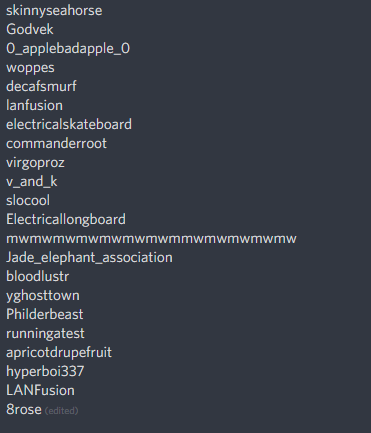
Likely hydration bot, rootman, electrical skateboard and so forth
winter zenith
Yeah no I get that but at least they won't count in chat anymore
normal igloo
@winter zenith to give you an idea of how big of a problem these bots are https://i.gyazo.com/c45ac3e7a25de2baf1c74c85f462a7c5.png
 winter zenith
(btw since bots Stay the whole stream twitch and Streamlabs probably also count them  )
)
winter zenith
Oompf... This went too far  @normal igloo
normal igloo
@winter zenith Oh no what did I do
lucid moon
so, to clarify then.. is there a document that explains how streamelements gathers its stats ..
like what it gathers...
and does anyone know what the point of the bots is?
winter zenith
Not really seeing how our compatitors Copy us more then they should Already. Don't want to make it THAT easy for them
And points you can disable
Just go to your loyalty points settings and type in the bot names to ignore them
lucid moon
no no no.. i mean, whats the point of someone sending a bot to sit in my stream,... what do they get out of it
cedar fulcrum
🤖
winter zenith
@lucid moon the first bots (electrical skateboard /longboard) where made to "help" small streamers to get just one view and push motivation (noble concept)
lucid moon
as much as i wish i was super popular..im not and never will be. what would a bot gain
normal igloo
@lucid moon Never say never
lucid moon
noble if they asked first maybe...:
winter zenith
But some. People didn't want that petty view. AND it's against ToS of twitch anyway. But since no one actively did it twitch couldnt Ban everyone
Seeing this loop hole people just made more bots
And now annoy everyone with there BS
lucid moon
my kingdom for a kick button...
winter zenith
lucid moon
i love streamelements, i like that its all this stuff under one login... but the editor is clunky as hell and I just dont get why all these numbers never add up...overall though, id give SE and 8/10 .. but you cant dance to it...
normal igloo
I would honestly love twitch to add a kick button And every single time a user gets kicked from a chat A report is automatically made against that person aka Make twitch life so much easier to track down the bots
lucid moon
i just want a way to manage my stream... twitch sucks..:)
ok SE devs.. make me a way to click on a user and auto send a report...
or a way to flag those bots as bots in my viewer list so my viewers dont have to wonder
winter zenith
@lucid moon @normal igloo #general-chat pls 🙏
normal igloo
@winter zenith Yes sister of mine My deepest apologies
winter zenith
lucid moon
no problem..i can always use a different provider, one who is interested in what i have to say...have a great morning
winter zenith
@lucid moon 
normal igloo

winter zenith
I think you got something wrong here, sorry to offend you. This channel is for support in SE questions if you have a idea you want to become reality post it in the #💭︱feedback-and-ideas channel where many ideas that get spoken become reality because we care more then any other service
strong kernel
@lucid moon We're happy to hear any suggestions you have to improve StreamElements in the channels we've provided for that purpose. You can submit ideas in #💭︱feedback-and-ideas or on our Ideas board at https://streamelements.helprace.com/s1-streamelements/ideas while this channel is for getting assistance on current features. ❤
winter zenith
And when you choose to leave us @lucid moon you will see that others don't care really fast. That's why people love us. And stick with us. And switch to us.
Thats why others now try to be like us.
But you can make your own investigation. We will await you with open arms and all the answers you are seeking
 dawn falcon
!code
strong kernel
🤔
nocturne pelicanBOT
@dawn falcon The app is currently in closed beta, keys were given away at the Gamescom in Cologne, Germany.
Please wait and stay tuned for the open beta.
 misty kestrel
Currently the follow widget is not showing the correct number of followers, is there a way to reset or refresh the info its gathering?
winter zenith
@misty kestrel we only track dollowes not unfollowes
streamelements.com/dashboars/session
there you can edit the Follower number by clicking on the "goals" tab
misty kestrel
thank you! Thank worked!
pulsar gulch
Hello , is anyone using that G2A donation option ?
pine hemlock
Do you have questions about it
 soft fulcrum
Hi guys, do you know why SE is playing an alert twice?
nocturne pelicanBOT
@soft fulcrum Make sure to :ballot_box_with_check: “Shutdown source when not visible” for all browser sources (all OBS scenes). If using studio mode, uncheck “Swap Preview/Output scenes After Transitioning.” Also keep in mind that sound can play from any overlay loaded in the browser (editor or launched). https://i.imgur.com/FegZJQS.png https://i.imgur.com/yY0wcFl.png
 vapid sphinx
Why isnt my !songrequest working? i have tried everything
strong kernel
jadoo_og on Twitch?
vapid sphinx
yes
strong kernel
The bot doesn't seem to be in your channel.
vapid sphinx
really?
strong kernel
Click Join channel on the right side of https://streamelements.com/dashboard
StreamElements
The Ultimate All in One Platform for Streamers
vapid sphinx
thanks @strong kernel
strong kernel

vapid sphinx
btw do i have to have stream elements open to use the media request
strong kernel
You'll need either the media request tab open or the Ground Control desktop app for the audio.
vapid sphinx
ground control desktop app?
strong kernel
StreamElements
StreamElements is the leading platform for live streamers on Twitch and Youtube. StreamElements includes Overlay management, ChatBot, Tipping, Alerts & Loyalty
nocturne pelicanBOT
@vapid sphinx You can find your JWT token on your account channels page: https://streamelements.com/dashboard/account/channels
(Don't forget to click on "Show Secrets")
vapid sphinx
do i need to have the overlay token aswell?
strong kernel
Not in Ground Control.
vapid sphinx
kk thanks
lament blade
Can i get code for early acces
strong kernel
!code @lament blade
nocturne pelicanBOT
@lament blade The app is currently in closed beta, keys were given away at the Gamescom in Cologne, Germany.
Please wait and stay tuned for the open beta.
vapid sphinx
@strong kernel but i have to have the mediarequest tab open in the ground control?
pine hemlock
or the web page
 gaunt bolt
hey, I've been exchanging e-mails with a person from the support team, about the fact that there is no way to get the videos to automatically hide in the media request widget, but the only way he mentioned was if I had a moderator doing that everytime a video changed, is there a way to make it as default to be hidden tho?
I want to use it for song request and to show on stream the song playing, that's why I wanted it to be default as hidden
strong kernel
There's a widget for just showing the song playing instead of the media request widget.
devout bridge
Heyyo ı need help :/
mild osprey
hi
strong kernel
Just ask the question.
devout bridge
I can not brodcast via mobile
strong kernel
What app are you attempting to broadcast with?
devout bridge
Streamlabs