#helpdesk-twitch
1 messages · Page 335 of 1
 weary mist
 kindred hill
that did it thank you so much....not routing OBS as it does not make sounds but was routing chrome which is where the music was comeing from untill it goes to the bot when you hit show on stream...OBS is on the Default device as should the bot be which is VMAudio once showing on stream not Aux
ty
 violet crater
Does anyone know how to set up follower and sub recognition on my stream if I stream mobile and don’t use OBS
 narrow coyote
Chat alert module for bot, and if the app supports Browser Sources, you can add an overlay, but if the app is StreamLabs or BitStream, they have been known to block our overlays
violet crater
Ok that makes absolutely no sense to me I use mobcrush to stream
Do I need another app?
weary mist
I have not heard of that application. Is that android or apple?
violet crater
Apple
weary mist
hmm. I am not sure what apps are good for apple. Does the application have an option for adding overlays (also called browser sources, or web pages)
violet crater
I honestly don’t know I haven’t explored that much
Is there another streaming app I could get that would make it easier
narrow coyote
Not sure there is really anyone here that could help much with that, as Android is the larger platform for IRL streaming, even our live streaming app that is in development is just Android at this time. Best thing to do would be doing some research, and finding an app that supports a browser or web source, so you could add an overlay
violet crater
Ok thanks
Idk if this would be under YouTube or twitch but how do I transfer a video from twitch to YouTube
narrow coyote
These channels are for support with our services themselves, questions unrelated to our services would be best asked in #general-chat
violet crater
K
weary mist
I believe that is done through your dashboard on twitch, though I haven't done it in a long time so I can't remember how. But it has to do with your videos, and highlights
 spice field
okay i have a little problem again
its not saving my vods?
eventhough i have vods on
but it fucks up on obs live
weary mist
@spice field we don't have anything to do with VODs
spice field
then says i dont have a video?
weary mist
that is 100% a twitch thing
narrow coyote
vods have nothing to do with OBS.Live, thats all on twitch
 jovial summit
Is this channel where I ask for support for S.E.?
weary mist
you got it
jovial summit
I need help with 2 things, one is I need to import my points for my viewers because I didn't mean to hit reset on stream elements dashboard. And 2, I only want to use stream elements to handle things for subs but only use Streamlabs Chatbot for commands and moderation tools. How do I gear stream elements to not use commands but only be used for subs and also reimporting my current points for viewers?
 exotic hinge
its webm supported?
narrow coyote
yes, webm is supported
jovial summit
So how can I go about what I need to do?
narrow coyote
If you are not using the bot for commands, then why do the points really matter? If you dont what to use our commands, then the easy solution is to remove the bot from your chat, otherwise you would just need to go disable all the commands
 royal quarry
Is there a definitive way to whitelist websites from being deleted via streamele bot? I've set the parameters for Twitch clips over 30 times and it just continues auto blocking them each time
jovial summit
So I can't just do a hybrid option?
weary mist
@jovial summit You can, it is just seems like a pain in the butt, lol
jovial summit
ALso how do I reimport my points? I accidently did a reset and I need to bring them back.
weary mist
What I recommend doing (if you insist on this way), is you will need to set up SL bot with a chat command that uses our API for pulling points. Then, just turn on loyalty
If you have a document with the points, we can import them. Get them into username,points format
You won't need to have the bot in your channel for people to collect loyalty
jovial summit
I have a .csv file.
narrow coyote
@royal quarry are you hitting enter after you put the link into the whitelist?
Should look like this if you did
jovial summit
And also is it possible to import blacklisted words into stream elements from my current bot Streamlabs Chatbot?
royal quarry
Let me double check, I'm guessing I'm not somehow lol
weary mist
@royal quarry it looks like it isn't added, make sure to add it exactly like Kite has it
@jovial summit no, but I could probably help set that up if you wanted to use our bot for the moderation
jovial summit
@weary mist That'd be awesome.
The only things I know my viewers will miss the the Duel-ing command and free for all command as it was based around Tron Legacy. So I don't know if I can create something custom like that with Stream elements.
weary mist
We do have a duel module, but it might not be as advanced as they are used to
OH I know
jovial summit
Oh?
weary mist
@jovial summit We have a custom name option for our bot
So does ankhbot
(sl chat bot)
If you link the SAME name between the two bots, you can pick and choose which commands you want active on each bot, and keep certain funtionality (using SL chat bot for the Duel and fre for all) etc
jovial summit
What or how does one get SL chat bot? What does SL even stand for? xD
narrow coyote
SL is StreamLabs
jovial summit
Oh xD
Sorry.
K so what do I need to do to get started on this switch over and points reimport?
weary mist
Ok. One thing at a time. Lets start with the points import, easiest part.
jovial summit
Sure
weary mist
you have the CSV, make sure its username,points, and go here: https://filter.dj/CSVtoStreamElements.html
Enter in the requested information, paste the username,points format (seperated by new line for each line), and import it
let me know when that is done
 thorn crystal
So quick question about the monthly total tips widget. Does it tally all tips for the month (e.g. August tips) or all tips for the last 30 days?
weary mist
last 30 days
thorn crystal
Is there any way to reset that at the top of the month? I'd like to set monthly goals and track them throughout the month.
jovial summit
@weary mist So I maybe stuck, I told the import page to grab the points from Dropbox link, I filled out all the information, but at the bottom is says "Done: 0/1" What does this mean?
weary mist
You load, then hit send to SE, right?
jovial summit
I did, and nothing happened it appears.
weary mist
ok. Send me your CSV file, I will try it from my end 😃
thorn crystal
If I go to the Data section of my overlay and set the Total Goal Progress to 0, will that then begin to count up from 0?
narrow coyote
Yes, you can also do this from here as well https://streamelements.com/dashboard/session
 icy pagoda
hey guys, ive just hooked up a second monitor. I know i can have the website open with the activity on it but is there any less cpu/memory intensive things i could use to show me this instead as google chrome doesnt need to be running while gaming
oh
desktop app?
jovial summit
@weary mist Cool I see the points are back, now I have a question, how does one create a !top command as the old one doesn't work with your system.
narrow coyote
@icy pagoda If you use OBS, you can check out our plugin for it, OBS.Live
icy pagoda
what would you suggest , desktop app or the obs plugin?
which is better for my pc performance?
narrow coyote
idk, I know nothing about your PC, but our app is old, outdated, and can eat up more performance than a chrome tab can
in that regard, I would say plugin if you already use OBS
 nocturne pelicanBOT
OBS.Live is a Plugin for OBS created by StreamElements. You can download OBS.Live here: https://streamelements.com/obslive
Please make sure you have the latest version of OBS installed, Current Version: 22.0.1. You can install OBS here: https://obsproject.com/
narrow coyote

royal quarry
Kite is the MVP, so it turns out I was inputting the whitelisted links and hitting "submit" no enter prior though.
1 minute from 4:20 here I got to go 😃 thanks Kite
weary mist
xD
royal quarry

narrow coyote

 limber verge
hello maybe anyone know command that could random pick viewer from chat? ofc if its possible, i want to do something like lucky draw for prizes
 drowsy basin
hello, I have uploaded a sound to my donation however it is not working when somebody donates
the host and cheer and sub sounds work but my donation one isn't
weary mist
@limber verge use variable $(random.user) I bleive. Check the variable page to be sure
@drowsy basin make sure you have variations set correctly if you have any
limber verge
@weary mist oh ye i forgot about variable page... thanks 👌
drowsy basin
@weary mist it plays in like the preview/choose sound part but not when an alert comes up
weary mist
@drowsy basin when you emulate the alert, does it play in the borswer and not OBS?
drowsy basin
neither
weary mist
which sound are you using (I have your dashboard loaded)
drowsy basin
Magic coins
weary mist
close the overlay, re-open it, and replay the tip you got, see if it works
drowsy basin
ok
 thorny mirage
How my viewers can get points for use rulette?
weary mist
they would use the command !roulette all or !roulette followed by the number of points they want to wager
drowsy basin
@weary mist still doesn't play the sound
thorny mirage
But if they have 0 points how can they win points?
Whatching stream?
I need configure that or nah?
weary mist
Yes, you need to turn on loyalty in the settings, and set up how much they get
@drowsy basin I am honestly not sure on this, I am not in a position to test. Try refreshing the cache on OBS as well, just to be sure. It did look like the alert didn't have sound added when I first went into it, so I added it and saved, but I don't have a way to listen to the overlay right now
drowsy basin
it did and does have the sound set, the sounds for all the others work so I'm unsure why this is happening
weary mist
try the cache refresh in OBS, sometimes OBS likes to hold onto the old information (and stop sound changes from taking effect)
!cache
nocturne pelicanBOT
Right click on the BrowserSource > Properties > Scroll down a bit > Refresh Cache of current page
drowsy basin
still doesn't
 main abyss
hey! How can I display the latest tip's message on my overlay?
drowsy basin
@weary mist I ended my stream now and tested it with different sounds. It is only effecting the tipping setting and none of the others
drowsy basin
@weary mist I found the issue. If you have text to speech but no activation delay it doesn't play the sound and goes straight onto Brian talking.
weary mist
sweet @drowsy basin, glad you found the issue
@lament blade what are you seeing in OBS?
and what version are you using
@main abyss the only way I know is through the tip alert, which disappears once it is over
weary mist

 shut merlin
hey i have a long time follower on twitch that accidently unfollowed today and refollowed. He lost his followage, is there a way to give that bacK? sorry if this is posted elsewhere
narrow coyote
No, that data comes from Twitch itself
shut merlin
dang thanks for the info!
main abyss
when I send a test alert for raids, it shows the alert for host.. what?
 oblique saddle
What's the code for stream elements
nocturne pelicanBOT
@oblique saddle The app is currently in closed beta, keys were given away at the Gamescom in Cologne, Germany.
Please wait and stay tuned for the open beta.
 raven goblet
how do i find my jwt token?
 elder sorrel
!jwt
nocturne pelicanBOT
You can find your JWT token on your account channels page: https://streamelements.com/dashboard/account/channels
(Don't forget to click on "Show Secrets")
elder sorrel
@raven goblet ⤴
raven goblet
thanks
elder sorrel
No problem 🤘🏻
elder sorrel
@frigid bluff What's the question? 🤔
 frigid bluff
Hey, I was wondering if it would be possible to create something using streamelements.. What Im wanting is a bar to gradually fill as I receive subs,donations,follows,tips. Once it fills it then resets and says x2 at the top.. then if that fills x3 at the top. etc.. Is this something possible or what would I have to do to get this created
elder sorrel
I think that's possible with SE. Not sure how to set it up personally but seen Streamers that use SE create the bar filling with alerts.
narrow coyote
You could, it would need to be done with the custom event list widget. There is a doc pinned in #dev-chat for getting started with it
frigid bluff
Like I want a image that is always on my stream something similar to this, https://i.gyazo.com/885233ee47727189f63c973c5bb2cb14.png but as new subs / tips come in it gradually goes up.. If it fills then a x2 symbol would appear at top
 narrow coyote
@mild eagle Please dont do that
You would need to build it with the custom event list widget, using html, css, and js
frigid bluff
gotcha, im not real experinced in doing that, If i look for someone to make it for me what kinda person would it be?? Im looking to hire someone in HTML? Twitch code?? like what is the correct wording
narrow coyote
it would be a custom code widget written in html, css, and js. You could ask in #dev-chat to see if there is anyone that would be willing to help build something like that
frigid bluff
Okay sweet. Is there any @ for developers or should I just do a normal post?
narrow coyote
just normal post is usually best
 rotund schooner
Hello, is there any way I can get some help getting overlays onto my PS4 stream?
narrow coyote
You would need a PC to stream from in order to get overlays on a console
rotund schooner
I have the PC, how would I transfer the stream from my PS4 to my PC?
narrow coyote
A capture card
 mossy oracle
Is there a beta code for the app?
nocturne pelicanBOT
@mossy oracle The app is currently in closed beta, keys were given away at the Gamescom in Cologne, Germany.
Please wait and stay tuned for the open beta.
nocturne pelicanBOT
@rotund schooner You can find your JWT token on your account channels page: https://streamelements.com/dashboard/account/channels
(Don't forget to click on "Show Secrets")
rotund schooner
Im sorry to bother you
But i need to know how to get the points leaderboard on my stream
 zenith widget
@rotund schooner the points are activated via the loyalty system found on the right side of the dashboard
I'd suggest taking a look at this video guide we have: https://youtu.be/mBDY4RdoZ4A
 copper pollen
Any plans for sub-bomb notifications? sorry if i missed any notification about this....
 pine hemlock
In the works
weary mist
@copper pollen go to your alertbox, then sub alert settings, add a variation, and check the dropdown
 naive basin
My alerts arent showing up in obs or on stream entirely and i have deleted and followed the overlay set up guide
was wondering if I could get some help w this
Or would i need to reinstall obs
pine hemlock
Did your alerts work prior to updating to the newest obs version
pine hemlock
@naive basin
copper pollen
@weary mist TYTY
naive basin
@pine hemlock its still not playing through obs
pine hemlock
Restart obs?
naive basin
I did
pine hemlock
does it work in the web browser when you test it?
naive basin
Yup
pine hemlock
You can try duplicating the overlay on our site and using the new link that it generates
if that doesnt work i'd suggest reinstalling obs - your settings/scenes save unless you check the option to delete user settings
naive basin
I think ill try that thanks for the help man
 lament blade
Northern Ireland based mobile streamer trying to access the app if anyone has a invite code they would kindly have
nocturne pelicanBOT
The app is currently in closed beta, keys were given away at the Gamescom in Cologne, Germany.
Please wait and stay tuned for the open beta.
 brittle sentinel
Hi
I am not able to see my activity feed! Also, the subs and followers when they follow it doesn't pop up on the screen
can you help me with that!
lament blade
On my overlay Im using My biggest all time tip is 22$ but it says no data and ive linked my streamlabs with it... it even shows in my donations tab
brittle sentinel
@nocturne pelican Hi
I am not able to see my activity feed! Also, the subs and followers when they follow it doesn't pop up on the screen
can you help me with that!
pine hemlock
@lament blade Acitivty Feed-> Widget data / you can manually edit the values of the widgets.
@brittle sentinel What is your twitch name
lament blade
so its been a few days and the issues with my stream overlay still havent been addressed, ive been waiting on a response.
Secondly for some reason anytime someone says it says "gifted 1 sub" instead of who subbed
 strong silo
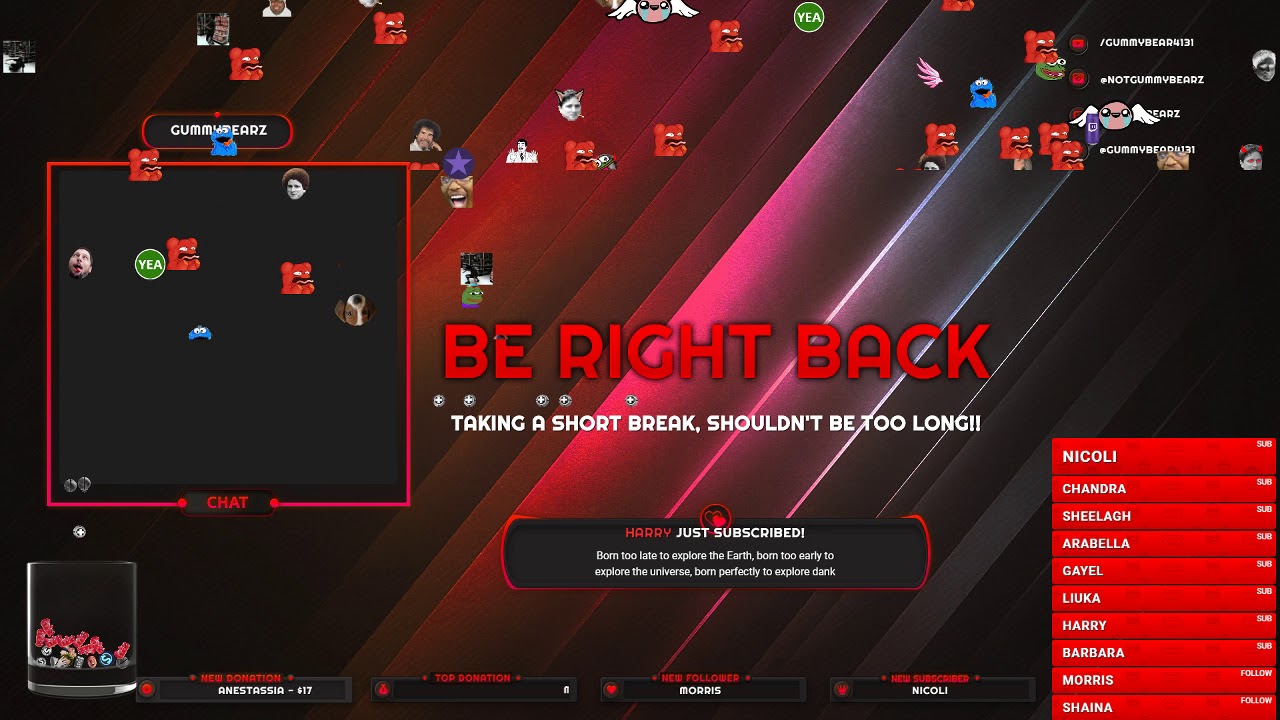
While using Kappagen I have made the emotesplosion thingy go when people follow/sub/donate/etc but I have had the issue with it flickering in and out weirdly as you can see in the video. idk why so if someone could possibly help that would be great 
@ me if you respond to me  love yous
brittle sentinel
@pine hemlock emptywire
pine hemlock
@strong silo I would assume your pc is struggling to render Kappagen mixed with the rest of the animation on that overlay. See also: the lag in scrolling text when kappagen goes off.
strong silo
Ok, so should I not use it until I get better parts??
pine hemlock
You can try messing with your obs settings but.. im not 100% sure what will really help. You can also disable Hardware acceleration for browser sources in the advanced tab of settings for obs
strong silo
Ok appreciate
brittle sentinel
@pine hemlock twitch.tv/emptywire
pine hemlock
I sent your information to someone. I can't fix it myself.
brittle sentinel
@pine hemlock Thanks also I am not able to see my twitch stats in dashboard although youtube stats are visible but not the same for twitch.
 strong kernel
@brittle sentinel Followers are fixed, and activity feed was fine, just nothing other than followers was happening.
brittle sentinel
@strong kernel I can't see any details over my dashboard while I can see all my stats from youtube acc
strong kernel
I didn't see a youtube account named "emptywire" in our system. Are you named something different there?
brittle sentinel
theempty
but youtube acc is showing the stats in dashboard while twitch acc doesnt
My concern is that I am not able to see the stats for twitch on streamelements dashboard page
Any help would be appreciated. Thanks
strong kernel
@brittle sentinel I actually haven't left for the office yet, so my good friend @cedar fulcrum will help you out from here while I make my way over.
brittle sentinel
Ah okay I get it thanks. All the help was appreciated though!
strong kernel
❤
brittle sentinel
@cedar fulcrum can you please look into this https://i.imgur.com/k7zjBly.png
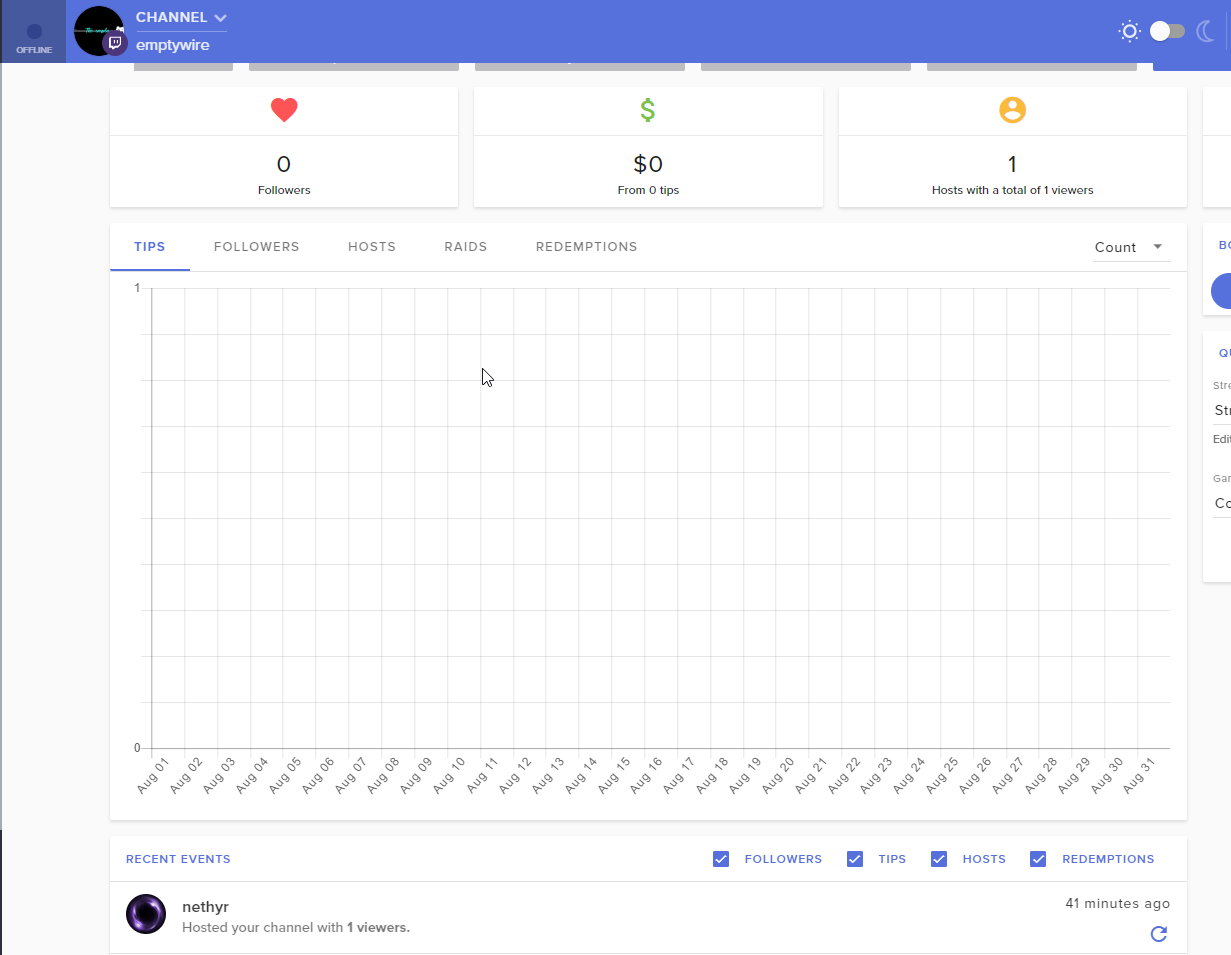
shows 0 followers
 cedar fulcrum
When did you started to use us?
brittle sentinel
Ummm like from day before yesterday I suppose!
cedar fulcrum
What is your Twitch name>? EMPTYWIRE?
brittle sentinel
yep
cedar fulcrum
Checking what is the issue
brittle sentinel
Ok thanks
 solemn gust
Hi, whenever I try to go into the tipping settings the page never loads
Every other page loads in just fine
- When I am trying to "re"-link my account it says this
I unlinked my account earlier as I didn't want to use StreamElements but now I want to try it out
cedar fulcrum
What channels are you trying to add this: donnieswe and?
Please try to go to the following link and send me the error you are getting: https://streamelements.com/dashboard/tipping-settings

StreamElements
The Ultimate All in One Platform for Streamers
solemn gust
I'm getting no error
The page literally won't load in
But every other page will
@cedar fulcrum
cedar fulcrum
What browser are you using?
cedar fulcrum
Make sure this is unmarked
solemn gust
Thanks for the help @cedar fulcrum Never would've guessed that myself
cedar fulcrum
You are welcome :
 granite socket
Hello, my Sub Count is wrong on Sub Goal what can i do?
pine hemlock
Activity Feed -> Widget Data
You can manually update the data of widgets there
brittle sentinel
@cedar fulcrum Hi any updates?
solemn gust
Where do I go to add the SE bot to my chat?
pine hemlock
https://streamelements.com/dashboard Right side
solemn gust
How do I give out roulette points? haha
pine hemlock
!addpoints username points
 spring lake
I was at GamesCom and talked to a Dutch staff member, but I forgot his name  would anyone care to help me connect to him?
 ebon forum
It was @misty wagon 👆
spring lake
@ebon forum Yep that was him! Thanks 😃
ebon forum

solemn gust
One more question, where do I change my starting amount for a donation goal?
cedar fulcrum
@brittle sentinel I will let you know when I will have an update
 atomic hollow
@solemn gust right here - https://streamelements.com/dashboard/session
StreamElements
The Ultimate All in One Platform for Streamers
solemn gust
tyty
 inland knoll
greetings - is it possible to add a NCS live youtube channel to ground control for my stream music?
 vital wyvern
You can add their playlist yes 😃
inland knoll
I'm not sure it is a play list - its a live stream from Youtube
vital wyvern
Then no
you can add for example this one as your backup playlist on GC @inland knoll

NCS: Music Without Limitations NCS Spotify: http://spoti.fi/NCS Free Download / Stream: http://ncs.io/onandon ▽ Connect with NCS Facebook http://facebook.com...
inland knoll
i see, so playlist not live ones
vital wyvern
Yea :p
granite socket
How can I create automatic commands that are written every 10 minutes?
zenith widget
@granite socket You can use the Timers for the bot
Every X minutes a predefined message can pop up from the bot as long as the chat lines are met
granite socket
oh thx 😃
zenith widget
I hope thats what you meant
granite socket
yeah
zenith widget
Other things is, custom commands have "keyword" in them that can trigger upon someone saying a specific word. For example: "I would Like to 1v1 Ninja Kappa" and the keyword can be anything in the sentence like "Ninja" for example and the bot can say "Ninja is a GOD! Stop talking about him!"
@granite socket
I used Ninja as an example, because i could not think of another one 

 frosty pine
Hello i Need some help There is sonebody here
I need help but i'm nota anche Expert so if Theresa is a vocale Channel forum assistance somebody cancellare tell me which One is It
Thanks
zenith widget
@frosty pine What is your native language?
frosty pine
Sorry t9 i'm from Italy
zenith widget
I don't think we have an italian speaker as a support person, so I'll try my best to help you in English if thats OK. Unfortunately, I can't make voice support at the current moment.
 supple horizon
Does the community Gift option in alerts put all the subgifts into one alert or is it still unique alerts?
zenith widget
Afaik, its a unique alert, but a bit delayed until it counts all the gifted subs @supple horizon
granite socket
ok next one cant find that, how i can put in a Reel, i become a sub and then start the reel and he become the points from the reel, can i do that ?
sry for bad denglish 😄
 zenith widget
ooh a spin wheel
granite socket
yeah 😄
zenith widget
We do have a widget for it in #widget-share
But to give out the points for the subs, you will have to do it manually
with the command !addpoints <username> <points>
frosty pine
There is somebody or the Twitch support that can talk with me please
zenith widget
We are not Twitch Support. We are Streamelements that provide tools and features that benefits Twitch Streamers. If you have an issue with said tools and features, I can try my best to help you @frosty pine
But we don't have an Italian speaking support person, who might be better suited to help
 floral badger
help how do you dissable gamble
zenith widget
Disable the module for the bot
 untold crest
@floral badger https://streamelements.com/dashboard/bot/modules
StreamElements
The Ultimate All in One Platform for Streamers
 drifting swan
Guten Tag
finde ich hier jemanden von StreamElements aus dem deutschen Support
 drifting swan
kann man sich im voice treffen
 winter zenith
Oh leider ehr nicht habe nen "echten" Job und der erlaubt mir das nicht.
Bin mir sicher dir auch so helfen zu können :)
Was passt denn nicht bei dir? Oder brauchst du was erklärt?
 cinder nebula
Can anyone help me get started i've never used stream elements, it's okay if you can't. I'll figure out eventually lol
zenith widget
@cinder nebula I'd suggest to start with our video guides here: https://www.youtube.com/playlist?list=PLCDDKlFdScbEwdx5AntcQIS1InkFJwHtv
😉
cinder nebula
Thanks
granite socket
what is the chat Variable für a other user? User gives Love to Test 123 i have this : ${user} give love to ???? and i mean !Love Diablex112Ger
zenith widget
Command name !love
command response: ${sender} gave love to ${user}
or response: ${sender} gave love to ${1:} but this will take what ever is placed after !love for example !love apples -> KeiZar gave love to apples
zenith widget
Thats the links to the different overlay scenes
cinder nebula
Do i press the blue button
zenith widget
As shown, one link is towards overlay "BRB - Be right back" and starting soon and so on
The blue button takes you to your overlays
You'll see them as this
cinder nebula
Yeah
 faint leaf
is it possible to change my Follow Alerts globally that i can use them in every overlay?
zenith widget
You can change them in one overlay and then duplicate the widget to other overlays
Just click on the widget and right next to "Layers" the 2 papers with red dot is the duplicate function
faint leaf
thanks a lot
zenith widget
winter zenith
hell yeah! 
if you need something , you just saw 24/7 support right here :3
zenith widget
I'm too fast for @strong kernel 
strong kernel
Nah, saw you typing so I stopped. 😉
zenith widget
Yeah, sure, you started typing after I started and then stopped when i popped the message 

strong kernel
Stopped much sooner than that, lol, Discord delays that.
lament blade
How do I get the link to where people can suggest music
zenith widget
@lament blade You need to setup this: https://streamelements.com/dashboard/mediarequest/general
it uses commands such as !songrequest/!sr
I would recommend to watch this video: https://www.youtube.com/watch?v=17eUkoZ6eIs&index=15&list=PLCDDKlFdScbEwdx5AntcQIS1InkFJwHtv&t=1s
 weary cairn
um is it me or why when i press "insert text" and i type what i want and i want to make the text bigger but i cant is it normal
zenith widget
Are you changing the text settings after you place w/e text you want? @weary cairn
weary cairn
Another stupid question.....btw is there a feature to make images like really big
btw i was fiddling with the editor a lot
weary cairn
like i have a gif
and id like to use it on me BRB screen
i can make it limited size
zenith widget
So this gif has a preset size and as you see, even if I stretch the widget it won't got over it
weary cairn
kinda ye
zenith widget
UNLESS some custom css magicary is introduced
weary cairn
welp i think ima wait when the feature gets added if it will
or ima use the small gif that i tired to make bigger
zenith widget
I don't think it will ever be added
solemn gust
Media Request isn't working in StreamLabs OBS for me but it works in Chrome
strong kernel
@solemn gust Streamlabs OBS sometimes likes to block our overlays. We recommend using OBS Studio instead.
weary cairn
i had to change the image size to scaled
 weary cairn
XD
solemn gust
Media Request is in the same overlay as the alerts
and the alerts works but not the media request @strong kernel
zenith widget
@solemn gust It blocks not the entire overlay, but features in the overlay as its basically like a browser with different code in it
@weary cairn And here I went to make "custom" css for it to scale
solemn gust
Any way to fix that?
solemn gust
There's no built in chat for that 
strong kernel
There is if you use our plugin.

OBS Knowledge Base
OBS.Live - an education hub for live streaming on OBS
strong kernel

narrow coyote
Also, if you are using show on stream, make sure you are not trying to do that with the tutorial video, it won't work with that
winter zenith

solemn gust
SL OBS YEETED THE FUCK OUT
strong kernel

solemn gust
But for now
Y'all got any clue how to import every scene to studio
or do I have to set it up from scratch again

 weary cairn
oof
zenith widget
memes in #general-chat
@solemn gust If you are referring to the overlays from SLOBS, they export as a .overlay file and we have no idea how to handle those 
If you have uploaded images to SLOBS to use as overlay and have them backed up, then you can just upload them into a fresh overlay with us
and setup widgets and stuff
zenith widget
Bttv emotes are already implemented
Other features are being constantly requested
Plugin is 0.3v atm so expect improvements and lot of them in the coming months

winter zenith
FFZ is also implemented
winter zenith
yes we have a "chat" widget in the Overlay Editor
winter zenith
no problem 
 frail solar
Hello
I am having trouble seeing the streamelements dashboard recently, it's all loading white
elder sorrel
@frail solar Are you using Chrome?
frail solar
Yes, however someone in the streamelements live chat answered and helpped me resolve the issue ^^
elder sorrel
Awesome. Glad it got resolved 😄
frail solar
yay=3
 river saddle
Anyone experiencing issues with Ground Control not displaying any info?
 oak wedge
Hello folks! I am testing obs with the new plugin from stream elements. Downs anyone notice a higher ressource consumption? I just want to compare mine
weary mist
@river saddle It should match what information you have in the Activity feed page of your dashboard. Did you enter in your JWT token? And what filters do you have on?
@oak wedge before I point you in weird directions, can you verify for me what version OBS you are using, and what version of the plugin?
oak wedge
@weary mist latest for both. Updated everything yesterday evening.
weary mist
can you give me the version numbers you see? (this is actually a test because of certain bugs inherently in OBS an such)
river saddle
@weary mist JWT token is there. The app is completely blank except for the settings cog
weary mist
@river saddle are you using mac or pc
river saddle
PC
weary mist
ok. Close Ground Control. Open a folder, navigate to the %appdata% folder (just type that text into the url field, hit enter), and delete the ground control folder. Re-open Ground conrol
river saddle
re-installed and it's still blank
faint leaf
why doesnt streamelements show follows in Dashboard?
weary mist
@faint leaf can you DM me your accountID? It is probably just a little bug we can fix. Have any of your follows come through?
 icy trench
Any Idea why I keep getting "Oops! We were unable to reach StreamElements server"?
winter zenith
@icy trench for what the main page or OBS.Live?
icy trench
OBS
narrow coyote
Do you have the latest version of the plugin? If not, you will want to update it. To try and reconnect you will want to go to StreamElements > Reconnect streaming account
icy trench
Still getting the same error.
narrow coyote
What version is OBS.Live, it will say in the lower right
icy trench
18.8.21.183
narrow coyote
can you give a screenshot of what you are currently seeing?
I would also like a log file
!obslog
icy trench
narrow coyote
ok, so there are no error, but it is definitely not loading the SE, or connecting at all. I would expect that reconnecting the streaming account would have solved this, unless you have something on your system that is blocking the connection to SE socket, like anti virus, or firewall. You would also try clearing the browser source cache, as this is all loaded from the obs-browser. To clear this you will want to close OBS, and then go to %appdata%\obs-studio\plugin_config and delete the obs-browser folder. When you launch OBS again, it will re-generate this folder and necessary cache files.
icy trench
So this Is what I see now. https://gyazo.com/70ce396b24758c8de1c615bf889c692d

 prime grove
How do I get an invite code for the mobile app
narrow coyote
Try refreshing the chat module
nocturne pelicanBOT
@prime grove The app is currently in closed beta, keys were given away at the Gamescom in Cologne, Germany.
Please wait and stay tuned for the open beta.
icy trench
Just stuck on Reconnecting
narrow coyote
might need to try doing StreamElements > Reconnect streaming account again then
icy trench
Still stuck, Ill have to just pop It out from Twitch.
Overlays aren't loading either, rip
narrow coyote
Was this previously working? Because nothing has changed on the OBS.Live side of things, so maybe there is something in your environment causing connection problems
winter zenith
Sounds like you have a aggressiv anti Virus app or something? 
icy trench
It was working yesterday, I just tried relaunching OBS and now I'm back to the Unable to reach error.
narrow coyote
It really seems like there is some external factor preventing the connection from occurring. Do you have any antivirus or firewall on the PC?
icy trench
All AV and Firewall Is disabled, I just quit out of Malware Bytes.
narrow coyote
Unless you have something like a Killer nic in the machine. What motherboard do you have? It might also be worth testing with just OBS Studio to see if you are able to load the overlays in there, because it really seems like something is interfering with the connection of the obs-browser to our services
narrow coyote
Do you use the cFosSpeed Internet Accelerator Software as software of this nature could easily interfere with this type of thing
icy trench
Never heard of that.
narrow coyote
its listed as a feature of your motherboard
icy trench
I have no Idea
narrow coyote
You can try checking in apps and features for something along the lines of cFosSpeed Internet Accelerator Software Software like this and the Killer networking stuff do not play well with OBS, and this seems like the most likely culprit for something interfering with the connection through OBS
icy trench
Don't see anything like that In there
How do I bring back the chat widget etc on OBS?
narrow coyote
Restart OBS or Reconnect streaming account should do it
winter zenith
Click in "StreamElements" On the top right and click the "chat" tab
weary mist
If chat is the only thing stopping you, there are PLENTY of options for that. Chatty, twitch chat, chatterino. The chat isn't something people seem to be having a problem with right now, so I am not sure why you wouldn't be able to connect through to it. @icy trench
icy trench
It's not the only thing, I can't get anything that I've setup through the website to activate. It was working yesterday fine, now It's just refusing to connect. Iunno.
weary mist
@icy trench try connecting through a different device (This is a good way to see if its network related, or machine related, or even locaitonal)
like try doing what ever it was on your cell phone if you have one
 mint moat
anyway to haved my streamelements alerts ALSO show up on streamlabs obs? i know that may be a silly question but i'm trying to minimize the windows i nee openm
weary mist
@mint moat If you have the browser source set up there, yes. BUT, you can also use OBS Studio along with our plugin, which allows you to see your activity feed from our system, along with twitch chat, and it uses the newest browser source from OBS which is MUCH easier on your system
mint moat
oh reallllly? which plugin?
elder sorrel
!obslive
nocturne pelicanBOT
OBS.Live is a Plugin for OBS created by StreamElements. You can download OBS.Live here: https://streamelements.com/obslive
Please make sure you have the latest version of OBS installed, Current Version: 22.0.1. You can install OBS here: https://obsproject.com/
elder sorrel
That plugin @mint moat 😄
weary mist
icy trench
I'm just gonna give up trying, patience Is non existent rn. Thanks anyway for the help.
mint moat
with this done i can ditch chatbot too and fully move over. is there a way to get current commands from one to the other?
solemn gust
How do I give coins to other viewers on a stream with loyalty points?
weary mist
@solemn gust if your streamer has it turned on, you can use !givepoints TargetUser Amount
so !givepoints DonnieSWE 1000 would give you 1000 of my points
weary mist
if the streamer has it turned off, then yes, it won't work
if you are a supermod, there is a default command !bonus target amount
which gives points from the endless abyss
 hollow garnet
is there a way to Have follower notifications Now show Followers with bad words in it?
i am being Harrased with spam followers
mint moat
is there a way to mute alerts i the first screen of studio mode? as in, the screen to be transitioned to?
 indigo shard
Hey guys is there a way to use sub emotes with the stream elements bot?
Should i gift the sub?
pine hemlock
@indigo shard Yes that works
strong kernel
@hollow garnet It's something we're looking into but currently not possible, as far as I recall.
@mint moat In this situation we tend to recommend making an overlay specifically for your alertbox, give it its own scene, and add that scene to your other scenes, so it's always the same scene playing the audio.
@glossy echo Can you be more specific about what you're looking to do?
 glossy echo
@strong kernel i just want to throw money from tips to my bank account
But i dont see any option to make it
strong kernel
@glossy echo G2A?
pine hemlock
Are you using g2a or paypal.
glossy echo
You mean?
glossy echo
I have both options
strong kernel
Paypal tips will be in Paypal. Watch this video to get your G2A tips. https://www.youtube.com/watch?v=CXAndapQCK8&t=88s
glossy echo
and money from paypal went to paypal, but rest of money is idk where
okey i will watch
mint moat
im not sure i understand
strong kernel
Make an overlay in your StreamElements account that only has an alertbox in it.
Add it to its own scene in OBS
And in your actual other scenes, you can add that scene into it. It's sceneception.
hollow garnet
@strong kernel could i send a pic of an example please, private message
strong kernel
I understand the situation, but like I said, we don't currently have anything for it. But it's something we're working on.
glossy echo
ym
can i transfer money from g2a to bank account or only to paypal?
oh okey
nvm
mb
weary mist
@strong kernel  I didn't even know that was possible xD
 worldly valley
Guys, what could be the problem if the bot is working and everything is good except chat-bot for following notifications? 
weary mist
@worldly valley are the follow events showing on your activity feed?
@fossil elk are you talking about follow events from twitch to appear on your phone as a notification?
worldly valley
@weary mist hmm i see nothing there .. i did follow the same steps from a video on youtube .. it worked for my account but for some reason it didn't work for my friend
weary mist
@worldly valley DM me the accountID that it is not working on. Its a random bug, but we can fix it
 fossil elk
@weary mist i am wondering how to make the follow notification on the stream if you know what i mean.... like when someone follows and it pops up on the stream for everyone to see
weary mist
you can use the alertbox widget in the overlay editor to add alerts like that
but to have a notification on your phone (like when you get a new text message), that is not possible from what I know
elder sorrel
You can get email notifications on your phone when someone follows you 🤔
narrow coyote
Are you streaming from your phone 
narrow coyote
Then what are you trying to do with your phone, this is not very clear
fossil elk
I know sorry im new to streaming...
Forget about the phone how to you make a pop up on your stream whenever someone follows you
narrow coyote
If you are using just a console, you cant use an overlay
fossil elk
Oh
narrow coyote
it would require a PC to stream from
fossil elk
Oh ok thanks
nocturne pelicanBOT
@fossil elk Here is a guide on how to setup the most essential tools for streaming from your console, while using StreamElements tools without involving a Capture Card! It's easy to do, take 4 minutes to read and 10 to 15 minutes to setup!
Read all about it here: https://blog.streamelements.com/how-to-stream-on-console-7b620b1c46c3
lament blade
i can use help with the tip thing im in voice support
weary mist
Ok, what is your question though?
I am personally not available for voice chat, as I provide support from my place of employment. Text is all I can use to assist you @lament blade
lament blade
ok well i trying setup tips it saying on twich your inmage filed to upload and im useing the image u guys have
that i downloaded
weary mist
ok
so now that you have it downloaded, navigate to your twitch page (the one a viewer would look at), then click the edit switch below the stream. This will allow you to add a panel
nocturne pelicanBOT
Twitch's official help guide for Panels: https://help.twitch.tv/customer/portal/articles/2416760-how-to-edit-info-panels
lament blade
i did it said it cant upload imange
weary mist
can you DM me the image? I will try it on my page
@lament blade you don't need to be a friend on discord to send me the image
my DMs are open
floral badger
Hey guys if i type !raffle 10 then every one who types !join will get 10 points right?
narrow coyote
no, they would be entered into a raffle for a chance to win 10 points
if you want to give everyone points you are better off doing !bonus all 10
floral badger
But what is the difference between sraffle and raffle then?
 clever mango
!sraffle = single winner
!raffle = multiple winners (number of winners decided based on how many enter)
floral badger
Can you customize the raffle with multyple people
narrow coyote
what do you mean? all settings are in the Raffle module
floral badger
Ah okay yea i alsways give points away when i get a win in game and i want only active people to get the points and when i do the !bonus all it will give 35 people points while there are only 25 online
lament blade
i imported streamlabs obs and streamlabs chatbot. all donations were transferred but unfortunately not all bits and subscriber (only 3 pieces?!).
what can i do to display all subs and bits?
zenith widget
Unfortunately, we can't get info on previous bits and current subs. For subs though, we can find out who they are until they have resubed.
But just in case I would like to suggest to reset aggregates here: https://streamelements.com/dashboard/session -> Go to Aggregates tab -> Reset/refresh
To get to this page, as this is where you can control current goals progress from the dashboard -> activity feed -> widget data on the far right or DATA in the overlay editor
lament blade
thank you!
 soft bolt
Hey everyone, had a (hopefully) quick question. I changed the name of my channel last night from OfficerMike to AshraPlays, and now I can't get any of my commands to work. Any ideas on what I can do to get it working again?
Wait, I think I got it. Just had to make it leave the channel, and rejoin
weary mist
soft bolt
Yup, just double checked. Everything's green now.
 lunar dock
Where can I find the moderation delay for my alerts?
soft bolt
How do I remove a twitch channel from Streamelements?
narrow coyote
@lunar dock The only options currently for this would be the tipping settings for manual tip approval, and TTS anti spam.
lunar dock
Ohh, ok. I thought there was a moderation delay to help prevent offensive names from popping up on stream. @narrow coyote Thank you for your time.
Is that a feature that is being requested by the way?
narrow coyote
There are some features being worked on currently related to this
narrow coyote
Thanks! You too!
@soft bolt You could go here, and disconnect from your Twitch account https://www.twitch.tv/settings/connections
soft bolt
Could it have something to do with me changing my twitch name last night?
narrow coyote
If you renamed your twitch account, you just log out and back into our site, it looks like we already have your new name, so I dont really get what you are trying to do
soft bolt
I'm just curious why that bar saying the channel I tried to add is linked to a different account. I haven't tried to add a new channel. And for some reason it's not pulling my logo from twitch either like it did before
narrow coyote
you need to go to your profile and change the picture in there, on the left side where the profile pic is located
if you go here, click on open my profile, then change the icon from there https://streamelements.com/dashboard/profile
soft bolt
I feel like an idiot now. Haha, thank you Kite
narrow coyote
lament blade
one last question: is it possible that the bot writes in german?
narrow coyote
https://streamelements.com/dashboard/bot/commands/default should see a language option at the top for default commands
lament blade
wow i was really blind xD
narrow coyote

 prime gale
My friend is streaming and he is trying to give me permissions to login to his stream elements page but If I press login it auto brings me to my account
narrow coyote
Once they give you a link, their account would show under your channels, and you would need to select it, like this
prime gale
a link to what?
narrow coyote
The link they need to generate to give you access to their account
If they did not do this, there is nothing you can do on our site with their account
prime gale
okay how do they get to invite new manager? sorry we are both new to this
narrow coyote
prime gale
thank you so much
narrow coyote
 wheat oracle
question
weary mist
Answer
wheat oracle
ik the overlays are all meant to be 1920 by 1080 but i change it to 1440 x 990
can i*
weary mist
I would not. This being because you can have them scale in OBS super easy
wheat oracle
well my monitor is buns
weary mist
just set them correctly in the dimensions (1920x1080), submit, then hit CTRL+F
wheat oracle
and its set to 1440 990
weary mist
Doesn't matter what your monitor is
weary mist
no, OBS
the CTRL+F triggers a transformation of the browser source which scales it to fit what ever canvas you have set in OBS
wheat oracle
oooh
okay thanks
that kinda helpd
now i just gotta mess with the hud scaling in league
weary mist
yeah, our theme is designed on a default scale. Plus it was created a year ago
wheat oracle
in obs, is there a way to have create a defult camera setting for webcams for each specific scene
because i want it zoomed in for one but not both scenes
weary mist
for that, you will want to have difference video sources, and use the filters. Also, make sure you have the option checked to deactivate the source when not visible, as if one is on, another source won't be able to pull from it
lament blade
How do I open the testing?
zenith widget
@lament blade If you are referring to the alert testing - you will have to go to the overlay editor(overlay of your choice) and use the bell button on the bottom left.
lament blade
Perfect thank you 😊
zenith widget
 junior fog
is there a way for mods to make commands that the bot auto says them in chat every 10 min?
zenith widget
Only as bot supervisors - this means partial access to your SE Dashboard
via twitch chat - no
zenith widget
The tool you are looking for if you consider it - "Timers"
nocturne pelicanBOT
@junior fog
Chat/Bot Levels
100 - viewer
250 - subscriber
300 - __regular __
500 - moderator (twitch mods automatically placed at this level)
1000 - super moderator
1500 - broadcaster
Dashboard Manager Levels (least to most access)
Bot Supervisor (can add super moderators from dashboard)
Editor
Full Access
https://i.imgur.com/s61Liry.png
 zenith widget
Also this is all the access you can give to them
junior fog
so the streamer as to add me to access the dashboard right?
zenith widget
He needs to send you an invite link
you click and get access to his dashboard on the given level he sets the link at
 zenith widget
You then go to the SE dashboard and click your name to get this list and access the person you have access to
 whole sentinel
How can I get an invite code to the new stream elements app?
nocturne pelicanBOT
@whole sentinel The app is currently in closed beta, keys were given away at the Gamescom in Cologne, Germany.
Please wait and stay tuned for the open beta.
whole sentinel
Ok
 slow seal
, I need Invite Code
nocturne pelicanBOT
@slow seal The app is currently in closed beta, keys were given away at the Gamescom in Cologne, Germany.
Please wait and stay tuned for the open beta.
 versed dagger
Hey there! I've got a problem setting up my community gift alert. I've got special ones for, exactly 1, 3 ,6 and 12 months, 1 for gift and the regular one. If I setup the community gift one, it shows up at any other then 1, 3 ,6, 12 and gift sub. I think it's doing this because of the condition of community gift. Please help!
 junior pine
Is there a way to reduce alert volume across the board without going into the individual variants? For instance, I have 15 follower alerts, can I reduce volume on all of them with one switch?
pine hemlock
@versed dagger Is the option to pick an alert randomly when more than one matches checked?
@junior pine The audio plays via obs so you could turn down the volume of obs in your windows sound mixer. Theres no simple way via the overlay editor, no
 half pond
do you guys know where to disable the follower alert thingy for the stream elements bot where it saying, "thank you for the follow" or something like that in chat
narrow coyote
Chat alert module https://streamelements.com/dashboard/bot/modules
half pond
thankyou so much @narrow coyote ❤
narrow coyote
 potent ibex
Any news on more codes for the se app? 
 hushed ice
i found a small bug on OBS Live. the scroll bar of the emotes is not working properly. ill just leave it here because going to sleep xD
 warped storm
So I'd like to join the beta foe the mobile app is that possible still or?
elder sorrel
!code
nocturne pelicanBOT
The app is currently in closed beta, keys were given away at the Gamescom in Cologne, Germany.
Please wait and stay tuned for the open beta.
elder sorrel
@🖤❤BellaBrewing❤🖤#9183 ⤴
 cold fulcrum
is there a way to blacklist a specific user from having their host show up in alerts?
from the dashboard
and similarly do hosts from banned users show up in alerts?
 weary grove
how would I send fake donation alerts?
If i had full permissions how would I do it ^
 waxen sedge
How do i get the code for the app?
 red lily
Interested in code for the app? I use the stream elements for all my streams so I'd like to try it :)
nocturne pelicanBOT
The app is currently in closed beta, keys were given away at the Gamescom in Cologne, Germany.
Please wait and stay tuned for the open beta.
red lily
Is there a release date for that yet?
narrow coyote
No
red lily
Thanks!
nocturne pelicanBOT
@weary grove To test/emulate alerts, hover over the blue bell at the bottom of the overlay editor. From here you can select the type of event and the amount to test.
 languid reef
Gibt's welche die deutsch können ?
pine hemlock
@winter zenith @ebon forum ^
lament blade
Was möchtest du wissen @languid reef
languid reef
Also einiges ich Peil das ganze noch nicht wirklich ^^
lament blade
Schieß los - notfalls dm - ich schaue in wie weit ich dir helfen kann.
lament blade
is there a widget which shows the stream uptime? or is it the countdown widget?
winter zenith
Oh no @lament blade isr doch nicht dein job zu helfen 
@languid reef kannst du gar kein englisch? Wir haben nämlich ganz gute tutorials! :)
 stiff mango
Are more host alert variations going to be made? Currently I dont believe you can made a host variation where the parameter is who specifically hosted you
languid reef
@winter zenith ne leider nicht
lament blade
ist es nicht @winter zenith aber wenn ich gerade mal kann wieso nicht 😄
pine hemlock
I dont think anyone has suggested that but you're welcome to put it on our ideas board.
nocturne pelicanBOT
@stiff mango Here is the StreamElements Ideas Board: https://strms.net/ideas
winter zenith
@languid reef am besten ist es etwas spezifisches zu tackln. Also was genau musst du als erstes machen? Die overlays? Oder willst du ein vorgefertigtes overlay von uns verwenden?
(die Seite gibt's auch auf deutsch btw)
languid reef
@winter zenith ich suche die Deepbot API Secret aber ich weiß nicht wo ich die finde
winter zenith
@languid reef also um deinen deepbot zu importieren?
languid reef
jap
 wanton jetty
Is there a way to hide the cup but keep the cups mesh in place for the "Bits Cup"
I want to remove the cup or atleast lighten it a bit as the "reflections" are a little 2 hard but its mesh is perfect
http://chrisis.live/s/1535523918_0.png
 zenith widget
Not at the current moment, no.
 zenith widget
Non that I see my self as an option
wanton jetty
there is but it changes EVERYTHING and i dont want the "tokens" to be higher opacity 😦
zenith widget
i was referring to the cup opacity
wanton jetty
😦 Wish there was
Anyone got any perfect weights for the cup yet ? I cant seem to find a good balance 😦
languid reef
Wie kann ich statt den streamelements-Bot meinen bot einbauen ? und wie übernimmt streamelements meine Bot einstellungen ? Alles ist weg bei streamelements
zenith widget
@winter zenith / @ebon forum ⤴
ebon forum
@languid reef Moin. Gib mal bitte etwas mehr Details. Bei uns kann nichts weg sein, alles ist in der Cloud gespeichert.
languid reef
@ebon forum ja meine Befehle wurden nicht übernommen keine Punkte richtig und halt nicht mein Bot drin
ebon forum
@languid reef hast du einen Import von einem anderen Bot gemacht? Wiederhole diesen und logge dich überall ein
languid reef
ja hatte ich
lament blade
Does anyone know how to export your sublist from streamlabs to streamelements?
Because on streamelements it says i only have 1 sub.
But I have 4
zenith widget
I don't think that is possible as that info is tracked via Twitch's API. When you sign up with us, you can import tips and widgets from SL, but bits and subs can't be imported.
We start tracking bits after you sign up with us, as for the sub count, I'd suggest resetting your aggregates or waiting until your subs resub, so that we can find out properly who and for how long they have been subbed to you.
The aggregates can be reset here: http://streamelements.com/dashboard/session - Aggregate tab
 teal solstice
Hi, I have a question regarding "Timers": I have 6 timers with the same intervals and chat lines and I thought every 10 minutes one timer shoots and after 10 minutest the next timer will be shown. But at the moment every 10 minutes all timers go off, is this a bug or a feature? Any ideas how I could handle this?
zenith widget
Every bug is a feature in the coding world
But at the current moment, timers are setup to work that way and not track individual timers and trigger on set minutes.
Best way to handle this is via 2 ways:
- Have chat lines different for each timer and adjust minutes by a +/- 1 minute for each timer
- Have the timers at lets say 10 minutes, another at 12 minutes then the 3rd at 8 minutes and so on and they should not overlap most of the time
teal solstice
so i have to kind of sort the by importance and set the intervals and chat lines differntly because the one with 5 minutes will be shown more often than the ones with 10 minutes...
lament blade
@zenith widget Am I able to add subs in widget data?
zenith widget
That is correct, but chat lines also do matter
@lament blade In the labels part where it says "recent sub" - no unfortunately, no
teal solstice
ok, i see, i try to work around, thank you very much for your help :-)
lament blade
Well that sucks
Cause my leaderboard extension panel says i have 1 sub, and that's kinda annoying lol
zenith widget
@lament blade Like I said, we can track properly who has subbed to you right after they sub or resub
teal solstice
one is better than none @lament blade ^^
lament blade
But I have 4
zenith widget
So it may take around a month after sign up to have the proper list
zenith widget
@lament blade I know which leaderboard extension you are referring to and please don't link your channel!
zenith widget
Also your discord profile links to a different channel that has your name on it, while you linked a differently named channel
lament blade
another question is there a feature to charge viewers points when they voteskip?
im an editor of the channel
zenith widget
I will say this again:
We start tracking BITS and SUBS AFTER you sign up with us. To have subs(and count) sync up properly, you may need to wait a month or so after sign up to have it fully synced
lament blade
/co-streamer
im a co-streamer of that channel lol
anyways
"another question is there a feature to charge viewers points when they voteskip?"
zenith widget
I already saw your question, let me grab a screenshot and directly show you.
lament blade
Alright, thank you
lament blade
Ah nice, I couldn't find it in the songrequest settings, thats why I was confused.
Also if you didn't believe I was a co-streamer of that channel lol:
zenith widget
Sure, but still providing a direct link to a channel is still advertising
And we do provide full control access like this:
lament blade
I wasn't trying to advertise, I was trying to show you the leaderboard I was referring too.
Why would I need a manager access when I have access to the channel itself. lol
zenith widget
Just trying to show you a way you can have SE Dashboard and be logged into your own twitch account while your co-streamer stream and you want to chat in your chat
lament blade
Another question, Is there a way to add TTS as a store item?
zenith widget
Afaik currently no
lament blade
Darn
zenith widget
Wait a moment...TTS as in? TTS to be enabled to read alerts?
zenith widget
Thats a manual tool/feature you will have to enable every time someone redeems said item
Ooh for a custom text thats part of the "Requirements field"? No
lament blade
Uh not sure. I wanted so if a person could send Text-To-Speech via store item, using !redeem TTS <message>
Not sure if that's possible though. ;\
zenith widget
At the current moment - no
TTS is not implemented with the stream store feature and I'm not sure if it will be
lament blade
Ah okay, def recommend adding a feature like that in the future.
nocturne pelicanBOT
@lament blade Here is the StreamElements Ideas Board: https://strms.net/ideas
lament blade
Idk I think that would be a pretty cool feature. "A free version of TTS" Without paying money.
But with points.
I think streamlabs chatbot has a feature like that, but I converted everything to streamelements cause I like your platform.
And I wouldn't have to manage points locally on my computer anymore.
 lament blade
Do tell. :monkaT:
zenith widget
Just keep an eye out in #widget-share
untold crest
@lament blade we don't provide help for nightbot. You might want to use StreamElements bot timers - https://streamelements.com/dashboard/bot/timers
StreamElements
The Ultimate All in One Platform for Streamers
lament blade
thx
 serene grotto
I was mostly coming her for early access to android stream elements app but i suppose i am not eligible to get it
nocturne pelicanBOT
@serene grotto The app is currently in closed beta, keys were given away at the Gamescom in Cologne, Germany.
Please wait and stay tuned for the open beta.
serene grotto
ok thank you
 supple abyss
Is there any way to hide the output of a command on the stream elements commands page so it only shows when it's actually used in chat?
The specifics behind this are that I've made an id command for monster hunter, but the streamer would prefer if the output only showed in stream when the command is run to limit randoms joining
pine hemlock
Commands that are enabled show on the command page.
 errant dust
hey everyone 😃 I think i got a problem with the donation settings... a lot of my viewers are using "sofortüberweisung" ( Bank tranfer) if i try to donate myself with a german bank ... it doesn´t seem to work .
ebon forum
@errant dust this is Klarna/Sofortüberweisung. should be working, but we need somebody who can look into that. i can't, i do not use that
@errant dust also feel free to use #dreamteam for those questions, this is why we have that channel 😃
errant dust
oh sorry :3
ebon forum
@errant dust nah we good. let me summon someone who has an idea what is going on there.
@serene granite Klarna/Sofortüberweisung is jerky, can you look into that? ⬆
 paper cargo
Hello there, I was looking for an early access to the app, who should I contact?
nocturne pelicanBOT
@paper cargo The app is currently in closed beta, keys were given away at the Gamescom in Cologne, Germany.
Please wait and stay tuned for the open beta.
paper cargo
Ok thank you
 topaz lantern
anyone free to give me a hand with a couple of issues in vc?
zenith widget
@strong kernel You free for voice? ⤴
strong kernel
Sure, soon as I stop coughing, lol.
zenith widget
@strong kernel
topaz lantern
thank you
 cobalt relic
Hi there, Is there a way to export my Leaderboard?
 pine iris
Hey @zenith widget
So someone tipped to me but as anonymous, but now it shows the twitch user anonymous ;-/
winter zenith
Nothing you can do against that :/
pine iris
That sounds like it doesn't make sense
winter zenith
if that is the Name he choose
pine iris
But I mean it shows this user: https://www.twitch.tv/anonymous - and its not this person obviously
 winter zenith
well it seems like you dont have "twitch login requiered" on
so people an type in what ever they want
pine iris
Yeah I dont, because people asked and said they dont want their name everywhere.
ooooooh I see.
winter zenith
and if they type in "Anonymous" that is what will happen unfortunatly
pine iris
Any way to remove the box to type a name? IE have it has No name OR login to twitch?
winter zenith
if they type in "YourMom" and there is a Twitch username like that it will try to sync them together sadly
no, only way to make the box not "typeable" is to requier Twitch log in
zenith widget

supple abyss
Well I get that enabled commands shown on the commands page, I'm trying to work out if you can hide the output.
0/10 didn't read question.
Is there a way to HIDE the output on that page so it's only visible if a moderator or the streamer puts the command in?
zenith widget
Are you asking about this?
This hides the command from the public command list page for everyone
supple abyss
I ask this because there are certain commands we'd like to keep to mods and super mods and the streamer themselves, but we don't want the outputs to those commands to show when you go to the !commands page
ok
thank you very much
That's what I was asking for.
zenith widget
But this option is only present for Custom Commands
supple abyss
I got that, and it is a custom command I've created.
Thank you very much ❤
I'd suggest cuda reads before answering in the future.
frigid bluff
Hey does anyone know if you can chainlink commands in Stream Elements?
For example if i do !test1 it will automatically do !test2 as well
zenith widget
Unfortunately, the bot can't response with its own commands - this is to prevent infinite looping
frigid bluff
is there anyway to add to seperate lines of code to 1 command?
lament blade
How can i get an invite code?
nocturne pelicanBOT
@lament blade The app is currently in closed beta, keys were given away at the Gamescom in Cologne, Germany.
Please wait and stay tuned for the open beta.
zenith widget
@frigid bluff Sorted over DMs ⤴
 upper steeple
for the train count widget, is there an option to change the icon?
 delicate sun
Looking for the JWT .. Can anyone help me out ^^' ?
nocturne pelicanBOT
@delicate sun You can find your JWT token on your account channels page: https://streamelements.com/dashboard/account/channels
(Don't forget to click on "Show Secrets")
delicate sun
o;O
zenith widget
@upper steeple I just checked and There is no way to change it, unless building a train widget from scratch via the Custom Event list widget(CSS + JS)
upper steeple
@zenith widget yeah i'm not that smart lol
delicate sun
I imported my bot from nightbot, but if some one uses the command... TWO bots a responding.. What have I to do ? ^^'
zenith widget
Remove nightbot
delicate sun
Ok, right, forget abotu that part... I'm so lost 😂
zenith widget
@upper steeple I asked internally about it and I was suggested to, for example untick the option "Show icons" and upload your own image to the media gallery and use the "Image" widget and downscale it to fit your needs. Given example: https://i.imgur.com/MW7zvFZ.png
Credits to @ripe herald 
upper steeple
@zenith widget OOOOOO will do that, thank you
 buoyant onyx
When I want to turn on my chatstats, it always says "Something went wrong while saving!" What can it be?
upper steeple
@zenith widget not sure if it was designed to pick up community sub gifts, but when you emulate a sub-bomb the train count widget only picks it up as one sub and not the number you put in ex. 5
zenith widget
At the moment i dont think its connected properly. I will mention it internally when i get home
@buoyant onyx i would suggest to refresh the oage and try again. By last info i know its just a visual bug i think. Not sure really.
buoyant onyx
I refreshed a page often, get the same error every time and my changes are not saved. So it's more than just visual
 fallen raptor
How do I get my JWT token? I cant find it anywhere
nocturne pelicanBOT
@fallen raptor You can find your JWT token on your account channels page: https://streamelements.com/dashboard/account/channels
(Don't forget to click on "Show Secrets")
nocturne pelicanBOT
@fallen raptor You can find your JWT token on your account channels page: https://streamelements.com/dashboard/account/channels
(Don't forget to click on "Show Secrets")
 iron valley
Hello, support, how are you?
I am new to StreamElements, I configured Host alerts above 5 viewers and Raid above 5 viewers, but yesterday I received a raid 13 viewers and soon the same streamer consisted of a host of 33 viewers and with reproduced the alert of the host and raid of the same streamer .
If I disable Raid when the Raid comes, does it play only the host without the risk of losing the Raid alert?
Or is there another alternative?
strong kernel
@supple horizon You can turn off all hosts; there's no differentiation between hosts and autohosts just yet. Also, don't forget you can ask in #dreamteam 😃




 strong kernel
Yeah, if you put in a minimum, that'll help to an extent.
weary mist
@iron valley a big thing to remember: When someone raids, it will ALWAYS show a raid and host. What happens is a two step process.
- The "Raid" part is bringing users INTO your chat and channel, this is the first part.
- The "host" is the remaining people that did not partake in the raid. These could be people watching from an embeded source, or just chose not to participate. They watch from the raider's channel, and not actually in your channel/chat.
This is why you get those two alerts, it is to make sure it is recognizing both groups, and so you know how many people are watching you 😃
cold fulcrum
asked yesterday but is there a way to blacklist a specific user from the dashboard from having their host show up in alerts, and similarly do hosts from banned users show up in alerts?
lament blade
Hello support,
I have a problem with loggin in into Twitch. I use the Two Factor Autentication from Twitch. But I lost my phone number. When I try to login I need to put the toked that is sended to my phonen number....
Can you guys help me with that?
strong kernel
@lament blade You'll need to contact Twitch for help with removing two-factor from your account or changing it to a new number, nothing we can do about that. https://help.twitch.tv/customer/portal/emails/new
weary mist
@cold fulcrum I am not 100% sure on this, I know it was something we wanted to implement. If you go to Spam Filters, then to banned words, there is an option for blocking usernames. I am not sure if that effects the alerts, but it is worth a shot
 rare trench
I am interested in getting an early access code for the StreamElements app from the Google Play store
nocturne pelicanBOT
@rare trench The app is currently in closed beta, keys were given away at the Gamescom in Cologne, Germany.
Please wait and stay tuned for the open beta.
iron valley
@weary mist Very grateful for the excellent explanation. I fall more and more in love with StreamElements.
weary mist
@iron valley 
cold fulcrum
alright, I can't check it yet but thank you for the response 
 broken coral
@here anyone free to give a little help w/ the dashbord and set up :3
weary mist
@broken coral Best thing to do is:
- Don't (at)here or (at)everyone. There are 24,000+ people in this server.
- Ask specific questions
broken coral
i just need a little help with my startup cuz im kinda new to useing this dash stuff
and i know the bot yelled at me XD
weary mist
have you watched the youtube videos we have? there is an entire playlist that can help answer the most common questions, then you can come back and ask more specific questions https://strms.net/welcome
 trim wren
I need an invite code for the app
nocturne pelicanBOT
@trim wren The app is currently in closed beta, keys were given away at the Gamescom in Cologne, Germany.
Please wait and stay tuned for the open beta.
 proud grove
encountering an issue within the duel module. "@tabid10, {target} only has 30 Souls LUL" how come it has double target?
says the user and then a random variable
 serene granite
definitely sounds like a bug
did you change the bot's language at any time?
@proud grove ?
proud grove
I have not
 cyan marten
HOw do I set up the auto lurk 4 lurk?
serene granite
@proud grove which channel is it happeing on ?
proud grove
Fury's
 high marten
Hello? The app told me to come here to get a code to a early acess to the app?
nocturne pelicanBOT
@high marten The app is currently in closed beta, keys were given away at the Gamescom in Cologne, Germany.
Please wait and stay tuned for the open beta.
high marten
I see ty
weary mist
@cyan marten are you talking about a command? because we don't have an auto "lurk 4 lurk" thing
 dire lava
Hello, I have a couple timers setup for my streams to go off at a certain amount of chat lines but they never go off? Can I get some help?
strong kernel
Sure. Can you take a screenshot of the settings for one of them? I'll explain how it'll work.
dire lava
I'm just at work right now, can I send a screenshot later? @strong kernel
strong kernel
@dire lava Let's use this as an example. When you're online, every 10 minutes, it'll check if there have been at least 10 chat lines in the past 5 minutes. If so, it'll play the message. When you're offline, every 30 minutes, it'll make the same check.
cyan marten
@weary mist ModeratorVerifiedStreamElements:Hey Hey Guys hope u Enjoy Watchin 😄
I saw this on another persons stream
@weary mist
weary mist
was that in response to a message, or randomly
cyan marten
I believe it was random
cyan marten
Thanks!
@weary mist
This is where I add messages and if I have stream elements as a mod it will randomly say it?
weary mist
No, lol
automod through twitch is words/phrases to stop from being sent
If you want StreamElements bot to send messages like Timers, you need to sign into OUR site, and go to our page to set that up
StreamElements
StreamElements is the leading platform for live streamers on Twitch and Youtube. StreamElements includes Overlay management, ChatBot, Tipping, Alerts & Loyalty
cyan marten
@weary mist Thanks for the help, I found it. It is too mad there isn't a place to post your twitch channel when you go live
bad* not mad
nocturne pelicanBOT
@cyan marten Are you a StreamElements all-in-one streamer and interested in stream promotion when you go live? Please fill out this application https://strms.net/sellout and if you meet the 3 requirements posted in the :pushpin: pinned message in #welcome you will be added to the stream announcements.
weary mist
lmao
weary mist
@delicate sun you can go to Data in the overlay editor, and change it there, or go to Activity Feed, then Widget data
 tight harness
Currently your widget data is blank because you only signed up today, make sure you've had events while with us to fill in the widget data page otherwise they will show as empty
delicate sun
ok ok:(
broken coral
does anyone have a list or a black list of words and things that is highly frowned upon in twitch streaming? kinda like how TV broadcasters have a list of words that are not ok to say.
zenith widget
@broken coral We don't have such a list, but most curse words are not OK for TV
or News broadcasts
@broken coral For starters here is a wiki page: https://en.wikipedia.org/wiki/Seven_dirty_words
broken coral
ok lol i just wanted no racet wrods XD
 acoustic hinge
Hello, can anyone help me?
Streamelement use my name in chat.. how to i can change back to streamelement?
 short steppe
in some channels I see the bot as a subscriber with a sub emote? is that something you need to pay for or how does it work?
narrow coyote
That would mean you entered your Twitch accounts oauth in the bot rename options in Ground Control @acoustic hinge
@short steppe You would need to gift the bot, or if you rename the bot that account, a sub
acoustic hinge
@narrow coyote thanks, got it now
short steppe
oh I didn't know that you could change the bot name
acoustic hinge
@short steppe if you are partnered you can get unlimited sub to 2 bots
for free^^
short steppe
oh nice
nocturne pelicanBOT
@short steppe Custom bot name requirements
- StreamElements bot modded and in chat
- Active overlay with alerts
- StreamElements tipping page in the panels below the stream (!panels)
- Create a twitch account for the name you want to use
- Ground Control app must be running
Steps to enable custom name
- Sign in to https://twitch.tv with the bot account
- Install and run Ground Control (!gc for download)
- Visit https://twitchapps.com/tmi/ and generate an oAUTH token
- Copy/paste everything in the box to Ground Control oAuth settings and enter the name for the bot account
- Restart Ground Control (custom name may take a few minutes to take effect)
Mac does not currently support renaming the bot.
short steppe
another question, in the social tab, where you can automatically send a tweet that you're live, is it possible to automatically put the game too?
zenith widget
@short steppe At the current moment no
acoustic hinge
Kite i send you private message.
 keen wadi
does kappagen for cheers always do the cheer emote they picked
narrow coyote
yes
 bright ledge
my alerts dont work once i put them on streamlabs
zenith widget
This is Streamelements 
Or you mean adding the overlay to SLOBS?
If yes, then I'm sorry to say this, but SLOBS tends to block some of our overlay functions.
 grim sail
Hello, im new to streamelements and I was setting up my bot, but I was wondering if you can change the bots name somehow? Stream Elements Bot is a long bot name lol.
nocturne pelicanBOT
@grim sail Custom bot name requirements
- StreamElements bot modded and in chat
- Active overlay with alerts
- StreamElements tipping page in the panels below the stream (!panels)
- Create a twitch account for the name you want to use
- Ground Control app must be running
Steps to enable custom name
- Sign in to https://twitch.tv with the bot account
- Install and run Ground Control (!gc for download)
- Visit https://twitchapps.com/tmi/ and generate an oAUTH token
- Copy/paste everything in the box to Ground Control oAuth settings and enter the name for the bot account
- Restart Ground Control (custom name may take a few minutes to take effect)
Mac does not currently support renaming the bot.
grim sail
My ground control app is asking me for a JWT token and not an Oauth
nocturne pelicanBOT
@grim sail You can find your JWT token on your account channels page: https://streamelements.com/dashboard/account/channels
(Don't forget to click on "Show Secrets")
zenith widget
@grim sail To summarize, the JWT token is the first one from your account, but you need to meet the requirements for the Rename function in Ground Control