#helpdesk-twitch
1 messages · Page 334 of 1
 frank merlin
so goal is 5 subs. so it should read 0/5. but for some reason its reading 94/5
 zenith widget
Then as i mistakenly said before actually reading fully waht you were asking for
https://streamelements.com/dashboard/session go to this page -> goals tab -> edit the sub goal progress there from 94 to 0
 small zenith
Thanks for the info @zenith widget
 tawny bay
Viewers not gaining points on my stream during a important stream
also giveaway issues
 elder sorrel
@tawny bay Is the Loyalty settings enabled? Didn't have a problem yesterday for points showing every 10 minutes 🤔
tawny bay
yes been
elder sorrel
Looking at previous issues with that this was mentioned: " I suggest to turn off the loyalty system, part the bot, join it again and then turn on the loyalty system."
 delicate prairie
anyone getting internal server error when logging into streamelements with twitch api?
{"statusCode":500,"error":"Internal Server Error","message":"An internal server error occurred"}
i get that when i try logging in with twitch
elder sorrel
@delicate prairie Yeah you're not the only one who's gotten that. Pretty sure it's a known issue they're working on or if they have a fix.
Not sure until one of the SE Support peeps is available to confirm 🤷🏼
 tiny hemlock
Ya @delicate prairie I got the same error
delicate prairie
Thanks guys!
 grave parcel
im importing the theme from stream elem to obs but i have to manually add everything else like webcams and such??
cause i like what i was using
the theme on obs
 winter zenith
@grave parcel you mean you switched from Streamlabs obs to Obs Studio right?
winter zenith
Well then you dont have to put the Webcam and stuff in again
Just put the URL Browser source into SLOBS
And move your cam in the right Spot
grave parcel
what im saying is i like what im sing but i want the Tips and such from Elements
@winter zenith but idk how to make myself get online like that
grave parcel
IM SAYING that i was the donations and such, but i like the theme i use on OBS
want*
winter zenith
So. What you are saying is. You use StreamLabsOBS (SLOBS), have a theme/Overlay from Streamlabs, and want tipping and alert box from StreamElements
Right?
grave parcel
yes
winter zenith
Okay. So Show me the overlay pls? A Screenshot would be enough so I can Direct you in the right direction
grave parcel
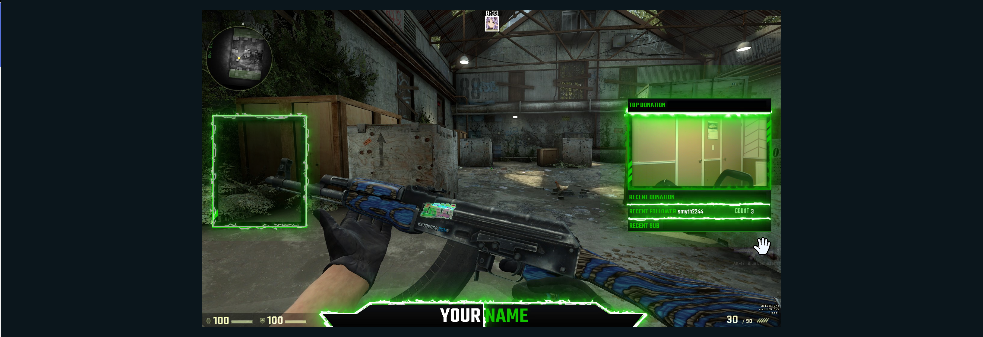 winter zenith
Okay so what you would need to do is input a chat widget in the overlay Editor
(make it transparent)
And put it to the left frame
And input the correct Labels into the Pannels on the right for the camera frame
It's best to put the screenshot of this overlay into the overlay Manager so you put the Labels and stuff in the right Spot
And next inputing the Alertbox Widget in the desired Spot and you Gucci 
grave parcel
that left box is already a chat box
and under the cam has donations and stuff but idk if its linked any way
winter zenith
Yes I thought you want to use StreamElements and just the graphic elements of StreamLabs for it but do as you want 
It's not @grave parcel
Since it's tracking donations from Streamlabs not StreamElements
(btw we also have a fire green overlay looks similiar to this only better and not as tacky in my opinion but again you do you)
grave parcel
im just not sure how to use this stuff..
winter zenith
You would just save time that way creating it and just Inputting the URL of said Overlay From StreamElements rather then stitching everything together
winter zenith
What I would do in you place:
Look at the green fire overlay in our Theme Galery
(if you like it click on creat)
Download OBS Studio and install
Download OBS Live and install it
Input the URL of just created green fire overlay into a source in OBS LIVE
Input your cam source
Input your Stream Key from twitch into OBS Live
Be happy with your life 
!obslive
 nocturne pelicanBOT
OBS.Live is a Plugin for OBS created by StreamElements. You can download OBS.Live here: https://streamelements.com/obslive
Please make sure you have the latest version of OBS installed, Current Version: 22.0.1. You can install OBS here: https://obsproject.com/
grave parcel
ill try that
 worn hazel
question to anybody that can help. I want to make something in my overlay that shows some text, but on a rotation (i.e. the over lay would show "hello newcomers" and then 10 seconds later that would disappear, and then "welcome to the stream" would show for 10 seconds.and then after that disappears maybe something else shows up for another 10 seconds. And then it cycles to the beginning again). I know I can do that by making a gif of what I want to show, but I cant find anything that allows me to make a gif using just text that doesn't have a background. Any help?
 untold crest
@worn hazel this kind of stuff is in development - so you will be able to add text, images, social media.
 blazing ocean
Hi, what do I have to do to get a code for the Android app?
winter zenith
@blazing ocean would have needed to stop by our Gamescom booth
It will be open to the pubic sure
blazing ocean
pity, I was not at the Gamescom, would have loved the app tested, but thanks for the answer
 lament blade
Can I get a code for stream elements app on mobile?
 pine hemlock
lament blade
pine hemlock
lament blade
That sucks.I won't be able to stop by there😑
pine hemlock
Im sure it will be public before you know it
lament blade
I got wize bot rn but I wanted to see if stream elements is better and easier to use
winter zenith
@lament blade i am sure you can test that even without the app. Since wizebot is a normal chat bot for streaming as StreamElements is too. And mich more
The app is for IRL streaming and had a soft launch at GamesCom when all is good and bugs are found (or not found) the code requirement will be gone for sure
 bleak dust
heyy i gots an issue
 minor depot
helo i tray to set up the graond control and whan i tray to gat my jtw tokean it not going in to the plaice its going to the main manou
is sambady hear?
can sambady halp me
nocturne pelicanBOT
@minor depot You can find your JWT token on your account channels page: https://streamelements.com/dashboard/account/channels
(Don't forget to click on "Show Secrets")
minor depot
tanks
 calm grail
We utilize the widgets for Extra Life. We are having problems where alerts just keep going off with random donations from many weeks back. Up until about a week ago everything worked normally. Any help to correct this would be great. I have removed the alert completely and readded with the same result.
 iron valley
Hello support, any release date to disable the alert autohost?
https://streamelements.helprace.com/i307-disable-autohost-alerts
 dusty merlin
So my Subscriber Alert settings wont change at all no matter what I do in my overlay settings, Ive logged out, cleared cache/cookies, tried a different browser, deleted and created alertbox widget, but no matter what settings I apply, it still does the left shark video when I test it.
Suggestions?
Check that. The default variations were messing with the test function 
pine hemlock
@calm grail I've pinged someone about this but I dont have an answer currently.
@iron valley We dont have a date/eta currently
@dusty merlin 
 rough hinge
give me cod
 narrow coyote
here is a cod
pine hemlock

 hasty lantern
Heyyy
 inner jasper
Hey, i had someone donate me a dollar (first donation ever) and nothing popped up on screen or on the widget afterwards
but it says it in my tipping history
any help?
 normal island
hi. i inquired about something wrong with my stream a couple days ago. the inquiry was that the names and the follow video weren't popping up in my stream.... the names have appeared to be fixes but the alert video has not.
 stuck hamlet
Do you have tip moderation enabled? @inner jasper it can be found in the tipping settings.
@normal island what type of video is it?
normal island
it's just a random gif of captain reynolds
like. when i get a follow it will appear on my OBS but it doesnt show on my stream.
stuck hamlet
That's quite impossible
normal island
yeah. well. it happening.
stuck hamlet
What version of OBS are you on?
if anything, I believe it would be an OBS issue..
Everything that shows up on the preview, shows up on stream.
normal island
22.0.1
except the other day when i talked to someone when i had this same issue he said it was something on your guys end and that a moderator will need to fix it.
stuck hamlet
He might of misunderstood, because if it shows up on the preview, it means our system is working.
!obshelp
nocturne pelicanBOT
For the best OBS support, please join their discord where OBS devs and support volunteers are available all the time discord.gg/obsproject
stuck hamlet
You could try asking them why this would happen 
normal island
it had something to do with my activity feed. my activity feed was reading blank for my sessions.
 cobalt verge
How do I get the invite code for the mobile app
---uninstall
-- leave discord server
calm grail
Keep me posted if you would @pine hemlock
grave parcel
im so confused 😦
i set up OBS.Live and got twitch code and all but Stream elem still says offline
 near sorrel
hello, where can I find out how to withdraw money after donation?
winter zenith
@grave parcel I will ask you again. Is English your native language? It seems like you have communicatin issues.
What exactly do you mean "StreamElements still sayes offline"
You need to input the URL from the overlay as a Browser source to OBS Studio/live
@near sorrel you mean from g2a or from your Paypal Account?
near sorrel
@winter zenith from g2a, yeah
winter zenith
@near sorrel you need to verify your Bank or Paypal Account first. You also need to verify you Account to withdraw money. You can do that 2 weeks after a donation Took place
near sorrel
@winter zenith I have a confirmed Bank and Paypal
ah, now i must wait 2 weeks?
sry for band eng btw.
winter zenith
@near sorrel you English isnt bad
For me I find it not that Bad. I just withdrawl every end of the month.
You still need to verify your Account once with your identity to withdrawl too
pine hemlock
I assume its within g2a you'll have to do all of this.
winter zenith
I am on mobile so I cant look the link up sowwy 
near sorrel
it seems to me that I have long confirmed everything
yesterday the first tip came to me, at a rate of $ 6, but I do not know whether it is possible to withdraw them somehow
winter zenith
Well I would just try it. Click in withdrawl and try to Transfer it
winter zenith

near sorrel
❤ thanks
winter zenith
No problem
near sorrel
my first time sorry
winter zenith
Hey no worries
@near sorrel
winter zenith
@lament blade just ask as anyone else doese? 
near sorrel
@winter zenith is this money from my last donation, right?
winter zenith
I would assume
near sorrel
okay~
aw ._. that's super hard
why when i click at withdraw my balance is 0.00, when i have 4.70, ohmy
ah ok nvm i'm idiot i need verify my g2a acc
winter zenith

lament blade
Hey guys i just downlaoded streamelements app in my mobile and its earlyaccess
When i open it they ask me for a inviatational code..
winter zenith
@lament blade only for people that visited our Gamescom Booth
It's a soft beta launch
lament blade
Where is gamescom booth
winter zenith
So you will need to wait
lament blade
I cant join that
winter zenith
I know
So you would need to wait
It will be released to the public once Beta testing has been completed
lament blade
How much time did beta launc will be there
winter zenith
You cant put a time stamp on that
lament blade
Any guess
winter zenith
No
I am sorry but it's not easy putting a time stamp on that nor is it clear if there are Bugs and how to fix them if they are there
lament blade
Can u tell. I have only mobile. How. Much features can i have for my stream
winter zenith
That's a normal development process we encountering here
With StreamElements you can have all the Features you would have from normal streaming Since everything is in the cloud. Overlay as well as bot @lament blade
near sorrel
okaaaaaaaay, i verify my acc, but what i can to do now? 😄 when i click into withdraw i have just 1 euro
what a quest xDD
lament blade
Will i be able to see. Subscribtion alert
winter zenith
I am now in the air will help you guys more when I Land 
@near sorrel need to wait till varification is completed
@lament blade yes
near sorrel
completed already~
winter zenith
@near sorrel it has to be approved
@near sorrel as well as Paypal and Bank varificationa
pine hemlock
Theres a widthdraw tab, click it and follow its instructions. g2a is seperate from us so if you're asking specific questions about their services its probably a lot easier to talk to their support teams
lament blade
Will everthing on screen or in prewiew for others
near sorrel
ok w8
winter zenith
@lament blade depends on what App you use with se you dont see the overlay but you see the Events and hear the Alerts
With bitstream you can see them but that's a lot of CPU and Power usage
Since SE App has smart streaming function I advise to wait on that if you have a older phone
lament blade
Will overlay will be shown to watchers which are watcbing my stream
winter zenith
Yes
lament blade
Thnk for the information
winter zenith
No biggie
lament blade
Really appreciated
winter zenith

lament blade
Hope i will able to make my stream like pc
winter zenith
With StreamElements you can
lament blade
I m goona try this after the launch
winter zenith
Sure thing
 cold crypt
does streamelements keep track of my followers and subscribers in a saved text folder that my overlay can automatically read from? so that new followers/subs will show on my overlay?
winter zenith
@cold crypt no it's easier that that
All in the cloud
No local files
So you can use your overlay when ever, where ever
(if there is Internet  )
)
It's a "Label" widget
In the overlay Editor
lament blade
If there is internet. Is most required thing
winter zenith

 copper moss

cold crypt
ty
winter zenith
No problem 
cold crypt
kiwa, i figured that out, thanks, now can i edit what it says? i want to take out the ":" after "latest follower" and add more space between that and the followers name
copper moss
You can go to the streamelements dashboard, you can personalize all of your overlays there
pine hemlock
After you add the widget, you can edit the message to your liking yes
See: the left
copper moss
It's waaaaay harder to help on mobile 
cold crypt
ty guys
pine hemlock
Welcome
 brittle hornet
I'm using NVIDIA GeForce Experience to stream, and it requires the overlay to be a file on the computer instead of a link. Is this possible to do with your overlays?
 ebon forum
@brittle hornet no. you need a streaming software that supports browser sources. Like OBS.live from us or the usual OBS Studio (free) or Xsplit (limited free version).
brittle hornet
OBS does not work for me, it makes the video super blurry, and XSplit only allows 720p30fps
But thanks for the info
ebon forum
OBS will work for you with proper settings. Blurry, pixelated, high CPU usage etc. are all easy to fix.
 olive lintel
помогите с донатом. зритель не видет все способы оплаты
winter zenith
@ebon forum he Sings the Song of your people ⤴
ebon forum
@olive lintel зритель видит те способы оплаты которые у него в регионе есть. если у него VPN включен то он видит способы оплаты той страны где сервер стоит
olive lintel
мне говорят что не влазят все способы . написанно что их есть 8 но видно 2
ebon forum
@olive lintel с чего он смотрит на это? попросите скриншот и пару деталей, разберёмся
olive lintel
 ebon forum
@olive lintel зачем он это открыл в новом окне? Там где донат, сразу после ввода суммы итд. идёт переход на системы оплаты. Такое первый раз вижу.
olive lintel
может быть вы с ним поговорите
ebon forum
@olive lintel я в поезде с выставки, не выспался и опаздываю, так что простите - но до понедельника вы сами
коллеги на английском с удовольствием помогут
lament blade
Hey guys I was in contact with support yesterday but I got forwarded to a higher level member or something but haven't gotten a reply yet. I was having issues with my streamelements account not tracking followers whatsoever, it says I've gotten 0 in total for the last month when I got around 10 just yesterday. Was wondering if anyone had any ideas?
I'd like to be able to stream later today with follower notifications in my alert box, and I really like your guys software compared to the rest.
winter zenith
@lament blade we are looking into it and working on it with intense speed
lament blade
Ok I appreciate it
 dark wedge
got a issue with cef-bootstrap,exe using massive cpu on my system
dark wedge
latest studio, updated to latest
we ID'd the file as browser extentions from your website overlays
zenith widget
Ok, so here are 2 questions:
- Are you using our plugin OBS.Live?
- Are you using an animated overlay from us?
dark wedge
2
zenith widget
Just to point out something, the browser extension/addon for OBS Studio is maintained by OBS guys
not us
we just provide overlays
that are placed into the browser source
dark wedge
i believe i dont have a plugin from you specifically, just built-in browser source
zenith widget
since you just answer with "2", I assume you are using an animated overlay from us
What are your PC specs?
dark wedge
i7 2600k -- 1080 geforce -- 32 gb ram
dark wedge
ya, is old, but works
zenith widget
Then my suggestion to have a bit less CPU usage is then use a static overlay from us
dark wedge
can do.
zenith widget
@dark wedge Ok, since I took a look at what you've been talking about with OBS's support
and I noticed someone is saying "cup", are you running the hypecup and/or Kappagen as part of your overlay?
zenith widget
dun dun duuuun
dark wedge
i have a kappa guy on it but it does not eat more than 1 % cpu
zenith widget
that might be one of the other problems
So in OBS' discord you said you don't use an animated overlay?
but you said here that you did?
which is it?
zenith widget
is it the animated version or static?
dark wedge
animated
dark wedge
as soon as i turned that off in obs, the cpu usage dropped like a rock
no issues was present with it before a week ago (vacation) .. seems that obs update knocked something loose
zenith widget
We've seen people having different issues with the lastest OBS update to 22.0.1 and using our plugin
and its not uncommon to see some people saying that "Animted overlays worked before, but now they lag my PC"

dark wedge
and thus a connection was found, heh
guess i'll just switch to a static for now.
thx for help
 winter fox
Hi, I'm a little confused. I downloaded groundcontrol, I click the cog to configure settings, it says I need a JWT token and there's a link to that, but when I click it it just fowards to https://streamelements.com/ and there's nothing there about tokens?

StreamElements
StreamElements is the leading platform for live streamers on Twitch and Youtube. StreamElements includes Overlay management, ChatBot, Tipping, Alerts & Loyalty
nocturne pelicanBOT
@winter fox You can find your JWT token on your account channels page: https://streamelements.com/dashboard/account/channels
(Don't forget to click on "Show Secrets")
winter fox
Ok,that's not where the p[age in the bot links to:https://streamelements.com/dashboard/account/information
StreamElements
The Ultimate All in One Platform for Streamers
eg where it says My Account here
Sorry, groundcontrol, not bot
zenith widget
@winter fox The page in Ground Control is an old link. We are working currently to implement Ground Control V2 into OBS.Live and most likely afterwards we will have it as a separate app
winter fox
Thanks @zenith widget
 gritty delta
Hey! Is there a way to make a command like: !regular John - And then make the user a regular?
 strong kernel
There's already a default command for that called !level. The level for a regular is 300.
So you can do !level name 300
@gritty delta
gritty delta
Amaaazing, lol how did i not notice.. Thanks!
strong kernel
😄
lament blade
Hey. I Need my overlay in a Second Version which is at the top of the Stream (my First Version is at the bottom) is there a function which can group the whole widgets and drag and drop them together?
strong kernel
Unfortunately not; you currently can't move multiple objects at once. But if you select one and use the position settings, you can modify its position on a single axis. That might help.
lament blade
Okay thx
strong kernel
No problem 😃
lament blade
And is there a function for importing tipeee alert Settings as well as tips?
strong kernel
No, the tipeestream importer is just for tips. No way to get alerts from there at this time.
lament blade
Okay thx
strong kernel
No problem.
 mint moat
is there a way to have the overlays be present a bit quicker when changing scenes? or is this a hardware limitation on my end
my cam/game usually popsd up 1-2 sec before the overlay]
strong kernel
Studio mode will help with that. Preloads the scene.
mint moat
ohhhhh n ice
do i need to keep the website open to rack follows and subs? or is having the overlay browser source sufficeint?
track*
zenith widget
We track everything for you, overlay just gives you an alert(and for the viewers)
You can have the website open on the activity feed to see who has followers/tip/subed to you
strong kernel
Activity feed can also be viewed in the Ground Control app and in OBS.Live.
 lilac steppe
anyone know why my emotes wont spam anymore? all I have is this box
 surreal cove
Hello i have a question where can i find my JWT Token cause when i press My account on streamElemnts Ground Control the button brings me to streamelements.com
cause it can find the link
nocturne pelicanBOT
@surreal cove You can find your JWT token on your account channels page: https://streamelements.com/dashboard/account/channels
(Don't forget to click on "Show Secrets")
surreal cove
Thank you
lilac steppe
this has been going on for about a week
strong kernel
I'd recommend deleting that screenshot as you don't want anyone else having your URL.
I'm looking into your account now, just a moment.
lilac steppe
lol. thanks @strong kernel
lament blade
Getting closer to my stream time and was wondering if there were any updates on my issue? Not sure if its a bigger issue, or one with my account specifically etc? If its just my account can you nuke it from orbit and let me start new? I can't seem to create a new account myself.
 hollow magnet
Does anyone now how can i display my lastest follower ? Its only displaying me the lastest follower when i start a new stream and someone followed in the stream but not the really llastest follower from my last stream... does anyone now this?
zenith widget
@lament blade What is the issue again?
@hollow magnet The latest follower widget is based on session most likely. You can click on it on the overlay editor and change it from Session based to something else.
lament blade
My account doesnt register any followers whatsoever, it doesnt show followers on my dashboard and it does not show follow alerts when they happen.
strong kernel
@hollow magnet Manual edit for latest follower: https://streamelements.com/dashboard/session
StreamElements
The Ultimate All in One Platform for Streamers
zenith widget
@lament blade Can you DM me your Account ID?
 limber ore
How do i transfer my point to stream lab
hollow magnet
@zenith widget in the Editor is no option to change it from session based to something else :/ @strong kernel But i cant add the lastest follower to the text field. Nothing happens when i click on the text field
zenith widget
This field shows the latest follower
and should only update when you get a new follower and every stream is should be what is here
it does not reset
hollow magnet
Oh ok thx i looked on the other field at the bottom -.- thx for your help i will try it 😃
 faint leaf
is it possible that i can put my Alertbox in every Overlay?
strong kernel
You can have the alertbox in every overlay, yes. You can also make a separate overlay just for the alertbox, add it to its own scene, and add that scene to other scenes.
 shell pumice
Does anyone know how to turn off the stream stats email I get on my email after every stream? If so, ping me and tell me how.
stuck hamlet
You can scroll to the bottom and hit the "unsubscribe" text.
This is the norm when it comes to automatic emails, from any company 😃 @shell pumice
shell pumice
that was what I tried before I asked the question but can't see any unsub button
nvm
just found it
wtf
it wasnt there earlier
or im just blind
 summer mulch

 fast briar
hello, juste a little question really want to know the shortcut to make same command like !followage because i want to make a custom command with that
want to say the time user follow channel
summer mulch
We already have a default command for that
fast briar
but in custom
summer mulch
Why do you want to make it custom
fast briar
because i want to say all points of people with the time follow the stream
${user1} got $(user.points) $(pointsname) and follow ${user2} like xxx time
want a custom like that
oups not like since*
summer mulch
So basically you want 2 commands combined into 1?
 fluid igloo
I'm trying to add a command with a cooldown. What's the variable for when I add the command from the chat?`
 wary gazelle
Is there a way to only allow Followers to use a command?
strong kernel
@fluid igloo No way to set cooldown when creating command in chat. Gotta log in to change that.
fluid igloo
That's something I could do if I'm a supermoderator? I'm currently not.
strong kernel
@wary gazelle Short of setting chat to followers only, not really. Lowest level you can restrict a command for is subscribers.
@fluid igloo Streamer would need to add you as an editor to his StreamElements account.
wary gazelle
@strong kernel Would be a good idea to add into Elements! If it isn't already in ideas I will place it in there
fluid igloo
Aight, I'll let the broadcaster know. Thanks for the help^^
strong kernel
@fluid igloo Actually, just bot supervisor would be fine.
lament blade
Can soneone tell me where is the option of loyality in desktop site
strong kernel
@lament blade https://streamelements.com/dashboard/loyalty
StreamElements
The Ultimate All in One Platform for Streamers
lament blade
Hi my Name is SirHamedo and i need help with my OBS Studios because someone told me that my stream is lagging and I don´t know what i can do. I´m a german streamer 😃
strong kernel
@lament blade If you're using an animated theme, it does require more computer resources. Beyond that, the best place to go would be OBS support.
!obshelp
nocturne pelicanBOT
For the best OBS support, please join their discord where OBS devs and support volunteers are available all the time discord.gg/obsproject
strong kernel
Go live and wait 10 minutes or so, pretty much.
pine hemlock
!points
pine hemlock
You can edit the command in your Chat Commands and add aliases to it and they can type whatever you wish for them to type
lament blade
Okk
 wild junco
I saw @stuck hamlet mention in Anthony Kongphan's stream saying he could help with a recent issue he's had with Creative Grenade, a design company. As I have had similar/worse issues and experiences, I was wondering if anything could be done to help here. I will post a link to a Twitter thread that explains the situation in full. https://twitter.com/JackMillerTV/status/1033749652129165312
lament blade
Hey i enabled loyality system but when i go to chat command it doesnt show any command how should i fix it can someone tell in detail
strong kernel
@lament blade Look for the command with the description "$(user) has $(user.points) $(pointsname) and is rank $(user.points_rank) on the leaderboard."
That's the one you want to edit.
pine hemlock
Its designed to automatically change !points to whatever your currency name is, but if you add a space in the currency name im not sure how the command functions.
So do what NethyR said yes
 lethal thistle
Looking for stream element inv code?
strong kernel
@lethal thistle Invite codes were only being given out at Gamescom.
lethal thistle
Oh ok srry just was trying
lament blade
photage of all description but didn't seen a command like that
Can u tell something about this issue @pine hemlock or @strong kernel
strong kernel
What's your Twitch link?
lament blade
In youtube no one response
pine hemlock
Theres no way to obtain a list of users/viewers for your channel via youtube, thus - no loyalty can occur.
lament blade
There is loyalty system. In utube
pine hemlock
not in our system.
lament blade
Oh sorry
wild junco
Any assistance on my issue?
pine hemlock
You're asking for help about another company that isnt related to StreamElements. If you think Onslaught has pull towards your issue I would DM him personally @wild junco
lament blade
Loyality system doesn't work on youtueb no worries but thnx
But i saw many people which use this system. Via fuss bot but that is not supported in mobile
pine hemlock
Thats not related to our system so 
pine hemlock
The codes were given out at Gamescom and we have no codes to give out.
lament blade
Next stupid question: is it possible to change the color of the amount (donation/cheer) in the "last tip" etc widget
Pls codes
The codes were given out at Gamescom and we have no codes to give out.
Ok tanks by
pine hemlock
@lament blade I dont think its possible with the current editor
strong kernel
@lament blade You can change the color of all the text, but not just the amounts.
lament blade
maybe it would be a nice change. loved it
 weary cairn
I have a question is tipping page allowed if you arent even partnered with twitch
 upper steeple
quick question and i've seen this asked to you guys on twitter, but when is the sub only icon going to change back to a circle on the stream store part of the extension?
weary cairn
oh i was kinda worried there like twitch wasnt going to accept that and they were going to warn me or somethin
upper steeple
@pine hemlock okay wasn't sure, cause whomever replied to the question asked on twitter, said they would look into and never got back to the person lol
weary cairn
ty a lot cuda
upper steeple
@pine hemlock haha its all good
lament blade
who can help me with my microfone my sound is very bad and i don´t know why
pine hemlock
Not related to streamelements try asking in #general-chat
 marble shuttle
Hi. Can someone help me, I'm trying to figure out how to change my chatbot's name
nocturne pelicanBOT
@marble shuttle Custom bot name requirements
- StreamElements bot modded and in chat
- Active overlay with alerts
- StreamElements tipping page in the panels below the stream (!panels)
- Create a twitch account for the name you want to use
- Ground Control app must be running
Steps to enable custom name
- Sign in to https://twitch.tv with the bot account
- Install and run Ground Control (!gc for download)
- Visit https://twitchapps.com/tmi/ and generate an oAUTH token
- Copy/paste everything in the box to Ground Control oAuth settings and enter the name for the bot account
- Restart Ground Control (custom name may take a few minutes to take effect)
Mac does not currently support renaming the bot.
marble shuttle
Eh, I'm sorry, but I don't really get those instructions. I already have a chatbot, but it is using my streamer name and I want to change that, not create a new account
strong kernel
If you want the bot to use a custom name, you need to create the account for it.
marble shuttle
Oh, so my bot automatically just gets my own name? There was no option to change it when I first set up the bot?
pine hemlock
The bot uses the name of the owner of the Oauth token.
so if you generate an oauth token when you're logged in
then it is your name.
Hence this is part of the steps:
- Create a twitch account for the name you want to use
marble shuttle
Ok, got a new account for the bot. Can't find the place in ground control to put the new token
pine hemlock
Cogwheel for settings, scroll down and the oauth is blurred out. click the eye next to it
marble shuttle
Found that. I have put the new ouath token in. Logged into the bot's page on streamlabs. The name is still wrong, I wanted it to contain the capitol letters as I typed it when I created it
 sweet jewel
Hey Folks. i'm trying to get my alert GIF's to sync with the sounds. But it seems that it doesnt play the GIF from the begging every time. Any help is appreciated.
pine hemlock
@marble shuttle Log into the bot account, go here: https://www.twitch.tv/settings/profile and update the capitalization .

 modern gulch
Greetings. After over a month of trying to get my Streamlabs/Ankhbot points to import unsuccessfully (with many attempts through DM's with a mod here) I am committing to just putting the top 100 names in manually. The current list I have is incorrect and cannot be globally deleted by me apparently, so is there a way to purge the entire list of names by a streamelements mod from your end? I have 800 names, and I don't have the stamina to delete them all individually and then put all the points in as well. Any help would be appreciated. I want to set up my loyalty store, but I need the points to be accurate first.
 weary mist
@modern gulch There should be a button to Reset Points on your leaderboard page in your dashboard, it will set everyones points to zero
modern gulch
There is, but I want the list cleared, not just the points.
stuck hamlet
Unfortunately what you're asking is not possible, may i ask who were you in DMs with?
modern gulch
Tomathin was helping me originally. He was able to load and unload points for me in the beginning, so I guess I just assumed it was a possible task. Not sure I can use Streamelements if this is not repairable. The list would be useless and inaccurate making the only feature I was switching over for a mute point.
stuck hamlet
I'm not sure i understand the issue here.
You want to remove everyone's points. Which is possible, everyone will be set to 0.
Then you spoke about re-adding top 100 manually.
The only issue that remains is having names with 0 points on the leaderboard, how is that causing inaccuracy?
modern gulch
No, I want to remove every NAME, not just the points. I want a clean slate.
The names and points are both wrong.
I have been unable to load anything on my end EVER
It has always been done by Tomathin
stuck hamlet
Could you provide me with the file you've been trying with?
modern gulch
I can DM it to you, but it came out bad when it was done the first time and I was told the devs are aware of the issue but cannot fix it. I will DM you everything I have if you want to try it yourself.
I am unable to eidt anything on the list and have it survive a refresh.
stuck hamlet
Sure.
 icy trench
Is there a way to get a heist game module on StreamElements?
icy trench
Or does anyone know how to make a command for It to work?
 muted coral
i'm a super beginnner and need to know how to make music from song request play on stream. !play doesn't make the audio heard
lament blade
How do I set the countdown timer for the starting soon sections
fast briar
@summer mulch no answer for my request ? 😢 (sorry for higlight)
pine hemlock
@muted coral in order for song request to function you need to keep the media request page open.
@icy trench I don't believe we support this at the moment, sorry
@lament blade you should be able to edit the layer of the overlay that has the timer
narrow coyote
did you add the overlay to your broadcasting software 
 icy pagoda
Hi all, I have just setup a few browser scenes with stream elements alongside the whole tip stuff, how will I know as a streamer who followed, tipped or whatever? Will it require me to tabout? I only have one monitor.
narrow coyote
if you set up an alert widget for your overlay, you will hear the alerts, otherwise you could have your activity feed open on another device like a phone. Ideally, you would have a second monitor for your chat, broadcasting software, and activity feed
icy pagoda
hey kite thank you for the reply! Okay so if i go down the alert widget route, itll notify me via sound? but it will only tell me what has happened and not exactly who or how much right? How could I do it on my phone, just a browser?
muted coral
thank you for the reply. ground control is open and no songs can be heard on the stream. used !play command as well
narrow coyote
You will just hear the alert sound, and the message if you have TTS enabled, you can just have the activity feed open from a browser on any device https://streamelements.com/dashboard/activity
icy pagoda
kite, you're an absolute star. Have a good one buddy
narrow coyote

 timid bay
So I'm having an issue with my alerts. I have multiple scenes and when I get a alert I hear it multiple times but I have the box checked for Shutdown source when not visible
lament blade
How do I setup a backup playlist
nocturne pelicanBOT
@timid bay Make sure to :ballot_box_with_check: “Shutdown source when not visible” for all browser sources (all OBS scenes). If using studio mode, uncheck “Swap Preview/Output scenes After Transitioning.” Also keep in mind that sound can play from any overlay loaded in the browser (editor or launched). https://i.imgur.com/FegZJQS.png https://i.imgur.com/yY0wcFl.png

 muted coral
am i supposed to have an overlay or use OBS for audio-only songs? i cant get this feature to work and there is no sound in the stream. bot responds to commands as if it is working though
lament blade
set it up as a media source
timid bay
I had missed one overlay i'm an idiot lol found it and fixed thx
narrow coyote
you would just need the media request page open, it will play the audio through your default audio source, as long as that audio source is broadcast, it will be on your stream. Otherwise you can add a media share widget to your overlay, and use the show on stream option to have it play through the widget, which would still come from your default audio source, the same as alert sounds do
 candid whale
Hey guys, is there a way to make channel mods be affected by the command cooldowns?
 primal lichen
Anyone here that can help me real quick?
 normal igloo
@primal lichen What's your issue
@unreal frost hey anything you need help with today?
@candid whale Not what I know of
 unreal frost
i got my help from Sean thanks!
 tight harness

normal igloo
And this is why Sean is a legend 
 lethal marten
im having an issue with my tipping settings page is never loading
normal igloo
@lethal marten What browser?
lethal marten
firefox
normal igloo
@lethal marten Try using Chrome as SE Works best for Chrome
lethal marten
okay ill give that a try
 kind epoch
What's better to use Ground Control of the web browser?
normal igloo
@kind epoch web Due to ground Control is being worked on
kind epoch
Ok cool thanks
lament blade
hello. i used in streamlabs the parameter $randnum(0,1000) but that doesnt work in streamelements. whats the correct parameter in streamelements when i want this?
 gentle hamlet
Heyo, my alert box has pretty much stopped working altogether and i was wondering if it had something to do with me using streamlabs OBS as my streaming software
narrow coyote
@lament blade ${random.1-100} all these can be found in https://streamelements.com/dashboard/bot/commands/variables
lament blade
thank youuu 😃
narrow coyote
@gentle hamlet That is entirely possible, then have been know to try and block our services through their apps in the past
gentle hamlet
ah that sucks
Only reason I still use Streamlabs OBS is for the app
kinda like a mini stream deck
cant wait to drop them tho lmao they've given me so many issues
narrow coyote
OBS Studio has made several advancements that SLOBS is really far behind on, and we have our plugin, OBS.Live for it
 winged estuary
If someone says GG in my chat is there a way of getting stream elements to say GG without the !
 dense jackal
in the settings for that command click advanced settings and make the keyword 'GG' @winged estuary
 west gazelle
Stupid question, apologies in advance... but I changed my twitch name. Bot things don't work anymore... How do i get the bot to rejoin my chat?
winter zenith
@west gazelle go to your dashboard and Part the bot then let it join again
west gazelle
thanks kiwa
 wanton jetty
Do we have any ETA on the recoding of the "Timers" section of SE i know its planned but its been a few months since it was confirmed ❤
 winged sundial
I just added a new sound to my store but it keeps saying item not found
nvm had to delete it and remake it 😃
 crystal zenith
Is there a way to make SE bot reply to something without making a "!" command ? 🤔
narrow coyote
for custom commands you can add a keyword under the advanced settings
upper steeple
uh i think something is up with the extension countdown. I already streamed today and I don't stream till Wednesday but it is saying that my next stream is in 8 hours o_0
wanton jetty
how does yours fit the layout mines slightly cut off...
DAFUQ

are you on the new twitch "BETA" layout @upper steeple
upper steeple
nope
wanton jetty
well that explains it 😄
Man the layout is so screwed on the twitch beta layout lol
http://chrisis.live/s/1535335009_9.png

the lines aint even lined up for the /
and saturdays cut off entirely lol
upper steeple
i'm concerned with my countdown time being wrong, not the layout lol. I understand your frustration with it on the beta site, but would really hope to get some help from the staff about why it says my next stream is in 8 hours when its not till Wednesday lol

 burnt flax
hi guys, is anyone having issues with dropped frames using obs.live
Im dropping alot of frames using obs with the addon then i do with SLOBS or OBS studio Stand alone
narrow coyote
The OBS log from the stream where you were dropping frames should say exactly why you were dropping frames
nocturne pelicanBOT
Can you please provide a log from your last stream. You can find this log in " %appdata%/obs-studio/logs " OR Help > Log Files > Show Log Files. You can simply drag and drop the log file into Discord.
narrow coyote
You can simply drag and drop the log file into Discord.
narrow coyote
that does not appear to be a log from when you were streaming
narrow coyote
Dropped frames were related to bandwidth, nothing that OBS.Live does would impact that compared to normal OBS Studio
Number of dropped frames due to insufficient bandwidth/connection stalls: 1626 (16.9%)
burnt flax
does that have to do with bitrate?
narrow coyote
Other log is also bandwidth, and a small amount from your GPU
8:57:18 PM.214: Output 'simple_stream': Number of lagged frames due to rendering lag/stalls: 677 (0.7%)
8:57:18 PM.214: Output 'simple_stream': Number of dropped frames due to insufficient bandwidth/connection stalls: 7956 (7.8%)
yes, that would be related to your bitrate
1080p 60 FPS is also not the best idea if you are not a partnered streamer, you are going to limit your audience with that
burnt flax
im usinfg the same bitrate on here as SLOBS and normal obs studio tho
ok, im going to drop resolution to 1600x900
pine hemlock
OBSlive is an addon. it does not affect your ability to stream.
narrow coyote
OBS.Live does not change anything with OBS Studio that relates to the connection to the server, so not really sure what to tell you why you are getting insufficient bandwidth
burnt flax
Yeah im at a loss
narrow coyote
I would also recommend upgrading to OBS version 22
burnt flax
Ill check to for updates, it seems its saying no updates available
 latent jewel
having an issue where the the tips section is looping on buffer anyone help me
narrow coyote
because you are on a version with a broken updater, you will need to get it from their site
narrow coyote
@latent jewel If you are talking about the tips settings page being white, that means a specific cookie is being blocked
latent jewel
ok how di fix sorry bit of a noob
burnt flax
I can almost always figure it out on my own but this has me stumped
narrow coyote
if you drop to the 900p/60 fps at like 5k bitrate, that should hopefully help too, and 900p is still the sweet spot for quality on twitch 1080p is not really worth it
@latent jewel If you are using chrome start by going here
and make sure nothing is blocked
latent jewel
Legend @narrow coyote
narrow coyote
This is the cookie that will cause the white page if blocked
latent jewel
yeah i got it owe you big time been annoying for a week now
narrow coyote

burnt flax
still dropping frames after update , 😦
narrow coyote

 vivid lodge
I'm using the alert converter to use alerts from streamlabs to streamelements but it's doing this. Any help? https://gyazo.com/612b25d9870cd2d93f12b0eba3331ac4
 lament blade
I am a mod in a stream and i was sent a link for stream elements and it wont let me do anything but it lets the other mods
pine hemlock
@vivid lodge Thats because you have custom css enabled
vivid lodge
So, do I disable it? @pine hemlock
pine hemlock
If you dont use custom css, yes.
vivid lodge
It worked, thank you! @pine hemlock
pine hemlock
@lament blade What do you mean
lament blade
@pine hemlock I can't moderate media requests and the other mod in our stream can. I have been sent two different links. Nothing pops up for me. nothing different
pine hemlock
Did you click on where it says 'Channel' and select their channel?
lament blade
okay thanks ive never done elements before
 mystic umbra
Hi, I'm trying to set up mediashare. Everything is working fine, exept the sr command won't work. Only way to add youtube links is through the interface. Viewer Request is turned on
pine hemlock
@mystic umbra The bot isnt in your channel, therefore commands will not work.
mystic umbra
Oh, how do I add him?
pine hemlock
On the main dashboard on the right side there is a join button
mystic umbra
Thank you! 😃
pine hemlock
welcome
 lapis moat
Im having a problem with the activity feed and the alerts not actually showing subs.
pine hemlock
@lapis moat Did you recently get affiliate/partner
lapis moat
nope been months.
maybe a year acctually. wow. time flys
Maybe its just twitch api messing up. but idk.
pine hemlock
Logging out of SE and logging back in usually fixes stuff like that
but also remember that new subs need to share their subs
for alerts/acitivity feed to show
lapis moat
Mkay i'll try.
 hallow crater
How do I unban a banned keyword from a giveaway?
AMD did something silly and now no one can type Hype.
stuck hamlet
All banned words on the bot can be found on the site, if you'd like to remove one, you would have to go through there.
hallow crater
can you point me into the right direction on the website I've looked high and low, also might be sobering up. @stuck hamlet
hallow crater
you are a blessing.
i think they banned it through another bot so welp.
thank you for your time.
 lavish lodge
hi i need some help with widgets from streamelements cause im only getting one of the three thing from it
pine hemlock

lavish lodge
i need help with the widgets from stream elements i use the browser source then i only get one of the entire scene
pine hemlock
Set the resolution to 1920x1080 if you're only seeing part of the scene
lavish lodge
on what if i might ask?
pine hemlock
The browser source in obs.
pine hemlock
In the overlay editor there is a bell icon in the bottom left.
lavish lodge
thank you you are amazing
 gleaming oak
Do I have to download a new version of obs live everytime it updates?
pine hemlock
Why wouldn't you want to?
pine hemlock
it should let you know when there is an update available and you can decide to update then
gleaming oak
👌
 inland knoll
Morning - am I missing something - where is the Merch information taken from?
pine hemlock
Ignore for now.
burnt flax
hey do you guys know if there is command that i can use, to count down from 10 to 0?
zenith widget
We don't have a command like that at the current moment for the chat bot
burnt flax
Ok thanks
 crimson shuttle
Can someone help me.. I was creating commands list for my stream and when I type !commands in my chat the link is shown as ***, what should I do
crimson shuttle
It worked... Thanks @zenith widget
zenith widget
There is one other thing you can also do is, but you will have to use the link blocker from the chat bot - you can go to https://www.twitch.tv/settings/channel and disable the "Block hyperlinks" options. @crimson shuttle
You can whitelist sites in the bot filter, so if people want to post clips for example can do so, without getting timed out or being blocked by Twitch
crimson shuttle
Your first instructions worked instantly, should I try the second one too?
zenith widget
I gave an example of the 2nd thing you can do
If you want people to post CLIPS in your chat, you can do the 2nd option, but the /mod thing is always good to do on chat bots
inland knoll
oooo exciting 😃 @pine hemlock - something new on its way ?:)
pine hemlock
Lets just say thats not supposed to be visible yet, sooo
zenith widget
Its beta testing and that filter slipped by Authority check 
 grave python
I know that @turbid reef is the best guy and everything but something seems really odd with your system with donations coming through g2a payments system, and I really think its g2as fault for not picking up data
U c they are blaming your platform on support
since you are obviously not ones to be blame, can u please provide me info that you received request for tip somehow so I can start raging more at their support
zenith widget
So you got a tip of €100 towards your G2A Pay, but its still not set as available balance?
that the issue?
grave python
they are saying that fuck up is on your side 
zenith widget
also I can't shake the feeling that one of 3 images needs to be removed 
We only provide the platform to which people can leave you a message, how is that a fuck up from us, if you can clearly see the tip in their system? 
well not all 3 images 
but sure
grave python
G2A being g2a
zenith widget
I'll ask internally just in case
 floral badger
i have an follower goal but its off by 2 follows how do i change the number again?
zenith widget
@floral badger Go to this page: http://streamelements.com/dashboard/session and adjust the follower progress
To get to this page from the dashboard, go to "Activity Feed" -> "Widget Data" on the right or DATA tab in the overlay editor
floral badger
i was just typing that question 
zenith widget

floral badger
your a wizard @zenith widget 
zenith widget
I'm a HWAT? @floral badger 
floral badger
zenith widget
@grave python Update on the matter. I would strongly recommend rechecking your personal info on G2A Pay if its been verified or not, or if its true and so on.
inland knoll
Hello again - with the store redemptions I have added my sound ones, but is it possible to add a gif or image that plays on the stream at the same time?
winter zenith
@inland knoll yes! Just Set the Item to "Streamperk" rather then "SoundEffect"
inland knoll
thanks 😃
winter zenith
No problem 
weary cairn
another very stupid question like how does the overlay work on OBS
winter zenith
You input the URL as a Browsersources into your OBS Scene
 celest glen
Hi guys. Does anyone know the format I need to use to display a hyperlink in a chat command?
zenith widget
Any format you'd like
celest glen
I need the link to be clickable. Do I need to put the whole https://www. stuff for it to work?
zenith widget
http(s):// or www works
celest glen
thanks @zenith widget
zenith widget
the (s) stands for that not all links provide a secure HTTP connection @celest glen
so just copy paste the url from the address bar as you see it
weary cairn
well im kinda confused like does the browser url have evryting built in like the tips and the latest subscribers and stuff and do i need to put the chat manually in or somethin
first time using it :/
zenith widget
@weary cairn Yes, everything is cloud based, so you only need a link to the overlay added to OBS. We keep track of everything for you
You can edit the overlay via the overlay editor.
@weary cairn I would suggest to look at this video guide: https://www.youtube.com/watch?v=X7XrDdRE7Fk&t=1s&index=4&list=PLCDDKlFdScbEwdx5AntcQIS1InkFJwHtv
Its a bit outdated, but still useful. Here is a playlist of all our video guides: https://www.youtube.com/playlist?list=PLCDDKlFdScbEwdx5AntcQIS1InkFJwHtv
weary cairn
ok i get it now ty a lot
 karmic fern
hey is there a guide to making a custom bot name with the ground control program?
nocturne pelicanBOT
@karmic fern Custom bot name requirements
- StreamElements bot modded and in chat
- Active overlay with alerts
- StreamElements tipping page in the panels below the stream (!panels)
- Create a twitch account for the name you want to use
- Ground Control app must be running
Steps to enable custom name
- Sign in to https://twitch.tv with the bot account
- Install and run Ground Control (!gc for download)
- Visit https://twitchapps.com/tmi/ and generate an oAUTH token
- Copy/paste everything in the box to Ground Control oAuth settings and enter the name for the bot account
- Restart Ground Control (custom name may take a few minutes to take effect)
Mac does not currently support renaming the bot.
karmic fern
thank u
 thorny nymph
Hello the bot wont work in my chat
strong kernel
@thorny nymph What's your Twitch link please?
thorny nymph

 lunar drift
Hello, i m new here . trying to setup my bot but don t know what command is the best for starting
strong kernel
@thorny nymph You're all set.
thorny nymph
How did you fix it?
 strong kernel
StreamElements
The Ultimate All in One Platform for Streamers
thorny nymph
Thank you
strong kernel
No problem.
 modern rock
Hey, i´m trying my first Setup and i don´t get the widgets to move on the screen. They do move on Streamelements but not in my Streaming Window.
zenith widget
If you've moved the widgets around you need to click Save
modern rock
I´ve done that.
thorny nymph
Also I have one other problem in my streamlabs obs everything shows up but my donations so I cannot read my donations in the stream labs obs
zenith widget
strong kernel
@lunar drift Your bot's in your channel already and comes with default commands. If you'd like to enable loyalty points, you can go to https://streamelements.com/dashboard/loyalty and if you want to enable games that let people use them for fun, you can enable some at https://streamelements.com/dashboard/bot/modules
StreamElements
The Ultimate All in One Platform for Streamers
StreamElements
The Ultimate All in One Platform for Streamers
 strong kernel
@thorny nymph We're not connected to Streamlabs, so a donation through our page won't show up in their OBS. We suggest using OBS Studio with our plugin: https://obs.live

OBS Knowledge Base
OBS.Live - an education hub for live streaming on OBS
zenith widget
@modern rock Then you've added the wrong overlay link to OBS or changed scenes that has another overlay link.
@modern rock make sure you are editing the desired overlay
 dark hearth
Good morning:
I have activated the social tab, so that every time I start streaming, I announce it on twitter, but it does not, am I doing something wrong?
zenith widget
Most likely its not working properly due to Twitter API limitations. I'll ask internally just in case
What is your username?
zenith widget
Twitch/SE Username @dark hearth
@dark hearth Just the name was enough - got it and gonna ask now
dark hearth
ok, sorry
zenith widget
@dark hearth Got a confirmation that its still the limitations from Twitter's API and we are working on resolving it
no ETA
dark hearth
Ok, when it is solved, will they notify you somewhere?
zenith widget
Maybe yes, maybe no. Can't guarantee
dark hearth
Ok thanks for everything 😃
 violet raven
Hey hey everybody. so streamelements uses normal obs? or do they have a standalone client? 😃
zenith widget
Well you can use OBS with the tools we provide, eg. overlay link into OBS Browser source
We do have a plugin for OBS Studio(not a fork/standalone client like SLOBS), that only gives chat and activity feed into OBS
But everything else like overlay links, game sources and so on, need to be placed manually
 long ridge
can someone tell me, when will come the viewerlist into obs live?
zenith widget
It is planned, so  hopefully
long ridge
would be nice
 molten oxide
Contest doesnt work
strong kernel
@molten oxide Could you go into more detail about what you're seeing?
zenith widget
You need to have loyalty points system on
strong kernel
Can I have your Twitch link please?
zenith widget
Only the name is sufficient - please don't post the entire link @molten oxide
we got your name
molten oxide
Its TvT_Wolverine
strong kernel
That's my bad, I did ask him for the link, lol.
zenith widget
 @strong kernel
strong kernel
molten oxide
what do i do now?
strong kernel
Just a moment, taking a look.
Though you should mod the bot first. /mod StreamElements
molten oxide
ok
strong kernel
Looks like you changed the command to !flipcoin
molten oxide
fr?
strong kernel
So instead of !bet win for example, try !flipcoin win while a contest is running.
molten oxide
I did
strong kernel
Don't close the contest please.
molten oxide
nvm i figured out a way
strong kernel
Please open a new contest.
molten oxide
i did
strong kernel
Okay, let's have a good laugh at ourselves. First, the command was disabled. But second, it was set to only work while you're online.
You're all set.
 granite socket
hey i have a question, my alerts sound come double
nocturne pelicanBOT
@granite socket Make sure to :ballot_box_with_check: “Shutdown source when not visible” for all browser sources (all OBS scenes). If using studio mode, uncheck “Swap Preview/Output scenes After Transitioning.” Also keep in mind that sound can play from any overlay loaded in the browser (editor or launched). https://i.imgur.com/FegZJQS.png https://i.imgur.com/yY0wcFl.png
 flint pulsar
Hello! When using the Ground Control App for some reason my "tab" key stops working. I've tried uninstalling and reinstalling the software. Is there any other fix?
zenith widget
@flint pulsar Does your tab key stop working for GC or your entire PC?
flint pulsar
Entire PC @zenith widget
lament blade
Help me
zenith widget
@lament blade Invite codes were only given at our Gamescom booth. Since its over, expect a public beta anounce Soon!
zenith widget
@flint pulsar What I would suggest is to not use Ground Control then. Its outdated and it has known issues with the Media Request page.
zenith widget
I'd suggest to use OBS.Live for the activity feed and chat
upper steeple
so i realized that the community gift sub alert is extremely delayed compared to all other alerts that are instant. Is this because it is getting the info from twitch and since its so many subs at once it can take it a little?
zenith widget
@lament blade There will be an open beta soon! We are preparing stuff for the App.
lament blade
Okey
zenith widget
@upper steeple Thats an interesting question.
 mystic mason
Bugger so no keys for the app?
zenith widget
@mystic mason They used to work, but it got borked afaik with the newer version of Media Request page it uses
upper steeple
@zenith widget been testing and it has a very noticeable delay with the alert
flint pulsar
@zenith widget Thanks for the suggestions!
mystic mason
@zenith widget sorry mate I'm confused haha, I don't have a key, so are keys not being sent because of a media request issue in the app?
zenith widget
@mystic mason Oooh wait wrong person to ping 
mystic mason
Al g
zenith widget
You and @flint pulsar have similar white background avatars
mystic mason
We do to haha
zenith widget
Ok, lets take it from the top - @flint pulsar They used to work, but it got borked afaik with the newer version of Media Request page it uses
this is for you
flint pulsar
Oh dang, this thing is crazy useful. Having chat and alerts in one page? I'm waaaaay to excited about this. Thank you! @zenith widget
zenith widget
@mystic mason As for the android app - we will be pushing a more open public beta test Soon. No actual ETA on it, so hold on to them pants for them IRL stream
nocturne pelicanBOT
@flint pulsar OBS.Live is a Plugin for OBS created by StreamElements. You can download OBS.Live here: https://streamelements.com/obslive
Please make sure you have the latest version of OBS installed, Current Version: 22.0.1. You can install OBS here: https://obsproject.com/
mystic mason
@zenith widget cheers mate but I gotta ask for an eta because you know, you said no eta but we need an eta haha
zenith widget
No ETA(TM of StreamElements)
I can't tell you anything more as this is all I know my self
zenith widget
@upper steeple Just got confirmation. The behavior you noticed is intended as the system counts to see how many gifted subs are coming from 1 gifter
upper steeple
@zenith widget sweet, so exactly what i had put. Awesome thank you for confirming it for me 😃
lament blade
hello
i have added a soundfile to the stream shop. when i click on it, sound also comes but when i press "redeem item" or enter the command, nothing happens. The chat also says: you successfully redeemed..
but why can't I hear anything?
strong kernel
@lament blade Make sure you have a Store redemption widget in your overlay.
lament blade
ohhhh logical... I forgot that 😄 thank you 😄
strong kernel
No problem. 😃
 molten hill
Code?
strong kernel
@molten hill If you're referring to a mobile app beta code, they were only being given out at Gamescom, and we're not distributing more at this time, but we'll have a public open beta soon.
zenith widget
We are not giving out any more codes, as they were only available during Gamescom! Like Nethyr said, we will be doing a public open beta soon.
summer mulch
@molten hill Don't be rude
 errant dust
Hey everyone 😃 is there any way to simulate an emote explosion? Doesn´t seem to work for me
strong kernel
@errant dust Type !kappagen in your chat while watching the overlay.
errant dust
oh thanks 😃
strong kernel
Make sure your overlay has a Kappagen widget, too.
grave python
@zenith widget they are holding my payment becasue it is high risk since its coming from streamelements
just spoke to a friend who's working in their marketing dept
maybe you guys should talk to them because it can cause dmg to your entity
 short steppe
Is it possible in the social tab to automatically put the game you're playing in the tweet?
 serene granite
hey @grave python let's move to dms
 lusty token
i neeed heloppppppppp
narrow coyote
you need to post your question or issue first 
 oblique galleon
Is there anyway i can reset my bots Watchtime commands etc, some ppl it works for some dont, most have 0 watch timea and followage :/
weary mist
Watchtime is tracked only when loyalty is turned on. I am not sure the specifics about resetting it though. As for followage, that is (I am 95% sure) pulled from twitch api
lusty token
i cannot find the way to putt elemts like donation button with skrill and about and stufs
strong kernel
@lusty token On your Twitch channel, right below the video player, you'll see this toggle:
lusty token
yes i know this
narrow coyote
 Then what are you asking about
lusty token
when i go to this i got stuck i can type but what i mean is like evry streamer haVe booton if u click on donation it takes u to the website wher u donate
that's what im trying to do
and i dont know how
weary mist
If you check out your Tipping Settings page, it will help you create a tip button (image) which you then upload to a panel, then put your tip link in the url spot
 lone barn
Hi. Do you have to have streamlabels open for the text files to update?
narrow coyote
@lone barn We are StreamElements, not StreamLabs
lone barn
Oh rip my bad lol
narrow coyote
You dont need anything open for our labels to update, since its all cloud based
weary mist
@lusty token We also have G2A pay available for those area's that don't have access to PayPal
winged sundial
Hey guys I justed wanted to ask if we will be getting a mass gift sub alert ?
weary mist
@winged sundial yes, it is something we are working hard on getting implemented. We are making sure it works before releasing 😃
winged sundial
NICE ! Thank you 
narrow coyote
there is already a variation for this in the alert widget, in the sub variations
weary mist
😉
narrow coyote
weary mist
@winged sundial shhhhhhh
narrow coyote

 narrow coyote
Codes were only given out at Gamescom at this time, there will be a more open beta at some point in the future
 shrewd wedge
ok cool
 tender cosmos
hi my donations alert dont work from streamelements
and it also doesnt show donator
how do i fix this
narrow coyote
@tender cosmos I only see a StreamLabs tipping panel on your Twitch page 
pine hemlock
Your tipping link .. ^
if you want your alerts to work, you need to use streamelements tipping page.
Since you're using our alerts.
weary mist
@rugged locust OBS has an auto-detect funtion, though I am not familiar with it. The best thing to do is use that option, then adjust the settings based on what you experience. You can also ask OBS support:
nocturne pelicanBOT
@rugged locust For the best OBS support, please join their discord where OBS devs and support volunteers are available all the time discord.gg/obsproject
 rugged locust
@weary mist where is tht
weary mist
Like I said above, your best bet is to go to OBS support
 brisk flint
Hi! In Ground Control 1.4.3 I can not find the Rename function anymore to rename SE bot to my bot. Is this now disabled, or what happened?
Thanx
 narrow pike
where do i ask for early access to the streamelements android app i downloaded it and asked for a access code and send me to discord when i hit contact us.
nocturne pelicanBOT
@brisk flint Custom bot name requirements
- StreamElements bot modded and in chat
- Active overlay with alerts
- StreamElements tipping page in the panels below the stream (!panels)
- Create a twitch account for the name you want to use
- Ground Control app must be running
Steps to enable custom name
- Sign in to https://twitch.tv with the bot account
- Install and run Ground Control (!gc for download)
- Visit https://twitchapps.com/tmi/ and generate an oAUTH token
- Copy/paste everything in the box to Ground Control oAuth settings and enter the name for the bot account
- Restart Ground Control (custom name may take a few minutes to take effect)
Mac does not currently support renaming the bot.
weary mist
@brisk flint you have to have each of the first 3 things listed for it to show up
brisk flint
Please read carefully: "anymore"
weary mist
@narrow pike Right now, that code was only provided at Gamescom. We are giving it a bit of time before handing out more keys
@brisk flint what is your twitch, it is not showing inn your profile on discord
pine hemlock
If it doesnt show up, then one of the requirements are not met.
narrow pike
ok sounds good cant wait to try it ill keep the app installed thank you 😃
weary mist

brisk flint
I turned it on 😃 (No ide why it was off)
Interesting is, that the rename part is missing from the Groundcontrol.
weary mist
@brisk flint shutdown ground control, restart it
 limpid lotus
For some reason my Chat Commands are not working in twich chat...help?
narrow coyote
Did you recently change your twitch name
limpid lotus
yes
narrow coyote
Part the bot from your channel (dashboard right side) log out of SE site and then back in, then join the bot to your channel
limpid lotus
thank you Kite ❤
narrow coyote
 past spindle
hi folks
i need some help
i just renamed myself on twitch and since then my streamelements commands doesnt work
like !uptime or even who have hosted me
i relogged already etc
narrow coyote
You need to part the bot from your channel, and rejoin it
past spindle
how
narrow coyote
your SE dashboard, right side
nocturne pelicanBOT
@past spindle Please connect your Twitch and/or YouTube channel with Discord by going to ⚙ Settings and then Connections here in Discord. https://streamable.com/eg92w
 past spindle
anything else can do? @narrow coyote
narrow coyote
parting the bot, logging out, logging back in, and joining the bot should resolve it. If you dont reconnect your twitch account to your discord, it will make if difficult to look at your channel
narrow coyote
No
 faint musk
weird theen
someone subbed and it didn't pop up just saw it through discord
can it be from twitch ?
nocturne pelicanBOT
@faint musk Twitch prime (new and resub) and paid subscriptions (resub only) must be shared in chat manually by the person subscribing in order for the subscription information to be sent to StreamElements. For twitch prime, the user needs to have sharing enabled on https://www.twitch.tv/settings/prime. For paid subs, if the share box doesn't show up immediately it will when they refresh the page. https://i.imgur.com/VNJN0Uv.gif https://i.imgur.com/2297EA7.png

 past spindle
ok done
faint musk
oh the bot might be right
weary mist
@past spindle looks like it is working to me 😃
narrow coyote
weary mist
@past spindle don't forget to update your tip link
past spindle
yes u're right
lament blade
Hey there is there a way to get the song requests to go through a different output than the "Default output device"?
narrow coyote
If you have another audio device, it could be routed if you are on the latest Windows 10 release, or you would have to use some type of audio mixer, software or hardware
weary mist
I use a program called Audio Router, and force ground control to play sound through an audio port I don't use (like my speakers since I don't have any plugged in)
then capture that in OBS
 radiant steeple
a supermod on my stream that has 20,000 points whenever she tries to redeem a sound bit i have for points the bot tells her she doesnt have enough points....
narrow coyote
Did she recently change her twitch name?
radiant steeple
like a month ago
i tried and added points to her old username and it fixed it
anyway to change it so its her new name
narrow coyote
If she as an SE account, these problems are usually solved by them going to our site, logging out and logging back in to get the new token from twitch
radiant steeple
so just by her logging out and in it should fix it?
narrow coyote
It has been known to in the past 🤞
radiant steeple
fixed it thank youuu!!
narrow coyote
 narrow coyote

vivid lodge
How do you set default settings on OBS?
lament blade
Hey is there a way to display the subpoints (realtime) and not the subcount?
and, if not, does the subcount show the actual number of subs in realtime ? even if a sub does not resub ?
stuck hamlet
We have this widget: https://www.onslaught.ca/s/hc9dcgul.png

Everything we show is in real time.
stuck hamlet
Subpoints, Sub count, follow count, everything real time 😄
narrow coyote
@vivid lodge What do you mean exactly?
 hushed ice
hey guys i changed my name and i dont know how to get the bot back in my channel, everything else seems to be working
narrow coyote
Part the bot from your channel (dashboard right side) log out of SE site and then back in, then join the bot to your channel
hushed ice
it works thanks
narrow coyote
 copper bobcat
Is there a way to make it so timers don't go all off at once? i.e. if I have a timer for 5 minutes and another for 10 - they'll go off at the same time every ten minutes.
zenith widget
Make them 6 and 10 minutes
 spice field
hi! ive changed my name as well, and none of the overlays are working
zenith widget
or 5 and 12 minutes @copper bobcat
spice field
ive tried to logout and log in but it wont work
weary mist
@spice field did you clear cache
narrow coyote
If you are using OBS, refresh the cache on the browser source


 nocturne pelicanBOT
@spice field Right click on the BrowserSource > Properties > Scroll down a bit > Refresh Cache of current page
lament blade
I don't understand how I can do "Redeem item without"!redeem"". where do I enter "${redeem}"?
spice field
i did that, but it doesnt seem to work
zenith widget
@lament blade You do this:
Command: !Item1
response for command: ${redeem item1}
nocturne pelicanBOT
@mental patrol Make sure to :ballot_box_with_check: “Shutdown source when not visible” for all browser sources (all OBS scenes). If using studio mode, uncheck “Swap Preview/Output scenes After Transitioning.” Also keep in mind that sound can play from any overlay loaded in the browser (editor or launched). https://i.imgur.com/FegZJQS.png https://i.imgur.com/yY0wcFl.png
zenith widget
item1 is the name of the item
lament blade
ohhh there... i tried typing it somewhere else.... xD
zenith widget
@spice field Can you DM me one of your overlay links then?
spice field
yes!
copper bobcat
Is there a way to make a command where it takes a number minus !uptime? So I could have my 3 hour stream and then do 3 - !uptime = time left in stream? Does that make sense?
zenith widget
It does - we don't have a count down variable for the chat bot unfortunately.
You will have to make it via a customapi call
You can for example add the countdown widget to your overlay @copper bobcat
lament blade
i think i still enter it in the wrong place. where do i have to enter" ${redeem item1}"? shame
zenith widget
In the custom command response
lament blade
so i have to do it for EVERY stream shop item where i want it O.o
zenith widget
If you have them set "Redeem via chat"
lament blade
yes 😦
narrow coyote
If you want to be able to redeem without using !redeem, then yes
 mental patrol
thx for helping me!!
narrow coyote
floral badger
is there eny way to get a welcome message to new viewers in chat?
weary mist
Not through our system, twitch does have a way to do that though
weary mist
I am not sure if it shows up in chat, I don't use it personally
I do know it shows up in regular twitch chat
("it" being the welcome message, I do use OBS.live)
 kindred hill
when I use the stream elements media request bot it works fine untill I try to show it in the stream. As soon as i click this the audio is cut from the desktop audio in OBS. I am using Voice Meter Bannana and audio router programs to route the music out of my head phones (VMAudio) to the stream (VMAudio Aux) any help would be greatly appreciated I am in the voice support channel if further info or explanation is needed