#helpdesk-twitch
1 messages · Page 331 of 1
 elder sorrel
 tropic shell
Hi all do you have Russian support?
 lament blade
Very very crappy laptop imo
 narrow coyote
hate to break it to you, that is HP, not Dell, and that pic tells us nothing
 ebon forum
@elder sorrel not only me, @summer mulch and @cedar fulcrum speak russian too 😄
lament blade
Whoops it is hp
lament blade
I know very little about computers
tropic shell
Guys please help i couldn't import my csv file with my subs
ebon forum
@tropic shell yes, we have russian support
tropic shell
Couldn't import points :/
lament blade
@weary mist so how do I figure out my gpu and stuff
tropic shell
i already try to import from Twitch channel and from streamlabs (
narrow coyote
@lament blade already told you this
narrow coyote
 Try opening task manager, more details, performance, and see if that shows what processor you have
already a bad sign if dxdiag cant recognize your processor
 wet harness
hello all, having issues with tips from my page not showing up in event list or alert box - but every other function of my event list works perfectly. help?
 weary mist
@wet harness I will have a look
narrow coyote
@lament blade that CPU is in no way designed for streaming, not really anything we can do to help that
lament blade
Aw man
wet harness
thanks @weary mist
weary mist
@wet harness the last time I am showing in your activity feed was 4 days ago. Did you get a transaction in your paypal account since then?
wet harness
yes @weary mist the tips go through, they just don't pop up an alert on slobs or anywhere except on the streamelements dashboard. I want it to display an alert if someone sends a tip through my donate panel
weary mist
@wet harness it should if you have the tip alert set up in an overlay, and have the url added as a browser source to your broadcasting software. You can test it by replaying the alert from 4 days ago, or there is an emulate button in the bottom lleft of the overlay editor
 proud pumice
@upbeat tree hotkeys will be available in the next OBS.Live version 0.3 which is suppose to come out in the next two weeks, it will have everything old Ground Control has
 upbeat tree
@proud pumice Including song requests/media control and such?
wet harness
yeah, the test donations pop up just fine, i have the link to the tipping page set up up in slobs as well @weary mist
weary mist
@wet harness and it shows in SLOBS as well?
upbeat tree
lol okay
wet harness
yes, the test alert does
 sharp gorge
can i get some help?
narrow coyote
Need to know the question or problem first
narrow coyote
I cannot
narrow coyote
what are you referring to exactly, as media request does not support spotify
weary mist
There is no integrated spotify request, but you can set it up using something shared in #command-share
weary mist
There are already quite a few default commands set up, was there something specific you were looking for?
weary mist
I think you will benefit from watching this series of videos we put out https://strms.net/welcome
 inner cypress
can i have a dev please fix my streamelements
it's not creating new urls
it's just taking the same url and duplicating it
 green forum
Do you guys know what streamlabs supermod does?
inner cypress
<@&382267076632379392>
i just want my general template to have a different url then my in-game template
 dense jackal
For your overlays you mean?
inner cypress
yes
weary mist
@inner cypress it is actually creating new URLs, it is just a caching issue
wet harness
@weary mist any ideas? i made a new browser source in slobs and disabled the donation alerts on my streamlabs alert box. so now i have two separate alert boxes, one of them being the streamelements alert box overlay that i just created specifically for tips to come thru, but i have no way to test it, at least not that i know of
weary mist
so refresh your cache @inner cypress
@wet harness I actually already gave you two was to test it earlier
dense jackal
Are you talking about your general overlay and ingame overlay @inner cypress ?
green forum
Do you guys know what can supermod do on streamlabs
weary mist
@green forum I am guessing you mean for StreamElements, because we are not StreamLabs
green forum
O yea
inner cypress
it's not a caching issue
weary mist
Supermod is a chat level to allow certain mods access to different commands, these tend to be more important commands to keep under very tight control
inner cypress
i just refreshed same thing
weary mist
@inner cypress refreshing doesn't always clear cache
inner cypress
@dense jackal yessir
wet harness
oh i gotcha @weary mist ty for the tip.
dense jackal
And you're saying they are the same link?
weary mist
more refresh's are just a reload of the cache if you don't hard refresh
inner cypress
one has everything but the follower goal
the other has no follower goal
it just creates a dupe
no new url :/
yes
@dense jackal
dense jackal
Well I mean I just checked and they are different
one has follower goal and one doesnt
inner cypress
i'm live i can show you
weary mist
are you looking at the end of the URL? Because the parts that change are in the middle
We both just loaded your dashboard, and all the overlays have different links from our end
inner cypress
@dense jackal
 pine hemlock
!cache
dense jackal
I'm not going to post the URL here for privacy reasons but I'll dm them to you
inner cypress
i did that
weary mist
@inner cypress if you are using chrome, hit ctrl+shift+r
then launch the browser sources. Each will have a different URL
@inner cypress you are showing detail on your stream that is supposed to be kept secure
 dry hare
So update to OBS.Live for new OBS version? Any noticeable improvements with their “browser source” rework?
weary mist
The browser source should decrease usage, and allow you to let your GPU do rendering if you choose, I believe
dry hare
Oooh spiffy
sharp gorge
Is Streamelements ground control better than twitch.tv/dashboard
dry hare
Two different things
weary mist
very
weary mist
because the twitch dashboard shows you certain things and allows you to preview your stream, while ground control is for your activity feed and media share
you can use OBS.Live to view your chat, and viewer count, in that respect more comparable to the twitch dashboard
sharp gorge
k
dry hare
And very  ground control will be integrated into the OBS.Live plugin
Now if I could just change my stream title....
weary mist
@dry hare I think you can
dry hare
It’s stuck on “why am I here?”
weary mist
lmao
dry hare
I’d do an IRL stream from my office, but it would just be me watching netflix all day
weary mist
lmao
dry hare
I work a few times a week because of years of apathy
I’d work less but I’m lazy and don’t automate
sharp gorge
is obs.live better than twitch.tv/dashboard
dry hare
In some regards yes
sharp gorge
what do u use
dry hare
Speaking of OBS Live, how do I get my panels for chat and activity back?
sharp gorge
i need panels
weary mist
@dry hare click the streamelements button on the menu bar, reconnect, or there is a thing to select those panels
dry hare
Lemme check
sharp gorge
can one of u guys help me with like everything i started using streamelements today
dry hare
I didn’t see a “chat” or “activity” panel menu item
weary mist
@sharp gorge check out our welcome video series. There is a lot, so watching these help us support types out a ton (instead of us answering questions that have already been answered) https://strms.net/welcome
@dry hare try the reconnect, it should put them back in there for you
sharp gorge
can either of u use voice chat
dry hare
it's installing the update. uno menudo
sharp gorge
ok
weary mist
@sharp gorge I can not, as I provide support while working my main job
weary mist
most of us donate our time to help people. Like I said before, please watch the videos I provided
dry hare
I donate problems
sharp gorge
lol
weary mist
xD
dry hare
see? it's true
narrow coyote
When I updated OBS to 22, I had to reinstall OBS.Live 
dry hare
me too Kite. I'm installing it now
well, it said there was an update
so it's "updating'
narrow coyote
there is already a hotfix for OBS 22
sharp gorge
what does obs.live do
weary mist
I am pretty sure that was just answered
dry hare
so you're saying it was a hot mess ?
sharp gorge
for some reason my display capture wont square up on obs
dry hare
i should really eat some sugar
weary mist
@sharp gorge it adds in the activity feed and twitch chat, along with a few other features directly into OBS
dry hare
I make bad jokes if I don't eat
weary mist
We don't make any changes tohow OBS operates, other than adding features
sharp gorge
my display capture wont line up
dry hare
line up to what? the overlay?
weary mist
@sharp gorge you will want to speak with OBS themselves about that, I have no issues with my display capture
 nocturne pelicanBOT
For the best OBS support, please join their discord where OBS devs and support volunteers are available all the time discord.gg/obsproject
dry hare
poor scalper
narrow coyote


weary mist
I just could not get it right, lol
dry hare
i forgive you
inner cypress
ty
dry hare
@weary mist reconnecting worked great. Thanks!
weary mist

 tame bone
hey guys.....since i did the laterst update, everytime i launch the SE OBS its asking me to "connect with twitch". every time
is there something i'm doing wrong?
narrow coyote
Try using the StreamElements > reconnect streaming account, to see if that makes it stick
tame bone
did that about 5 times today. when i do a restart then open SE OBS it asks me to reconnect w twitch
narrow coyote
ok, then in that case you will probably need to do an uninstall of OBS, then install latest OBS, then install OBS.live on top of that. 1 other user had to do that earlier
tame bone
will i lose all my scenes?
narrow coyote
as long as you do not check this user settings box, you should not
you can also export your scenes as a back up
tame bone
THANK YOU KITE

 west gull
so, your advice on fixing it didn't fix it for me @narrow coyote still have to log in every time
narrow coyote
no, i think it has to do with the OBS 22 update
@west gull Clean install did not fix it?
tame bone
@west gull are you having to log in every time you start SE OBS?
west gull
a clean install did not fix having to log in every time I start OBS
 frigid bluff
Where can I go to make a request? I think it would be cool to be able to take a rake in contests.. For example: If there is 1000 points bet.. Only payout 95% and remove 5% of the points that entered from circulation. Also think it would be cool for the bot to annouce who was the Top Shark(viewer who won the most points on the contest) and Biggest fish (viewer who lost the most points)
narrow coyote
ok, I will have to see if I can replicate it at home, and punch stuff if it does. I updated on my work machine, and did not have any issues with it. Can you give me a screen shot of exactly how it looks when you launch it?
narrow coyote
Thanks
 I just relaunched OBS on my work PC, and got the same thing now, was fine earlier, I will report the issue
narrow coyote
Will do, thanks for reporting it 
I am going to test a few things quick, to see if I can punch it into working 
pine hemlock
!obslive
nocturne pelicanBOT
OBS.Live is a Plugin for OBS created by StreamElements. You can download OBS.Live here: https://streamelements.com/obslive
Please make sure you have the latest version of OBS installed, Current Version: 21.1.2. You can install OBS here: https://obsproject.com/
 red drum
Can I make a stream starting soon overlay thing and downloaded manually to use in a software
pine hemlock
We dont allow downloading of our overlays/overlays created on our site
weary mist
you can create it, and run it as a browser source. The newest release of OBS has a much improved browser source for that very purpose
red drum
I meant to say I don't use obs
pine hemlock
There might be free overlays scattered around twitter and deviantart if you want stuff stored locally.
Or you can always comission an artist
red drum
Eh
I can't say why one stored locally but I just kind of need it
I can use browser sources but it's a pain
 dim nexus
Is there anyone who can help me with the media share function. I dont have the audio in my stream and I added the widget
lament blade
I need help with song requests playing on sream
weary mist
@red drum Our overlays are not for download. The whole point of StreamElements is to be cloud based, taking resources off your computer. You are more than free to commission or find our own designs
narrow coyote
Punching OBS.Live into staying connected proved unsuccessful, posted where the OBS.Live devs can look into it further
lament blade
How do i get the link for my streaming software for Song request?
pine hemlock
@dim nexus Adding the widget to your overlay just allows you to broadcast the video to obs/your steam. The audio is originally routed via the media request page until you press show on stream. Which it then plays audio via obs
@lament blade Song requests dont require a link. If you want to show the video on stream you create an overlay via our overlay manager and add the media share widget.
https://streamelements.com/dashboard/mediarequest/general Is the song request page
lament blade
The audio never gets on stream
 burnt juniper
can you shuffle backup youtube playlists?
red drum
Anyone know a website where I can look for a stream starting soon thing
 vague holly
Asking again. How long time does it take to get a respond from the all star thingy ?
dream team i ment
ebon forum
@vague holly i can already tell that your channel (linked in discord) does not meet the requirements - and they are public on the dreamteam page.
burnt juniper
is there any way to increase the size of an object without changing the ratio?
vague holly
@ebon forum When i applied it didn't say how many followers one needed.
@ebon forum But thank for being to subtle about your respons....
 charred garnet
why is it that everytime i go into my obs.live why does it want me to sign into twitch not sure if its a twitch issue or a streamelements issue
pine hemlock
@charred garnet it's an issue on our end with the new update to obs
pine hemlock
I don't have an estimate currently. It just started occurring
 main zenith
I've been trying to get my streamelements bot to alert a new follower that they got loyalty points for following. How do I customize the notification messsge?
narrow coyote
You would need to be using the chat alert module, and just modify the response to say what you want https://streamelements.com/dashboard/bot/modules
 hot vine
Hey there, I'm the lead community manager for FNProLeague; FNPL LLC. Is there anyone I can talk to regarding a partnership with Stream Elements, or an email I can contact?
 inner hawk
Someone look to see if I am on the list for #402919550066229250
 fierce sun
Aus morning guys o/ I have a question about the Twitter module. If I enable it and someone retweets one of my tweets is it just a message in chat or can an alert also be set up?
like a sound to go with it.
 digital kayak
my SEobs wont stay logged in ? any help on that be great
narrow coyote
OBS.Live login issue is already being looked into
digital kayak
ah so its a bug atm ok cuz it was working a few hrs ago
narrow coyote
well, the current issue being looked into is having to relog every time you launch OBS. Are you having a different problem?
narrow coyote
What do you mean?
 tender slate
so im making an overlay right now. i want to make the text box completely black
i hope that makes sense
with white text ontop of the black
narrow coyote
Like the 'Insert Text', thats not really a 'box' its just text, the idea would be you just have text, or you layer that on top of an image or something
tender slate
alright thanks
 swift bolt
hello
tender slate
you know for the latest subscriber widget??? is there a way to add the amount of months subbed at the end?
swift bolt
do you have turkish support?
narrow coyote
@tender slate Try something like {amount} months
tender slate
@narrow coyote thanks
narrow coyote
This channel is for support with StreamElements services
lament blade
oh
swift bolt
hmm I understand what role the role is given @narrow coyote
narrow coyote

swift bolt
?
narrow coyote
I don't quite understand what you are saying in what you tagged me on
swift bolt
what role is given in the discord server
narrow coyote
There are a bunch of different roles for different things, but the support people have the Support Heroes role
swift bolt
okey thenks
 tidal pier
helloooooo
is the any way to prevent the fps loss?
that is what i lost in a 4 hrs stream
or is there any rec config for the obs that could help in this case?
narrow coyote
configurations all depend on what your hardware specs are, cant really just throw out suggestions, and the OBS log will say exactly what caused the dropped frames, go to Help > Log Files > Open log location in OBS and find the log from this stream
tidal pier
oh
okey
ty ^^
i will check
Maybe this?
23:39:31.999: obs-browser: [QUEUE]: Discarding event (subscriber-total) (source: https://streamelements.com/scripts/vendor-712111c7e2.js:360)

StreamElements
The Ultimate All in One Platform for Streamers
i dont get it
i have a lot of those xd
where am i supposed to find that info?
narrow coyote
no, towards the bottom of the log it should say, just drop the log file in here and I will take a look
narrow coyote
00:16:25.672: Output 'adv_stream': Number of lagged frames due to rendering lag/stalls: 80279 (8.1%)
00:16:25.672: Output 'adv_stream': Number of dropped frames due to insufficient bandwidth/connection stalls: 213008 (21.5%)
8% dropped from your GPU, and 21% dropped from your internet
 cursive ether
So I started my goals today for sub and cheer but I have past subs / cheers. Is there any way to make them appear?
narrow coyote
whats the upload rate on your internet?
@cursive ether goals can be modified here https://streamelements.com/dashboard/session in the goals section
cursive ether
OH Thanks a ton!
tidal pier

Speedtest.net
Test your Internet connection bandwidth to locations around the world with this interactive broadband speed test from Ookla
4,33 upload rate
55 for download
narrow coyote
Well, it looks like you have a bitrate of 2500, which is kind of low for 720/60, but should be fine with 4Mbps up. Seems like something caused some interference, or your up stream was slowed during your stream to drop that many frames
narrow coyote
you could try lowering your output to 30 fps, and use 2000 bitrate, that should help with both causes of the frame loss. You might even be able to try x264 encoding with 720/30 2000 bitrate
narrow coyote
narrow coyote
narrow coyote
hopefully
narrow coyote

 full fable
Hello - we have someone who donated a large amount but they put their full name in the tip page. is there a way we can change their name? When I go to the data section I changed it but it didn't change in our actual stream
narrow coyote
You might also want to make it so they have to login with their twitch account for donations, in the donation settings
lament blade
Cant tell but was I added to the sellout section?
 autumn frost
Hi, I used the store for sell songs for my live, but my views can´t use it on my stream... what I need to do?
 bright glade
How do I get help with overlays not showing up on OBS Studio? The log in OBS states Refused to load the stylesheet 'data:text/css;charset=utf-8;base64,Ym9keSB7IGJhY2tncm91bmQtY29sb3I6IHJnYmEoMCwgMCwgMCwgMCk7IG1hcmdpbjogMHB4IGF1dG87IG92ZXJmbG93OiBoaWRkZW47IH0=' because it violates the following Content Security Policy directive: "style-src 'self' 'unsafe-inline' ".
 copper bobcat
So I recently discovered that I can make StreamElements bot basically say hi back to someone if they say hi, but is there a way to make it only do it to new people or something?
 split owl
@bright glade I have the same issue
bright glade
I can see other websites but not the overlays. They did work if I reinstalled OBS but after closing and reopening the app they would stop working.
@split owl How do we get support with this?
 rough kindle
I'm having an issue with OBS.Live where every time I open up OBS, I'm prompted to log back into Twitch for SE panels to work, even after hitting "Remember this PC for 30 days".
 zenith widget
@rough kindle did you try running as admin?
@split owl @bright glade have you updated to the newest obs and getting that?
bright glade
Yes
zenith widget
And i assume it was working fine with previous version. I'd suggest to either clear cache of the browser cache or deleting the source and adding it again
bright glade
It worked but not consistently. Now it does not work at all. I can get OBS to display any other web pages just not the Stream Elements Overlays.
zenith widget
Do you have obs.live as well?
bright glade
I added it today to see if it would help.
bright glade
before
rough kindle
@zenith widget yes, I’ve tried running as admin
bright glade
it was even happening before 22.0
zenith widget
Only rhing i'd suggest is to remove obs.live and then going to obs discord.
But before that
Is this with only 1 overlay or with all overlays?
From SE
bright glade
the obs log file states there is a problem with the overlay
any overlay I try
I tried animated and static
zenith widget
We'va had people use the RC1 and RC2 versions to confirm that everyrging works but rc1 had problems that were fixed witb rc2 beta
Related to browser source not loading overlays
 last turtle
If stream element bot isnt acurring watchtime for viewers is there a way to correct that? on multiple users
nocturne pelicanBOT
@last turtle 10 minutes of watchtime are given to those in chat when the loyalty points are handed out (every 10 minutes). Therefore, loyalty must be enabled for watchtime to work properly. There is no direct link between watchtime and all-time points. It can’t be calculated from the amount of all-time points a user has because subs may earn points at a faster rate and !bonus all command increases all-time points for users in chat at that time. Giving points to a single user does NOT affect all-time, only when giving to all in chat.
zenith widget
@bright glade let me get to my work on my pc
As am on mobile and we will try something
@bright glade Can you DM me the browser source?
Also second picture has your account ID, so please don't post those
 boreal garnet
Dumb question how can i get chat commands to work with a timer
zenith widget
@boreal garnet There is a timer module for the bot that can say w/e you want for set interval. These timers can't trigger commands to prevent infinite loop
boreal garnet
thats too bad would have been nice to be able to call uptime
zenith widget
@boreal garnet You can try using this variable for the bot in the timer: ${uptime}
boreal garnet
Thanks 😃
 vague lynx
Ive watched a few videos bit I still dont know how to set a stream offline screen. Can anybody help?
zenith widget
When you are about to finish the stream, switch over to "Stream Ending" scene for like 5-10 minutes and end with a host/raid or just go offline.
If you mean the actual offline image thats shown when you are offline, thats adjusted in your twitch channel settings.
vague lynx
So where on my profile?
vague lynx
Thank you
zenith widget
@rough kindle Have you tried reinstalling OBS?
west gull
@zenith widget it is a bug, I think Kite reported it to the Dev team for OBS.Live earlier
zenith widget
The login issue?
west gull
yes
zenith widget
I'll check then 😉
west gull
I have it aswell, and so do quite a few people, which is why it was reported, even a clean install doesn't fix it
 bleak flint
HI, I was wondering how many time does it usually takes for my overlay to launch on my obs. Sometimes I need to wait for more than 2 minutes 😮 Is it normal
zenith widget
@bleak flint It mostly depends on your internet connection. If you are loading an animated one, that may take a bit longer as its full of videos(.webm) and they are a bit heavy on the CPU as well.
bleak flint
Well thats weird because its only text
and I have a good internet connection
I turned off WallPaper engine and its fine now ahha :c
Thank you for the help 😄
zenith widget
Then I guess your CPU was getting a bit overloaded? Not sure on that really.
Was about to suggest to clear the browser source cache

bright glade
@zenith widget I was also having the same issue as other people on here with OBS.live asking to login repeatedly. Gone by removing Killer NIC software which apparently has a firewall. They have a driver only download on their webiste here https://www.killernetworking.com/driver-downloads/category/other-downloads
zenith widget
I've asked about the login thing and the killer nic thing if its a common thing, asked internally
Since its gamescon week maybe i wont get an instant reply just for the sake of being informed
 glossy nimbus
how do I disable the "!kappagen 10000" command?
 supple abyss
Trying to get a key in here - how many people who streamed with their normal setting s a couple of days ago that have tried in the last 12-24ish hours have had major clippy framerate problems while OBS is showing no frame drops?
I should be clear that did not have those problems running the same settings a couple of days ago
zenith widget
@glossy nimbus you can edit the command to be broadcaster level if you'd like.
On disable it via the toggle
 scarlet egret
Hey i was trying to figure out how to set up a bot or change the streamelements bot name ?
zenith widget
@supple abyss i havent seen other reports this morning, but have you updated obs in the past 12 hours?
nocturne pelicanBOT
@scarlet egret Custom bot name requirements
- StreamElements bot modded and in chat
- Active overlay with alerts
- StreamElements tipping page in the panels below the stream (!panels)
- Create a twitch account for the name you want to use
- Ground Control app must be running
Steps to enable custom name
- Sign in to https://twitch.tv with the bot account
- Install and run Ground Control (!gc for download)
- Visit https://twitchapps.com/tmi/ and generate an oAUTH token
- Copy/paste everything in the box to Ground Control oAuth settings and enter the name for the bot account
- Restart Ground Control (custom name may take a few minutes to take effect)
Mac does not currently support renaming the bot.
scarlet egret
Ahh i use my own overlays so i would need to switch over to streamelements overlays
zenith widget
@scarlet egret you can upload your images/videos to our overlays. Or you can just setup the alerts only and add that
supple abyss
It's not really regarding my stuff @zenith widget it's another guy I'm watching, I'm pretty sure he does keep his software up-to-date though as he's very professional, and I'e had information from a few twitch admins that they've also encountered similar problems, however admins don't all have backend access and I'm trying to work out if the issue results because of OBS, VLC or it's a literal twitch error they're failing yet again to acknowledge exists. They've done it before.
I mean businesswise it seems counter-intuitive but you know.
zenith widget
@supple abyss if its not related to streamelements we cant help really.
supple abyss
Oh I know, that's why I was literally asking for information as to whether other people were encountering similar problems
zenith widget
Best ask in obs discord
nocturne pelicanBOT
@supple abyss For the best OBS support, please join their discord where OBS devs and support volunteers are available all the time discord.gg/obsproject
supple abyss
cheers again!
scarlet egret
Is there a way to link another account to get the bot name without having to use the overlays or alerts. I kinda like my setup.
zenith widget
Arw you using our tipping page?
scarlet egret
Yea i changed the donations to go to the tipping page for streamelements instead of what it was before
zenith widget
Ok so in order to get an alert that you got a tip
scarlet egret
Yea if you hit my donations it link to stream elements tipping page
zenith widget
You will have to use our alert widget.
You can serup the alert widget only to your liking and add that to your obs sources
scarlet egret
I use streamlabs obs
zenith widget
And then every thing else should be fine
scarlet egret
i like my setup i dont want to use the overlays or alerts
zenith widget
Then if you are using our tipping page you wont know if you got a tip
scarlet egret
isn't there a streamelements obs now
zenith widget
What i can suggest is, you can add the tipping page as a short link type in the form of [tip](tipping page link) in the tips description
Ans see if you get the rename option in ground control
Its not streamelements obs
Its a plugin for obs called obs.live
scarlet egret
Ahh
zenith widget
!obslive
nocturne pelicanBOT
OBS.Live is a Plugin for OBS created by StreamElements. You can download OBS.Live here: https://streamelements.com/obslive
Please make sure you have the latest version of OBS installed, Current Version: 21.1.2. You can install OBS here: https://obsproject.com/
zenith widget
SLOBS is a fork of OBS while ours is just a plugin
But im not sure how stable the plugin is with obs 22.0.1
scarlet egret
so i would need to make the tipping alert in my SLOBS for the tips to show up and that should help with the overlay requirement
zenith widget
You can "hide" our tipping page as a short name link using markdown for the twitch panels
As long as the link is there i think you can use the rename function
And hope people dont use it
scarlet egret
Ah so make it so it isn't apparent on my panel
zenith widget
But you can still see if someone has tipped you using the SE tipping page via ground control
scarlet egret
for sure
zenith widget
As you need to have ground control open to have the rename work
scarlet egret
i have ground control
and i have the panel for the tips up
i just dont have an overlay or an alert
zenith widget
You can setuo the overlay to have the alert widget and skip adsing it to oba
Obs*
Fat fingering on mobile sorry
scarlet egret
Its ok i ma having typo issues as well
I think i am having an issue figuring out where to put this in the over lay
most of the streamelements overlays i have already have tip alerts in them
there isn't an easier way to do this lol
lament blade
im trying to help my friend by settings his title for him but i cant do that is there a way i can?
zenith widget
@scarlet egret if you already have se overlays then you should be good to go
scarlet egret
i do a lot of them actually lol
zenith widget
@lament blade they can change their stream title via the twitch dashboard
scarlet egret
but i dont see the option on ground control
zenith widget
@lament blade unless you are a supermod for them they can also use the chat command !settitle
As long as the SE vhat bot is in chat
lament blade
i am super mod and have full control with manager
scarlet egret
they can change title from the dashboard
zenith widget
@scarlet egret if you are not seeing the option you are missing one of tbe requirements
zenith widget
Restart GC then
scarlet egret
i have the over lay and ground control
i restarted a few times
is there a code or something to link it
zenith widget
Then you need to add the alert widget to one of the overlays
scarlet egret
all of the overlays have alert widgets automatically set up
im not using the overlay but they are all there
zenith widget
!rename
scarlet egret
it has to be an active overlay
zenith widget
Then im not sure but maybe the last thing missing ia actually using the overlay with the alerts
scarlet egret
ok but lets say i dont want to use the overlay i thought there was a way to just use a different account to get a name change. It was what people did before streamelements had this option
i dont want to be forced into using an overlay
zenith widget
Well for a different account im not sure if it will work.
scarlet egret
Ok i will try to figure this out it may be that i need to use their overlay
zenith widget
As you have to add the other accounts pmtipping page and jwt tokem
And i dont thing the system will like it when you have a different tipping page under your channel
scarlet egret
I meant, what people were doing before this feature. Before we could change the bot this way how would they have a bot under the name they wanted. A lot of people said i needed ot make a new account and link it to streamelemnts and then this feature came out
zenith widget
Well not sure if past method works. You can try i guess
 celest glen
Hi guys. I had two questions; one about the Media request feature and the second about adding custom variations in the Hype Cup. Is this the proper channel to ask both questions?
 long ridge
where can i see the obs Live Patchnotes?
zenith widget
We havent pushed a new version since last update but it should be in #270206314561404928
long ridge
didnt see
 full aurora
Question: whenever i open obs studio, i have to log into obs live and do the 2 part authentication every time. is there a way around this?
zenith widget
Last obs.live update is on 12th august so the patch notes are in #270206314561404928 . Future updates and what has changed will be written there as well @long ridge
long ridge
but i ve an update today KeiZar?
zenith widget
@full aurora its a known issue with the new obs version and current obs.live plugin
full aurora
ok thanks
zenith widget
@long ridge thats thw obs update not us. Thy updated to 22.0.1 yesterday
Obs.live works with obs 22.0.1 but there some known issues like staying loged in
long ridge
ah ok @zenith widget i thougt its an obs and obs live update cause i get an update message for both
 upper steeple
is there anyway to edit the !tip command to say this You can donate/tip to $(channel) using this link https://StreamElements.com/${channel.alias}/tip
instead of this You can Tip to $(channel) using this link https://StreamElements.com/${channel.alias}/tip
without having to make a completely new command?
I just don't like using the word tip, I prefer donate cause it just sounds better and wasn't sure if there was a way to change that default command.
 gentle imp
without making a new command, nope
but copy that response, disable the command and make a new one with same keyword
simples 
 dark hearth
Good morning:
Since the last update, every time I close obs studio, my obs live session is disconnected and I have to log on twitch every time I open the program. Can you help me?
gentle imp
hey @dark hearth we are aware of that issue and working on it
gentle imp
did that solve it @faint musk ?
 faint musk
for a bit then it came back after a restart
so now i am only using obs studio normal
and ground control
gentle imp
ahh, we'll post it on #270206314561404928 when it's solved/updated
all I can say is sorry for the hassle
gentle imp
dark hearth
Thank you for your attention and for the service you provide!
upper steeple
my kappagen emotesplosions are showing emotes that I don't even have selected and are no longer on my bttv or ffz emotes o_0
zenith widget
@upper steeple have you tried enabling and disbaling the emotes in the kappagen emote settings?
upper steeple
@zenith widget they aren't even there to enable or disable
they don't exist cause i removed them from bttv and ffz but kappagen is still intent on showing them in the emotesplosions
T_T
zenith widget
Im not sure how kappagen really works but i've seen it pickup any emotes even other channel emotes 
upper steeple
on the explosions?
zenith widget
I'll ask internally if someone knows how to help as im on mobile atm and cant test stuff
upper steeple
okie thank you
gentle imp
@faint musk @dark hearth delete the folder %appdata%\obs-studio\plugin_config\obs-browser and then logging in again solves it, delete or backup this folder
 sharp comet
who do i contact for help with streaming or is this the place?
gentle imp
have u tried removing and adding the kappagen widget again @upper steeple ?
I remember similar issue with hype cup, this worked so perhaps it will work too
upper steeple
@gentle imp let me try
gentle imp
just back it up to another layer if u can before deleting
overlay I mean lol
anyway lunch time for me, hope that helps 😃
upper steeple
@gentle imp worked thank you
gentle imp
awesome
 summer mulch
@true garden What seems to be the problem?
 true garden
@summer mulch i can't update it will download but not install
through your own updater
 pearl light
does it crash or something? what happens when you install?
sharp comet
My Problem is a bit weird but here we go. I play a game called Dead By Daylight and i stream at 720p 60 frames, the stream is perfectly fine and all for the viewers. The problem im having is im not able to get the smoothness from my 144hz monitor and im not able to achieve up to 140 frames+ which i should be able do to as i have a 1080ti and i7-7700k. i would just like to achieve my smoothness while streaming so i can enjoy streaming while playing the game. i have played the game without streaming and i get a constant 150 frames and i get a constant 150 frames on ultra settings. so my only idea of the problem would be that the stream is too taxing but i check in task manager and using cpu encoding makes the cpu go to about 50-60% and using gpu encoding makes the gpu go to about 50-60% as well. i have found that i am able to get 20 frames more by using gpu encoding over cpu encoding. so to sum this final thing up im looking to be able to stream at 720p 60 frames while getting the smoothness from my 144hz monitor, which i am not getting 😛
pearl light
@sharp comet honestly, i would try a 2 pc setup. with live encoding you're always gonna get cpu and gpu strain, and thus FPS drops
summer mulch
@sharp comet I would contact OBS support, they're the experts here
sharp comet
thats what im trying to do
nocturne pelicanBOT
@sharp comet For the best OBS support, please join their discord where OBS devs and support volunteers are available all the time discord.gg/obsproject
sharp comet
thanks
pearl light
@true garden so when you click update OBS.Live, it starts downloading, finishes up, then does nothing?
true garden
yaya
pearl light
hm not sure. try re-downloading OBS.Live
pearl light
wait, so what happens when you run the obs.live installer?
you don't see anything come up on screen?
true garden
its shows the processes and then stops
narrow coyote
Try restarting your PC, then running the install
pearl light
yeah that happens on some machines, a restart followed by immediately running the installer solves it
 little solstice
How I could have the overlay of stream elements in my stream? I don’t know how to do it
 strong kernel
@little solstice PC or console?
little solstice
Console
strong kernel
You need to connect your console to your PC with a capture card.
nocturne pelicanBOT
@little solstice Here is a guide on how to setup the most essential tools for streaming from your console, while using StreamElements tools without involving a Capture Card! It's easy to do, take 4 minutes to read and 10 to 15 minutes to setup!
Read all about it here: https://blog.streamelements.com/how-to-stream-on-console-7b620b1c46c3
little solstice
I read it but it doesn’t appeared what I was questioning
I know how to stream I already stream yesterday but I want the things around my stream the alert of new follower with a gif all tools that streamers have
strong kernel
Consoles alone do not have the functionality to support an overlay. You need a capture card if you want to use an overlay.
little solstice
Ahhh
They should advise in the principal web of elements because at this moment I’m really sure there’s another guy of console trying to do it
But thank u
upper steeple
Okay so just found a problem with my stream store page since I changed my name on twitch. It reflects the correct twitch link but not the correct name above it haha
upper steeple
yes, so i'm guessing change it there?
upper steeple
@zenith widget sweet got it thank you
zenith widget

 copper pollen
hey guys, dono's aparently not going through can ya help me?
strong kernel
Taking a peek. 😃
 atomic silo
hi, i can't edit eight-ball answers because "THERE WAS AN ERROR UPDATING THE MODULE"
no matter how much i try. what do I do?
zenith widget
@atomic silo Close the module, refresh the page, open it up again and try editing one response and clicking save.
If this continues, open up the dev console of your browser, refresh the page, try to edit again and if it gives you "there was an error" the console will show it
atomic silo
refreshed and it removed all 30 answers added 
gentle imp
😮
zenith widget
Well..since it didn't save right?
should have saved them in a file and I didn't knew you had 30 added answers
atomic silo
what is the point of living 

 gentle imp
look for an empty field, perhaps something is badly filled, just tried and updated mine without problems, are u on chrome?
gentle imp
can't save gain?
zenith widget
Open up the dev console and try to save again
if nothing shows in the dev console refresh the page and try again
gentle imp
you might be adding characters that aren't accepted too
atomic silo
dev console? 
zenith widget
atomic silo
i pressed it 
zenith widget
refresh page while that is open
and try to add your response
If there is an error it should pop up in red like this:
for safety, DM me a screenshot
atomic silo
ookay
 winged sundial
not sure what is happening with my commands. If I or one of my mods do shoutouts it puts our name in the command instead of the mentioned person. Any help?
zenith widget
Most likely the response is not set properly for the command
Let me get the proper response you need to place
winged sundial
its been the same for 7 months didnt get changed on my side
zenith widget
Check out ${1}, they are playing ${game ${1}} at https://twitch.tv/${1}
If the response for the shoutout command is the same as this one, let me know, so that I can see if I can reproduce it somehow
zenith widget

strong kernel
What's the issue?
 flat tangle

I can't seem to save the settings
once I click save
nothing happens
no prompts nothing
and I've checked all the tabs
tried saving
still wouldn't work
when I open and close the settings for this module it just reverts back to the old one
Any advise?
would be great 😃
gentle imp
it's probably hosts being at 0 or something else, try saving on each tab see if u get the error
flat tangle
okay one sec
nope
not working
could it be realted to the fact that I actually changed my name on twitch?
related*
strong kernel
I'm going to try to save your edited message and see what happens.
weary mist
@austere bane and @atomic silo. I have bad news. There is a limit to 40 responces for the 8ball 
strong kernel
@flat tangle Found the issue, you didn't have the amount values filled in for tips and cheers.
strong kernel
No problem.
flat tangle
didnt know it was that haha. I thought the number was there already
Thank you for the prompt response 😃
strong kernel
Of course. 😃
atomic silo
@weary mist thank you, thats enough help already
 frank dove
Hey! Do you have any idea why my alerts go off twice? 😦
nocturne pelicanBOT
@frank dove To add your overlays to OBS, add a new browser source in your scene. Paste your overlay URL in the browser source properties, set the dimensions to 1920x1080 (unless you changed them on the website), and :ballot_box_with_check: “Shutdown source when not visible” https://youtu.be/KDvLynUqXI4
frank dove
will this work for the double sounds as well?
weary mist
yes
gentle imp
yep
frank dove
still does that...
I also recreated the whol browser source and still the same problem
it triggers two different alerts at the same time - my new ones and old ones which I deleted from the overlay completely
weary mist
Ah. Try closing OBS completely, and re-open it
 white gazelle
Hiya, I was wondering is there a way to have a counter on my overlay that tracks my points, and a mod could use a command ex !addpoint and that counter would increase by one, is that possible?
weary mist
@white gazelle not yet, but I believe it is someting on the list to be made
white gazelle
ahh okay, thanks
gentle imp
check also variations @frank dove
weary mist
Though, if you give a mod certain dashboard access, they can go in and incrememnt a text widget
and when they hit save, it will update your overlay
white gazelle
yeah thats sadly not a option
frank dove
Still does that 😦
weary mist
The last thing to try, which 100% fixes the problem if it is a caching issue is the following:
Close OBS, open a folder, and type %appdata% in the url bar. Open obs-project, plugins, and delete the obs-browser folder. Then run OBS again and see if it is still happening. If it is, it means you have a browser source in another source/scene that does not have the "shutdown when not visible" checked in the settings
frank dove
still does it 😦 and I deleted the browser folder
 outer hornet
I what streamelements to tell me when I have a new follower subscriber host raid ect but it just say thanks for the raid but don't say who raided me can anyone help me ?
frank dove
Can anyone from the staff help me with this issue please? It is very frustrating and nothing fixes it 😦
weary mist
@frank dove At this point, there are only three options that could be causing it.
-
You have additional alertboxes in your overlay.
-
You have a browser source in OBS that does not have the "shutdown when not active" box checked
-
You are hearing it from OBS and the browser you are testing in.
-
To fix this, open your overlay, and check the layers list to make sure there is only the one alertbox for that alert. Then save.
-
To fix this, make sure you got through each and every scene you have set up, and check each and every browser source to make sure the box is checked.
-
Mute OBS, emulate alerts. If you don't hear a double sound, it is something from OBS. if you do hear double sounds, then it is something in the overlay causing it.
elder sorrel
The variable should be {name} to show who followed / raided/ host @outer hornet in the Overlay editor.
frank dove
@weary mist 1. no additional alert boxes, just the one 2. it does have shut down when not active 3. I do not have the browser open, a viewer helps me donating 1 bit to check if it is still doubled....
elder sorrel
That'll be for the Alert Box Widget.
frank dove
I asked for staff because hopefully they can check the overlay right into my account and see what is causing it
weary mist
@frank dove Did you check all scenes? Each time you are just implying you are checking the singular browser source. Plus, you haven't done the test for #3, which can help you isolate where the problem exists.
My name might not be pink, but I have been here helping in this discord for over a year at this point.
frank dove
I do not hear double sounds in the browser @weary mist
I did not mean it as offensive but I don't think you have direct access to my account - that is why I refered to staff
weary mist
I do have direct access 😉
frank dove
and I have 3 scenes, all of them have the same scene in them
outer hornet
@elder sorrel it's not overlays I'm using it's modules chat alert I'm on console
weary mist
the variables for the chat alerts are listed in the module itself
outer hornet
@weary mist they are not there now due to me putting my own in now do I get them back
narrow coyote
you type them into the response, just like the example I provided above
frank dove
thank you @weary mist ❤ it works
narrow coyote
weary mist
@outer hornet you can't remove this part of the module. It is on each tab:
 pulsar gulch
Hello , guys
after the new update I need to relog again after closing obs
how can i fix this ?
strong kernel
@pulsar gulch Delete the folder %appdata%\obs-studio\plugin_config\obs-browser and then log in again
strong kernel
Yup.
pulsar gulch
thanks
strong kernel
No problem.
 novel leaf
everytime i open my streamelements i need to login to my twitch account is that normal?
 tribal anvil
Almost positive he’s talking about obs
 fair terrace
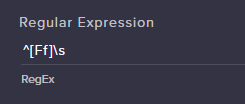
I'm having some problems with making regex work with a command. I want the command to trigger everytime someone prepends their message with an f. I used this site https://regexr.com/3u6tn to build the regex but the bot never triggers https://i.imgur.com/rO5Ksh3.png
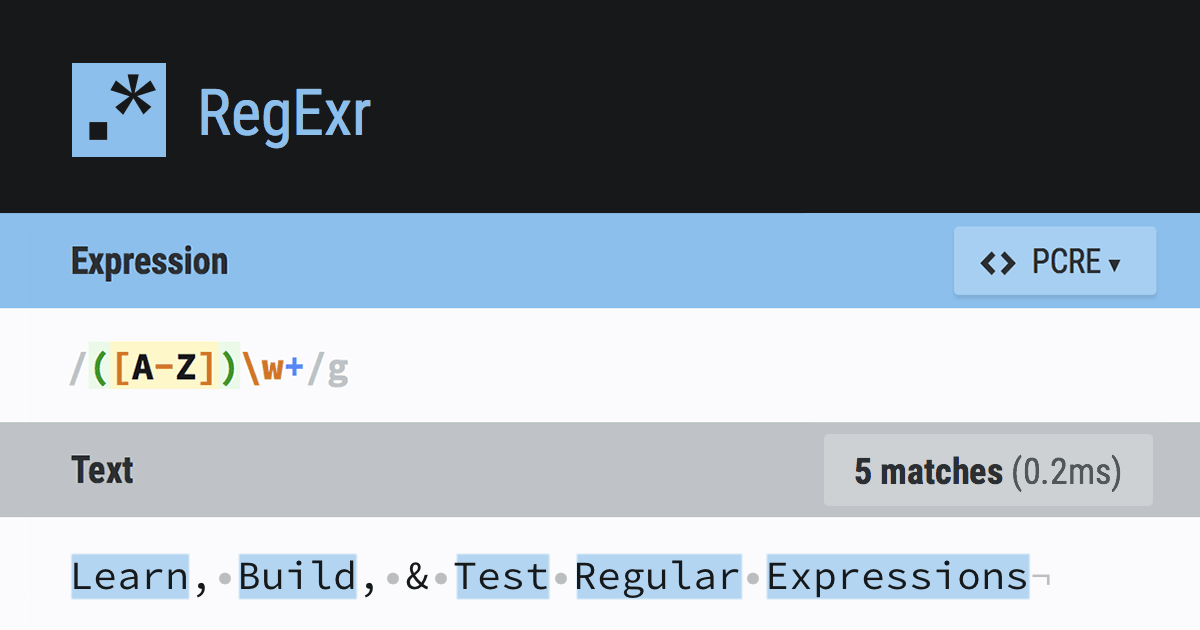
RegExr
RegExr is an online tool to learn, build, & test Regular Expressions (RegEx / RegExp).
 fathom hearth
Hi! Hanks for the invite. My overlay has stopped working. Had it set up fine, was using it for steaming (with xsplit gamcaster) for months and it stopped working a week or so ago.
I’ve re-checked (and re-copied) the link, I’ve done that on normal overlay and one I’d edited (to see if there was an issue with my actual overlay). I’ve checked the revolution, and that it’s set to visible in stream and in game.
Not sure what else to try! Help! 😃
zenith widget
@fair terrace have you tried to use the keyword field? It may provide better results.
@fathom hearth I'm not sure for Xsplit, but is there a main cache folder for the browser source for it? if yes, I'd suggest to delete it. Else make sure you are on the latest Xsplit version, no firewall is blocking overlays(Kill NIC for example) and maybe runing xsplit as admin?
I'm not sure if Xsplit provides a log file, as to why it is not loading an overlay, but this comes to mind to check as well for any errors
fair terrace
yes I've tried it but it triggers too often so I changed to reg ex
zenith widget
@fair terrace I hate using Regex my self, but I think you are missing a global flag at the end
fair terrace
you mean in streamelements?
zenith widget
yes
fair terrace
how do i do that?
 true vine
Hello i just downloaded the mobile app and was wondering how do i get an activation code?
zenith widget
have it as ^[Ff]\s/g
fair terrace
i didn't know i could do that
zenith widget
most languages have the regex global and local flag built into them, but I'm not sure for the bot's regex settings
@true vine What mobile app and activation code?
fair terrace
neither ^[Ff]\s/g nor ^[Ff]\s/gm worked
 untold crest
No, you cannot use flags, this is AFAIK pure PCRE subject, there are no flags, so it is case sensitive all the time. Also - there is no need for g, because each message is singleline, so no global scope as well
fair terrace
thats what i was thinking
zenith widget
Like I said I hate using regex so I avoid it as much as I can. I guess LX will help you best
untold crest
So basicaly you want to check if message starts with [fF] ?
fair terrace
yes
untold crest
For example fox is my favourite animal ?
true vine
@zenith widget i just downloaded to my smartphone from google store. And its asking for an early access code
fair terrace
but i dont want it to be a word
RegExr
RegExr is an online tool to learn, build, & test Regular Expressions (RegEx / RegExp).
untold crest
Oh, so [fF]\w.*?
fair terrace
thats how i expected it to work
untold crest
[fF]\s.*
fair terrace
yeah
zenith widget
@true vine Aah.. I think you need to be part of the beta we have, so that you can access it. Unfortunately, it is in an extended closed beta, so I don't think we are accepting new members for it.
untold crest
I wonder if message starts where it starts
In that case
@fair terrace :
^ - start of the line (it wont match 3rd sentence as you can see), then [fF], then whitespace, then anything
fair terrace
yes
the .* is usually not required
except if the bot expects the whole line to match
what language is the bot written in?
summer mulch
In English
untold crest
summer mulch

zenith widget
@summer mulch 
fair terrace
@summer mulch 
untold crest
Oh... mb, gonna check it one more time
as I don't want to test "f " nowhere after beginning
fair terrace
thats what the ^ is for
narrow coyote
RegEx 
fair terrace
i think the bot strips newlines so \s does not trigger if the message only consists of f
untold crest
Do you want to check if only "f" is in line as well?
fair terrace
yes
untold crest
This worked for me: ^[fF](\s|$)
fair terrace
i tried the exact same
 junior echo
Hello i've got a question
narrow coyote
its best to ask, otherwise we wont have answers
junior echo
Okay
With the new update of OBS Studio (22.0.1) My StreamElements Overlay wont work anymore I tried reinstalling OBS Studio etc. But it's still not working
narrow coyote
what exactly is it doing? not loading at all? because this would be the first report of this
junior echo
So when I launch OBS Studio it keeps trying to load it I guess but it's not loading it
untold crest
Did you try to load any other resource? Like google website in browser sources?
junior echo
I'll give it a try
zenith widget
@junior echo I'd suggest to delete the browser source folder located here: %appdata%\obs-studio\plugin_config\obs-browser
junior echo
It's not loading any other brower sources either
@zenith widget i'll give it a try!
I deleted the obs-browser files
junior echo
Yep what now?
weary mist
if you deleted that folder, make sure you restart OBS
junior echo
It reinstalls that folder right?
weary mist
yeah
junior echo
Okay
It's still not showing anything
i get the Circle next to my cursor that it's trying to load the browser source I guess but nothing's showing up
Could I try downloading the previous version of OBS again and see if it works there?
untold crest
Or maybe firewall is blocking it (if local sources work)
But downgrading sounds like easiest way to fix it
junior echo
It used to work before the update so I don't know why firewall would be blocking it now? Where can I check if it might be blocking it?
untold crest
Yu might also want to revert it to default settings by removing everything from %appdata%\obs-studio - make a backup before
And about firewall - it depends on AV/Firewall software you are using
junior echo
I have already fully reinstalled OBS studio and also chose to delete my settings etc. So I don't think thats the problem
I think like you said downgrading to the older version will most likely fix it
narrow coyote
if it works in the previous release, and not the latest, it might be worth it to try disabling hardware acceleration on the browser source. It was a major improvement added to the browser source, and could potentially be part of the issue you are having.
narrow coyote

junior echo
Also thanks for the others trying to help!

 rough ore
Hi, does anyone if my themes and other stuff will work while streaming on xbox? Thanks alot, jedi
elder sorrel
@rough ore Are you using a PC to stream to your console?
rough ore
No I use the twitch app on the console
split owl
@narrow coyote Thanks that help me too. Love u!! 😄
elder sorrel
Ah. Overlays would not work streaming on console only.
rough ore
Aww thanks anyway 😃
nocturne pelicanBOT
Here is a guide on how to setup the most essential tools for streaming from your console, while using StreamElements tools without involving a Capture Card! It's easy to do, take 4 minutes to read and 10 to 15 minutes to setup!
Read all about it here: https://blog.streamelements.com/how-to-stream-on-console-7b620b1c46c3
elder sorrel
😄
rough ore
@elder sorrel cheers aswell 😉
elder sorrel
No problem 😎
glossy nimbus
Does Kappagen react to Streamlab donations? I'm using three overlay services for my stream.
narrow coyote
No, only StreamElements events
lament blade
is it possible to implement web widgets from my bot into a stream elements overlay? It has several widgets such as a roulette wheel that pop up when the command is run.
I'd love to have them all in one browser source 😃
narrow coyote
If it something that comes up when the command is triggered, it sounds like that would need to be in its own source, unless you went hacker mode and do what some people do and load different browser sources into an iframe, and then have the different sources in a single source through this iframe
lament blade
curses. ok
I was hoping there would be a web widget I missed in the overlay editor 😃
thanks as always, Kite!
narrow coyote
there is the custom event list widget, but I am not sure if there would be a way to load this through that, as that is basically a custom widget that is driven by html, css, and js.
 spare cove
Hey guys,
spare cove
How come it keeps having me login to Twitch everytime I launch StreamElements OBS?
It's a huge paid because I have 2 factor setup
strong kernel
@spare cove Please delete %appdata%\obs-studio\plugin_config\obs-browser and log back in again.
spare cove
That just delete 2,666 files
narrow coyote
and OBS will regenerate the files it needs
if you have that many files in your cache, might be worth clearing out anyways
spare cove
Okay cool It's all working. I'm gonna try to close and restart to see if the problem persists
You guys are awesome! Thanks so much for the quick reply!
While I'm here I guess I could ask what I just asked on Reddit. I'm wondering if there's a way to add multiple stingers to OBS and have them trigger randomly. I currently have 3 Stingers, but OBS will only let me use one. Any way around this? Thanks in advance guys!
fathom hearth
I’ve updates xsplit gamecaster and still no overlay. No matter which overlay I try it doesn’t work. Any suggestions?
narrow coyote
The best way I know of to handle this would be to use Studio Mode, as you can choose what transition you want to use, before clicking on transition. There is no way that I know of to tie different transitions to different scenes, or have it choose randomly
elder sorrel
No idea with X-Split. Only person I know here who has used X-Split is @winter zenith
Not sure if available cause she's at the Gamecom thing 🤔
narrow coyote
and she is at gamescom with the SE crew
spare cove
How can I add multiple stingers though?
narrow coyote
this just adds them to the transitions list
narrow coyote
No problem
lament blade
How can i change the resolution of an overlay on the editor?
narrow coyote
@fathom hearth It is also worth noting that if there was an update around the time this happened, it could be related to the xsplit browser source itself, they have been know to cause problems with our services in the past
resolution can be set here, but it will not scale everything, must be adjusted manually after you change the resolution
narrow coyote
fathom hearth
Ah there WAS an update about then. So it’s a contact them issue then ?
narrow coyote
you can see if you can roll back, and it would be best to contact them, they might have some suggestions to resolve it
weary mist
@lament blade that sounds to me like you have either the dimensions wrong on the browser source settings in OBS, or you just need to hit CTRL+F in obs
I personally stream in 720p, but use 1080p overlays
lament blade
In the editor it cuts off half the overlay too though.
weary mist
I set the dimensions in the browser sourse as 1920x1080, then hit ctrl+f to make it resize
@lament blade you should change it back to 1080p, and do the above
The editor does not adjust everything to fit the smaller space, it just shows you less of a canvas to work with
narrow coyote
I did mention that changing the resolution would not scale the elements, and would need to be manually adjusted.
lament blade
In the editor the background of my overlay has been locked and says i need to do it from the layer editor
where is that?
weary mist
Bottom left
spare cove
Is there an affiliate program/ sponsorship application I could fill out?
 winter zenith
lament blade
winter zenith
lament blade
Layers view?
strong kernel
@spare cove https://streamelements.com/dreamteam
StreamElements
StreamElements is the leading platform for live streamers on Twitch and Youtube. StreamElements includes Overlay management, ChatBot, Tipping, Alerts & Loyalty
lament blade
yep, and it still doesn't let me
narrow coyote
can you post a screenshot of what exactly you are seeing, and of the layer in question
lament blade
Okay
spare cove
Awesome Thanks @strong kernel
Damn, just saw that there's a 20k follower requirement. FeelsBadMan
 cobalt portal
Is there a way to use a command that uses the ${random.#-#} so that viewers can type the cmd and the bot rolls a random number and adds the number to the viewers points total?
lament blade
This is what i see
spare cove
@lament blade it looks like you need to click on the fit to screen button at the top right
lament blade
When i load it, it is still the same*
narrow coyote
since you are using a prebuilt overlay, it would be best to use it at its native resolution of 1080p as that is what it was designed for
I also thought you said something about a locked layer
that is what I was asking you to show
narrow coyote
you need to click the lock icon to unlock it
narrow coyote
unfortunately no, you can only select one element at a time currently
lament blade
Oof.
narrow coyote
The overlay editor is due for some love in the future, but for now its just one at a time
lament blade
is this where you go to get help on doing streamelements overlays?
narrow coyote
what did you need help with?
lament blade
@narrow coyote I want to make my own stream overlay and save it to obs
i can also voicechat if its easier
narrow coyote
you would just make an overlay, or use an existing theme, and then add it to OBS as a browser source
nocturne pelicanBOT
To add your overlays to OBS, add a new browser source in your scene. Paste your overlay URL in the browser source properties, set the dimensions to 1920x1080 (unless you changed them on the website), and :ballot_box_with_check: “Shutdown source when not visible” https://youtu.be/KDvLynUqXI4
lament blade
@narrow coyote thank you
narrow coyote
if you have any issues, or specific questions on things, dont hesitate to ask in here
lament blade
eyyy, I've done
1
Now 3 more to do
hi everyone .. can sb help me? I changed my twitch profile name because now i am in working process for my own streaming site .. i create a donation panel but there you see my old twitch profile name .. always the same here .. i am not ak47rostock anymore
can sb help pls?
strong kernel
@lament blade I answered you in the live chat.
strong kernel
Because he just changed it 
 orchid marsh
Hello mods!! How do i obtain a key for the streamelements app?
Also, how would i go about becoming a partner? I have around 1.1k followers and am growing at an alarming rate!
narrow coyote
Mobile app is in closed testing, and as far as I am aware, no new testers are being added at this time. As for the partner, we have the DreamTeam https://streamelements.com/dreamteam
 low halo
hello how do i reset points in my twitch stream ?
narrow coyote
low halo
thanks
 fossil ermine
Do I have to have an Elgato to get stream labs OBS to work on my stream?
narrow coyote
This channel is for support with StreamElements, for SLOBS support, you would want to contact them
 brave tide
I need help, my streamelements bot stopped functioning due to name change.
narrow coyote
Part the bot from your channel, log out of SE dashboard, log back in, join bot to the channel
narrow coyote
you will need to do what I said
brave tide
it worked now
 merry axle
I need some help with obs. Whenever I stream my dropped frames go way up because it can't keep up. I don't know if I need to get a streaming pc or if there is something else I can do. If anyone has any suggestions help is greatly appreciated.
narrow coyote
if you can get me an OBS log from the stream you dropped frames in, I can take a look
merry axle
I'm a huge noob to streaming and haven't attempted a stream in a couple months. I have no idea how to do that.
narrow coyote
In OBS Help > log files > open log file location
lament blade
@narrow coyote thanks for helping me with Obs I stopped the lag and got my alerts and everything
On my crap conputer
narrow coyote

merry axle
i have the log file how do i show it to you?
lament blade
:KITEpoggering: :SEheartbeat: :LetsGo:
narrow coyote
@merry axle you can just drop the log file in here
narrow coyote
Ok, so it looks like you are getting hit by everything. Your GPU dropped 4.5% frames, your internet dropped 31.1% frames, and the encoder (your CPU) dropped 83.1% of the frames
20:21:24.801: Output 'simple_stream': Number of lagged frames due to rendering lag/stalls: 54 (4.5%)
20:21:24.801: Output 'simple_stream': Number of dropped frames due to insufficient bandwidth/connection stalls: 278 (31.1%)
20:21:24.801: Video stopped, number of skipped frames due to encoding lag: 922/1109 (83.1%)
well shit
I still don't know how to fix any of this.
I assume I need a way better cpu
narrow coyote
You can try using nvenc encoding instead of x264, and I would advise using only 30 FPS instead of 60, as that should help
but if you want to use x264 encoding, a better CPU would be a must
lament blade
Is there a way I can add a command so nightbot and streamelements will say something?
narrow coyote
Ryzen CPUs are the best for encoding on a single PC setup
If you use the same command, or if you have nightbot response include a word you use as a keyword in the SE command, should work
merry axle
i switched to nvenc but how do I switch to 30 fps?
narrow coyote
Settings > video
lament blade
and is there anyway I can change the name of my bot?
nocturne pelicanBOT
Custom bot name requirements
- StreamElements bot modded and in chat
- Active overlay with alerts
- StreamElements tipping page in the panels below the stream (!panels)
- Create a twitch account for the name you want to use
- Ground Control app must be running
Steps to enable custom name
- Sign in to https://twitch.tv with the bot account
- Install and run Ground Control (!gc for download)
- Visit https://twitchapps.com/tmi/ and generate an oAUTH token
- Copy/paste everything in the box to Ground Control oAuth settings and enter the name for the bot account
- Restart Ground Control (custom name may take a few minutes to take effect)
Mac does not currently support renaming the bot.
lament blade
Alright
merry axle
t5hank you so much for the help it means a lot I"m gonna try and see how it comes out. In the meantime have a good one.
narrow coyote
 tight thistle
does anyone know if there is a command to thank someone for gifting a sub?
narrow coyote
There is not, chat alert module should auto alert in chat for gifted subs though
tight thistle
ahh Yeah I came from chatbot and it would put a chat message saying person has gifted a sub to blank
narrow coyote
Its not currently possible to get exactly that message, but there is an idea post for it https://streamelements.helprace.com/i482-add-a-chat-alert-variation-for-gifted-subs
 maiden hatch

