#helpdesk-twitch
1 messages · Page 329 of 1
 nocturne pelicanBOT
Twitch's official help guide for Panels: https://help.twitch.tv/customer/portal/articles/2416760-how-to-edit-info-panels
 worldly drum
@zenith widget may i have the SE tipping page i shall link to
 wet plume
anyone have an idea why my wife's follow alert video does not play? The text bounces in and its shown on my activity feed just fine but the video is not visible. It's only 3 secs long and I've tried to clear then re submit the video in the overlay editor but no dice. Video shows fine in the overlay editor but not on stream
 narrow coyote
what is the video format, and what broadcasting software?
narrow coyote
its most likely their browser source not handling the .mp4. Your options are going to be use OBS Studio, or OBS Studio with our plugin OBS.Live, or convert the .mp4 to webm
wet plume
thanks so much kite ❤
narrow coyote

wet plume
@narrow coyote you were absolutely right! I just re-cut and re-uploaded it into webm format and now it works perfectly! Thanks again
narrow coyote


 weary mist
@worldly drum If you go to Tipping Settings in your dashboard, it will lay it all out to you
 mental sparrow
Hey guys!
I saw that someone posted that you could change the bot name of stream elements and I was wondering if someone could help me figure out how to do it
nocturne pelicanBOT
@mental sparrow Custom bot name requirements
- StreamElements bot modded and in chat
- Active overlay with alerts
- StreamElements tipping page in the panels below the stream (!panels)
- Create a twitch account for the name you want to use
- Ground Control app must be running
Steps to enable custom name
- Sign in to https://twitch.tv with the bot account
- Install and run Ground Control (!gc for download)
- Visit https://twitchapps.com/tmi/ and generate an oAUTH token
- Copy/paste everything in the box to Ground Control oAuth settings and enter the name for the bot account
- Restart Ground Control (custom name may take a few minutes to take effect)
Mac does not currently support renaming the bot.
narrow coyote
no, it would need to be the alert widget, for like follows, subs, tips, etc.
also, the twitch tool to get the oauth is down while they update something
mental sparrow
:/
I was using another tool for the follows subs and all that.. why is this a must tho
any idea when the oauth tool will be back up ?
 lament blade
Hello everyone (:
What is the use of "/me" in an message in a custom command?
For example: "/me ${user} follow me on instagram"
weary mist
basically, it makes the chat color the same as the persons twitch name
lament blade
@weary mist Ok, thank you so much for your help ❤
 split stratus
how do i make this my chat overlay?
narrow coyote
 What do you mean?
narrow coyote
thats just a pic of a white box. If you want to use that with chat in an overlay, add the image to your overlay with the overlay editor, and add the chat widget on top of it in the overlay
lament blade
how do i add my fortnite overlay on twitch
narrow coyote
you add it as a browser source to your broadcasting software
nocturne pelicanBOT
To add your overlays to OBS, add a new browser source in your scene. Paste your overlay URL in the browser source properties, set the dimensions to 1920x1080 (unless you changed them on the website), and :ballot_box_with_check: “Shutdown source when not visible” https://youtu.be/KDvLynUqXI4
narrow coyote
what do you mean?
lament blade
like on stream you get like a pop up of someone has followed you
 candid edge
Hi , I need help . I was live yesterday by Twitch and the moment they sent me a donation I didn't see the donation or as a message on the Overlay nor in the records of the Streamelements page. I already noticed this when I checked my paypal. Can someone tell me why this happens?
narrow coyote
if you are using the fortnite theme, that already has an alert widget in it @lament blade
lament blade
oh ok
narrow coyote
@candid edge did you get an email from paypal saying the the trasaction was successful or pending?
candid edge
successful
but the donation is never displayed in the stream is not registered on the page of streamelements
narrow coyote
are you sure it was through the SE tipping page, it looks like you have links for both SL and SE on your Twitch page
candid edge
how? i cant understand
narrow coyote
how? you entered both as text
weary mist
You can also check paypal. 1. Check that the transaction went through. 2. Check the verbage on the transaction
narrow coyote
might also be worth checking your SL dashboard, if you see it on there, it would explain why it did not alert, or show on your SE dashboard
candid edge
In this case , i need to deleted the link of streamlabs
weary mist
candid edge
excuse someone speak spanish because some words in english i cant understand
weary mist
@olive lintel
 olive lintel
@candid edge enviame un mensaje directo con tu duda y te ayudo
candid edge
@olive lintel gracias nanito . Lo que pasa que ayer estaba en stream y una persona me dono , ya que me llego el mensaje por correo de paypal , mas no se pudo visualizar en el stream ( osea en el overlay) ni aparece registro de la donacion en la pagina de stream elements , aunque si se realizo la donacion . Y por ello quisiera saber si debo corregir o arreglar algo por favor
olive lintel
@candid edge asegurate que haya hecho la donacion a tu pagina de donaciones de STREAMELEMENTES , y no de streamlabs.
candid edge
@olive lintel La imagen conduce directo a la pagina de Streamelements . Pero igual como podria revisar a cual pagina fue enviada?
olive lintel
entra a tu dashboard StreamLabs y mira si figura la donacion 😃
candid edge
Haber un momento
Si figura, pero en ese caso para que me aparezca por Streamelements , que debo hacer , ya que los Overlays y todo lo que uso es de ustedes porque me parece una pagina mas amigable las suya
olive lintel
@candid edge Pues eliminar todo rastro del link de donaciones que apunte a StreamLabs de tu Stream 😃 (asegurate que no esté Nightbot por ahi soltando mensajes en el chat y al mismo tiempo importa todo de nightbot a Streamelements desde el panel de importaciones de streamelements.)
candid edge
@olive lintel Entonces basta con eliminar los rastros de Streamlabs , de mi Stream y ya normal podra llegarme las notificaciones de donaciones y demas a mi Overlay y mi Streamelements verdad?
olive lintel
@candid edge claro, si deseas avisame por un mensaje directo cuando estés en Stream para entrar un rato y ver que todo vaya bien.
candid edge
@olive lintel Gracias , yo te mandare un mensaje privado cuando este en directo . Gracias 😄
 inner cypress
<@&382267076632379392> hello can i have some help
 pine hemlock
Ask your question
narrow coyote
i for one cant do voice, its usually best to start by posting the question/issue in here
inner cypress
oh is there someone who can i got an email from a staff member saying i could get 1 on 1 voice help here
it's a share your screen and chat type of support that's needed
narrow coyote
Then you might have to wait until someone that can becomes available 
 pure heron
How do I find my twitch friends and how do I talk to them...
narrow coyote
this channel is for support with StreamElements services, that would be better asked in #general-chat , whatever it is you are looking for
inner cypress
@narrow coyote is it just you here for support?
pure heron
Ok thanks
 inner cypress
i'll try to explain my issue
 unborn obsidian
is there anyway i dont have to redo my alert box for every scene?
inner cypress
duplicate it @unborn obsidian
just duplicate the layer rename it and paste the url in a browser for the new scene
narrow coyote
unborn obsidian
can i jsut add it to the new overlay on the site or do i have to make a second browswer source in obs?
narrow coyote
you can use whatever overlay you want in what ever OBS scene
if you have multiple overlays, the duplicate button would let you send a widget to any overlay you have
unborn obsidian
wow
i jsut sat up all night redoing all this!!!!!!
welp im going to crawl in a hole right now
narrow coyote
unborn obsidian
XD
inner cypress
my issue is i have created my layers in streamelements i've copied url to obs. I have the alerts and text for different places on my setup for twitch
however when someone follows
the alerts do not fire
the custom text does not show their names
it doesn't work
here is a screen cap of my format
the left one
sorry i have my duel monitors setup
narrow coyote
are these real follows that dont work, or emulating events that dont work? and if they are real alerts, is it just follows that do not work
inner cypress
real followers
emulates all work
same with subs and that
shows in obs when i click emulate
shows in streamelements when i click emulate
doesn't fire for when someone real follows
and such
narrow coyote
ok, I think that is something on our end, I pinged someone from staff to check it out, and if it is, he will be able to fix it
inner cypress
my friend keeps yelling at me to use streamlabs but, i'm trying to be faithful ❤
narrow coyote
We appreciate that
 west gull
Real friends don't let friends use StreamLabs
inner cypress
also the follower goal bar isn't registering
it's not moving up when i get a follower
so it just sits at 0 on the screen
and makes me sad
💔

narrow coyote
yeah, if its the issue I am thinking it is, it should be related, as soon as the guy i pinged sees it, should be able to address it
inner cypress
any eta on that 😮
narrow coyote
Not sure, he is usually pretty quick
 wary gazelle
My total subscriber count is off on Elements. Says I have one more than Twitch does.
weary mist
@wary gazelle is it the Total Subscribers Widget, or the sub goal
wary gazelle
Total Subscribers Widget
weary mist
Go to your widget data, then refresh the aggregates, it will force a re-pull from the twitch api
sorry
not aggregates
Totals
I actually jsut did it for you, it should show the correct numbers now
wary gazelle
Yes you did do it for me. Did you just click Refresh Session? (Happens a lot so I want to know how to do it myself)
weary mist
If you go to activity feed, then widget data, then go to the totals page, then hit the reset there. When you are offline, it refreshes maybe once an hour. When live, it should update every 5 minutes or more often
wary gazelle
Perfect, thank you!
weary mist

pine hemlock
Negative
weary mist
well
if you put an image into an image widget, there is an option to make it scale to the box you put it in
and a gif is considered an image
inner cypress
how do i setup text to speech with my donations and such
 zenith widget
@inner cypress When you open the settings of the alert, there is a "Text to Speech"/TTS Settings tab on the right bellow or above the "animation" settings
For variations, you need to scroll down a bit like so:
 crimson yew
I accidently deleted cam in overlay editor. How do I re-add?
zenith widget
from a pre-made overlay? recreate that overlay and duplicate the layer?
narrow coyote
If you didn't save, just exit and go back in
 lament ember
can some help me please having a little trouble with follower goal set up
 winter zenith
@lament ember sure what's up?
I assume the overlay sayes a higher number then you actually have?
lament ember
yh
winter zenith
That's because we dont track people that unfollow you
So you need to go any overlay you have and edit it> click on data on top left > goals
And adjust your follower data
Or you go to this link:
StreamElements.com/dashboard/session
lament ember
thanks been bugging me for ages
winter zenith
No problem <3
candid edge
@olive lintel ya inicie stream , haber si te das una vuelta ... gracias
 pallid siren
hey looking for some help!
 neon sparrow
How do i look at all my quotes?
pine hemlock
Theres no quote database or visual way to check them currently
neon sparrow
@pine hemlock is there a way to delete all quotes?
pine hemlock
Not that i am aware of
 frank light
Any way to edit any quotes?
weary mist
@twitch.tv/RUFIORUFIO#7021 state your issues, no one can help you when we don't know what to help
 hardy tapir
I am using the overlay editor and notice that there is an issue with the "custom events list". But it's a really strange issue, if I look at the page in Firefox all of the items are correct, however if I look at exactly the same page in Chrome (which is what OBS uses) it displays a completely different (wrong) set of events.... i'm just using the default code
 signal depot
Is there a way to edit a Streamelements theme? IE: I want to use one of these https://streamelements.com/dashboard/themes?search=warcraft except I don't want to use a webcam

StreamElements
The Ultimate All in One Platform for Streamers
pine hemlock
@signal depot You can remove any element of the overlays in the overlay editor yes
signal depot
Ohhhhh nice I just found that. Ok thanks! I was pasting the source into my SLOBS and was like well crap i don't want the webcam. Thank you!
@pine hemlock
 craggy lichen
I've been trying since the first time I got into stream elements months ago and I tried again today but how do I import my alerts from streamlabs even when I have streamlabs opened and logged into streamelements website with the extension installed?
 dense jackal
Make sure to hit reset on the extension @craggy lichen if it fails you need to hit it I apologize for the late reply
unborn obsidian
can i change the volume for songs in the ground control player?
 elder sorrel
@unborn obsidian Not at the moment. Only through SE's Website.
elder sorrel
@unborn obsidian Forget what I said lol. Was checking from my end. You can expand the app to control the volume for music
 chilly vigil
What's the difference between adjusting volume on ground control and on obs?
elder sorrel
He'll be adjusting the music only through the app while OBS would be the volume in general.
craggy lichen
@dense jackal sorry but I don't follow what you mean "@l" and I don't know where to find the "reset" since I can't find an option that says that.
dense jackal
hmm, maybe try uninstalling and redownloading the extension
craggy lichen
mmk
I never did try to fix it but after using stream elements for a while now, I'm trying to get rid of that error
dense jackal
No problem I'm here to help 😄
craggy lichen
yeah I still get that error
 scenic hazel
If I wanted to make a fake !ban command that fake banned whoever the person says how should I go about doing that? (!ban Steve) (Steve has been banned) I've seen it in other people's streams and thought it was funny.
dense jackal
make the response start with /me @scenic hazel
 echo cypress
I need help
dense jackal
whatsup bb
echo cypress
Followers aren't coming throught my StreamElements
- Doesn't show on dashboard someone followed. 2. No alert show sup
dense jackal
They seem to be coming through fine as I just tested
do you have them checked on your filter?
echo cypress
Yes
dense jackal
What about when you test a follow alert?
echo cypress
emulated alerts go throught
I tried re-connecting streamelements with my twitch. Didn't help anything.
Any help?
echo cypress
Not on my channel. I think I should've addressed that before. My bad. I am a editor/super moderator for my friend TearzLife. I invited him to StremElements and i am setting it up for him.
My stuff is working
TearzLife's stuff isn't
dense jackal
Ah ok let me test there
Gotchya definitely not grabbing follows, we've been seeing twitch have this issue with a few channels randomly. No worries, our guy will recconect you as soon as he wakes up
echo cypress
Okay, how long will that take?
dense jackal
I'll see who else is awake to do it because it only takes a second but he just went to sleep
echo cypress
I hope it doesn't take that long
scenic hazel
@dense jackal So if I say for example !ban @tkenvy and I used the response /me wouldn't it output as "ClosetDaddy has been banned"
 celest temple
It it me, or does it take a bit for !setgame to update onto Twitch ?
 gentle imp
I've heard ppl saying the same thing, along with title, I personally update it on dashboard in SE
celest temple
Does the Dashboard do it quicker?
lament blade
Anyone have any idea?
zenith widget
@lament blade if the file ends with .overlay, it can't be imported into our overlays
@celest temple Twitch dashboard and SE Dashboard so far seem to be he quickest for me personally to update title/game
lament blade
So do I have to manually add all the images I want to put into my stream again @zenith widget ?
zenith widget
Unfortunately, yes, but you do it once and they will be located in your media gallery for any other overlay you wish to create
 idle mango
Hello!! My friend sent me here to ask for overlay animation commission. Any idea which chat i suppose to go to?
zenith widget
You can check our #art-marketplace

 foggy yoke
Is there a shoutout command or anyway to make one?
lament blade
gibts hier auch nen deutschen support
foggy yoke
Can any staff help me with a shoutout command?
lament blade
is the Latest tipper a little bit buggy
winter zenith
@lament blade hallo wie meinst du ob der last tipper bugged out ist?
zenith widget
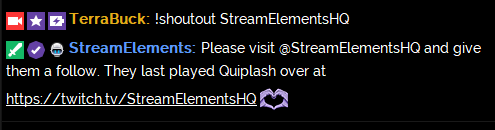
@foggy yoke If you go to the custom commands page in the dashboard, click on "new command" there is a shoutout template command
@Twitch - itzrybreadtwitch#1125
winter zenith
@foggy yoke look in #command-share
' Shoutout '
!cmd add !shoutout Check out ${1}, they're streaming ${game ${1}} at https://twitch.tv/${1}
OR
!cmd add !shoutout ${1} is awesome and deserves a follow. Check them out at https://twitch.tv/${1} where they were last seen playing ${game ${1}}
OR
!cmd add !shoutout Follow ${1} at https://twitch.tv/${1}. They were last streaming ${game ${1}}.
OR
!cmd add !shoutout Hi, I think you'll enjoy watching ${1} stream at https://twitch.tv/${1} [Last stream: ${game ${1}}
ㅤ
https://i.imgur.com/f2m0D8L.png

 gentle imp
yes @celest temple for me normally it's instant
lament blade
@winter zenith bist du da
hardy tapir
I have got an issue with the "custom events list" widget on the overlay editor.
gentle imp
just tell us the problem 😃
hardy tapir
If I load one of my overlays in to firefox then all of the custom events are correct, however the exactly same overlay loaded into chrome shows a completely different set of events that are in the wrong order. I can give you a link so you can see it in action?
winter zenith
@lament blade erklär doch einfach dein Problem
gentle imp
and it shows wrong on obs too?
hardy tapir
yes wrong in obs, since that uses chrome to render
gentle imp
we have our local css expert @untold crest I tbh don't really know much about it
hardy tapir
i think its more a javascript problem as its not reordering the items properly
I would be interested to see you get the same results as me, do you have both firefox and chrome browsers to test an overlay page for me?
gentle imp
I do, but dm me those, not here
hardy tapir
dm'ed
gentle imp
ty, damn, never seen that or noticed it before
zenith widget
@hardy tapir Are you just using the "Custom Event List" widget?
hardy tapir
yes, do you want me to dm you a link to see
zenith widget
Nope
Why do you want to use that widget?
If you just want an event list, use just the normal one.
and you should be fine
hardy tapir
I am building a custom event list on one of my overlays, something totally different to just a list
the code just pulls out the wrong data in chrome thats all
zenith widget
Well OBS uses a chromium based browser source
hardy tapir
thats my problem
new events trigger fine, its just the sorting is all messed up on load
zenith widget
So I would suggest to make changes based on chromium sorting
hardy tapir
no, just add a custom events list widget and render in firefox and chrome - different results
 normal silo
Hi guys
Quick question. When I'm changing scenes. My stream goes into a black screen for a few seconds
before it loads the entire layout
can this be fixed?
nocturne pelicanBOT
@normal silo Check out this tutorial for OBS’ studio mode which allows you to preload scenes before transitioning. https://www.youtube.com/watch?v=W8iWsD2Lq3U
 orchid nova
is anyone else having issues with notifications not popping up randomly? It's always happening to me
it's becoming kind of a joke now, I've mentioned it multiple times and it still randomly happens
zenith widget
I can say that we reproduced this issue @hardy tapir
but I think you are best off worrying how it looks on Chrome/OBS
I'm not sure if you can even change the OBS Browser source's base from chromium to w/e FireFox was based on
 round ingot
New to streamelements, but is there no way to get labels of subs etc on local on pc?
zenith widget
@orchid nova Which exact alerts?
hardy tapir
Thanks for looking and reproducing @zenith widget no can't change the browser source. Could one of you devs look in to why the onload code is coming out in the wrong order?
zenith widget
@round ingot The entire platform is cloud based, this means that you can take your overlays anywhere(on events, tournaments and so on)
round ingot
@zenith widget that's nice. So there is no way of getting a custom font in there 😛 ?
zenith widget
custom font?
round ingot
yeah for latest sub etc i have always used a certain font.
hardy tapir
I would say that it is only this that is wrong....
window.addEventListener('onWidgetLoad', function(obj) {
const recents = obj.detail.recents.sort((a,b) => a.createdAt > b.createdAt);
zenith widget
@round ingot You can change the font of the widgets via the text settings, but we have added only copyright free fonts from Google's font repository
round ingot
aah yeah totally understandable 😃
zenith widget
@hardy tapir I don't think its worth the dev's time to poke at the "custom event list" widget, as that widget is meant for use for custom made stuff. Example like in #widget-share
But I will poke and see if maybe or if I should report it as a bug or something
hardy tapir
I can show you what I have created so you can see what I'm trying to do if that helps, its quite complicated but uses the custom events list to update things in real time as they happen. the only problem is the data is not correct
round ingot
@zenith widget thanks for the quick response btw ❤
zenith widget
I already saw what you made @hardy tapir
hardy tapir
that is just a test to show you the data is incorrect
zenith widget
I replicated it on my end on chrome and firefox and noticed other things my self
hardy tapir
yes some css issues, but more data related to my other overlay that I'm building
zenith widget
I poked, waiting on an answer..maybe in 5 mintues maybe in 30 
hardy tapir
thanks for helping me sort this, it means a lot to my overlays
zenith widget
@orchid nova I'll ping you again, just in case, but we have not received any similar reports. If you describe exactly what the issue with notifications is, then maybe we can help you better.
I've been lurking for a bit in you stream and from what I can tell its working fine at the moment?
@hardy tapir http://jsfiddle.net/cuxg98n6/
So here is a better event list code. Just note that it will look scuffed as CSS in FireFox, as its optimized for chromium
orchid nova
@zenith widget Come to my channel a second please? I can talk via voice
hardy tapir
@zenith widget You are an amazing person! Thank up so much, updated code is working perfectly 👌 😃
zenith widget
Thank @untold crest 
 untold crest
np mate!
hardy tapir
Love the additions to the code as well regarding min host/tip/etc amount. So other people can you use this as well, are you going to update the default widget code for this updated and far superior one
zenith widget
I assume it is planned, as LX fixed the code and it was a known issue that it was scuffed
and there is a plan to rename the "Custom Event list" widget to something else, as its purpose is making custom widgets as seen in #widget-share
hardy tapir
just looked at the #widget-share that I never noticed before - looks amazing
its what I'm doing, combining all the live events into one widget
 hexed lava
Hey, I banned my streamelements bot, how do i unban it?`
untold crest
@hardy tapir if you want to get more data to play with - check #dev-chat channel's pinned message (there is a whole documentation I could make, there is maybe more events, but this should be sufficient for you)
😉
hexed lava
doesnt work
winter zenith
did you rename your bot?
hexed lava
no
 zenith widget
If you've copy pasted what Kiwa wrote, remove the additional "N" at the end of /unban
hexed lava
I did
winter zenith
OOPS 
zenith widget
@hexed lava Then go to your SE Dashboard and join the bot
zenith widget
as I think once its banned it leave the channel
hexed lava
silly me did !unban
zenith widget
ok su..umm..sure
hardy tapir
@untold crest I love you and want to have all your babies
untold crest
Sorry. My kids may be annoying but I wont trade them off 😉
hardy tapir
😂
zenith widget
@orchid nova When your celebration is over, let me know in Discord DMs, or at least lets try and sort it out when you are not streaming. 
 hoary zealot
Excuse-me, good day, have anyway to change StreamElements bot to what i want ?
nocturne pelicanBOT
@hoary zealot Custom bot name requirements
- StreamElements bot modded and in chat
- Active overlay with alerts
- StreamElements tipping page in the panels below the stream (!panels)
- Create a twitch account for the name you want to use
- Ground Control app must be running
Steps to enable custom name
- Sign in to https://twitch.tv with the bot account
- Install and run Ground Control (!gc for download)
- Visit https://twitchapps.com/tmi/ and generate an oAUTH token
- Copy/paste everything in the box to Ground Control oAuth settings and enter the name for the bot account
- Restart Ground Control (custom name may take a few minutes to take effect)
Mac does not currently support renaming the bot.
hoary zealot
!panels
nocturne pelicanBOT
Twitch's official help guide for Panels: https://help.twitch.tv/customer/portal/articles/2416760-how-to-edit-info-panels
hexed lava
Can i change the !points command to !marbles?
 strong kernel
@hexed lava Yup, go to https://streamelements.com/dashboard/bot/commands/default and click the pencil icon next to the command.
StreamElements
The Ultimate All in One Platform for Streamers
foggy yoke
@zenith widget i got the command working, thx again
winter zenith
@exotic hinge go and check #426825216887619594 out
foggy yoke
did u try just making one?
 exotic hinge
i dont know how to do all that lol
foggy yoke
oof
winter zenith
take this to #general-chat
This is not a StreamElements issue to be resolved but you are asking for suggestions wich is good to ask in #general-chat since more people look into that channel @exotic hinge
hoary zealot
I'm not finding where i put the oauth on GC
narrow coyote
That means one of two things. You are on a Mac, or you don't meet the bot rename requirements
Looks like you have a StreamLabs link for your donation panel
hoary zealot
Changed it
echo cypress
Any devs on yet?
narrow coyote
 what do you need a dev for?
echo cypress
Talked with @dense jackal about the issue before. He said a dev will reset something with the stream im an editor on and SE
basicly SE wasnt reciving followers
narrow coyote
ah, we will make sure its reported to the person that can fix it, I think he is still sleeping right now 
 serene granite
@echo cypress what's your twitch username ?
or the twitch username with the issue
echo cypress
TearzLife
@narrow coyote yeah, thats what i heard before aswell. was wondering if anyone is up now
serene granite
@echo cypress fixed
echo cypress
@serene granite Aight, thanks
hexed lava
Is it possible to change the «points» to «marbles» in the leaderboard extention?
serene granite
that's something we hope to have on the next version of the extension
hexed lava
👍🏼
serene granite
just make sure marbles is the name you use on the loyalty settings
hexed lava
It is and i got the command to be !marbles 😃
 hexed badge
Is there a API for League of Legends? As example a !elo command?
narrow coyote
check out #command-share i think there are some in there
 late gulch
Hey where i can chance the Alert sounds when someone follows me or something like that?
narrow coyote
open the overlay in the overlay editor, select the alert widget, then there will be little gears next to each event type
https://streamelements.com/dashboard/overlays and click the large pencil on the overlay you want to edit
late gulch
Ah perfect, is there any way where i can test ist before i save it to use it live?
gentle imp
u can preview them on the editor @late gulch bottom left, there's a bell for u to test
or on obs if u have browser source loaded there, just mute editor or you'll hear it twice, also make sure to have ticked on obs browser source, shutdown when not visible
 rocky flare
so i wanna use a bigger camera frame they have to offer but if i move the icons for twitter instagram etc it all goes outta whack is there a way i can move all three of the icons together instead of 1 by 1 cause then i gotta put the ###s in the correct area just annoying
weary mist
not at this time. Something to help: turn off snapping (its a button on the top leftish)
 gritty violet
Is there a way to exclude yourself from a points leader board but still have points? I want to be able to take duels vs chat while I am not playing but I don't want to clog a spot on the board.
weary mist
no, if you have points, you will appear on the leaderboard 😦
 full plinth
Hello guys, i am trying to use streamelements, but i having some issue to export my currency points from chatbot (streamlabs) to import in streamelelents, someone can help me?
 swift peak
how do i get notifications on the chat / screen when someone donates
 tall lynx
Hello can someone help me i want use SE overlay but on my OBS don´t work alerts if copy overlay
narrow coyote
@swift peak chat alerts come from the chat alert module https://streamelements.com/dashboard/bot/modules for on screen you need to have an overlay with an alert widget in it. you can either make your own, or use one of the pre-made themes
@tall lynx what do you mean exactly by they dont work? Like you are emulating an alert and you dont see it, hear it, both?
tall lynx
@narrow coyote If i copy the overly i have the screen what i Edit but in overly don´t work alerts
narrow coyote
What do you mean exactly by they dont work. Are you testing them with the emulate alerts, and you are not seeing or hearing the alert? Need some details on exactly what the issue is
tall lynx
@narrow coyote Yeah i don´t seeing and hering them
narrow coyote
What is your native language? We might have someone that would be easier to talk to
tall lynx
Czech
 molten brook
So for some reason or another, my alerts don't really work. It seems the overlay just doesn't notice anything because it also applies to store redemptions. It's acting really weird but it seems to work as long as I don't save the overlay, but as soon as I do it stops. I've also tried moving it to other overlays where it works, but then I start working on it there and it breaks again.
full plinth
Anyone? :/
pine hemlock
@full plinth Whats the issue you're having with importing
@molten brook What browser are you using
molten brook
Chrome, but this also affects the overlay during stream itself
full plinth
@pine hemlock issue with export from streamlabs to import on SE
 mortal nacelle
Hey does anyone know how I can make my subs able to hide their previous messages (so it says <message deleted>), by using a command such as '!hide' ?
strong kernel
@mortal nacelle We actually have a premade command for that.
@mortal nacelle Go to https://streamelements.com/dashboard/bot/commands/custom and click the New command link, and in the Command templates dropdown, find !vanish
StreamElements
The Ultimate All in One Platform for Streamers
pine hemlock
https://streamelements.com/dashboard/account/import?provider=streamlabs @full plinth Are you using this to import after you've exported?
@molten brook Can you send me an invite link to your dashboard
!invite
nocturne pelicanBOT
To invite managers to your dashboard, Click on your Channel Name at the top of the dashboard and scroll down to Settings. Click the drop down arrow to expand your channel managers and then create a new invite at one of three access levels (Bot Supervisor, Editor, Full Control) Check this video out for more help: https://youtu.be/zl_h-ttZDF0
molten brook
Sure, gimme a sec
full plinth
@pine hemlock I can not export the currency.csv file from my chatbot
pine hemlock
I've never used Streamlabs chatbot/ankhbot so i would suggest possibly going to their support to figure that out
molten brook
@pine hemlock I'll need to wait until the streamer who I'm working on this for is available to add you. Should take less than an hour, You good with that?
pine hemlock
Who is the streamer
molten brook
SarahTsang
strong kernel
@molten brook Can you let us know what the exact behavior you're seeing is?
molten brook
I'll be working on the overlay simulating alerts and what not, I click save, I simulate again, it no longer works
strong kernel
Which overlay?
molten brook
Started with "GOLD THEME CUSTOMIZED" (the one we're using right now) and then when I started working on "RETRO - MAIN" it happened over there as well
Streamer is live right now but I removed the alert box from the current one so simulations won't bother there
If they decide to start working, that is
strong kernel
I still see an alertbox in that overlay.
molten brook
Right, I hid it, not removed
I need to go afk for a little bit to take care of IRL things, but I'll be back as soon as I can
strong kernel
@molten brook So no alerts are appearing at all? I want to make sure I understand completely. (I know you're stepping out, just respond whenever you can 😃 )
full plinth
@pine hemlock SL users do not have the option to export their points to a csv file, so that part of importing points in the SE ends up being useless. :/
Do you have any other ideas on how I can do this?
molten brook
@strong kernel In the overlays where it happens I don't seem to get any alerts, no. Also not store redemptions.
 autumn verge
the overlays are getting cut off kinda strangely and i can't figure out why
can someone link me the command for the basic instructions on the off chance that there's something really simple i'm missing
strong kernel
@molten brook And when she's actually live, do they appear on the stream or no?
nocturne pelicanBOT
@autumn verge To add your overlays to OBS, add a new browser source in your scene. Paste your overlay URL in the browser source properties, set the dimensions to 1920x1080 (unless you changed them on the website), and :ballot_box_with_check: “Shutdown source when not visible” https://youtu.be/KDvLynUqXI4
strong kernel
@molten brook Or to put it differently: Is it only emulations or do actual events not occur either?
molten brook
Nope, nothing
strong kernel
Well, she's live right now, so we can't run tests as it'd potentially show up on stream.
molten brook
She's ending in 10 minutes
strong kernel
Couldn't resist. 
pine hemlock
Open Ankhbot/Streamlabs Chatbot
Click "Connections" in the bottom left corner (symbol of a person)
Click "Cloud"
Click "Pick Folder"
Choose a location to save your backup files to
Click "Save" when you have chosen a folder
Click "Save Settings" to confirm your choice
Click "Create Split Excel Files" to save your Commands and Quotes
Click "Export Currency CSV" to save your Points
Go to https://streamelements.com/dashboard/account/import
Click “Import now” under Ankhbot/Streamlabs
Click "Select Files" next to Points (Currency.csv) and choose the currency.csv file you just saved in your desired location
Click "Select Files" next to Commands/Quotes (Data.xlsx) and choose your Commands.xlsx and Quotes.xlsx files you just saved in your desired location
Click "Import"```

@twitch.tv/rzaogames#6870@full plinth
molten brook
Could run tests in the Retro Overlay because the one in the live overlay is hidden at the moment anyways @strong kernel
molten brook
Ok
tall lynx
On Overlay dosne´t work alerts on my OBS so WTF
full plinth
@pine hemlock I tryied this method, only export XLSX files:
pine hemlock
Can you send me the currency file @full plinth
 jade light
Could someone possible set up my animations for me? I dont know how to o my mac and havent found a helpful video because I'm a model too old for obs
 trail condor
Less of a "need help" more of a "permission request" ...
Could I make a graphic for my panels that says something like "StreamElements Expert: Ask Me Anything!" using the SE branding? I get a lot of people from my community asking questions and I can always help haha
full plinth
@pine hemlock only have Points file
pine hemlock
@jade light We provide free overlays/graphics located here: https://streamelements.com/dashboard/themes
send me the points file should be the same
weary mist
@tall lynx can you explain by "doesn't work"? I need more infromation about what you are /are not seeing
nocturne pelicanBOT
To add your overlays to OBS, add a new browser source in your scene. Paste your overlay URL in the browser source properties, set the dimensions to 1920x1080 (unless you changed them on the website), and :ballot_box_with_check: “Shutdown source when not visible” https://youtu.be/KDvLynUqXI4
jade light
My cpu is a model too old I believe. It wont let me
pine hemlock
Then what do you need the overlay for?
narrow coyote
You will need some type of broadcasting software that supports a browser source then
jade light
Im asking what I could use to substitute obs
weary mist
What is your CPU?
narrow coyote
not really sure what your options are on mac
pine hemlock
@full plinth They must have changed something now - since it exports as an excel file. but when its opened it excel your points file is empty.. soooo
Not sure what to tell you here?
strong kernel
@molten brook Please let her know that we'll be testing her overlay and to expect random alerts if she's looking at it as well.
 pine hemlock
@full plinth Find streamlabs discord and ask them how to do it with their new files that generate nothing
They link it a bunch on their twitter
lament blade
how do i add your song request to Stream***s OBS
full plinth
@pine hemlock trying since yesterday, but no answer
weary mist
@lament blade If just you just mean hearing the music requested, just keep our page open
pine hemlock
@full plinth Would just keep at it, unfortunately we can't do anything if they provide nothing for us to work with
full plinth
@pine hemlock I think they are doing this so the streamers do not migrate to other platforms
i cant migrate without my currency :/
pine hemlock
They usually do stuff like that yes
full plinth
is a pain in the ass do one by one
 astral tendon
@foggy yoke
narrow coyote
 Need help with something?
 olive lintel
where can I get a link to the donation OBS?
weary mist
@ebon forum might be able to help better
 ebon forum
@olive lintel hey. can you give some more details? можно и по русски
ebon forum
@olive lintel просто пиши, я немного занят. но можешь позвонить
olive lintel
давайте завтра. у меня просто 03:30 на часах.
ebon forum
@olive lintel дальний восток? ууу. ну в общем пишите, можете сразу мне, разбеорёмся. у меня ещё 10:31.
 neat glacier
Hi @serene granite , i'm try change the widget roll credits for end the stream to add the events host and raid but can't do functional, you can help me? Cumps
 tulip orchid
Hi
narrow coyote

 ornate bear
Hi.. again. @weary mist said i should get my streamer to make me super mod. What was the command to edit people's levels?
weary mist
!level derpzking 1000
ornate bear
Thanks
 green gate
Hello! !'m wanting to stream on twitch and the tipping url i had is lost. i went to go back and it wont let me get it again how can i fix this?
narrow coyote
https://streamelements.com/dashboard/tipping-settings Tipping settings > Tip Panel Setup
green gate
Thank you so much!
narrow coyote
 floral cloud
Hello, is it possible to import the streamlab online Loyalty points in StreamElements??
I have enable the online points system from streamlabs, and, it look like I can't go back with the offline currency by the ChatBot without loose all the points of my viewers and there have no export option in the website... So, what's the best way to tranfer everithing to StreamElements?? Do I need to set the ponts of all my top viewers by hand??
weary mist
unfortunatly, thats the best I can really offer you. We had an export from their chat bot, but if you used the extension, as far as I know, there is no way to export those
not even through an API
floral cloud
oki
there have a way to import points by a csv file, like that I can probably make a file easily by copy paste and repalces somes things in the file?
weary mist
If you can get it into username,points format, I have an import tool for it
floral cloud
I just try and I can make that in about 30 seconds for all the viewer list 😄
weary mist
perfect
https://filter.dj/CSVtoStreamElements.html <- once you get them into username,points (seperated by new line (enter key)), paste here with your jwt and accountID, then import it, and you will see the points in our system
 queen sorrel
hello, i'm sorry in advance if you can't understand something that i say or ask, english is not my first language and i'm half asleep right now.
so, does anybody know how to show in my overlay the actual name of the song that i'm listening right now? i'm using the song source website "plug.dj".
narrow coyote
There is a widget you can add to your overlay
floral cloud
oki, I fond the same link for CSV to streamelements in a support page of streamelements, so,I think is safe 😃
just, always want to make sure before link my account in a website
queen sorrel
yes, is the same widget that comes by default but i think i have to change the "prujog room name" so it can show what i'm listening, correct me if i'm wrong.
narrow coyote
yes, you put in your room name, that is how it gets the song
floral cloud
where can we found the JWT Token?
queen sorrel
ohhhh ok ok ok, but what if i'm listening to a default room? (right now the reggae one). Where can i found the exact room name?
narrow coyote
I dont really use the site, but just went into one of the channels, and grabbed the last part of the URL
floral cloud
ok, I found my JWT token is good
weary mist
@floral cloud haha, good. Sorry, got distracted. Glad you got it sorted 😃
 compact owl
can i ask of some assistance 
i cant enable !songrequest 😦 it says its controlled by a module but i have none enabled
strong kernel
It's controlled by the media request section of your dashboard.
So on the left, click media request, and the toggle is in the top left.
compact owl
ok but i attempt to send in a song request and it wont
narrow coyote
you need to enable the viewer requests at the top of the page https://streamelements.com/dashboard/mediarequest/general
 narrow coyote
no, that viewer request switch is the module that the command is referring to, there is nothing to enable on the commands page, just the viewer request switch on the media request page
compact owl
hmm, i have it on, all my settings and loyalty settings are set, i have ground control set up, it plays both on my obs and the app, but i can only add songs on the page, not through chat
 sweet zenith
any mods available to hop into voice real quick and answer a few quick questions?
compact owl
bug off! @sweet zenith  just kidding, im in the same boat haha
sweet zenith
COME HELP US MODS
come into voice support and sing w me
maybe theyll join us then
 strange meadow
umm just had a viewer tip, and no alert. nothing in dashboard and nothing in ground control - but i see it in revenue history. it didnt even update the tip goal part on overlay.
lament blade
I had a question about alerts and why my streamelements bot is not letting me know when someone hosts, donates, etc
narrow coyote
@compact owl What browser are you using? Looking at your command list it does not look like the command is being enabled as expected
@strange meadow Do you have manual tip approval enabled?
@lament blade Do you have the chat alert module enabled? https://streamelements.com/dashboard/bot/modules
strange meadow
I do, but again, it isnt in my feed nor ground control to approve
narrow coyote
Did you receive an email from PayPal about the transaction?
strange meadow
yes i did
narrow coyote
I guess I needed to be more specific, did the email say the transaction was successful?
strange meadow
yes it did
narrow coyote
ok, in that case I will need to poke some staff to look into it for you
lament blade
Got it and also with the app how do i find my JWT token
nocturne pelicanBOT
@lament blade You can find your JWT token on your account channels page: https://streamelements.com/dashboard/account/channels
(Don't forget to click on "Show Secrets")
lament blade
Trying to copy pasta into it but it won't let me copy pasta
compact owl
do urselves a favor and get in the voice chat its funny....
weary mist
@strange meadow At the top of your activity feed, you will see a section marked (Pending Approval), and it will say 1
click it, then click approve
floral cloud
😒 I don't understand why, but the tool for CSV to StreamElements just doesn't work... When I enter the list from my CSV file, but the website (https://filter.dj/CSVtoStreamElements.html) doesn't reconnised the amount of points...
 drowsy saddle
I’m streaming fortnite from Xbox but playing with a friend on the switch. I can hear him talk but his audio isn’t picked up on twitch? Anyone know why?
weary mist
@floral cloud can you send me the CSV?
floral cloud
I think I found the issue, I just forget to select one of the 2 type of points
I will try back and see with the complerte list...
strange meadow
found it! wasnt showing on main page nor in ground control. but thanks for helping me find it
floral cloud
oki, it work's... That's a stupid misstake...
narrow coyote
@cold ferry try saving and reloading the overlay, and checking your broadcast software to see if if shows in there
 tall apex
is there a way to remove mediarequest and leaderboard from your public streamelements profile? i dont use either of them, and i feel like itd look much more professional if they just werent listed
floral cloud
I think the problem is with Twitch... I get a Twitch Prime resub the other days but streamlabs and streamelements doesn't show...
nocturne pelicanBOT
@floral cloud Twitch prime (new and resub) and paid subscriptions (resub only) must be shared in chat manually by the person subscribing in order for the subscription information to be sent to StreamElements. For twitch prime, the user needs to have sharing enabled on https://www.twitch.tv/settings/prime. For paid subs, if the share box doesn't show up immediately it will when they refresh the page. https://i.imgur.com/VNJN0Uv.gif https://i.imgur.com/2297EA7.png

 floral cloud
😮 possibly this is the issue... the person doesn't share the sub...
 ionic herald
at https://streamelements.com/dashboard/leaderboard/current - can i disable the CURRENT thing and just use the ALL TIME points?
StreamElements
The Ultimate All in One Platform for Streamers
weary mist
@ionic herald No, the current points are spendable points, alltime is just a record of how many points have been earned watching the streamer
ionic herald
ah!
 cold ferry
@narrow coyote didnt work 😦 i should also add that other labels work, latest sub & tipper are fine and i can add top cheerer list as well and it shows all but latest is just blank
should i reset labels?
tall apex
is there a way to remove mediarequest and leaderboard from your public streamelements profile? i dont use either of them, and i feel like itd look much more professional if they just werent listed
cold ferry
ok i have no idea what changed but its working now 😮
ionic herald
Is there no ${user.points_alltime} variable?
so i can print the ALL TIME points of a user?
@weary mist
 proper leaf
Silly question - I am working on a new extra Life overlay using your prebuilt one but I am seeing two different alert boxes - is there are reason for this?
because they both pick up all the normal alerts
but the smaller of the two doesn't show up in my obs
narrow coyote
If you check the layer item on the one that does not show in OBS it's most likely marked as being hidden. Some overlays have different elements to give you choose from
proper leaf
I checked that and they are both visible
i thought the same thing. My other though is if the other is only attached to an extra life donation and not anything else but I am not sure
weary mist
@ionic herald I'm not sure, but I thought there was
narrow coyote
@proper leaf looks like one is for the extra life donations, and the other is for the rest of the alerts
proper leaf
thanks @narrow coyote that is what i was thinking but there is no real way to test lol you rock
narrow coyote
drowsy saddle
Any ideas on the switch audio issue?
narrow coyote
That would not be something related to StreamElements services, it would be best to ask in #general-chat
drowsy saddle
Thank you
pine hemlock
Are you running it via chrome?
 rocky elm
pine hemlock
rocky elm
pine hemlock
@vapid storm The media/song request is just an embedded youtube player. Does this issue occur on youtube? Have you tried deleting your cache? Is the playlist you're using set to autoplay?
@rocky elm Dont think its possible
 vapid storm
it works on youtube, i'll try deleting cache
 spring tundra
Hi, if this is the wrong place for this sorry! I am trying to get my media share widget to work in SLOBS to work but nothing is showing up in the SE editor or SLOBS....Ideas?
 crisp minnow
My dono bar keeps disappearing whenever I flip through scenes
pine hemlock
@spring tundra Are you pressing the "Show on Stream" button? This is what enables it to broadcast to the widget/on stream (Its on this page: https://streamelements.com/dashboard/mediarequest/general)
 exotic anchor
can someone help me PLEASE
pine hemlock
@crisp minnow Is the bar on all of your scenes? It may take a second longer to load for certain elements when swapping.. However you can refresh the cache of the current overlay and it may help
nocturne pelicanBOT
@crisp minnow Right click on the BrowserSource > Properties > Scroll down a bit > Refresh Cache of current page
spring tundra
@pine hemlock Yes, I have the widget set up in the SE editor, saved it, copied the link, went into SLOBS set a new browser, pasted it. Went back to media share in my SE dashboard and it is saying there is no widget still.
 grizzled bough
Hi. I was wondering, is there no way to save overlays (full themes) locally instead of using a browser source? Because at the moment when I switch between scenes it takes a few seconds to load in. So I switch a scene and all my local content loads instantly and floats around waiting for the Streamelements stuff to come in. It doesn't look too professional. 😭
pine hemlock
@grizzled bough Theres no way to do them local. but this is a way to make things look more professional:
nocturne pelicanBOT
@grizzled bough Check out this tutorial for OBS’ studio mode which allows you to preload scenes before transitioning. https://www.youtube.com/watch?v=W8iWsD2Lq3U
exotic anchor
can i ask a question
pine hemlock
Feel free to ask away
@spring tundra Can you share an invite link to your dashboard so i can look into it?
nocturne pelicanBOT
@spring tundra To invite managers to your dashboard, Click on your Channel Name at the top of the dashboard and scroll down to Settings. Click the drop down arrow to expand your channel managers and then create a new invite at one of three access levels (Bot Supervisor, Editor, Full Control) Check this video out for more help: https://youtu.be/zl_h-ttZDF0
pine hemlock
Needs to be full access
exotic anchor
how can i get the overlays to appear on my twitch stream if im already streaming on a different divice
spring tundra
@pine hemlock sent you a dm with the link
pine hemlock
@spring tundra Thx, one sec
@exotic anchor You create an overlay on our site and you add it into obs as a browser source. If you're looking for premade templates: https://streamelements.com/dashboard/themes
nocturne pelicanBOT
@exotic anchor To add your overlays to OBS, add a new browser source in your scene. Paste your overlay URL in the browser source properties, set the dimensions to 1920x1080 (unless you changed them on the website), and :ballot_box_with_check: “Shutdown source when not visible” https://youtu.be/KDvLynUqXI4
pine hemlock
@spring tundra Is it working now?
spring tundra
In the browser it works, but I cant get it to work in SLOBS/OBS
I LIED
IT WORKS
SORRY ❤
 tight veldt
how do i get StreamElements OBS?? unless its not an actual thing and my friends are lying to me
exotic anchor
thanks for the help ill be sure to download it whni get my own computer
nocturne pelicanBOT
@tight veldt OBS.Live is a Plugin for OBS created by StreamElements. You can download OBS.Live here: https://streamelements.com/obslive
Please make sure you have the latest version of OBS installed, Current Version: 21.1.2. You can install OBS here: https://obsproject.com/
tight veldt
thank you ❤ ❤ ❤
pine hemlock
yw
lament blade
Is there something similar to streamlabs labels for stream elements?
pine hemlock
We dont support local based text files but we have the same features located within our overlay editor.
 amber dagger
Hi there! To use costum name for the twitch chat bot, i have to run ground control. Is it possible to implement this in obs.live?
pine hemlock
Not implemented currently, no
amber dagger
ok. tnx! 😃
lament blade
moinsen ihr Lümmels hab irgendwie probleme meine commands von streamlabs zu streamelements rüber zu importieren alles schon versucht wie es beschrieben ist
crisp minnow
I have follow alerts off yet they are still playing on my stream. Also I am not getting any alerts for bits, donos, subs via streamelements
lament blade
könnte mir jemand helfen
 light mauve
I'm trying to use a Timer to send a message every 30 minutes that I'm online, regardless of how many chat messages have been sent. I set it to a 30 minute interval with a Chat Line setting of 0, but the line has not been sent. Any idea what I'm doing wrong here?
winter zenith
@lament blade alle commands oder nur bestimmte? Ahnkbot funktioniert halt bissl anders wenn alles ned geht dann hast du beim Import was falsch gemacht. Wenn es bestimmte sind dann sind sie wohl nicht mit dem StreamElements bot nach zu machen
@crisp minnow maybe you turned the follow Alerts in the wrong alert Box /overlay off?
@crisp minnow Sounds like your alert Box is wrongly Set up. You would need to copy the alert Box of your choice to All the overlays you use Since they dont Update individually
Do you see the activitys in the dashboard?, cheers and subs and so forth? @crisp minnow
@light mauve I think at least one Chatline has to be delivered to prevent spam
lament blade
alles so wie es beschrieben ist gemacht und kein einziger ist übernommen worden
light mauve
There's chat lines being sent, so it sounds like the value being 0 might be breaking it. I'll change it to 1 and see what happens - thanks.
light mauve
I've set the min chat to 1 and the timer stil does not seem to proc.
chilly vigil
Hello, is it possible not to have twitch to archive the stream just for the day?
gentle imp
yeah, disable it on your twitch settings @chilly vigil
then enable it again after you stream
first option ** Store past broadcasts**, disable it
click link, settings > channel
ops xD
had it with my link 😛
light mauve
I think I figured it out - pretty sure my bot was muted. Seems to work now.
 steep spruce
Quiz question... (pls reply in a PM... dont wanna miss it) what is the cheapest/best CPU for a dedicated streaming PC to hit 1080p@60fps? Thanks in advance
grizzled bough
@pine hemlock thank you so much
 zinc shale
hi! is there a way to shuffle the default playlist in ground control, and an option to add a song to the default playlist?
People request a lot of good music but so far i know theres no way of adding it to my default playlist
gentle imp
sadly none of those are available @zinc shale
but u can search and upvote the idea if it's there, if not u can add it here https://strms.net/ideas
 spiral sleet
It goes in as a browser source ( @bleak maple )
 bleak maple
@spiral sleet Do you know how you change OBS to another language since I have my obs in swedish
gentle imp
you probably need to download the language version u need from their site
if it's not on settings
 dusk pendant
I just got a new follower and didnt get a alert, neither does it say his name in the "latest follower box"
nocturne pelicanBOT
@lament blade Are you a StreamElements all-in-one streamer and interested in stream promotion when you go live? Please fill out this application https://strms.net/sellout and if you meet the 3 requirements posted in the :pushpin: pinned message in #welcome you will be added to the stream announcements.
winter zenith
@dusk pendant so how do you know the follow Was real?
dusk pendant
my chatt is only followers
narrow coyote
Have you ever gotten follower alerts?
dusk pendant
The test follower alert works
but not ingame
I just got an old beep from streamlabs somehoq
how*
narrow coyote
If it was a new follower, and it did not show in your SE dashboard, or alert, you can dm me your SE account id, and I will poke someone to look at it. If you click your profile pic and go into settings, you will see the account id
 buoyant onyx
hey everyone! I have a donation goal, but when I choose the condensed design, it doesn't fill the bar. Is that intended? I want to have the condensed design, but it should fill the bar when a donation is made...
gentle imp
hey @buoyant onyx it does, just open the widget a bit more and resize it back down, should work
lament blade
Uh
 zinc sleet
is there a way to disable the !donate command?
buoyant onyx
oh, well, then I found... I don't know... a bug? I hope it's not intentional 😂 When there is no height set in the settings, the fill color doesn't show.
gentle imp
@zinc sleet disable it here https://streamelements.com/dashboard/bot/commands/default
it's called tip
hmm rechecking @buoyant onyx
confirmed @buoyant onyx
but just enter some height and it works np
I'll report it although it ain't a major thing since it works whenever you resize it
https://streamelements.helprace.com/i1026-tip-goal-fill-bar-when-condensed-doesnt-fill u can upvote it @buoyant onyx hehe
buoyant onyx
upvoted
green gate
I set up my paypal and my friend donated 1 dollar for fun. It didnt pop up and I didnt receive the donation either.
gentle imp
check paypal, it probably needs you approval or conversion @green gate
 junior pasture
I can't find a browser source option in my obs, anyone know why?
gentle imp
OBS Studio?
junior pasture
yes
gentle imp
when you click add, it should show browser
unless you didn't use the full installer from their website
or not running with admin rights
gentle imp
are you running AVG?
well reinstall shouldn't fix it if you are sure you used the full installer and didn't change what it installed
junior pasture
I do not believe I am running avg
may I post a link of the website I download my obs from?
gentle imp
form here https://obsproject.com/download I hope
junior pasture
yes that is what I used
junior pasture
yes I am
gentle imp
strange, no AV or something that could block it?
junior pasture
I dont believe so
Im going to try to unintall it along with my user files then see if that works
gentle imp
alright, hope so
junior pasture
It Worked!!!
gentle imp
awesome 
junior pasture
Sorry for bothering you. Thanks for the help I appreciate it
gentle imp
it's no prob, glad u made it 😄
 novel umbra
Is there anyway to set a custom thumbnail for an overlay scene? I renamed the scenes from the themes gallery and now the thumbnails are all the basic twitch logo.
I know the thumbnail changes if you set a game title, but my overlays are general
gentle imp
not that I'm aware of but it's a great idea, would like to set mine too
novel umbra
didn't think there was
gentle imp
if u care to post it here https://strms.net/ideas and share it on #💭︱feedback-and-ideas so ppl upvote
gentle imp
thank you too, I'll upvote 😄
chilly vigil
hello. how do I do an emote pyramid?
chilly vigil
giveaway winner is pick by random like raffle?
gentle imp
yeah
 winged perch
Hey, I am having problems with the streamelements OBS. My internet and computer are perfectly fine, yet when I stream using this.... It is super laggy and choppy. Heres a short vid from this morning. You can see within 20 seconds, the lag. How do I fix it???
https://www.twitch.tv/videos/298362991
 gentle imp
if it's an animated theme, try one that is static, also make sure to tick shutdown source when not visible on all browser sources, on all scenes
also you should try fullscreen and game capture instead of capturing desktop
winged perch
The theme is static, using stremelements to create the follows subs things.
I will double check all the sources.
Will also give game capture a try. Thanks for replying
pine hemlock
Sometimes scrolling text causes issues @winged perch
winged perch
Aww really? I dont really wanna show just the most recent ;-;
pine hemlock
Try testing it without the scrolling text and see if the issue is still occurring
 limber verge
mods can't promote songs with commands right?
 acoustic vault
hello i have what may be a dumb question but what ever. im having a problem with my alerts when a person follows me it does not show up in twitch or anything also if it helps im using the doomhammer pack .. i can send alerts using the editor but when im live it doesn't work
 stuck hamlet
@acoustic vault Fixed
acoustic vault
thank you
works thank you vary much 😄
and just so i know for the future was it something i did wrong for the alert box thing ?
stuck hamlet
Nope, you're good
 gaunt aspen
Is there a way to copylayers from different overlays in SE?
I should prob create a base with just the alerts so I don't have to copy them again
 proud pumice
Yes you can! On the bottom left there's a copy layer button
pine hemlock
(after you select the layer it highlights itself)
nocturne pelicanBOT
@gaunt aspen To duplicate a layer on an overlay select the layer that you want to duplicate in the layers drawer (bottom left of the editor) and then select the duplicate button with the red asterisk right above the layers panel. You can duplicate a layer to the same overlay or to other overlays.
chilly vigil
How do I lower the volume of media source such as mp3 or webm in obs?
narrow coyote
there should be a media source entry added to the audio mixer
chilly vigil
oh.. I didn't scroll down the mixer to see 😛
 calm grail
We are having Extra Life Alerts going off when we are not even getting donation alerts. I have deleted the widgets from all the overlays but it still keeps going off. I have deleted the Extra Life Alert Box and the sound but it keeps going off.
 clever mango
@calm grail Have you checked all scenes in your broadcasting software? It could be playing from a source in a background scene or an alertbox from another alerts provider
 hasty glacier
If I want to listen to a specific playlist in my media in between song requests, do I just set that as my backup playlist?
narrow coyote
as long as its a public playlist, yes
 solid knot
Without using a computer at all, how can I put like wizebot or night bot on my stream?
narrow coyote
This is for support with StreamElements services, we cant help you with other bots. Our bot is cloud based and will always be in your stream, computer or not
 maiden hatch
Hey guys
I need help
Without setting up how my stream looks
Anyone here to help me
narrow coyote
What did you need help with?
narrow coyote
thats going to depend on your encoding settings and your bitrate, and those will depend on your PC and your internet's upload rate
ok, well like I said, its 2 part, your encoding settings and resolution are going to matter
 viral seal
Hello, I have problems finding media request/share via tipping.
Like, if my viewers want to request songs via donate
weary mist
@viral seal That will be in the Media Share settings
you can make it free, tip, or both
and set all the relavent details there
narrow coyote
@lament blade I would need to know what your PC specs are, CPU, GPU, ram, what Encoder settings you are using (output and video tabs in OBS settings) and what your internet upload speed is. Without this it will all just be guessing and not very helpful
its enabled here https://streamelements.com/dashboard/mediarequest/settings
 barren notch
im new to streaming and have no clue how to make an overlay
im looking to for a simple clean overlay, kinda like ninja how he just has the small dots for wins, followers, etc
narrow coyote
We do have tons of premade overlays https://streamelements.com/dashboard/themes
barren notch
i saw that, how do i turn it on? i made one using that and but it didnt work when i started my stream
narrow coyote
you need to add the overlay to your broadcast software as a browser source
nocturne pelicanBOT
To add your overlays to OBS, add a new browser source in your scene. Paste your overlay URL in the browser source properties, set the dimensions to 1920x1080 (unless you changed them on the website), and :ballot_box_with_check: “Shutdown source when not visible” https://youtu.be/KDvLynUqXI4
narrow coyote
If you stream directly from a console, then you will not be able to use overlays at this time, without a PC to stream from, using a capture card or remote play to capture the console
barren notch
ok
nocturne pelicanBOT
@barren notch Here is a guide on how to setup the most essential tools for streaming from your console, while using StreamElements tools without involving a Capture Card! It's easy to do, take 4 minutes to read and 10 to 15 minutes to setup!
Read all about it here: https://blog.streamelements.com/how-to-stream-on-console-7b620b1c46c3
 rapid iris
Hello! I am trying to add the media request audio portion to my stream. I've set up the overlay but how do I get the audio to go through my stream (using OBS) and not just my speakers. Also, I'm on a mac if that makes a difference. Thank you for your help!
 kind epoch
Guys why am i hearing double when song requests are made through media share?
I have only one window open for SE rn.
weary mist
@rapid iris make sure that you are capturing the audio with OBS. Normally, it should capture what ever you have set as default
@kind epoch I am not sure about that. If you are hearing it double, it would be coming through multiple sources. Are you using the overlay widget?
kind epoch
@weary mist Yes its strange even store redemptions are coming through double or has a strange echo
weary mist
I would try resetting the cache on all your overlays, and making sure they are all set to "shutdown when not visible". I would also recommend closing all your browsers and starting fresh, just to make sure. If it continues, check your overlays for duplicate widgets
kind epoch
Tried everything rebooted the pc reopened browsers, cleared cache in obs and its still echoing , help please
Ive used this same overlay before without issues it just started doing this a couple of days ago i thought it was random at first but now its there
 ashen ginkgo
Having issues with obs bitrate. It keeps dropping to low to the point my stream crashes. I've tested my bitrate on every other device and I have plenty. Do you have any ideas on how to fix it. I've already shutdown and restarted obs, restarted my pc and nothing is working
narrow coyote
Are you using OBS Studio, or OBS.Live?
weary mist
@ashen ginkgo what bitrate are you running, and what is your upload via speedtest.net
narrow coyote
@kind epoch make sure you check all sources for being shutdown when not visible, the echo means there are multiple sources active, so you need them all be to marked so they are shutdown when not visible
kind epoch
@narrow coyote But the sources are all shutdown when not in use i dont get it even store redemptions are doubling up in audio
narrow coyote
echos mean that you have more than one active source, be it in OBS, or having the overlay open in a browser. If you do not have this checked in all of your browser sources, even in the scenes you are not using, it will cause echos
 plush snow
I need help
When i try to connect my twitch account to stream elements i get this error: {"status":401,"message":"invalid csrf token"}
ashen ginkgo
I'm uing obs.live. I'm resetting my router to see if that's the problem. I tested my speeds and download is 190Mb and upload is 45Mb
kind epoch
Ok, i have checked all sources not that i've messed with them in months but they are all ok selected to shutdown source when not visible. Like i said this only started 2 days ago. And seems that it's not an audio issue on my end as when i show in stream in media share it echoes but when i dont it doesnt and even store redemptions echo so where is the problem now i wonder.
narrow coyote
unless you have duplicate widgets in an overlay, the audio has to be coming out of multiple sources for an echo. Media Request echos can also be caused by having the site open, and Use Song request enabled in Ground Control
@ashen ginkgo what is your current bitrate? and is it actually dropping, like seeing red in OBS? if OBS is just dropping your bitrate, it could be related to the Twitch server you are using
ashen ginkgo
I think it was my router everything is running smoothly now. Thank you for the support. I will check my server on twitch as well
narrow coyote
Sounds good
 young nimbus
I have a question. I'm assuming I put it here. I have been adding to a counter by using !count <id> +1/-1 I am just wondering. How do I see that total count?
narrow coyote
You would have a command that calls the get count variable $(getcount name)
narrow coyote
kind epoch
Guys the problem went away, idk how or why.
young nimbus
that command is not working @narrow coyote 😦
narrow coyote
@young nimbus what are the responses you have for you different count commands?
young nimbus
it says "@young nimbusVixon changed the death counter from 4 to 5
 fiery lintel
hello guys!
narrow coyote
@young nimbus I mean the response in the custom command settings for the commands involved
young nimbus
$(getcount name) is what im using to get the count
well $(getcount death)
on the variables page it also uses ${getcount name} but that wasnt working either
nevermind
narrow coyote
so, you should have a command that is something like !deaths and the response of that command should be something like $(channel) has died $(count deaths) times while playing this game this would then look something like
narrow coyote
 native musk
where can I find the streamelements obs plugin download?
nocturne pelicanBOT
@native musk OBS.Live is a Plugin for OBS created by StreamElements. You can download OBS.Live here: https://streamelements.com/obslive
Please make sure you have the latest version of OBS installed, Current Version: 21.1.2. You can install OBS here: https://obsproject.com/
ashen ginkgo
ok I'm back again having issues still with dropping bitrate or fluxuating real bad to the point I can't stream. I'm currently using obs.live
weary mist
Can you please run a speed test and give me the results? @ashen ginkgo
Speedtest.net is a decent place to run one @ashen ginkgo
ashen ginkgo
Found out it is a problem with my ISP. thanks again
 manic star
hello guys i am wondering if you can help me use a subscription i bought in a streamers store please!
 wind palm
Does streaming the overlays take up bandwith? any way to make it static where it diesn't have to download the image every time I switch screens
narrow coyote
@manic star This is something that you would need to talk to the streamer about
manic star
@narrow coyote really? 😦 i bought the item but i dont see it anywhere afterwards
@narrow coyote although it does show im second in all-time leaderboard points or whatever
narrow coyote
@wind palm There will be a small amount of bandwidth used for the overlays, and it will depend on what type, and how many elements are loaded. The overlays are web based so they will always need to load between scenes. If you are using OBS, you can use studio mode to preload the scenes
nocturne pelicanBOT
Check out this tutorial for OBS’ studio mode which allows you to preload scenes before transitioning. https://www.youtube.com/watch?v=W8iWsD2Lq3U
narrow coyote
@manic star Its the streamers store, they manage it, you would need to talk to them about whatever it was that you purchased from them
manic star
@narrow coyote thank u
wind palm
@narrow coyote thanks
narrow coyote
 soft fulcrum
Anyone know of any widgets that can have a date /time countdown?
 vague holly
Hey guys. So i imported all of my data from another platform but while creating and overlay i still don't see any tips. For example no last tips / no month top etc.
Is there any way to fix it?
To add to it, i see a full list in my revenue History.
dense jackal
the train count widget @soft fulcrum
refresh your aggregates https://streamelements.com/dashboard/session @vague holly
StreamElements
The Ultimate All in One Platform for Streamers
soft fulcrum
Thanks
vague holly
oh hell yeah that worked! Thank you @dense jackal ur the best. I lost like 45 minutes figuring that out instead of just asking directly...
aaaaaand i actually have another one becuase im probably doing something totally wrong.
Setting up a top tipper of a month for exacly. Is there any way to change the amount shown to be TOTAL instead of the biggest tip from that person ?
Oh it works fine. I just didn't add up different currencies used in donations i imported. All good ( i think ) 
 solid sigil
i have been streaming from a mac and when i try to set up a chat box widget, it wont display any of the messages from chat. It will on the editor on stream elements but not on the actually launched widget, am i doing something wrong?
 buoyant flume
Can I get some help with song request
echo cypress
Hi, !settitle command = "something went wrong while trying to update the title"
Whats wrong?
pine hemlock
@solid sigil Did you save the overlay after adding the widget? Does it work in the browser?
@buoyant flume What are you having issues with
@echo cypress Is the bot modded? May also need to part and rejoin it possibly
buoyant flume
When I'm setting it up I have playlist added. How do I get it to play during streams on obs.
pine hemlock
You keep the media request page open
buoyant flume
Yes and music is playing on the page but not on stream
pine hemlock
It plays via you desktop audio.
Obs captures your audio and plays it through the stream
if you dont hear it, the stream doesnt hear it
buoyant flume
I have it playing on desktop and viewers can't hear it
pine hemlock
Then your obs isnt capturing you desktop or browser audio for some reason.
solid sigil
@pine hemlock it works in the browser and yes I saved afterwards.
pine hemlock
Might be a bug with the mac version of obs.. unsure though. If it works when you open the link in the browser, then its likely related to mac obs.
solid sigil
so there isnt anything I can do on my end but wait for the streamelements staff to fix it?
or obs staff has to fix it?
nocturne pelicanBOT
Right click on the BrowserSource > Properties > Scroll down a bit > Refresh Cache of current page
narrow coyote
also make sure you added the overlay at the right resolution, if not, the chat will not show properly
pine hemlock
true
viral seal
Is any way to show localname in StreamElements desktop app ?
pine hemlock
@viral seal What do you mean
viral seal
Like, if the user has a Chinese/Japan twitch name
In app, it only shows his twitch account, not his Chinese/Japan name
 viral seal

pine hemlock
@serene granite ^
viral seal

vague holly
Does my tip alerts variations with "At least" use my account selected currency OR its $ by default?
i can smell the ban incomming 
oh... there he goes.
weary mist
just a delete for now, but if it continues...
vague holly
oh. "i'll be watching you" one
 teal yoke
Hi guys, it's there a widget that show the last or top donators but one at time, circling the names
?
 copper bobcat
On the post-stream report the "Show me the money" stat says we get $5 per sub. Is there a way to make that actually reflect how much we get from Twitch? The bits calculate correctly..
serene granite
@viral seal there's no way to do that on Ground Control, but we'll see about adding it to OBS.Live
 torpid ravine
yo
the ${time.TIMEZONE} variable isnt working properly for ACST
its showing 2 and a half hours ahead of what it should be
viral seal
@serene granite I see thank you
 opaque vine
HI i'm having an issue where my !commands username is an old twitch username i used to use
 wide cedar
I'm having an issue with the alertbox, although it is set up and displayed, it won't work, I believe it does not recognize when someone follows, another strange thing is that the dashboard doesn't update properly, as i end the stream and receive a mail from you with stats, the dashboard is still empty, can someone help me fix these issues?
light mauve
Okay, I tested the Timer functionality again - I have someone chatting in my room, however the message has only played once, despite being on for hours. The settings are 1 chat line, 30 minutes.
These are my settings;
 sonic obsidian
@light mauve Tick the box on "offline" mode if youre not actually streaming... Otherwise it wont post while youre offline 
Can someone help me pls. Im tryna setup a command using the ${time.TIMEZONE} variable. Except No matter what time zone i use, be it 5 hours in difference or 1 hr in difference, the result always ends up with the same time?
light mauve
Yes, I'm currently streaming - that's exactly what I'd intended.
Okay, it actually popped up 5 minutes after I chatted in my own channel. Is it looking for unique users?
 spiral osprey
Hi there. Could someone help me out how can i create text to speech for my tipping page?
zenith widget
@sonic obsidian look into the last pinned message in this channel for the proper timezone usage for the command
@spiral osprey there is "TTS settings" for all alert types in the alert wigdet. What exactly is the issue?
@light mauve the timers trigger on chat lines not unique chatters. A 30 minute timer is a long one for just 1 actuql chatter. Usually there is an internal 5 minute timer where the bot awaits thw specified chat line. When its met, the timer you have placed is triggered
light mauve
Well, essentially I want it to mention the discord channel every 30 minutes, regardless of how many people are present. I had it set to 0 and it never played at all.
Is there no way to set it to do that?
pine hemlock
You can set it to 0 but if no one chats within 5 minutes the internal timer will reset
weary mist
@copper bobcat that part of the stream report only shows Revenue. Revenue is money made before costs are subtracted. The reason we do this is that everyone gets a slightly different cut, based on where they are at in the world, and what their contract States (partners can get a better cut than affiliates).
light mauve
@pine hemlock Gotcha, so it can't repeat automatically like I wanted.
Ultimately, the problem I'm running into is my chat was active but it only displayed the line twice in an 8 hour period, despite the above settings. For the majority of it only one person was chatting and it popped up shortly after more people came in, so I'm assuming it only triggers if the chatter is different than whoever triggered the previous one. Can anyone confirm?
pine hemlock
@turbid reef ^
weary mist
@light mauve what is your twitch name? I am going to look at your settings real fast
light mauve
Same as on here - Dainslaif
weary mist
So the timer should trigger when one person talks 5 minutes before the 30 minute window is up. If you set it to zero chat lines, it should in effect, fire off every 30 minutes
that is my understanding of timers
 rocky ember
Hey, could anyone help me with an issue to do with stream elements not tracking on the dashboard or activity feed?
weary mist
@rocky ember sure, what isn't tracking
rocky ember
the followers isnt tracking but hosting is
nocturne pelicanBOT
@rocky ember Please connect your Twitch and/or YouTube channel with Discord by going to ⚙ Settings and then Connections here in Discord. https://streamable.com/eg92w


 rocky ember
done
weary mist
ty. I will get that fixed. It is something on the backend that just needs reconnected. I will send it to the right guy, though it could take 12ish hours to fix
(timezones and sleep, lol)
rocky ember
okay thanks, yeah its just a bit weird cos i have a follower goal and alerts setup alongside the chat feed which dont trigger but when i get hosted it pops up which is weird
weary mist
yeah, its just the way we collect followers disconnect (very) occationally, and we just have to reconnect it
rocky ember
okay thanks for the help
light mauve
@weary mist Yeah, that's my understanding as well, but it doesn't seem to be performing that way. That's why I asked - I think it might be misbehaving, or at least behaving differently than in the documentation.
I'm not sure I understand the '5 minutes' part - I understood that it would always wait the MinTime (30), then if a chat line hadn't been sent it would poll again every 5 minutes, does that sound right?
weary mist
no. think of it more like polls every 30 minutes, but only checks the last 5 if there has been a chat line
But right now, you have it set to 1 chat line, so 1 has to be said before it will trigger
light mauve
OK, that would explain the confusion; is there any way to ignore the 'last 5' rule? That seems highly error prone.
weary mist
not at this time. I would recommend setting the chat lines to zero, and I will keep your channel open to track the chat. It should trigger every 30 minutes, and if it doesn't, I will poke people very annoyingly
light mauve
I'll go ahead and enable offline then, I'll probably be going to bed shortly.
weary mist
heh, I have to leave for work in a few minutes, I will trade you xD
light mauve
I don't think that would work out well for either of us given I just finished a 10 hour MHW stream.
weary mist
lmao
light mauve
OK, enabled offline and set both to 15 minutes for the sake of visibility.
weary mist
sonic obsidian
@zenith widget Ive used it. It still doesnt change the set timezone. Still comes up with the same time