#helpdesk-twitch
1 messages · Page 322 of 1
 vale glacier
 safe pelican
I just restarted stream and it started working again so really weird. I'll report it again if it does it again maybe. All good now thanks 😃
 narrow coyote
ok, you dont need to keep repeating that you love the overlay, if the app you use supports browser sources, then you can use the overlay. They are all web based, so if the app supports browser sources, you can use the overlay. Some apps will call it browser, or web
narrow coyote
ok, well from what I see on the play store, that app does not support browser sources
narrow coyote
Well, we are working on our own streaming app for mobile, but it is still in development. In the meantime I would say that BitStream is probably the best option
vale glacier
Now what would bitstream do and when is your app coming out?
narrow coyote
BitStream is a mobile streaming app, and there is no release date for our app at this time
 short steppe
is it possible to make the bot tell a user if they don't have enought points for the command?
also, the timezone variable is not working, I've looked it up and it's 2 hours wrong
narrow coyote
the bot should tell someone if they dont have enough points, and there is a pinned message in here that covers time zones
short steppe
the bot isn't telling it when there arent enough points, do I need to enable that somewhere?
narrow coyote
I think I was mistaken, and its only !sr that will do that
short steppe
well it is for sr that I was asking actually, I tested it and whe,n you don't have enough points it's doing nothing
 sleek panther
Does duplicating a label make it a unique label when used in a different overlay? for example if I edit text on the new label will it alter the text on the original label? are they "linked"?
narrow coyote
@short steppe did you set the cost in the media request settings, on the command itself, i think its related to the media request point cost
short steppe
yes I put a cost
narrow coyote
@sleek panther duplicating a widget makes it unique, they are not linked
sleek panther
is there any way to link them? @narrow coyote
narrow coyote
no
sleek panther
ok ty
vale glacier
@narrow coyote what about stream labs?
narrow coyote
i would just reccomend testing, and see what works best for you
vale glacier
Ok
narrow coyote
@short steppe Sorry, I think I was thinking of redeeming store items and not having enough points  It seems like this is something that would need to be added to the ideas page https://strms.net/ideas
short steppe
no problem 😃 thank you
narrow coyote

narrow coyote
Are you trying to enable it in the modules https://streamelements.com/dashboard/bot/modules
 raw edge
Yes
narrow coyote
What browser are you using, and what is happening exaclty?
raw edge
Well I want to use the roulette command for my twitch and it says u enabled the roulette command on module but it says it isn’t enabled when I switch over to default commands
narrow coyote
the commands page will always say its controlled by the module, you control turning it on and off from the modules page
raw edge
I know but I enabled it on the module
narrow coyote
ok, then thats it, its enabled
 wind patrol
Hi, I'm having some trouble with chat stats on the twitch panel and in the dashboard. I keep getting a 404 error and can't enable anything in general settings after it saves.
narrow coyote
When a command says it is controlled by the module, the "switch" on the commands page will never change
That says enabled
raw edge
raw edge
I know
I do that but it doesn’t do anything
The second one is the roulette the one under is slots
 lilac hornet
Hi, is it just me that as problems with the overlay Editor. It is taking so long to load when trying to open it ?
narrow coyote
Its loading nice and quick for me 
raw edge
KITE can you help me?
narrow coyote
I have been trying to
wind patrol
Is anyone able to change my chatstats page? After changing my name on twitch, I think it goes back to the old chatstats page.
raw edge
Look at my last photo I sent
lilac hornet
Ok thanks 😃 just werd. Getting the message that the page is unresponvise
raw edge
I talked to Sean about it and he kinda helped me but it didn’t work
narrow coyote
The switches for the commands that are controled by the module dont do anything, I had mentioned that a few times
 nocturne pelicanBOT
@raw edge Please connect your Twitch and/or YouTube channel with Discord by going to ⚙ Settings and then Connections here in Discord. https://streamable.com/eg92w
 lilac hornet
Could it be because im working with an animated team ?
narrow coyote
I tired loading a few animated super themes, and they loaded in the overlay editor in a matter of seconds for me
lilac hornet
Ok then it has to be something om my end. Thanks for the reply
raw edge
Kite I’m not trying to enable anything on the commands page. I’m enabling it on the modules page but it’s not doing anything
raw edge
Why doesn’t it work for me?
narrow coyote
whats happening when you do the command? are you entering it properly?
raw edge
Yes
narrow coyote
im still in your chat, please try the command
narrow coyote
lilac hornet
Is there a way to use one of the overlays, and ad them to the Twitch offline image ?
wind patrol
@narrow coyote Could you help me with chatstats when you get a chance?
narrow coyote
Have you changed your twtich name?
wind patrol
Yes
From Jd1ll4 to Jdilla
I can see the stats from the old name
but doesn't carry over to the new one
narrow coyote
yeah, they will just need to be migrated, I will get someone to do that for you
wind patrol
Thanks!
 tame bone
Hey @narrow coyote I recently did a name change and a few of my ovberlays arent activating. Am I missing something?
narrow coyote
like, they are not loading in your broadcasting software?
tame bone
yeah my brb screen is loading the front page from the SE website
 oak wedge
Question for donations: I want to be able for my viewers to donate to a Gofundme page as if it was to my paypal, but still get the alerts on the stream. Is this possible? Can I redirect donations anywhere or just paypal?
narrow coyote
@tame bone Can you log into the site ok? What broadcasting software are you using?
tame bone
yeah, can log-in. Am using new SE/OBS and for some reason the overlays are all diffent
i'm just resaving them thru all my scenes
not a big deal
narrow coyote
ok, if its OBS.Live I would also suggest trying to go to StreamElements > Reconnect streaming account from within OBS
narrow coyote
 I believe this is the first report of anything like this, and this happened from a twitch name change?
tame bone
yes sir
lemme show you
thats whats coming up as my BRB screen
and every other screen as well
sorry, scene not screen
narrow coyote
I just removed the image because of the URL in it, but I grabbed it so I can report it so we can look into this further
tame bone
ok
sleek panther
Why is it that when I duplicate an entire overlay both of them have them same URL? I thought I would get a new url to use on 2 separate scenes - I just wanted to use the one I duplicated as a base for a new scene. Is there no way to make a duplicated overlay become unique instead of the same url? Even if I make a completely new overlay it's URL stays the same as my other overlays... meaning I have to use the same overlay for every scene?? Help!
 clever mango
@sleek panther Each overlay has a unique URL
the end of the URL is the same but inside you will see they are different
sleek panther
So when I duplicate an overlay, I can edit the new one without the old one changing?
clever mango
Yes
oak wedge
Question for donations: I want to be able for my viewers to donate to a Gofundme page as if it was to my paypal, but still get the alerts on the stream. Is this possible? Can I redirect donations anywhere or just paypal?
clever mango
We cannot show alerts for gofundme donations. They must go through your tipping page @oak wedge
 cursive obsidian
my viewers get no loyalty points for hosting, raiding and tipping ? my ground control is running while live ?
clever mango
Host - 0 viewer hosts are not given points, the rest are
Raid - there is no bonus for raids
Tips - this should be working as long as the tips go through your streamelements tipping page. 1000 points for each $
 lament blade
@stuck hamlet yes I'm using OBS (sorry for the late reply, I have 43 more Discords managing)
oak wedge
Thanks @clever mango
 fleet wyvern
Hi i try to change the voice from tts vioce but never update for the new one (chreers and donation)
 obtuse lance
Any update with cheers not working with the HypeCup from the overlay creator in StreamElements? People dropped bits while I was live and they didn't go. I have the default bit settings/pictures only turns off the follows, raids, and hosts.
 zenith widget
@fleet wyvern For each alert you will have to update the TTS voice manually if you've only changed it for lets say subs.
@obtuse lance Have you tried deleting the cup and making it again?
Even emulating worked for me :
 tough lava
Im having some issues with the animated stream overlay that streamElements provide. Getting wierd cpu usage and dropped frames. Anyone who can direct me to a FAQ or something where i might find the answer for solution?
zenith widget
Are you using OBS.Live?
Usualy, animated overlays are CPU heavy because of all the video widgets in it(the pre-made ones specifically)
And it heavily depends on your internet connection as well.
 copper bobcat
Any plans to allow the StreamElements bot get renamed?
nocturne pelicanBOT
@copper bobcat Custom bot name requirements
- StreamElements bot modded and in chat
- Active overlay with alerts
- StreamElements tipping page in the panels below the stream (!panels)
- Create a twitch account for the name you want to use
- Ground Control app must be running
Steps to enable custom name
- Sign in to https://twitch.tv with the bot account
- Install and run Ground Control (!gc for download)
- Visit https://twitchapps.com/tmi/ and generate an oAUTH token
- Copy/paste everything in the box to Ground Control oAuth settings and enter the name for the bot account
- Restart Ground Control (custom name may take a few minutes to take effect)
Mac does not currently support renaming the bot.
zenith widget
You can already rename it.
copper bobcat
Well I'll freakin' be - no way!!!
zenith widget
Ok, just checking, but still, our pre-made animated overlays are a bit CPU heavy and also dependent on internet connection
tough lava
it prolly bottlenecking my pc i guess
zenith widget
We do have static ones, if the animated ones are making your PC lag.
 twilit nest
If anyone is familiar with the media request feature. When I press "Show on Stream" it plays an echo or double version of the song but when I click hide media it plays the same one. Anyway to fix this?
zenith widget
Do you have ground control open?
Or maybe added the media widget to another overlay that is in another scene?
If yes to both, mute ground control program via the windows mixer and make sure to enable the "shutdown when in active" on the other overlay.
tough lava
@zenith widget you suggest to use the StreamElements ones? Less CPU usage
twilit nest
Oh do all the scenes play it even if it's not active?
zenith widget
@tough lava What else overlays are you using at the moment?
twilit nest
ill try it with one scene only my bad
zenith widget
@twilit nest As long as they have the media widget in the overlay
tough lava
@zenith widget using the Purple Delight, animated. But i have excluded alot of stuff
Like chat, background of chat. Reduced the size of some items. Made text as own overlay instead of own scene
zenith widget
You worded your last question as if you are using a Nerd or Die overlay for example. Those I'm not sure how CPU focused are
I would suggest to try the static variant of Purple Delight
tough lava
its not that fancey FeelsBadMan
zenith widget
It won't be as fancy as animated, but may lessen the load on your CPU
tough lava
yeah it will, im pritty sure
zenith widget
just post it here
cursive obsidian
@clever mango w/e
 full elk
Is the bot down?
full elk
Sorry it's for Link_Listen.
I'm a mod there.
It came back up shortly after I messaged.
But the duel wasn't working.
zenith widget
It may seem that the !commands default command may have a cooldown on it.
Check the !duel command if it has a cooldown on it
full elk
Turns out he got rid of the duel command for SE and uses another bot for it instead.
zenith widget
no wonder I got confused at the moment why SE bot responded to !commands but the !duel responded another bot

zenith widget
What will we ever release?
zenith widget
So, 1st I'd suggest to update OBS to 21.1.2 manually from their website. Second you should clear the browser source's cache
and make sure you are logged into SE Dashboard
If you are not sure how to clear the browser source's cache -> right click the browser source -> properties -> scroll down -> clear cache
obtuse lance
@zenith widget You're a genius. ❤ Thank you.
zenith widget
Umm...Ok? 
What did I do?
Oooh right the hypecup
If you've been using the hypecup for a long time, it may be possible you've been using an older version of it, as it gets tweeks every so often @obtuse lance
lament blade
how do i clear browser source cache ?
narrow coyote
Go into the settings for the browser source, scroll down, and there will be a button
 mint girder
Trying to setup my tips, but the page to do that wont load
narrow coyote
If the tipping settings page is white, that means that some cookies are being blocked on the page
mint girder
How do I fix it?
narrow coyote
you need to allow cookies on the page, and ensure you are not blocking any, it will depend on your browser
mint girder
chrome
narrow coyote
start by checking in here, otherwise you will need to go into an advanced setting
mint girder
ty
 timid sedge
Does anyone know how to reset a donation goal? Such as reaching the goal, then making a new one?
lament blade
@zenith widget fixed the SE ad thing but now the overlay wont show xD none of the overlay images show up
and thought on how to fix that?
timid sedge
Because when I delete the widget of the goal I made, and make a new one, it still has the money that I made from the last goal into the progress of that goal
narrow coyote
if you are still in trhe overlay editor, click data, and go to goals
you can also reset them here https://streamelements.com/dashboard/session
timid sedge
ok,thank you for the help
zenith widget
@lament blade Make sure you login to the website, get your overlay link, open the properties of your browser source, paste the link, click ok, if it doesn't load again, open up the properties of the source and clear the cache
lament blade
@zenith widget did all that
zenith widget
restart OBS and open it as admin
restart PC as well as a last resort, as I'm runing out of ideas...maybe DM me your overlay link
lament blade
@zenith widget fixed thanks for the help I needed to set overlay to 1080p
 lean osprey
When using $(random.chatter) on a command, how can I continue the command and tag the same user that was picked with random.chatter? I tried user.name but it just tags myself, and I suppose that using random.chatter again it will simply pick another user randomly
 bitter kiln
is the OBS.Live still down? I got nothing for Chat and Activity
narrow coyote
Go to StreamElements > Reconnect streaming account in OBS
bitter kiln
Thank you!
narrow coyote
 candid rune
I click INSERT VIDEO and import .mp4 video file, and i not have picture on obs and stream 😦 Help
narrow coyote
mp4 will not work at this time, because of changes to chrome, you will need to convert from mp4 to webm
candid rune
ok, big thanks ❤
narrow coyote
 main adder
Is there a way to enable TTS to read aloud store redemtions like 'Ask a question' ?
 unborn furnace
I changed my twitch password and now I cannot connect with twitch in the OBS live chat panel
 sour minnow
Hey is there a link so I can look at the variables
narrow coyote
@unborn furnace Go to StreamElements > Reconnect streaming account in OBS
lean osprey
@sour minnow on the "chat commands" tab of the dashboard, there you can find the custom commands, default commands and Variables lists
narrow coyote
sour minnow
Thanks you
OK so unless I am looking over It how do I get an cmd to pick a random user
narrow coyote
${random.chatter}
narrow coyote
unborn furnace
@narrow coyote where do I find that?
 pine hemlock
Top of the obs window I believe
 robust turtle
Hi, Team. Is there anything special/specific that needs to be done in order for my custom Subscriber Badges to populate in the hype cup?
At the moment only the default purple stars populate, whereas I’ve seen other streamers with their custom sub badges populate correctly.
lean osprey
What is this for, and how does it work
pine hemlock
@robust turtle add another hype cup and see if it populates. If not, pretty sure it's manually changed.
@lean osprey https://en.m.wikipedia.org/wiki/Regular_expression

A regular expression, regex or regexp (sometimes called a rational expression) is, in theoretical computer science and formal language theory, a sequence of characters that define a search pattern. Usually this pattern is then used by string searching algorithms for "find" or...
 tawny bay
i think i got someone elses stream report in email
not sure whose but i didn't make 76 new followers lol
pine hemlock
@stuck hamlet ^
 stuck hamlet
@south sluice
 dawn wasp
Hey guys is there any way to add an alias on the commands page on mobile? Enter doesnt appear on the mobile keyboard, it just says "next"
lament blade
Stream elements OBS is so CPU intensive it lags my games so hard. I lose 20fps running StreamElements OBS that I had to switch back to OBS. Any fixes for this???
pine hemlock
@lament blade streamelements obs doesn't exist
@dawn wasp I'm unsure but you should be able to run the page as desktop in the app options
If you're using Chrome hit the top right dots and select desktop site
dawn wasp
No luck, it still just says next
pine hemlock
What does the next button do then 🤔
Sounds like the keyboard doesn't recognize it should be enter on that field
It just goes to the next field.. Okay well that's a bug then.
 radiant crest
Is the marathon timer still in the works?
 teal yoke
Guys, it's there a way to make follow alerts wait for mod approval ?
 dense jackal
Not currently being worked on but something we want to do @radiant crest
Not at this time @teal yoke
teal yoke
@dense jackal not even I can accept them ?
radiant crest
I found a bug testing the system.
It seems people that use certain custom usernames automaticly get linked to real peoples twitch.
unless that is intended?
dense jackal
I don't believe we have some sort of filter with follow alerts are you being harassed by someone making new accounts? @teal yoke
dense jackal
I'm confused by what you are asking, can you give me some more context?
radiant crest
So looking at ground control, when somebody tips it creates an auto link twitch.tv/ anygivennamerighthere
dense jackal
@radiant crest
radiant crest
So somebody could tip me 5 bucks with twitch.tv/shroud and make it look like he tipped as groundcontrol auto links that
Ground control seems to be setup to auto create a link based on what username was given.
Explains why the options to force people to login is a given.
dense jackal
There's currently no way to filter the alert but we are working on it @teal yoke
teal yoke
@dense jackal it's there any workaround? Like not showing the new follower name, then I can chose to read or not his name upon via activity feed
dense jackal
Exactly why there is a force login option @radiant crest
That and to deter some trolls
So the way our system filter for tips and subs is it checks what messages people leave and then you have multiple ways to take action. but because the filter does not apply to usernames (as twitch themselves don't allow usual inappropriate names). It's near impossible to protect against follows, as they could always make a new account around the system. Something we are working to fix, it's not our main focus at the moment but something we want to apply to our system.
 wise galleon
Good morning everyone, got a question: There is a command on StreamElements that can let me chose one SUBSCRIBER on twitch? Not follower, But Sub only. Is that possible?
dense jackal
I don't believe you could do it with a command but this would do the trick as a giveaway @wise galleon
wise galleon
tricky, thx 😃
sour minnow
Hey just wondering how to edit quotes on twitch chat for a friend I mod for I can make them but not sure how to edit.
 cedar fulcrum
Hello @sour minnow At the moment you can only Add or remove the quotes.
 ashen inlet
Not sure where i should post this but heres my question... Im streaming off my xbox to my pc with an elgato hd60 pro. I have a usb cord from the mixamp to the PC so i can hear PC sound AND game sound from my xbox, then i have the optical cable from the mixamp to the xbox. Issue im having is if you watch my stream and im in GAME chat you cant hear any of my team mates you can hear me but none of my team. On the back of the mix amp there is a plug that says "stream" but im not too sure what that ones for.. anyone else streaming from console to PC or have any idea what i can do to fix this?
 fringe dust
Hey,
how can i change the Resolution of your Overlays from 1080p to 720p?
lament blade
Is there a way to see a list of your current subscribers? I can't find this in twitch (without downloading csv file) or in streamelements.
 half junco
You can see that under Stats on your Dashboard on Twitch @lament blade
 crisp minnow
Hi, I am converting my alerts over and was wondering if someone was around to help.
 dense reef
Hey guys!
Is it possible to make sound effect in stream store available only to specific person?
 atomic hollow
@dense reef no, only for everyone
cedar fulcrum
Hello @crisp minnow Sure! I would love to help 
dense reef
@atomic hollow ok, thanks!
 minor haven
How do i change the recording quality to make it look better
dense jackal
@ashen inlet not sure I'll ask around and see if any of our guys with capture card experience can help
@fringe dust by clicking this pencil you can edit any SE overlay resolution (note superthemes do not scale)
@lament blade The only way at this time is to request the list from twitch
@crisp minnow what was your issue?
@minor haven If you are looking for OBS help I would check with discord.gg/obsproject
minor haven
Thanks
dense jackal

 frigid flare
so someone just cheered in chat and nothing happened
like no alert, nothing in the feed, no bits dropping into the cup 🤔
he did another one like not even a minute earlier
first message set it off. second didnt
crisp minnow
Hi, I'm having a weird problem where my alerts are playing twice even though they should only be in one browser source. The positioning in the editor vs in obs is also cropped in a weird way.
nocturne pelicanBOT
@crisp minnow The default resolution for StreamElements overlays (theme and custom) is 1920x1080. Please add them in OBS at their full resolution and use CTRL+F to fit to screen if necessary. You can then downscale your stream in OBS settings > Video if you'd like https://i.imgur.com/6bWXxjR.png
 crisp minnow
That helped for the new widget, unfortunately it is still playing twice
crisp minnow
The sound only. I figured out that it was because I had the editor open
zenith widget
So you made sure the browser source had the option "shutdown when inactive" option on. Ok good. 😃
robust turtle
Is there a way to increase the size of the hype-cup icons? Not the cup, but the icons themselves?
 serene granite
yes, you need to edit the variations for that
 twin lake
Well i have the same issue but its from obs + stream elements addon no clue where to mute one of them
nocturne pelicanBOT
@twin lake Make sure to :ballot_box_with_check: “Shutdown source when not visible” for all browser sources (all OBS scenes). If using studio mode, uncheck “Swap Preview/Output scenes After Transitioning.” Also keep in mind that sound can play from any overlay loaded in the browser (editor or launched). https://i.imgur.com/FegZJQS.png https://i.imgur.com/yY0wcFl.png

 zenith widget
Make sure the "shutdown when inactive" option is on, on every browser source
lament blade
Hello what can u offer me I am a small streamer I don’t know what commands to set up on the bot
😃
zenith widget
Do you need something particular?
lament blade
I don’t know man
zenith widget
You can do lots of different custom commands, including external custom API calls
zenith widget
If you don't know what you want, how can I offer you something?
zenith widget
We don't have a particular list of set custom commands people can use. What I can only suggest is 2 things:
- Look into #command-share
- Go to the SE Dashboard -> Chat commands for the bot -> Click on "Add new custom command" and on the first ever field of the new window, there is a drop down menu. Click on it and take a look at some of the templates we have there.
Add w/e you like from there and maybe get an idea for something that is not part of the those 2 lists.
lament blade
Ohhh ok thanks for now
 feral axle
how to fix the image
zenith widget
@feral axle You got to http://streamelements.com/YOURNAMEHERE then on the picture there click on this:
 drowsy dune
In StreamElements when creating a command I see you can set a user cooldown. Is there a way to set a custom message if the user tries the command again before the cooldown is up?
zenith widget
@drowsy dune The command won't trigger regardless. Not sure if its a planned thing really.
 normal igloo
for the mini games like slots Is there a way Of making it so the bot doesn't give cooldown If the user doesn't enter in the minimum amount of currency ?
 teal solstice
hey there, i tried to import user points from my old bot to streamelements, i have a csv in the format "name, 123" but i always get a "Couldn't import points :/" with no further information causing the error it's hard to find out why it's not working :-/
drowsy dune
@zenith widget I understand it doesn't trigger but I was hoping for a message so the user didn't keep trying over and over thinking the misspelled it or keep asking why its not working. Anyhow thank you for the reply
zenith widget
@drowsy dune At the current moment there is no way, unless you can hae only a user cooldown and not a global cooldown
and have it between 15 to 30 seconds to keep it short and sweet
@teal solstice One way to see an error is, to open the dev console with F12 and try to import again. The error should show up there. Just make sure you are using Chrome.
@normal igloo What cooldown? 
normal igloo
@zenith widget for the mini games
zenith widget
I'm missing something here then, tell me 1 minigame that gives a cooldown in text
serene granite
@teal solstice how many rows are in your file ?
normal igloo
Roulette and Slot machine @zenith widget
zenith widget
Am I blind? 
@normal igloo I'll come to your channel and you show me the command, kei?
normal igloo
It's not for my channel but I have it setup for my channel too so so yeah feel free to join
teal solstice
@serene granite two rows, name and points, separated by a comma
serene granite
can you send it to me please
copper bobcat
If I give my bot a custom name do I have to keep Ground Control open then?
zenith widget
@copper bobcat Yes
copper bobcat
If I were to close Ground Control would it just go back to being StreamElements then?
pine hemlock
@copper bobcat yes
 neat hinge
StreamElements: megilino slaps megilino with 77 % power how do i make the 2end name the name of the person thay @ ed?
zenith widget
response should be like {user} has slapped ${1:} with power....
 mild marlin
hello how can I see my viewer count on obs?
zenith widget
@mild marlin If you are referring to OBS.Live its currently planned for a future version
atomic hollow
its already in internal versions, very soon
mild marlin
Oh okay thank you
neat hinge
@zenith widget https://gyazo.com/9b5af2e1255fd33520182b8619e1ce2d

still not Woking right \
zenith widget
hmm... try ${sender}
instead of ${user}
Also, be careful as that user may report for abuse...thats a lot of beating 

atomic hollow

zenith widget
Ok to make is better as people may type "!slap mymum" do this in the response: ${sender} has slapped ${user} for ...
neat hinge
allso thanks
zenith widget
${random.pick 'toaster' 'bowling ball' 'golf ball'}
zenith widget
${sender} has slapped ${user} with ${random.pick 'toaster' 'bowling ball' 'golf ball} for ${random.1-100} % power
neat hinge
need a hug one now no idak what it shold say tho lol
zenith widget
yeah exactly like that
neat hinge
ida
atomic hollow
I need a hug too
zenith widget
!hug @zenith widget ${sender} has ${random.pick 'pounced ${user} like a cat' 'bear hugged ${user}' 'kawaii jumped ${user}'}
Not sure if the ${user} will work inside the random pick, but worth a shot

@neat hinge Please tell if it works
zenith widget
edited it a bit for the first pick
neat hinge
 zenith widget
ermahged it works 
 thorn jacinth
Hey I’m just trying to get and overly to my stream (using Xbox)
nocturne pelicanBOT
@thorn jacinth Here is a guide on how to setup the most essential tools for streaming from your console, while using StreamElements tools without involving a Capture Card! It's easy to do, take 4 minutes to read and 10 to 15 minutes to setup!
Read all about it here: https://blog.streamelements.com/how-to-stream-on-console-7b620b1c46c3
zenith widget
if you want to have an overlay on your console stream, you will have to use a capture card for it. Hook it up on your PC and connect your console to it. Get OBS to play the video from the capture card and add overlays to OBs @thorn jacinth
neat hinge
ty 😃
dawn wasp
@pine hemlock sorry for the late reply with the pushing enter on the alias field. The next button noves to the next field (the regex field). I think its trying to clever because form inputs that arent textareas shouldnt be multiline, so it assumes the enter button is unnecessary and hides it :(
pine hemlock
@dawn wasp Yeah i tested it myself. its a bug that will require some fixing
mint girder
I use to use streamlabs and my stream would work perfectly, but I switched to stream elements last night and it uses about 50-80% of my CPU when it use to use 3-10%. Anyway to fix this?
 surreal spoke
Hello? I need help to understand the Bot function> Timers. What exactly does Online and Offline interval mean?
I want the command to show every 60 minutes
zenith widget
@mint girder Its known thing that OBS.Live may have some more CPU usage and is being looked at. Usually the usage should not be more then what SLOBS offers.
Do you use an animated overlay?
@surreal spoke Offline means, that if people are talking in your chat while you are not streaming, the timer triggers. Online means when you are streaming/live.
mint girder
I had an animated overlay, but I switched it to a non animated one and i'm still having this problem
surreal spoke
@zenith widget Thank you very much for your kind explanation.
zenith widget
@surreal spoke 
@mint girder I would suggest for the time being to move back to OBS Studio.
mint girder
okay
zenith widget
@mint girder Also maybe before moving back, grab a log file from OBS it self. It may have some info as to what is using so much CPU.
dawn wasp
@@pine hemlock as a workaround I just found out the samsung internet app isnt affected! It has a "go" button that adds the alias when you hit it :D
dawn wasp
Idk if thats on all android phones but alternative browsers to chrome might have better luck
pine hemlock
I tried a seperate keyboard, same effect so idk
dawn wasp
Yeah in the meantime if someone else comes across it at least you have a workaround for them
Try a different browser? I assume the internet app isnt the same as chrome
pine hemlock
Ill suggest it in the meantime if it comes up
 modest moth
Issues with alerts and feed atm?
lament blade
why the 8ball command remains active even though I have disabled it?
zenith widget
@lament blade You can try to active it. Give it 5-10 seconds then deactivate it.
and again give it 5-10 seconds before closing the window
@modest moth Are they not working in the SE Dashboard or OBS.Live?
modest moth
I'm a admin for a streamer, the alerts are 11mins behind atm Twitch chat.
zenith widget
Ok, so is the streamer using OBS.Live?
Or is he using normal OBS Studio?
Is the activity feed now showing alerts In SE Dashboard or only in OBS.Live?
modest moth
She is using OBS, they appear in chat, not on stream or the activity feed.
zenith widget
What is her twitch name
serene granite
@modest moth we're looking into it
modest moth
Thanks
 oblique galleon
Its down?
modest moth
Ok, if it helps, tips go through instantly, just sub notifications seem to be delayed by x amount..
oblique galleon
Streamelements? I get nothing in my activity feed ?
modest moth
It's acting weird
zenith widget
The tip you saw is from @vital wyvern @modest moth and we all saw it was kinda instant
narrow coyote
We are looking into delays, with bits and subs alerts being delayed
 mossy verge
Hello 😃 i tryed to find the TTS Function in the overlay editor, but i failed. is it gone or am i just blind?
 misty aspen
Yep same here, delay.
modest moth
Thanks for the help.
zenith widget
@mossy verge
mossy verge
oh lord, thanks :x
 sweet zenith
Do you guys have an integrated store feature if someone buys merch to show up on stream? I really like how stream labs had that
zenith widget
We do we have a stream store feature that allows you to put up anything for loyalty points
If you want it to show and play a sound effect on stream, you will have to setup the store item as "Stream Perk" and have the store redemeption widget in your overlay
Here is a list of stream store pages you can look for ideas as well:
https://streamelements.com/1ceprime/store
https://streamelements.com/veetus/store
https://streamelements.com/itsthesheppy/store
https://streamelements.com/jempanada/store
https://streamelements.com/orienator/store
https://streamelements.com/eekcast/store
https://streamelements.com/pastrie_puffs/store
https://streamelements.com/kiwaplay/store``` austere storm
Is there way to give normal mod permission to start/edit/end an contest?
I know there is an option to make users "bot supervisors" but that gives them also access to some features i don't want them to have access to.
 wanton jetty
Is there a way for users to check watch time
 exotic hinge
Hey quick question guys
When ever I get cheer bit tip
It will be like 500 and say you been donated 7.59$
How do I make it so it’s 1 ccent per bit
@wanton jetty !watchtime (name)
zenith widget
@wanton jetty with a command called !watctime
@austere storm Contests are best controlled via the SE Dashboard. You can give your mods bot supervisor as I think that gives contest access
nocturne pelicanBOT
@austere storm
Chat/Bot Levels
100 - viewer
250 - subscriber
300 - __regular __
500 - moderator (twitch mods automatically placed at this level)
1000 - super moderator
1500 - broadcaster
Dashboard Manager Levels (least to most access)
Bot Supervisor (can add super moderators from dashboard)
Editor
Full Access
https://i.imgur.com/s61Liry.png
 exotic hinge
Is there a way to change SE when it says I get 500 bit donated worth (7.69$)
To 1 cent per bit
exotic hinge
When ever I get donated bits
zenith widget
Ok, do you see that in your Activity feed or alert widget or chat module?
exotic hinge
In the chat
zenith widget
And the SE Bot says that in teh chat right?
zenith widget
Yea I'm not sending you 40 cheers for a test sorry
exotic hinge
I’ll give you 5$
Lol is there a way to change it?
Whenever bits are donated it always says the amount is higher
zenith widget
Just because I'm in another channel that uses the chat module ->
narrow coyote
You cannot make bits show a monetary value
exotic hinge
Well why does the value not equivalent the bits donated
500 bits comes up in chat as like 17.50+?
7.50*
zenith widget
where does it even show its 7.50? 
exotic hinge
It says like
SE BOT - amazin has donated 500 bits! (7.50$)
Along the lines of that
Not word for word but you get my drift
zenith widget
ok for the sake of testing, the bot did not say how much 50 bits is valued as in your chat
exotic hinge
Why does it say it on my end when I have my chat open
zenith widget
Mind providing a screenshot then?
exotic hinge
Yes let me get in my comp
okay im on my comp..
cani send you money
so we can do tests?
zenith widget
You don't need to send me anything.
exotic hinge
i dont want to take your bits lol
zenith widget
then lower your minimum cheers from 50 to 0 so that I can send you 2 or 5 
exotic hinge
okay let me lower it real quick lol
where is that under?
again
to change bit lower
zenith widget
I don't know as I don't have it on my own account
ok nevermind, I sent you 50 again. Grab the screenshot where it says the value
exotic hinge
wtf...
now its only saying the bit amount
last night when i was streaming i got a 1500 bit dono
zenith widget
does it show up in your activity feed?
exotic hinge
and it said the $ amount also
yeah but it says the 50 bits
Lastnight i was streaming and Iamairstrike sent 1500 bit one and it said more then the amount
lament blade
how to get free 50 bits
nice try man
xd
nahh sorry.. but if something like this happens.. how about relaod all the things and restart it?
 pure brook
Hello
can someone help me maybe?>
I want to enable the !songrequest module, but it wont enable even if i turn on the viewer requests
Someone here???
narrow coyote
enabling the viewer requests from the Media Request page is how you enable it
 haughty dune
Question: Is there a way for my mods to add in commands by typing it??
I know for nightbot you just type !addcom !Test This is a test command
But can I do it with SE?
Nvm found it
 real wagon
Hi i am a streamer, and attempting to set up an internal capcard to stream with stream elements. i have visuals but no audio, can anyone assist?
Im using an aver media LG hd2, and an xbox one.
 thin dust
hewo is there a way to change the size of the image set for an alert in your overlay?
i dont mean the alert box itself, i just mean the image
or to make the text automatically center itself on the image >:(
 celest ore
hi! was hoping i could get help with OBS.Live, in my filter for the activity feed im not seeing subscriber options. is there a way to turn that on?
nocturne pelicanBOT
@haughty dune You can make changes to custom commands in chat with!command add/remove/edit/options/show Valid flags for !cmd options are: -cd (number) -usercd (number) -cost (number) -level (number) -type (say, whisper or reply) -count (number). --- Example: !cmd options twitter -usercd 60 -type reply -level 250
zenith widget
@real wagon So the aver media streams directly to twitch? If I remember correctly it can output video it self and you can capture it via OBS and then add overlays and other stuff as well.
As for the audio, I'm not sure really.
real wagon
its audio that im having issues with.
real wagon
obs
ive tried steam labs obs, stream elements obs, and the direct aver media program.
nothing will detect the audio
zenith widget
Do you hear it your self?
coming from the avermedia capture card?
@thin dust Use these options and also use the ones in the Text Settings for each alert
@celest ore Are you an affiliate?
celest ore
@zenith widget yup!
thin dust
i have, i'm asking to change the size of the image
or i have to use separate alert box widgets for each event 😢
zenith widget
The image it self, you can't edit, except to use this black dot to resize the alert it self.
But all pre-made overlays are made to fit perfectly for their theme and 1080p
zenith widget
@celest ore It seems the sub filter for the activity feed in obs.live is not added yet. Most likely its a planned thing for a future version.
thin dust
it's ok ill just make them separately
celest ore
@zenith widget ok good to know! thanks for your help
real wagon
@zenith widget no
zenith widget
It seems you are not clear as well. You said image and text in the same query. Mind telling me exactly what you want to change? @thin dust
real wagon
i only hear sound if i hook up an xbox headset to the controller.
zenith widget
@celest ore
real wagon
0 audio comes thru the obs or my pc thru my monitor.
real wagon
unfortunately no one does./
real wagon
ive been on this for 4 hours now.
zenith widget
zenith widget
So excluding OBS, do you actually get any sound from the aver media program?
zenith widget
yes. I have no idea what the programs are called
but I know aver media makes capture cards for PC that capture console game play
zenith widget
Ok, so there is some 101 tips:
- Unplug the console from the capture card
- Unplug the capture card from the PC
- plug back in everything
4)?? - profits?
but make sure the PC is turned off
real wagon
ive tried that too 😦
this is a pain.
ive had it working before!
Im about 99 percent sure its how the audio is routed.
and its just basic settings that are wrong
zenith widget
I'm out of ideas for this really
real wagon
me too :\
the obs discord isnt helpful either
hes saying i need to fix general audio issues first.
but if im streaming pc games, and obs. im fine
if i am just playing xbox. im fine.
zenith widget
I'd start with this:
real wagon
see thats where i think i need to mess with stuff
i have my hyper x cloud headset set as default device
and communication device.
 old dew
How do you reset your bit/cheer count on stream elements ?? i want to setup a new Bit/cheer goal. But I cant get rid of my all time bits !
lets say i want to make it 2000... but its shows 76000/2000 already
zenith widget
@old dew You can go here: https://streamelements.com/dashboard/session and then to "Goals" tab to reset the goals widgets.
To get to the page again, to to "Activity Feed" on the left menu -> widget data on the right
or Data tab in Overlay editor
old dew
thank you
 frank falcon
Is there a way to make a command to play a sound without the need of "!redeem" command? Like just a command to play a song rather than being bought in the store?
zenith widget
At the current moment, no, but there is something cool that is similar to what you want, in the works, so keep your eyes on #widget-share
real wagon
i think im getting somewhere with my issue @zenith widget
just no idea how to fix it
if i go to recording under sound settings on my pc.
wind patrol
I changed my name a while back from Jd1ll4 to Jdilla, can I have someone migrate my chatstats to the correct username?
real wagon
it says the aver media digital audio interface is currently unavailable
zenith widget
@real wagon 
real wagon
but idk how to fix that...
zenith widget
@wind patrol Asking. One moment
wind patrol
Ty
zenith widget
@wind patrol Done
 grizzled violet
@zenith widget I have a question my overlay is zoomed and i went into the editor and hit fit to screen and it still is zoomed on obs
zenith widget
Where is it zoomed in? in OBS?
grizzled violet
Yeah
zenith widget
usually you need to add the overlay at 1920x1080 resolution
if thats zoomed in, just hit ctrl+f
wind patrol
@zenith widget Thanks!
 clear panther
I need some assistance. I've set up a sub alert to play a short video when some subscribes to the channel. When I emulate the subscriber event it works fine but on live broadcasts the video does not play. Is there something I am missing. I use OBS.
zenith widget
@clear panther There is a general problem with the browser source plugin in OBS, so I'd recommend to convert your video to .webm format, upload and use that.
Here is a site where you can convert: https://convertio.co
grizzled violet
@zenith widget Thanks
clear panther
@zenith widget as simple as that then. I'll give that a shot. Appreciate the help 👌
zenith widget
real wagon
@zenith widget getting somewhere maybe... got the device to show up as availible
but no audo..
LMAO
zenith widget
@lament blade Does it work in the chat when its been disabled?
Because that on/off label for the command is just a visual bug and it doesn't correlate if the module is turned off.
lament blade
yes @zenith widget
nocturne pelicanBOT
@lament blade Please connect your Twitch and/or YouTube channel with Discord by going to ⚙ Settings and then Connections here in Discord. https://streamable.com/eg92w
 zenith widget
Connect your twitch to Discord so that I may visit and see it working*
 chilly vigil
Hello, is there any lurk command on SE? Sorry not on PC right now. Am on bed.
clear panther
@zenith widget That appears to have fixed my issue. Thanks again for your help
chilly vigil
@zenith widget erm.. let me do some research first. Sorry bout that
zenith widget
If you want to shoutout stream lurkers...people don't llike that
its like an unwritten rule really
chilly vigil
Shoutout stream lurker?
zenith widget
I'll give you an example. Sodapoppin has 56k viewers at the moment. Around maybe 1k are active chatters really
maybe 2k
others are just lurkers - people who don't chat and just enjoy the content his making - he starts shouthing out those lurkers he will drop like stone
zenith widget
@real wagon Get Voicemeter Banana and see if it can pickup the avermedia audio
real wagon
i think its the cap card.
tbh
cause if i go to device manager, and look at the settings
i get this error
zenith widget
have you tried reinstalling the software?
real wagon
Device USB\VID_07CA&PID_0570&MI_02\7&26f7d187&0&0002 requires further installation.
multiple times
zenith widget
real wagon
restarted pc, deleted everything, checked drivers
ran updates, checked windows updates.
ran as admin
zenith widget
You are better off asking Avermedia support...if they have a support line
chilly vigil
Drop like stone? How though? Because people are not chatting?
real wagon
they do, they are closed.
zenith widget
@chilly vigil Lurkers don't like to chat or be noticed
real wagon
so just a waiting game
zenith widget
@real wagon Good luck then
@chilly vigil Granted Soda won't drop like a stone, as its Sodapoppin, but just used him as an example as I'm watching him atm
chilly vigil
@zenith widget ah I see. How bout those who chat and then later lurk?
zenith widget
those don't mind really - they like enough to chat with you
So what is your intent with the !lurk command?
I may suggest something if its for your active chatter going into lurk mode
chilly vigil
Erm okay
I think if when viewer wanna just watch and not chatting, the viewer says something like he/she going lurk then he/she could just use the lurk command.
Something like that.
So what you would suggest then?
zenith widget
most of the time lurkers when they join your channel and like your content, you may get a follow notification and thats it - they won't even say anything in chat
You can say "thanks for the follow/sub/tip" but thats about it
even if you have a !lurk command with response Going to lurk mode!, actual lurkers won't use it and just lurk
your best bet is to use it for active chatters that go to lurk mode after some time
chilly vigil
Oh okay . Hmm.. I will think about it then.
Also when I was streaming an hour plus ago, someone whispered to me saying he was chatting on chat and asked me to refresh my chat but I saw no message at all. Any idea why? I know this not a SE issue.
Wtf
zenith widget
And his gone
Anyway, back to our usual program
So unless you are using OBS.Live's chat, but actual twitch chat, then he may be having a problem really.
if you've noticed some other chatters, then the problem is on their side
chilly vigil
I see I see.
zenith widget
I say this, as we have not gotten any other reports an hour or so ago
 leaden acorn
Sorry I haven't actually taken the time to check for myself but is there a way to set up a raffle with actual tips? like $1 is one ticket or something like that
if not I'll post it in #💭︱feedback-and-ideas
 weary mist
@leaden acorn no, though something like that could be considered illegal in a lot of places without a lottery license. Ideally what you can do is set up a giveaway where each ticket costs the same number of loyalty points as a tip gives. then people can tip, get the loyalty points, buy giveaway ticket. The raffles module is just designed for giving away loyalty, while the giveaway feature has quite a bit more uses
leaden acorn
@weary mist okay thank you
 sturdy moat
Is there a list of bot variables anywhere?
weary mist
@sturdy moat yes, go to Chat Commands on the dashboard, then go to the variables tab
sturdy moat
Ok, thanks for the fast reply
weary mist

lament blade
I still need help to figure out how to play songs on my stream using the !sr feature on the bot
pure brook
Hello, question i have seen different streamers having an !scream command, is that some sort of own variable they added if the command gets triggered?
sturdy moat
Is there a way to make a count however every time somebody types the command it goes down isntead of up, note that i need to do this on stream chat as i’m a moderator not the streamer
pine hemlock
@lament blade You keep the media request page open and use !sr to request songs.
@pure brook They create a store redemption item and create a chat command with the variable: ${redeem ItemNameHere}
@sturdy moat I dont think counting can go downwards unless manually set via the !editcounter command but maybe someone else here knows 
pure brook
@pine hemlock The store redemption is what exactly? My english is not that good sadly xD. It's like a store on streamelements itself or outside of that area?
sturdy moat
@pine hemlock ok thanks, i just wanted to make like a chat boss with 100 health and every tiem somebody typed soemthing its like attacking it for one health
pine hemlock
You create an item in the stream store, then add a command with the variable i typed above @pure brook
pure brook
Alright thanks!
@pine hemlock How do they add the sounds though through the store itself?
The sounds effects are standard?
pine hemlock
The broadcaster adds the sound as a store item, its an option when you add a new item
yes
they upload their own sounds
(the broadcaster, not the user)
pure brook
Ahh so i can edit it with another sounds instead of the standard one that's delivered
pine hemlock
yes. Select sound effects, upload a sound. Make sure the store redemption widget is on the overlay you're using - and then you can type !redeem <store item name> or you can create a command with the ${redeem ItemNameHere} command so you can simply type !scream (or whatever) and it will redeem
 torn topaz
OBS Live Chat is stuck loading any suggestions?
pine hemlock
Try going to StreamElements at the top of the obs window and select reconnect streaming account
pure brook
Thanks cuda 😃
pine hemlock
yw
torn topaz
Worked like a charm thanks @pine hemlock
cursive obsidian
Hey does anyone kniow if I swith on the roulette module, and I go to default chat commands !roulette..I cannot turn on the command
lament blade
@pine hemlock Thanks
 steady siren
Hi! is there any proper documentation for custom alerts ? the html, css, and js tabs are empty by default
pine hemlock
@cursive obsidian can you try !module enable roulette in chat
cursive obsidian
ok trying
cursive obsidian
chat responds it worked, but it actually did not
pine hemlock
can you try !module disable roulette then do the enable command again
Sorry it's !module roulette enable
👀
cursive obsidian
nah
anyone who actually got it to work ?
I'm helping sqomeone else now
but for me the modules never work...except for the chat alerts
 west wing
me hihi
pine hemlock
@cursive obsidian try parting the bot, logging out of SE, logging back in, and joining the bot again.
If modules aren't updating you might have a blank field somewhere which causes them not to save or update
cursive obsidian
aight w/e (again) cuz I know that doesn't work either :p ... but ty anyway 😄
pine hemlock
Give me an invite link to your dashboard then.
pine hemlock
Sure
cursive obsidian
👌
 limpid badge
anyone know trouble shooting with custom css?
lament blade
How does SE operate in respects to changing my name?
 tawny robin
can sum1 give me the link to download streamelements
 wind maple
so once i set up the store items and activated chatbot
how do viewers access the store?
when they r watching my channel? :/
 misty wagon
@wind maple https://youtu.be/hoNYfLw1Gg4 And the commands are in there to

Stream store is where your viewers can spend their points on cool perks. Watch the video and learn how to set your own store. ----- Join our discord for live...
@tawny robin it's a web-based platform, no download needed
pine hemlock
@lament blade log out of SE, log back in.
tawny robin
dang.
pine hemlock
@limpid badge check pinned messages in #dev-chat or asking questions there may be useful
wind maple
that video shows how to set it up on the stream elements page
but how do my viewers get there from twitch.tv
my channel
to the store with my items
do i have to make a panel/button like i would for a donation
i have the store set up from my end, but how do viewers get there to redeem stuff.
misty wagon
Open Store from your StreamStore page. That is the link that comes up with !store command. 😉
wind maple
a viewer just typed !store
nothing happened for him
im not talking about me
im talking about my viewers
pine hemlock
You can use the public link for your store and put it under your stream, or !items I believe it is
misty wagon
!items
 tight harness
If !items is disabled, that could be why
misty wagon
Yes, sorry I added an alias !store
wind maple
ok let me check commands if !items is active
lament blade
hey guys i juist installed the streamelements obs add on for chat and alerts, since ive bneen using it, my chat says there is a game echo, would that be anything to do with the add on?
pine hemlock
The addon doesn't alter anything like that
nocturne pelicanBOT
Make sure to :ballot_box_with_check: “Shutdown source when not visible” for all browser sources (all OBS scenes). If using studio mode, uncheck “Swap Preview/Output scenes After Transitioning.” Also keep in mind that sound can play from any overlay loaded in the browser (editor or launched). https://i.imgur.com/FegZJQS.png https://i.imgur.com/yY0wcFl.png
misty wagon
@lament blade
wind maple
is there a way the chatbot can say in chat when someone redeems an item from store? like name redeemed itemname with x points
tight harness
Modules > Chat Alerts > Redemptions
wind maple
sorry for all the questions but ive been at this for a while and its a mess and ive lost patience.
apologies for my rudeness
been using streamlabs and obs for so long and its always been without issues so not fond of switching haha
but stream elements looks too good not to
tight harness
Just a learning curve
misty wagon

wind maple
ill figure out the rest tomorrow but just need a yes or no answer to my final question, can i keep my overlay in obs, and somehow use SE? with the alerts and all. the whole overlay on the page thing just made no sense to me at all and i dont want to make a whole new overlay from scratch
tight harness
The alert box has to come from our site, but you can add it in over the rest of your graphics in OBS if you wish
So simple answer: yes
wind maple
perfect. then its worth it. ill fiure that out tomorrow
tight harness
Alright, good night 😃
 whole cosmos
I am not really sure where to ask for help for this. I am trying to use the overlays from SE and when I put them into my OBS they are all cut off. I have followed directions exactly. Hope someone can help
nocturne pelicanBOT
@whole cosmos To add your overlays to OBS, add a new browser source in your scene. Paste your overlay URL in the browser source properties, set the dimensions to 1920x1080 (unless you changed them on the website), and :ballot_box_with_check: “Shutdown source when not visible” https://youtu.be/KDvLynUqXI4
weary mist
Make sure to set the dimensions as stated in the above
Or else they will appear cut off
whole cosmos
Thanks guys. the tutorial videos says 1280by 720 just FYI. So someone might want to go change that. It worked, Thanks for quick response
weary mist
No problem
 marble plover
hey guys, maybe a simple question, how do you do a tipped song request?
pine hemlock
Enable it in the song request settings. Then the user can tip with a video url on your tipping page
limpid badge
gotta set up a media request overlay
pine hemlock
That too
Media share widget if you want to show it on stream. If not, just keep the media request page open
marble plover
I mean like in chat, how can someone tip and request at the same time
if that makes sense?
it's enabled in the media request area
 long crypt
hello guys. Just wanted to ask why my twitch stream is completely laggin all the time. Idk if it is my hardware or my internet connection. May I just post the specs here?
I guess it's my shitty gpu
dense jackal
So they would have to go on your tipping page once it's enabled since there's no way to donate through chat @marble plover
Likely ur CPU make sure to optimize your OBS settings @long crypt
 smoky ridge
How do I log into another account on stream elements, when try it keeps logging me back into the same one
 ancient wigeon
So...question about custom CSS for the alertbox. What is the original CSS and what are the values I need to edit them/create my own CSS? I feel like this is something obvious I'm missing.
long crypt
@dense jackal I thought my CPU was moderate
dense jackal
moderate cpu mixed with weak gpu
and probably some better optimization on OBS would help
it goes a long way
long crypt
Tbh. This computer has some years on his back
Lol
I have no clue how to optimize that stuff.😅
dense jackal
@smoky ridge Sign out is in the top right they should m,ake it so you have to reconnect your twitch again
smoky ridge
i tried
dense jackal
meaning sign in on a new account
Have you tried using a different browser or incognito mode?
smoky ridge
i'll try
long crypt
I mean, is it even possible to get a non lagging stream or can I just trash it into the dustbin?
dense jackal
It's not impossible but you proabbly need to scrap a lot of stuff/ or lower quality
smoky ridge
it worked, Thanks
dense jackal
@ancient wigeon do you not see any code?
In all fairness, streaming is one of the hardest normal things you can put a computer through, that and 3D modelling/ rendering. @long crypt
It takes absolute beasts for 60fps 1080p $2k+ (if you know what you're doing)
ancient wigeon
I do not see any code. When I go to the custom CSS,. they are all empty.
Even tried creating fresh overlay themes, different browsers etc.
dense jackal
hmmm which alert are you opening to see the code? I can see mine when I open it up in my follower alert settings
Perhaps this is a bug
limpid badge
@ s47 more ram would help, but if you are going to stream with those stats, I'd also recommend paying attention to in-game graphic settings, closing out any programs that are not necessary to your stream, encode at 2500, 30 fps.
 smoky raft
Hi i got a question
zenith widget
@smoky raft what is your question?
long crypt
I'm just a broke student.😅😅
lament blade
s47
smoky raft
@zenith widget how do you get your overlay in the in stream
lament blade
write me private your settings from obs
nocturne pelicanBOT
@smoky raft To add your overlays to OBS, add a new browser source in your scene. Paste your overlay URL in the browser source properties, set the dimensions to 1920x1080 (unless you changed them on the website), and :ballot_box_with_check: “Shutdown source when not visible” https://youtu.be/KDvLynUqXI4
smoky raft
@nocturne pelican thanks you and @zenith widget
lament blade
im using obs.live and you know the chat thing that you can toggle on the side?
zenith widget
You will need an app for that, that takes an overlay link as well
lament blade
yeah i kinda lost that chat and so im redirected to twitch.tv
and i have no way of knowing how to get it back
smoky raft
What the app @zenith widget
lament blade
@lament blade go under the navigation to streamelements and then Chat
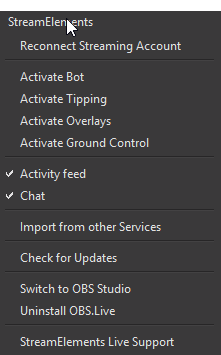
@lament blade m8 i accidently click to go to a profile WHILE in the chat
so i cant go to my chat anymore
zenith widget
I don't know a current mobile app thag has that option but we are working on our own. Its cureently in extensive beta testing but no ETA on release
@smoky raft
smoky raft
@zenith widget thanks
zenith widget
@lament blade did you try restarting oba.live? If that doesnt help try the "reconnect account" option
lament blade
oh shiit
zenith widget
If you are live currently
lament blade
that worked thx fam
smoky raft
Bie every one
 red sierra
Hi
i have a question
if i want to start a contest from my chat, which command i need?
 rugged rain
Hey guys. Do you have any alerts system for mobile streaming? IRL.
dense jackal
We are working on our own mobile app actually at this moment @rugged rain 😄 Still doing internal testing
 full jay
@dense sail Hello there, At the moment it is not possible to start a contest using a chat command. There are many options to adjust hence why it is not possible. Go to your dashboard > Contest and set it up. Once it's done users will be able to join via command. https://streamelements.com/dashboard/contests
rugged rain
@dense jackal Cool. Please make them compatible with iPhones. That’s what I’m looking for right now. Alerts that work when I stream from my iPhone.
@dense jackal Good luck and I’m excited!
dense jackal
ancient wigeon
Yeah, the custom CSS code box is empty for me, on all browsers, and seemingly all alertboxes (followers, subs etc). Sadface.
dense jackal
Interesting I think this is a bug. I only have mine for my followers I'll notify our guys about this @ancient wigeon Do you want the code I have for followers?
zenith widget
I looked up at the original query. @ancient wigeon do you want to build your own custom css+js for your alerts?
Usually the alert box comes with empty custom html/css/js boxes
ancient wigeon
@dense jackal yeah if you can pastebin me the code for css, html and js that'd be great
zenith widget
what ever you place there overwrites the default settings
ancient wigeon
I just want to make a minor modification to what's already there.
dense jackal
Do you mind if I I send it thru discord dm? @ancient wigeon
zenith widget
OK, so to use the custom css option you will have to add the video/image follower name and so on
you don't have to touch the JS part of the alert as it handles it self in the background
full jay
@long crypt did you try to remove/disable any overlays on OBS?
long crypt
I only have one static overlay. but I hide it in obs
my pc is just trash for streaming. lel
full jay
would you mind telling me which widget or module you have activated in that overlay?
full jay
the static overlay you have, is it just images or widgets or what exactly?
and it's okay my friend, we all been new to something once 😃
long crypt
just a png. picture
just this one
but I disabled it as it looked bad combined with my screen
dense jackal
What are your OBS settings
full jay
master yi main? nice one!
full jay
haha, it's okay, I main him too lol
dense jackal
yi mains get no help 
full jay
what's your pc specs?
long crypt
one guy from a server here helped me with the settings
full jay
@dense jackal yi helped me get from bronze 5 to bronze 4
long crypt
i posted my settings about one hour ago here
dense jackal

full jay
dabs
dense jackal
those aren't your OBS settings
long crypt
I really guess it is just my cpu
long crypt
yeah, kraw asked for it
full jay
@dense jackal what CPU does he have?
long crypt
i7 4??? 4x3.6GHz
dense jackal
i7-4790 intel and 750Ti GPu
long crypt
750ti kills it completely XD
dense jackal
but that's not what I'm asking
long crypt
gimmea sec 😄
dense jackal
👍
long crypt
btw. which settings do you need?
dense jackal
output/video/advanced
full jay
so I have the same CPU
long crypt
kk
full jay
and you shouldn't be getting that cpu load at all
obs is at 3% and 6% at most when I am streaming
hmmm
zenith widget
@full jay If 3% and 6% is when you look at OBS on the lower bar - that is misleading 😉
full jay
nope, I have the task manager open to see if anything goes wrong xD
zenith widget
fair enough 
long crypt
zenith widget
Carry on then
full jay
if you have nvidia card
dense jackal
uncheck enforce streaming service
dense jackal
his nvidia card is v weak @full jay
full jay
Hmmm
long crypt
full jay
then he is using the wrong settings for the cpu encoder
full jay
something's not adding up
long crypt
 gilded yew
i cannot get what kinda CSV it neds
long crypt
brb


 gilded yew
it is outdated
dense jackal
Set process priority to high in advanced
and uncheck enforce streaming service encoder settings @long crypt
gilded yew
there is no option to create CSV anymore
zenith widget
oooh right
dense jackal

zenith widget
Umm..well.. let me poke internally someone who may know about this
gilded yew
i could convert excel to csv, but no matter what i do it still fails to import
full jay
@gilded yew what are you trying to do exactly?
gilded yew
exporting points from streamlabs in excel format
goind to excel
saving as CSV
importing into streamelements
FAIL
full jay
this could happen for many reasons
gilded yew
there is no way to export as CSV anymore
full jay
first and foremost, it might be caused by users on your streamlabs database not matching those on streamelements
also, loyalty points captured on ankhbot/streamlabs chat bot and when streamelements started capturing them on your channel/stream
gilded yew
hmm
full jay
all of these are things to keep in mind
full jay
because users registered from period A to B could be different from period C to D and etc..
gilded yew
i guess i might completely WIPE all users from streamelements maybve?