#helpdesk-twitch
1 messages · Page 320 of 1
 kind epoch
 cyan sky
is there an issue where streamelements isnt reseting everything for the first of the month?
kind epoch
Obs crashed and wuldn't restart so i had to restart the pc but since returning now se obs isn't working well the stream portion works but the chat and the widgets don't load
 near sorrel
how to delete a command?
 narrow coyote
If OBS crashed and not just OBS.Live widgets it would be helpful to get the OBS crash log. As for restoring the widgets for OBS.Live please go to StreamElements > reconnect streaming account
near sorrel
can't find
narrow coyote
@near sorrel if you are on the site looking at custom commands, there will be a scrolling bar in the command box itself, delete option is on the right
near sorrel
ye, custom, bud i didn't see where is BibleThump
narrow coyote
@cyan sky if you are talking about the monthly data for widgets, that is a trailing 30 days, and not calendar month
@near sorrel there is a srcoll bar at the bottom of the commands, it's that grey bar in your pic
 blazing panther
So when someone tries to redeem a sound from my store, nothing happens. Does anybody know if there's something I need to plug into OBS or something to get it to work?
narrow coyote
@dense silo We are not StreamLabs, this discord is for StreamElements
@blazing panther do you have a store redemption widget in your overlay
blazing panther
Yes. I've tried it with it and without. Neither consistently works.
narrow coyote
well, for a sound to play from your store on your stream, you need to have a store redemption widget in your overlay
blazing panther
Do you need to have the overlay editor open for it wotk as well?
narrow coyote
no, the overlay that it is in just needs to be active in your scene, in your broadcast software, it will play through your default audio source, just like alert audio
blazing panther
I'm baffeled then. Is it possible to have a glitched store?
narrow coyote
if it is working in the overlay editor, it should work in your broadcast software as long as the overlay was saved, and it is the same overlay used in your browser source. If you emulate a store redemption, or redeem an item that is a stream perk, do you get the image in the store redemption widget, and no audio, or nothing at all in your broadcast software?
near sorrel
how i can use russian language on command? sorry for bad eng btw.
for example: !followage ${user1} has been following ${user2} for 1 year 5 months 27 days 1 hour => for command with russian text?
 slate badger
Sorry if this is super duper simple of a question but... Is there like a basic list of commands and parameters I can reference? Been searching a while and haven't found it yet 
narrow coyote
all commands can be found here https://streamelements.com/dashboard/bot/commands/custom there is the custom, default, and variables sections. Some commands are controlled by modules https://streamelements.com/dashboard/bot/modules
 radiant crest
Question, I'm trying to do some testing with layouts, possible in prep of something and I was wondering the following: Is it possible to upload a custom font somehow?
narrow coyote
No, the fonts used are all open fonts from google
radiant crest
that complicates things a wee bit. thanks for your respondse 
 delicate prairie
how do i make a chat command without it needing an exclamation point?
narrow coyote
For a custom command, you can add a keyword in the advanced options of the command
narrow coyote


 wind mauve
How do I link twitch and stream elements
narrow coyote
You go to the site, click the connect with twitch button, unless you already have an account made for youtube, then you can go into your account settings and add twitch
wind mauve
Thanks I’ve done it :)
narrow coyote
 sturdy flame
Got a Question!!!!!!
With the overlays in OBS, how in the world.. do you get the overlay to work with sounds when playing a video ?
narrow coyote
what do you mean exactly 
 torpid maple
I recently changed my twitch name now streamelements is not working
sturdy flame
Ok so.. at current, if i'm using streamelements, and i've got my overlay up.. I can have ground control open with media loaded..
when I play sed media, it can show up in my overlay, but the sound comes from ground control
narrow coyote
if you are talking about the bot, you need to go to your dashboard, right side, part the bot from channel and rejoin it @torpid maple
sturdy flame
it makes it seem as though the sound can play FROM the overlay directly if needed
narrow coyote
if you see the video on stream, that would mean that your overlay has the media share widget, as for media request itself, I would reccomend disabling it from Ground Control and use it from the site itself
sturdy flame
I understand that much.. but the wording for the media play, makes it seem as though the sound from the video being played, can play directly from the widget within the browser source on OBS.
narrow coyote
if you have the media share widget, and you use show on stream, it will play from the widget
sturdy flame
but I don't get the sound on my end, correct? but my watchers would still hear it?
I know that with notifications I still hear those, but when I play media it doesn't show any sound coming from the browser source for media when it's playing
narrow coyote
it will come through the default audio source just the same as other sounds, unless you do something to route the audio in some other way
sturdy flame
Unless i've got Ground control open, then I hear the sound from the video being played
torpid maple
How do I part the bot?
narrow coyote
https://streamelements.com/dashboard right side
@sturdy flame if you use the show on stream option, then it plays through the media share widget in your overlay, this will play through your default audio source the same as the other overlay audio, like alerts
if you are using ground control to control the media request, then that will need to remain open, but if you are using show on stream, the audio is not coming from ground control
torpid maple
Thank you so much!!!!
narrow coyote
sturdy flame
Alright, but when I leave ground control closed, and let it show/play on stream through the browser source on OBS. OBS itslef isn't registering that their is ANY sound coming from the overlay, unless a notification pops up
narrow coyote
for media request to work, it has to be open somewhere, we recommend using the site over Ground Control
sturdy flame
Ground control still works perfectly fine for it, I just didn't know if the overlay in OPBS itself was supposed to play sound from it, for the selected video that's showing. That's how it's described on the widget information on streamelements
narrow coyote
if you use show on stream, it plays through the media share widget. Media Request is not fully compatible with Ground Control. GC is outdated and due for a complete rewrite, and the Media Request was overhauled not too long ago. That is why I have said a few times now, we recommend using the site over Ground Control
 chilly vigil
Hello, is it possible to set up custom emote as store item to put on store for viewers to buy to use it?
narrow coyote
not really, your emotes are either going to be twitch official emotes that requires a user to sub to use, or if you use something like bttv any user would be able to trigger the emote
 zenith shell
Hey, I downloaded the Stream Elements Addon for OBS, it was working great but now it wont show my notifications
 pine hemlock
@zenith shell Are you using our alerts?
zenith shell
Yes
pine hemlock
@zenith shell When was the last missed alert for you?
zenith shell
Just shows it loading
pine hemlock
Are you talking about the activity feed?
zenith shell
Yes
 lament blade
how to delete account
pine hemlock
@zenith shell Try reopening obs. We changed something server side
zenith shell
I've done that a couple times now
lament blade
how to delete account
pine hemlock
@zenith shell Can you try again? Maitenance was just completed a few mins ago
@lament blade Why do you want to delete your account?
lament blade
because it is not meant for mobile
zenith shell
@pine hemlock restarted, still the same
pine hemlock
Does the website acitivty feed load?
zenith shell
Yes it does
narrow coyote
In OBS go to StreamElements > reconnect streaming account
zenith shell
where is stream elements options in OBS @narrow coyote
narrow coyote
zenith shell
Thanks @narrow coyote that worked!
narrow coyote
 copper halo
 sour lava
Re: Twitch Prime subs not showing to SE, the one I received last night was seen in Chat when I looked in a browser, but not in OBS.Live or my activity feed. :\
 zenith widget
@sour lava If you go to your SE Dashboard, does it show in that activity feed?(main page small one and the Activity Feed page)?
sour lava
@zenith widget No mate
 nocturne pelicanBOT
@sour lava Twitch prime (new and resub) and paid subscriptions (resub only) must be shared in chat manually by the person subscribing in order for the subscription information to be sent to StreamElements. For twitch prime, the user needs to have sharing enabled on https://www.twitch.tv/settings/prime. For paid subs, if the share box doesn't show up immediately it will when they refresh the page. https://i.imgur.com/VNJN0Uv.gif https://i.imgur.com/2297EA7.png

 sour lava
I had a browser window open for my bot's account, and it had it there.
zenith widget
This is on twitch's side
sour lava
Oki doki. Just not sending to SE's API?
zenith widget
With their change to channel designs
I assume they may or may not be changing some things with their API, most likely not, but the above still holds true.
Its not them sending us to our API, its us getting it from their API
But in order for us to see it, the above must be met
(or like the info above said, sending it to us, but we still scour their API call for subs/resubs[prime or not])
sour lava
Sure - but if it shows in a normal browser window, then it's safe to assume the user has set it to be shared, no? If a non-channel owner can see it.
no worries
zenith widget
Most likely he has subbed with Prime, the chat small notification showed it, but he has not shared it
sour lava
It shows on my streamlabs dash
Huh
Ok -- i saw his sub badge so knew enough to thank him anyway 😃
zenith widget

If he continues his prime sub to you, sharing is best way for us to know he has resubed
 haughty talon
is the OBS.LIVE se addon broken? tried to re add it and re -install it but it keeps trying to connect 😒
zenith widget
@lament blade Umm we don't support that.
zenith widget
Well sorry for trying to be helpful regardless
zenith widget

lament blade
ima go troll streamlabs since this is better 
zenith widget
@haughty talon So you manage to install it but are unable to see the login page?
haughty talon
This is what i see. Worked yesterday and for a while today, then it just died
zenith widget
Nothing else has changed since yesterday I assume?
Upon re-installing did it ask you to login to your SE/twitch account?
zenith widget
Ok, so when you open OBS, on the top menu click on "StreamElements" -> "Reconnect Account"
haughty talon
ah there we go! thanks 😄
zenith widget

 elder forge
how do I edit commands or add more then one link
nocturne pelicanBOT
@elder forge You can make changes to custom commands in chat with!command add/remove/edit/options/show Valid flags for !cmd options are: -cd (number) -usercd (number) -cost (number) -level (number) -type (say, whisper or reply) -count (number). --- Example: !cmd options twitter -usercd 60 -type reply -level 250
zenith widget
Other place where you can add/edit/remove commands is here https://streamelements.com/dashboard/bot/commands/custom
And I'm not sure what you mean by "add more then one link"
elder forge
Thank you
when I do a SO I want to have it where i say the streamers name and there link comes up
zenith widget
In the custom page of the commands, when you press "Add new command" there is a drop down menu for template
Click that and scrool a bit and click on "shoutout" then you are pretty much done
elder forge
can I remove a command
zenith widget
Custom commands yes, default commands can only be disabled
elder forge
how do I remove
zenith widget
elder forge
Working now
 inland knoll
Hi there, trying to streamline what I need open when I am streaming - if I have Streamelements OBS.liv running what which other Streamelements elements do i need to be running? e.g. do i need the webpage or ground cointrol running?
zenith widget
If you have a custom bot name, you may need the ground control app running, but you can still minimize it, if you don't do media requests
The plan is, OBS.Live to also support Custom Bot name, but no ETA on that at the current moment, as this is version 0.1 of the plugin
inland knoll
ok, thats seems common at the moment - thanks for the reply
 copper mountain
How much Fees does Streamelements take from Donations ?
zenith widget
None
Here are all the fees that PayPal and or G2A Pay take: https://streamelements.com/dashboard/tipping/fees
We do not take any fees from donations, we just provide the medium for people to leave you a message and send them directly to PayPal/G2A Pay
copper mountain
so if somebody donates 2 € i maybe get onlay 1,70 € ?
copper mountain
ok because i heard it is completely free so i get the full money
 thorn gazelle
Anyone with a very good understanding of OBS + Anticheat Hook?
After i reformated my computer, OBS wont work properly. It wont allow me to stream games that has Easy Anticheat. Ive tried REND & Fortnite. Both games use Easy Anticheat.
Hearthstone works perfectly.
If there's anyone with a good knowledge of OBS id love to talk to you. ive been trying for half a week to sort out my stream.
zenith widget
I think that should be looked over by OBS Support guys over at their discord here:
nocturne pelicanBOT
For the best OBS support, please join their discord where OBS devs and support volunteers are available all the time discord.gg/obsproject
thorn gazelle
Thanks @zenith widget
zenith widget
I don't think anyone here is capable of helping with this matter, so your best bet is there and good luck!
@thorn gazelle I looked over at what you said in OBS Discord. Does this issue happen only with OBS.Live addon and SLOBS? Vanilla OBS Studio is fine?
thorn gazelle
Haven't tried Vanilla
zenith widget
There is a chance they will redirect you back to us, just bcs of OBS.Live you mentioned and to SL support for SLOBS. Just want to make sure we cover other basics
thorn gazelle
Here's a comment from a buddy of mine that has better computer knowledge then me:
I believe that the hook from OBS etc, tries to capture Fornite - but the anticheat sees another piece of software trying to "hook" into the game and stops it.
That's why (as you might have seen) that we're able to adjust the window for just a fraction of a sec. but then it dies.
zenith widget
I understand hooks and the anticheat system and how they work mostly, but how to fix is another matter that maybe related to OBS' function.
Ok, so they asked you for a log file and will be better help then me. If they redirect you back to us just because of the plugin we may also want the same log files they wanted so that we can send them to our Devs just in case its something from us.
 prisma cloak
I have problem with songrequest command
I can't use this command on streamelement
even I set it up many time
i dont understand
everytime I !sr it's turn to show current song
zenith widget
@prisma cloak
Can you remove the follower only mode so that I can replicate issues?
zenith widget
Ok, so what I see is, you've changed the aliases of commands around
!songrequest default command should have an alias of sr
but it seems its added to command !song
zenith widget

 charred kindle
yo
thorn gazelle
They are troubleshooting the problem @zenith widget - doesn't look promising tho 😦
zenith widget
So maybe bad formatting/install of windows? Did you try reinstalling the game?
Not sure if they suggested that
zenith widget
Yea, nothing we can help with, best troubleshoot with them, but this smells like a bad install of Windows(and it happens sometimes)
 hot cloak
Do you need a PC to get nightbot?
zenith widget
We are not Nightbot 
We have our own bot, my friend.
Just go to here: https://streamelements.com/dashboard and click the magic button on the right "Join"
hot cloak
Oh I forgot my bad
zenith widget
and you are golden 

hot cloak
It's 3:23 in too tired for this
zenith widget
Get some sleep before you tackle stuff, especially if you feel tired 
then come back and ask all the questions and we will be happy to help 
 wraith hemlock
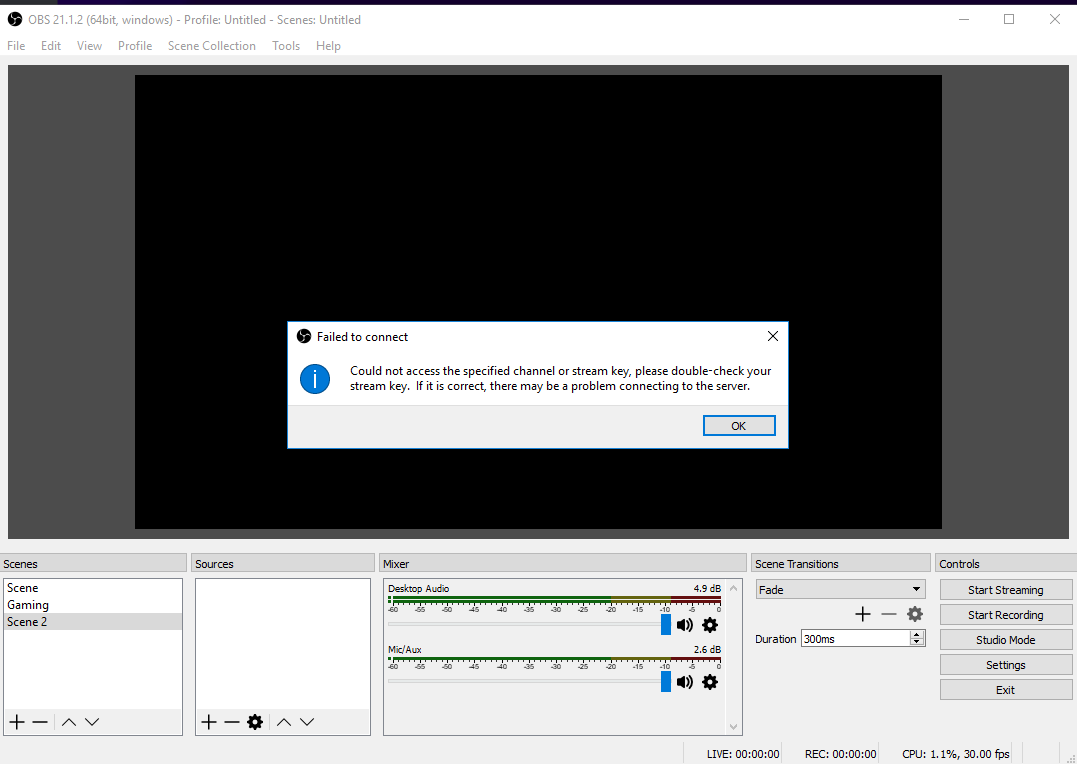
https://i.imgur.com/3gxOIy4.png someone having same issue?
 pine hemlock
It's a twitch problem.
Check their Twitter

If you're having issues streaming to @Twitch, there's an issue on their end that is preventing you from starting your stream.
 Twitter
 radiant grove
guys....
 strange osprey
I have a problem with my alerts for my stream. Since I installed the streamelements plug-in for obs, my follower and subscription alert will only show the writing, but not the intented video. In the overlay section is everything fine though. Does someone have any idea what the potential problem could be?
pine hemlock
@strange osprey try opening the browser source properties and refreshing the cache of the browser source
 strong ruin
I'm having a problem with my loyalty points. I've tried to change the name again but it doesn't seem to be transferring over to my channel. I was just advised to log out and in again, which hasn't done anything. Looking for more tips!
 winter zenith
take the bot out of the chat
and change the name of the loyalty points
then put the bot back in this should solve the issue
also wich browser are you using?
@strong ruin
strong ruin
Firefox now, Chrome before. Same issue with both
I'll try booting and reinviting the bot
winter zenith
sounds good 
lament blade
Hey guys I was wondering if you could help me understand how to correctly add a variable to a command. I've tried the help videos but unfortunately it doesn't have the info I need. For example, say I want to have a command for my total views. The variable for this is ${channel.views}. My response is, "In total, the stream has ${channel.views} views!". What appears in chat though is, "In total, the stream has views!". It completely ignores the variable. I'm having this problem with all my variables. What am I doing wrong? Thank you 😃
zenith widget
It should be fine, but I think that particular variable pulls your viewer count and you need to be live.
Can you confirm that even ${game} doesn't work?
@lament blade Hold on for a moment. I'm trying something atm.
lament blade
I was thinking it could be a live thing but even ${channel.followers} doesn't work. The only command that works is ${user}.
strong ruin
Nope, refreshing the bot didn't help either
zenith widget
I think its related to Twitch
Let me test something
This is a default command that can't be changed, but its not placing my name betwee the 2 /'s
winter zenith

🔎We're currently investigating an issue where streams aren't loading site-wide. Stay Tuned!
Retweets
264
Likes
559
Twitter
not sure but maybe this has something to do with the issues?
maybe not 🙈
zenith widget
I'm 70% sure it may be related to both issues reported 
strong ruin
No rush for me, I'm offline for a while anyway. I'll try again tomorrow 😃
strange osprey
@pine hemlock how do I refresh cache of the browser source specifically? Renewing the browser source as well as resetting it, didn't work out
zenith widget
@strange osprey Right click browser source -> properties -> scroll down on the new window -> refresh cache
strange osprey
I do not have that refresh cache button there... wait, I will give you a screenshot for that.... never mind that, but it did not solve the problem... still the same
lament blade
Alright well I'll wait til tomorrow to test it again since I can't turn the stream on now and since i need to go to bed. I'll let you know if I'm still having the same issues then. Thanks for having a look into it. See ya later.
 rustic mist
Morning
winter zenith
@lament blade yeah sadly a twitch issue I linked befor
rustic mist
When i setup the 'default command' "!items" it links to https://StreamElements.com//store rather than to https://StreamElements.com/antinull/store is there a way to change that?

StreamElements
The Ultimate All in One Platform for Streamers
StreamElements
The Ultimate All in One Platform for Streamers
zenith widget
@strange osprey
@rustic mist Its related to the current twitch issue
posted above from Kiwa and in #general-chat
rustic mist
oh, didn't realize there was one, must have missed it
I guess i can make a manual item
winter zenith
🔎We're currently investigating an issue where streams aren't loading site-wide. Stay Tuned!
Retweets
264
Likes
559
Twitter
zenith widget
Well I'm just ~~70%~~100% its related, the thing is, you came asking here bcs you just didn't knew there was an issue on Twitch 
rustic mist
for sure, ill check back later 😄
strange osprey
@zenith widget I refreshed it, but it did not solve the problem. It is still not showing it. Is there a potential problem with playing mp4-files with the new plug-in? I think my remaining alerts are a comination of gif + mp3, which are working
zenith widget
Its best to use .webm as a video format
and I would highly recommend .webm
You can use this site to conver your .mp4 to .webm
strange osprey
ok, good to know, thx
zenith widget
Convertio — Easy tool to convert files online. More than 284 different document, image, spreadsheet, ebook, archive, presentation, audio and video formats supported.
strange osprey
@zenith widget well, I changed it, but it didn't solve the problem as well 😦 Wow, I forgot to save... it did help. Thank you very much, sir!
 split sinew
question my tip page still shows my old name is there a way to change that?
zenith widget

@split sinew Usually a relog would fix that, but at the current moment Twitch is having issues, so wait like an hour or 2.
@strange osprey I started to rethink my life, until you added the 2nd part

strange osprey
😄
split sinew
@zenith widget its been like that for a while and never changed? i have logged in a bunch since i changed my name a while ago.
 outer ivy
I am trying to stream and it keeps saying failure to connect is anyone else having this issue?
winter zenith
We're also investigating other site-wide issues, like elements of the website not functioning correctly and not being able to start new broadcasts. Thank you for your patience as we look into these!
Twitter
zenith widget
@split sinew Can you DM me your old name and new name? I'll poke a staff member to take a look.
winter zenith

pine hemlock
I'm at work so I'm slow lol
rustic mist
Okay, I am trying to setup a stream store item and added 'requirements' for a shipping address/email address and what not.... where does that information go when entered? I tested it and don't see the info
zenith widget
In the "Details" part
To get there -> Stream Store -> Redemptions -> Redemption History
rustic mist
I get no redemption history on that
zenith widget
Have you redeemed an item yet?
Ask your mod or a friend to redeem an item as a test
give them points and try it out
 rustic mist
the history is empty
 opal echo
guys, anyone can start a stream? coz i dont know why i cant
zenith widget
@opal echo Twitch is dead!
opal echo
it was today 1h ago, but we cant start new streams?
zenith widget
(They have a site-wide issue at the moment and no one can go live)
opal echo
damn
zenith widget
We're also investigating other site-wide issues, like elements of the website not functioning correctly and not being able to start new broadcasts. Thank you for your patience as we look into these!
Twitter
opal echo
where i can check info about that?
thats it 😄
i hope they will repair that in next 30mins, thanks anyway 😃
rustic mist
and followup, is there a recommended image size for the Stream Store?
my images are getting cropped
zenith widget
When you upload an image, the media gallery should give you an option to crop it more.
rustic mist
right but... what dimensions should i be using?
I want the full image visible on the store so i will gladly add empty space
 humble ether
@zenith widget ,, any idea how to play a video every 20 min ?
or anyone else for that sake
rustic mist
here is how the images are getting cropped, so like i need to know what dimensions the site wants so they don't get cropped
https://streamelements.com/antinull/store
StreamElements
The Ultimate All in One Platform for Streamers
zenith widget
I have a 2400x1800 image in a streamer I mod for and it auto fits
humble ether
@zenith widget how does that help me ?
zenith widget
@humble ether Its an update to the VIDEO widget
rustic mist
I am talking about in the store
humble ether
and ? @zenith widget how would i do every 20 min with that ? XD
zenith widget
So on top there it says "widgets/data/image/video" click on video, set your video and use the control
humble ether
i know i can put in a video,,
thats not the problem
i need it to play every 20 min
once
every 20 min
zenith widget
Sorry then I did not check the controls as I don't use it myself
The only I have is, have it converted to a .gif and place it in the image rotator/slideshow
humble ether
yea that unfortunately works like dogshit 😄
zenith widget
humble ether
- it plays the gif before its even on the queue and 2. its crap quality to make gifs.. 😛
zenith widget
Well I have no idea then. maybe google "obs video loop every 20 mins"
humble ether
Well if it was so simple i wouldn't be here XD .. i need a online way of doing it 😉
but thx
zenith widget
You can always post the idea for the video widget to have a delay in playing the video here: https://strms.net/ideas
humble ether
lets be honesty, its a very niche request it would maybe be added in 5 years.
i posted ideas in there 2 years ago which hasn't been done, big reason why i switced away from SE tbh XD hehe i needed stuff that wasn't there..
but thx for the try at least 😉
rustic mist
I can't seem to find any info on what dimensions this page wants for the items in the store lol
zenith widget
@rustic mist Like I said, it can take any image size.
rustic mist
and i would like to not have said image auto cropped
i sent you the images to illustrate the issue lol
i just need to know how wide to make it so it fits without cutting anything off
blazing panther
@narrow coyote Sorry, I fell asleep. The sound works if I actually type the command in chat and only if I have the layout editor open. The image does not pop up on my obs though. Only on the editor, that's where the sound comes from as well. If I actually go to the store and try to redeam something the sound will work (again onyl if I have the editor open) but the image and notification does not pop up and there is not notification in the chat. Thanks so much for your help! ❤
 maiden perch
Hi there, just having a minor issue, for some reason on streamelements website when "emulating" any type of alerts, they dont work on the launched overlay. Any advice? Thanks in advance by the way 😄
Nevermind, closing and reopening the browser seemed to have resolved the issue, I was slightly confused as it wasnt appearing on SLOBS either through the browser source which made me wonder what was wrong 😄
 glad zinc
Can anyone explain the features of OBS live?
nocturne pelicanBOT
@glad zinc OBS.Live is a Plugin for OBS created by StreamElements. You can download OBS.Live here: https://streamelements.com/obslive
Please make sure you have the latest version of OBS installed, Current Version: 21.1.2. You can install OBS here: https://obsproject.com/
 frigid flare
currently it ads a twitch chat and activity feed directly in OBS itself so you dont have to have additional instances of chrome running with other stuff causing extra CPU overhead unecessarially.
it is only V0.1 atm still in development and there are LOTS of features in the works right now to add new features and customisability.
@glad zinc
chilly vigil
hello, KappaGen only activated when someone tip right?
 delicate jetty
hi i would like to unistall obs live because its causing problems for my streamlabs alert sounds
frigid flare
@chilly vigil this setting choses what sets off the kappagen beyond people typing in chat
what issues @delicate jetty
delicate jetty
do i actually have to download a fressh obs to remove obs.live
i can't hear my streamlabs alert sounds
frigid flare
are you able to dm me your url and then trigger some alerts. im gonna load it up in my obs live to try and help troubleshoot
so if it is obs live can be added to the bug list
if thats alright 😃
delicate jetty
um alright
chilly vigil
@frigid flare thank you very much
frigid flare
👍
 bleak rapids
Wondering if anyone has come across this issue before:
Someone subbed to me using Android pay on their phone last night. There was a small delay in my Twitch sub-count increasing (about 15-20 minutes), but streamelements didn't show an alert at all, and still hasn't registered the sub in my activity feed or anywhere else.
narrow coyote
Was it a resub? and around what time last night?
 jaunty ridge
Hi I just started to use streamelements and I’m wondering about how the donations work
Also the points mechanism
zenith widget
@jaunty ridge What exactly do you want to know about the donations?
As for the points I would suggest this video: https://www.youtube.com/watch?v=mBDY4RdoZ4A&list=PLCDDKlFdScbEwdx5AntcQIS1InkFJwHtv&index=17&t=0s
zenith widget
Then I suggest looking at the video 😃
lament blade
hello, i have a little question everytime i switch to an overlay that has a chatbox in it so chat shows on screen, the chat that already is in my twitch chat doesnt appear in it, if that makes sense
zenith widget
That means the chat widget has loaded up and starts tracking new messages. It can't show old ones
lament blade
any way around that?
zenith widget
There is a way to have it how previous messages, but you will have to move the chat widget to a new overlay, add that overlay as a new browser source and not have the option "shutdown when inactive"
But you will have to keep the new browser source as 1920x1080 as well
To make this easier, make a blank overlay, name it chat widget
then go to the overlay where the chat widget is, click on it -> layers and click on the 2 white blank papers with red dot
this will duplicate the chat widget to the new overlay with the exact position it is, in the original overlay
lament blade
sounds very hard :/
lament blade
like with pictures n stuff? 😮
lament blade
yes pls plix plax
zenith widget
Or I can leave it here, but its gonna a long one
lament blade
i suck with text cuz idk what ur talking about tbf xD
zenith widget
lol
lament blade
yeah DM, no problem
dude u have no idea how much i praise streamelements for having a YT guide
with video
that i just have to follow
 warped fractal
can someone help me im new and i downloaded desktop app for this and it says to type in JWT token and i cannot find it. i tried to look it up on youtube but noone would help
nocturne pelicanBOT
@warped fractal You can find your JWT token on your account channels page: https://streamelements.com/dashboard/account/channels
(Don't forget to click on "Show Secrets")
warped fractal
is it labelled as 'account id' ?
narrow coyote
Don't forget to click on "Show Secrets"
bleak rapids
@narrow coyote It was around 22:50 UK time. It was a user that has once previously subbed to my with their Twitch Prime, but hadn't been subbed for a month or so.
narrow coyote
Click the show secrets button, its under there 
narrow coyote
@bleak rapids In that case it still might needed to be something that they would need to share in chat, there was a tiny windows of server maintenance last night, but that was not during the time you say
nocturne pelicanBOT
Twitch prime (new and resub) and paid subscriptions (resub only) must be shared in chat manually by the person subscribing in order for the subscription information to be sent to StreamElements. For twitch prime, the user needs to have sharing enabled on https://www.twitch.tv/settings/prime. For paid subs, if the share box doesn't show up immediately it will when they refresh the page. https://i.imgur.com/VNJN0Uv.gif https://i.imgur.com/2297EA7.png
warped fractal
how can i add an overlay to my stream bc i downloaded one on website but its not aactivating
bleak rapids
@narrow coyote Okay I'll ask them to give that a try. I'm assuming as a rule, streamelements requires the sub to 'share in chat' before an alert can be generated?
narrow coyote
yeah, if they have the share option, and they dont share, we dont get the alert for it
nocturne pelicanBOT
@warped fractal To add your overlays to OBS, add a new browser source in your scene. Paste your overlay URL in the browser source properties, set the dimensions to 1920x1080 (unless you changed them on the website), and :ballot_box_with_check: “Shutdown source when not visible” https://youtu.be/KDvLynUqXI4
bleak rapids
@narrow coyote Okay thank you for that info 😃
narrow coyote
 zinc shale
Hey, any place where I can ask questions about G2Pay as donation method?
 trail condor
If I wanted to help out with the development of SE, who could I reach out to?
 atomic hollow
you can DM @serene granite
trail condor
Awesome, thank you @atomic hollow ❤
warped fractal
can i use this to add overlays to my ps4 stream
nocturne pelicanBOT
@warped fractal Here is a guide on how to setup the most essential tools for streaming from your console, while using StreamElements tools without involving a Capture Card! It's easy to do, take 4 minutes to read and 10 to 15 minutes to setup!
Read all about it here: https://blog.streamelements.com/how-to-stream-on-console-7b620b1c46c3
zenith widget
But to add overlays to your stream, you will need a PC and a capture card.
warped fractal
cant i just add a source then put a link to my twitch stream?
 weary mist
No, that does not put the source on top of your stream
You have to capture the video source (your game play) along with the overlay page, and, well, overlay it on your gameplay, then send it to twitch
(that is what a broadcasting software does)
warped fractal
wait so i wouldd have to buy an elgato
narrow coyote
either a capture card, or use some type of remote play on the PC that you would be broadcasting from
warped fractal
so once ive got an elgato set up and im im the elgato software i would... (finish it)
narrow coyote
ideally, you would use broadcasting software like OBS Studio, and you add the gameplay capture from the capture device, and the overlay as a browser source
warped fractal
got it thankyou to every one that helped me
so for now i have to stick to the sh*tty ps4 brodcast XD
narrow coyote
warped fractal
so after 4hours the only thing i did was find out i have to spend £160 XXD
 rare geyser
How do i find my jwt token?
nocturne pelicanBOT
@rare geyser You can find your JWT token on your account channels page: https://streamelements.com/dashboard/account/channels
(Don't forget to click on "Show Secrets")
 frozen surge
i have a problem i have installed obs.life and yesterday i had my chat on the left site i loved it but now i dont know how i set it back cause now i have my dashboard their (sry for the bad english :D)
winter zenith
@frozen surge what's your language?
Also you can just drag the Pannels to what ever Position you want to
frozen surge
german ^^ @winter zenith
yeah but in my chat pannel is now the whole streamelements website not the chat
winter zenith
Oh dann geh bitte oben auf "StreamElements > reconnect streaming account"
Das sollte dein Problem beheben. Wegen Problemen mit der twitch API kam es wohl zu diesem "ausloggen"
Aber twitch hat das jetzt behoben sollte also alles passen nach dem du reconnected hast @frozen surge
Lass mich wissen ob das dein Problem behoben hat
zinc shale
Hi! ❤ is it possible to sync alerts in between overlays? I have 3 atm and i have to edit every alert box on its own with new alerts
winter zenith
@zinc shale I advise to just change your alert Box once in a overlay of your choice. And dublicate the edited one to the other two overlays
 misty wagon
@zinc shale 

zinc shale
@misty wagon  Oh hey
frozen surge
@winter zenith danke bist die beste ❤ ^^
winter zenith
@frozen surge haha kein problem immer wieder gerne kannst mich gerne pingen für deutschen support

 winter zenith
@frozen surge stimmt kommst du auf die games com? Kannst zu uns dort Hallo sagen 
 gritty bear
What are the giveaways for, points??
narrow coyote
you can setup a giveaway for whatever you want
gritty bear
Ok thank you
 lusty dagger
anyone know how to get the activity feed to work on the stream element obs mine is jut loding
loading
zenith widget
@lusty dagger Have you just installed OBS.Live?
zenith widget
What version of OBS is it?
Just trying to gather some info before hand to pass internally
zenith widget
Ok, so first I would recommend updating OBS manually by downloading the 21.1.2 version from the site
zenith widget
But I'm not sure how that will affect the obs.live plugin
but go get the installer and update to 21.1.2 and come back to me if everything is fine or not
zenith widget
The fix to the loading thing of the activity feed is something, but just want to see if the old version is related to the infinite loading
zenith widget
Hmm ok, worth a shot
lusty dagger
yea at least i am up to date
zenith widget
so click on "Streamelements" next to "help" and then "reconnect account"
its a known issue so its being looked at
and this is the current fix for it
zenith widget
 unborn olive
So I've updated OBS and all the things. But on my OBS for my stream elements Activity Feed...I have no idea how or why, but it's just showing an image I have saved to my desktop? o_O
unborn olive
Yeppers
narrow coyote
If you are talking about OBS.Live, can you try going to StreamElements > Reconnect streaming account
unborn olive
@narrow coyote That fixed it! Thank you so so much 
narrow coyote
lament blade
Hey! I have decided with this amazing new OBS integration I was gonna drop streamlabs OBS and transfer to stream elements. Now I have an issue ATM. I used stream elements before with my old username whoisxsi now when I use streamelements I get this message "The Channel you tried to add is linked to a different account." What can I do to fix this?
misty wagon
Have you tried log out of the platform and back in? That way we can pickup the new Twitch channel name.
 terse cargo
Is there anyway to change the name of the Streamelements bot in my channel? Thank you :)
misty wagon
If you search in this Discord for The Channel you tried to add is linked to a different account you will see a lot of answers and solutions.

📣Rename your @StreamElements #livestreaming bot on #twitch? Sure, no problem but be warned! With the free upgrade comes a free bot attitude! 🙃🚀
 Twitter
⤴ much better answer than the boring official one 
lament blade
@misty wagon My username was updated, but it still tells me The Channel you tried to add is linked to a different account
misty wagon
Try part bot and make it rejoin
lament blade
Tried still gives me the same message
Streamelements is modded
Maybe is there a way to close my account and re-register but with my new twitch name?
misty wagon
So does it say it's still linked to whoisxsi or does it show your new username topleft? If its the new one, you can just close the msg
misty wagon
Close the msg, ur fine, its linked correctly 
lament blade
Aight sick
Thanks @misty wagon 😃
Do you happen to know where I can find the Currency.csv file in streamlabs probably the wrong place to ask but I cant find it and i wanna transfer it to streamelements
 tight harness
@lament blade
lament blade
You guys are amazing
thank you
Is there any way to have a different font than what is available in the stream elements list for the alertbox?
tight harness
I believe it's possible to use some custom fonts but it's a little more tricky, to my knowledge you have to use custom HTML/CSS to change it
By default we have all of the Google Fonts, it's not in there?
lament blade
So I know that having multiple browser sources enabled will cause streamelements to make sound alerts go through several times. Is there any way to help speed up loading times because it takes like 3 seconds to load and kinda looks "unprofessional" is there any way to make them load faster?
And the font is not a google font unfortunately
tight harness
The load speed is down to things like your download speed, ping to servers because you're essentially loading a webpage. You could add a scene transition graphic
Or a fade effect over the time it takes to load
lament blade
Aight I guess ill try a very slow scene transition
narrow coyote
you can also preload scenes with studio mode
lament blade
You can do that?
nocturne pelicanBOT
Check out this tutorial for OBS’ studio mode which allows you to preload scenes before transitioning. https://www.youtube.com/watch?v=W8iWsD2Lq3U
lament blade
OH DAMN thats AWESOME
tight harness

narrow coyote

chilly vigil
how bout remote control for that?
tight harness
Remote control for what? Scene transitions? 🤔
chilly vigil
yep
tight harness
You mean like from a Stream Deck for example?
chilly vigil
slob has remote control. obs has a plugin , obs-websocket for remote control.
 wanton jetty
Ummmm....
http://chrisis.live/s/1533239361_7.png
 tight harness
@chilly vigil Ohh, you're suggesting something for them to try? I thought you were asking a question
chilly vigil
ah yep 🙂
tight harness
@wanton jetty ${pointtouser} - where did you get that variable from? 
wanton jetty
Ummm 🤷
what variables should i be using ?
think they just coppied from Phantombot
tight harness
That would be @${user} and also for channel name it'd be ${channel}
tight harness

 agile sundial
Hello!
lament blade
My Streamelements ground control is loaded but hiding probably off my screen how do I bring it to one of my screens
NVM
got it
agile sundial
Ace Live Streaming is made by StreamElements right?
tight harness
@agile sundial Yes although we're making an even better version which our mobile developers are focusing on
agile sundial
Sweet! Would you not recommend I buy the Pro of the current one?
lament blade
Any future updates to groundcontrol? It looks very lacking 😛
tight harness
You can't buy the pro version, we don't sell anything, if you try it'll not allow it. The new version will be absolutely free too 😉 @agile sundial
agile sundial
Aw man, that's why it wasn't working ):
Hmm, I've been concerned about the watermark + 2mbps bandwidth
tight harness
@lament blade Well, we recently released our OBS.Live plugin for OBS Studio which incorporates your activity feed and Twitch chat directly into your OBS, but Ground Control does need some TLC, we know that 😃
The main thing Ground Control is used for is the activity feed, so if that's what you're mainly wanting it for that plugin may be the best way to go
agile sundial
How long do you think it will be till the release of the new mobile app?
As it stands I'm in desperate need of an app that can stream both facecam and the mobile screeeen
tight harness
I'm not aware of any public date, development for these things takes time because we want to make sure it's operating exactly as we want it to be, it'll have some unique features which will make it very worth the wait 😉
agile sundial
Fair enough, then wait I shall
tight harness
We post updates in here so keep an eye on the updates channels 😃
agile sundial
Do you know if I put adaptive bit rate on and I select 2mbps bitrate, is it possible that it may use more?
tight harness
@agile sundial I guess that would depend on whether the 2mbps is a hard cap or not, I don't know too much about how it works, but I know that the new app will not have any limitations and will be free
 lean osprey
Sorry if this've been asked before, looked through the discord but couldnt find it:
What excactly can a super moderator do that distincts it from a regular moderator? appart from the "Super moderator commands"
Also can a user thats not a manager create/remove/modify commands through the streamelements page, and create timers as well? Can the super mod do this for example?
narrow coyote
The super moderator is going to be just for the command levels, if you want them to have access to the page to create things, they will need to be a type of editor.
this image will show the different editor roles
nocturne pelicanBOT
Chat/Bot Levels
100 - viewer
250 - subscriber
300 - __regular __
500 - moderator (twitch mods automatically placed at this level)
1000 - super moderator
1500 - broadcaster
Dashboard Manager Levels (least to most access)
Bot Supervisor (can add super moderators from dashboard)
Editor
Full Access
https://i.imgur.com/s61Liry.png
 lament blade
Can someone explain to me how I can make an entry for my recent tipper and top tip? It seems like not everything transferred from streamlabs
tight harness
You can go to Revenue History > Tip List > Add Tip
lament blade
thanks ❤
tight harness
If you want to add a tip that's not there
But you can also go to: Activity Feed > Widget Data
That's where all of the widget data is stored as you'd probably guess 😄
lament blade
Weird, my tips are all there but the overlay is saying TOP TIP : NO DATA
lean osprey
@narrow coyote thank you vm
tight harness
Do you have it set to Session rather than Weekly, Monthly or All-Time? @lament blade
tight harness
No problem, it happens 😃
@lean osprey Technically Media Request exempt level can also be set to either Moderator or Super Moderator, so they can post songs without the limit of songs or cost if you wish 
I'd only suggest it if you absolutely trust your mods though 😄
lament blade
I used the [name] variable and it shows up as [name] but [currency][amount] works
hmmm
tight harness
Square brackets? Are you sure?
Should be { }
You need to use the squiggly brackets
lean osprey
oh thats interesting
tight harness
Yeah, it means that your mods can help request songs if the other users slow down with their requests @lean osprey
@lament blade It's no problem 😄
lament blade
Bless your soul
tight harness
I've been blessed 
 raw heron
help
tight harness
What's up?
raw heron
how do I change the name of my currency drop. I went from potions to gems, but cant find the name to change it
narrow coyote
https://streamelements.com/dashboard/loyalty you mean this
tight harness
Ahh, your points? Go to Loyalty Settings, set the name at the top of there, also go to Chat Commands > Default Commands > either rename your !points command or add an alias to it
raw heron
thank you SM
tight harness
No problem 👍
 dapper crater
Is there a file size limit on alert images/animations? If so, where can I find what they are? What about a dimensions limit?
tight harness
I believe it's a 30mb cap
In terms of dimensions I'm not aware of a limit
Hope that helps 😄
lament blade
hello anyone know where to get the JWT to import to Streamlabs?
 slim vector
Can anyone help me with a widget issue?
nocturne pelicanBOT
@lament blade You can find your JWT token on your account channels page: https://streamelements.com/dashboard/account/channels
(Don't forget to click on "Show Secrets")
narrow coyote
@slim vector whats the problem
slim vector
@narrow coyote so, I have the follower goal widget on my overlay. Its operating fine, but seeing as I didn't start using an overlay when I stared my channel its only tracking my followers since I've started using it.
For instancemy channel has 236 followers
but on my overlay it was lagging behind
One of my mods has since ust updatd the text manualy, but the counter is still incorrect
I don't know if I'm explaining that properly
 tall kernel
Did I misunderstand? Is StreamElements an extension or an overlay?
narrow coyote
If you are talking the actual goals, this will just track the followers that you get since you signed up. This will not reflect your total followers. You can set the starting amount for the goals in the goals tab here https://streamelements.com/dashboard/session
tall kernel
Is this usable on my mac?
narrow coyote
StreamElements is a whole bunch of different services for streamers, like bot, loyalty, overlays
tall kernel
I downloaded it two days ago and white circles keep blinking, but nothing is showing.
narrow coyote
what did you download exactly?
tall kernel
Leaderboards 😃
slim vector
@narrow coyote Thank you! Its working properly after I updated it thanks!
tight harness
@slim vector If you're wanting a widget which shows your Total Followers and syncs with Twitch instead, use the Total Followers widget instead
narrow coyote
slim vector
@tight harness I'm actually using follower goal because I'm doing a giveaway at 250 followers so I wanted the goal widget
tall kernel
Longest Subscriber; Top Bit Contributor; things like that
slim vector
But thank you very much
narrow coyote
@tall kernel Can you try going into the extension settings, and enabling more of the views, to see if the behavior changes?
tight harness
But if you're happy to update it manually all is good 👍
tall kernel
where do I find the extension settings, please?
slim vector
@tight harness ah, oh well. I've since updated the count manually in the dashboard goal area. Thank you so much for your help
The service is amazing and makes my life a breeze =]
tight harness
narrow coyote
https://www.twitch.tv/stoicmom/dashboard/extensions @tall kernel
tall kernel
Yes, I am right there 😃
wanton jetty
When the bot can win a bingo LUL
http://chrisis.live/s/1533243034_9.png
 narrow coyote
Then go into my extensions, and click the gear on the SE Leaderboard
tall kernel
I clicked on Chatters Leaderboard Total Messages, etc. but no behavior change.
Yes, thank you, went to my extensions, and scrolled through six options
hmmm, so not see a gear
found the gear 😄
narrow coyote
Ok, I do see some errors on your page, poking around about it
tall kernel
sometimes things do not work well on the mac 😦
narrow coyote
I dont really think that is it, there is an HTTP 422 error during a handshake, just not really sure what we need to punch to get it to work
tall kernel
I would like to choose CHEERS, SUBS, and CHAT STATS, but cannot
under DISPLAYED PANMELS
narrow coyote
can you try completely removing the extension, and adding it again, just to see?
narrow coyote
If that does not work, have you connected your Twitch account to StreamElements from https://streamelements.com/
tall kernel
will do the above mentioned first, thanks!
Looking good so far!
i registered; then the PANEL info appeared; successfully chose the ones I wanted.
What about the TIME ZONE? Nothing shows there and I cannot enter anything there.
narrow coyote
that should just be a drop down if you click on it
tall kernel
I think for the moment that I will not choose the upcoming stream option and just save in order to check out the panel on my channel page.
No, nothing is dropping. That is dead to me atm.
I chose save and got a red notice that the default panel is not checked.
ok, fixed that.
Obviously, I am confused. You are giving me clear and specific directions, but now the extension does not appear at all.
Let me retrace my steps.
narrow coyote
you will need to go to your twitch channel, and reassign the extension to an extension panel since we removed it
tall kernel
Done!
Ok! refreshed the page and I see the Points Leaderboard which I did not choose. We are almost there!
On the steamelements page, do I need to choose join channel to have the bot in my chat?
What does the bot do exactly?
narrow coyote
yes, to use the bot you will want to join it, and then make sure you mod it as well
tall kernel
I have night bot, will these two work alongside one another?
narrow coyote
its a chat bot, there are tons of commands, and some modules you can enable for games that users can spend loyalty points on and stuff
bots can play along, but if you have commands that are the same, like !points then both bots would respond
tall kernel
Will StreamElements operate without the bot?
narrow coyote
there are several features to use that would not require the bot
tall kernel
ok, headed back to the gear . . .
 compact siren
Could someone tell me why Monthly top tipper does not reset on the first day of the month?
tall kernel
ah ha! I see the time option!!
narrow coyote
because its a trailing 30 days, and not the calendar month. Although, I believe that is planned to make it calendar month in the future
tall kernel
got a saved successfully!
compact siren
@narrow coyote thx
narrow coyote
tall kernel
one more question, please 😃
No data is showing for cheers or subs. Of course I understand why chat stats will not show until I stream again. How can I get the leaderboard to show present cheers and subs (like the one who has subbed for the longest)?
And, I would like to commend you for quick and very helpful information!!
Oops, do not see the countdown atm either.
lament blade
Can someone help me With installing a waitingqueue where my viewers can wait in when they do !join, and when i type !next i see next player in the queue
radiant crest
Overlay question:
I want to use an animated background, but the stuff on the overlay beyond that is different. from intro screen, to backup gameplay screen, to break and exit screens.
There is no way to pull from that same video for multiple layers like you would do it in OBS right?
Otherwise I end up with several pages of overlays that constantly play the same video file in the background.
Not really CPU friendly :p
especially not with that repacked chrome.
 small veldt
Okey so i changed the sounds for donations and it worked but it wont work for cheers? What to do?
 austere storm
Hello i'm currently having an issue importing alerts from streamlabs to streamelements. ( i used the chrome extention to import the alerts )
winter zenith
@tall kernel try loging out and back in maybe that helps? If not maybe delete the widget and put it back in
austere storm
I even tried to copy past the HTML/CSS in SE but still it doesn't play the alert
winter zenith
@lament blade sadly that's not possible as of now but it is on the List as far as I know
@radiant crest I am not sure I got your question there. You want to use a Animated overlay but it botheres you that the Animated background isnt in sync?
@small veldt check your Variations probably that's the issue for cheers
tall kernel
thanks! @winter zenith
winter zenith
@austere storm no need to copy paste that. Just be logged into Streamlabs and StreamElements at the same time while importing the CSS and HTML should be also converted over to your New Imported alertbox
tall kernel
Preparing to stream now and hope the choices show up on StreamElements 😄
small veldt
thanks @winter zenith 😄
winter zenith
No problem
tall kernel
@winter zenith Is "NO DATA" significant when not streaming?
 ivory ledge
I am attempting to use media request, SE says its adding songs to the queue but in SE it shows zero and continues ot just play the backup list. Any Idea why its not queueing songs?
austere storm
@winter zenith i know i used the chrome extention, but there is one alert that it didn't manage to copy correctly and that is the "Tipping" alert. It plays the sound but no animation is shown.
radiant crest
No Kiwa, it is difficult to explain for me.
I'm not sure how else to put it. The sync thing would be great but not a problem for now.
The issue is that it doesn't mimic the way OBS does it which actually saves me CPU and especially RAM.
OBS pulls from the same file across all the scenes. and since it is 1 file, it is not always in sync but doesn't have the need for duplication either so it only runs 1 file in the background.
With SE I need to setup several overlays running the same background animation
narrow coyote
@tall kernel Sorry, I got distracted with work stuff, the no data is due to the fact that you just singed up for SE, and we can only get the data from the time you signed. So for example, once you have used the service for a month, then the sub data should be fully synced
kind epoch
Hi, export data from streamlabs to streamelements wants to install a chrome extension and after it's installed it there is no import option for it any advice?
 visual cedar
Hi, if im import streamlabs to streamelements its the same settings on streamelements and streamlabs?
narrow coyote
not sure what you mean by that exactly
visual cedar
Me?
narrow coyote
@kind epoch Once the extension is installed, it should be done through the extension itself, and you want to ensure you are logged into both your SE and SL dashboards
@visual cedar yes
kind epoch
oh ok it just points to the extension needing install but it's already installed.
narrow coyote
kind epoch
But i did not open both dashboards u
visual cedar
i mean same alert box, same 10 euros donation, same 5 euros donation i have different variations on 10 dollars and 2 dollars
and same follow sound on streamlabs and streamelements
its the same settings
narrow coyote
Pretty sure it should, I would say import it and check
visual cedar
i cant, i try repeat the sub or follow alert and its doesnt show
i must have special alert key on streamele?
kind epoch
The extension says it's installed but it's not functional on chrome.
 main adder
hey all i have set up a store item that appears to be configured properly, but redemption is not triggering it. Any ideas?
ivory ledge
❓ Can someone help me when they get the chance?? I am attempting to use media request, SE says its adding songs to the queue but in SE it shows zero and continues ot just play the backup list. Any Idea why its not queueing songs? Ty in advance 😃
 royal quarry
Just wondering if anyone here has been using the new StreamEle OBS extension, have you ran into any issues with OBS crashing?
lament blade
i need help, i cant change title or game and also is the chat not working for a streamer which im the editor
what to do?>
 brave crown
Trying to import commands from StreamLabs ChatBot to Streamelements but when I get to the Import Now it just says failed
Please help
kind epoch
@brave crown I have reported the same error.
Import isn't working at all for Streamlabs to Streamelements the extension won't load
brave crown
I'm trying to do it between ChatBot and StreamElements Import on web page
weary mist
@royal quarry make sure you are up to date with OBS
@kind epoch are you trying to import tips and alert box? Make sure to have your streamlabs and streamelements dashboards open
@brave crown I'm not 100% sure when it comes to commands, @brave crown, I wish I could help
Lol, double tag xd
kind epoch
I have both dashboards open rn and trying to only import tips no alerts needed and the extension box is loaded but i don't get to press anything
brave crown
@weary mist Trying to get commands because I have sounds on some that I wanted on StreamElements to
Without using the store
weary mist
Oh, you have to use the store for our sounds, but you can set up the sound to use a command. That could be what is stopping it
Our system works a bit different because we are cloud based
 frigid talon
Hey, so, I have the 3 as the minimum amount to show a host alert, but I'm still getting the sound... >>
brave crown
@weary mist I Just looking to use !{Command} without having to add redeem onto it, is that possible?
weary mist
Yes
We have a variable ${redeem itemName}, which you can put into a custom chat command like !scare
weary mist
First, add the sound to your stream store.
Second, create new custom command, and put in the variable with the command name
Third, make sure to have the store redemption widget in your overlay for the sound to play
brave crown
Sweet, thanks @weary mist
frigid talon
Any ideas how to solve my issue? I'm getting sounds for all these auto hosts. >>
Actually, I'm getting sounds for ALL my notifications that don't get the visuals.
Like, I only have the alert show if I get at least 10. But with a 1 bit dono, I still hear the sound.
austere storm
Can anyone help me, i have imported alerts via de chrome extention but the tipping alert doesn't seem to work the other once work perfectly but the donation alert doesn't even show up in a test
kind epoch
Guys comon, i've tried it on 2 computers and still no results with the import from StreamLabs to SE
royal quarry
@weary mist I am, I'm not complaining of any bugs, just trying to see if anyone has had any issues with stability. I can't wait to try it out tbh
weary mist
Ah, no probs. I use it when I stream, some minor bugs, but nothing that isn't already being fixed :) please make sure to let us know about anything you find :)
winter zenith
@frigid talon probably a overlay with an old alert Box that makes the Noice buried in a scene of yours and not turned to "not Show if not visable"
Or buried in a overlay you use and it's just stacked layers beyond I would assume 
brave crown
@weary mist New problem, all that is done but chat isn't picking up StreamElements. Not showing up in chat and nothing happens when the command is typed in.
winter zenith
@austere storm the thing with css/HTML is that Streamlabs offers a dumbed down Version of coding. Normal the importer should Cover it. But Since it didnt I advise you to writte @untold crest or @empty fjord about this issue. They will answer you when they have the time and maybe help you to convert the code
weary mist
@brave crown is the bot responding to any commands? And just to check, did you ask it nicely to join your channel?
brave crown
Nope none, yea I think so lol
winter zenith
@brave crown go to your dashboard pls check if you did ask the bot to join
If not maybe pull it and put it back in
brave crown
Bot is in the channel and also a MOD
kind epoch
Guys, what about my extension and why isn't working?
brave crown
@winter zenith works on all but the one that includes the variable
winter zenith
Sorry? Wasnt familiar with your issue it seems @brave crown
I thought bot was not in your chat
 stuck hamlet
you made the command !lurk${redeemitemlurk}
brave crown
Yea it wasn't but now I have that problem
frigid talon
@winter zenith How do I test that out? I'm not sure how to fix it. There's only one alert box. I'm confused. >>
kind epoch
I mean the extension has been added to chrome but nothing else happens
brave crown
@stuck hamlet How should it read??
stuck hamlet
The command should only be !lurk
@kind epoch I dont see anything wrong with your extension
winter zenith
@frigid talon search through your obs scenes and layers. Deactivate all your Web Browser overlays in that scene
Do that for All the scenes
Now Check every Browser source you have in your scenes enableing them again and try to figure out from wich Web Browser source the default Sound is coming from by replaying Alerts
brave crown
@stuck hamlet Ok it does now but it still doesn't show in the chat
weary mist
What do you have in the response for the command?
brave crown
At ease soldier! Don't forget, mute the tab not the stream. Cheers!! ${redeemitemlurk}
winter zenith
@brave crown
Ex:
command would be !redeem aSolidMeme
the variable would be ${redeem aSolidMeme}
so !command add !meme ${redeem aSolidMeme}
weary mist
It should be ${redeem lurk}, if you made the sound lurk in your store
brave crown
Ok done that but it's still not showing up in my chat at all
kind epoch
Okay, the extension is installed but yet se keeps telling me to install the extension. What gives?
 rugged kiln
So i set up the stream overlay in the app but it wont work when i stream pls help
rugged kiln
streamelements .com
weary mist
@kind epoch not sure what you are seeing specifically
winter zenith
@rugged kiln what? 
brave crown
@winter zenith Sound effect yes
stuck hamlet
Where is SE telling you to install the extension? @kind epoch
winter zenith
@brave crown yeah Sound effects dont announce in chat when bought Directly from the store or with the command chain we showed you
rugged kiln
i set up the stream overlay at the stream elements website but the overlay doesnt work when i go live
winter zenith
You hear the Sound though right? @brave crown
brave crown
Nope nothing
winter zenith
@rugged kiln because you have to put it into your obs as a Browser source
rugged kiln
how do i do that @winter zenith
winter zenith
@brave crown but if you buy it Directly from your store it doese Show up?
@rugged kiln did you watch our Videos?? 
rugged kiln
yah but i dont underatand
kind epoch
winter zenith
@rugged kiln https://youtu.be/UuweQah3v00

Setting up StreamElements is easy, learn how to in this video, hosted by Twitch Partner GIRLvsDUMB - Got any questions, or just want to say "Hey"? Join our D...
brave crown
Yea @winter zenith
rugged kiln
let me go watch it again @winter zenith
winter zenith
@brave crown okay. From the top. Show me a Screenshot from the first site of your command pls
kind epoch
Streamlabs still says to install the extension when its already installed
winter zenith
I will tell you exactly how to set up the command then
stuck hamlet
Im pretty sure you cant have extra words in the command @brave crown
literally just
!command add !lurk ${redeem lurk}
winter zenith
I ment the store item
brave crown
Oh sorry
rugged kiln
i understand now @winter zenith
brave crown
winter zenith
stuck hamlet
@kind epoch The extension there is for importing from StreamLabs to StreamElements.. you can ignore it as it will never change,
rugged kiln
thanks for the help @winter zenith
kind epoch
@stuck hamlet So How do i do my Streamlabs import then?
winter zenith
@brave crown it's exactly what onslaugth said
kind epoch
As each time i click import it takes me to the extenstion page
stuck hamlet
havent you been with StreamElements for months now? @kind epoch Why do you need to import?
winter zenith
Your command should just be created like this:
!command add !lurk ${redeem lurk} ```So delete the one you have now @brave crown
And add the command like I and onslaugth showed you
kind epoch
I have tips that were linked to Streamlabs that i wish to import that will outdate my top tipper rn
brave crown
YAY!!! Thanks @winter zenith & @stuck hamlet
winter zenith
@brave crown all good
brave crown

winter zenith
You maybe could make a command that gets triggered with "!lurk" that sayes the sentence. I would not bet on it Since they maybe blocking each other. But you could try it
@brave crown
brave crown
I've got nightbot to do that before anyway so I'll probably keep it there, thanks
@winter zenith
stuck hamlet
You should see an option like this on your chrome @kind epoch https://www.onslaught.ca/s/0xe3y408.png
 kind epoch
Well i don't 😦 sad face
And this is on 2 pcs
And both Stream LAbs and Element's Dashboards are open
Sad face
This is on chrome
And only chrome
These payments are 4 in a row my last 4 payments recieved on StreamLabs from the same person shown in StreamLabs as receipts. I don't see why i cannot import them at this stage.
stuck hamlet
The page you showed me before, if you hit install it should open a chrome store link, and then you can hit install from there as well and get the extension
kind epoch
Yes i have done that several time and it keeps telling me that after the first time the option is already available
It's the SE dashboard i think
The extension is ADDED to chrome it says where its meant to install
Its happening on 2 computers mind you.
lean osprey
What are the "${1}" or "${2}" that I see in the variables and some commands for?
kind epoch
i mean why would the SE dashboard still say INSTALL and not IMPORTafter the extension is installed on chrome beats the hell out of me
And this is on 2 computers still!!
narrow coyote
Because its all done through the extension, not the site, you need to click on the extension, we have shown this in 2 screenshots
It should be between the address bar, and options in chrome
@lean osprey These are arguments that you can pass for a command
narrow coyote
narrow coyote
lean osprey
and how do I define what the arguments do
from what I see the ${1} represents something
narrow coyote
So you have a command, like !hello with a response like Hello ${1} in your chat if you do !hello world the commands response would be hello world, it will pass whatever is passed with the command
You can then have more arguments with different values, like have ${1} and ${2} so you could have 2 arguments
lean osprey
ight ty 👍
narrow coyote
radiant crest
Is it possible to load in an existing widget into another overlay? or link them, so if you change one, they all change?
narrow coyote
You can copy an existing widget to other overlays, in the overlay editor, select the widget, then on the lower left by the layers, there is a copy button
 frank light
Hey, uh my alerts are going off twice and I don't know why.
nocturne pelicanBOT
@frank light Make sure to :ballot_box_with_check: “Shutdown source when not visible” for all browser sources (all OBS scenes). If using studio mode, uncheck “Swap Preview/Output scenes After Transitioning.” Also keep in mind that sound can play from any overlay loaded in the browser (editor or launched). https://i.imgur.com/FegZJQS.png https://i.imgur.com/yY0wcFl.png




 radiant crest
cheers.
rugged kiln
i cant get the overlay into my stream and the video on it doesnt help because the software in the video is older than the software that i have
pls help
narrow coyote
what broadcasting software are you using?
rugged kiln
obs
nocturne pelicanBOT
To add your overlays to OBS, add a new browser source in your scene. Paste your overlay URL in the browser source properties, set the dimensions to 1920x1080 (unless you changed them on the website), and :ballot_box_with_check: “Shutdown source when not visible” https://youtu.be/KDvLynUqXI4
narrow coyote
If you dont have Browser under your sources, then you deselected the Browser plugin when you ran the installer
rugged kiln
ok so then do i have to uninstall then reinstall
narrow coyote
not sure if running the installer again will go into maintenance mode, and let you add it, otherwise you will need to reinstall, and ensure you leave browser plugin selected
narrow coyote
radiant crest
Kite, to confirm: I can copy them but there is no way to link them so that when I make a change in 1, they all change right. (or add a variation)
narrow coyote
there is no way to link them all, current best solution is to edit one, and copy it to the rest of the overlays that you need it in
pine hemlock
what about it
radiant crest
damn.
pine hemlock
Copy and paste it into the app with ctrl+c ctrl+v
 pale snow
yea and it's to long of a key to fit in
narrow coyote
its not, it will fit 
 unborn furnace
my bot is dead. only media request is working. please help
only when I have ground control app open
 wise galleon
Hi everyone, i got 3 questions.
- There is a way for loyal system to say something instead of a "number rank"? Like "MEMBRE BRONZE/SILVER/GOLD ecc.."?
- There is a faster way to start the "Contest" (Actually i mean "BET" system, like "will i win/lose next game?") Cause my mods cant be really that patient to take and open another page on internet for that.
- There is a "PickAWinner" Command? That just take every name on chat and just pick up one?
Please, Help me 😄
 dense jackal
@unborn furnace try disconnecting and joining your bot really quick
- No ranking system at this time but it's something we want to implement in the future
- The only way to start a bet is on the site
- you can create a command using the
${random.chatter}variable to select one random person from chat @wise galleon
unborn furnace
my OAuth Token was changed when I reset my twitch password it is working now thank you
dense jackal
That'd do it 😄
radiant crest
I have found a curious little bug
The soundbyte of the subalert variant is overwriting my base soundbyte for a first time sub.
dense jackal
Let me take a look @radiant crest
dense jackal
I am testing yes sorry 
radiant crest
I think I got it fixed by re-applying all the sounds.
dense jackal
I was guna say I just heard them and they seemed normal (resub saying returning something)
Sorry for the late response
radiant crest
variation.
dense jackal
No, a variation takes on what you have in your default settings first
radiant crest
Pain in the butt to have to resetup all the settings when all I want is another variation with a different sound :p
ah that is fair.
not that much of a pain then.
unless I want to get creative.
dense jackal
Creativity always comes at a cost, if you need any help tho we are always here 😄
radiant crest
No way to sort the soundbytes, I just uploaded a bunch and they are all out of order.
 glacial drift
Hello (dont mean to interrupt), curious on why the alert box in the stream elements overlay doesnt show video in OBS anymore after i added streamelements to obs
 primal lichen
Hello, im having issues with importing from streamlabs
(Tipper data is importing but not updating on overlay)
prisma cloak
I have problem with media share donation
-
I set media share to both that people can request music by !sr and people can donate and insert clip
-
but when people donate and insert clip the thing happen is donate alert is appear first then clip insert need to waiting for music in queue end first (I already mark priority tip media share)
-
Clip that insert is play but didn't show the clip on the stream
ty
glacial drift
@prisma cloak Similar issue but with alerts, clips are not appearing anymore even with sub/tip/bit alerts.
even in the overlay editor on their website.
it will show up as a sample but not in the editor section.
 elder sorrel
How do I get back in the Emails to receive a stream summary report? I no longer receive that.
 frail moth
Anyone having issues with video alerts? My follower alert is a video file and it’s worked up until the last two days. It will play gifs and sound files fine but not video
lean osprey
Is there a way to make a timer that shows only once. Or a command that's shows a message automatically when the stream starts?
glacial drift
@frail moth yeah i am
frail moth
@glacial drift are you using the streamelements obs add-on? That’s the only thing I’ve changed
 primal mantle
Hello everyone! I just realized that my Follower goal is counting more viewers that I have, how can I fix that? I've tried to re-do all the follower foal bars on my overlays but is not working, heres my twitch page (www.twitch.tv/ashargameplays)
weary mist
you can change the goal amount in the Data tab of the overlay editor
chilly vigil
"Bonus points for tipping (multiplied by the tip amount)", does this mean if I set it at 100 points and when viewer tip e.g. $5, the viewer will earn 500 points?
zenith widget
@chilly vigil yes
 dense beacon
I have an idea, not sure if it works with the widgets you have or if you have to code one. But to make a command for Mods like "!modname" and a sound you choose plays up and a text appear on the screen like "Modname has joined the stream". Do you know if it's possible with the widgets?
zenith widget
@dense beacon More or less it can be done with a redeemable item for example. Only problem with that is, I don't think it can be specified to be a mod only item 
 storm falcon
In need of assistance with donation alters, and paypal setup. I have the correct paypal email in place, alters turned on but nothing coming through. PM me please
zenith widget
But there a thing thats being worked on at the current moment from one of our code gurus, that I tested some days ago and it was glorious and I assume it can be modified to do what you asked. Just keep your eyes on #widget-share @dense beacon 
alters?
@storm falcon Can you elaborate on what is alters?
storm falcon
alerts *
zenith widget
Ok, so they don't show up? Did you try using the alert simulator from the editor - bottom left corner bell icon
?
storm falcon
yes, the simulator does work.
zenith widget
So does the alert not work in OBS or?
Did you get a notification of a donation in chat but not in email or activity feed(alert as well)?
winter zenith
@storm falcon do you have the right tipping link enabked
zenith widget
Did you get a notification of a donation from paypal but no alert?
zenith widget
Then when people tip you, the alert will work.
storm falcon
but ya see, thats not the case. lol @zenith widget
zenith widget
What is the case then, because now you are talking about 2 and I'm getting confused as to what is the issue here 
Is it the alert the problem or the widget you mentioned to Kiwa?
storm falcon
When I get a tip/donation thru the link provided by streamelements, I do not get notified there was a tip, under tip history it does not appear, and it does not hit my paypal account
@zenith widget sorry for the confusion, hopefully that explains the situation better.
zenith widget
Ok, so how do you know then that you got a tip if you did not get a notification in the activity feed(history), alert widget and PayPal?
storm falcon
@zenith widget because I wanted to test out the new setup today on streamelements, so I used my friends account to tip myself and nothing.
yes @abstract elm I am.
 abstract elm
Ok yeah. My dono didn’t work entire day
zenith widget
Ok, to make this simpler for both please answer every point listed with yes/no:
- Did the alert go of upon getting a tip?
- Does the activity feed say you have a tip?
- Did you get AN EMAIL FROM PAYPAL that you got a tip?
zenith widget
@storm falcon Since you say you used your friend's account, does IT have have an email that they've sent payment?