#helpdesk-twitch
1 messages · Page 312 of 1
 sonic lynx
 weary mist
@ebon forum

 normal silo
Guys? Any of you know how to fix this?
The betting on the win lose system is messed up
and the gambling is way too inclined to winnning
do you guys know how we could fix this?
 narrow coyote
give more details on what you think is wrong with the contest, as for the gambling, you can control the win rate in the roulette module https://streamelements.com/dashboard/bot/modules
normal silo
If they bet on win and I picked win as the wiinning option
it just returned their bets
the losing side never gets their points back
but the thing is the winning side should have their points doubled right
narrow coyote
why would you get points back for losing
normal silo
Yeah , what i mean is
the losing side is ok
its good
its working well
but the winning should get their points doubled
instead
it just gets refunded
 lime wharf
@normal silo this is hurting my tts
narrow coyote
@lime wharf that is not their problem
normal silo
I don't know if im missing something
should I edit it somewhere
i just dont see the option where
narrow coyote
they will not be guaranteed to double their points, its all based on what is in the pot, and how much they bet towards the winning option https://www.youtube.com/watch?v=3BFP05997Ro
its all explained pretty well in this video
normal silo
thanks man
narrow coyote

 crimson burrow
Hello. Not sure if this is a good place to ask this but I was wondering if anyone had and helpful tips for getting a custom emote to look clear at the 28×28 size. I have one made for me but the resizing is killing the image. Any advice?
narrow coyote
not sure how clear you are expecting a 28 pixel by 28 pixel image to look, and it depends on how you are looking at it. like in an actual twitch chat size or having it full screen in some image editing software
if you are making them yourself, and are using something like Photoshop, you need to ensure you use as much as the space as possible, and when you downscale the image ensure you have it set to either automatic for the sampling, or bicubic sharper
 calm grail
The Extra Life Goal Tracker is not working showing 0%. It was working yesterday so not sure what the problem is there.
crimson burrow
Well most of them come out very clear but I couldn't get my image to get that clear. I use dr.lupo as a reference and his are as clear as can be. 
narrow coyote
discord pulls in the 112x112 image
cant compare that to 28x28
@calm grail There was another report about this, but unfortunately not something that I can help with, I have called in for backup 
calm grail
Awesome @narrow coyote and thanks for letting me know. Hopefully it gets corrected soon.
 last wyvern
 nocturne pelicanBOT
@last wyvern Custom bot name requirements
- StreamElements bot modded and in chat
- Active overlay with alerts
- StreamElements tipping page in the panels below the stream (!panels)
- Create a twitch account for the name you want to use
- Ground Control app must be running
Steps to enable custom name
- Sign in to https://twitch.tv with the bot account
- Install and run Ground Control (!gc for download)
- Visit https://twitchapps.com/tmi/ and generate an oAUTH token
- Copy/paste everything in the box to Ground Control oAuth settings and enter the name for the bot account
- Restart Ground Control (custom name may take a few minutes to take effect)
Mac does not currently support renaming the bot.
narrow coyote
@crimson burrow Ultimately this is something you should probably discuss with the artist that provided the emote. If they did not maximize pixel space, and did not provide you with properly down sampled versions for the 112x112, 56x56, and 28x28, this is really only something that can be addressed with the source art. Ideally they would have made the emote at a much larger size, and then created smaller, down sampled versions of the emotes to you.
 ebon forum
@sonic lynx теперь онлайн. Можешь добавить меня и AttackHunter в друзья, мы занимаемся русскоязычной техподдержкой )
 compact chasm
When I go to make a "talk scene" and I add a new video device my webcam wont show up. If i use existing device it shows but I need this to be a diff resolution.
narrow coyote
you cant have the webcam be different resolutions on the fly like that, you would need to disable one source for the other to display properly
weary mist
If one source is pulling the webcam, it blocks access for other processes from using it
There is a checkbox in the settings that will deactivate the connection when not visible
narrow coyote
at least for my c922x, it being shutdown when not visible does not make a difference, when I had the cam as 2 separate sources with different resolutions, I had to completely disable the one source for the other to activate properly. Drove me bonkers for a good while
narrow coyote
not sure I follow what you are asking, the resolution is set on the source for the web cam, the scene is based off your canvas set in the video options
compact chasm
So like if i set the resoltuon on the second scene dose it change the res on the first
narrow coyote
resolution for what, the web cam source?
a scene has nothing to do with resolution, as I mentioned above, if you have the same web cam set as 2 different sources, each with a different resolution, you will need to shut down the source for the web cam completely to have it become active. If you use an existing source, and change the resolution in one scene, it will probably change for the other scene
 trail condor
Hey fam! Question about the ExtraLife alertbox and donation bar. I've put in my participant ID in SE for the donation bar widget, but it doesn't seem to be reading from the campaign. Here's the URL for the donation bar overlay, and for the campaign page:
SE donation bar: https://streamelements.com/overlay/5b50b8d6ac79aa63c6dad226/Igp70q5QnQC14C0Me2wD
SE campaign page: https://www.extra-life.org/index.cfm?fuseaction=donorDrive.participant&participantID=314430

StreamElements
The Ultimate All in One Platform for Streamers

Children's Miracle Network Hospitals
A fundraising page for PH16 Summer Charity Stream
compact chasm
So there is no way to have one webcam at two resoltions settings. Having to stop what am doing, go into the webcam source and shut it off is a long process for what should be a quick transition
I must be missing something
narrow coyote
setup a hot key to kill the source of the webcam, but you might need to toggle the source of the new scene on and off. Otherwise use an existing source and scale it to fit. You can ask in the OBS discord if they have other suggestions, as this really has nothing to do with SE services
nocturne pelicanBOT
For the best OBS support, please join their discord where OBS devs and support volunteers are available all the time discord.gg/obsproject
narrow coyote
@trail condor This is something that is currently being looked into, sorry for the inconvenience
trail condor
oh nooooooooo @narrow coyote I hope it's fixed soon, I'm doing a major charity stream next weekend 😮
who changed their API? Who do you need me to beat up?
narrow coyote
I cant say for certain, but I would not image it being down that long, just popped up today, and the dev team is on it
 carmine prairie
Hello again, I just recently changed my twitch name. so naturally i'm changing some of my old name stuff to my new name stuff. on stream elements under tipping settings the tip panel setup has my old name in it and not my new one. how do i change that? keizar had mentioned logging out and back in but it didnt change anything
narrow coyote
If I need you to punch anyone, I will let you know 
 zenith widget
@carmine prairie Mind give us your old and new name?
narrow coyote
@trail condor So is mine, but I am a pro at right click > mention If I hear back on the issue, or need to give you a target for punching, I will let you know 
trail condor
Thanks bb! ❤ ❤
zenith widget
I like it how when I just type @ a list in discord shows with the last couple of people that typed in the channel 
trail condor
@zenith widget that's super handy. Discord > Slack any day
narrow coyote
yeah, there's that too 
zenith widget
@carmine prairie Mind parting the bot from the dashboard, logging out again, log back in and join h bot?t
weary mist
don't forget, clear browser cache after the log out
carmine prairie
@zenith widget i parted bot from the channel, logged out and back in, rejoined it and nothing cahnged
*changed
weary mist
@carmine prairie
carmine prairie
where do i go to do that
weary mist
in chrome, it is the triple dot, then more, then clear browsing data
carmine prairie
still the same old name =/
carmine prairie
@zenith widget i parted the bot, signed out, cleared browsing histroy, logged back in and the tip panel setup still says the old name
weary mist
what is your twitch name, the current one?
carmine prairie
CopiousJack
weary mist
ideally, connect it to your discord profile
carmine prairie
it connected to my twitch
narrow coyote
if its connected to your discord, its not set to show on your profile
weary mist
you might need to turn it on to show on your profiel, because it is empty right now
 normal igloo
!connect
nocturne pelicanBOT
Please connect your Twitch and/or YouTube channel with Discord by going to ⚙ Settings and then Connections here in Discord. https://streamable.com/eg92w

 weary mist
ok. I am looking into why this is happening. I haven't experienced it before @carmine prairie
weary mist
the idea with connecting discord is that we can easily grab your twitch name when we need to help you out
carmine prairie
oh ok
weary mist
because I poked a dev until it got fixed, lol
carmine prairie
i appreciate that very much haha; is it something only a dev can change?
weary mist
no, it is supposed to automagically change when you do the log-out and back in thing
weary mist

 rugged salmon
Can the stream element perks like viewer loyalty or whatever still work with Xbox one?
weary mist
Yes
because that is based on information we pull from chat. The ONLY thing that doesn't work is media request and ovleryas
narrow coyote
not without using a PC
rugged salmon
How do you do it with pc?
 elder sorrel
Pretty much 🤷🏻
Capture Card or use the Xbox App on PC to stream the Console to your PC. Display Capture with OBS.
rugged salmon
Ok
 dreamy bluff
Idk where to ask this question so I'll just ask it here. I really want to use streamelements donation page and alerts and I use SLOBS to stream my game/overlay. However, I just received my first donation last night since switching to streamelements donation system and it did not send an alert to my alert box or update my overlay. Is there anyway I can continue to use SLOBS and have streamelements donations alert me and update my top donation streamlabels?
 hallow spire
the tipping settings page is completely white for me
dreamy bluff
I really want to use streamelements tip page due to recommending multiple amounts and customization of the page, but I dont really feel like switching everything over to streamelements and starting from scratch with my overlays
narrow coyote
@hallow spire that is an indication of cookies being blocked on the page
weary mist
@dreamy bluff The only thing you would need from our overlay is an alertbox that shows the tip alert
dreamy bluff
Just copy and paste the url as a browser source in SLOBS correct?
weary mist
StreamLabs does not hook into our API system, so they don't detect when you get a tip through our link, but this would fix it. The easiest way to do this would be to import your SL alert box, go into the overlay editor, disable all the other alerts except tip, then add it like a browser source to slobs
dreamy bluff
Thanks a ton. I'll check it out and see how it goes. Have a good one @weary mist
weary mist
hallow spire
@narrow coyote thanks! cookies were blocked so I allowed them. Now it works perfectly.
thanks so much!
narrow coyote
 plain pagoda
Hi! I have access codes in my stream store however when I use the !store command it says no items why is this?
weary mist
That command will only show items that are redeemable via chat
and the codes are not
because they have secret information to hand out
plain pagoda
TY for the reply Sooo i have to change them to stream perks? but then I have to hand out the codes manually... or maybe I can create duplicates with stream perks selected will the access codes show up in the store page then maybe?
narrow coyote
Codes are redeemable via chat
plain pagoda
or i can just set the command up manually to go to the store page FailFish
narrow coyote
plain pagoda
yes i know this
I just want the items available listed somehow for chat to see
TY for the reply tho KITE
narrow coyote
I am not sure why they dont show from the !store command, I think it is related to the same reason they dont show in the extension panel
 twilit talon
heyho
im planing on doing a charity event and wanted to ask if theres a possibility to show alerts for charity donations
weary mist
@twilit talon we provide alerts for both Tiltify and Extra Life, if you use those platforms for donations
plain pagoda
okay now that my stream has ended the !store or !items command works FailFish FeelsBadMan

narrow coyote

 full fable
hello - my sub sounds are not working, it only is playing the default sound for all variations... any help troubleshooting would be great
narrow coyote
Is this from the overlay editor while emulating the alerts?
full fable
yes
narrow coyote
what browser are you using?
full fable
chrome
narrow coyote
Then I would suggest rechecking all your variations, and making sure you actually set a different sound on them, no issues here when testing changing sounds on the alerts
full fable
Ok now when I test it in the editor its playing the alert sound twice on top of eachother if that makes sense
narrow coyote
do you have more than one alert widget?
full fable
yes but the 2nd one has no sounds at all linked
ok we figured it out
in OBS I had the browser source set to 30 fps so it was sending things twice
changed to 60 and now its good
narrow coyote
the frame rate should not have an impact like that
if you have OBS open, and the overlay editor, and you dont mute the overlay editor, you can hear multiple sounds
full fable
editing on one computer and testing obs on another
my question is why does this all of the sudden not work? It was working fine with all variations 2 days ago
narrow coyote
not really sure what to say, I have never heard of alert sounds being reset to the defaults
full fable
ok I've cleared and reset all my sonds and variations and the tier 1 works tier 2 and 3 do not 😿
narrow coyote
might be a good time to close the browser, and clear your cache, sounds like something funky is going on, but I cant replicate anything like this, and this is the only report of this type of behavior
full fable
hmm 😕 not sure what else to try. thank you anyways
weary mist
only thing I can think of right now is to save, close the editor, force refresh the page (ctrl+shift+r in chrome), then re-open the overlay in the editor, and check all your variations and settings to make sure its all set properly, then test
full fable
Ok I tried that but it didn't change anything. I thought it might be the sound file so then decided to try a random sound from my bank and that still didn't work. hmmm
its like the 9.99 variation itself is bugged or something
weary mist
I will be able to have a look in about an hour or so once I get to a position to hear the sounds
 worldly gyro
For some reason my media share widget is not working
narrow coyote
What's going on?
worldly gyro
It keeps saying "NO ACTIVE WIDGETS WERE DETECTED FOR MEDIA REQUEST" but I have just added the widget.
I followed the steps in the video
narrow coyote
Do you have a backup playlist or an actual request, or the tutorial video? It won't share the tutorial video to the widget
worldly gyro
I was trying with the tutorial video lol. Let me try with an actual video.
That fixed it. Thank you lol
 primal mantle
Hello! It's me again, I just wanted to know if there is a way to use a command on the chat and make a sound on my stream... I've been looking for the option everywhere and couldn't find it
narrow coyote
You would need to have a stream store item, store redemption widget, and make a custom command using the redeem variable
 upbeat topaz
Just following up about extra life tracker not working in stream elements. Was curious if anyone figured anything out? I've had to hide it on my streams so it doesn't show $0 of $0.
narrow coyote
The fix for it should hopefully be pushed out at some point tomorrow
primal mantle
@narrow coyote is that the only way?
upbeat topaz
cool
narrow coyote
@primal mantle yes, this would be the way to do something like that
 supple aurora
hey there, I'm having a problem with the Top tip widget in my overlay. It isn't displaying that I have received any tip/donation for the month, which isn't true.
And yes, I am using the SE donation page 😂
supple aurora
Instant fix
 lament blade

supple aurora
Thanks genius ❤
 rustic drum
If i connect my account to G2A Pay can i only buy games on G2A with that money or is there a way to get the money on my paypal too?
weary mist
@rustic drum you can set it up to transfer that money to paypal as well
rustic drum
ok thanks 
 kind epoch
Why do all the layouts not have any information for "TOP TIP"?
 halcyon fog
Hey there! Can I talk to someone that works with the DreamTeam?
 tight harness
Hi, what's up? @halcyon fog
@kind epoch Go to Activity Feed > Widget Data > Aggregates > Refresh Aggregates
dreamy bluff
I am trying to make an all time top tipper label for my overlay but it says no data in the Top Tipper widget. how do i correct this? I have a 13.37 tipper
 clever mango
@dreamy bluff In the overlay editor click on DATA at the top > Aggregates > Refresh Aggregates
I believe this will correct your label
dreamy bluff
@clever mango it worked! Thanks!
 clever mango
!add
nocturne pelicanBOT
To add your overlays to OBS, add a new browser source in your scene. Paste your overlay URL in the browser source properties, set the dimensions to 1920x1080 (unless you changed them on the website), and :ballot_box_with_check: “Shutdown source when not visible” https://youtu.be/KDvLynUqXI4
clever mango
@lament blade
clever mango
Set it here
clever mango
Is the key broken?
lament blade
height?
 violet vigil
hello, i have an issue with media requests, I have a backup list but often after one song plays it doesnt play the next song.
clever mango
@violet vigil Do you use the mediarequest page on the website?
kind epoch
@tight harness ok i refreshed, but the stream info is still the same 😦
lament blade
OMGG
Now my one two three and four numbers are not working but when i do alt one it works wow
!@#$
@clever mango help pls
any help
pls
someone
kind epoch
Is tipping down?
clever mango
No
@lament blade This is really a conversation for #general-chat as this channel is for help with StreamElements
lament blade
okay
 heavy brook
Seems like servers are ripping 
heavy brook

kind epoch
So what's happened to the tips in the last 10 mins then guys?
Tips are not registering
 rigid quest
I have had the extra life donation tracker as an overlay, today I have 0's showing, anyone know if thats broken currently?
violet vigil
yes @clever mango i use the media request from se website
clever mango
@kind epoch We had a small hiccup. Did you receive a tip that is not showing in your dashboard?
kind epoch
@clever mango Indeed i did sir
The same person tried twice and said it went through. But no alerts nothing
clever mango
@rigid quest Extra Life changed something and we're fixing the integration. Should be back soon
rigid quest
ok thanks @clever mango
clever mango
@kind epoch Have you checked paypal to see if a transaction went through?
kind epoch
No i will do that now
clever mango
@violet vigil Has this only occurred with backup playlist?
violet vigil
theres no pattern to it. If it helps, the queue says that there are 0 songs in it
kind epoch
Yes i have an eCheque Payment that's pending for an amount.
violet vigil
even though i can see the songs from the backup playlist
clever mango
@violet vigil What is your playlist link?
violet vigil

YouTube
clever mango
@kind epoch Echeque is unfortunately not something that we receive info from PayPal on or show alerts for because it takes days before they are processed by paypal
It's a very slow payment method
kind epoch
Oh ok, but does it show up as a dono on the dashboard eventually?
clever mango
It will not automatically
You can add the tip manually
Revenue History > Add a Tip
Make sure to ☑ Imported Tip
@violet vigil I think think the issue is most likely a youtube error with one or more of the videos. It's hard to figure out the problem though until you come across one of these videos
If you can contact us immediately after it happens and show us what you're seeing and which video you're on that will help
violet vigil
okay! ill try to add a generic playlist from youtube into the backup list and see if it shows up again
clever mango
@violet vigil Are you using our desktop application by any chance?
violet vigil
No I am not.
clever mango
Ok, let's check with another playlist and if you come across the issue contact us please 😃
violet vigil
Will do!
 maiden hornet
Does StreamElements have something similar to https://docs.nightbot.tv/commands/variables/steam
 strange meadow
ive lost all sound in my alerts 😦
ive checked the console and they are still there but no sound is happening for alerts
compact chasm
My stream elements did not have any sound on my stream today. I checked it in the editor and it works. Not sure how else to test it.
 mortal merlin
My Cheer alerts have not been showing up on stream. All of my other alerts work as intended, but all the cheer alert does is read off the message, nothing shows up on stream.
 idle trench
Okey dokey awesome smart people. Got a good one for you.
How can I go about live subtitles?
 cobalt kindle
@weary mist sorry for the ping. I mentioned briefly back and forth with you the other day about the mobile app you said was in closed beta... wanted to give it the ol “couldn’t hurt to ask” again about maybe getting in on that? I have a few cool streams that would benefit greatly from it.
 safe bluff
one of my mods made a jumpscare command in stream elements that viewers could use when I jump on horror games and I do not remember how to reset it. There was a command like set count or edit or something and then the name of my chat command. Does anyone know how counter resets work ?
nm remembered it
I tried !editcount !jumpscare 0 and it said it went from 0 to 0 but went no where actually
idle trench
I cannot upload to my point shop D: It keeps giving me errors!
 dense jackal
Sorry for the late response @idle trench live subtitles I think is something done on twitches and they do for very big broadcasts I'm not really sure entirely how it works
what are you trying to upload to your point shop?
 copper bobcat
Is there a way to have other alerts update when I change them in one overlay?
For example, my Follower alert video in my main overlay w/ my Countdown overlay.. does that make sense?
dense jackal
Not at this time, If you want to have the same alerts for every overlay you can use a single alertbox setup. AKA make an overlay with just an alertbox and adjust the overlay res to be the size of the alertbox
copper bobcat
Aha, that makes sense... Hmmm, I like that. All my alerts are 1920x1080 so I should just do that.
Maybe something being planned tho?
 slow oar
all of my alerts play twice
can anyone help with taht?
that*
e.g. if someone follows then the sound will come once, then once that alert sound is over, it will play again
copper bobcat
Do you have the overlay editor open? That happened to me once.
Played there and in OBS
slow oar
if i mute my chrome, which has the overlay editor in it, then i click test, then it will play through my obs twice
im going to try restarting obs 1 second
still happens
so the sound only comes out of obs
but it plays twice out of obs
dense jackal
possibly in the future @copper bobcat
nocturne pelicanBOT
@slow oar Make sure to :ballot_box_with_check: “Shutdown source when not visible” for all browser sources (all OBS scenes). If using studio mode, uncheck “Swap Preview/Output scenes After Transitioning.” Also keep in mind that sound can play from any overlay loaded in the browser (editor or launched). https://i.imgur.com/FegZJQS.png https://i.imgur.com/yY0wcFl.png


 fallen urchin
Hello, I can't seem to see my overlay on OBS. I've already pasted the URL link, made the width and height 1920 x 1080, and even checked the box under "Shutdownsourcenotvisible".
slow oar
yea then test an alert
fallen urchin
Wait sorry...how do I do that?
slow oar
go to the editor
and click the bell icon in the overlay
and it says "Emulate Follower Event"
click that, then it should play
fallen urchin
On the OBS as well?
slow oar
yes
fallen urchin
It's not showing though...
slow oar
well im sorry idk how to help then
fallen urchin
Lol it's fine.
dense jackal
Whats on your overlay @fallen urchin ?
I don't get what you mean @slow oar
the browser source is loading the same overlay twice?
also I apologize for late replies internet not liking me at all
fallen urchin
There's an image at the bottom with a few stream labels
dense jackal
what is the resolution of your browser source in OBS?
is the width 1920 and height 1080?
fallen urchin
Yeah it is
fallen urchin
uh...I made this one on my own
dense jackal
Yes, is it the one called gameplay overlay
dense jackal
all good, this is what I see in my OBS
I noticed as well it's 720p
Are you using OBS studio?
fallen urchin
Yes I am
dense jackal
Do you have anything else in that scene? or is it literally just the browser source
fallen urchin
There's also a display capture
dense jackal
is it above or below the browser source
fallen urchin
It's above the browser source
dense jackal
click and drag the browser source above
fallen urchin
Still doesn't work...
dense jackal
Can I call you really quick it has to be something you're not getting right in OBS it shows up fine on my system
fallen urchin
Yeah sure give me a minute
idle trench
@dense jackal yeah, they have stenographers, I was hoping there might be an alternative akin to using Microsoft Voice or somethign someone knew...I was just trying to add items to my point store and flesh it out but it's saying there is aporblem every time I try to do so :/
idle trench
I am @dense jackal
dense jackal
is your twitch username deaconcash
dense jackal
idle trench
Yes, coffee.,
dense jackal
hmmm I just created an item @idle trench when exactly were you receiving the error?
 wanton jetty
Is there a way i can do a command with some variable for example if somone did
!baro PC
it would pull a response for PC or if they did
!baro PS4
it would pull the PS4 responce or would that need to be coded to the API, As iv all the API's
rather than having separate or one long ass command
 indigo bone
do i ahve to edit the goal date everyday if i want to have it reoccuring ?
indigo bone
trying to do a goal of a follower a day, i mean it takes no time
wait
will i ahve to re do the widget on each overlay ?
or when u change the date on one it will change it for all ?
 glad zinc
Whenever i make a new tip goal it shows that the tip goal is completed because of the previous donos how can I fix it?
indigo bone
no clue i havent really looked into it that much, found a good spot for it and thats about it lol
zenith widget
@indigo bone @glad zinc Go to this page then on Goals tab: https://streamelements.com/dashboard/session
Yes the goals need to be reset to 0 or lower number if you are tracking a follower goal. We can't track when someone unfollows you, but we can track when they do follow and tip
Its not our fault the Twitch API doesn't send a notification that someone has unfollowed you and you need to manually edit the goal @wanton jetty
glad zinc
@zenith widget thanks for the help man really appreciate it 
zenith widget
@indigo bone For a daily goal, yes you will have to reset it every day. To get to the session page, just go to Activity Feed -> Widget Data on the far right
indigo bone
yeah thanks, still need to change date it ends tho, will have to do that on every overlay or is there an eaisier way
zenith widget
You can copy over the goal widget
Click on Layers, then on the widget you want and click on the 2 papers with red dot
zenith widget
This will copy the widget with its current settings over to another chosen overlay.
You will have to change it manually on each overlay the widget is at unfortunately.
zenith widget
So I made it condensed, date doesn't matter
and added a text widget and placed a "custom" text in it
indigo bone
how do u have the bar
zenith widget
So I made it condensed, date doesn't matter
indigo bone
i see that
wanton jetty
Condensed uses bar, Simple uses text
zenith widget
@indigo bone
idle trench
@dense jackal When I click to add the item, it let me go through everything to more or less create it, then when I hit save so that I can add it, it gave me an error
dense jackal
TRy doing it on incognito I have no idea why it wouldnt be working for you especially since I created one on your account
wanton jetty
@dense jackal
Is there a way i can do a command with some variable for example if somone did
!baro PC
it would pull a response for PC or if they did
!baro PS4
it would pull the PS4 response or would that need to be coded to the API, As iv all the API's
rather than having separate or one long ass command
zenith widget
@wanton jetty That needs to be coded into the API call
or the script that pulls the API call
idle trench
@dense jackal weird...okey dokey will try when I get to it 😄 thanks!
 real lodge
Hi, Im having trouble UNLINKING my twitch as I linked it to the wrong account anyone able to assist?
zenith widget
Logour of SE Dashboard first then go on the wrong linked account on twitch here: https://www.twitch.tv/settings/connections and find "Streamelements". Click "Disconnect" and then relog to the proper account in twitch and then login in SE Dashboard.
@real lodge ⤴
real lodge
Thankyou very much
zenith widget

lament blade
I wonder if you can use for the Recent Subscriber Widget "{name} ({amount})"
does it say the months then in {amount}?
zenith widget
I must be blind my self as I'm not seeing the widget you may be referring to. Checked maybe ALL of the subscriber widgets and non of them used the {amount} variable in them 
@lament blade From what I see, only the subscriber alert in the alert widget has the {amount} variable in it
lament blade
I just wonder if this works to display the month amount
zenith widget
I've been subbed for 2 months on this account I'm showing the widget from
so yes it shows the months
zenith widget

real lodge
Hi @zenith widget In relation to unlinking my twitch from streamelemnts, Ive done it from twitch, Ive then tried to link it to the correct streamelements account and it says that the twitch is already linked. It still displays the channel as being there on streamelements on the account I dont want too. Thanks again
zenith widget
Streamlabs? 
real lodge
yeh my bad its ment to be element lol
zenith widget
so you managed to login to SE Dashboard right?
real lodge
Yes
zenith widget
when you logged in, did the login ask for permissions?
real lodge
Yes
zenith widget
You are connected
real lodge
But I dontwant it connected to that elements account
I have my youtube one I want it connected to instead
zenith widget
ok, so SE Dashboard login, makes a connection to the currently logged in twitch account. From what I understood, you logged in with the wrong account?
in twitch and then in SE Dashboard?
real lodge
I only have one twitch account. I have 2 elements acocunts (by mistake)
zenith widget
ooh because you logged in with twitch once and then youtube and now you have 2 different account
real lodge
Yes.
zenith widget
you should have started with that 😄
real lodge
Well... i thought I did 😛
zenith widget
well you made it sound like you had 2 twitch accounts
real lodge
Yeh sorry no 2 elements, so I diconnect my twitch and it some how stays linked to the wrong element account
zenith widget
ok, so go back to the twitch connections, disconnect SE. LOG IN WITH YOUR YOUTUBE SE ACCOUNT, then go to SE Account management and try linking your Twitch account. If it gives you an error, DM me your twitch and youtube usernames
real lodge
Yes it gives me an error
It says "this account is already linked to another account" or some thing like that in a red bar
Ill DM you
nocturne pelicanBOT
@real lodge You can find your JWT token on your account channels page: https://streamelements.com/dashboard/account/channels
(Don't forget to click on "Show Secrets")
lament blade
is there a commands on se bot when it sees an emote on chat to right it back after? 
 strange yacht
how can i tell if there are chatters on my chat the ones that pop up as unique chatters
 zenith widget
@strange yacht Anyone who types in your chat is a unique chatter, regardless if same person...are you asking for the chat lines in the timers?
strange yacht
@zenith widget im asking to know how to know they are there so i can talk to them 😛
zenith widget
There is an unwritten rule to never call out lurkers, as they are the foundation of most streamers @strange yacht
If you call out lurkers, then they will leave you and never come back
strange yacht
xD okay :p
 elder ice
any one here do channel branding
like buttons and and banners
i am looking for somthing to match my overlay on broadcast
narrow coyote
check #art-marketplace
elder ice
commisions whats that
narrow coyote
A channel you can look for artists to hire
elder ice
oh i just want matchign stuff
last person i was talking to wantch to charge me 75+ usd
one site wants 100+ usd
narrow coyote
yes, it takes time to create art, and the person doing it should be compensated
elder ice
so much for just buttons and banner to match my broadcast overlay
yea but not over 100 sorry
I am canadian
100 usd is more in CAD
elder ice
no make a resonable price and ill pay it
narrow coyote
depending on how long it takes, those prices might be pretty reasonable
elder ice
well if it takes you long to make how should be pentalized
thats unfair
i dont mind paying a reasonable price
narrow coyote
ok, then find someone who will do it for cheap then, and see the type of quality you get, I am sure there are plenty of cheap artists on fiverr.com
zenith widget
I ain't an artist, but here is an example button I just did in 10 seconds:
But If i want to make it a really nice looking - I'd spend a minimum of 1 hour
picking colors, making it look good in general
zenith widget
also text font, making coloring the font customly...maybe also make the font drawn
tight harness
This is really a topic for #creative-chat 😃
elder ice
by the way i cant type in commissions
zenith widget
So save up on that money and get a full package of custom buttons/banners @elder ice 😉
tight harness
Yes, it's not for typing in
elder ice
even if i want to hire some one
tight harness
#creative-chat however 😉
zenith widget
of course you can't. DM the artists.
zenith widget
@wanton jetty Looking for this: https://dev.streamelements.com ?
 hot terrace
I made or rather changed the VoHiYo to make my own emote... is that allowed 😬
narrow coyote
if its editable, you are free to change what you want 😃
hot terrace
Oh okay thanks 😃
narrow coyote
 heady epoch
hello StreamElements ^.^
Question about Chat alert settings.
I noticed that you can put multiple messages for hosts/raids.
I have 2 messages for if someone hosts me. Will they both show up even if I have both the viewers setting on 1?
Better yet is there a way to test the bot/chat commands so I dont have to bother you guys about this ? 😛
zenith widget
You can test the bot commands anytime in your own chat
as for the chat module, I think it picks at random the responses
it only says it in Followers tab, but it should apply to the other tabs as well
@heady epoch ⤴
heady epoch
oh ok tyvm @zenith widget ^.^ You helped me out last time ^.^ Ahhh nice I was wondering if it was just for followers or not. Thanks for being SE staff 😄
zenith widget
@heady epoch I think I may be wrong really, cuz if you add more responses like so :
It will wait for raids/hosts with X amount of people and say that particular message
 pulsar gulch
Hello guys , any idea why my scene is not working ? i have one scene with like 15 webcam sources all the same and when i switch to that scene it doesnt show the webcam
zenith widget
rather then random....you can try by setting 2 messages with the same amount and see if it picks a random one, but not sure as that feature can't be tested properly
narrow coyote
why do you have 15 webcam sources
heady epoch
ohhhhhh okay then. Thats what I was thinking. @zenith widget Thanks ^.^
pulsar gulch
just for an effect
narrow coyote
and if you have different web cam sources at different resolutions it will not become active until you shutdown the active webcam
pulsar gulch
i got the same webcam source and i just resize them manually
narrow coyote
are you using OBS?
pulsar gulch
yes
narrow coyote
then that is a question that is better to ask them
nocturne pelicanBOT
For the best OBS support, please join their discord where OBS devs and support volunteers are available all the time discord.gg/obsproject
narrow coyote
because I am pretty sure it simply does not work that way, but you can ask them to confirm
narrow coyote
it does not work that way
as I said before, you cannot change web cam rez without shutting down the active source completely
pulsar gulch
how do u shut down the active source ?
narrow coyote
you click the little eye next to the source
narrow coyote
 fleet basalt
hey im back
my issue is still there but now its doing with even without SE turned on
obs lags but the game doesnt
i really dont want to limit my in game FPS but that seems to be what ive seen everywhere idk if you guys happen to know if there is a way around this
narrow coyote
if it is happening even without the SE source active, it might be best to ask in the OBS discord
nocturne pelicanBOT
For the best OBS support, please join their discord where OBS devs and support volunteers are available all the time discord.gg/obsproject
fleet basalt
alright thank you
 lofty raven
My Extra Life donation overlay isn't picking up the info from my participant page. It was working a couple of weeks ago. Has there been an issue linking up the the Extra Life pages?
narrow coyote
I believe they changed something, devs are working on a solution, and should hopefully be fixed really Soon™
lofty raven
Ah good. Thanks for the info!
narrow coyote
 unkempt laurel
I dont know if anyone remembers me or my issue with the chat stats for the streamelements leaderboard extension, but they fixed it an now it's not working again?
It won't tab over to the chat stats.
narrow coyote
chat stats are currently offline
unkempt laurel
Oh okay. So it's not just me
narrow coyote
nope, they are offline for everyone at the time being
unkempt laurel
okie, ty
narrow coyote
unkempt laurel

fleet basalt
so i figured out my issue hopefully and im sorry if this isnt the right place to post this but all i did was turn off wallpaper engine lol
weary mist

 celest glen
Hi guys, I'm having trouble with getting SFX to work as chat commands and I was wondering if anyone could help?
pulsar gulch
If i want to use only global cooldown on commands should I add 0 on User ?
zenith widget
@pulsar gulch User cooldown can be set above global cooldown
that means that after the global cooldown, the extra seconds on the user cooldown, won't let the same user use it but others can
@split maple What is the issue?
zenith widget
@celest glen Do you mean triggereing sounds on your stream via !commands? Or with stream store items?
@pulsar gulch That would mean no one will be able to use it until the global cooldown is over
pulsar gulch
alright , thank you ^^
celest glen
Well, ideally I'd like to be able to do it without having to do a stream store redemption
 split maple
I have a 43 inch monitor and when I stream it is only like a small box instead of full screen. but on obs it is set to fit screen.
I can show you a pic if you want
zenith widget
@celest glen Unfortunately, only with commands is not possible. But there is a variable you can set in a custom command !thisSFX and response will be {redeem thisSFX}
@split maple that aint a monitor, thats a TV 
celest glen
Hmm, okay. I was following what this guy said at the bottom. https://streamelements.helprace.com/i635-add-sound-triggered-by-viewers#item_comment_block_37869
zenith widget
35 is a bit more reasonable
celest glen
jesus, yeah, you'd need a really powerful computer to play anything on a 43" monitor
split maple
My pc is fine
celest glen
I'm looking, I had the same proble
split maple
zenith widget
@celest glen Ok, so if you are still using the stream store, don't set them to "Sound Effect", but rather to "Stream Perks" - those trigger sound on your stream
@split maple Twitch usually forces true 1080p
meaning wide screen resolution ain't support by Twitch
split maple
So I cant fix it?
zenith widget
One way is, you can kinda "minimize" the game and overlay to fit from left to side in the canvas
but have the black bars on top and bottom
and cover those black bars on the OBS canvas with some overlay things
celest glen
You can try right clicking on the capture, go to transform & make sure that fit to screen is selected.. maybe that'll work?
zenith widget
unless you want to stretch stuff
split maple
Ok so just minimize the game?
zenith widget
not exactly minimuze
celest glen
Ohhhh, okay @zenith widget . Then create the command using the variable from above, right>
zenith widget
just don't FIT the game - that will stretch it
split maple
ok?
zenith widget
make sure your OBS canvas is 1920x1080
add the game with its wider screens resolution
and don't FIT the source
have it just touch the left side and right side of the canvas
that will leave with black bars on top and bottom
then fill the black bars with overlay stuff
other thing you can do is, play the game on a windowed mode with 1920x1080 resolution
that way you will have more space on your monitor to track chat and activity feed
split maple
How do I change the canvas size?
zenith widget
split maple
But now my game is laggy af
 weary ibex
Hey im having trouble logging in to my dashboard this all i see
dont see the log in anymore
zenith widget
@weary ibex Open the dev console of the browser(assume its chrome) and refresh the page. Screnshot any error it shows
@split maple I have no idea why the game is lagging. Is it in fullscreen or windows(fullscreen)?
split maple
Windowed fullscreen
narrow coyote
What encoding are you using, and what CPU gpu do you have. The video settings in OBS are all done on the gpu before being sent to the encoder, so you are essentially taking a native 21:9 image, crushing it to 16:9 canvas, and possibly smaller before sending it to the encoder
celest glen
Srry to be bugging again, but I'm not really sure exactly how to enter this command @zenith widget . You said to make a custom command !thisSFX and response will be {redeem thisSFX}.. So say I
want to make one command for rimshot nd another for ded. Can you type exactly how that command would look? Also, do you know if it has to be mod approved or not?
narrow coyote
What encoder are you using
split maple
Nvenc H.264
zenith widget
@celest glen OK, so first of all, make sure the stream store item you are making is a "Stream Perk" item. On the next step make sure you set the "Redeemable via CHAT" option. This will give you a name to be used in the ${redeem} variable.
So if you name your stream store item "rimshot", then the variable for the command should be ${redeem rimshot}
@celest glen If you want to, you can set the stream store to have a cooldown of some seconds but cost 0 points
Or just have it cost points, as everytime someone uses !rimshot it will either go on cooldown or take loyalty points away
narrow coyote
@split maple ok, so everything is done on your gpu, can't really do much about that outside of trying x264 encoding, to take some of the load off the gpu
split maple
ok
celest glen
Holy bawls, it shows up automagically in the commands. You are a lifesaver @zenith widget
zenith widget
 jovial eagle
Need help
zenith widget
@jovial eagle Need your question
jovial eagle
can go in the voice chat\
zenith widget
I'm sorry I can't atm
jovial eagle
Well im trying to make an a account on stream elements and i cant figure out where to go to do anything
zenith widget
You first need to make an account on Twitch and login there
then you need to just click this button
and you are done
 storm pelican
are hotkeys not working a known issue with ground control at the moment?
zenith widget
Its a known issue and will be working on the next GC Version(V2.0) @storm pelican 😉
jovial eagle
it doesnt pop that bup
zenith widget
No ETA on the new version, but its in the works
storm pelican
ah, i recall hearing something about that
zenith widget
@jovial eagle Screenshot and show me
storm pelican
another thing, i've noticed the bot response time is very delayed at the moment, is that something that started happening recently?
storm pelican
i noticed two specific cases:
- When a keyword is used, a 30-60second delay before the bot responded
- When someone had their link purged, it didnt message them letting them know why the purge occured
zenith widget
@jovial eagle I suggest to try another browser like Chrome
full fable
Hey all - any tips on using the "advanced" tab for alert text? I am making adjustments with the "pad" and it doesn't seem to be changing anything
zenith widget
padding is pixel based on the center of the widget
just add 100 and see it move to what ever possition you have added it to
its mostly used to offset text
full fable
So I want to get the user name to end up in the white box, but no matter how many pixels I put in the pad area the text doesn’t move
 past coral
im having a bit of an issue with the Extra Life donation tracker. It's always worked before, but now it doesn't? I have my participant ID put in correctly. (screenshots coming)
full fable
Ok thanks @zenith widget !
past coral
im having the same issue across all of my overlays, and remaking the widget doesnt fix it
narrow coyote
It's a know problem that is being worked on, should be fixed Soon™
past coral
okay, thank you
narrow coyote
 sharp dock
Is there a way to export all Leaderboard Data for points so I can reset my leaderboard?
 iron hedge
Is there a way to change and move the text from the alertbox so that it fits inside my custom video box?
 vagrant holly
WHy wont my top tipper show on my overlays?
tight harness
@iron hedge Have you not seen the Alert box guide of ours yet? https://www.youtube.com/watch?v=8LVRd2X4HvU
@sharp dock Do you want to export the points data or reset it? I'm just curious, if you want to reset your points data, why back it up?
@vagrant holly Go to Activity Feed > Widget Data > Aggregates > click on Refresh Aggregates
 olive bloom
Hey guys! Is there a way to share this goal and its progression to others while the stream is offline? For example on twitter/discord?
 sullen dock
about to turn on my stream but i see that my top tipper widget has disappeared as well as my top cheerer widget
not exactly sure what happened.
tight harness
@sullen dock Widgets don't tend to disappear, do you mean the data within the widget is blank? if so, follow the instructions I gave to 'Donate to me' just above
sullen dock
was just reaading that
tight harness
@olive bloom Not aware of any way to do that personally
sullen dock
all of the aggregates there are 0
tight harness
Did you click on the Refresh Aggregates button yet?
tight harness
No problem 😃
 warped imp
guys not sure if I'm right here, but I think I found a bug: when using the studio mode on obs studio, alerts can be heard doubled as they apper on each side preview and live section at the same time. Is there any way to fix this right now
 vital wyvern
!multi
nocturne pelicanBOT
Make sure to :ballot_box_with_check: “Shutdown source when not visible” for all browser sources (all OBS scenes). If using studio mode, uncheck “Swap Preview/Output scenes After Transitioning.” Also keep in mind that sound can play from any overlay loaded in the browser (editor or launched). https://i.imgur.com/FegZJQS.png https://i.imgur.com/yY0wcFl.png
vital wyvern
check if you have selected "shutdown source when not visble" on every browser source @warped imp
warped imp
sorry forgot to mention: shutdown is ticked
vital wyvern
ah allright, but when you are using studio mode, you will also hear the alerts or sounds from the other scene
the reason being that you have "loaded" it in
olive bloom
@tight harness oh man that kinda sucks cause I want to share the donation goal on twitter and other social media but I also want people to be able to track the progress
tight harness
@olive bloom There could be a way to do it via the API perhaps but that'd need to be asked in #dev-chat - i'm just not aware of any way particularly myself
olive bloom
if I ask will they reply? I don't want to bother them!
idle trench
Okey dokey I'm damage, I need professional help plox.
Trying to do redemptions, got errors last night, tomathan was able to make a test one, came back into it in private mode, attepted to make one, finished it, didn't get an error message but it didn't becoem a thing I dunno what to do ._.
tight harness
@olive bloom You can ask, of course
vital wyvern
Il lend my hands to you @idle trench
idle trench
TY! I spam made one with no info and it appeared...Why does the thingy hate me ;.;
vital wyvern
catch me up to speed on the issue is in detail 😃
idle trench
Trying to make redeption items, last night I got an error and coulen't make them. I was told to make them in private browsing mode (Chrome) and I tried just now. It acted like everything was ok and it went throuhg, but it didn't. I came here and mentioned that the world broke around me, ah la the site telling me no...I just went back to it, clicked to make a new one, gave it a name and nothing else, spam clicked next, it created it. I have no idea what I'm doing wrong.
warped imp
just found it out during stream today!
nocturne pelicanBOT
@idle trench To invite managers to your dashboard, Click on your Channel Name at the top of the dashboard and scroll down to Settings. Click the drop down arrow to expand your channel managers and then create a new invite at one of three access levels (Bot Supervisor, Editor, Full Control) Check this video out for more help: https://youtu.be/zl_h-ttZDF0
idle trench
Also, if anyone has an idea for live subtitles...
iron hedge
@tight harness i saw that vid but it doesn't go into how you can move the words around but i found it. its under text/advance and you have to move it by positive/negative numbers
vital wyvern
could you send me a invite link @idle trench (on pm) so i can check it out?
@warped imp nothing we can do about it, what i recommend is to close the studio mode when you have switch over to the desired scene.
 gloomy plume
Hey there! Trying to figure out an issue where Ground Control is repeating songs in from Media sharing
warped imp
right
tight harness
@iron hedge Glad you figured it out
@gloomy plume Ground Control is not designed to be used for Media Share yet, the website is meant to be used for this for the time being
full fable
Is it possible to have variations for different tier resubs at x amount of months?
tight harness
You can have variations for different tiers with the months mentioned in the message, or you can have variations for x amount of months, but you can't have two different factors determining the variation
gloomy plume
Thank you!
tight harness
No problem 😃
full fable
ok thanks~
carmine prairie
how exactly do i create a command that tells people how long vie been streaming for when im live?
*ive
narrow coyote
carmine prairie
stream elements hands down has got to be one of the best things to happen to twitch, really appreciate the help guys
narrow coyote
 That is awesome to hear! We are more than happy to help
full fable
Hey so I asked about this yesterday, but there are some more people here today, maybe more answers? All my sub sounds are working properly except for Tier 2 - it plays the default sound. I've tried reuploading the clip, I've tried using the clip from my other tiers that function properly, I've tried deleting the tier 2 variation and recreating it, I've tried closing browser (chrome) and clearing cache. --- just not sure what else to try 😕
narrow coyote
If you clear the sound completely from the variation, and emulate, do you still hear audio from the alert?
narrow coyote
full fable
there was a little teeny tiny widget i must have added that you can't even see on screen that must have had that alert or something - when I deleted that pointless widget it went away!
narrow coyote
 Happy you found it! I was just going to ask if you wanted to generate an editor like so I could go over it, but sounds like you are all good now
narrow coyote
I have done similar in the past, I like to double check in the layers list for rogue widgets hiding out
full fable
thats a good tip
narrow coyote
 prisma glacier
need help
am trying to figure out donations, had someone donate yesterday, charged them twice and it didn't go through as an alert and isnt showing up on my tipping history
narrow coyote
did you get an email from paypal?
narrow coyote
Do you know how they did it, was it from the twitch panel, or do you have a chat command to show your donation link?
prisma glacier
it was from the twitch panel
full fable
@narrow coyote Do you know if layering 2 alert boxes usually causes some buggy stuff to happen? Or should that usually be ok? (I have it because I have a gif of confetti exploding behind my other animation)
narrow coyote
I would think this should be ok for the most part, depending on what alert widget is on top in the layers
@prisma glacier did the emails say the transaction was successful, or if it was pending?
narrow coyote
if it is pending that is why, it will only alert if the transaction was successful, make sure there are not steps left on your paypal account that would make the payments be in a pending state. also if it was their echedk thing that will not alert as they can take several days to go through
narrow coyote
No problem
 solemn gulch
Hello! I am having an issue getting Ground Control to accept my Stream Key. I tells me to enter it in the correct format? I am copying it directly from Twitch and ctrl-v to paste it over.
narrow coyote
Stream key is for broadcasting software, ground control takes your jwt token from SE
nocturne pelicanBOT
You can find your JWT token on your account channels page: https://streamelements.com/dashboard/account/channels
(Don't forget to click on "Show Secrets")
solemn gulch
got ya thanks much its been a hot min
narrow coyote
 sonic bough
Need some help with timers. I have them all set to go at different times and chat intervals. But only one always shows up. I thought they would go in order as listed. Any thoughts?
narrow coyote
when the time on a timer is met, it will look at the chat in the past 5 min from that, to see if the chat lines have been met, if the chat lines have not been met in those past 5 min, the timer will not go off
 dark shadow
its only happens when someone buys the item on the streamelements web
in chat it works
upbeat topaz
Just checked the extra life tracker and it appears to be broken still. Was the patch applied earlier today?
 pine hemlock
@dark shadow It's a known bug thats being worked on
@upbeat topaz I dont have information on this, someone else will have to reply
 dawn wasp
hey peeps is there any way to add custom css to the chat widget?
 cedar fulcrum
Hello @vagrant holly please make sure you are using our Tipping method and Overlay
lament blade
hey guys not sure how to fix this, but for my alerts just recently along with my alert sound theres also a little bell or ding noise to that would normally be associated with bits, any ideas on how to fix? ive already tried clearing the alert sound and resetting it
 sharp rose
hey everyone! I've been having some trouble with the quality of my stream coming through OBS. When viewed it just seems really choppy and poorly captured. I'm very new to all of this and would appreciate any insight!
my bitrate is at 2000 and my fps is set to 30 based on the capture car I am using streaming from my Xbox to my Mac.
card*
lament blade
try lower resolution
or set affinities to the cores of the pc to dedicate to certain tasks
dawn wasp
@sharp rose if you go to View -> Stats in OBS do you have any frames missed to rendering/encoding lag or dropped network frames?
sharp rose
its showing a 0.6% of frames missed to rendering
I have a new capture card coming which is an elgato HD60s so hopefully it all comes together with new software maybe?
dawn wasp
yeah a small amount is fine, if there are no other dropped frames anywhere it should be alright
sharp rose
it just looks really bad on twitch for some reason but I will try lowering the resolution. Thanks!
lament blade
if theres lag it could be internet upload speed, otherwise try optimising your cpu, cause youre using a mac
@sharp rose
 west gull
Doesn't mean anything, what matters is your connection to twitch servers
sharp rose
ahh okay. Sorry i'm new to all of this
dawn wasp
if the dropped frames (network) number is 0% though then the connection should be good..
since that means the connection should be fine
sharp rose
yes that is at 0
dawn wasp
is it 0 / 0?
sharp rose
yes
dawn wasp
oh! you need to start streaming to see if it's dropping
 frigid flare
hey. so im getting crazy duplicates on my commands page that doesnt show up on my end on my dashboard
StreamElements
The Ultimate All in One Platform for Streamers
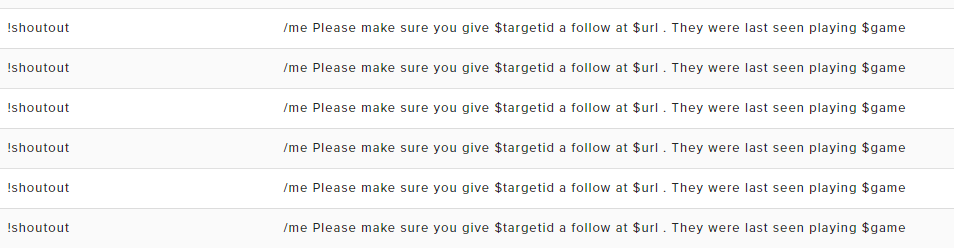
one of my viewers linked me this
dawn wasp
I think if you add ?bandwidthtest=true after your stream key you won't go live, or you can just start stream and see how it goes
if it helps @frigid flare I see the same duplicates that your viewer does
frigid flare
cheers sebbity
cedar fulcrum
Hello @lament blade Please make sure you changed the variations also or you do not have a multiple windows open (OBS, Overlay Editor, Stream)
 pale wedge
Hello, I cant find kappagen where is it?
lament blade
@cedar fulcrum thanks mate, negative, not sure why it was happening, I restarted streamelements a few times and the random sound went away, not sure what was happening
zenith widget
@pale wedge Open up overlay editor then go to Widgets and you should be able to find it on top
else, ctrl+f then type kappagen
cedar fulcrum
@lament blade so all works fine now? 😃
pulsar gulch
Hello , how can i make that thing with the zoom camera ?
to have like 2 or 3 zoom ways
 terse mirage
Hi everyone. So my stream elements has not been working for the past 2 streams. Is the reason for this because I've recently changed my twitch name?
 stuck hamlet
What isn’t working? And most likely, you’ll have to logout and log back into StreamElements
terse mirage
It's everything on stream. So all my commads, the points system and timers
Commands *
I'll try and log out and in. Thank you
zenith widget
Commands won't work, because of the name change. The bot is still on the old name chat channel(more like can't connect to it), so when you relog into the dashboard, click on "Part Channel" then "Join Channel"
This will make the bot join your new name's chat
terse mirage
@zenith widget I'll check this now. Thank you for coming into the chat and letting me know
zenith widget

terse mirage
@zenith widget you are a god
I can't thank you enough
I had my followers going crazy because of it last night
zenith widget
 proven copper
I am doing a subscriber giveaway ...but non subscribers seem to be able to go to my profiles page on streamelemts and entering the giveaway even tho they are not sub .....H|ELP
proven copper
nobody home?
clever mango
what is your channel name @proven copper ? I will take a look
 short steppe
Is there a way to import the twitch cheers into streamelements? On the leaderboard there are only the cheers since I installed streamelements, not the cheers from before
clever mango
@short steppe No, we can only begin receiving cheer information from the time you grant StreamElements access to your channel.
short steppe
Will there be an option to see earlier cheers in the future?
clever mango
It is not a planned feature at this time
 limber phoenix
Hello, I was just told to change my backup list for media request in you tube.. To my knowledge my streamelements is not linked to my youtube. I stream on twitch, and just want to change the 5 backup list songs from the 5 that are there. Any suggestions on how to do this?
proven copper
any luck @clever mango
could they be using the !enter
to back door into giveaway
we use !ticket to enter
limber phoenix
NM, I got it sorted
clever mango
@proven copper I'm researching this. Thank you for your patience.
We've not had any reports of this so I'm trying to determine what's happening
proven copper
it appears that !giveaway command that links to my profile page is how peeps are getting around being an actual subscriber
we just tested it!... and was able to purchase a ticket in giveaway as a non sub...even tho its set to subs only
we have disabled the giveaway command for now
and using !ticket for peeps to enter
when entering as a non sub it shows a subs badge next to non subs name
hope this helps
two weeks ago on last sub giveaway peeps were winning and not subs
but showing up in giveaway list as subs
clever mango
@proven copper We've been able to replicate the issue and we will address this as soon as possible
proven copper
happy to help....thank you very much ❤
armed with this knowledge i could of won some stuff lmao
cedar fulcrum
Hello @lament blade you need to go to your overlay manager and choose the Alertbox you will see there TTS
lament blade
Ty
 pseudo panther
sorry question... i change something in chat alerts but now when someone follow me, in the chat the name from the follower is not blue is like normal black color.. how can i fix?
zenith widget
add a @ in front of the ${username} variable
pseudo panther
if i add @ the name is color blue?
zenith widget
Well, usually everone has a different color to their name in Twitch
pseudo panther
yeah but normally streamelements bot in chat when say: Thank you for the followin {user} is like a blue color
zenith widget
Since you have a 10 minute follower-only mode, I can't show you in your chat
pseudo panther
then name when someone following
zenith widget
ooh you mean the entire text from the bot?
pseudo panther
yeah
pine hemlock
using /me makes the message the same color as the username
zenith widget
I Think I've had it on, but turned it off
pseudo panther
yeah but i want hte make just the name in color when streamelements bot say ( thank you for followin Rochsy)
like a standard follow
but now when someone follow si all the same color
is impossibile try the bot ye?
zenith widget
I don't think that is possible, like I said this may be a feature of BTTV/FFZ extention
pseudo panther
if no someomne follow
zenith widget
to color a username's color to their set twitch color
pseudo panther
yeah.. but i like just the name in color 😦
zenith widget
and like I said, you can't really color only the name, unless its a feature of a browser extension that can custom color specific parts of the twitch chat.
narrow coyote
there is no way to do that with native twitch chat
zenith widget
From what I remember, it was a feature of BTTV and FFZ extensions
pseudo panther
but before.. when the bot write for the following
the name was color
standard color
:S
zenith widget
but it was removed due to malicious abuse of users
pseudo panther
to strange
dawn wasp
is there any way to add custom css to the chat widget?
clever mango
@dawn wasp No, the current widget doesn't support this
dawn wasp
😦 thanks for the quick reply!
glad zinc
ok guys i need help with this how can i make it so that my streamelements bot responds to certain text how i want
lets say im in my own stream or my friends stream i want it so that when someone writes hello how are you 15
i want it to respond I am good how are you 13
what can i use to do this ?
clever mango
@glad zinc That is a command "keyword(s)" which can be added by creating a new custom command > Click Advanced > then type in the keyword or phrase that the bot should respond to in the keywords field and press enter
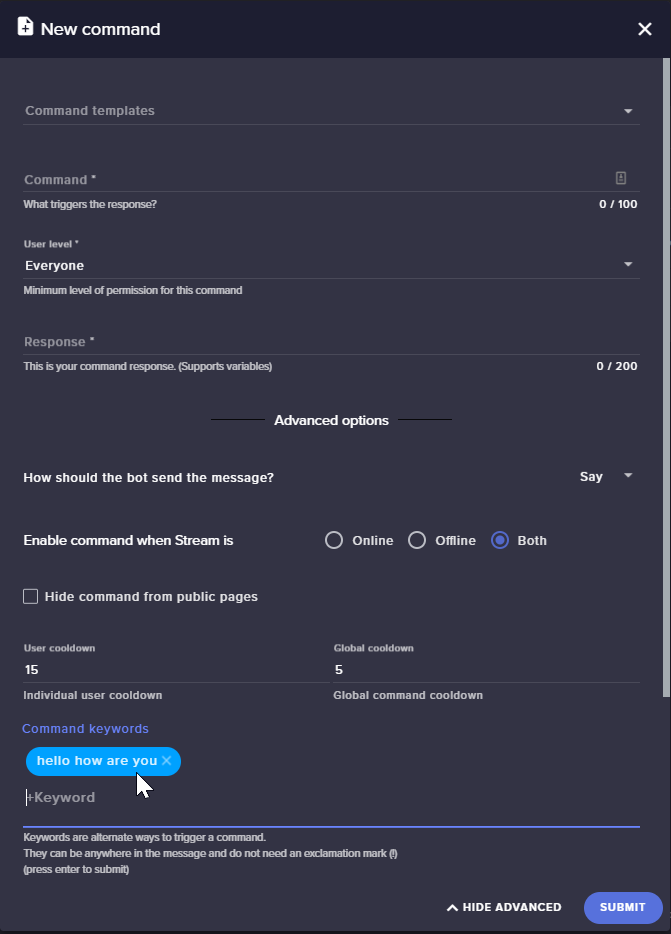
 clever mango

 terse canyon
dawn wasp
terse canyon
dawn wasp
do animation settings on the chat widget do anything? No matter what I change the text just seems to appear and then fade out
 quaint shard
hello, can i change (translate) some texts in alerts, bot? like a giveaways model
or do you plan to add this feature?
pine hemlock
@dawn wasp I believe the animation stuff only works on the alertbox and uhh... event list
dawn wasp
no worries @pine hemlock , thanks!
pseudo panther
how can I put the name of those who follow in grossetto through chat alerts?
How do I put the name of the person who follows the bulk through chat alerts? i try to use html like [B]{user}[/b] but is not work
 hearty stump
I can't access to my dashboard
The connect with buttons are gone
I already have an account
vital wyvern
what browser is this? @hearty stump
vital wyvern
use edge to install Chrome 
vital wyvern
 tardy tiger


 nocturne pelicanBOT
@tardy tiger Make sure to :ballot_box_with_check: “Shutdown source when not visible” for all browser sources (all OBS scenes). If using studio mode, uncheck “Swap Preview/Output scenes After Transitioning.” Also keep in mind that sound can play from any overlay loaded in the browser (editor or launched). https://i.imgur.com/FegZJQS.png https://i.imgur.com/yY0wcFl.png
 slender yoke
Hey guys I'm testing a new overlay. When I emulate a cheer event nothing happens. But all other emulations work.
never mind they just randomly started working
slender yoke
oh lol ok
Hey...regarding the comment above about checking 'shutdown source when not visible'. I really wish there was a way for the sources to load quicker when switching scenes. By checking that box, when I switch scenes it takes 1-2 seconds for the browser source to load up. Kind of looks unprofessional to have my webcam up before the source loads.
 crimson yew
How do I get .webm file to go into my overlay? Not letting me submit.
nocturne pelicanBOT
@slender yoke Check out this tutorial for OBS’ studio mode which allows you to preload scenes before transitioning. https://www.youtube.com/watch?v=W8iWsD2Lq3U
slender yoke
OK @nocturne pelican I just watched that vid, however it appears that will be difficult with an Elgato StreamDeck? Switch scene AND use a hotkey? If i'm correct, then that defeats the purpose of having a streamdeck.
heavy brook
Seems like I have to refresh aggregates every day for top tipper and top bitter to work
any suggestions?
 rugged trench
Is it possible to export donation data to an excel sheet?
 dense reef
Boys, is it possible to tip without paypal account? just with a card?
tight harness
@heavy brook A potential fix was released for this today, so let us know if this problem persists for you after today
heavy brook
@tight harness will do
tight harness
@rugged trench We haven't made a tips export tool so i'm not aware of any way to do that
@dense reef We offer PayPal and G2A Pay currently
dense reef
@tight harness too bad, not very popular donation options for CIS, viewers have told me it is too complicated for them, any eta for other tip options like QIWI, credit cards? 😃
tight harness
Credit cards can be used through both of those services already provided but we are actively working on more payment options yes
dense reef
Yeah, I understand, it's just a barrier, some viewers just stop tipping process when then knew that they have to have paypal acc 😃
tight harness
I see, well hopefully the other options we will be offering will be satisfactory 😃
slender yoke
Is there a way to have the !quote add feature automatically list the name of the game and the date?
zenith widget
As in track the game and on which date you've been streaming/playing it?
but also add a quote?
mortal merlin
My Cheer alerts have not been showing up on stream. All of my other alerts work as intended, but all the cheer alert does is read off the message, nothing shows up on stream.
lament blade
I'm not sure where I need to report this. On the profile page the discord logo fails to load. You can click on the "logo" but it does not display it. It seems to be only on chrome
zenith widget
@mortal merlin Hmm is it the alert it self?