#helpdesk-twitch
1 messages · Page 310 of 1
 zenith widget
so other method is, you will have to make a script to call random text snippts from the .txt file and host both .txt file and script and call it with the ${customapi} variable
 harsh epoch
Would a tweet work better?
 dense jackal
A tweet work better for what?
 narrow coyote
I think being patient would work best
 solar pine
@zenith widget Can I post a link or PM it to you?
zenith widget
@solar pine Post a link to what?
narrow coyote
issues are prioritized, and there are a lot of things currently in the works
solar pine
nightdev
Community(forum) the post I found about nightbot. My question related to the link is to the response, and I just wonder if there is no possibility at all to do it like the response, but in StreamElements
zenith widget
DM me the link and I'll take a look
harsh epoch
"issues are prioritized, and there are a lot of things currently in the works" <Sounds great. In my opinion, your existing Branding and identity should be a priority.
 twin sentinel
Is it possible to let SE post a message after a timout because of a spam filter, such as link protection. Because the custom message I can enter in the settings is only visible for me as moderator or channel owner, but not for the timeouted viewer. So he/she has no clue why he/she got timeoutet and just can't write anything and just sees "<message deleted>"?
dense jackal
@harsh epoch we have 3-5 devs for the entire site. We recently as well are working on two large beta tests atm and moving all of our servers. I speak with the Devs every day and they work roughly 12 hours at least everyday and that's if there isn't something we have to wake them up about. Your issue and bug was noted as soon as you posted it here and we will take a deeper look. This issue has not been reported by anyone else to my knowledge. We appreciate your patience and bringing this to our attention and we will see what we can do 
 weary mist
@winter zenith or @ebon forum
 soft mortar
dm allowed? 😃
dense jackal
Yes just say you are from StreamElements discord
soft mortar
thank you ❤
 terse oyster
Does anybody know how to make a command post a link that works on twitch mobile? Twitch desktop recognizes the hyperlink, but twitch mobile does not.
weary mist
that is a twitch thing, not something we can really help
your best bet could be to make sure to have http://
terse oyster
ok i will try. Twitter seems to work ok but nothing else
 timid sedge
Can someone help me with an overlay?
narrow coyote
What's the problem
timid sedge
I recently got the purple wave static them, and put the stream starting, ending,and brb overlay
,but when I put the gameplay one, it shows the gamplay only in front of the overlay I want
narrow coyote
so you are having an issue with how your sources are layered? is that what you are saying?
make sure your overlay is the top source
timid sedge
ok, thank you for telling me what I needed to do
I had the gameplay as the top source
narrow coyote

 ebon forum
@soft mortar Huhu. Brauchst du noch Hilfe?
 summer mulch
@toxic scaffold ask here please
 toxic scaffold
Hello I am trying to find some info on setting up stream elements with a mac I have been using streamlabs for over two years and was trying to get an overlay to work but for some reason it wont work anyone have any advice?
I know its been a huge pain getting streams set up on a mac so I am guessing that this will be just as big a pain
weary mist
Lets start with the basics. What broadcasting software are you using
toxic scaffold
OBS
It works great with my streamlabs overlays but it wont load the stream elements overlay
narrow coyote
what exactly is happening when you add the overlay? is it being added at the correct resolution, and not hidden behind anything else?
toxic scaffold
It wont load I started a new scene to see if that was the issue but still nothing with obs and a mac it takes about 60 seconds to load my stream labs overlays, I thought it might be the same with the stream elements ones as well but after ten minutes of waiting still nothing.
it ends up just being a black screen with the resolution set at 1920x1080
weary mist
Try creating a blank overlay, with just a single text widget, and see if that shows up (lightest overlay possible without being completely blank)
toxic scaffold
that didn't work unfortunately
weary mist
let me send you over to OBS, because I am not familiar with the Mac version. I know it is possible to get our overlays on mac, just not sure what could be causing them to not show up.
 nocturne pelicanBOT
@toxic scaffold For the best OBS support, please join their discord where OBS devs and support volunteers are available all the time discord.gg/obsproject

 grave python
well tipping settings page does not show me g2a payments 
guess I will spam nuuls about it
narrow coyote
was it active on your account before? it is region based, or someone would need to enable it for you manually
 upper steeple
any plans to add a "stream break option" to the countdown part of the extension panel?
 tight harness
I can enable G2A Pay on accounts if you want me to take a look
grave python
but your system recognized me as cricketdoto
dense jackal
Not at this time @upper steeple be sure to add it to #💭︱feedback-and-ideas
grave python
after clearing cache it went back to alien_musk
tight harness
@grave python Done 😃
grave python
streamelements support  👉 ❤
👉 ❤
 lament blade
Does streamelements have a dono goal option?
summer mulch
@lament blade Yes, just edit an overlay, and click at the top left on widgets, you should see a donation goal widget
@shadow kraken https://streamelements.com/dashboard

StreamElements
The Ultimate All in One Platform for Streamers
twin sentinel
In case my question got lost:
Is it possible to let SE post a message after a timout because of a spam filter, such as link protection? Because the custom message I can enter in the settings is only visible for me as moderator or channel owner, but not for the timeouted viewer. So he/she has no clue why he/she got timeoutet and just can't write anything and just sees "<message deleted>".
soft mortar
@ebon forum dank dir, hab mich an einen Kollegen noch gewendet! Super support hier! ❤
ebon forum
@soft mortar da hab ich wohl was verpasst
weary mist
@twin sentinel Not that I know of, though I will ask about it
twin sentinel
@weary mist thx very much. pls let me know the answer of your research. 
 static wasp
oof so my KappGen issue isnt resolved after trtying OBS instead of XSplit
 winter zenith
What seems to be your Problem @static wasp?
static wasp
well at first my KappaGen wasnt showing bits
turns out it was because of XSplit
so I switched to OBS
winter zenith
Yes
static wasp
and they show when I test them but when I go to redo an alert where a viewer actually gave me bits nothing happens
it doesnt happen in the moment the viewe gives the bits either
btw the specific thing Im talking about is emotesplosions
narrow coyote
do you see the alert ok, or is that missing as well?
static wasp
when I test the alert via stream labels it doesnt do the emotesplosion
Im sorry I misread the question
my alert works fine
narrow coyote
ok, well I cant reproduce the problem with emote explosions in OBS replaying cheer events
and you are doing this from your activity feed on StreamElements site?
static wasp
Ive done from the stream labels app, SLOBS, the site, and tested via KappaGen
narrow coyote
well, I would not expect it to work from StreamLabs, that is a different service, also if you are using SLOBS and not OBS, we cannot guarantee reliability with their platform, they have been know to block our services in the past
kappagen will only trigger from alerts done through StreamElements alert widget, not StreamLabs
static wasp
well it doesnt happen live either
when a viewer actually gives bits
not just during testing
narrow coyote
ok, well are you using SL alerts, or an SE alert widget
because again, I cant reproduce the problem
static wasp
SL for alerts and SE for KappaGen
narrow coyote
thats the problem
static wasp
are you using regular OBS with SE alerts?
narrow coyote
just like I said before, kappagen will only trigger from alerts done through StreamElements alert widget, not StreamLabs
static wasp
I get what youre saying
I assumed SL was polling twitch for the info the recall the alert
but
actually let me test something
brb
you mean the ground control app righ?
narrow coyote
if you are using StreamLabs alert, it wont matter, their alerts will never trigger kappagen
winter zenith
If you are using StreamLabs Alerts, Kappagen for bits wont be triggered
narrow coyote
they are a competitor of ours, a completely different service
if you want kappagen to trigger for alerts, you will want to use StreamElements for alerts also
winter zenith
If you want that you need to use StreamElements Alertbox Widget
static wasp
but if the bits are given on twitch shouldnt both the SL alert and Kappagen be triggered while its live?
narrow coyote
no
winter zenith
That's not how Kappagen works
narrow coyote
kappagen explosions will only trigger off of StreamElements alerts
static wasp
so why does it trigger emotesplosions without it in the layout editor?
winter zenith
Because you are testing it Directly on the SE site
Wich is how Kappagen knows what's up and triggers stuff
narrow coyote
If you are testing with the emulation from in there, it uses our alert system 
lament blade
is there a command to update title?
static wasp
so correct me if im wrong
winter zenith
!Settitel xyz
static wasp
but the tldr is
lament blade
ty
static wasp
use both SE alerts and KG and itll be ok?
winter zenith
Yes
winter zenith
Also maybe try OBS Studio sind SLOBS Trend to Block out alert System
 bold light
can i get some help pls
static wasp
well I mainly use XSplit
narrow coyote
the stuff we talked about earlier with xsplit still stands
 hasty remnant
Hi guys Is there any extension or command Who can automatic Cliping ?
bold light
so i dont wanna see use SE anymore wat do i have to do to like "delete" it from my streams
static wasp
ok I will test in xsplit with both SE alerts and KG and see if it works
winter zenith
@static wasp I use Xsplit religiously :
Gifted sub Alerts dont work, they work on obs
Cheer emotesplotion dont work in xsplit, on obs they do
I talked with Xsplit Support about this I advise you to do the same
bold light
do i have to log out of it and thats it? 🤷
winter zenith
They are working with us now to fix it but more preassure cnst hurt them @static wasp
narrow coyote
@hasty remnant This could really only be done by using the twitch API for clipping, there is an idea posted for this that you can up vote to support https://streamelements.helprace.com/i856-adding-a-clip-command
winter zenith
@hasty remnant not automatic Clip mit you can Mark now stuff from your stream. I think the command is /mark
static wasp
Im XSplit elite so I mentioned it in our support discord
winter zenith
But dont quote me on that
bold light
is anyone gonna help me?
narrow coyote
@bold light https://www.twitch.tv/settings/connections But why do you not want to use SE anymore?
winter zenith
@static wasp and what did they say?
bold light
streamlabs is better
static wasp
nothing yet
bold light
🤷
winter zenith
We are sad you feel this way... What wasnt working for you?
winter zenith
Oh kay? 
weary mist
Well, keep an eye on us. SL has a few years head start, but we will be adding more and more
@bold light we can also help with diagnosing the lag, but keep us in mind. we will miss you
bold light
oki i wuv u guys 😊
 weary mist

 normal igloo
@bold light Just out of interest What do streamlabs offer That SE Doesn't Just genuinely curious? 🤔
weary mist
Good to know, I will let you know though that some of those things are on the list for re-design 😉
 vital cargo
So I’ve been using stream elements for a couple weeks now and the only problem I’ve had with it is a single command. When my viewers put !watchtime to see how long they’ve watched my stream it just says 0 seconds.
narrow coyote
do you have loyalty enabled? that is based on the loyalty system
vital cargo
I didn’t have loyalty enabled before, however earlier I found that I needed that enabled so I did and it’s been several hours since then but it still says 0 seconds
weary mist
Have you streamed since you enabled it?
vital cargo
i have not, would a test stream work or do i need to actually go live?
weary mist
We can only record loyalty based off of broadcasts made while the feature is turned on. There is no way to go back in time
vital cargo
so watchtime will start now that i have it enabled and everybody will start at 0?
weary mist
When loyalty is turned off, we are not polling viewer lists, so we don't keep track of an individuals watch time
Yes
vital cargo
ok, thanks for your help!
weary mist

 kind epoch
Hi, so do we have a bit boss widget or no?
weary mist
a widget dedicated for bitboss, no
a custom designed bitboss widget that works in the custom event list widget, and may have a few bugs, I think it is hidden somewhere in this discord server if you can find it 😉
kind epoch
Where !!! 😄
 winter zenith
@untold crest 
kind epoch
I give up, where do i look for this css code?
narrow coyote
its not just CSS, and I am pretty sure the link was only shared in #dreamteam
narrow coyote
is that the current one through, or the old one 
weary mist
idk, I am still not sure what we can hand out, so I just point to what is available 😛
@wanton jetty let me DM you
 wanton jetty
oka
 thick zealot
how do i transfer alerts and bit things to another overlayt
weary mist
@thick zealot there is a duplicate widget button in the layers section of the overlay editor
click the widget, then the duplicate button
 untold crest
@weary mist are you playing hide and seek with my code? I hope you win 😉
weary mist
xD
normal igloo

narrow coyote

weary mist
In the editor?
Bottom left, there is a layers tab
make sure to click on the widget you want to duplicate (alertbox for example)
then click the duplicate widget button
narrow coyote
click it and win
weary mist
 copper bobcat
Hey all! Last night I was trying to get my overlay up and running, but I noticed everytime I had an alert that used a video - the video didn't pop up in my actual streaming program (StreamLabs)? In the StreamElements editor it was showing up. Any fixes?
narrow coyote
first thing to check would be that it was added at the right resolution, and that it is not behind a source that could be blocking it
copper bobcat
Right resolution? The video is 1920x1080 but I believe the alert box was scaled down. Scaled down, though, I'm able to see it in the editor.
Nothing was blocking it. The text still appeared, just with no video.
narrow coyote
Was this when you were live, or emulating alerts?
copper bobcat
Emulating alerts through StreamElements.
narrow coyote
I would recommend trying OBS Studio over SLOBS
copper bobcat
Because it wasn't working with the emulated alerts I turned it off and used StreamLabs alert boxes for the live show.
SLOBs rocks tho 😮
narrow coyote
its a hard fork of OBS and pretty far behind the current development of OBS Studio, we also cannot guarantee reliability on their platform as they have been known to try and block our services in the past
copper bobcat
Weird... Maybe I'll migrate back to OBS. I used OBS a couple years ago and when I started streaming again back in May of this year I found StreamLabs and fell in love. Just LOOKS nicer, but not surprising to hear it may be behind.
It DOES get out of sync a lot >_>
narrow coyote
OBS Studio has come a long way in that time, I would suggest at least testing to see if you see the same problem in there, and if you do, report back here
copper bobcat
RIght on, I'll try tonight! 😄 Thanks for the help.
narrow coyote
No problem
normal igloo
@narrow coyote when it comes to the email Stream Report What is unique chatters, Based off?
narrow coyote
based off the chatters that the api returned, so even if someone or something (bot) has just your chat open, it will count as a chatter
I dont really know more than that 🙈
normal igloo
@weary mist so like when new people join kind of thing ?
weary mist
just chat lists, so if someone opens your chat for twitch in any sort of program
and appears in your chatters list
normal igloo
oh Ok 👍
@weary mist so what's the Difference between unique chatters and the peaked viewers then? As both sound the same to me unless I'm missing something 
weary mist
unique chatters is people that have visited over the whole broadcast
peak viewers is the highest number of viewers watching your stream
narrow coyote
a chatter does not always = a viewer
weary mist
and that is based off people actually viewing your stream, via twitch information
normal igloo
Oh now I get it 
 hardy jackal
anyone available for possible help?
narrow coyote
Its best to just post the problem or question 😃
hardy jackal
Ok! So I started using stream elements and got custom WEBM notifcations made for different length subs. For some reason(on the webpage and within obs) the notifcations seem laggy and freeze sometimes. I know the files are good and smooth and full length so I am not sure what it could be.
static wasp
is there anyway to resize my webm notifications without cropping any of it off via the editor?
hardy jackal
Is that directed towards me? @static wasp
static wasp
no I need help with a different issue
narrow coyote
I am pretty sure you would only be able to scale the alert box itself, and if you scale that down it will scale down the video in the alert, you might need to adjust text location after this however
@hardy jackal could you DM me the file so I can test it on my end?
static wasp
ok so mine wont resize
and it appers to be because I imported them from Streamlabs or the custom CSS
narrow coyote
Unfortunately I have not used custom CSS alerts  the scale might have to be controlled from in the CSS
static wasp
Why does KappaGen require streamelement notifications to work for stuff like bit explosions? It didnt used to be like that before.
narrow coyote
for that, I must apologize, but I was mistaken, that is not actually the case, I was wrong, the explosions alert like the rest of the widgets that listen to events, so it does not actually rely on the alert widget for that to happen

if you replay an event or emulate from SL it will not, but from a real Twitch event it is expected to trigger the explosion
weary mist
if you want to replay an event, do it from the SE browser as well as the SL browser, so they somewhat show together
an event replay isn't like a real twitch event, it is just a button that triggers the same backend code that an event recorded from the twitch API does
and only effects the platform the replay is triggered on
static wasp
@narrow coyote Im guessing this doesnt change XSplit not displaying bitsplosions even on a live event?
narrow coyote
yes, that does not change any issues with the xsplit browser source problems
static wasp
do you know what version still has that working? I reverted back to 3.3 and it doesnt seem to be working there either?
narrow coyote
I am not sure, if I recall someone said 3.2, but I am not 100% on that. I think some people still had problems with reverting it

 weary mist
@atomic silo can you explain the process you are going through?
 atomic silo
i've added the widget, was confused about why i can I not choose to show / unshow the video, then requested take on me off-stream, and the widget just didn't show anything at all
weary mist
it will show it once media has been sent via the media share page

 signal depot
Is there a way to have an overlay with streamlabs to show the current song playing when using the player? Such as how if I use Google Play Music / Spotify I can set up a scrolling text to show current song
I know there's a chat command
normal igloo
@signal depot Well for starters this is StreamElements not streamlabs 
normal igloo
Yeah 
weary mist
lol, idk where ground control came in to that. But the key thing to remember: Our service is cloud based. If you want information on the overlay, it better be accessable through the interwebs
signal depot
Because that's what I was previously told to use to play music by another person.
weary mist
True, but we can't tell from your previous statement that ground control factored into the equation at all.
Google play music/spotify are not currently supported, though spotify is planned
normal igloo
^^^^^
signal depot
Let me start over cause I think my question was kinda confusing.
So I use streamlabs to stream and stream elements as my bot / music player. Is there a way to show in the video feed a text of the current music? So users don't have to always do the current song command.
narrow coyote
You would need an SE overlay with the currently playing widegt added
signal depot
Ok
signal depot
When using a SE overlay is there a way to move layers around on the fly? Sorry I'm fairly new to this. But that's one of the reasons I like streamlabs overlay cause I can drag stuff around while live.
When switching games up in a stream I have to uncover stuff and rearrange sometimes
narrow coyote
You can move the entire browser source around, depending on what you have on it, should be fine. I have some items in separate overlays for this purpose
signal depot
Ok cool. Alright thanks for the help. I'll go experiment!
weary mist
you can even create the same things SL provides, seperate overlays for each, but we don't recommend it, as too many sources can crash OBS, along with it will take up more processing power
signal depot
I should be ok for that but I will definitely keep an eye on resources then and see how it effects it
 wise bloom
Hello, facing an issue here. I recently change twitch name and streamelemts stopped working. I did the leave channel, log off, log on and join channel already and it still does not pick up any activity.
Can i get my account delete and restart everything from scratch?
 faint moss
There is automatic tweet from streamelements in my chat, how do I turn it off?
 deep widget
Got two subs mid stream yesterday. Post-stream email says 1?
tight harness
@deep widget Were they shared by the people subbing?
@faint moss Modules > Twitter
@wise bloom Try it again because it's never failed before, Part Channel on the dashboard, Sign Out, sign back in, then Join Channel on the dashboard, in that order
tight harness
@deep widget We'd need someone from the office to have a look at stream reports, it's currently 3:22 AM for them so we'll ask when they're available 😃
deep widget
When does the office open?
tight harness
What i'll do is ask the relevant person and DM you when I get a response, because I don't know when the person will get in who i'll need to ask
They don't post their schedules anywhere for us to see so I couldn't say
This is for your missmollymakes account, correct?
deep widget
Yes
tight harness
Alright, i've let them know
I'll send you a quick DM now to remind me when I see my DMs tomorrow
 crystal tiger
question... how come when i use the 1080p overlay on OBS it does not show the full screen that i am editing on stream elements. i double checked to make sure i am streaming in 1080p and i am. what am i doing wrong?\
tight harness
So the overlay on our website is 1080p, you're adding the overlay as a 1920 x 1080 browser source and your canvas in your OBS video settings is 1920 x 1080?
Because if that's the case it couldn't be anything but a perfect fit
crystal tiger
thank you i just needed you to say it out loud... i was uploading it as a 800-600 browser source
tight harness
Ahh gotcha 😃
crystal tiger
forgot to update that when applying the source thank you so much for your quick help!
tight harness
No problem
crystal tiger
AWESOME
 hardy tapir
in the overlay editor, what is the tag to display the sub, tip, or cheer message? for example to display name you would use {name}
narrow coyote
for the alerts? you need to click the show message box on the respective alerts
hardy tapir
i'm trying to use the custom css part - so need access to be able to position and style the message
hardy tapir
so does the show messages check box ignore the custom css and show anyway? i experience some random text when i test the overlays using the custom css and think its the message.
narrow coyote
the emulate alerts will make a random message, I am not sure what the interaction is with the custom CSS though, that is not really something I have used with the alerts, on the custom event list
hardy tapir
ok thanks for your help, i'll keep playing around with it 😃
narrow coyote
No problem, just post back if you have more questions
hardy tapir
i've only just noticed that if you enable custom css the show messages check box disappears
are the only commands available {name} {amount} and {currency}?
ok so {message} works 😊
narrow coyote
ok awesome, i was just trying to do some tests, but you beat me to it
normal igloo
@narrow coyote You know the Custom alerts off the themes Page Is it possible to transfer it to my current overlay And without me needing to redo all of my mp3s? 🤔
narrow coyote
you can duplicate an alert box from one of the themes to your current overlay, if you configured the sounds in the theme the settings will transfer, if you have not set it up in the theme alert widget then you will just have to change the sounds
normal igloo
And how would I go about configured the sounds in the theme the settings?
narrow coyote
you would just do it in the alert widget from an overlay in the theme, once you set it in one, you can duplicate that to whatever other overlay you need
normal igloo
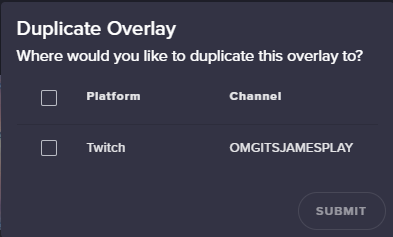
@narrow coyote I am either being really stupid or I can't find any option to duplicate an alert box from one of the themes to me current overlay
 narrow coyote
you need to do it from the overlay editor, select the alert widget, then on the lower left there is a duplicate widget button
normal igloo
@narrow coyote Well needed to redo my sounds And a few other stuff but got it all sorted thx man
narrow coyote

copper bobcat
Switched to OBS from SLOBS, video problems are fixed! Thanks to the kind person who helped earlier today! 😄
New problem: the Follower Goal widget in my editor says I have 68 followers towards my goal - but I have 121 followers? Is there a way to change starting followers?
normal igloo
@narrow coyote With the stream shop Is it possible to use videos aka mp4?
narrow coyote
https://streamelements.com/dashboard/session In here or in the data tab in the overlay editor @copper bobcat
I think that mp4 uploads were possible at one point, like a ninja beta test, you can try to upload one to see what happens
normal igloo
@narrow coyote I did it's not giving me an option to add To the shop tho 🤔
narrow coyote
yeah, it does not look like any video format works in the stream store
just image/gif
normal igloo
👍
narrow coyote
I was going to check the ideas page, but doing stuff that requires my VPN so I cant check right now 
normal igloo
I should really go bed 4 And I got work for 8 
narrow coyote

normal igloo
@narrow coyote Ok one last question and I shall leave you alone for today With the shop is there any way of getting rid of !redeem {command} and making it so you can do it by the command?
narrow coyote
you can make a custom command that uses the redeem variable, then you can use a a keyword even if you would like
normal igloo
@narrow coyote oh so change the command and $(redeem sfx2) To what the command is from the shop 👍
 sonic bough
Are alerts down? Im in the middle of a stream and no hosts or resub alerts are happening
normal igloo
Nevermind I figured it out 👍
narrow coyote
if they are hosts for 0, they will not alert by default unless you changed this in the alert widget, and for resubs they must be shared in chat to alert
just saw a donation alert go off in your stream so looks like what i mentioned ⤴
 misty wagon
Hi  just post your question(s) and someone will try to assist
misty wagon
A StreamElements t-shirt I assume? Lemme see who can answer in that case
lament blade
k
 lofty grove
Hey, is there a way I can stretch my alerts? Also I centered them but when they go off they are not centered so im not sure whats going on there
lament blade
who
weary mist
@lament blade DM me your order information
 vagrant inlet
Hi everyone! I've been searching on google for at least a month and I was wondering is there a way to add a set number to an already existing count command? So say the command read "User, you've been killed ${count} times!!" and that count number was 10. Is there a way to add 20 to that to make it say 30 without editing the command
weary mist
What I would recommend using is the newer version of the count variable: ${count deaths}
then you can use !editcount deaths +1/-1/1
the command can add, subtract, or flat set the counter variable
and you can also use $(getcount deaths) to show the variable amount without increasing it
vagrant inlet
ok. I'll try that. Thanks @weary mist
weary mist
vagrant inlet
@weary mist Thanks dood...that worked perfectly!
weary mist
weary mist
not at this time, sorry @plain cove
 plain cove
aight
 signal notch
Hey! Can I get some help with SLCB import? I tried to do it, but get an "Import Failed" error.
weary mist
@make sure you have both dashboards open (SL and SE)
signal notch
@weary mist Dashboards? WDYM? SLCB exports in a .xlsx file.
signal notch
Its aight lol 😃
weary mist
There is always something causing the import to fail. The best way I have found to do it is to create a CSV file with name,points in each line, and import using the upcoming link
signal notch
How do I export the xlsx to csv?
nvm ill just use zamzar
@weary mist This is only for points, not commands. :/
weary mist
ah, commands, you didn't not specify that (sorry, late, keyboard face here)
I am not sure about the commands import. I haven't done that one much at all
dense jackal
!rename @lament blade
oh rip it died
You can rename your channel through ground control. You need to use an alternate account and need to be using our tipping/bot/overlays
 river forge
Hey
thick zealot
ty
river forge
I met all the requirements for being a affiliated Twitch partner
 idle trench
Hey guys, anyone around for an odd question?
thick zealot
ye
signal notch
Hey! Can I get some help with SLCB Command import? I tried to do it, but get an "Import Failed" error.
zenith widget
 signal notch
@cedar fulcrum I did Create split excel files,. and just try and import the "Commands.xlsx." file. Also tried to use the "Data.xlsx" file. SE just throws the same error.
zenith widget
This will help faster I think 😃
 cedar fulcrum
signal notch
cedar fulcrum
signal notch
@zenith widget lmc
Yep.
Tried this
Wouldn't work.
Do i have to upload both files? Is it ok if im importing only commands?
zenith widget
You should be fine with only the command import
The steps in the image i provide just have the points as well
signal notch
Yep. @cedar fulcrum patiently helped me out with this stuff yesterday. Unfortunately SE website just throws up an error every time. Tried:
Firefox
Chrome
Logging out and in
Incognito Mode in Chrome.
zenith widget
What exact error is it giving? Can you provide a screenshot? 
signal notch
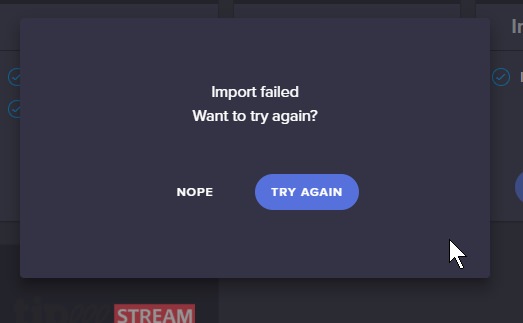
Here's my Data.xlsx file: https://dl.dropboxusercontent.com/s/k6kfbokklv2l7ub/Data.xlsx
zenith widget
Ok, so try again to get to the error, but open the dev console. The error should be shown there.

 signal escarp
Morning everyone, can i remove the option of picking a youtube video from my tiping page ?
 gentle imp
how so?
signal escarp
zenith widget
@signal escarp
gentle imp
hmm think so, let me check
gentle imp
no lol
just needs to disable request via tip afaik https://streamelements.com/dashboard/mediarequest/settings
so all music requests are free not also via tips
signal notch
Thanks @zenith widget
gentle imp
@signal escarp https://streamelements.com/dashboard/mediarequest/settings change to free only
on top, free | tip | both
signal escarp
thxx
gentle imp
you're welcome

 nimble furnace
Hey everyone. I am trying to modify the subscriber alert in an alert box in my overlay. For some reason all my other alerts work fine, but the subscriber alert is playing the default no matter what I change. Is there something I am missing?
zenith widget
@signal notch Was that the only error you saw there? Can you DM me the entire console when you get the error?
@nimble furnace Check the variations for subs
cedar fulcrum
@signal notch Can you DM me the links and your Twitch name I will try to do it for you
signal notch
Done! @cedar fulcrum 😃
 jolly magnet
Hey guys, for some reason it shows my top tip and top cheer as no data and 0 yet that is 100% wrong, is there a fix for it?
zenith widget
@jolly magnet Go to https://streamelements.com/dashboard/session then to <Aggregates> and refresh them.
signal notch
@zenith widget Done! 😃
nimble furnace
@zenith widget thanks!
 wintry marten
<@&382267076632379392> Hi. I want to use yours StreamElements for my stream. In your guide video you show that I can use Themes inside the themes editor, but in my editor I have only buttons ( editor, widgets, DATA, insert text, insert image, insert video). What's wrong with my themes editor?
cedar fulcrum
Hello @wintry marten
untold crest
@wintry marten video has been recorded some time ago. At this moment SE Super themes are in separate menu position.
Just above/below overlay editor in dashboard
cedar fulcrum
I checked your editor and it seem that it all fine and as it should be 😃
untold crest
@wintry marten https://streamelements.com/dashboard/themes - "create" button will copy those overlays to your account where you can customize them
StreamElements
The Ultimate All in One Platform for Streamers
wintry marten
@untold crest that's mean I can't use them anymore in the themes editor?
cedar fulcrum
We are improving and creating new features all the time so it might be a bit different then what you see on yours
untold crest
@wintry marten of course you can edit/adjust them
You need to import them first to your account, then you can do whatever you want with them
 coarse verge
Popping in with a related question: I'm using the black/gold supertheme for my overlay. And I've uploaded some custom sounds for each kind of alert. It seems like only the subscriber alerts gets through to the stream. All other ones are silent (but animation is showing), any ideas?
(brb gonna take a short walk with dogge) 😃
 atomic hollow
@coarse verge check sub variations in the alertbox
zenith widget
are you checking in the editor only? you may have muted the editor and each alert has its own volume slider:
check those just in case
coarse verge
No I have a 2 PC setup so I'm watching the replay of the OBS recording while playing with streamelements on another computer. Volume is set to 50% and alerts are not muted.
The recording i silent.
But it's playing in the browser, somehow buggy with sometimes multiple alerts
(silent due to alerts only. Everything else is fine)
Tried now with checking and unchecking the variations box (even though I'm not using variations). No sound on the alerts whatsoever
 zinc cliff
Hey guys, whenever I'm using a new Overlay I must input/change all the standard things like youtube name, facebook and all the sounds and stuff manually. Is there any place where I can set these settings and have them auto apply to all new overlays that I'm using/creating?
zenith widget
I think that info is taken from here: https://streamelements.com/dashboard/profile
@coarse verge Just to confirm, the sounds you used to change the default overlay sounds, never worked and only sub sound works?
 scarlet mauve
I cant see the option to change the bot name in ground control anymore. Has it been removed?
zinc cliff
@zenith widget then maybe the overlays use the wrong "keywords", for ecample my twitch name is taken from my profile because [streamer] is used, but for everything else there is no keyword in [ ] but just text saying facebook, twitter, etc.
is there any list of [keywords] that can be used?
zenith widget
@scarlet mauve From what I see, your donation link is pointing towards Streamlabs. The bot to be able to be renamed(GC to allow the option) you need to place SE tipping link
@zinc cliff Aah then I don't think so. You will have to manually edit those
 vestal oracle
hi staff, any news from the !command and aggregates issue?
coarse verge
@zenith widget Yes. But now it doesnt work at all. Not even the sub sound. They sound when I'm in the browser editiing the theme. (also standard sounds pop in addition to my submited sounds). But on the OBS recordings, it's silent.
zenith widget
@coarse verge Well one thing I can suggest is, to delete the alert widget, create another black/gold overlay and copy over the alert widget - only if you've changed the current pre-made theme to your liking and to avoid re-editing the entire overlay.
After you copy over the alert widget, try to set all the sounds again. Also, what format have you uploaded the sounds as?
To copy a widget from one overlay to another use this option, but make sure to click on the desired widget:
@vestal oracle I'm not sure what you are asking about. What is the issue with !commands and the aggregates? If aggregates are not showing properly data in widget, just refresh them.
coarse verge
@zenith widget Thank you. I'll try that after stream. They're all mp3.
atomic hollow
what do you mean?
 lapis vault
yep
you know him? paoloidolo
i can send u the url of the overlay
it's correctly rendered in the browser
but it's broken in twitch/obs?
atomic hollow
its probably cached, did you save the overlay for sure?
he is live so I cant emulate
atomic hollow
I can
lapis vault
btw ye, it happend after twitch crashed or something
atomic hollow
can I?
lapis vault
sure, it's gonna be back right?
atomic hollow
milisecond
lapis vault
np then
atomic hollow
done
atomic hollow
im watching the stream
 coarse ridge
Im not sure if tgis is the place to ask but i was wondering if i could get help figuring out why media requests isnt working properly, for whatever reason it endlessly buffers before every song i have to physical press play a few times to get it to work
 still wolf
I have the same issue sometimes
narrow coyote
Sounds like your bandwidth can't handle the video quality, if you go to YouTube, select any video and lower the video quality, then refresh the media request page
coarse ridge
Weird because if i play it out of youtube itself i have no issues but when i use stream elements it buffers
Ill try it though
This problem only applies to the backup playlist, and it dosent matter what playlist it is, videos that viewers request are unaffected
gentle imp
do you use website or the app? @coarse ridge
coarse ridge
App, always changing websites like stream elements crash if minimized
narrow coyote
Ground Control is not fully compatible with the newer media request and the site is recommended for media request, if the site crashes for you it sounds like you have other issues on your system. If you provide your playlist I would not mind testing on my end when I get to a computer
 pulsar gulch
Hello , I want to make new twitch account , can I transfer all my settings from streamelements to the new twitch account
?
coarse ridge
Its not just stream elements its any site and only sites that have things running such as say a timer, but websites like say an amusement park website dont crash
narrow coyote
Yeah, that sounds like a problem on your end, or the browser you are using
@pulsar gulch you would need to give one account full control to the other then you can share overlays between the accounts, but other settings will not transfer and you will need to reconfigure. Why not just rename your current twitch account instead of making a new one
coarse ridge
I use edge because nothing else works
pulsar gulch
@narrow coyote for changing twitch account names i need to wait like 2 weeks
gentle imp
strange I use the app and have no issues but I do have 200/100 mbits, still went to youtube and lowered the resolution for videos
edge 😮
narrow coyote
@coarse ridge well the SE site is built on chromium, so it works best with chromium based browsers like chrome or even opera. If you have site crashing problems with multiple sites and browsers this is something specific to your system that we can't really help with
coarse ridge
Well crud, cause chrome and even firefox are to slow to function
Ill work something out
narrow coyote
What kind of system are you using that chrome and Firefox are slow 
coarse ridge
Windows 10
narrow coyote
I meant more like system specs
You are using edge so it's obvious you are on win10
coarse ridge
NVIDIA GTX 1080
Intel Core: i7
Hard Drive: 1TB
Ram: 16 Gb
And this computer hardly has anything on it im running high end games like battlefront or planet coaster in ultra everything with no issues
narrow coyote
If that system can't handle a browser like chrome then there is something seriously wrong somewhere, fresh install of windows might be something you want to do in the near future
gentle imp
wow
coarse ridge
Also the directions for bot naming say to put the token in then the name of bot to custom name it, does that mean put the token in then after the token put the name or where does it go
narrow coyote
Oauth token is really what matters
coarse ridge
Will look into it thanks
narrow coyote
It uses the name of the twitch account that you enter the oauth of
coarse ridge
Ok
So when i put the token in to sync it, it should change the name, when i originally set it up, it asked for the token before i could use media requests, which i entered but the bot name is still stream elements
narrow coyote
Make sure you enter the entire oauth, including the oauth:
coarse ridge
I copy pasted the million and a half character long token in... ill try it again though
narrow coyote
If you tried earlier today, might be worth restarting GC, there was an update to the bot earlier
river forge
Hwy
Hey
I meet all the requirements for being affiliated will they text me if I become it ?
winter zenith
@river forge ask twitch about that :)
But yes you will get a invetation from twitch
copper bobcat
Hey all! Someone subscribed to my channel and my loyalty settings say they should get 1000 points for subscribing, but they only have 320... Is it because they used Prime?
winter zenith
I dont think that this effects it
You are sure the setting Was changed?
I advise to
Part bot from channel
Log out of se dashboard
Log back in
Let the bot join the channel again
Bonus the Person the remaining points by Typing in chat:
!bonus Username 800
And see if the next sub dont get the 1000 points
Also make sure to change settings while in the Google Chrome Browser @copper bobcat
Since this is the browser that works best
winter zenith

coarse ridge
Wheres the oauth settings in ground control?
weary mist
@coarse ridge are you talking about for the custom name for the bot?
coarse ridge
Ye
weary mist
it will appear in the settings page if you meet the criteria
nocturne pelicanBOT
Custom bot name requirements
- StreamElements bot modded and in chat
- Active overlay with alerts
- StreamElements tipping page in the panels below the stream (!panels)
- Create a twitch account for the name you want to use
- Ground Control app must be running
Steps to enable custom name
- Sign in to https://twitch.tv with the bot account
- Install and run Ground Control (!gc for download)
- Visit https://twitchapps.com/tmi/ and generate an oAUTH token
- Copy/paste everything in the box to Ground Control oAuth settings and enter the name for the bot account
- Restart Ground Control (custom name may take a few minutes to take effect)
Mac does not currently support renaming the bot.
weary mist
1-3 and 5 are 100% required
coarse ridge
So i only need 1 3 and 5 for this to work
narrow coyote
assuming you meet the requirements, start by installing GC, entering your JWT from your main account, and see if you see the bot rename settings
coarse ridge
No, no rename option
narrow coyote
also if you link your twitch to your discord, it can help us verify things for you
nocturne pelicanBOT
Please connect your Twitch and/or YouTube channel with Discord by going to ⚙ Settings and then Connections here in Discord. https://streamable.com/eg92w
 weary mist
@coarse ridge do you have a StreamElements tipping link in your panels?
coarse ridge
No because i have nowhere for it to go
weary mist
then you will not get the option for renaming the bot
winter zenith
@coarse ridge just make a Pannel and put the tipping link there :)
coarse ridge
But the thing is i have nowhere for the tips to go, i dont want to be tipped and have the money not go anywhere thats stealing
winter zenith
What? No Paypal Account?
coarse ridge
Nope dont use it
weary mist
There are TONS of charity paypal accounts you can have the money go to
winter zenith
Welp....
coarse ridge
Parents dont trust the internet enough
winter zenith
Yeah what scalper said
coarse ridge
Ok
weary mist
one of my favorites is through Big Cat Rescue
customerservice@bigcatrescue.org is their paypal address
just put in your panel that all donations are going to charity
coarse ridge
Stream elements isnt recognising the twitch panel
weary mist
you still haven't connected twitch to your discord profile, so we can't check to see whats up
nocturne pelicanBOT
@coarse ridge Please connect your Twitch and/or YouTube channel with Discord by going to ⚙ Settings and then Connections here in Discord. https://streamable.com/eg92w
coarse ridge
.... it should be i have it connected
narrow coyote
you dont
weary mist
check to make sure you have it displayed on your profile
coarse ridge
Says in connections it is
narrow coyote
coarse ridge
Ok discord what are you doing now.....
weary mist
should show like this:
coarse ridge
How do you get to the view
Oh never mind... what in the workd.... connections is saying its connected to twitch
Oh whoops i found the problem
I didnt have display on profile enabled
narrow coyote
your tipping link is bad, you have unnecessary words in it, like confirm
lament blade
can someone help me please?
narrow coyote
should just end in /tip
coarse ridge
Fixed but still not recognised by tipping setup
narrow coyote
this is how your link is showing on twitch
coarse ridge
I removed that confirm why is it still showing
narrow coyote
you didnt commit the change in the panel
coarse ridge
I hit submit... what more does it want
Whats wounded warrior projects paypal fund email thing?
weary mist
not all places make their email address visible for usage
coarse ridge
Oh darn
Ok so the link is fixed but tipping setups not changing even after several refreshes, now what
weary mist
do a hard refresh on the page, edit your panels again, submit, and then make sure to flip the switch for editing the panels back to just viewing
A hard refresh is ctrl+shift+r in chrome
coarse ridge
Im using edge...
weary mist
ctrl+f5
 smoky hemlock
Im trying to work out a dueling command without using stream points, like the 8ball command, (user one) goes to fight (user 2) and (random win, loose, wiff, etc) But Im not sure how to get both names to come out during the command
do I just use two of the user variables?
coarse ridge
For whatever reason its still not working however ground control now has the bot naming
weary mist
you will use $(user), and when someone calls the command, they will have to target someone, or else it will just pick the person calling the command
untold crest
Command: !battle XYZ Response: The winner of battle between ${sender} and ${user} is: ${random ${sender} ${user}}
This could work
weary mist
I don't see the link anymore, so it might disappear @coarse ridge
coarse ridge
Hmm
smoky hemlock
so i need to use sender
coarse ridge
Oh wait are you looking at the right panel
smoky hemlock
Thank you @untold crest
untold crest
@smoky hemlock sender is a person who invoked command, user is a provided parameter, in this example 'XYZ'
 upbeat tree
Can we get a way to dissable the default SE !donate command? I had a charity marathon this past weekend and users used !donate and I made my own donate command, but they got confused, because the bot would post the custom donate command, but also the default donate command to my donations page.
untold crest
I am not sure if it works (the random pick part)
smoky hemlock
I'll test it out and poke around with it. thank you 
coarse ridge
I turned the custom name on, now none of the commands work not even the test command in gc itself
narrow coyote
yes, yes it is
upbeat tree
you could have just said it has an aliase under the command tip
Not telling me "The default is tip"
narrow coyote
you asked if you could disable the default command, I pointed out the default command
¯_(ツ)_/¯
coarse ridge
So what do i do now
weary mist
@coarse ridge so are you using a different name, or your own name
coarse ridge
Different name
weary mist
Do you own the account for the different name?
coarse ridge
Yes i created it specifically for a different chatbot, but it was to complicated so i abandoned the project now i want to try the name here
coarse ridge
Oh that might be my issue i logged in to my own account
Ill fix that when i get back on in a few hours my streaming softwares not working properly
weary mist
yeah, then you got an oauth for your account, which returns invalid for the account name you wanted
coarse ridge
Ill come back if it dosent work
weary mist
 fiery shuttle
hello everyone, i am having an issue where the tts on my overlays only plays after the animation has completed. It used to play right after the sound effect ended which is what I would like it to do. Any advice?
narrow coyote
is the alert using a video with sound in the video? there were changes made to the TTS system for videos with sound
it was posted in #270206314561404928
fiery shuttle
its a webm with sound seperated
okay so that update, any way to get it to play after the sound effect only? The webm has no audio but its clearly being defined as a video
turning the volume to 0 does not fix it
narrow coyote
@fiery shuttle I have not messed with it since the update, once I have some bandwidth in a little while I can do some tests to see what exactly the expected behavior is
fiery shuttle
that would be helpful, thank you
ideally that functionality is a good idea, but it would be nice to swap it back by turning off by setting volume to 0
narrow coyote
in my testing it is based on when the audio ends, the TTS will play. If I clear the audio TTS triggers immediately, if I have audio it plays when the audio ends unless I specify an activation delay in the TTS section
I did this with a webm with audio in the video, and a webm with separate audio
 tardy tiger
nocturne pelicanBOT
tardy tiger
nocturne pelicanBOT
@tardy tiger Make sure to :ballot_box_with_check: “Shutdown source when not visible” for all browser sources (all OBS scenes). If using studio mode, uncheck “Swap Preview/Output scenes After Transitioning.” Also keep in mind that sound can play from any overlay loaded in the browser (editor or launched). https://i.imgur.com/FegZJQS.png https://i.imgur.com/yY0wcFl.png

 fiery shuttle
when you say clear the audio are you speaking about the audio volume on the video? or the alert sound volume
narrow coyote
i mean removing the audio completely, with the clear sound button
fiery shuttle
sorry i feel like i wasnt clear enough, i would like the tts to play after the alert sound has finished, setting the video volume to 0 still has the tts playing after the webm has been removed from the screen
narrow coyote
in the testing I just did, that is when the TTS plays, when the audio is done playing from the alert, unless you add a delay then it triggers once the audio has played and the delay is met
fiery shuttle
correct, there is no delay in my setup but it will always play once the webm animates out of the overlay
narrow coyote
if the video is shorter than the audio, then the TTS will play after the video is gone. I tested with various length audio files and the TTS triggers once the audio is done playing, if I use longer length audio, then the video might be out of frame when the TTS plays. Seems like the only solution really is shorter audio or a longer video
It might also be possible to setup 2 alert widgets, on that has the audio and video, and one that will not have video or audio, and just TTS
but I have not tested this
fiery shuttle
video is longer than the audio, ideally the tts should play after the audio finishes and before the webm animates off the overlay
weary mist
a workaround -> Second alertbox for just this alert (and any others that correspond).
First alertbox: Video plays, nothing else
Second alertbox: Audio plays with same length TRANSPARENT video (or hidden behind current video) that is same lenght as audio, and TTS plays
This will make it so that TTS always plays at the end of the audio, because the hidden video is the exact same lenght as the audio, while the real video you want is still playing
fiery shuttle
i mean yes, that is indeed something that will solve my issue, but the problem is that what was working before is no longer the case. I am sure this functionality is not intended.
weary mist
#270206314561404928 explains what happened
fiery shuttle
ive read it, but to include all videos in that regardless if an audio track even exists and webm's which in most cases are used as a higher quality gif means a lot of functionality has been lost
narrow coyote
In all the testing I did with a webm with separate audio, the tts plays when the audio is done, I have done this with various length audio, so in some cases the tts palys while the video is still on screen, and when the audio is longer it will do the tts after the video plays
fiery shuttle
so then there is something amiss with my setup as it is a webm with a seperate audio alert that the tts refuses to play until the webm animates off both in the overlay editor and obs
coarse ridge
@weary mist where does that paypal adress go?
narrow coyote
@fiery shuttle try removing the audio, maybe the webm was rendered with an empty audio track that could explain this
fiery shuttle
do you mean the audio alert?
narrow coyote
What ever alert you are testing, use the clear sound button so there is no audio at all in the alert
If it plays at the end of the video, that would indicate the webm has an audio track and the alerts are working as expected based on today's update
fiery shuttle
if the audio is removed the tts still will only play after the webm animates out
narrow coyote
Then it sounds like the webm has an audio track, even if it's empty
fiery shuttle
alright I guess I need to rebuild all the webm;s then
coarse ridge
the whole tip thing dosent work it has to be your stream elements
io cant use charities
vestal oracle
@zenith widget I spoke about this issue 3 or 4 days ago with another persone here that told me that was a know issue: aggregates counts 0 every time a start a live and I have to refresh it every time. And every chat command that begin with "! " doesn't works anymore 😦
 wispy dirge
Hi guys, I made a custom gif to use as a sub alert, but the gif gets out of sync as multiple alerts come through. The gif will begin at the end, and then start again as the alert is ending. Any help? I've tried using both looping options when rendering out of PS, forever and once.
zenith widget
@vestal oracle Session starts counting from 0 every time, aggregates should not. If you have any problems with the aggregates, refresh them. Mind providing a screenshot with the command issue? It should not happen really, unless you've added keywords to your custom commands
 serene granite
@fiery shuttle if you open the console and look at the log while an alert is playing, it will tell you whether we detected that the video file has audio as well
zenith widget
@wispy dirge Gifs are meant to play on an infinite loop and it basically gets hidden but still plays in over and over again. You will have to use a .webm file in order to see it start from the beginning on every alert
@vestal oracle So this screenshot is from your chat:
So either you have disabled the default command !commands or something else, but !ping also looks disabled
 pliant vault
hello, I have a question....I just got my 1st tip last night, go me.....but the top tipper widget is not display the info any ideas?
zenith widget
@vestal oracle Your !commands default command has been disabled it seems and made as a custom command !comandi
@pliant vault Is the widget part of a pre-made overlay or a widget you've added?(the top tip one)
narrow coyote
and to confirm, the tip came through successfully, like it alerted and is in your activity feed?
pliant vault
widget added from the stream elements top tip....tried boththe top tip, and top tipper ones....just says no data
but there is clearly a tipper on my dashboard
narrow coyote
are you using top tipper session?
pliant vault
all time
serene granite
let me take a look
narrow coyote
my guess is aggregates need a refresh https://streamelements.com/dashboard/session Aggregates tab
serene granite
ya, that will solve it
zenith widget
hectic taking the wheel
serene granite
but dont click that button yet please
pliant vault
k
serene granite
we need to see whyyyyyyyy it isnt updated without clicking the button
pliant vault
you need any info from me? lol
pliant vault
sneaky heheh you found me without even trying
narrow coyote
My aggregates were reset but I already clicked the button
serene granite
no rush
I just wanted to check it out before you went live
you can go live and we'll fix it while you're live too 😃
pliant vault
the recent tipper data works just fine...but yea this is just showing "be the first" as i had set it for having no tips yet lol
wispy dirge
@zenith widget thanks mate!
pliant vault
its appears to have updated, or y'all did something heheh
 sonic lynx
Господа руско язычный саппорт тут?
serene granite
@ebon forum @summer mulch ^
ebon forum
@sonic lynx да, есть. добрый вечер
sonic lynx
@ebon forum Хай, я могу пользователям вручную накидывать пойнты?
ebon forum
@sonic lynx да. или командой, или редактированием списка.
sonic lynx
как командой?
ebon forum
!addpoints Имя число @sonic lynx
coarse ridge
hello?
 elder sorrel
coarse ridge
you know what forget it, naming the bot is not worth getting no replies as well as requiring to add something in i dont even want in my channel in the first place
im also leaving this discord thanks for making me to agitated to function
elder sorrel
I'm sure a Support SE person should be around when they have time from what they're doing. 😅 If renaming the bot let me find the command for that.
!rename
nocturne pelicanBOT
Custom bot name requirements
- StreamElements bot modded and in chat
- Active overlay with alerts
- StreamElements tipping page in the panels below the stream (!panels)
- Create a twitch account for the name you want to use
- Ground Control app must be running
Steps to enable custom name
- Sign in to https://twitch.tv with the bot account
- Install and run Ground Control (!gc for download)
- Visit https://twitchapps.com/tmi/ and generate an oAUTH token
- Copy/paste everything in the box to Ground Control oAuth settings and enter the name for the bot account
- Restart Ground Control (custom name may take a few minutes to take effect)
Mac does not currently support renaming the bot.
elder sorrel
Yes found it.
copper bobcat
Is there a way to shrink the HypeCup in the overlay editor?
narrow coyote
yes, there is a cup scale option, one sec
Click the change cup gear, and if you dont see this, try zooming out in the browser with ctrl - and you can reset zoom with ctrl 0
copper bobcat
Game changer. Thank you!
narrow coyote
 bright tartan
is there a way to shuffle songs in from playlist in ground control?
zenith widget
Unfortunately that option is not yet present in the media request page it self as well. I think it has been suggested in the ideas board before. Not sure if currently planned.
 modest fable
streamelements stast website has been down for few days now.. when is it gonna be back up? would really like to monitor/check the channel stats i modarate! the website just says: SORRY, WE'RE UNDER MAINTENANCE
weary mist
It will be up as soon as the devs get fixed what they are working on. We don't currently have an ETA on it at this time
modest fable
okay, thanks for the fast reply!
weary mist
copper bobcat
Is there a way to test Kappagen when the stream is offline?
narrow coyote
from the overlay editor, or have your broadcast software open, you can trigger it from twitch chat
zenith widget
Add kappagen, click save, reload editor page, simulate alerts
If it doesnt work add alerts widget save reload and proceed
narrow coyote
alert widget is not needed for kappagen emote explosions, i learned that yesterday
zenith widget
Ooh
weary mist

copper bobcat
Was able to get it, super legit widget. So fun to see sub emotes shooting across the screen. Should make people wanna donate more and follow to see the fireworks! 😄
weary mist
haha 😃 That is the goal. Don't forget to check out the hype cup as well
 wise ridge
helloooooo i am running into this problem with my timers? it doesnt set off when the timer sets it off, but does when i enter it in, then it gives me both the message for !donate and !tip
dense jackal
timers do not activate commands we did this to avoid spam and abuse @wise ridge
wise ridge
really? that seems silly but okay
 pale acorn
Hi! Where do I get the list with bot admin commands?
copper bobcat
@weary mist - I have the Hype Cup all set up over my webcam, so it looks like a nice little drink next to me. In the past I've found them a little too intrusive, but I saw someone else put it within their webcam frame. I made it rather small, so not many objects can fit in there - but I love it!
dense jackal
Think about it like this command that responses command into command @wise ridge on a small channel forever
Easy way to crash a bot
narrow coyote
wise ridge
so it is to protect you guys?
miiight want to change the text under the message form then. it says "This is your timer response. You can use command variables to make dynamic responses."
narrow coyote
its a cloud based bot, if it goes down, it goes down for everyone using it
wise ridge
i get that
narrow coyote
variables are not commands
wise ridge
what are command variariable then? like the username ones?
i dont do coding that much XD
narrow coyote
 wanton sluice
not sure if this is a thing, or just me.. but I keep having to refresh aggrigates everytime before I go live, otherwise the top tip shows /no data'
narrow coyote
It is something we are looking into, sorry for the inconvenience
wanton sluice
ah ok. so it isnt just me going crazy haha.. thought I was missing hitting a save button somewhere
narrow coyote
its definitely not you going crazy, we noted that it affected you, so it can help the devs look into it, so thanks for reporting it
weary mist
I am on that trip to crazy-land regularly, so if you are going crazy, we should ride-share
copper bobcat
Is there a way to know how many streamers use StreamElements? Is there a list of big streamers or something?
dense jackal
I can name a few of the big ones, as for an entire list, lets say a whole heckin lot. We may announce the exact amount sometime in the future.
copper bobcat
What are some of the big ones, if you don't mind me asking. I can ask in #general-chat too if that's where it belongs.
weary mist
Shroud, Timthetatman, Sodapoppin
wanton sluice
@weary mist shotgun!
how big do you consider 'big'? at least partner level?
because I know at least 4-5 partnered twitch peeps in my inner circle. 3 of which follow me. Probably just a novelty thing.. but still 😉
wanton sluice
still tho.. Ive seen stream elements mentioned by the guy that organizes the st jude play live thing
so.. thats saying something
weary mist
heh, we are everywhere 😉
wanton sluice
ive noticed too lately that stream labs has gotten features they previously didnt that SE did.
nice to see the competition is close?
weary mist
haha, yes. mimicing is the truest form of flattery
copper bobcat
Yeah I always love seeing Tim on the homepage, I'm always just curious to see numbers behind stuff. Like how 2.4 million broadcast, but 220,000 are affilaites and 20,000 are partners on Twitch - makes me wonder how many use StreamElements? I'm always curious if I'm in a minority or something.
wanton sluice
well.. im not huge by a long shot.. but I came over when branebot went kaput
wanton sluice
yeah
it was stringman that suggested SE because I was having a heck of a time finding a replacement that came anywhere close to what we had
weary mist
they are cool people
lament blade
Hi S.E. I got a question. I´m new in your system, and so far I like what I see and it´s friendly user, if you already know what you looking for:
In you CONTESTS. I got the ideia but i can´t find any link/url that will proveide me with a notification or somethig to put as an overlay instead of only chat. Is there a way to do that? Thanks and great work
weary mist
@lament blade we have an overlay widget
lament blade
@weary mist ~Where can I find it? on the Themes Overlay?
narrow coyote
In the overlay editor, under widgets
weary mist
Open what ever overlay you have, click widgets, and find it in the list
then click add
and by open, I mean click the large pencil
narrow coyote
https://streamelements.com/dashboard/overlays from this page
lament blade
I have my own overlay, I just use your widgets alerts. I think I know where to go! Thanks! I´ll keep you updated
weary mist
lol
overlay is anything to do with going over your primary content
so alerts are an overlay
you can also upload your images to our system to make them cloud stored, and have access anywhere
everything can be managed through one browser source if you so choose
lament blade
Meant Layout then- Sorry
weary mist
I know, just explaining for your information how we work 😃
lament blade
Found it!
weary mist
a good example is any of the themes from the gallary. Create one, and open it in the editor, they are all 100% customizable
narrow coyote
lament blade
I pressed launch and directly opned on my OBS
neat!
Thanks guys, think I can manage from here
Cheers Cheers!**
weary mist
by default, it shows top tip of the session
weary mist
you have to change it in the settings of the widget to show session, weekly, monthly, or all time
ok
then go to Data, then aggregates, and hit refresh aggregates
As a question, did the widget work before? @spiral pine
or is it a new use
weary mist
@spiral pine we are trying to look into a bug, can you answer my question for research purposes? Was the widget working before, or are you just now using it
weary mist
got it. Thank you 😃
 remote sentinel
None of my overlays are loading into OBS
THey are not loading from the streamlabs
er
streamelements
weary mist
ok. first things first, check your settings:
nocturne pelicanBOT
To add your overlays to OBS, add a new browser source in your scene. Paste your overlay URL in the browser source properties, set the dimensions to 1920x1080 (unless you changed them on the website), and :ballot_box_with_check: “Shutdown source when not visible” https://youtu.be/KDvLynUqXI4
weary mist
coarse verge
@zenith widget Ok So 've tried duplicated an overlay into an entire new one to see if it works but it doesnt. I can here the alertbox playing in the browser on my gaming PC with my headphones. I can also hear the alertbox sound with Stereo headphones connected to my second PC running OBS - but now the sound is playing in multiple layers with a couple of ms deley. It's not going out in recordings and out on stream unless I have desktop sound on. Could it be somthing with OBS? I also run ground control on streaming PC (not gaming PC).
weary mist
Let me get this straight. You have the sound playing on your gaming PC, right?
 tight rover
Overlays appear to be down right now.
weary mist
And on your streamin PC? @coarse verge
tight rover
nvm we back babeeee!
 spiral pine
my overlays arent showing up
weary mist
how long have you given them to load?
spiral pine
my obs has been open almost all day
these worked earlier
just started editing them
now they arent showing up on obs
 muted fiber
My overlays just disappeared as well
Edit: They came back. Must've been a hiccup?
lament blade
yeah same
is the overlay editor shit downed
like i went to your guys website and the overlay editor isn't there anymore
ive been afk for a while tho
pm me @muted fiber
wanton jetty
The proportions are fucked... Whut
http://chrisis.live/s/1531955312_8.png

 slender yoke
Is the streamelements website down? I've tried multiple browsers and can't get in
weary mist
@slender yoke no, it is working fine for me. What errors are you getting?
slender yoke
I was on it. Then shut the window, went back to change something, and now this. I use it almost every day so it can't be a firewall thing.
and just like that it's working again. It's done this twice
weary mist
Can you open the console and see what errors are happening (F11 I think)
slender yoke
in the past 15 minutes
weary mist
Ok
 ivory wharf
Greetings! Is there a way to change font (for example) globally across all alerts at once? Or can we only change each alert (follow, sub, etc) one at a time?
 keen maple
is there a way to see your chat in the streamelements dashboard?
dense jackal
Not at this time, although there is a single alertbox setup @ivory wharf you could try out. Here's a tutorial https://www.youtube.com/watch?v=od8tc8kDlBw
Not at this time @keen maple
dense jackal
I believe there is a plan to add it but we are not currently working on it
ivory wharf
@dense jackal Thank you for replying
copper bobcat
So with StreamLabs I was able to view chat AND alerts, is there something that does that with my new OBS/StreamElements combo? the desktop app only seems to show alerts
Should I just open Twitch?
 strong sundial
@copper bobcat if you would like to have chat without useing twitch website i recommend chaterino
dense jackal
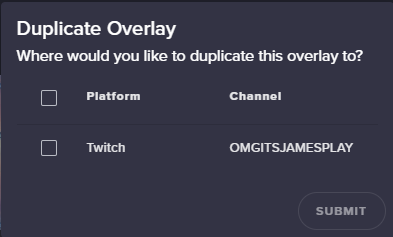
We are currently working with OBS team to make some cool stuff but I can't talk much about it. I would stay tuned 😉
@copper bobcat
 rain imp



 strong sundial

tight harness
We sharing this already?  missed the memo
strong sundial

dense jackal

tight harness

narrow coyote
It's not a secret that an OBS plug-in is in the works
tight harness
I meant the beautiful screenshot
narrow coyote


remote sentinel
There must be issues with the overlays
they are not loading through OBS. Everything is setup correctly
tight harness
Any overlay in particular? I'll try loading your overlay in my OBS
remote sentinel
Green Goblin animated
narrow coyote
All my overlays are loading fine in latest OBS Studio
remote sentinel
Its happening for each overlay. It wont show up..links are fine and such
narrow coyote
are you using the latest 21.1.2 version?
remote sentinel
Now its going to show me a liar
Cause its working again..it keeps going in and out it seems
tight harness
Working absolutely fine here
remote sentinel
Yeah now its working, Its weird...ill transition..sometimes itll work..sometimes it wont..ill keep at it
Thanks for checking
tight harness
No problem 😃 just wanted to see where the problem was originating from
narrow coyote
Does your motherboard have a killer nic? That and antivirus can sometimes block the packets for the overlays
normal igloo
@dense jackal I know what you guys are working on with OBS team But I got my orders from the higher ups Not to say a word
 compact chasm
ok so if I set my OBS to the above 30fps, do I need to set the overlay to match?
dense jackal
nope
compact chasm
ok
lament blade
How do I make my overlay fix my screen their so huge
dense jackal
hit ctrl + f
narrow coyote
overlays usually on top,
lament blade
Ahh so game capture below
narrow coyote
example, top 4 are all overlays
lament blade
Thanks
narrow coyote
 manic elk
The top tip sign isn't showing for me, recent one is, but top tip is not
narrow coyote
you need to make sure you add the overlay at the correct resolution
nocturne pelicanBOT
To add your overlays to OBS, add a new browser source in your scene. Paste your overlay URL in the browser source properties, set the dimensions to 1920x1080 (unless you changed them on the website), and :ballot_box_with_check: “Shutdown source when not visible” https://youtu.be/KDvLynUqXI4
narrow coyote
that was not for you
manic elk
Oh my B
lament blade
Thx
narrow coyote
@manic elk go here https://streamelements.com/dashboard/session and check the aggregates tab, if you see 0's for top tipper, refresh the aggerates
manic elk
Got it, one moment
That fixed it @narrow coyote , thank you so much, been having that issue for days
narrow coyote
lament blade
omg thank you SO MUCH!! @narrow coyote thank you thank you THANK YOUUUUU
narrow coyote
what did I do?