#helpdesk-twitch
1 messages · Page 302 of 1
 thorny galleon
ok i only changed 1 of those values and it was top. I put 350 here after trial and error and seems to be working now.
is there a way where I can change the color of the video, or image file I imported? Its flat green, maybe an rgb effect somewhere where I can customize even more
 narrow coyote
Not through SE, it would be best to modify the source file itself. I think there are ways to color a source in OBS, but that can get messy as it would apply over the entire source
thorny galleon
got it, thanks
 wanton sluice
Anyone else custom bot name quit on them recently? Or is it just me.
narrow coyote
Do you have Ground Control running?
wanton sluice
I do t at the moment. But I did when I was live yesterday.
Bot showed up in chat as stream elements
narrow coyote
I would suggest testing again, and if it is still not using the custom name, regenerate the oauth for your bot account
wanton sluice
Thought it might have been linked to twitch chat messing up yesterday. But ok. If I can remember how to do that lol. It’s been a while
narrow coyote
https://twitchapps.com/tmi/ this will get you the oauth, just make sure you are logged into Twitch with the bot account
narrow coyote
 I know that feeling today, almost the entire office is gone except for my department
wanton sluice
I’m going on 11 hrs now. On standby. Either load us or cut us loose dangit.
 hidden bison
hi, i am trying to set up my tip goal widget but its buggy for me and i cant fix it, i have the currency set to kč (czech korunas) and i want it to be like 300 kč and it is kš300
kč*
 tight harness
So it's working, it's just that the currency symbol is at the start instead of the end? 🤔
hidden bison
if anyone can help me pm me i am going to dinner 😄
narrow coyote
@hidden bison
hidden bison
oh sorry yes¨
 foggy frigate
помогите настроить
hidden bison
Что?
 split maple
Can anyone help me with my oberlays?
narrow coyote
whats the problem
split maple
I dont know how to put them in to OBS?
 nocturne pelicanBOT
To add your overlays to OBS, add a new browser source in your scene. Paste your overlay URL in the browser source properties, set the dimensions to 1920x1080 (unless you changed them on the website), and :ballot_box_with_check: “Shutdown source when not visible” https://youtu.be/KDvLynUqXI4
split maple
I dont have Browser source as an option in my sources
narrow coyote
Do you have OBS Studio?
split maple
Yes
narrow coyote
Then you unchecked the browser plugin when you installed, you will want to reinstall and ensure you leave browser plugin checked
narrow coyote
3rd item down, Browser
 mossy dome
I am working on setting up sound bytes as items for viewers to redeem. I have them set up as items to redeem in the stream store. I have the redeem commands set up. A viewer can redeem for them - they get charged the appropriate amount of points their point total is decreased - But no one hears the sound byte. I can play them via the stream store and hear them. Does something have to be set in OBS so the viewers can hear? Thank you to anyone who may have an answer
 zenith widget
DId you add the store redemption widget? And did you set the items as stream perks?
mossy dome
no and no 😃 I will try those missing steps
zenith widget
To explain a bit, in order to have the sounds from the store items trigger on your actual stream, you need the store redemption widget added to your overlay and have the store items set as stream perks and not sound effects
zenith widget
Set the resolution(widght and hight) to 1920 and 1080
if you are using a premade overlay
split maple
I am
nocturne pelicanBOT
@split maple The default resolution for StreamElements overlays (theme and custom) is 1920x1080. Please add them in OBS at their full resolution and use CTRL+F to fit to screen if necessary. You can then downscale your stream in OBS settings > Video if you'd like https://i.imgur.com/6bWXxjR.png
 zenith widget
look at the screenshot from the bot
split maple
Where do I edit the twitter and stuff?
zenith widget
in the overlay editor
split maple
ok
zenith widget
I suggest looking at this video: https://www.youtube.com/watch?v=X7XrDdRE7Fk&index=4&list=PLCDDKlFdScbEwdx5AntcQIS1InkFJwHtv&t=0s @split maple
To help you get around in the overlay editor
split maple
ok
 kind epoch
Hey, what is the place to go to to set the subcount values , tipping amount and the likes please?
zenith widget
Usually here: https://streamelements.com/dashboard/session, but I don't think most are editable
To find this page again, go to Activity Feed and then on the right side -> widget data
or in the overlay editor "Data" button on top
 glad zinc
I wanted a lil help if anyone can help me it will be great
I dont record I just stream so should I have to rescale the output? the highlighted one
narrow coyote
dont use that option, set it in the video section
glad zinc
my video settings
@narrow coyote Am very confused like which settings? I have read a lot of forums and am pissed right now
narrow coyote
Twitch forces a 16:9 aspect ratio, so your output might look a bit smushed
glad zinc
so if I keep the Rescaled output unchecked will it be fine? the first Screenshot I sent
narrow coyote
leave that unchecked, the output resolution in the video tab will be what you are streaming at, but twitch forces a 16:9 aspect ratio, so your 21:9 that you are doing right now is not going to look very good, the image will look smushed
narrow coyote
No problem 
 wanton jetty
Anyone know of a good Bits Boss Widget that works ?? with reasonable customiseability
wanton sluice
@narrow coyote So I tried launch in ground control once I got home and the custom bot name is working again. Must’ve been a little glitch last night
@wanton jetty muxy has one. Stream labs has a decent one. I saw that stream elements was working on a chat boss but I’ve noticed lately that it disappeared from the left of the list so I don’t know if it’s still being worked on or not
narrow coyote
the bit boss was on the page to gather data, data has been gathered. It is still being worked on currently
wanton sluice
Speaking of the boss, is there an estimated time frame when it will be ready? Ballpark figure
As of right now the box is the only thing from stream labs that I am still hanging onto so I am looking forward to ditching it completely. Especially for tips because I you stream elements for the tip page so in order for the boss to pick that up I have to go to stream labs and input the donation manually
It’s not really hard to do but it will be nice to have everything all in one
narrow coyote
There is nothing like that, in this industry having dates is dangerous. Everything is always Soon™ for that reason
 reef ether
Trying to import my currency settings from Streamlabs Chatbot over to Streamelements, but I see no option to create a CSV file for points within the Chatbot. Any advice?
wanton sluice
OK that’s fine I just noticed it was coming soon for a while so I didn’t know how close it was
Are you looking to just export your loyalty points from stream labs into a CSV file to then import to stream elements?
tight harness
@reef ether I made this a while back, hopefully it helps 😃 https://support.streamelements.com/hc/en-us/articles/115000405371-Import-other-platforms-into-StreamElements
reef ether
@tight harness I've been using that but there's no option within Chatbot for "Click "Export Currency CSV" to save your Points"
tight harness
Hmm, perhaps they changed it, forever making things more difficult
reef ether
Yeah, really. I imported my alerts from Streamlabs, but I don't really see them in Streamelements. I click on the overlay it created, but it looks blank
narrow coyote
They will be in the alert widget, sometimes the custom CSS alerts don't always show right in the overlay editor, in this regard, it is best to test the alerts with the overlay added to your broadcasting software, and see how it looks in there.
reef ether
@narrow coyote Thanks. I'll check it out
 turbid finch
Brand new to the discord and have a question... I am sure many may have asked this before but I would like to rename the SE bot to something else but I am not doing Tips.... also will there be adventure type games coming for the bot modules? Thanks!
nocturne pelicanBOT
@turbid finch Custom bot name requirements
- StreamElements bot modded and in chat
- Active overlay with alerts
- StreamElements tipping page in the panels below the stream (!panels)
- Create a twitch account for the name you want to use
- Ground Control app must be running
Steps to enable custom name
- Sign in to https://twitch.tv with the bot account
- Install and run Ground Control (!gc for download)
- Visit https://twitchapps.com/tmi/ and generate an oAUTH token
- Copy/paste everything in the box to Ground Control oAuth settings and enter the name for the bot account
- Restart Ground Control (custom name may take a few minutes to take effect)
reef ether
I see my alerts now. The videos have no sound now...?
turbid finch
see i know all that info... but I do not want tips... is there a reason why tips needs to be enabled?
 ebon atlas
im trying to help my friend but i dont know how to export commands from streamlabs chatbot .
 cedar fulcrum
@ebon atlas you need to go into SL chatbot App and export and then import them on our website 😃
 hazy tusk
Stupidly easy questions here - 1) how do I reset ${count <name>} back to 0?
ebon atlas
@cedar fulcrum thanks. im not use to that crap bot
cedar fulcrum
@ebon atlas you are welcome! 
ebon atlas
is there a way to play a sound clip when a command is played @cedar fulcrum
cedar fulcrum
@hazy tusk use the command:( !editcounter Edit a custom ${count }/${getcount } counter )
If you make a Redeem item that will be Triggered by that command, yes. 😃
ebon atlas
so not a singular command?
hazy tusk
@cedar fulcrum ehhhhhhh, you lost me. Here's what I have - "GunnyMarvin has died ${count <name>} times" With the command !die
cedar fulcrum
!editcounter die 0
@ebon atlas You can add kappagen and then the emotes will be on the screen of the stream
hazy tusk
Is there a way to make that a shortcut to !die0?
I set something up and ended up just whispering myself 😦
cedar fulcrum
To set it as macro on your keyboard
hazy tusk
!editcounter die 0 doesn't seem to be working. Says "@Gunny_Marvin changed the !die counter from 0 to 0", but then when I do !die, it's still counting up one
narrow coyote
What is your !die command response?
hazy tusk
lilbigRIP lilbigRIP GunnyMarvin has died 3 times lilbigRIP lilbigRIP
That's not what your asking. Hang on.
lilbigRIP lilbigRIP GunnyMarvin has died ${count} times lilbigRIP lilbigRIP
And I've changed around what's inside the {} a few times to try and adjust fire
I'm also willing to change the text a little to make it easier.
narrow coyote
but what are you using for your counter then? You should be specifying a counter in the response like $(count deaths) so when you need to edit it it would be !edit count deaths 0
hazy tusk
lilbigRIP lilbigRIP GunnyMarvin has died ${count die} times lilbigRIP lilbigRIP
I had that for awhile, and it didn't make a difference, I'll copy/paste what you have.
 full fable
Hey all - what is the norm for people who resub at different tiers, is there a way to make a variation that says {name} just resubscribed for {amount} months! - but specifies a tier?
hazy tusk
GOT IT - needed to be "!edit count deaths 0" - instead of "!edit counter deaths 0"
Thanks!!
zenith widget
@full fable
Add a new sub variation and make sure the the first 2 are as that and the 3rd drop down menu will show you the exact tiers
Have fun body rolling 
reef ether
Using Ground Control, how do I test the bot functionality? I'm clicking "Test Bot" and nothing seems to happen. Is something supposed to appear in my Twitch chat?
zenith widget
Is ground control on at the moment?
Its responding
So test out the custom bot name responses with commands in your chat
reef ether
@zenith widget I see that the test is working, but the custom name isn't showing.
zenith widget
So, you don't want your own name to be the custom bot name?
If yes, then make a 2nd account with the desired name, get the oAUTH token for that name and place it in Ground Control
reef ether
Okay, thanks! I'll try that out
nocturne pelicanBOT
@reef ether Custom bot name requirements
- StreamElements bot modded and in chat
- Active overlay with alerts
- StreamElements tipping page in the panels below the stream (!panels)
- Create a twitch account for the name you want to use
- Ground Control app must be running
Steps to enable custom name
- Sign in to https://twitch.tv with the bot account
- Install and run Ground Control (!gc for download)
- Visit https://twitchapps.com/tmi/ and generate an oAUTH token
- Copy/paste everything in the box to Ground Control oAuth settings and enter the name for the bot account
- Restart Ground Control (custom name may take a few minutes to take effect)
zenith widget
Just follow the instructions ⤴
 dull magnet
Uhm stupid question how do I fix the lag with the editor
It’s really hard to do anything when it lags so damn bad
zenith widget
browser lags when in the editor?
zenith widget
server? 
well, I guess you are using an animated overlay
those are CPU heavy, because of all the .webms in them
zenith widget
what browser are you using?
dull magnet
Tried every single one
Chrome,safari,opera , fire fox
Ie, me
All of them massive lag like it’s the site having issues updating with playing with the editor
@zenith widget
zenith widget
Maybe you are blocking cookies? Not really sure, unless your PC specs are low and can't handle a blank editor
narrow coyote
I am seeing 0 lag on my end
even on super cluttered overlays full of widgets I use for testing
zenith widget
I can say that on my work laptop where I don't have an SSD, it lags a bit with one of the animated overlay
dull magnet
Could be it 🤔 i got a pretty powerful work pc tho
I7 4700k so it cant be cpu related
zenith widget
My home pc is i5-4440, but with 16GB ram and 1 SDD(where my windows is and programs)
and no issues
zenith widget
So unless the browsers are blocking something with the editor, it should not lag really
narrow coyote
check browser dev console for errors
dull magnet
I see errors come by but they are related to my own website so nothing wrong with se 🤔
🧠🤯🤔 opened a overlay That was animated and now it runs fine but one I close the overlay it again starts to have issues
zenith widget

narrow coyote

zenith widget
seems like a Windows issue?
 thorn minnow
so, im wondering, after consulting the help button to no avail. My dashboard is blank and a hard browser refresh did nothing
narrow coyote
If you are using chrome try disabling hardware acceleration
dull magnet
If this don’t work then that windows is going through the window
zenith widget
@thorn minnow Are you blocking cookies?
zenith widget
Where are you from?
thorn minnow
my overlays are working in obs, i just neede to tweak acouple things before i go live
zenith widget
dafuq 
dull magnet
@narrow coyote will do when I am back just powered down it’s 1:15 in the morning wanted to see if maybe you guys had a fast solution but you guys are just as confusseld as I am about the lag
@thorn minnow I had the same issue when I first used it clearing cache worked for me
dull magnet
🤔 so they might not like Canada then 🤔🤫
zenith widget
@stuck hamlet Do you have any issues with the site? 
dull magnet
@thorn minnow well idk then myself for me that fixed it
narrow coyote
Could check the developer console for errors
narrow coyote
yes
thorn minnow
any other way to open it? f12 isnt working
narrow coyote
if f12 does not work, then something with your browser might be borked
thorn minnow
oh nvm woow thats a lot of red
narrow coyote
Show us 
thorn minnow
too many characters lol
narrow coyote
snipping tool
thorn minnow
will do
narrow coyote
print screen 
zenith widget
just hit the print screen button and ctrl + v in here 
narrow coyote
im dansgaming you for suggesting that
thorn minnow
narrow coyote
its called the snipping tool
zenith widget

thorn minnow
i missed a little in the middle
but help?
i do have ad blkock if that makes a difference
zenith widget
Do you have an antivirus?
thorn minnow
no antivirus
zenith widget
I have the same ad blocker, so thats not the issue...I hope
narrow coyote
same ad blocker here, and no issues
thorn minnow
i do have a vpn but its not running
narrow coyote
its almost like active scripting is disabled or something, because it is failing to run every bit of js
narrow coyote
can you try in another browser like fire fox, just to see if the page loads
thorn minnow
i would havree to install it
hate to say it but ill try explorer
HAHAHAH FIGURED IT OUT!!!!!!!
narrow coyote
 What was it?
 misty wagon

thorn minnow
in the javascript settings tab you showed me you can direcly add a webpage, i added it to the allow and it works now despite my preset being allow
thanks for the help
narrow coyote
Really good to know, happy its fixed
zenith widget

thorn minnow
😀
zenith widget
but..it was not in the blocked list?
zenith widget

thorn minnow
think its like giving admin perms
 unborn obsidian
@dense jackal i want to maek the graphic transparent but only for my host alert
narrow coyote
what do you mean, like low opacity, or no image at all 
turbid finch
Where can I find JWT token? Every link I find just goes to main SE page
nocturne pelicanBOT
@turbid finch You can find your JWT token on your account channels page: https://streamelements.com/dashboard/account/channels
(Don't forget to click on "Show Secrets")
 verbal heron
i wanna remove streamelements from my stream but i cant find it
turbid finch
Ground Control oAuth settings are found where? under settings it shows keybindings... other... the only authentication is the JWT token
zenith widget
@verbal heron If you want to remove the bot from your chat you can type !bot part or part it from your dashboard. Can I ask why you want to remove it??
narrow coyote
If you dont see the oauth, that means you dont meet the bot rename requirements
turbid finch
ok I am confused... I activated tips... have the bot account... ground control running... alerts are in my overlay.... what am i missing?
narrow coyote
do you have you tipping link in your twitch panels?
thorny galleon
trying to edit some overlays and its slowing down even with refresh, browser close and reopen doesnt help either. *using google chrome
turbid finch
in my panels on my channel screen? No.... is there an extension I have to add to panels like the leaderboard?
narrow coyote
no, you just need to add a panel with your tipping link, no extension, the tipping setup on SE walks through it, and gives a few images for a panel if you need one
like this
then it will appear like this with the image linking to the tipping page
turbid finch
okay... now that makes a bit more sense
narrow coyote
once you add that, you should be all set then, if you dont see the option, you might just need to restart Ground Control, it can take a few min for it to update
turbid finch
Ya I think I got it working... sort of lol... thanks so much was wondering what I was missing there. Though I did notice the name does not have capitals for my bot
narrow coyote
It just pulls the name from the twitch account you are using, should be the display you have set for that
dull magnet
Is there a way to reset my donations since I got 25 pages and I am not planning on manually removing each and every one
 lament blade
If you want to delete all your donations you have to do it manually, but there is a box you can tick to select all the donations on the page @dull magnet
 orchid nova
whats the chat command that I have to type out to make a sub count for the chat? For example !subcount = X amount of people subbed
 stuck hamlet
!command add !subcount ${channel.subs} amount of people are subbed.
should do the trick
orchid nova
Thank you ❤
turbid finch
Thank you Kite... think I figured it out finally lol
orchid nova
I have noticed on stream some notifications do not go off, any ideas? or is this a known problem?
turbid finch
lol ok... now the spam filter is blocking the links my custom named bot posts from my timers that the SE bot used to do no problem. I even made the new account bot a super moderator... still blocking links
 normal igloo
@turbid finch Have you actually made the new account a mod on twitch? 🤔
@orchid nova Not sure if it would be the cause But I know twitch are having API issues at the moment
turbid finch
Thanks James.. I was doing it through the SE screen not Twitch... all fixed now!
normal igloo
@turbid finch np A side note for the future Making people super mod Doesn't actually make them mod on twitch 
turbid finch
hehe yup.... was a brain fart moment.... also just realized I need Ground Control open or it defaults back to SE bot
 fervent carbon
For some reason I can’t get my game to show whenever I start to stream. Instead it just shows a black screen behind my overlay. Any ideas of what I might be doing wrong
fervent carbon
Yes
 neon knoll
have you strared your stream then imput your themes?
fervent carbon
Idk what you necessarily mean by that but I put the overlays from stream element into OBS and start the stream from there
neon knoll
you have to start your stream then do your overlays
fervent carbon
Well how do I start it without the overlays because the second I open OBS they are already there
 obtuse gyro
check the order of your overlays and games, the game might be behind something it shouldnt be
you can turn off the overlays through the same menus you added them, or just tick the eye looking thing if youre using obs studio
 plain cove
Hey i have a !dead command to count how many times ive died but how can i reset the counter to 0
fervent carbon
That didn’t fix it
obtuse gyro
gimme a sec to open obs and look at the options because i dont remember what theyre called @fervent carbon
plain cove
Thanks Suu
obtuse gyro
no problem
fervent carbon
Where would I go to check the order of my game and overlay?
obtuse gyro
if you do fix it, tell me what the issue was haha
fervent carbon
Do you have to add a screen capture in the sources?
obtuse gyro
dont, everyone makes mistakes, especially if theyre just starting out haha
fervent carbon
Thanks for the help, lol
obtuse gyro
no problem
 timber hearth
is there anywhere in SE that shows me a list of my subs
misty wagon
You can make a command for that under https://streamelements.com/dashboard/bot/commands/variables ${channel.subs}

StreamElements
The Ultimate All in One Platform for Streamers
Check out the other variables too to make some more nice commands
obtuse gyro
He wanted a list so I assume he means like names of subs?
@timber hearth
timber hearth
yeah is there a list in the SE dashboardd or something
obtuse gyro
im unaware of anything, maybe someone else an give you more info though
normal igloo
@timber hearth You mean a list of Each individual name of your subs ?
 elder sorrel
@timber hearth I believe there is.
Oh wait there isn't.
You gotta get it from Twitch
Only the command thing Latte mentioned earlier is the work around I know of.
normal igloo
@elder sorrel Actually there's not even that list on Twitch Well when it comes to each individual person
elder sorrel
Really? I thought you could get an email. I may have been seeing things.
normal igloo
Hold on let me check 🤔
elder sorrel
Not sure if this still exists on Twitch's website: "Go to your dashboard, there you go to "Revenue" and on that page, pretty much at the bottom there is small link "Email Subscriber List"."
No idea as I am not that level yet 
normal igloo
oh Looks like we were both wrong @elder sorrel Turns out if you go into dashboard channel You can actually download your subscriber list What opens up in Microsoft Excel 👍
normal igloo
@elder sorrel The Revenue page Doesn't even exist anymore https://i.gyazo.com/78dc2045ef4cd1bd043d8b091942f276.png 
 elder sorrel
I'm just pulling shit on Reddit 
normal igloo
Well technically it does But twitch keeps changing their goddamn website every 3 months
obtuse gyro
@normal igloo wheres the button to download the list?
@timber hearth apparently there is a way haha
normal igloo
@obtuse gyro < ht tps://ww w. twitch.tv/ your channel name /dashboard/channel-analytics >
obtuse gyro
just make it a regular link lol, why the trouble
normal igloo
@obtuse gyro Because even by putting / your channel name It still makes a link directing to twitch and course some people get confused with that Cough cough 2018
obtuse gyro
ah gotcha
 unborn pilot
Hello everyone, can I change the command response of !enter if someone's already entered the giveaway. You know it says something like "too many tickets", can I change it something like "You've already entered the giveaway" etc
 reef siren
Hi guys! How do I know who is viewing my live stream so I can greet them and welcome them ?
lament blade
does anyone know how to enable Twitch Bits emotes?
 loud rover
Hey y'alls! I'm trying to test loyalty point redemptions to make sure they show up in the alert box, but so far I'm getting nothing when clicking the "Emulate Item Redemption" button. I have both the items in my store set up to show alerts, but still nothing. Is there an option I'm missing somewhere?
narrow coyote
@loud rover You need to add the store redemption widget to your overlay.
@lament blade What do you mean?
lament blade
like custom Bit emotes/gifs
narrow coyote
@reef siren There is a viewer list in twitch chat, otherwise you can use 3rd party chat apps like chatty
@unborn pilot Default command responses cannot be edited at this time
@lament blade I still dont follow what you mean
unborn pilot
@narrow coyote Thanks for the answer! I hope that comes sooner than I think! ❤
reef siren
@narrow coyote is Chatty available as an online website or do I need to download it as a software ?
loud rover
@narrow coyote Aha! Thanks! That seems to do it!
narrow coyote
chatty is a chat client you download
lament blade
Bit gifs like Kappa500
reef siren
@narrow coyote thank you!
narrow coyote
@lament blade I still dont get what you are asking for, cheer emotes are all on twitches end, nothing you have any control over, unless you are a partner
lament blade
ok
 untold star
hey i cant get stream elements sound to come through stream i can hear it on obs on my end but not through stream. if i increase desktop volume on obs it creates an infinate echco does anyone know how to fix this
wanton jetty
whats the bot command to change game and title ??
stuck hamlet
!setgame !settitle
wanton jetty
ty
is there a way i can set a "prefix / suffix" on those
on my old bot i had
!online
Which triggered
!settitle [PS4] (Echo) | !sub - !store
Which what ever i typed in after !online was put in the echo
stuck hamlet
you want to do /settitle?
if so, no you cant do that on twitch
twitch thinks anything that starts with / or . is a chat command
wanton jetty
no i want to make a premade !settitle
stuck hamlet
thats not possible
wanton jetty
not with SE its not, It was with PhantomBot 😦
 harsh pewter
How do I get g2a pay for twitch
harsh pewter
@stuck hamlet
 royal quarry
Hi there just wondering if there is a quick way to make the cost of a video/song request in media request a flat rate of $1 each, rather than cost per second?
 scenic hazel
zenith widget
scenic hazel
zenith widget
@scenic hazel There is a template you can use when making a custom command.
@royal quarry You can remove the cost per second and have your TIP be a minimum amount of 1$
wanton jetty
What day does the weekly stuff reset on ?? as my "weekly" cheer's and tip doesnt seem right.

 zenith widget
Monday perhaps?
wanton jetty
even still its wrong
tight harness
If it says weekly it resets every 7 days, if it says monthly it resets every 30 days, there's nothing wrong about that 🤔
wanton jetty
Well it should reset on a certain day... its not "propper" weekly if its the last 7 days it is... meaning weeks will overlap
tight harness
Weeks consist of 7 days, it is proper, nothing overlaps
wanton jetty
well something is wrong then as shadow shouldnt have the amount he does.
Also the last tip isnt right either because "technically" after 7 days the file should go blank but
last week i had somone donate £100 and then day after somone else donated £5 but the file changed after the 7 days from the £100 to the £5 meaning its not writing propperly and is from the last 7 days causing overlaps since its not resetting
Personally the system should have a set reset day for example "sunday midnight" where the file goes blank instead of the current way running last 7 days... as its confusing...
tight harness
Which overlay is that? Checking something
Nevermind, found it
So the last 7 days is the 30th June - today, from the 1st July to today Shadowcrotch has donated 2705 bits, so it's correct.
wanton jetty
Ye and once that runs out and somone bits between that it will change to there which imo it shouldnt do that WEEKLY means they own that WEEK... Not crossing over.
 jaunty salmon
hey i have music playing on media share yet it isn't palying on stream help
wanton jetty
Eg: Shadow donated yesterday 200, which means for the next Seven days he is top bits right... but if somone bits today and no one else does that then after 7 days makes the person who bitted today the tops bitter of the "week" which is stupid as a week has technically passed.
tight harness
@jaunty salmon Do you have the MediaShare widget in your current active overlay?
jaunty salmon
no
tight harness
That's what you're missing then 😃
Did you mean MediaShare? which is where the video shows on the overlay?
Or did you mean Media Request?
jaunty salmon
media request
tight harness
For Media Request, where you only have the music playing you just need the Media Request page open while you stream
Then OBS captures that audio amongst everything else
jaunty salmon
i dont have obs so can i not have music
tight harness
What do you have?
If you stream directly from a console with no PC in the loop somewhere then no
jaunty salmon
i have a laptop
tight harness
Are you streaming from the laptop or a console?
jaunty salmon
console
tight harness
And are they connected in any way?
jaunty salmon
no i got the stream up that is it
tight harness
Okay, you can either use something called Remote Play (although) I hear you get some delay with this, or a capture card
Then you'd run OBS on your laptop with the music playing too
That'd work
jaunty salmon
how do i get obs
tight harness
You download it from the internet
tight harness
You have a laptop, is your laptop not connected to the internet? Because you'll have trouble streaming from it if it isn't
 light pasture
ChromeOS isn't a computer, it basically runs Android
OBS supports Linux, Mac, and Windows only.
jaunty salmon
so there is no hope to get my stream running with streamelemnts
light pasture
Not with a Chromebook no
light pasture
Sorry fam. It's not really a StreamElements issue, it's more of an OS issue.
jaunty salmon
yeah its all good
just wanted to start making money on stream yet there is a barrier R.i.P
light pasture
It does suck. I agree. A Chromebook is more a cloud based thing with Google as it's core.
jaunty salmon
well i need to refund something from a while back when refunding wasn't out how can i do this
zenith widget
If you are gonna talk about something NOT related to StreamElements tools, please take it in #general-chat or go to the Fortnite discord or DMs!
This channel is used mostly for SE Tools related issues, so lets keep it clean. Thanks 
 outer crest
is there anyway to select all layers at once so i can move them easily?
narrow coyote
not at this time
outer crest
dang, thanks for the reply though
 ashen tartan
Hi! Is there a possibility to merge Twitch and YouTube in one overlay to show alerts from both platforms simultaneously?
narrow coyote
you will need to have a separate overlay with alerts for each platform, they are completely separate, so there is no way to combine alerts into a single overlay
ashen tartan
oh, but if I stream on both platforms using restream, I need this very bad
ok, then, tnx for answer
nocturne pelicanBOT
@inner tangle Are you a StreamElements all-in-one streamer and interested in stream promotion when you go live? Please fill out this application https://strms.net/sellout and if you meet the 3 requirements posted in the :pushpin: pinned message in #welcome you will be added to the stream announcements.
 idle burrow
how do you reset the donation bar back to zero?
 light basin
Hi, how do i reset the event list for raids? I reset my data but it is still showing the recent raids on my event list?
zenith widget
@idle burrow You can reset your goals here: https://streamelements.com/dashboard/session -> Goals tab
To get back to the page, you can go to Activity Feed and on the right side -> Widget data or in the overlay editor on top "Data" tab
@light basin Which exact event list? the widget in the overlay or activity feed?
If its the event list widget, then you can't really reset it and just wait until another activity fills the event list. As for the actual activity feed, you can't reset that same as the event list
But you can filter what to show for your self
 wintry fjord
Hiya, I'm just having a little play in the overlay editor and I'm wondering if you can rotate any of the animations? I'm just tryna flip it basically but I can't seem to find an option to do that. Anyone know how?
stuck hamlet
There is no way to flip or rotate currently @wintry fjord
wintry fjord
@stuck hamlet rip, ok thank you 😅
I've been working around it so that I'm saving the video and then inputting it to obs as a media source and rotating it there, so that's kind of a working method around it 👍
stuck hamlet
You could also rotate a browser source, so you have have everything on our site, and then rotate it. Obviously depends what you’re doing with it...
wintry fjord
I'm only tryna rotate the one part but that's a good shout for other uses 😃
light basin
@zenith widget its the event list widget, i reset it everytime i start a new stream to keep it clean. But i noticed that doing what i usually do which is to reset widget data did not remove the raid event from the listing.
zenith widget
Ooh so you reset the labels tab so that the event list is cleared?
I guess we need a Raids section in the Labels tab for sessions now
I suggest to put it as and idea in our Ideas board here: http://strms.net/ideas
 foggy iris
So I was checking out streamlabs and noticed you can import your information on loyalty settings from streamelements. Although I'll probably continue to use streamelements more streamlabs seems like they have some pretty fun mini games the chat could be involved in. Is there a way to be able to use the games from streamlabs but have the points carry over to streamelements since they would technically be linked with the account?
 dense jackal
There's no way to have one loyalty points trigger stuff on the other site. We have some chat mini games here https://streamelements.com/dashboard/bot/modules If you want a specific one I suggest checking out our ideas page https://streamelements.helprace.com/s1-streamelements/ideas @foggy iris We always are looking to improve 😃
 smoky sonnet
Can I ask for non-streamelements help?
narrow coyote
depending on what it is, probably best to ask in #general-chat
 woeful oriole
super nooby question but im banging my head trying to do this. how do i delete /edit chat commands. I see how to disable and add new commands but not delete/edit
narrow coyote
You might need to zoom out or scroll to the right if you dont see the options to edit or delete
the bar at the bottom there is a scroll bar
tight harness
Also happens if the window isn't fullscreen
woeful oriole
i have it full screen\ but its on my secondary monitor which is 20 inches zoom at 90% worked fine
tight harness
All good 😄
woeful oriole
❤
tight harness
ebon atlas
is there a way to remove "you successfully redeemed ar for 0 points. elementsOkay"
 clever mango
@ebon atlas No
 candid prairie
Hi all, I have been receiving Tip on stream, but in the Overlay the Top Tip for the Day/Week/Month is still stating "No Data"
Any ideas?
dense jackal
Let me take a look @candid prairie which overlay is this?
Seems to be working did you change the type? https://i.imgur.com/vZNageY.gifv
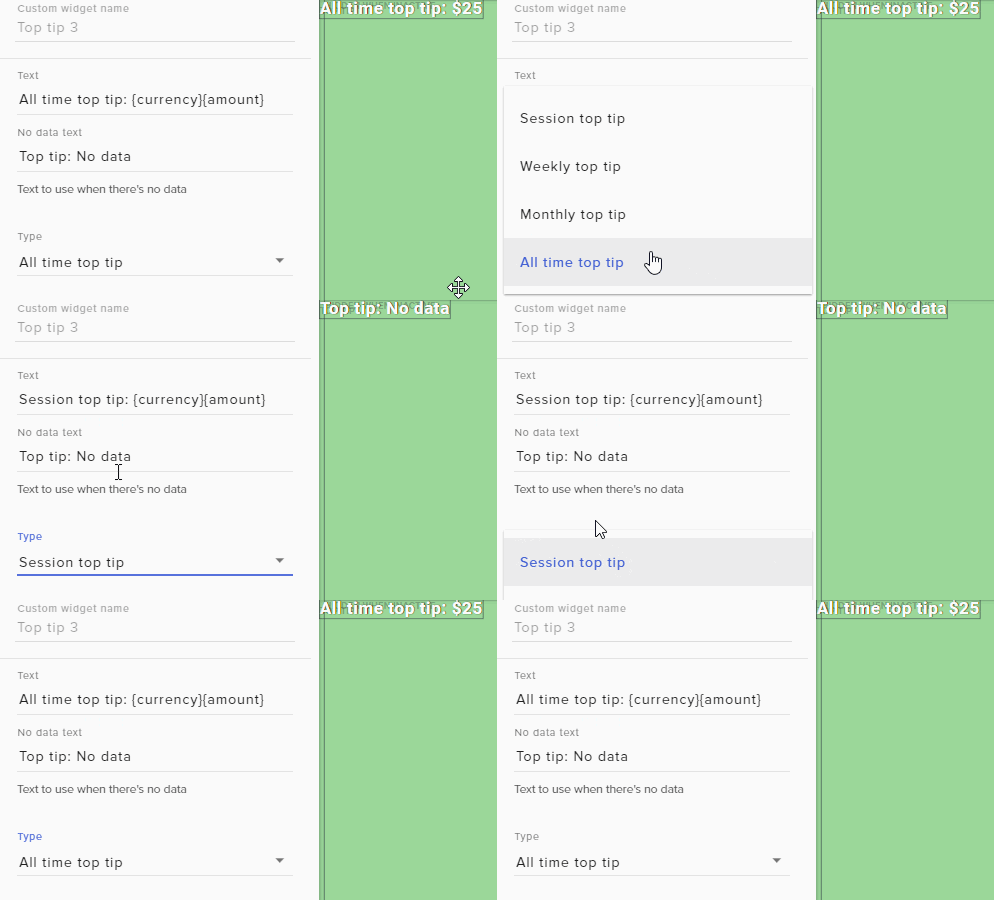 dense jackal
That was done on your account so it should be showing 😄
candid prairie
oooh lolz
ok and here i am check each overlay
the one on Hearthstone is working, but the othere dont seem to the showing
its ok ill change em 😃
dense jackal
Changing the type like that should fix the issue. If that isn't try re-adding the top tip widget. If still no luck I'll check again
candid prairie
yea it seems just the OW theme is having the issue now
 candid prairie
oh
 late ice
where am i to find the JWT token for the stream elements ground control app
stuck hamlet
!jwt
nocturne pelicanBOT
You can find your JWT token on your account channels page: https://streamelements.com/dashboard/account/channels
(Don't forget to click on "Show Secrets")
candid prairie
sooo lets say I wanted to make a overlay element that uses the same theme.
can I save out or download the Webcam overlay box so I can add it into Photoshop to make it into a box that can hold Sponsorship ads?
late ice
i think im blind @stuck hamlet
candid prairie
@late ice Top right, click Show Secrets
candid prairie
dense jackal
@candid prairie So we don't allow people to download our overlays but you can edit it once it is in your OBS. If you wanted to use just one part of a theme you can duplicate it to another overlay. Or duplicate the entire overlay 😄
candid prairie
Lets you see activities that happen on your stream and control Music requests
@dense jackal hmmm o
late ice
im trying to log out off my friend's account on stream elements account and log into mine but it keeps logging me into his whenever i click log in
candid prairie
@dense jackal and be last thing, will there be an option to upload new Tip Jars in the list?
dense jackal
That is something highly requested I would take a look at our ideas page it's definitely something we want to do 😄
candid prairie
@late ice probably need to clear the saved data in your browser for StreamElements Website
dense jackal
You have to switch twitch accounts first @late ice
dense jackal
👍
late ice
ty
candid prairie
@dense jackal can we rotate elements in the overlay editor?
wintry fjord
Is there a way to get more control over the text of the Subscriber/ Follower widgets? I can't seem to pick and choose what Information I want or be able to move them around. Is this possible?
dense jackal
Not at this time. We want to enable it more in the future but right now it's best used as a staging place for already completed and formated elements of your overlay @candid prairie
I'm not sure exactly what you mean @wintry fjord can you be more specific?
wintry fjord
@candid prairie You can always rotate in OBS so use the browser source or save the element you want to be rotated and add it into obs
I'm creating a widget for the subscriber goal and I want to move some of text (i.e swap the current number with the 'subscriber goal' tect)
But I don't seem to have any power over the text placement
@dense jackal
dense jackal
Hmm let me test something really quick
wintry fjord
Sure, thanks
 spice zephyr
guys i saw someone streaming and he had a ''amount of followers of that day'' button how do i get thattoo?
dense jackal
somehting like this @wintry fjord ?
spice zephyr
that is more a goal i want a solid number
dense jackal
Or have the text directly over the goal?
spice zephyr
of that day
dense jackal
I was talking to another user @spice zephyr
wintry fjord
Hey @dense jackal Yeah that's almost exactly how I want it, How did you change the layout of the text?
dense jackal
If you click text settings in the bottom left You can change the margins to be wahtever you need
Note: adding Pixels to the Left will push it right. etc. The secondary text is the text inside the goal.
@wintry fjord
as well as alignment options
wintry fjord
@dense jackal Hmm, changing the amounts in the Advanced Margins doesn't seem to be moving my text. Do you know why this might be?
dense jackal
Possibly how are you aligning them.
Because it is not directly moving the text, rather changing the margin. https://i.imgur.com/SKY0Hvp.gifv
 wintry fjord
Yeah I'm just changing the value in those boxes but margin isn't changing
How are you making the value scroll like that? I'm just inputting it by hand
dense jackal
I'm using arrowkeys
 full depot
I hope this is in the right area. I am currently running OBS studio on my game machine and SLOBS on my stream rig using NDI . I am considering stream elements. Do u support that type of setup
wintry fjord
It works on the mouse wheel too actually, but it still isn't moving the text lol!
dense jackal
@full depot Why would you use two broadcasting services?
full depot
OBS studio is on the game machine simply as an NDI output so the stream machine can see it
dense jackal
@wintry fjord I'll take a look right now into your account and see what I can do just dm me exactly how you want it and I'll show you what I did
full depot
only broadcating on one. The game machine doesnt even have a stream key
wintry fjord
It seems to be only responding to changes I make in 'Secondary Text' which doesn't have an advanced option. I am unsure why yours would be as the first and mine the secodnary
dense jackal
You shouldn't need two services you should be able to grab from one machine. Hence why people using two setups have a gaming pc and streaming pc @full depot . The answer is Yes btw our system is basically just a browser source link.
@wintry fjord Which overlay are you working on right now?
full depot
@dense jackal how exactly would the stream machine see my game without the obs source
wintry fjord
@dense jackal The sub Goal one (apologies that my overlay page is so cluttered lol! Still tryna work out what I'm doing half the time 😅 )
zenith widget
So you are essentially STREAMING from your gaming PC to some platform(or what ever NDI is) and the streaming PC captures it and restreams it?
Thats a huge headache imo. But back at the main question - I assume SLOBS is on your streaming PC?
dense jackal
Ah I see @wintry fjord because you condensed it, it's all apart of the secondary text
full depot
NDI is a plug in that allows the machines to see each other across my network. OBS studio is enabled on the gamer as an NDI source. OBS sends my game video at 7000 bits to the streamer which encodes it and sends it to Twitch. Not hard at all clearly youve never heard of or used it
wintry fjord
@dense jackal Yeah I was just exploring that, and noticed it was when I condensed it, how come there's no advanced option for the secondary text?
full depot
yes SLOBS is on the streamer and has been pointed to the other machine for game video. Webcam overlay everything else is done on streamer
 keen mirage
i keep crashing off the stream elements site when im trying to edit my over lays :/
dense jackal
I believe because it is bound to scale with the goal itself @wintry fjord Dm me exactly what you are looking for and I'll see whaty I can do
zenith widget
@full depot If you want to use SE, then you can just add our overlays into SLOBS(to the PC that streams towards Twitch)
royal quarry
I'm having some issues with pre-installed / pre-setup up media request display overlays are not playing sound or video via media request. They have in the past and it's as if they've just randomly been disabled. Absolutely no variables have been changed, ever. So far the only thing I've found to fix it is literally spamming "display video on stream" button on and off until it displays. This is getting extremely bothersome when it happens nearly half the time durring broadcasts 😦 Any way to definitively correct this? Otherwise I have to disable this for good, it's doing more harm than good at this point.
zenith widget
As for your setup, wouldn't you want to have more resources on your Gaming PC? Having OBS actually encode your game at 7000 bitrate is gonna east some CPU/GPU usage, right? Get a capture card, it would be better imho.
dense jackal
@keen mirage are you using chrome?
royal quarry
I call them pre-installed etc because they are existing overlays, not new ones I just recently set up
zenith widget
@full depot Also note that SLOBS tends to hate our overlays, so some may not work properly or at all, so best to use OBS Studio on the streaming PC
@royal quarry One thing I can think of is maybe clear the caches of the browser sources that have the media share widget/overlay. Other thing is - delete the browser sources and readd them and 3rd thing I can think of is, delete the overlays and recreate?
wintry fjord
@dense jackal I've actually managed to shuffle it around enough to get it basically how I want it anyway so no worries. Thanks so much for your help though 😊
royal quarry
I've pretty much done all of that already, cleared all browser data, cookies, etc everything. They just keep going on and off. It's nothing to do with the overlays, I've manufactured the issue with overlays I've been using problem free for months, as well as a brand new test one. I'm guessing something that is forwarding the data from elements to OBS is the issue? I have no clue how to correct it, coding is way over my head.
Neither the sound nor the video plays, but when I open media request it is playing with no sound
dense jackal
Alright awesome glad I could help @wintry fjord
royal quarry
Neither the sound nor video plays on stream I should clarify
zenith widget
Are you running GC and Media share page? That may cause some conflict
royal quarry
What is GC?
dense jackal
if you are using mediashare I would advise turning songrequest off in GC
ground control the desktop app
royal quarry
No I don't use any of that stuff
OBS and browser only
always have
It's like 70% of the time, sometimes it works normally and then it just goes out, again this is not by any keystroke I'm making or anything, I unplugged my keyboard last night on stream and had my friend send a couple, 1 out of 3 played without issue. The rest I had to go in manually and spam "display on stream" and restart the song 20+ times until it worked.
Eliminated as many variables as I possibly can, I do even know what else to do at this point
 tranquil oracle
yo guys how do i get the streamelements link into OBS again
i am on a bootcamp so not on my normal pc and i forgot how to
nocturne pelicanBOT
@tranquil oracle To add your overlays to OBS, add a new browser source in your scene. Paste your overlay URL in the browser source properties, set the dimensions to 1920x1080 (unless you changed them on the website), and :ballot_box_with_check: “Shutdown source when not visible” https://youtu.be/KDvLynUqXI4
zenith widget
If you are asking about the overlay link
@royal quarry Have you tried to delete hte media share widget, save the overlay play a song or 2 without the "Show on stream"?
royal quarry
Yea I've remade it and reposted it on OBS a dozen times now at least. It always works without being "shown on stream" it's when I try to get the video on stream everything breaks it seems.
Never had issues with it before I tried using the video, and it's layered correctly on OBS etc
zenith widget
Ok, let me step back, is the media share WIDGET a part of the bigger overlays or on a separate overlay that contains ONLY the widget?
royal quarry
I've made several overlays containing only the media share widget, which I then launch and layer in OBS appropriately
 worn hazel
Can anyone help me out, I want to upload a particular gif to my alertbox widget, but it wont display the gif when i press "emulate subscriber event" in the editor. The sound clip added, and my other gif for followers works fine
dense jackal
Check your variations @worn hazel
 ruby heron
Hi, thanks again for the application, it's working great, but I do have a question. I have applied an overlay, and everything is working besides the "Recent Follower", it records who followed, but the text of the name is put right over "Follower", making it unreadable with both occupying the box.
I have looked through the editor and widgets, but can't seem to find a space for it. I have re-applied followers and various other textx, but can't seem to figure it out.
zenith widget
@ruby heron is that the "Recent followers" or "Latest Follower" widget?
ruby heron
Everything is standard from the overlay, I am looking up the widget now to verify which
zenith widget
I don't recognize that follower
royal quarry
Just did it again
zenith widget
@royal quarry I'm asking internally if anyone has any idea
royal quarry
Why does media request video cut out when you change overlays? This is beyond retarded
lol ok thanks man
zenith widget
Wait it cuts out the video when you change scene?
Do you have the "shutdown when inactive" enabled on that browser source that contains only the media share widget?
royal quarry
Yes it's doing that now as well, I never changed anything on the media request page and it just shut the video and sound off again
Give me one sec to check, I'm assuming I do yea
zenith widget
if you do, that means that OBS is closing that browser source
royal quarry
OpieOP
zenith widget
when you change scenes
zenith widget
Maybe thats your main issue this whole time, when you play a video and change scenes, its actually stopping the browser source and cuts the video
royal quarry
I not cannot hear or see video on the media request page or on my overlays, but the itmer is going off stating that it's playing
zenith widget
well no flippin clue now
royal quarry
Pretty much where I've been for the past 8+ hours lol
I can show u on stream if you want, it's become un useable at this point
I change from 1 overlay to another with the media request overlay on it, and it doesn't work either
zenith widget
@ruby heron Can you tell me what overlay is that? And I assume the widget for the latest follower is just squished and you need to expand it to show properly.
hazy tusk
Everytime I try to do something new, I feel super dumb. How do I get the !shoutout command to work?
ruby heron
Redlines - Red Animated Theme
zenith widget
@hazy tusk There is a template for the shoutout command when you make a new custom command
@ruby heron Ok, give me a few to make one
royal quarry
Reloading the stream elements media request webpage fixes it sometimes, but this cannot be how an autonomous song request app is designed to work
ruby heron
It's just putting the follower's name fight on top of the label "Follower"
zenith widget
and check
royal quarry
This is more time consuming than individually clicking links and playing songs from chat
hazy tusk
Yeah, I used that, but nothing seems to happen in chat when I do it.
dense jackal
What is your twitch channel @hazy tusk
TY The one linked on your discord is your old name
zenith widget
The bot is not in your channel @hazy tusk
ruby heron
Ahh okay I think I understand what you are saying @zenith widget I will see if I can expand past the 1920x1080 reso
zenith widget
@hazy tusk https://streamelements.com/dashboard -> right side of the page -> Join Channel
hazy tusk
Parted/re-joined it
zenith widget
@hazy tusk Since you changed your name recently, part it again, log out of SE, log back in then Join
hazy tusk
That did it!
zenith widget
@ruby heron So don't change anything. I found the main issue.
wintry fjord
@dense jackal Sorry one more thing, I've got the goals how I want them now, but my follower count is incorrect. Do you know why that might be?
ruby heron
:::Hands off Keyboard:::
zenith widget
@ruby heron So above each widget which shows recent X thing, is a plain text widget. Just click on that and go to Text Settings and change the Size from 10 to 8
 cedar lynx
Hey guys! The countdown widget had a weird glitch for my friend this morning. I was scheduled to stream in like 1 hour 36 minutes but it was telling him +1 day since it was Friday night his time (Saturday morning my time)... anything I can do to fix this or is this a known problem?
zenith widget
@ruby heron I think you will have to change the text sizes of those boxes on all the redline overlays :/
ruby heron
Alrighty, thanks for the help
wintry fjord
@dense jackal Sub Count is wrong too, I haven't always used Stream Elements so does it not have the details from before I used it?
dense jackal
This is a known and uncommon bug @cedar lynx wee are working to fix this
@wintry fjord exactly, luckily you can edit and refresh what you need here https://streamelements.com/dashboard/session
cedar lynx
Good to know you're on it, thanks @dense jackal !
wintry fjord
@dense jackal Is reset not the same as refresh lol? because now I have 0 everything Kappa
dense jackal
Did you reset the labels? @wintry fjord ?
wintry fjord
@dense jackal Yeah I reset them which put all the values to 0, so I've now manually put the number in. Will it tally them appropriately?
dense jackal
It updates automatically yes. For your follower goal to be correct you need to click to goals tab and edit it to the correct amount same for sub goals. To get them to update accurately go to totals and refresh aggregates
 ancient fossil
Hello everyone, would like to ask for help with the loyalty points system. Our viewers aren't getting their points for half an hour now. They're not on ignore list.
wintry fjord
@dense jackal Yup all looks good now. Thanks lovely ❤
harsh pewter
how do i enable g2a pay?
zenith widget
@harsh pewter Where are you from(country) and what is your twitch name?(don't link it, just name)
zenith widget
@harsh pewter You can refresh your tippings page now
harsh pewter
i see it
zenith widget

wintry fjord
With the video / animated overlays. Is there any way make them thicker without the resize being scaled to make them wider too?
 lucid remnant
hello comeone here?
 median sigil
someone keeps purchasing stuff from my store, but it doesnt show up in my redemptions
lucid remnant
my loyality dont go when i'm in stream ON. what can i do?
ancient fossil
same problem here @lucid remnant someone's looking into it atm
 minor storm
@ancient fossil @lucid remnant Same problem here :/
lucid remnant
😫
 tawny pivot
Loyalty should be back again!
lucid remnant
kk i hope
 hushed rivet
I've got the little ?help button that shows on the website in the bottom corner on my overlay in OBS
zenith widget
@hushed rivet Are you using OBS Studio or OBS Classic?
ancient fossil
Alright, will check in 10 mins...
zenith widget
@hushed rivet I suggest clearing the cache of the browser source. To do this, go to the properties of the browser source and on the bottom there should be a button for clearing cache
keen mirage
@dense jackal i am
hushed rivet
yeah I did that before I posted
I thought it might have been the media share so I removed that from the overlay too since that was in the bottom corner but it still shows up
zenith widget
@hushed rivet I was given this to try:
2) Press WindowsKey+R, paste %appdata%\obs-studio\plugin_config, Press OK
3) Delete obs-browser folder and close the explorer window
4) Reopen OBS Studio```Also try to open the overlay link into Chrome and not Firefox
hushed rivet
Still there after removing the config folder, it doesn't show in firefox
sucks I just moved everything over from streamlabs lol
it does show up in chrome
narrow coyote
sounds like something is blocking it from OBS, what antivirus are you using? also, do you have a killer nic for the network card?
ancient fossil
@tawny pivot thanks! it's fixed ❤ ❤
narrow coyote
Only time I have seen this issue not solved by clearing the cache was related to a Killer nic
tawny pivot

 zinc mirage
did something happen with the channel bot today?
i gave it a custom name and key and it worked for a while
but now its back to the "streamelements" name
stuck hamlet
Is your Ground Control still running?
zinc mirage
yeh it was running the entire time
stuck hamlet
it might of rebooted, you would have to reload ground control if that happened
zinc mirage
reload as in just restart ?
light pasture
Alright so my StreamElements doesn't show up at all on BEBO even when the browser source is in the scene. tried it above and below the game source. Dunno if this is a BEBO issue or a Streamelements issue
light pasture
1280x720 which is also my stream res
dense jackal
dm me your overlaylink and I'll tell you if I can see it
light pasture
ok
zinc mirage
ok thx ill try it out tomorrow ^^
 velvet drum
I've loaded my overlay into OBS and when testing before going live, everything works perfect.
When I go live the alerts don't work at all.
Halp? ☹️
dense jackal
One sec @velvet drum I'll take a look at your account
velvet drum
Ty!
dense jackal
Which overlay are you using? "In game scene" ? @velvet drum
velvet drum
Yes
dense jackal
They seem to work fine for me (testing real and fake types)
velvet drum
Yeah but when I go live, none of them work. Everything else works though
dense jackal
I'll send you a dm. If they don't work again on stream feel free to reach out to me. I'm not sure what issue that would be. You said the overlay shows up fine and everything on OBS correct?
velvet drum
Yeah. And when testing it in the editor the alerts work fine e
dense jackal
Solved in dm's 👍
 compact plinth
 formal tusk
Hi friends. Big fan of SE here - thanks in advance for the help. Last night I was streaming, and every so often the KappaGen explosion would go off, but it would not also set off an alert / event in my event list. What am I missing? When an event like a follow would happen, the explosion would occur but trying to figure out what I was missing otherwise.
Could it be (even though I was streaming on Twitch) that it was doing the KappaGen explosion in response to my Youtube channel or something?
stuck hamlet
@formal tusk Was it in your activity feed?
narrow coyote
Did you get any hosts? Like a host for 0 or something that would not trigger an alert?
dense jackal
They would have to delete your tips from their account @lament blade
lament blade
ok thanks. 😦
 karmic dagger
hello im using the ground control app for my twitch but i cant get the hot keys to work for the music when using it i still need to type !skip or !pause in chat instead of the hot key i set up
narrow coyote
Ground Control is not fully compatible with the new Media Request system, and unfortunately the hot keys no longer work. Ground Control will be updated in the future
karmic dagger
makes sense thanks was doing my head in lol
 jade anvil
Need some help real quick if anyone is available
dense jackal
What's ur issue @jade anvil ?
jade anvil
I had someone make an overlay for me, uploaded it to streamelements, and it for whatever reason takes a bit to load when switching scenes
I ended up just putting the backgrounds into OBS just as images
and only have my streamelements overlay just have the text and sub/follow alerts on the overlay
when i switch scenes, the actual scene switches but the streamelements takes 5+ seconds to load, or not at all
Before I had him make me one, I used one of the default free overlays, and it switched perfectly, it was only after adding the new one
nocturne pelicanBOT
@jade anvil Check out this tutorial for OBS’ studio mode which allows you to preload scenes before transitioning. https://www.youtube.com/watch?v=W8iWsD2Lq3U
stuck hamlet
Or turn off "shutdown source when not visible" in the browser source settings.
 pine hemlock
The owner of the channel would have to give you your points back
 polar scroll
Hi all - is there any way to import scenes from SLOBS to SE without completely rebuilding each scene piece by piece in SE? If there is, and I'm missing some tutorial or link somewhere, sorry!
 winter zenith
@polar scroll I dont know exactly how SLOBS work but you could try out importing Tool (Top right on SE Dashboard) it's a Google Chrome extension.
Just make sure to be logged in into Streamlabs and StreamElements!
Hopefully the scenes in you obs will also get imported
 steep perch

 native estuary
So I got a tip like 3 days ago and I haven't gotten it in the paypal account I have set up? Am I missing something er
cedar fulcrum
Hello @native estuary did you receive an email from PayPal regarding the Tip?
native estuary
yes i did
says i have to be verified but im already verified?
it says i have to accept the payment?
no worries i figured it out
cedar fulcrum
kk, have a nice day!
lament blade
hey there, I have a question about the media sharing, if a user donates and requests something that is shown on stream, after that video finishes will it begin to play the default playlist afterwards or will it just end, if it continues to play the default playlist, can i disable this somehow? Also if I click show on stream will this stay active indefinitely or do I need to press it each time a new donation media request is received?
cedar fulcrum
Hello @lament blade Yes it will show you default playlist after the requested one is over
Yes, you can just delete the Backup playlist link
lament blade
I have tried to do that but it does not remove the monstercat links?
cedar fulcrum
If you click on the "show on stream" once it will show on stream unless you disable it
lament blade
ok cool
But yeah I can't seem to remove the monstercat default videos from the queue even though the queue says 0/0
@cedar fulcrum
cedar fulcrum
One moment I will take a look
lament blade
ok thankyou
cedar fulcrum
I see nothing on your Backup list :X
lament blade
can i post a screenshot?
cedar fulcrum
Sure
lament blade
cedar fulcrum
It is because you added it from a backup playlist
You need to go to Youtube and delete it from there
Because it is not a request that was made on the Media request feature:)
lament blade
I am not logged into youtube do you know where I would delete it from?
Oh btw my discord is different to my twitch if you are looking at a different twitch accounts info my twitch is "twitchstreamsyoutube"
oh, I managed to find it hahaha, ok all fixced thankyou for your time @cedar fulcrum ❤
cedar fulcrum
You are welcome! @lament blade
Hello @fair notch when you click on the box it will show the number more visible:)
 oak scarab
what are the recommended dimensions of the stream store images?
 ebon forum
@oak scarab make them as big or small as you wish. default overlay size is 1920x1080
oak scarab
the item images?
cedar fulcrum
Hello @oak scarab you can choose any Image type for the store items 😃
And just see if they are fit also you can play with the sizes
oak scarab
wanted to know a recommended size to where it would show up nicely on the store page
so the image wouldnt be cut off or anything
ebon forum
everybody has different overlays and different size for the store redemption widget, so that's personal.
oak scarab
ohh
cedar fulcrum
Glad to hear all is good
 undone cargo
Hi
 fair notch
Ok, you might want to up to quality of the video if possible
undone cargo
Ok
undone cargo
Ok
fair notch
Anything else?
do you edit your videos?
@undone cargo
you might want to go over to helpdesk youtube if you haven't already
they have more expertise when it comes to managing youtube videos/streams/uploads
cedar fulcrum
Hello @undone cargo do you need help with anything?
 solemn gust
Hi, my tipping settings page is just blank and I'm using the newest Chrome update. No extensions that should interfere aswell
Only extensions I've got is: BetterTV, uBlock Origin
 summer mulch
Try setting uBlock to not be active on streamelements.com
 cedar fulcrum
Please make sure you enable Cookies on your browser
 plain lion
Is somebody here?
I really would need help with the Twitch Chat Widge, If i pick custom Chat the Text is actually black, is it somehow possible to set it on White? i cant find where i could change that
cedar fulcrum
Hello @plain lion Sure one moment let me look at it
It will show the chat as it appears on your stream
plain lion
Well in my Dashboard it actually has White letters p.p
 proud pumice
you can change the text color to whatever you like
menu on the bottom left 'text settings'
@plain lion found it?
plain lion
either im really stupid or i really cant find it ... right now im not seeing the text popping up anymore in general wokring on it
cedar fulcrum
You can click on the widget and choose any color or font you like
plain lion
Oh wow @cedar fulcrum for me it was straight blank so i couldnt see that htere is another field
cedar fulcrum
ohh
cedar fulcrum
You are welcome!
fair notch
opinion on the new graphics?
zenith widget
@fair notch This channel is not a beauty contest! Also linking like that is considered advertisement! If you want someone to give you opinion on how stuff looks, ask in #general-chat if someone can spare a minute or two without directly linking your stream.
 pale acorn
how ability subscribrs in streamelements loyalty system
subscribers and cheers don´t apear
cedar fulcrum
Hello @pale acorn you need to be Affiliate of Twitch to have subs and bits
pale acorn
ok 👍
 buoyant onyx
hey everyone, is it possible to have a follower train clock & counter in my SE overlay?
nvm, found it
lament blade
Can I get access to the android app?
cedar fulcrum
Hey @buoyant onyx glad you found it, anything else I can help you with? 😃
buoyant onyx
Since you ask, one thing: is it possible to enable song request using Spotify instead of YouTube? 😄
cedar fulcrum
Sadly at the moment Spotify doesn't have an integration with us:(
lament blade
Can I get access to the android app?
narrow coyote
Its currently in closed beta, and as far as I am aware we are not adding more users at this time
orchid nova
Stream elements is currently skipping donations / subs can someone help please? I'm trying to solve it now but it's not working, i'm currently live also
summer mulch
What do you mean skipping? The alerts don't pop on stream?
orchid nova
correct
summer mulch
Which tip didn't pop off? the last one I see is from boonpwnz
orchid nova
it didn't pop up i had to manually click the refresh until it played
also the sub didnt pop up either, had to do the same thing
summer mulch
Ok that latest sub popped up instantly
orchid nova
correct but it happens alot where they do not
 tulip pecan
Has anyone had any luck with the 'Gifted Subs breaking the HTML source in Xsplit' issue?
 atomic hollow
@winter zenith ^^
winter zenith
@tulip pecan that's a problem on Xsplit side
If you replay a Gifted sub alert it will Pop up in the browser source and in the URL itself only in xsplit it wont come up
Pls visit the XSplit Support and tell them about you issue. The more people complain thr better they will get there ass up to actually work on things
I also did that
tulip pecan
Yeah Im trying to get my whole community on it! Ever since xsplit updated with that 'macro' add-on it's been a bit of a nightmare.
Also, kiaora fellow kiwi! I'm Steve Wrigley. See ya on twitch mate!
 normal light
What's up!? We are loving some streamelements. My husband just hit affiliate! 😃 Is there a feature where viewers can queue up to play with the streamer? I searched the knowledge base, and it looks like the answer is... not yet. But, I wanted to double check! Thanks!!
winter zenith
@tulip pecan haha let's go! Yeah I Feel you... Together we are strong! YELL AT XSPLIT TO FIX THERE SHIT 
@normal light sadly not yet. But you can make a store Item wich can be bought with the loyalty points
narrow coyote
You can then use the redemption list to check players off in the queue https://streamelements.com/dashboard/store/redemptions/items
winter zenith
And Filter the store Redemption Page with said queue item
Kite always faster then me 
narrow coyote
normal light
you all are the best!! Thanks. 😛
 modest tapir
My streamelements not no longer tells me when I get new followers and such 😦
winter zenith
@modest tapir you changed your Name on twitch recently?
modest tapir
No same name!
winter zenith
Pls try this:
Part bot from channel
Log out
Log back in
Let bot join your channel
modest tapir
Okay I hope that works!
 kindred isle
I have a question.
Is it possible to remove like sertain users from the bot (with as example the biggest bot on Twitch Electricalskateboard)?
narrow coyote
You could use the standard twitch ban command /ban username unless you mean something else when you say remove users from the bot
kindred isle
Well, remove a user with they stats from the database of the bot.
like with the offline hours or online hours.
narrow coyote
You can reset the points for the username on your leaderboards https://streamelements.com/dashboard/leaderboard/current and then add them to the ignored users list https://streamelements.com/dashboard/loyalty
kindred isle
OKay 
modest tapir
Oh okay do you have to have chat alerts enabled?
I may have disabled it accidentally
For followers to appear?
narrow coyote
for them to appear in your chat yes, the chat alert module will need to be enabled
modest tapir
Thank you 🙏🏾
narrow coyote

harsh pewter
how do i enable g2a pay for se
narrow coyote
If you do not see the option in your tipping settings, someone from the staff would have to enable it for you if you would like it
 inland cypress
hey everyone. downloaded the groundcontrol app... trying to put my JWT token but wont let me copy paste?
harsh pewter
i need someone to enable it
narrow coyote
whats your username?
harsh pewter
DeviousTBE
narrow coyote
@inland cypress ctrl+c ctrl+v is working just fine for me
harsh pewter
DeviousTBE
 serene granite
where are you located?
serene granite
you should see it on https://streamelements.com/dashboard/tipping-settings now
StreamElements
The Ultimate All in One Platform for Streamers
harsh pewter
thank you
serene granite
np 😃
 ornate hazel
have kappagen widget, it's all set the way I want. Every time I emulate an event my emotes I have selected works fine. However when I emulate a cheer, the emote explosion works but it just uses random emotes. am I missing something? everything else all works fine with the assigned emotes of my choice when emulating an event.
pine hemlock
It uses cheermotes when a cheer event occurs. Theres no way to change it currently
buoyant onyx
How do I get the StreamElements bot to run under my own name?
nocturne pelicanBOT
@buoyant onyx Custom bot name requirements
- StreamElements bot modded and in chat
- Active overlay with alerts
- StreamElements tipping page in the panels below the stream (!panels)
- Create a twitch account for the name you want to use
- Ground Control app must be running
Steps to enable custom name
- Sign in to https://twitch.tv with the bot account
- Install and run Ground Control (!gc for download)
- Visit https://twitchapps.com/tmi/ and generate an oAUTH token
- Copy/paste everything in the box to Ground Control oAuth settings and enter the name for the bot account
- Restart Ground Control (custom name may take a few minutes to take effect)
buoyant onyx
uhm...I can't find any "Ground Control oAuth settings"...
zinc mirage
so how does the sound from streamelements alertbox or item redemption box in up in obs?
i dont see a seperate audio bar for stream elements
buoyant onyx
OBS's browser source usually puts out the sound on your default audio device
 weary mist
@buoyant onyx if you can't find it, then it means one of the requirements is not met
or you are on a mac
buoyant onyx
thank god I'm not on a mac 😁
but no, I've made sure all the requirements are met.
Do I need to connect that second account to my StreamElements, as well?
buoyant onyx
okay, I don't understand this.
narrow coyote
Have you restarted Ground Control after making sure all requirements are met?
buoyant onyx
yes
narrow coyote
and you have an overlay with an alert widget? because that is the only thing I can not check. Otherwise maybe renter your JWT, because the information is all pulled from the account based on the JWT token
 deft bluff
Do you have an overlay without webcam
narrow coyote
You can hide or delete web cam frames in any of the overlays
deft bluff
Ok do you have to have a computer to do so
buoyant onyx
but still no option for any oAUTH token or anything
narrow coyote
it can take a few min after all the requirements are met, so give it a few min and restart Ground Control
@deft bluff I am pretty sure you can still use the overlay editor from a mobile device, it would be much easier from a computer though
buoyant onyx
what makes an overlay "active", btw?
deft bluff
@narrow coyote ok thank you
narrow coyote
I am pretty sure as long as you have an overlay in your "My Overlays" section that would be considered active
buoyant onyx
oh okay, good
 clever nimbus
On the super themes, am I able to change the color theme? For example, purple is not the color I have branded my channel on, blue and orange is. Can I change to a blue background?
deft bluff
How do you use an overlay
narrow coyote
You take the overlay URL and add it to your broadcasting software as a browser source
like this for OBS, for example
nocturne pelicanBOT
To add your overlays to OBS, add a new browser source in your scene. Paste your overlay URL in the browser source properties, set the dimensions to 1920x1080 (unless you changed them on the website), and :ballot_box_with_check: “Shutdown source when not visible” https://youtu.be/KDvLynUqXI4
deft bluff
@narrow coyote are you a bot
narrow coyote
negative, I am a meat popsicle
@clever nimbus There is no way within the overlay editor to change the colors, OBS has filters for color correction that could be used, but this will alter the color of everything in the source the filter is added to
clever nimbus
*hint hint would love a blue equivalent of the Purple wave animated super them 😃 ...ya know...just in case....in any event....thanks for all you do!




 narrow coyote
I said broadcasting software, like OBS. StreamLabs has SLOBS, but you are just on the SL dashboard, that is not broadcasting software
OBS Studio is the preferred broadcasting software for use with StreamElements
deft bluff
What is the difference between Streamlabs and obs studio
narrow coyote
SLOBS is a hard fork of OBS, and they do not keep it up to date the same as OBS Studio does. Contrary to what they advertise as well, SLOBS tends to take more system resources compared to OBS
narrow coyote
what are you streaming with then?
deft bluff
PS4
 steady monolith
Hey guys, long time. Is there a widget where it shows a "Todays" session?
narrow coyote
then you cant use overlays, consoles have no support for browser sources.
nocturne pelicanBOT
Here is a guide on how to setup the most essential tools for streaming from your console, while using StreamElements tools without involving a Capture Card! It's easy to do, take 4 minutes to read and 10 to 15 minutes to setup!
Read all about it here: https://blog.streamelements.com/how-to-stream-on-console-7b620b1c46c3
steady monolith
I.e followers
dense jackal
Yes you can do a follower count and set the type to session. It goes off of every stream (but will add the follows you got off stream since your last stream) If you want it to start at 0 for sure every stream you can always reset your session @steady monolith
steady monolith
Nah not a follower count. What im trying to ask is to show at the end of my stream todays list of followers 😛
dense jackal
There is a recent followers widget, but it just displays the most recent followers (up to 25) not per day. @steady monolith
steady monolith
i guess i can do what you said and clear the session before i start the stream
deft bluff
Ok ok this has nothing to do with stream elements but if your using PS4 can you plug in a usb webcam into your PS4 and it work
narrow coyote
@steady monolith You mean something like this? https://streamelements.helprace.com/i270-credit-roll-maker
steady monolith
I guess kite, but I'll be having go horizontal 😛
narrow coyote
be sure to add a comment to the idea, also, if you are code savvy, I am pretty sure you could build something like this with the custom event list widget
deft bluff
ok this has nothing to do with stream elements but if your using PS4 can you plug in a usb webcam into your PS4 and it work
steady monolith
not that savvy unfortunately XD
narrow coyote
Probably not, but that is a better question to ask in #general-chat as this channel is for support with SE services
deft bluff
Kite was that last chat to me
narrow coyote
yes
deft bluff
Ok
Also sorry for so many questions but if I look up stream elements on a iPad would I get more features
narrow coyote
What do you mean?
deft bluff
So if I go on iPad could I do more stuff than I can on my phone?
narrow coyote
It would probably be easier to use the site itself, buy you won't get different features, especially if you are streaming from a console
Did you check out the console blog I posted from the bot?
narrow coyote
The only way to get overlays on a console is to stream from a PC, either with a capture card or remote play, with a capture card being the better method
narrow coyote

 unreal plaza
Has anyone shared the game commands for twitch?
dense jackal
What do you mean by game commands @unreal plaza