#helpdesk-twitch
1 messages · Page 299 of 1
 cedar lynx
 zenith widget

 echo jasper
Is there a txt file that Ground Control uses that I can also use to pull my recent stream notifications from? Looking for recent follower, sub, dono, etc.
zenith widget
Do you want to show it on stream? If yes, then theres a widget that pulls data from the activity feed and shows the latest follower/tip/sub
But to answer your question - no, there is no .txt file
because everything is cloud based and a .txt file takes long time to update
zenith widget
There is no option to do so, but you can disconnect the SE connection via your Twitch Connections settings.
Can I ask why you want to delete your account?
zenith widget
The only information we collect is, who follows/subs/cheers and email (or tips via SE). Nothing else. Like I said you can disconnect the connection via Twitch connection settings.
Is there a problem you have seen while using SE?
and/or not resolved?
 versed moon
I already disconnected it from my Connections option. I would like to request my information be completely erased.
 crimson yew
He asked you a question, though.
zenith widget
Lotus, no need to push that
versed moon
I don't want to have to file DCMA
Please.
DMCA *
I just don't want my information on SE anymore
I think that's fair.
zenith widget
Not sure how a DMCA is going to help you really, but I did ask internally for assistance on this.
versed moon
I have spoken to someone at Namecheap and have requested my copyrighted information (including followers/subs/cheers) to be removed from your website. I hate that it had to come to this. Have a good day
 south bridge
I want to stream the Fortnite Launch countdown would I get banned if I streamed another person's stream in the background but the person's stream is on YouTube, as I won't be online to see the launch happen
as its a one time event thing
zenith widget
I would suggest against restreaming a YOUTUBE live stream.
south bridge
its not restreaming
its just for example putting a live stream in the background of mine as they'll ofcourse be watching for the rocket
but the stream is on YouTube
zenith widget
if its the audio, then its fine
Just make sure to pump out some of your own content
south bridge
so I can't stream another person's stream? but I'll have my own music?
I can't do my own content as i'll be in a restaurant 😛
if not its fine
zenith widget
Well this is not really related to SE tools, is it? Maybe ask in #general-chat and someone will answer you with some proper info
 clever mango
@The Letter Ten#1970 Your account will be removed.
south bridge
Okay,
 summer iris
hi, i am struggling to get my overlays to load on obs?
zenith widget
How so? Are they not aligning properly?
summer iris
it used to work find but i cant work out why not working anymore
na they are not even showing
they do load in a browser thou
summer iris
yes
zenith widget
Then I suggest going to the properties of the browser source and on the bottom there should be a buttom to clear cache
try that, if you are not switching scenes
summer iris
thanks that worked, I didnt even oknow that that browser source properties had a scroll bar and that button was even there lol
zenith widget
summer iris
also is the site taking strain at the moment, I keed getting random failures when refreshing your site
zenith widget
First report really and the site loads perfectly for me
Maybe try and clear your browser's cache as well if you haven't done it in a while

summer iris
ok thanks
 honest echo
Is there an variable or a way, that if user types !points to chat, that the answer goes to whisper and not in chat?
honest echo
okay, thanks 😃
 frozen ingot
hi guys
I can customize a SIZE of a overlay?!
example... i like a LOT an overlay 1920x1080, but i need 2560x1080
is possible?!
zenith widget
frozen ingot
PERFECT
zenith widget
Highest possible is a 1440p
frozen ingot
tks a LOT
zenith widget
But do note that our pre-made overlays are only 1080p
And you'll have to manually squize/stretch their boxes to match
As for a wide screen, well even Twitch forces true 1080p and not wide screen 1080p
So one way you can do is(and I've seen someone do it), is have their widescreen go output to true 1080p and add an overlay over the blackbars that appear
zenith widget
Its best to ask the question and we can determine who can help best 😉
zenith widget
as an alert - sure, as a .webm format and you can set it up as an alert
zenith widget
What browser are you using?
 dark shadow
chrome
crimson yew
and the file is .webm?
crimson yew
Damn. 🤔
zenith widget
So you managed to upload it?

 zenith widget
You cut of the top part and I can't see what alert you are trying to change
Discord please 
dark shadow
the store redeemption
zenith widget
So most Stream store items have their own images. You are better of setting the .webm to the uploaded video
 timid pebble
i just donated to a streamer but it never came up? its been like 5min
zenith widget
rather then the widget it self
 soft vault
How do I make a new follower goal start at 0?
zenith widget
@soft vault https://streamelements.com/dashboard/session go here, then "Goals" tab and either reset goals or just edit the wanted goals progress
@timid pebble Did you receive an email from PayPal after you donated? The email from paypal contains their receipt for the dono/tip
dark shadow
@zenith widget i dont understand
zenith widget
@dark shadow What I mean is, stream store images/videos can overrite the store redemption alert image.
So set the .webm as a store perk image/video. Let me grab a screnshot
timid pebble
sorry not my bad, i didn't receive an email by paypal but my credit card company notified me paying the amount i sent
zenith widget
Ok, so check your PayPal account if the payment/dono is pending. Usually they hold the payment.
If so, contact them on the issue or check if the problem is given within the transaction.
Nothing we can do really
zenith widget
Can you DM me the .webm file?
 fluid quest
What is up Twitchenarians!!!! Could i perhaps ask some advice from ya'll?
 dense jackal
wassup @fluid quest
fluid quest
@dense jackal Whats up !! Thanks so much for the quick reply, Ok so im having some issues with my OBS. Every other game keeps a constant 60fps. but in pubg my frames drop insane, hovers between 40-50 max even drops down to 20 at times
PC Specs
1070
i7 7800x 4.00ghz
16gb ram 3000mhz
These are the settings im running on
My upload and download speed is 100/100mb
 ebon forum
@fluid quest try switching to x264 with same settings, just x264 instead of nvenc. right now you stream on the nvidia GPU.
@fluid quest otherwise i recommend visiting the official OBS discord, they can help.
 small veldt
Why doesn't "Total Subscribers" count work? It says "0"...
ebon forum
@fluid quest you have a pretty powerful CPU, it can't be worse.
@fluid quest For the best OBS support, please join their discord where OBS devs and support volunteers are available all the time discord.gg/obsproject
small veldt
@ebon forum Why doesn't "Total Subscribers" count work? It says "0"... anything i'm doing wrong?
clever mango
@small veldt First try logging out and back in
clever mango
Which page are you on now?
small veldt
Overlay editor
clever mango
Click on DATA > Session Data > Reset Session
small veldt
Thanks, that worked 😃
 grizzled nebula
Hey everyone. I am working on a overlay and I'm clueless about how to create something. I am currently keeping track of certain data using count commands. I want to show this data on the overlay so whenever I use the command it is updated in real-time on screen (and not just in chat). Can someone please help me figure out how to get this to work on my overlay?
 lament blade
where do i find the browser source for media request
 wanton kernel
for media sharing how can I run the widget without having my browser open?
I see about ground control but im wondering if its cpu intensive
 untold crest
@grizzled nebula it involves some of server side scripting.
@OOGA BOOGA.#3754 in widgets section
@wanton kernel a little bit less than browser, but you will have it to keep eye on latest events as well. The best way is to do dry stream (bandwidth test) and check it
wanton kernel
I have a ryzen 2700x so cpu isnt really an issue just having browser open for some heavy games causes lag
okay I'm test streaming on my wifes account lol so ill play around with it
untold crest
;)
wanton kernel
@untold crest seeing as your currently here I have a second question
I customized my own overlay and was using slobs. Imported and fixed everything to work with SE
untold crest
(I am on my phone, so my resources are limited)
wanton kernel
now seeing as i am using a browser source to import the stream theme. How can I cause less lag in between scene changes
takes a max of 5 seconds for my overlay to load between scene changes
untold crest
There's something in studio mode that preloads your scenes
But I am afraid I am not good with OBS itslef
wanton kernel
AH i forgot OBS studio had that feature lmao should of known seeing as Slobs had it
thank you! for the first time support was great lol guess ill be active n sticking around afterall. A couple other streaming apps/sites support took like 2-4 days for a response lmao
untold crest
NP mate, we try to have someone around 24/7 and this is weekend and late evening in Europe, so there's still small delay
Glad I could assist you. Maybe not showing direct answer but at least a direction. Cheers!
 cunning prism
!rename
 nocturne pelicanBOT
Custom bot name requirements
- StreamElements bot modded and in chat
- Active overlay with alerts
- StreamElements tipping page in the panels below the stream (!panels)
- Create a twitch account for the name you want to use
- Ground Control app must be running
Steps to enable custom name
- Sign in to https://twitch.tv with the bot account
- Install and run Ground Control (!gc for download)
- Visit https://twitchapps.com/tmi/ and generate an oAUTH token
- Copy/paste everything in the box to Ground Control oAuth settings and enter the name for the bot account
- Restart Ground Control (custom name may take a few minutes to take effect)
 echo spruce
im streaming using the xbox twitch app and I've set up the !songrequest command with a playlist but it dosent play any music on my stream, Fix?
zenith widget
If you are streaming via a console app, you won't be able to fully utilize our Tools. To be able to play any song requests or even show who last followed/sub/tipped you, you will need to first add the overlay and have the Media request page open.
To keep it simple, you will need a capture card connected to your PC and your Console. Setup OBS to show the overlay and game capture from the capture card and to have the song requests working, keep Media Request page open.
echo spruce
I tried doing that with obs but my frames are horrid when I stream from my laptop (its a Lenovo with windows 10). Ive done the overlay and alerts but I cant get the video settings fixed
zenith widget
Well its still depends on what specs the laptop has and how you've setup the OBS settings. Just providing info that its a Lenovo laptop, won't be of much help for me to provide some proper settings you can use.
cunning prism
!panels
nocturne pelicanBOT
Twitch's official help guide for Panels: https://help.twitch.tv/customer/portal/articles/2416760-how-to-edit-info-panels
zenith widget
Or try out
But I take it, you have a capture card and have tried using it via OBS and an overlay, which is the first step. If you want, just to keep this channel clean, you can DM me the laptop specs and I'll help out with some settings.(as at this point its not directly related to SE tools)
echo spruce
alright, Ill DM you. Thanks
zenith widget
Sorted over DMs
cunning prism
Do you have to have Ground Control open for the Custom Bot Name to be active in chat?
zenith widget
Yes
cunning prism
How long does it usually take to go into effect? Currently it's just posting as me in chat when I use bot commands.
 narrow coyote
That would mean you are using the oauth from your twitch account, not an account that has the name you want to use
 dry hare
So the bot using oauth uses our twitch name is that correct?
 surreal spoke
Wondering if I can rotate widgets in the overlay settings. Currently trying to rotate my 'Recent hosts' widget 45 degrees ish?
 ruby creek
can anyone help me i cant setup my tip on twitch, i cant find where to put the link and pic
@everyone
nocturne pelicanBOT
Please refrain from using [at]everyone or [at]here
 winter zenith
@ruby creek put it into your Pannels at your Twitch Channel Page (bottom left of your Player)
@surreal spoke rotating Text widgets is not possible 
ruby creek
@winter zenith i cant find Panels for some reason
winter zenith
I am on mobile right now so I cant give you a Screenshot but it's fairly easy if you Google it @ruby creek
ruby creek
okay thank you
winter zenith
Twitch
How to Edit Info Panels
This article explains what the channel page is comprised of and how to use all the features it ...
winter zenith
No problem
 wise cliff
So the SE Panel still isn't working right. I changed my reward from Sub-only to being available for everyone, but it isn't showing up in my store tab still :\
wise cliff
No
winter zenith
It has to be for it to show up in the extension
And you can have sub only Items it just displays a wrong icon wich is a Bug we are working on
 minor haven
How do i activate my overlay i made with stream elemets
nocturne pelicanBOT
@minor haven To add your overlays to OBS, add a new browser source in your scene. Paste your overlay URL in the browser source properties, set the dimensions to 1920x1080 (unless you changed them on the website), and :ballot_box_with_check: “Shutdown source when not visible” https://youtu.be/KDvLynUqXI4
minor haven
Lets say someone subbed for example would the overlay update automatically with the recent subscriber
 heady falcon
I have an overlay i am using, and looking at the overlay editor, there are 2 webcam borders. a rectangle, and a square. The rectangle shows up on obs, and the square (which is faded out) does not. I would like the square border to show in obs, so how can i go about this
 candid crystal
Question: Can Stream Elements allow for a user command to gain points in chat?
ie.
[Points on my channel are called cookies]
user input:
!bakecookie
---> user gains a Cookie
dense jackal
Yes it would @minor haven sorrt for the late reply
@heady falcon One of them is hidden in your overlays, click layers in the bottom left then click the eye to unhide it
@candid crystal I don't believe there is an opton for this. If you want to give all your viewers some special points
!bonus all 100
would add 100 to everyone
 rapid robin
Do I have to link the panel extensions on twitch or something? They stay loading and nothing shows up 
dense jackal
Try logging out of your StreamElmenets account and then logging back in @rapid robin
rapid robin
Will do.
candid crystal
Thank you for that @dense jackal, yeah was hoping there was something else a user could do that I could put on a high cooldown
dense jackal
Make sure to also give people points for following/subbing/ etc. for more incentive 😄 @candid crystal
rapid robin
Logging out and back in didnt work, still endlessly loading.
heady falcon
@dense jackal ty bro for the quick and helpful response. i love you
dense jackal
go to https://www.twitch.tv/mapleer/dashboard/extensions/manage and completely remove it from the my extensions
visit https://streamelements.com/logout , then log back in
go back to https://www.twitch.tv/mapleer/dashboard/extensions/ and install the extension
@rapid robin
If it is still not working I will alert the devs in the morning and see what we can do 😄
rapid robin
Alright, gonna try that
dense jackal
 @heady falcon
minor haven
My obverlay shows automatically correct
dense jackal
Yep
minor haven
And how do i name my stream im not used to using OBS
minor haven
Huh i'm confused
rapid robin
Still not working, maybe it has to wait a while idk. 
dense jackal
what do you mean by name your stream @minor haven
minor haven
How do i name it like when you watch a stream people give it a tittle
dense jackal
You do that on twitch, or on our website here https://streamelements.com/dashboard
@rapid robin I'll make note of your case and alert our devs to see what we can do I'm not sure why it isn't syncing correctly 🤔
minor haven
Then OBS will name it that automatically
dense jackal
OBS doesn't do any part of the naming
rapid robin
Gotcha, appreciate the help.
minor haven
So when i start my stream stream elements will give it a title
 pine hemlock
You set the title & game via your twitch dashboard or on streamelements dashboard
dense jackal
https://i.imgur.com/CsWqoCs.gifv https://i.imgur.com/vZwbD9K.gifv
https://streamelements.com/dashboard Here are your two opitons
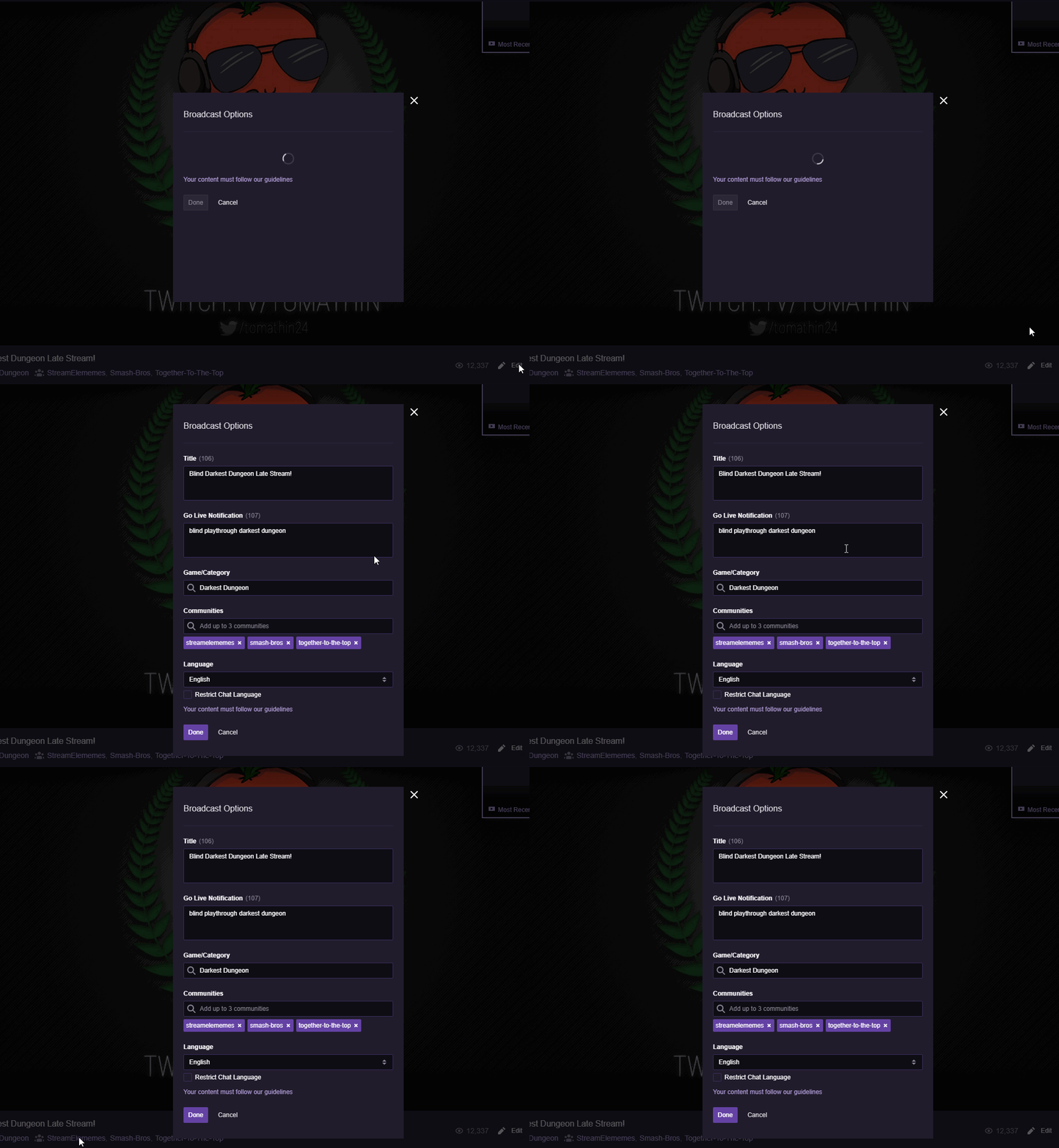
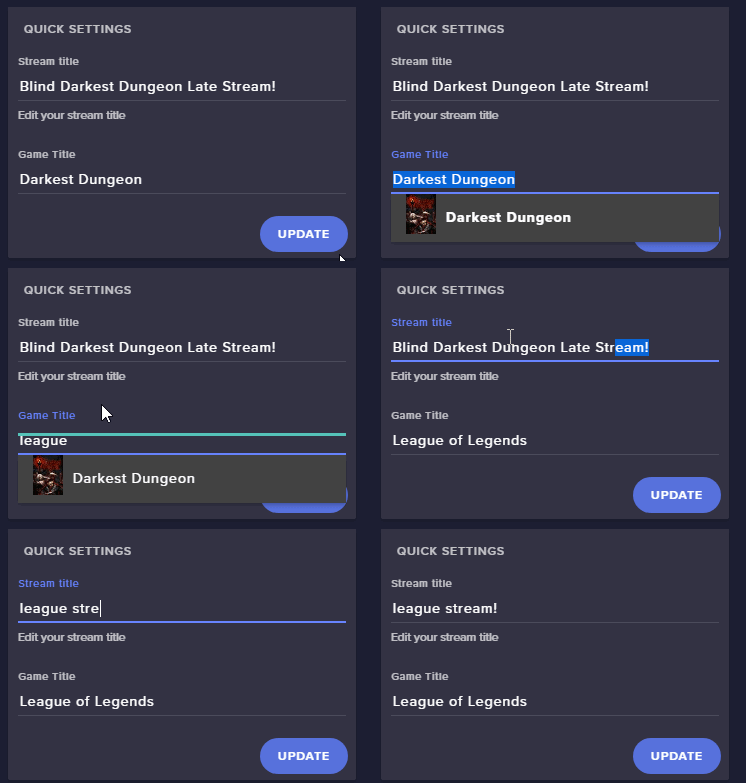 minor haven
I've done it then
dense jackal
👍
minor haven
Thanks
dense jackal
Hey @rapid robin could you try disabling cheers and see what that does?
on the extension that is
rapid robin
Let me check
Ah, got it to work, fiddled with the enabling stuff, but disabling bits didnt seem to do it. I disabled everything else besides points and it works fine.
Doesnt seem to work for anything besides points.. weird.
dense jackal
It seems for some reason the extension is likely not recognizing you as an affiliate therefore not working when adding cheers/subs
dense jackal
I believe this is a known but very uncommon bug. I'll talk to our guys and see what we can do, and I'll make sure to mention your account specifically
rapid robin
Appreciate that man, thank you.
If it works by tomorrow i'll be sure to pop back in here and let ya'll know.
dense jackal
 ebon shard
I think I messed up my audio on my streams
and I feel like streamelements might be why but I'm not sure
dense jackal
What's wrong with your audio @ebon shard ?
ebon shard
neither my game audio or voice audio will go through my stream
dense jackal
That would be an OBS issue. Are you running it as administrator @ebon shard ?
I would check in with discord.gg/obsproject @ebon shard
ebon shard
but the thing is I'm on PS4
and I checked through all my audio settings
that's why I don't know what's the matter
pine hemlock
Our system doesn't interfere with audio
 craggy lichen
Hello 👋 I hoping someone will know an answer to this but I was hosted today by someone and I used the command "!shoutout" to give credit to the Host on his stream and game but nothing showed up after I used that command. So my question is how do I fix/make it work?
dense jackal
Did you set up a custom shoutout command @craggy lichen ?
It's not one of our defaults actually 😄
 misty wagon
It's been added as a command template @dense jackal You need  (here I am!
  )
)
@craggy lichen costumize it to your likings with the little pencil at the end. #command-share channel has more awesome templates!
craggy lichen
I did use the template for shout-out command but it didn’t work when I used it when someone hosted me during a stream. Nothing responded. And thanks I’ll look in that channel 🤝
 cobalt portal
Does SE clear chat for any reason on its own? Just wanted to check before I go start blaming moderators in my channel.
 proud pumice
cobalt portal
proud pumice
cobalt portal
Rgr thanks Perry
craggy lichen
Well I know the host features work because a message from the bot said out that I was being hosted by the user as chat activity module but once I used the command for the first time “!shoutout” nothing displayed when it’s set up by the default settings when making that new command.
dense jackal
ah @craggy lichen did you type the users name afterwards? i.e. !shoutout tomathin
craggy lichen
I didn’t, no. I didn’t know that part. It was my first time getting hosted and using the command so I missed that detail out. But thanks, now I know 🤝
dense jackal
All good
 abstract elm
Guys, is any tts working for SE?
My resub and reply nothing is working
Replay
And I’m live right now.
dense jackal
Checking it out @abstract elm
 celest temple
Is there a way to add a playlist for the song request?
 languid silo
Hi. Can I put songrequest on and hook up my Spotify even with no pc. I only stream on Xbox with nothing else so I just wanted to know
dense jackal
Not with only an xbox @languid silo
@celest temple Yes you can https://streamelements.com/dashboard/mediarequest/settings
wise cliff
@winter zenith sorry for not getting back to you before. My other store items are not set to chat either. It wasn't showing up when it was set for subs only but I was told that they don't. I will double check tomorrow
 muted fiber
Is there a way to make it so that the Stream Elements bot can post in Discord when you go live on Twitch?
zenith widget
@wise cliff Are the store items containing keys(list type store item)?
dense jackal
Not at this time but check the #💭︱feedback-and-ideas page! @muted fiber
muted fiber
Okay, thanks!
zenith widget
@muted fiber MEE6 bot can do that for you
muted fiber
Thank you, @zenith widget 😃
celest temple
@dense jackal, I dont see anything with a playlist with that link
I tried playing a playlist and it didn't add to the que with !sr
dense jackal
The backup playlist option
celest temple
Oh, I don't want a backup list.
lament blade
hi
i have a steam wallet item on store
how can i make the bot whisper the redeemer the steam wallet code?
celest temple
I just want to play a list for now
dense jackal
I'm not sure if it was ever possible to !sr an entire playlist for spam reasons. @celest temple
celest temple
Sucks
dense jackal
You can always add the option to our #💭︱feedback-and-ideas page maybe add it as an optional addition in the future 😄 @celest temple
south bridge
Also do I have to gift a sub to Freddbot (the custom name I chose for StreamElements) or do I have to gift it to StreamElements?
zenith widget
@lament blade The code is shown whwn the item is redeemed. If the person redeeming that closes the page, you can check the redemption history and see which code they got and provide it via whisper.
@south bridge To the Custom bot name
StreamElements and your custom bot name are 2 different accounts
south bridge
Okay, thanks!
zenith widget
As far as I know, stream store items with lists/codes in them cannot be redeemed via chat 
To be able to redeem stream store item via chat, a custom name is given to it, so that it can be placed in the ${redeem} variable(example: ${redeem Steam_Dead_cells}), or same name can be used with the !redeem chat command.
Testing this at the moment, the creation box does not give me a redemption name for chat. @lament blade
This is how it looks
zenith widget
Yes it does
If they close this, then from the stream store main items, go to "Redemptions" next to "Create new item" then to "Redemption History" and provide the code
lament blade
thank you so much
zenith widget
Trying to help Tomathin with the issue, hold on.
winter zenith
@wise cliff look.
The store Items only get Displayed in the Extension if:
.) the store item is redeemable via chat
.) is not a key list
If it is only for subs or not doese not matter.
The important Part is to Check your Items if you Set them up to be "redeemable via chat"
lament blade
I am having trouble getting my chat to show up on obs. It is showing up in the overlay editor, but not in my actual obs. Something to note: I haven't tried going live on obs, these were offline tests.
zenith widget
@lament blade Did you set the browser source resolution properly?
lament blade
hey @zenith widget let me look into this real quick
lament blade
@zenith widget i do have some issues with resolution but I cannot get the chat to show up in obs for the life of me
even if I try squeezing it next to the labels which are working fine
nocturne pelicanBOT
@lament blade The default resolution for StreamElements overlays (theme and custom) is 1920x1080. Please add them in OBS at their full resolution and use CTRL+F to fit to screen if necessary. You can then downscale your stream in OBS settings > Video if you'd like https://i.imgur.com/6bWXxjR.png
 zenith widget
This should help the resolution issue
If you want you can DM me the overlay link so that I can load it in my own browser or OBS for sake of testing
lament blade
@proud pumice when someone request a song in my stream, it atomaticly add a wired song that isnt the song he want to request, can you help me?
zenith widget
@lament blade I can help with that. Are they trying to do !sr <youtube-link> but it shows as !sr ***?
lament blade
yep
zenith widget
There is an option in your dashboard settings to remove hyper links. Let me find the location
lament blade
@zenith widget it says the <removed link>
zenith widget
If you go here https://www.twitch.tv/settings/channel
is this option ON or OFF?
or does it exclusively say <removed link>?
lament blade
@zenith widget <deleted link>
zenith widget
Then go here https://streamelements.com/dashboard/bot/filters
lament blade
@zenith widget but the song is added now
zenith widget
lament blade
@zenith widget yeah that option is off
zenith widget
and it still says "removed link"?
If yes, then I assume you are using BTTV or FFZ and you've turned on some option to hide links for you personally
zenith widget
lament blade

 tight harness
@lament blade What help do you need with your panels?
zenith widget

tight harness
Have you looked online for any yet?
lament blade
nope
zenith widget
You need something drawn?
lament blade
what should i search it as ?
tight harness
If you want something for free then try googling Twitch Panels, if you want something commissioned then check out #art-marketplace
You can even make your own for free here: https://nerdordie.com/product/custom-twitch-panel-maker/ - recommended this to people in the past 😃
tight harness
@lament blade You've got plenty of choices to choose from, best to plan on what panels you'll want first of all, for example an About Me one, a Tipping one etc
lament blade
okay 😛
tight harness
Got an idea about that already?
lament blade
yea
tight harness
Awesome 
lament blade
i usually get 20 viewers but i want to make it neat
tight harness
Yeah, making your panels look good is important in my opinion, helps catch the eye of your audience and gives them important information 😃
zenith widget
What if he wants to be mysterious?
tight harness
If they're a bit bland they're easy to miss, you can have them mysterious and eye-catching at the same time  at least I think so
@lament blade You should consider linking your Twitch to your Discord profile, currently it's only your Spotify and your YouTube
 zenith widget
@tight harness Hey! Stop loitering in my turf, Mr. Rainbow Dragon! 
tight harness
Is that one of Alice's emotes?  or a different Alice?
zenith widget
Thats a different Alice
tight harness
⤴ discussion taken to secret channel 🕵

 @tight harness
tight harness
@tight harness
tight harness
It says alice
lament blade

tight harness
What is this? An emote for ants? 🐜 👀
zenith widget
lament blade
tight harness
lament blade

 winged sundial
Can someone link me where I can change my profile picture on the streamelements website, I can't find it 😃
tight harness
Profile page > open my profile > change it over on the left of the page
winged sundial
You a gem thank you
 cerulean hound
Hello I have a problem with Groundcontrol link to download it,it's not working
It just times out
zenith widget
!gc
nocturne pelicanBOT
Our Desktop App Ground Control: https://streamelements.com/groundcontrol
zenith widget
@cerulean hound ⤴ Заповядай 😉
zenith widget
Искаш ли на лично да ти го пратя?
 south sage
How do you actually go live using streamelements?
zenith widget
You do go live with a streaming software
We provide an overlay and alerts to track who followed you
south sage
so use stream labs to go live but streamelements for everything else?
zenith widget
Yes
south sage
and guessing use launch overlay to active a overlay?
zenith widget
I'm not sure for SLOBS in particular, but it should have the same options as the regular OBS Studio mode for adding overlays
nocturne pelicanBOT
@south sage To add your overlays to OBS, add a new browser source in your scene. Paste your overlay URL in the browser source properties, set the dimensions to 1920x1080 (unless you changed them on the website), and :ballot_box_with_check: “Shutdown source when not visible” https://youtu.be/KDvLynUqXI4
tight harness
OBS Studio has more options in general
ebon forum
SLOBS so far is more like open beta, has more updates but OBS Studio is more stable overall.
 brazen pecan
im new to stream elements, my tipping page wont open to set it up
lament blade
Welcome, is everything set up here? https://streamelements.com/dashboard/tipping-settings
brazen pecan
no it just whitescreens and doesnt load any further.
lament blade
Can you clear your browser cache?
 summer mulch
@brazen pecan Are you using chrome?
brazen pecan
yeah
zenith widget
@cerulean hound Пратих ти лично с линк към ground control-а
tight harness
If the tipping settings page is blank then enable cookies in your browser
brazen pecan
thank you @tight harness
tight harness
No problem
south sage
Ok so i've got that all working using OBS Studio but no sound seems to be echoing, any ideas?
nocturne pelicanBOT
Make sure to :ballot_box_with_check: “Shutdown source when not visible” for all browser sources (all OBS scenes). If using studio mode, uncheck “Swap Preview/Output scenes After Transitioning.” Also keep in mind that sound can play from any overlay loaded in the browser (editor or launched). https://i.imgur.com/FegZJQS.png https://i.imgur.com/yY0wcFl.png


 atomic hollow
!multi
lament blade
Hi guys, is store redemtion allers doesing work or its just me?
doesint*
doesn't* 😃
zenith widget
Did you add the store redemption widget?
 lapis vault
an information: can the person that is extracting the names in a giveaway win the giveaway?
zenith widget
Did they enter the giveaway as well? I'm not sure what you mean with the extraction part
zenith widget
If they enter the giveaway they have a chance to win.
lapis vault
ah okay, good to know
 jaunty salmon
can someone help me set up my stream labs
tight harness
StreamElements sure, but not StreamLabs
jaunty salmon
yeah elements
tight harness
Best thing to do is watch our tutorial videos, they're linked in the welcome chat every time someone joins the discord
jaunty salmon
i looked no help
my laptop broke recently and i am trying to save up yet stream elements can helo yet im really confused
tight harness
Ask your questions here, I'm currently celebrating my brother's birthday so my activity is a little hit or miss today
But there's plenty of us here who are able to help
 sand stump
hi
I'm currently trying to edit the !commands on my twitch chat
but when i type !commands it came out like this VerifiedStreamElements: @sand stumpn, You can find a list of all Commands here *
How do i fix it so that when people type !commands in chat it will provide a link or a list of commands they can use?
jaunty salmon
i just need someone to do ut or me
can anyone do the song thing and the gamble then my stream is done
zenith widget
@sand stump /mod streamelements
That will fix the link now showing. Also if you want you can disable removal of hyper links. This is located in your settings of your account.
@jaunty salmon What exactly is the issue? What can't you setup your self?
jaunty salmon
i cant see what is going on and i think i have messed up
i also want fun commands like music requests and Russian roulette
zenith widget
Ok, so what have you done so far?
Did you make your own overlay using the pre-made ones or a blank one?
zenith widget
Ok, so the premade overlays come with a link.
jaunty salmon
yes
zenith widget
Have you added the link as a browser source to your OBS?
jaunty salmon
???
zenith widget
Ok, so going 1 step back.
jaunty salmon
i cant get the links
zenith widget
Do you know where to find the link for the overlay?
jaunty salmon
no
zenith widget
Ok, so go here: https://streamelements.com/dashboard/overlays
Click that button for the overlay you want.
sand stump
Thanks @zenith widget
zenith widget
It will open the overlay in a new tab in your browser. Copy the link from the address bar.
jaunty salmon
yes
zenith widget
Then follow the steps from the bot to add the said link to OBS:
nocturne pelicanBOT
@jaunty salmon To add your overlays to OBS, add a new browser source in your scene. Paste your overlay URL in the browser source properties, set the dimensions to 1920x1080 (unless you changed them on the website), and :ballot_box_with_check: “Shutdown source when not visible” https://youtu.be/KDvLynUqXI4
zenith widget
If you are having trouble with the written steps, click the video at the end
jaunty salmon
whats obs i stream on xbox
zenith widget
You should have started with that, my friend
sand stump
Also, is there a way to adjust song's volume by typing commands like
!song volume 70?
nocturne pelicanBOT
@jaunty salmon Here is a guide on how to setup the most essential tools for streaming from your console, while using StreamElements tools without involving a Capture Card! It's easy to do, take 4 minutes to read and 10 to 15 minutes to setup!
Read all about it here: https://blog.streamelements.com/how-to-stream-on-console-7b620b1c46c3
zenith widget
@jaunty salmon Read the article and you should be fine to stream with Xbox 😉
@sand stump The command is just !volume
Do note that its a Super mod level command and if you want your mods to control the volume, then you may either need to change the level of the command or add a super mod here: https://streamelements.com/dashboard/bot/users/moderators
jaunty salmon
i just find the article even more confusin
zenith widget

How old are you?
Sorry for being so blunt, but the article is so SIMPLE with screenshots as well
sand stump
i added "new moderator" and named it streamelements, does this mean only me and mods are allowed to adjust volume through commands?
zenith widget
By default, anyone thats moded in your channel are set as moderator level
nocturne pelicanBOT
@sand stump
Chat/Bot Levels
100 - viewer
250 - subscriber
300 - __regular __
500 - moderator (twitch mods automatically placed at this level)
1000 - super moderator
1500 - broadcaster
Dashboard Manager Levels (least to most access)
Bot Supervisor (can add super moderators from dashboard)
Editor
Full Access
https://i.imgur.com/s61Liry.png
 zenith widget
You don't need to set the bot it self as a mod/super mod in the user management. It is the one that processes the commands 
sand stump
oh ok, do i have to leave the "media request" page open in browser for my playlist to "auto play?"
ok nevermind i think i just asked a dumb question because stream plays from your desktop sounds so if i didnt leave it open, there won't be music coming out hence my viewers won't be able ot hear it
haha
sand stump

jaunty salmon
i have done everything on the article now what
zenith widget
@jaunty salmon Just stream, buddy
jaunty salmon
how do i add points and that thou
zenith widget
Do you mean loyalty points?
tight harness
From the site you can go to the leaderboard, add points. From the chat you can use !addpoints <username> <points>
jaunty salmon
oh k thnx
sand stump
is there any mods available now? I would like to have an expert to teamviewer and look at my twitch setups and see if there's anything else i missed out or didn't use to improve my stream 😃
zenith widget
If you give me like 10-15 minutes I'll be able to do a quick screenshare session




 jaunty salmon
it isn't showing my overlays in my stream
zenith widget
@jaunty salmon To be able to show overlays, you will need a capture card. That will have a bit more setup to work, but eventually the console is connected to the capture card, capture card is connected to a PC, then a streaming software shows the capture card and the overlay
(hence OBS)
jaunty salmon
i got the bot so will that be it
zenith widget
You can have the bot to show in chat, when someone follows you via the chat module located here: https://streamelements.com/dashboard/bot/modules
jaunty salmon
how can i check it works
zenith widget
if you just enable the chat alert, most messages are enabled by default.
also in your twitch chat do /mod streamelements
sand stump
@zenith widget i didnt know about that link haha thanks
zenith widget

sand stump
i just found something new LUL
zenith widget
finishing dinner very soon
sand stump
no prob man take your time i can wait
zenith widget
will be with you in 5 mins or so
zenith widget
eggs and sausage 


 zenith widget
Now youll be even more hungry if you check #food-pets-irl-pics 
 zenith widget
@sand stump DM? 
sand stump
@zenith widget Thanks for your time man! Really appreciate it! Cheers 
sand stump
Will do!
lament blade
how do i set up the song request command?
zenith widget
You need to enable viewer requests from here: https://streamelements.com/dashboard/mediarequest/general and make sure to check out the settings.
lament blade
Can I use the overlays and everything from the site without any broadcasting software (I mainly use the internal broadcasting stuff on a console)
zenith widget
For overlays, you will need OBS for that, so you will also need a capture card for the console and PC
But if you don't have a capture card, you can use the bot and have it say a thank you msg in chat when someone follows/subs/tips
for example
lament blade
I can't afford all that and I go to a card/gaming shop just to play and my laptop can't support any streaming software
it want let me enable the song request command. it says its controlled by module setting, how do i turn it on?
zenith widget
You need to enable viewer requests from here: https://streamelements.com/dashboard/mediarequest/general and make sure to check out the settings.
lament blade
Fang you can use a window capture divice on obs
zenith widget
Don't want to sound rude, but that won't help him. Read his responses and what I suggested to him
And I also provided you 2 links to video guides on how to setup the media share\
lament blade
Oh my bad i thought he was streaming on pc
I watched the newest one but i didnt see any and the other one is outdated to the software
zenith widget
@lament blade Well you can still use the bot and the activity feed to track who has followed you. Just stay safe at those gaming shops
lament blade
I know the owner and it's a small town so I'm good. I'm also there every day and I stream almost all the time when I'm playing games there
zenith widget
@lament blade If you are referring for the videos being outdated, they may look so, but still useful.
 faint crag
where do i go for help on their webpage?
zenith widget
Which website?
faint crag
stream elements its just a white page with a help button and i did ctrl shift r and i got the same thing
zenith widget
What browser are you using and have you enabled cookies? (and where are you from?)
faint crag
chrome, yes and us
faint crag
yes exact same
 loud arch
i have been trying to find a solution for a whole day now
faint crag
yeah that doesnt help the situation at hand here
lament blade
Have you guys tried shutting down your computer and doing a hard reset by unplugging it completely
ebon forum
@zenith widget we had a similar issue a while ago. if i remember correctly, this was an ISP issue
@loud arch got access to VPN? if yes, try it
lament blade
Hard reset your internet as well
I'm just trying to toss ideas out so if you done one I suggest and it doesn't work disregard it
loud arch
yea i really appreciate it
lament blade
I had issues with my wifi and a full on hard reset fixed it
 twin stirrup
I'm setting up G2A pay with streamelements, and it says it's going to send me an email. But i haven't gotten an email in a couple of hours already
summer mulch
@twin stirrup Contact G2A support
loud arch
i really made a huge mistake when i first signed for streamlabs
twin stirrup
Isn't this the helpdesk tho?
summer mulch
@twin stirrup Did you have a G2A account with that email?
If so, just login to that account
tight harness
This is a helpdesk for a specific service, what that means is that we can't help with everything, some things require talking to the relevant support helpdesk, but as 3xtraSpicy said if you already have a G2A account signed up with a specific email then log into that email and check your inbox and spam/junk folder @twin stirrup
loud arch
pepe wtf xD
tight harness
@loud arch Could you clear your cookies and then try again?
untold crest
@lament blade I've removed your screenshot as you probably didn't want to share screen with your personal overlay URL 😉
lament blade
@untold crest opsi xD i didn't remember that
tight harness
It's a good thing to remember, they're very private and shouldn't be shared with anyone 😄
untold crest
@lament blade something is messing with headers and therefore chrome has problems to get that data. Probably you could:
a) check your antivirus software (or web protection)
b) disable checking same origin access within google chrome itself
Just checked addresses that cause problems on your side and there is proper header sent
to point b you can install a plugin for that - just to override your av software - https://chrome.google.com/webstore/detail/allow-control-allow-origi/nlfbmbojpeacfghkpbjhddihlkkiljbi?utm_source=chrome-app-launcher-info-dialog

Allows to you request any site with ajax from any source. Adds to response 'Allow-Control-Allow-Origin: *' header
soft vault
Where do I remove my top donator's donation?
I already refunded their donation but there name reamins on the widget
untold crest
This plugin is the easiest way
loud arch
rip it doesnt work xD
zenith widget
@soft vault You can edit the top donator label here: https://streamelements.com/dashboard/session
Don't forget to click "Save"
loud arch
i seem to have troubled everyone with my problem
zenith widget
I have no hecking idea what may cause a blank page, but I did try to help best to my Knowledge. At this point it seems that maybe LX will be the best help on the matter, so good luck 
loud arch
really appreciate it @zenith widget
untold crest
@lament blade but maybe... can you check another browser?
tight harness
Blank page means you're not allowing cookies usually
untold crest
At this point we know - other device within same wifi network - no issues
untold crest
Huh. It really seems like something in the middle messes with headers.
And browser can't pull data from SE API
tight harness
Can you show the preview tab on a failing request in the network tab?
soft vault
@zenith widget There';s no data for top tipper but it shows up on my overlay.
untold crest
Great! So we are getting closer
zenith widget
@soft vault Which widget are you using and what exact setting have you placed it with?
untold crest
[I HATE USING TAB KEY ON DISCORD] go directly to http://api.streamelements.com/kappa/v2/channels/me
And solve captchas
tight harness
Tagged the wrong person
loud arch
untold crest
So Cloudflare (SE load balancer) pulls you back
loud arch
😂 yea xDD wrong person rip
untold crest
[I HATE THIS AUTOCOMPLETION] seems like cloudflare issue, the best way is to wait a while and then try to check it again. Do not hammer it in meantime as it can make this process longer (cf can false positively treat you as ddoser)
HATE THIS TAB
@loud arch ⤴
loud arch
yea ill do that for ow
now*
anyways i wont be using this ip anymore
cuz im moving
same thing happened with a facebook game last year i had to wait a week and it went
soft vault
@zenith widget "top tip" and the setting is all time top tip
zenith widget
Well one thing you can, until you have someone else be the top all time tip
is just edit the text of the widget to the previous person
 normal fog
Cant get the chat to show up on the stream, it shows up on se editor but not in obs/stream.
Talking about my channelchat 😃
normal fog
yes
dense jackal
Can you show me what you see on SE and what you see on OBS?
twin stirrup
Still trying to link my G2A pay to stream elements, streamelements said it would send me a mail but didn't
dense jackal
Try setting the overlay in streamelements to 1920x1080 and see if that makes a difference ( I believe there is a current bug where the chat lists need a 1920x1080 res on SE to work correctly) @normal fog
 brisk mica
hello, so all of my notifications are working on OBS but for some reason the sub noise will not go off it pops up just no sounds all other sounds work
dense jackal
Are you just setting up your G2A account for the first time? @twin stirrup
dense jackal
👍
I'm looking into it @brisk mica which overlay specifically is giving you this issue?
brisk mica
its all of my overlays but i am using the green flair pack
and when i go to edit the overlay the sound works there
dense jackal
So the bottom one @brisk mica ?
 brisk mica
but i just tried to replay a sub and it didnt work
sigh it even does the t2s but still wont make the sound
dense jackal
I hear the sound 🤔
lament blade
@untold crest For the Event rotator you made in Widget Share, how would I change it to make the words like Follower a different color? I can change Latest as that's outside of the <span> the rotator uses but the words like Follower, Cheer, etc are in the span so I can't change them or they change the person's name after too which I don't want to change.
brisk mica
yes
dense jackal
It doesn't have sound playing in your resub variation 😄
https://i.imgur.com/EBMWnnr.gifv Here's how you would fix
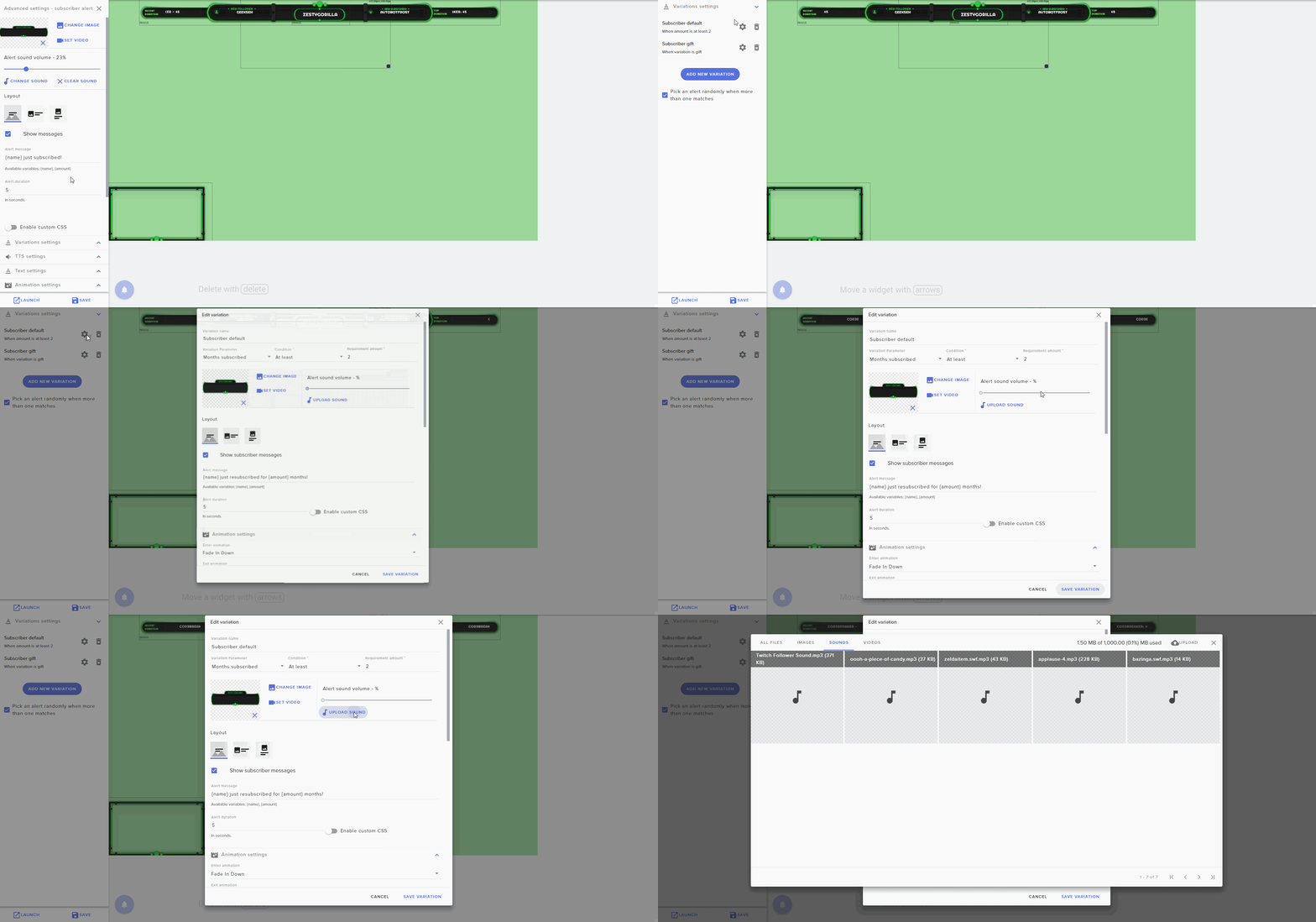 dense jackal

dense jackal
dense jackal
If you already have a G2A account with that mail you won't get a mail saying you signed up, you just gotta login to the account of that email
twin stirrup
But it still says "Tipping setup 50%"
tight harness
Have you done the rest of the things in the other drop-down sections?
dense jackal
just you select a panel or click the other steps?
 fierce sun
Hey guys I am having an issue with the leaderboard module. I have set my next stream for tonight which is 12 hours 20 minutes away and the timezone is set correctly however it is saying that the stream is 1 day 12 hours away.
 tardy mulch
hey! i was looking around some widgets like the custom event list, not able to detect when someone gets something from the stream store correctly
fierce sun
It is currently Monday morning 8:15am
 kind epoch
Hi, is there a way to make a command for different timezones with different commands?
Like Australia, New Zealand UK, US etc for example?
fierce sun
@kind epoch Nah no custom commands
 static beacon
do any of you know why i can't download the sfx shares?
kind epoch
Does se do sound effects?
 quick helm
I'm have a hard time setup a theme for warcraft and streamelements do not have any super theme for warcraft 😦 is there anyone how can help me set it up and a way to copy a cool theme for the game 😃
static beacon
yea, but when i press download nothing happens
tardy mulch
@static beacon try having a browser open
static beacon
oki
kind epoch
How can i make Stream Elements Do sound effect files?
static beacon
worked,, thanks alot @tardy mulch
fierce sun
Nothing i do fixes my schedule panel so not sure what i can do now.
tardy mulch
i remember having that issue but i dont remember what i did
fierce sun
i could remove and reinstall the extension?
tardy mulch
i remember now
have you check the checkmarks to show what days are you available?
try uncheck them and check them again
😃
kind epoch
Does that mean NO?
fierce sun
Unchecked > Saved > Readded > Saved still 1 day to much on the timer
kind epoch
@obtuse gyro where is the command?
 obtuse gyro
check the overlay editor, in one of the widgets, theres a variations option, sounds should be there @kind epoch
 normal igloo
@kind epoch Only way of doing sound commands is by the Stream store
obtuse gyro
yeah if you want to play sounds after using commands in chat, thats how you do it, with the store, sorry i misunderstood
kind epoch
Ok james, how do i do that?
normal igloo
@kind epoch Go onto the SE website Stream store Create new item Set 2 sound effects Then just finish off the final settings [ Do note Whatever you make the command Your users will have to do in chat !redeem the Command name 👍
fierce sun
Yep i'm out of ideas now I just uninstalled and reinstalled the extension. I would really like to release my schedule asap.
If any support member has some time to look into this I would very much appreciate it.
normal igloo
@fierce sun What seems to be the issue pal? 
fierce sun
The SE Leaderboard extention isn't displaying the correct countdown to next stream
it has 1 day to much on it.
My next stream is Monday 8:30pm and it Monday morning 8:48am which should display less then 12 hour remaining.
normal igloo
And you setup the right times and time zone I take it @fierce sun
fierce sun
Yeh the timezone is correct. I have tried reinstalling the extention, deselecting the day saving then redoing it.
normal igloo
As I know you use the extension @dense jackal Would you happen to know how to fix This ? ^^^^^ 🤔
dense jackal
This is a known bug. It's very uncommon, I suggest uninstalling the extension, logging in then out of SE. Then reinstalling the extension may help @fierce sun
normal igloo
Thanks for helping out Tomathin
dense jackal
Like I said this is a known bug with some accounts we are working to fix it @fierce sun
 soft tusk
Anyone know how to get the video from a stream to record?
fierce sun
@dense jackal Ok no problem I will have to remove the schedule section until it has been fixed. Thanks for the help though.
kind epoch
Thanks store redemptions are now in order 😄
normal igloo
@kind epoch np 
dense jackal
I'm pretty sure you can download your vods @soft tusk
normal igloo
^^^^
dense jackal
Are you setting up sources in OBS @soft tusk ?
soft tusk
I'm trying to do that & set up my StreamElements rn.
dense jackal
Checkout these tutorials https://strms.net/welcome if you're having obs issues the best way to solve them is through discord.gg/obsproject
kind epoch
Why does text to speech read eeeees as dddddds?
lament blade
Have you tried switching voices?
soft tusk
How do I stream through Elements?
obtuse gyro
explain
kind epoch
@lament blade no, i might do that ')
soft tusk
When I go to stream, I don't get any of the benefits of StreamElements, and it goes straight to twitch.
obtuse gyro
like your overlay isnt appearing?
tight harness
🤔
soft tusk
Yeah, my overlay isn't appearing, nor are any of the functions for viewers.
narrow coyote
you need to add the overlay to your broadcasting software
and what functions are you talking about, I see the bot in your channel
this was from your chat
soft tusk
Ah, I'm losing my mind rn cause I've never really done anything like this before.
quick helm
thank you .. for the help
narrow coyote
@soft tusk what broadcasting software are you using? have you watched any of the getting started materials?
soft tusk
I'm using OBS, and I've watched them but don't really understand.
nocturne pelicanBOT
@soft tusk To add your overlays to OBS, add a new browser source in your scene. Paste your overlay URL in the browser source properties, set the dimensions to 1920x1080 (unless you changed them on the website), and :ballot_box_with_check: “Shutdown source when not visible” https://youtu.be/KDvLynUqXI4
narrow coyote
⤴ This goes over adding your overlay
 inland cypress
editcounter stopped updating my wins. didnt touch anything it just stopped working. worked the first day, im on day 4 of having streamelemnts and hasnt worked since. anyone know whats going on?
commands work. they just dont update the !wins themselves. Example: !editcounter !wins +1 stream elements updated wins from 0 to 1
narrow coyote
if your counter is wins, you dont want to have !wins
!editcount wins
there is a really good example of this in #command-share towards the top
 trail sinew
anyone can help?
lament blade
Hey of course, what do you need help with?
 elder sorrel
@trail sinew Looking at past comments with the same question. I see no update yet for payment options in Lebanon but hopefully one of the support peeps says otherwise. 😅
tight harness
Is G2A Pay available in Lebanon? 🤔
tight harness
We are a stream assist service, everything is stored on the cloud, but we do also have a downloadable program which you can use which connects to our site
!gc
nocturne pelicanBOT
Our Desktop App Ground Control: https://streamelements.com/groundcontrol
tight harness
How do you withdraw from G2A Pay without PayPal? just a curious question
trail sinew
skrill or credit card
where is jwt token?
the application is so simple
if i want to change any overlay
tight harness
For future reference just click on your username in the top right of the dashboard
trail sinew
i need to use the website?
tight harness
To edit an overlay you do it in My Overlays, yes
That is what we call the overlay manager
trail sinew
so how can i link my overlay to obs
tight harness
Or overlay editor
Follow this tutorial video, it shows you how: https://www.youtube.com/watch?v=KDvLynUqXI4
trail sinew
im facing a problem
i am having 120fps in rainbow six siege
when i stream
it lags and stutters
only on stream
tight harness
120fps isn't bad
trail sinew
on my pc buttery smooth
narrow coyote
are you dropping frames in OBS? it should show you its status in the lower right corner
 raw herald
so when i change my bots name through ground control it changes it to my Username and makes it look like im typing when i set the name to something completely different
narrow coyote
that means you are using the oauth from your twitch account. You need to have a twitch account that will have the bots name, and use the oauth from that
narrow coyote


lament blade
 keen wadi
how do you make a rank! command for twitch (for league of legends)
narrow coyote
I think there is an example in #command-share
keen wadi
tyty!!
narrow coyote
 strong scaffold
anyone ever had the issue on twitch where your 3 avg viewers achieve is stuck at 67% but it shows you have 3 avg viewers or more?
 mint ether
Hey guys, is there any way to use the overlays via the geforce experience while streaming?
dense jackal
I'm not familiar with how geforce experience streaming works, but if you can add a browser source it should work just fine 😄
narrow coyote
You cannot
mint ether
well looks like i need to use OBS studio then.
 livid ingot
How come i havent had any notices from the bot regarding Offline hosts? used to get them
narrow coyote
by default now it will not display any hosts for 0 viewers, you can change that in the chat alert module https://streamelements.com/dashboard/bot/modules
mint ether
when streaming do you guys use your screen resolution i.e.2560x1440 or should i use 1920x1080?
livid ingot
Kite, like that?
narrow coyote
I would make the OBS canvas 1920x1080, and then depending on your system, have the output as 720p, or 900p if you can handle it
yes, like that
mint ether
Noob post - ok i just realised theres a heap of different streaming software out there. Which software integrates best with stream elements? i can see on twitch tehres 8 Bebo, Streamlabs OBS, Xsplit Broadcaster, Open broadcaster Software, Streamlabs, StreamElements, Muxy, Opera Event.
thank you for your help so far KITE
narrow coyote
OBS Studio
It is the preferred broadcasting software to use with StreamElements, and it will only get better as the platforms mature
mint ether
ok sweet
 storm heath
Is there a way for mediashare to only show the song name instead of clicking hide video everytime?
narrow coyote
Yes, there is a currently playing widget you can add to your overlay
kind epoch
Why does sound work on one pc and not the other for example store redemptions sound does not work on this pc but on another pc is sounding fine...
narrow coyote
then you can use media share without the show on stream option
storm heath
ok, thank you ❤
narrow coyote
What exactly do you mean when you say they work on one PC and not the other, how are you testing this?
kind epoch
Via the preview
Just won't work on my stream pc but on gaming pc is ok
there is no audio on the stream pc via the preview
narrow coyote
it just plays it via the browser, so if you have that muted, or are routing the audio in a certain way
kind epoch
Only works through the store redemption
Audio is routed through Elgato sound
All other audio works
Including SE media share
narrow coyote
but if you are in the store, and using the preview button, that just plays from the browser.
are you doing it from the store page, or your dashboard?
kind epoch
from the store page
and nothing is muted
just checked volume mixer google is unmuted
narrow coyote
what browser are you using? Make sure nothing is being blocked on the page. Not really sure what else to tell you, your store sound items work when I test them, and if its only one machine, not really sure I can help too much with a machine specific problem
does it work from your dashboard page? https://streamelements.com/dashboard/store/items
kind epoch
nothing no t a sound not even through the dashboard but its fine elsewhere
wierd, now media request via browser don't work neither
narrow coyote
What browser
narrow coyote
@inland cypress can you post a screen shot of how your command is setup
 thorny mortar
Hello, I need help I am trying to find my JWT token and I am confused lol plz send help
nocturne pelicanBOT
@thorny mortar You can find your JWT token on your account channels page: https://streamelements.com/dashboard/account/channels
(Don't forget to click on "Show Secrets")
thorny mortar
Thanks StreamElements
narrow coyote
I wanted to see the settings page from your !wins command
I'm about to go to bed now though, but you can still post the screen shot, someone else can help, or I can look when I wake up
mint ether
Does anyone here use gopro hero 4 as their streaming camera? If so how the hell did you do it. Ive been on the net all morning and it seems like its impossible
 distant lake
You need a elgato camlink or any 60 fps 1080. Capture card averlink is a brand as well
Plug that into pc and then you will have video to the obs
mint ether
sweet thank you
inland cypress
do you think it can work with NDI output plug in?@distant lake
distant lake
I'm looking it up with ndi it is usually supposed to be for pc to pc the go pro has live view from the app and can be implemented wirelessly but for best option hdmi is the best method for lossless quality
Hdmi to capture card
Unless your talking about irl
Then you need a encoder box that can be charged with a battery pack that sends to your twitch rtmp or your custom rtmp then to twitch
The go pro has not so so audio so if you add a mic into it you lose the ability to charge it so it's best to have a encoder box that you can plug a mic into it rather then into the go pro :)
Also you will need a wifi box with that encoder box and the encoder box must be wifi or ethernet capable :)
 tropic sapphire
winter zenith
tropic sapphire
winter zenith
Hello 
 cedar fulcrum
Hello @tropic sapphire 
winter zenith
Hey @ivory surge no advertisment here.
 inland vault
hy 😃 i have a little problem with alerts variations
when i setup the subgift, how can i write the gifted person name? variable i mean
or is this the {name} the right one?
cedar fulcrum
Hello @inland vault you should do it like this on the overlay editor: {sender} gifted {name} a subscription!
You will find it in Sub gifted variations
inland vault
ah okay thank you
cedar fulcrum
Welcome! 
 wheat prism
quick question ... (i did post under ideas.. just checking it isn't actually there) ... can we group items in our store, like sounds, games, etc etc... else if you have many items in your store, it is overwhelming to find games amongst many sound effects...
winter zenith
It's on the ideas Board like you said but not a prioraty as of right now
wheat prism
basically just a tag system... ok, will wait for it 😃 they could reuse the tags on the commands page ... as now you create a custom command to redeem the item from the store.. my commands page just exploded.
nobody likes typing redeem item ... just item ... should just have store and commands be unique and it automatically redeem from store if the command is typed .. just a wishlist
zenith widget
@wheat prism There is a ${redeem store_item} variable which you can place in a command response. Example: !apple with response ${redeem apple}
 hazy comet
when setting up the overlay for current song for the media request, should i be able to see it working in obs as if to test it or does it only appear on stream?
zenith widget
If you play a song from the media request you should be able to see the current song on the editor & OBS
hazy comet
hm. i must have it set up wrong then. thx for responding @zenith widget
zenith widget
Check the widget, as it has 3 settings in it. 1 for Media Request, plug.dj and another streaming site I can't think of on top of my head @hazy comet
hazy comet
ok
ooohhh I see so the current song is the plug dj.. So is media share the one I want? it says its to show youtube vids on stream but i just want to song title and requested by
zenith widget
You can show the song via that widget, but not who requested it, unfortunately.
And yes, media request uses YT
hazy comet
ok, so can i remove the vid display and just have the song name?
zenith widget
There is another widget that can show the song and who requested it - Media Share
But this shows video as well
hazy comet
hm... ok, I'll try to figure something out. thx again
lol ok so i just cropped the vid out and have it so you just see the song title. guess that'll have to do
 proven copper
help please...I have run 3 giveaways a week last saturday this saturday gone and yesterday sunday..and the same person has won 3 times
proven copper
he has won 5 out of the last 6
lament blade
wow
proven copper
dont seem right
lament blade
How many people took part in the giveaway?
proven copper
30 to 60 peeps in each draw


 proven copper
1
lament blade
wow or he is very lucky or something gones wrong
proven copper
all have just 1 ticket
is it possible to prevent a give away winner from winning next draw?
tight harness
If it's the same giveaway they won't be drawn twice
proven copper
no each week different give away
zenith widget
Is he a subscriber?
proven copper
yes
zenith widget
If his the only subscriber that enters, then this may the factor for him to win so much
if you've set the luck bar a bit too high
proven copper
sat was anyone can enter followers and sunday just subs
perhaps its just luck
and same person won both
tight harness
Ahh I see, yeah it's % based, so it's all luck
inland vault
I have another question! I made a twitch bot, and is it possible to change the name of StreamElements?
proven copper
yes
zenith widget
@proven copper There is a way, but with some API setup. Check the last entry in #command-share
nocturne pelicanBOT
@inland vault Custom bot name requirements
- StreamElements bot modded and in chat
- Active overlay with alerts
- StreamElements tipping page in the panels below the stream (!panels)
- Create a twitch account for the name you want to use
- Ground Control app must be running
Steps to enable custom name
- Sign in to https://twitch.tv with the bot account
- Install and run Ground Control (!gc for download)
- Visit https://twitchapps.com/tmi/ and generate an oAUTH token
- Copy/paste everything in the box to Ground Control oAuth settings and enter the name for the bot account
- Restart Ground Control (custom name may take a few minutes to take effect)
proven copper
tyvm
inland vault
thank you
zenith widget
 cerulean cradle
Hey, Are keyboard commands for media request working with ground control yet? I saw that it was a bug from a few months ago, but I wasn't sure if it was resolved. Any suggestions on how to control media request play/pause and skip without alt tabbing?
zenith widget
Unfortunately, the keyboard shortcuts do not work with the current version of GC. They will be working again with GC 2.0. No ETA on that.
As for the actual control, best place do so is via the media request page, but there are not shortcuts there as far as I'm aware
cerulean cradle
Sounds good, thanks
zenith widget
From the SE Dashboard or use !bot part
Can I ask why you don't want to use SE bot? @lament blade
lament blade
I just feel like since streamelements has lots of point games and stuff and im using something different for points i'd want to use a bot without point options, imo
 strong silo
You can just disable it
In streamelements loyalty setting or in the commands section just disable the command or the whole thing all together
tight harness
Or disable the games in Modules
strong silo
^
tight harness
Plenty of options 😄
zenith widget
Or import the points to the SE bot
lament blade
i know but i just want to switch to nightbot
zenith widget
Why not have both? But like said above, you can disable the loyalty points of the SE Bot from here: https://streamelements.com/dashboard/loyalty
tight harness
We're just explaining that we have the options available 😄
strong silo
So the media share thing I have to have the media share website/weblink opened in a browser for it to work. correct or??