#helpdesk-twitch
1 messages · Page 298 of 1
 winter zenith

 craggy lichen
2 questions, sorry but still learning quite a bit to Stream Elements as I'm new this bot. 1st if someone hosts me, did I type this out right to give credit to their channel and the game they're playing? 2nd is is there a way to welcome someone into the stream chat as its their first time coming with a bot response as a welcome message or anything like that? Not including the follow message.
 muted tusk
Hey I received an email about how to turn off the sounds when im not using them. i use obs for recording too and its frustrating lol. Im trying to find where you turn the alerts off when the layer isnt visible.
 mystic basalt
does anyone know how i could setup a share link for one of my overlays?
 haughty talon
So what can a moderator do and what can a super moderator do? waht is the difference
 pine hemlock
@craggy lichen Im not sure if the {channel} and {game} variables work in the chat alerts
@haughty talon https://streamelements.com/dashboard/bot/commands/default There is a section with moderator only commands and commands for super moderators.
@mystic basalt What do you mean by a share link specifically?
@muted tusk If you hide the browser source that contains your alerts, they sounds wont play.
 wispy stratus
help!
new streamer... ehehe. OBS version 21 don't have browser source anymore? How to add overlays from you guys?
mystic basalt
@pine hemlock id like to send an overlay i set up to someone. For instance, if i make alerts for a client, id like to be able to set thgem up and just send them a quick install link of sorts. Stream labs has the capability but i havent been ablke to find a way here yet
i know its possible because i set one up from another souce this way but i cant seem to figure out how to make one myself
mystic basalt
ok thnaks
pine hemlock
@mystic basalt So, the other person would have to give you access to their dashboard to manage their account, and you can then import the overlay from your account to theirs
!invite
 nocturne pelicanBOT
To invite managers to your dashboard, Click on your Channel Name at the top of the dashboard and scroll down to Settings. Click the drop down arrow to expand your channel managers and then create a new invite at one of three access levels (Bot Supervisor, Editor, Full Control) Check this video out for more help: https://youtu.be/zl_h-ttZDF0

 tight harness
I think Editor should do it
mystic basalt
@pine hemlock nah thats not what i mean, i know how to do that. theres a way to share just one specific overlay. can i dm you an example?
pine hemlock
dm sean  he knows more
mystic basalt
ok thanks
tight harness
I know it's been demonstrated to us by the developers in the past, but we've not been shown how to do it
mystic basalt
@tight harness yea, im a dev/designer. ive bneen transitioning clients over to SE because i think its better. I basically want to be able to set everything up for them, overlays, alerts etc. and then just send them the "quick setup" link to maake their lives easier.
 obtuse gyro
imo that defeats the purpose of the high customizability SE has. but again thats just me
 bright tartan
is there a way to edit the chances of winning in !gamble and routlette and stuff
!gamble all is winning way too often for my liking
obtuse gyro
uh yeah there is, let me check where the chance is located
 dense jackal
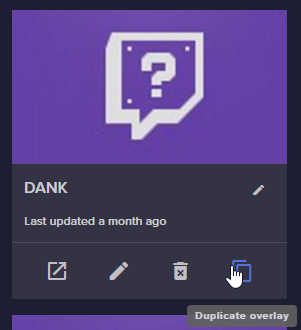
@mystic basalt if you are a manager on someone elses account you can duplicate overlays from your account to theirs https://i.imgur.com/6P68XPV.png
 bright nexus
im having problem with SE detecting my subscribers, i had to reset my password on twitch and reconnect everything so im gonna say its because of that
anyone know how to fix this
dense jackal
I'm not sure if you need full access to do this but I know you need to be some type of manager @mystic basalt
Let me take a look @bright nexus
obtuse gyro
@bright tartan bot modules>roulette>settings
 jade breach
My bot just broke. It's not working at all. Anyone else having this issue?
obtuse gyro
@jade breach no one else has reported this so.... no? did you try the usual disconnecting and reconnecting it? haha
jade breach
Ok thank you!
 trim scaffold
Hello! I have accidentally made two accounts with different channels, and I want to merge them. How would I do this? I don't see a delete button.
bright tartan
@obtuse gyro there is no module for !gamble that I can see
bright tartan
ok thanks
trim scaffold
Also, the dashboard sometimes just doesn't load, why is that?
obtuse gyro
<@&382267076632379392>
 proud pumice
it seems some ISP in the US is having some issues, everything is fine on our side
trim scaffold
Okay.
proud pumice
global service running well
trim scaffold
As for my accounts?
proud pumice
what ISP is that?
 hazy adder
Hey guys right now only the uptime commands work after enabling loyalty settings
obtuse gyro
im not even sure twitch allows multi accounting
trim scaffold
One account has a Twitch acc, the other a YouTube acc
proud pumice
if you logged in as two different accounts you'll need the help of @clever mango to merge them, he'll be available a bit later
hazy adder
Any help for me?
trim scaffold
Okay, could they ping or DM me when they're available?
dense jackal
Message him now @trim scaffold that you want to merge two accounts and he will help when he can
trim scaffold
Okay
dense jackal
@hazy adder that's because we have watchtime linked with yout loyalty. If you don't want loyalty you can enable it but just set points gained to 0
or turn off points command
trim scaffold
Thanks guys!
hazy adder
I turned on loyalty and do want watchtime the only one that seems to be active is !uptime
I'm new to this and an old man ha
 worthy vigil
https://gyazo.com/e66d288da3bf59fff0fcff6e97ce4c46 um.... why does streamelements bot think I've been offline for over a day when I've been streaming for the past 10 hours and 40 minutes
 proud pumice
its possible twitch didnt send us the stream start event
the live button is red on your dashboard?
worthy vigil
https://gyazo.com/61cf460e08b306369bd790b56f679812 um..... something is wrong
 worthy vigil
https://gyazo.com/f2f67d9c99b071fd25504e0529561afc and yes, it shows I'm live there on the dashboard 😃
 jade breach
Now my sub count on my overlay won't show the {count}
worthy vigil
https://streamelements.com/commands OOF it's leading to a 404 page

StreamElements
The Ultimate All in One Platform for Streamers
medic
dense jackal
it's missing the username
trim scaffold
Are you looking for https://streamelements.com/dashboard/bot/modules ? Or do I not understand?
StreamElements
The Ultimate All in One Platform for Streamers
proud pumice
he's looking for his own commands page
trim scaffold
Oh
worthy vigil
that's always worked before ._.
proud pumice
no way
thats your url https://streamelements.com/jackler/commands
works for you?
@worthy vigil
worthy vigil
my mind has just been blown, that command has always worked in the past
worthy vigil
I edited it to secommands because I have another bot that uses taht same command
 full fable
Any reason why all the sudden my link isn't working on my obs?
trim scaffold
if you're in the us #general-chat we are having some issues rn
worthy vigil
I'm so confused, I just tried doing SECommands again, I haven't edited it at all, and now it's working with the correct URL
did the bot just now fix itself, the watchtime stuff and so on is correct now
proud pumice
🤔
watchtime stuff is sorted, because twitch sends proper info now
but commands shouldn't have changed
ever :x
i think all twitch servers are back to normal
worthy vigil
oh, it might be because "You can find a list of all Commands here https://streamelements.com/$(channel)/commands"
The $(channel) bit must of removed itself because it wasn't connected to twitch properly
StreamElements
The Ultimate All in One Platform for Streamers
proud pumice
all load times are minimal right now
@worthy vigil its very possible!
thats why it also didnt find people for the followage
because twitch didnt send their actual username
so everyone appeared as username blank
worthy vigil
That's really strange - any idea why that would have happened, or is it just twitch had a hiccup and it fixed itself
proud pumice
twitch had a hiccup that caused a long request queue on our system, our devs reset the connection to twitch and everything was sorted
they're monitoring now to see if any hiccup happens again, it shouldn't
worthy vigil
ah nice, ok thanks then xD I was wondering why the commands just randomly stopped working
 hazy comet
Is there a way for stream currency to be used to buy sub points towards a free sub?
proud pumice
what do u mean sub points?
worthy vigil
@hazy comet you might be thinking of gather_bot with the quests
I have it too, I combo it with StreamElements
hazy comet
Yea kinda like that
Was asking because most of the offers are unattractive but the idea of earning a free sub seemed cool
worthy vigil
I don't think they will allow currency from one bot to be used for actual monetary stuff on another bot
worthy vigil
I mean I only use them 2 bots lol the best ones you can get for twitch
hazy comet
Oh gotcha
So stream element currency can only be used for song requests? And the store, which I have little knowledge of what the store is for
 autumn cloak
Hello I was wondering about the payment area I don't see how to setup the link and such
worthy vigil
I'd imagine so yes - I'm gonna head off now, I need to continue with my stream xD If you wanna chat more, feel free to pop your head round the corner 😉
autumn cloak
I tried the show me how thing but the thing won't show to add it
obtuse gyro
@hazy comet have you looked at any stream elements tutorial videos yet?
hazy comet
No, just the one about the media request
 narrow coyote
@autumn cloak Are you talking about this page https://streamelements.com/dashboard/tipping-settings
worthy vigil
no problem 😄
 forest mango
I was wondering if it's possible to get the full module commands code? I wanna have the modules whisper amounts won ect but that isn't an option for modules only custom commands. So would hopefully just copy and paste everything but set the output to whisper.
dense jackal
Currently that's not an option, we do want to expand our modules and bot customizability in the future though. Feel free to check our ideas board https://strms.net/ideas @forest mango
forest mango
Ok. Thank you for the reply.
 flat valve
bots seem to be lagging right now
 wanton jetty
is the bot lagging or is it me lol
 clever mango
It is, we are on it
autumn cloak
I was wondering how do I actually add the loyalty to my stream and the overlay
narrow coyote
autumn cloak
Kite I have that already done it won't show my overlay or payment method on my stream
narrow coyote
what are you expecting to see on your overlay, and what do you mean by payment method on your stream
narrow coyote
you need to add the overlay to your broadcasting software, like OBS
autumn cloak
Where does it show how to activate it?
narrow coyote
I dont know xsplit, but they have a way to add a source that should be called something like browser or web
you add your overlay URL to it, and set it to the overlay's resolution
 twilit oxide
@tight harness tried again no luck 😕
narrow coyote
seeing the page like that means you have some cookies being blocked
specifically streamelements-yoink.netify.com
@twilit oxide ⤴
narrow coyote
If you dont pay for xsplit I would recommend OBS
xsplit has also recently been having issues related to browser sources
dense jackal
We recommend OBS heavily xsplit has been giving some of our streamers a slew of issues in their more recent updates @autumn cloak
autumn cloak
ok thanks 😃
So if I don't know at all what the heck im doing on obs can I ask here?
 warm gulch
when i download a theme and use it the recent sub, follower, and donation dosent work when someone subs their name dosent come up. Also the wiget dosent work
narrow coyote
Did they share their sub in chat? also there seems to be some issues with twitch api right now
narrow coyote
tests are not going to save in the widgets, only actual data
warm gulch
oh okay
narrow coyote
its the same as getting a real event, it just does not save the data like a real event will
dense jackal
discord.gg/obsproject is also helpful @autumn cloak
narrow coyote
what do you mean when you say the widget is not working, need some specific details on what you are talking about
warm gulch
when someone subs the alert dosent come up saying they subbed
narrow coyote
i asked you if they shared their sub in chat, and you responded saying you were testing alerts
warm gulch
yes
nocturne pelicanBOT
Please connect your Twitch and/or YouTube channel with Discord by going to ⚙ Settings and then Connections here in Discord. https://streamable.com/eg92w
 warm gulch
yes
narrow coyote
yes to what 
warm gulch
nvm i got it
 cunning viper
how do you get the bot to periodically type a command without using a command
 teal yoke
Hi guys... how do the giveway system works in Stream Elements?
narrow coyote
@cunning viper https://streamelements.com/dashboard/bot/timers
teal yoke
i mean people buy tickets, how much tickets can a giveway have?
cunning viper
ty
teal yoke
how the math works?
narrow coyote
dont know the exact math on it, but they buy a ticket, each ticket has an equal winning chance. They can increase their chances by buying more tickets, and you can also boost subscriber luck if you want
teal yoke
humm
i know they can buy tickets with a command
but there are option for graphics
like image and video
do it show on my sotre as well?
store*
narrow coyote
yes, and the widget should show when giveaway is active, then it will go away once you end the give away
narrow coyote
yeah, no problem
 ember horizon
Hey-o. Just checking in to say that access-code lists from the stream store are not appearing in the Twitch extension...
narrow coyote
yes, they cannot be redeemed in chat, and only items that can be redeemed in chat will show in the extension
ember horizon
Oh....hm.
In that case, the dashboard store interface needs an update, 'cause it has a 'redeem in chat' option for access-code lists... XD
Not complaining, mind you 😃 I love SE. 😃
narrow coyote
It appears I half lied to you. the codes can be redeemed in chat, but not the extension
narrow coyote
Hopefully we will see them pop up in the extension in the future 
ember horizon
I hope so. Until then, I have a timer going when people are active in chat.
 cobalt kindle
In contests, if everyone votes for option 1, and nobody votes for option 2, and option 2 ends up being the winner... what happens to all their points? Are they refunded since nobody actually takes the winnings, or are they lost for everyone?
dense jackal
They lose the points they bet @cobalt kindle
cobalt kindle
Thanks
clever mango
If you'd like to refund everyone you can do that before selecting the winning response
clever mango
Hello
 desert bronze
so i have night bot and stream elements spamming commands in my chat @clever mango ... like when i do !SC for my snapchat it pops up twice like night bot and stream elements bot say it at the same time
clever mango
Tell nightbot to leave your channel from the nightbot dashboard
desert bronze
ok so dont have two bots in my chat?
clever mango
No need for both
desert bronze
Ok thanks im just starting streaming so i dont know all the basics yet @clever mango
clever mango
No problem. Welcome 
desert bronze
@clever mango do you know anything about streamlabs?
clever mango
I know they're a competitor of ours
and you don't need them when you have an all-in-one solution here 😃
 flint cobalt
@desert bronze I'm new and I'm trying to figure out if I need to use SLOBS + SteamElement or if I can just use SteamElement (I don't have regular OBS)
clever mango
@flint cobalt Use OBS studio + StreamElements 👍
SLOBS is made for use with streamlabs and doesn't compare to the real OBS
flint cobalt
@clever mango okay, is there a tutorial video I need to see for using OBS with stream elements (I saw I can add stream elements as an overlay, is that it?)
So OBS for my video and webcam and streamelements for everything else?
nocturne pelicanBOT
To add your overlays to OBS, add a new browser source in your scene. Paste your overlay URL in the browser source properties, set the dimensions to 1920x1080 (unless you changed them on the website), and :ballot_box_with_check: “Shutdown source when not visible” https://youtu.be/KDvLynUqXI4
flint cobalt
@clever mango @nocturne pelican okay downloading OBS right now and following the tutorial linked 😃
 summer mist
how do i play music to stream from Ground Control to twitch without me hearing it?
is it possible?
dense jackal
You would need some sort of mixer @summer mist
summer mist
thank you
flint cobalt
So streamelements works off a webpage, there is no app, correct? (sorry looking for a download like SLOBS which is what I was intially using but I like the loyalty concept that stream elements has).
dense jackal
Pretty new to streaming @flint cobalt ?
flint cobalt
@dense jackal yes, I've been playing around for a week now
dense jackal
You can download ground control which shows your recent activity feed, https://streamelements.com/groundcontrol but you don't need to download anything other than OBS 😄 @flint cobalt
This is a very useful playlist for learning all things StreamElements, I highly reccomend watching it
flint cobalt
@dense jackal Cool, yeah I've seen a few of those videos (when I initially looked at stream labs). Query, is StreamLabs tipping the same as Twitch Tipping? (not that I'm looking at getting tipping at the moment, still not affiliate level).
dense jackal
So there's multiple ways to recieve money
StreamElements tipping is linking your paypal to recieve direct donations which we receive alerts for
Then there are bits (which you need affiliate for) and are like donating but twitch gets a cut and it's through twitch. Then there are subs which are the monthly $5/$10 or $25 subscriptions to your channel (again need affiliate) which you receive $2.50 of each $5 sub.
once you can have $100 in bits in subs in a month you can actually redeem that money, any less and you will not receive any sub or bit money.
flint cobalt
I thought there was also donation via twitch?
dense jackal
Can you give me an example of what you are referring to?
summer mist
is there a way to change to change backup playlist?
dense jackal
Right here https://streamelements.com/dashboard/mediarequest/settings @summer mist
summer mist
oh, thank you, I was looking on the app so I didn't notice, thanks again
dense jackal
np 
flint cobalt
@dense jackal I honestly have no idea how donations work on twitch except that it is listed here...
https://help.twitch.tv/customer/portal/articles/2785927-joining-the-affiliate-program
It mentions "chargeback protection" which I though was from donations as I've heard that is a problem...
Twitch
This article explains how qualified broadcasters can start monetizing their channels.
#guide table.benefits {
text-ali...
dense jackal
So let me clarify you do not get donations through twitch @flint cobalt
flint cobalt
oh.....
dense jackal
You set it up with us and we do not touch the money, and it goes directly to your paypal with paypal's normal fee of $0.30 and 2.9%
The reason you do it through us is so you can get an alert when a donation happens
The way you get money through twitch is through bits (also called cheers) and subscribers. and ONLY if you're at least an affiliate and making $100 a month from them.
Does that make sense @flint cobalt ?
flint cobalt
I think so, so I could (in theory) set-up donations right now and get a donation next stream without being an affliliate.
I got the points thingy working.
dense jackal
Exactly, you would simply link your paypal with us
summer mist
what is a JWT Token?
flint cobalt
Okay, so how does one "donate" on a stream then? Does it pop up on the overlay? (sorry for the boatload of questions I'm bouncing through the website and trying to figure out how things work).
Mainly I want to set-up alerts (with custom graphics) for each type of event, but I can't find how to do that on the left side panel...
@summer mist I was about to ask the same thing, its in the ground control JWT Token
dense jackal
Head here https://streamelements.com/dashboard/account/channels and click show secrets in the top right @flint cobalt @summer mist
Watch the videos they will help understand how to set everything up @flint cobalt It's much easier than having me walk through every step. If you have questions after we will still be here 
 fallow cosmos
I was wondering if there was a way to add blank characters to a command. Im making a command to show social media links and i wanted them to have their own line in chat.
dense jackal
Not to my knowledge @fallow cosmos
fallow cosmos
kk
 robust turtle
Hi, Team.
Is it possible to have images NOT scale with the Alertbox? As in I want some images bigger than others, and don't want absolutely everything scaling with the size of the alertbox.
 zenith widget
The scale of an image can go as much as its original size, but not above it(get stretched)
I suggest using these options, but maybe have the image a bit smaller in dimensions for different alert types you want
 rotund harbor
hello
someone donated to me but it isnt going through
its pending on their paypal so idk what to do
robust turtle
Thanks, @zenith widget - funny enough my images are able to stretch past their original size. Any idea why this would be happening? Using Chrome. I can make the image almost any size within the Alertbox
rotund harbor
could someone please help?
 toxic ibex
so i created overlays
but how to connect with obs
anyone can help me ?
robust turtle
@toxic ibex Add it in OBS as a browser source. Use the "launch" button in StreamElements to obtain the link
zenith widget
@rotund harbor If its pending on their paypal then its their problem and you can't do anything about it
nocturne pelicanBOT
@toxic ibex To add your overlays to OBS, add a new browser source in your scene. Paste your overlay URL in the browser source properties, set the dimensions to 1920x1080 (unless you changed them on the website), and :ballot_box_with_check: “Shutdown source when not visible” https://youtu.be/KDvLynUqXI4
robust turtle
Thanks, @zenith widget - funny enough my images are able to stretch past their original size. Any idea why this would be happening? Using Chrome. I can make the image almost any size within the Alertbox
toxic ibex
i m still trying
rotund harbor
@zenith widget when i test tip, it doesnt show the name or message
zenith widget
@rotund harbor Then enable the tips alert
Click on the alert widget and then enable the tips
rotund harbor
it is enabled
zenith widget
@robust turtle
robust turtle
@zenith widget , when I select "Text over image" it now no longer scales, but, the text does not appear.
zenith widget
Try changing the text color in the text settings 
robust turtle
@zenith widget - all good, just need to change the Margins. 😉
I'm all sorted now
thank you
zenith widget
Was about to suggest that but had to go get something to wipe some sweat from my face

was cleaning the office just now
 atomic silo
will the chatstats site be fixed any soon? it just still doesn't count newly added emotes after weeks, i just feel like i'm in a treshhold of some short
and now it says this
zenith widget
Are you referring to this chatstats? https://stats.streamelements.com/c/richard_hs

Also I'm not sure about the bttv thing you showed
Have you enabled them via the BTTV website?
 stuck hamlet
I was told BTTV and FFZ emotes were disabled, I have no idea til when, but for now this will not work.
rotund harbor
how do i claim donations?
zenith widget
If you've setup the tipping page with PayPal, then you claim you donations via PayPal
rotund harbor
oh ok thanks
 near grail
How do i let my mods start a Rerun?
zenith widget
Its not really SE related but this is what I found using GOOGLE: https://www.reddit.com/r/Twitch/comments/83rgt7/how_to_start_a_rerun/
near grail
So not possible through SE?
zenith widget
No
near grail
Oke, thanks @zenith widget
zenith widget
If you want to have your mods be able to start a rerun, they need to be given editor access to your Twitch Dashboard
near grail
Ohh, i didn't even know that was possible
zenith widget
near grail
my hero @zenith widget strikes again
zenith widget
Then they can access a dumbed down version of your Twitch Dashboard
near grail
👍
 graceful sail
henlo, is there a way you can delete someones name off of the extension list? for example, you dont want their name to be listed in it? If there is a way, could you let me know how? if not, it's cool. just asking.
zenith widget
If its about loyalty points, then you can just remove their points and they won't show up in the extension
If they are a sub, then unless they unsub and let the active period drop off, you will have to wait until then.
graceful sail
Noted. So for cheers, there's nothing I can do?
zenith widget
afaik, you can't remove them, even from the Revenue History in the SE Dashboard
graceful sail
aite, thanks!
 vestal hamlet
where cani promte my twitch
nocturne pelicanBOT
@vestal hamlet Are you a StreamElements all-in-one streamer and interested in stream promotion when you go live? Please fill out this application https://strms.net/sellout and if you meet the 3 requirements posted in the :pushpin: pinned message in #welcome you will be added to the stream announcements.
zenith widget
For this particular Discord server, follow the above steps. For any other place, I'd suggest NETWORK properly and do your research on how to network
 proven copper
can I use auto shoutouts with streamelements?
zenith widget
@proven copper You can, but only for alerts like new follow, sub, tip, with the chat module located here: https://streamelements.com/dashboard/bot/modules
It won't shoutout if someone enters your channel for the first time
proven copper
so i can not shout out a fellow streamer when they arrive in my channel?
oh ok tyvm
shame
zenith widget
Well if thats what you mean
there is a custom shoutout command template that says "check out X streamer here "twitch.tv/X". last game was X"
zenith widget

zenith widget
Aah I remembered. BTTV and FZZ emotes are disabled for now, so that may explain why you don't see any emotes there.
zenith widget
 fleet oxide
tf
zenith widget
I just did !kappagen Kappa 1000 in my chat
zenith widget
check if the command is disabled
zenith widget
Well Kappagen should trigger when you get a follower, but not sure why that is not working
 tight wharf
Hi all - Quick question, what is the best way to setup StreamElements to work with Streamlabs? I want to use Streamlabs for alerts and StreamElements for pretty much everything else. I was able to successfully set everything up, however, when I get a new notification (follow, bit, etc) it doesn't send the alert to Streamlabs, instead it goes to StreamElements. I found a fix thru StreamElements dashboard. Go to "Activity Feed" and check everything, then uncheck everything again. Then it starts working on Streamlabs. Question is, is there a way to permanently disable alerts of SE? I constantly have to do this every stream and hoping for some help. Thanks!
narrow coyote
Why don't you want to use StreamElements alerts?
tight wharf
I have custom alerts imported into Streamlabs
narrow coyote
You can import your SL alert box into SE
 prime glen
How do you ban someone from donating
 simple garnet
@prime glen I was just about to ask that. Someone from here needs to jump into timthetatman chat and help him from here. Had a bad dono come thru that he wants the person banned for
prime glen
yea
simple garnet
@clever mango can you help timthetatman out
 timber hearth
How do you ban someone from donating?
timber hearth
Tim needs to ban that idiot
prime glen
didnt even hear the message
simple garnet
That was the worst dono message ever
prime glen
just know what he wants
timber hearth
Right. That guy was an idiot
tight harness
On the Revenue History page: https://streamelements.com/dashboard/tipping/list there's a block icon on the far right next to every tip, once that's clicked the person is blocked from tipping
dense jackal
What Happened with Tim? Do you guys have a clip?
prime glen
no i hopped in the stream late, but it was an extremely uncalled for and inappropriate dono
dense jackal
Thanks for reaching out, I’ll let our guys know, he also has a direct line of communication with us. So we try to catch things that way, not always easy when he is live Thanks guys
simple garnet
@dense jackal I've heard some edgy donos but this one was bad man. I'm sure someone clipped it but why they would I have no clue.
 weary mist
@tight wharf just checking to make sure you figured out the import. Other than that, we don't stop SL from getting alerts from twitch, but out dono page can only be picked up by us
 cinder badger
Anyone able to help me set up the Streamelements for my stream? Some reason dashboard loads like its already connected to my stream but says its not.
weary mist
Are you trying to add the bot? Because if you see the dashboard, we have a connection to twitch, but the bot doesn't join automatically
@wraith hemlock pixelation isn't bitrate, it's encoder settings
 wraith hemlock
oh right
prime glen
IF you can avoid it @wraith hemlock try to keep it at veryfast
wraith hemlock
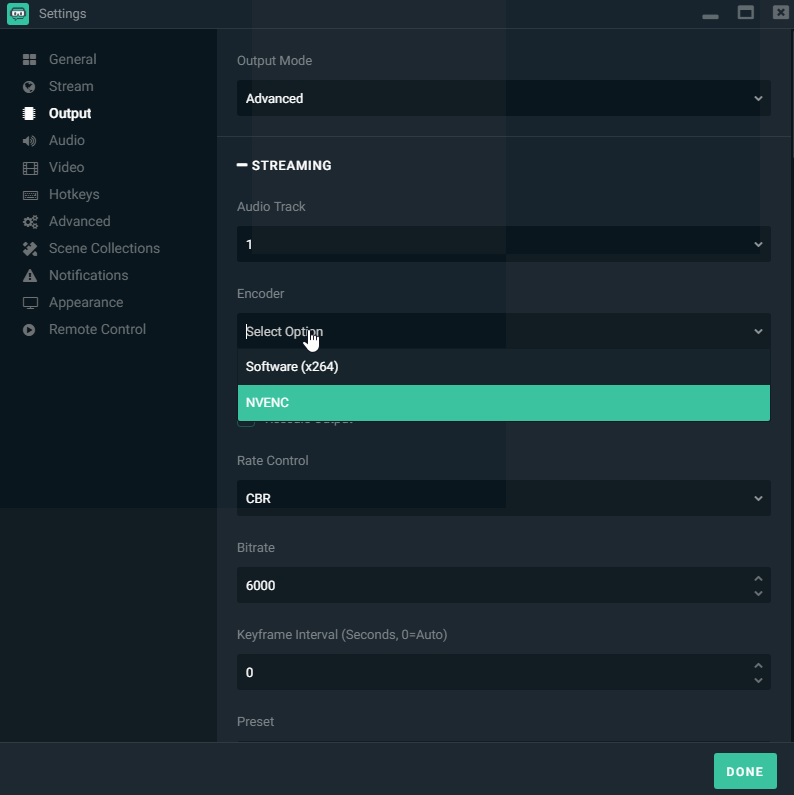
Are you guys using NVENC? if i changed to that my stream is abt nicer
prime glen
if you're at super or ultra it will drop quality pretty hard
wraith hemlock
i got a 1070 TI
prime glen
what game are you streaming
wraith hemlock
gta atm
prime glen
and what's your cpu
cinder badger
Yes i have went over to my channel and typed /mod Streamelements
wraith hemlock
i7 4790k
prime glen
regardless with the game choice cpu processing is better
cuz how much needs to render in GTA
wraith hemlock
tho i get shit pixels with cpu processng
prime glen
I have a similar CPU it ends up bottlenecking
what quality are you tryingto stream at
720p 60?
prime glen
no i'm at work.
wraith hemlock
oh ok lol
prime glen
It's your processor
I also have a 4th gen i7
when i streamed Destiny 2 on one pc i got bottle necked
wraith hemlock
Well i did pick my gpu as a output and its going fine
prime glen
then you lose game quality and potentially shorten the life of your gpu , monitor your GPU usage in task manager
cinder badger
@weary mist Yes i have went over to my channel and typed /mod Streamelements
prime glen
doing 720p 60fps with GTA on 1 pc
with those specs will bottleneck hard
i'd recommend just doing 30fps
really cuts the resource req
wraith hemlock
 prime glen
lol using Streamlabs obs and talkling to stream elements
weary mist
@cinder badger did you click the button in the dashboard to have the bot join?
prime glen
OMEGALUL
weary mist
xD @prime glen
wraith hemlock
well i use obs to
i just tested both to try to see if anything changes
wich it didnt
wraith hemlock
So i got for x264?
zenith widget
@wraith hemlock If you are streaming atm, when you change those settings its best to stop stream and start again so changes take full effect
prime glen
^
prime glen
usually you cant change thos settings without stopping
zenith widget
x264 is for CPU encoding, with your CPU and GTA is not recommended
prime glen
Normally encoding should be done on CPU
prime glen
it's strictly based on what game youre playing
wraith hemlock
He said my gpu will have a less downtime
zenith widget
save -> start stream
wraith hemlock
Will that mean, less then a year?
wraith hemlock
oh right
prime glen
so you can cut that
wraith hemlock
Done.
zenith widget
Ok, since this is not SE related, but more streaming settings related, mind moving to #general-chat ?
 winged sundial
 lament blade
c:
wispy stratus
anyone here
 tender storm
yes
proud pumice

tender storm
how do i find my JWT Token?
nocturne pelicanBOT
@tender storm You can find your JWT token on your account channels page: https://streamelements.com/dashboard/account/channels
(Don't forget to click on "Show Secrets")
tender storm
cheers, really helpful
tight wharf
@weary mist I didn't but its strange because I get the chatbox alert from SE saying "a new notification" but doesnt trigger the SL alert. Then when I go back and clear the event list on SE, SL starts picking it up even with SE chat alert.
Maybe the SE chat notifications interfere with SL?
weary mist
Nope
But ours have been coming quicker than. Theirs
We list for events on a completely different feed that SL does, but there is no was we can stop SL from getting those events
narrow coyote
The import is done through a chrome extension, you can get to it from this page https://streamelements.com/dashboard/account/import
It would be much more reliable to get the alerts through SE, and take advantage of the all in one system
tight wharf
It strange because it is stopping SL. It doesn't even show on the logs, however, it shows on the SE logs.
But I will do what Kite says and give it a shot
I'm fairly new to SE so sorry for the newbie questions... on a different topic, I checked everywhere and I couldn't find integration with Discord. Does SE integrate with Discord to where it can automatically give Moderator and Regulars role?
narrow coyote
There is no discord integration at this time. If you are a bit code savvy, you could in theory leverage the discord and SE API's to accomplish something of this nature
 ivory raft
hey can someone join disc and help me real quick?
im trying to add something to an overlay and i have nooo idea how
narrow coyote
what are you trying to add?
 frosty wharf
How do I change the bot module commands, for instance !sraffle to something else...>
narrow coyote
You can add an alias to a default command here https://streamelements.com/dashboard/bot/commands/default currently, you are limited on what you can change for a default command
 exotic hinge
 strong apex
I run a lot of contests where people can bet loyalty points... is there a way to have the display show how much has been bet on each selection, rather than just the percentage of people who have bet on each and the total?
prime glen
is there a way to also have the streamelements follow/sub/dono alert to show up in chat?
narrow coyote
https://streamelements.com/dashboard/bot/modules Chat alerts
cunning viper
Can you have more than one bet going on at the same time
prime glen
are we able to send sample notifications and ahve them show in chat?
lament blade
You mean, testing the alert module?
prime glen
like if you test it to see the alert in overlays will it also send via bot
in chat alert
narrow coyote
as far as I am aware the test alerts will not display in chat
prime glen
is there a way that i can test the chat alert bot?
Also am i able to give the bot a custom name
narrow coyote
!rename
nocturne pelicanBOT
Custom bot name requirements
- StreamElements bot modded and in chat
- Active overlay with alerts
- StreamElements tipping page in the panels below the stream (!panels)
- Create a twitch account for the name you want to use
- Ground Control app must be running
Steps to enable custom name
- Sign in to https://twitch.tv with the bot account
- Install and run Ground Control (!gc for download)
- Visit https://twitchapps.com/tmi/ and generate an oAUTH token
- Copy/paste everything in the box to Ground Control oAuth settings and enter the name for the bot account
- Restart Ground Control (custom name may take a few minutes to take effect)
prime glen
!gc
nocturne pelicanBOT
Our Desktop App Ground Control: https://streamelements.com/groundcontrol
prime glen
i'm confused with the oAuth part
narrow coyote
you need an account that will have the name you want to use, that is where the oauth comes into play
prime glen
so i have the bot account made, i have the token
cant find where in ground control it goes
narrow coyote
if you dont see the options it will mean one of two things, you are either on a mac, or you dont meet the requirements listed above
nocturne pelicanBOT
Twitch's official help guide for Panels: https://help.twitch.tv/customer/portal/articles/2416760-how-to-edit-info-panels
prime glen
!panels
narrow coyote
I see a streamlabs tipping panel on your page, if you replace that link with the SE link you will be good on that one
prime glen
oh that might be the problem i have to switch back and forth for Pokemon go streams
now i dont
found an app that works better
do i need to have the oauth: as part of the key?
or everything after the :
narrow coyote
I'm pretty sure you want the entire thing
prime glen
yay got it working
 candid prairie
Hey All :)
Just a quick one...
I have set up some items in the store for viewer to redeem for things and one of them I have set to "Redeeming this item shows an alert"
But when I test it, nothing seems to show up in OBS. Even after adding a stream elements theme into it. :(
any ideas?
 ebon forum
@candid prairie there is a widget called "Store redemptions". DId you add that to the overlay?
candid prairie
hmm ill check that
@ebon forum where can I find this Widget? would it be in the overlay i have picked?
ebon forum
@candid prairie open the needed overlay in the editor, go to widgets (top left corner), add "Store redemptions" and enjoy your store items showing up. This is separated from the normal alertbox, so some people have issues finding that 😄
 sweet wasp
Hey everyone
So I am having a bit of trouble with StreamElements currently on my PC. It is taking up a ton of CPU% usage. I have shut down when inactive checked off on all of them, but it it still eats up a lot.
lament blade
Wait, that should be on though
candid prairie
@ebon forum sweet i got it thanks 😃
lament blade
Always keep "shut down source when inactive" ON
ebon forum
@candid prairie
lament blade
@sweet wasp ><
 rain imp
anyone know of a cool and free site to get sound clips for alerts 🤔
lament blade
i use myinstants
sweet wasp
Sorry i meant checked like it is on
narrow coyote
It would also be nice to know what CPU and GPU you have, and what encoder settings you are using
lament blade
Is your overlay animated?
sweet wasp
I have the emoji splash effect when someone subs
Could that be my problem?
I have an Intel i7 6700k
And a GTX 1080 Founders Edition
prime glen
Do i need ground control open for custom bot to be running
narrow coyote
@prime glen yes
prime glen
ok\
narrow coyote
@sweet wasp what broadcasting software and encoder settings are you using
 worn cradle
Also. Is there a way that I can linmk a chat command like (!HappyBirthday) Play a happy birthday song?
since by birthday is comming up on the 4th of july lol
narrow coyote
you can make a store item that will play the song, and use the ${redeem} variable in a custom command
worn cradle
oh! ok thank you
 stable saffron
is it at all possible to make a store item that would enable emoteonly
or something of the sort
lament blade
Hello. Is it possible to always hide the video from media request?
cunning viper
Can u do multiple bets at once
narrow coyote
what are your settings in the video section?
sweet wasp
narrow coyote
because you should definitely not use the rescale option in the output tab
sweet wasp
Okay, I unchecked that one just now
lament blade
@narrow coyote Hello. Is it possible to always hide the video from media request?
narrow coyote
that could help free up some of the CPU usage, as that rescale option is CPU bound, for streaming you will just want to stick to the video tab for resolution
@lament blade just dont show it on stream
lament blade
@narrow coyote i wanna show whats playing
narrow coyote
you can use this widget
lament blade
@narrow coyote thanks a lot
sweet wasp
@narrow coyote it is still high CPU% even with settings changed :/
the moment I click the eye icon next to my browse source for SE, it shoots up
narrow coyote
are you using an animated theme, hype cup, kappagen, or any combination of these?
sweet wasp
all i have in any of them are the following: Kappagen, chatbox, alertbox.
I have multiple ones per scene
total of 4 - 1 for normal gameplay, 1 for intro, and 1 for brb, and 1 more for outro scene.
the only difference for each source is the location of chatbox or alertbox since the scenes have a still image vs normal gameplay
narrow coyote
Its probably kappagen that is causing it, as that is the most resource heavy widget you have listed. You can try a few things to cut down on the resources that kappagen uses https://streamelements.helprace.com/i256-kappagen-using-a-lot-of-cpu
 wide sapphire
narrow coyote
wide sapphire
narrow coyote
the other question, is that if it is actually having a negative impact on your stream. I use CPU encoding, so I am used to seeing my CPU almost maxed out while streaming on a single PC setup
@wide sapphire this channel is for support with StreamElements services, that type of question is something you would want to ask in #general-chat
sweet wasp
So I am having dropped frames with my gameplay
and it only happens the moment I open OBS Studio
and when I shut off the SE source, the frames go back to normal
narrow coyote
try doing the kappagen optimizations, i have a feeling if you were to remove the kappagen from the overlay you will see it not use much CPU at at all
 solid rampart
Hola! Is it possible to darken the panel that has my tipping options available?
ebon forum
@solid rampart you mean your tipping page that the viewers see?
narrow coyote
That is not possible at this time, but I think it might be something that is being looked into
ebon forum
Yes, you can only change the 2 pictures at this point, no way to change the theme or fonts etc.
solid rampart
Ah, I'll look forward to hopefully a change. Just (random asshole) my feedback. The Suggested Tipping amounts are not bold and do not stand out really. Most everything else is great even on the white background.
narrow coyote
everything needs a dark UI option
narrow coyote
No problem
 keen maple
hey, im struggling with the fortnite llama be right back overlay
it just shows the blank image without any of the additions
ebon forum
@keen maple what is the resolution of the browser source with that overlay?
keen maple
1080p
ebon forum
this is correct. strange, no real idea what it is. try to manually refresh the cache in the browser source settings
keen maple
nothing
narrow coyote
that definitely looks like a resolution mismatch
narrow coyote
I would recommend that you get the latest version of OBS, looks like you are a few versions behind
they are on 21.1.2 and you are on 20.0.1
keen maple
yeah fine
narrow coyote
I believe one of those versions had updates to the browser source plugin
 hallow spire
hey! Are there any gameplay overlays where the game isn't fullscreen on streamelements? I need one for my osu! streams. Ie when the game only takes up a portion of the screen, and there's area left without any gameplay behind it.
lament blade
osu 
hallow spire
yes :))
I could make my own overlay but it would be SUPER convenient if I could just use streamelements 
lament blade
I can check for you, but honestly, full screen also works on osu!
it's just not what most people go for
hallow spire
there's the talk screens of almost every overlay but the gameplay portion is way too small 😦
narrow coyote
check some of the variety themes
hallow spire
I know! That's what I've been trying to do but still I just don't like it. It's hard to fit a webcam and chat without obscuring the gameplay
 orchid tide
Hi, is it possible to link my bank account as the payment method, or is there only paypal? (for tipping)
lament blade
Well you can drag things around
narrow coyote
lament blade
so maybe for example, you can get this and make the gameplay bigger, delete things
mess with it 😄
hallow spire
ah yes! What is it called?? sorry for asking too much
narrow coyote
the new wave themes have scenes that might work well too
lament blade
Purple wave animated 😄
hallow spire
thank you sm! :)) I think it'll work out pretty good!
narrow coyote
same with the metropolis themes
lament blade
@orchid tide Paypal is the only option ;.;
orchid tide

lament blade
But if you are tipping a streamer, there are other methods
orchid tide
paypal has scuffed USD>CAD ratio
Is there any plans on expanding the options? Also I asked this a long time ago and people said its in the works, but is a discord streamelements app coming soon?
lament blade
these are all the options
narrow coyote
there are more tipping options coming
orchid tide
Where do i see those additional options? I only see paypal @lament blade
narrow coyote
g2a options are not available out of the box for all regions. If you want it, we can see about getting you access to it. There are also other options that are planned that we will hopefully see Soon™
 timid sequoia
I'm using a premade overlay and it comes with a custom alertbox but when I put it into OBS it will not work. It will popup mine instead of the other one.
narrow coyote
What do you mean when you say its popping up yours? and how are you testing the alerts?
timid sequoia
On stream labs you can make your own and test it onto obs but I wanted to use one that I found on elements.
narrow coyote
you will want to use the emulate function from the overlay editor on SE site
https://streamelements.com/dashboard/overlays Click the large pencil on an overlay, big blue bell lower left
you might want to mute the overlay in the upper right, as you will hear an echo if you have OBS open
timid sequoia
So im on the editor on SE how do I get the Alertbox from SE to OBS?
narrow coyote
you add your overlay URL as a browser source
nocturne pelicanBOT
To add your overlays to OBS, add a new browser source in your scene. Paste your overlay URL in the browser source properties, set the dimensions to 1920x1080 (unless you changed them on the website), and :ballot_box_with_check: “Shutdown source when not visible” https://youtu.be/KDvLynUqXI4
timid sequoia
I did that but the Alertbox is not working
Like it works on the SE website just not in OBS
narrow coyote
but are you using actual OBS, or SLOBS
timid sequoia
nm I got it to work
narrow coyote

 weary crest
What data type does the point system use?
 tidal swallow
i've been having a problem with in chat alerts. all of them i have set up seem to be triggering except for subscriber alerts. any idea how i could fix this?
tidal swallow
not sure what you mean by testing it on the website and ticket on the alert box but it's been doing it for i don't know how long now while i'm live. these are in-chat text notifications i'm talking about. not actual alerts. those work fine
follow chat notifications pop up but not my subscriber ones
come to think of it, follows and donations may be the only ones working. i just know i've been getting complaints recently about the subscriber ones.
lament blade
O sorry i miss read that, https://streamelements.com/dashboard/bot/modules Is this enabled?
tidal swallow
yes, they're all enabled except hosts
 rocky river
Guys when i change the image of the sub alert and then try to emulate it still shows the shark. Any solutions?
rocky river
Thanks ill try that
lament blade
That's really odd  hold up
tidal swallow
yeah, i know subs aren't working for sure and i'm pretty sure cheers aren't either. i can go back and check on that one, though.
lament blade
Maybe you have too many characters or weird symbols, or perhaps left a blank space? on the subscriber/cheer chat alert settings @tidal swallow
tidal swallow
cheers aren't working as well. that can't be it because i haven't edited them ever. they should be the SE defaults.
unless that right there is my problem but i'd hope not lol
lament blade
Can you try to part the bot, log off, and log back in?
tidal swallow
i've tried that
narrow coyote
when was the last sub that you got?
tidal swallow
three days ago.
should i just try deleting these messages and making new ones then get back to you if it's still no good? that's the only thing left i can think to try.
because they used to work. i honestly have no idea when they stopped.
narrow coyote
You could try that, but if it is alerting in the widget, it really should just alert in chat too. How recently did this start? I have noticed some odd issues with twitch chat myself this week
I did see in one of your vods where someone cheered and it triggered the overlay alert but not the chat alert
tidal swallow
like i said, i honestly don't know. a few weeks at the least but maybe even longer.
narrow coyote
 If it has been that long, then it would not be related to the odd chat issues
tidal swallow
yeah, the overlay alerts work fine, just a couple chat ones. like follows and donations will trigger in chat too but not subs and cheers.
i'll just try remaking them and get back to you guys. might as well add some personal flare anyway lol
narrow coyote
let us know if that works or not, I am still going to clip what I saw in the vod and poke some people about it
lament blade
no problem
 harsh sequoia
How can my viewers check the loyalty points?
narrow coyote
default command is !points in chat
you can also add the SE leaderboard extension to your panels
harsh sequoia
hm nothing happens if i type !points
narrow coyote
the SE bot is not in your channel
https://streamelements.com/dashboard right had side, bot settings, join channel
after that you want to do /mod streamelements in chat
Once you do that you can use all the commands https://streamelements.com/dashboard/bot/commands/default
harsh sequoia
oh thanks 😄 ❤
nocturne pelicanBOT
Custom bot name requirements
- StreamElements bot modded and in chat
- Active overlay with alerts
- StreamElements tipping page in the panels below the stream (!panels)
- Create a twitch account for the name you want to use
- Ground Control app must be running
Steps to enable custom name
- Sign in to https://twitch.tv with the bot account
- Install and run Ground Control (!gc for download)
- Visit https://twitchapps.com/tmi/ and generate an oAUTH token
- Copy/paste everything in the box to Ground Control oAuth settings and enter the name for the bot account
- Restart Ground Control (custom name may take a few minutes to take effect)
harsh sequoia
can i change the answer from the bot? 😄
narrow coyote
the default commands you cannot at this time, but you can disable the default command, and make a custom command using the variables for something like points https://streamelements.com/dashboard/bot/commands/variables
it is on the roadmap to give more control over the default commands
harsh sequoia
ah perfect okay i will check it, thanks 
narrow coyote
no problem, there are also a few nice command examples in #command-share for some custom commands
harsh sequoia
ah nice
 zinc mirage
@narrow coyote do you happen to know what the upper limit of the loyalty point system is?
i like working with numbers like 50/100 instead of 5 and 10
i was wondering if there was a hardcap
 warm monolith
can someone please walk me through setting up a raffle on my streamelements
narrow coyote
I think the theoretical limit on the loyalty points is going to be 2,147,483,647. I believe it is an int32, so that would be the theoretical limit
zinc mirage
alright, ill take care not to go too overboard on my point values 😛
@narrow coyote do you happen to know if you could give or take currency in the "8ball" module? as a possible answer?
narrow coyote
as far as I am aware that is something that is not going to be possible
warm monolith
how do i take people out of my current giveaway?
warm monolith
?
clever mango
@warm monolith It's not possible to remove people during the giveaway at this time.
warm monolith
once i close giveaway can i remove people their? and thank for the response
clever mango
No, you can pick a different winner if the person you want removed is chosen
warm monolith
will stream know if i do that?
clever mango
I'm a bit confused. What is the reason for removing this person and why remove them from the giveaway and not tell them?
Is it supposed to be a sub-only giveaway and wasn't set up that way?
 lyric totem
I'm not getting any notifications other than hosts, someone tried to donate and it isn't even showing up, anyone know how to fix it?
warm monolith
their is fake accounts that got in and got enough points to enter so someone is making bots and i want to remove those
 weary hound
Can someone help me in making a Kappa counter I wanted it to count the emote Everytime it's used but I can't get the keyword to save Everytime I attempt to add Kappa as a keyword it comes out blank so when I try just using the Emote in my chat it won't set off the count unless I use !kappa
clever mango
@warm monolith I think it's best to just mention that when drawing the winner in case one of those bots is chosen you'll chose another
@lyric totem did they actually donate? Did you get an email from paypal?
lyric totem
@clever mango I do not have an email or anything in paypal, but also alerts are delayed by about 30-40 seconds, when they used to be pretty much instant, I'm testing this directly now just by using the test notifications
weary hound
GIVE ME MY KAPPA COUNTER IT'S ESSENTIAL TO LIFE
Well I tried to be more assertive
Oh well
This was useless
tight harness
@weary hound Do you use our extension? It shows emotes usage in your channel
narrow coyote
did you press the enter key on your keyboard after typing the keyword in
weary hound
I'm on my phone lol maybe that's the problem
narrow coyote
possibly, I just tried to add a keyword from my phone and it did not seem to work. I know from a PC you type in the word, hit enter, and then it will save on submit
weary hound
Yeah that seems to be the problem i'm having I'll just try it on my PC later but thank you so much 😁 👍
narrow coyote
No problem
tight harness

flint cobalt
I found the videos very helpful, I have some questions about how I'm applying things on my stream...
Leaderboard Panel
- Shows my Loyalty "Points" rather than the name I choose.
- Does not show twitch icons for users, rather theses generic ones.
- Anyway to change the colours? Doesn't really match the colour skeme I was going to make for the channel (it "clashes")
Thanks in advance for answers 😃
(Overall question is this "normal" and is there a way to "customize" that panel?)
clever mango
Helped goodbitey in stream
cunning viper
How do I make StreamElements not display when a new follower follows in the chat
clever mango
@flint cobalt
1 and 2 are bugs and being addressed
3 - Possibly in a future update
@cunning viper From the dashboard menu click on Modules in the bot section > Chat Alerts
flint cobalt
@clever mango okay 😃
cunning viper
ty
flint cobalt
Next Series of Questions (Contest & Giveaways):
- Can you run a contest or giveaway over multi-stream period (like guess how many kills I'll get this week, or this month's giveaway)
- Is there a way to set a countdown timer on C&G so that at a particular time the event ends (if say you are in the middle of an FPS battle and can't jump on SE to end the contest/giveaway from additional tickets/bets being placed).
1.5 - is it advised to run thing over several streams or best to only run giveaways/contests in the bounds of a specific stream? (noobie question)
clever mango
@flint cobalt
1 - run them as long you like
2 - No
1.5 - depends on the contest/giveaway
flint cobalt
Final Question
I was looking at a product "Stream Deck" which looks super useful but wondering if its able to be used with SE for various functions?
 oblique lark
Hello there. My tipping system is working, but the tips do not pop up on my stream / alert. But every other alert works just fine.
Can anyone help me fix this?
narrow coyote
do you see the tip in your activity feed? https://streamelements.com/dashboard/activity or in Ground Control if you use that?
can you also link your twitch to your discord
nocturne pelicanBOT
Please connect your Twitch and/or YouTube channel with Discord by going to ⚙ Settings and then Connections here in Discord. https://streamable.com/eg92w
 clever mango
@flint cobalt No, some people (coders) have created temporary solutions but we hope to have official support before long
 dark kestrel
Hi, I'm looking for help with the StreamElements Leaderboard extension for my twitch channel. It is continually loading for me and my viewers and I can't figure out how to get it to work. It would be a perfect one stop shop extension for my channel and would love to have it working.
clever mango
Please first connect your twitch with discord
nocturne pelicanBOT
@dark kestrel Please connect your Twitch and/or YouTube channel with Discord by going to ⚙ Settings and then Connections here in Discord. https://streamable.com/eg92w
dark kestrel
It already is!
narrow coyote
dark kestrel
is it not showing up?
clever mango
Nope
clever mango
Thanks
dark kestrel
no problem, sorry about that.
clever mango
How long has the extension been active on your channel?
dark kestrel
about 2 days now
clever mango
Has it loaded anytime during that period?
dark kestrel
no
clever mango
Interesting... Please screenshot the extension configuration page so I can try to replicate the loading problem
After that let's try disabling the panel and then place it in another panel extension slot
clever mango
A couple more ideas:
- log out and then back in on streamelements
- disable the muxy cheer leaderboard to see if they were in conflict somehow
dark kestrel
okay one moment
clever mango
I am seeing an error on the page that I can have the devs look into if those two don't work
Aha! I have a feeling the first step will fix it
dark kestrel
okay I went ahead and did that. but still not loading for me
clever mango
Interesting, well it appears the issue is that the extension doesn't recognize you as an affiliate. I'll have the devs look into it. It should be working again in 2-3 days. Sorry about that
dark kestrel
Thank you for the help! Just happy to know it will work soon!
flint cobalt
Is there a Widget to show top loyalty holder? I couldn't find one (or its called something else?)
Name/Amount
(or variable name?)
clever mango
No, but that's a pretty good idea that I don't think has been suggested https://strms.net/ideas
flint cobalt
@clever mango that two suggestions already from me tonight...
 hollow siren
Not sure if I should ask this in here or general, but how do people determine how many loyalty points to assign to the various activities? I'm just kinda staring at it and wondering what to do...
narrow coyote
if you check the pinned messages in #welcome there is one from latte that is the third one I believe, it is a bunch of good store examples
hollow siren
ah, okay, thank you! 😃 i had searched elsewhere, but not in welcome
narrow coyote
No worries, the channel had a different name when that was pinned, easy one to miss
 dry hare
custom bot name instructions are where?
narrow coyote
!rename
nocturne pelicanBOT
Custom bot name requirements
- StreamElements bot modded and in chat
- Active overlay with alerts
- StreamElements tipping page in the panels below the stream (!panels)
- Create a twitch account for the name you want to use
- Ground Control app must be running
Steps to enable custom name
- Sign in to https://twitch.tv with the bot account
- Install and run Ground Control (!gc for download)
- Visit https://twitchapps.com/tmi/ and generate an oAUTH token
- Copy/paste everything in the box to Ground Control oAuth settings and enter the name for the bot account
- Restart Ground Control (custom name may take a few minutes to take effect)
dry hare
Thanks Kite
narrow coyote
dry hare
restarting GC was the step I didn't have 😉
nocturne pelicanBOT
@autumn cloak To add your overlays to OBS, add a new browser source in your scene. Paste your overlay URL in the browser source properties, set the dimensions to 1920x1080 (unless you changed them on the website), and :ballot_box_with_check: “Shutdown source when not visible” https://youtu.be/KDvLynUqXI4
 crimson yew
I need help real quick.
So I'm working on overlay and testing the subscribe part. When I test it, it show the example pop up and says "resubscribed" but it's not playing the custom alert song I put in place.
narrow coyote
did you change the variations on the sub alerts as well, there should be like 2 by default
crimson yew
I see the variations and yeah, it says "When amount is at least 2"
I'm guessing that's it? should I increase it?
narrow coyote
no, if you did not go into the variation and change the sound in there, you will want to do that as well
you will want to leave that at 2 so anyone that subs after 2 months triggers the resub alert
wanton jetty
is the prefix &(random) for the random responce with a command ?
Im having to make a BOTCHED ass timer command but i cannot remember "random" message prefix
narrow coyote
are you referring to variables? you should be able to use any of the command variables in a timer https://streamelements.com/dashboard/bot/commands/variables
wanton jetty
god damn it your message limit of 400 is triggering me :/
As the current timers system is botched lol and ends up spamming the chat 😛
crimson yew
Are you trying to make a command?
wanton jetty
No its fine i know what im trying to achieve but your current system doesnt allow for it
hence my botched method
clever mango
You don't need spaces between the options. Also you can add the command from chat and if the message sends the command will be added (but not editable on the dashboard because of the front-end limit of 400)
clever mango
No, I'm saying you don't need spaces between 'choice 1' and 'choice 2'
wanton jetty
I just wish your timers section would cycle through commands properly on a global interval rather then separate timers to stop the spam of the bot in chat when timers clash 😦
#💭︱feedback-and-ideas for more info on the situation 😄
#Math Issues
clever mango
We would all like that. There are hundreds of tasks and only a handful of developers. We're hiring so if you know of any send them my way.
The current team already puts in 12+ hours 6 days a week
wanton jetty
hmmm not off top of my head i know someone but hes kinda stepped back from twitch 😦
For the mean time ill manage with my botched method but i really hope timer section gets resolved ❤
what language does SE use ?
if ya say Python ima nope nope nope out of there LUL
I know basic JS but not enough
clever mango
A revamp has been planned for quite some time already. We're working on major projects all the time (weeks if not months of work) so we can set a foundation for all of the features to work well. This is the reason that it takes time for ideas/bugs to be worked on.
wanton jetty
planning on furthering that knowledge
clever mango
no python
clever mango
JS and Go mainly
wanton jetty
😮
I kno basic JS
Will deffo learn it some more maybe be able to help out then
that would be dope
If you dont mind me asking @clever mango How does SE maintain its server costs, You dont have a Premium feature and you take no cut from tips....
yall nuts
 ebon sage
hello does staff know how to unlink an account? since i want my twitch and youtube S.E to share together, because one of them have all the feature that i added and the other has none
crimson yew
They don't take tips from us.
crimson yew
One sec. @ebon sage
wanton jetty
That from what iv seen in the past requires one of the two to be removed from the database so it can be added sucessfully to the main account :/
clever mango
@wanton jetty StreamElements is a relatively new startup that investors see a lot of potential in. As long as we keep growing we aren't worried about money. That is why we say the best way to help is to spread the word and help more streamers find their way to our service.
wanton jetty
Well iv sent COUNTLESS people your way 😃
Just wish i had 15k followers for the DreamTeam 😦
clever mango
You're helping to keep our service completely free for streamers and viewers and we really appreciate that.
@ebon sage Please send me a DM
clever mango
Followers isn't a very good metric for channel strength. Views and consistent growth are more important. We look at many factors when considering people for DreamTeam
wanton jetty
😮
crimson yew
Wait, really?


 primal mantle
Sup everyone! Hope you can help me,. I have an issue with my loyalty coins that are not working as they used to... they are not being added to my viewers as they stay on the stream, I'm currently live on witch.tv/ashargameplays, and I have reset my user currency to see if it works. I sent an email with the issue and the guy who answered me told me to let you know when I'm
clever mango
Most dreamteam members have at least 20k followers which is why we list that but we have accepted streamers with less. Every decision is handled on case-by-case basis
Keep working to grow and apply once per month
wanton jetty
Whats the amount set to @primal mantle
wanton jetty
Sounds like a dumb question but is the bot in the channel
primal mantle
yeah he is
clever mango
I will keep an eye on it for 20-30 minutes
wanton jetty
He... We dubbed SE a HE
primal mantle
hahahaha xd
wanton jetty
there ya go @clever mango is on the case for you @primal mantle
primal mantle
@clever mango I think is working right now
 pale acorn
how to edit or delete a command in streamelements chat commands?
pale acorn
@clever mango Where I type these commands. Sorry the question I am starting...
clever mango
You can use those in your twitch chat
or edit/delete commands by clicking on "Chat Commands" in the left menu of the dashboard. It's towards the bottom in the Bot section.
pale acorn
@clever mango Thank you very much!
ebon sage
@clever mango is there a way to clear out quote?
narrow coyote
I believe there is only the !quote remove command, where you provide the ID of the quote you want removed, so like !quote remove 42
ebon sage
its more like after i put in a quote on number 1 and then i remove it then when i add it i cant refill the number 1 slot it will only go to the number afterwards thats all, so i got lots of blank quotes
narrow coyote
I dont think there is any way around that at this time. It is in the idea list for the planned upgrades to the quote system https://streamelements.helprace.com/i242-upgrades-to-the-quotes-system
 inland cypress
ahey evryone 😃 my !editcounter !wins worked perfect the first day.. then stopped working idk why. havent messed with anything. has this happened to anyone?
lyric totem
Just wanna say that @clever mango is an awesome person and extremely helpful!
 rain vale
Any way to make scenes load faster? they take about 5 seconds to fully load
robust turtle
Hi, Team. When setting up variations of subscriber notifications in the alertbox, the "equals prime exact" somehow gets mixed up with any returning subs (i.e. months =>2). Doesn't matter how I change it, the two are always conflicting. Any ideas/thoughts?
 zenith tartan
anybody available to help a new streamer to figure out the "donations"
 timber fossil
Hello! I'm having an issue with connecting my twitch to streamelements. Every time I try iI get the "The Channel you tried to add is linked to a different account' alert. Don't know what I'm doing wrong.
flat valve
I have two redeems that WILL not display the GIF whats up with that?
 finite owl
Can you have more than 12 variations for subscriber bits in the hype cup? Also - for some reason when I am emulating subscriptions, there is nothing getting placed into the hypecup. Same with normal bits. Is there something that I perhaps turned off?
 noble mortar
Hello, i love Streamelements, but i got the delay at my streamlabs obs when i change the scene. its about 2 seconds. You have any idea to fix it?
so that the overlay of another scene just is instand showed?
 serene nimbus
Is it possible to trigger a sound when specific user comes to chat or type first msg?
zenith widget
@noble mortar @rain vale For both of your questions, its best to use Studio mode of OBS Studio to preload the scenes and then switch between them. This will help with the loading of the overlay.
@serene nimbus I think you can setup a stream store item to be redeemable via chat, then have it added as ${redeem store_item_name} as a custom command response and add a keyword to it. Do note that this will not trigger sometimes properly, if the keyword is "hello" and someone types something after "hello"
@timber fossil DId you change your name recently? If yes, then I suggest logging out and back in into SE Dashboard
@zenith tartan If you are still here, can you clarify?
@finite owl Did you try saving the overlay editor and then refreshing the page?
zenith tartan
@zenith widget thank you for the reply. Figured out my problem was just a misunderstanding. Thank you
zenith widget
@flat valve How have you added the gif to the items?
timber fossil
@zenith widget I did change my name recently and I did log out and back in but it still says it's linked to another.
zenith widget
@timber fossil What I would suggest is then, on the dashboard click "Part Channel", log out again, log back in, join channel. If this doesn't help, go to your Twitch account settings -> Connections and if you see Streamelements there, log out from SE Dashbaord and disconnect SE from the twitch connections. Then log back in into SE.
lament blade
Can someone help me when i click on Tipping settings it doesn't show anything It's just blank
tight harness
You have cookies blocked in your browser?
timber fossil
@zenith widget I did both of those and it's still saying the same thing.
tight harness
@ripe fjord Tried going into the properties of the browser source and clicking on the refresh cache button?
 ripe fjord
yes
tight harness
Okay, well the issue isn't with the overlay because that's your overlay loaded in my OBS, so it's an issue originating from your OBS
Guessing the bot isn't responding right now 🤔 but OBS help is given here: discord.gg/obsproject
tight harness
No problem
teal yoke
hi guys... i'm doing a testing giveaway
how do i stop the timer and set the winner?
humm i just figured out
i have to close it... then the options will apear
thanks anyway
tight harness
That's right, the giveaway has to end before the winner can be chosen 😄
 tired quest
Hi, is there a way to put a cooldown on !points command for loyalty?
tight harness
Beat me to it 😄
tired quest
Where can I find that options? Loyalty settings?
tight harness
It's in Chat Commands > Default Commands
tired quest
Found it, it's in default commands. Thanks!
 cedar lynx
My follower alerts didn't pop up today, is it because I didn't have any value in the "minimum amount" area that recently showed up in an update? I would have thought that defaulted to zero without needing manual input 
zenith widget
which exact alerts didn't pop up?
cedar lynx
My alert visual for new followers
cedar lynx
Just a sec, I'll have a look. This was the first time there's been an issue with this
I'd added minimum amount now but deleting that still seemed to trigger in the overlay editor
zenith widget
minimum amount for follower alert? 
cedar lynx
Yeah it's a strange setting TBH but it's there
zenith widget

cedar lynx
Test alerts are working but the visuals were missing on stream today
cedar lynx
Just did, it's working now that I've been fudging with the minimum amount
but I won't know till tomorrow if it's actually working live
zenith widget
Just don't have the minimum amount...this is a first for me, actually seeing that option for follower alert
cedar lynx
I didn't have it, adding it as 0 seems to have fixed it
Cause I ignored it cause it seemed weird lol
zenith widget
if its not working live, what you can do is, right click on the browser source, properties and on the bottom should be something along the lines for clearing cache
cedar lynx
Will give it a try if it happens again