#helpdesk-twitch
1 messages · Page 295 of 1
 near grail
 zenith widget
As a Full Editor, I can't see the those options in my streamer's dashboard as well @near grail
But as a Super mod, they can have access to !setttile & !setgame
 dry hare
@pine hemlock nope. they're for everyone
zenith widget
@dry hare Did you try disabling the store item option in the extension settings, saving and then re-enabling it again?

or disabling the items and re-enabling them one by one?
dry hare
yep. I've tried the extension settings. Let me try the store items really quick and report back
i'm gonna take a bite of my pop tart first
zenith widget
I would suggest disabling the item
wait couple of seconds
then enabling it and check if its showing up
and do you actually have any disabled items currently?
 wanton jetty
Can we get an option for tippers to pay the fee's i hate tipping people and knowing that paypal takes a cut of what i would of given them :/
Optional of course
zenith widget
@dry hare Are the items "redeemable via chat"?
@wanton jetty That is up to the tipper really or the minimum amount you place...if you want minimum 1$, then palce 1.30$(if the fee is 0.30 for you)
I've seen streamers do that, so the tipper more or less covers the fee 
wanton jetty
Yeah thats what i mean but streamlabs has a button where the tipper covers the fee
 wanton jetty
Ye
zenith widget
I don't see it in SL
wanton jetty
Thats where i saw it think muxy has it to
wanton jetty
Its a unticked box that says cover tipping fee and the tipper can optionally tick it
 narrow coyote
Pretty sure there is an idea post for this already
 winter zenith


 nocturne pelicanBOT
@wanton jetty Here is the StreamElements Ideas Board: https://strms.net/ideas
wanton jetty
Get a bored where i can log in with twitch and ill gladly post my 100 ideas
zenith widget
Register in under 1 minute 
wanton jetty
That requires effort... aint no one got time for that
Trying to fix my pc right now
winter zenith
then you dont get to vote on what comes next 😝
wanton jetty
Loading for like 10mins /:
wanton jetty

dry hare
@zenith widget nope
winter zenith
@dry hare Store Items must be redeemable through chat to be seen on the Extension
winter zenith
you said they are not showing via chat
wanton jetty
Give the extention some time to update
Does the extention update in realtime coz if so DAMN thats a bitch on the system lol
wanton jetty
:O
narrow coyote
Should be pretty instant from store settings to extension
wanton jetty
Is redeemable via chat ticked
winter zenith

wanton jetty
It will normally be what the item name is
With some extra crap
WAIT THERE A SYSTEM FOR AUTOMATICALLY HANDING OUT KEYS
winter zenith
and you tryed logging out and back in?
wanton jetty
What is this madness
narrow coyote
Maybe try the ol, part bot, log out, log in, rejoin bot
Yes there is a stream store item for key redemption
dry hare
Yep, did all that
tried that a couple weeks ago @winter zenith
did that too @narrow coyote
wanton jetty
Seriously since when the fawk did SE have a automatic key dispersal system... i need help setting that up iv 100's of keys for XBOX PS4 and PC for my Warframe glyph
wanton jetty
link me ur store page
dry hare
wanton jetty
nailed it
dry hare
surprised it didn't link it, but didn't want it to spam 😉
wanton jetty
does it only do 1 key 😦
dry hare
yes
wanton jetty
Welp nvm then
dry hare
there are some games that I only have one key for, and some that I have multiple for
it's 1 key at a time
I'll make a new item to see if there's something wrong with the ones I have
wanton jetty
That system could be advanced so much then, iv like 500 keys would be nice if i could add them to a table and when somone redeems a key the bot automatically sends a key out to them via whisper
winter zenith
maybe it doesnt work since its only key items?
make a soundeffect one ore something just to test it pls
winter zenith
no @wanton jetty
winter zenith
the key wil display on the store page or in there StreamElements dashboard
winter zenith
wanton jetty
so i know what it look like
 smoky hemlock
I'm having an issue with emotes not showing up when stream elements is set to display them in a command. The command worked a couple days ago and stream elements is working fine with the other commands from what I've seen so far. I've tried redoing the command and get the same result. It looks fine on mobile its just desktop that is having the issue. (Im using chrome)
wanton jetty
from a consumers end
winter zenith
@smoky hemlock what is Lucian6Hi ?
looks like a emote from another twitch Streamer
dry hare
okay, sound effect uploaded
smoky hemlock
It is a twitch streamer emote
winter zenith
the bot needs to be subed to the channel
dry hare
omg really? Keys aren't visible via the panel / chat?
winter zenith
nope
smoky hemlock
It is subbed to the channe;
dry hare
wth
winter zenith
because there is no way to see the key on chat or extension ater redeeming it orsuna
smoky hemlock
at the bottom of the image you can see it displayed properly on a seperate command
winter zenith
@smoky hemlock did you look if the streamer has changed the name to the emote?
you mean the Coffee mug?
smoky hemlock
Yes the coffe mug and the name is the same as well
winter zenith
and you tryed to redo the command?
smoky hemlock
I did. In both the SE dashboard as well as manually doing it in chat
Is it having an issue with the streamer emote paired with that little beercup emote? What is confusing me is it is only having the problem on desktop
smoky hemlock
I tried that as well, im thinking of adding maybe a . inbetween the two?
winter zenith
try it 😃
 signal depot
Looking for a counter command. Something mods can use to keep track of deaths or kills. Adding, subtracting, and resetting to zero would be a bonus
smoky hemlock
That didnt work either
winter zenith
@signal depot
!Died ${count deaths}
this will add a number to the counter
and then have a command:
!deaths ${getcounter deaths}
this will ONLY show how many deaths you have without adding any to it
To reset it:
!editcounter deaths 0
winter zenith
@smoky hemlock that it works with other Commands led me to belive that it is a twitch problem of displayin.
If you say only on desktop and on mobile it seems to be fine
smoky hemlock
Oh wow, it also isnt showing some of the free twitch emotes either
Maybe it is a twitch issue then, but its just when SE is doing them
winter zenith
@lament blade if you can give me an exsample I can try to figure it out 
So if some one Donates/followes it makes a appearance on the dashboard and the sound is playing aswell as the text but not the gif?
or is the Event poping up in the Dashbord, but not on stream (no sound, no text, no gif)
signal depot
winter zenith
or is the event not comming up at all
signal depot
winter zenith
it should say some more stuff like... "Died ${counter deaths} times"
signal depot
winter zenith
signal depot
🤔
winter zenith
now I am confused
signal depot
 tight harness
It's count instead of counter 😃
winter zenith
I am an idiot... 
wanton jetty
Ok so this key system
signal depot
lol thanks guys
wanton jetty
does it only give the user the key after i accept it or right away
wanton jetty
hmmmm
that litterally voids tho whole accept the redeems page :/
and seems exploitable
for refunding the item
winter zenith
what do you mean with exploitable?
wanton jetty
Well if somone redeems 2 keys and there only allowed 1 they get both keys instantly :/
tight harness
The accept/deny page was made for Stream Perks, it was in place before Access Codes was even a thing 😃
winter zenith
why should they be only allowed one key?
wanton jetty
My glyph is supposed to be 1 per user
 weary mist
@wanton jetty set a super high user cooldow
winter zenith
yeah you cant limit how much one user can buy
yeah scalper right
but if they wait for that long they will have the ability to buy it again
winter zenith
the edit is a default comman
signal depot
Ah ok
winter zenith
no need to add it @signal depot
signal depot
Excellent excellent
winter zenith
you just have to type the name of the counter right
beause you can have diffrent counter
signal depot
Oooo
 toxic mauve
Hello guys. i used a thema on streamelements but on the place for top donator it keeps showing "no data"
winter zenith
so you also can have a winner counter set up exactly like the death one @signal depot
only to edit this one you would need to type
!Editcounter win 0
@toxic mauve go to the Overlay editor and edit the overlay in question.
Check the Top tippers Widget and see if it is set to "all time" or "session" or "monthly"
signal depot
I manage to hit a lot of coyotes in GTA. Going to have a coyote count and death count 
wanton jetty
ok next question @weary mist is there an indication on the list as to what codes are given out as im keeping a backup of the codes incase of a issue but im just wondering if on the list a tick or cross is added at the end.
winter zenith
you can see at the store redemption page what was given out
and what the name of the code is
but it gets deleted from the list after it got bought
weary mist
⏫
wanton jetty
right ok
weary mist
redemption history
winter zenith
🔼
wanton jetty
ahh okays cool
well according to google 2592000 is 1 month
so thats my cooldown 😄
winter zenith
(thats also where the viewer can look up there redemptions)
tight harness
That works 😄
signal depot
Aww man I have to have my Media Request tab open at all times for the music to play for song request?
winter zenith
yes
signal depot
That's a bummer
wanton jetty
Can someone show me a example of what a redemption looks like from the consumers end ?
winter zenith
you can also use GC for it @signal depot
I would not recommend it because it has some bugs
since Mediarequest got redone
weary mist
click your name in the top right, then go to my redemptions @wanton jetty
or set up a test redemption
signal depot
What's GC
weary mist
that is how I do it
nocturne pelicanBOT
@signal depot Our Desktop App Ground Control: https://streamelements.com/groundcontrol
signal depot
I'll poke around it and see how it handles
winter zenith
just test it yourself 
weary mist
lol, I left my test up on accident before, on of my viewers redeemed it xD
winter zenith
sounds good @signal depot
dry hare
Whelp, I put the ability to at least display key redemption items via the panel / chat so people know they're there
wanton jetty
Can somone who has back end access grab one of my images and send it to me plz from the site... im trying to save one of my panels to edit it as i cant find the original and its saving as a webp
doin me nut in
I want to make my warframe ones match
https://streamelements.com/chrisishd/store

StreamElements
The Ultimate All in One Platform for Streamers
as there kinda standing out right now lol
signal depot
So far it's working great @winter zenith all commands for it are working while it's minimized
dry hare
which image?
zenith widget
DMed @wanton jetty
weary mist
who did you DM @zenith widget
zenith widget

weary mist
ah, lol thanks
 autumn verge
so when you set a follower goal
it formats as 10/150
but I'm trying to see if i can display it as 100/150 (ie the total follower count?) not the number of followers since I started the widget?
and same with subs
narrow coyote
zenith widget
https://streamelements.com/dashboard/session - go to the goals tab and set it to what ever number you want
weary mist
xD
narrow coyote
You can also access this from the Overlay Editor, in the Data tab
weary mist
and because I am different, I say use the Total Followers widget, and add a "/150" on the end as that pulls your exact follower count from twitch
zenith widget
autumn verge
no no i want the first number to be the actual current followers
the goal is fine
this is telling me number of follows in the last couple days - ie since i added the widget
weary mist
@autumn verge read what I said
autumn verge
ohh LOL
weary mist
not to mention, they litterally told you how to CHANGE that number xD
zenith widget

autumn verge
🤦 I didn't realize changing that number would permanently change it
weary mist
both are solutions to your problem, but each has their drawbacks
autumn verge
I was like, but if i one-time change it... it's not gonna stay that way
weary mist
their solution doesn't account for unfollows, my solution can't be in bar format
autumn verge
yeah i'm gonna swap to yours
because the goal is static, the number of followers may not be
and it's only text so
bar format is not an issue
i clicked into the page you guys sent me @zenith widget @narrow coyote and it didn't occur to me that i could CHANGE those, i was like, hey cool i've seen this page - but i didn't realize i could manually override >.<
zenith widget

autumn verge
like i said, working on this makes me feel hella smart sometimes
 haughty crane
Question: I have been experiencing buffering on twitch and done just about everything to mitigate. Is there anything on the StreamElements side of life that would account for this? Thank you. Sincerely sent, ~Beauty
zenith widget
@haughty crane Don't use an animated theme
nocturne pelicanBOT
Make sure to :ballot_box_with_check: “Shutdown source when not visible” for all browser sources (all OBS scenes). If using studio mode, uncheck “Swap Preview/Output scenes After Transitioning.” Also keep in mind that sound can play from any overlay loaded in the browser (editor or launched). https://i.imgur.com/FegZJQS.png https://i.imgur.com/yY0wcFl.png

 zenith widget
And use above settings for scenes
haughty crane
okay guys. thank you so much. i will let you know the results.
 lament blade
Can stream elements do a random number or random user you put in, say for like giveaway?
weary mist
@lament blade we have an entire giveaway feature
and there is a random number variable
lament blade
U know what it’s called? I can’t find it for the love of me
All I seen is the command giveaway but nothing else
weary mist
There is an entire giveaway tab on the dashboard
weary mist
lament blade
Wth I guess I’m blind , thanks guys
weary mist

wanton jetty
can the bot get a /me mode plz :D
All my stuff the bot anounces is in /me from my custom bot and then SE kinda stands out lol
 clever mango

 weary mist
@ripe herald
 ripe herald
There are more different designes of alerts if you emulated them all some of them are different this is just example of the alert not based on text
if you want exact alert I can send it to you but previews are example of one alert not all of them it would be to much to put all alerts on one small screen
did you try animated or static one
are you sure they are all same 😃
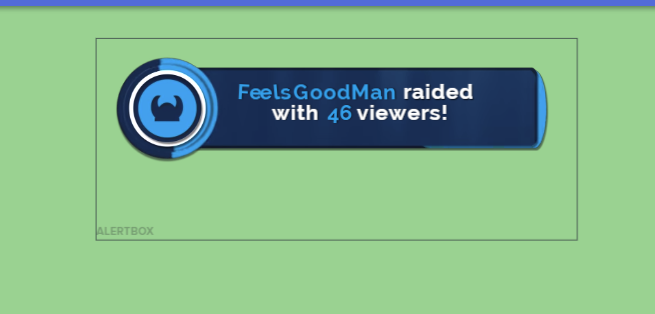
because animated one have animation and static are just static
it's not a bug it's just like I said it's just set up
you can download and replace with this one
Give me a few minutes and Ill make separate alerts that you can use
I'll tag you when I'm done
ripe herald
you can't copy video only alert itself
how you mean animated box
if you use this alert widget on your overlay it will play that alert
if you mean you want to replace with that one i've sent you
?
you just click change video
and upload the one i've sent you
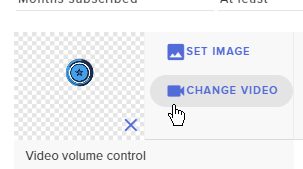
you can't I'm sorry :/
there are some work around that but it's nothing that will change it one second :/
like I said before alert box have more versions of alert
and it shows one of the version
but I will change it now
so no one get confused by it 😃
No worries Ill publish not new version
and all you need is just create that alert and delete all boxes from theme you created as first one
and then copy the alert to all scenes if you want
@median crest
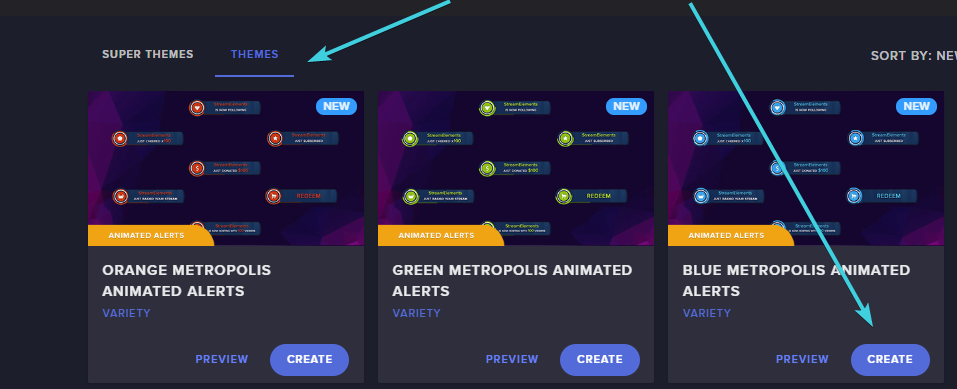
I will bring back the animated themes soon as we fix one problem that happen with some animated bars
 pallid cedar
anyone know good "scene transition" gif or vids? 😃 /obs /
 cursive plover
anyone know how to export the loyalty db from streamlabs
weary mist
only if you are using the localized bot. I do not think that the extension loyalty is currently something we can import
 tropic fossil
hello everyone, Im having trouble with alerts in SE. any reason why it i wouldnt hear the alert?
zenith widget
Are you using a premade overlay?
If yes, I suggest checking if you've muted OBS in your windows sound mixer(also applies to your browser if you are testing alerts and don't hear sound)
tropic fossil
No premades. Not sure whats going on. have ground control up and the dashboard up in the browser
zenith widget
Have you setup an overlay if you are not using a premade overlay?
and then added it into your OBS?
tropic fossil
When i go to the My Overlays tab i selected Create blank overlay and made my own.
Its added to my obs, and the sound worked before
signal depot
There a command to purge chat?
zenith widget
Then did you go to the overlay editor and made a test alert
tropic fossil
Im using 2 PCs. both have ground control up, but one PC plays the alert noise and the other does not
signal depot
thanks
narrow coyote
ground control has nothing to do with the alert sound
tropic fossil
When I run the test alert in the overlay editor the sound works temporarily
zenith widget
@tropic fossil That doesn't make sense what you just said. Only the PC with the OBS and Overlay will play the sound
narrow coyote
it will play on the default audio device on the machine OBS is running from
tropic fossil
ok that makes sense KITE, but its troublesome because im using NDI so i dont hear alerts nor dose chat
narrow coyote
Not really sure what NDI is, but if there is no sound from alerts, it sounds like it is going to be an issue with the audio source and OBS
 vital wyvern
@tropic fossil when did this issue start occurring?
 compact egret
Hi just started using your service and love it so far, one question any reason why the twitter notification doesnt work when I start my stream?
vital wyvern
@compact egret if you are referring to the twitter function in chat, this is due to a limitations from twitter´s API 😦
compact egret
so it will never work or only work sometimes pal?
narrow coyote
Are you talking about this? https://streamelements.com/dashboard/social-media
weary mist
@compact egret until tiwtter helps us out with the API, they are limiting our calls, which means that it will work occationally
compact egret
Ha ha true dat ha
 timid zenith
Can i use stream elements even know that i stream on Xbox
nocturne pelicanBOT
@timid zenith Here is a guide on how to setup the most essential tools for streaming from your console, while using StreamElements tools without involving a Capture Card! It's easy to do, take 4 minutes to read and 10 to 15 minutes to setup!
Read all about it here: https://blog.streamelements.com/how-to-stream-on-console-7b620b1c46c3
 real frigate
How do I change my profile pic on streamelements
zenith widget
@real frigate You go to this page https://streamelements.com/YOURNAMEHERE
narrow coyote
https://streamelements.com/dashboard/profile Open my profile
zenith widget
And change it here
@narrow coyote I'm sick of seeing your avatar for this question 
narrow coyote

zenith widget
You and your red gun
narrow coyote

weary mist
xD
real frigate
Thank you
 carmine drift
hey there I have a question : when I'm on this page : https://streamelements.com/dashboard/tipping-settings
nothing appears on my screen (I can't set the tipping settings).
Can you say me if it comes from me or from the website please ?
StreamElements
The Ultimate All in One Platform for Streamers
 tame spindle
Anyone else have a problem with their overlay not loading?
It's not showing up on stream, and when I try to launch it in a browser window I get "This page isn't working" "streamelements.com is currently unable to handle this request"
And it was working literally 10 minutes ago.
Never mind, guess it was just a temporary hiccup.
 tame spindle
Definitely not on my end. Everything else was working.
 drowsy basin
 elder sorrel
🤔
weary mist
@drowsy basin What browser are you using?
 high crater
umm i need some help my tipping page wont open and i even tried refreshing it
weary mist
@high crater try refreshing it again
high crater
i did and it still dont work 😦
 warm crane
Hey guys and gals! Quick question, is there a way to have scrolling text for donations through tiltify? For instance Tomato donated 43.03, George donated 5.00
 karmic wigeon
 regal thunder
Hey dudes overlays don't load :/
weary mist
We are investigating the issue, it seems to be intermittant with people
weary mist
Found the issue. It seems an intermediary is experiencing network issues and slowness
@high crater, @karmic wigeon, @regal thunder try accessing it now. Things just started working ok for me again
weary mist
Its definitally there, there might still be some residual connection issues while the intermediary gets there shit back together
high crater
nah its not that is that i cant get into the settings of the tipping page
like the settings
weary mist
?
weary mist
what does the rest of the page look like when you click that button?
 dense jackal
 weary mist
you may need to try a cache refresh: ctrl+shift+r
dense jackal
Does it show like that @high crater ?
narrow coyote
Is it just white? I had one person run into this issue, it was related to blocked cookies on SE site
high crater
narrow coyote
you are blocking cookies, allow cookies on SE site
high crater
how do i do that?
weary mist
what browser are you running?
high crater
google chrome
high crater
oh yeah i see it
yeah i have done it
for some reason it had streamelemets on block
it just automatically just blocked it
weary mist
at least we have it fixed now 😃
high crater
yeah 😄
 spare grotto
Is there no variation setting for stream store purchase alerts? like setting a different sound/picture per item redeemed? dont see that option.
weary mist
@spare grotto you set that up per item in the stream store
The alerts will play what image is put on the item
spare grotto
ok so they just arent showing in my emulate event then? they are all set in the actual store.
weary mist
yeah, to test them, you should redeem one
spare grotto
thanks. will try now
carmine drift
@narrow coyote I'm using chrome and i can't load the page from my 2 pc and my phone.
narrow coyote
did you see above? If you see white where the settings should be, you are blocking cookies to the site
 timid ocean
Is there a way to change the bot's username in chat?
nocturne pelicanBOT
@timid ocean Custom bot name requirements
- StreamElements bot modded and in chat
- Active overlay with alerts
- StreamElements tipping page in the panels below the stream (!panels)
- Create a twitch account for the name you want to use
- Ground Control app must be running
Steps to enable custom name
- Sign in to https://twitch.tv with the bot account
- Install and run Ground Control (!gc for download)
- Visit https://twitchapps.com/tmi/ and generate an oAUTH token
- Copy/paste everything in the box to Ground Control oAuth settings and enter the name for the bot account
- Restart Ground Control (custom name may take a few minutes to take effect)
timid ocean
wow. okay. thx.
weary mist
check to make sure that the layers are not locked
and that you are clicking on the right layer
you have the page open either in the website or Ground Control?
do yo uhave it turned up? and check your mixer settings to make sure that it isn't muted.
If you are using the site, make sure the site isn't muted as well
xD
there are too many ways to mute anything anymore, lol
autumn verge
routing things through a sound mixer has been one of my better decisions
it lets you shut things on and off more precisely rather than checking mute buttons in six different spots
 graceful kindle
In the recent events none of the followers appear to be showing anyone got that problem too?
weary mist
@graceful kindle did you check to make sure that the followers box is checked (in case they are getting filtered out)
 ember horizon
Hmm....Twitch says I have 44 followers, but StreamElements says 28....
narrow coyote
If you are talking the number on your dashboard, that will only track follows you have gotten since you started using the service. Any data widgets that show total count should reflect your total follower count
ember horizon
Ooohhh......
 keen wadi
any updates on the custom event log not staying up on the overlay? when i change scenes it resets until new updates come in. same with twitch chat it clears when i change scenes
 surreal spoke
Hello, wondering if anyone is available to help.
I'm wondering if its possible to make song-requests available from the Stream Store to not overlap when e.g. two users redeem two different sound effects.
I was hoping there is a possibility to make them queue after each other rather than to start running at the point it was redeemed.
narrow coyote
@keen wadi the overlays need to load, so when you transition scenes, the overlay and all elments will be loaded. The event list should reflect the recent events, so I would expect these to show the same data. The only way to keep your chat between scense would be to have the chat widget in its own overlay, and this overlay would not be set to shutdown when not visible. With this the overlay will always be active, regardless of the scene being used. This will take extra resources, so depending on your system there may be no impact, or there might be a performance impact
keen wadi
oo ok, that i can do no problem. but yea just recently the event list seems to not stay
but i can just put them both on there own to not shut down ^.^ thank you
narrow coyote
No problem, please let us know if things still appear off with your event lists after making this change 
 final drift
!gc
nocturne pelicanBOT
Our Desktop App Ground Control: https://streamelements.com/groundcontrol
 exotic hinge
ty
final drift
oh.. in my ground control there is no oAuth settings
weary mist
@final drift settings, the first line is for your JWT, which will sync the app with your account. Are you trying to do the custom bot name?
narrow coyote
@final drift are you on a Mac?
weary mist
@dapper trellis log out of streamelements.com, clear your browser cache, and log back into the site
narrow coyote
Your main account
Oauth is from bot
If you don't meet the requirements the bot rename option will not show
nocturne pelicanBOT
@final drift Custom bot name requirements
- StreamElements bot modded and in chat
- Active overlay with alerts
- StreamElements tipping page in the panels below the stream (!panels)
- Create a twitch account for the name you want to use
- Ground Control app must be running
Steps to enable custom name
- Sign in to https://twitch.tv with the bot account
- Install and run Ground Control (!gc for download)
- Visit https://twitchapps.com/tmi/ and generate an oAUTH token
- Copy/paste everything in the box to Ground Control oAuth settings and enter the name for the bot account
- Restart Ground Control (custom name may take a few minutes to take effect)
weary mist
xD
 narrow coyote
Need it in a panel on your twitch page
final drift
oh
weary mist
There is a step-by-step how to do it in the tipping settings page
including providing you a panel image
final drift
oh ok)
graceful kindle
@weary mist the Followers box is checked
weary mist
when did you change your twitch name?
let me look, hold on
what is the name of the overlay you are looking at
final drift
eaaaahhhh!! @narrow coyote @weary mist thanks!!!)
weary mist
also, relink discord so it pulls the right twitch name @dapper trellis
@final drift
its still showing chaossparkzz @dapper trellis
 rotund pier
Ok I need help here so do I only turn on the chat alerts for I can get a notification follow in my messages on twitch when I’m live
weary mist
discord xD @dapper trellis
@rotund pier there is no way to make it live only. Its either on, or its off
rotund pier
It’s on my chat alerts
weary mist
@rotund pier what is your native language?
rotund pier
English
weary mist
ok, then Either I didn't understand your question, or you didn't understand my answer
someone is trying to post something here, raise your hand if its you
which field were you trying to edit again @dapper trellis
I think its a link or something, it gets auto-deleted xD
can't tell who it is though
narrow coyote
Yeah, it was SparkZZ
weary mist
lol
the audit log just shows me that something was deleted
I think it was someone else
narrow coyote
Was it your overlay link? Never share that
weary mist
anyways
what field were you trying to edit again?
lol, I am confused. I thought you were having a problem with changing it in the overlay
lost
xD
its my black magic rituals
final drift
o, 1 q more) can i connect my spotify to SE?
weary mist
@final drift not yet, but it is in the cards for your future
weary mist
@dapper trellis https://streamelements.com/dreamteam
StreamElements
StreamElements is the leading platform for live streamers on Twitch and Youtube. StreamElements includes Overlay management, ChatBot, Tipping, Alerts and Loyalty.
@final drift not sure about last.fm

 hoary pond
hi I was just wondering if you can help me somewhat set up my twitch page and stuff!
any help would be much appreciated, thankyou!
 frail goblet
hello
i try making a !hype command using twitch emotes but when i did it only wrote out the emote instead of the actual emote
any ideas on how to fix this
weary mist
@frail goblet are you using sub emotes, or twitch standard emotes ( for example)
@hoary pond can you be more specific?
frail goblet
sub
weary mist
@frail goblet you have to gift a sub to the bot, or if partner, make a request to partner aupport
 normal igloo
@frail goblet yes
frail goblet
ahh ok thanks
normal igloo
np
normal igloo
this ^^^^ 
weary mist
It's a legit question, people have been having is that question since affiliate was released
 pulsar hare
is there no way to remove auto hosts from streamelements chat notif?
normal igloo
@pulsar hare Unfortunately not at the moment
 dusty canopy
I am having issues adding a loyalty point store item sound effect it will upload the sound effect but will not upload any icon image.
narrow coyote
What browser are you using?
dusty canopy
edge
I should try a different browser though wasn't thinking of that
@narrow coyote worked like a charm on firefox
narrow coyote
Ok awesome, Edge has the most problems, the site is optimized for chromium so Chrome is the best, but Firefox usually works just fine
lament blade
Is Twitch down?
 pine hemlock
Yes
lament blade
Okay. I just wanted to confirm.
pine hemlock

🔎 We're investigating issues loading streams and other channel data. Hang tight.
 Twitter
lament blade
Twitter
lament blade
Thanks! 👌🏾
 kind epoch
Twitch tweeted 20 mins ago things are ok again
Is there a reason for !commands not showing custom command?
Is not showing my custom commands on the command list
 fallow cosmos
is there a way to change the !time command to 12hr with am / pm showing ?
 low loom
what is the chargeback fee?
 untold plaza
Does anyone know a reason as to why my overlays aren’t loading properly? It’s only showing partial on my editor and then it’s cut off on my streaming program.
weary mist
make sure you are adding the source correctly, including the dimensions
nocturne pelicanBOT
@untold plaza To add your overlays to OBS, add a new browser source in your scene. Paste your overlay URL in the browser source properties, set the dimensions to 1920x1080 (unless you changed them on the website), and :ballot_box_with_check: “Shutdown source when not visible” https://youtu.be/KDvLynUqXI4
weary mist
@low loom depends on what service you are using. Paypal or G2A
low loom
paypal
weary mist
@Mrderooy#5198 not that I know of, sorry
@low loom then its what ever the chargeback fee is through paypal, we can't change that
low loom
oh
untold plaza
It’s not my program, it’s stream elements itself. It won’t fit to screen in the editor and it’s showing up cut off on my program.
weary mist
@untold plaza are you using a theme, and did you change the resolution?
yup, that is the issue
the themes are designed in 1080p. When you change the resolution on it, it doesn't scale in the editor, it just decreases the area used
untold plaza
I did...THANK YOU! It’s fixed now 😊
weary mist
 wraith hemlock
my stream is still abit pixelated in games like neverwinter
it drives me crazy it really do
zenith widget
Well, what encoder are you using and bitrate?
wraith hemlock
6000 bitrate
zenith widget
But if the game is causing this(which it might really), you may be better of asking in OBS discord for help
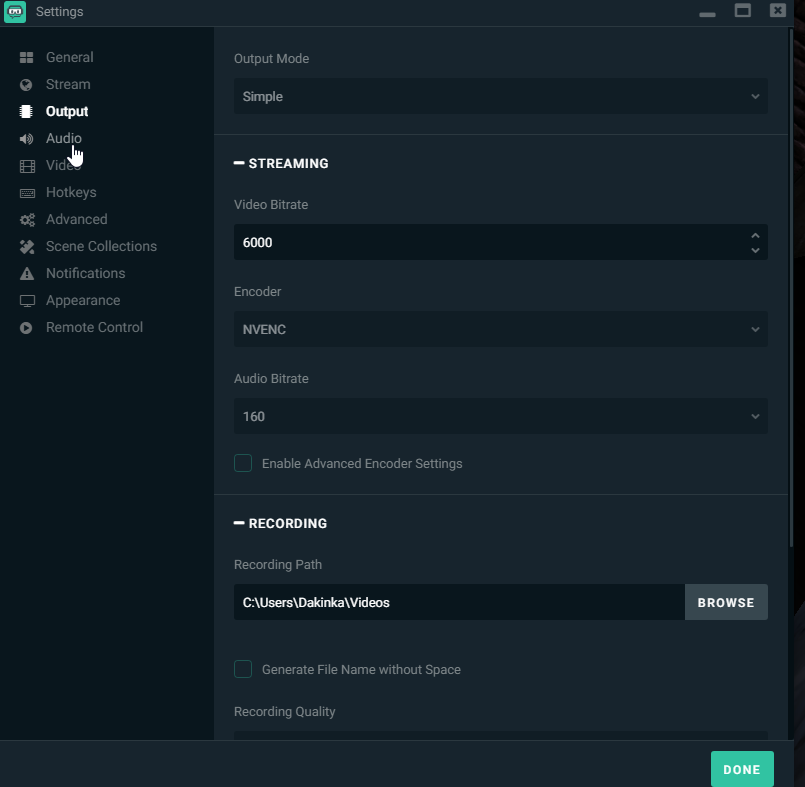 zenith widget
Some games like Neverwinter(old top-down one, not the MMO) are strange for streaming settings
wraith hemlock
i watched a guy last night, that had no pixels what so ever
zenith widget
Because they may use old DirectX versions, which are no longer supported by OBS. There are work around, like windows mode and capture specific window, but it may not be the best option.
Well, for starters, the pixelation has nothing to do with SE really, so wrong channel to ask, and 2nd, did you ask the guy how he managed to get to look so good?(also 6000 bit rate may be a bit overkill, unless you have transcoding from twitch and you are trying to stream at 1080p 60fps, for which you need actual transcoding)
Like I said, either ask in OBS Discord for assistance as to a work around on how to stream an old game or go to #general-chat (or both)
(Unless Neverwinter got a remaster version like Baldur's Gate, then I'm wrong its an old game)
adition?

@fair notch I'm not sure what you mean by "adition"
 blissful apex
Is here any plans to make SE alerts & overlays open source?
tight harness
If by that you mean downloadable then no we don't plan to make them downloadable, to download them and use them externally is actually against our terms of service, definitely no plans to encourage it
 atomic hollow
the custom CSS option allows you to see the "code"
blissful apex
can you edit the css for alerts for your own use?
atomic hollow
yes
zenith widget
winter zenith
when you add the Alertbox Widget and selecte it there is a enable CSS Slider on the bottom ⤴
blissful apex
got it thank you.
 gentle imp
ping
zenith widget
pong
gentle imp
😂
 light basin
i have somee alerts that were designed for streamlabs, custom css and all, but for some reason will not show in the overlay editor in SE even when putting in the CSS
zenith widget
@untold crest 👆
 paper scaffold
I'm new to streamelements and all the other programs were giving me laggy problems and I was wondering does your program have any problems with lag
zenith widget
In short I think the CSS isdifferent between our alerts and SL's alerts. To some extend. LX may be able to help convert it
light basin
uh oh
winter zenith
You programm doesnt have laggs at all it all depends on your setup an what you use @paper scaffold
zenith widget
(by different I mean what they use as parameters and calls)
light basin
honestly i'd rather get some new ones made than get it converted, that's just hassle
paper scaffold
A gaming laptop
light basin
keizar, would of thought both would use same functions, calls hm
zenith widget
I didn't even knew SL provides custom CSS my self, so I have not seen what they use really 
light basin
i did a bit of programming as part of my computing course, but was never something i invested in, so this is all foreign territory for me
winter zenith
The CSS from StreamLabs is "Dumbed down" so people that cant do CSS can do stuff.
this makes it easy for non CSS knowing people to change stuff but also limits you from what you can do with it
With StreamElements its "Pure" meaning its more complicated but you can do ALL THE THINGS with it 😄
zenith widget
There is a pinned doc of all teh custom CSS variables available from us in #dev-chat
 light basin
it's html, css, js. Looks basic but i could be WAY wrong
SIGH, it's literally my alerts that are stopping me fully converting REE
zenith widget
HTML is simple on its own most of the time, but CSS and JS are not so much simple if you get to the juicy parts really
winter zenith
thats why we have people like @untold crest to help you out 😃
light basin
html was easier, everything else just confuses me fml
winter zenith
dont worry we offer LEGENDARY fast support 24/7 we will fix your alerts
light basin
i can read it and understand it, but trying to write or edit it, ya na i'm good thanks
zenith widget
ctrl+C then Ctrl+f in the variable list to find similar call - if not, then just look around really.
gentle imp
just go with some theme alerts and start customizing as you want, easier than remaking all from scratch
zenith widget
You just need to find the proper CSS call/variable - everything else in the brackets as settings should be the same
Or the even lazier approach what Rippz0r suggested @light basin 
light basin
i like my alerts though 😦
winter zenith
I think cloud would like his alerts with his CSS
lets try to satisfy him here boys k? 
light basin
tbh the ones i have are just temp till i can find the right artist to design me some animated ones D:
gentle imp
oh well, then you'll have to grind that code ^^
zenith widget
I'm trying my best, mom! 
winter zenith
@light basin well if you talk to @untold crest or maybe @empty fjord you may have a designer that could do exactly that
light basin
oooooo
winter zenith
those guys are insane with coding and did unspeakable things already for other people 😃
light basin
do they have a public portfolio?
winter zenith
so maybe DM them both and state your case.
I dont know if they have a public Portfolio better ask them yourself :3
zenith widget
Or if you would like to wait for...lets say 4 hours for me to finish my work and get home today I may look into the SL CSS code and adjust it to ours? 
light basin
i'm here all day 😛 times is the one thing i have plenty of ;D
zenith widget
Just to point out..I'm a software dev...i don't like CSS+JS...but I can read it and more or less poke around it and adjust some things
if LX or Grot come around before me, then you are saved 
light basin
i'm just a pc builder/enthusiast, like... tech support.. aha
i can read code (some languages) but it's really not my cup of tea 😛 i can write and edit bare basic crap too.
it's all good!
i'm in no rush regardless, my stuff is fine as it is until i can convert 
 untold crest
@light basin can you provide me your code on jsfiddle.net so I can take a look at it?
(I can't promise anything to happen fast as I am at work for few more hours, but maybe there is something small)
 light basin
each alert has it's own custom css
i'll send one of them for you to just quickly look and if you can help, maybe we can talk properly later!
Test your JavaScript, CSS, HTML or CoffeeScript online with JSFiddle code editor.
i believe that is it.
This is the alert style/animation that it's suppose to be i have the video file for the animation, i "believe" the css is for the text.
i do apologies if i wasn't allowed to post. please delete if it's not allowed
lament blade
I need help
light basin
whats up unknown?
nocturne pelicanBOT
@lament blade The default resolution for StreamElements overlays (theme and custom) is 1920x1080. Please add them in OBS at their full resolution and use CTRL+F to fit to screen if necessary. You can then downscale your stream in OBS settings > Video if you'd like https://i.imgur.com/6bWXxjR.png

@lament blade Make sure to :ballot_box_with_check: “Shutdown source when not visible” for all browser sources (all OBS scenes). If using studio mode, uncheck “Swap Preview/Output scenes After Transitioning.” Also keep in mind that sound can play from any overlay loaded in the browser (editor or launched). https://i.imgur.com/FegZJQS.png https://i.imgur.com/yY0wcFl.png
lament blade
Another problem
light basin
go on?
lament blade
Nevermind, I fixed that one myself.
winter zenith
 we like those the best
light basin
alright my dude 😄
lament blade
However
When I'm adding widget "Top tipper" I comes up with "No data"
Is that normal/
?
light basin
have you recieved tips before?
lament blade
A $3 one
light basin
is your tipping page setup, paypal yadda yadda
lament blade
But that's it.
light basin
bare with me
lament blade
Yeah it is, but I made an intermission thing so I needed to do something with Muxy Ticker and Stream Labels.
Would that have messed with it?
light basin
top tipper shows the top tipper for the session/week/month or all time, so you'd have to select one of them
in your case, it'll be all time you'd select
you can still use stream labels for the labels, but may be delayed in updating compared to when you get the alert
winter zenith
awww cloud you so kind trying to help out we appriciate it very much (thats btw how we all started out now we stuck here wanting to help everyone @light basin )
light basin
oh god, i better stop then
winter zenith
@lament blade what your problem is that the Label widget is set to "session" by default
light basin
i'm happy to help people if i'm able too
zenith widget
@light basin CONTINUE!
winter zenith
if you go to the OverlayEditor and select the top tipper widget you can set it from Session to Monthy or All time @lament blade
light basin
do i HAVE TOO 
lament blade
winter zenith
@light basin no you dont have to but it makes fun helping people 😃
lament blade
Theres no difference in settings
for these texts
but I like the bottom 2 better
Please explain
winter zenith
@lament blade I explained
if you go to the OverlayEditor and select the top tipper widget you can set it from Session to Monthy or All time @lament blade
lament blade
No no, I got that one.
But I mean, look at the colour difference
and stuff
but the text settings are all the same
winter zenith
yeah you need to edit it
lament blade
:/
zenith widget
Go to text settings and enable shadow
winter zenith
^
light basin
looks like the top is bold
lament blade
However it's not..
winter zenith
looks like a diffrent font buddy
light basin
unknown
lament blade
Font's both roborto.
light basin
what i would do, is look at the text section of the widgets you like, COPY all the data you see
and then re do it all in the top tipper widget
 Cloud
light basin
Cloud
light basin
that SHOULD bring it all together
am smarticles 😄
but i still stick to my original comment, it looks like "bold" has been enabled, try turning that off first?
light basin
ayyyyy there we go!

 lament blade
I'm sorry I've been such an annoyance, I'm just new to StreamElements, it's so much bigger than StreamLabs.
light basin
it's chill man, we all start somewhere
winter zenith
you are no annoyance AT ALL
light basin
i'm still learning it myself
winter zenith
we love to have you 
lament blade
I have one more question.... sorrry
light basin
fire away
winter zenith
^
lament blade
I made my intermission thing IN streamlabs which was all connected to their systems, WILL it work in streamelements after I've done the exporting?
light basin
you'd need to recreate a new overlay in SE with all your intermission stuff in
lament blade
light basin
you won't be able to use stream labels though, you'll have to use SE's version
light basin
well it'll take half the time because you'll jsut have to recreate it D:
winter zenith
^
winter zenith
correct 😃
light basin
just be sure in layers it's at the bottom
think of the layers has obs sources, they stack on top of each other
winter zenith
we have a timer widget we have text wdgets
light basin
as* not has
lament blade
I DO have the textfiles
winter zenith
you can import PNG's
winter zenith
I dont think so
since our system isnt that complicated as in StreamLabs
we have a editor system with widgets aka Lego blocks
lament blade
Waiiiit
winter zenith
so you just input the widgets use a font for it and pace it where ever you like
lament blade
I shouldn't need to redo it, because I've put it in my OBS as my OWN files, the DATA however is going through streamlabs, how do I change it?
winter zenith
Like I told you its no need to do it this complicated 
light basin
with stream labels, you use streamlabs program to search for these text files on your pc
with streamelements, you go under data and choose the one you want, it's THAT simple bruh
winter zenith
^
light basin
no need to download anything, or any files stored on your pc, that could go missing and break your labels
lament blade
Where's data? I'm used to the complicated stuff :/
winter zenith
you only have to input one URL in the scene and everything is ready to go no matter on what PC you are
zenith widget
winter zenith
@lament blade I think you still didnt watch the videos I advse you to watch
zenith widget
The data tab lets you control goals and label context, but the widgets are the ones that show said data - just to simplify it a bit mroe
winter zenith
you would make it easier for you ifyou watch our Youtube tutorials and let the videos Teach you how to operate the site
lament blade
with StreamLabs
zenith widget
Abstract your self from SL for a moment
winter zenith
^
lament blade
I'm watching like 3 different videos at once.
zenith widget
 light basin
ok unknown, just FORGET streamlabs exists rn
light basin
it's completely irrelevant right now
lament blade
Because I watched the introduction thing, another girl showing me how to do the overlay thing, and then another girl showing me something else about it.
winter zenith
yes... thats our team making thse videos to teach you the site
light basin
you want data right? what data? latest follower? event list? what do you need exactly
winter zenith
@light basin he need the widgets
light basin
all that's found under widget by scrolling down
untold crest
@light basin
lament blade
With my scripting
winter zenith
what he needs is:
text Widget
a PNG of the blue Frame
Countdown Widget
Top Tipper
Latest follower
Latest Tip
untold crest
omg... flv... Not again you stupid OBS
winter zenith
all is foudn in the "Widgets" tab
light basin
@untold crest i'll give that a shot in a moo
lament blade
30day_cheer_amount.txt
30day_donation_amount.txt
30day_top_cheerer.txt
30day_top_cheerers.txt
30day_top_cheers.txt
30day_top_donations.txt
30day_top_donator.txt
30day_top_donators.txt
all_time_top_cheerer.txt
all_time_top_cheerers.txt
all_time_top_cheers.txt
all_time_top_cumulative_donor.txt
all_time_top_cumulative_donors.txt
all_time_top_donations.txt
all_time_top_donator.txt
all_time_top_donators.txt
cheer
donation_goal.txt
donation_streak_timer.txt
donation_streak.txt
donationtrain_clock.txt
donationtrain_counter.txt
donationtrain_latest_amount.txt
donationtrain_latest_donator.txt
donationtrain_total_amount.txt
follow_streak_timer.txt
follow_streak.txt
followtrain_clock.txt
followtrain_counter.txt
followtrain_latest_follower.txt
monthly_cheer_amount.txt
monthly_donation_amount.txt
monthly_top_cheerer.txt
monthly_top_cheerers.txt
monthly_top_cheers.txt
monthly_top_cumulative_donor.txt
monthly_top_cumulative_donors.txt
monthly_top_donations.txt
monthly_top_donator.txt
monthly_top_donators.txt
most_recent_cheerer.txt
most_recent_donator.txt
most_recent_follower.txt
most_recent_resubscriber.txt
most_recent_subscriber.txt
recent_donators.txt
recent_followers.txt
recent_host.txt
recent_hosts.txt
recent_subscribers.txt
session_cheer_amount.txt
session_cheerers.txt
session_donation_amount.txt
session_donators.txt
session_follower_count.txt
session_followers.txt
session_hosts.txt
session_most_recent_cheerer.txt
session_most_recent_donator.txt
session_most_recent_follower.txt
session_most_recent_resubscriber.txt
session_most_recent_subscriber.txt
session_new_subscriber_count.txt
session_subscriber_count.txt
session_subscribers.txt
session_top_cheerer.txt
session_top_cheerers.txt
session_top_cheers.txt
session_top_cumulative_donor.txt
session_top_cumulative_donors.txt
session_top_donations.txt
session_top_donator.txt
That sort of stuff
winter zenith
light basin
that's all under widgets by scrolling down buddy
winter zenith
@lament blade FORGET STREAMLABS
we dont have local data
everything is in the cloud
we dont do complicated stuff like that
its too much to worry about StreamElements is here to make it EASY
not comlicated
lament blade
Right
lament blade
So. forgetting streamlabs...
light basin
 winter zenith
so no need to have local files that could break
lament blade
Simplicity is what I'm using now
winter zenith
good
light basin
there you go, in widgets, under the directory stream labels
winter zenith
make your life easy buddy
lament blade
Is there just another Intermission template I can use? Mainly because I've SCRIPTED my old animated one using the COMPLICATED stuff.
winter zenith
yes
lament blade
So it's almost IMPOSSIBLE to get it sorted through here.
winter zenith
we have MANY overlay themes to choose from
with one click everything is set up for you
light basin
you can use themes from the theme part of SE
lament blade
Please tell me how.
light basin
themes gallery
and then have a gander
find one that fits your liking
then just press create
lament blade
Alot of purple...
light basin
all you gotta do then, is copy it's url
and then paste that into obs as a browser source
then jobs a done my friend
light basin
trust me man
i know the feeling, i came to SE expecting the same amount of complexity as SL
winter zenith
and its just that easy
lament blade
Ikr
zenith widget
If only people took time WATCHING the Video guides 
winter zenith
StreamElements is just the BEST
light basin
so even though everything is stupid easy, i expected it to be hard and resorted to trying to advance troubleshoot stuff that's not needing crazy troubleshotting
lament blade
Cloud, you came from SL aswell?
light basin
i'm currently still using S:
SL
but only for tipping and my alerts
that's it, everything else is SE
winter zenith
we about to change that honey LX send it to you I think?
lament blade
SL donations weren't working for me, main reason I came to SE.
untold crest
@light basin your remade alerts are ready to serve, sent you them over dm
light basin
@untold crest you sir, are a legend
untold crest
Don't I have one?
zenith widget
@custom Code guru
zenith widget
can't @-it unfortunately
lament blade
I'm learning about the layers, rn unlocking layers for my template to move it around, damn this is easy!
light basin
confused me abit not being able to ctrl,shift or alt+drag lol
lament blade
I have a twitch question.
lament blade
You know how there are "Stream ended" templates.
light basin
yessss
lament blade
When your stream ends, it doesn't exactly show that screen, how do I make it so it DOES?
light basin
you create an overlay that you switch too when your ending your stream
so say youre ending your stream, youd swotch to the stream ending scene
you dont actually end the stream strwight away otherwise you dont make use of it
the moment you press end stream then thats it over, there is no "countdown"
so in short
when you want to end stream, do what you gotta do to let your viewers know.
you switch to the ending scream scene
you mute your mic (if you dont want people still hearing you)
then you leave your stream on for maybe a couple minutes on the "ending stream" scene further letting people know your streams ending and lets anyone else coming in that your ending. then after a couple minutes thats when you press the end stream buttom
tight harness

 median hollow
i have an overlay that when someone follow me on twitch starts the allert but the thing that i dont understand is why i hear double alert sound
nocturne pelicanBOT
@median hollow Make sure to :ballot_box_with_check: “Shutdown source when not visible” for all browser sources (all OBS scenes). If using studio mode, uncheck “Swap Preview/Output scenes After Transitioning.” Also keep in mind that sound can play from any overlay loaded in the browser (editor or launched). https://i.imgur.com/FegZJQS.png https://i.imgur.com/yY0wcFl.png
lament blade
HELP
zenith widget
Close the overlay editor
lament blade
I deleted something I need it back
zenith widget
From the premade overlays? @lament blade
zenith widget
Ok, so you can create a new premade overlay and just dupllicate the deleted layer
Make sure you click on the layer you want to duplicate and just duplicate over
median hollow
@nocturne pelican i have same problem cant fix it
i hear it twice..
maybe because is the same overlay in 2 different scene?
zenith widget
@median hollow KeiZar - Today at 2:49 PM Close the overlay editor
median hollow
i did it
lament blade
@winter zenith I need your help
winter zenith
@median hollow did you click "dont show if not visable" n EVERY browser source in EVERY scene in OBS?
zenith widget
Triple check
winter zenith
do you habe the Same Overay URL doubled in one scene?
lament blade
@zenith widget Can you help me?
winter zenith
go to all your scenes @median hollow and replay a alert (make sure to have the Editor muted on the top right)
median hollow
i have same overlay for 2 different scene
winter zenith
see wich scene is causing you to have a double alert
zenith widget
@lament blade If you don't jump the gun so fast, I can.
@lament blade After you duplicate the widget move it to where you want it to be.
lament blade
I've duplicated the layer, but now, it won't go back into place, how can I FREELY move it? Whenever you're able to explain
median hollow
i hear once only if i deactivate the source in one of 2 scene
zenith widget
If its snapping to the sides or another widget click this :
and you can use the ARROW KEYS on your keyboard to move it 1-2 pixels to any direction
lament blade
Legend.
winter zenith
@median hollow then you seemed to find your problem
lament blade
Is there anyway to group on EL?
median hollow
yeah but when im streaming i cant activate every time and deactivate it everytime i switch
so boring..
winter zenith
you dont need to decativate it?
tight harness
@median hollow Tick the option shutdown source when not visible in the browser source properties
median hollow
if i dont i heart 2 alerts
tight harness
⤴
winter zenith
did you do what Sean,Keizar, the bot and I told you?
to tick the box "shut down if not visible" ?
median hollow
like that?
winter zenith
or are you telling me you have 2 Overlay URL's in the same scene?
lament blade
Yeah, but when taking a ss try NOT to show the URL....
winter zenith
or are you telling me you have 2 Overlay URL's in the same scene?
median hollow
@winter zenith i told u that i have the same overlay for 2 DIFFRENT scene
winter zenith
yes
and if you tick the box
in both URLS
in both scenes
you should be fine
because if you are in scene 1. scene two is not visable
lament blade
#KiwaForPromotion
lament blade
I'll wait till Bonds is sorted before I ask anymore questions
lament blade
Bonds, both scenes
Look for the BrowserSource.
and tick the box I posted before
for both of them
Or however many Scenes you have.
zenith widget
@median hollow If that doesn't help. Delete all browser sources in ANY SCENE and readd them, with said option 'Shut down when not active'
If you still hear the alerts, 5 times check your OVERLAY for any duplicate alerts
median hollow
nvm dude ill use another overlay lets see
lament blade
Okay.
zenith widget
If you still hear the alerts, 5 times check your OVERLAY for any duplicate alerts widgets @median hollow
lament blade
Well, is there a way to group on SE?
median hollow
@zenith widget did it nothing find..
zenith widget
Then delete the overlay and recreate it
median hollow
i will
zenith widget
@lament blade Multi select layers? Unfortunate no and its a feature that is requested a bunch of times
!ideas
nocturne pelicanBOT
Here is the StreamElements Ideas Board: https://strms.net/ideas
winter zenith
@lament blade sadly no maybe at one point
zenith widget
Check our ideas board for it and UPVOTE the SHIT out of it
lament blade
Legends, well it was worth asking.
I know you guys say I'm not an annoyance but I am, another question, with the given overlays, how do I add facecam?
zenith widget
Most premade overlays
have a box for the facecam
you just add it as a source in OBS
Video Source I think it was
lament blade
Legend


