#helpdesk-twitch
1 messages · Page 291 of 1
 muted fiber
 weary mist
that sounds super weird. Do you ahve any other anti-virus active (windows defender included)
muted fiber
Just defender
I've tried other websites in the browser source like Google and Twitch and they all load fast with no problems.
weary mist
there should be a way to make sure that the domain www.streamelements.com is whitelisted and it doesn't get messed with
Our system uses a lot of API calls all the time, especially the overlays, so they tend to be looked at a lot harder than google or twitch would be looked at
muted fiber
I'll try to see if I can whitelist Stream Elements in Defender
The only exclusions it's allowing me to add are file, folder, file type, and process. I'm not seeing a place to enter URLs.
 narrow coyote
You could try adding the OBS process as an exclusion
muted fiber
That's what I'm looking at now. Hoping this will fix it.
narrow coyote
I really hope so too 
muted fiber
Well, I added OBS to the firewall and I'm still getting a transparent overlay with the help button.
 zenith widget
Are you using OBS Classic?
muted fiber
Nope
muted fiber
Latest version of Studio
muted fiber
I've tried putting in the link multiple times. I even tried duplicating the overlay and trying the new link :/
zenith widget
Mind providing me the link in DM?
muted fiber
Sure
 narrow coyote

muted fiber
I could try reinstalling OBS, but that didn't work before, so I don't see why it would now.
weary mist
are you running as admin?
narrow coyote
can you get me a new OBS log?
weary mist
(reaching for straws at this point)
muted fiber
I am, yes
narrow coyote
yeah, we went over running as admin in DM's yesterday
weary mist
damn
narrow coyote
I was helping her when we stumbled on avast doing funky stuff, but now 
muted fiber
I tried disabling windows defender to see if it would work, but nope.
narrow coyote
can you get me a fresh OBS log?
muted fiber
Gah I forget where to get it
narrow coyote
in OBS, Help > Log files
zenith widget
I suggested installing the 2 Adobe Flash versions just in case, no dice
 lament blade
hey, how do I stop the bot from welcoming people in the chat?
that follow
also how do I make the bot spam cool messages to subscribers
when they sub
narrow coyote
yeah, i think it is going to be something odd, because it loads the browser plugin and loads the sources with out error, so it almost like there is something in between messing with it
@lament blade https://streamelements.com/dashboard/bot/modules Chat alerts
zenith widget
Is OBS using a specific port to load browser sources?
narrow coyote
it might be, it could be worth a shot adding the obs executable to inbound and outbound firewall rules
zenith widget
Because if its a middle man thing - router may not like what port OBS is trying to use to?
narrow coyote
its just odd that yesterday it was working after disabling avast, and now its back
muted fiber
It may not have been working correctly. It just looked like it was.
zenith widget
Router must have let the anti virus to manage port usage, but now that its gone and the PC has been restarted, router may have noticed that the traffic is not monitored via the PC
routers are getting smarter with each year 
narrow coyote
yeah, its for sure worth a shot
as well as firewall rules
gimmie a sec, going to get some screenshots of stuff
 untold crest
Erm. OBS uses standard https port for getting overlays
Have you tried running overlay in web browser? @muted fiber
Let me get to backlog 😉
zenith widget
@untold crest Me and Kite added her overlay link in our OBS' and it worked fine for us
muted fiber
I can see my overlays with no problem in Google Chrome
untold crest
@muted fiber if you add https://google.com as overlay, do you see it then?
Search the world's information, including webpages, images, videos and more. Google has many special features to help you find exactly what you're looking for.
muted fiber
In browser source? If so, yes.
narrow coyote
yeah, we played that game yesterday
muted fiber
StreamElements.com works just fine. However, StreamElements.com/dashboard does not.
muted fiber
👍
untold crest
So, visiting streamelements.com/dashboard on your webbrowser doesnt work, right?
While streamelements.com works nice
muted fiber
Correct. I get this transparent overlay with the blue help button in the bottom right corner.
narrow coyote
ok, lets try adding an inbound and outbound firewall rule for OBS, just to see if it helps, otherwise I am thinking maybe using a different dns, like googles
everything works fine in chrome for her, its just in the browser source, showing the help button
untold crest
It seems like OBS couldn't execute javascript
OK. To not confuse. I step back, I don't want to interrupt.
narrow coyote
naw, its fine, do you know of a good site we could add to test this?
untold crest
Just anything that will display javascript execution on start. Let me prepare something
Test your JavaScript, CSS, HTML or CoffeeScript online with JSFiddle code editor.
If there's "JS Test" on button in that example, that means JS works
narrow coyote
@untold crest thanks, we are testing this now
we made firewall rules, and things got interesting
 inner parrot
Not really sure where to post this but I just wanna say thank you to Sean, Streamer Success Manager on helping me to fix my chatstats issue. 😃
zenith widget
@tight harness ⤴ 

 tight harness
No problem 😄
 cloud niche
trying to make a rules thing for a streamer currently it looks clumped up ex. StreamElements: 1. be cool 2. have fun 3. get gud. --- was wondering if there is a way to make one command have multiple responses so it would be more like this
!rules
StreamElements: 1. be cool
StreamElements: 2. have fun
StreamElements: 3. get gud
is there variables for this or would it be possible for the quote system to variable to pull mutiple qoutes ex. $(quote 1,2,3)
untold crest
I am afraid there are no multiline responses. You should be able to add multiple commands with the same call (alias or command name), but I think they will go off in random order (depending which one will bot get first)
cloud niche
ty
 autumn verge
@untold crest so just to clarify, if I add multiple commands with the same name, it will show up at random? (in the case of wanting multiple possible options? or is it going to resort to one more than another ie most recently added or alphabetically first etc)
untold crest
@autumn verge I have no clue. I imported from moobot some commands, which duplicated SE ones then I got !uptime doubled
But order of those responses - I really don't know
autumn verge
Also, is there a way to hide mod/supermod commands from the public command list? And/or to sort the list into groupings (ie all the song request stuff together, the games together, etc) because right now that list looks really cluttered and not very intuitive 😦
Hmmm I'll have to test that out , let me go spam my streamer's (empty) chat for a bit and let you know 😛 oh, incidentally, is there a way to test bot responses other than using that person's twitch chat and spamming it? 😛
untold crest
Let me take a shot of this for you
autumn verge
I know there's a "hide from public" setting but it doesn't show up on all commands - i can screenshot if you'd like
untold crest
It is available for custom commands only
autumn verge
ohh darn
like i said, i just wanted to hide mod/supermod commands from that list
because cluttere
is there no way to do that? because obviously I don't want to disable commands, simply hide them since there's only two mods on the stream, they don't need the list if they have access to backend
 exotic hinge
autumn verge
exotic hinge
autumn verge
looks like it's working for me
 jolly flame
 kind epoch
Is !sr working?
lament blade
why doesn't the bot respond to my commands when my stream is offline?
is that normal?
nvm
 dense jackal
We are looking into the bot issues right now we appreciate your patience 
weary mist
Don't worry, evertyhing is fine http://gph.is/1MLPDWK

 maiden coyote
heey got a question ive been noticing for a while now! Do any other people have issues with the backuplist in ground control not actualy going through your backup playlist?
maiden coyote
ok with me it doesnt load the next song on the backup playlist
lament blade
deleted again cuz dc link 😄 was just pic to show it works
dense jackal
Thanks @lament blade perfect timing 😄
maiden coyote
all the other stuff works just fine with me only the backup list is doing weird stuff sometimes:P
weary mist
lol, there are two twitch accounts in your discord. which one am I going to look at?
narrow coyote
weary mist
@maiden coyote are you using ground control or the webpage?
weary mist
the only thing I can think of is that your request settings might be interferring
because I use ground control for mine, and I don't have any issues
maiden coyote
its weird indeed used to work fine tho
weary mist
but I don't have any filters on for "Limit to Music" and the auto filter
maiden coyote
but noticed since last week that for some strange reason it didnt load the list anymore
weary mist
try doing a couple things here.
- Try using the webpage for listening, and see if it still happens
- if it does, try removing the playlist, then readding it
maiden coyote
tried removing it yday
and the webbrowser doesnt seem to have the backup list loaded anymore eigther
ill try some more fixes when im done for today:P
autumn verge
hii anyone here play league of legends and knows how to set up a !rank command?
Kenreo is now (customapi http://gotme.site-meute.com/query.php?action=rank&id=55488477&channel=Kenreo&r=NA&user=(sender)&bot=Phantombot) < this is the command i have rn
so as far as i know, i just gotta swap the very end out to whatever "bot" streamelements is
but it's not working that way
 ebon forum
@autumn verge check out #command-share - closer to the top are some commands for that
autumn verge
oh, were there? i saw a bunch of hosting/shoutout ones but I guess I didn't look hard enough. ty! guess i should make it through that thread first before i come ask here
also i'd asked earlier but - anyone know how to get a command to pick from multiple possible responses at random, pls @ me or PM me or something, ty! this stream has so many of those and I'd hate to use another bot just for like 5 commands
weary mist
@autumn verge check out the variabls section, there is a variable just for that
autumn verge
umm I see "random quote"
which I'm going to load one of those commands into
but there's several ones
so i can load xyz into quotes, but there's a different command that chooses from abc so i can't load it into the same !quote
unless there's another variable I'm missing so i can make "quote"-like commands ?
so i can add more to those?
weary mist
autumn verge
that is not on my list!
autumn verge
is there a more complete list somewhere?
weary mist

StreamElements
The Ultimate All in One Platform for Streamers
autumn verge
ohh i'm blind sorry ... the list I'm trying to load in is like full sentences so i kinda ruled out setting the command up that way
I guess I could set up two commands and just hide the one with the huuuge full list and alias them together
ebon forum
@autumn verge and there is the lol rank command:
' League of Legends rank lookup '
Command: !rank
Response: ${customapi.http://gotme.site-meute.com/query.php?action=rank&id=LOLAID&channel=${channel}&r=REGION&user=${sender}&bot=StreamElements}
Notes: Replace LOL ID with your League of Legends Account ID and replace REGION with the appropriate region such as NA, KR, etc; You can locate your ID from http://www.lolking.net/ and type your name into the search bar; it'll appear in the Address Bar behind the summoner name as digits.
ㅤ
other commands are in the mentioned channel, try it out 😃

LolKing
LoLKing provides the best and most current League of Legends builds, guides, counters, & more! Follow your favorite Summoner & keep up on the latest news.
autumn verge
I found those, thank you cryonic!
i didn't capitalize StreamElements the right way, that's what I was doing wrong
ebon forum
dang, did not want to tag derpy, goddamit 😄
autumn verge
lol just edit and untag
weary mist
you could also use the built in quote command, @autumn verge
autumn verge
scalp, this streamer has multiple of those types of commands where there's multiple sentences as options, that's why
weary mist
just add them all to the quote list (!quote add), then !quote returns a random one
ahhh
autumn verge
i already loaded the most line-heavy into the quote default one
yeah... that's why i'm having problems 😛
so i was looking to see if i could find a way to create a command similar to quote with a different keyword
but i guess i'll just use the randompicker and manually update it when people have suggestions, shouldn't be too bad 😃
 gray grail
Is the followage kinda broken
 edgy kindle
@ebon forum  Little did you know you tagged me anyhow
gray grail
some people havent followed for a long time, it said >10 months
some guys have been following for >10 months
theyre <10 months
😂
autumn verge
bot doesn't know how to math
gray grail
how to math LUL
weary mist
- bot doesn't know how to math, but that doesn't matter
- that is pulled from twitch /shrug
 shut elm
Hey guys I just joined and was wondering does your overlays support PS4 streaming?
weary mist
the problem is that PS4 streaming does not support overlays
 nocturne pelicanBOT
@shut elm Here is a guide on how to setup the most essential tools for streaming from your console, while using StreamElements tools without involving a Capture Card! It's easy to do, take 4 minutes to read and 10 to 15 minutes to setup!
Read all about it here: https://blog.streamelements.com/how-to-stream-on-console-7b620b1c46c3
 heavy spoke
Hello am back again  , at the moment people in my chat are not able to post links, I don't have link protection or any of the spam filters on any clue of whats going on?
narrow coyote
do the links turn into ***
weary mist
@heavy spoke
narrow coyote
https://www.twitch.tv/settings/channel Block Hyperlinks @heavy spoke
narrow coyote

heavy spoke
I appreciate you guys so much ❤
narrow coyote
weary mist

 solid cloud
Hello I am having an issue trying to setup kappagen. Everything looks correct from tutorials but when i go to test them nothing happens
 tawdry mica
i cant get my overlay to fit my screen on obs
nocturne pelicanBOT
@tawdry mica The default resolution for StreamElements overlays (theme and custom) is 1920x1080. Please add them in OBS at their full resolution and use CTRL+F to fit to screen if necessary. You can then downscale your stream in OBS settings > Video if you'd like https://i.imgur.com/6bWXxjR.png

 plain lion
is there a way to make the Streamelements Chat Letters White and not black >.>
lament blade
BOT DOWN??
zenith widget
@solid cloud If you are referring that the test alerts are not working, we know that Kappagen doesn't react to the test alerts. Try adding the kappagen to the overlay, saving and then adding it to OBS and test the !kappagen emote
zenith widget
DONT KNOW
weary mist
what command ar eyou using
solid cloud
do i have to make that command?
zenith widget
Let me check my self
solid cloud
because it didnt work
zenith widget
@solid cloud Its in the default commands for the bot
weary mist
you may have it turned off, check default commands
solid cloud
will the test work if i am offline on twitch
weary mist
@lament blade I just tested the bot in your channel, worked fine for me
weary mist
zenith widget
@lament blade
lament blade
weary mist
do !bonus all @zenith widget
lament blade
Not just in my stream either
narrow coyote
not the worst load time, but its still slow
weary mist
ouch, that would cause it
anything longer than 1-2 seconds would be an issue, 3 is bad
 stray lotus
When I type commands in my twitch chat I don't see the bot talk at all. What to do? It's not muted/banned/or time out the commands work, just don't see the bot responses
narrow coyote
Might need to try parting the bot from the channel and rejoining it @stray lotus
weary mist
im checking out settings and stuff, give me a second
stray lotus
np ty
weary mist
ok. Here is what we are going to try to do
We will part the bot, You will log out of Streamelements.com, clear your browser cache, and log back in, and join the channel
 full fable
Hi - can someone help me figure out why bits aren't showing up in my tip cup?
It was the world cup one, do those not work?
 distant quartz
why would some people hosting come up and get loyalty points but then some are hosting and they don't get points and it never pops up the chat message saying they are? very confusing
 clever mango
Hosting for 0 viewers isn't rewarded with points
Hosts with viewers will get the bonus
full fable
Just checking in if anyone can answer my Q - do the world cup bits not show up in the cup??
clever mango
@full fable a new cup may need to be added
distant quartz
they had 2 people on their stream while hosting. nothing popped up in my chat and they didnt get points.
clever mango
Yes, you should see all of the tokens in the new cup
@distant quartz does that host show in your activity feed? https://streamelements.com/dashboard/activity
When you say it didn't pop up in chat are you talking about the bot posting the chat alert?
distant quartz
yes bot
clever mango
Please connect your twitch with discord and I'll try to look into it further
nocturne pelicanBOT
@distant quartz Please connect your Twitch and/or YouTube channel with Discord by going to ⚙ Settings and then Connections here in Discord. https://streamable.com/eg92w
 distant quartz
im not streaming at this moment have some work to do ill ask again if it persists
thanks
 misty sparrow
wen im streaming from ps4 is there a way to mute me in stream so i can talk to my party chat in private?
clever mango
@misty sparrow I've never streamed from ps4 so I couldn't say. Maybe someone in #general-chat can help
 brazen swallow
hey guys
i would like to ask if i need to go live true stream elements aswel ?
or do i still use obs ?
edgy kindle
@brazen swallow You only need to use OBS
@brazen swallow This a Streamer Tools platform not a broadcasting software 
edgy kindle
Yes
 deft flame
is there anyway
edgy kindle
With StreamElements you only need a single URL for all your alerts(unless you have customized multiple overlays)
deft flame
that mods can remotely control ground control
edgy kindle
@deft flame Not unless you have given them access to your computer
or twitch account
but thats not smart lol
deft flame
@edgy kindle we are trying to do media share with a backup playlist
but the backup playlist shows video
we need to manually hide/unhide each time?
edgy kindle
Lemme check up on this for you
brazen swallow
derpy does it matter that i stream from a ps4 with a gamecap ?
edgy kindle
Is it PS4->PC?
brazen swallow
what do you mean ?
edgy kindle
Like a capture card to stream your PS4 content to your PC
brazen swallow
yes and than true my obs i stream
edgy kindle
So that should work for overlays but streaming straight from a ps4 wouldnt
deft flame
@edgy kindle I have streamelements dashboard access for this streamer, is there a way to generate a JWT token to have ground control access for his stream to hide/show media share?
brazen swallow
okayy good
 wet halo
How can i get stream overlay on my stream when i stream on my xbox
brazen swallow
and for the alerts ?
edgy kindle
@wet halo You would need a capturecard
wet halo
ok
edgy kindle
@deft flame I'm not sure let me check
brazen swallow
how to get the overlays i pickt on stream elemnts get it on obs
edgy kindle
@brazen swallow If you set your alerts up and put the overlay URL into your OBS as a browser source it should work
edgy kindle
@deft flame I've been informed GC doesnt fully support Media Share yet
brazen swallow
let me chek it out
deft flame
@edgy kindle if I get the streamer to give me his JWT token from ground control
would I be able to start/stop/show/unshow for him
edgy kindle
@tight harness ^
 ivory holly
Hey i need some help, who can give me some support?
edgy kindle
just ask away; any of us could answer
brazen swallow
derpy i cannot find the urls 😦
ivory holly
my problem is that i have double sound alerts (echo) by notification, i didnt change anything and now this problem exist...
tight harness
@deft flame Media Request is not fully supported on Ground Control yet
edgy kindle
@ivory holly enable shutdown source when not in use for your overlays in obs
ivory holly
for the streamlabs overlay u mean? i did that alrdy in the past..
ivory holly
@edgy kindle i only have option "deactivate, wenn source not viable"
edgy kindle
obs version?
edgy kindle
@brazen swallow https://i.imgur.com/sJ09pnK.png
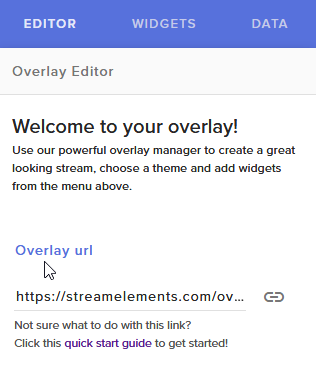 ivory holly
and 2 days ago it worked for me
wet halo
do i need a capture card to get alerts when someone follows me
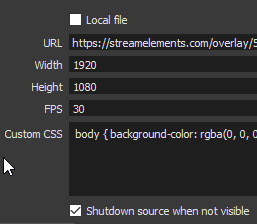 nocturne pelicanBOT
Are you a StreamElements all-in-one streamer and interested in stream promotion when you go live? Please fill out this application https://strms.net/sellout and if you meet the 3 requirements posted in the :pushpin: pinned message in #welcome you will be added to the stream announcements.
edgy kindle
@sudden mica
 sudden mica
ty
deft flame
@edgy kindle @tight harness for media share, it would be really nice if the backup playlist didnt show video
edgy kindle
i think thats a youtube limitation
deft flame
can we use a soundcloud playlist or something else?
ivory holly
disable if source is not visible - thats all i can use and i do. 2 days ago it worked (didnt change anything..) dunno why now a problem
brazen swallow
@edgy kindle i did what you said but the overlay doesnt show up should be a lama in my screen but its not
edgy kindle
check all your scenes @ivory holly just in case
@brazen swallow could you DM your overlay url?
i'll test it in obs
brazen swallow
okay
ivory holly
@edgy kindle arg yeah man, forgot i added 1 new szene just made it for 10min and didnt use. sorry my fail
works now again
edgy kindle
lol
brazen swallow
were *
edgy kindle
glad to know your problems are fixed
ivory holly
ye, thx & bye
brazen swallow
derpy
is there an easy way to get the url
or do i need alwys to go to the edit mode?
 prisma lake
@edgy kindle I'm running into some confusion whilst setting up, is there anyone available for voice support at the moment? If not could I be contacted when someone is?
brazen swallow
Hey , if i am streaming i het weird colors in my screen andshit its realy awfull
Is that cuz my cpu is to weak ?
wet halo
when i am on the obs project and i am talking on my xbox why can i here two of me on the obs
 glad zinc
any way to turn off auto-host alerts?
 soft pelican
Until when will the problem be solved in the modules? You can not change any notification, since it always gives the same error.
autumn verge
Anyone know how to get urls to actually hyperlink when you have commands?
shows up as plain text for me and i'm sure i'm doing something really simple wrong
nocturne pelicanBOT
@soft pelican On the page that gives an error, press F12 to open Developer Tools. Navigate to “Network” at the top and then Select “XHR” in the filter section. Try the action again that gave the error and note in the network tab any red text. Please copy and paste the error information that is given when clicking on this red text.
autumn verge
@edgy kindle hey sorry to bug you but do you know how to amend the api link to access flex rank? people apparently want access to that too
clever mango
@glad zinc All hosts are the same here. You can set minimum for any host alert
edgy kindle
@autumn verge You need to setup a separate command
@autumn verge Lookup trahanqc I think the name is and you should find the api the commands use
autumn verge
yeah ofc i understand it's a separate command
omg that is amazing thank youu @edgy kindle
prisma lake
Yeah thanks for the response >.>
wet halo
when i talk on my xbox i can here two of me how do i fix this
clever mango
Please click on the red text and then let me know what it says to the right of that
soft pelican
{statusCode: 400, error: "Bad Request",…}
details
:
[{path: ["pyramid", "messages", 5, "message"], message: ""message" is not allowed to be empty"}]
error
:
"Bad Request"
message
:
"child "pyramid" fails because [child "messages" fails because ["messages" at position 5 fails because [child "message" fails because ["message" is not allowed to be empty]]]]"
statusCode
:
400
clever mango
So in the pyramid module there is a message missing
Which is preventing the modules to save
prisma lake
Anyone know why I'm unable to upload different pictures for me background in StreamElements? The save button is permanently greyed
clever mango
@prisma lake Please screenshot so I can see what you're referring to
prisma lake
The tip page.
prisma lake
Yes, it prompts me to select an image, I do so, even tried cropping to match the recomended pix and the save button stays greyed. Let me do it and SS it
soft pelican
Then ... will they solve the problem? just wait?
prisma lake
Sorry yuki didn't mean to steal your help lol
clever mango
@soft pelican You can fix it by adding a mesage
The problem is that there is a field that is empty
prisma lake
Won't allow me to click save.
clever mango
Try with chrome please and it should work. The uploader is built for chromium browsers so Edge has issues with it.
soft pelican
then you would be kind enough to tell me which message I should add and where to solve the problem
 pine hemlock
Delete the line that has no message or add a random message and hit save
and it will fix your other modules
prisma lake
@clever mango That darn old Edge. That was exactly what was causing it. x.x
 upper umbra
Hey guys, quick question, is there a way to make custom macros for bot commands? e.g. custom command in chat "!mycommand" to run !addpoints all 100
clever mango
@soft pelican I've fixed it but here was the problem https://i.imgur.com/qCoyR4R.gifv
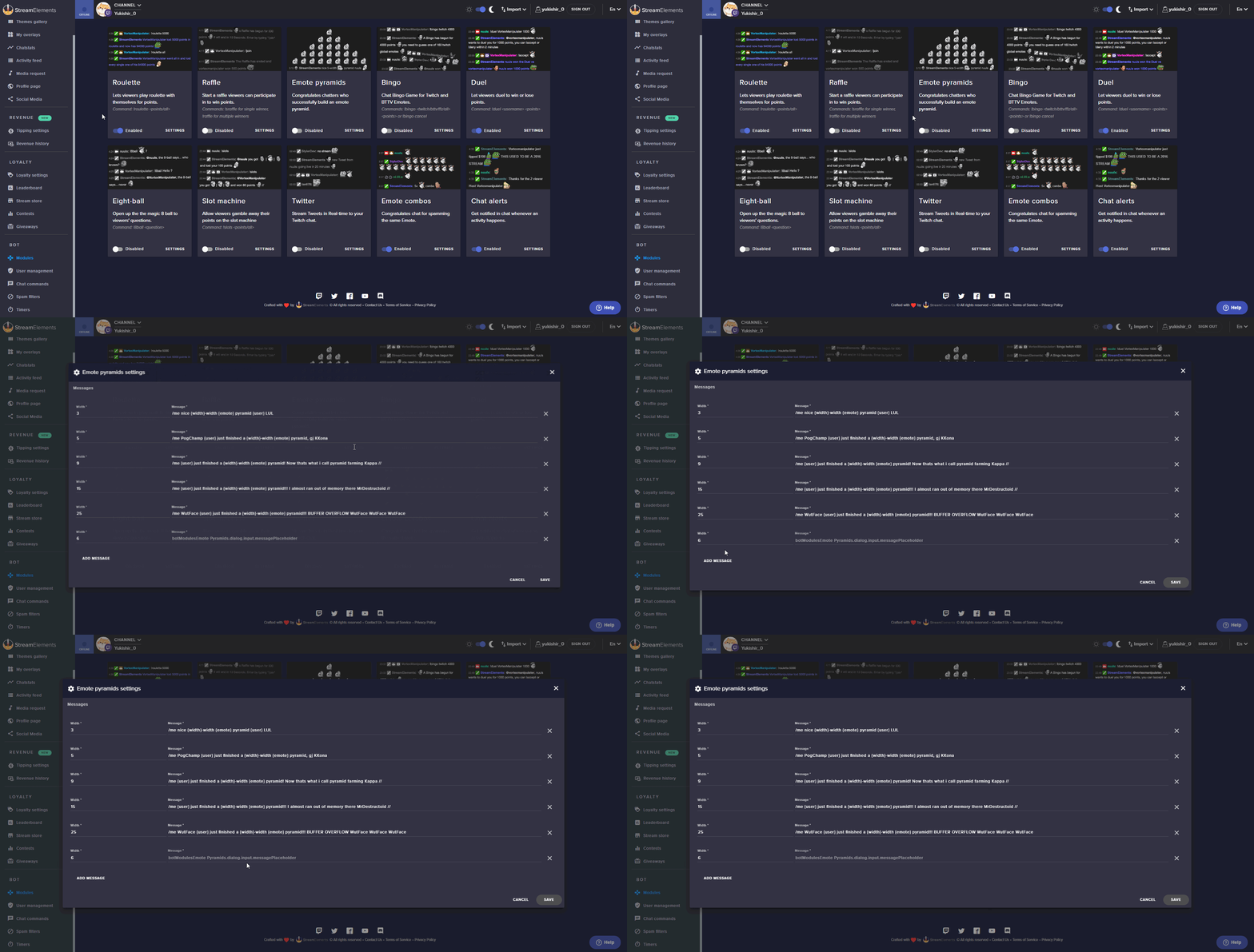
I deleted that line and saved
narrow coyote
@upper umbra That is not going to be possible, the bot cannot trigger a command from a command
soft pelican
@clever mango Thank you very much! Yes, that's how the problem was solved, thank you very much for your help.
autumn verge
is there a way to adjust people's points without doing it on stream/twitch chat?
autumn verge
where in the dashboard?
edgy kindle
Leaderboard I believe
 elder sorrel
@autumn verge https://streamelements.com/dashboard/leaderboard/current
StreamElements
The Ultimate All in One Platform for Streamers
elder sorrel
You'll see on the top right where you can add / reset viewers' points.
autumn verge
yeah i see it, just barelyyy offscreen ---
elder sorrel
Yeah that happens on some browsers I believe 😅
prisma lake
Hello, I'm having difficulties getting my overlay to work in OBS, or wherever it's failing. I followed the 1 minute set up on the site from the tutorial it gives when attempting to launch the overlay, but then once I got the source all set it just appears as the main home page for OBS in my stream. Thoughts?
I have the proper 1920 1080 res as well.
weary mist
that sounds like you didn't copy the link correctly
an incorrect link re-directs to the homepage
prisma lake
I'll retry, but i clicked the copy button, didn't ctrl c it lol.
LOL I was so busy reading and what not I just literally didn't paste the link as I thought I had. xD Good stuff.
weary mist
xD
prisma lake
Alright now I believe this should be the very last thing that's confusing me. My tipping panel doesn't seem to show the link at all. Just displays "Tipping" as I wrote in. Have tried to re copy the link to make sure it wasn't that, nothing helped. Thoughts? 😛
Here's so ya'll can see what I mean
pine hemlock
!panels
nocturne pelicanBOT
Twitch's official help guide for Panels: https://help.twitch.tv/customer/portal/articles/2416760-how-to-edit-info-panels
prisma lake
Oh snap you're legit Thanks a load!
I like how you HAD to have the image for it to work. Figures that's what I did wrong >.>
Ya'll are killer. See you around!
 split gazelle
I have reset my loyalty points on stream element, so I can use the stream elements extension on twitch for some reason the old points are coming up on the extension not the new loyalty points anyone that can help me!!!!
weary mist
@split gazelle can you try removing the extension, and read the extension? Also, have you done a name change recently?
split gazelle
I have removed the extension 5 times and I have changed my name
weary mist
then you need to go to the main website, part the bot, log out, clear browser cache, log in, and join bot. Then go to look at your panel (do a hard refresh)
@split gazelle
split gazelle
Thank you it worked 😃
 tawdry yew
Hey. Got a question here. Will a capture card reduce load on cpu to stream?
 last tangle
My sub only redeemable things can be redeemed by non subs on the website
 winter zenith
@tawdry yew yes Since your PC doesn't have to render a game, the capture card and the console do it for you
 lean thicket
I'm trying to search a little but I'm not real sure how to search for it and I'm sure someone knows so it's probably easier to just ask 😉 how do you edit a command to mod only from chat as a mod, not dashboard?
tawdry yew
@winter zenith console?
winter zenith
@tawdry yew arent you trying to play console games (ps4 xbox one) with a capture card? @tawdry yew
Or why would you buy one?
I think @lean thicket to edit commands in chat they have to be Editors or super mods 
Chat/Bot Levels
100 - viewer
250 - subscriber
300 - regular
500 - moderator (twitch mods automatically placed at this level)
1000 - super moderator
1500 - broadcaster
Dashboard Manager Levels (least to most access)
Bot Supervisor (can add super moderators from dashboard)
Editor
Full Access
https://i.imgur.com/s61Liry.png
@last tangle so not trough chat and extension but on the store Page?
lean thicket
i figured out how to make a command mod only finally it was !cmd options [command] -level 250 if anyone happens to search here and needs it in the future 😉
oh wait
250 is sub thank you for that list! 😄
winter zenith

last tangle
Yes kiwi
zenith widget
@last tangle Its a known bug and has been reported to our devs
 summer urchin
um hi, im a mod in a stream and have been asked to add a command, but i cant work out what to put in. its so that we can give points out. can anyone help?
winter zenith
@summer urchin it's.
!bonus username 123
The command needs to be access able as mod
I think per default it's only for supermods and broadcaster
summer urchin
thank you @winter zenith
winter zenith
No problem
 empty fjord
@tawdry yew only other option from the console that @winter zenith mentioned would be a dual PC setup - Gaming PC -> Capture Card -> Streaming PC
tawdry yew
@empty fjord now this is what i actually intend to do
empty fjord
@lament blade then yes, as @winter zenith mentioned, that will take the whole game load off of your streaming PC
 half vessel
Hey good morning. Dont know if this is the right place tho, but im having trouble with !raffle when stream is live, it counts down fine and all, but it does not register that anyone joins the raffle. It works 100% when stream is offline.
empty fjord
as long as you dont mind the extra space needed for a second PC and the increased power usage, a dual PC setup is ideal for streaming those more hardware demanding games
winter zenith
@tawdry yew well that's why I asked you what you intend to do with it other then that 🙄
empty fjord
@half vessel are we talking about Giveaways or the bot Raffle (loyalty points) module ?
half vessel
bot raffle (Loyalty points) module.
empty fjord
has this happened consistently over a few streams or was this a one time thing so far? im thinking you may have just unluckily hit a point when the bot was getting restarted or something in those lines 🤔
half vessel
It's something that is constant now. All of a sudden it happend. And i even tried default setting, pulled the streamelements bot out of the stream and joined it again. It's been like this for 5-6 days now
winter zenith
So it doesent Pick a winner? @half vessel
But when you are offline it picks a winner?
half vessel
After i run the !raffle command it counts down, people do the !join to enter the raffle, and when the counter is finished it says : no one entered the raffle
That is only when the stream is live.
WHen the stream is offline, it all works 100% it registers the participant and all and give out loyalty points
winter zenith
Ah... Strange. Other commands work? Like default, custom and timed Messages?
half vessel
All other stuff works. it's only !raffle. Ive tested with !roulette as well since that one is active also and that works 100%
winter zenith
Oki will report to this to the Dev's
half vessel
Thank you 😃 Ive tested this in my own stream and in my wife's stream. It works in my stream now, but wife's stream is still not working. Havent done that the last 5-6 days or so.
half vessel
I'll check.
zenith widget
The suspense is killing me
half vessel
doh.. that one i missed. it's working like a charm now. thanks, always helps with a pair of extra brains when mine not working
zenith widget
half vessel
I blame it on brain malfunction 😄
zenith widget
hey it happens - I recently found out that default commands have that option my self
half vessel
hehe. I should know it's there tho. Ive been messing around alot with streamelements settings so. But guess i just became dumb in the heat of the moment 😄 Thanks again for the help 😃
zenith widget
I had the same problem for a command my self and asked internally...imagine how dumb I must have felt when I was told to check that option for the command that was "not working"


 pine solar
Hey! How come the channels I manage on streamelements doesn't show up on my settings on the site?
zenith widget
Are you referring to this section:
 atomic hollow
top left of the screen
zenith widget
or here:
pine solar
Yeah i guess. Nothing shows up there and in my settings on the "Channels I manage" thingy nothing shows either.
zenith widget
Have you received a link as an invite to moderate a channel via the SE Dashboard?
Should look something like this:
pine solar
No, she added me on the user management page, and gave me supermod permissions,.
How do one send a invite like that?
nvm, found it thanks 😄
zenith widget
If you are supermod, that means that you only have access to some default commands for the Chat bot
Being a bot supervisor gives you shared access to the SE Dashboard
!levels
nocturne pelicanBOT
Chat/Bot Levels
100 - viewer
250 - subscriber
300 - __regular __
500 - moderator (twitch mods automatically placed at this level)
1000 - super moderator
1500 - broadcaster
Dashboard Manager Levels (least to most access)
Bot Supervisor (can add super moderators from dashboard)
Editor
Full Access
https://i.imgur.com/s61Liry.png
 zenith widget
@pine solar ⤴
pine solar
Thanks guys!
 crude patrol
HI guys, can you help? Im trying to change the bot name can you point me in the right direction to find instructions on how to do this, if its now possible?
 paper dagger
hi im trying to become a streamer and need help setting up
nocturne pelicanBOT
@crude patrol Custom bot name requirements
- StreamElements bot modded and in chat
- Active overlay with alerts
- StreamElements tipping page in the panels below the stream (!panels)
- Create a twitch account for the name you want to use
- Ground Control app must be running
Steps to enable custom name
- Sign in to https://twitch.tv with the bot account
- Install and run Ground Control (!gc for download)
- Visit https://twitchapps.com/tmi/ and generate an oAUTH token
- Copy/paste everything in the box to Ground Control oAuth settings and enter the name for the bot account
- Restart Ground Control (custom name may take a few minutes to take effect)
 gentle imp
check those steps @crude patrol 😃
winter zenith
@paper dagger did you look at our Blogs and Youtube Tutorials?
paper dagger
not yet
winter zenith
Du dum du duuuum
winter zenith
like me some pokemon references
crude patrol
@gentle imp I have the oAUTH token, have created a twitch account for the bot and installed GC but when I open GC I cant find the option to enter the oAUTH token and the bot name?
zenith widget
@crude patrol Re-check the requirements for the bot rename procedures. You've most likely missed something.
@crude patrol Just checked your channel - the bot requires StreamElements Tipping page bellow. I see its currently StreamLabs
crude patrol
ah ok so disable the streamlabs tip page
crude patrol
so I can import the data from streamlabs tips over to the SE tips?
zenith widget
Yes. We do have an import tool
crude patrol
I will go have a try, tyvm.
zenith widget
crude patrol
Also when I opened GC it asked for a JWT Token, am I right adding the token for the bot into this?
nocturne pelicanBOT
You can find your JWT token on your account channels page: https://streamelements.com/dashboard/account/channels
(Don't forget to click on "Show Secrets")
 vital wyvern
crude patrol
yes I did this, I can select my main channel or my bot channel in accounts, do I add the JWT for the bot channel?
gentle imp
it's from you account on SE not bots afaik
crude patrol
ok tyvm
zenith widget
oAUTH token is the bot token
JWT token is your own account's token
You can get the oAUTH token for your own account as well and have the bot type out responses to commands via your account, rather then another account. This way if you have Affiliate/Partner, you can have your bot respond with your emotes, rather then gifting the bot account a sub
@crude patrol ⤴
crude patrol
Yes I have Affiliate so this option would be better @zenith widget
Ok so I have entered my JWT token and GC now displays all the recent activity on my channel, so to enter the oAUTH token I need to enable the SE tipping page?
winter zenith
yes
you need to put the StreamElements tipping link into your pannels
then it will be registered in GC and the Rename option will appear
after that make sure to make your own bot account and generate the OAuth token while loged in into the Bot Twitch account
after that you can log your self into twitch back again and never have to use the Bot account again 😃
vital wyvern
@crude patrol please link your twitch to discord
winter zenith
@crude patrol Links get automaticly deleted
but its not necessary that we have to check it
crude patrol
ah ok it is ty
crude patrol
yes ty, I now see the option to enter oAUTH and bot name.
winter zenith
yes so now you make a second twitch account with the bot name of your choice
and while logged into this account generate the oAUTH token
Wich you insert into the GC panel
 eternal vessel
Hello!, sorry to write in the middle of your conversation. But since last Monday, im trying to find the way to change my Channel Account from Streamelements. I've recently changed de name of my twitch channel but, streamelements even if he's linked to my email user, he's linked to the ancient twitch account name, and not the newest. how can i change it mannually, please?
nocturne pelicanBOT
Twitch's official help guide for Panels: https://help.twitch.tv/customer/portal/articles/2416760-how-to-edit-info-panels
zenith widget
@eternal vessel Uumm..so you changed your name in Twitch? If yes, then just log out of StreamElements and back in. That should update our system with the proper info of your account
 sonic bough
why arent any of my alerts working???!!!!
eternal vessel
@zenith widget thank you, i will try it
sonic bough
just period i never touched it and no alerts are working
im mid stream and no hosts alerts work or anything
eternal vessel
@zenith widget THANK YOU!! it worked! i was thinking that pressing control+f5 will update de cache and even the user info... but no... i had to disconnect. thank you again!
zenith widget
When you login to SE Dashboard using your twitch name, we get a special token from Twitch API that contains info about your account.
Also if you had the bot, make sure to click the Part button on the Dashboard
and then Join
cuz now its stuck in teh non-existing old channel
@eternal vessel ⤴
eternal vessel
TY!
narrow coyote
Host alerts were changed to require a minimum of 1 to trigger, if you want all host alerts to trigger you can change the minimum required viewers back to 0 in the alert widget in the overlay eidtor @sonic bough
winter zenith
@narrow coyote nah was all alerts. but it fixed itself I was in DM's with @sonic bough
sonic bough
it was the 0 host that was the problem. i didnt know you guys changed that
thank you for the help guys
narrow coyote
Yeah, updated the alert system, so we get hosts that we were not before, and for some it was never ending host alerts, hence the new defualt being 1
 near escarp
I can't see the oauth option after following the steps above. I'm using the Mac version of GC.
zenith widget
@near escarp Did you try restarting GC after meeting all the requirements?
near escarp
yes I did @zenith widget
zenith widget
Other than that, afaik GC is even more buggy on Mac, so I can't help much with that
near escarp
I have used the SE tipping link for months as well
 boreal cosmos
I’m a pretty new streamer and trying to learn about these bot things and stuff! Can anyone help me my twitch name is flappzz, thanks😀
zenith widget
@boreal cosmos You can start here: https://www.youtube.com/playlist?list=PLCDDKlFdScbEwdx5AntcQIS1InkFJwHtv
@near escarp I was informed internally that bot renaming for Mac is not supported... sorry 
Hopefully in the new version that is being made by the Dev for GC, that support will be included...no ETA unfortunately
 elfin crypt
I want to set up a Chat command that is only applicable to a single permission level.
When I specify a permission level in the drop down box, it currently applies to that level and all of the levels above it.
I only want it to apply to that level exactly. Is this possible?
winter zenith
You mean like only for subs? or what exactly do you mean?
elfin crypt
I want the permission for one of the commands to be accessible to "regulars" but I do not want it to be accessible by moderators, super moderators and broadcasters. I have a specfic reason for this based on the way I'm setting it up
winter zenith
Well the User levels work like this:
elfin crypt
Basically, I want the command to apply where permission level = regular.
Not where permission level >= regular
nocturne pelicanBOT
Chat/Bot Levels
100 - viewer
250 - subscriber
300 - __regular __
500 - moderator (twitch mods automatically placed at this level)
1000 - super moderator
1500 - broadcaster
Dashboard Manager Levels (least to most access)
Bot Supervisor (can add super moderators from dashboard)
Editor
Full Access
https://i.imgur.com/s61Liry.png
winter zenith
mods will always have more permission then Regulars
but subs couldnt use this command since they are below regulars
elfin crypt
Thank you, I understand that. But can I setup a command to be used by Regulars but not moderators?
winter zenith
no :/
elfin crypt
Can the Regular Expression be used to analyse the name of the sender? or does it only analyse the message text?
winter zenith
uhmmmm Maybe ask that #dev-chat ?
I am not informed in "How" the bot works in those kinds of doings
I can only tell you ho to set up commands and how the levels work
elfin crypt
no problems
winter zenith
but not if it is possible if you do specific variables or API
elfin crypt
I'm just trying to find a way to ensure that specific command can only be accessed by a specific list of people and not by everyone/moderators (it's being used in more of an auto-reply type configuration but should not apply to mods)
 dawn wasp
Hey guys, I just found out Nightbot has an $(eval ...) command to execute arbitrary Javascript in commands - do we have something like that? The only alternative I can think of is setting up a custom API on a server somewhere to be called but this would be soooo much simpler and powerful.
Eg. $(eval ('$(query)' === 's3cr3t') ? 'You win!' : 'Keep guessing...')
zenith widget
@dawn wasp I think that can only be achieved with a custom API call and have the ${customapi} variable call the said command. How exactly it works, I'm not sure, but there as examples in #dev-chat of how ${customapi} works by @untold crest
@elfin crypt I think same applies to you with the ${customapi} varible that calls the command from somewhere else and lets the command check for the custom user level you have set.
In both cases as far as I saw from LX is, that the customapi variable calls a specific file from a hosted location(own server or hosting provider, both require a domain name)
 indigo bone
so i have one user that cant redeem things in the store, says doesnt have enough points when they do. any ideas ? other users it works perfectly for.
narrow coyote
they need to go to the SE site and log out and then back in, should fix that
 long ridge
Hello...i had no idea but why i hear 2 sounds in my alerts...one the standard and one my own
somenone an idea?
nocturne pelicanBOT
@long ridge Make sure to :ballot_box_with_check: “Shutdown source when not visible” for all browser sources (all OBS scenes). If using studio mode, uncheck “Swap Preview/Output scenes After Transitioning.” Also keep in mind that sound can play from any overlay loaded in the browser (editor or launched). https://i.imgur.com/FegZJQS.png https://i.imgur.com/yY0wcFl.png

 long ridge
@zenith widget but i need to test my alerts...so i must open it right
long ridge
but why is that so? normally i can mute the sound in the editor and i will hear it in oBS only or not? Is that a bug?
zenith widget
If you mute sound in the editor and still hear it twice in OBS, then follow the above instructions from the bot
zenith widget
Check ALL scenes and ALL sources
Also make sure you don't have the alert box duplicated
in one overlay
long ridge
i ve one szene with alerts...thats it
and in other szene i put these szene in
the thing is..i can close obs and i hear it
and in editor the sound is muted
ok i will test more
zenith widget
If you are hearing the multi sound in OBS but not in editor, then you are doing something wrong. recheck everything in OBS
long ridge
i will do
@zenith widget when i duplicate an Overlay... will it be the same Launch Link for OBS?
zenith widget
It shouldn't be
long ridge
ok thx
 regal hill
how to I get tts on my live stream?
weary mist
@regal hill TTS is done through alertbox settings for the event you want TTS on
regal hill
ok thanks
 harsh epoch
Hello StreamElements! Who do we pitch too to have your Twitch Extension adjusted? Your Store Extension used to have "SUB ONLY" in a circle. It is now in a box and cut off.
I used to love showing it off.
 near grail
How can i !time to show my current time (for international viewers)
weary mist
there is a timezone variable, and the information you need to fill it out is the first ever pinned message in this channel @near grail
 wispy lintel
btw how is it with media request and copyrights ?
zenith widget
Well you should be fine really, unless you want to upload from twitch to YT
Usually the Twitch VOD that gets recorded, when the music is copyrigthed, that segment in the video gets muted
 upper steeple
I second @harsh epoch question above about the extension ⏫
narrow coyote
People have been pinged about it, thanks for the report
lament blade
Hello! just wondering why do I get sound alerts twice? any advice?
nocturne pelicanBOT
@lament blade Make sure to :ballot_box_with_check: “Shutdown source when not visible” for all browser sources (all OBS scenes). If using studio mode, uncheck “Swap Preview/Output scenes After Transitioning.” Also keep in mind that sound can play from any overlay loaded in the browser (editor or launched). https://i.imgur.com/FegZJQS.png https://i.imgur.com/yY0wcFl.png
near grail
@weary mist the message is so old i dont even see it
weary mist
: example of accurate times
$(time.PST8PDT)
${time.Asia/Seoul}
You can specify time zones using locations so LA would be ${time.America/Los_Angeles}
https://en.wikipedia.org/wiki/List_of_tz_database_time_zones
@near grail
near grail
thx @weary mist
upper steeple
Is there a way to make it where the image you have uploaded for your redemption alert is not overridden by the image put on the item in the store?
clever mango
The image in the alertbox is just a default/backup in case there is no item image so to use that you'll need to remove the item image
upper steeple
@clever mango would there ever be an option to use the alert image and not the store image? Cause its nice to have an image on the item and not just a blank space if you like your alert image better
clever mango
You're welcome to add it to the ideas board and if it garners enough interest we can consider adding it to the future roadmap.
nocturne pelicanBOT
Here is the StreamElements Ideas Board: https://strms.net/ideas
 pulsar gulch
Hello , how was the thing with changing bot name again ^^ ?
from ground control app
nocturne pelicanBOT
@pulsar gulch Custom bot name requirements
- StreamElements bot modded and in chat
- Active overlay with alerts
- StreamElements tipping page in the panels below the stream (!panels)
- Create a twitch account for the name you want to use
- Ground Control app must be running
Steps to enable custom name
- Sign in to https://twitch.tv with the bot account
- Install and run Ground Control (!gc for download)
- Visit https://twitchapps.com/tmi/ and generate an oAUTH token
- Copy/paste everything in the box to Ground Control oAuth settings and enter the name for the bot account
- Restart Ground Control (custom name may take a few minutes to take effect)
pulsar gulch
ty
 tawny kernel
Can we somehow get chat-commands to do sound effects?!?!?
weary mist
@tawny kernel you can use the $(redeem) variable, and set up sound effects in your stream store
weary mist
also, posting the same questions in multiple channels is kinda frowned on
tawny kernel
_< sorry
weary mist
no need to spam it, just wait for your answer
tawny kernel
It's nice to see that it's active here 😃
lament blade
Still couldn't get the shout out configured properly. But is there a way to see a master list of all the watch time in my lobby?
weary mist
for the second part no. For the first, we have a template command for shoutout that works out of the box
lament blade
I cant get it to take out th @ symbol, from the shoutout when said person is @'d. I followed advice already
pulsar gulch
my notification alerts are not working .. 😮 😮
can someone help me please ? .. i didn't changed anything just started streaming 😐
weary mist
@lament blade don't use the @ symbol when calling the command
@pulsar gulch are they working in the editor/overlay when launched? what alerts are not specifically popping?
weary mist
did that host have viewers, or zero
pulsar gulch
ye but on last stream it worked
lament blade
I want to be able to, i have python code on my personal chatbot that i can share with someone... i personally don't code so i don't know what im looking at.
pulsar gulch
:/
narrow coyote
works fine with the @ for me, my commands response is $(user) is super awesome, please show them some support. Find them at https://twitch.tv/$(user) where they were last seen playing $(game $(user))
lament blade
@pulsar gulch i hear the notification when i host you, maybe the source is hidden
@narrow coyote TY
 normal silo
Hey guys, Can I use stream elements for my streams on Facebook?
narrow coyote
There is no support for Facebook streaming
pulsar gulch
so getting host for 0 viewers is not working anymore now or ? 😮
weary mist
You can change it back to 0 if you like, we changed all the alerts to 1 to help avoid spammage from a lot of auto-hosts for 0 viewers
narrow coyote
In the alert widget, under the host alert
https://streamelements.com/dashboard/bot/modules Chat Alerts if you use this as well
lament blade
So can i only have one !SO. Can it not do both, mentioning and not mentioning.......
tawny kernel
sounds like you want 2 different commands
Also, the store is amazing, I thought it was something else - tyvm for mentioning that
ok, sooo how does it play the sound-file while I'm streaming?
narrow coyote
you need to have a store redemptions widget added to your overlay
weary mist
if you have that widget in your overlay, yes, it will come through that widget
narrow coyote
yes, it plays through the widget, and should come out of the default audio source, so as long as you are broadcasting that
tawny kernel
so, I don't need to have anything open? Like how I need to have the SE Media Requests page open for them to work?
(anything extra other than OBS)
narrow coyote
nothing extra needs to be open for store redemptions
maiden coyote
ok got this fun thing happening, in the Stream Store i got a redemption yday, now i never seen the name wich is not really an issue but if i search for him on the all time leaderboards his name comes up at 0 points all time and he needs 1000 even tho still he was able to redeem the item in my stream store
is this an leaderboard issue or is this a twitch issue?
maiden coyote
no that was just for me to check if the guy actualy ever had gotten points:P
weary mist
someone could earn points that do not count toward the alltime score
the other thing is that if they had exactly 1000 points, then when they redeemed the item, they would be at zero
maiden coyote
Oh yeah i see that they indeed are 2 completely different numbers thought the all time was what people have gotten without the redemptions taken out of it
my bad, thanks for the help tho:)
weary mist
😃
Also, altime doesn't include loyalty obtained through bonuses and points won from gambling
maiden coyote
i see
the more you ask the more you get to know/learn about the program you use right:P
weary mist
haha, yeah
maiden coyote
then there might be a nice thing to add tho overall all time leaderboard:P makes it easy for you to see the redemptions:P
lament blade
ALL MY ALERTS HAVE STOPED
i have reloaded the desktop app and reloaded the overlays
 sick trench
hi where do i find my jwt token???
nocturne pelicanBOT
@sick trench You can find your JWT token on your account channels page: https://streamelements.com/dashboard/account/channels
(Don't forget to click on "Show Secrets")
clever mango
Helped TADS Gaming in stream
 hallow oak
how do i get the streamelement chatbot to advertise something of mine every so often?
 rare slate
how do I use the layers on OBS?
nocturne pelicanBOT
@rare slate To add your overlays to OBS, add a new browser source in your scene. Paste your overlay URL in the browser source properties, set the dimensions to 1920x1080 (unless you changed them on the website), and :ballot_box_with_check: “Shutdown source when not visible” https://youtu.be/KDvLynUqXI4
hallow oak
oof i honestly feel dumb thank you so much!! @zenith widget
zenith widget

rare slate
and how do I reset the time?
zenith widget
Hide the browser source and then unhide it
via the eye icon next to the browser source
rare slate
it keeps counting
zenith widget
Well its a countdown timer
ofc its going to count
But the way to reset it back to the begining of the set time, is to hide the browser source and unhide it let the overlay load
then start the stream
rare slate
thx bro
sick trench
it keeps saying cant find widget for media request when i put show on stream.
says " no active widgets for media request"
clever mango
Are you using OBS? What browser are you using?
narrow coyote
Make sure you are using an actual song request too (or backup playlist), not the tutorial video
sick trench
hahaha im using streamlabs obs 😬
btw how will my chat be able to request songs through the bot?
zenith widget
If the widget is not working, then make sure this is enabled:
sick trench
im trying to transition from streamlabs to streamelements
zenith widget
For the requests, top left corner of the screenshot
Make sure you place a backup playlist via the settings
narrow coyote
I would highly recommend using OBS Studio over SLOBS
zenith widget
and we recommend using OBS ⤴
narrow coyote
and also, if you are tying with the tutorial video, you will get the widget error with the show on stream
sick trench
is there anyway to turn off the tutorial
clever mango
add a backup playlist
sick trench
will my song requests still work even though the video isnt showing on stream?
clever mango
Yes
It's a song request system that can be converted to a media share system by clicking "show on stream"
sick trench
ok and one more question, how will my chat be able to request songs when typing !songrequest
narrow coyote
they do the command with either the url, or a song they want youtube to try to find. so !sr www.youtube.com/thisisafakeurl or !sr lady gaga bad romance
nocturne pelicanBOT
@boreal cosmos Are you a StreamElements all-in-one streamer and interested in stream promotion when you go live? Please fill out this application https://strms.net/sellout and if you meet the 3 requirements posted in the :pushpin: pinned message in #welcome you will be added to the stream announcements.
sick trench
casual stream advertisement
 deep hound
Just checking... Is everyone else having problems with Stream Element alert going off for autohosts?
Didn't used to do that
weary mist
@deep hound new connection with twitch. we get all the host alerts now. You can adjust alert levels to 1 viewer or more to compensate
You still stream through a broadcasting software just like OBS (open broadcasting softare)
Ground control lets you see your activity feed, and plays your media requests
 serene nimbus
Stream elements stopped sending me stream stats I probably missed out on some updates? As always
weary mist
@serene nimbus can you DM me your email address that you were recieving them at? And did you change your twitch email?
nocturne pelicanBOT
@tardy sorrel To add your overlays to OBS, add a new browser source in your scene. Paste your overlay URL in the browser source properties, set the dimensions to 1920x1080 (unless you changed them on the website), and :ballot_box_with_check: “Shutdown source when not visible” https://youtu.be/KDvLynUqXI4
weary mist
@tardy sorrel there is only so much that we can do. We support the Platform StreamElements. If you want to learn how to stream, like I said before, go to youtube, and watch some how-to-stream videos
kk
 mystic cedar
Can someone help me? I am timing out someone and the messages getting removed in the twitch chat but not on the screen. How to fix this 😮
weary mist
at the moment, spam a bunch of emotes or something
mystic cedar
Really there is no solution for it 😮
clever mango
Do you have a delay set in the widget?
mystic cedar
No i have not
clever mango
Messages removed during the delay time should be removed
Not like this you can't
Please don't self promote in this server. It's against the rules.
!sellout
nocturne pelicanBOT
Are you a StreamElements all-in-one streamer and interested in stream promotion when you go live? Please fill out this application https://strms.net/sellout and if you meet the 3 requirements posted in the :pushpin: pinned message in #welcome you will be added to the stream announcements.
weary mist
then you have to wait for your application to be approved. But as Kite said in #general-chat, you don't have anything in your panels, so it is likely you will be denied unless you fix that soon
narrow coyote
except, that you dont
 rough kindle
I'm having an issue setting a minimum cheer amount to enable TTS. I've set the minimum at 100 bits, however after using test cheers with 1 bit, TTS still kicks in.
clever mango
Check your variation settings for cheers
rough kindle
That did it. Much appreciated!
Is there a way to disable spam in TTS? Like, cut off a message after x amount of repeated characters or something like that?
Been getting a fair amount of "@@@@@@@@@@@@@@@@@@@@@@@@@" spam messages and the like
 hidden grail
I think I messed up setting up stream elements for Twitch. I selected an overlay last night then went to bed before launching it. Now, when I go into my stream elements dashboard, there's no easy button for launching my overlay.
rough kindle
@clever mango Perfects, thanks for your help!
hidden grail
@narrow coyote So I hit that button which opens another browser window and then copy and paste that browser link into my OBS as a source?
lament blade
I really need help guys!
nocturne pelicanBOT
To add your overlays to OBS, add a new browser source in your scene. Paste your overlay URL in the browser source properties, set the dimensions to 1920x1080 (unless you changed them on the website), and :ballot_box_with_check: “Shutdown source when not visible” https://youtu.be/KDvLynUqXI4
narrow coyote
if you really need help, its best to start with the question or problem
hidden grail
Thank you!
narrow coyote
no problem
hidden grail
Yay! It's fixed!
elder sorrel
@lament blade State what you need help with so we can help you 😄
weary mist
@lament blade you still haven't asked a question
need to know your problem before we help
lament blade
im pretty new to this, then i saw the media music or something, i wanna put it on my stream, but its say no media, do i need obs for it or what
weary mist
if you want to just play music, you just need a mic close enough to a set of speakers to pick it up (console)
lament blade
lol
 solemn mortar
can only I start a giveaway or can mods/super mods also start them?
weary mist
if you are on PC, you just have to have the page open, and capturing the audio source
@solemn mortar if you give them dashboard access, they could start them
solemn mortar
how would i go about doing that?
lament blade
but if i show video will it show music to?
narrow coyote
 showing the video will show the video in the media share widget, and the music still plays as its part of the video
weary mist
@solemn mortar click your name in the top right, then generate an appropriate level of access link, give it to them to click
each link is one time use
lament blade
ok, last question, how i connect my pc obs to xbox
solemn mortar
alright cool got it
nocturne pelicanBOT
@lament blade Here is a guide on how to setup the most essential tools for streaming from your console, while using StreamElements tools without involving a Capture Card! It's easy to do, take 4 minutes to read and 10 to 15 minutes to setup!
Read all about it here: https://blog.streamelements.com/how-to-stream-on-console-7b620b1c46c3
lament blade
...
weary mist
might help a bit, other than that, there isn't much that I know of
other than a capture card
rough kindle
Depending on how good your PC and home network are, you can get by streaming from your XBox to your PC using the Microsoft XBox app, then using OBS to capture that window and adding StreamElements to your scenes in OBS directly.
lament blade
so you think mac works?
rough kindle
Not for what I'm describing, no.
narrow coyote
you will probably also have a bad time with a mac and a capture card, mac does not play well with audio sources
rough kindle
^^^^
lament blade
but will mac work if i wanna place overlays and connect with xbox
rough kindle
Windows 10 has an XBox app that you can use to stream from your XBox to your PC, then you can capture that in OBS and stream it to Twitch with your SE overlays
narrow coyote
for best results, you need a capture card
lament blade
lemme search even what capture card is
narrow coyote
you can get really good results with the xbox app, but that is with Win 10 only
lament blade
so i need a capture card if i have mac
rough kindle
Capture card is preferable regardless of your PC. It's hands down better than using the app
narrow coyote
you do, but again, mac and audio drivers do not get along, you will need to thoroughly research if the card you are looking at will work
lament blade
im so done with this life, im not spending money on just capture card for sake
rough kindle
ok
 Streaming is not cheap


 narrow coyote
then you should have no problem buying a capture card 
lament blade
ok then but if i dont have capture card, and have mac, thats mean i cant set up overlays and that
narrow coyote
yes, welcome to console streaming
rough kindle
That's correct. The audio/video signal from your console has to get to OBS in order to add the scene sources in OBS.
elder sorrel
@lament blade Do you have the Xbox App on your Mac?
lament blade
can prob download, gonna repair my mac in some days
elder sorrel
Ah, it's the cheaper alternative as I use the Xbox App to connect to my console. Display Capture with OBS when streaming on Console.
Depending on your Internet speed as well will depend on the quality 🤔
lament blade
so i use my mac and want overlays and like that, will something bad happen?
elder sorrel
Besides the possibility of lag, I have no idea as I never used a Mac before.
elder sorrel
The stream.
lament blade
for the other people?
elder sorrel
Yes and yourself.
narrow coyote
There are several factors, with the machine specs and encoding settings being the major factors
narrow coyote
really the best thing to do is just try it, and play with settings to see what works best for your setup. Unless we are talking something like an older mac, like a mac mini, then its probably not going to go well trying to stream on it
 tawny bay
How do I get the bot to reply to !enter so my viewers know they entered
weary mist
are you talking in twitch chat?
weary mist
is it possible they were subs when they entered the giveaway?
weary mist
I am honeslty not sure what the star means, I have never noticed it before
lament blade
So I have a quick question. Could I get a tiny bit of help doing a conversation of stuff from stream labs cause Im not very good at doing it and unsure how to
I want to take the cup from streamlabs and move it over
but I have no idea how to can someone get in a call with me for a few minutes to do it?
lament blade
I converted sounds and noises from stream labs before?
pine hemlock
Yes, they're called alerts
lament blade
you cant do the same with the cup?
pine hemlock
No
pine hemlock
Edit your overlay on our site, add the hypecup widget and it has all sorts of settings you can change
lament blade
okay so how do I change the settings on it?
this is one of the reasons I ask for help via a call.
because whats simple for you is not something I currently understand
This makes no sense to me.
Have you added the cup to the overlay?
yes and the cup doesnt let me adjust its size
when I Try to move it half the cup gets removed
I dont know how to really navigate the overlay page
I wanna try and change a bunch of stuff with it. the faces that fall into it, and the sounds and size
pine hemlock
Theres a cog next to each of the alerts that can fall into the cup, inside that you can edit the token images/sounds/etc
to change the cup size theres a cog next to Change Cup and you can change the scaling etc
lament blade
See this would be alot easier for me if someone could walk me through it. I dont understand half of this even with those instructions.
 sullen dock
i'm about to go live, if at any point a member of the support staff could come into my stream and help me out that'd be fantastic
narrow coyote
lament blade
Its more then just that kite I have 50 questions about this.
as before djen helped me with a call as I screenshared
For example, what is one of the questions?
 timber marsh
Is there a common problem with media sharing that all of the links goes straight through the pending approval?
narrow coyote
maybe you should start with this then https://www.youtube.com/watch?v=DldAjALjpbY
lament blade
Okay so if I wanted to use a seperate overlay just for bitties will that conflict in anyway? or does it all have to be on the same page
why is half my cup getting cut off when I Try to resize it?
narrow coyote
not sure what you mean when you say have the bits on a separate overlay, and how you are trying to resize it? if you are just dragging on the widget itself, that wont resize the cup, Cuda explained this part already
you click the cog on the change cup
lament blade
See this is what I mean. I cant explain it without vocals Idk what else to say
I'm sure if you follow the youtube video tutorial that was linked, the 50 questions will be reduced to maybe one or none
narrow coyote
type the words you would say? Im not in a position to help over voice
lament blade
Then if someone can I'll work with them.
The video should be simple to follow, she is showing exactly what to do and explaining well
alright
and what I mean by seperate overlay is
I have my overlay for all my noises.
winter zenith
@timber marsh maybe you have Media Request Moderation enabled that they have to be approved
Better check your settings
lament blade
But for the cup I was trying to figure if I could just use a seperate overlay and its link
narrow coyote
you need to make a new blank overlay, and only add the cup to it
you can do this no problem
winter zenith
@lament blade the advantage of using StreamElements is that you have everything in One overlay. You can also make diffrent overlays per widget but that just complicated stuff in my opinion. Pls watch the Video that was linked to you. If you have any questions after that pls feel free to come back here
Many of the people that are helping here are doing it in there free time or while doing other stuff. Pls Keep that in mind Since not everyone has the time to hop in voice. Follow the directions you are given from the Support people in here, we belive in you 
lament blade
lol.
this still doesnt change anything. For how I feel.
or somehow magically make me understand what I didnt know before.
 glass sorrel
Hey, i was just streaming and normally when i get a follow it comes up in the chat saying thanks, so i can also say thank you during the stream but that didnt happen, just wondering where i would find the settings for this
winter zenith
@lament blade did you watch the Video or any tutorial we made for our New users so they can understand the basics?
lament blade
yeah.
dense jackal
it would be under your chat alert settings in modules @glass sorrel https://streamelements.com/dashboard/bot/modules
dense jackal

winter zenith

lament blade
Look if you guys are just gonna link videos then Im not going to be able to figure this out as simple as that. I understand you guys are busy. I just want more live help thats if someones available. It would take me no more then 5 minutes in a call to get my answers cause you guys understand things better then I do.
Kinda wish Djen was on. he helped me out alot when I first started using it
winter zenith
You can wait for Djen to Wake up no problem @lament blade
lament blade
djen is in a different time zone.
dense jackal
We didn't just link videos we answered many of your questions above and screenshotted and wrote out many directions. If you cannot follow them I'm sure Djen will be willing to screenshare with you again
lament blade
He'll be awake when Im asleep and vice versa
lament blade
You guys answered questions that sound straight forward for someone who knows the program.
I tried already before.
pine hemlock
the program is pretty straight forward
winter zenith
No one is hostile 
lament blade
Sorry if Im trying to understand and not following it.
dense jackal
Not trying to be hostile and anyway @lament blade we want to help you as much as we can
timber marsh
Im just stupid, thanks Kiwa 
dense jackal
It seems like Djen explained it in a better way than we could for you so it's best to wait for him
lament blade
I have to stream in a few minutes. As I said
winter zenith
@timber marsh no problem, not stupid. Just didnt see it
lament blade
a screenshare would easily work.
timber marsh
But there is one more thing
lament blade
or just a vocal call so I can explain what Im trying to get accross
winter zenith
@lament blade yes but no one atm has time for it
lament blade
5 minutes? lol.
winter zenith
We wish for you to Respect that
lament blade
I never said I didnt?
timber marsh
This came three times in ground control, alerts did not come three times.
Its the same alert
Every activities has been tripled on ground control
winter zenith
Maybe Ground Controll had a hicc up there
Pls close GC, log out of the SE dashboard
Log back in and open Ground Controlls
@timber marsh
timber marsh
- all of my donations have been tripled aswell
winter zenith
You mean in the overlay?
winter zenith
Aka those the triple thing come up on the SE dashboard? (not Ground Controll)
timber marsh
But my dashboard says ive gotten 460 dollars
winter zenith
timber marsh
Yeah
winter zenith
And you logged out and all that Jazz and still that?
pine hemlock

dense jackal
We'll look into your issue Eple I haven't heard of this happening before
timber marsh
Alrighty
dense jackal
@lament blade I will be available for screenshare later today if you need it
lament blade
@dense jackal do you have any idea when? Im not sure what timezone you're in
dense jackal
I'm EST currently I am not home I am moving into a new place when I am home I will be able to help
likely around hour and a half
lament blade
yeah that could work nicely Should I expect a dm from you? Or should I keep up with the chat?
im going to just disable it for now and not stress over it
 smoky sonnet
Any idea why my streamelements bot wasn’t connected to my stream today? It’s definitely in my chat and not muted. But it didn’t post its hourly message and I got two followers today that I missed shouting out
dense jackal
I'll dm you now @lament blade
lament blade
Awesome thank you