#helpdesk-twitch
1 messages · Page 289 of 1
 thick shuttle
 clever mango
@ashen inlet if you check the 📌 pinned messages in this channel you'll find a zip file with the stock files
you can upload these and choose them to avoid creating new alertboxes
 narrow coyote
@thick shuttle What do you mean exactly by that? Like are you having a problem adding them to your broadcasting software?
 cunning gyro
Quick Question: Does StreamElements have a Bit Jar feature where a jar like this shows on the screen and fills up when someone sends bits/cheers?
clever mango
@cunning gyro HypeCup > https://youtu.be/DldAjALjpbY

 clever mango

 calm idol
I have 2 questions/problems 1. How do I find my JWT Token for ground control and 2. My media share isn't working and telling me I don't have a widget activated. i have created a widget and but it in my OBS and it still is not working
nevermind I just found the JWT Token
And my media request is still giving me the "No active widgets were detected for media request"
 tender basin
@calm idol you need to enable the module for using it
clever mango
@calm idol which browser are you using?
calm idol
@tender basin The only modules showing up for me are roulette, raffle, emote pyramids, bingo, duel. eight-ball, slot machine, twitter, emote combos, and chat alerts
Chrome
clever mango
Newest OBS studio version?
calm idol
yep
clever mango
Are you testing with the default video or something that was requested?
calm idol
default video
clever mango
That'll be it
tender basin
@calm idol can I help you with something
clever mango
Try a requested video
calm idol
well now I feel dumb
tender basin
it might be that the video is the thing from before and it's not your own video
calm idol
thanks for the help, playing a requested video worked
tender basin
at least that works
calm idol
Like these are really simple solutions and I feel dumb for not trying them haha
clever mango
Yea, I recommend adding a backup playlist from youtube as the default video has been known to cause a couple issues
clever mango
you're welcome
tender basin
I have the backup playlist
 west gull
anybody know why even after the most recent SE extension update it still shows my streams being an extra day away?
clever mango
We're aware of the issue and working to fix it but it hasn't been patched yet. We'll post in #270206314561404928 when that happens.
west gull
ok, will keep checking back to see if its fixed at some point then
 lament blade
Heyyyy guys.. So I have Ground control downloaded. I wanna leave my proprietary bot and move to SE Bot. Trying to change the name of the bot.... Question is, when i part then rejoin bot to my channel, will it reset watchtime?
clever mango
It will not @lament blade
lament blade
Spank you @clever mango ill be bach!
So I parted and re joined, re loaded Ground control. But i cant find where to put in my Oauth....
 exotic hinge
how could i add a fortnite tracker link to my SE overlay?
to display the current and updated stats
i have the URL
or do i have to add it in OBS ?
clever mango
I'll post the steps here
lament blade
@clever mango I just found it thx
clever mango
Ok
@exotic hinge a link that people can click? That isn't possible
I think you may be talking about a twitch overlay extension
lament blade
I think he is wanting to add it to his OBS as a source
 burnt wing
io have a question is it normal when i had one of your overlay on obs with the browser source it start to lagg in obs like my frames drop from 60 to 30 and its unstable if i delete it everything is ok
lament blade
@clever mango i cant find the Oauth settings in Ground Control, I've done all the necessary steps.
❤
burnt wing
i have a ryzen 7 1800x and 16gb and a 1060 gtx its the first time i have this issue with obs
 nocturne pelicanBOT
@lament blade Custom bot name requirements
- StreamElements bot modded and in chat
- Active overlay with alerts
- StreamElements tipping page in the panels below the stream (!panels)
- Create a twitch account for the name you want to use
- Ground Control app must be running
Steps to enable custom name
- Sign in to https://twitch.tv with the bot account
- Install and run Ground Control (!gc for download)
- Visit https://twitchapps.com/tmi/ and generate an oAUTH token
- Copy/paste everything in the box to Ground Control oAuth settings and enter the name for the bot account
- Restart Ground Control (custom name may take a few minutes to take effect)
clever mango
follow these steps
lament blade
Where do I complete step 3?
clever mango
Oh I see the problem
You need a SE tipping link in your twitch panels
in order for the option to be there
lament blade
I do
lament blade
ohhhhhhh LUL
clever mango
@burnt wing Please post a link to a clean log file. To make a clean log file, follow these steps:
- Restart OBS
- Start your stream/recording for ~30 seconds and stop it again. Make sure you replicate any issues as best you can, which means having any games/apps open and captured, etc.
- Select Help > Log Files > Upload Current Log File. Copy the URL and paste it here.
burnt wing
ok thx ill do this tomorrow
 civic mountain
is this the correct room to ask for help about the store ?
 misty wagon
Yep, post your question @civic mountain and someone will try to answer it 
civic mountain
im trying to upload a photo when i load the photo it will show it on the site but when i click upload nothing happens
what am i doin wrong /
lament blade
Can I not use my own Oauth? Must I use a Dummy acct? Because then my subs emotes wont work.... The chat bot that i have on my System uses my Oauth.......
misty wagon
What browser do you use @civic mountain
Yes you can @lament blade the bot will speak with your voice in that case
lament blade
Okay, Its not working 😄
misty wagon
Plus it can use your channels emoji's as you are the caster
civic mountain
edge normally i tryed on firefox as well same problum
 dense jackal
@lament blade I'm in your channel try turning on the custom bot name now
lament blade
its on
misty wagon
@civic mountain prolly unrelated but start by /mod StreamElements in your chat.
dense jackal
Make sure you are using chrome @civic mountain
civic mountain
ok trying both now
sweet it worked thank you vary much for the help, its been driveing me nuts lol
lament blade
11:08JHackerInc: !so @joetheracer01
11:08JHackerInc:@joetheracer01 is awesome and deserves a follow. Check them out at https://twitch.tv/@joetheracer01 where they were last seen playing <no game>

Can you make it so it removes the "@" symbol?
clever mango
$(user) is awesome and deserves a follow. Check them out at https://twitch.tv/$(user) where they were last seen playing $(game $(user))
misty wagon
That one and other great examples of cmds can be found in #command-share @lament blade
lament blade
Ok again, Ive already added that command, i posted an example. But if you tag the person for the shout out, it puts an "@" symbol in the URL.
clever mango
 raw heron
Does elements have a viewer leveling system? Or ranking system aside from points.
misty wagon
Not yet, you can upvote the idea here @raw heron https://streamelements.helprace.com/i178-add-ranks-to-the-loyalty-system
 hidden tangle
Hi guys
I would to know if there is any documentation about HTML & CSS Alerts
to get variables please
misty wagon
Afaik it's standard CSS and HTML but perhaps @clever mango knows better?
I'm off to bed, have a good one all! 
hidden tangle
I have Nerd or Die alerts oriented to StreamL*** and i would like to convert it to StreamElements
clever mango
Grot and lx in #dev-chat know it much better than I. You may find what you need pinned in that channel.
hidden tangle
thanks @clever mango 😉
raw heron
Am I allowed to mention other bots here?
 fossil sable
I saw before there was a tab with "BitBoss coming soon" is that still a thing coming out?
lament blade
is there any problems with Streamlabs right now? because i'm getting auto hosted a lot
clever mango
@fossil sable Yes, still planned
@lament blade Increase your minimum for host alerts (chat alert and alertbox)
 radiant crest
Just so I'm sure, Stream elements doesn't have a countdown timer option that adds time based on sub right?
if not I have a great idea you guys can add Kappa
clever mango
@radiant crest Give it a 👍 https://streamelements.helprace.com/i263-streamathon-widget
radiant crest
Figures, anyone in the meantime have an option that is automatic?
clever mango
Someone has custom coded something using the custom widget. I don't know if it's ready yet but you'll be able to find it sometime this week in a new channel we're opening in this discord
the channel will show up under #426825216887619594
radiant crest
Cheers
Sadly I'm doing my birthday stream today so Ill miss out on it, but ill keep an eye out!
 oak quarry
hey guys 😃 is it possible in overlay editor to grab multiple layers at once to make sure the adjustment stays the same while pushing it somewhere else?
 zenith widget
Unfortunately, at the moment its not possible to select multiple widgets/layers at the same time
oak quarry
okay, so that will be a hard quest 😄 ty 😃
zenith widget
@oak quarry But, If you are looking to have the same size and position for couple of widgets you can use this:
A bit less tedious then trying to size it and position with the mouse
oak quarry
oh my discord didn't do a notice sound xD managed it per ↓ and ↑ on keyboard 😄 worked fine. but ty anyway c:
 woven obsidian
Is there any reason why songrequests are not working this morning it was all fine last night?
zenith widget
@woven obsidian Ok from what I've gathered, I don't see the song request command in the commands list
I suggest switch this up
If you've already tried disabled viewer requests off and on again
woven obsidian
ok ill give that a go
zenith widget
Try from what ever it is at the moment to free to back to what it was
woven obsidian
thats done it cheers mate 👍
zenith widget

radiant crest
Second question, I know we can have quotes, but there was talk about a future UI for the quotes. any progress on that?
zenith widget
If you were told its in the works, then no news and no ETA
 robust turtle
Hi, Team. Having issues uploading a .webm animation for my subscription tiers. Instead of having only the video and the background clear, the background is all black.
Any help/assistance would be greatly appreciated.
robust turtle
For context, .webm is the video equivalent of .png images that have the clear background. Hoping someone has had this issue in the past and we can work to resolve it. 😃
zenith widget
Sorry for taking my time to answer, was in a meeting at my work. So I assume when you upload the .webm file, it shows that it has a picture of sorts on the cloud file browser. Did you try changing the variations for the subs instead of the main picture for the sub alert?
Or the actual .webm is black background?
 uncut bough
Hello, I rewrite my problem since I didn't get a solution yet :)
For the last week or two my alerts suddenly stopped working.
I tried to re-make the web thing in OBS and to re-make the alert widget in the overlay on your site, nothing seems to work.
Why can this happen and what else should I check ?
thanks!
p.s. - I might miss your answer here, send me a PM if it's possible/ok.
 untold crest
Did you change your twitch username recently?
uncut bough
No
untold crest
Is a bot on your channel? Does it react to commands?
uncut bough
yes
untold crest
So.. Do "test alerts" work?
uncut bough
Well, didn't check about commands, but it writes things
Like when someone follows for example or something
untold crest
Oh, so SE gets events as bot writes about it
uncut bough
by work do you mean if i hear and see it on the site ? if so, then yes
untold crest
Are those test alerts visible in your streaming software?
uncut bough
I didn't pay attention, do I have to be online (streaming) when I do the test ?
untold crest
You don't have to if you can see SE overlay in your software that is enough
uncut bough
oh, yes I do see my overlay
tender basin
@uncut bough if possible can we at whatever point tomorrow my time I send you a screenshare for an example?
uncut bough
Sure, an example for what ?
tender basin
well I use a different streaming software for my streamelements stuff
if you don't mind I will send you a message when I'm with it enough just really tired from my long streams that I have been doing because it's so dang warm
uncut bough
Yeah, ofc, message me whenever you can I'll respond as I see it 😃
I need to go now I'll be available again in like 40 mins
tender basin
ok will do sorry lx I know a bit about streaming software because I used to use obs
and recently that has been having problems for me
so I switched to streamlabs obs
uncut bough
@untold crest if you have another suggestion or question let me know
untold crest
OK@uncut bough do you see test alerts within your software
uncut bough
I tried streamlabs for many times and every time I regretted cause it worekd less good
untold crest
If not - your software might be outdated (SE doesn't support OBS Classic)
uncut bough
I don't use the classic version, I use the latest studio one
untold crest
And if you have to go now - just ping me when you're back, I will try to assist you
tender basin
yes in the streaming software you can I do all the time
oh I was getting host galore during the stream but in a good way because people were looking at the thing I put as a title when I went live
untold crest
@uncut bough you can use "test allerts" < Bell in the bottom left corner
So, try to replay normal alert from "Activity Feed"
If that works too, it seems that everything should work just fine 😉
If not I think some kind of curse is on your stream and I can't help, as I skipped witchcraft lessons ;-
untold crest
Just a second
@uncut bough https://streamelements.com/dashboard/activity

StreamElements
The Ultimate All in One Platform for Streamers
uncut bough
@tender basin what do you mean by your last sentence ?
untold crest
Press one of those icons to check if alert will be shown on your overlay:
uncut bough
yes, it does 🤔
untold crest
So it seems that everything is ok.
But I heard yesterday there were some issues (bot was a bit delayed)
uncut bough
I see, I wasn't streaming yesterday tho.
I guess I'll have to wait for the next time I get a real notification to know if it works again :/
tender basin
I was getting hosts for my push to affiliate because people are in support of small streamers and one of my friends I talk to on my stream made a few commands
and people were stopping by and I was like I should do these for the viewers
but all in all I had fun
robust turtle
@zenith widget when I view the video in OBS directly there is no black background. But when I upload the same .webm file into SE it shows but the background isn’t seethrough it’s all black (which it shouldn’t be).
I’ve edited the variations as well as the main alert... when I upload them they all appear with a black background even in the upload page as well as the alert box.
 long ridge
Hello....for me, the last cheer is not showing....can someone help me pls?
Last Cheer Widget
zenith widget
@robust turtle Mind DMing me the .webm file?
@long ridge What exactly is the widget showing? "No Data" or it has not updated to the latest person that has cheered?
long ridge
there is nothing?
nothing !
i mean
its empty
but in session last cheer is showing
so what is the different between recent and last cheer?
zenith widget
Recent cheer provides a list of the last X amount of cheers made
long ridge
ok so its strange
long ridge
its strange
not showing
showing
in obs i can see the last cheer
in editor not
is this a bug?
zenith widget
checking
long ridge
thx
zenith widget
@long ridge If you have the latest cheer widget added, save the overlay and just refresh the editor
pure refresh of the page and the widget will show data
 true garden
can i make a giveaway for follower>
 gentle imp
no, sadly that's not an option 😦
you can make giveaways but not followers only
can restrict to subs or give them bonus luck
 sturdy vortex
Hi can someone explain why I am getting an application error window in obs when using streamlabs?
what is this?
 summer mulch
@sturdy vortex We are StreamElements
zenith widget
This is Streamelemenets and you should ask OBS support most likely
sturdy vortex
sorry is said streamlabs , i meant streamelements
I switched from streamlabs last night. I have been trying to set up alerts. I managed to set up some alerts last night however upon launching obs this morning this is the error I now receive
untold crest
If you open that Browser Source in web browser, do you still have this error?
Also - streamelements alerts are usually 1080p, so you would have full screen covered. Maybe it is something else?
zenith widget
Are you using SLOBS?
sturdy vortex
No im using OBS studio
zenith widget
Do you get it when you start up OBS?
sturdy vortex
@zenith widget im getting id while "emulating" tips , raids ect ect
untold crest
@sturdy vortex can you open this browser source URL in your web browser?
sturdy vortex
@untold crest yes it works fine in the browser
untold crest
Also... on bottom left there is "Heroku" which is not streamelements.
And as I mentioned, it covers just piece of screen, so maybe there is another browser source which causes this error?
Can you try it with all other browser sources disabled on that scene?
sturdy vortex
quick google search tells me Heroku is related to some sort of app building or creation. Think it might be discord overlay
untold crest
So try to disable other browser sources one by one to get that one causing problems
sturdy vortex
Ok so i just disabled the discord overlay and it disappeared. I appreciate the help guys thanks a lot 😃
untold crest
np mate. Cheers!
 raven cedar
So I'm trying to use the !quote command.. I wanted to have it so a random quote would be posted to my chat every 30 minutes or so. So, I figured I'd set the global cooldown to 30 minutes, and just have the trigger word set to something very common and generic like "hello" which I added to the "Command alias" and "regular expression" thingos.. the alias nor the regular expression don't seem to work, and also the global cooldown seems to do nothing... How and why am I an idiot? Please.
zenith widget
Global cooldown is how often any user can use the command
as for the allias, usually there needs to be a "!" in front of it to work. I'm not sure it catches just plain "hello" in a sentence properly. Have not tested it my self honestly
raven cedar
Righto, but what about that General Expression thing? Yes, how do I have a keyword? Thank you. 😃
@zenith widget Yeah I figured if I could have a very common keyword trigger the "quote" I could use the global cooldown as a way of having it "seem" automated every 30 minutes so it didn't get spammed every time someone came in and typed the key word lol
zenith widget
So doing this is working for me, but if I try just plain "hi" it won't work. As for the cooldown
raven cedar
I don't see an option to have a keyword for the !quote command. :/
zenith widget
Hmm let me check
Aah there is no keyword section
Non of the default commands have the keyword sections - something new I just learned my self
raven cedar
Ah.... But I could probably set up a custom command to do the same thing? I'll try that. Thanks!
zenith widget
A custom command to trigger the !quote command? Thats not possible - its set so the bot can't call its own commands to prevent infinite loop
raven cedar
Ah, well, that's unfortunate.
zenith widget
bitte schön
 lucid hawk
moinsen hat jemand eine idee wieso bei mir im dashboard auf der webseite nur hosts, raids und follows angezeigt werden. Alle anderen häckchen für subs etc sind ebenfalls drin und alle alerts im overlay angelegt mir werden aber z.B. wie zuletzt keine Cheers und Subs angezeigt allerdings wenn ich diese im Overlay editor simuliere werden diese angezeigt.
 winter zenith
Hallo @lucid hawk 
Hast du zufällig deinen Namen geändert auf twitch? 
Oft hilft folgendes:
-bot aus dem Chat nehmen (geht im Pannel rechts auf dem StreamElements Dashboard)
-Ausloggen
-einloggen
-bot wieder in den Chat setzen (selbes Pannel rechts)
lucid hawk
Den Namen hatte ich mal geändert ja, wenn ich mich recht errinere zwar bevor ich Streamelements benutzt habe aber ich werds mal versuchen 😃 ich bedank mich erstmal für den ersten schnellen Tipp! 😃
winter zenith
Kein Problem wenn das dein Problem nicht gelöst hat zögere bitte nicht mich einfach hier an zu pingen 
lucid hawk
Werde ich tun danke! 😃
 frosty bramble
Can anyone tell me why im having twitter links show up in my chat from StreamElements?
gentle imp
you probably enabled twitter module
check it here https://streamelements.com/dashboard/bot/modules
gentle imp
you're welcome 😃
 tardy lark
Hey quick question, for EST or EDT boston, America time, what is the variable. I've tried a couple different ones like ${time.America/Atlanta (and) boston EDT. can't see to find the magic one.
also includes newyorkcity, washingtondc.
also tried, and last one I have just NYC
zenith widget
example of accurate times
$(time.PST8PDT)
${time.Asia/Seoul}
You can specify time zones using locations so LA would be ${time.America/Los_Angeles}```
https://en.wikipedia.org/wiki/List_of_tz_database_time_zones
This is a list of time zones in the tz database release 2017c. The list is derived from the zones, links, and rules specified in zone.tab and the 7 "continent files" – africa, antarctica, asia, australasia, europe, northamerica, and southamerica. It also includes other vali...
tardy lark
Ah, the link helped alot thanks. def bookmarked.
 ocean dove
how do I put in a chat box in obs?
narrow coyote
You can add a chat widget to an overlay
If you are looking to have twtich chat in OBS itself, that is not going to be possible at this time
ocean dove
OKAY ;D
 oblique galleon
I am sry, this is the third time i am asking for helpt or info at least about my issue. But is there ANY way to get a widget that will show a persons xMonth sub tier, like in an activity feed like the "recent sub" cus min isnt showing the xmonth only that the person subbed (again). A dm would be great cus this threard always get clustered, thank you guys ❤
 hasty briar
Everytime i try n upload a mp4 audio file it keeps uploading it as a video file and i can't use it for a SFX
i cut it and render it as a MP4 and everytime i try n upload it they go into the video file
zenith widget
@oblique galleon To show for how long they have subbed, you need to setup variations for the sub alert. Click on the alert widget, cog wheel on the sub alert then variations. Setup different variations for 2-3-4-5-6-etc months.
ocean dove
how do I setup a webcam in obs with an overlay on
oblique galleon
@zenith widget I love you , i will look at it right away
hasty briar
Oh, i see nvm it has to be mp3 or wav nvm
zenith widget
@hasty briar Afaik .mp4 ifles are not supported
hasty briar
Yeah, i noticed....
zenith widget
@ocean dove I recommend looking at this video about OBS setup: https://www.youtube.com/watch?v=BtZazqLgBjw
oblique galleon
@zenith widget But it IS popping up in alerts, but tbh, i need widgets, not the alerts, the alerts are showing correct month etc, but i need it on a widget
ocean dove
ok thx ;D brb
narrow coyote
Mp4 are supported for video, as it is more commonly a video container, there are plenty of audio only containers that are supported
hasty briar
Is there a option on the scheduling widget for a option to show when the stream ends or is it just to show when it starts?
ocean dove
@zenith widget wat what time does he setup webcam?
zenith widget
@oblique galleon Ooh you mean "Latest Sub: <person>"...I don't think that is possible at the current moment 
Good idea though
@ocean dove I suggest watching the entire video, as it covers a lot of things you will need to know.
ocean dove
okay sure dude
zenith widget
Camera is just the start
ocean dove
;D
oblique galleon
@zenith widget I cry every time 😦 I would just need a [month]-[name] thing and i be set but yeah... it dosnt work to get it showing on the widgets . fml
zenith widget
@oblique galleon What I would suggest is, look into our Ideas board here: https://streamelements.helprace.com/s1-general/ideas and if you don't find this idea (Latest Sub widget to show for how long the person has been subbed as well), just make an account and hope it gets upvoted.
If you find the idea - upvote it - the move 👍 the higher chance it can get to the top of the dev to-do list 😉
oblique galleon
@zenith widget Thank u m8 ❤
ocean dove
@zenith widget this video actually tells you have to setup a webcam the other one only gose through settings https://www.youtube.com/watch?v=J5ojeVYsLY4&t=22s

Our second video in the OBS Studio series looking into how to add Sources to your stream. In this guide we cover adding your Game, Webcam, Overlay and Text s...

 marsh sinew
Am I the only one or did the auto hosts randomly start showing up in the alert box yesterday
 atomic hollow
youre not, we are fixing it right now
for now you can change the minimum amount to show
 half bolt
Hey my sound alerts suddenly stopped working on OBS. It works on the overlay manager but not in OBS. The notifcation shows up but theres no sound anymore. I confirmed that the overlay has the audio on in the site and it works but not in OBS. If i mute it on the site it doesnt make any sound at all. what could be the problem?
zenith widget
Check if you have muted desktop audio in OBS just in case as well. Or maybe check windows sound mixer if you have mutes OBS in there @half bolt
half bolt
It's not muted , I just finished streaming and everything went well except for the sound alerts 😦 @zenith widget
zenith widget
If you are done with streaming for today, try restarting OBS and do a test alert
untold crest
If you have no alerts from obs itself - as @zenith widget suggested - check system sound mixer if OBS is not muted there. Seems like most possible issue.
 smoky tide
did something change recently to where all auto hosts are coming through the alert overlay widget now as well?
 weary mist
@smoky tide We had an upgrade in our host system and how we get the alerts from twitch. This means we get ALLL the alerts
smoky tide
ALL THE THINGS!! 
 hearty tapir
Hello Everyone, I have a question:
How can i use the variables into the response(Chat command), but in the form of condicional
Example : if(${user.points} == 2)
Can I do something similar?
weary mist
Not at this time
 south bridge
I heard that you are able to change StreamElement's name to my own, how would I be able to do that unless the feature has been removed?
smoky tide
GroundControl app lets you do this @south bridge
south bridge
Okay!
nocturne pelicanBOT
@south bridge Custom bot name requirements
- StreamElements bot modded and in chat
- Active overlay with alerts
- StreamElements tipping page in the panels below the stream (!panels)
- Create a twitch account for the name you want to use
- Ground Control app must be running
Steps to enable custom name
- Sign in to https://twitch.tv with the bot account
- Install and run Ground Control (!gc for download)
- Visit https://twitchapps.com/tmi/ and generate an oAUTH token
- Copy/paste everything in the box to Ground Control oAuth settings and enter the name for the bot account
- Restart Ground Control (custom name may take a few minutes to take effect)
hearty tapir
@weary mist 😮 Okay thanks, and i have another question, if i put ${user.points|'2'} in commands the bot said "2" what happened with this? only read the right "variable"?
weary mist
honestly, not sure what that specifically does
hearty tapir
Okay, my last question, How can i show an active contest in my stream? Doesn't exit a extension or overlay?
weary mist
There is an overlay widget you can add
hearty tapir
Okay 😊 I try to found it, have a nice day
weary mist

 heady viper
Hey guys, I'm trying to import my alert box and donation notifications into streamelements and I downloaded the Chrome extension, but it's not working. It says 'an error has occurred.' Anyone got tips?
narrow coyote
make sure you are logged into both SE and SL dashboards
smoky tide
so with the new alert structure, and us getting ALL the things...whats the best method to filter out auto hosts? 😛
narrow coyote
change the minimum viewer requirement in the alert widget and chat module
weary mist
most auto-hosts are under 2-4 viewers, probably 0. So setting it at 1+ works, or going higher. I am going to stop host alerts below 5 from showing on the overlay, but in chat, anything above 1 will alert
heady viper
both in the browser?
cause i'm logged in to streamlabs client and streamelements dashborad
aaah yeah had to breb rowser, now it works thanks!
weary mist
heady viper
So I tread to test the donation alert box but it's not launching when i trigger it on streamelements
I basically want the streamelements donation page to trigger the streamlabs alert box
weary mist
@heady viper That won't work, unless you import the alert box to StreamElements and then update your broswer source to the overlay that is created
heady viper
how do i do that?
weary mist
You did the import for tips, did you mark the alertbox as well to be imported?
heady viper
yep
weary mist
Ok, then navigate to My OVerlays on the StreamElements dashboard
and you will see an overlay called "StreamLabs Imported Alertbox"
heady viper
Yep it's there
weary mist
click launch, copy the url, and replace your current alertbox with it
heady viper
will it keep the custom sounds/gifs i got setup in streamlabs?
weary mist
Yes
lament blade
This the new Support area?
weary mist
@lament blade Same area, just changed the name on the plaque
heady viper
follow alerts as well?
weary mist
@heady viper All the alerts 😉
lament blade
Morning @weary mist
heady viper
alright scalper thanks a lot man! ❤
lament blade
I've having random host alerts going off? Something you all are aware of or is it a Twitch thing?
I've had 15+ host by names I know in the last 5 min.
Normal host amount is about 3 or 5 maybe over the span of 4 hrs but 15 in less than 5 min
heady viper
Scalper one more question lol... where do I paste the streamelements code in streamlabs? at the Custom CSS bit?
weary mist
@lament blade We upgraded our system, we now get ALL the alerts. To help lower the spam, increase alert events to be above 1-2 viewer hosts
heady viper
Cause i can't paste it in the widget url it's not letting me do that.
weary mist
@heady viper are you using SLOBS?
heady viper
yea
gentle imp

heady viper
:x
weary mist
so what you would do is open the browser source that has your SL alert box, and paste the link over top
Keep in mind though, that SLOBS is out of date when compared to OBS studio, and they cut a few corners. there have been instances where our alerts don't work there
heady viper
It's not a browser source, it's the streamlabs alert box widget
is slobs not good then?
weary mist
I honestly have no idea how to work SLOBS, but I do know that to view our alerts as an overlay in the broadcasting software, it needs to be a browser source
heady viper
basically I'm using the SLOBS Alert box because I can customize sounds and gifs but if that's possible somewhwere else I'd be willing to make the switch
weary mist
@heady viper You can do all that customization inside our overlay editor now that you imported it
bonus is that you can do if from anywhere you can access the internet
heady viper
but do I need to stream with streamelements if I want to use the alertbox there?
weary mist
We don't have a dedicated broadcasting software
If you want to have the alerts through our system, you just have to have the browser source in the software
 elfin crypt
So what's the deal? Looking back through chat, some sort of upgrade tonight? Can you provide some more info?
I got so many random host alerts in my stream tonight that were not genuine, it basically became spam/troll alerts. Is this going to keep happening?
weary mist
@elfin crypt Basically we have a new connection with twitch. Before, it was hit or miss with a lot of host events. Now, we are getting them all
The best way to avoid getting spammed is to increase your alerts to only pop for above 1 viewer or more
I am going to stop host alerts below 5 from showing on the overlay, but in chat, anything above 1 will alert
elfin crypt
But what if I still want to see people who have hosted me even if they don't currently have any viewers?
weary mist
You will still see all the host evens in your activity feed
If you still want them to get some in-stream recognition, then keep chat alerts to 0, but keep your overlay alerts a bit higher to prevent too many alerts
that way the bot still says something, but you don't get spammed, lol
elfin crypt
The problem is these appear to be fake alerts. You say you get more alerts, but they need to be triggered by someone actually typing a host command right? Tonight I was getting hosts from people that weren't even online
narrow coyote
autohost
weary mist
Twitch is sending us all the information, hosts and auto-hosts
auto-hosts can happen at any time, from when someone ends their stream, or maybe the person they were hosting before ended, and now you are next on the list
elfin crypt
No, I don't think that's the answer. I just checked and many of the alerts were from people that do not auto host me (I can see the list of people that auto host me in the twitch dashboard)
 vagrant trellis
I have an problem, i get double alerts and it's kinda annoying (probably a noobie problem, but i can't seem to fix it)
nocturne pelicanBOT
@vagrant trellis Make sure to :ballot_box_with_check: “Shutdown source when not visible” for all browser sources (all OBS scenes). If using studio mode, uncheck “Swap Preview/Output scenes After Transitioning.” Also keep in mind that sound can play from any overlay loaded in the browser (editor or launched). https://i.imgur.com/FegZJQS.png https://i.imgur.com/yY0wcFl.png

 vagrant trellis
oh, thats it? now i feel stupid 😂
elfin crypt
Honestly for some weeks I have already been receiving auto hosts correctly. In chat I see "this person is now auto hosting you with x viewers." I wasn't getting that tonight, in fact these alerts didn't show anything in chat at the time as I remember
weary mist
The alerts are being triggered because twitch is sending us the event information
me personally, I was receiving 1 out of maybe 15-20 auto-host
before
vagrant trellis
So if i have that box checked it's fixed? 🤔
weary mist
@vagrant trellis as long as it is in every source in every scene.
vagrant trellis
yes
weary mist
Another thing is if you have the overlay editor open and you are testing. The sound will come from both the editor and obs
 finite mural
weary mist
finite mural
weary mist
I do not beleive so
hearty tapir
Hi everyone, me again, what's the list of the alias to the command chat?
weary mist
@hearty tapir not sure what you mean. As a broadcaster, you can go into chat commands in your dashboard and view alias' for each command.
 errant summit
Hello i could use some help please
weary mist
@errant summit ask your question, otherwise we can't help
errant summit
it seems when i go live i can't see the chat box
 brisk flint
Hi!
I would like to ask, why the autohost are showing as an alerts (with 0 viewers). It was working that autohost does not show up, but now it is buggy. Can you please help?
Thanx
 vital wyvern
@brisk flint change the Alertbox settings for host alerts to minimum 1 viewer
that will do the trick 😃
weary mist
@errant summit are you talking about on the overlay? Did you set the dimensions in the browser source correctly?
south bridge
so If i put my overlay in slobs would I be able to change streamelement's bot name?
weary mist
yeah, as long as you have the other 2 things as well
south bridge
which is the alerts?
weary mist
Overlay = alerts
south bridge
Okay
weary mist
the other things you need is tipping link in your panels, and bot in chat and modded
south bridge
ye i got that
weary mist
then the option will appear in ground control
south bridge
wait can it detect that anyways, the tipping link in the panels?
south bridge
last question, if ground control is off will the bot go offline?
weary mist
the custom name will go offline, but the StreamElements bot is 24/7
south bridge
ok done 😃
 weary mist
are you talking about a widget in our overlay, or your follower count on twitch?
vagrant trellis
On twitch
weary mist
That means that while you are getting followers, people are unfollowing as well. Or twitch is being twitchy
 heavy spoke
correct me if im wrong but, im pretty sure that bits/cheers don't contribute towards your tip goal?
weary mist
@heavy spoke correct
heavy spoke
ok
vagrant trellis
I think twitch is being twitchy then, it has been stuck at 115 for a long time 🤔
couple of days actually
 harsh sequoia
hello, I have a host alert when someone automatically hosts me constantly comes the sound. I have put it on at least one viewer but the sound comes anyway, but not the alert, what am I doing wrong?
 wise cliff
Hey all! Even after the extension update my SE panel is still reading "No Items Yet" under the store panel.
 cedar fulcrum
Hello @wise cliff I will look it up one second 😃
wise cliff
Sure thing thanks 😃 I'd like to get this fixed hopefully before I stream tonight, it'll be a lot of fun to have it easily available at the push of a button. I like this panel
weary mist
@harsh sequoia sounds go me that you have multiple overlay active, so you are hearing the sound from another alertbox
harsh sequoia
thanks @weary mist ❤
weary mist
cedar fulcrum
@wise cliff Please check it again 😃
hearty tapir
What is RegEx use? and can i use function eval in the command ${} ?
weary mist
we do not have function evaluation, and RegEx is an advanced feature for those that know how to use it
wise cliff
@cedar fulcrum yes looks like it's working now man thank you so much.
hearty tapir
:/ okay, that's right, thanks a lot
cedar fulcrum
Welcome!
 honest lotus
Hi guys, I'm looking to switch completely over to StreamElements instead of using StreamLabels for my recent subs/followers, is there a guide anywhere so I can learn how to set it up? Assuming that this is a feature ofc!
weary mist
@honest lotus check out the link that you were tagged in when you joined the discord
honest lotus
uhh
weary mist
everyone is tagged with the link
honest lotus
The welcome video?
weary mist
there is an entire series, one of them is the overlay manager, which is what you need
honest lotus
Fantastic, thanks man
nocturne pelicanBOT
@silent zinc Custom bot name requirements
- StreamElements bot modded and in chat
- Active overlay with alerts
- StreamElements tipping page in the panels below the stream (!panels)
- Create a twitch account for the name you want to use
- Ground Control app must be running
Steps to enable custom name
- Sign in to https://twitch.tv with the bot account
- Install and run Ground Control (!gc for download)
- Visit https://twitchapps.com/tmi/ and generate an oAUTH token
- Copy/paste everything in the box to Ground Control oAuth settings and enter the name for the bot account
- Restart Ground Control (custom name may take a few minutes to take effect)
 silent zinc
!panels
nocturne pelicanBOT
Twitch's official help guide for Panels: https://help.twitch.tv/customer/portal/articles/2416760-how-to-edit-info-panels
 wanton jetty
How much for somone to design me something similar to this ?
https://chrisis.live/s/1806180242_7.gif

Alert and also event list
cedar fulcrum
You can do that on our Overlay editor by adding event list and Alertbox 😃
narrow coyote
@cedar fulcrum  He is looking to hire someone to make one like that for him
cedar fulcrum


 hot zinc
Any word on mixer support?
narrow coyote
You can follow the idea to get updates on it https://streamelements.helprace.com/i532-add-mixer-account
hot zinc
@narrow coyote Thanks!
narrow coyote

silent zinc
is it possible show an allert for the Redeem?
narrow coyote
For your stream store? The Store Redemption widget
silent zinc
yes for mine store, i have some items, but when someone redeem it, there is no allert on stream
sometimes appear an allert on chat, and sometimes nop
narrow coyote
Add the store redemption widget to your overlay, but keep in mind if the item is just a sound, it will only play the sound
silent zinc
but this work only with overlay from streamelements site? or even obs sstreamelements?
vital wyvern
Our Overlay is cloud based, so when you edit your overlay and press save, you only need to copy the URL from the overlay and place it into a browser source in OBS
weary mist
If the overlay is already in your OBS, hitting save will cause it to update automagically
vital wyvern
⤴
 boreal kelp
Hey guys! How can I make a !elo command for streamelements bot which updates depending on my league elo?
narrow coyote
i think there are some league examples in #command-share
lament blade
my friend says he donated $5 buyt its not opoing up?
weary mist
@lament blade check if paypal received it first
If they haven't, then the payment didn't process
and we would not get alert
lament blade
ye its not in my paypal
weary mist
is there a transaction that needs approved, or no transaction at all?
nocturne pelicanBOT
@formal vortex To test/emulate alerts, hover over the blue bell at the bottom of the overlay editor. From here you can select the type of event and the amount to test.
narrow coyote
 formal vortex
cool ty!
lament blade
@weary mist nothing
weary mist
@lament blade Ask them if they have a transaction. If there is, then it could have gone to the wrong paypal. Double check that you have the right email address connected in your tipping settings
If all of that is still a no, then the transaction never processed
 terse oyster
hello...im seeing phantom host notifications on a channel I mod...any known issues???
triggering in chat and overlay
narrow coyote
They are not phantom, just notifications that were not picked up by the system until recently. you can increate the viewer requirement in the alert and chat module to prevent the alert spam
terse oyster
so basically "misses" that were in the pipeline? Is there a cache to clear or something?
narrow coyote
no, more like hosts that were not picked up before, like auto hosts. Updates were made so the notifications for this are more reliable, to the point where it is getting notifications it previously was not
terse oyster
i have only hosted this channel once cause i mod it...and that was MONTHS ago
of that I am 100% sure
narrow coyote
and you dont have the channel set to auto host? What is the streamers name?
terse oyster
oh wait....I misunderstood
narrow coyote
@lament blade you do that from twitch chat, no command for that
terse oyster
OK. I understand now
lament blade
how do u tho?
 pine hemlock
typer cheer1 to cheer 1 bit if u have it
lament blade
/cheer?
lament blade
its not working
weary mist
do you have that many bits?
pine hemlock
you arent an affiliate so you cant recieve bits.
 meager ruin
can someone help me install the linux browser plugin for obs so I can use se
nocturne pelicanBOT
@meager ruin For the best OBS support, please join their discord where OBS devs and support volunteers are available all the time discord.gg/obsproject
boreal kelp
Can I change the StreamElements bot name?
nocturne pelicanBOT
@boreal kelp Custom bot name requirements
- StreamElements bot modded and in chat
- Active overlay with alerts
- StreamElements tipping page in the panels below the stream (!panels)
- Create a twitch account for the name you want to use
- Ground Control app must be running
Steps to enable custom name
- Sign in to https://twitch.tv with the bot account
- Install and run Ground Control (!gc for download)
- Visit https://twitchapps.com/tmi/ and generate an oAUTH token
- Copy/paste everything in the box to Ground Control oAuth settings and enter the name for the bot account
- Restart Ground Control (custom name may take a few minutes to take effect)
 wintry lava
anyone else is getting the emoji clud every auto host even if you dont have it checked to do it?
 gentle hinge
Yep.
narrow coyote
There were changes to the notification system, so hosts that were not previously picked up now are, example auto-hosts for 0 viewers. You can change the required viewers in the host alerts for the alert widget and chat module. Setting this to 1 or higher will prevent all of these alerts
meager ruin
now how do I make the se work on linux
I have a plugin that let me uses a browser source
nocturne pelicanBOT
@meager ruin To add your overlays to OBS, add a new browser source in your scene. Paste your overlay URL in the browser source properties, set the dimensions to 1920x1080 (unless you changed them on the website), and :ballot_box_with_check: “Shutdown source when not visible” https://youtu.be/KDvLynUqXI4
meager ruin
“Shutdown source when not visible” not existing on linux
narrow coyote
well, that is really unfortunate then, that it sounds like the linux OBS Studio and browser source plugin on not on par with the other platforms. That setting is used to prevent audio echoes, and maintain performance
 cunning leaf
i need help with the overlays. im trying to use a certain one that will keep my screen on but add a few things (pretty much all of em) i have watched the help video and it doesnt work
narrow coyote
what is the problem exactly, what doesn't work
 mental raptor
So I made an overlay on streamelements but I use streamlabs obs to stream and I have my donations go through streamlabs. is there any way to get my streamlabs donations to show up for recent donation and top donator on my overlay?
cunning leaf
its called "force field static overlay"
super theme srry
"force field static super theme"
lament blade
No, you have to use the donation page, is there a particular reason why you would not do so? o: @mental raptor
narrow coyote
still need to know what the problem is
narrow coyote
what do you mean when you say it dosent work
cunning leaf
i make a display capture and go to properties and nothing to set the overlay is there
narrow coyote
!add
nocturne pelicanBOT
To add your overlays to OBS, add a new browser source in your scene. Paste your overlay URL in the browser source properties, set the dimensions to 1920x1080 (unless you changed them on the website), and :ballot_box_with_check: “Shutdown source when not visible” https://youtu.be/KDvLynUqXI4
narrow coyote
need to add it as a browser source ⤴
cunning leaf
oh ok
 timber hearth
So i want my alert box to be a separate overlay. But i use one of the overlays in SE. How can i save the alert box and make it its own overlay?
narrow coyote
make a new blank overlay, then go into existing one, select alert widget, then by the layers options there is a duplicate button, click it and send it to your new blank overlay
cunning leaf
I have another problem. i got everything set up but the whole screen is black for viewers exept the overlay. how do i fix this?
narrow coyote
That is going to be related to whatever you are trying to stream, and the source you are trying to use, like game window or display capture
cunning leaf
im trying to stream a .io game so i guess display capture
narrow coyote
then it should just be a matter of adding the display capture source, and picking the monitor you want to display
cunning leaf
how do i do that?
narrow coyote
add a display source, and then go into the settings and pick a monitor
if you need more OBS help you can check out their discord, I am about to do some VR, so cant really help more right now
!obshelp
nocturne pelicanBOT
For the best OBS support, please join their discord where OBS devs and support volunteers are available all the time discord.gg/obsproject
mental raptor
@lament blade will streamelements donations show up in streamlabels?
 gentle lion
Hi not sure if this question goes in here. Im not sure if anyone else is having this issue? My emotesplosion keeps randomly going off....
 void pelican
 compact harbor
Only my tip alerts are not working. it doesnt even track the tips I have already gotten.
its like my paypal and streamelements are not linked
@narrow coyote
 bright tartan
anyone know why my countdown is adding a full day to the timer? It should only be 19 hours, not 1 day and 19 hours
 kind citrus
Whenever I try to add responses to Eight-ball it always tells me (!)THERE WAS AN ERROR UPDATING THE MODULE
edit: it seems like if i spend longer than ~5s on the page (after a refresh) all attempts to update modules fail, if I make an update within the 5s window it works
 winged sundial
guys i need your help everytime someone is requesting songs this video THE END OF THE WORLD or this comes up "INSANE THE CLICKBAIT LLAMA!
weary mist
@winged sundial do you have link blocking turned on in your twitch settings?
winged sundial
not that I know of its been doing it since a week, never had a problem before
weary mist
ill have a look
dense jackal
it’s because automod from twitch turns your link into *** @winged sundial
that just happens to be the video that shows up if you type !sr ***
narrow coyote
@compact harbor Sorry, was streaming in VR, did not see my tags till now. It looks like your tipping panel on your twitch page is for StreamLabs, you would need to use your StreamElements tipping page. Also, you might want to relink your twitch to your discord so the correct twitch account shows in your profile
narrow coyote
I just went to your SE tipping page
 crimson yew
What is he trying to do?
 limpid spire
How can I have a command fire off a custom command and STILL display a message with it?
So if I did !test it should fire off the command, but also add a message such as "Test was activated!"
 flat valve
I think SE is announcing all of my auto hosts from my teams - i'm getting host announcements every 2 minutes
didnt happen last week
weary mist
@flat valve Correct. We have a new connection with twitch that more reliably gives us hosting information (hence all those auto-host notifications). A way to stop the spam of them is to set your alerts higher than 1
 vale eagle
So many of the gifs that I'm using for alerts won't stretch to fill the area I have set for alerts, is there a way to change that?
limpid spire
Is there a way to exclude users (or at least the bot) from ${random.chatter}?
pine hemlock
no
limpid spire
Is there a way to pass a command in a command?
 halcyon forum
How do i setup a overlay onto my stream
weary mist
@limpid spire no
@halcyon forum Click the link in the welcome message that everyone gets. That will take you to our setup videos
oblique galleon
Is there a widget for the Acitvity feed?
clever mango
@oblique galleon event list
 wild pine
I am wondering about the contests and how to set them up automaticually
ok maby not
I need help i want to unlink nightbot and stream elements how do i do that
 full fable
Hello - I’m wondering if there’s a way someone can type a !command and have no visible response, but it actually adds loyalty points when they do it?
 proper oriole
I think something may be wrong with the giveaway function. I held about 12 giveaways during my stream, and although I had rules for winning, I didn't have rules for joining. One viewer was insistent on continuing to join my giveaways, so they entered about 7/12 of my giveaways and won all of them, first draw.
My suspicion is that after the first drawing, streamelements saw them as the winner of the giveaway, and in each subsequent giveaway streamelements thought, "oh, this is a giveaway, and that guy was the winner", so it kept letting them win. Not sure if this is true, but 7/7 wins, each with anywhere from 1:5 odds to 1:3 odds... seems kinda unlikely it was just exceedingly good RNG
clever mango
@full fable No, not at this time
@proper oriole There's no correlation between giveaways. The RNG is run every time a winner is drawn and names that have been chosen already during that specific giveaway are not included.
proper oriole
So this guy just has the most insanely good luck ever
half bolt
yesterday the alerts had no sounds
now the alerts dont show up on stream at all
but theyre still being triggered on the editor
😦
dense jackal
What's your twitch @half bolt
dense jackal
Which overlay
half bolt
umm
IN GAME OVERLAY (MASON)
were a duo stream
so both of us use the same overlay
would that be a problem?
dense jackal
think i found the issue @half bolt
half bolt
what is it?
half bolt
yeah but
when i leave it like that
It runs the overlay's default
the cool little thing that pops up from the border
hmm? the Alertbox dissapeared
on the overlay
dense jackal
I am editing it
dense jackal
Glad I could help ❤
half bolt
😃
 teal yoke
hi guys... its there a way to execute a command automatically after someone buys something on the store?
kind citrus
on the media share widget is there a way to get the text to center? under the text option for the widget i have center selected but it has no effect
dense jackal
@teal yoke Not at this time
@kind citrus You can add padding or create a margin in the advanced text settings
teal yoke
@dense jackal humm sad to know... Thank you for the answer
kind citrus
@dense jackal that would still keep it left ruled though wouldnt it?
dense jackal
It is a cool idea feel free to add it to theideas board found in the pinned of the #💭︱feedback-and-ideas channel @teal yoke 😃
@kind citrus I don't believe so, that is editable as well
Maybe by default yes
dense jackal
I see 🤔 let me look into this
kind citrus
thank you 
dense jackal
Is the overlay you are using 1920x 1080 @kind citrus ?
kind citrus
1280 x 720
dense jackal
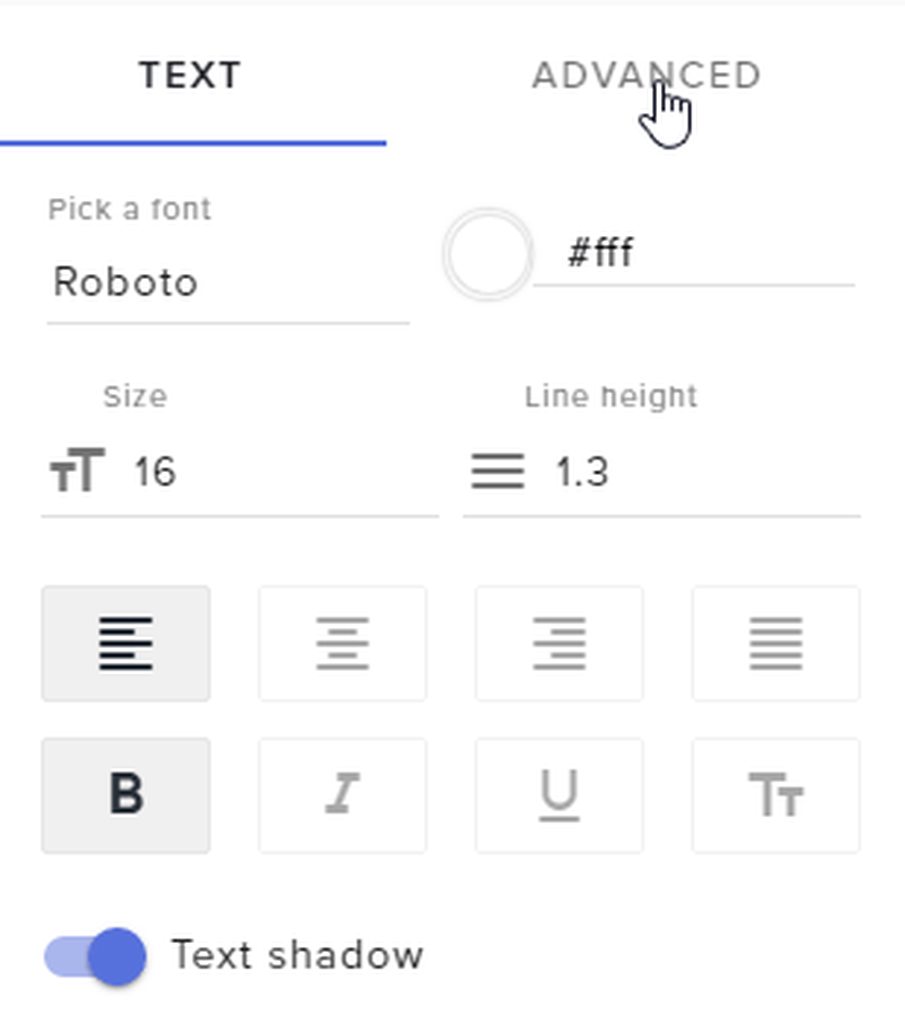
Alright, This is definitly a bug which I will report. In the meantime change your margin to the left to 620.(mine is 800 bc I used a 1920x1080 overlay) https://i.imgur.com/RGfg0qM.gifv
 kind citrus
thank you!
dense jackal

 deft holly
is there a workaround for reducing cpu usage from cef bootstrapper?
 modern pier
Any idea why ppl could not sub to me yesterday? Like they gotten an error
zenith widget
I would suggest to ask OBS Support @deft holly
nocturne pelicanBOT
@deft holly For the best OBS support, please join their discord where OBS devs and support volunteers are available all the time discord.gg/obsproject
zenith widget
But I did find this: https://obsproject.com/forum/threads/cef-bootstrap-exe-eating-cpu.66856/
nocturne pelicanBOT
@modern pier Twitch prime (new and resub) and paid subscriptions (resub only) must be shared in chat manually by the person subscribing in order for the subscription information to be sent to StreamElements. For twitch prime, the user needs to have sharing enabled on https://www.twitch.tv/settings/prime. For paid subs, if the share box doesn't show up immediately it will when they refresh the page. https://i.imgur.com/VNJN0Uv.gif https://i.imgur.com/2297EA7.png

 zenith widget
Unless they did share and are getting errors, then what was the error?
modern pier
That the payment could not be validated
Or something like that
But the subs from Prime worked normally
zenith widget
If the problem is with payment, they have to contact Twitch or Xsolla(via Twitch) about it
modern pier
Ohh got ya thx @zenith widget 
brisk flint
@vital wyvern This is not the correct solution. No alert will show, but in the chat and everywhere it will be visible. It was not like before. This is definetelly a bug:
winter zenith
@brisk flint we changed the way we handle host Alerts so the system needs to be configurated for this
For now, in Ground Controll we work on a solution
But for Alerts and Chat Alerts pls make sure to set a minimum of at least 1-3 people hosts.
So a alert only comes up if 1-3 people are in a host. For chatalerts and for your alertbox in your overlays
 frigid ice
Hello I need help, I changed my name in Twitch and Chatstats is bugged I can't enable anything and when i open my chat stats it says 404 - page not found.
EriiHenriquez to Eriinny
clever mango
@frigid ice Fixed. Part the bot from the dashboard, Log out of StreamElements, Log back in, and join the bot from the dashboard
frigid ice
Thank you ⭐ ⭐ ⭐ ⭐ ⭐
vital wyvern

 blissful apex
Morning all :)
How do you sotp the bot from spamming hosts? i keep getting so&so has hosted you for 0 views and i kinda wanna put a cap on that or just get rid of it?
vital wyvern
i can help you
zenith widget
If you are using the chat module for chat alerts, go to its settings -> Hosts tab and change it from 0 to 1
zenith widget
~70 WPM 
vital wyvern
 @zenith widget being to fast for me again
zenith widget
Are the host alerts going to your chat via the bot?
Or are you referring to the alert widget in the overlay?
zenith widget
https://streamelements.com/dashboard/bot/modules -> Scroll down to Chat Alerts -> Settings -> Hosts
blissful apex
❤
Thanks @zenith widget you need payment one day xD
like my personal SE guide xD
half bolt
can anyone elp me with the cheer stream label
it doesnt show up whenever i add top cheerer
its just empty
zenith widget
@blissful apex 
@half bolt If you are referring that its empty in the overlay editor, save the overlay with the widget and just refresh the page
vital wyvern
blissful apex
@half bolt @zenith widget is a bit of a god 
zenith widget

 zenith widget
Practice, mah d00d
vital wyvern

 runic bridge
Any support staff online atm? 😄
zenith widget
Sup?
runic bridge
Having issues with imports can I dm you good sir?
zenith widget
Sure...hope I can help with the imports
 wanton jetty
Anyone around who could help make me something similar to this
https://chrisis.live/s/1806180242_7.gif
zenith widget
@untold crest @empty fjord ⤴
untold crest
@wanton jetty you can make this list with custom event list
 empty fjord
yup, you dont even need to touch JS on this one, just restyle it with CSS
untold crest
Most of the code is already written there, "just" change it from vertical to horizontal 😉
wanton jetty
i suk wid css 
empty fjord
challenges make us grow into pure greatness 
wanton jetty
my journey to become a CSS master begins here 
 blissful apex
Ok a really random one for ya. I'm really new to instagram. Whats the bst way to get clips out there, is it the same as twitter with "@s" and "#" ?
zenith widget
I think @-ing is just pure tagging
not really sure with # works as trends like twitter
blissful apex
@zenith widget do you ever take a day off

 lime schooner
How i add !discord command?
blissful apex
but thanks man, im all over twitter so im getting into that, wondering if IG was the same 😃
 lime schooner
!cmds
nocturne pelicanBOT
@lime schooner You can make changes to custom commands in chat with!command add/remove/edit/options/show Valid flags for !cmd options are: -cd (number) -usercd (number) -cost (number) -level (number) -type (say, whisper or reply) -count (number). --- Example: !cmd options twitter -usercd 60 -type reply -level 250
lime schooner
Okey Tyyyy!
blissful apex
you can do it through the SE web portal too buddy 😃
zenith widget
Or you can add the custom command here https://streamelements.com/dashboard/bot/commands/custom
blissful apex
^
zenith widget
just have the invite link somewhere and add text like "Hey i have a discord: <link>"
vital wyvern
more like Come joine the meme machine <link> 
 kind spear
Where do I find the JWT toekn?
nocturne pelicanBOT
@kind spear You can find your JWT token on your account channels page: https://streamelements.com/dashboard/account/channels
(Don't forget to click on "Show Secrets")
 rustic ether
hello. is it possible to invite the streamelements bot into a chat room? I can't seem to get it to respond to commands there
zenith widget
From the main SE dashboard here: https://streamelements.com/dashboard
on the right you should see "Join Channel" for the bot
brisk flint
@winter zenith @vital wyvern thanx. I did the exact same for alerts. I hope sooner or later those autohost messages will be also gone. Br Kozaka
rustic ether
ah, okay. thanks. really hope that's available soon tbh. would cut down on noise from the bot so much ><
gentle imp
how so, you can disable messages if you want, at least most of them 😃
zenith widget
Afaik you can't get a list of quotes
 untold wedge
darn, alright then
zenith widget
You can see how many quotes you have and ask for a specific quote (like !quote 1 until X)
to see how many you have just do !quote add test and the bot will say the last numbered quote added like so:
@untold wedge ⤴
zenith widget
The notification system was updated recently and it started picking up auto hosts and normal hosts.
 serene granite
we're now the only system on the market that picks up ALL hosts
no one else does that
zenith widget
You can increase the minimum host from 0 to 1 viewers
for both alert widget and chat module
 proven copper
how do I create a click here link in chat commands please?
zenith widget
You can't. Twitch chat doesn't allow html tags. You can make shortened link to the big link
proven copper
oh
zenith widget
You can use bitly or google link shortener
zenith widget
Unless you've seen some streamers have that sort of link, its for security reasons not allowed 
proven copper
ok thanks again
 humble relic
@zenith widget If i do that will i still get the 0 hosts on my ground control?
proven copper
instead of using a link to an online inmage what if i save inmage and then link to that any ideas on such a command
zenith widget
@humble relic The activity feed will always show all types of alerts(0 hosts, followers, etc)
SE dashboard/activity page and GC activity feed
proven copper
I play save the world.....and i constantly get asked to taxi poeple to twine peaks..just wanted to have a tounge in cheek link to a taxi inmage
zenith widget
@proven copper I don't get it....link to an image from a game?
humble relic
kk
zenith widget
inmage = image?
proven copper
ok will try that thanks
proven copper
lolol
sorry dodgy person using dodgy keyboard
fatal combination
😛
basically i wish to create a link using !taxi ...to show an image of a taxi
zenith widget
sure, but it has to be a link to the image(if its an image)
The response of the command is the link basically
proven copper
if i save it to my pc?
zenith widget
no can do
 gray grail
there is an issue with Kappagen
proven copper
dam
zenith widget
bot cannot pull up local files from your PC
proven copper
ok i give up
gray grail
People host with 0 autohost
and then the kappagen just pops up
but no message does.
zenith widget
Just put in imgur for example and have that link @proven copper
gray grail
Can I set a value for minimum for kappaGen?
zenith widget
minimum for hosts should be set to 1 at the moment(confirmed internally it was site wide changed)
Not sure about Kappagen - let me check
as far as I see, you can disable the explosion for hosts entirely @gray grail
zenith widget
asking around if it can be modified
@gray grail It cannot be changed at the current moment, but is on the to-do list of the devs to be able to adjust the explosions. No ETA unfortunately as the host notification change was recent as well.
gray grail
aw rip
proven copper
any news on a game queue system?
so frustrated having to run 2 bots to achieve this
proven copper
omg
zenith widget
unless you've asked it while I was not here, then it explains why I'm asking 
proven copper
right inmagine this
ut oh
i play a mutliplayer game
viewers wish to join in in
zenith widget
aaah a queue to get viewers playing with you
proven copper
ta da!......
zenith widget
got it
proven copper
ypou have
zenith widget
got the "game queue system" idea
I'd suggest checking the ideas board - if you see it, upvote it, if you have upvoted it
then its on the to-do list
and no ETA
zenith widget
If I had the power to do it and work on individual ideas people give, I would - love doing those, but high ups decide what the dev team works on at the moment
proven copper
do i continue with streamelents which i love or do i move over to streamlabs as they have it
zenith widget
the Ideas board is a good way to push something to the top of the to-do list
zenith widget
If their system wants a 100% usage of SL, then consider these things:
proven copper
ok thanks for your help keep pushing i guess
zenith widget
- Do you use our all-in-one overlay for all alerts and such?
- Do you know how many sources SL wants you to add, just to have all types of alerts shown on your stream?
proven copper
they reckon smallest imprint on cpu
zenith widget
if the queue system wants their bot in the chat and only their bot, nothing stops you from using both bots, right?
proven copper
no but why double bubble it
messy
i just want it all in one place
I dont understand..how the devs dont dee this as important to streamers
i have 16gb 1080 graphic i can run streamlabs easy
zenith widget
Reasons (as far as I know and as a software developer my self):
- The SE Dev team is small
- Time constrains
- Other things are being worked on(cannot say which)
- Testing said features
- Publishing said feature bug free for the public
proven copper
but you claimed to be the best and i moved over to you
zenith widget
3.1) Some features which are more wanted then other
3.2) Important upgrades to system based on what Twitch changes
zenith widget
Does being NOT open to what the dev team is working on show that they are working on stuff show they are better?
proven copper
ummmmmmm its seems crazy to think this can not be implemented easily
zenith widget
Everyone who is not familiar how programming(software or web based - doesn't matter) works, think everything pop ups the next day as a done feature the moment it was suggested the previous day.
Well if you have 100 people working on said feature you can maybe do it in 1 week
proven copper
suggested this months ago
zenith widget
proven copper
ok you think i am moaning when i am not
zenith widget
If the IDEA gets more upvotes, then its pushed MORE in the TO-DO list in the dev team
proven copper
let me put it this way
101 peeps want same thing
100 go where they can find it and say f all
me the 1 satys and fights
stays
my feedback is worth a lot to you guys on this subject
when peeps not happy they go away like sheep
say nothing
you loose theses peeps
untold crest
Guys. Chill. I agree SE doesn't have a lot of functions, but repository is really growing fast.
proven copper
I am chilled
untold crest
I totally get your point "why do I have to go to KFC, if I can go to restaurant", at this point we have some things others doesn't have.
proven copper
just trying to convey that i get lots of other streamers telling me they use labs for gaming que
untold crest
And others have things we wished we have
proven copper
if you run a resturant and your food was not good many will just up and leave and never return
untold crest
It is not a "good food" "bad food"
Why should I go to italian restaurant if I want sushi.
proven copper
1 or 2 might say thats not good....this feedback is priceless
untold crest
Both restaurants might be good, but in other fields
untold crest
So I get your point - We don't have queue, but I wonder, how could we implement that, so:
a) there is nothing pulling you away
b) we could pull more people to our side
untold crest
There is definitely a feature missing, but we work on several other things simultaneously
proven copper
yeah yeah i work a job and stream daily always things to be done
but the obvious should be done first
untold crest
Me too. I have "normal job" then i try to help people here, to achieve their targets
untold crest
I wonder if there is any external site for queuing people
proven copper
like i am taking the time to explain to you that there is a need out there for this faeture
untold crest
I really appreciate that, there are few things needed as well,
We are prioritizing some of them (by demand)
proven copper
owell I DEMAND it LUL
zenith widget
Like LX and me at the moment are also taking time out of our actual work to explain, that asked features are always marked, but some things take priority over others for improvement or implementation in our ever so growing system.
untold crest
I hope I will find something for you 😉
untold crest
U2. Cheers!
proven copper
byeeee
narrow coyote
You can easily make a stream perk stream store item and use that with the redemption list as a queue. Viewers redeem the item to add them to the queue and you use the redemption list to track who is in the queue
untold crest
It is an idea I just came back to write
rustic ether
@gentle imp re: what I said before about "invite the streamelements bot into a chat room" - it's so I can have a room where people can interact with the bot without spamming normal chat, not for bot messages. I get people dueling each other and messing around with points all the time, and it's getting to the point where chat becomes more bot commands and responses than actual chat
or whoever is on now, sorry. just finished streaming ^^;;
zenith widget
Ooh the actual Chat Rooms? I don't think that is possible for the bot
I can suggest something to minimize the spam for you - use "Chatty" - its a stand alone program that can connect to your chat and you can set the bot to the ignore list, so Chatty won't show what the bot writes in the chat for you.
rustic ether
hm. alright, thanks. that'll solve it for me at least. I just worry people in chat get annoyed when other people spam the bot like that ><
actually, would it be possible to make things whisper-only or something?
narrow coyote
Yeah, that is not currently possible, the bot can only live in the normal chat for now
zenith widget
You can set a global or user cooldown to lets say 1 minute
narrow coyote
You also can't make the bot whisper responses for defualt commands, you can only do this for custom commands at this time
zenith widget
so that it minimizes spam
rustic ether
whispers for custom commands would help! thanks
will change my cooldowns too actually, good point
zenith widget
I've had this problem on my streamer with the !duel spam so I placed a 90 second global cooldown
rustic ether
yeah, I should do that. >< I didn't have enough people in chat until recently for it to be a problem. good problem to have though. thanks guys!
zenith widget
@olive cedar Are you referring to the activity feed? If yes, then we recently updated our notification system for the hosts. Now we pick up all hosts(from auto-hosts do normal hosts). Before you had to have something running in order to get the notification
 quasi eagle
When I press the ADD TWITCH CHANNEL in settings, it says The Channel you tried to add is linked to a different account. What can i do about it?
winter zenith
You apparently made a StreamElements Account before
And try to link it now to your Youtube Account
Correct?
quasi eagle
i can link it to my youtube account but it doesnt work for twitch. and i'm sure about that its my first streamelements account
winter zenith
You try to link your Twitch account to your twitch se account?
 olive cedar
@zenith widget how do i turn off the notification for auto hosts
because my chat is just getting spammed that was a horrible idea to add imo
quasi eagle
@winter zenith yes sir
winter zenith
@quasi eagle why?
zenith widget
@olive cedar Check your chat module for the bot and adjust the host notification from 0 to 1. Although it should be changed already via a system wide change
Chat module is here: https://streamelements.com/dashboard/bot/modules on the bottom -> settings -> Host
winter zenith
It only would make sense if you try to link it to your Youtube SE account. Or if you want to link your Youtube Account to your twitch SE account @quasi eagle
zenith widget
quasi eagle
oh ok i get it, sorry its my first time on se


 quasi eagle
i'll be here for more questions 😄
winter zenith

quasi eagle
❤
winter zenith
And we will be here with all the answers
quasi eagle
you're the best
winter zenith
no U
 trim blaze
Hey there, I have just set up a couple of Stream Perks in my Stream Store however my Extension on Twitch does not show any Item in the Panel.
do I need to activate anything there?
 burnt sky
😭 cheerboss gone ?
winter zenith
@burnt sky it's in the testing and still needs more work to be done, it will be there 
@trim blaze maybe give the extension some time or try to log In and back out. Maybe deleting the extension and putting it back in could help with this
burnt sky
Ohh okay 😄
trim blaze
alright, well I had waited for 2 hours, so lets see what happens when I delete it and install again 😃
I will keep you updated
winter zenith
Thank you!
 lunar crypt
Hi, I love the overlays of streamelements, but I have a problem when using my live locks a lot, I do not understand why, does anyone know of a solution for me to use without crashing?
trim blaze
@winter zenith found the bugger: The items need to be checked for "redeemable via chat" - otherwise they wont show.
lunar crypt
When I use my live, it has a lot of lag.
winter zenith
@trim blaze Ahh makes sense
@lunar crypt Sounds like your PC cant handle it @lunar crypt
You use a Animated one?
Or a static one?
 bitter harness
so does streamelements actually stream or does it just add overlays to my current stream from other software?
zenith widget
It provides overlays and provides a palce to check who followed/subed/tiped to you @bitter harness
lunar crypt
@winter zenith yes i use an animated streamlabs and n of the lag, but the one of the lag elementals