#helpdesk-twitch
1 messages · Page 278 of 1
 nocturne pelicanBOT
@oak quarry Please connect your Twitch and/or YouTube channel with Discord by going to ⚙ Settings and then Connections here in Discord.
 oak quarry
ye ticked everything and enabled too
oak quarry
i dont get it.. 😄 why does it work for u
 zenith widget
i hosted from my own channel via "/host <yourname>"
oak quarry
maybe he isn`t able to "see" auto hosts?
zenith widget
maybe? not sure on that really
 near grail
My stream elements layout crashes after new notifications
Freezes* not crashes
Its only when i get a real notifications not a emulated one
zenith widget
Are you using an animated super theme?
And also, are you on SLOBS or (vanilla) OBS?
near grail
normal obs
zenith widget
Your PC specs seems good, so what I may suggest is, if you have multiple scenes to follow the instructions from the bot bellow
nocturne pelicanBOT
Make sure to :ballot_box_with_check: “Shutdown source when not visible” for all browser sources (all OBS scenes). If using studio mode, uncheck “Swap Preview/Output scenes After Transitioning.” Also keep in mind that sound can play from any overlay loaded in the browser (editor or launched). https://i.imgur.com/FegZJQS.png https://i.imgur.com/yY0wcFl.png

 near grail
How do i get to the 2nd screen?
zenith widget
Just left click it on the Scene selector?
 narrow coyote
If you don't use studio mode, that second part does not matter
narrow coyote
Is it a specific alert that is doing this, or multiple alerts? If you replay the alert does it do the same thing? If so, open the overlay in a browser and replay the alert
near grail
Idk only got the followers notification
nothing else yet
Could be for the followers notification only
but i didnt try anything else
?
Wait, i dont understand
its not broken in browser
narrow coyote
What version OBS do you have, should say in the title bar of the application
near grail
21.1.2
narrow coyote
When it freezes, what do you do, do you refresh the cache of the browser source?
near grail
I switch scene, so the layout stops for a sec
narrow coyote
Can you refresh the cache on that browser source? See if that helps
near grail
What do you mean?
 final sphinx
How do you get the face cam on the overlay to work?
narrow coyote
Go into the settings for the browser source, scroll down, and there is a refresh cache button
narrow coyote
@final sphinx what do you mean, everything is added to your broadcast software, overlay, cam, game, etc
final sphinx
Sorry, just my first time using stream elements.
near grail
@narrow coyote doesnt work, still froze
 clear nebula
Does stream elements have desktop notifications so I can see who's followed etc?
zenith widget
@clear nebula We have an app, which you can use - useful if you have a 2nd monitor.
nocturne pelicanBOT
Our Desktop App Ground Control: https://streamelements.com/groundcontrol
near grail
@narrow coyote Even the emulated once freeze
clear nebula
Sweet ty
zenith widget
@final sphinx https://www.youtube.com/watch?v=XllRHuCe07A Here is a starter guide for OBS. Afterwards you can watch our videos for the tools we provide here: https://strms.net/welcome
narrow coyote
@near grail in OBS go to help > log files and send me your current log
clear nebula
Where do I find my JWT token exactly please?
narrow coyote
I just need to drive to work, I will review it once I get there
near grail
Thx
nocturne pelicanBOT
@clear nebula You can find your JWT token on your account channels page (Click on your name next to the Sign Out button) https://streamelements.com/dashboard/account/channels
clear nebula
ty again
 modest atlas
Hello, I am the only one for whom the extension does not work properly?
Modify a liver save "disparity" and I can not enter a horraire.
 hasty briar
Is the streamelements achievement board broken for anybody else? mine just says offline and it won't let me do anything to the schedule portion of it
zenith widget
@modest atlas its under maintenance, should be back up Soon ™
hasty briar
oh ok
 summer mulch
We are aware of the problems with the extension, our devs our working on it
modest atlas
@zenith widget Ok thanks !
hasty briar
 carry on then
zenith widget
(Steamlabs achievement board?  ) Nothing to see here. Move along, move along.
modest atlas
Ok thanks all 😃
summer mulch
@zenith widget Soon ™ I see you learned
hasty briar
leaderboard w/e
summer mulch
We're StreamElements
zenith widget
streamLABS?
summer mulch
Yeah..
zenith widget
🔫 
hasty briar
There 
 versed crane
any problems atm ? because i cant load my dashboard all other websites etc works fine
 cunning gyro
I hope this is the right place to ask, but does anyone know of a better software to stream to Twitch on Mac that Elgato's own GameCapture HD (And works with Elgato HD60S)?
narrow coyote
you could try OBS, but i am not sure if the elgato will work with Mac OBS
 normal igloo
Hey guys Is it possible to make a command for Hosting?
 cedar lynx
you mean like to replace /host {user}
normal igloo
@cedar lynx 👍
cunning gyro
◦♥◦KITE◦♥◦#0420 I tried OBS but I could not for the life of me get it to work with Elgato
There are not many options for Mac users
narrow coyote
its probably possible, but it would be pretty much the same, as you would still need to do something like !host {1} so you are typing in basically the same command
normal igloo
@narrow coyote I was thinking more on the lines of for my viewers tho
narrow coyote
what do you mean?
normal igloo
@narrow coyote Like instead of them needing to host by their chat they could just do in my chat !host Or something like that
narrow coyote
like they go into your chat and do a command to host you?
normal igloo
yes
narrow coyote
not going to work, the /host has to be done from their channel
normal igloo
ok thanks for the help anyway my man kite
narrow coyote

 little mica
@cunning gyro you have the same problems I do!
cunning gyro
@little mica Yeah :/ I don't want to buy a Windows Laptop just to use bloody Streamlabs OBS 
narrow coyote
have you tried OBS Studio? SLOBS is so far behind OBS Studio in terms of development
little mica
Not available for Mac @narrow coyote
narrow coyote
little mica
You could install windows think it’s call boot camp
narrow coyote
clearly has a Mac version
little mica
Finally it’s out then!
cunning gyro
Here's the thing... I am not entirely sure if my old Mac Mini with an an i5 and 8 GB RAM (with windows installed on it) will work for 1080p 60fps streaming
narrow coyote
its been out for a long time
little mica
Thanks
cunning gyro
@narrow coyote What's the site for OBS Studio? Google is being a pain in the butt.
little mica
I’m sure I checked but will look again
narrow coyote
narrow coyote
that must be something related to the elgato drivers then.
cunning gyro
That must be it
Quite frankly, I hate MacOS sometimes
It's great for everything else I do, except for that
 weary mist
its a thing with mac and OBS
I think more so elgato
because they don't provide the correct drivers for obs to be able to hook into the elgato capture card ( @ebon forum can help me get it right)
 ebon forum
Elgato capture cards work on OSX. The only thing that does not work, is audio over HDMI on Elgato cards
So you need an external solution for audio, probably a decent chunky mixer with some audio interfaces here and there if you want a really nice audio setup for ages
cunning gyro
Oh man
Bloody Elgato
A decent audio mixer will probably cost as much as a Windows Laptop 😄
I should just use a Windows VM and Streamlabs or something
ebon forum
@cunning gyro StreamElements, not Streamlabs  And if you want to experiment with that stuff - a mixer will start from like 40$ on Amazon, not too bad
cunning gyro
Not too shabby
ebon forum
look out for a behringer 302 USB
cunning gyro
@ebon forum hold on a sec, does StreamElements have its own App for Twitch Streaming?
ebon forum
@cunning gyro nope. We all use regular OBS Studio, some use Xsplit. In rare cases SLOBS is used.
cunning gyro
Got it
StreamLabs OBS is, what is guess, an iteration of OBS Studio or something. Thanks so much for the tip, by the way!
 serene granite
in the software world it's called a fork off
narrow coyote
OBS is open source, so at one point they took it as it was, and made a hard fork of it, so all the development of SLOBS is on SL, while the OBS project continues development on OBS Studio. OBS Studio has been much better maintained, and they focus on the right things to fix and add, where SLOBS development is so far behind now, and they focus on features that do not really the application or broadcasters
cunning gyro
took me a bit to realize what you meant by SLOBS 
weary mist
lol, its the accronym they use. Im still trying to figure out the context of using this name (I know its StreamLabs OBS, but the SLOBS is horrible, lol)
cunning gyro
It's funny, though 😄
weary mist
lol, it is funny, and a few other things as well, but that is my personal opinion 
 jade breach
Is there a limit to how many thing you can add to an ${random.pick} command when using it with roulette?
weary mist
I don't believe you can use it with the roulette module, but if you are creating your own custom command, you have 400 characters for the responce that you can use
anything that fits in that amount of characters will work
 tranquil snow
any1 got problems with the overlay not always loading in when changing scenes? i have different overlays and it uses about 20 sec to load it in...
weary mist
that is an issue with the way that OBS caches the page. With the "shutdown" box checked, it uncaches the page, and has to reload it. If you use studio mode, you can let the overlay "pre-load" before transitioning the scene
!studiomode
nocturne pelicanBOT
Check out this tutorial for OBS’ studio mode which allows you to preload scenes before transitioning. https://www.youtube.com/watch?v=W8iWsD2Lq3U
 tired gulch
Hi, I'm still having trouble with host alerts and they are not showing up on the activity feed. Can someone help me troubleshoot?
tranquil snow
@weary mist Thanks dude! I'll keep that in mind
nocturne pelicanBOT
@tired gulch
Twitch doesn't have a "notification system" for hosts (unlike follows, subs, raids, etc.) so the only way for StreamElements to know that you are being hosted is to connect through you to twitch. This connection is made on:
- SE Dashboard page - https://streamelements.com/dashboard
- SE Activity Feed page - https://streamelements.com/dashboard/activity
- Ground Control desktop app - https://streamelements.com/groundcontrol
Please have one of these open during your stream in order to receive host event notifications.
 wet dust
For some reason my stream elements is bugged and it's loading for a long time now
I think this may be because I have changed my twitch name
weary mist
@wet dust if that is the case, try logging out of the site, clearing your browser cache, then loggiging back in
that should correct anything associated with your old twitch name
tired gulch
I have SE Activity Feed page up and all the follows and cheers are showing up real time. But no hosts...
weary mist
Do you keep it open during your stream?
tired gulch
Yup
weary mist
As long as you keep it open during the stream, that is the best we can do on our end. I know that twitch was having HUGE issues yesterday, so its possible that hosts were dropped (since they notify differently than follows and cheers and tips, etc)
tired gulch
I'll try again, thanks.
weary mist

tired gulch
@weary mist Sorry, the streamer forgot to have the dashboard up. Thanks! The overlays alerts are working now, but chat alert module isn't putting out the message. How do I troubleshoot that?
weary mist
If you have access to the streamer dashboard, check the chat modules, chat alerts, make sure hosts are enabled, and verify the minimums
tired gulch
@weary mist Enabled and Viewers set to 0.
 minor coral
is the shop program avaliable on Xbox, because i set the shop up and none of the sound effects or pictures worked.
weary mist
@minor coral the shop will work, but the sound effects/image alerts won't work as you need an overlay for that
minor coral
so none of it works unless i have a overlay? even on computer?
because i don't necessarily want a overlay on my stream
weary mist
You need to have the store redemption widget in a browser source (an overlay in this sense) to get the sound/image alerts. Every other part of the store works without that
minor coral
ok then
i'm creating my own theme, does the green backround automaticaly become the screen recorder video?
 wintry basalt
hey there streamelemnts peoplez, i manage and mod a friends channel and the SE bot is constanly spamming Test, why is that?
weary mist
@minor coral the green is empty space, it will show up as clear in a broadcasting software
@wintry basalt sounds like there is a timer or a command that is set up to do that
or they are working on something with custom bot name, but def something controlable
minor coral
so the clear will be filled by obs, broadcasting onto twitch correct?
weary mist
@minor coral If you are using OBS, you capture your gameplay in one source, then the overlay in the second source. You put the overlay on top of the gameplay, and then broadcast that to twitch
If you hvaen't used OBS or another broadcasting software before, I recommend using youtube and watching some videos on how to set everything up
 dry hare
Extension still down on the twitch?
I've tested 3 different browsers and I cannot configure my extension panel 😦
 lament blade
Hi there
weary mist
We are expecting it to come back soon
dry hare
okay whew
lament blade
how do I add my discord to my stream elements profile?
minor coral
i'm still comfused, how do i connect my overlay to OBS then,
weary mist
@minor coral like I said, watch some videos. The overlay is a browser source, which you add to a scene on obs
minor coral
can i get a link to a video that could help me
 pine hemlock

Setting up StreamElements is easy, learn how to in this video, hosted by Twitch Partner GIRLvsDUMB - Got any questions, or just want to say "Hey"? Join our D...
!add
nocturne pelicanBOT
To add your overlays to OBS, add a new browser source in your scene. Paste your overlay URL in the browser source properties, set the dimensions to 1920x1080 (unless you changed them on the website), and :ballot_box_with_check: “Shutdown source when not visible” https://youtu.be/KDvLynUqXI4
lament blade
Where Can I find the JWT token? I click the link and it takes me to the streamelements homepage
serene granite
!jwt
nocturne pelicanBOT
You can find your JWT token on your account channels page (Click on your name next to the Sign Out button) https://streamelements.com/dashboard/account/channels
lament blade
Thank you!
 opal widget
i accidentally reset my loyalty points so i am trying to give back points manually and i keep getting {name} not found, but it let me give points to the top 14 that show up in my leader board
narrow coyote
are you doing this from the chat? the viewer needs to be in your chat for the command
or is this happening if you try from https://streamelements.com/dashboard/leaderboard/current
opal widget
is that the only way to give them the points? i gave to 8 people already that are not n chat and I am not streaming
narrow coyote
i would suggest doing it from the leaderboard page on your dashboard, should be much faster that way https://streamelements.com/dashboard/leaderboard/current
opal widget
that only goes to 14, i need to give points to all my followers, they are not in the leaderboard page
near grail
So i use the desktop app now, for music and for notifications. But is there a way to see chat through this app?
narrow coyote
it shouldn't only go to 14 
@near grail chat is a planned feature of Ground Control 2.0
weary mist
your followers need to visit your channel for them to be logged into the system under your channel
opal widget
it does only go to 14, now i just started using this 2 days ago, and all the other have not been in my chat since i started using the stream elemnts point system, woudl that matter?
weary mist
yes
There is another way
Create a text document with all your followers you want to give the points to
notepad or notepad++ or google doc, whatever works
set it up like: username,points
and we can import that document directly into your loyalty system, and it will give points to everyone
opal widget
where would i upload the doc to? right here?
weary mist
using this site: https://filter.dj/CSVtoStreamElements.html. You will need your JWT token, then copy and paste the list of names you just made (put a new line inbetween each username,points), and it will get everyone those points
opal widget
what is this , JWT token
nocturne pelicanBOT
@opal widget You can find your JWT token on your account channels page (Click on your name next to the Sign Out button) https://streamelements.com/dashboard/account/channels
opal widget
i still don't know what i am looking for, I am so sorry. i clicked it and i just see
Owner
Email
Account ID
Member since
narrow coyote
click show secrets
opal widget
oh ok, so include that in the doc? and just upload the doc here, is that info supposed to be private?
weary mist
no, re-read what I sent (about 5-6 lines ago)
opal widget
ok sorry i see the link you told me to copy and paste to, sorry
weary mist
 cursive obsidian
is the viewer que command ready ?
or is there a possibility to make such command, to make a que for ppl who want to join the game
I found its planned on the website, but not sure if the feature is allready possible
weary mist
you can use the stream store as a form of a queue
cursive obsidian
not sure how that would work
weary mist
Create a Stream Perk store item called queue. put description, go to next page. put image and sound if you want. put redeemable via chat. go to next page, have them put in their gamertag for what ever game you are playing (requirement). When they redeem, the item will be on your redemption history to approve/deny
when you play with them, approve the item and its done. You can also use this as a reward to loyal viewers as you can make the store item cost points
cursive obsidian
oh ok, gonna try that thnx
opal widget
@weary mist i just sent the doc, hope it works.
weary mist
lol, if you "sent" the doc, you didn't follow my instructions
the website will tell you if the import was completed. It uses our API
@opal widget
- Paste the information I told you to here (username,points stuff)
- Paste JWT token
- Paste Account ID #
- click
- click
you should see either a red "x" next to names, or a green "check"
dry hare
@weary mist update on the twitch extension? is still not loading for me 😦
weary mist
you would know if there was an update 😉
 steady mountain
can anyone help with the streamelements leaderboards? the extension panel on my twitch channel does not show anything and just says offline
ive tried setting it to show points and clicking save but nothing happens
 lyric idol
@clever mango heya. so @summer mulch said that i can beta test the mobile app on the elements app. did he lie or what
serene granite
@lyric idol we're in closed beta stage for the new mobile app and can't accept any new streamers at the moment, but stick around and we will definitely would love to have your assistance with testing it in the near future 😃
lyric idol
@serene granite okay thanks. i came cuz @summer mulch said i can get when i ask
serene granite
Sorry for the hassle, but it's important that you stick around our discord
we come here first when we need new beta testers
and announce it here
so stick around, don't disable notifications for at-here and at-everyone (we promise not to spam) 😄
opal widget
@weary mist when it loads its says the name and then it says undefined for the number that should be 100
weary mist
can you send me a screenshot?
opal widget
@weary mist dm 'ed it to you
 teal yoke
hi yeasterday i received a donation and i had to accept it on paypal so it dont showed on my overlay as tips
i fixed the issue updating my info(it was outdate) today i received another donation and this time the paypal dont asked for aproval
but the donation dont showed up on my overlay again
stream elements still showing my tips as 0
weary mist
@teal yoke Check your activity feed page. You have to approve them. If you don't want to do that for future tips, turn of the tip moderation switch in your tip settings
 gray musk
Um excuse me, i have a problem with the loyalty system. it is showing on stream elements that people have points, but on the twitch icon it shows everyone has zero points. Any ideas?
weary mist
@gray musk what twitch icon?
teal yoke
oh lets me see
gray musk
when you move your mouse over the video to let's say extent the screen to full, and there's that little square in the bottom right corner with your profile picture on it. that shows how you can redeem and stuff
weary mist
We don't have an overlay extension (which is what that is)
With us, people can check their points in chat (!points), and by going to your stream store (!items)
@gray musk
teal yoke
@weary mist thank you that solved the problem
weary mist
 royal quarry
Hello just wondering if/when a song request, current song app for Spotify will be available for StreamElements?
weary mist
as soon as they give us access to do so
royal quarry
So by that I'm assuming the process is in the works? Or does it appear they are trying to hold the spotify app unique to "the other guys" ?
There was a couple bugs with the scrolling text in cheer and donation widgets I identified about three weeks ago now, still not working properly. The text will only scroll right or left on some of them. Any idea when this will be fixed?
weary mist
Remember one thing: The dev team is 3 people
so getting any sort of time-frame on things like this is impossible. There are a ton of things on the lists to fix/add/complete
tired gulch
Hi @weary mist I'm still having trouble with the chat bot host alert. I've tried multiple things to no avail. The hosts are showing up in the activity feed. The alert module is enabled and the viewer is set to 0. The overlay is working and showing the hosts pop-ups. I can provide a screenshot (imgur link) if you want to see it.
weary mist
I can go look myself if I need to. I am not really in a position right now to do any testing on my end though. Maybe one of the other <@&382267076632379392> can help out
tired gulch
I'm nuudoh modding for borabora030
 tight harness
So the account I need to check is borabora030 correct?
tired gulch
Yes.
tight harness
Alright
tired gulch
Thank you @tight harness
tight harness
I see that the host message has variables in it which aren't mentioned in the available arguments 🤔
That'd be my guess as to what's causing the problem
tired gulch
I previously had multiple messages including the default, and none of them worked. So removed all except one.
But shouldn't the text still show up even if the vars are wrong?
tight harness
I'd have thought so but considering it's not working it's a start
tired gulch
ok, I've removed the custom message and kept the default.
Just tested another host, chat alert didnt' come up.
Sorry, I take that back.
It's working.
Am I only limited to the {amount} {user} var in the module?
opal widget
@weary mist you did it, i love you, well you know....like a friend, LOL..thanks

 tired gulch
@tight harness @weary mist Thank you.
Can I use the alert module to call a chat command? Like a !shoutout ?
narrow coyote

weary mist
no, the bot does not listen to itself
narrow coyote
if you look at #command-share there is a shout out example for a custom coomand
also, think you meant @tight harness 
tight harness
No problem 😃
tired gulch
Oops. FIxed. I have the custom shoutout in chat commands but wanted to utilize it in the host alert also.
narrow coyote
Just looking out for my favorite Sean next to Sean Bean 
jade breach
@weary mist Actually, you can use that command with roulette! As long as it's not more than 4 entries and I think around 250 characters it works! Thanks for the reply earlier!
tired gulch
Another question, does a raid triggers both raid, and host alerts?
 clever mango
A host always follows a raid so it is possible to have both alerts
tired gulch
Is there a way to avoid the double alert when getting raided?
clever mango
Set your host alert requirement higher
tired gulch
I can't just use a arbitrary number. Doing that will miss a lot of hosts, so that's not practical 😕 But thanks.
lament blade
how can i set up the prime command
 worn wedge
I have choise to do giveaway live in twitch via stream element?
lament blade
like !prim,e
tight harness
@lament blade Go to Chat Commands, go to Custom Commands, create the command there
@worn wedge Yes, click on Giveaways on the left menu
worn wedge
Ok 😁
 heavy drift
Hello everyone, just a quick question.. when starting a giveaway.. how long can it run for? My goal is to run a giveaway that lasts an entire month that ppl can enter on an ongoing basis.. is this possible? if not, whats the MAXIMUM giveaway duration? Thank you.. Hope everyone is having an awesome day
nevermind... searched and found that there is no timelimit
lament blade
My widget on twitch is showing my schedule an hour later then what I set it to be. so told it start time as 15:00 and widget says 4 PM
 deep hound
Hello, sorry I've got a question here
Can I play different variation of an alert randomly for any given triggers?
For example, can I have 1 of 5 alerts picked and played at random when I get a follow?
 hushed ice
i found a bug, in the new panel it is not showing my default panel. even after refreshing and clearing cookies. it is showing the cooldown instead of the store
deep hound
@lament blade yeah widet time is off for me too
lament blade
@deep hound I refreshed page and it's all better.
deep hound
Didn't work for me, but I will work on that some more 😄 Thank you!
With regards to variations, I am just asking becuase I have seen other streamers do this, but I am not sure if I can do that through StreamElement at this time.
 wet dust
Hey on my leaderboard, my old twitch name still remains on it, is there a way to remove it?
?
normal igloo
@wet dust as far as I know no you cannot all you can do Is just reset it to 0
 rugged cipher
Hey Guys, quick couple questions. I have my overlays set up and in OBS. But when I add Game Capture, it overlaps but "in-game overlay". Am I adding the capture incorrectly?
wet dust
Damn
 lunar lotus
so trying to have two different overlays
but it keeps using the same one as before on both scenes
normal igloo
@rugged cipher You need to lower your Game Capture Source
rugged cipher
Trying to have my overlay show on the game screen, but it shows as two windows on OBS. And my overlay is in the background, covered by the game capture window.
normal igloo
@lunar lotus are you making sure you were using the different links For each of the overlays In your browser source / s
rugged cipher
@normal igloo How do I do that? Is it a different source?
normal igloo
@rugged cipher Your game capture Is overlapping your overlay So you will need to move your game capture source Down on the sources list
rugged cipher
@lament blade AHHHH I see what you mean. I didn't know the position mattered. Let me try!
normal igloo
@lunar lotus You should have a link for each overlay
rugged cipher
Awesome! It worked. One more question. I brought over my overlays to OBS. Do the default alerts come over as well within each overlay?
lunar lotus
gah overlay editor lags like a mofo
normal igloo
@rugged cipher Whatever alerts you have for each overlay will carry over into obs
rugged cipher
Got it. BIG HELP, I really appreciate it. You guys are awesome!
I am almost ready to try and "go live" for the first time.
normal igloo
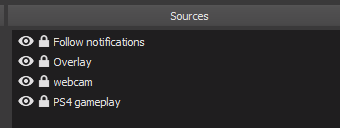
@rugged cipher And for future reference To give you an idea on your sources This is the kind of thing I got going https://i.gyazo.com/ad7e239cfa9b10e9749187d8815ae574.png
 rugged cipher
So webcam needs its own source for each Scene too?
normal igloo
@rugged cipher No no no no no you're doing it wrong man When a streamer thx me for helping I go; no thank YOU! We just provide a service & when done, put our feet up and enjoy what YOU are doing! 
minor coral
So, i'm trying tpo stream but on my layout the chat box amd the alert box don't do anything ( chat does not display chat, alert box does not polay animation for item redeemed!) please help, it shows on my overlay editor that i have open but not on OBS
normal igloo
@rugged cipher That is correct
rugged cipher
@lament blade You are the real MVP lol
normal igloo
@lunar lotus That's great to hear Not sure about the lag tho Maybe try in different browser
 hushed ferry
If using a !setmulti command (moderator only), how do all viewers pull the query in a !multi command?
normal igloo
@minor coral Have you made sure you are linking The full linked to your obs browser source
minor coral
yes
normal igloo
@rugged cipher Well I do try my best
rugged cipher
@lament blade so i added the video capture and it shows me on the screen in its own box. Not within the webcam box that comes with the overlay. How does that work?
hushed ferry
Also, loving the new SE extension, how do we add/edit our schedules to the panel extension? Do not see on Dashboard...
normal igloo
@rugged cipher You need to do exactly what I said With the sources List So your webcam is below your overlay Then drag over your webcam to your overlay camera box And change for fitting so it fits in
rugged cipher
Ok, thats what I did, just making sure there wasn't another way to fit it.
normal igloo
@hushed ferry If you go to dashboard extensions You should be able to see a Cog to edit SE extension
minor coral
So can i get any help, the chat nor the alert box are appearing on my stream
they appear on my overlay editor but n0ot obs
normal igloo
@minor coral Not sure why that's not working for you hopefully someone from the support team will be with you on that shortly 👍
rugged cipher
@normal igloo Your opinion. I am struggling a little with OBS and the whole set up. I just realized, with the webcam I bought, I have a free 3 month premium license for XSplit. What do you recommend?
hushed ferry
@normal igloo that worked, thanks. Any idea on my earlier question about !setmulti and query for !multi
normal igloo
@rugged cipher obs Reasons #1 free #2 Easier on CPU and setup #3 Pretty much everyone in this Uses obs So there's always someone to help you out
hushed ferry
@rugged cipher OBS is open source and constantly being improved. Xsplit is easier to use, but you pay monthly for it and more of resource drain
rugged cipher
Ok sounds good! Thanks!
normal igloo
@hushed ferry As that a command I have never needed to use I can't really help you with that one 
and np
@rugged cipher And what Dezsaras said 
no one saw my mistake what do you mean 
hushed ferry
Any one at SE have such knowledge on multis?
If using a !setmulti command (moderator only), how do all viewers pull the query in a !multi command?
 modern pecan
Just imported from Nightbot, whats SE's $(touser)
normal igloo
@modern pecan never used nightbot so what exactly Does $(touser) do
modern pecan
if you @ someone the bot says their name instead of example mine if i send "@random !donate"
normal igloo
@modern pecan Oh so you want the bot To reply with the person who triggered the command ?
modern pecan
no, I mean like. If one of my mods want to help a viewer to know how to donate or sub I want my mod to do @viewersname !sub or !donate and the bot will reply to the viewer
weary mist
ours is $(user) or $(sender)
modern pecan
@weary mist Which does what?
weary mist
user does the target or the sender if there is no target. Sender only targets the sender no matter what
modern pecan
@weary mist thanks 
weary mist
rugged cipher
Ok so I think everything is where it needs to be. How do I officially go live and try it out on twitch? @normal igloo
normal igloo
@rugged cipher Simple hit the start streaming button on obs 
When I'm struggling to support people And when someone comes from the support team comes and sort things And says Thank you for trying James I go; no thank YOU! I just help where I can You guys are the Magicians here And your guys's time will always be appreciated
Cough cough looking at you @weary mist
 rugged cipher
@lament blade I dont need to do anything on the twitch end?
modern pecan
how do I edit the followage command?
 jagged oak
I don't know why but notifications are not popping up anymore and they aren't showing up on the Activity feed as well
weary mist
@jagged oak try logging out, clearing your cache and logging back in
@modern pecan the followage command is a default command, so check there
 amber cave
when i start my stream, the display of the stream is all black, what do i need
lament blade
@pine hemlock any update on the issue I mentioned last Friday? The user who changed their name still can't redeem any store items cause it says they don't have enough points when the leaderboard and dashboard shows them as having 56,345 and you said you would ask the team.
narrow coyote
@amber cave what broadcast software are you using? its going to be related to that, and what sources you have configured to be captured
amber cave
@narrow coyote OBS studio and its supposed to configure monitor 1
narrow coyote
do you see anything in the OBS preview
pine hemlock
I'll mention it again @lament blade
amber cave
@narrow coyote the preview is also black, unless i pull up a scene
@narrow coyote then it shows the scene
narrow coyote
well, thats how OBS works, you build a scene from various sources, and what you see in the preview is what you get in the stream
amber cave
@narrow coyote it wont show the screen of the monitor, htats what i meant sorry for the confusion
@narrow coyote thats*
narrow coyote
ok, you dont need to tag me in every sentence you post
amber cave
sorry
narrow coyote
if you get a black screen from a display source, then it could be a number of things, driver problem, OBS is not running as admin and cant hook into the driver...
It would be best to get help from the OBS discord
!obshelp
nocturne pelicanBOT
For the best OBS support, please join their discord where OBS devs and support volunteers are available all the time discord.gg/obsproject
amber cave
ok thankyou
narrow coyote
pine hemlock
@lament blade Have the person in question log in to SE and log out of SE (not the caster, the viewer)
Or if they're already logged in, log out and back in
lament blade
They are redeeming in chat and never used StreamElement's site @pine hemlock
clever mango
@lament blade Regardless of where they redeem, we have not been notified that their name changed and it won't happen until they log into SE with their new name
lament blade
It worked, they were able to redeem items now
clever mango
👍🏽
 fringe pulsar
hey - how do I edit a custom chat command? don't see an edit/delete option, only enable/disable
pine hemlock
@fringe pulsar zoom out on your browser, or there's a small scroll bar that goes left to right.
pine hemlock
@fringe pulsar website is a little awkward like that sometimes sorry
fringe pulsar
np. was more laughing at myself for staring at that page for like 20min and not seeing it lol
last q, is there a discord bot that you can invite to your own server?
pine hemlock
Not currently, but it's planned
fringe pulsar
cool thanks again
 last tangle
How come when I try to add a top monthly cheer widget it doesnt show anything?
 stuck hamlet
refresh and it should show up
last tangle
Ya it did... Im ashamed 😦 haha thanks
 upper steeple
how come the extension panel shows my countdown as default when I don't even have it checked to show the countdown at all?
 ember horizon
I'm not sure if this is intentional, but the access-code list option in the Stream Store doesn't seem to have a chat-side '!' code, and doesn't show up in the Store Items section of the panel widget.
upper steeple
nvm i got it, there were times in the countdown but even though the countdown was not checked to show on the panel it still showed it.
Bug perhaps?
zenith widget
@upper steeple If there are any issues atm with the extension, we are well aware of it and working on fixing them. We don't have an ETA as to when.
@ember horizon There is a way to get the code from the store code item most likely, but you will have to know some coding or get a friend that knows coding to look at the API we provide from here: https://dev.streamelements.com/ There is no preset way currently to pull that code via a chat command variable
As for actually getting the code if someone redeems it and looses it, you can check the code here: https://streamelements.com/dashboard/store/redemptions/history
and send it over as a DM
ember horizon
Oh, okay! Just wondered about that. I can direct people to the store directly, that's no problem. 😃 The list just isn't showing up in the Store Items section of the extension.
zenith widget
List? The store item that you've set to "Codes" is not showing or the list of codes you've set in it?
ember horizon
The store item isn't showing up.
zenith widget
Aah in the extension - I'd suggest taking a peak at what I told LordFluffy above 😃
ember horizon
nods Thanks. Just wanted to make sure you guys know about it. XD
jagged oak
@jagged oak clearing the cache on what? and Host notifications and Donations aren't showing up bits and follows still do and no settings were changing
zenith widget
@ember horizon @upper steeple I want to correct my self. It seems a new version was pushed during the night I did not catch that update.
@ember horizon I tried to replicate your issue of stream store items not showing on the extension and mine were not there. Will ask around as to the issue on that.
ember horizon
OK 😃 Yay! I helped XD
zenith widget
@upper steeple Was not able to replicate your countdown timer issue.
upper steeple
@zenith widget i had times in the countdown part but countdown was not selected and then i hit save. the default panel that showed on my end was the countdown.
ember horizon
@zenith widget I have two items (one is the access code list, and the other is a 'stream perk' item called 'TEST' that shows up just fine)
zenith widget
@upper steeple I assume its due to the new push that it defaulted to the countdown panel and it just needed a refresh.
upper steeple
@zenith widget i refreshed multiple times, until i removed the times in the countdown spot.
I then refreshed and it went to normal.
zenith widget
When I initially installed the extension it defaulted to the countdown panel for me so I changed it later on.
upper steeple
@zenith widget yeah i understand that but the countdown shouldn't show at all even if there are times accidentally put in that spot when its not checked to show
if it hasn't happen to anyone else then that is good, just wanted to let you guys know that is what happen on my end
^_^
ember horizon
Okay, I've done some checking, and I think I've figured out what's going on.
I'm just waiting for a minute or so to confirm some things.
zenith widget
@upper steeple @ember horizon Both your issues will be looked at. Don't have an ETA.
ember horizon
nods I know. I'm just creating a series of items, called 'TEST/TEST2/Test 3/TEST4' and varying how I name them. TEST, TEST2, TEST4 all show up, but Test 3 doesn't seem to be working.
zenith widget
Looking into replicating it my self and passing along to devs
 restive abyss
hi! I'm trying to get overlays working. When I add the CLR Browser Source in OBS, then it just shows a help button at the bottom right. Any ideas?
zenith widget
Can you DM me a screenshot?
I remember that CLR Browser Source on its own is an addon for old OBS versions. The latest OBS version comes with it almsot built-in
restive abyss
I don't use OBS studio, but CLR Browser Source worked fine when I used it with streamlabs
zenith widget
So what OBS are you using? A pre-studio version?
restive abyss
v0.659b
studio doesn't work with my capture card for some reason, that's why I dont use it
zenith widget
That "help" button looks like the dashboard button for "help"
Make sure you place the correct overlay link. Should look like this -> HXXPS://streamelements.com/overlay/SOMELETTERSANDNUMBERS/SOMELETTERSANDNUMBERS
or DM me a screenshot of the properties of the CLR Browser source
restive abyss
when I open the link in Chrome then it opens fine but same link in OBS just gives me that help button
 arctic sierra
I have a question about a feature in stream elements... Is this the right channel to post it in?
Reg: Stream Overlay feature
restive abyss
I'm using OBS Classic it's called apperantly
zenith widget
Yea, so we recommend using OBS Studio. Usually all capture cards should work with any kind of software. If a google search of the problem does not help, then did you try Xsplit? @restive abyss
@arctic sierra yes, i think.
 jolly magnet
Hey guys, I am doing a charity evennt today for 24hours and no matter what I do it still shows my existing donations before the event. Is there a way to reset it?
arctic sierra
Looks like @jolly magnet has the same question i have.... I am trying to start a new donation event starting today but i am unable to reset the previous tip goal information and start from 0
@zenith widget
zenith widget
@restive abyss Other thing I can recommend is, maybe visit the OBS discord for help.
nocturne pelicanBOT
@restive abyss For the best OBS support, please join their discord where OBS devs and support volunteers are available all the time discord.gg/obsproject
jolly magnet
@arctic sierra ^^
restive abyss
I could just open the overlay in my browser and then screencapture it. But when I open it, the background is white, could I change it to green for color key?
zenith widget
@jolly magnet @arctic sierra So you want to start a new goal, but it keeps old goal progress for donations? Visit this link https://streamelements.com/dashboard/session then go to 'Goals' and then click on "Reset Goals"
This should bring the current "goal" to 0 and start from scratch
arctic sierra
@zenith widget Thanks for the Info... just a follow up... Assuming i want to find this page through navigation, how would one proceed post signing into stream elements
zenith widget
Also if you both are doing charity donations, are you going to use ExtraLife or Tiltify for it? Cuz we have overlay widgets for them and I can link a Tiltify setup guide 
 ripe herald
@restive abyss it wont work like that I'm sorry you need to try check google for card issue or OBS discord, we just don't support old OBS not even OBS support it anymore :/
zenith widget
@arctic sierra Go to https://streamelements.com/dashboard/activity and on the right there is a button called "Widget Data". Click it and you are there.
restive abyss
alright, thank you @zenith widget and @ripe herald
ripe herald
Hope you can fix it and I'm sorry for the trouble
lament blade
hi, i have a problem on my ground control and alerts through overlay.. im not sure if im asking the right question and if theres a solution.. here is the screen shot.. when i get hosted and raided by someone who has a their name in Japanese character (Hiragana, Katakana, Kanji) it does not recognize the ID which is in alphabet. other than the alerts like cheers, tips, follow, and subs does not have this kind of problem.. if there is any suggestion or solution to this.. it would be very helpful
arctic sierra
@zenith widget Awesome 😄 Thanks a lot... Also my donation goal is a private event (college tuition fee) and doesnt pertain to a charity
lament blade
the name shows as "IS"
royal quarry
Hi is there a way to give alerts priority? As in, I would like my Tier 3 sub alert to get priority over my re-sub alert in the case of a tier 3 resub situation.
ripe herald
@royal quarry no I'm sorry that's not possible
arctic sierra
so i am not really using Extralife or tiltify... just paypal 😃
royal quarry
😦
zenith widget
@arctic sierra Aah got it - good luck then 😃
ripe herald
We get info from Twitch as it happens there is no option to change that order
royal quarry
Streamlabs works for what I was asking
zenith widget
@lament blade Does their name show properly in the dashboard? If yes, then I can confirm that the current version of GC is buggy and a new version is being worked which will be way better then now. Unfortunately, no ETA on it.
ripe herald
Well we don't support that you can share that idea on our idea board if you would like
lament blade
@zenith widget where in the dashboard can i check it?
nocturne pelicanBOT
@lament blade
Twitch doesn't have a "notification system" for hosts (unlike follows, subs, raids, etc.) so the only way for StreamElements to know that you are being hosted is to connect through you to twitch. This connection is made on:
- SE Dashboard page - https://streamelements.com/dashboard
- SE Activity Feed page - https://streamelements.com/dashboard/activity
- Ground Control desktop app - https://streamelements.com/groundcontrol
Please have one of these open during your stream in order to receive host event notifications.
lament blade
i see... i checked it now, it shows "IS" as there name too
should i take a screen shot of my dashboard?
it is exactly the same as the one i posted earlier
zenith widget
I don't think thats needed
Let me just ask around a bit for confirmation of what might be the problem, as I think its mainly related to the hosts not being properly reliable from Twitch's side, as stated by the bot info above
lament blade
the format of the names that usually shows up as "is" are like this
たとえば(tatoeba123)
and this only happens to host and raid alerts
stuck hamlet
@lament blade I've reported this issue to the devs, and we will investigate why this issue is happening 😃
zenith widget
No worries, its nice trying to help out and call for backup from staff 
stuck hamlet
no problem. thank you for letting us know about this issue!
lament blade
thank you both for the assistance! i guess i just have to wait for the response🙂
 turbid harness
hi, i feel like this is a really stupid thing to have an issue with but i can't paste my jwt token into ground control to set it up?
 vague yacht
Is there an app / feature for us small time streamers for when a viewer enters the channel, to notify us? so we can welcome them (not to stop gaming every 5 minutes to refresh chat etc) thanks!
turbid harness
the whole reason i got it is because i can't get the audio from medial requests to play on stream so if anyone has a solution for that that'd be useful too
zenith widget
@vague yacht Its not a good idea really to welcome new viewers to your channel, as some people are lurkers and most lurkers don't like being called out, especially when exploring for new streamers. Its just an unwritten rule, and to actually answer your question - we don't have anything of sorts.
@turbid harness Are you having issues with media request not playing audio from the browser or ground control?
vague yacht
@zenith widget Okay mate thanks, I just thought it would be nice for people to be noticed. Im struggling to get over the 4 viewers mark
zenith widget
@vague yacht Just do you man, be entertaining as much as you can, but don't force it upon your self. If people chat, try and join them, just don't call out lurkers
cedar lynx
From what I understand people who aren't chatting might not want to be called out
zenith widget
@cedar lynx Yes, those are called lurkers 
turbid harness
yeah, i've had a nosy at the fact that cos i'm on mac it may be an obs issue so i'm trying to sort that bit out for now i'll report back for help if that's not it
vague yacht
should I just chat to myself then? otherwise its just me playing and my face on stream haha
cedar lynx
always keep chatting and talking
zenith widget
@turbid harness Does any other browser audio play through OBS, since you are on a mac?
cedar lynx
act like 100s of people are watching you
zenith widget
@vague yacht All streamers started that way - most started talking to them self, like commentating on their train of though during gaming, when they plan to do while playing
commenting on current actions and such
cedar lynx
think like, comedian on stage, they have to stand alone and talk by themselves for over an hour... sure, they have a visible audience but there's not like... feedback besides some cheering or laughing sometimes ya know? they have to drive all the content
zenith widget
Make that awkward moment entertaining basically 😄
cedar lynx
^
turbid harness
as far as i'm aware it won't capture any kinda audio, no
zenith widget
Any more questions on how to be entertaining, I suggest heading over at #general-chat and/or google some tips and tricks on starting out streamers
cedar lynx
@turbid harness are you trying to get Desktop sound through OBS?
isn't quite caught up yet
zenith widget
@turbid harness If thats the case, then I suggest googling the issue "OBS mac audio issue" for example, or maybe heading over to OBS discord and ask for assistance on the OBS Mac issue
!obshelp
nocturne pelicanBOT
For the best OBS support, please join their discord where OBS devs and support volunteers are available all the time discord.gg/obsproject
turbid harness
yeah, i've downloaded and set up the audio capture thing you're meant to use but this is all very new to me lol
cedar lynx
@turbid harness this is working for me, haven't streamed live with it yet but tests are all going super well https://lofi-gaming.org.uk/blog/2016/09/17/capture-mac-desktop-audio-obs/
turbid harness
yeah that's what i tried to follow i'm not sure what i've done wrong for it though
cedar lynx
I was previously trying to use JackPilot and that all just got janky really fast
 cedar lynx
I can help ya here or should we take that to general chat or DM @zenith widget ?
cedar lynx
haha okay
zenith widget
maybe #general-chat or the OBS discord
cedar lynx
okay
turbid harness
to be fair it really isn't that important i can just go without it's chill
 versed quiver
Hi All, I have a problem with OBS dropping frames due to StreamElements overlay, this the right place to get some help? Cheers.
zenith widget
Are you using SLOBS?
versed quiver
Not sure what that is? I'm running OBS Studio 21.1.0 64bit... ?
zenith widget
Forget my first question 
So, I assume you are using the animated themes
Those a bit harsh on the CPU, so I'd suggest doing first what the bot says next
versed quiver
I was, just tested it with static and get the same problem
zenith widget
!multi
nocturne pelicanBOT
Make sure to :ballot_box_with_check: “Shutdown source when not visible” for all browser sources (all OBS scenes). If using studio mode, uncheck “Swap Preview/Output scenes After Transitioning.” Also keep in mind that sound can play from any overlay loaded in the browser (editor or launched). https://i.imgur.com/FegZJQS.png https://i.imgur.com/yY0wcFl.png
zenith widget
Also what are your PC specs?
 zenith widget
and I guess your up is also low...ish...
versed quiver
v low...
I don't suppose its possible to download a static overlay and run it off my pc?
zenith widget
What I'd suggest is trying to downscale the output stream towards twitch as 720p 30fps if you haven't done that
and using a static overlay.
and set the bitrate at 2500-3000
if that doesn't help, then I think the internet speed is scufted :/
and no, no way to download our overlays and use them as an image from your PC
versed quiver
This is just for replay buffer btw, not streaming 😒
zenith widget
as most alerts and other neat widget need a connection with our servers
I have no clue what replay buffer is, but by a quick google lookup it allows instant replay of the last couple of seconds stream/game?
versed quiver
Correct, I just use it to record highlights
zenith widget
If OBS is dropping frames then, I'm not sure if we are the right place to help and more at OBS discord
versed quiver
Ah ok, maybe ill try them, but my FPS drops from steady 60 to 40 when I apply a StreamElements overlay
 glad elm
Hello guys. I've been trying for ages setting up !watchtime command but it keeps returning me 0 has time i've spent watching my stream, my friends have tryed too and they have got 0 as a response too. Any helps ?
tight harness
@glad elm Make sure you have Loyalty enabled in Loyalty Settings, watchtime is tied into that
wet dust
Hey for some reason the bot doesn't work
Doesn't react to any of the commands and modules
zenith widget
@wet dust The bot is not in your chat. Go to your main dashboard page and click on the "join channel"
wet dust
Oh.
Guess I was blind after all
Thanks
And I guess it parted after I changed my twitch name
narrow coyote
@versed quiver do you only have one scene with the overlay? If you open task manager and expand OBS process you will see the cef bootstrap child processes, these are browser sources, and you can see how much CPU is used. Animated will take more CPU, but a simple static one should not take much CPU at all
 proven ruin
hello. i was hoping to get some help with my tipping page
cedar lynx
What kind of help Cynic?
proven ruin
can i only connect my tipping with paypal? can i not connect it with my bank account?
because paypal takes big chunks off my donations
cedar lynx
G2A pay I think connects it to your account
But pretty much any service is likely gonna take a small cut
It’s how they make money
proven ruin
but not directly with my bank account?
cedar lynx
Not that I’m aware of
proven ruin
could you please explain to me what g2a is pls? i dont know what that is
cedar lynx
There are security/privacy issues involved as soon as money transfers are involved which is why it’s a huge industry, like PayPal that’s their whole service base
I haven’t used G2A myself
You’d want to look at their homepage
proven ruin
in your opinion is paypal enough and i should disconnect my g2a?
cedar lynx
I’ve never used G2A so I don’t know the benefits
@proven ruin here's the listing of fees: https://streamelements.com/dashboard/tipping/fees
You can compare them with your PayPal fees and see which is better for you
lament blade
hello i have problem about overlay. I want add my own overlay to stream elemens and i dont know how can I do this
cedar lynx
start by clicking "Create blank overlay" and you can do everything from scratch
@lament blade ^
lament blade
yes I clicked this and i selected 1080p
cedar lynx
great! what is the issue you are experiencing then?
tight harness
@lament blade Do you mean that you have graphics you want to add to it?
Because that's easily achieved via the Insert Image and Insert Video buttons at the top left
lament blade
@tight harness yes
but if i click inster and i upload my graphic
nothing happend
i can sent screen for u
send*
tight harness
What file type is it?
tight harness
If I try to open that file via Discord it doesn't open, so the file seems to be the issue
Click on Open Original
tight harness
Possibly, but if it doesn't load on Discord then there's some issue with the image
Which is undoubtedly why the site is also having issues uploading it
lament blade
may i try to save this in png once again
tight harness
Yes
lament blade
now?
lament blade
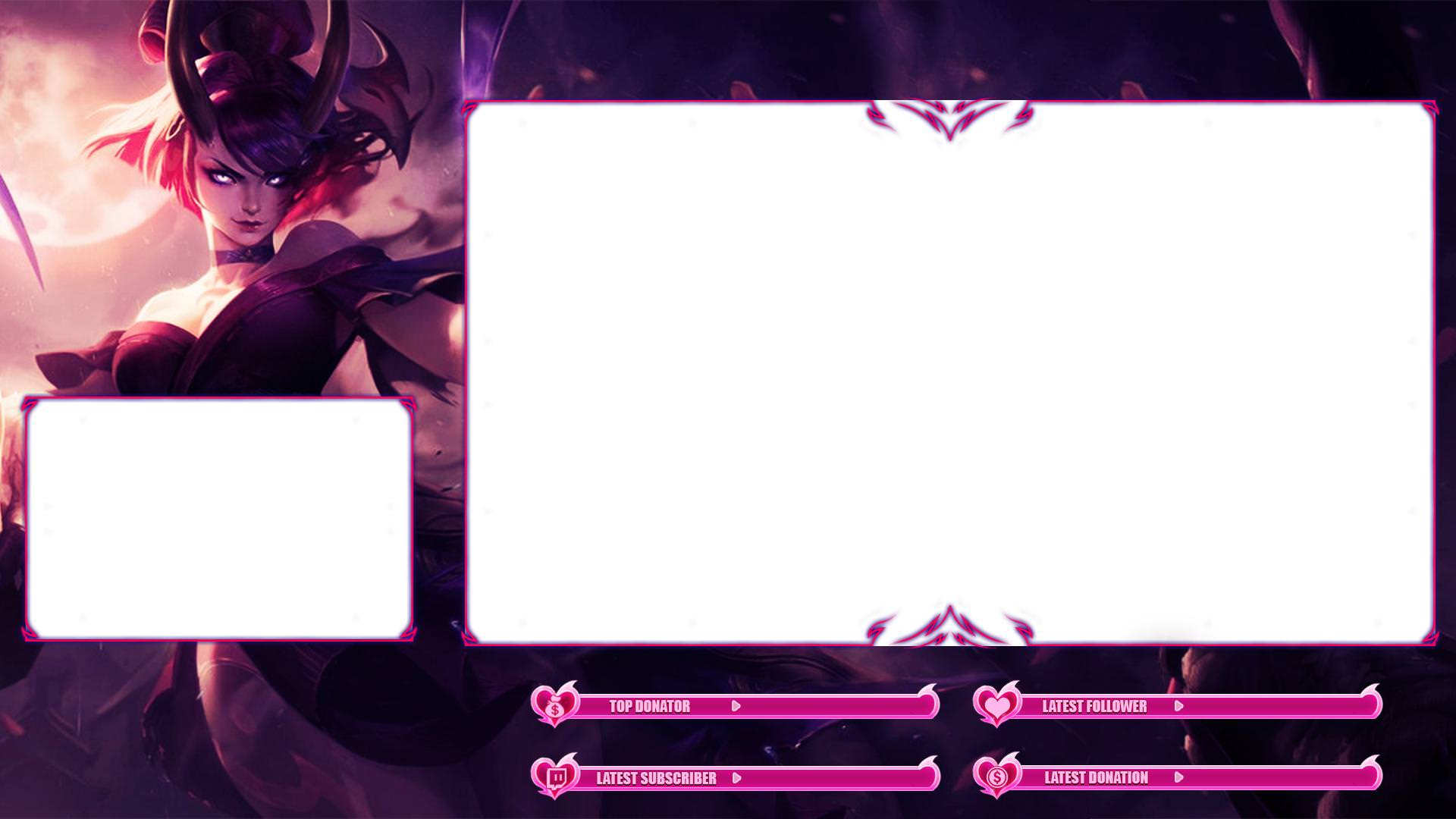 ripe herald
try to rename png image so it does not have - characters
ripe herald
but do you upload here from your PC
just click right click on image and find rename option and just rename to something like talk_scene
ripe herald
hm no, ok here is next option can you zip it and send to me in DM in zip format
tight harness

ripe herald
👍🏻
lament blade
how to match stream elements now?
ripe herald
when you upload set size to 1920x1080
and add widgets like top tip, latest sub/follower etc
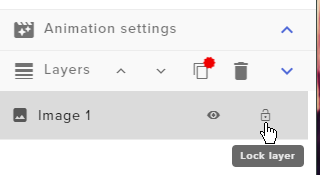
and just put that above your image so this image is last layer you can lock it so you don't move it
lament blade
how to block this
 smoky hemlock
Im trying to figure out how to edit the !items command for a stream elements store, we have a lot of items and when we use the command it lists a lot of them without linking to the store anymore, if there a way to edit how many items show? I click edit and it allows me to change basic things but not the message content. Or do I need to make a whole new command?
ripe herald
@lament blade https://i.imgur.com/eYRY9m9.png
 lament blade
omg guys u know all about this ❤
lament blade
How can I reduce the subtitles in the alert?
and change animation size
when i change to 1920x1080
i think something gone wrong 
 gentle imp
image is 1920x1080?
select image again and check on the left image size, see if it's set to auto or scaled
weary mist
@smoky hemlock you will need a whole new message, created with a custom command. At the moment, text for the default commands are not editable.
smoky hemlock
Ah, thank you @weary mist
lament blade
I am slightly new with creating commands on stream elements. How do you create your own?
weary mist
@lament blade from the dashboard, go down to chat commands, then click create new command in the upper right
lament blade
So with the command templates, can I change the command name and everything else or does it have to stay that way?
weary mist
Templates can be changed any way you want, we just preloaded a bunch of common ones for you to use :)
lament blade
Oh awesome!! Thank you 😃 Sorry was a tad confuse. Thank you so much
 vast dragon
Is there anyway you can use stream elements for twitch on xbox one
gentle imp
only if you have a pc+capture card
as far as I know
you can have the bot on channel etc, but all functions only like that
no advertising plz @young summit
vast dragon
dang thanks
 wanton jetty
Oka 2 question
-
Is the Chat Widget able to be edited with CSS
-
If yes can someone recreate my current chat style & layout ?
cedar lynx
there are a lot of settings for text and backgrounds -- what are you trying to achieve?
wanton jetty
well right now iv got a custom twitch chat box on my server but id rather port it over to StreamElements
ill show LE screenshot
let me get OBS to open

^ text layed out like that
with the badges ect
@cedar lynx
As im going to redesign my overlays in SE
 dire magnet
подскажите пожалуйста. размещение виджета для магазина (Store redemptions) после его установки в ОБС будет выдавать визуалку как открывающийся подарок либо это будут разные гифки, которые я установил в самом магазине? Или же есть другой вариант для отображения данного виджета? Как вывести в ОБС все магазинные гифки?
narrow coyote
@ebon forum
ebon forum
@wanton jetty день добрый. виджет установили который показывает вещи из магазина? если да, всё будет на стриме.
cedar lynx
@wanton jetty you should have a look, there may be some similar font options in the chat widget
wanton jetty
@ebon forum Ya tagged wrong person amigo its @dire magnet who needs the help
and @cedar lynx oka
ebon forum
@wanton jetty ah yeah, i just saw the first letter - ah, Csomethingsomething, whoopsie 😄
@dire magnet виджет добавили в оверлей? Он вам всё покажет, Store redemptions называется.
wanton jetty
I dont see any style like mine @cedar lynx
Well rip theres no custom css option @tawny pivot you have failed me 😢
cedar lynx
you can pretty easily emulate what you have going on there, just find a similar font and choose all caps?
@wanton jetty ^
it isn't exact but you can get a pretty similar look and feel. add image background below everything, make chat background transparent.
good to go
wanton jetty
I need CSS to organise text name and badges
will not work as i want...
@cedar lynx I dont want some generic boring looking layout
cedar lynx
the layout you showed above is just username and text so I didn't know you had other things in mind
also be careful about usability, if you make it too different from what people expect no one will be able to easily read the custom chat
wanton jetty
Butt i said i wanted to port my custom layout over to SE....
They will be able to read it if i can recreate it
cedar lynx
right, the chat portion you have is simply username: text, which you can do in SE
weary mist
want a workaround?
wanton jetty
please
weary mist
OBS has a spot for CSS to affect the browser source. put twitch chat into its own source, and play away
wanton jetty
If thats the case i may just stick with my current overlay... Was trying to cut down on the "Overlays" in OBS
body {
       font-family: BEBAS NEUE;
       font-weight: Bold;
}

.chat_line .nick {
    font-size: 22px;
}

.message {
    font-size: 20px;
       font-weight: Bold;
}
My current CSS
id also have to figure out the Tags used
weary mist
yeah, adding in another overlay is the only way at this point to get the customized CSS unfortunatly for the chat widget
I hope that sentance made sense, lol
wanton jetty
My adorable chat link :D
http://chrisis.live/streamerchat/?prevent_clipping=true
Yea it made sence
weary mist
I am too tired this morning to know, lol
 cedar lynx
just noting that those are all customizable options in the current chat widget, except that the literal Bebas font isn't available -- font family, weight, size all easily changeable
I suppose making the nickname slightly larger isn't possible
but yeah for the most part 😛
final sphinx
How do you get the overlay to display on your screen so you can see?
cedar lynx
@final sphinx are you using OBS?
wanton jetty
anne im just going to stop you there, I will not achieve what i want with the current status of the chat widget, I appreciate the help but for now as much as you keep saying theres stuff there, theres not the option available without having to implement more "overlays" to achieve what im after.
final sphinx
Yes
cedar lynx
@wanton jetty no worries, I just think you're making it more complex than it needs to be 😃 good luck!
nocturne pelicanBOT
@final sphinx To add your overlays to OBS, add a new browser source in your scene. Paste your overlay URL in the browser source properties, set the dimensions to 1920x1080 (unless you changed them on the website), and :ballot_box_with_check: “Shutdown source when not visible” https://youtu.be/KDvLynUqXI4
 indigo bone
can you edit more than one overlay at once ? trying to make my alerts the same
weary mist
You can duplicate your alertbox to other overlays
so get it set in one overlay, then duplicate it to the other overlays that you want it in
@indigo bone
indigo bone
ok io think i smell what your putting down
 pulsar gulch
I'm confused
indigo bone
hmm i think i got this
ill have to mess around with this
so you'd add another browser scene in obs for alerts ? @weary mist
weary mist
weary mist
indigo bone
now do i need to mute one overlay when using studio mode ? sounds repeat
weary mist
!multi
nocturne pelicanBOT
Make sure to :ballot_box_with_check: “Shutdown source when not visible” for all browser sources (all OBS scenes). If using studio mode, uncheck “Swap Preview/Output scenes After Transitioning.” Also keep in mind that sound can play from any overlay loaded in the browser (editor or launched). https://i.imgur.com/FegZJQS.png https://i.imgur.com/yY0wcFl.png
 wanton sluice
I must be missing something chatstats on the extention still say no data
lament blade
is there a bot for music?
weary mist
@lament blade can you define what you mean for this
do you mean a discord music bot, or a bot that takes song requests
smoky hemlock
Is there a way to get the stream elements off the watchtime leaderboard? when I do !top online, it gives me the top 5 users but streamelements is among them, can i remove it somehow?
weary mist
@smoky hemlock not yet, but i believe that is something on the todo list
@lament blade we have a chat bot for twitch that will collect song requests and/or play from a backup youtube playlist
smoky hemlock
thank you
lament blade
so not a bot which randomly plays songs from youtube? without request
weary mist
No, it won't randomly play stuff from youtube. I don't think there is a bot out there that does that. But you can give it a backup playlist, one that you put together (any lenght) that it will play from when there are no requests
lament blade
ahh. how do i get that?
also does it matter if its copyrighted or no
im pretty new to streaming and dont wanna get banned for sopyright music
weary mist
you won't get banned for play copywrited music, but your VOD's will get muted
and the bot is built into the website. Check out the media request page
weary mist
@pulsar gulch Likely what happened is you logged into the other channel through the main login page already. Are you trying to link your youtube to your twitch account with us?
 late forge
hey i'm trying to configure the media share option to only output to my obs/stream so I can keep the volume up for chat while focusing on gameplay but I don't really see an option to control the output for the media share? anyone know if there is one or if there is no way to change it
lament blade
call me stupid but i cant findwhere to go live
narrow coyote
depends on what broadcasting software you are using
@late forge this will all depend on your current setup, and would require you to have the media request playing from an audio source you can have low or muted for yourself, and control the volume from OBS
lament blade
what broadcasting software do you suggest
near grail
Is there a !schedule command?
late forge
@narrow coyote I think I understand its just I don't know how to make the media request play from a different audio source. There isn't any option to change it via streamelements correct? I'd have to use another program to do so?
weary mist
@late forge correct
late forge
ah rip
weary mist
because it either plays through your OBS, or it plays through a browser, you would have to route that audio somewhere else
narrow coyote
if you are on the latest windows 10 update, you can set audio output per application
 narrow coyote
i posted a screenshot of it a while back, im not at home or i would get a new one, let me see if i can dig up the post
late forge
that would make things much easier than i'm trying to make it then
lament blade
idk how to get the theme from streamelements to OBS
nocturne pelicanBOT
@lament blade To add your overlays to OBS, add a new browser source in your scene. Paste your overlay URL in the browser source properties, set the dimensions to 1920x1080 (unless you changed them on the website), and :ballot_box_with_check: “Shutdown source when not visible” https://youtu.be/KDvLynUqXI4
narrow coyote
in new win 10 update, if you right click the little speaker in the system trey there is an option to bring up this new menu
 glad berry
Is there a bit boss in streamelements?
 kindred isle
 clever mango
weary mist
clever mango
weary mist
not yet
near grail
Can someone help me? Or tell me i have to wait? Lol
weary mist
@near grail there is no default schedule command
near grail
And you cant setup ?
weary mist
you can create one if you would like, or use our panel extension to set one
glad berry
ah. thanks Terra
near grail
@weary mist how do i add commands?
Because i dont want panels
Because i have panels with schedule
narrow coyote
weary mist
The panel does a countdown to your next strim. But chat commands at the link kite sent
plus a bunch of other things
lament blade
still dk how to work it.... 😦 idk how to add my game to OBS
weary mist
you can add your game in a similar manner. Add a new source, and then add either window, game, or display capture
I highly recommend googling some OBS how-to videos as well, there is a lot of information you will learn
lament blade
thanks!. will do
near grail
Thanks @narrow coyote and @weary mist appreciate your works
narrow coyote
weary mist
you can ignore the templates, as those are just pre-setup custom commands
lament blade
so now ive got it to capture my game. can someone go over how i add the overlays on streamlabs?
lament blade
ive got class A autism
 chrome orchid
Is there a way to remove individual names from recent followere lists?
near grail
@lament blade https://m.youtube.com/watch?v=X7XrDdRE7Fk

Create an amazing overlay with StreamElements, watch our video guide to learn how. ----- Tipping page setup: https://youtu.be/eLzxRkq7tJo Add KappaGen to you...
weary mist
@chrome orchid yeah, you can do so from the widget data page, which you can get to from the activity feed, or from the overlay editor
lament blade
@near grail i already have an overlay set up tho :/
weary mist
did you add the overlay to OBS already? I thought you did that befor ethe game capture
lament blade
no...
weary mist
ok
nocturne pelicanBOT
@lament blade To add your overlays to OBS, add a new browser source in your scene. Paste your overlay URL in the browser source properties, set the dimensions to 1920x1080 (unless you changed them on the website), and :ballot_box_with_check: “Shutdown source when not visible” https://youtu.be/KDvLynUqXI4
chrome orchid
@weary mist thank you dude
near grail
@lament blade it was explained in the video lol
weary mist
lament blade
Tygo. i hadnt finished watching it @near grail my bad :/
near grail
Haha no problem :p
 tidal swallow
hey. i just replaced my donation goal with a cheer goal but what i assume is supposed to be the bits image is broken. how can i fix it?
weary mist
If you launch the overlay, do you see the image
tidal swallow
thank you!
 versed talon
new to streaming, can anyone help me get these overlays started?
weary mist
@versed talon we have tutorial videos just for that
 faint schooner
Hello helpful help desk of awesome people, I am trying to create a progress bar for viewers that would like to support me. I think I figure out how to implement the widget but I can figure out how to create a nice like background for it. is there a way to do this in the editor or do i need to find a template somewhere?
faint schooner
can't*
weary mist
@faint schooner what kind of progress bar are you talking about, like a tip goal?
faint schooner
yeah
weary mist
We have a widget for that
faint schooner
it is the tip all time one correct?
faint schooner
hmmm let me look again haha didn't see it the first time
weary mist
 stone pawn
hey boys, just a random Q. if i add two alert boxes to one overlay, why are the checked type of alerts of alert 1 changing, when i check/uncheck types of alert 2? 😄
weary mist
because of a caching bug. save, exit, and come back into the overlay
stone pawn
ah, great. thank you ❤
 north flax
How do you add a scene link to OBS?
normal igloo
!add
nocturne pelicanBOT
To add your overlays to OBS, add a new browser source in your scene. Paste your overlay URL in the browser source properties, set the dimensions to 1920x1080 (unless you changed them on the website), and :ballot_box_with_check: “Shutdown source when not visible” https://youtu.be/KDvLynUqXI4
normal igloo
@north flax
north flax
Thanks
stone pawn
Can somebody tell me how can i disable SE from scaling the pictures i load up? like within an alert, i would like the pictures to stay in the original size
stone pawn
pretty sure it is possible 😃
 stuck lotus
i recently renamed my twitch channel but i cant seem to find the way to call the bot back in
narrow coyote
https://streamelements.com/logout start by logging out, and then in, and then part and rejoin the bot from your dashboard
https://streamelements.com/dashboard right hand side
tidal swallow
@weary mist did you ever find out anything about that? i gotta go live soon so i figured i'd ask really quick.
weary mist
No. The dev team is EU time, and today is a normal weekend for them (fri and sat). So while I tried, I wasn't sure if I could get anything
tidal swallow
no problem. is there a way to shut it off for right now? if not, that's fine. i'll just run it broken.
weary mist
I am not sure when it comes to that image. I never noticed it before
tidal swallow
ooooh alrighty. thank you anyway! let me know if you do hear back?
 ebon sage
@weary mist hey do you know if i can change my email address for stream elements
weary mist
@ebon sage we use the email address you have linked to twitch
ebon sage
@weary mist so if i change my twitch email it will change by itself?
weary mist
after you change your email address on twitch, log out of streamelements, clear cache, and log back in. From what I know, that should change your email with us. If not, let me know
ebon sage
@weary mist welp signed out and logged right back in without clearing and its all done 😄 thank you
weary mist
 upbeat flicker
Hey guys, is there any way to put my twitch chat on my SE Dashboard? i hate having and extra tab for chat
 gray sparrow
hey guys i stream straight from my ps4, i just want to make my twitch profile better with a few overlays - twitter twitch accounts and donations, how do i do this?
narrow coyote
@upbeat flicker twitch chat is a planned feature for the new Ground Control desktop app
@gray sparrow overlays are something you add to your broadcast, not your profile, and there is no way to use an overlay when streaming straight from a console
You can make panels for your twitch profile
!panels
nocturne pelicanBOT
Twitch's official help guide for Panels: https://help.twitch.tv/customer/portal/articles/2416760-how-to-edit-info-panels
weary mist
! console @narrow coyote
narrow coyote

upbeat flicker
Ty 😄 @narrow coyote
 rocky river
Does someone have problems with !watchtime aswell? It doesnt count anymore on the channel that i moderate
the numbers just wont go up for anyone since a week
 shadow narwhal
One of my subscribers submitted a clip for the soundboard, and it worked the first nigh the used it, and it doesn't now. he's still a subscriber, any reason this would be? The command is !thetbg or !tbg https://streamelements.com/blackoni

StreamElements
The Ultimate All in One Platform for Streamers
weary mist
@rocky river what channel
rocky river
.tv/norium
narrow coyote
@shadow narwhal has the user that cant redeem the item recently changed their name?
weary mist
@rocky river watchtime is tied to loyalty. It looks like your streamer turned off loyalty, so the times will not go up
rocky river
ohh, makes sense thank you
clever mango
!fonts
nocturne pelicanBOT
More than 800 google fonts are supported at this time. You can preview them here: https://fonts.google.com/
clever mango
You're welcome 😃
 visual egret
another thing! my font i've chosen in one of my overlays (online) isn't the same in OBS 🤔
in my overlay online I have Raleway but in OBS there is some sort of serif font
clever mango
Sorry about that! I'll note it so one of the devs can take a look when they get a chance
shadow narwhal
No @narrow coyote
clever mango
🤔 are you saving font selection after choosing in the editor?
You may also want to try refreshing the cache of the browser source in OBS if it's not updating
clever mango
double click the browser source and scroll down to refresh cache
clever mango
great
 tepid shadow
Is there a way to change the name of the bot in chat to something other than StreamElements
normal igloo
!rename
nocturne pelicanBOT
Custom bot name requirements
- StreamElements bot modded and in chat
- Active overlay with alerts
- StreamElements tipping page in the panels below the stream (!panels)
- Create a twitch account for the name you want to use
- Ground Control app must be running
Steps to enable custom name
- Sign in to https://twitch.tv with the bot account
- Install and run Ground Control (!gc for download)
- Visit https://twitchapps.com/tmi/ and generate an oAUTH token
- Copy/paste everything in the box to Ground Control oAuth settings and enter the name for the bot account
- Restart Ground Control (custom name may take a few minutes to take effect)
normal igloo
@tepid shadow ^^^^
normal igloo
@tepid shadow As long as you have a laptop or PC to Use The links from above and Ground Control yes
tepid shadow
yes, I do, thanks so much guys
normal igloo
oh Nevermind what TerraBuck Said
@clever mango Note to self Explain things In a shorter message For faster response times
tepid shadow
!gc
nocturne pelicanBOT
Our Desktop App Ground Control: https://streamelements.com/groundcontrol
 west gull
Anybody else having issues with the countdown timer? it still says 1 day extra for any countdown that it shows
 azure swift
so it looks like the twitch extension SE panel is working again...but I set a time for tomorrow in just under 24 hours from now and here's what happened: it shows the right day and time, but the countdown says "days 1 / 23 hours / 30 minutes"
thats nearly 2 days from now, yet I set my time for just under 1 day from now...is this normal?
 pliant burrow
Looking to get top tippers of this year, is there any way to get this information?
 kind citrus
is there a way to get the bot to send multiple messages with one command? such as:
someUser: !social streamelements: Twitter: some link streamelements: Instagram: another link streamelements: Steam: another link
 kind sage
anyone know this error message "THERE WAS AN ERROR UPDATING THE MODULE"
How to solve?😣
pine hemlock
@kind citrus Not possible
@kind sage Means there is a field with no value in one of your modules
@azure swift @west gull I'll bring it up. not sure
 dry ibex
How can I get my overlay onto console do I need a capture card?
pine hemlock
yes
kind sage
ok thx~
pliant burrow
@pine hemlock FeelsBadMan you skipped me!
Ive been researching, can't find anything :/
pine hemlock
I don't have an answer
pliant burrow
No problem
 eager urchin
Hi, I 'm wondering what the best way to separate Media Request Audio is via OBS? Like is there a way to add it to OBS as a seperate Audio Output channel?
stuck hamlet
not really
 timber crown
Streaming right now and stream elements isn’t showing anything in my chat. I’ve already emailed someone. They said log in and out. I did that. Still not working
stuck hamlet
the bot isnt in your channel @timber crown
weary mist
log into the dashboard and click join on the left hand side
 Right
Right Left
Left