#helpdesk-twitch
1 messages · Page 274 of 1
 narrow coyote
 weary mist
@analog lion on your youtube channel, the only video on there, is it of your own gameplay?
 analog lion
i want to use twitch
 nocturne moth
@weary mist I would do that, but I don't want to reset everyone, since it's also a reward for tipping
analog lion
@weary mist what do u mean is it of my own gameplay?
weary mist
Is it your own gameplay, lol
there really isn't any other way to interpret that question
weary mist
@analog lion then how did you make the recording?
analog lion
i used action
weary mist
with the overlay stuff too?
analog lion
no
weary mist
the cup and dono bar from streamlabs?
weary mist
That is what is called a Broadcasting software
weary mist
OK. If you want to use our product, you download OBS (or use SLOBS at your own risk), and set it up. The bot posts a link to our tutorial videos in #welcome. Watch those, then come ask specific questions
analog lion
what do u mean SLOBS at my own risk
ok so i have SLOBS downloaded
so can i add stream elements to it?
weary mist
Because SLOBS is just a hardfork of OBS, so it is stuck with old bugs, and any new ones that they put into it
analog lion
so use OBS?
weary mist
not to mention that they cut out a lot of things that OBS can do
I highly recommend using OBS
analog lion
ok im downloading OBS
ok 1 more question
@weary mist
so all i have to do is bring it into a source?
or just watch the vids?
where do i find the vids btw?
weary mist
Please go back and read the WHOLE vids message
weary mist
no, scroll down -.-
analog lion
WHAT CHANNEL
weary mist
of course you scroll up
weary mist
or I am trying to teach you to read everything that people try to help you with 😉
scroll up, its listed
weary mist
in this channel, scroll up to where I told you about the videos
 tired gulch
Hi, is there a way to create a hyperlink in the description for items in the StreamElements Stream Store? For example, I'm giving away a steam game for points and I want to link to the game on steam in the description. Thanks!
weary mist
Are you asking for like a markup language?
tired gulch
Does the desc support markup language?
weary mist
so the hyperlink is hiddin in like a "Click HERE" thing?
 proper shoal
Hello!
tired gulch
@weary mist Yes pls.
proper shoal
It seems the stream elements bot in our channel is no longer fetching Tweets
but it is set up correctly to do so ❤
weary mist
@proper shoal Sorry about that, but twitter rolled some new changes out to their API, including limitations which are highly effecting our module. We are working with them to see what magic we can do to get it fixed
weary mist
@tired gulch at this time, I do not think there is any markup. I just tested some html codes in my store, and it didn't work either. Sorry
proper shoal
Thanks for the info @weary mist
weary mist

weary mist
lol, it happens. if you can figure out how to make the change via API, that could work, but otherwise its manual, or a full reset
nocturne moth
Any idea how to access that?
nocturne moth
Let's say I can't get that to work, which is likely. You know of a way that I can get a complete list of how many points each person has? I know I can go to leaderboard, but its like 35 pages.
hmmm
just checking is this is working still
weary mist
I do not think we have a way to do that right now
but it is totally possible with the API
just have to have the setup to pull it
nocturne moth
Any idea who can do that? I'm out of my depth here
weary mist
not really. I know its possible to make a script in like Excel that can pull the records, but I have no idea how or who can set that up
weary mist
I would try, but I don't have much time to dedicate to it, lol
nocturne moth
yeah, I hear ya
nocturne moth
adjust the economy haha
I set up a massively inflated economy, which I need to fix since it exceeds the bot's abilities
weary mist
He wants to take all the users down a certain amount of points. So pull the entire list of peoples points, decrease value (probably a percentage reduction), then be ready to re-upload them
@clever mango
 zenith widget
Lower the points given and just from the highest point holder do !addpoints all <half-of-what-rank-one-has-got?>
nocturne moth
If I can just like move the decimal 4-6 places to the left on everyone, that would be perfect. Barring that, if I could just get a "current" list of all the point holders, I could do it manually...
 warm crane
Hey guys, wondering if there's a way to have alert variations pop through the tiltify widget?
weary mist
I think it would be better to do a percentage reduction, like reduce points given per minut by 90%, reduce all points given by 90%
etc
that way everyone still has the "same" compared to each other
zenith widget
So !addpoints all <negative-number> will help, you just need to calculate that %
nocturne moth
yeah like that parts easy, it's just the current points that I need to fix
zenith widget
the !addpoints only affects current points
nocturne moth
but the percentage will be different. no? dependiing on their points holdings. I don't think I can input a formula to !addpoints
zenith widget
whats the highest point holder?

 clever mango
I'm pretty sure this is possible. Give me a few minutes
nocturne moth
@clever mango :love:
nocturne moth
I don't know if a preccentage will work becuase the holdings vary greatly
sorry * percentage
weary mist
what is your twitch name?
nocturne moth
FlackBlag
weary mist
I can see why there are huge differences, lol. So we would need to reduce a majority of people that have cheer/subbed
nocturne moth
Like I think they need to be multiplied by .0001 ideally
weary mist
probably, lol
nocturne moth
2137487647 top to lots of people with like 10000+
nocturne moth
can you multiply by .0001?
clever mango
everyone?
nocturne moth
yeah
clever mango
sure
tired gulch
@clever mango How are you doing that? Are you adjusting it in the backend in the db?
 tidal swallow
My sub goal tracker didn't count a sub I got while I was offline. Will it just update on its own eventually?
weary mist
@tidal swallow the sub goal accounts for subs that were shared (IE, that we received an alert for). You may have gotten some subs that renewed, but it could be that the viewer is waiting until you come online to share it
Also, if you want a true, acurate count of your subs, use the total sub widget. That will show the actual count you have already
tidal swallow
I do use that widget. That's why I was confused. Lol
weary mist
The sub goal widget is for counting subs as they come in, and can be an inaccurate representation of what you really have
you said sub goal, not total subs
two totally different widgets
tidal swallow
Yeah, I edited it to be total subs/goal
weary mist
got it
nocturne moth
@clever mango I gotta step away for a bit, just @ me if you have any updates or questions. Thanks again. SE is great!
weary mist
Then it isn't updating because you are offline. It pings twitch less often, but it will update a lot more often while you are online
tidal swallow
I'm online now so like I asked, it'll just update eventually, right?
weary mist
it should update every like 30 seconds, lol
tidal swallow
I figured it might but thought I'd ask in case I needed to refresh something.
Hm, well then something weird is going on.
I guess I'll worry about it if it's still the same tomorrow.
weary mist
I am looking at it right now, give me a second
tidal swallow
No problemo! Not a rush at all.
weary mist
@tidal swallow do you use anything session based? Because I can force a repull
but it refreshes everything session based
tidal swallow
I thought maybe I broke it so that's the only reason In bothered asking. I break things all the time. Lol
What does session based mean?
weary mist
and DM me your sub count that twitch is saying
tidal swallow
If anything on that layout is, let me know. If not, go for the reset.
weary mist
assisted in DMs
 exotic hinge
anyone a custom GFX artist need work done and everyone in comissions isnt there
weary mist
#art-marketplace is the place to go. Have you DMd all the artists there?
exotic hinge
i have
clever mango
done @nocturne moth https://streamelements.com/flackblag/leaderboard
@tired gulch used our API to pull the leaderboards, made the adjustments, reset both leaderboards and imported updated CSVs for both boards
exotic hinge
is anyone good with like editing audio sounds and capturing them?
paying for this easy project 😄
 mortal python
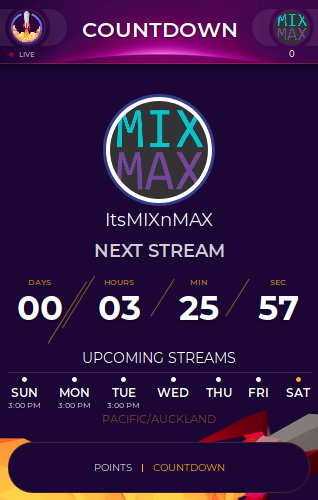
Just joined SE. We're having an issue with the extension. It's not showing our correct stream schedule in our local time. Both the days and countdown timer are incorrect. Settings: https://imgur.com/7Jgwswz & Results: https://imgur.com/7PxvuXl
We have tried deactivating and reactivating, logging in and out of twitch & uninstalling and reinstalling the extension....still get the same results.
oh and it is Saturday where we are, so that part is correct.
EDIT: Problem solved now....thanks @dense jackal for all the communication!
EDIT: Problem is still happening on and off now....it switches between correct time/countdown and incorrect time when refreshed sometimes.

 nocturne moth
@clever mango you're a GOD!
 hollow heart
Hey guys!
${user} go for his daily bonus and got ${random.1-1337} Monster Congratz
any possibility to make this command real @misty wagon
better in enlgish jeah ?
 misty wagon
No problem, already asking our Support legends as I don't know howto the random thingy.
${user} name picks up their daily reward and gets ${random.1-1337}
hollow heart
on deepbot i use: !bonus -> !bonus_finish (roll 1-10) ->1: You are lucky and got 1337 Points Today !addpoints 1337 2: You are the unluckyest person of the world and got 10 Points today !addpoints 10
some like this
misty wagon
Think I got it,
${random.1-100} is the daily reward ${user} gets
It seems that it doesn't get higher than 100
It tried it with 1-1337
The cmd needs to start with random number, I didn't get it to work the other way around. Perhaps i'm wrong but it looks the support folks are having  😃
😃
@hollow heart It didn't work the first time since the number-range was 1-1337, but it works with 1-100 the way you liked the sentence.
misty wagon
That is manual at the moment, but lemme think a sec if we can rebuild the !raffle command for that or something like it.
It looks like you can as you can do a user cooldown but have to check what is the maximum time you can add these days (as it used to be something like an hour).
 rain imp
anyone know the size requirements for the channel banner?
hollow heart
The recommended size for a cover image is 380px high x 1200px wide. Twitch pages (and your banner art) scale based on the width of each user’s browser window. Images shorter or taller than 380px will be scaled to 380px high. Images will also be stretched if a user's browser window is open wider than the width of the image. To ensure a consistent look across all monitor resolutions, it is best to make your image as wide as possible and concentrate the graphics on the left.
misty wagon
@hollow heart 86400 seconds is 24 hrs. So by typing !join, everyone can join the raffle once per day. You can completely rename the raffle involved commands (I think there are max 7 like !cancelraffle and such) as we have seen channels rebuilding it into !bankheist game.
 winter zenith
I am here
 old quest
under Loyalty settings for ignore user it does not work to ignore the twitch bots
winter zenith
But as I see you are helping him already :)
misty wagon
I'm off to bed  have to be up for soccer in 5,5 hours 😛
hollow heart
how to add different number of points for 4,99€ 9,99€ and 24,99€ ?
clever mango
only manually at this time
old quest
i take it you cant keep the twitch bots from getting points??
old quest
ya i know where it is but it apparently does work for me cause they still get points
clever mango
they still earn points when !bonus all is used
ignoring only removes their ability to earn every 10 minutes
warm crane
Hey guys, wondering if there's a way to have alert variations pop through the tiltify widget?
hollow heart
@clever mango how i make a random earning when !bonus
old quest
so how do i keep them from gaining any points?
clever mango
Don't use !addpoints all since that gives to all users in chat
That'd be the only way
 lament blade
hey friends..anyone know my overlay isnt shjowing up and alerts arent working
clever mango
Their points can also be reset from the dashboard or from chat with !editpoints name 0
@warm crane There is just one variation for Tiltify
@lament blade Has anything changed since your last stream?
how long ago was that?
lament blade
i turned it off somehow in my obs...oops
old quest
thanks @clever mango
 wooden linden
 sweet jewel
 pine hemlock
You probably have two sources playing. Media share plays via the web page or ground control app. If you have it set to show on the widget it can play there as well.
 slender breach
Do you know streamelements its working for spanish language?
 dry hare
I actually have a question! Will the SE discord bot that is yet to be released sync twitch subs to a role?
 dull magnet
I changed my name a bit ago and now the extention stoped working
how does one fix it
 cursive obsidian
does anyone know how to make a chat command that forwards to an item redemption command.... like if you type !epic ... it would actually do !redeem epic .... I'mtrying to do this for sound effects wich my viewers can trigger... but the "redeem" command is too long
slender breach
When im in fullscreen i can see the chat
But, when im in window mode, i cant see it, WTF pls help??
 untold crest
@cursive obsidian Command: !epic response:
$(redeem epic)
hollow heart
how the user can check a key that he redeemed?
zenith widget
@hollow heart You are offering game keys via your redemption store, correct? Unfortunately, you will have to give them manually, while still asking the person that redeems the item to provide some sort of contact info for example, so that you can give them the key.
I hope this answers your question as I'm not really sure on your question.
Could you elaborate a bit more on the "i have items that should cost more then 1 mio" - the items need to cost 1,000,000 mil points?
hollow heart
they get the key and if they closed the window it gone ?
I add some items to the shop but i have items that more expensive than 1 mio coins
here you can see all the items + Price
zenith widget
I see them on the store
you have 1mil point item
So the answer is, you can add for more then 1 mil points
in the stream store
only be careful to not exceed this number -> 2147483647
Aah you have a random steam key item in the stream store
So yea, the random can trigger a random picker on your side but you will still need to send the game key to the user - the problem is, it needs to be a custom made thing from your side
zenith widget
You can see what store item was redeemed here: https://streamelements.com/dashboard/store/redemptions/items
who redeemed it and so on, but the actual random game key is up to you to setup a custom random picker
hollow heart
wait my users already redeemed keys
and tell me the games
so they can see the key
i dont have to do any
@zenith widget are you out of update ? 😄
zenith widget
Wow
So your telling me, that when someone redeems your random steam key, they actually get a key?
If thats the case, I don't see an issue, except that maybe your viewers are not paying attention and not copying the key before closing the page
Wait, looking into it
To correct everything so far and to give you a proper answer @hollow heart . This is what they get, once closed its gone for them. For you on the other hand.
You can go to this page and see the redeemed code: https://streamelements.com/dashboard/store/redemptions/history
 kind epoch
what is the command for songrequest ?
zenith widget
"!sr"
kind epoch
mine seems to be broken
zenith widget
You need to go to this page: https://streamelements.com/dashboard/mediarequest/general
kind epoch
it won't play songs on media share
zenith widget
and activate the viewer request
kind epoch
Ok thanks fixed it
lament blade
😃
misty wagon
@lament blade please stop from dropping your link in multiple channels, read the rules
kind epoch
Ok back on media request i cannot hear the music on one pc i can hear it but not on my streamer pc i cannot
Any ideas?
zenith widget
@kind epoch How do you listen to the media request? Vie the SE dashboard or GC?
kind epoch
via the dashboard
zenith widget
The simplest answer is, maybe the streaming PC has the volume muted for browser sounds from the windows sound mixer, or you have muted the volume via the media request page
@kind epoch Are you using chrome by any chance on the streaming PC? If yes, is this the first time you've opened the media request page on that PC?
kind epoch
yes i am using chrome and using the media request for the first time
zenith widget
I would suggest to reload/refresh the page on the streaming pc
And let me know if that fixes it
kind epoch
Okay, here's what i don't get, it works with GC but not with the browser?
zenith widget
So I assume refreshing the page did not help. Then its an audio issue, as I originally wrote above 
kind epoch
Yeah, is there a fix or something i am not doing right?
zenith widget
I'd recommend pulling the Windows Sound mixer and see if Chrome actually generates sound via that
Just as a reference I'm talking about this one - people tend to forget this exists
kind epoch
Windows sound mixer won't work for me as i'm using an elgato capture card
zenith widget
oh...well.....Elgato maybe the issue actually and I don't think we can assist on that one, unfortunately, as we are not familiar with it :/
or it maybe a chrome issue on its self. Me personally am not sure at this point
kind epoch
Thanks for trying at least the se portion of it still works i.e. GC
zenith widget
Out of curiosity, did you try playing a song from YT via chrome, outside the media request?
zenith widget
Then the only explanaition is maybe you pressed the volume button in the media request
kind epoch
Nope, all is set to have sound
kind epoch
Yes it does
zenith widget
expand it to full screen and look at the volume button/slider just in case for me please
kind epoch
I am happy with GC working it's ok, maybe just a temporary bug on my end who knows
 kind epoch
😃
zenith widget
even with the simplest explanations to the problem
 rocky river
Theres a variable called: ${user.time_online_rank} with the description "Displays the users rank on the leaderboard". Is there a way to see the leaderboard?
zenith widget
I just tested it out my self just now and I think the variable is connected to the watchtime
As only 3 more users are above me - the streamer, SE bot and one more person, who does not close his tab and all 4 of us have the same watchtime
and this is the online leaderboard
so "!top online" is conncted to that variable and the !watchtime
rocky river
Ye but isnt there a way to view more than just top 5?
zenith widget
As far as I see, no. Will ask around if anyone knows
rocky river
Thank you
 midnight topaz
Is it possible to create an alias command like "!example" for "!redeem storeitem"?
zenith widget
@midnight topaz
Go here: https://streamelements.com/dashboard/bot/commands/default, find the !redeem command, edit it and add the alias you want
midnight topaz
Thanks for the answer. I had already found that, but I'm looking for a way to buy a special item with a command.
So instead of using "!redeem hello" with "!hello".
zenith widget
I think this will help "${redeem} Redeem item without "!redeem"" from the chat command variables
https://streamelements.com/dashboard/bot/commands/variables - 3rd from the bottom. Example will explain it better then me 
midnight topaz
Awesome! That was exactly what I was looking for.
 slate raven
hi everyone, there seems to be a handful of discrepancies on my sub leaderboard. anyone else have this issue?
slender breach
Nope, all fine
slate raven
ah i see...i meant my subscriber leaderboard...there have been people subbed for 11 months but some of it shows up lesser than that
zenith widget
If they still show lower, they may not have yet shared their resub. If they have not shared, this means Twitch hasn't told us that they resubed yet.
 tight harness
@radiant wagon You can ask in here 😃
 radiant wagon
Ay thanks man! Any idea what the issue may be?
tight harness
Going to look into it now
radiant wagon
Wonderful. I Appreciate the support ❤
cursive obsidian
question: The bot name of the ground control is not working... it is my default twitch name, but the namegiven in ground controldoesn't work ?
 nocturne pelicanBOT
@cursive obsidian Custom bot name requirements
- StreamElements bot modded and in chat
- Active overlay with alerts
- StreamElements tipping page in the panels below the stream (!panels)
- Create a twitch account for the name you want to use
- Ground Control app must be running
Steps to enable custom name
- Sign in to https://twitch.tv with the bot account
- Install and run Ground Control (!gc for download)
- Visit https://twitchapps.com/tmi/ and generate an oAUTH token
- Copy/paste everything in the box to Ground Control oAuth settings and enter the name for the bot account
- Restart Ground Control (custom name may take a few minutes to take effect)
zenith widget
@cursive obsidian You must first meet the requirements from above then follow the steps provided. Meaning, the bot name should be a unique name and not your own twitch name, I'm afraid
 dawn wasp
hey peeps - can anyone think of a way to get different shoutouts in chat for different hosters/raiders? Like if I know them and they're cool can I have a host message say something like "pondelinp sent 302 viewers our way! He plays sweet chill tunes - throw him a follow at twitch.tv/pondelinp pongChill", but if I don't know them have it just say like "xxraider69 hosted the stream for 95 viewers"?
zenith widget
Usually the Chat alert module has the automatic shoutout built into it. ( https://streamelements.com/dashboard/bot/modules )
I'm not quite sure if its possible to make it shoutout if you know the person, but it would be easier to make a custom mod/caster level based command "!shoutout <person-you-know>" and just have the command as "${user} just hosted us! Man the walls! Raid his castle at ${user.channel}[I think this was the chat variable?]" just to make an example
dawn wasp
oh yeah I've got the !shoutout already but someone mods aren't in or I feel bad pulling them out of lurk mode 😉
zenith widget
I think its possible really, but fairly custom sounding, just so that the bot can check from an array if the person is added
I'm really not sure how to make it trigger automatically :/
 stuck hamlet
dawn wasp
stuck hamlet
dawn wasp
I was going to try making the bot chat alert try to trigger a command (not sure if it will) and then go from there - afaik there's nothing like {if {user} then} for commands though to check who sent it
zenith widget
There are interesting variables in #command-share , but the bot will not trigger its own commands - this is to avoid looping
dawn wasp
ah nips, so I couldn't use the host chat alert to trigger a customapi to check if they're on a list and then return an appropriate message 😦
zenith widget
@dawn wasp If you know someone who works with APIs, you can ask them to look into the SE API and ask questions about it in #dev-chat , as I saw one of the commands in #command-share can pull ELO or Ranks from the League of legends account API, by providing given variables.
dawn wasp
I work with APIs 😄
 rancid bane
https://streamelements.com/ultrakool talking about the Youtube Connection. Thanks in advance!

StreamElements
The Ultimate All in One Platform for Streamers
zenith widget
@dawn wasp https://dev.streamelements.com/ then I guess have fun
dawn wasp
I just need to trigger it I guess from the bot chat alert, I'll check if the customapi call works in a bot chat alert
zenith widget
@rancid bane Poking around
rancid bane

 faint musk
when editing an overlay is there a way to make items not sticky ? i mean when i try to drag and move something it doesn't move freely ?
zenith widget
@faint musk On the blue menu on top, on the left side of the magnifying glasses is the snapping option - click it and the sticky situation will be gone 
faint musk
@zenith widget nice now things are a lot easier, i didn't saw that thank you so much, i edited everything by numbers in position and text 😄
dawn wasp
oh it looks like ${customapi} commands will work from chat bot alerts! So I should be able to call one of them with {user} (hopefully) and have my custom shoutout 😃 thanks guys!
 loud herald
Wheres the pop ups when people follow me
lament blade
Are you using our overlays?
 outer shadow
@clever mango here?
clever mango
Custom CSS alertbox and event list are widgets inside of the overlay editor
Enter the editor and click on WIDGETS at the top
 boreal kelp
Guys, I have had several viewers ask me this, but how can they donate using paysafe card?
Is there even a way?
outer shadow
In there @clever mango
 magic forge
Hi, I'm currently working on some overlay stuff and am not able to duplicate my alerts widget to the overlay I'd like to put the widget in, how can I make the overlay show up? (yikes that sounded confusing, lmk if you need clarification haha)
outer shadow
Am I looking for a widget that says custom CSS?
clever mango
Custom CSS is inside of the regular alertbox
custom CSS event list is a separate widget
outer shadow
boom
got it!
thank you @clever mango
making the transition over from that OTHER group
if you know what i mean wink wink
clever mango
@boreal kelp we're working on adding more payment methods including paysafecard
outer shadow
so I apologize
boreal kelp
Oh, alright dude! Do you have an expected date for it to release?
clever mango
No ETA
magic forge
Any idea on why I can't duplicate a widget to another overlay?
 desert phoenix
I am new here and I am not sure of the protocols. Hi, my name is Max. I want to know if there is a way to shuffle the added playlist.
clever mango
@magic forge No it's working fine here. What widget is it? Are the overlays the same dimensions?
@desert phoenix Not yet, it will be added
magic forge
It's an alert widget, but I can duplicate it only to some of my overlays, not all though
And the overlay I want to duplicate it to is not showing there
clever mango
Not showing in the list of options?
when you click duplicate to other overlay?
You've scrolled down?
magic forge
Mhm
plus I edited the overlay I want to duplicate it to less then 10 mins ago, so it'd show on top
clever mango
Try a chromium-based browser. There are occasionally some bugs with other browsers
magic forge
ohhhh, right
okay, let me download chrome real quick, I think that's what made it work last time something like this happened
desert phoenix
@clever mango ty 😃
magic forge
Works now! Thanks @clever mango
 atomic silo
Hello! Under user management what does regulars mean? My other question would be how can I make the bot to send automated messages in chat?
clever mango
regulars are any person that you want to give more perissions than subscribers but less permissions than mods
atomic silo
permissions like..? 
clever mango
IRT: bot commands, media request...
automated messages = timers
far bottom of the left menu
atomic silo
ohh the timers! thank you
 tawdry mirage
anyone having an issue with donations not coming through?
clever mango
Nothing reported
tawdry mirage
one of my viewers is trying to donate right now.. they are getting a success message but no alert pops up and nothing hits my paypal
clever mango
Do you see anything under pending approval on https://streamelements.com/dashboard/activity ?
tawdry mirage
nope
clever mango
And nothing shows in your paypal?
tawdry mirage
nothing
atomic silo
and under this what do chatlines mean exactly? If i set it to 0 it'll just repost itself every time set for the online interval?
clever mango
Must be a PayPal issue then. Please contact them via https://www.paypal.com/us/smarthelp/contact-us
tawdry mirage
alright
clever mango
Wish we could help further
tawdry mirage
ty
clever mango
@atomic silo Chatlines is # of lines posted in the last 5 minutes of the timer segment
so if it's a 20 min timer it's the number of lines that must be posted from minute 15-20
atomic silo
okay, thank you!
 wise cliff
I'm still only getting one of my timer messages going off :\
 silk mural
HeyGuys, I'm trying to activate TTS for donations, subs etc but even if I turn it on under "TTS Settings" it still doesn't work, not even if I just press "Emulate cheer event". Do you know what I might be doing wrong or what else should I do?
weary mist
have you changed all the variations as well?
silk mural
I knew the solution was simple 😛 thanks it worked, I didn't personally set any variation so I just thought there were none by default!
❤
lament blade
 wanton jetty
does SE have a bits boss widget ??
weary mist
@wanton jetty check your dashboard, I'm surprised you haven't seen the cheer boss tab
wanton jetty
once my stuffs set up i dont tend to login lol
weary mist
Lol
It's always good to log in (log out and in) every week or two, just to make sure that we maintain a good auth token with twitch
Plus the little sneak peaks we sneak in
lament blade
How do you set up Bits, does anyone know?🤔
weary mist
@lament blade bits are a partner/affiliate thing. Are you either?
lament blade
No.
weary mist
Then you have to wait until then
lament blade
Subscriptions?
weary mist
Same
weary mist
wanton jetty
FeelsNotUseableMan
https://chrisis.live/s/2605185650_4.png

😦
was gunna set it up 😦
particularly because of people like this :D
https://chrisis.live/s/2605185841_3.png

 normal igloo
@wanton jetty soon bro soon™ 
 true cloak
Hey guys, my recent activities list does not refresh so far as I am live, same with overlay texts (subs/followers), When I tried them in overlay editor, everything went fine
not showing alerts too, just sound
Am I missing something
wanton jetty
The ™ in soon™ doesn't give me much comfort.
normal igloo
@wanton jetty There's a lot being worked on right now man
 half perch
Your bot its camped on my channel, can u remove it please?
zenith widget
UUummm you can tell him the leave via the dashboard.
half perch
I did, I doesnt want XD
zenith widget
Well, you can try with "!bot part"
half perch
wtf XD
weary mist
If you parted from the dashboard, then the bot is no longer connected to your channel
from our end
zenith widget
Helped.
weary mist
half perch
ty KeiZar 😄
zenith widget
Its gone 
clever mango
@pseudo ledge Advertisement/stream promotion is not allowed in this server. If you stream with StreamElements chatbot and alerts, and tipping service you may apply for promotion in the #402919550066229250 channel. (See the 📌 pinned message in #welcome for the application) Thank you for respecting the server rules. 
exotic hinge
anyone?
clever mango
What do you mean by it comes through on OBS but not twitch?
You hear the sound but not on stream?
 charred osprey
Wondering if anyone can help me with a sound problem, can you message me please 😃
exotic hinge
settings audio then what
clever mango
Set the default audio device to the one you are using
exotic hinge
it only has disabled
exotic hinge
says only option disabled
clever mango
What kind of computer are you using?
clever mango
!obshelp
nocturne pelicanBOT
For the best OBS support, please join their discord where OBS devs and support volunteers are available all the time discord.gg/obsproject
lament blade
Anyone know where I can find more commands?
clever mango
Sorry, not familiar with setup for mac but OBS discord can help
@lament blade like what? Try #command-share
clever mango
Visit channels that use the bot?
charred osprey
Can someone help me with alert sounds please, message me 😃
clever mango
The purpose of this server is to provide support here. What's up?
charred osprey
It's playing 2 sounds, sounds from my Streamlabs
exotic hinge
😒 they arent helping atm terrabuck lol
charred osprey
And the new sounds from the Theme I'm using
I don't want to use the Streamlab sounds so I deleted that overlay.
Still playing both sounds
clever mango
Patience is a virtue @exotic hinge
@charred osprey Check variation settings if you're talking about sub/cheer alerts
charred osprey
What am I checking in those settings
clever mango
That the correct sound is selected
charred osprey
I have no sound enabled...
clever mango
ok then it sounds like you've got multiple alertboxes running at the same time
!multi
nocturne pelicanBOT
Make sure to :ballot_box_with_check: “Shutdown source when not visible” for all browser sources (all OBS scenes). If using studio mode, uncheck “Swap Preview/Output scenes After Transitioning.” Also keep in mind that sound can play from any overlay loaded in the browser (editor or launched). https://i.imgur.com/FegZJQS.png https://i.imgur.com/yY0wcFl.png

 charred osprey
Woo, thanks captain
but now how do I get the theme sound to work for my sub alert >.>
the default one that is
 vital flower
Is there a way to export channel stats from stream labs to stream elements?
 timid crest
Hey there! So I've noticed something rather odd in regards to Kappagen. It is capturing every emote (Bttv, Twitch, FFz, animated, etc) EXCEPT for one. NiceMoves, the FMG animated emote. Have I set something up wrong, overlooked something, or does it have something to do with that specific emote?
pine hemlock
Try !emotes update in your chat @timid crest
if it doesnt change anything, then im not sure
exotic hinge
hey how come a guy subbed
he has a sub icon in my channel
but nothing popped up
on any platforms
or bots
wise cliff
I don't think I got any responses but this is my current timer list; the ONLY one that goes off is the Twitch Prime one, none of the others proc
 wet lava
for some reason when i open ground control it opens but doenst pop open any idea how to fix this ive had to do it before but forgot how i fixed it
nocturne pelicanBOT
@exotic hinge Twitch prime (new and resub) and paid subscriptions (resub only) must be shared in chat manually by the person subscribing in order for the subscription information to be sent to StreamElements. For twitch prime, the user needs to have sharing enabled on https://www.twitch.tv/settings/prime. For paid subs, if the share box doesn't show up immediately it will when they refresh the page. https://i.imgur.com/VNJN0Uv.gif https://i.imgur.com/2297EA7.png

 zenith widget
@wise cliff The other timers have a lot of lines that need to be met in 5 minutes in order to trigger the actual timer. Lower them, if your chat is not that active to meet those chat lines
@wet lava What do you mean it does not pop open?
wet lava
i remember how to fix had to delete a roaoming file
it technically opens but u cant see it
zenith widget
Interesting. Its fixed now right?
If you don't remember what exactly to do - you can always reinstall it, maybe that will fix it
silk mural
Hey, I wanted to make a command called !shoutout <Username>, which replies something like "go leave a follow at www.twitch.tv/Username" where username is of course a variable, so I can use the same command every time I wanna shoutout different channels by just differentiating when I write the command in chat. Is it possible to do so? If so, how?
I tried stuff like "!shoutout<Username>" and then "go leave a follow at www.twitch.tv/{Username}" and various variations like that, taking example from the !duel command, but it doesn't seem to work, so I ask you if there is a way I don't see 😃
zenith widget
${user} is the variable you're looking for
timid crest
@pine hemlock does it matter if i use the StreamElements bot or not? I tried the command to no avail. All emotes still work and show up except for NiceMoves. Does anyone else have problems with using that specific animated BTTV emote with Kappagen?
zenith widget
@silk mural
wise cliff
@zenith widget I was told that was no longer an issue, my chat lines are more than met every stream though often up to 15 people talking at a time
I'd asked because before I had them set at 5 mins or less but then they were popping up too often
And then they said that issue was fixed and I could exceed the 5 minute interval
silk mural
@zenith widget awesome, thanks 😄
zenith widget
It's not the timer that maybe the issue, its the chat lines that need to be met. For me personally those 60 chat lines required seems way too high, unless you have 50 people talking at the same time
If its something else, then I'm not sure really on this and someone else needs to look into @wise cliff
wise cliff
Yeah it's odd. The one I have set for 5 minutes isn't even triggering. Even if the minimum lines are not met should they not still announce on their online interval?
zenith widget
If the minimum chat lines are not in 5 minutes(internal back-end timer), then the actual 5(or 30 minute) timer will not trigger
so if 50 chat lines are not triggered internally in 5 minutes, the timer won't trigger and the bot won't speak for the given set message
wise cliff
Hmm so I had it backwards I thought it was an either/or thing on the timer. That was how StreamLabs worked. Okay
zenith widget
well from personal experience working with Twitch API's and trying to make my own chat bot, the bot needs to count chat lines, in order to trigger the timer you have set(5-10-30minutes)
Twitch does not like spam from bots anyway, so yea - bot developers put an internal hidden timer when reading chat lines
Streamlabs(Ahkbot), Nightbot or what ever bot you want to use, will have that same internal timer, but maybe its gonna be 2 minutes to meet 20 chat lines
 solid rampart
Hello all potential advice givers out there. I am trying to add song requests to my stream through stream elements. I have added the widget to my overlay and adjusted all the settings. I even made a back up playlist. The problem is actually getting it to work QQ any help would be appreciated
zenith widget
What exactly is not working?
It does not play songs? !sr does not work? Does not show up over the stream?
solid rampart
Well, I have used the !sr (yt link) commend ....welll all of the above
It looks as though when I type in !sr (yt link) the song gets added to the que on stream elements
zenith widget
for !sr you need this
zenith widget
ok, so the queue does not play?
As for showing on stream from GC it self you should see the button from the screenshot
solid rampart
It looks as though, I can get songs on there now, I'm not sure why but refreshing my page on Stream elements fixed adding songs geting added
I went super derp mode and had Que moderation still on
zenith widget

solid rampart
and didn't approve of them I suppose
^_^
It's one of my proudest momoents
moments*
zenith widget
It was a pleasure helping out
solid rampart
So if the songs play through on the que, it auto switches to my playlist?
zenith widget
Always love rubber duck debugging 
zenith widget
If the backup playlist is playing, you can tick this option in the settings to skip the backup playlist and play the queue.
When the queue is finished Media request will start from the next song from the backup playlist
 dire magnet
привет. как создать команду, чтобы участники чата могли друг с другом взаимодействовать.. например команда !пристрелить. Что нужно ввести для того, чтобы выбирался случайный участник чата???
zenith widget
Is it OK to answer you in english?
@dire magnet There is a variable called "${random.chatter}" which picks a random user - this may help you with the !shoot command.
As for interaction between 2 targeted users, you should use "${user}" and "${sender}". Sender is the one using the command, user is the one after the command.
Hope this helps
dire magnet
Tnx))
 untold estuary
Is there a way to remove bots from the chat stats leaderboard?
 slender vapor
how do I get my activity announcement overlays on obs?
 livid ingot
My overlay has vanished
pine hemlock
@livid ingot refresh the cache in the browser source
nocturne pelicanBOT
@slender vapor To add your overlays to OBS, add a new browser source in your scene. Paste your overlay URL in the browser source properties, set the dimensions to 1920x1080 (unless you changed them on the website), and :ballot_box_with_check: “Shutdown source when not visible” https://youtu.be/KDvLynUqXI4
pine hemlock
@untold estuary add them to the ignore list. Set their points to 0 with the !setpoints command
pine hemlock
@untold estuary https://streamelements.com/dashboard/loyalty
StreamElements
The Ultimate All in One Platform for Streamers
untold estuary
@pine hemlock does this also remove them from the chat stats leaderboard?
pine hemlock
@untold estuary there's no way to remove completely. Setting the user points to 0 will set it off to the bottom
untold estuary
I understand for the POINTS leaderboard how that works
But what about the CHAT stats
Most active chatters etc.
 glacial hazel
Hola Dan Soporte por español?
 slender anvil
nocturne pelicanBOT
slender anvil
nocturne pelicanBOT
@slender anvil Make sure to :ballot_box_with_check: “Shutdown source when not visible” for all browser sources (all OBS scenes). If using studio mode, uncheck “Swap Preview/Output scenes After Transitioning.” Also keep in mind that sound can play from any overlay loaded in the browser (editor or launched). https://i.imgur.com/FegZJQS.png https://i.imgur.com/yY0wcFl.png
 gloomy plume
Hey there! I am unable to edit the Extension, the options for Displayed Panels/Upcoming Streams etc are uncheck/unclickable for me. I am using Google Chrome as my browser
 timber hearth
hello i am curious does SE have a sub goal that i can add to my channel
pine hemlock
@timber hearth yes its available as a widget on our overlay editor.
@gloomy plume I have no experience with the extension, someone else will have to reply, sorry
glacial hazel
Ground Control quiero que me muestre los datos de TWitch y solo veo los Subs de Youtube
timber hearth
That is good to know. Thank you.
glacial hazel
Ground Control I want you to show me the TWitch data and I only see the Youtube Subs
Ya lo resolvi xD
 next hollow
in ground control how do i lower youtube music volume
lament blade
I'm also having the same difficulty as @gloomy plume . Tried with firefox and chrome. I can select options for "DEFAULT PANEL" and "DEFAULT PERIOD", but not "DISPLAYED PANELS" or "UPCOMING STREAMS".
This is on the twitch extension configuration panel
wanton jetty
@next hollow cant yet its not fully supporting GC yet the new media player
gloomy plume
@lament blade Yeah, I am able to select them but not save or load them. I also checked out some other streamers who had the Extension, but their panels would not load on their info pages
wanton jetty
Anyone know if theres a way to change the opacity of the "background" color on the Tip Goal ?
got it 😄
lament blade
Mine is also not loading.. of course I haven't been able to select anything, so I suspect that is why.
pine hemlock
Devs will probably have to look into the extension
 south sluice
@gloomy plume @lament blade extension should be working smoothly now
 cedar fulcrum
Hello @worn cliff sure, with what do you need help?
zenith widget
@next hollow Expand the GC app to the right/left or maximize it to see the volume control
@wanton jetty ⤴ FYI, buddy 😉
 wise relic
I'm trying to play a 25 sec video every 10-15 mins. How can I achieve that through SE please?
cedar fulcrum
Hello @rancid bane sure, how can I help you?
zenith widget
try it
wanton jetty
im laid in bed rn cba to move #lazyAF
zenith widget
cedar fulcrum
 +
+
 zenith widget
@wise relic I'm not sure as to what you're trying to achieve. Do you want it part of the overlay?
wanton jetty
Most likely @zenith widget S/He is prob doing one of those twitch cycle loops or something that advertises prime (kinda like in ninjas stream)
just my guess
wise relic
@zenith widget yes. Part of the overlay. It's a call to action for follows and promoting the stream's guild
wise relic
I've tried making it into a gif, but the animation is too choppy when I do. No audio needed though
zenith widget
Most animated themes are some part videos. so you can use this widget
wanton jetty
if not then turn it to a gif and use the image slideshow
zenith widget
Don't forget our supported formats: "Supported formats are: (.png, .gif, .jpeg, .jpg, .mp3, .aac, .wav, .ogg and .webm.)"
wanton jetty
@zenith widget Does that widget offer the ability though to play the video on a loop on a time interval ?
wise relic
It doesn't. I've tried
zenith widget
Not sure...cancels fortnite queue... let me take a look
wise relic
@zenith widget Thank you for looking
wanton jetty
open the video up in vegas and use the built in screenshot function on each frame and then compile the images into a GIF in photoshop
long route i know
wise relic
@wanton jetty I'm not really a designer, so I just tried a few different converting programs. Even at high bitrate they seem choppy
wanton jetty
but does the job
wise relic
Ah I see
wise relic
That makes sense
wanton jetty
Worth a shot if you have the time
zenith widget
I took a look at the thingies - as I saw, no way to make it loop. I may be missing something. What I can suggest to you is, make a separate overlay in SE, add the video/gif as an image and possition it where you want.
Save the overlay, get the link and add it as separate browser source in OBS
wise relic
Oh yeah!!
zenith widget
then use the HIDE/UNHIDE option
wise relic
@zenith widget excellent idea
wanton jetty
Thats EFFORT 
zenith widget
when you UNHIDE it, it should in theory start hte video
zenith widget
you can set keyboard shortcuts on it, or do it manually
wanton jetty
Enjoy digging that into your Muscle memory Kappa
rancid bane
@cedar fulcrum hey there, I was told last time that I can’t remove connections, could you remove the YouTube connection in my profile?
wanton jetty
😮
rancid bane
Name is “ultrakoolbfr” I connected the wrong one 😅
wanton jetty
Not able to remove connections Blasphamy
wise relic
Thanks for the suggestions guys. If anyone from SE is watching, please allow webm to be scheduled in the overlay like images
zenith widget
@wise relic I think that OBS Studio mode can help make the schedule - not really sure as I haven't used it my self.
wanton jetty
Theres no easy method btw @wise relic Either you click a few buttons on stream every 10 mins or you click a few buttons for about an hour then compile the screenshots into a gif and never worry about it again 🤔 Choices huh 😄 your stuck for them hehehhehe
cedar fulcrum
@rancid bane You cannot unmerge YT and Twitch accounts
wise relic
Hahah. Yeah. I'll probably look at doing the compile. Cheers @wanton jetty
rancid bane
🤔 but I thought you could @cedar fulcrum
wanton jetty
Your welcome 😃 Use either Adobe (not sure how to take a still in adobe though) or Vegas 😃 and save every frame as a individual image, then pop open photoshop and add all images 1 by one to the document and add to the timeline 😃
if you have issues theres 100's of tutorials on youtube @wise relic
cedar fulcrum
@rancid bane What exactly the issue? you want to add new YT account or you added it to the wrong Twitch?
wanton jetty
Best of luck my buddy
wanton jetty
Pretty sure you can add more than one twitch & youtube right ?
cedar fulcrum
So you can add multiple YT accounts, just click on the "channels"
rancid bane
Yeah I can do that 😄 just will be a bit cluttered. I thought staff could manually delete connections but if you can’t that’s fine too no worries 😉
It’s a minor thing
wanton jetty
😄

Does need to be a feature to remove connections though tbh 😄
Make one "Primary" then anything added to the account can be removed...
Just the way id set it up tbh
that way no one can unlink without there being a primary connection 😃
 umbral current
How do I get the !lurk command so my average views go up to work for affiliate
zenith widget
What lurk command?
cedar fulcrum
Hello @umbral current , What do you want the command to do?
umbral current
When you type !lurk it means people in your stream are still there but not active in chat and it makes your average views increase
wanton jetty
I think you have the wrong idea of what the !lurk command is and does lol
The !lurk command is a gimmik that users use to show the streamer there still in the stream but doing other things, For all you know they could run the !lurk command and leave entirely, The command doesnt effect the channel persay its just a notification for the streamer is all and all the lurk command is is some text the bot responds with eg
!lurk
{user} is now hiding behind a tree and lurking on you
that is litterally all the lurk command is @umbral current
 atomic hollow
lol
zenith widget
I know that there is an unwritten rule in Twitch chat - never call out lurkers. I've been on and off lurking a streamer for almost 4 years and subbed to him for almost 3 years and I barely know his chat commands.
For a new streamer I start lurking cuz I like him how should I know if theres a !lurk command? What if I don't want him to know im lurking him?
nocturne pelicanBOT
Please refrain from using [at]everyone or [at]here
 sonic root
Guys if I want to have overlays in my stream does my PS4 always have to connected to my PS4 or do I just have to set it up on a ps
cedar fulcrum
Hello @sonic root , in order to use overlays you need to use a capture card.
cedar fulcrum
You use it in the PC in order to add Overlays to your Console streams
sonic root
What does it look like
wanton jetty
https://www.elgato.com/en
https://www.avermedia.com
http://www.hauppauge.co.uk
Would recommend Elgato over anything else though @sonic root
sonic root
Thanks
 modest dock
Hi guys, pretty new to all this, can someone tell me where Kappa gen is located on streamelements?
having trouble finding it :/ hmm
zenith widget
In the overlay editor -> click on Widgets and you should find it in the top of the listed widgets
zenith widget
If you open the kappagen command for viewers I can destroy your FPS with it, if you'd like
wanton jetty
ALL THE FPS...
 snow vale
Looking for someone who can help me create a guide for all my players/streamers on how to set up everything quick/easy, as all of them will be having basically identical stuff 😄
wanton jetty
🤔
zenith widget
Setup what exactly? If its SE tools, we have video guides for them here: https://strms.net/welcome
wanton jetty
ALL THE GUIDES
zenith widget
But..but I linked the same thing 
 cedar fulcrum

wanton jetty

 lusty yacht
Is there a fix for text scrolling up on overlays yet? Have it all set to scroll up and it scrolls left, been doing this for atleast a month lol
wanton jetty
Have you tried turning it on and off again,
lusty yacht
Yup lol
wanton jetty
Seriously though try change the size of the text box or delete the widget and re implement it iv had issues with widgets bugging out.
lusty yacht
Ok
 lucid crag
hi, I was recently twitch affiliated and i am unable to see subs on my dashboard do I need to do something to be able to see them
wanton jetty
❤
Welcome
When your on the phone to a company and start using Twitch Emotes in Conversation
Im on twitch wayyy to much
zenith widget
Out of all my friends and colleagues, no one knows what Kappa is or other emotes, so I have this urge to not use them IRL
Also wrong chat
@wanton jetty #general-chat 👈
 crude dagger
Wait i was impolite?
 worn cliff
can anyone help me?
 serene granite
the best way to get help is ask your question 😃
worn cliff
actaully nvm
wanton jetty
The "Wake up" at the end came across a little rude, Could of been the way i read it though
worn cliff
no need for help
zenith widget
@wanton jetty I don't see anyone that is impolite
zenith widget
Not every one has perfect grammar @wanton jetty
wanton jetty
Grammar MATTERS 
crude dagger
Ok so stream elements has this cool animated overlay but i cant figure out how to get it to only show after the loading screen in league of legends.
wanton jetty
zenith widget
@crude dagger Shoot us with your question buddy 😉
You mean the in-game animated overlay for LoL?
crude dagger
Yeah.
zenith widget
One way is to hide the overlay while loading the game
crude dagger
So basically the game starts loading and the overlay shows up at load screen.
zenith widget
then unhide it after the loading screen
wanton jetty
Keybinds mah dewd ❤
crude dagger
Thats a bit inefficient. Ok so the keybind things.
zenith widget
Hide manually or keybind - same thing
crude dagger
Need a program or script or just obs key bindings?
crude dagger
What, thats a lot of work. And not use the auto scene switcher?
zenith widget
this - i don't have a lot of options, cuz I dont have a scene or sources in my OBSA
crude dagger
Will use that. Good idea.
I'm the best, I know it.
You're all welcome for having assisted me.
😉
crude dagger
Thank me so much.
😉
jk thanks guys
Glad i joined stream elements discord, its actually useful. +1
lament blade
😃
exotic hinge
Streamlabs (Bits)
Created by Streamlabs
can anyone explain this exstention
extension
lament blade
That's Streamlabs, we are StreamElements 😄
cedar fulcrum
We have StreamElements Extension 😄
zenith widget
Is it installed? Then you've installed it manually?
Unless you're looking at it in the available extension list
lament blade
https://www.twitch.tv/ext/uaw3vx1k0ttq74u9b2zfvt768eebh1-0.1.1 this is our extension c:
exotic hinge
yeah looking at all the extension list
lament blade
cool 😃 let us know if you have any questions
cedar fulcrum
Hello @dusty merlin in order to use OBS on PS4 you need a capture card. this means elgato etc..
 dusty merlin
and it isn't possible without elgato?
I tried remmote play but for some reason it disconnects
cedar fulcrum
Please check your PC specs maybe it is not strong enough for the streaming
dusty merlin
How can I do that?
cedar fulcrum
You can Stream from PS4 and use Chatbot with alerts and Tipping page
But in order to use OBS (Overlays) you need a capture card
dusty merlin
hmm that sucks but thnx anyway
cedar fulcrum
Have a nice day!
dusty merlin
you too!
sonic root
@dusty merlin I know a way where you only need apple or android
wanton jetty
or Download PS4 Remote play and then capture that through OBS and apply overlays
@dusty merlin
crude dagger
Ok so im back wonderful people with another quick one.
sonic root
I'll make a tutorial on my YouTube on how to do It for free
crude dagger
Anyone here awake?
wanton jetty
theres like 100's of tutorials
crude dagger
#lessonlearnt
sonic root
No I'm asleep @crude dagger
zenith widget
Its 3:36PM for me...so yea I'm awake
crude dagger
Look at me Chris.
wanton jetty
@zenith widget you from finland ?
crude dagger
I need your full attention.
zenith widget
Yesn't
wanton jetty
👀
crude dagger
However when I try the command song request it... kinda requests the song but doesnt play.
crude dagger
It looks like that.
wanton jetty
Did you hit the play button 
crude dagger
I have to hit play in stream elements?
wanton jetty
Yes to start the playlist off / song
crude dagger
Where do I actually hit play. Sec ill check.
zenith widget
crude dagger
Hey chris.
wanton jetty
Yes
crude dagger
THanks, but that leaves me with 1 more question.
What if I want a playlist to play in between the song requests.
wanton jetty
click settings and add a "backup playlist"
crude dagger
hmm looking for settings


 wanton jetty
Yes
wanton jetty
I dont even work for them
crude dagger
😉
wanton jetty
@tawny pivot He said give me a raise... how do you raise nothing ???
 tawny pivot


crude dagger
Hey Styler. This guy's good. Hire him.
@tawny pivot Hey Styler. This guy's good. Hire him.
zenith widget
ignored
wanton jetty

 urban mantle
The issue I've been having is not getting the on-screen alerts to pop in channel. When I do test alerts on the site, the alert box will fire, but live... no such luck. 😦 I tried de-authorizing SE, then reauthorizing it. I've tried this with different overlays in SE. Hopefully, someone can point me in the right direction of where to start troubleshooting next.
zenith widget
Did you save the overlay and add it to OBS?
lament blade
do you have the overlay on the same resolution as on OBS?
lament blade
If it's not the same resolution, it will get cropped off (:
wanton jetty
if its to big and you havent resized it yeah
urban mantle
Sorry about that, should have put that I'm using XSplit.
wanton jetty
Program shouldnt make a difference
Check output resolution and Overlay resolution and make them match
and place the "Alerts widget" in SE anywhere in the GREEN box for it to appear perfectly on stream
urban mantle
I'll check those. Thanks
wanton jetty
ya welcome 😃
 tardy seal
i have a question! is there any other choices for stream overlays other then the ones provided on streamelements.com?????
 ripe herald
Yes, you can make something on your own, or you can find someone who will do it for you, or you can use our free themes and combine with elements you like. @tardy seal
tardy seal
thank you. i tryed doing one on my own only to nearly rage on my pc lol so i guess im stuck with thats on the page
 hollow surge
is there any way to change the text "you successfully bought 1 ticket!" in command !enter?
tight harness
The text response for default commands isn't editable currently unless there's variables which do the same thing in the Variables page, which for this I don't believe there is, what did you have in mind?
hollow surge
just to translate it to my language
wanton jetty
Could always (if it shows its layout) disable the default command and copy its context and translate it to a custom command
tight harness
Translating default commands to other languages is definitely something that we will be doing, which language would that be?
wanton jetty
@tight harness ^
tight harness
@serene granite ^
Do we need help with translating the site into Polish at some point? 🤔
serene granite
yes, at some point we will 
hollow surge
To be honest there would be no need for translating if the default commands were editable
serene granite
its part of the same development effort
so when we open up translating (for us), it will mean users will be able to edit them
@lament blade no stream linking please, that's what #402919550066229250 is for
lament blade
Ok sorry
hollow surge
@serene granite cool, thank you for all your great work!
 verbal night
cant get the header name on the siege theme to work
if i try to expand it, it doenst do much
verbal night
nvm, had to change the font, and it worked magically
 random sequoia
What do people use for StreamElements? Is there anyway I can pair StreamlabsOBS to StreamElements so I can get my audio sounds to work and such?
 gray grail
Can someone unfollow and refollow and still be in Activities?
atomic hollow
no
gray grail
someone who came often to my stream just popped up in followingscreen
and I remember him following long time ago so I was unsure
thanks
random sequoia
;-;
atomic hollow
hey @random sequoia
random sequoia
hai 😄
atomic hollow
you can work with SL OBS but we recommend using OBS studio, its much more stable
random sequoia
Is there anyway I can pair the two? for some reason my audio redeems arent coming up
random sequoia
The bot works, is there anything I should test?
atomic hollow
no, you just need to create an overlay with the store redemption widget
and add it as a browser source to OBS
random sequoia
in slobs?
atomic hollow
yes
random sequoia
.... idk how to do that could you whisper me how or link a tutorial ?
atomic hollow
here you go

Create an amazing overlay with StreamElements, watch our video guide to learn how. ----- Tipping page setup: https://youtu.be/eLzxRkq7tJo Add KappaGen to you...
 shy dune
i have ben streaming on my ps4 but just recently want to start streaming from my pc but i cant quite get it set up correctly
 hidden hamlet
@shy dune you should watch gaming Careers Youtube video
On how to setup OBS
If that is the recording software you use
shy dune
thank you
 silent hill
hi, how do i setup alerst susing streamelements for followers and such and also so it alerts in chat ?
 summer mulch
@silent hill Hi! Click here and activate chat alerts:
https://streamelements.com/dashboard/bot/modules
StreamElements
The Ultimate All in One Platform for Streamers
silent hill
ok thank you
summer mulch
I would recommend watching our video tutorials:
https://www.youtube.com/watch?v=UuweQah3v00&list=PLCDDKlFdScbEwdx5AntcQIS1InkFJwHtv

Setting up StreamElements is easy, learn how to in this video, hosted by Twitch Partner GIRLvsDUMB - Got any questions, or just want to say "Hey"? Join our D...
silent hill
will do, thank you
lament blade
@summer mulch I want to test the new payments options for India. Access please?
summer mulch
You should see paytm as a part of g2a options
Your viewers would see that as a tipping option
Just make sure to set up your tipping page:
https://streamelements.com/dashboard/tipping
StreamElements
The Ultimate All in One Platform for Streamers
And of course, connect g2a
silent hill
where can i find the tipping page so others can go in and tip if wanted?
is there like a own link for that ?
zenith widget
https://streamelements.com/dashboard/tipping - place to setup the tipping page
On the bottom of the page you have the save and this button
silent hill
already set it up. and oh ok thank you
zenith widget
silent hill
got it, thanks
zenith widget

lament blade
@summer mulch on g2a pay website or the se interface? 'cause I don't see paytm anywhere tbh
summer mulch
Did you set up g2a?
summer mulch
What's your twitch username?
lament blade
mrmissra
Can I input an email so I can ban that person from donating via that email?
serene granite
are you located in India @lament blade ?
lament blade
yeah
serene granite
they show available donation methods based on location
clever mango
🌞 Yes
Yes
clever mango
Have they donated from that email before?
clever mango
lament blade
so i want to block them
clever mango
and search the email and then click on the block icon on the right
lament blade
thanks ❤
serene granite
@lament blade you need to have force login enabled for us to block them from actually tipping you
clever mango
^ yep, just remembered that
 worthy onyx
does anyone here know how to put a image in a overlay?
zenith widget
lament blade
Thanks everyone, just figured it out.
zenith widget
@worthy onyx Click on the "Insert Image" in the overlay editor
worthy onyx
ok
zenith widget
Afterwards, select the new box and then click on "Change Image" This will popup your internal gallery of images, videos, gifs and so on. Select what you want and your done. @worthy onyx
clever mango
@granite burrow We can only preemptively block by username since once they get to paypal we can't stop a transaction
blocking by email means they won't get any notifications when using that email
no alerts
for trolls
worthy onyx
it says set image
zenith widget
@granite burrow I think there was a blocking option in PayPal it self. Other thing you can do is, you can send a report towards PayPal because of "bah behavior" with his "tips"/"donations", and that it happened twice, maybe more towards other people. Make sure you don't directly mention "donation" to paypal, else they will ignore you.
clever mango
True, PayPal should have a way to actually block an email
zenith widget
@worthy onyx Click "set image" then and choose your desired image and so on.
@worthy onyx Also I suggest looking into https://strms.net/welcome <- these are collection of guide videos that explain every SE tool.
worthy onyx
it didn't work 😦
zenith widget
So, on the gallery, after you upload the image you want, click on it, then on "Submit". This will get the image and place it in the image box widget