#helpdesk-twitch
1 messages · Page 270 of 1
 wanton jetty
appreciate it
As i know he will be pissed with somone else as top dog lol
Im glad the "Bits" is accurate though
All of the ones iv used are 40 bits behind
😄
untill now
@dense jackal Whats the duration though
1000, 2000, 3000
little confused
Also may you send me some of the color codes you use i want my Amazon gear tab to match it
 dense jackal
@ripe herald would know the color codes and I'm not sure what you mean by duration @wanton jetty
wanton jetty
Default period ?? Whut du heck dis mean
https://chrisis.live/s/2005181334_4.png
 dense jackal
You mean ETA until fixed?
Refresh your page, I don't see that in my config settings
wanton jetty
I just took that lol
dense jackal
wanton jetty
try subs as default
dense jackal

wanton jetty
Also store part of ya extension is broken
dense jackal
It means Tier 1 2 or 3 subs
wanton jetty
Ahh

StreamElements
The Ultimate All in One Platform for Streamers

It should be renamed to be a little more clearer
dense jackal
Yep, like i said it's currently being tinkered with, the store was working previously, hopefully we get it working properly soon 😃
wanton jetty
okais
what should i do once its been fixed is Shadows "Sub count" stuck like that or ?
dense jackal
It should be adjusted either instantly or his next resub since it's read from twitch api
wanton jetty
LUL now lives is broken 
oka 😄
Ok so im confused oka My "points" is working but "Current" is higher than "All time" ?
Lil confuzzled
Also incase ya didnt know "Cheers" tab doesnt show users profile pictures 😛 some some yellow banana guy 
dense jackal
Yup, we noticed those too! devs come back in tomorrow and that’s what they will be working on to my knowledge 😄
 lament blade
can this bot ban cyrilic letters?
wanton jetty
@dense jackal recommendation :)
Subs Gifted Tab 😉 can clean up one of my slots then
 dense jackal
That sounds awesome add that to our #💭︱feedback-and-ideas board https://streamelements.helprace.com/s1-streamelements/ideas @wanton jetty
 rugged sage
Can someone help me with donation information? If you donate shroud you don't see his name etc... How to do that? So you don't leak personal information?
dense jackal
@lament blade you can ban certain words but not cyrilic letters altogether
You need a business paypal account @rugged sage if you have a personal there should be an option to upgrade to one on their website (its free)
rugged sage
@dense jackal How to hide your adress if you don't have a "business" adres?
And can you also DOWNGRADE? 😛
wanton jetty
Does "Off stream" work on SE when somone tips to hide the message ?
dense jackal
I don't believe it shows ur adress, I mean I guess you could add a random address, I would talk to paypal about this tho, my knowledge is limited
rugged sage
Ok thanks btw
dense jackal
@wanton jetty I'm confused by what ur asking, "does tipping work offstream?"
wanton jetty
No for example when people dont want there tip message up on screen a example would be timthetatman in his old setup used to put off stream at the start of a message to hide the message
See on here theres no "Hide Message" box to hide of off stream if they hit the mark of lets say $3 shows message on screen
https://chrisis.live/s/2005185906_5.png
 dense jackal
Ah it would be a neat feature!
wanton jetty
in timthetatmans stream if you put "off stream" at the start it hides the message but iv no idea who set his system up all i know is he uses streamelements
 pine hemlock
i dont think we have anything coded
 south sluice
@wanton jetty it's possible
Tip moderation - custom profanity and hide message - and add off stream to the words
 humble relic
is there a way to create a !lurk command
humble relic
any1?
 strong mason
Heyya peeps!
I have a question about my stream goals.
My follower goal is showing that I have 72/100, even though I only currently have 66 followers.
Is there any way to fix this?
rugged sage
How to delete TIP page if you deleted the twitch acc? Kinda personal information left on there....
 weary mist
@humble relic you can make any command you want via chat or via the dashboard, under chat commands
weary mist
@strong mason go to data, then the goals tab and update the numbet
@humble relic $(sender) is the variable you want
humble relic
ty
strong mason
@humble relic a !lurk command doesn't actually do anything, its just "flavour" that people use.
You can simply create it manually and have a message that ${user} is now lurking / unlurking, which means nothing more as having your stream open, without actually listening or watching.
A lurker is nothing more then a viewbooster
As far as I was told, at least
weary mist
@rugged sage you can remove your PayPal and any other information (like the message etc) via the tip settings page
humble relic
@strong mason i know thats what im trying to do
 worldly hare
so i am a mod in a few streams that use streamelements and i use to see it pop up in twitch chat and now i am unable to see it, and i have no idea what to do.
humble relic
what do u mean?
weary mist
@worldly hare check to make sure you didn't accidentally ignore it
/unignore streamelements
@lament blade we are testing these methods now. Once the testing is completed, it will be available for public usage :)
lament blade
@weary mist aaa ok 😉
rugged sage
@weary mist But i have deleted my twitch acc so i'm not able to login with my old acc on StreamElements website
weary mist
@strong mason a lurker could very easily be someone who is just listening to the stream for background noise (I do at work). They could be someone that doesn't want to interact. Lurkers are the backbone of twitch, do not underestimate or annoy them
humble relic
^
weary mist
@rugged sage can you whisper/DM me the name?
rugged sage
Ok
worldly hare
thanks @weary mist
weary mist
:+1: @worldly hare you are not the first to accidentally ignore it, lol
humble relic
lol
worldly hare
i dont even remember ignoring it LUL
lament blade
SE is not registering any of my new followers.
 nocturne pelicanBOT
@lament blade Please connect your Twitch and/or YouTube channel with Discord by going to ⚙ Settings and then Connections here in Discord.
lament blade
Is there a reason I can't edit custom commands?
nocturne pelicanBOT
@lament blade Depending on your display resolution or window size, you may need to scroll to the right to edit and/or delete commands, or try zooming out.
 pallid ferry
Hey i have a question, I just started and I need some help with notifications. How do I customize then to make them say sing a song when someone cheers.
Anyone?
pine hemlock
Edit the alertbox in the overlay manager.
pallid ferry
Okay thx.
 torn light
Hey!
Is there anyone who got the same problem with importing tipeee tips? After using the addon there is the message "An error occurred".
lament blade
How do I turn on text to speech on streamelements?
pine hemlock
Alertbox settings for specific alerts
lament blade
I cant find alertbox in the options
pine hemlock
Its in tbe overlay editor.
pine hemlock
yes
lament blade
okay awesome thank you
torn light
Do you also know how to fix the problem with the error message? @pine hemlock
lament blade
@clever mango Did you make a change just I see in Dashboard the new follower I just got? What did I have wrong
 clever mango
Yes, the devs just pushed a fix on your account.
lament blade
Awesome.Thank you so much.
clever mango
@hearty phoenix follows are working again
 green yacht
Hey! can someone help me, idk when im tyrying to put the media share on my stream, the audio sounds twice, like someone request a song or whatever and it sounds good, but then i try to put the video on my stream and the audio starts to sound twice
 proven delta
so question i have a random sound clip going off everytime someone follow, bits, subs, hosts etc on top of my alert, is therre a setting that can be changed to get rid of the little sound before the alert?
 minor gate
is there a max for loyalty points?
 misty hare
So my notifications still don't work properly, I am probably going to go back to my old system...
hosts, prime subs never pop up
nocturne pelicanBOT
@misty hare
Twitch doesn't have a "notification system" for hosts (unlike follows, subs, raids, etc.) so the only way for StreamElements to know that you are being hosted is to connect through you to twitch. This connection is made on:
- SE Dashboard page - https://streamelements.com/dashboard
- SE Activity Feed page - https://streamelements.com/dashboard/activity
- Ground Control desktop app - https://streamelements.com/groundcontrol
Please have one of these open during your stream in order to receive host event notifications.
@misty hare Twitch prime (new and resub) and paid subscriptions (resub only) must be shared in chat manually by the person subscribing in order for the subscription information to be sent to StreamElements. For twitch prime, the user needs to have sharing enabled on https://www.twitch.tv/settings/prime. For paid subs, if the share box doesn't show up immediately it will when they refresh the page. https://i.imgur.com/VNJN0Uv.gif https://i.imgur.com/2297EA7.png

 misty hare
IT'S NOT A RESUB, YOU CAN'T RESUB WITH PRIME!!!
I am tired of this same message
cjeck ur system
I get no notificatons
clever mango
It's absolutely possible to re-subscribe with prime.
misty hare
no
clever mango
And there is nothing we can do if the user chooses not to share their prime subscription. https://www.twitch.tv/settings/prime
misty hare
because you have to sub ecerytime with prime
prime subs never get notifications on my channel
and they don't show as the last sub
it's fact
my husband is using his prime onmy channel
never get notifications and he doesn't show as the last subscriber nor on the notifications on SE dashboard
and it's been like this for a while
I've been with SE for a very long time, I've been on twitch for over 4 yrs I know how things work...notifications don't work properly and I am tired of it not popping up when ppl sub/host etc...
misty hare
but he just resubbed and doesn't show as the last sub...
like i said it isn't accurate
clever mango
What is his name? He used his Amazon prime to resub? Please have him visit this page https://www.twitch.tv/settings/prime and make sure the checkbox at the bottom is checked to share subscriptions.
 clever mango
I'm very sorry about this. I've tested everything possible (follows, twitch prime sub, hosts) and I can't find any issues. All 3rd party services are reliant on the Twitch API. When they have issues or downtime (much more often than any of us would like) we have no way to receive or display notifications. In these cases, events are missed but there is nothing that 3rd party services like StreamElements can do. It's entirely possible that when your husband resubscribed with Prime, Twitch did not send us a notification for the event even if he had the setting enabled to share his prime sub.
In general, our service has a very high uptime and reliability but at the end of the day we can only notify events that we receive from Twitch and YouTube.
misty hare
like i said, this just started recently, never ever had issues before
 cedar fulcrum
@teal umbra Please make sure you saved your overlay as a browser source and not only set the game capture for the game.
 glad zinc
So I got a donation Via G2a Wallet and its not available to withdraw wow GG G2A and their customer support is just **##123
cedar fulcrum
Hello @glad zinc you need to reach Twitch's threshold in order to withdraw the donations:
" Affiliates are eligible for payout once their accrued revenue balance reaches $100. If you do not make over $100 in a given month, the amount made will continue rolling over to the next month until the minimum threshold is met."
glad zinc
@cedar fulcrum am talking about the the new payment methods added via streamelements which includes (G2A, PayTM,BitCoin,CC/DC)
AS soon as someone donates via streamelements through those new donation methods they r available in my G2A pay wallet but its not available to withdraw am not talking about twitch's revenue system 😦
this
 wanton sluice
Is the chat stats a known thing? I try enabling them on SE but they never seem to stay on?
next time I go to that section they are turned off again
glad zinc
@cedar fulcrum Everything is fine its available in my available balance but its still not available to withdraw thats the reason I have turned off the G2A donation method coz if someone donates and its not available for withdrawal then that makes no sense
wanton sluice
oh and when I click on the button to open my stats, keeps saying page not found
cedar fulcrum
Hello @wanton sluice Do you want to enable all in the Chat stats. I will try to do it for you
 rancid basin
how can i move the twitch / twitter text to the same position as the others ?
cedar fulcrum
@wanton sluice I am investigating the issue I will be back to you asap, Thank you for reporting.
wanton sluice
@cedar fulcrum no rush. Im about to leave for work here in a few anyway. I just assumed it was part of the extension 2.0 bug thing.
cedar fulcrum
@rancid basin Try selecting them and moving them with the arrow keys.
rancid basin
aww tyy 
 stuck hamlet
@wanton sluice I fixed your 404, but the setting page issue is known. None of the settings there will work for now.
stuck hamlet
:p
wanton sluice
hopefully its not too hard for ya to fix
stuck hamlet
The settings page might be removed entirely. We aren't certain yet. 🙂
wanton sluice
removed as in.. the feature wont be there?
stuck hamlet
The settings page won't be there. ChatStats will always stay 😄
this is also not confirmed, might be fixed, but be removed, only the StreamElements god know 
wanton sluice
ah.. so then if the settings page is axed.. is it also to be gone from the extention?
stuck hamlet
Naaaah
Different projects. I'll try and get some info about the settings page today 😄
wanton sluice
ah ok.. I thought the settings had to be on for the extension to pick it up
rancid basin
🤔 am trying to fit the whole overlay in my screen but it capture part of it only 🤔
shoud the overlay be like this ?
 zenith widget
@rancid basin Did you set the browser source to the proper resolution? (1920x1080)?
Ooh god, dude, dont use SLOBS with SE overlays!
Change to OBS, trust me!
You're gonna have a bad time with SLOBS and SE overlays
wanton sluice
but ya make sure your browser source resolution is set to 1080p
 stable marsh
@cedar fulcrum I did change it about 2 weeks ago
cedar fulcrum
I answered on your DM
rancid basin
play game overlay will detect game directly or i have to add a game capture in OBS (sry if it sounds kinda stupid)
zenith widget
You need to add the game source your self
zenith widget
Sure. You can also look at the YT playlist from SE here for help: http://strms.net/welcome
rancid basin
should i close source when it's not visible ?
wanton sluice
yeah
rancid basin
thx
wanton sluice
otherwise what happens is if you are on another scene youll hear alerts on both sides
zenith widget
!multi
 gentle imp
+great load on cpu
zenith widget
god damn it, the cmds are rly role blocked 
 atomic hollow
!multi
nocturne pelicanBOT
Make sure to :ballot_box_with_check: “Shutdown source when not visible” for all browser sources (all OBS scenes). If using studio mode, uncheck “Swap Preview/Output scenes After Transitioning.” Also keep in mind that sound can play from any overlay loaded in the browser (editor or launched). https://i.imgur.com/FegZJQS.png https://i.imgur.com/yY0wcFl.png

 pine hemlock

 grizzled cove
Hey guys I’m a console streamer PS4 and my timer I set it every 30 mins to pop up but when I stream nothing happens. Anyone know what could be the problem? Pls @ me so I can get it. Thanks guys
zenith widget
@grizzled cove Which timer? Bot timer to relay a msg? If yes, then the bot needs to have an active chat in order to trigger the timer. For example. It needs to read 5 lines of chat in order to set the 30 minute timer.
You can also change how many lines it needs to have before setting off the timer.
grizzled cove
Ok I do have chatters but nothing shows. Maybe I need to double check my bot timer. Any suggestions for my timer @zenith widget
zenith widget
Depends on the msg you want it to say. But 30 minutes seems good enough for something interesting
But the line number is also important - set it too high, it won't trigger properly. Set it too low...it should be fine
For example: Recently for my Streamer I setup a timer for the bot every 30 minutes to remind chatters about a poll we had to choose a design for a t-shirt they would like to wear
@grizzled cove @ing just in case
cedar fulcrum
Hello @grizzled cove , Please let me know your Nickname on the site I will check what is wrong with the timers
zenith widget
I need more coffee..mixing up words like there is no tmrw 
grizzled cove
I see I will check it out thank bro @zenith widget
zenith widget
@grizzled cove You can also let the Grand Wizards of SE take a look at your account ^^
grizzled cove
@cedar fulcrum fo sho it’s uceragnar thanks bro
cedar fulcrum
@grizzled cove You need 10 Chat lines in order the Timer to be activated, and start the 30 minutes interval. I would suggest to try and set it for less if you do not have much chatters yet.
grizzled cove
Ok I will adjust it. Thanks @cedar fulcrum
cedar fulcrum
Welcome!
wanton sluice
About that. The timer starts once the lines are met?
zenith widget
Yes
But actually, I think there is an internal interval that the lines need to be met - thats how Nightbot worked as far as I noticed
Grand Wizards can fully confirm the above 
cedar fulcrum
Yes, correct
 winged estuary
hey im getting subs but my alert arnt working nor is it showing in recent events (it wasnt prime)
zenith widget
Did you get the subs while offline?
winged estuary
no im live and he just subbed about 010 mins ago
zenith widget
Do you have the alert box ticked like so?
If yes, does it have an image and sound attached to it?
zenith widget
I would suggest to reload the overlays just in case
gentle imp
subs need to share when they sub so StreamElements can "see" it
zenith widget
1st time subbers don't, so I assume that its a 1st time sub, right? 
nocturne pelicanBOT
@winged estuary Twitch prime (new and resub) and paid subscriptions (resub only) must be shared in chat manually by the person subscribing in order for the subscription information to be sent to StreamElements. For twitch prime, the user needs to have sharing enabled on https://www.twitch.tv/settings/prime. For paid subs, if the share box doesn't show up immediately it will when they refresh the page. https://i.imgur.com/VNJN0Uv.gif https://i.imgur.com/2297EA7.png
zenith widget
I can't use bot cmds, so I'm going the long way around
winged estuary
no he was a gifted sub then he wasnt subed for half a month then subbed
zenith widget
Then his in his 30 day period, so its a 2 month sub and needs to share his anniversary
Unless Twitch changed the 30 day sub month cooldown thingy to less days
winged estuary
maybe
zenith widget
So usually, when a sub doesn't resub on the day he needs to renew, he should have 30 days period in which he can renew and still get his 2, 3,4, etc. months resub. Ask him to refresh like the bot suggested
wanton sluice
Ah ok. I was thinking the timer stated immediately. But wouldn’t fire until the lines were met
 toxic leaf
How would I do "Last Donator" and "last follower"? I have it ready in my overlay but Idk how I would make it actually show the last follower/donator
gentle imp
there's a widget for it
gentle imp
you're welcome 😃
 sonic juniper
there is a bell icon bottom left where you can simulate certain events morris
toxic leaf
Ah, found it, thank you
torn light
I got this problem every time. Can anyone help me with this?
toxic leaf
Is there any page where I can find all these questions? so I don't have to bother anyone here with the same question
zenith widget
@toxic leaf http://strms.net/welcome
toxic leaf
Thanks :)
zenith widget
@torn light Is that an attempt to import tips from another service?
sonic juniper
you could search for it here in the channel as well morris, at least thats what i do sometimes
toxic leaf
Wait, you can move your stuff from tipeeestream to streamelements? 
That would save a lot of work xD
zenith widget
Usually when SE connects to your account, then it starts tracking tips/cheers from that moment. Even from Streamlabs I could not import tips/cheers, not sure for tpeeestream.
SE.Champ/Staff wizards would be able to confirm this
torn light
@zenith widget yes, i tried to import the tips from tipeee to streamelements with this addon
Streamlabs worked, but tipeee didn't
sonic juniper
hey guys and girls, quick question regarding custom event list. i managed to show the 5 last events with custom css, but i would like to change the sorting. Right now the newest event of the 5 is at the bottom and i would like to have it on top. What do i need to change in the JS section?
zenith widget
@torn light I've only managed to import overlay settings from Streamlabs. I would wait for SE.Staff to help on that matter really.
@sonic juniper I'm not sure about JS or custom CSS, but isn't there a variable to sorting for example {sort.top}?
 tight harness
There is a tipeeestream import tool but it just imports tips currently
toxic leaf
But, is there a way to copy my tipeeestream overlay to streamelements?
Ah
That answered my question
zenith widget
@tight harness 
sonic juniper
@zenith widget not that i'm aware of, at least in that custom event widget
torn light
one more question: where could I find my "JWT Token"?
zenith widget
@sonic juniper Sorry that I can't help on that..I work with C# and detest web dev languages to some degree
https://streamelements.com/dashboard/account/channels - Then Show secrets
sonic juniper
@zenith widget thats the only thing that looks like sorting for me: const recents = obj.detail.recents.sort((a,b) => a.createdAt > b.createdAt);;
but switching a and b does not help. 😄
zenith widget
thats an interesting LINQ there...why don't you just remove all the things in .sort()?
or just leave .sort((a,b))
sonic juniper
i'll try, lets see what happens
zenith widget
or maybe change the > to <
sonic juniper
now that i'm looking at it in detail, the whole event-list seems off
zenith widget
well, looking at the .sort() for JS, I found that maybe im not looking at the right thing but here are some links:
https://developer.mozilla.org/en-US/docs/Web/JavaScript/Reference/Global_Objects/Array/sort & https://www.w3schools.com/js/js_array_sort.asp
sonic juniper
strangely, the custom event list widget shows different results than the event list widget
other question: can i customize the recent follower or event list widget?
i just chose custom because i didn't like the style of the other ones
zenith widget
Depends on what customization you are referring to. At this point I think that a knowledgeable SE.Champ and SE.Staff can help you on this. JS and custom CSS is just the other spectrum for me when it comes to coding, but it was worth a shot.
sonic juniper
custom css i guess
gentle imp
there is a custom event widget you can change at your will
iirc the alert box also accepts custom stuff
sonic juniper
i was trying recent followers, event list and custom event list.
gentle imp
custom event list you can change all you want
gentle imp
how so?
sonic juniper
when i create 2 where i changed nothing, they have different results for the last 5 events
i guess something is wrong in the JS of the custom event list
*2 layers
gentle imp
strange I get the same on both
sonic juniper
hm i'll try a new overlay
gentle imp
zenith widget
snipping tool -> edit -> copy(or ctrl + c)
sonic juniper
sorry, what snipping tool? 😕
zenith widget
gentle imp
😮
sonic juniper
i don't know what it is about me and streamelements, but everything i touch breaks. 😄
gentle imp
I'm getting strange results with event list too lol
sonic juniper
yours or mine?
sonic juniper
ok for me event list and recent followers are fine, but the custom one is different
gentle imp
whatever matches the dashboard is correct
also for me custom is more accurate lol
although I use neither
 mental rover
does anyone know how to unlink youtube channel in streamelements?
zenith widget
Maybe from your YT account settings you can sever the SE connection? Not really familiar with that. Or a SE.Staff/Dev can sever it from the back end database...i thunk
mental rover
my twitch has random generated number and no avatar
tipping page
and the youtube tipping page no random generated number
zenith widget
That...i think is something Staff should look at
mental rover
thats why i want to unlink my youtube cuz it took the no random generated number
for my tipping page
 visual egret
is there anyway to do a sort of subcount command? so my viewers can keep up with how many I have 😅
atomic hollow
There is a ${channel.subs} variable which you can put into a custom command if you wish @visual egret
cedar fulcrum
Hello @mental rover , one moment please I am looking into this
mental rover
Aight
visual egret
@atomic hollow just realised there's a command template for it 🤦 thank you either way!
atomic hollow
@visual egret 
lament blade
Hello, when does the mobile extension release?
atomic hollow
mobile extension?
lament blade
Yes, "mobile extension"...

Twitch Blog
UPDATE (March 21, 2018): Extensions are now available on Twitch iOS and Android. Don’t forget to add mobile support for your Extension…
the API is open source for all dev's since march...
atomic hollow
oh
lament blade
and...?
Streamlabs & co. already did it a long time ago...
zenith widget
I would assume that the mobile extension is in the works or planned for later, as the main panel extension has some bugs
and is more worked on afaik
atomic hollow
we need to stabilize the web version first and then we will start working on that
lament blade
I did'nt ask you, only shadowboxer 😃
atomic hollow
thanks @zenith widget 😃
zenith widget
wow, rude
lament blade
I come here to ask STAFF for something, no unknown users.
atomic hollow
@zenith widget is informed, his information is as solid as mine
lament blade
Is there any way to give users permissions that other users do not have through @nocturne pelican ?
zenith widget
!levels
nocturne pelicanBOT
Chat/Bot Levels
100 - viewer
250 - subscriber
300 - __regular __
500 - moderator (twitch mods automatically placed at this level)
1000 - super moderator
1500 - broadcaster
Dashboard Manager Levels (least to most access)
Bot Supervisor (can add super moderators from dashboard)
Editor
Full Access
https://i.imgur.com/s61Liry.png
 lament blade
Where the hell is that? lol
zenith widget
In the dashboard usually you can add regulars
or use the "!level successfully set ${user}'s level to ${2}, you can reset it with !level ${user} reset" command for in the chat
lament blade
Yes, I know how to do that. But where are these options?
I can add regulars and edit users levels....But where can I say what these levels do?
zenith widget
As far I know, these are integrated levels and you can't add your own levels
lament blade
:/
Was hoping to be able to add in some special abilities like emojis or allowing them to get benefits that others don't. Like early notifications. Guess that all has to go through subs.
zenith widget
I think you can setup some custom commands that only regulars can use, and if you notice, regulars have a higher level then Subs
lament blade
Odd.... @zenith widget I swore I saw a video when I first started using SE, that showed you could setup Subscriber Tiers. Quite like on Twitch, but I can't find it anywhere.
zenith widget
Interesting. Me personally I haven't seen an option for that, but you can always scour through the SE vids here: http://strms.net/welcome
I just tried to scour through some vids and did not see anything related to level editing
lament blade
I've watched quite a lot of them lol.
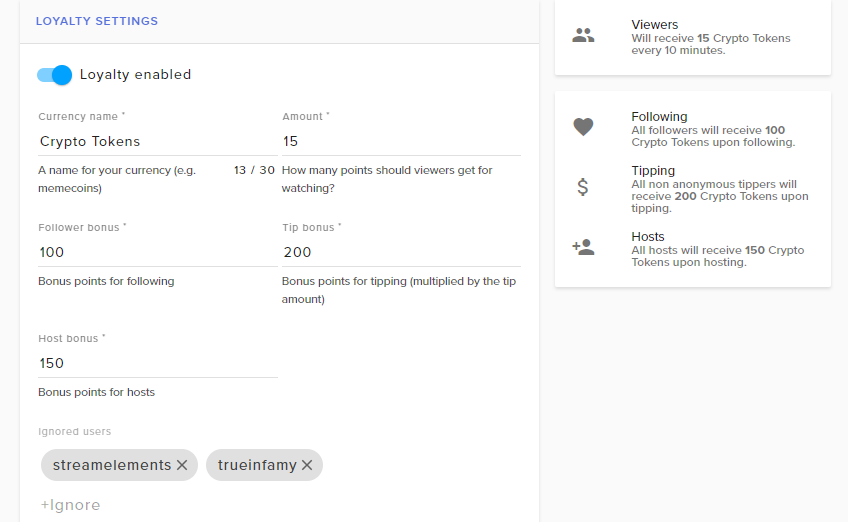
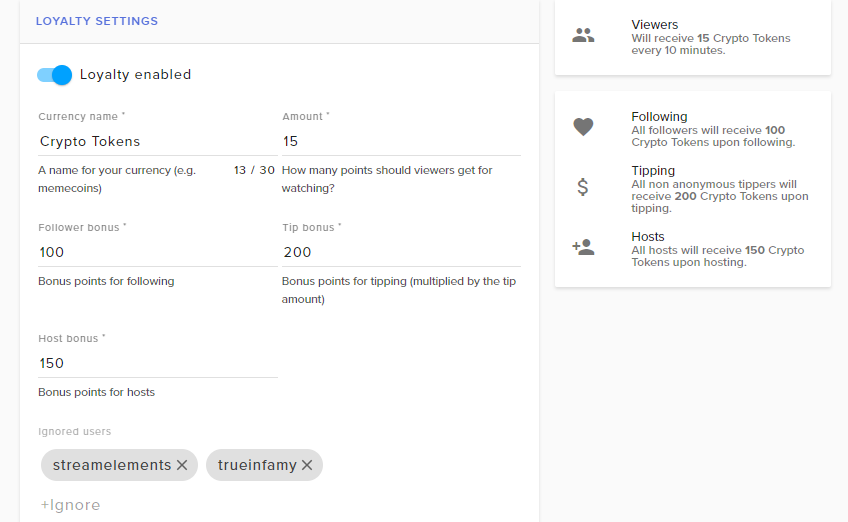
I did notice this though, on the introduction video....It shows that SE allows Subscriber Bonus for the Loyalty Settings. I don't see it though.
zenith widget
Its there -
its 2x the points you give to normal viewers
so if you set it up as 10 points per 10 minutes - subs get 20 points
 zenith widget
Aah, are you affiliate?
Cuz the screenshot is from an account I'm editor at and on my account I could not see the subs points as well
lament blade
Yes, 53 Followers and Subscriptions Enabled.
zenith widget
Hmm quick suggestion - log out and log back in and check the loyalty
I assume that you have used SE for quite some time and recently got affiliate - that may be, bcs the SE +twitch connection token may not have refreshed it self yet and reloging may fix this
zenith widget
Did you try relog, just in case?
lament blade
I did, nothing changed. I'll hopefully get it settled at some point, for now...It's just extra points lol
zenith widget
If you have a sub already, keep a track on him - he should be getting double points.
 narrow coyote
If you don't see subs and cheers in loaylity, or in the dashboard, it is an indication that the token SE got from Twitch does not have your affiliate status. Logging out and into SE will get a new token from Twitch
What is your twitch name @lament blade
 night quiver
ENG: Ehm.. How i set a Resub and Gifted Sub Sound?
GER: Wie kann ich nen Resub und Gifted Sub Sound setzen? Finde die Einstellung nicht bei der Alert Box o.O
narrow coyote
In the overlay editor, select alert widget, click cog on subscription alert, go into variations. There are defualt variations for gifts and resubs
night quiver
Ah, Thx 😃
narrow coyote

 nimble zinc
is there any way to make it so when someone follows me, they are rewarded a certain amount of currency through stream elements?
zenith widget
@nimble zinc Yes. The loyalty system can give X amount of points upon following.
nimble zinc
also, give everyone in my stream a certain amount of currency?
zenith widget
you can with "!addpoints all 100"
But this will give you and the bot(or entire ignored list) points
https://streamelements.com/dashboard/loyalty - you can control the points from here
Or you can look at this video here: https://www.youtube.com/watch?v=hM7D0HJDRHg&index=7&list=PLCDDKlFdScbEwdx5AntcQIS1InkFJwHtv
torn light
I tried so many things, but I can't transfer the tipeee tips to SE. Is there any Supporter who may help me?
 summer mulch
@torn light Hey, what seems to be the problem?
torn light
@summer mulch
If I use the Addon, there is the following problem:
summer mulch
You have to be logged in to both services when importing
torn light
I am. I tried to reinstall and on another pc. Nothing worked. This error message comes up every time
tight harness
In that case try logging out of both websites then logging back into both, we need to make sure that your authorisation token with Twitch is still valid on both sites 😃
torn light
Same error
narrow coyote
Can you use the developer console when you try the import to see if there are more useful details on the error? This would be done with f12 in the browser
torn light
okay, there is just the problem: I don't know which information you need. My knowledge about this console is about 0 😄
zenith widget
When you press F12 on the browser it should open something like this and just click on the console tab. Do the import and if there is an error you'd see something like this:
Screenshot it or snip it with the snipping tool and copy-pasta here
torn light
I think thats not right,hm?

 waxen valve
Anyone here have an idea how to set up G2A for SE? i have connected my account, but it says i need to wait for an email from G2A on the next step but havent received anything yet?
atomic hollow
check your spam folder, it should be immediate
waxen valve
i have, its been 10 minutes? nothing yet :S
my G2A account is on that same email
still nothing @atomic hollow 😦
 craggy minnow
@waxen valve i haven't received mine either
waxen valve
D:
i have access to it on my tipping page.... but it isnt fully setup ?
also does the ground control app open slow for anyone else or just me ?
 proud pumice
@waxen valve dm me the email you used for setup, ill check that for you
waxen valve
perfecto mundo! thank you my dude! i appreciate you 😃
proud pumice
 thin rune
Hello, im a streamer and i use "Ace Live Streaming" to do so. Recently i got into a situasion that when ever i start the stream on "Twitch" it automaticly restarts every 1 or so minutes. I wrote a letter sending it to email of the devs that creates the app. The answer i got was this discord server link. Any answer is important and im thankfull for your guys feedback.
 gilded kettle
use OBS @thin rune
Anyone got a fix on why I keep getting alerts from multiple scenes on OBS?
 elder sorrel
@gilded kettle Did you shut down source when not visible for the scenes?
zenith widget
!multi
elder sorrel
⤴ 😄
zenith widget
wot o.o
nocturne pelicanBOT
@gilded kettle Make sure to :ballot_box_with_check: “Shutdown source when not visible” for all browser sources (all OBS scenes). If using studio mode, uncheck “Swap Preview/Output scenes After Transitioning.” Also keep in mind that sound can play from any overlay loaded in the browser (editor or launched). https://i.imgur.com/FegZJQS.png https://i.imgur.com/yY0wcFl.png
zenith widget
Sorry here it is again...never clicking the bucket reaction again
gilded kettle
I havent tried that @zenith widget @elder sorrel thanks!
elder sorrel
No prob 😃
gilded kettle
while you guys are here, do you have any instructions on how to rename the streamelements bot? @elder sorrel @zenith widget
elder sorrel
!custom
nocturne pelicanBOT
@gilded kettle Custom bot name requirements
- StreamElements bot modded and in chat
- Active overlay with alerts
- StreamElements tipping page in the panels below the stream (!panels)
- Create a twitch account for the name you want to use
- Ground Control app must be running
Steps to enable custom name
- Sign in to https://twitch.tv with the bot account
- Install and run Ground Control (!gc for download)
- Visit https://twitchapps.com/tmi/ and generate an oAUTH token
- Copy/paste everything in the box to Ground Control oAuth settings and enter the name for the bot account
- Restart Ground Control (custom name may take a few minutes to take effect)
elder sorrel
That lmao
 zenith widget
is it
zenith widget
hf @gilded kettle
zenith widget

@elder sorrel When ever I'm not sleeping and not busy...most likely not playing Fart Knife, I'll be here 

elder sorrel
Mostly lurking @zenith widget 👀
nimble zinc
is there any raffle systems on stream elements? not giveaway
elder sorrel
With JWT tokens I don't know much about yet.
zenith widget
@nimble zinc https://streamelements.com/dashboard/contests
@gilded kettle Just restart from the start of the steps and you should be fine.
gilded kettle
https://streamelements.com/dashboard/bot/modules @nimble zinc
StreamElements
The Ultimate All in One Platform for Streamers
zenith widget
!jwt
nocturne pelicanBOT
You can find your JWT token on your account information page (Click on your name next to the Sign Out button) https://streamelements.com/dashboard/account/information
zenith widget
to get your JWT token back
zenith widget
Aah yes, the link needs updating
zenith widget
Yes there
Restore your JWT token then restart from the oAUTH token step
But be sure your not logged into the new bot name SE account 
gilded kettle
I cant find where to put the oAUTH token
 zenith widget
Turn OFF compact mode?
gilded kettle
 tight harness
The reason you don't see it is because you don't meet the requirements for the custom bot name
I know that because it only shows when you do
gilded kettle
@tight harness what do I have to do?
weary mist
!rename
nocturne pelicanBOT
Custom bot name requirements
- StreamElements bot modded and in chat
- Active overlay with alerts
- StreamElements tipping page in the panels below the stream (!panels)
- Create a twitch account for the name you want to use
- Ground Control app must be running
Steps to enable custom name
- Sign in to https://twitch.tv with the bot account
- Install and run Ground Control (!gc for download)
- Visit https://twitchapps.com/tmi/ and generate an oAUTH token
- Copy/paste everything in the box to Ground Control oAuth settings and enter the name for the bot account
- Restart Ground Control (custom name may take a few minutes to take effect)
nocturne pelicanBOT
Twitch's official help guide for Panels: https://help.twitch.tv/customer/portal/articles/2416760-how-to-edit-info-panels
gilded kettle
Yes I have them all
tight harness
Was just typing the same thing 😄
gilded kettle
Oh my god
zenith widget
And I'm trying to keep up at this point
gilded kettle
I have brain damage
zenith widget

weary mist
 frigid island
Is there any way I can transfer watchtime from one user to another? Or does it count with the points on the alltime leaderboard? 😃
zenith widget
!addpoints <username> points(negative points removes)
but for the all time you will have to do it manually from the Leaderboard page
frigid island
I'm aware of that 😃 Is the !watchtime command connected up to the all time points though? 😃
zenith widget
Don't think so? Try adding life time points and using the command.
frigid island
I'll just have to try, but current user got 0 points so it dont show up on all time leaderboard yet, so need to wait for the stream to be live it seems like
zenith widget
Well, careful with the name as its case sensitive...a lot... for example if you try to look up "keiz" you won't find me even if I have points
frigid island
Yep, I can find the user by searching, so thats not the issue atm, but the lowest amount I can find manually on the alltime page is 5 points, so just gotta wait a little 😃 Thanks 😃
wanton jetty
is there a default set of banned words for tips or naw ?
wanton jetty
Doesnt really matter tbh as twitch prompts you with a selection window
 ebon forum
@rain imp 320 pixels wide, height is not limited. bigger panels will be scaled.
 rain imp
ohh cool thanks!
weary mist
@wanton jetty
 hearty phoenix
@clever mango you test the follow with terrabot_ ?
weary mist
that is an option on the tipping moderation page @wanton jetty
weary mist
🤔
wanton jetty
Big Questions 
weary mist
The big question is if we are allowed to share it. If we share it with everyone, then the trolls will be able to get their hands on it, and circumvent it
wanton jetty
DM me bb
Also will there be any way to "CSS" elements from your overlays this is my current overlay
https://chrisis.live/s/2105184915_5.png
But obviously there's issues with clipping depending on the amount's and name lengths ect
Id love to be able to have just one "text box" and then change certain elements of that box so theres no clipping ect.

I have a overlay on player.me that works flawlessly with the same layout only issue is they dont support SE tipping 😦
weary mist
believe it or not, you could do a lot of that with the custom CSS event list
that thing allows you to do a TON of things
weary mist
Have you seen shrouds new overlays?
wanton jetty
No
weary mist
ah. He has a sub train counter built on it. The subtrain counter is built using the event list
wanton jetty
Id love to be able to import my player.me overlay over though 😄 with all working features
Ohh the heart thing
weary mist
yeahhh
wanton jetty
didnt know that was SE
weary mist
We did everything for his overlays 😃
weary mist
$free.99
wanton jetty
😮
weary mist
we built it for him
wanton jetty
thats dope tho
weary mist
but the event list has been around for a few months now
It gets information about all events coming in, so there is a ton of things you can build with it
wanton jetty
Im just after my overlay without the clipping ect
 kind terrace
Where do I need to go for support for timers?
weary mist
@kind terrace probably here, since this is the support channel 😃
kind terrace
Ok cool
zenith widget
Timers on the panel extension? They are bugged and are worked on
weary mist
@wanton jetty haha. If you or a friend know css, start playing with it. I have seen some cool things
@kind terrace What's your question?
wanton jetty
yh ill look into it are there any example templates on there to look through for the Tags ect ?
weary mist
not right now, that I know of. I am no expert in the expert stuff (CSS/JS/HTML)
kind terrace
So I have my timers set up, and based off of the documentation video it says if you have multiple timers they will automatically set an interval so chat won't be spammed. So I have all of my timers set to 10 minutes so they all get the same amount of time in chat but StreamElements just spams all of them every 10 minutes
I'll post a screen cap
wanton jetty
Also on GC @weary mist The replay alert buttons a lil naft under the "compact edition"
https://chrisis.live/s/2105185724_8.png
 weary mist
@wanton jetty hmmm. 1. what happens when you make GC a bit wider? 2. GC is under a complete re-work, so /shrug

 winter zenith
kind terrace
wanton jetty
winter zenith
kind terrace
wanton jetty
 kind terrace

In this video we explain how to create chat engagement with Modules, keep your chat clean with Spam Filters and update your viewers with Timers, we have it a...
weary mist
The videos are out of date. We originally had them set up the way the video says, but we got major complaints on the timers not firing, so we swapped it to every timer triggers on the time interval
I believe there is also going to be an overhaul on the timers as well to get them to work more along the lines of you creating a list of timers, and it rotates through them
wanton jetty
Who is it who can provide the colors used in the twitch panel i want to make my gear tab look the same
https://chrisis.live/s/2105180152_1.png
 weary mist
/magic
wanton jetty
presses f12.... developer tools pops up... Du heck am i looking at...
zenith widget
Welcome, To The Matrix Morpheus Face
 narrow coyote

zenith widget
Welp...this is gonna be interesting night, fellas
wanton jetty
 I just need colors
zenith widget
In basic - thats HTML+CSS
kind terrace
Well @weary mist There is currently no other way right now?
wanton jetty
Funny looking HTML + CSS 
https://chrisis.live/s/2105180523_1.png
 weary mist
not right now
zenith widget
Wrong tab, but ok
zenith widget
Last tip: open the Elements tab
kind terrace
@weary mist Any ETA on the timer overhaul?
wanton jetty
you didnt say do anything else
rain imp
yea the volume slider and night mode get broken when its not a full window lol
wanton jetty
OHH BOY... Thats alot of FFZ colors
zenith widget
@wanton jetty I'll DM you a crash cource in Kung-fu..i mean HTML+CSS + F12 inspect tool
wanton jetty
😮
Crash course....
Sounds scary
do you not have a book instead HTML+CSS + F12 for dummies
wanton jetty
But i am dummy
weary mist
lol, Because this is tech based, we don't give out ETA's. Anything can happen @kind terrace
I just know that it is on the list
kind terrace
Ya I see that on the ideas page
weary mist
Give it a 👍, and you will get email notifications when the status changes 😃
 rancid bane
hello fam
so !bonus all <x points> give points to all in chat
is there a way to remove x points from all chatters?
weary mist
just put in a negative number 😃
weary mist
yup
wanton jetty
Whelp little hard to get colors when ya use background images >.< FeelsBadMan
weary mist
let me see if I can get the color codes
wanton jetty
thanks
yh most of the components are images except for the text 😄
background: url(https://cdn.streamelements.com/assets/extension/strip-top-right.png) no-repeat
and some images like the above iv no permissions to view
weary mist
use color picker 
weary mist
well, color picker is normally in any image editing software
rancid bane
hey what is the set stuff for
like does it actually update my website title?
or just the chatbot activated one
weary mist
this will update your twitch title/game
If it comes up as failed, log out and back into the main streamelements site to refresh our auth token
rancid bane
ah
 heavy belfry
Does anyone knows how I can fix the StreamElements panel extension on Twitch to show the right info on the "Countdown" tab... I keep saving changes like the timezone, I change it to -5 but it keeps showing -4, and for a while the times were even showing on the wrong days... On the settings page it all looks ok.
wanton jetty
It doesnt count for daylight savings
heavy belfry
I know, but still is not taking my selection
It is saved correctly, but live is not showing right
like it never saved
wanton jetty
daylight savings add an hour or takes an hour depending on where ya from
Like when i select GMT it 1 hour behind because my time zone right now is BST
So until they implement daylight savings support its going to be natively wrong
heavy belfry
ok, I think you are not understanding... doesn't matter what time zone I select it still keeps the preloaded 1
wanton jetty
Ahh then thats a bug
heavy belfry
I guess I can try maybe uninstalling, and installing again
wanton jetty
Theres a feq bugs atm with the panel
Bugs i know of currently
Sub Counter being incorrect
Cheers profile pic not having images
Cheer tab not loading upon connecting to a tab have to switch tabs
That wont fix the bug
the bug is a coding error
which there actively working on
wanton jetty
your welcome 😃
 odd forge
Hi there. I had a question I had someone sub on my twitch channel but the sub alert didn't show up in my streamelements activity
was there a setting i'm suppose to do?
weary mist
@odd forge did they sub, resub, was it twitch prime, etc
odd forge
twitch prime
weary mist
!share
nocturne pelicanBOT
Twitch prime (new and resub) and paid subscriptions (resub only) must be shared in chat manually by the person subscribing in order for the subscription information to be sent to StreamElements. For twitch prime, the user needs to have sharing enabled on https://www.twitch.tv/settings/prime. For paid subs, if the share box doesn't show up immediately it will when they refresh the page. https://i.imgur.com/VNJN0Uv.gif https://i.imgur.com/2297EA7.png
weary mist
there we go
odd forge
ah
weary mist
👍
 vagrant holly
im struggling with how o add bots in my channel pls help
narrow coyote
https://streamelements.com/dashboard Right hand side > Bot Settings > Join
bots already in your channel
vagrant holly
Thanks what are some !commands that already with the bots?
narrow coyote
vagrant holly
Thanks!
narrow coyote
You can also make custom commands, there are some good examples in #command-share you can use
 mystic basalt
hi, i was wondering if i can speak to someone about some custom code questions i have. i was referred here by a live chat representative
weary mist
@mystic basalt you may be better off asking that in the developers channel, depending on how codey the questions are
stable marsh
can someone send me a follow real quick to test out my chat module it hasn't been working 😦
or a host something to make it go off
stable marsh
thank you 😃
narrow coyote
No problem
mystic basalt
currently im using the streamlabs chat bot which has pretty extensive commands..i see SE supports viewers triggering sound bites now..is there a way that i can have the viewer trigger a local video file?
 gray grail
hello guys, got a question there
mystic basalt
webm to be specific
zenith widget
@mystic basalt You should be able to via the Stream Store items.
 vital wyvern
you can make a minimum for duels :3 @gray grail
mystic basalt
@zenith widget ok....there is a second, nmore complicated part to the question
gray grail
There is a maximum amount, but minimum is nowhere to find :(
zenith widget
@mystic basalt Can it be a webm format? If you can upload it here:
@mystic basalt "Supported formats are: (.png, .gif, .jpeg, .jpg, .mp3, .aac, .wav, .ogg and .webm" for uploads
Not sure if there is a max size limit
vital wyvern
Now that is quite strange, il take the word over to the SE staff, and i also recommend making a small post on https://streamelements.helprace.com/ suggesting it for us 😃
mystic basalt
@zenith widget well the more complicated bit is this...i have a webm slot machine that viewers can trigger with !spin. the command deducts channel currency from the viewer and triggers the webm. if the viewer happens to win, they get rewarded with a preset channel currency. ihave all the code and whatnot, im curous if something like thins can be support by the SE bot
@zenith widget i currently use the streamlabs chatbot (formerly ankhbot).
vital wyvern
@gray grail So i have talked with SE Staff regarding the minimum points to initiate the Duel's, and this will be done, but for now i don't have an ETA for it sadly 
zenith widget
@mystic basalt So, in theory it is possible, but it may take some time setting it up and testing it all around. You would have to utilize the Stream Store and redemptions of items, based on what the slot gives out.
Most likely you will have to manually give rewards in the beginning based on the slot results and with time setup the bot to do it for you and also deduct points from viewers.
lament blade
anyone able to give me some support on image rotator? i have 4 images i want to slide in .5 sec from each other and then slide out the same..... i have it working but then images start to come in and out slower as time goes on
weary mist
the command itself can be set up to cost the currency amount @zenith widget @mystic basalt, as for the rest, it will need to be set up in a way that the $(customapi.url) variable can be used
as for adding points, that should be able to be done via our public API
mystic basalt
@zenith widget @weary mist the way i do it now is when someone wins, the bot uses my twitch username to automatically payout the winner by trigger a command such as !reward <user>...it works this way becasue the bot cannot respond to itself
mystic basalt
is there anyone willing to help me set this up? this is really the only thing at this point from keeping me switching. I know its silly, but my viewers love the slots
weary mist
@mystic basalt While we personally love the idea, it would have to be something completely set up on your end (kinda like a server thingy. The command would call an api you set up, which would trigger your code for the wheel thing, then the result would trigger a code, which would call the SE to add points based on the result)
 delicate python
heey guys I seted up a timer for my stream but it doesnt do something.
The Timer is enabled and the bot is added as a MOD
zenith widget
How many minimum lines have you setup the timer with?
Usually 5 lines of chat is good
delicate python
yes 5.
Does that mean that 5 people have to write something befor it post?
zenith widget
And there is an internal interval in which the 5 lines need to be hit.
Well, it can be 1 or 2 people.
@delicate python The moment the 5 lines are hit in the internal interval, the timer will start counting down and eventually the msg will pop. You can try to set the timer to 5-10 minutes, for testing purposes
weary mist
The chat lines have to be hit within the 5 minutes before the timer is set to trigger
mystic basalt
@weary mist hmm, that might be a little out of the range of my skillset. Its good to know it COULD be done though. I know its personally for me, but the thing is im a designer, i do graphics and animations for streamers...i wanna start using SE to see the scope of its capability compared to competetors and steer my clients towards you guys. I've been using streamlabs until now...ill likely be switching over especially if i can achieve the same things here. Theres a lot of animated over options avaible with chat bot that im sure can be done here if i can figure this out first.
delicate python
sec I will try it out
 autumn goblet
quick question... whats up with loyalty system? dont under stand what it is.. can I get a quick explanation..
weary mist
 @mystic basalt
@autumn goblet Loyalty is set up as a point system. Bascially your viewers will gain points for watching you stream (if you turn it on). Then, you can have other bonuses if they tip, subscribe, follow, host, or cheer
then with those points, they are able to gamble them with the modules, or you can set up a stream store where they can spend them
autumn goblet
ohhh ok.. with witch (sorry for my extremly butchered english) modulers.. jsut been streaming for about a moth now... still happy i made a dollare XD
mystic basalt
@weary mist so what do i have to do to get some help on the matter? or is that an impossibility?
delicate python
@zenith widget love you<3
weary mist
best thing to do is start working on it, and post questions in the #dev-chat channel. We can't guarrentee answers since it is an advanced feature, but there could be other users that have done something similar that can assist
 median bobcat
Hi, is there some sort of tutorial on how to set up a 'current song playing' overlay on streamelements?
zenith widget
@median bobcat The quick and dirty version - there is a widget to show current song from the Media request
lament blade
anyone able to give me some support on image rotator? i have 4 images i want to slide in .5 sec from each other and then slide out the same..... i have it working but then images start to come in and out slower as time goes on
 fickle basalt
hello can some1 help me and say me how i can reset the Tip Goal?
weary mist
@fickle basalt I think Latte gave you a link in the tweet, but I will grab it again for you
pine hemlock
@fickle basalt Data tab at the top of the overlay editor, go to goals and change the number to 0
weary mist
@lament blade I normally would, but I can barely get the editor open right now on my work laptop
pine hemlock
Ive never used it
pine hemlock
They have to refresh and share their sub.
pine hemlock
No. The only ones that automatically get shared are prime subs
nocturne pelicanBOT
@wild ivy Twitch prime (new and resub) and paid subscriptions (resub only) must be shared in chat manually by the person subscribing in order for the subscription information to be sent to StreamElements. For twitch prime, the user needs to have sharing enabled on https://www.twitch.tv/settings/prime. For paid subs, if the share box doesn't show up immediately it will when they refresh the page. https://i.imgur.com/VNJN0Uv.gif https://i.imgur.com/2297EA7.png
narrow coyote
paid subs do not need to be shared on the first time sub
pine hemlock
Maybe im wrong then
 wild ivy
welp
narrow coyote
so i take it you dont see the sub in the activity feed?
wild ivy
nah
narrow coyote
have you had other events from today that show in the activity feed?
like a follower
narrow coyote

pine hemlock
I was gonna say he probably needs to log out and back in but if cheers work it doesnt make sense
narrow coyote
with SE we rely on the token we get from twitch, but like Cuda said, if bits work, then subs should work, unless there was something that went wrong with the twitch api sending the sub notification
narrow coyote
they do seem to be doing something with sub alerts. I used my twitch prime sub for the first time in a channel today, and it did not need to be shared.
narrow coyote
I get that, I am saying that it seems like twitch might be tinkering with how first time sub notifications work
weary mist
we have noticed a few things that twitch is tinkering with. And its almost twitch patch-day tuesday, wihch ends up breaking things anyways
 shell tree
Hey guy's I have been trying to rename my Bot but it just changes as if i posted something in chat. Any help or info would be great thank's
narrow coyote
That means you used your oauth from your main twitch account
you will want a twitch account that has the name you want for the bot, and use the oauth from that twitch account
shell tree
@narrow coyote Thanks for the response. So once i set up a new twitch account how would I set up the Oauth?
 tidal swallow
@fickle basalt It should be in the data portion of your overlay. It's a tab at the very top.
Hey there! This has actually been happening for months now but I keep forgetting to ask about it. When an alert goes off in my channel, for some reason, the audio plays twice. When I test my alerts, this doesn't happen. Only when the stream is live. Does the alert play through a source other than OBS? I'm wondering if maybe I just have a window open that I shouldn't or if it's something with how I built the alerts. Every single one of them does this, but the gif doesn't show up twice. Just the sound.
narrow coyote
when you are logged into twitch with the bot account, you go here https://twitchapps.com/tmi/ and enter the oauth into Ground Control @shell tree
nocturne pelicanBOT
@tidal swallow Make sure to :ballot_box_with_check: “Shutdown source when not visible” for all browser sources (all OBS scenes). If using studio mode, uncheck “Swap Preview/Output scenes After Transitioning.” Also keep in mind that sound can play from any overlay loaded in the browser (editor or launched). https://i.imgur.com/FegZJQS.png https://i.imgur.com/yY0wcFl.png
shell tree
@narrow coyote ok thanks il try that, seems to be alot of work to rename a bot though. hopefully it wil; be made simpler soon. Thank you for your help
narrow coyote
The bot is cloud based. To have it renamed, it needs to have an account that it is posting to chat through
weary mist
This is as simple as we are able to make it
lament blade
points are not being given for hosting! never had this problem but tonight nothing
tidal swallow
Thanks, @narrow coyote ! I'll be sure to keep an eye on it next time I'm live to make sure that fixed it.
weary mist
@lament blade how many viewers in the host, and is it showing up on the activity feed?
narrow coyote
@tidal swallow No problem, just let us know if you have further issues
weary mist
0 viewer hosts do not get a point bonus
zenith widget
To give points to hosts, the hoster needs to bring at least 1 person. If its 0, they wont get points
weary mist
⤴
 wise cliff
So I've got like 5 timer alerts set up, but only one of them ever goes off. Any idea why?
 agile plume
What do host points do?
zenith widget
@agile plume Loyalty Points, with which viewers can get stuff from you.
from song requests to physical items(t-shirts, cups)
@agile plume You can watch this tutorial for the Loyalty system -> https://www.youtube.com/watch?v=hM7D0HJDRHg&list=PLCDDKlFdScbEwdx5AntcQIS1InkFJwHtv&index=7 and this video for the Stream Store -> https://www.youtube.com/watch?v=hoNYfLw1Gg4&index=5&list=PLCDDKlFdScbEwdx5AntcQIS1InkFJwHtv
weary mist
@wise cliff Check out what KeiZar said, then ask more questions 😃
 stiff lintel
hey, I'd love to get my stats from my stats page on https://stats.streamelements.com/c/mysca_ transferred to my new username "mysca" https://stats.streamelements.com/c/mysca , is this possible?
stiff lintel
thanks a bunch!
 ruby shuttle
dense jackal
ruby shuttle
dense jackal
It's all about making friends and having fun @ruby shuttle
this is more talk for #welcome anyway 😉
 normal igloo
@ruby shuttle The exact same answer From yesterday Begging isn't going to help you
tidal swallow
Hm, it looks like my alerts sounds are still playing twice on top of each other. Any other ideas on how to fix it?
 modern belfry
Just wondering if people are having issues with SE pop up alert notifications (Animated Gifs and Sounds) on their streams?
tidal swallow
@modern belfry I'm having the issue where my alert sounds are playing twice on top of each other, but I've been having this issue for a really long time.
@narrow coyote helped me earlier but I just got a host and it looks like it's still doubling down.
modern belfry
Hmm, i guess people are having different issues
My alerts sometimes work and sometimes doesn't. Animated gifs are now just still images
tidal swallow
I've had people tell me before that they did something but the alert never pops and it doesn't show in my feed, but that's super rare.
modern belfry
Hmm, will just have to adjust accordingly for now then
Will assume its twitch's end that is causing these issues
tidal swallow
Now my alerts aren't triggering at all. Lol
nocturne pelicanBOT
Make sure to :ballot_box_with_check: “Shutdown source when not visible” for all browser sources (all OBS scenes). If using studio mode, uncheck “Swap Preview/Output scenes After Transitioning.” Also keep in mind that sound can play from any overlay loaded in the browser (editor or launched). https://i.imgur.com/FegZJQS.png https://i.imgur.com/yY0wcFl.png
dense jackal
is the usual solution
tidal swallow
So I guess even for scenes not currently in use and that should fix it?
dense jackal
yes every browser source needs that checked
wanton jetty
or make one scene called "Alerts" and then add the scene to other scenes
dense jackal
^
wanton jetty
my method for a fix 😄
dense jackal
That's my method as well but it also requires resetting up a lot of overlays
oof stream ded

tidal swallow
Yeah, I have one overlay different from the others. That might've been it but I killed OBS. Lol
wanton jetty
I play like 2 games so im all gravey
dense jackal
ye its good for low amounts of overlays
wanton jetty
😃
tidal swallow
Thanks so much, guys!
dense jackal
 olive bramble
What is this for I just joined
narrow coyote
 full fable
Hello - is there any way when you are looing at your "activity" tab, for there to be a sound that happens as it updates with new followers? My streaming pc is different than my gaming pc and I want to be able to hear the alerts
narrow coyote
The activity feed wont play sounds, but depending on how you route your audio it should be possible, or you could always have the overlay with the alerts open in a browser tab on the gaming pc
lament blade
I can't get the overlays to fit my resolution. Your email support told me to ask in the discord and told me to leave it online at 1920x1080. My monitor resolution is 3840x2160. How do I get this to work? I use streamlabs obs btw
nocturne pelicanBOT
@lament blade The default resolution for StreamElements overlays (theme and custom) is 1920x1080. Please add them in OBS at their full resolution and use CTRL+F to fit to screen if necessary. You can then downscale your stream in OBS settings > Video if you'd like https://i.imgur.com/6bWXxjR.png
 clever mango
Are you using a pre-made supertheme? If so, follow the above instructions. If you're making your own overlay(s) you can set your own dimensions on the website by clicking on the small ✏ next to the overlay title
lament blade
@clever mango I don't use obs, I use streamlabs obs and control f does nothing in therw
There*
clever mango
I'm sure there is a way to fit to canvas
 wild eagle
looking for some help, anyone available?
normal igloo
@wild eagle What you need
wild eagle
hey @normal igloo, timers are showing up in my chat. trying to figure out what i'm missing?
aren't**
normal igloo
@wild eagle What's your current settings for them?
wild eagle
5 min for online and 30 for offline(the default) i've shortened to 1 min for each . still no dice. i've seen them once. but never again. i assume i just mucked something up.
clever mango
you're forgetting the last (and most important) setting
normal igloo
@wild eagle So you have the same time for all of them?
wild eagle
what's that @clever mango ?
clever mango
chat lines
wild eagle
oh, sorry. chat lines are set to 5. i set everything up initially with just leaving the times and settings as is. do i need to do some adjusting?
clever mango
Have 5 messages been sent during the 5 minute timer when online?
and 5 messages during the last 5 minutes of the 30 min timer?
wild eagle
i've been online (streaming) for close to three hours. no message of any kind from SE
normal igloo
@clever mango I'm only saying this Based off what I understand from what he is saying Do you think it's a Having all the times at the same time issue?
nocturne pelicanBOT
@wild eagle Please connect your Twitch and/or YouTube channel with Discord by going to ⚙ Settings and then Connections here in Discord.
wild eagle
this is what i was wondering @normal igloo
normal igloo
@wild eagle Wait so you are saying you have them at the same time ? For example youtube 5 minutes Twitter 5 minutes and so on?
gray grail
How does StreamElements detect donations?
wild eagle
yup, i didn't change them from what the basic default was. do i need to spread them out?
gray grail
I want to actually add a 3rd party donation website
Streamlabs detects it but Streamelements doesnt x-x
wild eagle
1 for 5min, next for 6min and so on?
normal igloo
@wild eagle There's your issue then
gray grail
Is there something I do wrong?
normal igloo
@wild eagle If you're going to have your first one as 5 minutes i probably do your next one as 6 / 7
wild eagle
makes sense, @normal igloo. trying that now
normal igloo
Of course do bear in mind Chat lines tho
clever mango
@gray grail At this time, we support donations through our tipping page only.
wild eagle
for sure, had good chatter in chat. should have met the requirement of 5 with no prob
gray grail
Oh, thank you for informing
is there going to be an update on that later on or not planned at all?
It's just the fact that turkey sucks with donations because they aint accept paypal NotLikeThis.
normal igloo
that feeling where You feel like @clever mango Is going to your you're wrong But doesn't I'm learning I'm doing better at supporting people 😂
High five to me
clever mango
@gray grail Which payment providers are most important for you to have?
normal igloo
@wild eagle Sounds like you should be good Of course feel free to get back in touch with us if not 👍
normal igloo
When a streamer thx me for helping I go; no thank YOU! We just provide a service & when done, put our feet up and enjoy what YOU are doing! 
gray grail
Well there are two websites turkish users use. Only these two: https://www.oyunfor.com/ and https://www.bynogame.com/en if thats the question what you're asking

Oyunfor.com
Steam Cüzdan, League of Legends, Knight Online, Metin2, Blade and Soul, Warcraft, Cd Key, Google play kodu, Cabal Online, Wolfteam, Uygun Fiyatlarla
We are Friend of Gamers - Trusted & Best Prices 7/24 Fast Delivery in ByNoGame
sorry If I'm mistaken! :(
this is what streamlabs detects
P for paypal, the one which has an user icon is "oyunfor" in this case.
oh man I hate turkish donation shit 
clever mango
Yea.. I can't find any info on integrations and everything is in Turkish. Did you connect the two from the streamlabs website or on these other two?
gray grail
I'll have a check how stuff works out and inform you. Give me a tiny bit, please
@clever mango Here we go. I didn't remember so, you had to apply for a "partnership" on that website and afterwards, you'd get a link for your donation. Then you press a "send" button which wants an api authorization for twitch.oyunfor.com from the streamlabs website
https://youtu.be/91Qc2odn34Y?t=281 check the video from here on

Arkadaşlar oyunfordan nasıl bağış linki alıcağınızı gösterdim umarım faydalı olmuşumdur kanalıma abone olup bildirimleri açmayı unutmayın... ----------------...
for about 20s, might help you
he declined there because he uses a 2nd account~
20 seconds should be enough.
so I guess you connect from that website to streamlabs.
clever mango
Ok, so that's an integration set up by Oyunfor. They could do the same with StreamElements. Maybe you can reach out to them and have them contact us.
south sluice
clever mango
⤴ SE payment master
gray grail
Okay, I'll try to do so. Is there anything especially to mention to them while doing so or should I just contact them about this matter?
 valid ridge
Tienen algún Chat en español?
gray grail
no hablos espanol Ultron
clever mango
@valid ridge DM @olive lintel por favor
@gray grail Tell them they can email yoav@StreamElements.com or join our discord to chat with us discord.gg/SE
gray grail
alright. I'll do so. Writing a mail right now!
pine hemlock
I can read that
gray grail
fuck this language Kappa
pine hemlock
pine hemlock

gray grail
oh and also, is there a way to contribute via github or smth?
I'd like to fix this !duel x (0)
you can duel for 0 points
south sluice
What
gray grail
I talked about that this morning
about this matter
I'd like to fix it if we can contribute
because there are many ppl who like to troll with 0.
clever mango
Yea, it's on the task list which is very long at this point. We aren't open source or otherwise we'd be happy to have you contribute.
normal igloo
I knew there was something I forgot to ask today
normal igloo
for the stream store How do I explain this mmm Is there a way to setup commands for it More specifically in my Case A make it rain command?
gray grail
also a way to change the text of this etc?
south sluice
@clever mango 
clever mango
Default commands cannot be edited at this time (also coming soon™)
gray grail
noice shizz
clever mango
Though there are custom APIs you can use in a custom command
gray grail
I'll wait
well done on this tho really prefer this over streamlabs. Didnt know about this one before 🤔
normal igloo
@clever mango Would you happen to know my question?
gray grail
rip james 
normal igloo
I would pick StreamElements over streamlabs Any day Even to say there's still quite a bit I'm still waiting for off StreamElements 
gray grail
do I have to have this open (even when offline) to have the custom botname or is it just a bug? When I close Ground Control, the bot will convert to StreamElements automatically
narrow coyote
@normal igloo What is this make it rain you want to do? @gray grail Ground Control needs to be open for the bot name change to take place
gray grail
Thank yuuuuu
narrow coyote
 normal igloo
@narrow coyote Basically a user pays !!! currency so all current viewers in chat get x Amount of currency
gray grail
James, lets say You and I and Kite are in a room
I pay 50
so you, me and him get 50?
Me no understand
normal igloo
Pretty much what you just said @gray grail




 narrow coyote
as far as i am aware there would not be a way currently to do that automagically from a store item. You could make a stream perk, so it puts it in your redemption list, and you could then manually do the !bonus all 420
 solid crown
Can someone help with the Timer feature? I’ve enabled it and wrote just a basic greeting and set every 5 mins online 10 mins off line and 5 for every line. And it has not popped up at all in my feed?
normal igloo
@narrow coyote Alright thank you 👍
narrow coyote
there would need to be 5 lines of chat within 5 min for it to trigger
if you want the timer to always trigger, set the chat lines to 0
solid crown
@narrow coyote ty
narrow coyote