#helpdesk-twitch
1 messages · Page 261 of 1
 dusty parrot
 hasty remnant
Can I add / do something to make the person stand out? (eg by range, color) not by moderator rank
BCS I want to make ‚, VIP’’ on stream shop , And I want to this person Who buy this stand out ?
 proven copper
hello
where in ground control to I insert my own bots name please for the life of me I can not see where
 narrow coyote
If you dont see the option, you are most likely missing a requirement for the rename
 nocturne pelicanBOT
Custom bot name requirements
- StreamElements bot modded and in chat
- Active overlay with alerts
- StreamElements tipping page in the panels below the stream (!panels)
- Create a twitch account for the name you want to use
- Ground Control app must be running
Steps to enable custom name
- Sign in to https://twitch.tv with the bot account
- Install and run Ground Control (!gc for download)
- Visit https://twitchapps.com/tmi/ and generate an oAUTH token
- Copy/paste everything in the box to Ground Control oAuth settings and enter the name for the bot account
- Restart Ground Control (custom name may take a few minutes to take effect)
nocturne pelicanBOT
Please connect your Twitch and/or YouTube channel with Discord by going to ⚙ Settings and then Connections here in Discord.
 jade breach
Any ETA on when media hotkey integration will be back for Ground Control ?
proven copper
i have done all of the above for bot modded
narrow coyote
Are you on PC?
hasty remnant
Can I add / do something to make the person stand out? (eg by range, color) not by moderator rank
BCS I want to make ‚, VIP’’ on stream shop , And I want to this person Who buy this stand out ?
narrow coyote
ok, then if you dont see the bot rename option, you are missing a requirement. You need to have the SE tipping page in your stream panels, have an active overlay with an alert widget, and have the bot modded in your channel
proven copper
can someone make a vid for this process
se tipping page will i find that in exstensions?
twitch
bot is modded thanks
narrow coyote
You would just need to make a panel on Twitch with the SE tipping page as the URL
proven copper
and are you going to implement a game que system in SE
thanks again
silly question but eh thats me...put tipping page addy into my stream twitch page or bots twitch page
narrow coyote
It will be on your twitch page, the bots twitch page will not matter
narrow coyote
No problem 
proven copper
I have a panel called tipping my tip addy from SE is linked to the image.... is that sufficient
narrow coyote
yeah, that should be it, so that would just leave having an overlay with alerts. If you have that then it would probabaly be worth it to reenter your JWT into Ground Control, and restart Ground Control
proven copper
i have overlays with alerts fro se
from
still omly option to insert oauth key
omg
narrow coyote
inserting the oauth is for the bot rename option.....
you need to enter the oauth for the twitch account that is used for the bots name
hasty remnant
I cant set image OF item at streamshop on Mobile
proven copper
i am currently logged in to twitch on my bots account
hasty remnant
!shuriken
proven copper
still nothing grrr
love stream elements but a a few vids could make life a whole lot easier for the end user
 winter zenith
what do you need exactly ?
winter zenith
so whats wrong?
winter zenith
I have trouble understanding your issue @proven copper
 sonic root
Can I setup stream elements with no computer
winter zenith
you did all that:
nocturne pelicanBOT
@proven copper Custom bot name requirements
- StreamElements bot modded and in chat
- Active overlay with alerts
- StreamElements tipping page in the panels below the stream (!panels)
- Create a twitch account for the name you want to use
- Ground Control app must be running
Steps to enable custom name
- Sign in to https://twitch.tv with the bot account
- Install and run Ground Control (!gc for download)
- Visit https://twitchapps.com/tmi/ and generate an oAUTH token
- Copy/paste everything in the box to Ground Control oAuth settings and enter the name for the bot account
- Restart Ground Control (custom name may take a few minutes to take effect)
proven copper
yes all steps and nowhere to include bots new name on ground control
winter zenith
whats yout twitch? (no link just the name)
 inland knoll
will i be able to add streamelements to my stream deck?
proven copper
zombiefeasting
winter zenith
@inland knoll pls tweet at ElgatoGaming and tell them they should stop ignoring us so we can make a StreamDeck integration
proven copper
thats where i stream from
winter zenith
k and you dont get the setting to change the bots name in ground controlls?
proven copper
the bots name is zombiefeastingbot which i created years ago using anhkbot
 ebon forum
@winter zenith you really want that streamdeck integration heh 
winter zenith
^ sure like everyone here also @dry hare
hasty remnant

inland knoll
@winter zenith I've tweeted them
winter zenith
send me the twitter link so I can like and retweet pls 
@proven copper you get the option in ground controll? in the settings? or nah?
proven copper
nah
inland knoll
@winter zenith is this what you need? https://twitter.com/inwils/status/991713660492972034

@elgatogaming are you be looking at allowing @StreamElements integration to my Stream Deck?
 Twitter
narrow coyote
Twitter
narrow coyote
@proven copper I thought you said you had the option to enter oauth in ground control? that is for renaming the bot
proven copper
whilst i am here any chance you could provide a game que for our followers
winter zenith
what?
proven copper
ummm i do i done that
winter zenith
can we stay on one topic and solve your problem first?
proven copper
sure
proven copper
no i do not
winter zenith
okay so pls restart Groundcontrol and let me know if you get the option in the settings by clicking on the cog icon on te top right
 pearl light
@sonic root what's your twitch name?
sonic root
charlieavery
pearl light
ok 1 moment
sonic root
Kk
narrow coyote
The oauth option only shows for renaming the bot, it uses the name from the account that the oauth is generate from
pearl light
you gotta press "join channel" when you get into the SE dashboard @sonic root
it's on the right side of the screen
sonic root
Ok thanks @pearl light sorry I’ve started twitch so I’m new to everything
pearl light
no problem man, if you wanna go more in depth try this article: https://strms.net/consolestreaming
StreamElements - Legendary Live Streaming
The beginners guide to streaming on PS4 / Xbox
sonic root
Thank you very much
pearl light
you're welcome 🙂
winter zenith
@proven copper you see your latest donation/follows in the groundcontrol dashboard?
proven copper
ok i am logged into twitch using my bots account i have put oauth code into groundcontrol
umm nope
if you go to twitch.tv/zombiefeasting you will see a donate tab...click on that and it takes you to stream elements tipping page for zombiefeasting
 dry hare
Why do you @ me!?
narrow coyote

proven copper
i can paste it into my chat but not into ground control
winter zenith
JWT is important to merge your StreamElements account to Groundcontrolles
so you see the latest activitys there
proven copper
yeah i have just got my jwt from se but it wont paste
winter zenith
if you merged the JWT from your actuall twitch account you can see the latest activitys in Ground controll
narrow coyote
have you tried Ctrl+v to paste it in
winter zenith
this step is important so Ground Control nows that you use Overlay/bot/tipping in pannels
when you have done that you get the option to rename your bot
here for you need to type the name of your bot account in
winter zenith
and click on the "Generate oAuth token" WHILE LOGED IN TO YOUR BOT ACCOUNT
narrow coyote
because Ctrl+V 100% works for pasting in the JWT
narrow coyote
ok, so if you have the oauth from the twitch bot account, paste it in
winter zenith
yeah generate the oAuth Token WHILE LOGGED IN TO YOUR BOT ACCOUNT ON TWITCH
narrow coyote
you want the whole thing, including the oauth: portion
proven copper
ok will do ty
winter zenith

when you done thet you can test the bot it will respond in your Twitch chat using your name
GROUND CONTROL MUST BE OPEN THE WHOLE TIME SO THE BOT STAYES RENAMED, If ground control is closed the Bot will returne to Streamelements
proven copper
ok done that now select test bot?
ah ok
must keep groundcontrol open qwhilst streaming
winter zenith
yes
its also usefull because you can see all the activitys happening on Ground controll
so no need to have the dashboard open
proven copper
no need for se dashboard
winter zenith
proven copper
thanks much ❤
ok now can i ask if it is possible for you to develop a game queing system so i can que up followers wishing to join my games
narrow coyote
Its already a planned feature https://streamelements.helprace.com/i197-viewer-queue-system
proven copper
fantastic
 lean idol
Would i need Streamelements open for my timers to work?
narrow coyote
What, like chat timers? Nope, bot lives in the cloud so timers can alwyas go off. If you rename your bot, you need Ground Control open for the name change to remain
lean idol
ok thanks, i stream off my ps4 using my laptop to monitor chat and have streamelements open, sometimes i stream with the chat on the screen not on laptop, so wouldnt have streamelements open
narrow coyote
Well, once Ground Control gets a facelift, it should make your life a bit easier, as Twitch chat is a planned feature 😃
proven copper
fantastic thanks for everything
 stark furnace
Heya 😃 Is it possible for SE to issue /host commands to a channel ?
Anyone around ?
jade breach
Any ETA on when media hotkey integration will be back for Ground Control ?
 tight harness
@stark furnace I believe it has to be issued by the channel owner opposed to the bot, but you can test it and find out
 stuck hamlet
The bot would have to be an editor for your Twitch Channel.
tight harness
Ahh, easily enough done then 😃
stark furnace
@tight harness I think the only way it might would be to make SE a "Channel Manager"
stuck hamlet
and I'm not sure if that command is blacklisted on our end or not.  never had this question
tight harness
I was wondering that 🤔
stuck hamlet
I just asked the Dev, and /host is not whitelisted on the bot
stark furnace
@stuck hamlet Do you mean blacklisted ?
stark furnace
Lol - I could argue that point but ok !!!!
stuck hamlet
haha 😄
stark furnace
Ok so - SE CANNOT do /host ? Any reason in particular ?
stuck hamlet
It cannot. and due to security reasons.
because essentially, if you make the bot a Channel Manager, then all of your mods have access to that
stark furnace
@stuck hamlet Ahh - Ok - Yup I get it - Damn 😦 Oh well thanks anyway 😃
 molten tartan
Hi, I am continuously trying to use stream elements to do giveaways with the points my viewers have earned and it keeps telling my viewers to type !ticket 1 to buy a ticket even though it does work, the only way they can enter the drawing is with !enter which buys them 1 ticket....I would like to either get !ticket working or change the giveaway text so tell them to type in !enter, please help 🙂
 untold sorrel
Hey folks, is there any way I can download images FROM Streamelements? I recently lost a bunch of stream UI elements but they're on Streamelements but I can't seem to locate how to download them, only upload.
 median steppe
Hello
Hello,i am trying to use activity feed for my twitch and i can't get the link to put in OBS Can you help?
 dense jackal
@molten tartan check your default commands https://streamelements.com/dashboard/bot/commands/default for the enter command and make sure ticket is an alias
 gloomy crest
Does anyone know where I can find a blank twitch overlay template?
dense jackal
@untold sorrel There is no way to download your assets at this time
 shell pumice
Can I move 2 widgets at once in the overlay editor?
dense jackal
I'm confused by what your asking, can you be more specific @median steppe activity feeds dont have links that go in obs
 pine hemlock
@shell pumice Gonna go with no i dont think its possible
shell pumice
Oh ok
dense jackal
@gloomy crest a blank template for a certain game?
pine hemlock
@gloomy crest https://streamelements.com/dashboard/themes
They're preset themes which you can edit to your liking
gloomy crest
@dense jackal It doesn't matter. I have the stuff for the games I want to add
@pine hemlock ill mess around with them
pine hemlock
Everything is customizable. You can make a blank overlay and copy widgets to your blank overlay, or y ou can delete the stuff you dont want too
 raw veldt
any one on line i need a little help
dense jackal
whats the issue @raw veldt
median steppe
sorted it @dense jackal
raw veldt
well im looking at the overlay video and how to set it up with obs
im just not sure how to @dense jackal
raw veldt
done
 wary quail
then whats the prob bruv?
dense jackal
Put it into an OBS studio browser source @raw veldt
raw veldt
okay
dense jackal
and make the resoultion 1920 x 1080
and then check "shutdown source when not visible" and you're done 😄
dense jackal
one thing at a time now 😃
raw veldt
yea 1 sec thanks
wary quail
@raw veldt sure thing
proven copper
hey guys renamed the bot in my stream now when i run slots no inmages appear just written words
narrow coyote
right, it no longer has access to those emotes
it only has access to the emotes that the tiwtch account has access to
proven copper
oh what a shame
 cursive heron
I know it shouldn't be possible to have two giveaways open, but what if that happened? I mod for a streamer that is running a giveaway. Both he and I see the same giveaway in the dashboard (I have full access). But the link the !giveaway command supplies in chat sends it to a different giveaway page. Any ideas?
raw veldt
okay so i copied the link for the overlay put it in the source but nothing is showing up on my stream
dense jackal
what is on your overlay on streamelements? did you change the resolution too?
@cursive heron what channel?
shell pumice
Is it possible to center this rectangle in the bottom middle of my facecam?
wary quail
@raw veldt I think it might take a little more time
cursive heron
Mistaticklez @dense jackal
shell pumice
pls help
wary quail
@raw veldt Is it still not showing up on your OBS screen?
raw veldt
yea
dense jackal
you can adjust it pixel by pixel in advanced settings but theres no way to exactly center it
dense jackal
Sending it to my friend to look into @cursive heron
cursive heron
ty
wary quail
@raw veldt did you copy the whole link of the overlay to you browser source?
dense jackal
@raw veldt I'm on ur stream show me your overlay on streamelements
cursive heron
I can provide the two giveaway numbers in the browser link if that helps @dense jackal
dense jackal
pls do 
cursive heron
5ae7d1ff9f3cb2fc521962d9 <- giveaway from !giveaway command in chat. Everyone entering this one.
5ae7d209ad7fe5c015350f66 <- giveaway accessible from dashboard
@dense jackal
dense jackal
Having someone with admin access look into it
if it keeps hanging hop in again
@cursive heron Really weird bug, we are forwarding to devs we had someone come in with this issue yesterday. thanks for the report we will take care of it
cursive heron
Do I leave the giveaways open for now?
tight harness
The good news is that if they go to the link the bot is posting in the chat then the giveaway can still be controlled from there
The 2 giveaways are identical, the only difference is the one is chat is the one people are entering
cursive heron
right, but from a moderation purpose, we don't see anyone in the giveaway to close and pick a winner.
If we close in the dashboard, will the other stay open?
possible correcting itself
 lament blade
Sorry, but does anyone know how to fix discord obs bug. Discord audio sounds muffled and distorted on stream but sounds perfect while talking to me and my friend.
dense jackal
discord.gg/obsproject @lament blade
lament blade
Thanks.
tight harness
@cursive heron I think the only way to find the answer to that question is to try it 🤔
raw veldt
@dense jackal @wary quail thanks again for all of your help
dense jackal
np
 rigid ingot
hey guys, short question. how heavy on resources is song request?
nocturne pelicanBOT
Please refrain from using [at]everyone or [at]here
 ripe herald
@gaunt yew promotion is not allowed 😃 I'm sorry
wary quail
@raw veldt no problem bruv🤗
 echo owl
Anyone else with HEAVY% of dropped frames? Im at 20% atm, internet is fine etc, Ree.
narrow coyote
dropped frames could mean a number of things. If you are using OBS, a log would be the best place to start
rigid ingot
i have the issue from time to time, i restart obs and afterwards its fine
echo owl
Will try
narrow coyote
if you are dropping 20% of frames, that would indicate another problem that restarting OBS is not really addressing.
rigid ingot
well i dont drop 20%, its usually like 3-5% in 3 hours and after a restart of obs im fine
but when you instantly drop 20%, maybe your settings are too high. check cpu usage, temps etc
narrow coyote
that would still indicate something is off
unless my network shits out and causes frame drops outside of my control. 0.0% - 0.1% are the kind of dropeed frames I look for
rigid ingot
usually (99%of the time) i have 0,0% dropped frames in 3+hours
narrow coyote

echo owl
Me too, 0% dropped frames every other day but today, havent changed anything and internet is running fine, hm
narrow coyote
If you are using OBS, the logs will tell you what is dropping frames
Help > Log Files
narrow coyote
@gaunt yew You were already warned once about promotion not being allowed in this discord. Please do not do it again
 gaunt yew
ok sorry
narrow coyote
You could also get partnered with twitch, then the bot sub is free
narrow coyote
Also, the twitch linked to your discord is ded 
right, so you should remove it and readd twitch to your discord

 hybrid phoenix
Can I get some help creating a command?
narrow coyote
What specifically do you need help with?
 agile pine
What name does the StreamElements app go by on iOS? I can't seem to find it.
 proud pumice
there's no ios app for SE ;o
but if you're looking for a way to see your activity feed on your phone - just browse to the URL, its compatible.
agile pine
so if you want to stream from mobile, you can only do so with an android device?
hybrid phoenix
I want my contest command to post the link to the public page. Like the giveaway command does
 magic forge
stuck hamlet
magic forge
stuck hamlet
Try reloading your overlay and then replaying it from the activity feed @magic forge
 fallow shuttle
 earnest birch
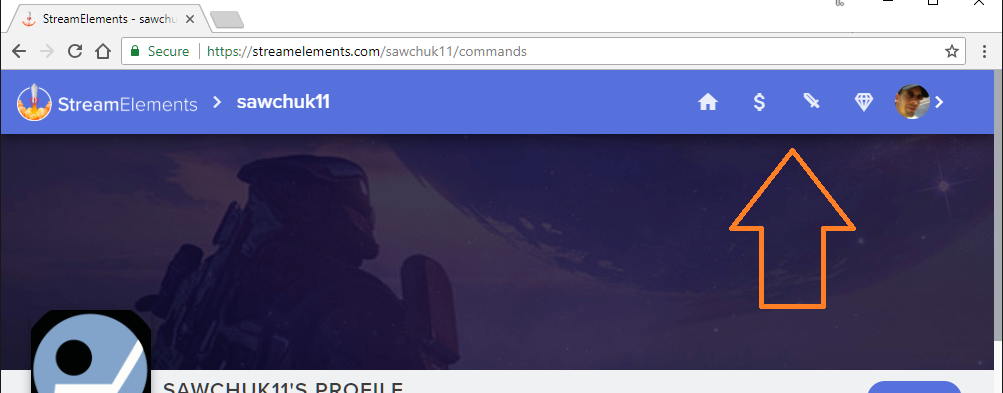
Hello StreamElements, I am moderating for sawchuk11 on Twitch, including his StreamElements page. Somehow the link/button to the store on his page isn't showing currently. Any thoughts on what might cause that?
*Edit: Twitch-name corrected.
*Edit2: Added the image-link showing the issue.
https://i.imgur.com/Vp4RKCt.png
 earnest birch
Apologies, it's sawchuk11
agile pine
does StreamElements only have mobile streaming for android?
stuck hamlet
yes
narrow coyote
Like his stream store is not showing? Seems to come up fine for me https://streamelements.com/sawchuk11/store
stuck hamlet

earnest birch
The "link/button to the store" is missing
narrow coyote
 Interesting
dense jackal
our mobile app is still in the works @agile pine
stuck hamlet
Thanks for reporting, I have made task for the devs to fix @earnest birch
earnest birch
Thank you kindly @stuck hamlet
dry hare
It's not missing.....it's hiding
 deep widget
Is https://streamelements.helprace.com/i496-local-and-streamer-weather-lookup-commands the most recent source on !weather ? I cannot get this working.
 weary mist
@deep widget check #command-share, there is everything you need for the weather command
deep widget
Thanks @weary mist I have that working. From my understanding SE doesn't offer a command that shows current follower count for the channel?
deep widget
Worked perfectly, thank you. I had a look at the other variables but can't see how I would achieve a !followage equivalent?
weary mist
no, but there is a followage command by default
 slender anvil
hey when im live my bot doesnt pick up my subs someone subbed to me and nothing updated
weary mist
it depends on a few things
- Did you recently become affiliate?
- did the person share their sub?
hybrid phoenix
Can I get help making the contest command post the link to the public page?
slender anvil
@weary mist no ive been affiliate for about 4 months and the person used a twitch prime
it was working yesterday because i got a sub yesterday
weary mist
!prime
hmmm
@slender anvil With subs (mostly prime subs), the person subbing has to share it. Once they subscribe, they need to refresh the page to get the share option. Also, if they have a setting on their twitch account set to NOT share the subscription, we do not get notified of the new subscription
So there are multiple reasons why that sub would not have shown up, none of them situations we can control
cursive heron
@tight harness quick update. Closing the "bad" giveaway did not affect the "good" giveaway.
tight harness
That's good to know, so it seems to be all good now?
cursive heron
yeah. There is only one open giveaway.
tight harness
Awesome
 unique ore
Is it known that the streamer store no longer shows on the user start page?
 hoary meteor
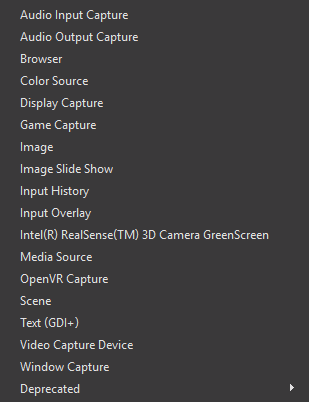
Hey does anyone know how to do browser source with the newest version of OBS?
unique ore
@hoary meteor it's just add>>browser source
hoary meteor
@unique ore its not an option, the button is missing
 unique ore
Gimme a sec
hoary meteor
ok thanks
stuck hamlet
you most likely installed obs without the browser source option
 exotic sonnet
Is there a way to make the twitch donation box without so many decimal spots?
unique ore
Yeah i'm running 21.1 as well and have it
hoary meteor
ok ill try redownloading it
stuck hamlet
just reinstall
unique ore
Won't need to redownload, just reinstal
stuck hamlet
its an option
exotic sonnet
I don't see how I can do that
stuck hamlet
i wasnt speaking to you, but what do you mean, so many decimals?
exotic sonnet
Uh I'll send a screenshot
unique ore
@stuck hamlet did the website version of the store get removed intentionally?
exotic sonnet
hoary meteor
i see theres an option in the installer so i should be good now. THANK YOU!
unique ore
gg @hoary meteor
stuck hamlet
@unique ore the button on public pages, no
@exotic sonnet that's not suppose to happen, let me check if there's an open bug for it
exotic sonnet
Ok
unique ore
https://i.imgur.com/wHCJYom.png all i'm showing @stuck hamlet
 lament blade
Is streamelements the best?
unique ore
@lament blade very
lament blade
I couldn't unconnect my twitch/youtube, so i'm pretty much stuck with them.
At least the set up is nice.
I just worry about my personal info.
unique ore
if you're wanting to switch, it nothing to just boot the bot from channel.
and you're talking about worried about your info when it's stuff that'll be out there anyways when streaming.
unique ore
just ban the bot then lol
if it's not in your channel, it's like it wasn't ever there.
lament blade
I've changed my mind due to the fact this bot seems very well made.
The others are alright.
unique ore
then no problem :)
I personally like it over others.....streamlabs being it's main competition imo
everything generally in one package
and once the cheer boss gets released then.....
unique ore
👍
yeah....just like you would for any service to display stuff
stuck hamlet
@exotic sonnet It seems that there is an open bug to fix this as soon as possible. We'll update #270206314561404928 when it's fixed. Sorry for the inconvenience.
unique ore
you can do a little bit with the chat alerts module if you're streaming from a console w/o a capture card
 low fractal
Hello anyone from Support ON\
I'm having some issues with an overlay Taking up twice as much CPU as it had - just yesterday
its gone from ~4%-6%~ cpu to over 13% cpu
I can confirm the overlay is using an abnormal amount of CPU.. I Launched it in a browers and it's using 15% and in OBS it's using the same
normally this overlay uses ~ 6%
stuck hamlet
if you open your task manager and look inside of obs, do you see something call cef-bootstrap
low fractal
nevermind
IM an idiot
and somehow disbaled half of my cpu cores
WOWOWW
yea man
LOL i narrowed it down
so the overlay is taking up 2x cpu cause I have 2x less cpu enables ROFLOLOLOL!!!
low fractal
windows owned me LOL
narrow coyote
@serene merlin we can continue in here to not clog up general
What exactly is your problem, because from your screenshot there is a song in the queue, but it is not playing
 delicate citrus
I need Help!
narrow coyote
@delicate citrus Ok, its best to just post your question or problem
 serene merlin
that´s the problem i put te comant and the song´s link and in twitch looks like it´s been request bud dont play from the se
narrow coyote
you need to click the play button on the media request page
delicate citrus
how can i get my subs to show on the activity feed?
so the alerts will pop up on screen
serene merlin
yea bud dont play the request jus the default list
narrow coyote
Ok, so is it just skipping the requested song?
serene merlin
no just don apeare in queue
narrow coyote
@delicate citrus If you have an alert widget in your overlay, and the sub is in your activity feed, it will play. If it is a prime sub or a re-sub the sub needs to be shared in chat
delicate citrus
what do you mean by shared in chat?
stuck hamlet
Log out of streamelements and log back in @delicate citrus
We don't see your affiliate status, but once you do that, we will start tracking subs and bits
narrow coyote
@serene merlin Is the bot responding at all in your chat? You should connect your twitch account to your discord
!connect
nocturne pelicanBOT
Please connect your Twitch and/or YouTube channel with Discord by going to ⚙ Settings and then Connections here in Discord.
delicate citrus
ok i logged back in, but it was a prime sub and it didnt show in the activity feed
serene merlin
i all ready do
narrow coyote
!share
nocturne pelicanBOT
Twitch prime (new and resub) and paid subscriptions (resub only) must be shared in chat manually by the person subscribing in order for the subscription information to be sent to StreamElements. For twitch prime, the user needs to have sharing enabled on https://www.twitch.tv/settings/prime. For paid subs, if the share box doesn't show up immediately it will when they refresh the page. https://i.imgur.com/VNJN0Uv.gif https://i.imgur.com/2297EA7.png

 serene merlin
@narrow coyote i dont understand why to discord ?
narrow coyote
@delicate citrus If SE did not have your affiliate status before, it cannot track subs until it can see this status. So it would only be subs going forward. Also, if it is a prime or a re-sub, its needs to be shared, as explained above
so people can get to your twitch easily
delicate citrus
ok makes sense now thanks for all the help!
narrow coyote
serene merlin
@narrow coyote i made it it´s working now tanks 😃
narrow coyote
lament blade
@brisk pebble thanks for the advice. It’s much appreciated. I did try the game cross out and had a viewer pretty quick. I’ll try smaller games tho n see how it goes
 magic imp
Why can't I see streamelements generated command responses in the default chat windows widgets?
nvm figured it out
 storm mango
When can we move bot to different chat room?
stuck hamlet
What do you mean?
storm mango
Now channel can have many small chat rooms
stuck hamlet
oh
storm mango
If streamer don't want to see bot spaming in the main chat room.
stuck hamlet
not currently
storm mango
maybe quite soon?
stuck hamlet
We dont have a proper way of doing it, so i dont think so. Twitch doesn't support it, (if im not mistaken)
winter zenith

winter zenith
Click on „default commands“ go to the desired command and click on the little pen on the right (edit)
And there should be a little dropdown menu for changing it to whisper
stuck hamlet
You cannot set default commands to whisper.
Which command are you trying to do it with?
winter zenith
Or that.... then thats just possible for custom commands
storm mango
Roulette and slot machine
storm mango
but if it's modules
winter zenith
You cant recreate those
winter zenith
Not sure if you could change those in the settings for the moduls I think not
sonic root
Is there anyway of being able to use overlays with no computer and if not will it ever be possible
 robust narwhal
Not sure if this is possible, but wanted to run it by support;
I have a bunch of different sub variations and can't seem to get one of the variations to jive with the rest. I have the following variations for subs;
New Prime Sub
New4.99 Sub
New 9.99 Sub
New 24.99 Sub
Re-Subscriber
The first 4 are set to when tier is exactly insert cost here
The second is when the amount is at least 2.
Not sure if it's possible to get the ability to have multiple variables, or perhaps a "resubscriber" option.
stuck hamlet
resub for that tier?
stuck hamlet
@mystic frost seems to work fine in your chat
 mystic frost
Is the only possible response ${1:} or can you add a ${user} and an additional message? That's what I was trying to do.
stuck hamlet
like what? ${user} says ${1:} ?
mystic frost
I had YKTDTV, ${user} said why not talk about ${1:} WhyNotZoidberg but it doesn't work.
stuck hamlet
that should work fine
mystic frost
But I tried !whynot and it doesn't work with that response
 mystic frost
I know, why doesn't that particular phrase not work?
stuck hamlet
seems like something is broken in the background
it says theres a command named that way
but there isnt
hmm
mystic frost
I deleted the command off SE, see if it works now
 normal igloo
any fix or get around for Media request on ground control never loading and always needing me to manually play the next video 
 gentle imp
if it is a deleted video you have to skip manually, via chat, website or ground control
but it's getting solved
normal igloo
@gentle imp it's not a deleted video I had to manually play Every video 🤔
normal igloo
interesting 🤔
gentle imp
are you running it as admin?
normal igloo
now you mentioned that let me try that 😂
nocturne pelicanBOT
Our Desktop App Ground Control: https://streamelements.com/groundcontrol
normal igloo
yep i got v1.4.3
gentle imp
another thing is don't have both things open, media page and ground control, use only one to control it or it might go apeshit 😄
normal igloo
only got Ground Control up
gentle imp
and another trick to make it easier for ur pc, before using it, go to youtube, lower resolution on videos, player will use that setting
normal igloo
strange seems to be working now of course I let you guys updated if anything else happens 🤔 @gentle imp
normal igloo
@gentle imp yeah I think that's probably what fixed it that I went into it with admin the only other thing the quality options trick didn't work not really a massive issue as I have more than enough download speed for it 
gentle imp
ahh, same here but I did lower it to 240p 😃
since I ain't showing vid on stream anyway, saves the cpu unnecessary work
anyway, glad it's solved 😉
normal igloo
shame you can't custom quality options on Ground Control it's self but hey at least you'll guys software works 
gentle imp
hehe
 silver patio
any support online?
winter zenith
we are always here @silver patio
silver patio
I got your help a few weeks back setting up my donation goal for mars
I cant seem to find the page another support sent me
I want to restart the monthly donation goal for may
Before it showed my total donated amount since i started to use SE, but i changed something on that specific page where it only showed between the dates stated
gentle imp
https://streamelements.com/dashboard/session @silver patio
silver patio
thanks! 😃
gentle imp
you're welcome 😃
 celest temple
Is there an issue with StreamElements?
It's no loading up the browser source link.
Never mind. Looks like OBS Studio crashed without me noticing.
 atomic hollow
 languid burrow
Is it possible to get Streamelements to join multiple Twitch chat rooms?
winter zenith
Not ATM no
languid burrow
Cool, thanks 😃
 native falcon
Hello, I'm trying to set up a tip goal widgetfor $100, but it already has a more money in it. How can I reset the amount in the box to start at $0?
atomic hollow
right here - https://streamelements.com/dashboard/session

StreamElements
The Ultimate All in One Platform for Streamers
native falcon
Thank you so much @atomic hollow 😃
atomic hollow
 ivory terrace
Is there a way to set an alias for the duel module?
not the duel command but the bot run module
narrow coyote
The !duel command is for the module, the alias would need to be added to the !duel command
atomic hollow
☝
ivory terrace
I see it in the duel command not the module
atomic hollow
its the same thing
ivory terrace
so if I dont sue the module and just the command can I edit the winning message
I dont see it in the duel command to edit the message
narrow coyote
You edit the message in the module, and would add an alias to the command
ivory terrace
and the module then has to be disabled and the duel command enabled?
it only lets me do one or the other
narrow coyote
they are connected
tight harness
Module has to be enabled and the command can be edited to have aliases, both have to be enabled
ivory terrace
it wwont let me enable the command if the module is enable
it says it is bot controlled
tight harness
When the module is enabled the command is automatically enabled
Hence why it says it's controlled by the module
ivory terrace
ok cool, so I add the alias and it does nothing
let me make sure I have it enable for offline to test
lol I didnt press enter to submit the alias
my mistake
thanks for the help
narrow coyote
tight harness
 safe kettle
Any update on Cheerboss yet? It's been weeks
 velvet fractal
Is there a way to do a sfx command without having to redeem it in the store?
tight harness
@velvet fractal Not currently, you can remove the need to type the redeem page of the command by making a custom command with the item name, for example: ${redeem example} would redeem an item named example, and you could call the command !example
@safe kettle No emails have been sent out yet, so that would lead me to the conclusion no there is no update yet
safe kettle
I love the sarcastic responses from staff. Thanks for nothing
tight harness
There was no sarcasm there, there really is no update, just explaining how you can also tell there's no update so you don't need to keep asking, trying to save you some time
safe kettle
No update staff wants to share? Or literally no update? And if there’s literally no update that would mean it hasn’t been worked on in over a month if it’s announcement? And your response was filled with sarcasm. You’re not the only staff member to treat people that way for asking a question that YOU think they should already know the answer to.
How about, “Our staff is hard at work to bring you guys the greatest Cheerboss we can offer. We’ve come across a few hiccups but I assure you it’s in the works” instead of, “Did you get an email? No? Then no update. Duh”
proud pumice
@safe kettle hey
we've asked the community to let us know if they want a bitboss feature
the reaction was... mixed. a very small percentage is interested in that
that said, we're still interested in doing it
but its going to take us longer as we're pushing more urgent things in front
(stability, updates to vastly used features)
safe kettle
@proud pumice THANK you. That’s all I was asking for
proud pumice
the designs are pretty much done, so i can let you know it looks great, but we want to make sure we bring it with an edge and not just a copy paste
when it finally gets here, its gonna be great, but it will take a while
 visual fractal
how can i set multiple communities via chat with the setcomm command
weary mist
@visual fractal at this time, that is not possible
visual fractal
ok! thank you
velvet fractal
@tight harness thanks man! I'm gonna do that. Huge help from all of you guys.
tight harness
No problem 😃
lament blade
okay i am looking for the emote exploisons who use to be in streamelements but i can not find it anymore
weary mist
Kappagen
tight harness
⤴ it's in Widgets
weary mist
its in the overlay editor
narrow coyote
It all depends on how you want it to look. Personally I use a size of 70, with a duration of 4s.
weary mist
I use about 50
 plucky path
anyone here stream from xbox?
 summer mulch
@plucky path If you're looking for tips and a guide on how to stream on consoles we recently published an article on the matter! https://blog.streamelements.com/how-to-stream-on-console-7b620b1c46c3
StreamElements - Legendary Live Streaming
The beginners guide to streaming on PS4 / Xbox
lament blade
The tiltify donation alert box wont work for me
weary mist
hmmm. I haven't worked much with that, but can you give me details? IE: what are you doing, what the result that is happening (or not happening)
lament blade
So I put all the information in there, including my campaign url and then save. but whenever i do any test donations to see if it will go off, nothing happens.
atomic hollow
emulations dont work on tiltify
lament blade
huh?
atomic hollow
you cant test tiltify on the overlay manager, only with real donations
lament blade
i test it out by doing actual donations to my campaign
atomic hollow
oh sorry
 minor crown
hola, como estan?
 peak beacon
Hey have there been any reports of the media request not working?
it used to work fine for me and now i cant get it to work. i've had the widget loaded into my overlay since i first set it up but only now it wont work ::s
tight harness
@peak beacon If you tell us your username we can have a look 😃
 dusk cosmos
 hallow lake
Short question: is it posible that i can give someone a specific amount of point, when he is writing a specific word
dense jackal
Currently the only way to give points is through the givepoint command, we do not have a variable for it.
hallow lake
ok but thanks for the fast reply ^^ i wanted to make a insider command that get triggered by some words and it gives 15 points to the user
 worthy token
Hey SE, for some reason my Bot wont run under the custom name
any ideas why?
it worked fine 2 days ago
Nvm
summer mulch
Is your ground control open?
summer mulch
👌
 warm schooner
Hello, I am trying to set up media request (just the song request part basically). I already put together my first playlist, problem is I don't hear the audio on my stream. Looking on OBS I see that on my overlay the song name changes to whatever I selected so I know it changed, there just is no output from when I play the song. Do I need a widget or something for the music to be able to be heard on stream?
narrow coyote
You dont need a widget to use media request, it will play the audio through whatever your playback device is set to in Windows, which should by default be the desktop audio in OBS
If you hear the audio playing from media request page, it should be broadcast through OBS, unless there is a problem with your audio sources in OBS
warm schooner
Okay, I guess I will just try out every possible option until something changes.
narrow coyote
Do you hear the audio from the media request page, and just not through OBS?
peak beacon
stupid question but have you turned the sound up on the media request page
 terse plume
Hey, was just wondering if it's possible to have have a counter automatically reset once the stream goes offline? So basically a per session counter.
tight harness
@peak beacon You control the volume 😄
@terse plume That's not how they're designed currently but you can suggest it: https://strms.net/ideas
terse plume
Ok, cheers. Also damn :p
silver patio
Hello, On todays stream report from SE it says 18 subs today, but on twitch stats it says 14, how could that differ?
narrow coyote
The only thought I would have on that is if people re-subbed or used prime, and did not share it until this stream. But I am just guessing here
 hexed dome
hello, im trying to import streamlabs alerts and tips to stream elements and it gives me an error. i added the chrome extension for it.
weary mist
Make sure to have both dashboards open (streamlabs and StreamElements)
hexed dome
@weary mist that worked, thanksd
median steppe
how do i get event list
narrow coyote
In the overlay editor, under widgets
median steppe
@narrow coyote Thanks
narrow coyote
earnest birch
The Store-button has returned, @stuck hamlet
 narrow coyote
earnest birch
You best 
hexed dome
to use the desktop app it says i need a jwt token. where do i find this?
narrow coyote
 spark plinth
Hey there guys!
So, I seem to have a little problem on the BOT > Modules Section.
Every time I try to update my Chat Alerts, or enable a new module, it says: "THERE WAS AN ERROR UPDATING THE MODULE"
It has been like this for quite some time. Is there any way I can solve this?
 cedar fulcrum
Hello @spark plinth I will try assist you with that,
What specific modules are you trying to change?
spark plinth
Hey @cedar fulcrum Thanks in advance, brother!
I'm trying to enable the Roulette module, but this error keeps popping up...
cedar fulcrum
Did you enable the Loyalty Settings?
 snow hearth

yo @StreamElements , @AssifT , @SeregaLav , @SeanDinenberg how come I am constantly having to go into my overlay editor and re-save my scene overlays in order for some of the images to show up??
Twitter
anyone?
narrow coyote
Do you use OBS to broadcast? have you tried just refreshing the cache on your browser source? I have to do that from time to time when I first launch OBS
narrow coyote
spark plinth
@cedar fulcrum Yes. My loyalty settings are enabled
 dry ingot
Sypher needs help text to speech is doing it twice
stuck hamlet
ok
dry ingot
thanks for helping bro!

 brisk mica
hi is anyone avaiable for a quick im sure very simple question?
tight harness
Ask away 😃
brisk mica
so on the overlays is there a way to show the chat with out window capture a popout of the twtich chat?
narrow coyote
There is a chat widget in the widgets section of the overlay eidtor. You can add this to any overlay
tight harness
The widget is called "Your Channel's Twitch Chat"
brisk mica
Awesome! thank you i knew it was that simple haha
narrow coyote
tight harness
No problem
 hot arch
robust narwhal
hot arch
robust narwhal
@stuck hamlet sorry for the late reply. Regarding sub alert issues, the resub alert is global. So as long as you resub for at least 2 months that alert should go off. But instead, the alert for the respective tier goes off instead
brisk mica
hey im having an issue with my alert double sounding off and still have the ding in the background as well even after i cleared the sounds
nocturne pelicanBOT
@brisk mica Make sure to :ballot_box_with_check: “Shutdown source when not visible” for all browser sources (all OBS scenes). If using studio mode, uncheck “Swap Preview/Output scenes After Transitioning.” Also keep in mind that sound can play from any overlay loaded in the browser (editor or launched). https://i.imgur.com/FegZJQS.png https://i.imgur.com/yY0wcFl.png

 dense jackal
Also check for hidden alertboxes in your overlays in your SE layers 👍🏻
 earnest ledge
@slate jackal
brisk mica
thanks!! ok i still get that ding though. how do i take that away? bot sempai
likee the default noise
dense jackal
What alert are you testing?
brisk mica
all of them have it
dense jackal
No i mean which alert are you emulating
do you have multiple browser sources in one scene? @brisk mica
brisk mica
nope only one
dense jackal
which alert are you emulating @brisk mica
 broken marsh
can one of the staff members help migrate https://stats.streamelements.com/c/karkew to https://stats.streamelements.com/c/karq ? he changed his username and the chatstats haven't been available since then :/
 slate jackal
Hi there. Im new to twitch streamimg fro console and im trying to figure out bots... i dont have a clue
 polar solstice
any ideas why the bot name option is not showing up in ground control? i have a tipping page
nocturne pelicanBOT
@Tux#3844 Custom bot name requirements
- StreamElements bot modded and in chat
- Active overlay with alerts
- StreamElements tipping page in the panels below the stream (!panels)
- Create a twitch account for the name you want to use
- Ground Control app must be running
Steps to enable custom name
- Sign in to https://twitch.tv with the bot account
- Install and run Ground Control (!gc for download)
- Visit https://twitchapps.com/tmi/ and generate an oAUTH token
- Copy/paste everything in the box to Ground Control oAuth settings and enter the name for the bot account
- Restart Ground Control (custom name may take a few minutes to take effect)
narrow coyote

broken marsh
thanks 😄
polar solstice
still no option to change bot's name 😦
brisk mica
ok one last thing lol is there a way to mirror the changes in one overlay to the rest
like the text and alerts ?
narrow coyote
@polar solstice if you don't see the option to rename the bot it is one of 2 things. First is you are using the Mac app as it is not possible to rename the bot with the Mac app. The other is you are missing a requirement as listed by the bot above. Either the tipping panel, active overlay with alerts, or bot modded in your channel
 marsh niche
Hey all, hope all is well!
I was wondering if there's any way to trigger a response when someone types in your chat for the first time in a session. For example: A message to a specific person when they post in chat.
polar solstice
I just checked again, "Streamelements" is a mod, i have a tipping page I can access and I created an overlay and put some alerts into it and saved it
I'm using Windows
!panels
nocturne pelicanBOT
Twitch's official help guide for Panels: https://help.twitch.tv/customer/portal/articles/2416760-how-to-edit-info-panels
 primal lichen
Is there anyway to run 2 giveaways via streamelements?
I have 3 sets of keys 2 pricey sets and 1 set of EHHHHH and i wanna run the 2 set sub only and the 1 set for normies so basically run 2 giveaways one for subs and one for normies.
dense jackal
what is your twitch channel @polar solstice
We are looking into making some type of greeting but no confirmation @marsh niche
@primal lichen Not at this time only one at a time currently but you can add that to our ideas board 😄
marsh niche
Thank you @dense jackal !
 polar marlin
hey guys my streamelements bot isnt working in my channel
i made it leave and rejoin
still no commands
marsh niche
Hmm.. Would SE pick up words in a username to trigger a command?
dense jackal
type /mod Streamelements @polar marlin
tight harness
@marsh niche Nope, only in messages
polar solstice
is there a way to modify some messages from the modules, like raffle: no one entered the raffle LUL
marsh niche
Damn, had to try. Thank you!
dense jackal
type /unban StreamElements @polar marlin
polar marlin
i got it man thanks
weary mist
At this time, you can't
 eternal bone
rip
weary mist
the "chat-rooms" are a new thing for twitch, and mess up a few things
eternal bone
ok i got it thanks
 hasty imp
If I have two timers set to go off at 15 minutes what will happen?
narrow coyote
if the chat lines are also the same, it will trigger both timers
hasty imp
Thank you!
narrow coyote
hasty imp
Oh! if i enable a command - to go off every 60 minutes - at 2:15 - would it proceed to go off at 3:15, 4:15 etc?
 wise cliff
I'm trying to set my timers up and I wanted to see, last time I was told that they didn't work beyond 5 minutes, was that ever fixed or was that problem just in my imagination?
narrow coyote
@hasty imp That is a good question, but I dont really know 
@wise cliff Timers work beyond 5 min
hasty imp
Hmm, I will do some testing then - is there a way to disable the offline timer though?
 little fractal
what is the easiest way to set up a counter using SE...like a win counter
wise cliff
Okay I'll set them back up again they used to not populate
narrow coyote
Check out the win/death/etc counter in #command-share
@hasty imp Yes, just untick the box in the setting for the timer you are working on
hasty imp
Thank you @narrow coyote ! 
narrow coyote
No problem!
 celest fractal
Is there some command to turn off song request?
Or do we have to go on the dashboard and turn off the command manually?
tight harness
You have to turn it off from the dashboard or from Ground Control
little fractal
thanks that is what i needed guys and that @narrow coyote is why SE is the best hands down
narrow coyote


 ancient iron
Hi team, looking for some help with a command. I want to have something that checks a few things..
if user is a sub or has watched for 60 +hours then display message a.
Else, Message B
and in Message A & B showing Watch time
ancient iron
and is there a way to make !watchtime not roll up into days? so to always show hours ?
 livid ingot
 median tulip
my song requests arent working, ive had multiple viewers and myself try and do !sr and !songsrequest and it wont work, I have viewer requests on as well.
 grim sphinx
I've been having some issues with notifications not showing up in my last two streams. Bits/subscriptions show up in chat, but they're not showing up in the Ground Control notifications, and therefore not on the overlay. Followers show up normally. Haven't changed any settings anywhere. Any advice?
 cobalt kindle
Is there any way for a moderator to create a contest, or some sort of a NOT anonymous poll with the bot that would record something like a "yes or no" answer from viewers in chat? Basically, the TL;DR version of what I'm wanting to do is to ask the chat whether they think [something] will happen or not, and whoever gets it right after [something] happens, they would get points (stream currency). Allowing mods to create this manually from chat would be kinda cool
stuck hamlet
@grim sphinx are you a new affiliate? Log out and log back into StreamElements
grim sphinx
@stuck hamlet Not really, it's been almost a month, and it worked fine the previous weeks.
stuck hamlet
@cobalt kindle in chat no, but you can give them dashboard access and they could do it that way
cobalt kindle
hmmmm... is there any way to give them dashboard access but restrict areas from them?
stuck hamlet
You’re sure bits were given and it didn’t show up in the activity page @grim sphinx ?
We have 3 levels of access @cobalt kindle check the account page for more info 😃
grim sphinx
@stuck hamlet Yeah I'm positive, the bits showed up on the leaderboard on Twitch.
nocturne pelicanBOT
Chat/Bot Levels
100 - viewer
250 - subscriber
300 - __regular __
500 - moderator (twitch mods automatically placed at this level)
1000 - super moderator
1500 - broadcaster
Dashboard Manager Levels (least to most access)
Bot Supervisor (can add super moderators from dashboard)
Editor
Full Access
https://i.imgur.com/s61Liry.png
 cobalt kindle
Okay thanks!
stuck hamlet
But please log out and back into StreamElements @grim sphinx
median tulip
my song requests arent working, ive had multiple viewers and myself try and do !sr and !songsrequest and it wont work, I have viewer requests on as well.
anybody wanna help out with that orr ?
median tulip
👍
dense jackal
@median tulip what is your twitch channel?
median tulip
Vakameli
dense jackal
@median tulip The bot is not in you chat
dense jackal
head here https://streamelements.com/dashboard/ and click join channel on the right side
make sure to mod the bot in your chat as well @median tulip
median tulip
It only gives me the option to make it part from my channel
should I just make it part and then re add it ?
dense jackal
Try parting/ and then rejoining, yeah
Have you changed your name recently, or do you use automod on twitch @median tulip ?
dense jackal
yeah that would be why the bot left your chat, just had to part and reconnect
grim sphinx
@stuck hamlet Were you able to look into the issue?
grim sphinx
LegenVD
stuck hamlet
I will have to escalate this to a dev, but you did log out and back in, correct?
grim sphinx
On StreamElements, yes
stuck hamlet
Can you logout
grim sphinx
ok
stuck hamlet
remove our access
and then log back in
should be under other connections: https://www.onslaught.ca/s/5tuhp8v9.png

but mine isnt able to be fetched right now
grim sphinx
do I autorize again then?
stuck hamlet
yup
grim sphinx
done
stuck hamlet
Still nothing :/ I'm going to escalate this.
grim sphinx
the activities are still missing on ground control
stuck hamlet
I have escalated the issue to the Devs, and i will let you know when it is fix. I apologize for the inconvenience
grim sphinx
np, thanks for the help
lament blade
Why won’t the tiltify alert notification from the widgets work?
lament blade
Yes. Ive set it up properly and I would donate a dollar here and there to see if it works, but it doesn’t.
 oak apex
quick question about setting up overlay in twitch
stuck hamlet
shoot
oak apex
from the video it looks like there is a different process now for setting up overlay
I picked the blue moonstone animated overlay
how do i get that to transition over to my OBS ?
stuck hamlet
!add
nocturne pelicanBOT
To add your overlays to OBS, add a new browser source in your scene. Paste your overlay URL in the browser source properties, set the dimensions to 1920x1080 (unless you changed them on the website), and :ballot_box_with_check: “Shutdown source when not visible” https://youtu.be/KDvLynUqXI4
oak apex
there are 5 windows to choose from, ingame, talk, start, brb, and end
a differnt source for each one ?
stuck hamlet
Correct
narrow coyote
You would make separate scenes in OBS for each one that you plan to use
oak apex
ok, so am i clicking + scene or +browser first ?
narrow coyote
you make a scene, and add sources to the scene
oak apex
ok
narrow coyote
Example:
oak apex
watching that video from terrabuckTV
lament blade
@stuck hamlet the account name in regards to the tiltify widget is EasternMediaGG


 crisp ocean
is it possible to remove a block on a user donating?
stuck hamlet
Staff is able to remove the ban.
crisp ocean
Would you be able to do it for a streamer I mod or would he have to ask personally
stuck hamlet
He would have to ask and provide some info for us 😃
crisp ocean
Yikes
That's going to be tough because he streams full time, I have full control and can provide all the info, still not possible?
oak apex
Ok so there are 2 different video size of frame on the 'in game' scene window, how do I switch to the bigger frame ?
stuck hamlet
Unfortunately not, we would need him. For security reasons. @crisp ocean
lament blade
@stuck hamlet No sir, its within the one labeled, "NOTIFICATIONS".
stuck hamlet
well, i have 1 assumption why it wouldn't work https://www.onslaught.ca/s/Awqk8hz1.png

 narrow coyote
@oak apex For the camera frame? Open the overlay in the overlay editor, and you will see the 2 different camera frames in here, hide the small one, and unhide the large one
oak apex
Thank you @narrow coyote
lament blade
@stuck hamlet I constantly input the campaign URL and it always goes away though
narrow coyote
stuck hamlet
Could you provide me with the link? @lament blade
stuck hamlet
You can post it here
lament blade
stuck hamlet
Alright, I will mark up the bug for the devs to fix 😃
lament blade
YAY!! TY
do you have an idea of time by any chance?
because the campaign is currently running for the entire month of may
stuck hamlet
Probably will be fixed within the next day. Seems like a simple fix. 😃
(thats my guess, if its more complex, might be more)
lament blade
Great, so check in 24 hours?
stuck hamlet
Sure
lament blade
Ty kindly! I appreciate your time 😃
 zinc yacht
I am trying to only use part of the overlay but when i delete things it messes up the format.
 cursive ermine
Hello! I seem to be having trouble getting host alerts, yet each time do the test to check the overlay, it shows up.... just not when someone actually hosts me - is this a known issue or am I just an oddball again?
 smoky tide
so, for some reason, every stream, I am noticing Cheer notifications not working. Not sure why, but the past 3 streams cheers of anything arounf 500 or smaller are not showing. My variations are exactly what the default are except for an additional one I added for top cheer per session. I can't replicate it. When I replay it in GC, it shows....seems like it only happens when I am live.
atomic hollow
@cursive ermine
Twitch doesn't have a "notification system" for hosts (unlike follows, subs, raids, etc.) so the only way for StreamElements to know that you are being hosted is to connect through you to twitch. This connection is made on:
- SE Dashboard page - https://streamelements.com/dashboard
- SE Activity Feed page - https://streamelements.com/dashboard/activity
- Ground Control desktop app - https://streamelements.com/groundcontrol
Please have one of these open during your stream in order to receive host event notifications.
 steady monolith
Quick question over here. Does SE commands have !clip ?
gentle imp
no but u can make one 😃
steady monolith
how so?
gentle imp
thought I had that info here but guess not, I'll check at home and paste u the command if that's ok
steady monolith
thats all good @gentle imp , been looking at someone who scripted something similar through streamlabs
gentle imp
I remember having that command before clipping was on the video itself
since that icon is on the stream I disabled it, but I'm sure I can copy it 😃
steady monolith
yeah the button on the video is easy in a way. But i was thinking that the viewers can do !clip and it will automatically clip the last 30 secs or so and feed that out into the chat
 nocturne star
Hello!
I'm having some trouble with implementing recent cheers in my The Division Overlay. It works fine for all the other overlays, but in The Division one it just doesn't show any information.
stuck hamlet
@nocturne star theres a known issue where you have to refresh for the info to show up
cursive ermine
@atomic hollow
Is this something new? It was never an issue before - this has only been a problem for the past few weeks. I've been using Stream elements for.... a really long time.
nocturne star
@stuck hamlet Oh my word... I'm feeling so dumb right now... That worked.. Thank you so much! 
stuck hamlet
has been like that since Nov 2017 @cursive ermine
cursive ermine
but... i swear mah stuff worked just a couple weeks ago xD - maybe i'm just losing it -.- ok ty
 buoyant moat
Can i prevent someone from donating to me?
stuck hamlet
There is a block button on the tip list page @blednor#9931
 cursive obsidian
how to reset tip goal?
oak apex
Good morning streamers.... anyone know where to find my JWT token ?
winter zenith
@cursive obsidian go to the overlay editor and klick on data. In goals you can reset it
(There is also a way on the dashboard but I forgot it atm... sorry)
cursive obsidian
@winter zenith tyvm !
winter zenith
@Prayr#4440 klick on your account on the top left and click on settings
From there click „show secrets“ on the right
oak apex
Thanks @winter zenith
 restive helm
I need a donator unblocked if possible his paypal name is Jerny08@gmail.com
And his twitch is Xylezzzzz with 5 z's
my channel name is lacari
 boreal kelp
Does anyone know a good Overlay website?
pine hemlock
@tight harness ^ I don't remember who it needs to be sent to
@boreal kelp we offer a bunch of pre-made overlays on our site. All which can be edited to your liking
tight harness
@restive helm I've passed your request on 😃
 spiral pine
@tight harness sorry sean didnt realize i posted in thte wrong support section
restive helm
@tight harness thanks
gentle imp
@boreal kelp https://streamelements.com/dashboard/themes 😉
tight harness
@spiral pine So what exactly are you trying to duplicate from which purple void scene to which other purple void scene?
tight harness
Done
It was right at the top of the list of other overlays 🤔
Oh well, all sorted now 😄
spiral pine
it wasnt at top of list for me
for me top of list was overlay from 15days ago
bottom of list was 1month ago
ive had this issue a few times where it wont show new overlays for some reason
but thank you for help
tight harness
No problem
proven copper
can you please help me with the following command ..... Check out alurrasc, Hit them up with a Follow, and spread the love. ZombieFeasting Is currenly streaming game ${1} at https://twitch.tv/${1} Tell ${1} Zombiefeasting said FeastOn BrainSlug

its !so command
as you see its including my name in the ${user} field
pine hemlock
Check out ${1}, Hit them up with a Follow, and spread the love. They are playing ${game ${1}} at https://twitch.tv/${1}. Tell ${1} Zombiefeasting said FeastOn BrainSlug
!so username
 rapid fox
im not picking up any desktop audio on stream i see the audio bar fill up on OBS any ideas how to fix this? i have messed around with the audio tracks and inputs, mine and my mates voice are coming through fine just no game audio
proven copper
Cuda your a living Legend much love :>
Thanks
is it possible to insert name of streamer instead of They are
is it ${1} ${1}} ${1}}} each time you increse the use of the user field each time in sentence?
nocturne pelicanBOT
@rapid fox For the best OBS support, please join their discord where OBS devs and support volunteers are available all the time discord.gg/obsproject
rapid fox
do not use the OBS discord they are absolutely useless
proven copper
Thanks again @pine hemlock
@pine hemlock how do i make the user command capitols is it ${2}?
proven copper
yes but if want that name all in caps
gentle imp
type it all in caps then, should work
proven copper
haha
gentle imp
as far as I know there isn't a way to automate caps
 spiral otter
Hey so I turned the volume of my widgets on my overlay way down and they are still loud as heck when they go off... is there somewhere else I should be adjusting the volume?
spiral otter
Ah from the browser source?
winter zenith
Yes
But did you turn down the audio levels in all your sources and alert boxes in the overlay editor?
As well checked the variations?
spiral otter
variations in the overlay management tool?
because I cant find and volume or sound options in obs for the overlay
yeah I turned them all down from the default 50 to like 20 and even lower.
winter zenith
And checked the variations ?
There are diffrent variations per default for tips and cheers for example
spiral otter
Yeah I check the variations, but the only one with sound was the sub one. for resubs.
I just turned them all down to 15%.
it sounds fine when I do a "test sub" thing in the editor, but yesterday when I got actual subs, it was insanely loud
narrow coyote
are the alerts by chance webm?
 lean mango
Hello 😃 Just a small question; can you copy and paste a bulk list of swearwords etc. into the banned words section? I'm not sure if I can do that or if I have to manually type and hit enter for one word at a time?
spiral otter
the alerts are from one of the overlays provided by streamlabs
narrow coyote
so, did you import the alert?
spiral otter
do I need to go through and adjust the volume of all the alert widgets in every single scene? like my "stream starting soon" scene, my "brb" scene etc?
winter zenith
Yes
spiral otter
no I didnt import it, it was the default one that came with the overlay I chose.
winter zenith
Or you duplicate the one alert box you changed it the way you wanted and duplicate it into the other overlays
And @spiral otter then you mean A preset theme from StreamElements not Streamlabs
spiral otter
yes, haha from streamelements, I dunno why I made that mistake
gentle imp
should work @lean mango
narrow coyote
I thought there was an audio issue with webm alerts playing super loud in OBS. let me check
spiral otter
maybe thats what im experiencing
gentle imp
you can't adjust the volume slider?
narrow coyote
Ok, it looks like there is, but it looks like the audio should be normal after the first time the alert is triggered https://streamelements.helprace.com/i625-webm-with-sound-alert-issues
weary mist
no, kite is correct
spiral otter
ok... well, I guess I'll wait til more people sub. lol
winter zenith
Should also be done by triggering a test event right?
 solid current
Hello, Is there anyway other than OBS to put Overlays on such as Elgato
winter zenith
Only with OBS or „bebo“
narrow coyote
You can use overlays in anything that supports a browser source
winter zenith
Those are free
gentle imp
there's Xsplit also
winter zenith
Another one would be Xsplit wich you need to pay
solid current
Oh what if you would like to stream console is there no way to get an overlay?
spiral otter
@winter zenith I guess I'll just have to wait and see bcause the test seems fine. I'll come back again if I have any further issues
narrow coyote
winter zenith
@solid current yes unfortunately
gentle imp
unless you get a pc to capture and stream from
lean mango
:/
Will it be possible in the future to copy/paste a list of racist words etc?
this seems kind of inconvenient
 calm torrent
is there anyone from EU who can help me with setting up my tipping page ?
narrow coyote
I am not from EU, but what do you need help with?
calm torrent
One of my followers is trying to send me some money and he keeps getting denied... so I would like to go trough settings with someone and 2nd thing is... can I use personal paypal for this ?
narrow coyote
What do you mean by denied? Like what type of message are they getting? As for the personal paypal, you can use this if you wish, but most streamers like to use a business paypal to expose less personal information
weary mist
yes for the second one. And for EU, what country? You would be best looking up the rules with Paypal to see if there are restrictions
calm torrent
EU Germany... and I have issue with business account cause i cant set it up... keeps asking me to provide US bank account which i do not have...
 twilit talon
Hellu, is there a way to set up a donation goal? couldnt find it on the page
gentle imp
on overlay, go to widgets, search there
twilit talon
forgot about that widget tab
gentle imp
if u need to change numbers/goal go here https://streamelements.com/dashboard/session
goals tab
 tame bone
good morning all beautiful and helpful humans....may I ask how do I make a blank overlay so i can add widgets and stuff to a ful cam scene?