#helpdesk-twitch
1 messages · Page 258 of 1
 hasty cloud
 winter zenith

StreamElements
The Ultimate All in One Platform for Streamers
your viewers can also SongRequest stuff there
just make sure to set everything up in you Settings first
so people dont spam 30minute long songs or racist songs
just leave the Media request tab open and listen to the music, OBS will pick it up via the Desktop Audio input
 steady monolith
@winter zenith in order to turn it up in obs it would be best to have it in a separate audio cable 🤔 , looking at bots that is linked to discord with a bot that sits in a channel with oyu
hasty cloud
I don't want veiwer request just be able to play my own playlist and hot key it on and off
does stream elements provide that feature
 weary mist
@steady monolith we don't have that yet, though a discord bot is planned. There are other ways to route the audio to a different audio cable
 brittle marten
Ohai, where could I see the hypecup stuff? Don't know how to put it there with SE. 
weary mist
@brittle marten it's a widget in the overlay editor :)
brittle marten
ooooh I see, thank you, gonna keep investigating then! 
weary mist
@hasty cloud once ground control gets the re-write, hotkeys will be back in action. The recent update to media request broke them
steady monolith
@weary mist yeah i know that, but got discord in cable 1 and game audio in cable 2
brittle marten
Ok, I'm messing around with it a little bit but I'd like to have a horizontal design on the hype cup, how could you do that? 😄
weary mist
@steady monolith Thats fine, I use a probram called Audio Router to route my music through a different audio cable, and capture that with OBS. Pretty much the same thing without having to use discord
steady monolith
@weary mist how to i save the routes?
weary mist
The routes stay active while you have the program open. I haven't actually played with trying to make it happen automatically. But it works very well for me while playing pubg
 frail goblet
I was helped for a command in my stream it was !wins
So now when people do that they see how many wins I had for that day
So my question is how do I reset that back to zero
 narrow coyote
If the count is wins, should be something like !editcount wins 0
 vocal leaf
is there a way to turn off the tagging (@username) in the winner announcement of a giveaway?
 midnight void
Probably not the right place to ask this but how do i connect my stream my ps4 and to twitch via stream elements because my stream key keeps saying invalid even when i type it in character for character
weary mist
@vocal leaf Let me check on that, though I do not think there is a way to stop that.
@midnight void I sent you a DM
vocal leaf
would be nice if SE would check if a winner is following the giveaway channel and mark it via a simple icon or something
 harsh jasper
Hello! if there anyway to stop the images snapping in streamelements overlay editor? maybe a shortcut key?
 dry hare
click the Grid icon in the overlay editor
weary mist
@vocal leaf I believe that is something that has been requested, it just needs upvoted so we know its important to many people. Let me find the link
@harsh jasper also you can click on the widget, and use the arrow keys to move it around
harsh jasper
oh wow, i just found it, thank you very much @dry hare !
dry hare
👍
midnight void
Okay. I sent back a reply @weary mist
vocal leaf
thank you @weary mist
 nocturne pelicanBOT
@whole imp Make sure to :ballot_box_with_check: “Shutdown source when not visible” for all browser sources (all OBS scenes). If using studio mode, uncheck “Swap Preview/Output scenes After Transitioning.” Also keep in mind that sound can play from any overlay loaded in the browser (editor or launched). https://i.imgur.com/FegZJQS.png https://i.imgur.com/yY0wcFl.png


 light mauve
Ooh, that's a clever idea @cedar fulcrum, just to make sure I'm understanding you, if I have an overlay containing the chat that never gets closed, it'll make the chat persist in everything else?
 cedar fulcrum
That's correct you make an Overlay containing only the chatbox and of course do not forget to see to top layer, then you do not need it in other overlays
light mauve
I'll play with it a bit - my overlays have the chat move around a bit, so hopefully having a second source with the chat box will make it persist in the First Source.
cedar fulcrum
Good luck

light mauve
Hmm, that didn't quite do what I'd hoped - I take it there's no easy way to make chat persist without making a chatbox that persists?
Essentially, I have an N64 stream overlay and a Gamecube stream overlay, which both have different sizes and positions since the screens are different. If I'm understanding you right, I'd need to split out the chat boxes from each of these overlays and just include them both separately, setting the chat ones to persist?
That is to say, no way to make chat persist without splitting it out as above.
I guess that makes sense, otherwise there'd be no way to delete old chat between sessions.
cedar fulcrum
I think it is more complicated to do with super themes
light mauve
These aren't super themes, but it's the same principal, yeah.
cedar fulcrum
Try it I think it will still record the data
light mauve
Yeah, I tested it out - since the overlay still gets destroyed and recreated when swapping, the chat is erased, however the chat persists in the "chatbox only never destroyed" overlay.
weary mist
basically if you have the chat in a seperate source, you can add it to the different scenes at different sizes (you can adjust in OBS), and it should persist with the information while you stream. It would only really refresh when you shut down and restarted OBS, or refreshed the cache
light mauve
Yeah, I tried that first, but repositioning it in OBS would stretch the text itself instead of wrapping or clipping lines as if I'd done it in the ovelay editor.
 whole imp
voice over isnt working for donations 😦
narrow coyote
do you have it enabled, and do you have any variations that might be what is being triggered instead?
 willow bison
Is there a link or documentation somewhere to use custom font / CSS for alerts and events?
whole imp
where do i enable text to speech on my donos @narrow coyote
narrow coyote
In the overlay editor, select the alert widget. Click on the little gear next to the tip alert, then you will see it in the list
whole imp
thank you!
narrow coyote


 hearty crater
I have a problem with streamelements alert
I have two overlays in obs
In two different scenes
One fortnite overlay and one league of legends overlay
When something happen (follow, donation etc.) the alert sound pop up two times
Its really annoying
nocturne pelicanBOT
? Make sure to :ballot_box_with_check: “Shutdown source when not visible” for all browser sources (all OBS scenes). If using studio mode, uncheck “Swap Preview/Output scenes After Transitioning.” Also keep in mind that sound can play from any overlay loaded in the browser (editor or launched). https://i.imgur.com/FegZJQS.png https://i.imgur.com/yY0wcFl.png
hearty crater
How can I fix that?
weary mist

hearty crater
Where can I find this Swap Preview...?
weary mist
its the last image
hearty crater
Cant find it
Shutdown source when not visible I did this with every overlay
Still I hear this sound two times
weary mist
then there is an overlay that it isn't checked on
If you are testing the alerts, make sure you mute the browser
(if you are testing in the editor, it will play in OBS and in the editor)
weary mist
as for the swap preview, it should be the gear next to the transition button
hearty crater
For the overlays I really have to change every settings for every overlay? It was very annoying for league of legends alertbox...
Had to put sounds/translate the text to german etc. for every overlay scene (ingame, client, end soon etc.)
weary mist
you can duplicate widgets between overlays (this keeps the settings for that widget)
hearty crater
Isnt there an option to do that faster?
How I can do that?
Ahh I found it
Awesome
😛
thanks for the help
 elder pasture
so when i have an event play through the ground control, it seems like there's an echo of the sound on my stream...or it's just playing twice
do i have to mute it somewhere or is it cuz my sound is too short and just plays twice
elder pasture
did you just shorten the alert duration to fix it
nocturne pelicanBOT
@elder pasture Make sure to :ballot_box_with_check: “Shutdown source when not visible” for all browser sources (all OBS scenes). If using studio mode, uncheck “Swap Preview/Output scenes After Transitioning.” Also keep in mind that sound can play from any overlay loaded in the browser (editor or launched). https://i.imgur.com/FegZJQS.png https://i.imgur.com/yY0wcFl.png
 fierce trench
is their a way to remove bots from ur twitch
narrow coyote
What like elementalskateboard and longboard type of bots?
 lament ember
My followers are not showing up how do i fix it
 teal yoke
hi guys... the store redemption notification aren't working for shop purchases, it only shows notifications when i use the "emulate item redemption" in the overlay tab
it play the sound i chose though
narrow coyote
@lament ember Where are your followers not showing up? @teal yoke If you are redeeming a sound item, it will only play the sound, no image in the alert
lament ember
There not showing in my brb overlay but they are on game screen
teal yoke
@narrow coyote its there a way to show both??? The Image and the sound,?
narrow coyote
There sure is, just make it a stream perk, add your image/gif, and a sound, and you will get both 
teal yoke
Thank you
 spiral quiver
Hello. I can't test out my alerts in the overlay editor. None of the test alerts work.
 torn imp
Hi guys, Is there a way to switch my discord name in here to my Twitch name, which is ArtJerk? <@&382267076632379392>
 tight harness
Done
narrow coyote

tight harness
@spiral quiver What browser are you using? 🤔
tight harness
Strange, should work fine on Firefox 😮 i'll give it a test if that's alright
spiral quiver
uh sure
tight harness
What's your Twitch username?
spiral quiver
bankrollbray
 lament blade
hey is there a command tfor the user to look at the song list or no
tight harness
@spiral quiver Working fine here https://gyazo.com/b1da522fe66d11b164e96ef611af07ed
 spiral quiver
Okay that worked @tight harness ! I saw it pop up in OBS.
tight harness
That's with Chrome
spiral quiver
I see. I'll have to try it there because I had that same screen open and the test did not go through.
But i did see it in OBS
tight harness
@lament blade !songqueue although by default it's a Moderator command, you can change that though
lament blade
ahh ok
lament ember
I don't have it in the middle as I don't need it on the brb screen @narrow coyote
narrow coyote
 Not sure I follow the problem, what exactly is going on with your brb overlay?
lament ember
where the it scrolls through latest followers on the brb screen it don't do that
frail goblet
@narrow coyote thanks
 gusty kelp
Is it normal for the alert to stay as the dancing shark even after changing the image/video and saving?
well, is it a known issue i mean
Its been happening to my bits and sub alerts
nevermind, realised it was using variations
lament ember
@narrow coyote kitemessaged u
 muted cedar
im having an issue with subs not showing up in activity feed so it doesnt showup on my overlay or alertbox
I manually added it to widget data, but worried ill have to manually edit it every time. Streamlabels picked up the event but i dont use it on my overlays
tight harness
@muted cedar Are you seeing anything in the chat at all when these people subbed?
If not then it sounds like these people failed to share their subs yet, which is the moment we're able to register them on your dashboard
muted cedar
@tight harness they may have not shared .. ill have to ask. I do see that in the twitch chat they subd
@tight harness
tight harness
Yeah, if they click on 'Share' at the top of the chat then it shares it, I was going to say that since getting affiliate you need to relog to the site, but I think you did that already
muted cedar
relog to stream elements site or twichh
tight harness
StreamElements
But remember that'll only work for subs after relogging, it won't show subs that happened before you did it
If you just got affiliate and haven't relogged since getting it that could be it, but you have affiliate settings showing on your account so i'm not convinced that's it, still worth doing
muted cedar
just logged out and logged in and dashboard still shows 0 sub and nothing in activity
lament ember
I'm having trouble with followers not showing on screen
tight harness
@muted cedar Like I said, it won't show subs that happened before you did it
@lament ember You mean via your alert box or a different widget?
lament ember
I have the scroll followers on game screen but not on my brb screen no idea why
@tight harness
tight harness
@lament ember Tried duplicating the widget to the other overlay?
lament ember
Yh happened b4 I had steam elements fix my game screen but it's happened again maybe I'm doing something wrong
tight harness
What's your Twitch username?
lament ember
H1tman87twitch
lament ember
Oh sweet thanks
 unique robin
Hi guys I am going crazy but there is a chance to rotate a tip goal bar? 😦
lament ember
I'm sure you can make it scroll
unique robin
no I need to rotate the bar and put it vertically
lament ember
Oh right I get ya should be in positioning
unique robin
yeah
But it is not there
I have only width Height top and left but nothing like rotate 90
lament ember
Should say something like horizontal and vertical button
unique robin
I can't find it 😦
 strange meadow
my overlays are lagging. when people cheer, i have to use ground control to refresh my overlays get rid of announcements
actually not just cheer, a host jst did same thing
 ember estuary
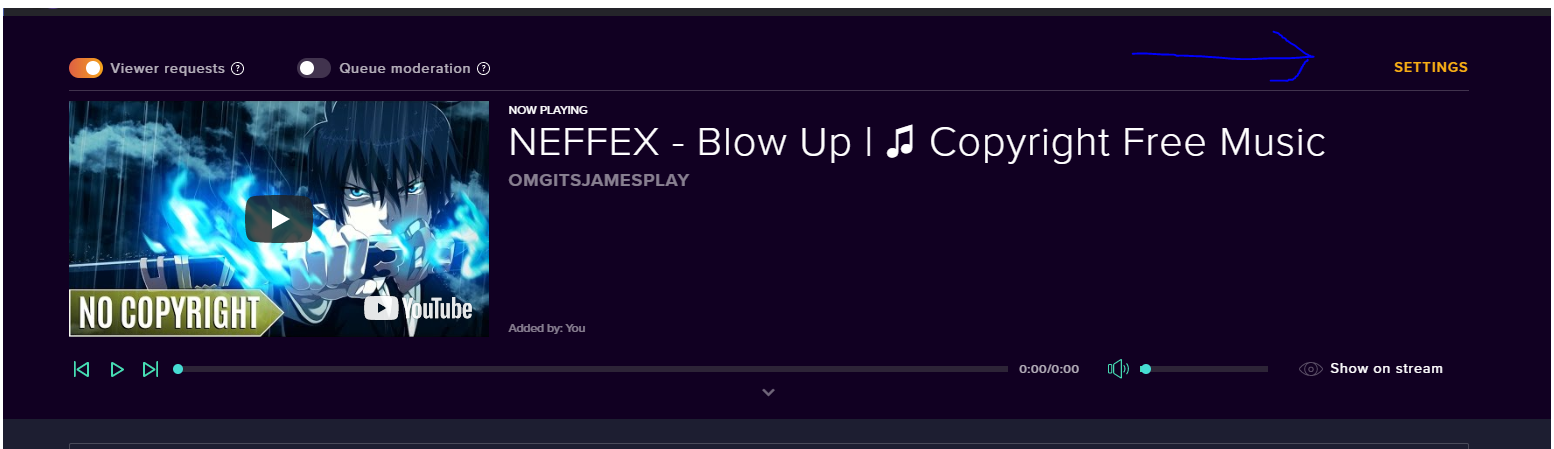
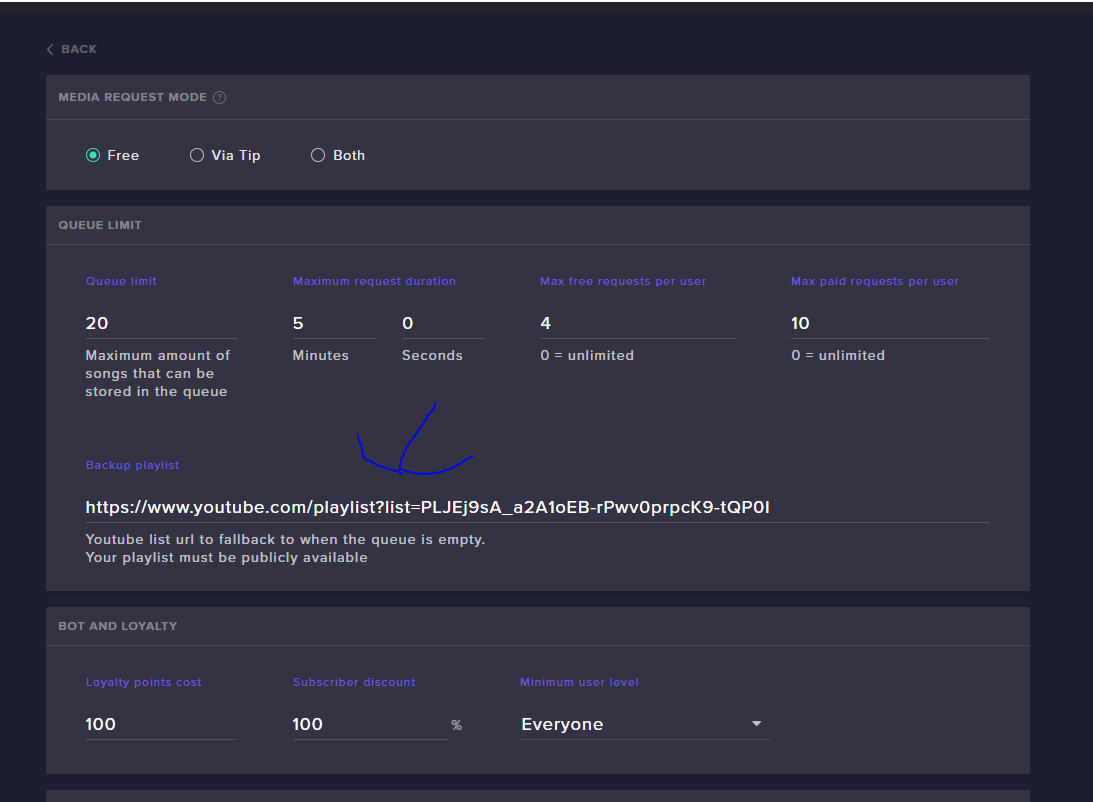
Hey how do i import playlists to the song requests
It only lets me import 1 song from the playlist
@summer mulch

 normal igloo
for any support staff reading this message has been fixed ^^^^
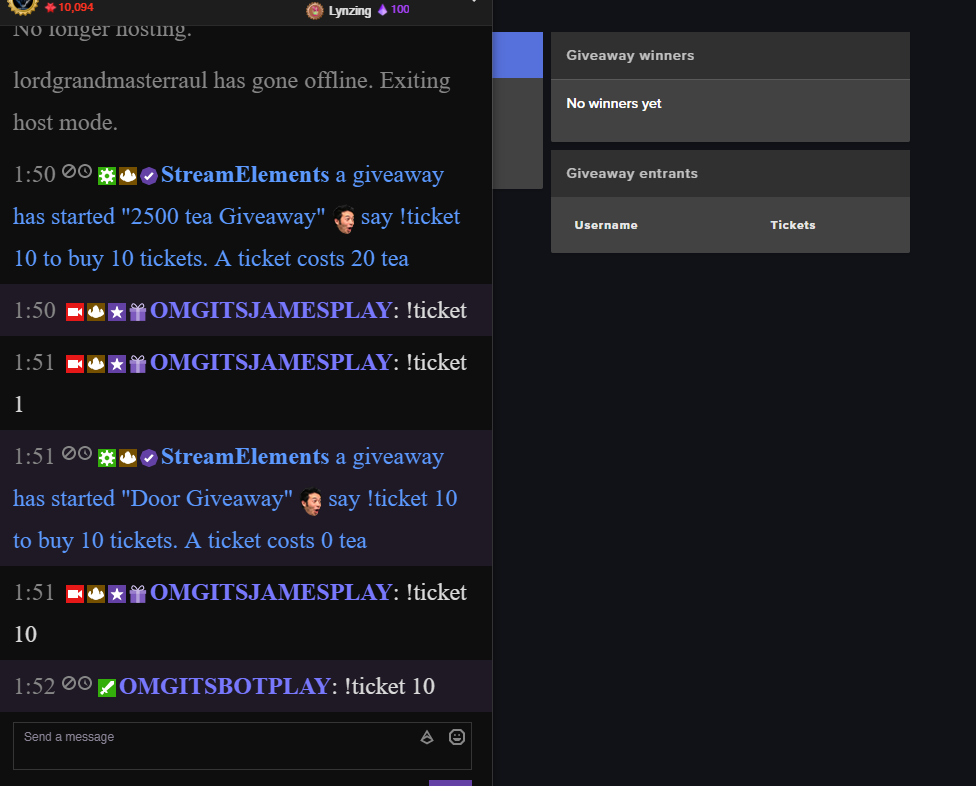
But I have a issue Myself Giveaways do not work for me https://i.gyazo.com/bf703429b4c4f9779ee241307ac9dfea.png

🤔
 stuck hamlet
command not enabled @OMGITSJAMESPLAY
why doesnt discord tag you
@normal igloo
gottem
normal igloo
Interesting why is that 
stuck hamlet
I mean, we've been through this where you didnt enable a command 
normal igloo
No I meant about the @
normal igloo
I am either blind or I cannot find the command 
stuck hamlet
!ticket is a alias
default iiiiiiiiiiiiiiis euh
!giveaway?
i dont remember
!enter
normal igloo
@stuck hamlet Nope still not having it and !giveaway Just goes to the website 
normal igloo
@stuck hamlet Guess what 
stuck hamlet
@normal igloo
normal igloo
it would help if !enter enabled + The bot message said !ticket 10 to buy 10 tickets. A ticket costs 0 tea Instead of saying !enter 10 to buy 10 tickets. A ticket costs 0 tea
Why is it's always the simple fix issues I have 😂
stuck hamlet
 @normal igloo
normal igloo
@stuck hamlet Ok more questions If possible how do I edit the giveaway in chat messages? 🤔
normal igloo
@stuck hamlet yep
 somber thunder
trying to put media share in obs but when i test it i just get a horrible echo of the song
legitimately confused
@rapid tapir any advice?
 safe kettle
How do I add someone as a manager so they can edit my overlays?
narrow coyote
@somber thunder The echo would indicate that you have more than one thing playing the media, like having the site, and ground control with song request enabled
somber thunder
@narrow coyote ground control?
narrow coyote
the StreamElements desktop app
stuck hamlet
@safe kettle the link Kite posted 😃
somber thunder
yeah its not open when i show the media on stream
do i need to show media in order to just get audio
narrow coyote
do you have the widget in more than one overlay, and you dont have those browser sources to shutdown when not visible?
if you want just audio, then you can just play it from the site, and not show it on stream
it should then be broadcast by whatever is the audio source you are hearing it play from, like your speakers
somber thunder
they are active while not visible and the widget is on every scene
narrow coyote
if they are active when they are not visible, then you would get an echo. You would need to have them set to be shutdown when not visible, or the audio will play from all active overlays with that widget
somber thunder
ah ok ill try that thank you
lament blade
Hey does anyone know why FreakDevil_ is trying to contact me?
He messaged me asking for contact info...
 clever mango
He is a promoter for StreamElements so I imagine he is looking to share some information about our service.
Do you stream on twitch or youtube?
dry hare
!FreakOut
 celest fractal
Is it possible to make on streamelements a image popout every 15 minutes to remind people to sub/follow
I know there are some html codes in NerdOrDie, but I would like to know if it's possible on StreamElements
 pine hemlock
The widget is called Image Rotator @celest fractal
celest fractal
Ty cuda, gonna take a look, making a gif to use it
SeemsGood have a good day my man
pine hemlock
np
lament blade
Hey fellas, just wondering if I can rename the !points command to my own name (which would be !Owlcoin) ? is that possible?
lament blade
you seem to be correct
Thank you for the swift response, I got ignored in streamlabs thats why i came here 😦 much better loyalty system here imo
TY! @dry hare
dry hare
Yay
lament blade
Sorry another quick question, will the points be gained while offline? and will they be gained for just viewing or do the viewers have to be active in chat?
dry hare
Only when your live
clever mango
points are earned by being in chat while the stream is live
dry hare
Getting them offline isn’t an incentive to watch 😉
 elder sorrel
⤴
dry hare
You can however give points to people through chat commands though if you wish
light mauve
Simple question for ya'll - is there a widget that displays viewer count? Twitch has been so flakey lately I figured I'd just bake it into my overlay so I could watch OBS instead.
dry hare
Best advice is to not watch your viewer count....
lament blade
Sorry to clarify, points are earned by being active in chat? so typing a message in between the drop times for points? or just being on the stream?
dry hare
No, just by watching the channel
light mauve
Haha, valid advice. I just like checking on it so I know if I need to actually talk vs concentrate and revert to resting srs face.
lament blade
Ok ty!
dry hare
Just talk as though people are watchig
lament blade
Hey guys, really sorry for all the questions but the Bingo module - can viewers only type one emote per message for it to validate the answer? or can more than one emote be used?
dry hare
Keep an eye on chat
That will tell you when people are watching
I have no idea about bingo
lament blade
@clever mango Ok thank you. I will wait for his reply then.
celest fractal
@pine hemlock Ty it's working https://streamable.com/i3x25 SeemsGood ty my man
 pine hemlock
@celest fractal 
 wet mango
Hi guys really needing some help. Tip alert is not working for me 😕 nor does the tipper go to my tipper list. And i have the link stream elements gave me on my page. Help pls 😭
 wanton jetty
Is there a way a friend can give me his overlay from one to another ??
Without having to tediously recreate it
weary mist
@wanton jetty give him editor access, and he can duplicate it to your overlays
@wet mango let me check on it. Did the money make it into your paypal account?
wet mango
@weary mist yes, i also got an email confirmation of the money transfer 😞
weary mist
ok, thats a good first step
@wet mango did you manually add the tip? because I don't see it in the activity feed, but I see a tip in the tip list from 41 minutes ago
wet mango
Yes i did try to add it manually to see if it will show up on my widget, but that failed 😅
weary mist
it should have worked for the manual add, unless you didn't check the box for "imported tip"
wet mango
So i am on paypal now. Aparently i have to accept the tip because i dont have my bank account set up. Would that have affected it?
Oh. I didnt have that checked 😕
weary mist
yes
That 100% effects it because until you accept the money (with bank account), it doesn't actually transfer the funds
which means there is no API information sent. It will actually send the info as soon as you verify and accept, lol
wet mango
Ohhh..
Thank you! I will try and see if it works ;o thank you! I’ve been fiddling with this for 2 hours now haha
weary mist
👍
lament blade
Hi, for some reason, my stream alerts are sounding off twice when i have OBS up, any ideas as to how i can clear that up?
nocturne pelicanBOT
Make sure to :ballot_box_with_check: “Shutdown source when not visible” for all browser sources (all OBS scenes). If using studio mode, uncheck “Swap Preview/Output scenes After Transitioning.” Also keep in mind that sound can play from any overlay loaded in the browser (editor or launched). https://i.imgur.com/FegZJQS.png https://i.imgur.com/yY0wcFl.png
lament blade
i think that fixed it, cheers
 glad sparrow
ok been using stream elements for some time now and i love it but i wanted to know if anyone else is have playback issues with the media request tool Ex. i would play a playlist and after say 10 songs it wants to stop playing and show a buffing symbol, is it something to do with the connection? it's not that bothersome just thought i would ask just incase
 gentle imp
@glad sparrow probably is connection
but there is a trick to it, go to youtube, watch any video, change res to something lower that uses much less bandwidth, those settings will be used by SE media player
480p, 240p, etc, u choose
gentle imp
you're welcome, that's what I use and np so far 😄
glad sparrow
🙃
 livid ingot
Is there any way i can stop the Double sounds at all?
 atomic hollow
@livid ingot
nocturne pelicanBOT
Make sure to :ballot_box_with_check: “Shutdown source when not visible” for all browser sources (all OBS scenes). If using studio mode, uncheck “Swap Preview/Output scenes After Transitioning.” Also keep in mind that sound can play from any overlay loaded in the browser (editor or launched). https://i.imgur.com/FegZJQS.png https://i.imgur.com/yY0wcFl.png
atomic hollow
!multi
livid ingot
Nope, Still have the Double SFX when doing the emulate effect
Oh wait, i had to do it for the Starting Soon and BRB screen 😛
gentle imp
yeah all browser sources need to have that ticked 😃
livid ingot
And done!
 west gull
I gotta ask, I had it once before, but I lost it long ago due to a windows reformat, would it be possible to get one of the Alert Boxes from the Green Flare theme? I love the size, but want to build my own to fit the rest of my overlay.
gentle imp
you can add that theme, edit and duplicate the alert box to your overlay, done
let us know if you have problems doing that 😃
 buoyant moat
my sub doesnt change the image if i put a different image in and save it then test it it still doesnt work anyone know how to fix? on stream elements overlay
gentle imp
have you added variations?
check variations, because those are used when it's not the first time subbing
gifted and resubs
 rough jacinth
Wassup guys
I dont know, maybe someone already said something like this, but anyway: "Is there is any chance that we will get some sort stuff in Stream Store in future?" I mean change positions of Items, create some groups maybe and stuff... (there was ticket one day, but now I cant find it, link dont work: https://streamelements.helprace.com/i486-allow-the-streamer-to-sort-their-own-store-items)
 pale eagle
I'm in voice support channel, if anyone has a tiny moment of their time for some help, that would be appreciated.
 winged sundial
Good Morning/Evening all. Question. How do I change my email on Streamelements?
tight harness
@winged sundial Change your email for Twitch and relog into the StreamElements site, then it'll update 😃
@pale eagle Sadly it's not always possible for us to voice chat so if you ask your question here we'll answer you
@rough jacinth That link worked fine for me, but also this should be asked in the #💭︱feedback-and-ideas channel 😃
 unborn furnace
I am trying to use the media request tool on my stream. I can see the video on my stream however I am having trouble getting audio to come through and could use some assistance. when I tell it to show on stream the video begins to play however the sound comes only to my headset "system Default" and not through the stream itself. OBS is set to transmit via default already
my mic comes through on my stream just fine
 tight harness
@unborn furnace Sounds like you need to change the audio device in your OBS settings, if you need help with OBS then this is the place to ask: discord.gg/obsproject
unborn furnace
I will try there thank you
 woeful python
someone helper?
elder sorrel
@olive lintel Support Espanol but think he's currently offline atm.
livid ingot
How do i edit the goal? i kinda have $15 already 😛
 misty wagon
@livid ingot You can edit goals in https://streamelements.com/dashboard/session Widget data
 whole orchid
I have been scrolling through this feed and using the search, but i couldnt see if there was a resoultion of why gifted sub and regular sub notifcations are breaking all notifications
gentle imp
breaking how so?
you need to setup those 3 diff alerts, first one is when you open sub alert, gifted and resub is on variations
just need to look down on sub alert, when editing
 cerulean hound
Hiya, I use the stream groundcontrol thing for my song requests and music from a backup playlist, recently a few people have asked if possible to show which song I'm playing, I know that !song will show the currently playing track, but is there any way to get sort of a popup on my stream without showing the entire music video? Thankies in advance
gentle imp
you can add song widget to the overlay @cerulean hound
cerulean hound
ooh oki thanksyou
weary mist
Yup, the Current Song widget will show what is playing, either requested or backup songs
cerulean hound
the one from um
or am i looking at the wrong thing
ooh yus it is thankies, just didn't say anything about the uh song request thing on the widget thingy, Thanks for your help! ❤
gentle imp
you're welcome 😃
steady monolith
is there a command where i can type !go and then someones twitch name and it links to there twitch?
weary mist
that sounds similar to the shoutout command, which we have set up as a template when you go to create a custom command
 terse oyster
Can SE generate automatic whispers to specific viewers? Entire Twitch whisper system is odd. Doesn't seem to be a way to even delete messages. Is this true?
 hardy ginkgo
hey quick question is there a german speaking support here? 😃
narrow coyote
@ebon forum and @winter zenith speak German 
 celest furnace
Hello, i just set up my stream elements overlay and have a problem with "latest tipper". It doens't show my latest tip, same problem is with "latest follower". It's just blank. Is that because i used Tipeestream before?
narrow coyote
Did you import your tip information? As for the follower, you will need to manually enter your current latest, then any new followers should update the widget automagically. You can edit the widget data here: https://streamelements.com/dashboard/session
celest furnace
yes i imported my tips from tipee. My Top Donation Widget works fine.
gentle imp
do like KITE said, enter manually but once u get tips/followers with SE active they will update
celest furnace
ok, thanks
winter zenith
kein ding du
hardy ginkgo
und zwar, gibt es ne möglichkeit das der bot neue follower/subscriber anwhispert un denen meinen discord channel link schickt? UND hab bei nem anderen streamer auf dem discord gesehen das die nach einer zeit ihrem "rang" im twitch channel automatisch im discord eingeordnet werden
ich z.b. bin bei einem streamer automatisch als subscriber gelistet
winter zenith
Ja das mit discord und Subtiers is einfach via Discord ein zu stellen!
aber das mit dem anwhispern...  las mich mal kucken ob das mit variabeln möglich ist
wohl nicht du kannst aber deinen ChatAlert so einstellen das er einen Inivite link deines Discords her gibt
aber du kannst nicht machen das er den user anwhispert
nur @ öffentlich im chat
hardy ginkgo
hmm ok aber wie weiß discord denn was derjenige für nen stand bei mir in twitch hat?
winter zenith
wenn er seinen Twitch account mit Discord gelinked hat
hardy ginkgo
ach der der joined meinste?
winter zenith
Wenn jemand dich subbed
und in deinen discord kommt kann es sein das er den Tier sub/rolle nicht bekommt im Discord
weil er seinen Twitch account nicht an Discord verknüpft hat
hardy ginkgo
ah ok
winter zenith
du zumbespiel hast das nicht gemacht
hardy ginkgo
o_O
winter zenith
also wenn ich auf deinen account klicke und mir dein profil ansehe sehe ich keine verknüpften konten
hardy ginkgo
mein twitch sollte aber mit discord gelinked sein
winter zenith
wenn du mein bild anklickst und mein profil ansiehst siehst du meine verknüpfungen
OH
Ich bin dumm sorry 
hardy ginkgo
xD
winter zenith
War im streamer mode 
hardy ginkgo
das hast du gesagt
winter zenith
Aber ja du hast es gelinked

Discord
Aufgepasst: Die Twitch-Integration ist da! Du kannst jetzt einen Discord Server speziell für dich und deine engsten Abo-Buddies haben, auf dem ihr entspannen könnt und euch mit Giphys und Emotes zu...
hardy ginkgo
ok, dann muss ich mal schauen wie ich das mache, weil eigentlich hätt ichs ja schon gerne so das nur follower und subs aufm discord erstmal sind
winter zenith
nach dem stream persönlich anwhispern?
hardy ginkgo
xD
naja dank dir auf jedenfall ich werd mal lesen was es für lösungen noch so gibt, bin nu erstmal kochen 😉
winter zenith
mahlzeit 
 clever nimbus
Lots of streamers have no chat right now
 proud pumice
yeah twitch is down

🔎 We're investigating site wide page loading issues. Hang tight!
 Twitter
 serene granite
Time to stream on YouTube? 
 weary mist
lol
clever nimbus
Is there a way to do on screen polling?
So that someone could vote by typing a 1,2,3, or 4 in chat
weary mist
Not at this time, though you could do a workaround with contests. Set the betting to a strict 1 point cost, people bet on what they want, then you can either select the winner like normal, or refund the contest (though it is just one point)
clever nimbus
Is it on the horizon? Former Branebot user and it had a great one.
Thanks for all you do!
dry hare
@clever nimbus http://poll.ma.pe
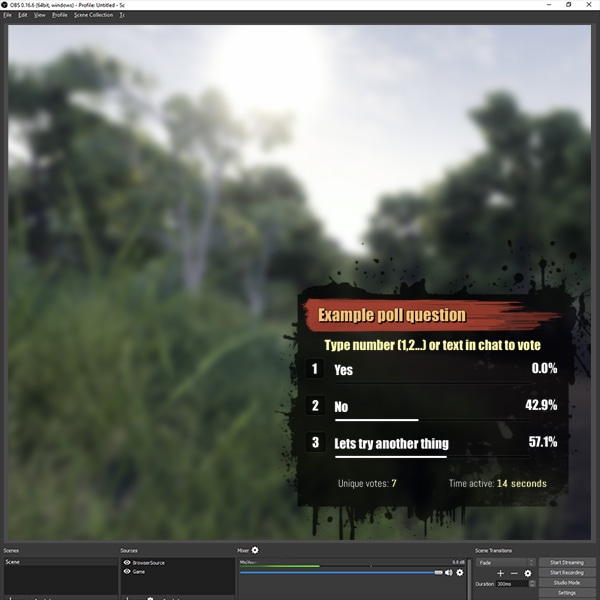
Quickly and easily integrate a real time poll into your Twitch.tv stream
weary mist
@clever nimbus poke @analog forge
just kidding to the stingman. But it is something we do want, its just getting time to make it happen. Small team, lots of ideas to try to get implemented
 tardy mulch
i got a question, what are like the downsides of not shutting the streamelements overlay source when not visible?
narrow coyote
if it plays audio, it will play when not visible. and if you have several that will not be shutdown, they will run in the background, so will still use CPU
I have a few browser sources that I do not shutdown the source, because they have no audio and it helps the pop-in from scene transitions
weary mist
If you don't shut them all down, they are running in the background when not visible, thus taking up CPU usage
can cause duplicate alert sounds, if you have multiple alert boxes
 full rune
hey, does ground control auto update?
stuck hamlet
yes
full rune
ah cool, thanks. are hotkeys working for media request?
stuck hamlet
nope
full rune

stuck hamlet
full rune
thanks for the quick response anyways
full rune

 blissful apex
i need halp with something
ANyone know hwo to make the background of a gif transparent?
and yes i know google exissts, your just beautiful people 
narrow coyote
If it is a basic background you could try something like https://ezgif.com/help/gif-transparency If it is more complex you would need to remove the background from each frame with something like Photoshop
 narrow coyote
elder sorrel
narrow coyote


 narrow coyote
blissful apex
 thorn spear
Is the site down? I can't log in.
elder sorrel
Site as in Twitch?
If so: more than likely if they're having that issue.
🔎 We're investigating site wide page loading issues. Hang tight!
Retweets
198
Likes
580
Twitter
https://twitter.com/TwitchSupport/status/989965039435055104 21 minutes ago
🛠 We've recovered from the earlier loading issues, and all parts of the site now load as expected. Apologies for the delay.
Twitter
 rose halo
Hi, I was curious about how the Timer function operates.
narrow coyote
You set an interval, so how often you want the message to display, and a number of chat lines, which would be the minimum amount of chat lines in the last 5 min required to activate the timer. Once the amount of chat lines is met, the timer will go off at the set time
rose halo
Okay, so if I set the chat lines to 0, it would start automatically. And Online/Offline just is an interval of starting / stopping the timer?
narrow coyote
If chat lines are 0, then the timer will trigger once the interval is met.
There really is not starting or stopping, its more it will post the chat message or not. Once it posts a message, the timer resets until the requirements are met again to post the message
rose halo
Ohhh
 hearty phoenix
Hello. I make 2 custom time command but the bot don't change the time zones.. What the solution? 😄
hearty phoenix
yes. with variables
i use this ${time.EDT} but it's write another time..
not Miami zone time
tight harness
I prefer to use ${time.America/CityNameHere}
I use for example: ${time.Europe/London}
I find that this format works really well
hearty phoenix
ohh i try it 😄 thx 😄
tight harness
The available timezones should be available here: https://en.wikipedia.org/wiki/List_of_tz_database_time_zones
 upbeat topaz
I setup a donation tracker for extra-life and tiltify. Will I also see on-screen alerts when someone donates to those?
tight harness
There's another widget for that
The Extra Life Donation Alertbox and the Tiltify Donation Alertbox widgets
upbeat topaz
Ah, I see them. Figured they would have been incorporated into 1.
tight harness
Nah, it's better to have them separate so people can place the goal and the alert box in separate locations
upbeat topaz
Oh, I mean incorporated into the main alert widget
tight harness
Ahh, I see, nah they're separate
Just in case people want them in separate locations to the main alert box
 void hollow
does anyone know if browsing deep web is allowed on twitch
hearty phoenix
@tight harness Shit Miami doesn't in the list 😂
tight harness
Yeah I noticed that, there should be another city in your timezone in there though, as long as you always have the same timezone all year round it's fine @hearty phoenix 😃
@void hollow No idea
 lunar furnace
ok im having a few issues.... working on my wow overlay to update it and fix it up to match my now universal overlay and its not always letting me save it to preview it in bebo plus its having some wacky issue with the bounce mechanic on the hype cup.... and thats the thing im working on figuring out due to the new way im doing it
every bit that hits the cup just bounces right back out and i have the token bounce all the way to 0
i also have tried to take it from using whole screen for the hype cup back to being off and the hype cup just disappears
any ideas or help regarding that?
 dense jackal
is the height to your cup most of the overlay? I found when it is the entire overlay, changing the bounciness isn't very noticable
lunar furnace
ill share a screenshot so you can see its location and size
i was gonna turn the whole screen option off and fix the size of the window for the cup but its having difficulty with it now because the cup completely disappears
wish there was a cup for the scaling and size of the base of the treasure chest because that would be awesome
dense jackal
it doesn't disappear it's just displaced
weary mist
Likely the cup is still positioned in the same spot, so i recommend increasing the size, and then moving the cup to where it is, then decreasing window size
It's just outside the widget boarder
lunar furnace
thats the thing i change it and move the whole widget frame and its not there.... i also have used the cup scale and position arrows to no avail of it showing back up
weary mist
Hmmm. Once I get home, I'll check it out. I'm updating my driver's license (or so I hope) lol
lunar furnace
lol
yea because the bouncing out with it at 0 is a tiny bit irritating. i have times it loads with about 25-50% of the bits landing in and the other times they just bounce full on out
 frozen quartz
hello there, bot is not working at all in my channel, tried parting, muteing, etc, but it's not even answering to commands, any ideas? :S
stuck hamlet
@lunar furnace https://www.onslaught.ca/s/60gbj8dc.mp4
it's just REALLY off screen
try making it big like i did and then using the arrows to find it
stuck hamlet
np
frozen quartz
no ideas? 😦
lament blade
follow and tip are not affected
stuck hamlet
@frozen quartz are you using a custom name?
stuck hamlet
on ground control
stuck hamlet
if you have the wrong ouath, it is possible.
You can try closing ground control and seeing if the bot responds then
 stuck hamlet
 frozen quartz
yeah... lol
stuck hamlet
heheh
stuck hamlet
no problem, just get your new oauth and everything will work again 😃
lunar furnace
ok so that fixed the bounce issue with it 0 but right now im having an even odder issue that im not sure why its doing it.
i save it like the first image shows but it does the second image on my stream preview ..... i close the editor and open the editor for that overlay and it reflects what is shown on my bebo stream preview
will the settiings for the hype cup stay saved if i delete that widget and add a new one to manipulate and see if it fixes it
clever mango
No, settings are tied to the specific widget
lunar furnace
so i would have to re set all my bits to the cup
clever mango
Any settings changed from the default are not carried over
lunar furnace
thats what i thought i just couldnt remember and that was the reason i kept clone of the widget to my other overlays i had done LOL
why would it save or say it is saved at that arrangement but show the other and then when closed and reopened not show what it was saved as
clever mango
I don't understand the question. Are we talking about the cup?
Are you saying that clones are not saved when you save the original?
lunar furnace
yes im dealing with the placement of the cup but i think i may have found the problem but not sure.... i did a duplicate then deleted the duplicate and when i enlarged the frame for the cup location found this
clever mango
duplicating only makes a copy of the settings at that time
lunar furnace
the cup was seeming to not save to what i was needing on the overlay and i think o found the culprit
clever mango
It doesn't continue to keep them identical
lunar furnace
only one of the cups moves
clever mango
I don't believe the cup widget was designed to have multiple in a single overlay
The widget was made before duplication was possible
lunar furnace
yea its not i was seeing what it would do for saving settings but then remembered i couldnt really do anything with it and when i deleted it i decided to expand the one ive been working with and found the most recent image
clever mango
You could have multiple overlays each with a cup widget in OBS
lunar furnace
i use bebo and i have several overlays made in SE so i didnt think that would affect this
this was literally updating and adjusting an existing overlay
i closed that instance i was working on and opened a new one that didnt have the duel cups like that last image
it isnt supposed to update and auto move the cup when you shorten the frame thingy for the positioning right
clever mango

lunar furnace
ok i got that fixed now so the close and re open of that last instance fixed whatever it was that was going haywire with the moving of the cup....LOL
now to work on my bouncy hopefully i can get it to work out with out poking yall anymore.... thanks for all the awesome help yall give
clever mango
No problem
 viscid sphinx
How do you turn off the default bot command for !donate? I looked in default commands and could not find it
wanton jetty
Can we get an option for "Slideshows" to diapear for a while then return as a loop ?? So once its completed a loop it disapears for lets say (insert time) 600 seconds (10mins) then re cycles back through
stuck hamlet
That’s a thing @wanton jetty
I asked for it 10 months ago, and @hollow zinc finally delivered last week 😃
dense jackal
Np
wanton jetty
@stuck hamlet How do i do it
stuck hamlet
It’s in the image rotator
dense jackal
 = @wanton jetty
wanton jetty
glad sparrow
ok just wanted to know how the tip message works Ie. does it show on stream when tipped?, because i dont want some one to tip and leave a message that could be considered racist or what not
and not sure if i missed it or not but can tip messages be turned off
stuck hamlet
You decide if you’d like to show it, we also have tip filters, which can filter bad words out.
Or the words of your liking
glad sparrow
ok i seen the filtering section but was not sure how good the filter would be considering other filter ive used was a bit scetchy.
dense jackal
@glad sparrow Here's an example of our filter https://clips.twitch.tv/OutstandingApatheticMallard4Head
 stuck hamlet
It does many different things tho.
dense jackal
That's just one example
stuck hamlet
Ye
glad sparrow
ok i just didnt want to risk a random troll causing any issues '
and that example is the defualt filter?
when turning on and not touching anything
ok nvm i found the tick for show messages in the overlay settings lol thanks guys not sure how i missed that before
glad sparrow
yeah just wanted to know if i turn on standard if i had to add words to be filtered or if it would be fine by defuat if that makes sinse
dense jackal
It has a standard word list you can check if youlike, otherwise you need to add filtered keywords
glad sparrow
ok and if i add custom filtered words with it set to standard will it still use the standard with the custom as well and not cancel the other out ?
dense jackal
it will use both, they cannot cancel eachother out
glad sparrow
ok thank for the help im such a noob at some of this sorry
dense jackal
All good that's why I'm here
 crisp pasture
Hey, I created a brand new tip goal it's showing 3 variables 0, $21.10, and the goal amount. I'm confused on the middle number as I have not received any donations yet
livid ingot
Event notices arent showing when someone follows etc when im live? Whats up with that?
pine hemlock
https://twitchstatus.com/ Could be related
@crisp pasture Data tab at the top of the editor, theres a tab for goals in there, remove the number
livid ingot
I dont get what thats all about?
pine hemlock
Means twitch is having issues and it's probably related
crisp pasture
@pine hemlock Fantastic. Thanks!!!
 lunar dock
Do I have to enable tip moderation in order to use the profanity protection filter?
Just wondering if I could just enable those specific settings without preventing tips and such from coming through automatically without having to approve them
stuck hamlet
Tip moderation is a different setting, and does not to be on for profanity protection
lunar dock
@stuck hamlet Cheers ❤
 hard lotus
Hello, where can I go for support with an overlay? My St. Jude's bar isn't filling up and I'm not sure what I need to change to see the progress.
hard lotus
I was told to come here for assistance in VC, is anyone available?
 wise cliff
So I turned on my item store, set items up with gifs and associated sounds. Do I also need to add the widget in and put in the sounds and images there too?
stuck hamlet
@hard lotus He sorry for the delay, what service are you using?
@wise cliff just the widget on your overlay 😃
hard lotus
@stuck hamlet OBS, however, its not appearing correctly in the browser, either
stuck hamlet
I meant more, what service of ours, which widget bar?
hard lotus
Tiltify donation bar
stuck hamlet
Ahh I was told their was some issues with that Last Week, let me see the progress to see if the issue has been resolved
Alright, from what I can see, Tiltify has updated their api and has caused some issues on our end, we will have to rework the widgets, so they are temp broken right now @hard lotus I apologize.
hard lotus
Ok, thanks for the info!
light mauve
Is there a widget that displays viewer count? It's something that my roommate uses in SL OBS and it'd be one less window I need to leave open.
stuck hamlet
There is not
light mauve
Ok, thanks.
 woven trellis
Does anybody here know the element names when using custom CSS for things like months subscribed, the gifter's name, the giftee's name, or the user message? I can see that the user name is {{name}} and the cheer amount is {{amount}}
stuck hamlet
{{sender}} ?
if not message @crimson girder
gifter should be sender, the person receiving should be name
woven trellis
@stuck hamlet is any number always referenced as {{amount}} ?
stuck hamlet
Should be
Logically, I would assume so.
But Alon is the only one that truly knows what the heck is going on in the back :p
woven trellis
@crimson girder is there a resource that lists all of the {{variables}} that can be called when using custom CSS?
@stuck hamlet thanks for the heads up on {{sender}}
stuck hamlet
There is not a resource, no list. That’s why I don’t know them  just dm him 😃
He loves helping people
dry hare
Does widget data transfer overlays? So if I kick to a BRB from an in-game, my widgets reload data correct?
narrow coyote
Yeah, the data should be the same
lament blade
When editing overlays in stream elements, isn't there a regret button or command ?
narrow coyote
Undo is a planned feature when the overlay editor gets a refresh https://streamelements.helprace.com/i352-create-an-undo-button-in-the-overlay-editor
 narrow coyote
lament blade
narrow coyote
lament blade
Also one more thing, when i'm testing out the browsing source ( animated overla) in Streamlabs OBS, it seems it use some time to load in game capture + overlay. Is this normal for Animated overlays ? It's look pretty clunky sweetching scenes when it lags in
 unreal flame
hey SE people, my chat commands dont seem to be working. would love some help figuring it all out
 deft hawk
Hi I have a problem with my donations not showing up on stream when they come through
stuck hamlet
@unreal flame Are you using a custom bot name?
@deft hawk You see it in paypal, but no alert?
unreal flame
no, just SE
deft hawk
yes
stuck hamlet
What commands it is not answering to @unreal flame ?
unreal flame
the only one that seams to work is song request. nothing else works
weary mist
@deft hawk check your activity feed, you have moderation on, so you have to approve the alerts
stuck hamlet
You are sure they donated through our system? @deft hawk
deft hawk
Oh got it thank you
nocturne pelicanBOT
@unreal flame Custom bot name requirements
- StreamElements bot modded and in chat
- Active overlay with alerts
- StreamElements tipping page in the panels below the stream (!panels)
- Create a twitch account for the name you want to use
- Ground Control app must be running
Steps to enable custom name
- Sign in to https://twitch.tv with the bot account
- Install and run Ground Control (!gc for download)
- Visit https://twitchapps.com/tmi/ and generate an oAUTH token
- Copy/paste everything in the box to Ground Control oAuth settings and enter the name for the bot account
- Restart Ground Control (custom name may take a few minutes to take effect)
stuck hamlet
Here you go  😃
😃
 sharp dock
Does StreamElements support a variable to output time in a 12 hour format? IE: I query !time and it displays as my current time which is 12:33AM
 hushed ferry
Having issues uploading JPG and PNG images for use in SE Themes. Change Image allows me to drag and drop or select image, image shows up in crop tool, but when i select Upload, system just hangs and does nothing. Please advise.
 trim cloud
For the last few days, without me changing anything or using the overlay editor I've noticed Subscriber alerts are using the wrong text animation suddenly. Last time I saw the bug I did emulated sub events and they looked normal. Right now emulating sub events is not even working
stuck hamlet
not currently @sharp dock
@hushed ferry make sure you're using chrome
@trim cloud 
trim cloud
No idea why text animations would suddenly change without me doing anything though... but the random animation it picked is nearly impossible to read
stuck hamlet
They should work, do you have some weird ad blocker?
Can you open the console in FireFox? and see if you see any issue?
Yea, all my emulations are working
What animation isn't working? I'll have a look and fix it for you 😃 @trim cloud
sharp dock
@stuck hamlet Thanks for the answer 
 serene nimbus
Hey guys what should I use to create animated follow alert and then use it in the stream elements overlay ?
hushed ferry
@stuck hamlet any other app? Chrome is a resource hog, personally do not care for it.
stuck hamlet
it's the one we see less issues with, as the site was built around chromium. And you should only need it for uploading files, if file fails elsewhere.
 sweet zenith
I was having issues with stresam labs on twitch tonight when a few of your mods hopped in and wanted to show me de way. I am here. we talked about your partnership program that you are starting up. If theres anyone i could talk to about the perks of StreamElements and the partnership program you guys offer id love to hear it
serene nimbus
can I get a total count of my followers number in alert next to a new follower? I play with variables but cant find a correct one or Im just too big of noob in this stuff 😄
 rigid ingot
how can i change in the custom css event list that the new event comes in from top, not bottom?
also the shown last 5 events are wrong
 pulsar gulch
Hello guys
did anyone heard about gather ? It's something that I should use with SE or it's crap 😂
winter zenith
@sweet zenith not sure if some one replied to you yet but here are some informations together with the application form https://streamelements.com/dreamteam
StreamElements
StreamElements is the leading platform for live streamers on Twitch and Youtube. StreamElements includes Overlay management, ChatBot, Tipping, Alerts and Loyalty.
dense jackal
@serene nimbus Currently not atm but that is an interesting idea, you should add it to our ideas page!
winter zenith
@rigid ingot what do you mean the last 5 are wrong? I am not huge in HTML/css sorry but its possible I think
@pulsar gulch whats gather?
rigid ingot
@winter zenith the last 5 follows are not shown correctly, i have to re run the notification to order them prober
is it possible to change the game/title via groundcontrol app?
dense jackal
The custom CSS event list is only really customizable through the html CSS if you want to adjust the width or direction you can create a regular event list and do it through there @rigid ingot
winter zenith
If you do test alerts they will disappear when reloaded if you mean that by not correct, so no need to replay your alerts
rigid ingot
@winter zenith no, i meant actual followers not the test ones 😉 i have the strange behaviour when i start the overlay editor that the last 5 followers are wrong, there are followers from a couple of weeks ago and some from the last streams
dense jackal
Haven't heard of this bug, I'll report it, next time it happens come tell us 👍🏻
rigid ingot
oh, where shall i report it? i can take screenshots and show it
dense jackal
I can report it, you can share your screenshot here
 round geyser
Is it possible to delay the text from an alert from showing up?
dense jackal
MAke sure if you haven't already, tory reloading your overlays https://streamelements.com/dashboard/activity (top right reload symbol) @rigid ingot
pulsar gulch
@winter zenith i think a new " competitor " 😂
Btw guys , how do i restrict the links in the chat
i can restrict for subs or regulars
can i restrict for everyone ?
rigid ingot
@dense jackal did it, same result
dense jackal
@pulsar gulch filters are found here https://streamelements.com/dashboard/bot/filters if you choose to exclude regulars it does not exclude subs, but subs include regulars.
pulsar gulch
I want that no one could post links
dense jackal
@round geyser Can you give me an example of what you mean? It may be 🤔
 copper pollen
hey guys can i get someone to check why my donation alerts arent coming through? ❤
dense jackal
Not even mods @pulsar gulch ?
round geyser
@dense jackal I want my webm video to finish it's animation, and then the text "X has followed" to show up. Right now the text shows up, but the animation isn't done yet.
pulsar gulch
@dense jackal only mods
round geyser
I can send you a DM to clarify so you can see the animation, and what i want to happen @dense jackal
dense jackal
Do you have any regulars? @pulsar gulch
round geyser
(If that's okay)
dense jackal
go for it @round geyser
pulsar gulch
@dense jackal what do u mean ?
rigid ingot
is there a way to use the nice little pictures of the custom css event list with the event list?
round geyser
Sent you the DM.
rigid ingot
oh ok, then i have to live that the new event shows up at bottom and not at top
winter zenith
@copper pollen do they show up on dashboard? Or your paypal?
Do you have tip moderation enabled? If so you need to approve every tip you get before the go on stream
pulsar gulch
@dense jackal no , i added only the mods
dense jackal
then setting the exclude to regular will make it so only mods can post links
round geyser
I've already tried doing what i sent you in custom css, but i can't quite figure that out @dense jackal
rigid ingot
if someone is interested how to change the dirction of the event list from bottom to top has to change the "$('.main-container').append(element)" to "$('.main-container').prepend(element)"
im feeling like hackerman now 😄
 hasty remnant
tight harness
hasty remnant
tight harness
@hasty remnant Edit your overlay, edit the alert box, click on Change Sound
 zinc kindle
Hi! I just emailed about having issues with my bot on twitch chat. It seems like the timer isn’t working right.
tight harness
@zinc kindle Hey, did you follow the instructions I gave you in my reply?
zinc kindle
Yes. Not sure what I’m doing wrong. What’s the common issue people overlook when setting it up?
dense jackal
So a common issue people have is the chat lines. 5 minutes before the end of your offline or online interval, our bot checks for the number of chat lines you have set for that timer, if there isn't that many it doesn't go through
zinc kindle
Damn, that’s definitely it.
dense jackal
So for a timer like this there could be 10 messages pre 10 minutes and 5 during the last 5 of the online interval and it would not show
if you want it to go on a specific time, everytime, just set chat lines to 0
zinc kindle
Yep. Totally making sense now. ALSO (sorry), how do I know that viewers are getting their loyalty points?
tight harness
Get them to test with your !points command every 10 minutes
zinc kindle
Okay okay. Thank you guys! Crazy how fast you emailed me back. 🙏
dense jackal
Best support: world @zinc kindle
tight harness

proud pumice

clever nimbus
During last nights stream, media player stopped. I have a back up public playlist, using ground control, and I need to keep hitting the play button for it to continue. Thoughts? What could I have set up wrong?
tight harness
When this happens does it mention anything about the current song it's trying to play being blocked in that region?
tight harness
It's meant to continue playing through them unless there's a problem loading the next song 🤔
clever nimbus
Yup. I have seen it get "hung up" at the end of a song.
I use NCS music for my entire back up
tight harness
If you have Limit to Music ticked and it doesn't consider the next song as music that could cause issues I imagine
clever nimbus
playlist
I don't have that ticked
I have the auto filter to Very low
could that be it?
tight harness
Hmm, i'll have a good look at your settings but I don't believe there's a setting that should cause it to not play the next song
tight harness
Hmm, I know you have the max song length set to 5, would be interesting to see if the ones it's not allowing are longer than 5 minutes, although I don't believe that's meant to apply to the playlist
clever nimbus
Good call out. I had one song longer than 5 so far in playlist....I removed. I will check the rest
Ok, in all 2 songs longer than 5 there. Took both out
and turned down auto filter to off
tight harness
You could try increasing the max queue length a little too
clever nimbus
ok
unborn furnace
Streamelements timed out one of my viewers for 300 seconds and deleted all their posts
how do I fix that
dense jackal
adjust your filters @unborn furnace https://streamelements.com/dashboard/bot/filters
 wintry basalt
hey there peepz, i wanna have a command that throws out a rnd sentence, how do i do that? so its like !dudyoi know and then it should throw out a rnd didyouknow fact.
 ebon forum
@long ridge alerts (the whole overlay) are by default 1080p - so they will fit of of the box. OBS/Xsplit/etc. does the scaling if needed.
 long ridge
k but when i want to animate something it will not start at the left side ... it starts in the window @ebon forum
ebon forum
@long ridge the whole overlay is 1920x1080 by default. the alertbox is smaller than this, you have to expand the alertbox till it fills the whole green background in the editor
@long ridge tell me what exactly you try to set up so i can explain that properly, i have no idea how it looks on your side 😃
lament blade
This is what I get when I run stream elements ground control. Was fine until today. I have tried uninstalling/reinstalling. Help?
weary mist
try openning your %appdata% folder, and deleting the groundcontrol folder
lament blade
so now I've deleted it, I don't have it on my computer :/
winter zenith
Reinstall it
lament blade
ok it looks good now. What was the cause?
winter zenith
I think some wierd issue with pc file folders
lament blade
thanks
long ridge
@ebon forum Can u tell me, how can i put the Text over the image ? When i choose it...the text is still over the animation 😦
ebon forum
@long ridge ok, wait a second, you want what? You just told me that you want the text over the image and that the text is over the animation. Gimme a screenshot please, i'm confused.
long ridge
wait
weary mist
@lament blade the %appdata% folder are just more settings and configurations of a program, not the actual program itself. By removing that folder, it forces the program to re-create it, which can fix any bugs introduced through those old configs
 keen wadi
Im having issues with giveaways where people are typing !ticket 1 and not getting a ticket
tight harness
@keen wadi You have !enter disabled in Default Commands, !ticket is an alias of that command so it just needs to be enabled 😃
 past otter
Hey guys, it might be a silly question but I cannot find the 'browser source' option in OBS to add a new overlay? Am I being a derp?
tight harness
It's usually just called 'Browser' but if you don't have that then you didn't tick the option to include it in your install of OBS when you installed it
past otter
Ahhh.... that would be it 😐
Anyway to get it back or should I uninstall obs and re-install?
tight harness
No problem
Pretty sure there's something on the OBS website to get it under plugins @past otter
But re-installing will also get it
past otter
Cool, thank you
tight harness
As long as you tick the option 😃
 sonic juniper
Hey guys. It seems like some people got their Chat Stats Error 404 page fixed manually. Is this a thing now?
tight harness
@sonic juniper We're asking the people who can do this for you now
sonic juniper
Dreams do come true. 😉
 primal palm
hello guys i am looking for the person who make the free pubg overlays,i want to get some channel design too similar
pale eagle
Any voice support available ?
ebon forum
@pale eagle yes, but it would be easier if you tell us how can we help you.
wintry basalt
hey there, the quote command to add and remove can be done by anyone or just like mods/broadcaster?
pale eagle
I've sent a PM to you cryonicTV.
tardy mulch
question, like i saw you can queue songs using !sr + song name, but any chance that can also be done on the dashboard for media request be possible to add the song using also the song name?
 ebon sluice
how would i annonce someone in my stream once they have said something ?
clever mango
@wintry basalt mods can add/remove
celest fractal
Is there a way to make a Raffle every X minutes?
clever mango
everyone else can retrieve quotes
wintry basalt
@clever mango Thank you
primal palm
hello guys i am looking for the person who made the free pubg overlays,i want to get some channel design too similar and I can pay for that
clever mango
@ebon sluice not possible at this time. Upvote this idea to show your support for it https://streamelements.helprace.com/i366-set-up-automated-bot-message-sfx-to-play-when-a-user-speaks-for-the-first-time-in-a-session
@celest fractal No, not automatically
@primal palm Our design team is very busy and aren't available for commissions. However, you're welcome to contact any of the talented artists in #art-marketplace
celest fractal
Yeah I tried making a timer of the bot saying !raffle, but that didn't work :/
primal palm
@clever mango all right thanks mate!
wintry basalt
ok there one more small question, is there a way to see all quotes ? like in a list or something?
clever mango
Not yet, the system is being revamped as mentioned in the last #270206314561404928 post
 shut gyro
My alert sounds have been playing twice and I found that the way to fix this issue is to shutdown the source when not active. But now when I transition from one scene to another, I have to wait a few seconds before the overlay loads. It makes the transition from one scene to another not that smooth. Is there a way around this?
dry hare
Use studio mode in OBS
 quasi raft
^
it preloads the scene
the reason its not a smooth transition is because the scenes have to load
have*
 tender egret
How do i make a donation goal start today instead of lifetime?
tender egret
when i make an donation goal it says "57 ¤" i want it to be reset without reseting all donations
because i want to have my "Top tipper"
tender egret
Thanks! @stuck hamlet
tender egret
np i am bad at explaining stuff :p
safe kettle
Streamelements Media Request is being exceptionally buggy today, I've had people donate money and then their paid requests get skipped, I've had the songs just randomly stop playing. The songs would finish and then the next song in the queue won't play. Can someone please come to my channel to get this figured out?
 lament plover
I need help with making it so i can exclude certain audio
winter zenith
@lament plover what do you mean?
lament plover
i dont want discord voice chat to come through my stream
ebon forum
@lament plover excluding audio is done via an analog mixer and multiple outputs & inputs at best.
lament plover
i want to just capture game audio
ebon forum
@lament plover this is possible, but it will cost you some $ when you go the analog route.
ebon forum
@lament plover yes, but i will not help with that since it is a buggy mess. But if you want - google for guides on Voicemeter Banaana or so 😃
lament plover
kk
stuck hamlet
@safe kettle Are you sure there are no mods skipping it? either in chat or on the dashboard? We haven't heard of any other issues with Media Share, the bugs seem to be attracted to you
 obtuse lance
Can you Copy/Pasta your dono variations from one overlay to your others?
 stuck hamlet
👍🏼
safe kettle
@stuck hamlet I'm sure
I watched as the previous song came to an end and the next one that was requested just didn't play even though it was in the queue
stuck hamlet
Are you using Chrome or Ground Control?
winter zenith
for media request?
safe kettle
yes I just have the ground control muted
stuck hamlet
well that may cause issues.
you should definitely not be running 2 instances of it, there's an option to turn it off in Ground Control, you should do that
 safe kettle
testing it out now
Looks like that might have fixed it. I'll keep you updated. Thank you
stuck hamlet

 frank field
https://media.discordapp.net/attachments/407764750643101727/437922227246071808/unknown.png?width=577&height=325 im having a real issue with my alerts if someone could please help! ❤
 stuck hamlet
Set your browser source to 1920x1080
winter zenith
or press crt+F
 safe kettle
Now I'm getting an echo for all notifications and even the media requests songs are echoing like it's coming from 2 different sources at once >.<
ugh, I'm an idiot, it was playing from another source in OBS
lament blade
heyo does anyone know how to add a top detonator widget to the overlay?
 unique robin
!gc
winter zenith
Make sure to use the top tipper setting you want to show
So either monthly, session or all time
lament blade
cheers mate!
hey Kiwa
@winter zenith exactly where? in the overlay editor, under widget i dont see how, unless im blind
narrow coyote
Under stream labels
clever mango
Preview as transparent? Can you explain further?
lament blade
@clever mango Like having a transparent image for tihs

To let those be transparent so I can put an image slideshow for them on obs
lament blade
I don't see where you can make it transparent though
Because if I preview it and try to screenshot it, it still has white around it
clever mango
show me?
lament blade
https://gyazo.com/6a4e6caa1bf1db59256847664108e4c9 @clever mango
 clever mango
what did you lower the opacity on?
clever mango
That is how you make something more transparent
lament blade
o
@clever mango https://gyazo.com/ea1dd4c2d905c343376bec69de47f3ce that's what it did

you cant even see it
clever mango
you won't be able see it if you set it to 0% opacity
That means 100% transparent
aka invisible
lament blade
No I mean I want the background transparent, not that @clever mango
clever mango
What background?
pine hemlock
The white?
lament blade
Yes
clever mango
The white is part of the page
lament blade
Well can I?
lament blade
Is there a way to get them transparent on your site?
Like I want them to somehow be transparent so I can have an image slideshow for them. Like is there a way to have a transparent background on obs and do it that way?
 rustic mist
Hello,
I am trying to figure out how to import a CSV exported from deepbot
when i import the CSV it says "cannot import points"
(the new alpha build allows CSV export)
clever mango
@lament blade You're not going about this the right away. If you want just the image with no background then you need to crop it away from the background and place it on a transparent canvas.
pine hemlock
it needs to be formatted as name,points @rustic mist
lament blade
How would I crop it completely?
clever mango
@rustic mist Are you using the CSV import tool on the site?
rustic mist
yes
clever mango
photo editing software
@rustic mist ok that was not designed for this type of import. Sorry about the confusion. It's being removed soon.
Please send me your csv
rustic mist
ok
terse oyster
hello, i'm trying to stop single bit spamming. I updated the minimum to 10 in the cheer alert settings in every layer it appears. Is there anything else i need to do, like on the OBS side to only have the cheer alert trigger my animation for cheers of 10 or more?
winter zenith
No if you set it up that the alert only shows up if at least 10 cheers have been cheered you did everything right
terse oyster
I was having issues yesterday...was still triggering animation
winter zenith
If you changed it everywhere in all your overlays it really shouldn’t do that ...
You can also cleaning the cache
But it should work without that
terse oyster
clean cache = reset session?
winter zenith
Nah I mean clear the cache in OBS
terse oyster
oohhhhhh ok
is there an easy way to do that?
sorry for newb question..never done that
clever mango
The minimum for your cheer alert is 0
clever mango
terse oyster
no, i updated that in ALL layers of ALL overlays
terse oyster
its not my channel actually...i'm a mod on the channel but have account access
clever mango
Ok, what is the channel we're talking about?
terse oyster
channel name is awoken_queen
i went layer by layer to make sure all were updated..even if not used
i'm logged in right now
clever mango
For cheers, there are variations set by default. That means that the changes need to be made to the first variation which is "at least 1 bit"
Like so
terse oyster
i see. so i need to add a variation then
clever mango
No, they are already there
You just need to edit the minimum there as opposed to in the main setting. The main setting isn't used because it is only used if no variations match the activity
For example: if you set up just one variation alert for only 1000+ bits.. when someone cheers below that it doesn't meet the requirement of the variation and therefore will use the main setting
terse oyster
so if i edit variation 1 shown in screen shot above to be 10 instead of one...then i will get the result i want. correct?
clever mango
Edit it and give it a try with the emulator 😃
terse oyster
No wonder the damned thing kept firing! THANKS @clever mango
clever mango
No problem. Variations can be a bit tricky
terse oyster
@clever mango, if I may ask...would the same logic apply to widgets like bit cups? I see an area for variations but nothing similar is active.
clever mango
The cup has cheer variations by default but no minimums
 dusty merlin