#helpdesk-twitch
1 messages · Page 257 of 1
 echo hound
 dry hare
!skip ?
echo hound
Question mark?
dry hare
No ?
echo hound
No, !skip is to skip it as a mod.
dry hare
I’m just not sure
echo hound
It's !voteskip
echo hound
You're forgiven
dry hare
I can’t read today
 grim violet
Ground Control Help ples
 narrow coyote
what do you need help with?
 normal igloo
@narrow coyote I'm using both Roulette Slot machine But they do not tell my users How long the cooldown is for them 
narrow coyote
double click it to hightlight the text
then copy paste
@normal igloo  I will have to look into it a bit, I never pay attention to cool downs
normal igloo
@narrow coyote Ok thanks Also might be worth Looking into The last few messages in #welcome 👍
 inland nova
when i use the chat widget in the overlay, it looks like it works fine in the preview, but in obs no messages appear.
narrow coyote
what browser are you using, I can copy paste the jwt fine
with both ctrl+c and right click > copy
grim violet
Chrome. I cant paste into GC download
 clever mango
click in the box and press ctrl v to paste
grim violet
If only I'd thought of that
 teal yoke
hi guys o// If a item its sold out in the store, how do i replenish it?
 tight harness
Change it to a different number then set it back to it's original fully stocked number
teal yoke
oh ok! Thank you as always @tight harness
tight harness
No problem 😃
inland nova
when i use the chat widget in the overlay, it looks like it works fine in the preview, but in obs no messages appear. how can i get this to work the way it is intended?
tight harness
What resolution are you setting it to? try 1080p
 granite dock
Hey all, my overlay widgets aren't updating for most recent sub and or donations
any ideas?
Hope everyone is having a good Tuesday btw 😃
tight harness
You're still using Streamlabs for your donations, that's why you still aren't getting recent donations data coming through, you'd have to use your StreamElements tipping link for that
granite dock
what about the subscribers then - same issue?
tight harness
In terms of recent subs, make sure they're sharing the sub through the 'Share' button at the top of their Twitch chat 😃
granite dock
doesn't the Chrome plugin allow Streamlabs data to be brought into stream elements?
tight harness
No
 dense jackal
it is a 1 time import @granite dock of donation list, and alertbox
tight harness
It's imported, not linked
granite dock
ok thanks @dense jackal, thanks @tight harness
tight harness
No problem 😃
granite dock
where do i enable the streamelements tipping
tight harness
When you've got that set up you just click on Open My Page, copy the URL and put that in your panels instead
 livid ingot
Do we have any retro themes in the list?
tight harness
Violet Momentum
livid ingot
Good! it will work well with Radical heights then 😮
narrow coyote
I think it should, it is pretty 80's style, should fit nicely
narrow coyote
your twitch panels
tight harness
Those rectangle things below your stream 😄
narrow coyote
granite dock
so even though i have a streamelements overlay and widget
i need to put the url in twitch panels
to get the data to pull through?
tight harness
They can't click on your overlay or widget, so yes
If they're still clicking on the wrong link it's going to take them to the wrong page
So you need to put the right link
granite dock
ok thanks, will try again
i've done that, still not pulling in donations?
or will it only work for future donations?
narrow coyote
It will be for future donations made through that link
inland nova
1080p worked, actually. it was at 540p before because that's what i stream at. thank you.
 vale wyvern
Hey guys, specially @gentle imp
I talked to the guys on the obs discord and they basically told me this
Running a game without vertical sync or a frame rate limiter will frequently cause performance issues with OBS because your GPU will be maxed out. Enable vsync or set a reasonable frame rate limit that your GPU can handle without hitting 100% usage. If that's not enough you may also need to turn down some of the video quality options in the game.
So, basically, limiting the fps is the way to go.
 arctic hornet
Hey, what settings do you have to go into to get the bits event thing to show up when someone donates?
(I’m not the one using it, my friend is and it doesn’t show up on the stream when someone donates)
They donated bits and it didn’t show up
Apparently following shows up but cheers doesn’t.
If anyone could help @ me whenever you reply.
 pine hemlock
@vale wyvern Yep. Limiting frames helps a lot
@vale wyvern You can use RivaTuner to limit frames on any application/game that doesnt support vsync or what not as well
@lament bladegJaws#5481 Overlay Editor -> Alertbox -> Cheer alert needs to be checked
I love discord.
arctic hornet
She said it is
And it’s still not showing up
Everything else shows up, donations, followers
Just not cheers
pine hemlock
Did she recently get affiliate/partner
pine hemlock
Did the person who cheered cheer with the new bday bit
arctic hornet
Nope. The salt
pine hemlock
Whats the channel name? We can have someone look into it.. is it just this one time or is it every cheer?
arctic hornet
The person donated twice
She said when she does a fake cheer it works
Is it okay if I do say the channel name?
pine hemlock
Do the cheers show up in her activity feed or no
pine hemlock
Yeah give me the channel name and ill get someone to look into it
arctic hornet
TurtleBeverage is her name
Yeah. She’s said that everything seems to be correct. Followers, donations, everything works even the fake cheer (to test it) but when someone actually donated it didn’t do anything
She’s using streamlabs for the bits thing right now
normal igloo
@narrow coyote Any updates for me Buddy?
narrow coyote
sorry, not yet, when I was testing it I learned that mods ignore the cool down, so I need to test it again
normal igloo
Interesting That explains how my mods abuse it then
narrow coyote
Unless, you want to slide into my chat quick and throw a bunch of !slots in there and we can see what it does
 stuck hamlet
@arctic hornet she does not have it checked like @pine hemlock said at the beginning
arctic hornet
Well she did just switch the cheering to StreamLabs OBS?
That may be it’s now showing it isn’t checked.. though she did they had it checked.
stuck hamlet
I believe @tight harness Just turned them on
normal igloo
@narrow coyote Interesting so it seems to have a Cooldown for People who are not mod But gives no indication of how long they had to wait 🤔
arctic hornet
She’s telling me it’s checked..
stuck hamlet
it is now
arctic hornet
O.o
tight harness
It wasn't checked when I saw it
arctic hornet
Hm. Okay.
 so she just turned it on
 arctic hornet
I’ll just have her come in here and explain. Cause it’s kinda hard to explain hah
stuck hamlet
yea, relay support isnt the best.
arctic hornet
Cause shes telling me she’s been turning it on and off constantly to try and get it
stuck hamlet
same someone donate bits now 
arctic hornet
Yeah. I’ll just have her come in here and explain
Thank you guys, though. Honestly
narrow coyote
@normal igloo Yeah, I am not sure if that is expected or not, looking for answers on that
 normal igloo
@narrow coyote Ok thanks buddy 👍
 narrow coyote

arctic hornet
Sorry for the whispering 😂
stuck hamlet
asmr stream
stuck hamlet
np
 glad python
can a staff help me in voice im having issues with alter sounds
vale wyvern
@pine hemlock still didnt help. today i tried streaming again and even vsync didnt help
I guess my gpu is dying
It wasn't like this before, it's the only option
pine hemlock
Try disabling certain elements of your overlay.. if you have scrolling text, try making it static
if you have the hype cup, try disabling it
etc
arctic hornet
Thanks for helping cuda btw 😃
pine hemlock
np
vale wyvern
i disabled everything animated, nothing moves except the alerts
pine hemlock
what gpu is it
narrow coyote
And you are using x264 encoding, right?
 restive sierra
hi :3 is there way to put a link in a chat command/timer using like html tags or something so it's not the full link but just and underlined word you can click on to follow the link?
pine hemlock
not possible, twitch doesnt support it
@vale wyvern Have you tried rolling back obs to previous versions, if it worked prior?
restive sierra
@pine hemlock oki thanks ^-^
narrow coyote
@vale wyvern Are you using OBS? A log from the stream will show what dropped frames, if it was OBS dropping frames
 lament blade
is there any way to add the response from a bot? when someone redeems something in the shop he answers twice and its quite annoying 
edit*
 weary mist
One of the responses is probably from the Chat Alerts module @lament blade. you can turn that off. The other one is the default response, which isn't editable right now, and is not able to be turned off
lament blade
he only does it on one command. the others are only one message 😫
weary mist
that is normal for the store if you have chat alerts on
vale wyvern
yes, I use obs. maybe its the version, yes
lament blade
ok I found the failure. it was on perks but it doesnt do it on sound 
vale wyvern
where can i get the stream log?
pine hemlock
help -> log files
pine hemlock
Change your downscale filter to bilinear (under video)
Also do you have your browser sources set to shutdown when not active?
pine hemlock
no it doesnt make a real difference
it uses additonal resources for nothing noticable
pine hemlock
a lot of your frames are dropped from connection rather than rendering
pine hemlock
22:32:01.470: Output 'adv_stream': Number of dropped frames due to insufficient bandwidth/connection stalls: 8029 (3.5%)```the change to bilinear may help the render thing
vale wyvern
but twitch shows its stable
pine hemlock
Are you on wireless by chance or something
vale wyvern
nope
pine hemlock
I would try using a different twitch server maybe
because most of your frames are from internet
weary mist
what bitrate are you running now?
weary mist
and what is your upload?
vale wyvern
weary mist
so you "should" be good with around 4-5k bitrate, easy
weary mist
Yeah, I would try changing the server, otherwise its an issue I experience too much
my upload is about 4mbps, but inconsistant. I get spikes of higher, and dips of 0. big fat zeros
 dense plinth
Is there any reason that kappagen would make OBS go from using 3-5% CPU to using 15-20%. if I disable it in OBS all is good, as soon as I re-enable it my usage goes way up again.
vale wyvern
how do i change the server
weary mist
@dense plinth 100%
yes
Kappagen causes a lot of rendering needing to be done, and the only thing that can do it in OBS is your CPU. To help reduce this drain, we recommend reducing the pixel size of the emotes, reducing the number of emotes, not making it full screen, and other things similar to that
narrow coyote
I have kappagen on a separate browser source tied to my stream deck so I can disable it when needed
dense plinth
@weary mist I will give that a try
weary mist
👍
vale wyvern
the thing is that
apparently the connection is excellent??
i dont get it honestly
pine hemlock
upload the latest log again
vale wyvern
pine hemlock
(downscale filter is still the same btw)
this log doesnt say you tried to go live yet tho
so i cant see
pine hemlock
might not be the right log file 
 exotic zephyr
After removing a Super Moderator, they seem to still have access. does it take time to update?
pine hemlock
unsure
dense plinth
@weary mist Thank you for the info, I just knocked the pixel size down from 100 to 75. and unchecked the "use full screen" and it dropped it down to about 5% CPU usage. You are a rock star
pine hemlock
I would just try some more servers and see @vale wyvern ... also do you have any firewalls, antivirus or anything that could be interfering?
 pine hemlock
@exotic zephyr Should be instant... what do they have access to?
exotic zephyr
oh i guess we also have to remove them in settings!
i was only in the "user management"
pine hemlock
Yeah user management is just the bot, settings is the dashboard
vale wyvern
where do i switch servers tho
pine hemlock
File -> settings -> stream
vale wyvern
the weird thing is that it only gets laggy while im on fights
when im talking and on spawn its totally fine
thats why its just confusing to see its the network
pine hemlock
more data gets sent when lots of things are occuring
Try changing that downscale filter thing i told you about and see if it stops
that can also send more data
vale wyvern
im getting less dropped frames on the obs app, down there
but its stilll weird, will try and check other servers
pine hemlock
Sounds good. Everything else looks fine from what i can see, though. As long as you change the downscale filter to bilinear.
👍
pine hemlock
(still says its on lanczos) =p
vale wyvern
whaat but
vale wyvern
pine hemlock
reopen obs and test it again and lets see
pine hemlock
try setting your stream fps to 48 instead of 60
Article "Disabling Xbox DVR in Windows 10"
Because its enabled on your pc
(disabling it might require a pc restart)
vale wyvern
tried doing with48 fps didnt help, disabling this now
never enabled it tho, never even had an xbox live account
windows pisses me off so much
pine hemlock
its auto on for everyone
vale wyvern
vale wyvern
South America: Sao Paulo, Brazil
rtmp://live-sao.twitch.tv/app/{stream_key}
its where its at i believe
pine hemlock
Try an older obs version, and maybe try restarting your router and see if you have any luck
vale wyvern
i will, thanks for the patience
pine hemlock
np
vale wyvern
ok, definitely it was the internet. I just tried streaming again, 0 frame losses on lagging and encoding, all of them to network
gonna try and fix my internet because it seems to be the problem, none of my friends are having issues with the server
pine hemlock
@vale wyvern goodluck
vale wyvern
thanks a lot <3
 untold estuary
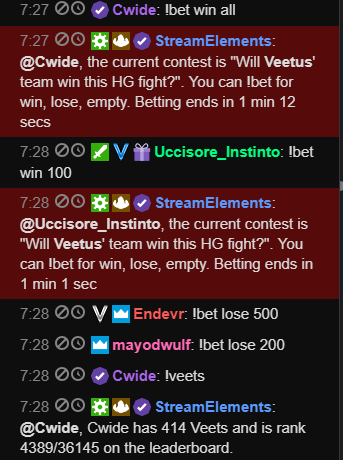
Contests do not seem to be working... people are betting and the system is not taking bets? https://i.imgur.com/LCjJjWQ.png
 west gull
Why are you promoting here?
it's said to not promote your own channel in all places other than sellout. And that bot is currently down
untold estuary
Oh the bot is down?
west gull
yes, that bot is currently IP banned from discord altogether
untold estuary
oohh THAT bot
clever mango
@untold estuary Have you checked the settings of the !bet command?
untold estuary
I mean I did bets the other night
No issues
Nothing else configured
Copied the same one from last time
clever mango
Do you see bets being placed on the contest page?
untold estuary
No
clever mango
Ok, just a moment
Fixed on stream  For the record, !bet was added as an alias of !contest so the bot was only responding to !contest and not accepting the actual !bet
 dawn wasp
is there any way to get gift sub information (that a sub was a gift and who gifted it) in the chat alerts?
 rugged trench
I had an issue today where someone subbed and the overlay KNEW they subbed as the counter went up but the event tracker never showed it. Any ideas? ( There are no pending actions for me to accept or deny as that is turned off )
edit : the alert box did not pick it up either - I can successfully emulate each alert on site.
edit 2: It was a twitch prime sub
edit 3: says there was no 'share' button after refreshing the page several time * using firefox *
clever mango
Not at this time @dawn wasp. We may look to add that in the future along with a prime sub variation.
 nocturne pelicanBOT
@rugged trench Twitch prime (new and resub) and paid subscriptions (resub only) must be shared in chat manually by the person subscribing in order for the subscription information to be sent to StreamElements. For twitch prime, the user needs to have sharing enabled on https://www.twitch.tv/settings/prime. For paid subs, if the share box doesn't show up immediately it will when they refresh the page. https://i.imgur.com/VNJN0Uv.gif https://i.imgur.com/2297EA7.png


 unreal flame
hey for some reason my commands in my twitch chat arnt working. any help would be appreciated
clever mango
@rugged trench Have them check their prime settings page
They may have sharing disabled.
rugged trench
Ok. Will do thank you!
Would that keep me from knowing they subbed via events page?
clever mango
Unfortunately it can't be shared after the fact if it was in fact disabled.
But next time they sub with prime their sub will be shared with us and they'll get an alert 😃
Yes, we aren't notified about re-subs and prime subs unless they are shared in chat
However, your sub # will rise as that number is pulled directly from Twitch
rugged trench
Ok thank you very much 😄
clever mango
You're welcome 😃
 summer mulch
@unreal flame What commands? Do you have them enabled? Is our bot modded in your channel?
 celest temple
Can StreamElements do polls?
 proper hearth
Fairly late but figured I'd ask, is there anything that would prevent events from showing on the activity log? Had some hosts and tips not show up or trigger alerts
summer mulch
@proper hearth Are you sure you have them enabled in your activity feed tab?
proper hearth
Correct, all events have the checkmarks
 south sluice
@proper hearth can you send me privately an example of a tip that did not show in the activity feed?
 blissful apex
Hey guys, my overlay isnt comign up on OBS, i re-uploaded it and tis till doing the same. Any advice?
if i turn my alerts off it works? can someone lemme know a fix for this
it's pretyt bad tbh
tight harness
Checking it out now, have you tried the option 'Refresh cache of current page' in the properties of the browser source in OBS?
tight harness
I saw what was happening, I've taken a GIF of it and i've put it in our internal support member channel to see why that might be happening 🤔
blissful apex
thanks man
tight harness
Fixed in stream ⤴
blissful apex
Sorted, thank you very much @tight harness Great service as always 😄 
tight harness
😄
 lament ember
im trying to get a overlay from this site but for some reason its not working for me anyone help me
dry hare
Get it into OBS or xsplit?
lament ember
obs
dry hare
!add
nocturne pelicanBOT
To add your overlays to OBS, add a new browser source in your scene. Paste your overlay URL in the browser source properties, set the dimensions to 1920x1080 (unless you changed them on the website), and :ballot_box_with_check: “Shutdown source when not visible” https://youtu.be/KDvLynUqXI4
lament ember
only comes with part of it no idea why
dry hare
The overlay URL is the address you see when you click the edit pencil icon to edit your overlay. There’s a chain icon next to the URL that will copy the whole URL
You can also Launch Overlay by clicking the first icon in the My Overlays section on the overlay you want and copy the URL from the address bar
lament ember
did that too only part of it shown in obs
nocturne pelicanBOT
Make sure to :ballot_box_with_check: “Shutdown source when not visible” for all browser sources (all OBS scenes). If using studio mode, uncheck “Swap Preview/Output scenes After Transitioning.” Also keep in mind that sound can play from any overlay loaded in the browser (editor or launched). https://i.imgur.com/FegZJQS.png https://i.imgur.com/yY0wcFl.png

 lament ember
im on streamlabs obs if that makes a differance
dry hare
I have no knowledge of slobs. I use OBS studio from obsproject.com
lament ember
ill put it in obs see if it works with that
dry hare
Let us know here
lament ember
ahh thats done that no idea why slobs wouldnt do it
tight harness
OBS is better 😄
lament ember
just need to do some fidling
dry hare
Glad it worked for you!
lament ember
thanks @dry hare
dry hare
You’re most welcome! Have fun streaming!
 autumn star
Added media share widget to overlay, tried to play some media, not working, any ideas?
 atomic hollow
@autumn star whats not working exactly?
autumn star
I created an overlay, added a media share widget, I go to my media request dashboard, queue up some media, click on play, then it says I don't have a media widget
atomic hollow
you clicked "show on stream"?
autumn star
NO ACTIVE WIDGETS WERE DETECTED FOR MEDIA REQUEST
atomic hollow
just skip the tutorial
autumn star
LUL
I was just clicking on play on the videos in the queue so it wasn't loading up
had to hit the next button on the tutorial
atomic hollow
😃
autumn star
now I must go to android beta to discuss the rest
 next crown
Hey, i got an open support case which hasn't been solved for a week, is this the right place to get assistance?
lament blade
is there a way to get a subtitle / description like thingy?
tight harness
Yes, I don't see any unsolved tickets so you can either talk to us about it here or reply to the email @next crown
lament blade
for example shift+enter in tippingpage-title for subtitle
if not, i'd add it on ideasboard, if it isn't there yet
 gentle imp
@vale wyvern thanks for the update
 fiery meadow
Hey guys, I noticed that neither I nor my mods could edit commands in chat by doing !editcom or anything. Is this just how Streamelements works?
next crown
@fiery meadow if i may help, the syntax to edit commands on Streamelements is !command edit NameofCommand TextofCommand
fiery meadow
So for example "!command edit !today Nothing" would change !today to say Nothing, correct?
Oh awesome
Thanks @next crown
tight harness
You don't need the ! infront of the command name within the command, only at the beginning before !command
fiery meadow
Ah okay, thank you
tight harness
No problem 😃
 worn cradle
Quick question when it comes to "Bonus points for cheering 100 bits" under cheer bonus if i set to 100 if they drop me 10K bits do they only get 100 points ot 10k points?
also if they are a sub would they get 3 times to points ( as i have set)
So, if a guy dropped 10K bits and 100 extra points per 100 its wouldnt he get 30K points?
 brittle pendant
They only get 3 times for the time points not the bonus points.
worn cradle
AH ok
so if i have it set 10 points every 10 minutes, subs get 30 points every 10 minutes?
tight harness
Yes
worn cradle
awesome ty
 twin fable
For some reason, my Event list widget is not showing my recent subs, or least, my last 3 events (sub, follow, bits)... but I see the other events before it
refreshed the page, and still not showing
narrow coyote
Are the missing events showing in your activity feed?
tight harness
Yeah they are, but they're missing from the event list, just had a look 🤔
 safe canyon
hey guys, I looked before but couldn't find it, but has there been a highlight command (timestamps the current time within the stream) implemented?
twin fable
Yea, its showing up on my streamlabs history and the sub/bits/follow are all valid. Then I check streamelements's event list widget, its not showing up, and the last 3 isn't showing up. I even deleted my current event list widget and recreated it, still the same.
 reef gate
hi for some reason my overlay editor isnt allowing me to change the alert sound for my cheer alert, also SE isnt picking up one of my subs
narrow coyote
Was the sub a resub or a prime sub? They need to share the sub via chat for it to alert
twin fable
It was showing the other night, then the next day, the last 3 event is no longer showing
it was like this:
narrow coyote
@reef gate Did you recently become affiliate? Like after starting to use SE? If you do not see "subscribers" or "cheers" on your dashboard, log out of SE site and log back in https://streamelements.com/logout
reef gate
yes i became affiliate on the 6th april and i got my first sub that night after setting everything up, all of my others have registered just not the first
narrow coyote
It sounds like they subbed before logging out and back into the SE site, same thing happened to me. SE needs to get a new token from Twitch to show you have affiliate status, and this is done when you log out and back into the SE site.
As for the cheer sound issue, what is going on with that, like what is happening when you try to change the sound?
twin fable
sub still not showing
on my end
on the event list
i logged out and logged back in
still the same
reef gate
well i change the sound and hit save and when it is tested it playes the original basic sound, i have tried removing all sounds then adding my chosen one and it still payes the basic sound
and also i have logged yout and back in but it still didnt work, its showing i have 5 subs but i have 6
narrow coyote
So that first sub you got, will not show on the dashboard if it happened before SE got your updated twitch account token showing that you are affiliate. The logging out and logging in is just a onetime thing you would need to do after becoming affiliate. If you were to use something like a total subs widget, that would reflect your current sub count.
The sub count on the dashboard is not a total sub count.
For the cheer sound, have you checked in all of the variations? it sounds like a variation might be what is being triggered
reef gate
yeah ive checked in all of them
i have changed the cheer alert sound in everything i have
all other alerts changed but this one didnt
narrow coyote
@twin fable I am sorry to say, but it seems your issue is beyond my power. If you sit tight, someone who can help should be able to look into this further
If you clear the sound, do you still hear any audio? just doing a quick test with cheer alerts, everything seems to be working fine as long as the variations are changed and saved
reef gate
yes if i clear the sound it still makes noise
narrow coyote
What browser are you using? Do you by chance have more than one alert widget in this overlay?
reef gate
no i only have one alert widget and im using microsoft edge
narrow coyote
 Can you try with Chrome? Everything is built with chromium, so chrome is the preferred browser
 crimson vortex
Hello guys
reef gate
]ok i will try
crimson vortex
need help with streamelements store
the sound clips in my streamelements store after redeemed isnt playing? could u help please?
 safe kettle
Someone just subbed with a tier 2 sub and I didn't get a notification on stream. The tier 1 subs are coming through just fine, is there a reason this might be happening?
tight harness
Not seeing it on your recent events list which suggests to me they didn't share it
safe kettle
They also did not recieve the stream currency that comes with subbing
narrow coyote
!share
nocturne pelicanBOT
Twitch prime (new and resub) and paid subscriptions (resub only) must be shared in chat manually by the person subscribing in order for the subscription information to be sent to StreamElements. For twitch prime, the user needs to have sharing enabled on https://www.twitch.tv/settings/prime. For paid subs, if the share box doesn't show up immediately it will when they refresh the page. https://i.imgur.com/VNJN0Uv.gif https://i.imgur.com/2297EA7.png
safe kettle
Oh ok so there's an option to actually share it when they sub or keep it private?
narrow coyote
yeah, they should see the option in their chat window, at the top
reef gate
ok so i have tried in chrome and the overlay wont even save changes now
crimson vortex
@KITE please solve my issue too
weary mist
@crimson vortex did you add the store redemption widget to your overlay?
tight harness
@reef gate I just went into your overlay (in chrome), made a text widget that says "Test" and saved it, saved perfectly fine
reef gate
its not letting me save anything on my end
also i havent seen your test widget on my overlay?
tight harness
I deleted it after I made it, it was a test, didn't want to leave the word "Test" on your overlay
reef gate
lol i would have deleted it but still i am unabvle to change my cheer alert sound
*unable
dense jackal
can you make other changes to your overlay or just cheer alert @reef gate
that won’t save
check your cheer variations
dense jackal
You have to change it in the variations, changing the default one would do nothing
lament blade
hey, i have been using the ground control app to have music requests in stream, during the stream i have to keep turning it off and bk on again because it keeps buffering, is this a known issue?
reef gate
ive changed every other alert that same why, why would this one be different
and that still doesnt explain why the save button doesnt work on the cheer tab
dense jackal
because there are different gifs/sound for different levels of cheers @reef gate
narrow coyote
Do you have buffering problems when using the Media Request site? It might be worth it to try going to a random youtube video, and lowering the video quality on that. That should reflect in the Media Request videos as well @lament blade
dense jackal
you can set variations for other alerts , but we have them by default for cheers by nature.
lament blade
ok kite ty
crimson vortex
please help me guys
the sound clips in my streamelements store after redeemed isnt playing? could u help please?
narrow coyote
If they are not playing on your stream this would be an indication that either you do not have the redemption widget in your overlay, or you do not have the audio source that is playing on being broadcast
reef gate
ok finally the sound has changed now why wont tts work for it
crimson vortex
the overlay is there i issume let me check it again
dense jackal
Everything for your new alert settings has to be done via the variation, if TTS isn’t enabled in the variation you won’t hear it
reef gate
got it thanks
crimson vortex
does it have to do anything with the W10 update?
because when i try to test the sounds from streamelements .. the alerts pop up .. but the sounds play after like 2-5 mins
narrow coyote
I would not expect windows updates to have anything to do with it. If you are using a stream perk as the item that plays the sound, the sound should play when you see the image appear in the store redemption widget
crimson vortex
not its not the alert
'm talkin abt the sound clip thing in the item store
where in after redemption of that ... a sound will be played
not the alert
 ebon barn
When i receive a tip, the TTS message repeats 2 or 3 times, why?
nocturne pelicanBOT
@ebon barn Make sure to :ballot_box_with_check: “Shutdown source when not visible” for all browser sources (all OBS scenes). If using studio mode, uncheck “Swap Preview/Output scenes After Transitioning.” Also keep in mind that sound can play from any overlay loaded in the browser (editor or launched). https://i.imgur.com/FegZJQS.png https://i.imgur.com/yY0wcFl.png
ebon barn
Yeah I've done that but it repeats anyway :/
narrow coyote
@crimson vortex I am talking about store redemptions also. You mentioned an alert pop up, then the sound plays later. If you were using a sound item, nothing pops up, it only plays a sound, and that is done via the store redemption widget. If you use the stream perk, this will display the image in the store redemption widget as it plays a sound if one is associated to it.
 rocky comet
i need some help with alerts
dense jackal
does the alert noise repeat? @ebon barn or just tts
ebon barn
Just the tts @dense jackal
3 times when I had TTS on, 2 times when I press "Emulate tip event" And tts is off
dense jackal
🤔 Interesting, haven’t heard of this happening what is your twitch username?
have you also checked your overlay for multiple hidden alertboxes in your layers?
ebon barn
Woops! Forgot to check in the "Shutdown source when not visible" When I made a new overlay
It solved it 😄
ebon barn
Thanks!
dense jackal
whatsup @rocky comet what’s ur issue
nocturne pelicanBOT
@rocky comet Make sure to :ballot_box_with_check: “Shutdown source when not visible” for all browser sources (all OBS scenes). If using studio mode, uncheck “Swap Preview/Output scenes After Transitioning.” Also keep in mind that sound can play from any overlay loaded in the browser (editor or launched). https://i.imgur.com/FegZJQS.png https://i.imgur.com/yY0wcFl.png
 vernal osprey
Hello?
dense jackal
 @vernal osprey
 worthy solstice
@tawny pivot hey i need help i want to change the name of my bot and i dont know how to do it
nocturne pelicanBOT
@worthy solstice Custom bot name requirements
- StreamElements bot modded and in chat
- Active overlay with alerts
- StreamElements tipping page in the panels below the stream (!panels)
- Create a twitch account for the name you want to use
- Ground Control app must be running
Steps to enable custom name
- Sign in to https://twitch.tv with the bot account
- Install and run Ground Control (!gc for download)
- Visit https://twitchapps.com/tmi/ and generate an oAUTH token
- Copy/paste everything in the box to Ground Control oAuth settings and enter the name for the bot account
- Restart Ground Control (custom name may take a few minutes to take effect)
 spice zodiac
how can i change the coin name ? i see it the variables but cant edit anything
dense jackal
your loyalty points? @spice zodiac
spice zodiac
under chat commands -> variables it´s called ${pointsname}
Currency name
ok found it 😄
dense jackal
ye it has its own setting under loyalty points tab 😄
spice zodiac
the second question i have is if it´s possible to change the default commands description .. want to translate them to german
worthy solstice
!gc
nocturne pelicanBOT
Our Desktop App Ground Control: https://streamelements.com/groundcontrol
dense jackal
Unfortunately not at this time but it is planned to be changed in the future @spice zodiac
worthy solstice
i do everything that the bot said but ground control doesnt have anything about oauth settings
or something like that
spice zodiac
@dense jackal ok thats good 😃 it´s missing so much 😄
narrow coyote
@worthy solstice Are you on PC?
worthy solstice
yes
worthy solstice
i change it
 nimble owl
is streamellements down?=
tight harness
Nope 🤔
worthy solstice
done
nimble owl
all my thingys doesent work chat widget sr and stuff
narrow coyote
Ok, if you relaunch Ground Control now, do you see the option for Bot Name?
worthy solstice
yep, ty. i didnt put send in the panel that's why i didnt change it
narrow coyote
Been there done that plenty of times
worthy solstice
nimble owl
i forced obs to shut its self down 5 min ago. went live and now nothing is working
 untold sorrel
Hey team, does anyone know if we have an ETA for when we can control the media app via keyboard commands?
 what should i do now?
 dense jackal
No ETA, but it is currently being worked on @untold sorrel GC as a whole is being rewritten
@nimble owl what isn’t working? specifically?
 minor ginkgo
heyy i thought i would have fixed it by now but i havent. When i get a donations/follower etc i dont get the pop up on my stream while when i try to emulate an event it shows up everywhere. Anyone out here that could help me?
spice zodiac
how can i create a command that´s automatikly comes every x seconds ?
dense jackal
Does it show in obs when testing @minor ginkgo
minor ginkgo
yep it shows in obs
nimble owl
@dense jackal the chat widget and sr
dense jackal
Yes under timers, scroll down the left side of our site @spice zodiac
 dense jackal
@minor ginkgo On obs it shows but not on stream
minor ginkgo
yeo
dense jackal

minor ginkgo
thats my reaction as well lol
spice zodiac
@Tomathin#0100 what is "our site" ? 😄
dense jackal
The StreamElements website
spice zodiac
ok found it 😄
 lunar dock
Is the cheer emote "party" not supported by the bit cup?
safe kettle
Can someone please check my stream. Media Request is skipping song requests for no reason
This happens all the time
 fierce light
any way to fix host notifications not going through?
but auto hosts somehow triggering it?

nocturne pelicanBOT
@fierce light
Twitch doesn't have a "notification system" for hosts (unlike follows, subs, raids, etc.) so the only way for StreamElements to know that you are being hosted is to connect through you to twitch. This connection is made on:
- SE Dashboard page - https://streamelements.com/dashboard
- SE Activity Feed page - https://streamelements.com/dashboard/activity
- Ground Control desktop app - https://streamelements.com/groundcontrol
Please have one of these open during your stream in order to receive host event notifications.
untold sorrel
Thanks @dense jackal
normal igloo
hey Stream elements staff There's something you need to know
 serene granite
do tell @normal igloo
normal igloo
@serene granite Daily reminder that you guys are awesome
dry hare

lament blade
hey i hear that they are some legends here who can help me sort sth out
weary mist
Always. Whats up
 elder sorrel
You're not wrong 
lament blade
Far-out
dry hare
💯
lament blade
how do i connect it with OBS?
dry hare
!add
nocturne pelicanBOT
To add your overlays to OBS, add a new browser source in your scene. Paste your overlay URL in the browser source properties, set the dimensions to 1920x1080 (unless you changed them on the website), and :ballot_box_with_check: “Shutdown source when not visible” https://youtu.be/KDvLynUqXI4
lament blade
that you bot
thank you
I know how to stream with OBS
I am going to check the video
thank you very very much
at the meantime have fun...and always tip the waitress
dry hare
That’s the way to add your overlay. What it doesn’t tell you is where to get the URL (overlay editor or via launch overlay from my overlays)
dry hare
In the overlay editor when you first load into the editor, there is a link icon (looks like a little chain link) that when clicked will copy the URL to your clipboard. That can then be pasted into OBS
Or you can click launch overlay button in the My Overlays section of your dashboard on the overlay you want to use, and copy the URL from the address bar
lament blade
ok
lets try this
i think it is a great service this streamelements
how long is it on the web?
dry hare
I’m not at my computer to show you what I’m talking about
Until you delete your overlay
lament blade
no problem mr Orsuna
narrow coyote
Yeah, whats up
lament blade
hi kite
dry hare
Can you jump in for me?
lament blade
nobody i hope
narrow coyote
Ok, any more questions then?
narrow coyote
 I am a really good tipper
narrow coyote
The SE videos? If you seek more answers than the video can provide, you know where to find us
 agile iris
Hey is anybody able to help me with enabling the !songreuqests command?
narrow coyote
You just need to enable media request, the command is controlled by that, and not the command list
agile iris
Ok so if I had MEdia Share enabled chatters will be able to type !songrequest followed by a URL?
lament ember
can some 1 help me with the res setting for some reason wont let me change it
narrow coyote
Yes they can, but it will depend on the settings you have in the Media Request options, like the command level, and cost, etc.
What rez setting you talking about? for the overlays?
lament blade
thanks kite
lament ember
yh kite wont let me change it
narrow coyote
its best to keep the overlay at 1920x1080, and adding it to your broadcast software at that resolution. If you stream at a lower resolution, then this will all be handled by your broadcast software.
lament ember
kite can i screen share with you on team viewer ill show u what i mean
agile iris
Ok great. Another issue i'm having with it is that when adding the media play overlay as a browser source it doesnt appear to be playing in my OBS
narrow coyote
No, I am at work, and cant, can you try to explain your problem and provide screenshots if necessary
@agile iris You have the media share widget in this overlay, and clicked the show on stream option in media request?
lament ember
agile iris
Yeah, when I press play on the media share playlist I can see it playing on stream elements on the overlay page but not in OBS
and its my top layer
narrow coyote
did you click the show on stream eye
@lament ember looks like the resolution in your browser source is not correct
agile iris
Yeah
lament ember
i know i cant change it
narrow coyote
did it say showing on stream? or did it tell you it could not find the widget?
@lament ember click the little gear with your browser source selected
Its best to just ask the question
weary mist
ask thy questino
agile iris
 lilac gale
ive made a new overlay but the follow sound from another overlay still plays despite clearing the audio and deleting the sound file from the editor?
narrow coyote
@lament blade So what is happening when you try to tip?
agile iris
@lilac gale have you removed the old layer from OBS, it may be playing from there
narrow coyote
and make sure you have the shutdown when not visible check on all browser sources that make noise
@agile iris Can you try making a new blank overlay, and just add the media share widget, and test this to see if it works?
narrow coyote
like the ninja? the one that does not use SE?
weary mist
You need to contact StreamLabs
narrow coyote
@agile iris
weary mist
Ninja does not use our service
you might need to contact paypal on that part then
because all our services do is connect the paypal pages to pay
lament ember
just rescaled as u sed and its gone massive
weary mist
you will have to wait for them. Again, we don't do anything with it other than connecting the pages.
narrow coyote
@lament ember What is your browser source resolution, and your base canvas? Have you tried using ctrl+f to fit the source to the canvas
dry hare
I am a twitch streamer. So is kite
agile iris
I get nothing in OBS though thats my worry
weary mist
@lament blade we are all streamers
lament ember
kite source is 1080 i belive
weary mist
lol
narrow coyote

weary mist
There are hundreds of thousands of streamers, I would be hella shocked if you knew them all
You can get it by going to my discord profile
narrow coyote
this channel is for support with SE services, if you want to talk games, and other streamers, please do so in #general-chat or #welcome
agile iris
Kite got it working, appreciate the help, have a nice day
 agile iris
Im honestly not 100% sure but i refreshed my media share page on stream elements and it appeared on OBS
lament ember
@narrow coyote the res thing not working lol
narrow coyote
ok, what is your base canvas in OBS, and the resolution you put into the browser source
lament ember
source is at 1080 obs is also 1080
narrow coyote
ok, then if your overlay is 1920x1080, then it should just fit. If it is off size, then hit ctrl+f to get it to fit to the canvas
unless you have the resolutions entered wrong somewhere
Ok, stop
weary mist
Taken care of
normal igloo
👍
weary mist
narrow coyote
of course, ask away
lament blade
in the overlays there are some pictures like facebook and twitter...how do i link them?
 pale eagle
Is it a well known problem that it takes 1 million years to update " Game Title " on twitch , wether i edit it on twitch or streamelements it always take half a year..
narrow coyote
You will want to just replace the text with your social media name
weary mist
@lament blade there is no way to "link" them, you just put the names in.
weary mist
@pale eagle its a twitch thing. If the bot says its successful, then you just need to wait. Or try refreshing the page
its gotten a lot better in the last year
lament blade
I though it was an <a tag </>
weary mist
The overlays are just overlays, you can't click on them as a viewer
pale eagle
It's actually gotten better? damn i'm happy i didn't stream back in the days then
lament blade
❤
narrow coyote
narrow coyote
 stark furnace
Heya 😃 Getting really annoyed with Chat Alerts module now
It won't let me customise redemptions message
pine hemlock
Check all the chat alerts and make sure nothing is empty
if anything is empty it wont save correctly
stark furnace
It says it's saving ok. I have turned off redemptions messages but still get a message
I have tried ssaving a different message but it STILL give the default message
narrow coyote
Maybe try parting the bot from the channel and rejoining it. Testing this on my end, I do not have a problem modifying the store redemption chat alert in the chat alert widget
stark furnace
Tried it. No difference
Still says "@stark furnace
you successfully redeemed Banned for 0 points." and it's turned off !!
narrow coyote
that is not from the chat alert module
tight harness
It says your redemption chat alert is disabled for me 🤔
narrow coyote
The second message is from the chat alert module, the first one is from the redemption command
tight harness
Tried turning off the !redeem command? 🤔
stark furnace
No cos I want to redeem, but not have an alert in chat
tight harness
I see, that's not possible currently
stark furnace
Bugger 😦 !!
SO if I put in a custom message it would return with 2 different messages like @narrow coyote screenshot ?
@tight harness
stark furnace
Ohhhhh 😦
 pale nest
Ground Control and a few of my overlays are refusing to load in, anyone else running into the issue?
stark furnace
Oh well ty anyway @tight harness @narrow coyote
narrow coyote
I have not had that issue, you using a VPN or something? I have that problem sometimes when I forget I am using my VPN
pale nest
Negative, only my main overlay won't load. All the other ones do just fine, and when ground control starts up, it's just an empty gray background with the settings cog looking realll lonely.
well, just duplicating my overlay and using a new link fixed the overlay problem, but ground control is still broke. I'll monkey with it I guess.
narrow coyote
for ground control, you might want to uninstall and reinstall it. After uninstall check for ground control files in %appdata% and delete them. I dont remember the exact directory tree, and I am at work so cant check on that
stark furnace
OH BTW - Forgot to ask - is it possible to have a custom script loaded for chatbot ?
Apparently some other bots can do it but it appears streamelements can't ?
or so I have been told
clever mango
No, custom scripting is not supported for the chatbot
stark furnace
😦 Ok then. Thanks hun
fierce light
wait hold up now
how does streamlabs know ive been hosted
but not stream elements?
and do auto hosts only trigger my host notification
why do i need the stream elements windows app for this to work?
stuck hamlet
Twitch doesn't have a "notification system" for hosts (unlike follows, subs, raids, etc.) so the only way for StreamElements to know that you are being hosted is to connect through you to twitch.
StreamLabs connects as you through their Alertboxes. We think it is an insecure way of doing it, so we do it through the activity feed
hope this answers your question
fierce light
as for autohosts, its a separate system?
stuck hamlet
auto host works the same 
 finite mural
Hello! host bonus doesn't seem to be working for points. Is there typically a lag? I have it set to give 30 points for a host.
stuck hamlet
Are you getting hosts in the activity feed and are they more than 0?
finite mural
yes i get them in the feed and they're for 1 or more viewers
 umbral plover
Problem with customizing overlays for SE. The text boxes are snapping to certain points when I'm trying to position it within a certain box and it's driving me crazy, lol
I want to put it inside a box, but it keeps snapping to above and below the box, but never inside the box where I want it to go
umbral plover
Oh. My. God. I didn't even know that button existed. Thank you!
Love this discord, everyone's been super helpful 😃
narrow coyote
No problem! Took me a bit before I knew it was there too
umbral plover
That opens up so many more doors for me now...
Next question, some advice, if I intend to use this overlay for a game where I'm not playing any songs or doing any song requests, what's a good thing to put in place of 'Current Song', or maybe just remove it and center the recent donation?
narrow coyote
yeah, if you are not going to use it I think that removing it, and placing another element or widget in its place will be best
umbral plover
I'll just look through the widgets, if I don't find anything yeah I'll just remove it and center another of the widgets I'm using, thank you for the help!
narrow coyote
Anytime
arctic hornet
Is there something going on with hosting? It was working yesterday (Hi yes I know I’m back so quickly 👀)
nocturne pelicanBOT
@arctic hornet
Twitch doesn't have a "notification system" for hosts (unlike follows, subs, raids, etc.) so the only way for StreamElements to know that you are being hosted is to connect through you to twitch. This connection is made on:
- SE Dashboard page - https://streamelements.com/dashboard
- SE Activity Feed page - https://streamelements.com/dashboard/activity
- Ground Control desktop app - https://streamelements.com/groundcontrol
Please have one of these open during your stream in order to receive host event notifications.
 charred narwhal
can someone help me set up SE chatbot for PS4?
weary mist
@charred narwhal it's the same for any system. Just log into streamelements and join the bot to your channel from the dashboard
arctic hornet
🤔Aw. Thanks. I’ll have to see that out then
charred narwhal
what is the / command to allow bot to be mod to function properly?
weary mist
@charred narwhal/mod streamelements
charred narwhal
thank you. Can I post SE community on my streams?
weary mist
Yeah
arctic hornet
Whoever posted that thing for streamelements, thank you. That was the reason (unless that was automatic then thank you...bot?...kinda scary to think)
arctic hornet
👀Remind me to never be around you when something goes down 😂
dry hare
that's too easy.... anyways, I just greet new people
weary mist
Lol
It was me. The bot automatically deletes the command when someone is tahhed
Tagged
 obsidian tree
Hey guys, is there anyway to add text that disappears and reappears every so often?
Like if I wanted to add a "Type x in chat to request a song" and have it appear once every 5 minutes
 lunar furnace
i have 3 different bits that i want to drop at random for my followers is there anyway to make it so i have that variation?
so that it drops a random bit each time i get a follow
weary mist
@obsidian tree timers, bottomleft of dashbaord
@lunar furnace yes, use the variations tab
in the overlay editor
 calm torrent
I have issues with alerts and redemtions is there anyone around who have issues with these things or is there any staff member who could help me with this topic ?
weary mist
@calm torrent can you explain the issues? It is easier to assist
calm torrent
ok i will
 cinder moat
calm torrent
cinder moat
calm torrent
when someone redeem anything from my store alert is not poping up... second thing is that i transfered everything from SL to SE and alert box didnt worked. Now what i did is to remove that transfered alert box and made totally new one but if i try to emulate any alert its not showing up anywhere
weary mist
@cinder moat nope, we only help setup streamelements
weary mist
@cinder moat I highly recommend watching the videos, then asking more detailed questions. it makes it a lot easier on you and the support staff
https://strms.net/welcome <-- all the videos here
@calm torrent for the store alerts, add the store redemption widget. For the second, let me have a look at your overlay with the imported box. Was it custom CSS stuff, or normal images and text
calm torrent
even if i do default and try to emulate nothing happens
weary mist
give me a second. My internet is being complete crap
calm torrent
no probs take your time mate
calm torrent
it goes trough OBS but on actual page nothing is happening :/
weary mist
what browser are you using?
calm torrent
mozilla
narrow coyote
weary mist
for the editor itself, I recommend using chrome. The editor is kinda fineky, and works best there
But if its working in OBS, that is the important piece
weary mist
👍
 noble smelt
how do you change your bot name? i see the option in the ground control but np way to type a name
nocturne pelicanBOT
@noble smelt Custom bot name requirements
- StreamElements bot modded and in chat
- Active overlay with alerts
- StreamElements tipping page in the panels below the stream (!panels)
- Create a twitch account for the name you want to use
- Ground Control app must be running
Steps to enable custom name
- Sign in to https://twitch.tv with the bot account
- Install and run Ground Control (!gc for download)
- Visit https://twitchapps.com/tmi/ and generate an oAUTH token
- Copy/paste everything in the box to Ground Control oAuth settings and enter the name for the bot account
- Restart Ground Control (custom name may take a few minutes to take effect)
weary mist
im checking it out right now
@lunar furnace I was just able to do this in your alert box:
I did not save, but it is possible
lunar furnace
oh its in the darn alert box lol i was looking at the hype cup settings LOL
weary mist

lunar furnace
i was looking for variations for the hype cup XD
weary mist
ahhh, yeah, hype cup doesn't have options for follower variations
lunar furnace
for the bits that drop in the hype cup 😦
i wish i could do that because having that random would be nice
how could i make a sprite sheet that would make them rotate between all three images
 inner jasper
should i run non animated scenes if im running off my gpu and getting bad streaming frames/
?*
dry hare
your stream encode isn't x264? you're using NVENC?
lunar furnace
i dont like the way its functioning as a sprite sheet considering it has so few frames
is there anyway for yall to add the ability for variations for bits on followers
weary mist
Add more frames. Check out the length of the sprite sheets on the other variations. I don't think we will be adding that any time soon, as it isn't a highly requested feature at this point. I would just add the images you want many times over in sequence so that it lasts for a bit longer, then switches to the other image
safe kettle
A staff member came to my channel earlier to try to figure out why song requests were being auto skipped and said it was because of vote skip. Apparently if vote skip started and didn't complete it would mess with SR. However, I've disabled vote skip and sr is still skipping songs. Can someone come to my channel to test please?
weary mist
yup, on my way
@safe kettle 1. Do a refresh of your media request page. 2. I am sending this information to the devs, something weird is happening that is causing it to skip those songs. Your settings look fine
 long haven
Is this the correct channel to ask questions about using Stream Elements on Twitch?
safe kettle
@weary mist ty for your help. I will get the information you requested sent to you as soon as I can. As usual you guys are awesome
weary mist
👍
long haven
Is there a way to get rid of the bell sound notification for tips etc? I have my own custom sound I'm wanting to use and the bell still plays after my uploaded sound does
weary mist
@long haven that sounds like there is a secondary overlay with the sound, or one that isn't updated. Make sure to mute the browser when testing with OBS open, refresh cache in the browser if the sound isn't updating, and to hit save in the overlay editor
long haven
@weary mist Ok, awesome. Thank you!
 hasty briar
ok, so i only have the dashboard up and i am getting double notifications on my stream whenppl host/raid me
How do i fix that
nocturne pelicanBOT
@hasty briar Make sure to :ballot_box_with_check: “Shutdown source when not visible” for all browser sources (all OBS scenes). If using studio mode, uncheck “Swap Preview/Output scenes After Transitioning.” Also keep in mind that sound can play from any overlay loaded in the browser (editor or launched). https://i.imgur.com/FegZJQS.png https://i.imgur.com/yY0wcFl.png
hasty briar
ok, i will try that ty
arctic hornet
(Sorry for putting this here, didn’t know where else to put this)
I wanted to say, thank you all for helping and for making StreamElements. Honestly the help and support that I’ve gotten for me and my friend has been quick and possibly the best support with answers and helpfulness. Very understanding to what the problem was and even found the blunders from my friend and myself regarding to it.
I love the design and sleekness of StreamElements that and how quickly everything is. You basically made it so a 5 year old could figure this out haha. I like it and it’s perfect. That and I respect the care you guys put into helping people out. Amazing team and amazing product...bot...whatever you want to call it haha.
Again, sorry for putting this in here. I just wanted to put this somewhere where hopefully you guys will see 😃
 atomic panther
Sorry if this isn't the correct place for asking about this, This is the first time i've ever even used SE
Basically what I'm looking to do is animate my Chat box which i can see is something that I can do but whenever I try it doesn't seem to do anything different. Am I doing something wrong?
 fleet wyvern
Hi! My host alert isn’t working. Pops up in chat, but the actual notification stream doesn’t pop up. I’ve tested it through SE and it works, but once I start stream and someone hosts me, it doesn’t do anything.
nocturne pelicanBOT
@fleet wyvern
Twitch doesn't have a "notification system" for hosts (unlike follows, subs, raids, etc.) so the only way for StreamElements to know that you are being hosted is to connect through you to twitch. This connection is made on:
- SE Dashboard page - https://streamelements.com/dashboard
- SE Activity Feed page - https://streamelements.com/dashboard/activity
- Ground Control desktop app - https://streamelements.com/groundcontrol
Please have one of these open during your stream in order to receive host event notifications.
weary mist
@Migels#9264 two things. 1. I am not 100% sure on the chat box, I haven't played much with it. 2. save the overlay, exit, re-open it in the editor. if that doesn't work, try clicking off the widget, then back onto the widget before making any changes
fleet wyvern
That doesn't work either.
pine hemlock
Keeping one of those 3 options open while streaming will allow hosts to show up.
 lapis dove
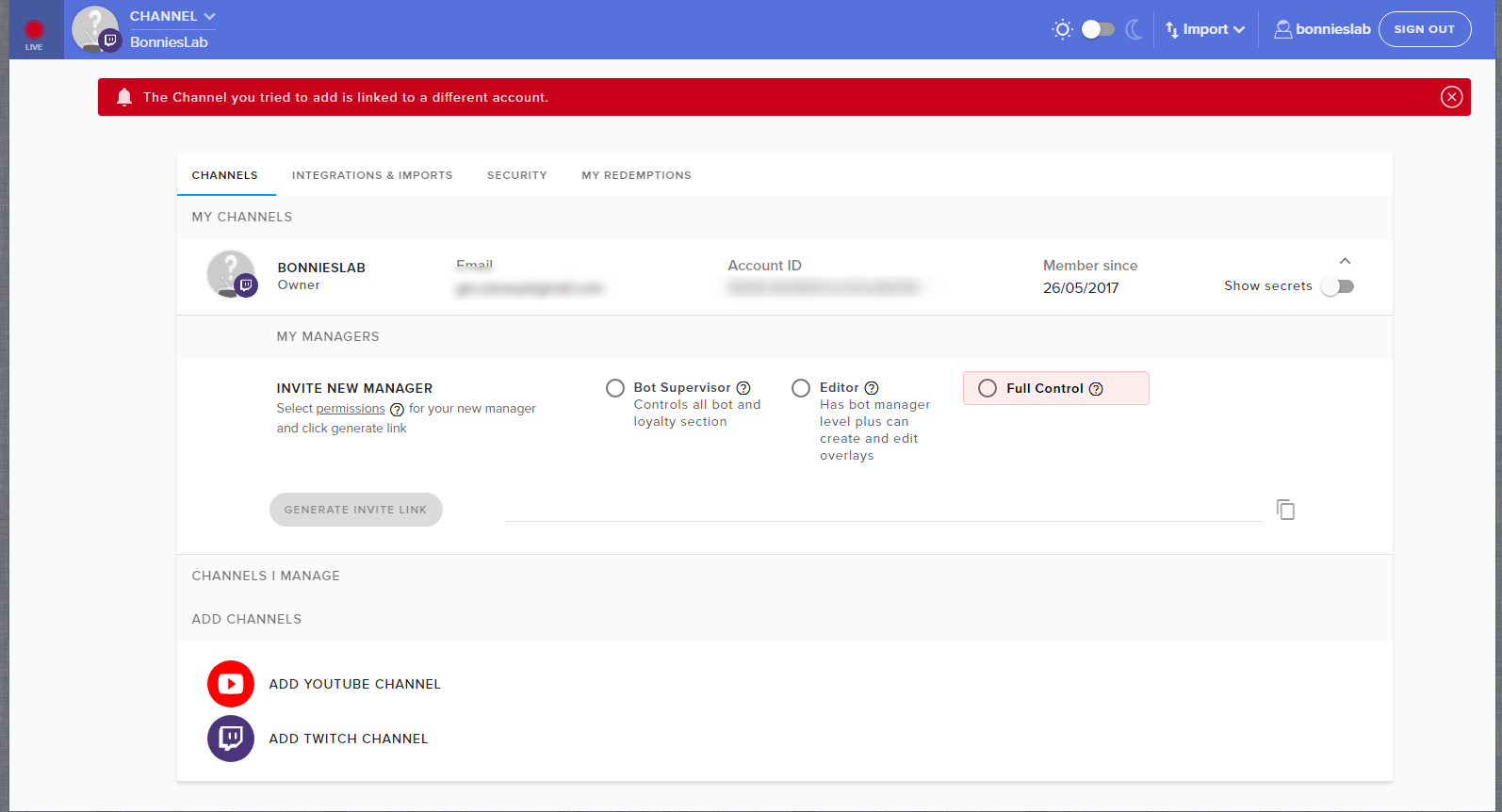
Hi, I recently did a name change on my channel. Is there anyone I can prevent my viewers from losing all their points? I go to account setting, it says "The Channel you tried to add is linked to a different account." when I tried to add a twitch channel. I am afraid if I add connect it under my new name, it will reset everyone's point. Can I export my list?
any way*
pine hemlock
All you need to do is log out of our site and log back in
everything should stay the way it is


 pine hemlock
Your new twitch name is BonniesLab correct? Thats what it shows you logged in as now
lapis dove
yea
lapis dove
It doesn't seem like streamelement was working on my stream when I did the commands
I can try again when I'm live next time
pine hemlock
It should update all your stuff to your new name now that you've logged out
As for the bot, you may need to part the bot from the main dashboard, log out, log back in, and join the bot again
Let us know if its not working when you're live next though :)
lapis dove
oh maybe it's just the bot
pine hemlock
Could be, it doesnt auto-join when a name change occurs since we have no way to track changes such as that automatically
pine hemlock
also, you'll want to re-link your twitch with discord too
pine hemlock
yw
 grim warren
are the servers down? two of my overlays aren't woking
weary mist
@grim warren not as far as I know. If you are using OBS, double click the browser source, scroll down, and hit the refresh cache button
grim warren
@weary mist no luck
weary mist
Not really sure then, because I just loaded mine up with zero issues
grim warren
@weary mist got it to work. restarted pc and then refreshed cache
weary mist
:+1:
 light mauve
Random question but I'm having an issue I couldn't figure out through google-fu; If I have an overlay with a Chatbox, and change Scenes to one that doesn't have the Overlay present in it, the Chatbox is wiped clear when I go back to my original scene. Is there a way to make the chat persist through scene changes? (using OBS)
Oh, I should mention that I have "Shutdown source when not visible" checked so the audio doesn't play in other scenes.
 raven rock
Hello everyone, I am a small streamer from Hong Kong and I would like to ask a question about the loyalty point system that confuse me a lot. Since the viewers always using !points and !roulette, it make the chat room so annoying. I know some streamer can put the SE command messages into the viewers' twitch inbox (such as the !points for checking the loyalty points). Can someone tell me how to make it? Sorry for my poor English and thank you for the support.
 cedar fulcrum
@light mauve Your chat will show the present chat when you will switch back to it.
Also you can use your StreamElements Profile page to track the chat anytime 😃
arctic hornet
I have a question regarding something (I’m not sure if this is possible for streamelements right now)
Basically it’s a !join command so when someone types in !join X it’ll add them to a queue list which when I type !queuelist it’ll post the queuelist and show who’s next.
I’m trying to move everything over to streamelements (I was using nightbot for it) and for some reason it doesn’t seem to be working, I’m possibly doing it wrong not entirely sure. (I’m currently in a different stream and setting everything up how I had it for the nightbot in another stream. So I’m confused wether i’m doing it wrong or that maybe streamelements doesn’t support this)
Instead of saying “You have joined the queue” it posts the entire response regarding it
light mauve
@cedar fulcrum Mine only displays the chat that has been entered since I opened the scene. If I change from one scene to another, the chat disappears because the Browser gets re-opened. I can show you what I mean in my latest stream vid if it'll help demonstrate what I am seeing.
cedar fulcrum
You can make a Scene just for the Chat and not make it as Shutdown. I understand what you mean because you close and reopen the scene
gentle imp
we don't have that yet @arctic hornet but it's asked I think
arctic hornet
Well I’ve been using a API i think it’s called? Basically its a whole link process I used for nightbot
gentle imp
yep and it's planned https://streamelements.helprace.com/i197-viewer-queue-system
u can upvote it 😃
arctic hornet
Welb. I shall wait for that then 😃
Thank you, Rippz. Not sure if you saw my earlier message thanking you guys haha. But seriously this support and everything you guys do are wonderful
gentle imp
I just got in but thank you, we're here for each other
arctic hornet
😃 haha well seriously you’re all amazing. You helped out my friend while I was basically just doing a relay information and was able to get the situation figured out
gentle imp
@raven rock sorry for the long time to reply to u, u can do this one way, disable !points command here https://streamelements.com/dashboard/bot/commands/default then go to custom commands and add a new one, can be !points of what u prefer and use this as bot response $(user) has $(user.points) $(pointsname) and is rank $(user.points_rank) on the leaderboard. then go to advanced and change where it is written Say to Whisper
ofc u can customize message as u wish, as u can see on image mine is customized, that's just the default code
the roulette command can't be customized like this though, as far as I know
raven rock
@rippz0r Thank you for reply and I solved the problem successfully
gentle imp
ahh hehe, nice 😃
 cloud shoal
Hey everyone. I can't seem to get the custom bot part of the Ground Control app to show anymore. Did something happen"?
 winter zenith
did you change your Tipping-link in your panels? or don't use our overlays anymore?
cloud shoal
ah
yes
good point
I had to disable it because charity stream
Thanks!
I completely forgot about that
winter zenith
oh yeah I just saw you closed it
cloud shoal
okay - second question - someone hosted me with 30 viewers but Ground Control showed 0
is that a bug?
winter zenith
sadly it needs to be in a pannel you can upload a empty PNG as a pannel and put the link there also if you want to not get donations ATM but still want the costom Bot name
@cloud shoal maybe a Hiccup from Twitch. Twitch has been a bit inconsistent with API's and Viewerlist's ATM :/
gentle imp
did they also raid?
I've had ppl raiding with xx amount of ppl and host regarding that raid showed 0
cloud shoal
nah just host
Next annoying question - how long after readding the tip link does it show custom bot name options?
summer mulch
@cloud shoal What do you mean exactly?
gentle imp
he means how long after he added the tip link in panels, does it take for the rename option for bot to show up
cloud shoal
^^
gentle imp
best would be to quit ground control after u setup everything and open again
cloud shoal
yeah i've reopened it a few times
gentle imp
I just got told it takes a few hours
cloud shoal
alright no worries, cheers!
gentle imp
also may I suggest a little something?
u need to eat a little more, u look way too thin from the pic 😄
just kidding ofc, I like skulls a lot too, have a great day 😉
gentle imp
hehe yeah I'm just way too silly 😂
cloud shoal
@gentle imp LUL
gentle imp
gotta have fun tbh, life's too short ^_^
cloud shoal
^^
 fluid tangle
am i able to transfer view points because they change their names?
<@&382267076632379392>
tight harness
Yes, !bonus <new username> <amount of points> then !bonus <old username> <-amount of points>, the - before the amount of points for the old account will remove those points from the old name
@fluid tangle ⤴
fluid tangle
ok thanks, ill come back here if i face any problem
tight harness
Alright 😃
fluid tangle
@tight harness so i have to put in 2 commands?
!bonus <new username> <amount of points>
then
!bonus <old username> <-amount of points>
tight harness
Yes, 1 to add the points to the new name and 1 to remove the points from the old name
 proud pumice
you can set the access level for the bonus command in the default commands page
fluid tangle
!bonus <call_me_gibby> <16780>
like this am i right?
or !bonus call_me_gibby 16780
@tight harness
tight harness
Without the < >
That was just to demonstrate that you put the value there
So the second example you gave is correct
Then !bonus call_me_gibby -16780 to remove
fluid tangle
can normal mod do it?
tight harness
If you set it to a moderator command in your Chat Commands, sure
fluid tangle
ok thanks
tight harness
No problem 😃
 steady monolith
is it possible to have ground control go through a different sound channel? so i cna set the volume on my end but have it higher for the stream
?
oh and is it possible to put a playlist into ground control or you have to put video link by video link
?
tried adding a playlist and nothing :/
winter zenith
@steady monolith the New Media Request Feature works best in a Chrome Browser
Ground control also gets a Rework ATM till then: BackUpPlaylist can be added with out a Problem in the Media Request Tab on your StreamElements Dashboard
@steady monolith for the Volume you can make it more silent for you and your Headphones but turn the Audio Level in OBS up for your stream if that helps
 hasty cloud
I need help setting up music for my twitch
winter zenith
okay whats up?
hasty cloud
able to voice chat?
winter zenith
nah I cant I am at work right now
hasty cloud
And trying to make it were i cant hot key my spotify to my obs\
winter zenith
Leave the Media Request Tab open in your browser play the Music from there OBS will pick it up via the Desktop audio source
oh you want spotify in obs?
hasty cloud
yes
winter zenith
well thats not a StreamElements related question is it? 
I dont know Spotify Hotkey's I belive they are compatiable with the normal Music FN keys on your keyboard
so while ou listen to spotify OBS will pick it up via the Desktop audio
hasty cloud
Well can you use stream elements to have music in your obs?
winter zenith
sure