#helpdesk-twitch
1 messages · Page 256 of 1
 narrow coyote

 ebon forum
Ugh. This is a museum piece when it comes to streaming. Time to upgrade.
Before the museum calls and wants it back.
 pale cobalt
i dont have the money to upgrade thats the problem
it used to work fine until a recent obs update i think
ebon forum
With that hardware you will not get anything done when it comes to streaming. Simply too old. Software load is increasing daily.
narrow coyote
Well, that is not a good pc for streaming. you are lucky it is getting 15 fps on software encoding, and the gpu is not strong enough for hardware encoding
pale cobalt
so basically there is no way im streaming until i can build a new pc... great
narrow coyote
you are encoding video real time, that takes a lot of power to accomplish, it is just the nature of the beast
not to mention, all of the other background tasks still going on
ebon forum
@pale cobalt you can do mobile streaming (decent smartphone required, quadcore at least) or do talkshows etc. with that rig. But gaming has higher requirements. If you have a console, it will work too with some tweaking.
pale cobalt
so that means i have to get my license and a car so i can drive my ass to a job so i can earn the money to get the parts for a new pc, i mean i have a build in mind, its about $1000 but i need to get the money to buy it
which i cant do right now
ebon forum
@pale cobalt you will be suprised how powerful modern hardware got, but the current prices for RAM and GPUs kill your budget. Wait a bit and use everything else you have meanwhile.
pale cobalt
yeah i heard the gpu market is crap rn
ebon forum
my second PC has a ryzen 2400G with 8GB ram, no dedicated GPU. it could stream simple games like LoL with 720p 30FPS just fine and it costs like 450$ USD
pale cobalt
a decent graphics card costs as much as my current pc did in 2015 when it was build XD
narrow coyote
I just upgraded my cpu, stuck waiting for new gpus to release before I get one
 daring igloo
gpu prices are killing my entire life kkkkkk
narrow coyote
ram is really bad too
daring igloo
I have a nice desktop hardware, but my gpu is getting weak very fast with streaming/record jobs
yep, ram are too overpriced too
narrow coyote
same here, just got a 2700x, and now my 980 is holding it back
daring igloo
I have a 780Ti
here in Brazil everything is even more expansive than other parts of the world
taxes are crazy
this year I renewed my build and spend more than R$15000,00, which is almost $4500,00
in ram i payed a bit more than 760 dollars for 32GB DDR4 3200MHz
 normal igloo
Heys support staff There's something you need to know 
 atomic hollow
👂
normal igloo
Here is your daily Reminder That you are all awesome 

atomic hollow
we are not worthy of you james
normal igloo
@atomic hollow Your words man not Mine 
 warm crane
Hey there! We're trying to get the tiltify stream widget to work, however, it's not popping with real donations or test donations.
 whole imp
how do i gamble in chat?
 weary mist
@whole imp if your streamer has the module enabled, it's !roulette or !gamble
whole imp
i found it thanks 😃
 rain roost
Hey guys! Question: Every overlay I have my twitch chat shows up with black text which makes it super hard to see on the screen anyway to fix that?
 dense jackal
In the chat widget settings you can change text color/font/ etc
rain roost
@dense jackal Ah okay so its defaulting to black, sounds good okay ill do that now
Thank you!
dense jackal
np
 sleek garnet
hey all i am stuck on chat commands - !songrequest will not Enable - Message: Controlled by module settings, i have looked and i can not find what is blocking this, Sorry for been a NOOB
narrow coyote
It is controlled by media request, if you have that enabled, the command will work.
the switch in the commands view will always look like that. there are 3 positions, enabled, disabled, controlled by module. The controlled by module will never change in the commands list
sleek garnet
OK thank you, yes i have been messing about with media request, and when i was adding a song/link in text chat it worked and now for some reason they don't so i am trying to find out why.
 pliant adder
My issue is kinda a big problem, at least to me. I have had two people send me money, and I have not received it...
help...
 digital tangle
any staff here ?
I have some question for website.
I found it is taking so long to waiting responding for SE website.
But a few days ago, everything is fine.
atomic hollow
@pliant adder do you see the tips on your activity feed?
@digital tangle what seems to be the issue?
@pliant adder do you have tip moderation on?
atomic hollow
which browser?
atomic hollow
can you try chrome for a sec?
pliant adder
I do not see tips in the feed, and tip moderation is off
digital tangle
in recent days, the background of SE's home page can't even loaded. Seems that is a issue for Firefox...
Everything is fine in chrome, but something is wrong in Firefox.
Thanks you, @atomic hollow .
pliant adder
@atomic hollow I do not even receive the tips on paypal itself
atomic hollow
@digital tangle I will check what is wrong with FF
@pliant adder do you have any sort of proof that someone actually donated?
pliant adder
a more recent tip was to test it out, and it was by a friend. He says the process was successful
atomic hollow
can you please ask him to screenshot the receipt so I can investigate?
pliant adder
ok
atomic hollow
you can DM me the details
pliant adder
ok
digital tangle
BTW, Internet Explorer can't load the website. (Blank page)
Microsoft Edge is OK.
 wanton jetty
is there a weekly top cheer widget
 tight harness
Both Top Cheer and Top Cheerer can be set to weekly, so yes 😃 @wanton jetty
warm crane
Still having the issue with the tiltify widget.
 nimble relic
For overlay resoltuion in the overlay creator should I go with 1440p (my native resolution) 1080p, or since I stream 720p 60fps, should i make the overlay resolution 720p?
warm crane
We've raised 5,230 dollars in 48 hours so far, and have only had 24 alerts actually pop for the donations. The rest have not popped.
wanton jetty
I need one that shows both top cheer with the cheerer's name
:/
Kinda pointless otherwise
nvm got it
tight harness
I was going to say, it does show the name 😄
@warm crane Sorry, not ignoring you, just don't know enough about the Tiltify integration personally
@nimble relic 1080p
nimble relic
Awesome, thanks
tight harness
No problem
tight harness
Tried refresh cache of current page?
 dry pelican
wanton jetty
dry pelican
wanton jetty
Where do you get the fonts from so i can import on this document
atomic hollow
we use google fonts
wanton jetty
Ok iv a bit of a nit pick with the cheer widget.... I dont like the fact that if 1 person donates lets say 500 bits, then someone else donates 500 bits that the 1st person gets overridden :/ seems a little unfair, I feel the 1st person to tip 500 bits should hold the spot and if somone out bits then it gets over written.
 magic ermine
What is up my dudes I am here again with more questions - Is there any way to copy an alert box from one overlay to another? 😄
narrow coyote
yes, there is the duplicate widget button, when you have the widget you want selected
magic ermine
Hmmmmmm but then how do I get it to a different overlay from there?
magic ermine
Damn I feel silly now for not figuring that out - Thanks for the help, you guys in here are the bomb 
narrow coyote
No worries! 
 storm pier
how can i shuffle media request backup list or song requests ?
ebon forum
@SparkZZ#1688 soon™
 tidal wind
how do i add a theme from my streamelements to obs?
 nocturne pelicanBOT
To add your overlays to OBS, add a new browser source in your scene. Paste your overlay URL in the browser source properties, set the dimensions to 1920x1080 (unless you changed them on the website), and :ballot_box_with_check: “Shutdown source when not visible” https://youtu.be/KDvLynUqXI4
 old python
Is there anyway to play music to my stream but not here it myself? I play a lot of competitive games where it requires my focus/attention/EARS to play the game.
nimble relic
@old python I think you'll need virtual audio cables to do that, so you can route the audio through a virtual cable into your stream, where you don't have to hear it.
weary mist
@old python use a program called "audio router"
ebon forum
I advise against software solutions, use a proper mixer and a good second soundcard to route the audio how you wish
old python
@weary mist I downloaded audio router and extracted it but it won't let me open up any program. Just has the page files.
I'll try out the virtual audio cable though.
 hasty briar
I have a question, If i had email that is not tied to an account anymore and some ones donates $ thru that email what happens to the money
 pine hemlock
It wouldnt work.
 main shell
Uhh
How can you make a command in chat (using !command add) but only allow people that are mods?
I know in nightbot it's -ul=moderator 
hasty briar
Well the money was taken out they say
main shell
Paypal @hasty briar ?
hasty briar
ya
main shell
It's in paypal limbo until:
- you make a paypal account with that username (impossible)
- time expires so they refund it
- the person cancels the transaction
hasty briar
Any idea how long the refund would take?
pine hemlock
The sender should have a way to cancel it if its sent to an account that doesnt e xist.
from their paypal dashboard
or they could just contact paypal
main shell
^ that's what I had them do.
pine hemlock
if it was sent from a bank/debit card it probably takes 3 business days
main shell
I forgot how long it takes for the refund to go through, I want to say a month or two
if he doesn't cancel it
if he does, yeah, 3 business days at most I'd say.
nocturne pelicanBOT
Chat/Bot Levels
100 - viewer
250 - subscriber
300 - __regular __
500 - moderator (twitch mods automatically placed at this level)
1000 - super moderator
1500 - broadcaster
Dashboard Manager Levels (least to most access)
Bot Supervisor (can add super moderators from dashboard)
Editor
Full Access
https://i.imgur.com/s61Liry.png
 main shell
tHANK YOOU!
dense jackal
you can do it from the site as well but that's how u do it from chat 😄
main shell
I mod for a lot of channels that don't give me dashboard access (mostly because they don't know how) so I've wanted to know for that c:
dense jackal

main shell

 sharp dock
Is there documentation for a explanation of the odds for the games? I'm trying to figure out a good value to set my % rigged system
storm pier
media request is totally ignoring my settings for "Maximum request duration" & "Max free requests per user" anyone else got the same problem ? Also "Queue Moderation" Feature is ignored - Also "Queue Limit" is ignored, what am i doing wrong ! ? ! ? ! ?
nocturne pelicanBOT
@sharp dock
The slider increases the payout if you manage to win
Less than 100 on the slider means people will not win money over time using the slot machine. 80-100 is a good range
less emotes = higher win chance
its like 5 emotes = 3%, 4 emotes = 7%, 3 = 12%
actual formula : n / n^3
n = number of emotes
weary mist
@old python there should be an execuable file in the folder. It doesn't need installed.
 unique ore
Is there any issues with tipping at the moment? I'm trying to test my tip PAGE as a guest user and PayPal is saying it can't complete and sends me back to SE.
pine hemlock
Your page works fine for me
 royal quarry
Hey just wondering if there was anything in the works for a future "recent activity" type feed that includes "recent sub" "recent donation" recent cheers" all on one scroll bar rather than 3 separate ones?
dense jackal
I don't believe so, besides combing donations and subs/cheers in any way is against twitch TOS
unique ore
@pine hemlock the page is loading fine but fails to process a donation. Tried it on a card that has $5 loaded on it and it's failing to process. Didn't know if it was SE or PayPal end of things.
dense jackal
We don't touch the money, very likely to be paypal
unique ore
@dense jackal @pine hemlock thanks for the info
 fiery shuttle
hello, im having issues getting text to scroll in the other direction for the widget for any of the types (follower, bits etc) is there a way to make this work again?
 undone plume
Been looking for a video that refers to adding music during an overlay (such as a be right back scene). Is there anyway to do that in streamelements or do I have to do that in obs?

 lament blade

 winter zenith
Is it just the alert box or the whole overlay?
winter zenith
Okay go into overlay editor in StreamElements
lament blade
mhmm
lament blade
oh~~
dense jackal
@fiery shuttle this is a known bug being worked on
@undone plume that would be done through obs
undone plume
Ive been having this problem for a while now actually, sometimes it works and sometimes it doesnt. When I use my BrowserSource option obs and i put the link from streamelements overlay into the BrowserSource the whole screen doesnt fit into the browsersource. Any help?
nocturne pelicanBOT
@undone plume The default resolution for StreamElements overlays (theme and custom) is 1920x1080. Please add them in OBS at their full resolution and use CTRL+F to fit to screen if necessary. You can then downscale your stream in OBS settings > Video if you'd like https://i.imgur.com/6bWXxjR.png

 elder sorrel
Using Media request on the SE Website: Is there a way to set a Hotkey to pause/resume music? 🤔
 sullen dock
is there by any chance a !subage command ?
whole imp
i need an adult
 misty wagon
Oh my, I'm the oldest pleb here, will that do? 😄
nocturne pelicanBOT
@whole imp Make sure to :ballot_box_with_check: “Shutdown source when not visible” for all browser sources (all OBS scenes). If using studio mode, uncheck “Swap Preview/Output scenes After Transitioning.” Also keep in mind that sound can play from any overlay loaded in the browser (editor or launched). https://i.imgur.com/FegZJQS.png https://i.imgur.com/yY0wcFl.png

 weary mist
@elder sorrel not until the ground control rewrite
 restive sierra
Hi! I'm a little confused by the whole redeem system, i think there's a thing i'm missing haha, could someone dm me to help, wouldn't want to spam chat.. thanks ^-^
weary mist
@restive sierra this chat is meant to be spammed for helping. What is the issue
 dense raptor
Hi, why is it that when someone donates to me it doesnt update with my overlay.
restive sierra
@weary mist ok so, let's say i have an item called Test and someone redeems it through chat or directly through the store, how can i link that said command to an action like a video? So if someone does !redeem test, how can i make that !test pop up on the stream?
weary mist
You can add a webm video as the store item itself, and have it pop up in the store redemption widget
restive sierra
but like how can i link !test to pop up that said video?
Like if someone does !redeem test i have an alert that pops saying that item was redeem, but then how can i link !test to that redeemed item and it only work if that item was originally redeemed
there's like one thing my brain is simply not getting in this and i can't put my finger on it
dense jackal
@dense raptor Are you recieving the alert correctly?
like it shows up in your activity feed?
dense raptor
No, which I don't know why.
 fallen gorge
Hello. I mod for 2 streamers who use SE and I can't remove the !tip command for either of them. Can anyone help me? Thanks in advance.
misty wagon
Do you have web-based access to their Dashboard full control @fallen gorge ?
fallen gorge
No I do not.
misty wagon
Then you cannot, only full control has access to tipping. Tell the caster to disable the !tip command like this
fallen gorge
Ok I will tell them. Thank you! I'll come back if I have any further questions.
misty wagon
@fallen gorge and after that you can send them to me directly and I'll explain the benefits of an all-in-one platform where bot+tipping+overlays all work together and why it's beneficial to their streams 😉
 brisk pebble
Any way to turn off notifications for auto hosts? sorry if this is obvious, I didn't see an option
narrow coyote
 Unfortunately, not yet, but it is planned https://streamelements.helprace.com/i307-disable-autohost-alerts you can follow this idea to be alerted on any updates
brisk pebble
thank you, I would eagerly look forward to that :)
dense raptor
@dense jackal
dense jackal
Are you sure they donated through the StreamElements tipping page?
If it's through streamlabs it won't go through @dense raptor
dense raptor
I'm pretty sure. I have it on my panels. It might be a stream labs one through night bot. Thank you I will check my night bot tomorrow
 unique sable
hey so Im having an issue with the bot, i can't get the dashboard to update live. so for one thing i have to manually refresh the page. also i can't see whats going on with the current song being played. so like, there was some dead air at teh end of a song. but, i couldn't tell because the dashboard wasn't showing how far into the song it was.
lament blade
I'm trying to change the highlight color in an alert variation with an exact color code but can't because the textbox renders below the bar at the bottom with the save variation button. The circle still appears so I can open the color picker but then the color won't match the rest of the overlay. https://i.imgur.com/4s7FAS6.png
 dense jackal
Are you using chrome @lament blade @unique sable ?
lament blade
Tried on both Firefox and Edge @dense jackal
unique sable
i've tried it on both chrome and fire fox @Tomathin#0100
lament blade
Okay so Chrome works here. Both Firefox and Edge show double scroll bars and it overlaps the bottom bar while Chrome works just fine, only showing one scroll bar and not overlapping
dense jackal
@lament blade see if it works better on chrome, that's what it is built for. @unique sable So just the page is not loading correctly at all for you 🤔
unique sable
nono it loads, i just have to manually refresh to get the page to update. and i can't see the songs as they play
dense jackal
@lament blade Our system is built with chromium in mind that's why it currenly works best with chrome
@unique sable 🤔 do you have it tabbed out in the back ground? I haven't heard of this issue before possibly your delay between videos?
lament blade
Also just noticed, I have the "Mute Editor" button checked but it still plays sound through the editor if an alert uses a video with it's sound instead of an GIF + Sound.
unique sable
yeah its in the background, but even when i have it open it doesn't do anything
is it not designed to have multiple people viewing it at once?
dense jackal
@unique sable I would try not to minimize the tab, and it is designed to have multiple people looking at it.
I'm testing on my end @lament blade
unique sable
@Tomathin#0100 but even if its not tabbed out i hae hte same issue
dense jackal
@unique sable talking to some others about what this could possibly be
unique sable
kk
dense jackal
@lament blade seems to be the same for me, Interesting bug, in the meantime you can always mute the tab
What country are you from @unique sable ?
unique sable
US
nocturne pelicanBOT
@unique sable Please connect your Twitch and/or YouTube channel with Discord by going to ⚙ Settings and then Connections here in Discord.
unique sable
its kazaryu
dense jackal
Awesome I messaged the devs, one last thing, try logging in and out of StreamElements and see if it works
unique sable
huh...and out of nowhere it just started working....idk what happened.
thanks for being available lol
dense jackal
after relogging? @unique sable ?
unique sable
no like, teh song changed and all of a sudden it autoplayed on the tab and now when people add songs it auto updates teh page. i literally have no idea why
unique sable
no worries, thanks for being here xD
dense jackal
Np
restive sierra
hi c: how can I make the redeemable item's sound get off on my stream directly?
narrow coyote
Not sure I follow what exactly you are asking for 
restive sierra
as in the sound of the redeemable item doesn't go off unless i have the overlay open
i just see the message and picture
narrow coyote
You need to have a store redemption in an active overlay to hear the sound
restive sierra
@narrow coyote eeeh meaning?
narrow coyote
the store redemption sound is played through the store redemption widget from the overlay
restive sierra
yeah, if i have the overlay open, like to edit it, and i type in the command, then the sound plays
but that's not very practical
narrow coyote
Not sure I follow your problem here, what are you expecting to happen?
restive sierra
the sound to play through the stream, without having the edit page open cause i don't use my desktop sound anyway if i stream so only i would hear it, but the goal is for the viewers to also hear it
narrow coyote
well, the idea is that you use your overlay for the stream, the sound is played through the overlay
restive sierra
actually wait i think i fucked one thing up haha, gimme a min or two
 cloud niche
so im working on a idea - command to that will roll multiple "dnd" dice - ex. roll 3 8-sided dice -> so far command looks like this $(repeat${random.1-$[user]}) but what happens it throws back the added up value of the numbers randomized - what im looking for is it to repeat the random number generator 3 times and keep it separated - so say i do !roll 3 20 - what i want is it to come back with 7 12 5 not 24 thoughts
doing the command multiple times would work but all in one command has a extra feeling to it
 tardy bay
Is there a donation bar to put up through elements like in labs?
cloud niche
not part of the staff but i know there is a donation bar - you can find it in my overlay -> edit overlay -> widgets -> Tip Goal (under stream goals) i do believe you need to set up a tipping page through stream elements and use that if you havent already
also for yahuda sounds like you need to add the overlay to the scene you are streaming on - launch overlay -> copy url -> then add it to the scene as a browser source then the sounds or notifications should pop up on stream without having stream elements open
^ also if staff could dbl check this when they get the chance id hate to lead people astray
 stark crater
G'day team. Can anyone tell me where i set my goals. tip, followers etc. Is it in overlays or is there a dashboard setting i'm missing?
cloud niche
its in the overlay for sure idk about if there is a shortcut in the dashboard or somewhere else - select the widget layer of the goal - and the second option down from the goal title is where you set your goal
stark crater
Cheers, i just found it buried in the overlay
cloud niche
 glad berry
where can I find the Kappagen?
cloud niche
My overlays -> Create blank overlay (if you dont have an overlay yet) -> then underneath click on "go to overlay editor" -> widgets in the top leftish -> click add underneath kappagen should be in second row
glad berry
I sees it. Thanks @cloud niche
cloud niche
❤
 arctic hornet
Hey, is there a way for the bot to mention someone when they start viewing your stream?
 dusk sequoia
Is there a way to have your personal emotes show up in commands?
@arctic hornet there is its called vivibot but I would not recommend it especially if they are lurking cause lurkers do not like to be called out
arctic hornet
Ah, hm. Thank you.
dusk sequoia
yw 😃 u can do it though its up to u just wanted to give you a tip lol
arctic hornet
Well I was actually looking into it for a friend haha. I personally don’t mind 😛 thank you for answering
dusk sequoia
yw 😃
 tacit ridge
Hello
dusk sequoia
hello @tacit ridge
tacit ridge
When I recieve a donation, I have to approve it so it will show on stream. what do I do to have it auto approve?
ebon forum
@tacit ridge disable tip moderation here: https://streamelements.com/dashboard/tipping/moderation

StreamElements
The Ultimate All in One Platform for Streamers
tacit ridge
thanks
 umbral plover
So how does the SE super overlays, or widget, tell what song is playing?
dusk sequoia
Is there a way to have your personal emotes show up in commands?
 carmine abyss
Hey team, random question and wondering if this is something that stream elements is able to do. Can we do something like !hate in chat and a sound effect could play?
 shy dirge
Hey so I've got the media request embedded into my overlay but i'm just wondering how my viewers go about placing the request?
 queen crypt
Hello. How do I enable stream reports?
tight harness
@Encrypt#3046 We use the YouTube API to tell what song is playing
@dusk sequoia Yeah, your bot needs to be subbed or you need to use your own account as the bot, if you're an affiliate and use don't rename the bot then the bot needs to be gifted a sub, if you're a partner then you can request that Twitch gives your bot a free sub
!rename
nocturne pelicanBOT
Custom bot name requirements
- StreamElements bot modded and in chat
- Active overlay with alerts
- StreamElements tipping page in the panels below the stream (!panels)
- Create a twitch account for the name you want to use
- Ground Control app must be running
Steps to enable custom name
- Sign in to https://twitch.tv with the bot account
- Install and run Ground Control (!gc for download)
- Visit https://twitchapps.com/tmi/ and generate an oAUTH token
- Copy/paste everything in the box to Ground Control oAuth settings and enter the name for the bot account
- Restart Ground Control (custom name may take a few minutes to take effect)
tight harness
@carmine abyss You could make a sound item called hate and then make a command called !hate with the response ${redeem hate}
@shy dirge If you don't have cost-per-second enabled they request them with their points, if you have cost-per-second enabled then they can request them via tips, or you can have them request them both ways, the choice is yours and it's all customisable in the Media Request Settings page
@queen crypt When you use our service they should automatically get sent to the email your Twitch account uses
dusk sequoia
ty so much @tight harness 😃
queen crypt
Thank you
shy dirge
@tight harness is there a guide for using loyalty points can they do it through twitch or do they need to go through the stream elements website?
tight harness
They can do it through either
We have a YouTube page with guides on there: https://www.youtube.com/channel/UCjerlCIbLPQwSnYlClkjDXg/videos
shy dirge
@tight harness cool :) can you point me towards the most beneficial ones for my query?
shy dirge
@tight harness thanks, I've watched that already and it doesn't cover it
tight harness
Welp, there is a loyalty system video on there too, kind of an old video now but it's mainly the same. I've got to head out for some food shopping but if you have any questions ask away and someone will get back to you
 gentle imp
yep, I'm here, just ask away 😄
 vernal bridge
I have a question, why do some points for chatting activity disappear on some channels?
gentle imp
how so?
vernal bridge
I do not know how, on some channels, especially those to which I started to look relatively - as I'm on the strip it counts, and when I leave it, my points disappear
In return, the points for hours outside the two channels counts correctly
gentle imp
wow and you didn't use the points for anything like requesting songs etc?
vernal bridge
no
gentle imp
I use the loyalty system and never noticed something like that, unless you change nick or something, points are given each 10 minutes
if you can show us more detailed info, perhaps with screenshots and any info you can provide, we can look into it 😃
vernal bridge
I have not changed the game nickname, and I will send screenshots tonight or tomorrow, because now I can not
gentle imp
I meant twitch nick, ok thank you 😃
vernal bridge
sorry, my bad 😄 I meant Twitch nickname
gentle imp
hehe yeah assumed so
shy dirge
How do I enable !songrequest? The button is greyed out
shy dirge
Thanks @winter zenith what do I do to enable it? I've got everything checked according to the tutorial video
winter zenith
give me 5 points in your chat pls 😃
by typing "!bonus Kiwaplay 5"
@shy dirge
I am sure your Songrequests work... if you give me 5 Points in your chat we can test it
 wanton sluice
sup guys?
winter zenith
hello 
pine hemlock

 jolly flame
Hey guys, how can I turn off autohosts for my alerts? Thanks
winter zenith
what do you mean with autohost alerts?
wanton sluice
just noticed on the dash a new cheer boss category 😃
winter zenith
yes its coming soon (TM)
wanton sluice
any ballpark idea when thats gonna be up? then I can finally ditch StreamLabs entirely
jolly flame
I don't want to show autohost alerts on stream, only normal hosts
tight harness
@jolly flame We've been looking into that for a while, it's in the to-do list
jolly flame
Ah ok, I swear someone mentioned recently they found a way to do it 🤔
No worries though
tight harness
jolly flame
Ahhh nice lemme check it out
tight harness
Doesn't say how to turn them off, just says planned 
jolly flame
Yus
Hopefully it's added soon, otherwise I gotta keep using SL for host alerts and we don't want that do we? ;)
tight harness
No we don't 
jolly flame

 placid fox
Hello friends, I have a problem with timers.
I've been working for a few days on my YouTube and mixer twitch channels.
Because it can be?? Thank you
 summer mulch
@placid fox Hey, what seems to be the problem with the timers?
placid fox
@summer mulch They do not come to me directly or when I'm not
it seems that they were canceled
pine hemlock
I think he's trying to say they don't work. Which means the line count or time needs to be lower
shy dirge
@winter zenith hi just done it. Sorry for the delay work n stuff
@winter zenith I'm an idiot :) I wasn't putting spaces between the request and link
Thanks!
winter zenith
@shy dirge I requested something and it works 😃
 tacit anvil
hi me again.. still have issue with watch time.. :(
all viewers stuck on the same time for a month now.. also I cant link my yt account to streamelements
 hushed ferry
Any way to adjust leaderboard Twitch widget for those that do not follow your channel, like the bots of Twitch? Viewers should not accumulate points until followed.
tight harness
@tacit anvil The reason your watchtime isn't changing is because you disabled Loyalty here: https://streamelements.com/dashboard/loyalty which watchtime is tied into. I'm guessing you've logged into our site with the account previously that you're trying to link, if you can DM me with the JWT token for your Twitch account and your YouTube account we can merge them onto the same StreamElements account
@hushed ferry Go to Leaderboard on the left of the site and reset the bots, that's what the extension pulls it's data from
lament blade
any support here?
 tidal pier
hey, the overlays from the site are set at 1080, does it matter if i change that to 720 on obs?
narrow coyote
you will want to add the browser source as the same resolution in OBS, this would then be downscaled with the reset of the scene to your current output
 half tulip
Howdy ya'll! Quick question, i've enabled TTS on my Bits and Tips alerts, but when i run a test (redo a previous bits or tips donation) no voice comes, any ideas what could be wrong?
 timid cape
Make sure the button is turned on in the alerts area. I have had countless times where I forgot to turn it back on.
narrow coyote
Make sure to check your variations as well
half tulip
both "enable text-to-speech" & "Announce action" is checked on
oh i gotta enable it in variations too?
lament blade
How can I add link for an item in my store page? (Cause I want a song request as an item.)
 stuck hamlet
Why would you want it as a store item? @lament blade
lament blade
Cause it's better for me like that. I dont want random people joining and being able to request a naughty song
 serene granite
you can make the songrequest command cost points, just like a store item
lament blade
How do i do that?
serene granite
StreamElements
The Ultimate All in One Platform for Streamers
Loyalty points cost
you can even give your subs a discount
or, even make it so only subs can use the command
 warm schooner
Question about the media request. When you are creating a playlist, what kind of songs are copyrighted and which are free to use? I generally just listen to one hour gaming remix playlists on YouTube, so if I go through these and pick out my favorite remixes and find their links on YouTube is this free to use in my streams?
lament blade
You can listen to copyrighted music, just some portions of your vod will be cut out.
warm schooner
Okay thanks, I just heard that twitch can shut down your channel since copyright violates their ToS
lament blade
Not that I know of
@serene granite I have a "watch a youtube video" item in my store how can I add a link option for that
serene granite
you can add a requirement to the item, on the 3rd stage
lament blade
What is the requirement labeled as?
weary mist
It will be labeled with what ever you put in the field
lament blade
So I just type Link ?
serene granite
YouTube URL would be a good description
lament blade
Ok thanks 😃
 dim eagle
I know this was asked before but I couldn't find the answer, any idea when playlist shuffle comes back on media request? Knowing the order of when my songs play is starting to drive me a little nuts. 😆
It has encouraged me to push my viewers to add their own songs though which was lacking some in my stream. So there's a huge plus!
serene granite
@dim eagle it's in the works 😃 no eta unfortunately
dim eagle
Bummer. I get it though. You guys are awesome! Thanks @serene granite
serene granite
np 😃
 alpine wyvern
How to reset the money on the tipping goal?
narrow coyote
umbral plover
What’s the YouTube API ? Something I need to download or is it part of the song title widget?
 summer urchin
hi hi, i have the chat bot widgets, but no text is coming up from my stream. any one has any ideas?
narrow coyote
@summer urchin What are you expecting to come up? you having a problem with a specific command, timers?
@umbral plover That might be a question for #dev-chat
summer urchin
no just the chat to come up on my overlay
narrow coyote
Ok, so you added the chat widget? Did you test it by typing some stuff into your chat?
summer urchin
yup, and nothing came up.
narrow coyote
Did you change any of the settings, or using just default? I just tried real quick by adding the widget to an overlay, and it seems to be working fine for me 
narrow coyote
@summer urchin were you testing this with our overlay in the editor, or OBS? I was just messing around and just found that if my browser is not maximized, some of the chat does not display until I maximize my browser. This is just happening from the overlay editor
summer urchin
im in the editor, and its coming up on that, but not in my stream
narrow coyote
Well if you see it in the editor, you should see it in your stream, unless you did not save the overlay, or are using a different overlay
summer urchin
can you only use one overlay per scence? ive got one for my alerts, one for my bit cup and one for my frame, chat etc
narrow coyote
you can use more than one, but they would be their own separate browser source, and that can eat up resources fast
summer urchin
i dont know why its not working then.
narrow coyote
OBS uses the cef for its browser sources, and that does not support hardware acceleration, so the more browser sources you have, the more load it puts on the CPU
So the same overlay in the editor is loaded into OBS, and you see the chat in the editor, but not in OBS?
summer urchin
yeah
weary mist
try playing around the with browser source size. Change the width to the full 1920, and height to 1080, then hit CTRL+F and see if it shows up
summer urchin
yay that worked thankies!
narrow coyote

 balmy dune
eyy! just a quick question. I just set up streamelements and did my overlays. Just curious to see if it works properly (follower notifications etc.) Asked my friend to unfollow and follow me back to see it works (lol, low viewership) but I'm not sure if works with "old" followers or only on fresh ones.
normal igloo
@balmy dune Only fresh
Also You can test follower notifications etc https://i.gyazo.com/1530a3b73c72ef323dd782077c5db701.png
 balmy dune
yeh I figured that test button there. Just wanted to test "real" stuff
narrow coyote
⤴ The tests will use the same notification as the real thing, it is just not recorded
 broken summit
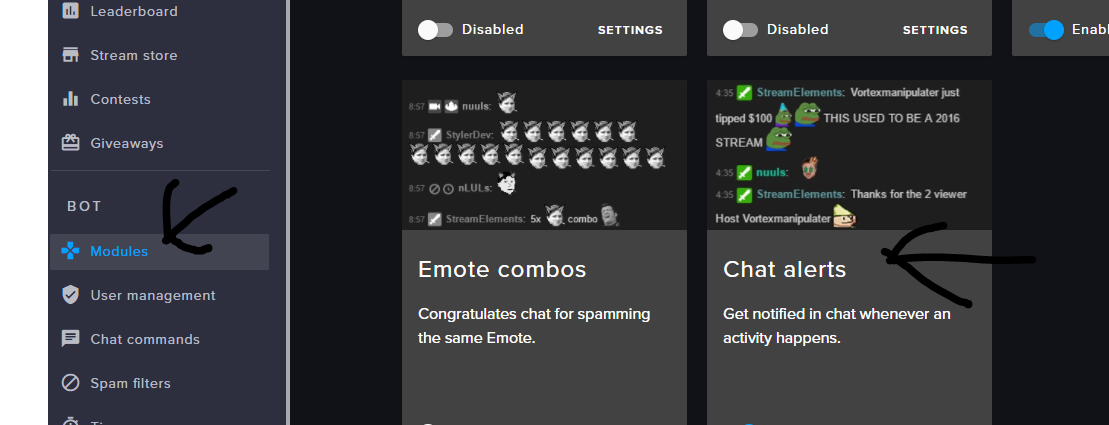
how do I set up alerts so that if I get a follow, donation, cheer, etc it shows up in chat? I stream on xbox
balmy dune
Ok, good to know, wasn't really sure if old followers worked so nice to know that too
cheers!
narrow coyote
an unfollow and refollow will not work, it was intentional to prevent abuse of the loyalty system
normal igloo
@broken summit https://i.gyazo.com/5857ce00ab25cbc91bdfdff3a2abdb7e.png
 broken summit
thank you!
normal igloo
np
 terse yew
does the loyalty system have an option to auto give pts based on bits
like X points per 100 bits
ignore me i just found it, my eyes had glazed over it oops
normal igloo
@terse yew bits for points is against the twitch tos
terse yew
what do u mean by bits for points
normal igloo
you are asking does the loyalty system have an option to auto give pts based on bits ?
pine hemlock
There's a cheer bonus under loyalty settings
terse yew
so it shouldnt be against the tos
normal igloo
so is against the twitch tos
terse yew
yeah i found it thanks tho @pine hemlock 😃
dense jackal
What's against twitch TOS is combining cheers/dontions @normal igloo
 weary mist
@wanton rock Advertisements are not allowed. Please don't do it again
wanton jetty
ANyone know of any good sites where you can make it so subs and tips / bits add time to a timer ?
timid cape
I am on the auto mod page and I under the "blacklisted and Whitelisted" Links tab I cannot access or even see for that matter the links I have whitelisted or blacklisted. When I punch in a link and hit enter they just disappear. uh, help.
rain roost
I am currently using the follower goal widget but it is only showing 3/50 even though I currently have 31 followers, can anyone help me?
narrow coyote
is 31 your total followers? the goal is designed to set a number like 50, and track the follows until you get that number
winter zenith
no no xD
kite I take it
@rain roost https://streamelements.com/dashboard/session click on goals and change the "Follower Goal Progress" to 31
StreamElements
The Ultimate All in One Platform for Streamers
but after that it will count up just fine
if some one unfollowes you also have to change it manually in the Data section of the Overlay Editor
narrow coyote
You can also go here https://streamelements.com/dashboard/session
winter zenith
D: WOHA I didn't know that!
narrow coyote


lament blade
Can anyone explain me how does I set up my giveaway to viewers that have viewed me for atleast 1 hour?
I know other bots etc can do that but I do really like SE and would like if it HAS that future and im just dumb and cannot find it
weary mist
You can make a ticket cost worth 1 hour worth of points
lament blade
nah I dont want that
weary mist
That is the only way to do it
lament blade
sad :/
weary mist
you can suggest a new option, but tracking watch time is the same as tracking loyalty points
lament blade
am i allowed to say other bot names?
winter zenith
sure
lament blade
streamlabs bot has the same future where it does track your LP but i guess it tracks for how long you have been watching and you can set up the giveaway to be 1 ticket cost <random number of points> but only if you have been straight watching for an hour
weary mist
That is why I said you can suggest the idea
lament blade
cause i do tons of giveaways
weary mist
!ideas
nocturne pelicanBOT
Here is the StreamElements Ideas Board: https://strms.net/ideas
weary mist
If you don't create the suggestion, there is no way for us to track the need for it
lament blade
and i would like to be very hard oriented to watching me
okay i will
done
hope it goes well and its implemented cause its coool future
 somber zealot
Anyone having issues with Donation Alerts not going off on SE
narrow coyote
Do you have the donation in your activity feed?
somber zealot
no
narrow coyote
well, then it sounds like the donation did not go through, so there was nothing to alert on
somber zealot
got the email from paypal and funds verified
narrow coyote
if the tip came through the SE tipping page, and was successful, it would be in your activity feed. Are you sure it was through StreamElements?
somber zealot
yes , my donation link is straight to my SE tipping page
 safe kettle
When is the Media Request going to be rewritten? Nothing but complaints about it in my channel. Song Requests are constantly getting autoskipped
narrow coyote
Unless something happened on the PayPal API side of things, as that is all SE does in call the PayPal API
somber zealot
ok , I'll keep an eye on it and see if things change , thanks @narrow coyote
 clever mango
@safe kettle Since the launch of the system, we have only had a handful of problem reports. We are aware of a few bugs that we are working to fix but autoskipping has not been reported at all.
If you can provide some more details and/or clips of this happening we can look into it further. In order to find and fix an issue, we need to know everything that is running and all of the settings that are being used so that we can try to make the problem occur on our machine.
winter zenith
for example @safe kettle what browser do you use for Media Request?
would be a Key information
 tropic wyvern
Hey there 😃
normal igloo
Ok I have some really obvious questions But it's late at night forgive my stupidness anyways in LOYALTY SETTINGS for Tips bonus It says Bonus points for tipping (multiplied by the tip amount) It's that like double or 🤔
winter zenith
hello @tropic wyvern
clever mango
Bonus x the amount tipped in whole numbers @normal igloo
tropic wyvern
hey @winter zenith 😃
I dont want to be rude, but i just joined and i already have a problem. Would anyone try to help me on this please?
normal igloo
@clever mango so like if i tip £1 and the Bonus points 100 Bonus points 1x100 ?
 simple frigate
does anyone know why my image doesnt show up when i try to redeem something from the stream store?
tropic wyvern
So, this is kinda weird and came up like 2 days ago. Everytime i start OBS it works fine. If i start a game , then OBS is getting like VERY low fps. But just obs. the game itself runs perfect. The problem is the overlay. if i activate it, this will happen. if i deactivate it, everything is fine.
Is there a solution? I tried a fresh OBS install, updated everything etc etc
winter zenith
are you having a Animated Overlay?
I see Kite typing I wil lleave this to him
since he is the OBS-PRO!
narrow coyote
What are your PC specs?
simple frigate
@clever mango yes it is
clever mango
What is being redeemed? Is it a stream perk?
 vernal nimbus
anyone know a work around for songrequest not working? i have it enabled for viewers to request songs but nothing happens even with a url
 kind epoch
Hi all, is there a way to change to colour of the text in twitch chat box widget?
clever mango
@simple frigate are you testing it by redeeming the item?
tropic wyvern
@narrow coyote Ryzen5 1600 | GTX 1060 6GB | 8GB Ram| SSD . If you want i will send you a log file
dense jackal
yes under text settings in the bottom left @kind epoch
narrow coyote
I can peek at the log, but if it is just OBS frame rate being low, the logs will probably not show much
simple frigate
i am @clever mango
clever mango
@simple frigate which item?
kind epoch
@dense jackal Sorry but it's not there
clever mango
"subhype" is a stream perk but doesn't have an image
"raid" is a sound effect. Sound effects are sound only
simple frigate
so in the widget i put a picture
clever mango
OK now both items are showing as sound effects
dense jackal
that’s basically my setup @tropic wyvern I can send u my obs settings when i am home in a couple hours, if you don’t have a stream soon
simple frigate
how do i have picture and sound effects
dense jackal
@kind epoch are you using chrome? please screenshot your overlay editor
tropic wyvern
@dense jackal That would be nice. Like i said, my problem came up just ~2 days ago. before that everything was fine. But it will look at your settings, maybe i messed something up 😄
clever mango
The image set for a sound effect item is just to display on the store page
 gaunt flame
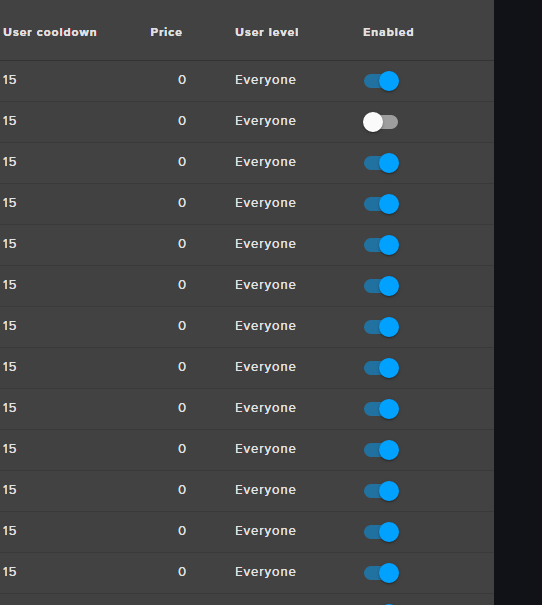
Hi guys, the "edit" button seems to have disappeared from my custom commands page https://i.imgur.com/LXqjFpG.png
 clever mango
!cmdpage
nocturne pelicanBOT
Depending on your display resolution or window size, you may need to scroll to the right to edit and/or delete commands, or try zooming out.
simple frigate
then what the point of having the widget if the picture doesnt sound?
gaunt flame
I'm dumb, thanks. lol
clever mango
It plays the sound
simple frigate
but not the image?
dense jackal
@gaunt flame
simple frigate
that so wierd isnt it
clever mango
No, because people are redeeming a sound effect
they're not redeeming an image
If you want an image to show up you can use stream perk item
That will show image AND sound
simple frigate
stream perk item so i h ave to create a new one
clever mango
You can edit existing items
kind epoch
simple frigate
then i add the widget?
kind epoch
@dense jackal i added the image for you to look at
dense jackal
click the circle to the right of where it shows the font “roboto”
above the “Line height”
 elder pasture
So I'm not an artist whatsover....when making overlays and scenes, how do you come up with stuff without using copyrighted images?
clever mango
@simple frigate Yes, I don't know what you're using this for but I guess you would put "{name} says" in the widget message
That will appear with the image
simple frigate
i did and changed the picture too
clever mango
The picture in the widget only shows up if there is no picture for the item
simple frigate
okay so i have two item to redeem i would have to make two widgets?
kind epoch
found it, but it was really difficult to see it.
clever mango
it plays all redemptions
simple frigate
it only played one when i tested it
winter zenith
@vernal nimbus problem has been solved on stream
tacit anvil
quick question.. will paysafe donations come soon?.. also will it be supported in greece? 😃
clever mango
Yes
wanton jetty
Anyone know of any good sites where you can make it so subs and tips / bits add time to a timer ?
dense jackal
i believe you can do a train widget like mentioned above but combining them is against twitch TOS @wanton jetty
wanton jetty
No i want a timer basicly where it counts down from like 5hours but a sub would add like 10mins ect
dense jackal
I think that has been requested, check our ideas page to see if it’s there, if not definitely add it!
 sharp elbow
Haii ❤ So I've had a problem lately. I want my bits to have TTS but I don't want it to say "Bday1 Bday1 Bday1" Just the message they type out. Is there a way to change this?
pine hemlock
@sharp elbow Its on the ideas board but its not implemented yet
wanton jetty
What day do "weekly goals" reset
sharp elbow
ahhh ok 😃 thanks! Keep up the good work 😃
elder pasture
How come when i test a tip event, it'll show up on my latest tip widget but not my top tip widget
pine hemlock
@wanton jetty What do you mean by weekly? The time period for goals is set by you
@elder pasture Dont think the top tip widget is affected by emulating.
wanton jetty
Yeah for example weekly top tip... What day does that reset as my "Top Cheerer" hasnt reset :/
from last wek
clever mango
Weekly = last 7 days
Monthly = last 30 days
 waxen valve
@clever mango do you know why when i get a raid from another streamer i get the raid alert, AND the host alert? is there no way to allow only the raid if its a raid ? or is that the Twitch API's issue ?:O
clever mango
Hosts always follow a raid. You would need to disable host alerts or raise the minimum to stop both alerts from happening.
 royal shuttle
when i am playing with friend will obs be able to pic up there voices
clever mango
Yes, OBS can capture audio that plays through the default audio device
royal shuttle
thanks for telling me this
 safe mirage
hey guys Im newish to streaming i was wondering how to get multiple resolutions instead of just having the native stream resolution
 queen oyster
hello how do i tell what my overlay resolution should be
pine hemlock
@safe mirage Twitch gives resolution options(encoding) to streams based on viewers and availability
@queen oyster 1920x1080 is standard assuming your monitors are 1080p.
weary mist
@safe mirage unless you are partner, it's a first come, first serve basis for the quality options
safe mirage
thanks
queen oyster
how do you remove stuff from the overlay
weary mist
Click it, and hit delete @queen oyster
queen oyster
its not working for me
queen oyster
its not
lament blade
So like the Media Share isnt detecting my Media Share widget even though it did ten seconds ago [OBS]
I kinda got it
queen oyster
i just cant edit stuffo ut
like i want to delete the info alreadyo n the overlay
but i cant even delete it
 thick dagger
Hellllo! Quick question - Is there a way for viewers to gift each other loyalty points from their stash? also, is there a time period for new subs to receive their points upon subscribing?
queen oyster
hello how do i add a streamlabs goal into the stream elements editor
 true axle
Hi, I dont want a follower sound. So im on alertbox --> follower allert --> Volume Video & Sound on 0% but i can still hear it. Dont find the problem here :S
nocturne pelicanBOT
Make sure to :ballot_box_with_check: “Shutdown source when not visible” for all browser sources (all OBS scenes). If using studio mode, uncheck “Swap Preview/Output scenes After Transitioning.” Also keep in mind that sound can play from any overlay loaded in the browser (editor or launched). https://i.imgur.com/FegZJQS.png https://i.imgur.com/yY0wcFl.png
whole imp
So yesterday i set up Stream elements for the first time, not knowing that i would have support from the crew almost immediately. The process did take some time to set up but without @cedar fulcrum and others to help me i think i would still be scrambling and tinkering with the application. Im glad to say ive made the transition from all 3rd party applications over to Stream elements and i couldnt be happier with the service from the team. HUGE shout out to you guys, you are amazing!
 dry hare
@thick dagger I don't think that's a thing? someone else will chime in soon with more knowledge
@queen oyster did you import your Streamlabs stuff in your streamelements dashboard?
thick dagger
@dry hare Thanks!
queen oyster
no @dry hare
dry hare
cuda is coming to save me
pine hemlock
@thick dagger !givepoints - and the points for subbing should(?) be instant
thick dagger
Interesting - is there somewhere that needs to be authorized as a chat command or is it immediate
the givepoints one
pine hemlock
@queen oyster We have our own goal(s) you can add to the overlay via the editor.
thick dagger
@pine hemlock - and thank you for the response
pine hemlock
@thick dagger should be immediate
thick dagger
Ok I appreciate it
pine hemlock
@whole imp 
queen oyster
yes but it doesnt update to the cash i ahvei n paypal already @pine hemlock
true axle
@dry hare & @lament blade , Ty for the fast answer. Worked fine 😗
dry hare
the !givepoints should be enabled in the chat commands section
pine hemlock
@queen oyster Go to the Data tab at the top of the overlay editor and you can change the values of the goals.
pine hemlock
You can also import your streamlabs tips via the extension: https://chrome.google.com/webstore/detail/streamlabs-export-to-stre/ieknafncicchjncjiegckipdjnakialh
storm pier
Still looking for help! so repost: media request is totally ignoring my settings for "Maximum request duration" & "Max free requests per user" anyone else got the same problem ? Also "Queue Moderation" Feature is ignored - Also "Queue Limit" is ignored, what am i doing wrong ! ? ! ? ! ?
weary mist
@storm pier what song are you using to test this?
never mind
change that field
This field means that everyone is exempt from the rules you created
change it to subscribers, or regulars and higher
storm pier
@weary mist okay this was so far down i always thought this was refering to the skip song vote - then nvm im stupid 😄 tyvm
weary mist
tardy bay
@cloud niche Thanks for the guess even. I'll check it out
 dim heron
@weary mist Thank you for the help a few days ago. I got my Stream Report in the right email after logging out and clearing the cache, then logging back in. 😃
weary mist
 keen siren
Hey there, whenever I emulate an event and have OBS open at the same time I get the alert sound over and over again. I copied the same overlay into two different scenes and still get the echo even though I check the "Shutdown" box.
weary mist
try muting the tab in chrome when testing
keen siren
That's so odd. I tried that before but was continually getting the echo
Now it's fine
@weary mist Thanks 
weary mist
 tiny elbow
Hello, with the new Media Requests, whenever I show the video on stream it echos or plays twice with a little lag. It works fine when it isnt showing on stream, does it have to do with OBS?
weary mist
@tiny elbow do you have the media share widget in multiple overlays?
tiny elbow
@weary mist I just checked it only shows for one, I am using the Galactica overlay with the Galactica Alerts Aminmation
weary mist
try muting the page and eeing if it still doubles up
tiny elbow
@weary mist Muting the media request page?
weary mist
also
nocturne pelicanBOT
Please connect your Twitch and/or YouTube channel with Discord by going to ⚙ Settings and then Connections here in Discord.
tiny elbow
@weary mist Alright, hold on its giving me that error that it cant detect the media request widget
@weary mist Sorry its taking a bit, its still giving me that errod
@weary mist error*
tiny elbow
@weary mist Still nothing
@weary mist It was working fine yesterday
@weary mist But i just noticed when I showed the video on stream you could hear it twice
weary mist
im not totally sure what is up, but I recommend going through all your scenes and double checking that the box is checked for shutdown source
tiny elbow
@weary mist That might of been it, I just checked both boxes for my overlays, ill try refreshing the browsers and see if itll work. If not ill restart my comp and see if that does anything
weary mist
👍
tiny elbow
@weary mist Maybe it didnt like Mozilla haha, so I tried to use a different browser and now it works, Thanks for the help!
weary mist
👍
 chilly sequoia
So I've been trying to figure out a way to make a command that automatically gives out points and then says something to chat. So what I'm looking for is something like "!command" does the equivalent of "!addpoints all 10" and then the bot would output something like "Here have some points" in chat. Is anything like this possible?
dense jackal
Not automatically, no. You can add it to the ideas board though. @chilly sequoia
umbral plover
Someone tried to tip using my SE page and said they got Internal Error, is that on SE's end, or is that on my end?
Do I need to upgrade my paypal to a business account?
waxen valve
i cant seem to get the hotkeys for ground control to work with the music player.? Thoughts ?
winter zenith
@waxen valve the media request system got newly implemented. Ground controlls also needs to get a revamp wich is happening! So ATM hotkeys are a tricky thing :/
@umbral plover I asume that the error message acure after they logged in and the paypal page looks a bit old like from early 2000‘s . Had the same issue and its Paypal sided. I used Chrome instead of Firefox wich solved my problem
umbral plover
Ah okay
I'm not sure exactly. I think they said that they got the internal error after clicking my link and clicking on the button within SE, so before it routed them to PayPal I guess?
winter zenith
You didnt link your twitch account to your discord profile
Can you tell me your twitch name?
@umbral plover
fallen gorge
Hello. I've been in queue for SE live chat support for over 3 hours. Can anyone help me here?
gentle imp
tell us the problem and we will help as we can
fallen gorge
I'm unable to remove the !tip command for 2 streamers I mod for. Through SE live chat support, someone was able to remove the !donate command, so I would like to do the same with !tip.
fallen gorge
No I do not
gentle imp
ahh so they need to do it themselves https://streamelements.com/dashboard/bot/commands/default and disable !tip
fallen gorge
I believe they tried but were unable to, which is why the asked me to help. Two days ago I asked a rep on live chat support to remove a command I was unable to, and he was able to do it on his own. Would something like that be possible now?
gentle imp
that would have to be with someone with access, which I don't have, but anyway strange they can't disable commands, only some that are managed by widgets you can't disable, if you are using chrome or firefox should work fine
fallen gorge
Can you communicate with the reps on live chat support? I've been in queue for a long time.
gentle imp
I can ask 😃
 long ridge
I need support fot the Alertbox Editor
atomic hollow
what seems to be the problem?
long ridge
i cannot change the cheer alert...
other alerts working fine but cheer only not
cannot change the sound
atomic hollow
did you check the variations?
atomic hollow
long ridge
is there a way to get more overlays for streamelements?
 magic nymph
hi, I just used streamelements to donate to a friend, but I do not plan to keep my acount. is there a way to deactivate my account?
 north glacier
@long ridge what do you mean?
atomic hollow
@magic nymph you can just disconnect it from your twitch account
@long ridge checkout the super theme gallery
gentle imp
long ridge
@atomic hollow i did but its not what i am looking for...maybe other Website to geht streamelements stuff for money?
looking for nice alert boxes...but found for streamlabs only 😦
gentle imp
each theme has different alerts, so strange you didn't like any, there's so many to choose from
long ridge
yeah i know 😦 sorry
gentle imp
or you can make your own, no need to apologize
long ridge
i am little bit to lazy atm 😦
gentle imp
😄
lament blade
hello, want to check again if you guys can fix voteskipping for lacari's channel
atomic hollow
voteskipping?
lament blade
voteskipping is enabled in mediarequest, but the command is disabled by the module settings
atomic hollow
im checking
serene granite
@fallen gorge what's your twitch username?
winter zenith
@Encrypt#3046 I just checked seems to be your Paypal account isn't linked correct (wrong Email?) or your Paypal Account is not verified? (Log into Paypal see if you have to activate your Email adress or have to link a credit card or something)
lament blade
@atomic hollow did you figure it out? o.o
serene granite
@lament blade we're still looking in to it
lament blade
okay, I'm probably going to go to sleep
serene granite
@lament blade we found the problem, fixing it.
lament blade

 ionic herald
hey hey
could it be that followers are currently not working on the alerts?
I only see subs in the "Events in real time" list
not my followers
@serene granite
serene granite
Are you on the Activity Feed page ?
ionic herald
You're a streamer? Create your donation page with your Twitch or Hitbox account - TipeeeStream
here
serene granite
that's not us 😃
winter zenith
h1rule du verwendest ca 3 verschiedene dienste 
StreamLabs, StreamElements und Tipeeestream? warum tust du dir das an junge ❤
ionic herald
woher weißt du denn das ? 😄
ionic herald
Naja, jeder service hat was für sich ^^
winter zenith
I see... naja wenn du das handeln kannst cool 😄
ionic herald
Uffff
winter zenith
also schau mal bei StreamElements Dashboard ob die Follow's usw auftauchen hier:
ionic herald
Wrong thing haha
winter zenith
StreamElements
The Ultimate All in One Platform for Streamers
winter zenith
no problem my dude ❤
winter zenith
time to switch full ;D
so you always have stuff that works 
oh shit and you know Greywalker? the world is SMALL!
 ionic herald
x)
atomic hollow
danke
 proud pumice
is twitch loading fine for you guys?
winter zenith
@proud pumice yes
clever mango
You're banned 
winter zenith
Stream Yesterday was to lit 🤙
 tawny pivot
Regional DNS issues here.
 frank badge
Does anyone happened to have had issues with alerts showing up hella late?
 cedar fulcrum
@whole imp Thanks!
frank badge
Anyone able to hop into the voice channel real quick?
summer mulch
@frank badge Sure
 pale eagle
If anyone is available for voice chat support
atomic hollow
@summer mulch
summer mulch
@pale eagle Will be there in a minute
pale eagle
Take your time, i have all day 😃
 vale wyvern
guys, something weird happened on stream yesterday. I'm making a few researches but couldn't find a conclusive answer. It has more to do with hardware, I guess, so if anyone knows why
dense jackal
what was the issue @vale wyvern ?
vale wyvern
basically my stream was really laggy, almost slideshow laggy, but my game was fine, up to 140fps and just really fine. I tried everything to try and fix the stream. it was only lagging while I was playing, and specially on fights (overwatch). my CPU and GPI usage were super high on fights but my pc was fine, and the game was fine, only the stream was crap
then, after researching a bit, I turned on vsync
and everything just went smooth like butter
I heard about bottlenecks when your GPU is way more powerful than your CPU, but I guess I'm on the other way. I have a i7 7700k and a 960 for gpu
so I was just kind of curious. it never happened before on live. I had frame drops sometimes but nothing this drastic
the downside is that I get 60fps max, so sucks
dense jackal
what was your bitrate? and what did you use to encode
vale wyvern
I was using cbr, around 4k bitrate, but I messed around with many bitrate values
and nothing changed
gentle imp
wow v-sync actually did something good
vale wyvern
right? that's what I thought hahahahahah
gentle imp
😄
dense jackal
cbr isn’t your encoder it’s a setting to stablilize your bitrate, @vale wyvern can you screenshot your encoding settings and video settings and post them here?
vale wyvern
oh sorry, it was x264 or h264
I'm not home right now
but basically this and then the key frame interval was 2 I guess
dense jackal
ok good that’s what you should be using
is this a common problem, or happened once recently specific to Overwatch?
vale wyvern
it happened yesterday only, but I guess it was getting kind of worse recently, just not this bad
i tried repairing overwatch but no luck
dense jackal
interesting, especially that Vysnc fixes it
vale wyvern
right? I'm gonna test today if capping the fps works as well
dense jackal
try asking over at discord.gg/obsproject this seems more up their alley
gentle imp
sometimes can even be a windows update 😦
vale wyvern
oh nice. thank you I'll do that
dense jackal
Possibly are your gpu drivers up to date as well?
narrow coyote
I have this in a few games, if I dont use vsync, then it is just not smooth on stream. I blame my GPU, I want to upgrade when new nvidia cards release
gentle imp
@vale wyvern vc tem todas as browser sources marcadas para desligar quando não estão visiveis correto?
vale wyvern
@gentle imp sim sim, inclusive achei que era algo com o emote explosion do se, mas mesmo desativado continua a igual
gentle imp
pois, pode ser o kappagen usa muito o cpu, mas se não tinhas anteriormente é estranho, se tiveres alguma resposta do pessoal do obs diz sff 😃
 steady monolith
Afternoon ladies and gents
if i may ask, is there something up with host alerts?
 steady monolith
yeah has happened twice
gentle imp
!host
nocturne pelicanBOT
Twitch doesn't have a "notification system" for hosts (unlike follows, subs, raids, etc.) so the only way for StreamElements to know that you are being hosted is to connect through you to twitch. This connection is made on:
- SE Dashboard page - https://streamelements.com/dashboard
- SE Activity Feed page - https://streamelements.com/dashboard/activity
- Ground Control desktop app - https://streamelements.com/groundcontrol
Please have one of these open during your stream in order to receive host event notifications.
steady monolith
someone hosts but the alert doesnt go off, hoever others work
gentle imp
that's probably the reason, read above
steady monolith
ahhh
gentle imp
dashboard or ground control open will fix it 😃
steady monolith
Didn't actually think i needed it open, thanks @gentle imp
gentle imp
you're welcome
 chrome osprey
My alerts don't show up, but I can hear the sound effects... twice lol
weary mist
@chrome osprey 1, make sure you have "shutdown when not visible" checked in all your sources. this will stop the duplication. 2. Make sure the layers are in the correct order, and the browser source size is correct (default for StreamElements is width=1920, height=1080. OBS default is width=800 height=600)
chrome osprey
I'll check that out! Thanks
@weary mist When I test a alert, I do see it on my obs....
Forgot to mention that
 jolly magnet
Hey guys, notifcations were working perfectly past few hours of stream but then all of a sudden not working. Works on the test ones but doesn't show on xsplit at all. Anyone got any ideas or is this an issue?
winter zenith
in the 3.3 Update they managed to break browser sources its not just StreamElements I have a Poll widget on a seperat browser source and a Kappamon as well all stop working after some time
narrow coyote

winter zenith
I reported to the Facebook support (LOL) and troubleshooted with them for WEEKS, they seemed to semi fixed it in the PTR version but 3.3 is still fucked
I also switched to OBS yesterday because the support told me "We dont know what this causes on your mashine"
And I was like: People that are using XSplit come to us and ask why alerts not working its not just me...
they asked me kindly to send those people to them so they can trouble shoot more... if you want to go report it to them to help improve you can go to there FB page and report the issue
jolly magnet
GG Xsplit, thanks for info @winter zenith
winter zenith
I can only advise you 2 things:
-
Roll back to 3.2 or use the PTR version
-
convert to OBS
narrow coyote
jolly magnet
Yeah I am done with Xsplit for good.
Obs here we come.
A paid service that is this bad... unacceptable.
winter zenith
true... Ive been there till beta with them. I tried everything to fix this issue for me because I love XSplit
 glass goblet
Am I missing something or is there no way to do a sub train counter?
winter zenith
but they left me no choice they kept saying its only my mashine and StreamELements must be at fault... wich is not true because everything works fine in OBS
@glass goblet there is a widget for that
in our Overlay editor
glass goblet
Thanks @winter zenith Ill look it up. Probably overlooked it.
jolly magnet
@winter zenith Xsplit is all I ever used but this just isn't acceptable.
winter zenith
I never had issues with it but since 3 weeks its just abismal
 upper verge
@cedar fulcrum is there a way to add points to a specific user without them earning them?
weary mist
@upper verge try taging support heros next time. Staff are busy making things. Try !bonus username 100 in chat
cedar fulcrum
@upper verge sure you can use the Command. !addpoints <name> <amount of points>
upper verge
Thanks
cedar fulcrum
Always welcome
ebon forum
@winter zenith w00t, you moved to OBS? Welcome to the dark side, we have beer! 🍻
winter zenith
@ebon forum I HATE scene tranistioning WTF this is so dumb...
But the audio levels are nice and locking shit into 60 FPS 


winter zenith
I am doing them through stream deck guesse what they are shit
lament blade
hello, i have timers enabled on the bot but the messages are never popping up, or dont i see these messages myself?
lament blade
?
i mean the bot in my chat
i gave it timers for messages
they are not popping up
weary mist
@lament blade check the chat lines. If there are chat lines, that number of messages must be sent in the 5 minutes before the timer triggers
@dry hare OBS has stingers, you just have to supply the images
dry hare
rip
ebon forum
@winter zenith use studio mode then and OBS should give you better stream quality overall 😄 And it is free and open source, so you can mess with that xD
 weary mist
lol
lament blade
thanks scalper
weary mist
👍
dry hare
now I want to start making stingers
weary mist
yes @lament blade
lament blade
well its not doing anything
weary mist
looks like it is working for me
lament blade
it takes very long for it to pop up tho?.
weary mist
I am guessing you are using the "custom bot name" and either have it set to a name there is no auth token for, or just have it set to yourself
lament blade
i have an auth token + my own name
weary mist
It triggers every 5 minutes, and 1 chat line. So since the 1 chat line was met, it just waited for the timer to finish
lament blade
but i said something myself 10 mins ago
but a question
my chat isnt popping up in my overlay now xD why is that?
weary mist
because you are using your own account as a custom bot name, it is probably igorning things you said
lament blade
ok i get it now thanks scalper ;D
weary mist
👍
lament blade
my chat isnt popping up in my oberlay
overlay
always worked before
D:
ok it is now ❤
 indigo bone
how can u reset chatters on the streamelements leaderboard extension?
summer mulch
@indigo bone Unfortunately you can't reset the chatstats data
narrow coyote
indigo bone
Talking about the chatter tab not the loyalty points.
weary mist
Right now, there is no way to exclude or reset chat stats
dry hare

weary mist
lol
indigo bone
Awesome thanks also do I need to create a Playlist for the media share? Was having a hard time getting the backup Playlist set
clever mango
Backup playlist is a public youtube playlist
indigo bone
Needs to be a public Playlist from outube
I can search that? Then just share with the link?
narrow coyote
You could make your own public playlist, or find a public playlist to use if you wish. You will just need the URL for the playlist itself
lament blade
@serene granite I believe I fixed the voteskip thing
I changed the default name to !skip
serene granite
good stuff!
lament blade
and it wasn't working
when it changed it back to !voteskip
it started working again
serene granite
ok, nice to know
lament blade
and I added an alias for !skip
serene granite
our devs also did some magic


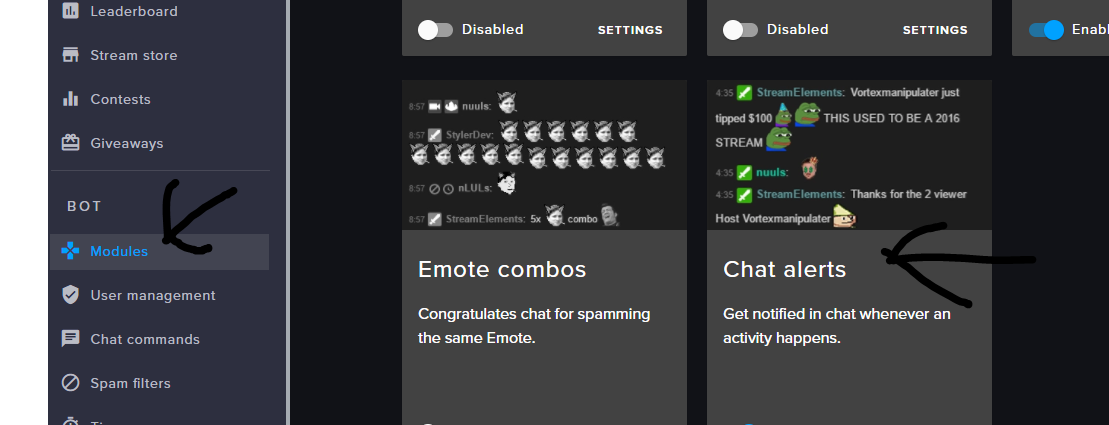

 narrow coyote
If you are making your own playlist, you can find the video you want and click this button to add it to your playlist @indigo bone
lament blade
the button still says disabled, but at least it works lmao
weary mist
Anything that is refered through a module (or media share) doesn't actually go by the button. It is a slightly different color of grey
if you have activated it in the module, it is active
long ridge
Guten Abend...weiß jemand, welches Format man benötigt, um eigene Alerts zu erstellen? Allerdings muss der Codec transaprenz unterstützen
weary mist
@winter zenith or @ebon forum
ebon forum
@long ridge wenns video sein soll - wir unterstützen nur webm - das muss dann entsprechend re-encoded werden. bei bildchen is man flexibler.
long ridge
ja soll was animiertes sein...nur AE unterstützt webm nicht....daher mit welchem Programm kann ich das dann umwandeln? @ebon forum
ebon forum
@long ridge sek ich gugg mal. gleich mal eckdaten - wir haben 1000mb gesamt, aber filesize ist 30mb pro stück
ebon forum
@long ridge gibt viele converter, "Any Video Converter" kann das.
long ridge
ok und erstellen in AE?
ebon forum
mp4 raus, dann umwandeln
long ridge
also ich meine erstellt ihr es in AE und rendert es unconvertiert oder als .mov?
mp4 kann alphakanal?
ebon forum
AE, rendern als mp4, sollte gehen. ich kenn mich mit after effects net so gut aus 😄
ebon forum
@long ridge ich hab premiere, hab aber auch .mov files meistens am ausgang und hab nie die alerts hier als video gemacht 😃
@long ridge ansonsten mussu auf english mal Kireaki hier fragen. ich tagge mal nicht, sonst gibts haue 😄
long ridge
ne alles gut...kann denn Premiere auch Webm?
ebon forum
mal sehen, lass mich erstmal das teufelswerkzeug starten 😄
long ridge
harhar
ebon forum
Nö, nix webm, muss eh umgewandelt werden
Da gibts n Plugin: http://www.fnordware.com/WebM/
WebM plug-in for Adobe Premiere Pro and Adobe Media Encoder
Aber keine Garantie ob das Dingens was taugt, mussu guggen. Wenns läuft, sparst du dir das umwandeln
@long ridge gerade getestet, premiere pro, export tut laufen (15min mit 6core für 30mb file, aaaaaaaaaargh). sollte auch mit AE gehen.
 lyric otter
i don't know if this is the right place to put this but anybody know why my capture card isn't picking up my ps4 output? it makes my tv go black and says no source? any ideas??
ebon forum
@Ghibli_Pave#7502 check the capture card settings, you most likely have wrong video settings there.
 eager gulch
hello = )
queen oyster
hi
eager gulch
does anyone know how i block /me messages ?
clever mango
The chat bot does not block /me messages at this time. Feel free to suggest it at https://strms.net/ideas
 orchid warren
is the website down for anyone else?
clever mango
No, what are you seeing?
orchid warren
"The page isn’t redirecting properly"
"Firefox has detected that the server is redirecting the request for this address in a way that will never complete."
clever mango
 Did this just start happening? Does it work with another browser?
orchid warren
idk. i havnt been on the website for a while. went to log back in to update some alerts and the home page errors. other browsers do work and i clicked on one of the links from the description of the channel and it works.
its like just the homepage for some reason
clever mango
https://support.mozilla.org/en-US/questions/1168897 this might help
orchid warren
i cleared the browsers cache and everything and it works now. originally it said the server couldnt be reached so i assumed it might be down
normal igloo
Ok issue I'm using both Roulette Slot machine But they do not tell my users How long the cooldown is for them